English
GB
Operating Instructions
HOB
Contents
Operating Instructions,1
Description of the appliance-Control Panel,2
Installation,6
Start-up and use,8
Precautions and tips,13
Care and maintenance,14
Technical description of the models,14
FR
Français
Mode d’emploi Manutenção e cuidados
TABLE DE CUISSON
Sommaire
Mode d’emploi,1
Description de l’appareil-Tableau de bord, 2
Installation,15
Mise en marche et utilisation,17
Précautions et conseils, 22
Nettoyage et entretien,23
Description technique des modèles,23
Español
ES
Manual de instrucciones
ENCIMERA
Sumario
Manual de instrucciones,1
Descripción del aparato-Panel de control,2
Instalación,24
Puesta en funcionamiento y uso,26
Precauciones y consejos,31
Mantenimiento y cuidados,32
Descripción técnica de los modelos,32
Instruções para a utilização
PLANO
Índice
Instruções para a utilização,1
Descrição do aparelho-Painel de comandos,2
Instalação, 33
Início e utilização, 35
Precauções e conselhos,40
Manutenção e cuidados,41
Descrição técnica dos modelos,41
PT
Português
DE
Bedienungsanleitung
KOCHFELD
Inhaltsverzeichnis
Bedienungsanleitung,1
Beschreibung des Gerätes- Bedienfeld,2
Installation, 42
Inbetriebsetzung und Gebrauch,44
Vorsichtsmaßregeln und Hinweise, 49
Reinigung und Pflege, 50
Technische Beschreibung der Modelle, 50
NL
PL
Italiano
IT
Istruzioni per l’uso
PIANO COTTURA
Sommario
Istruzioni per l’uso,1
Descrizione dell’apparecchio- Pannello di controllo,2
Installazione, 51
Avvio e utilizzo,53
Precauzioni e consigli,58
Manutenzione e cura,59
Descrizione tecnica dei modelli,59
Deutsch
Nederland
Gebruiksaanwijzing
KOOKPLAAT
Inhoud
Gebruiksaanwijzing,1
Beschrijving van het apparaat-Bedieningspaneel,2
Installatie, 60
Starten en gebruik, 62
Voorzorgsmaatregelen en advies,67
Onderhoud en verzorging,68
Technische beschrijving van de modellen,68
Polski
Instrukcja obsługi
PŁYTA GRZEJNA
Spis treści
Instrukcja obsługi,1
Opis urządzenia-Panel sterowania,2
Instalacja,69
Uruchomienie i użytkowanie,71
Zalecenia i środki ostrożności,75
Konserwacja i utrzymanie,76
Opis Techniczny,76
TIS 621 CT L
2
Description of the appliance
Control panel
GB
Description de l’appareil
Tableau de bord
FR
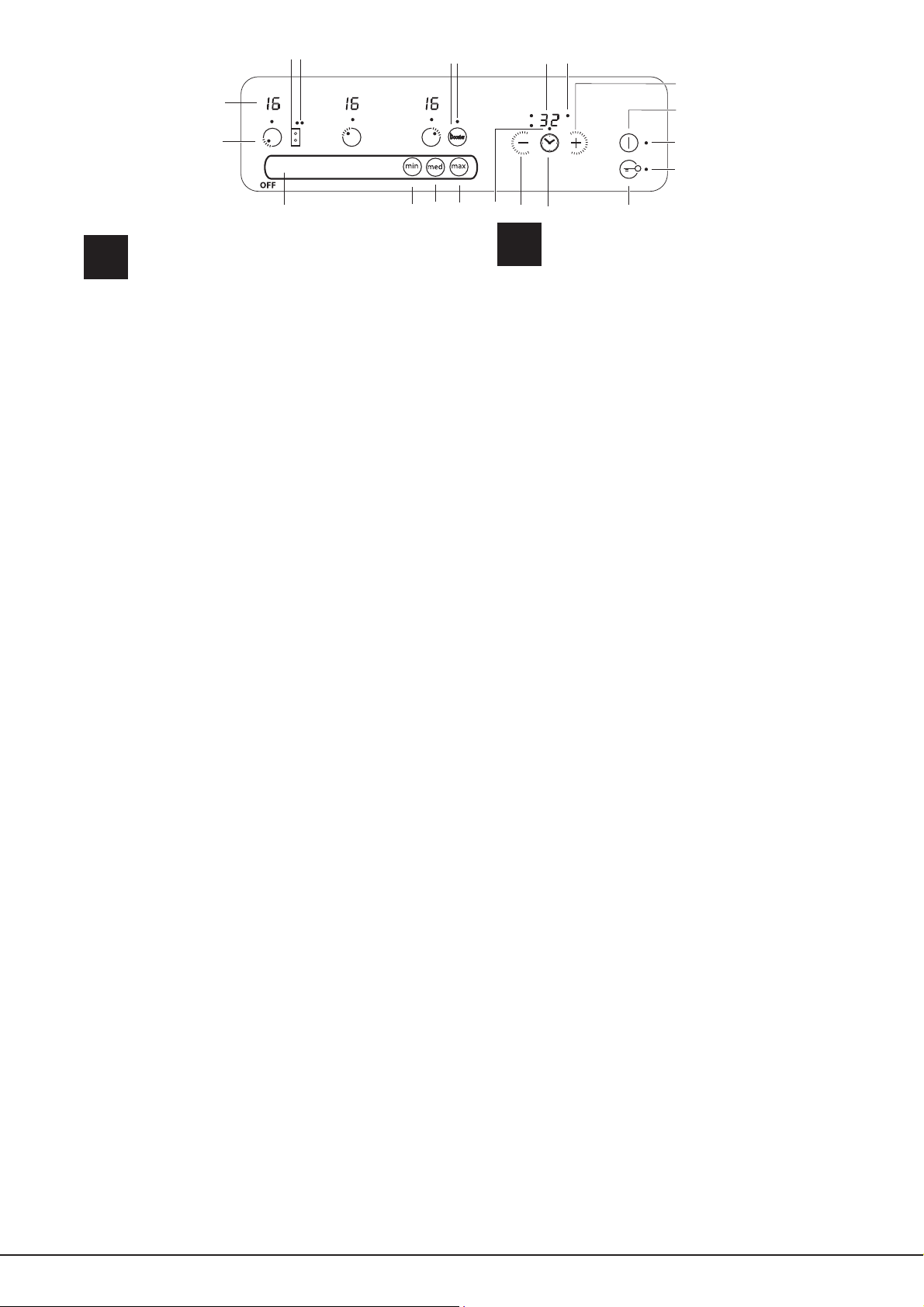
The control panel described in this manual is only a representative
example: it may not exactly match the panelon your appliance.
1 SLIDER ZONE - switches the hotplate on/off or adjusts its
power level (see Start-up and use).
2 COOKING ZONE indicator represents the corresponding
cooking zone.
3 POWER indicator provides a visual display for the current
heat level.
4 ON/OFF button switches the appliance on and off.
5 ON/OFF indicator light shows whether the appliance is on
or off.
6 PROGRAMME TIMER* button controls the cooking
programme times (see Start-up and use).
7 PROGRAMME TIMER* display shows which programme
has been selected (see Start-up and use).
8 COOKING ZONE PROGRAMMED* indicator lights show
which cooking zones are being used during a cooking
programme (see Start-up and use).
9 CONTROL PANEL LOCK button prevents accidental
changes to the hob settings (see Start-up and use).
10 CONTROL PANEL LOCK indicator light shows the control
panel has been locked (see Start-up and use).
11 BOOSTER* button activates the booster function - 3000
W - of the cooking zone (see Start-up and use).
12 BOOSTER* indicator light shows that the booster
function has been activated.
13 TIMER* indicator light shows that the timer has been
activated
14 MAX BUTTON - switches the cooking zone on at its
maximum power level 16 (see Start-up and use).
15 MED BUTTON - switches the cooking zone on at its
medium power level 8 (see Start-up and use).
16 MIN BUTTON - switches the cooking zone on at its
minimum power level 1 (see Start-up and use).
17 INCREASE TIME* button increases the cooking duration
while the timer is running or while a set programme is
underway (see Start-up and use).
18 DECREASE TIME* button decreases the cooking duration
while the timer is running or while a set programme is
underway (see Start-up and use).
19 EXTENSO TECHNOLOGY button - activates the
EXTENSO TECHNOLOGY mode
20 EXTENSO TECHNOLOGY indicator light shows that the
EXTENSO TECHNOLOGY function has been activated
! This product complies with the requirements of the atest
European Directive on the limitation of power consumption of
the standby mode. If no operations are carried out for a period of
2 minutes, after the residual heat indicator lights turn
off and the fan stops (if present), the appliance automatically
switches to the .off mode.. The appliance resumes the operating
mode once the ON/OFF button is pressed.
Le tableau de bord qui est
décrit n.a qu.une valeur d.exemple :
il peut ne pas correspondre au modèle acheté.
1 ZONE „SLIDER”- pour allumer/éteindre un foyer ou régler sa
puissance (voir Mise en marche et utilisation).
2 L’indication FOYER indique le foyer correspondant.
3 Indicateur de PUISSANCE : une colonne lumineuse pour
signaler le niveau de puissance atteint.
4 Touche ON/OFF pour allumer ou éteindre l’appareil.
5 Voyant ON/OFF : il signale si l’appareil est allumé ou éteint.
6 Touche PROGRAMMATEUR* pour programmer la durée
d’une cuisson (voir Mise en marche et Utilisation).
7 Afficheur PROGRAMMATEUR* : pour afficher les choix
correspondant à la programmation (voir Mise en marche et
utilisation).
8 Voyants FOYER PROGRAMMÉ* : ils indiquent les foyers
quand une programmation est lancée (voir Mise en marche et
utilisation).
9 Touche VERROUILLAGE DES COMMANDES pour
empêcher toute intervention extérieure sur les réglages de la
table de cuisson (voir Mise en marche et Utilisation).
10 Voyant COMMANDES VERROUILLEES : pour signaler
le verrouillage des commandes (voir Mise en marche et
Utilisation).
11 Touche BOOSTER* pour brancher la suralimentation - 3000
W – du foyer (voir Mise en marche et utilisation).
12 Voyant BOOSTER* il signale que la fonction de
suralimentation du booster est activée.
13 Voyant MINUTEUR* il signale que le minuteur est activé.
14 TOUCHE MAX - pour allumer le foyer à son niveau
maximum 16 (voir Mise en marche et utilisation).
15 TOUCHE INTERMÉDIAIRE - pour allumer le foyer à son
niveau intermédiaire 8 (voir Mise en marche et utilisation).
16 TOUCHE MIN - pour allumer le foyer à son niveau minimum
1 (voir Mise en marche et utilisation).
17 Touche AUGMENTATION DU TEMPS* pour augmenter
la durée en cas d’utilisation du minuteur ou en cas de
programmation (voir Mise en marche et utilisation).
18 Touche DIMINUTION DU TEMPS* pour diminuer la durée
en cas d’utilisation du minuteur ou en cas de programmation
(voir Mise en marche et utilisation).
19 Touche EXTENSO TECHNOLOGY- pour utiliser la zone de
cuisson EXTENSO TECHNOLOGY
20 Voyant EXTENSO TECHNOLOGY il signale que la fonction
du EXTENSO TECHNOLOGY Yest activée.
! Ce produit est conforme à la nouvelle Directive Européenne
sur la réduction de la consommation d’énergie en mode standby.
Sans opérations pendant 2 minutes, après l’extinction des
voyants de chaleur résiduelle et l’arrêt du ventilateur (si
existants), l’appareil se place automatiquement en „off mode”.
Pour remettre l’appareil en mode de fonction
* Only available in certain models. * N’existe que sur certains modèles
13
1
2
3
5
4
6
7
8
9
10
11 12
14
15
17
18
16
1920

GB
3
Descripción del aparato
Panel de control
ES
Descrição do aparelho
Painel de comandos
PT
El panel de control se describe a continuación a modo de ejemplo: puede no
ser una exacta reproducción del
modelo adquirido.
1 ZONA „SLIDER” - Para encender/ apagar la placa o regular la
Potencia (consultar Puesta en funcionamiento y uso).
2 Indicación ZONA DE COCCIÓN muestra la zona de cocción
correspondiente.
3 Indicador de POTENCIA: indica visualmente el nivel de calor
alcanzado.
4 Botón ON/OFF para encender y apagar el aparato.
5 Piloto ON/OFF: indica si el aparato está encendido o apagado.
6 Botón TEMPORIZADOR DE PROGRAMACIÓN* para
programar la duración de una cocción (ver Puesta en
funcionamiento y uso).
7 Display TEMPORIZADOR DE PROGRAMACIÓN*: visualiza las
selecciones correspondientes a la programación (ver Puesta en
funcionamiento y uso).
8 Pilotos ZONA DE COCCIÓN PROGRAMADA*: indican las
zonas de cocción cuando comienza una programación (ver
Puesta en funcionamiento y uso).
9 Botón BLOQUEO DE MANDOS para impedir modificaciones
fortuitas a las regulaciones de la encimera (ver Puesta en
funcionamiento y uso).
10 Piloto MANDOS BLOQUEADOS: indica que se ha producido
el bloqueo de los mandos (ver Puesta en funcionamiento y uso).
11 Botón BOOSTER* para encender la sobrealimentación -3000
vatios -de la zona de cocción (ver Puesta en funcionamiento y
uso).
12 Piloto BOOSTER* indica que está activada la función de
sobrealimentación booster
13 Piloto CONTADOR DE MINUTOS* indica que se ha activado el
contador de minutos
14 BOTÓN MÁX. - enciende la zona de cocción de nivel máximo
16 (ver Puesta en funcionamiento y uso).
15 BOTÓN MED - enciende la zona de cocción de nivel medio 8
(ver Puesta en funcionamiento y uso).
16 BOTÓN MIN - enciende la zona de cocción de nivel mínimo 1
(ver Puesta en funcionamiento y uso).
17 Botón AUMENTO TIEMPO* para aumentar el tiempo durante el
uso del contador de minutos o de una programación (ver Puesta
en funcionamiento y uso).
18 Botón DISMINUCIÓN TIEMPO* para disminuir el tiempo
durante el uso del contador de minutos o de una programación
(ver Puesta en funcionamiento y uso).
19 Botón EXTENSO TECHNOLOGY- para utilizar la zona de
cocción EXTENSO TECHNOLOGY
20 Piloto EXTENSO TECHNOLOGY indica que está activada la
función EXTENSO TECHNOLOGY
.
! Este producto satisface los requisitos establecidos por la nueva
Directiva europea sobre la limitación de los consumos energéticos
en standby.
Si no se realizan operaciones por 2 minutos, una vez que se
apagan los luces piloto del calor residual y del ventilador (si están
presentes), el aparato se coloca de forma automática en el modo
“off mode”.
El aparato vuelve al modo operativo utilizando la tecla ON/OFF.
O painel de comandos descrito a seguir está representado para fins
explicativos: pode não ser uma exacta
reprodução do modelo comprado.
1 ZONA „SLIDER”- Para ligar/desligar a chapa ou regular a
Potência (veja Início e utilização).
2 Indicação da ZONA DE COZEDURA indica a zona de
cozedura correspondente.
3 Indicador POTÊNCIA sinaliza visualmente o nível de
calor alcançado.
4 Botão ON/OFF para ligar e desligar o aparelho.
5 Indicador ON/OFF: sinaliza se o aparelho está aceso ou
apagado.
6 Botão TIMER DE PROGRAMAÇÃO para regular a
programação da duração de uma cozedura (veja Início e
utilização).
7 Display TIMER DE PROGRAMAÇÃO: visualiza
as escolhas relativas à programação (veja Início e
utilização).
8 Indicadores luminosos ZONA DE COZEDURA
PROGRAMADA: indicam as zonas de cozedura quando
se inicia uma programação (veja Início e utilização).
9 Botão BLOQUEIO DOS COMANDOS para impedir
modifi cações acidentais das regulações do plano de
cozedura (veja Início e utilização).
10 Indicador luminoso COMANDOS BLOQUEADOS:
sinaliza o bloqueio dos comandos (veja Início e
utilização).
11 Botão BOOSTER* para ligar a super alimentação - 3000
W - da zona de cozedura (veja Início e Utilização).
12 Indicador luminoso BOOSTER* indica que está
activa a função de super alimentação booster.
13Indicador luminoso CONTADOR DE MUNITOS* indica
que está activo o contador de minutos.
14 TECLA MAX - para ligar a zona de cozedura no nível
máximo 16 (veja Início e utilização).
15TECLA MED - para ligar a zona de cozedura no nível
médio 8 (veja Início e utilização).
16 TECLA MIN - para ligar a zona de cozedura no nível
mínimo 1 (veja Início e utilização).
17 Botão AUMENTAR TEMPO* para aumentar o tempo
durante o uso do contador de minutos ou de uma
programação (veja Início e utilização).
18 Botão DIMINUIR TEMPO* para diminuir o tempo durante
o uso do contador de minutos ou de uma programação
(veja Início e utilização).
19 Botão EXTENSO TECHNOLOGY- para utilizar a zona de
cozedura EXTENSO TECHNOLOGY
20 Indicador luminoso EXTENSO TECHNOLOGY indica que
está activa a função EXTENSO TECHNOLOGY
! Este produto satisfaz os requisitos impostos pela nova
Directiva Europeia sobre a limitação dos consumos
energéticos em stand-by.
Se não se efectuarem operações por 2 minutos, depois
que os indicadores de calor resíduo e da ventoinha
(se presentes) se desligarem, o aparelho coloca-se
automaticamente na modalidade “off mode”. O aparelho
voltará para a modalidade operativa ao carregar na tecla
ON/OFF.
* Presente sólo en algunos modelos.
* Há somente em alguns modelos.

4
IT
DE
Beschreibung des Gerätes
Bedienfeld
Das hier beschriebene Bedienfeld dient nur als Beispiel, es handelt sich
nicht unbedingt um eine genaue
Widergabe des von Ihnen erworbenen Modells.
1 ZONE „SLIDER”- zum Ein-/Ausschalten der Platte oder zur
Regulierung der Leistung (siehe Inbetriebsetzung und
Gebrauch).
2 Anzeige KOCHZONE zur Angabe der zugehörigen Kochzone.
3 LEISTUNGSANZEIGE: Auf dieser ist der jeweils erreichte
Heizwert ersichtlich.
4 Taste ON/OFF: Zum Ein- bzw. Ausschalten des Gerätes.
5 Kontrollleuchte ON/OFF: Diese zeigt an, ob das Gerät ein- oder
ausgeschaltet ist.
6 Taste PROGRAMMIERUNGSTIMER*: Mittels dieser Taste
kann die für jede Kochzone jeweils programmierte Zeit reguliert
werden (siehe Inbetriebsetzung und Gebrauch).
7 Display PROGRAMMIERUNGSTIMER*: Auf diesem Display
werden die jeweils programmierten Zeiten angezeigt (siehe
Inbetriebsetzung und Gebrauch).
8 Kontrollleuchten PROGRAMMIERTE KOCHZONE*: Diese
zeigen die Kochzonen an, die programmiert wurden (siehe
Inbetriebsetzung und Gebrauch).
9 Taste SPERRE DER SCHALTELEMENTE: Um versehentliche
Änderungen der am Kochfeld erfolgten Einstellungen zu
verhindern (siehe Inbetriebsetzung und Gebrauch).
10 Kontrollleuchte SCHALTELEMENTE GESPERRT: Diese
signalisiert, dass die Schaltelemente gesperrt wurden (siehe
Inbetriebsetzung und Gebrauch).
11 Taste BOOSTER* zur Erweiterung der Kochzonenleistung
auf 3000 W (siehe Inbetriebsetzung und Gebrauch).
12 Kontrollleuchte BOOSTER* zur Anzeige, dass die Booster-
Funktion zur Erweiterung der Kochzonenleistung zugeschaltet ist.
13 Kontrollleuchte KURZZEITWECKER*: Diese signalisiert, dass der
Kurzzeitwecker läuft
14 TASTE MAX - zum Einschalten der Kochzone auf höchster
Leistungsstufe 16 (siehe Inbetriebsetzung und Gebrauch).
15 TASTE MED - zum Einschalten der Kochzone auf mittlerer
Leistungsstufe 8 (siehe Inbetriebsetzung und Gebrauch).
16 TASTE MIN - zum Einschalten der Kochzone auf niedrigster
Leistungsstufe 1 (siehe Inbetriebsetzung und Gebrauch).
17 Taste ZEITVERLÄNGERUNG* zur Verlängerung der Zeit bei
Verwendung des Kurzzeitweckers oder einer Programmierung
(siehe Inbetriebsetzung und Gebrauch).
18 Taste ZEITVERKÜRZUNG* zur Verkürzung der Zeit bei
Verwendung des Kurzzeitweckers oder einer Programmierung
(siehe Inbetriebsetzung und Gebrauch).
19TasteEXTENSO TECHNOLOGY - um die Kochzone
EXTENSO TECHNOLOGY zu benutzen
20 Kontrollleuchte EXTENSO TECHNOLOGY : zeigt an, dass die
EXTENSO TECHNOLOGY -Funktion eingeschaltet ist
! Dieses Produkt entspricht den Vorschriften der neuen
Europäischen Richtlinie zur Einschränkung des Energieverbrauchs
im Standby.
Werden für 2 Minuten keine Tasten gedrückt, dann stellt sich das
Gerät nach Ausschalten der Anzeigen für Resthitze und des Lüfters
(wenn vorhanden) automatisch in den “off mode”.
Das Gerät kehrt durch Drücken der Taste ON/OFF in den
Betriebsmodus zurück.
Il pannello di controllo che qui viene descritto è
rappresentato a fini esemplificativi: può non essere una
esatta riproduzione del modello acquistato.
1ZONA „SLIDER”- per accendere/ spengere la piastra o
regolare la Potenza (vedi Avvio e utilizzo).
2 Indicazione ZONA DI COTTURA indica la zona di cottura
corrispondente.
3 Indicatore POTENZA: segnala visivamente il livello di
calore raggiunto.
4 Tasto ON/OFF per accendere e spegnere l’apparecchio.
5 Spia ON/OFF: segnala se l’apparecchio è acceso o spento.
6 Tasto TIMER DI PROGRAMMAZIONE* per regolare la
programmazione della durata di una cottura (vedi Avvio e
utilizzo).
7 Display TIMER DI PROGRAMMAZIONE*: visualizza le
scelte relative alla programmazione (vedi Avvio e utilizzo).
8 Spie ZONA DI COTTURA PROGRAMMATA*: indicano le
zone di cottura quando si avvia una programmazione (vedi
Avvio e utilizzo).
9 Tasto BLOCCO DEI COMANDI per impedire modifi che
fortuite alle regolazioni del piano cottura (vedi Avvio e
utilizzo).
10 Spia COMANDI BLOCCATI: segnala l’avvenuto blocco dei
comandi (vedi Avvio e utilizzo).
11 Tasto BOOSTER* per accendere la sovralimentazione -
3000 W - della zona di cottura (vedi Avvio e utilizzo).
12 Spia BOOSTER* indica che è attiva la funzione di
sovralimentazione booster
13 Spia CONTAMINUTI* indica che è attivo il
contaminuti
14 TASTO MAX- per accendere la zona di cottura a livello
massimo 16 (vedi Avvio e utilizzo).
15 TASTO MED- per accendere la zona di cottura a livello
medio 8 (vedi Avvio e utilizzo).
16 TASTO MIN- per accendere la zona di cottura a livello
minimo 1 (vedi Avvio e utilizzo).
17 Tasto AUMENTO TEMPO* per aumentare il tempo durante
l’uso del contaminuti o di una programmazione (vedi Avvio
e utilizzo).
18 Tasto DIMINUZIONE TEMPO* per diminuire il tempo
durante l’uso del contaminuti o di una programmazione
(vedi Avvio e utilizzo).
19 Tasto EXTENSO TECHNOLOGY- per utilizzare la zona di
cottura EXTENSO TECHNOLOGY
20 Indicatore EXTENSO TECHNOLOGY- indica che è attiva la
funzione EXTENSO TECHNOLOGY
! Questo prodotto soddisfa i requisiti imposti dalla nuova
Direttiva Europea sulla limitazione dei consumi energetici in
standby.
Se non si eseguono operazioni per 2 minuti, dopo lo
spegnimento delle spie di calore residuo e della ventola
(ove presenti), l’apparecchio si dispone automaticamente in
modalità “off mode”.
L’apparecchio ritorna in modalità operativa agendo sul tasto
ON/OFF.
Descrizione dell’apparecchio
Pannello di controllo
*
Presente solo in alcuni modelli.
* Nur bei einigen Modellen.

GB
5
NL PL
Beschrijving van het apparaat
Bedieningspaneel
Opis urządzenia
Panel sterowania
Het bedieningspaneel dat hier wordt beschreven en afgebeeld
geldt alleen als voorbeeld: het is mogelijk dat het niet exact
overeenkomt met het door u aangeschafte model.
1 ZONE „SCHUIFREGELAAR”- om de kookplaat aan- of uit
te zetten of de Stroomsterkte te regelen (Zie Starten en
gebruik)
2 Aanwijzing KOOKZONE, geeft de overeenkomende
kookzone aan.
3 AanwijzerVERMOGEN: geeft het bereikte warmteniveau
aan.
4 Toets ON/OFF voor het in- en uitschakelen van het
apparaat.
5 Controlelampje ON/OFF: geeft aan of het apparaat in- of
uitgeschakeld is.
6 Toets PROGRAMMERINGSTIMER* om de programmering
van de kookduur te regelen (zie Starten en gebruik).
7 Display PROGRAMMERINGSTIMER*: toont de keuzes
betreffende de programmering aan (zie Starten en gebruik).
8 Controlelampjes GEPROGRAMMEERD
KOOKGEDEELTE*: tonen de kookgedeeltes aan als u een
programmering start (zie Starten en gebruik).
9 Toets BLOKKERING BEDIENINGSPANEEL om te
voorkomen dat er ongewilde wijzigingen aan de regeling
van het kookvlak worden uitgevoerd (zie Starten en gebruik).
10 Controlelampje BLOKKERING BEDIENINGSPANEEL:
toont dat de blokkering van het bedieningspaneel heeft
plaatsgevonden (zie Starten en gebruik).
11 BOOSTER* toets om het extra vermogen - 3000 W -
van de kookzone in te schakelen (zie Starten en gebruik).
12 BOOSTER* controlelampje, geeft aan dat het ‚booster’
extra vermogen actief is.
13 Controlelampje TIMER* geeft aan dat de timer actief is.
14 TOETS MAX - om de kookzone in te schakelen op het
maximale niveau 16 (zie Starten en gebruik).
15 TOETS MED - om de kookzone in te schakelen op het
middelmatige niveau 8 (zie Starten en gebruik).
16TOETS MIN - om de kookzone in te schakelen op het
minimale niveau 1 (zie Starten en gebruik).
17 Toets TOENAME TIJD* om de tijd van de timer of van de
programmering toe te laten nemen (zie Starten en gebruik).
18 Toets AFNAME TIJD* om de tijd van de timer of van de
programmering af te laten nemen (zie Starten en gebruik).
19 Toets EXTENSO TECHNOLOGY -om de kookzone
EXTENSO TECHNOLOGY
20 Controlelampje EXTENSO TECHNOLOGY geeft aan dat de
EXTENSO TECHNOLOGY actief is.
! Dit product voldoet aan de eisen die gesteld worden door
de nieuwe Europese Richtlijn voor energiebesparing voor
apparaten in de standby-stand.
Wanneer 2 minuten lang geen handelingen worden
uitgevoerd gaat het apparaat, na het uitgaan van de
waarschuwingslampjes voor restwarmte en voor de ventilator
(indien aanwezig), automatisch in de “off mode”.
Door op de ON/OFF toets te drukken, keert het apparaat weer
terug in de operationele stand.
Opisany tu panel sterowania jest przedstawiony jako przykład:
nie musi być dokładnie taki sam, jak panel zainstalowany w
zakupionym urządzeniu.
1 POLE “SLIDER”- służy do włączania/ wyłączania pól grzejnych
oraz do regulacji mocy (patrz: ”Uruchomienie I użytkowanie”)
2 Wskaźnik POLE RZEJNE wskazuje odpowiednią strefę
gotowania.
3 Wskaźnik MOCY: wizualnie sygnalizuje osiągnięty poziom
ciepła.
4 Przycisk ON/OFF do wlaczania i wylaczania urzadzenia.
5 Kontrolka ON/OFF: sygnalizuje, czy urzadzenie jest wlaczone,
czy wylaczone.
6 Przycisk REGULATORA CZASOWEGO PROGRAMOWANIA*
do regulacji programowania czasu trwania gotowania (patrz
Uruchomienie i uzytkowanie).
7 Wyswietlacz REGULATORA CZASOWEGO
PROGRAMOWANIA*: wyswietla dane dotyczace
programowania (patrz Uruchomienie i uzytkowanie).
8 Kontrolki ZAPROGRAMOWANEGO POLA GRZEJNEGO*:
wskazuja pola grzejne przy rozpoczynaniu programowania
(patrz Uruchomienie i uzytkowanie).
9 Przycisk BLOKADY STEROWANIA do zapobiegania
przypadkowym zmianom parametrów przy regulacji plyty
grzejnej (patrz Uruchomienie i uzytkowanie).
10 Kontrolka BLOKADY STEROWANIA : sygnalizuje zablokowanie
sterowania (patrz Uruchomienie i uzytkowanie).
11 Przycisk BOOSTER* do włączenia doładowania – 3000 W –
danego pola grzejneg (patrz Uruchomienie i użytkowanie).
12 Kontrolka BOOSTER* wskazuje, że włączony jest funkcja
doładowania booster.
13 Kontrolka MINUTNIKA* wskazuje, ze minutnik jest wlaczony
14 PRZYCISK MAX- służy do włączenia pola grzejnego
na maksymalnym poziomie mocy: 16 (patrz: ”Uruchomienie I
użytkowanie”)
15 PRZYCISK MED- służy do włączenia pola grzejnego na średnim
poziomie mocy: 8 (patrz: ”Uruchomienie I użytkowanie”)
16 PRZYCISK MIN- - służy do włączenia pola grzejnego
na minimalnym poziomie mocy: 1 (patrz: ”Uruchomienie I
użytkowanie”)
17 Przycisk ZWIEKSZENIE CZASU* służy do przedłużenia
czasu w przypadku, kiedy używamy minutki czy specyfi cznego
programu (patrz Uruchomienie i użytkowanie).
18 Przycisk SKRÓCENIE CZASU* służy do skrócenia czasu w
przypadku, kiedy używamy minutnika czy specyfi cznego
programu (patrz Uruchomienie i użytkowanie).
19 Przycisk EXTENSO TECHNOLOGY- s³u¿y dowybrania funkcji
pól grzejnych: EXTENSO TECHNOLOGY
20 Kontrolka EXTENSO TECHNOLOGY wskazuje, ¿e
w³¹czona jest funkcja EXTENSO TECHNOLOGY
! Ten produkt spełnia wymogi dyrektywy wspólnotowej dotyczącej
ograniczenia zużycia energii w trybie czuwania.
Jeśli przez 2 minuty nie są wykonywane żadne operacje, po
wyłączeniu wskaźnika ciepła resztkowego i wentylatora (jeśli
obecne), urządzenie automatycznie przechodzi w tryb „off mode”.
Urządzenie powraca do trybu aktywnego po naciśnięciu przycisku
ON/OFF.
* Slechts op enkele modellen aanwezig.
* Znajduje się tylko w niektórych modelach.
6
GB
Installation
! Before operating your new appliance please read
this instruction booklet carefully. It contains important
information concerning the safe operation, installation
and maintenance of the appliance.
! Please keep these operating instructions for future
reference. Pass them on to any new owners of the
appliance.
Positioning
! Keep all packaging material out of the reach of
children. It may present a choking or suffocation
hazard (see Precautions and tips).
! The appliance must be installed by a qualified
professional in accordance with the instructions
provided. Incorrect installation may cause harm to
people and animals or may damage property.
Built-in appliance
Use a suitable cabinet to ensure that the appliance
functions properly.
• The supporting surface must be heat-resistant up to
a temperature of approximately 100°C.
• If the appliance is to be installed above an oven,
the oven must be equipped with a forced ventilation
cooling system.
• Avoid installing the hob above a dishwasher: if this
cannot be avoided, place a waterproof separation
device between the two appliances.
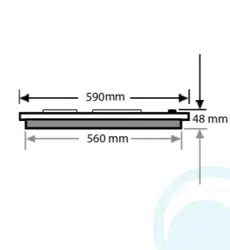
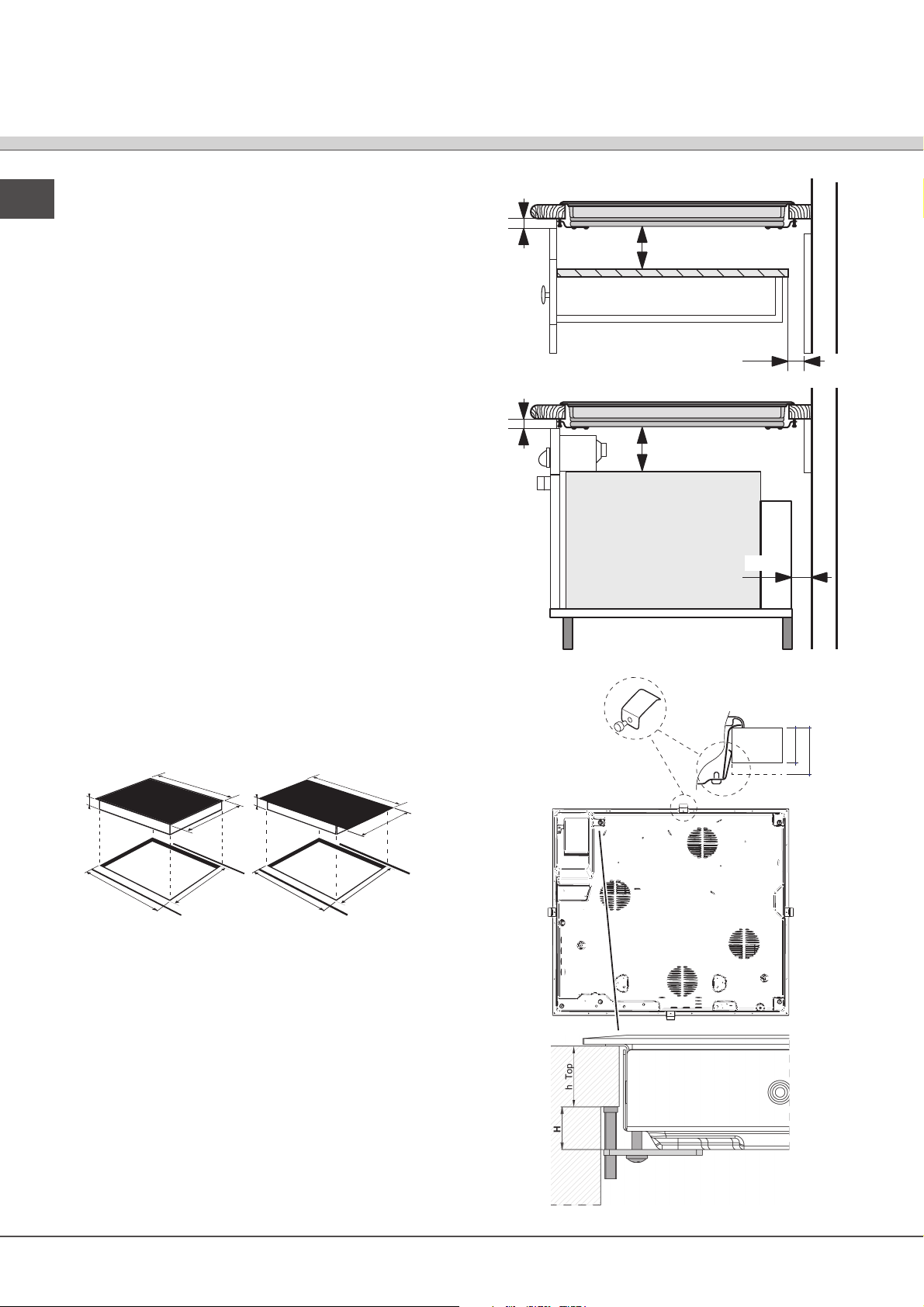
• Depending on the hob you want to install, the
cabinet must have the following dimensions (see
gure):
560 +/- 1
490 +/- 1
48
590
520
690
520
560 +/- 1
490 +/- 1
48
Ventilation
To allow adequate ventilation and to avoid overheating of
the surrounding surfaces the hob should be positioned as
follows:
• At a minimum distance of 40 mm from the back
panel or any other vertical surfaces.
• So that a minimum distance of 20 mm is maintained
between the installation cavity and the cabinet
underneath.
• Kitchen cabinets adjacent to the appliance and taller
than the top of the hob must be at least 600 mm
from the edge of the hob.
FRONT SIDE
OF HOB
SUPPORTING
SURFACE
30
40
UNDERSIDE
OF HOB
5 mm
min. 20 mm
min. 20 mm
min. 40 mm
COMPARTMENT
5 mm
min. 40 mm
FAN-ASSISTED
OVEN
7
GB
Fixing
The appliance must be installed on a perfectly level
supporting surface.
Any deformities caused by improper fixing could affect
the features and operation of the hob.
The thickness of the supporting surface should be taken
into account when choosing the length of the screws for
the fixing hooks:
• 30 mm thick: 23 mm screws
• 40 mm thick: 13 mm screws
Fix the hob as follows:
1. Use short flat-bottomed screws to fix the 4 alignment
springs in the holes provided at the central point of
each side of the hob.
2. Place the hob in the cavity, make sure it is in a
central position and push down on the whole perimeter
until the hob is stuck to the supporting surface.
3. For hobs with raised sides: After inserting the hob
into its cavity, insert the 4 fixing hooks (each has its
own pin) into the lower edges of the hob, using the
long pointed screws to fix them in place, until the glass
is stuck to the supporting surface.
! The screws for the alignment springs must remain
accessible.
! In order to adhere to safety standards, the appliance
must not come into contact with electrical parts once it
has been installed.
! All parts which ensure the safe operation of the
appliance must not be removable without the aid of a
tool.
Electrical connection
! The electrical connection for the hob and for any built-
in oven must be carried out separately, both for safety
purposes and to make extracting the oven easier.
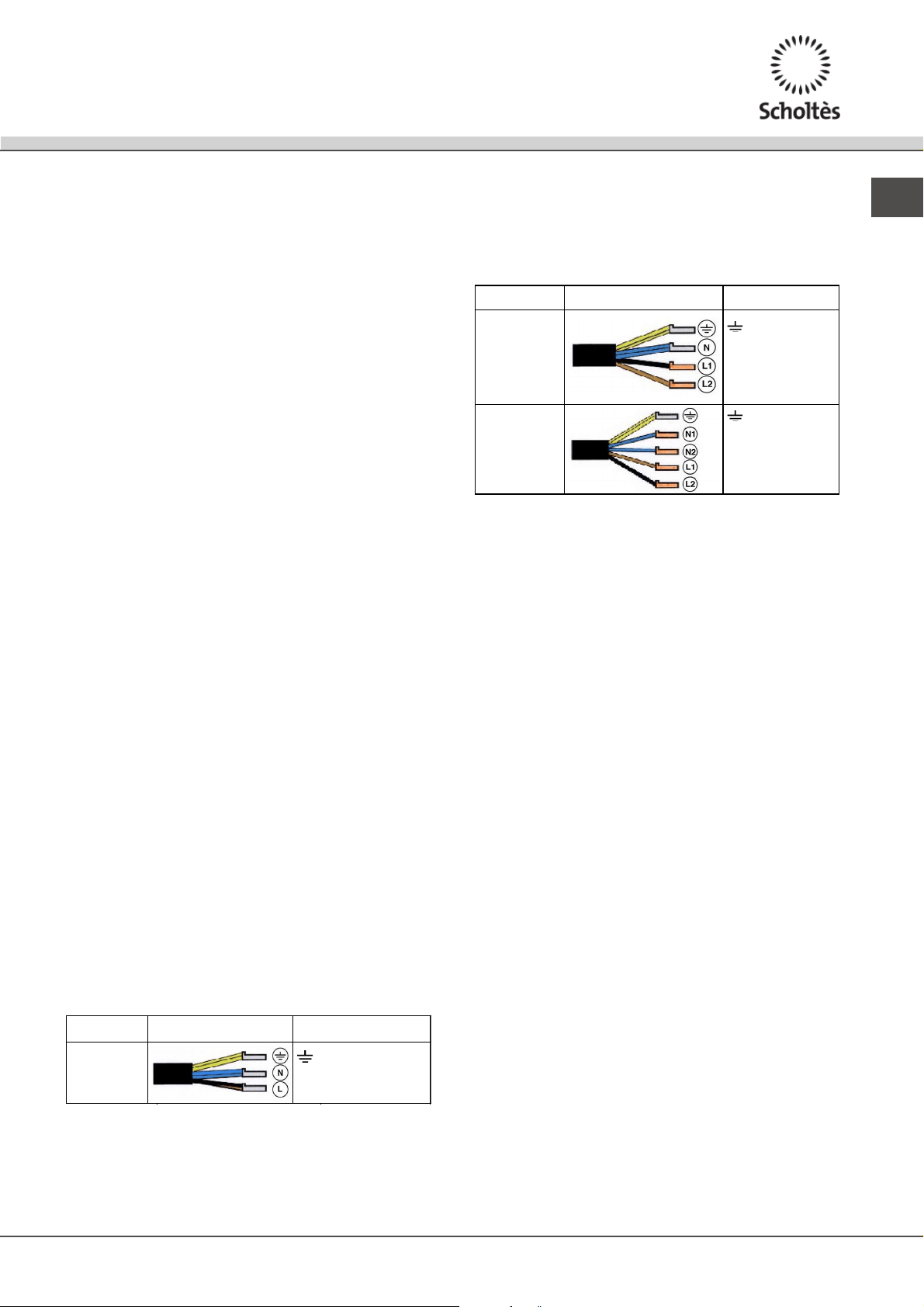
Single-phase connection
The hob is equipped with a pre-connected electricity
supply cable, which is designed for single-phase
connection. Connect the wires in accordance with the
instructions given in the following table and diagrams:
Voltage and
mains frequency
Electrical cable Wire connection
220-240V 1+N ~
50 Hz
: yellow/green
N: the two blue wires together
L: brown and black together
Other types of connection
If the mains supply corresponds with one of the
following:
Voltage and mains frequency
• 400V - 2+N ~ 50 Hz
• 220-240V 3 ~ 50 Hz
• 400V 3 - N ~ 50 Hz
• 400V - 2+2N ~ 50 Hz
Separate the wires and connect them in accordance
with the instructions given in the following table and
diagrams:
Voltage and
mains frequency
Electrical cable Wire connection
400V - 2+N ~
50 Hz
220-240V 3 ~
50 Hz
400V 3-N ~
50 Hz
: yellow/green;
N: the two blue wires
together
L1: black
L2: brown
400V - 2+2N ~
50 Hz
: yellow/green;
N1: blue
N2: blue
L1: black
L2: brown
Connecting the electricity supply cable to the mains
If the appliance is being connected directly to the
electricity mains an omnipolar switch must be installed
with a minimum opening of 3 mm between contacts.
! The installer must ensure that the correct electrical
connection has been made and that it is fully compliant
with safety regulations.
Before connecting the appliance to the power supply,
make sure that:
• The appliance is earthed and the plug is compliant
with the law.
• The socket can withstand the maximum power of
the appliance, which is indicated on the data plate
located on the appliance itself.
• The voltage falls within the range of values indicated
on the data plate.
• The socket is compatible with the plug of the
appliance. If the socket is incompatible with the
plug, ask an authorised technician to replace it. Do
not use extension cords or multiple sockets.
! Once the appliance has been installed, the power
supply cable and the electrical socket must be easily
accessible.
! The cable must not be bent or compressed.
! The cable must be checked regularly and replaced
by authorised technicians only.
! The manufacturer declines any liability should
these safety measures not be observed.
! Do not remove or replace the power supply cable
for any reason. Its removal or replacement will void
the warranty and the CE marking. INDESIT does not
assume liability for accidents or damage arising from
replacement/removal of the original power supply
cable. Replacement can only be accepted when
carried out by personnel authorised by INDESIT and
using an original spare part.

8
GB
Start-up and use
! The glue applied on the gaskets leaves traces of
grease on the glass. Before using the appliance, we
recommend you remove these with a special non-
abrasive cleaning product. During the first few hours
of use there may be a smell of rubber which will
disappear very quickly.
! A few seconds after the hob is connected to the
electricity supply, a buzzer will sound. The hob may
now be switched on.
Types of noise during normal hob operation:
• Buzz: due to the vibration of the metallic parts that
make up the induction element and the pot; it is
generated by the electromagnetic field required for
heating and increases as the power of the induction
element increases.
• Soft whistle: heard when the pot placed on the
heating zone is empty; the noise disappears once
food or water is placed into the pot.
• Crackle: produced by the vibration of materials on
the bottom of the pot due to the flow of parasitic
currents caused by electromagnetic fields
(induction); can be more or less intense depending
on the material making up the bottom of the pot, and
decreases as the pot dimensions increase.
• Loud whistle: heard when two induction elements of
the same group function simultaneously at maximum
power and/or when the booster function is set on
the larger element while the other is auto-adjusted.
Noise is reduced by decreasing the power level of
the auto-adjusted induction element; pot bottom
layers made of different kinds of materials are
among the main causes of this noise.
• Fan noise: a fan is necessary to ensure the hob
functions correctly and to safeguard the electronic
unit from possible overheating. The fan functions at
maximum power when the large induction element is at
maximum power or when the booster function is on; in
all other cases, it works at average power depending
on the temperature detected. Furthermore, the fan may
continue to work even after switching the hob off, if the
temperature detected is high.
The types of noise listed above are due to induction
technology and are not necessarily operational faults.
Switching on the hob
To switch the hob on, press and hold the
button for
approximately one second.
Switching on the cooking zones
To operate a cooking zone, select the button
corresponding to the desired zone and set the required
power level by pressing down on the slider and moving
it towards the right to increase the power level, or
towards the left to decrease the power level.
The min/med/max buttons can also be pressed directly
to select the pre-set power levels: min (1) / med (8) /
max (16), and to switch off the plate (see below).
MIN/MED/MAX functions
Press the MED button to switch on the cooking zone at
medium power level 8.
Press the MIN button to switch on the cooking zone at
minimum power level 1.
Press the MAX button to switch on the cooking zone at
maximum power level 16.
Booster function*
The booster function for some of the cooking zones may
be used to shorten heating-up times. It may be activated
by pressing the
boosterbbooostosterer
button. The indicator light directly
above the button will illuminate. This function boosts
the power to 2000 W or 3000 W, depending on the size
of the corresponding cooking zone.
It stops automatically after 4 minutes. While the
booster for one of the cooking zones is active, the
corresponding front or rear cooking zone will operate
at a reduced power level (e.g. if the booster for the
rear left-hand hotplate has been activated, the power
level of the front left-hand hotplate will be reduced).
For further information, please refer to the Technical
description of the models.
Switching off the cooking zones
To switch off the hotplate, select the button
corresponding to the desired zone, moving the slider
towards the left to return to level 0, or press the Off
button on the slider control directly.
! The first time the slider is pressed, a short beep will
sound to acknowledge the touch. If - and only if - the
power level is adjusted, another short beep will sound
when the slider is released.
! The hotplate selection LEDs light up for the power
adjustment period (10 seconds), during which the
slider (or min/med/max buttons)* can influence the
selected hotplate.
Programming the cooking duration
! If the and buttons are pressed for an
extended period of time, the timer scrolls quickly
through the minute values in the corresponding
direction.
! All the cooking zones may be programmed
simultaneously, for a duration between 1 and 99
minutes.
1. Select the cooking zone using the corresponding
* Only available in certain models.
9
GB
selector button.
2. Adjust the power level of the cooking zone.
3. Press the programming button. The indicator
light corresponding to the selected zone will start
flashing.
4. Set the cooking duration using the - and +
buttons.
5. Confirm by pressing the button or automatic
selection occurs after 10 seconds.
The timer begins counting down immediately. A buzzer
sounds for approximately 1 minute and the cooking
zone switches off when the set programme has
finished.
Repeat the above procedure for each hotplate you
wish to programme.
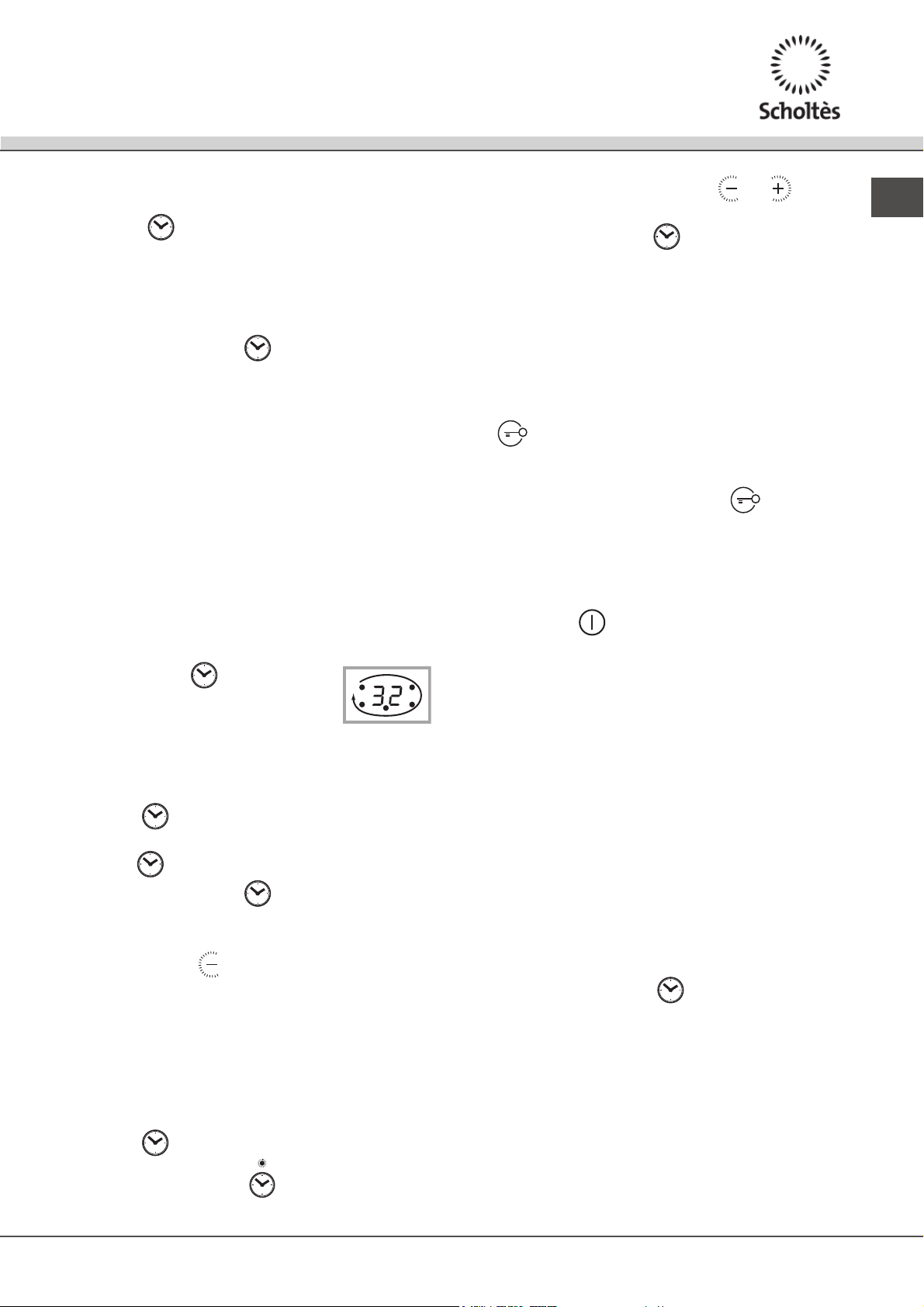
Using multiple programmes and the display
If one or more hotplates are programmed, the display will
show the data for the hotplate with the least time remaining,
and the light corresponding to the position of the hotplate
will flash. The lights corresponding to the other hotplates
programmed will be switched on.
To visualise the time remaining for the other programmed
hotplates, press the button
repeatedly: the time remaining for each
hotplate will be shown sequentially in a
clockwise order, starting from the front left hotplate.
Changing the programme
1. Press the button repeatedly until the duration you
wish to change is shown.
2. Use the buttons to set the new duration.
3. Confirm by pressing the button.
To cancel a programme, follow the above instructions.
At step 2, press the
button: the duration decreases
progressively until it reaches 0 and switches off. The
programme resets and the display exits programming
mode.
Timer
The hob must be switched on.
The timer can be used to set a duration up to 99 minutes.
1. Press the
programming button until the timer
indicator light is illuminated
.
2. Set the desired duration using the
and
buttons.
3. Confirm by pressing the button.
The timer begins counting down immediately. When
the time has elapsed, a buzzer will sound (for one
minute).
Control panel lock
When the hob is switched on, it is possible to lock the oven
controls in order to avoid accidental changes being made
to the settings (by children, during cleaning, etc.). Press
the button to lock the control panel: the indicator
light above the button will switch on.
To use any of the controls (e.g. to stop cooking), you
must switch off this function. Press the button for a
few moments, the indicator light will switch off and the
lock function will be removed.
Switching off the hob
Press the button to switch off the appliance - do not
rely solely on the pan sensor.
If the control panel lock has been activated, the
controls will continue to be locked even after the hob is
switched on again. In order to switch the hob on again,
you must first remove the lock function.
“Demo” mode
It is possible to set the hob to a demonstration mode where
all the controls work normally but the heating elements do
not switch on. To activate the “demo” mode the hob must
be switched on, with all the hotplates switched off.
• Press and hold the + and - buttons simultaneously
for 6 seconds. When the 6 seconds have elapsed,
the ON/OFF and CONTROLS LOCKED indicator
lights will flash for one second. Release the + and
- buttons and press the button;
• The display will show the text DE and MO and the hob
will be switched off.
• When the hob is switched on again it will be set to the
“demo” mode.
10
GB
To exit this mode, follow the procedure described above.
The display will show the text DE and OF and the hob will
be switched off. When it is next switched on, the hob will
function normally.
Practical advice on using the appliance
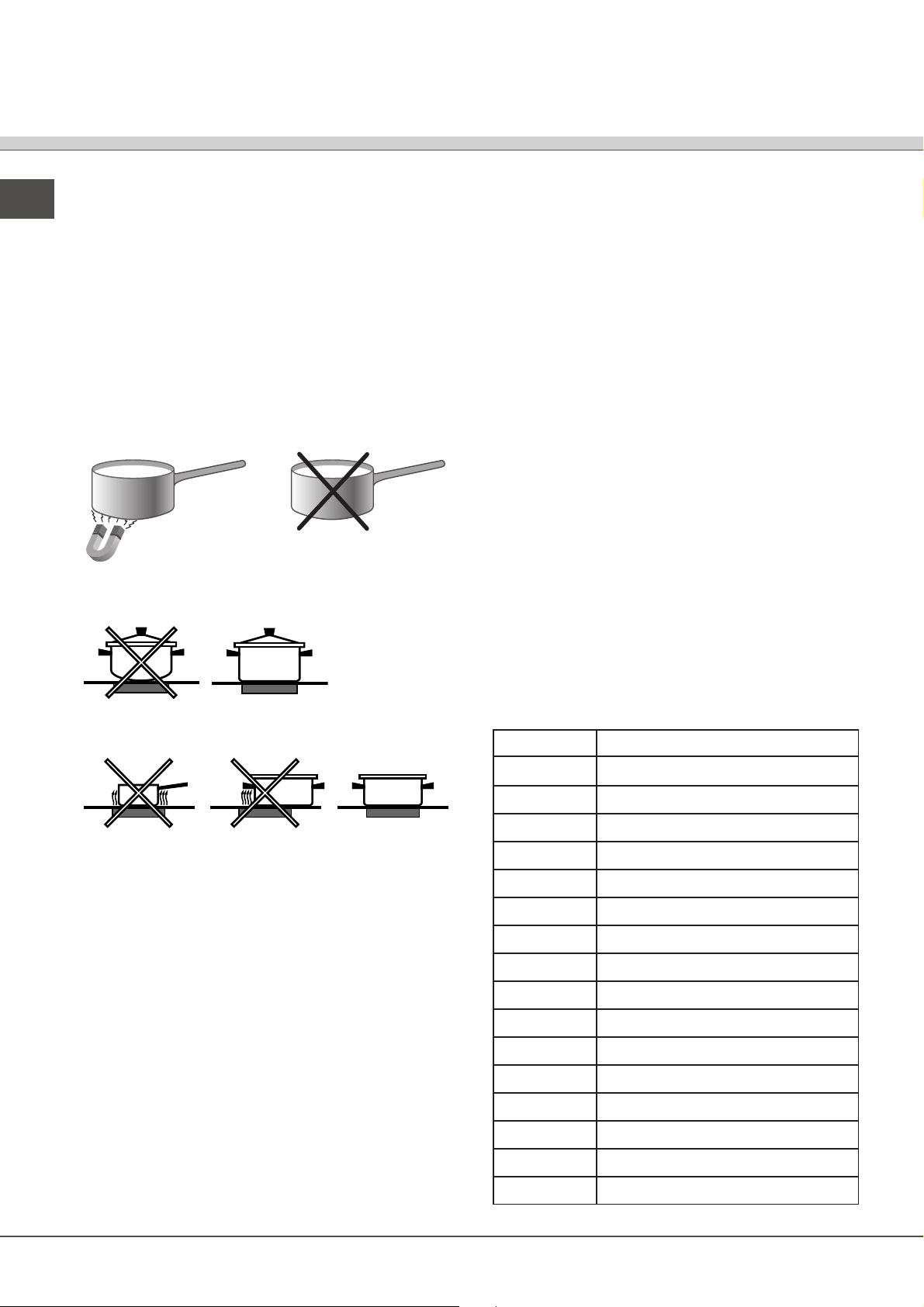
! Use cookware made from materials which are
compatible with the induction principle (ferromagnetic
material). We especially recommend pans made
from: cast iron, coated steel or special stainless
steel adapted for induction. Use a magnet to test the
compatibility of the cookware.
*
SUITABLE
UNSUITABLE
Cast iron
Enamelled steel
Special stainless steel
Copper,
Aluminium, Glass, Earthenware,
Ceramic, non magnetic Stainless steel
In addition, to obtain the best results from your hob:
• Use pans with a thick, flat base in order to fully utilise the
cooking zone.
• Always use pans with a diameter which is large
enough to cover the hotplate fully, in order to use all the
available heat.
• Make sure that the base of the cookware is always clean
and dry, in order to fully utilise and extend the life of both
the cooking zones and the cookware.
• Avoid using the same cookware which has been used
on gas burners: the heat concentration on gas burners
may distort the base of the pan, causing it not to adhere
correctly.
Safety devices
Pan sensor
Each cooking zone is equipped with a pan sensor device.
The hotplate only emits heat when a pan with suitable
measurements for the cooking zone is placed on it. If the
power level indicator display flashes, this may be because:
• An incompatible pan
• A pan whose diameter is too small
• The pan has been removed from the hotplate.
Overheating protection
If the electronic elements overheat, the hob switches off
automatically and F appears on the display, followed by
a flashing number. When the temperature has reached
a suitable level, this message disappears and the hob
may be used again.
Safety switch
The appliance has a safety switch which automatically
switches the cooking zones off after they have been in
operation for a certain amount of time at a particular power
level. When the safety switch has been triggered, the
display shows “0”.
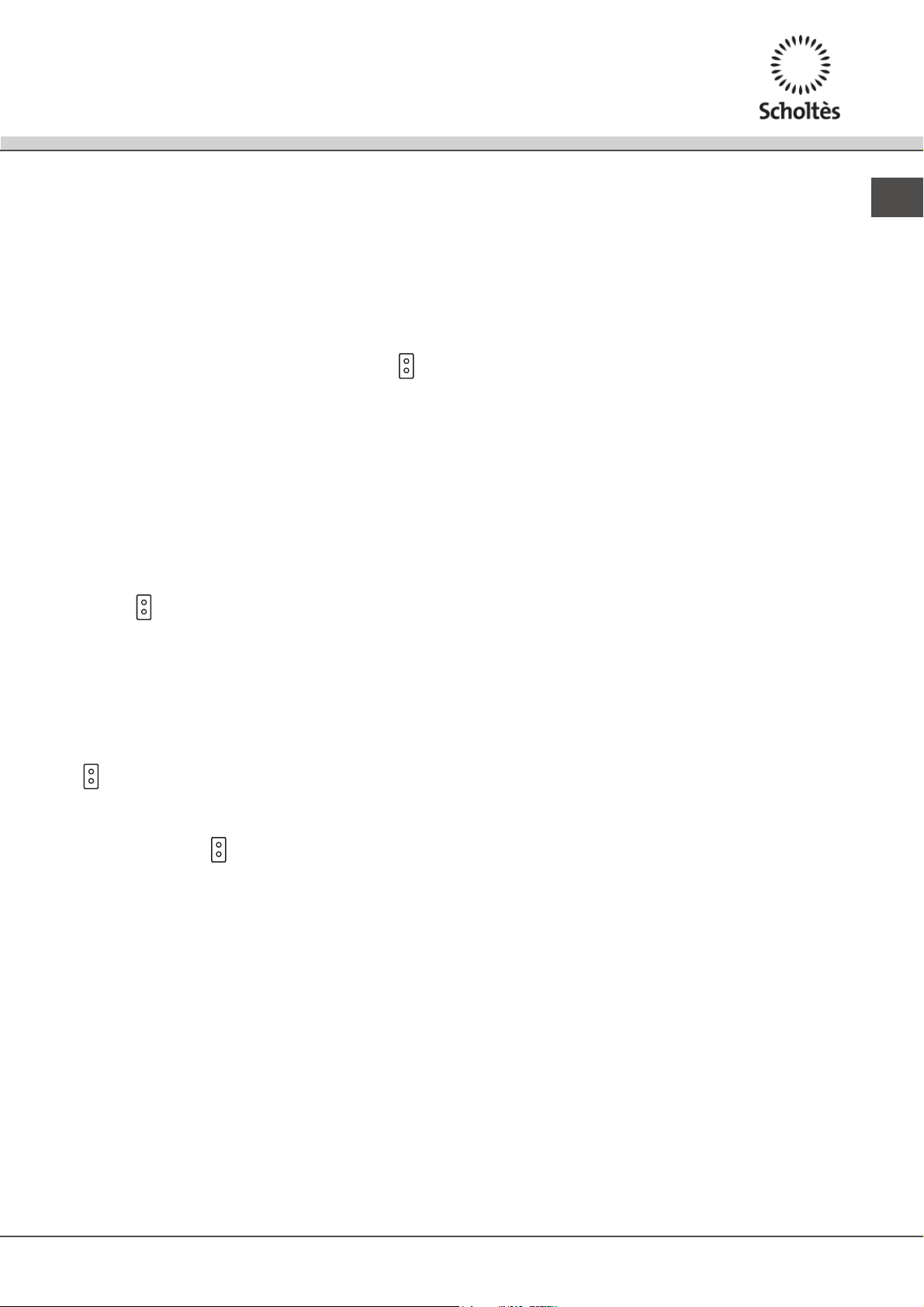
For example: the rear right-hand hotplate is set to 5
and will switch off after 7 and a half hours of continuous
operation, while the front left-hand hotplate is set to 2
and will switch off after 9 and a half hours.
Buzzer
This can also indicate several irregularities:
• An object (a pan, cutlery, etc.) has been placed on the
control panel for more than 10 seconds.
• Something has been spilt on the control panel.
• A button has been pressed for too long. All of the above
situations may cause the buzzer to sound. Remove the
cause of the malfunction to stop the buzzer. If the cause
of the problem is not removed, the buzzer will keep
sounding and the hob will switch off.
Power level
1
2
3
4
5
6
7
8
9
10
11
12
13
14
15
16
Maximum operating time in hours
10
9,5
9
8,5
7,5
7
6,5
6
5,5
5
4
3,5
3
2,5
2
1
11
GB
The EXTENSO TECHNOLOGY mode
The EXTENSO TECHNOLOGY can be used to set the
power of two „interconnected” hotplates to the same
level. It can be activated if the two hotplates are OFF,
by pressing the EXTENSO TECHNOLOGY button
The EXTENSO TECHNOLOGY can be activated
while the hob is on by pressing the EXTENSO
TECHNOLOGY button once; the LEDs corresponding
to both linked hotplates light up.
The 2 LEDs remain lit as long as the hotplates are
linked (if EXTENSO TECHNOLOGY button is pressed
again, the hotplates are disconnected and are both set
to power level 0).
Pressing the +, - or Max buttons for one of the two Flexi
hotplates also affects the display corresponding to the
other hotplate.
To deactivate the EXTENSO TECHNOLOGY , press
the button .
A timer may be set for the EXTENSO TECHNOLOGY;
this appears on the display and both LEDs
corresponding to the linked hotplates light up. When
the Timer button is pressed, the two linked hotplates
are treated as if they were a single zone.
Selecting and using EXTENSO TECHNOLOGY
To begin using the EXTENSO TECHNOLOGY, press
the button. To set the power level (see above).
EXTENSO TECHNOLOGY operation
Once you have selected EXTENSO TECHNOLOGY
by pressing the button , the 2 LEDs corresponding
to the EXTENSO TECHNOLOGY for both hotplates
light up; it will then be possible to control both as if
they were a single zone. The power level will appear
on both displays. If only the upper or lower part is in
use, the display corresponding to the unused zone
will begin to fl ash, and after 3 minutes cooking will
automatically revert to standard mode (notEXTENSO
TECHNOLOGY).
! Once activated, the EXTENSO TECHNOLOGY can
also be programmed, using the same procedure as
described for the individual hotplates.
To exit this mode, follow the procedure described above.
The display will show the text DE and OF and the hob will
be switched off. When it is next switched on, the hob will
function normally.
! Accessories
For optimal EXTENSO TECHNOLOGY performance,
we recommend the use of pans with an elliptical
or elongated base and a major diameter of at least
250 mm; if using pans with a smaller diameter, we
recommend positioning them in the upper or lower part
as indicated by the X symbol.
If the saucepan is not in the centre of the screen
printing detail, you may hear a whistling sound or
a slight buzzing noise; this does not indicate a hob
malfunction. We recommend adjusting the position
of the pan so that it is in the centre of the EXTENSO
TECHNOLOGY zone
12
GB
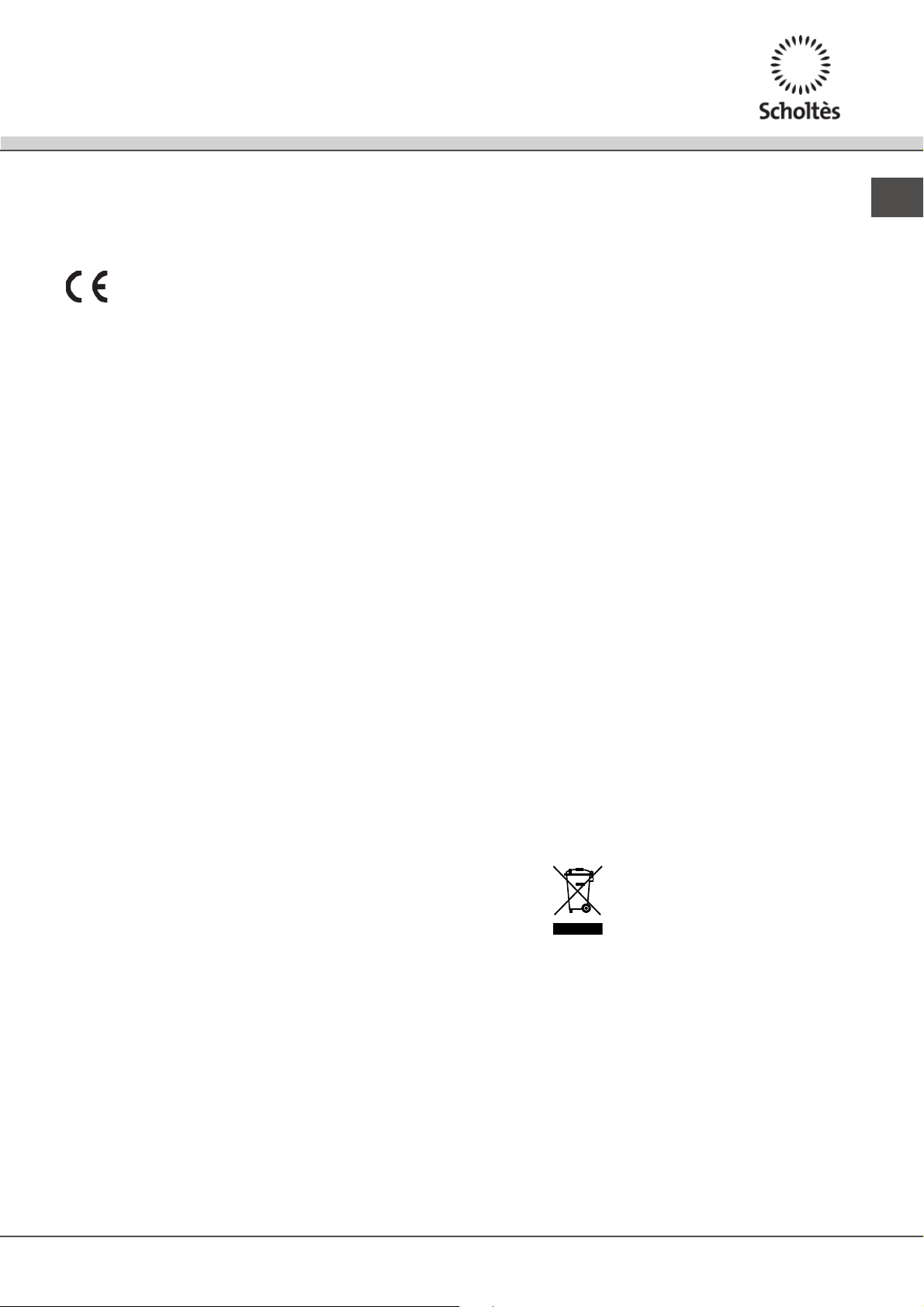
Practical cooking advice
Pressure cooking
Pressure cooker
Frying
Grilling Boiling
Very high-flame cookingHigh-flame
cooking
Medium-flame cookingLow-flame
cooking
Very
low-flame
cooking
Crêpes Cooking on a high flame and browning
(roasts, steaks, escalopes, fish fillets, fried
eggs)
Fast thickening (liquid juices)
Boiling water (pasta, rice, vegetables)
Milk
Slow thickening (dense juices)
Bain-marie cooking Pressure cooking after whistle
Low-flame cooking (stews)
Reheating dishes
Chocolate sauce Keeping food hot
13
GB
Precautions and tips
! This appliance has been designed and manufactured
in compliance with international safety standards. The
following warnings are provided for safety reasons and
must be read carefully.
This appliance conforms to the following
European Economic Community directives:
- 2006/95/EEC dated 12/12/06 (Low Voltage) and
subsequent amendments;
- 2004/108/EEC dated 15/12/04 (Electromagnetic
Compatibility) and subsequent amendments;
- 93/68/EEC dated 22/07/93 and subsequent amendments.
- 1275/2008 stand-by/off mode.
General safety
! Make sure that the air inlet behind the fan grille is
never obstructed. The built-in hob should, in fact, be
provided with suitable ventilation for the cooling of the
electronic components used in the appliance.
! We advise against the installation of an induction hob
above an under-the-counter refrigerator (heat) or above
a washing machine (vibrations). In fact, there would
be insufficient space for the ventilation of electronic
components.
• The appliance was designed for domestic use inside
the home and is not intended for commercial or
industrial use.
• The appliance must not be installed outdoors, even in
covered areas. It is extremely dangerous to leave the
appliance exposed to rain and storms.
• Do not touch the appliance when barefoot or with wet or
damp hands and feet.
• The appliance must be used by adults only for the
preparation of food, in accordance with the instructions
provided in this booklet. Do not use the hob as a
worktop or chopping board.
• The glass ceramic hob is resistant to mechanical
shocks, but it may crack (or even break) if hit with a
sharp object such as a tool. If this happens, disconnect
the appliance from the electricity mains immediately and
contact a Service Centre.
• Ensure that power supply cables of other electrical
appliances do not come into contact with the hot parts
of the hob.
• Remember that the cooking zones remain relatively hot
for at least thirty minutes after they have been switched
off. An indicator light provides a warning when residual
heat is present (see Start-up and use).
• Keep any object which could melt away from the
hob, for example plastic and aluminium objects, or
products with a high sugar content. Be especially
careful when using plastic film and aluminium foil or
packaging: if placed on surfaces which are still hot,
they may cause serious damage to the hob.
• Always make sure that pan handles are turned
towards the centre of the hob in order to avoid
accidental burns.
• When unplugging the appliance, always pull the
plug from the mains socket; do not pull on the cable.
• Never perform any cleaning or maintenance work
without having disconnected the appliance from the
electricity mains.
• The appliance should not be operated by people
(including children) with reduced physical, sensory
or mental capacities, by inexperienced individuals
or by anyone who is not familiar with the product.
These individuals should, at the very least, be
supervised by someone who assumes responsibility
for their safety or receive preliminary instructions
relating to the operation of the appliance.
• For the attention of wearers of pacemakers or other
active implants:
The hob complies with all current standards on
electromagnetic interference.
Your induction hob is therefore perfectly in keeping
with legal requirements (89/336/CEE directives). It
is designed not to create interference on any other
electrical apparatus being used on condition that
the apparatus in question also complies with this
legislation.
Your induction hob generates short-range magnetic
fields.
To avoid any interference between your induction
hob and a pacemaker, the latter must be designed
to comply with relevant regulations.
In this respect, we can only guarantee our own
product conformity. Please consult the pacemaker
manufacturer or your doctor concerning its
conformity or any possible incompatibility.
• Do not let children play with the appliance.
• Do not place metal objects (knives, spoons, pan
lids, etc.) on the hob as they may become hot..
• The appliance is not intended to be operated by
means of an external timer or separate remote-
control system.
Disposal
• When disposing of packaging material: observe local
legislation so that the packaging may be reused.
• The European Directive 2002/96/EC relating to Waste
Electrical and Electronic Equipment (WEEE) states
that household appliances should not be disposed of
using the normal solid urban waste cycle. Exhausted
appliances should be collected separately in order to
optimise the cost of re-using and recycling the materials
inside the machine, while preventing potential damage
to the atmosphere and to public health. The crossed-out
dustbin is marked on all products to remind the owner of
their obligations regarding separated waste collection.
For further information relating to the correct disposal of
exhausted household appliances, owners may contact
the public service provided or their local dealer.
14
GB
Care and maintenance
Switching the appliance off
Disconnect your appliance from the electricity supply
before carrying out any work on it.
Cleaning the appliance
! Do not use abrasive or corrosive detergents
(for example, products in spray cans for cleaning
barbecues and ovens), stain removers, anti-rust
products, powder detergents or sponges with abrasive
surfaces: these may scratch the surface beyond repair.
! Never use steam cleaners or pressure cleaners on the
appliance.
• It is usually sufficient simply to wash the hob using
a damp sponge and dry it with absorbent kitchen
towel.
• If the hob is particularly dirty, rub it with a special
glass ceramic cleaning product, then rinse well and
dry thoroughly.
• To remove more stubborn dirt, use the scraper
provided. Remove spills as soon as possible,
without waiting for the appliance to cool, to avoid
residues forming crusty deposits. You can obtain
excellent results by using a rust-proof steel wire
sponge - specifically designed for glass ceramic
surfaces - soaked in soapy water.
! The scraper provided is sharp: be careful when using
it.
• If any plastic or sugary substances are accidentally
melted on the hob, remove them immediately with
the scraper, while the surface is still hot.
• Once it is clean, the hob may be treated with
a special protective maintenance product: the
invisible film left by this product protects the surface
from drips during cooking. This maintenance task
should be carried out while the appliance is warm
(not hot) or cold.
• Always remember to rinse the appliance well with
clean water and dry it thoroughly: residues can
become encrusted during subsequent cooking
processes.
Stainless steel frame (only in models with outer frame)
Stainless steel can be marked by hard water which has
been left on the surface for a long time, or by cleaning
products containing phosphorus.
After cleaning, it is advisable to rinse the surface well
and dry it thoroughly. If water is spilt on the surface,
dry it quickly and thoroughly.
! Some hobs have an aluminium frame which is
similar to stainless steel. Do not use any cleaning or
degreasing products which are not suitable for use
with aluminium.
Disassembling the hob
If it is necessary to disassemble the hob:
1. Loosen the screws fixing the alignment springs on
each side.
2. Loosen the screws holding the fixing hooks in each
corner.
3. Take the hob out of its installation cavity.
! Do not attempt to repair the appliance yourself. If the
appliance breaks down, contact a Service Centre.
Technical description of the models
The induction system is the quickest existing way of cooking. Unlike traditional hotplates where the cooking zone
heats up, with the induction system heat is generated directly inside pans which have ferromagnetic bases.
Key:
I = single induction cooking zone
B = booster: the power of the cooking zone may be boosted to 3000 W
* = the maximum power level is limited while the booster is activated for the relevant rear cooking zone (see Start-up
and use).
Hobs
TIS 621 CT L
Cooking zone
Power (W)
Back Left
I 1400
Back Right
I 3000 – B 4000
Front Left
I 1400
Total power
6800