User Manual
AirVisual
®
Outdoor
Community Air Quality Monitor
1
EN Join the air quality
commmunity
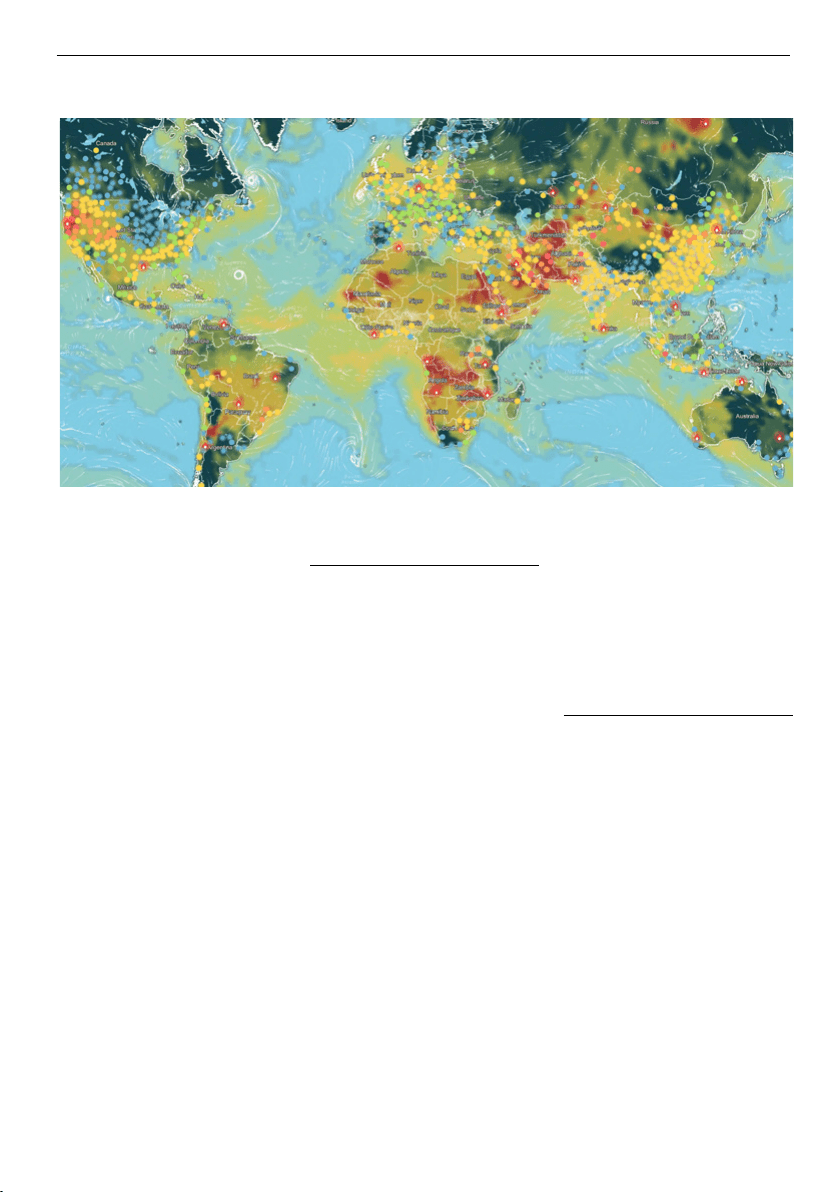
IQAir reports data from thousands
of ground level monitoring stations
around the world. Yet, many
places still lack local air quality
information.
With the purchase of an AirVisual
Outdoor monitor, you are only a few
simple clicks away from becoming
an official air quality monitoring
station and contribute your data
to global air pollution knowledge.
Your station, after a short validation
process, will become visible to the
global air quality community on
the IQAir AirVisual app and IQAir
website. By making your AirVisual
Outdoor public, you become part
of a global community of air quality
data contributors who help to
increase knowledge about hyper-
local air quality.
Together, we can raise air quality
awareness and provide the
global air quality data needed for
people, businesses, NGOs, and
governments to help improve air
quality everywhere.
Visit us on-line for more
information: iqair.com
ES Únase a la
comunidad de calidad
del aire
IQAir informa los datos de miles de
estaciones de control a nivel del suelo en
todo el mundo. Aun así, muchos lugares
todavía no cuentan con información local
sobre la calidad del aire.
Con la compra de un monitor AirVisual
Outdoor, usted está a tan solo unos
pocos clics de convertirse en una
estación oficial de control de la calidad
del aire y contribuir con sus datos al
conocimiento de la contaminación
atmosférica mundial. Tras un breve
proceso de validación, su estación se
volverá visible para la comunidad de
calidad del aire mundial en la aplicación
IQAir AirVisual y en el sitio web de IQAir.
Al hacer que su AirVisual Outdoor sea
público, usted pasa a formar parte de
una comunidad global de personas que
aportan datos sobre la calidad del aire
para ayudar a ampliar el conocimiento
sobre la calidad del aire hiperlocal.
Juntos, podemos generar una mayor
conciencia sobre la calidad del aire y
proporcionar los datos globales sobre
la calidad del aire que necesitan las
personas, las empresas, las ONG y los
gobiernos para ayudar a mejorar la
calidad del aire en todas partes.
Visítenos en línea para obtener más
información: iqair.com
FR Rejoignez la
communauté de la
qualité de l’air
IQAir rapporte les données de
milliers de stations de surveillance
au sol à travers le monde. Pourtant,
de nombreux endroits manquent
encore d’informations sur la qualité
de l’air local.
Avec l’achat d’un moniteur AirVisual
Outdoor, vous n’êtes qu’à quelques
clics de devenir une station officielle
de surveillance de la qualité de l’air
et de contribuer par vos données
à la connaissance mondiale de la
pollution de l’air. Après un court
processus de validation, votre
station deviendra visible pour
la communauté mondiale de la
Join the air quality community
2
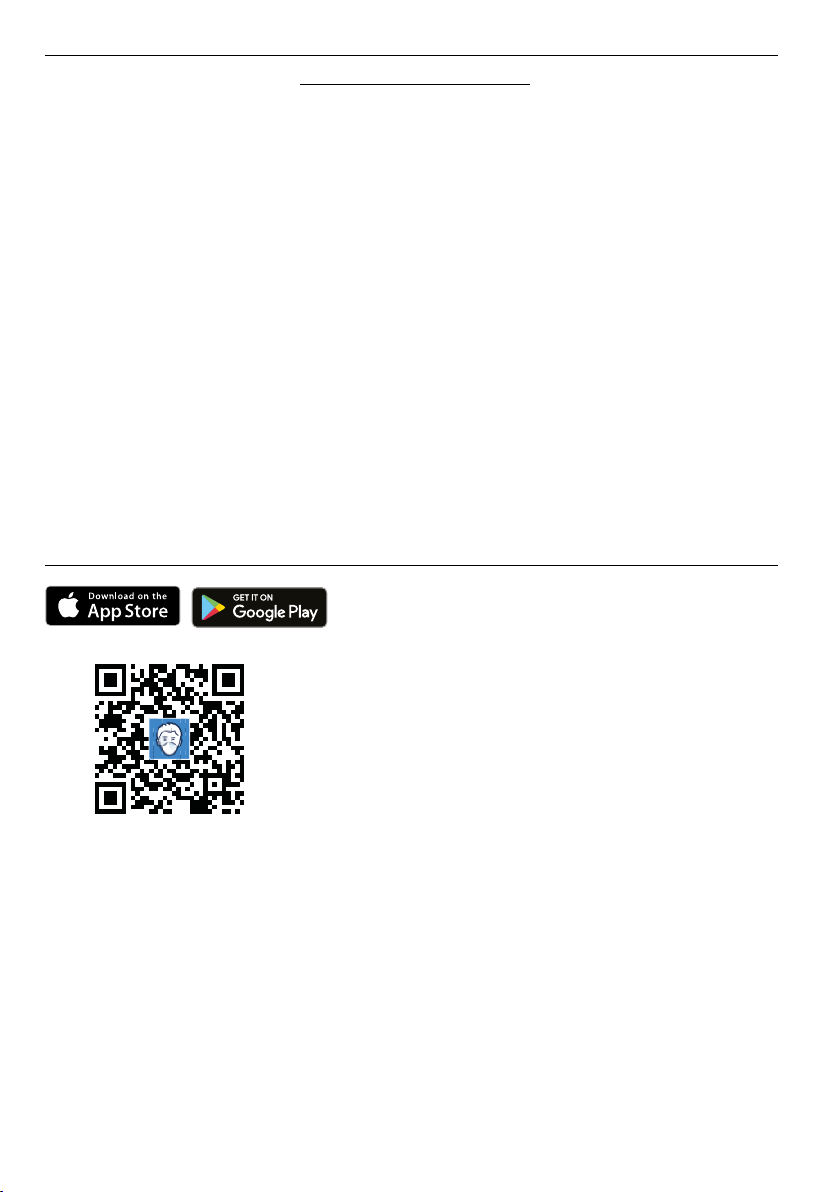
Download the IQAir AirVisual app
EN Scan this QR to get to the
appropriate app store. Download
the IQAir AirVisual app & create an
account
ES Escanee este código QR para
ir a la tienda de aplicaciones
correspondiente. Descargue la
aplicación IQAir AirVisual y cree
una cuenta.
FR Scannez ce QR pour accéder au
magasin d’applications approprié.
Téléchargez l’application IQAir
AirVisual et créez un compte.
DE Scannen Sie diesen QR-Code,
um zum entsprechenden App
Store zu gelangen. Laden Sie die
IQAir AirVisual App herunter und
erstellen Sie ein Konto.
qualité de l’air sur l’application
IQAir AirVisual et le site Web
d’IQAir. En rendant votre AirVisual
Outdoor public, vous faites partie
d’une communauté mondiale de
contributeurs de données sur la
qualité de l’air qui contribuent à
accroître les connaissances sur la
qualité hyper-locale de l’air.
Ensemble, nous pouvons sensibiliser
à la qualité de l’air et fournir les
données mondiales sur la qualité
de l’air nécessaires aux particuliers,
aux entreprises, aux ONG et aux
gouvernements afin d’aider à
améliorer partout la qualité de l’air.
Visitez-nous en ligne pour plus
d’informations: iqair.com
DE Treten Sie der Air
Quality Community bei
IQAir meldet Daten von Tausenden
von Messstationen auf der ganzen
Welt. Dennoch fehlen vielerorts noch
immer Informationen über die lokale
Luftqualität.
Mit dem Kauf des Messgeräts
AirVisual Outdoor sind Sie nur ein paar
Klicks davon entfernt, eine offizielle
Luftqualitätsüberwachungsstation
zu werden und mit Ihren Daten
zum globalen Wissen über
Luftverschmutzung beizutragen. Nach
einem kurzen Validierungsprozess
wird Ihre Station in App und auf
der IQAir-Website für die weltweite
Luftqualitätsgemeinschaft sichtbar.
Indem Sie Ihren AirVisual Outdoor
veröffentlichen, werden Sie Teil
einer globalen Gemeinschaft von
Lieferanten von Luftqualitätsdaten, die
dazu beitragen, das Wissen über die
hyperlokale Luftqualität zu erweitern.
Gemeinsam können wir das
Bewusstsein für die Luftqualität
schärfen und die globalen
Luftqualitätsdaten bereitstellen,
die Menschen, Unternehmen,
Nichtregierungsorganisationen und
Regierungen benötigen, um die
Luftqualität überall zu verbessern.
Besuchen Sie uns online für weitere
Informationen: iqair.com

3
Important safety instructions
Packaging contents
In the box you will find:
1x Air quality monitor with
pre-installed sensor modules
1x Mounting plate
2x Screws & wall anchors
2x UV resistant cable ties
1x Allen key
1x Short power cable
1x Long power cable
1x Power adapter
1x User Manual
Safety information
Read this user manual
before you use the device,
and save it for future
reference.
WARNINGS
• Use of equipment,
components, and
accessories other than
those specified by IQAir
may impair the safe
operation of the equipment.
The safe operation of
the equipment as part
of a larger system is the
responsibility of the installer
of the system.
• If the AirVisual Outdoor
is out of reach, the
power adapter should be
positioned to allow it to be
easily unplugged.
• When using in covered
outdoor areas, the power
adapter is to be installed in
a weatherproof enclosure
or indoors with the cable
routed through a wall or
window feed-through.
• If the AirVisual Outdoor
is used in a manner
not specified by the
manufacturer, the
protection provided by
the equipment may be
impaired.
CAUTION
• The AirVisual Outdoor
enclosure is designed
to be water resistant to
rain or spray. It is not
designed to be waterproof
when immersed. Setting
it in a pool of water will
result in flooding the inner
compartment with water.
This will severely damage
your AirVisual Outdoor.
• DO NOT install the
AirVisual Outdoor less than
1 meter (3 feet) from the
ground to prevent splash
back.
•
DO NOT mount the
AirVisual Outdoor upside
down. To prevent the
entry of insects and large
particles, the PM sensor is
covered by a porous screen
that is not splash resistant.
The AirVisual Outdoor is
splash resistant from top,
front, and back. Direct
injection of water into the
device is likely to damage it.
• The supplied power
adapter is not intended for
outdoor use.
• Before plugging the
power adapter into a
socket, check if power
source, voltage and
frequency corresponds to
100 to 240V and to 50
to 60Hz. Current rating of
power adapter is 0.5A.
• Do not use the equipment
at altitudes exceeding
2,000 meters (6,560 feet).
EN
4
Important safety instructions
• The maximum power
consumption of the
AirVisual Outdoor is 12W
(48.0VDC and 0.25A from
PoE). It is recommended to
power the AirVisual Outdoor
through the RJ45 Ethernet
connector with the supplied
power adapter and cables.
There are no outputs
available from the AirVisual
Outdoor.
• The supplied power
adapter is rated to operate
between 0 °C and +40
°C (32 °F to 104 °F), with
humidity ranging from 0%
to 95% non-condensing.
The AirVisual Outdoor is
rated to operate between
-20 °C to 50 °C (-4 °F
to 122 °F), with humidity
ranging from 0% to 100%
non-condensing. IQAir
recommends running the
AirVisual Outdoor within
these temperature limits.
• WEEE directive
requires that old
or defective
electrical and
electronic products must be
disposed of in an
environmentally sound way.
The symbol means that
your product should be
collected separately from
household waste. Please
contact a retailer or your
community for the nearest
collection center.
LASER SAFETY
• AirVisual Outdoor sensor
modules are Class 1 laser-
based instruments.
• During normal operation,
you will not be exposed to
laser radiation.
• DO NOT open the
AirVisual Outdoor when it is
powered ON.
• You will not be exposed
to the laser radiation when
the AirVisual Outdoor is
disassembled.
• The PM sensor inside the
PM sensor module contains
a laser diode. DO NOT open
the PM sensor module
when it is powered ON.
Precautions
DO NOT remove any parts
from the AirVisual Outdoor.
WARNING
The use of controls,
adjustments, or
procedures other than
those specified in this
manual may result in
exposure to hazardous
optical radiation.
When operated according
to the manufacturer’s
instruction, this device is
a Class 1 laser product
as defined by U.S.
Department of Health and
Human Services standards
under the Radiation
Control for Health and
Safety Act of 1968.
This equipment is
to be operated with
provided accessories
only. Equipment and
accessories are to be
supplied by IQAir or
its agent only. This
equipment is to be cleaned
with a damp cleaning
cloth with warm water
containing some drops of
dishwashing detergent.
After cleaning, dry it with
a cloth.
The power adapter is
intended for use at supply
voltages with fluctuations
not exceeding +/-10%
and classified as over-
voltage category II. The
IQAir AirVisual Outdoor
is intended for use in
environments classified
as pollution degree 3, the
power adapter is intended
for use in environments
classified as pollution
degree 2.
EN
5
FCC Statement
Any changes or modifications
not expressly approved by the
party responsible for compliance
could void the user’s authority to
operate the equipment.
Note: This equipment has been
tested and found to comply
with the limits for a Class B
digital device, pursuant to
part 15 of the FCC Rules.
These limits are designed to
provide reasonable protection
against harmful interference in
a residential installation. This
equipment generates, uses,
and can radiate radio frequency
energy and, if not installed
and used in accordance with
the instructions, may cause
harmful interference to radio
communications. However, there
is no guarantee that interference
will not occur in a particular
installation. If this equipment
does cause harmful interference
to radio or television reception,
which can be determined by
turning the equipment off and
on, the user is encouraged to
try to correct the interference
by one or more of the following
measures:
• Reorient the receiving antenna
by reorienting the equipment.
• Increase the separation
between the equipment and
receiver.
• Connect the equipment into
an outlet on a circuit different
from that to which the receiver
is connected.
• Consult the seller or an
experienced radio/TV technician
for help.
ISEDC RSS Warning
This device complies with ISEDC
license-exempt RSS standard(s).
Operation is subject to the
following two conditions: (1) this
device may not cause interference,
and (2) this device must accept
any interference, including
interference that may cause
undesired operation of the device.
Le présent appareil est conforme
aux CNR d’ISEDC applicables
aux appareils radio exempts de
licence.
L’exploitation est autorisée aux
deux conditions suivantes: (1)
l’appareil ne doit pas produire
de brouillage, et (2) l’utilisateur
de l’appareil doit accepter
tout brouillage radioélectrique
subi, même si le brouillage est
susceptible d’en compromettre le
fonctionnement.
ISEDC Radiation
Exposure Statement:
This equipment complies with
ISEDC RF radiation exposure
limits set forth for an uncontrolled
environment. This transmitter
must not be co-located or
operated in conjunction with any
other antenna or transmitter. This
equipment should be installed
and operated with minimum
distance of 20 cm between the
radiator and your body.
Cet appareil est conforme
aux limites d’exposition de
rayonnement RF ISEDC établies
pour un environnement non
contrôlé. Ceté metteur ne
doit pas être co-implanté ou
fonctionner en conjonction
avec toute autre antenne ou
transmetteur. Industrial cellular
router doit être installé et utilisé
avec une distance minimale de
20 cm entre le radiateur et votre
corps.
Any changes or modifications
not expressly approved by the
party responsible for compliance
could void the user’s authority to
operate the equipment.
Tout changement ou modification
non expressément approuvé
par la partie responsable de
la conformité pourrait annuler
l’autorisation de l’utilisateur à
faire fonctionner l’équipement.
Important safety instructions
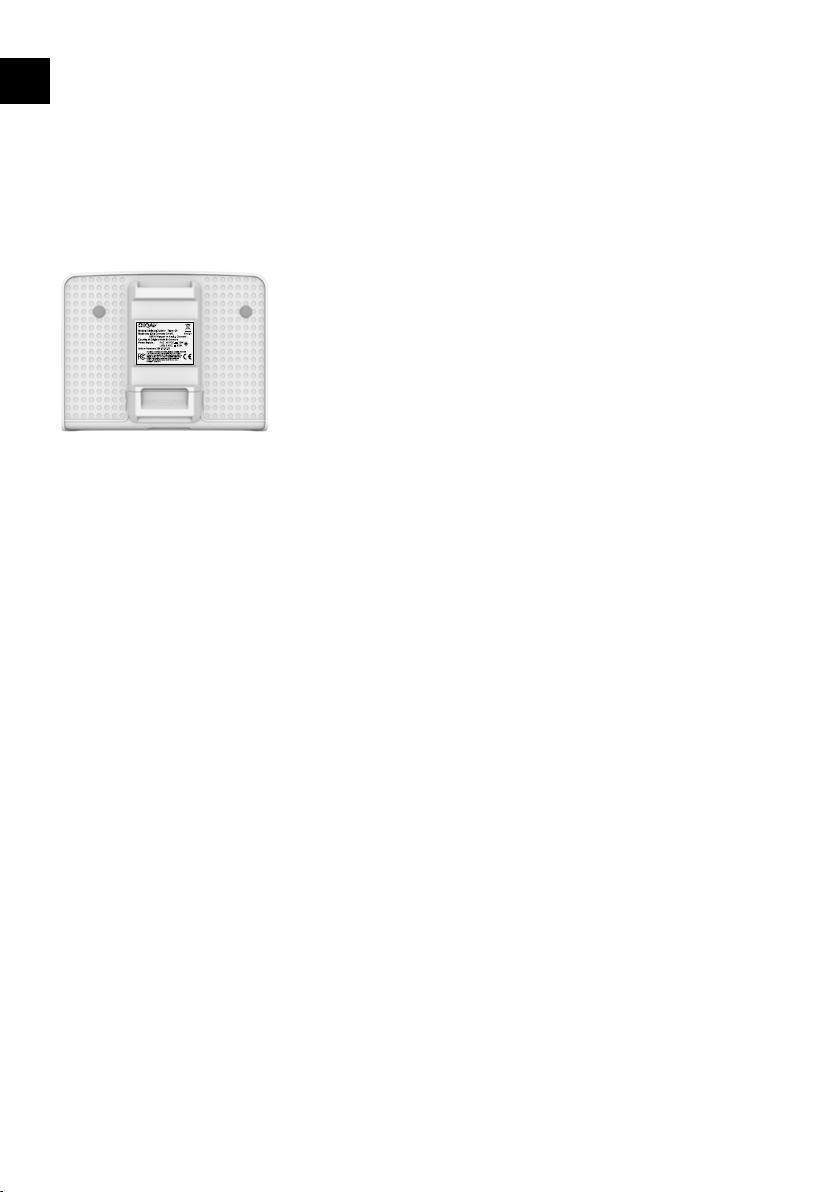
The compliance statements on the
AirVisual Outdoor can be found under
the mounting plate.
EN
6
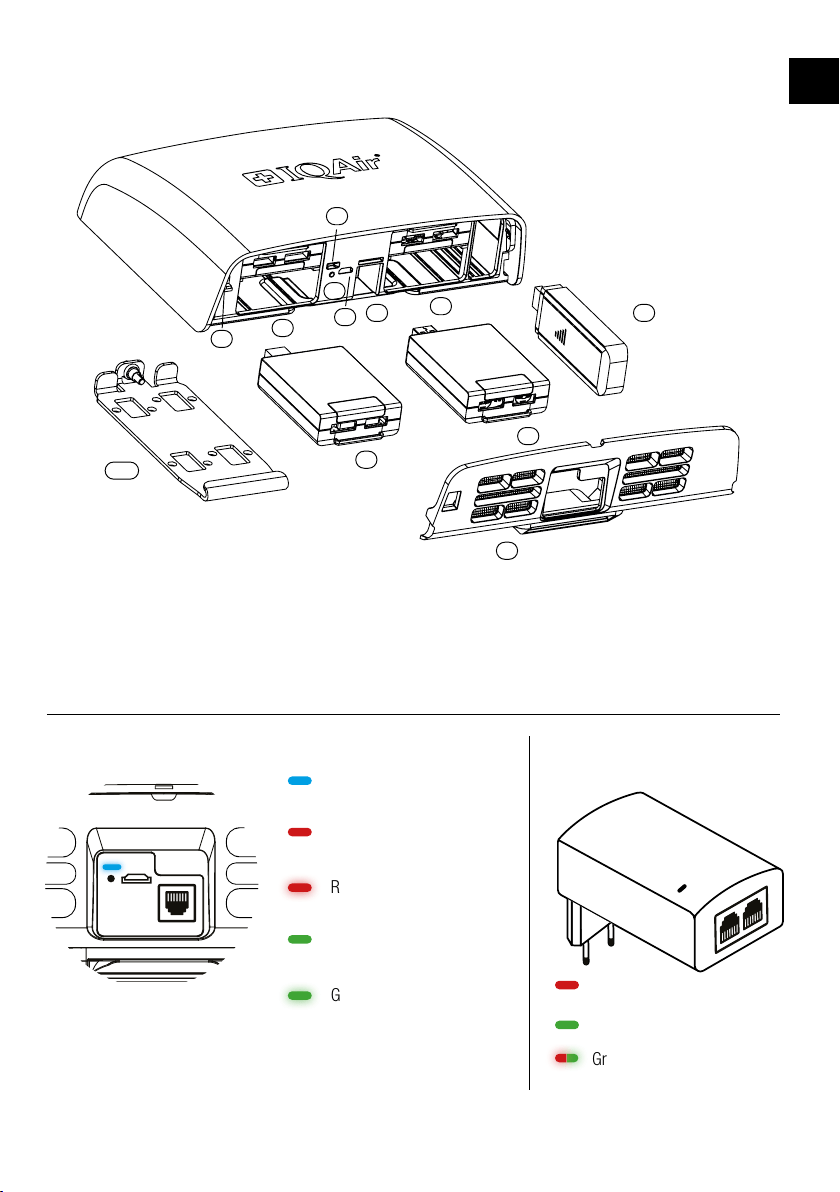
Component overview
1. Air inlet cover with insect mesh
2. Sensor modules (up to 4)
3. Control button
4. Status LED
5. Temperature & humidity sensor
6. Slots for sensor modules
7. Micro-USB socket
(not supported)
8. PoE Ethernet port
(power and optional data)
9. Optional 4G USB modem stick
10. Mounting plate with mounting
hook
AirVisual Outdoor LED indicator
Blue = Connected to the
IQAir cloud platform
Red = Not connected to
cloud or network
Red, blinking = Resetting /
updating / self-testing
Green = Wi-Fi setup, Wi-Fi
hotspot paired
Green, blinking = Wi-Fi
setup, Wi-Fi hotspot open
*In case of error, please check the Ethernet cables and connectors. If status remains, contact IQAir support.
PoE power adapter
LED indicator
Red = Power ready
Green = Power connected
Green & Red blinking = Error*
LAN
ACTIVE
PoE
EN
4G
1
2
2
10
3
4
8
5
6
7
9
6
7
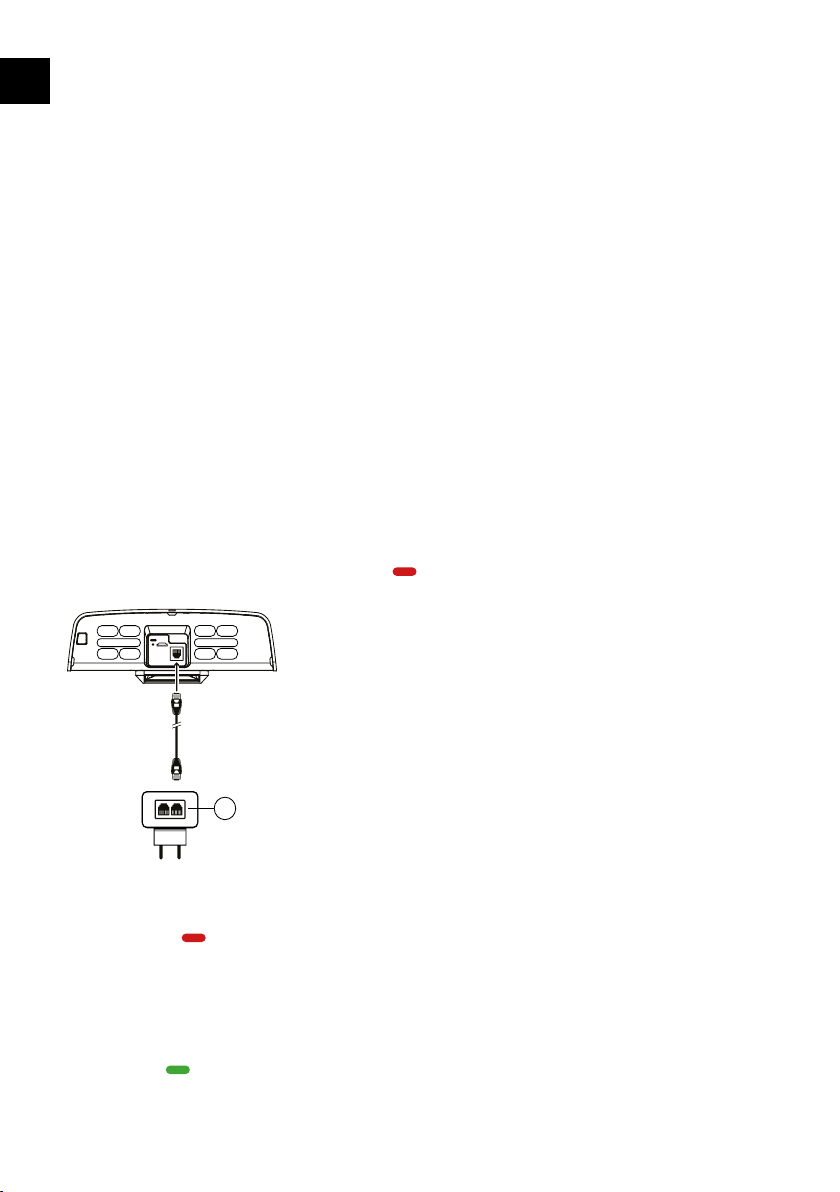
Power the device
The AirVisual Outdoor uses
Power over Ethernet (PoE) to
power the monitor. Power is
supplied with the provided 48V
PoE power adapter and either
of the two included Ethernet
power cables.
When used in outdoor areas,
the supplied PoE power adapter
is to be installed in a dry spot
where no water can reach the
power adapter or use a power
outlet with a weatherproof
enclosure. When the PoE power
adapter is connected indoors,
the Ethernet cable should
be routed through a wall or
window feed-through.
Plug the power adapter into
a power outlet and the status
LED will turn red
. Connect
the Ethernet cable to the
AirVisual Outdoor Ethernet port
and to the PoE marked port of
the power adapter. The status
LED of the PoE power adapter
will turn green .
The LAN marked port will not
power the monitor. The LAN
port on the power adapter
can be used to connect the
device to the Internet. Refer to
“Connecting to the IQAir cloud
platform.”
Instead of the supplied PoE
power adapter you can use
a PoE Ethernet switch (IEEE-
802.3af capable). If you need
a longer cable, PoE can power
the AirVisual Outdoor up to a
distance up of 80m / 262ft.
Use a shielded CAT7 UV
resistant Ethernet cable.
When initially connected to
power, the AirVisual Outdoor
will turn on and display a red
status LED
indicating the
device is not connected to a
network.
Data connectivity
options
The AirVisual Outdoor can
be networked to the IQAir
data cloud where current and
historic air quality data may be
viewed on the IQAir AirVisual
mobile app or on the IQAir
web dashboard. Three network
connectivity options are
available. The device features
Wi-Fi and Ethernet connectivity.
A 4G cellular connection is
possible with an optional 4G
USB modem stick and SIM card
with an active data plan.
The most suitable choice of
cloud connection will depend
on the following:
• Do you have a reliable
Wi-Fi signal at the installation
location? This would make a
Wi-Fi connection suitable.
• Do you have access to an
Ethernet outlet? This would
make an Ethernet connection
suitable.
• If neither Ethernet nor Wi-Fi
connection is available, then
a mobile 4G cellular network
connection may be the best
way to connect your AirVisual
Outdoor to the IQAir cloud.
Please note that the AirVisual
Outdoor generates about 35
MB in monthly data.
Connection with Ethernet
or cellular 4G USB modem
establishes the connection
automatically. Wi-Fi setup
requires a few steps. Simply
follow the instructions from
the IQAir AirVisual app.
LAN PoE
PoE
Setup and configuration
EN
8
Setup and configuration
Connect your AirVisual
Outdoor to the app
Download the IQAir AirVisual
app & create an account.
Add a device
In the app, select ‘Scan QR
Code’ and scan the device QR
code on the back side of the
device or in the user manual.
Alternatively, in the app, select
‘Add device’ and follow the
instructions to enter the serial
number manually.
Follow the prompts for the
network setup.
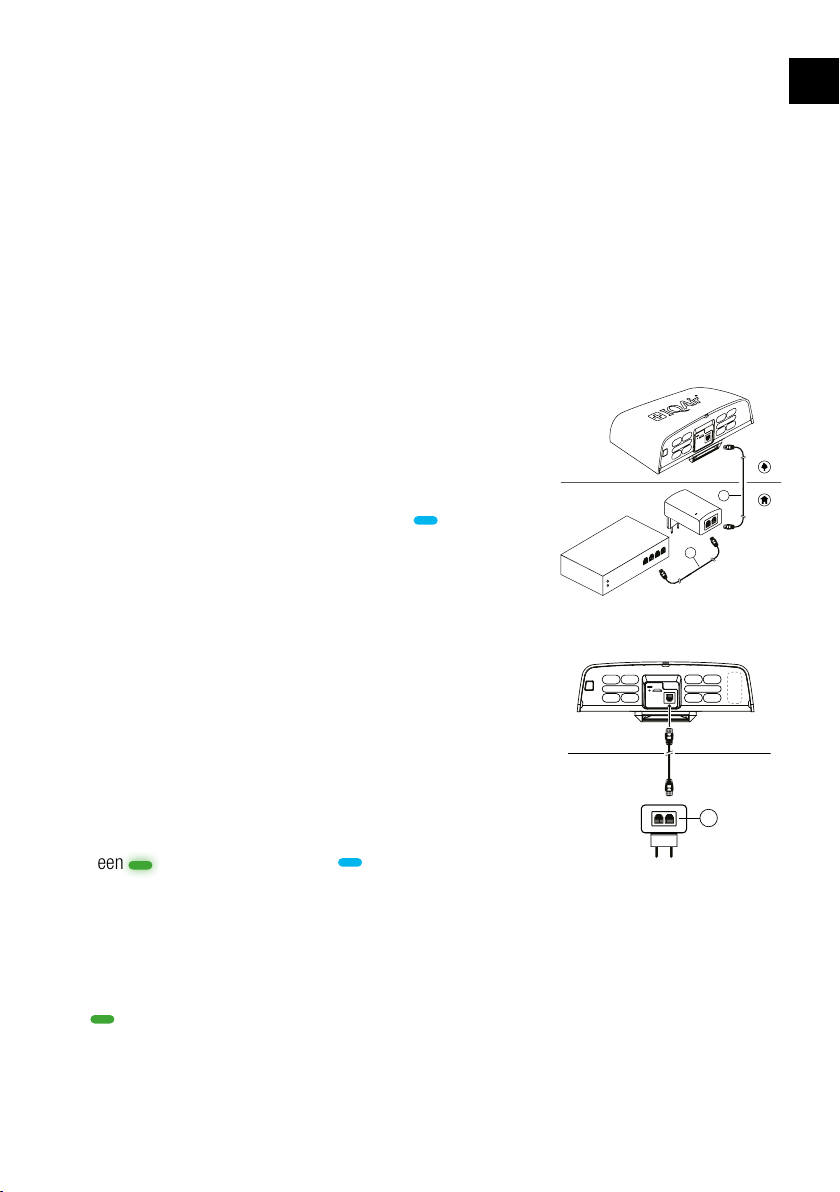
Ethernet connection
Connect the Ethernet cable
from an Internet router to the
port labeled LAN of the PoE
power adapter. Connect the
second Ethernet cable from
the PoE labeled port of the PoE
power adapter to the Ethernet
port of the AirVisual Outdoor.
Wi-Fi connection
Use the AirVisual app to
configure the AirVisual
Outdoor to connect to your
Wi-Fi network. Open the device
settings and select Wi-Fi as
connection type. To set the
AirVisual Outdoor into pairing
mode, press and hold the
control button for 3 seconds.
The status LED will start to
blink green . Next, pair your
phone with the device. The
AirVisual app shows the Wi-Fi
network of your device with the
serial number for identification.
After successful connection, the
status LED will change to solid
green . Select your local
Wi-Fi network that you would
like the AirVisual Outdoor to
connect to. Enter the password
if required or enter an SSID
manually. The AirVisual app will
ask you to verify the successful
connection by observing the
blue status LED
.
4G cellular connection
Plug the 4G USB modem stick
into the USB socket on the side
of the AirVisual Outdoor. The
“Component overview”
on page 6 shows where the
4G USB modem stick must be
inserted after removing the air
inlet cover.
A successful connection to the
IQAir cloud data platform is
indicated by a status LED on
the AirVisual Outdoor that turns
blue
.
The device will now upload its
data to the cloud and within
a few minutes delay you can
view your air quality data online
from the AirVisual app or IQAir
web dashboard (may require
subscription).
Connecting to the IQAir cloud platform
LAN PoE
PoE
4G
LAN
ACTIVE
PoE
LAN
PoE
Active
Ethernet
Ethernet connection
Wi-Fi & 4G connection
EN
9
Always mount the AirVisual
Outdoor in an outdoor location
with good air circulation. Avoid
locations near direct local
pollution sources, such as
vents, exhausts, open windows,
smoking areas or any other
combustion sources.
Installation orientation
Install the AirVisual Outdoor
vertically, e.g. onto a wall or
pole, with the air inlet openings
facing downwards.
Do not mount the AirVisual
Outdoor horizontally on a
surface as this may reduce
sensor lifetime and allow
moisture to enter the device.
Installation height
Install the device with a
minimum clearance of 1m / 3ft
above any horizontal surface to
avoid splash back.
Rain and snow
The AirVisual Outdoor power
adapter must be placed so that
it will not get in
contact with water
or snow.
Always use a “drip
loop” for the power
cable to prevent
water entering the device or the
power adapter.
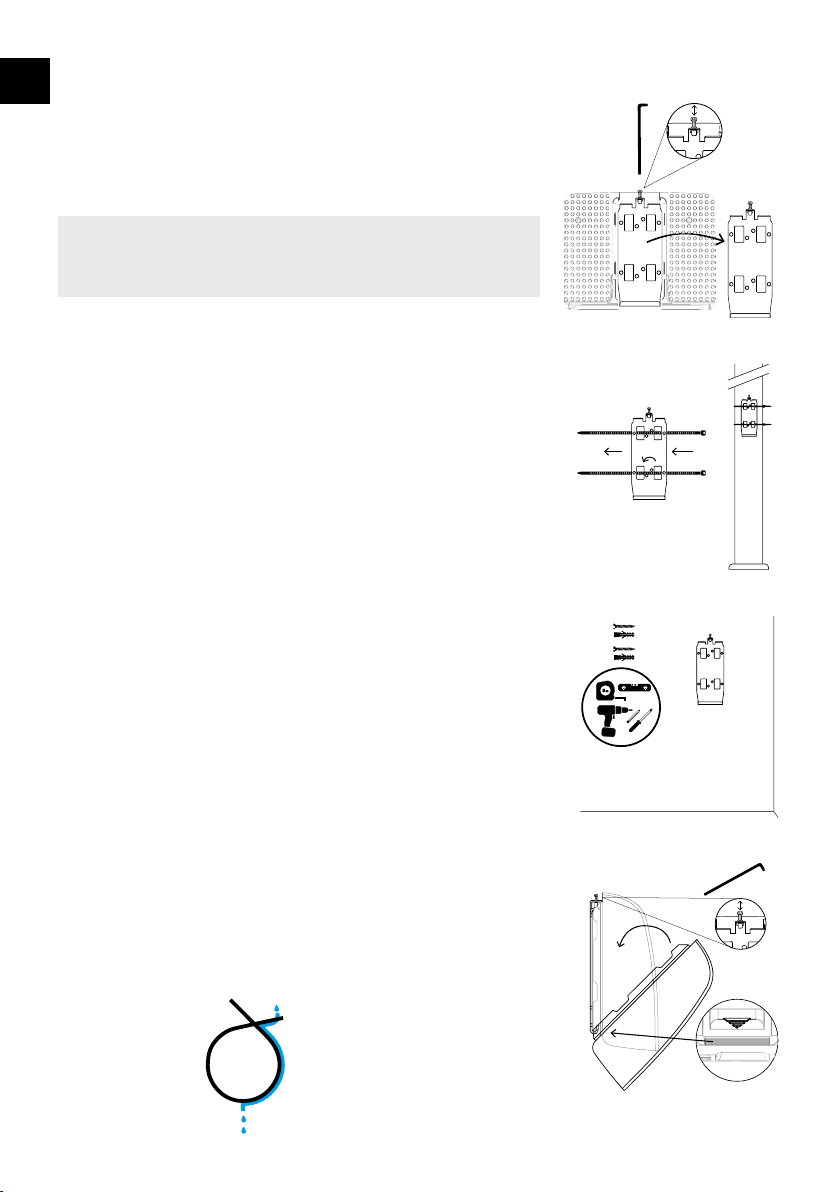
Prepare for installation
Remove the mounting plate
and set aside. You do not need
to fully remove the hex screw.
Prepare the location and install
the mounting plate.
Pole mount
Install the mounting bracket
with cable ties onto a pole or
pillar. There are two UV resistant
cable ties supplied. Insert the
cable ties into the mounting
plate. Install the mounting plate
with zip-ties onto a pole or pillar.
Wall mount
To mount the device onto a wall,
you may need a power tool to
drill a hole for the wall plugs.
Wall plugs and screws are
supplied.
Attach the AirVisual
Outdoor on the mounting
plate
Once the mounting plate is
installed, attach the AirVisual
Outdoor by aligning the lower
bracket on the mounting plate
with the bottom slot on the back
of the device. Tighten the hex
screw.
Installation
Wall mount with hardware provided
Remove the mounting plate
Pole mount with cable ties
Attach the AirVisual Outdoor onto the
mounting plate
Drip Loop
Select a suitable air quality monitoring location
After successful network configuration, the device is now ready to
be mounted in a suitable location.
Configure your AirVisual Outdoor and confirm that it is
connected to the Internet and IQAir cloud platform (blue LED)
before starting the installation.
!
EN
10
Sensor modules
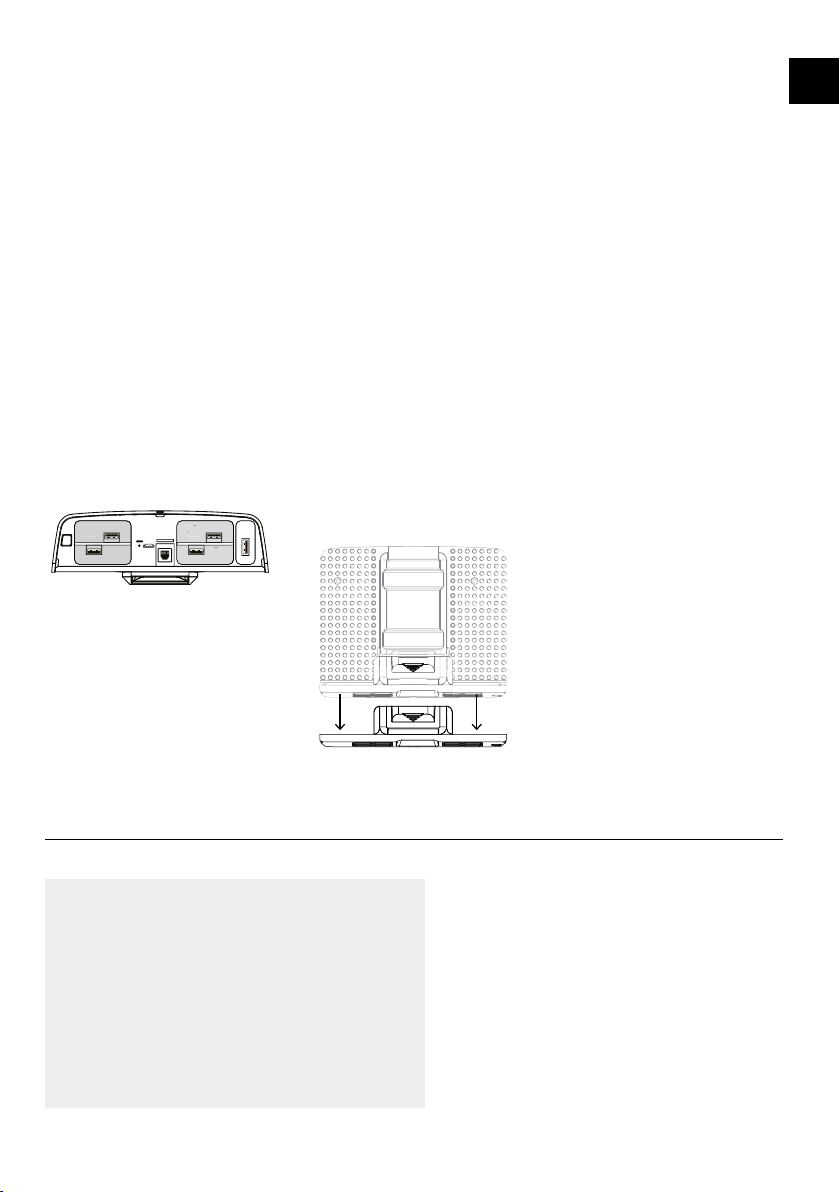
The AirVisual Outdoor has
sensor slots (1-4) that allow for
up to four removable sensor
modules. The sensor slots can
be filled with multiple identical
or different sensor modules.
PM sensor module
The PM sensor module includes
a laser-based nephelometer for
simultaneous measurement of
PM1, PM2.5 and PM10. The
lifetime of the PM sensor is up
to 5 years in average PM2.5
concentrations below 25 µg/m
3
.
Calibration
The AirVisual Outdoor sensor
modules are supplied pre-
calibrated. Due to the sensitivity
of the sensors, they will react
to environmental changes.
All sensors except the PM,
temperature, humidity, or
pressure sensors may take up
to 5 days to show correct values
after the first start or when they
are restarted after they have
been switched off for more than
a few days.
Replacing a sensor
module
You will be notified by the
AirVisual app or web dashboard
if a sensor module requires
replacement. To replace a
defective sensor module, please
follow the steps below:
1. Unplug the power cable so
the device is powered off.
2. Remove the AirVisual Outdoor
from its mounting plate, by
loosening the hex socket screw
on top.
3. Remove the air inlet cover by
sliding down the cover at the
back as shown.
4. Pull out the defective sensor,
which can be identified by the
sensor module serial number
and/or the sensor slot number
shown in the replacement
notification.
5. Insert the new sensor
module.
6. Slide the air inlet cover back
on.
7. Plug back in the power
cables.
8. Place the monitor into its
mounting plate and tighten the
hex socket screw.
9. Dispose of the old sensor
according to your local disposal
rules.
Sensor modules and Technical information
Remove the air inlet cover
2
1
4
3
2
1
4
3
Sensor slots
Technical specification
Model: AirVisual Outdoor
Type: 09
Power Input: PoE 48 VDC, 12W, 250 mA
PoE Standard: IEEE802.3af
USB 5.2VDC, 12W, 2.3 A
Operating temperature: -4 to 104 °F /-20 to 50 °C
Operating humidity: 0 - 100% RH, non-condensing
Warranty information
For warranty information, visit the support section
on the IQAir website.
Support & FAQ’s
For help with any questions and warranty
information, visit the support section on the IQAir
website at:
https://www.iqair.com/support
EN
365.10.80.01 AVO User Manual v02.09_EN-ES-FR-DE 13042022