Lenovo 100w Gen 3/300w Gen 3/500w Gen 3
Regulatory Notice

Read this first
Read this document before using your computer. This computer complies with the radio frequency and
safety standards of any country or region in which it has been approved for wireless use. Install and use your
computer according to the following instructions.
The latest Regulatory Notice manual is available on the Lenovo Web site. To download the manual, go to
https://support.lenovo.com and then follow the on-screen instructions.
Lisez ce document avant d'utiliser votre ordinateur. Cette ordinateur est conforme aux normes de fréquence
radio et de sécurité du pays ou de la région où son utilisation sans fil est autorisée. Installez et utilisez votre
ordinateur en vous conformant aux instructions ci-dessous.
La dernière version du manuel Regulatory Notice est disponible sur le site Web de Lenovo. Pour télécharger
le document, rendez-vous sur
https://support.lenovo.com et suivez les instructions à l'écran.
First Edition (May 2021)
© Copyright Lenovo 2021.
LIMITED AND RESTRICTED RIGHTS NOTICE: If data or software is delivered pursuant to a General Services
Administration “GSA” contract, use, reproduction, or disclosure is subject to restrictions set forth in Contract No. GS-
35F-05925.

Contents
About this manual . . . . . . . . . . . . iii
Chapter 1. Regulatory information
for users in USA and Canada . . . . . . 1
USA - Federal Communications Commission
(FCC) . . . . . . . . . . . . . . . . . . . . 1
FCC RF exposure compliance . . . . . . . . 1
Emergency Calls . . . . . . . . . . . . . 2
Simultaneous use of RF transmitters . . . . . . 2
Radio Frequency interference requirements . . . 2
Canada — Industry Canada (IC) . . . . . . . . . 2
IC certification number . . . . . . . . . . . 2
Low power license-exempt radio
communication devices (RSS-247) . . . . . . 3
Exposure of humans to RF fields (RSS-102) . . . 3
Canada - Industrie Canada (IC) . . . . . . . . . . 3
Numéro de certification IC . . . . . . . . . . 3
Permis d'émission à faible puissance - Cas
des appareils de radio-communication (CNR-
247) . . . . . . . . . . . . . . . . . . 4
Conformité des appareils de
radiocommunication aux limites d'exposition
humaine aux radiofréquences (CNR-102) . . . . 4
Electromagnetic emission notices. . . . . . . . . 5
Usage environment and your health . . . . . . . . 5
Precautions against electrostatic discharges (ESD)
in inserting or removing the nano-SIM card . . . . . 5
Chapter 2. Trademarks . . . . . . . . . 7
© Copyright Lenovo 2021 i

ii Lenovo 100w Gen 3/300w Gen 3/500w Gen 3 Regulatory Notice
About this manual
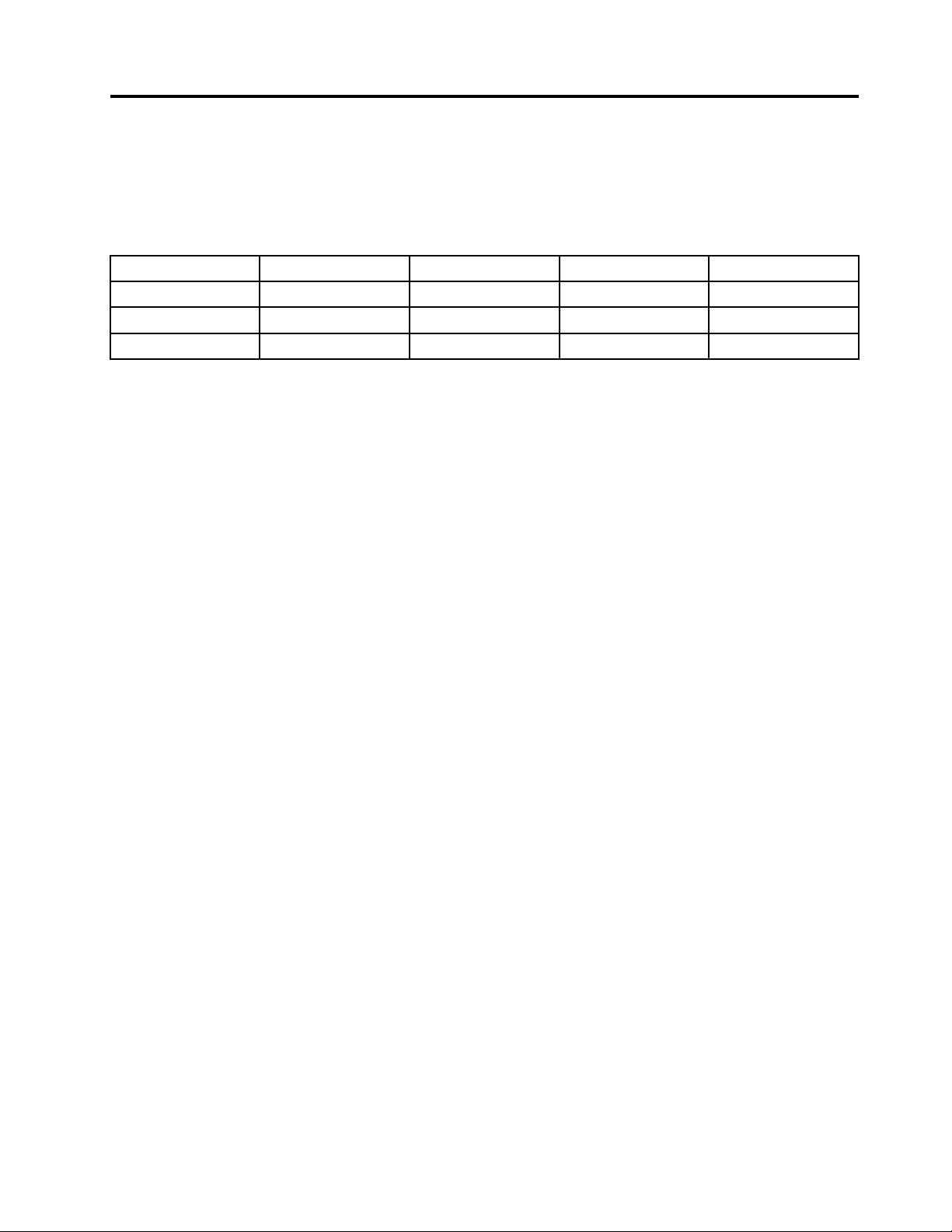
This manual contains regulatory information for Lenovo 100w Gen 3, Lenovo 300w Gen 3, and Lenovo 500w
Gen 3. Lenovo 100w Gen 3, Lenovo 300w Gen 3, and Lenovo 500w Gen 3 support the following wireless
modules:
Product name
RTL8822CE AX201NGW AX200NGW L850–GL
Lenovo 100w Gen 3
X X
Lenovo 300w Gen 3
X X X
Lenovo 500w Gen 3
X
© Copyright Lenovo 2021 iii

iv Lenovo 100w Gen 3/300w Gen 3/500w Gen 3 Regulatory Notice

Chapter 1. Regulatory information for users in USA and
Canada
USA - Federal Communications Commission (FCC)
This computer contains the following wireless devices and underwent the certification process of FCC CFR
47 Part 2 section 1093, Part 15 Subpart C, and Subpart E, Part 27, Part 22 Subpart H, Part 24 Subpart E, and
Part 90 under each respective FCC ID below.
• FCC ID: TX2-RTL8822CE
– Wireless LAN module with Bluetooth function (model: RTL8822CE)
• FCC ID: PD9AX200NG
– Wireless LAN module with Bluetooth function (model: AX200NGW)
• FCC ID: PD9AX201NG
– Wireless LAN module with Bluetooth function (model: AX201NGW)
• FCC ID: PU5-LN300WG3
– Lenovo 300w Gen 3 with Wireless LAN module with Bluetooth function (model: AX200NGW)
• FCC ID: PU5-LN300WG3L
– Lenovo 300w Gen 3 with wireless WAN module L850-GL
• FCC ID: PU5-LN300WG3D
– Lenovo 300w Gen 3 with Wireless LAN module with Bluetooth function (model: AX200NGW) and
wireless WAN module L850-GL
You can find the FCC certification information through one of the following methods:
• On a physical label attached to the outside of your computer shipping carton
• Through an electronic-label screen (E-label screen) preinstalled on your computer
To access the E-label screen, do one of the following:
• Restart the computer. When the logo screen is displayed, press F9. The E-label screen is displayed.
• Restart the computer. When the logo screen is displayed, press Enter or tap the prompt to enter the
Startup Interrupt menu. Then press F9 or tap the Regulatory Information option. The E-label screen is
displayed.
The wireless modules in your computer are preinstalled by Lenovo, and you are prohibited to replace with
other wireless adapter nor remove it. If the device requires replacement due to some problem during
warranty, it must be serviced by a Lenovo authorized servicer.
FCC RF exposure compliance
The radiated output power of your computer is below the FCC radio frequency exposure limits. Nevertheless,
it should be used in such a manner that the potential for human contact is minimized during normal operation
of your computer.
CAUTION:
© Copyright Lenovo 2021 1

The total radiated energy from the antennas connected to the installed wireless modules conforms to
the FCC limit of the SAR (Specific Absorption Rate) requirement, regarding 47 CFR Part 2 Section
1093, when the computer was tested in either conventional notebook or tablet computer orientations.
To know the location of transmission antennas for the Wireless LAN/Bluetooth combo module and the
wireless WAN module, see “Locate the UltraConnect
™
wireless antennas” in the User Guide.
Emergency Calls
The wireless WAN module does not support voice calls, hence their use for essential communication is not
possible, including emergency calls regarding the E911 rule.
Simultaneous use of RF transmitters
Your computer is approved for simultaneous use of the integrated wireless modules.
Make sure of the following conditions when you use any other external wireless option device:
• When you use any other RF option device, you are requested to confirm that the device conforms to the
RF Safety requirement and is approved to use for your computer.
• You must follow the RF Safety instructions of wireless option devices that are included in the user manual
of the RF option device.
• If wireless options are prohibited to use in conjunction with another transmitters, you must turn off all other
wireless features in your computer.
Radio Frequency interference requirements
When you use a wireless LAN module in the 802.11a/n/ac/ax transmission mode, note that high power
radars are allocated as primary users of the 5250 to 5350 MHz and 5650 to 5850 MHz bands. These radar
stations can cause interference with and/or damage this device.
Canada — Industry Canada (IC)
IC certification number
Your computer contains the following wireless devices and the IC certification number is as below.
• IC: 4182A-LN300WG3
– Lenovo 300w Gen 3 with wireless LAN module with Bluetooth function (model: AX200NGW)
• IC: 6317A-RTL8822CE
– Wireless LAN module with Bluetooth function (model: RTL8822CE)
• IC: 1000M-AX200NG
– Wireless LAN module with Bluetooth function (model: AX200NGW)
• IC: 1000M-AX201NG
– Wireless LAN module with Bluetooth function (model: AX201NGW)
You can find the IC certification information through one of the following methods:
• On a physical label attached to the outside of your computer shipping carton
• Through an electronic-label screen (E-label screen) preinstalled on your computer
To access the E-label screen, do one of the following:
2
Lenovo 100w Gen 3/300w Gen 3/500w Gen 3 Regulatory Notice

• Restart the computer. When the logo screen is displayed, press F9. The E-label screen is displayed.
• Restart the computer. When the logo screen is displayed, press Enter or tap the prompt to enter the
Startup Interrupt menu. Then press F9 or tap the Regulatory Information option. The E-label screen is
displayed.
The preinstalled wireless LAN/Bluetooth combo module also has been tested and found to comply with the
limits regarding IC RSS-247, Low-power Licence-exempt Radio communication Devices.
The wireless LAN/Bluetooth combo module and the wireless WAN module are preinstalled by Lenovo, and
are not removable by you. You are prohibited to replace it with any other wireless features. If the wireless
LAN/Bluetooth combo module or the wireless WAN module requires replacement during warranty, it must be
serviced by a Lenovo authorized servicer.
Low power license-exempt radio communication devices (RSS-247)
Operation is subject to the following two conditions:
• This device may not cause interference.
• This device must accept any interference, including interference that may cause undesired operation of
the device.
When you use a wireless LAN/Bluetooth combo module in the 802.11a/n/ac/ax transmission mode, note that
the devices for the band 5150–5250 MHz are only for indoor usage to reduce potential for harmful
interference to co-channel Mobile Satellite systems.
Exposure of humans to RF fields (RSS-102)
The computer employs low gain integral antennas that do not emit RF field in excess of Health Canada limits
for the general population; consult Safety Code 6, obtainable from Health Canada's Web site at:
http://www.hc-sc.gc.ca/
The radiated energy from the antennas connected to the wireless modules conforms to the Canada Portable
RF exposure limit regarding IC RSS-102 Issue 5, Section 4 set forth for an uncontrolled environment, and are
safe for intended operation in the conventional setting. Further RF exposure reduction can be achieved if the
product can be kept as far as possible from the user body or set the device to lower output power if such
function is available.
Canada - Industrie Canada (IC)
Numéro de certification IC
Votre ordinateur contient les périphériques sans fil suivants et le numéro de certification IC indiqué ci-
dessous.
• IC: 4182A-LN300WG3
– Lenovo 300w Gen 3 avec carte combinée sans fil LAN/Bluetooth (modèle : AX200NGW)
• IC: 6317A-RTL8822CE
– Carte combinée sans fil LAN/Bluetooth (modèle : RTL8822CE)
• IC: 1000M-AX200NG
– Carte combinée sans fil LAN/Bluetooth (modèle : AX200NGW)
• IC: 1000M-AX201NG
Chapter 1. Regulatory information for users in USA and Canada 3

– Carte combinée sans fil LAN/Bluetooth (modèle : AX201NGW)
Vous trouverez les informations relatives aux numéros de certification IC via l'une des méthodes suivantes:
• Sur une étiquette physique apposée à l'extérieur du carton d'emballage de l'ordinateur
• Via un écran d'étiquette électronique (écran de l'E-label) préinstallé sur votre ordinateur
Pour accéder à l'écran de l'E-label, procédez comme suit:
• Redémarrez l'ordinateur. Lorsque l'écran d'accueil du logiciel s'affiche, appuyez sur la touche F9. L'écran
de l'E-label s'affiche.
• Redémarrez l'ordinateur. Lorsque le logo s'affiche, appuyez sur Entrée ou touchez l'invite pour entrer
dans le menu Startup Interrupt. Appuyez sur F9 ou touchez l'option Informations réglementaires. L'écran
de l'E-label s'affiche.
Le module combiné réseau local sans fil/Bluetooth préinstallé a été testé et déclaré conforme aux limites des
appareils de radio-communication basse tension IC CNR-247 sans licence d'utilisation.
Le module combiné réseau local sans fil/Bluetooth et le module réseau local sans fil sont préinstallés par
Lenovo et ne peuvent pas être retirés par l'utilisateur. Vous ne devez pas la remplacer par une autre fonction
sans fil. Si le module combiné réseau local sans fil/Bluetooth ou le module réseau local sans fil doit être
remplacé pendant la période de garantie, l'opération doit être effectuée par un prestataire de services agréé
par Lenovo.
Permis d'émission à faible puissance - Cas des appareils de radio-
communication (CNR-247)
Le fonctionnement de ce type d'appareil est soumis aux deux conditions suivantes:
• Cet appareil ne doit pas perturber les communications radio.
• Cet appareil doit supporter toute perturbation, y compris les perturbations qui pourraient provoquer son
dysfonctionnement.
Lorsque vous utilisez un module de réseau local sans fil/Bluetooth dans le mode de transmission 802.11a/n/
ac/ax, les appareils destinés à la bande 5150–5250 MHz devront être exclusivement utilisés en intérieur afin
de réduire les risques de perturbations électromagnétiques gênantes sur les systèmes de satellite mobile
dans un même canal.
Conformité des appareils de radiocommunication aux limites
d'exposition humaine aux radiofréquences (CNR-102)
Les ordinateur utilisent des antennes intégrales à faible gain qui n'émettent pas un champ électromagnétique
supérieur aux normes imposées par Santé Canada pour la population. Consultez le Code de sécurité 6 sur le
site Web de Santé Canada à l'adresse:
http://www.hc-sc.gc.ca/
L'énergie émise par les antennes reliées aux modules sans fil respecte la limite d'exposition aux
radiofréquences émises par les appareils portables au Canada telle que définie par Industrie Canada dans la
section 4 du document CNR-102, version 5 pour un environnement non contrôlé et permet d'affecter sans
danger le produit à l'usage auquel il est destiné. La réduction de l'exposition aux radiofréquences est
possible si le produit peut être conservé aussi loin que possible du corps de l'utilisateur ou en définissant
une puissance de sortie plus faible si une telle fonction est disponible.
4
Lenovo 100w Gen 3/300w Gen 3/500w Gen 3 Regulatory Notice

Electromagnetic emission notices
Refer to Generic Safety and Compliance Notices for information regarding the FCC compliance statement
and other compliance statements.
Usage environment and your health
The wireless device installed in the computer operates within the guidelines identified by radio frequency (RF)
safety standards and recommendations; therefore, Lenovo believes this product is safe for use by
consumers. These standards and recommendations reflect the consensus of the worldwide scientific
community, and result from deliberations of panels and committees of scientists, who continually review and
interpret the extensive research literature.
In some situations or environments, the use of wireless devices might be restricted by the proprietor of a
building or responsible representatives of an organization. For example, these situations and areas might
include the following:
• On board of airplanes, in hospitals or near petrol stations, blasting areas (with electro-explosive devices),
medical implants or body-worn electronic medical devices, such as pace makers.
• In any other environment where the risk of interference to other devices or services is perceived or
identified as harmful.
If you are uncertain of the policy that applies to the use of wireless devices in a specific area (such as an
airport or hospital), you are encouraged to ask for authorization to use a wireless device prior to turning on
the computer.
Precautions against electrostatic discharges (ESD) in inserting or
removing the nano-SIM card
Do not touch the nano-SIM card connectors. As a precaution, always make sure that your computer is in
your hand before you insert or remove the nano-SIM card.
Chapter 1. Regulatory information for users in USA and Canada 5

6 Lenovo 100w Gen 3/300w Gen 3/500w Gen 3 Regulatory Notice

Chapter 2. Trademarks
LENOVO, LENOVO logo, THINKPAD and THINKPAD logo are trademarks of Lenovo. All other trademarks are
the property of their respective owners. © 2020 Lenovo.
© Copyright Lenovo 2021 7

8 Lenovo 100w Gen 3/300w Gen 3/500w Gen 3 Regulatory Notice


Part Number: XXXXXXXXXX
Printed in
(1P) P/N: XXXXXXXXXX

*1PXXXXXXXXXX*