Transmitter User Manual
Updated March 22, 2021
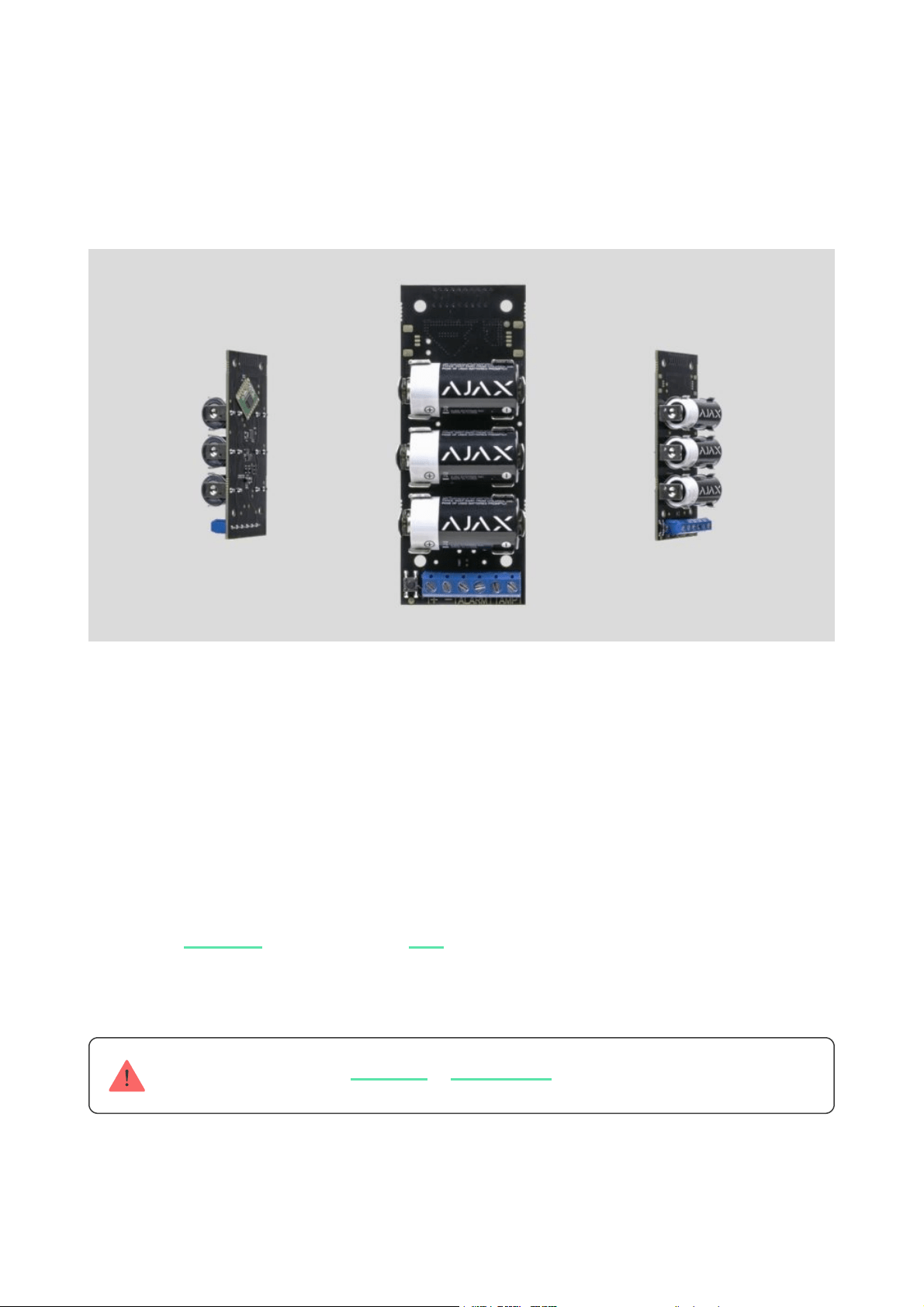
Transmitter is a module for connecting third-party detectors to Ajax security
system. It transmits alarms and warns about the activation of the external
detector tamper and it is equipped with own accelerometer, which protects it
from dismounting. It runs on batteries and can supply power to the connected
detector.
Transmitter operates within the Ajax security system, by connecting via the
protected protocol to the . It is not intended to use the device in
third-party systems.
Not compatible with the or
The communication range can be up to 1,600 meters provided that there are no
obstacles and the case is removed.
Jeweller hub
uartBridge ocBridge Plus
Transmitter is set up via a for iOS and Android based
smartphones.
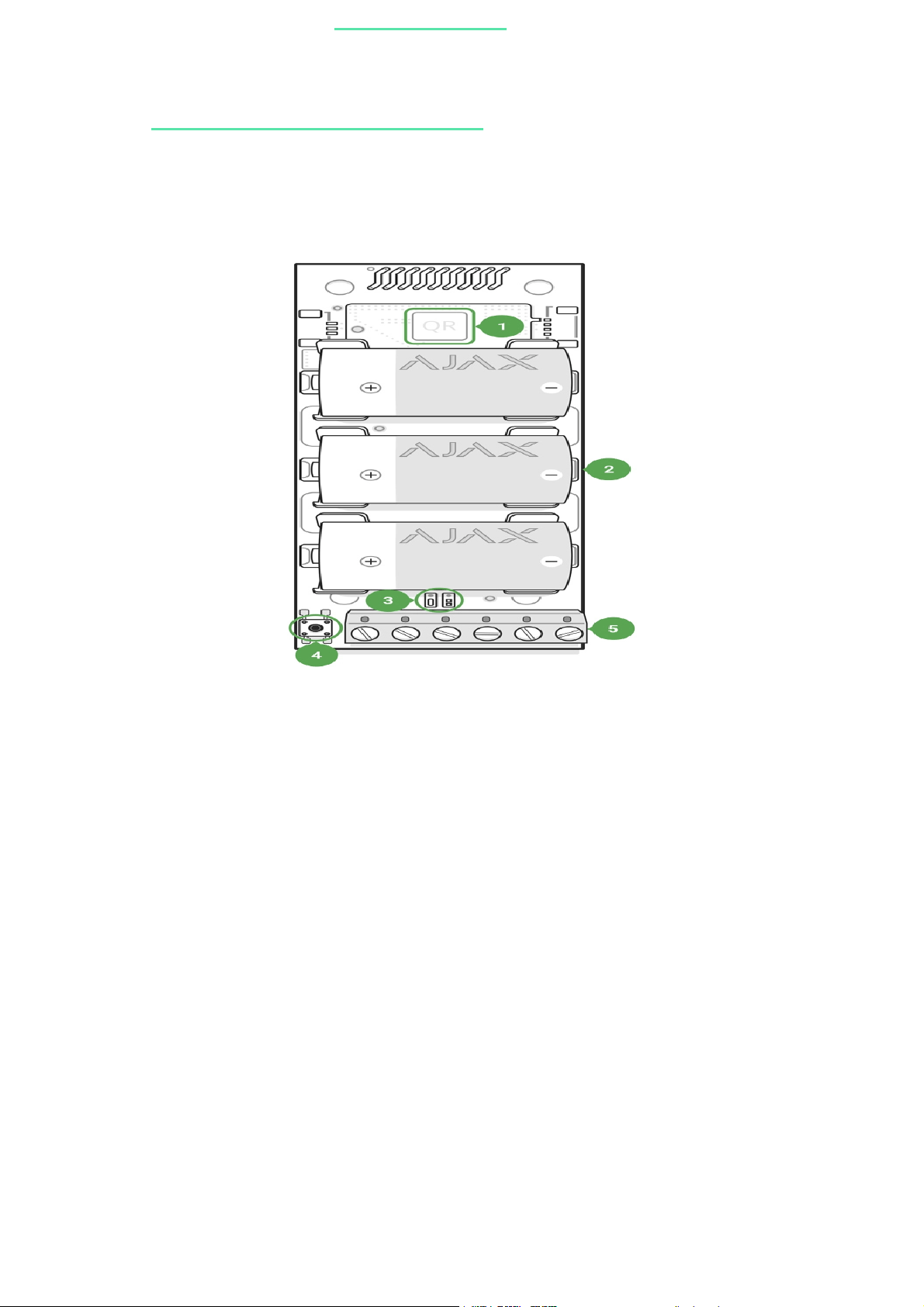
Functional Elements
Operation procedure
Transmitter is designed to connect third-party wired sensors and devices to the
Ajax security system. The integration module receives information about alarms
and tamper activation through the wires connected to the clamps.
Transmitter can be used to connect panic and medical buttons, indoor and
outdoor motion detectors, as well as opening, vibration, breaking, re, gas,
leakage and others wired detectors.
mobile application
Buy integration module Transmitter
1. QR code with the device registration key.
2. Batteries contacts.
3. LED indicator.
4. ON/OFF button.
5. Terminals for detector power supply, alarm and tamper signals.
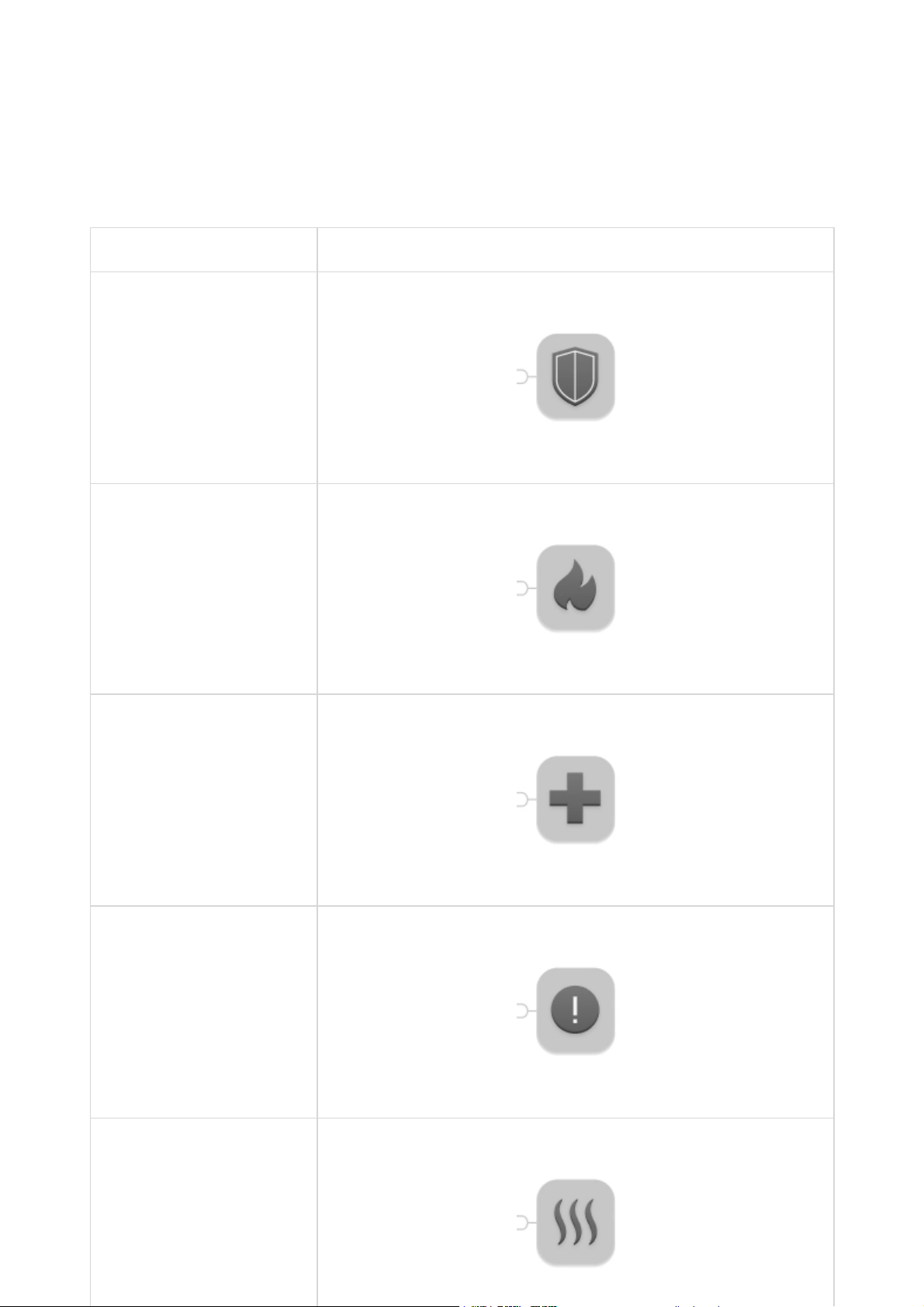
The type of alarm is indicated in the settings of the Transmitter. The text of
notications about alarms and events of the connected device, as well as event
codes transmitted to the central monitoring panel of the security company
(CMS) depend on the selected type.
A total of 5 types of devices are available:
Type Icon
Intrusion alarm
Fire alarm
Medical alarm
Panic button
Gas concentration alarm

Transmitter has 2 pairs of wired zones: alarm and tamper.
A separate pair of terminals ensures power supply to the external detector from
the module batteries with 3.3 V.
Connecting to the hub
Before starting connection:
Only users with administrative privileges can add the device to the hub
How to connect the Transmitter to the hub:
1. Following the hub instruction recommendations, install the
on your smartphone. Create an account, add the hub to the application, and
create at least one room.
Ajax application
2. Go to the Ajax application.
3. Switch on the hub and check the internet connection (via Ethernet cable
and/or GSM network).
4. Ensure that the hub is disarmed and does not start updates by checking its
status in the mobile application.
1. Select theAdd Deviceoption in the Ajax application.
2. Name the device, scan/write manually the QR Code (located on the body
and packaging), and select the location room.
3. SelectAdd— the countdown will begin.
4. Switch on the device (by pressing on/off button for 3 seconds).
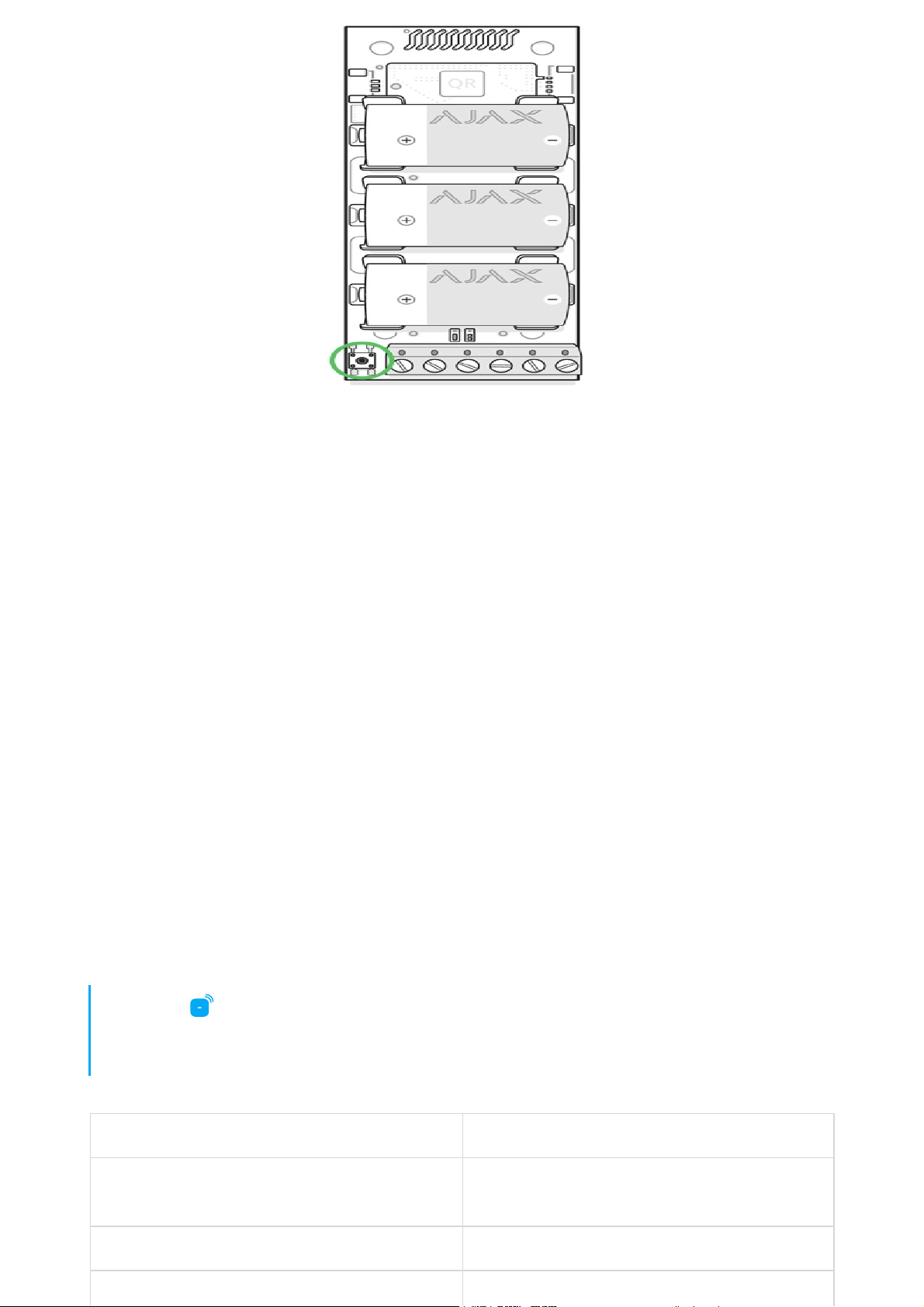
For the detection and interfacing to occur, the device should be located within
the coverage area of the wireless network of the hub (at a single protected
object).
Request for connection to the hub is transmitted for a short time at the time of
switching on the device.
If the connection to the Ajax hub failed, the Transmitter will switch off after 6
seconds. You may repeat the connection attempt then.
The Transmitter connected to the hub will appear in the list of devices of the hub
in the application. Update of device statuses in the list depends on the device
inquiry time set in the hub settings, with the default value – 36 seconds.
States
Parameter Value
Temperature
Temperature of the device. Measured on the
processor and changes gradually
Jeweller Signal Strength Signal strength between the hub and the device
Battery Charge Battery level of the device. Displayed as a
1. Devices
2. Transmitter

percentage
Lid The tamper terminal state
Delay When Entering, sec Delay time when entering
Delay When Leaving, sec Delay time when exiting
Connection
Connection status between the hub and the
Transmitter
Always Active If active, the device is always in an armed mode
Alert if Moved
It turns on the Transmitter accelerometer,
detecting device movement
Temporary Deactivation
Shows the status of the device temporary
deactivation function:
Firmware Detector rmware version
Device ID Device identier
How battery charge is displayed in
Ajax apps
No — the device operates normally and
transmits all events.
Lid only — the hub administrator has
disabled notications about triggering on
the device body.
Entirely — the device is completely excluded
from the system operation by the hub
administrator. The device does not follow
system commands and does not report
alarms or other events.
By number of alarms — the device is
automatically disabled by the system when
the number of alarms is exceeded (specied
in the settings for Devices Auto
Deactivation). The feature is congured in
the Ajax PRO app.
By timer — the device is automatically
disabled by the system when the recovery
timer expires (specied in the settings for
Devices Auto Deactivation). The feature is
congured in the Ajax PRO app.

Settings
Setting Value
First eld Device name, can be edited
Room
Selecting the virtual room to which the device is
assigned
External Detector Contact Status
Selection of the external detector normal
status:
External Detector Type
Selection of the external detector type:
Tamper status
Selection of the normal tamper mod for an
external detector:
Alarm Type Select alarm type of connected device:
The text of SMS and notications in events
feed, as well as the code transmitted to the
1. Devices
2. Transmitter
3. Settings
Normally closed (NC)
Normally opened (NO)
Pulse
Bistable
Normally closed (NC)
Normally opened (NO)
Intrusion
Fire
Medical help
Panic button
Gas

security company’s console, depends on the
selected type of alarms
Always Active
When the mode is active, the Transmitter
transmits alarms even when the system is
disarmed
Delay When Entering, sec Selecting delay time when entering
Delay When Leaving, sec Selecting delay time on exit
Delays in Night Mode Delay turned on when using night mode
Alert if Moved
The accelerometer turning on the Transmitter to
provide an alarm in the event of device
movement
Detector Power Supply
Turning the power on in 3.3 V external detector:
Arm in Night Mode
If active, the device will switch to armed mode
when using night mode
Alert with a siren if an alarm is detected
If active, added to the systemare
activated if an alarm is detected
Jeweller Signal Strength Test
Switches the device to the signal strength test
mode
Attenuation Test
Switches the device to the signal fade test
mode (available in detectors with rmware
version 3.50 and later)
User Guide Opens the device User Guide
Temporary deactivation Two options are available:
Disabled if disarmed
Always disabled
Always enabled
sirens
Entirely— the device will not execute
system commands or run automation
scenarios. The system will ignore device
alarms and notications
Lid only— messages about triggering the
tamper button of the device are ignored
Learn more about device temporary
deactivation

The system can also automatically deactivate
devices when the set number of alarms is
exceeded or when the recovery timer expires.
Unpair Device
Disconnects the device from the hub and
deletes its settings
Set the following parameters in the Transmitter settings:
Select the power mode for the external detector:
If the “Always active” operating mode is selected for the module, the external
detector is powered only in the “Always active” or the “Turned off when the hub
disarmed” mode, regardless of the security system status.
Learn more about auto deactivation
of devices
The state of the external detector contact, which can be normally closed or
normally open.
The type (mode) of the external detectorthat can be bistable or pulse.
The tamper mode, which can be normally closed or normally open.
The accelerometer-triggered alarm— you can turn this signal off or on.
Turned off when the hub is disarmed— the module stops powering the
external detector upon disarming and does not process signals from the
ALARM terminal. When arming the detector, the power supply resumes, but
the alarm signals are ignored for the rst 8 seconds.
Always disabled— the Transmitter saves energy by turning off the power of
the external detector. The signals from the ALARM terminal are processed
both in the pulse and bistable modes.
Always active — this mode should be used if there are any problems in the
“Turned off when the hub is disarmed”. When the security system is armed,
signals from the ALARM terminal are processed no more than once in three
minutes in the pulse mode. If the bistable mode is selected, such signals are
processed instantly.

Indication
Event Indication
The Module is switched on and registered
The LED lights up when the ON button is briey
pressed.
Registration failed
LED blinks for 4 seconds with an interval of 1
second, then blinks 3 times rapidly (and
automatically switches OFF).
The Module is deleted from the list of hub
devices
LED blinks for 1 minute with an interval of 1
second, then blinks 3 times rapidly (and
automatically switches OFF).
The Module has received alarm/tamper signal The LED lights up for 1 second.
Batteries are discharged
Smoothly lights up and goes out when the
detector or tamper is activated.
Performance testing
The Ajax security system allows conducting tests for checking the functionality
of connected devices.
The tests do not start straight away but within a period of 36 seconds when
using the standard settings. The test time start depends on the settings of the
detector scanning period (the paragraph on “Jeweller” settings in hub settings).
Connection of the Module to the wired detectorа
Location of the Transmitter determines its remoteness from the hub and
presence of any obstacles between the devices hindering the radio signal
transmission: walls, inserted oors, large-size objects located within the room.
Check the signal strength level at the installation location
Jeweller Signal Strength Test
Attenuation Test
If the signal level is one division, we cannot guarantee stable operation of the
security system. Take possible measures to improve the quality of the signal! As
a minimum, move the device — even 20 cm shift can signicantly improve the
quality of reception.
If, after moving, the device still has a low or unstable signal strength, use a
.
The Transmitter should be encased inside the wired detector case. The Module
requires a space with the following minimum dimensions: 110 × 41 × 24 mm. If
the installation of the Transmitter within the detector case is impossible, then
any available radiotransparent case could be used.
radio
signal range extender ReX
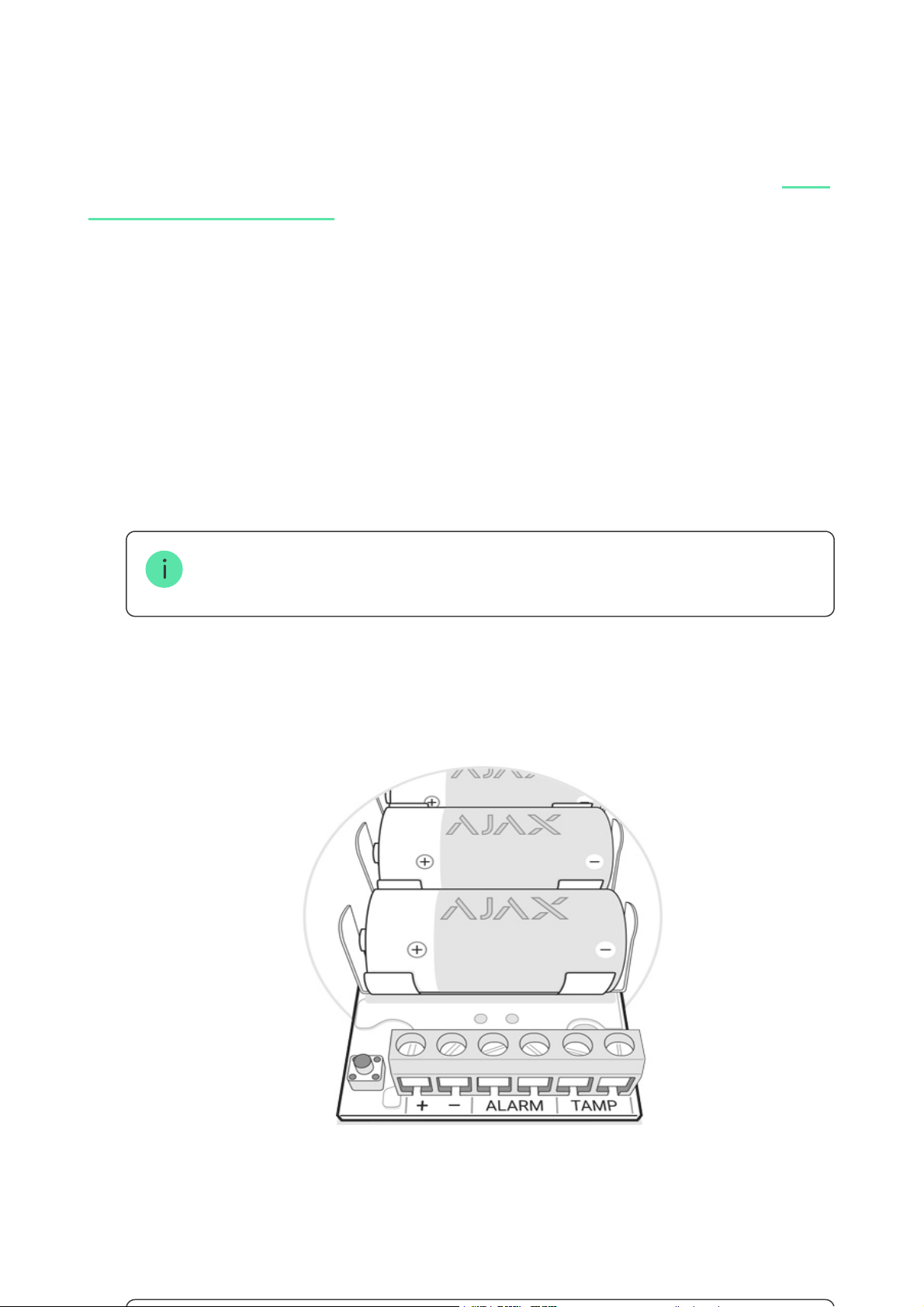
1. Connect the Transmitter to the detector through the NC/NO contacts
(choose the relevant setting in the application) and COM.
The maximum cable length for connecting the sensor is 150 m (24 AWG twisted
pair). The value may vary when using different type of cable.
The function of the Transmitter’s terminals
+ — — power supply output (3.3 V)
ALARM — alarm terminals
TAMP — tamper terminals
Do not install the Transmitter:
Maintenance and Battery Replacement
The device does not require maintenance when mounted in the housing of a
wired sensor.
Tech Specs
Connecting a detector ALARM and TAMPER (NO/NC) terminals
Mode for processing alarm signals from the
detector
Pulse or Bistable
Power 3 × CR123A, 3V batteries
Capability to power the connected detector Yes, 3.3V
Protection from dismounting Accelerometer
Frequency band
868.0–868.6 MHz or 868.7 – 869.2 MHz,
depends on sales region
Compatibility
Operates only with all Ajax , and
Maximum RF output power Up to 20 mW
IMPORTANT! Do not connect external power to the Transmitter’s power outputs.
This may damage the device
2. Secure the Transmitter in the case. Plastic bars are included in the
installation kit. It is recommendable to install the Transmitter on them.
Near metal objects and mirrors (they can shield the radio signal and lead to
its attenuation).
Closer than 1 meter to a hub.
How long Ajax devices operate on batteries, and what affects this
Battery Replacement
hubs range
extenders

Modulation GFSK
Communication range Up to 1,600 m (any obstacles absent)
Ping interval for the connection with the
receiver
12–300 sec
Operating temperature From –25°С to +50°С
Operating humidity Up to 75%
Dimensions 100 × 39 × 22 mm
Weight 74 g
Complete Set
Warranty
Warranty for the “AJAX SYSTEMS MANUFACTURING” LIMITED LIABILITY
COMPANY products is valid for 2 years after the purchase and does not apply to
the pre-installed battery.
If the device does not work correctly, you should rst contact the support
service — in half of the cases, technical issues can be solved remotely!
Technical support:
1. Transmitter
2. Battery CR123A — 3 pcs
3. Installation kit
4. Quick Start Guide
The full text of the warranty
User Agreement
suppor[email protected]