ENGLISH
ESPAÑOL
Please read the Important Safety Information for the proper
use of this product. After reading, store this Owner's Manual
in an easily accessible place for all users.
NOTE: Please read all information carefully prior to using
the headset in order to enjoy the best performance and
prevent damage to the product.
Rev 2.0 US
TONE-NP3 / TONE-NP3C
www.lg.com
Copyright © 2021-2022 LG Electronics Inc. All rights reserved.
OWNER'S MANUAL
Bluetooth® LG Stereo Headset

ENGLISH
Contents
Safety Precautions ...................................................................................................................... 1
Precautions When Using the Product ..............................................................................3
HD Speaker ..................................................................................................................................... 3
Product Components ................................................................................................................4
Overview ........................................................................................................................................... 5
Power On/Off ................................................................................................................................ 6
Pairing and Connecting ............................................................................................................ 7
Playing Music .............................................................................................................................. 10
Mobile Calling Functions .......................................................................................................11
Charging ........................................................................................................................................13
Enabling vibration Alert ........................................................................................................14
Winding up the Cables ..........................................................................................................15
Status Indicator ......................................................................................................................... 16
Out of Range ...............................................................................................................................16
LG TONE Free App ................................................................................................................... 17
Troubleshooting ......................................................................................................................... 18
Specications and Features ................................................................................................ 19
Declaration of Conrmation ............................................................................................... 20
Additional Information ...........................................................................................................22
Important Safety Information ...........................................................................................25
OSS Notice Information ........................................................................................................ 26
Symbols ..........................................................................................................................................26
LIMITED WARRANTY- U.S.A. ONLY ...............................................................................27
1
ENGLISH
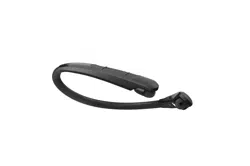
The LG TONE Style (TONE-NP3) is a lightweight wireless headset that uses
Bluetooth technology.
This product can be used as an audio accessory for devices supporting
either the A2DP or Hands-Free Bluetooth Prole.
Safety Precautions
The following safety precautions are provided to prevent any unexpected
accident or damage. Please familiarise yourself with the safety precautions.
The safety precautions are classied into “WARNING” and “CAUTION”.
!
WARNING: Failing to comply with the instructions may result in
serious injury or death.
!
CAUTION: Failing to comply with the instructions may result in minor
injury or product damage.
!
WARNING
Do not drop the product from a high place.
Make sure there is no water, alcohol, or benzene in contact with the
product.
Do not store the product in a wet or dusty place.
Do not place heavy objects on the product.
!
CAUTION
Do not disassemble, adjust, or repair the product.
Do not place the product near excessive heat or ammable material.

2
ENGLISH
The product may be damaged if an incompatible charger is used.
Keep small components of the product away from infants or children.
Make sure that foreign objects do not enter the charger’s connectors
(charging port and power plug). Foreign objects in the charger's
connectors may result in re or electric shock.
If you have a medical device implanted, contact your doctor before
using this device.
For your safety, do not remove the battery incorporated in the product.
This product has a built-in battery, and the battery cannot be removed
or replaced.
If you arbitrarily replace the battery or don’t replace it correctly, it may
explode.
The lithium-ion polymer battery is a hazardous component that can
cause injury.
Battery replacement by an unqualied professional can cause damage
to your device.
Do not discard the battery arbitrarily. Follow the local procedure for
discarding batteries.
In order to prevent unnecessary energy consumption, disconnect the
device when fully charged. Always use an easily accessible power outlet
for charging your device.
Risk of re or explosion if the battery is replaced by an incorrect type.
Do not store or transport at pressures lower than 0.116 bar (11.6 kPa)
and at above 9.32 miles (15,000 m) altitude.
3
ENGLISH
Replacement of a battery with an incorrect type that can defeat a
safeguard (for example, in the case of some lithium battery types).
Disposal of a battery into re or a hot oven, or mechanically crushing or
cutting of a battery, may result in an explosion.
Leaving a battery in an extremely high temperature surrounding
environment that can result in an explosion or the leakage of
ammable liquid or gas.
A battery subjected to extremely low air pressure may result in an
explosion or the leakage of ammable liquid or gas.
Do not carelessly throw away old batteries. It can cause an explosion or
re. The disposal method may vary by country and region. Dispose of it
in an appropriate manner.
Precautions When Using the Product
Do not pull the earbud cables with excessive force.
If the product is exposed to excessive sweat, clean the product with
dry cloth.
Keep the earbuds clean.
For your safety, do not wear the product while it is being charged.
HD Speaker
If the communication network of the device you are connecting to
supports HD Voice Calling, you can enjoy making voice calls and
listening to music in high denition.
4
ENGLISH
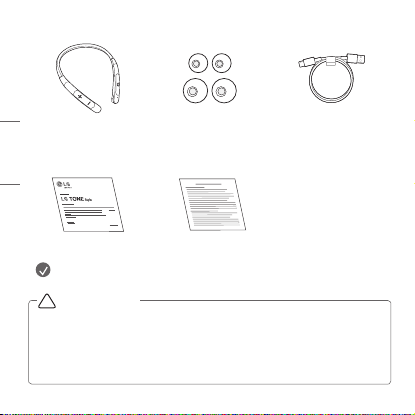
Product Components
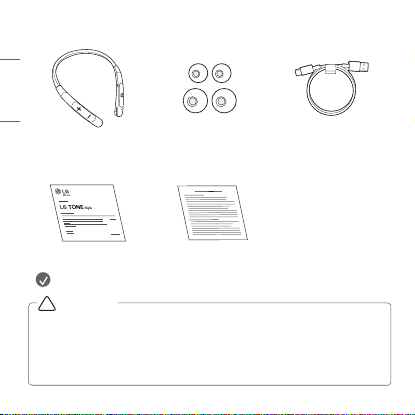
ON
OFF
LG TONE Style
(medium eargels
installed)
Extra Ear Gels
(small & large)
USB Type-C™
Charging Cable
Owner's Manual WEEE Card
NOTE: Actual product design may differ from images shown in manual.
Make sure authentic LG Electronics components are used. Using a
nonauthentic component may damage the product. The LG limited
warranty does not cover damage caused by the use of non-authentic
components.
Use the USB Type-C™ cable provided with the product.
!
CAUTION
5
ENGLISH
Overview
ON
OFF
*The appearance and specications of the actual product may differ
depending on the model.
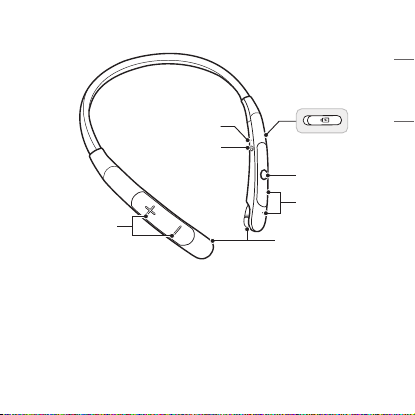
Status Indicator
Charging port
Power Switch
Volume Button
(Next/Previous)
Call/Play Button
Microphone
Earbuds (left/right)
6
ENGLISH
Power On/Off
ON
OFF
ON OFF
ON OFF
L
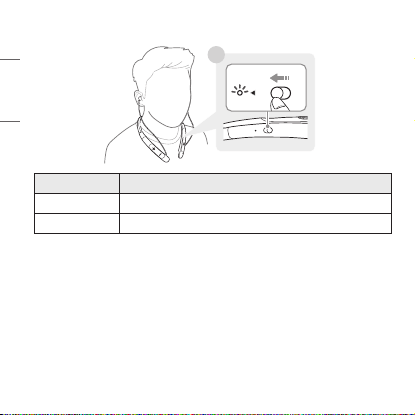
Status Description
Power On Slide the Power switch to ON.
Power Off Slide the Power switch to OFF.
*When the power is turned on or off, the blue status indicator blinks with
vibration and beep.
7
ENGLISH
Pairing and Connecting
Fast Pair
-(
-(
#MVFUPPUI
0/
ON
OFF
ON OFF
L
~39 inch, ~1m
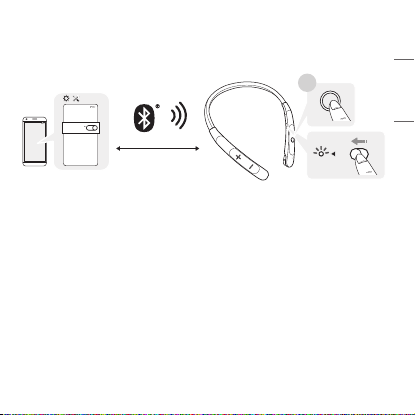
1 Turn on the Bluetooth function on the smartphone or the device to be
connected.
2 While pressing the Call/Play button on the headset, slide the Power
switch to ON. The headset enters the discovery mode and the blue
status indicator turns on.
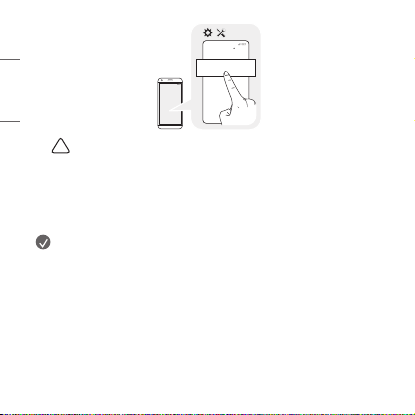
3 When a Fast Pair pop-up appears on the bottom of the smartphone
screen, touch “Connect” to establish connection. (It only supports
Android™ 6.0 or higher, and requires conguring Bluetooth and location
information settings of the mobile device.)
4 If the pop-up does not appear, select [LG-TONE-NP3] from the
Bluetooth menu on the smartphone and connect it (for users of iOS or
Android 5.0 or lower versions).
8
ENGLISH
-(
-(
-(50/&/1
#MVFUPPUI
!
CAUTION: In the list of Bluetooth connected devices,
LG-TONE-NP3_LE is not the correct model name for connection.
Check the model name in use and connect with the model name
without “LE”.
If the headset model name is abnormally displayed on the
Android device, change the model name in the Bluetooth menu of
Connected Device Settings.
NOTE: To connect with another device, perform the above procedure
again.
9
ENGLISH
Multiple Connections
The headset can be connected to two devices, such as a smartphone
and a PC, simultaneously.
1 To connect multiple devices, turn off the headset while the product is
connected to one device.
2 Perform 1 to 4 under “Fast Pair.” This device becomes the “Main
Connected Device.”
3 Try to connect to headset using a previously connected device. This
device becomes the “Sub Connected Device.”
NOTE: If the headset is simultaneously connected to two devices, the
main functions work based on the “Main Connected Device.”
Automatic Reconnection
If you turn on the headset, it will automatically connect to the most
recent device (Main or Sub Connected Device) it was connected to.
(If a device cannot be found, Search mode will be activated.)
If the product does not automatically connect to the device you want,
search for your product on the device you want to connect to and connect
it manually.
10
ENGLISH
Playing Music
ON
OFF
-(
L
R
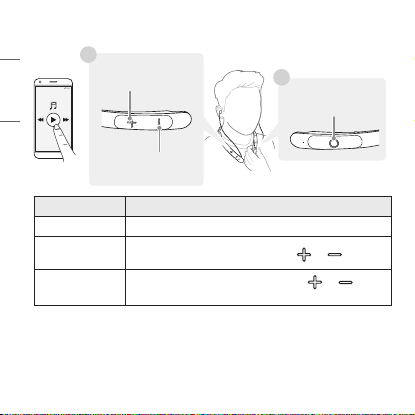
Function Description
Play/Pause Briey press the Call/Play button.
Adjusting the
Volume
Briey press the Volume button ( or ).
Next/
Previous song
Press and hold the Volume button ( or ) for
one second.
Switching Music Players
To switch to a different music playback device when multiple devices
are connected, stop the currently playing music and then play music
from the device of your choice.
Previous song
Call/Play button
Next song
11
ENGLISH
Mobile Calling Functions
ON
OFF
L
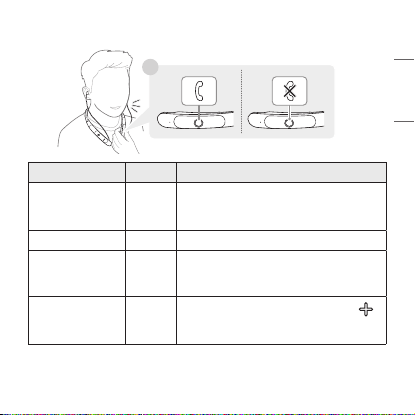
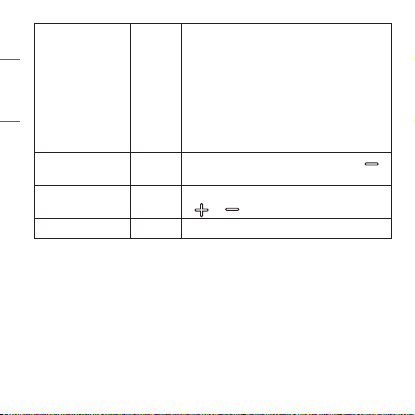
Function Status Description
Answering Calls Ringing
Briey press the Call/Play button.
-While the vibration alert is disabled,
no vibrations occur.
Ending Calls
Talking
Briey press the Call/Play button.
Making Calls Idle
If you make a call from your smartphone,
the call is automatically transferred to
the headset.
Switching Calls
Talking
Press and hold the Volume button ( )
for one second to transfer the call
between the headset and smartphone.
12
ENGLISH
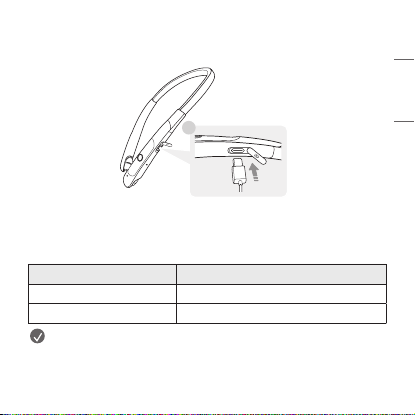
Receiving Calls
while on the
Phone
Talking
Briey press the Call/Play button to
accept another call while on a call.
The existing call is put on hold.
Briey press the Call/Play button to
switch to the call on hold.
If the previous call is on hold, you
can nish the current call from your
smartphone. (The behavior and control
may differ by devices or settings.)
Enabling/
Disabling Mute
Talking
Press and hold the Volume button ( )
for one second during a call.
Volume up/down Talking
Briey press the Volume button
( or ) during a call.
Rejecting a call Ringing
Press and hold the Call/Play button.
13
ENGLISH
Charging
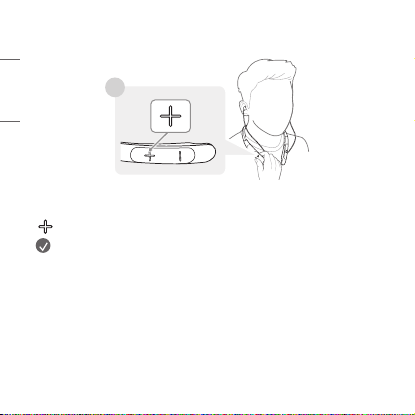
Wired Charging
L
Open the Charging port cover of the headset and connect the charging
cable to the port. The status indicator indicates the current charging
status.
While being charged, the headset is powered off.
Status Indicator Charging State (charger connected)
Red Charging
Green Fully charged
NOTE: The charging port of the headset does not supply power to
other devices such as smartphones.
If the temperature is too high or too low, the status indicator blinks
in red and the battery is not charged.
14
ENGLISH
Enabling vibration Alert
ON
OFF
R
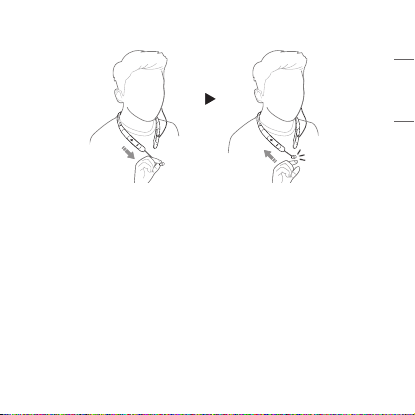
The headset is supplied with the vibration alert enabled by default.
To enable or disable the vibration alert, press and hold the Volume button
( ) for one second while the device is on standby.
NOTE: If you disable the vibration alert, no vibration occurs when
there is an incoming call or you are out of range.
15
ENGLISH
Winding up the Cables
ON
OFF
ON
OFF
If you pull out your earbuds completely and then let go, then the earbud
cables will automatically wind up.
While the earbuds are automatically winding, it may not be fully winded if
it gets caught in the body or clothes. In this case, pull all the way forward
and release it.
16
ENGLISH
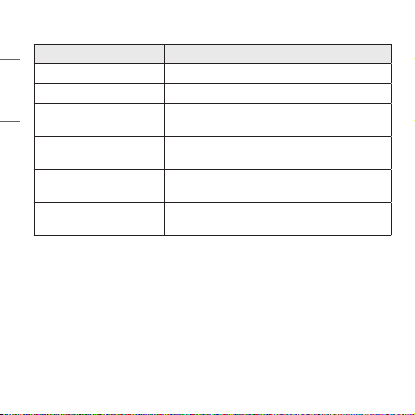
Status Indicator
Status Description
Power On/Off The blue status indicator ashes.
Bluetooth Search Mode The blue status indicator is on.
Headset/hands-free
prole/call connected
The blue status indicator ashes every
5 seconds.
When there is a
problem while charging
The status indicator blinks in red.
Charging
(charger connected)
The status indicator turns on in red.
Charging complete
(charger connected)
The status indicator turns on in green.
Out of Range
If the device connected to the product is out of effective communication
range, the communication signal becomes weak and the communication
is lost. The effective communication range may vary depending on
surrounding and other conditions.
If the device comes back within effective communication range, the
product automatically reconnects to the device. If the device is not
automatically reconnected, press and hold the Call/Play button on the
headset and push the Power switch to ON to reconnect it manually.
17
ENGLISH
If a device that is not in use goes out of communication range when
multiple devices are connected, the product vibrates and a voice
message indicates that the connection is lost. In this case, the automatic
reconnection function is not supported.
LG TONE Free App
If you install “LG TONE Free,” app, you can use Check headset Battery,
Change Equalizer Mode, Voice Alert, and Vibration Alert. Check out the
app for more details.
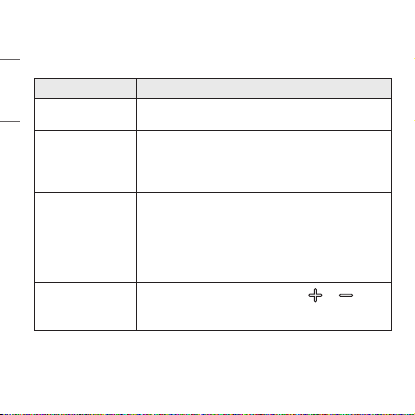
To install the “LG TONE Free” app, search LG TONE Free in the Google Play
Store or App Store or scan the QR code below.
It supports Android 7.0 and higher or iOS 11 and higher.
In case of multiple connection, you can run the app with only one or either
one of smartphones.
Google Play App Store
18
ENGLISH
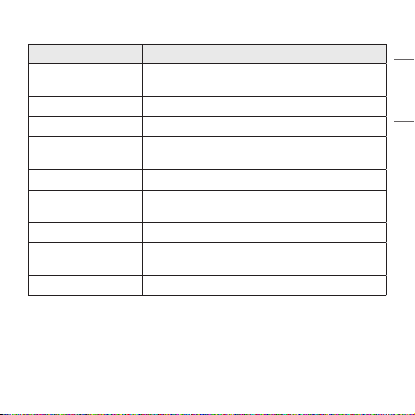
Troubleshooting
If you see any of the following symptoms while using the product, make
sure to recheck it. It may not be a malfunction.
Symptom Cause and Solution
The power does
not turn on.
Check the battery level and charge it.
Cannot transfer
calls to the
headset.
If the smartphone does not support headset and
hands-free functions, you cannot use the calling
features.
Check the battery level and charge it.
Cannot pair the
headset with my
smartphone.
Check if the headset is powered on.
Check if the headset is running in discovery mode.
-Slide the Power switch to ON while pressing the
Call/Play button on the headset.
The headset enters the discovery mode and the
blue status indicator turns on.
The sound is low.
Briey press the Volume button ( or ) of
the headset to adjust the volume. Or you may
adjust the volume from the paired device.
19
ENGLISH
Specications and Features
Item Comments
Bluetooth
Specications
V 5.1 (Headset/Hands-Free/A2DP/AVRCP)
Battery 3.7 V / 210 mAh, Lithium-ion polymer
Music Play Time Up to 22 hours*
Charging Time
Within 2 hours
※ When charging wired at room temperature
Rated Input Voltage
5 V 0, 500 mA
Operating
Temperature
0°C (+32°F) ~ +40°C (+104°F)
Operating Humidity 5 % ~ 60 %
Dimensions (inch)/
Weight (oz)
6.15" (W) X 7.09" (L) X 0.58" (H) / 1.73 oz
Frequency range 2402 MHz to 2480 MHz
*Duration of use may vary depending on the connected mobile device,
features being used, settings, signal strength, operating temperature,
frequency band, and other methods of use.

20
ENGLISH
Declaration of Conrmation
FCC NOTICE TO USERS:
This device complies with part 15 of the FCC Rules.
Operation is subject to the following two conditions:
(1) This device may not cause harmful interference, and
(2) This device must accept any interference received, including
interference that may cause undesired operation.
Changes or modications not expressly approved by the manufacturer
(or party responsible) for compliance could void the user’s authority to
operate the equipment.
FCC Part 15.105 statement
This equipment has been tested and found to comply with the limits for a
Class B digital device, pursuant to Part 15 of the FCC Rules.
These limits are designed to provide reasonable protection against
harmful interference in a residential installation. This equipment
generates, uses and can radiate radio frequency energy and, if not
installed and used in accordance with the instructions, may cause harmful
interference to radio communications.
However, there is no guarantee that interference will not occur in a
particular installation. If this equipment does cause harmful interference
to radio or television reception, which can be determined by turning
the equipment off and on, the user is encouraged to try to correct the
interference by one or more of the following measures:
21
ENGLISH
-Reorient or relocate the receiving antenna.
-Increase the separation between the equipment and receiver.
-Connect the equipment into an outlet on a circuit different from that to
which the receiver is connected.
-Consult the dealer or an experienced radio/TV technician for help.
IMPORTANT NOTE:
To comply with the FCC RF exposure compliance requirements, no change
to the antenna or the device is permitted. Any change to the antenna
or the device could result in the device exceeding the RF exposure
requirements and void the user’s authority to operate the device.
Bluetooth® is a registered trademark of Bluetooth SIG, Inc. worldwide.
Android, Google Play, the Google Play logo, and other related marks and
logos are trademarks of Google LLC.
FCC ID: ZNFTONENP3

22
ENGLISH
Additional Information
1. Radio frequency exposure
This Bluetooth LG Stereo Headset is a radio transmitter and receiver.
When in operation, it communicates with a Bluetooth-equipped mobile
device by receiving and transmitting radio frequency (RF) electromagnetic
elds (microwaves) in the frequency range 2402 to 2480 MHz.
Your Bluetooth headset is designed to operate in compliance with the RF
exposure guidelines and limits set by national authorities and international
health agencies when used with any compatible mobile phone.
2.
Bluetooth
connection precautions
The following environments affect the range and reception of Bluetooth
signals:
-When walls, metal, human bodies, or other obstacles exist between the
Bluetooth device and the connected device.
-When equipment that uses 2.4 GHz frequency signals (wireless LANs,
wireless phones, microwave ovens, etc.) is placed near the devices
being used.
-When using a Bluetooth device (TV, laptop, etc.) other than the mobile
phone, the sound quality may be affected by the specications and
performance of the device.

23
ENGLISH
3. Potentially explosive atmosphere
Turn off your electronic device when in any area with a potentially
explosive atmosphere. Although this is uncommon, your electronic device
could generate sparks. Sparks in such areas could cause an explosion
or re resulting in bodily injury or even death. Areas with a potentially
explosive atmosphere are often but not always clearly marked.
4. Emergency calls
IMPORTANT!
This Bluetooth headset and the electronic device connected to the
headset operate using radio signals and mobile and landline networks
as well as user-programmed functions, which cannot guarantee
connection under all conditions. Therefore, you should never rely solely
upon any electronic device for essential communications (e.g., medical
emergencies). Remember, in order to make or receive calls, the headset
and the electronic device connected to the headset must be switched on
and in a service area with adequate mobile signal strength. Emergency
calls may not be possible on all mobile phone networks or when certain
network services and/or phone features are in use. Check with your local
service provider.

24
ENGLISH
5. Battery information
A rechargeable battery has a long service life if treated properly. A new
battery or one that has not been used for a long period of time could
have reduced capacity the rst few times it is used. Do not expose
the battery to extreme temperatures, never above +122°F (+50°C) or
below +14°F (-10°C). For maximum battery capacity, use the battery
at room temperature. If the battery is used in low temperatures, the
battery capacity will be reduced. The battery can only be charged in
temperatures between +32°F (0°C) and +113°F (+45°C).
6. Recycling the battery in your
Bluetooth
headset
The battery in your Bluetooth headset must be disposed of properly and
should never be placed in municipal waste.
In case rechargeable battery is included in this product, the entire device
should be recycled in compliance with rechargeable battery recycling
standards because of the internal battery. To dispose of properly, call
(800) 822-8837 or visit www.call2recycle.org.
25
ENGLISH
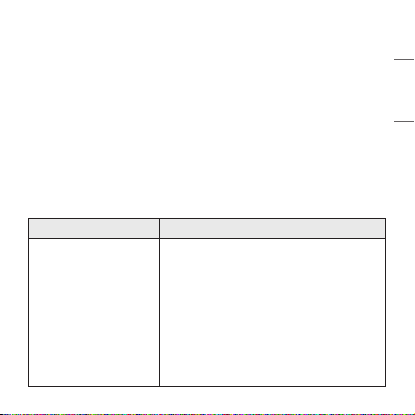
Important Safety Information
Avoiding hearing damage
Permanent hearing loss may occur if you use your headset at a high volume.
Set the volume to a safe level. Over time you can become accustomed to a
higher volume that may sound normal but can be damaging to your hearing.
If you experience ringing in your ears or mufed speech, stop listening and
have your hearing checked. The louder the volume, the less time that is
required before your hearing could be affected.
Hearing experts suggest that to protect your hearing:
• Limit the amount of time you use the headset at a high volume.
• Avoid turning up the volume to block out noisy surroundings.
• Turn the volume down if you can’t hear people speaking near you.
Using headsets safely
Use of headsets to listen to music while operating a vehicle is not
recommended and is illegal in some areas. Be careful and attentive while
driving. Stop using this device if you nd it disruptive or distracting
while operating any type of vehicle or performing any other activity that
requires your full attention.
26
ENGLISH
OSS Notice Information
To obtain the source code under GPL, LGPL, MPL, and other open source
licenses that have the obligations to disclose source code, that is contained
in this product, and to access all referred license terms, copyright notices and
other relevant documents please visithttps://opensource.lge.com.
LG Electronics will also provide open source code to you on CD-ROM for a
charge covering the cost of performing such distribution (such as the cost of
media, shipping, and handling) upon email request to[email protected].
This offer is valid to anyone in receipt of this information for a period of three
yearsafter our last shipment of this product.
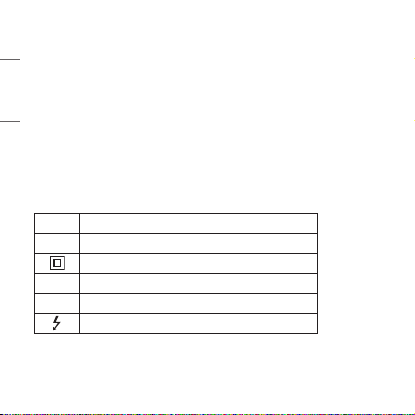
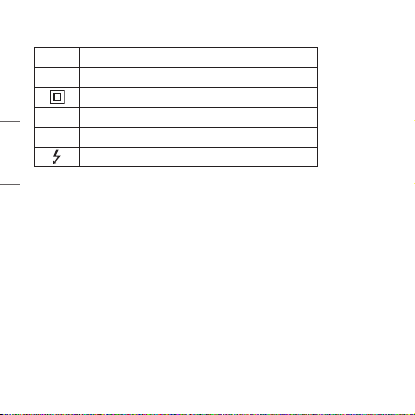
Symbols
~
Refers to alternating current (AC).
0
Refers to direct current (DC).
Refers to class II equipment.
1
Refers to stand-by.
!
Refers to “ON” (power).
Refers to dangerous voltage.
The output level shall automatically return to an output level not exceeding
RS1 when the power is switched off.
27
ENGLISH
LIMITED WARRANTY- U.S.A. ONLY
TONE-NP3 / TONE-NP3C
ARBITRATION NOTICE: THIS LIMITED WARRANTY CONTAINS AN
ARBITRATION PROVISION THAT REQUIRES YOU AND LG TO RESOLVE
DISPUTES BY BINDING ARBITRATION INSTEAD OF IN COURT, UNLESS
YOU CHOOSE TO OPT OUT. IN ARBITRATION, CLASS ACTIONS AND
JURY TRIALS ARE NOT PERMITTED. PLEASE SEE THE SECTION TITLED
“PROCEDURE FOR RESOLVING DISPUTES” BELOW.
Should your LG TONE Style (“Product”) fail due to a defect in materials
or workmanship under normal and proper use, during the warranty period
set forth below, LG Electronics (“LG”) will, at its option, repair or replace
the Product. This limited warranty is valid only to the original purchaser of
the Product and applies only when purchased lawfully and used within the
United States including U.S. Territories.
WARRANTY PERIOD HOW SERVICE IS HANDLED
PARTS/LABOR:
1 Year from the date of
original retail purchase
The original sales invoice specifying the
Product and date of purchase is required to
obtain warranty service.
For customer assistance, please contact
LG Electronics:
Call 1(800)243-0000 and select the
appropriate option from the menu.
Or visit our website at http://www.lg.com/us
Or by mail: LG Electronics Customer Service
P.O. Box 240007, Huntsville, AL 35813
ATTN: Customer Service

28
ENGLISH
-Replacement Products and parts are warranted for the remaining portion
of the original warranty period or ninety (90) days, whichever is greater.
-Replacement Products and parts may be new, reconditioned, refurbished,
or otherwise factory remanufactured.
-Any replaced Product and/or parts will be the property of LG.
Disclaimer:
EXCEPT TO THE EXTENT PROHIBITED BY APPLICABLE LAW, ANY
IMPLIED WARRANTY OF MERCHANTABILITY OR FITNESS FOR A
PARTICULAR PURPOSE ON THE PRODUCT IS LIMITED IN DURATION TO
THE DURATION OF THE ABOVE LIMITED WARRANTY PERIOD. UNDER
NO CIRCUMSTANCES SHALL LG OR ITS U.S. DISTRIBUTORS/DEALERS BE
LIABLE FOR ANY INDIRECT, INCIDENTAL, CONSEQUENTIAL, SPECIAL OR
PUNITIVE DAMAGES INCLUDING, WITHOUT LIMITATION, LOST GOODWILL,
LOST REVENUES OR PROFITS, WORK STOPPAGE, IMPAIRMENT OF OTHER
GOODS, COST OF REMOVAL AND REINSTALLATION OF THE PRODUCT,
LOSS OF USE, OR ANY OTHER DAMAGES WHETHER BASED IN CONTRACT,
TORT, OR OTHERWISE. LG’S TOTAL LIABILITY, IF ANY, SHALL NOT EXCEED
THE PURCHASE PRICE PAID BY THE CUSTOMER FOR THE PRODUCT.
SOME STATES DO NOT ALLOW THE EXCLUSION OR LIMITATION OF
INCIDENTAL OR CONSEQUENTIAL DAMAGES OR LIMITATIONS ON HOW
LONG AN IMPLIED WARRANTY LASTS, SO THE ABOVE EXCLUSIONS OR
LIMITATIONS MAY NOT APPLY TO YOU. THIS LIMITED WARRANTY GIVES
YOU SPECIFIC LEGAL RIGHTS AND YOU MAY ALSO HAVE OTHER RIGHTS
THAT VARY FROM STATE TO STATE.

29
ENGLISH
THIS LIMITED WARRANTY DOES NOT COVER:
-Damage or loss to programs, data, or removable storage media.
-Damage or failure of the Product caused by improper set-up or
adjustment on consumer controls.
-Damage or failure of the Product caused by transportation and/or
handling, including scratches, dents, chips, and/or other damage to
the nish of your Product, unless such damage results from a defect
in materials or workmanship and is reported within one (1) week of
delivery (Call: 1-800-243-0000).
-Damage or failure of the Product from other than normal intended use.
-Damage or failure of Product caused by incorrect electrical current
or voltage (including power surge), power failures, interruptions or
inadequate electrical service, including incorrect or insufcient AC supply.
-Damage or failure of the Product resulting from misuse, abuse,
improper installation or operation of the Product contrary to the
Product owner’s manual and/or installation manual.
-Damage or failure of the Product caused by accidents, liquid, pests and
vermin, lightning, wind, re, ood, or other acts of nature.
-Damage or failure of the Product caused by abnormal conditions or an
environment where the temperature and humidity is not adequately
controlled.
-Damage or failure of the Product caused by the use of accessories,
parts, consumable cleaning products, or service not provided or
approved by LG.
-Damage or failure of the Product or missing items to any Product sold
“As Is”, “With all Faults” or similar disclaimer.

30
ENGLISH
-Products with original serial numbers that have been removed, altered,
or cannot be readily determined.
-Replacement of any consumable parts including batteries.
-Minor imperfections that do not materially alter or affect functionality.
The cost of repair or replacement under the above excluded circumstances
shall be borne by you.
PROCEDURE FOR RESOLVING DISPUTES:
ALL DISPUTES BETWEEN YOU AND LG ARISING OUT OF OR RELATING
IN ANY WAY TO THIS LIMITED WARRANTY OR THE PRODUCT SHALL BE
RESOLVED EXCLUSIVELY THROUGH BINDING ARBITRATION, AND NOT
IN A COURT OF GENERAL JURISDICTION. BINDING ARBITRATION MEANS
THAT YOU AND LG ARE EACH WAIVING THE RIGHT TO A JURY TRIAL
AND TO BRING OR PARTICIPATE IN A CLASS ACTION.
Denitions. For the purposes of this section, references to “LG”
mean LG Electronics U.S.A., Inc., its parents, subsidiaries and afliates,
and each of their ofcers, directors, employees, agents, beneciaries,
predecessors in interest, successors, assigns and suppliers; references
to “dispute” or “claim” shall include any dispute, claim or controversy of
any kind whatsoever (whether based in contract, tort, statute, regulation,
ordinance, fraud, misrepresentation or any other legal or equitable
theory) arising out of or relating in any way to the sale, condition or
performance of the product or this Limited Warranty.

31
ENGLISH
Notice of Dispute. In the event you intend to commence an arbitration
proceeding, you must rst notify LG in writing at least 30 days in advance
of initiating the arbitration by sending a letter to LG at LG Electronics, USA,
Inc. Attn: Legal Department- Arbitration 111 Sylvan Avenue, Englewood
Cliffs, NJ 07632, USA. You and LG agree to engage in good faith
discussions in an attempt to amicably resolve your claim. The notice must
provide your name, address, and telephone number; identify the product
that is the subject of the claim; and describe the nature of the claim and
the relief being sought. If you and LG are unable to resolve the dispute
within 30 days, either party may proceed to le a claim for arbitration.
Agreement to Binding Arbitration and Class Action Waiver. Upon
failure to resolve the dispute during the 30 day period after sending
written notice to LG, you and LG agree to resolve any claims between us
only by binding arbitration on an individual basis, unless you opt out as
provided below. Any dispute between you and LG shall not be combined or
consolidated with a dispute involving any other person’s or entity’s product
or claim. More specically, without limitation of the foregoing, any dispute
between you and LG shall not under any circumstances proceed as part
of a class or representative action. Instead of arbitration, either party may
bring an individual action in small claims court, but that small claims court
action may not be brought on a class or representative basis.
Arbitration Rules and Procedures. To begin arbitration of a claim, either
you or LG must make a written demand for arbitration. The arbitration
will be administered by the American Arbitration Association (“AAA”) and
will be conducted before a single arbitrator under the AAA’s Consumer
Arbitration Rules that are in effect at the time the arbitration is initiated
(referred to as the “AAA Rules”) and under the procedures set forth in this

32
ENGLISH
section. The AAA Rules are available online at www.adr.org/consumer. Send
a copy of your written demand for arbitration, as well as a copy of this
provision, to the AAA in the manner described in the AAA Rules. You must
also send a copy of your written demand to LG at LG Electronics, USA, Inc.
Attn: Legal Department- Arbitration 111 Sylvan Avenue, Englewood Cliffs,
NJ 07632, USA. If there is a conict between the AAA Rules and the rules
set forth in this section, the rules set forth in this section will govern. This
arbitration provision is governed by the Federal Arbitration Act. Judgment
may be entered on the arbitrator’s award in any court of competent
jurisdiction. All issues are for the arbitrator to decide, except that issues
relating to the scope and enforceability of the arbitration provision and to
the arbitrability of the dispute are for the court to decide. The arbitrator is
bound by the terms of this provision.
Governing Law. The law of the state of your residence shall govern this
Limited Warranty and any disputes between us except to the extent that
such law is preempted by or inconsistent with applicable federal law.
Fees/Costs. You do not need to pay any fee to begin an arbitration. Upon
receipt of your written demand for arbitration, LG will promptly pay all
arbitration ling fees to the AAA unless you seek more than $25,000 in
damages, in which case the payment of these fees will be governed by the
AAA Rules. Except as otherwise provided for herein, LG will pay all AAA
ling, administration and arbitrator fees for any arbitration initiated in
accordance with the AAA Rules and this arbitration provision. If you prevail
in the arbitration, LG will pay your attorneys’ fees and expenses as long as
they are reasonable, by considering factors including, but not limited to,
the purchase amount and claim amount. Notwithstanding the foregoing,
if applicable law allows for an award of reasonable attorneys’ fees and

33
ENGLISH
expenses, an arbitrator can award them to the same extent that a court
would. If the arbitrator nds either the substance of your claim or the relief
sought in the demand is frivolous or brought for an improper purpose (as
measured by the standards set forth in Federal Rule of Civil Procedure
11(b)), then the payment of all arbitration fees will be governed by the
AAA Rules. In such a situation, you agree to reimburse LG for all monies
previously disbursed by it that are otherwise your obligation to pay under
the AAA Rules. Except as otherwise provided for, LG waives any rights it
may have to seek attorneys’ fees and expenses from you if LG prevails in
the arbitration.
Hearings and Location. If your claim is for $25,000 or less, you may
choose to have the arbitration conducted solely on the basis of (1)
documents submitted to the arbitrator, (2) through a telephonic hearing, or
(3) by an in-person hearing as established by the AAA Rules. If your claim
exceeds $25,000, the right to a hearing will be determined by the AAA
Rules. Any in-person arbitration hearings will be held at a location within
the federal judicial district in which you reside unless we both agree to
another location or we agree to a telephonic arbitration.
Opt Out. You may opt out of this dispute resolution procedure. If you opt
out, neither you nor LG can require the other to participate in an arbitration
proceeding. To opt out, you must send notice to LG no later than 30
calendar days from the date of the rst consumer purchaser’s purchase of
the product by either: (i) sending an e-mail to [email protected], with the
subject line: “Arbitration Opt Out” or (ii) calling 800- 980-2973. You must
include in the opt out e-mail or provide by telephone: (a) your name and
address; (b) the date on which the product was purchased; (c) the product
model name or model number; and (d) the serial number (the serial number

34
ENGLISH
can be found (i) on the product; or (ii) online by accessing https://www.
lg.com/us/support/repair-service/schedule-repair-continued and clicking on
“Find My Model & Serial Number”).
You may only opt out of the dispute resolution procedure in the manner
described above (that is, by e-mail or telephone); no other form of notice will
be effective to opt out of this dispute resolution procedure. Opting out of
this dispute resolution procedure will not affect the coverage of the Limited
Warranty in any way, and you will continue to enjoy the full benets of the
Limited Warranty. If you keep this product and do not opt out, then you
accept all terms and conditions of the arbitration provision described above.
Lea la Información Importante de Seguridad para poder
utilizar este producto correctamente. Después de leerla,
guarde este Manual del propietario en un lugar al que todos
los usuarios puedan acceder fácilmente.
NOTA: Lea toda la información detenidamente antes de
utilizar los auriculares para obtener el mejor rendimiento y
evitar daños en el producto.
Rev 2.0 US
TONE-NP3 / TONE-NP3C
www.lg.com
MANUAL DEL PROPIETARIO
Auricular Estéreo Bluetooth® LG
Copyright © 2021-2022 LG Electronics Inc. Todos los derechos reservados.
ESPAÑOL
ESPAÑOL
Contenido
Precauciones de Seguridad .....................................................................................................1
Precauciones de Uso del Producto .....................................................................................3
Altavoz HD .......................................................................................................................................3
Componentes del producto ....................................................................................................4
Descripción general .....................................................................................................................5
Encendido/apagado .....................................................................................................................6
Emparejamiento y conexión ...................................................................................................7
Reproducción de música ........................................................................................................10
Funciones de llamada con dispositivo móvil ...............................................................11
Carga ................................................................................................................................................13
Activación de la alerta por vibración ...............................................................................14
Enrollar los cables .....................................................................................................................15
Indicador de estado ..................................................................................................................16
Fuera de alcance ........................................................................................................................16
Aplicación LG TONE Free ......................................................................................................17
Solución de problemas ............................................................................................................18
...............................................................................................19
Aviso de Conformidad.............................................................................................................20
Información dicional ..............................................................................................................22
Información mportante de eguridad ...........................................................................25
Símbolos .........................................................................................................................................26
1
ESPAÑOL
El LG TONE Style (TONE-NP3) es un auricular inalámbrico liviano que utiliza
tecnología Bluetooth.
Este producto se puede utilizar como un accesorio de audio para dispositivos
Bluetooth.
Precauciones de Seguridad
Se ofrecen las precauciones de seguridad siguientes para evitar accidentes
o daños inesperados. Familiarícese con las precauciones de seguridad.
!
ADVERTENCIA: Incumplir las instrucciones puede resultar en lesiones
personales graves o la muerte.
!
PRECAUCIÓN: Incumplir las instrucciones puede resultar en lesiones
personales leves o daños en el producto.
!
ADVERTENCIA
No deje caer el producto desde lugares altos.
Asegúrese de que el producto no entre en contacto con agua, alcohol
ni benceno.
No guarde el producto en lugares húmedos o llenos de polvo.
No coloque objetos pesados sobre el producto.
!
PRECAUCIÓN
No desmonte, modifique ni repare el producto.
No ubique el producto cerca de calor excesivo o materiales inflamables.

2
ESPAÑOL
El producto podría sufrir daños si se utiliza un cargador incompatible.
Mantenga los componentes pequeños del producto alejados de infantes
o niños.
Asegúrese de que no entren objetos extraños en los conectores del
cargador (puerto de carga y enchufe de alimentación). Los objetos
extraños en los conectores del cargador pueden resultar en incendios o
choque eléctrico.
Si tiene un dispositivo médico implantado, póngase en contacto con su
doctor o médico antes de utilizar este producto.
Por su seguridad, no quite la batería que viene incorporada en el producto.
Este producto tiene una batería incorporada, y la batería no puede ser
removida o reemplazada.
Si reemplaza la batería arbitrariamente o no la reemplaza
correctamente, puede explotar.
La batería de polímero de iones de litio es un componente peligroso que
puede causar lesiones.
Su dispositivo se puede dañar si el reemplazo de la batería lo realiza un
profesional no calificado.
No descarte la batería arbitrariamente. Siga el procedimiento local para
descartar las baterías.
Para prevenir un consumo innecesario de energía, desconecte el
dispositivo una vez esté totalmente cargado. Utilice siempre una base
de toma de corriente cerca del equipo y fácilmente accessible.
Riesgo de incendio o explosión si la batería se reemplaza por una del
tipo incorrecto.
No almacene ni transporte a presiones inferiores a 0,116 bar (11,6 kPa) y
a más de 9,32 millas (15 000 m) de altitud.

3
ESPAÑOL
No reemplace tu batería por otra de diferente modelo, al hacerlo pones
en riesgo la seguridad de tu equipo (esto se presenta con el uso de la
mayoría de las baterías de litio).
Colocar la batería de tu equipo en el fuego, en un horno caliente,
aplastarla o cortarla puede provocar una explosión.
Dejar la batería de tu equipo en un entorno circundante de temperatura
extremadamente alta puede provocar una explosión o la fuga de
líquidos o gases inflamables.
Someter la batería a una presión de aire extremadamente baja puede
provocar una explosión o la fuga de líquidos o gases inflamables.
No tire las baterías usadas de manera descuidada. Pueden causar una
explosión o incendio. El método de desecho puede variar dependiendo
del país y la región. Deshágase de ellas de una manera apropiada.
Precauciones de Uso del Producto
No tire del cable de los audífonos con fuerza excesiva.
Si el producto es expuesto a sudor excesivo, límpielo con un paño seco.
Mantenga siempre limpia la almohadilla del auricular.
Por su seguridad, no utilice el producto mientras se está cargando.
Altavoz HD
Si la red de comunicación del dispositivo que desea conectar admite llamadas
de voz HD, podrá realizar llamadas y escuchar música en alta definición.
4
ESPAÑOL
Componentes del producto
ON
OFF
LG TONE Style
(adaptadores de
silicona de tamaño
intermedio instalados)
Adaptadores de silicona
adicionales
(tamaño pequeño y
grande)
Cable de carga
USB Type-C™
Manual del propietario
Documento de Garantía
NOTA: El diseño del producto real puede diferir de las imágenes que
aparecen en el manual.
Utilice solo componentes originales de LG Electronics. Usar un
componente no auténtico puede ocasionar daños en el producto.
La garantía limitada de LG no cubre daños causados por el uso de
componentes no auténticos.
Utilice el cable USB Type-C™ que se ofrece con el producto.
!
PRECAUCIÓN
Descripción general
ON
OFF
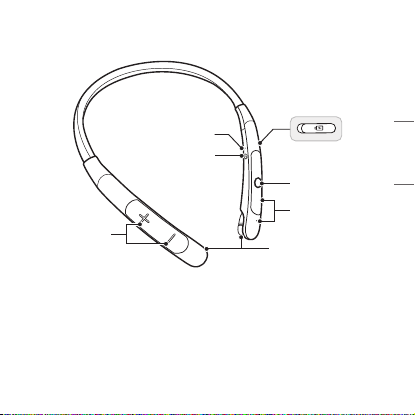
*La apariencia y las especificaciones del producto pueden variar según el
modelo.
Indicador de Estado
Puerto de carga
Interruptor
de encendido
Botón de volumen
(siguiente/anterior)
Botón para llamar/
reproducir
Micrófono
Tapones
(izquierda/derecha)
5
ESPAÑOL
Descripción general
ON
OFF
*La apariencia y las especificaciones del producto pueden variar según el
modelo.
Indicador de Estado
Puerto de carga
Interruptor
de encendido
Botón de volumen
(siguiente/anterior)
Botón para llamar/
reproducir
Micrófono
Tapones
(izquierda/derecha)
6
ESPAÑOL
Encendido/apagado
ON
OFF
ON OFF
ON OFF
L
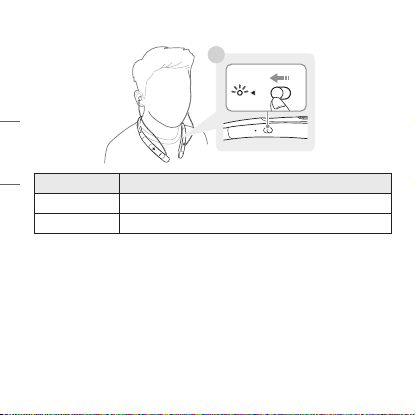
Estado Descripción
Encendido Deslice el Interruptor de encendido a ON.
Apagado Deslice el Interruptor de encendido a OFF.
*Cuando se enciende o se apaga, el indicador de estado azul parpadea con
una vibración y un pitido.
7
ESPAÑOL
Emparejamiento y conexión
Emparejamiento rápido
-(
-(
#MVFUPPUI
0/
ON
OFF
ON OFF
L
~39 inch, ~1m
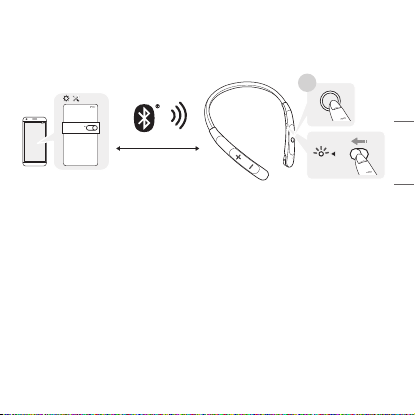
1 Encienda la función Bluetooth en el smartphone o el dispositivo que va
a conectarse.
2 Al presionar el botón para llamar/reproducir de los audífonos, deslice
el Interruptor de encendido a ON. Los audífonos entran en el modo de
descubrimiento y el indicador de estado azul se enciende.
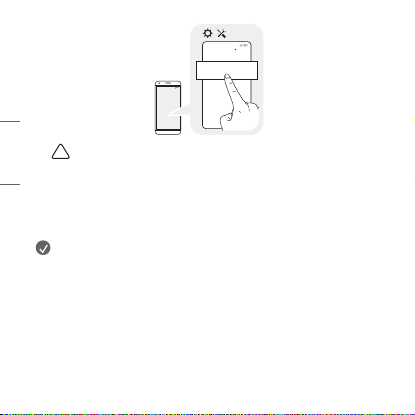
3 Cuando aparezca un mensaje emergente de emparejamiento rápido
para establecer la conexión (solo es compatible con Android™ 6.0 o
superior, y requiere configurar la tecnología Bluetooth y los ajustes de
información de ubicación del dispositivo móvil).
4 Si el mensaje emergente no aparece, seleccione [LG-TONE-NP3] desde
el menú Bluetooth del smartphone y conéctelo (para usuarios de iOS o
Android 5.0 o versiones inferiores).
8
ESPAÑOL
-(
-(
-(50/&/1
#MVFUPPUI
!
PRECAUCIÓN: En la lista de dispositivos Bluetooth conectados,
LG-TONE-NP3_LE no es el nombre de modelo correcto para
Si el nombre del modelo de los audífonos se muestra de forma
anormal en el dispositivo Android, cambie el nombre del modelo
en el menú Bluetooth de los ajustes de dispositivos conectados.
NOTA: Para establecer una conexión con otro dispositivo, realice de
nuevo el procedimiento anterior.
9
ESPAÑOL
Múltiples Conexiones
Los auriculares pueden ser conectados a dos dispositivos, como un
smartphone y una computadora, simultáneamente.
1 Para conectar múltiples dispositivos, apague los auriculares mientras el
producto está conectado a un dispositivo.
2
3 Intente conectarse a los audífonos mediante un dispositivo conectado
NOTA: Si los audífonos están conectados simultáneamente a dos
Reconexión automática
Si enciende los audífonos, se conectarán automáticamente al último
dispositivo (dispositivo principal o secundario conectado) al que estuvieron
conectados (si no se puede encontrar un dispositivo, se activará el modo
de búsqueda).
Si el producto no se conecta automáticamente al dispositivo deseado,
búsquelo en el dispositivo al que desea conectarse y conéctelo manualmente.
10
ESPAÑOL
Reproducción de música
ON
OFF
-(
L
R
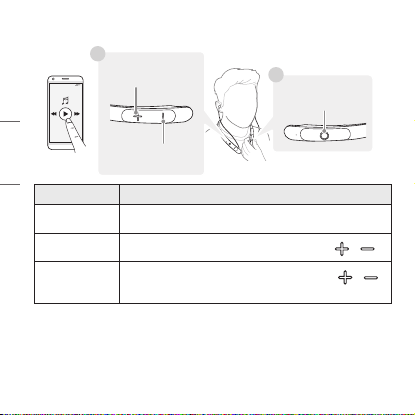
Función Descripción
Reproducción/
Pausa
Presione brevemente el botón para llamar/reproducir.
Ajuste del
volumen
Presione brevemente el botón de volumen ( o ).
Canción
anterior/
siguiente
Mantenga presionado el botón de volumen ( o )
durante un segundo.
Cambio de reproductor de música
Para cambiar a un dispositivo de reproducción de música distinto
cuando hay varios dispositivos conectados, detenga la música actual y
reprodúzcala en el dispositivo de su elección.
Botón para llamar/
reproducir
Canción anterior
Canción siguiente
11
ESPAÑOL
Funciones de llamada con dispositivo móvil
ON
OFF
L
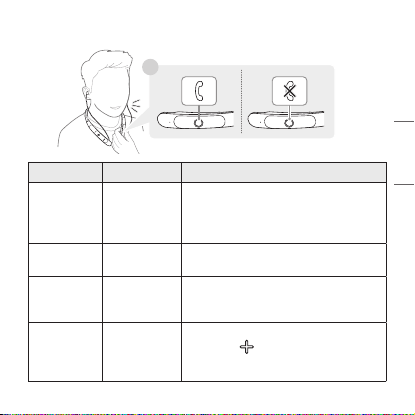
Función Estado Descripción
Responder
llamadas
Suena
Presione brevemente el botón para
llamar/reproducir.
- Si la alerta por vibración está
desactivada, no se producen vibraciones.
Finalizar
llamadas
Conversación
Presione brevemente el botón para
llamar/reproducir.
Hacer
llamadas
Inactivo
Si hace una llamada desde su
smartphone, la llamada se transfiere
automáticamente a los audífonos.
Cambiar de
llamada
Conversación
Mantenga presionado el botón de
volumen ( ) durante un segundo
para transferir la llamada entre los
audífonos y el smartphone.
12
ESPAÑOL
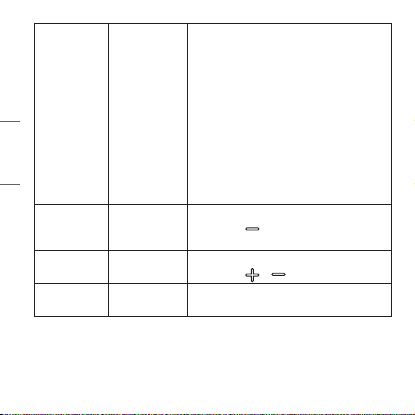
Recibir
llamadas
mientras se
habla por el
celular
Conversación
Presione brevemente el botón para
llamar/reproducir para aceptar una
llamada mientras está hablando por
el celular.
La llamada existente se pone en espera.
Presione brevemente el botón para
llamar/reproducir para cambiar a la
llamada en espera.
Si la llamada anterior está en espera,
puede finalizar la llamada actual desde
el smartphone (el comportamiento y el
control pueden diferir en función de los
dispositivos o la configuración).
Activar/
desactivar
volumen
Conversación
Mantenga presionado el botón de
volumen ( ) durante un segundo en
una llamada.
Subir/bajar
volumen
Conversación
Presione brevemente el botón de
volumen ( o ) en una llamada.
Rechazar
una llamada
Suena
Mantenga presionado el botón para
llamar/reproducir.
13
ESPAÑOL
Carga
Carga con cable
L
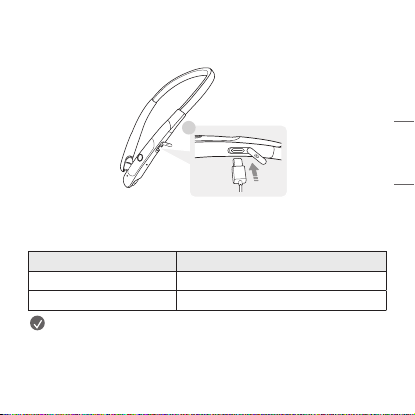
Abra la tapa del Puerto de carga de los audífonos y conecte el cable de
carga al puerto. El indicador de estado indica el estado de carga actual.
Mientras se carga, los audífonos están apagados.
Indicador de estado Estado de carga (cargador conectado)
Rojo Cargando
Completamente cargado
NOTA: El puerto de carga de los audífonos no suministra energía a
otros dispositivos, como los smartphones.
Si la temperatura es demasiado alta o demasiado baja, el indicador de
estado parpadea en rojo y la batería no se carga.
14
ESPAÑOL
Activación de la alerta por vibración
ON
OFF
R
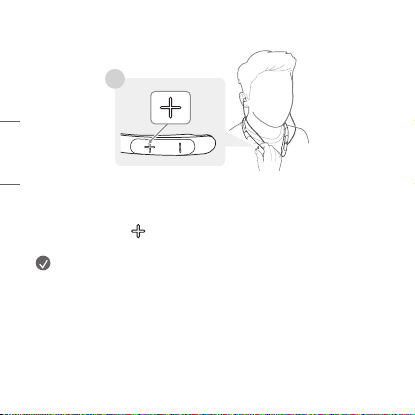
Los audífonos se suministran con la alerta por vibración activada por
defecto.
Para activar o desactivar la alerta por vibración, mantenga presionado el
botón de volumen ( ) durante un segundo mientras el dispositivo está
en estado de espera.
NOTA: Si desactiva la alerta por vibración, no se producirá ninguna
vibración cuando haya una llamada entrante o esté fuera de alcance.
15
ESPAÑOL
Enrollar los cables
ON
OFF
ON
OFF
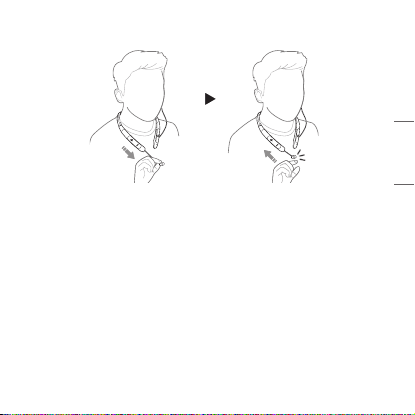
Si sacas los audífonos por completo y los sueltas, los cables se enrollarán
automáticamente.
Mientras los audífonos se están enrollando automáticamente, podrían no
enrollarse por completo si se atrapan en el cuerpo o las ropas. En este
caso, extráigalos por completo y libérelos.
16
ESPAÑOL
Indicador de estado
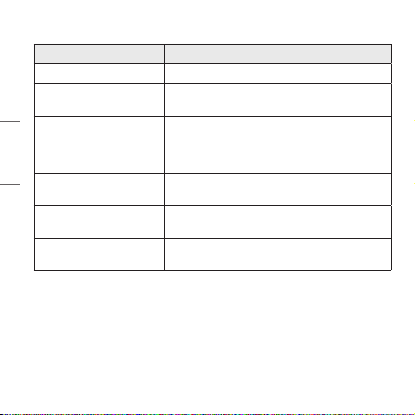
Estado Descripción
Encendido/apagado El indicador de estado azul parpadea.
Modo de búsqueda
Bluetooth
El indicador de estado azul está encendido.
Perfil de audífonos/
manos libres
conectado/Llamada
conectada
El indicador de estado azul parpadea cada
5 segundos.
Cuando hay un
problema al cargar
El indicador de estado parpadea en rojo.
Cargando
(cargador conectado)
El indicador del estado se enciende en rojo.
Carga completa
(cargador conectado)
El indicador del estado se enciende en
verde.
Fuera de alcance
Si el dispositivo conectado al producto está fuera del alcance efectivo
de comunicación, disminuirá la calidad de la señal y se perderá la
comunicación. El alcance efectivo de comunicación puede variar en función
del entorno y otras condiciones.
Si el dispositivo vuelve a estar dentro del alcance efectivo de
comunicación, el producto se volverá a conectar automáticamente al
17
ESPAÑOL
dispositivo. Si el dispositivo no reconecta automáticamente, mantenga
presionado el botón para llamar/reproducir de los audífonos y deslice el
interruptor de encendido a ON para volver a conectarlos manualmente.
Si un dispositivo que no se está utilizando queda fuera del rango de
comunicación mientras está conectado a varios dispositivos, el producto
vibrará y un mensaje de voz le avisará de que se perdió la conexión.
En este caso, la función de reconexión automática no es compatible.
Aplicación LG TONE Free
Si instala la aplicación "LG TONE Free", puede utilizar las funciones de
verificar la batería de los audífonos y cambiar el modo del ecualizador, así
más detalles.
Para instalar la aplicación "LG TONE Free", busque LG TONE Free en
Google Play Store o App Store o escanee el código QR que se muestra a
continuación.
Es compatible con Android 7.0 o superior y con iOS 11 o superior.
En caso de conexión múltiple, puede operar la aplicación con solo uno o
uno de los dos smartphones.
Google Play App Store
18
ESPAÑOL
Solución de problemas
Si observa alguno de los siguientes síntomas mientras utiliza el
producto, asegúrese de volver a verificarlo. Puede que no sea un error de
funcionamiento.
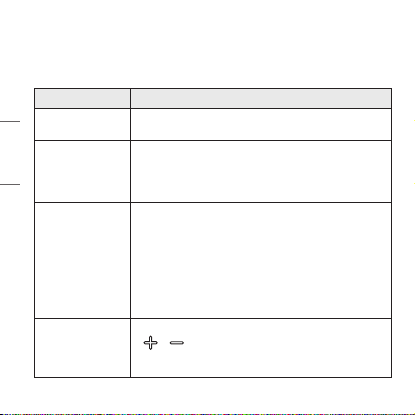
Síntoma Causa y solución
El dispositivo no
se enciende.
No puedo
transferir
llamadas a los
audífonos.
Si el smartphone no es compatible con funciones
de audífonos y manos libres, no podrá utilizar las
funciones de llamada.
No puedo
emparejar los
audífonos con mi
smartphone.
descubrimiento.
-Deslice el Interruptor de encendido a ON mientras
presiona el botón para llamar/reproducir de los
audífonos.
Los audífonos entran en el modo de descubrimiento
y el indicador de estado azul se enciende.
El volumen del
sonido es bajo.
Presione brevemente el botón de volumen
( o ) de los audífonos para ajustar el volumen.
También puede ajustar el volumen desde el
dispositivo emparejado.
19
ESPAÑOL
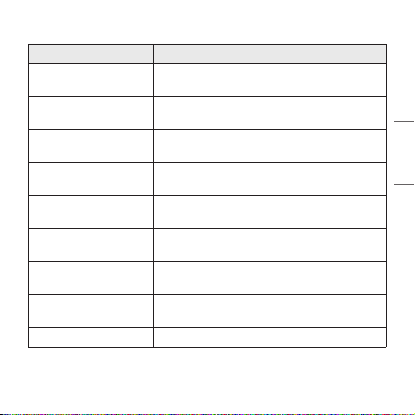
Especificaciones y funciones
Elemento Observación
Especificaciones de
Bluetooth
Batería
Batería de polímero de iones de litio de
Tiempo de
reproducción de música
Tiempo de carga
2 horas
※ Al cargar con cable a temperatura ambiente
nominal
0
Temperatura de
operación
Humedad de
funcionamiento
Dimensiones (pulgadas)
/ Peso (oz)
6,15" (ancho) X 7,09" (largo) X 0,58" (alto)
Gama de frecuencias De 2402 MHz a 2480 MHz
*La duración del uso puede variar según el dispositivo móvil conectado, las
funciones utilizadas, la configuración, la intensidad de la señal, la temperatura
de funcionamiento, la banda de frecuencia y otras formas de uso.
20
ESPAÑOL
Aviso de Conformidad
AVISO DE LA FCC PARA LOS USUARIOS
Este dispositivo cumple con el artículo 15 de las Reglas de la FCC.
El funcionamiento está sujeto a las dos condiciones siguientes:
(1) Este dispositivo no puede causar interferencia nociva,
(2) Este dispositivo debe aceptar cualquier interferencia que reciba,
incluso la que provoque un funcionamiento no deseado.
por el fabricante (o la parte responsable) del cumplimiento podrían anular
la autoridad del usuario para utilizar el producto.
Declaración del artículo 15.105
Este equipo ha sido evaluado y se ha comprobado que cumple con los
límites para un dispositivo digital clase B, conforme las secciones 15 de las
Reglas de la FCC.
Estos límites han sido diseñados para brindar una protección razonable
contra la interferencia nociva en una instalación residencial. Este equipo
genera, utiliza y puede irradiar energía de radiofrecuencia y, si no se instala
y utiliza de acuerdo con las instrucciones, podría causar interferencia
nociva para las comunicaciones radiales.
No obstante, no se garantiza la ausencia de interferencia en una
instalación en particular. Si este equipo causa interferencias con la
encendiendo el equipo, el usuario puede intentar corregir la interferencia
tomando una o más de las siguientes medidas:
21
ESPAÑOL
-Reoriente o reubique la antena receptora.
-Aumente la distancia entre el equipo y el receptor.
-Conecte el equipo en un tomacorriente que no pertenezca al mismo
circuito del tomacorriente en el que está conectado el receptor.
-
obtener ayuda.
NOTA IMPORTANTE:
Para satisfacer los requisitos de exposición a la radiofrecuencia
estipulados por la FCC, no se permite alteración alguna de la antena
o del dispositivo. Todo cambio realizado en la antena o el dispositivo
podría hacer que el dispositivo supere los requisitos de exposición a la
radiofrecuencia; en consecuencia, los derechos del usuario para utilizar el
producto podrían quedar anulados.
Bluetooth® es una marca registrada de Bluetooth SIG, Inc., en todo el mundo.
Android, Google Play, el logotipo de Google Play y otras marcas y logotipos
relacionados son marcas comerciales de Google LLC.
FCC ID: ZNFTONENP3
22
ESPAÑOL
Información Adicional
1. Exposición a la radiofrecuencia
Este auricular estéreo Bluetooth LG es un transmisor y receptor de radio.
Cuando está en funcionamiento, se comunica con un dispositivo móvil
compatible con Bluetooth mediante la recepción y la transmisión de
campos electromagnéticos (microondas) de radiofrecuencia (RF) en el
rango de 2402 a 2480 MHz.
El auricular Bluetooth está diseñado para funcionar conforme a los
lineamientos y los límites de exposición a la radiofrecuencia establecidos
por autoridades nacionales y organismos internacionales de la salud
pública, cuando se lo utiliza en conjunto con cualquier dispositivo móvil
compatible.
2. Precauciones para la conexión
Bluetooth
Los siguientes entornos afectan el rango y la recepción de las señales
Bluetooth:
-Cuando hay paredes, metales, cuerpos humanos u otros obstáculos
entre el dispositivo Bluetooth y el dispositivo conectado.
-Cuando se colocan equipos que utilizan señales de frecuencia de 2,4 GHz
(LAN inalámbricas, teléfonos inalámbricos, hornos microondas, etc.)
cerca de los dispositivos utilizados.
-Al usar un dispositivo Bluetooth
sea el teléfono celular, la calidad de sonido puede verse afectada por las

23
ESPAÑOL
3. Atmósferas potencialmente explosivas
Cuando se encuentre en una atmósfera potencialmente explosiva,
apague el dispositivo electrónico. Aunque es poco frecuente, este
dispositivo electrónico podría generar chispas. Las chispas en dichas
áreas pueden causar una explosión o un incendio y provocar lesiones
personales o incluso la muerte. Las zonas con riesgo de explosión suelen
estar claramente señaladas, aunque no en todos los casos.
4. Llamadas de emergencia
¡IMPORTANTE!
Este auricular Bluetooth y el dispositivo electrónico conectado a él
funcionan con señales de radio, redes terrestres y móviles, además de
funciones programadas por el usuario, que no pueden garantizar la
conexión en todas las situaciones. Por lo tanto, nunca debe depender
únicamente de un dispositivo electrónico para casos de comunicaciones
esenciales (por ej. emergencias médicas). Recuerde que, para realizar o
recibir llamadas, el auricular y el dispositivo electrónico conectado a él
deben estar encendidos y en un área de servicio con una señal móvil de
buena potencia. Las llamadas de emergencia no pueden hacerse en todas
las redes de telefonía celular ni cuando están en uso ciertos servicios
de red o funciones del teléfono. Compruebe la disponibilidad con su
proveedor de servicio local.
24
ESPAÑOL
5. Información sobre la batería
Las baterías recargables tienen una vida útil prolongada si reciben
el tratamiento adecuado. Las baterías nuevas o que no se hayan
utilizado por mucho tiempo podrían tener una capacidad reducida las
primeras veces que se utilizan. No exponga la batería a temperaturas
Para obtener la máxima capacidad de la batería, úsela a temperatura
ambiente. Si se utiliza la batería en condiciones de temperaturas
bajas, la capacidad se verá reducida. La batería solo puede cargarse a
6. Reciclado de la batería del auricular
Bluetooth
La batería del auricular Bluetooth debe desecharse con el procedimiento
adecuado y nunca debe arrojarse al basurero municipal.
En caso de que una batería recargable se incluya en este producto,
todo el dispositivo se debe reciclar de conformidad con las normas
de reciclado de baterías recargables debido a la batería interna. Para
averiguar el método de eliminación apropiado, llame al (800) 822- 8837
o visite www.call2recycle.org.
25
ESPAÑOL
Información Importante de Seguridad
Reducción de la capacidad auditiva
Si utiliza el auricular con un nivel de volumen alto, podría sufrir hipoacusia
permanente.
acostumbrarse a un volumen de sonido más alto que podría parecer
normal, pero que podría dañar su capacidad auditiva.
Si le zumban los oídos o siente que los sonidos le llegan medio apagados,
no utilice el dispositivo y consulte a un otorrinolaringólogo. Cuanto más
alto sea el volumen, más rápido podría verse afectada su audición.
Algunos expertos en audición sugieren que, para proteger la audición, se debe:
• Limitar el tiempo de uso del auricular a volumen alto.
• Evitar subir el volumen para contrarrestar el exceso de
ruido ambiental.
• Bajar el volumen si no oye a la gente que habla cerca de usted.
Uso seguro de los auriculares
No se recomienda utilizar auriculares para escuchar música mientras
conduce un vehículo y, en algunas zonas, es ilegal hacerlo. Sea precavido y
cauto al conducir. No utilice el dispositivo si le resulta molesto o lo distrae
mientras maneja cualquier tipo de vehículo o realiza alguna otra actividad
que requiera toda su atención.
26
ESPAÑOL
Símbolos
~
0
1
!
Cuando la potencia sea desconectada, el nivel de salida deberá regresar en
forma automática a un nivel de salida que no exceda RS1.
ESPAÑOL
inaccuracies of stated information shall only be made by LG Electronics Inc.
información serán realizados exclusivamente por LG Electronics, Inc.
www.lg.com