ZXHN H267N
Home Gateway
User Manual
Manual No:
Edition Time:
LEGAL INFORMATION
Copyright © 2021 ZTECORPORATION.
The contents of this document are protected by copyright laws and
international treaties. Any reproduction or distribution of this document
or any portion of this document, in any form by any means, without
the prior written consent of ZTE CORPORATION is prohibited.
Additionally, the contents of this document are protected by contractual
obligations.
All company, brand and product names are trade or service marks, or
registered trade or service marks, of ZTE CORPORATION or of their
respective owners.
This document is provided “as is”, and all express, implied, or statutory
warranties, representations or conditions are disclaimed, including
without limitation any implied warranty of merchantability, for
a particular purpose, title or non-infringement. ZTE CORPORATION
and its licensors shall not be liable for damages resulting from the use
of or reliance on the information contained herein.
ZTE CORPORATION or its licensors may have current or pending
intellectual property rights or applications covering the subject matter
of this document. Except as expressly provided in any written license
between ZTE CORPORATION and its licensee, the user of this
document shall not acquire any license to the subject matter herein.
ZTE CORPORATION reserves the right to upgrade or make technical
change to this product without further notice.
Users may visit ZTE technical support website http://sup-
port.zte.com.cn to inquire related information.
The ultimate right to interpret this product resides in ZTE CORPO-
RATION.

1
Safety Precautions
Note:
Before using the device, read the following safety precautions. ZTE bears no
liability to the consequences incurred by violation of the safety instructions.
Usage Cautions
▪
Read all the safety cautions carefully before using the device.
▪
Only use the accessories included in the package, such as power supply
adapter and battery.
▪
Do not extend the power cord, otherwise the device will not work.
▪
The power supply voltage must meet the requirements of the device input
voltage (The voltage fluctuation range is less than 10%).
▪
Keep the power plug clean and dry to prevent any risk of electric shock or
other dangers.
▪
Disconnect all the cables during a lightning storm to prevent the device from
damage.
▪
Power off and unplug the power plug when the device is not in use for a long
time.
▪
Do not attempt to open the covers of the device. It is dangerous to do so
when the device is powered ON.
▪
Power off and stop using the device under the conditions such as, abnormal
sound, smoke, and strange smell. Contact the service provider for mainte-
nance if the device is faulty.
Environment Requirements
▪
Ensure proper ventilation to the device. Place the device away from direct
sunlight.
▪
Keep the device ventilated and dry. Never spill any liquid on the device.
▪
Do not place any object on the device to prevent any deformation or damage
to the device.
▪
Do not place the device near any source of heat or water.
▪
Keep the device away from any household appliances with strong magnetic
or electric fields, such as microwave oven and refrigerator.
Cleaning Requirements
▪
Before cleaning, power off the device, and unplug all the cables connected
to the device, such as power cable, optical fiber, and Ethernetcable.
▪
Do not use any liquid or spray to clean the device. Use a soft dry cloth.
Environment Protection
▪
Do not dispose the device or battery improperly.
▪
Observe the local regulations about the equipment disposal or treatment.
RF Exposure Information
The Maximum Permissible Exposure (MPE) level is calculated based on a
distance of d=20 cm between the device and the human body. To maintain
compliance with the RF exposure requirement, a separation distance of 20 cm
between the device and the human should be maintained.
Environmental Information
The equipment you purchased has required the extraction and use of natural
resources for its production. It may contain substances that are hazardous
to people’s health and to the environment. To avoid putting such substances
into our environment and to reduce pressure on our natural resources, we ask
that you reuse or recycle your end-of-life equipment by using an accredited
electronics take-back system.
The symbols below indicate that this product should be reused or recycled
and not simply discarded. Please locate and use an appropriate reuse and
recycling site.
If you need more information on collection, reuse and recycling systems, con-
tact your local or regional waste administration. You may also contact your
equipment provider for more information on the environmental performances
of these products.
FCC - PART 68
This equipment complies with Part 68 of the FCC rules and the requirements
adopted by the ACTA. On the bottom of this equipment is a label that
contains, among other information, a product identifier in the format US:
ZTEDL01AH267N11. If requested, this number must be provided to the
telephone company.
This equipment uses the following USOC jacks: RJ-11, RJ-45.
REN (RINGER EQUIVALENT NUMBERS) STATEMENT Notice: The Ringer

Equivalence Number (REN) assigned to each terminal device provides an indication
of the maximum number of terminals allowed to be connected to a telephone
interface. The termination on an interface may consist of any combination of
devices subject only to the requirement that the sum of the Ringer Equivalence
Numbers of all the devices does not exceed 5.
ATTACHMENT LIMITATIONS STATEMENT
Notice: This equipment meets telecommunications network protective,
operational and safety requirements as prescribed in the appropriate
Terminal Equipment Technical Requirements document(s). This is confirmed
by marking the equipment with the Industry Canada certification number. The
Department does not guarantee the equipment will operate to the user's
satisfaction.
Before installing this equipment, users should ensure that it is permissible to
be connected to the facilities of the local telecommunications company. The
equipment must also be installed using an acceptable method of connection.
The customer should be aware that compliance with the above conditions
may not prevent degradation of service in some situations.
Repairs to certified equipment should be coordinated by a representative
designated by the supplier. Any repairs or alterations made by the user to this
equipment, or equipment malfunctions, may give the telecommunications
company cause to request the user to disconnect the equipment.
Users should ensure for their own protection that the electrical ground
connections of the power utility, telephone lines and internal metallic water
pipe system, if present, are connected together.
This precaution may be particularly important in rural areas. Caution: Users
should not attempt to make such connections themselves, but should contact
the appropriate electric inspection authority, or electrician, as appropriate
FCC Statement
This equipment has been tested and found to comply with the limits for a
Class B digital device, pursuant to part 15 of the FCC Rules. These limits are
designed to provide reasonable protection against harmful interference in a
residential installation. This equipment generates, uses and can radiate radio
frequency energy and, if not installed and used in accordance with the
instructions, may cause harmful interference to radio communications.
However, there is no guarantee that interference will not occur in a particular
installation. If this equipment does cause harmful interference to radio or
television reception, which can be determined by turning the equipment off
and on, the user is encouraged to try to correct the interference by one or
more of the following measures:
—Reorient or relocate the receiving antenna.
—Increase the separation between the equipment and receiver.

—Connect the equipment into an outlet on a circuit different from that to
which the receiver is connected.
—Consult the dealer or an experienced radio/TV technician for help.
FCC Radiation Exposure Statement
This equipment complies with FCC RF radiation exposure limits set forth for
an uncontrolled environment. This transmitter must not be co-located or
operating in conjunction with any other antenna or transmitter. This
equipment should be installed and operated with a minimum distance of 20
centimeters between the radiator and your body.
This equipment complies with Part 15 of the FCC Rules. Operation is subject
to the following two conditions:
(1) This device may not cause harmful interference, and
(2) This device must accept any interference received, including interference
that may cause undesired operation.
Caution!
The manufacturer is not responsible for any radio or TV interference caused
by unauthorized modifications to this equipment. Such modifications could
void the user authority to operate the equipment.
2
Cable Connection
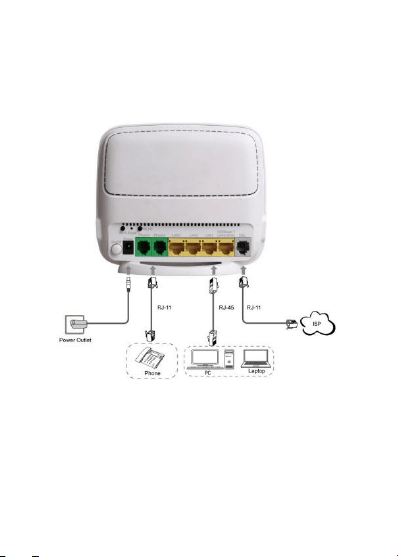
Figure 2-1 shows the devices that are connected to interfaces of the ZXHN
H267N device.
Figure 2-1 Cable Connection
3
Interfaces and Buttons
The product is targeted to pvovide 24-hours continuous triple-play services,
including VoIP. Figure 3-1 shows the interfaces and buttons on the back panel
of the ZXHN H267N device.
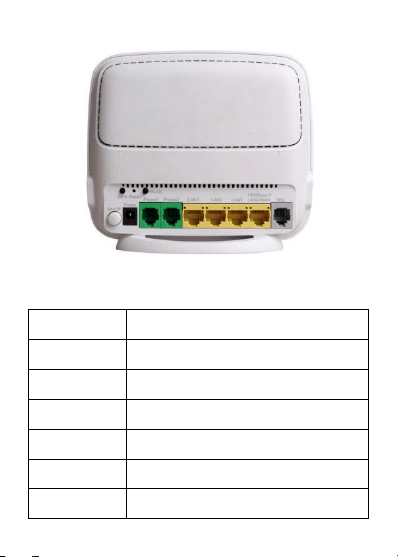
Figure 3-1 The Back Panel
Table 3-1 describes the interfaces and buttons on the back panel and side
panel of the ZXHN H267N device.
Table 3-1 Interfaces and Buttons
Interface/Button
Description
ON/OFF
Power switch
Power
12 V DC power connector
Phone1/Phone2
RJ-11 telephone interface, connected to the telephone
with RJ-11 telephone cable.
LAN1/LAN2/LAN3
RJ-45 FE Ethernet interface
LAN4/WAN
RJ-45 GE Ethernet interface, WAN interface is
optional.
DSL
RJ-11 DSL interface

Interface/Button
Description
Reset
Reset button
When the power is on, use a needle to press the button
for over 2 seconds to restore the default settings.
WLAN
WLAN button
Enable/disable the WLAN function.
WPS
WPS button
Enable/disable the Wi-Fi protection. When the Wi-Fi
protection is enabled, users can access the network
automatically.
USB*
USB 2.0 interface
•
The item with * varies from device type.
4
Indicator
Figure 4-1 shows the indicators on the front panel of the ZXHN H267N unit.
Figure 4-1 The Front Panel
Table 4-1 describes the indicators on the front panel of the ZXHN H267N unit.
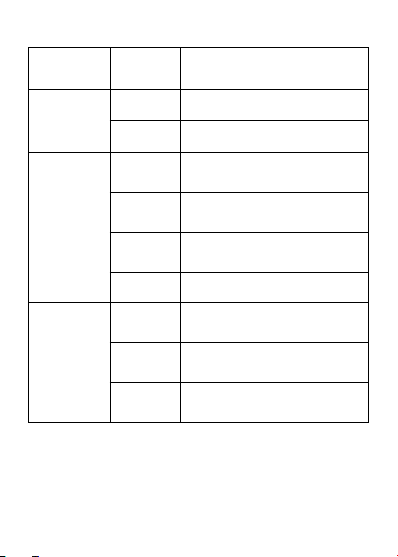
Table 4-1 Descriptions of Indicators
LED
Indicator
Status
Description
Power
Solid green
The ZXHN H267N is powered ON.
OFF
The ZXHN H267N is powered OFF.
DSL
Solid green
DSL synchronization is normal and
the link connection is normal.
Fast
Flashing
Now in the handshaking process to
establish the link connection.
Slowly
Flashing
Physical link exists, however carrier
wave has not been detected.
OFF
Link has not been established.
Internet
Solid green
The connection is established and a
correct IP address is obtained.
Flashing
green
Currently in data transmission.
OFF
Internet connection is not established,
or the ZXHN H267N is switched off.
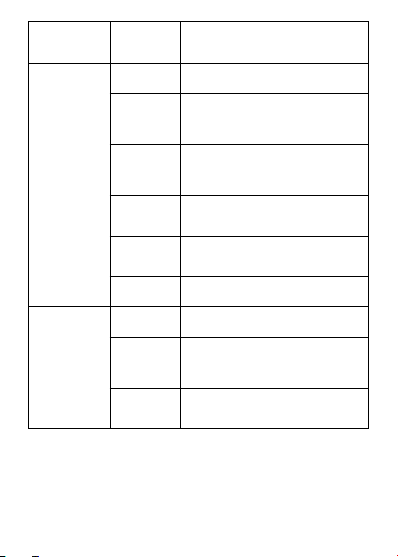
LED
Indicator
Status
Description
WLAN
Solid green
The WLAN RF switch is on.
Flashing
green
Currently in data transmission.
Flashing frequency indicates WiFi
network traffic.
Solid red
WPS access is successful. This
solid-on light will be automatically off
after 5 minutes.
Fast
flashing red
The WPS accessing of the WLAN
terminal is faulty.
Slowly
flashing red
WLAN terminal is in WPS accessing
process.
OFF
The WLAN RF switch is off.
LAN1 - LAN4
Solid green
LAN connection has been established.
Flashing
green
Data transmission is in processing.
The indicator flashes according to the
LAN traffic.
OFF
LAN connection has not been
established.

LED
Indicator
Status
Description
Phone1 -
Phone2
Solid green
The ZXHN H267N has registered on
the VoIP network.
Flashing
green
Indicates when the associated
telephone is off-hook.
OFF
The ZXHN H267N has not been
registered on the VoIP network.
USB*
Solid green
The USB device is connected.
Flashing
green
Currently in data transmission.
OFF
No USB device.
•
The item with * varies from device type.
5
Power Adapter
Power
Adapter
Input: AC 100 V - 240 V,50/60 Hz, Output: DC 12 V
Note:
Please use the power adapter provided by the manufacturer.