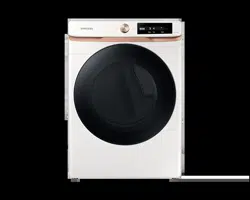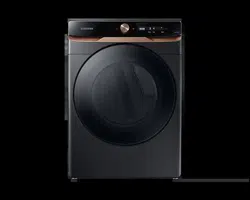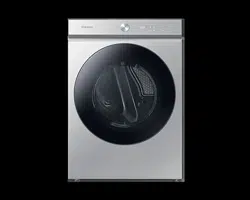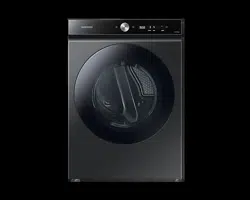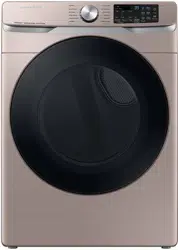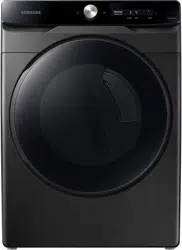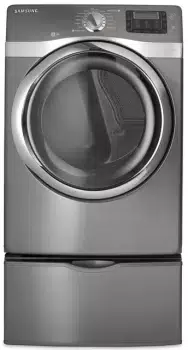
Gas and Electric Dryer
user manual
imagine the possibilities
Thank you for purchasing this Samsung product.
To receive more complete service,
please register your product at
www.samsung.com/register
DV520AE*
DV520AG*
DV520AE-02836A_EN.indd 1 2010-04-13 ¿ÀÈÄ 4:29:25
2_ Features
features
1. Extra Large Capacity
Ultra drying capabilities are at your fingertips! Now you can dry extra-large loads. Our
ultralarge 7.5 cu.ft. capacity dryer circulates more air through your clothes, drying them
faster, for a wrinkle-free result.
2. Steam Cycle
This cycle sprays a small amount of water into the dryer drum after several minutes of
tumbling with heat. It reduces bad odors from clothing that are difficult to remove when
washing with water, and also reduces wrinkles.
3. Sanitize Course
This course allows you to sanitize garments by permeating high temperature heat deep into
the fabric during the drying cycle. Use this course to keep your bedding and curtains clean.
When selecting this cycle, 99.9% of certain bacteria is eliminated through high temperature
heat. Use this cycle for clothing, bedding, towels, or other items needing sanitized. This
certification is conducted by NSF International, an independent third-party testing and
certification organization.
4. Various Drying Cycles & Fuzzy Logic Algorithm
Simply turn the Jog Dial to select one of the 13 automatic drying cycles, including normal,
heavy duty and bedding, or let the Fuzzy Logic Control measure the degree of dampness
and automatically set the drying time. Precision drying has never been easier than with
Samsung.
5. Time Saving
Our cycles are designed with you in mind. All our dryers are designed to dry your clothes in
less time... just 50 minutes! Giving you time for more important things in life.
6. Energy Saving
Samsung dryers are super energy efficient. You can dry up to 3.31 pounds of laundry with
1kWh. Also, both the large capacity and Fuzzy Logic Control save energy by automatically
drying your clothes the most efficient way.
7. Easy Reversible Door
Our dryers will fit just about anywhere and without a door conflict. The direction of our easy
reversible door can be changed with just four screws.
NSF Protocol P154
Sanitization Performance of
Residential Clothes Dryers
DV520AE-02836A_EN.indd 2 2010-04-13 ¿ÀÈÄ 4:29:25
Features _3
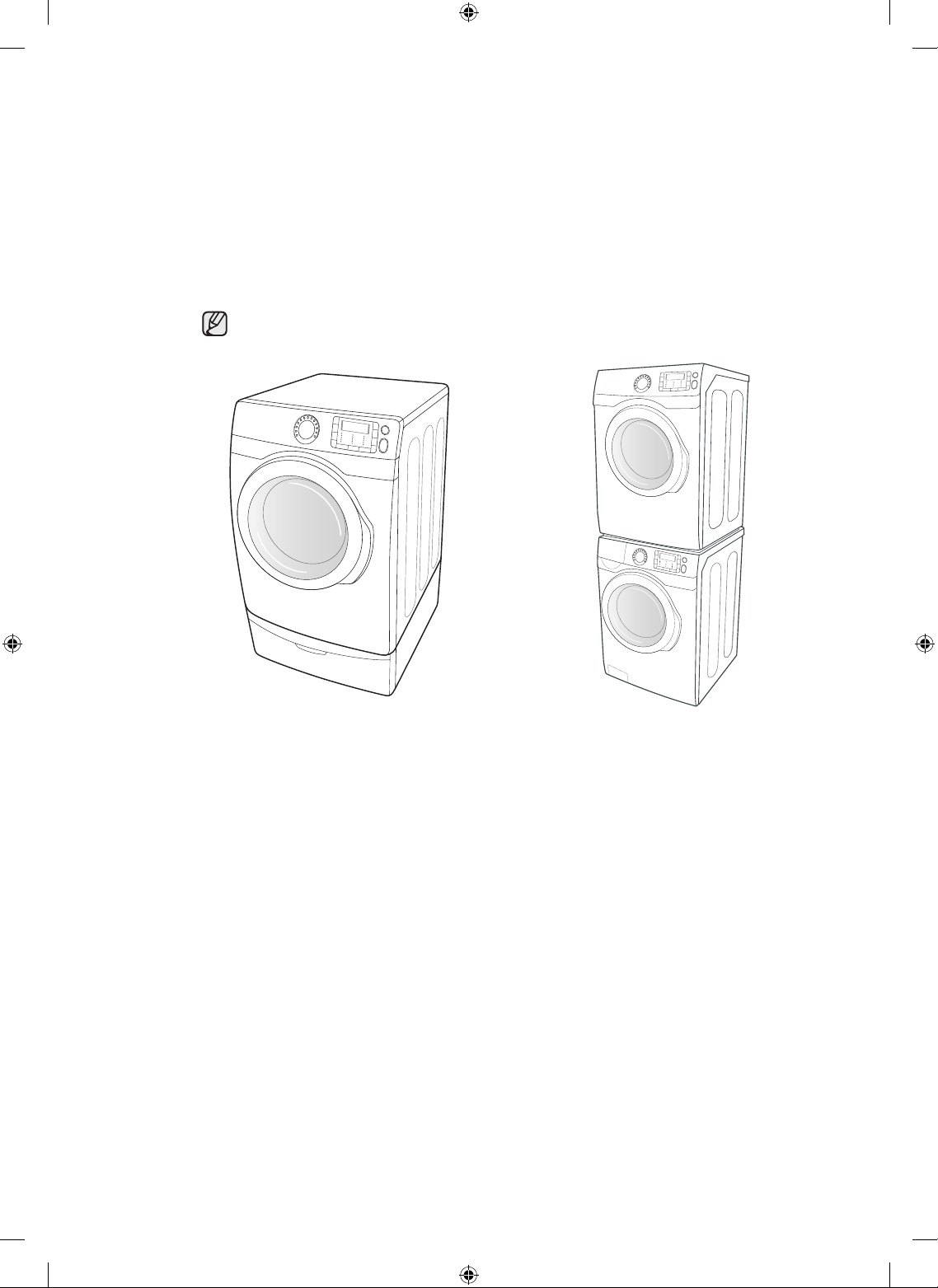
8. Pedestal with Storage Drawers
An optional 15” pedestal is available to raise the dryer for easier loading and unloading. It
also offers a built-in storage drawer that can hold a 100 oz. bottle of detergent
9. Stacking (MODEL NO: SK-5A/XAA)
Samsung’s Washer and Dryer can be stacked to maximize usable space.
The dryer legs need to be removed to stack the Washer and Dryer. You can purchase an
optional stacking kit from you Samsung retailer.
10. 4-way Vent (electric model only : DV520AE*)
You can install the exhaust vent in the following four (4) positions: back, either side, bottom.
<Pedestal with Storage Drawers> <Stacking>
DV520AE-02836A_EN.indd 3 2010-04-13 ¿ÀÈÄ 4:29:26
4_ safety instructions
SAVE THESE INSTRUCTIONS
safety instructions
Congratulations on your new Samsung Dryer. This manual contains valuable
information on the installation, use, and care of your appliance. Please take the
time to read this manual to take full advantage of your dryer’s many benefits and
features.
WHAT YOU NEED TO KNOW ABOUT SAFETY INSTRUCTIONS
Warnings and Important Safety Instructions in this manual do not cover all possible conditions and
situations that may occur. It is your responsibility to use common sense, caution, and care when installing,
maintaining, or operating your dryer.
Always contact your manufacturer about problems or conditions you do not understand.
IMPORTANT SAFETY SYMBOLS AND PRECAUTIONS
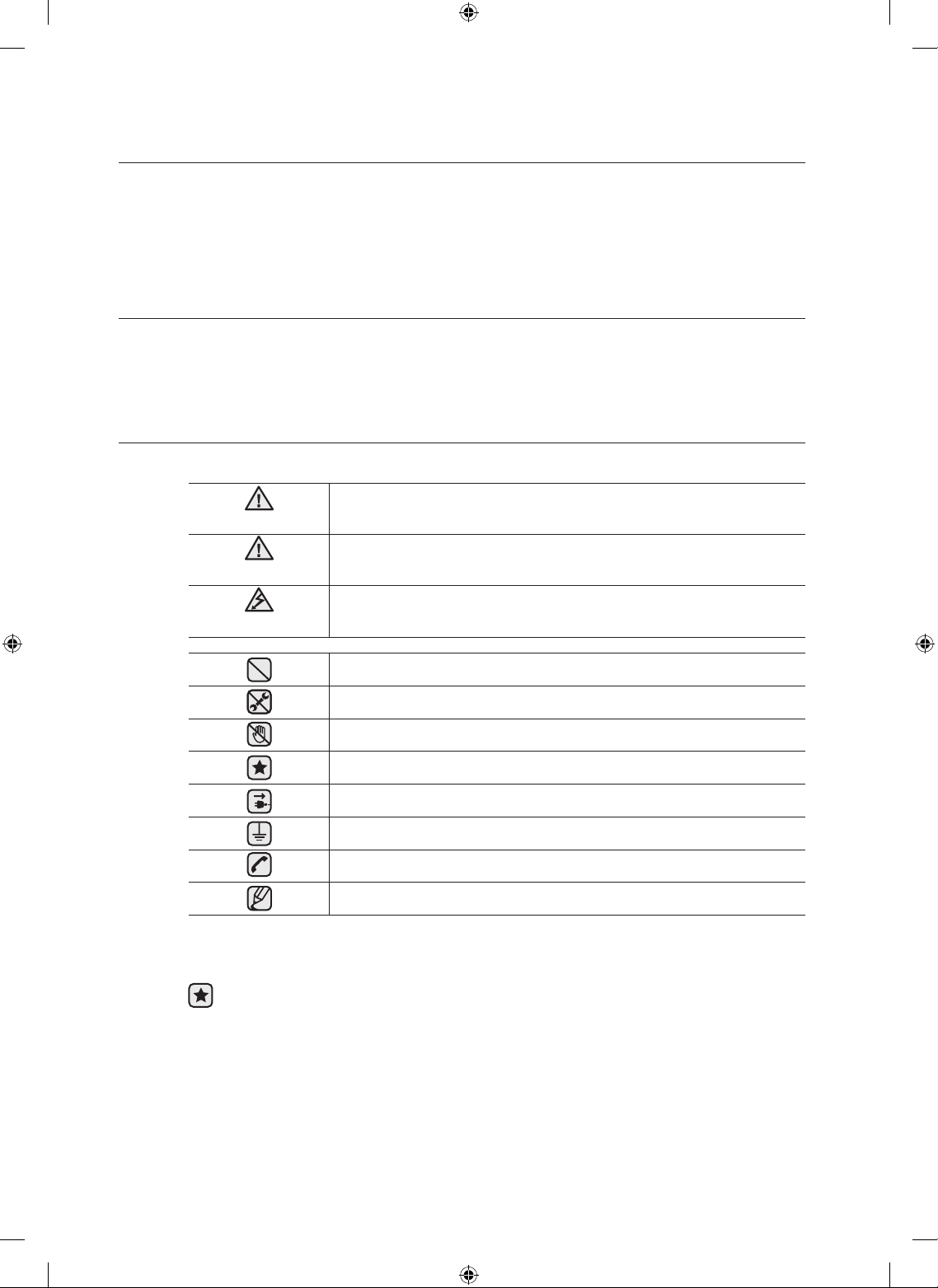
What the icons and signs in this user manual mean:
WARNING
Hazards or unsafe practices that may result in severe personal injury
or death.
CAUTION
Hazards or unsafe practices that may result in minor personal injury or
property damage
.
CAUTION
To reduce the risk of fire, explosion, electric shock, or personal injury
when using your washer, follow these basic safety precautions:
Do NOT attempt.
Do NOT disassemble.
Do NOT touch.
Follow directions explicitly.
Unplug the power plug from the wall socket.
Make sure the machine is grounded to prevent electric shock.
Call the service center for help.
Note
These warning signs are here to prevent injury to you and others.
Please follow them explicitly.
After reading this section, keep it in a safe place for future reference.
Read all instructions before using the appliance.
DV520AE-02836A_EN.indd 4 2010-04-13 ¿ÀÈÄ 4:29:26
safety instructions _5
SAVE THESE INSTRUCTIONS
WARNING: To reduce the risk of fire, electric shock, or injury to persons when using your
appliance, follow basic precautions, including the following:
1. Read all instructions before using this appliance.
2. Do not dry articles that have been previously cleaned in, washed in, soaked in,
or spotted with gasoline, dry-cleaning solvents, or other flammable or explosive
substances, as they give off vapors that could ignite or explode.
3. Do not allow children to play on or in the appliance. Close supervision of children is
necessary when the appliance is used near children.
4. Before the appliance is removed from service or discarded, remove the door to the
drying compartment.
5. Do not reach into the appliance if the drum is moving.
6. Do not install or store this appliance where it will be exposed to the weather.
7. Do not tamper with controls.
8. Do not repair or replace any part of the appliance or attempt any servicing unless
specifically recommended in the user-maintenance instructions or in published user-
repair instructions that you understand and have the skills to carry out.
9. Do not use fabric softeners or products to eliminate static unless recommended by the
manufacturer of the fabric softener or product.
10.Clean lint screen before or after each load.
11.Do not use heat to dry articles containing foam rubber or similarly textured rubber-like
materials.
12.Keep area around the exhaust opening and adjacent surrounding areas free from the
accumulation of lint, dust, and dirt.
13.The interior of the appliance and exhaust duct should be cleaned periodically by
qualified service personnel.
14.Do not place items exposed to cooking oils in your dryer. Items contaminated with
cooking oils may contribute to a chemical reaction that could cause a load to catch fire.
WARNING
DV520AE-02836A_EN.indd 5 2010-04-13 ¿ÀÈÄ 4:29:26
6_ safety instructions
SAVE THESE INSTRUCTIONS
safety instructions
• Clothes dryer installation must be performed by a qualified installer.
• Install the clothes dryer according to the manufacturer’s instructions and local codes.
• Do not install a clothes dryer with flexible plastic venting materials. If flexible metal
(foil type) duct is installed, it must be of a specific type identified by the appliance
manufacturer as suitable for use with clothes dryers. Flexible venting materials are
known to collapse, be easily crushed, and trap lint. These conditions will obstruct
clothes dryer airflow and increase the risk of fire.
• To reduce the risk of severe injury or death, follow all installation instructions.
WARNING - Risk of Fire
To reduce the risk of fire or explosion:
• Do not dry items that have been previously cleaned, washed, soaked, or spotted with
gasoline, dry cleaning solvents, or other flammable or explosive substances. They
emit vapors that could ignite or explode. Any material that has been in contact with a
cleaning solvent or flammable liquids or solids should not be placed in the dryer until all
traces of these flammable liquids or solids and their fumes have been removed.
There are many highly flammable items used in homes, such as acetone, denatured
alcohol, gasoline, kerosene, some liquid household cleaners, some spot removers,
turpentine, waxes, and wax removers
• Items containing foam rubber (may be labeled latex foam) or similarly textured rubber-
like materials must not be dried on a heat setting. Heated foam rubber materials can,
under certain circumstances, produce fire by spontaneous combustion.
What to do if you smell gas:
• Do not try to light any appliance.
• Do not turn on the appliance.
• Do not touch any electrical switch.
• Do not use any phone in your building.
• Clear the room, building or area of all occupants.
• Immediately call your gas supplier from a neighbor’s phone. Follow the gas supplier’s
instructions.
• If you cannot reach your gas supplier, call the fire department.
• Installation and service must be performed by a qualified installer, service agency, or the
gas supplier.
WARNING
WARNING
DV520AE-02836A_EN.indd 6 2010-04-13 ¿ÀÈÄ 4:29:26
contents _7
SAVE THESE INSTRUCTIONS
Do not allow children or pets to play on, in, or in front of the appliance. Close supervision is
necessary when the appliance is used near children and pets.
Before discarding or removing your dryer from service, remove the door to the drying
compartment to prevent children or animals from becoming trapped inside.
Do not reach into the appliance when the drum is moving.
Do not install or store this appliance where it will be exposed to the weather.
Do not tamper with controls.
Do not repair, replace, or attempt to service any part of the appliance unless specifically
recommended in the user-repair instructions and you understand and have the skills to
carry those out.
Do not use fabric softeners or products to eliminate static unless recommended for dryer
use by the manufacturer of the fabric softener or product.
Clean the lint screen before or after each load.
Keep the area around the exhaust opening and surrounding areas free from lint, dust, and dirt.
The interior of the dryer and exhaust duct should be cleaned periodically by qualified service
personnel.
This appliance must be properly grounded. Never plug the power cord into a receptacle
that is not grounded adequately and in accordance with local and national codes. See
installation instructions for grounding this appliance.
Do not sit on top of the dryer.
Ensure pockets are free from small irregularly shaped hard objects, foreign material, etc. ie.
coins, knives, pins, etc. These objects could damage your dryer.
Do not wash clothing with large buckles, buttons, or other heavy metal or solid things.
Gas leaks may occur in your system, resulting in a dangerous situation.
Gas leaks may not be detected by smell alone.
Gas suppliers recommend you purchase and install a UL-approved gas detector.
Install and use in accordance with the manufacturer’s instructions.
Do not place items in your dryer that have been spotted or soaked with vegetable oil or cooking
oil. Even after being washed, these items may contain significant amounts of these oils.
Residual oil on clothing can ignite spontaneoulsy. The potential for spontaneous
combustion increases when items containing vegetable oil or cooking oil are exposed to
heat. Heat sources such as your dryer can warm these items, allowing an oxidation reaction
in the oil to occur. Oxidation creates heat. If this heat cannot escape, the items can become
hot enough to catch fire. Piling, stacking, or storing these kinds of items may prevent heat
from escaping and can create a fire hazard.
All washed and unwashed fabrics that contain vegetable oil or cooking oil can be
dangerous. Washing these items in hot water with extra detergent will reduce, but not
eliminate, the hazard. Always use the Cool Down cycle for these items to reduce their
temperature. Never remove these items from the dryer hot or interrupt the drying cycle until
the items have run through the Cool Down cycle. Never pile or stack these items when they
are hot.
WARNING
WARNING
DV520AE-02836A_EN.indd 7 2010-04-13 ¿ÀÈÄ 4:29:26
8_ installing your dryer
contents
INSTALLING YOUR DRYER
9
9 Unpacking your dryer
10 Basic requirments
11 Ducting requirements
12 Important to installer
12 Location considerations
12 Alcove or closet installation
13 Mobile home installation
13 Exhausting
14 Gas requirements
14 Commonwealth of Massachusetts
installation instructions
15 Electrical requirements
15 Grounding
16 Electrical connections
17 Connecting the inlet hose
18 Replacement parts and accessories
18 Installation
21 Final installation checklist
22 Dryer Exhaust Tips
23 Door Reversal
OPERATING INSTRUCTIONS, TIPS
24
24 Overview of the control panel
26 Child lock
27 Drum Light
27 Changing Language
27 My cycle
28 Drying Rack
29 Clean the lint filter
29 Load the dryer properly
29 Getting started
CARE AND CLEANING
30
30 Control Panel
30 Tumbler
30 Stainless Steel Tumbler
30 Dryer Exterior
30 Dryer Exhaust System
SPECIAL LAUNDRY TIPS
31
31 Special laundry tips
TROUBLESHOOTING
32
32 Check these points if your dryer…
34 Information codes
APPENDIX
35
35 Fabric care chart
36 Protecting the environment
36 Declaration of conformity
36 Specifications
37 Cycle chart
DV520AE-02836A_EN.indd 8 2010-04-13 ¿ÀÈÄ 4:29:26
installing your dryer _9
installing your dryer
UNPACKING YOUR DRYER
Unpack your Dryer and inspect it for shipping damage. Make sure you have received all of the items shown
below. If your Dryer was damaged during shipping, or you do not have all of the items, contact 1-800-
SAMSUNG(726-7864).
To prevent personal injury or strain, wear protective gloves whenever lifting or carrying the unit.
Packing materials can be dangerous to children; keep all packing material (plastic bags, polystyrene,
etc.) well out of the reach of children.
SEE EXHAUST REQUIREMENTS
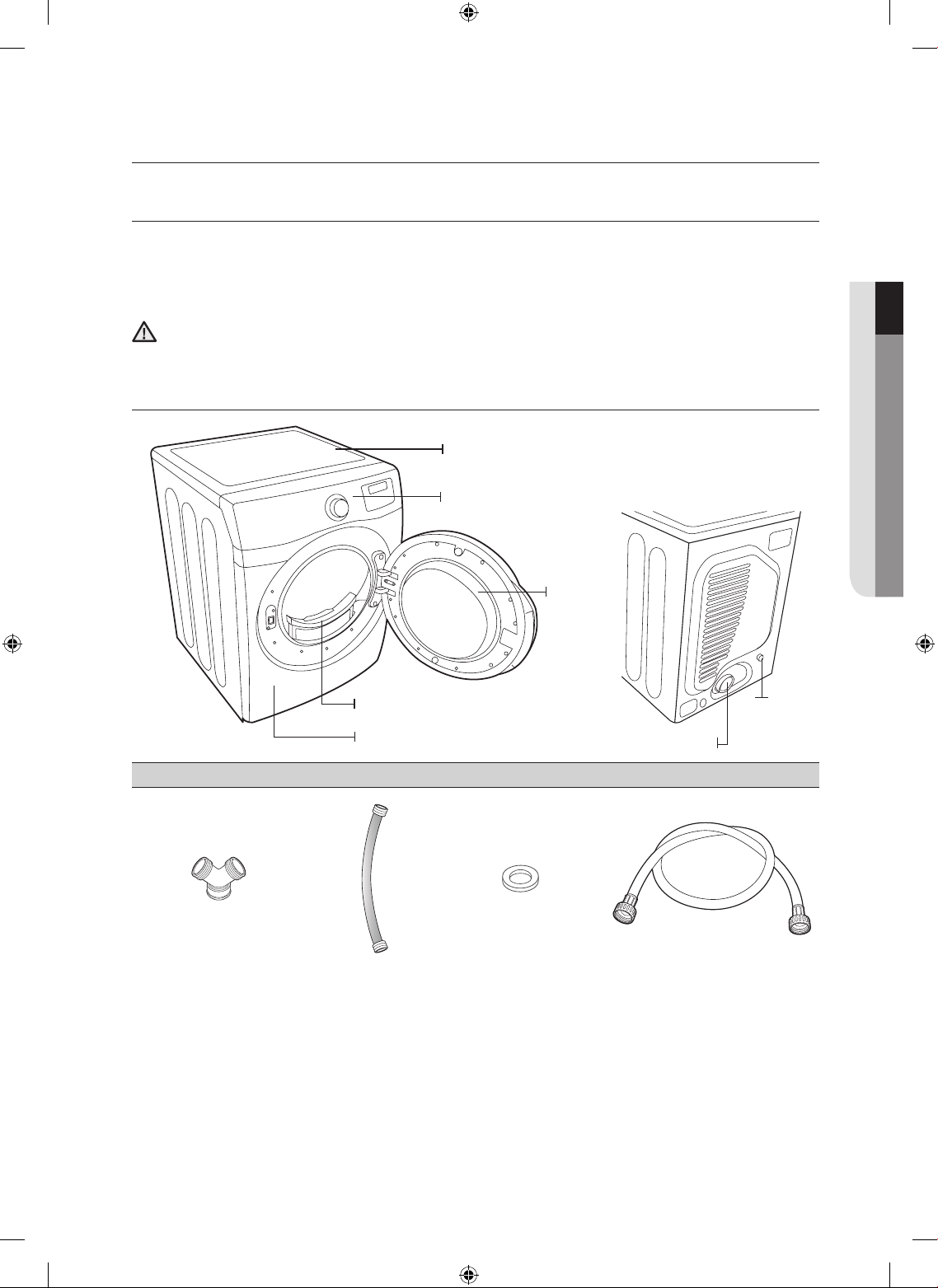
Parts supplied
“Y”-connector Short inlet hose Rubber Washer Long inlet hose
01 installing your dryer
WARNING
Control panel
Top Cover
Door
Frame Front
Filter
Duct Exhaust
Water Inlet
[ BACK ]
DV520AE-02836A_EN.indd 9 2010-04-13 ¿ÀÈÄ 4:29:27
10_ installing your dryer
installing your dryer
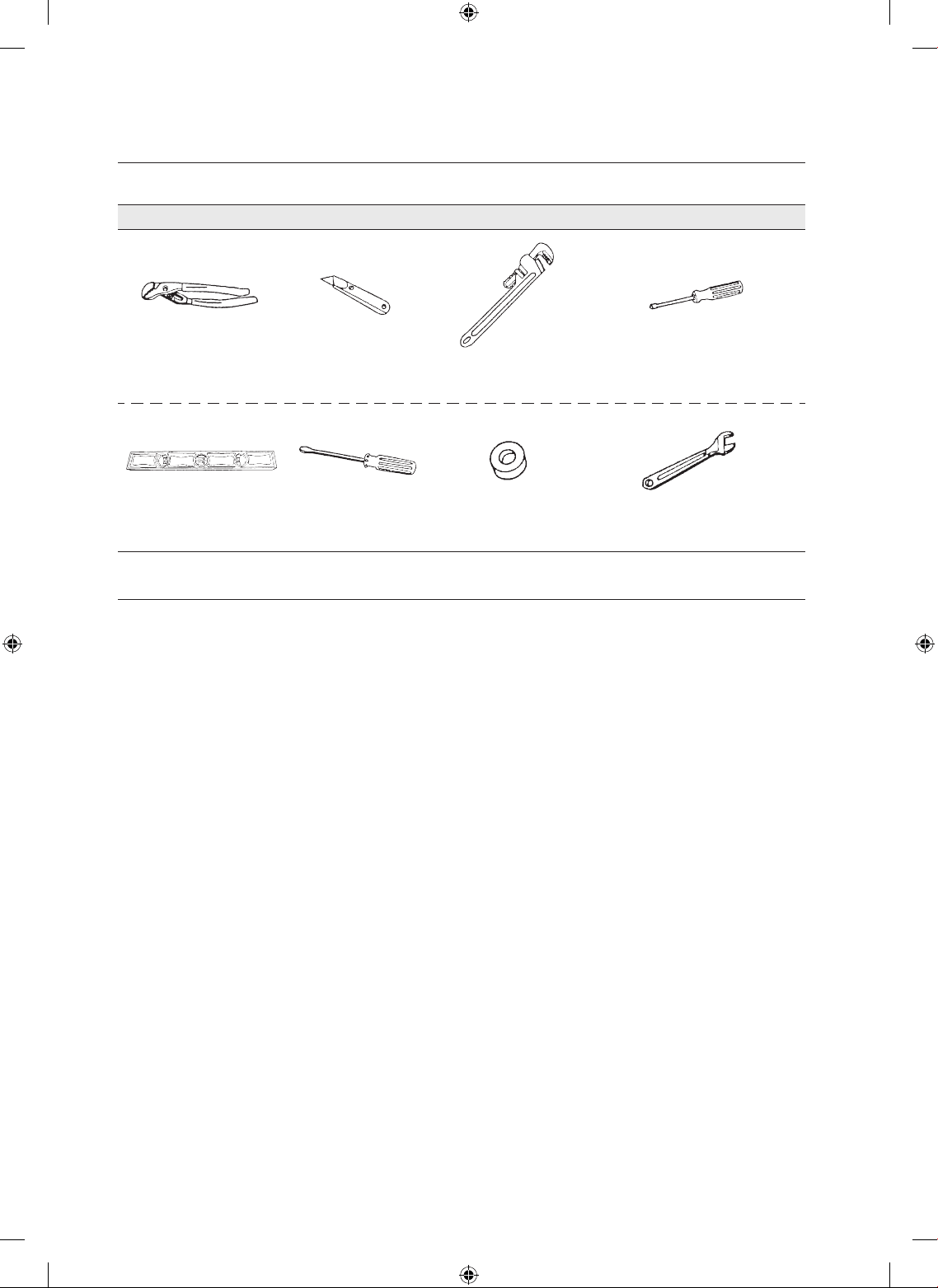
Tools needed
Pliers Cutting knife
Pipe wrench
(gas only)
Nut drivers
Level Phillips Screwdriver Duct tape Wrench
BASIC REQUIRMENTS
Make sure you have everything necessary for proper installation
• A GROUNDED ELECTRICAL OUTLET is required. See Electrical Requirements.
• A POWER CORD electric dryers ( except for Canada).
• GAS LINES (if a gas dryer) must meet national and local codes.
• EHAUST SYSTEM - must be rigid metal or flexible stiff-walled metal exhaust ducting.
DV520AE-02836A_EN.indd 10 2010-04-13 ¿ÀÈÄ 4:29:29
installing your dryer _11
DUCTING REQUIREMENTS
• Use a 4-inch (10.2 cm) diameter rigid aluminum or rigid galvanized steel duct.
• Do not use a smaller duct.
• Ducts larger than 4 inches (10.2 cm) in diameter can result in increased lint accumulation.
Lint accumulation should be cleaned regularly.
• If a flexible metal duct must be used, use the type with a stiff sheet metal wall. Do not use a flexible duct
with a thin foil wall. Serious blockage can result if the flexible metal duct is bent too sharply.
• Never install any type of flexible duct in walls, ceilings, or other concealed spaces.
• Keep the exhaust duct as straight and short as possible.
• Secure joints with duct tape. Do not use screws.
• Plastic flexible duct can kink, sag, be punctured, reduce airflow, extend drying times, and affect dryer
operation.
• Exhaust systems longer than recommended can extend drying times, affect machine operation, and
may collect lint.
• The exhaust duct should end with an exhaust hood with a swing-out damper to prevent back drafts and
entry of wildlife. Never use an exhaust hood with a magnetic damper.
• The hood should have at least 12 inches (30.5 cm) of clearance between the bottom of the hood and
the ground or other obstruction. The hood opening should point down.
• Never install a screen over the exhaust outlet.
• To avoid lint buildup, do not exhaust the dryer directly into a window well. Do not exhaust under a house
or porch.
• If exhaust ductwork must run through an unheated area, the duct should be insulated and slope slightly
down towards the exhaust hood to reduce condensation and lint buildup.
• Inspect and clean the interior of the exhaust system at least once a year. Unplug the power cord before
cleaning.
• Check frequently to be sure the exhaust hood damper opens and closes freely.
• Check once per month, and clean at least one time per year. Note: If clothes are not getting dry, then
check ducting for obstructions.
• Do not exhaust dryer into any wall, ceiling, crawl space, or concealed space of a building, gas vent, or
any other common duct or chimney. This could create a fire hazard from lint expelled by the dryer.
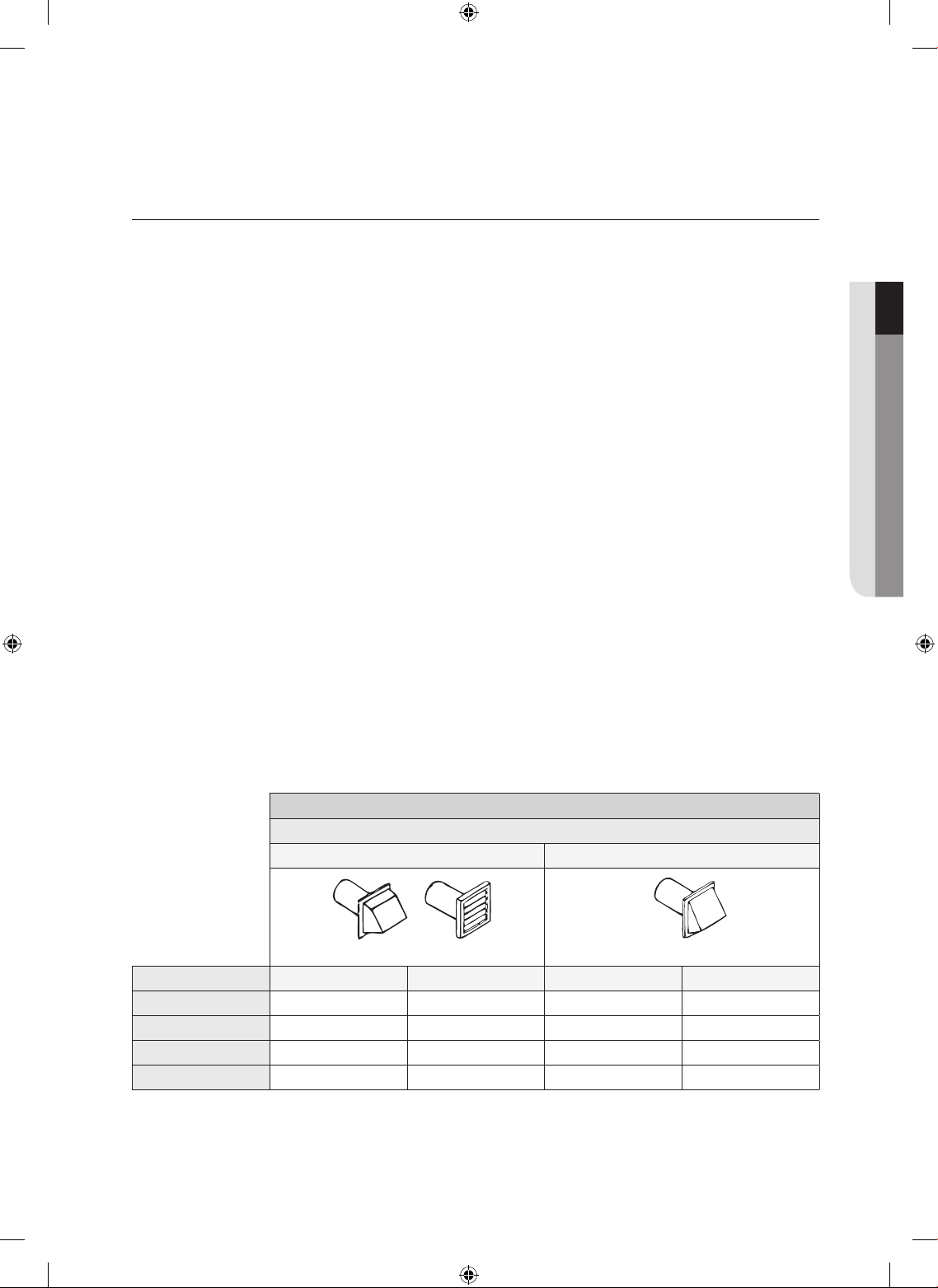
ELECTRIC AND GAS DRYER
Weather Hood Type
Recommended Use only for short-run installation
4” (10 .16 cm) 2.5” (6.35 cm)
No. of 90° elbows Rigid Metallic Flexible* Rigid Metallic Flexible*
0 24.4 m (80 ft.) 12.4 m (41 ft.) 22.6 m (74 ft.) 10.1 m (33 ft.)
1 20.7 m (68 ft.) 11.2 m (37 ft.) 18.9 m (62 ft.) 8.8 m (29 ft.)
2 17.4 m (57 ft.) 10.1 m (33 ft.) 15.5 m (51 ft.) 7.6 m (25 ft.)
3 14.3m (47 ft.) 9.0 m (29 ft.) 12.5 m (41 ft.) 6.5 m (21 ft.)
* Do not use non-metallic flexible duct.
01 installing your dryer
DV520AE-02836A_EN.indd 11 2010-04-13 ¿ÀÈÄ 4:29:30
12_ installing your dryer
If the new dryer is installed into an existing exhaust system you must make
sure:
• The exhaust system meets all local, state, and national codes.
• That a flexible plastic duct is not used.
• To Inspect and clean all lint buildup from inside the existing duct.
• The duct is not kinked or crushed.
• The exhaust hood damper opens and closes freely.
The static pressure in any exhaust system must not exceed 0.83 inches of water column, or be
less than 0.
This can be measured with the dryer running with a manometer at the point where the exhaust
duct connects to the dryer. A no-heat setting should be used. The dryer tumbler should be
empty and the lint filter clean.
IMPORTANT TO INSTALLER
Please read the following instructions carefully before installing the dryer. These instructions should be kept
for future reference.
Remove the door from all discarded appliances to avoid the danger of a child suffocating.
LOCATION CONSIDERATIONS
The dryer should be located where there is enough space at the front for loading the dryer, and enough
space behind for the exhaust system. This dryer is factory-ready for rear exhaust. To exhaust out the
bottom or the right or the left, use the accessory exhaust kit. Instructions are included with the kit. It’s
important to make sure the room has enough fresh air. The dryer must be located where there is no air-flow
obstruction.
On gas dryers, adequate clearance as noted on the data plate must be maintained to ensure adequate air
for combustion and proper dryer operation.
The dryer must not be installed or stored in an area where it will be exposed to water and/or weather. The
dryer area is to be kept clear of combustible materials, casoline, and other flammable vapors and liquids. A
dryer produces combustible lint. The area around the dryer should be kept Lint-Free.
ALCOVE OR CLOSET INSTALLATION
The dryer must be exhausted to the outside to reduce the risk of fire when installed in an alcove or
closet.
• No other fuel-burning appliance should be installed in the same closet as the dryer.
• WARNING: To reduce the risk of fire, this dryer must be exhausted to the outdoors.
See Exhaust information section.
• Minimum clearances between the dryer and adjacent walls or other surfaces are:
2” in front, 17” on top, 1” on either side, and 5” in the back.
• The closet front must have two unobstructed air openings for a combined minimum total area of 72 in²
with 3” minimum clearance on the top and bottom. A louvered door with equivalent space clearance is
acceptable.
installing your dryer
WARNING
WARNING
DV520AE-02836A_EN.indd 12 2010-04-13 ¿ÀÈÄ 4:29:30
installing your dryer _13
MOBILE HOME INSTALLATION
The installation of the dryer in mobile homes must conform to the Manufactured Home Construction and
Safety Standard Title 24 CFR, Part 3280 {formerly the Federal Standard for Mobile Home Construction and
Safety, Title 24, HUD (Part 280), 1975} for the United States) or CSA Standards Z240 (for Canada).
When installing a dryer in a mobile home, provisions for anchoring the dryer to the floor must be made.
Locate an area that has adequate fresh air.
A minimum of 72 in² (183 cm²) of unobstructed space is required.
Call 1-800-SAMSUNG for information on purchasing the Floor Anchoring Kit as an accessory.
All mobile home installations must be exhausted to the outside with the exhaust duct termination securely
fastened to the mobile home structure, using materials that will not support combustion.
The exhaust duct may not terminate underneath the mobile home.
See Exhausting section for more information.
EXHAUSTING
Exhausting the dryer to the outside will prevent large amounts of lint and moisture from being blown into the
room.
In the United States:
• All dryers must be exhausted to the outside.
• The required exhaust duct is 4inch(102mm) in diameter.
• Only those foil-type flexible ducts, if any, specifically identified for use with the appliance by
the manufacturer and that comply with the Outline for Clothes Dryer Transition Duct, Subject
2158A, shall be used.
• The duct shall not be assembled with screws or other fastening means that extend into the
duct and catch lint.
In Canada:
• Only those foil-type flexible ducts, if any, specifically identified for use with the appliance by
the manufacturer shall be used.
• All dryers must be exhausted to the outside.
• The exhaust duct should be 4inch (102mm) in diameter.
Outside the U.S. and Canada:
• Refer to the local codes.
The dryer must be exhausted to the outside to reduce the risk of fire when installed in an
alcove or closet.
NEVER USE A PLASTIC OR NON-METAL FLEXIBLE DUCT.
If your existing ductwork is plastic, non-metal, or combustible, replace it with metal.
Use only a metal exhaust duct that is non-flammable to ensure containment of exhaust air,
heat, and lint.
01 installing your dryer
WARNING
DV520AE-02836A_EN.indd 13 2010-04-13 ¿ÀÈÄ 4:29:30
14_ installing your dryer
GAS REQUIREMENTS
Use only natural or LP (liquid propane) gases.
THE INSTALLATION MUST CONFORM WITH LOCAL CODES, OR IN THE ABSENCE OF LOCAL
CODES, WITH THE NATIONAL FUEL GAS CODE ANSI/Z223.1, LATEST REVISION (FOR THE UNITED
STATES), OR WITH THE CAN/CGA-B149 INSTALLATION CODES (FOR CANADA).
Gas dryers are equipped with a burner vent for use with natural gas. If you plan to use your dryer with LP
(liquid propane) gas, it must be converted for safe and proper performance by a qualified service technician.
A 1/2” (1.27 cm) gas supply line is recommended and must be reduced to connect to the 3/8” (1 cm) gas
line on your dryer. The National Fuel Gas Code requires that an accessible, approved manual gas shut-off
valve be installed within 6” of your dryer.
Gas dryers installed in residential garages must be raised 18 inches (46 cm) above the floor.
Additionally, a 1/8” (0.3 cm) N.P.T. (National Pipe Thread) plugged tapping, accessible for test gauge
connection, must be installed immediately upstream of your dryer’s gas supply connection.
Your dryer must be disconnected from the gas supply pipe system during any pressure testing of the
system.
DO NOT reuse old flexible metal gas lines. Flexible gas lines must be design certified by the American Gas
Association (CGA in Canada).
• Any pipe joint compound used must be resistant to the action of any liquefied petroleum gas.
• As a courtesy, most local gas utilities will inspect a gas appliance installation.
GAS IGNITION – Your dryer uses an automatic ignition system to ignite the burner.
There is no constant burning pilot.
COMMONWEALTH OF MASSACHUSETTS INSTALLATION
INSTRUCTIONS
Your dryer must be installed by a licensed plumber or gas fitter. A “T” handle manual gas valve must be
installed in the gas supply line to your dryer. If a flexible gas connector is used to install your dryer, the
connector must have a maximum length of 3’ (36”).
• Gas leaks may occur in your system, creating a dangerous situation.
• Gas leaks may not be detected by smell alone.
• Gas suppliers recommend you purchase and install a UL-approved gas detector.
• Install and use in accordance with manufacturer’s instructions.
installing your dryer
WARNING
DV520AE-02836A_EN.indd 14 2010-04-13 ¿ÀÈÄ 4:29:30
installing your dryer _15
ELECTRICAL REQUIREMENTS
Wiring diagram is located on the plate below the control panel.
• Improper connection of the equipment grounding conductor can result in a risk of electric shock.
Check with a qualified electrician or serviceman if you are in doubt as to whether your dryer is
properly grounded. Do not modify the plug provided with your dryer – if it doesn’t fit the outlet,
have a proper outlet installed by a qualified electrician.
• To prevent unnecessary risk of fire, electrical shock, or personal injury, all wiring and grounding
must be done in accordance with local codes, or in the absence of local codes, with the National
Electrical Code, ANSI/NFPA No. 70-Latest Revision (for the U.S.) or the Canadian Electrical Code
CSA C22.1 – Latest Revisions and local codes and ordinances. It is your responsibility to provide
adequate electrical services for your dryer.
• All gas installations must be done in accordance with the national Fuel Code ANSI/Z2231 – Latest
Revision (for the U.S.) or CAN/CGA – B149 Installation Codes – Latest Revision (for Canada) and
local codes and ordinances.
GROUNDING
This dryer must be grounded. In the event of malfunction or breakdown, the ground will reduce the risk of
electrical shock by providing a path of least resistance for the electrical current.
Gas models
Your dryer has a cord with an equipment-grounding conductor and a grounding plug.
The plug must be plugged into an appropriate outlet that is properly installed and grounded in
accordance with all local codes and ordinances.
Do not modify the plug provided with your dryer – if it doesn’t fit the outlet, have a proper outlet
installed by a qualified electrician.
Never connect ground wire to plastic plumbing lines, gas lines, or hot water pipes.
Electric models
Your dryer has a cord with an equipment-grounding conductor and a grounding plug, sold
separately.
The plug must be plugged into an appropriate outlet that is properly installed and grounded in
accordance with all local codes and ordinances.
If a power cord is not used and the electric dryer is to be permanently wired, the dryer must
be connected to a permanently grounded metal wiring system, or an equipment grounding
conductor must be run with the circuit conductors and connected to the equipment grounding
terminal.
01 installing your dryer
WARNING
DV520AE-02836A_EN.indd 15 2010-04-13 ¿ÀÈÄ 4:29:30
16_ installing your dryer
ELECTRICAL CONNECTIONS
Before operating or testing, follow all grounding instructions in the Grounding section.
An individual branch (or separate) circuit serving only your dryer is recommended. DO NOT USE AN
EXTENSION CORD.
Gas models – U.S. and Canada
A 120 volt, 60 Hz AC approved electrical service, with a 15-ampere fuse or circuit breaker is
required.
Electric models – U.S. only
Most U.S. dryers require a 120/240 volt, 60 Hz AC approved electrical service. Some require
120/208 volt, 60 Hz approved electrical service. The electric service requirements can be found
on the data label located behind the door. A 30-ampere fuse or circuit breaker on both sides of
the line is required.
• If a power cord is used, the cord should be plugged into a 30-ampere receptacle.
• The power cord is NOT provided with U.S. electric model dryers.
IMPORTANT:
When local codes allow, the dryer electrical supply may be connected by means of a new power
supply cord kit, marked for use with a dryer, that is U.L. listed and rated at a minimum of120/240
volts, 30-ampere with three No. 10 copper wire conductors terminated with closed loop
terminals, open-end spade lugs with turned up ends, or with tinned leads.
1. size of the conductors and the type of cord.
2. 3/4” (1.9 cm) UL-listed strain relief
• Do not reuse a power supply cord from an old dryer. The power cord electric supply wiring
must be retained at the dryer cabinet with a suitable UL-listed strain relief.
• Grounding through the neutral conductor is prohibited for (1) new branch-circuit installations,
(2) mobile homes, (3) recreational vehicles, and (4) areas where local codes prohibit
grounding through the neutral conductor. (Use 4-prong plug for 4 wire receptacle, NEMA
type 14-30R.)
Electric models – Canada Only
• A 120/240 volt, 60 Hz AC approved electrical service fused through a 30-ampere fuse or
circuit breaker on both sides of the line is required.
• All Canadian models are shipped with the power cord attached. The power cord should be
plugged into a 30-ampere receptacle.
It is not permissible to convert a dryer in Canada to 208 volts.
installing your dryer
DV520AE-02836A_EN.indd 16 2010-04-13 ¿ÀÈÄ 4:29:30
installing your dryer _17
CONNECTING THE INLET HOSE
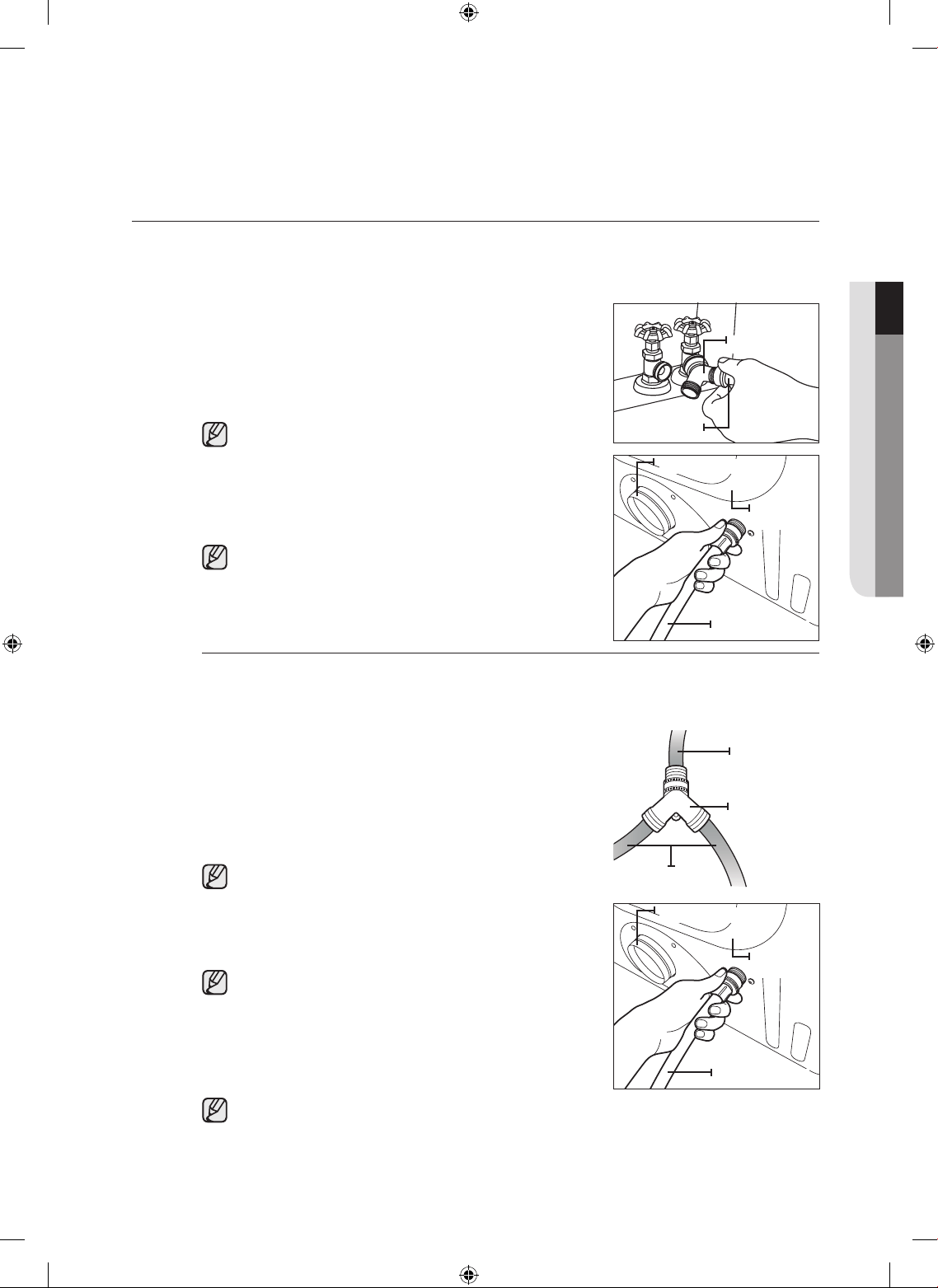
Method1
The dryer must be connected to the cold water faucet using the new inlet hoses. Do not use old
hoses.
1. If space permits, attach the brass female end of the “Y”
connector to the cold water faucet.
2. Turn the cold water faucet off.
3. Attach the straight end of long hose to “Y’ connector.
4. Using pliers, tighten the coupling with an additional two-
thirds turn.
Do not overtighten, as it may damage the coupling.
5. Attach angled end of long hoses to fill the valve at the
bottom of the dryer’s rear frame. Screw on coupling by hand
until it is seated on fill valve connector.
6. Using pliers, tighten the coupling with an additional two-
thirds turn.
Do not overtighten, as it may damage the coupling.
7. Check that the water faucets are on.
8.
Check for leaks around “Y” connector, faucets and hoses.
Method2
The dryer must be connected to the cold water faucet using the new inlet hoses. Do not use old
hoses.
1. If “Y” connector cannot be attached directly to the cold
water faucet, the short hose must be used.
2. Turn the cold water faucet off.
3. Attach short inlet hose to cold water faucet.
Screw on coupling by hand until it is seated on the faucet.
4. Using pliers, tighten the coupling with an additional two-
thirds turn.
Do not overtighten, as it may damage the coupling.
5. Attach ‘Y” connector to brass male end of small hose.
Screw on coupling by hand until it is seated on connector.
6. Using pliers, tighten the coupling with an additional two-
thirds turn.
Do not overtighten, as it may damage the coupling.
7. Attach angled end of long hoses to the fill valve at the
bottom of the dryer rear frame. Screw on coupling by hand
until it is seated on fill valve connector.
8. Using pliers, tighten the coupling with an additional two-
thirds turn.
Do not overtighten, as it may damage the coupling.
9. Check that the water faucets are on.
10. Check for leaks around “Y” connector, faucets and hoses.
01 installing your dryer
Duct Ehuast
Frame
(back)
Water Hose
Y-Connector
Duct Ehuast
Short hose
(Inlet to cold
water)
“Y’ connector
Long hose
Duct Ehuast
Frame
(back)
Water Hose
DV520AE-02836A_EN.indd 17 2010-04-13 ¿ÀÈÄ 4:29:31
18_ installing your dryer
REPLACEMENT PARTS AND ACCESSORIES
If your dryer requires replacement parts or accessories, contact the dealer from whom you purchased your
dryer or the SAMSUNG customer care center at 1-800-SAMSUNG (726-7864).
INSTALLATION
For proper installation, we recommend that you hire a qualified installer.
To install:
1. Move your dryer to an appropriate location for installation. Consider
installing the dryer and washer side-by-side, to allow access to gas,
electrical, and exhaust connections.
Lay two of the carton cushion-tops on the floor. Tip your dryer on its
side so it will lay across both cushion-tops.
2. Set your dryer back in an upright position.
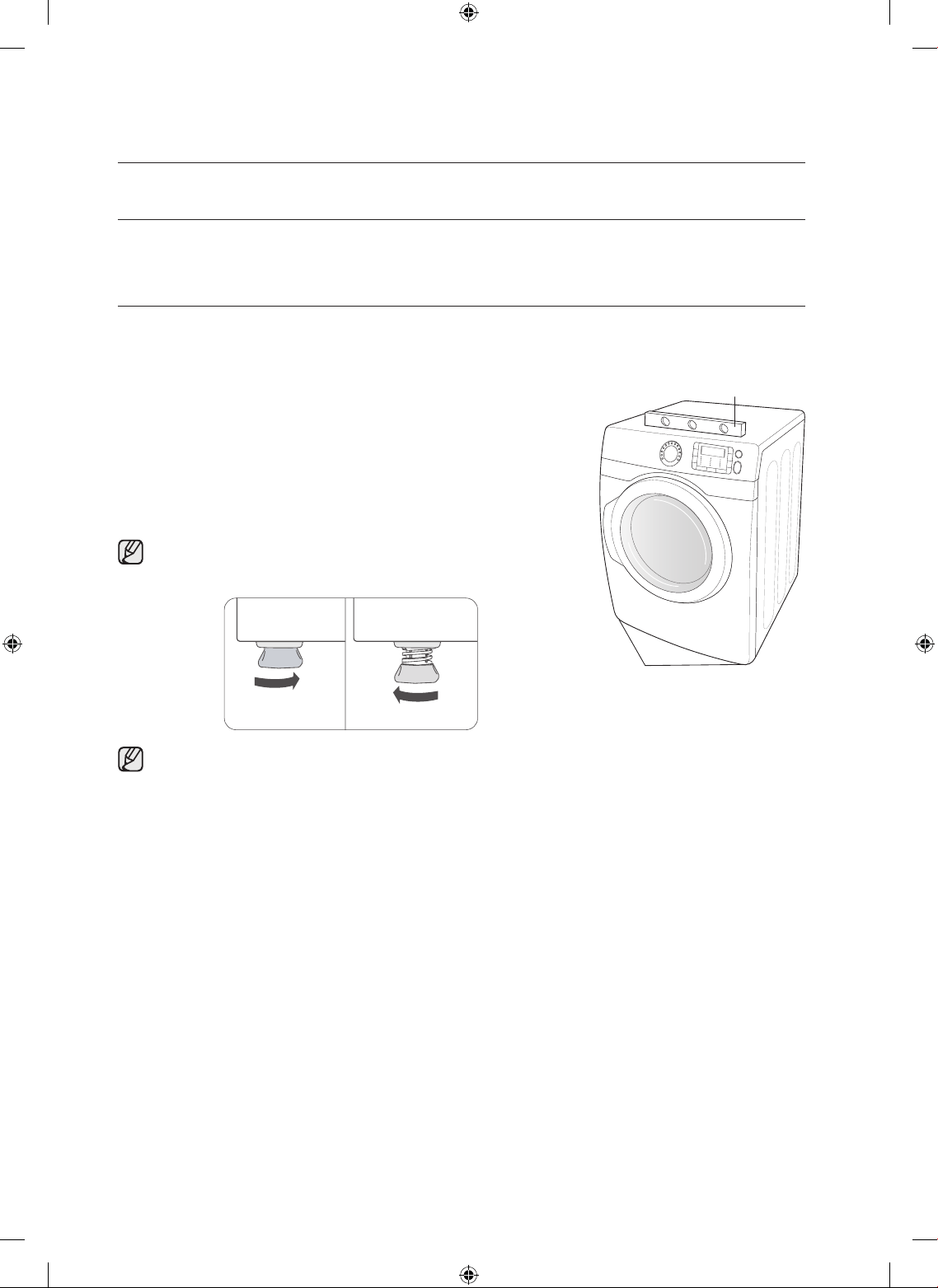
3. To ensure that the dryer provides optimal drying performance, it must
be level. To minimize vibration, noise, and unwanted movement,the
floor must be a perfectly level, solid surface.
To set the dryer to the same height as the washer, fully retract the
leveling feet by turning them counterclockwise, then loosen the leg
by turning them clockwise
Adjust the leveling feet only as much as necessary to level the dryer.
Extending the leveling feet more than necessary can cause the dryer
to vibrate.
installing your dryer
Level
Leveling feet
Retract fully Then loosen
DV520AE-02836A_EN.indd 18 2010-04-13 ¿ÀÈÄ 4:29:32
installing your dryer _19
4. Review the Exhausting section before installing the exhaust system. Install the ductwork from your dryer
to the exhaust hood. The crimped end of the duct sections must point away from your dryer.
DO NOT use sheet metal screws when assembling ducting. These joints should be taped.
Never use plastic flexible exhaust material.
Tip for tight installations: install a section of exhaust system to your dryer before putting it in place.
Use duct tape to secure this section to your dryer, but do not cover ventilation slots at the back of the
unit in dryer cabinet.
5. Review Electrical Requirements section.
BEFORE OPERATING OR TESTING, follow the grounding instructions in the Grounding section.
U.S. MODELS:
IMPORTANT – All U.S. models are produced for a 3-WIRE SYSTEM CONNECTION.
The dryer frame is grounded to the neutral conductor at the terminal block.
A 4-WIRE SYSTEM CONNECTION is required for new or remodeled construction, mobile
homes, or if local codes do not permit grounding through neutral. If the 4-wire system is used,
the dryer frame cannot be grounded to the neutral conductor at the terminal block. Refer to the
following instructions for 3- and 4-WIRE SYSTEM CONNECTIONS.
Remove the terminal block cover plate.
Insert the power cord with a UL-listed strain relief through the hole provided in the cabinet near the
terminal block.
A strain relief must be used.
Do not loosen the nuts already installed on the terminal block. Be sure they are tight.
Use a 3/8” (1cm) deep well socket.
01 installing your dryer
DV520AE-02836A_EN.indd 19 2010-04-13 ¿ÀÈÄ 4:29:32
20_ installing your dryer
6. Review Gas Requirements section.
Remove the pipe thread protective cap.
Apply pipe joint compound or about 1 1/2 wraps of Teflon tape over all threaded connections.
Pipe joint compound must be resistant to the action of any liquefied petroleum gas.
Connect the gas supply to your dryer.
An additional fitting is required to connect the 3/4” (1.9 cm) female thread end of a flexible connector to
the 3/8” (1 cm) male threaded end on the dryer.
Securely tighten the gas line fitting over threads.
Turn on the gas supply. Check all gas connections for leaks using a soap solution.
If bubbles appear, tighten the connections and recheck.
DO NOT use an open flame to check for gas leaks.
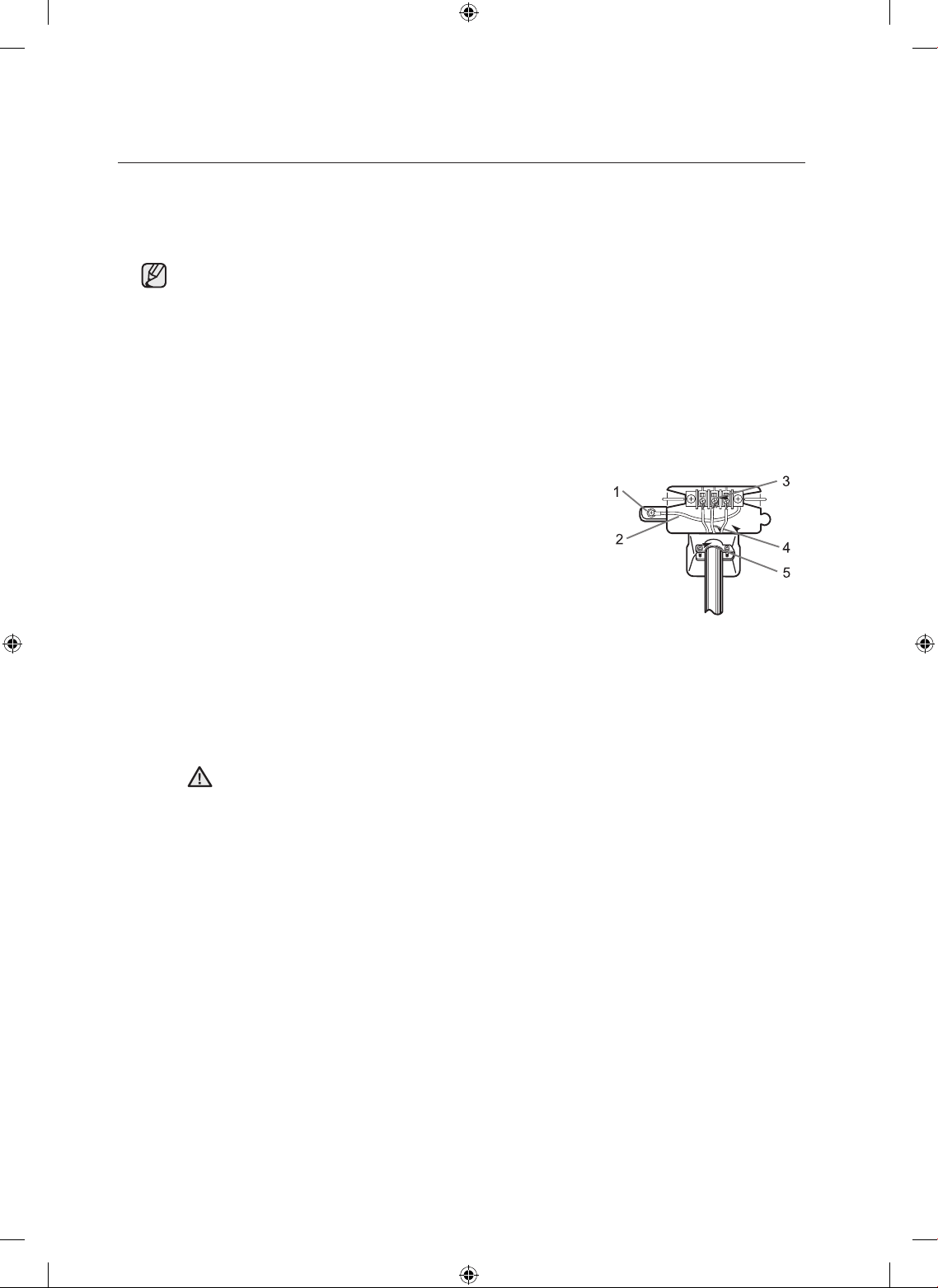
3-WIRE system connections
1. Loosen or remove the center terminal block screw.
2. Connect the neutral wire (white or center wire) of the power
cord to the center, silver-colored terminal screw of the
terminal block. Tighten screw.
3. Connect the other wires to outer terminal block screws.
Tighten screws.
4. Tighten the strain relief screws.
5. Insert the tab of the terminal block cover into your dryer’s
rear panel slot.
Secure the cover with a hold-down screw.
1. External ground connector
2. Neutral grounding wire (green/yellow)
3. Center silver-colored terminal block screw
4. Neutral wire (white or center wire)
5. 3/4” (1.9 cm) UL-listed strain relief
If converting from a 4-wire electrical system to a 3-wire, the ground strap must be
reconnected to the terminal block support to ground the dryer frame to the neutral
conductor.
installing your dryer
WARNING
DV520AE-02836A_EN.indd 20 2010-04-13 ¿ÀÈÄ 4:29:32
installing your dryer _21
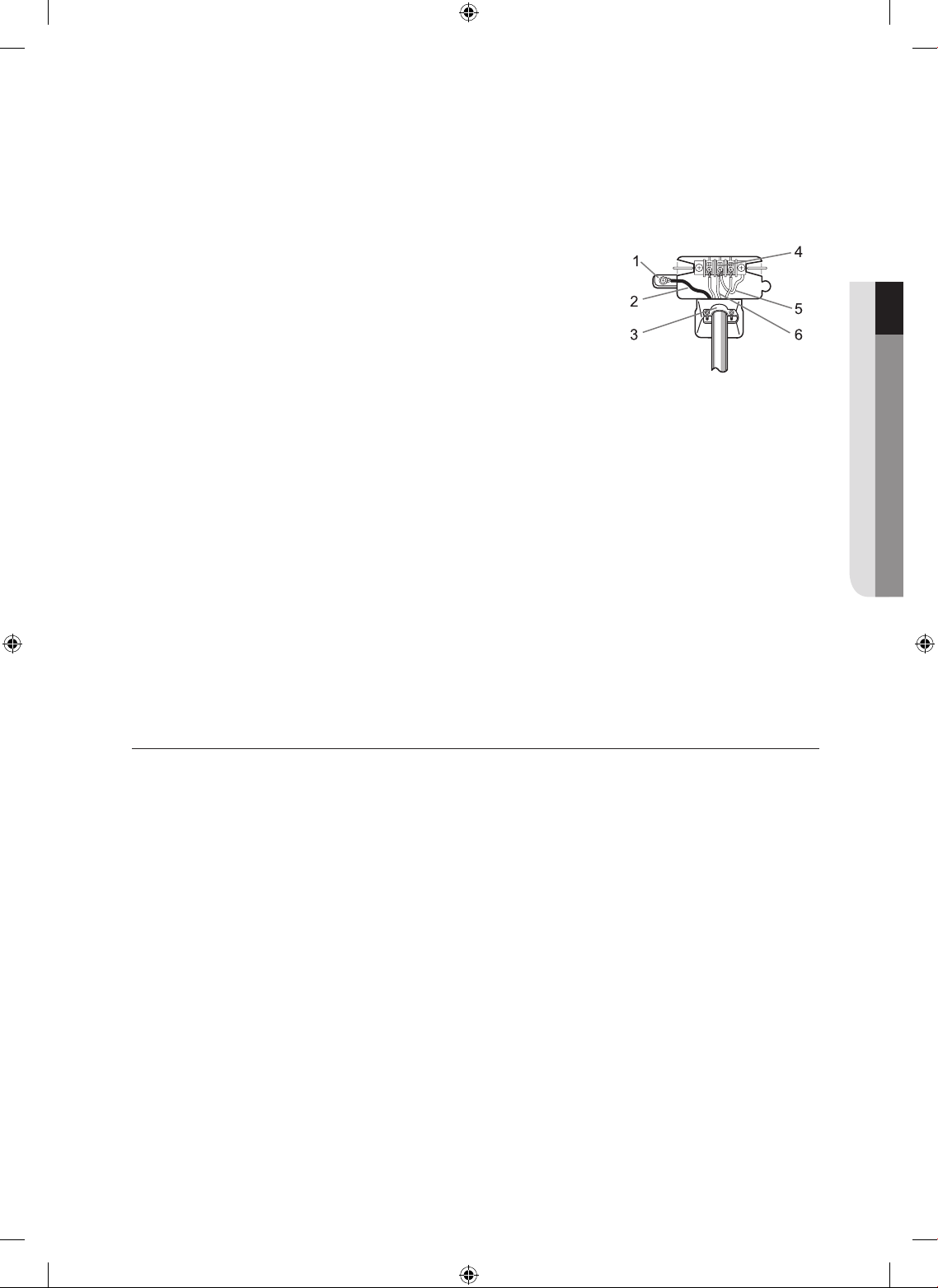
4-WIRE system connections
1. Remove the center terminal block screw.
2. Connect the ground wire (green or unwrapped) of the power
cord to the external ground conductor screw.
3. Connect the neutral wire (white or center wire) of the power
cord and the appliance ground wire (green with yellow
stripes) under the central screw of the terminal block.
4. Connect the other wires to the outer terminal block screws.
Tighten screws.
5. Tighten the strain relief screws.
6. Insert the tab of the terminal block cover into your dryer’s rear panel slot.
Secure the cover with a hold-down screw.
1. External ground connector
2. Green or bare copper wire of power cord
3. 3/4 in. (1.9 cm) UL-listed strain relief
4. Center silver-colored terminal block screw
5. Grounding wire (green/yellow)
6. Neutral wire (white or center wire)
7. With a level, check your dryer and make necessary adjustments to the leveling legs.
8. At this time, make sure all gas connections (on gas models), exhaust and electrical connections are
complete. Plug in your dryer, and check operation by using the checklist below.
9. (GAS MODELS ONLY- DV448AG*, DV438AG*)
The burner may not ignite initially due to air in the gas line. Allowing your dryer to operate on a heat
setting will purge the line. If the gas does not ignite within 5 minutes, turn your dryer off and wait 5
minutes. Be sure the gas supply to your dryer has been turned on. In order to confirm gas ignition,
check the exhaust for heat.
FINAL INSTALLATION CHECKLIST
Dryer is plugged into electrical outlet and is properly grounded.
Exhaust ductwork is hooked up and joints are taped.
Plastic flexible duct is NOT used.
Used rigid or stiff-walled flexible metal vent material.
Dryer is leveled and is sitting firmly on the floor.
Gas models – gas is turned on with no gas leaks.
Start your dryer to confirm that it runs, heats, and shuts off.
01 installing your dryer
DV520AE-02836A_EN.indd 21 2010-04-13 ¿ÀÈÄ 4:29:32
22_ installing your dryer
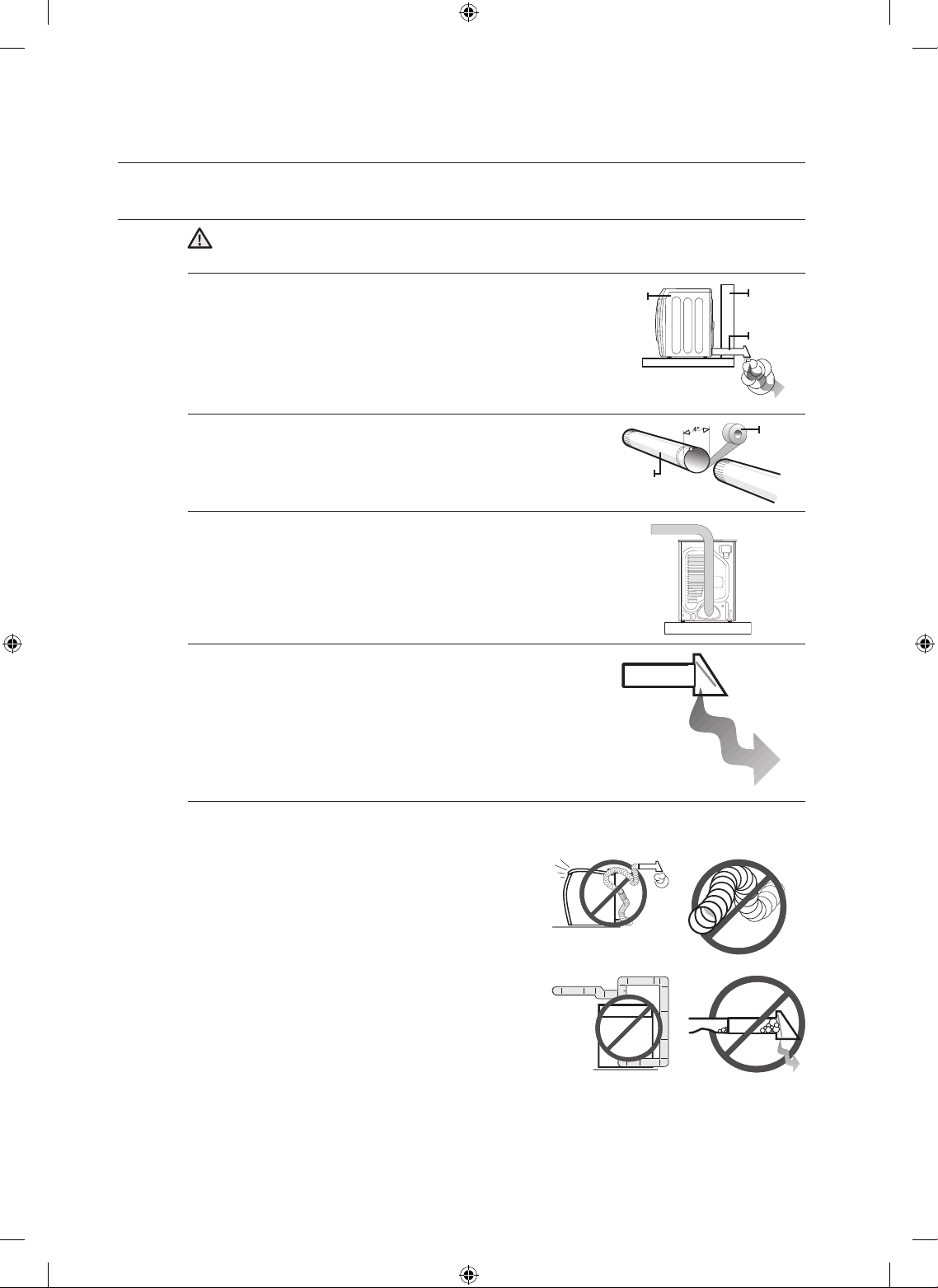
DRYER EXHAUST TIPS
Plastic or non-metal flexible duct presents a potential fire hazard.
1. Make sure your dryer is installed properly so it exhausts air
easily.
2. Use 4” diameter rigid metal duct. Tape all joints, including at
the dryer.
Never use lint-trapping screws.
3. Keep ducts as straight as possible.
4. Clean all old ducts before installing your new dryer.
Be sure the vent flap opens and closes freely.
Inspect and clean the exhaust system annually.
Don’t let a poor exhaust system slow drying by:
1. Restricting your dryer with a poor exhaust system.
2. Using a plastic, thin foil, or non-metal flexible duct.
3. Unnecessarily using long ducts that have many
elbows.
4. Allowing crushed or clogged ducts and vent.
installing your dryer
WARNING
1 2
3 4
DUCT
TAPE
Wall
DUCT
EHAUST
Dryer
DV520AE-02836A_EN.indd 22 2010-04-13 ¿ÀÈÄ 4:29:33
installing your dryer _23
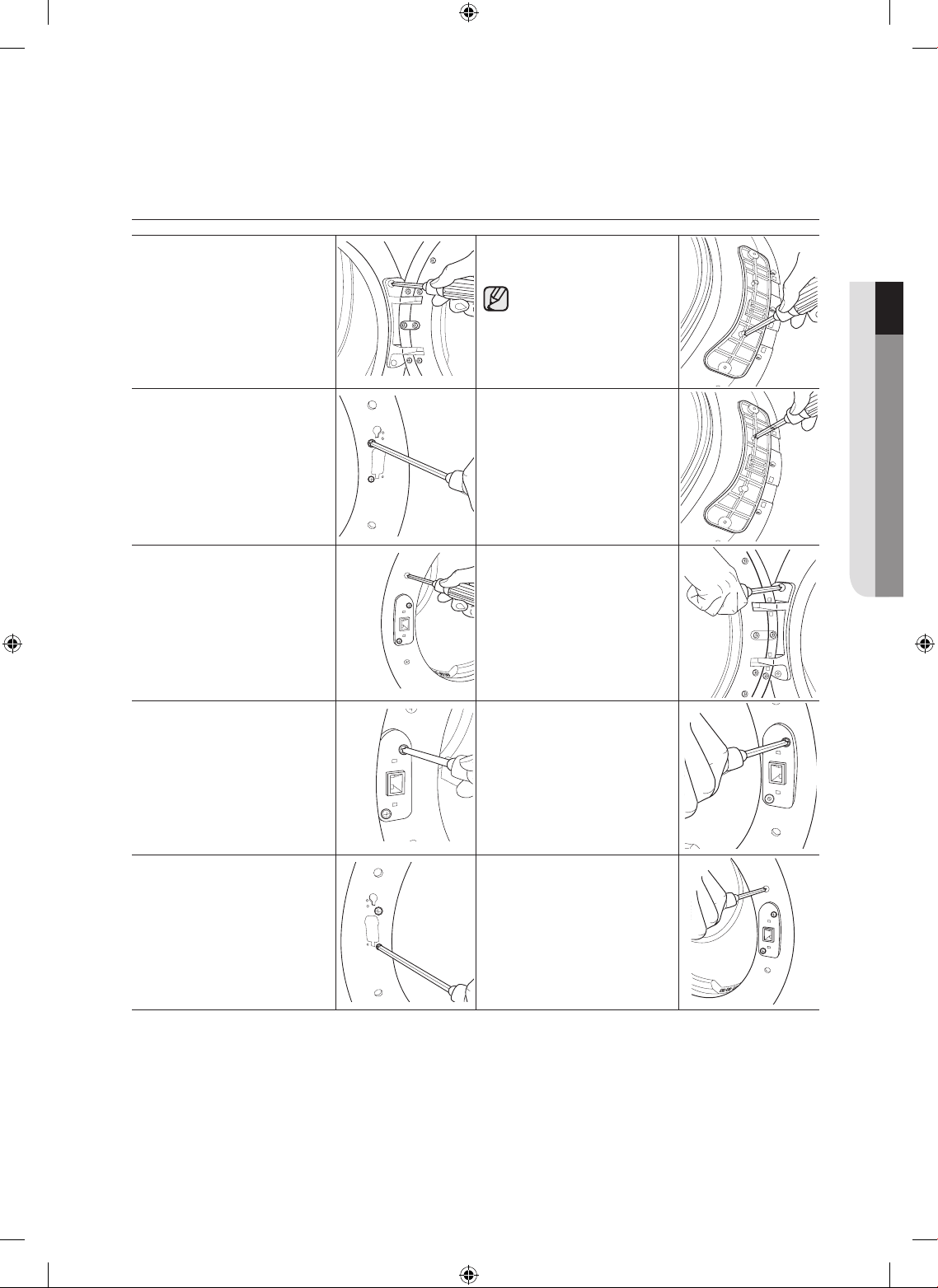
DOOR REVERSAL
1. Unplug the power cord.
2. Remove two door hinge
screws.
3. Lift the door and remove
it.
8. Remove a screw from the
door hinge.
The screw is for pre-
fixing the door to the
frame front.
4. Remove two screws from
the frame front.
9. Reassemble the screw in
the other hole.
5. Remove the two screws
from the opposite side of
the door hinge.
10. Place the door on the
other side and reattach it
to the dryer.
6. Remove two screws from
the holder lever.
11. Reattach the holder lever.
7. Reassemble two screws
on inside holes.
12. Reattach the screws in
the remaining holes.
01 installing your dryer
DV520AE-02836A_EN.indd 23 2010-04-13 ¿ÀÈÄ 4:29:35
24_ operating Instructions, tips
operating Instructions, tips
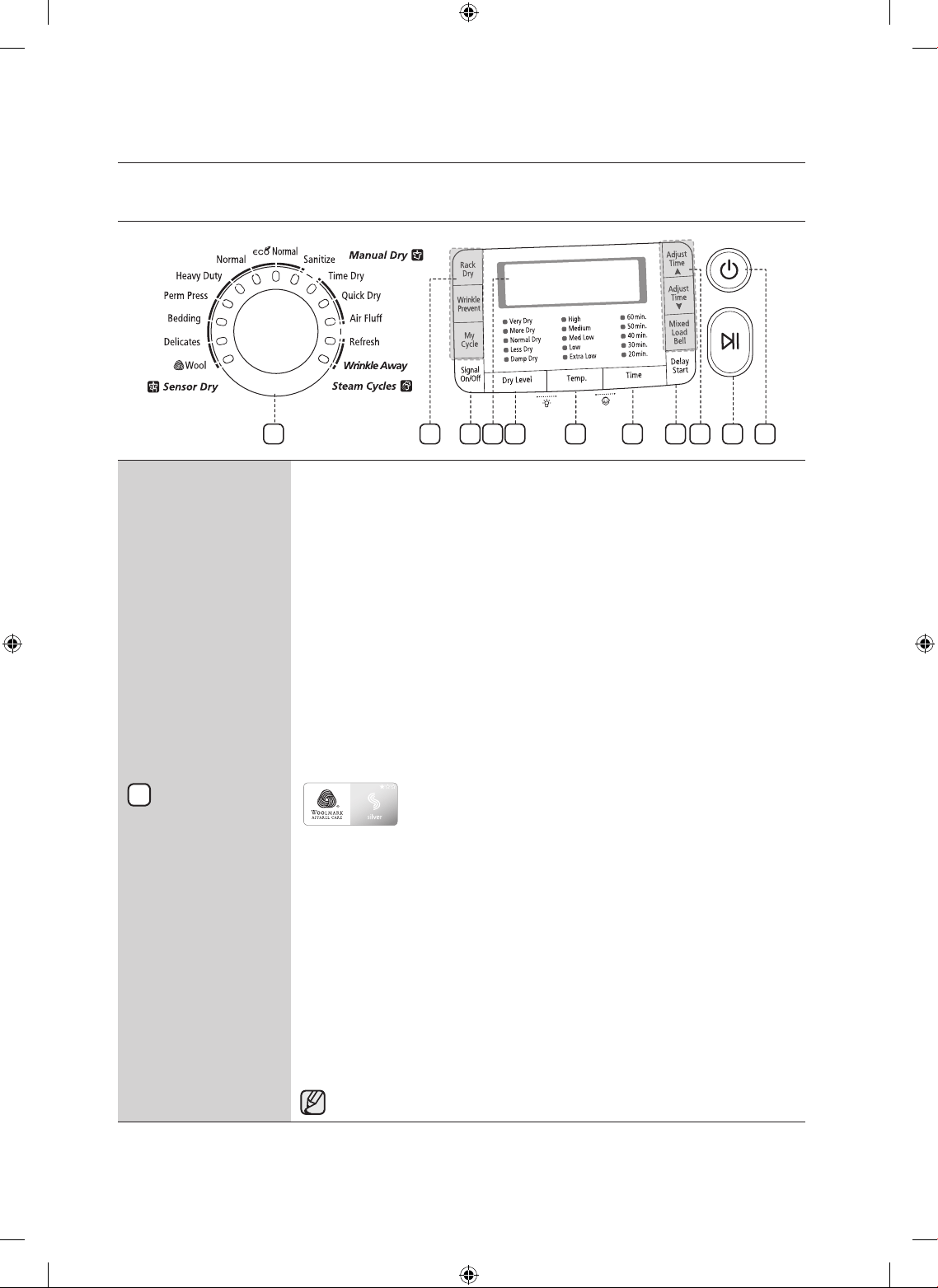
OVERVIEW OF THE CONTROL PANEL
Cycle Selector
To select a cycle, rotate the Cycle Selector dial to the desired cycle.
The indicator light by the cycle name will illuminate. The Normal, Heavy Duty,
Towels, Perm Press and Delicates cycles are Sensor Dry cycles.
Sensor Dry automatically senses the moisture in the load and shuts the dryer off
when the selected dryness level (very dry to damp dry) is reached.
Eco Normal – This cycle reduces energy usage by 10% to 15% compared to
Normal Dry depending on load. It adjusts cycle time and temperature for better
efficiency with Samsung smart control technology.
Normal – Use this cycle to dry loads such as cotton, underwear, and linen.
Heavy Duty – Use this cycle to get high heat for heavy fabrics such as jeans,
corduroys, or work clothes.
Perm Press – Dry wrinkle-free cottons, synthetic fabrics, knits, and permanent
press fabrics automatically.
Bedding – For bulky items such as blankets, sheets and comforters.
Delicates – The Delicates cycle is designed to dry heat-sensitive items at a low
drying temperature.
Wool
–
For machine washable and tumble dryable wool only.
Load should be under 3 pounds. The Wool cycle of this machine
has been approved by Woolmark company for Total-Easy-Care
Wool products, M0913(DV520*E*) and M1007(DV520*G*).
Sanitize – This course allows you to sanitize garments by permeating high
temperature heat deep into the fabric during the drying cycle. Use this course to
keep your bedding and curtains clean through sanitization.
Time Dry – Time Dry allows you to select the desired cycle time in minutes.
Turn the Cycle Selector dial to Time Dry, then press the Adjust Time up arrow to
set the drying time. Press the arrow repeatedly to scroll through the time settings.
Quick Dry - Provides a 30 minutes drying cycle.
Air Fluff – The Air Fluff cycle tumbles the load in room temperature air.
Refresh – This cycle is best for smoothing out wrinkles and reducing odors from
loads consisting of one to four dry items. In this cycle a small amount of water is
sprayed into the dryer drum after several minutes of tumbling with heat.
Wrinkle Away
– Use this cycle to reduce wrinkles from dry clothes that have
been left in closet for a while. It provides advanced wrinkle release performance
by optimized steam care. Up to 3 items can be used.
Overloading the dryer may not yield the same results.
1
3
6
4
5
7
9
1
10
8
8
2
DV520AE-02836A_EN.indd 24 2010-04-13 ¿ÀÈÄ 4:29:36
operating Instructions, tips _25
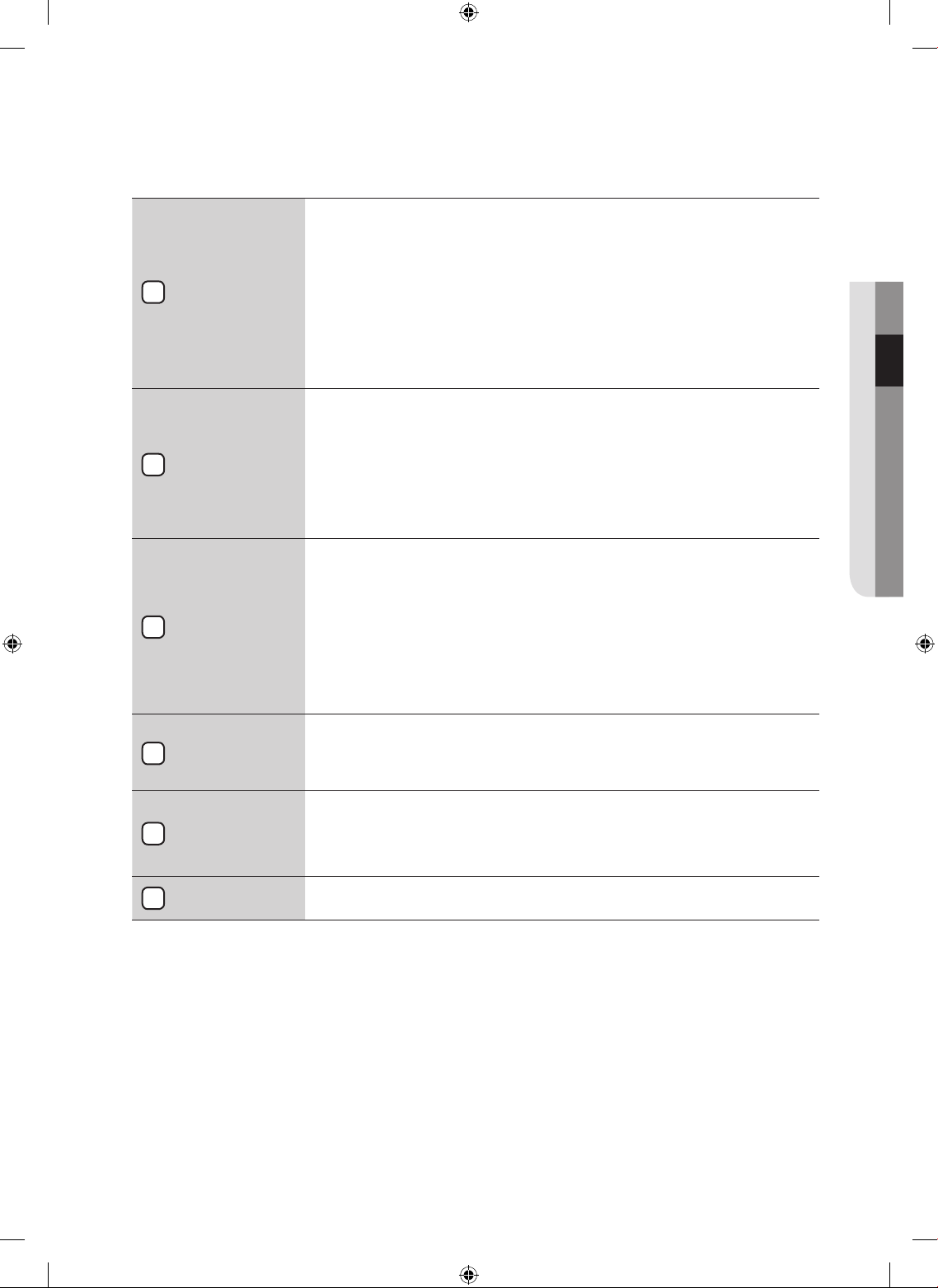
Digital Graphic
Display
The display window shows the estimated time remaining in the cycle and the
chosen cycle after the Start/Pause button is pressed. The estimated time
remaining may fluctuate as the cycle progresses.
The “DRYING” and the chosen cycle will be showed by turn in the display until
the cycle is complete.
When your dryer is in the cool-down phase, the “COOLING” will be showed.
When the cycle is complete, “END” will appear in the display panel until the dryer
door is opened or the Power key is pushed.
If your dryer is paused during a cycle, the display doesn’t change showing the
chosen cycle and remaining time until the Start/Pause button is pressed.
Dry Level
Selection Button
To select the dry level in the Normal, Heavy Duty, or other Sensor Dry cycles,
press the Dry Level button. An indicator light will illuminate next to the desired
dryness level.
Press the button repeatedly to scroll through the settings. Larger or bulkier loads
may require the Very Dry or More Dry setting for complete dryness.
The Less Dry setting is best suited for lightweight fabrics or for leaving some
moisture in the clothing at the end of the cycle. Damp Dry is designed to partially
dry items. Use for items that lay flat or hang to dry.
Temp Selection
Button
To select the correct temperature for the load, press the Temp button. An indicator
light will illuminate next to the desired temperature. Press the button repeatedly to
scroll through the settings.
High – For sturdy cottons or those labeled Tumble Dry.
Medium – For permanent press, synthetics, lightweight cottons, or items labeled
Tumble Dry Medium.
Med Low – For lower heat than Medium to dry synthetic or washable knit fabrics.
Low – For heat sensitive items labeled Tumble Dry Low or Tumble Dry Warm.
Extra Low – Provides the lowest heated dry temperature possible.
Time Selection
Button
When using Manual Dry cycles, time can be adjusted by pressing the time
selection button.
During the Sensory Dry cycle, the time light indicator is off because exact drying
times are determined by fluctuating humidity levels.
Signal Selection
Button
When the cycle is complete, a chime will sound.
When the Wrinkle Prevent option is selected, the chime will sound intermittently.
Adjust the volume of the chime or turn it off by pressing the Signal button.
Press the button repeatedly to scroll through the choices.
Delay Start
Button
Any cycle can be delayed for up to 24 hours in one-hour increments. Displayed
hour indicates the time at which the wash will be started
02 operating Instructions, tips
6
4
3
2
5
7
DV520AE-02836A_EN.indd 25 2010-04-13 ¿ÀÈÄ 4:29:36
26_ operating Instructions, tips
Select Cycle
Option
Adjust Time – Time can be added or subtracted from the automatically set times
in the Manual Dry cycles (Time Dry, Quick Dry, or Air Fluff cycles).
To add or subtract time from the cycle, press the Adjust Time arrow pad up or
down until the desired time is displayed.
Wrinkle Prevent
-Wrinkle Prevent provides approximately 180 minutes of
intermittent tumbling in unheated air at the end of the cycle to reduce wrinkling.
Press the Wrinkle Prevent button to activate this feature.
The indicator light above the pad will illuminate when Wrinkle Prevent is selected.
The load is dry, and can be removed at any time during the Wrinkle Prevent cycle.
My Cycle – Choose your favorite cycle including cycle, temp, dry level option,
etc. (See page 27 for detail.)
Rack Dry – Rack Dry is available at Time Dry cycle. Temperature will be set only
to Extra Low. (See page 28 for detail.)
Mixed Load Bell - This is an alarm that notifies the user of the time when the
average dry level is damp dry (80% dried) when the laundry contains various
types of cloth. An alarm is sounded for five (5) seconds while continuing to
perform the cycle.
This function can only be selected in the Sensor Dry course, and the dry level can
only be selected from among Normal Dry, More Dry, and Very Dry.
Start/Pause
selection button
Press to pause and restart programs.
Power button
Press once to turn your dryer on, press again to turn it off. If your dryer is left
on for more than 10 minutes without any buttons being touched, the power
automatically turns off.
CHILD LOCK
A function to prevent children from playing with your dryer.
Setting/Releasing
If you want to set or release the Child Lock, press both the Temp. and Time buttons
simultaneously for 3 seconds.
How to Set:
1. It can be set while your dryer is running.
2. Once you set the Child Lock function, no button, except for the Power button, will respond
until you release the Child Lock function.
3. The Child Lock indicator will be lit.
1. If the dryer is powered on again, the Child Lock function stays on.
2. To release that function, follow the instructions above.
When other buttons, except for the Power button, do not respond, check the Child Lock
indicator.
operating Instructions, tips
8
9
10
DV520AE-02836A_EN.indd 26 2010-04-13 ¿ÀÈÄ 4:29:36
operating Instructions, tips _27
DRUM LIGHT
Lights the dryer drum while the dryer is running.
Setting & releasing
If you want to set or release the Drum Light, press both the Dry Level and Temp. buttons
simultaneously.
It can be set while your dryer is not only running but also when it is stopped.
If you do not turn the Drum Light off 4 minutes after turning it on, the Drum Light is
automatically turned off.
CHANGING LANGUAGE
You may change the language shown in the display from English to French or Spanish.
Press and hold the Rack Dry and Wrinkle Prevent buttons for 3 seconds until the display changes. Then
select the desired language by pressing the Signal button.
Once set, the selected language will remain in memory, even if the dryer is turned off or unplugged.
MY CYCLE
Lets you activate your customized cycle that includes Dry Level, Temp, Time option, etc.
By pushing the My Cycle button, you activate the settings used during the previous My Cycle mode.
(Default : Normal Cycle)
If My Cycle mode is activated, the My Cycle indicator will be lit.
You can select all options in My Cycle mode as follows.
1. Select cycle using the Cycle Selector dial.
2. After cycle selection, set each option.
Each cycle has certain default options that are automatically set.
To see these default options, go to page F-3.
3. Then, you can start My Cycle by pushing the Start/Pause button in My Cycle mode. The cycle and
options you select will be displayed the next time you choose My Cycle.
You can change the My Cycle settings by repeating the same process above.
The last used setting will be displayed the next time you choose My Cycle.
02 operating Instructions, tips
DV520AE-02836A_EN.indd 27 2010-04-13 ¿ÀÈÄ 4:29:37
28_ operating Instructions, tips
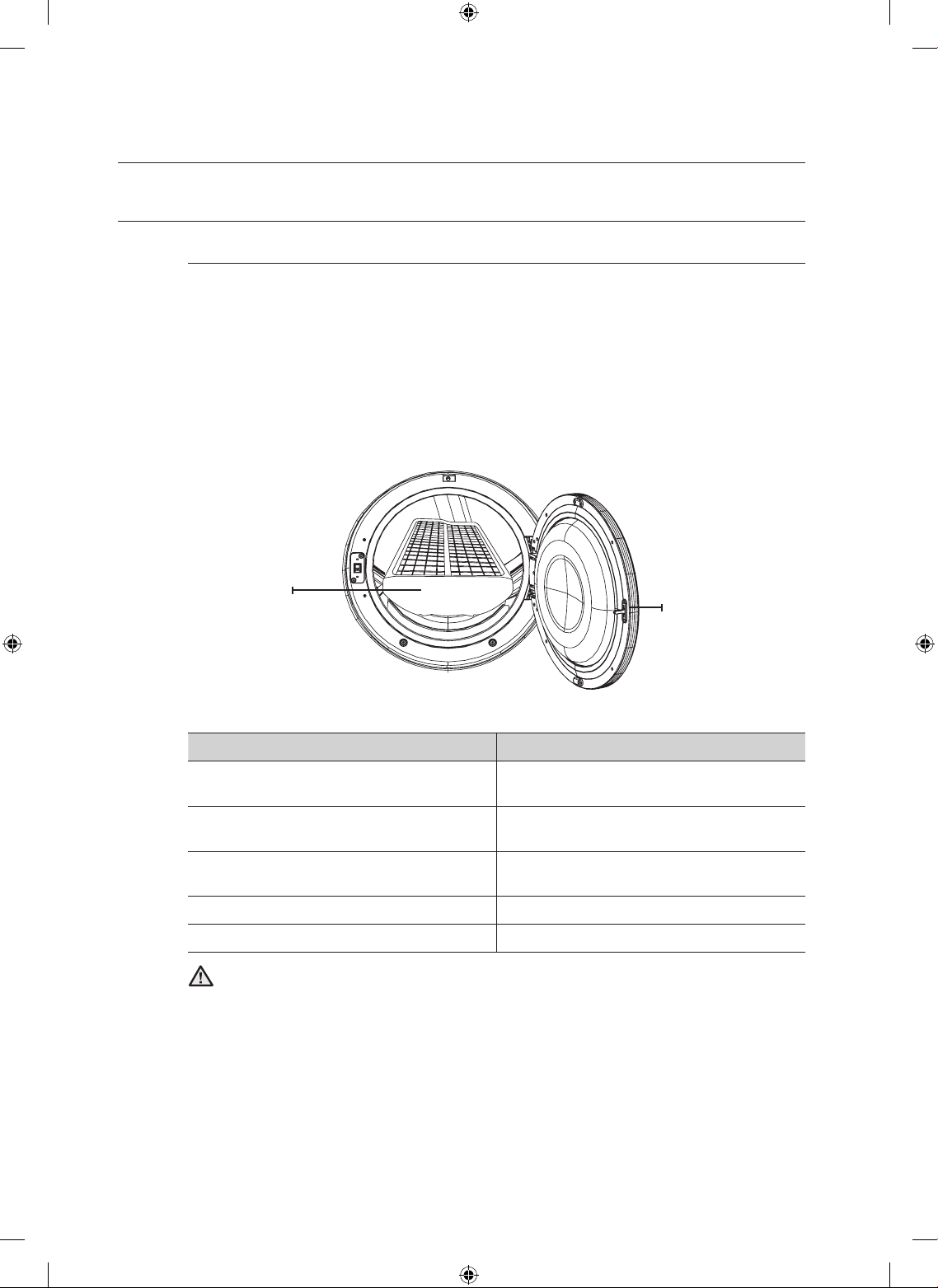
RACK DRY
Installing the drying rack
1. Open the dryer door.
2. Position drying rack in tumbler, placing the front lip of the drying rack on the top of the lint
filter.
3. Place the rear legs in the two recessed areas of the dryer’s back wall then push down the
middle of the drying rack to fix.
4. Place the items to be dried on the rack, leaving space between them so air can circulate.
5. Close the dryer door.
6. Press the RACK DRY button at Time Dry cycle and then select the time according to the
moisture and weight of item. The drying rack can be also used at Air Fluff cycle.
SUGGESTED ITEMS SUGGESTED TEMP. SETTINGS
Washable sweaters
(block to shape and lay flat on rack)
Extra Low ( Time Dry cycle)
Stuffed toys
(cotton or polyester fiberfilled)
Extra Low ( Time Dry cycle)
Stuffed toys
(foam or rubber-filled)
Air Fluff
Foam rubber pillows Air Fluff
Sneakers Air Fluff
Drying foam rubber, plastic, or rubber on a heat setting may cause damage to the items
and lead to a fire hazard.
operating Instructions, tips
WARNING
Door
Drying Rack
DV520AE-02836A_EN.indd 28 2010-04-13 ¿ÀÈÄ 4:29:37
operating Instructions, tips _29
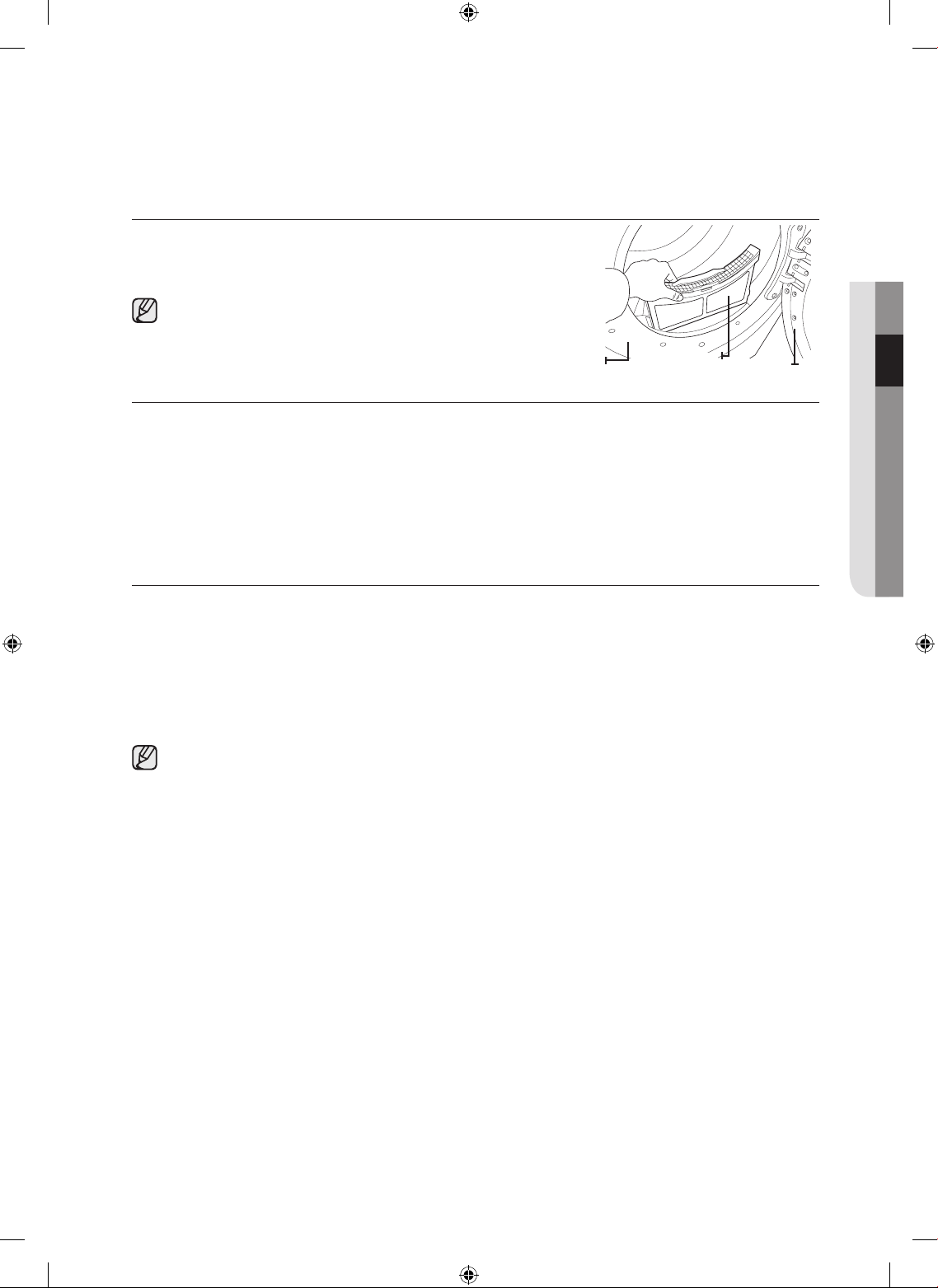
CLEAN THE LINT FILTER
• After each load.
• To shorten drying time.
• To operate more energy efficiently.
Do not operate your dryer without the lint filter in place.
LOAD THE DRYER PROPERLY
• Place only one washload in your dryer at a time.
• Mixed loads of heavy and lightweight fabrics will dry differently, which may result in lightweight fabrics
being dry while heavy fabrics remain damp at the end of a drying cycle.
• Add one or more similar items to your dryer when only one or two articles of clothing need drying.
This improves the tumbling action and drying efficiency.
• Overloading restricts tumbling action, resulting in uneven drying as well as excessive wrinkling of some
fabrics.
GETTING STARTED
1. Load your dryer loosely – DO NOT overload.
2. Close the door.
3. Select the appropriate cycle and options for the load (see pages 20, 21).
4. Press the Start/Pause button.
5. The dryer indicator light will illuminate.
6. The estimated cycle time will appear in the display.
The time may fluctuate to better indicate drying time remaining in the cycle.
• When the cycle is complete, the Door Lock light will go out and “End” will appear in the display.
• Pressing Power cancels the cycle and stops your dryer.
• The Drying, Cooling, and Wrinkle Prevent indicator lights will illuminate during those portions of the
cycle.
02 operating Instructions, tips
Filter
Door
Frame Front
DV520AE-02836A_EN.indd 29 2010-04-13 ¿ÀÈÄ 4:29:37
30_ care and cleaning
care and cleaning
CONTROL PANEL
Clean with a soft, damp cloth. Do not use abrasive substances.
Do not spray cleaners directly on the panel.
The control panel finish may be damaged by some laundry pre-treatment soil and stain remover products.
Apply such products away from your dryer and wipe up any spills or overspray immediately.
TUMBLER
Remove any stains such as crayon, ink, or fabric dye (from new items such as towels or jeans) with an all-
purpose cleaner.
Tumble old towels or rags to remove any excess stain or cleaning substance.
Once these steps are followed, stains may still be visible, but should not transfer to subsequent loads.
STAINLESS STEEL TUMBLER
To clean the stainless steel tumbler, use a damp cloth with a mild, non-abrasive cleaner suitable for stainless
steel surfaces.
Remove the cleaner residue and dry with a clean cloth.
DRYER EXTERIOR
Clean with a soft, damp cloth. Do not use abrasive substances.
Protect the surface from sharp objects.
Do not place any heavy or sharp objects or a detergent box on the dryer. Keep them on the purchased
pedestal or in a separate storage box. This may scratch or damage the top cover of the dryer.
Since the entire dryer has a high-gloss finish, the surface can be scratched or damaged.
Therefore, avoid scratching or damaging the surface when using the dryer.
DRYER EXHAUST SYSTEM
Should be inspected and cleaned yearly to maintain optimum performance.
The outside exhaust hood should be cleaned more frequently to ensure proper operation.
DV520AE-02836A_EN.indd 30 2010-04-13 ¿ÀÈÄ 4:29:37
special laundry tips _31
special laundry tips
Special laundry tips
Please follow the care label or manufacturer’s instructions for drying special
items. If care label instructions are not available, use the following information as
a guide.
Bedspreads & Comforters
• Follow the care label instructions or dry on the Bedding.
• Make sure the item is thoroughly dry before using or storing.
• May require repositioning to ensure even drying.
Blankets
• Use Normal cycle and dry only one blanket at a time for best
tumbling action.
• Make sure the item is thoroughly dry before using or storing.
Curtains & Draperies
• Use the Perm Press cycle and Low or Extra Low temperature to help
minimize wrinkling.
• Dry these in small loads for best results and remove as soon as
possible.
Cloth Diapers
• Use the Normal cycle and the High temperature settings for soft,fluffy
diapers.
Down–filled Items (jackets,
sleeping bags, comforters,
etc.)
• Use the Normal cycle and the Low or Extra Low temperature setting.
• Adding a couple of dry towels shortens drying time and absorbs
moisture.
Foam Rubber (rug backs,
stuffed toys, shoulder pads,
etc.)
• DO NOT dry on a heat setting. Use the Air Fluff cycle (no heat).
• WARNING – Drying a rubber item with heat may damage it or be a
fire hazard.
Pillows
• Use the Normal cycle.
• Add a couple of dry towels and a pair of clean sneakers to help the
tumbling action and to fluff the item.
• DO NOT dry kapok or foam pillows in dryer. Use the Air Fluff cycle.
Plastics (shower curtains,
outdoor furniture covers,
etc.)
• Use the Air Fluff cycle or the Time Dry cycle and the Low or Extra
Low temperature settings depending on the care label instructions.
THINGS TO AVOID :
• Fiberglass items (curtains, draperies, etc.).
• Woolens, unless recommended on the label.
• Vegetable or cooking oil-soaked items.
04 special laundry tips
DV520AE-02836A_EN.indd 31 2010-04-13 ¿ÀÈÄ 4:29:37
32_ troubleshooting
troubleshooting
CHECK THESE POINTS IF YOUR DRYER…
PROBLEM SOLUTION
Doesn’t run.
• Make sure the door is latched shut.
• Be sure the power cord is plugged into a live electrical outlet.
• Check the home’s circuit breaker and fuses.
• Press the Start/Pause button again if the door is opened during the
cycle.
Doesn’t heat.
• Check the home’s circuit breaker and fuses.
• Select a heat setting other than Air Fluff.
• On a gas dryer, check that the gas supply is on.
• Clean the lint filter and exhaust duct.
• Dryer may have moved into the cool-down phase of the cycle.
Doesn’t dry.
• Check all of the above, plus...
• Be sure the exhaust hood outside the home can open and close
freely.
• Check exhaust system for lint buildup. Ducting should be inspected
and cleaned annually.
• Use a 4” rigid metal exhaust duct.
• Do not overload. 1 wash load = 1 dryer load.
• Sort heavy items from lightweight items.
• Large, bulky items like blankets or comforters may require
repositioning to ensure even drying.
• Check that the washer is draining properly to extract adequate water
from the load.
• Load may be too small to tumble properly. Add a few towels.
Is noisy.
• Check the load for objects such as coins, loose buttons, nails, etc.
Remove promptly.
• It is normal to hear the dryer gas valve or heating element cycle on
and off during the drying cycle.
• Be sure the dryer is leveled properly as outlined in the installation
instruction.
• It is normal for the dryer to hum due to the high velocity of air moving
through the dryer drum and exhaust system.
Dries unevenly.
• Seams, pockets, and other similarly heavy areas may not be
completely dry when the rest of the load has reached the selected
dryness level. This is normal. Select the Very Dry setting if desired.
• If one heavy item is dried with a lightweight load, such as one towel
with sheets, it is possible that the heavy item will not be completely
dry when the rest of the load has reached the selected dryness level.
Sort heavy items from lightweight items for best drying results.
Has an odor.
• Household odors from painting, varnishing, strong cleaners, etc.
may enter the dryer with the surrounding room air. This is normal as
the dryer draws the air from the room, heats it, pulls it through the
tumbler, and exhausts it outside.
• When these odors linger in the air, ventilate the room completely
before using the dryer.
DV520AE-02836A_EN.indd 32 2010-04-13 ¿ÀÈÄ 4:29:37
troubleshooting _33
PROBLEM SOLUTION
Shuts off before load is dry
• Dryer load is too small. Add more items or a few towels and restart
the cycle.
• Dryer load is too large. Remove some items and restart the dryer.
Lint on clothes
• Make sure the lint filter is cleaned before every load. With some loads
that produce high amounts of lint, it may be necessary to clean the
filter during the cycle.
• Some fabrics are lint producers (for example, a fuzzy white cotton
towel)and they should be dried separately from clothes that are lint
trappers(for example, a pair of lack linen pants)
• Divide larger loads into smaller loads for drying
• Check pockets thoroughly before washing and drying clothes.
Garments still wrinkled after
Wrinkle-Care
• Small loads of 1 to 4 items work best.
• Load fewer garments.Load similar-type garments.
Odors remain in clothing
after Refresh.
• Fabrics containing strong odors should be washed in a normal cycle.
Water drips from nozzle
when Steam-Care starts
• This is steam condensation. The dripping water will stop after a short
time.
Sprayed water is not visible
during Steam-Care
• Sprayed water is difficult to see when the door is closed
05 troubleshooting
DV520AE-02836A_EN.indd 33 2010-04-13 ¿ÀÈÄ 4:29:37
34_ troubleshooting
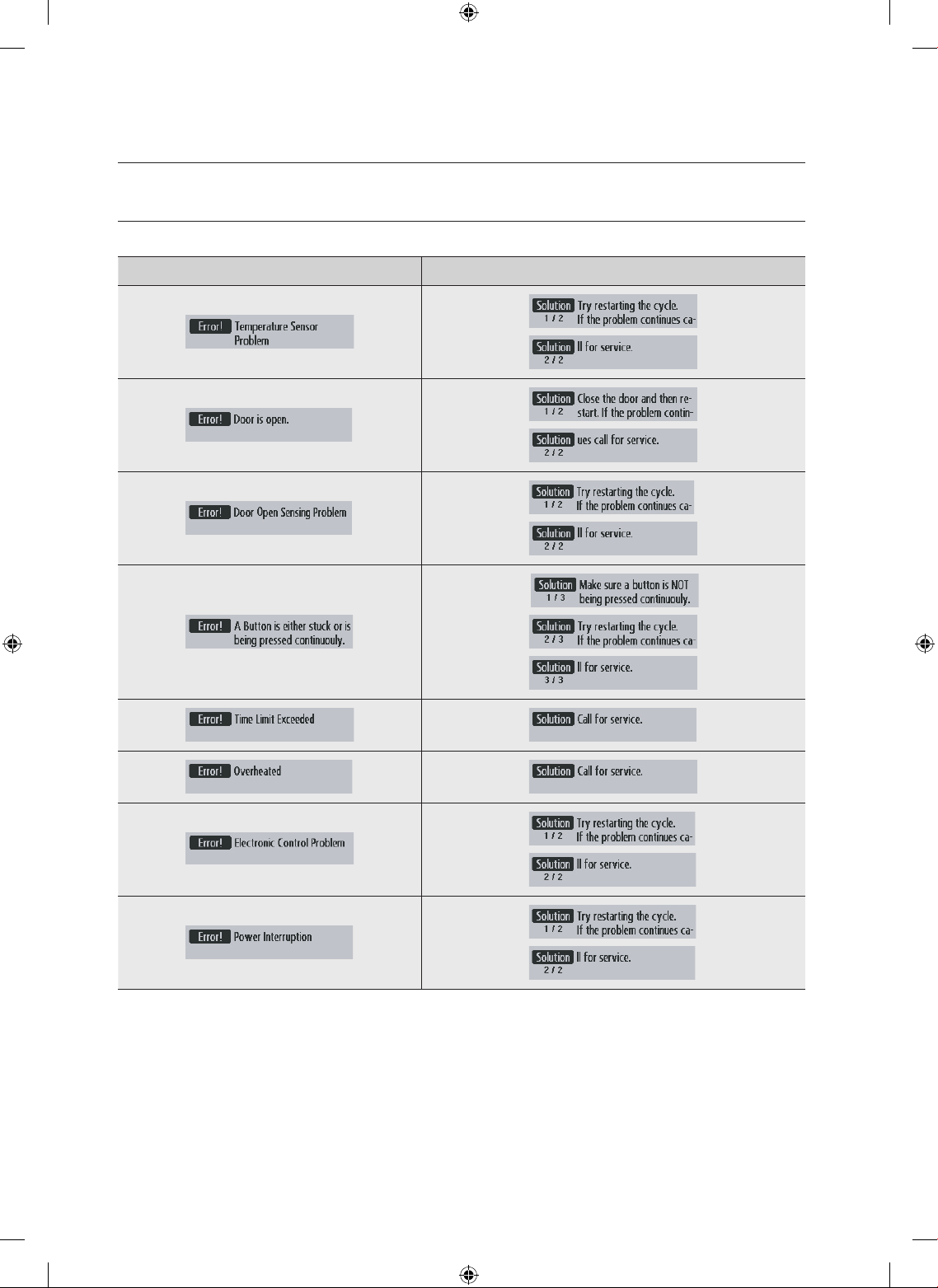
INFORMATION CODES
Information codes may be displayed to help you better understand what is occurring with your Dryer.
ERROR DISPLAY SOLUTION DISPLAY
For any codes not listed above, call 1–800–726–7864 (1–800–SAMSUNG)
troubleshooting
DV520AE-02836A_EN.indd 34 2010-04-13 ¿ÀÈÄ 4:29:41
appendix _35
appendix
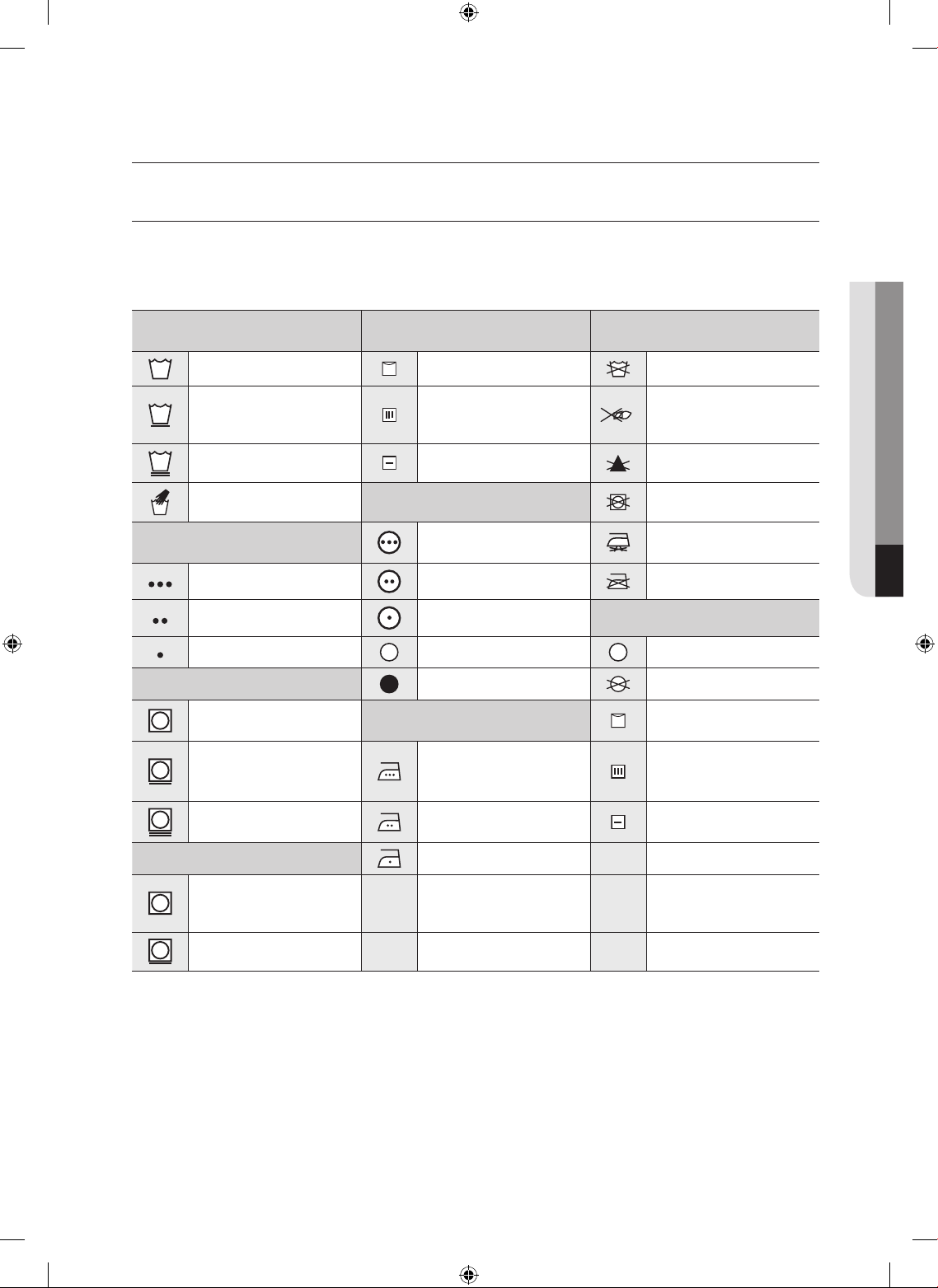
FABRIC CARE CHART
The following symbols provide garment care direction. The Clothing care labels include symbols for
washing, bleaching, drying and ironing, or dry cleaning when necessary. The use of symbols ensures
consistency among garment manufacturers of domestic and imported items. Follow care label directions to
maximize garment life and reduce laundering problems.
Wash Cycle Special Instructions
Warning Symbols for
Laundering
Normal Line Dry/ Hang to Dry Do Not Wash
Permanent Press /
Wrinkle Resistant /
Wrinkle Control
Drip Dry Do Not Wring
Gentle/Delicates Dry Flat Do Not Bleach
Hand Wash
Heat Setting
Do Not Tumble Dry
Water Temperature**
High
No Steam (added to
iron)
Hot Medium Do Not Iron
Warm Low
Dryclean
Cold Any Heat Dry Clean
Bleach
No Heat/Air Do Not Dry Clean
Any Bleach (when
needed)
Iron-Dry or Steam
Temperatures
Line Dry/ Hang to Dry
Only Non-Chlorine
(color-safe)
Bleach (when needed)
High Drip Dry
Tumble Dry Cycle
Medium Dry Flat
Normal
Low
Permanent Press/
Wrinkle Resistant/
Wrinkle Control
Gentle/ Delicates
** The dot symbols represent appropriate wash water temperatures for various items. The temperature
range for Hot is 105° –125° F/ 41° – 52° C, for Warm 85° – 105° F/29° – 41° C and for Cold 60° – 85°
F/16° – 29° C. (Wash water temperature must be a minimum of 60° F/16° C for detergent activation and
effective cleaning.)
06 appendix
DV520AE-02836A_EN.indd 35 2010-04-13 ¿ÀÈÄ 4:29:41
36_ appendix
PROTECTING THE ENVIRONMENT
This appliance is manufactured from recyclable materials. If you decide to dispose of this appliance, please
observe local waste disposal regulations. Cut off the power cord so that the appliance cannot be connected
to a power source. Remove the door so that animals and small children cannot get trapped inside the
appliance.
DECLARATION OF CONFORMITY
This appliance complies with UL2158.
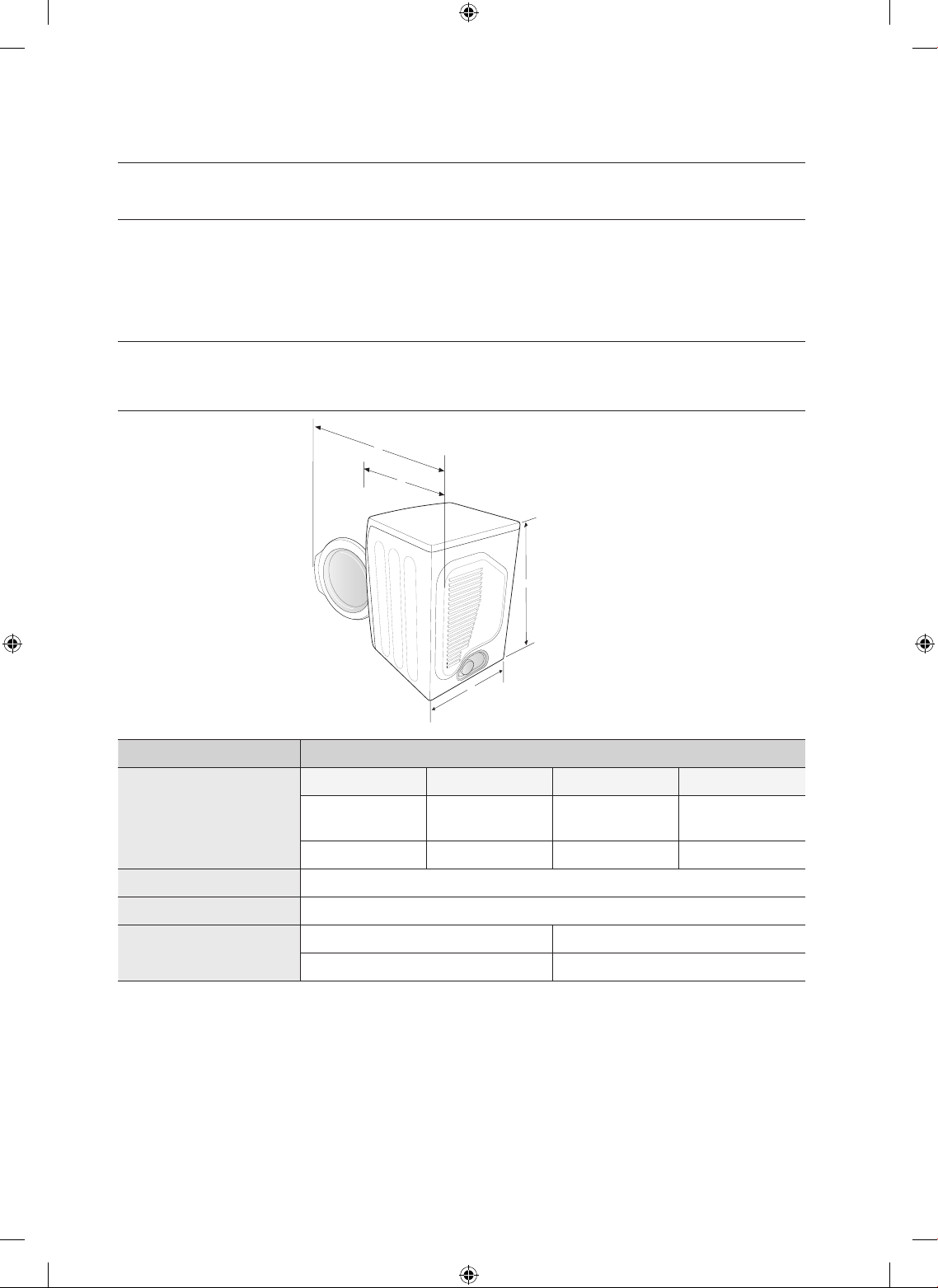
SPECIFICATIONS
TYPE FRONT LOADING DRYER
DIMENSIONS
Div Inches (cm) Div Inches (cm)
A. Height
39” (99.1)
C. Depth with
door open 90°
51.65”(131.2)
B. Width
27” (68.6)
D. Depth
32.28”(82.0)
WEIGHT
56.5 kg
HEATER RATING
5300 W
POWER
CONSUMPTION
NO HEAT
268 W
HEATING
5445 W
appendix
A
B
C
D
DV520AE-02836A_EN.indd 36 2010-04-13 ¿ÀÈÄ 4:29:46
appendix _37
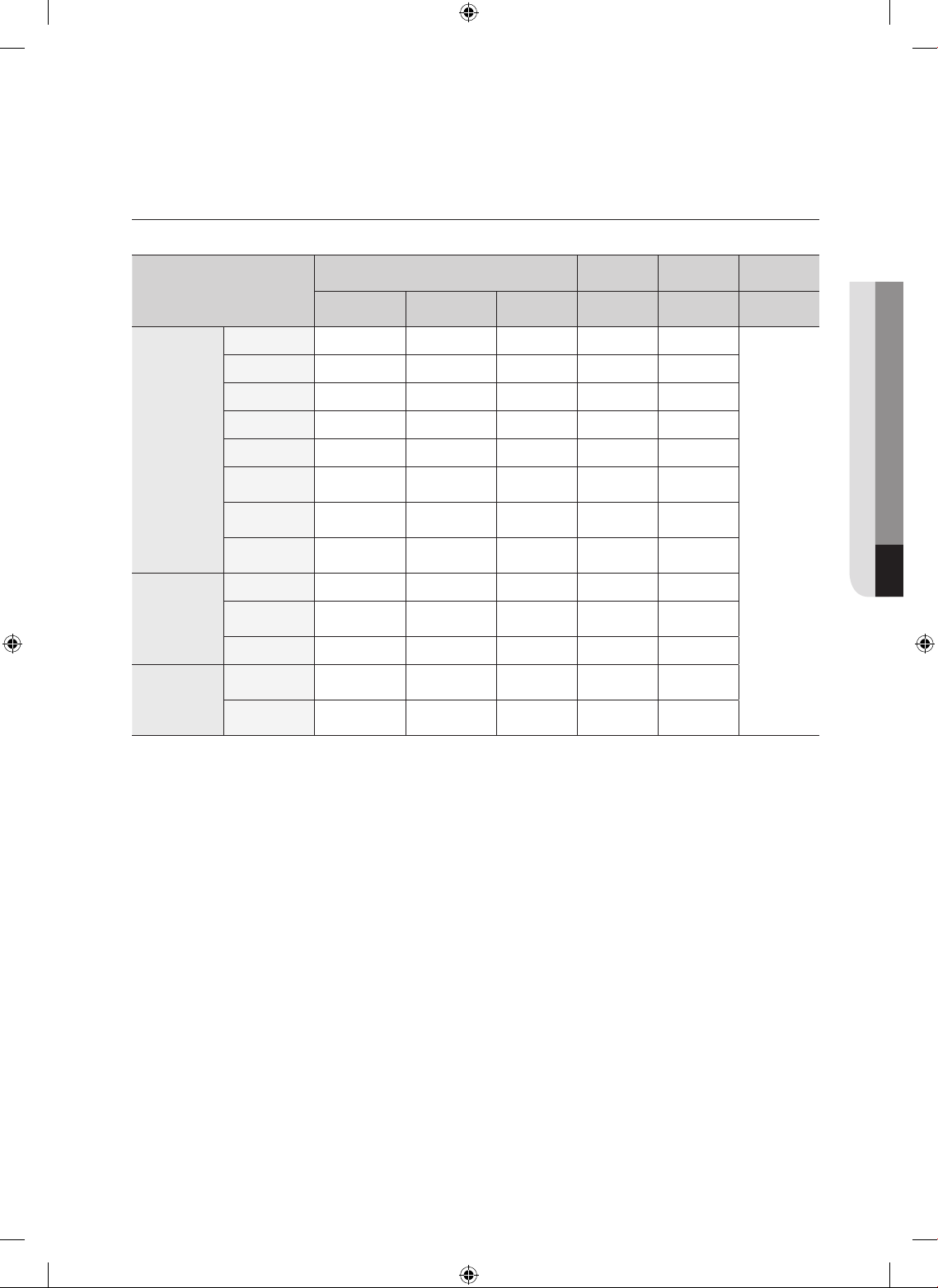
CYCLE CHART
Elec. Dryer Type
Cycle
Default Drying Cooling
Wrinkle
prevent
Temp
control
Sensor dry
level
Time Time Time Time
Sensor Dry
Normal Medium Normal dry 50 min 47 min 3 min
180 min
Heavy Duty High Normal dry 66 min 63 min 3 min
Perm Press
Medium Normal dry 40 min 37 min 3 min
Bedding High Normal dry 58 min 55 min 3 min
Delicates Extra Low Normal dry 35 min 32 min 3 min
Sanitize
High
(No change)
Very dry
60 min 55 min 5 min
Eco Normal
Medium Low
(No change)
Normal dry 100 min 97 min 3 min
Wool
Low
(No change)
Normal dry 20 min 19 min 1 min
Manual Dry
Air Fluff
- - 20 min - 20 min
Quick Dry
High
(No change)
- 30 min 27 min 3 min
Time Dry High - 40 min 37 min 3 min
Steam
Cycles
Wrinkle Away
High
(No change)
- 20 min 19 min 1 min
Refresh
High
(No change)
- 15 min 14 min 1 min
06 appendix
DV520AE-02836A_EN.indd 37 2010-04-13 ¿ÀÈÄ 4:29:46
38_ appendix
appendix
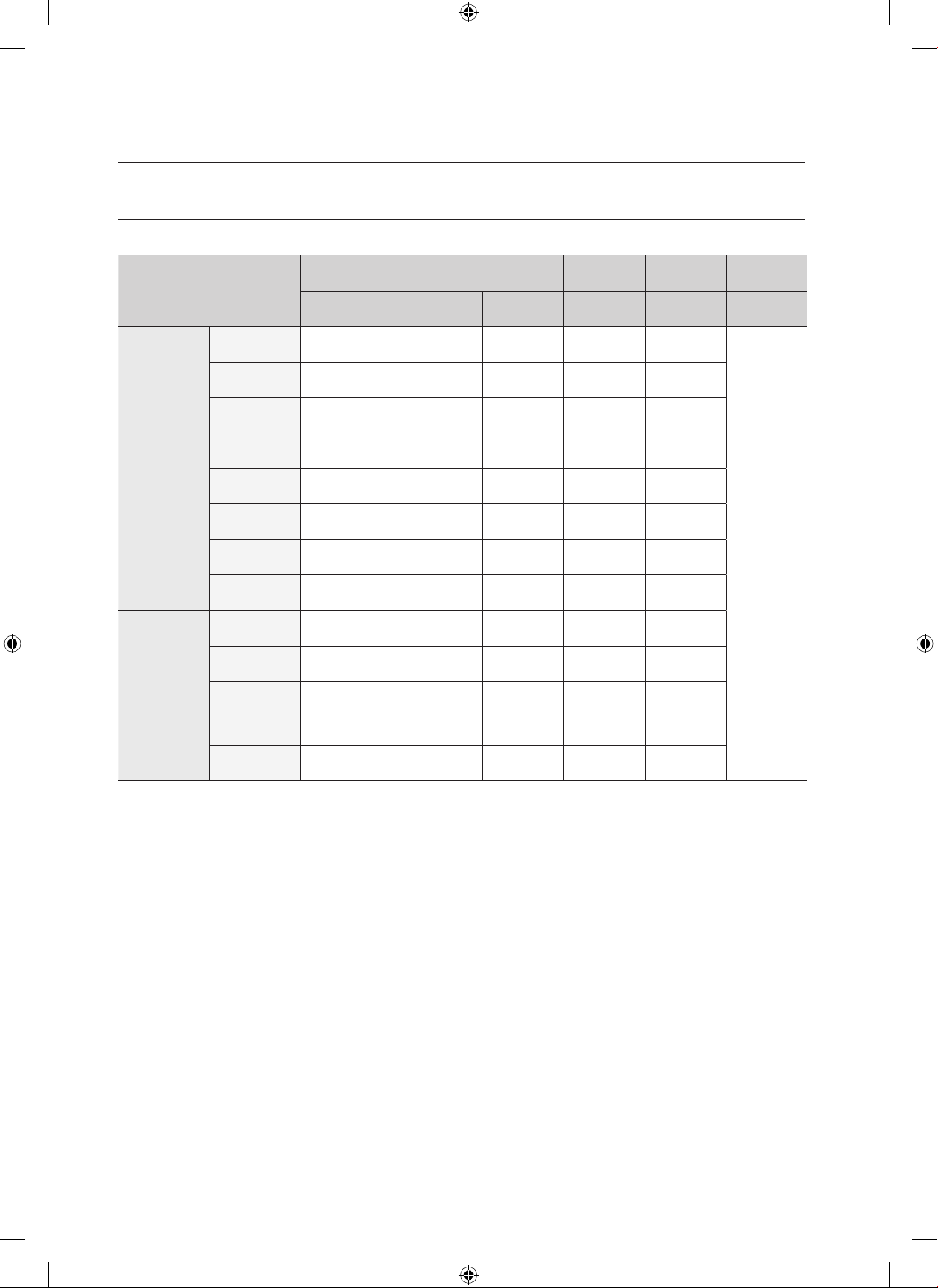
CYCLE CHART
Gas Dryer Type
Cycle
Default Drying Cooling
Wrinkle
prevent
Temp
control
Sensor dry
level
Time Time Time Time
Sensor Dry
Normal
High
(Medium)
Normal dry 42 min 39 min 3 min
180 min
Heavy Duty
High
(No change)
Normal dry 58 min 55 min 3 min
Perm Press
Medium
(No change)
Normal dry 32 min 29 min 3 min
Bedding
High
(Medium)
Normal dry 50 min 47 min 3 min
Delicates
Low
(No change)
Normal dry 27 min 24 min 3 min
Sanitize
High
(No change)
Very dry
60 min 55 min 5 min
Eco Normal
High
(No change)
Normal dry 72 min 69 min 3 min
Wool
Low
(No change)
Normal dry 28 min 27 min 1 min
Manual Dry
Air Fluff
-
(No change)
- 20 min - 20 min
Quick Dry
High
(No change)
- 30 min 27 min 3 min
Time Dry High - 40 min 37 min 3 min
Steam
Cycles
Wrinkle Away
High
(No change)
- 20 min 19 min 1 min
Refresh
High
(No change)
- 15 min 14 min 1 min
DV520AE-02836A_EN.indd 38 2010-04-13 ¿ÀÈÄ 4:29:46
warranty _39
warranty
SAMSUNG DRYER
LIMITED WARRANTY TO ORIGINAL PURCHASER
This SAMSUNG brand product, as supplied and distributed by SAMSUNG ELECTRONICS AMERICA, INC.
(SAMSUNG) and delivered new, in the original carton to the original consumer purchaser, is warranted by
SAMSUNG against manufacturing defects in materials and workmanship for a limited warranty period of:
One (1) Year All Parts and Labor
Two (2) Years Control Board Parts
This limited warranty begins on the original date of purchase, and is valid only on products purchased and
used in the United States.
To receive warranty service, the purchaser must contact SAMSUNG for problem determination and service
procedures.
Warranty service can only be performed by a SAMSUNG authorized service center.
The original dated bill of sale must be presented upon request as proof of purchase to SAMSUNG or
SAMSUNG’s authorized service center.
SAMSUNG will provide in-home service during the warranty period at no charge, subject to availability
within the contiguous United States.
In-home service is not available in all areas.
To receive in-home service, product must be unobstructed and accessible to the service agent.
If service is not available, SAMSUNG may elect to provide transportation of the product to and from an
authorized service center.
SAMSUNG will repair, replace, or refund this product at our option and at no charge as stipulated herein,
with new or reconditioned parts or products if found to be defective during the limited warranty period
specified above.
All replaced parts and products become the property of SAMSUNG and must be returned to SAMSUNG.
Replacement parts and products assume the remaining original warranty, or ninety (90) days, whichever is
longer.
This limited warranty covers manufacturing defects in materials and workmanship encountered in normal,
noncommercial use of this product and shall not apply to the following: damage that occurs in shipment;
delivery and installation; applications and uses for which this product was not intended; altered product or
serial numbers; cosmetic damage or exterior finish; accidents, abuse, neglect, fire, water, lightning, or other
acts of nature or God; use of products, equipment, systems, utilities, services, parts, supplies, accessories,
applications, installations, repairs, external wiring or connectors not supplied or authorized by SAMSUNG
that damage this product or result in service problems; incorrect electrical line voltage, fluctuations and
surges; customer adjustments and failure to follow operating instructions, maintenance and environmental
instructions that are covered and prescribed in the instruction book; product removal and reinstallation;
problems caused by pest infestations.
This limited warranty does not cover problems resulting from incorrect electric current, voltage or supply,
light bulbs, house fuses, house wiring, cost of a service call for instructions, or fixing installation errors.
SAMSUNG does not warrant uninterrupted or error-free operation of the product.
DV520AE-02836A_EN.indd 39 2010-04-13 ¿ÀÈÄ 4:29:46
40_ warranty
Except as set forth herein, there are no warranties on this product either express or implied, and samsung
disclaims all warranties including, but not limited to, any implied warranties of merchantability, infringement
or fitness for a particular purpose.
No warranty or guarantee given by any person, firm, or corporation with respect to this product shall be
binding on samsung.
Samsung shall not be liable for loss of revenue or profits, failure to realize savings or thter benefits, or
any other special, incidental or consequential damages caused by the use, misuse, or inability to use this
product, regardless of the legal theory on which the claim is based, and even if samsung has been advised
of the possibility of such damages.
Nor shall recovery of any kind against samsung be greater in amount than the purchase price of the product
sold by samsung and causing the alleged damage.
Without limiting the foregoing, purchaser assumes all risk and liability for loss, damage, or injury to
purchaser and purchaser’s property and to others and their property arising out of the use, misuse,
or inability to use this product. This limited warranty shall not extend to anyone other than the original
purchaser of this product, is nontransferable and states your exclusive remedy.
Some states do not allow limitations on how long an implied warranty lasts, or the exclusion or limitation
of incidental or consequential damages, so the above limitations or exclusions may not apply to you. This
warranty gives you specific rights, and you may also have other rights, which vary from state to state.
To obtain warranty service, please contact SAMSUNG at:
SAMSUNG ELECTRONICS AMERICA, INC. – CONSUMER ELECTRONICS CUSTOMER SERVICE
400 Valley Road, Suite 201, Mt. Arlington, NJ 07856
1-800-SAMSUNG(726-7864)
www.samsung.com
warranty
DV520AE-02836A_EN.indd 40 2010-04-13 ¿ÀÈÄ 4:29:46
memo
DV520AE-02836A_EN.indd 41 2010-04-13 ¿ÀÈÄ 4:29:46
QUESTIONS OR COMMENTS?
Country CALL OR VISIT US ONLINE AT
U.S.A 1-800-SAMSUNG(726-7864) www.samsung.com
MEXICO 01-800-SAMSUNG(726-7864) www.samsung.com
Code No. DC68-02836A_EN
DV520AE-02836A_EN.indd 42 2010-04-13 ¿ÀÈÄ 4:29:46
Secadora a gas y eléctrica
Manual del usuario
imagina las posibilidades
Gracias por adquirir este producto Samsung.
Para que podamos brindarle un servicio más
completo,
registre su producto en
www.samsung.com/register
DV520AE*
DV520AG*
DV520AE-02836A_MES.indd 1 2010-04-13 �� 4:29:11
2_ características
características
1. Capacidad extra grande
¡Capacidades de ultra secado al alcance de la mano! Ahora puede secar cargas extra
grandes. Nuestra secadora ultra grande, con 7,5 cu.ft. (13 kg) de capacidad, hace circular
más aire entre su ropa, secándola más rápido, para obtener un resultado sin arrugas.
2. Ciclo Steam (vapor)
Este ciclo rocía una pequeña cantidad de agua en el tambor de la secadora después de
varios minutos de secado con calor. Disminuye los malos olores de las prendas que son
difíciles de eliminar cuando se lava con agua y también disminuye las arrugas de las prendas.
3. Ciclo Sanitize (Desinfección)
Este ciclo le permite desinfectar las prendar impregnando la tela con calor a alta temperatura
durante el ciclo de secado. Utilice este ciclo para limpiar su ropa de cama y cortinas.
Al seleccionar este ciclo, el 99,9% de las bacterias se eliminan por la elevada temperatura.
Utilice este ciclo para ropa, ropa de cama, toallas u otras prendas que necesiten
desinfección. La presente certificación ha sido realizada por NSF International, una
organización privada de evaluación y certificación.
4. Diversos ciclos de secado y programa Fuzzy Logic
Simplemente gire el selector táctil para seleccionar uno de los 13 ciclos de secado
automático, incluyendo normal (normal), heavy duty (servicio pesado) y towels (toallas), o
deje que el control Fuzzy Logic mida el grado de humedad y determine automáticamente el
tiempo de secado. La precisión en el secado nunca fue más sencilla que con Samsung.
5. Ahorro de tiempo
Los ciclos están diseñados pensando en usted. Todas nuestras secadoras están diseñadas
para secar su ropa en menos tiempo... ¡sólo en 50 minutos! Así le queda tiempo para las
cosas más importantes de la vida.
6. Ahorro de energía
Las secadoras Samsung son súper eficientes en el consumo de energía. Puede secar hasta
3,01 lb (1,36 kg) de ropa con 1 kWh. Además, tanto la gran capacidad como el control
Fuzzy Logic ahorran energía secando automáticamente sus prendas de la manera más
eficiente.
7. Puerta fácilmente reversible
Nuestras secadoras se adecuan a casi cualquier lugar sin problemas de puerta. La dirección
de la puerta fácilmente reversible puede modificarse con sólo cuatro tornillos.
NSF Protocol P154
Sanitization Performance of
Residential Clothes Dryers
DV520AE-02836A_MES.indd 2 2010-04-13 �� 4:29:11
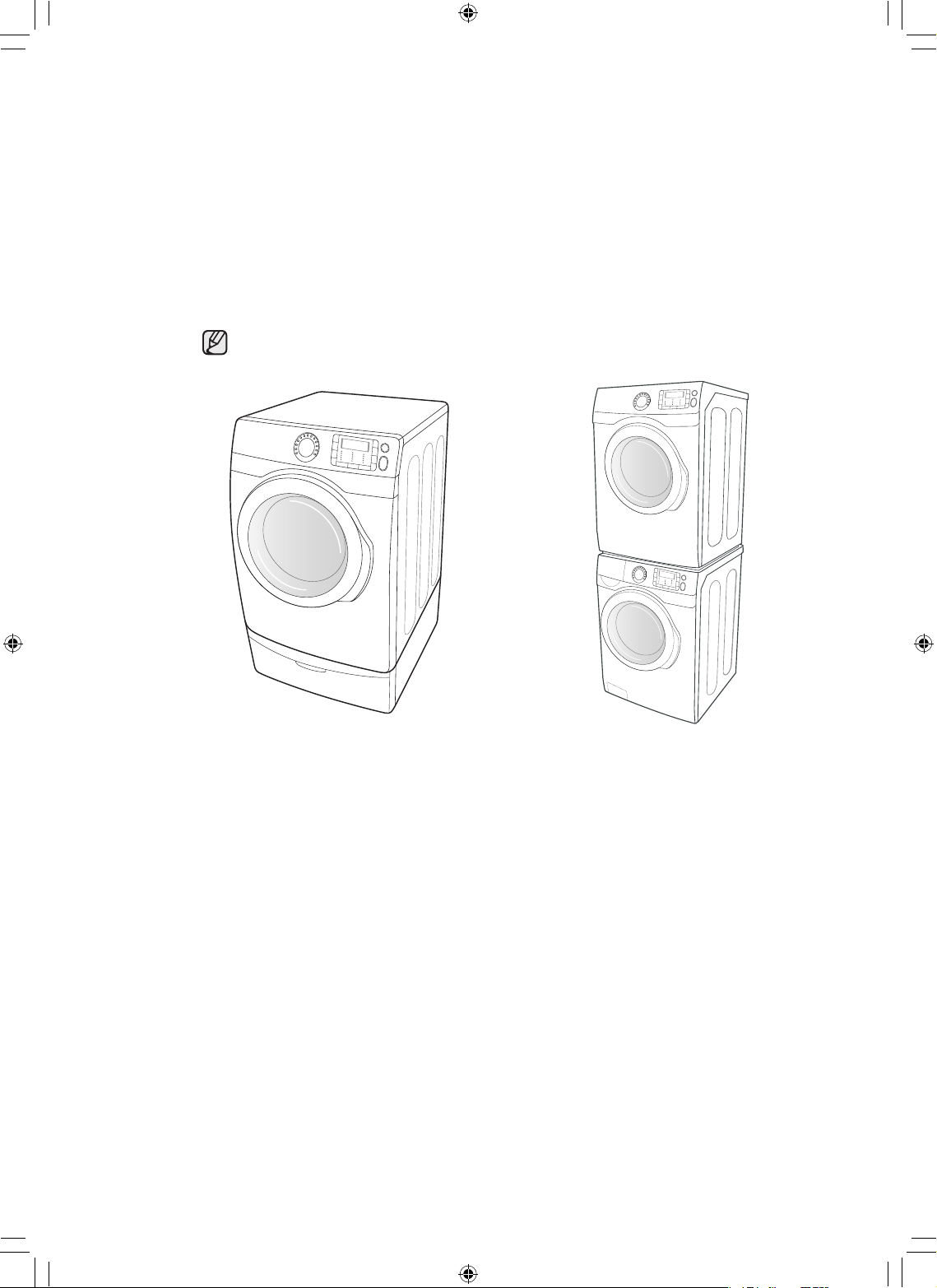
características _3
8. Base con cajones de almacenamiento
Tiene una base de 15” opcional a disposición para elevar la secadora y lograr así una carga
y descarga más sencilla. También ofrece un cajón de almacenamiento incorporado que
puede guardar una botella de detergente de 100 oz (2,84 kg).
9. Apilamiento (MODELO N.°: SK-5A/XAA)
La lavadora y la secadora de Samsung pueden apilarse para maximizar el espacio utilizable.
Deben retirarse las patas de la secadora para apilar la lavadora y la secadora. Puede
adquirir un kit de apilamiento opcional en su comercio minorista de productos Samsung.
10. Ventilación de 4 direcciones (modelo eléctrico solamente :
DV520AE*)
Puede instalar la ventilación del drenaje en las siguientes cuatro (4) posiciones: atrás, en
cualquiera de los laterales, en la parte inferior.
<Pedestal con Cajones de
Almacenamiento>
<Apilamiento>
DV520AE-02836A_MES.indd 3 2010-04-13 �� 4:29:12
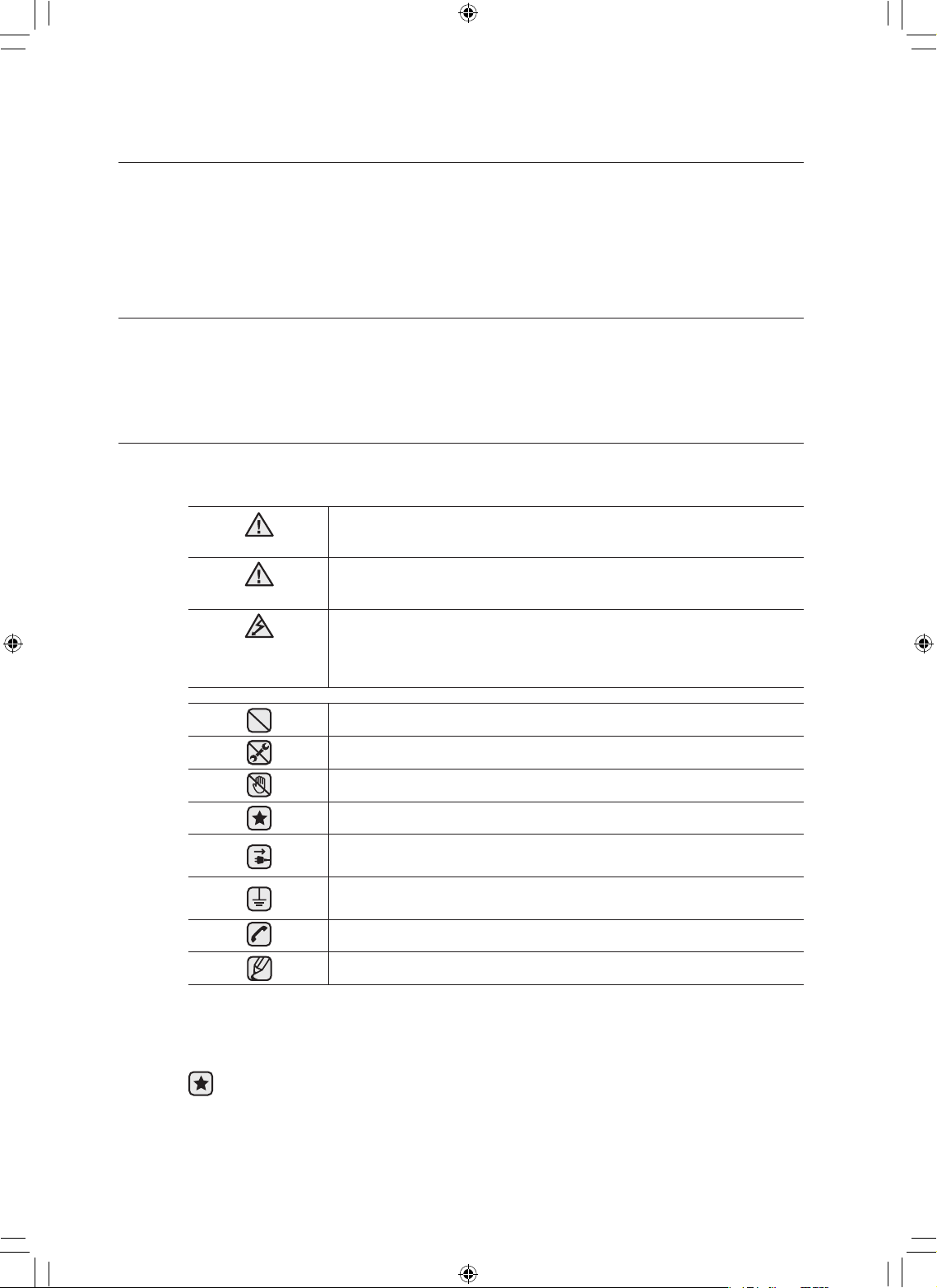
4_ instrucciones de seguridad
GUARDE ESTAS INSTRUCCIONES
instrucciones de seguridad
Felicitaciones por la compra de la nueva secadora Samsung. Este manual
contiene información importante acerca de la instalación, el uso y el cuidado del
electrodoméstico. Lea detenidamente estas instrucciones a fin de aprovechar al
máximo los múltiples beneficios y funciones de la secadora.
LO QUE NECESITA SABER SOBRE LAS INSTRUCCIONES DE SEGURIDAD
Las advertencias y las instrucciones de seguridad importantes de este manual no cubren todas las posibles
condiciones y situaciones que pueden ocurrir. Es su responsabilidad actuar con sentido común, precaución
y cuidado cuando instale, realice el mantenimiento o ponga en funcionamiento la secadora.
Comuníquese siempre con el fabricante si surgen problemas o situaciones que usted no comprende.
SÍMBOLOS Y PRECAUCIONES DE SEGURIDAD IMPORTANTES
Los íconos y las señales incluidas en este manual del usuario
significan lo siguiente:
ADVERTENCIA
Peligros o prácticas inseguras que pueden causar lesiones físicas
graves o la muerte.
PRECAUCIÓN
Peligros o prácticas inseguras que pueden causar lesiones físicas
leves o daños materiales.
PRECAUCIÓN
Siga la información contenida en este manual para minimizar el riesgo
de incendio o explosión o para evitar daños materiales, lesiones físicas
o la muerte. No almacene ni utilice gasolina u otros vapores o líquidos
inflamables cerca de este o cualquier otro electrodoméstico.
NO intente hacer nada.
NO desarme.
NO toque.
Siga las instrucciones fielmente.
Desenchufe el cable de alimentación eléctrica del tomacorriente de
pared.
Asegúrese de que la máquina tenga buena conexión a tierra para evitar
descargas eléctricas.
Llame al centro de servicio técnico para obtener asistencia.
Note
Estas señales de advertencia están aquí para evitar que usted u otras personas sufran
daños.
Siga las instrucciones completamente.
Después de leer esta sección, guárdela en un lugar seguro para consultas futuras.
Lea todas las instrucciones antes de usar el electrodoméstico.
DV520AE-02836A_MES.indd 4 2010-04-13 �� 4:29:12
instrucciones de seguridad _5
GUARDE ESTAS INSTRUCCIONES
ADVERTENCIA: Para reducir el riesgo de incendio, descargas eléctricas o lesiones físicas
cuando use este electrodoméstico, siga las instrucciones de seguridad básicas que figuran
a continuación:
1. Lea todas las instrucciones antes de usar este electrodoméstico.
2. No seque prendas que han sido previamente limpiadas, lavadas, remojadas o
salpicadas con gasolina, solventes de limpieza en seco u otras sustancias inflamables o
explosivas, ya que emiten vapores que pueden prenderse fuego o explotar.
3. No permita que los niños jueguen sobre la lavadora o dentro de ella. Se requiere de
supervisión cuando el electrodoméstico es utilizado cerca de los niños.
4. Antes de descartar el electrodoméstico o de retirarlo de servicio, extraiga la puerta del
compartimiento de secado.
5. No introduzca la mano en el electrodoméstico si el tambor está en movimiento
6. No instale o guarde este electrodoméstico donde quede expuesto a factores climáticos.
7. No modifique los controles.
8. No repare, reemplace ni intente realizar el mantenimiento de cualquier pieza del
electrodoméstico salvo que esté recomendado específicamente en las instrucciones
de mantenimiento del usuario o en las instrucciones de reparación para el usuario
publicadas y que, a su juicio, usted tenga la habilidad para llevarlas a cabo.
9. No use suavizante para ropa o productos para evitar la estática salvo que el fabricante
del suavizante para ropa o del producto lo recomiende.
10.No aplique calor para secar prendas que contengan goma espuma o materiales
semejantes a la goma con textura similar.
11.Limpie el filtro atrapapelusa antes o después de cada carga.
12.El personal técnico calificado debe efectuar una limpieza periódica del interior del
electrodoméstico y del conducto de drenaje.
13.El personal técnico calificado debe efectuar una limpieza periódica del interior del
electrodoméstico y del conducto de drenaje.
14.No coloque elementos expuestos a aceites de cocina en la secadora. Los elementos
contaminados con aceites de cocina pueden contribuir a que se produzca una reacción
química que ocasione que en la carga de ropa se prenda fuego.
ADVERTENCIA
DV520AE-02836A_MES.indd 5 2010-04-13 �� 4:29:12

6_ instrucciones de seguridad
GUARDE ESTAS INSTRUCCIONES
instrucciones de seguridad
• Lainstalacióndelasecadoraderopadebeestaracargodeuninstaladorcalicado.
• Instalelasecadoraderopasegúnlasinstruccionesdelfabricanteyloscódigoslocales.
• Noinstaleunasecadoraderopaconmaterialesparaventilacióndeplásticoexible.
Si se instala un conducto de metal flexible (tipo lámina metálica), debe ser de un
tipo específico identificado por el fabricante del electrodoméstico como adecuado
para utilizar con secadoras de ropa. Los materiales para ventilación flexibles suelen
hundirse, aplastarse fácilmente y atrapar pelusa. Estas condiciones obstruirán el flujo
de aire de la secadora de ropa y aumentarán el riesgo de incendio.
• Parareducirelriesgodelesionesgravesomuerte,sigatodaslasinstruccionesde
instalación.
ADVERTENCIA - Riesgo de incendio
Para reducir el riesgo de incendio o explosión:
• No seque prendas que hayan sido previamente limpiadas, lavadas, remojadas o
salpicadas con gasolina, solventes de limpieza en seco u otras sustancias inflamables o
explosivas. Emiten vapores que se pueden prender fuego o explotar. No debe colocarse
en la secadora ningún material que haya estado en contacto con un solvente de limpieza
o líquidos o sólidos inflamables hasta que se haya eliminado todo vestigio de tales líquidos
o sólidos inflamables y sus vapores.
Existen muchos artículos altamente inflamables en los hogares, tales como acetona,
alcohol desnaturalizado, gasolina, kerosene, algunos limpiadores líquidos de uso
doméstico, algunos quitamanchas, aguarrás, ceras y removedores de cera.
• No se deben secar artículos que contengan goma espuma (puede estar catalogada como
espuma de látex) o materiales semejantes a la goma y con textura similar en la opción de
secado con calor. Los materiales de goma espuma que reciben calor pueden, en ciertas
circunstancias, provocar incendios por combustión espontánea.
QUÉ HACER SI PERCIBE OLOR A GAS:
• Nointenteencenderningúnelectrodoméstico.
• Noenciendaelelectrodoméstico.
• Notoqueningúninterruptoreléctrico.
• Noutiliceningúnteléfonodesuedicio.
• Hagaquetodoslosocupantesseretirendelcuarto,ediciooárea.
• Comuníqueseinmediatamenteconelproveedordegasdesdeelteléfonodeunvecino.
Siga las instrucciones del proveedor de gas.
• Sinopuedecomunicarseconelproveedordegas,llamealdepartamentode
bomberos.
• Lainstalaciónyelserviciotécnicodeberánestaracargodeuninstaladorcalicado,
una agencia de reparaciones o el proveedor de gas.
ADVERTENCIA
ADVERTENCIA
DV520AE-02836A_MES.indd 6 2010-04-13 �� 4:29:12
instrucciones de seguridad _7
GUARDE ESTAS INSTRUCCIONES
No permita que los niños o las mascotas jueguen sobre el electrodoméstico, dentro de él o
frente a él. Se requiere de supervisión cuando el electrodoméstico es utilizado cerca de niños
y mascotas.
Antes de desechar la secadora o de retirarla de servicio, quite la puerta del compartimiento de
secado para evitar que los niños y las mascotas queden atrapados dentro de la secadora.
No introduzca su mano en el electrodoméstico cuando el tambor esté en movimiento.
No instale o guarde este electrodoméstico donde quede expuesto a factores climáticos.
No modifique los controles.
No repare, reemplace ni intente realizar el mantenimiento de cualquier pieza del
electrodoméstico a menos que se recomiende específicamente en las instrucciones de
reparación para el usuario y que, a su juicio, usted tenga la habilidad para llevarlas a cabo.
No utilice suavizante de ropa o productos para eliminar la estática salvo que el fabricante del
suavizante de ropa o del producto recomiende su uso con la secadora.
Limpie el filtro para pelusas antes o después de cada carga.
Mantenga el área alrededor de la salida del drenaje y las áreas circundantes libres de pelusa,
polvo y suciedad.
El personal técnico calificado debe efectuar una limpieza periódica del interior de la secadora y
del conducto de drenaje.
Este electrodoméstico debe conectarse a tierra correctamente. Nunca enchufe el cable
de alimentación a un receptáculo que no esté conectado a tierra correctamente ni guarde
conformidad con los códigos locales y nacionales. Consulte las instrucciones de instalación
para conectar este electrodoméstico a tierra.
No se siente encima de la secadora.
Asegúrese de que los bolsillos no contengan objetos pequeños, sólidos y de forma irregular,
material extraño, etc., por ejemplo: monedas, cuchillos, alfileres, etc. Tales objetos podrían
dañar la secadora.
No lave ropa que contenga hebillas grandes, botones u otros objetos de metal pesado o sólido.
Se pueden producir pérdidas de gas en su sistema que generen una situación peligrosa.
Las pérdidas de gas pueden no ser detectadas únicamente por el olor.
Los proveedores de gas recomiendan que compre e instale un detector de gas aprobado por UL.
Instale y utilice de acuerdo con las instrucciones del fabricante.
No coloque prendas en la secadora que hayan sido salpicadas o remojadas con aceite
vegetal o aceite de cocina. Incluso después del lavado, estas prendas pueden contener una
cantidad importante de dichos aceites.
El aceite que queda puede prenderse fuego espontáneamente. La posibilidad de combustión
espontánea aumenta cuando las prendas que contienen aceite vegetal o aceite de cocina
son expuestas al calor. Las fuentes de calor, tales como la secadora, pueden calentar estas
prendas y permitir que se produzca la oxidación del aceite a modo de reacción. La oxidación
genera calor. Si dicho calor no puede escapar, las prendas pueden calentarse lo suficiente
como para prenderse fuego. Amontonar, apilar o guardar este tipo de prendas puede impedir
que el calor escape y puede generar un peligro de incendio.
Todas las prendas limpias y sucias que contengan aceite vegetal o aceite de cocina pueden
resultar peligrosas. Lavar dichas prendas en agua caliente con una dosis adicional de
detergente reducirá el peligro, aunque no lo eliminará. Siempre use el ciclo Cool Down
(Enfriamiento) para estas prendas con el fin de reducir la temperatura. Nunca retire estas
prendas cuando la secadora se encuentre caliente ni interrumpa el ciclo de secado hasta que
las prendas hayan pasado por el ciclo Cool Down (Enfriamiento). Nunca amontone o apile
estas prendas cuando estén calientes.
ADVERTENCIA
ADVERTENCIA
DV520AE-02836A_MES.indd 7 2010-04-13 �� 4:29:12
8_ contenido
contenido
INSTALACIÓN DE LA SECADORA
9
9 Desembalaje de la lavadora
9 Consulte la sección Requisitos para el
drenaje.
10 Requisitos básicos
11 Requisitos para el tendido de conductos
12 Importante para el instalador
12 Consideraciones acerca de la ubicación
12 Instalación del electrodoméstico en un
gabinete o en un hueco
13 Instalación en casas rodantes
13 Drenaje
14 Requisitos en cuanto al gas
14 Instrucciones de instalación de la
comunidad de Massachusetts
15 Requisitos eléctricos
15 Conexión a tierra
16 Conexiones eléctricas
17 Conexión de la manguera de entrada
18 Reemplazo de las piezas y los accesorios
18 Instalación
21 Lista de verificación final de la instalación
22
Sugerencias acerca del drenaje de la secadora
23 Inversión de la puerta
MANUAL DE INSTRUCCIONES,
SUGERENCIAS
24
24 Descripción general del panel de control
27 Seguro para niños
27 Luz del tambor
28 Cambiar de idioma
28 My Cycle (Mi ciclo)
29 Rack Dry (Secado en estante)
30 Limpie el filtro para pelusas
30 Cargue la secadora de manera adecuada
30 Cómo comenzar
CUIDADO Y LIMPIEZA
31
31 Panel de control
31 Tambor
31 Tambor de acero inoxidable
31 Exterior de la secadora
31 Sistema de drenaje de la secadora
SUGERENCIAS PARA PRENDAS
ESPECIALES
32
32 Sugerencias para prendas especiales
GUÍA DE SOLUCIÓN DE PROBLEMAS
33
33 Controle estos puntos si su secadora…
35 Códigos de información
APÉNDICE
36
36 Tabla de indicaciones del tejido
37 Protección del medio ambiente
37 Declaración de conformidad
37 Especificaciones
38 Tabla de ciclos
DV520AE-02836A_MES.indd 8 2010-04-13 �� 4:29:12
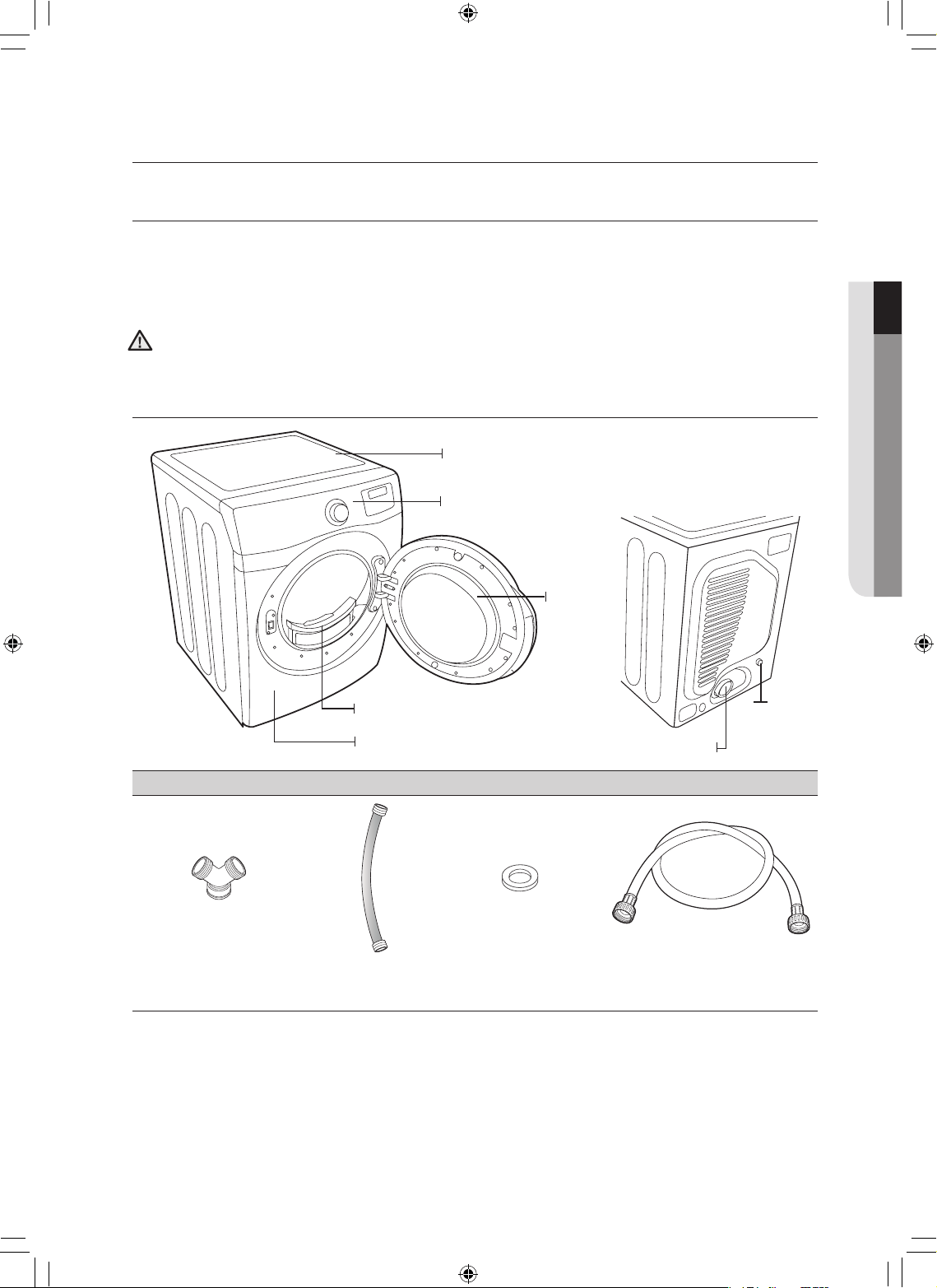
instalación de la secadora _9
instalación de la secadora
DESEMBALAJE DE LA LAVADORA
Desembale la secadora e inspecciónela para controlar que no se hayan producido daños durante
el transporte. Compruebe que haya recibido todos los elementos que se muestran a continuación.
Si la secadora sufrió daños durante el transporte, o si falta algún elemento, comuníquese con el
1-800-SAMSUNG(726-7864).
Para evitar lesiones físicas o tirones, use guantes protectores cada vez que levante o transporte la unidad.
Los materiales de embalaje pueden ser peligrosos para los niños; mantenga todo el material de
embalaje (bolsas de plástico, poliestireno, etc.) fuera del alcance de los niños.
CONSULTE LA SECCIÓN REQUISITOS PARA EL DRENAJE.
Partes suministradas
Conector en forma
de “Y”
Manguera de
entrada corta
Arandela de goma Manguera de entrada larga
01 instalación de la secadora
Panel de control
Cubierta superior
Puerta
Marco (delantero)
Filtro
Conducto de drenaje
Entrada de
agua
[ PARTE POSTERIOR ]
ADVERTENCIA
DV520AE-02836A_MES.indd 9 2010-04-13 �� 4:29:13
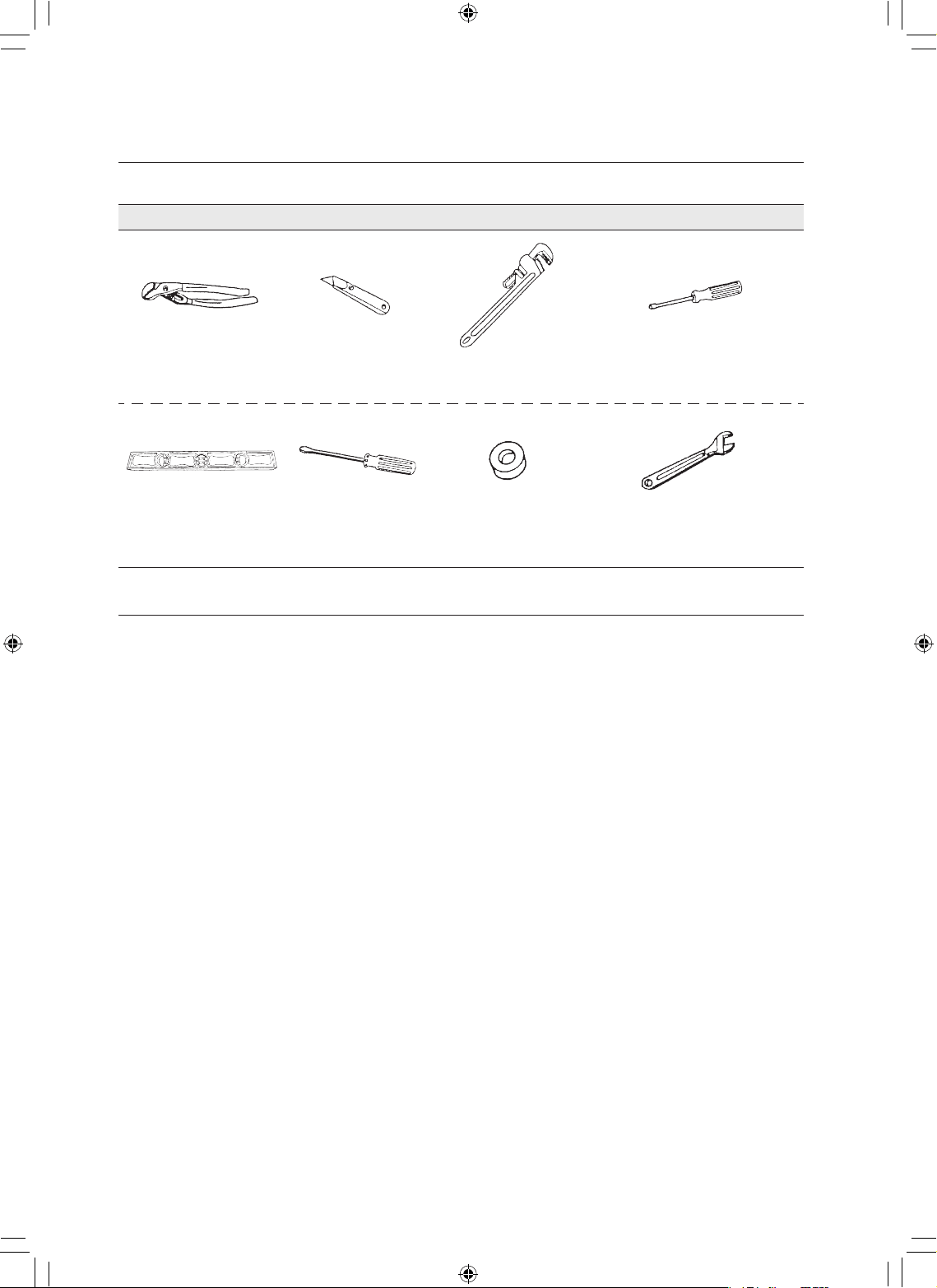
10_ instalación de la secadora
instalación de la secadora
Herramientas y piezas
Pinzas Cúter
Llave inglesa para
tuberías (sólo de gas)
Llave de tuercas
Nivel
Destornillador
Phillips
Cinta para conductos Llave inglesa
REQUISITOS BÁSICOS
Asegúrese de tener todo lo necesario para realizar una instalación adecuada.
• Se requiere un TOMACORRIENTE CON CONEXIÓN A TIERRA. Consulte la sección Requisitos
eléctricos.
• UN CABLE DE ALIMENTACIÓN para las secadoras eléctricas (excepto en Canadá).
• Los CONDUCTOS DE GAS (si se trata de una secadora a gas) deben cumplir con los códigos locales y
nacionales.
• El SISTEMA DE DRENAJE debe consistir en un conducto de drenaje de metal rígido o flexible con un
recubrimiento de metal resistente.
DV520AE-02836A_MES.indd 10 2010-04-13 �� 4:29:15
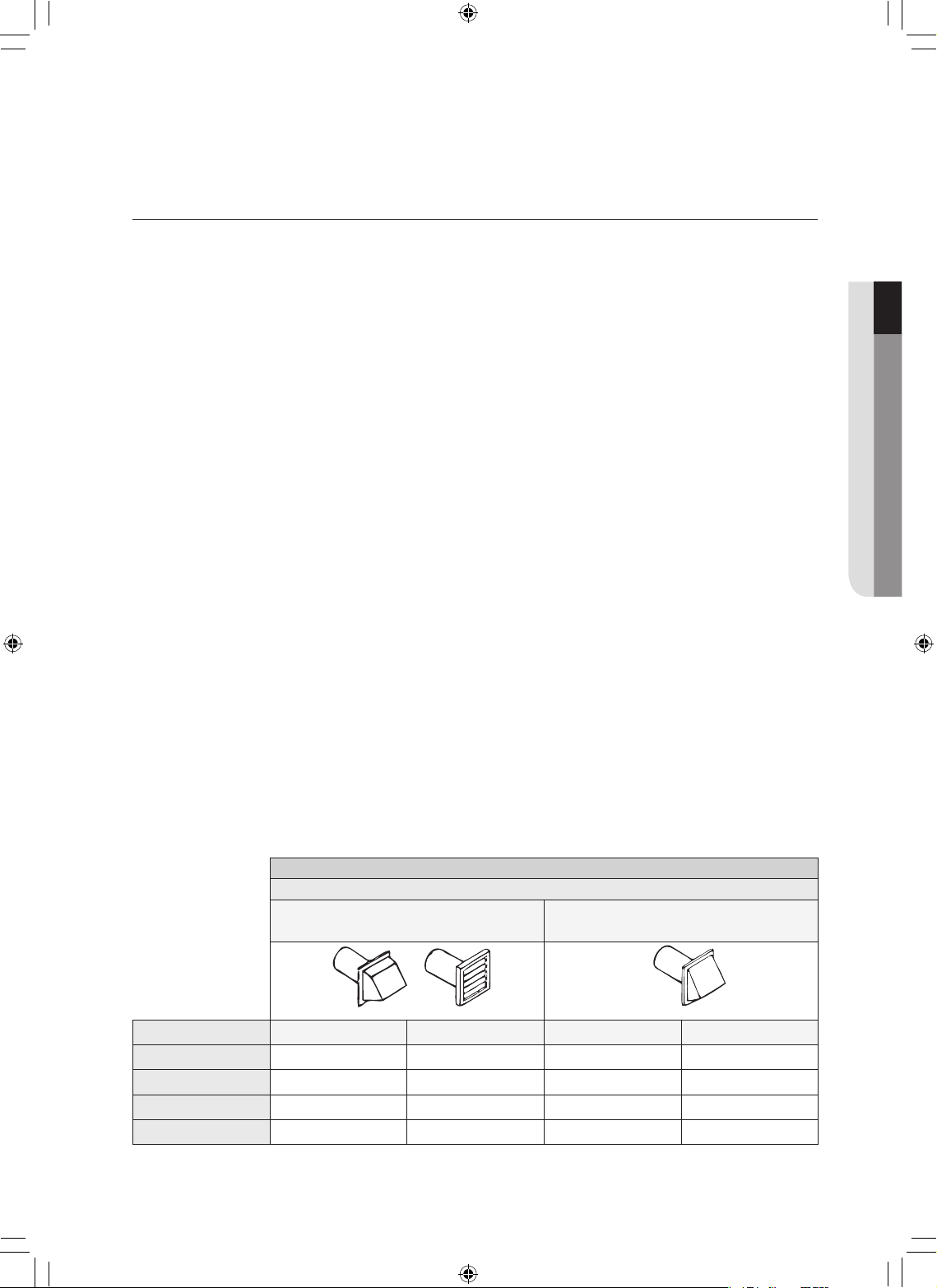
instalación de la secadora _11
REQUISITOS PARA EL TENDIDO DE CONDUCTOS
•
Utilice un conducto de acero galvanizado rígido o de aluminio rígido, de 4 pulgadas (10,2 cm) de diámetro.
• No utilice un conducto de menor tamaño.
• Los conductos de más de 4 pulgadas (10,2 cm) de diámetro pueden ocasionar una mayor acumulación
de pelusa. Periódicamente, debe retirar la pelusa acumulada.
• Si es preciso utilizar un conducto de metal flexible, utilice el tipo que viene con un recubrimiento de
metal resistente. No utilice un conducto flexible con un recubrimiento delgado. Se puede producir una
obstrucción importante si se dobla el conducto flexible en forma demasiado marcada.
•
Nunca instale ningún tipo de conducto flexible en paredes, techos u otros espacios que queden ocultos.
• Hagaqueelconductodedrenajesemantengalomásrectoycortoposible.
• Asegure las uniones con cinta para conductos. No utilice tornillos.
• NOHAGAQUELASECADORADRENEHACIANINGUNAPARED,TECHO,SÓTANODEPEQUEÑA
ALTURAOESPACIOOCULTODEUNEDIFICIO,LÍNEADEDESCARGADEGASESOCUALQUIER
OTROCONDUCTOCOMÚNOCHIMENEA.ESTOPODRÍAGENERARUNPELIGRODEINCENDIO
COMO CONSECUENCIA DE LA PELUSA EXPULSADA POR LA SECADORA.
• Los conductos flexibles de plástico se pueden enroscar, combar, pinchar, pueden reducir el flujo de aire,
prolongar el tiempo de secado y afectar el funcionamiento de la secadora.
• Los sistemas de drenaje de mayor longitud que la recomendada pueden prolongar el tiempo de
secado, afectar el funcionamiento del equipo y acumular pelusa.
• El conducto de drenaje debe finalizar en una tapa de drenaje con un regulador de tiro que gire hacia
afuera para evitar el reflujo de aire y el ingreso de insectos o plantas. Nunca utilice una tapa de drenaje
con un regulador de tiro magnético.
• La tapa debe tener 12 pulgadas (30,5 cm) de espacio libre como mínimo entre la parte inferior de la
tapa y el suelo u otra obstrucción. La abertura de la tapa debe apuntar hacia abajo.
• Nunca instale un filtro sobre la salida del drenaje.
• Para evitar la acumulación de pelusa, no permita que la secadora drene directamente en el hueco de
una ventana. No permita que drene debajo de la casa o de una galería.
• Si la red de conductos del drenaje debe pasar por un área que no recibe calor, se debe aislar
el conducto y se lo debe colocar levemente en declive hacia la tapa de drenaje para reducir la
condensación y la acumulación de pelusa.
• Inspeccione y limpie el interior del sistema de drenaje por lo menos una vez por año. Desenchufe el
cable de alimentación antes de limpiar.
• Controle con frecuencia para asegurarse de que el regulador de tiro de la tapa de drenaje se abra y se
cierre sin inconvenientes.
• Controle una vez por mes y limpie al menos una vez al año. Nota: Si las prendas no se secan, verifique
que los conductos no estén obstruidos.
SECADORA ELÉCTRICA Y A GAS
Tipo de tapa impermeable
Recomendado Utilice sólo para una instalación de
corto alcance
4” (10,16 cm) 2,5” (6,35 cm)
Cant. de codos de 90°
Rígido Metálico flexible* Rígido Metálico flexible*
0
24,4 m (80 pies) 12,4 m (41 pies) 22,6 m (74 pies) 10,1 m (33 pies)
1
20,7 m (68 pies) 11,2 m (37 pies) 18,9 m (62 pies) 8,8 m (29 pies)
2
17,4 m (57 pies) 10,1 m (33 pies) 15,5 m (51 pies) 7,6 m (25 pies)
3
14,3m (47 pies) 9,0 m (29 pies) 12,5 m (41 pies) 6,5 m (21 pies)
* No utilice un conducto flexible de un material que no sea el metal.
01 instalación de la secadora
DV520AE-02836A_MES.indd 11 2010-04-13 �� 4:29:16
12_ instalación de la secadora
Si la nueva secadora se instala dentro de un sistema de drenaje existente,
debe asegurarse de que:
• el sistema de drenaje cumpla con todos los códigos locales, estaduales y nacionales;
• no se utilice un conducto flexible de plástico;
• se controle y limpie toda la pelusa acumulada del interior del conducto existente;
• el conducto no esté enroscado o aplastado;
• el regulador de tiro de la tapa de drenaje se abra y se cierre sin inconvenientes.
La presión estática de cualquier sistema de drenaje no debe superar las 0,83 pulgadas de la
columna de agua ni ser inferior a 0.
Esto se puede medir cuando la secadora está en funcionamiento con un manómetro en el punto
donde el conducto de drenaje se conecta a la secadora. Se debe utilizar la opción sin calor. El
tambor de la secadora debe estar vacío y el filtro para pelusas limpio.
IMPORTANTE PARA EL INSTALADOR
Lea las siguientes instrucciones con detenimiento antes de instalar la secadora. Estas instrucciones se
deben conservar para consultas futuras.
RETIRELAPUERTADETODOSLOSELECTRODOMÉSTICOSDESECHADOSPARAEVITAREL
PELIGRODEQUEUNNIÑOSEASFIXIE.
CONSIDERACIONES ACERCA DE LA UBICACIÓN
La secadora debe estar ubicada donde haya suficiente espacio adelante para cargarla y suficiente espacio
atrás para el sistema de drenaje. Esta secadora viene preparada de fábrica para el drenaje posterior. Para
que drene por la parte inferior o hacia la derecha o la izquierda, utilice el kit de drenaje accesorio. El kit
viene acompañado de instrucciones. Es importante asegurarse de que en la habitación circule suficiente
aire fresco. La secadora debe estar ubicada donde el aire pueda fluir sin inconvenientes.
Para las secadoras a gas, se debe mantener el espacio libre suficiente tal como figura en la placa de
información para garantizar que haya aire suficiente para la combustión y el funcionamiento adecuado de la
secadora.
NOSEDEBEINSTALAROGUARDARLASECADORAENUNÁREADONDEQUEDEEXPUESTAAL
AGUA Y/O A LOS FACTORES CLIMÁTICOS. EL ÁREA DE LA SECADORA DEBE MANTENERSE LIBRE
DEMATERIALESCOMBUSTIBLES,GASOLINAYOTROSVAPORESYLÍQUIDOSINFLAMABLES.
UNASECADORAPRODUCEPELUSACOMBUSTIBLE.NODEBEHABERPELUSASENELÁREA
CIRCUNDANTE DE LA SECADORA.
INSTALACIÓN DEL ELECTRODOMÉSTICO EN UN GABINETE O EN
UN HUECO
La secadora debe tener un drenaje con salida hacia el exterior para reducir el riesgo de incendio
cuando se instala en un gabinete o en un hueco.
•
No se debe instalar ningún otro electrodoméstico que queme combustible en el mismo gabinete de la secadora.
• ADVERTENCIA:Parareducirelriesgodeincendio,estasecadoraDEBETENERUNDRENAJECON
SALIDAHACIAELEXTERIOR.
Consulte la sección INFORMACIÓN ACERCA DEL DRENAJE.
• Los espacios libres mínimos entre la secadora y las paredes adyacentes u otras superficies deben tener
las siguientes dimensiones: 2” (5,08 cm) en el frente, 17” (43,18 cm) en la parte superior, 1” (2,54 cm) a
ambos lados y 5” (12,7 cm) en la parte posterior.
•
El frente del gabinete debe contar con dos aberturas sin obstrucciones para que ingrese el aire, para ocupar
un área total combinada mínima de 72 pulg² (183 cm²), con 3” (7,62 cm) de abertura mínima en la parte
superior y en la parte inferior. Se acepta una puerta tipo persiana con un espacio libre equivalente.
instalación de la secadora
ADVERTENCIA
ADVERTENCIA
DV520AE-02836A_MES.indd 12 2010-04-13 �� 4:29:16
instalación de la secadora _13
INSTALACIÓN EN CASAS RODANTES
La instalación de la secadora en casas rodantes debe cumplir con la Norma de Construcción y Seguridad
de Casas Fabricadas, Título 24 CFR, Parte 3280 [denominada anteriormente Norma Federal para la
ConstrucciónylaSeguridaddeCasasRodantes,Título24,HUD(Parte280),1975](paralosEstados
Unidos) o las Normas CSA Z240 (para Canadá).
Cuando se instala una secadora en una casa rodante, se debe tener la precaución de asegurar la secadora
al piso.
Ubique un área en la que circule suficiente aire fresco.
Se requiere un espacio mínimo de 72 pulg² (465 cm²) sin obstrucciones.
Llame al 1-800-SAMSUNG para obtener más información acerca de la compra del kit de anclaje al piso
como accesorio.
Todas las instalaciones en casas rodantes deben tener un drenaje con salida hacia el exterior y la
terminación del conducto de drenaje debe estar firmemente asegurada a la estructura de la casa rodante
mediante materiales que no resulten inflamables.
El conducto de drenaje no puede terminar debajo de la casa rodante.
Consulte la sección Drenaje a fin de obtener más información.
DRENAJE
Si la secadora tiene un drenaje con salida hacia el exterior se evitará que ingrese una gran cantidad de
pelusa y humedad a la habitación.
En los Estados Unidos:
• Todas las secadoras deben tener un drenaje con salida hacia el exterior.
• El conducto de drenaje requerido tiene 4 pulgadas (102 mm) de diámetro.
• Sólo se utilizarán conductos flexibles tipo lámina metálica, si los hubiera, identificados
específicamente para su utilización con el electrodoméstico por el fabricante y que cumplan
con el Esquema para conductos de transición de secadora de ropa, Tema 2158A.
• El conducto no se montará con tornillos u otros medios de sujeción que se extiendan dentro
del conducto y atrapen pelusa.
En Canadá:
• Sólo se utilizarán aquellos conductos flexibles tipo lámina metálica, si los hubiera,
específicamente identificados por el fabricante para su uso con el electrodoméstico.
• Todas las secadoras deben tener un drenaje con salida hacia el exterior.
• El conducto de drenaje debe tener 4 pulgadas (102 mm) de diámetro.
Fuera de los EE.UU. y Canadá:
• Remítase a los códigos locales.
La secadora debe tener un drenaje con salida hacia el exterior para reducir el riesgo de
incendio cuando se instala en un gabinete o en un hueco.
NUNCAUTILICEUNCONDUCTOFLEXIBLEDEPLÁSTICOODEUNMATERIALQUENO
SEA EL METAL.
Si su red de conductos existente es de plástico, de un material que no sea el metal o es
inflamable, reemplácela por una que sea de metal.
Utilice únicamente un conducto de drenaje de metal que no sea inflamable para asegurar la
contención del aire expulsado, el calor y la pelusa.
01 instalación de la secadora
ADVERTENCIA
DV520AE-02836A_MES.indd 13 2010-04-13 �� 4:29:16
14_ instalación de la secadora
REQUISITOS EN CUANTO AL GAS
Utilice únicamente gas natural o gas LP (gas licuado de propano).
LA INSTALACIÓN DEBE REALIZARSE EN CONFORMIDAD CON LOS CÓDIGOS LOCALES, O
EN AUSENCIA DE ELLOS, CON EL CÓDIGO NACIONAL PARA GAS Y COMBUSTIBLES ANSI/
Z223.1, LA REVISIÓN MÁS RECIENTE (PARA LOS ESTADOS UNIDOS), O CON LOS CÓDIGOS DE
INSTALACIÓN CAN/CGA-B149 (PARA CANADÁ).
Las secadoras a gas están equipadas con un orificio para el quemador de modo que puedan ser utilizadas
con gas natural. Si tiene pensado utilizar su secadora con gas LP (gas licuado de propano), deberá
efectuarse la conversión para lograr un funcionamiento adecuado y seguro, dicha tarea deberá estar a
cargo de un técnico calificado.
Se recomienda usar un conducto de suministro de gas de 1/2” (1,27 cm) y el mismo debe reducirse
para la conexión con el conducto de gas de 3/8” (1 cm) de su secadora. El Código Nacional para Gas y
Combustibles exige que se instale una válvula manual de cierre del gas, aprobada y de fácil acceso, dentro
de los 6” de distancia de la secadora.
Las secadoras a gas instaladas en garajes residenciales deben estar elevadas a 18 pulgadas (46
cm) del piso.
Además, se debe instalar una conexión roscada macho N.P.T. (rosca nacional para tubos) de 1/8” (0,3 cm),
accesible para la conexión del medidor de prueba, inmediatamente contra corriente de la conexión del
suministro de gas de la secadora.
Su secadora debe estar desconectada del sistema de suministro de gas durante las pruebas de presión del
sistema.
NO vuelva a utilizar el viejo conducto de gas de metal flexible. El diseño del conducto de gas flexible debe
estar certificado por la Asociación Americana del Gas (CGA en Canadá).
• Todo compuesto de unión de tuberías utilizado debe ser resistente a la acción del gas licuado de
petróleo.
• A modo de cortesía, la mayoría de las empresas locales de gas inspeccionarán la instalación del
artefacto a gas.
ENCENDIDO DEL GAS: la secadora utiliza un sistema de encendido automático para encender el
quemador.
No existe un piloto que permanezca constantemente encendido.
INSTRUCCIONES DE INSTALACIÓN DE LA COMUNIDAD DE
MASSACHUSETTS
La instalación de la secadora deberá estar a cargo de un plomero o un gasista matriculado. Se deberá
instalar una válvula de gas manual con una manija en forma de “T” en el conducto de suministro de gas de
la secadora. Si se utiliza un conector de gas flexible para instalar la secadora, el conector debe tener una
longitud máxima de 3’ (36”).
• Se pueden producir pérdidas de gas en su sistema que ocasionen una situación peligrosa.
• Las pérdidas de gas pueden no ser detectadas únicamente por el olor.
• Los proveedores de gas recomiendan que compre e instale un detector de gas aprobado por UL.
• Instale y use de acuerdo con las instrucciones del fabricante.
instalación de la secadora
ADVERTENCIA
DV520AE-02836A_MES.indd 14 2010-04-13 �� 4:29:16
instalación de la secadora _15
REQUISITOS ELÉCTRICOS
El diagrama del cableado se encuentra en la parte posterior de la secadora.
• La conexión inadecuada del conductor de conexión a tierra del equipo puede generar una
descarga eléctrica.
Consulte a un electricista o técnico calificado si le surgen dudas acerca de si la conexión a tierra
de su secadora es correcta. No modifique el enchufe provisto con la secadora; si no entra en el
tomacorriente, solicite a un electricista calificado que instale el tomacorriente adecuado.
• Para evitar el riesgo innecesario de incendio, descarga eléctrica o lesiones físicas, todo el cableado
y la conexión a tierra deben realizarse en conformidad con los códigos locales, o en ausencia de
ellos, con el Código Eléctrico Nacional, ANSI/NFPA Nro. 70, su última revisión (para los EE.UU.)
o el Código Eléctrico Canadiense CSA C22.1, sus últimas revisiones y los códigos y ordenanzas
locales. Es su responsabilidad proveer los servicios eléctricos adecuados para su secadora.
• Todas las instalaciones de gas deberán realizarse en conformidad con el Código Nacional para
Combustibles ANSI/Z2231, su última revisión (para los EE.UU.) o con los Códigos de Instalación
CAN/CGA - B149, su última revisión (para Canadá) y los códigos y ordenanzas locales.
CONEXIÓN A TIERRA
Esta secadora debe conectarse a tierra. En caso de que el electrodoméstico funcione mal o se
descomponga, la conexión a tierra reducirá el riesgo de descarga eléctrica al ofrecer una vía de menos
resistencia a la corriente eléctrica.
Modelos a gas
Su secadora tiene un cable con un conductor de conexión a tierra del equipo y un enchufe de
conexión a tierra.
El enchufe debe conectarse a un tomacorriente adecuado que esté correctamente instalado y
conectado a tierra en conformidad con todos los códigos y ordenanzas locales.
No modifique el enchufe provisto con la secadora; si no entra en el tomacorriente, solicite a un
electricista calificado que instale el tomacorriente adecuado.
NUNCA CONECTE UN CABLE A TIERRA A TUBERÍAS DE PLOMERÍA, TUBERÍAS DE GAS O
CAÑERÍASDEAGUACALIENTEDEPLÁSTICO.
Modelos eléctricos
La secadora tiene un cable con un conductor de conexión a tierra del equipo y un enchufe de
conexión a tierra, de venta por separado.
El enchufe debe conectarse a un tomacorriente adecuado que esté correctamente instalado y
conectado a tierra en conformidad con todos los códigos y ordenanzas locales.
Si no se utiliza un cable de alimentación y la secadora eléctrica debe estar permanentemente
conectada, se la debe conectar a un sistema de cableado de metal con conexión a tierra
permanente, o se debe conectar un conductor con conexión a tierra del equipo a los
conductores del circuito y a la terminal con conexión a tierra del equipo.
01 instalación de la secadora
ADVERTENCIA
DV520AE-02836A_MES.indd 15 2010-04-13 �� 4:29:16
16_ instalación de la secadora
CONEXIONES ELÉCTRICAS
Antes de poner al electrodoméstico en funcionamiento o realizar pruebas, siga las instrucciones de
conexión a tierra de la sección Conexión a tierra.
Se recomienda que se destine un circuito derivado individual (o separado) sólo para la secadora. NO
UTILICE UN CABLE PROLONGADOR.
Modelos a gas – EE.UU. y Canadá
SerequiereunservicioeléctricoaprobadodeCAde120voltios,60Hz,conunfusibleo
disyuntor de 15 A.
Modelos eléctricos – Sólo EE.UU.
La mayor parte de las secadoras estadounidenses requieren un servicio eléctrico aprobado de
CAde120/240voltios,60Hz.Algunasrequierenunservicioeléctricoaprobadode120/208
voltios,60Hz.Losrequisitosdelservicioeléctricopuedenencontrarseenlaetiquetacon
información ubicada detrás de la puerta. Se requiere un fusible o disyuntor de 30 A a ambos
lados del conducto.
• Si se utiliza un cable de alimentación, el cable debe enchufarse a un tomacorriente de 30 A.
• NO se provee el cable de alimentación con los modelos eléctricos de secadoras
estadounidenses.
IMPORTANTE:
Si lo permiten los códigos locales, el suministro eléctrico de la secadora puede conectarse por
medio de un nuevo kit de cables de alimentación eléctrica, rotulado para que se lo utilice con la
secadora, es decir que cuente con certificación U.L. y categorizado en un mínimo de 120/240
voltios, 30 A con tres conductores de cobre N.° 10 que finalicen en terminales de bucle cerrado,
pernos de pala de tipo abierto con extremos rebatidos o con conductores de estaño.
1. Tamaño de los conductores y el tipo de cable.
2. Dispositivo de alivio de tensión con certificación UL de 3/4” (1,9 cm)
• No vuelva a utilizar un cable de alimentación eléctrica de una secadora vieja. El cable de
alimentación eléctrica debe conservarse en el gabinete de la secadora con un dispositivo de
alivio de tensión con certificación UL adecuado.
• La conexión a tierra a través del conductor neutro está prohibida para (1) instalaciones
nuevas con circuito derivado, (2) casas rodantes, (3) vehículos recreativos y (4) áreas en las
que los códigos locales prohíban la conexión a tierra a través de un conductor neutro. (Utilice
un enchufe de 4 pines para el tomacorriente de 4 ranuras, tipo NEMA 14-30R).
Modelos eléctricos – Sólo Canadá
• SerequiereunservicioeléctricoaprobadodeCAde120/240voltios,60Hz,equipadocon
un fusible o disyuntor de 30 A a ambos lados del conducto.
• Todos los modelos canadienses se envían con el cable de alimentación adjunto. El cable de
alimentación debe conectarse a un tomacorriente de 30 A.
En Canadá no está permitido convertir una secadora a 208 voltios.
instalación de la secadora
DV520AE-02836A_MES.indd 16 2010-04-13 �� 4:29:16
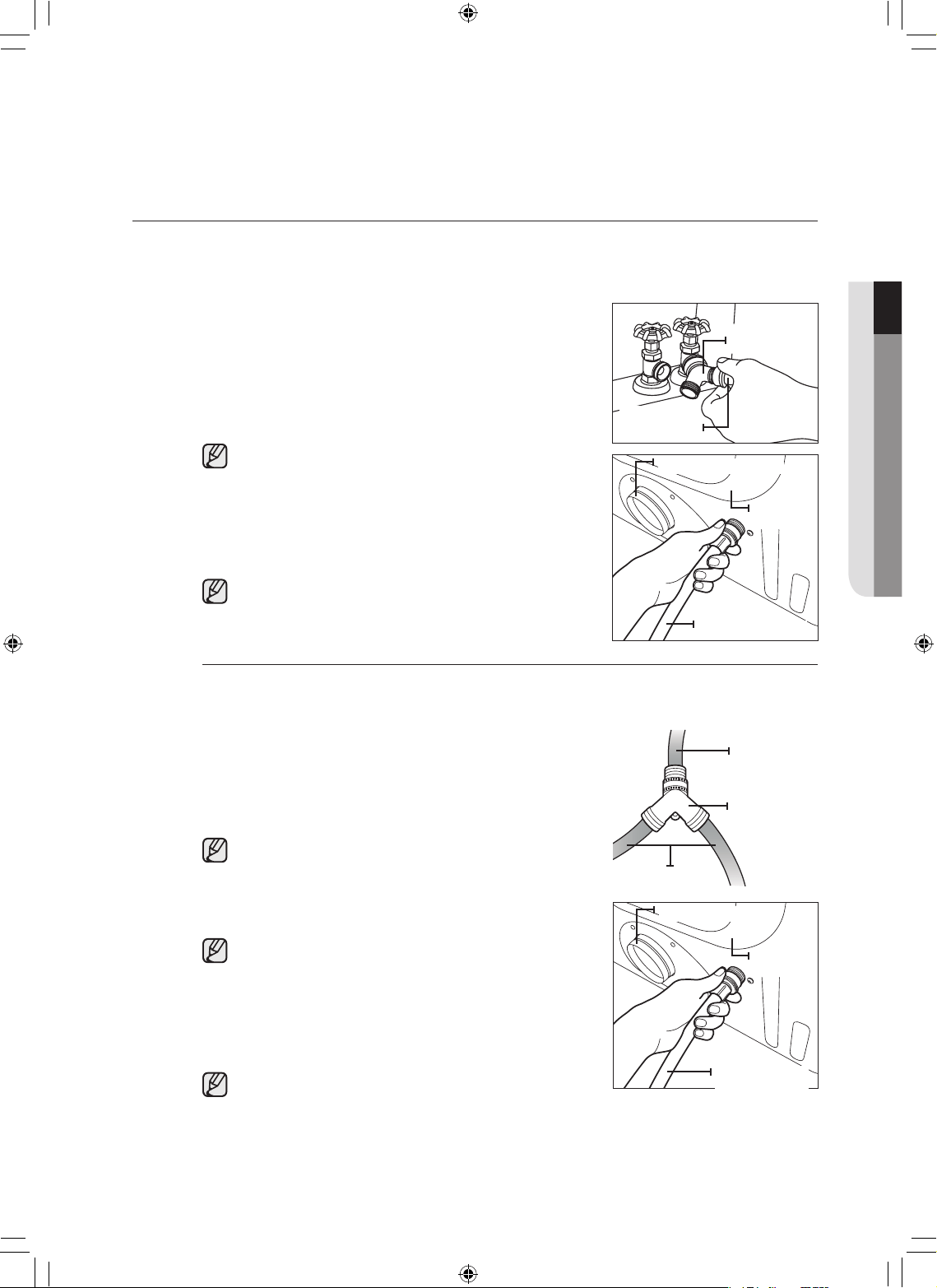
instalación de la secadora _17
CONEXIÓN DE LA MANGUERA DE ENTRADA
Método 1
La secadora debe conectarse a la llave de agua fría mediante las nuevas mangueras de entrada.
No utilice mangueras viejas.
1. Si el espacio lo permite, conecte el extremo hembra de
bronce del conector en forma de “Y” a la llave de agua fría.
2. Cierre la llave de agua fría.
3. Conecte el extremo recto de la manguera larga al conector
en forma de “Y”.
4. Ajuste la unión con dos tercios de giro adicionales utilizando
la pinza.
No ajuste demasiado ya que se puede dañar la unión.
5. Conecte el extremo angular de las mangueras largas para
llenar la válvula en la parte inferior del armazón trasero de la
secadora. Enrosque la unión a mano hasta que se asiente
en el conector de la válvula de carga.
6. Ajuste la unión con dos tercios de giro adicionales utilizando
la pinza.
No ajuste demasiado ya que se puede dañar la unión.
7. Compruebe que las llaves de agua estén abiertas.
8. Compruebe que no haya pérdidas alrededor del conector en
forma de “Y”, las llaves de agua y las mangueras.
Método 2
La secadora debe conectarse a la llave de agua fría mediante las nuevas mangueras de entrada. No utilice
mangueras viejas.
1. Si el conector en forma de “Y” no puede conectarse directamente a
la llave de agua fría, se debe utilizar la manguera corta.
2. Cierre la llave de agua fría.
3. Una la manguera de entrada corta a la llave de agua fría.
Enrosque la unión a mano hasta que se asiente en la llave de agua.
4.
Ajuste la unión con otros dos tercios de giro adicionales utilizando la pinza.
No ajuste demasiado ya que puede dañar la unión.
5. Una el conector en forma de “Y” al extremo macho de bronce de la
manguera pequeña. Enrosque la unión a mano hasta que se asiente
en el conector.
6.
Ajuste la unión con otros dos tercios de giro adicionales utilizando la pinza.
No ajuste demasiado ya que puede dañar la unión.
7. Una el extremo angular de las mangueras largas a la válvula de carga
en la parte inferior del armazón trasero de la secadora. Enrosque la
unión a mano hasta que se asiente en el conector de la válvula de
carga.
8. Ajuste la unión con otros dos tercios de giro adicionales utilizando la
pinza.
No ajuste demasiado ya que puede dañar la unión.
9. Compruebe que las llaves de agua estén abiertas.
10. Compruebe que no haya pérdidas alrededor del conector en forma de “Y”, las llaves de agua y las mangueras.
01 instalación de la secadora
Conducto de drenaje
Marco
(posterior)
Manguera de agua
Conector en
forma de “Y”
Conducto de
drenaje
Manguera corta
(Entrada de
agua fría)
Conector en
forma de “Y”
Manguera larga
Conducto de drenaje
Marco
(posterior)
Manguera de
agua
DV520AE-02836A_MES.indd 17 2010-04-13 �� 4:29:17
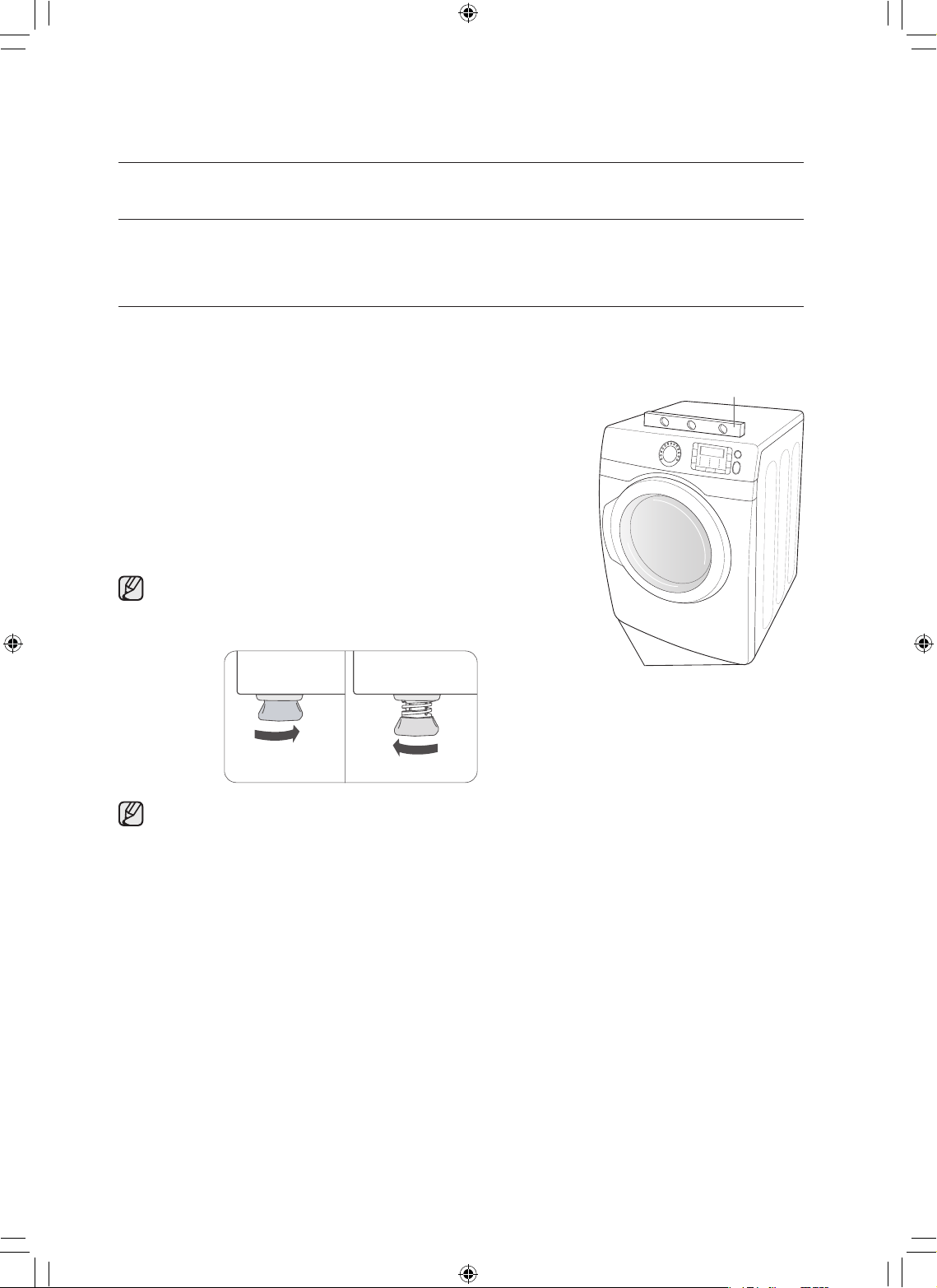
18_ instalación de la secadora
REEMPLAZO DE LAS PIEZAS Y LOS ACCESORIOS
Si es preciso reemplazar piezas o accesorios de la secadora, comuníquese con el distribuidor al que le
compró la secadora o con el centro de atención al cliente de SAMSUNG al 1-800-SAMSUNG (726-7864).
INSTALACIÓN
Para realizar una instalación adecuada, recomendamos contratar a un profesional.
Para instalar:
1. Mueva la secadora al lugar adecuado para la instalación. Considere
instalar la secadora y la lavadora una junto a la otra para permitir el
acceso a las conexiones de gas, eléctricas y de drenaje.
Coloque dos de las protecciones superiores de cartón en el piso.
Incline la secadora hacia uno de los laterales, de modo tal que quede
atravesando ambas protecciones.
2. Vuelvaacolocarlasecadoraenposiciónvertical.
3. La secadora debe estar nivelada para garantizar un secado óptimo.
Para minimizar las vibraciones, los ruidos y los movimientos
indeseados, el suelo debe ser una superficie sólida perfectamente
nivelada.
Para colocar la secadora a la misma altura que la lavadora, retraiga
completamente las patas niveladoras girándolas en sentido contrario
a las agujas del reloj, luego afloje las patas girándolas en sentido de
las agujas del reloj.
Ajuste las patas niveladoras sólo lo necesario para nivelar la secadora. Extender las patas niveladoras
más de lo necesario puede hacer que la secadora vibre.
instalación de la secadora
Nivel
Patas niveladoras
Retraer
completamente
Luego aflojar
DV520AE-02836A_MES.indd 18 2010-04-13 �� 4:29:17
instalación de la secadora _19
4. Consulte la sección Drenaje antes de instalar el sistema de drenaje. Instale la red de conductos desde
la secadora hasta la tapa de drenaje. El extremo con reborde de las secciones del conducto deben
apuntar hacia afuera de la secadora.
NO utilice tornillos con recubrimiento de metal cuando realice el montaje de los conductos. Se les debe
colocar cinta a las uniones.
Nunca utilice material de plástico flexible para el drenaje.
Sugerencia para que las instalaciones queden bien ajustadas: conecte una sección del sistema de
drenaje a la secadora antes de colocarla en su lugar.
Utilice cinta para conductos para asegurar esta sección a la secadora, pero no cubra las aberturas del
gabinete de la secadora.
5. Consulte la sección Requisitos eléctricos.
ANTES DE PONER EL ELECTRODOMÉSTICO EN FUNCIONAMIENTO O REALIZAR PRUEBAS, siga
las instrucciones de conexión a tierra de la sección Conexión a tierra.
MODELOS ESTADOUNIDENSES:
IMPORTANTE: Todos los modelos estadounidenses fueron fabricados para una CONEXIÓN
DE SISTEMAS DE 3 CABLES.
El armazón de la secadora está conectado a tierra al conductor neutro del bloque de terminales.
Se requiere una CONEXIÓN DE SISTEMAS DE 4 CABLES para las construcciones nuevas
o remodeladas, las casas rodantes o si los códigos locales no permiten la conexión a tierra
a través del neutro. Si se utiliza un sistema de 4 cables, el armazón de la secadora no puede
conectarse a tierra al conductor neutro del bloque de terminales. Remítase a las siguientes
instrucciones para las CONEXIONES DE SISTEMAS DE 3 Y 4 CABLES.
Retire la tapa del bloque de terminales.
Inserte el cable de alimentación con un dispositivo de alivio de tensión con certificación UL a través del
orificio provisto en el gabinete cerca del bloque de terminales.
Se debe utilizar un dispositivo de alivio de tensión.
No afloje las tuercas ya instaladas en el bloque de terminales. Asegúrese de que estén ajustadas.
Utilice un tomacorriente para huecos profundos de 3/8” (1 cm).
01 instalación de la secadora
DV520AE-02836A_MES.indd 19 2010-04-13 �� 4:29:17
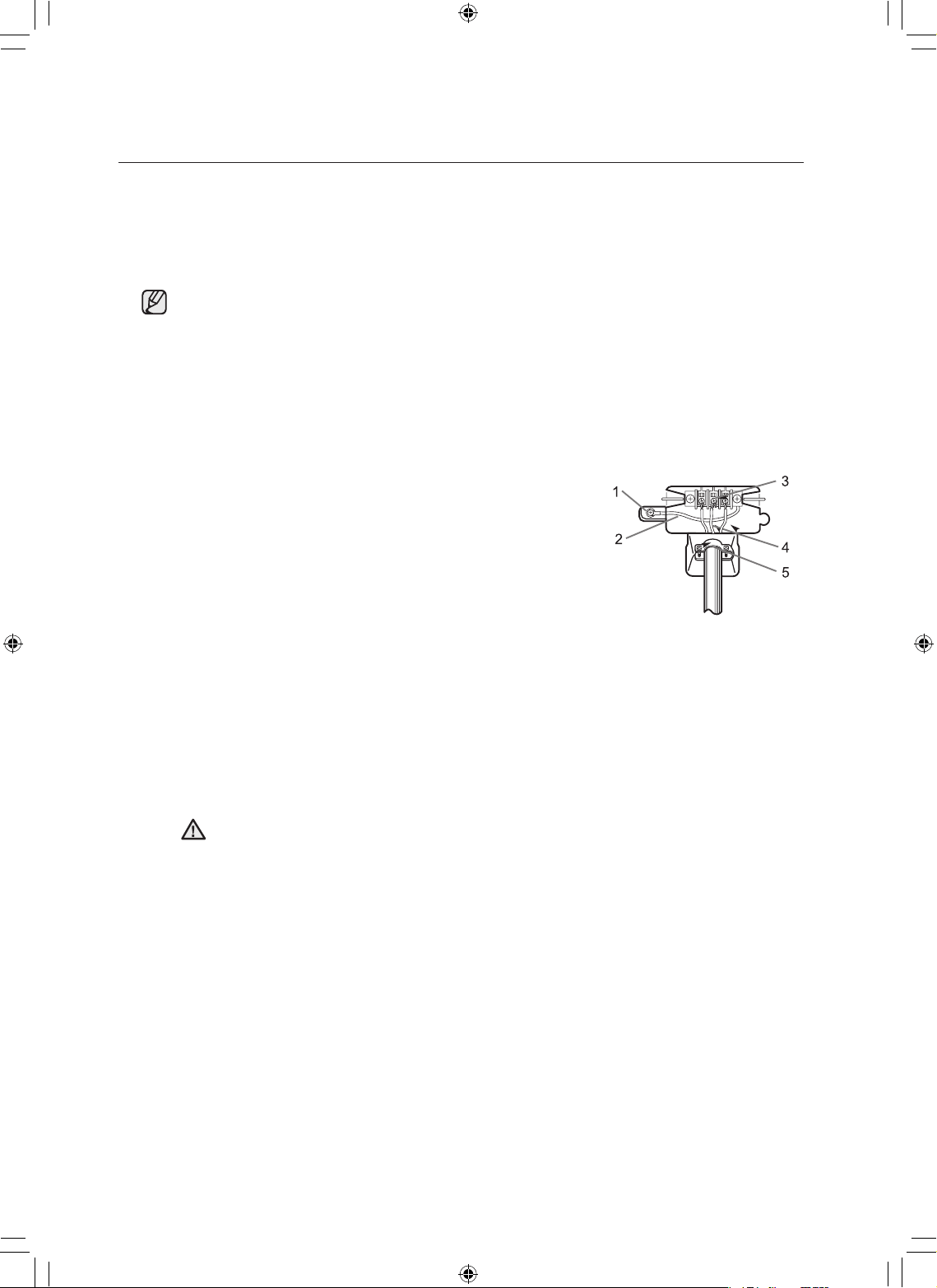
20_ instalación de la secadora
6. Consulte la sección Requisitos en cuanto al gas.
Retire la cubierta protectora de la rosca para tubos.
Aplique compuesto de unión de tuberías o 1 1/2 vueltas aproximadamente de cinta de teflón en todas
las conexiones roscadas.
El compuesto de unión de tuberías utilizado debe ser resistente a la acción del gas licuado de
petróleo.
Conecte el suministro de gas a la secadora.
Se requiere un accesorio adicional para conectar el extremo de la rosca hembra de 3/4” (1,9 cm) de un
conector flexible al extremo de la rosca macho de 3/8” (1 cm) de la secadora.
Ajuste firmemente el accesorio de la tubería de gas sobre las roscas.
Abra el suministro de gas. Controle todas las conexiones de gas para detectar si presentan pérdidas
usando una solución jabonosa.
Si aparecen burbujas, ajuste las conexiones y vuelva a controlar.
NO use la llama abierta para verificar si hay pérdidas de gas.
Conexiones de sistemas de 3 CABLES
1. Afloje o retire el tornillo central del bloque de terminales.
2. Conecte el cable neutro (cable blanco o central) del cable
de alimentación a la terminal de tornillo central de color
plateado del bloque de terminales. Ajuste el tornillo.
3. Conecte los demás cables a los tornillos externos del
bloque de terminales. Ajuste los tornillos.
4. Ajuste los tornillos con dispositivo de alivio de tensión.
5. Inserte la lengüeta de la cubierta del bloque de terminales en la ranura del panel posterior de
la secadora.
Asegure la cubierta con un tornillo de sujeción.
1. Conector a tierra externo
2. Cable a tierra neutro (verde/amarillo)
3. Tornillo central de color plateado del bloque de terminales
4. Cable neutro (cable blanco o central)
5. Dispositivo de alivio de tensión con certificación UL de 3/4” (1,9 cm)
Si realiza la conversión del sistema eléctrico de 4 cables a 3 cables, debe volver a conectar
la cinta de conexión a tierra al soporte del bloque de terminales para conectar a tierra el
armazón de la secadora al conductor neutro.
instalación de la secadora
ADVERTENCIA
DV520AE-02836A_MES.indd 20 2010-04-13 �� 4:29:17
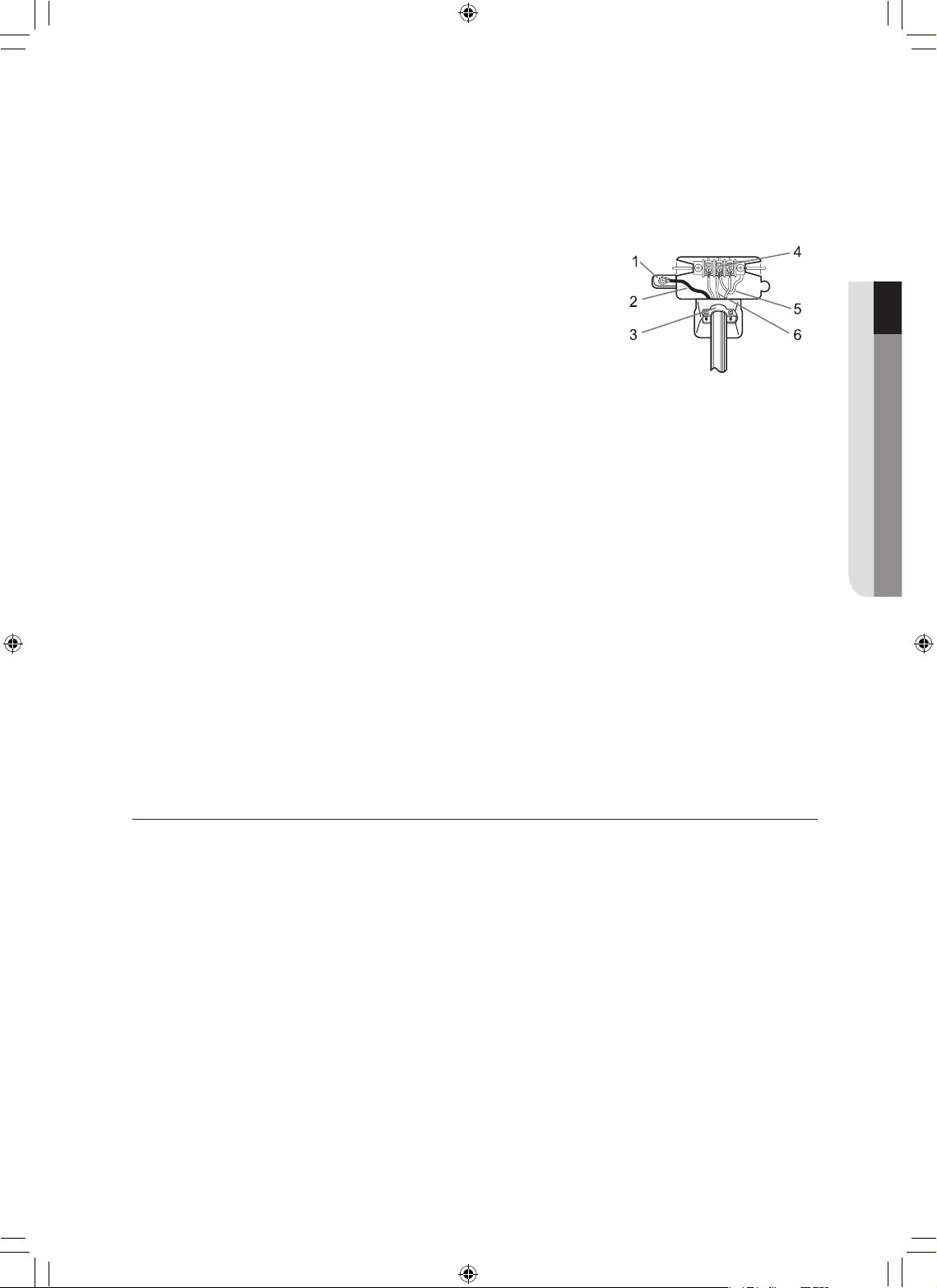
instalación de la secadora _21
Conexiones de sistemas de 4 CABLES
1. Retire el tornillo central del bloque de terminales.
2. Conecte el cable a tierra (verde o sin cubierta) del cable de
alimentación al tornillo conductor a tierra externo.
3. Conecte el cable neutro (cable blanco o central) del cable
de alimentación y el cable a tierra del electrodoméstico
(verde con franjas amarillas) debajo del tornillo central del
bloque de terminales.
4. Conecte los demás cables a los tornillos externos del
bloque de terminales. Ajuste los tornillos.
5. Ajuste los tornillos con dispositivo de alivio de tensión.
6. Inserte la lengüeta de la cubierta del bloque de terminales en la ranura del panel posterior de
la secadora.
Asegure la cubierta con un tornillo de sujeción.
1. Conector a tierra externo
2. Cable verde o de cobre desnudo del cable de alimentación
3. Dispositivo de alivio de tensión con certificación UL de 3/4 pulgadas (1,9 cm)
4. Tornillo central de color plateado del bloque de terminales
5. Cable a tierra (verde/amarillo)
6. Cable neutro (cable blanco o central)
7. Con un nivelador, controle la secadora y haga los ajustes necesarios a las patas niveladoras.
8. En ese momento, asegúrese de que todas las conexiones de gas (en los modelos a gas), y las
conexiones eléctricas y del drenaje estén completas. Enchufe la secadora y controle el funcionamiento
utilizando la lista de verificación que figura más abajo.
9. (SÓLOMODELOSAGAS-DV448AG*,DV438AG*)
Es posible que al principio el quemador no se encienda debido a la presencia de aire en el conducto de
gas. Permitir que la secadora funcione con la opción de calor purgará el conducto. Si en el lapso de 5
minutos el gas no se enciende, apague la secadora y espere 5 minutos. Asegúrese de que el suministro
de gas hacia su secadora esté abierto. Para confirmar que el gas está encendido, controle que se
sienta calor en el drenaje.
LISTA DE VERIFICACIÓN FINAL DE LA INSTALACIÓN
La secadora está enchufada al tomacorriente y está conectada a tierra correctamente.
Los conductos de drenaje están conectados y se ha colocado cinta a las uniones.
NO se usó un conducto flexible de plástico.
Se usó material de metal rígido o flexible con un recubrimiento de metal resistente para la ventilación.
La secadora está nivelada y apoyada firmemente sobre el piso.
Modelos a gas: el gas está abierto y no hay pérdidas de gas.
Encienda la secadora para confirmar que funciona, calienta y se apaga.
01 instalación de la secadora
DV520AE-02836A_MES.indd 21 2010-04-13 �� 4:29:18
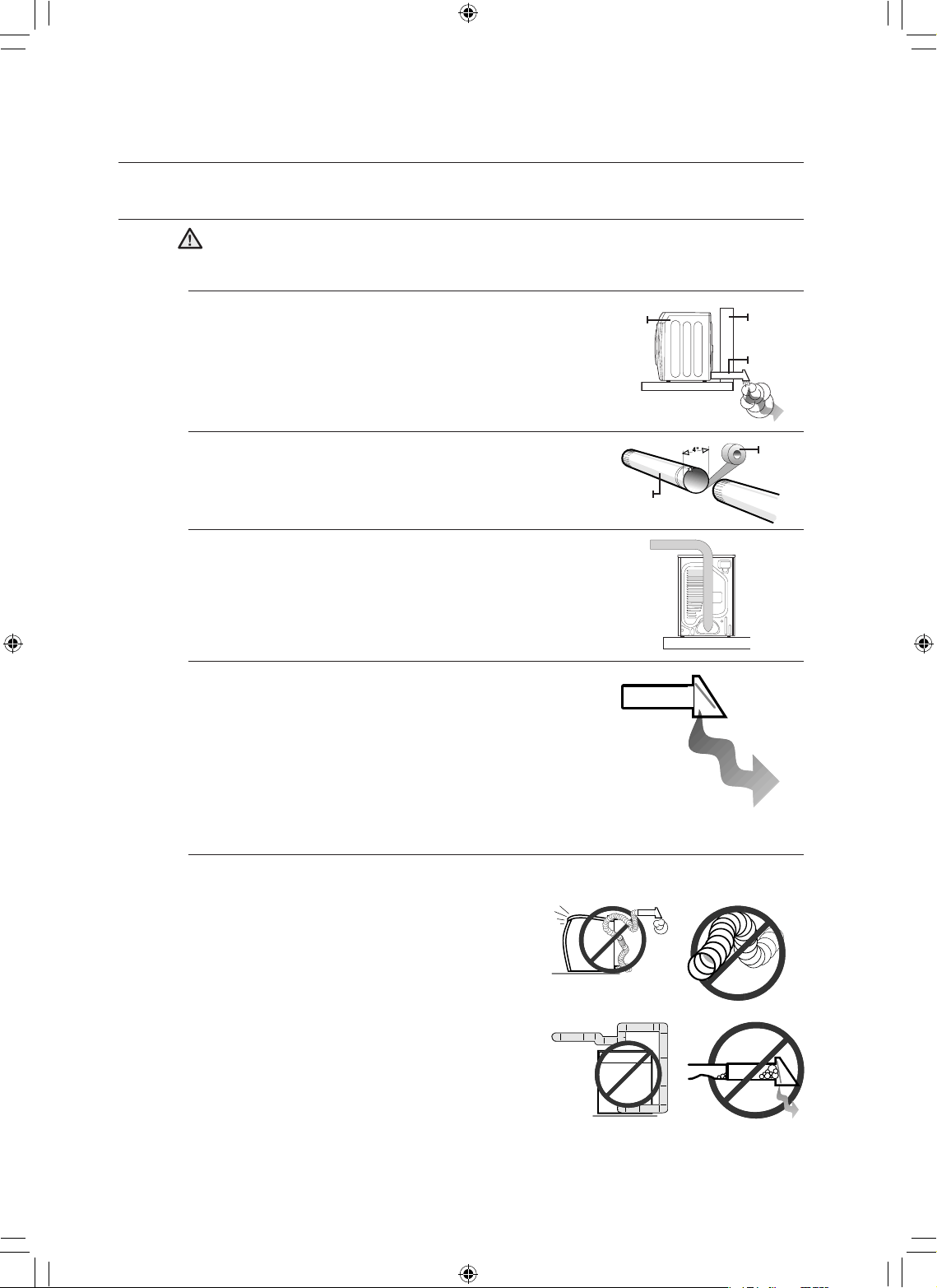
22_ instalación de la secadora
SUGERENCIAS ACERCA DEL DRENAJE DE LA SECADORA
Un conducto flexible de plástico o de un material que no sea el metal presenta un potencial
riesgo de incendio.
1. Asegúrese de que su secadora esté instalada correctamente
para que extraiga el aire fácilmente.
2. Utilice un conducto de metal rígido, de 4” de diámetro.
Coloque cinta en todas las uniones, incluso en la secadora.
Nunca use tornillos que atrapen pelusa.
3. Mantenga los conductos lo más recto posible.
4. Limpie todos los viejos conductos antes de instalar la nueva
secadora.
Asegúrese de que la ventilación se abra y se cierre sin
inconvenientes.
Inspeccione y limpie el sistema de drenaje todos los años.
No permita que un sistema de drenaje defectuoso demore el secado:
1. restringiendo a la secadora con un sistema de
drenaje defectuoso.
2. utilizando un conducto flexible de plástico, con un
recubrimiento delgado o de un material que no es el
metal.
3. utilizando conductos innecesariamente largos que
tienen muchos codos.
4. permitiendo el uso de conductos y ventilaciones
aplastados u obstruidos.
instalación de la secadora
ADVERTENCIA
1 2
3 4
CONDUCTO
CINTA
Pared
CONDUCTO
DE DRENAJE
Secadora
DV520AE-02836A_MES.indd 22 2010-04-13 �� 4:29:19
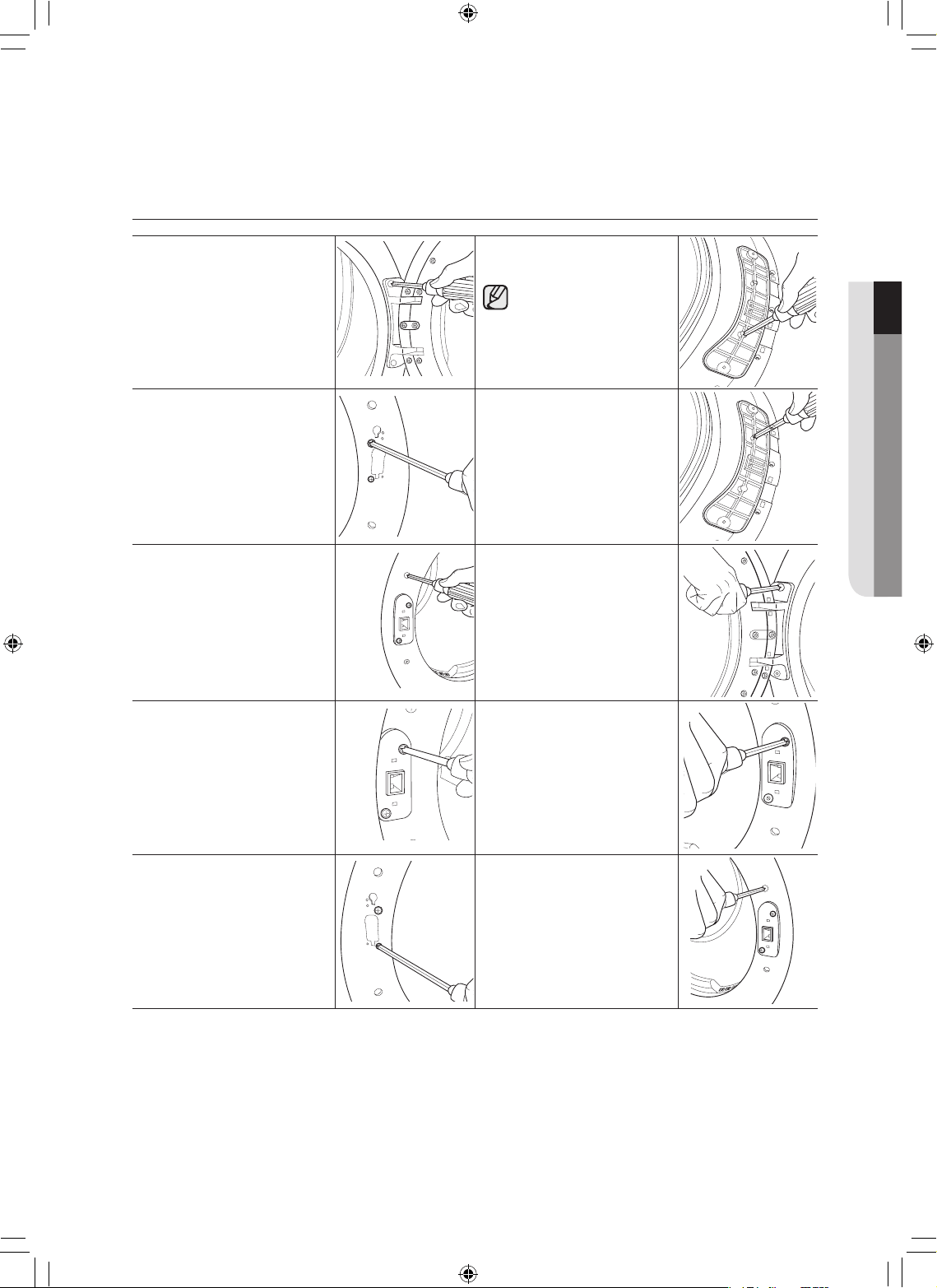
instalación de la secadora _23
INVERSIÓN DE LA PUERTA
1. Desconecte el cable de
alimentación.
2. Retire los dos tornillos de
la bisagra de la puerta.
3. Levante la puerta y
retírela.
8. Quitaruntornillodela
bisagra de la puerta.
El tornillo es para la
pre-fijación de la puerta
de la parte delantera del
marco.
4. Retire los dos tornillos
del lado opuesto de la
bisagra de la puerta.
9. Volveramontareltornillo
en el otro agujero.
5. Retire los dos tornillos de
la placa de apoyo.
10. Coloque la puerta sobre
el lado contrario y vuelva
a fijar a la secadora.
6. Retire un tornillo negro de
la bisagra de la puerta.
11. Vuelvaaconectarlaplaca
de apoyo.
7. Vuelvaaponerlosdos
tornillos en los orificios
internos.
12. Vuelvaacolocarlos
tornillos en los orificios
que quedaron.
01 instalación de la secadora
DV520AE-02836A_MES.indd 23 2010-04-13 �� 4:29:21
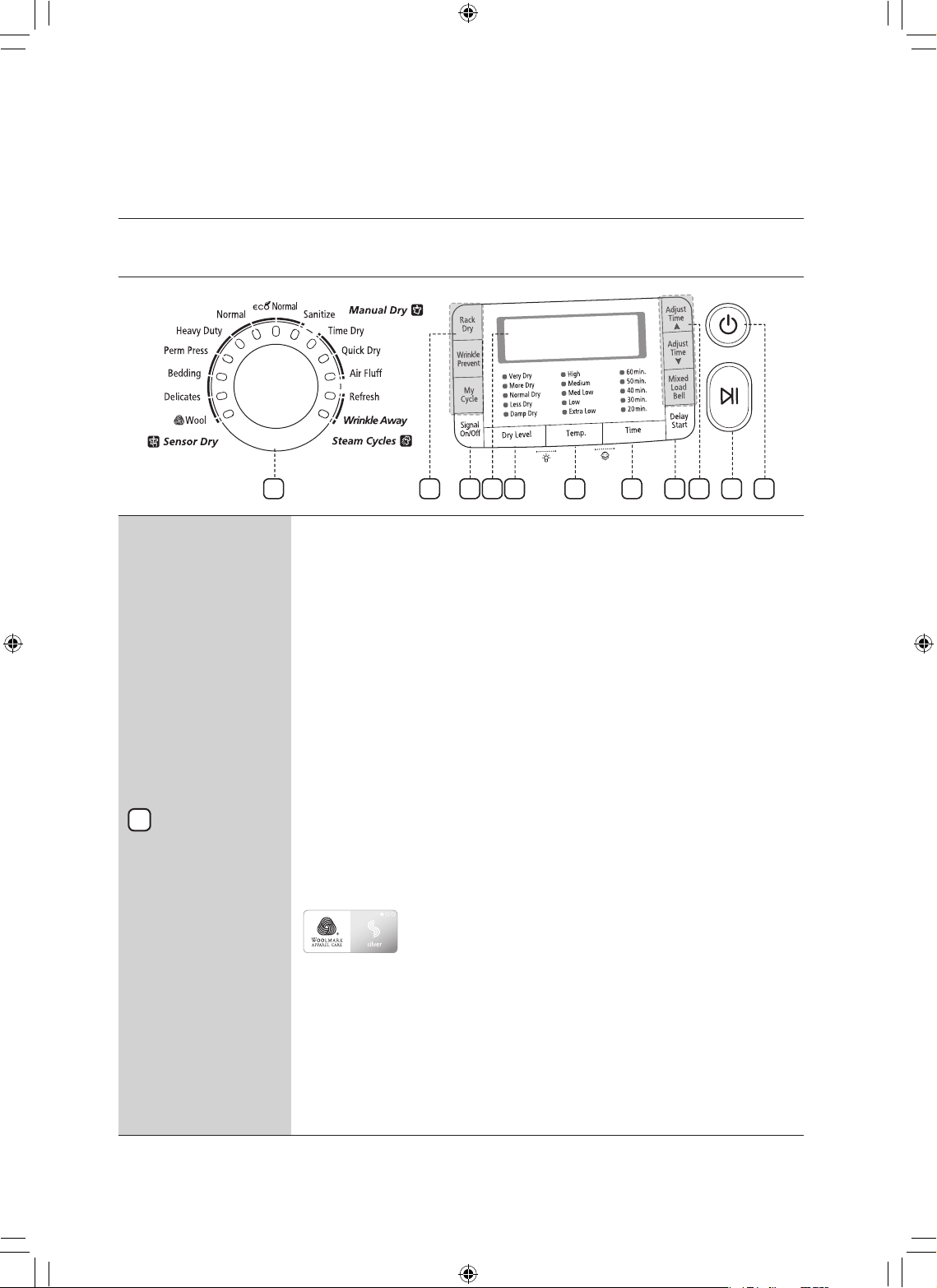
24_ manual de instrucciones, sugerencias
manual de instrucciones,
sugerencias
DESCRIPCIÓN GENERAL DEL PANEL DE CONTROL
Selector de
ciclos
Paraseleccionar un ciclo, gire el disco Selector de ciclos hasta llegar al ciclo deseado.
La luz del indicador junto al nombre del ciclo se iluminará. Los ciclos Normal (Normal),
HeavyDuty(Serviciopesado),Towels(Toallas),PermPress(Planchapermanente)y
Delicates (Prendas delicadas) son ciclos Sensor Dry (Secado con sensor).
La opción Sensor Dry (Secado con sensor) detecta automáticamente la humedad en
la carga y apaga la secadora cuando alcanza el nivel de secado seleccionado (very dry
(muy seco) a damp dry (centrifugado parcial)).
Eco Normal (Eco normal) - Este ciclo reduce el uso de energía entre un 10% y
un 15% en comparación con Normal Dry (Secado normal) según la carga. Ajusta
el tiempo y la temperatura del ciclo para una mejor eficacia con la tecnología de
control inteligente de Samsung.
Normal
(Normal): utilice este ciclo para secar cargastales como algodón, ropa interior y lino.
Heavy Duty
(Servicio pesado): use este ciclo para obtener más calor para las telas
resistentes, tales comolos jeans, el corderoy y la ropa de trabajo.
Perm Press
(Plancha permanente): seca automáticamente prendas de algodón sin
arrugas, telas sintéticas, tejidos y telas que requieren planchado permanente.
Bedding
(Ropa de cama) - Para prendas voluminosas, tales como las
frazadas y las sábanas.
Delicates
(Prendas delicadas): este ciclo fue diseñado para secar prendas sensibles al
calor a baja temperatura de secado.
Wool (Lana) –
Sólo para lana que pueda lavarse en lavadora y secarse en secadora.
Las cargas deben tener un peso inferior a las 3 lb. El ciclo de
Lana de esta máquina ha sido aprobado por Woolmark Company
paraproductosdelanaTotal-Easy-CareM0913(DV520*E*)y
M1007(DV520*G*).
Sanitize
e (Desinfección): este ciclo le permite desinfectar las prendas impregnando
la tela con calor a alta temperatura durante el ciclo de secado. Utilice este ciclo para
mantener su ropa de cama y cortinas limpias por medio de la desinfección.
Time Dry
(Secado con temporizador): este ciclo le permite seleccionar el tiempo del
ciclo deseadoen minutos.
Gire el disco Selector de ciclos a Time Dry (Secado con temporizador), a continuación, presione
la flecha hacia arriba de Adjust Time (Ajustar tiempo) para determinar el tiempo de secado.
Presione la flecha repetidamente para desplazarse por las opciones de tiempo.
1
36 4 5 7
9
1
108
8 2
DV520AE-02836A_MES.indd 24 2010-04-13 �� 4:29:22
manual de instrucciones, sugerencias _25
Quick Dry
(Secado rápido): ofrece un ciclo de secado en 30 minutos.
Air Fluff
(Secado a temperatura ambiente): este ciclo seca la carga con aire a
temperatura ambiente.
Refresh
(Refrescar): este ciclo es el más adecuado para alisar arrugas y reducir los
olores de las cargas de una a cuatro prendas secas. En este ciclo se rocía una pequeña
cantidad de agua en el tambor de la secadora después de varios minutos de secado con
calor.
Wrinkle Away (Antiarrugas) –
este ciclo quitará las arrugas de prendas que se
dejaron en la secadora demasiado tiempo. En este ciclo se rocía una pequeña cantidad
de agua en el tambor de la secadora después de varios minutos de secado con calor.
Si sobrecarga la secadora puede no obtener los mismos resultados.
Pantalla gráfica
digital
Lapantalla digital muestra el tiempo restante del ciclo calculado después de
presionar el botón Start/Pause (Inicio/Pausa).
El tiempo restante calculado
puede fluctuar a medida que avance el ciclo.
Se iluminará la luz de Drying (Secar) y se mantendrá iluminada hasta que se haya
cumplido el ciclo.
Cuando la secadora esté en la fase de enfriamiento, se iluminará la luz de Cooling
(Refrescar).
Cuando la secadora esté en la fase de prevención de arrugas, se iluminará la
luz
Wrinkle Prevent (Prevención de arrugas).
Cuando el ciclo haya finalizado, aparecerá la palabra “END” (Fin) en la pantalla
hasta que se abra la puerta de la secadora o se presione el botón Power
(Encendido).
Si su secadora se detiene durante un ciclo, las luces del indicador parpadearán
hasta que se presione el botón Start/Pause (Inicio/Pausa).
Botón de
selección Dry
Level (Nivel de
secado)
Para
seleccionarelniveldesecadoenlosciclosNormal(Normal),HeavyDuty
(Servicio pesado), u otros ciclos Sensor Dry (Secado con sensor), presione el
botón Dry Level (Nivel de secado). Se iluminará una luz en el indicador junto al
nivel de secado deseado.
Presione el botón repetidamente para desplazarse por las opciones. Las cargas
másgrandesomásvoluminosasposiblementerequieranlaopciónVeryDry(Muy
seco) o More Dry (Más seco) para que el secado sea completo.
La opción Less Dry (Menos seco) es la más adecuada para telas livianas,
o para
que quede algo de humedad en las prendas al final del ciclo. La
opción Damp Dry (Centrifugado parcial) fue concebida para secar las prendas
parcialmente. Utilícela para las prendas que deban secarse en posición horizontal
o colgarse.
Botón de
selección Temp
(Temperatura)
Para
seleccionar la temperatura correcta para la carga, presione el botón Temp
(Temperatura). Se iluminará una luz del indicador junto al nivel de temperatura
deseado. Presione el botón repetidamente para desplazarse por las opciones.
High (Alta): para los algodones resistentes o aquellos con el rótulo “Tumble Dry”
(Secar en secadora).
Medium (Media): para telas que requieren planchado permanente, telas sintéticas,
algodones livianos u otras prendas rotuladas “Tumble Dry Medium” (Secar en
secadora a temperatura media).
Med Low (Media baja): para secar telas sintéticas o de tejido lavable a una
temperatura
inferior a la media.
Low (Baja): para prendas sensibles al calor rotuladas “Tumble Dry Low” (Secar
en secadora a temperatura baja) o “Tumble Dry Warm” (Secar en secadora a
temperatura cálida).
Extra Low (Extrabaja): ofrece la menor temperatura de secado con calor posible.
Botón de
selección Time
(Tiempo)
Cuando utiliza los ciclos Manual Dry (Secado manual), se puede ajustar el tiempo
presionando el botón de selección de tiempo.
Durante el ciclo Sensor Dry (Secado con sensor), el indicador lumínico del tiempo
se encuentra apagado porque el tiempo de secado exacto se determina según
los niveles de humedad fluctuantes.
02 manual de instrucciones, sugerencias
4
3
2
5
DV520AE-02836A_MES.indd 25 2010-04-13 �� 4:29:22
26_ manual de instrucciones, sugerencias
Botón de
selección Signal
(Señal)
Cuando el ciclo haya finalizado, se escuchará una señal sonora.
Cuando esté seleccionada la opción Wrinkle Prevent (Prevención de arrugas), la
s
eñal sonora sonará en forma intermitente.
Ajuste el volumen de la señal sonora o apáguela presionando el botón Signal
(Señal).
Presione el botón repetidamente para desplazarse por las opciones.
Botón de Delay
Start (Inicio
retardado)
Cualquier ciclo puede retardarse hasta 12 horas en incrementos de una hora. La
hora en pantalla indica el tiempo en el cual comenzará el lavado.
Opción de
selección de
ciclo
A
djust Time
(Ajustar tiempo):
se puede agregar o restar tiempo a los tiempos
configurados automáticamente en los ciclos de Manual Dry (Secado manual)
(ciclosTimeDry(Secadocontemporizador),QuickDry(Secadorápido),oAir
Fluff (Secado a temperatura ambiente).
Para agregar o restar tiempo al ciclo, presione la tecla Adjust Time (Ajustar
tiempo) con la flecha hacia arriba o hacia abajo hasta que aparezca el tiempo
deseado.
Wrinkle Prevent (Prevención de arrugas):
Wrinkle Prevent (Prevención de
arrugas) ofrece aproximadamente 90 minutos de secado intermitente con aire
fresco al final de ciclo para reducir la formación de arrugas. Presione el botón
Wrinkle Prevent (Prevención de arrugas) para activar dicha función.
La luz del indicador arriba de la tecla se iluminará cuando se seleccione Wrinkle
Prevent (Prevención de arrugas).
La carga está seca y puede ser retirada en cualquier momento durante el
ciclo Wrinkle Prevent (Prevención de arrugas).
My Cycle (Mi ciclo): elija su ciclo favorito, incluyendo ciclo, temperatura, opción
de nivel de secado, etc. (Consulte la página 22 para obtenermás detalles).
Rack Dry (Secado en estante): esta opción está disponible en el ciclo Time Dry
(Secado con temporizador). La temperatura se establecerá sólo en Extra Low
(Extrabaja). (Consulte la página 23 para obtener más detalles).
Mixed Load Bell(Timbre de carga mixta): es una alarma que notifica al usuario
del tiempo cuando el nivel de secado promedio es centrifugado parcial (80%
seco) cuando el lavado contiene diversos tipos de telas. Suena una alarma
durante cinco (5) segundos mientras continúa el ciclo.
Esta
función sólo puede seleccionarse en el ciclo Sensor Dry (Secado con
sensor) y el nivel de secado sólo puede seleccionarse desde Normal Dry (Secado
normal),MoreDry(Másseco)yVeryDry(Muyseco).
Botón de
selección Start/
Pause (Inicio/
Pausa)
Presiónelo para detener y reiniciar los programas.
Botón Power
(Encendido)
Presiónelo una vez para encender la secadora y presiónelo nuevamente para
apagarla. Si la secadora permanece encendida durante más de 10 minutos sin
que se presione ninguno de los botones, se apagará automáticamente.
manual de instrucciones,
sugerencias
6
9
10
7
8
DV520AE-02836A_MES.indd 26 2010-04-13 �� 4:29:22
manual de instrucciones, sugerencias _27
SEGURO PARA NIÑOS
Una función para evitar que los niños jueguen con la secadora.
Configuración/Liberación
Si desea configurar o liberar esta función, presione simultáneamente los botones Temp.
(Temperatura) y Time (Tiempo) durante 3 segundos.
Cómo configurarla:
1. Puede configurarse mientras su secadora está en funcionamiento.
2. Una vez que configure la función Seguro para niños, no responderá ningún botón, excepto el
botón Power (Encendido), hasta que libere dicha función.
3. Se iluminará el indicador de Seguro para niños.
1. Si se vuelve a encender el electrodoméstico, la función Seguro para niños continuará
encendida.
2. Para liberar dicha función, siga las instrucciones detalladas a continuación.
Cuando otros botones, salvo el botón Power (Encendido), no respondan, verifique el
indicador del Seguro para niños.
LUZ DEL TAMBOR
Enciende el tambor de la secadora mientras se realiza el secado.
Configuración y liberación
Si desea configurar o liberar esta función, presione simultáneamente los botones Dry Level (Nivel
de secado) y Temp. (Temperatura).
Puede configurarse no sólo cuando su secadora está en funcionamiento sino también
cuando está detenida.
Si no apaga la luz del tambor 4 minutos después de que se encienda, la luz del tambor se
apaga automáticamente.
02 manual de instrucciones, sugerencias
DV520AE-02836A_MES.indd 27 2010-04-13 �� 4:29:23
28_ manual de instrucciones, sugerencias
CAMBIAR DE IDIOMA
Puede cambiar el idioma que aparece en pantalla de inglés a francés o español.
Presione y mantenga presionados los botones Rack Dry (Secado en estante) y Wrinkle Prevent (Prevención
de arrugas) durante 3 segundos hasta que cambie la pantalla. Luego seleccione el idioma deseado
presionando el botón Signal (Señal).
Una vez configurado, el idioma seleccionado quedará en la memoria, aunque la secadora se apague o
desenchufe.
MY CYCLE (MI CICLO)
Le permite activar su ciclo a medida que incluye las opciones de nivel de secado, temperatura, tiempo, etc.
Al presionar el botón My Cycle (Mi ciclo), activa las opciones utilizadas durante el modo My Cycle (Mi ciclo)
previo.
(Ciclo predeterminado: Normal)
Si el modo My Cycle (Mi ciclo) está activado, el indicador de My Cycle (Mi ciclo) se encenderá.
Puede seleccionar todas las opciones en el modo My Cycle (Mi ciclo) de la siguiente manera:
1. Seleccione el ciclo utilizando el disco Selector de ciclos.
2. Después de seleccionar el ciclo, elija una opción.
Cada ciclo cuenta con opciones predeterminadas que se configuran de forma automática.
Para observar cuáles son estas opciones predeterminadas, diríjase a la página F-3.
3. A continuación, puede activar la función My Cycle (Mi ciclo) presionando el botón Start/Pause (Inicio/
Pausa) en el modo My Cycle (Mi ciclo). El ciclo y las opciones que seleccione aparecerán la próxima vez
que elija My Cycle (Mi ciclo).
Puede modificar las configuraciones de My Cycle (Mi ciclo) repitiendo el proceso anterior.
La próxima vez que seleccione My Cycle (Mi ciclo) aparecerá la última configuración utilizada.
manual de instrucciones,
sugerencias
DV520AE-02836A_MES.indd 28 2010-04-13 �� 4:29:23
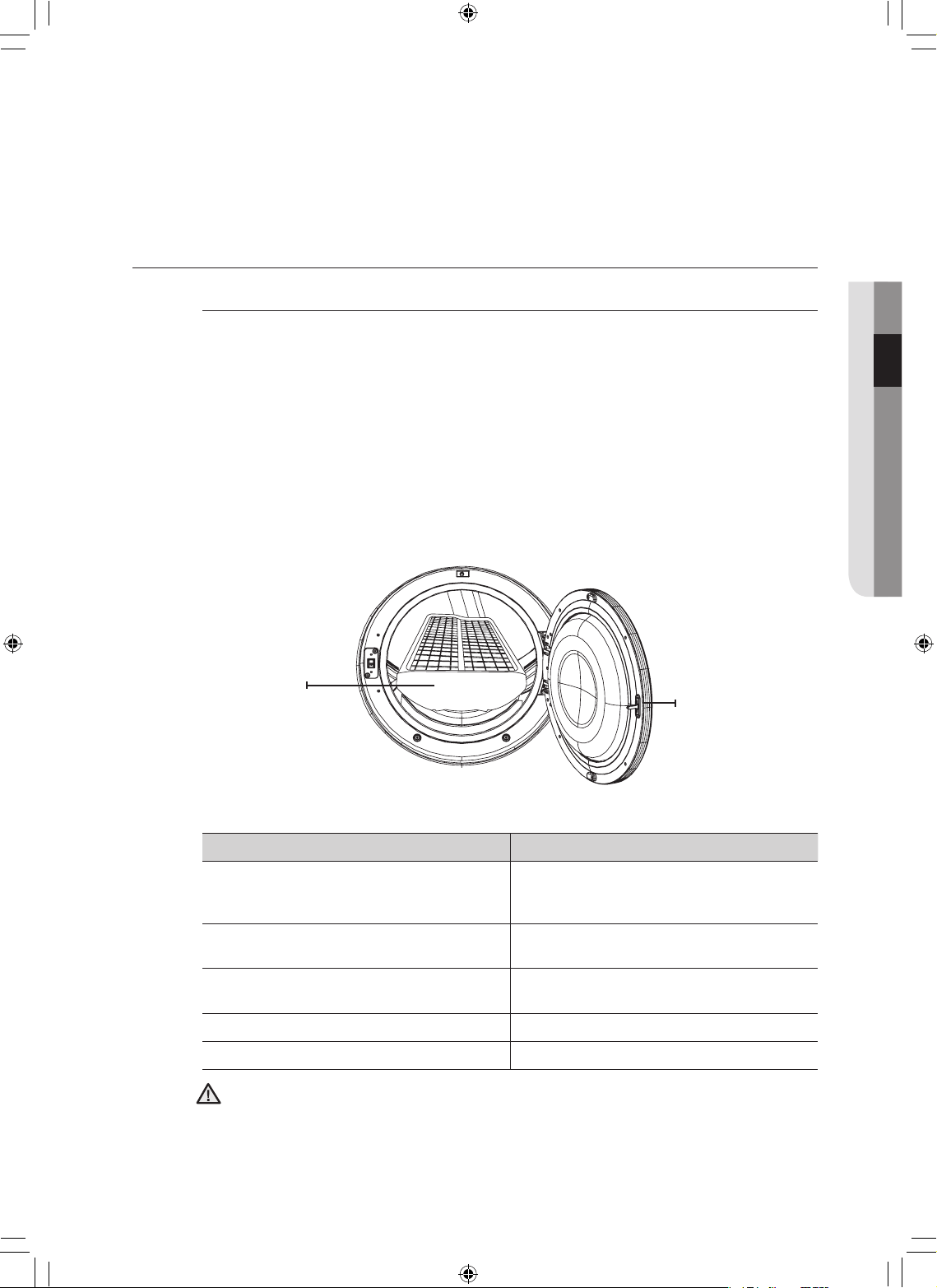
manual de instrucciones, sugerencias _29
RACK DRY (SECADO EN ESTANTE)
Instalación del estante de secado
1. Abra la puerta de la secadora.
2. Coloque el estante de secado en el tambor, con el borde superior del estante de secado
encima del filtro para pelusas.
3. Coloque las patas traseras en las dos áreas empotradas de la pared trasera de la secadora y
luego empuje hacia abajo en el centro del estante de secado para ajustar.
4. Coloque las prendas que se secarán sobre el estante, dejando espacio entre ellas para que
el aire pueda circular.
5. Cierre la puerta de la secadora.
6. Presione el botón RACK DRY (SECADO EN ESTANTE) en el ciclo Time Dry (Secado con
temporizador) y, a continuación, seleccione el tiempo según la humedad y el peso de
la prenda. El secado en estante también se puede utilizar en el ciclo Air Fluff (Secado a
temperatura ambiente).
PRENDAS SUGERIDAS OPCIONES DE TEMP. SUGERIDAS
Suéteres lavables
(dóblelos y colóquelos en posición horizontal
sobre el estante)
Extrabajo (Secado con temporizador)
Muñecos de peluche
(rellenos con fibras de algodón o poliéster)
Extrabajo (Secado con temporizador)
Muñecos de peluche
(rellenos con goma espuma o goma)
Secado a temperatura ambiente
Almohadas de goma espuma Secado a temperatura ambiente
Zapatillas Secado a temperatura ambiente
Secar artículos de goma espuma, plástico o goma con la opción de calor puede ocasionar
daños a los artículos y generar un peligro de incendio.
02 manual de instrucciones, sugerencias
ADVERTENCIA
Puerta
Secado en
estante
DV520AE-02836A_MES.indd 29 2010-04-13 �� 4:29:23
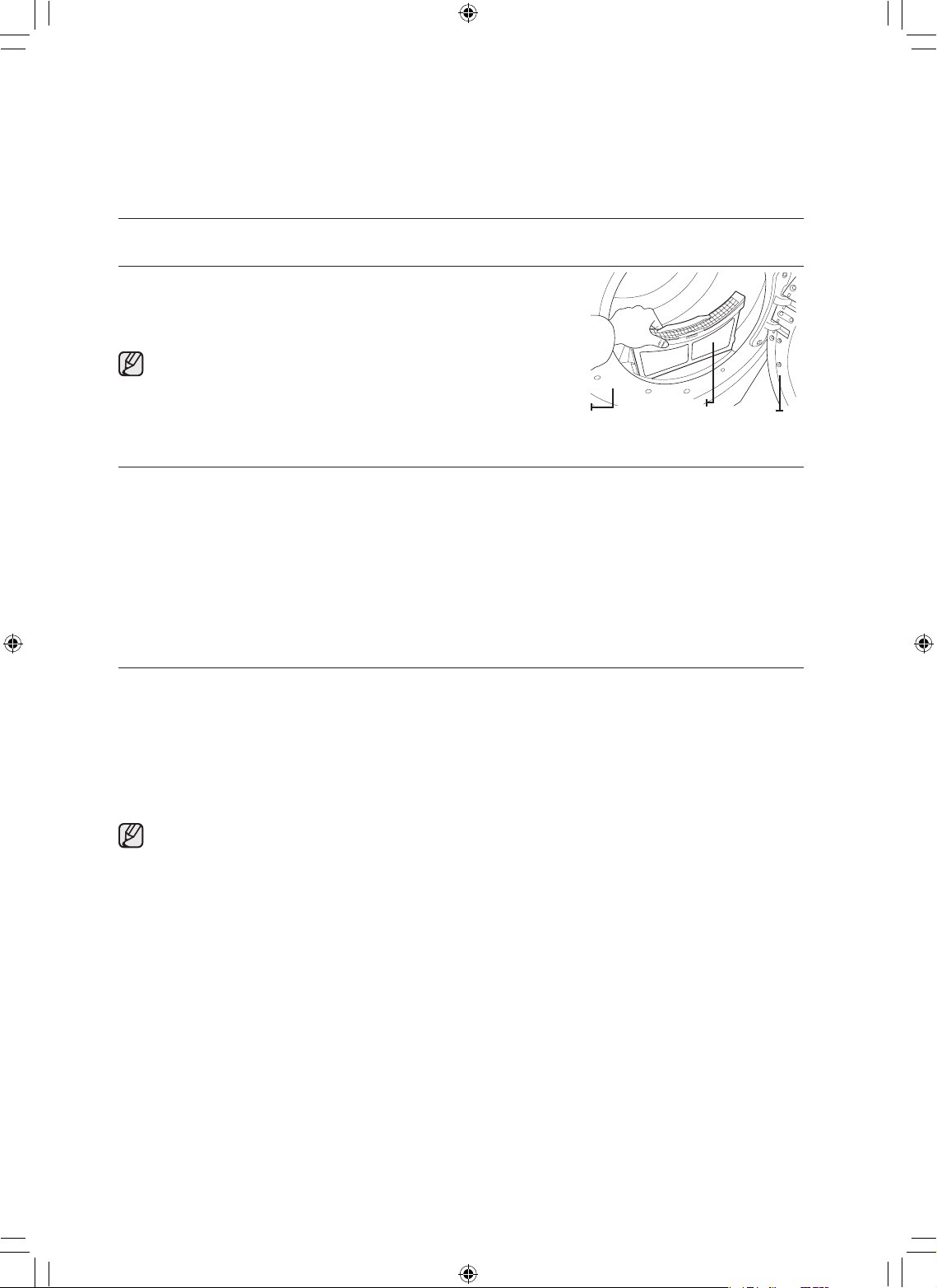
30_ manual de instrucciones, sugerencias
manual de instrucciones,
sugerencias
LIMPIE EL FILTRO PARA PELUSAS
• Después de cada carga.
• Para reducir el tiempo de secado.
• Para hacer uso de la energía con mayor eficacia.
No haga funcionar la secadora sin el filtro para pelusas
colocado.
CARGUE LA SECADORA DE MANERA ADECUADA
• Coloque sólo una carga de ropa en la secadora por vez.
• Las cargas de telas pesadas y livianas mezcladas se secan en forma diferente, lo que puede ocasionar
que las telas livianas estén secas mientras que las telas pesadas queden húmedas al final del ciclo de
secado.
• Agregue una o más prendas similares a la secadora cuando necesite secar sólo una o dos prendas.
Esto mejora el funcionamiento de la secadora y la eficacia del secado.
• Sobrecargar la secadora limita su funcionamiento y ocasiona un secado desparejo así como la
formación excesiva de arrugas en algunas telas.
CÓMO COMENZAR
1. Cargue la secadora dejando algo de espacio libre. NO la sobrecargue.
2. Cierre la puerta.
3. Seleccione el ciclo y las opciones adecuadas para la carga (consulte las páginas 20, 21).
4. Presione el botón Start/Pause (Inicio/Pausa).
5. Se iluminará la luz del indicador de la secadora.
6. El tiempo del ciclo calculado aparecerá en la pantalla.
Es posible que el tiempo fluctúe para indicar mejor el tiempo de secado restante en el ciclo.
• Cuando haya finalizado el ciclo, la luz de la Traba de la puerta se apagará y la palabra “End” (Fin)
aparecerá en la pantalla.
• Si presiona Power (Encendido), se cancelará el ciclo y la secadora se detendrá.
• Los indicadores de Drying (Secar), Cooling (Enfriar) y Wrinkle Prevent (Prevención de arrugas) se
iluminarán durante tales fases del ciclo.
Filtro
Puerta
Marco
(delantero)
DV520AE-02836A_MES.indd 30 2010-04-13 �� 4:29:23
cuidado y limpieza _31
cuidado y limpieza
PANEL DE CONTROL
Limpie con un paño suave y húmedo. No utilice sustancias abrasivas.
No rocíe el panel directamente con limpiadores en aerosol.
El acabado del panel de control puede dañarse a causa de algunos productos removedores de suciedad y
manchas de tratamiento previo al lavado.
Aplique dichos productos lejos de la secadora y limpie el líquido derramado o el rocío inmediatamente.
TAMBOR
Elimine todas las manchas, tales como las de crayón, tinta o tintura de la tela (proveniente de artículos
nuevos, tales como toallas o jeans) con un limpiador común.
Posteriormente, seque las toallas o prendas viejas para eliminar todo exceso de manchas o solución de
limpieza.
Una vez que se hayan seguido estos pasos, es posible que las manchas aún sean visibles, pero no se
transferirán a las cargas subsiguientes.
TAMBOR DE ACERO INOXIDABLE
Para limpiar el tambor de acero inoxidable, use un paño humedecido con un limpiador suave, no abrasivo,
adecuado para superficies de acero inoxidable.
Elimine los residuos del limpiador y seque con un paño limpio.
EXTERIOR DE LA SECADORA
Limpie con un paño suave y húmedo. No utilice sustancias abrasivas.
Proteja la superficie de objetos afilados.
No coloque objetos pesados ni afilados ni tampoco el paquete de detergente sobre la secadora.
Manténgalos apartados sobre el pedestal o en una caja de almacenaje, que puede adquirir por separado.
La cubierta superior de la secadora se podría rayar o dañar.
Ya que toda la secadora tiene un acabado brillante, la superficie se puede rayar o dañar fácilmente. Por lo
tanto, evite rayar o dañar la superficie cuando use la secadora.
SISTEMA DE DRENAJE DE LA SECADORA
Para mantener un óptimo desempeño, se lo debe inspeccionar y limpiar todos los años.
La tapa de drenaje exterior debe limpiarse con más frecuencia para garantizar un funcionamiento
adecuado.
03 cuidado y limpieza
DV520AE-02836A_MES.indd 31 2010-04-13 �� 4:29:23
32_ sugerencias para prendas especiales
sugerencias para prendas
especiales
SUGERENCIAS PARA PRENDAS ESPECIALES
Siga las instrucciones del fabricante o de la etiqueta de indicaciones para secar
prendas especiales. Si no se dispone de etiquetas con indicaciones, use la
siguiente información como guía.
Cubrecamas y edredones
• Siga las instrucciones de la etiqueta o seque en el ciclo Normal
(Normal)ycontemperaturaHigh(Alta).
• Asegúrese de que la prenda esté completamente seca antes de
usarla o guardarla.
• Tal vez deba volver a colocarla para garantizar un secado uniforme.
Frazadas
• Utilice el ciclo Normal (Normal) y seque de a una sola frazada por vez
para lograr un mejor funcionamiento de la secadora.
• Asegúrese de que la prenda esté completamente seca antes de
usarla o guardarla.
Cortinas y paños de tela
• Utilice el ciclo Perm Press (Plancha permanente) y la temperatura
Low (Baja) o Extra Low (Extrabaja) para reducir la formación de
arrugas.
• Seque estos artículos en tandas pequeñas para obtener mejores
resultados y retírelos lo antes posible.
Pañales de tela
• UtiliceelcicloNormal(Normal)ylatemperaturaHigh(Alta)para
pañales suaves y mullidos.
Prendas con relleno de
plumas (chaquetas, bolsas
de dormir, edredones, etc.)
• Utilice el ciclo Normal (Normal) y la opción de temperatura Low (Baja)
o Extra Low (Extrabaja).
• Agregar toallas secas acorta el tiempo de secado y absorbe la
humedad.
Goma espuma (reverso de
alfombras, muñecos de
peluche, hombreras, etc.)
• NO seque con el ciclo de secado con calor. Use el ciclo Air Fluff
(Secado a temperatura ambiente) (sin calor).
• ADVERTENCIA–Secarunartículodegomaconcalorpuede
dañarlo u ocasionar un riesgo de incendio.
Almohadas
• Utilice el ciclo Normal (Normal).
• Agregue un par de toallas secas y un par de zapatillas limpias para
mejorar el funcionamiento de la secadora y secar el artículo.
• NO seque almohadas de capoc o de goma espuma en la secadora.
Utilice el ciclo Air Fluff (Secado a temperatura ambiente).
Plásticos(cortinas de baño,
cubiertas de muebles para
exteriores, etc.)
• Utilice el ciclo Air Fluff (Secado a temperatura ambiente) o el ciclo
Time Dry (Secado con temporizador) y la opción de temperatura
Low (Baja) o Extra Low (Extrabaja) de acuerdo con las instrucciones
de la etiqueta.
ARTICULOS QUE SE DEBEN EVITAR:
• Artículos de fibra de vidrio (cortinas, paños de tela, etc.).
• Lanas, salvo que se recomiende en la etiqueta.
• Artículos embebidos en aceite vegetal o de cocina.
DV520AE-02836A_MES.indd 32 2010-04-13 �� 4:29:23
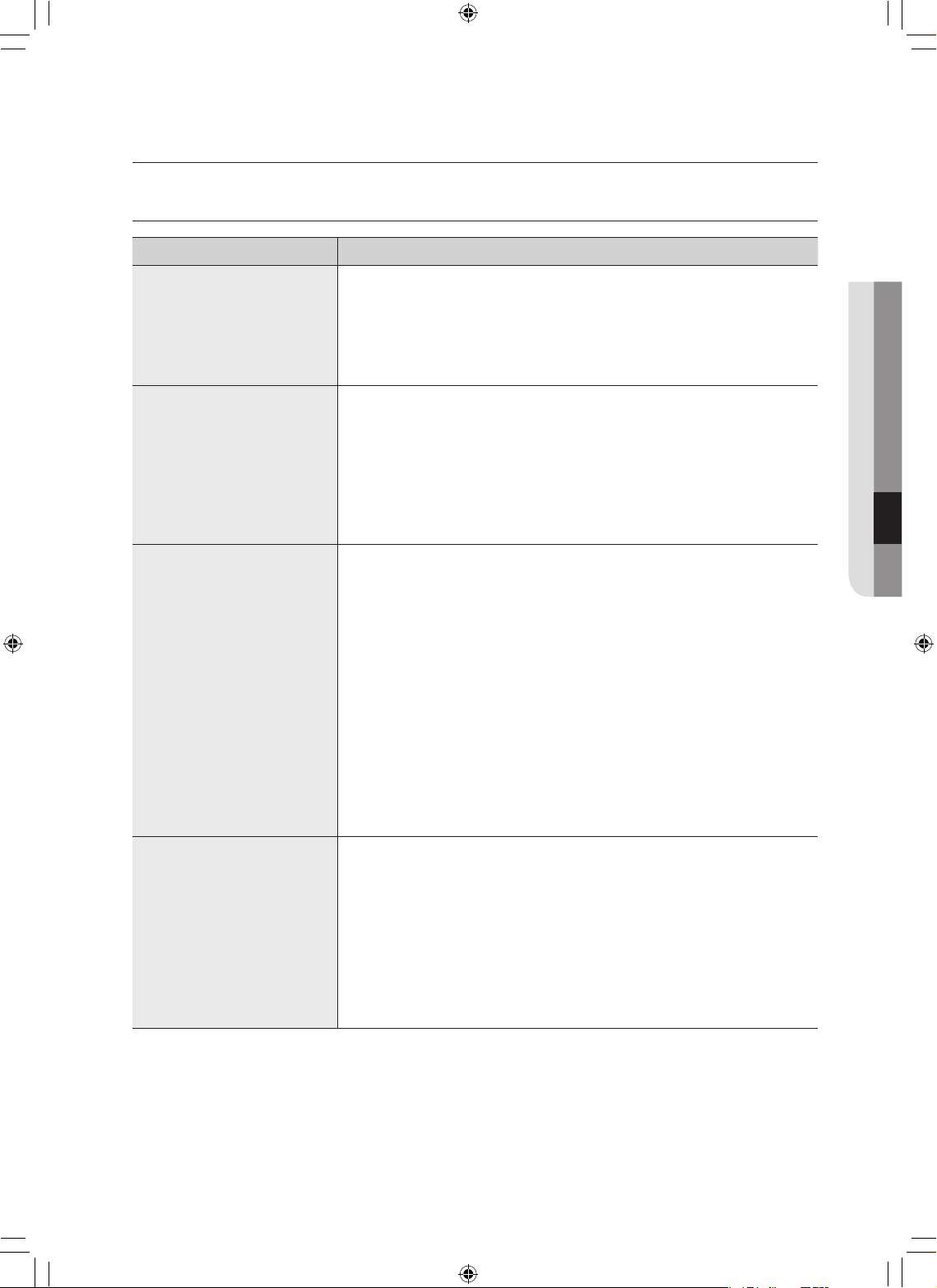
guía de solución de problemas _33
guía de solución de problemas
CONTROLE ESTOS PUNTOS SI SU SECADORA…
PROBLEMA SOLUCIÓN
No funciona.
• Asegúrese de que la puerta esté cerrada con traba.
• Asegúrese de que el cable de alimentación esté enchufado a un
tomacorriente que funcione.
• Controle los disyuntores y fusibles de la casa.
• Presione el botón Start/Pause (Inicio/Pausa) nuevamente si la puerta
se abre durante el ciclo.
No calienta.
• Controle los disyuntores y fusibles de la casa.
• Seleccione una opción de secado con calor distinta de Air Fluff
(Secado a temperatura ambiente).
• En una secadora a gas, verifique que el suministro de gas esté
abierto.
• Limpie el filtro para pelusas y el conducto de drenaje.
• La secadora puede haberse desplazado a la fase de enfriamiento del
ciclo.
No seca.
• Veriquetodoslosítemanterioresy,además,...
• Asegúrese de que la tapa de drenaje hacia el exterior de la casa se
pueda abrir y cerrar sin inconvenientes.
• Veriquequeelsistemadedrenajenopresenteobstrucciones.Los
conductos deben inspeccionarse y limpiarse todos los años.
• Utilice un conducto de drenaje de metal rígido, de 4”.
• No la sobrecargue. 1 carga de lavado = 1 carga de secado.
• Separe los artículos pesados de los artículos livianos.
• Es posible que se deban reubicar los artículos grandes y
voluminosos, como las frazadas o los edredones, para garantizar un
secado uniforme.
• Veriquequelalavadoraestédrenandoenformacorrectapara
extraer el agua de la carga adecuadamente.
• Es posible que la carga sea demasiado pequeña como para secarse
correctamente. Agregue algunas toallas.
Hace ruido.
• Veriquesienlacargahayobjetostalescomomonedas,botones
flojos, clavos, etc. Retírelos de inmediato.
• Es normal escuchar el ruido de la válvula de gas de la secadora o
que el ciclo del dispositivo de calor se enciende o se apaga durante
el ciclo de secado.
• Asegúrese de que la secadora esté correctamente nivelada tal como
se describe en las instrucciones de instalación.
• Es normal que la secadora emita un zumbido debido a alta velocidad
del aire que se mueve por el tambor de la secadora y el sistema de
drenaje.
05 guía de solución de problemas
DV520AE-02836A_MES.indd 33 2010-04-13 �� 4:29:23
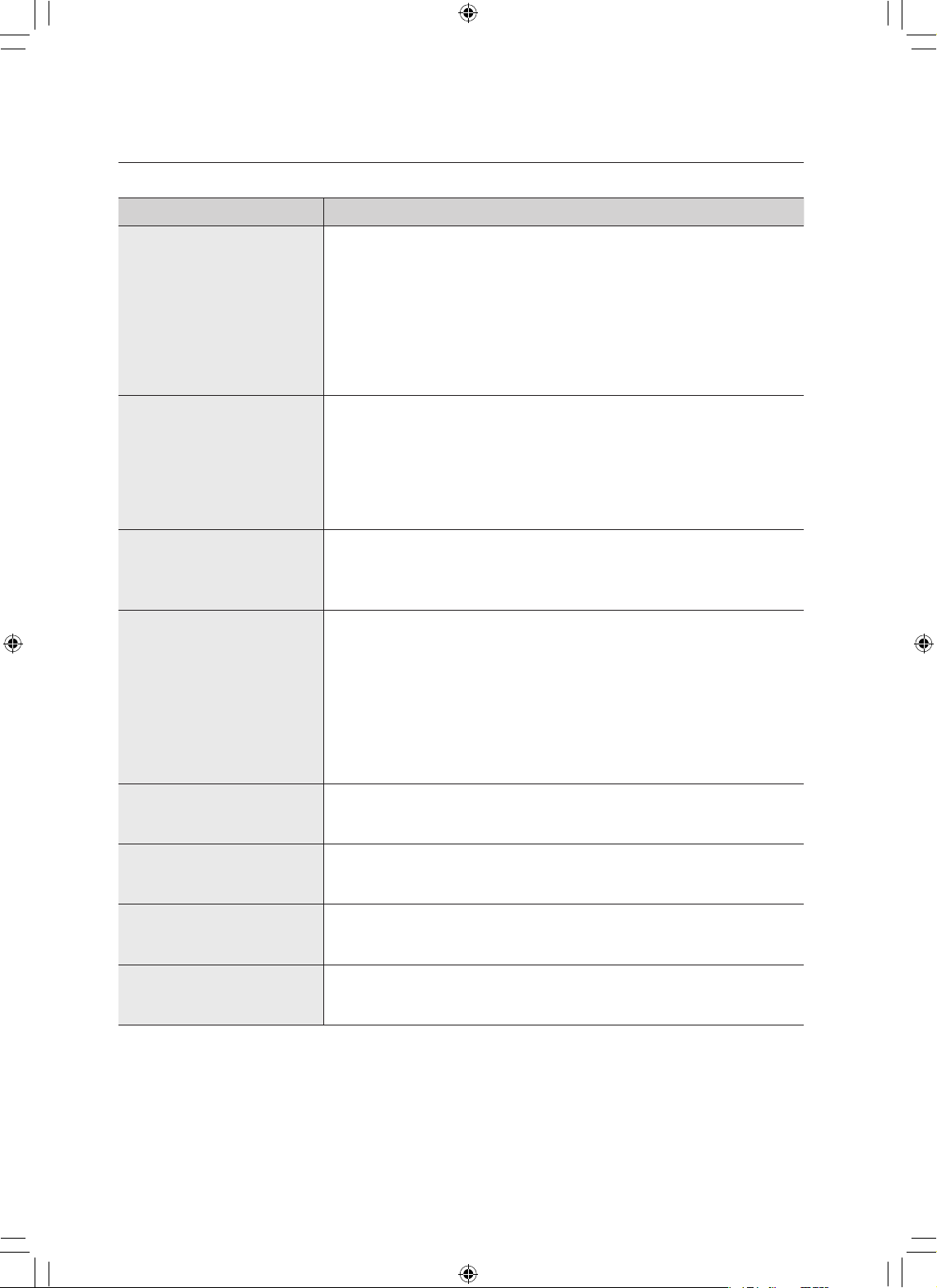
34_ guía de solución de problemas
guía de solución de problemas
PROBLEMA SOLUCIÓN
No seca de manera
uniforme.
• Es posible que las costuras, los bolsillos y otras áreas resistentes
similares no se sequen por completo cuando el resto de la carga ha
llegado al nivel de secado seleccionado. Esto es normal. Seleccione
laopciónVeryDry(Muyseco)silodesea.
• Si se seca un artículo pesado con una carga liviana, por ejemplo una
toalla con sábanas, es posible que el artículo pesado no se seque
completamente cuando el resto de la carga ha alcanzado el nivel de
secadoseleccionado. Separe los artículos pesados de los artículos
livianos para obtener mejores resultados.
Tiene olor.
• Los olores del hogar, ya sea que provengan de pintura, barniz,
limpiadores potentes, etc., pueden ingresar en la secadora con el
aire del ambiente. Esto es normal puesto que la secadora extrae el
aire de la habitación, lo calienta y lo hace circular por el tambor y lo
expulsa a través del drenaje hacia el exterior.
• Cuando estos olores permanecen en el aire, ventile bien la habitación
antes de usar la secadora.
Se apaga antes de que la
carga esté seca
• La carga de la secadora es demasiado pequeña. Agregue más
prendas o algunas toallas y reinicie el ciclo.
• La carga de la secadora es demasiado grande. Retire algunas
prendas y vuelva encender la secadora.
Pelusa en las prendas
• Asegúresede que se limpie el filtro para pelusas antes de cada carga.
Con algunas cargas que producen grandes cantidades de pelusa,
quizá sea necesario limpiar el filtro durante el ciclo.
• Algunas telas producen pelusa (por ejemplo, una toalla de algodón
blanco con mucho pelo) y deben secarse por separado de las
prendas que atrapan pelusa (por ejemplo, un par de pantalones de
lino negro)
• Divida las cargas grandes en cargas más pequeñas para el secado
• Revise bien los bolsillos antes de lavar y secar las prendas.
Prendas arrugadas después
del ciclo Wrinkle-Care
(Antiarrugas)
• Funciona mejor con cargas pequeñas de 1 a 4 prendas.
• Cargue menos prendas. Cargue prendas similares.
Quedan olores en la
ropa después de Refresh
(Refrescar).
• Las telas que contienen olores fuertes deben lavarse en un ciclo
normal.
Gotea agua de la boquilla
cuando comienza Steam-
Care (Proceso de vapor).
• Esto se debe a la condensación del vapor. El goteo de agua se
detendrá en unos minutos.
No se ve el agua rociada
durante Steam-Care
(Proceso de vapor)
• El agua rociada es difícil de ver cuando la puerta está cerrada
DV520AE-02836A_MES.indd 34 2010-04-13 �� 4:29:23
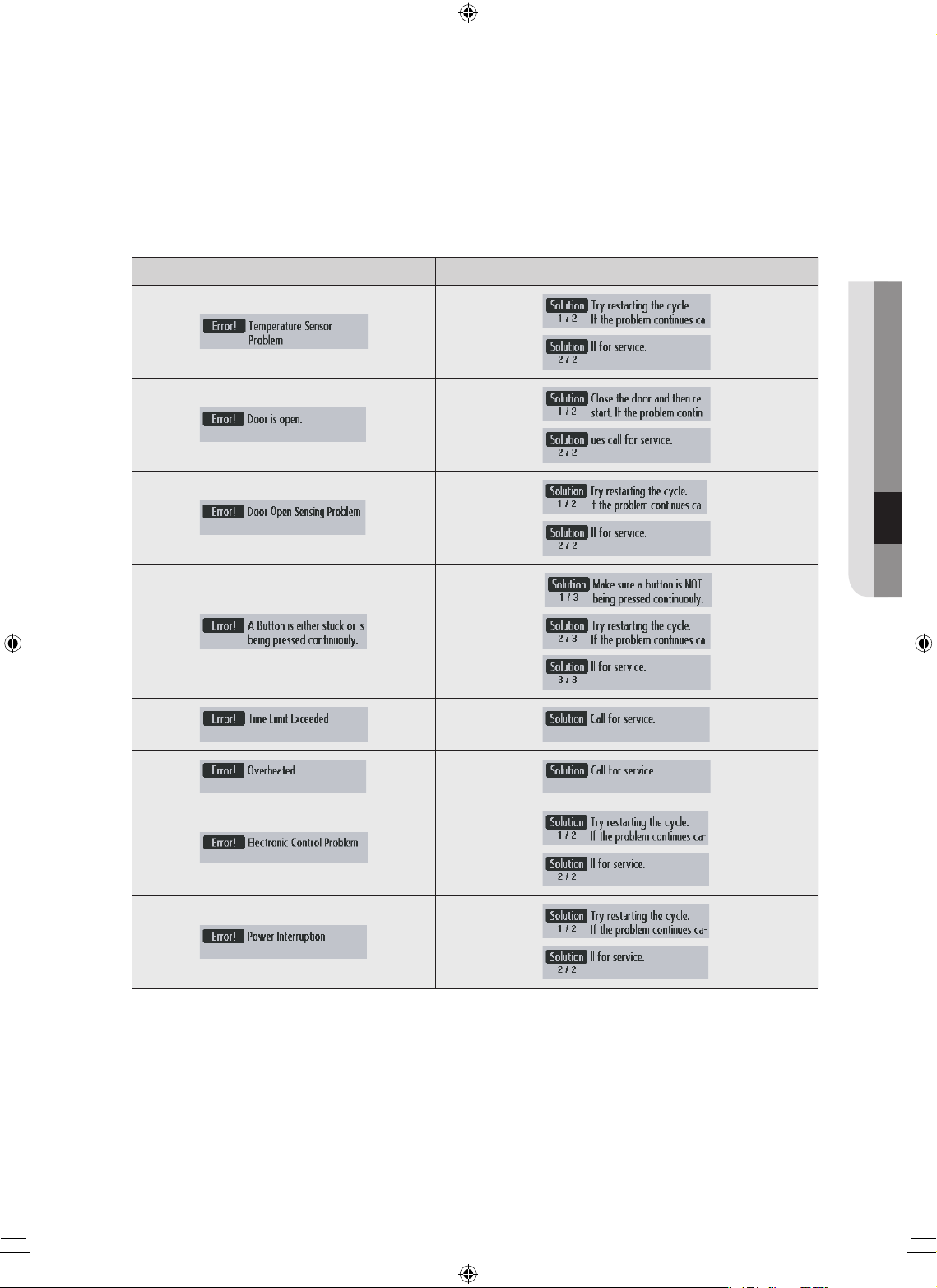
guía de solución de problemas _35
CÓDIGOS DE INFORMACIÓN
Pueden aparecer códigos de información para ayudarle a comprender mejor qué ocurre con la secadora.
PANTALLA DE ERROR PANTALLA DE SOLUCIÓN
Para los códigos que no figuran más arriba, llame al 1–800–726–7864 (1–800–SAMSUNG).
05 guía de solución de problemas
DV520AE-02836A_MES.indd 35 2010-04-13 �� 4:29:29
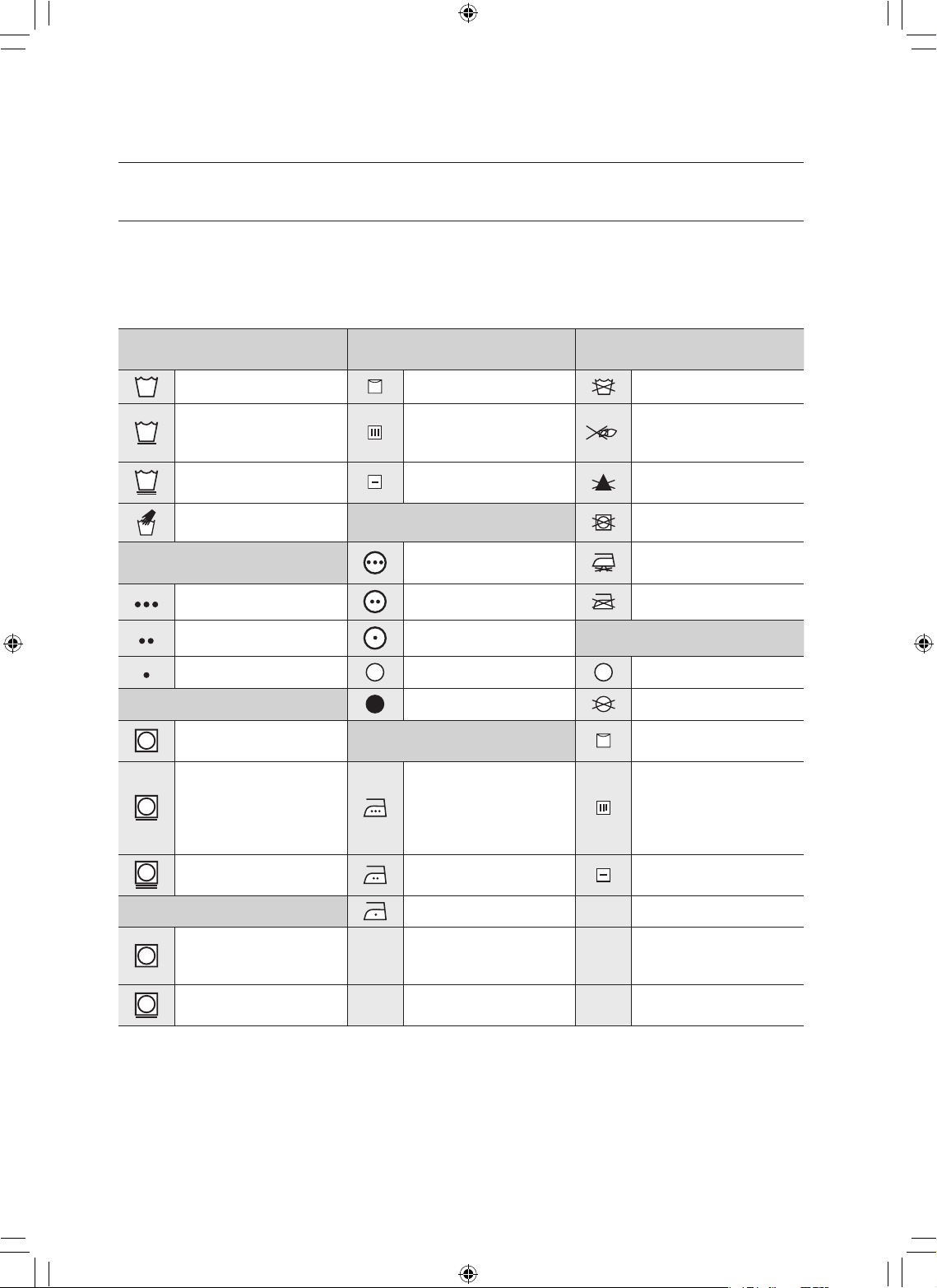
36_ apéndice
apéndice
TABLA DE INDICACIONES DEL TEJIDO
Los siguientes símbolos ofrecen indicaciones acerca de las prendas. La etiqueta de indicaciones de la
prenda incluye símbolos para lavado, blanqueado, secado y planchado, o limpieza a seco cuando sea
necesaria. El uso de símbolos garantiza la consistencia entre los fabricantes textiles de artículos nacionales
e importados. Siga las indicaciones de la etiqueta para prolongar la vida útil de la prenda y reducir los
problemas del lavado.
Ciclo de lavado Instrucciones especiales
Símbolos de advertencia para
el lavado
Normal Secar colgado / tender No lavar
Plancha permanente /
Antiarrugas / Control de
arrugas
Colgar para que escurra No retorcer
Prendas suaves /
delicadas
Secar en posición
horizontal
No usar lejía
Lavado a mano
Secado con calor
No secar en secadora
Temperatura del agua**
High(Alta)
Sin vapor (agregado a la
plancha)
Caliente Medio No planchar
Cálida Bajo
Limpiar en seco
Fría Cualquier calor Limpiar en seco
Lejía
Sin calor / aire No limpiar en seco
Cualquier lejía (cuando
sea necesaria)
Temperaturas de secado con
plancha o vapor
Secar colgado / tender
Sólo lejía sin cloro (con
protección para ropa de
color)
Lejía (cuando sea
necesaria)
High(Alta) Colgar para que escurra
Ciclo de secado en
secadora
Medio
Secar en posición
horizontal
Normal
Bajo
Plancha permanente /
Antiarrugas / Control de
arrugas
Prendas suaves /
delicadas
** Los símbolos con punto representan las temperaturas del agua del lavado apropiadas para diversas
prendas. El rango de temperatura para Caliente es de 41 °C a 52 °C (105 °F a 125 °F), para Cálida es de
29 °C a 41 °C (de 85 °F a 105 °F) y para Fría es de 16 °C a 29 °C (de 60 °F a 85 °F). (La temperatura del
agua del lavado debe alcanzar un mínimo de 16 °C (60 °F) para que se active el detergente y se logre un
lavado eficaz).
DV520AE-02836A_MES.indd 36 2010-04-13 �� 4:29:29
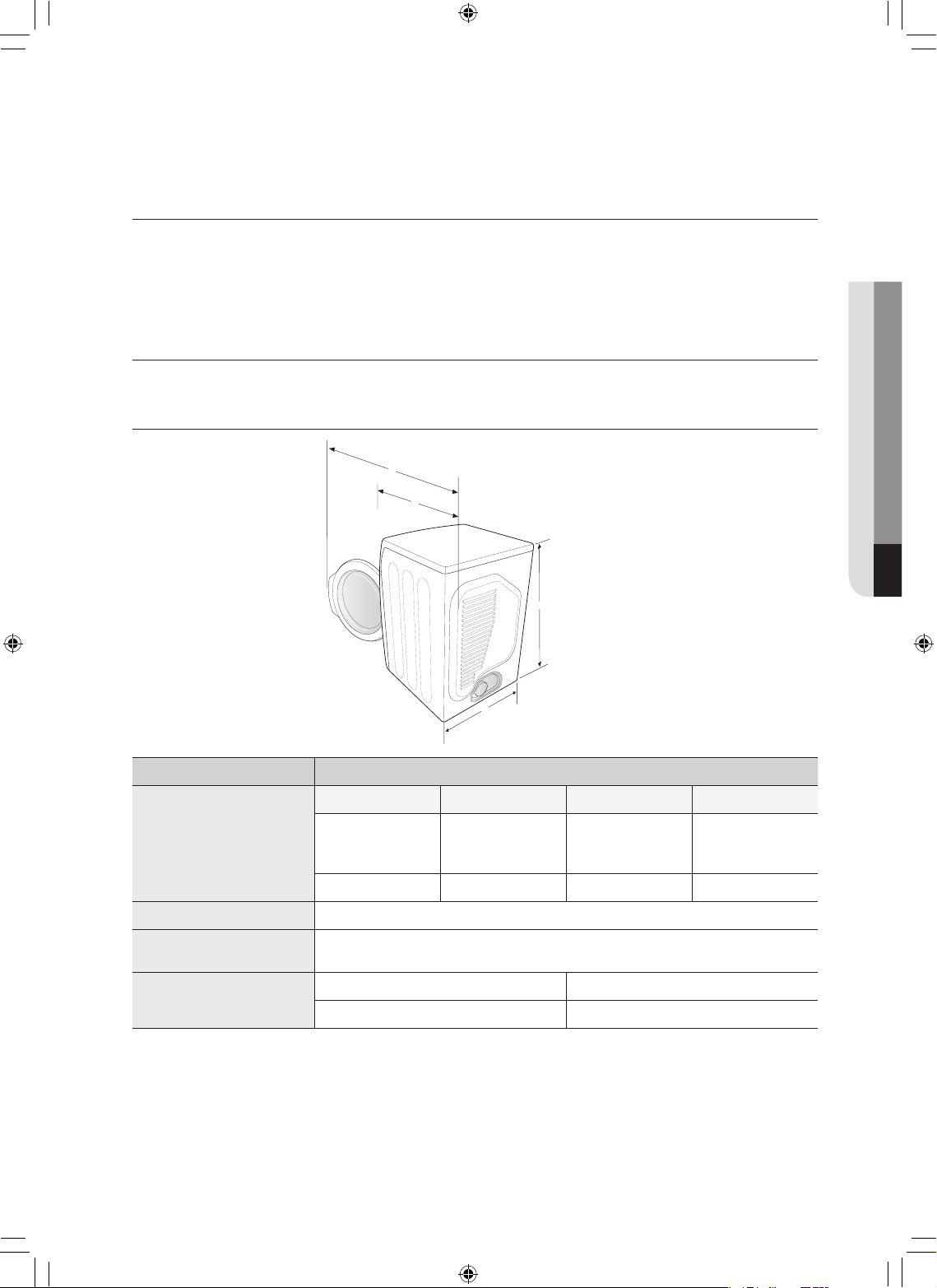
apéndice _37
PROTECCIÓN DEL MEDIO AMBIENTE
Este electrodoméstico se fabrica con materiales reciclables. Si decide deshacerse de este
electrodoméstico, siga la normativa local relacionada con la eliminación de desechos. Corte el cable
de alimentación para que el electrodoméstico no pueda conectarse a una fuente de alimentación.
Quitelapuertaparaquelosanimalesylosniñospequeñosnopuedanquedaratrapadosdentrodel
electrodoméstico.
DECLARACIÓN DE CONFORMIDAD
Este electrodoméstico cumple con la norma UL2158.
ESPECIFICACIONES
TIPO SECADORA DE CARGA FRONTAL
DIMENSIONES
Div Pulgadas (cm.) Div Pulgadas (cm.)
A. Altura
39” (99,1)
C. Profundidad
con la puerta
abierta a 90°
51,65”(131,2)
B. Ancho
27” (68,6)
D. Profundidad
32,28”(82,0)
PESO
56,5 kg
POTENCIA DEL
CALENTADOR
5300 W
CONSUMO DE
ENERGÍA
SIN CALOR
268 W
CON CALOR
5445 W
06 apéndice
A
B
C
D
DV520AE-02836A_MES.indd 37 2010-04-13 �� 4:29:30
38_ apéndice
apéndice
TABLA DE CICLOS
Elec. Dryer Type
Ciclo
Predeterminado Secar Enfriar
Prevención
de arrugas
Control de
temp.
Nivel de
secado con
sensor
Tiempo Tiempo Tiempo Tiempo
Secado con
sensor
Normal Media
Secado
normal
50 min 47 min 3 min
180 min
Servicio
pesado
Alta
Secado
normal
66 min 63 min 3 min
Planchado
permanente
Media
Secado
normal
40 min 37 min 3 min
Ropa de
cama
Alta
Secado
normal
58 min 55 min 3 min
Prendas
delicadas
Extra Low
Secado
normal
35 min 32 min 3 min
Desinfección
Alta
(Sin cambios)
Muy seco 60 min 55 min 5 min
Eco Normal
Medium Low
(Sin cambios)
Secado
normal
100 min 97 min 3 min
Lana
Baja
(Sin cambios)
Secado
normal
20 min 19 min 1 min
Secado
manual
Secado a
temperatura
ambiente
- - 20 min - 20 min
Secado
rápido
Alta
(Sin cambios)
- 30 min 27 min 3 min
Secado con
temporizador
Alta - 40 min 37 min 3 min
Ciclos de
vapor
Wrinkle Away
Alta
(Sin cambios)
- 20 min 19 min 1 min
Refrescar
Alta
(Sin cambios)
- 15 min 14 min 1 min
DV520AE-02836A_MES.indd 38 2010-04-13 �� 4:29:30
apéndice _39
TABLA DE CICLOS
Gas Dryer Type
Ciclo
Predeterminado Secar Enfriar
Prevención
de arrugas
Control de
temp.
Nivel de
secado con
sensor
Tiempo Tiempo Tiempo Tiempo
Secado con
sensor
Normal
Alta
(Media)
Secado
normal
42 min 39 min 3 min
180 min
Servicio
pesado
Alta
(Sin cambios)
Secado
normal
58 min 55 min 3 min
Planchado
permanente
Media
(Sin cambios)
Secado
normal
32 min 29 min 3 min
Ropa de
cama
Alta (Media)
Secado
normal
50 min 47 min 3 min
Prendas
delicadas
Baja
(Sin cambios)
Secado
normal
27 min 24 min 3 min
Desinfección
Alta
(Sin cambios)
Muy seco 60 min 55 min 5 min
Eco Normal
Alta
(Sin cambios)
Secado
normal
72 min 69 min 3 min
Lana
Baja
(Sin cambios)
Secado
normal
28 min 27 min 1 min
Secado
manual
Secado a
temperatura
ambiente
-
(Sin cambios)
- 20 min - 20 min
Secado
rápido
Alta
(Sin cambios)
- 30 min 27 min 3 min
Secado con
temporizador
Alta - 40 min 37 min 3 min
Ciclos de
vapor
Wrinkle Away
Alta
(Sin cambios)
- 20 min 19 min 1 min
Refrescar
Alta
(Sin cambios)
- 15 min 14 min 1 min
06 apéndice
DV520AE-02836A_MES.indd 39 2010-04-13 �� 4:29:30
40_ garantía
garantía
SECADORA SAMSUNG
GARANTÍA LIMITADA PARA EL COMPRADOR ORIGINAL
El presente producto de la marca SAMSUNG, tal como lo provee y distribuye SAMSUNG ELECTRONICS
AMERICA, INC. (SAMSUNG) y lo entrega nuevo, en su embalaje de cartón original al comprador o
consumidor original, está garantizado por SAMSUNG contra defectos de fabricación de los materiales y la
mano de obra durante el período limitado de la garantía de:
Un (1) año para las piezas y la mano de obra
Dos (2) años para las piezas del panel de control
La presente garantía limitada comienza en la fecha original de compra y es válida únicamente para
productos comprados y usados en los Estados Unidos.
Para recibir el servicio técnico de la garantía, el comprador debe comunicarse con SAMSUNG con el fin de
que se determine el problema y los procedimientos del servicio.
El servicio técnico de la garantía sólo puede ser prestado por un centro de servicio técnico autorizado de
SAMSUNG.
Se debe presentar la factura de compra original como prueba de compra a SAMSUNG o al servicio técnico
autorizado de SAMSUNG.
SAMSUNG prestará servicio técnico a domicilio durante el período de la garantía sin costo, sujeto a la
disponibilidad dentro de los Estados Unidos contiguos.
El servicio técnico a domicilio no está disponible en todas las áreas.
Para recibir el servicio técnico a domicilio, el producto no debe presentar obstrucciones y debe ser
accesible para el agente del servicio técnico.
Si el servicio técnico no está disponible, SAMSUNG puede optar por transportar el producto hasta y desde
el servicio técnico autorizado.
SAMSUNG reparará, reemplazará el producto u ofrecerá un reembolso a su criterio y sin cargo adicional,
tal como se establece en la presente garantía, con piezas o productos nuevos o reacondicionados si se
comprueba que es defectuoso durante el período limitado de la garantía especificado anteriormente.
Todas las piezas y los productos reemplazados pasan a ser propiedad de SAMSUNG y deben ser
devueltos a SAMSUNG.
Las piezas y los productos reemplazados asumen la garantía original restante, o noventa (90) días, el
período que sea el más prolongado.
La presente garantía limitada cubre defectos de fabricación de los materiales y la mano de obra
encontrados durante el uso normal y doméstico de este producto y no será válida para lo siguiente:
daños que ocurran durante el envío; entrega e instalación; aplicaciones y usos para los cuales el presente
producto no fue destinado; números de serie o producto alterados; daño cosmético o acabado exterior;
accidentes, abuso, descuido, incendio, inundación, caída de rayos, u otros casos fortuitos o de fuerza
mayor; uso de productos, equipo, sistemas, utilidades, servicios, piezas, suministros, accesorios,
aplicaciones, instalaciones, reparaciones, cableado externo o conectores no provistos ni autorizados por
SAMSUNG que dañen este producto o que acarreen problemas en el servicio; voltaje de la línea eléctrica
incorrecto, fluctuaciones y sobretensión; ajustes del cliente e incumplimiento de lo establecido en el manual
de instrucciones, instrucciones de mantenimiento y ambientales que están cubiertas y recomendadas en el
manual de instrucciones; traslado y reinstalación del producto; problemas causados por plagas.
La presente garantía limitada no cubre problemas derivados de la corriente, el voltaje o el suministro
eléctrico incorrectos, las bombillas de luz, los fusibles de la casa, el cableado de la casa, el costo del
servicio técnico para recibir instrucciones o corregir errores en la instalación.
SAMSUNG no garantiza el funcionamiento ininterrumpido o sin errores del producto.
DV520AE-02836A_MES.indd 40 2010-04-13 �� 4:29:30
garantía _41
EXCEPTO LO ESTABLECIDO EN EL PRESENTE, NO EXISTEN GARANTÍAS SOBRE ESTE PRODUCTO,
YASEANEXPRESASOTÁCITAS,YSAMSUNGDESCONOCETODASLASGARANTÍASQUEINCLUYEN,
AUNQUENOENCARÁCTERTAXATIVO,CUALQUIERGARANTÍATÁCITADEQUEELPRODUCTOSE
ENCUENTRAENCONDICIONESAPTASPARALAVENTA,DEDEFRAUDACIÓNDEDERECHOSODE
QUEELPRODUCTOSEADECUAALOSFINESESPECÍFICOSPARALOSCUALESSEADQUIERE.
NINGÚNAVALOGARANTÍAOTORGADOSPORPERSONA,COMPAÑÍAOCORPORACIÓNALGUNA
CONRESPECTOALPRESENTEPRODUCTOREVESTIRÁCARÁCTERVINCULANTEPARASAMSUNG.
SAMSUNG NO SERÁ RESPONSABLE POR PÉRDIDA DE INGRESOS O LUCRO CESANTE,
IMPOSIBILIDADDEGENERARAHORROSUOBTENEROTROSBENEFICIOS,OCUALQUIERDAÑO
DERIVADODECIRCUNSTANCIASESPECIALES,DAÑOIMPREVISTOODERIVADOCAUSADO
POR EL USO, USO INCORRECTO, O INCAPACIDAD PARA USAR EL PRESENTE PRODUCTO,
INDEPENDIENTEMENTEDELATEORÍALEGALENQUESEFUNDEELRECLAMOYAUNCUANDOSE
LEHAYANOTIFICADOASAMSUNGDELAPOSIBILIDADDETALESDAÑOS.
NINGÚN RESARCIMIENTO DE NINGUNA ÍNDOLE CONTRA SAMSUNG SUPERARÁ EL PRECIO DE
COMPRADELPRODUCTOVENDIDOPORSAMSUNGYCAUSANTEDELPRESUNTODAÑO.
SIN LIMITAR LO PRECEDENTE, EL COMPRADOR ASUME TODO EL RIESGO Y LA RESPONSABILIDAD
PORPÉRDIDA,DAÑOOLESIÓNALCOMPRADORYALOSBIENESDELCOMPRADORYATERCEROS
YASUSBIENESDERIVADOSDELUSO,USOINCORRECTOOINCAPACIDADPARAUSAREL
PRESENTE PRODUCTO.
LA PRESENTE GARANTÍA LIMITADA NO SE EXTENDERÁ A NINGUNA PERSONA DISTINTA DEL
COMPRADOR ORIGINAL DEL PRESENTE PRODUCTO, ES INTRANSFERIBLE Y ESTABLECE SU
EXCLUSIVAREPARACIÓN.
Algunos estados no permiten limitaciones en cuanto al plazo de una garantía implícita, o la exclusión o
limitación de daños imprevistos o derivados, por lo tanto las limitaciones o exclusiones antedichas pueden
no aplicarse en su caso. Esta garantía le otorga derechos específicos, y además puede tener otros
derechos que varían según el estado en el que se encuentre.
Para recibir servicio técnico de garantía, comuníquese con SAMSUNG a:
SAMSUNG ELECTRONICS AMERICA, INC. – CONSUMER ELECTRONICS CUSTOMER SERVICE
400 Valley Road, Suite 201, Mt. Arlington, NJ 07856
1-800-SAMSUNG(726-7864)
www.samsung.com
DV520AE-02836A_MES.indd 41 2010-04-13 �� 4:29:30
¿TIENE PREGUNTAS O COMENTARIOS?
País LLAME AL O VISÍTENOS EN LÍNEA EN
U.S.A 1-800-SAMSUNG(726-7864) www.samsung.com
MEXICO 01-800-SAMSUNG(726-7864) www.samsung.com
Code No. DC68-02836A_MES
DV520AE-02836A_MES.indd 42 2010-04-13 �� 4:29:30