Sl E
EF
Y Sl
E
E
TO
GREEN
IV1257A
'S I STALLAT
CONTENTS
SAFETY WARNING SIGNS ..............................................................2
OPERATINGINSTRUCTIONS .......................................................4
SETTINGUPTHE REFRIGERATOR.......................................................4
MAJORFEATURES....................................................................................4
CONTROLPANEL......................................................................................5
DIGITALPANEL...........................................................................................6
TEMPERATURECONTROL .....................................................................7
ICE AND COLDWATERDISPENSER .....................................................7
SHELVESAND BINS..................................................................................8
FOODSTORAGEGUIDE ..........................................................................9
ARCTIC SELECTZONETM DRAWERGUIDE.........................................11
FRESH SELECTZONETM DRAWERGUIDE...........................................12
REMOVINGTHE FREEZERACCESSORIES.........................................13
REMOVING THE FRIDGEACCESSORIES..........................................13
REMOVINGTHE ARCTIC SELECT ZONEACCESSORIES.................14
REMOVINGTHE FRESHSELECTZONEACCESSORIES..................14
CLEANINGTHEACCESSORIES............................................................15
CHANGINGTHE INTERIORLIGHT........................................................16
WATERFILTER.........................................................................................18
DOORS......................................................................................................18
INSTALLATION INSTRUCTIONS...............................................19
INSTALLATIONOF THE REFRIGERATOR............................................20
ADJUSTINGTHE HEIGHTBETWEENTHE DOORS............................21
REMOVINGTHE REFRIGERATORDOORS..........................................24
REATTACHINGTHE REFRIGERATORDOORS....................................25
CHECKINGTHE WATERDISPENSERLINE..........................................32
INSTALLATIONOF THE WATERDISPENSERLINE .............................32
BEFOREYOUCALL FOR SERVICE.......................................................37
DA99-01418A REV(0.1)
/k
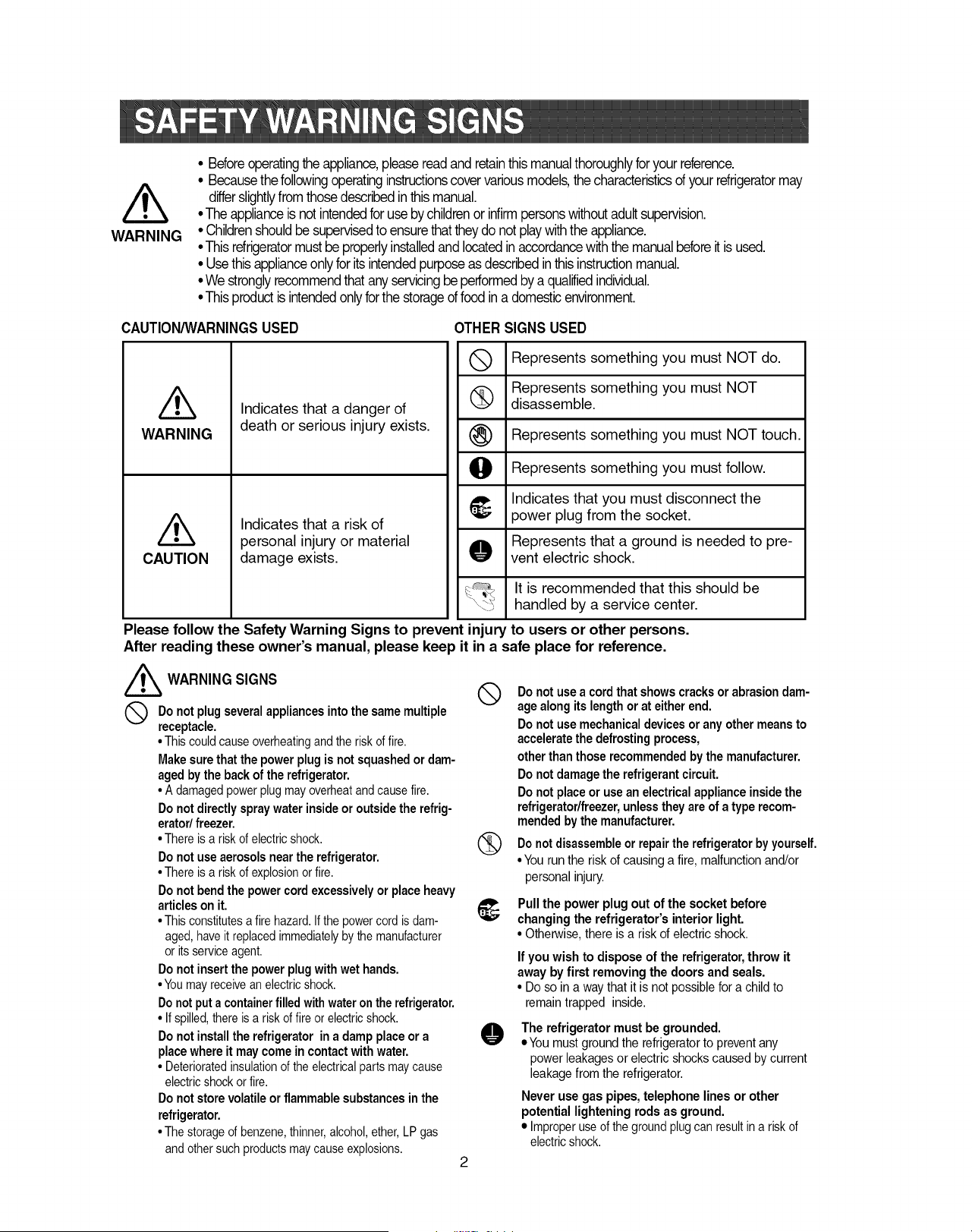
WARNING
• Beforeoperatingthe appliance,pleasereadandretainthismanualthoroughlyforyourreference.
• Becausethe followingoperatinginstructionscovervariousmodels,thecharacteristicsof yourrefrigeratormay
differslightlyfrom thosedescribedinthismanual.
• The applianceis notintendedfor useby childrenor infirmpersonswithoutadultsupervision.
• Childrenshouldbe supervisedto ensurethattheydo notplaywiththe appliance.
• Thisrefrigeratormustbe properlyinstalledand locatedin accordancewiththe manualbeforeit is used.
• Usethis applianceonlyfor itsintendedpurposeas describedin this instructionmanual.
• We stronglyrecommendthatany servicingbeperformedby a qualifiedindividual.
• Thisproductis intendedonlyforthe storageoffood in a domesticenvironment.
CAUTION/WARNINGSUSED OTHER SIGNS USED
Q Represents something you must NOT do.
Represents something you must NOT
disassemble.
(_) Represents something you must NOT touch.
O Represents something you must follow.
Indicates that you must disconnect the
_' power plug from the socket.
Represents that a ground is needed to pre-
O vent electric shock.
It is recommended that this should be
handled by a service center.
/k
WARNING
CAUTION
Indicates that a danger of
death or serious injury exists.
Indicates that a risk of
personal injury or material
damage exists.
Please follow the Safety Warning Signs to prevent injury to users or other persons.
After reading these owner's manual, please keep it in a safe place for reference.
/_ WARNING SIGNS
Q o not plug severalappliancesintothe samemultiple
receptacle.
• This couldcauseoverheatingandthe riskof fire.
Make sure that the power plug is not squashed or dam-
aged by the back of the refrigerator,
• A damagedpowerplugmayoverheatandcausefire.
Do not directly spray water inside or outside the refrig-
erator/ freezer.
• There is a riskof electricshock.
Do not use aerosols near the refrigerator.
• There is a riskof explosionorfire.
Do not bend the power cord excessively or place heavy
articles on it.
• This constitutesa fire hazard.If the powercord is dam-
aged, haveit replacedimmediatelyby the manufacturer
or itsserviceagent.
Do not insert the power plug with wet hands.
• Youmayreceivean electricshock.
Do not put a containerfilled with water on the refrigerator.
• If spilled,thereis a riskof fire or electricshock.
Do not install the refrigerator in a damp place or a
place where it maycome in contact with water.
• Deterioratedinsulationof theelectricalparts maycause
electricshock orfire.
Do not store volatile or flammable substances in the
refrigerator.
• The storageof benzene,thinner,alcohol,ether,LP gas
and othersuch productsmaycauseexplosions.
Q Do not use a cordthat showscracksor abrasiondam-
age alongits lengthorat either end.
Do not use mechanicaldevicesor any other meansto
acceleratethe defrostingprocess,
otherthan those recommendedbythe manufacturer.
Do not damagethe refrigerantcircuit.
Do not placeor usean electricalapplianceinsidethe
refrigerator/freezer,unlesstheyare of a type recom-
mendedbythe manufacturer.
not or repair refrigeratorbyyourself.
Do disassemble the
• You run the risk of causing a fire, malfunction and/or
personal injury.
{_ Pull the power plug out of the socket before
changing the refrigerator's interior light.
• Otherwise,there is a risk of electric shock.
O
If you wish to dispose of the refrigerator,throw it
away by first removing the doors and seals.
• Do so in a way that it is not possiblefor a child to
remain trapped inside.
The refrigerator must be grounded.
eYou must ground therefrigerator to prevent any
power leakages or electric shocks caused by current
leakage from the refrigerator.
Never use gas pipes, telephone lines or other
potential lightening rods as ground.
• Improperuse of the groundplugcan resultin a risk of
electricshock.
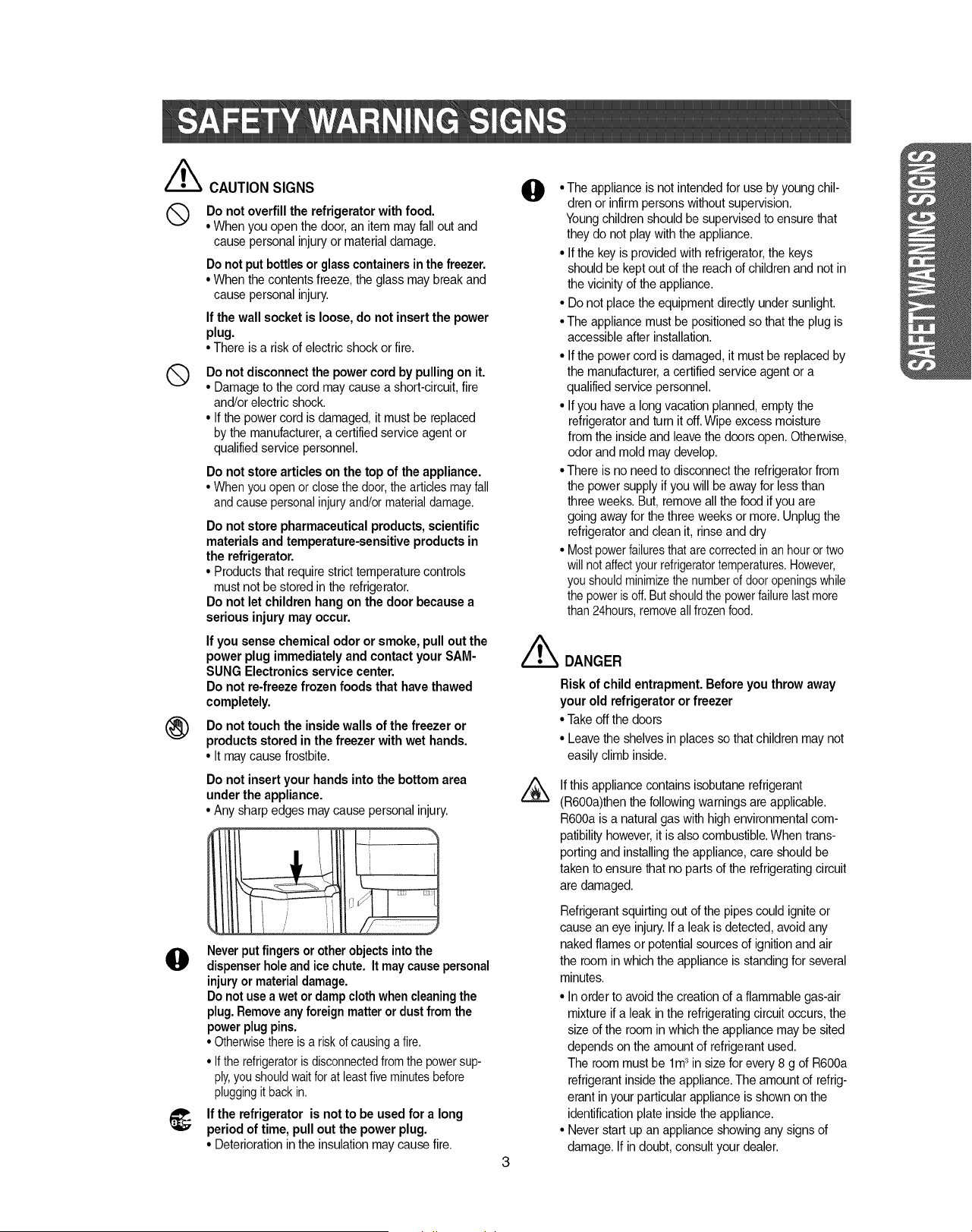
//_ CAUTIONSIGNS
Q Do not overfill the refrigerator with food.
• When you open thedoor, an item may fall out and
cause personal injuryor material damage.
Do not put bottles or glasscontainersin the freezer.
• When the contents freeze, the glass may break and
cause personal injury.
If the wall socket is loose, do not insert the power
plug.
• There is a risk of electric shock or fire.
®
Do notdisconnectthe power cord by pulling on it.
• Damage to the cord maycause a short-circuit, fire
and/or electric shock.
• If the power cord is damaged, it must be replaced
by the manufacturer,a certified service agent or
qualified service personnel.
Do not store articles on the top of the appliance.
• When you open or close the door,the articlesmay fall
and causepersonal injuryand/or materialdamage.
Do not store pharmaceutical products, scientific
materialsand temperature-sensitiveproducts in
the refrigerator.
• Products that require strict temperature controls
must not be stored in the refrigerator.
Do not let children hang on the door because a
serious injury may occur.
If you sense chemical odor or smoke, pull out the
power plug immediately and contact your SAM-
SUNG Electronicsservice center.
Do not re-freeze frozen foods that have thawed
completely.
Do not touch the inside walls of the freezer or
products stored in the freezer with wet hands.
• It maycause frostbite.
@
Do not insert your hands into the bottom area
under the appliance.
• Any sharp edges maycause personal injury.
Neverput fingers or otherobjectsintothe
dispenserholeandice chute. It maycause personal
injuryor materialdamage.
Do notuse a wet or dampclothwhencleaningthe
plug.Removeany foreign matteror dustfrom the
powerplugpins.
• Otherwisethere is a riskof causinga fire.
• If the refrigeratoris disconnectedfrom the powersup-
ply,you shouldwaitforat leastfive minutesbefore
pluggingit backin.
_; If the refrigerator is not to be used for a long
period of time, pull out the power plug.
• Deteriorationin the insulation may cause fire.
0
• The appliance is not intended for use by young chil-
dren or infirm persons without supervision.
Youngchildren should be supervised to ensure that
they do not play with the appliance.
• If the key is provided with refrigerator,the keys
should be kept out of the reach of children and not in
the vicinity of the appliance.
• Do not placethe equipment directly under sunlight.
• The appliance must be positionedso that the plug is
accessible after installation.
• If the power cord is damaged, it must be replaced by
the manufacturer,a certified service agent or a
qualified service personnel.
• If you havea long vacation planned, empty the
refrigeratorand turn it off.Wipe excess moisture
from the inside and leave the doors open. Otherwise,
odor and mold may develop.
• There is no need to disconnectthe refrigeratorfrom
the power supply ifyou will be away for less than
three weeks.But, removeall the food if you are
going away for the three weeks or more. Unplug the
refrigeratorand clean it, rinse and dry
• Mostpowerfailuresthatare correctedin an houror two
willnot affectyour refrigeratortemperatures.However,
you shouldminimizethe numberof dooropeningswhile
thepower is off. Butshouldthe powerfailure lastmore
than24hours,removeall frozenfood.
/_ DANGER
Risk of child entrapment. Before you throw away
your old refrigerator or freezer
• Takeoff the doors
• Leave the shelves in places so that children may not
easily climb inside.
If this appliance contains isobutane refrigerant
(R6OOa)thenthe followingwarnings are applicable.
R6OOais a natural gas with high environmentalcom-
patibility however,it is also combustible.When trans-
porting and installing the appliance, care should be
taken to ensure that no parts of the refrigeratingcircuit
are damaged.
Refrigerant squirting out of the pipes could ignite or
cause an eye injury.If a leak is detected, avoid any
naked flames or potential sources of ignitionand air
the roomin which the appliance is standing for several
minutes.
• In order to avoid the creation of a flammable gas-air
mixture if a leak in the refrigerating circuit occurs, the
size of the room in which the appliance may be sited
depends on the amount of refrigerant used.
The room must be lm 3in size for every 8 g of R6OOa
refrigerant inside the appliance.The amount of refrig-
erant in your particular appliance is shown on the
identification plate inside the appliance.
• Never start up an appliance showingany signs of
damage. If in doubt, consult your dealer.
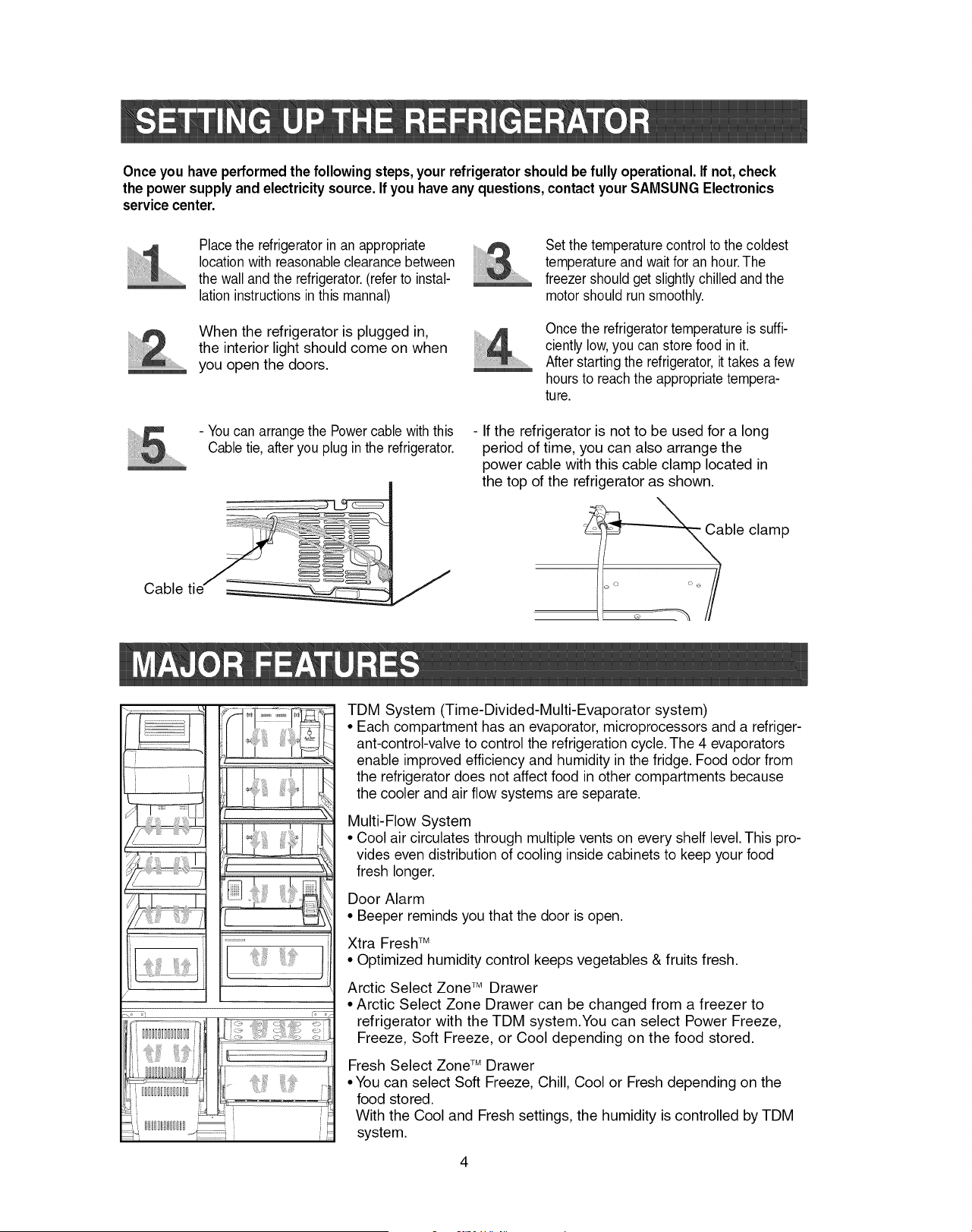
Once you have performedthe following steps, your refrigeratorshould be fully operational. If not, check
the power supplyand electricitysource. If you haveany questions,contactyour SAMSUNG Electronics
servicecenter.
Cable tie
Place the refrigeratorin an appropriate
locationwith reasonableclearance between
the wall and the refrigerator.(refer to instal-
lation instructions in this mannal)
When the refrigerator is plugged in,
the interior light should come on when
you open the doors.
- You can arrange the Powercable with this
Cable tie, afteryou plug inthe refrigerator.
.................
Set the temperature controlto the coldest
temperature and waitfor an hour.The
freezer should get slightlychilled and the
motorshould runsmoothly.
Once the refrigeratortemperatureis suffi-
ciently low,you can storefood in it.
After starting the refrigerator,it takes a few
hoursto reachthe appropriate tempera-
ture.
- If the refrigerator is not to be used for a long
period of time, you can also arrange the
power cable with this cable clamp located in
the top of the refrigerator as shown.
ble
o
Q
clamp
i I
J
J
J
TDM System (Time-Divided-Multi-Evaporator system)
• Each compartment has an evaporator, microprocessors and a refriger-
ant-control-valve to control the refrigeration cycle. The 4 evaporators
enable improved efficiency and humidity in the fridge. Food odor from
the refrigerator does not affect food in other compartments because
the cooler and air flow systems are separate.
Multi-Flow System
• Cool air circulates through multiple vents on every shelf level. This pro-
vides even distribution of cooling inside cabinets to keep your food
fresh longer.
Door Alarm
• Beeper reminds you that the door is open.
Xtra Fresh TM
• Optimized humidity control keeps vegetables & fruits fresh.
Arctic Select Zone TM Drawer
• Arctic Select Zone Drawer can be changed from a freezer to
refrigerator with the TDM system.You can select Power Freeze,
Freeze, Soft Freeze, or Cool depending on the food stored.
Fresh Select Zone TM Drawer
• You can select Soft Freeze, Chill, Cool or Fresh depending on the
food stored.
With the Cool and Fresh settings, the humidity is controlled by TDM
system.
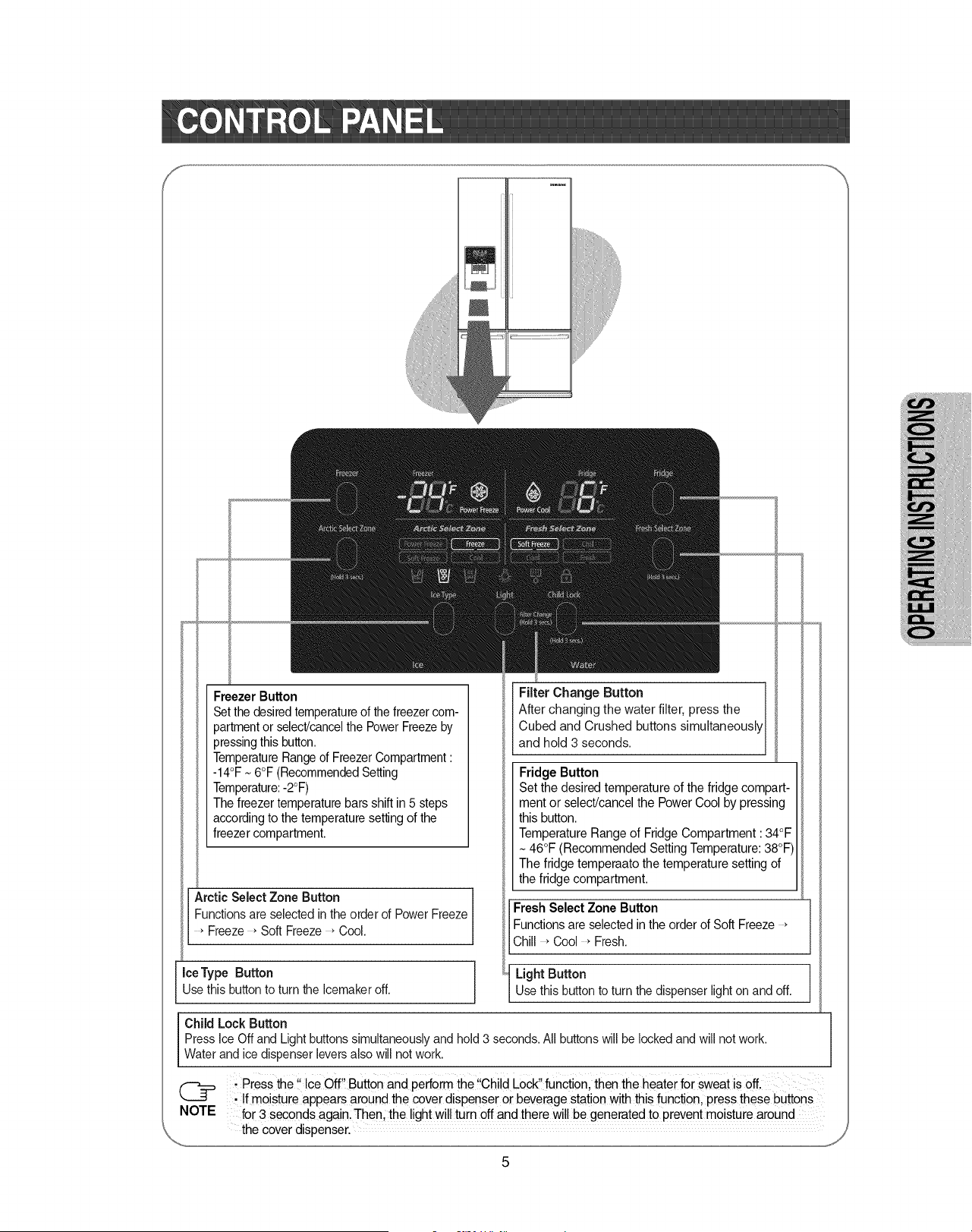
Freezer Button
Set the desiredtemperatureof the freezercom-
partment or select/cancelthe Power Freezeby
pressingthis button.
TemperatureRangeof FreezerCompartment:
-14°F ~ 6°F (RecommendedSetting
Temperature:-2°F)
The freezer temperature bars shift in 5 steps
according to the temperature setting of the
freezer compartment.
Arctic Select Zone Button
Functions are selected in the order of Power Freeze
Freeze * Soft Freeze _Cool.
Ice Type Button
Use this buttonto turn the Icemaker off.
Child Lock Button
Filter Change Button
After changing the water filter, press the
Cubed and Crushed buttons simultaneously
and hold 3 seconds.
Fridge Button
Set the desired temperature of the fridge compart-
ment or select/cancel the Power Cool by pressing
this button.
Temperature Range of Fridge Compartment :34°F
46°F (Recommended Setting Temperature:38°F
The fridge temperaato the temperature setting of
the fridge compartment.
J
Fresh Select Zone Button
Functions are selected in the order of Soft Freeze
Chill _Cool _Fresh.
Light Button
Use this button to turn the dispenser light on and off.
Press Ice Off and Light buttons simultaneouslyand hold 3 seconds. All buttonswill be lockedand will not work.
Water and ice dispenser levers also will not work.
;Press the !' ice off,! Button and perfoim the !!Chi!dLock,,function, then the heater for sweat is off.
@ • !fmoisture appears around the cover dispenser or beverage station with this function, press these buttons
NOTE for 3 seconds again. Then, the light wi!l turn 0ff and there wi!! begenerated to preventmoisture around
the cover dispenser.
%.,,.
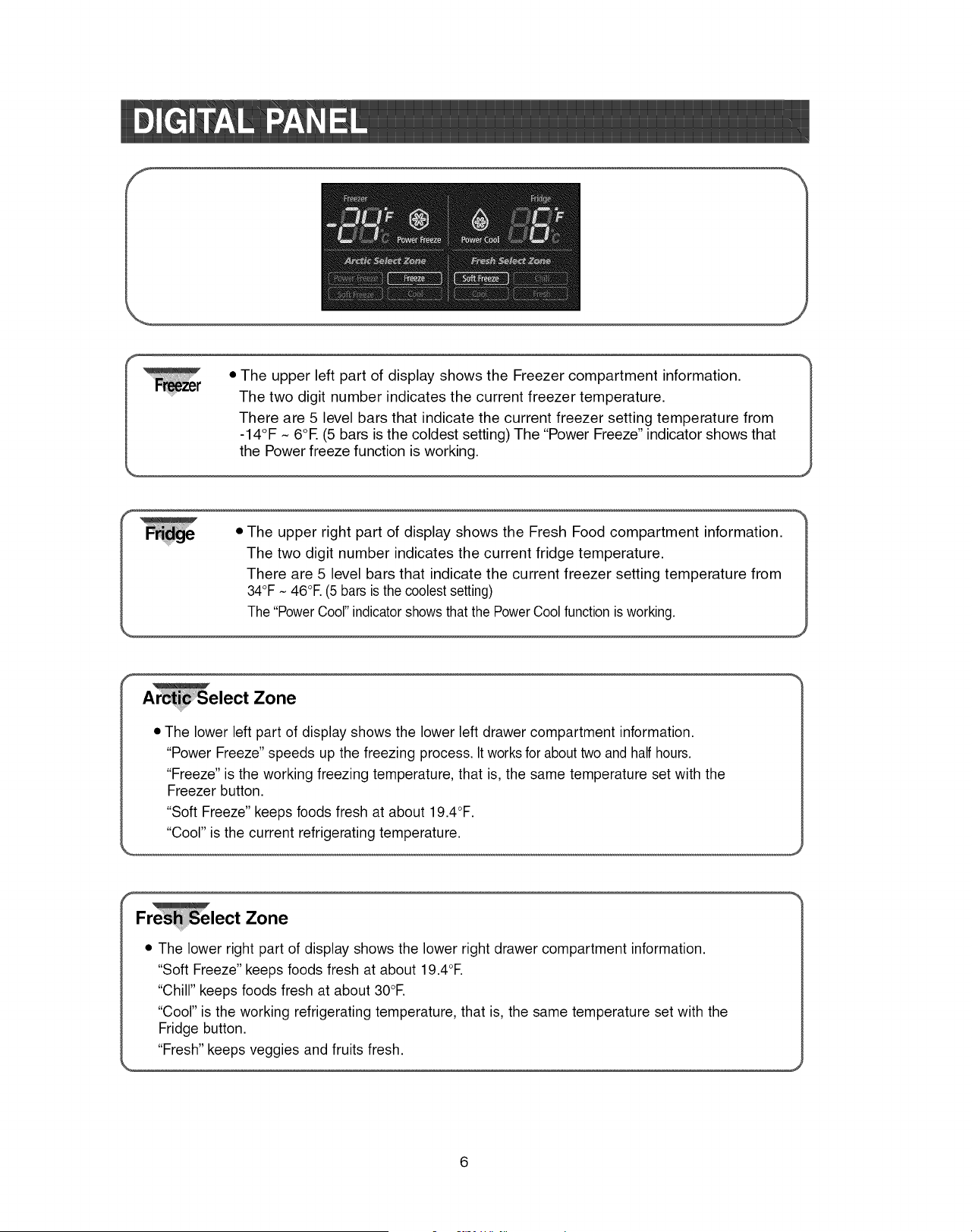
• The upper left part of display shows the Freezer compartment information.
The two digit number indicates the current freezer temperature.
There are 5 level bars that indicate the current freezer setting temperature from
-14°F N 6OE (5 bars is the coldest setting) The "Power Freeze" indicator shows that
the Power freeze function is working.
• The upper right part of display shows the Fresh Food compartment information.
The two digit number indicates the current fridge temperature.
There are 5 level bars that indicate the current freezer setting temperature from
34°F ~ 46°E (5 bars is the coolestsetting)
The "PowerCool" indicatorshows that the PowerCool function is working.
lect Zone
• The lower left part of display shows the lower left drawer compartment information.
"Power Freeze" speeds up the freezing process. It works for about two and half hours.
"Freeze" is the working freezing temperature, that is, the same temperature set with the
Freezer button.
"Soft Freeze" keeps foods fresh at about 19.4°F.
"Cool" is the current refrigerating temperature.
F lect Zone
• The lower right part of display shows the lower right drawer compartment information.
"Soft Freeze" keeps foods fresh at about 19.4°E
"Chill" keeps foods fresh at about 30°E
"Cool" is the working refrigerating temperature, that is, the same temperature set with the
Fridge button.
"Fresh" keeps veggies and fruits fresh.
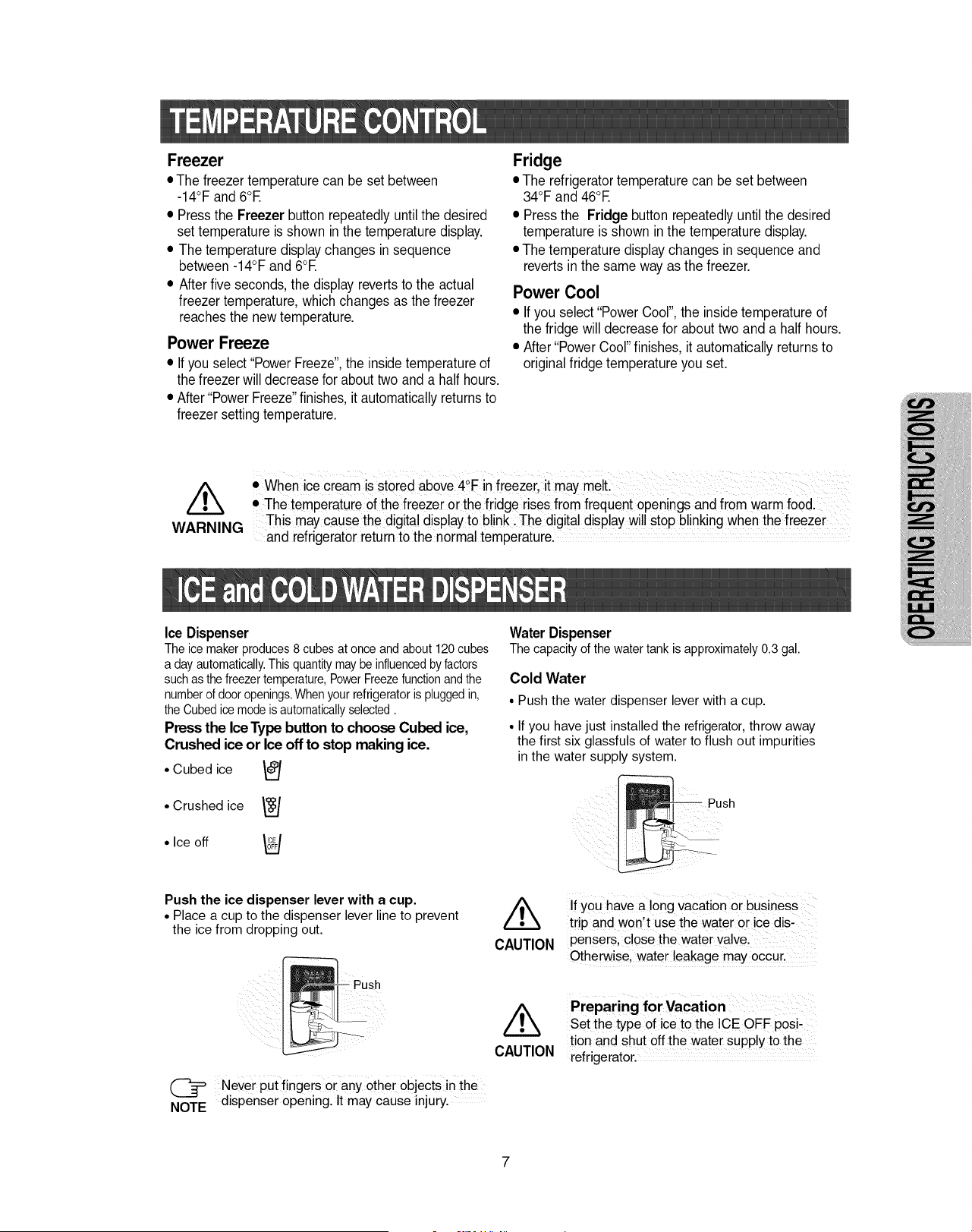
Freezer
• The freezer temperaturecan be set between
-14°F and 6°E
• Pressthe Freezer buttonrepeatedly untilthe desired
set temperature is shown in the temperature display.
• The temperature displaychanges in sequence
between-14°F and 6°E
• Afterfive seconds, the display revertsto the actual
freezer temperature,whichchanges as the freezer
reachesthe new temperature.
Power Freeze
• If you select "PowerFreeze",the insidetemperatureof
the freezerwill decreasefor about two and a half hours.
• After "PowerFreeze"finishes, it automaticallyreturnsto
freezersetting temperature.
Fridge
• The refrigeratortemperature can be set between
34°F and 46°E
• Pressthe Fridge button repeatedlyuntil the desired
temperature is shown inthe temperature display.
• The temperature display changes in sequence and
reverts in the same way as the freezer.
Power Cool
• If you select "Power Cool",the insidetemperature of
the fridge will decreasefor about two and a half hours.
• After"Power Cool"finishes, it automaticallyreturnsto
originalfridge temperature you set.
• When ice cream is stored above4°F in freezer, itma melt
Y •
• The temperature of the freezerOrthe fridge rises fromfrequent openings and from warmfood.
This may cause the digital displayto blink: The digital display willstop blinkingwhen the freezer
WARNING and refrigeratorreturnto the normal temperature.
Ice Dispenser
Theicemakerproduces8 cubesat onceandabout120cubes
adayautomatically.Thisquantitymaybeinfluencedbyfactors
suchasthefreezertemperature,PowerFreezefunctionandthe
numberof dooropenings.Whenyourrefrigeratoris pluggedin,
theCubedicemodeisautomaticallyselected.
Press the Ice Type buttonto choose Cubed ice,
Crushed ice or Ice off to stop making ice.
• Cubed ice I_/
L.J
• Crushed ice
• Ice off
Water Dispenser
Thecapacityof thewatertankis approximately0.3gal.
Cold Water
• Push the water dispenser lever with a cup.
• If you have just installed the refrigerator,throw away
the first six glassfuls of water to flush out impurities
in the water supply system.
ush
Push the ice dispenser lever with a cup.
• Place a cup to the dispenser lever line to prevent
the ice from dropping out.
- Push
Never put fingers or any other objects in the
NOTE dispenser opening. It may cause injury.
CAUTION
CAUTION
If you have a long vacation or business
trip and won't use the water or ice dis-
pensers, close the water valve.
Otherwise, water leakage may occur.
Preparing for Vacation
Set the type of ice to the ICE OFF posi-
tion and shut off the water supply to the
refrigerator.
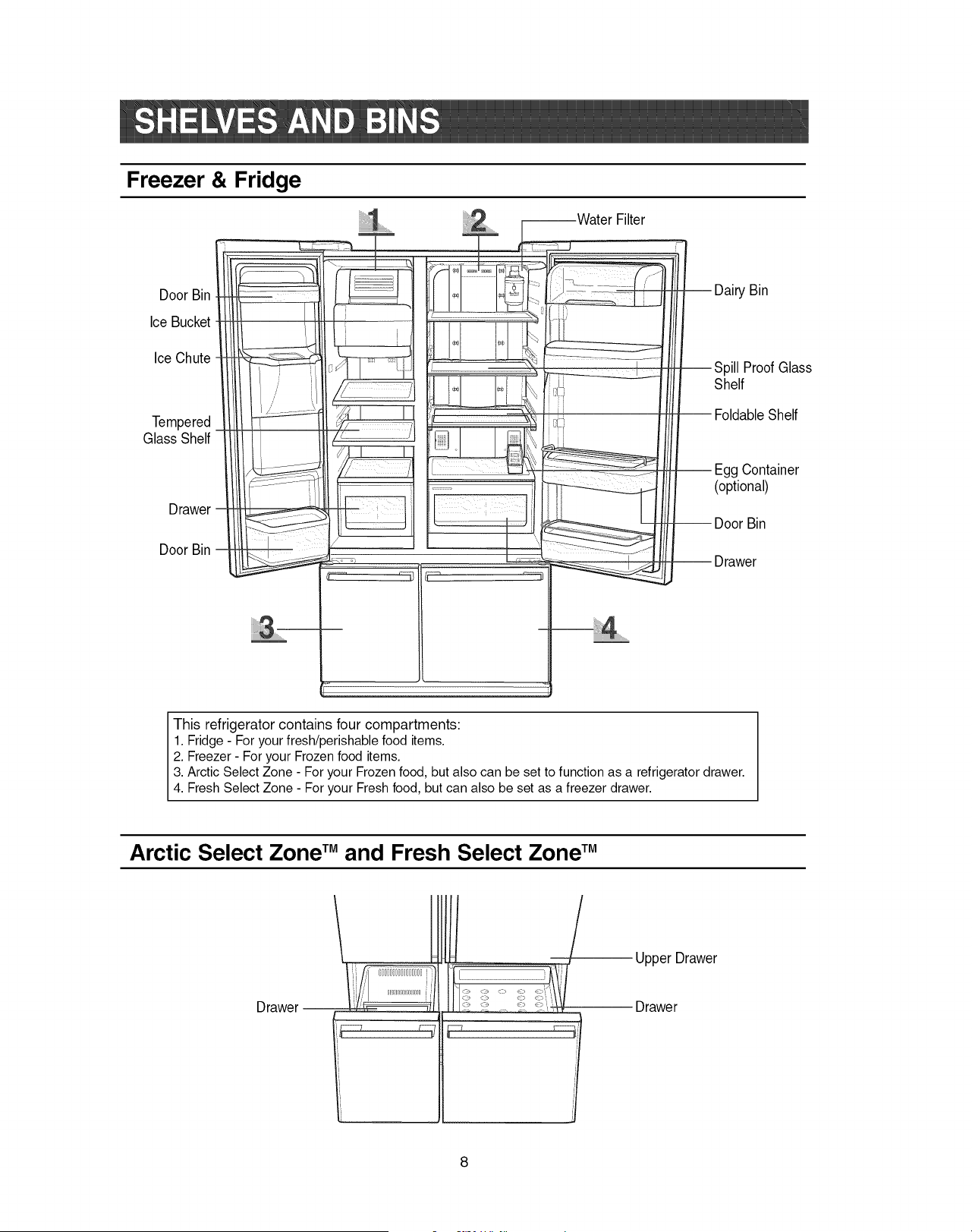
Freezer & Fridge
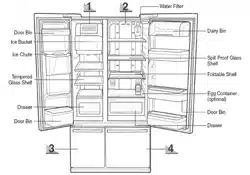
Door Bin
Ice Bucket
IceChute
Tempered
Glass Shelf
Drawer
Door Bin
......F_water Filter
_ I_
t
-- Dairy Bin
--Spill Proof Glass
Shelf
-- FoldableShelf
Egg Container
(optional)
-- Door Bin
-- Drawer
This refrigerator contains four compartments:
1. Fridge - For your fresh/perishable food items.
2. Freezer - For your Frozen food items.
3. Arctic Select Zone - For your Frozen food, but also can be set to function as a refrigerator drawer.
4. Fresh Select Zone - For your Fresh food, but can also be set as a freezer drawer.
Arctic Select Zone TM and Fresh Select Zone TM
Drawer --
y_
l _/
Upper Drawer
Drawer
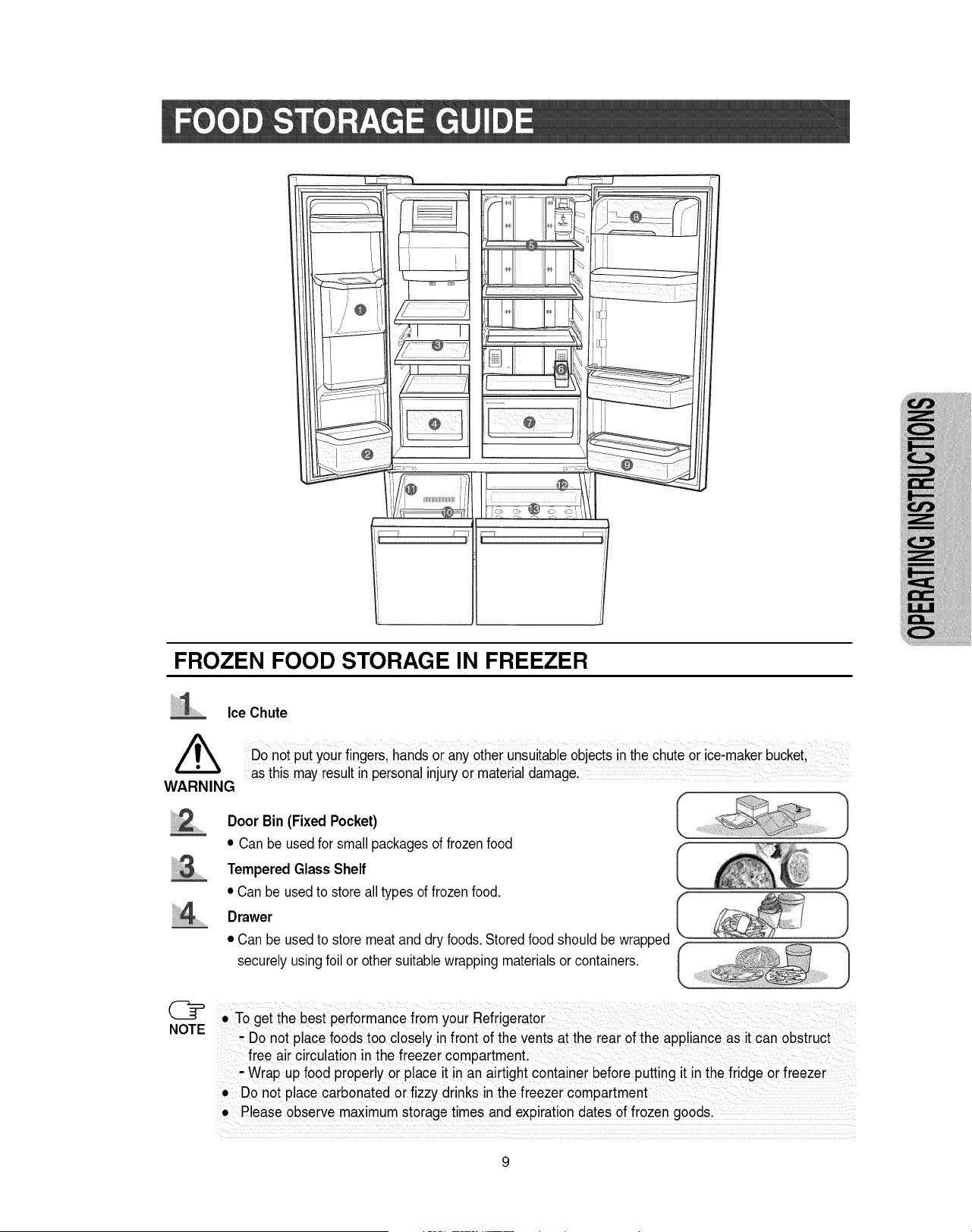
FROZEN FOOD STORAGE IN FREEZER
Ice Chute
WARNING
Do not put your fingers hands or any other unsutableobjects inthe chute or ice,maker bucket
as this may result in personal injury or material damage,
.......
Door Bin (Fixed Pocket)
• Can be used for small packages of frozenfood
Tempered Glass Shelf
• Can be used to store all types of frozen food.
Drawer
• Can be used to store meat and dry foods. Stored food should be wrapped
securely usingfoil or other suitable wrapping materials or containers.
• To get the best performance from your Refrigerator
- Do not place foods too closely in front of the vents at the rear of the appliance as it can obstruct
free air circulation in the freezer compartment.
- Wrap up food properly or place it in an airtight container before putting it in the fridge or freezer
• Do not place carbonated or fizzy drinks in the freezer compartment
• Please observe maximum storage times and expiration dates of frozen goods.
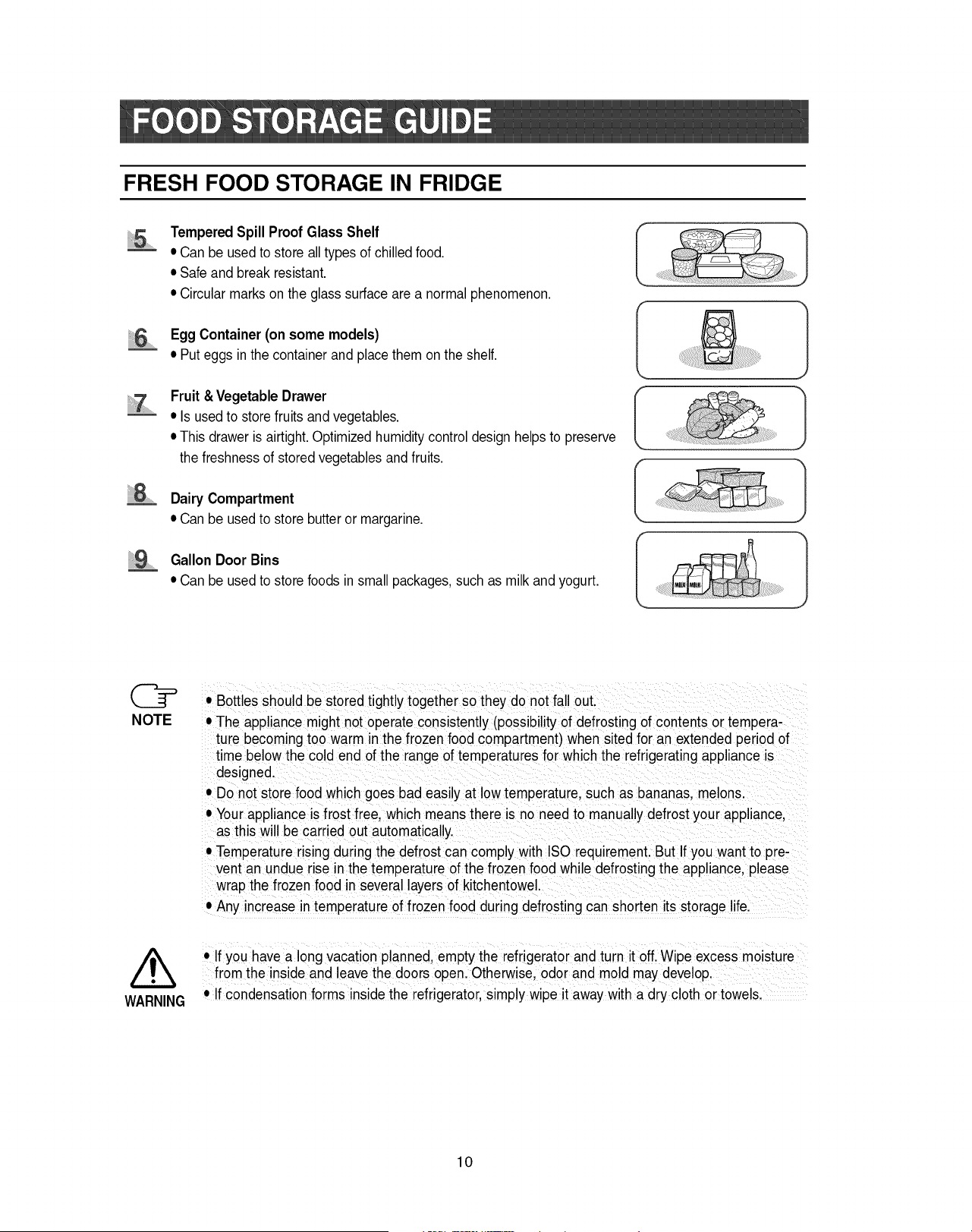
FRESH FOOD STORAGE IN FRIDGE
Tempered Spill Proof Glass Shelf
• Can be used to store all types of chilled food.
• Safe and break resistant.
• Circularmarks on the glass surface are a normal phenomenon.
EggContainer(on some models)
• Put eggs in the containerand place them onthe shelf.
iii iii9.............
Fruit& Vegetable Drawer
• Is used to storefruits and vegetables.
• This drawer is airtight.Optimized humidity control design helps to preserve
the freshnessof stored vegetablesand fruits.
Dairy Compartment
• Can be usedto store butteror margarine.
Gallon Door Bins
• Can be used to store foods in small packages, such as milk and yogurt.
NOTE
/t,,
WARNING
• Bottles should be stored tightlytogetherso they do not fall out.
• The appliance might not operate consistently (possibility of defrosting of contents or tempera-
ture becoming too warm in the frozen food compartment) when sited for an extended period of
time below the cold end of the range of temperatures for which the refrigerating appliance is
designed.
• Do not store food which goes bad easily at low temperature, such as bananas, melons.
• Your appliance is frost free, which means there is no need to manually defrost your appliance,
as this will be carried out automatically.
• Temperature rising during the defrost can comply with ISO requirement. But If you want to pre-
vent an undue rise n the temperature of the frozen food while defrosting the appliance, please
wrap the frozen food in several layers of kitchentowel.
• Any increase in temperatureof frozen food during defrosting can shorten its storage life.
• If you have along vacation planned, empty the refrigeratorand turn itoff. Wipe excess mo sture
from the inside and leave the doors openl Otherwise, odor and mold may develop,
• If condensation forms inside the refrigerator,simply wipe it away with a dry cloth or towels.
10
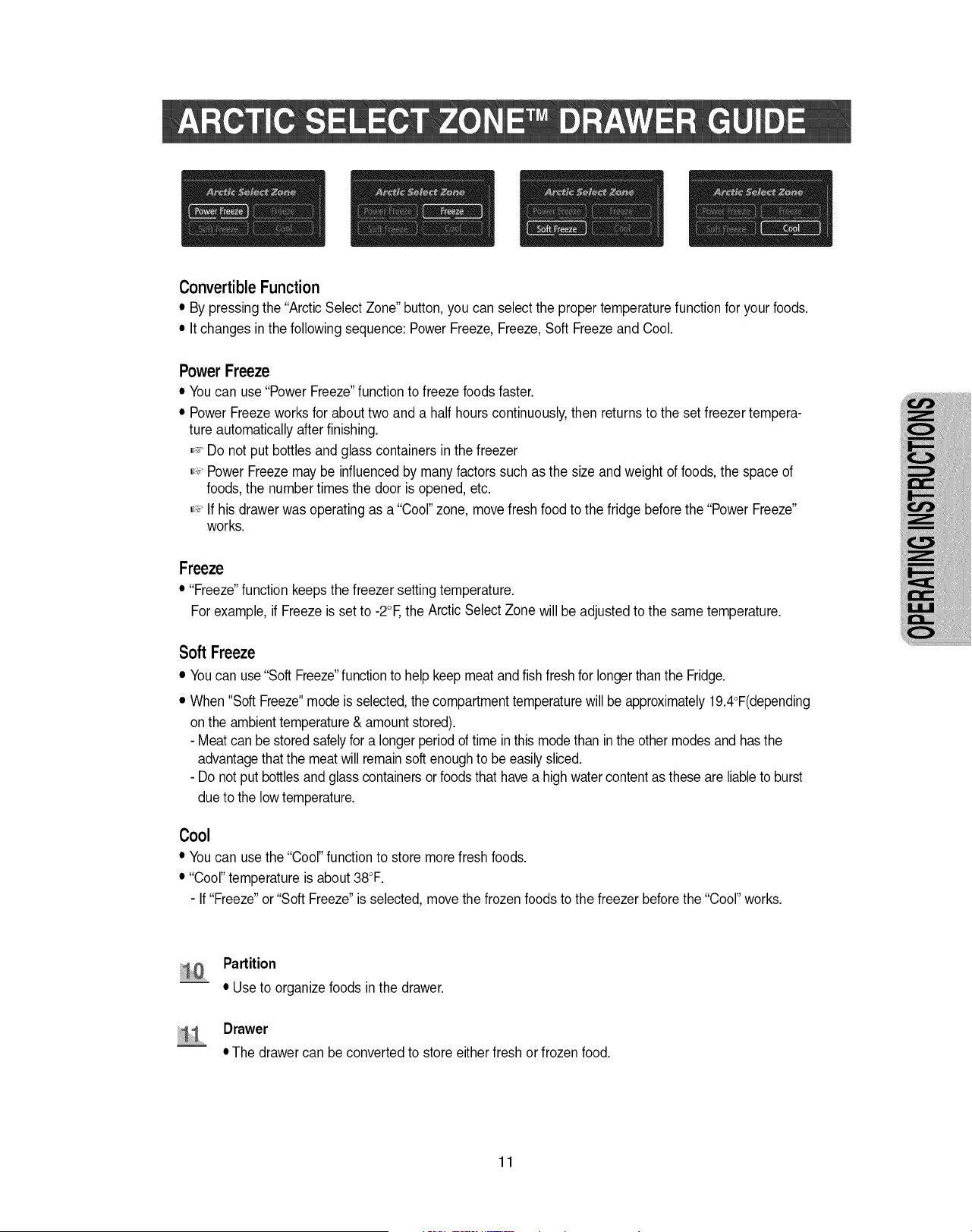
ConvertibleFunction
• By pressingthe "Arctic Select Zone" button,you can select the proper temperaturefunction for your foods.
• It changes inthe followingsequence: Power Freeze,Freeze,Soft Freezeand Cool.
PowerFreeze
• Youcan use"Power Freeze"function to freeze foods faster.
• Power Freezeworks for about two and a half hours continuously,then returns to the set freezer tempera-
ture automatically afterfinishing.
,_' Do not put bottles and glass containers in the freezer
,_' PowerFreezemay be influencedby manyfactors such as the size and weight of foods,the space of
foods, the numbertimes the door is opened, etc.
,_' If his drawer was operating as a "Cool"zone, movefresh food to the fridge beforethe "Power Freeze"
works.
Freeze
• "Freeze"function keeps the freezer settingtemperature.
For example, if Freezeis set to -2°E the Arctic Select Zone will be adjustedto the same temperature.
Soft Freeze
• Youcan use "Soft Freeze"functionto helpkeep meat andfish fresh for longer than the Fridge.
• When "Soft Freeze"mode is selected,the compartmenttemperaturewill be approximately19.4°F(depending
on the ambienttemperature& amountstored).
- Meat can be storedsafelyfor a longerperiodof time in this mode than in the other modesand hasthe
advantagethatthe meatwill remainsoft enoughto be easilysliced.
- Do not put bottlesandglass containersor foodsthat havea high water contentas these are liableto burst
due to the low temperature.
Cool
• Youcan usethe "Cool" function to store more fresh foods.
• "Cool"temperature is about 38°F.
- If "Freeze"or"Soft Freeze"is selected,movethe frozen foods to the freezer before the "Cool" works.
....
Partition
• Use to organizefoods in the drawer.
Drawer
• The drawer can be converted to store eitherfresh orfrozen food.
11
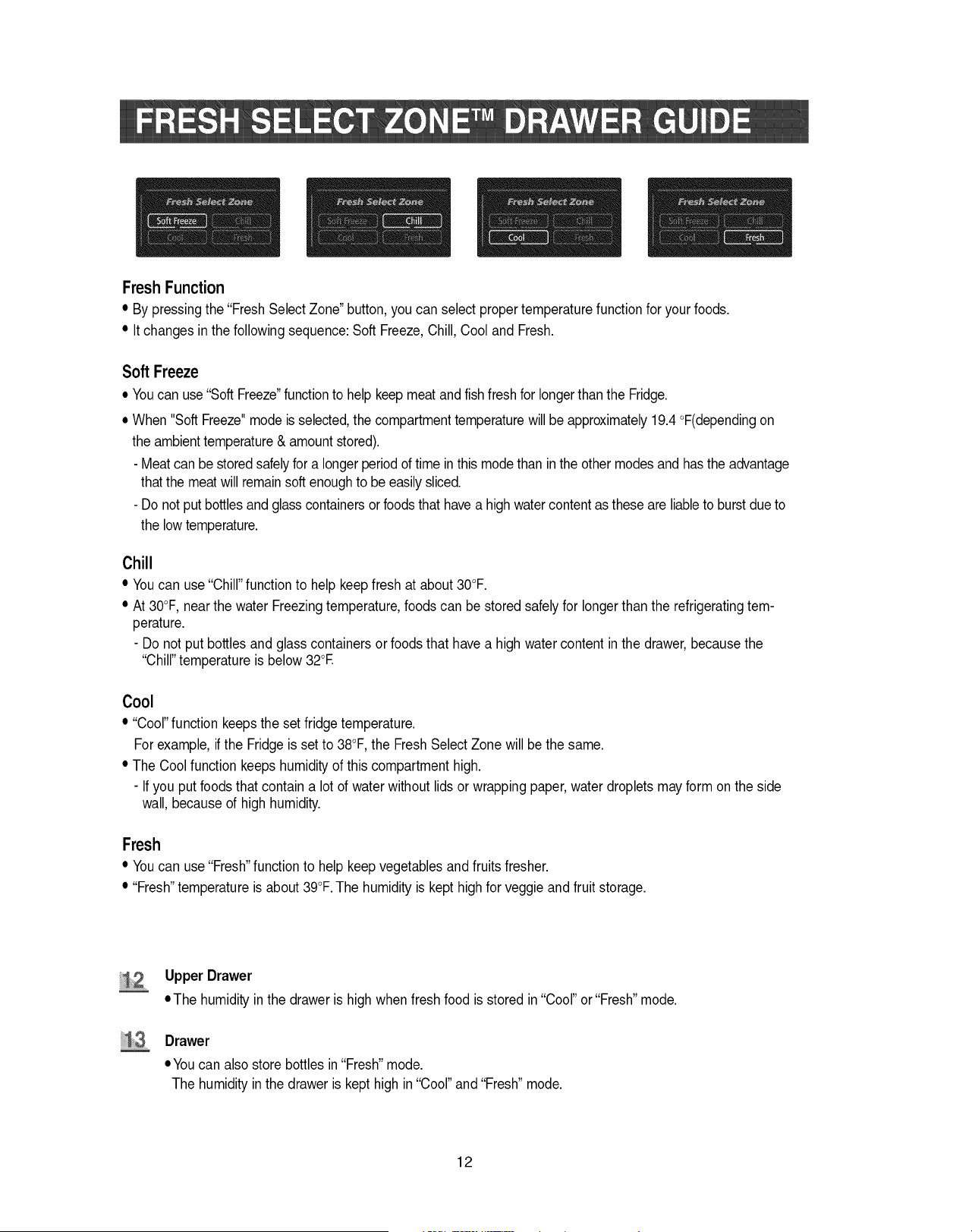
FreshFunction
• By pressingthe "FreshSelect Zone" button,you can select propertemperature function for your foods.
• Itchanges in the following sequence:Soft Freeze,Chill, Cool and Fresh.
Soft Freeze
• Youcan use "SoftFreeze"functionto help keep meatand fishfreshfor longerthan the Fridge.
• When "Soft Freeze"mode is selected,the compartmenttemperaturewill be approximately19.4 °F(dependingon
the ambienttemperature& amount stored).
- Meatcan be storedsafelyfor a longer periodof time in this modethan inthe other modes and has the advantage
that the meatwill remainsoft enoughto be easilysliced.
- Do not put bottlesand glass containersorfoodsthat have a high water content as these are liableto burstdueto
the lowtemperature.
Chill
• Youcan use "Chill"functionto help keep fresh at about 30°F.
• At 30°F, nearthe water Freezing temperature,foods can be stored safelyfor longerthan the refrigeratingtem-
perature.
- Do not put bottles and glasscontainers or foods that have a high watercontent inthe drawer,because the
"Chill" temperature is below 32°E
Cool
• "Cool" function keepsthe set fridge temperature.
For example, if the Fridge is set to 38°F,the Fresh SelectZone will bethe same.
• The Cool function keepshumidity of this compartment high.
- If you put foodsthat contain a lot of waterwithout lids or wrapping paper, water dropletsmay form on the side
wall, because of high humidity.
Fresh
• Youcan use "Fresh"functionto help keep vegetablesand fruits fresher.
• "Fresh"temperature is about 39°F.The humidity is kept highfor veggie and fruit storage.
Upper Drawer
• The humidity in the drawer is high when fresh food is stored in "Cool" or "Fresh"mode.
Drawer
• You can also store bottles in "Fresh"mode.
The humidity inthe drawer is kept high in "Cool" and "Fresh"mode.
12
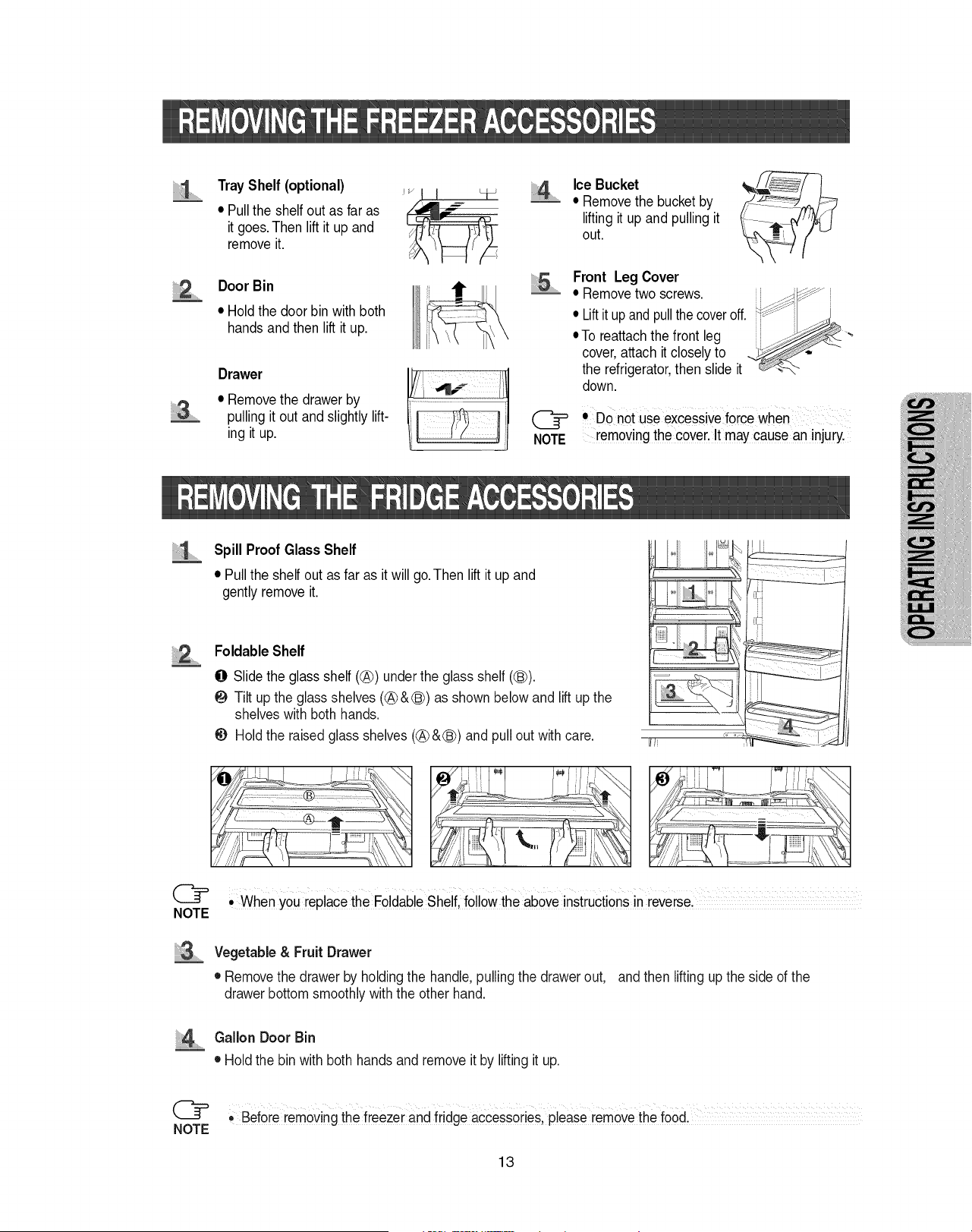
iiiiiiii i ........
Tray Shelf (optional)
• Pullthe shelf out as far as
it goes.Then lift it up and
removeit.
Door Bin
• Hold the door bin with both
hands and then lift it up.
Drawer
• Removethe drawer by
pullingit out and slightly lift-
ing it up.
........Ice Bucket
• Removethe bucket by
lifting it up and pulling it
out.
5 ......Front Leg Cover
• Removetwo screws.
NOTE
• Liftit upand pullthe coveroff.
• To reattachthe front leg
cover,attach it closely to
the refrigerator,then slide it
down.
• DO notuse excessiveforcewhen
removingthe cover.It may cause an injury.
Spill Proof Glass Shelf
• Pullthe shelf out as far as it will go.Then lift it up and
gently remove it.
NOTE
FoldableShelf
O Slidethe glass shelf (@) under the glass shelf (_).
Tilt up the glass shelves (@&(_) as shownbelow and lift up the
shelveswith both hands.
_) Hold the raised glass shelves (@ &(_) and pull out with care.
iiii i i s
, When You replacethe Foldable Shelf, follow the aboveinStructionsin reVersel
Vegetable & Fruit Drawer
• Removethe drawer by holding the handle, pulling the drawer out, and then lifting upthe side of the
drawer bottom smoothlywith the other hand.
......Gallon Door Bin
• Hold the bin with both hands and remove it by lifting it up.
@ ,, Before removing the freezer and fridge accessories,please removethe food.
NOTE
13
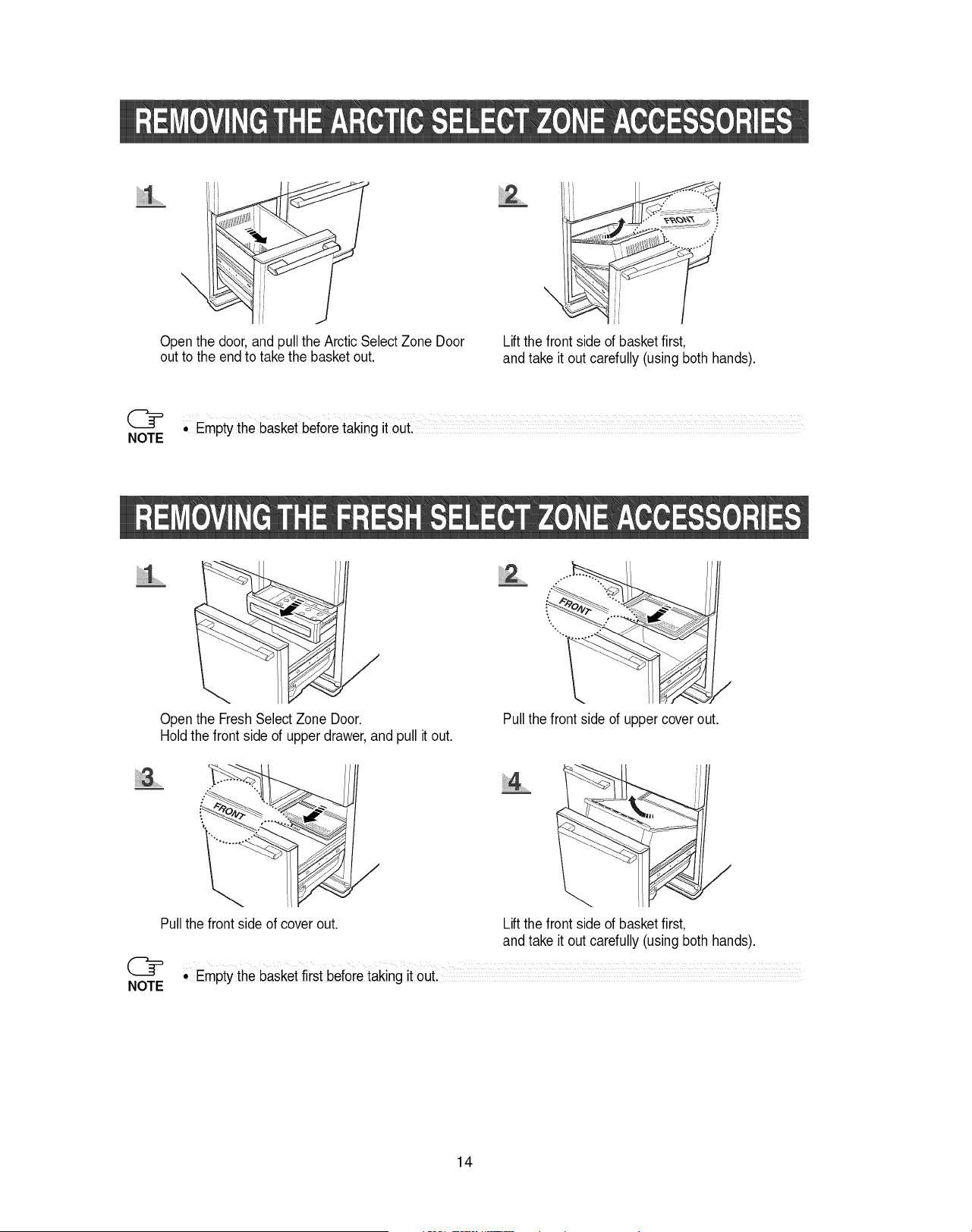
Open the door, and pullthe Arctic SelectZone Door
out to the end to take the basket out.
iiii_........
\
Lift the front side of basket first,
and take it out carefully (using both hands).
• Empty the basket beforetaking it out. .........................
NOTE
iiii!iiii:il,,,................
Open the FreshSelect Zone Door.
Holdthe front side of upper drawer, and pull it out.
\
\
Pull the front side of upper coverout.
8 .......
Pullthe frontside of cover out.
@
NOTE
/
iiii_lii_i4...............
/
Lift the front side of basket first,
and take it out carefully (using both hands).
° Empty the basketfirst before taking it out. ........................
14
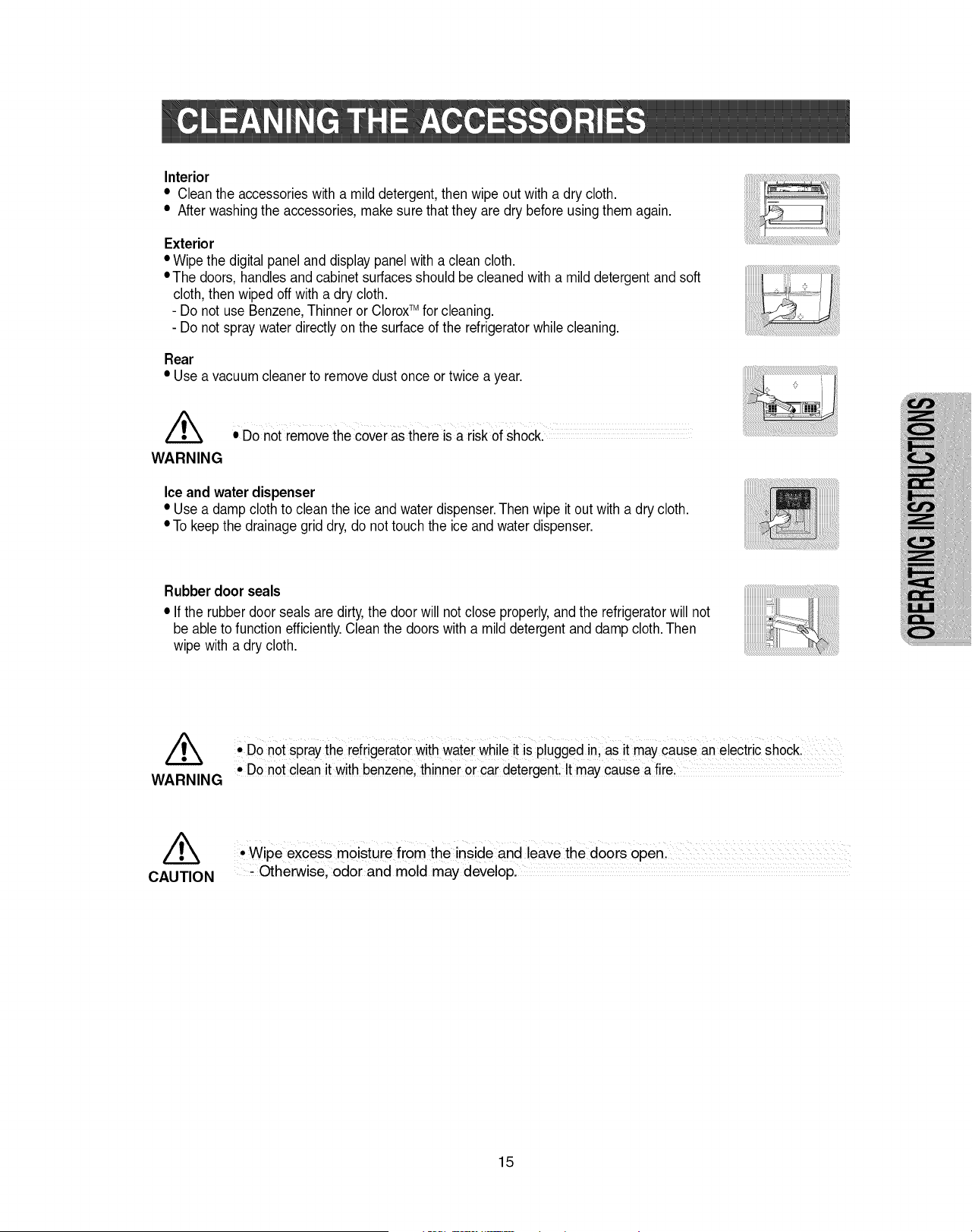
Interior
• Cleantheaccessorieswithamilddetergent,thenwipeoutwithadrycloth.
• Afterwashingtheaccessories,makesurethattheyaredrybeforeusingthemagain.
Exterior
• Wipethedigitalpanelanddisplaypanelwithacleancloth.
•Thedoors,handlesandcabinetsurfacesshouldbecleanedwithamilddetergentandsoft
cloth,thenwipedoffwitha drycloth.
- DonotuseBenzene,ThinnerorCloroxTM for cleaning.
- Do not spray water directly on the surface of the refrigeratorwhile cleaning.
Rear
• Use a vacuum cleaner to removedust once ortwice a year.
• Do not removethe coveras thereis a risk of shock..............
WARNING
Ice and water dispenser
• Use a damp cloth to clean the ice and water dispenser.Then wipe it out with a dry cloth.
• To keepthe drainagegrid dry,do not touch the ice andwater dispenser.
Rubber door seals
• If the rubber door seals are dirty,the door will not close properly,andthe refrigeratorwill not
be able to function efficiently.Cleanthe doors with a mild detergentand damp cloth.Then
wipe with a dry cloth.
/_ • Do not spray the refrigerator withwater While is plugged in; as may cause anelectricshock.
it it
WARNING • DOnot clean it with benzene,thinner or car detergentlIt may cause a fire,
//_ 'Wi e excess moisture from the inside and leave the doors o en
P P ,
CAUTION #Otherwise, odor and mold may developl
15
WARNING
CAUTION
Before changing the interior light, unplug the refrigerator from the power supply.
If you have difficulty with changing the light, contact your service center.
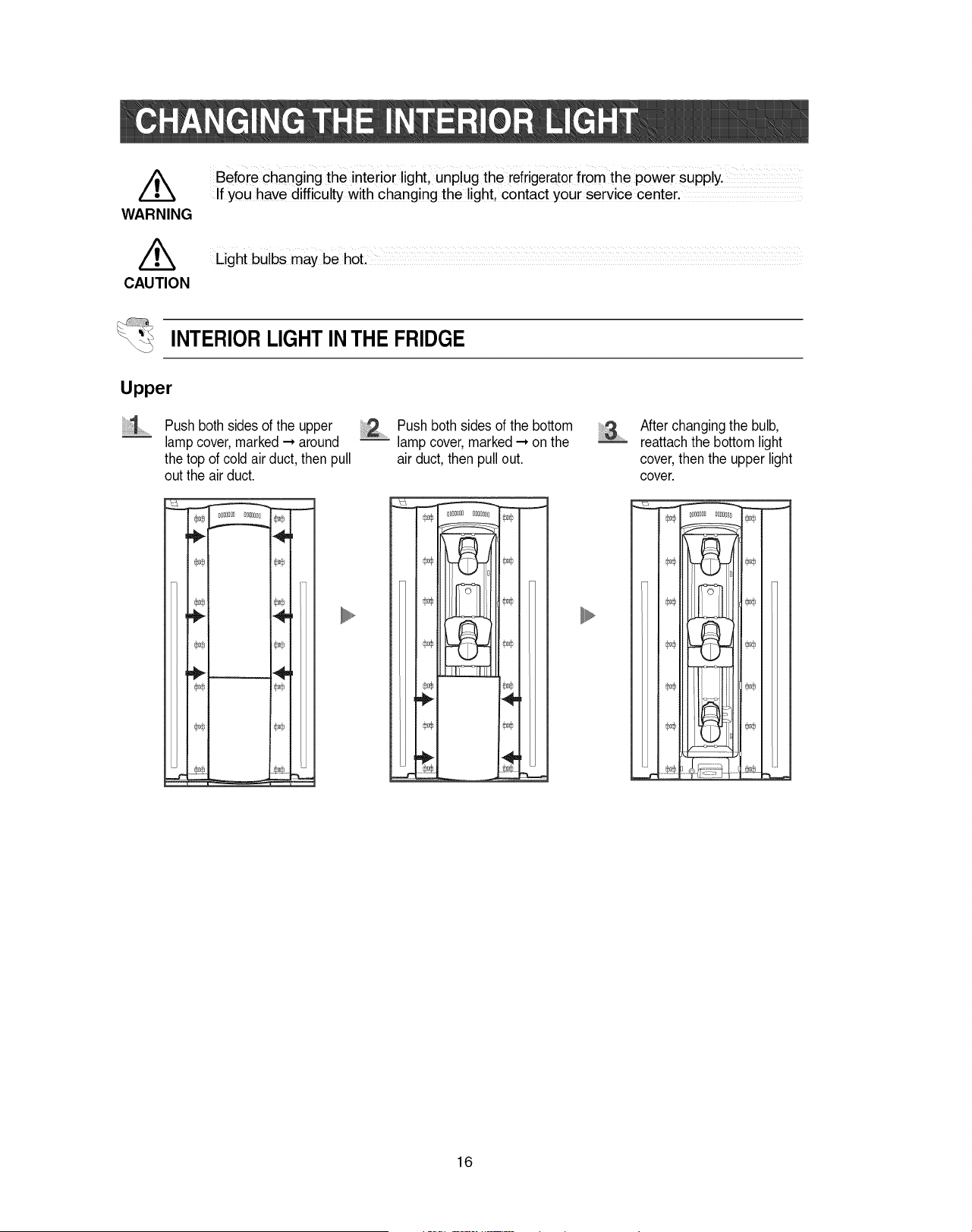
INTERIORLIGHTIN THE FRIDGE
Upper
1
Push both sidesof the upper
lampcover, marked ---*around
the top of cold air duct, then pull
out the airduct.
__m__
÷
,÷
_o®
4,,
,o®
4,,
dJo,
........Push both sides of the bottom
lamp cover, marked--* on the
air duct, then pullout.
OOD OOO[_
j
®od_
_oo®
÷
,o®
After changingthe bulb,
reattachthe bottom light
cover,then the upper light
cover.
n_
I1\ _ I
_ IIIL-PF_ _o_
_t rf_
16
/k
WARNING
/k
CAUTION
Before changing the interior lighL unplug the refrigeratorfrom the power supp!y.
if you have difficulty wit h changing the light, contact your service center,
Light bulbs may be hot. ............................
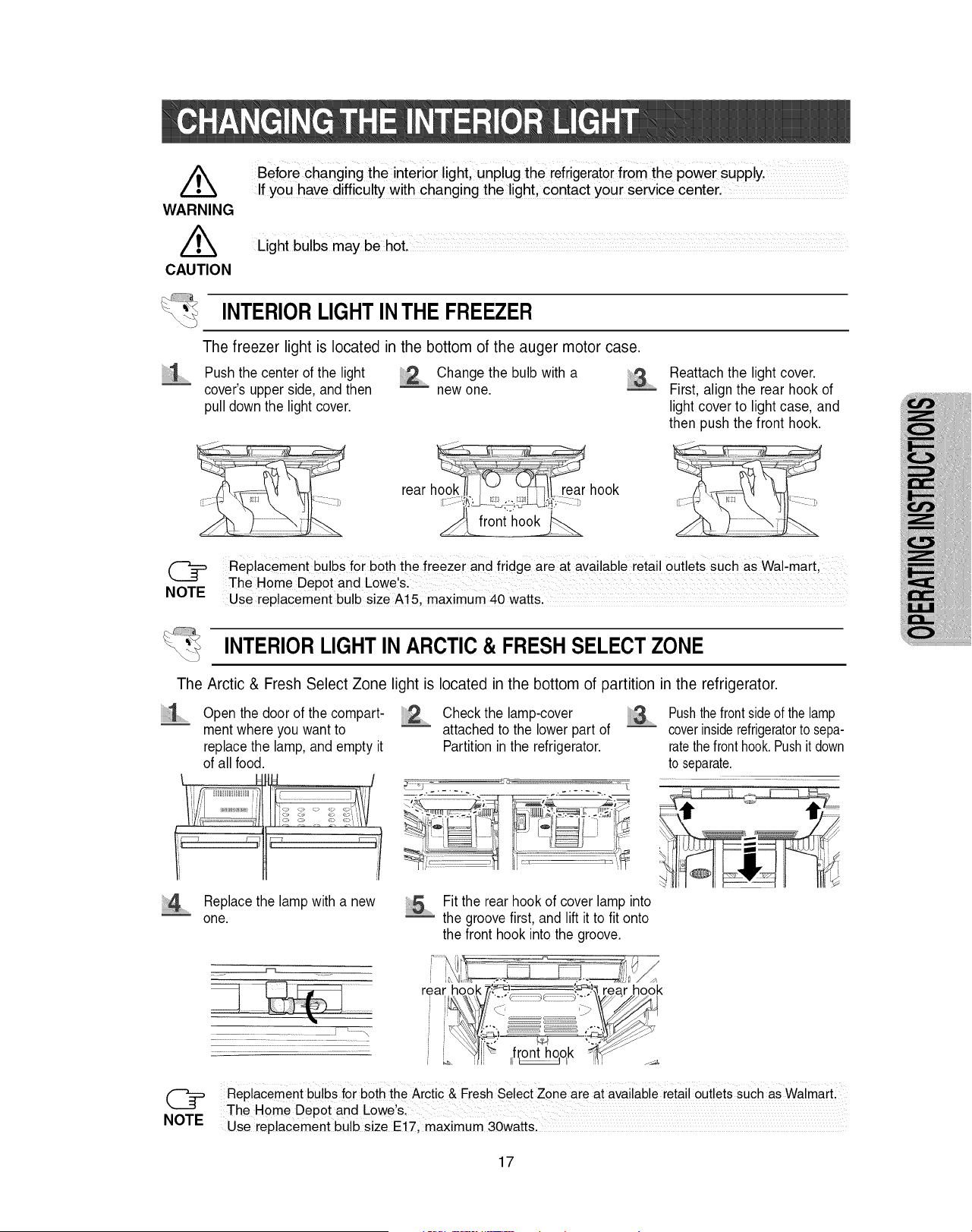
INTERIOR LIGHTINTHE FREEZER
The freezer light is located in the bottom of the auger motor case.
Push the center of the light Change the bulb with a
cover's upper side, and then _ new one.
pull down the light cover.
Reattach the light cover.
First, align the rear hook of
light cover to light case, and
then push the front hook.
rear hook rear hook
front hook
Replacement bulbs for both the freezer and fridge are at avai!ab!e retail outlets such as Wal-mart,
The Home Depot and Lowe & ....................................................................
NOTE Use replacement bu!b size A! 5, maximum 40 watts,
INTERIORLIGHT IN ARCTIC & FRESH SELECTZONE
The Arctic & Fresh Select Zone light is located in the bottom of partition in the refrigerator.
...... Open the door of the compart- Check the lamp-cover
ment where you want to _ attached to the lower part of
replace the lamp, and empty it Partition in the refrigerator.
of all food.
Pushthefrontsideof the lamp
coverinsiderefrigeratorto sepa-
ratethe fronthook.Pushit down
to separate.
14 ......Replacethe lamp with a new
one.
................................ ! t _\
i_ Fit the rear hook of cover lamp into
the groove first, and lift it to fit onto
the front hook into the groove.
@ Replacementbulbs for boththe Arctic & FreshSelectZone are at availableretailoutlets such as WalmarL
The Home Depot and Lowe&
NOTE Use replacement bulb size E17, maximum 30watts.
17
Thewater"FilterIndicator"light
•"FilterIndicato¢'lightletsyouknowwhenit istimetochangeyourwaterfiltercartridge.Thelight
willchangefromgreentoorange.Thistellsyouthatit isalmosttimetochangethecurrentcartridge.
Itisrecommendedthatyoureplacethecartridgewhenthelightchangesto red.
(see"Installthewaterfilter'sectionformoreinformation)
• Ifyouinstallwaterfilter,throwawaythefirstsixglassfullsofwaterfilter,oruntilwaterflowsclearlyto
flushimpuritiesinthewatersupplysystem.
Usingthedispenserwithoutthewaterfilter
•Youcannotusethewaterandicedispenserwithouta waterfiltercartridgebecausethewaterline
blocksatthewatersupply.
Orderingreplacementfilters
• Toordermorewaterfiltercartridges,call1-800-SAMSUNGandaskforaccessoryPart# DA29-
00003BorcontactyourauthorizedSamsungdealer.
Therefrigeratordoorshaveaspecialdooropeningandclosingfeaturetomakesurethatthedoors
closeallthewayandaresecurelysealed.
Whenopeningthedoor,itwillonlyopensofar.Afterreachinga certainpoint,it willremainopen.
Whenthedoorispartiallyopen,itwillcloseautomatically.
18
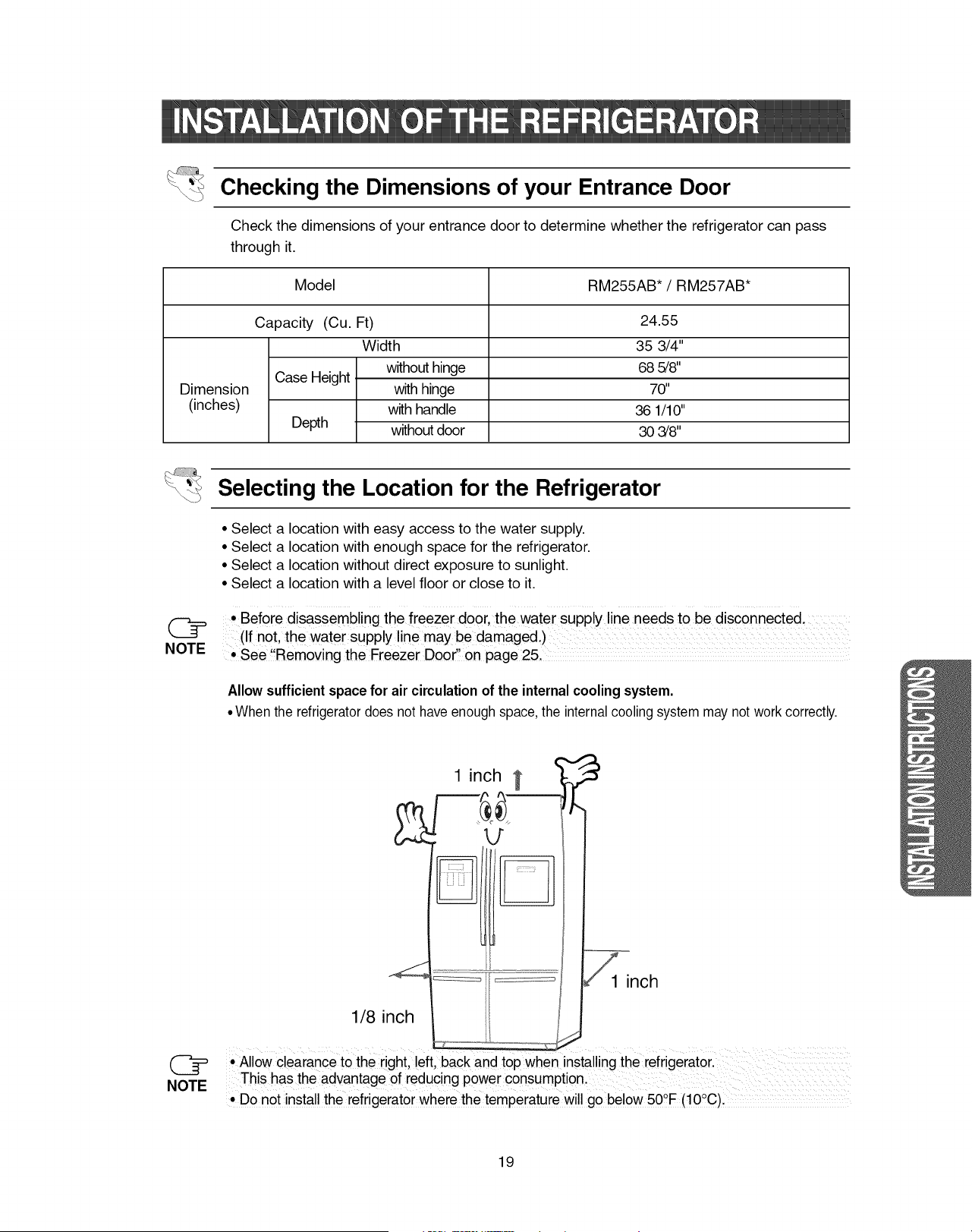
Checking the Dimensions of your Entrance Door
Check the dimensions of your entrance door to determine whether the refrigerator can pass
through it.
Model RM255AB* / RM257AB*
Dimension
(inches)
Case Height
Depth
Capacity (Cu. Ft)
Width
without hinge
with hinge
with handle
without door
24.55
35 3/4"
68 5/8"
70"
36 1/10"
30 3/8"
Selecting the Location for the Refrigerator
• Select a location with easy access to the water supply.
• Select a location with enough space for the refrigerator.
• Select a location without direct exposure to sunlight.
• Select a location with a level floor or close to it.
• Before disassembling the freezer door, the water supply line needs to be disconnected.
(If not, the water supply line may be damaged.) ....................................................................
, See !!Removing the Freezer Door" on page 25.
Allowsufficientspace for air circulationof the internal coolingsystem.
• When the refrigeratordoes not have enough space, the internal cooling system may not workcorrectly.
1 inch
1 inch
1/8 inch
Z Z Z Z Z Z
Allow clearance to the right, !eft, back and top when installing the refrigerator.
This has the advantage of reduc ng power consumption.
,Do not install the refrigerator where the temperature will go below 50°F (!00C).
19
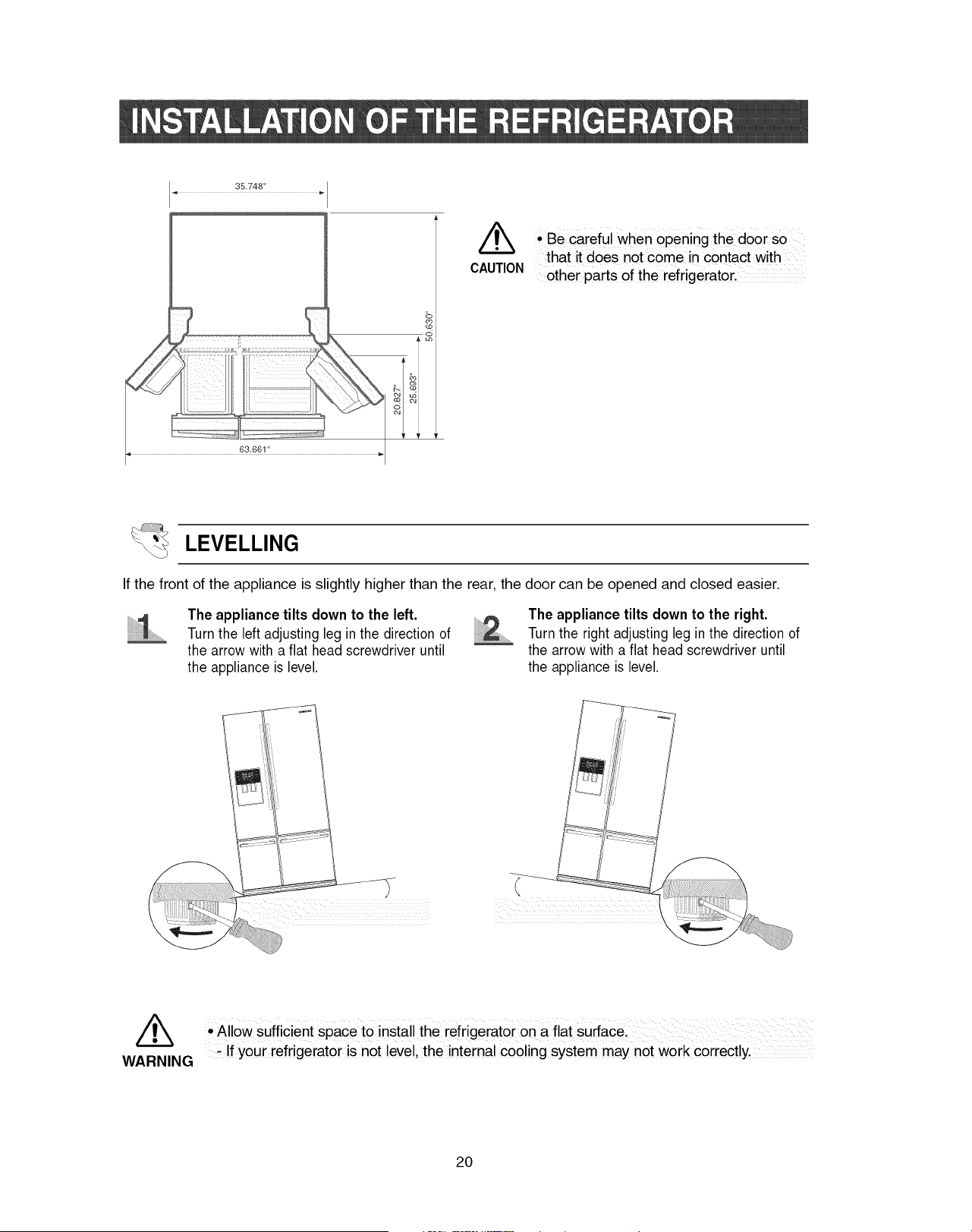
CAUTION
• Be careful When opening the door so
that it does not come in contact with
other parts of the refrigerator,
cSi
LEVELLING
If the front of the appliance is slightly higher than the rear, the door can be opened and closed easier.
The appliance tilts down to the left.
Turn the left adjusting leg in the direction of
the arrow with a flat head screwdriver until
the appliance is level.
The appliance tilts down to the right.
Turn the right adjusting leg in the direction of
the arrow with a flat head screwdriver until
the appliance is level.
)
//_ • Allow sufficient space to installthe refrigerator on a flat surface.
WARNING _ If your refrigerator is not level, the internal cooling system may n0t work correctly.
20
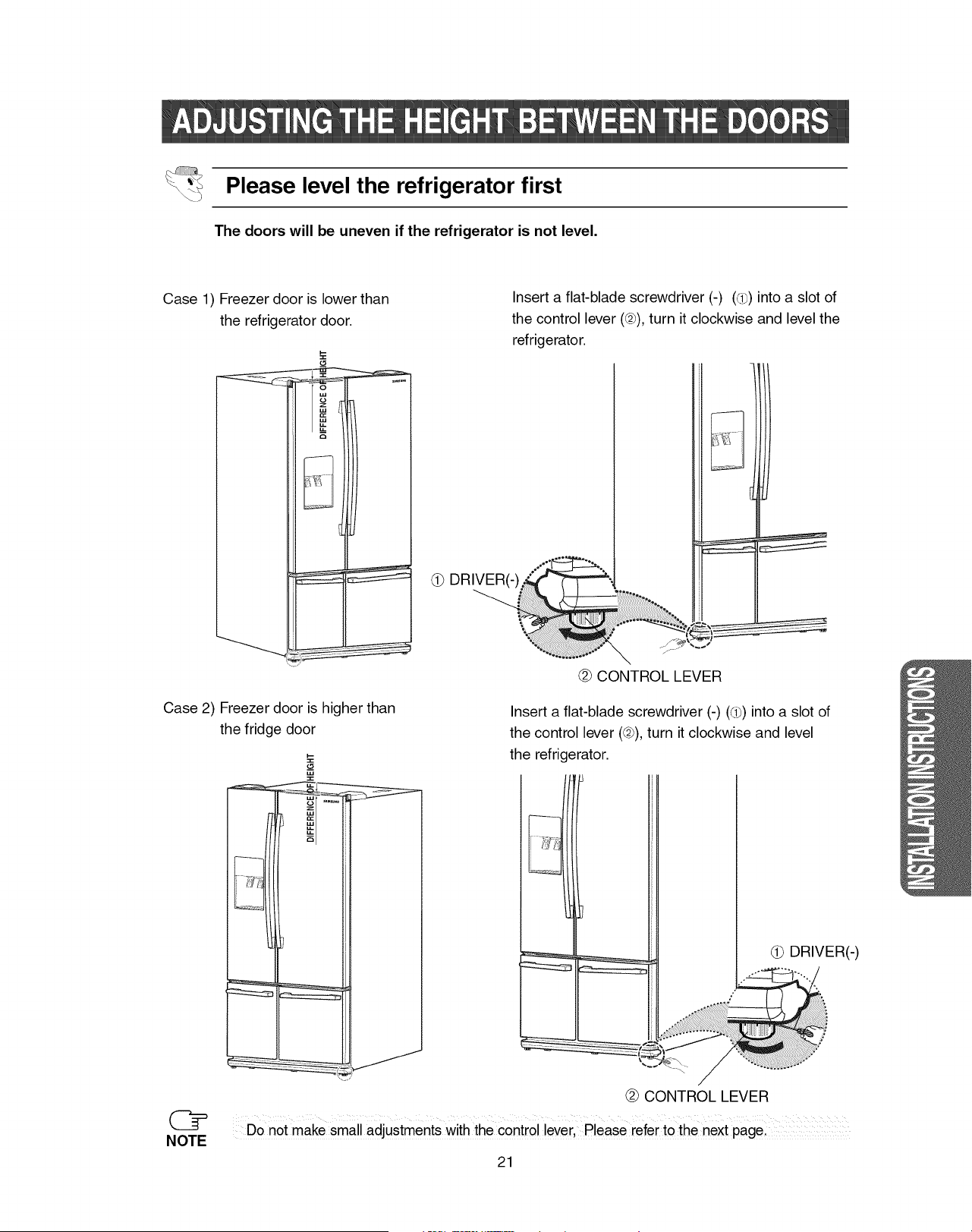
Please level the refrigerator first
The doors will be uneven if the refrigerator is not level.
Case 1) Freezer door is lower than
the refrigerator door.
Insert a flat-blade screwdriver (-) (d_) into a slot of
the control lever (@),turn it clockwise and level the
refrigerator.
i
(_ DRIVER(-) ""........ "" ".. ,
@ CONTROL LEVER
Case 2) Freezer door is higher than
the fridge door
@
NOTE
Insert a flat-blade screwdriver (-) (d_) into a slot of
the control lever (@),turn it clockwise and level
the refrigerator.
i
@ CONTROL LEVER
Do not make small adjustments with the control lever, Please referto the next page.
21
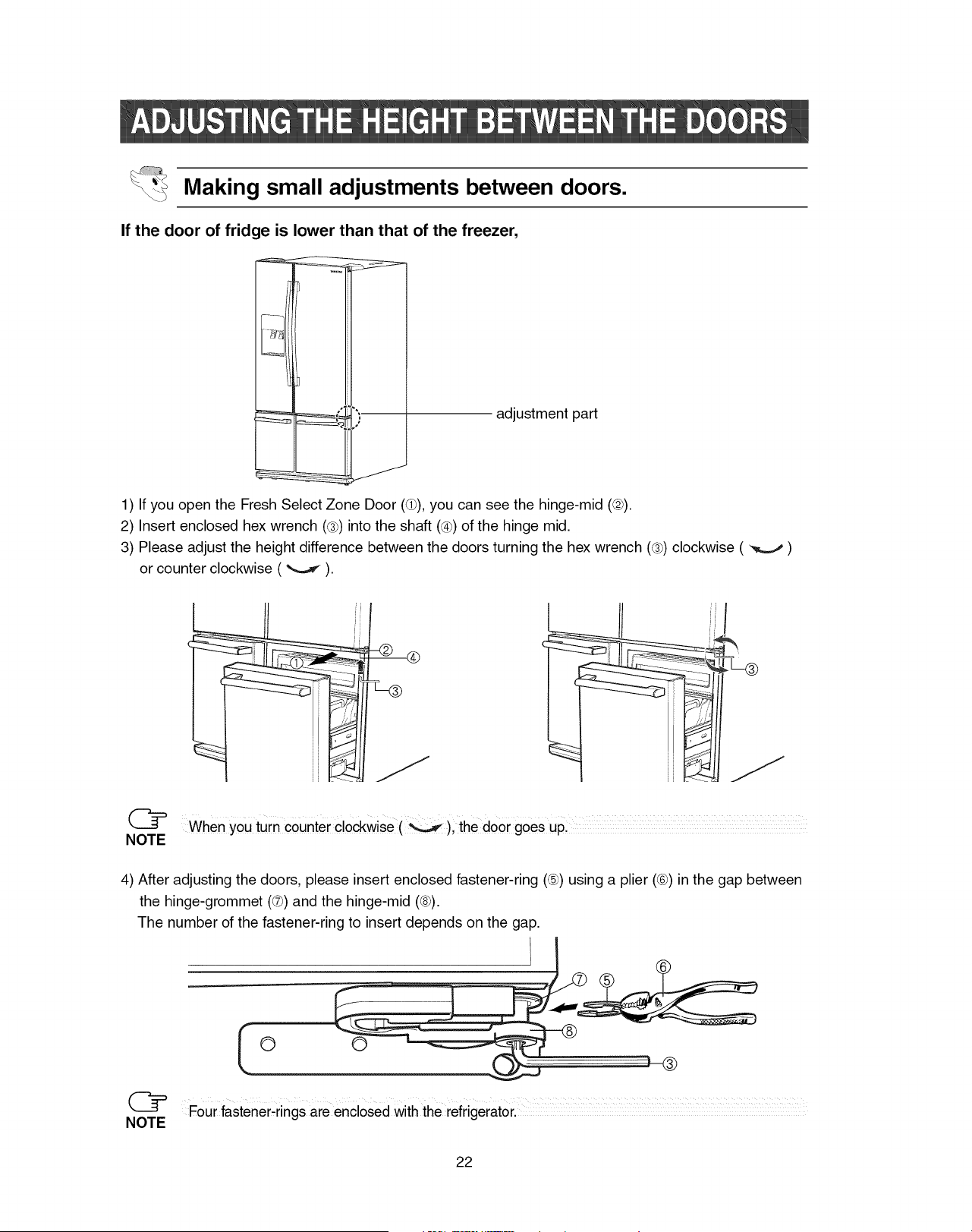
Making small adjustments between doors.
If the door of fridge is lower than that of the freezer,
adjustment part
1) If you open the Fresh Select Zone Door (d)), you can see the hinge-mid (@).
2) Insert enclosed hex wrench (®) into the shaft (_4h)of the hinge mid.
3) Please adjust the height difference between the doors turning the hex wrench (®) clockwise ( -_,,.._ )
or counter clockwise ( _ ).
@ When yoUturn counter clockwise(), the do0r g0es UP:
NOTE
4) After adjusting the doors, please insert enclosed fastener-ring (®) using a plier (¢h)in the gap between
the hinge-grommet (®) and the hinge-mid (@).
The number of the fastener-ring to insert depends on the gap.
Four fastener,rings are enclosed with the refrigerator ...................
NOTE
22
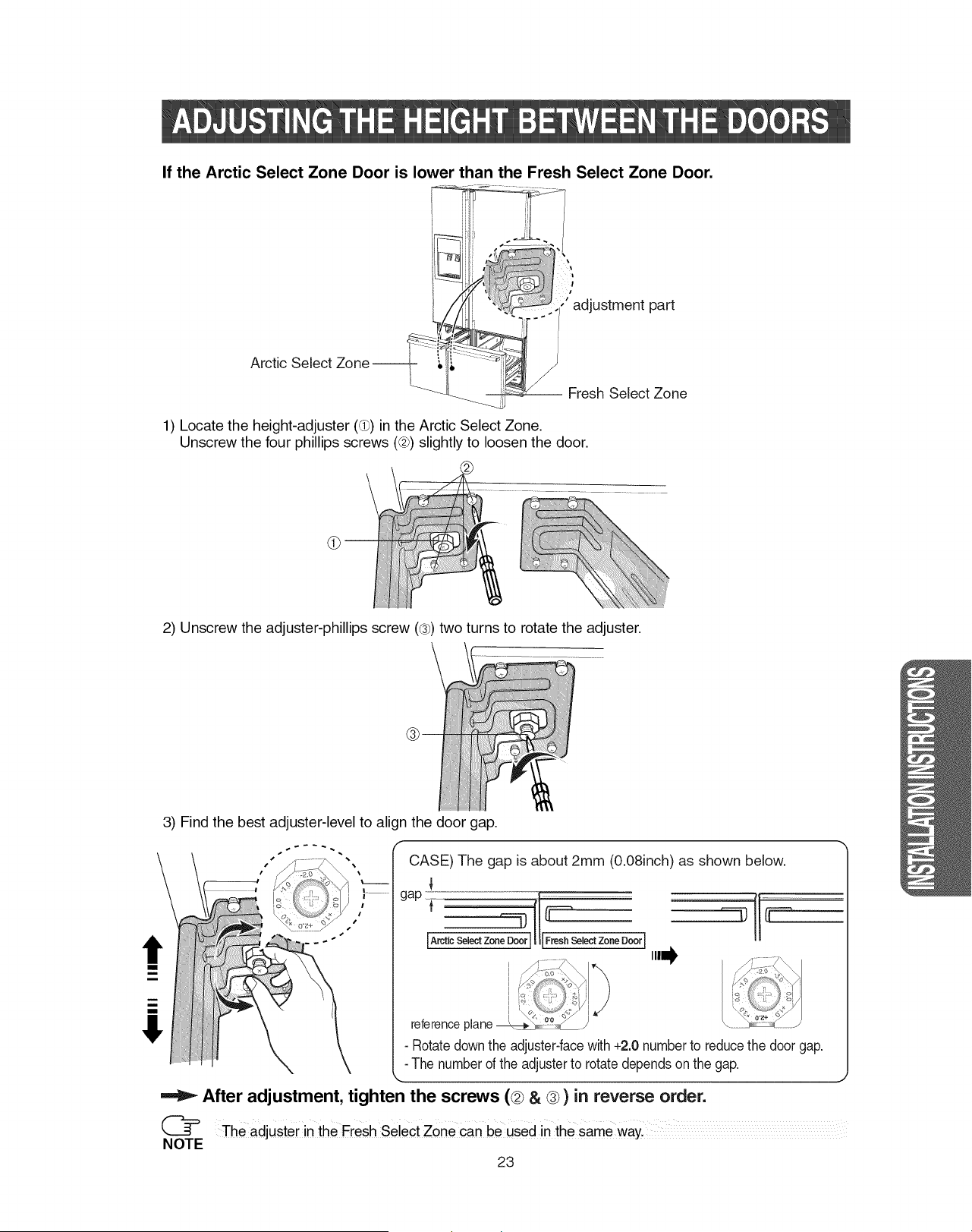
i
i
If the Arctic Select Zone Door is lower than the Fresh Select Zone Door.
|
!
;' adjustment part
Arctic Select
/
/
Fresh Select Zone
1) Locate the height-adjuster (@) in the Arctic Select Zone.
Unscrew the four phillips screws (@) slightly to loosen the door.
2) Unscrew the adjuster-phillips screw (®) two turns to rotate the adjuster.
3) Find the best adjuster-level to align the door gap.
m
i
CASE) The gap is about 2mm (0.08inch) as shown below.
gap
IA_t_s_l_tzo,eboo,I|1_oo, I
o> 't<:>%,_ ,
reference plane _:;, _:_:i_ /
i,i,i_
- Rotatedownthe adjuster-facewith +2.0 numberto reducethe door gap.
- The numberof the adjusterto rotate dependsonthe gap.
After adjustment, tighten the screws (@ & ®) in reverse order.
(_ The adjuster in the Fresh Select zone can be used in the same wayl
NOTE
23
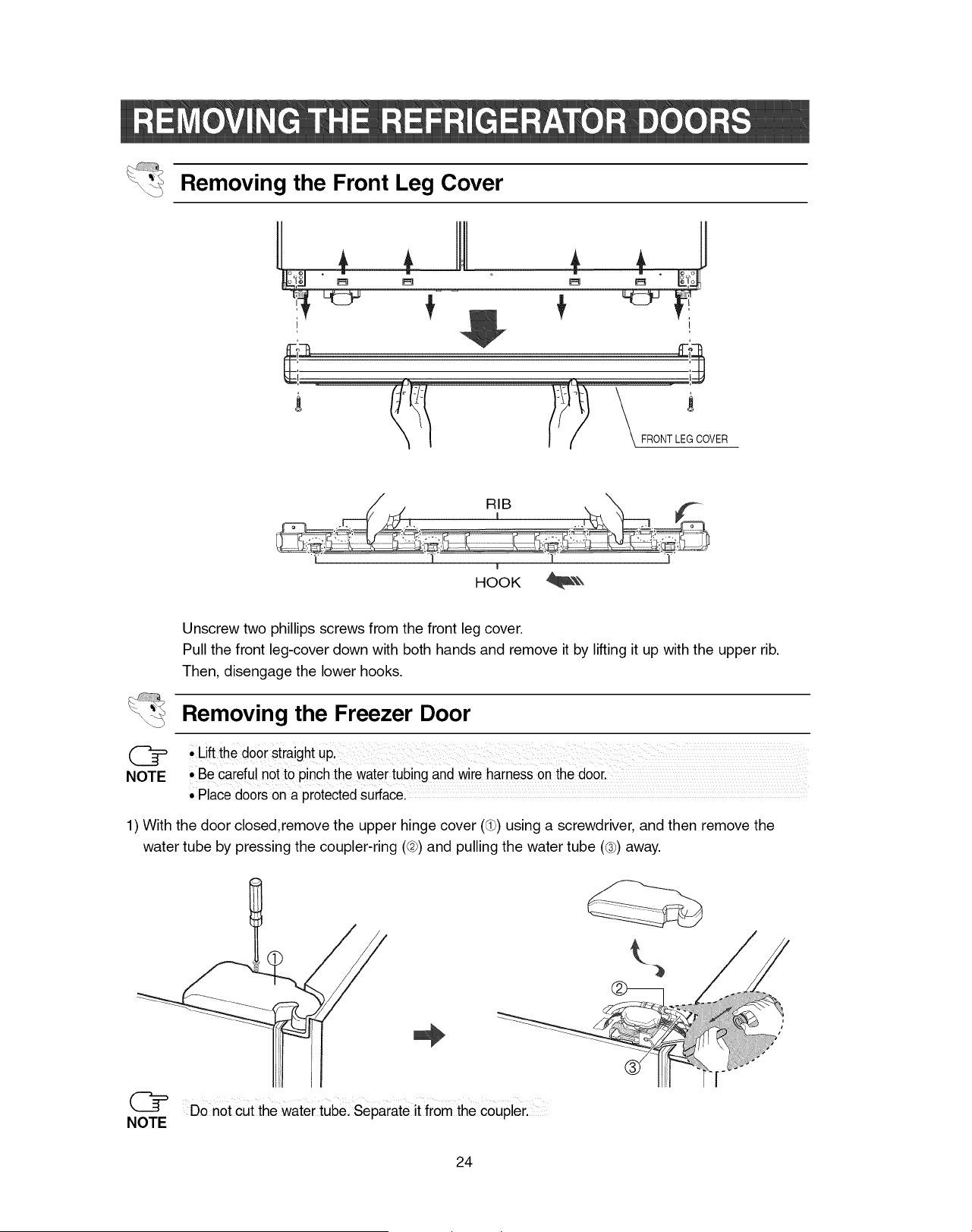
Removing the Front Leg Cover
1 L
l
I
HOOK _
Unscrew two phillips screws from the front leg cover.
Pull the front leg-cover down with both hands and remove it by lifting it up with the upper rib.
Then, disengage the lower hooks.
Removing the Freezer Door
NOTE • Be careful not to pinch thewater tubingand wireharness on the door.
' Place doors on a protectedSurfacel
1) With the door closed,remove the upper hinge cover (d_)using a screwdriver, and then remove the
water tube by pressing the coupler-ring (@)and pulling the water tube (@)away.
Do not cut the water tube. Separate it from the coupler.
24
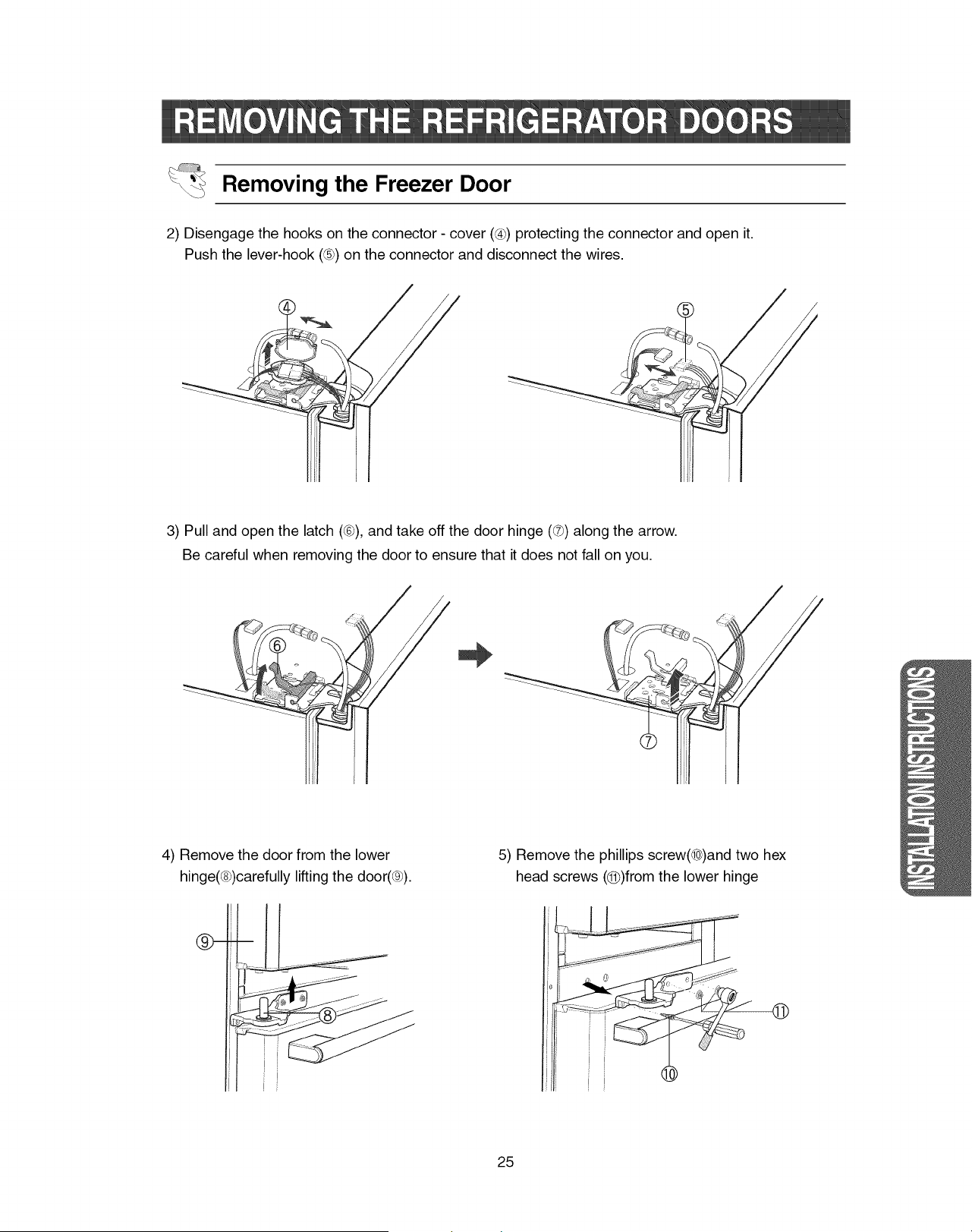
Removing the Freezer Door
2) Disengage the hooks on the connector - cover ((4))protecting the connector and open it.
Push the lever-hook (®) on the connector and disconnect the wires.
3) Pull and open the latch (®), and take off the door hinge (®) along the arrow.
Be careful when removing the door to ensure that it does not fall on you.
4) Remove the door from the lower
hinge(®)carefully lifting the door(®).
5) Remove the phillips screw(®)and two hex
head screws (@)from the lower hinge
i
!
i
25
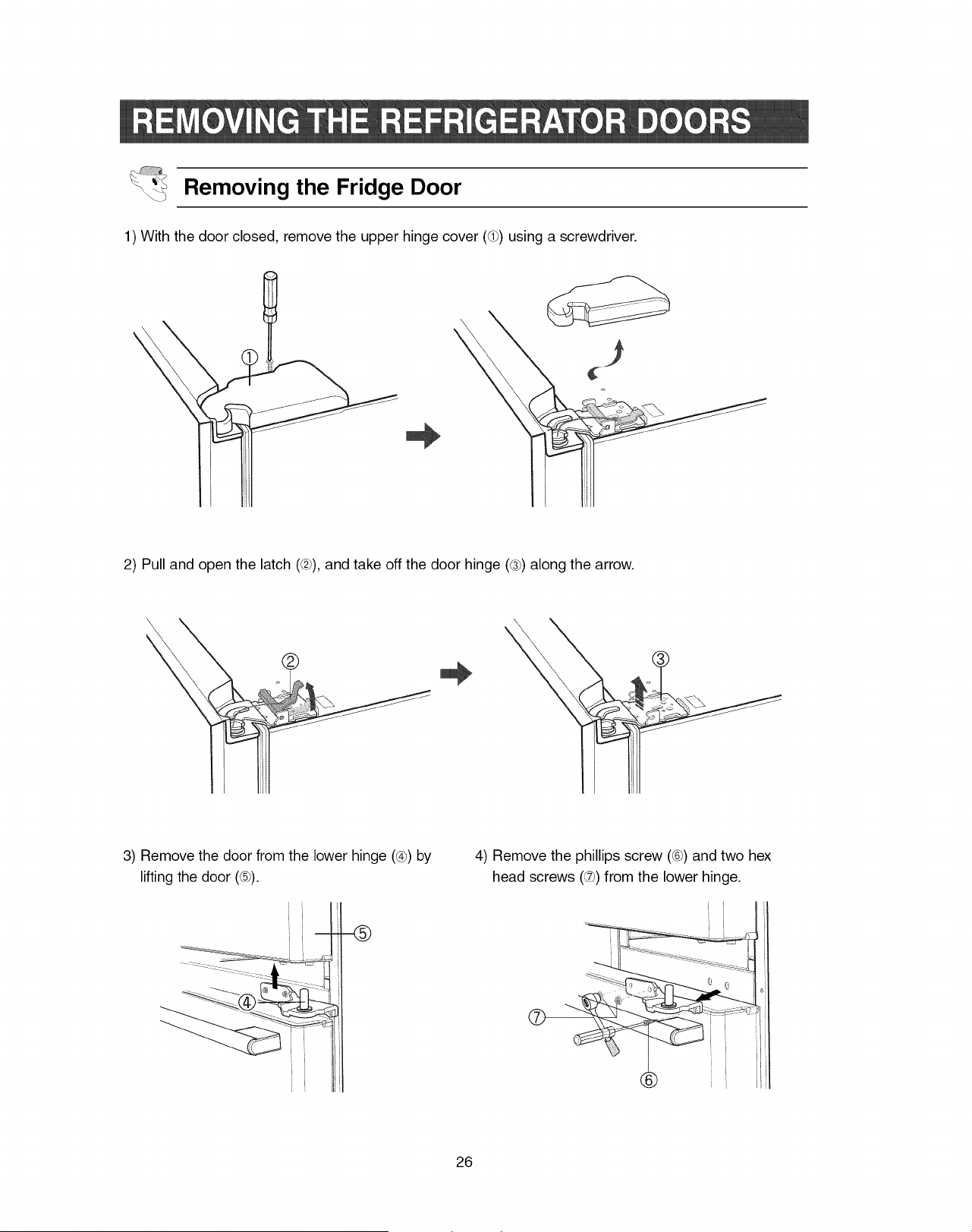
Removing the Fridge Door
1) With the door closed, remove the upper hinge cover (5_)using a screwdriver.
2) Pull and open the latch (@), and take off the door hinge (®) along the arrow.
3) Remove the door from the lower hinge (_4h)by
lifting the door (®).
Ji
ii-
i
4) Remove the phillips screw (_h)and two hex
head screws (®) from the lower hinge.
I
I
i L
J
®
26
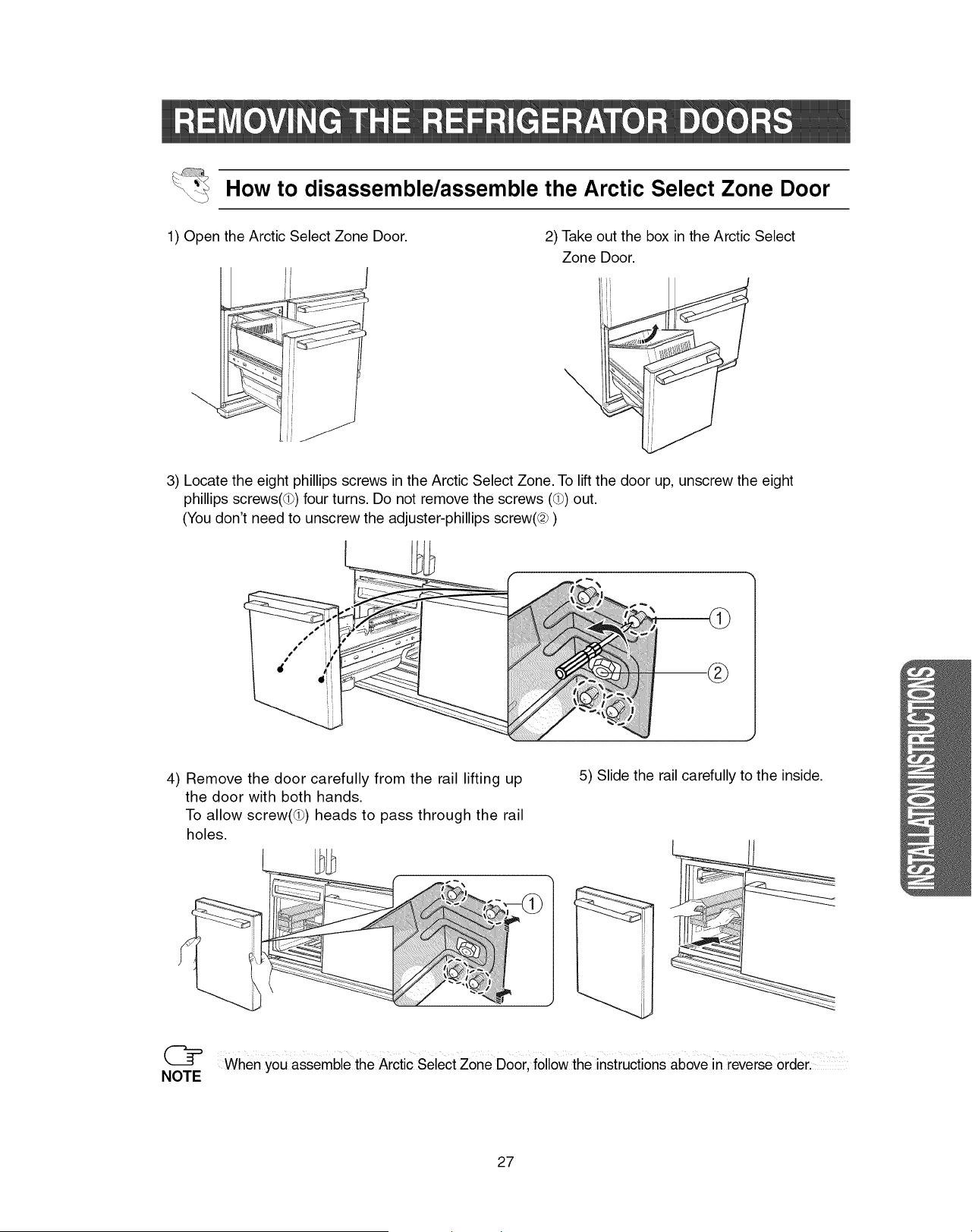
How to disassemble/assemble the Arctic Select Zone Door
1) Open the Arctic Select Zone Door. 2) Take out the box in the Arctic Select
Zone Door.
\
3) Locate the eight phillips screws in the Arctic Select Zone. To lift the door up, unscrew the eight
phillips screws(Q) four turns. Do not remove the screws (_) out.
(You don't need to unscrew the adjuster-phillips screw(@ )
4) Remove the door carefully from the rail lifting up
the door with both hands.
To allow screw(5_) heads to pass through the rail
holes.
5) Slide the rail carefully to the inside.
(_= When you assemble the Arctic Select Zone Door, follow the instructions above in reverse order.
NOTE
27
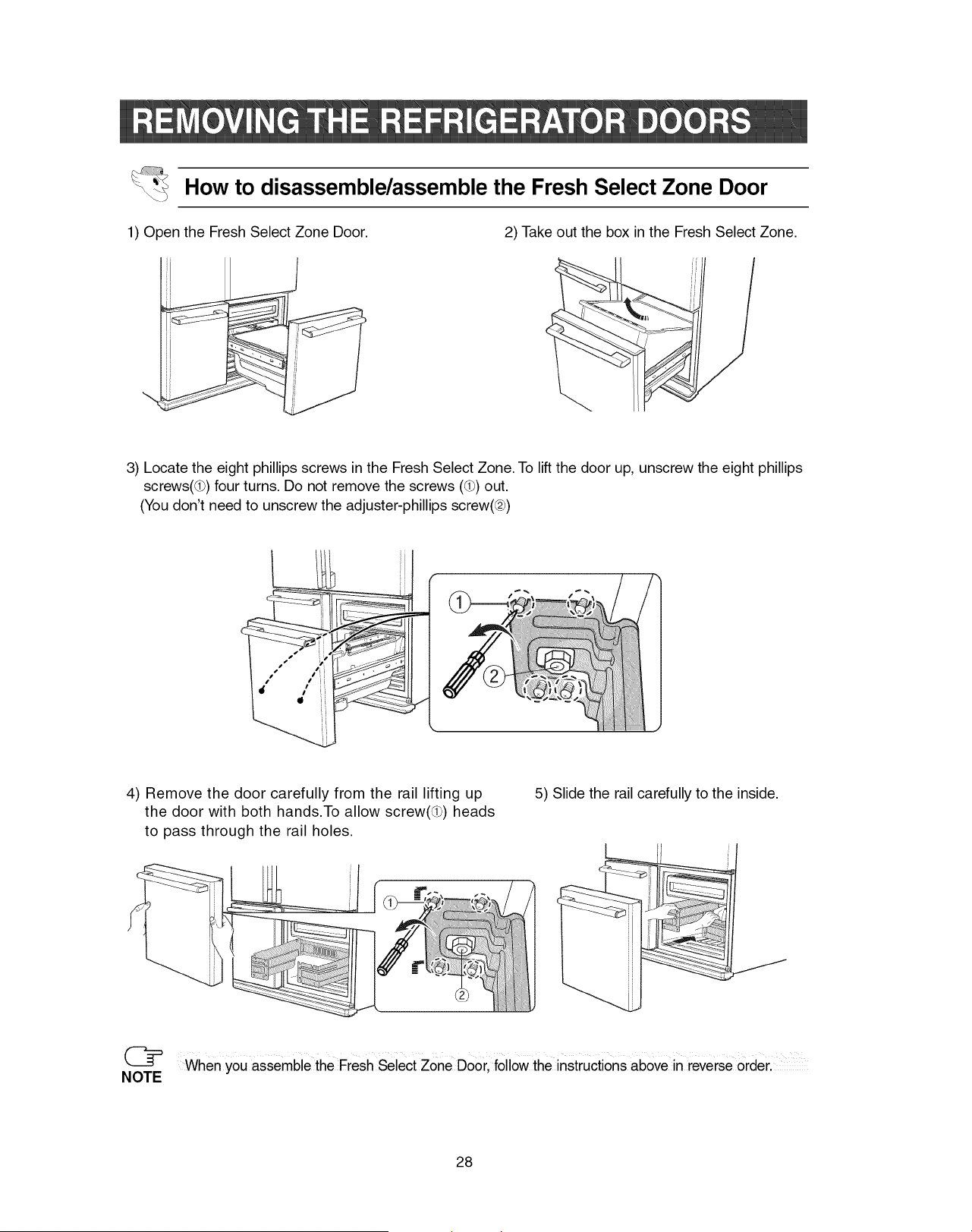
How to disassemble/assemble the Fresh Select Zone Door
1) Open the Fresh Select Zone Door. 2) Take out the box in the Fresh Select Zone.
3) Locate the eight phillips screws in the Fresh Select Zone. To lift the door up, unscrew the eight phillips
screws(@) four turns. Do not remove the screws (_) out.
(You don't need to unscrew the adjuster-phillips screw(@)
4) Remove the door carefully from the rail lifting up
the door with both hands.To allow screw(5_) heads
to pass through the rail holes.
5) Slide the rail carefully to the inside.
[
ii _--_"_"
(_ when you assemble the Fresh Select zone Door, followthe instructions above in reverse Orderl
NOTE
28
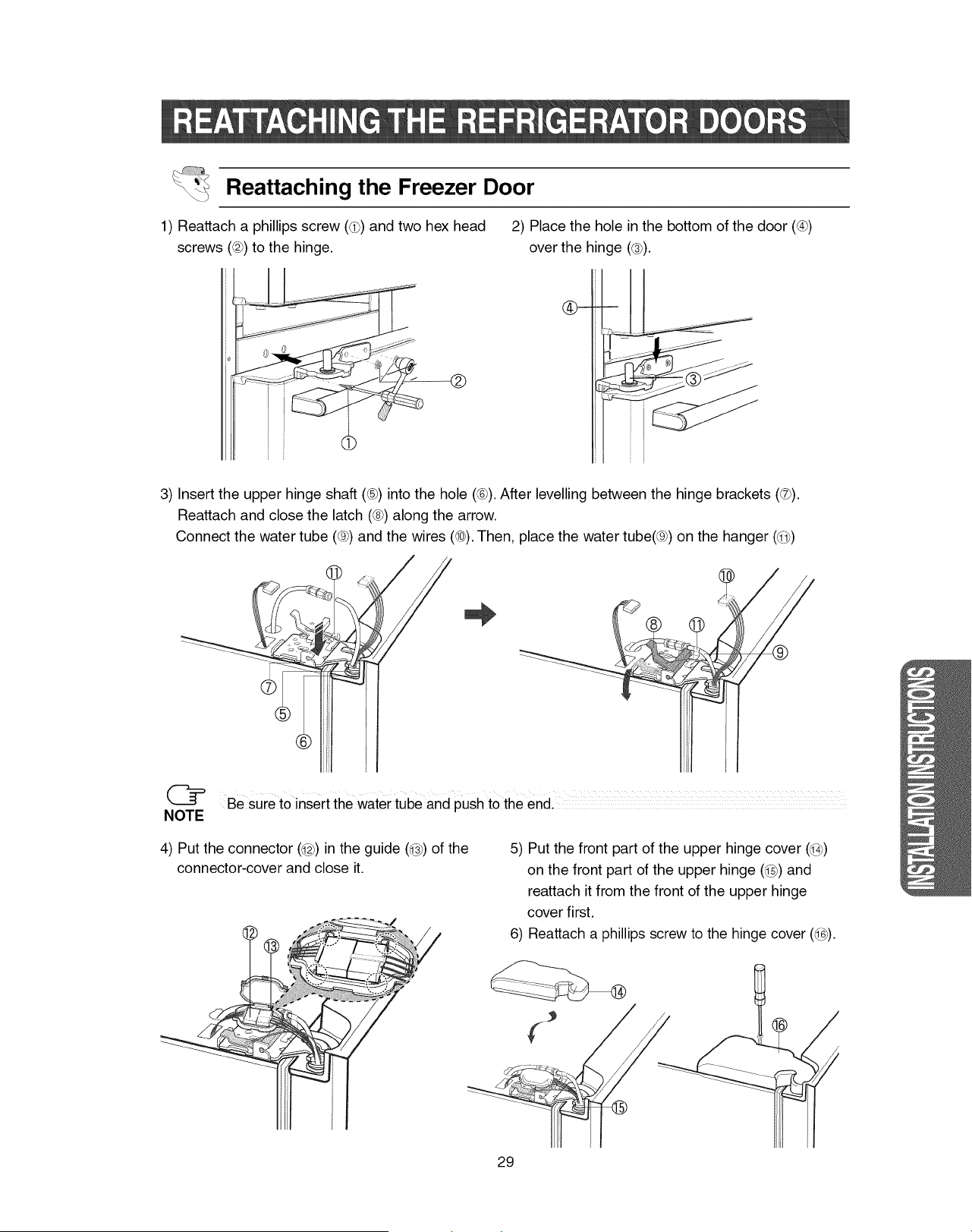
Reattaching the Freezer Door
1) Reattach a phillips screw (@_)and two hex head
screws (@)to the hinge.
2) Place the hole in the bottom of the door (@)
over the hinge (@).
J
3) Insert the upper hinge shaft (®) into the hole (@).After levelling between the hinge brackets (®).
Reattach and close the latch (@)along the arrow.
Connect the water tube (@)and the wires (@).Then, place the water tube(@) on the hanger (@)
NOTE
Be sure to insert the water tube and push to the end. ..................
4) Put the connector (@) in the guide (@) of the
connector-cover and close it.
5) Put the front part of the upper hinge cover (@)
on the front part of the upper hinge (@) and
reattach it from the front of the upper hinge
cover first.
6) Reattach a phillips screw to the hinge cover (@).
29
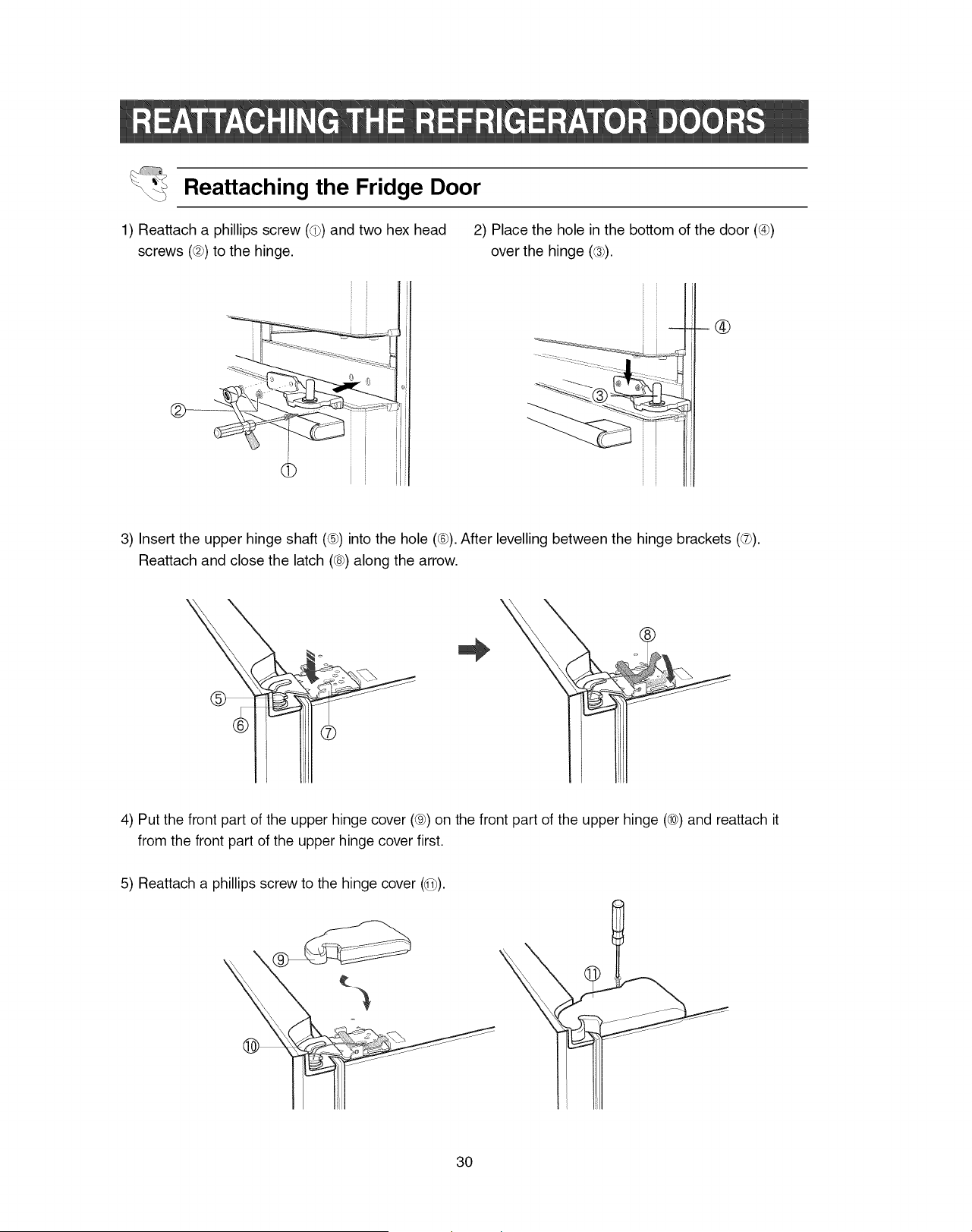
Reattaching the Fridge Door
1) Reattach a phillips screw (@_)and two hex head
screws (@)to the hinge.
2) Place the hole in the bottom of the door (@)
over the hinge (@).
............... .........-
--_®
3) Insert the upper hinge shaft (®) into the hole (@).After levelling between the hinge brackets (®).
Reattach and close the latch (@)along the arrow.
4) Put the front part of the upper hinge cover (®) on the front part of the upper hinge (®) and reattach it
from the front part of the upper hinge cover first.
5) Reattach a phillips screw to the hinge cover (@).
30
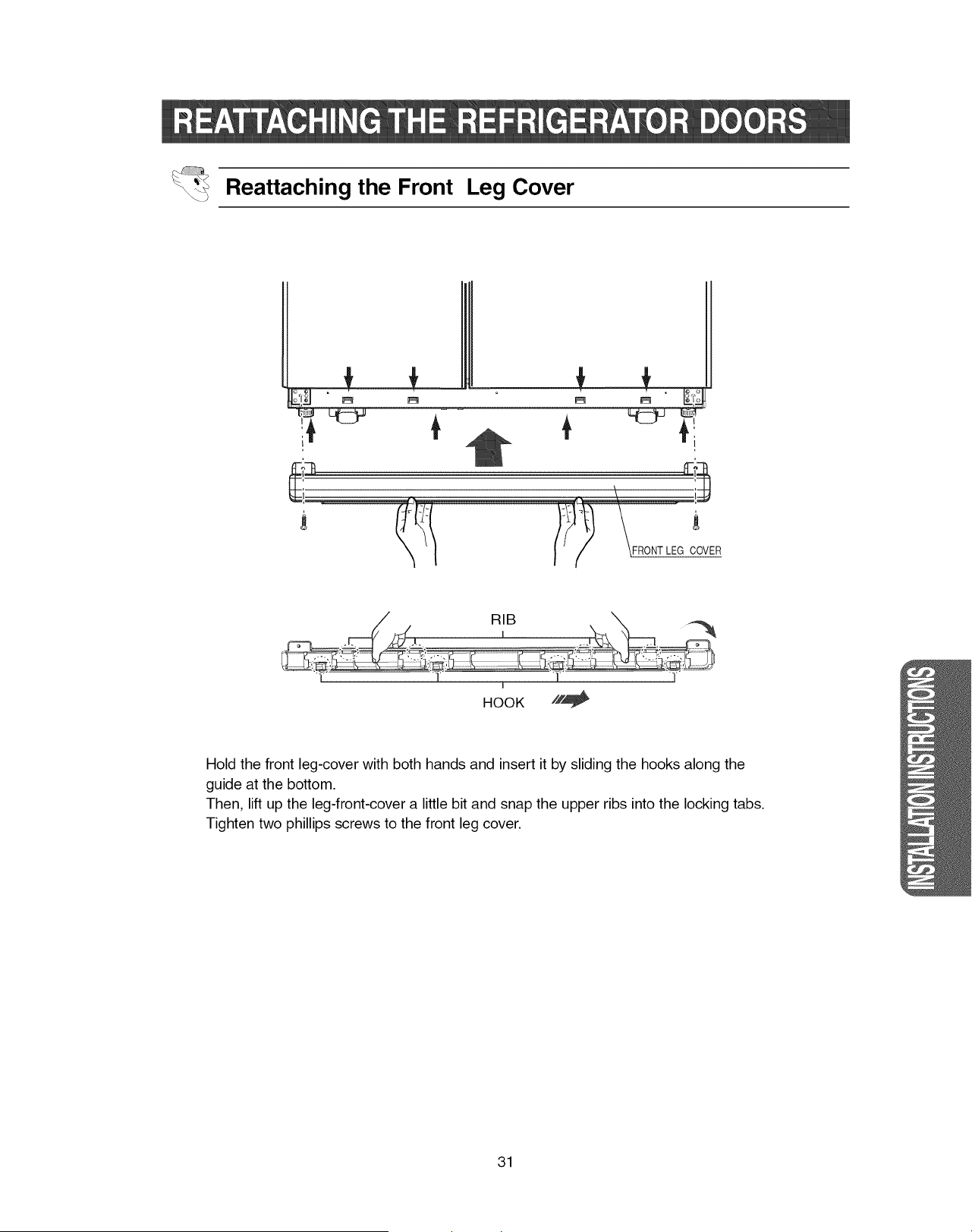
Reattaching the Front Leg Cover
I
-i
/_ _FRONT LEG COVER
I
HOOK //,_
Hold the front leg-cover with both hands and insert it by sliding the hooks along the
guide at the bottom.
Then, lift up the leg-front-cover a little bit and snap the upper ribs into the locking tabs.
Tighten two phillips screws to the front leg cover.
31
1)Inordertooperatetheicemakerproperly,waterpressureof1.4N8.5kgf/cm2(0.14N0.83Mpa,
19.9-120.9psi,1.37-8.3bar)is required.
Inthisrangea 100ccpapercupcanbefilledin10seconds.
2)Thewaterfilterremovesparticles.Itdoesnotsterilizeor destroyanymicro-organisms.
3)Iftherefrigeratorisinstalledinanareawithlowwaterpressure(1.4kgf/cm2,0.14Mpa,19.9psi,
1.37bar),youshouldinstalla boosterpumptocompensateforthelowpressure.
4)Ensurethewaterstoragetankinsidetherefrigeratorispreperlyfilledinitially.Pushthewater
dispenserleveruntilthewaterrunsfromtheoutlet.
(_ A universalwatersupplykitis availableatextra€ostfr0mYourdealerlTherefrigerator
NOTE manufacturerrecommendsusingawatersupplykitcontainingcoppertubing.
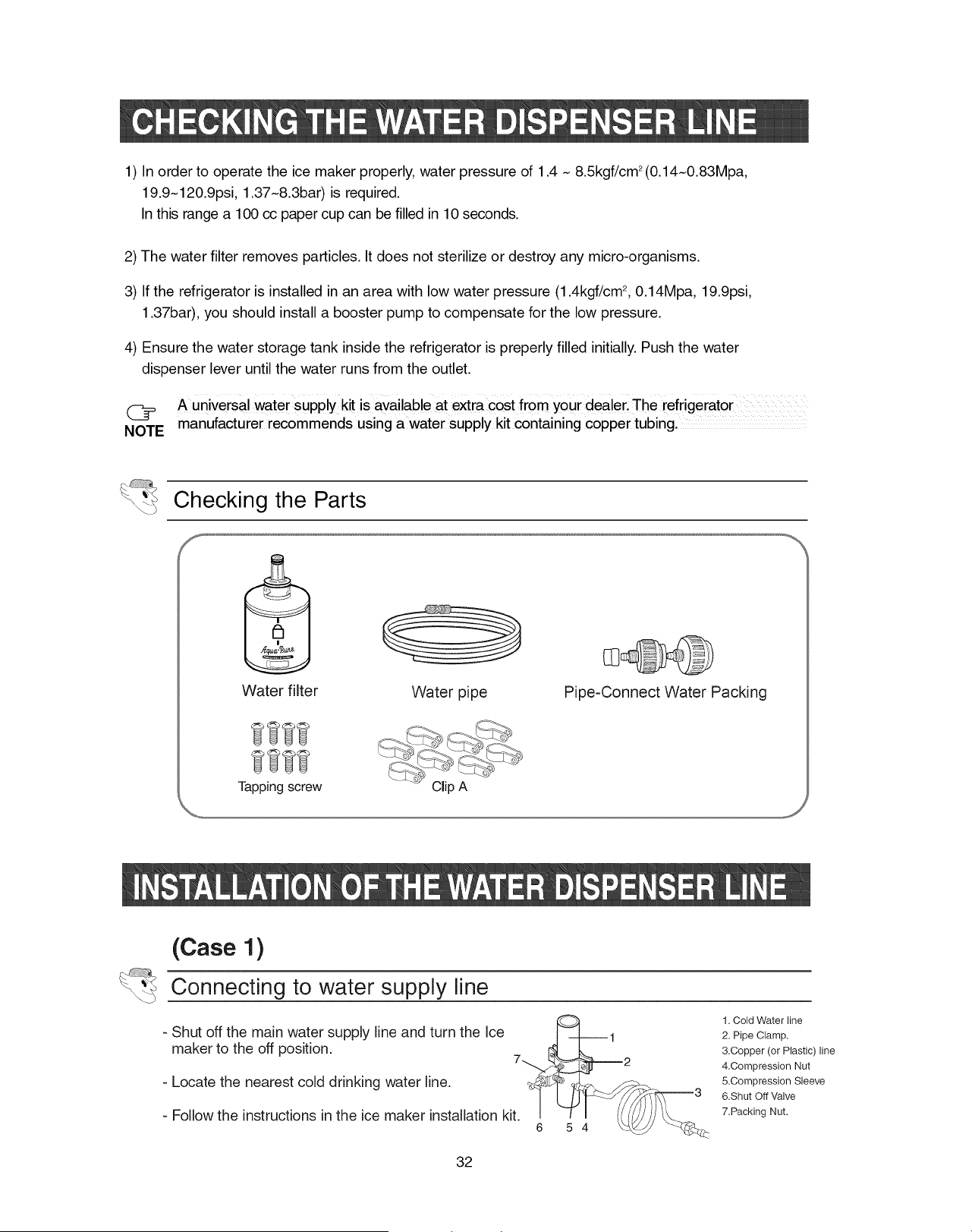
Checking the Parts
Water filter
Tappingscrew
Water pipe
Clip A
Pipe-Connect Water Packing
(Case 1)
Connecting to water supply line
- Shut off the main water supply line and turn the Ice
maker to the off position.
- Locate the nearest cold drinking water line.
- Follow the instructions in the ice maker installation kit.
6 5 4
1. Cold Water line
2. Pipe Clamp.
&Copper (or Plastic) line
4.Compression Nut
5.Compression Sleeve
6.Shut Off Valve
7.Packing Nut.
32
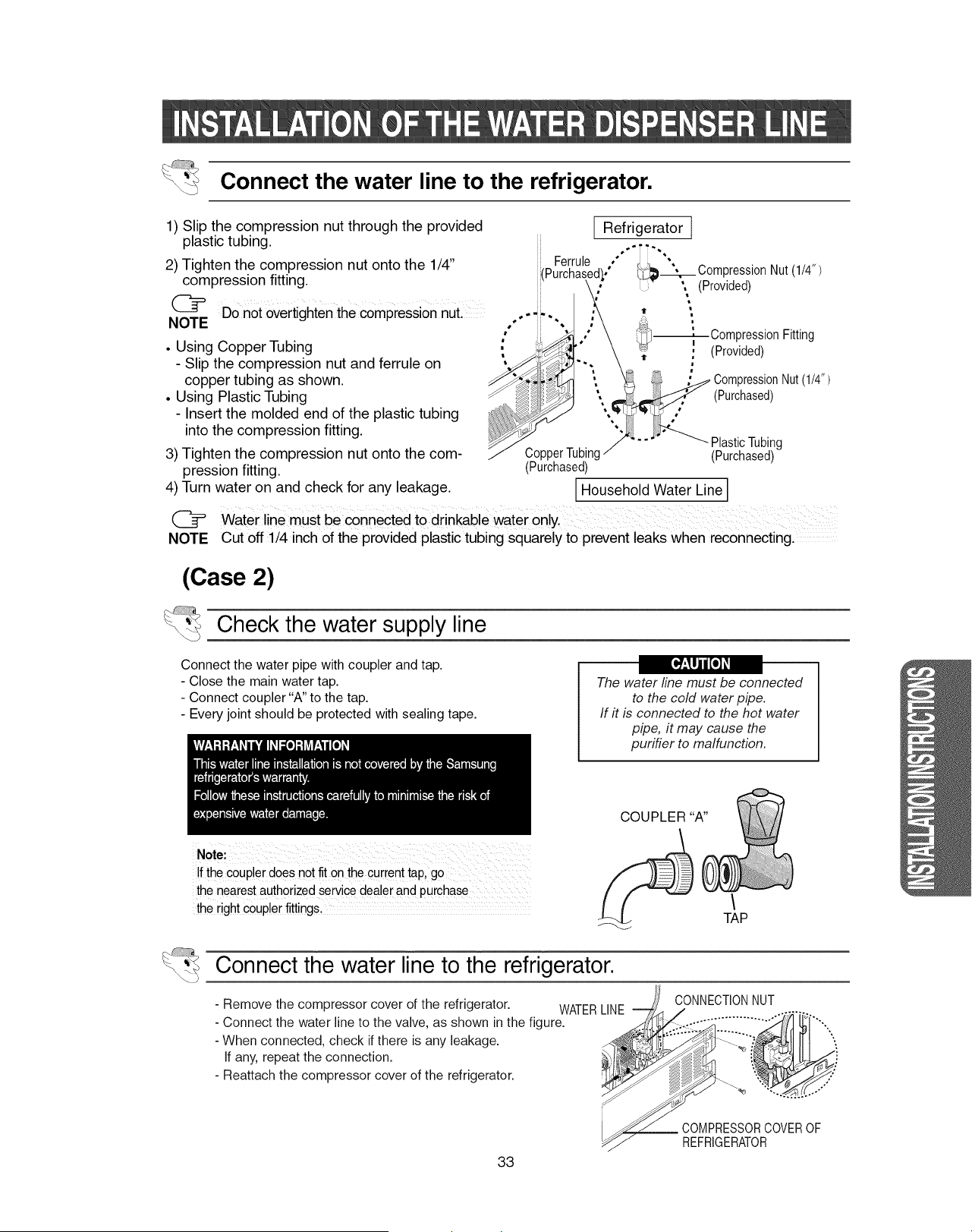
Connect the water line to the refrigerator.
1) Slip the compression nut through the provided
plastic tubing.
2) Tighten the compression nut onto the 1/4"
compression fitting.
J_
(_= Do not overtighten the compression nut. o,- _,
NOTE ," ,
• Using Copper Tubing
- Slip the compression nut and ferrule on
copper tubing as shown.
• Using Plastic Tubing
- Insert the molded end of the plastic tubing
into the compression fitting.
3) Tighten the compression nut onto the com-
pression fitting.
4) Turn water on and check for any leakage.
C_
NOTE
Ferrule
Refrigerator
d),° _Compresslon Nut (1/4")
, ', (Provided)
t "
m
=
---_Compression Fitting
, (Provided)
"It
i
m
CompressionNut(1/4")
(Purchased)
PlasticTubing
CopperTubing (Purchased)
(Purchased)
I Household Water Line]
Waterline must be €onnected tO drinkable water only.
Cut off 1/4 inch of the provided plastic tubing squarely to prevent leaks when reconnecting.
(Case 2)
Check the water supply line
Connect the water pipe with coupler and tap.
- Close the main water tap.
- Connect coupler "A" to the tap.
- Every joint should be protected with sealing tape.
The water line must be connected
to the cold water pipe.
If # is connected to the hot water
pipe, it may cause the
purifier to malfunction.
COUPLER "A"
!f the Coupler does not fit on the cur[ent tap, go
the nearest authorized service dealer and purchase
the dght c0upler fittings,
TAP
Connect the water line to the refrigerator.
- Remove the compressor cover of the refrigerator. WATERLINE
- Connect the water line to the valve, as shown in the figure.
- When connected, check if there is any leakage.
If any, repeat the connection.
- Reattach the compressor cover of the refrigerator.
CONNECTIONNUT
33
COMPRESSORCOVEROF
REFRIGERATOR
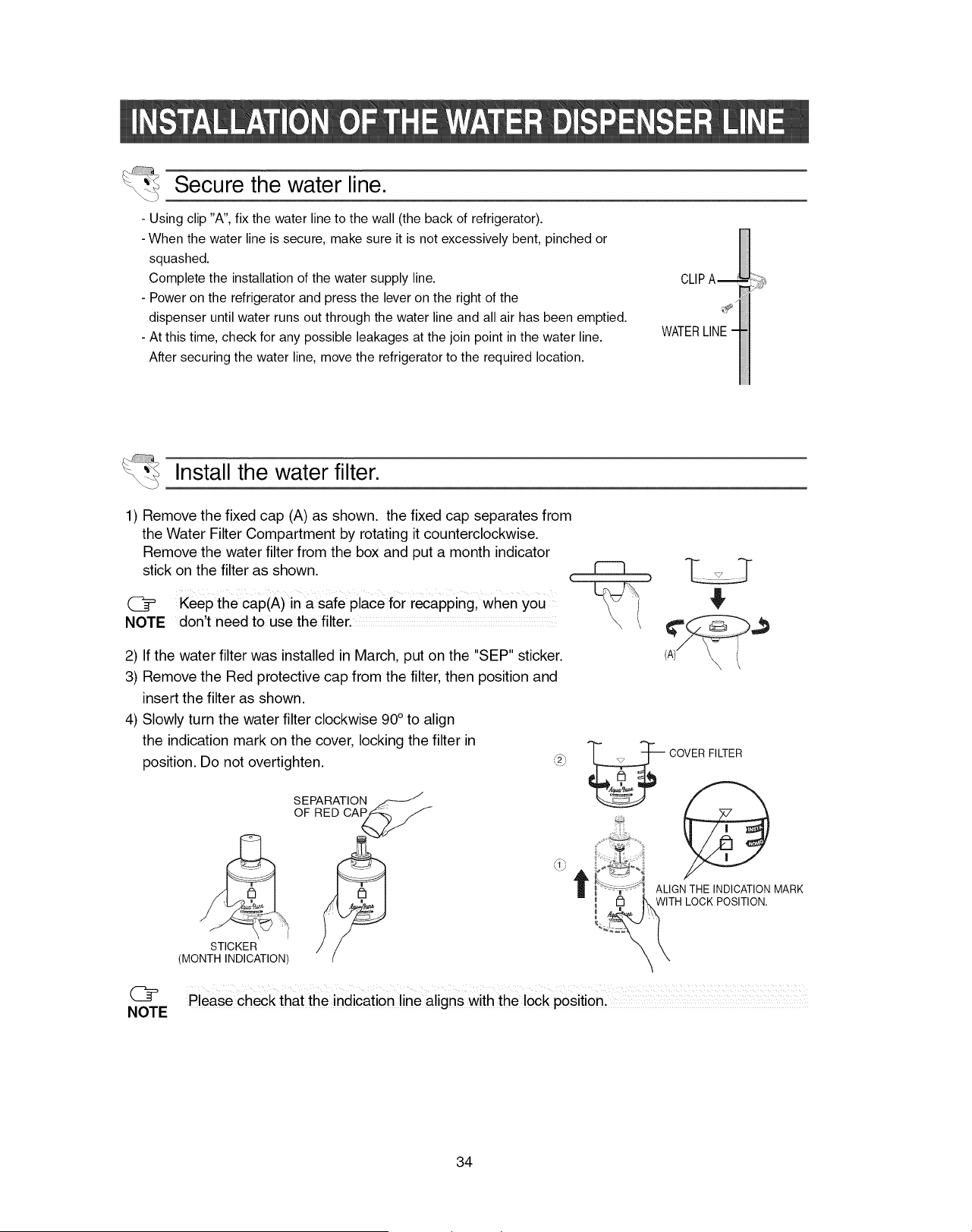
Secure the water line.
- Using clip "A", fix the water line to the wall (the back of refrigerator).
- When the water line is secure, make sure it is not excessively bent, pinched or
squashed.
Complete the installation of the water supply line.
- Power on the refrigerator and press the lever on the right of the
dispenser until water runs out through the water line and all air has been emptied.
- At this time, check for any possible leakages at the join point in the water line.
After securing the water line, move the refrigerator to the required location.
Install the water filter.
1) Remove the fixed cap (A) as shown, the fixed cap separates from
the Water Filter Compartment by rotating it counterclockwise.
Remove the water filter from the box and put a month indicator
stick on the filter as shown.
Keep the cap(A) in a safe place for recapping, when you
NOTE don't need to use the filter .............
2) If the water filter was installed in March, put on the "SEP" sticker.
3) Remove the Red protective cap from the filter, then position and
insert the filter as shown.
(A)_
4) Slowly turn the water filter clockwise 90 ° to align
the indication mark on the cover, locking the filter in
position. Do not overtighten.
SEPARATION
OF RED CAP
,,_2_, _ COVER FILTER
\
T ALIGN THE INDICATION MARK
WITH LOCK POSITION.
STICKER
(MONTH INDICATION)
NOTE please check that the indication line aligns with the lock position.
34
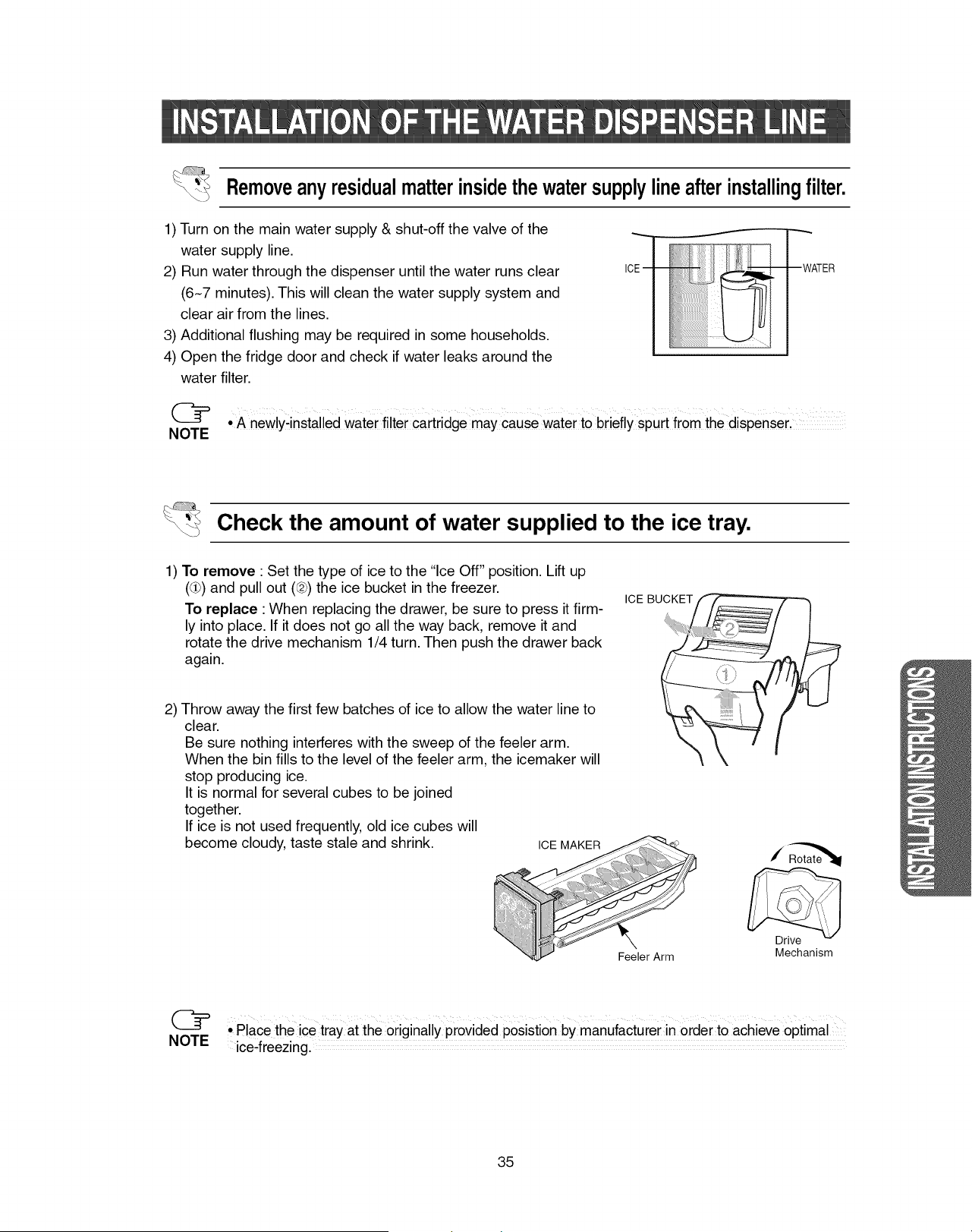
Removeanyresidualmatterinsidethewatersupplylineafterinstallingfilter.
1) Turn on the main water supply & shut-off the valve of the
water supply line.
2) Run water through the dispenser until the water runs clear
(6N7 minutes). This will clean the water supply system and
clear air from the lines.
3) Additional flushing may be required in some households.
4) Open the fridge door and check if water leaks around the
water filter.
• A newlyqnstalled water filter cartridge may Causewater to briefly spurt from the dispenserl
NOTE
Check the amount of water supplied to the ice tray.
1) To remove : Set the type of ice to the "Ice Off" position. Lift up
(L#)and pull out (@)the ice bucket in the freezer.
To replace :When replacing the drawer, be sure to press it firm-
ly into place. If it does not go all the way back, remove it and
rotate the drive mechanism 1/4 turn. Then push the drawer back
again.
2) Throw away the first few batches of ice to allow the water line to
clear.
Be sure nothing interferes with the sweep of the feeler arm.
When the bin fills to the level of the feeler arm, the icemaker will
stop producing ice.
It is normal for several cubes to be joined
together.
If ice is not used frequently, old ice cubes will
become cloudy, taste stale and shrink.
ICE BUCKE
ICE MAK
/
Rotate'_
DrieVc_anism
° Place the ice tray at the originally provided posistion by manufacturer in order to achieve optimal
NOTE ice.freezing.
35
3) Important Facts About Your Dispenser :
Do not add ice from trays or bags to the storage bin. It may not crush or dispense well.
Avoid overfilling glass with ice and use of narrow or extra-tall glasses. Backed-up ice can jam the
chute or cause the door in the chute to freeze shut. If ice is blocking the chute, poke it through with
a wooden spoon.
Beverages and foods should not be quick-chilled in the ice storage bin.
To keep dispensed ice from missing the glass, put the glass close to, but not touching, the dis-
penser opening.
Some crushed ice may be dispensed even though you selected CUBES. This happens occasionally
when a few cubes accidentally get directed to the crusher.
After crushed ice is dispensed, some water may drip from the chute.
4) Water Supply to the Icemaker :
The icemaker must be connected to a cold water line.
5)
Start the Icemaker :
Set the type of ice to the "Cubed Ice" or "Crushed Ice" position. The icemaker will not begin to oper-
ate until it reachs its operating of 10.4°F(-12°C) or below. It will then begin operation automatically if
the type of ice is in the "Cubed Ice" or "Crushed Ice" position.
• !f there is no water supplyl turnoff the icemaker to save energy:
• In lower water pressure conditions, the water valve may turn on up to 3 times to make sure enough
water reaches the icemaker.
• Allow the appliance to stand for 2hours after installation.
Use only the ice maker provided with the refrigerator.
WARNING
36
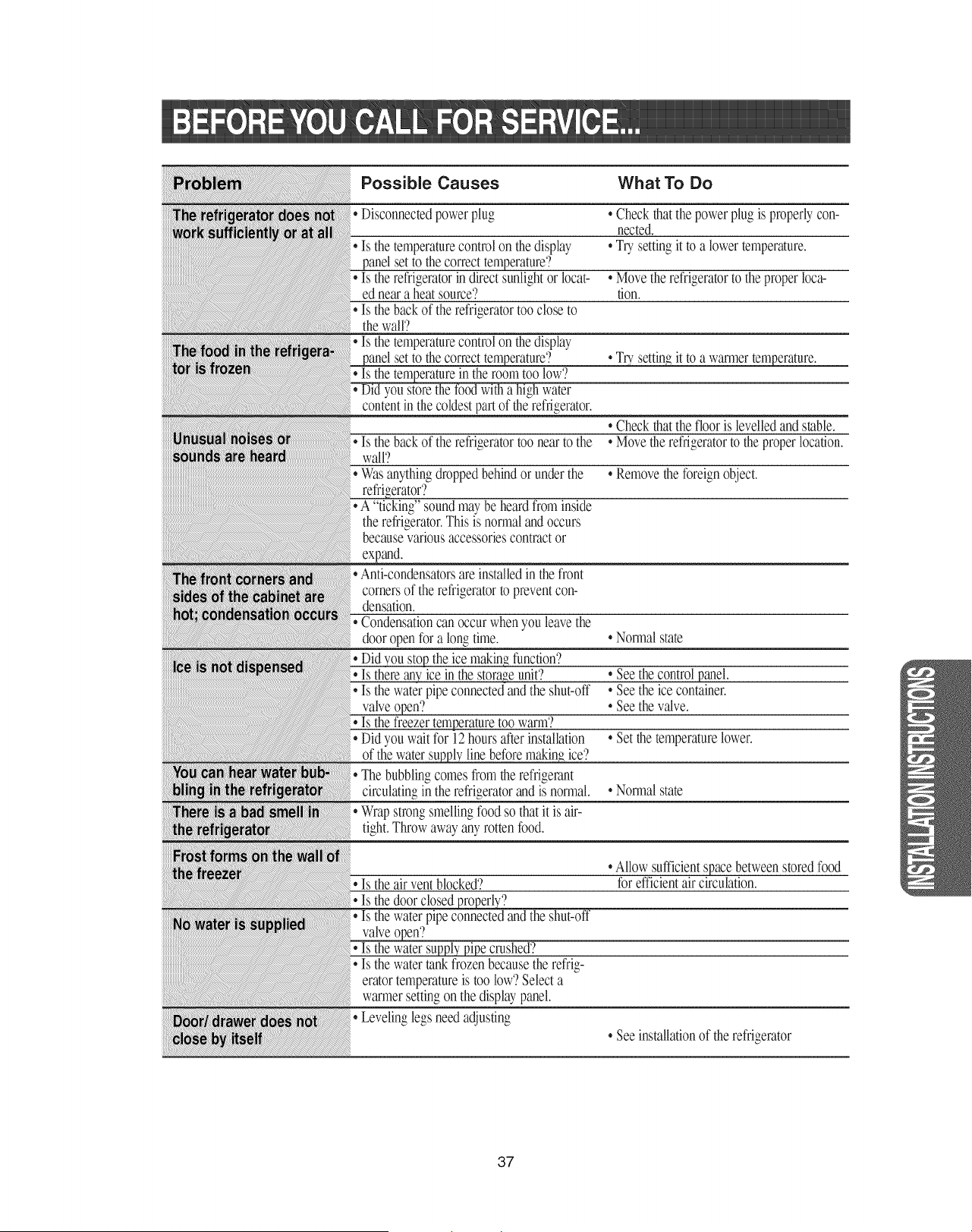
Possible Causes What To Do
Disconnectedpowerplug
Is the temperaturecontrolon the display
setto the correcttemperature'?
Is the refrigeratorin direct sunlightor locat-
ed near a heat source'?
• Is the backof the refrigeratortoo closeto
thewall'?
Is the temperaturecontrolon the display
setto the correcttemperature?
the roomtoo low'?
water
contentin the coldestpart of therefrigerator.
• Checkthat the powerplug is properlycon-
nected.
• Trysetting it to a lower temperature,
• Movetherefrigeratorto theproperloca-
tion.
• Trysettin_ it to a warmertemperature.
• Checkthat the flooris levelledand stable.
Is the backof the refligeratortoo near to the *Movetherefrigeratorto theproper location.
wall'?
Wasanythingdroppedbehind or under the • Removethe foreignobject.
• A "ticking"sound may be heardfrom inside
therefrigerator.Thisis normal andoccurs
becausevariousaccessoriescontractor
expand.
{,And-condensatorsare installedin thefront
cornersof the refrigeratorto preventcon-
densation.
Condensationcan occur whenyou leavethe
door open for a longtime.
theice makin_ function'?
Is there anyice inthe storaveunit'?
• Is the waterpipe connectedand the shut-off
Is the freezertemperaturetoo warm'?
Did you wait for 12hours afterinstallation
of the water_ line before makin_ ice'?
Thebubblingcomesfrom the refrigerant
circulatingin the refrigeratorand isnormal.
Wrapstrongsmelling food so that it is air-
tight.Throw away anyrotten food.
• Normalstate
• Seethecontrolpanel,
• Seetheicecontainer,
• Seethevalve.
• Setthetemperaturelower.
• Normalstate
Is the air vent blocked?
Is the door closed _'?
Is the waterpipe connectedand the shut-off
•Allow sufficientspace between storedfood
for efficientair circulation.
Is the water supplypipe crashed?
Is the watertank frozen because the refrig-
eratortemperatureis too low'?Selecta
warmersetting on the displaypanel.
Levelinglegs needadjusting
• See installationof the refrigerator
37
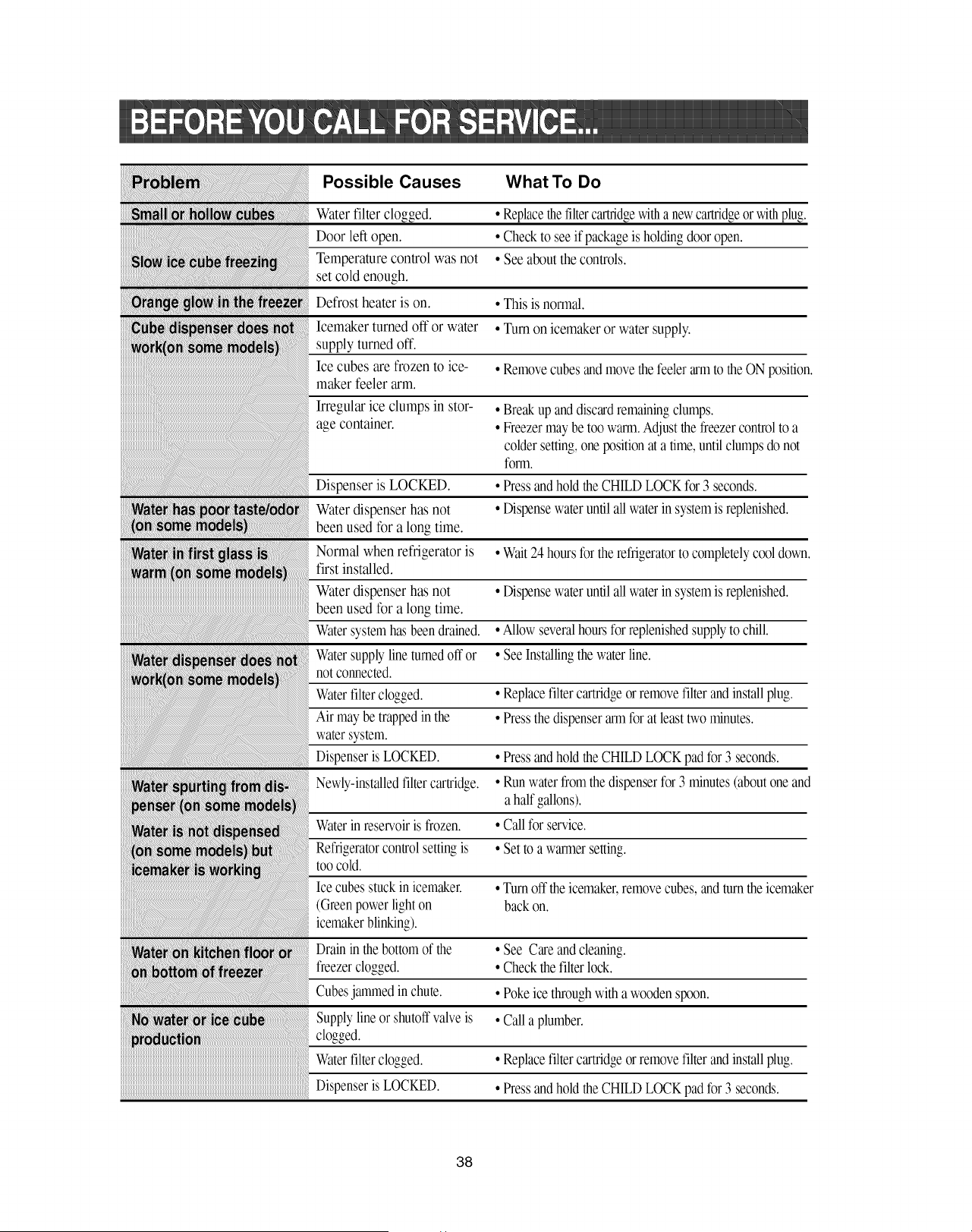
Possible Causes What To Do
Water filter clogged.
Door left open.
Temperature control was not
set cold enough.
Defrost heater is on.
Icemaker turned oft or water
supply turned oft.
Ice cubes are frozen to ice-
maker feeler arm.
Irregular ice clumps in stor-
age container.
Dispenser is LOCKED.
Water dispenser has not
been used for a long time.
Normal when refrigerator is
first installed.
Water dispenser has not
been used for a long time.
Watersystemhasbeen drained.
Watersupplylinetumed off or
not connected.
Waterfilterclogged.
Air may be trapped in the
watersystem.
DispenserisLOCKED.
Newly-installedfiltercartridge.
Waterin reservoiris frozen.
Refrigeratorcontrolsetting is
too cold.
Ice cubes stuck in icemaker.
(Green power light on
icemaker blinking).
Drain in thebottom of the
freezer clogged.
Cubesjammed inchute.
Supply line or shutoffvalve is
Waterfilterclogged.
DispenserisLOCKED.
• Replacethefiltercartridgewitha newcartridgeor with plug.
• Check to see if package is holdingdoor open.
• See about the controls.
• This is normal.
• Turn on icemaker or water supply.
• Removecubes and movethe feeler armto theON position.
• Break up and discardremainingclumps.
• Freezermay be too warm.Adjust the freezercontrolto a
colder setting,one position at a time,until clumps do not
fom_.
• Press andhold theCHILD LOCK for 3 seconds.
• Dispensewater until all water in systemis replenished.
• Wait 24hours for therefrigeratorto completelycool down.
• Dispensewater until all water in systemis replenished.
• Allow severalhours for replenishedsupplyto chill.
• See Installingthe waterline.
• Replacefilter cartridgeor remove filter and install plug.
• Press thedispenser arm for at leasttwo minutes.
• Press andhold theCHILD LOCK pad for 3 seconds.
• Run waterfrom the dispenserfor 3 minutes(about one and
a half gallons).
• Call for service.
• Set to a warmersetting.
• Turn off theicemaker,removecubes, and turn the icemaker
back on.
• See Care andcleaning.
• Check thefilter lock.
• Poke ice throughwith a wooden spoon.
• Call a plumber.
• Replacefilter cartridgeor remove filter and install plug.
• Press andhold theCHILD LOCK pad for 3 seconds.
38
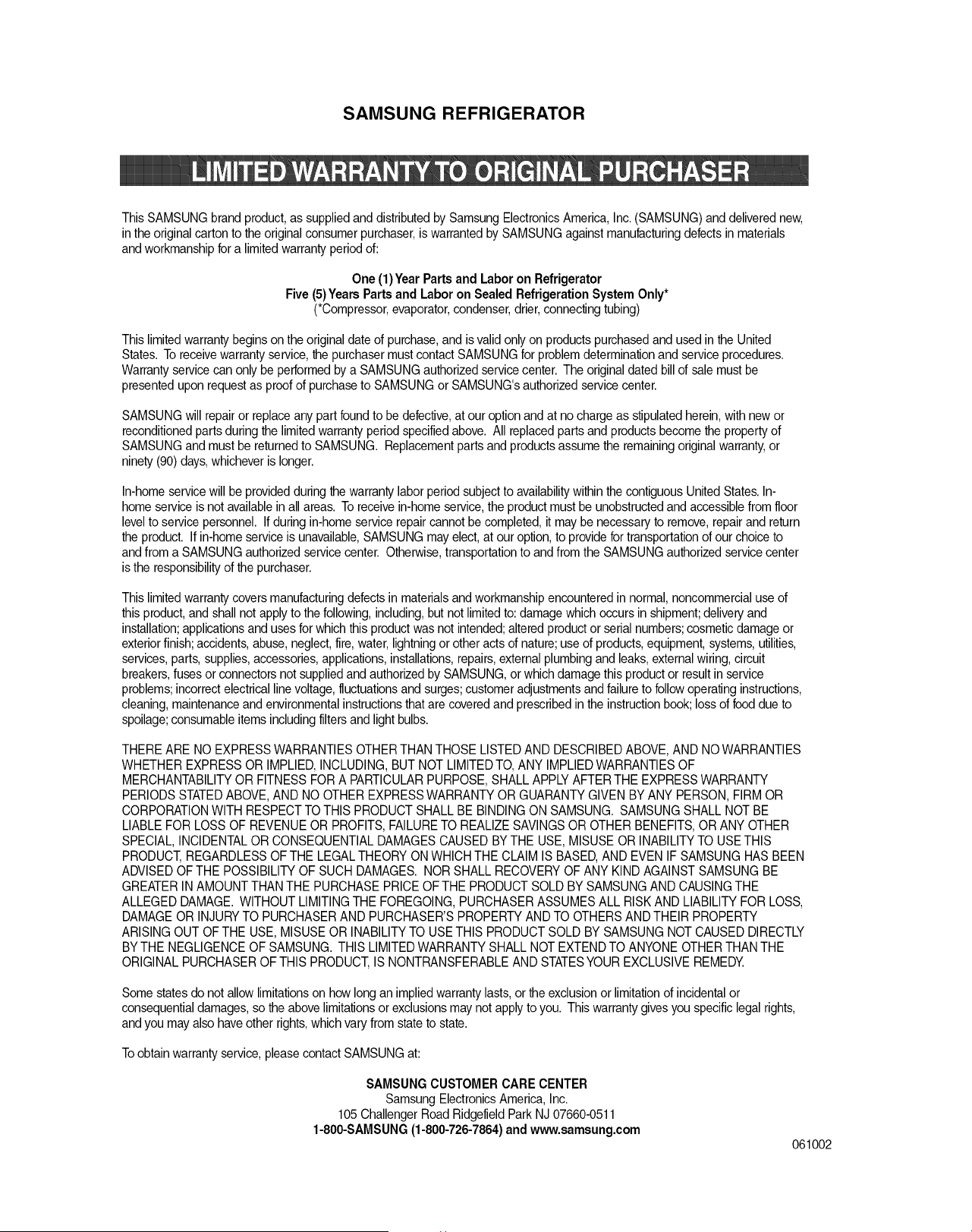
SAMSUNG REFRIGERATOR
This SAMSUNG brand product, as suppliedand distributed by Samsung ElectronicsAmerica, Inc. (SAMSUNG) and delivered new,
in the original carton to the original consumer purchaser,is warrantedby SAMSUNGagainst manufacturingdefects in materials
and workmanship for a limited warranty period of:
One (1)Year Parts and Laboron Refrigerator
Five (5) Years Parts and Laboron Sealed RefrigerationSystem Only*
(*Compressor,evaporator,condenser,drier,connecting tubing)
This limitedwarranty begins on theoriginal date of purchase,and is valid only on products purchasedand used in the United
States. Toreceive warranty service,the purchasermust contact SAMSUNG for problem determinationand service procedures.
Warranty servicecan only be performedby a SAMSUNG authorizedservice center. The original dated bill of sale must be
presented upon requestas proof of purchaseto SAMSUNG or SAMSUNG'sauthorized service center.
SAMSUNG will repair or replaceany part foundto be defective,at our option and at no charge as stipulatedherein,with new or
reconditioned parts during the limited warrantyperiod specified above. All replacedparts and products become the property of
SAMSUNG and must be returnedto SAMSUNG. Replacementparts and products assume the remainingoriginal warranty,or
ninety (90) days,whichever is longer.
In-home service will be providedduring the warranty labor period subjectto availabilitywithin the contiguous United States. In-
home service is not availablein all areas. Toreceive in-home service,the product must be unobstructedand accessiblefrom floor
levelto service personnel. If during in-homeservice repair cannot be completed, it maybe necessary to remove, repairand return
the product. If in-home service is unavailable,SAMSUNG may elect,at our option,to providefor transportationof our choice to
and from a SAMSUNG authorizedservice center. Otherwise,transportationto and from the SAMSUNGauthorized servicecenter
is the responsibilityof the purchaser.
This limitedwarranty covers manufacturingdefects in materials and workmanshipencounteredin normal, noncommercialuse of
this product, and shall not applyto the following,including, but not limited to: damage which occurs in shipment;delivery and
installation;applicationsand uses for which this product was not intended;altered product or serial numbers;cosmetic damage or
exterior finish;accidents,abuse, neglect,fire,water, lightning or other acts of nature; use of products,equipment, systems, utilities,
services, parts, supplies,accessories,applications,installations,repairs, external plumbingand leaks, externalwiring, circuit
breakers,fuses or connectorsnot supplied and authorized by SAMSUNG, or which damage this product or resultin service
problems;incorrectelectrical line voltage,fluctuationsand surges;customer adjustmentsand failure to followoperating instructions,
cleaning, maintenance and environmental instructionsthat are covered and prescribed in the instructionbook; loss of food due to
spoilage; consumableitems includingfilters and light bulbs.
THERE ARE NO EXPRESSWARRANTIESOTHER THAN THOSE LISTED AND DESCRIBEDABOVE, AND NO WARRANTIES
WHETHER EXPRESS OR IMPLIED,INCLUDING,BUT NOTLIMITEDTO, ANY IMPLIED WARRANTIESOF
MERCHANTABILITYOR FITNESS FOR A PARTICULARPURPOSE, SHALL APPLYAFTER THE EXPRESS WARRANTY
PERIODS STATEDABOVE, AND NO OTHEREXPRESS WARRANTY OR GUARANTY GIVEN BY ANY PERSON, FIRM OR
CORPORATIONWITH RESPECTTO THIS PRODUCT SHALL BE BINDINGON SAMSUNG. SAMSUNG SHALL NOT BE
LIABLE FOR LOSS OF REVENUE OR PROFITS,FAILURETO REALIZE SAVINGSOR OTHER BENEFITS,OR ANY OTHER
SPECIAL, INCIDENTALOR CONSEQUENTIAL DAMAGESCAUSED BY THE USE, MISUSE OR INABILITYTO USETHIS
PRODUCT,REGARDLESS OF THE LEGALTHEORY ON WHICHTHE CLAIM IS BASED,AND EVEN IF SAMSUNG HAS BEEN
ADVISEDOF THE POSSIBILITY OF SUCH DAMAGES. NOR SHALL RECOVERY OFANY KIND AGAINSTSAMSUNG BE
GREATER INAMOUNT THAN THE PURCHASEPRICE OF THE PRODUCT SOLD BY SAMSUNG AND CAUSINGTHE
ALLEGED DAMAGE. WITHOUT LIMITINGTHE FOREGOING, PURCHASERASSUMESALL RISK AND LIABILITY FOR LOSS,
DAMAGE OR INJURYTO PURCHASER AND PURCHASER'SPROPERTY AND TO OTHERSAND THEIR PROPERTY
ARISING OUT OF THE USE, MISUSE OR INABILITYTO USE THIS PRODUCTSOLD BY SAMSUNG NOT CAUSED DIRECTLY
BY THE NEGLIGENCEOF SAMSUNG. THIS LIMITEDWARRANTY SHALL NOT EXTENDTO ANYONE OTHER THAN THE
ORIGINAL PURCHASEROF THIS PRODUCT,IS NONTRANSFERABLEAND STATESYOUR EXCLUSIVE REMEDY.
Some states do not allowlimitationson how long an impliedwarranty lasts, or the exclusion or limitationof incidentalor
consequentialdamages,so the above limitationsor exclusionsmay not apply to you. This warranty gives you specific legal rights,
and you may also have other rights, which vary from state to state.
Toobtain warrantyservice, please contact SAMSUNGat:
SAMSUNG CUSTOMER CARE CENTER
Samsung Electronics America, Inc.
105 ChallengerRoad Ridgefield Park NJ 07660-0511
1-800-SAMSUNG (1-800-726-7864)and www.samsung.com
061002
If you have any questions or comments relating to Samsung products,
please contact the SAMSUNG customer care center.
SAMSUNG ELECTRONICS AMERICA, INC.
105 Challenger Road Ridgefield Park, NJ 07660-0511
1-800-SAMS U NG(1-800-726-7864)
www.samsung.com