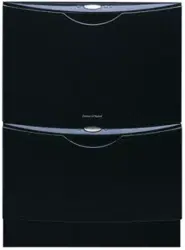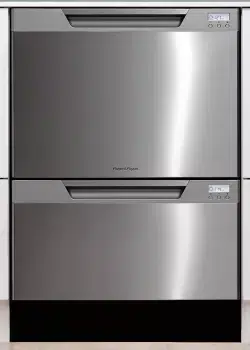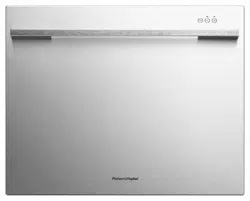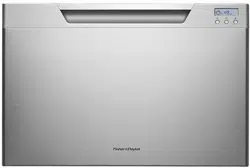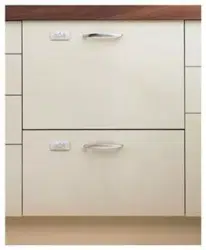

DishDrawer
User guide
US CA
DS605 and DD605 models
DishDrawer®
Guide de l’utilisateur
Modèles de série DS605 et DD605
DishDrawer®
Guía del usuario
Modelos serie DD605 y DS605


1
Contents
Safety and warnings
3
Controls (Integrated and Prefinished - no LCD)
6
Controls (Prefinished models with LCD)
8
Operation
10
Wash program chart
11
Caring for your dinnerware
12
Dishwasher standards test
13
Accessories
14
Loading
16
Detergent dispenser
18
Water softener
20
Rinse agent dispenser
22
Option adjustments
23
User maintenance instructions
26
Troubleshooting
29
Fault codes
31
Warranty and service
34
Important!
SAVE THESE INSTRUCTIONS
The models shown in this User Guide may not be available in all markets and are
subject to change at any time. For current details about model and specification
availability in your country, please go to our website www.fisherpaykel.com or
contact your local Fisher & Paykel dealer.
US CA

US CA

3
Safety and warnings
Your DishDrawer has been carefully designed to operate safely during normal dishwashing
procedures. Please keep the following guidelines in mind when you are using your
DishDrawer®. Please read all instructions before operating the DishDrawer®.
Important safety precautions
The information in this manual must be followed to minimize the risk of fire or explosion or to
prevent property damage, personal injury or loss of life.
Use the DishDrawer® only for its intended function as described in this User Guide.
Use only detergents or rinse agent recommended for use in a domestic Dishwasher and keep
them out of reach of children. Check that the detergent dispenser is empty after the completion
of each wash program.
When loading items to be washed, locate sharp items so that they are not likely to damage the
lid seal and load sharp knives with the handles up to reduce the risk of cut type injuries.
Do not touch the heater plate during or immediately after use.
Do not operate your DishDrawer® unless all the enclosure panels are properly in place.
Do not tamper with the controls.
Do not abuse, sit on, stand in or on the drawer or dish rack of the DishDrawer®.
The cup racks are designed to support cups, glasses and kitchen utensils. When the cup racks
are in the DishDrawer® do not lean on or use the cup racks to support your body weight.
To reduce the risk of injury, do not allow children to play in or on the DishDrawer®.
Under certain conditions hydrogen gas may be produced in a hot water heater system that has
not been used for two weeks or more. HYDROGEN GAS IS EXPLOSIVE. If the hot water system
has not been used for such a period, before using the dishwasher, turn on all hot water taps and
let the water flow from each for several minutes. This will release any accumulated hydrogen
gas. As gas is flammable, do not smoke or use an open flame during this time.
Remove the door to the washing compartment when removing an old dishwasher from service
or discarding it.
Dishwasher detergents are alkaline. They can be dangerous if swallowed. Avoid contact with
skin and eyes, keep children and infirm person(s) away from the dishwasher when the drawer is
opened.
US CA

4
Safety and warnings
Important safety precautions
Installation
This DishDrawer® must be installed and located in accordance with the Installation Instructions
before it is used. If you did not receive Installation Instruction sheets with your DishDrawer®, you
can order them by calling your Authorized Service Agent or from the Fisher & Paykel website,
www.fisherpaykel.com.
Installation and service must be performed by a qualified technician.
If the power supply cord is damaged, it must be replaced by a dealer or Authorized Service Center
or a similar qualified trades person in order to avoid a hazard.
Ensure the DishDrawer® is secured to adjacent cabinetry using the brackets provided. Failure to
do so may result in an unstable product, which may cause damage or injury.
Do not operate this appliance if it is damaged, malfunctioning, partially disassembled or has
missing or broken parts, including a damaged power supply cord or plug.
Do not store or use petrol, or other flammable vapors and liquids in the vicinity of the
DishDrawer®.
Connect to a properly rated, protected and sized power supply circuit to avoid electrical overload.
Make sure that the power supply cord is located so that it will not be stepped on, tripped over or
otherwise subject to damage or stress.
Do not install or store the DishDrawer® where it will be exposed to temperatures below freezing
or exposed to weather.
Do not use an extension cord or a portable electrical outlet device (e.g. multi-socket outlet box)
to connect the DishDrawer® to the power supply.
This appliance must be grounded. In the event of a malfunction or breakdown, grounding will
reduce the risk of electric shock by providing a path of least resistance for electric current. This
appliance is equipped with a cord having an equipment-grounding conductor and a grounding
plug. The plug must be plugged into an appropriate outlet that is installed and grounded
in accordance with all local codes and ordinances. Improper connection of the equipment-
grounding conductor can result in a risk of electric shock. Check with a qualified electrician or
service representative if you are in doubt as to whether the appliance is properly grounded.
Maintenance
Do not repair or replace any part of the appliance or attempt any servicing unless specifically
recommended in this User Guide. We recommend that you call an Authorized Service Agent.
Keep the floor around your appliance clean and dry to reduce the possibility of slipping.
Keep the area around/underneath your appliance free from the accumulation of combustible
materials, such as lint, paper, rags and chemicals.
When cleaning the underside of the filter plate, care must be taken on the sharp outer edge to
avoid the risk of cut type injuries.
US CA

5
Safety and warnings
Important safety precautions
Important!
Under no circumstances should you open the drawer whilst the DishDrawer® is in operation.
Operational
Always press the
button to pause and wait until you hear the three additional beeps before
opening the drawer.
The DishDrawer® must be used with the motor assembly, filter plate, drain filter and spray arm in
place.
When disconnecting the appliance pull the plug rather than the power supply cord or junction of
cord to avoid damage.
Take care when loading the DishDrawer® not to load dishware items so they prevent the lid from
properly sealing with the drawer. Items should be placed so they do not protrude above and/or
forced into the drawer, otherwise a service call may result.
Household appliances are not intended to be played with by children. Children or persons with a
disability which limits their ability to use the appliance, should have a responsible person instruct
them in its use. The instructor should be satisfied that they can then use the appliance without
danger to themselves or their surroundings.
Close supervision is necessary if this appliance is used by or near children. Do not allow children
to play inside, on or with this appliance or any discarded appliance.
If a Dishwasher cleaner is used, we would strongly recommend a wash program with detergent
should be run immediately afterward, to prevent any damage to the DishDrawer®.
The DishDrawer® is designed for washing normal household utensils. Items that are
contaminated by petrol, paint, steel or iron debris, corrosive, acidic or alkaline chemicals are not
to be washed in the DishDrawer®.
If the DishDrawer® is not being used for long periods of time, turn the electricity and water supply
to the DishDrawer® off.
Do not pour detergent or rinse agent into the salt reservoir. The detergent or rinse agent will
destroy the water softener.
US CA
6
Controls
(Integrated and Prefinished - no LCD)
If you have a double DishDrawer®, each drawer has its own controls and can run independently
of the other.
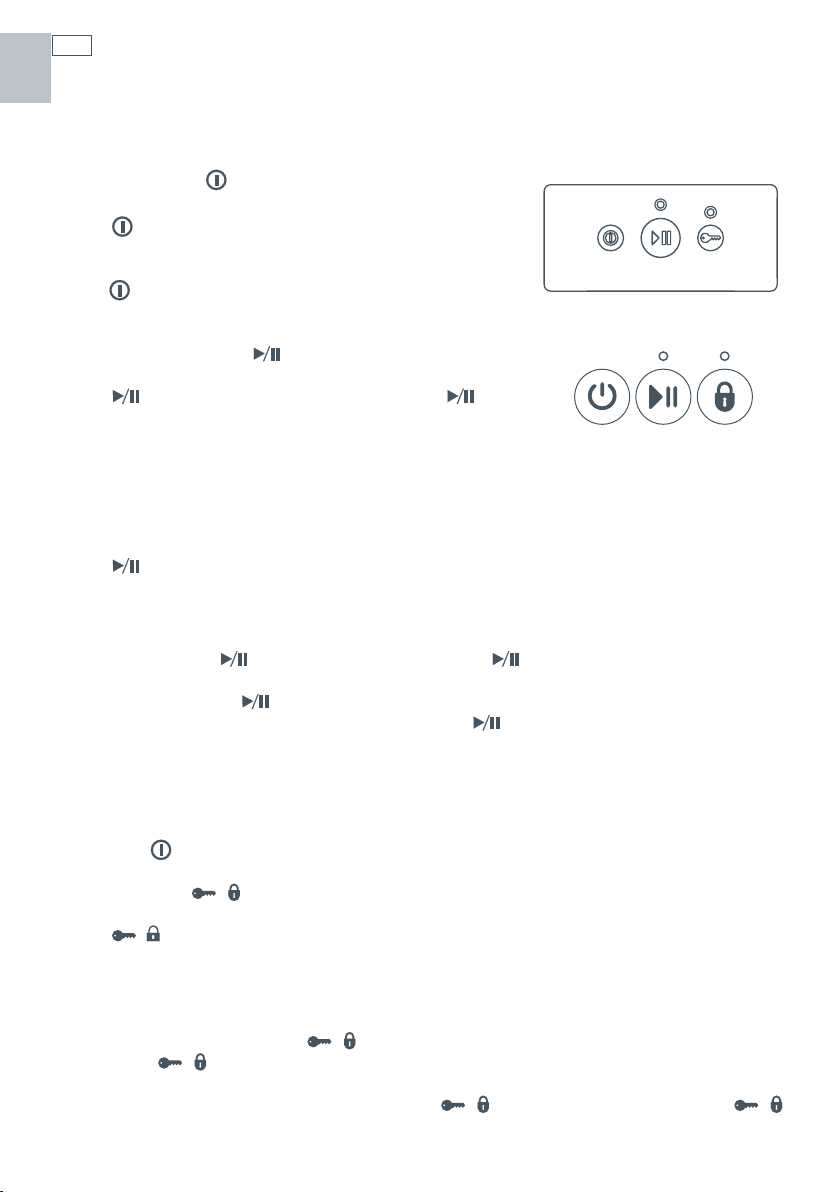
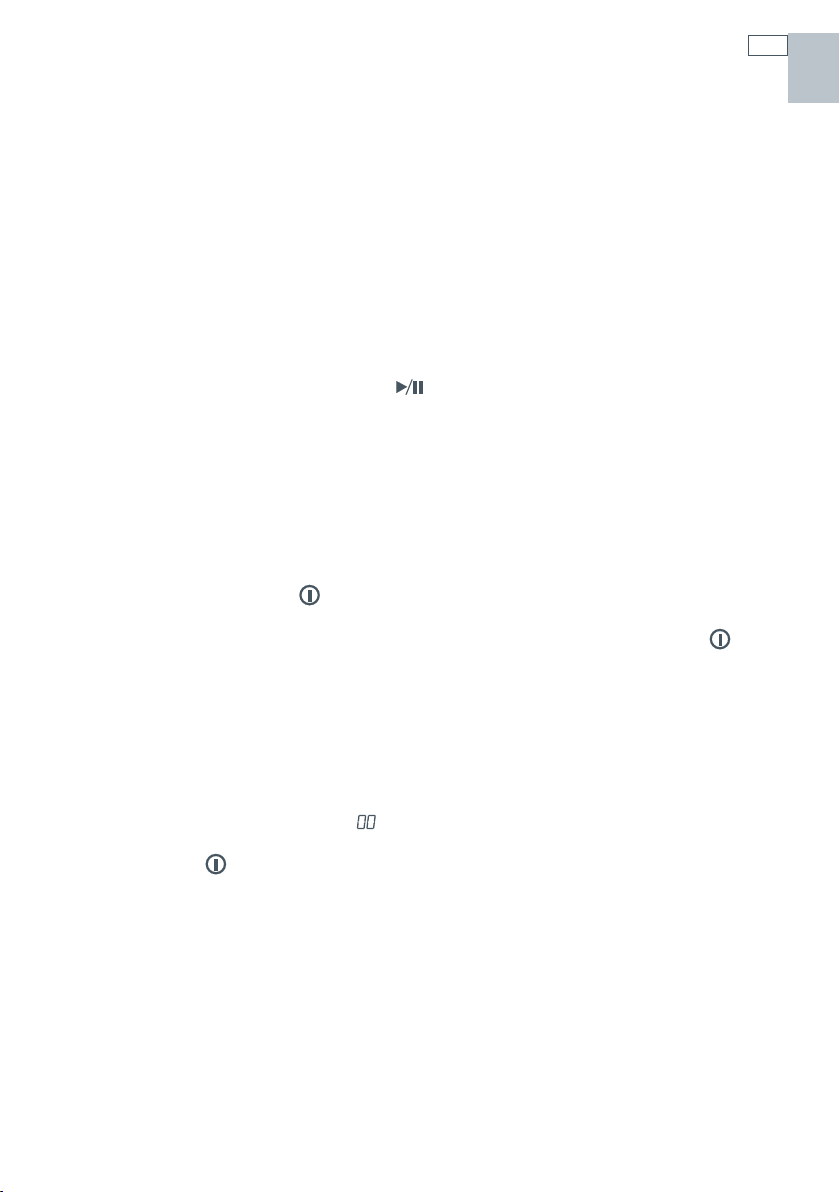
Power button
The button turns the DishDrawer® on or off. Opening
the drawer will automatically turn the DishDrawer® on for
30 seconds. To end a wash program in mid cycle, press
the
button. Any water in the DishDrawer® will be
pumped out.
Start/Pause button
The button starts a wash program. Press the
button to pause or restart the DishDrawer® during a wash
program. When paused, wait for three beeps before
opening the drawer. Forcing the drawer open while in mid
cycle may cause damage or injury.
Delay Start
The button also sets the Delay Start feature which can delay the start of a wash program
from 1 to 12 hours.
To activate Delay Start
1
Press and hold the button until the light above the button turns orange (or purple,
depending on your model).
2
Continue holding the button down until the desired delay time has been reached. The
DishDrawer® will emit audible ‘beeps’ as you hold the
button down, each beep indicates
another hour delay.
3
The DishDrawer® will start once the delay time has elapsed and the drawer is closed.
To cancel Delay Start
Press the button.
Lock button / (optional)
The / button activates/deactivates the Keylock or the Childlock functions.
Keylock
The Keylock feature disables all the buttons on the DishDrawer®.
To activate, press and hold the
/ button until you hear one beep (3 seconds). The light
above the
/ button is lit when Keylock is activated.
To cancel the Keylock feature, press and hold the
/ button until the light above the /
button disappears.
US CA
7
Controls
(Integrated and Prefinished - no LCD)
Childlock
The Childlock feature locks the drawer and disables all the buttons on the integrated badge.
To activate, press and hold the
/ button until you hear two beeps (5 seconds). The light
above the
/ button is lit when Childlock is activated.
To cancel the Childlock feature, press and hold the
/ button until the light above the
/ button disappears.
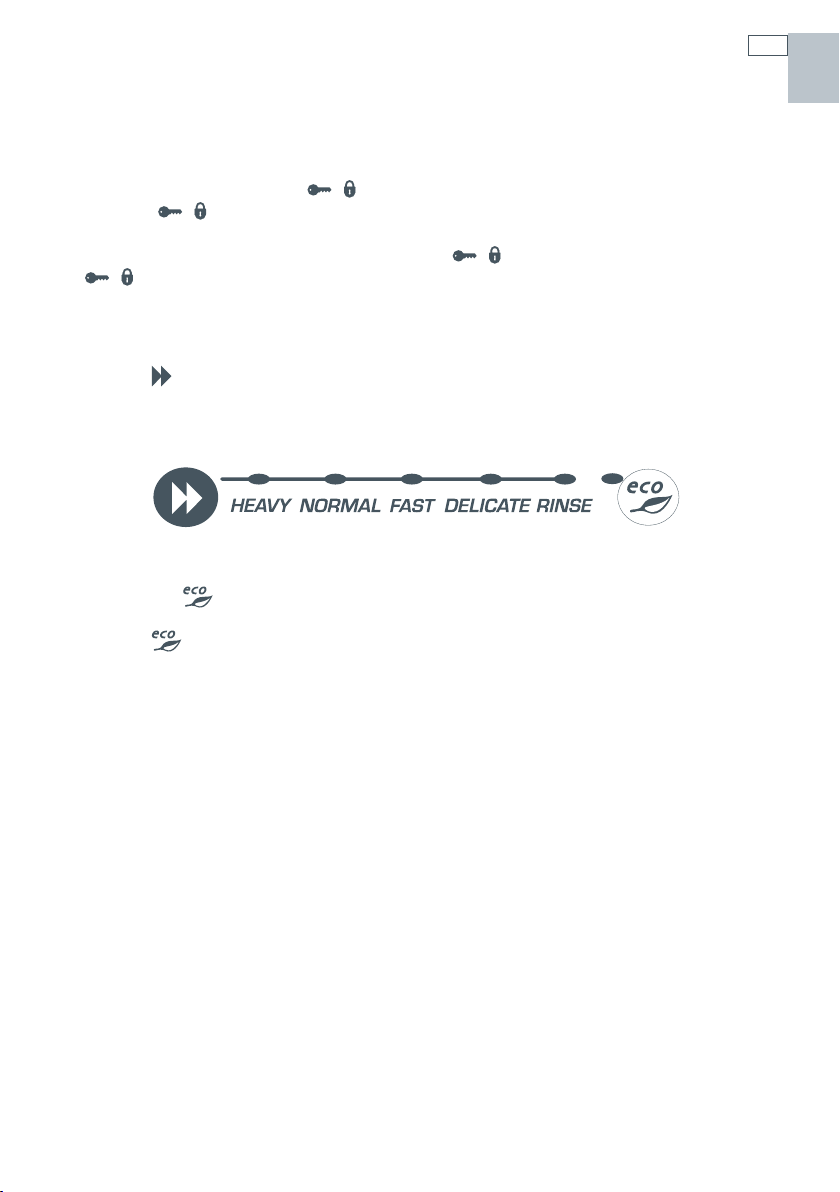
Wash program selector
Press the button to select a wash program. The DishDrawer® will remember the last program
used.
Eco button (optional)
Press the button if you would like the wash program to use less energy. The red ECO light
will indicate the feature is on. If your dishes are heavily soiled or you require enhanced dry
performance, we do not recommend ECO programmes.
Power failure
If the DishDrawer® is operating and a power failure occurs, it will stop. The DishDrawer® may be
unable to be opened during this time. When the power supply is resumed, the DishDrawer® will
restart in the same part of the wash program.
US CA
8
Controls
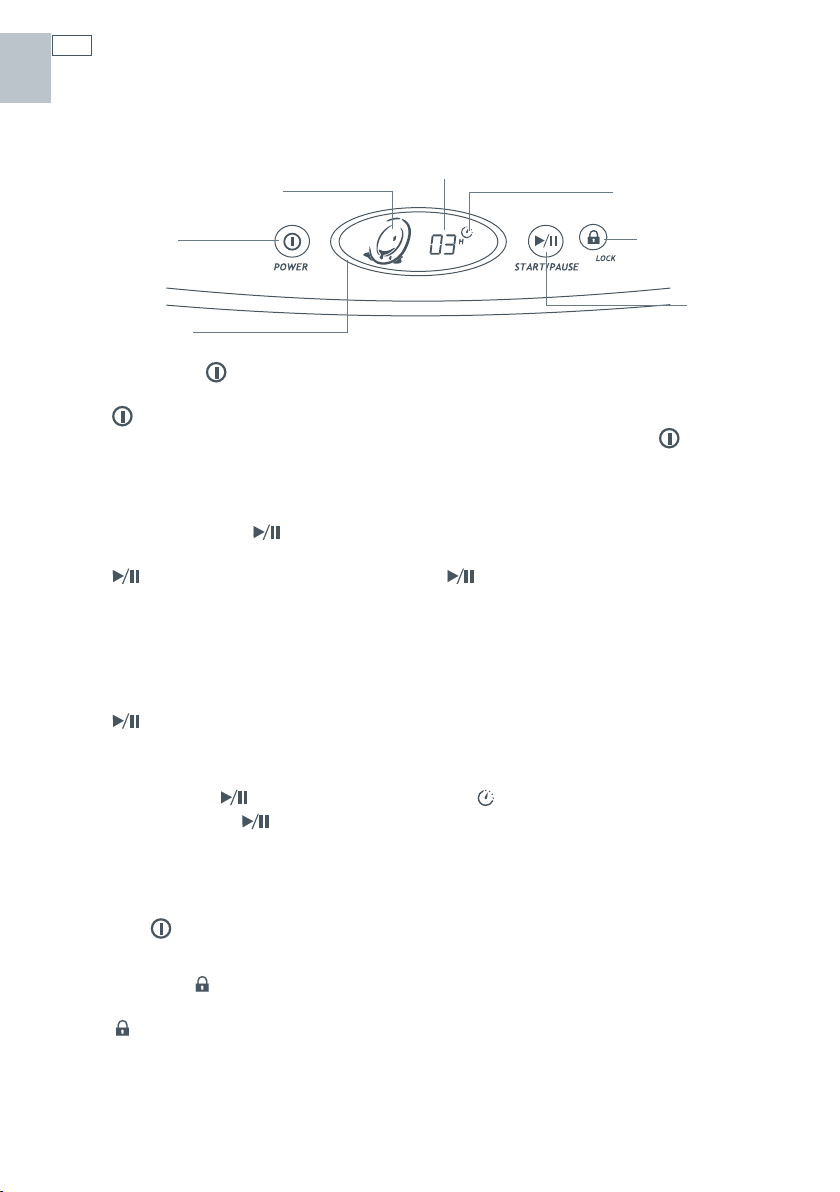
(Prefinished models with LCD)
If you have a double DishDrawer®, each drawer has its own control panel and can run
independently of the other.
Power Button
The button turns the DishDrawer® on or off. Opening the drawer will automatically turn the
DishDrawer® on for 30 seconds. To end a wash program in mid cycle, press the
button. Any
water in the DishDrawer® will be pumped out.
Start/Pause Button
The button starts a wash program. Press the button to pause or restart the
DishDrawer® during a wash program. When paused, wait for three beeps before opening the
drawer. Forcing the drawer open while in mid cycle may cause damage or injury.
Delay Start
The button also sets the Delay Start feature which can delay the start of a wash program
from 1 to 12 hours.
To activate Delay Start
1
Press and hold the button until the delay symbol appears on the electronic display.
2
Continue holding the button down until the desired delay time has been reached.
3
The DishDrawer® will start once the delay time has elapsed and the drawer is closed.
To cancel Delay Start
Press the button.
Lock Button (optional)
The button activates/deactivates the Keylock or the Childlock functions.
Wash program
progress symbol
Power button
Electronic display
Time remaining
(Delay Start)
Delay Start symbol
Start/Pause
button
Lock button
US CA
9
Keylock
The Keylock feature disables all the buttons on the control panel.
To activate, press and hold the
button until you hear one beep (3 seconds). The symbol
appears in the electronic display when the Keylock feature is activated.
Childlock
The Childlock feature locks the drawer and disables all the buttons on the control panel.
To activate, press and hold the
button until you hear two beeps (5 seconds). The symbol
appears in the electronic display when the Childlock feature is activated.
To cancel the Childlock feature, press and hold the
button until you hear one beep and the
symbol disappears from the electronic display.
Wash program selector
Press the button to select a wash program. The DishDrawer® will remember the last program
used.
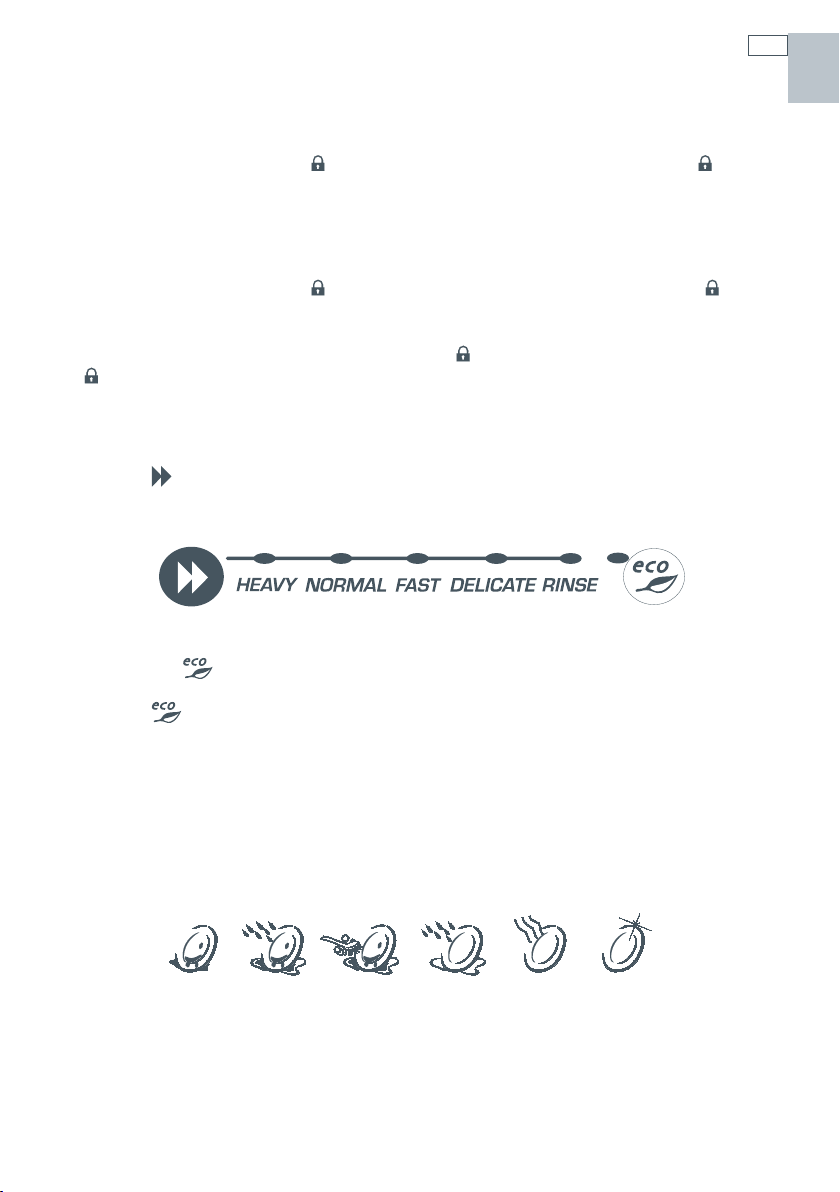
Eco button (optional)
Press the button if you would like the wash program to use less energy. The red ECO light
will indicate the feature is on. If your dishes are heavily soiled or you require enhanced dry
performance, we do not recommend ECO programmes.
Wash program progress symbols
As the wash program advances through the cycle, the following symbols will appear in
the electronic display to indicate the progression. When a wash program has started, the
electronic display also will count down the time remaining in one minute increments.
Power failure
If the DishDrawer® is operating and a power failure occurs, it will stop. The DishDrawer® may be
unable to be opened during this time. When the power supply is resumed, the DishDrawer® will
restart in the same part of the wash program.
Controls
(Prefinished models with LCD)
Dirty Pre Wash Main Wash Post Rinse Drying Clean
US CA
10
Operation
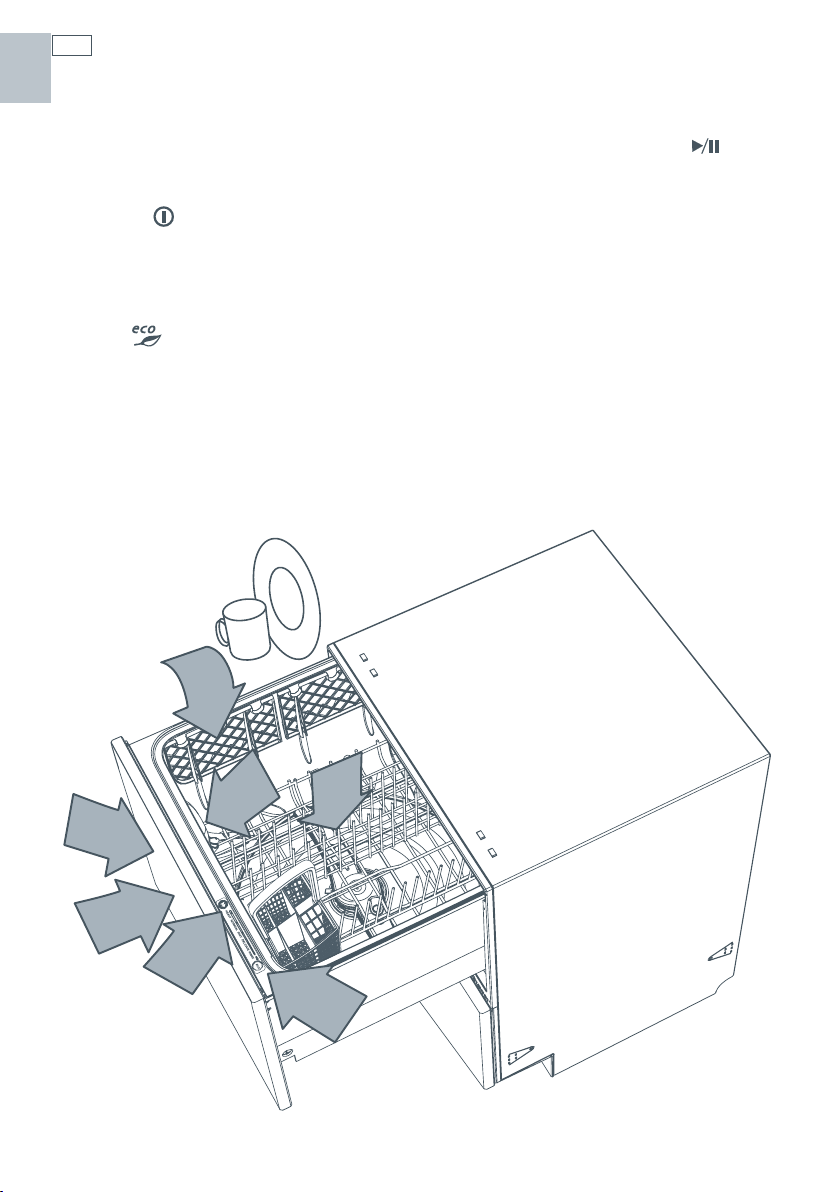
1
Load dishes
Remove all food scraps and load the dishes.
2
Add detergent
3
Check rinse agent
4
Press the button
5
Select a wash program
The length of the wash program will appear
on the electronic display (Prefinished models
only).
6
Select (optional)
7
Check
Ensure there is nothing obstructing the
spray arm. The drain filter must be level with
the filter plate.
8
Start
Close the drawer and press the
button.
9
Finish
The DishDrawer® will beep six times to
indicate the end of the wash program. At
the end of the wash program the drying fan
will continue to run for a set time or until the
drawer is opened. The fan assists with drying
and uses negligible amounts of energy. It
is normal for some water to remain in the
drain filter area after the wash program is
complete.
DD605 only: At the end of a wash
programme, you may find both drawers
draining simultaneously. This is normal.
1
2,3
4
6
7
8
5
US CA
11
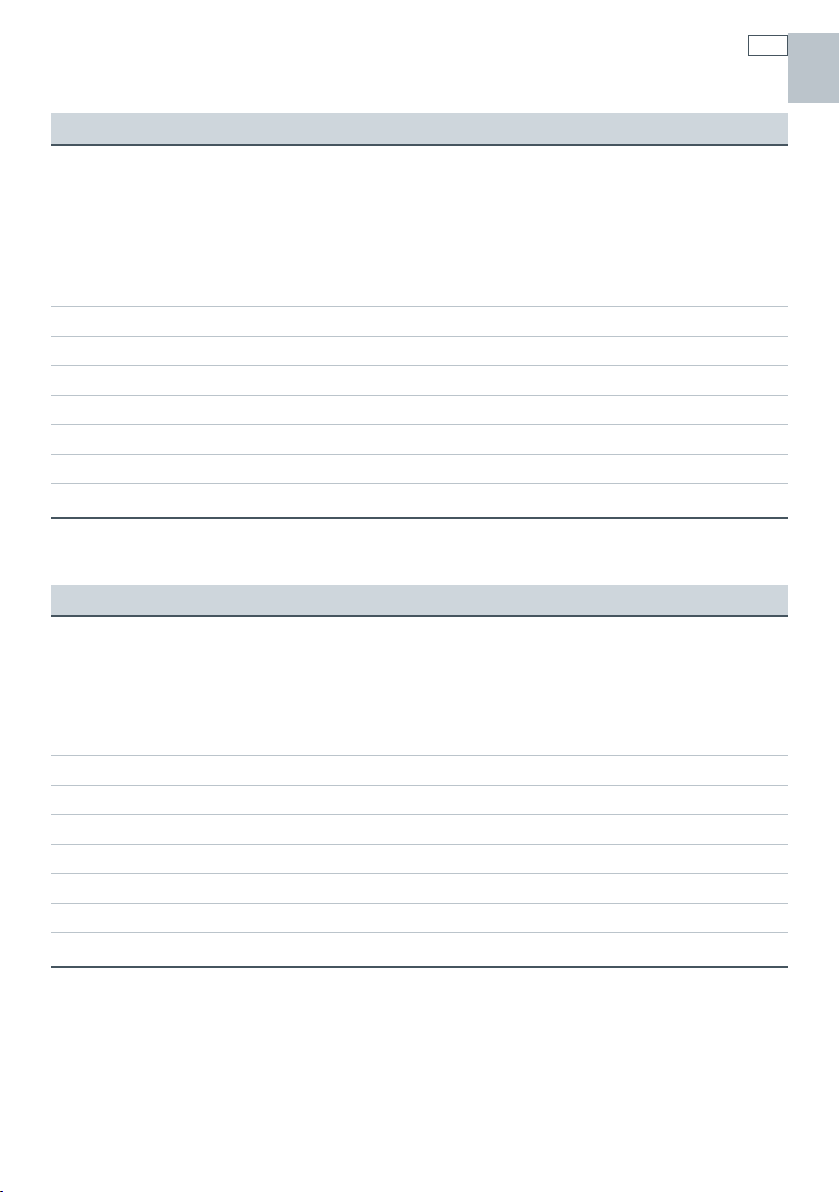
Wash program chart
Standard wash program - when to use
Heavy
Heavily soiled
pots, pans and
dishes.
Normal
Dishes with
normal soils
for optimum
wash and dry
performance.
Fast
Lightly soiled
dishes.
Delicate
Lightly soiled and
heat sensitive
crockery.
Rinse
Prevents odours and
soils drying on dishes.
pre wash 1 pre wash 1 pre wash pre wash
pre wash 2 pre wash 2
main wash 150
o
F main wash 140
o
F main wash 130
o
F main wash 120
o
F
post rinse 1 post rinse post rinse post rinse
post rinse 2
final rinse 163
o
F final rinse 140
o
F final rinse 120
o
F final rinse 130
o
F
drying phase drying phase drying phase
Eco wash program - when to use
Heavy
Heavily soiled
everyday dishes.
Normal
Normal soiled
dishes for
optimum energy
use.
Fast
Lightly soiled, non
greasy dishes.
Delicate
Lightly soiled,
non greasy and
heat sensitive
crockery.
pre wash 1 pre wash pre wash
pre wash 2
main wash 150
o
F main wash 130
o
F main wash 115
o
F main wash 115
o
F
post rinse 1 post rinse post rinse post rinse
post rinse 2
final rinse 150
o
F final rinse 130
o
F final rinse 115
o
F final rinse 120
o
F
drying phase drying phase drying phase
Note:
Wash times can vary depending on the incoming water temperature, ambient conditions, type
of dish load and whether the drawer has been opened during the wash. Wash times are only
APPROXIMATE on the Electronic Display and based on 120°F incoming water.
US CA

12
Caring for your dinnerware
The combination of high temperatures and dishwasher detergent may cause damage to some
items if they are washed in the DishDrawer®. Remember, if in any doubt about any aspect
concerning items washed in the DishDrawer®, follow the instructions from the manufacturer of
the items, or wash the item by hand.
Cutlery & silverware
All cutlery and silverware should be rinsed immediately after use to prevent tarnishing caused by
some foods. The Rinse wash program is useful for this. Silver items should not come into contact
with stainless steel, eg other cutlery. Mixing these items can cause staining. Remove silver cutlery
from the DishDrawer® and hand dry it immediately after the program has finished.
Aluminium
Aluminium can be dulled by dishwasher detergent. The degree of change depends on the
quality of the product.
Other metals
Iron and cast iron objects can rust and stain other items. Copper, pewter and brass tend to stain.
Woodware
Wooden items are generally sensitive to heat and water. Regular use in the dishwasher may
cause deterioration over time. If in doubt, wash by hand.
Glassware
Most everyday glassware is dishwasher safe. Crystal, very fine and antique glassware may etch
that is, become opaque. You may prefer to wash these items by hand.
Plastic
Some plastic may change shape or colour with hot water. Check manufacturer’s instructions
about washing plastic items. Washable plastic items should be weighed down so they do not
flip over and fill with water or fall through the basket during the wash.
Decorated items
Most modern china patterns are Dishwasher safe. Antique items, those with a pattern painted
over the glaze, gold rims or hand painted china may be more sensitive to machine washing. If in
doubt, wash by hand.
Glued items
Certain adhesives are softened or dissolved in machine washing. If in doubt, wash by hand.
Vacation time
If the DishDrawer® is not going to be used for some time, we recommend you ensure the baskets
are empty. Leave the inside of the DishDrawer® clean. Leave the drawers ajar to allow air to
circulate. Turn off both the power and water supply to the DishDrawer®.
US CA
13
Dishwasher standards test
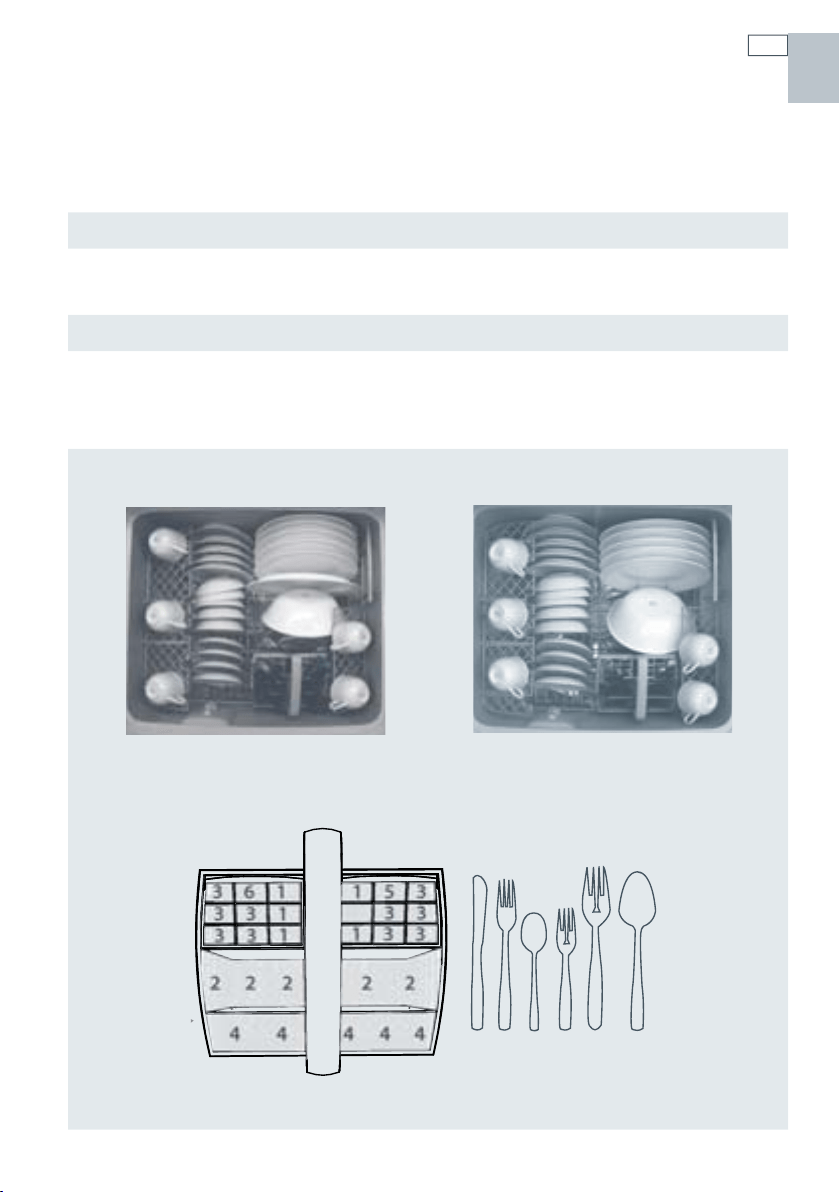
The DishDrawer®s are tested to various standards for both wash and dry performance.
The following are loading pattern diagrams, detergent quantities and rinse agent quantities used
for the DishDrawer®.
Wash Program
Normal
Detergent Quantities
5g (pre wash) per drawer
10g (main wash) per drawer
Rinse Agent Setting
4
Water Softener Setting
(for DD605-H and DS605-H models only)
Adjust the water softener to match the water
hardness. Refer to the water softener and
option adjustment section.
Recommended Loading Pattern
Top drawer Bottom drawer
US CA
123 4 5 6
222 2 2
44 444
361
331
33
1
153
33
133
14
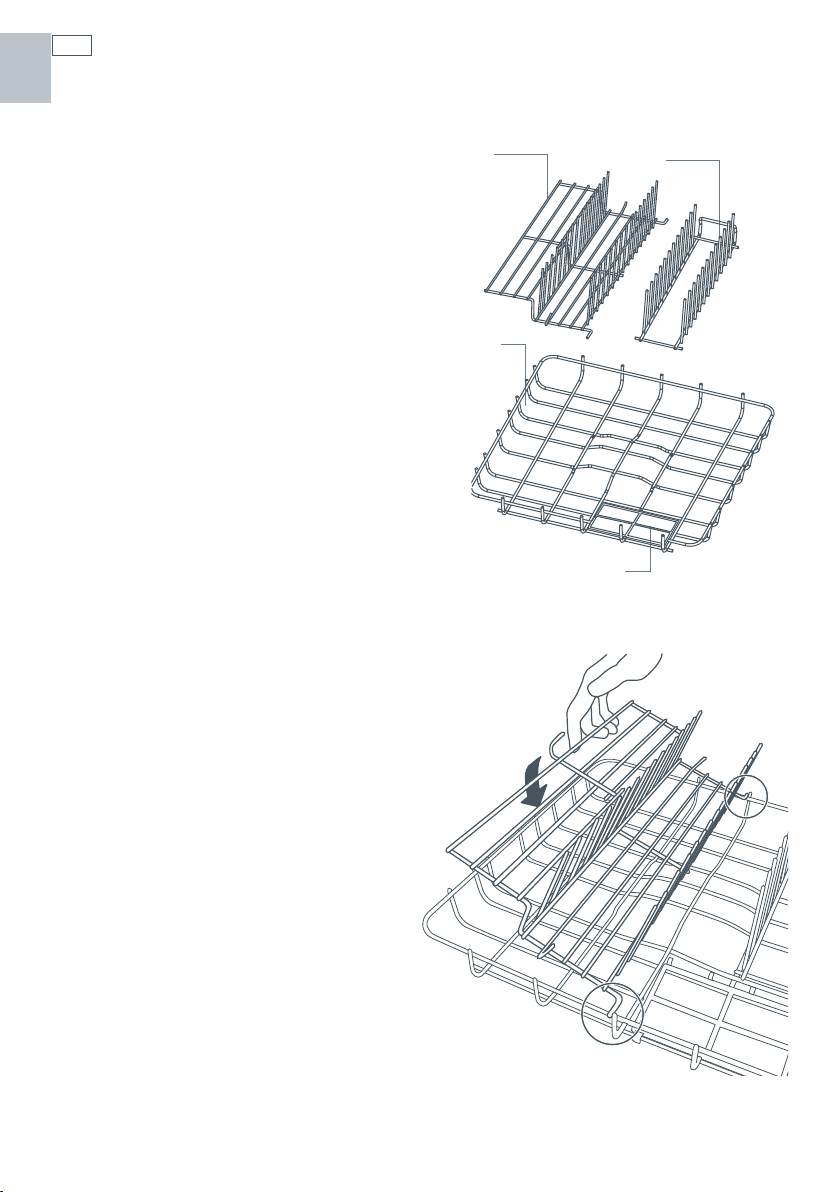
The inserts and racks can be added or removed to
suit your individual needs. If you have the double
DishDrawer® model, some of the accessories are
interchangeable between the two drawers. For
example you can combine the two Mega Racks into
one drawer and wash all cups and glasses, leaving
the other drawer for plates and larger items.
a. Basket
The basket holds some of the accessories in place
and keeps dishes away from the spray arm.
b. Drain filter access panel
The drain filter access panel is designed to snap
onto the basket over the drain filter. This prevents
objects from touching the base of the DishDrawer®
and stopping the rotation of the spray arm, while
still giving access to the drain filter.
c. Mega rack
The Mega rack is designed to hold
glasses, cups and small plates.
d. Plate insert
The plate insert supports plates and
bowls.
How to install the Mega rack
To install the Mega rack, place the outer
legs of the rack on top of the basket,
and clip the Mega rack to the side of the
basket. When the Mega rack is correctly
installed it should not feel loose in the
basket.
c
d
a
b
Accessories
US CA
15
Accessories
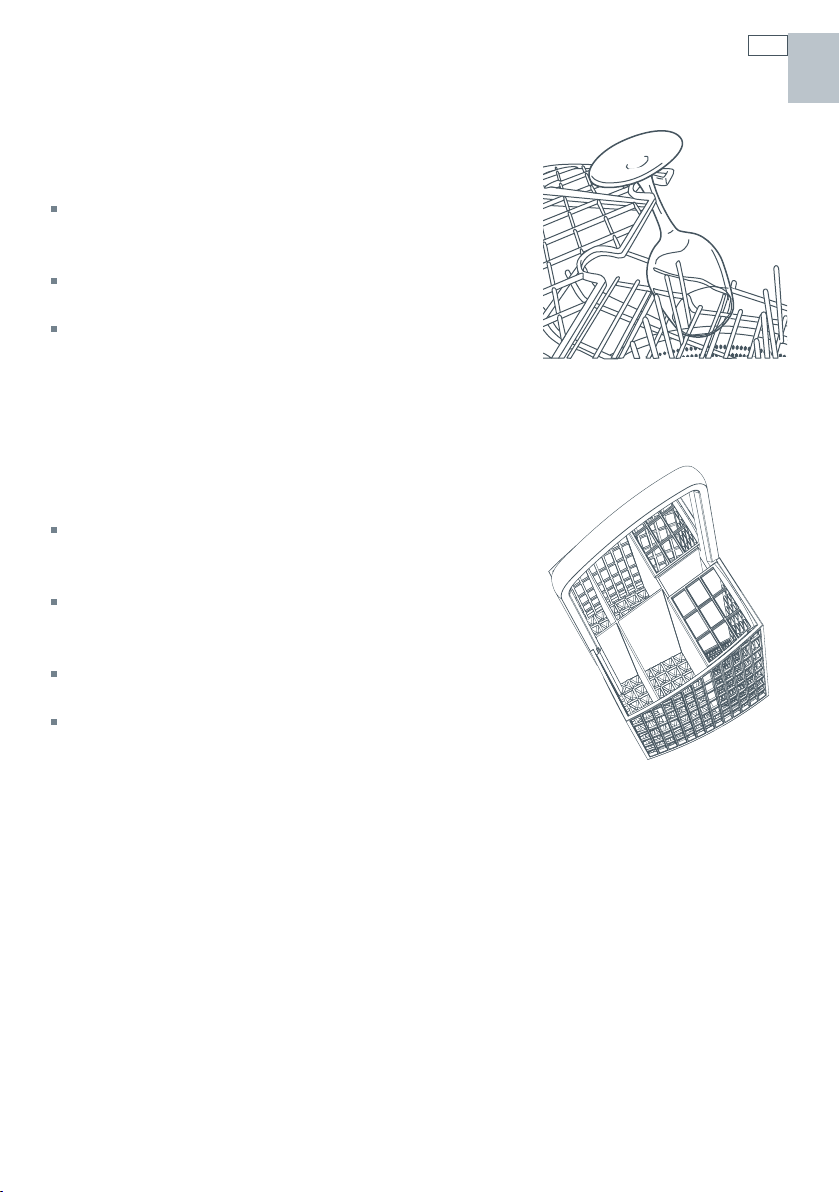
Cup racks
Cups, glasses and kitchen utensils can be placed on the
left and right hand side of the cup racks.
For best performance ensure there are no large items
below, blocking the wash water from reaching the cup
racks.
Wine glasses can be supported on the cup racks if used in
conjunction with the Mega rack.
There are stops on the cup rack to prevent cups from
touching the DishDrawer® wall. This will maximize the dry
and wash performance.
Cutlery basket
Cutlery, small kitchen utensils and some plastic lids are best
placed into the cutlery basket.
For best wash performance, we recommend loading cutlery
with handles pointing down and sharp utensils with their
handles facing up, to reduce the risk of injury.
Mix spoons, knives and forks within each section, to stop
cutlery nesting together and to ensure the water circulates
freely.
Keep stainless steel from touching silver cutlery to avoid
staining.
Small items, like plastic lids, can be placed under the anti-
nesting grid. This will prevent them from being displaced by
wash water and falling to the bottom, where they may stop
the spray arm rotation.
US CA
16
Loading
US CA
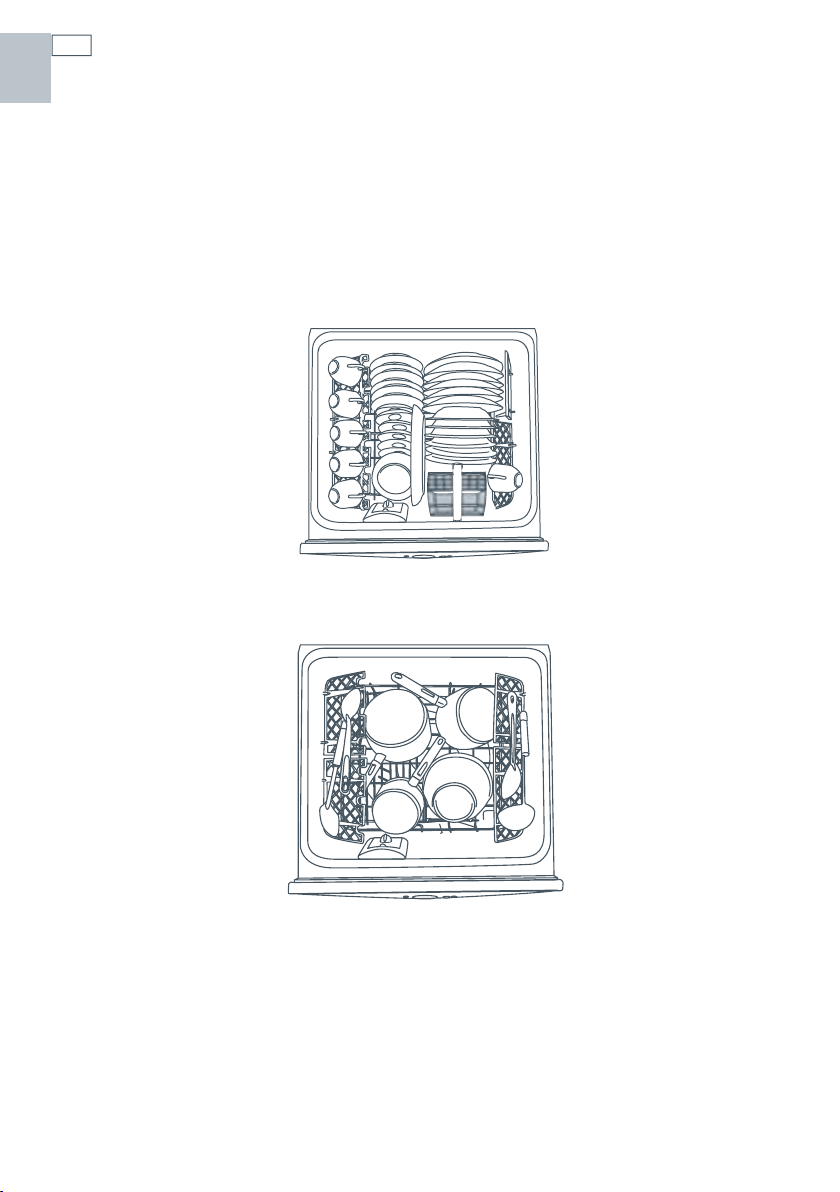
Wash water for the DishDrawer® comes from the spray arm which is situated inside the base of
the drawer. The spray arm rotates, providing wash water to all areas of the wash compartment
so care needs to be taken when loading dishes to ensure there is enough space for the water to
reach all areas, particularly the cup racks. If there are any items blocking the spray arm path or
the wash water, then the performance will be reduced.
How to load your DishDrawer®
Note: The basket and its inserts are not designed to be lifted out of the DishDrawer® while
loaded with dishes.
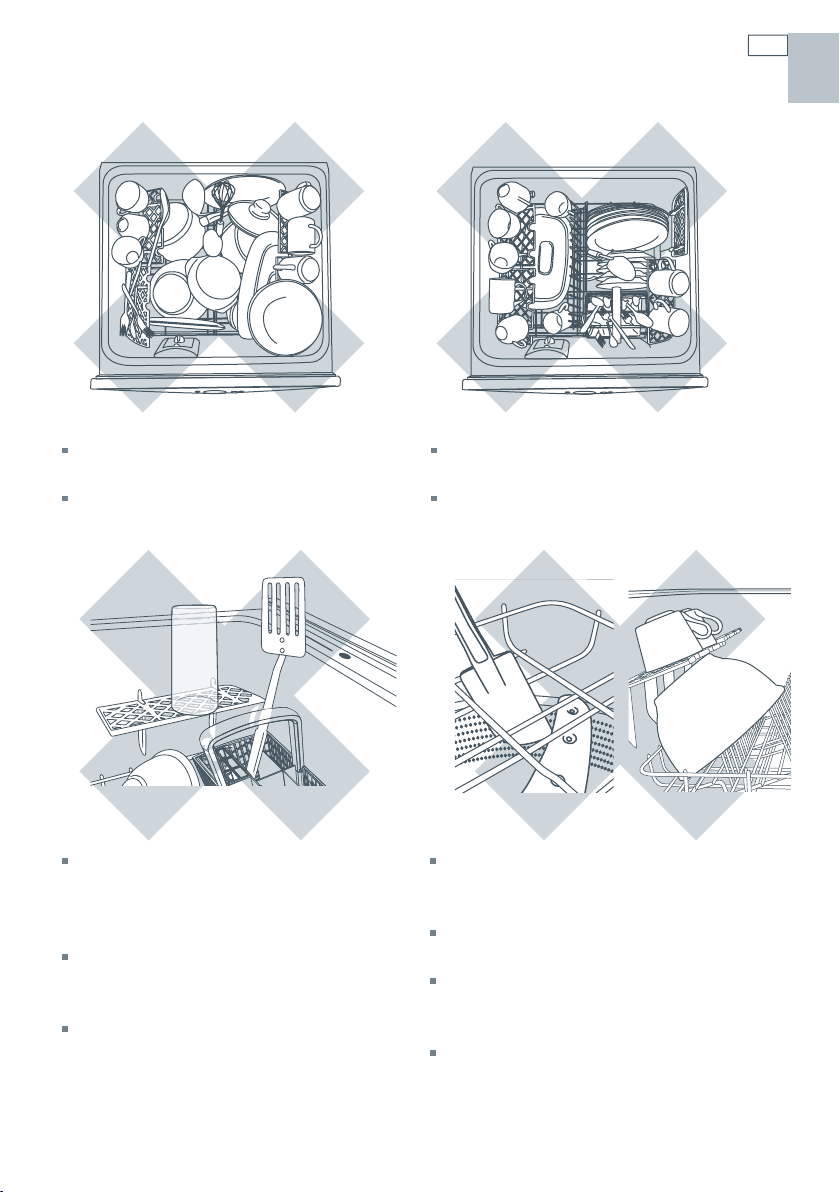
17
Loading
How NOT to load your DishDrawer®
Overcrowded and wash water will not
reach some of the dinnerware.
Cups, glasses and bowls must have their
openings facing down.
The plates are nesting together and wash
water may not get through.
Ensure cutlery are not nesting or stuck
together. They need to be evenly spread
out.
Ensure dishware items are not forced
into or protrude out of the drawer as it
may prevent the lid from properly sealing
which could result in a service call.
Locate sharp items safely to prevent
injuring the user and damaging the lid
assembly.
Check the bottom of the cutlery basket to
ensure sharp or pointed items have not
come through as they may stop spray arm
rotation.
Ensure cutlery has not fallen through the
basket and stopped the spray arm from
rotating.
The large bowl is blocking wash water
reaching the cup racks.
Large utensils should be on cup racks so
they do not become dislodged and stop the
spray arm from rotating.
Sharp or pointed items must be placed
horizontally or with sharp edges/points
facing down to avoid risk of injury.
US CA
18
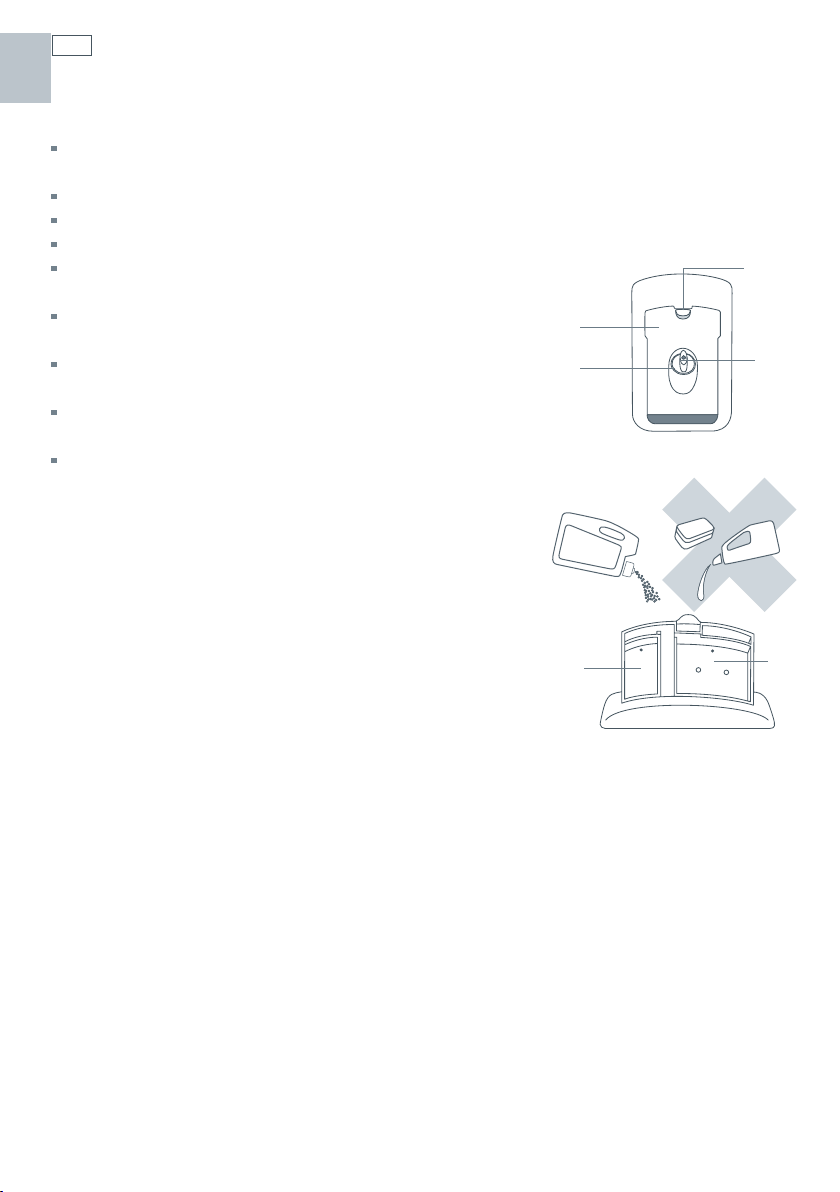
Detergent dispenser
a
Pre Wash Compartment,
10g / 2 teaspoon capacity
b
Main Wash Compartment,
30g / 6 teaspoon capacity
c
Detergent Dispenser Latch
d
Rinse Agent Indicator Light
e
Rinse Agent Plug
Important!
Only use powdered detergent recommended for domestic automatic dishwashers in the
detergent dispenser.
Dishwasher detergents are strongly alkaline and can be dangerous if swallowed.
Avoid contact with skin and eyes.
Keep children and infirm persons away from the DishDrawer® when the drawer is open.
Check that the detergent receptacle is empty after completion
of the wash cycle.
Do not place dishwasher tablets in the
detergent dispenser
Detergent and dishwasher tablets should not
be in direct contact with dishes or cutlery.
Liquid detergents are not suitable to be used in
the DishDrawer®.
Hand washing liquids, soap, laundry detergents
or disinfectants will damage the DishDrawer®.
Filling the detergent dispenser
1
Press the latch down and the door will open.
2
Pour in detergent. No detergent is needed for the Rinse
program.
3
After filling the main wash compartment, close the dispenser
door until it clicks shut. The detergent will automatically be
released into the DishDrawer® during the wash program.
Closed detergent dispenser
Open detergent dispenser
a,b
e
d
c
a
b
US CA

19
Detergent dispenser
Detergent quantities
The detergent quantities recommended below are for individual drawers.
Wash type Wash program Detergent quantities
prewash
(teaspoons)
main wash
(teaspoons)
Hard (>150ppm or >9gpg) All* 2 6
Medium (100-150ppm or 6-9gpg) All* 2 4
Soft (<100ppm or <6gpg) Heavy
Normal
Delicate
Fast
1
1
3
2
1
1
* No detergent is required in the pre wash compartment for the fast wash program.
Hard water situations
If you live in a hard water situation, we
recommend the installation of a household
water softener to improve the water quality,
detergent effectiveness and prevent the
build-up of calcium deposits on dishes and
in the DishDrawer®.
Certain brands of dishwasher detergent
contain varying quantities of phosphates,
which help soften water. We suggest
you use a detergent with high phosphate
content to improve the wash. The detergent
compartments need to be completely FULL
and rinse agent is used with its setting fixed
at 5.
We recommend the use of a dishwasher
cleaner/descaler whenever you notice
a build-up of calcium deposits in your
DishDrawer®.
After you have used the dishwasher
cleaner/descaler you must run another
wash program with detergent to prevent
damage to the DishDrawer®.
Soft water situations
If you live in an area of naturally soft water
or your household water is softened,
avoid using too much detergent in your
DishDrawer®. An excess amount of detergent
is very aggressive on glassware and may
cause irreversible etching.
Etching is a chemical deterioration that
occurs on the surface of glassware when
it is subjected to high temperatures, too
much detergent and/or soft water situations.
Etching is caused by a combination of very
hot water, which causes the detergent to
become very aggressive, but because the
water is soft, there are no water hardness
mineral ions for the detergent to bind to,
so it extracts mineral ions directly from the
glass.
Etching looks like rainbow-colored film, as
the glass is subjected to further washing the
surface will eventually appear opaque. This
type of etching is irreversible.
To prevent further etching from occurring
on glassware, use less detergent (follow the
recommended detergent quantities in the
User Guide for soft water situations), and
ensure the dishwasher is not overloaded,
so water can reach all the dishes during the
wash.
US CA
20
Water softener (DS605-H, DD605-H models only)
Setting up the water softener
Using hard water (above 100ppm) for dishwashing can be detrimental to the performance of
your DishDrawer®. Glasses will become opaque and dishes will become spotted or covered in a
white film.
Determine the water hardness in your local area
Your local water company will be able to provide you with information. Identify the setting you
require for your DishDrawer® from the water hardness table below. For example, if your water
hardness is 500ppm, then the water softener setting on your DishDrawer® should be four. Refer
to Option Adjustments section to adjust the water softener so that the setting corresponds to
your water hardness.
DishDrawer® setting Grains per Gallon (gpg) Parts per Million (ppm)
0 0-6 0-100
1 6-14 100-250
2 14-20 250-350
3 20-26 350-450
4 26-32 450-550
5 32-36 550-625
Note:
If your water hardness is above 625ppm, we highly recommend you completely fill the
detergent compartment for all programs except Rinse and the rinse agent setting be at 5. If your
water hardness is above 625ppm, the performance of your DishDrawer® will decline.
You may hear some unusual noises when the water softener is in operation, this is normal.
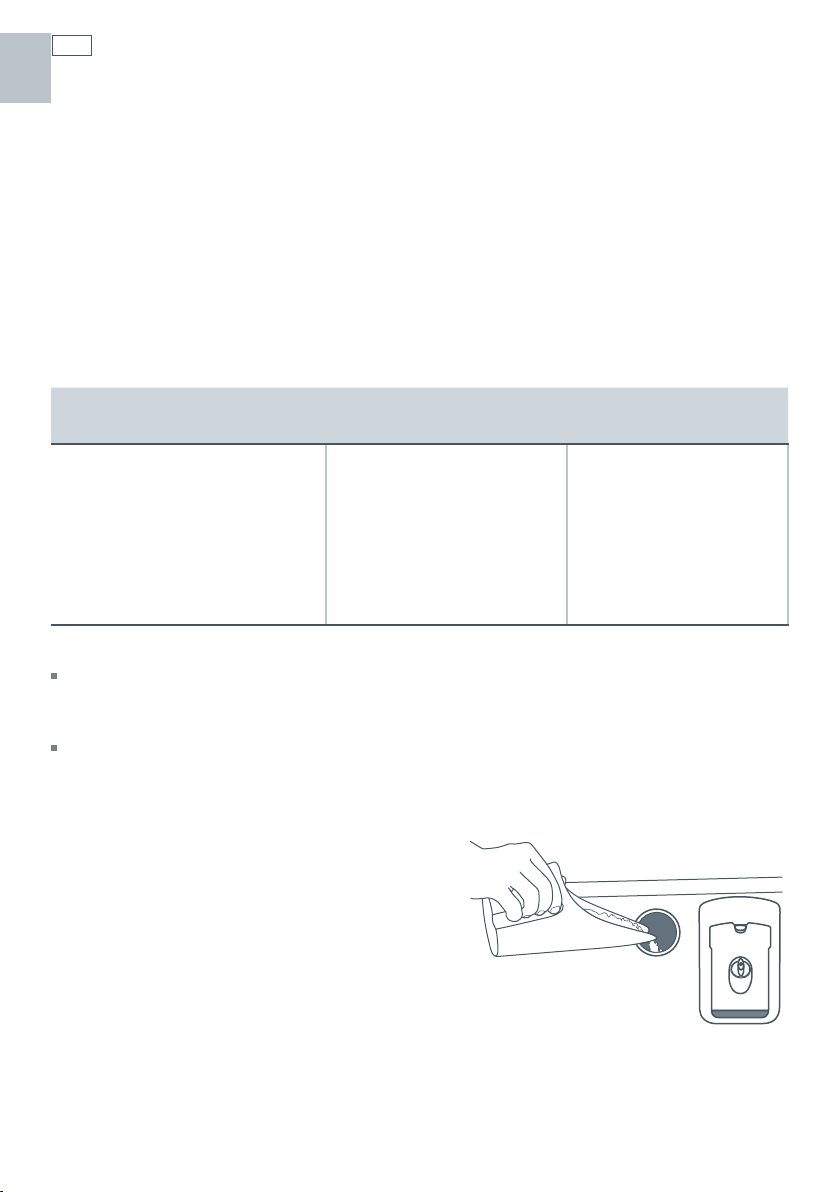
How to fill the salt reservoir
1
Open the DishDrawer®.
2
Unscrew the salt reservoir plug by turning counter-
clockwise.
3
Place the salt into the salt container and pour the
contents into the salt reservoir. The salt reservoir
can hold just over one pound/0.5 kg of salt.
4
Fit the cap tightly back into its original position.
5
If you do not wash your dishes immediately after filling
the salt reservoir, run a rinse program to remove any salt
water or spilt granules.
Note:
When filling the salt dispenser, you may notice water
being displaced from the water softener
overflow.
US CA
21
Water softener (DS605-H, DD605-H models only)
Important!
The water softener must always be filled with granular salt made especially for dishwasher water
softening systems. We do not recommend the use of cooking salt like table salt, rock salt or
pellets as they may contain impurities that will impair or diminish the life of the water softener.
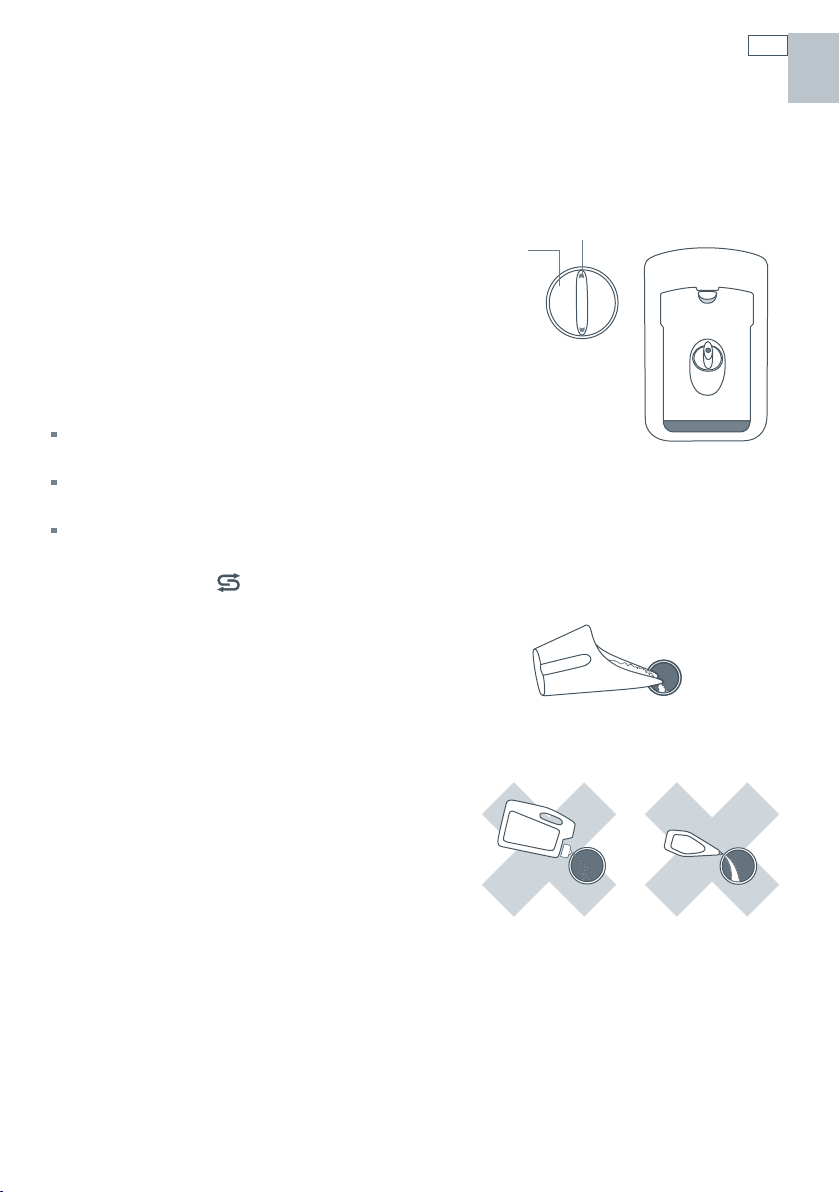
The salt reservoir
Water softening can only take place when there
is salt in the reservoir. The salt reservoir must
be filled prior to using the DishDrawer® and
whenever the salt reservoir indicator light is red.
Salt indicator light
If the salt indicator light is red, the salt reservoir is
empty.
If the salt indicator light is black, there is enough salt in the
reservoir for the wash program that has been selected.
Prefinished Models: The electronic display will
also indicate when the salt reservoir is empty by
displaying the salt
symbol.
Important!
Do not pour detergent or rinse agent into the salt
reservoir. Detergent and rinse agent will destroy
the water softener.
a
b
a Salt Indicator light
b Salt Reservoir cap
Salt only
NO Detergent NO Rinse Agent
US CA
22
Rinse agent dispenser
We highly recommend the regular use of liquid rinse agent to give the best drying results.
Rinse agent gives a streak free, sparkling clean look to glass and chinaware, in addition it
prevents metal from tarnishing. The rinse agent dispenser is on the inside of the drawer, located
underneath the detergent dispenser. The dispenser holds approximately 1.7fl oz (50 ml) of rinse
agent.
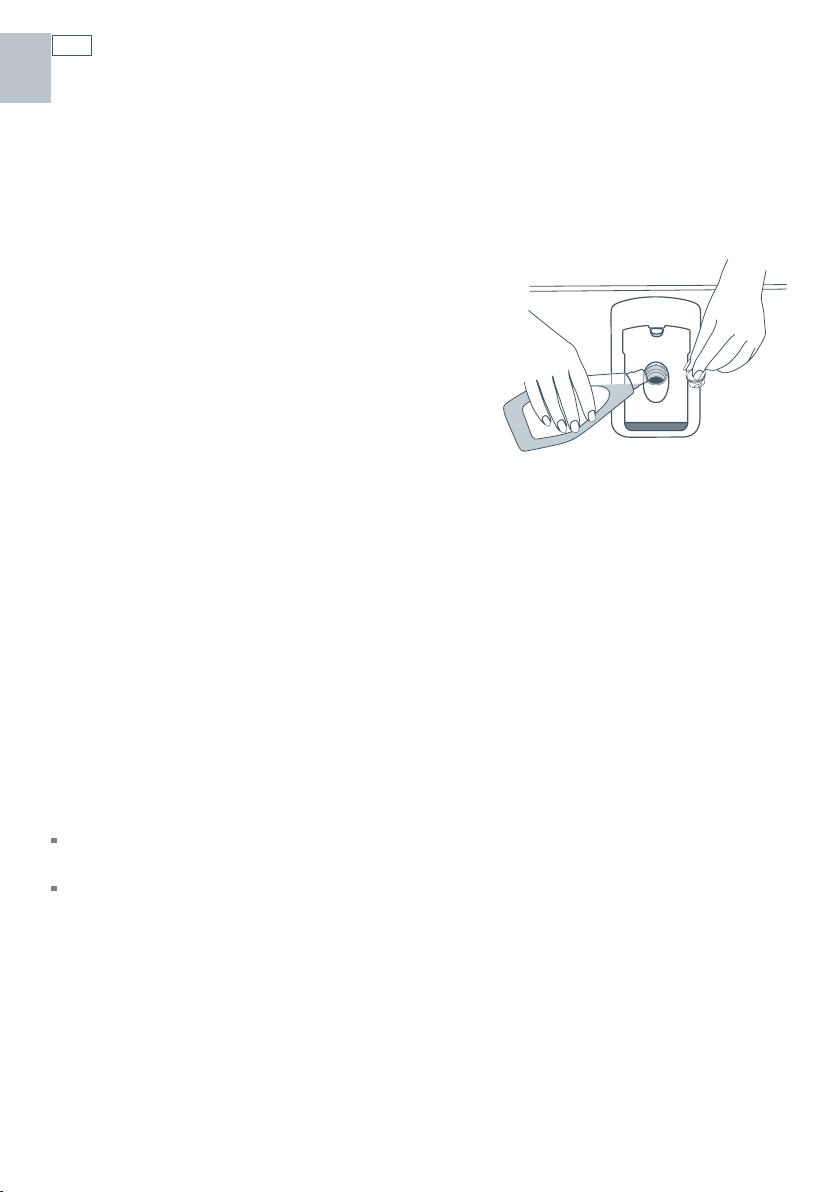
Filling the rinse agent dispenser
1
Turn the plug counter-clockwise and remove.
2
Pour the rinse agent into the circular opening.
3
Take care not to spill rinse agent into the
DishDrawer®. Any spillages must be wiped up to
prevent excess foaming. Failure to wipe rinse agent
spillages may result in a service call which will not be
covered by warranty.
4
Fit the plug back into the original position.
How much rinse agent to use
The regulator may need adjusting to suit your water conditions. The lowest setting is ‘1’ and
the highest is ‘5’. Refer to Option Adjustments section to adjust the rinse agent setting. If there
is excessive foam at the end of the wash, reduce the setting. If dishes are wet or streaky after
drying, increase the setting.
Rinse agent indicator light
If the rinse agent indicator light is red, refill the dispenser. If the rinse agent indicator light is
dimly lit or not lit at all, there is enough rinse agent for the wash.
Note:
Lighter colored rinse agents will not dim the indicator light as effectively as darker colored rinse
agents.
When the rinse agent is being dispensed, you may notice some unusual noises during the wash,
this is normal.
US CA
23
Option adjustments
The following options can be adjusted to suit your preferences.
Rinse Agent setting
Reduce the Rinse agent setting if there is excess foam after a wash program.
Increase the Rinse agent setting if dishes are wet or streaky after a wash program.
Water Softener setting (DS605H and DD605H only)
Refer to the Water Softener section.
Auto Power setting
By default, DishDrawer® will automatically turn on whenever the drawer is opened. Washing will
not start until the drawer is closed and the
button has been pressed. If you do not want the
DishDrawer® to turn on automatically, this feature can be turned off.
End of Wash Program Beeps
By default, DishDrawer® will beep six times at the end of a wash program. This feature can be
turned off.
Closed Drawer option
The Closed Drawer option will lock the DishDrawer® when the drawer is closed. When you wish
to open the drawer, press the
button. When the drawer is fully closed again, the lid will
automatically come down after 30 seconds and lock.
If the Lock feature is used in conjunction with the Closed Drawer Option, pressing the
button
will not unlock the drawer. The Lock feature must be turned off to enable DishDrawer® to be
opened.
Note: this option is highly recommended if the DishDrawer is to be used in motor homes.
Clean Dish Indicator option (Prefinished models with LCD only)
By default, DishDrawer® is programmed with the Clean Dish Indicator option off. When the
Clean Dish Indicator option is on, the
symbol will remain in the electronic display after a
wash program has finished to indicate the dishes are clean. When you have unloaded all the
dishes, press the
button to return to normal operating mode.
This option might be useful when dishes have been left in DishDrawer® and you cannot
remember if they have been washed or in situations where household members regularly
remove only a few clean dishes without emptying the drawer.
We do not recommend the Clean Dish Indicator option be used in conjunction with the Closed
Drawer option.
US CA
24
Option adjustments
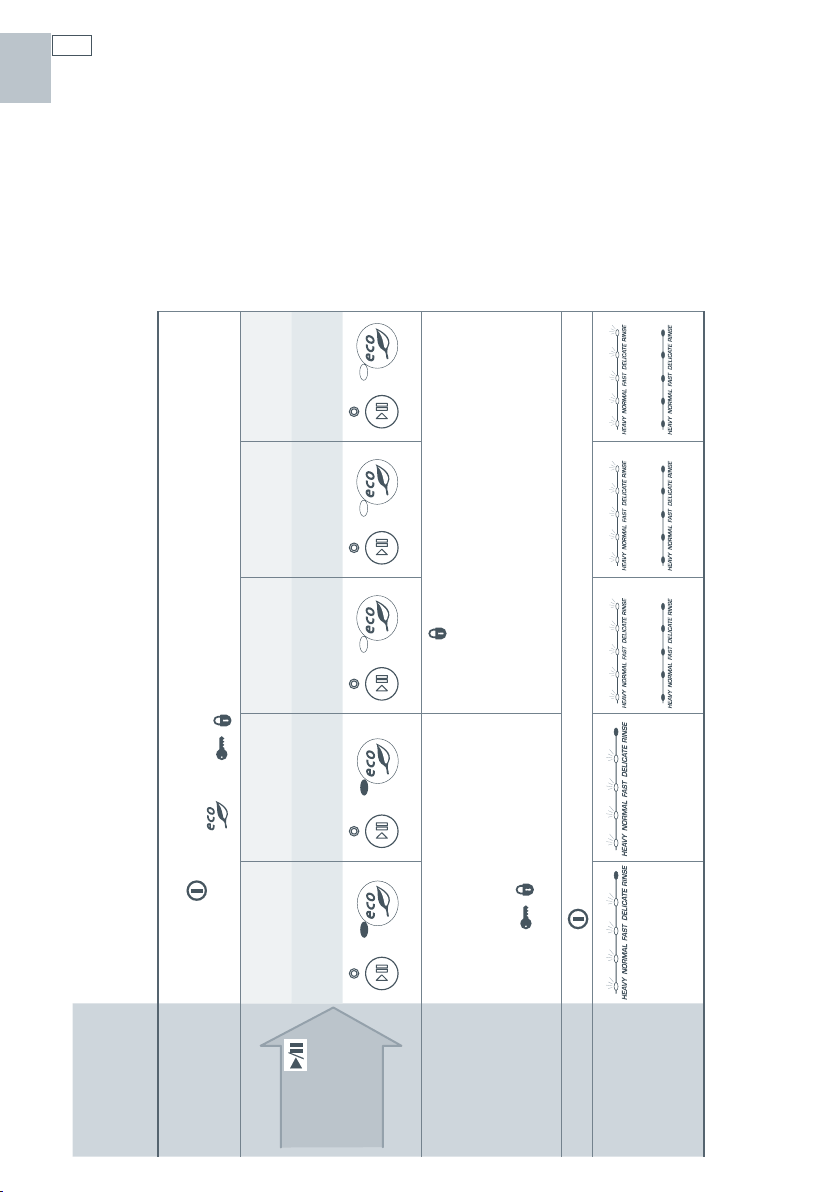
How to make option adjustments (Integrated and Prefinished - no LCD)
Follow the steps
below
Rinse Agent
setting
Water Softener
setting
1
Auto Power
option
End of Wash
Program Beeps
option
Closed Drawer
option
2
First
Enter Option Adjstment Mode
1
Press the button to turn power on. Open DishDrawer.
2
Press and hold the and / buttons for 5 seconds until one long beep sounds.
Press the
button to
scroll through
options
Prefinished - no LCD
red / off
blue / off purple / on blue / on red / on
Integrated
red / off
green / off orange / on green / on red / on
Make an
adjustment
The current setting is shown on the
wash program selector in red lights.
If four red lights are lit, the option
selected setting is set to four.
Press the
/
button to increase
the setting.
Press the
button to turn the selected option on or
off.
Save
Press the button to save the change.
Example
Rinse Agent
setting set to four
Water Softener
setting set to four
On
Off
On
Off
On
Off
1
Non-water softener models - the water softener setting does not appear in the sequence of options.
2
The option sequence will start again from the Rinse Agent setting.
US CA
25
Option adjustments
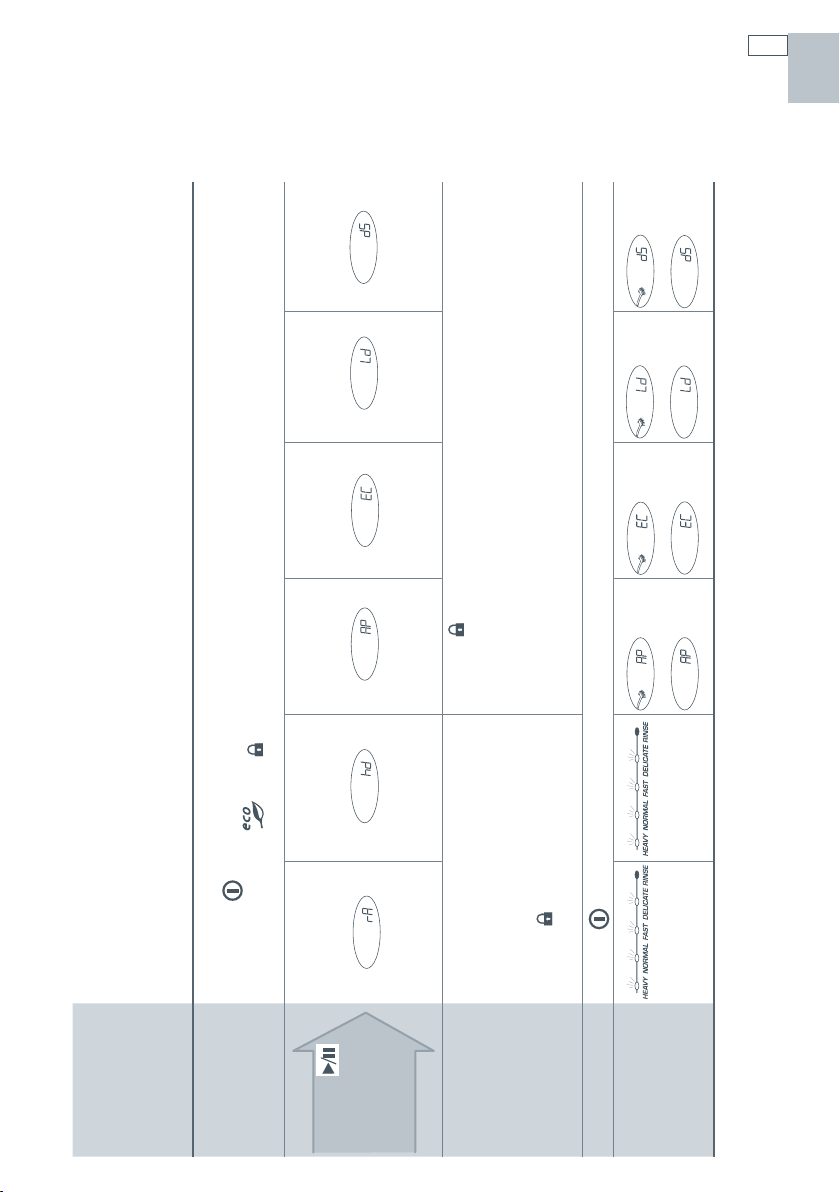
How to make option adjustments (Prefinished with LCD)
Follow the steps
below
Rinse Agent
setting
Water
Softener
setting
1
Auto Power
option
End of
Wash
Program
Beeps
option
Closed
Drawer
option Clean Dish
2
First
Enter Option Adjstment Mode
1
Press the button to turn power on. Open DishDrawer.
2
Press and hold the and buttons for 5 seconds until one long beep sounds.
Press the
button to
scroll through
options
Make an
adjustment
The current setting is shown on the
wash program selector in red lights.
If four red lights are lit, the option
selected setting is set to four.
Press the
button to increase the
setting.
Press the
button to turn the selected option on or off.
Save
Press the button to save the change.
Example
Rinse Agent
setting set to four
Water Softener
setting set to four
On
Off
On
Off
On
Off
On
Off
1
Non-water softener models - the water softener setting does not appear in the sequence of options.
2
The option sequence will start again from the Rinse Agent setting.
US CA

26
User maintenance instructions
Cleaning the surfaces
Important!
We do not recommend the use of the following cleaning aids on your DishDrawer® as they may damage
the surfaces:
Plastic or stainless steel scouring pads
Abrasive, solvent, household cleaners
Acid or alkaline cleaners
Hand washing liquids or soap
Laundry detergents or disinfectants
Proprietary ‘Stainless Steel’ cleaners or polishes as these may damage the protective coating.
1
Wipe with a clean damp cloth. Take care not to wet the control panel.
2
Dry with a clean lint-free cloth.
US CA
27
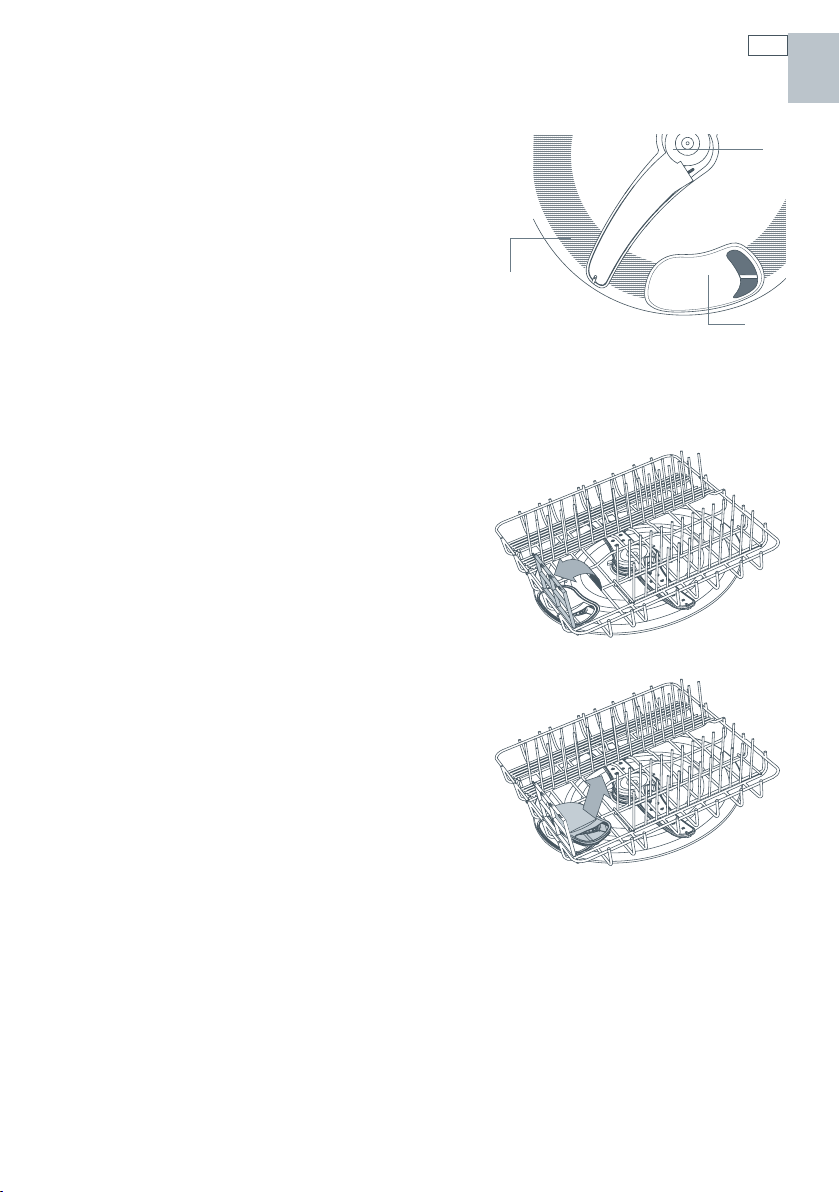
Cleaning the drain filter, spray arm and
filter plate
We recommend that the drain filter is cleaned
whenever there is evidence of food particles.
The spray arm and filter plate may need cleaning
about once a month in normal use or more often
should the need arise.
If a dishwasher cleaner/descaler is used, you must
run a wash program with detergent immediately
afterward to prevent any damage to your
DishDrawer®.
Important !
The DishDrawer® must be used with the filter plate,
drain filter and spray arm correctly in place.
Cleaning the drain filter
1
Lift up the drain filter access panel on the basket
(if fitted).
2
Lift and remove the drain filter.
3
Empty, rinse clean under running water and
replace back into the allocated space.
4
Ensure the drain filter is flush with the filter plate.
User maintenance instructions
Internal parts of the DishDrawer®
a Spray arm
b Filter plate
c Drain filter
a
b
c
US CA
28
User maintenance instructions
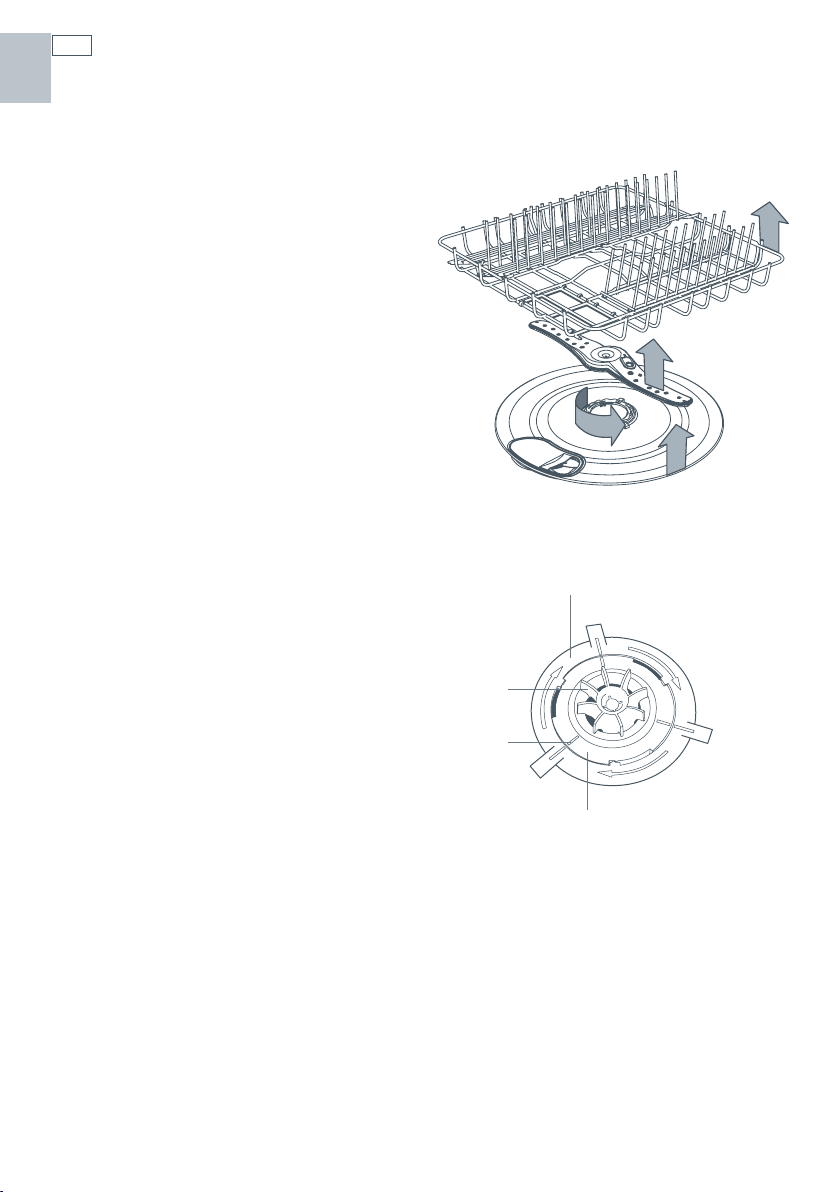
Cleaning the spray arm and filter plate
Ensure the DishDrawer® is cool before you start cleaning and follow the instructions for
removing the drain filter and spray arm.
1
Remove the basket carefully. Lift from the back
end first to prevent knocking the detergent
and rinse agent dispenser.
2
Lift the spray arm and shake any foreign material
out.
Rinse the spray arm clean under running water
and wipe the with a damp cloth.
3
In the center of the filter plate there are two rings.
Hold the center ring still and turn the outer ring
counter-clockwise, about a 1/8 turn. This will
release the filter plate.
4
Lift the filter plate out.
When cleaning the underside of the filter plate,
take care handling the sharp outer edge to avoid
the risk of cuts.
Remove any foreign material, wash in hot soapy
water and rinse thoroughly in clean water. The
heater plate can be wiped with a damp cloth.
5
Replace the filter plate so it lies flat in the base of
the drawer ensuring the filter plate is fully locked
into position with the center ring.
6
To lock the filter plate into position, ensure the
lines align with each other (refer to the diagram
for the correct position). The filter plate must not
be able to move about freely.
7
Replace the spray arm back onto the impeller.
8
Replace the basket, lowering the front edge of the
basket into position first.
Note: Where there is broken crockery or glass in the
drawer, it must be carefully removed to prevent
damage to the DishDrawer®.
Correct locking position of filter
plate with motor assembly
(under spray arm)
a Outer Ring
b Impeller
c Correct Alignment marks
d Center Ring
a
b
d
c
1
1
2
3
4
US CA
29
Troubleshooting
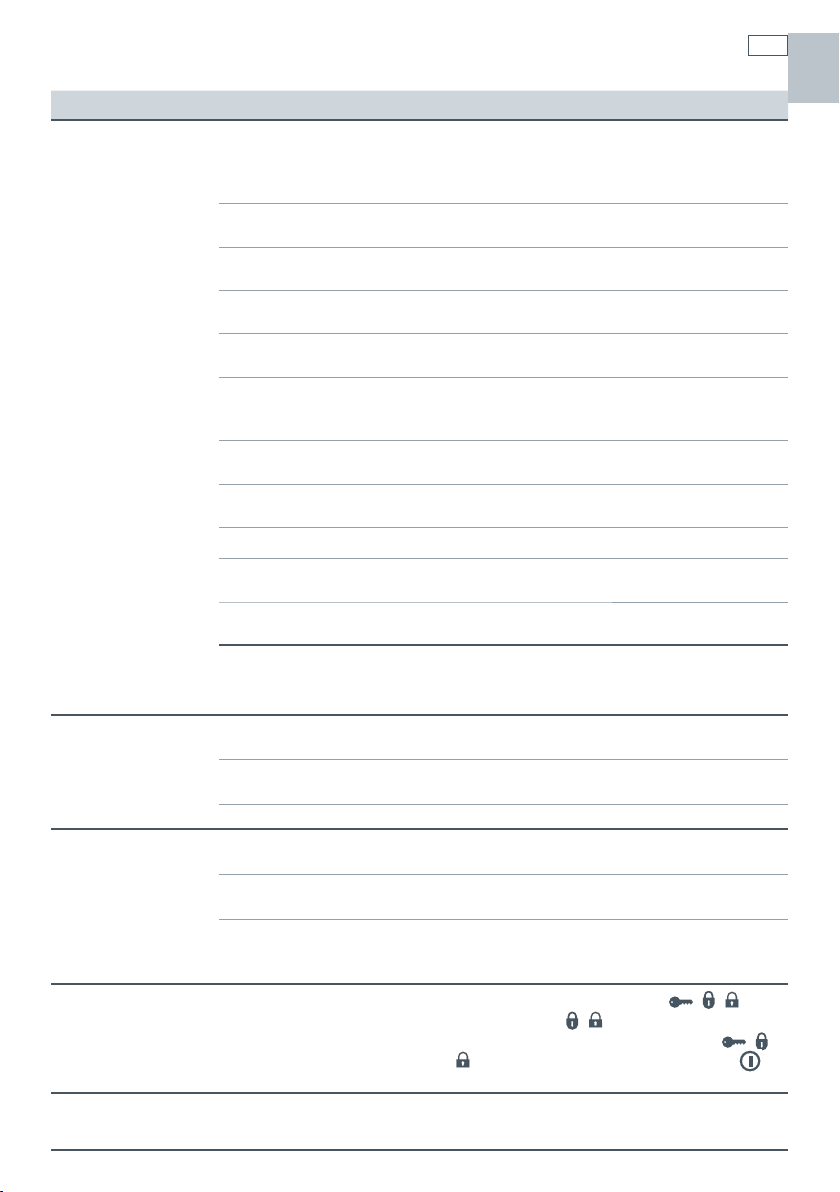
Problem Possible Cause What to do
Unclean dishes
Wash program unsuitable
for the load.
Refer to the wash programs section for a
suitable wash program, or the soils were
too heavily baked on and dishes may need
soaking.
Spray arm unable to rotate. Ensure no items are obstructing the spray
arm path.
DishDrawer® overloaded/
incorrectly loaded.
Refer to the section on loading.
Filter plate/drain filter is
incorrectly inserted.
Refer to the ‘User maintenance instructions’
section.
Detergent put in the wrong
compartment.
Detergent must be placed in the large
compartment.
Excess food not removed
from dinnerware prior to
loading.
Scrape all food scraps off dinnerware prior to
loading.
Unsuitable detergent. Use recommended brands of dishwasher
detergent.
Not enough detergent. Refer to the detergent section or the
detergent manufacturer’s instructions.
Spray arm holes are blocked. Clean the spray arm.
Filter plate/drain filter is
blocked.
Clean the filter plate and drain filter.
Mega rack incorrectly
installed.
Refer to the accessories section for correct
installation.
Insufficient salt in the
water softener (DD605H or
DS605H).
Ensure there is enough salt in the water
softener and/or increase the water
softener setting.
Foaming Incorrect amount of
detergent.
Refer to the detergent section or consult the
detergent manufacturer’s instructions.
Too much egg in the wash
load.
Increase the amount of detergent.
Rinse agent setting too high. Decrease the rinse agent setting.
Water leaking Drain hose disconnected
from waste pipe.
Reconnect the drain hose to the waste pipe.
Supply inlet hose not
properly connected.
Ensure the inlet hose is connected securely.
Other leaks. Turn water and power supplies to the
DishDrawer® off. Call your dealer or
Authorized Service Agent.
DishDrawer® will
not open
Childlock function is on or
the Closed Drawer option is
on, or both.
Turn Lock off. Hold down the
/ /
button until the
/ symbol disappears from
the LCD screen or the light above the
/
/
button disappears and/or press the
button to open the DishDrawer®.
Power failure
during cycle.
Wait until power resumes, cycle will restart in
same part of wash program.
US CA
30
Troubleshooting
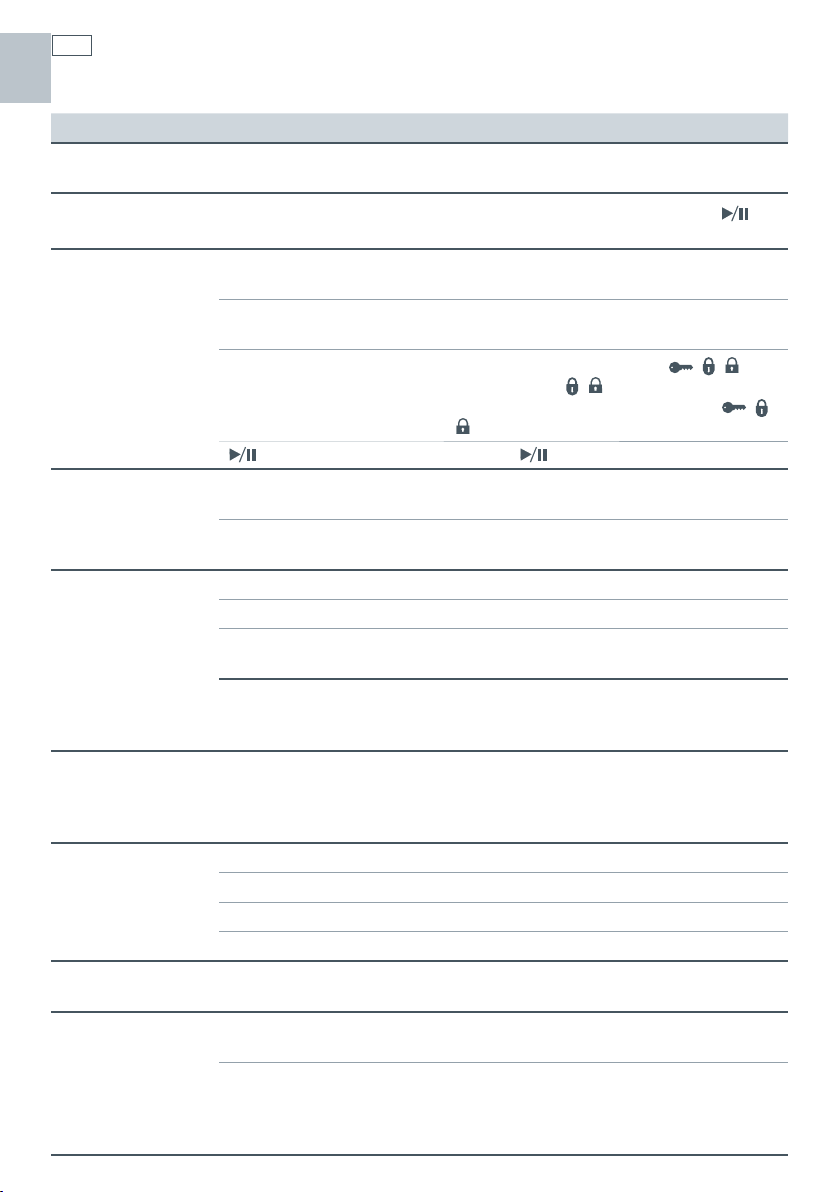
Problem Possible Cause What to do
Continuous
beeping
A fault has occurred. Refer to the Fault codes section.
Intermittent
beeping
DishDrawer® is in pause
mode.
Close the DishDrawer® and press the
button.
DishDrawer® will
not start
Power supply is not
connected.
Connect the power supply.
The drawer is not closed
properly.
Ensure the drawer is firmly closed.
Lock feature is on.
Turn Lock off. Hold down the
/ /
button until the
/ symbol disappears from
the LCD screen or the light above the
/
/
button disappears.
button not pressed. Press the button.
Excess water in the
DishDrawer®
Drain hose(s) bent or
kinked.
Straighten the drain hose(s).
Blocked filters. Clean the filter plate/drain filter. Refer to the
‘User maintenance instructions’ section.
Water marks on the
dishes
Rinse agent depleted. Refill the rinse agent dispenser.
Rinse agent setting too low. Increase the rinse agent setting.
DishDrawer® overloaded/
incorrectly loaded.
Refer to the section on loading.
Insufficient or no salt in the
water softener (DD605H or
DS605H).
Ensure there is enough salt in the water
softener and/or increase the water
softener setting.
DishDrawer®
interior is stained
Some foods, like tomato
based products, may
stain the inside of the
DishDrawer®.
Pre-rinse dishes before placing in the
DishDrawer®. Alternatively, using the Rinse
program after adding the dishes may
minimize staining.
Dishes did not dry Incorrect loading. Ensure the dishes are not nesting together.
Rinse agent depleted. Refill the rinse agent dispenser.
Rinse agent setting too low. Increase the rinse agent setting.
Eco wash program used. Choose a standard wash program.
No detergent
dispensed
Detergent dispenser was
wet when loaded.
Clean the dispenser and ensure the
dispenser is dry when adding detergent.
Excessive motor
noise
The filter plate and/or spray
arm is incorrectly placed.
Refer to the ‘User maintenance instructions’
section for details on correct placement.
No water in the motor area. This usually occurs on the first use or when
the DishDrawer® has not been used for
long periods of time. Run the DishDrawer®
through a wash program.
US CA

31
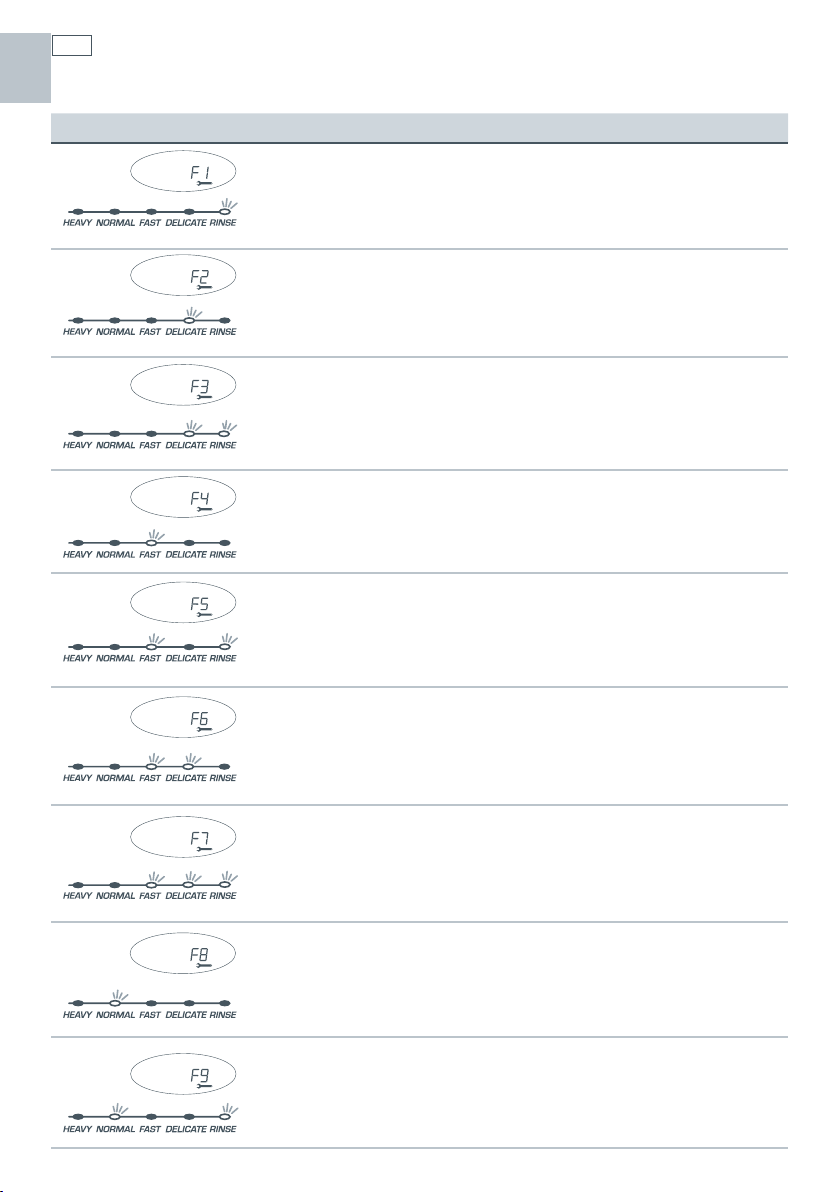
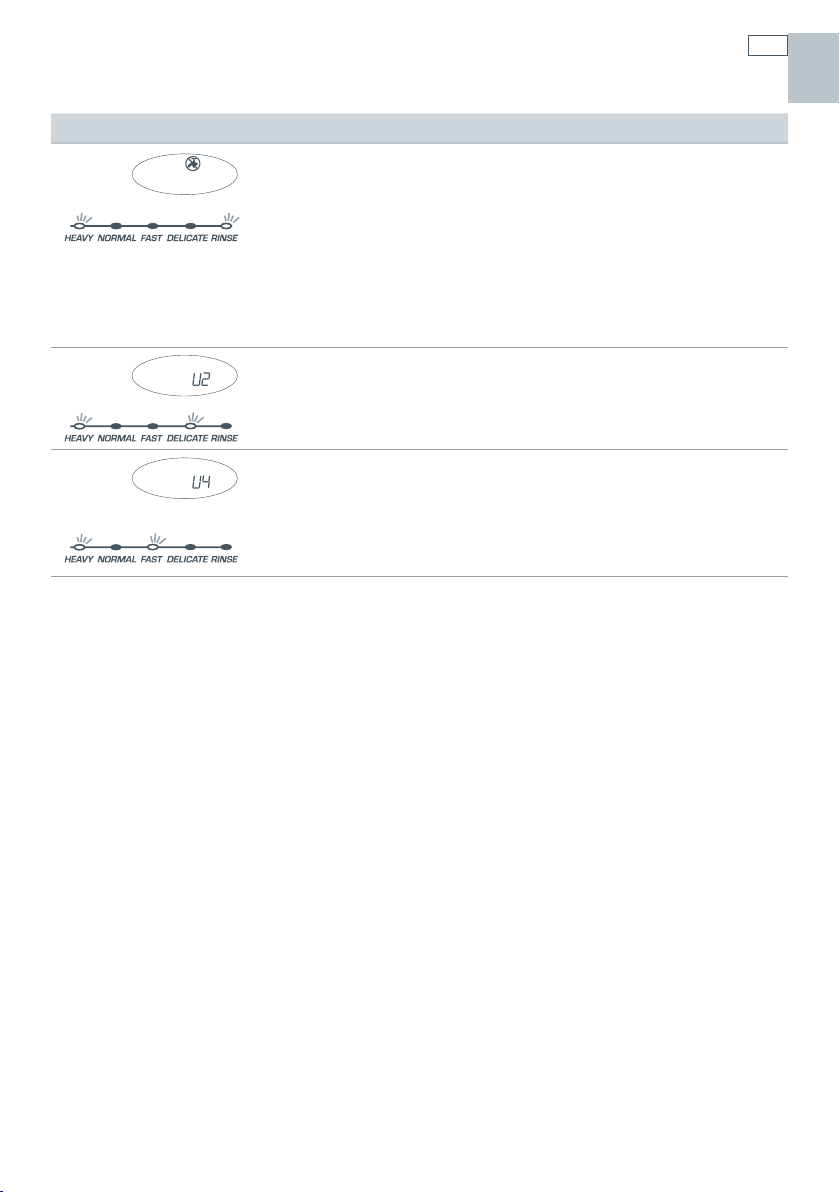
How to recognize a fault code
When a fault has occurred, the DishDrawer® will continuously beep every second.
The fault code will be displayed on the electronic display for prefinished models and on the
wash program selector for integrated models.
Each fault code is shown in the following chart for prefinished and integrated models.
How to attend to a fault code
1
Press the button to remove the fault code.
2
If the fault code and continuous beeps cannot be removed by pressing the button, turn the
DishDrawer® off at the power supply.
3
We recommend you check the following chart and correct the fault where possible.
4
After attending to the fault, turn the DishDrawer® on at the power supply.
5
If the fault code and continuous beeps remain, turn the water and power supply off to the
DishDrawer®.
6
When calling your Authorized Service Center advise them of the fault code that has appeared
on the DishDrawer®. This information will help the Authorized Service Center respond to your
request.
Fault codes
US CA
32
Fault codes
Fault Codes Possible Causes What to Do
F1
Flood switch has been
activated.
Turn the water and power supply to the
DishDrawer® off and call your Authorized
Service Center.
F2
Motor problem. Call your Authorized Service Center.
F3
Temperature sensor
failed.
Ensure water coming in through the inlet
hose is less than 65
o
C. You may need to
install a tempering valve on your water
supply.
F4
Faulty temperature
sensor or element
Call your Authorized Service Center.
F5
Lid fault
1
Turn power supply to DishDrawer off,
then turn on power supply. Fault may
reset.
2
Call your Authorized Service Center.
F6
Lid fault
1
Turn power supply to DishDrawer off,
then turn on power supply. Fault may
reset.
2
Call your Authorized Service Center.
F7
Lid fault Call your Authorized Service Center.
F8
Electrical problem
1
Turn power supply to DishDrawer off.
2
Call your Authorized Service Center.
F9
Electronics
malfunction.
Call your Authorized Service Center.
US CA
33
Fault Codes Possible Causes What to Do
U1
Fill Fault
1
Turn the DishDrawer® water supply on.
2
Ensure the spray arm is placed on the
impeller and can rotate and if the
DishDrawer® is full of water, it will
need to be emptied manually.
3
The water block has been tripped (if
present).
4
Call your Authorized Service Center.
U2
Loading Check loading to ensure no items extend
beyond the height of the drawer.
U4
Fault in the other
drawer preventing the
use of this drawer
Check other drawer, attend to fault code
on that drawer.
Fault codes
US CA

34
Warranty and service
Before you call for service or assistance ...
Check the things you can do yourself. Refer to the installation instructions and your user guide
and check that:
1
Your product is correctly installed.
2
You are familiar with its normal operation.
If after checking these points you still need assistance, please refer to the Service & Warranty
book for warranty details and your nearest Authorized Service Center, or contact us through our
website:
www.fisherpaykel.com
US CA


US CA
FR

Copyright © Fisher & Paykel 2007. All rights reserved.
The product specifications in this booklet apply to
the specific products and models described at the
date of issue. Under our policy of continuous product
improvement, these specifications may change at any
time. You should therefore check with your Dealer to
ensure this booklet correctly describes the product
currently available.
Droits réservés © Fisher & Paykel 2007.
Les spécifications du produit contenues dans ce
manuel s’appliquent aux modèles et produits
spécifiques comme décrits à la date de publication.
Dans le cadre de notre politique d’améliorations
en permanence de nos produits, ces spécifications
pourront être modifiées à tout moment. Nous vous
recommandons de vérifier auprès de votre revendeur
que ce manuel décrit le produit actuellement
disponible.
Derechos Reservados © Fisher & Paykel 2007.
Las especificaciones del producto en este folleto
se refieren a los productos y modelos específicos
descritos en el momento de su publicación. De
acuerdo con nuestra política de mejora continua de
nuestros productos, estas especificaciones pueden
cambiar en cualquier momento. Usted deberá por
lo tanto confirmar con su vendedor para asegurarse
que el presente folleto describa correctamente el
producto disponible en este momento.
www.fisherpaykel.com
US CA
DishDrawer user guide
Published: 11/2007
Part No. 529543 C