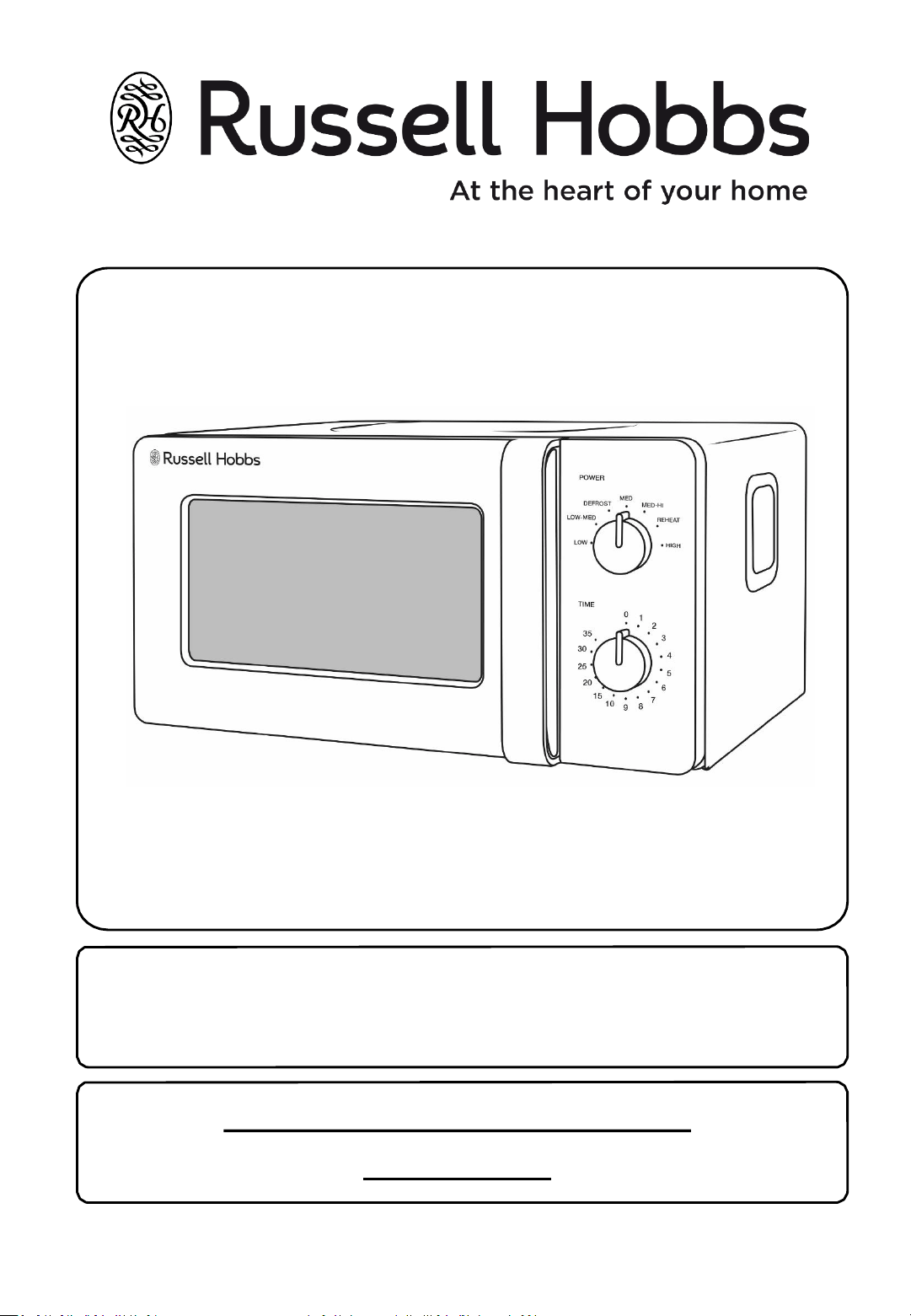
Model Numbers:
RHM1401 (B) (S)
Compact XS Manual Microwave
User Guide
PLEASE RETAIN FOR FUTURE
REFERENCE
For Customer Services & Spare Parts please call 0345 209 7461
Or visit us at http://mda.russellhobbs.com
Page(s)
Safety instructions
3-9
About your microwave
10-11
Product information
12
Unpacking the microwave
13
Product overview
14
Microwave
oven installation
15-16
Turntable
installation
17-18
Control
panel
19
Using the microwave
20
Cooking tips
21-22
Cleaning the microwave
23
Important utensil information
24
Problem solving
25-28
Guarantee &
customer services
29
Spare parts
30
Connection to the mains supply
31-32
Notes
33
Disposal information
34
CONTENTS
2
3
SAFETY INSTRUCTIONS
IMPORTANT SAFETY INSTRUCTIONS
READ CAREFULLY AND KEEP FOR FUTURE REFERENCE
WARNING:
• This appliance is intended to be used in the household and
general domestic applications. It is not intended to be used in
industrial or commercial applications.
• This appliance can be used by children aged from 8 years and
above and persons with reduced physical, sensory or mental
capabilities or lack of experience and knowledge if they have
been given supervision or instruction concerning use of the
appliance in a safe way and understand the hazards involved.
Children shall not play with the appliance. Cleaning and user
maintenance shall not be made by children without supervised.
• WARNING: If the door or door seals are damaged, the oven
must not be operated until it has been repaired by a competent
person.
• WARNING: It is hazardous for anyone other than a competent
person to carry out any service or repair operation that involves
the removal of a cover which gives protection against exposure
to microwave energy.
• WARNING: Liquids and other foods must not be heated in sealed
containers since they are liable to explode.
4
SAFETY INSTRUCTIONS
WARNING:
READ CAREFULLY AND KEEP FOR FUTURE REFERENCE
• A minimum clearance of 7.5 cm is required between the oven
and any adjacent walls. Leave a minimum clearance of 30 cm
above the oven.
• Use only cookware and utensils that are approved for use in a
microwave ovens.
• When heating food in plastic or paper containers, keep an eye
on the oven due to the possibility of ignition.
• The microwave oven is intended for heating food and
beverages. Drying of food or clothing and heating of warming
pads, slippers, sponges, damp cloth and similar may lead to risk
of injury, ignition or fire.
• If materials inside the oven smoke or catch fire, keep the oven
door closed to stifle the flames, turn the oven off at the wall
switch, or shut the power off at the fuse or circuit-breaker
panel. If smoke is emitted, switch off or unplug the appliance
and keep the door closed in order to stifle any flames.
• Microwave heating of beverages can result in delayed eruptive
boiling, therefore care must be taken when handling the
container.
5
SAFETY INSTRUCTIONS
READ CAREFULLY AND KEEP FOR FUTURE REFERENCE
WARNING:
• The contents of feeding bottles and baby food jars shall be
stirred or shaken and the temperature checked before
consumption, in order to avoid burns. Do not heat baby bottles
with the teat left on. Remove it if replacing the bottle back into
the oven.
• Eggs in their shell and whole hard-boiled eggs should not be
heated in microwave ovens since they may explode, even after
microwave heating has ended.
• The oven should be cleaned regularly and any food deposits
removed.
• Failure to maintain the oven in a clean condition, especially if
liquid is left under the turntable, could lead to deterioration of
the surface that could adversely affect the life of the appliance
and possibly result in a hazardous situation.
• The microwave oven should be used freestanding only and must
not be built-in or used in a cabinet.
• If the supply cord is damaged, it must be replaced by the
manufacturer, its service agent or similarly qualified persons in
order to avoid a hazard.
6
SAFETY INSTRUCTIONS
WARNING:
READ CAREFULLY AND KEEP FOR FUTURE REFERENCE
• To avoid fire, electric shock, or injury, never immerse the
microwave, cord, or plug in water or liquid.
• Do not use attachments not recommended by the
manufacturer. Only use thermometers approved for use in
microwaves.
• The appliance and its accessible parts may become hot during
use. Care should be taken to avoid touching heating elements.
• Do not leave the microwave oven unattended while you are
using it.
• Do not use the microwave when it is empty. This could damage
the oven.
• Do not use metal pans, dishes with metal handles or anything
with a metal trim inside the microwave. Do not use paper
covered wire twist-ties on plastic bags.
• Never put objects into the openings on the outer case.
• Food containing a mixture of fat and water (for example, stock)
should stand for 30 to 60 seconds in the oven after it has been
turned off. This is to allow the mixture to settle and to prevent it
from bubbling when a spoon is placed in it, or a stock cube is
added.
7
SAFETY INSTRUCTIONS
READ CAREFULLY AND KEEP FOR FUTURE REFERENCE
WARNING:
• Do not cook any food surrounded by a membrane, such as egg
yolks, potatoes, chicken livers, sausages, ready meals and
so on without piercing them several times with a fork.
• Do not try to deep-fry foods in this microwave oven.
• Do not overcook food.
• Please remember that as food or liquids heat up, they will
release steam or may be spitting. Never cover any container
fully, always leave a gap for steam to escape.
• Do not use plastic containers when heating or cooking foods
that contain a lot of fat or sugar.
• Always have the glass tray and turntable support in place
when using the microwave oven.
• Do not cook food directly on the glass tray. Put food on a
suitable plate or in a bowl before putting it in the oven.
• When using the grill rack and baking tray, be aware that these
will become HOT during cooking as they aren’t heatproof.
Please use suitable oven gloves when removing these.
• Do not use melamine dishes as they contain a material
which will absorb microwave energy. This may cause the
dishes to crack or burn, and will slow down the cooking speed.
8
SAFETY INSTRUCTIONS
WARNING:
READ CAREFULLY AND KEEP FOR FUTURE REFERENCE
• Do not use the microwave oven for heating utensils, plates or
dishes.
• Do not cook using a container with a restricted opening,
such as bottles, as they may explode.
• Before you clean your microwave oven, turn it off and unplug it.
• Keep the inside of the oven clean. When food or liquids
stick to the oven walls, wipe with a damp cloth. We
recommend that you do not use harsh detergent or abrasives.
• On the right hand wall of the cavity is the wave guide
cover, microwaves are passed through this to enable your
food to cook. It is important that this wave guide cover is
kept clean at all times. To do this wipe with mild detergent
and water, then dry.
• You should clean the outside of the oven with a damp
cloth. Do not allow water to seep into the ventilation
openings.
• Do not use harsh abrasive cleaners or sharp metal scrapers to
clean the oven door glass since they can scratch the surface,
which may result in shattering of the glass.
9
SAFETY INSTRUCTIONS
WARNING:
READ CAREFULLY AND KEEP FOR FUTURE REFERENCE
• If steam builds up inside or around the outside of the oven
door, wipe with a soft cloth. This may happen when the
microwave oven is used in humid conditions. Regularly
remove the glass turntable to clean it, wash it in warm
soapy wateror a dishwasher. Regularly clean the turntable
support and oven floor. Simply wipe the bottom surface of
the oven with mild detergent and water, then dry. You can
wash the turntable support in mild soapy water.
ABOUT YOUR MICROWAVE
10
Thank you for purchasing your Russell Hobbs microwave oven.
Ultra compact and stylish, the RHM1401 series is the perfect
everyday microwave, ideal for cooking a variety of meals in
minutes. The chic and trim design means you have flexibility in
choosing the perfect spot to show off your new appliance.
Once you have prepared the microwave for first use, simply place
your food in suitable cookware, open the door and position onto
the assembled turntable. Next all you need to do is select a power
level and the cooking time required by turning the easy to use
dials, found on the control panel. The internal microwave light lets
you know that cooking is in progress.
When the cooking cycle has finished the microwave has a handy
ringer function that will sound to alert you. And that’s it! Cooking
has never been so easy.
With the RHM1401 series you can tailor cooking to suit your recipe
using the 5 power levels available for selection. For added
functionality, there’s also an essential defrost setting, saving you
time so that you can cook meals straight from the freezer.
Easy to clean, simply wipe with a damp cloth to maintain excellent
performance. Choose the RHM1401 series for the ultimate in
microwave cooking convenience.
ABOUT YOUR MICROWAVE
How do microwaves work?
Microwaves are high-frequency electromagnetic waves similar to
radio waves. While radio waves may vary in length from one metre
to many kilometres, microwaves are very short (less than 12.5
centimetres.)
Microwaves do not make any heat themselves but cause water
molecules in food to vibrate.
This vibration produces heat that cooks the food. This is why your
food will come out of the microwave piping hot, when your utensils
inside the oven stay much cooler. The microwaves do not stay in the
air or in the food when you open the microwave oven door.
The microwave oven will work using an ordinary household
electrical socket. Inside the microwave oven is the magnetron,
which turns the electrical energy into microwaves.
Microwaves cannot travel through metal, so the inside of the oven
is lined with metal. The door is lined with a fine metal mesh which
stops microwaves getting through. This means that when the
microwave oven door is shut, there is no possibility that
microwaves can be released.
11
12
PRODUCT INFORMATION
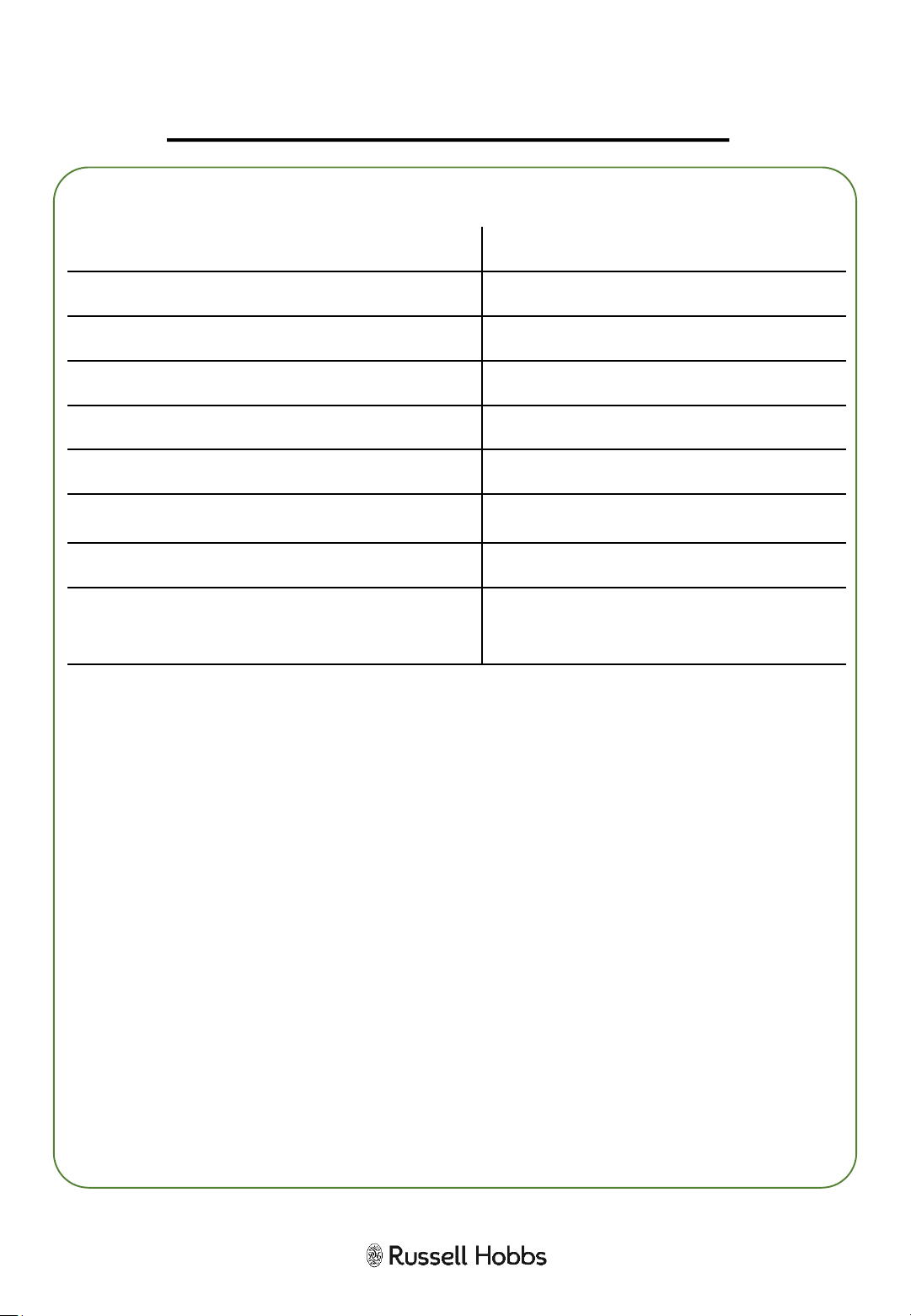
Rated Voltage 220-240V~,50Hz
Rated Input Power (Microwave) 1000W
Rated Output Power (Microwav
e)
600W
Oven Capacity 14L
Turntable Diameter 10 inch
External Dimensions (H x W x D) 22.4 x 42.4 x 31.3 (cm)
Net Weight; Approx 9Kg
Number of Power Levels 5 + defrost + reheat
Accessories Included
Turntable coupling, turntable
roller ring, glass turntable
Produced for:
G2S Limited
Wigan
WN2 4AY
UNPACKING THE MICROWAVE
Before you use your microwave oven
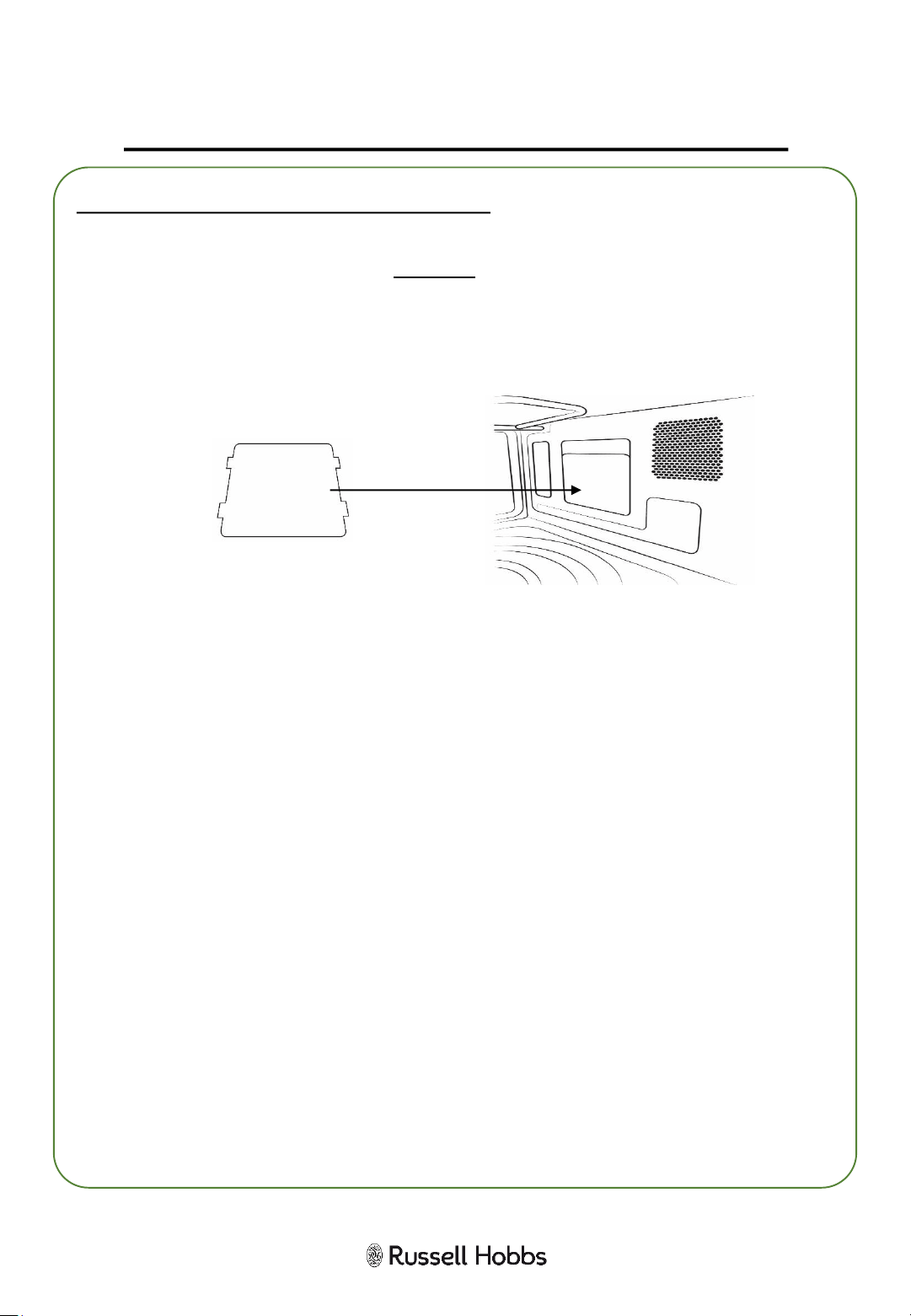
1. Remove all the packaging. Do not remove the small piece of card
from the right hand side of the cavity wall. (Refer to the below
image). This is called a wave-guide cover and allows the microwaves
to pass through to cook the food.
Please ensure you keep this cover clean at all times by wiping with
a damp cloth. Do not remove/place in a dishwasher.
2. Check the oven after unpacking for any visual damage such as:
● A misaligned door
● Damage to the door
● Dents or holes in the door window and screen
● Dents in the inside
If you can see any damage do not use the oven, please contact
our Customer Service team on 0345 209 7461.
This microwave oven weighs approximately 9 kg so you must put it
on a horizontal surface that is strong enough to support this weight.
The oven must be placed away from high temperatures and steam.
Do not put anything on the top of the microwave oven.
13
14
PRODUCT OVERVIEW
1
2
3
4
6
7
9
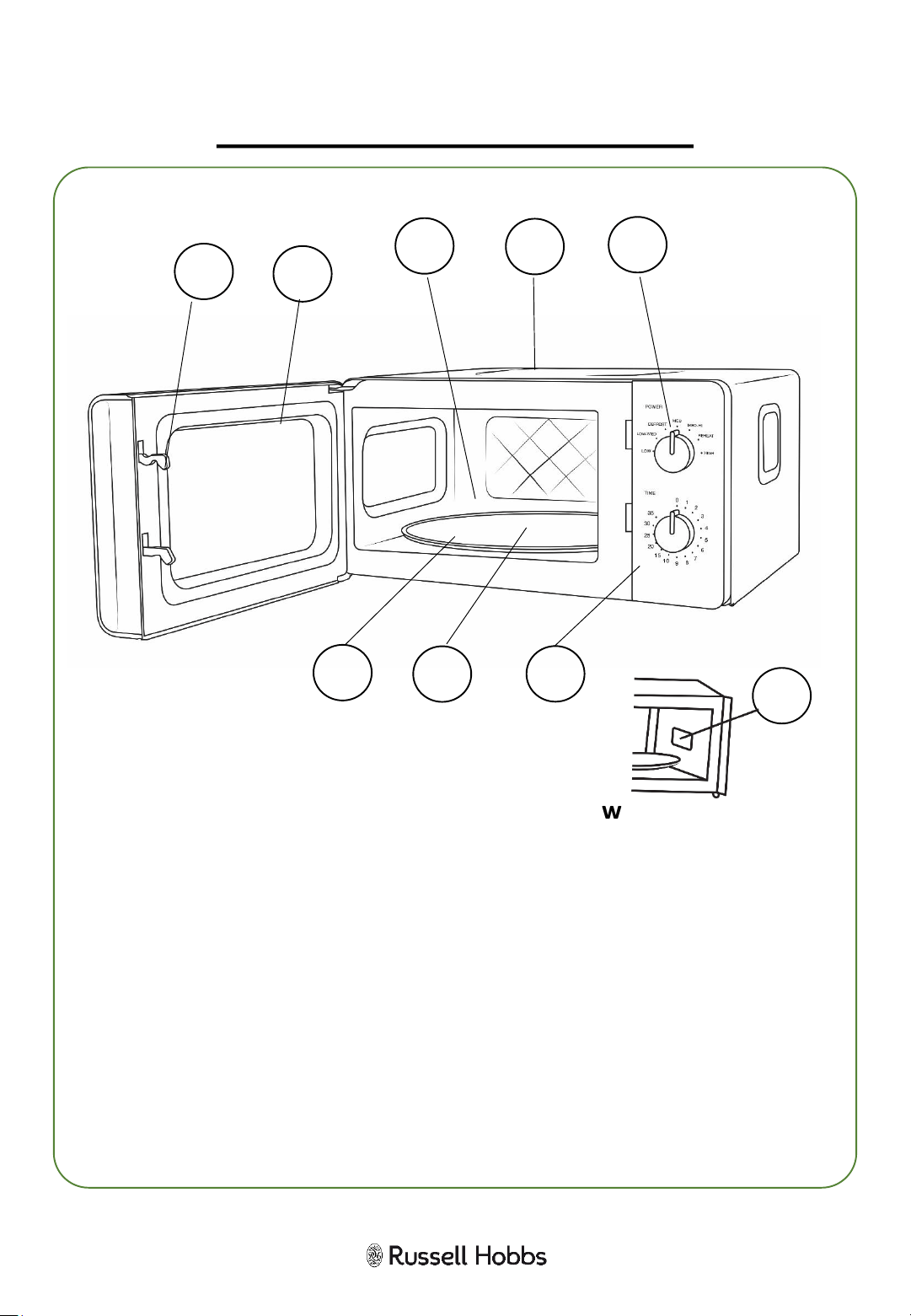
1. Safety interlock latches
2. Door assembly and window
3. Glass turntable
4. Microwave inside door frame
5. Power control dial
6. Turntable ring
7. Turntable coupling
8. Time control dial
9. Waveguide cover
5
8
15
MICROWAVE OVEN INSTALLATION
• Place the oven as far away from radios and televisions as
possible. Using the oven may cause interference with the
reception.
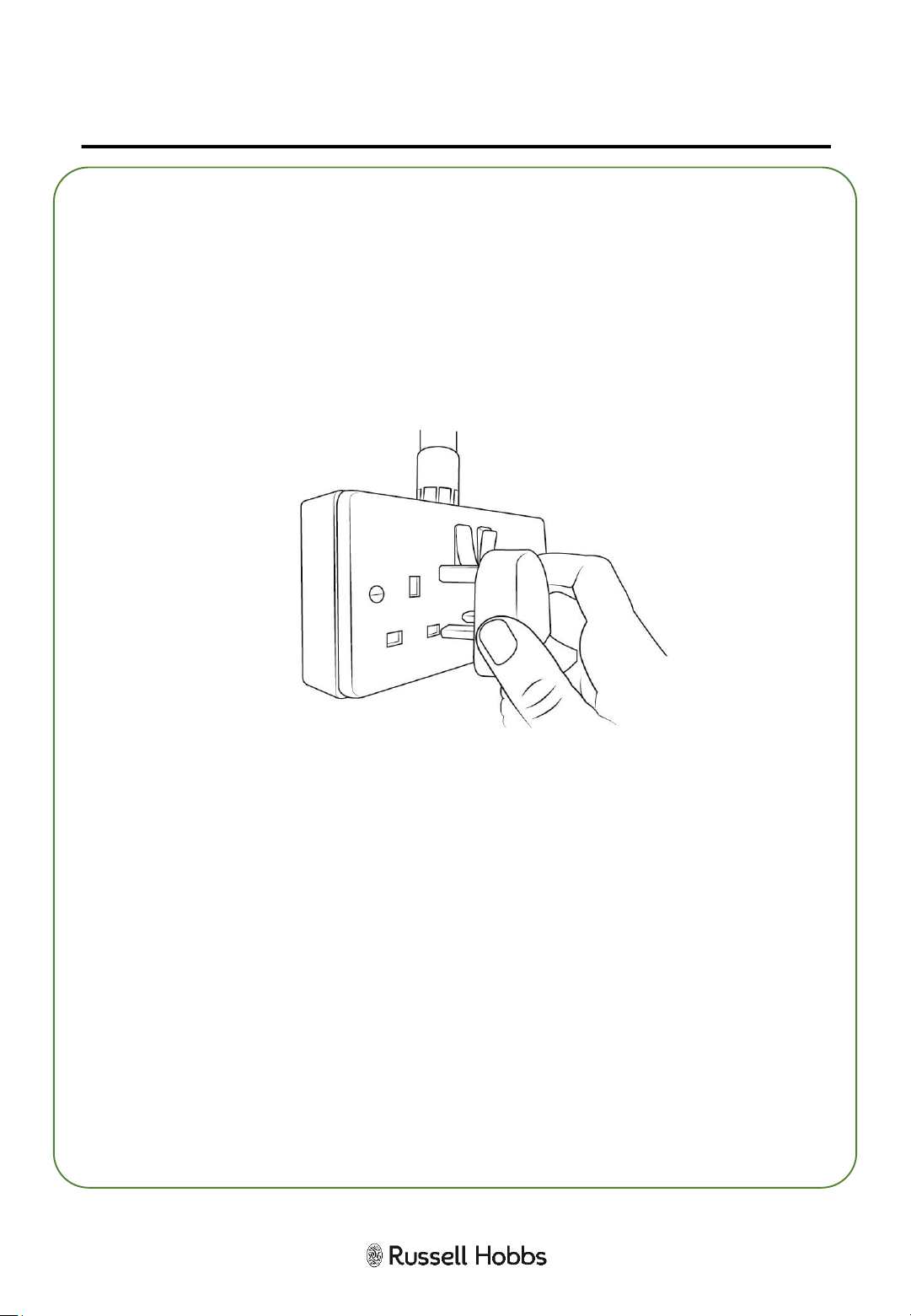
• Plug the oven into a suitable 13 amp mains socket, make
sure the voltage is the same as on the rating label (do not use
extension cables or mains socket adaptors.)
• The microwave oven should be used freestanding only and must
not be built-in or used in a cabinet.
• Select a level surface that provides enough space for the outlet
vents.
16
MICROWAVE OVEN INSTALLATION
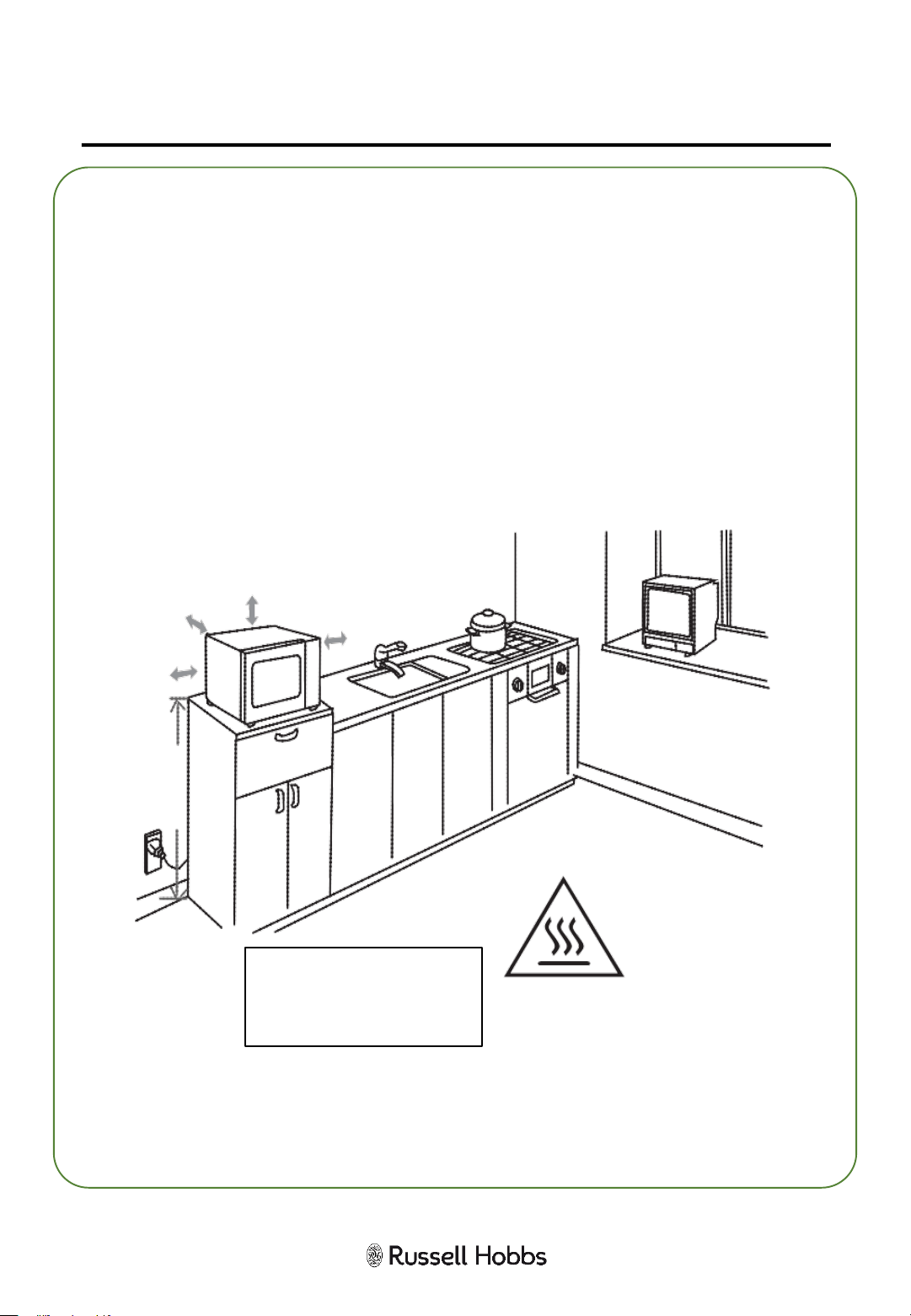
DO NOT obstruct
the ventilation
from the microwave
30cm
7.5cm
7.5cm
7.5cm
Min 85cm
WARNING:
DO NOT install the oven over a cooker or other heat or steam
producing appliance as this will damage the microwave oven.
The minimum installation height is 85cm.
A minimum clearance of 7.5cm is required between the oven and
any adjacent walls. Leave a minimum clearance of 30cm above the
oven.
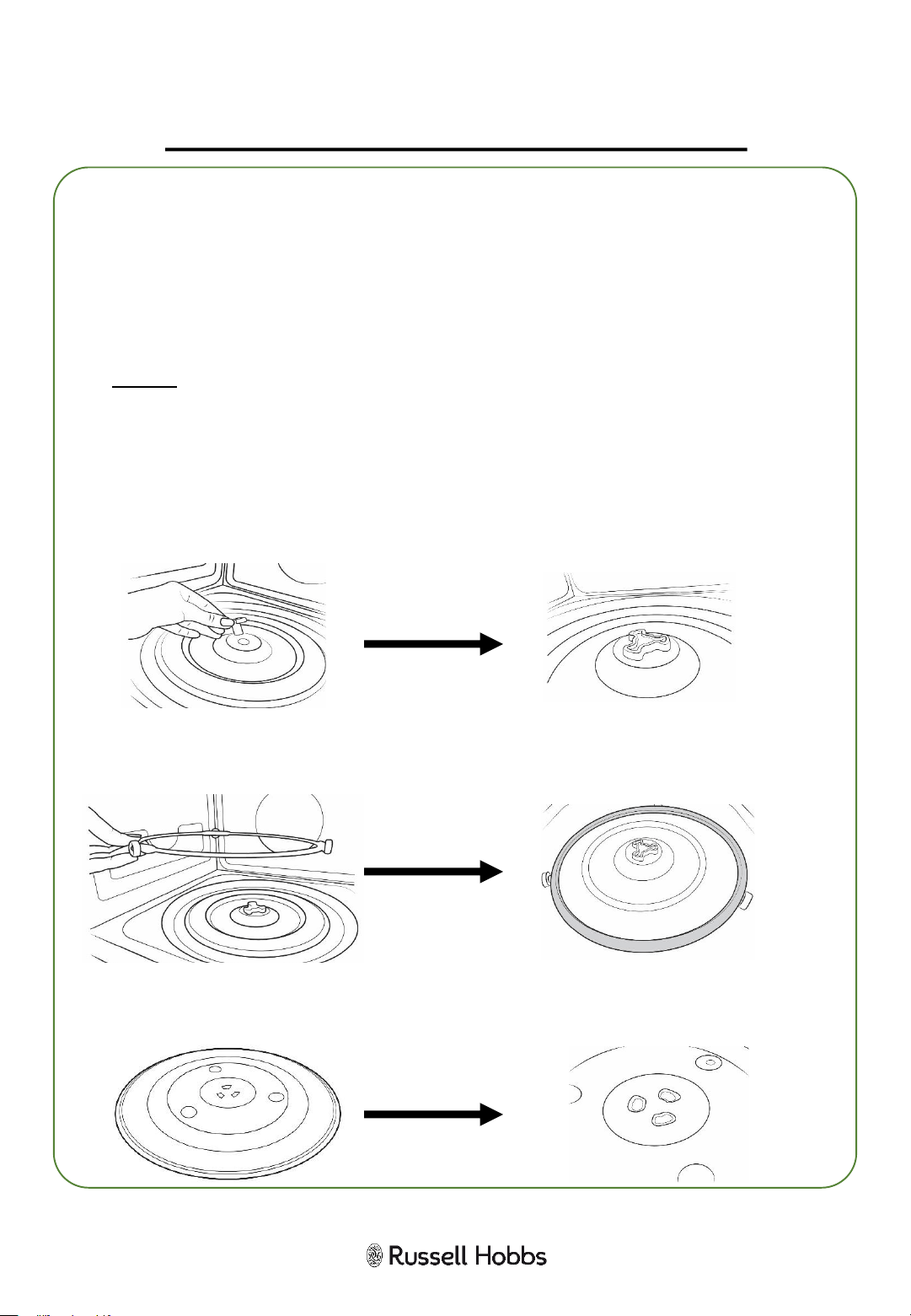
STEP 1) The turntable coupling should slot into the centre of the
microwave
STEP 2) T he turntable ring slots into the indents in the middle
STEP 3) The glass tray should align with the turntable coupling
17
TURNTABLE INSTALLATION
• Before first use, check that any securing tape and all packaging
has been removed from the glass tray and turntable ring
assembly.
• These parts must never be restricted from rotating.
• Never place the glass tray upside down.
• To assemble the turntable, follow the steps below in number
order.
18
TURNTABLE INSTALLATION
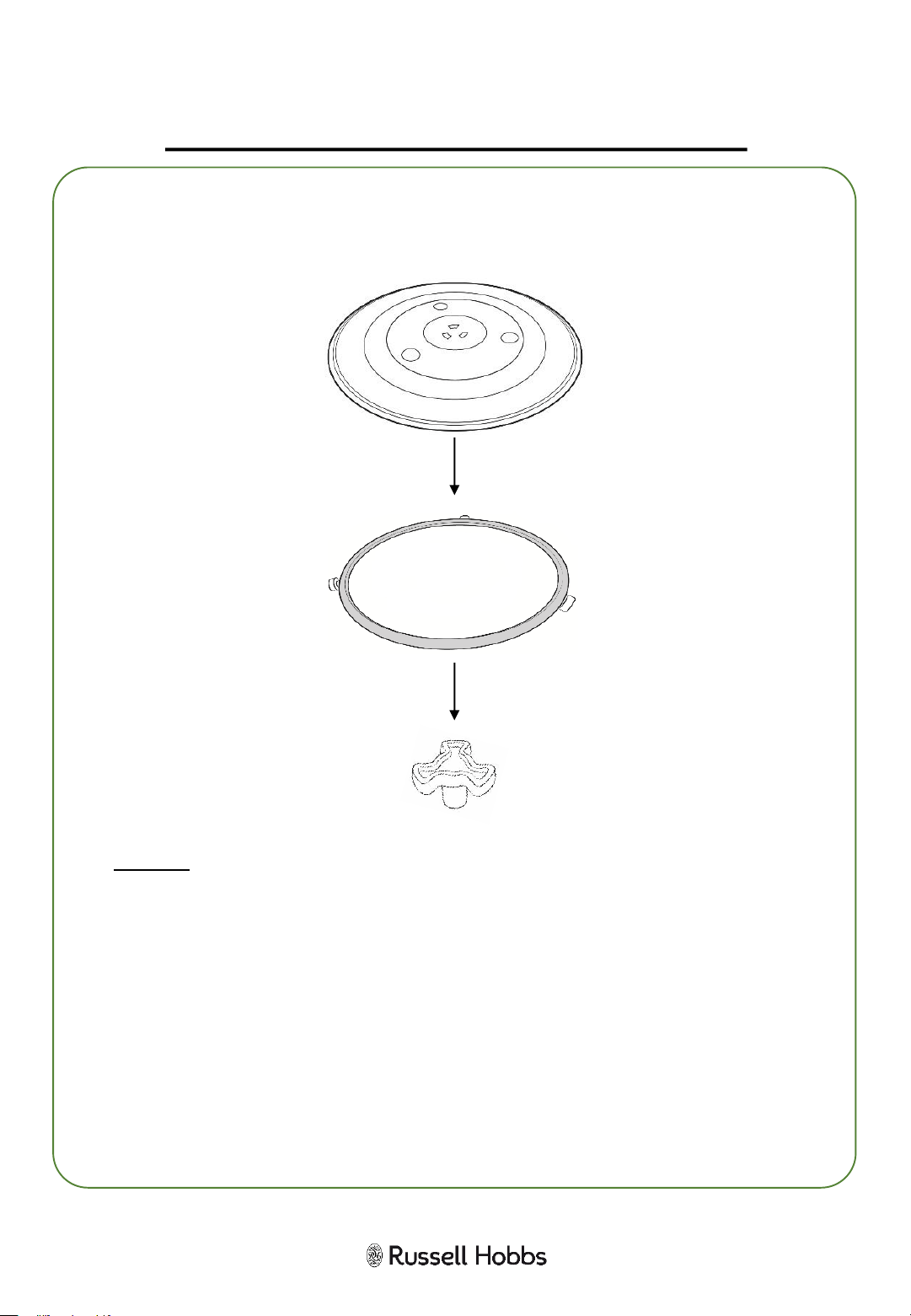
The glass tray,turntable ring, and turntable coupling assembly
must always be used during cooking (as shown below).
• Do not place the food directly onto the glass tray, always place
on or in suitable microwaveable cookware.
Please check that crockery is microwave safe before using.
• If the glass tray or turntable ring assembly has been damaged in
any way, any way, please contact our Customer Services team on
0345 209 7461.
19
CONTROL PANEL
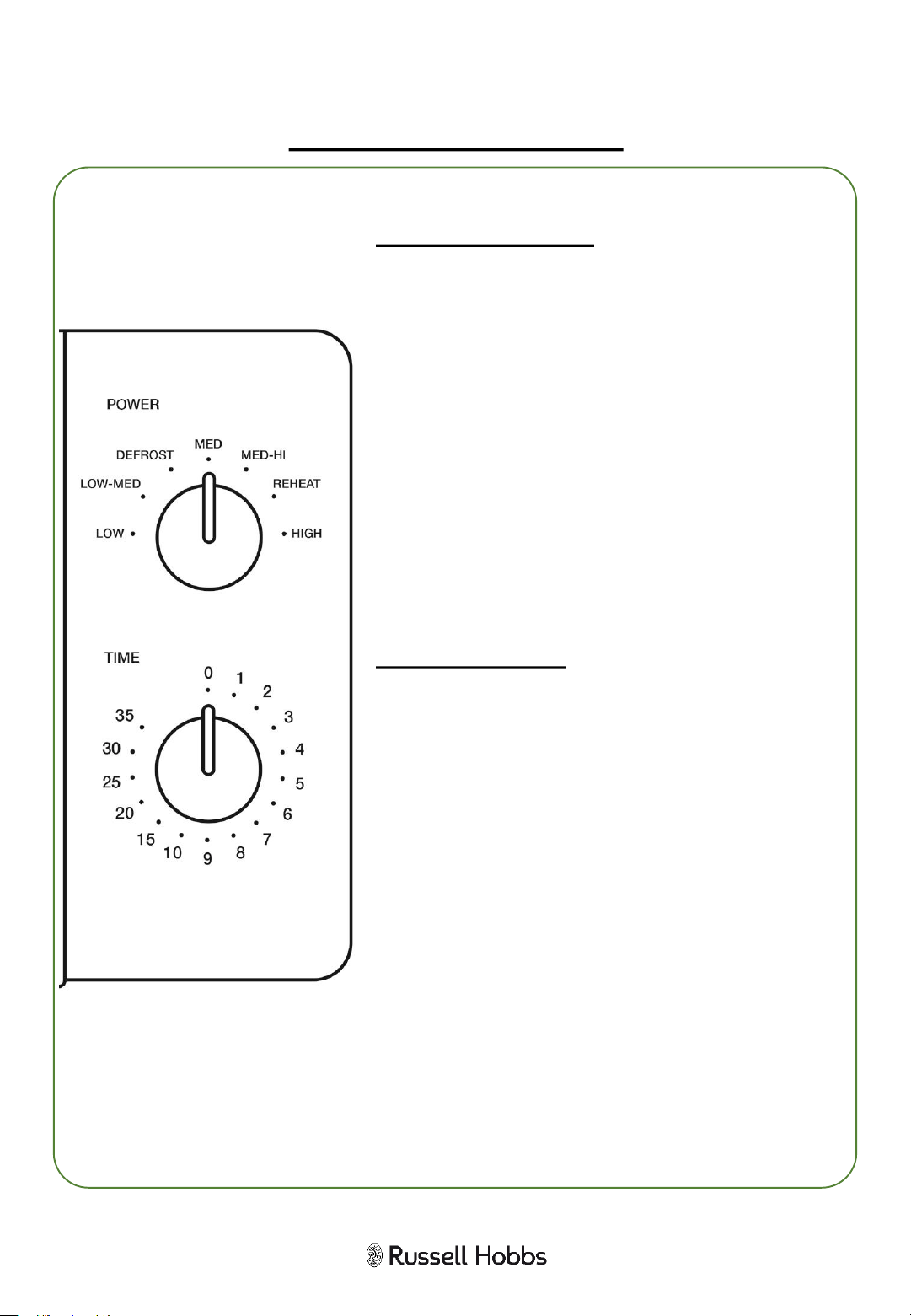
TIME control dial
Turn the dial clockwise to increase the
time set.
You can set your cooking time for up to
35 minutes.
The arrow on the dial will indicate how
many minutes you have selected, each
circular mark represents a minute.
When the time has ran out, the
microwave will produce a ‘ping’ noise to
alert you that cooking has completed.
If you wish to set the time for less than
two minutes, turn the dial clockwise
past the two minute mark and back anti
clockwise to less than two minutes.
POWER control dial
There are 5 power levels and a defrost
and a reheat functions , selected using
the power control dial.
The lower the power setting, the slower
the microwave will heat the food. Make
sure you follow guidelines on packaging
when selecting a setting.
To defrost food, set the arrow on the
dial to ‘DEFROST’.
To reheat food, set the arrow on the
dial to ‘REHEAT’.
20
USING THE MICROWAVE
1. Plug power supply cord into 240V AC 50Hz poweroutlet.
2. After placing the food in a suitable container, open the oven
door and put it on the glass tray. The glass tray and roller
guide must always be in place during cooking.
3. Close the door. Make sure that it is firmly closed. The oven
door can be opened at any time during operation by pushing
the door open button. The oven will automatically shut off.
4. Set the variable power control knob to the desired power
level.
LOW 100W
LOW-MED 160W
DEFROST 230W
MED 330W
MED-HI 430W
REHEAT 520W
HIGH 600W
5. Set the operating time by turning the timer knob to the
desired cook time and the microwave cooking starts. If
setting the timer control for less than 2 minutes, turn it past 2
minutes and then back to the desired time.
6. Microwave energy will be turned off automatically when the
timer knob reaches “OFF”. Then food can be taken out of the
oven.
21
USING THE MICROWAVE
• To prevent the oven from operating with the door open, your
microwave oven is fitted with safety door interlock switches.
• If you wish to inspect the food while it is cooking simply open
the door. The oven will automatically stop cooking.
• To continue cooking, you simply close the door.
• If you wish to stop cooking, simply turn the timer knob to the
“OFF” position. Cooking can be reset at any time during the
cooking cycle by turning the timer control.
• Do not let the timer continue to operate after removing or when
there is no food.
22
COOKING TIPS
Defrosting tips
Microwaves penetrate around 4cm into most food. To maximize
defrosting effectiveness follow the below guidelines.
1. For thick foods, turn regularly during operation in order to
defrost evenly.
2. If food weighs over 500g, it is advised to turn at least 2 times.
3. Defrosted food should be consumed as soon as possible, it is not
advisable to put back into the fridge or to freeze again.
Cooking tips - The following may affect cooking results:
Food arrangement
If possible, thicker bits of food should be placed around the
outside of the dish and the thinner parts toward the centre, spread
out as evenly as possible. Do not overlap food if possible as this
could result in uneven cooking results.
Cooking length
If you are unsure of cooking times it is advisable to start with a
short cooking time and monitor cooking progress before adding
further time. Overcooking could lead to a risk of fire. Ensure food
is cooked thoroughly before consuming.
Cooking food evenly
Foods such as meat should be turned frequently to ensure more
even cooking results. If the food is liquid based, stirring during the
cooking time is advisable.
Allow standing time
When the microwave has stopped cooking, leave the food to rest
for an adequate length of time to allow for cooking completion
and cooling.
23
CLEANING THE MICROWAVE
• Before you clean the oven, turn it off and unplug it.
• Keep the inside of the oven clean. When food or liquids stick to
the oven walls, wipe with a damp cloth. We recommend that you
do not use harsh detergent or abrasives.
• On the right hand side wall of the cavity is the wave guide cover,
microwaves are passed through this to enable your food to cook.
It is important that this wave guide cover is kept clean at all times.
To do this wipe with mild detergent and water, then dry.
• You should clean the outside of the oven with a damp cloth. Do
not allow water to seep into the ventilation openings.
• Do not allow the control panel to become wet. Clean with a soft,
damp cloth. Do not use detergents, abrasives or spray-on cleaners
on the control panel.
• If steam builds up inside or around the outside of the oven door,
wipe with a soft cloth. This may happen when the microwave oven
is used in humid conditions.
• Regularly remove the glass turntable to clean it, and wash it in
warm soapy water. Regularly clean the turntable support and oven
floor. Simply wipe the bottom surface of the oven with mild
detergent and water, then dry. You can wash the turntable support
in mild soapy water.
• When removing the turntable support of the oven, make sure you
put it back properly.
• If the inside of the oven smells, put a cup of water with the juice
and skin of one lemon in a deep microwave bowl. Microwave it for
three minutes, wipe thoroughly and then dry with a soft cloth.
• Failure to maintain the oven in a clean condition, especially if
liquid is left under the turntable, could lead to deterioration of the
surface that will adversely affect the life of the appliance that may
result in a hazardous condition.
24
IMPORTANT UNTENSIL INFORMATION
• Do not use metal pans or dishes with metal handles.
• Do not use anything with a metal trim.
• Do not use paper covered wire twist-ties on plastic bags.
• Do not use melamine dishes as they contain a material which will
absorb microwave energy. This may cause the dishes to crack or
burn, and will slow down the cooking speed.
• Use only cookware that is approved to be used in a microwave
oven.
• Do not cook using a container with a restricted opening, such as
bottles, as they may explode.
• Do not heat baby bottles with the teat left on. Remove it if
replacing the bottle back into the oven.
• Only use thermometers that are approved for microwave ovens.
• Do not use the microwave oven for heating utensils.
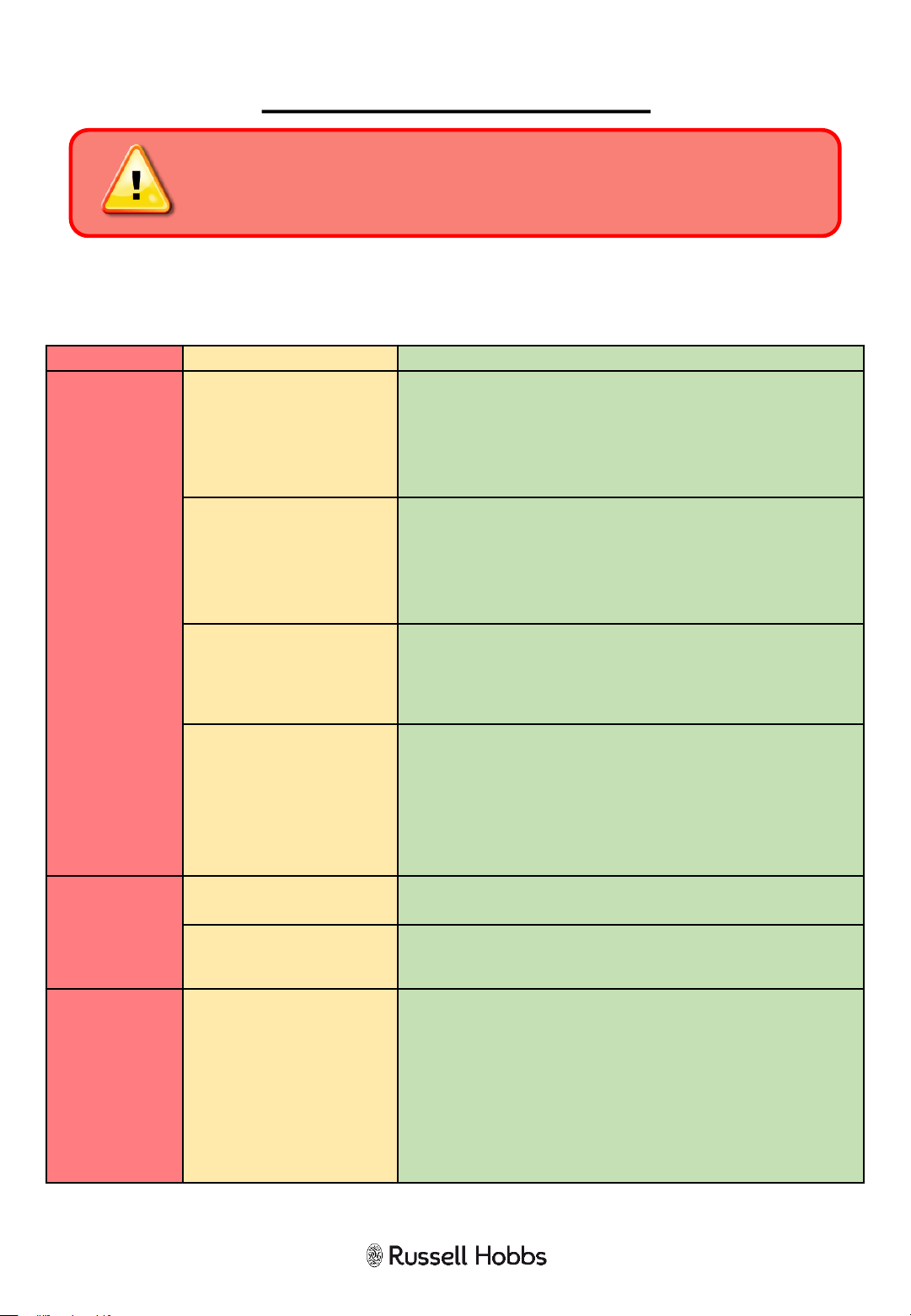
Problem Potential reason
Potential solution
If the
microwave
doesn’t work
1. Microwave is not
plugged in
Make sure the plug is plugged in securely into the mains
and the plug is switched on. If it is not, remove the plug
from the socket, wait 10 seconds and plug it in again
securely.
2. Plug is not working
The plug socket that the microwave is plugged into may
have become faulty. Plug the microwave into another
known good plug socket, ensure that the socket is
turned on and check if the microwave now works.
3. The plug has a blown
fuse or the mains circuit
has a blown fuse/tripped
fuse
Check the plug for a blown circuit fuse or a tripped main
circuit breaker. If these seem to be working properly,
test the socket with another appliance.
4. Microwave has
developed a fault
Contact customer services to talk through the problem
to see if any solution for the fault can be found. If not
and the product is within its warranty period,
then the
microwave should be returned to the retailer it was
purchased from for a replacement or refund.
If the
microwave
power will not
work
1. Door is not closed
Make sure the door is securely closed. Otherwise, the
microwave will not engage or operate.
2. The timer dial has not
been set.
You need
to turn the time control dial clockwise to set
the time and initiate cooking.
Not heating
Magnetron not working
The component that produces the microwaves is called
a magnetron, if food is not being heated or is 'luke'
warm then it is likely this component has developed a
fault.
If the microwave is within its warranty period, please
contact customer services for further advice or take the
microwave back to the retailer it was purchased from for
a refund or replacement.
25
PROBLEM SOLVING
The microwave oven may cause interference to your radio, TV or similar
equipment. If this happens, you stop the interference by moving the radio,
TV or equipment as far away from your microwave oven as possible.
WARNING: To reduce the risk of personal injury, always
unplug the microwave before performing maintenance
or trouble shooting checks.
26
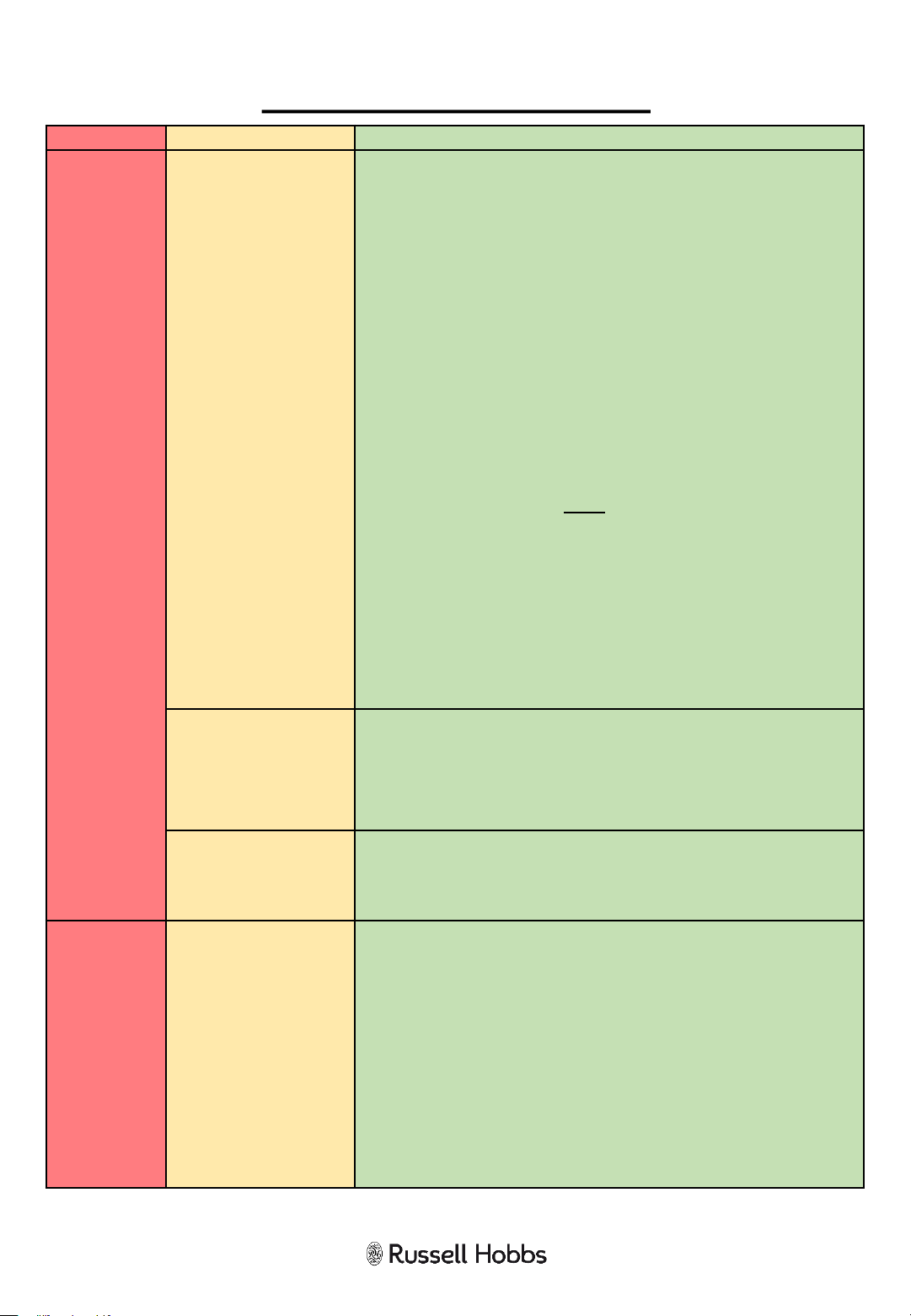
PROBLEM SOLVING
Problem Potential reason Potential solution
Sparking
Burnt on food debris
Spillages or splashes can burn and catch fire, all food that is
put into the microwave should be appropriately covered. All
spillages or splashes must be cleaned, and all areas of
microwave cleaned after each use.
Burnt on food debris in the microwave, on the wave guide
and the behind the wave guide can cause the microwave to
'spark'. This is because burnt on debris can be focused on by
the microwaves and spark.
Microwaves must be thoroughly cleaned after every use to
ensure no food is burnt on to any part of the microwave.
If the microwave does 'spark' the wave guide must be
disposed, the microwave
must be cleaned thoroughly and
then contact customer services for a replacement wave
guide.
The replacement wave guide should be fitted and the
microwave should operate normally. However, if the
microwave 'sparks' again on first use (after the waveguide has
been replaced and the microwave cleaned,)
please contact
customer services for further advice.
Metal or foil
No metal or foil should be put inside a microwave as it can
cause 'sparking' which can damage the microwave.
The only metal accessories that should be used inside the
microwave are the ones supplied by the manufacturer.
Pressure build up in
food
Food with none porous skins (potatoes for example), must be
pierced to allow steam to escape. As the build up of pressure
can cause food to burst and create a 'fire hazard‘.
Heat spots
Operated empty or
with no moisture
Microwaves cannot be run empty, microwaves need moisture
to operate correctly.
If microwaves are operated empty or are used to heat up
plates (this is not permitted), the microwaves can focus on a
single point inside the microwave. This can cause a heat spot,
which can cause the area to become deformed, warped or
start to melt.
If microwaves are operated empty or to heat up foreign
objects this will void the warranty.
27
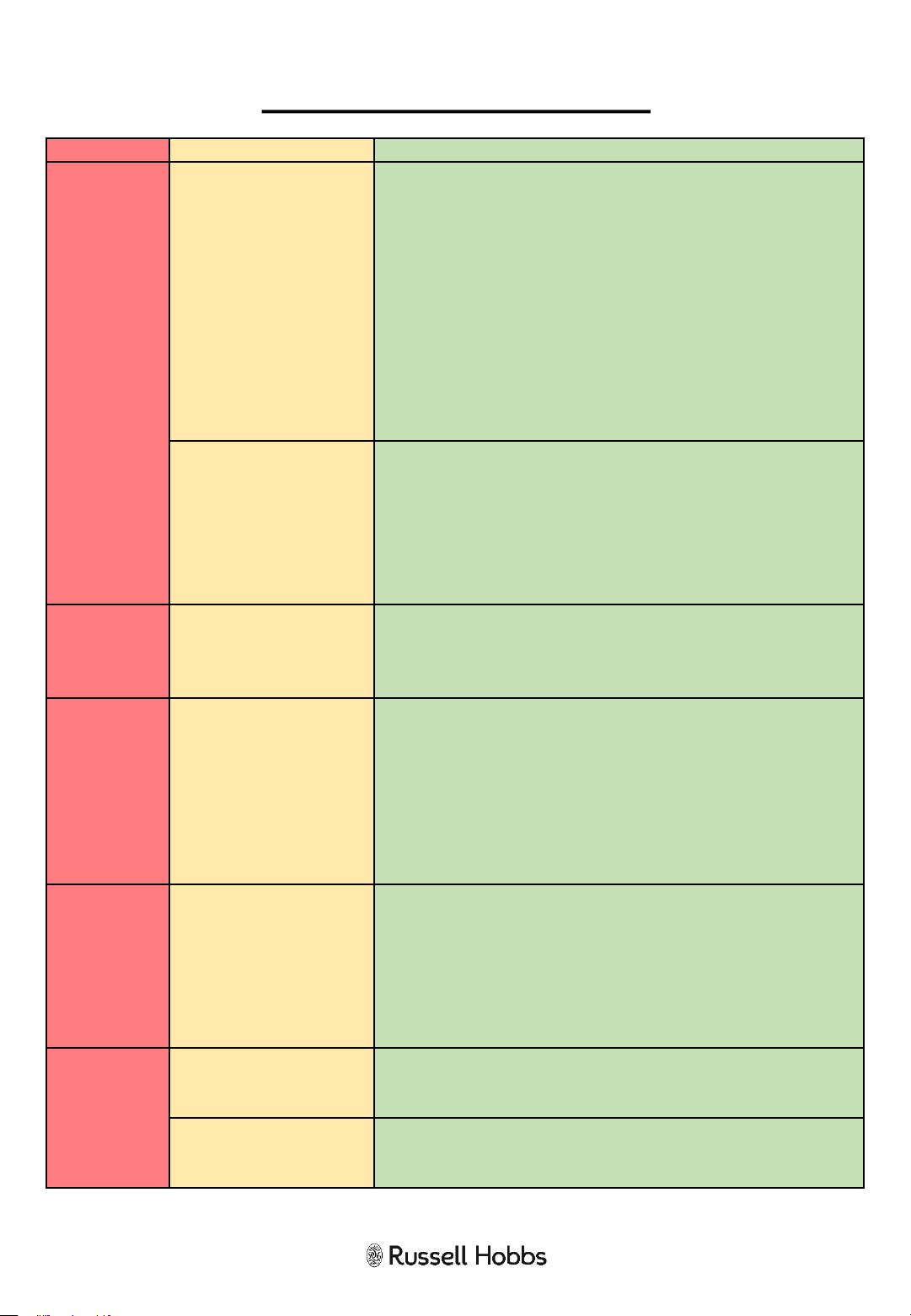
PROBLEM SOLVING
Problem Potential reason
Potential solution
Condensation
or excess
water
1. Food that is being
cooked
By the very nature of how a microwave works, it ‘excites’ the
water molecules in the food it is heating, causing them to
move about and generate heat from within the food. Often
when the food heats up it reaches the point where steam is
released. Dependant on the food type being heated (and its
water content level), the length of time being heated for
–
and so the amount of steam generated
– it is inevitable that
some of the steam will condense and form back into water
droplets within the microwave cavity. This can usually be
found on the inner walls or most commonly on the back of
the glass door. If not cleaned up, these droplets can start to
form small ‘pools’ of water.
2. Cooling vents covered
Cooling vents allow the heat and steam to escape from the
microwave. These cannot be covered as it can cause
excessive water to settle inside the microwave or the
microwave to overheat.
The installation instructions in the instruction manual must be
followed or the warranty will be void.
Paint damage/
peeling
Maintenance
If the microwave is within its warranty period, please contact
customer services for further advice or take the microwave
back to the retailer it was purchased from for a refund or
replacement
Light not
working
Bulb not working
Due to the construction of microwaves and certain
'dangerous' components inside,
the light bulb can only be
changed by a qualified service engineer.
If the microwave is within its warranty period, please contact
customer services for further advice or take the microwave
back to the retailer it was purchased from for a refund or
replacement
Over heating
Cooling vents covered
Cooling vents allow the heat and steam to escape from the
microwave. These cannot be covered as it can cause
excessive water to settle inside the microwave or the
microwave to overheat.
The installation
instructions in the manual must be followed
or the warranty will be void.
Too noisy
1. Glass turntable fitted
incorrectly
Check that the glass turntable has been placed correctly on
the turntable and is not hitting the walls/doors of the
microwave during operation.
2. Dishes/plate are too
large for the microwave
Check that the dishes/plates are the correct size for the
microwave and that they are not hitting the walls/door of
microwave during operation.
28
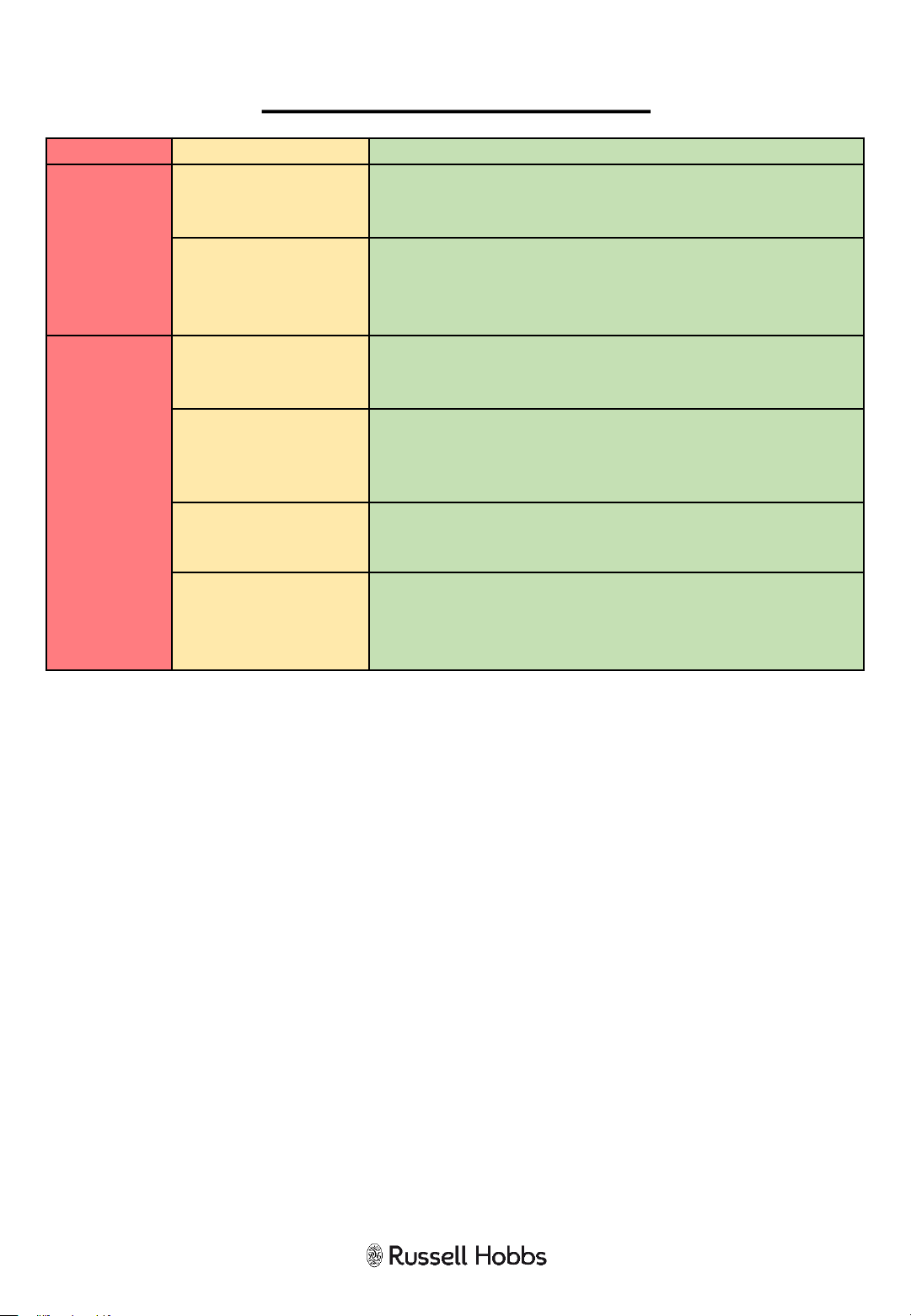
PROBLEM SOLVING
Problem Potential reason
Potential solution
Door not
shutting/
locking
1. Glass turntable fitted
incorrectly
Check that the glass turntable has been placed correctly on
the turntable and is not stopping the door from shutting
correctly.
2. Latches have become
deformed
If the microwave is within its warranty period, please
contact customer services for further advice or take the
microwave back to the retailer it was purchased from for a
refund or replacement.
Turntable not
rotating
1. Turntable coupling
not fitted or tape not
removed
Check that the turntable coupling is fitted correctly and the
transportation tape has been removed.
2. Turntable roller ring
not fitted or fitted
incorrectly
Check that the coupling has be placed under the turntable
and that it is position correctly.
3. Glass turntable fitted
incorrectly
Check that the glass turntable has been placed correctly on
the turntable.
4. Turntable has
developed a fault
If the microwave is within its warranty period, please
contact customer services for further advice or take the
microwave back to the retailer it was purchased from for a
refund or replacement.
29
GUARANTEE & CUSTOMER SERVICES
At Russell Hobbs, we take all our customer feedback seriously.
Feel free to contact our Customer Service Team on
0345 209 7461
who will be more than happy to assist you.
This product is guaranteed for 12 months from the date of the
original purchase. If any defect arises due to faulty materials or
workmanship, the faulty product must be returned to the place of
purchase.
Refund or replacement is at the discretion of the retailer.
The following conditions apply:
• The product must be returned to the retailer with the original
proof of purchase.
• The product must be installed and used in accordance with the
instructions contained in this instruction guide and any other
instructions for use which are supplied.
• It must be used for domestic purposes only and for its intended
use.
• This warranty does not cover wear and tear, damage, misuse
or consumable parts.
30
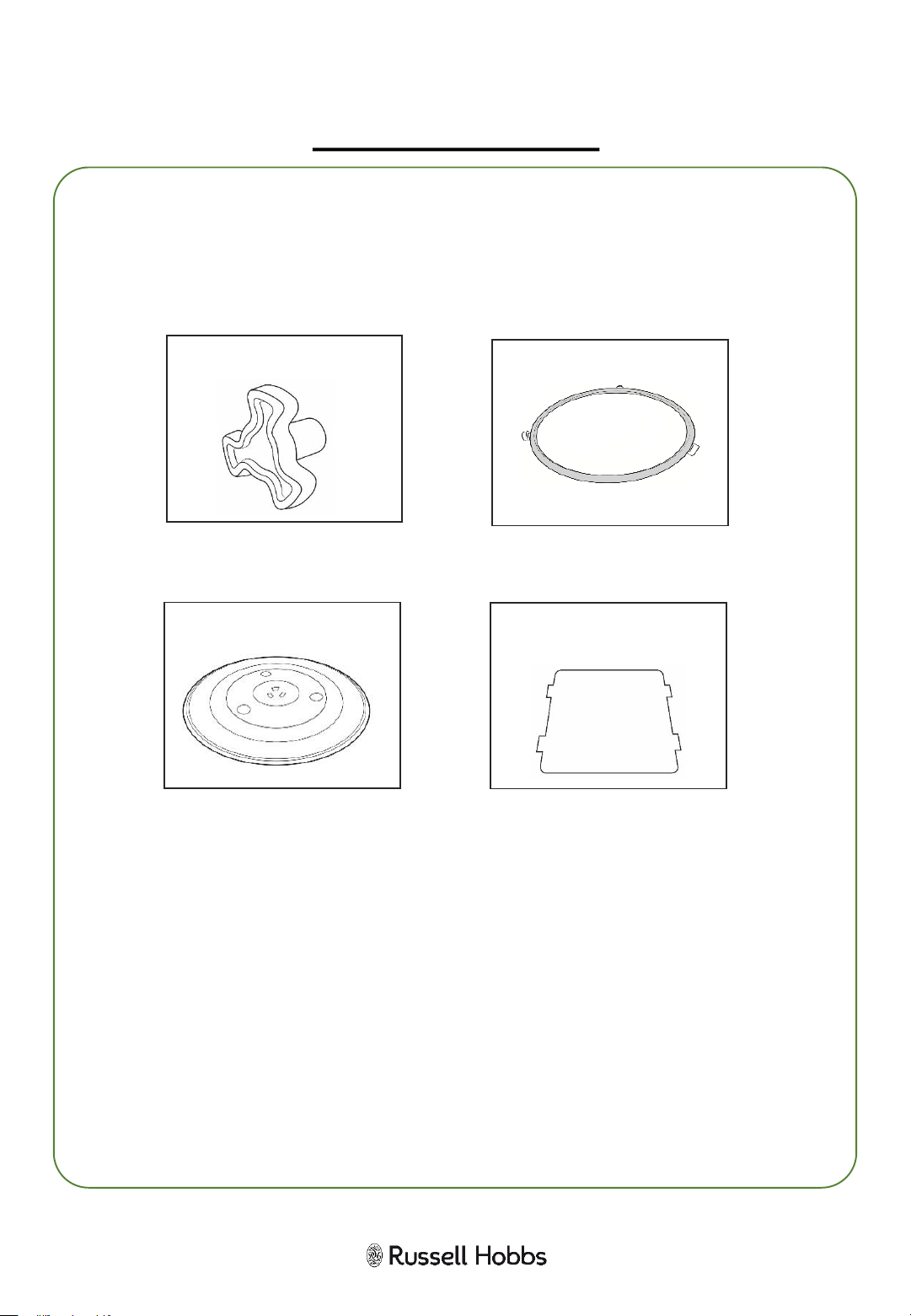
SPARE PARTS
Glass turntable
Turntable Ring
Wave Guide cover
To check the availability of the following spare parts, simply contact
our friendly Customer Services team using the details provided at the
bottom of this page.
Turntable coupling
31
CONNECTION TO THE MAINS SUPPLY
WARNING- THIS APPLIANCE MUST BE EARTHED
This appliance is designed to operate from a mains supply of
220-240V~ 50Hz.
Check that the voltage marked on the product corresponds
with your supply voltage.
This product is fitted with a 13A plug complying with BS1363.
If this plug is unsuitable or needs to be replaced, refer to customer
services.
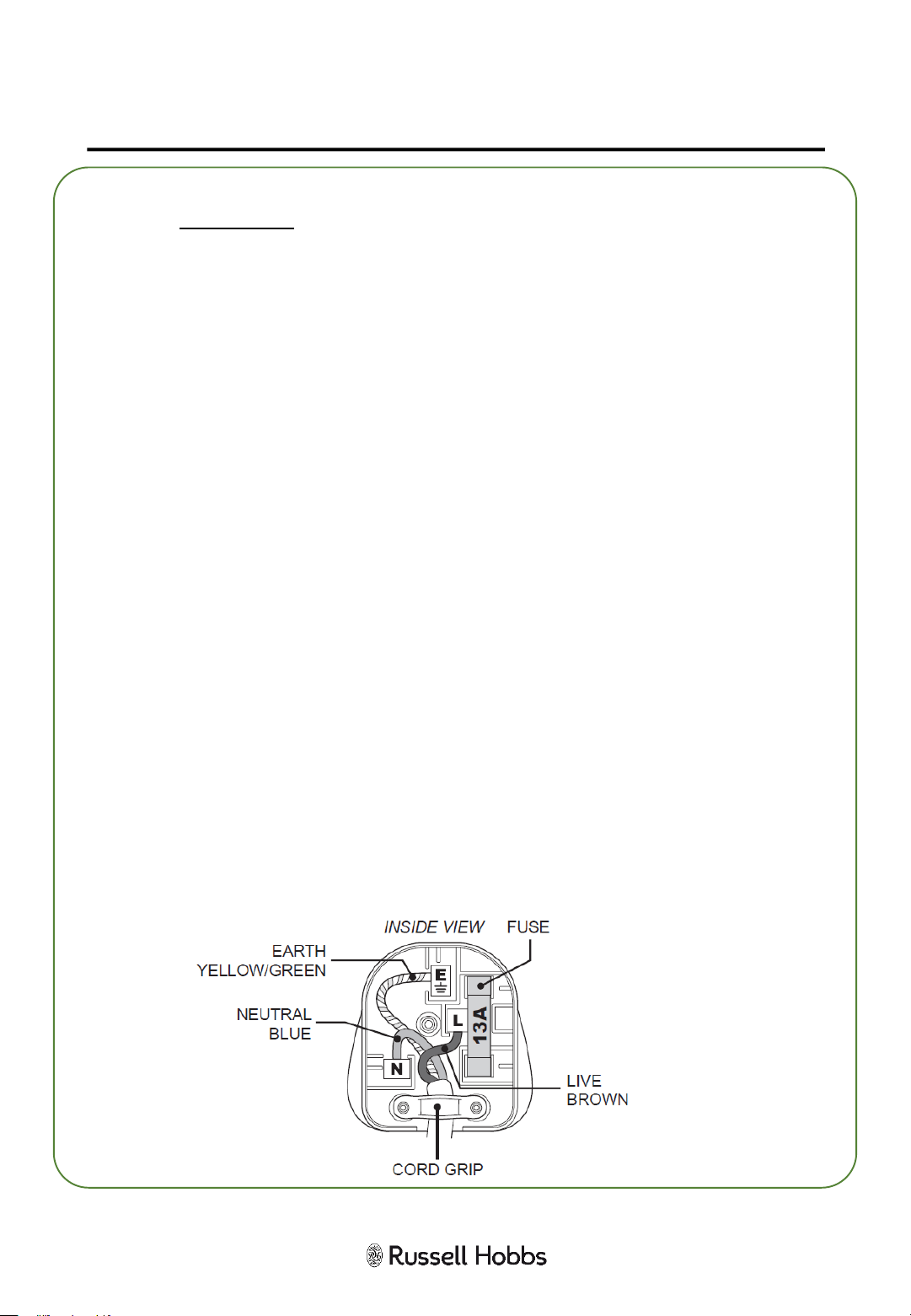
Important: The wires in the mains lead are coloured in
accordance with the following code:
GREEN/YELLOW – EARTH
BLUE - NEUTRAL
BROWN – LIVE
32
CONNECTION TO THE MAINS SUPPLY
For UK use only – PLUG
• As the colours of the wires in the mains lead of this appliance
may not correspond with the coloured markings identifying the
terminals in your plug, proceed as follows:
• The GREEN/YELLOW wire is the EARTH and must be connected
to the terminal which is marked with the letter E or by the earth
symbol or coloured GREEN or GREEN/YELLOW.
• The BLUE wire is the NEUTRAL and must be connected to the
terminal marked with the letter N or coloured BLACK.
• The BROWN wire is the LIVE wire and must be connected to the
terminal marked with the letter L or coloured RED.
• Always ensure that the plug cord grip is fastened correctly.
• If a 13A (BS1363) fused plug is used it must be fitted with a
• 13amp fuse conforming to BS1362 and be BSI or ASTA approved.
If the fuse cover is lost the plus must not be used until a
replacement is obtained from an electrical supplier.
If you need to remove the plug, cut it from the mains lead and
dispose of it. NEVER attempt to re-use this plug or insert it into a
socket outlet, as there is a very great risk of electrical shock.
33
NOTES
34
This symbol is known as the 'Crossed-out wheelie bin Symbol'. When this symbol is
marked on a product/batteries, it means that the product/batteries should not be
disposed of with your general household waste. Only discard
electrical/electronic/battery items in separate collection schemes, which cater for the
recovery and recycling of materials contained within. Your co-operation is vital to ensure
the success of these schemes and for the protection of the environment. For your
nearest disposal facility, visit www.recycle-more.co.uk or ask in store for details.
We reserve the right, due to possible changes to design, to alter the instruction manual
without prior notice.
For Customer Services & Spare
Parts please call: 0345 209 7461
Or visit us at
http://mda.russellhobbs.com
Revision 2.1