1
REV 1 - 1108241141
L-C2-330
IMPORTANT: READ THESE INSTRUCTIONS CAREFULLY BEFORE STARTING INSTALLATION OR USE.
WARNING:
1. Do not store or use gasoline or other
fl ammable vapors and liquids in the
vicinity of this or any other appliance.
2. An LP cylinder not connected for use
shall not be stored in the vicinity of this
or any other appliance.
CODE AND SUPPLY REQUIREMENTS: This
outdoor gas grill must be installed in accordance
with local codes and ordinances, or, in the absence
of local codes, with the latest National Fuel Gas
Code (ANSI Z223.1/NFPA 54), or Natural Gas and
Propane Storage and Handling Installation Code
(CSA-B149.1).
This appliance and its dedicated manual shutoff
valve must be disconnected from the gas-supply
piping system when testing the system at pressures
in excess of ½ psig (3.5 kPa).
This appliance must be isolated from the gas-
supply piping system by closing its dedicated
manual shutoff valve during any pressure testing
of the gas-supply system at pressures up to and
including ½ psig (3.5 kPa).
All electrical outlets in the vicinity of the grill must
be properly grounded in accordance with local
codes, or, in the absence of local codes, with the
National Electrical Code, ANSI/NFPA 70, or the
Canadian Electrical Code, CSA C22.1, whichever
is applicable.
Keep all electrical-supply cords and fuel-supply
hoses away from any heated surface.
Certifi ed to: ANSI Z21.58a-2008
CSA 1.6a-2008
Robert H. Peterson Co. • 14724 East Proctor Avenue • City of Industry, CA 91746
INSTALLER: Leave these instructions with consumer.
CONSUMER: Retain for future reference.
SAFETY AND WARNING CODES
DANGER:
IF YOU SMELL GAS:
1. Shut off the gas to the appliance.
2. Extinguish any open fl ame.
3. Open lid.
4. If odor continues, keep away from the
appliance and immediately call your
gas supplier or the fi re department.
Robert H. Peterson Co. • 14724 East Proctor Avenue • City of Industry, CA 91746
WARNING:
Improper installation, adjustment, alteration,
service, or maintenance can cause injury
or property damage. For proper installation,
refer to the installation instructions. For
assistance or additional information,
consult a qualifi ed professional installer,
service agency, or the gas supplier.
WARNINGS AND SAFETY CODES
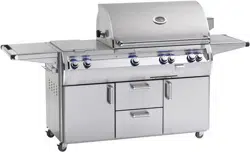
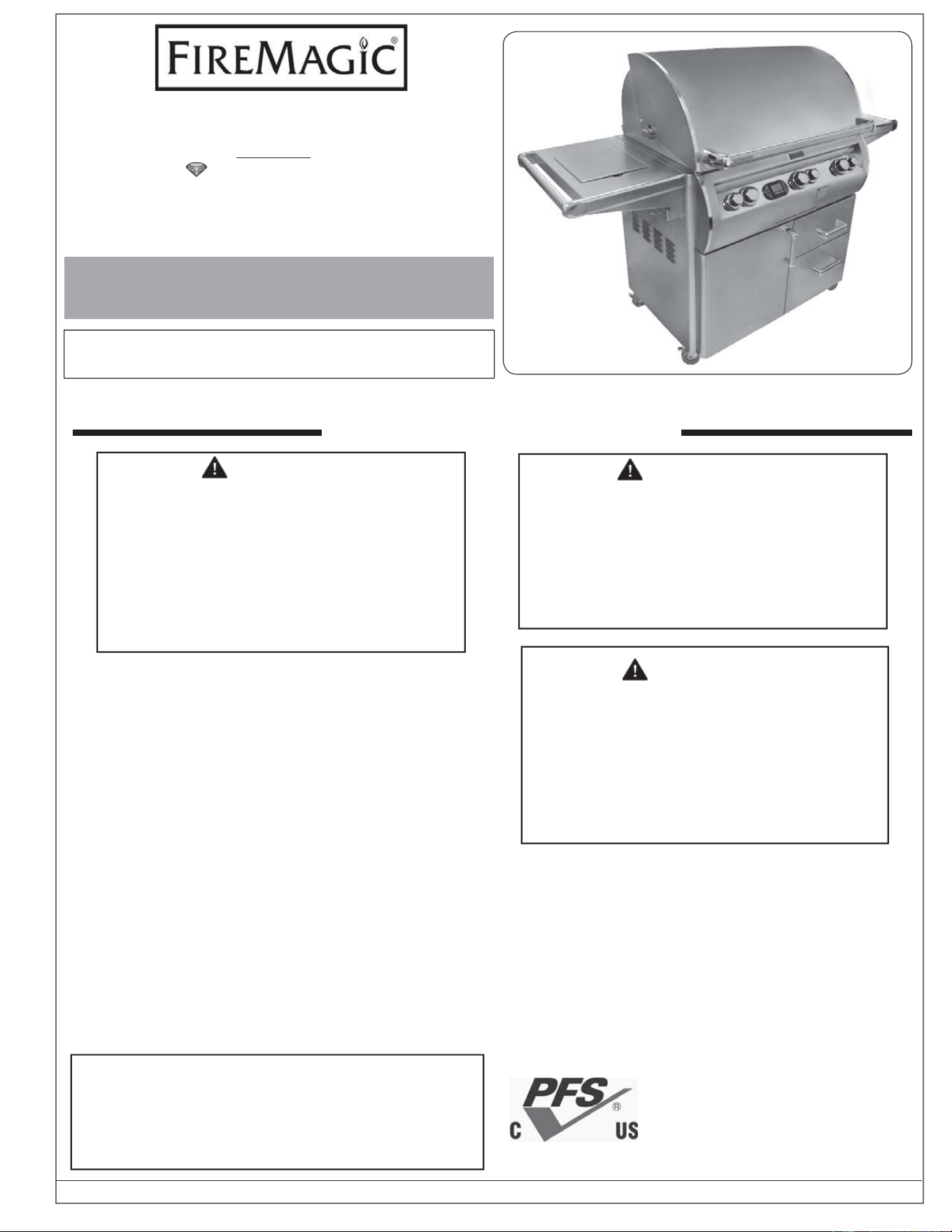
E790s shown
10-32
OUTDOOR STAND-ALONE GAS GRILL
INSTALLATION INSTRUCTIONS
AND OWNER’S MANUAL
E660s, E790s, and E1060s
ECHELON
diamond series
Proper operation of your grill requires
prompt and periodic maintenance.
See the CARE & CLEANING section
for details.
2
REV 1 - 1108241141
L-C2-330
IMPORTANT: LISEZ CES INSTRUCTIONS SOIGNEUSEMENT AVANT DE COMMENCER L’INSTALLATION OU L’UTILISATION
ECHELON GRIL EXTÉRIEUR DE GAZ DU PORTATIF
DANGER:
SI VOUS SENTEZ LE GAZ :
1. Coupez l’admission de gaz de
I’appariel.
2. Éteindre toute fl amme nue.
3. Ouvrir le couvercle.
4. Si l’odeur persiste, éloignez-vous de
l’appareil et appelez immédiatement
le fournisseur de gaz ou le service
d’incendie.
AVERTISSEMENT:
1. Ne stockez pas ou n’employez pas
l’essence ou d’autres vapeurs et liquides
infl ammables à proximité de ceci ou
d’aucun autre appareil.
2. Un cylindre de propane non relié pour
l’usage ne sera pas stocké à proximité
de ceci ou d’aucun autre appareil.
CONDITIONS DE CODE ET D’APPROVISIONNEMENT:
Ce gril doit être installé selon des codes et des ordonnances
locaux, ou, en l’absence des codes locaux, avec l’un ou l’autre
le plus défunt Code national de gaz de carburant (norme ANSI
Z223.1/NFPA 54), et Stockage de gaz naturel et de propane
et manipulation du code d’installation (CSA-B149.1).
Cet appareil et ses différents robinets d’isolement doivent être
démontés du gaz-fournissent le système siffl ant en examinant
le système aux pressions au-dessus du ½ psig (kPa 3.5).
Cet appareil doit être isolé dans gaz-fournissent le système
siffl ant par fermeture que ses différents robinets d’isolement
manuels pendant tous les essais sous pression du gaz-
fournissent le système aux pressions jusques et y compris
le ½ psig (kPa 3.5).
Toutes les sorties électriques à proximité du gril doivent être
correctement fondues selon des codes locaux, ou en l’absence
de local code, avec le code électrique national, ANSI/NFPA
70, ou le code électrique canadien, CSA C22.1, celui qui est
applicable.
Maintenez tout électrique-fournissent des cordes et carburant-
fournissent des tuyaux partis de n’importe quelle surface de
chauffage.
Certifi é à la norme ANSI : Z21.58a-2008 / CSA 1.6a-2008
INSTALLATEUR : Laissez ces instructions avec le consommateur.
CONSOMMATEUR : Maintenez pour la future référence.
AVERTISSEMENT:
L’installation inexacte, l’ajustement, le
changement, le service, ou l’entretien
peuvent causer des dommages ou des
dégats matériels. Référez-vous à ce
manuel. Pour l’aide ou l’information
additionnelle, consultez un installateur
professionnel qualifi é, l’agence de service,
ou le fournisseur de gaz.
SÛRETÉ ET CODES D’AVERTISSEMENT
• Ce gril est pour ultilisation à l’extérieur seulement.
Si l’appareil est entreposé à l’intérieur, enlever les
bouteilles et les laisser à l’extérieur.
• Ne pas ranger le gril immédiatement aprés l’avoir utilisé.
le laisser refroidir avant de le déplacer ou de la ranger.
Le non respect de cette mesure de sécurité pourrait
entraîner un incendie causant des dommages à la
propriété, des blessures ou la mort.
• Ne pas utiliser cet appareil sous une surface
combustible.
• Ne pas utiliser cet appareil sous un auvent. Le non
respect de cette mesure de sécurité pourrait entraîner
un incendie ou des blessures.
• Dégagement minimal entre les parois latérales et
l’arriére de l’appareil et la construction combustible (45.7
cm à partir des parois latérales et 45.7cm à partir de
l’arriére).
• Le régulareur de pression de gaz prévu avec cet appareil
de cuisson à gaz pour l’extérieur doit être utilisé. Ce
régulateur est réglé pour une pression de sortie de 5
pouces de colonne de l’eau pour le gaz naturel, et 10
pouces pour le propane.
• LE RÉGULATEUR INCLUS D’APPAREILS EST ÉVALUÉ
POUR LE MAXIMUM DE 1/2 (LIVRES PAR POUCE
CARRÉ). SI VOTRE OFFRE DE GAZ EST 1/2 PLUS
GRAND QUE (LIVRES PAR POUCE CARRÉ), UN
RÉGULATEUR ADDITIONNEL DOIT ÊTRE INSTALLÉ
AVANT LE GRIL. VOIR LA SECTION DE CONDITIONS
D’OFFRE DE GAZ POUR LA PRESSION APPROPRIÉE
D’OFFRE DE GAZ.
• Ne couvrez jamais la surface entière de cuisine ou de
gril de gauffreuses ou de casseroles. La surchauffe se
produira et les brûleurs ne seront pas très performants
quand la chaleur de combustion est emprisonnée au-
dessous de la surface à cuire.
• Ne pulvérisez jamais l’eau sur une unité chaude de gaz,
comme ceci peut endommager des composants de
porcelaine ou de fer de fonte.
• Une fuite de GPL peut causer une incendie ou une
explosion si enflammée entraînant des blessures
corporelles graves ou la mort.
• Communiquez avec le fournisseur de GPL pour les
réparations ou pour disposer de qules bouteille ou du
GPL non utilisé.
INSTALLATION INSTRUCTIONS ET MANUEL DU PROPRIÉTAIRE

3
REV 1 - 1108241141
L-C2-330
CONTENTS
To protect against electric shock, do not immerse cord or plugs in water or other liquid;
Unplug from the outlet when not in use and before cleaning. Allow to cool before putting on or taking off
parts;
Do not operate any outdoor cooking gas appliance with a damaged cord, plug, or after the appliance
malfunctions or has been damaged in any manner. Contact the manufacturer for repair;
Do not let the cord hang over the edge of a table or touch hot surfaces;
Do not use an outdoor cooking gas appliance for purposes other than intended;
When connecting, fi rst connect plug to the outdoor cooking gas appliance then plug appliance into the outlet;
Use only a Ground Fault Interrupter (GFI) protected circuit with this outdoor cooking gas appliance;
Never remove the grounding plug or use with an adapter of 2 prongs.
Use only extension cords with a 3 prong grounding plug, rated for the power of the equipment, and
approved for outdoor use with a W-A marking.
ELECTRICAL SAFETY
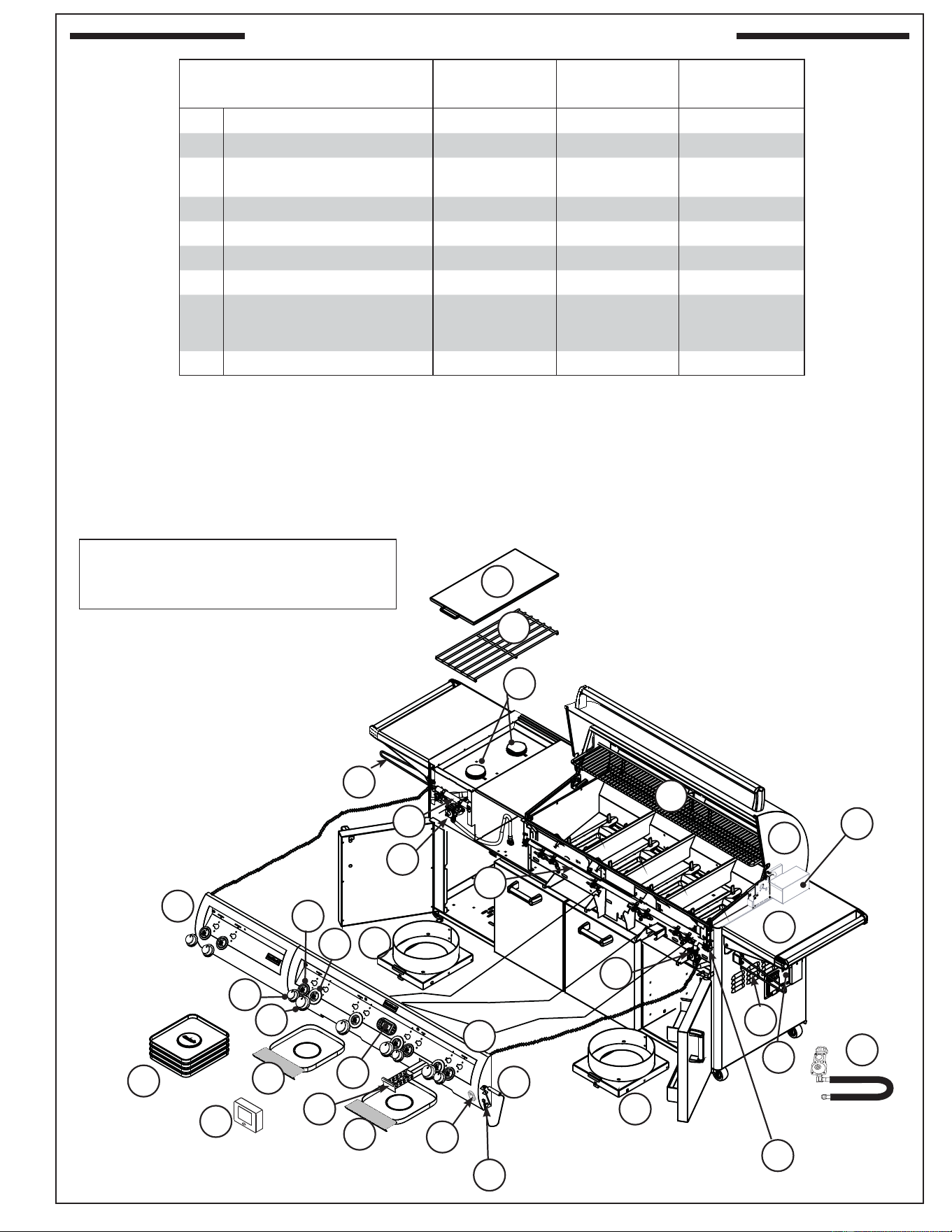
4 REPLACEMENT COMMON PARTS LIST
6 SINGLE SIDEBURNER UNIQUE PARTS LIST
7 DOUBLE SIDEBURNER UNIQUE PARTS LIST
8 POWER BURNER UNIQUE PARTS LIST
9 ELECTRICAL CONNECTIONS
9 GRILL SAFETY INFORMATION
9 MASTER SWITCH
10 MODEL SPECIFICATIONS TABLE
11 INSTALLATION REQUIREMENTS
12 INSTALLING THE STAND-ALONE UNIT
13 SAFE USE & MAINTENANCE OF PROPANE GAS CYLINDERS
15 INSTALLING THE SIDEBURNER SHELF
16 IDENTIFICATION OF GRILL CONTROLS
17 OPTIONAL POWERHOOD
19 LIGHTING (IGNITION) INSTRUCTIONS
19 SHUTTING OFF THE UNIT
21 DIGITAL THERMOMETER / INTERIOR AND KNOB LIGHTS
23 REMOTE RECEIVER (optional)
25 ROTISSERIE INSTRUCTIONS
26 USING THE FOLDING SHELF
26 PAPER TOWEL HOLDER
26 REMOVING DRAWERS
27 POWER BURNER
28 OPTIONAL INFRARED BURNER OPERATION
29 GRILLING TIPS
30 ACCESSORIES
31 FIRE MAGIC
®
DRIP TRAY
32 REPLACING HALOGEN BULBS
33 POWER SUPPLY FUSE REPLACEMENT
34 CARE & CLEANING
35 TROUBLESHOOTING
36 CONVERTING THE GAS TYPE
39 BURNER AIR SHUTTER ADJUSTMENT
42 DOUBLE SIDEBURNER
44 WARRANTY
4
REV 1 - 1108241141
L-C2-330
G
OFF
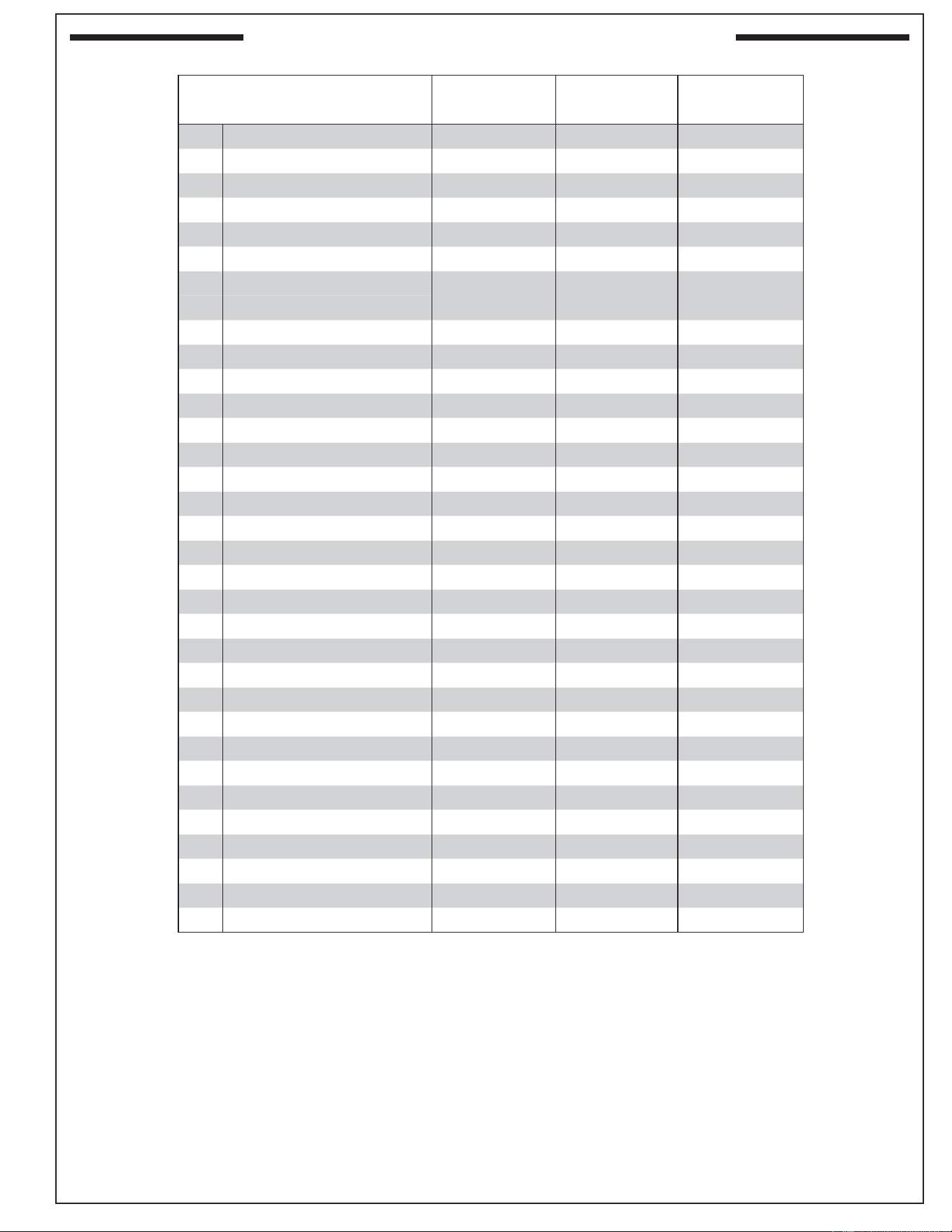
REPLACEMENT COMMON PARTS LIST
Fig. 4-1
2
1
7
6
65
10
10
11
15
16
3
9
To order replacement
parts, contact your local
Fire-Magic dealer.
18
13
22
67
27
46
17
23
9
12
26
50
29
30
41
49
45
57
58
48
56
55
19
61
21
20
28
66
Items in light gray are
not available on all
models.
14
E660s & E790s grills are
equipped with two drawers
on the right side of the unit.
24
54
25
5
4
64
5
REV 1 - 1108241141
L-C2-330
REPLACEMENT COMMON PARTS LIST (cont.)
E660s E790s E1060s
Item Description Part No. Qty. Part No. Qty. Part No. Qty.
1.
Stainless cooking grid (set of 3 or 4) 3544-S-3 1 3539-S-3 1 3539-S-2 2
2.
Flavor grid (set of 3 or 4) 3057-S-3 1 3056-S-3 1 3056-S-4 1
3.
Main burner 3041-50 3 3041-50 3 3041-50 4
4.
Heatshield kit 24177-05 3 24177-05 3 24177-05 4
5.
Silicone gasket 24177-06 3 24177-06 3 24177-06 4
6.
Infrared burner (optional) 3050 1 3050 1 3050 1
7.
Oven lid 23738-53 1 23745-53 1 23747-53 1
or
Oven lid w/ window 24193-54 1 24188-54 1 24183-54 1
8.
Window (only)*‡ 24187-45 1 24187-45 1 24187-45 1
9.
Warming rack 36735-M 1 36755-M 1 36745-M 1
10.
Back burner 24739-02 1 24745-02 1 24747-02R/L 1
11.
Back burner cover 24739-010 1 24745-010 1 24747-010 2
12.
Zone separator 3061-S 2 3061-S 2 3061-S 3
13.
Heavy-duty rotisserie motor 3600-05M 1 3600-05M 1 3600-05M 1
14.
Heavy-duty rod 3606-40 1 3609-40 1 3607-40 1
15.
Heavy-duty rod knob 24187-16 1 24187-16 1 24187-16 1
16.
Meat holder (pair) 3613 1 3613 1 3613 1
17.
Counterbalance 3620E 1 3620E 1 3620E 1
18.
Grid lifter 3519 1 3519 1 3519 1
19.
Convertible regulator PR-4 1 PR-4 1 PR-4 1
20.
Control panel w/ back burner † 24393-11 1 24388-11 1 24383-11 1
21.
Valve manifold w/ back burner 24393-22 1 24388-22 1 24383-22 1
22.
Small knob 24182-42 2 24182-42 2 24182-42 3
23.
Large knob 24182-41 3 24182-41 3 24182-41 4
24.
LED disk (small) 24182-44 2 24182-44 2 24182-44 3
25.
LED disk (large) 24182-43 3 24182-43 3 24182-43 4
26.
Digital thermometer 24182-12 1 24182-12 1 24182-12 1
27.
Meat probe 24187-14 1 24187-14 1 24187-14 1
28.
Power supply w/ outlet 24387-18 1 24387-18 1 24387-18 1
29.
Drip tray 3084 1 3084 1 3084 1
30.
Drip tray liner (set of 4) 3557 1 3557 1 3557 1
31.
Wire harness assembly‡ 24187-24 1 24187-24 1 24187-24 1
32.
Back burner electrode*‡ 4199-52 1 4199-52 1 4199-52 2
* If equipped
‡ Not shown
† Add (M) to part number for powerhood control panel
6
REV 1 - 1108241141
L-C2-330
E660s E790s E1060s
Item Description Part No. Qty. Part No. Qty. Part No. Qty.
33.
Electrode‡ 3199-64 3 3199-64 3 3199-64 4
34.
Thermometer wire harness‡ 24187-13 1 24187-13 1 24187-13 1
35.
Natural gas orifi ce(s)‡ 3001-42-3 1 3001-38-3 1 3001-40-4 1
36.
Natural back burner gas orifi ce(s)‡ 3001-49-1 1 3001-44-1 1 3001-49-2 1
37.
Propane gas orifi ce(s)‡ 3001-54-3 1 3001-53-3 1 3001-53-4 1
38.
Propane back burner gas orifi ce(s)‡ 3001-57-1 1 3001-56-1 1 3001-56-2 1
39.
Natural smoker orifi ce‡ 3003-68-1 1 3003-68-1 1 3003-68-1 1
40.
Propane smoker orifi ce‡ 3003-77-1 1 3003-77-1 1 3003-77-1 1
41.
Wood chip box assembly 24182-45 1 24182-45 1 24182-45 1
42.
12v / 10 watt halogen bulb‡ 24187-15 2 24187-15 2 24187-15 3
43.
Light lens‡ 24187-26 2 24187-26 2 24187-26 3
44.
Lamp assembly‡ 24187-28 2 24187-28 2 24187-28 3
45.
Power hood motor assembly* 24183-18 1 24183-18 1 24183-18 1
46.
Power hood rocker switch* 24187-39 1 24187-39 1 24187-39 1
47.
Power hood receiver*‡ 24187-41 1 24187-41 1 24187-41 1
48.
Power hood transmitter* 24187-42 1 24187-42 1 24187-42 1
49.
Lighted master shut-off switch 24182-46 1 24182-46 1 24182-46 1
50.
Light microswitch 24187-20 1 24187-20 1 24187-20 1
or
Power hood light & motor microswitch 24187-44 1 24187-44 1 24187-44 1
51.
Flash tube (left)‡ 24187-29 2 24187-29 2 24187-29 3
52.
Flash tube (right)‡ 24187-35 1 24187-35 1 24187-35 1
53.
Flex connector‡ 3030-08 1 3030-08 1 3030-08 1
54.
Digital thermometer receiver* 3566 1 3566 1 3566 1
55.
Tool holder 25387-12 1 25387-12 1 25387-12 1
56.
Paper towel holder 25387-11 1 25387-11 1 25387-11 1
57.
Propane tank tray
(propane models only)
25386-21 1 25386-21 1 25386-21 1
58.
Propane regulator with hose
(propane models only)
5110-15 1 5110-15 1 5110-15 1
59.
Quick-disconnect hose‡
(natural models only)
5110-03 1 5110-03 1 5110-03 1
60.
Power cord‡ 25387-13 1 25387-13 1 25387-13 1
61.
Folding shelf 24336-15 1 24336-15 1 24336-15 1
62.
Fire Magic
®
cookbook‡ 3595 1 3595 1 3595 1
* If equipped
‡ Not shown
SINGLE SIDEBURNER UNIQUE PARTS LIST
REPLACEMENT COMMON PARTS LIST (cont.)
E660s E790s E1060s
Item Description Part No. Qty. Part No. Qty. Part No. Qty.
63.
Sideburner (burner only) ‡ 3279-32 1 3279-32 1 3279-32 1
64.
Sideburner assembly w/ shelf 24336-16 1 24336-16 1 24336-16 1
65.
Sideburner grid 3552 1 3552 1 3552 1
66.
Sideburner cap 3275-36 1 3275-36 1 3275-36 1
67.
Sideburner lid 24336-31 1 24336-31 1 24336-31 1
‡ Not shown
7
REV 1 - 1108241141
L-C2-330
G
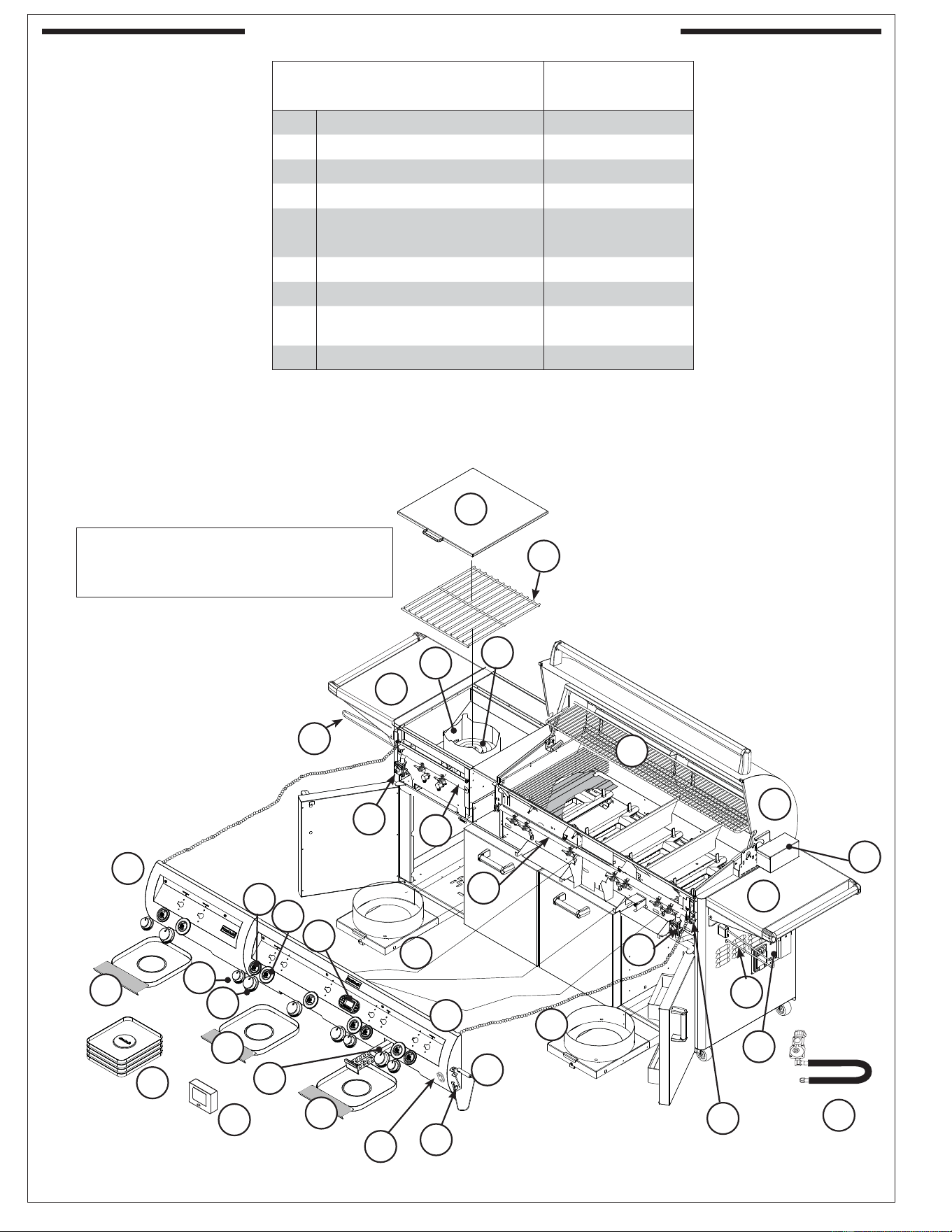
DOUBLE SIDEBURNER UNIQUE PARTS LIST
Fig. 7-1
7
27
46
9
26
50
29
30
41
45
57
56
55
61
28
65
63
69
29
67
66
19
21
Note: See page 4-6 for common part
and number identifi cation.
58
57
68
Grills equipped with a double
sideburner are available for 660s,
790s, and 1060s series.
1060s shown here.
24
25
22
23
49
54
20
E660s E790s E1060s
Item Description Part No. Qty. Part No. Qty. Part No. Qty.
20.
Main control panel† 34393-12 1 34388-12 1 34383-12 1
21.
Main valve manifold 24193-22 1 24188-22 1 24383-28 1
63.
Double sideburner valve
manifold
3281-22 1 3281-22 1 3281-22 1
64.
Double sideburner (only)‡ 3279-32 2 3279-32 2 3279-32 2
65.
Double sideburner grid 3529-S 1 3529-S 1 3529-S 1
66.
Sideburner cap 3275-36 2 3275-36 2 3275-36 2
67.
Double sideburner cover 3281-07 1 3281-07 1 3281-07 1
68.
Convertible regulator
(for double sideburner valve
manifold)
PR-4 1 PR-4 1 PR-4 1
69.
Double sideburner control panel N/A N/A 23281-12 1
* If equipped
‡ Not shown
† Add (M) to part number for powerhood control panel
8
REV 1 - 1108241141
L-C2-330
G
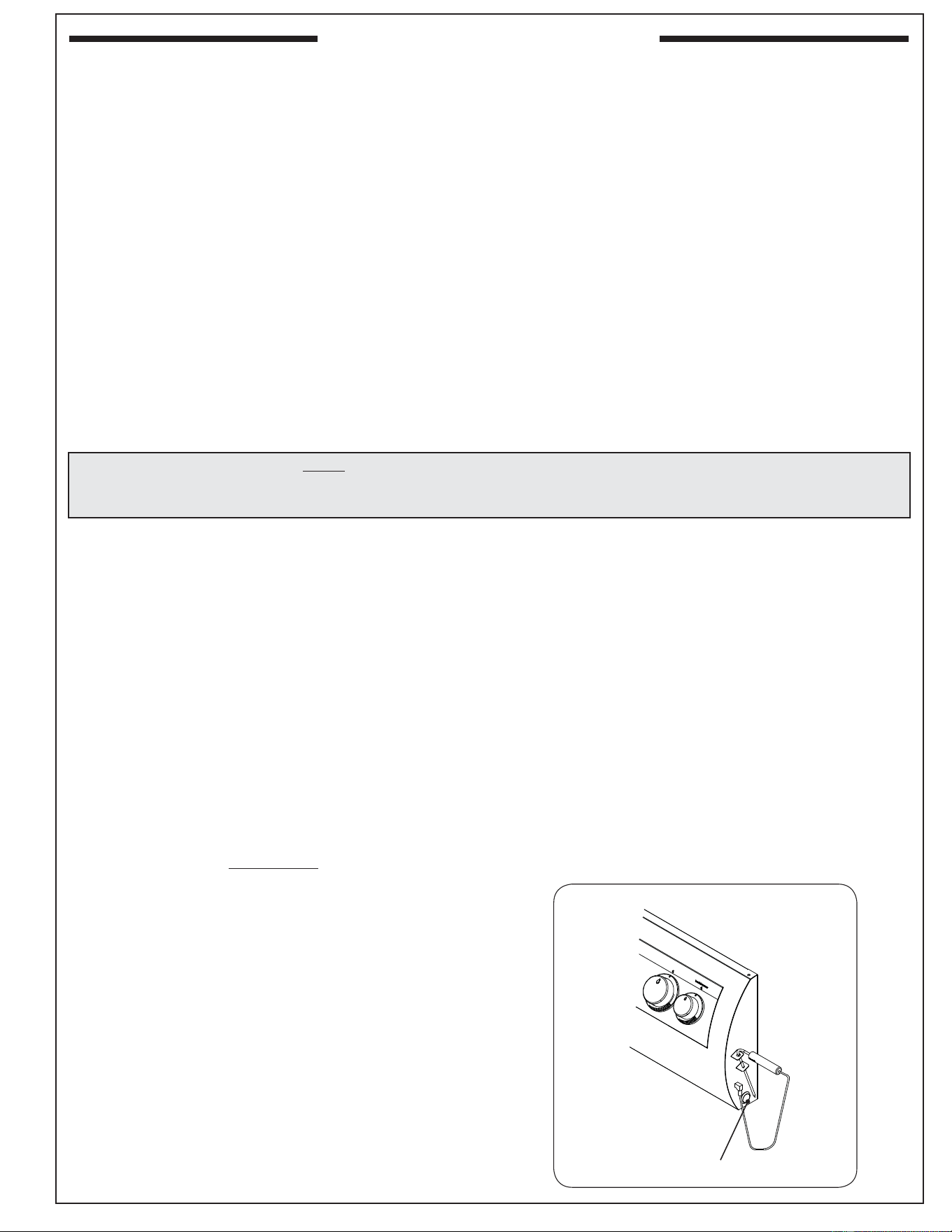
POWER BURNER UNIQUE PARTS LIST
Fig. 8-1
7
65
61
27
49
9
26
50
29
30
41
46
45
57
56
55
61
28
21
69
29
29
57
67
58
64
66
19
Note: See page 4-6 for common part
and number identifi cation.
63
68
24
25
22
23
54
20
E1060s
Item Description Part No. Qty.
20.
Main control panel† 24383-10 1
21.
Main valve manifold 24383-28 1
63.
Power burner valve manifold 3278-14 1
64.
Power burner (only) 3278-01B 1
65.
Power burner grid - stainless steel 3545-S 1
or
Power burner grid - porcelain cast 3545 1
66.
Power burner collimator 3279-09 1
67.
Power burner cover 3278-06 1
68.
Convertible regulator
(for power burner valve manifold)
PR-4 1
69.
Power burner control panel 23278-10 1
* If equipped
‡ Not shown
† Add (M) to part number for powerhood control panel
9
REV 1 - 1108241141
L-C2-330
ELECTRICAL CONNECTIONS
This grill requires 110 volt AC power to opperate.
Use a grounded electrical extension cord rated for
outdoor use to connect the grill to line power.
WARNING
Electrical Grounding Instructions
For your protection against shock hazard, this
outdoor-cooking gas-appliance is equipped with
a three-pronged (grounding) electrical connector.
This appliance should be connected to a properly
grounded three-prong receptacle using a grounding
extension cord rated for outdoor use. Do not cut or
remove the grounding prong from the connector.
Important: ONLY REPLACE THE OVEN LIGHTS
WITH 12V / 10 WATT HALOGEN BULB(S).
1. The outdoor grill and surrounding area MUST
remain clear of fl ammable substances such as
gasoline, yard debris, wood, etc.
2. The airfl ow through the vent space located below
the control panel must remain unobstructed.
3. When using propane gas:
a. The required ventilation openings in the
enclosure must be clear of debris.
b. The propane cylinder, regulator, and rubber
hose must be in a location not subject to
temperature above 125° F (51° C).
4. The fl ames on each burner burn evenly along
the entire burner with a steady fl ame (mostly
blue). If burner fl ames are not normal, check
and clean the orifi ce and burner/venturi tubes
for insects and insect nests. A clogged tube can
lead to a fi re beneath the grill. A proper fl ame
pattern will ensure safe operation and optimal
performance. Adjust the air shutter as needed
(see AIR SHUTTER ADJUSTMENT).
5. The in-line gas valve or gas cylinder valve must
always be shut OFF when the grill is not in use.
6. The drip collector holes must be clear and
unobstructed. Excessive grease deposits can
result in a grease fi re.
7. The backburner, sideburner, or IR burner cover
must be removed before using the burner.
GRILL SAFETY INFORMATION
WARNING: NEVER cover the entire cooking or grill surface with griddles or pans. Overheating will occur, and
burners will not perform properly when combustion heat is trapped below the cooking surface.
CAUTION: NEVER spray water on a hot gas unit.
Important: When reviewing this units wiring connections; please refer to the wiring diagram
label affi xed to the inside of the control panel.
MASTER SWITCH
The master switch is push button operated, and is
located on the right side of the control panel (see
Fig. 9-1). It controls the power to all lights, igniters,
and the thermometer. It allows the power to be
turned on or off for safety and convenience. The
switch will need to be turned on prior to each grill
use, and turned off after each use.
Master
switch
Fig. 9-1
10
REV 1 - 1108241141
L-C2-330
MODEL SPECIFICATIONS TABLE
Fire-Magic
®
Model Specifi cations Table
Table 1 E660s E790s E1060s
Main burner BTU (per burner)
N/P orifi ce drill size
25,000
#42/#54
32,000
#38/#53
28,000
#40/#53
Backburner BTU (per burner)
N/P orifi ce drill size
19,000
#49/#57
23,000
#44/#56
15,000
#51/#58
Single sideburner BTU
N/P orifi ce drill size
15,000
#50/#58
15,000
#50/#58
15,000
#50/#58
Double sideburner BTU (per burner)
N/P orifi ce drill size
15,000
#50/#58
15,000
#50/#58
15,000
#50/#58
Smoker drawer burner BTU
N/P orifi ce drill size
2,500
#68/#77
2,500
#68/#77
2,500
#68/#77
Infrared searing burner BTU (per burner)
N/P orifi ce drill size
24,000
#45/#55
24,000
#45/#55
24,000
#45/#55
Power burner BTU
Left N/P orifi ce drill size
Right N/P orifi ce drill size
- -
60,000
#30/#50
#46/#1.25
GFI Receptacle Rating 120V / 10 AMP Max
Oven Lights Rating 12V / 10 watt halogen bulb
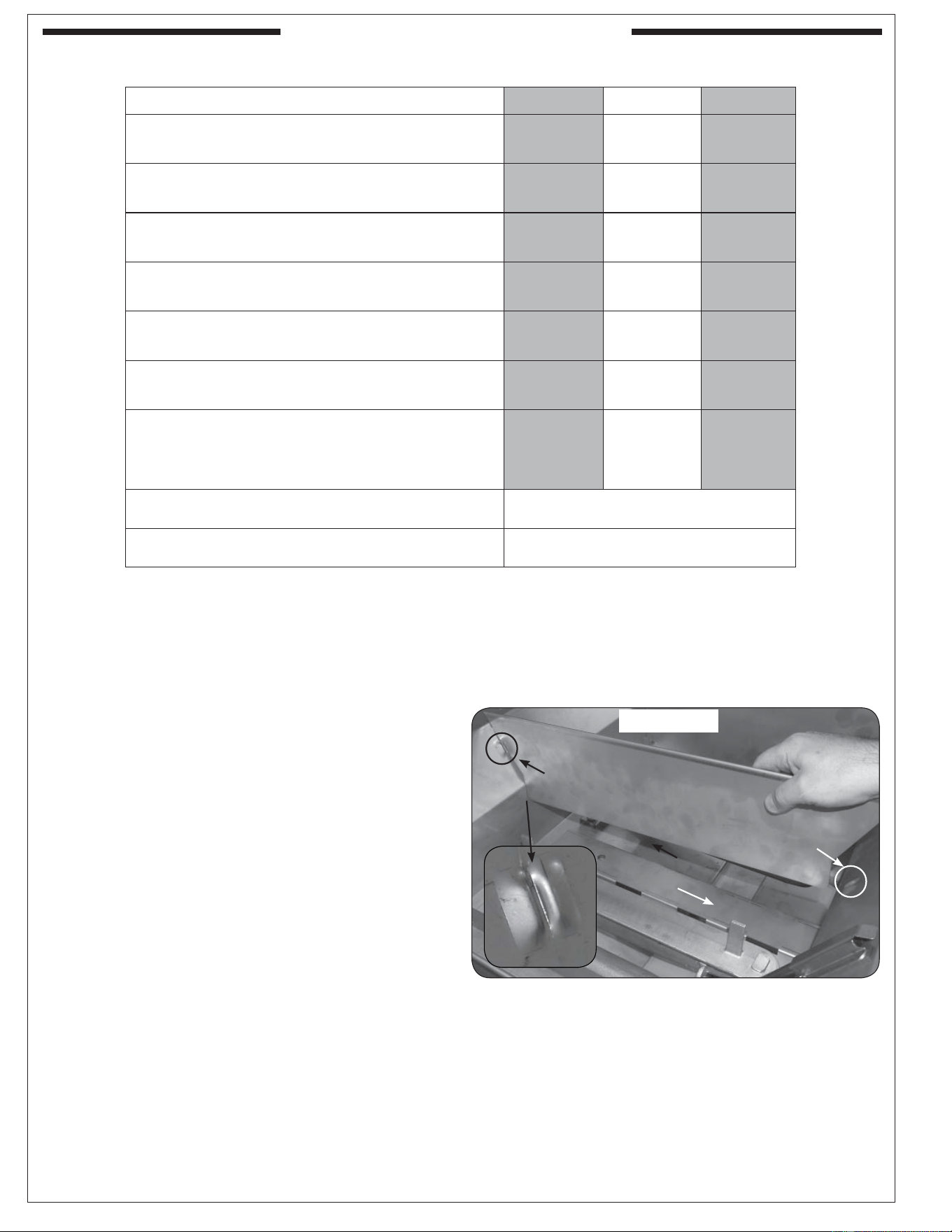
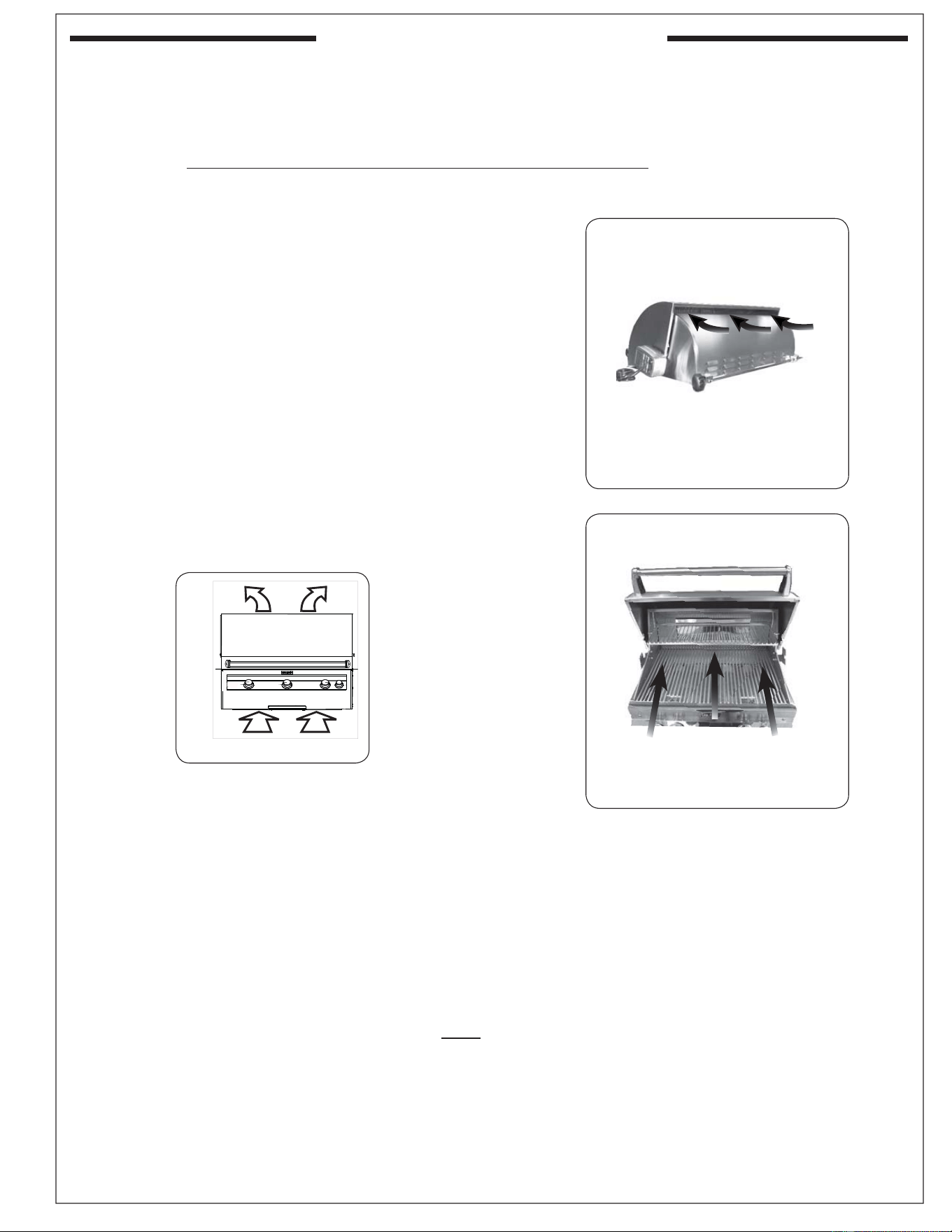
INSTALL ZONE DIVIDERS
Place the zone dividers as shown (Fig. 10-1) into
the grooves in the inner fi rewall of the grill to
allow for maximum heat control and thermometer
accuracy in each zone. Remove and store during
rotisserie use.
Fig. 10-1
Zone divider
Groove
Groove
Front
11
REV 1 - 1108241141
L-C2-330
INSTALLATION REQUIREMENTS
This grill is designed for outdoor use only. DO NOT use this grill under unprotected fl ammable
surfaces. DO NOT use this grill inside a building, garage, enclosed area, or an unprotected covered
area (see EXHAUST REMOVAL below). DO NOT use this grill in or on a recreational vehicle or boat.
IMPORTANT: This grill is NOT insulated, and therefore the unit, when in operation, must be located with
a minimum of 20" (50.7 cm) of side and back clearance from unprotected combustible
materials such as wood, plastic, or stucco with wood framing.
The control panel MUST remain removable for
servicing and air shutter adjustment (see PARTS
LIST).
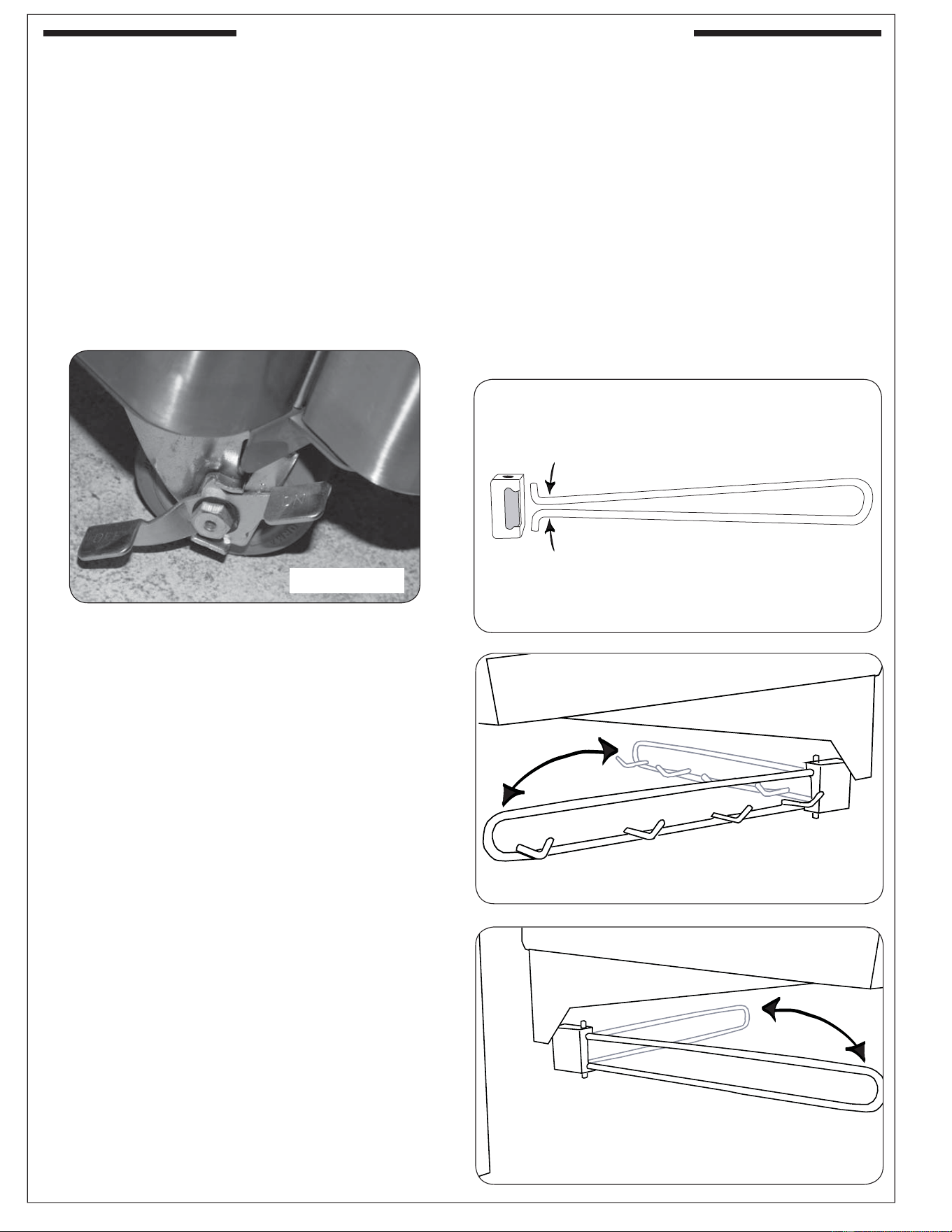
ENSURING PROPER COMBUSTION AIR AND
COOLING AIRFLOW
Proper airfl ow (Fig. 11-1) MUST be maintained for
the grill to perform as it was designed. If airfl ow
is blocked, overheating and poor combustion will
result. Do not block the 1" (2.5 cm) front air inlet
along the bottom of the control panel or more
than 75% of the cooking grid surface with pans
or griddles.
Note: The 1" (2.5 cm) front air space also allows
access to the drip tray.
EXHAUST REMOVAL
If installed or used under a patio roof, the cooking
grid area must be fully covered by an exhaust hood
with a vent. An exhaust fan with a rating of 1,000
CFM (cubic feet per minute) (472 liters per second)
or more may be necessary to effectively remove
smoke and other cooking by-products from the
area under the hood. Fire Magic Vent Hoods are
available to meet this requirement. This outdoor
grill must not be used under unprotected overhead
combustible construction. THIS UNIT MUST NOT
BE LOCATED IN A FULLY ENCLOSED AREA
OF ANY KIND.
Fig. 11-1 - Ventilation
CAUTION: Wind blowing into or across the rear
oven lid vent (Fig. 11-2) can cause
poor performance and/or dangerous
overheating. Orient the grill so that the
prevailing wind blows toward the front
of the grill (Fig. 11-3).
CAUTION: To prevent dangerous overheating, the
rear of the unit must have a minimum
clearance of 4" (10.2 cm) from any
backsplash/wall.
GAS SUPPLY AND MANIFOLD PRESSURES:
For natural gas - normal 7" (17.78 cm) water column
(w.c.), minimum 5" (12.7 cm), maximum 10
1
/
2
" (26.7
cm). For propane gas - normal 11" w.c., minimum 10"
(25.4 cm), maximum 13" (33 cm).
Fig. 11-3
CORRECT
PLACE GRILL SO PREVAILING WIND
BLOWS TOWARD FRONT OF GRILL
YOU MUST PROTECT REAR OVEN
VENT FROM PREVAILING WIND
Rear oven lid vent
INCORRECT
Fig. 11-2
12
REV 1 - 1108241141
L-C2-330
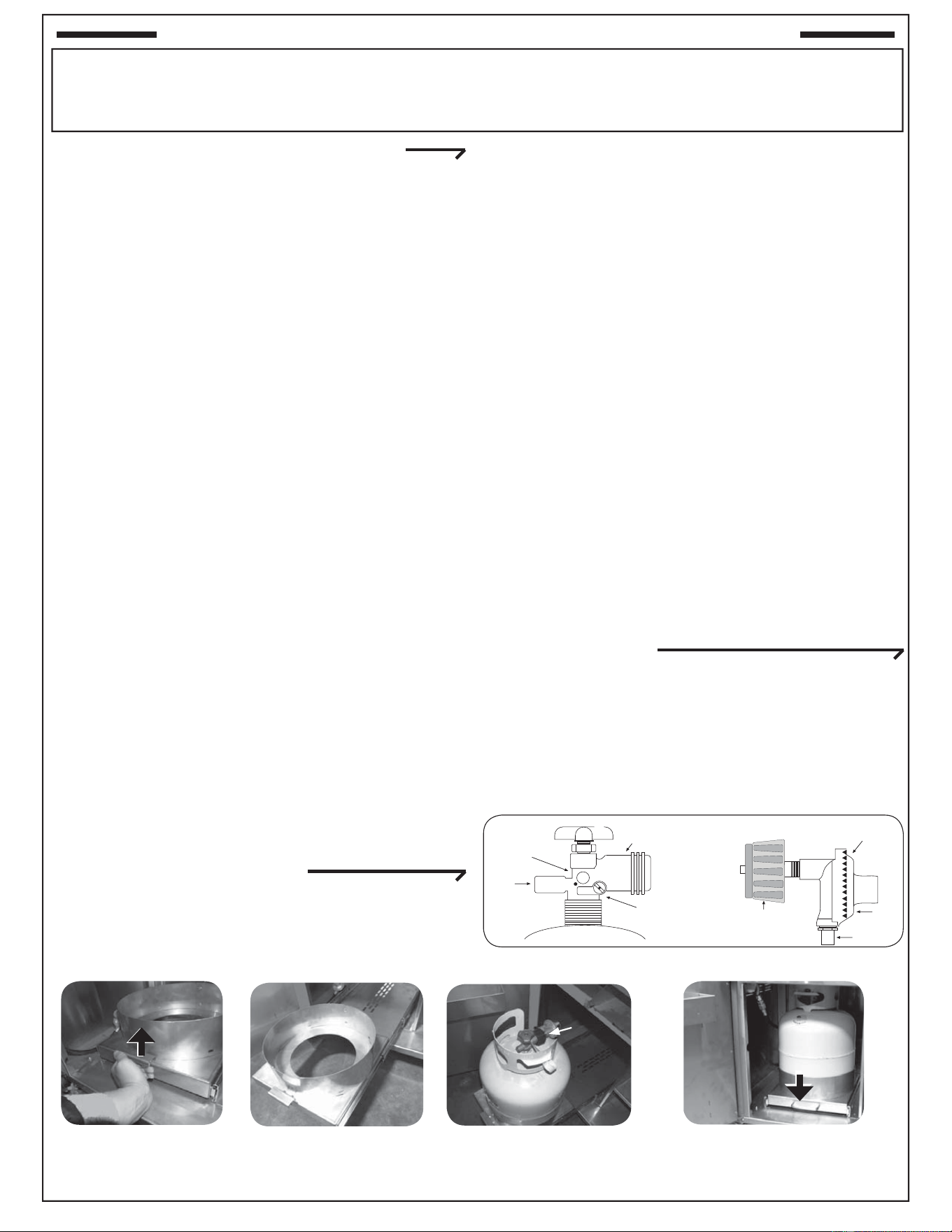
INSTALL THE TOOL HOLDER AND
PAPERTOWEL HOLDER
The rectangular mounting bracket for the tool
holder and the paper towel holder come pre-
attached to the sides of the cart.
Unpack the holder portion, squeeze the open
ends together slightly, and install them into the
mounting bracket (see Fig. 12-2). Next, release
the hanger so that the ends extend out through
the holes in the top and bottom of the mounting
bracket (Fig. 12-3, 12-4).
When not in use, the racks may be folded back
against the wall of the grill (Fig. 12-3, 12-4).
LOCATION PREPARATION
Prepare a fl at, level surface capable of supporting
the weight of the stand-alone grill and convenient to
the gas supply if connecting to a gas line.
WHEELS AND CASTERS
To lock a caster press down on the side of the lever
with the word "OFF" stamped on it until it stops and
the caster will not turn. To unlock, press down on the
side stamped "ON."
INSTALLING THE STAND-ALONE UNIT
Fig. 12-1
Caster in locked position
Fig. 12-2
Fig. 12-4
Fig. 12-3
CONNECTING THE GAS SUPPLY
For connecting a propane unit to a portable
propane tank, read the safety warnings and
follow the instructions in the section SAFE USE
AND MAINTENANCE OF PROPANE GAS
CYLINDERS.
For household propane or natural gas units:
a. Turn OFF the gas supply at the source. The
quick disconnect hose is pre-installed on the
valve manifold at the manufacturer. Run the
hose through the hole in the bottom rear of the
stand-alone unit, to the gas supply. Connect
the
1
/
2
" NPT socket at the end of the hose to
the gas supply. Use pipe joint compound that is
resistant to all gasses on the male pipe fi tting
and tighten securely. DO NOT use pipe joint
compound to connect the fl are fi ttings.
c. Turn all burner valves to the OFF position. Turn
the gas supply on. Then carefully check all gas
connections for leaks with a brush and soapy
water before lighting. NEVER USE A MATCH
OR OPEN FLAME TO TEST FOR LEAKS.
13
U
L
Fig. 13-1 Type I Acme thread quick coupler
Pressure
relief
valve
QCC
Type 1
valve
Brass Acme
thread fi tting
Liquid level
indicator
(optional)
Hand nut with Acme
thread
Regulator
Vent
Hose
Hand wheel
The use of pliers or a wrench should not be necessary. Only
cylinders marked “propane” may be used.
To disconnect: Turn the hand nut counterclockwise until
detached (Fig. 13-1).
Important: Before using the unit, and after each time the
cylinder is removed and reattached, check
the hose for wear (see a.) and check all
connections for leaks. Turn off the unit valves
and open the main cylinder valve, then check
connections with soapy water. Repair any
leaks before lighting the unit.
CAUTION: Always turn the propane cylinder main valve
off after each use, and before moving the unit
and cylinder or disconnecting the coupling.
This valve must remain closed and the
cylinder disconnected while the appliance
is not in use, even though the gas fl ow is
stopped by a safety feature when the coupler
is disconnected.
Carefully inspect the hose assembly each time before the
gas is turned on. A cracked or frayed hose should be replaced
immediately.
If the appliance is stored indoors, the cylinder must be
disconnected and removed. Disconnected
cylinders must be
stored outdoors, out of the reach of children, with threaded
valve plugs tightly installed, and must not be stored in a
building, garage, or any other enclosed area.
FOR YOUR SAFETY
a. DO NOT store a spare propane-gas cylinder under or
near this appliance.
b. NEVER fi ll the cylinder beyond 80-percent full.
c. IF THE INFORMATION IN a. AND b. IS NOT FOLLOWED
EXACTLY, A FIRE CAUSING DEATH OR SERIOUS
INJURY MAY OCCUR.
IMPORTANT FOR YOUR SAFETY
READ AND FOLLOW ALL WARNINGS PROVIDED WITH THE PROPANE-GAS CYLINDER.
When operating this appliance with a propane-gas cylinder, these instructions and warnings MUST be observed.
FAILURE TO DO SO MAY RESULT IN A SERIOUS FIRE OR EXPLOSION.
CYLINDER/CONNECTOR REQUIREMENTS
a. Propane-gas cylinders, valves, and hoses must be
maintained in good condition and must be replaced if
there is visible damage to either the cylinder or valve. If the
hose is cut or shows excessive abrasion or wear, it must
be replaced before using the gas appliance (see e.).
b. This unit, when used with a cylinder, should be connected
to a standard 5-gallon (20 lb.) propane-gas cylinder
equipped with an OPD (Overfi ll Prevention Device).
The OPD has been required on all cylinders sold since
October 1,1998, to prevent overfi lling.
c. Cylinder dimensions should be approximately 12" (30.5
cm) in diameter and 18" (45.7 cm) high. Cylinders must
be constructed and marked in accordance with the
Specifi cations for Propane Gas Cylinders of the U.S.
Department of Transportation (D.O.T.) or the National
Standard of Canada, CAN/CSA-B339, Cylinders,
Spheres, and Tubes for Transportation of Dangerous
Goods.
d. The cylinder used must include a collar to protect the
cylinder valve, and the cylinder supply system must be
arranged for vapor withdrawal.
e. The pressure regulator and hose assembly (Fig. 13-1)
supplied with this outdoor-cooking gas appliance must
be used. Original and replacement pressure regulator
and hose assemblies must be those specifi ed by the
manufacturer for connection with a cylinder connecting
device identifi ed as Type I by the ANSI Z 21.58-2005/CGA
1.6-2005 (see PARTS LIST for ordering information).
f. The propane-gas cylinder valve must be equipped with a
cylinder connection coupling device, described as Type
I in the standard defi ned in paragraph e. above. This
device is commonly described as an Acme thread quick
coupler.
g. If the propane-gas cylinder comes with a dust plug, place
the dust cap on the cylinder valve outlet whenever the
cylinder is not in use.
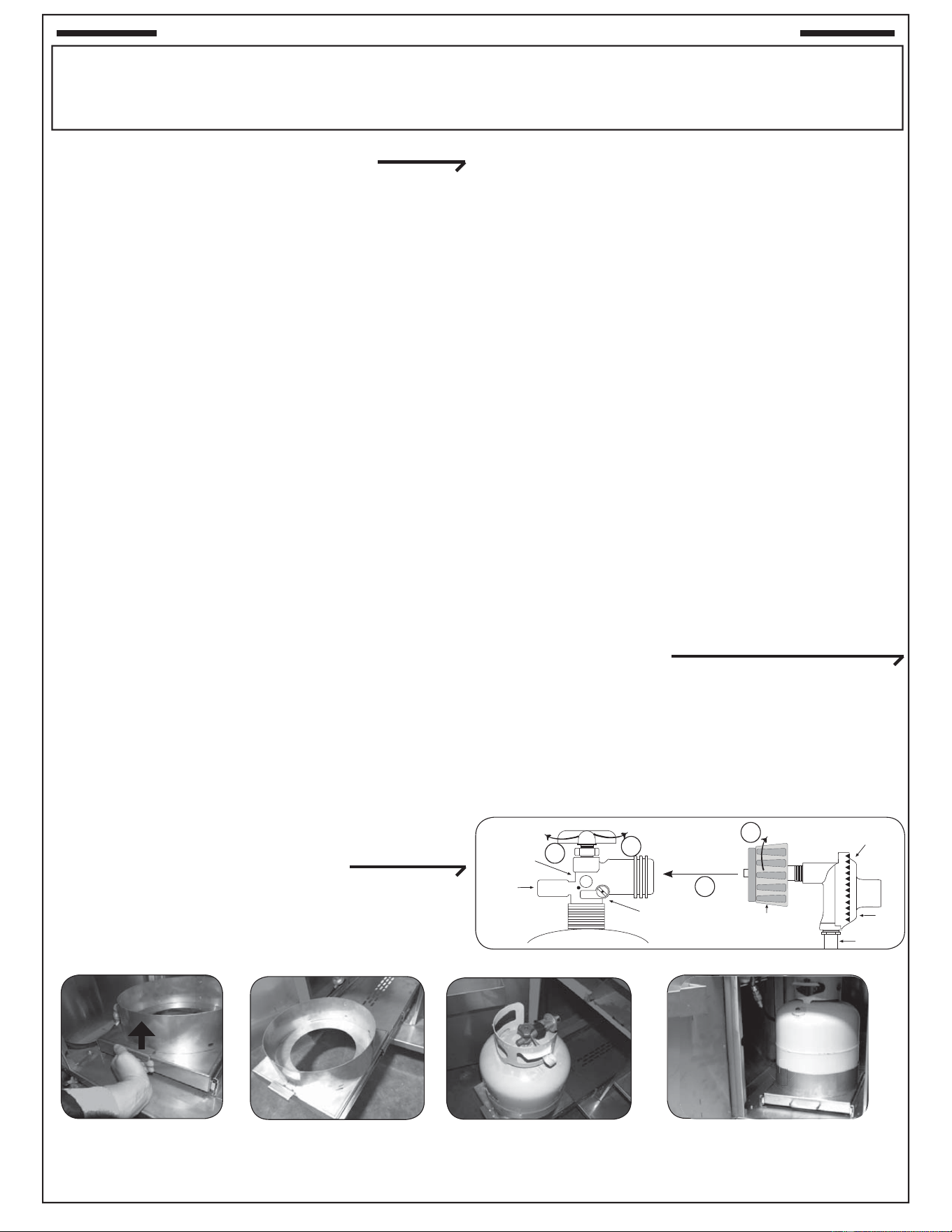
QUICK COUPLER OPERATION
To connect the regulator/hose assembly to the propane-
gas cylinder valve fi tting: Press the hand nut on the regulator
over the Acme thread fi tting on the cylinder valve. Turn the hand
nut clockwise to engage the threads and tighten until snug.
SECURING THE PROPANE-GAS CYLINDER
1. Lift latch handle to unlock
tray and pull outward.
3. With gas cylinder in place and connected, slide
tray back into cart and lock latch handle by
pushing fi rmly downward.
2. Set propane-gas cylinder into the sleeve of the extended tray with
base inserted into center hole and collar opening to back. Follow
instructions above to connect supply.
Collar
Opening
Fig. 13-2
Fig. 13-3
Fig. 13-5
Fig. 13-4
SAFE USE & MAINTENANCE OF PROPANE GAS CYLINDERS
14
U
L
Fig. 14-1 type coupleur rapide de fi l de point culminant d’I
Valve
de
décompression
QCC
Type 1
Valve
Ajustage de précision
en laiton de fi l de
point culminant
Indicateur
de niveau
de liquide
(facultatif)
Écrou de main avec le
fi l de point culminant.
Régulateur
Passage
Tuyau
Volant de commande
main dans le sens des aiguilles d’une montre pour engager les
fi ls et pour serrer jusqu’à ce que douillettement. L’utilisation des
pinces ou de la clé ne devrait pas être nécessaire. Seulement
le propane marqué par cylindres doit être employé.
Pour débrancher: Tournez l’écrou de main dans le sens
contraire des aiguilles d’une montre jusqu’à isolé (fi g. 14-1).
Important: Avant d’employer le gril, et ensuite chaque
fois que le cylindre est enlevé et rattaché,
examinez tous les raccordements pour déceler
les fuites. Arrêtez les valves de gril et ouvrez
la valve principale de cylindre, puis vérifi ez
les raccordements avec de l’eau savonneux.
Réparez toutes les fuites avant d’allumer le gril.
ATTENTION: Tournez toujours la valve principale de cylindre
de propane au loin après chaque utilisation,
et avant de déplacer le gril et le cylindre, ou
débrancher l’accouplement. Cette valve doit
rester fermée et le cylindre a débranché alors
que l’appareil n’est pas en service, quoique
l’écoulement de gaz soit arrêté par un dispositif
de sûreté quand le coupleur est débranché.
Inspectez soigneusement l’ensemble de tuyau chaque fois
avant que le gaz soit allumé. Un tuyau criqué ou frangé devrait
être remplacé immédiatement.
Si l'appareil est stocké à l'intérieur, le cylindre doit être disconnected
et a enlevé. Des cylindres Disconnected doivent être stockés
dehors, hors de la portée des enfants, avec les prises de valve
fi letées étroitement installées, et ne doivent pas être stockés dans
un bâtiment, le garage, ou n'importe quel autre secteur inclus.
POUR VOTRE SÛRETÉ
a. Ne stockez pas un cylindre de gaz disponible de propane
dessous ou ne vous approchez pas de cet appareil.
b. Ne remplissez jamais cylindre au delà de 80 pour cent de
plein.
c. SI L’INFORMATION DANS “A” ET “B” N’EST PAS SUIVIE
EXACTEMENT, UN FEU CAUSANT LA MORT OU DES
DOMMAGES SÉRIEUX PEUT SE PRODUIRE.
IMPORTANT POUR VOTRE SÛRETÉ
LISEZ ET SUIVEZ TOUS LES AVERTISSEMENTS ÉQUIPÉS DE VOTRE CYLINDRE DE GAZ DE PROPANE.
En actionnant cet appareil avec un cylindre de gaz de propane ON DOIT observer ces instructions et avertissements.
LE MANQUE DE FAIRE AINSI PEUT AVOIR COMME CONSÉQUENCE UNE INCENDIE OU UNE EXPLOSION SÉRIEUSE.
CYLINDRE ET CONDITIONS ET
CARACTÉRISTIQUES DE CONNECTEUR
a. Des cylindres et les valves de gaz de propane doivent être
maintenus en bon état et doivent être remplacés s’il y a
des dommages évidents au cylindre ou à la valve.
b. Ce gril, une fois utilisé avec un cylindre, devrait être relié à
un gallon de la norme 5 (20lb.) cylindre de gaz de propane
équipé d’un OPD (remplissez au-dessus du niveau le
dispositif d’empêchement). L’OPD a été exigé sur tous les
cylindres vendus depuis octobre 1.1998 pour empêcher le
remplissage excessif.
c. Les dimensions de cylindre devraient être approximativement
12"(30.5cm) de diamètre et 18" (45.7cm) hauts. Des
cylindres doivent être construits et marqués selon les
caractéristiques pour des cylindres de gaz de propane du
département des ETATS-UNIS du transport (D.O.T.) ou
le niveau national du Canada, du CAN/CSA-B339, des
cylindres, des sphères et des tubes pour le transport des
marchandises dangereuses.
d. Le cylindre doit inclure un collier pour protéger la valve
de cylindre et le circuit d’alimentation de cylindre doit être
assuré le retrait de vapeur.
e. Le régulateur de pression et l’ensemble de tuyau (
fi g. 14-
1
) fourni avec cet appareil à cuire extérieur de gaz doivent
être utilisés. Les régulateurs d’original et de pression de
remplacement et les ensembles de tuyau doivent être ceux
indiqués par le fabricant pour le raccordement avec un
dispositif se reliant de cylindre identifi é comme type I par la
norme ANSI Z 21.58-2007/CGA 1.6-2007 avec la norme ANSI
Z 21.58a -1998 d’addenda et CGA 1.6a - M98.
f. La valve de cylindre de gaz de propane doit être équipée
d’un dispositif d’accouplement de raccordement de
cylindre, décrit comme type I dans la norme défi nie dans le
e. de paragraphe ci-dessus. Ce dispositif est généralement
décrit comme coupleur rapide de fi l de point culminant.
g. Si votre cylindre de gaz de propane vient avec une prise
de la poussière, placez le bouchon anti-poussière sur la
sortie de valve de cylindre toutes les fois que le cylindre
n’est pas en service.
OPÉRATION DE COUPLEUR RAPIDE
Pour relier le regulator/hose à l’ajustage de précision de
valve de cylindre de gaz de propane: Serrez l’écrou de main
sur le régulateur au-dessus de l’ajustage de précision de fi l
de point culminant sur la valve de cylindre. Tournez l’écrou de
1
2
3
4
FIXATION DU CYLINDRE DE GAZ DE PROPANE
1. Soulevez la poignée de
verrouillage pour ouvrir
le plateau et pour tirer à
l’extérieur.
3. Avec le cylindre de gaz en place et relié,
glissez le plateau de nouveau dans la poignée
de verrouillage de chariot et de serrure en
poussant fermement en bas.
2. Placez le cylindre de gaz de propane gainent fermement sur
le plateau avec la base insérée dans le trou central et le collier
s’ouvrant au dos. Suivez les instructions de relier ci-dessus
l’approvisionnement.
Fig. 14-2
Fig. 14-3
Fig. 14-5
Fig. 14-4
Ouverture
de Collier
UTILISATION SÛRE ET ENTRETIEN DES CYLINDRES DE GAZ
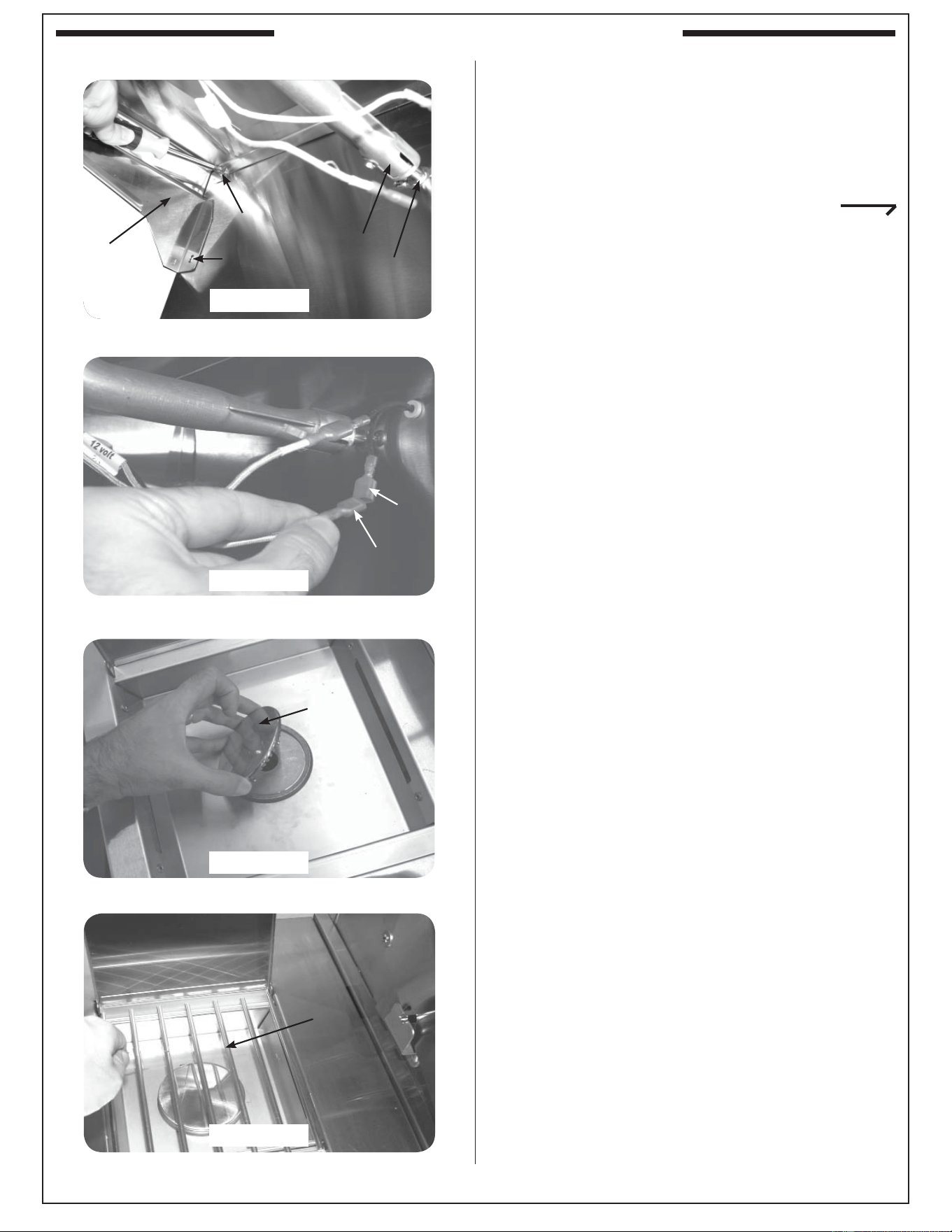
15
This shelf comes separate from the grill for
convenience in shipping. The sideburner
shelf must be installed using the following
instructions before hooking up the grill to a
gas source.
INSTALLING THE SIDEBURNER SHELF
1. Remove the protective plastic from the grill,
sideburner, and sideburner lids by carefully
peeling it off with your fingers. Do not use
tools.
2. Hold the sideburner shelf up against the left
side wall of the grill so that the holes in the shelf
line up with the four (4) threaded screw holes
in the side wall and the air-shutter end of the
sideburner venturi tube fi ts around the brass
orifi ce protruding from the side of the cart.
WARNING: It is critical for safety and for the
proper function of the sideburner
that the sideburner venturi tube with
air shutter be centered around and
completely cover the gas orifi ce.
3. Insert and start screws with fi ngers and then
tighten using a Phillips screwdriver.
Note: Upon completion, the air shutter must still
fi t around the brass orifi ce.
4. Connect the female connectors on the ends
of the hot surface ignitor wires to the male
connectors coming from inside the grill.
5. Place the burner cap on top of the burner, as
shown in Fig. 15-3.
6. Place the grid so that it rests on the front
and back lips of the sideburner opening (Fig.
15-4).
7. Proceed to the section on AIR SHUTTER
ADJUSTMENT and complete the installation by
adjusting the air shutter. This will also test the
sideburner installation.
Air-shutter orifi ce placement - under shelf
Fig. 15-1
Connecting the ignitor wires
Placing the burner cap
Fig. 15-2
Fig. 15-3
Final look
Fig. 15-4
Screw
Hole
Male
Female
Brass
orifi ce
Air
shutter
Grate
Lid
Cap
Shelf
INSTALLING THE SIDEBURNER SHELF
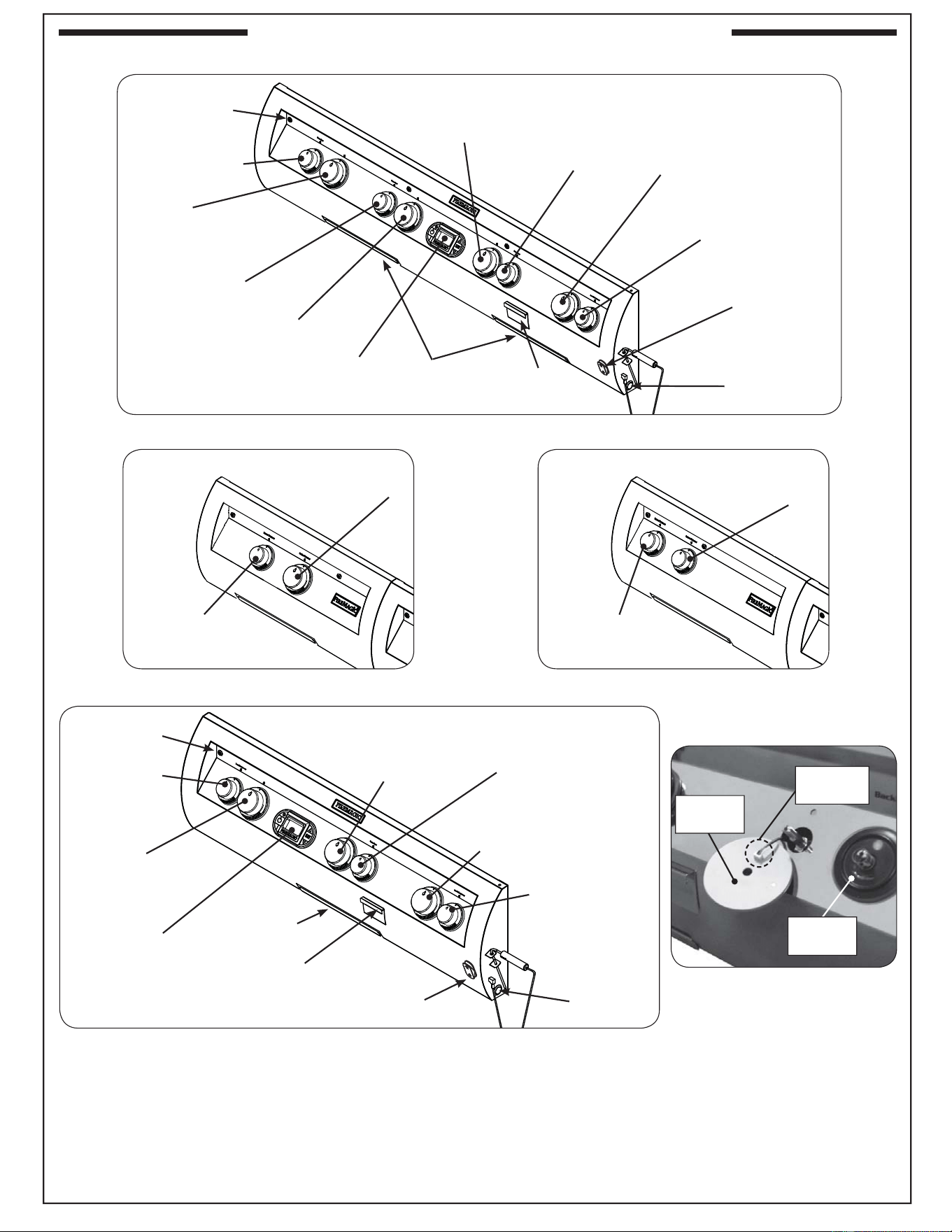
16
IDENTIFICATION OF GRILL CONTROLS
Power burner control locations
Double sideburner control locations
Inner power burner
control knob
Outer power burner
control knob
Fig. 16-2
Left
main burner
control knob
Right
main burner
control knob
Right backburner
control knob
Digital
thermometer
Sideburner
control knob
Center
main burner
control knob
Fig. 16-4
Left
main burner
control knob
Right
main burner
control knob
Backburner
control knob
Digital
thermometer
Sideburner
control knob
E1060s control locations
E660s and E790s control locations
Smoker
drawer burner
control knob
Center right main
burner
control knob
Center left main
burner
control knob
Drip
tray
Drip
trays
Smoker drawer
burner control
knob
Left backburner
control knob
Power hood
control
(if equipped)
Fig. 16-1
To remove the control panel:
• Turn off the gas shutoff valve.
• Pull off the control knobs. Slowly lift away the lighted bezels to clear the valve stems, and carefully disconnect the wires found
on the back of the bezels (use your fi ngernail.) Remove the woodchip box. Unscrew and remove the control panel screws and
washers.
• Lift the control panel up and outward, allowing it to rest on the internal chain(s).
Important: When re-installing the control panel, set it back over the front lip of the grill so that the lid-closed-sensor
plunger protrudes through the hole on the upper right of the control panel. Prior to opening the gas shutoff
Control panel
screw(s)
Control panel
screw(s)
Woodchip
box
Woodchip
box
Fig. 16-5
Bezel
installed
Bezel
removed
Carefully
disconnect
Power hood
control
(if equipped)
Master
switch
Master
switch
Rear sideburner
control knob
Front sideburner
control knob
Fig. 16-3
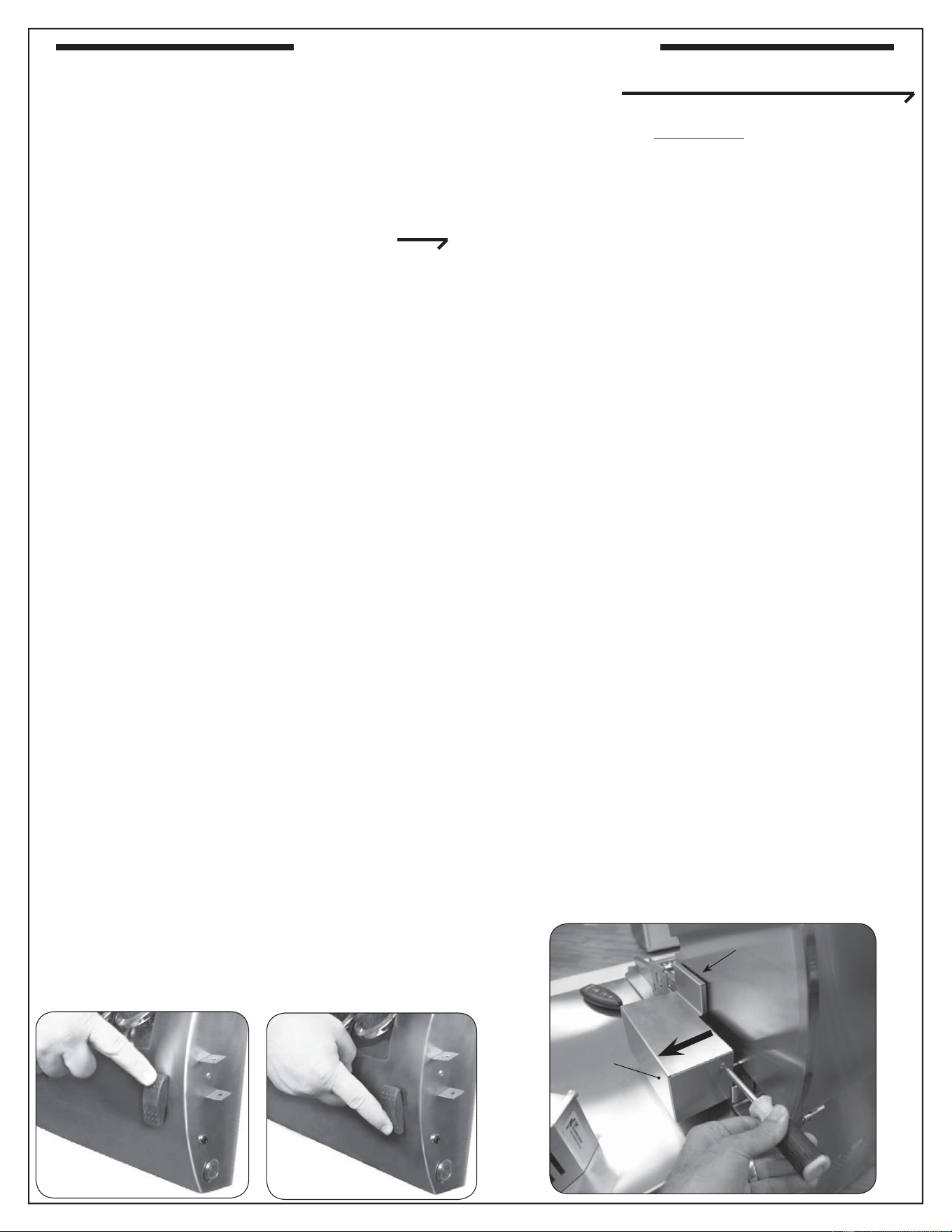
17
The Fire Magic
®
Power Hood is available only as
an Echelon E1060 factory shipped option. Read the
following before using the grill.
Important: Grill must be connected to electrical
power to open and close lid by motor.
OPENING AND CLOSING THE LID BY REMOTE
OR CONTROL PANEL ROCKER SWITCH
Note: See below for manual operation procedure.
While set up for motorized opening and closing,
the lid may be controlled either by the black rocker
switch on the right side of the control panel or by the
remote control included with units confi gured with the
motorized lid option.
The rocker switch will lock in any one of three positions:
up–commanding the lid to open, down –commanding
the lid to close, and center–allowing the lid to hold its
current position and respond to remote control.
For safety reasons, the rocker switch on the control
panel will always override the remote control.
To enable remote control of the lid, set the rocker
switch to center.
To open the lid, press and hold the open button on
the remote until the lid reaches the desired location.
Then release the remote buttons, and the lid will stay
in place.
To close the lid, press and hold the close button on
the remote until the lid reaches the desired location.
Then release the remote buttons, and the lid will stay
in place.
If the rocker switch is left in the down position, remote
up commands will affect the lid only as long as the
remote button is held. When released, the motor will
move the lid back to the closed state. With the rocker
switch in the up position, the remote has no effect.
CONFIGURING THE LID FOR MANUAL OPENING
AND CLOSING
WARNING
If the grill has been on recently, all Power Hood
components are potentially hot. Wait for grill to
cool before beginning this procedure or wear
heat-resistant gloves.
CAUTION: Do not push or pull on the lid or
its handle while it is configured for
automatic operation. This could result
in damage to the grill.
To confi gure the lid for manual opening and closing,
simply remove the locking bolt using the following
procedure. This procedure requires the use of the
Allen wrench supplied with this option.
1. Open the lid completely, then set the rocker switch
to the center position and disconnect electrical
power to the unit.
2. Use a Phillips screwdriver to remove the stainless-
steel motor assembly housing screw. Pull the top
of the housing fi rst up and then outward away
from the lid until the top of the shroud clears the
lip of the motor mount beneath, then remove the
housing completely and set it aside (Fig. 17-3).
3. Use the Allen wrench to loosen and remove the
lid motor assembly locking bolt and washer (see
next page).
Important: Keep this bolt and washer for later use
in converting the unit back to automatic
lid operation.
4. Replace the motor assembly housing and
refasten.
Fig. 17-1
Fig. 17-2
UP
DOWN
Fig. 17-3
Gear cover plate
PULL
Motor
assembly
housing
UP
DOWN
Fig. 17-1
Fig. 17-2
OPTIONAL POWERHOOD
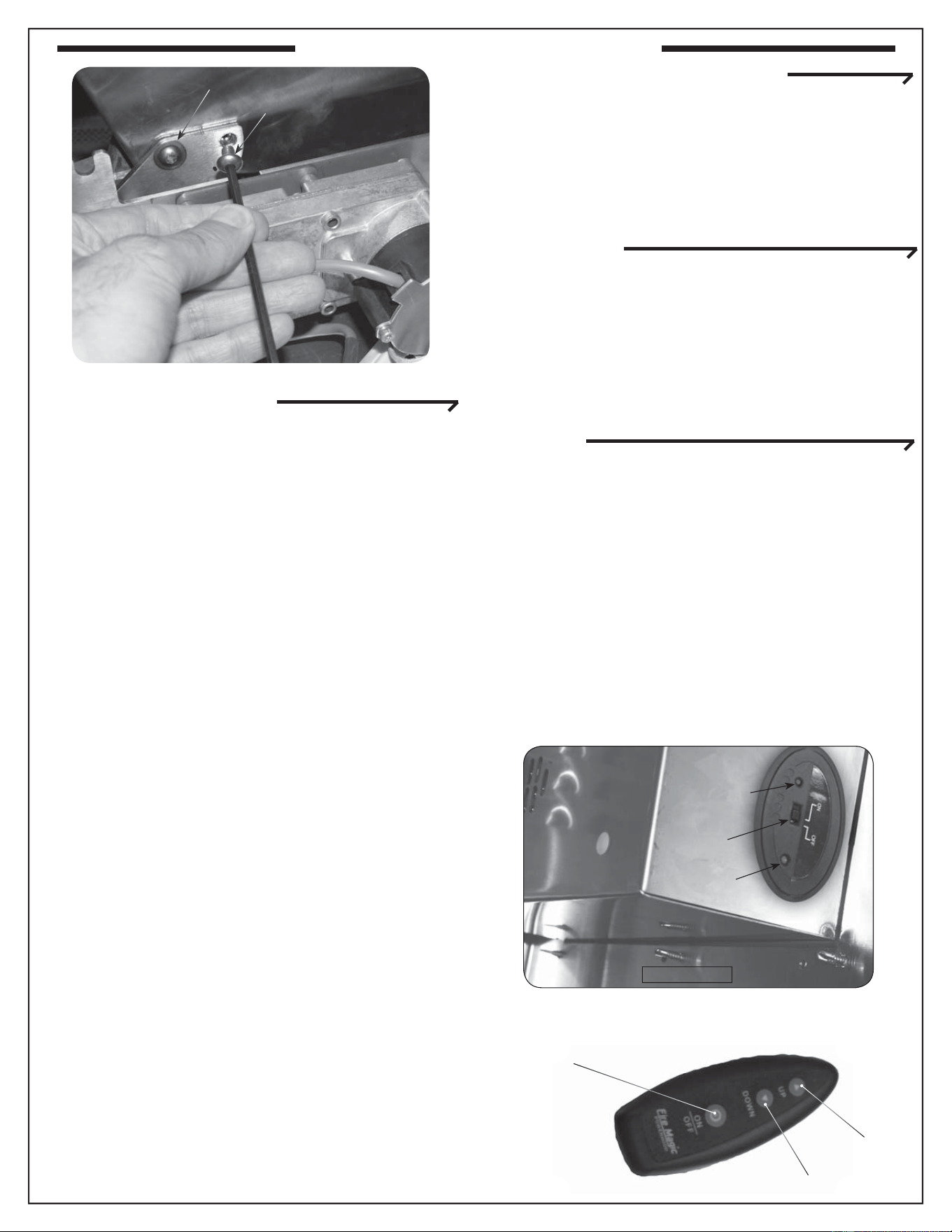
18
CONFIGURING THE LID FOR AUTOMATIC
OPENING AND CLOSING
The unit is shipped in this confi guration, but if you have
confi gured it for manual operation and wish to use the
automatic open/close function again, follow this procedure
to confi gure for automatic operation:
1. Follow steps 1-4 on the previous page except
screw in the locking bolt in step 3.
2. Switch the receiver to the AUTO position (see
SYNCHRONIZING TRANSMITTER AND
RECEIVER instructions below.
Fig. 18-3
TURNING ON THE TRANSMITTER
The transmitter has a AUTO/OFF switch, a sync. switch
and an indicator LED on it. The AUTO/OFF switch must
be in the Auto position for the remote transmitter to
control the motorized oven lid.
INSTALLING/CHANGING THE BATTERIES IN THE
TRANSMITTER
Slide open the battery access door on the back of
the Power Hood remote. Remove the 12-volt camera
battery and replace it. Close the access door and
follow the instructions on synchronizing the remote
below.
SYNCHRONIZING TRANSMITTER AND
RECEIVER
The fi rst time you turn on the transmitter or after
changing batteries in the transmitter, it is necessary
to synchronize the transmitter with the receiver.
To do this, use a pen to press in the synch button on
the receiver (Fig. 18-2). The green LED will begin to
fl ash. While the LED is fl ashing, press either the up or
down button on the remote transmitter. The LED will go
out. Then press the On/Off button on the transmitter.
The units are now synchronized. Test this by
commanding the lid up or down as appropriate.
The units may be synchronized at any time.
Fig. 18-2
Sync. button
Green LED
AUTO/OFF
switch
DOWN
UP
ON/OFF
Fig. 18-1
Locking bolt
Hinge bolt
OPTIONAL POWERHOOD
19
SHUTTING OFF THE UNIT
To shut off the unit, depress each valve control knob
and, and while pressing turn it clockwise to the OFF
position.
Always close the valve from the gas supply after each
use of the unit.
ELECTRONIC LIGHTING
Note: Electronic lighting requires an installed 9-volt
battery with a good charge.
1. Open lid(s) or remove cover(s) from burner(s) to be lit.
2. Turn all gas control knob(s) to their OFF position(s).
3. Turn on the gas at its source.
Note: DO NOT
turn on more
than one valve at
a time for either
electronic or
manual lighting.
4. Depress the desired control knob for 5 seconds,
and while pressing turn it counterclockwise to the
HI LIGHT position. Once the burner lights, release
the knob.
CAUTION: If a burner does not light within fi ve (5)
seconds of turning on the control knob,
depress the knob and turn it to the OFF
position. WAIT FIVE (5) MINUTES
before repeating step 4. If you smell
gas, follow the instructions on the cover
of this manual. If the burners still do not
light after several attempts, refer to the
instructions for manual lighting.
5. Repeat step 4 for each additional burner to be lit.
WHEN USING A PORTABLE PROPANE TANK
Propane tanks are equipped with a safety shutdown
device that may cause low or no gas pressure/fl ame
at the burners if operating and lighting instructions
are not followed exactly (See important note in the
TROUBLESHOOTING section for more details.)
MANUAL LIGHTING
CAUTION: Always wait fi ve (5) minutes for gas to
clear after any unsuccessful lighting
attempt.
1. Follow steps 1 through 3 (left).
2. Insert either a burning long-barrel butane lighter or
a burning long-stem match through the cooking grid
opening to the top of the lighting tube. (Fig. 19-2).
For backburners, hold the flame against the
perforated material of the backburner.
For sideburners, hold the fl ame against the burner.
3. While holding the match or lighter fl ame at the top
of the lighting tube or next to the burner (sideburner
and backburner only), depress the desired control
knob and while pressing turn it counterclockwise to
the HI LIGHT position. Remove the lighter or match
when the burner lights, and release the control
knob.
4. If the burner does not light, immediately depress
the knob and turn the valve to OFF. WAIT FIVE
(5) MINUTES before repeating steps 2 through 4
of the MANUAL LIGHTING instructions.
Read all instructions before lighting, and follow these instructions each time you light the unit.
Fig. 19-2 - Manual lighting
Lighter
Lighting
tube
Important: When lighting the burner under the
fl avor/smoker drawer, fi rst remove
the drawer so that the burner can be
easily seen. Then replace the drawer
after the burner is lit.
Note: Grill must be connected to 110VAC power for
electronic lighting.
Fig. 19-1 - Control knob
OFF
HI
LIGHT
LOW
TO
TURN OFF
TO TURN ON
Read setting
here
HIGH to
LIGHT
Read setting here
(OFF position shown)
To Turn OFF
To Turn ON
Use
HI (high)
to light
Press
knob in
to turn
Gas Flow
Indicator
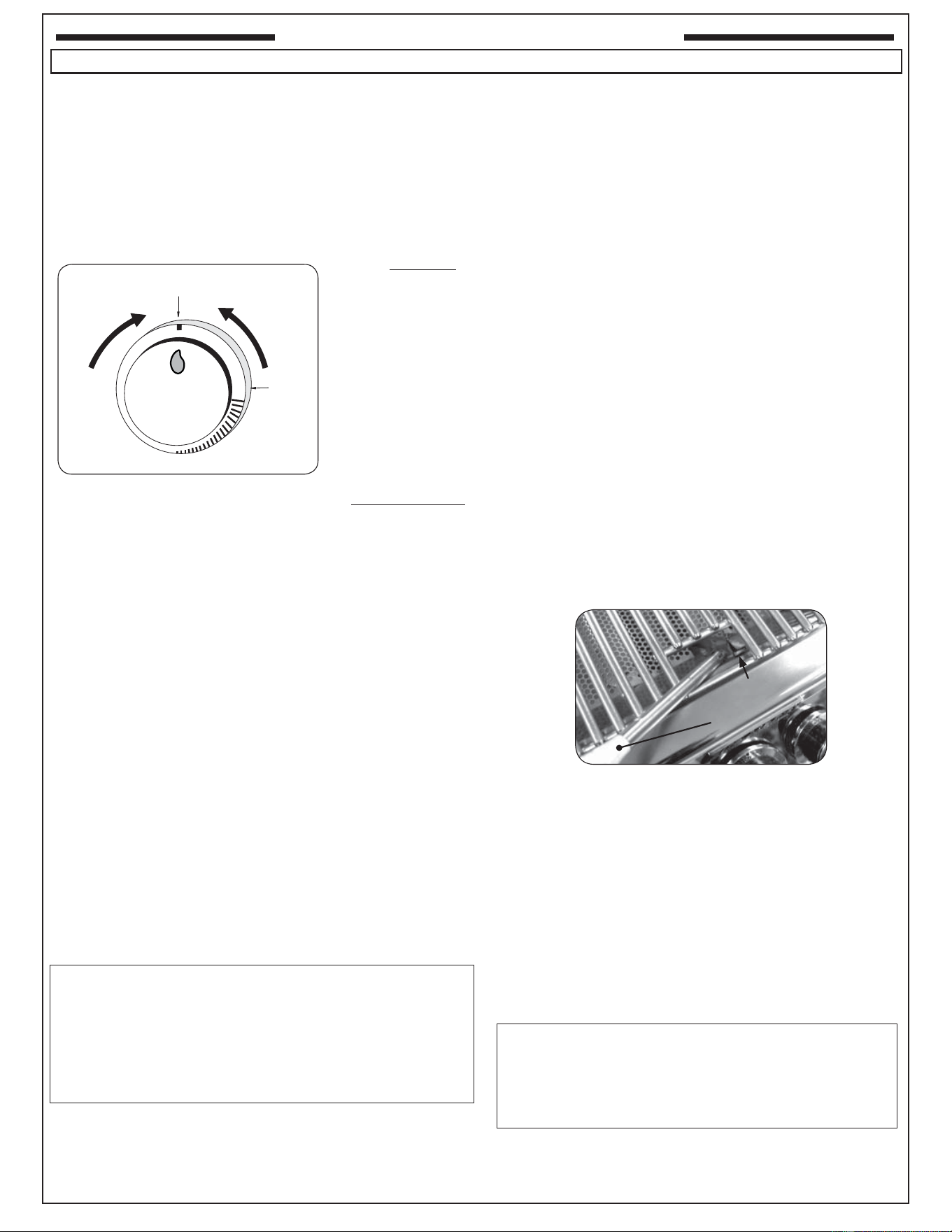
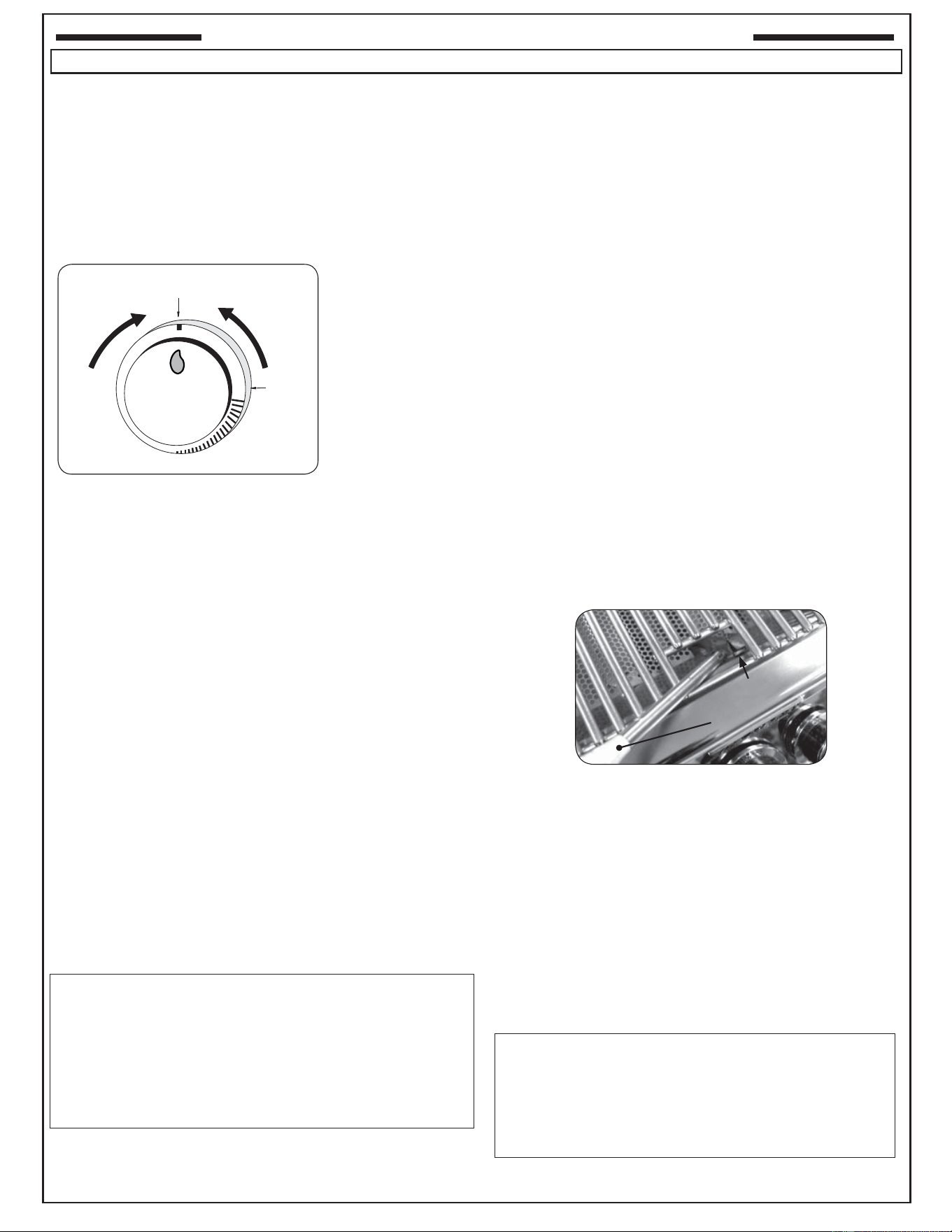
For your convenience and safety; when the
control knob is in the on position, the gas fl ow
indicator will change from blue to red. (Red
indicates gas fl ow.) See Fig. 19-1.
Note: Unit must be connected to 110VAC power for
electronic lighting.
LIGHTING (IGNITION) INSTRUCTIONS
20
ARRÊT DU UNITÉ
Pour couper le unité, diminuez chaque bouton de commande
de valve et, et tout en pressant tour il dans le sens des
aiguilles d’une montre à la position de repos.
Fermez toujours la valve de la fourniture de gaz après chaque
utilisation du unité.
ÉCLAIRAGE ÉLECTRONIQUE
Note: L’éclairage électronique exige une batterie installée
de 9 volts avec une bonne charge.
1. Ouvrez les couvercles ou enlevez les couvertures des brûleurs
pour être Lit.
2. Tournez tous les boutons de commande de gaz à leurs
positions de repos.
3. Allumez le gaz à sa source.
Note: N’ouvrez
pas plus d’une
valve à la fois
pour l’éclairage
électronique ou
manuel.
4. Diminuez le bouton de commande désiré pendant 5
secondes, et tout en pressant le tour il dans le sens
contraire des aiguilles d’une montre dans la position
LÉGÈRE de HI. Une fois que le brûleur s’allume, libérez
le bouton.
ATTENTION : Si un brûleur ne s’allume pas dans cinq
(5) secondes d’allumer le bouton de
commande, enfoncez le bouton et tournez-
le à la position de repos. ATTENDEZ CINQ
(5) MINUTES avant de répéter l’étape 4. Si
vous sentez le gaz, suivez les instructions
sur la couverture de ce manuel. Si les
brûleurs ne s’allument toujours pas après
que plusieurs tentatives, se rapportent aux
instructions pour l’éclairage manuel.
5. Répétez l’étape 4 pour que chaque brûleur additionnel soit Lit.
EN EMPLOYANT UN RÉSERVOIR DE PROPANE PORTATIF
Des réservoirs de propane sont équipés d’un dispositif
d’arrêt de sûreté qui peut ne pas causer le bas ou aucunes
pression de gaz/fl amme aux brûleurs si le fonctionnement
et l’allumage des instructions ne sont pas suivis exactement
(voir la note importante dans la section de dépannage pour
plus de détails.)
ÉCLAIRAGE MANUEL
ATTENTION: Attendez toujours cinq (5) minutes le gaz
pour se dégager après que n’importe quelle
tentative non réussie d’éclairage.
1. Suivez les étapes 1 à 3 (à gauche).
2. Passez un allumeur brûlant de butane de long-baril ou
une allumette brûlante de long-tige dans la grille à cuire
s’ouvrant au dessus du tube d’éclairage. (Fig. 20-2). Pour
des backburners, tenez la fl amme contre le matériel
perforé du backburner. Pour des sideburners, tenez la
fl amme contre le brûleur.
3. Tout en tenant l’allumette ou la flamme plus légère
au dessus du tube d’éclairage ou à côté du brûleur
(sideburner et backburner seulement), diminuez le
bouton et tout en pressant le tour de commande désirés
il dans le sens contraire des aiguilles d’une montre
dans la position LÉGÈRE de HI. Enlevez l’allumeur ou
assortissez quand le brûleur s’allume, et libérez le bouton
de commande.
4. Si le brûleur ne s’allume pas, enfoncez immédiatement
le bouton et tournez la valve à AU LOIN. ATTENDEZ
CINQ (5) MINUTES avant de répéter les étapes 2 à 4
des instructions manuelles d’éclairage.
Lisez toutes les instructions avant l’allumage, et suivez ces instructions chaque fois vous lumière le unité.
Fig. 20-2 - Éclairage manuel
Plus léger
Tube
d’éclairage
Important: En allumant le brûleur sous le tiroir de
saveur/fumeur, enlevez d’abord le tiroir
de sorte que le brûleur puisse être
facilement vu. Remplacez alors le tiroir
après que le brûleur soit Lit.
Note: Le unité doit être relié à la puissance 110VAC pour
l’éclairage électronique.
Fig. 20-1 - bouton de commande
OFF
HI
LIGHT
LOW
TO
TURN OFF
TO TURN ON
Read setting
here
HIGH to
LIGHT
Lisez l’établissement ici
(OUTRE de montrer)
OUTRE DE
SUR
Utilisation
SALUT
(haute)
à la lu-
mière
Enfoncez
le bouton
pour
tourner
Indicateur
d’écoulement
de gaz
Pour votre convenance et sûreté ; quand le
bouton de commande est dans la position de
fonctionnement, l’indicateur d’écoulement de
gaz changera de bleu en le rouge. (Le rouge
indique l’écoulement de gaz.) Voir la Fig. 20-1.
Note: Le unité doit être relié à la puissance 110VAC pour
l’éclairage électronique.
ALLUMAGE DES INSTRUCTIONS (D’ALLUMAGE)
21
DIGITAL THERMOMETER / INTERIOR AND KNOB LIGHTS
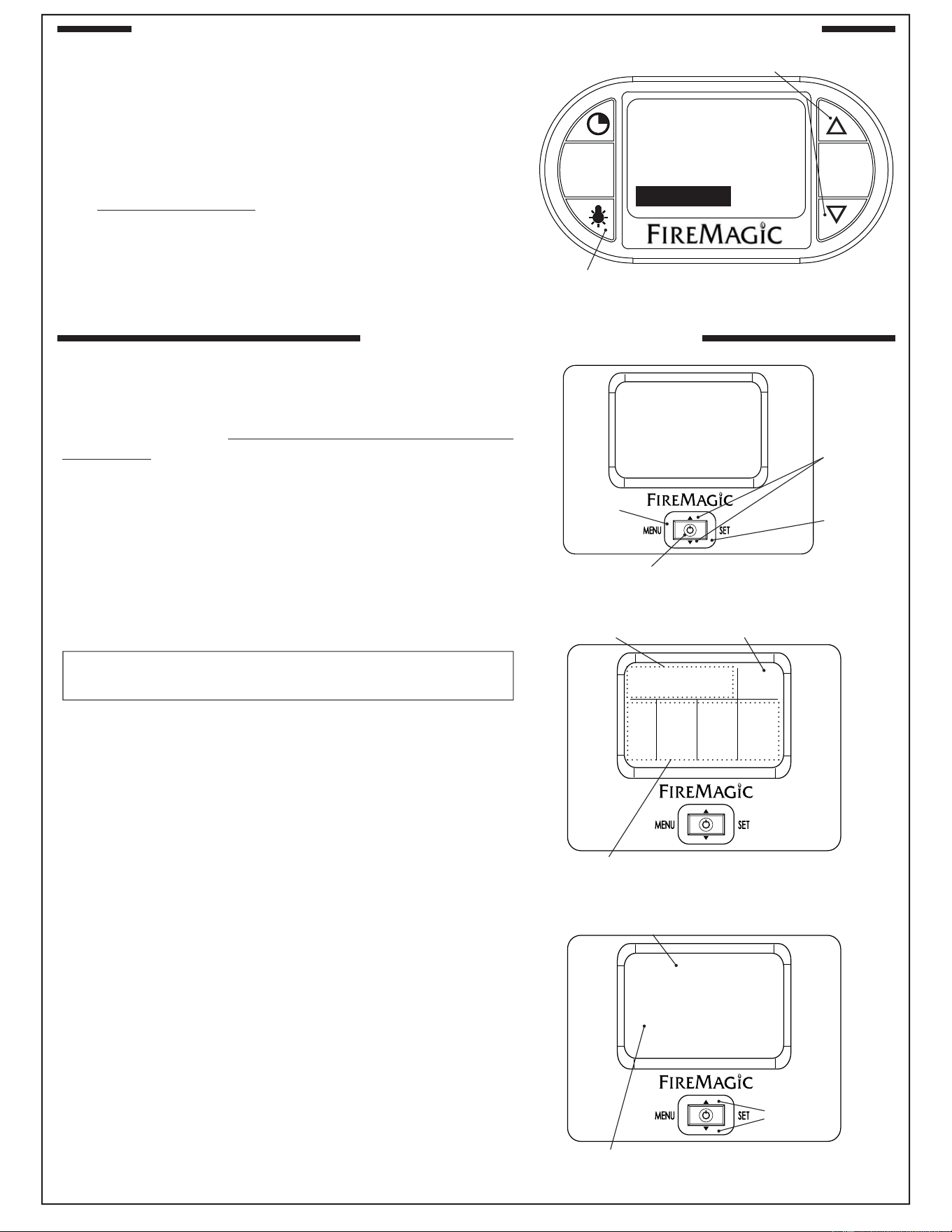
Your grill comes with a digital thermometer for temperature
monitoring and timed cooking. Pressing any button will turn
on the thermometer. The thermometer will automatically shut
off after 5 minutes if no temperature change is detected.
Note: The thermometer also controls the interior lights, and
knob backlights. Thermometer shutdown will not shut
off these lights; they must be manually shut off.
The thermometer is located on the control panel between
the control knobs.
Plug in the meat probe on the right side of the control panel
as shown in Fig. 21-1.
For best performance and temperature readings center the
zone separators properly between each burner (see PARTS
LIST).
Read the following sections completely regarding
thermometer operation. Refer to Fig. 21-2 for thermometer
orientation and button locations.
Prior to initial use; calibrate the thermometer (following
page). Whenever the master switch is turned off or the
power supply is disconnected, allow 30 seconds for the
thermometer to initialize the next time it is powered on.
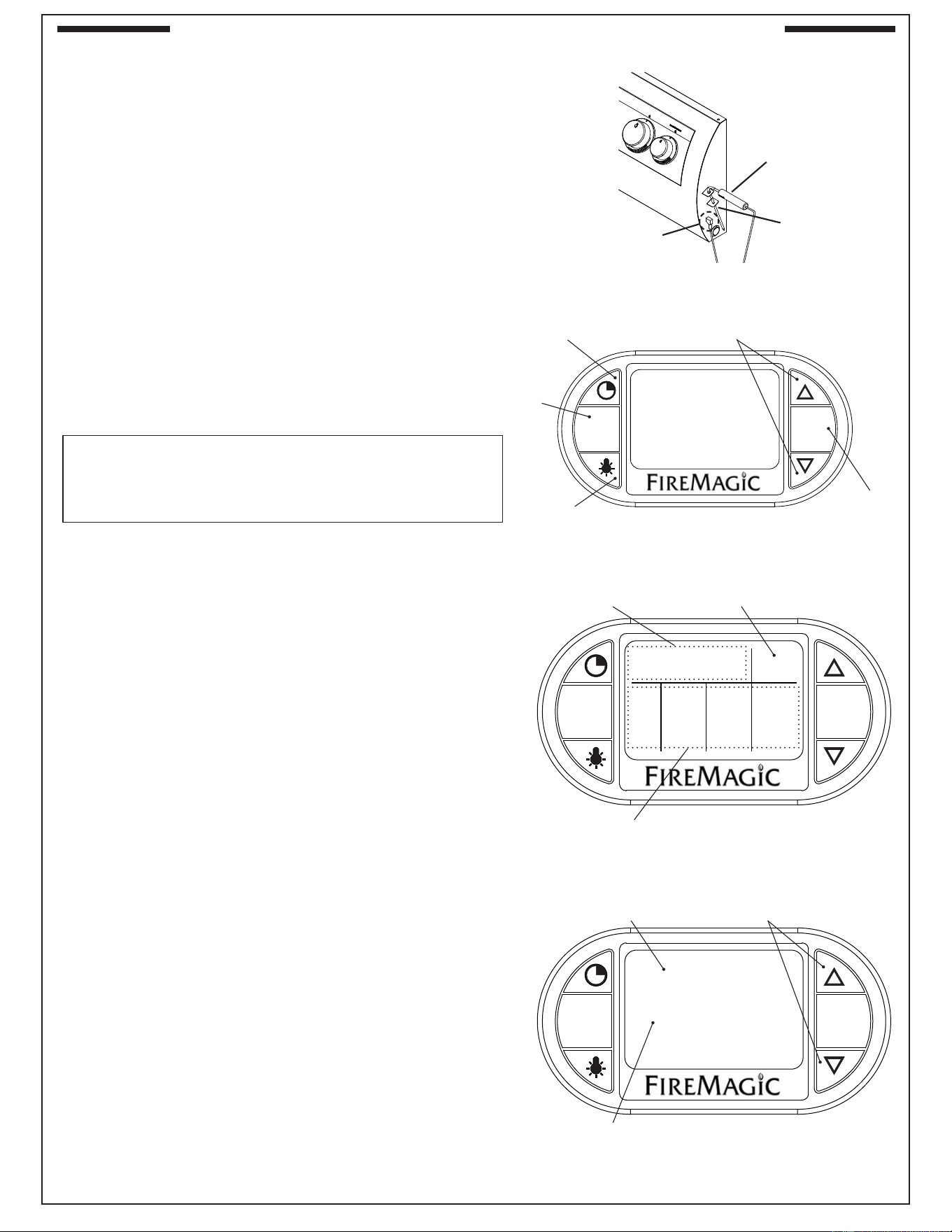
DEFAULT SCREEN
Press any button to turn the thermometer On. The default
screen will be displayed. All temperatures for the cooking zones
(see Grilling Tips section) and the meat probe will be shown
(Fig. 21-3). See below for options under the default screen.
Setting a Location Temperature
1. Press the up/down arrow to switch to the desired location
(a cooking zone or the meat probe). Press SET.
2. The selected location’s temperature screen will be
displayed. Use the arrows to set the desired temp. The
actual temp. will also be shown. (See Fig. 21-4.)
Note: PRESSING the arrows will adjust the desired
temp. by increments of one. HOLDING them down
(for several seconds) will adjust the temp. rapidly.
3. Press SET to return to the default screen. Repeat as
necessary for all other locations.
The alarm will sound (if set to do so) when a location reaches
its set temperature. The alarm is silenced by pressing any
button on the thermometer.
Interior and Knob Lights
1. Press the light button to turn both the interior lights and knob
backlights On. The interior lights will temporarily shut off
when the hood is closed (except for Magic View models).
2. Press the light button once to turn the interior lights off,
and a second time to turn the knob backlights off.
Note: Thermometer shutdown will not shut off these
lights; they must be manually shut off by turning the
thermometer back on and pressing the light button.
MENU
SET
Fig. 21-2 Orientation
Arrows for adjusting digits
SET button
for selecting
& confi rming
Display screen
Timer button
Light button
Menu
button
080
MENU
SET
05:00
350
075078
350
078
350
170
PROBE
TEMP
ZONE 3ZONE 2ZONE 1
SET ACT
°F
ACT
SET
Fig. 21-3 Default screen detail
Time set via TimerMeat probe temp. info
Cooking zones temp. info
MENU
SET
ZONE 1
ACTUAL: 078
SET TEMP: 350
Fig. 21-4 Location temp. screen (zone 1 shown)
Current location
Set this temp. as desired
Use arrows to set
Fig. 21-1 Meat probe detail
MEAT
PROBE
Meat probe handle
Meat probe plug
22
DIGITAL THERMOMETER / INTERIOR AND KNOB LIGHTS (Cont.)
Setting the Timer
1. Press the timer button. Use the arrows to set the desired
amount of time (see Fig. 22-1.)
2. Press SET to return to the default screen.
The time remaining will be shown on the default screen. Once
the time reaches zero; the alarm will sound. The alarm is
silenced by pressing any button on the thermometer.
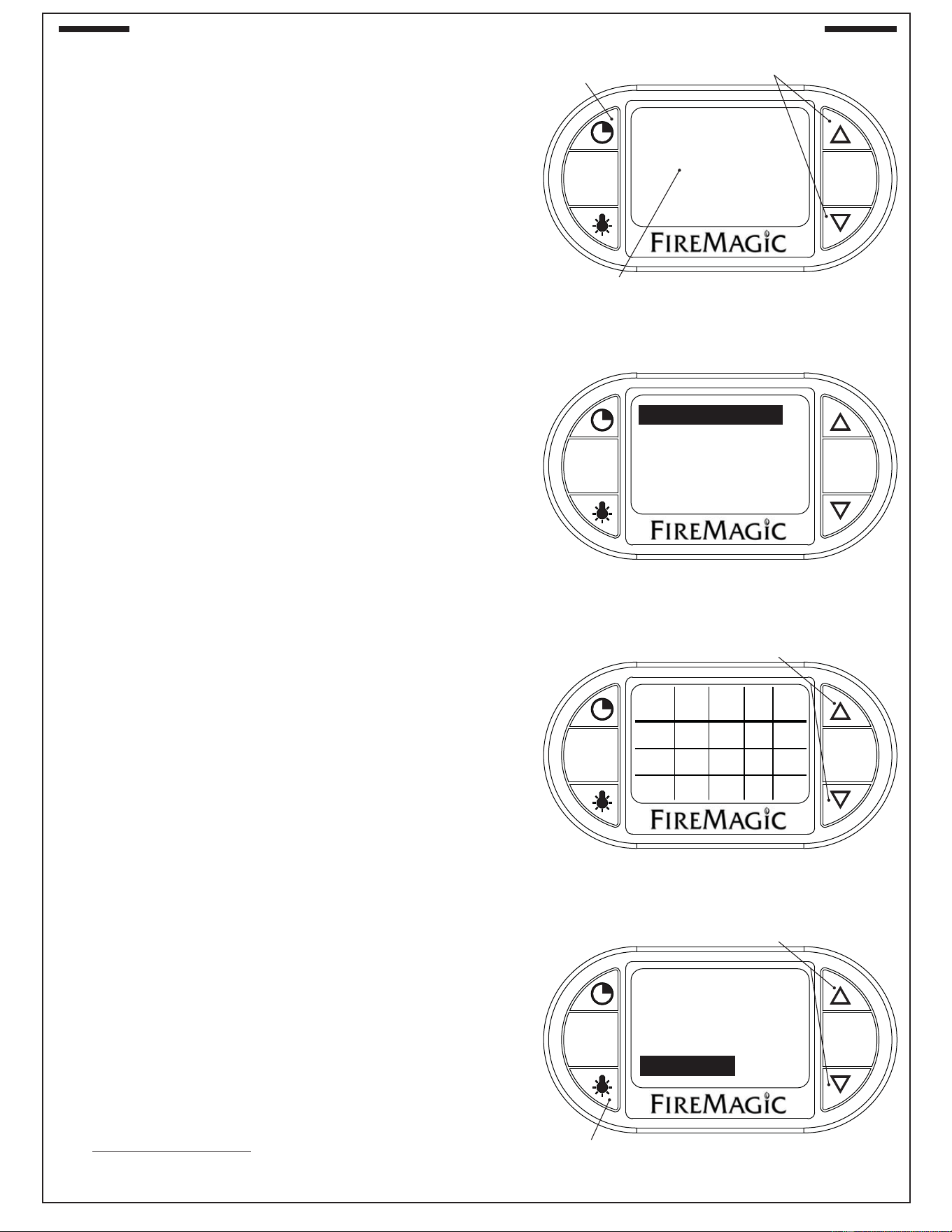
MENU SCREEN
Press any button to turn the thermometer On. The default
screen will be displayed. Press the MENU button to display its
screen. Press the up/down arrow to scroll through the options.
(See Fig. 22-2.) See below for options under the menu screen.
Note: The menu screen will return back to the default screen
after approximately 30 seconds of no activity. Press the
MENU button to manually return to the default screen.
Changing temperature units (°C/°F) / Calibrating
1. Under the menu screen select SETUP. Press SET.
2. Press the up/down arrow to select (by pressing SET):
• SETUP F C. This will allow you to press the up/down arrow
to select the desired temperature unit (°C/°F). Press SET
to return to the menu screen.
• CALIBRATE. This will calibrate the thermometer with the
ambient temperature, and return to the menu screen.
Grill Guide and Meat Probe
The grill guide displays recommended ready temperatures for
various meats.
1. Under the menu screen select GRILL GUIDE. Press SET.
2. Press the up/down arrow to view the desired meat.
3. Note the temp. and press SET. This will take you to the
meat probe temperature screen.
4. Use the arrows to set the noted temp.
5. Press SET to return to the default screen.
Putting the meat probe into the cooking meat will give an actual
temp. reading. The alarm sounds when the actual temp. reaches
the set temp.
Note: Do not leave the meat probe in the meat for a prolonged
period of time, or with the hood closed.
Setting the Alarm
The alarm can be individually set (On or Off) for the meat probe
and each cooking zone. The default setting has the alarm Off for
the meat probe and cooking zones. The alarm always sounds
for the Timer.
1. Under the menu screen select ALARM. Press SET.
2. Use the up/down arrow to select the desired alarm, and
press the light button to turn the alarm On/Off.
3. Press SET to return to the menu screen.
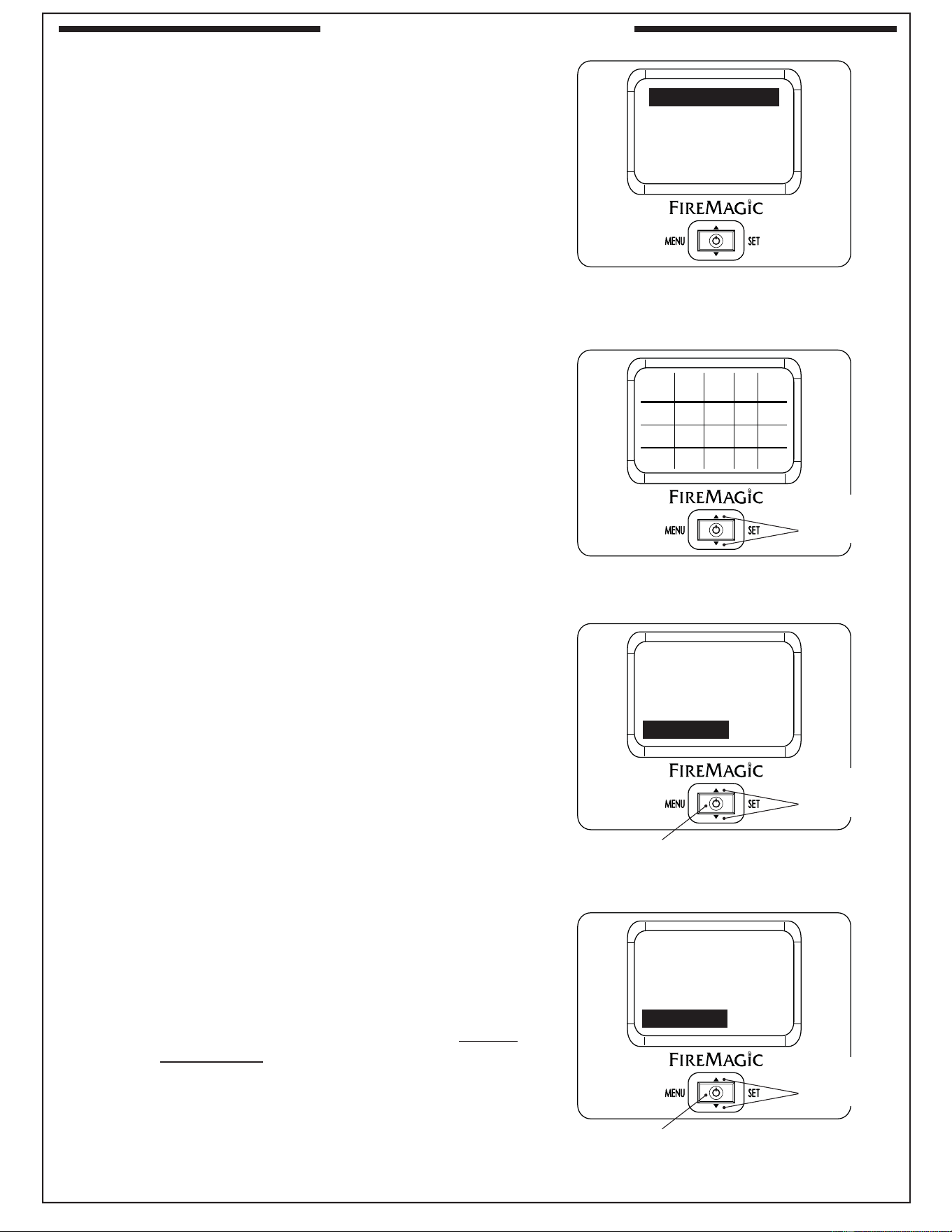
MENU
SET
SETUP
GRILL GUIDE
ALARM
BACKLIGHT
Fig. 22-2 Menu screen
MENU
SET
MED
RARE
WELL
DONE
170
170
180
160
N/A
160
150
N/A
150
140
N/A
140
BEEF
PORK
LAMB
PROBE
TEMP
MEDRARE
Fig. 22-3 Grill Guide screen
Use arrows to view desired meat
MENU
SET
OFF
OFF
OFF
ON
ZONE 1
ZONE 2
ZONE 3
PROBE
Fig. 22-4 Alarm screen
Use arrows to select desired alarm
Press light button to turn On/Off
MENU
SET
05:00
TIMER
Fig. 22-1 Timer screen
Set time as desired
Use arrows to set
Timer button
23
MENU
SET
OFF
OFF
ON
BACKLIGHT
RED
GREEN
BLUE
Fig. 23-1 Backlight screen
Use arrows to select desired color
Press light button to turn On/Off
Setting the Thermometer Backlight
The default color for the thermometer backlight is blue. The
color may be changed as desired by turning the three base
colors On/Off. Various combinations will result in different colors.
1. Under the menu screen select BACKLIGHT. Press SET.
2. Use the up/down arrow to select the desired color, and
press the light button to turn the color On/Off.
3. Press SET to return to the menu screen. The new color
will now show.
Note: Turning all colors Off will result in no backlight.
DIGITAL THERMOMETER / INTERIOR AND KNOB LIGHTS (Cont.)
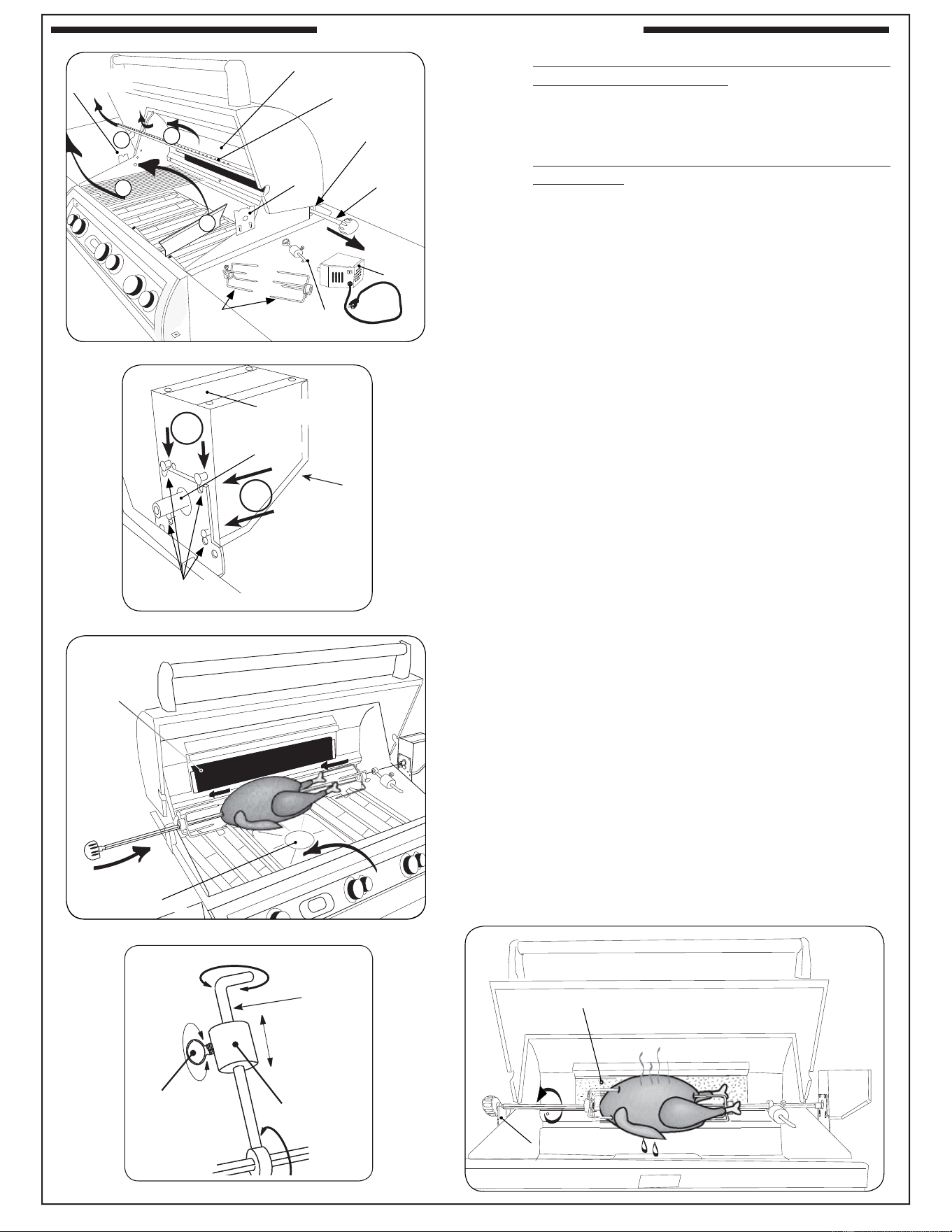
Press power button to turn On/Off
Arrows for
adjusting
digits
SET button
for selecting
& confi rming
Display screen
Press
left for
Menu
Fig. 23-2 Orientation
MEAT PROBE
ACTUAL: 078
SET TEMP: 350
Fig. 23-4 Temp. screen (meat probe shown)
Current location
Set this temp. as desired (meat probe only)
Use arrows
to set
The receiver will display data transmitted from the thermometer,
and sound when the thermometer alarm sounds. It can also
set the meat probe temperature, and take a meat probe
temperature reading (when the meat probe is connected to
the receiver).
Note: Although the cooking zone temperatures and alarm
may be set through the receiver, they will always
be over-ridden by the data transmitted from the
thermometer.
Refer to Fig. 23-2 for receiver orientation.
As the receiver displays the same data, and functions the
same as the thermometer; this section will reference some
previous thermometer information.
Read this section completely, then sync the receiver with
the thermometer (following page), prior to receiver use.
DEFAULT SCREEN
Press the power button to turn the receiver On. The default
screen will be displayed. All temperatures for the cooking
zones and the meat probe will be shown (see Fig. 23-3). See
below for options under the default screen.
The receiver display will automatically shut off after 30 seconds
of no activity. Two minutes after thermometer shut off; the
receiver will go into a deep sleep, which will minimize battery
usage. To manually shut off the receiver; press and hold
the power button.
Viewing/Setting a Location Temperature
All location temperatures (cooking zones/meat probe) can be
viewed in a detail screen.
1. Press the up/down arrow to switch to the desired location
(a cooking zone or the meat probe). Press SET.
2. The selected location’s temperature screen will be
displayed (see Fig. 23-4.)
If done viewing a location, press SET to return to the default
screen. OR; with the meat probe plugged in to the receiver,
you may follow steps 3-5 to set the meat probe temperature.
REMOTE RECEIVER (optional)
080
05:00
350
075078
350
078
350
170
PROBE
TEMP
ZONE 3ZONE 2ZONE 1
SET ACT
°F
ACT
SET
Time set via thermometer timerMeat probe temp. info
Cooking zones temp. info
Fig. 23-3 Default screen detail
24
REMOTE RECEIVER (cont.)
3. Use the arrows to set the desired temp (see ‘Temp Screen’
fi gure on previous page).
Note: PRESSING the arrows will adjust the desired temp.
by increments of one. HOLDING them down (for
several seconds) will adjust the temp. rapidly.
4. Press SET to return to the default screen.
5. Put the meat probe into the cooking meat to obtain an
actual temp. reading. The alarm sounds when the actual
temp. reaches the set temp.
Note: Do not leave the meat probe in the meat for a
prolonged period of time, or with the hood closed.
Alarm Sounding Info
The alarm on the receiver will sound (if set to do so) when any
location reaches its set temperature. The alarm is silenced
by pressing the power button. The thermometer alarm will
continue to sound (if set to do so) and must be silenced by
pressing any button on it. Alternatively; if the thermometer is
silenced fi rst, it will stop sending a signal to the receiver, and
the receiver will silence.
Should the alarm go off on the thermometer while the receiver
is in sleep mode; it will wake the receiver.
MENU SCREEN
Press the power button to turn the receiver On. The default
screen will be displayed. Press the MENU button to display its
screen. Press the up/down arrow to scroll through the options.
(See Fig. 24-1.) See below for options under the menu screen.
Note: The menu screen will return back to the default screen
after approximately 30 seconds of no activity. Press the
MENU button to manually return to the default screen.
Sync Receiver with Thermometer
1. Under the menu screen select SETUP. Press SET.
2. Use the up/down arrow to select SYNC, and press SET
to sync the receiver.
Note: The thermometer must be on to sync the receiver.
Additional Menu Screen Functions
Please reference the Thermometer section on the previous
pages regarding Changing Temperature units / Grill Guide /
Setting the Alarm / Setting the Backlight. These options are
available in the receiver and are controlled the same as the
thermometer.
Exception: For the Alarm and Backlight screens; use the
power button to toggle between ON/OFF (as
opposed to the light button). See Fig. 24-3 & 4.
Batteries
The receiver is powered by two AAA (alkaline or better)
batteries. Using the backlight feature will drain the batteries
quicker. If batteries are removed; the receiver will stay synced.
SETUP
GRILL GUIDE
ALARM
BACKLIGHT
Fig. 24-1 Menu screen
MED
RARE
WELL
DONE
170
170
180
160
N/A
160
150
N/A
150
140
N/A
140
BEEF
PORK
LAMB
PROBE
TEMP
MEDRARE
Fig. 24-2 Grill Guide screen
OFF
OFF
OFF
ON
ZONE 1
ZONE 2
ZONE 3
PROBE
Fig. 24-3 Alarm screen
Press power button to turn On/Off
OFF
OFF
ON
BACKLIGHT
RED
GREEN
BLUE
Fig. 24-4 Backlight screen
Use arrows to
select desired
color
Press power button to turn On/Off
Use arrows to
select desired
alarm
Use arrows to
view desired
meat
25
ROTISSERIE INSTRUCTIONS
Drip tray
liner
Fig. 25-3
Backburner
(unlit)
CAUTION: WHEN USING THE BACKBURNER; KEEP
THE OVEN LID CLOSED TO PREVENT HEAT
LOSS, PROVIDE PROPER CONVECTION,
AND PROVIDE PROPER VENTING. THIS WILL
ENSURE EVEN COOKING TEMPERATURES.
DO NOT KEEP YOUR OVEN LID OPEN DURING
ROTISSING, AS THIS MAY CAUSE PERSONAL
INJURY, OR IN SOME CASES, IN WINDY
CONDITIONS, DAMAGE TO THE GRILL.
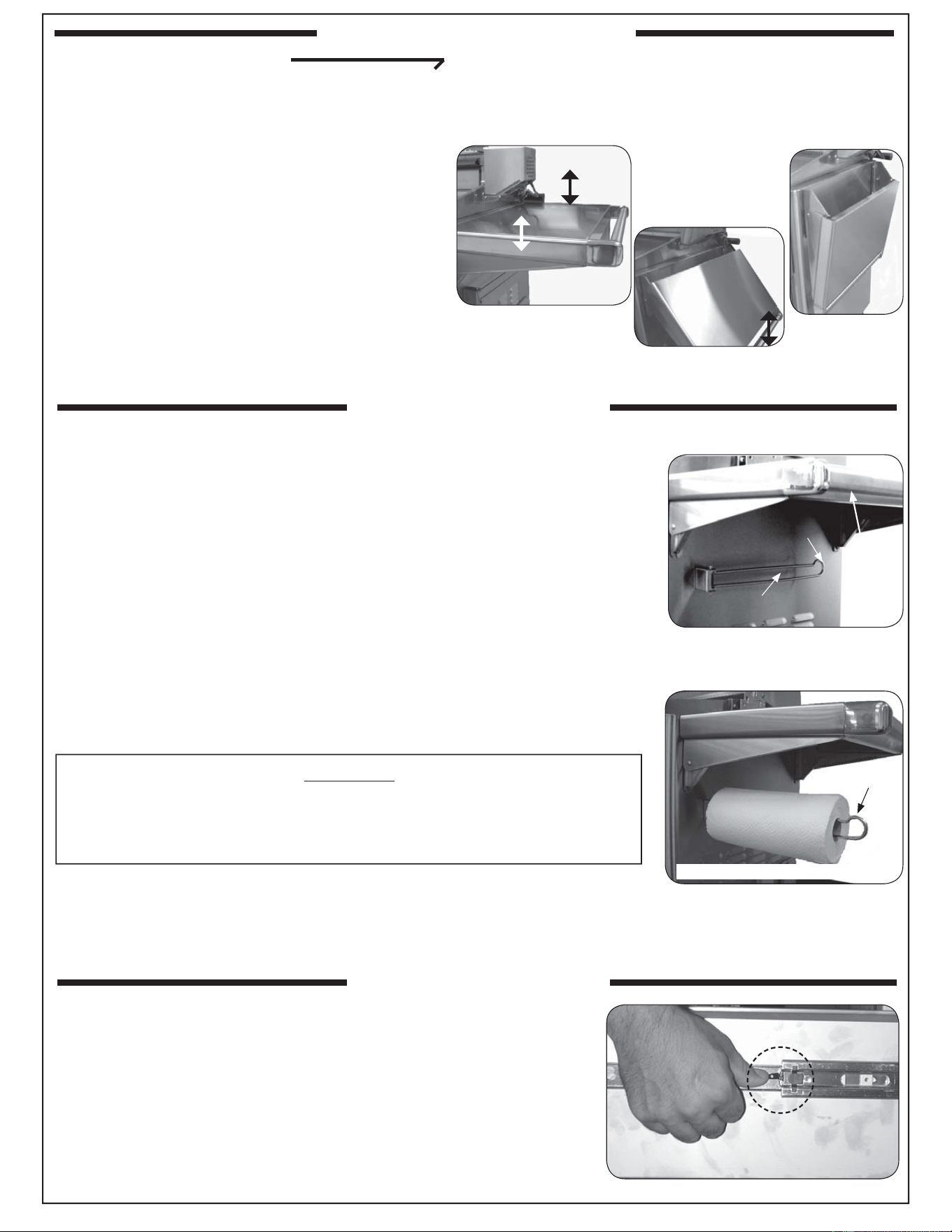
1. Remove warming rack, backburner cover, cooking grids,
and zone separators. Leave the fl avor grids on if possible.
2. Slide rotisserie motor fully onto motor bracket (right side,
Fig. 25-1 and 25-2).
3. Remove rotisserie rod from rear bracket (Fig. 25-1) and
attach knob if necessary.
4. Slide the left meat holder onto the rod (and tighten), the
meat onto the rod and into the holder, followed by the
right meat holder onto the rod and into the meat as shown
in Fig. 25-3. Tighten the right meat holder. Be sure the
meat is centered and balanced as well as possible.
7. Hold both ends of the rod so it settles freely (do not grip
tightly). Allow the rod to rotate until the heavy side of the
meat rests downward.
8. The counterbalance may then be attached to even weight
distribution. Slide counterbalance onto rod next to the
meat holder. Loosen the arm and point it upward opposite
the heavy side of the meat. Tighten the arm.
9. Slide the counterbalance weight up or down the arm until
the rod rotates most evenly then tighten thumb screw
(Fig. 25-4 and Fig. 25-5).
10. Insert the pointed end of the rod into the motor drive
socket and the groove next to the knob into the left
support bracket.
11. To keep drippings off the burners and simplify cleanup,
place Fire Magic
®
drip tray liners under the meat, if
desired (Fig. 25-3).
12. Plug-in the rotisserie motor and press the rocker switch
to start (Fig. 25-2).
13. Light backburner per lighting instructions in this manual
(or on drip tray handle) and close oven lid.
Important: Turn the backburner to low or off when
stopping the rotisserie to prevent overcooking.
Fig. 25-5
Backburner
(lit)
Left support bracket
Fig. 25-4
Thumb
screw
loosen/
tighten
slide
Weight
Arm
Backburner cover
Warming rack
Rotisserie rod
rear bracket
Rotisserie
rod
and
knob
Rotisserie
motor
Meat
holders
Counter-
balance
Rotisserie
motor
bracket
A
B
2
1
Rotisserie
rod bracket
Fig. 25-1
Rotisserie motor
slots (4)
Heavy-duty
Rotisserie motor
Rod drive socket
Fig. 25-2
1
2
Rocker
switch
Drip tray
liner
Fig. 25-3
Backburner
(unlit)
Backburner cover
Warming rack
Rotisserie rod
rear bracket
Rotisserie
rod
and
knob
Rotisserie
motor
Meat
holders
Counter-
balance
Rotisserie
motor
bracket
A
B
1
Rotisserie
rod bracket
Fig. 25-1
3
26
This Fire Magic
®
grill comes with a fold-away paper towel holder.
To use the paper towel holder:
1. Make sure the collapsible grill shelf is extended and locked.
2. Grasp the rounded end of the paper towel holder fi rmly (without
compressing it) and pull it away from the side of the grill so that
it rotates toward the front of the grill and locks into the extended
position.
3. Slide a roll of paper towels over the rounded end of the paper towel
holder until the entire roll is on the holder and past the retaining lip.
When not in use, the rack may be folded back out of the way by fi rmly grasping
the rounded end of the holder and rotating it back into position against the
wall of the grill.
WARNING
Remove paper towels or anything fl ammable from the holder before
folding it back against a hot grill. Placing fl ammable objects too close
to a heat source may cause fi re, property damage, or injury.
CAUTION: The paper towel holder must be folded back against the grill
before lowering the collapsible shelf (see above). Failure to
do so could result in damage to the grill.
Drop shelf
(up & locked)
Paper towel holder
(folded back)
Rounded end
Retaining lip
Paper towel holder (extended & locked)
DROP-SHELF OPERATION
A. To lower the shelf, grasp the middle of the shelf
on both sides and lift upward so that the inner
lip of the shelf, along the side of the grill, lifts
out of the locking slot. Then use the handle to
allow the end of the shelf to slowly rotate down
as pictured to the right.
B. To raise the shelf, perform the opposite of
A. above. Grab the shelf by the handle and
raise to the horizontal position. Lift slightly
upward from the center of the shelf on both
sides, allowing the inner lip to drop down into
the locking slot and lock the shelf safely into
position.
Shelf
up & locked
Shelf
down
Being
lowered or
raised
CAUTION: Do NOT place fi ngers near hinge when
closing.
Fig. 26-2
Fig. 26-3
USING THE FOLDING SHELF
PAPER TOWEL HOLDER
To remove a drawer; pull it completely out. Release the drawer from
the drawer slides by pressing the black lever down on the right side,
and up on the left side.
To re-attach a drawer; extend the drawer slides completely and
align the drawer into the slides, pushing the drawer closed. Open
the drawer to verify that it has locked in place.
REMOVING DRAWERS
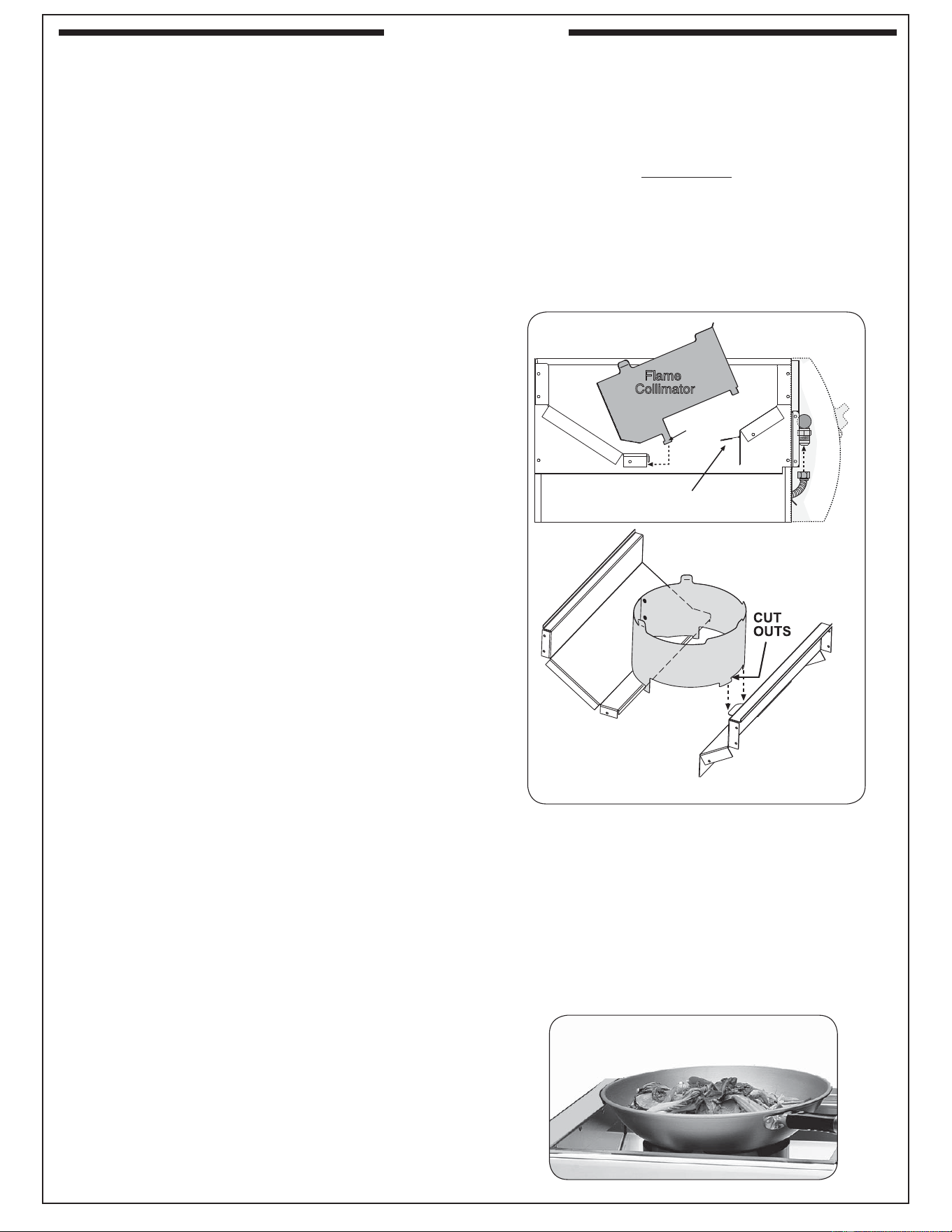
27
WOK COOKING
When using a wok for stir fry or other cooking,
remove the cooking grid and place the wok directly
on top of the collimator.
CAUTION: A wok has a rounded bottom and may
slide on the collimator, causing hot liquid to spill out
of it.
Fig. 27-2
4. Consult Table 1 at the beginning of this document
to determine the proper orifi ce size for each of
the inner (right) and outer (left) burners based
on the type of gas being used.
WARNING
YOU MUST USE THE SPECIFIED ORIFICE (SEE
TABLE 1) FOR THE GRILL TO OPERATE SAFELY
AND EFFECTIVELY.
POWER BURNER INSTALLATION
1. Place the fl ame collimator over the burner
with the tabs and cutouts resting on the inner
shell, as shown in Fig. 27-1. Flex the front
of the collimator towards the burner until
the cutouts fi t down around the collimator
support. This will lock your collimator into
place. The fl ame collimator acts as a barrier
for windy conditions and creates higher BTU
concentration to the support grid.
2. Place the cooking grid and the cover over
the power burner.
POWER BURNER SAFETY
The left knob controls the inner burner and the
right knob controls the outer burner
CAUTION: THE POWER BURNER IS HOT. DO
NOT TOUCH WITH BARE SKIN.
Be sure the power burner has good ventilation and is
free of debris and away from fl ammable substances
before lighting.
Properly burning fl ames are mostly blue and are
steady and spread evenly around the burner.
STAINLESS STEEL POWER BURNER COVER
Note: The cover is free-standing and is not
hinged in the back.
Use the built-in handle to remove the cover.
ORIFICE INSPECTION, AND REPLACEMENT
1. Remove the cover, cooking grid, and flame
collimator. Compress the collimator front to back
to release the front lock then rotate up as shown
in Fig. 27-1.
2. Lift the back of the power burner up out of the
locator hole while moving the two necks of the
burner toward the back of the grill, away from
their respective gas orifi ces.
CAUTION: THE POWER BURNER IS HEAVY.
3. Use a
3
/
8
" socket driver to reach into the empty
burner space from the top and remove each of
the two gas orifi ces protruding from the front
fi re-wall of the grill in turn. Take care that the
springs near the orifi ce remain attached.
Fig. 27-1 Placing the fl ame collimator
Flame
Collimator
Ignitor support
Tabs
Collimator support
Flame
Collimator
Collimator support
Collimator support
T abs
Collimator support
POWER BURNER
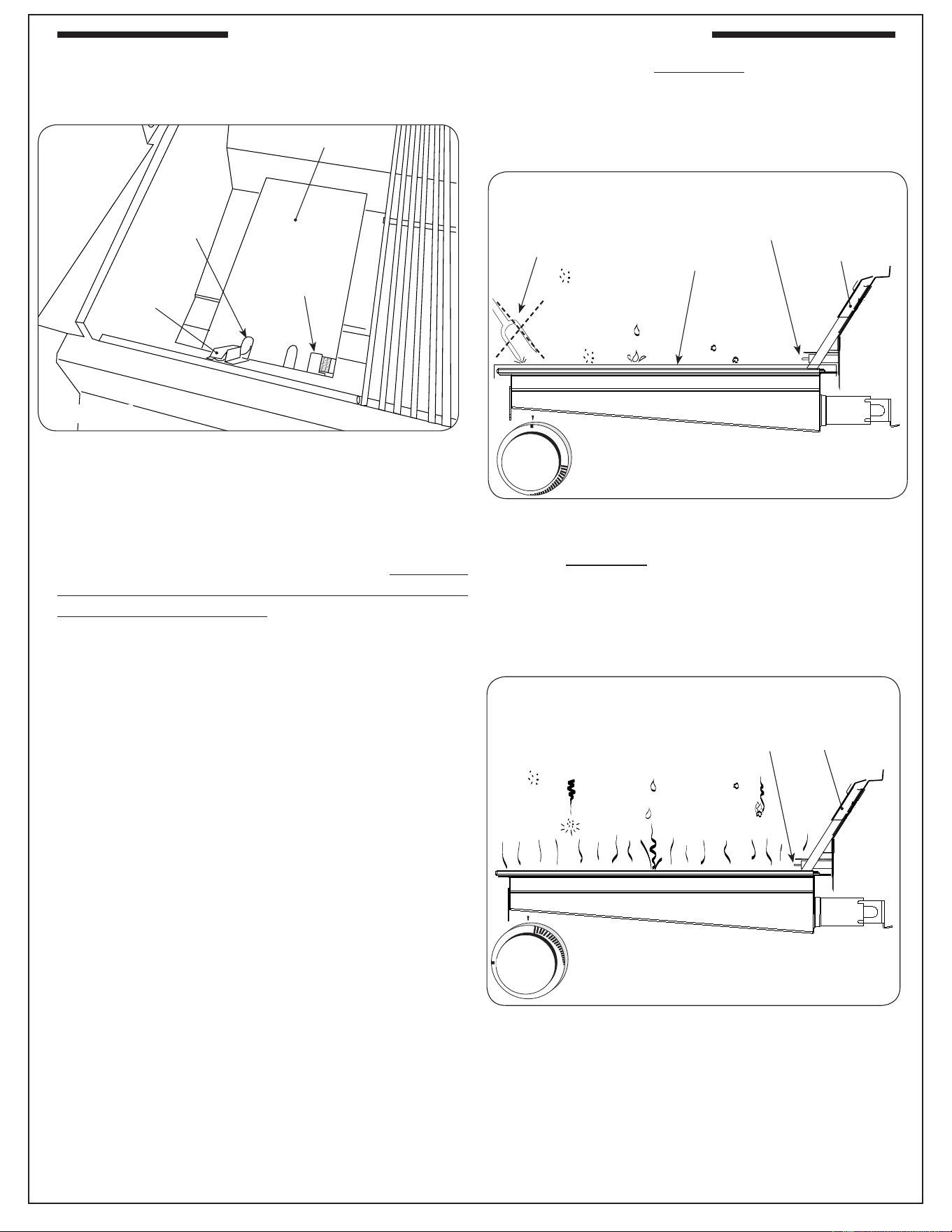
28
The infrared (IR) searing burner (optional) cooks with
a powerful radiant heat.
Light the infrared burner following the LIGHTING
INSTRUCTIONS in this manual or printed on the
drip tray. Follow these guidelines when operating the
Infrared burner:
• DO NOT place food on the cooking grid until
the IR burner glows orange (Fig. 28-3). Drippings
are heated and evaporate instead of sticking to and
impairing burner function.
• For cleaning purposes; always leave your burner
on (after cooking) for an additional 5 minutes, to
allow for a burnoff period. This is important to
keep your burner clean and operating properly.
As the burner is self cleaning (at full temperature);
avoid the use of cleaners or abrasives.
• When not in use, always cover the infrared burner
with the stainless-steel cover. This protects the
burner from drippings (from other cooking), airborne
particles, and foreign objects (Fig. 28-2).
• Do not strike or scratch the burner ceramic as it
may chip, crack, or break (Fig. 28-2).
Note: Digital thermometer does not give accurate
readings for infrared burners.
Important: When grilling with the infrared burner,
always place a cooking grid above it.
The cooking grid must be removed for
rotisserie cooking.
CAUTION: Never attempt to operate the IR burner
with the protective cover in place.
WARNING
Only handle the infrared burner cover when the
grill is cold or with a well-insulated long-handled
tool or heat resistant gloves.
Burner ceramic must be protected with cover when
burner is not in use.
Drips and particles evaporate before hitting infrared
burner when cooking at the maximum setting.
O
F
F
HI
LIGHT
LOW
Fig. 28-3
SIDE VIEW
(burner on HI LIGHT
and glowing orange)
Flash
tube
Ignitor
electrode
Fig. 28-1
Cut-out for
Flash tube
Cover
Ignitor
electrode
Flash tube
OFF
HI
LIGHT
L
O
W
Fig. 28-2
Flash
tube
Cover
SIDE VIEW (with cover on)
Ignitor
electrode
Food
particles
or debris
Drippings
and other
liquids
Airborne
dust or
grease
NO foreign
objects
OPTIONAL INFRARED BURNER OPERATION
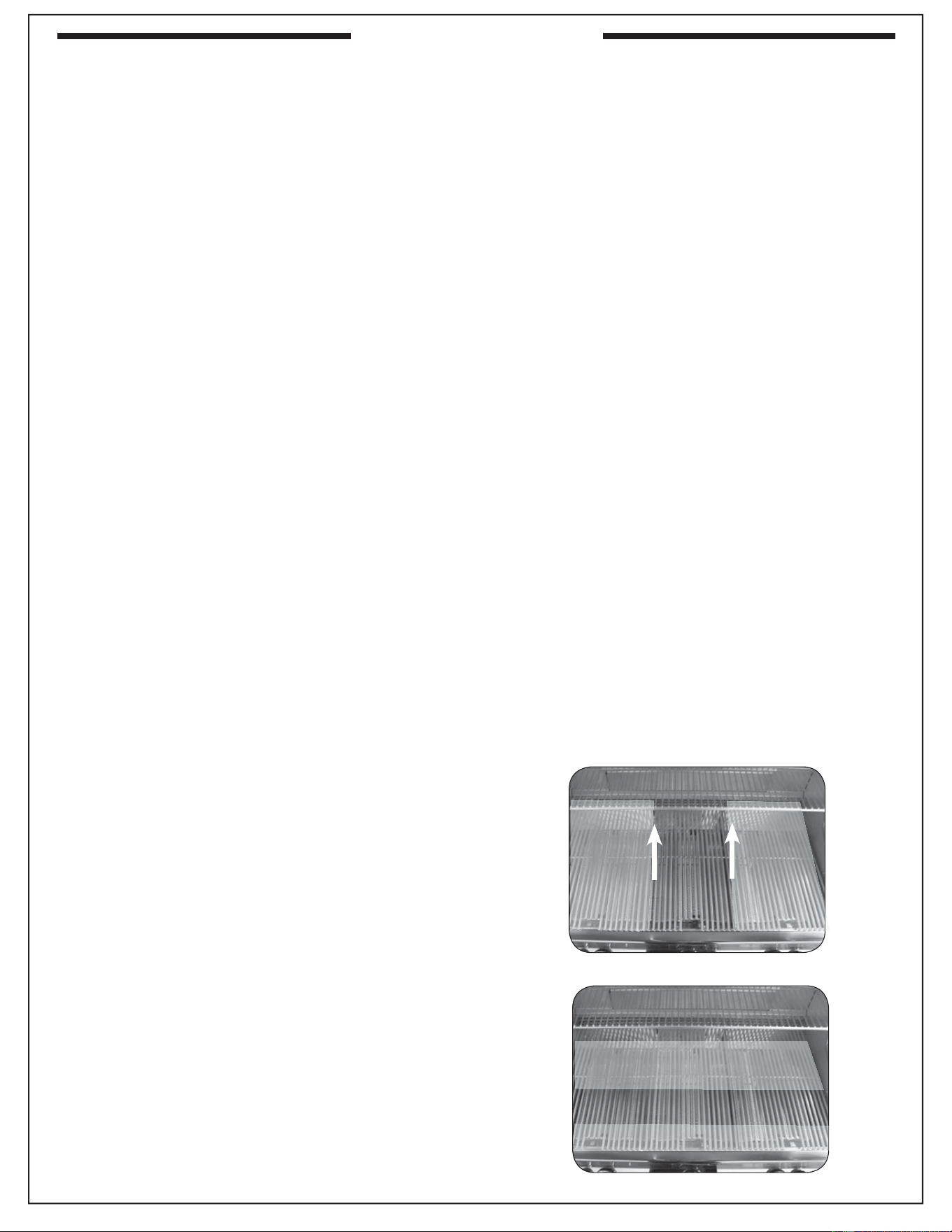
29
The art of grilling involves learning the nuances of your
grill and knowing how various cuts of meat and other
foods cook on it under different settings and conditions.
Each grill will be unique due to its configuration
and how it is positioned or installed. This section
contains information about how Fire Magic grills were
engineered, which will help you in learning how your
grill responds to the way you use it.
COOKING ZONES
Your grill is divided into three cooking zones, each
corresponding to a burner. Burners are numbered
starting at one (1) on the left, going to three (3) on the
right (see Fig. 29-1). The cooking zones are monitored
by the digital thermometer.
Note: E1060 models contain an additional cooking
zone, on the far left of the grill. This zone is not
monitored by the digital thermometer.
Each cooking zone temperature is designed to be
controlled individually by the burner control knob.
Specifi c zones are better suited to specifi c types of
cooking because of features such as being adjacent
to a fi re wall or away from the smoker drawer.
GRILL HEAT DISTRIBUTION - MAIN BURNERS
The heat level at each part of the grill has been
engineered for specifi c purposes. Knowing the heat
distribution for each burner will allow you the best
possible food positioning when grilling.
CAUTION: Even the coolest part of the grill is too
hot to be touched during operation of
the grill.
The front of the grill is designed, for safety reasons,
to be the coolest part of the grill. If you look directly
down on the grill top, while it is off and cool, you can
see this portion of the grill, where the front end of each
burner stops and the slope of the inner grill fi re wall
begins. This area also loses heat most rapidly when
the oven lid is opened (see Fig. 29-2).
From the front of the grill moving toward the back,
the heat rises gradually until just above the burner’s
front edge, where it rises rapidly to a fairly even
temperature refl ected by the digital thermometer.
The heat continues to rise gradually until it reaches a
maximum directly above the place where the two lobes
of each burner connect (see Fig. 29-2). From there to
the back of the grill, heat diminishes moderately. This
supports the desired temperature for the warming
rack and prevents heat from becoming excessive at
the back fi re wall of the grill.
GRILL HEAT DISTRIBUTION - IR BURNER
Infrared burners are designed for even, searing
heat across their whole surface. Because the heat
is radiant, it tends to heat the food you are cooking
directly without heating the air around it as much as
a conventional burner.
SMOKER DRAWER USE
When using a single cooking zone with the smoker
drawer, use zone 1. It will minimize burner heat on the
fl avor drawer and maximize a circulating convection
current that will draw the smoke fl avor into the food.
WIND CONSIDERATIONS
Wind direction can have an effect on the grill,
especially with the oven open. For maximum stability
and convenience, position the grill so that the oven
opens toward any prevailing wind (Fig. 29-1).
1
32
Fig. 29-1
Orient grill so prevailing wind
blows in this direction
Fig. 29-2
Medium heat
Medium heat
High heat
Low heat
GRILLING TIPS
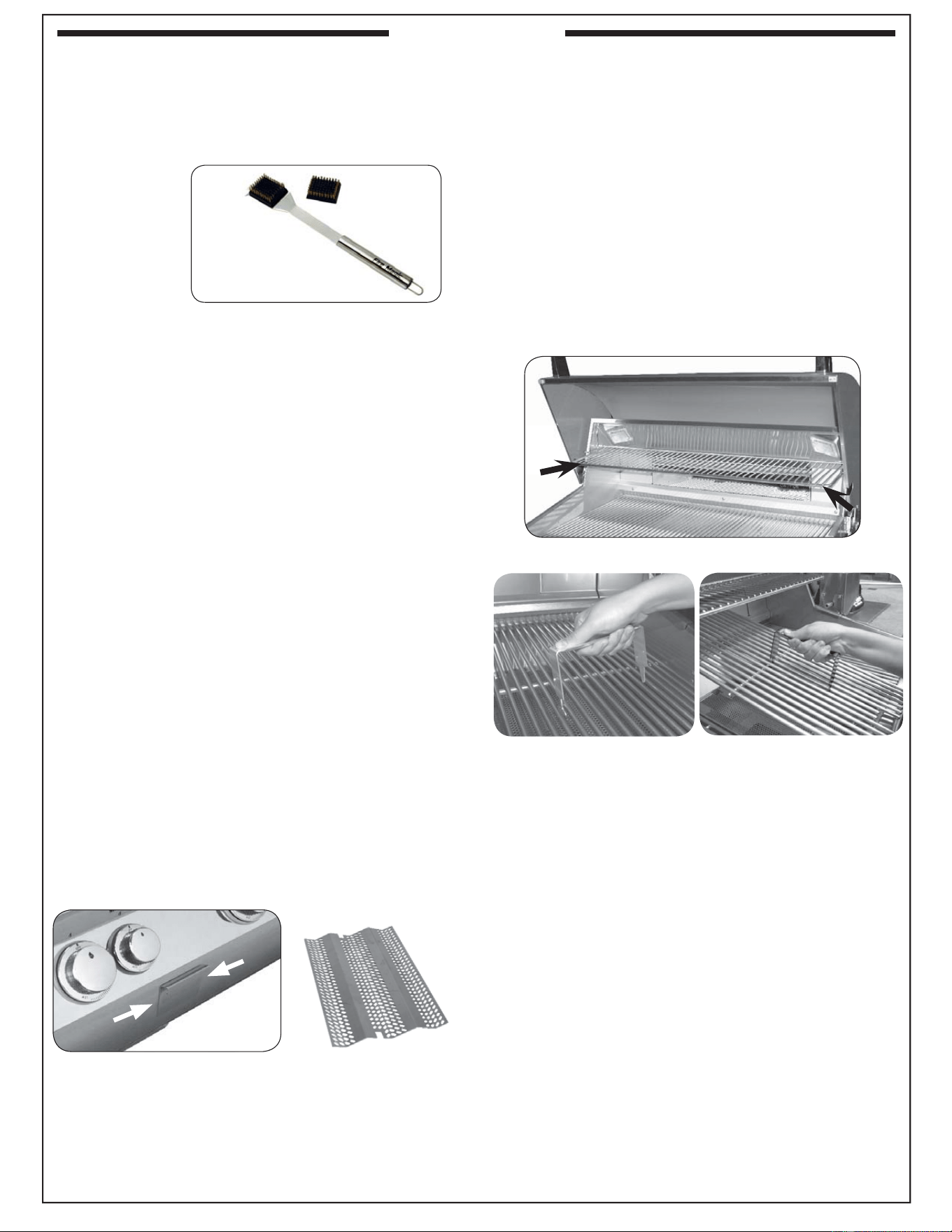
30
THE COOKING GRID LIFTER
Hold the grid lifter by gripping the center section with the
prongs pointing down (use an oven mitt or heavy glove
if the grill is hot). Insert the notched end of the grid lifter
into the cooking grid, in front of the midway point (front to
back; Fig. 30-3), and central (left to right; Fig. 30-4).
Twist the grill lifter (clockwise or counterclockwise) so
the handle is parallel to the grill rods. This “seats” the
spiked end of the grid lifter between two rods, enabling
you to safely lift out the grid. Lift slowly and adjust the
grid lifter, if necessary, for balance.
Placement of the grid lifter in cooking grid
Fig. 30-3
Fig. 30-4
THE DRIP TRAY
The drip collection system allows you to brush or scrape
excess dried residue from the grilling area directly into
the drip tray (see PARTS LIST for drip tray location).
THE GRILL BRUSH (OPTIONAL)
Purchase a Fire Magic
®
stainless-steel grill brush (sold
separately) to keep your grill cleaner. It comes with
scraper for large particles and a replaceable head with
brass bristles for overall cleaning.
Grill brush with replacement head
Fig. 30-1
THE WARMING RACK
The warming rack (Fig. 30-2) is packed separately.
To install the warming rack, lift the front of the rack
up slightly and insert the rack hangers into the two
holes in the back of the inner oven hood just above the
backburner. Then lower the front of the rack into a level
position to lock the rack in place.
To remove the warming rack, lift up on the front of the
rack until the rack hangers pull free from their supporting
holes.
Note: Removing the warming rack before using the
rotisserie will leave more clearance for the
meat being cooked.
Fig. 30-2 Warming rack in place inside oven
Flavor grid
THE FLAVOR GRID(S)
Place each fl avor grid directly over a burner. The solid
areas of the grid should rest over the tabs found on the
burner. See Fig. 30-5.
Note: This allows heat from the burners to be evenly
distributed throughout the cooking area. The
fl avor grids heat and cool quickly, making the
grill very responsive to changes in heat from
the burners.
Fig. 30-5
FLAVOR FROM WOOD CHIPS OR CHARCOAL
You can add wood chips, wood chunks, or the natural
wood charcoal of your choice to the smoker drawer (Fig.
30-5) or the fl avor grid (Fig. 30-6). Heat wood chips in the
smoker drawer by lighting the smoker burner using the
smoker control and zone 2 ignitor. When using the fl avor
grid, we recommend placing wood outside the direct
cooking zone or wrapping it in perforated aluminum foil.
Soaking wood before use will slow burning and increase
smoke fl avor. Wood and charcoal ash will remain in the
fl avor grid and drawer after use. Either can be easily
removed and cleaned when unit has fully cooled. The
smoker drawer is water-tight, allowing liquid fl avorings
to be added as well.
Wood chip smoker drawer
Fig. 30-5
Fig. 30-6
Fig. 30-6.
ACCESSORIES
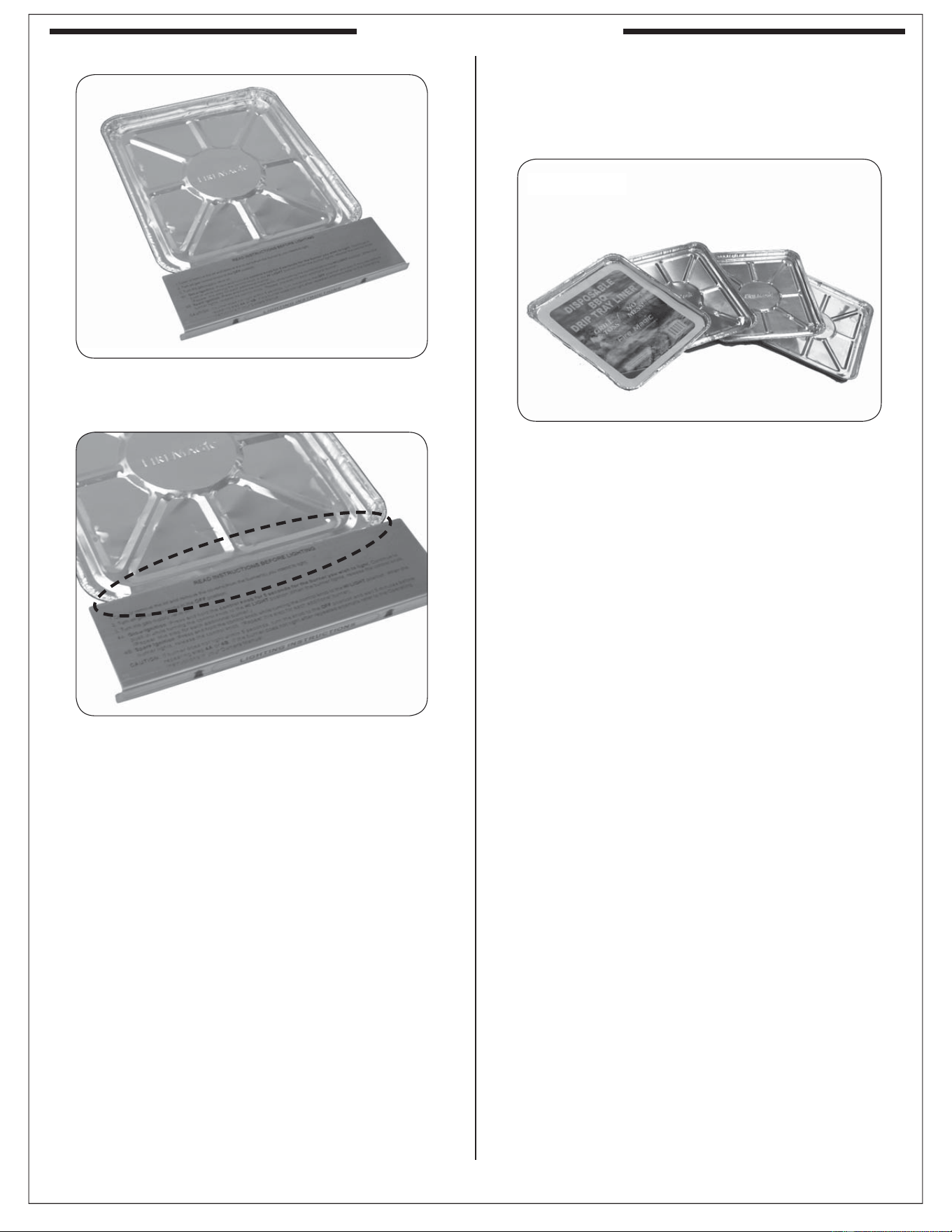
31
Drippings from grilling flow through specially
designed channels and collect in the drip tray.
Check the drip tray regularly and empty when
required.
Your grill includes a pack of four (4) Fire Magic
®
drip tray liners (Fig. 31-1). For your convenience
in cleanup, place a liner into the drip tray before
grilling.
To fi t a liner into the drip tray, pull out the tray and
set it on a fl at, level surface. Place the liner in the
drip tray as shown in Fig. 31-2 and carefully insert
the tray back under the control panel.
Note: Be sure that the liner is properly placed into
the the drip tray. The front of the liner must
fi t under the drip tray's lighting instruction
plate (see 31-3 detail).
After each use, wait for the grill to cool and carefully
pull out the drip tray to check it. When a liner is
nearing full, carefully lift it out of the drip tray, lifting
with both hands to keep the tray level until it is
safely discarded. Then insert a new drip tray liner.
Order more drip tray liners through your local Fire
Magic
®
dealer.
Note: The foil tray liner is also useful for setting on
burners to cover them and catch drippings
directly during rotisserie only cooking.
Note: For models with match holders attached
inside the drip tray, place the match holder
off to one edge of the pan (Fig. 31-3). If
necessary, mold the foil liner around them
and the other features of the tray to create
enough clearance space to open and close
the tray without catching the liner.
Fig. 31-1
Be sure liner fi ts under lighting instruction plate
Pull out the drip tray and place liner
Fig. 31-2
Fig. 31-3
Note: There are easy to follow lighting instructions
etched onto the top of the drip tray handle.
FIRE MAGIC
®
DRIP TRAY
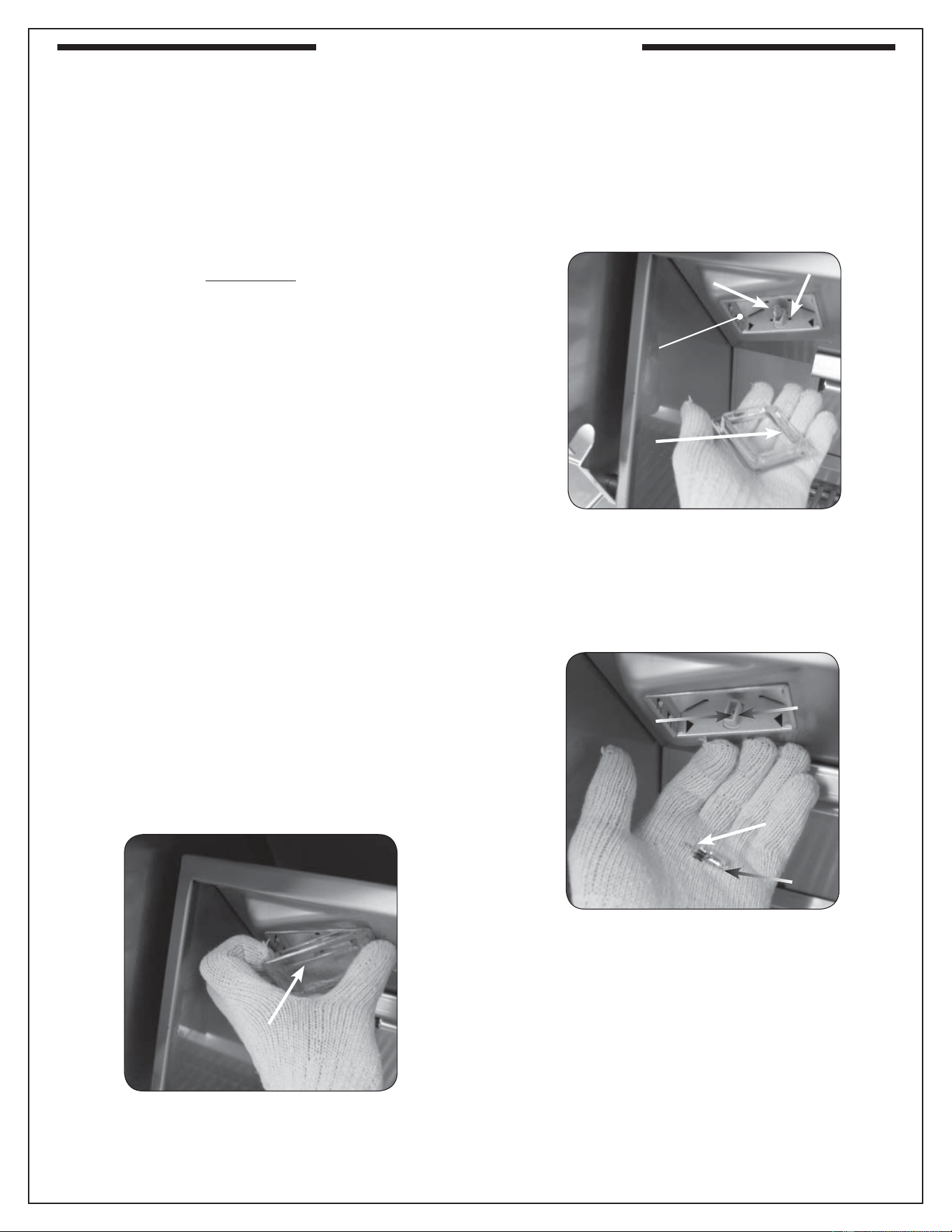
32
Fire Magic
®
Echelon grills are all engineered with the
conveniences of electrical power for illuminating and
igniting the grill.
To replace any Echelon oven light, follow the
instructions below.
Important: ONLY REPLACE WITH 12V / 10 WATT
HALOGEN BULB(S).
WARNING
To protect from potentially sharp sheet metal and
glass, wear gloves and safety glasses during this
procedure.
1. Turn all burner control knobs to the OFF position
and shut off the gas supply to the grill at the source
(tank valve for propane units or gas line shut-off
valve for natural gas units.)
2. Disconnect supply of external electrical power to
the grill.
CAUTION: Wait for the grill, oven, lens, light bulb,
and fi xture to cool before proceeding to
the next step.
3. Open the oven lid.
Important: Place one hand directly below the glass
lens and prepare to catch it when it is
detached.
4. Carefully insert a standard fl at head screwdriver
or thin plastic spatula between the glass lens and
the stainless steel on which the light is mounted
and gently pry the glass lens out in such a way
that the stainless steel is not scratched (twisting
the screwdriver handle, for instance). Catch the
lens and set it safely aside.
Note: You may wish to take this opportunity to clean
the lens with a standard household window
cleaner and then dry it completely.
5. Wearing a pair of gloves, reach into the fi xture,
gently grab the bulb, and pull it straight out of the
fi xture so that the two pins at the base of the bulb
come all the way out.
Important: Bulb is halogen. DO NOT TOUCH with
bare hands. Oils from hands drastically
reduce bulb life.
Note: It may be helpful to rock the bulb gently
backward and forward while pulling it out.
6. Inspect the old bulb for broken glass or fi lament.
Note: It may be benefi cial to test a suspect bulb
in one of the other light fi xtures known to be
working and turn the power back on to be
certain the bulb is actually not working.
7. Insert the new 12V / 10 watt halogen bulb into the
socket so that both pins slide all the way into the
two holes in the bottom of the socket.
8. Place the lens back into the fi xture opening with
the curved cut-out on the bottom and snap it back
into place.
Fig. 32-1
Lens
Fig. 32-3
Bulb
Prongs
Socket
Holes
Fig. 32-2
Fixture
Socket
Curved
cut-out
top of
lens
Bulb
REPLACING HALOGEN BULBS
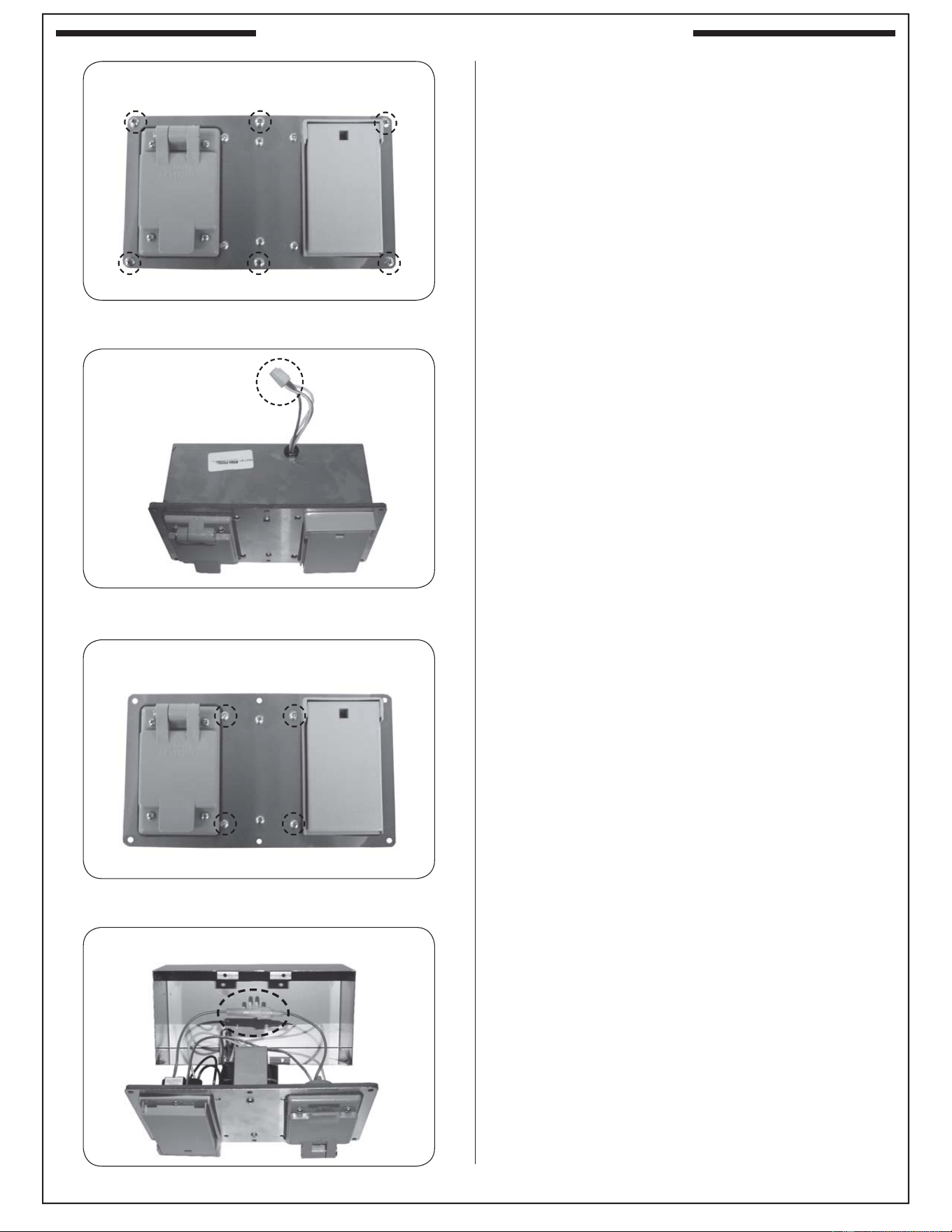
33
POWER SUPPLY FUSE REPLACEMENT
1. The power supply box is located on the right
side of the grill (reference the PARTS LIST).
2. Using a phillips screwdriver, remove the 6 large
screws found on the cover of the power supply
box (see Fig. 33-1).
3. Slightly pull out the box to expose the wiring,
and disconnect the wire harness (see Fig. 33-2).
Completely remove the box from the grill for
ease of fuse replacement.
4. Remove the 4 small screws found on the cover
of the power supply box (see Fig. 33-3).
Note: The 2 center screws do not need to be
removed.
5. Carefully open the box by pulling its cover away.
You may need to feed the wire harness into the
box to provide enough slack to open on the
other end. Then “push in and twist” the fuse
holder (red wire), exposing the fuse. See Fig.
33-4.
6. Replace the fuse accordingly (3AG 2 AMP).
Slightly pull out box and disconnect wire harness
Fig. 33-2
Disconnect
here
Remove 6 large screws
Fig. 33-1
Carefully open box and replace fuse (red wire)
Fig. 33-4
Remove 4 small screws
Fig. 33-3
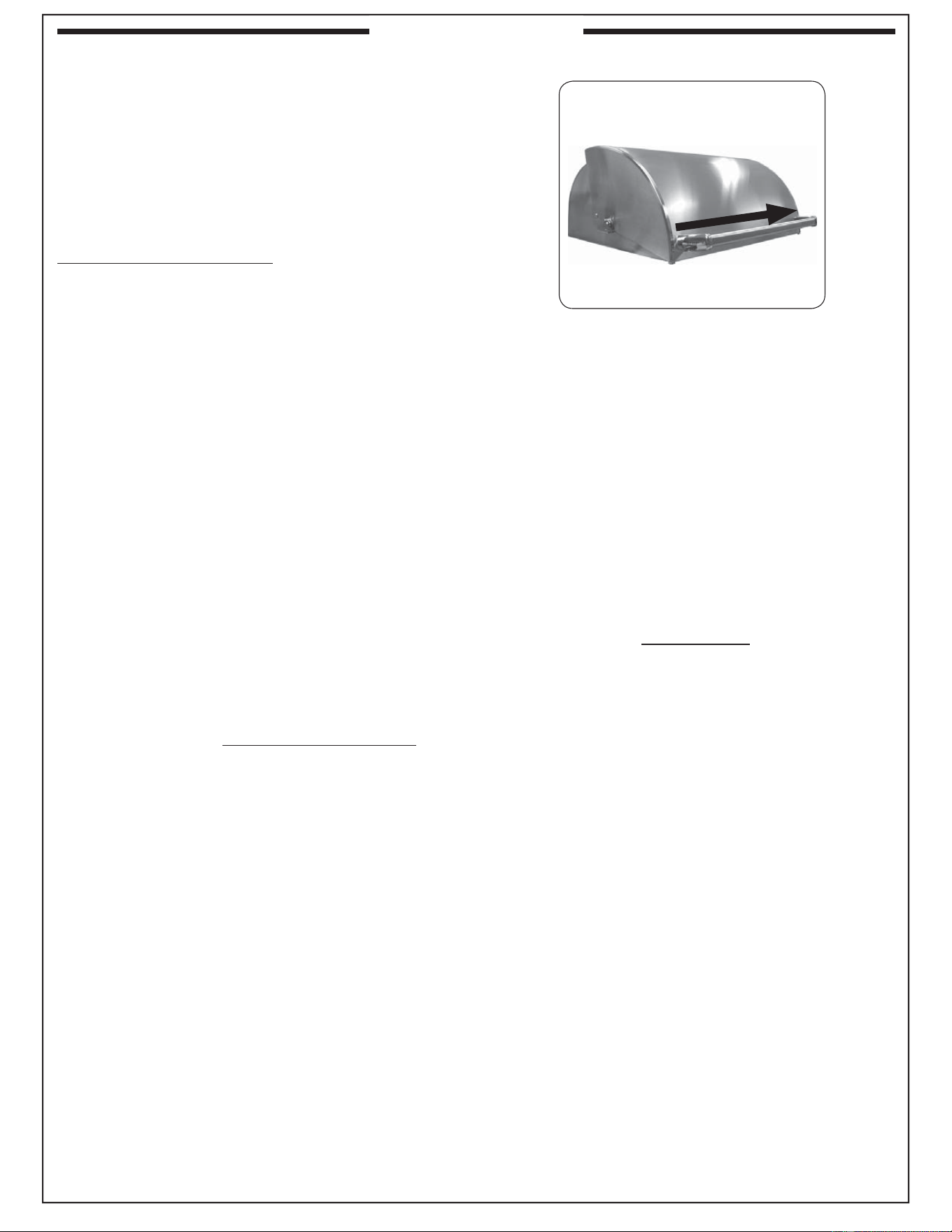
34
Fig. 34-1 - Wipe with grain
PROTECTING YOUR APPLIANCE FROM THE
WEATHER
An optional heavy-duty cover will protect your
appliance’s fi nish and protect your investment. The
water repellent cover will protect your appliance from
the weather. Always cover your appliance when not in
use. (Allow to cool before covering.)
Please specify the model number and serial number
of your appliance when ordering a cover.
APPLIANCE MUST BE COMPLETELY COOL WHEN
CLEANING. DO NOT SPRAY ANY CLEANER OR
LIQUIDS ON THE APPLIANCE WHEN HOT.
The appliance must be cleaned as often as once a month
(depending on use) to prevent grease build-up and other
food deposits.
INTERIOR
THE BURNER PORTS AND CARRY-OVER SLOTS
MUST BE KEPT CLEAN TO ENSURE PROPER
IGNITION AND OPERATION.
Remove the burner (see orifi ce changing instructions)
and clean the ports and slots as required. (For Fire Magic
grills use Maintenance Kit part #MK-1.) Also inspect and
clean the burner inlet for insects and nests. A clogged
burner can lead to a fi re in the bottom of the appliance.
The inside of the appliance may be cleaned periodically
with oven cleaner if desired. Follow the oven cleaner
instructions for proper use.
Be careful not to get oven cleaner on the outside surface
of the appliance as it can permanently damage the fi nish.
EXTERIOR
Stainless steel surfaces when exposed to temperatures
produced by the grilling process will change color. The
stainless steel will change color from silver to brown
and blue. This can be removed by using stainless steel
cleaner.
Clean your appliance by fi rst using grill cleaner to remove
grease and dirt. Always wipe with the grain (See Fig.
34-1). Next, use stainless steel cleaner to restore the
stainless steel color (Note: not for mirror fi nish). Finish
by wiping your appliance down using polish wipes. To
clean the mirror panel (if applicable), use a quality
brand glass cleaner only, not any of the cleaners
mentioned above.
If your appliance is installed in a seaside (salt air) or
poolside (chlorine) location, it will be more susceptible
to corrosion and must be maintained/cleaned more
frequently. Do not store chemicals (such as chlorine or
fertilizer) near your stainless steel appliance.
Due to the nature of stainless steel, surface iron oxide
deposits may appear. Do not be alarmed – these deposits
are removable with stainless steel cleaner through prompt
and periodic maintenance. If not attended to promptly,
permanent pitting may occur.
By following these recommendations, you will enjoy the
beauty and convenience of your appliance for many years
to come.
IMPORTANT
IN THE EVENT OF A GREASE FIRE, IMMEDIATELY
SHUT OFF THE MAIN GAS VALVE TO THE GRILL.
KEEP THE LID OPEN AND ALLOW THE FIRE TO
EXTINGUISH ITSELF. A THOROUGH INSPECTION
BY A TRAINED SERVICE TECHNICIAN SHOULD
BE CONDUCTED BEFORE FUTURE USE OF YOUR
GRILL. THE SERVICE TECHNICIAN WILL CHECK
THE SYSTEM FOR GAS LEAKS AND WILL CHECK
ALL ELECTRICAL WIRING FOR DAMAGE. ALL GAS
LEAKS AND WIRING MUST BE REPAIRED PRIOR
TO FUTURE USE.
Wipe with grain
CARE & CLEANING
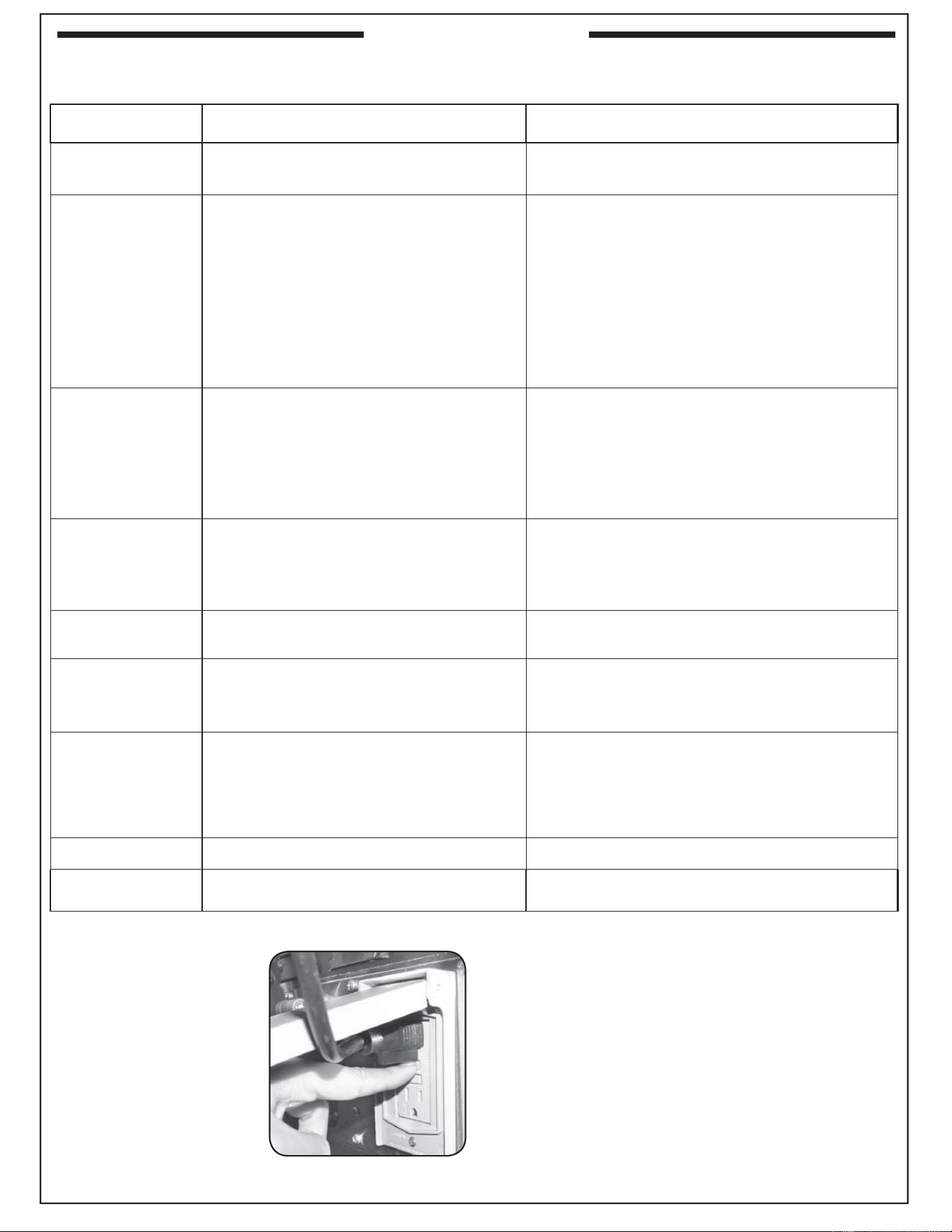
35
If you have trouble with this Fire Magic
®
grill, please use this list to identify the problem. By trying one or more of the solutions to
the possible cause, you should be able to solve the problem. If this list does not cover your present problem, or if you have other
technical diffi culties with the grill, please contact your local Fire Magic
®
dealer or visit our web site at www.rhpeterson.com.
PROBLEM POSSIBLE CAUSE CORRECTION
Accessories do
not operate
1. Power source not hooked to power supply
2. Master switch is off
1. Hook external power to grill.
2. Turn master switch on.
Ignition system
failure
1. Power source not hooked to power supply
2. Improper air shutter adjustment
3. Ignition wire disconnected
4. Low gas pressure
5. Front carry-over port
6. Blown fuse in power supply box
7. Igniter switch malfunction
1. Hook external power to grill.
2. Adjust air shutters.
3. Plug wires back into ignition switches.
4. Have the gas co. check pressure at grill.
5. Clean burner ports.
6. Replace the fuse. Reference the POWER SUPPLY
FUSE REPLACEMENT section.
7. Contact dealer for replacement.
Insuffi cient heat
1. Improper air shutter adjustment
2. Using propane orifi ce for natural gas
3. Low gas pressure/flame (propane)
4. Low gas pressure/fl ame (natural)
1. Adjust air shutters.
2. Check/change orifi ces.
3. Shut off all valves, including propane tank, and follow
lighting instructions exactly. (See important note*
below.)
4. Have the gas co. check pressure at grill.
Uneven heating
1. Burner ports partially blocked by debris
2. Small spiders or insects in burner
3. Improper air shutter adjustment
1. Remove burners and clean out ports.
2. Inspect burners and orifi ces for spider webs or other debris
that may block fl ow.
3. Adjust air shutter.
Thermometer not
operating properly
1. Thermometer malfunction
1. Reset thermometer by turning master switch off then
back on.
Interior & knob
light(s) not operating
1. Thermometer light switch not functioning
2. Interior or knob light(s) burned out
1. Reset thermometer by turning master switch off then
back on.
2. Contact dealer for replacement.
Burner goes out on
LOW
1. Valve "Low" setting needs adjustment
1. Light burner on HIGH, immediately turn to LOW
setting. Remove knob from valve and using a small fl at
screwdriver, slowly turn the adjustment screw in the
stem, a little at a time (30° to 45°), in either direction,
until the fl ame is approximately
1
/
4
" in height from
burner ports.
Rotisserie noisy
1. Rotisserie out of balance 1. Adjust rotisserie counterbalance.
Rotisserie doesn’t
turn but lights work
1. Elec. socket circuit breaker is tripped 1. Reset circuit breaker (See Fig. 35-1).
* Important: Propane tanks are equipped with a safety shutdown
device that may cause low or no gas/fl ame at the
burners if operating and lighting instructions are not
followed exactly. If you suspect the propane tank
safety shutoff is in effect, shut off all burner control
valves and the propane tank valve. Then read and
follow the LIGHTING INSTRUCTIONS exactly.
Lighting instructions are located in your owner’s
manual and printed on the grill’s metal drip tray. If the
problem persists, continue troubleshooting, or contact
your local dealer or R. H. Peterson for assistance.
To reset the cart electrical
outlets press in hard on the
reset (upper) button until you
hear an audible click.
Note: The main power feed
to the cart must be on
for the reset switch to
function. Open the grill
oven lid and turn on
the lights to verify that
the grill has electrical
power before resetting
the breaker.
Fig. 35-1
TROUBLESHOOTING
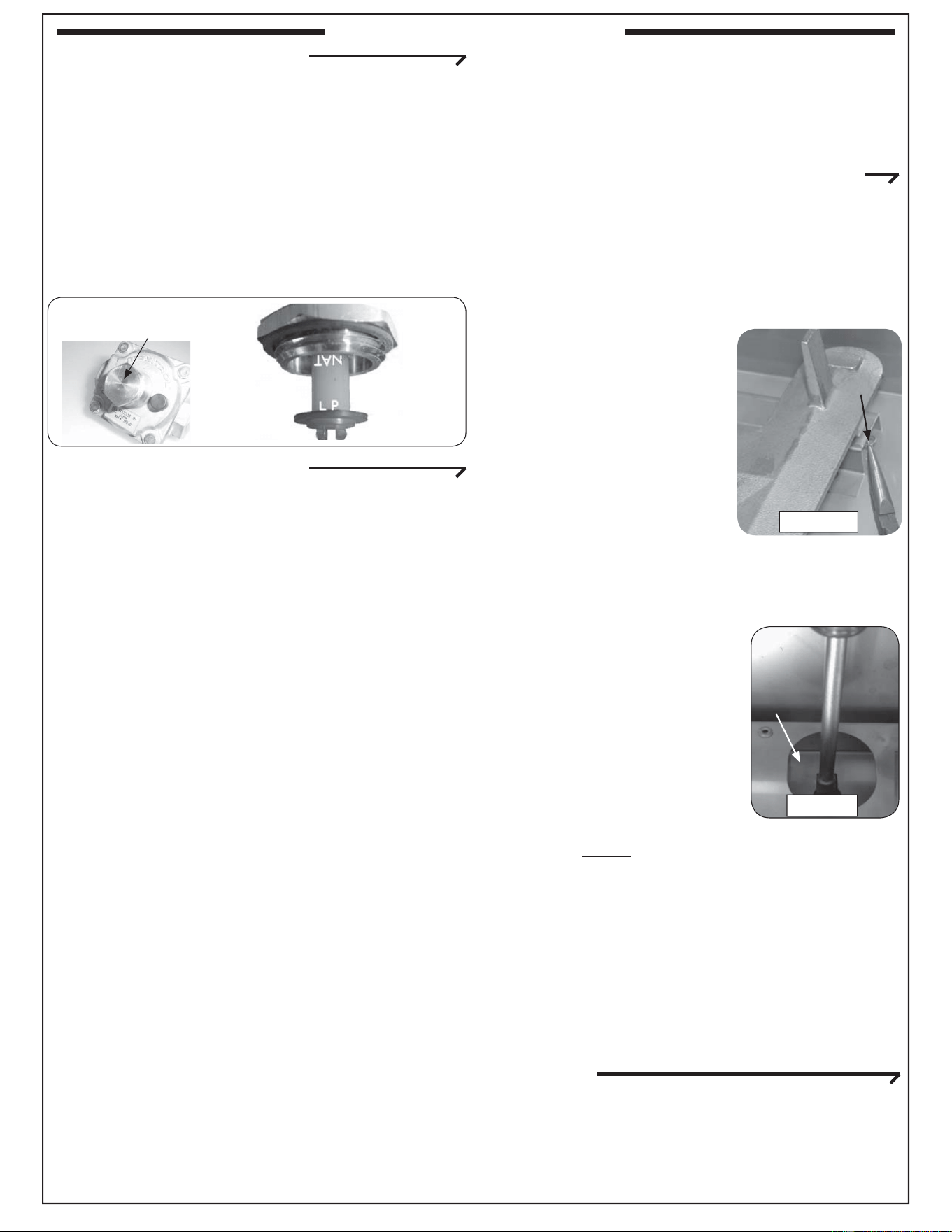
36
REGULATOR CONVERSION
The gas regulator, located behind the control panel, must
be set for the type of gas used to fuel the grill. To check
the regulator setting, remove the cap in the center of the
regulator (Fig. 36-1). Holding the cap vertical (see Fig.
36-2), the letters at the bottom of the plastic stalk indicate
the gas type for which the regulator is currently confi gured.
If the bottom of the regulator stalk does not indicate the
gas connected to the grill, remove the stalk from the cap,
invert, and replace into center of cap. Replace cap on the
regulator, screwing down until snug.
GAS ORIFICE CONVERSION
This Fire Magic
®
grill comes from the factory confi gured
for one type of gas as marked on the label behind the
control panel. When the grill is converted, this label
must be replaced or updated to identify the new gas.
Each burner has a brass orifi ce, which can be replaced
and must match the gas being used. When converting
the grill to a different gas, each burner’s orifi ce must
be replaced with the corresponding orifi ce for the new
gas.
Natural-gas to propane-gas conversions using a
tank internal to a portable grill require installation of
a propane tank holder (not included) for safety and
compliance with the ANSI standards referenced on
the cover of this document. This tank holder must be
purchased separately from the manufacturer.
Consult Table 1 at the beginning of this document to
determine the proper orifi ce sizes for each burner.
It is critical to the operation of each burner that its orifi ce
be fully inserted into the center of its orifi ce opening.
WARNING
Hazardous overheating will occur if a natural-gas
orifi ce is used with propane gas.
CAUTION: Make sure the grill is at a safe
temperature and isolated from gas and
electrical supplies before beginning.
For your safety, exercise caution, and make sure you
have adequate hand protection, such as gloves, when
handling metal parts.
Required tools:
• Phillips-head screwdriver (#2 medium)
• Needle-nose pliers
•
3
/
8
" hex nut driver (deep socket)
•
5
/
16
" hex nut driver
CHANGING THE MAIN BURNER ORIFICES
1. Remove the cooking grid from above the burner you
are working on by lifting it fi rst from the front and set
it aside.
2. Remove the fl avor grid from above the burner you
are working on and set it aside.
3. Remove the cotter pin from the left or right rear
burner anchoring peg by
pulling it straight out of the
cotter pin hole using fi ngers
or needle-nose pliers (Fig.
36-3).
CAUTION: The burner is
heavy.
4. Lift the back end of the burner
out of the anchor peg holes,
then move the burner toward
the back of the grill to clear
the gas inlet and set it aside.
5. Use a
3
/
8
" hex nut driver to remove the exposed
orifi ce (Fig. 36-4) and replace it with the correct
orifi ce for the new gas. (See
Table 1 at the beginning of this
document for orifi ce sizes.)
6. Replace the burner by first
sliding the open cylindrical
end of the burner around
the orifi ce, enveloping it and
centering on it, then lower the
back end anchor pegs into the
anchor peg holes.
Note: It is critical to the continued safe functioning
of the burner that the orifi ce is centered and
completely inside the burner gas conduit.
7. Reinsert the cotter pin into the right rear burner
anchor peg using fi ngers or needle-nose pliers.
8. Replace the fl avor grid and then the cooking grid so
that the cutout section of the cooking grid is lined
up with the lighting tube.
Repeat these steps for each main burner.
CHANGING THE BACKBURNER ORIFICE (IF
EQUIPPED)
1.
Remove the warming rack if installed and set it aside.
2. Remove the backburner cover.
3. Unscrew all backburner access plate screws using
a Phillips-head screwdriver and set them aside.
Main
burner
Cotter pin
Fig. 36-3
Fig. 36-4
Orifi ce
CONVERTING THE GAS TYPE
Fig. 36-1
Fig. 36-2
Read gas
type here.
(LP shown)
Gas regulator
Note the cap on top.
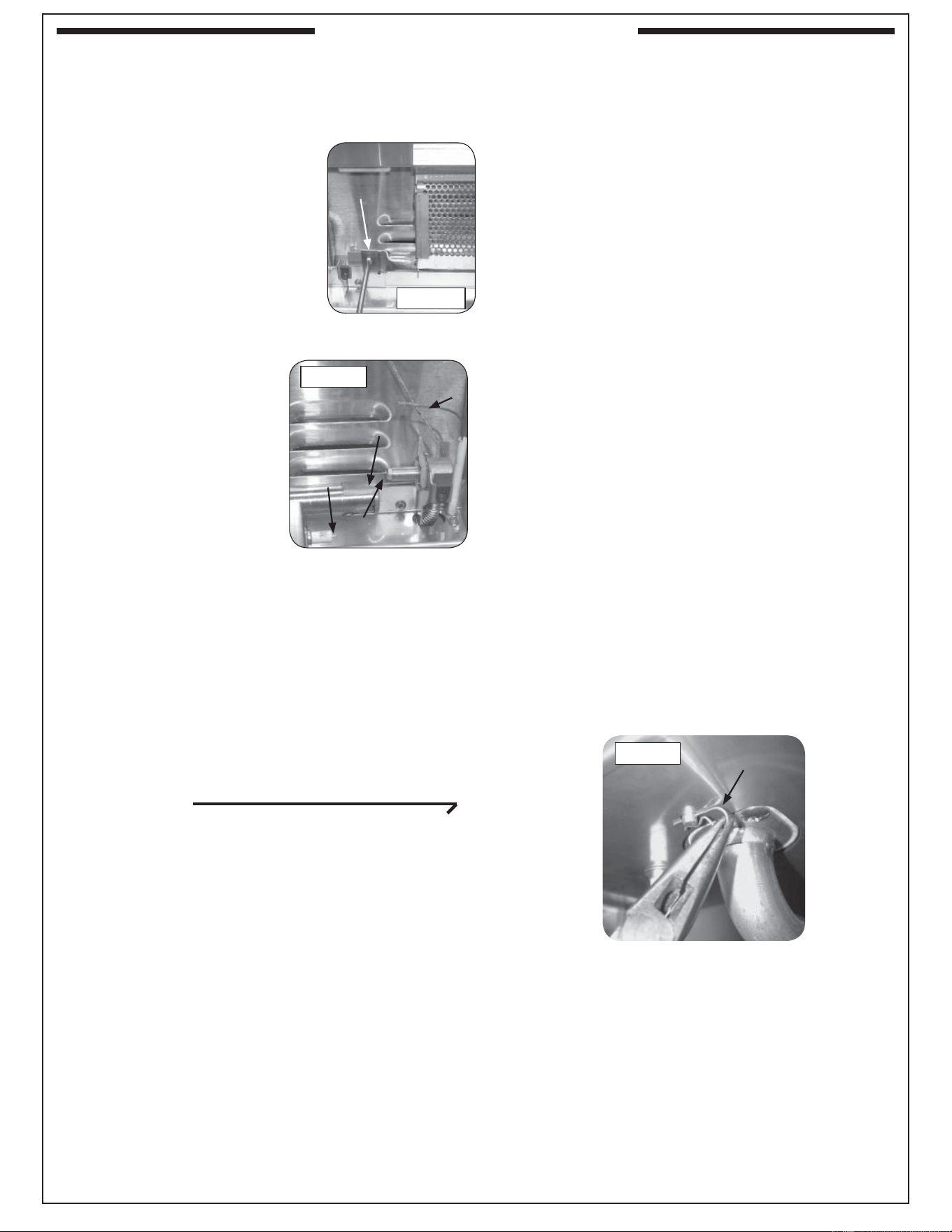
37
4. Remove the back panel by pulling the bottom toward
the front of the grill and rotating it upward and
outward until the two top tabs attached to back wall
of the oven can be removed from the slots in the top
of the plate.
5. Remove the backburner
assembly retaining screw on
the lower left of the backburner
using a Phillips-head
screwdriver and set it aside.
6. Pull the backburner assembly
to the left, clear of the orifi ce,
and then rotate the top forward
and downward and lay it face
down across the cooking grids
or main burners.
CAUTION: Be careful not
to damage the
wires connected
to the backburner
assembly.
7. Use a
3
/
8
" hex nut driver
to remove the exposed
orifi ce and replace it with
the correct orifi ce for the
gas being converted to
(See Table 1 for size).
8. Replace the backburner assembly and reinsert the
retaining screw. Center the backburner assembly so
that the backburner plate will fi t over it. Tighten the
retaining screw using a Phillips-head screwdriver.
9. Replace the back panel by fi rst inserting the tabs
above into the slots in the top of the plate and then
rotating the bottom downward and inward.
10. Replace all the backburner plate screws using a
Phillips-head screwdriver.
CHANGING AN INFRARED BURNER ORIFICE
(IF EQUIPPED)
1. Remove the cooking grid from above the burner on
which you are working by lifting it fi rst from the front
and set it aside.
2. Unscrew both lighting tube hex head screws with a
3
/
8
" hex nut driver.
3. Remove the infrared burner by lifting the back of the
burner up so that both tabs are freed from their slots,
then lift the burner toward the back of the fi re box
and upward. Set the burner aside.
4. Use a
3
/
8
" hex nut driver to remove the exposed orifi ce
and replace it with the proper orifi ce for the new gas
(see Table 1 for sizing).
5. Replace the infrared burner by fi rst sliding it over the
orifi ce, then lowering the two tabs under the back of
the burner into the slots in the back burner rest.
6. Reattach the lighting tube and replace the grid so
that the cut-out section is in front.
CONVERTING THE GAS TYPE
6. Pull the wire from the ignitor
electrode (Fig. 37-2), then remove
the backburner retaining screw
on the left of the backburner
(Fig. 37-1) using a Phillips
screwdriver.
Fig. 37-2
Backburner
orifi ce
Backburner
air shutter
Backburner
electrode
Electrode wire
(disconnected)
Fig. 37-1
Retaining
screw
CHANGING THE SINGLE SIDEBURNER ORIFICE
1. Lift the sideburner lid. Then remove the grill and
sideburner cap and set them aside.
2. Locate and remove the cotter pin from the
sideburner assembly underneath the sideburner
shelf using needle-nose pliers. Set it aside.
3. From the top of the sideburner shelf, lift the
sideburner upward while rotating the attached
tubing underneath away from the orifi ce near the
cart wall. Set it aside.
4. Use the nut driver to remove the exposed orifi ce
and replace it with the correct orifi ce for the gas
being converted to. (See Table 1 for correct orifi ce
sizes based on burner type and gas type.)
Note: To protect the manifold threads when placing
the new orifi ce, start the threading manually,
and then tighten with the nut driver.
5. Rotate the burner assembly back into place over
the orifi ce and fi rmly seated in the shelf.
6. Reinsert the cotter pin underneath the sideburner
assembly using needle-nose pliers. It may be
necessary to push downward on the burner
assembly from above to fully expose the cotter
pin hole. Rotate the inserted cotter pin so that it
is fl ush with the underside of the shelf.
7. Replace the burner cap by centering it on the
sideburner assembly and making sure it drops in
place.
8. Replace the grill with the grating running front to
back so that it drops fully down onto the shelf,
allowing the lid to close completely over it.
Fig. 37-3
Cotter
pin
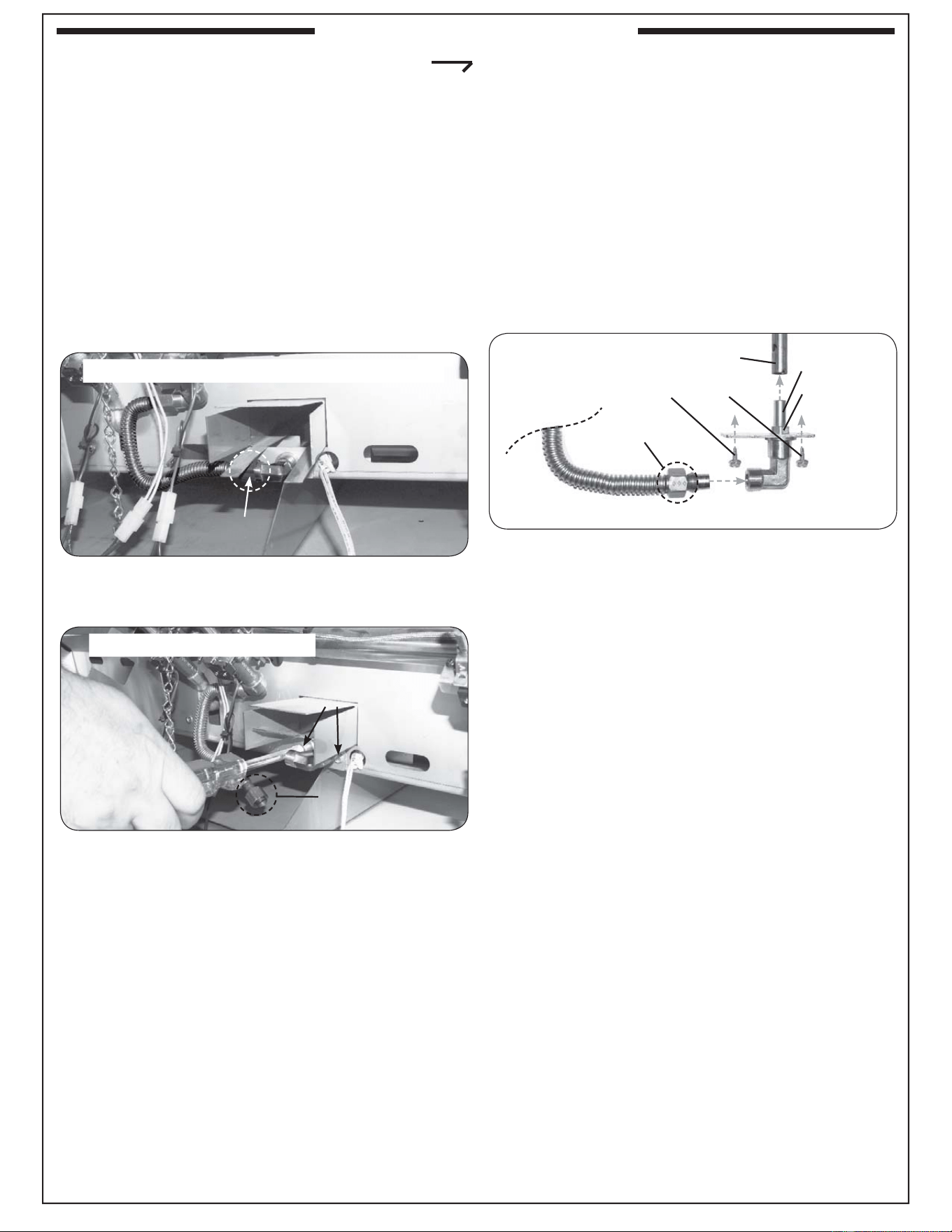
38
6. Carefully pull out the elbow. It will have the smoker
orifi ce attached to it. Remove the orifi ce using
a
7
/
16
" open end wrench and replace it with the
correct orifi ce for the gas being converted to (See
Table 1 for size). See Fig. 38-3 for a complete
orientation of the smoker assembly, shown outside
of the grill for clarity.
7. Once the new smoker orifi ce is installed onto the
existing elbow, reinstall the elbow and orifi ce into
the grill, being sure the orifi ce properly fi ts into the
smoker burner pipe. See Fig. 38-3 for detail.
8. Refasten the elbow using the two hex nuts.
9. Reconnect the fl ex connector to the elbow.
10. Reinstall the control panel, woodchip box, bezels,
and control knobs.
Important: When re-installing the control panel, set
it back over the front lip of the grill so that
the lid-closed-sensor plunger protrudes
through the hole on the upper right of the
control panel. Prior to opening the gas
shutoff valve, be sure the control knobs
are in the OFF position.
Fig. 38-3 Orifi ce removal (exploded view)
1/4" hex screws
5/8" nut
Smoker burner tube
Orifi ce
7/16" nut
CHANGING A SMOKER BURNER ORIFICE
1. Turn off the gas shutoff valve.
2. Pull off the control knobs. Slowly lift away the lighted
bezels to clear the valve stems, and carefully disconnect
the wires found on the back of the bezels (use your
fi ngernail.) Remove the woodchip box. Unscrew and
remove the control panel screws and washers.
3. Lift the control panel up and outward, allowing it to
rest on the internal chain(s).
4. Use a
5
/
8
" open end wrench to remove the fl ex
connector attached to the elbow coming out of the
smoker burner tube (see Fig. 38-1 and 38-2).
5. Use a
1
/
4
" hex nut driver to remove the two hex
screws surrounding the elbow (see Fig. 38-2).
CONVERTING THE GAS TYPE
Fig. 38-1 Open face & Remove fl ex connector
Unscrew and detach
fl ex connector
Fig. 38-2 Remove hex nuts
Remove hex nuts
from plate
Flex connector
Removed
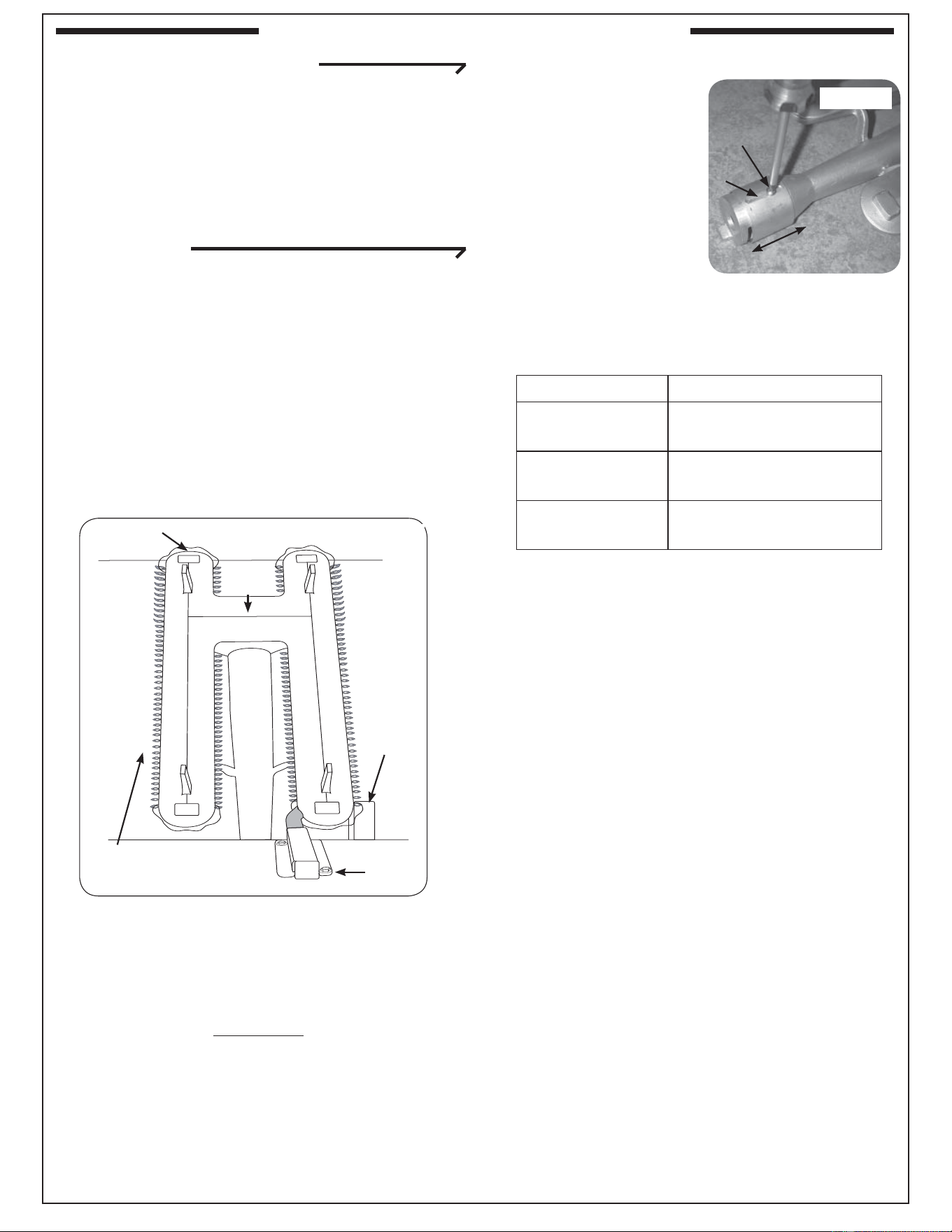
39
1. Follow the safety precautions and steps for
main burner removal
in the CHANGING
THE MAIN BURNER
ORIFICES section
(steps 1-4).
2. Adjust the air shutter
opening by loosening
the adjustment screw
with a screwdriver,
then sliding the air shutter backward or forward
to open or close the air shutter opening (see
Fig. 39-2).
Too large an air shutter opening will allow too much
air into the burner, which will cause the fl ames fi rst
to shorten and then to appear to lift up off the ports.
For the bottom of the fl ames to move closer to the
ports, close the air shutter more.
If the air shutter opening is too small or closed, the
fl ames will present consistently orange tips and
become “lazy,” slowly undulating back and forth.
For propane gas, ideal settings tend to be just
slightly open. For natural gas, which generally
requires less primary air than propane, the main
burner air shutter may be nearly closed.
3. Adjust the air shutter opening and then replace
the burner (steps 6-8 in the CHANGING THE
MAIN BURNER ORIFICES section)
4. Follow the lighting instructions in this manual to
light the burner.
5. Repeat steps 1-4 until the fl ames appear to
touch the burner ports, burning fairly steadily
and mostly blue (see Fig. 39-1).
AIR SHUTTER ADJUSTMENT
Important: Air shutters are preset at the
factory based on the gas the grill is
built to burn. However, altitude or
other local conditions may require
air shutter adjustment for proper
combustion.
MAIN BURNER
Flames from a properly adjusted main burner with
no wind or breeze present will appear fairly steady,
consistent, and mostly blue. If the tip of a fl ame were
to turn orange, it should only do so briefl y and then
become blue again. The fl ames will appear to burn
while touching the burner ports (see Figure 39-1).
If the fl ames have orange in them and appear to
undulate slowly from side to side, or if some of them
appear to lift off the burner instead of touching it,
then adjust the air shutter, as instructed below.
CAUTION: Turn all burner control knobs to the
OFF position and turn off the gas
supply at the source before removing
or adjusting a burner.
WARNING
Wait for the burner to be cool or use heavily insulated
heat-resistant gloves when handling the burner.
Adjustment
screw
Fig. 39-2
Adj.
slot
Close
Open
Shutter Setting Flame Condition
Open too far
Flames shorten and
lift off the burner
Ideal setting
Blue fl ames just
touching burner
Closed too far
“Lazy” fl ames with
orange in them
BURNER AIR SHUTTER ADJUSTMENT
Fig. 39-1
Blue fl ames on
burner ports
Bridge
between
burner
lobes
Lighting
tube
Ignitor
box
Carry-over
slits (on
each lobe)
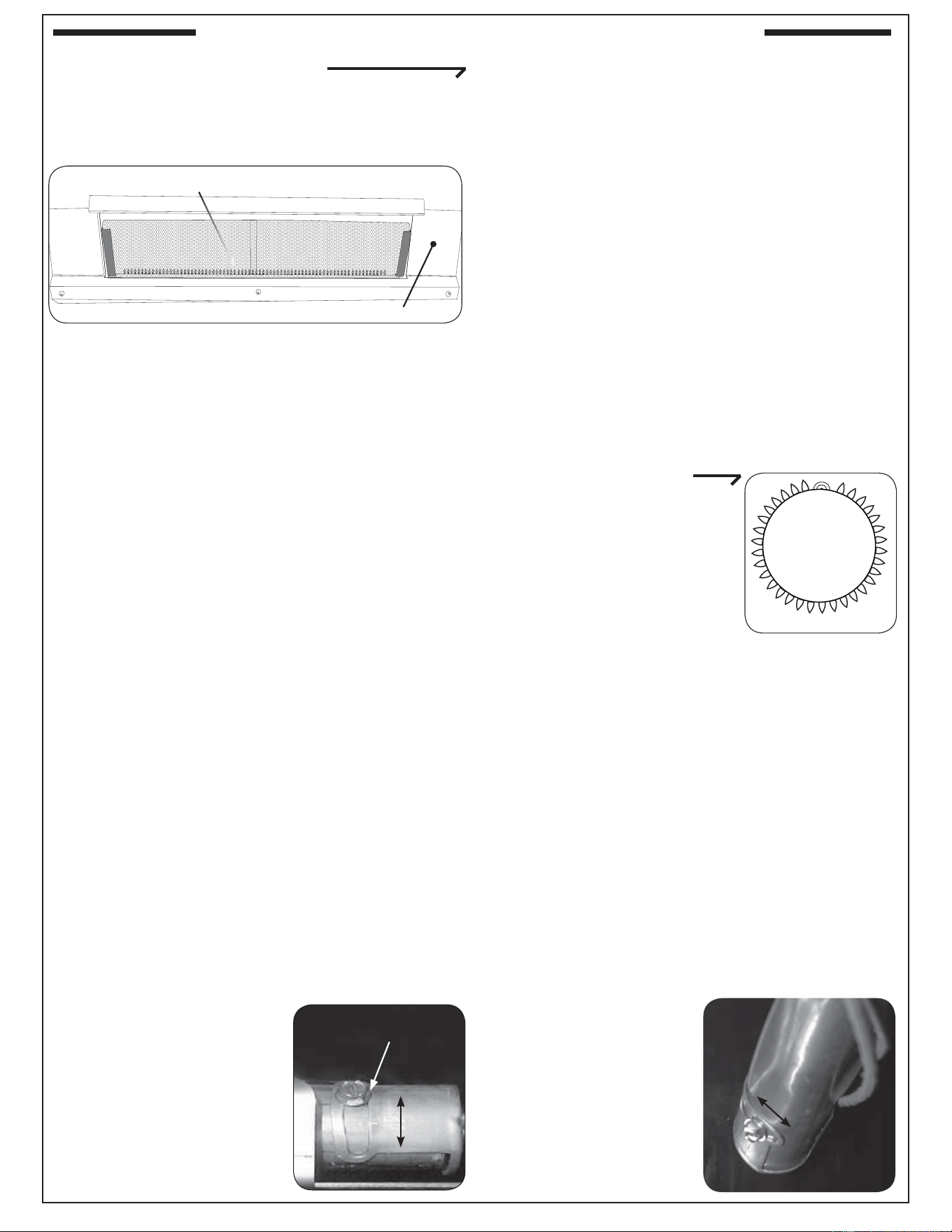
40
BACKBURNER (IF EQUIPPED)
The air shutter is set at the factory. However,
altitude or other local conditions may require air
shutter adjustment for proper combustion.
Flames from a properly adjusted backburner will
appear as a horizontal line of even blue fl ames along
the bottom of and behind the backburner grating. The
grating itself will glow red after it heats up.
Note: It is normal for the backburner to smoke
when it is fi rst used. Burning the backburner
on HI LIGHT for approximately 15 minutes
will eliminate the smoking.
If, instead of being blue and even, the backburner
fl ames appear to have orange in them and waver
slowly left and right, or if the fl ames appear to lift
off the burner, adjust the backburner air shutter by
following the steps below.
The backburner air shutter adjustment is located
behind the right side of the access panel in the back
of the oven, above the cooking grid.
Note: It is only necessary to remove the backburner
back panel, not the backburner, when
adjusting the backburner air shutter.
1. Follow the safety precautions and steps for
backburner back panel removal (steps 1-4) in
the CHANGING THE BACKBURNER ORIFICE
section.
CAUTION: The backburner air shutter can be
safely adjusted with the backburner lit
if it is adjusted using a long-handled
screwdriver or well-insulated fi re and
heat-resistant gloves.
2. Adjust the air-shutter opening by loosening the
adjustment screw with a
screwdriver, then sliding
the air shutter backward
or forward to open or
close the air shutter
opening (see Fig 40-2).
Watch the backburner
flames while adjusting
the air shutter.
Too large an air shutter opening will allow too much
air into the burner, which will cause the fl ames fi rst
to shorten and then to appear to lift up off the ports.
For the bottom of the fl ames to move closer to the
ports, close the air shutter more.
If the air shutter opening is too small or closed, the
fl ames will present consistently orange tips and
become “lazy,” slowly wavering left and right.
3. Continue adjustment until the fl ames appear to
touch the burner ports, burning fairly steadily,
consistently, and mostly blue (see Fig. 40-1),
then retighten the backburner air shutter
adjustment screw.
4. Replace the burner access plate (step 8 in the
CHANGING THE BACKBURNER ORIFICE
section).
Fig. 40-1
Blue fl ames behind burner screen
Back panel
Fig. 40-2
Backburner air shutter
adjustment screw
Open
Close
SINGLE SIDEBURNER
The air shutter is set at the
factory. However, altitude or
other local conditions may
require air shutter adjustment
for proper combustion.
The flames from a properly
adjusted sideburner will touch
the burner ports and appear mostly blue.
If they are orange, “lazy,” or lift off the burner ports,
then adjust the sideburner air shutter using the
following steps.
The sideburner air shutter is located underneath the
sideburner shelf on the left side of the unit, near the
wall of the cart. It can safely and easily be adjusted
while the sideburner is lit.
CAUTION: Do not touch the sideburner or the
shelf around it. They will be hot while
adjusting the sideburner air shutter.
1. Light the sideburner following the lighting
instructions in this manual.
2. Loosen the sideburner air shutter adjustment
screw, then use the
tip of the screwdriver
to open or close the
air shutter until the
flames appear blue
and touch the burner
ports.
3. Retighten the
adjustment screw.
Fig. 40-4
Close
Open
Fig. 40-3
BURNER AIR SHUTTER ADJUSTMENT (Continued)
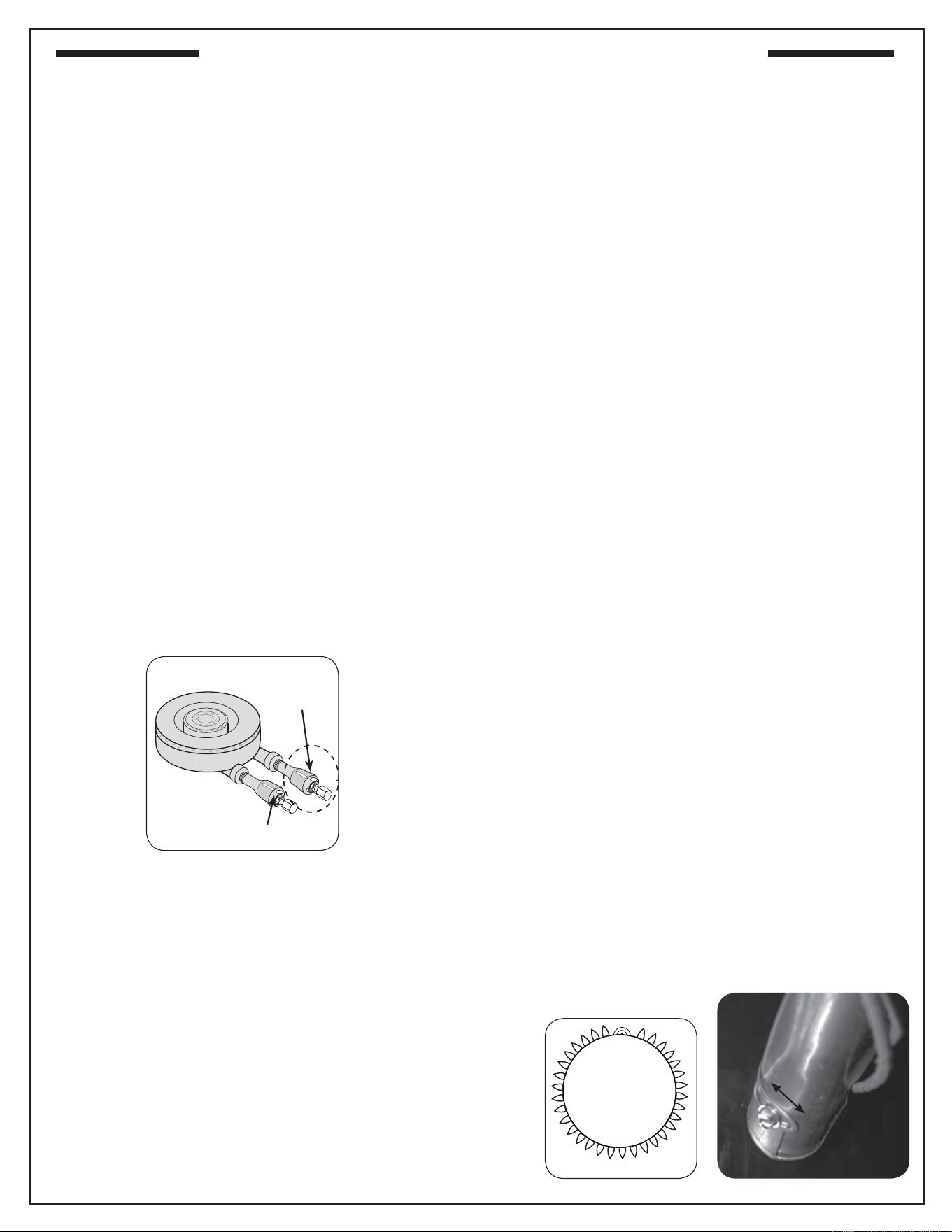
41
POWER BURNER
The fl ames from a properly adjusted power burner
will touch the burner ports and appear mostly blue.
If they are orange, “lazy,” or lift off the burner ports,
then adjust the air shutter using the following steps.
Power burner air shutter adjustment is located on
dual necks of the power burner where they connect
with the gas manifold and orifi ces, as show in Fig.
41-1.
CAUTION: NEVER handle a hot burner.
To adjust the air shutters:
1. Remove the cooking grid and collimator.
2. Lift the back of the burner upward so that the pin
in the bottom back clears the hole in the burner
rest.
3. Move the burner back away from the front of the
grill while continuing to lift the back upward so
that it clears the rear fi re wall.
4. Turn the shutter to the desired opening size
and replace the burner to test the effect on the
fl ame.
Burner fl ames should be mostly blue.
ADJUSTING THE LOW FLAME SETTING
After changing gas orifices and adjusting the
regulator to burn a new gas, adjust the height of the
fl ame with a valve in LOW position so that is is
low without going out. Use the small adjusting
screw in the center of the valve stem. This screw is
accessible by removing the valve knob, which pulls
straight off the end of the valve stem.
Fig. 41-1
Inner
burner
Outer burner
Air shutters
DOUBLE SIDEBURNER
The fl ames from a properly adjusted sideburner will
touch the burner ports and appear mostly blue.
If they are orange, “lazy,” or lift off the burner ports,
then adjust the sideburner air shutter using the
following steps.
The air shutters are located at the end of the burner
assemblies, behind the control panel. They can safely
and easily be adjusted while the unit is lit.
CAUTION: Do not touch the sideburner
surrounding top area, as it will be hot
while adjusting the air shutter.
1.
Remove the double sideburner knobs, bezels, and
control panel (only). (Reference IDENTIFICATION
OF GRILL CONTROLS section for details.)
2. Replace the two double sideburner control knobs
back on to the corresponding valve stems.
3. Light the sideburner following the LIGHTING
INSTRUCTIONS section.
4. Loosen the front burner air shutter adjustment
screw, then use the tip of a screwdriver to open
or close the air shutter until the fl ames appear
blue and touch the burner ports.
5. Retighten the adjustment screw.
6. Repeat for rear burner air shutter.
Should you have diffi culty accessing the
rear burner air shutter, you may shut down,
remove the rear burner (when cool), then
adjust the air shutter to the same opening
as the already adjusted front burner. (See
DOUBLE SIDEBURNER ORIFICE section
to remove rear burner.) Be sure to properly
reinstall rear burner when complete.
7. Once all adjustments are complete; be sure
the unit is off and remove the knobs, then
replace the control panel, bezels, and knobs.
Fig. 41-3
Close
Open
Fig. 41-2
BURNER AIR SHUTTER ADJUSTMENT (Continued)
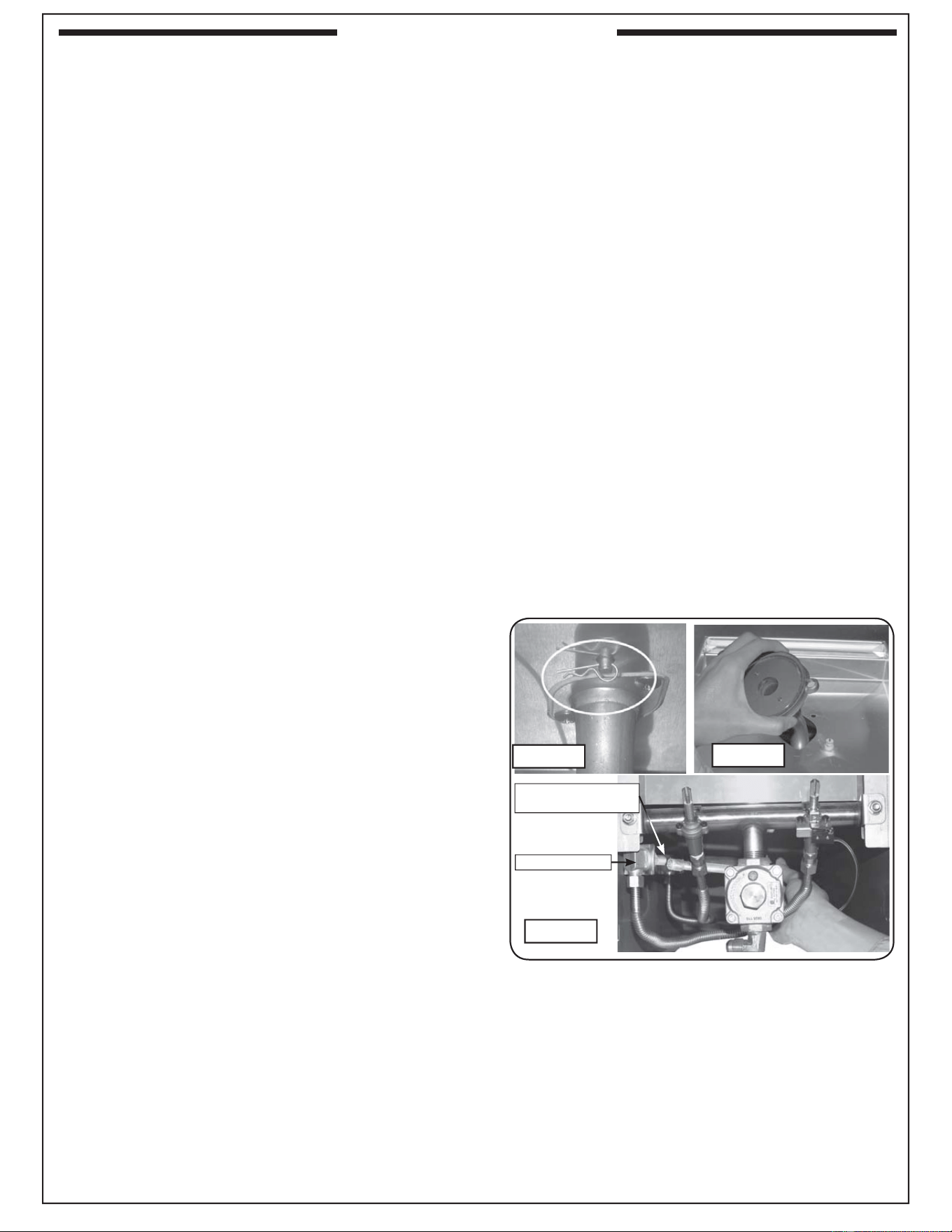
42
SAFETY
The right knob controls the front burner and the
left knob controls the back burner.
CAUTION: THE SIDEBURNER MUST COOL
DOWN BEFORE HANDLING OR
ADJUSTMENT.
Do not operate the sideburner with the cover
closed.
Be sure the sideburner has good ventilation, is free
of debris, and is away from fl ammable substances
before lighting.
Properly burning fl ames are mostly blue and are
steady and spread evenly around the burner.
STAINLESS STEEL SIDEBURNER COVER
Note: The cover is free-standing and is not
hinged in the back.
To remove the cover, carefully lift off using the built
in handle.
To replace the cover, put the back of the cover into
position against the back inner lip of the sideburner
grill rest and then lower the front into position so
that it covers the side burner opening entirely.
ORIFICE INSPECTION AND REPLACEMENT
Please refer to Table 1 for the correct orifi ce size.
Check the orifi ce size by following the instructions
below. The drill size is stamped on the orifi ce. If
the number is not visible you may have to remove
the orifi ce (as detailed below) to read the number
stamped on the side of the orifi ce.
If you are not sure you have the correct
sideburner orifi ce size (or wish to change the
orifi ce), follow the steps below.
CAUTION: If the burner has been in use, wait
until the burner and its components
are cool to the touch.
1. Turn off the gas shutoff valve. Remove
sideburner lid and lift off cooking grid.
2. Remove the double sideburner knobs, bezels, and
control panel (only). (Reference IDENTIFICATION
OF GRILL CONTROLS section for details.)
3. Reach up under the burner support and remove
the burner retaining clip (see Fig. 42-1), located
at the rear of the burner pipe.
4. Remove the burner cap and carefully lift
the burner up and out, clearing the ceramic
electrode (see Fig. 42-2), and pulling the burner
tube away from the orifi ce, located on the end
of the orifi ce holder on the left side of the unit
(see Fig. 42-3).
Note: You do not have to lift the burner completely
out of the unit to access the orifi ce.
5. Using a
3
/
8
” socket, remove orifi ce from the
orifi ce holder (see Fig. 42-3) and check the
number stamped on the orifi ce face.
Fig. 42-2
Fig. 42-1
Fig. 42-3
Orifi ce located at
end of orifi ce holder
Orifi ce holder
DOUBLE SIDEBURNER

43
6. If an orifi ce change is necessary, replace the
orifi ce with the correct sized one.
7. Replace the sideburner tube over the orifi ce,
aligning the burner over the electrode, taking
care not to detach it from the wire.
8. Replace the burner retaining clip (underneath
burner). Replace the burner cap.
9. Repeat steps 3 through 8 for the second burner,
then replace the grid and lid.
Important: If converting the gas type, see the
CHECKING AND CONVERTING
THE REGULATOR section before
replacing the control panel.
10. Once all adjustments are complete; be sure the
unit is off and remove the knobs, then replace
the control panel, bezels, and knobs.
DOUBLE SIDEBURNER
44
PLEASE KEEP A COPY OF YOUR SALES SLIP FOR PROOF OF PURCHASE
This warranty applies to the original purchaser and to single family residential use only. It commences from date of purchase, and is valid only with
proof of purchase.
This warranty does not cover parts becoming defective through misuse, accidental damage, electrical damage, improper handling, lack of routine
maintenance, storage, and/or installation. Product must be installed (and gas must be connected) as specifi ed in the instructions or operator’s
manual, by a qualifi ed professional installer. Accessories, parts, valves, remotes, etc., when used must be Peterson Co. product.
This warranty does not apply to rust, corrosion, oxidation, or discoloration, unless the affected component becomes inoperable. It does not cover
labor or labor-related charges.
This warranty specifi cally excludes liability for indirect, incidental, or consequential damages. Some states do not allow the exclusion or limitation of
incidental or consequential damages, so the above exclusion may not apply to you. This warranty gives you specifi ed legal rights, and you may have
other rights that may vary from state to state.
For additional information regarding this warranty, or to place a warranty claim, contact the R.H. Peterson dealer where the product was purchased.
TO REGISTER YOUR PRODUCT ONLINE GO TO: WWW.RHPETERSON.COM,
AND CLICK ON PRODUCT REGISTRATION. THANK YOU FOR YOUR PURCHASE.
LIFETIME WARRANTY - Fire Magic
®
cast stainless-steel burners, stainless-steel rod cooking grids, and stainless-steel housings are
warranted for as long as you own your Fire Magic
®
grill.
FIFTEEN-YEAR WARRANTY - Fire Magic
®
cast brass burners, brass valves, backburner assemblies (except ignition parts), and
manifold assemblies are warranted for 15 years from the date of purchase of your Fire Magic
®
grill.
THREE-YEAR WARRANTY - Fire Magic
®
sideburners and all other Fire Magic
®
grill components (except ignition and electronic
parts) are warranted for three (3) years from the date of purchase of your Fire Magic
®
grill.
Fire Magic
®
ignition systems (excluding batteries), electronic components (including lights and thermometers), and accessories are
warranted for one (1) year from date of purchase.
Robert H. Peterson Co. • 14724 East Proctor Avenue • City of Industry, CA 91746Robert H. Peterson Co. • 14724 East Proctor Avenue • City of Industry, CA 91746
Quality Check Date:_________________
Burner Orifi ces Nat. L.P. Leak Test: ___________ Model#: ___________________
Main: ____ ____ Burn Test: ___________ Serial#: ___________________
Back: ____ ____ Gas Type:
Nat. / L.P. Air Shutter: ___________________
Side/Power: ____ ____ Inspector: ___________________
Other: ____ ____
WARRANTY