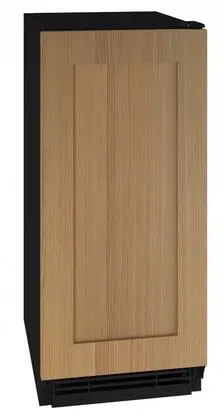
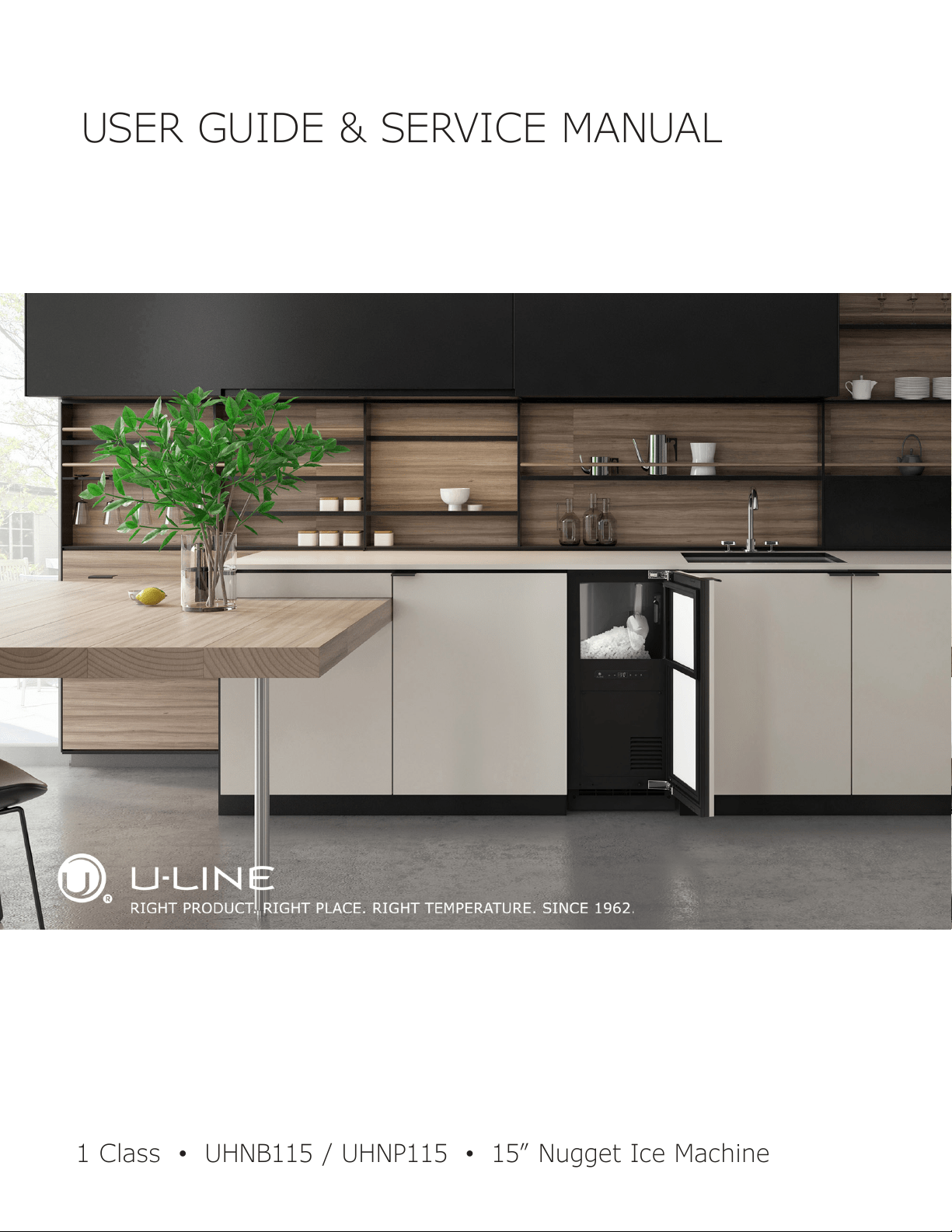
USER GUIDE & SERVICE MANUAL
1 Class
●
UHNB115 / UHNP115
●
15” Nugget Ice Machine
USER GUIDE & SERVICE MANUAL
u-line.com
Table of Contents
Intro
Safety
Safety and Warning
Disposal And Recycling
Installation
Environmental Requirements
Electrical
Cutout & Product Dimensions
Side by Side Installation
Water Hookup
Drain
Anti-Tip Bracket
General Installation
Integrated Panel Dimensions
Integrated Panel Installation
Grille Installation
Door Swing
Door Adjust
Maintenance
Cleaning
Cleaning Condenser
Extended Non-Use
Operating Instructions
Control Operation
Ice
Airflow and Product Loading
Service
Troubleshooting
Wire Diagram
Product Liability
Warranty Claims
Parts
Ordering Replacement Parts
R600a Specifications
System Diagnosis Guide
Compressor Specifications
Troubleshooting Extended
Control Operation - Service
Thermistor
Warranty

USER GUIDE
u-line.com
Introduction
WELCOME TO U-LINE
Congratulations on your U-Line purchase. Your product comes from a company with over ve decades of premium modular ice
making, refrigeration, and wine preservation experience. U-Line creates products focused on functionality, style, and inspired
innovations — paying close attention to even the smallest details. Applications include residential, outdoor, ADA height
compliant, marine, and commercial. Complete product categories include Beverage Centers, Wine Refrigerators, Ice Machines,
Refrigerators, Freezers, and Dispensers.
Our advanced refrigeration systems, large and exible capacities, and Built-In to Stand Out
®
clean integrated look allow you
to preserve the right product, in the right place, at the right temperature. Since 2014, U-Line has been part of the Middleby
family of brands. All products are designed, engineered, and assembled in Milwaukee, Wisconsin, USA, and select products
are available worldwide.
PRODUCT INFORMATION
Looking for additional information on your product? User Guides, Spec Sheets, CAD Drawings, Compliance Documentation,
and Product Warranty information are all available for reference and download at u-line.com.
PROPERTY DAMAGE / INJURY CONCERNS
In the unlikely event property damage or personal injury is suspected related to a U-Line product, please take the following
steps:
1. U-Line Customer Care must be contacted immediately at +1.414.354.0300.
2. Service or repairs performed on the unit without prior written approval from U-Line is not permitted. If the unit has been
altered or repaired in the eld without prior written approval from U-Line, claims will not be eligible.
GENERAL INQUIRIES
U-Line Corporation
8900 N. 55th Street
Milwaukee, Wisconsin 53223 USA
Monday - Friday 8:00 am to 4:30 pm CST
T: +1.414.354.0300
Email: sales@u-line.com
u-line.com
CONNECT WITH US
SERVICE & PARTS ASSISTANCE
Monday - Friday 8:00 am to 4:30 pm CST
T: +1.414.354.0300
Service Email: onlineservice@u-line.com
Parts Email: onlineparts@u-line.com
Designed, engineered and assembled in WI, USA
3
USER GUIDE
u-line.com
Safety and Warning
Safety and Warning
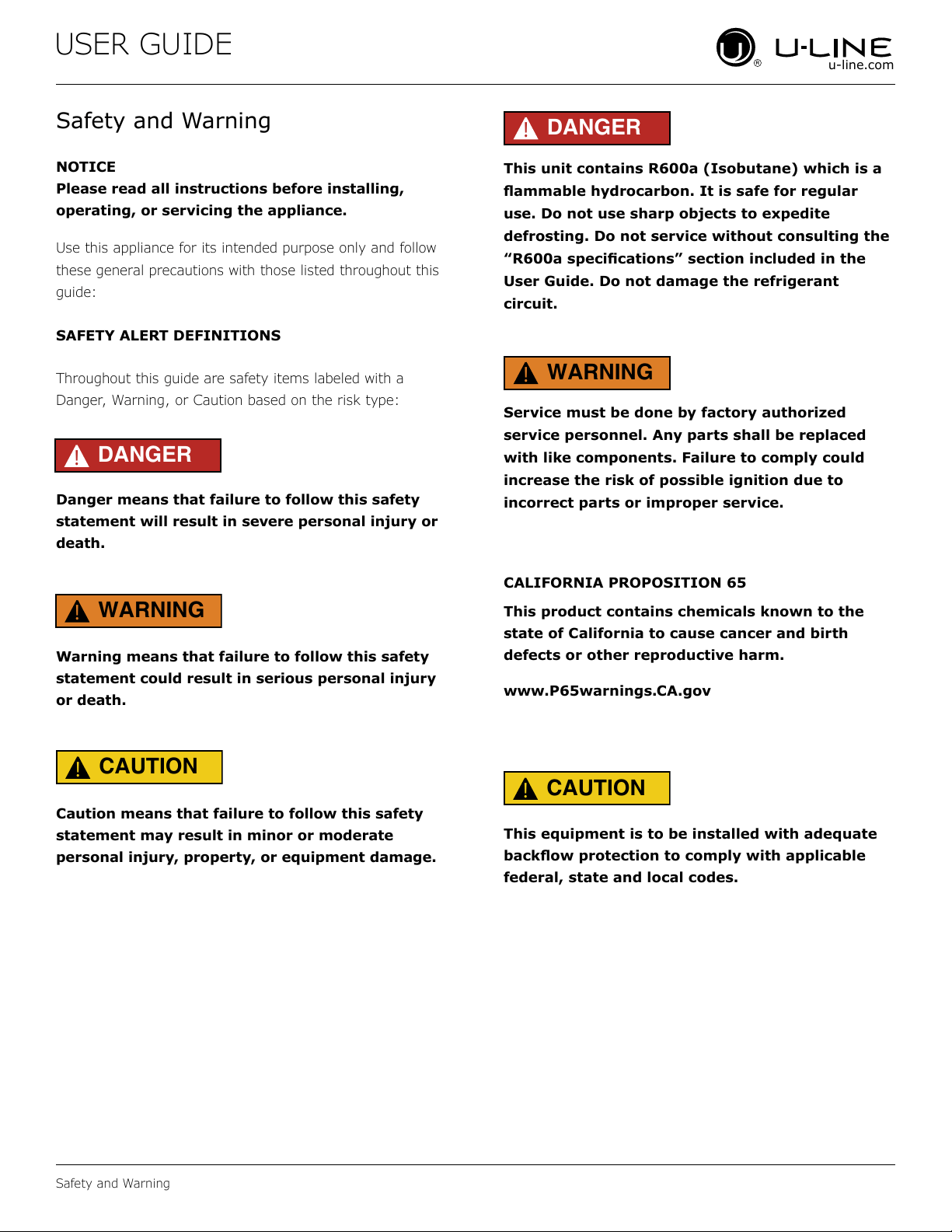
NOTICE
Please read all instructions before installing,
operating, or servicing the appliance.
Use this appliance for its intended purpose only and follow
these general precautions with those listed throughout this
guide:
SAFETY ALERT DEFINITIONS
Throughout this guide are safety items labeled with a
Danger, Warning, or Caution based on the risk type:
Danger means that failure to follow this safety
statement will result in severe personal injury or
death.
Warning means that failure to follow this safety
statement could result in serious personal injury
or death.
Caution means that failure to follow this safety
statement may result in minor or moderate
personal injury, property, or equipment damage.
This unit contains R600a (Isobutane) which is a
ammable hydrocarbon. It is safe for regular
use. Do not use sharp objects to expedite
defrosting. Do not service without consulting the
“R600a specications” section included in the
User Guide. Do not damage the refrigerant
circuit.
Service must be done by factory authorized
service personnel. Any parts shall be replaced
with like components. Failure to comply could
increase the risk of possible ignition due to
incorrect parts or improper service.
CALIFORNIA PROPOSITION 65
This product contains chemicals known to the
state of California to cause cancer and birth
defects or other reproductive harm.
www.P65warnings.CA.gov
This equipment is to be installed with adequate
backow protection to comply with applicable
federal, state and local codes.
DANGER
!
DANGER
!
WARNING
!
CAUTION
!
CAUTION
!
WARNING
!
4
USER GUIDE
u-line.com
Disposal and Recycling
Disposal and Recycling
RISK OF CHILD ENTRAPMENT. Before you throw
away your old refrigerator or freezer, take o
the doors and leave shelves in place so children
may not easily climb inside.
If the unit is being removed from service for disposal,
check and obey all federal, state, and local regulations
regarding the disposal and recycling of refrigeration
appliances, and follow these steps completely:
1. Remove all consumable contents from the unit.
2. Unplug the electrical cord from its socket.
3. Remove the door(s)/drawer(s).
DANGER
!
5
USER GUIDE
Environmental Requirements
u-line.com
Environmental Requirements
This model is intended for indoor/interior applications only
and is not to be used in installations that are open/
exposed to natural elements.
This unit is designed to operate between 50°F (10°C) and
100°F (38°C). Higher ambient temperatures may reduce
the unit’s ability to reach low temperatures and/or reduce
ice production on applicable models.
For best performance, keep the unit out of direct sunlight
and away from heat generating equipment.
In climates where high humidity and dew points are
present, condensation may appear on outside surfaces.
This is considered normal. The condensation will
evaporate when the humidity drops.
CAUTION
!
Damages caused by ambient temperatures of
40°F (4°C) or below are not covered by the
warranty.
6
USER GUIDE
Electrical
u-line.com
Electrical
WARNING
!
SHOCK HAZARD — Electrical Grounding
Required. Never attempt to repair or perform
maintenance on the unit until the electricity has
been disconnected.
Never remove the round grounding prong from
the plug and never use a two-prong grounding
adapter.
Altering, cutting or removing power cord,
removing power plug, or direct wiring can cause
serious injury, fire, loss of property and/or life,
and will void the warranty.
Never use an extension cord to connect power to
the unit.
Always keep your working area dry.
NOTICE
Electrical installation must observe all state and
local codes. This unit requires connection to a
grounded (three-prong), polarized receptacle
that has been placed by a qualified electrician.
The unit requires a grounded and polarized 115 VAC,
60 Hz, 15A power supply (normal household current). An
individual, properly grounded branch circuit or circuit
breaker is recommended. A GFCI (ground fault circuit
interrupter) is usually not required for fixed location
appliances and is not recommended for your unit because
it could be prone to nuisance tripping. However, be sure
to consult your local codes.
See CUTOUT & PRODUCT DIMENSIONS for recommended
receptacle location.
7
USER GUIDE
u-line.com
Cutout & Product Dimensions
Cutout & Product Dimensions
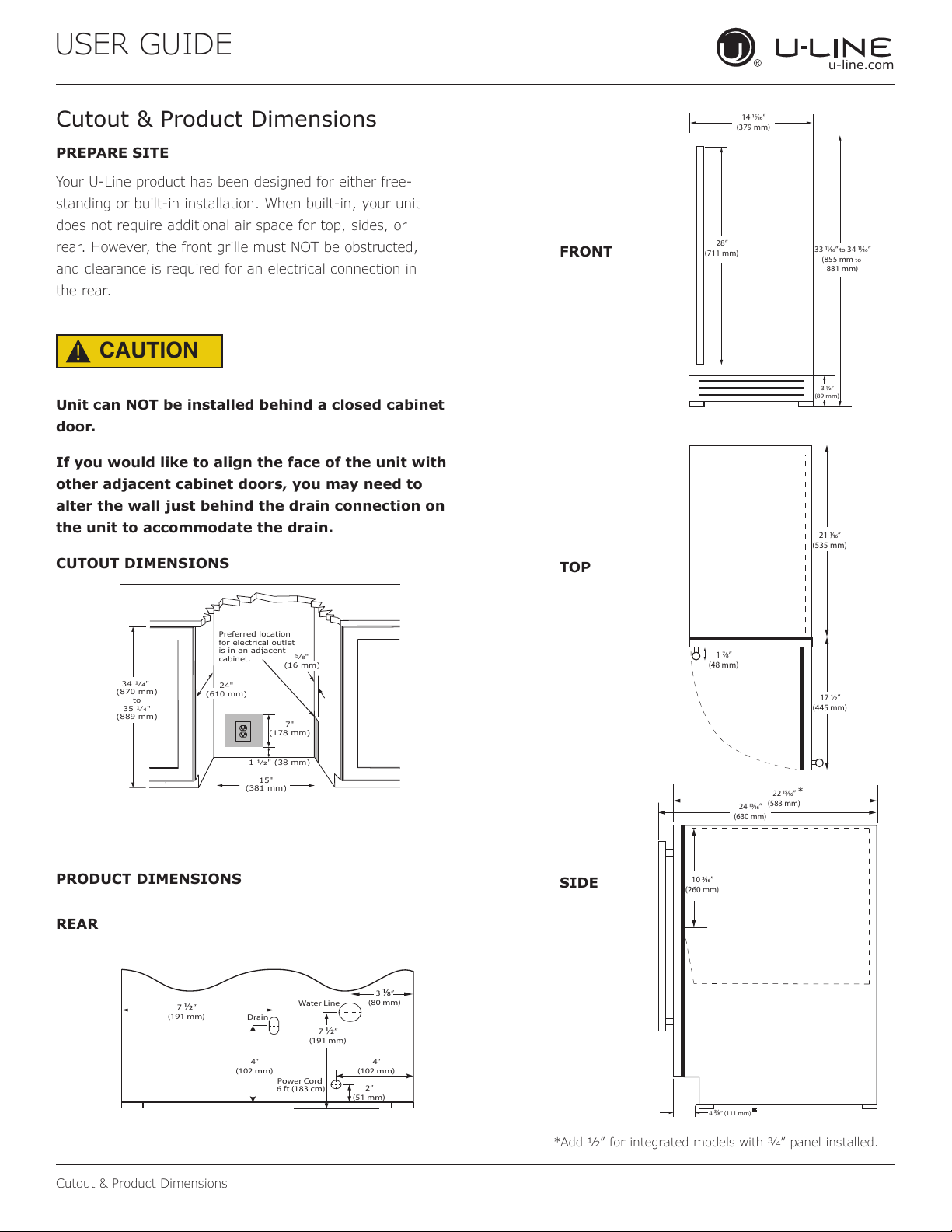
PREPARE SITE
Your U-Line product has been designed for either free-
standing or built-in installation. When built-in, your unit
does not require additional air space for top, sides, or
rear. However, the front grille must NOT be obstructed,
and clearance is required for an electrical connection in
the rear.
CAUTION
!
Unit can NOT be installed behind a closed cabinet
door.
If you would like to align the face of the unit with
other adjacent cabinet doors, you may need to
alter the wall just behind the drain connection on
the unit to accommodate the drain.
CUTOUT DIMENSIONS
PRODUCT DIMENSIONS
REAR
FRONT
TOP
SIDE
1 1⁄₂" (38 mm)
7"
(178 mm)
15"
(381 mm)
34 1⁄₄"
(870 mm)
to
35 1⁄₄"
(889 mm)
Preferred location
for electrical outlet
is in an adjacent
cabinet.
24"
(610 mm)
5⁄8"
(16 mm)
2”
(51 mm)
4”
(102 mm)
Drain
Water Line
7
½
”
(191 mm)
3
⁄
”
(80 mm)
4”
(102 mm)
7
½
”
(191 mm)
Power Cord
6 ft (183 cm)
14 ⁄”
(379 mm)
3 ½”
(89 mm)
28”
(711 mm)
33 ⁄”
to
34 ⁄”
(855 mm
to
881 mm)
1 ⁄”
(48 mm)
17 ½”
(445 mm)
21 ⁄”
(535 mm)
10 ⁄”
(260 mm)
22 ⁄”
(583 mm)
24 ⁄”
(630 mm)
4
⁄
“ (111 mm)
*
*
*Add 1⁄2” for integrated models with 3⁄4” panel installed.
8
USER GUIDE
Side-by-Side Installation
u-line.com
Side-by-Side Installation
OTHER SITE REQUIREMENTS
Side-by-Side Installation
Units must operate from separate, properly grounded
electrical receptacles placed according to each unit’s
electrical specifications requirements.
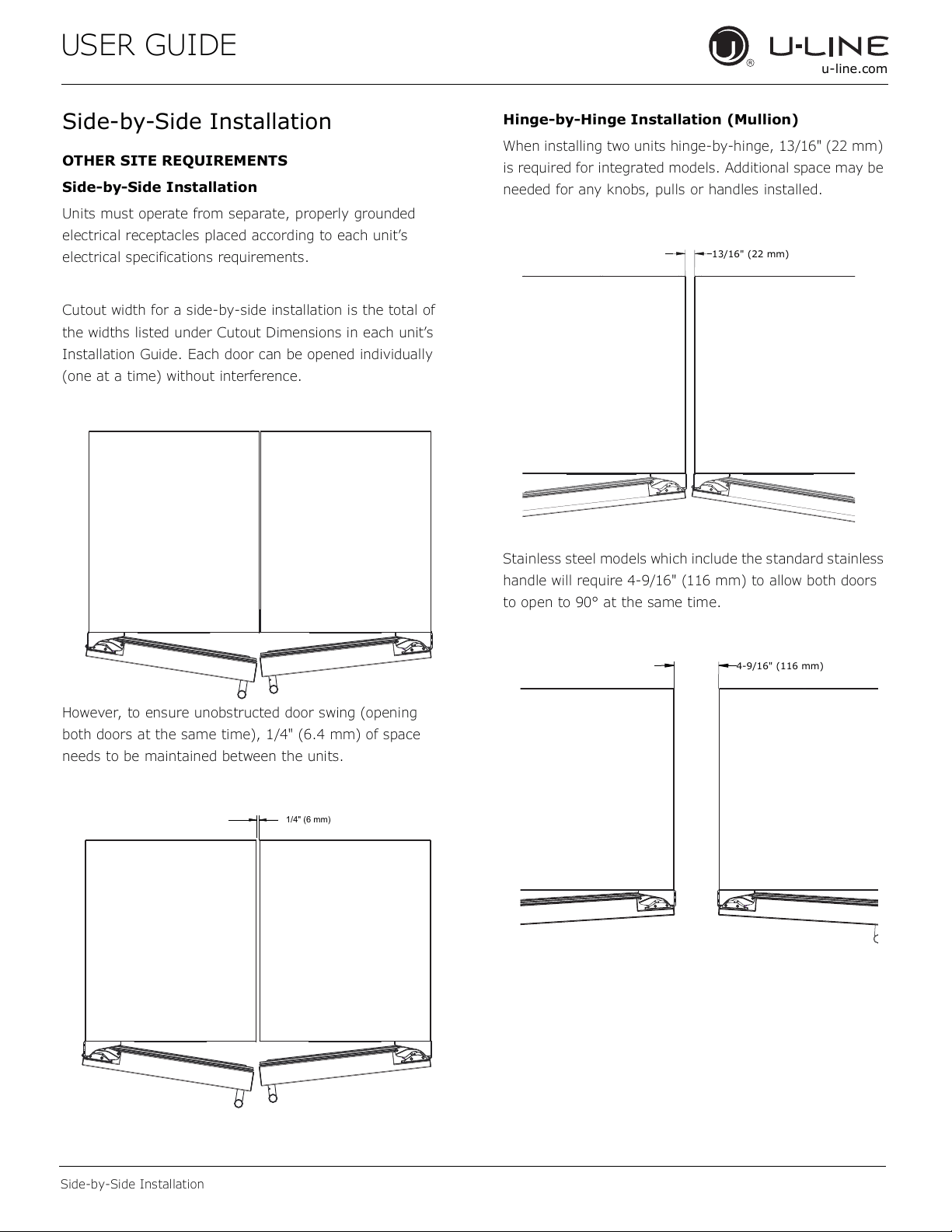
Cutout width for a side-by-side installation is the total of
the widths listed under Cutout Dimensions in each unit’s
Installation Guide. Each door can be opened individually
(one at a time) without interference.
However, to ensure unobstructed door swing (opening
both doors at the same time), 1/4" (6.4 mm) of space
needs to be maintained between the units.
Hinge-by-Hinge Installation (Mullion)
When installing two units hinge-by-hinge, 13/16" (22 mm)
is required for integrated models. Additional space may be
needed for any knobs, pulls or handles installed.
Stainless steel models which include the standard stainless
handle will require 4-9/16" (116 mm) to allow both doors
to open to 90° at the same time.
1/4" (6 mm)
13/16" (22 mm)
4-9/16" (116 mm)
9
USER GUIDE
u-line.com
Water Hookup
Water Hookup
PREPARE PLUMBING
The water valve uses a standard 1/4” (6.35 mm)
compression tting. U-Line recommends using accessory
water hook up kit – part # 80-54674-00. The kit includes
a 10’ (3 m) braided exible water supply line and a brass
hose tting.
Plumbing installation must observe all state
and local codes. All water and drain connections
MUST BE made by a licensed/qualied plumbing
contractor. Failure to follow recommendations
and instructions may result in damage and/or
harm.
Water Supply Connection
When connecting the water supply, please note the
following:
• Before installing the unit and connecting to the cold
water supply, review the local plumbing codes.
• The water pressure should be between 20 and 120 psi
(138 and 827 kPa).
• TDS (Total Dissolved Solids) between 5 ppm (mg/L)
and 400 ppm (mg/L) and water hardness less than 200
mg/L (ppm), 12 gpg (grains per gallon).
• TDS and/or water hardness above these limits should
be treated with a reverse osmosis system or other
ltration system.
• Softened water is not recommended as it may result in
softer ice than desired.
• The water line MUST have a shut-o valve in the
supply line.
• The water line should be looped into 2 coils. This
will allow the unit to be removed for cleaning and
servicing. Make certain that the tubing is not pinched
or damaged during installation.
Do not use any plastic water supply line. The line
is under pressure at all times. Plastic may crack
or rupture with age and cause damage to your
home.
Do not use tape or joint compound when
attaching a braided exible water supply line
that includes a rubber gasket. The gasket
provides an adequate seal – other materials
could cause blockage of the valve.
Failure to follow recommendations and
instructions may result in damage and/or harm,
ooding or void the product warranty.
Use new hose set. Do not reuse old hose set.
Turn o water supply and disconnect electrical
supply to unit prior to installation.
Use caution when handling back panel. The edges
could be sharp.
CAUTION
!
CAUTION
!
CAUTION
!
10
USER GUIDE
u-line.com
Water Hookup
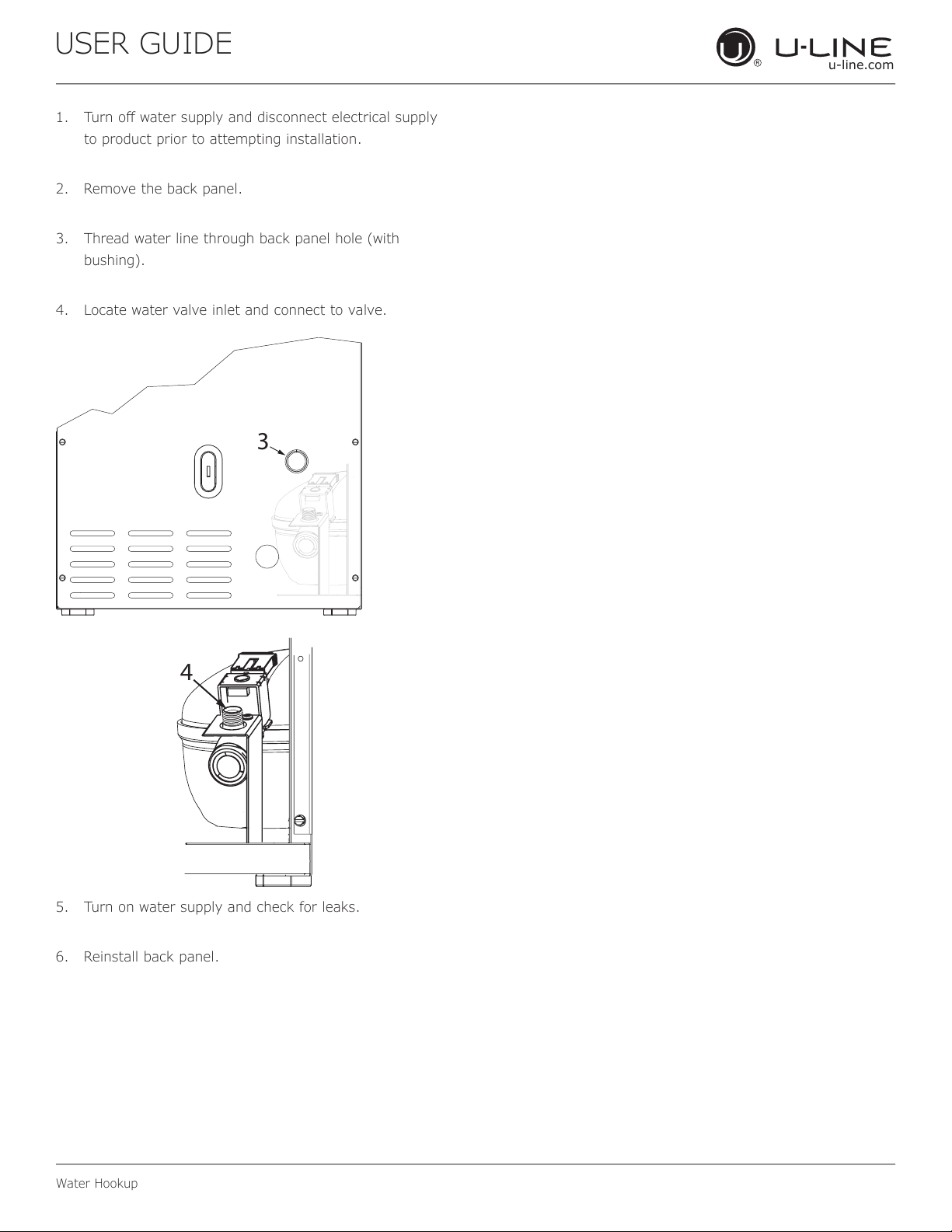
1. Turn o water supply and disconnect electrical supply
to product prior to attempting installation.
2. Remove the back panel.
3. Thread water line through back panel hole (with
bushing).
4. Locate water valve inlet and connect to valve.
5. Turn on water supply and check for leaks.
6. Reinstall back panel.
3
4
11
USER GUIDE
u-line.com
Drain
If your U-Line unit did not come with a factory
installed drain pump you must use a gravity
style drain connection. For assistance in
determining if your unit has a pump please
contact U-Line. The oor drain must be large
enough to accommodate drainage from all
attached drains. Follow these guidelines when
installing drain lines to prevent water from
owing back into the ice maker storage bin and/
or potentially owing onto the oor, which may
result in personal injury or property damage
Failure to connect water supply or drain line
connections properly can result in personal injury
and property damage. Gravity drain connections
must be routed downward from the rest of the
unit at the rate of 1/4” per foot (1 cm per 50 cm).
Drain can NOT be located directly below the
unit. Unit has a solid base that will not allow the
unit to drain below itself.
There is a possibility that hose connections may
have loosened during shipment.
Verify all connections and ttings are free from
leaks.
This equipment is to be installed with adequate
backow protection to comply with applicable
federal, state and local codes
Model numbers including “CL” or “NB” do not include a
factory installed drain pump.
Model numbers including “CP” or “NP” include a factory
installed drain pump.
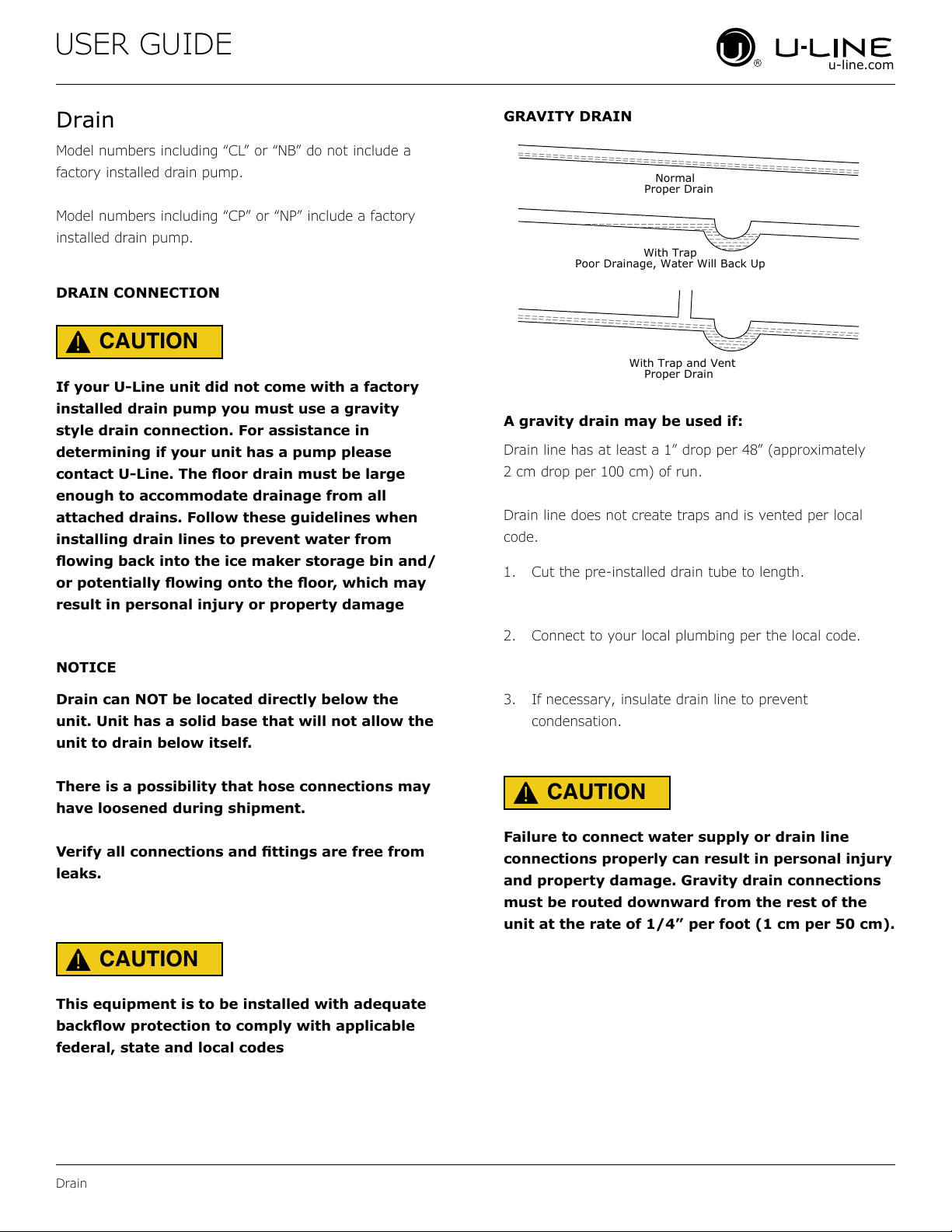
A gravity drain may be used if:
Drain line has at least a 1” drop per 48” (approximately
2 cm drop per 100 cm) of run.
Drain line does not create traps and is vented per local
code.
1. Cut the pre-installed drain tube to length.
2. Connect to your local plumbing per the local code.
3. If necessary, insulate drain line to prevent
condensation.
DRAIN CONNECTION
GRAVITY DRAIN
NOTICE
Drain
CAUTION
!
CAUTION
!
CAUTION
!
Normal
Proper Drain
With Trap
Poor Drainage, Water Will Back Up
With Trap and Vent
Proper Drain
12
USER GUIDE
u-line.com
Drain
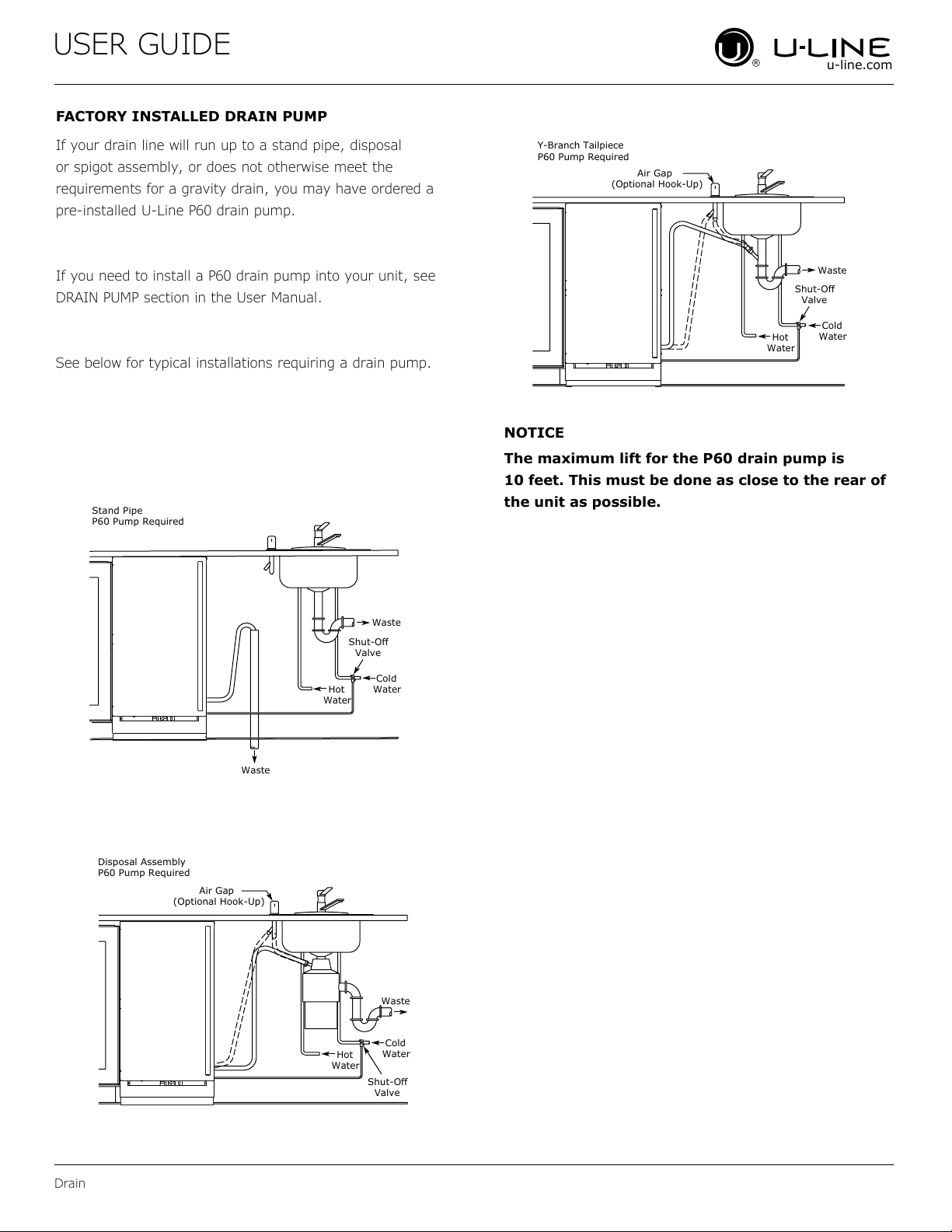
The maximum lift for the P60 drain pump is
10 feet. This must be done as close to the rear of
the unit as possible.
If your drain line will run up to a stand pipe, disposal
or spigot assembly, or does not otherwise meet the
requirements for a gravity drain, you may have ordered a
pre-installed U-Line P60 drain pump.
If you need to install a P60 drain pump into your unit, see
DRAIN PUMP section in the User Manual.
See below for typical installations requiring a drain pump.
FACTORY INSTALLED DRAIN PUMP
NOTICE
Cold
Water
Hot
Water
Waste
Waste
Shut-Off
Valve
Stand Pipe
P60 Pump Required
Air Gap
(Optional Hook-Up)
Cold
Water
Hot
Water
Waste
Shut-Off
Valve
Disposal Assembly
P60 Pump Required
Waste
Cold
Water
Shut-Off
Valve
Hot
Water
Air Gap
(Optional Hook-Up)
Y-Branch Tailpiece
P60 Pump Required
13
USER GUIDE
u-line.com
Anti-Tip Bracket
Anti-Tip Bracket
Use one of the methods below to secure the unit
CABINET/COUNTER ANTI-TIP INSTALLATION
(For built-in applications)
1. Slide unit out so screws on front of unit are easily
accessible.
2. Remove the two screws from the front of the unit.
3. Bend bracket along one of the perforations to allow
attachment to the desired adjoining surface.
4. Gently push unit into position. Be careful not to
entangle the electrical cord or water line, if applicable.
5. Check to be sure the unit is level from front to back
and side to side. Make any necessary adjustments.
The unit’s top surface should be approximately ”
(3 mm) below the countertop.
6. Secure bracket to adjoining surface.
FLOOR MOUNTED ANTI-TIP INSTALLATION
(For free-standing applications)
1. Locate two anti-tip brackets included with the kit.
2. Place the unit into the area where it will be installed.
test to make sure the door opens and closes freely.
3.
center of the unit.
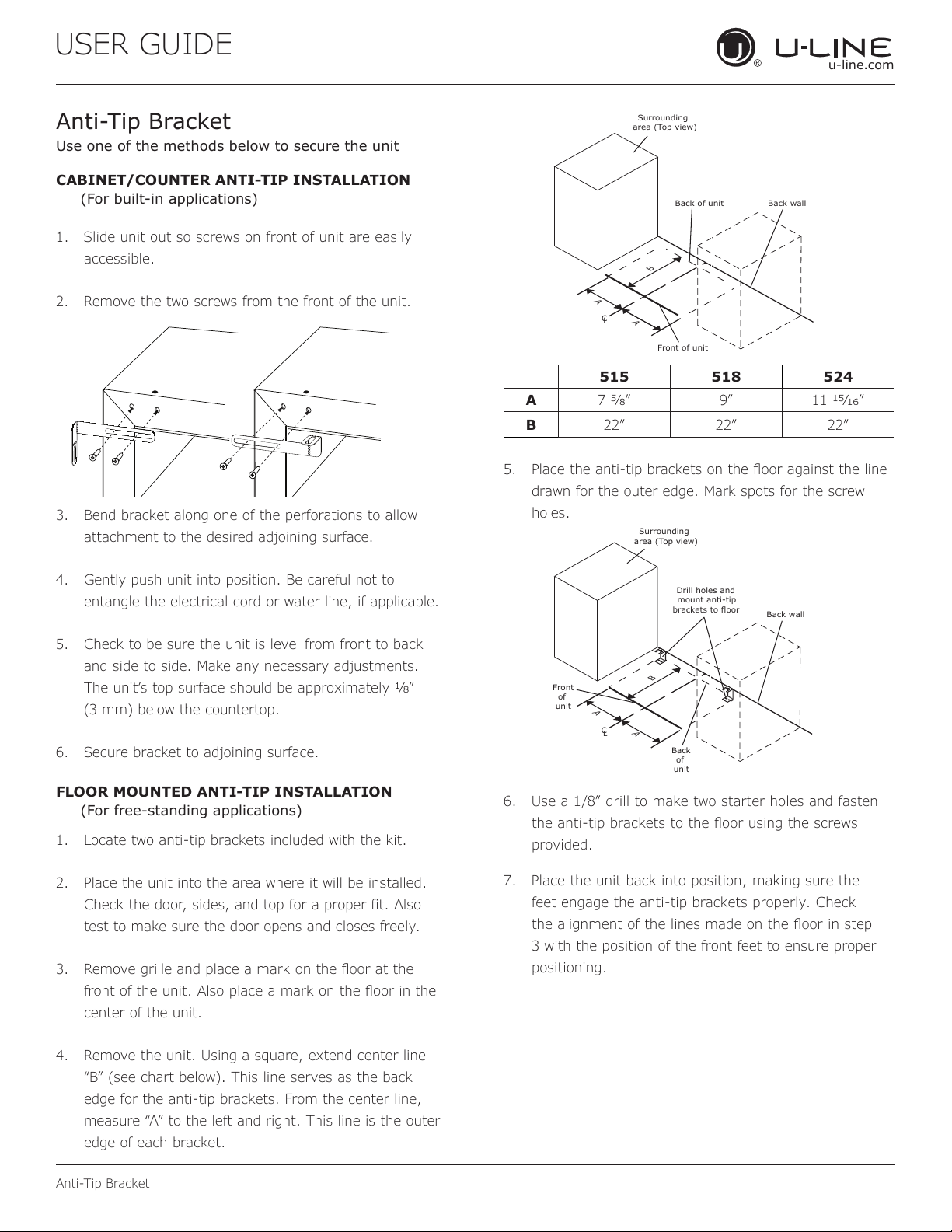
4. Remove the unit. Using a square, extend center line
“B” (see chart below). This line serves as the back
edge for the anti-tip brackets. From the center line,
edge of each bracket.
C
L
Back wall
Back of unit
Front of unit
Surrounding
area (Top view)
A
A
B
515 518 524
A 7 9” 11 ”
B 22” 22” 22”
5.
drawn for the outer edge. Mark spots for the screw
holes.
C
L
Surrounding
area (Top view)
Drill holes and
mount anti-tip
brackets to floor
Back wall
Front
of
unit
Back
of
unit
A
A
B
6. Use a 1/8” drill to make two starter holes and fasten
provided.
7. Place the unit back into position, making sure the
feet engage the anti-tip brackets properly. Check
3 with the position of the front feet to ensure proper
positioning.
14

USER GUIDE
u-line.com
General Installation
General Installation
LEVELING INFORMATION
1. Use a level to
conrm the unit is
level. Level should
be placed along top
edge and side edge
as shown.
2. If the unit is not level, adjust the legs on the corners of
the unit as necessary.
3. Conrm the unit is level after each adjustment and
repeat the previous steps as needed.
INSTALLATION TIP
If the room oor is higher than the oor in the cutout
opening, adjust the rear legs to achieve a total unit rear
height of
1⁄8” (3 mm) less than opening’s rear height.
Shorten the unit height in the front by adjusting the front
legs. This allows the unit to be gently tipped into the
opening. Readjust the front legs to level the unit after it is
correctly positioned in the opening.
INSTALLATION
1. Plug in the power/electrical cord.
2. Gently push the unit into position. Be careful not
to entangle the cord or water and drain lines, if
applicable.
3. Re-check the leveling, from front to back and side to
side. Make any necessary adjustments. The unit’s top
surface should be approximately
1⁄8” (3 mm) below
the countertop.
4. Install the anti-tip bracket.
5. Remove interior packing material and wipe out the
inside of the unit with a clean, water-dampened cloth.
1
Turn to Adjust
15
USER GUIDE
Integrated Panel Dimensions
u-line.com
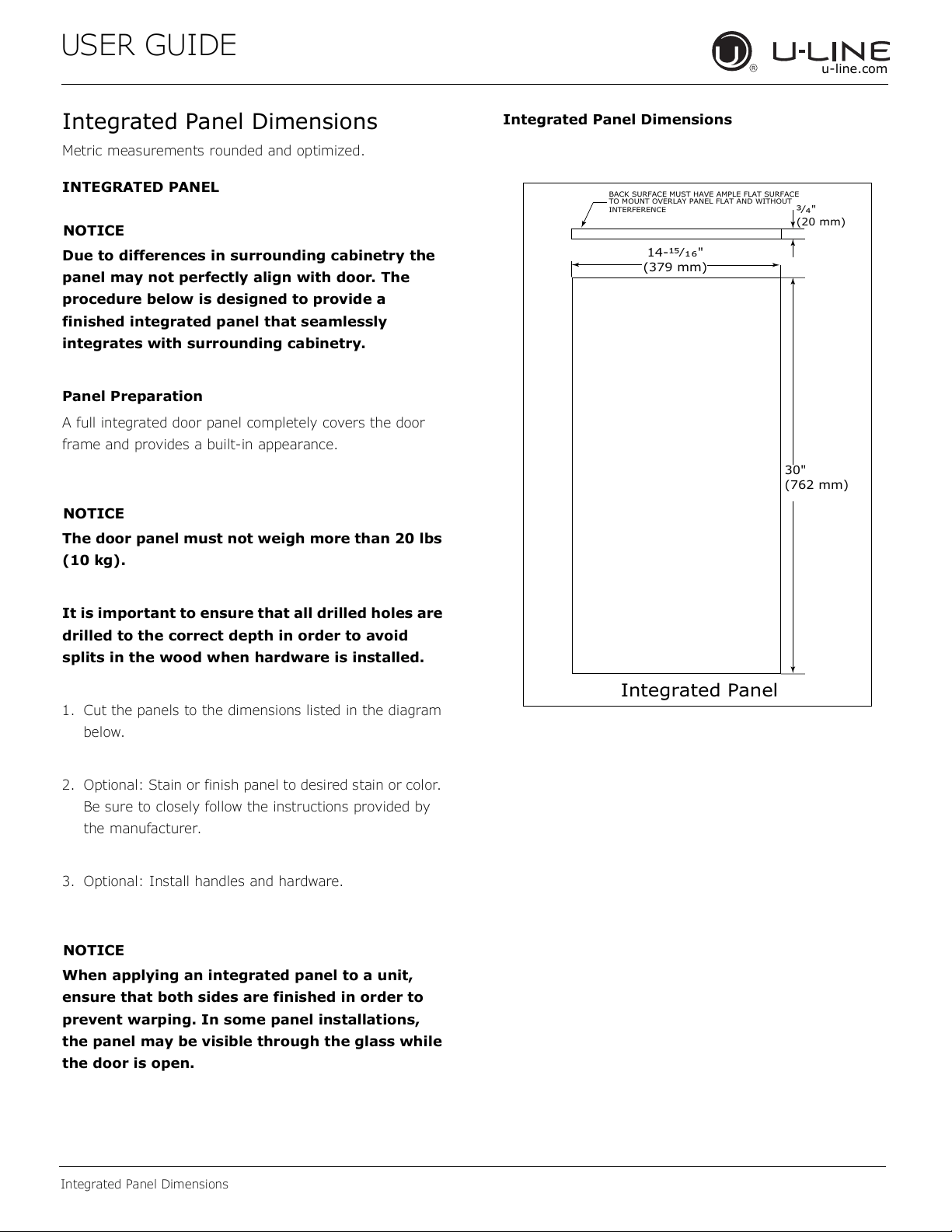
Integrated Panel Dimensions
Metric measurements rounded and optimized.
INTEGRATED PANEL
NOTICE
Due to differences in surrounding cabinetry the
panel may not perfectly align with door. The
procedure below is designed to provide a
finished integrated panel that seamlessly
integrates with surrounding cabinetry.
Panel Preparation
A full integrated door panel completely covers the door
frame and provides a built-in appearance.
NOTICE
The door panel must not weigh more than 20 lbs
(10 kg).
It is important to ensure that all drilled holes are
drilled to the correct depth in order to avoid
splits in the wood when hardware is installed.
1. Cut the panels to the dimensions listed in the diagram
below.
2. Optional: Stain or finish panel to desired stain or color.
Be sure to closely follow the instructions provided by
the manufacturer.
3. Optional: Install handles and hardware.
NOTICE
When applying an integrated panel to a unit,
ensure that both sides are finished in order to
prevent warping. In some panel installations,
the panel may be visible through the glass while
the door is open.
Integrated Panel Dimensions
BACK SURFACE MUST HAVE AMPLE FLAT SURFACE
TO MOUNT OVERLAY PANEL FLAT AND WITHOUT
INTERFERENCE
Ώȟȯ"
(20 mm)
Integrated Panel
14-ΑȟȬȱ"
(379 mm)
30"
(762 mm)
16
USER GUIDE
Integrated Panel Dimensions
u-line.com
HANDLELESS INTEGRATED DOOR PANEL
The following procedure is designed to provide a finished,
handleless solid panel for an 15" (381 mm) door that
seamlessly integrates with its surrounding cabinetry.
NOTE: Many cabinet manufacturers provide a ready
solution for a handleless, integrated design that can be
easily applied to your model. Consult your cabinet
manufacturer for applicable design and installation details.
The cabinet manufacturer’s solution to this design and
integration detail will often result in an integrated panel
solution wherein the size of the panel may result in a
height dimension taller than what we specify. This can be
achieved provided the additional height is positioned
above the appliance door.
NOTICE
The integrated panel aligns with the surrounding
cabinetry and, due to differences in cabinetry,
may not align perfectly with the door.
The appliance will need up to 34-1/2" (876 mm)
to the underside of the counter to leave room for
leveling adjustments.
A single prepared panel with insert must not
weigh more than 20 lbs (10 kg).
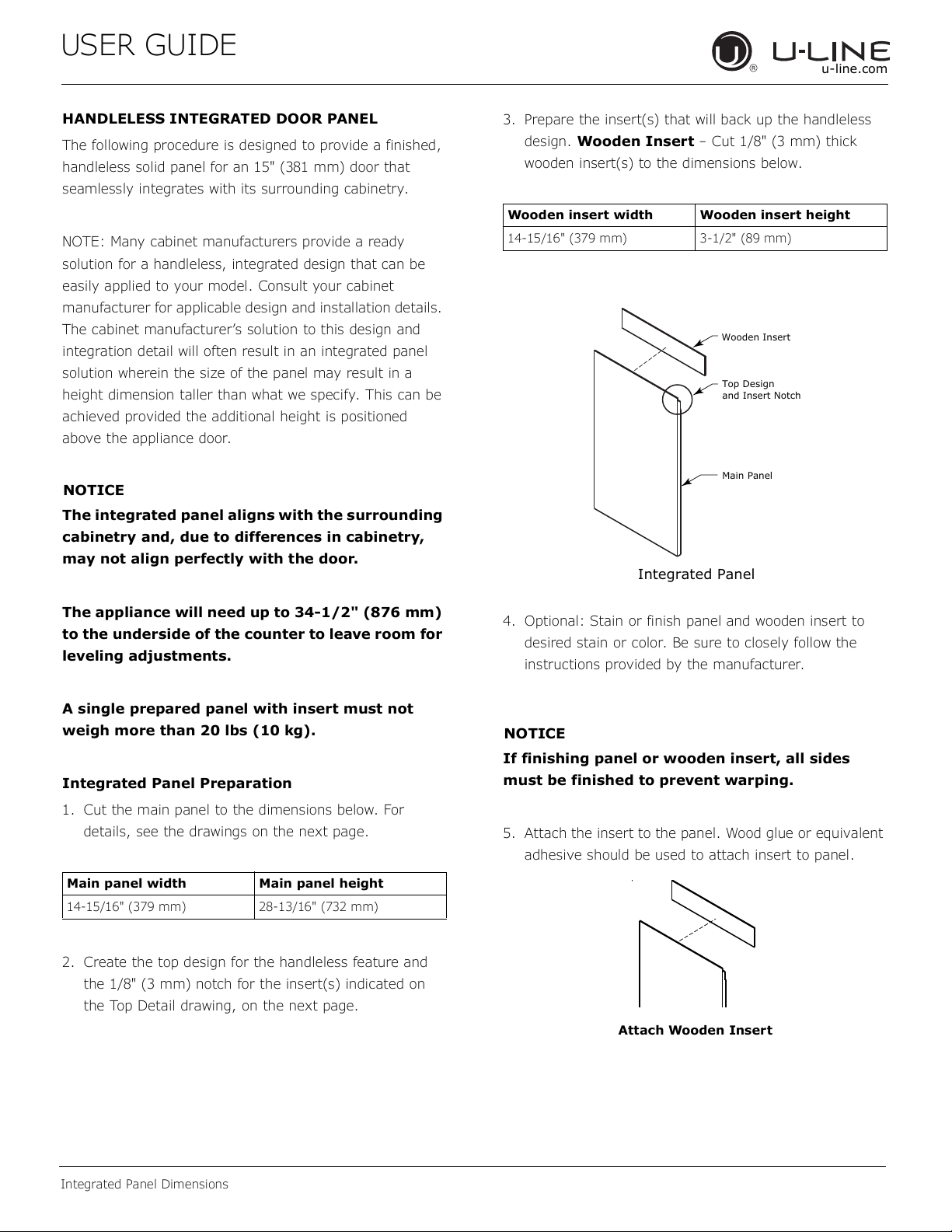
Integrated Panel Preparation
1. Cut the main panel to the dimensions below. For
details, see the drawings on the next page.
2. Create the top design for the handleless feature and
the 1/8" (3 mm) notch for the insert(s) indicated on
the Top Detail drawing, on the next page.
3. Prepare the insert(s) that will back up the handleless
design. Wooden Insert – Cut 1/8" (3 mm) thick
wooden insert(s) to the dimensions below.
4. Optional: Stain or finish panel and wooden insert to
desired stain or color. Be sure to closely follow the
instructions provided by the manufacturer.
NOTICE
If finishing panel or wooden insert, all sides
must be finished to prevent warping.
5. Attach the insert to the panel. Wood glue or equivalent
adhesive should be used to attach insert to panel.
Main panel width Main panel height
14-15/16" (379 mm) 28-13/16" (732 mm)
Wooden insert width Wooden insert height
14-15/16" (379 mm) 3-1/2" (89 mm)
Top Design
and Insert Notch
Wooden Insert
Main Panel
Integrated Panel
Attach Wooden Insert
17
USER GUIDE
Integrated Panel Dimensions
u-line.com
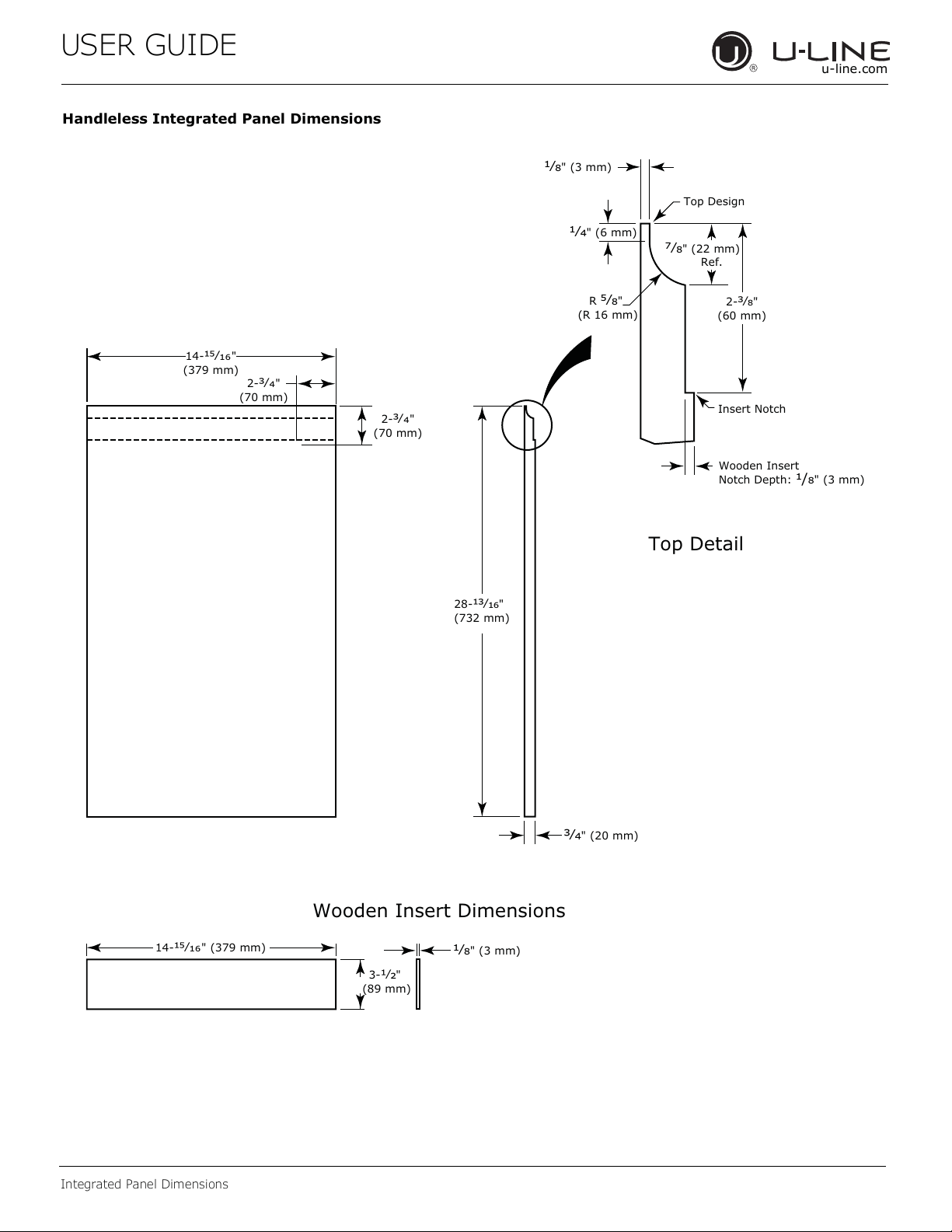
Handleless Integrated Panel Dimensions
ΏȟΚ" (20 mm)
28-
ΏȟΗΜ"
(732 mm)
2-
Ώȟȯ"
(70 mm)
2-
Ώȟȯ"
(70 mm)
R
ΑȟΞ"
(R 16 mm)
ȟΞ" (3 mm)
ȟΚ" (6 mm)
Wooden Insert
Notch Depth:
/Ξ" (3 mm)
2-
ΏȟΞ"
(60 mm)
ΓȟΞ" (22 mm)
Ref.
Top Detail
Insert Notch
Top Design
ȟΞ" (3 mm)
3-
ȟΘ"
(89 mm)
14-ΑȟΗȱ" (379 mm)
Wooden Insert Dimensions
14-ΑȟΗȱ"
(379 mm)
18
USER GUIDE
Integrated Panel Dimensions
u-line.com
3-5/16" (89 mm)
to
4-5/16" (114 mm)
U-Line
Unit
U-Line
Unit
Integrated Panel
Integrated Panel/Integrated Frame
Front
Side
Front Side
3-5/16" (89 mm)
to
4-5/16" (114 mm)
Floor
Cabinet
> 3-5/16"
(> 89 mm)
3-5/16" (89 mm)
to
1" (25 mm)**
U-Line
Unit
Extended Integrated Panel/Extended Integrated Frame
Floor
Cabinet
3-5/16" (89 mm)
to
1" (25 mm)**
*
U-Line
Unit
Integrated Panel
3. Optional: Install handles and hardware
NOTICE
The door panel must not weigh more than 20 lbs
(10 kg).
It is important to ensure that all drilled holes are
drilled to the correct depth in order to avoid
splits in the wood when hardware is installed.
Appliance will need up to 34-1/2" (876 mm) to
the underside of the counter to leave room for
leveling adjustments.
When applying an integrated panel to a unit,
ensure that both sides are finished in order to
prevent warping. In some installations, the panel
may be visible through the glass while the door is
open.
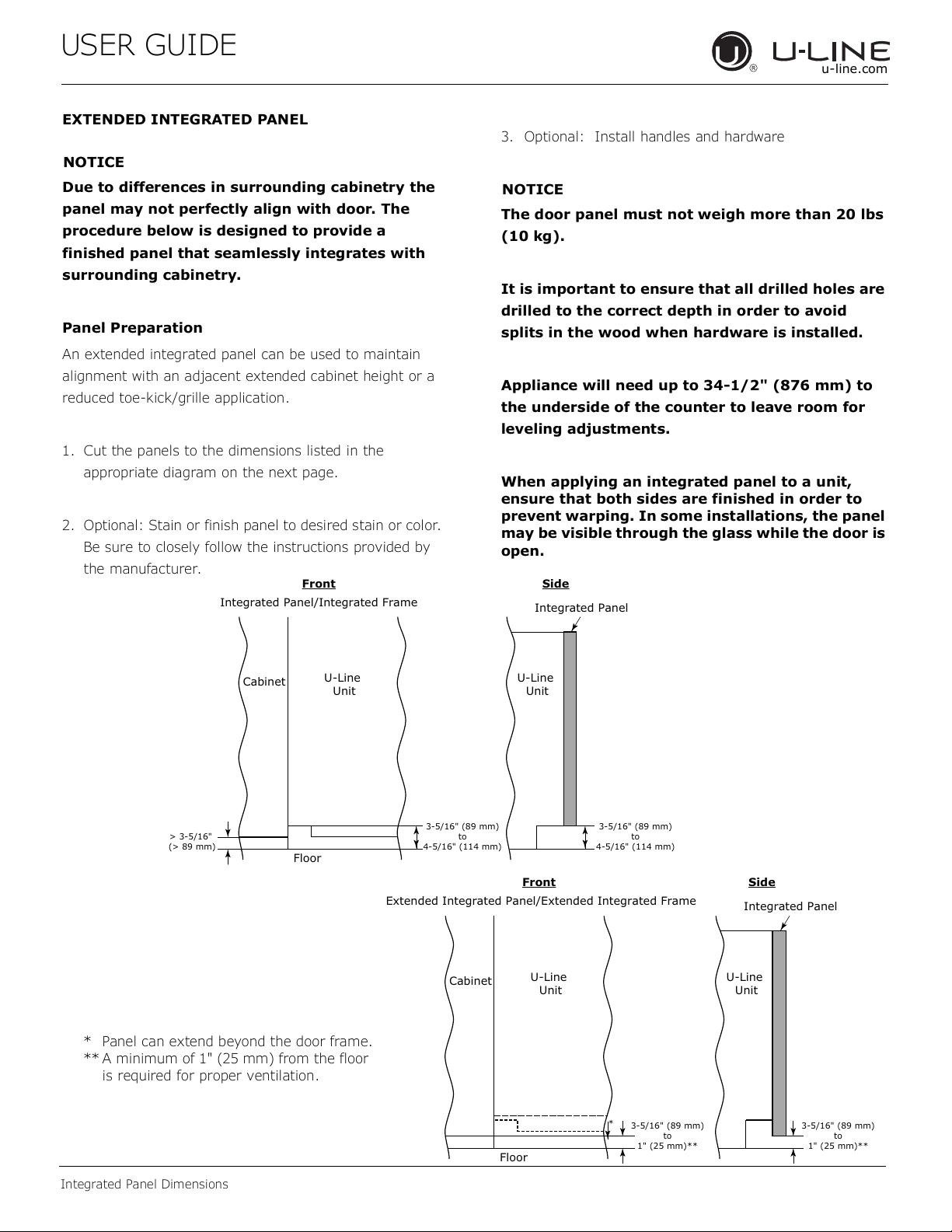
EXTENDED INTEGRATED PANEL
NOTICE
Due to differences in surrounding cabinetry the
panel may not perfectly align with door. The
procedure below is designed to provide a
finished panel that seamlessly integrates with
surrounding cabinetry.
Panel Preparation
An extended integrated panel can be used to maintain
alignment with an adjacent extended cabinet height or a
reduced toe-kick/grille application.
1. Cut the panels to the dimensions listed in the
appropriate diagram on the next page.
2. Optional: Stain or finish panel to desired stain or color.
Be sure to closely follow the instructions provided by
the manufacturer.
* Panel can extend beyond the door frame.
** A minimum of 1" (25 mm) from the floor
is required for proper ventilation.
19
USER GUIDE
Integrated Panel Dimensions
u-line.com
Extended Integrated Panel Dimensions Integrated Grille
If you would like to cover the grille with an integrated
panel, purchase U-Line’s adjustable grille accessories.
15” - Sales Accessory: ULAGRILLE15
Complete instructions, including dimensions of the
integrated grille panel, are included with the accessory.
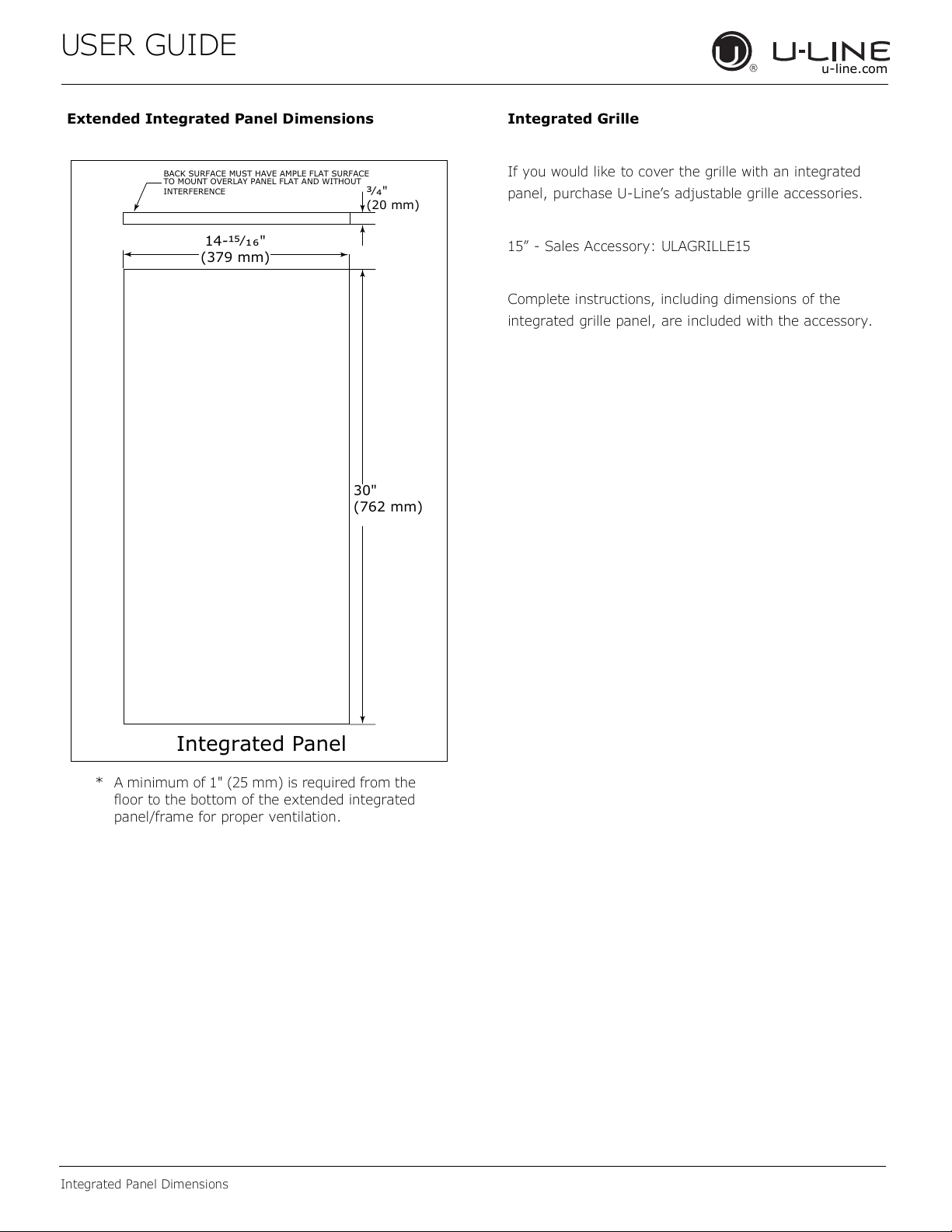
* A minimum of 1" (25 mm) is required from the
floor to the bottom of the extended integrated
panel/frame for proper ventilation.
BACK SURFACE MUST HAVE AMPLE FLAT SURFACE
TO MOUNT OVERLAY PANEL FLAT AND WITHOUT
INTERFERENCE
Ώȟȯ"
(20 mm)
Integrated Panel
14-ΑȟȬȱ"
(379 mm)
30"
(762 mm)
20
USER GUIDE
Integrated Panel Installation
u-line.com
Integrated Panel Installation
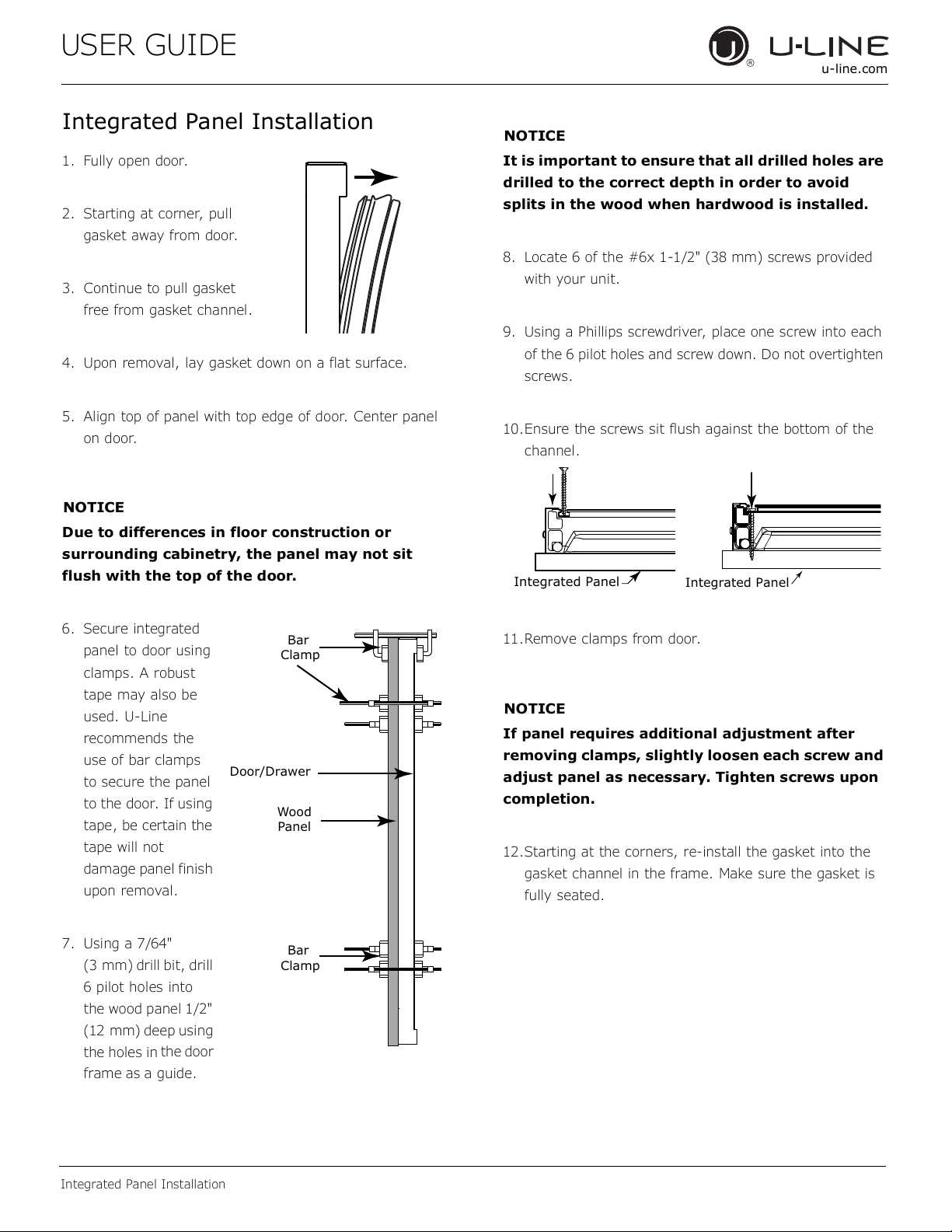
1. Fully open door.
2. Starting at corner, pull
gasket away from door.
3. Continue to pull gasket
free from gasket channel.
4. Upon removal, lay gasket down on a flat surface.
5. Align top of panel with top edge of door. Center panel
on door.
NOTICE
Due to differences in floor construction or
surrounding cabinetry, the panel may not sit
flush with the top of the door.
6. Secure integrated
panel to door using
clamps. A robust
tape may also be
used. U-Line
recommends the
use of bar clamps
to secure the panel
to the door. If using
tape, be certain the
tape will not
damage panel finish
upon removal.
7. Using a 7/64"
(3 mm) drill bit, drill
6 pilot holes into
the wood panel 1/2"
(12 mm) deep using
the holes in
the door
frame as a guide.
NOTICE
It is important to ensure that all drilled holes are
drilled to the correct depth in order to avoid
splits in the wood when hardwood is installed.
8. Locate 6 of the #6x 1-1/2" (38 mm) screws provided
with your unit.
9. Using a Phillips screwdriver, place one screw into each
of the 6 pilot holes and screw down. Do not overtighten
screws.
10.Ensure the screws sit flush against the bottom of the
channel.
11.Remove clamps from door.
NOTICE
If panel requires additional adjustment after
removing clamps, slightly loosen each screw and
adjust panel as necessary. Tighten screws upon
completion.
12.Starting at the corners, re-install the gasket into the
gasket channel in the frame. Make sure the gasket is
fully seated.
Wood
Panel
Door/Drawer
Bar
Clamp
Bar
Clamp
Integrated Panel
Integrated Panel
21
USER GUIDE
Grille Installation
u-line.com
Grille Installation
REMOVING AND INSTALLING GRILLE
WARNING
!
Disconnect electric power to the unit before
removing the grille.
When using the unit, the grille must be installed.
WARNING
!
DO NOT touch the condenser fins. The condenser
fins are SHARP and can be easily damaged.
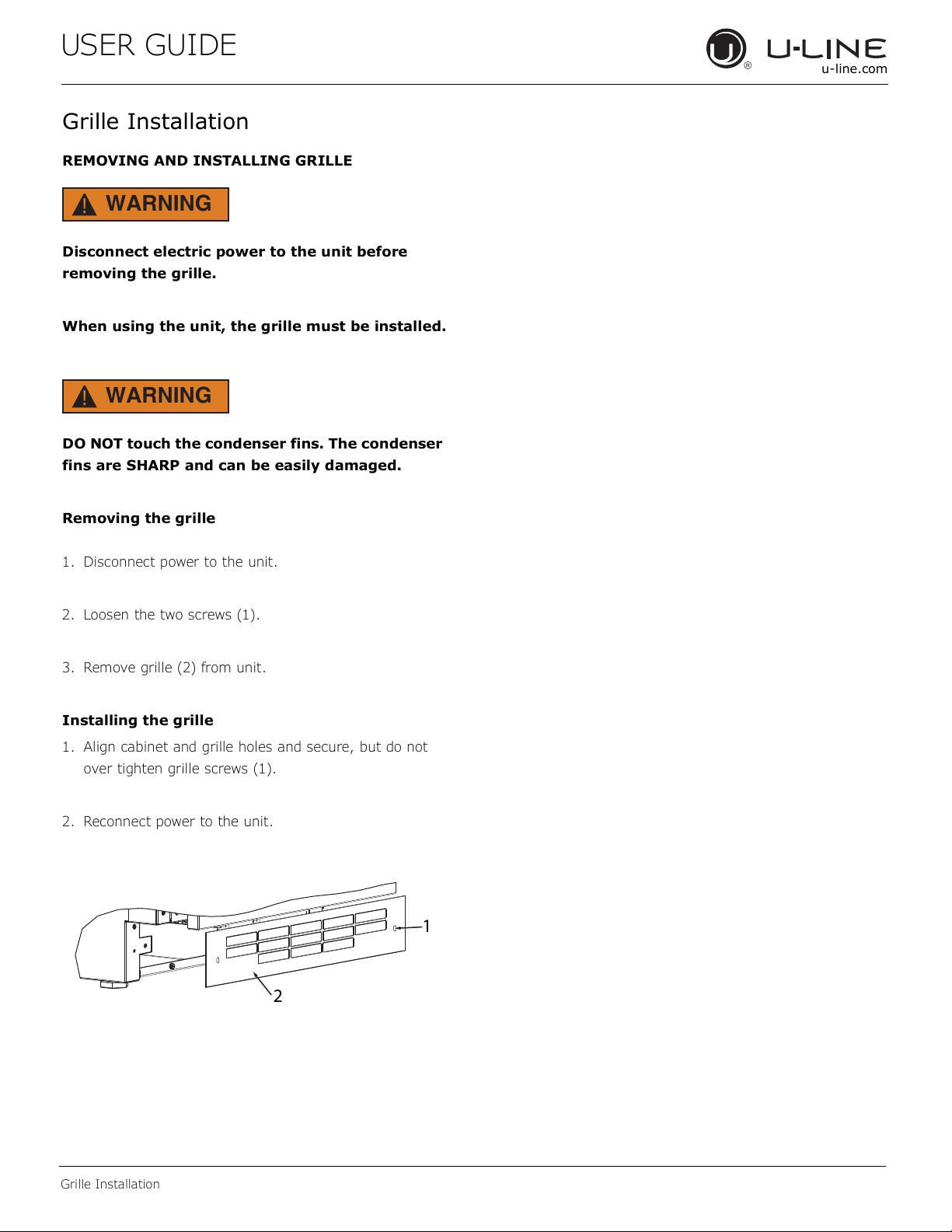
Removing the grille
1. Disconnect power to the unit.
2. Loosen the two screws (1).
3. Remove grille (2) from unit.
Installing the grille
1. Align cabinet and grille holes and secure, but do not
over tighten grille screws (1).
2. Reconnect power to the unit.
1
2
22

USER GUIDE
Door Swing
u-line.com
Door Swing
For Integrated models that are installed adjacent to a wall,
1/2" (13 mm) clearance is recommended from wall on
hinge side to allow the door to open 90°. Allow for
additional space for any knobs or pulls installed on the
integrated panel/frame.
Stainless Steel models that are installed adjacent to a wall
require 2- 1/4" (57 mm) door clearance on hinge side to
allow for door handle.
Units have a zero clearance when installed adjacent to
cabinets.
Wall
Wall
90°
Door Swing
90°
Door Swing
Space Required
For any Knobs or Pulls
2-1/4" MIN
(57 mm MIN)
Integrated
Stainless
1/2" (13 mm)
23
USER GUIDE
u-line.com
Door Adjustments
Door Adjustments
DOOR ALIGNMENT AND ADJUSTMENT
Align and adjust the door if it is not level or not sealing
properly. If the door is not sealed, the unit may not cool
properly, or excessive frost or condensation may form in
the interior.
NOTICE
Properly aligned, the door’s gasket should be
rmly in contact with the cabinet all the way
around the door (no gaps). Carefully examine the
door’s gasket to ensure that it is rmly in contact
with the cabinet. Also make sure the door gasket
is not pinched on the hinge side of the door.
Do not attempt to use the door to raise or pivot
your unit. This would put excessive stress on the
hinge system.
Alignment and Adjustment Procedure
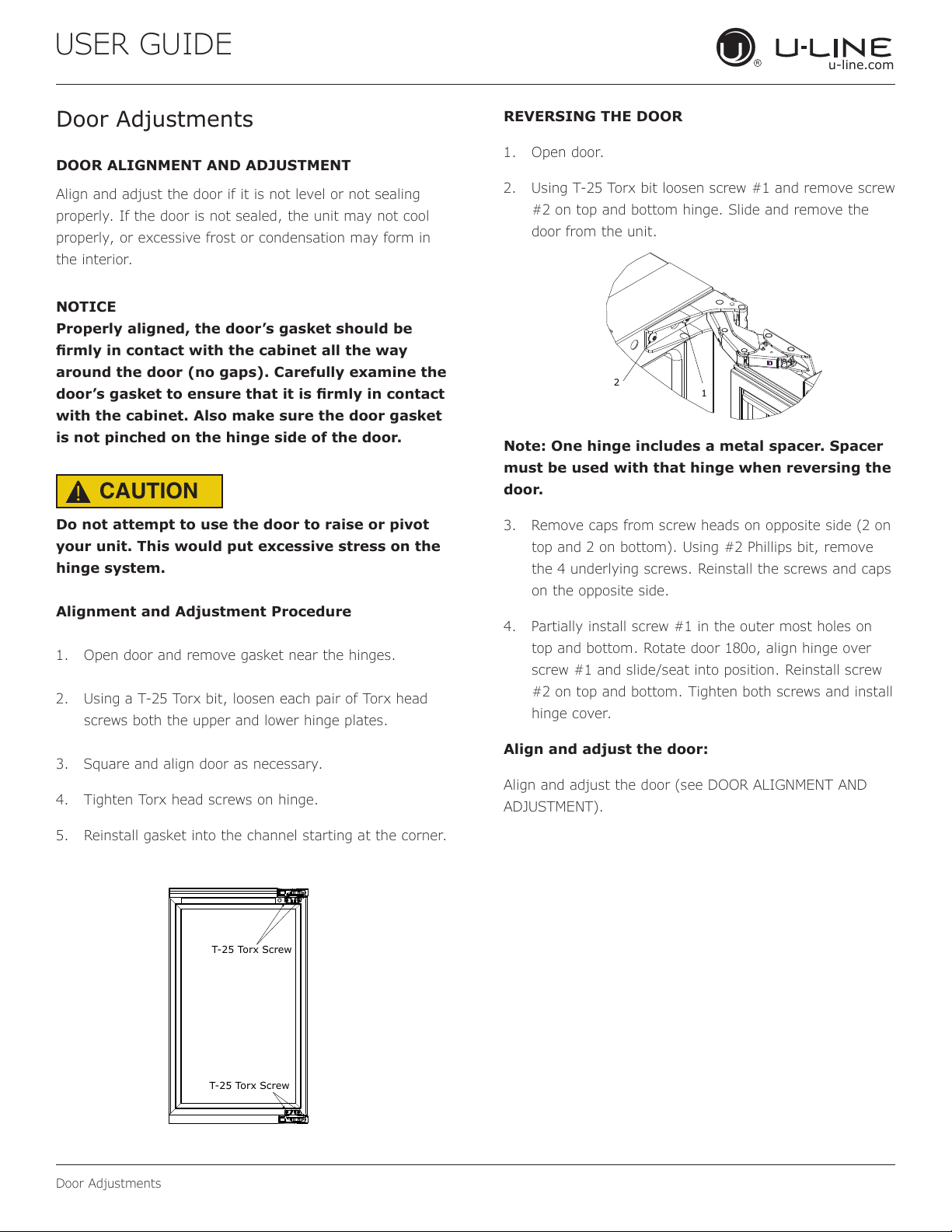
1. Open door and remove gasket near the hinges.
2. Using a T-25 Torx bit, loosen each pair of Torx head
screws both the upper and lower hinge plates.
3. Square and align door as necessary.
4. Tighten Torx head screws on hinge.
5. Reinstall gasket into the channel starting at the corner.
REVERSING THE DOOR
1. Open door.
2. Using T-25 Torx bit loosen screw #1 and remove screw
#2 on top and bottom hinge. Slide and remove the
door from the unit.
Note: One hinge includes a metal spacer. Spacer
must be used with that hinge when reversing the
door.
3. Remove caps from screw heads on opposite side (2 on
top and 2 on bottom). Using #2 Phillips bit, remove
the 4 underlying screws. Reinstall the screws and caps
on the opposite side.
4. Partially install screw #1 in the outer most holes on
top and bottom. Rotate door 180o, align hinge over
screw #1 and slide/seat into position. Reinstall screw
#2 on top and bottom. Tighten both screws and install
hinge cover.
Align and adjust the door:
Align and adjust the door (see DOOR ALIGNMENT AND
ADJUSTMENT).
T-25 Torx Screw
T-25 Torx Screw
2
1
CAUTION
!
24
USER GUIDE
u-line.com
Control Operation
Control Operation
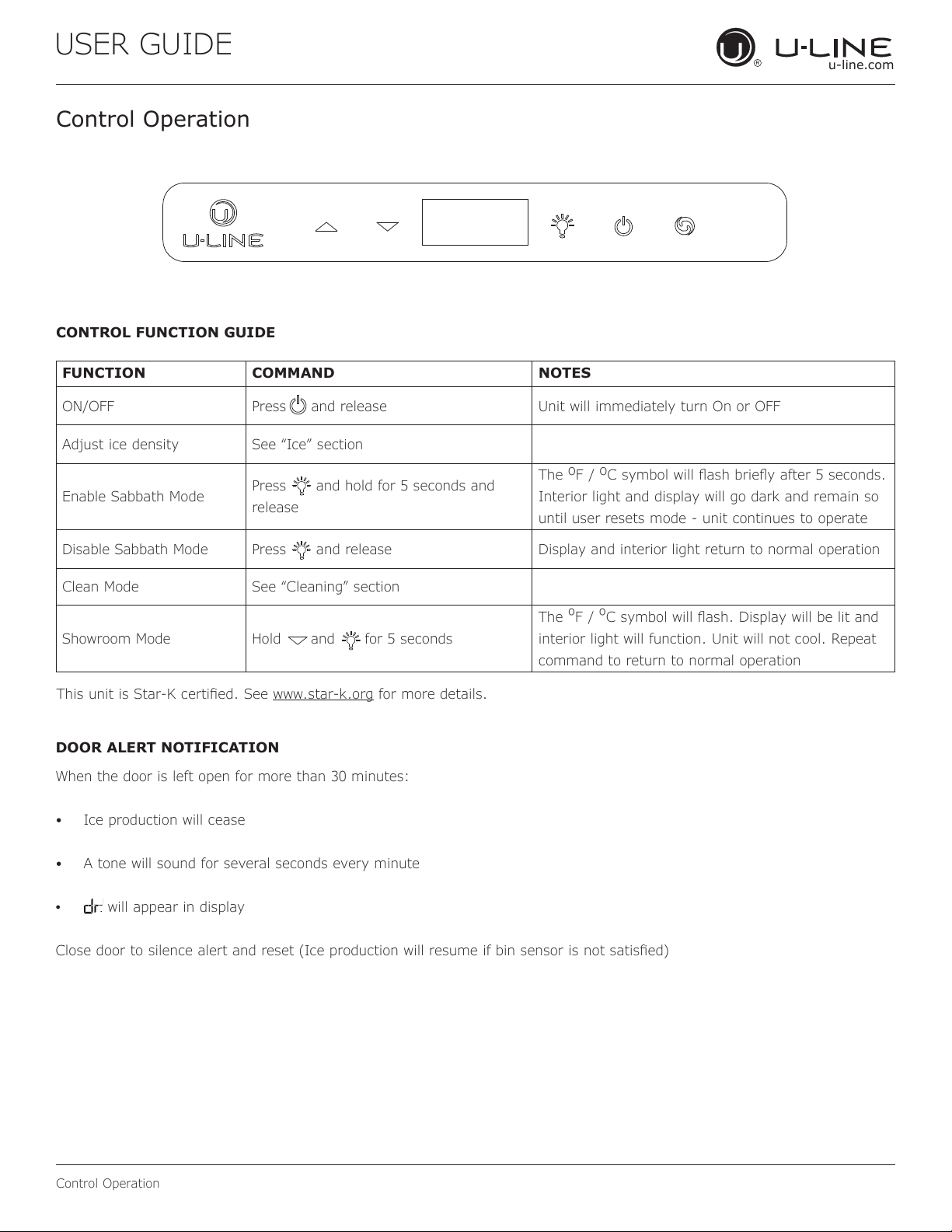
CONTROL FUNCTION GUIDE
FUNCTION COMMAND NOTES
ON/OFF Press and release Unit will immediately turn On or OFF
Adjust ice density See “Ice” section
Enable Sabbath Mode
Press and hold for 5 seconds and
release
The
o
F /
o
C symbol will ash briey after 5 seconds.
Interior light and display will go dark and remain so
until user resets mode - unit continues to operate
Disable Sabbath Mode Press and release Display and interior light return to normal operation
Clean Mode See “Cleaning” section
Showroom Mode Hold and for 5 seconds
The
º
F /
º
C symbol will ash. Display will be lit and
interior light will function. Unit will not cool. Repeat
command to return to normal operation
This unit is Star-K certied. See www.star-k.org for more details.
DOOR ALERT NOTIFICATION
When the door is left open for more than 30 minutes:
• Ice production will cease
• A tone will sound for several seconds every minute
•
will appear in display
Close door to silence alert and reset (Ice production will resume if bin sensor is not satised)
25
USER GUIDE
Ice
u-line.com
Ice
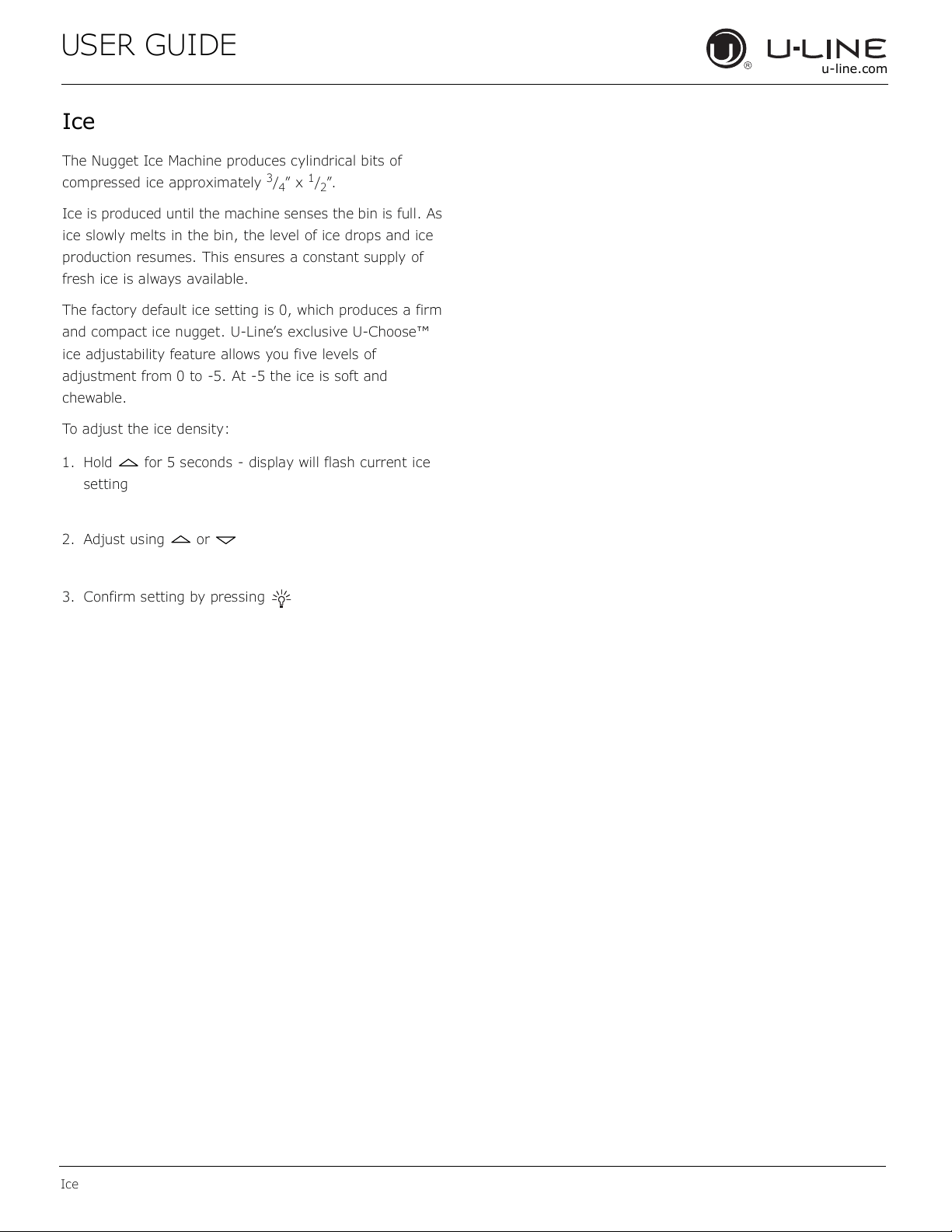
The Nugget Ice Machine produces cylindrical bits of
compressed ice approximately
3
/
4
” x
1
/
2
”.
Ice is produced until the machine senses the bin is full. As
ice slowly melts in the bin, the level of ice drops and ice
production resumes. This ensures a constant supply of
fresh ice is always available.
The factory default ice setting is 0, which produces a firm
and compact ice nugget. U-Line’s exclusive U-Choose™
ice adjustability feature allows you five levels of
adjustment from 0 to -5. At -5 the ice is soft and
chewable.
To adjust the ice density:
1. Hold for 5 seconds - display will flash current ice
setting
2. Adjust using or
3. Confirm setting by pressing
26
USER GUIDE
Airflow and Product Loading
u-line.com
Airflow and Product Loading
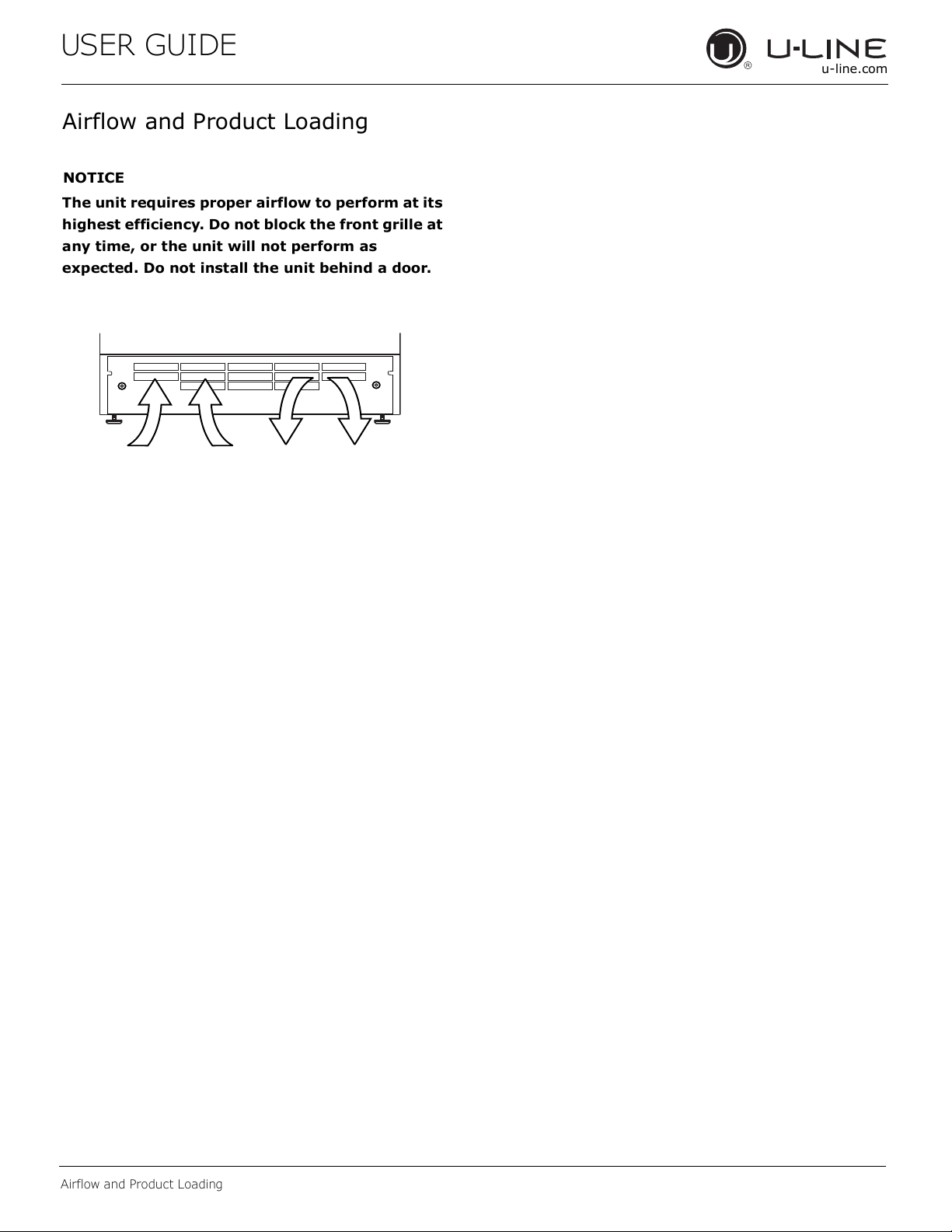
NOTICE
The unit requires proper airflow to perform at its
highest efficiency. Do not block the front grille at
any time, or the unit will not perform as
expected. Do not install the unit behind a door.
27
USER GUIDE
u-line.com
Cleaning
Integrated Models
To clean integrated panels, use household cleaner per the
cabinet manufacturer’s recommendations.
INTERIOR CLEANING
Disconnect power to the unit.
Clean the interior and all removed components using a mild
nonabrasive detergent and warm solution applied with a
soft sponge or non-abrasive cloth.
Rinse the interior using a soft sponge and clean water.
Do not use any solvent-based or abrasive
cleaners. These types of cleaners may transfer taste
and/or odor to the interior products and damage or discolor
the interior.
NUGGET ICE MACHINE CLEANING CYCLE
This ice machine has an automatic clean alert function.
The control will indicate CL in the display, approximately
every six months with normal use, reminding you to
clean your unit. When CL is displayed, ice production will
continue. Depending on water conditions, more frequent
cleaning may be necessary: see chart below. Cleaning
removes lime scale, other mineral deposits, and sanitizes
the machine. Poor ice quality and reduced ice output are
signs that cleaning is necessary.
Clean surfaces with a mild detergent and warm water
solution. Do not use solvent-based or abrasive cleaners.
Use a soft sponge and rinse with clean water. Wipe with a
soft, clean towel to prevent water spotting.
Clean any glass surfaces with a non-chlorine glass
cleaner.
EXTERIOR CLEANING
Vinyl Clad (Black or White) Models
Stainless Models
Stainless door panels, handles and frames can discolor
when exposed to chlorine gas, pool chemicals, saltwater or
cleaners with bleach.
Keep your stainless unit looking new by cleaning with a
good quality all-in-one stainless steel cleaner and polish
monthly. For best results use Claire
®
Stainless Steel
Polish and Cleaner. Comparable products are acceptable.
Frequent cleaning will remove surface contamination that
could lead to rust. Some installations may require cleaning
weekly.
Do not clean with steel wool pads.
Do not use stainless steel cleaners or polishes on
any glass surfaces.
Clean any glass surfaces with a non-chlorine glass cleaner.
Do not use cleaners not specically intended for
stainless steel on stainless steel surfaces (this
includes glass, tile, and counter cleaners).
If any surface discoloring or rusting appears, clean it
quickly with Bon-Ami
®
or Barkeepers Friend Cleanser
®
and
a nonabrasive cloth. Always clean with the grain. Always
®
Stainless Steel Polish and Cleaner or
comparable product to prevent further problems.
Using abrasive pads such as ScotchBrite™ will
cause the graining in the stainless steel to
become blurred.
Rust not cleaned up promptly can penetrate the
surface of the stainless steel and complete
removal of the rust may not be possible.
For information on Keg and Tap Towers, please reference
the Single and Double Tap Tower Kits User Guide on
u-line.com.
Cleaning
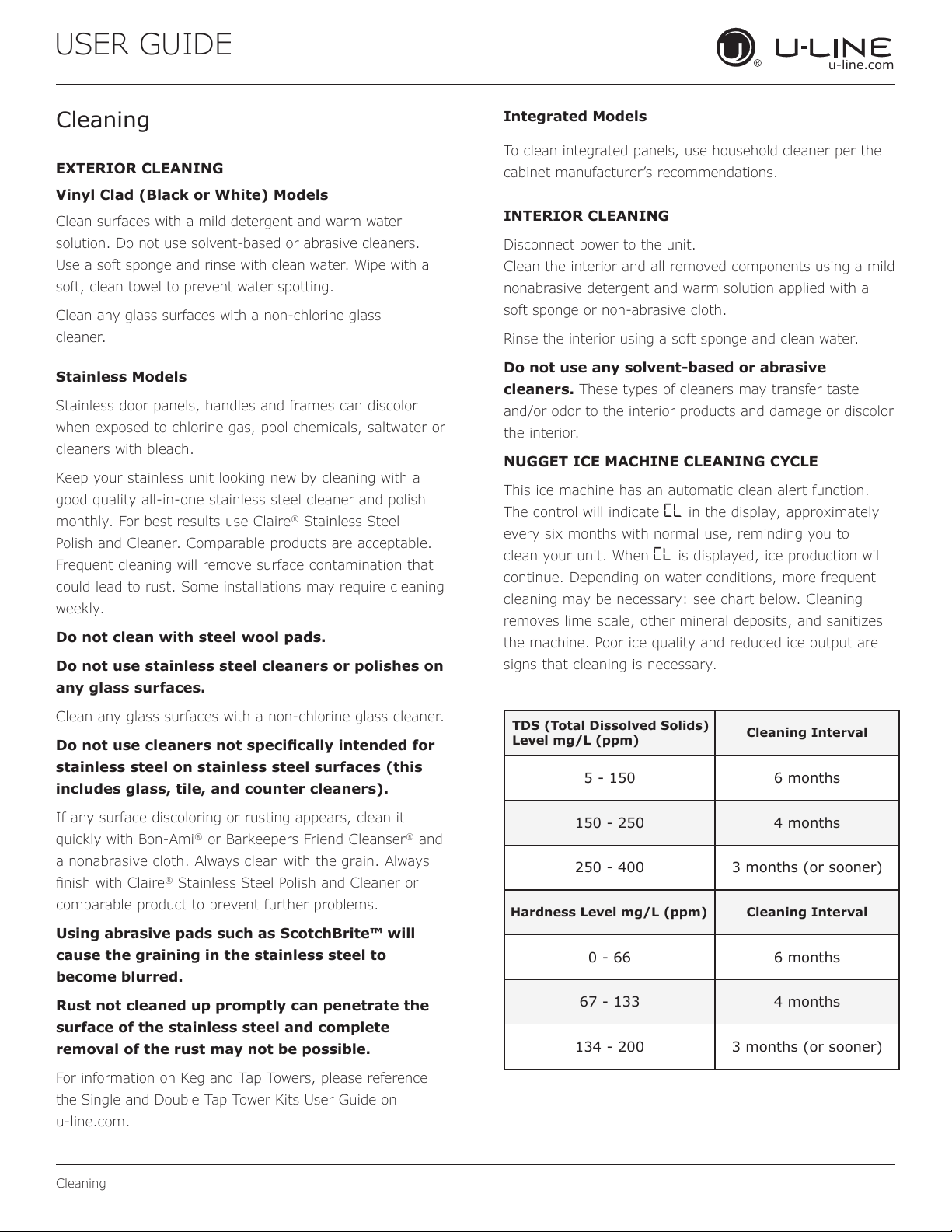
TDS (Total Dissolved Solids)
Level mg/L (ppm)
Cleaning Interval
5 - 150 6 months
150 - 250 4 months
250 - 400 3 months (or sooner)
Hardness Level mg/L (ppm) Cleaning Interval
0 - 66 6 months
67 - 133 4 months
134 - 200 3 months (or sooner)
28
USER GUIDE
u-line.com
Cleaning
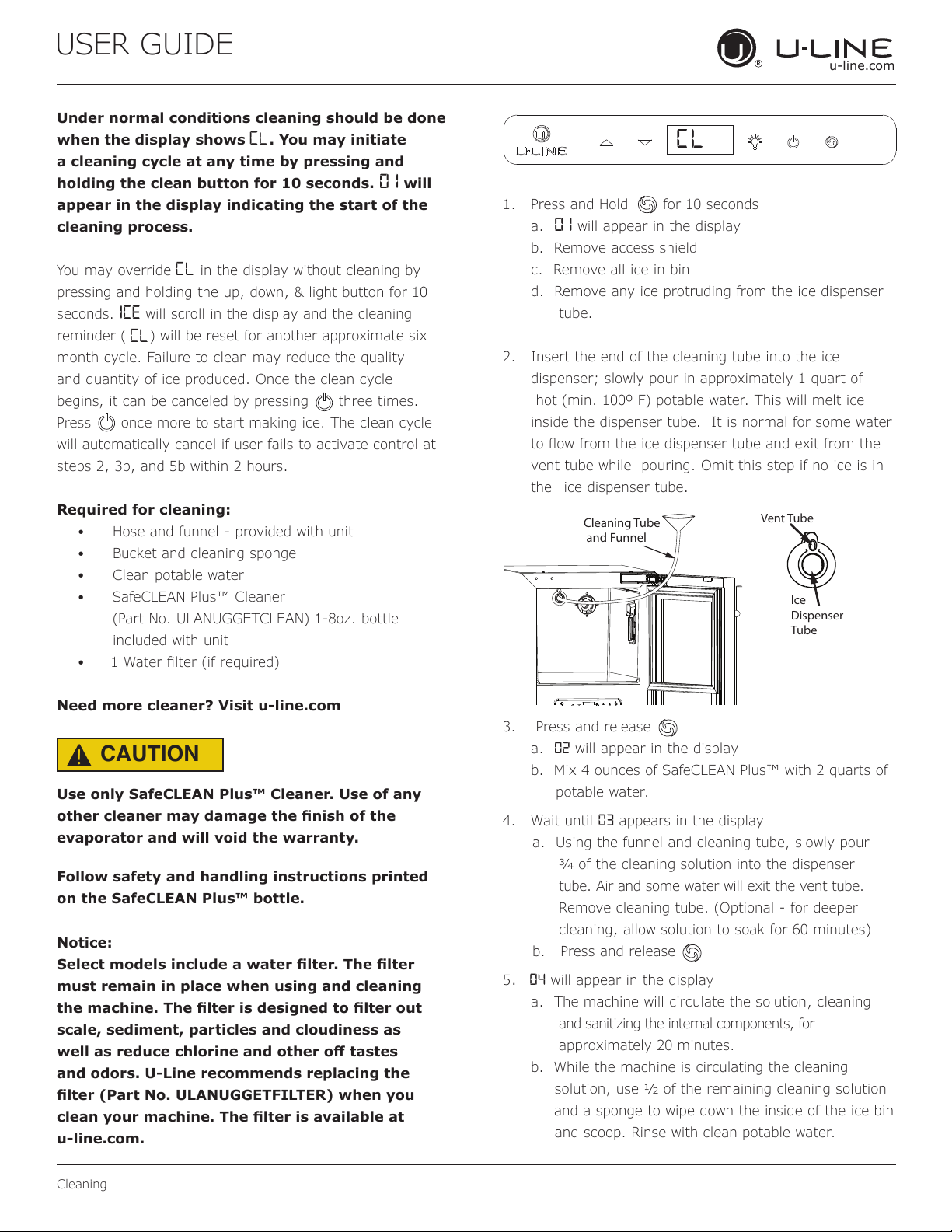
Under normal conditions cleaning should be done
when the display shows CL. You may initiate
a cleaning cycle at any time by pressing and
holding the clean button for 10 seconds. 0 1 will
appear in the display indicating the start of the
cleaning process.
You may override CL in the display without cleaning by
pressing and holding the up, down, & light button for 10
seconds. ICE will scroll in the display and the cleaning
reminder (
CL
) will be reset for another approximate six
month cycle. Failure to clean may reduce the quality
and quantity of ice produced. Once the clean cycle
begins, it can be canceled by pressing three times.
Press once more to start making ice. The clean cycle
will automatically cancel if user fails to activate control at
steps 2, 3b, and 5b within 2 hours.
Required for cleaning:
• Hose and funnel - provided with unit
• Bucket and cleaning sponge
• Clean potable water
• SafeCLEAN Plus™ Cleaner
(Part No. ULANUGGETCLEAN) 1-8oz. bottle
included with unit
•
Need more cleaner? Visit u-line.com
CAUTION
!
Use only SafeCLEAN Plus™ Cleaner. Use of any
other cleaner may damage the nish of the
evaporator and will void the warranty.
Follow safety and handling instructions printed
on the SafeCLEAN Plus™ bottle.
Notice:
Select models include a water lter. The lter
must remain in place when using and cleaning
the machine. The lter is designed to lter out
scale, sediment, particles and cloudiness as
well as reduce chlorine and other o tastes
and odors. U-Line recommends replacing the
lter (Part No. ULANUGGETFILTER) when you
clean your machine. The lter is available at
u-line.com.
1. Press and Hold for 10 seconds
a. 0 1 will appear in the display
b. Remove access shield
c. Remove all ice in bin
d. Remove any ice protruding from the ice dispenser
tube.
2. Insert the end of the cleaning tube into the ice
dispenser; slowly pour in approximately 1 quart of
hot (min. 100º F) potable water. This will melt ice
inside the dispenser tube. It is normal for some water
vent tube while pouring. Omit this step if no ice is in
the ice dispenser tube.
3. Press and release
a. 02 will appear in the display
b. Mix 4 ounces of SafeCLEAN Plus™ with 2 quarts of
potable water.
4. Wait until 03 appears in the display
a. Using the funnel and cleaning tube, slowly pour
of the cleaning solution into the dispenser
tube. Air and some water will exit the vent tube.
Remove cleaning tube. (Optional - for deeper
cleaning, allow solution to soak for 60 minutes)
b. Press and release
5. 04 will appear in the display
a. The machine will circulate the solution, cleaning
and sanitizing the internal components, for
approximately 20 minutes.
b. While the machine is circulating the cleaning
solution, use of the remaining cleaning solution
and a sponge to wipe down the inside of the ice bin
and scoop. Rinse with clean potable water.
Cl
Cleaning Tube
and Funnel
Ice
Dispenser
Tube
Vent Tube
29
USER GUIDE
u-line.com
Cleaning
6. When 05 appears in the display, 3 soft tones will
sound, indicating the cleaning phase is complete
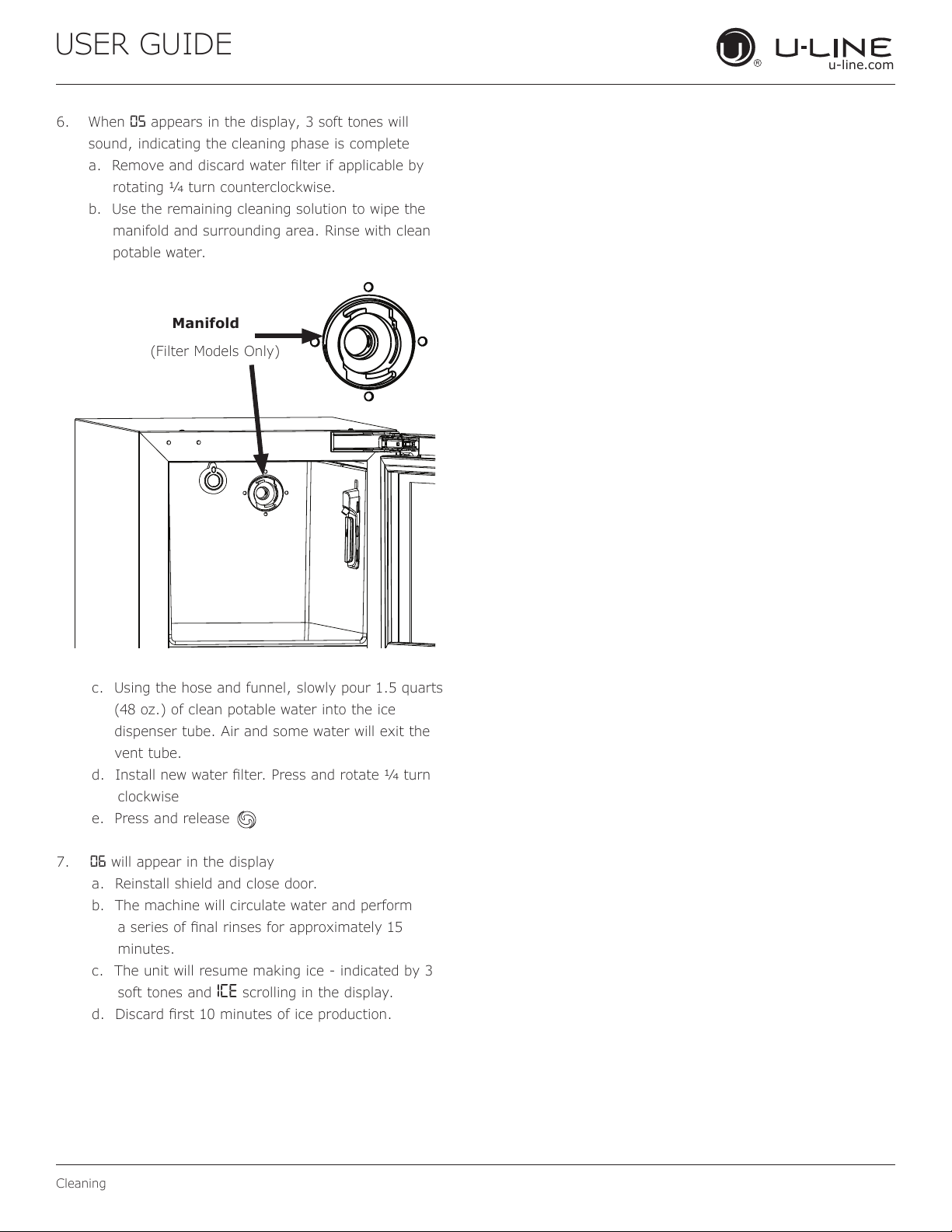
rotating turn counterclockwise.
b. Use the remaining cleaning solution to wipe the
manifold and surrounding area. Rinse with clean
potable water.
c. Using the hose and funnel, slowly pour 1.5 quarts
(48 oz.) of clean potable water into the ice
dispenser tube. Air and some water will exit the
vent tube.
turn
clockwise
e. Press and release
7. 06 will appear in the display
a. Reinstall shield and close door.
b. The machine will circulate water and perform
minutes.
c. The unit will resume making ice - indicated by 3
soft tones and ICE scrolling in the display.
Manifold
(Filter Models Only)
30
USER GUIDE
u-line.com
Cleaning Condenser
Cleaning Condenser
INTERVAL - EVERY SIX MONTHS
To maintain operational eciency, keep the front grille free
of dust and lint, and clean the condenser when necessary.
Depending on environmental conditions, more or less
frequent cleaning may be necessary.
WARNING
!
Disconnect electric power to the unit before
cleaning the condenser.
NOTICE
DO NOT use any type of cleaner on the condenser
unit. Condenser may be cleaned using a vacuum,
soft brush, or compressed air.
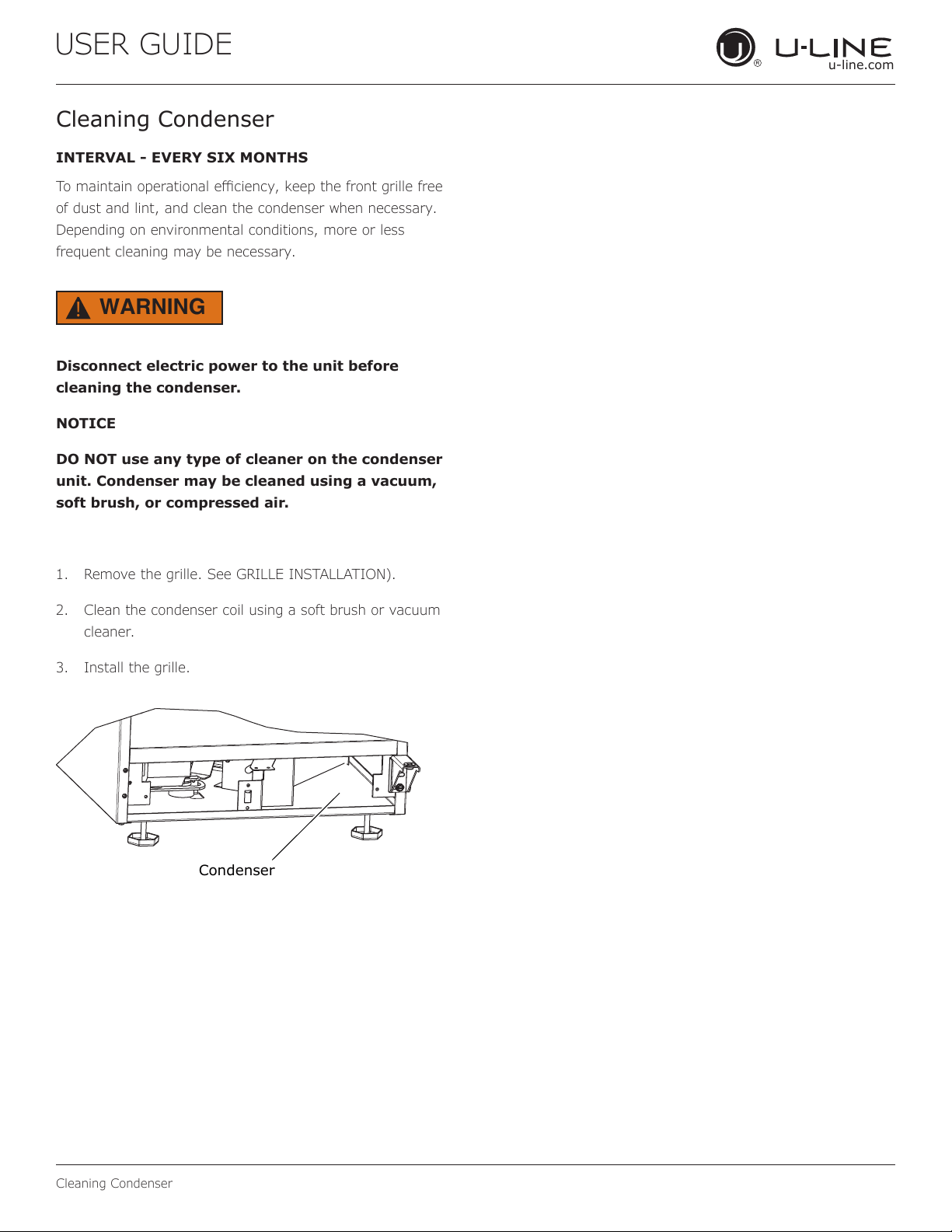
1. Remove the grille. See GRILLE INSTALLATION).
2. Clean the condenser coil using a soft brush or vacuum
cleaner.
3. Install the grille.
Condenser
31
USER GUIDE
Extended Non-Use
u-line.com
Extended Non-Use
VACATION/HOLIDAY, PROLONGED SHUTDOWN
The following steps are recommended for periods of
extended non-use:
1. Remove all consumable content from the unit.
2. Disconnect the power cord from its outlet/socket and
leave it disconnected until the unit is returned to
service.
3. Turn off the water supply.
4. If ice is on the evaporator, allow ice to thaw naturally.
5. Clean and dry the interior of the cabinet. Ensure all
water has been removed from the unit.
6. Disconnect the water and drain line (if applicable)
making sure all water is removed from the lines.
7. The door must remain open to prevent formation of
mold and mildew. Open door a minimum of 2"
(50 mm) to provide the necessary ventilation.
WINTERIZATION
If the unit will be exposed to temperatures of 40°F (5°C)
or less, the steps above must be followed. In addition, P60
drain pumps in clear ice machines must be drained
according to the following procedure:
1. Remove the drain pump from the ice machine.
2. Drain the water in the pump’s reservoir by turning the
pump upside down and allowing the water to drain
through the pump’s inlet and vent tube fittings.
3. After water is drained, reinstall the drain pump and
reattach all connections.
For questions regarding winterization, please
call U-Line at 800.779.2547.
CAUTION
!
Damage caused by freezing temperatures is not
covered by the warranty.
Do not put anti-freeze in your unit.
32
USER GUIDE
u-line.com
Troubleshooting
u-line.com
If you think your U-Line product is malfunctioning, read the
CONTROL OPERATION section to clearly understand the
function of the control.
If the problem persists, read the NORMAL OPERATING
SOUNDS and TROUBLESHOOTING GUIDE sections below
to help you quickly identify common problems and possible
causes and remedies. Most often, this will resolve the
problem without the need to call for service.
If you do not understand a troubleshooting remedy, or your
product needs service, contact U-Line Corporation directly
at +1.800.779.2547.
When you call, you will need your product Model and Serial
Numbers. This information appears on the Model and Serial
number plate located on the upper right or rear wall of the
interior of your product.
All models incorporate rigid foam insulated cabinets to
provide high thermal eciency and maximum sound
reduction for its internal working components. Despite this
technology, your model may make sounds that are
unfamiliar.
Normal operating sounds may be more noticeable because
of the unit’s environment. Hard surfaces such as cabinets,
wood, vinyl or tiled oors and paneled walls have a
tendency to reect normal appliance operating noises.
Listed below are common refrigeration components with a
brief description of the normal operating sounds they
make. NOTE: Your product may not contain all the
components listed.
• Compressor: The compressor makes a hum or pulsing
sound that may be heard when it operates.
BEFORE CALLING FOR SERVICE
TROUBLESHOOTING GUIDE
ELECTROCUTION HAZARD. Never attempt to
repair or perform maintenance on the unit
before disconnecting the main electrical power.
Troubleshooting - What to check when problems occur:
NORMAL OPERATING SOUNDS
IF SERVICE IS REQUIRED
Troubleshooting
• Evaporator: Refrigerant owing through an evaporator
may sound like boiling liquid.
• Condenser Fan: Air moving through a condenser may
be heard.
• Automatic Defrost Drain Pan: Water may be heard
dripping or running into the drain pan when the unit is
in the defrost cycle.
DANGER
!
Problem Possible Cause and Remedy
Interior Light
Does Not
Illuminate
If the unit is cooling, it may be in
Sabbath mode.
Light Remains
on When Door
Is Closed.
Turn o light switch if equipped.
Adjust light actuator bracket on bottom
of door.
Unit Develops
Frost on
Internal
Surfaces.
Ensure the door is closing and sealing
properly.
Unit Develops
Condensation
on External
Surfaces.
The unit is exposed to excessive
humidity. Moisture will dissipate as
humidity levels decrease.
Product is Not
Cold Enough
Air temperature does not indicate
product temperature. See CHECKING
PRODUCT TEMPERATURE below.
Adjust the temperature to a cooler set
point.
Ensure unit is not located in excessive
ambient temperatures or in direct
sunlight.
Ensure the door is closing and sealing
properly.
Ensure the interior light has not
remained on too long.
Ensure nothing is blocking the front
grille, found at the bottom of the unit.
Ensure the condenser coil is clean and
free of any dirt or lint build-up.
33
USER GUIDE
u-line.comu-line.com
Troubleshooting
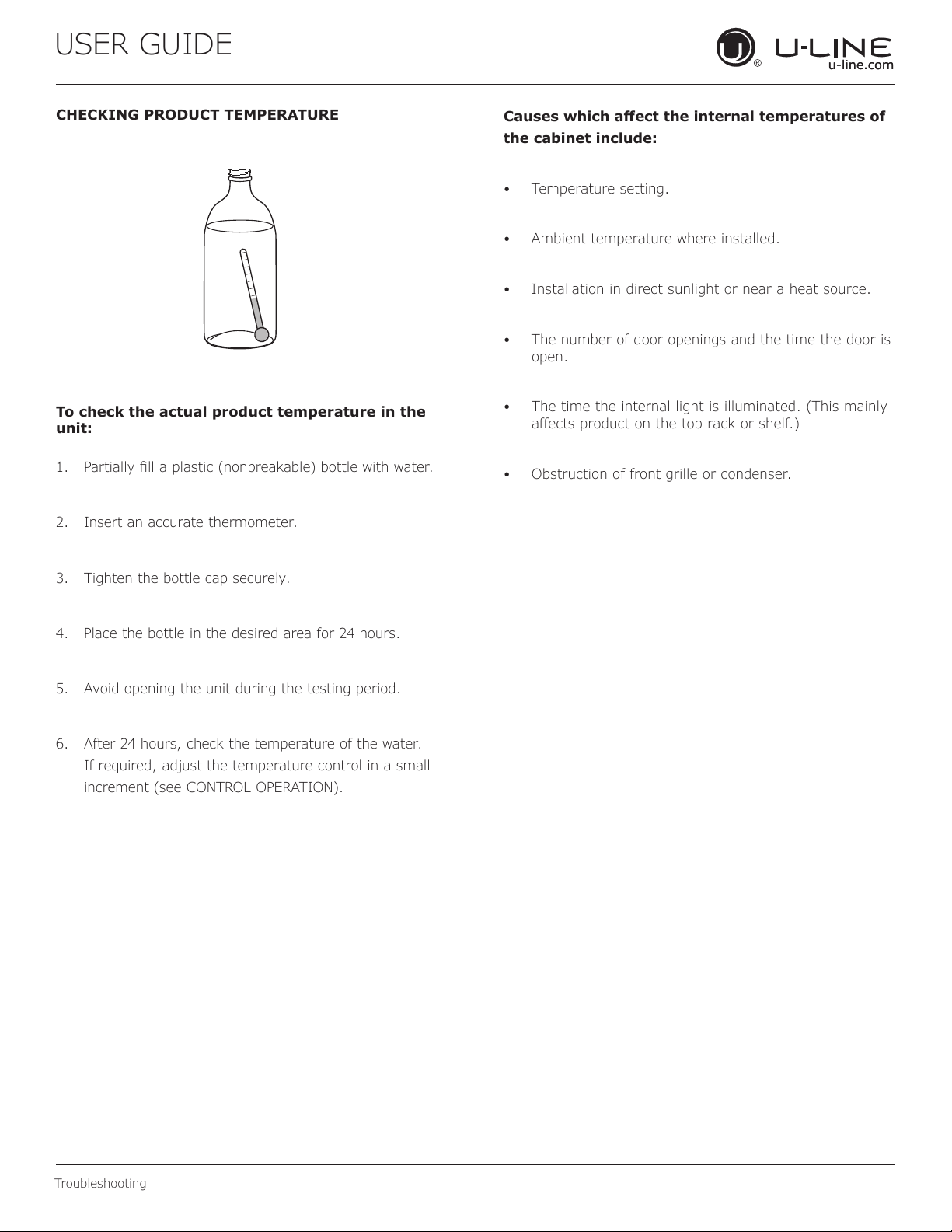
CHECKING PRODUCT TEMPERATURE
To check the actual product temperature in the
unit:
1. Partially ll a plastic (nonbreakable) bottle with water.
2. Insert an accurate thermometer.
3. Tighten the bottle cap securely.
4. Place the bottle in the desired area for 24 hours.
5. Avoid opening the unit during the testing period.
6. After 24 hours, check the temperature of the water.
If required, adjust the temperature control in a small
increment (see CONTROL OPERATION).
Causes which aect the internal temperatures of
the cabinet include:
• Temperature setting.
• Ambient temperature where installed.
• Installation in direct sunlight or near a heat source.
• The number of door openings and the time the door is
open.
• The time the internal light is illuminated. (This mainly
aects product on the top rack or shelf.)
• Obstruction of front grille or condenser.
34
USER GUIDE
u-line.com
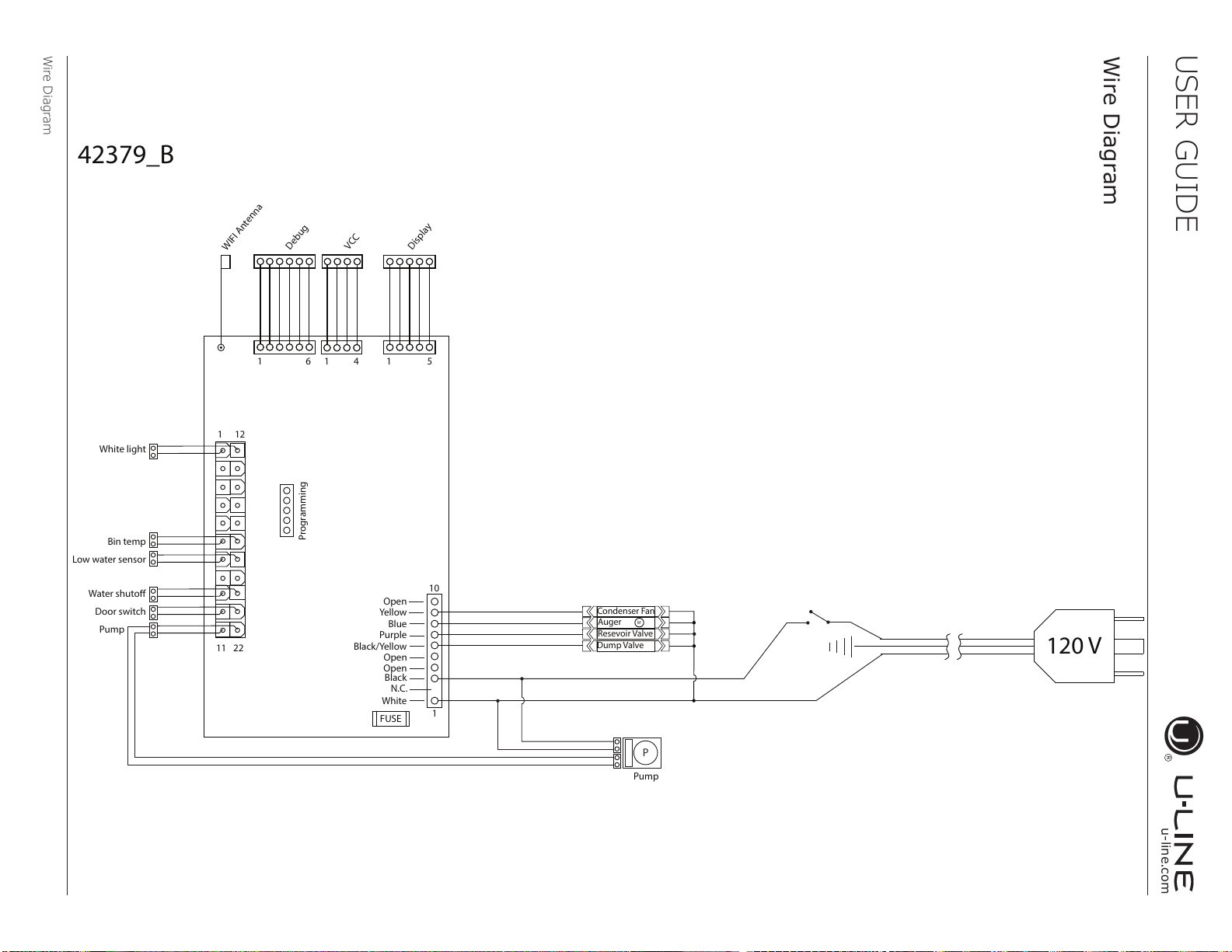
Wire Diagram
Wire Diagram
M
P
120 V
Blue
Yellow
Open
Purple
Black/Yellow
Open
Black
White
FUSE
N.C.
11 22
1
10
1
1 51 6 1 4
12
Pump
White light
Bin temp
Door switch
Pump
Low water sensor
Water shutoff
Dump Valve
Resevoir Valve
Auger
Condenser Fan
Open
Programming
Debug
VCC
Display
42379_B
WIFI Antenna
35
USER GUIDE
u-line.com
Product Liability
Product Liability
Field service technicians are authorized to make an initial
assessment in the event of reported damages. If there are
any questions about the process involved, the technician
should call U-Line for further explanation.
While inspecting for defects or installation issues, photos
should be taken to document any damages or issues found.
During the assessment, if the service technician is able to
nd the source of the damage and it can be resolved by
replacement of a part, the servicer is authorized to replace
the part in question. The part that caused the damage
must be returned to U-Line in its entirety. The part must
be clearly labeled with the serial number of the unit it was
removed from, the date, and the servicer who removed the
part.
If the service technician determines the damage is the
result of installation issues (water connection/drain, etc.),
the consumer would be notied and the issues shall be
resolved at the direction of the consumer.
If damage is evident and the service technician is
unable to nd the source, U-Line must be contacted at
1.800.799.2547 for further direction.
8900 N. 55th Street • Milwaukee, WI 53223
T: +1.414.354.0300 • F: +1.414.354.5696
Website: www.u-line.com
Right product. Right place.
Right temperature Since 1962.
36
USER GUIDE
u-line.com
Warranty Claims
The following information denes the parameters for ling a
warranty claim:
• Valid serial number needed
• Valid model number needed
• Claims must be submitted online at
www.U-LineService.com
• 60 day submittal deadline from date of completed
service
• Only one repair or unit per warranty claim
• Part order numbers will be required when submitting
for warranty labor
Units must be registered prior to warranty submittal.
Customers may register at www.U-Line.com. A proof
of purchase is required. We also accept the following
information to update warranty:
• New construction occupancy documents
• Closing paperwork
• Final billing - Remodel
Warranty parts will be shipped at no charge after U-Line
conrms warranty status. Please provide the model, serial
number, part number and part description. Some parts will
require color or voltage information.
Warranty Claims
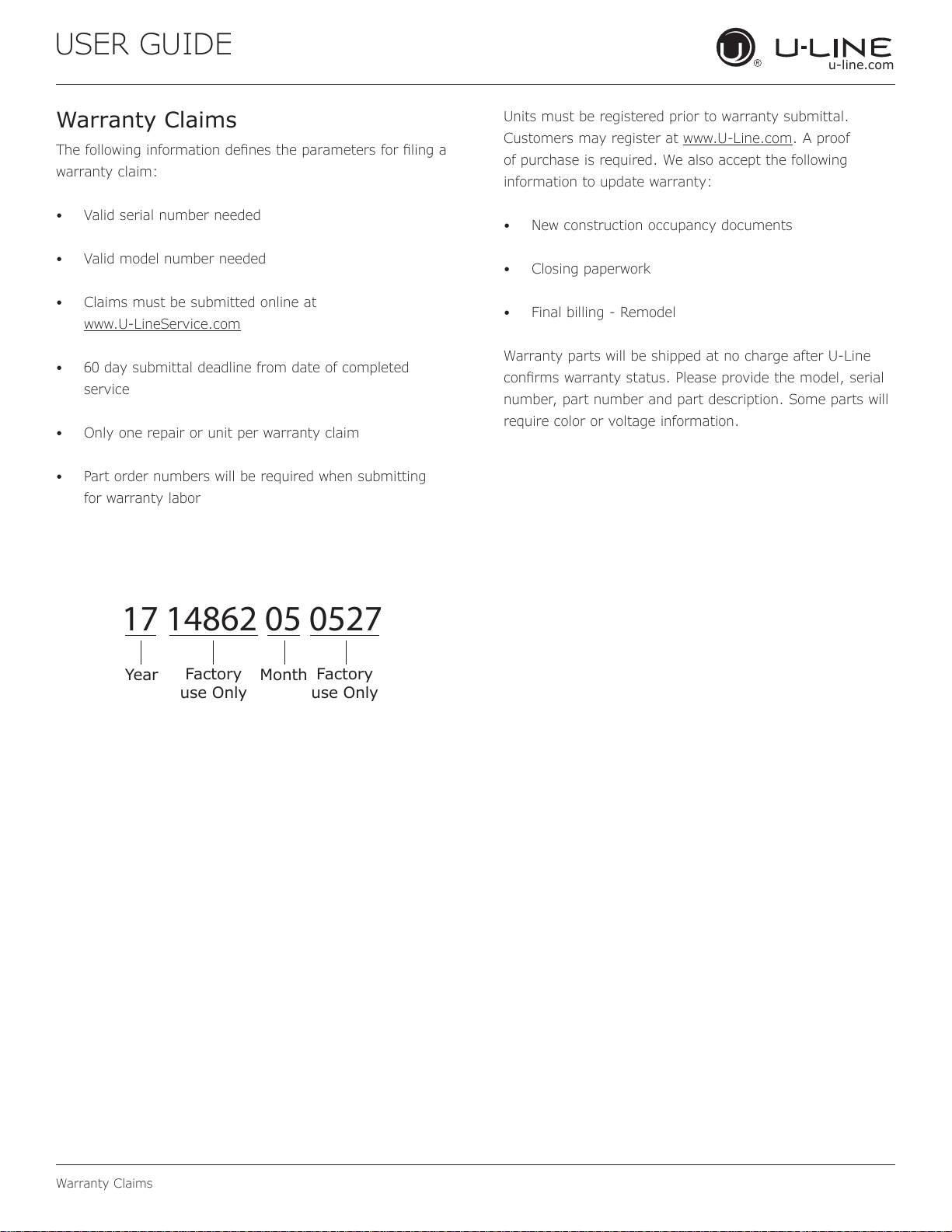
17 14862 05 0527
Year
Factory
use Only
Factory
use Only
Month
37
USER GUIDE
u-line.com
Parts
Parts
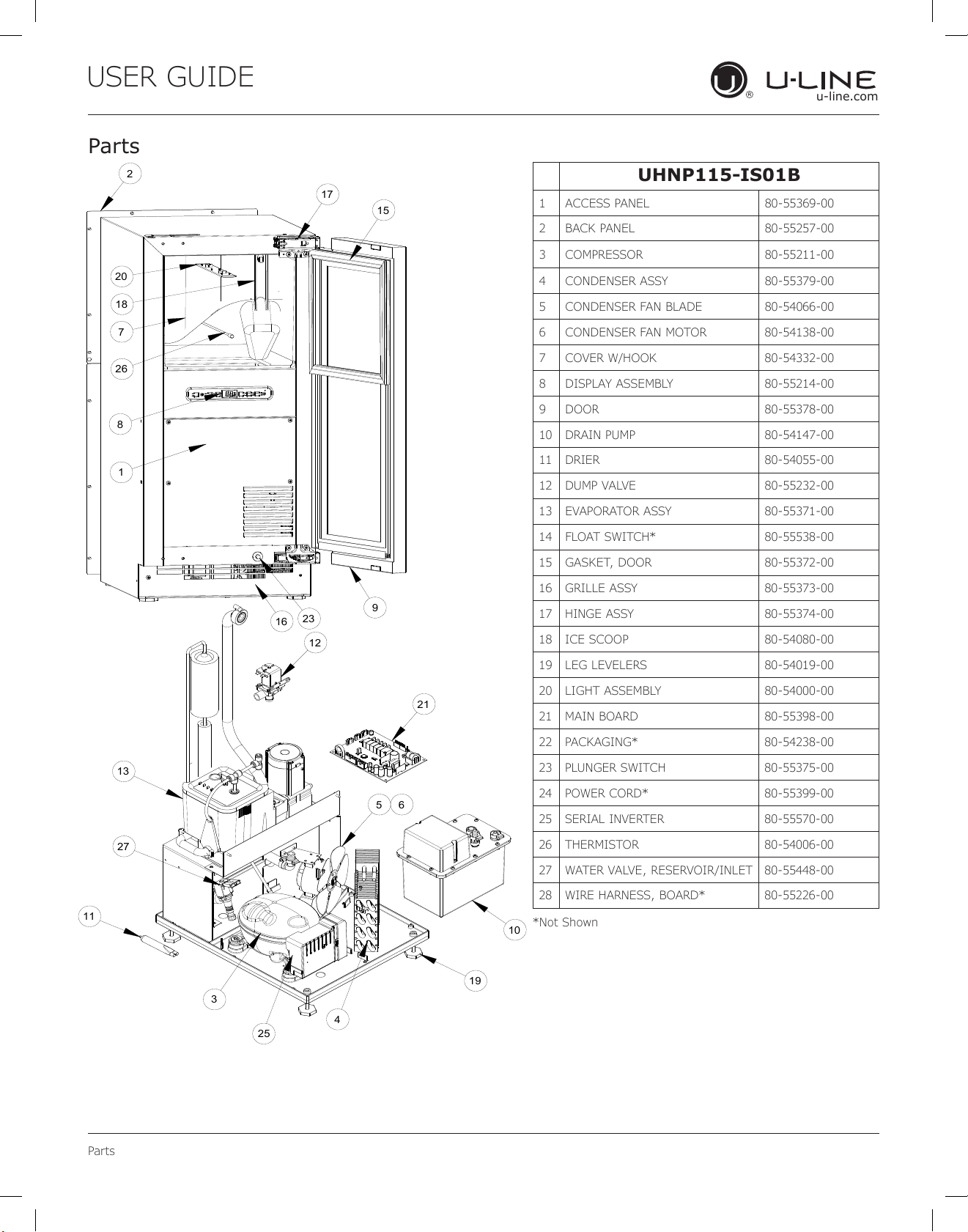
UHNP115-IS01B
1 ACCESS PANEL 80-55369-00
2 BACK PANEL 80-55257-00
3 COMPRESSOR 80-55211-00
4 CONDENSER ASSY 80-55379-00
5 CONDENSER FAN BLADE 80-54066-00
6 CONDENSER FAN MOTOR 80-54138-00
7 COVER W/HOOK 80-54332-00
8 DISPLAY ASSEMBLY 80-55214-00
9 DOOR 80-55378-00
10 DRAIN PUMP 80-54147-00
11 DRIER 80-54055-00
12 DUMP VALVE 80-55232-00
13 EVAPORATOR ASSY 80-55371-00
14 FLOAT SWITCH* 80-55538-00
15 GASKET, DOOR 80-55372-00
16 GRILLE ASSY 80-55373-00
17 HINGE ASSY 80-55374-00
18 ICE SCOOP 80-54080-00
19 LEG LEVELERS 80-54019-00
20 LIGHT ASSEMBLY 80-54000-00
21 MAIN BOARD 80-55398-00
22 PACKAGING* 80-54238-00
23 PLUNGER SWITCH 80-55375-00
24 POWER CORD* 80-55399-00
25 SERIAL INVERTER 80-55570-00
26 THERMISTOR 80-54006-00
27 WATER VALVE, RESERVOIR/INLET 80-55448-00
28 WIRE HARNESS, BOARD* 80-55226-00
*Not Shown
1
2
7
8
9
15
16
20
18
17
23
26
10
21
3
4
5 6
11
12
13
19
27
25
38
USER GUIDE
u-line.com
Ordering Replacement Parts
Parts may be ordered online at www.U-Line.com
See our contact information below:
www.U-LineService.com (with service login)
Phone Number: +1.800.779.2547
NOTICE
Use only genuine U-Line replacement parts.
The use of non-U-Line parts can reduce speed
of ice production, cause water to overow from
ice maker mold, damage the unit, and void the
warranty.
Warranty parts will be shipped at no charge after U-Line
conrms warranty status. Please provide the model, serial
number, part number and part description. Some parts will
require color or voltage information.
If U-Line requires the return of original parts, we will
inform you when the parts order is taken. This
requirement will be noted on your packing list. A
prepaid shipping label will be emailed to you. Please
enclose a copy of the parts packing list and be sure the
model and serial numbers are legible on the paperwork.
Tag the part with the reported defect.
Customers and non-authorized servicers may order non-
warranty parts at www.u-line.com. Authorized servicers
with a servicer login may order non-warranty parts at
www.u-lineservice.com.
Ordering Replacement Parts
39
USER GUIDE
u-line.com
R-600A Specications
R-600A Specifications
For R-600a refrigerant service tips and more videos, go
to: www.u-line.com/videos
.
WARNING
!
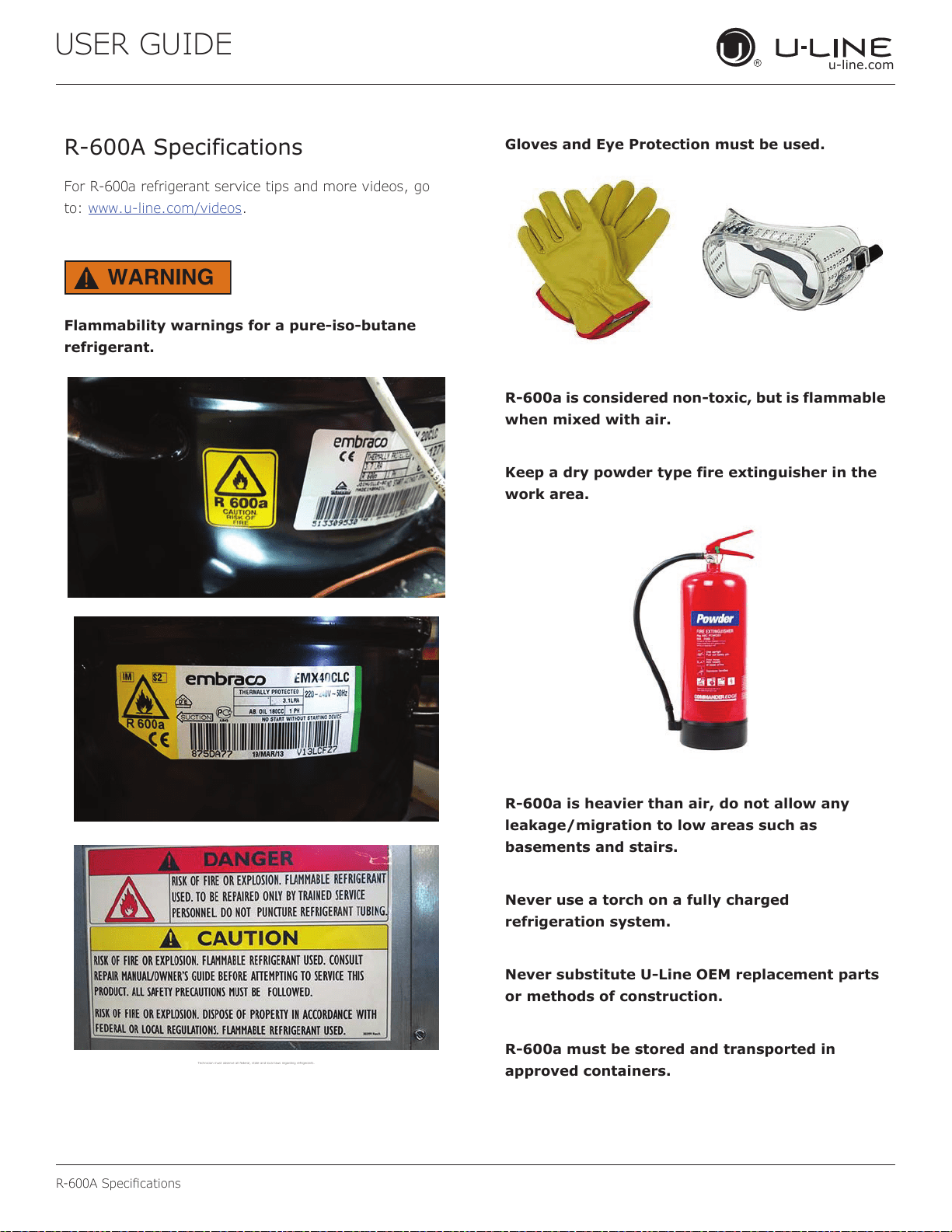
Flammability warnings for a pure-iso-butane
refrigerant.
Technician m ust observe al l federal, st ate and local la ws regarding r efrigerants .
Gloves and Eye Protection must be used.
R-600a is considered non-toxic, but is flammable
when mixed with air.
Keep a dry powder type fire extinguisher in the
work area.
R-600a is heavier than air, do not allow any
leakage/migration to low areas such as
basements and stairs.
Never use a torch on a fully charged
refrigeration system.
Never substitute U-Line OEM replacement parts
or methods of construction.
R-600a must be stored and transported in
approved containers.
40
R-600A Specications
USER GUIDE
u-line.com
WARNING
!
Only skilled and well trained service technicians
permitted to service R-600a equipped products.
All tools and equipment must be approved for
use with R-600a refrigerant.
Local, state and federal laws, standards must be
observed along with proper certification and
licensing.
Ventilation is required during servicing.
No conversions to R-600a from any other
refrigerants. OEM R-600a equipped unit only.
Service area must be free of ignition sources.
No smoking is allowed in the service area.
All replacement electrical components must be
OEM and installed properly (sealed and
covered).
If the evaporator is cold prior to service, it must
be thawed prior to service.
When using a vacuum pump, start pump before
opening refrigeration system.
Vacuum pump and recovery equipment should
be at least 10 feet from the work area.
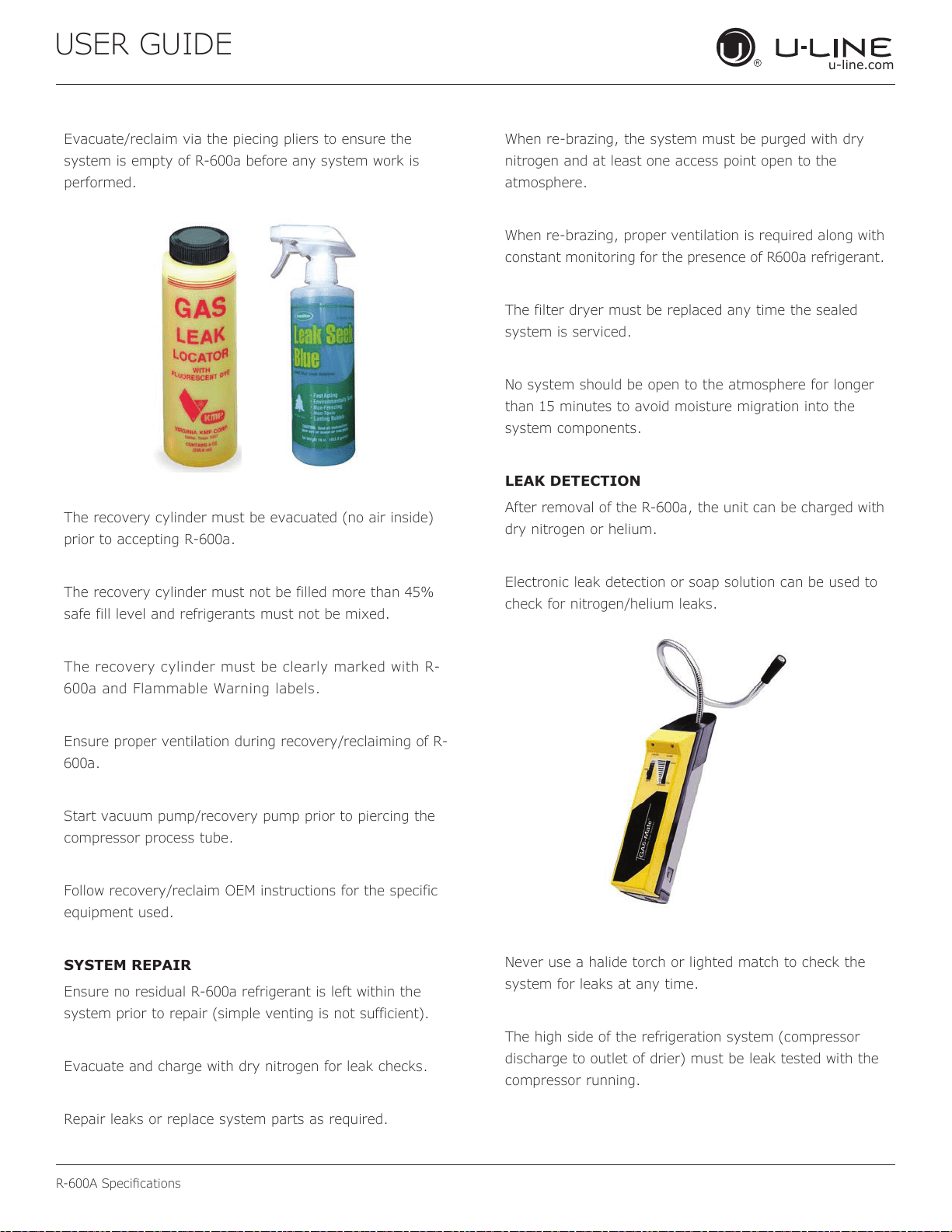
It is recommended that a simple LPG gas
detector is on site during service.
Ensure that all R-600a is removed from the
system prior to brazing any part of the sealed
system.
Only a clean, dry leak free system should be
charged with R-600a.
R-600A SPECIFICATIONS/LABELING
R-600a equipped products are labeled (both the unit and
the compressor).
R-600a is colorless and odorless.
R-600a is considered non-toxic, but is flammable when
mixed with air.
Do not remove or alter any R-600a labeling on the
product.
Use only a refrigerant grade R-600a from a properly
labeled container.
RECOVERING/RECLAIMING R-600A
(R-600a has been exempted from recovery/reclaiming
requirements by the US EPA)
Recovery/Reclaiming equipment must be approved for use
with R-600a.
Ensure the evaporator is at room temperature prior to
recovery/reclaiming R-600a.
Use a common piercing pliers or piercing valve to remove
R-600a from the compressor process tube. (Note: Piercing
devices must not be left on the system and must be
replaced with a Schrader type valve.)
41
USER GUIDE
u-line.com
R-600A Specications
Evacuate/reclaim via the piecing pliers to ensure the
system is empty of R-600a before any system work is
performed.
The recovery cylinder must be evacuated (no air inside)
prior to accepting R-600a.
The recovery cylinder must not be filled more than 45%
safe fill level and refrigerants must not be mixed.
The recovery cylinder must be clearly marked with R-
600a and Flammable Warning labels.
Ensure proper ventilation during recovery/reclaiming of R-
600a.
Start vacuum pump/recovery pump prior to piercing the
compressor process tube.
Follow recovery/reclaim OEM instructions for the specific
equipment used.
SYSTEM REPAIR
Ensure no residual R-600a refrigerant is left within the
system prior to repair (simple venting is not sufficient).
Evacuate and charge with dry nitrogen for leak checks.
Repair leaks or replace system parts as required.
When re-brazing, the system must be purged with dry
nitrogen and at least one access point open to the
atmosphere.
When re-brazing, proper ventilation is required along with
constant monitoring for the presence of R600a refrigerant.
The filter dryer must be replaced any time the sealed
system is serviced.
No system should be open to the atmosphere for longer
than 15 minutes to avoid moisture migration into the
system components.
LEAK DETECTION
After removal of the R-600a, the unit can be charged with
dry nitrogen or helium.
Electronic leak detection or soap solution can be used to
check for nitrogen/helium leaks.
Never use a halide torch or lighted match to check the
system for leaks at any time.
The high side of the refrigeration system (compressor
discharge to outlet of drier) must be leak tested with the
compressor running.
42
R-600A Specications
USER GUIDE
u-line.com
The low side of the refrigeration system (evaporator,
compressor and suction line) must be leak tested with the
compressor off (equalized pressure).
RECHARGING
No air is ever to be allowed inside the refrigeration system
(R-600a refrigerant or dry nitrogen only).
Never use a torch on a fully charged refrigeration system.
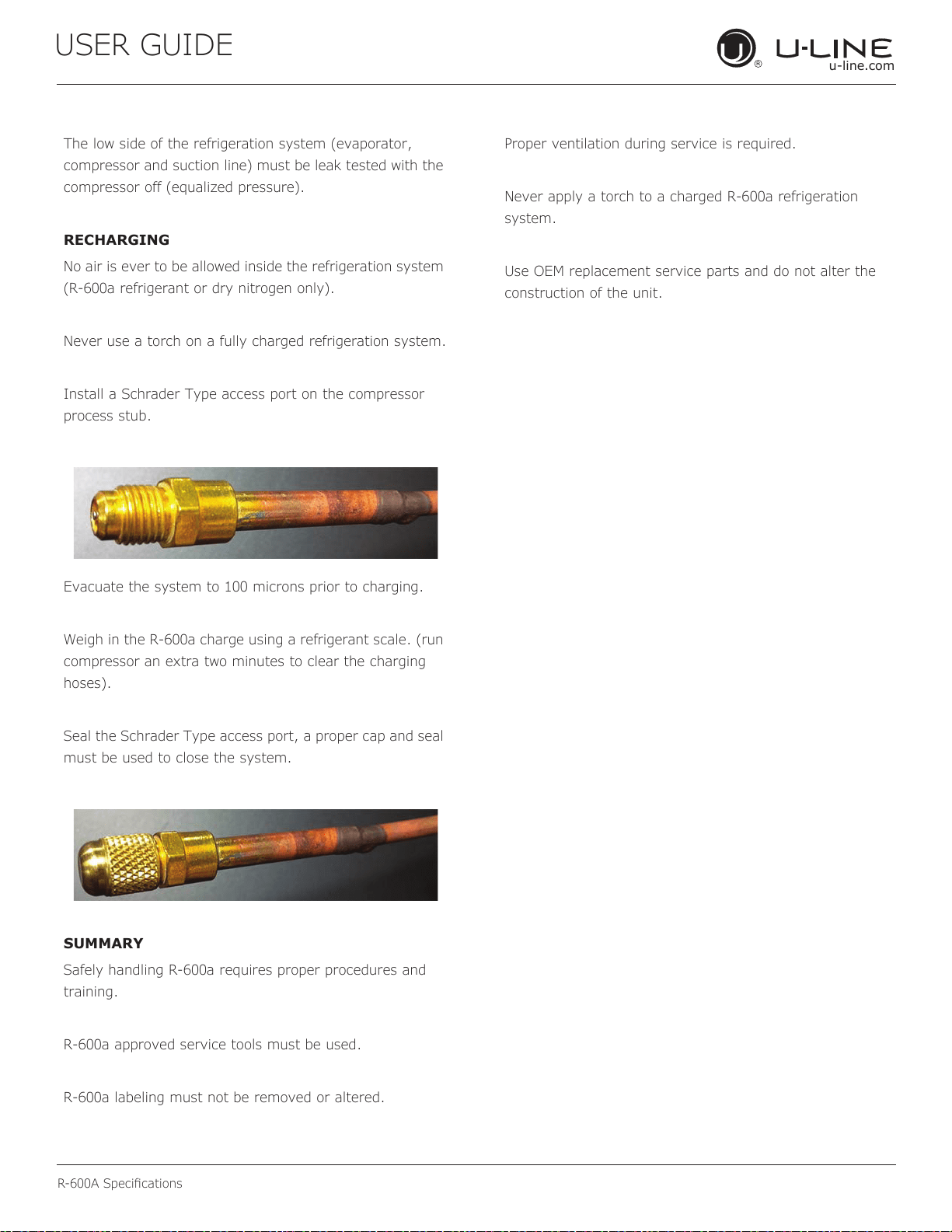
Install a Schrader Type access port on the compressor
process stub.
Evacuate the system to 100 microns prior to charging.
Weigh in the R-600a charge using a refrigerant scale. (run
compressor an extra two minutes to clear the charging
hoses).
Seal the Schrader Type access port, a proper cap and seal
must be used to close the system.
SUMMARY
Safely handling R-600a requires proper procedures and
training.
R-600a approved service tools must be used.
R-600a labeling must not be removed or altered.
Proper ventilation during service is required.
Never apply a torch to a charged R-600a refrigeration
system.
Use OEM replacement service parts and do not alter the
construction of the unit.
43
USER GUIDE
u-line.com
System Diagnosis Guide
System Diagnosis Guide
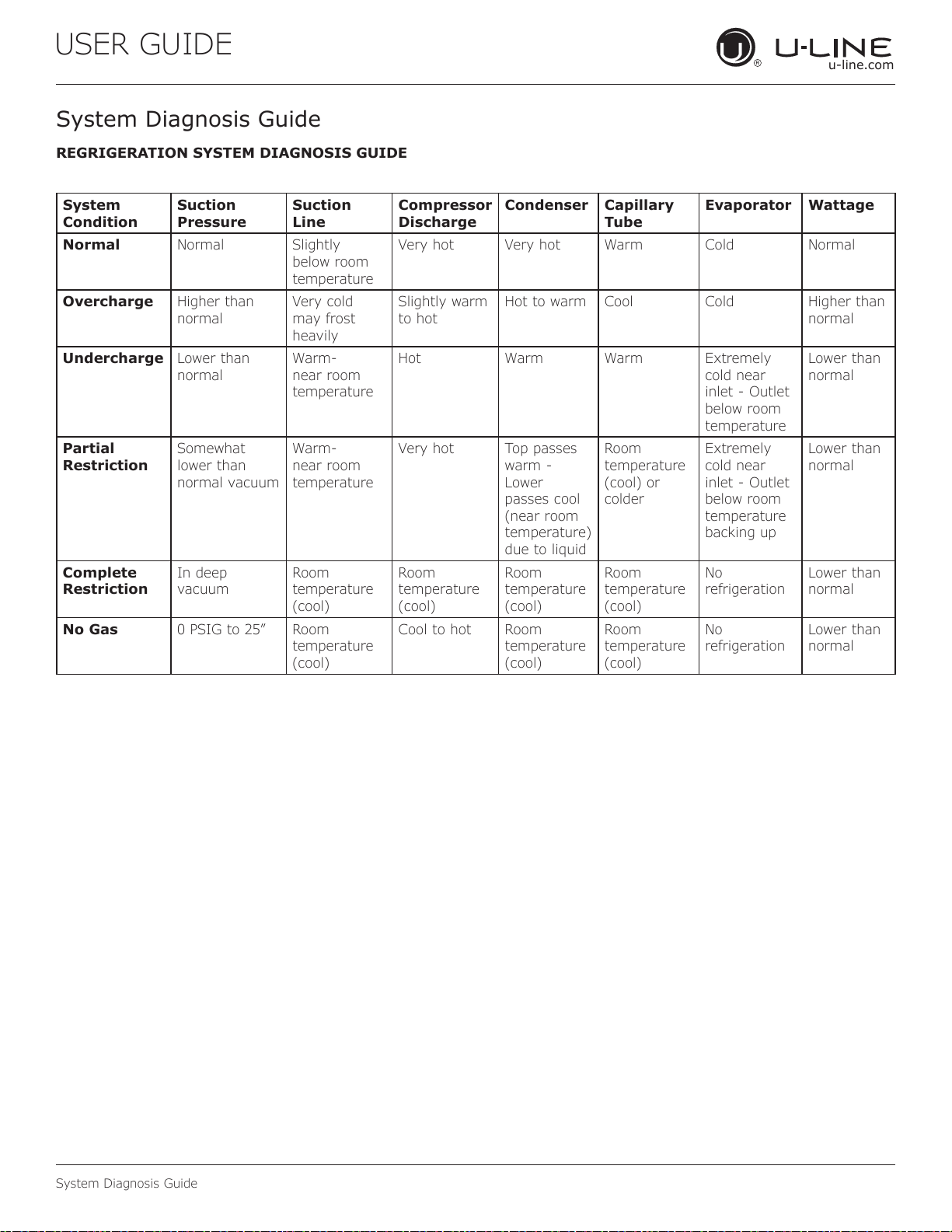
REGRIGERATION SYSTEM DIAGNOSIS GUIDE
System
Condition
Suction
Pressure
Suction
Line
Compressor
Discharge
Condenser Capillary
Tube
Evaporator Wattage
Normal Normal Slightly
below room
temperature
Very hot Very hot Warm Cold Normal
Overcharge Higher than
normal
Very cold
may frost
heavily
Slightly warm
to hot
Hot to warm Cool Cold Higher than
normal
Undercharge Lower than
normal
Warm-
near room
temperature
Hot Warm Warm Extremely
cold near
inlet - Outlet
below room
temperature
Lower than
normal
Partial
Restriction
Somewhat
lower than
normal vacuum
Warm-
near room
temperature
Very hot Top passes
warm -
Lower
passes cool
(near room
temperature)
due to liquid
Room
temperature
(cool) or
colder
Extremely
cold near
inlet - Outlet
below room
temperature
backing up
Lower than
normal
Complete
Restriction
In deep
vacuum
Room
temperature
(cool)
Room
temperature
(cool)
Room
temperature
(cool)
Room
temperature
(cool)
No
refrigeration
Lower than
normal
No Gas 0 PSIG to 25” Room
temperature
(cool)
Cool to hot Room
temperature
(cool)
Room
temperature
(cool)
No
refrigeration
Lower than
normal
44
USER GUIDE
u-line.com
Compressor Specications
Electrocution can cause death or serious injury.
Burns from hot or cold surfaces can cause serious
injury. Take precautions when servicing this unit.
Disconnect the power source.
Do not stand in standing water when working
around electrical appliances.
Make sure the surfaces you touch are not hot or
frozen.
Do not touch a bare circuit board unless you are
wearing an anti-static wrist strap that is grounded
to an electrical ground or grounded water pipe.
Handle circuit boards carefully and avoid touching
components.
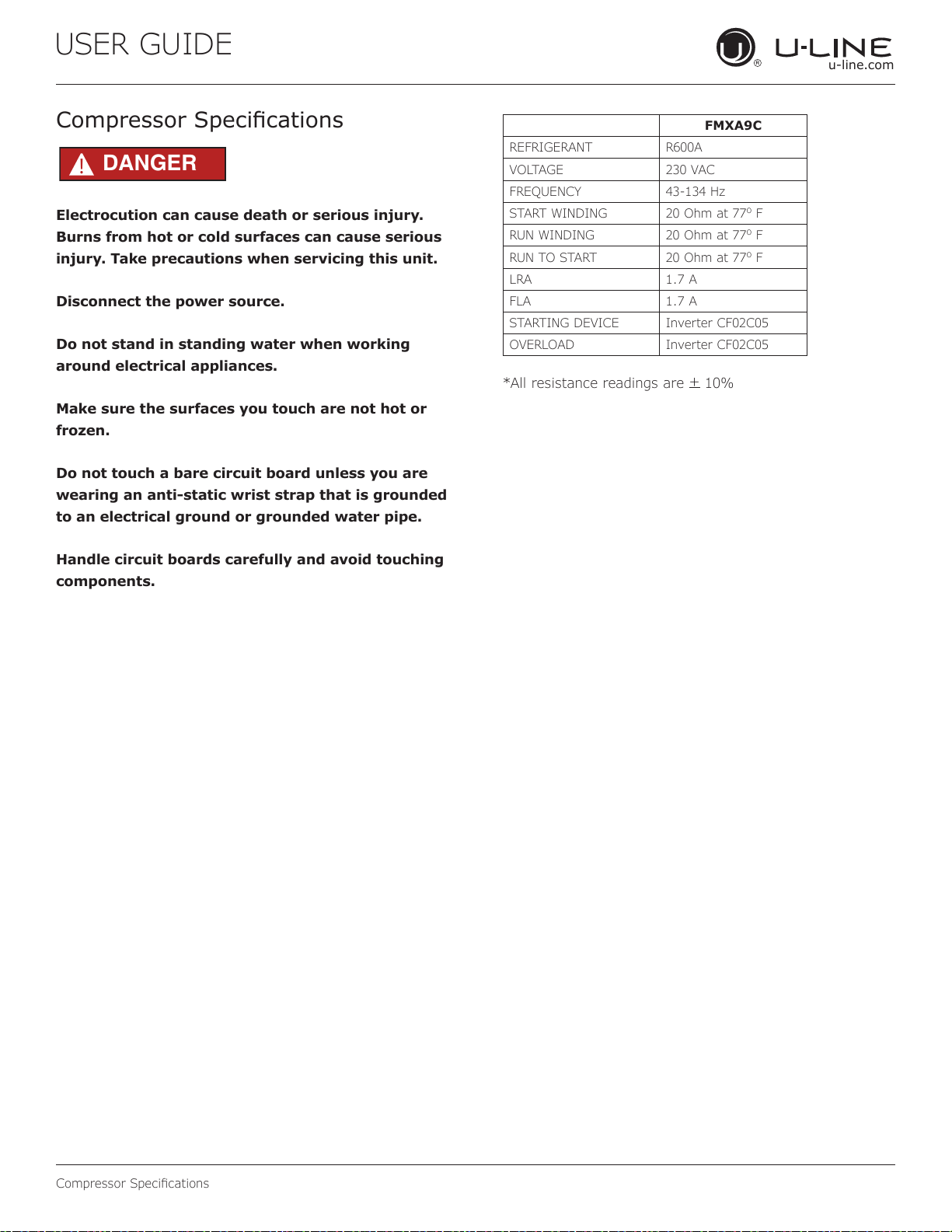
Compressor Specications
FMXA9C
REFRIGERANT R600A
VOLTAGE 230 VAC
FREQUENCY 43-134 Hz
START WINDING 20 Ohm at 77
o
F
RUN WINDING 20 Ohm at 77
o
F
RUN TO START 20 Ohm at 77
o
F
LRA 1.7 A
FLA 1.7 A
STARTING DEVICE Inverter CF02C05
OVERLOAD Inverter CF02C05
*All resistance readings are
+
10%
DANGER
!
45
USER GUIDE
u-line.com
Troubleshooting Extended
Troubleshooting - Extended
SPECIFIC ERRORS AND ISSUES
The advanced diagnostic capabilities of the electronic
controls utilized on the 1, 3, and 5 Class units allow for
easy and thorough troubleshooting.
Navigation of the control is the key and is explained in
the CONTROL OPERATION section of the manual, along
with control button layout, control function descriptions,
a service mode menu and service menu selection
explanations.
Verication of temperature and thermistor performance can
be identied by directly viewing thermistor readings in the
service mode.
Component failure issues can be identied through
service mode menu #20, “Component Testing.” Individual
components can be switched on and o to check for both
proper function of a specic component and also delivery of
supply voltage to the components through the relays and
DC outputs located on the relay/power board.
Included in this section are some diagnostic tips and of
course, if additional help is required, please contact the
U-Line Corp, “Customer Care Facility” at +1.800.779.2547
for assistance.
NORMAL OPERATING SOUNDS
All models incorporate rigid foam insulated cabinets to
provide high thermal eciency and maximum sound
reduction for its internal working components. Despite
this technology, your model may make sounds that are
unfamiliar.
Normal operating sounds may be more noticeable because
of the unit’s environment. Hard surfaces such as cabinets,
wood, vinyl or tiled oors and paneled walls have a
tendency to reect normal appliance operating noises.
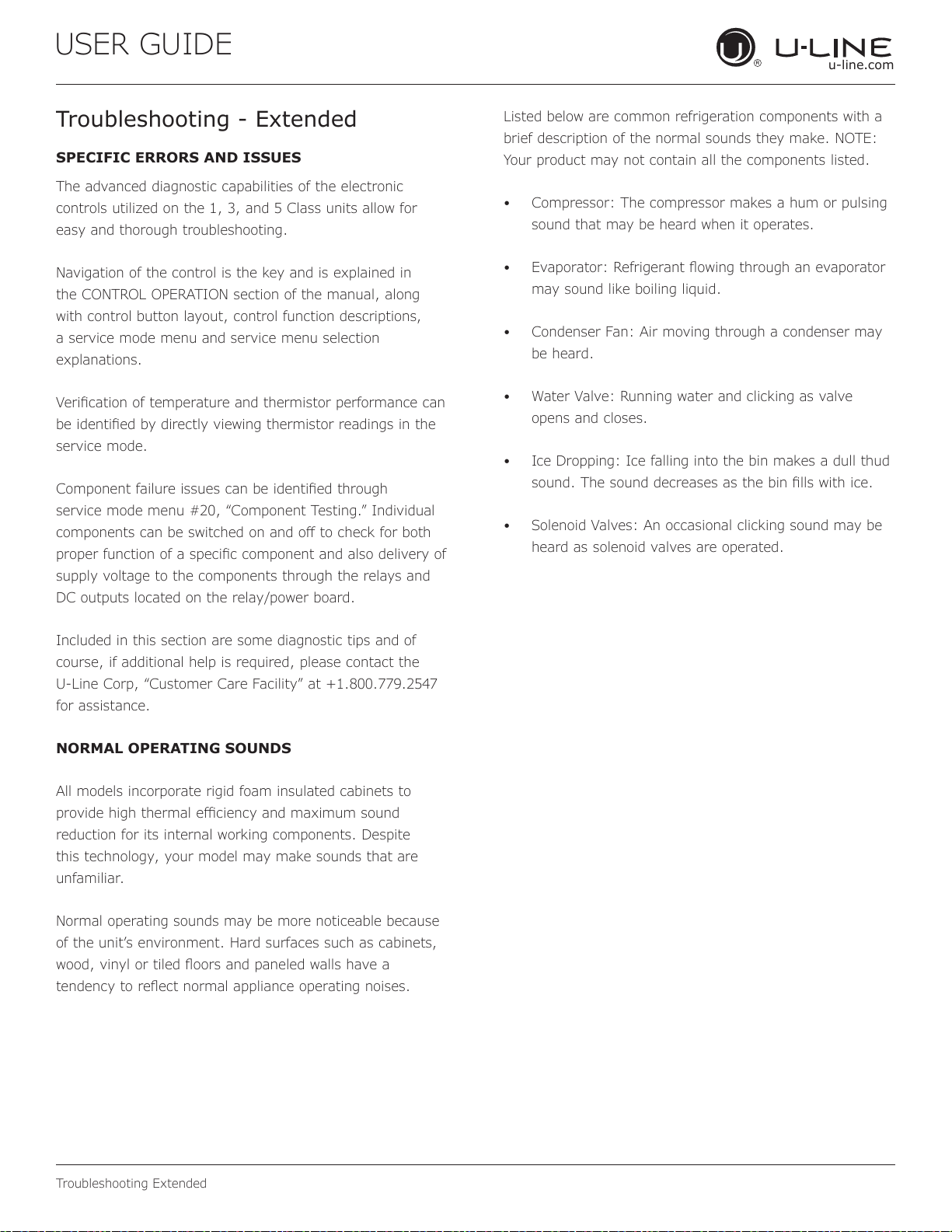
Listed below are common refrigeration components with a
brief description of the normal sounds they make. NOTE:
Your product may not contain all the components listed.
• Compressor: The compressor makes a hum or pulsing
sound that may be heard when it operates.
• Evaporator: Refrigerant owing through an evaporator
may sound like boiling liquid.
• Condenser Fan: Air moving through a condenser may
be heard.
• Water Valve: Running water and clicking as valve
opens and closes.
• Ice Dropping: Ice falling into the bin makes a dull thud
sound. The sound decreases as the bin lls with ice.
• Solenoid Valves: An occasional clicking sound may be
heard as solenoid valves are operated.
46
USER GUIDE
u-line.com
Troubleshooting Extended
MAIN CONTROL
The main control board is very robust and is rarely the
cause of system issues. It is important to fully diagnose
the board for any suspected failures before attempting
to remove the board for replacement or service. Follow
the guidelines below to fully test and diagnose the main
control.
Power Fault
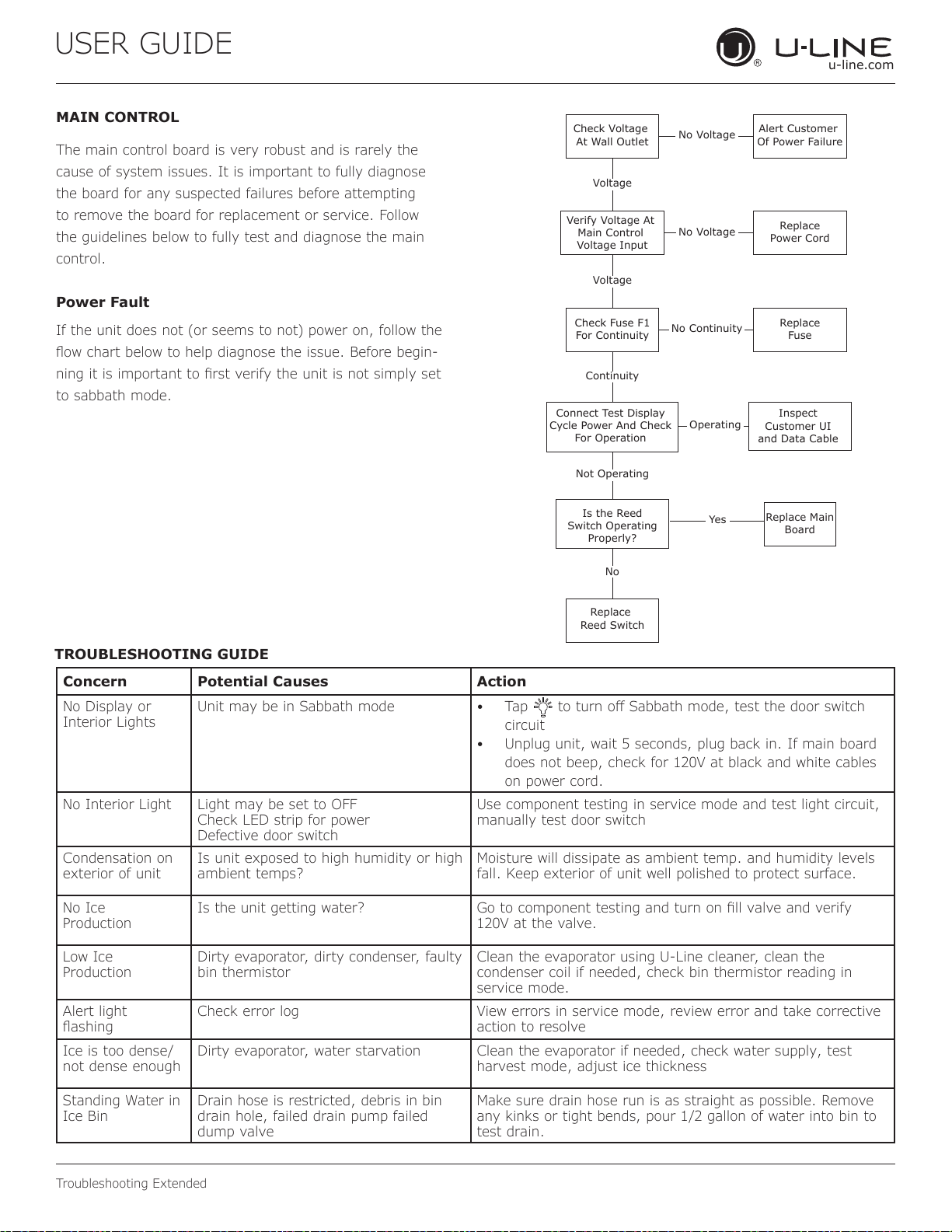
If the unit does not (or seems to not) power on, follow the
ow chart below to help diagnose the issue. Before begin-
ning it is important to rst verify the unit is not simply set
to sabbath mode.
Check Voltage
At Wall Outlet
Verify Voltage At
Main Control
Voltage Input
Check Fuse F1
For Continuity
Replace
Reed Switch
Replace Main
Board
Replace
Fuse
Replace
Power Cord
Alert Customer
Of Power Failure
Is the Reed
Switch Operating
Properly?
Inspect
Customer UI
and Data Cable
Connect Test Display
Cycle Power And Check
For Operation
No Voltage
No Voltage
Voltage
Continuity
Operating
Not Operating
No Continuity
No
Yes
Voltage
TROUBLESHOOTING GUIDE
Concern Potential Causes Action
No Display or
Interior Lights
Unit may be in Sabbath mode • Tap to turn o Sabbath mode, test the door switch
circuit
• Unplug unit, wait 5 seconds, plug back in. If main board
does not beep, check for 120V at black and white cables
on power cord.
No Interior Light Light may be set to OFF
Check LED strip for power
Defective door switch
Use component testing in service mode and test light circuit,
manually test door switch
Condensation on
exterior of unit
Is unit exposed to high humidity or high
ambient temps?
Moisture will dissipate as ambient temp. and humidity levels
fall. Keep exterior of unit well polished to protect surface.
No Ice
Production
Is the unit getting water? Go to component testing and turn on ll valve and verify
120V at the valve.
Low Ice
Production
Dirty evaporator, dirty condenser, faulty
bin thermistor
Clean the evaporator using U-Line cleaner, clean the
condenser coil if needed, check bin thermistor reading in
service mode.
Alert light
ashing
Check error log View errors in service mode, review error and take corrective
action to resolve
Ice is too dense/
not dense enough
Dirty evaporator, water starvation Clean the evaporator if needed, check water supply, test
harvest mode, adjust ice thickness
Standing Water in
Ice Bin
Drain hose is restricted, debris in bin
drain hole, failed drain pump failed
dump valve
Make sure drain hose run is as straight as possible. Remove
any kinks or tight bends, pour 1/2 gallon of water into bin to
test drain.
47
USER GUIDE
u-line.com
Troubleshooting Extended
Relay & DC Outputs
One of the primary functions of the main control is to
operate the multiple relay and DC outputs during each
cycle. Verify proper operation of these relays using the
following procedure.
1. Enter “Relay Toggle” through the service menu.
NOTICE
Frequently toggling the compressor relay could
force the compressor into overload. The
compressor will automatically deactivate during
an overload and will remain deactivated until the
overload switch cools. This could take some
time. It is important to allow the compressor at
least 5 minutes o time between relay cycles.
2. Toggle the relay. Its related component should
activate / deactivate with the switching of the relay. If
it does not, test component.
Other Suspected Main Control Faults
If other components have been ruled out as being faulty,
but the unit continues to have operating issues, it is most
likely due to a conguration error. Some conguration
errors can be cleared by restoring the unit to its factory
default setting. Factory defaults may be restored through
the service menu. If that does not work, check that the
board is programmed to the correct model in the service
menu.
CAUTION
!
Precautions must be taken while working with
live electrical equipment. Be sure to follow
proper safety procedures while performing tests
on live systems.
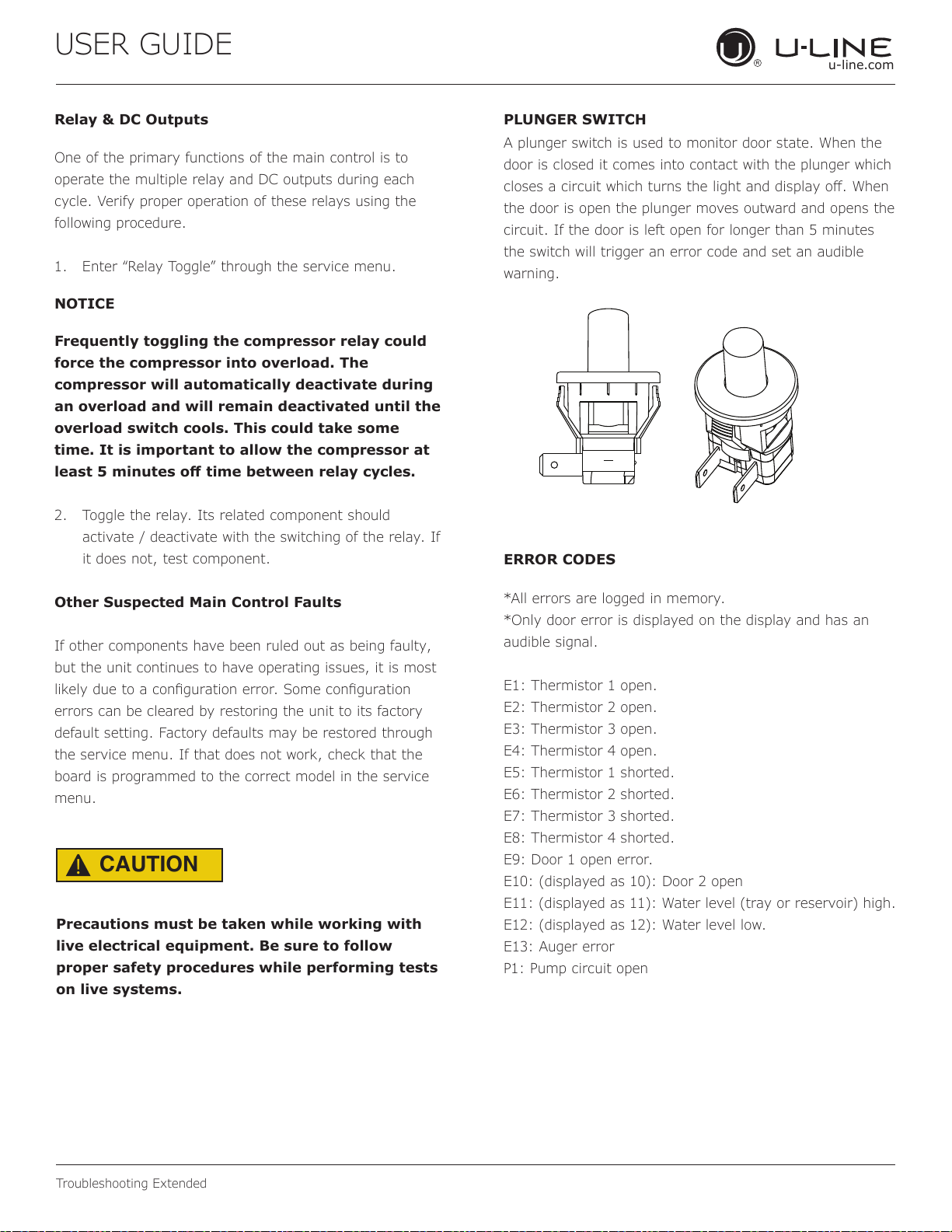
PLUNGER SWITCH
ERROR CODES
A plunger switch is used to monitor door state. When the
door is closed it comes into contact with the plunger which
closes a circuit which turns the light and display o. When
the door is open the plunger moves outward and opens the
circuit. If the door is left open for longer than 5 minutes
the switch will trigger an error code and set an audible
warning.
*All errors are logged in memory.
*Only door error is displayed on the display and has an
audible signal.
E1: Thermistor 1 open.
E2: Thermistor 2 open.
E3: Thermistor 3 open.
E4: Thermistor 4 open.
E5: Thermistor 1 shorted.
E6: Thermistor 2 shorted.
E7: Thermistor 3 shorted.
E8: Thermistor 4 shorted.
E9: Door 1 open error.
E10: (displayed as 10): Door 2 open
E11: (displayed as 11): Water level (tray or reservoir) high.
E12: (displayed as 12): Water level low.
E13: Auger error
P1: Pump circuit open
48
USER GUIDE
u-line.com
Control Operation-Service
Control Operation-Service
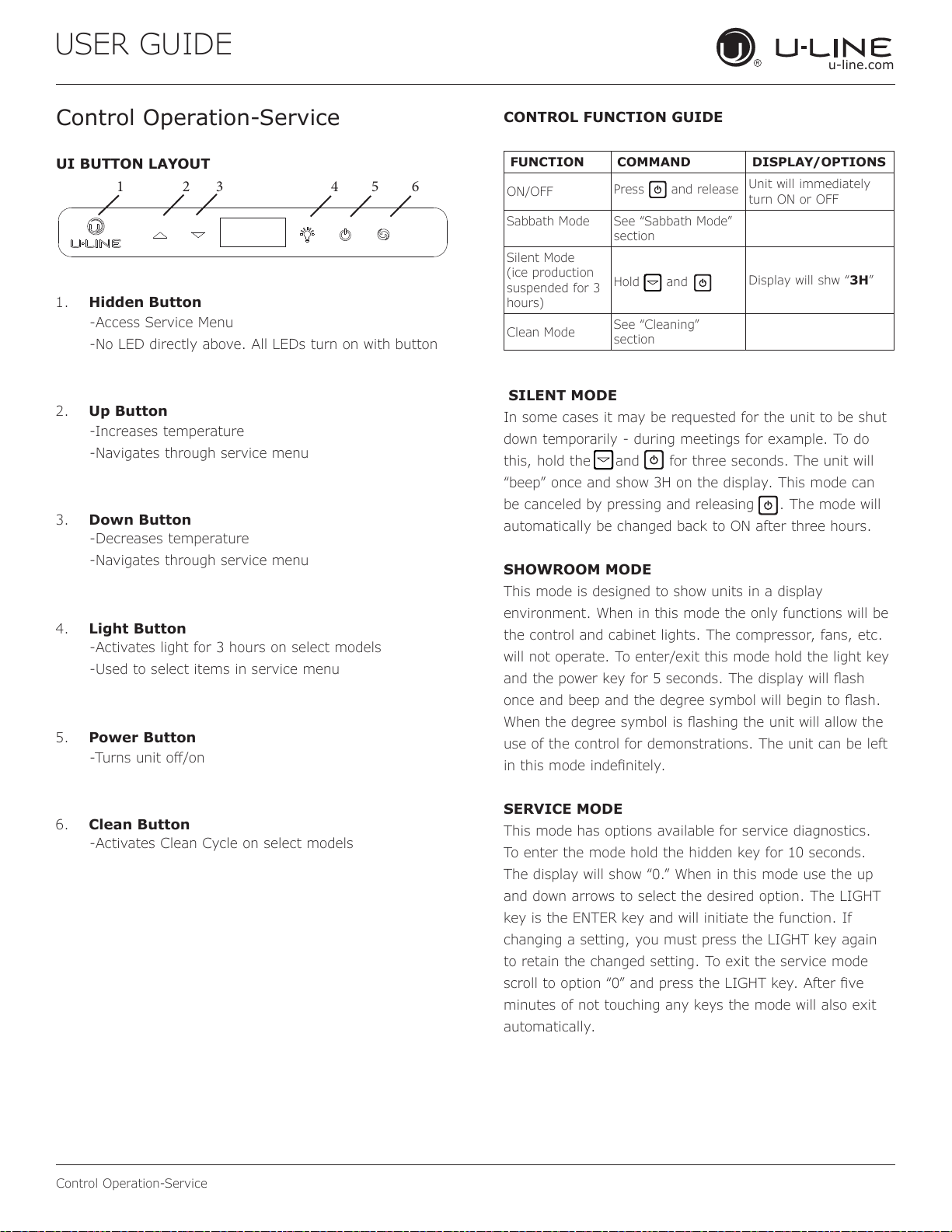
UI BUTTON LAYOUT
CONTROL FUNCTION GUIDE
FUNCTION COMMAND DISPLAY/OPTIONS
ON/OFF
Press
and release
Unit will immediately
turn ON or OFF
Sabbath Mode See “Sabbath Mode”
section
Silent Mode
(ice production
suspended for 3
hours)
Hold
and
Display will shw “3H”
Clean Mode
See “Cleaning”
section
1. Hidden Button
2. Up Button
3. Down Button
4. Light Button
5. Power Button
6. Clean Button
-Access Service Menu
-No LED directly above. All LEDs turn on with button
-Increases temperature
-Navigates through service menu
-Decreases temperature
-Navigates through service menu
-Activates light for 3 hours on select models
-Used to select items in service menu
-Turns unit o/on
-Activates Clean Cycle on select models
SILENT MODE
In some cases it may be requested for the unit to be shut
down temporarily - during meetings for example. To do
this, hold the and for three seconds. The unit will
“beep” once and show 3H on the display. This mode can
be canceled by pressing and releasing . The mode will
automatically be changed back to ON after three hours.
SHOWROOM MODE
This mode is designed to show units in a display
environment. When in this mode the only functions will be
the control and cabinet lights. The compressor, fans, etc.
will not operate. To enter/exit this mode hold the light key
and the power key for 5 seconds. The display will ash
once and beep and the degree symbol will begin to ash.
When the degree symbol is ashing the unit will allow the
use of the control for demonstrations. The unit can be left
in this mode indenitely.
SERVICE MODE
This mode has options available for service diagnostics.
To enter the mode hold the hidden key for 10 seconds.
The display will show “0.” When in this mode use the up
and down arrows to select the desired option. The LIGHT
key is the ENTER key and will initiate the function. If
changing a setting, you must press the LIGHT key again
to retain the changed setting. To exit the service mode
scroll to option “0” and press the LIGHT key. After ve
minutes of not touching any keys the mode will also exit
automatically.
1 2 3 4 5 6
49
USER GUIDE
u-line.com
Control Operation-Service
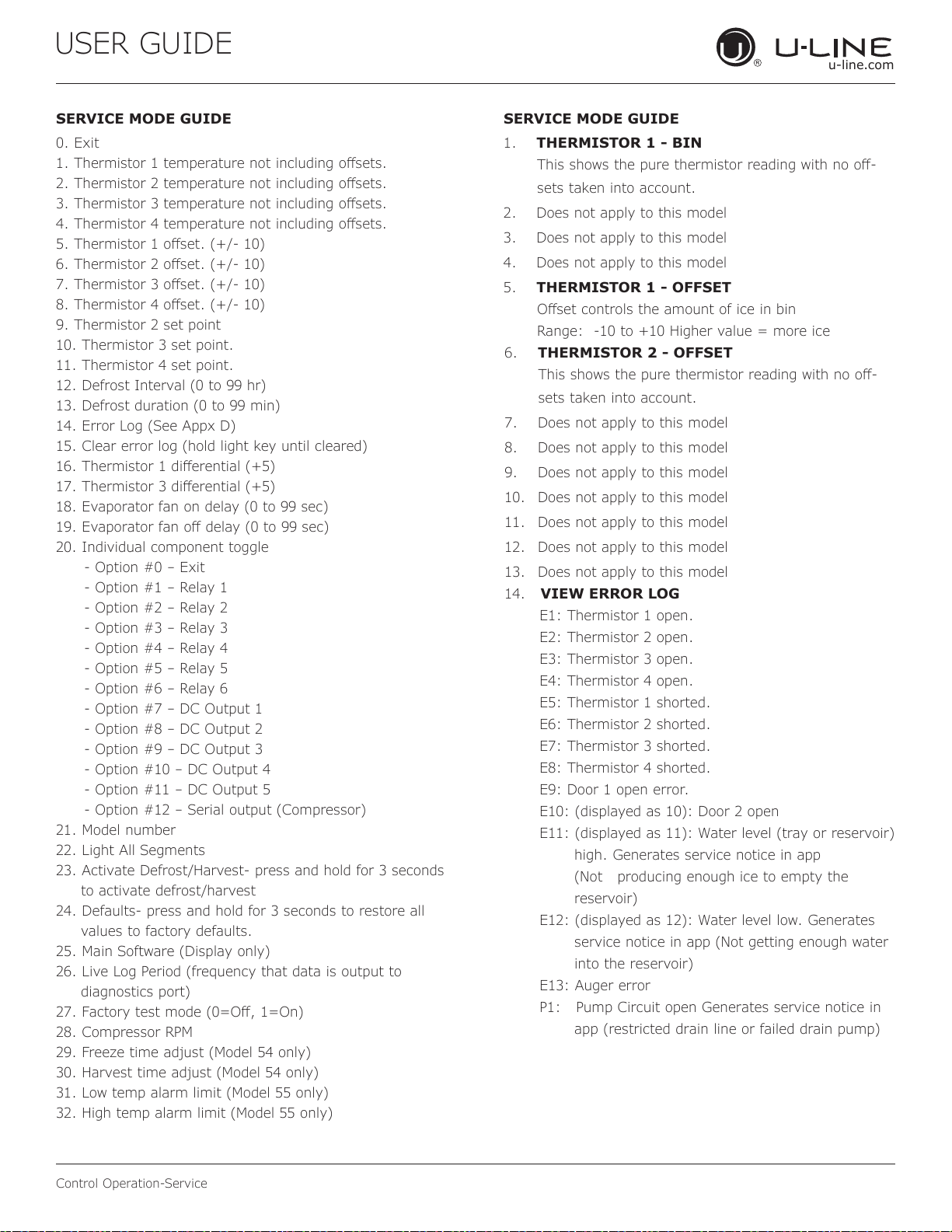
SERVICE MODE GUIDE SERVICE MODE GUIDE
0. Exit
1. Thermistor 1 temperature not including osets.
2. Thermistor 2 temperature not including osets.
3. Thermistor 3 temperature not including osets.
4. Thermistor 4 temperature not including osets.
5. Thermistor 1 oset. (+/- 10)
6. Thermistor 2 oset. (+/- 10)
7. Thermistor 3 oset. (+/- 10)
8. Thermistor 4 oset. (+/- 10)
9. Thermistor 2 set point
10. Thermistor 3 set point.
11. Thermistor 4 set point.
12. Defrost Interval (0 to 99 hr)
13. Defrost duration (0 to 99 min)
14. Error Log (See Appx D)
15. Clear error log (hold light key until cleared)
16. Thermistor 1 dierential (+5)
17. Thermistor 3 dierential (+5)
18. Evaporator fan on delay (0 to 99 sec)
19. Evaporator fan o delay (0 to 99 sec)
20. Individual component toggle
- Option #0 – Exit
- Option #1 – Relay 1
- Option #2 – Relay 2
- Option #3 – Relay 3
- Option #4 – Relay 4
- Option #5 – Relay 5
- Option #6 – Relay 6
- Option #7 – DC Output 1
- Option #8 – DC Output 2
- Option #9 – DC Output 3
- Option #10 – DC Output 4
- Option #11 – DC Output 5
- Option #12 – Serial output (Compressor)
21. Model number
22. Light All Segments
23. Activate Defrost/Harvest- press and hold for 3 seconds
to activate defrost/harvest
24. Defaults- press and hold for 3 seconds to restore all
values to factory defaults.
25. Main Software (Display only)
26. Live Log Period (frequency that data is output to
diagnostics port)
27. Factory test mode (0=O, 1=On)
28. Compressor RPM
29. Freeze time adjust (Model 54 only)
30. Harvest time adjust (Model 54 only)
31. Low temp alarm limit (Model 55 only)
32. High temp alarm limit (Model 55 only)
1. THERMISTOR 1 - BIN
This shows the pure thermistor reading with no o-
sets taken into account.
2. Does not apply to this model
3. Does not apply to this model
4. Does not apply to this model
5. THERMISTOR 1 - OFFSET
Oset controls the amount of ice in bin
Range: -10 to +10 Higher value = more ice
6. THERMISTOR 2 - OFFSET
This shows the pure thermistor reading with no o-
sets taken into account.
7. Does not apply to this model
8. Does not apply to this model
9. Does not apply to this model
10.
Does not apply to this model
11.
Does not apply to this model
12.
Does not apply to this model
13.
Does not apply to this model
14. VIEW ERROR LOG
E1: Thermistor 1 open.
E2: Thermistor 2 open.
E3: Thermistor 3 open.
E4: Thermistor 4 open.
E5: Thermistor 1 shorted.
E6: Thermistor 2 shorted.
E7: Thermistor 3 shorted.
E8: Thermistor 4 shorted.
E9: Door 1 open error.
E10: (displayed as 10): Door 2 open
E11: (displayed as 11): Water level (tray or reservoir)
high. Generates service notice in app
(Not producing enough ice to empty the
reservoir)
E12: (displayed as 12): Water level low. Generates
service notice in app (Not getting enough water
into the reservoir)
E13: Auger error
P1: Pump Circuit open Generates service notice in
app (restricted drain line or failed drain pump)
50
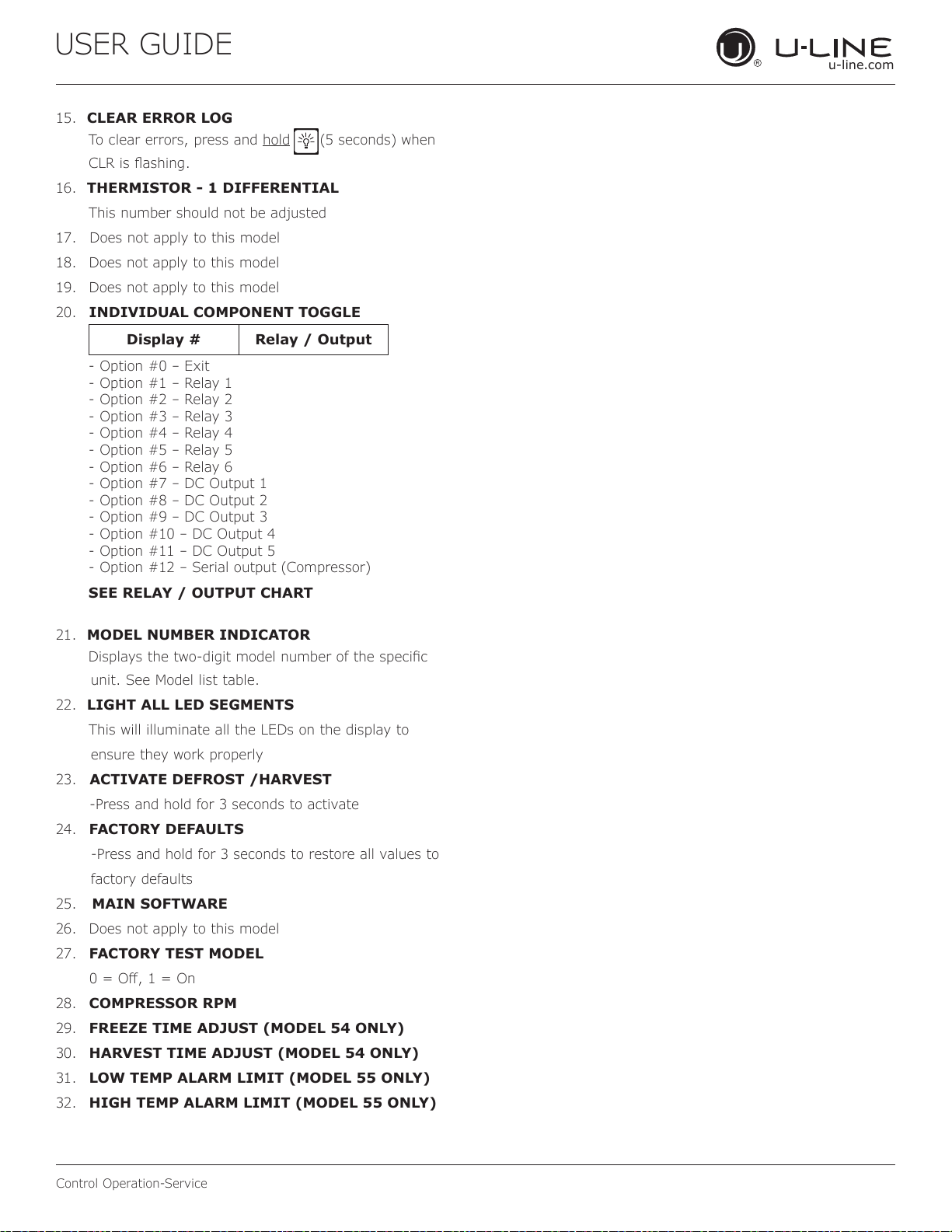
USER GUIDE
u-line.com
Control Operation-Service
15. CLEAR ERROR LOG
To clear errors, press and hold (5 seconds) when
CLR is ashing.
16. THERMISTOR - 1 DIFFERENTIAL
This number should not be adjusted
17. Does not apply to this model
18.
Does not apply to this model
19.
Does not apply to this model
20.
INDIVIDUAL COMPONENT TOGGLE
21. MODEL NUMBER INDICATOR
Displays the two-digit model number of the specic
unit. See Model list table.
22. LIGHT ALL LED SEGMENTS
This will illuminate all the LEDs on the display to
ensure they work properly
23. ACTIVATE DEFROST /HARVEST
-Press and hold for 3 seconds to activate
24.
FACTORY DEFAULTS
-Press and hold for 3 seconds to restore all values to
factory defaults
25. MAIN SOFTWARE
26.
Does not apply to this model
27.
FACTORY TEST MODEL
0 = O, 1 = On
28.
COMPRESSOR RPM
29.
FREEZE TIME ADJUST (MODEL 54 ONLY)
30.
HARVEST TIME ADJUST (MODEL 54 ONLY)
31.
LOW TEMP ALARM LIMIT (MODEL 55 ONLY)
32.
HIGH TEMP ALARM LIMIT (MODEL 55 ONLY)
Display # Relay / Output
- Option #0 – Exit
- Option #1 – Relay 1
- Option #2 – Relay 2
- Option #3 – Relay 3
- Option #4 – Relay 4
- Option #5 – Relay 5
- Option #6 – Relay 6
- Option #7 – DC Output 1
- Option #8 – DC Output 2
- Option #9 – DC Output 3
- Option #10 – DC Output 4
- Option #11 – DC Output 5
- Option #12 – Serial output (Compressor)
SEE RELAY / OUTPUT CHART
51
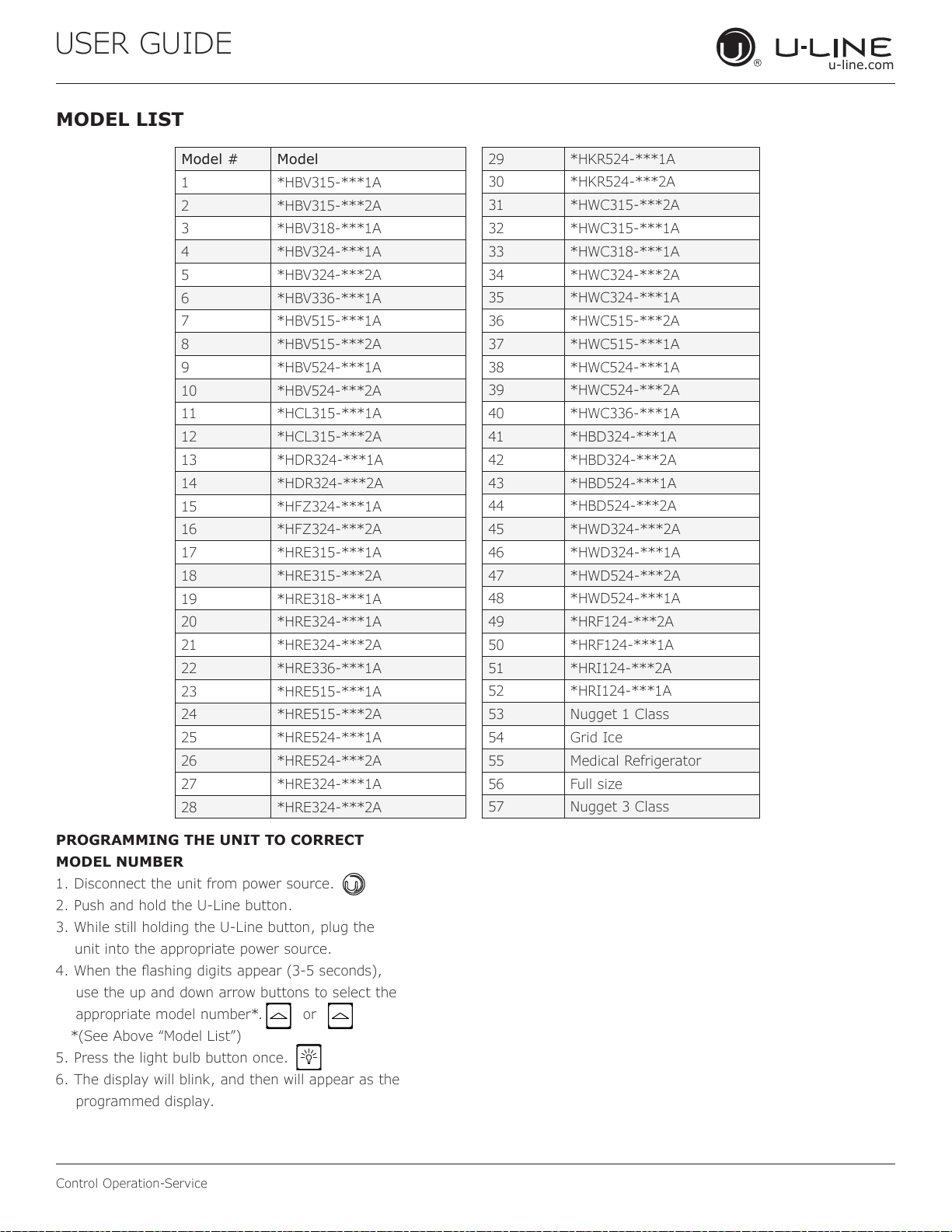
USER GUIDE
u-line.com
Control Operation-Service
MODEL LIST
Model # Model
1 *HBV315-***1A
2 *HBV315-***2A
3 *HBV318-***1A
4 *HBV324-***1A
5 *HBV324-***2A
6 *HBV336-***1A
7 *HBV515-***1A
8 *HBV515-***2A
9 *HBV524-***1A
10 *HBV524-***2A
11 *HCL315-***1A
12 *HCL315-***2A
13 *HDR324-***1A
14 *HDR324-***2A
15 *HFZ324-***1A
16 *HFZ324-***2A
17 *HRE315-***1A
18 *HRE315-***2A
19 *HRE318-***1A
20 *HRE324-***1A
21 *HRE324-***2A
22 *HRE336-***1A
23 *HRE515-***1A
24 *HRE515-***2A
25 *HRE524-***1A
26 *HRE524-***2A
27 *HRE324-***1A
28 *HRE324-***2A
29 *HKR524-***1A
30 *HKR524-***2A
31 *HWC315-***2A
32 *HWC315-***1A
33 *HWC318-***1A
34 *HWC324-***2A
35 *HWC324-***1A
36 *HWC515-***2A
37 *HWC515-***1A
38 *HWC524-***1A
39 *HWC524-***2A
40 *HWC336-***1A
41 *HBD324-***1A
42 *HBD324-***2A
43 *HBD524-***1A
44 *HBD524-***2A
45 *HWD324-***2A
46 *HWD324-***1A
47 *HWD524-***2A
48 *HWD524-***1A
49 *HRF124-***2A
50 *HRF124-***1A
51 *HRI124-***2A
52 *HRI124-***1A
53 Nugget 1 Class
54 Grid Ice
55 Medical Refrigerator
56 Full size
57 Nugget 3 Class
PROGRAMMING THE UNIT TO CORRECT
MODEL NUMBER
1. Disconnect the unit from power source.
2. Push and hold the U-Line button.
3. While still holding the U-Line button, plug the
unit into the appropriate power source.
4. When the ashing digits appear (3-5 seconds),
use the up and down arrow buttons to select the
appropriate model number*. or
*(See Above “Model List”)
5. Press the light bulb button once.
6. The display will blink, and then will appear as the
programmed display.
52
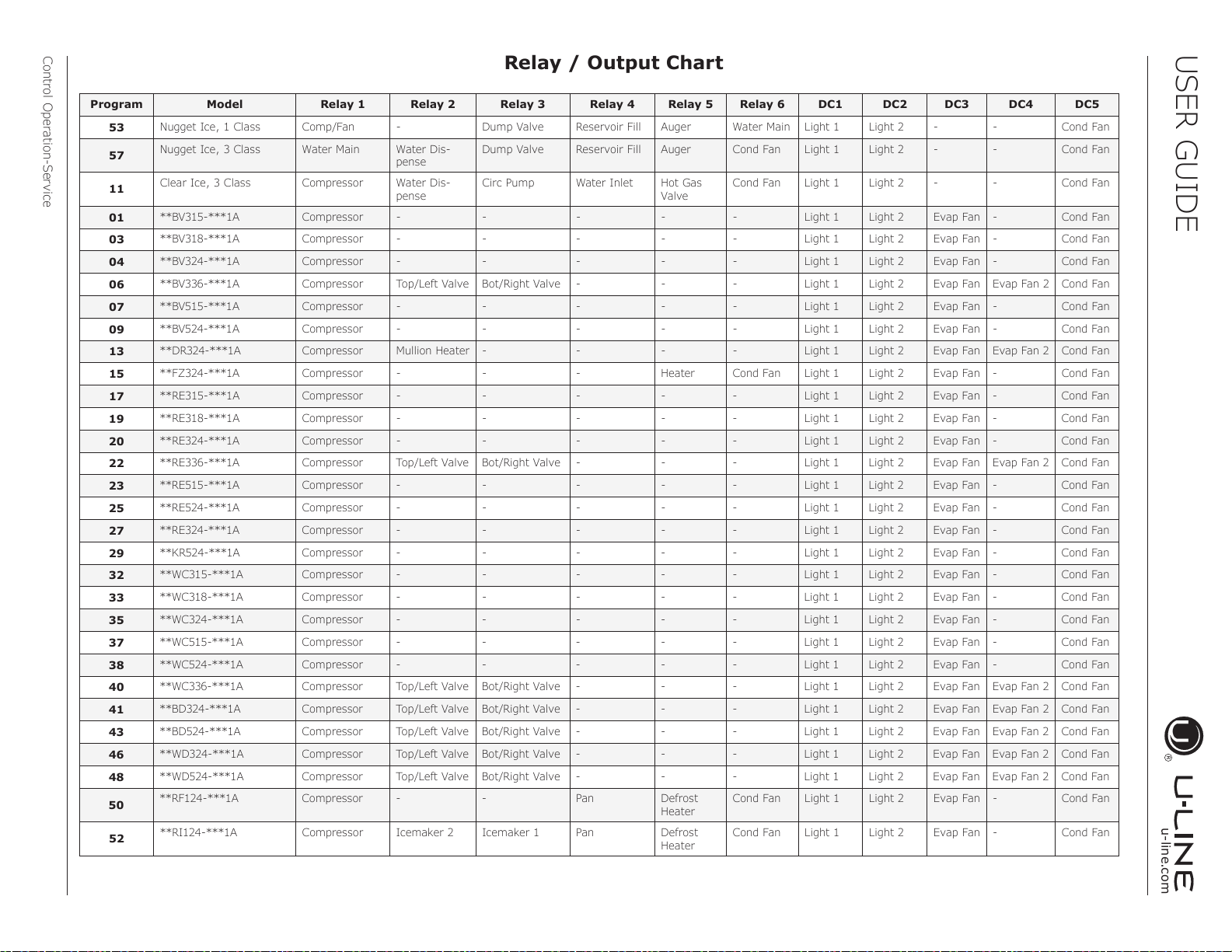
USER GUIDE
u-line.com
Control Operation-Service
Program Model Relay 1 Relay 2 Relay 3 Relay 4 Relay 5 Relay 6 DC1 DC2 DC3 DC4 DC5
53
Nugget Ice, 1 Class Comp/Fan - Dump Valve Reservoir Fill Auger Water Main Light 1 Light 2 - - Cond Fan
57
Nugget Ice, 3 Class Water Main Water Dis-
pense
Dump Valve Reservoir Fill Auger Cond Fan Light 1 Light 2 - - Cond Fan
11
Clear Ice, 3 Class Compressor Water Dis-
pense
Circ Pump Water Inlet Hot Gas
Valve
Cond Fan Light 1 Light 2 - - Cond Fan
01
**BV315-***1A Compressor - - - - - Light 1 Light 2 Evap Fan - Cond Fan
03
**BV318-***1A Compressor - - - - - Light 1 Light 2 Evap Fan - Cond Fan
04
**BV324-***1A Compressor - - - - - Light 1 Light 2 Evap Fan - Cond Fan
06
**BV336-***1A Compressor Top/Left Valve Bot/Right Valve - - - Light 1 Light 2 Evap Fan Evap Fan 2 Cond Fan
07
**BV515-***1A Compressor - - - - - Light 1 Light 2 Evap Fan - Cond Fan
09
**BV524-***1A Compressor - - - - - Light 1 Light 2 Evap Fan - Cond Fan
13
**DR324-***1A Compressor Mullion Heater - - - - Light 1 Light 2 Evap Fan Evap Fan 2 Cond Fan
15
**FZ324-***1A Compressor - - - Heater Cond Fan Light 1 Light 2 Evap Fan - Cond Fan
17
**RE315-***1A Compressor - - - - - Light 1 Light 2 Evap Fan - Cond Fan
19
**RE318-***1A Compressor - - - - - Light 1 Light 2 Evap Fan - Cond Fan
20
**RE324-***1A Compressor - - - - - Light 1 Light 2 Evap Fan - Cond Fan
22
**RE336-***1A Compressor Top/Left Valve Bot/Right Valve - - - Light 1 Light 2 Evap Fan Evap Fan 2 Cond Fan
23
**RE515-***1A Compressor - - - - - Light 1 Light 2 Evap Fan - Cond Fan
25
**RE524-***1A Compressor - - - - - Light 1 Light 2 Evap Fan - Cond Fan
27
**RE324-***1A Compressor - - - - - Light 1 Light 2 Evap Fan - Cond Fan
29
**KR524-***1A Compressor - - - - - Light 1 Light 2 Evap Fan - Cond Fan
32
**WC315-***1A Compressor - - - - - Light 1 Light 2 Evap Fan - Cond Fan
33
**WC318-***1A Compressor - - - - - Light 1 Light 2 Evap Fan - Cond Fan
35
**WC324-***1A Compressor - - - - - Light 1 Light 2 Evap Fan - Cond Fan
37
**WC515-***1A Compressor - - - - - Light 1 Light 2 Evap Fan - Cond Fan
38
**WC524-***1A Compressor - - - - - Light 1 Light 2 Evap Fan - Cond Fan
40
**WC336-***1A Compressor Top/Left Valve Bot/Right Valve - - - Light 1 Light 2 Evap Fan Evap Fan 2 Cond Fan
41
**BD324-***1A Compressor Top/Left Valve Bot/Right Valve - - - Light 1 Light 2 Evap Fan Evap Fan 2 Cond Fan
43
**BD524-***1A Compressor Top/Left Valve Bot/Right Valve - - - Light 1 Light 2 Evap Fan Evap Fan 2 Cond Fan
46
**WD324-***1A Compressor Top/Left Valve Bot/Right Valve - - - Light 1 Light 2 Evap Fan Evap Fan 2 Cond Fan
48
**WD524-***1A Compressor Top/Left Valve Bot/Right Valve - - - Light 1 Light 2 Evap Fan Evap Fan 2 Cond Fan
50
**RF124-***1A Compressor - -
Pan Defrost
Heater
Cond Fan Light 1 Light 2 Evap Fan - Cond Fan
52
**RI124-***1A Compressor Icemaker 2 Icemaker 1 Pan Defrost
Heater
Cond Fan Light 1 Light 2 Evap Fan - Cond Fan
Relay / Output Chart
53
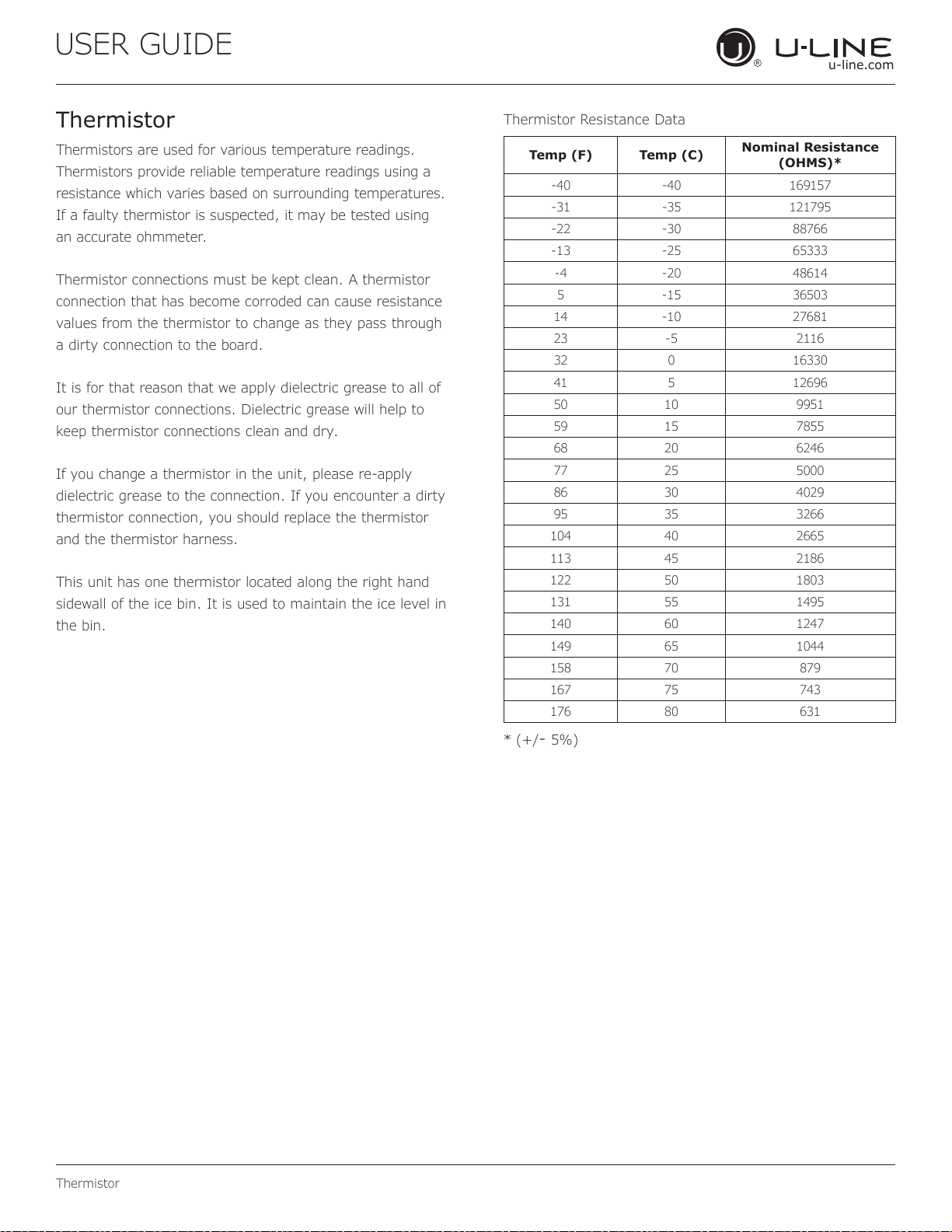
USER GUIDE
u-line.com
Thermistor
Thermistors are used for various temperature readings.
Thermistors provide reliable temperature readings using a
resistance which varies based on surrounding temperatures.
If a faulty thermistor is suspected, it may be tested using
an accurate ohmmeter.
Thermistor connections must be kept clean. A thermistor
connection that has become corroded can cause resistance
values from the thermistor to change as they pass through
a dirty connection to the board.
It is for that reason that we apply dielectric grease to all of
our thermistor connections. Dielectric grease will help to
keep thermistor connections clean and dry.
If you change a thermistor in the unit, please re-apply
dielectric grease to the connection. If you encounter a dirty
thermistor connection, you should replace the thermistor
and the thermistor harness.
This unit has one thermistor located along the right hand
sidewall of the ice bin. It is used to maintain the ice level in
the bin.
Thermistor Resistance Data
* (+/- 5%)
Thermistor
Temp (F) Temp (C)
Nominal Resistance
(OHMS)*
-40 -40 169157
-31 -35 121795
-22 -30 88766
-13 -25 65333
-4 -20 48614
5 -15 36503
14 -10 27681
23 -5 2116
32 0 16330
41 5 12696
50 10 9951
59 15 7855
68 20 6246
77 25 5000
86 30 4029
95 35 3266
104 40 2665
113 45 2186
122 50 1803
131 55 1495
140 60 1247
149 65 1044
158 70 879
167 75 743
176 80 631
54
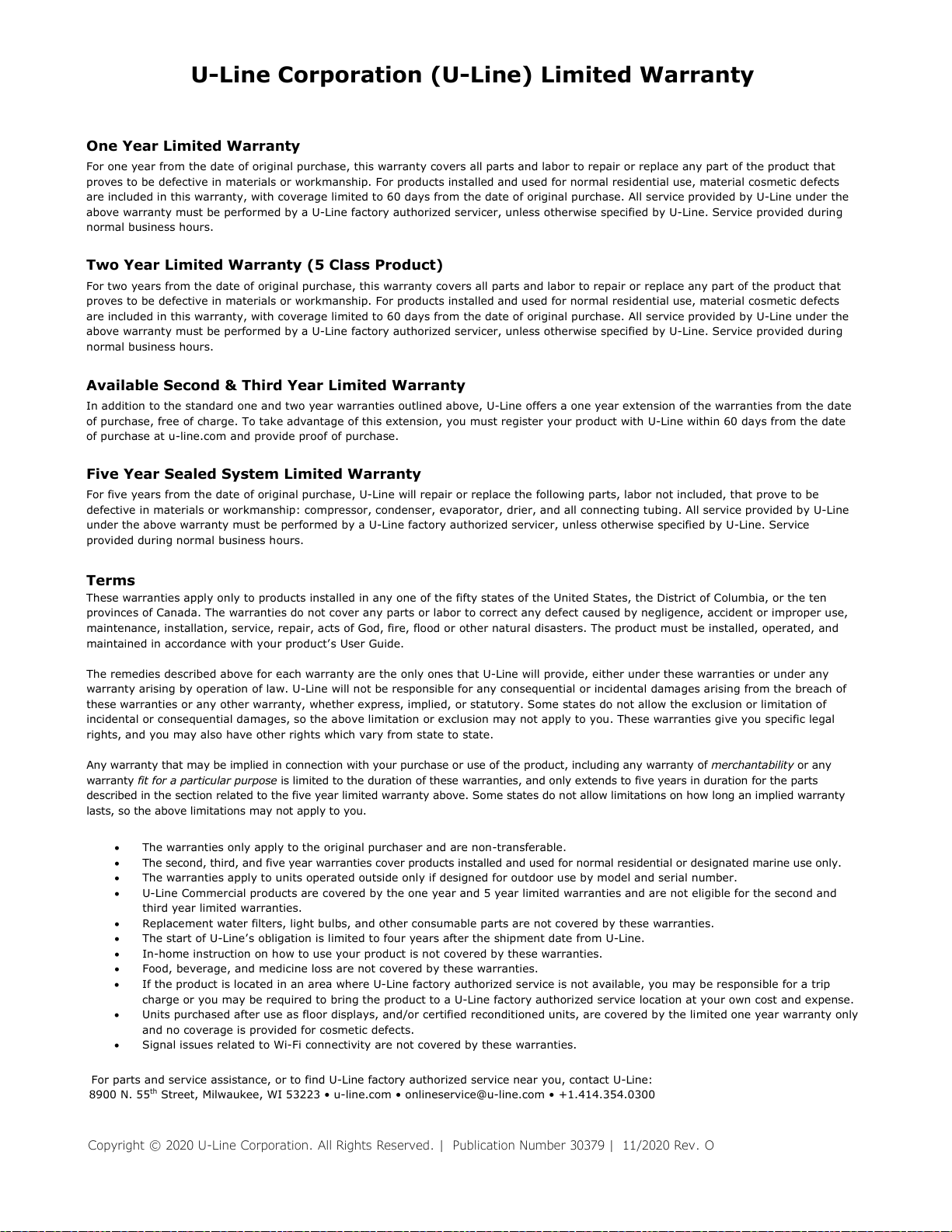
Copyright © 2020 U-Line Corporation. All Rights Reserved. | Publication Number 30379 | 11/2020 Rev. O
U-Line Corporation (U-Line) Limited Warranty
One Year Limited Warranty
For one year from the date of original purchase, this warranty covers all parts and labor to repair or replace any part of the product that
proves to be defective in materials or workmanship. For products installed and used for normal residential use, material cosmetic defects
are included in this warranty, with coverage limited to 60 days from the date of original purchase. All service provided by U-Line under the
above warranty must be performed by a U-Line factory authorized servicer, unless otherwise specified by U-Line. Service provided during
normal business hours.
Two Year Limited Warranty (5 Class Product)
For two years from the date of original purchase, this warranty covers all parts and labor to repair or replace any part of the product that
proves to be defective in materials or workmanship. For products installed and used for normal residential use, material cosmetic defects
are included in this warranty, with coverage limited to 60 days from the date of original purchase. All service provided by U-Line under the
above warranty must be performed by a U-Line factory authorized servicer, unless otherwise specified by U-Line. Service provided during
normal business hours.
Available Second & Third Year Limited Warranty
In addition to the standard one and two year warranties outlined above, U-Line offers a one year extension of the warranties from the date
of purchase, free of charge. To take advantage of this extension, you must register your product with U-Line within 60 days from the date
of purchase at u-line.com and provide proof of purchase.
Five Year Sealed System Limited Warranty
For five years from the date of original purchase, U-Line will repair or replace the following parts, labor not included, that prove to be
defective in materials or workmanship: compressor, condenser, evaporator, drier, and all connecting tubing. All service provided by U-Line
under the above warranty must be performed by a U-Line factory authorized servicer, unless otherwise specified by U-Line. Service
provided during normal business hours.
Terms
These warranties apply only to products installed in any one of the fifty states of the United States, the District of Columbia, or the ten
provinces of Canada. The warranties do not cover any parts or labor to correct any defect caused by negligence, accident or improper use,
maintenance, installation, service, repair, acts of God, fire, flood or other natural disasters. The product must be installed, operated, and
maintained in accordance with your product’s User Guide.
The remedies described above for each warranty are the only ones that U-Line will provide, either under these warranties or under any
warranty arising by operation of law. U-Line will not be responsible for any consequential or incidental damages arising from the breach of
these warranties or any other warranty, whether express, implied, or statutory. Some states do not allow the exclusion or limitation of
incidental or consequential damages, so the above limitation or exclusion may not apply to you. These warranties give you specific legal
rights, and you may also have other rights which vary from state to state.
Any warranty that may be implied in connection with your purchase or use of the product, including any warranty of merchantability or any
warranty fit for a particular purpose is limited to the duration of these warranties, and only extends to five years in duration for the parts
described in the section related to the five year limited warranty above. Some states do not allow limitations on how long an implied warranty
lasts, so the above limitations may not apply to you.
• The warranties only apply to the original purchaser and are non-transferable.
• The second, third, and five year warranties cover products installed and used for normal residential or designated marine use only.
• The warranties apply to units operated outside only if designed for outdoor use by model and serial number.
• U-Line Commercial products are covered by the one year and 5 year limited warranties and are not eligible for the second and
third year limited warranties.
• Replacement water filters, light bulbs, and other consumable parts are not covered by these warranties.
• The start of U-Line’s obligation is limited to four years after the shipment date from U-Line.
• In-home instruction on how to use your product is not covered by these warranties.
• Food, beverage, and medicine loss are not covered by these warranties.
• If the product is located in an area where U-Line factory authorized service is not available, you may be responsible for a trip
charge or you may be required to bring the product to a U-Line factory authorized service location at your own cost and expense.
• Units purchased after use as floor displays, and/or certified reconditioned units, are covered by the limited one year warranty only
and no coverage is provided for cosmetic defects.
• Signal issues related to Wi-Fi connectivity are not covered by these warranties.
For parts and service assistance, or to find U-Line factory authorized service near you, contact U-Line:
8900 N. 55
th
Street, Milwaukee, WI 53223 • u-line.com • onlineservice@u-line.com • +1.414.354.0300
55