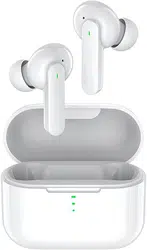
QCY-T11
True Wireless Earbuds
Be Creative
Go Beyond

Contents
English1
German10
Spanish20
Italian30
French40
Portugal50
Japanese60
Korean70
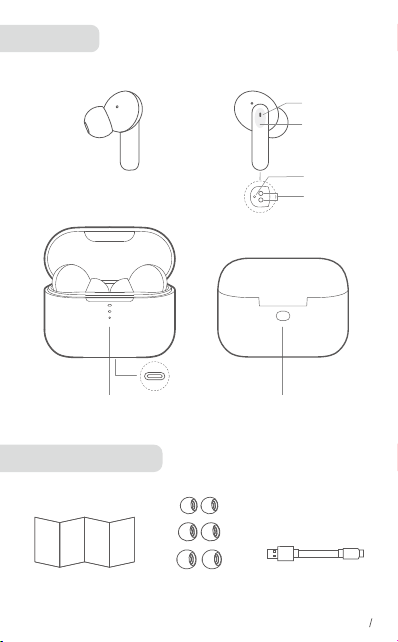
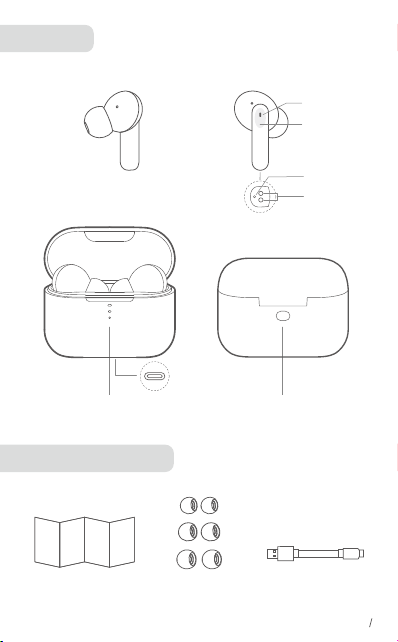
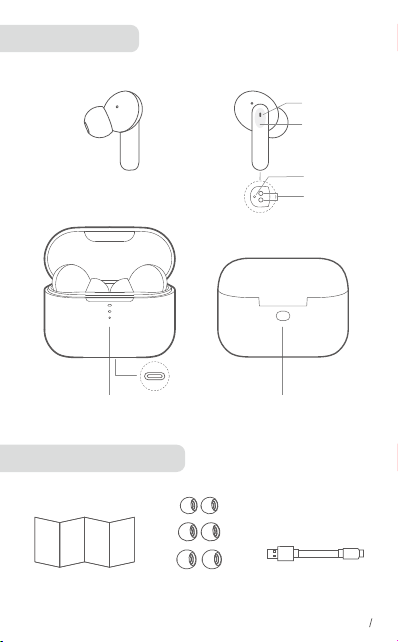
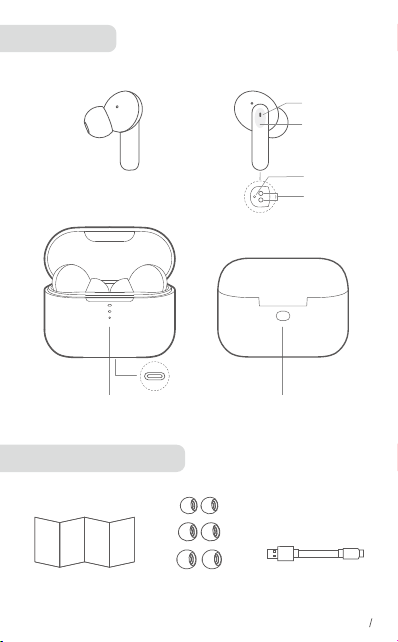
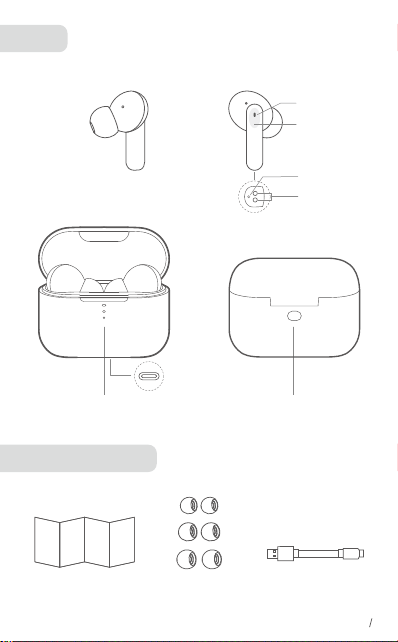
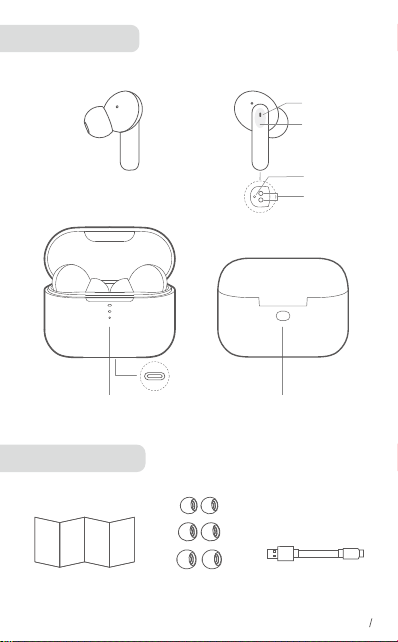
Overview
What's in the box
Microphone
Touch panel
Charging
Contactor
LED IndicatorMultifunction
Button
EartipsType-C Cable
EN 1
LED
Type-C
Port
User Manual

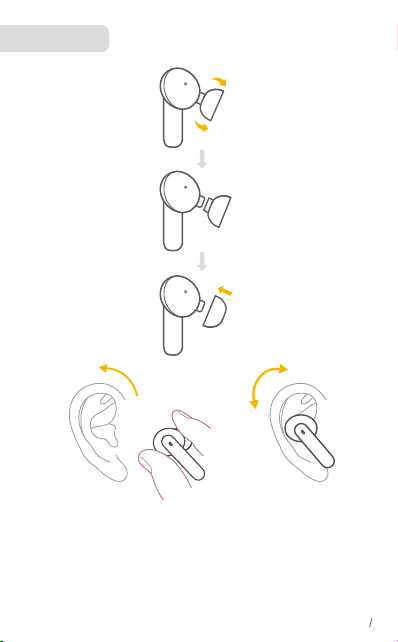
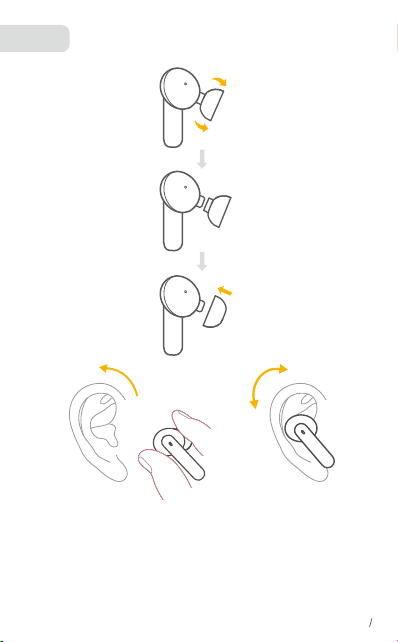
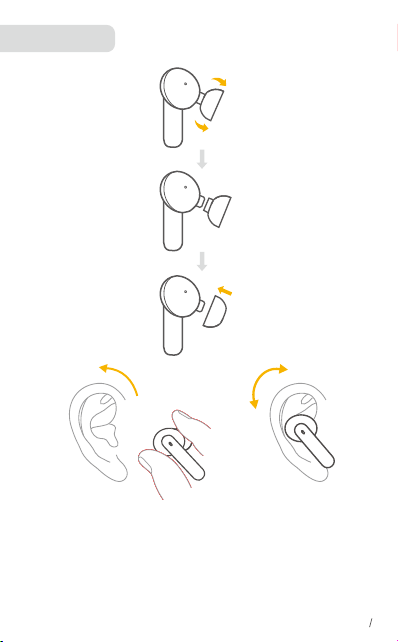
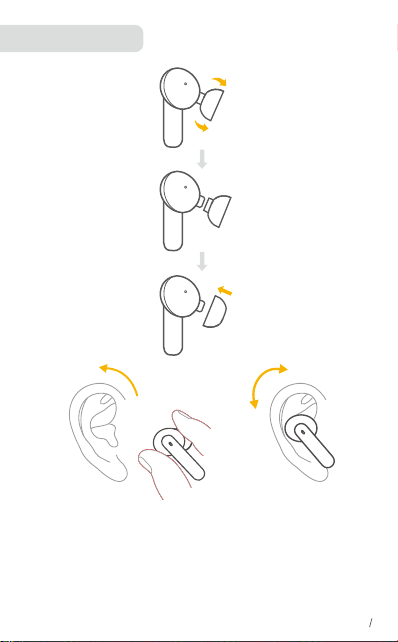
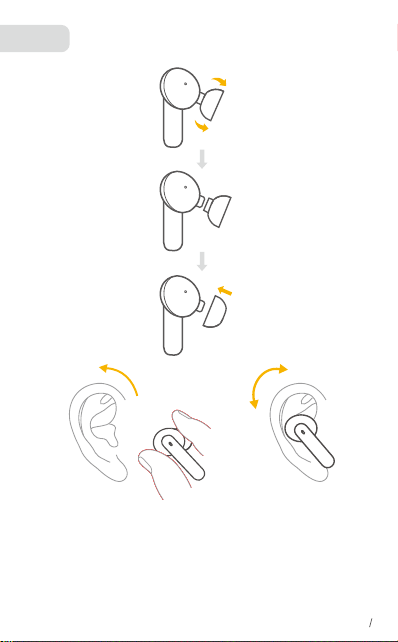
Wearing
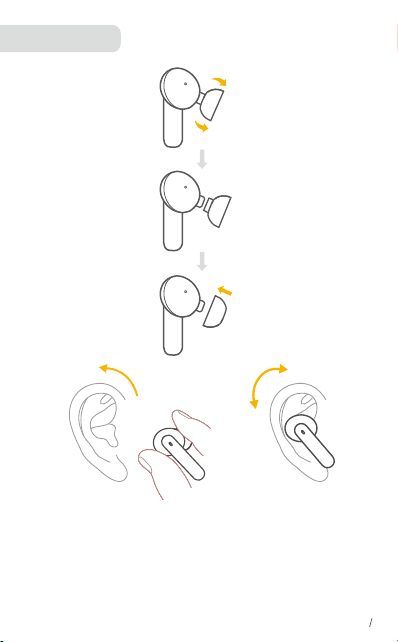
Choose the EarTips that fit your ears best.
Step 1: Ensure sounds hole downward, then place earbuds Into ear.
Step 2: Rotate earbud back to auricle side to fit snugly.
•Your earbuds come with multiple pairs of EarTips, among which Medium-sized
are pre-installed.
EN 2
①
②
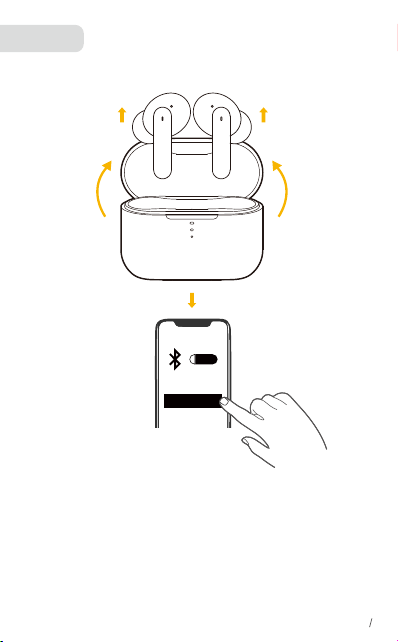
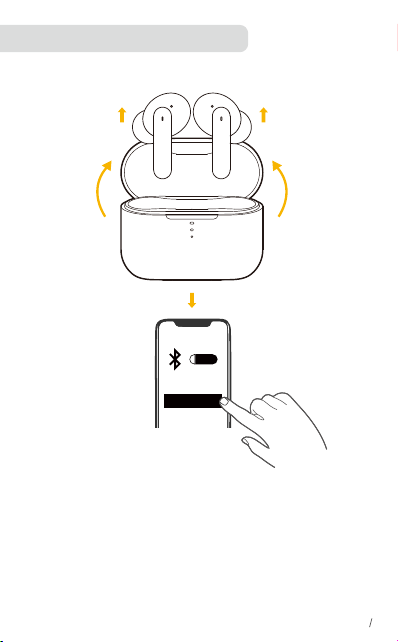
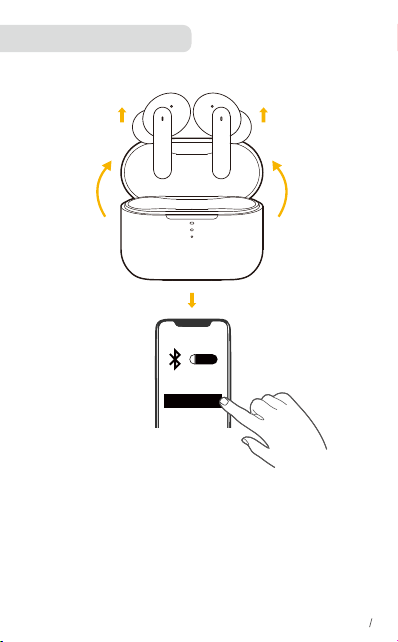
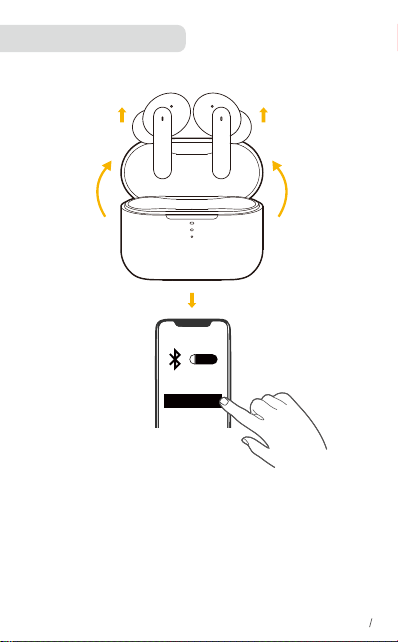
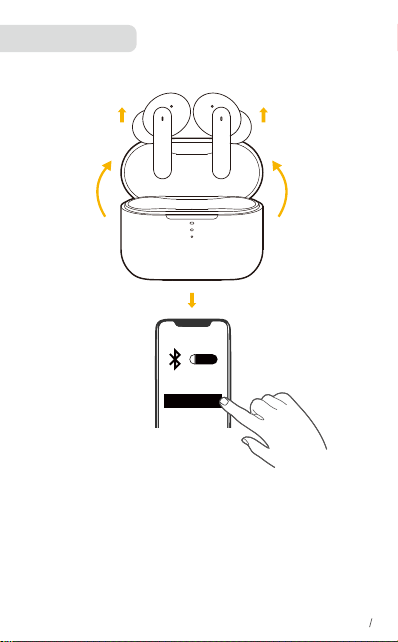
Pairing
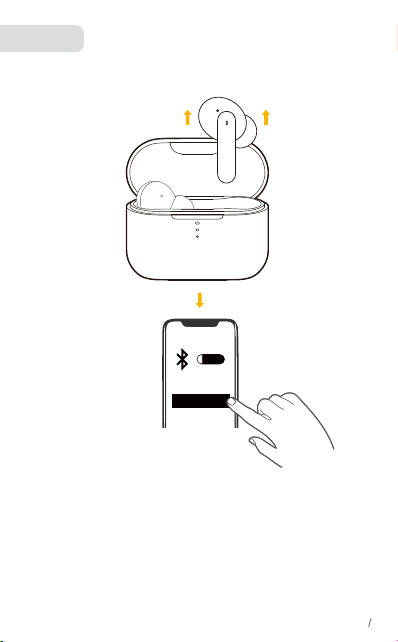
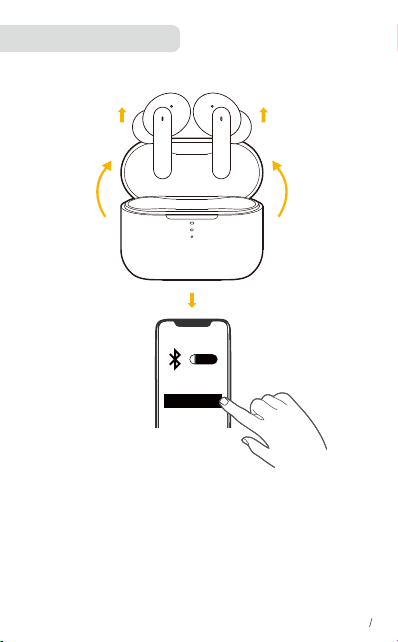
Automatic Pairing
1.Take the earbuds out of the charging case.
2.Find “QCY-T11” in the Bluetooth list on your device and confirm the pairing.
*Each time you power on your earphones, it will automatically connect to your
last successfully connected device if available within the Bluetooth range.
ON
QCY-T11
EN 3
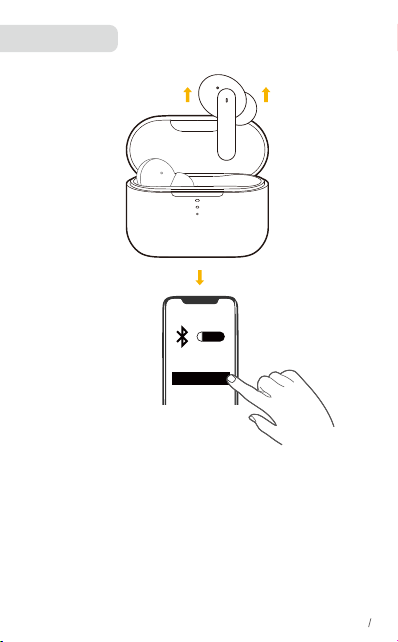
Pairing
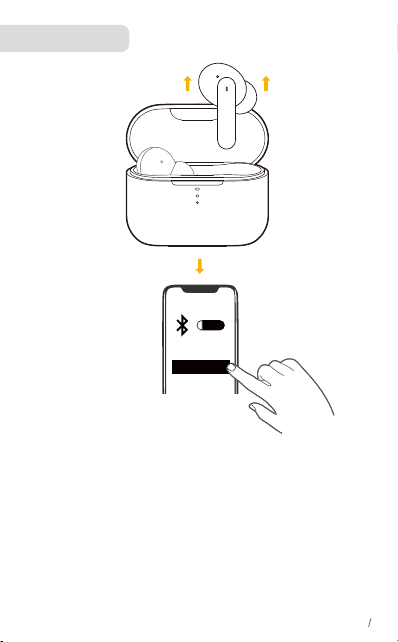
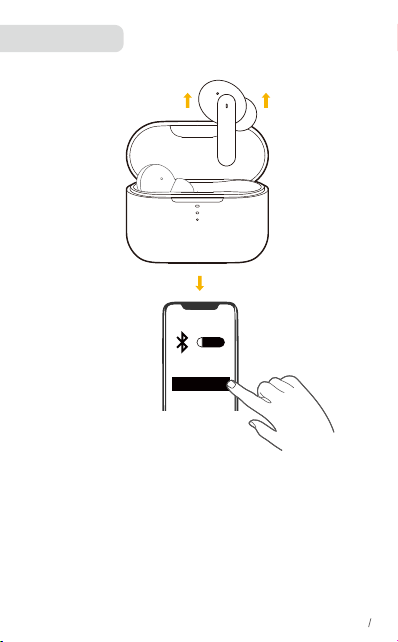
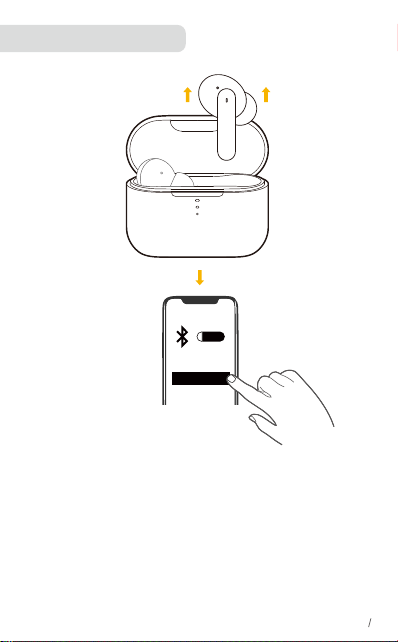
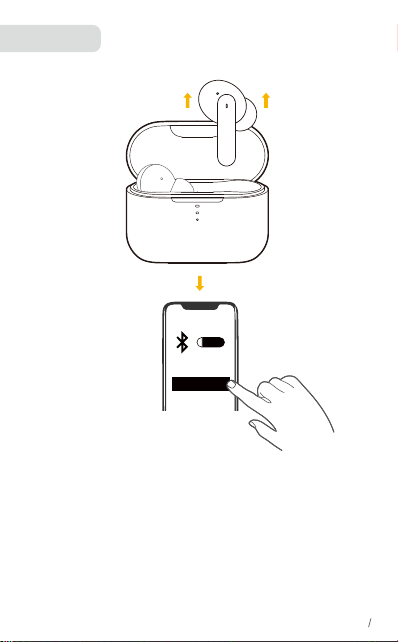
Mono mode:
• When Bluetooth is connected, you can use either one of the earbuds on its
own by placing the other one into the charging case and closing it.
• When powered on and connected, if either one of the earbuds is out of battery
and powered off, you can keep using the other one.
• When you are on a call, place either one of the earbuds into the charging
case, and the microphone in the other earbud will be activated.
ON
QCY-T11
EN 4
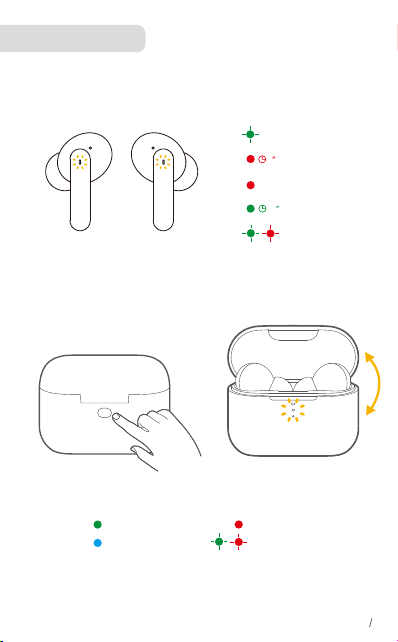
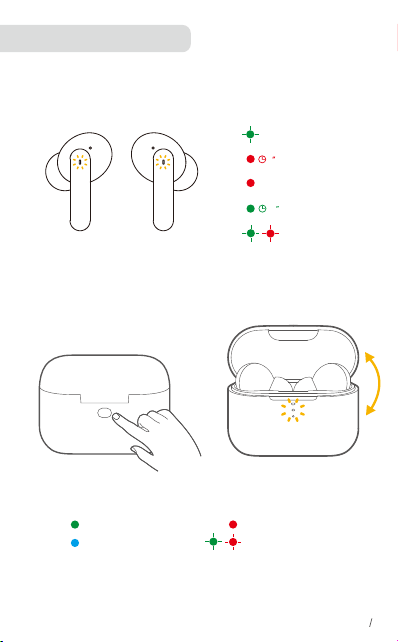
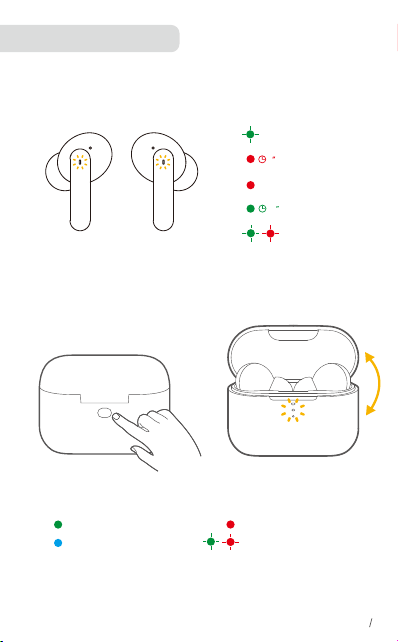
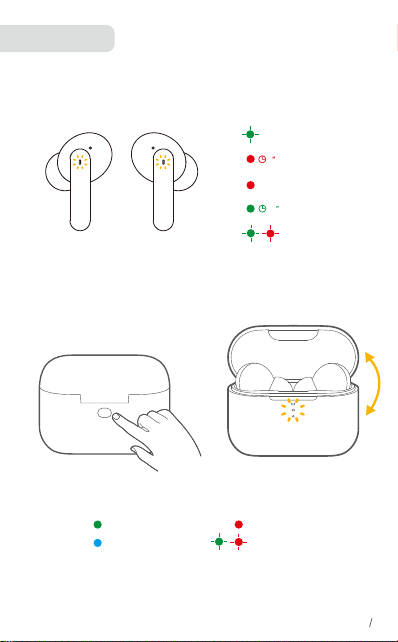
Earbuds Status
EN 6
Power on
Charging
60
Full charging
2
Power off
High battery
Medium battery
Low battery
Resetting
Resetting
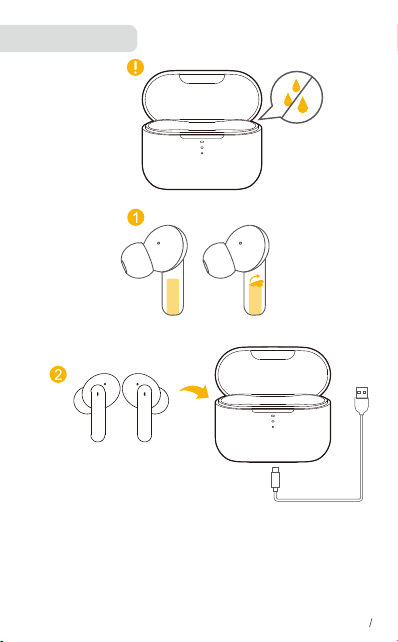
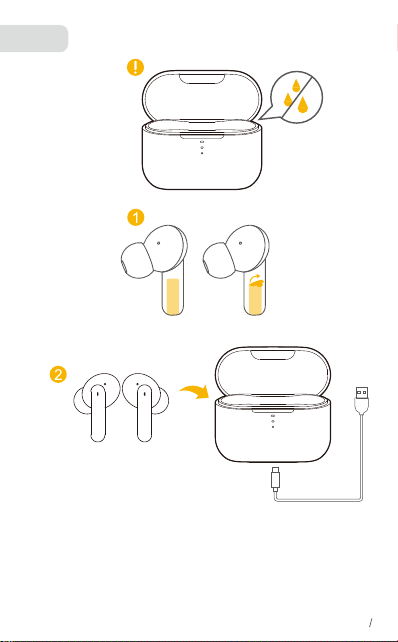
Charging
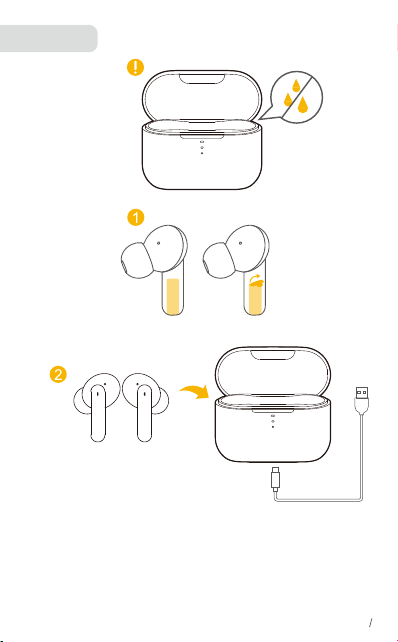
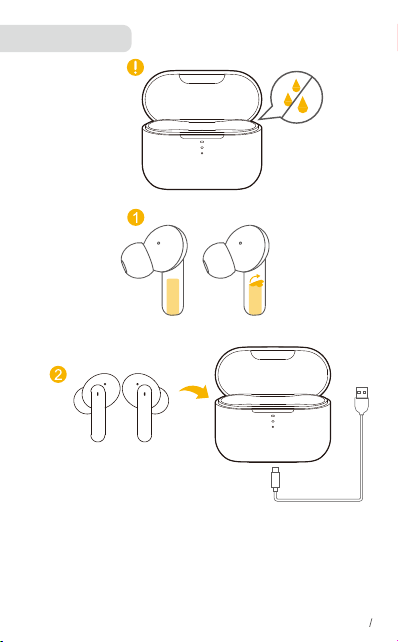
• Fully dry off the earbuds and the USB port before charging
• Fully charge both the earbuds and the charging case before the first use.
• To preserve battery lifespan, fully charge at least once every 45 days.
• To prevent damage, use the provided USB-C cable.
• You can charge the charging case by using a certified wireless charger (not provided).
EN 5
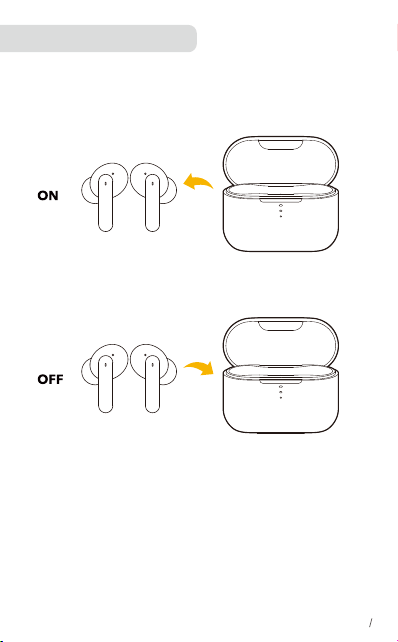
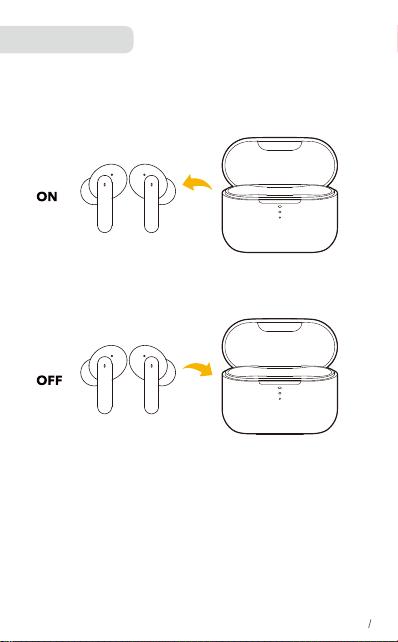
POWERING ON/OFF
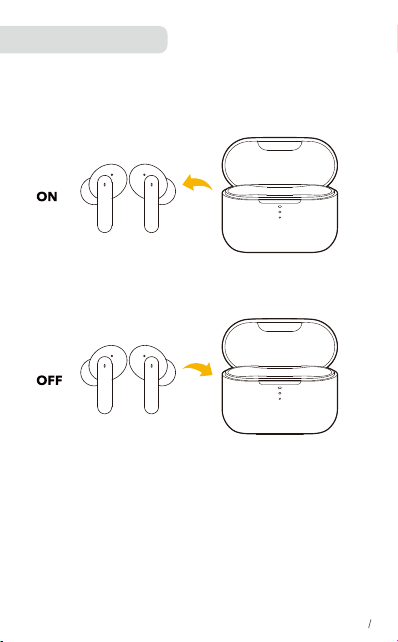
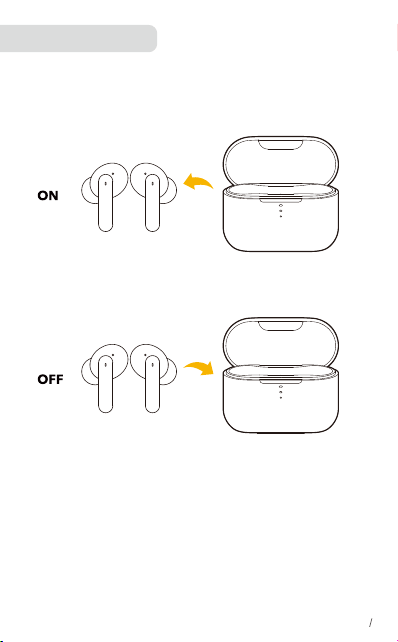
• Take the earbuds out of the charging case to power on.
• To power off, place the earbuds in the charging case and close it.
• To manually power on, press and hold the multi-function button on either one
of earbuds for 1.5 second.
• To manually power off, press and hold the multi-function button on either one
of earbuds for 4.5 seconds.
EN 7
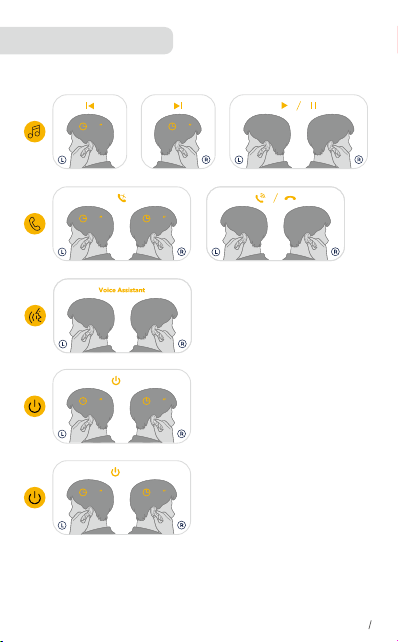
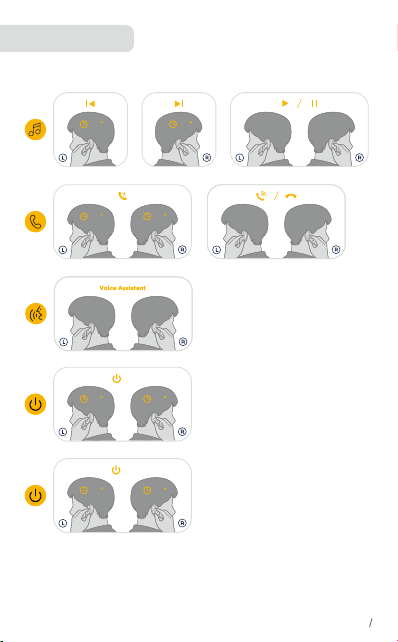
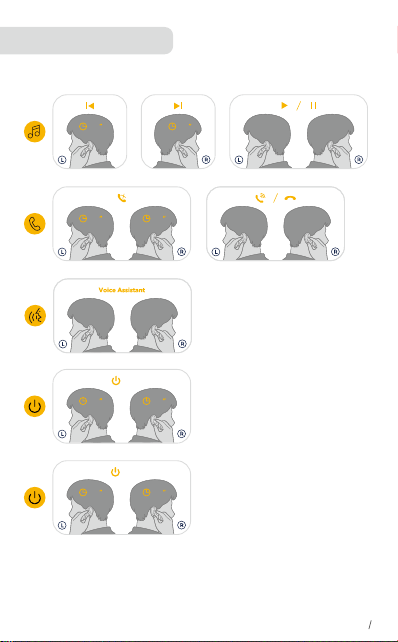
BUTTON CONTROLS
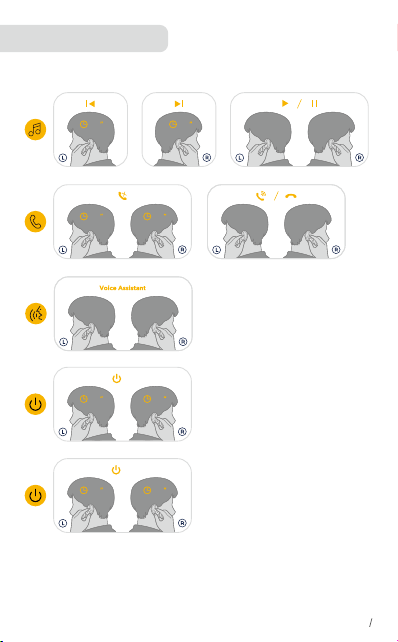
X2: Tap Twice X3: Tap Triple 1.5”: Press and hold for 1.5 seconds
1.5
1.5 1.5
1.5
or
2
×
2
×
or
2
×
2
×
or
3
×
3
×
or
EN 5
1.5 4.5
or
4.5
1.5 1.5
or
1.5
ON
ON
OFF
OFF
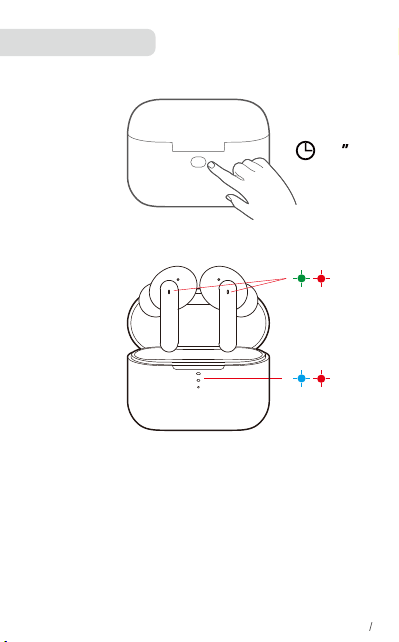
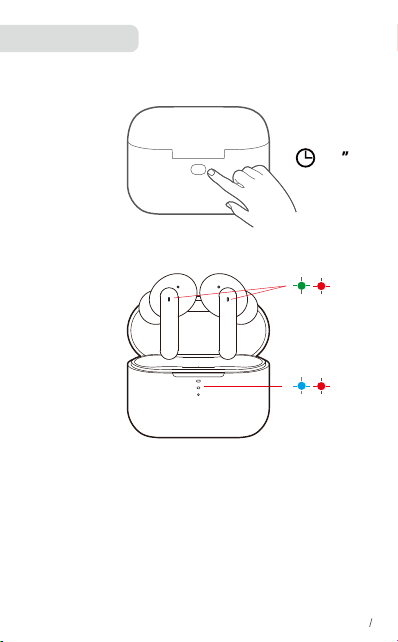
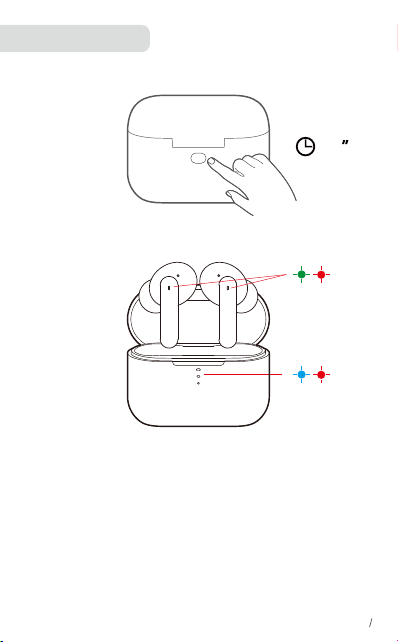
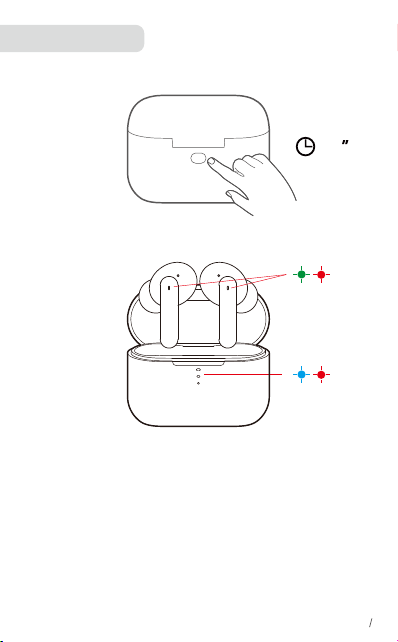
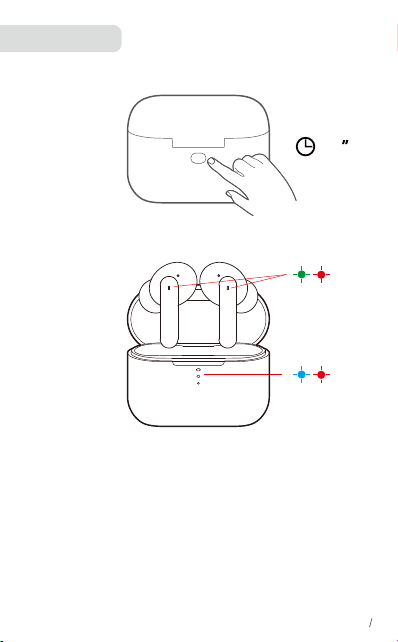
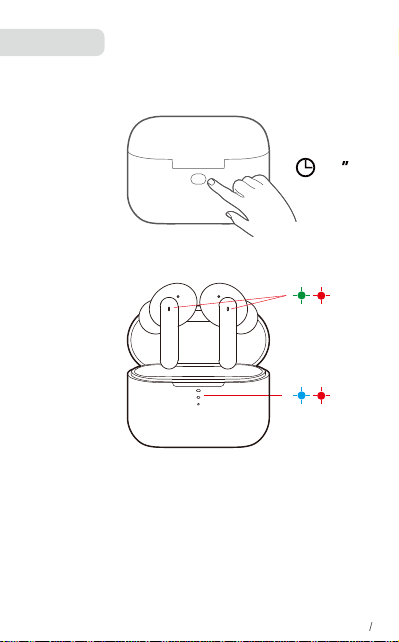
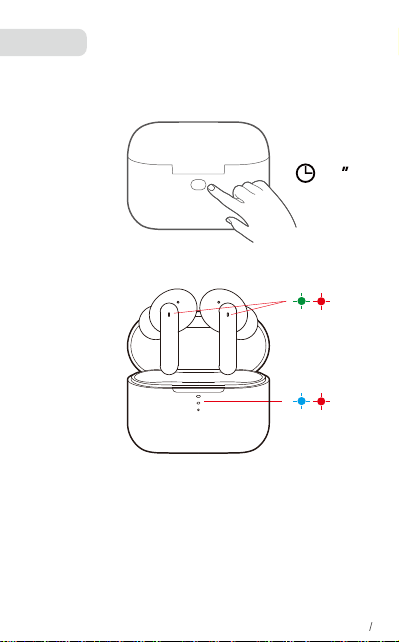
Reset the earbuds if the earbuds cannot connect properly with each other or
with your device.
1.Place the earbuds into the charging case and make sure they are being
charged. Keep the charging case open
2.Press and hold the button on the charging case for 10 seconds until the LED
indicators of charging case flash red&blue 3 times and the LED indicators on
both earbuds flash red&green 3 times .This confirms that the reset
was successful and your earbuds can be connected normally.
Factory Resetting
10
EN 8
x3
x3
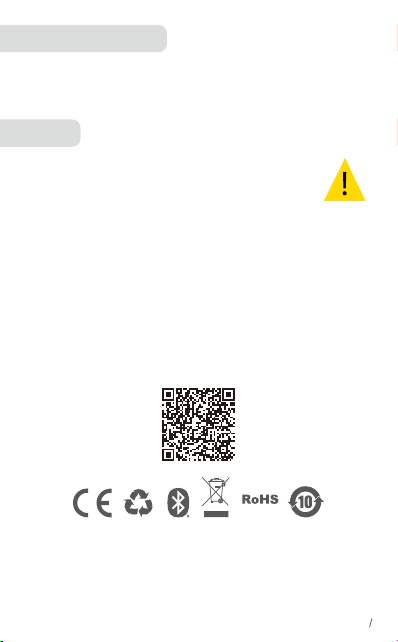
• 12 month limited warranty
• Lifetime technical support
• Our warranty is additional to the legal rights consumers have buying this product.
Customer Service
1.FAQ
View the FAQs on QCY-T11 FAQ
2.How to care for your earbuds
• Do not disassemble. Avoid Dropping.
• Use original or certified cables.
• Keep away from children or pets. Small parts included may be a choking
hazard.
• The earbuds need to be fully charged prior to first-time use.If you do not use
it for more than 2 months, please charge and maintain it regularly for safe
operation.
• Do not put it under extreme temperatures, such as below 10 degrees Celsius
or above 60 degrees Celsius.
• Do not expose the product to strong sunlight fire or throw it into the fire to
avoid an explosion
• Do not use the product outdoors during thunderstorms to avoid malfuntion or
electric shock.
• Do not use chemicals or strong detergents to clean the earbuds
FAQ
• Manufacturer : Hele Electronics Co., Ltd.
• Add: No. 325, Yuehui Road, Daojiao Town, Dongguan City, Guangdong Province, China
• Thank you for purchasing the QCY authentic product. For any assistance,
please contact us freely: [email protected] [email protected]
EN 9
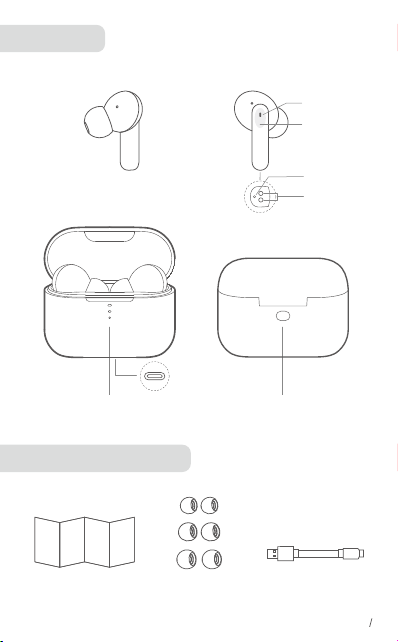
Überblick
Ladeetui für Ohrhörer
Mikrofon
Touchpanel
Ladeschütz
LED-AnzeigeMultifunktionstaste
Ohrstöpsel
in 3 Größen
USB-C-Ladekabel
DE 1
LED
Typ-C-Anschluss
Kurzanleitung
Das Tragen
1. Wählen Sie die Ohrstöpsel, die am besten zu Ihren Ohren passen.
2. Setzen Sie die Ohrhörer jeweils in den inneren Gehörgang ein und drehen
Sie sie vorsichtig, bis Sie die bequemste und sicherste Position gefunden
haben
• Im Lieferumfang Ihrer Ohrhörer sind zahlreiche Ohrstöpsel-Paare enthalten
und die mittelgroßen Ohrstöpsel sind werksseitig angebracht.
EN 2
①
②
Bluetooth-Kopplung
1.Nehmen Sie die Ohrhörer aus der Ladehülle.
2.Öffnen Sie die Bluetooth-Einstellungen auf Ihrem Smartphone und wählen
Sie die QCY-T11 aus der Liste der verfügbaren Geräte aus, um das Pairing
abzuschließen.
*Ihre Ohrhörer werden sich nach jedem Einschalten automatisch mit dem
zuletzt erfolgreich verbundenen Gerät verbinden, wenn dieses innerhalb der
Bluetooth Reichweite verfügbar ist.
ON
QCY-T11
EN 3
Mono-Modus
1. Nehmen Sie einen Kopfhörer aus der Ladebox und verbinden Sie ihn mit dem
Telefon (die LED des Kopfhörers blinkt abwechselnd rot und grün).
2. Öffnen Sie die Bluetooth-Liste auf dem Mobiltelefon, suchen Sie nach QCY-T11
und klicken Sie auf Verbinden.
• Bei einer Verbindung über Bluetooth können Sie einen Ohrhörer nur dann
verwenden, wenn Sie den anderen Ohrhörer in die Ladeschale legen.
• Nach dem Einschalten und Verbinden können Sie einen Ohrhörer weiter
verwenden, auch wenn der Akku des anderen Ohrhörers leer und der Ohrhörer
ausgeschaltet ist.
• Legen Sie während eines aktiven Anrufs einen der Ohrhörer in die Ladeschale
und das Mikrofon im anderen Ohrhörer wird aktiviert.
ON
QCY-T11
EN 4
KOPFHÖRER-STATUS
EN 6
Akkuladestand hoch/
Eingeschaltet
Aufladen
60
Vollständig geladen
2
Ausschalten
Akkuladestand hoch
Akkuladestand mittel
Akkuladestand niedrig
Zurücksetzen
Zurücksetzen
Ladevorgang
• Trocknen Sie die Ohrhörer und den USB-Anschluss vor dem Aufladen vollständig ab
• Laden Sie beide Ohrhörer und die Ladehülle vor der ersten Verwendung
vollständig auf.
• Um die Lebensdauer der Batterie zu erhalten, laden Sie sie mindestens einmal alle
45 Tage vollständig auf.
• Verwenden Sie das mitgelieferte USB-C-Kabel, um Beschädigungen zu vermeiden.
EN 5
Ein-/Ausschalten
• Nehmen Sie die Ohrhörer zum Einschalten aus der Ladehülle.
• Legen Sie die Ohrhörer zum Ausschalten in die Ladehülle.
• Um das Gerät manuell einzuschalten, drücken und halten Sie die Multifunktion-
staste an einem der Ohrhörer für 1.5 Sekunde.
• Halten Sie zum manuellen Ausschalten die Multifunktionstaste an einem der
beiden Ohrhörer für 4.5 Sekunden gedrückt.
EN 7
BEDIENELEMENTE
X2: Zweimal tippen X3: Dreimal tippen 1.5”: 1.5 Sekunde gedrückt halten
1.5
1.5 1.5
1.5
or
2
×
2
×
or
2
×
2
×
or
3
×
3
×
or
EN 5
1.5 4.5
or
4.5
1.5 1.5
or
1.5
ON
ON
OFF
OFF
Setzen Sie die Ohrhörer zurück, wenn sie sich nicht ordnungsgemäß
miteinander oder mit Ihrem Gerät verbinden können.
1.Legen Sie die Ohrhörer in die Ladehülle und stellen Sie sicher, dass sie
aufgeladen werden.
2.Halten Sie das Ladeetui offen und halten Sie dann die Taste am Ladeetui 10
Sekunden lang gedrückt, bis die LED-Anzeige der Ladebox 3 Mal abwechselnd
rot und blau blinken.
Zurücksetzen
10
EN 8
x3
x3
• 12 Monate eingeschränkte Garantie
• Lebenslanger technischer Support
• Unsere Garantie gilt zusätzlich zu den gesetzlichen Rechten, die Verbraucher
beim Kauf dieses Produkts haben.
Kundendienst
1.FAQs
Siehe die FAQs auf QCY HT03-FAQ
2.So pflegen Sie Ihre BluetoothKopfhörer
• Verwahren Sie Ihre Kopfhörer stets gut geschützt im Ladeetui.
• Um einen Verlust der Akkulebensdauer bzw. -kapazität zu vermeiden, sollten Sie
die Bluetooth-Kopfhörer nicht in heißen oder kalten Umgebungen, wie etwa im
geschlossenen Fahrzeug im Sommer oder Winter, aufbewahren.
• Es wird empfohlen, die Bluetooth-Kopfhörer bei Temperaturen zwischen -20 °C
und 45 °C aufzubewahren.
• Bewahren Sie die Bluetooth-Kopfhörer nicht über einen längeren Zeitraum auf,
ohne sie aufzuladen. (max. 2 Monate)
• Sollten die Kopfhörer oder das Ladeetui verschmutzt sein, empfehlen wir Ihnen,
beides mit einem weichen, fusselfreien Tuch zu reinigen, das zuvor etwas mit
sauberem Wasser angefeuchtet wurde.
Unterstützung
• Manufacturer : Hele Electronics Co., Ltd.
• Add: No. 325, Yuehui Road, Daojiao Town, Dongguan City, Guangdong Province, China
• Vielen Dank für den Kauf des authentischen QCY-Produkts. Wenn Sie Hilfe benötigen,
wenden Sie sich bitte an E-Mail: [email protected] [email protected]
EN 9
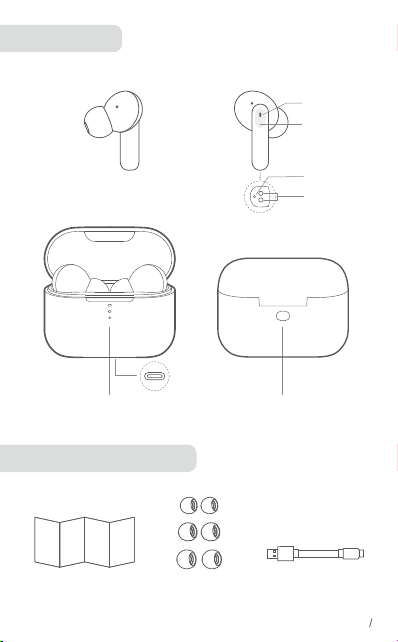
Panoramica
Accessori in dotazione
Microfoni
Pannello touch
Contattore
di carica
Indicatore LEDmultifunzione
EarGel Cavo di ricarica USB-C
EN 1
LED
Porta per
la ricarica
Manuale d'uso
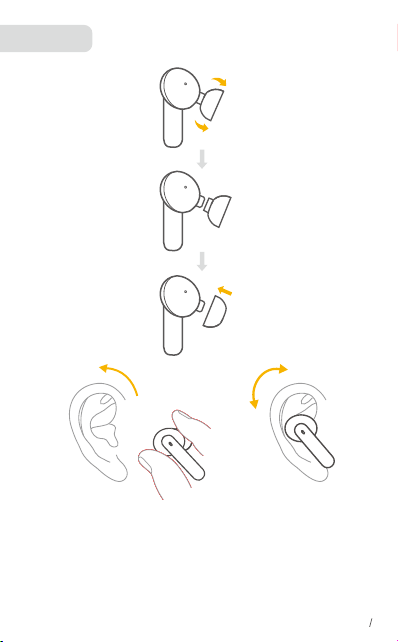
Utilizzo
1. Scegliere gli EarTips che assicurano la tenuta migliore.
2. Inserire gli auricolari nel canale uditivo e ruotarli delicatamente fino a
individuare la posizione più comoda e sicura.
* Gli auricolari sono dotati di più paia di EarTips, tra cui quelli di medie
dimensioni preinstallati.
EN 2
①
②
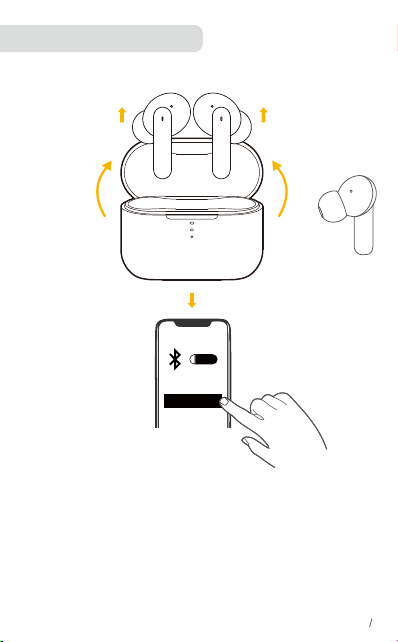
Associazione Bluetooth
1.Estrarre gli auricolari dalla custodia di ricarica.
2.Per completare l'accoppiamento, accedi alle impostazioni Bluetooth dello
smartphone e seleziona QCY-T11 dall'elenco dei dispositivi disponibili.
* Ogni volta che si accendono gli auricolari QCY, questi ultimi si collegheranno
automaticamente all’ultimo dispositivo collegato correttamente, se disponibile
all’interno della portata Bluetooth.
ON
QCY-T11
EN 3

Modalità mono
1. Prendi un auricolare dalla scatola di ricarica e collegalo al telefono (il LED
dell'auricolare lampeggerà in rosso e verde alternativamente)
2. Aprire l'elenco Bluetooth sul telefono cellulare, cercare QCY-T11 e fare clic su
Connetti.
• dopo la corretta connessione al Bluetooth, è possibile utilizzare uno dei due
auricolari solo riponendo l'altro nella custodia di ricarica.
• Quando accesi e collegati, se uno degli auricolari è scarico e spento, sarà possibile
continuare a utilizzare l'altro.
• Quando si effettua una chiamata, inserire uno degli auricolari nella custodia di
ricarica e il microfono nell'altro auricolare verrà attivato.
ON
QCY-T11
EN 4
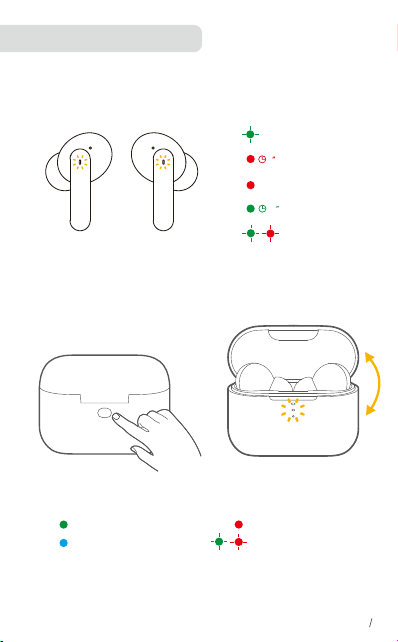
Che cosa indicano i LED
EN 6
Accensione
Ricarica
60
carica completa
2
Spegnimento
Completamente carica
Batteria carica a metà
Batteria quasi scarica
Ripristino
Ripristino
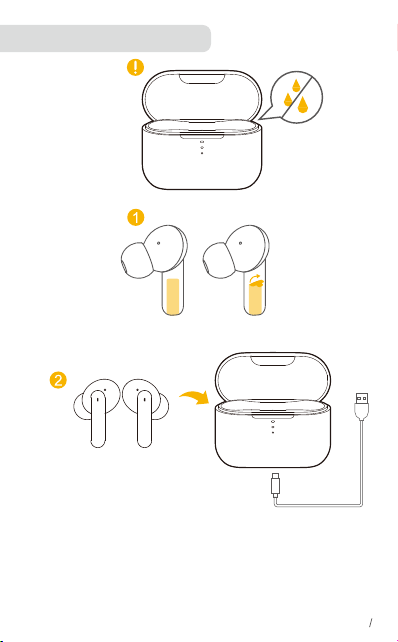
Ricarica degli auricolari
• Asciugare completamente gli auricolari e la porta USB prima della ricarica.
• Il primo utilizzo deve essere preceduto da una ricarica completa di auricolari e
custodia di ricarica.
• Per preservare la durata della batteria, effettuare una ricarica completa almeno
una volta ogni 45 giorni.
• Per prevenire eventuali danni, utilizzare il cavo USB-C fornito.
EN 5
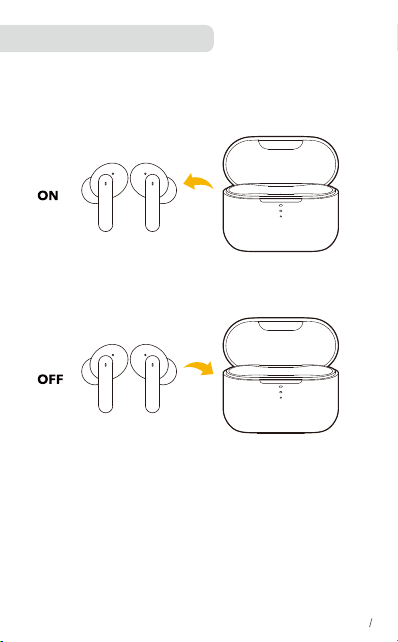
Accensione/Spegnimento
• Estrarre gli auricolari dalla custodia di ricarica per accenderli.
• Riporre gli auricolari nella custodia di ricarica e chiudere la custodia, gli auricolari
si spegneranno automaticamente
• Per accendere manualmente, tenere premuto il pulsante multifunzione su uno
degli auricolari per 1.5 secondo.
• Per lo spegnimento manuale, tenere premuto il pulsante multifunzione su uno dei
due auricolari per 4.5 secondi.
EN 7
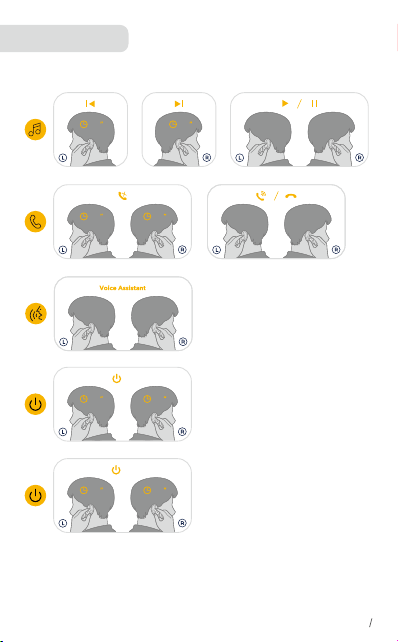
CONTROLLI
X2: Premere due volte X3: Premi tre volte
1.5”: Tenere premuto per 1.5 secondo
1.5
1.5 1.5
1.5
or
2
×
2
×
or
2
×
2
×
or
3
×
3
×
or
EN 5
1.5 4.5
or
4.5
1.5 1.5
or
1.5
ON
ON
OFF
OFF
Nel caso in cui il collegamento tra gli auricolari o con il dispositivo non avvenga
correttamente, reimpostare gli auricolari.
1.Riporre gli auricolari nella custodia di ricarica e assicurarsi che siano carichi.
2.Tieni la custodia di ricarica aperta, quindi tieni premuto il pulsante sulla
custodia di ricarica per 10 secondi finché l'indicatore LED della custodia di
ricarica non lampeggia in rosso e blu alternativamente per 3 volte
Reimpostazione
10
EN 8
x3
x3
• Garanzia limitata 12 mesi
• Supporto tecnico a vita
• La nostra garanzia si aggiunge ai diritti legali dei consumatori che acquistano
questo prodotto
Assistenza clienti
1.Domande frequenti
Visualizza le domande frequenti su QCY-T11
2.Cura degli auricolari
• Conserva sempre gli auricolari nella custodia diricarica e protetti in modo sicuro.
• Allo scopo di prevenire la riduzione della vitautile o della capacità della batteria,
evita di conservare gli auricolari in ambienti troppo caldi
o freddi, come ad esempio un'auto chiusa in estate oppure in condizioni invernali.
• Ti consigliamo di conservare gli auricolari a una temperatura compresa tra
-20 °C e 45 °C.
• Non conservare gli auricolari per periodi di tempo prolungati senza ricaricarli
(massimo tre mesi).
• Se gli auricolari o la custodia di ricarica si sporcano, ti consigliamo di pulirli con un
panno morbido e privo di pelucchi inumidito con acqua pulita.
• Ti consigliamo di utilizzare un alimentatore da 5 V +-0,25 V e una corrente
massima di carica inferiore ai 2 A, non ti consigliamo invece di caricare gli auricolari
o la custodia usando un'alimentatore con una tensione maggiore.
Supporto
• Manufacturer : Hele Electronics Co., Ltd.
• Add: No. 325, Yuehui Road, Daojiao Town, Dongguan City, Guangdong Province, China
• Grazie per aver acquistato il prodotto autentico QCY. Per qualsiasi assistenza, si prega di
contattare Email: [email protected] [email protected]
EN 9
Aperçu
Accessoires fournis
Microphone
Écran tactile
Contacteur de
charge
indicateur LEDBouton multifonction
EarGels Câble de charge USB-C
EN 1
LED
Port de recharge
Manuel de l'Utilisateur
Utilisation
1. Choisissez les embouts les mieux adaptés à vos oreilles.
2. Insérez les écouteurs dans le conduit auditif de vos oreilles et faites-les
tourner délicatement jusqu'à ce qu'ils tiennent confortablement et fermement.
Faites pivoter l'écouteur vers le côté de l'oreillette pour qu'il s'ajuste
parfaitement.
EN 2
①
②
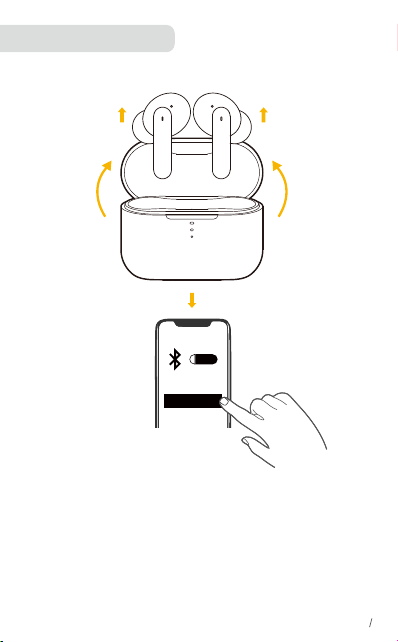
Couplage Bluetooth
1. Sortez les écouteurs de l’étui de chargement.
2. Pour effectuer l'appariement, allez dans le menu Bluetooth de votre
téléphone intelligent et sélectionnez QCY-T11 dans la liste des périphériques
disponibles.
*Chaque fois que vous allumez vos écouteurs QCY, ils se connectent
automatiquement au dernier appareil auquel ils étaient connectés s’ils se
trouvent à portée du Bluetooth.
ON
QCY-T11
EN 3
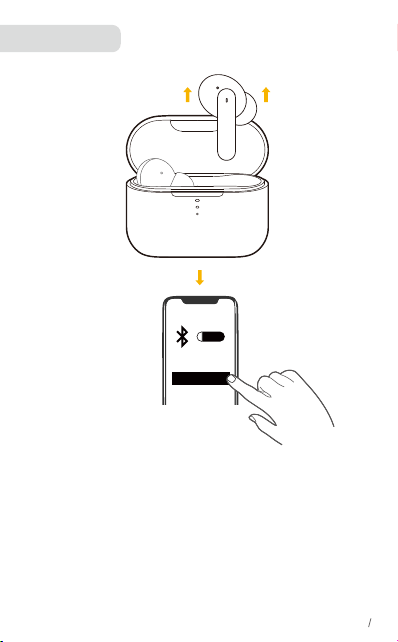
Mode mono
1. Retirer un seul écouteur du boîtier pour le rendre connectable au téléphone (le
voyant lumineux clignote en rouge et vert).
2. Sur le téléphone, recherchez QCY-T11 et appuyez dessus pour vous
connecter.
• lorsque Bluetooth est connecté, vous pouvez utiliser un seul des écouteurs en
plaçant simplement l'autre dans le boîtier de charge.
• Si la batterie d'un des écouteurs est faible et qu'il est éteint lorsque l'autre
écouteur est allumé et connecté, vous pouvez continuer à utiliser ce dernier.
• En cours d'appel, placez l’un des écouteurs dans le boîtier de charge et le
microphone de l’autre écouteur est alors activé.
ON
QCY-T11
EN 4
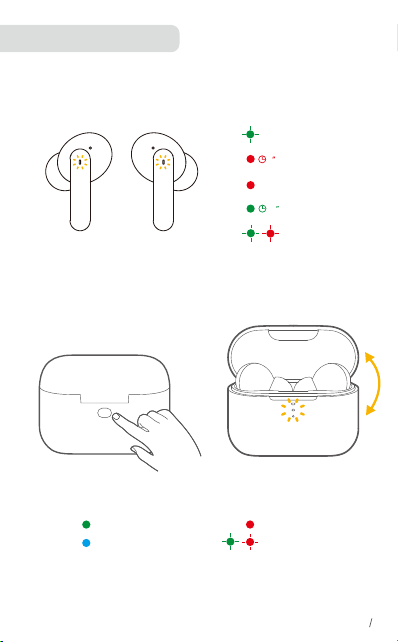
Signification des DEL
EN 6
Allumé
mise en charge
60
charge complète
2
Éteint
Pile pleine
Pile moyenne
Pile faible
Réinitialisation
Réinitialisation
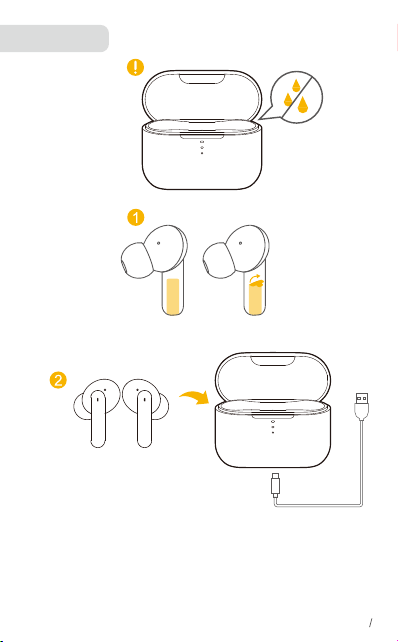
En charge
• Séchez entièrement les écouteurs et le port USB avant le chargement.
• Chargez entièrement les deux écouteurs et l'étui de chargement avant la
première utilisation.
• Pour préserver la durée de vie de la batterie, procédez à une recharge complète
au moins une fois tous les 45 jour(s).
• Pour éviter tout dommage, utilisez le câble USB-C fourni.
EN 5
Mise sous/hors tension
•Sortez les écouteurs de l’étui de chargement pour les allumer.
•Pour éteindre les écouteurs, placez-les dans le boîtier de charge et fermez
cedernier.
• Pour les allumer manuellement, maintenez le bouton multifonction d'un des
écouteurs appuyé pendant 1.5 seconde.
• Pour les éteindre manuellement, maintenez le bouton multifonction d'un des
écouteurs appuyé pendant 4.5 secondes.
EN 7
COMMANDES
X2: Appuyez deux fois X3: Appuyez trois fois
1.5”: Maintenir appuyé pendant 1.5 secondes
1.5
1.5 1.5
1.5
or
2
×
2
×
or
2
×
2
×
or
3
×
3
×
or
EN 5
1.5 4.5
or
4.5
1.5 1.5
or
1.5
ON
ON
OFF
OFF
Réinitialisez les écouteurs s'ils ne parviennent pas à se connecter l'un à l'autre
ou si vous ne parvenez pas à vous connecter à votre appareil.
1.Placez les écouteurs dans l'étui de chargement et assurez-vous qu'ils sont
en charge.
2. Gardez le boîtier de charge ouvert, puis appuyez sur le bouton du boîtier de
charge et maintenez-le enfoncé pendant 10 secondes (s) jusqu'à ce que le
voyant lumineux du boîtier de charge clignote en rouge et bleu alternativement
3 fois.
Réinitialisation
10
EN 8
x3
x3
• Garantie limitée de 12 mois
• Support technique à vie
• Notre garantie s'ajoute aux droits légaux que les consommateurs ont en
achetant ce produit.
Service Clients
1.FAQ
Consultez la FAQ sur QCY-T11-FAQ
2.Entretien des écouteurs-boutons
• Rangez toujours vos écouteurs-boutons dans l'étui-chargeur afin de bien les
protéger.
• Afin d'éviter une décharge rapide ou une baisse de la capacité de la pile, évitez
de ranger les écouteurs-boutons dans des environnements
chauds ou froids (voiture fermée en été,conditions hivernales, etc.).
• Nous vous conseillons de ranger les écouteursboutons à une température
comprise entre –20°C et 45°C.
• Ne rangez pas vos écouteurs-boutons pendant des périodes prolongées sans les
recharger (max.trois mois).
• Si les écouteurs-boutons ou l'étui-chargeur se salissent, il est recommandé de
les nettoyer à l’aide d’un chiffon doux et non pelucheux ayant été préalablement
humidifié avec de l’eau propre.
• Nous vous recommandons d'utiliser une source d'alimentation électrique de 5V
+-0,25V avec une intensité de recharge inférieure à 24. Nous vous déconseillons
de recharger les écouteursboutons ou l'étui-chargeur avec une alimentation
électrique affichant une tension supérieure.
Assistance
• Manufacturer : Hele Electronics Co., Ltd.
• Add: No. 325, Yuehui Road, Daojiao Town, Dongguan City, Guangdong Province, China
• Merci d'avoir acheté le produit authentique QCY. Pour toute assistance, veuillez contacter
EN 9
Visión general
Accesorios incluidos
Micrófono
Panel táctil
Contactor de
carga
indicador LEDBotón multifunción
EarGelsCable de carga USB-C
EN 1
LED
Tapa del
Manual de usuario
Uso
Seleccione los adaptadores para el oído que mejor se ajusten a sus oídos.
Paso 1: asegúrese de que el orificio de sonido esté hacia abajo, luego coloque
los auriculares en el oído.
Paso 2: Gire el auricular hacia atrás hacia el lado de la aurícula para ajustarlo
cómodamente.
EN 2
①
②
Emparejamiento por Bluetooth
1.Extraiga los auriculares del estuche de carga.
2. Vaya a los ajustes de Bluetooth de su smartphone y seleccione QCY-T11 de
la lista de dispositivos disponibles para
completar el emparejamiento.
*Cada vez que encienda los auriculares, automáticamente se conectarán al
último dispositivo conectado con éxito si está dentro del rango de Bluetooth.
ON
QCY-T11
EN 3
Modo mono
1. Saca del estuche uno de los dos auriculares para conectarlo al teléfono (el
auriculares LED parpadeará en rojo y verde).
2.Busca la opción QCY-T11 entre los dispositivos Bluetooth disponibles y tócala
para establecer la conexión.
•cuando el Bluetooth esté conectado, puede utilizar solamente uno
de los auriculares dejando el otro dentro del estuche de carga.
• Cuando estén encendidos y conectados, si uno de los auriculares se queda sin
batería y se apaga, puede seguir utilizando el otro.
• Durante una llamada, coloque uno de los auriculares en el estuche de carga y
el micrófono del otro auricular se activará.
ON
QCY-T11
EN 4
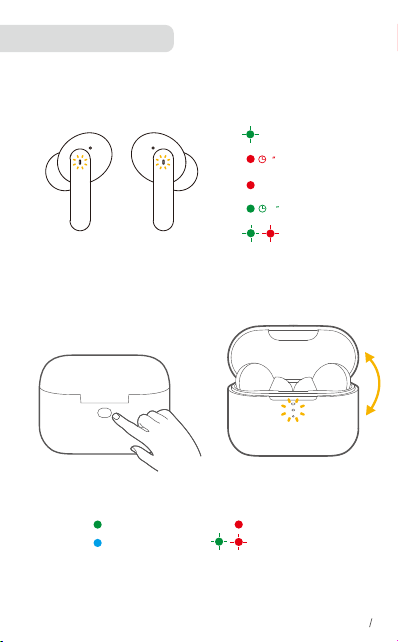
Qué indican los LED
EN 6
Ligado
Carregando
60
Totalmente cargada
2
Apagar
Batería baja
Batería media
Batería alta
Redefinindo
Redefinindo
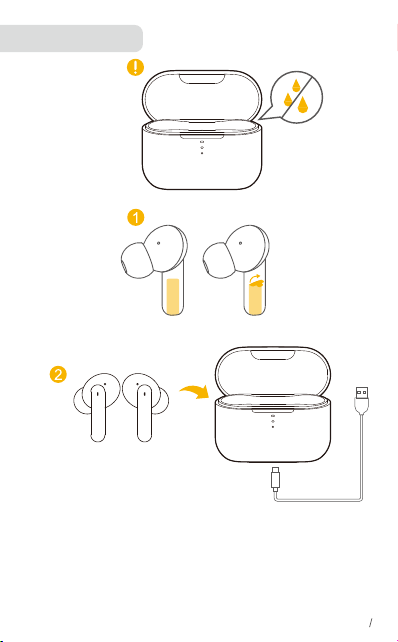
Carga en curso
• Seque completamente los auriculares y el puerto USB antes de la carga.
• Cargue ambos auriculares completamente y el estuche de carga antes del
primer uso.
• Para conservar la vida útil de la batería, cárguela por completo al menos una vez
cada 45 días.
• Para evitar daños, use el cable USB-C que se suministra.
EN 5
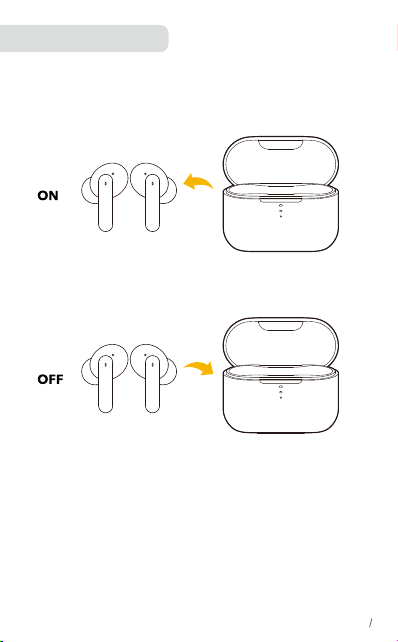
Encendido/Apagado
• Para encender los auriculares, extráigalos del estuche de carga.
• Para apagar los auriculares, colóquelos en el estuche de carga y ciérrelo.
• Para encender de forma manual, mantenga pulsado el botón multifunción en
uno de los auriculares durante 1.5 segundo.
• Para apagarlos manualmente, mantenga pulsado el botón multifunción en
cualquiera de los auriculares durante 4.5 segundos.
EN 7
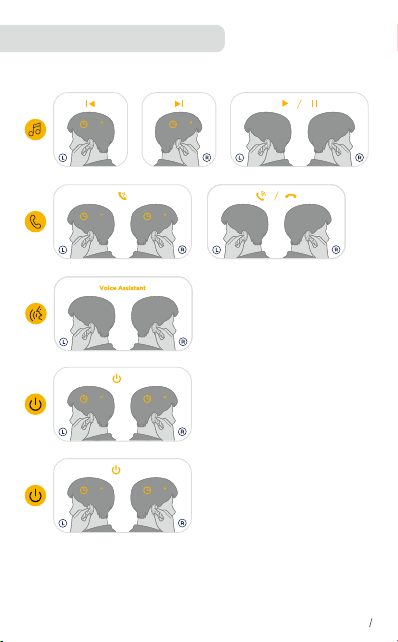
CONTROLES DE BOTONES
X2: Pulsar dos veces X3: Pulsar tres veces
Mantener pulsado durante 1.5 segundo
1.5
1.5 1.5
1.5
or
2
×
2
×
or
2
×
2
×
or
3
×
3
×
or
EN 5
1.5 4.5
or
4.5
1.5 1.5
or
1.5
ON
ON
OFF
OFF
Restablezca los auriculares si estos no se pueden conectar correctamente o si
no se pueden conectar adecuadamente con el dispositivo.
Coloque los auriculares en el estuche de carga y asegúrese de que están
cargando.
Mantenga abierto el estuche de carga, luego mantenga pulsado el botón del
estuche de carga durate 10 segundos hasta que los indicadores LED de
ambos auriculares parpadeen en rojo y azul 3 veces.
Restablecer
10
EN 8
x3
x3
• Garantía limitada de 12 mesi
• Soporte técnico de por vida
• Nuestra garantía es adicional a los derechos legales que tienen los
consumidores al comprar este producto.
Servicio al Cliente
1.Preguntas frecuentes
Puede ver las preguntas más frecuentes en QCY-T11
2.Cuidados de los auriculares
• Guarde siempre los auriculares en la carcasa de carga y bien protegidos.
• Para evitar que la capacidad o la vida útil de la batería se reduzca, no guarde los
auriculares en entornos fríos o calientes, como en un coche cerrado al sol o en
invierno.
• Se recomienda guardar los auriculares entre -20 °C y 45 °C (-4 °F y 113 °F).
• No guarde los auriculares durante períodos prolongados sin recargarlos (tres
meses como máximo).
• Si los auriculares o la carcasa de carga se ensucian, recomendamos limpiarlos
con un paño suave que no suelte pelo humedecido
con agua limpia.
• Se recomienda utilizar una fuente de alimentación con 5 V +-0,25 V y una
corriente de carga máxima menor de 2 A. No se recomienda cargar los auriculares
o la carcasa de carga con una fuente de alimentación de mayor voltaje.
Ayuda
• Manufacturer : Hele Electronics Co., Ltd.
• Add: No. 325, Yuehui Road, Daojiao Town, Dongguan City, Guangdong Province, China
• Gracias por adquirir el producto auténtico QCY. Para cualquier ayuda, comuníquese con
el correo electrónico: [email protected] [email protected]
EN 9
Visão geral
Acessórios incluídos
Microfone
Painel de toque
Contator de
carga
indicador LEDBotão multifuncional
EarGelsUSB-C
EN 1
LED
Doca de carga
Estojo de carregamento
Como usar
1. Escolha os EarTips mais adequados para seu ouvido.
2. Insira os fones de ouvido no canal interno do ouvido e gire-os com cuidado
até encontrar a posição mais confortável e segura.
*Seus fones de ouvido são fornecidos com 3 pares de EarTips, sendo que os
de tamanho médio são pré-instalados.
EN 2
①
②
Pareamento Bluetooth
1.Tire os fones de ouvido da capa carregadora.
2.Aceda às definições do Bluetooth do seu smartphone e selecione o
QCY-T11 na lista de dispositivos disponíveis para concluir o emparelhamento.
* Sempre que ligar os seus auriculares QCY, irão ligar-se automaticamente ao
dispositivo ligado anteriormente, se este estiver disponível dentro do alcance
do Bluetooth.
ON
QCY-T11
EN 3
Modo mono:
1. Pegue em qualquer um dos auriculares para conectá-lo ao
telemóvel (LED pisca vermelho e verde).
2. No telemóvel, procure por QCY-T11 e toque para conectar.
•Quando o Bluetooth está ligado, só pode utilizar qualquer um dos auriculares ao
colocar o outro na caixa de carregamento.
• Quando os auriculares estão ligados e a funcionar, se um dos auriculares ficar
sem bateria e se desligar, pode continuar a utilizar o outro.
• Durante uma chamada, coloque um dos auriculares na caixa de carregamento e
o microfone do outro auricular será ativado.
ON
QCY-T11
EN 4
Significado dos LEDs
EN 6
Nível de bateria alto
Carregamento
60
Totalmente carregado
2
Desligar
Nível de bateria elevado
Nível de bateria baixo
Nível de bateria médio
Totalmente carregado
A repor/a atualizar
firmware
Carregamento
• Seque totalmente os auriculares e a porta USB antes do carregamento.
• Carregue totalmente os dois auriculares e a caixa de carregamento antes
da primeira utilização.
• Para preservar a duração da bateria, carregue totalmente, pelo menos, uma
vez a cada 45 dias.
• Para evitar danos, utilize o cabo USB C fornecido.
EN 5
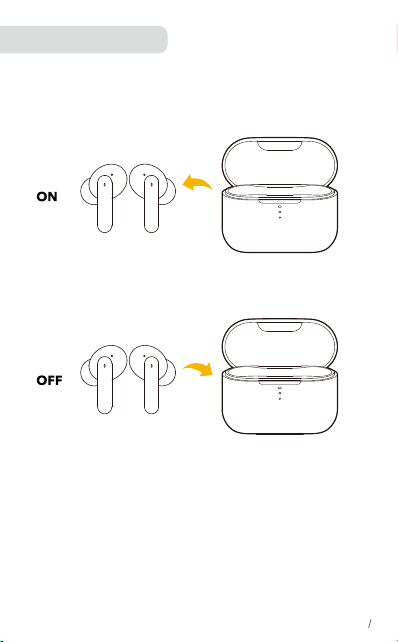
Ligando/desligando
• Tire os fones de ouvido da capa carregadora para ligar.
• Para desligar, coloque os fones de ouvido no estojo carregador.
• Para ligar manualmente, prima continuamente durante 1.5 segundo o botão
multifunção num dos auriculares.
• Para desligar manualmente, prima continuamente o botão multifunções durante
4.5 segundo em qualquer um dos auriculares.
EN 7
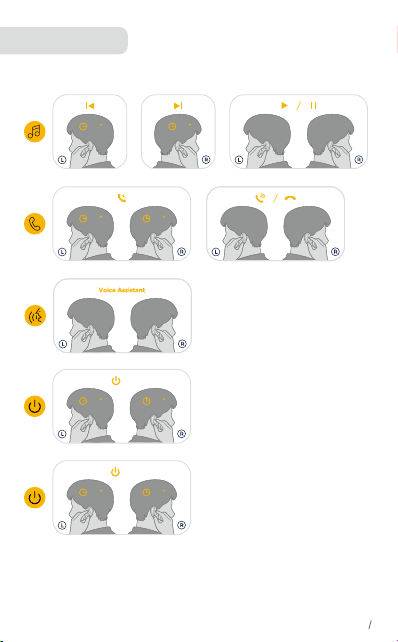
CONTROLES
X2: Pressione duas vezes X3: Pressione 3 vezes
1.5”: Pressione e segure por 1,5 segundos
1.5
1.5 1.5
1.5
or
2
×
2
×
or
2
×
2
×
or
3
×
3
×
or
EN 5
1.5 4.5
or
4.5
1.5 1.5
or
1.5
ON
ON
OFF
OFF
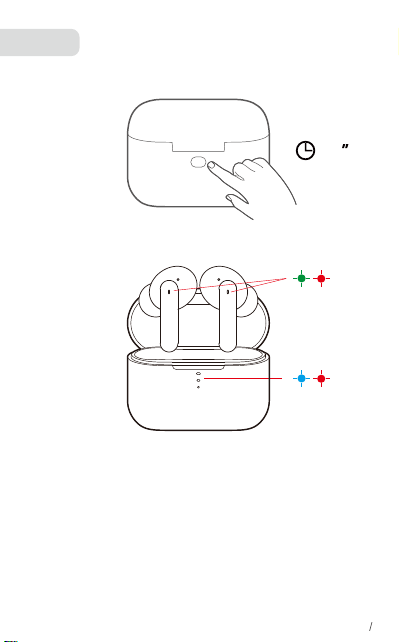
Reponha os auriculares se não puderem ser ligados corretamente um ao
outro ou com o seu dispositivo.
1.Coloque os auriculares dentro da caixa de carregamento e certifique-se de
que estão a ser carregados.
2. Mantenha a caixa de carregamento aberta e, em seguida, pressione e
segure o botão na caixa de carregamento por 10 segundos, até que o
indicador LED do compartimento de carregamento pisque em vermelho e
azul alternadamente 3 vezes.
Repor
10
EN 8
x3
x3
• Garantia limitada de 12 meses
• Suporte técnico vitalício
• Nossa garantia é adicional aos direitos legais que os consumidores têm ao
adquirir este produto.
Atendimento ao Cliente
1.PERGUNTAS FREQUENTES
Consulte as Perguntas Frequentes em QCY-T11
2.Como cuidar dos seus auriculares
• Guarde sempre os auriculares no estojo de carregamento e protegidos em
segurança.
• Para evitar a exaustão da vida útil ou capacidade da bateria, evite guardar os
auriculares em ambientes quentes ou frios, tais como um carro fechado no verão
ou durante o inverno.
• Recomendamos que guarde os auriculares entre os -20 °C e os 45 °C.
• Não guarde os auriculares durante longos períodos de tempo sem os recarregar
(máx. de três meses).
• Se os auriculares ou o estojo de carregamento se sujarem, ecomendamos que
os limpe com um pano suave e sem fiapos humidificado com água limpa.
• Não é recomendado utilizar uma fonte de alimentação com 5 V + -0,25 V e uma
tensão de carregamento máxima inferior a 2 A. Não
é recomendado carregar os headsets intraauriculares ou o estojo de
carregamento com uma fonte de alimentação com uma tensão superior.
Assistência
• Manufacturer : Hele Electronics Co., Ltd.
• Add: No. 325, Yuehui Road, Daojiao Town, Dongguan City, Guangdong Province, China
• Obrigado por adquirir o produto autêntico QCY. Para qualquer assistência, por favor
contacte o: [email protected] [email protected]
EN 9
概要
付属アクセサリー
マイク
タッチスクリーン
コンタクタの充電
LEDインジケーター正多機能ボタン
イヤージェルUSB-C 充電ケーブル
EN 1
LED
Type-C
インターフェース
ユーザーマニュアル
イヤホンの装着
1. 耳のサイズに合うイヤーチップを選択します。
2. イヤホンを耳の奥までしっかりはめ込み、最適な位置に来るようにゆっくり
とひねって固定します。
*• 本製品には複数のイヤーチップが付属しており、そのうち、Mサイズのイヤ
ーチップがすでにイヤホンに取り付けられています。
EN 2
①
②
Bluetooth ペアリング
両耳使用時(ステレオモード)
1.初めて使用する前に、耳栓の絶縁ステッカーをはがしてください。
2.充電ケースから両方のイヤホンを取り出します。ご使用の機器の Bluetooth
接続画面で [QCY-T11] を選択します。
*QCYイヤホンの電源を入れるたびに、Bluetoothの範囲内で使用可能な場合
は、最後に正常に接続されたデバイスに自動的に接続されます。
ON
QCY-T11
EN 3
Bluetooth ペアリング
モノラルモード
何れかの片方イヤホンを収納ケースから取リ出すと、赤と緑LEDが交互に点
滅するべアリングモードになリますデバイス側で「QCY-T11」を選択しペア
リング設定を行ってください。
• Bluetooth 接続中に、片方のイヤホンを充電ケースに戻しカバーを閉じると
、もう一方のイヤホンのみを引き続き使用できます。
• イヤホンを使用中に、一方のイヤホンの充電がなくなり電源がオフになっ
た場合でも、もう一方の充電残量のあるイヤホンを引き続き使用できます。
• 通話中に一方のイヤホンを充電ケースに戻すと、もう一方のイヤホンのマ
イクが有効になります。
ON
QCY-T11
EN 4
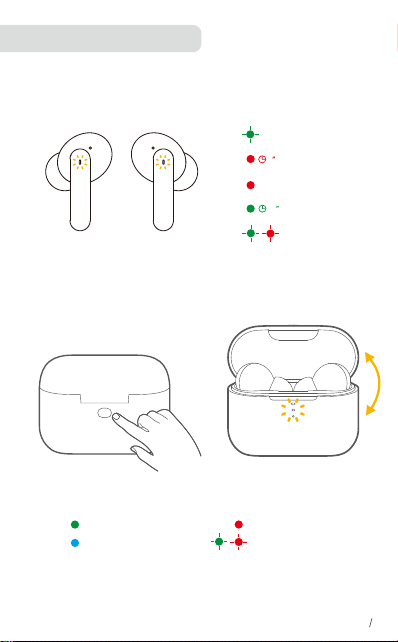
LEDライトインジケーター
EN 6
電源オン
充電中
60
完全に充電済み
2
電源オフ
バッテリー残量高
バッテリー残量中
バッテリー残量低
リセット中
リセット中
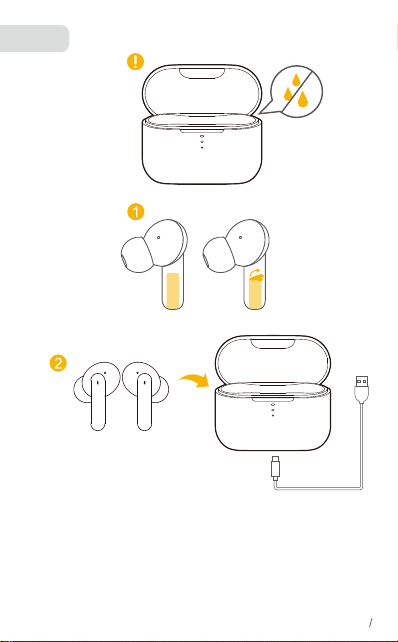
充電
• イヤホンと USB ポートを完全に乾かしてから、充電してください。
• 充電ケースをスライドして開閉することで、バッテリー表示を確認できます。
• 初めてご使用になる前に、両方のイヤホンと充電ケースを完全に充電してくだ
さい。
• バッテリーを長持ちさせるために、少なくとも 45 日に一度は満充電にしてくだ
さい。
• 損傷を防ぐため、付属の USB-C ケーブルを使用してください。
EN 5
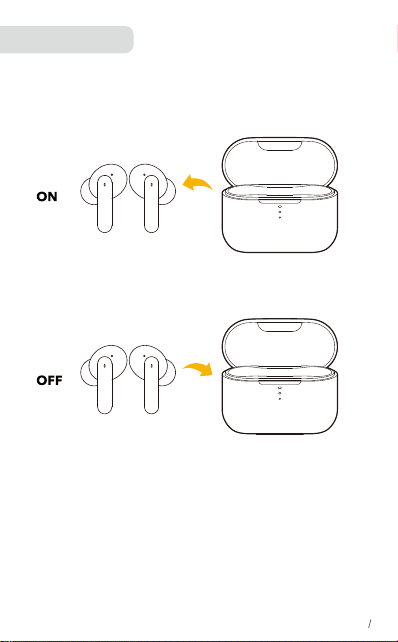
電源オン / オフ
•電源をオンにするには、充電ケースから両方のイヤホンを取り出します。
•充電ケースに両方のイヤホンを戻してケースを閉じると、イヤホンの電源は
自動的にオフになります。
• 手動で電源をオンにするには、いずれかのイヤホンの多機能ボタンを 1.5 秒
間押し続けます。
• 手動で電源をオフにするには、いずれかのイヤホンの多機能ボタンを 4.5 秒
間長押してください。
EN 7
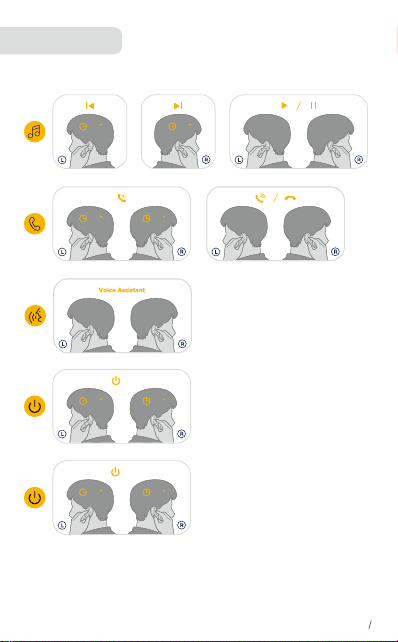
コントロール
X2: 2 回押す X3: 3 回押す 1.5”: 1.5 秒間長押し
1.5
1.5 1.5
1.5
or
2
×
2
×
or
2
×
2
×
or
3
×
3
×
or
EN 5
1.5 4.5
or
4.5
1.5 1.5
or
1.5
ON
ON
OFF
OFF
左右のイヤホンを相互に適切に接続できない場合や、イヤホンと機器を適切
に接続できない場合は、イヤホンをリセットしてください。
左右のイヤホンを充電ケースに戻し、充電中の状態にあることを確認します
。充電ケースを開いた状態で、充電ケースのボタンを 10 秒間押し続けると
、両方のイヤホンの LED 表示が赤と緑く 3 回点滅します。
リセット
10
EN 8
x3
x3
• 12か月の限定保証
• 生涯の技術サポート
• 当社の保証は、消費者がこの製品を購入する法的権利に追加されます。
カスタマーサービス
1.よくある質問(FAQ)
QCY T11 でよくある質問を参照してください。
2.イヤホンの取り扱い方法
• 損傷や危険を溢けるために、当製品を分解,改造しないでくくださし.
• イヤホンは必ず充電ケースに入れて安全に保管してください。
• バッテリーの枯渇や性能低下を防止するため、イヤホンを、夏季や冬季に窓
を閉め切った車内など、高温または低温の場所で保管しないでください。
• イヤホンは常に -20° C 〜 45° C で保管するようにしてください。
• イヤホンを長期間 ( 最大 3 ヶ月 ) 充電せずに保管しないでください。
• イヤホンまたは充電ケースが汚れたら、きれいな水で湿らせた柔らかい布等
でクリーニングしてください。
• 5V +-0.25V、充電電流 2A 以下の電源の使用が推奨されています。これを超え
る電圧の電源を使用してイヤホンを充電することは避けてください。
• 本機を使用する前に、このマ二ュアルをよ(お読みいただき、大切に保管して
ください。
サポート
•製造先:東莞市和楽電子有限会社
•住所:広東省東莞市道滘鎮粤辉路325号
•本物のQCYをお買い上げいただきありがとうございます。ヘルプが必要な
場合は、電子メールに連絡してください:[email protected][email protected]
EN 9
헤드셋 알아보기
포함된 액세서리
마이크
터치 패널
충전 접점
표시등다기능 키
이어캡(S/M/L)USB-C 충전 케이블
EN 1
LED
충전 포트
설명서
착용
1. 귀에 가장 잘 맞는 이어 팁을 선택합니다.
2. 이어버드를 귀 안쪽에 넣고 가장 편하면서도 밀착되는 느낌이 들 때까지
부드럽게 돌립 니다.
* 이어버드에는 3 쌍의 이어 팁이 함께 제공되는데, 그중 중간 크기의 이어 팁이
사전 설치되어 있습니다.
EN 2
①
②
블루투스 페어링
1.충전 케이스에서 이어버드를 꺼냅니다 .
2.스마트폰의 Bluetooth 설정으로 이동하여 사용가능한 장치 목록에서 QCY-T11를
선택하여페어링을 완료합니다.
* QCY 이어버드의 전원을 켰을 때 마지막으로 연결에 성공했던 장치가 Bluetooth
통신 범위 안에 있는 경우 이 장치에 자동으로 연결됩니다.
ON
QCY-T11
EN 3
모노 모드
1. 충전 상자에서 아무 이어폰이나 집어서 전화기에 연결합니다(이어폰의 LED가
빨간색과 녹색으로 번갈아 깜박임).
2. 휴대폰에서 블루투스 목록을 열고 QCY-T11을 검색한 후 연결을 클릭합니다.
Bluetooth 에 연결된 경우 이어버드 중 하나를 충전 케이스에 넣고 다 른 하나만
사용할 수 있습니다.
• 전원이 켜지고 연결되었을 때 이어버드 중 한쪽이 배터리가 부족하고 전원이 꺼
지는 경우 다른 쪽을 계속 사용할 수 있습니다.
• 통화 중인 경우 이어버드 중 한쪽을 충전 케이스에 넣으면 다른 쪽 이어버드의
마 이크가 활성화됩니다.
ON
QCY-T11
EN 4
LED의 의미
EN 6
배터리 높음
충전
60
완충됨
2
전원 끄기
배터리 높음
배터리 중간
배터리 낮음
초기화 중
초기화 중
충전
•충전하기 전에 이어버드와 USB 포트를 완전히 건조하세요 .
• LED 배터리 표시등을 활성화하려면 충전 케이스를 밀어서 열거나 닫으십시오 .
•처음 사용하기 전에 이어버드와 충전 케이스를 완전히 충전하세요 .
•배터리 수명을 보존하려면 최소 45 일마다 완전 충전하십시오 .
• 손상을 방지하려면 제공된 USB-C 케이블을 사용하세요 .
EN 5
전원 켜기/끄기
• 전원을 켜려면 충전 케이스에서 이어버드를 꺼냅니다 .
• 전원을 끄려면 이어버드를 충전 케이스에 넣고 뚜껑을 닫습니다.
수동으로 전원을 켜려면 이어버드 중 어느 1 개의 다기능 버튼을 1.5 초동안
누르십시오 .
• 수동으로 전원을 끄려면 이어버드 중 하나의 다기능 버튼을 4.5 초간 길게
누릅니다 .
EN 7
BUTTON CONTROLS
X2: 번 누르기 X3: 세 번 누르기 1.5”: 1.5 초간 길게 누릅니다
1.5
1.5 1.5
1.5
or
2
×
2
×
or
2
×
2
×
or
3
×
3
×
or
EN 5
1.5 4.5
or
4.5
1.5 1.5
or
1.5
ON
ON
OFF
OFF
이어버드가 서로 제대로 연결되지 않거나 장치와 올바르게 연결할 수 없는 경우
이어버드를 재설정합니다 .
1.이어버드를 충전 케이스에 넣고 충전 중인지 확인합니다 .
2.충전 케이스를 열어 둔 상태에서 두 이어버드의 LED 표시등이 빨간색과
녹색으로 3번 깜박일 때까지 충전 케이스의 버튼을 10초 동안 길게 누릅니다.
재설정
10
EN 8
x3
x3
• 12 개월 제한 보증
• 평생 기술 지원
• 당사의 보증은 소비자가 본 제품 구매로 얻은 법적 권리에 추가될니다.
고객 서비스
1.자주 묻는 질문
QCY-T11 에서 FAQ를 확인해 보세요.
2.이어버드 관리 방법
• 이어버드는 항상 충전 케이스에 넣어 안전하게보관합니다.
• 배터리 사용 시간 또는 용량이 줄어드는 것을 방지하기 위해, 이어버드를 고온
혹은 저온 환경에두지 마십시오.
• 이어버드의 보관 온도는 -20°C~45°C(-4°F~113°F)사이를 권장합니다.
• 충전하지 않은 채 이어버드를 장기간 보관하지마십시오. (최대 3개월)
• 이어버드나 충전 케이스가 더러워지면 깨끗한물로 적신 극세사 천으로 부드럽게
닦는 것을권장합니다.
• 5V 및 최대 충전 전류가 2A 미만인 전원 공급 장치를 사용하는 것이 좋습니다.
이보다 높은 전압의 전원 공급 장치를 사용하여 이어버드 및충전 케이스를
충전하지 않는 것이 좋습니다.
지원
• 제조사 : Hele Electronics Co., Ltd.
• 주소: 광동성 둥관시 다오지아오진 웨후이로 325호
• 정품 QCY를 구입해주셔서 감사합니다. 도움이 필요하시면 저희에게 연락해 주십시오:
EN 9
