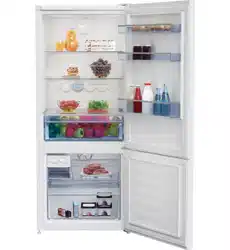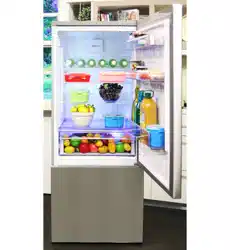
www.beko.com.trwww.beko.com
.au
RCNE450K40ZW
RCNE450K40ZX
EN

Please read ths gude frst!
Dear Customer,
We'd like you to achieve the optimal efficiency from our product, which has been
manufactured in modern facilities with meticulous quality controls.
For this purpose, please fully read the user guide before using the product and keep
the guide as a reference source. If you turn the product over to another person,
provide this guide along with the product.
User gude ensure the quck and safe use of the product.
• Please read the user gude before nstallng and operatng the product.
• Always observe the applcable safety nstructons.
• Keep the user gude wthn easy reach for future use.
• Please read any other documents provded wth the product.
Keep in mind that this user guide may apply to several product models. The guide
clearly indicates any variations of different models.
Symbols and Remarks
The followng symbols are used n the user gude:
C
Important nformaton and
useful tps.
A
Rsk of lfe and property.
B
Rsk of electrc shock.
The product’s packagng
s made of recyclable ma-
terals, n accordance wth
the Natonal Envronment
Legslaton.

2 /32 EN
Refrgerator / User Gude
1 Safety and environment
instructions 3
1.1. General safety . . . . . . . . . . . . . . . . . . . 3
1.1.1 HC warning . . . . . . . . . . . . . . . . . . . . . . 5
1.1.2 For models with water fountain 5
1.2. Intended use. . . . . . . . . . . . . . . . . . . . . 6
1.3. Child safety . . . . . . . . . . . . . . . . . . . . . . 6
1.4. Compliance with WEEE Directive and
Disposing of the Waste Product. 7
1.5. Compliance with RoHS Directive 7
1.6. Package information . . . . . . . . . . . . 7
2 Your Refrigerator 8
3 Installation 9
3.1. Right place for installation . . . . . . 9
3.2. Attaching the plastic wedges . . . 9
3.3. Adjusting the stands . . . . . . . . . . .10
3.4. Power connection . . . . . . . . . . . . . .10
3.5. Reversing the doors . . . . . . . . . . . . 11
3.6. Reversing the doors . . . . . . . . . . . . 12
4 Preparation 13
4.1. What to do for energy saving. . . 13
4.2. First Use . . . . . . . . . . . . . . . . . . . . . . . . 13
5 Using the product 14
5.1. Indicator panel. . . . . . . . . . . . . . . . . .14
5.2. Temperature adjustment button 16
5.3. Rapid freezing . . . . . . . . . . . . . . . . . .16
5.4. Vacation function . . . . . . . . . . . . . . 17
5.5. Indicator panel. . . . . . . . . . . . . . . . . .18
5.6. Ice bucket . . . . . . . . . . . . . . . . . . . . . . .22
5.7. Eggholder. . . . . . . . . . . . . . . . . . . . . . .22
5.8. Fan . . . . . . . . . . . . . . . . . . . . . . . . . . . . . .22
5.9. Vegetable bin . . . . . . . . . . . . . . . . . .22
5.10.Zero degree compartment. . . . .22
5.11. Moving door rack . . . . . . . . . . . . . . .23
5.12.Sliding storage box . . . . . . . . . . . . .23
5.13. Moisture controlled vegetable bin 24
5.14 Automatic ice machine . . . . . . . . .24
5.15.Icematic and ice storage
container . . . . . . . . . . . . . . . . . . . . . . .25
5.16.Freezing fresh food . . . . . . . . . . . .25
5.17. Recommendations for storing frozen
foods. . . . . . . . . . . . . . . . . . . . . . . . . . . .26
5.18.Deep freezer details. . . . . . . . . . . .26
5.19.Placing the food . . . . . . . . . . . . . . . .26
5.20.Door open alert . . . . . . . . . . . . . . . .27
5.21.Changing the opening direction of
the door. . . . . . . . . . . . . . . . . . . . . . . . .27
5.22 Interior light. . . . . . . . . . . . . . . . . . . . .27
6 Maintenance and cleaning 28
6.1. Avoiding bad odors . . . . . . . . . . . . .28
6.2. Protecting the plastic surfaces 28
6.3. Door Glasses . . . . . . . . . . . . . . . . . . .28
6 Maintenance and cleaning 29
7 Troubleshooting 30
Table of Contents
3/32 EN
Refrgerator / User Gude
This section provides
the safety instructions
necessary to prevent the
risk of injury and material
damage. Failure to observe
these instructions will
invalidate all types of
product warranty.
1.1. General safety
• Ths product should
not be used by
persons wth physcal,
sensory and mental
dsabltes, wthout
suffcent knowledge
and experence or by
chldren. The devce
can only be used by
such persons under
supervson and
nstructon of a person
responsble for ther
safety. Chldren should
not be allowed to play
wth ths devce.
• In case of malfuncton,
unplug the devce.
• After unpluggng, wat
at least 5 mnutes before
pluggng n agan.
• Unplug the product
when not n use.
• Do not touch the plug
wth wet hands! Do not
pull the cable to plug off,
always hold the plug.
• Wpe the power plug’s tp
wth a dry cloth before
pluggng n.
• Do not plug n the
refrgerator f the socket
s loose.
• Unplug the product
durng nstallaton,
mantenance, cleanng
and repar.
• If the product wll not be
used for a whle, unplug
the product and remove
any food nsde.
• Do not use the product
when the compartment
wth crcut cards located
on the upper back part
of the product (electrcal
card box cover) (1) s
open.
1
1 Safety and envronment nstructons

Safety and envronment nstructons
4 /32 EN
Refrgerator / User Gude
1
• Do not use steam or
steamed cleanng
materals for cleanng
the refrgerator and
meltng the ce nsde.
Steam may contact the
electrfed areas and
cause short crcut or
electrc shock!
• Do not wash the
product by sprayng
or pourng water on
t! Danger of electrc
shock!
• In case of malfuncton,
do not use the product,
as t may cause electrc
shock. Contact the
authorzed servce
before dong anythng.
• Plug the product nto
an earthed socket.
Earthng must be
done by a qualfed
electrcan.
• If the product has LED
type lghtng, contact
the authorzed servce
for replacng or n case
of any problem.
• Do not touch frozen
food wth wet hands!
It may adhere to your
hands!
• Do not place lquds
n bottles and cans
nto the freezer
compartment. They
may burst out!
• Place lquds n uprght
poston after tghtly
closng the ld.
• Do not spray
flammable substances
near the product, as t
may burn or explode.
• Do not keep flammable
materals and products
wth flammable gas
(sprays, etc.) n the
refrgerator.
• Do not place contaners
holdng lquds on
top of the product.
Splashng water on an
electrfed part may
cause electrc shock
and rsk of fre.
Safety and envronment nstructons
5/32EN
Refrgerator / User Gude
• Exposng the product
to ran, snow, sunlght
and wnd wll cause
electrcal danger. When
relocatng the product,
do not pull by holdng
the door handle. The
handle may come off.
• Take care to avod
trappng any part of
your hands or body
n any of the movng
parts nsde the
product.
• Do not step or lean on
the door, drawers and
smlar parts of the
refrgerator. Ths wll
cause the product to
fall down and cause
damage to the parts.
• Take care not to trap
the power cable.
1.1.1 HC warning
If the product comprses
a coolng system usng
R600a gas, take care
to avod damagng the
coolng system and ts
ppe whle usng and
movng the product.
Ths gas s flammable.
If the coolng system
s damaged, keep the
product away from
sources of fre and
ventlate the room
mmedately.
C
The label on the
nner left sde
ndcates the type
of gas used n the
product.
1.1.2 For models
with water
dispenser
• Pressure for cold water
nlet shall be maxmum
120 ps (8 bar). If
your water pressure
exceeds 80 ps (5.5
bar), use a pressure
lmtng valve n your
mans system. If you do
not know how to check
Safety and envronment nstructons
6 /32 EN
Refrgerator / User Gude
your water pressure,
ask for the help of a
professonal plumber.
• If there s rsk of water
hammer effect n your
nstallaton, always
use a water hammer
preventon equpment
n your nstallaton.
Consult Professonal
plumbers s you are not
sure that there s no
water hammer effect
n your nstallaton.
• Do not nstall on the
hot water nlet. Take
precautons aganst
of the rsk of freezng
of the hoses. Water
temperature operatng
nterval shall be 33°F
(0.6°C) mnmum
and 100°F (38°C)
maxmum.
• Use drnkng water
only.
1.2. Intended use
• Ths product s
desgned for home use.
It s not ntended for
commercal use.
• The product should be
used to store food and
beverages only.
• Do not keep
senstve products
requrng controlled
temperatures
(vaccnes, heat
senstve medcaton,
medcal supples, etc.)
n the refrgerator.
• The manufacturer
assumes no
responsblty for any
damage due to msuse
or mshandlng.
1.3. Child safety
• Keep packagng
materals out of
chldren’s reach.
• Do not allow the
chldren to play wth
the product.
• If the product’s door
comprses a lock,
keep the key out of
chldren’s reach.
Safety and envronment nstructons
7/32EN
Refrgerator / User Gude
1.4. Compliance
with WEEE Directive
and Disposing of
the Waste Product
Ths product comples wth EU
WEEE Drectve (2012/19/EU).
Ths product bears a classfcaton
symbol for waste electrcal and
electronc equpment (WEEE).
Ths product has been
manufactured wth hgh
qualty parts and materals
whch can be reused and
are sutable for recyclng.
Do not dspose of the
waste product wth normal
domestc and other wastes at the
end of ts servce lfe. Take t to the
collecton center for the recyclng of
electrcal and electronc equpment.
Please consult your local authortes
to learn about these collecton
centers.
1.5. Compliance with
RoHS Directive
• Ths product comples wth EU
WEEE Drectve (2011/65/EU).
It does not contan harmful and
prohbted materals specfed n
the Drectve.
1.6. Package
information
• Packagng materals of the product
are manufactured from recyclable
materals n accordance wth our
Natonal Envronment Regulatons.
Do not dspose of the packagng
materals together wth the
domestc or other wastes. Take
them to the packagng materal
collecton ponts desgnated by the
local authortes.
8 /32 EN
Refrgerator / User Gude
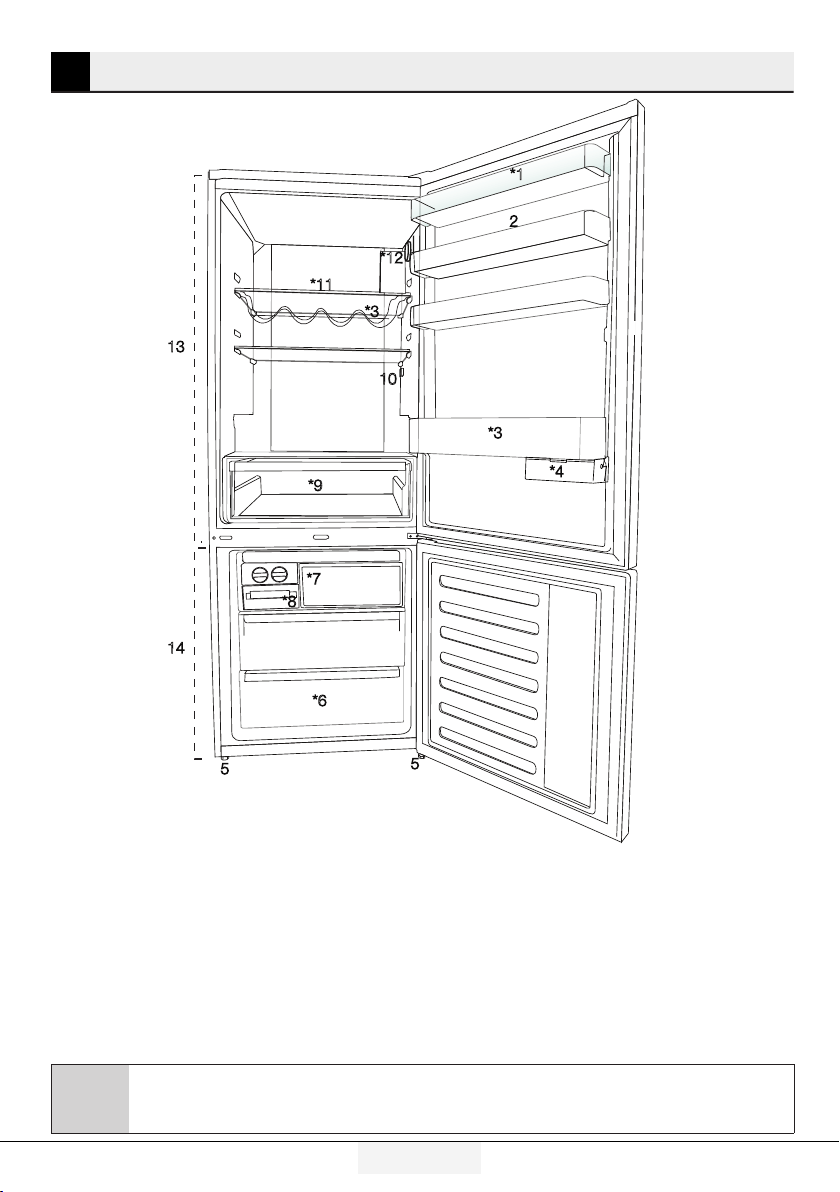
1.
Cooler compartment door shelf
2.
Egg secton
3.
Bottle shelf
4. Sldng storage box
5.
Adjustable legs
6.
Deep freezer compartment
7.
Quck freeze compartment
8.
Ice cube tray & Ice bank
9.
Vegetable bn
10.
Interor lght
11.
Cooler compartment glass shelf
12.
Temperature adjustment button
13.
Cooler compartment
14.
Freezer compartment
2 Your Refrgerator
C
*optional: Pctures gven n ths manual are gven as example fgures and they
may not be exactly the same as your product. If your product does not comprse
the relevant parts, the nformaton pertans to other models.
*1
*3
*3
2
*6
*7
5
5
*9
10
*12
13
14
*11
*8
*4

9/32 EN
Refrgerator / User Gude
3 Installaton
3.1. Right place for
installation
Contact the Authorized Service for
the product's installation. To ready
the product for installation, see the
information in the user guide and make
sure the electric and water utilities are
as required. If not, call an electrician
and plumber to arrange the utilities as
necessary.
B
WARNING:The manufacturer
assumes no responsblty for
any damage caused by the work
carred out by unauthorzed
persons.
B
WARNING:The product’s power
cable must be unplugged durng
nstallaton. Falure to do so may
result n death or serous njures!
A
WARNING:If the door span s too
narrow for the product to pass,
remove the door and turn the
product sdeways; f ths does
not work, contact the authorzed
servce.
•Placetheproductonaflatsurfaceto
avod vbraton.
•Placetheproductatleast30cmaway
from the heater, stove and smlar
sources of heat and at least 5 cm away
from electrc ovens.
•Donotexposetheproductto
drect sunlght or keep n damp
envronments.
•Theproductrequiresadequateair
crculaton to functon effcently.
•Iftheproductwillbeplacedinan
alcove, remember to leave at least 5
cm dstance between the product and
the celng and the walls.
•Donotinstalltheproductin
envronments wth temperatures
below -5°C.
3.2. Attaching the
plastic wedges
Use the plastc wedges n the provded
wth the product to provde suffcent
space for ar crculaton between the
product and the wall.
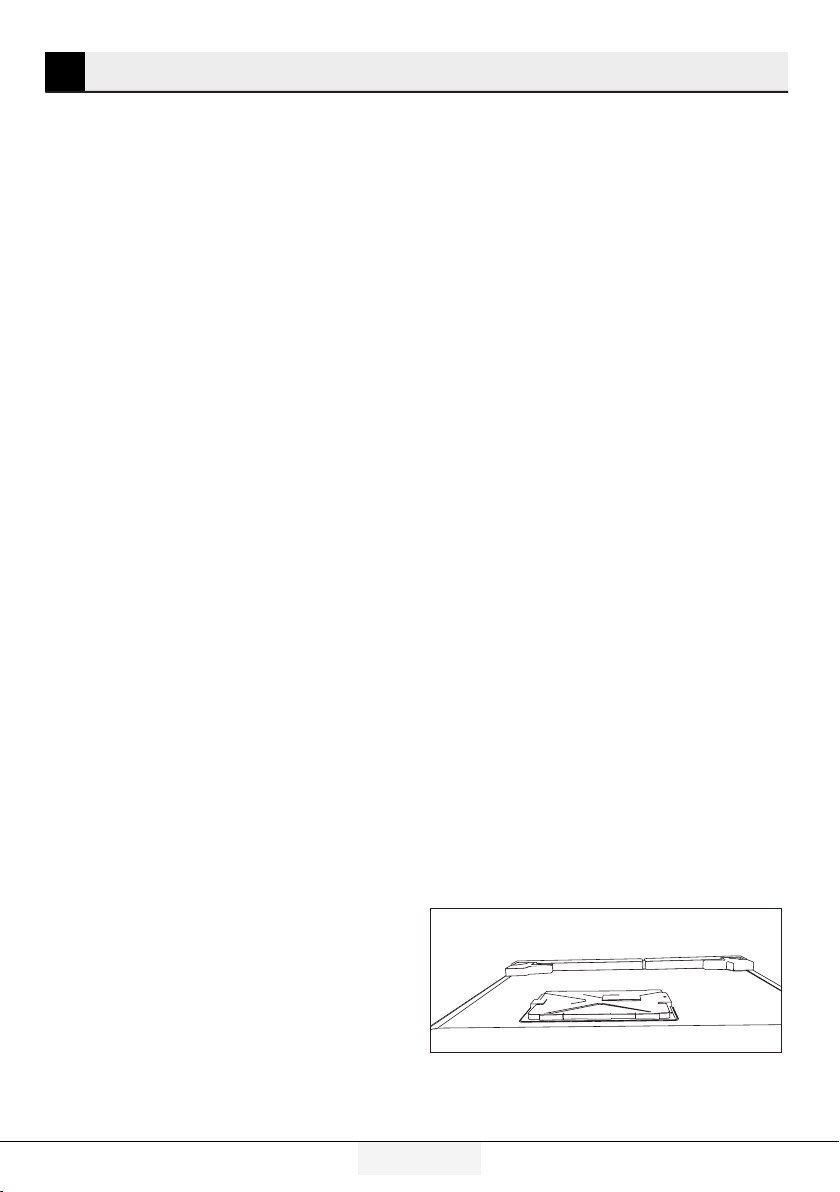
1.To attach the wedges, remove the
screws on the product and use the
screws provded wth the wedges.
2.Attach 2 plastc wedges on the
ventlaton cover as shown n the
fgure.
Installation
10 /32 EN
Refrgerator / User Gude
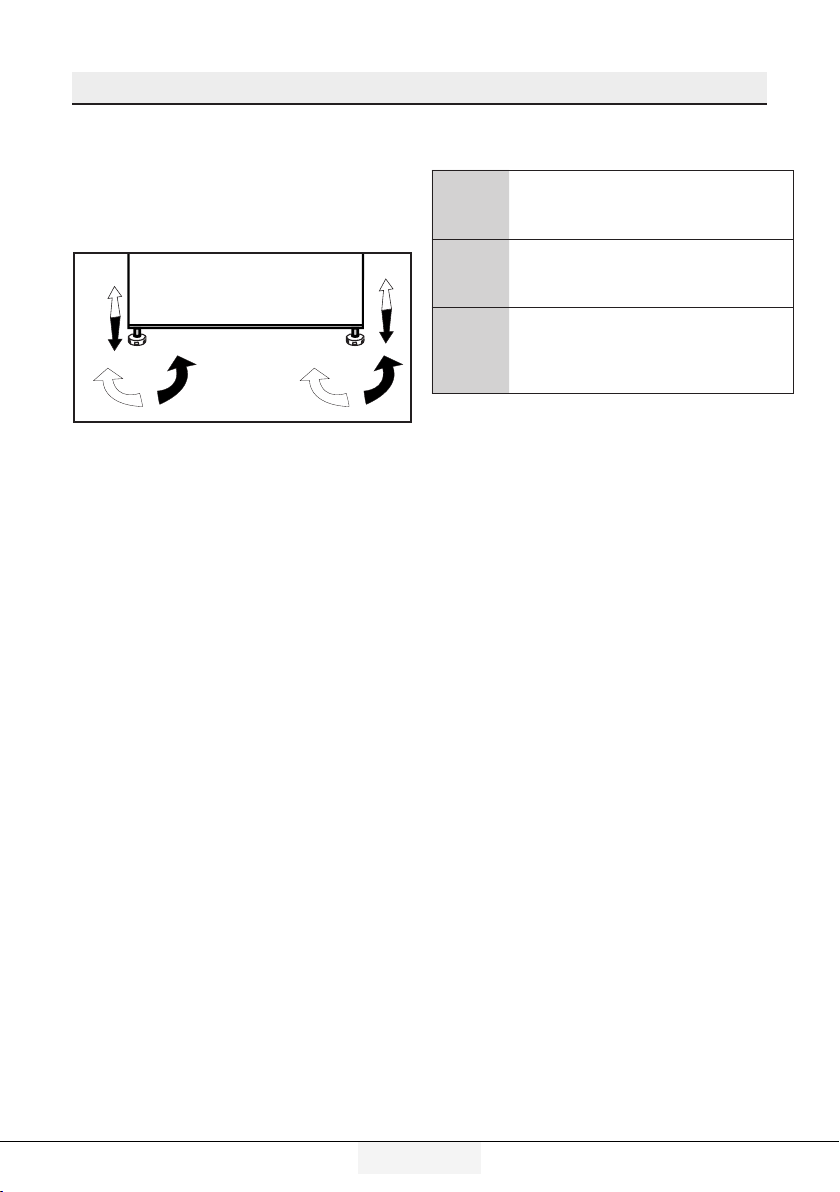
3.3. Adjusting
the stands
If the product s not n balanced
poston, adjust the front adjustable
stands by rotatng rght or left.
3.4. Power
connection
A
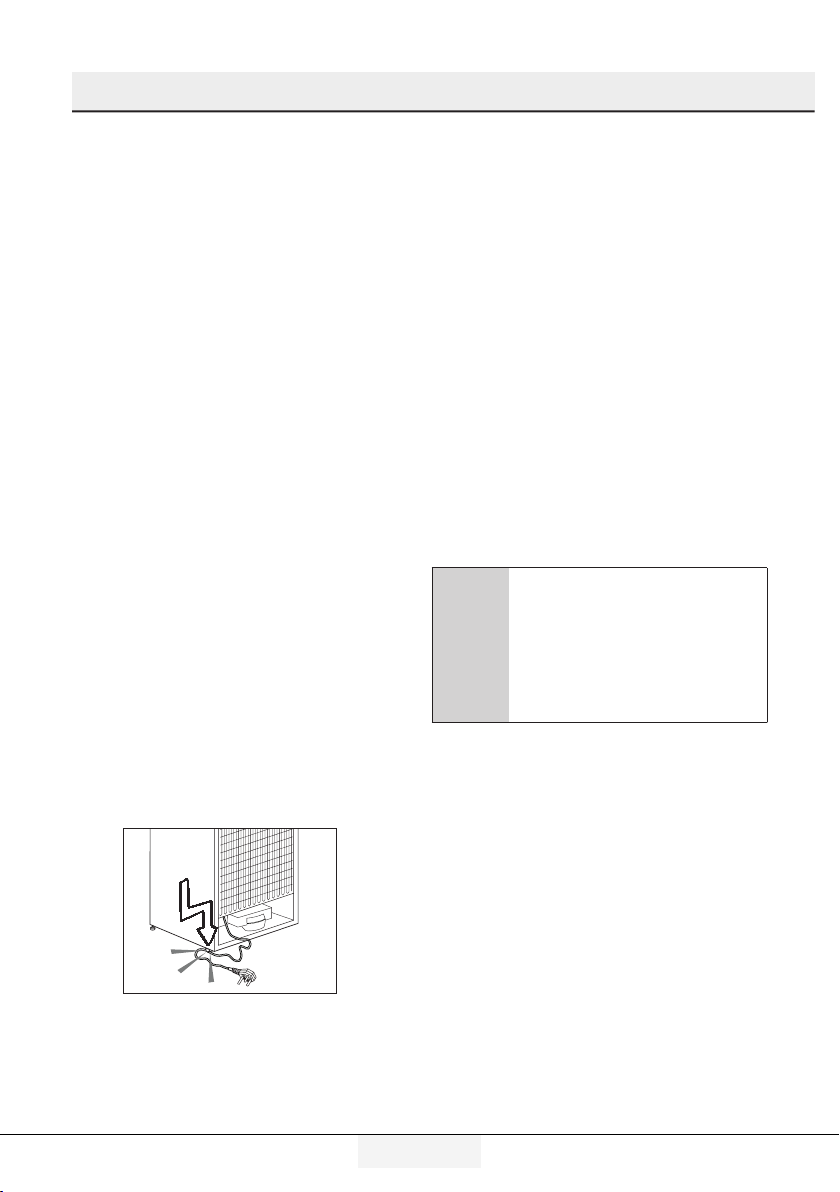
WARNING:Do not use extenson or
mult sockets n power connecton.
B
WARNING:Damaged power cable
must be replaced by Authorzed
Servce.
C
When placng two coolers n
adjacent poston, leave at least
4 cm dstance between the two
unts.
• Our frm wll not assume
responsblty for any damages
due to usage wthout earthng and
power connecton n complance
wth natonal regulatons.
• The power cable plug must be
easly accessble after nstallaton.
• Connect the refrgerator to an
earthed socket wth 220-240V/50
Hz voltage. The plug must
comprse a 10-16A fuse.
• Do not use mult-group plug
wth or wthout extenson cable
between the wall socket and the
refrgerator.
Installation
11/32 EN
Refrgerator / User Gude
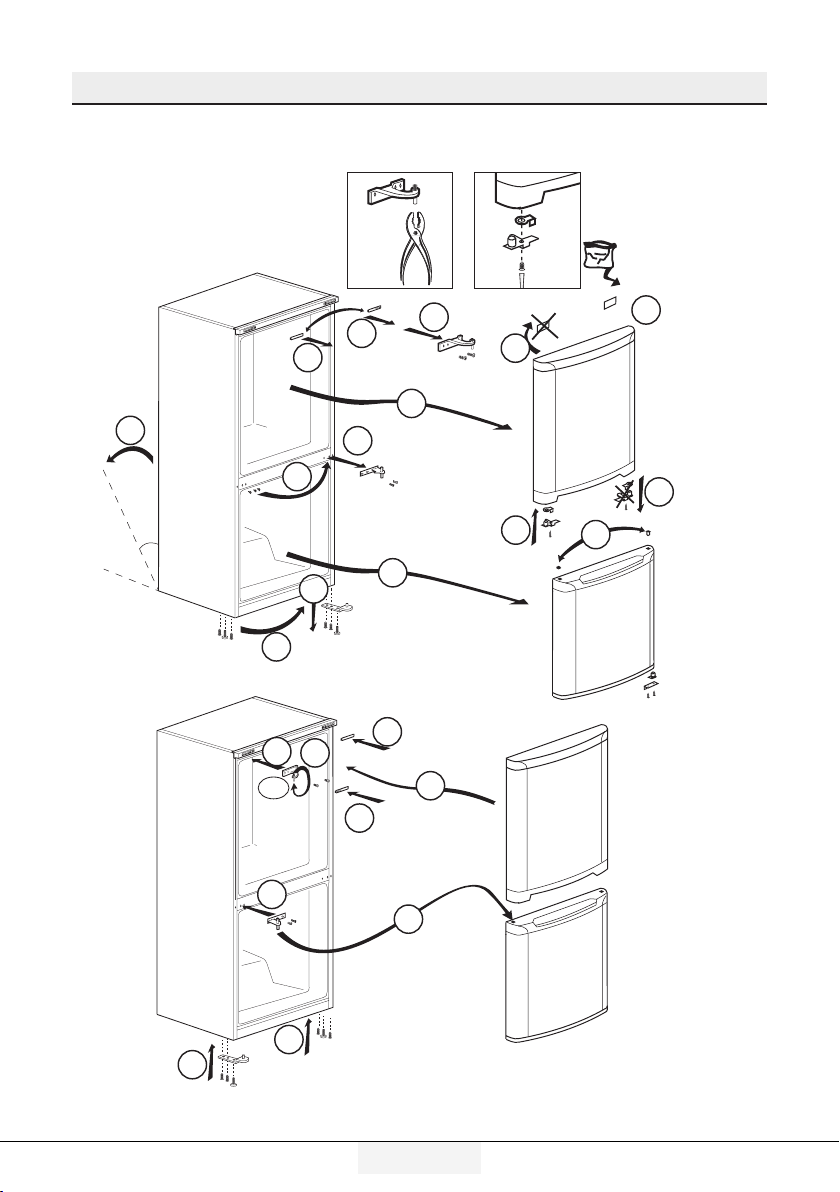
3.5. Reversing the doors
Proceed in numerical order .
5
10
24
24
45 ¡
4
4
2
10
1
6
7
8
9
3
12
11
13
14
19
22
19
180¡
17
18
23
21
20
16
15
Installation
12 /32 EN
Refrgerator / User Gude
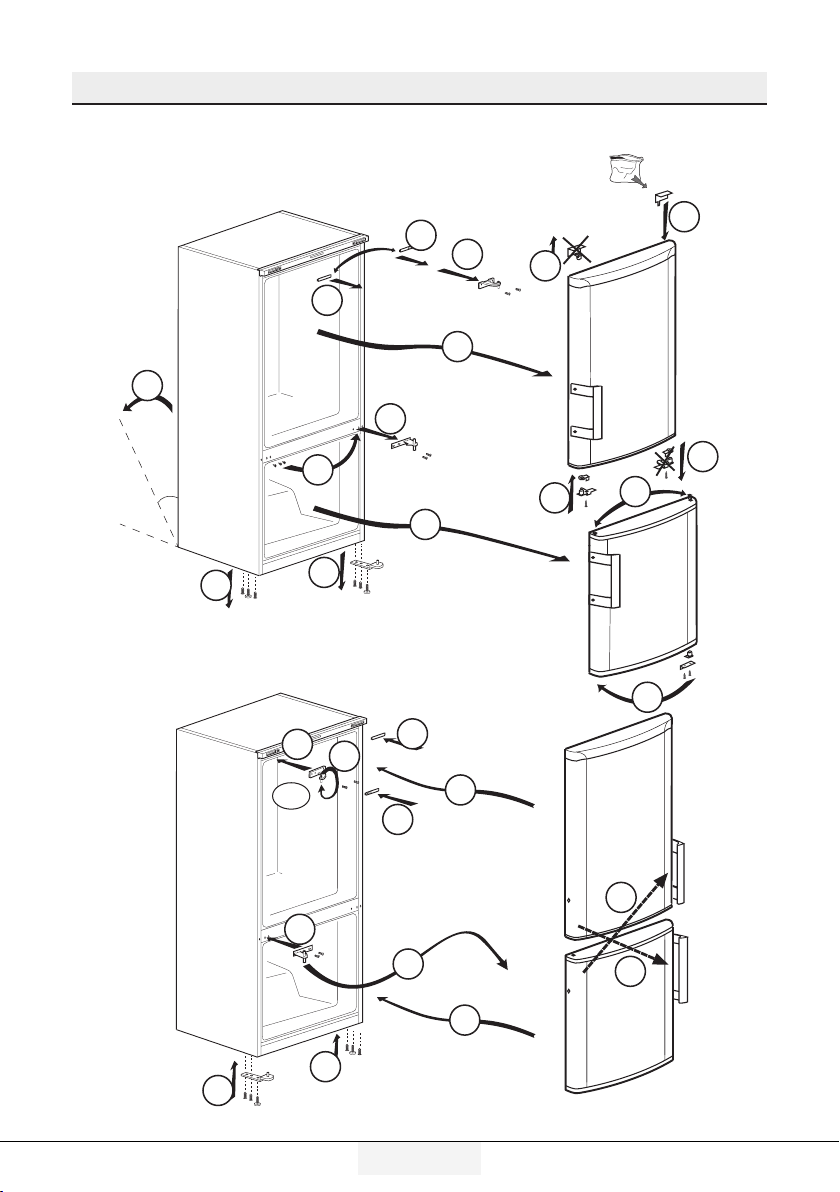
3.6. Reversing the doors
Proceed in numerical order .
1
1
7
1
20
11
13
9
2
10
5
3
20
20
8
18
17
19
45 °
180°
(8) (13)
14
6
4
12
16
15

13/32 EN
Refrgerator / User Gude
4.1. What to do for
energy saving
A
Connectng the product to
electronc energy-savng systems
s harmful, as t may damage the
product.
• Do not keep the refrgerator doors
open for long perods.
• Do not place hot food or beverages
nto the refrgerator.
• Do not overfll the refrgerator;
blockng the nternal ar flow wll
reduce coolng capacty.
• In order to store the maxmum
amount of food nto the cooler
compartment of your refrgerator, you
should take out the upper drawers
and place t onto the glass rack. The
declared energy consumpton of your
refrgerator was determned by takng
out the cooler, ce tray and upper
drawers n a way that wll enable
maxmum storage. Usng the below
drawer when storng s strongly
recommended. Energy savng
functon should be actvated for best
energy consumpton.
• You should not block the arflow by
puttng food n front of the cooler
fan. A space of mnmum 3cm must be
left n front of the protectve fan wre
when placng food.
• Dependng on the product’s features;
defrostng frozen foods n the cooler
compartment wll ensure energy
savng and preserve food qualty.
• Food should be stored usng the
drawers n the cooler compartment
n order to ensure energy savng and
protect food n better condtons.
• Food packages should not be n drect
contact wth the heat sensor located
n the cooler compartment. If they are
n contact wth the sensor, energy
consumpton of the applance mght
ncrease.
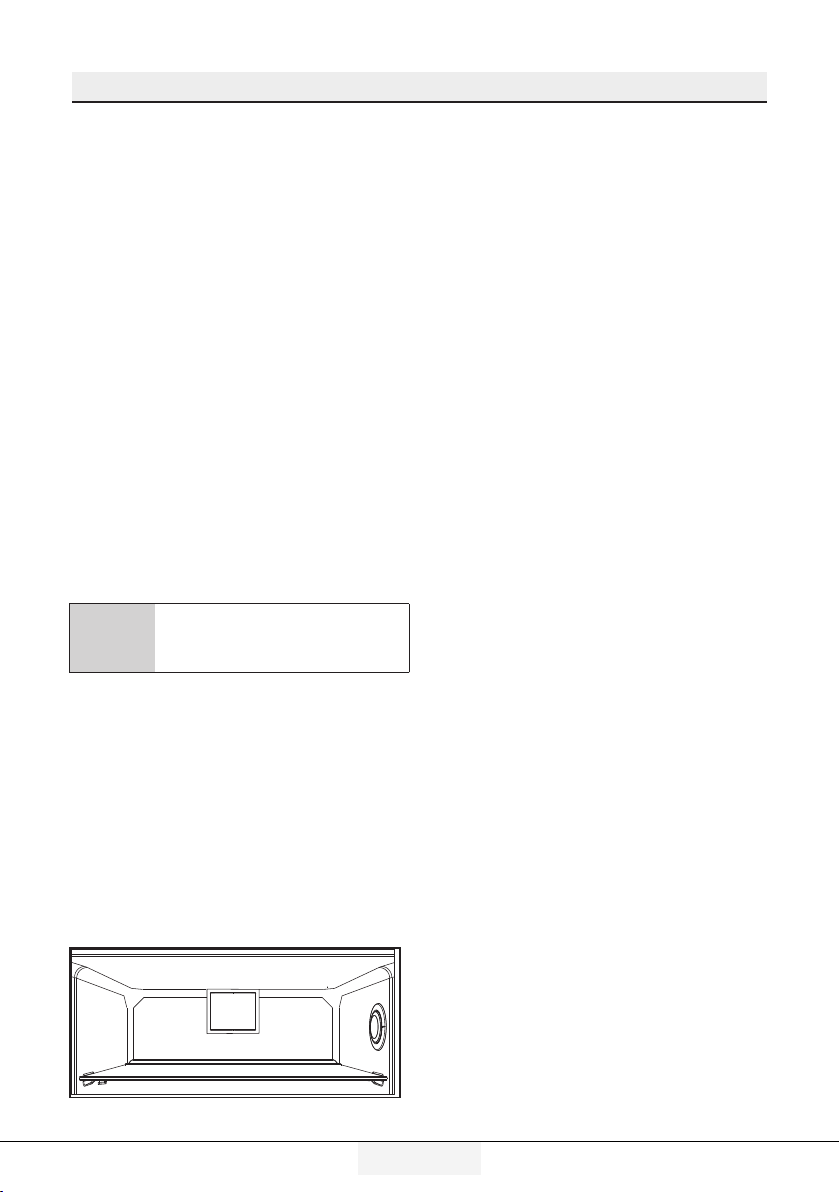
• Make sure the foods are not n
contact wth the cooler compartment
temperature sensor descrbed below.
4 Preparaton
4.2. First Use
Before usng your refrgerator, make sure
the necessary preparatons are made
n lne wth the nstructons n “Safety
and envronment nstructons” and
“Installaton” sectons.
• Keep the product runnng wth no
food nsde for 6 and do not open the
door, unless absolutely necessary.
C
A sound wll be heard when the
compressor s engaged. It s
normal to hear sound even when
the compressor s nactve, due to
the compressed lquds and gasses
n the coolng system.
C
Front edges of the product mght
heat up. Ths s normal. These
areas are desgned to warm up n
order to prevent condensaton.
C
In some models ndcator panel
turns off automatcally 5 mnutes
after the door closes. It wll be
reactvated when the door s open
or any button s pressed.

14 /32 EN
Refrgerator / User Gude
5.1. Indicator panel
Indcator panels may vary accordng to the product model.
Audo – vsual functons on the ndcator panel helps you n usng your product.
C
*optional: Pctures gven n ths manual are gven as example fgures and they
may not be exactly the same as your product. If your product does not comprse
the relevant parts, the nformaton pertans to other models.
5 Usingtheproduct
45
7
6
8
9
1
2
3
1. Frdge Compartment
Indcator
2. Error status ndcator
3. Temperature ndcator
4. Vacaton functon button
5. Temperature settng button
6. Compartment selecton
button
7. Freezer compartment
ndcator
8. Economy mode ndcator
9. Vacaton functon ndcator
*optonal
Using the product
15/32EN
Refrgerator / User Gude
1. Frdge compartment ndcator
Fridge compartment light is
illuminated while the fridge
compartment temperature is set.
2. Error status ndcator
If your refrigerator does not perform
enough cooling or in case of a sensor
fault, this indicator is activated.
When this indicator is activated,
“E” is displayed on the freezer
compartment temperature indicator,
and numbers such as “1,2,3...” are
displayed on the fridge compartment
temperature indicator. These
numbers on the indicator inform
service personnel about the error.
3. Temperature ndcator
Indicates freezer, fridge compartment
temperature.
4. Vacaton functon button
Press on Vacation Button for 3
seconds to activate this function.
When the vacation function is
activated, “- -” is displayed on the
fridge compartment temperature
indicator and no active cooling
is performed on the fridge
compartment. It is not suitable
to keep the food in the fridge
compartment when this function is
activated. Other compartments shall
be continued to be cooled as per their
set temperature.
To cancel this function press Vacation
button again.
5. Temperature settng button
Changes the temperature of the
relevant compartment between
-24°C... -18°C and 8°C...1°C.
6. Compartment selecton button
Selection button: Press compartment
selection button to switch between
fridge and freezer compartments.
7. Freezer compartment ndcator
Fridge compartment light is
illuminated while the freezer
compartment temperature is set.
8. Economy mode ndcator
Indicates that the refrigerator
operates in energy saving mode.
This display shall be activated if the
freezer compartment temperature is
set to -18°C.
9. Vacaton functon ndcator
Indicates that vacation is activated.
Using the product
16 /32EN
Refrgerator / User Gude
5.2. Temperature
adjustment button
Internal temperature of your refrgerator
vares dependng on the followng reasons:
• Seasonal temperatures,
• Openng the door frequently and
leavng t open for long perods,
• Meals put nto the refrgerator
wthout beng cooled to room
temperature, Locaton of the
refrgerator n the room (e.g.
exposed to sunshne).
• Internal temperature varyng due to
these factors can be adjusted va the
adjustment button.
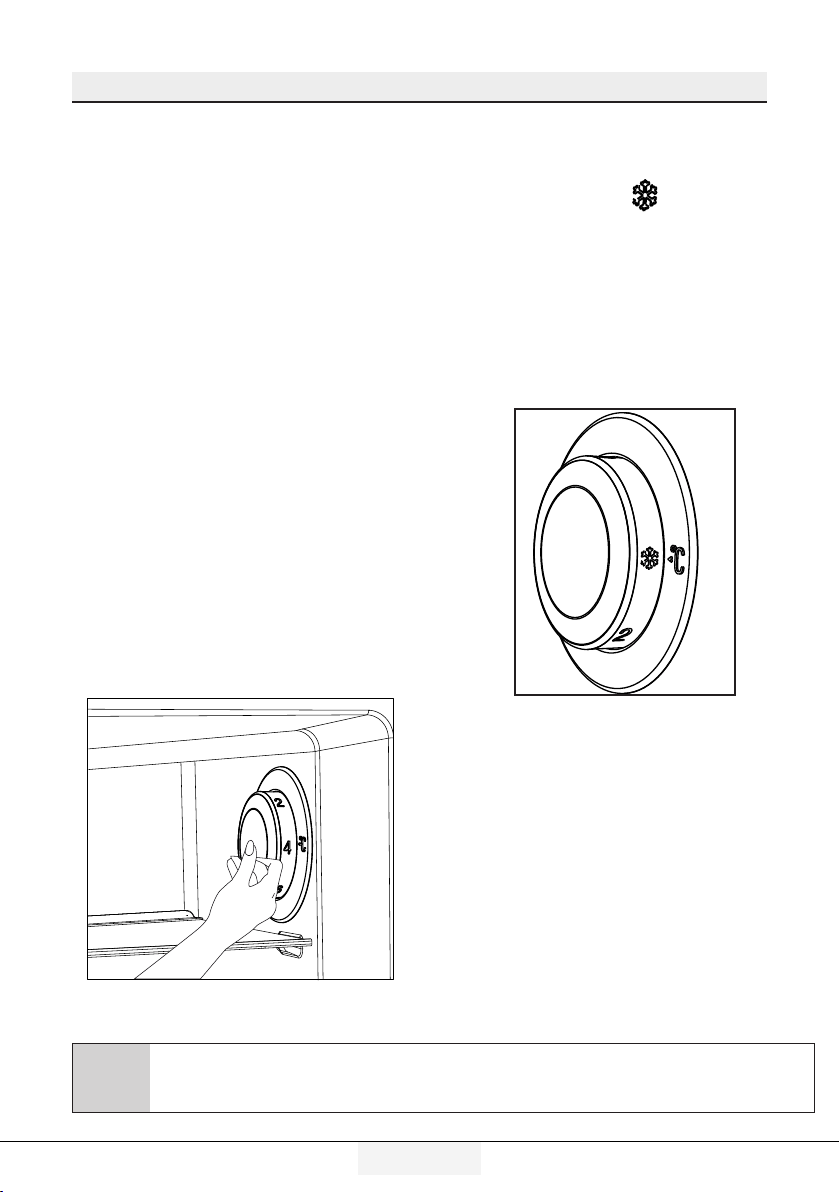
Numbers around the adjustment button
ndcate temperature degrees as “°C”.
If the ambent temperature s 20°C, t
s recommended to use the refrgerator
temperature adjustment at 4°C. In other
ambent temperatures ths value can be
customsed.
5.3. Rapid freezing
If you want to freeze large amounts
of fresh food, switch the temperature
adjustment button to (
) position
before putting the food into the quick
freezing compartment.
It is recommended to keep the button
at this position for 24 hours to freeze
maximum amount of food indicated
as the freezing capacity. Pay special
attention not to mix food stolen as
frozen and fresh food.
C
*optional: Pctures gven n ths manual are gven as example fgures and they
may not be exactly the same as your product. If your product does not comprse
the relevant parts, the nformaton pertans to other models.
Using the product
17/32EN
Refrgerator / User Gude
Remember to switch the temperature
adjustment button back to its
previous position.
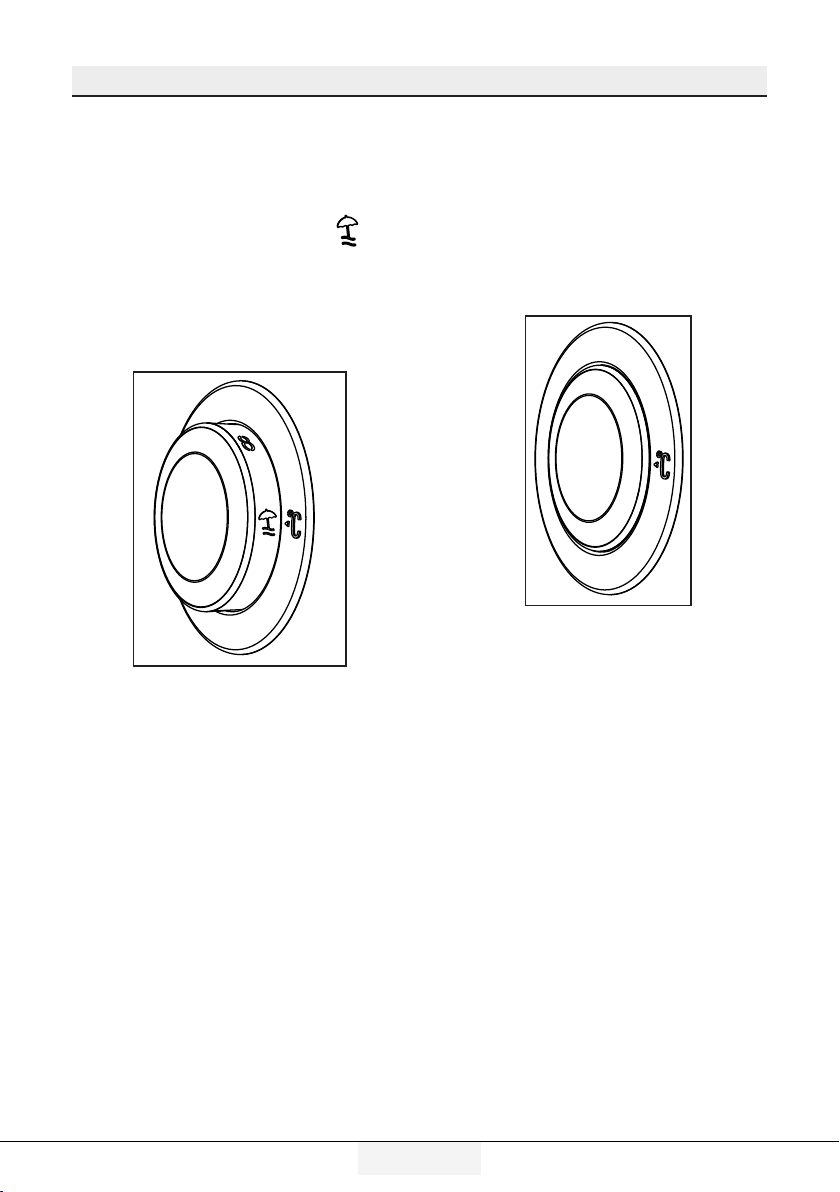
5.4. Vacation function
If doors of the product is not ( )
opened for at least 12 hours after
adjusting the temperature setting
button to the highest, vacation
function is automatically activated.
Button setting must be changed to
cancel the function.
It is not recommended to store food
in the cooler compartment when
vacation function is activated.
• After settng s completed, you can
conceal the temperature settng
button by pressng t nsde.

Using the product
18 /32EN
Refrgerator / User Gude
C
*Optonal: The figures in this user guide are intended as drafts and may not
perfectly match your product. If your product does not comprise the relevant
parts, the information pertains to other models.
5.5. Indicator panel
Indicator panel allows you to set the temperature and control the other
functions related to the product without opening the door of the product. Just
press the inscriptions on relevant buttons for function settings.
1 2
3
45
6
789
*10
12
11
1. Power failure/High temperature /
error warning indicator
This indicator ( ) illuminates during
power failure, high temperature
failures and error warnings. During
sustained power failures, the
highest temperature that the freezer
compartment reaches will flash on the
digital display. After checking the food
located in the freezer compartment (
) press the alarm off button to clear the
warning.
Please refer to "remedies advised
for troubleshooting" section on
your manual if you observe that this
indicator is illuminated.
2. Energy savng functon (dsplay
off):
If the product doors are kept closed
for a long time energy saving
function is automatically activated
and energy saving symbol is
illuminated. ( )

Using the product
19/32EN
Refrgerator / User Gude
C
Ths functon s not recalled
when power restores after a
power falure.
4. Frdge compartment
temperature settng button
Press this button to set the
temperature of the fridge
compartment to 8, 7,6, 5,4,3, 2, 8...
respectively. Press this button to set
the fridge compartment temperature
to the desired value. ( )
5.Vacation Function
In order to activate vacation function,
press the this button (
) for 3
seconds, and the vacation mode
indicator (
) will be activated. When
the vacation function is activated,
“- -” is displayed on the fridge
compartment temperature indicator
and no active cooling is performed
on the fridge compartment. It is not
suitable to keep the food in the fridge
compartment when this function is
activated. Other compartments shall
be continued to be cooled as per their
set temperature.
To cancel this function press Vacation
function button again.
6. Alarm off warnng:
In case of power failure/high
temperature alarm, after checking
the food located in the freezer
compartment press the alarm off
button (
) to clear the warning.
When energy saving function is
activated, all symbols on the display
other than energy saving symbol will
turn off. When the Energy Saving
function is activated, if any button is
pressed or the door is opened, energy
saving function will be canceled and
the symbols on display will return to
normal.
Energy saving function is activated
during delivery from factory and
cannot be canceled.
3.Quck frdge functon
The button has two functons. To
actvate or deactvate the quck cool
functon press t brefly. Quck Cool
ndcator wll turn off and the product
wll return to ts normal settngs. ( )
C
Use quck coolng functon
when you want to quckly cool
the food placed n the frdge
compartment. If you want to
cool large amounts of fresh
food, actvate ths functon
before puttng the food nto
the product.
C
If you do not cancel t, quck
coolng wll cancel tself
automatcally after 8 hours or
when the frdge compartment
reaches to the requred
temperature.
C
If you press the quck coolng
button repeatedly wth short
ntervals, the electronc crcut
protecton wll be actvated
and the compressor wll not
start up mmedately.
Using the product
20 /32EN
Refrgerator / User Gude
7. Key lock
Press key lock button ( )
simultaneously for 3 seconds. Key
lock symbol
(
) will light up and key lock mode
will be activated. Buttons will
not function if the Key lock mode
is active. Press key lock button
simultaneously for 3 seconds again.
Key lock symbol will turn off and the
key lock mode will be exited.
Press the
keylock button if you
want to prevent changing of
the temperature setting of the
refrigerator ( ).
8. Eco fuzzy
Press and hold eco fuzzy button
for 1 seconds to activate eco fuzzy
function. Refrigerator will start
operating in the most economic
mode at least 6 hours later and the
economic usage indicator will turn
on when the function is active (
). Press and hold eco fuzzy function
button for 3 seconds to deactivate
eco fuzzy function.
This indicator is illuminated after 6
hours when eco fuzzy is activated.
9. Freezer compartment
temperature settng button
Press this button to set the
temperature of the freezer
compartment to -18,-19,-20,-21,
-22, -23,-24, -18... respectively.
Press this button to set the freezer
compartment temperature to the
desired value.
( )
10. Icematic off indicator
Indicates whether the icematic is on
or off. (
)If On, then the icematic
is not operating. To operate the
icematic again press and hold the On-
Off button for 3 seconds.
C
Water flow from water tank
wll stop when ths functon s
selected. However, ce made
prevously can be taken from
the cematc.
11. Quck freeze functon button/
cematc on-off button
Press this button to activate or
deactivate the quick freezing
function. When you activate the
function, the freezer compartment
will be cooled to a temperature lower
than the set value. ( )
To turn on and off the icematic press
and hold it for 3 seconds.
C
Use the quck freeze functon
when you want to quckly
freeze the food placed n frdge
compartment. If you want to
freeze large amounts of fresh
food, actvate ths functon
before puttng the food nto
the product.
C
If you do not cancel t, Quck
Freeze wll cancel tself
automatcally after 4 hours or
when the frdge compartment
reaches to the requred
temperature.
C
Ths functon s not recalled
when power restores after a
power falure.
Using the product
21/32EN
Refrgerator / User Gude
12. Economc usage ndcator
Indicates that the product is running
in energy-efficient mode. ( )This
indicator will be active if the Freezer
Compartment temperature is set to
-18 or the energy efficient cooling
is being performed due to Eco-Extra
function.
C
Economc usage ndcator s
turned off when quck coolng
or quck freeze functons are
selected.
Using the product
22 /32EN
Refrgerator / User Gude
5.6. Ice bucket
(Optonal)
• Take the ce bucket from the
freezer compartment.
• Fll the ce bucket wth water.
• Place the ce bucket nto the
freezer compartment.
The ce wll be ready after
approxmately two hours. Take
the ce bucket from the freezer
compartment and bend n sghtly
over the holder that you are gong
to serve. Ice wll easly pour nto
the servng holder.
5.7. Eggholder
You can put the eggholder on the
door or body rack of your choice. If you
decide to put it on the body rack, it is
recommended to prefer the shelves
below as they are colder.
A
Do not put the eggholder nto
the freezer compartment.
5.8. Fan
Fan was designed to distribute circu-
late the cold air inside your refrigera-
tor homogeneously. Operating time
of the fan might vary depending the
features of your product.
While in some products fan only oper-
ates with compressor, in others con-
trol system determines the operating
time based on the need for cooling.
5.9. Vegetable bin
(Optonal)
Product’s vegetable bn s desgned to
keep vegetables fresh by preservng
humdty. For ths purpose, the overall
cold ar crculaton s ntensfed n the
vegetable bn.
5.10. Zero degree
compartment
(Optonal)
Use this compartment to keep
delicatessen at lower temperatures
or meat products for immediate
consumption.
Zero degree compartment is the
coolest place where foods such
as dairy products, meat, fish and
chicken can be stored in ideal
storage conditions. Vegetables and/
or fruits should not be stored in this
compartment.
Using the product
23/32EN
Refrgerator / User Gude
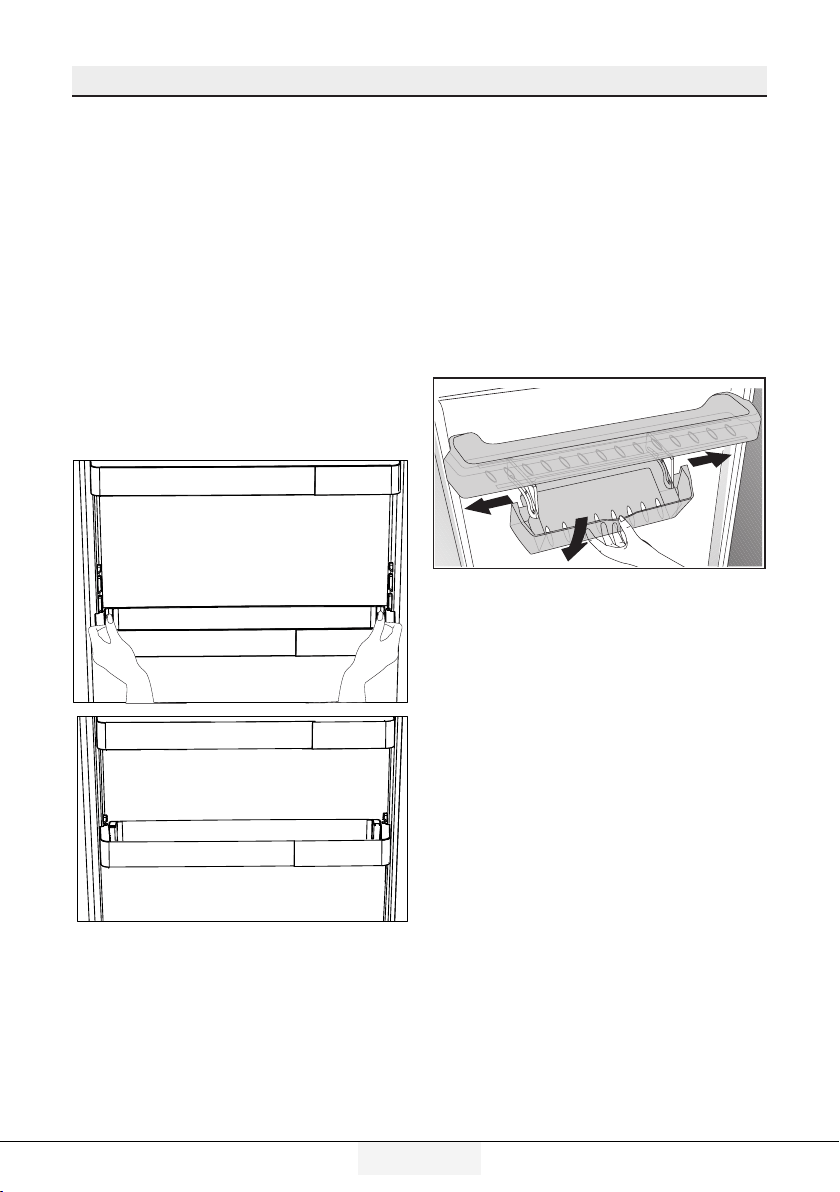
5.11. Moving door rack
(Optonal)
Moving door rack can be fixed in 3
different positions.
In order to move the rack, push the
buttons on the side evenly. Rack will
be movable.
Move the rack up or down.
When the rack is in the position that
you want, release the buttons. Rack
will be fixed again in the position
where you have released the
buttons.
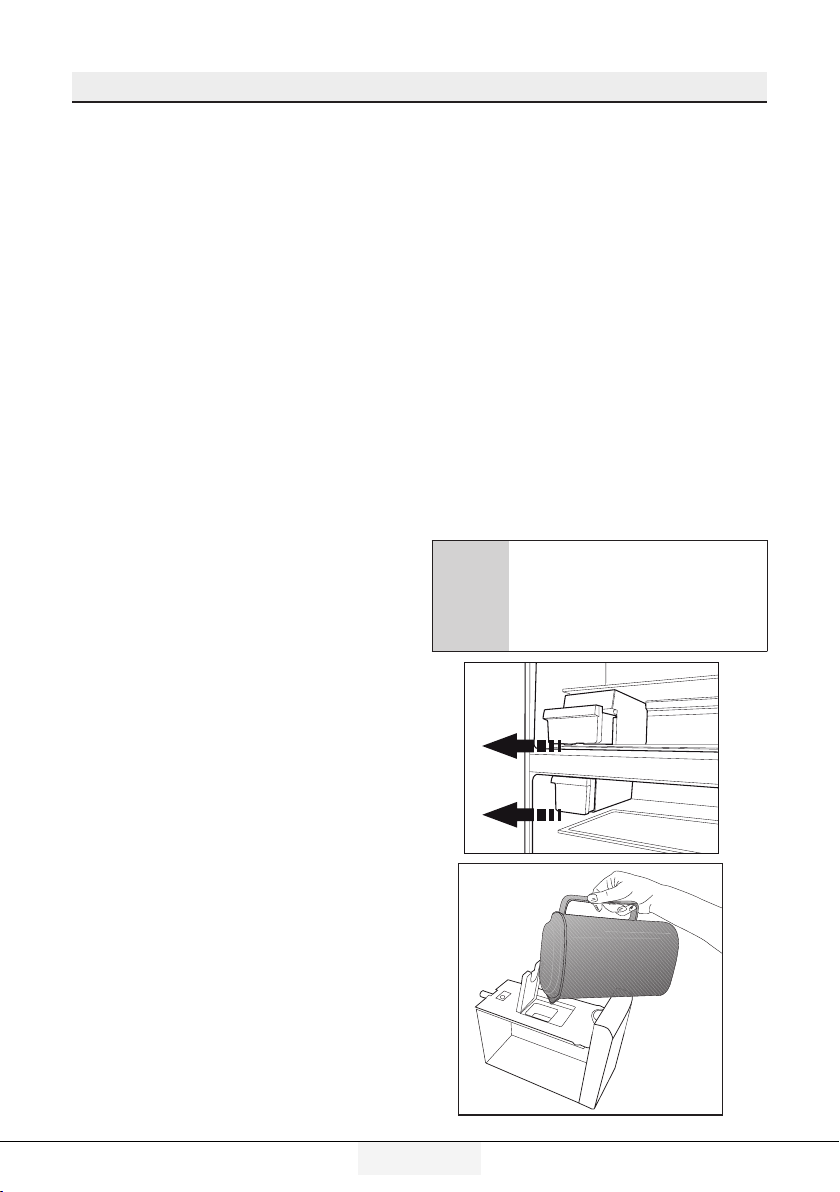
5.12. Sliding
storage box
(Optonal)
This accessory has been designed
to increase the usage volume of the
door racks.
Thanks to its ability to move
sideways, it enables you to easily
place long bottle, jar or boxes that you
put in the bottle rack below.
Using the product
24 /32EN
Refrgerator / User Gude
5.13. Moisture
controlled
vegetable bin
(Optonal)
With moisture control feature,
moisture rates of vegetables and
fruits are kept under control and
ensures a longer freshness period for
foods.
It is recommended to store leafed
vegetables such as lettuce and
spinach and similar vegetables prone
to moisture loss not on their roots
but in horizontal position into the
vegetable bin as much as possible.
When placing the vegetables, place
heavy and hard vegetables at the
bottom and light and soft ones on the
top, taking into account the specific
weights of vegetables.
Do not leave vegetables in the
vegetable bin in plastic bags.
Leaving them in plastic bags causes
vegetables to rot in a short time. In
situations where contact with other
vegetables is not preferred, use
packaging materials such as paper
that has a certain porosity in terms of
hygiene.
Do not put fruits that have a high
ethylene gas production such as pear,
apricot, peach and particularly apple
in the same vegetable bin with other
vegetables and fruits. The ethylene
gas coming out of these fruits might
cause other vegetables and fruits
to mature faster and rot in a shorter
period of time.
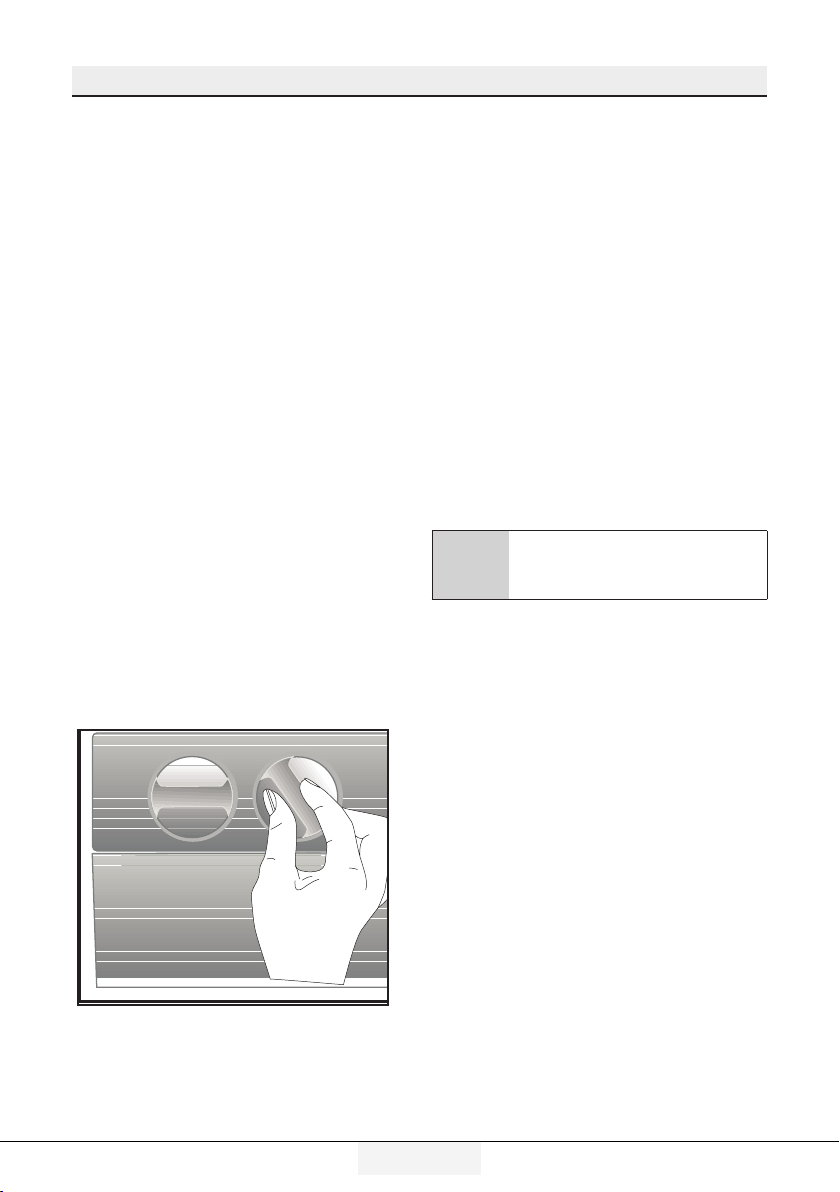
5.14. Automatic
ice machine
(Optonal)
Automatic ice machine enables you
to easily make ice in your refrigerator.
In order to obtain ice from the ice
machine, take out the water tank in
the cooler compartment, fill it with
water and fix it back.
First ice will be ready in about 2 hours
in the ice machine drawer in the
cooler compartment.
After placing the full water tank, you
can obtain about 60-70 cubes of ice
until it is fully empty.
If the water in the tank has waited for
2-3 weeks, it should be changed.
C
In products with automatic
ice machine, you might hear a
sound when pouring the ice.
This sound is normal and is not
a sign of failure.
Using the product
25/32EN
Refrgerator / User Gude
5.16. Freezing
fresh food
• To preserve food quality, the
food items placed in the freezer
compartment must be frozen as
quickly as possible, use the rapid
freezing for this.
• Freezing the food items when
fresh will extend the storage time
in the freezer compartment.
• Pack the food items in air-tight
packs and seal tightly.
• Make sure the food items are
packed before putting in the
freezer. Use freezer holders, tinfoil
and damp-proof paper, plastic
bag or similar packaging materials
instead of traditional packaging
paper.
C
Ice in the freezing
compartment thaws
automatically.
• Mark each food pack by wrtng
the date on the package before
freezng. Ths wll allow you to
determne the freshness of each
pack every tme the freezer s
opened. Keep the earler food
tems n the front to ensure they
are used frst.
• Frozen food tems must be used
mmedately after defrostng and
should not be frozen agan.
• Do not free large quanttes of
food at once.
5.15. Icematic and ice
storage container
*optional
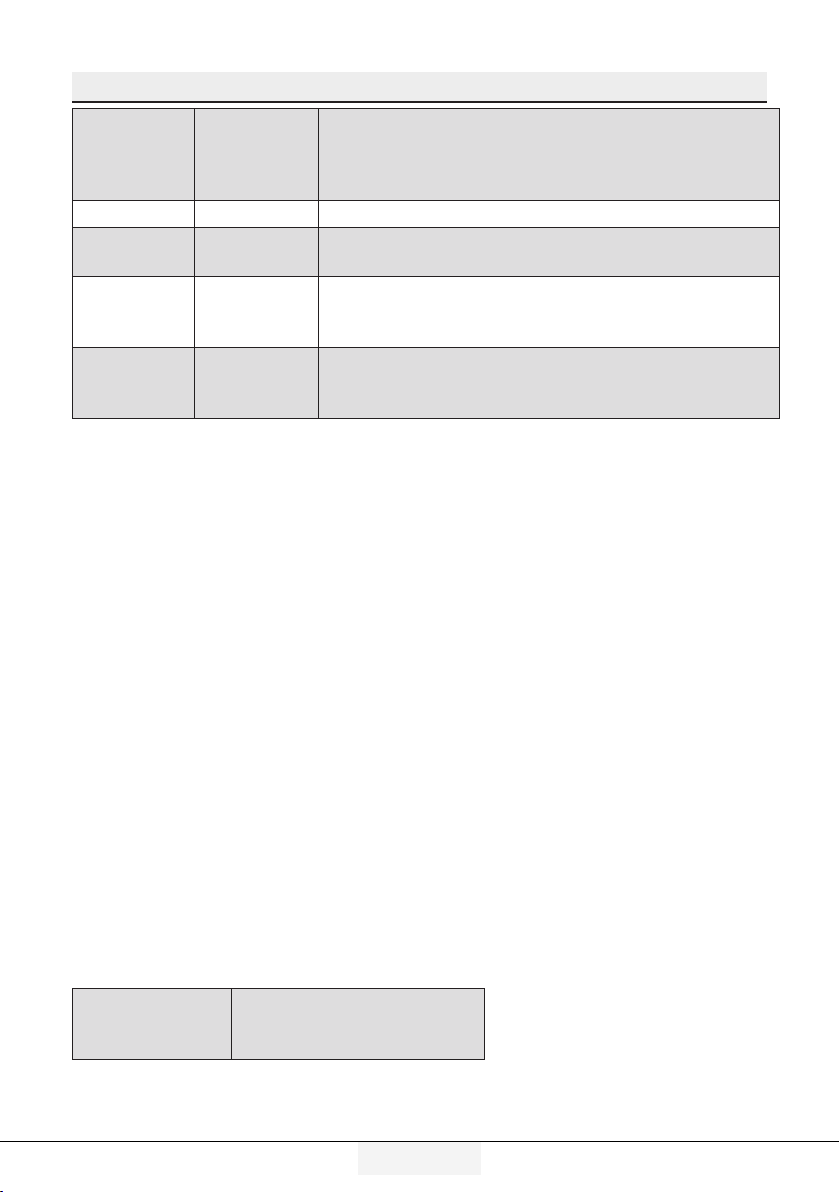
Using the Icematic
Fill the Icematic with water and place
it into its seat. Your ice will be ready
approximately in two hours. Do not
remove the Icematic from its seating
to take ice.
Turn the knobs on the ice reservoirs
clockwise by 90 degrees.
Ice cubes in the reservoirs will fall
down into the ice storage container
below.
You may take out the ice storage
container and serve the ice cubes.
If you wish, you may keep the ice
cubes in the ice storage container.
Ice storage container
Ice storage container is only intended
for accumulating the ice cubes. Do
not put water in it. Otherwise, it will
break.
Using the product
26 /32EN
Refrgerator / User Gude
Freezer
Compartment
Temperature
Setting
Cooler
Compartment
Temperature
Setting
Details
-18°C 4°C This is the default, recommended setting.
-20,-22 or
-24°C
4°C
These settings are recommended for ambient
temperatures exceeding 30°C.
Quick
Freeze
4°C
Use when you want to freeze your food in a short
time. When the process ends, the product will
regain its position.
-18°C or
colder
2°C
Use these settings if you believe the cooler
compartment is not cold enough due to ambient
temperature or frequently opening the door.
5.17. Recommendations for storing frozen foods
The compartment must be set to at least -18°C.
1.
Place the food tems n the freezer as quckly as possble to avod defrostng.
2.
Before freezng, check the “Expry Date” on the package to make sure t s not
expred.
3.
Make sure the food’s packagng s not damaged.
5.18. Deep freezer details
As per the IEC 62552 standards, the freezer must have the capacity to freeze
4,5 kg of food items at -18°C or lower temperatures in 24 hours for each 100
litres of freezer compartment volume.
Food items can only be preserved for extended periods at or below
temperature of -18°C .
You can keep the foods fresh for months (in deep freezer at or below
temperatures of 18°C ).
The food items to be frozen must not contact the already-frozen food inside to
avoid partial defrosting.
Boil the vegetables and filter the water to extend the frozen storage time.
Place the food in air-tight packages after filtering and place in the freezer.
Bananas, tomatoes, lettuce, celery, boiled eggs, potatoes and similar food
items should not be frozen. In case this food rots, only nutritional values and
eating qualities will be negatively affected. A rotting threatening human
health is not in question.
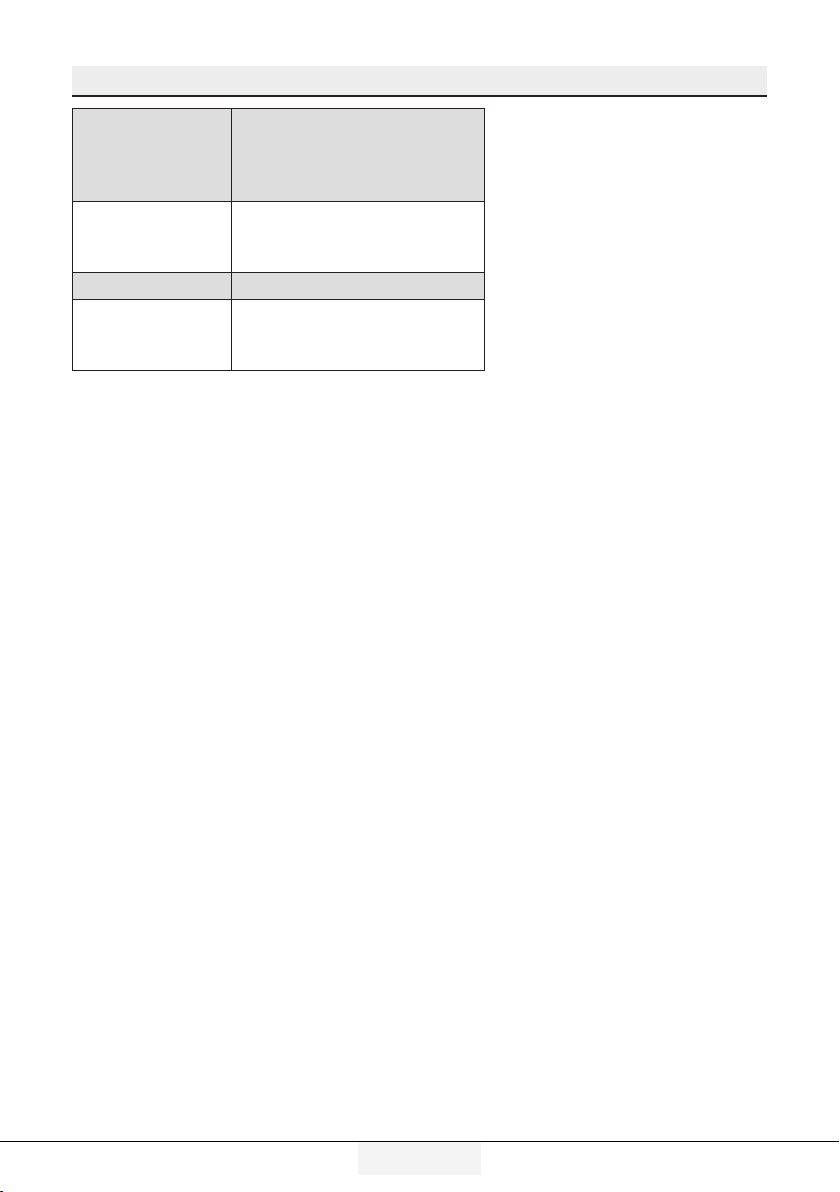
5.19. Placing the food
Freezer
compartment
shelves
Various frozen goods
including meat, fish, ice
cream, vegetables etc.
Using the product
27/32EN
Refrgerator / User Gude
Cooler
compartment
shelves
Food items inside pots,
capped plate and capped
cases, eggs (in capped
case)
Cooler
compartment
door shelves
Small and packed food or
beverages
Vegetable bin Fruits and vegetables
Fresh food
compartment
Delicatessen (breakfast
food, meat products to be
consumed in short notice)
5.20. Door open alert
(Optonal)
An audible alert will be heard if the
product's door remains open for at
least 1 minute. The audible alert will
stop when the door is closed or any
button on the display (if available) is
pressed.
Door open alert is indicated to the
user both audibly and visually. Interior
lighting will turn of if the warning
continues for 10 min.
5.21. Changing the
opening direction
of the door
You can change the drecton of ope-
nng of your refrgerator dependng
on the locaton where you use t.
When you need ths, consult the clo-
sest Authorzed Servce.
The explanaton above s a general
statement. You should check the war-
nng tag located nsde the product
package about the changeablty of
drecton of the door.
5.22. Interior light
Interior light uses a LED type lamp.
Contact the authorized service for any
problems with this lamp.
Lamp(s) used in this appliance cannot
be used for house lighting. Intended
use of this lamp is to help the user
place food into the refrigerator /
freezer safely and comfortably.
28 /32 EN
Refrgerator / User Gude
6 Mantenance and cleanng
Service life of the product is increase if it
is regularly cleaned
B
WARNING:Frst unplug the product
before cleanng your refrgerator.
•
Never use any sharp and abrasve
tools, soap, household cleaners,
detergent and wax polsh for cleanng.
•
Dssolve one teaspoon of carbonate
n half lter of water. Soak a cloth wth
the soluton and wrung t thoroughly.
Wpe the nteror of the applance wth
ths cloth and the dry thoroughly.
•
Make sure that no water enters the
lamp housng and other electrcal
tems.
•
Clean the door wth a damp cloth.
To remove door and body shelves,
remove all of ts contents. Remove
door shelves by movng them
upwards. After cleanng, slde them
from top to bottom to nstall.
•
Never use cleanng agents or water
that contan chlorne to clean the
outer surfaces and chromum coated
parts of the product. Chlorne causes
corroson on such metal surfaces.
• Do not use sharp, abrasve tools,
soap, household cleanng agents,
detergents, kerosene, fuel ol,
varnsh etc. to prevent removal and
deformaton of the prnts on the
plastc part. Use lukewarm water and
a soft cloth for cleanng and then
wpe t dry.
6.1. Avoiding bad odors
Materials that may cause odor are not
used in the production of our appliances.
However, due to inappropriate food
preserving conditions and not cleaning
the inner surface of the appliance as
required can bring forth the problem of
odor.
Therefore, clean the refrigerator wth
carbonate dssolved n water every 15
days.
•
Keep the food n closed contaners.
Mcroorgansms spreadng out from
uncovered contaners can cause
unpleasant odours.
•
Never keep the food that have expred
best before dates and spoled n the
refrgerator.
6.2. Protecting the
plastic surfaces
Clean with arm water immediately as the
oil may cause damage on the surface
when it is poured on plastic surfaces.
6.3. Door Glasses
Remove the protective foil on the
glasses.
There is a coating on the surface of
the glasses.This coating minimizes the
stain build-up and helps to remove the
possible stains and dirt easily.Glasses
that are not protected with such a
coating may be subject to persistent
binding of air or water based organic or
inorganic dirt such as limescale, mineral
salts, unburned hydrocarbons, metal
oxides and silicones that can easily and
quickly cause stains or material damage.
Keeping the glass clean becomes too
difficult despite the regular cleaning.
Consequently, the appearance and the
transparency of the glass deteriorates.
Harsh and corrosive cleaning methods
and compounds will intensify these
defects and speed up the deterioration
process.

29/32 EN
Refrgerator / User Gude
Water-based cleaning products that are
not alkaline and corrosive must be used
for regular cleaning purposes.
Non-alkaline and non-corrosive materials
must be used for cleaning so that the
service life of this coating lasts for a long
time.
These glasses are tempered to increase
their durability against impacts and
breaking.
A safety film is also applied to their rear
surfaces as an extra safety measure
in order to prevent them from causing
damage to their surrounding in case of a
breakage.
*Alkali is a base that forms hydroxide
ions (OH¯) when it is dissolved in water.
Li (Lithium), Na (Sodium), K (Potassium)
Rb (Rubidium), Cs (Cesium) and artificial
and radioactive Fr (Fan-sium) metals are
called ALKALI METALS.
6 Mantenance and cleanng
30 /32 EN
Refrgerator / User Gude
7 Troubleshootng
Check this list before contacting the service. Doing so will save you time and money.
This list includes frequent complaints that are not related to faulty workmanship or
materials. Certain features mentioned herein may not apply to your product.
The refrigerator is not working.
• The power plug s not fully seated. >>> Plug t n to seat completely nto the
socket.
• The fuse connected to the socket powerng the product or the man fuse s
blown. >>> Check the fuses.
Condensation on the side wall of the cooler compartment (MULTI ZONE, COOL,
CONTROL and FLEXI ZONE).
• The envronment s too cold. >> Do not nstall the product n envronments wth
temperatures below -5°C.
• The door s opened too frequently >>> Take care not to open the product’s
door too frequently.
• The envronment s too humd. >>> Do not nstall the product n humd
envronments.
• Foods contanng lquds are kept n unsealed holders. >>> Keep the foods
contanng lquds n sealed holders.
• The product’s door s left open. >>> Do not keep the product’s door open for
long perods.
• The thermostat s set to too low temperature. >>> Set the thermostat to
approprate temperature.
Compressor is not working.
• In case of sudden power falure or pullng the power plug off and puttng back
on, the gas pressure n the product’s coolng system s not balanced, whch
trggers the compressor thermc safeguard. The product wll restart after
approxmately 6 mnutes. If the product does not restart after ths perod,
contact the servce.
• Defrostng s actve. >>> Ths s normal for a fully-automatc defrostng
product. The defrostng s carred out perodcally.
• The product s not plugged n. >>> Make sure the power cord s plugged n.
• The temperature settng s ncorrect. >>> Select the approprate temperature
settng.
• The power s out. >>> The product wll contnue to operate normally once the
power s restored.
The refrigerator's operating noise is increasing while in use.
• The product’s operatng performance may vary dependng on the ambent
temperature varatons. Ths s normal and not a malfuncton.
The refrigerator runs too often or for too long.
31/32 EN
Refrgerator / User Gude
Troubleshootng
• The new product may be larger than your prevous one. Larger products wll run
for longer perods.
• The room temperature may be hgh. >>> The product wll normally run for long
perods n hgher room temperature.
• The product may have been recently plugged n or a new food tem s placed
nsde. >>> The product wll take longer to reach the set temperature when
recently plugged n or a new food tem s placed nsde. Ths s normal
• Large quanttes of hot food may have been recently placed nto the product.
>>> Do not place hot food nto the product.
• The doors were opened frequently or kept open for long perods. >>> The
warm ar movng nsde wll cause the product to run longer. Do not open the
doors too frequently.
• The freezer or cooler door may be ajar. >>> Check that the doors are fully
closed.
• The product may be set to temperature too low. >>> Set the temperature to a
hgher degree and wat for the product to reach the adjusted temperature.
• The cooler or freezer door washer may be drty, worn out, broken or not
properly settled. >>> Clean or replace the washer. Damaged / torn door
washer wll cause the product to run for longer perods to preserve the current
temperature.
The freezer temperature is very low, but the cooler temperature is adequate.
• The freezer compartment temperature s set to a very low degree. >>> Set the
freezer compartment temperature to a hgher degree and check agan.
The cooler temperature is very low, but the freezer temperature is adequate.
• The cooler compartment temperature s set to a very low degree. >>> Set the
freezer compartment temperature to a hgher degree and check agan.
The food items kept in cooler compartment drawers are frozen.
• The cooler compartment temperature s set to a very low degree. >>> Set the
freezer compartment temperature to a hgher degree and check agan.
The temperature in the cooler or the freezer is too high.
• The cooler compartment temperature s set to a very hgh degree. >>> Cooler
compartment temperature settng has an effect on the freezer compartment
temperature. Change the temperature of the cooler or freezer compartment
and wat untl the temperature of the related compartments come to the
adequate level.
• The doors were opened frequently or kept open for long perods. >>> Do not
open the doors too frequently.
• The door may be ajar. >>> Fully close the door.
• The product may have been recently plugged n or a new food tem s placed
nsde. >>> Ths s normal. The product wll take longer to reach the set
temperature when recently plugged n or a new food tem s placed nsde.
• Large quanttes of hot food may have been recently placed nto the product.
>>> Do not place hot food nto the product.
Shaking or noise.
32 /32 EN
Refrgerator / User Gude
Troubleshootng
• The ground s not level or durable. >>> If the product s shakng when moved
slowly, adjust the stands to balance the product. Also make sure the ground s
suffcently durable to bear the product.
• Any tems placed on the product may cause nose. >>> Remove any tems
placed on the product.
The product is making noise of liquid flowing, spraying etc.
• The product’s operatng prncples nvolve lqud and gas flows. >>> Ths s
normal and not a malfuncton.
There is sound of wind blowing coming from the product.
• The product uses a fan for the coolng process. Ths s normal and not a
malfuncton.
There is condensation on the product's internal walls.
• Hot or humd weather wll ncrease cng and condensaton. Ths s normal and
not a malfuncton.
• The doors were opened frequently or kept open for long perods. >>> Do not
open the doors too frequently; f open, close the door.
• The door may be ajar. >>> Fully close the door.
There is condensation on the product's exterior or between the doors.
• The ambent weather may be humd, ths s qute normal n humd weather. >>>
The condensaton wll dsspate when the humdty s reduced.
The interior smells bad.
• The product s not cleaned regularly. >>> Clean the nteror regularly usng
sponge, warm water and carbonated water.
• Certan holders and packagng materals may cause odour. >>> Use holders and
packagng materals wthout free of odour.
• The foods were placed n unsealed holders. >>> Keep the foods n sealed
holders. Mcroorgansms may spread out of unsealed food tems and cause
malodour.
• Remove any expred or spolt foods from the product.
The door is not closing.
• Food packages may be blockng the door. >>> Relocate any tems blockng the
doors.
• The product s not standng n full uprght poston on the ground. >>> Adjust
the stands to balance the product.
• The ground s not level or durable. >>> Make sure the ground s level and
suffcently durable to bear the product.
The vegetable bin is jammed.
• The food tems may be n contact wth the upper secton of the drawer. >>>
Reorganze the food tems n the drawer.
A
WARNING:If the problem perssts after followng the nstructons n ths
secton, contact your vendor or an Authorsed Servce. Do not try to repar the
product.

www.beko.com.tr
www.beko.com
.au
57 5754 0000/AF
EN