cdacor
Cente
reatcts
INSTALLATION
INSTRUCTIONS
Classic
WaLL
OveNs
FOR
MODELS:
ECD227, ECD230,
ECS127, ECS130,
ECS136,
ECS227,
ECS230,
MCD227, MCD230,
MCS127,
MCS130
MCS227, MCS230,
PCD230,
PCS130,
PCS230
Part
No.
65030
Rev.
G
TABLE
OF
CONTENTS
Appliance
Safety
.........cc
ccc
ccsccccceeeceereeeeeeeeesesssesssesssesseaeaeaeeaeaeees
1
Important
Safety
Instructions
00000
cccec
eee
2
Design
Specifications
............
ccc
cesesccccceeeeeeeeeeeeeeeneeeeeneseseneneaees
3-4
Product
Dimensions...
ccc
cece
cece
cece
eeeeeeetseeeeeensaees
3-4
Installation
Specifications
0.0...
cscs
ee
eee
eeeeeneeeeeeeeeeenenees
5
Verifying
Package
Contents...
cccccccceccssse
cece
seteeeeaeeeeeeeeess
5
Installation
Planning...
ccc
cccecec
cece
cece
seeeeeeeeeceeeeeeeeeenenenenae
5
Installing
The
Support
Platform
in
the
Cabinet......000000
5
Electrical
Power
Supply
Requirements
0.0.0.0...
ceecees
5
Installation
INStructions
«0.2...
eeeeee
eee
eeeeeee
eee
eeeeeeeeeeeeeeeeeeees
6-9
Removing
The
Oven
Doors
...........ccccccccccccccse
cece
seeeceeeeeeeeeeeeeesenenes
6
Turning
Off
The
Power
Supply
0.0...
cccccccccenenttetn
nae
7
Electrical
Connection
oo...
cece
ce
ceee
ee
eeetnteaeeeeeenteeeeeees
7
Grounding
Instructions...
ccccccecececeencnentnsttttenaaaaas
7-8
Mounting
The
OVEN
0.0.0...
cece
cecnttenee
cece
seeeeeeeteeeeeeeenenenens
8
Installing
The
Exhaust
Grill...
ccc
eccceceeeeeeeeeeeeeen
eens
9
Reinstalling
The
Oven
Doors............ccccccccccctecececeeececeeeeeeeeeenens
9
Verifying
Oven
Operation...
ccc
ccccccccscse
cece
seeeeeeeeeeeeeeeenenenees
9
Service
Information...
cece cece
eecceceeeeeeseeeeeeeeneeeeeeeeeeeeneeeeees
10
APPLIANCE
SAFETY
What
You
Need
to
Know
About
Safety
Instructions
Warning
and
Important
Safety
Instructions
appearing
in
this
guide
are not
meant
to
cover
all
possible
conditions
and
situations
that
may
occur.
Common
sense,
caution and
care
must
be
exercised
when
installing,
maintaining
or
operating
appliance.
Always
contact
Dacor
®
about
problems
or
conditions
you
do
not
understand.
Safety
Symbols,
Words,
Labels
DANGER
DANGER
—
Immediate
hazards
which
WILL
result
in
severe
personal
injury
or
death.
WARNING
WARNING
-—
Hazards
or
unsafe
practices
which
COULD
result
in
severe
personal
injury
or
death.
CAUTION
CAUTION
—
Hazards
or
unsafe
practices
which
COULD
result
in
minor
personal
injury
or
property
damage.
INSTALLATION
RECOMMENDATIONS
The
importance
of
the
installation
of
the
Dacor
appliance
cannot
be
overemphasized.
Installation
should
be
done
by
a
qualified
installer.
Before
you
begin
the
installation
process,
it
is
recommended
that
you read
this
entire
installation
instruction
manual. There
are
key
details
that
you
should
take
special
care
to
observe
during
the
installation.
By
reading
these
instructions
carefully,
you
will
make
the
installation
process
easier,
problem-free
and,
most
importantly,
safe.
Any
questions
or
problems
with
the
installation
should
be
directed
to
your
Dacor
dealer
or
the
Dacor
Customer
Service
Team
at
(800)
793-0093.
You
can
also
visit
our
web
site
at
www.Dacor.
com.
READ
AND
SAVE
THESE
INSTRUCTIONS
Specifications
contained
within
are
subject
to
change
without
notice.
DACOR
assumes
no
liability
for
changes
to
specifications.
dacar
1
IMPORTANT
SAFETY
INSTRUCTIONS
NOTES:
1.
Some
products,
such
as
whole
eggs,
and
sealed
containers
such
as
closed
glass
jars
may
explode
and
should
not
be
heated
in
this
oven.
To
reduce
the
risk
of
burns,
electric
shock,
fire
or
injury
to
persons:
1.
Read
allinstructions
before
using
the
appliance.
2.
Toreduce
the
risk
of
fire
in
the
oven
cavity:
Do
not
to
a
properly
grounded
electrical
supply.
See
paper,
plastic
or
other
combustible
materials
are
“Grounding
Instructions”
on
pages
4-5.
placed
inside
the
oven
to
facilitate
cooking.
3.
If
materials
inside
the
oven
should
ignite,
keep
the
oven
door
closed,
turn
the
oven
off
and
shut
off
the
power
at
the
fuse
or
the circuit
breaker
panel.
3.
Install
or
locate
this
appliance
only
in
accordance
with
these
installation
instructions
4.
Use
this
appliance
only
for
its
intended
use
as
described
in
this
manual.
Do
not
use
corrosive
WARNING
chemicals
or
vapors
in
this
appliance.
This
type
of
oven
is
specifically
designed
to
heat
and
WARNING
—
NEVER
use
this
appliance
as
a
space
heater
. - . .
to
heat
or
warm
a
room.
Doing
so
may
result
in
carbon
cook
dry
food.
It
is
not
designed
for
industrial
or
monoxide
poisoning
and
overheating
of
the
appliance.
laboratory
use.
5.
As
with
any
appliance,
close
supervision
is
necessary
when
used
by
children.
6.
Do
not
operate
this
appliance
if
it
has
a
damaged
electrical
connection,
if
it
is
not
working
properly
or
if
it
has
been
damaged
or
dropped.
7.
This
appliance
should
be
serviced
only
by
qualified
service
personnel.
Contact
the
nearest
Dacor
Authorized
Servicer
at
(800)
793-0093.
or
at
www.Dacor.com
for
examination,
repair
or
adjustment.
8.
Donot
cover
or
block
any
openings
on
the
appliance.
9.
Donotstore
or
use
this
appliance
outdoors.
Do
not
use
this
product
near
water
—
for
example,
near
a
kitchen
sink,
in
a
wet
basement
or
near
a
swimming
pool,
etc.
10.
Do
not
immerse
the
electrical
conduit
in
water.
11.
Keep
the
electrical
conduit
away
from
heated
surfaces.
2
dacor
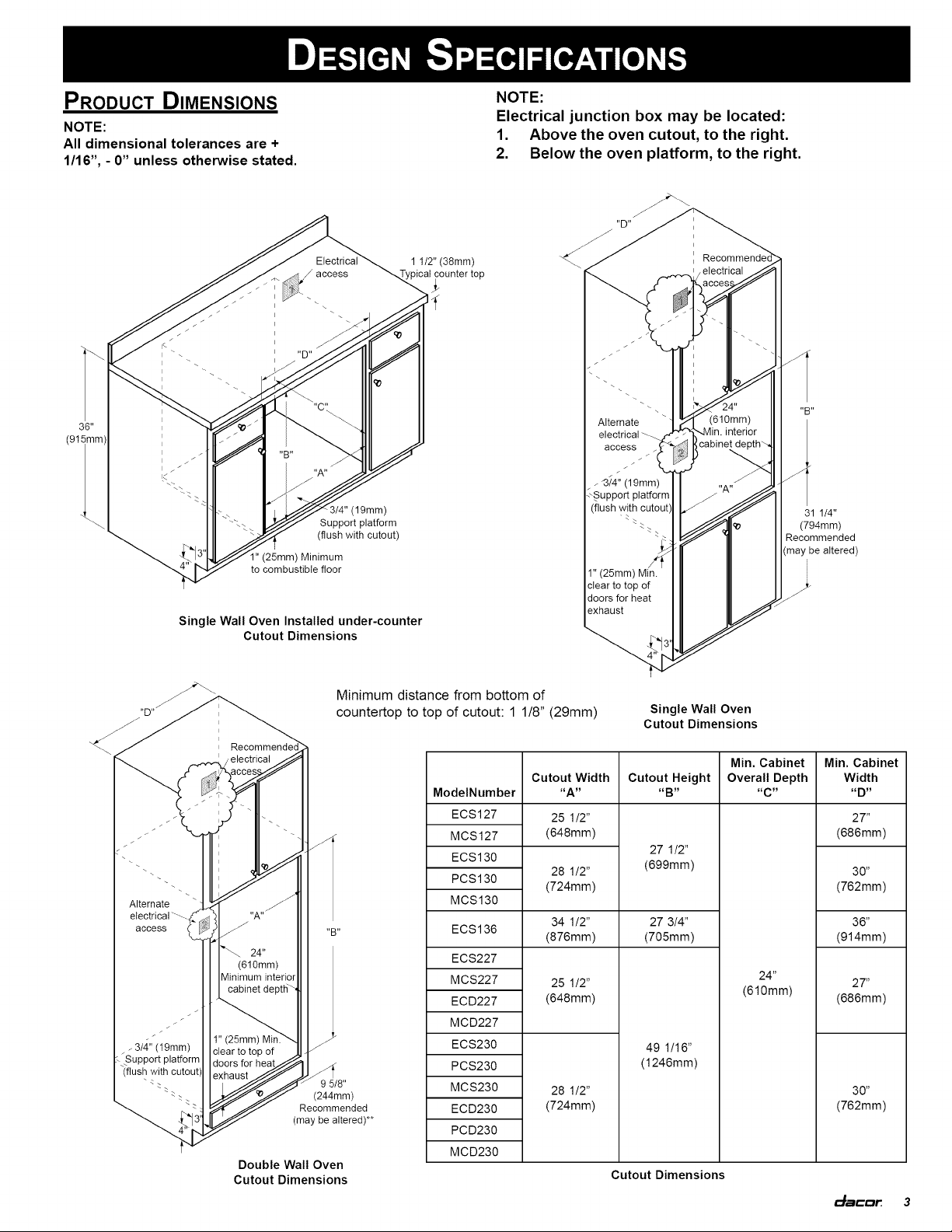
DESIGN
SPECIFICATIONS
Propuct
DIMENSIONS
NOTE:
=
NOE...
Electrical
junction
box
may
be
located:
All
dimensional
tolerances
are
+
1.
Above
the
oven
cutout,
to
the
right.
2.
Below
the
oven
platform,
to
the
right.
1/16”,
-
0”
unless
otherwise
stated.
41/2"
(38mm)
xO
Typical
counter
top
|
,
Recommended
Electrical
.
“Be
36"
Alternate
Al
(915mm)
electrical
a
access
Lc
a
NA
_-
3/4"
(19mm)
Support
platform
3/4"
(19mm)
(flush
with
cutout)
31
1/4"
Support
platform
TS
(794mm)
(flush
with
cutout)
-
yy
Recommended
1"
(25mm)
Minimum
-
(may
be
altered)
to
combustible
floor
1"
(25mm)
Min.
clear
to
top
of
doors
for
heat
exhaust
Single
Wall
Oven
Installed
under-counter
Cutout
Dimensions
Minimum
distance
from
bottom
of
countertop
to
top
of
cutout:
1
1/8”
(29mm)
Single
Wall
Oven
Cutout
Dimensions
Min.
Cabinet
|
Min.
Cabinet
Cutout
Width
|
Cutout
Height
|
Overall
Depth
Width
ModeiNumber
“A”
“Br”
“co”
“py”
ECS127
25
1/2"
27"
MCS127
(648mm)
(686mm)
27
1/2”
ECS130
»
(699mm)
»
PCS130
28
1/2
30
(724mm)
(762mm)
Alternate
>
a
MCS130
electrical
~~
‘
"A"
” ” 4
access
-
s\
+B
ECS136
34
1/2
27
3/4
36
ota
(876mm) (705mm)
(914mm)
PS
24"
(610mm)
ECS227 9
Minimum
interior
” " ”
cabinet
depth
Mes227
25
1/2
(610mm)
27
ECD227
(648mm)
(686mm)
we
MCD227
--
4"
(25)
Min.
_-314"
(19mm)
|
[ger
tote
of
ECS230
49
1/16"
~
Support
platform
‘(flush
with
cutout)
doors
for
neg
4
PCS230
(1246mm)
oss
:
9
5/8"
MCS230
28
1/2”
30”
Seo
(244mm)
Ss
Recommended
ECD230
(724mm) (762mm)
£3
(may
be
altered)**
4
PCD230
MCD230
Double
Wall
Oven
Cutout
Dimensions
Cutout
Dimensions
dacar
3
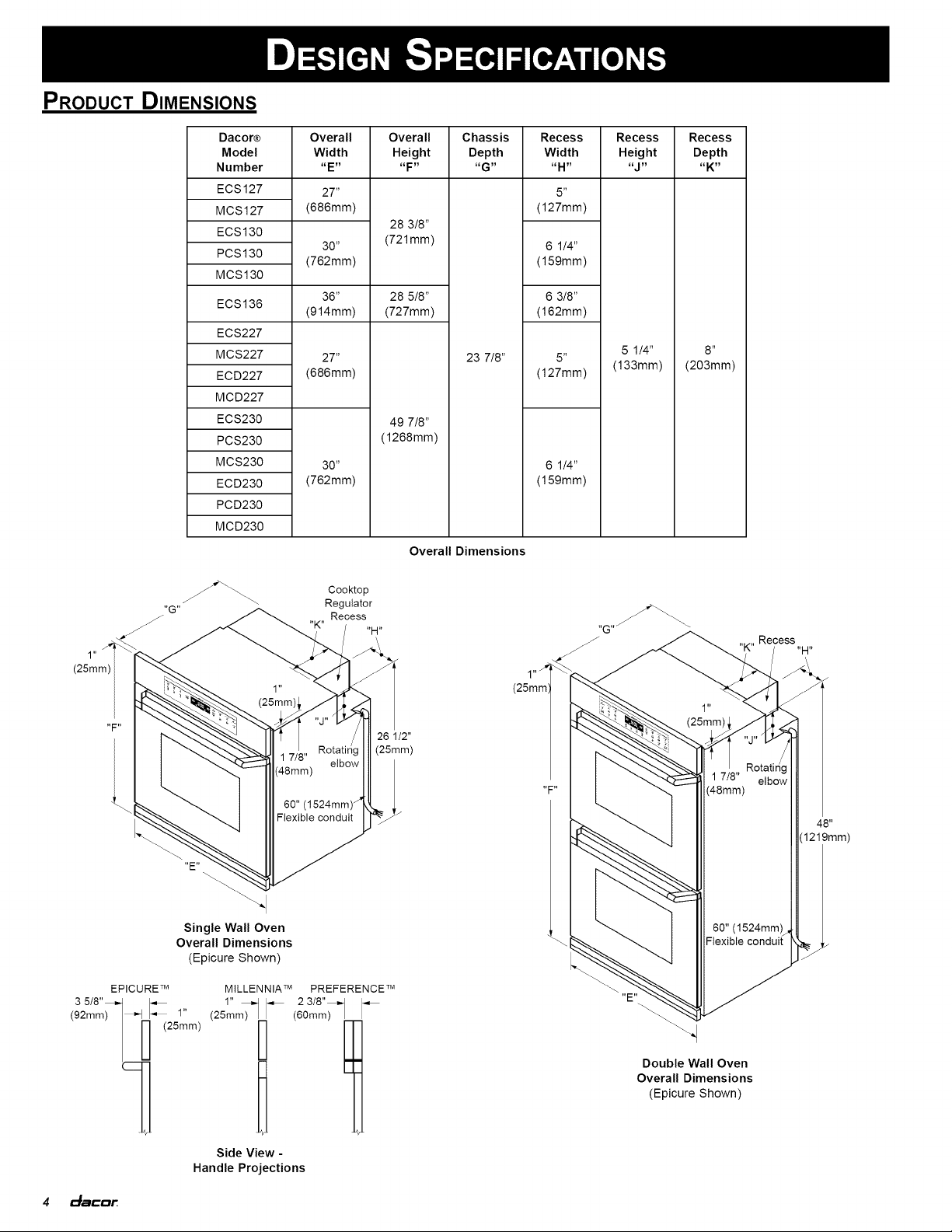
DESIGN
SPECIFICATIONS
Propuct
DIMENSIONS
Dacore
Overall Overall
Chassis
Recess
Recess Recess
Model
Width
Height
Depth
Width
Height
Depth
Number
“en
“ED
#6”
“HH”
aye
aK”
ECS127
97”
5
MCS127
(686mm)
(127mm)
28
3/8”
ECS130
»
(721mm)
,
PCS130
30
6
1/4
(762mm)
(159mm)
MCS130
36”
28
5/8”
6
3/8”
ECS136
(914mm) (727mm) (162mm)
ECS227
MCS227
27"
23
7/8"
5°
5
1/4”
8”
ECD227
(686mm)
(27mm)
|
(38mm)
|
(203mm)
MCD227
ECS230
49
7/8”
PCS230
(1268mm)
MCS230
30”
6
1/4"
ECD230
(762mm)
(159mm)
PCD230
MCD230
Overall
Dimensions
Cooktop
Regulator
,
Recess
ae
eB
(25mm
Rotating
|
|
(25mm)
1
7/8"
elbow
Rotating
17/8"
eibow
“FY
(48mm)
60"
(1524mm)
Flexible
conduit
(1219mm)
Single
Wall
Oven
60"
(1524mm)
4
Overall
Dimensions
Flexible
conduit
.
(Epicure
Shown)
|
EPICURE™
MILLENNIA™
PREFERENCE™
UNS
=
3
5/8"
1" 2
3/8"
(92mm)
|-»
c=
"
(25mm)
|
~
Gomm)
|
~
ONY
|
(25mm)
|
Double
Wall
Oven
Overall
Dimensions
(Epicure
Shown)
Side
View
-
Handle
Projections
4
dacor
INSTALLATION
SPECIFICATIONS
VERIFYING
THE
PACKAGE
CONTENTS
Verify
that
all
required
components
have
been
provided.
If
any
item
is
missing
or
damaged,
please
contact
your
dealer
immediately.
Do
not
install
a
damaged
or
incomplete
appliance.
«
Mounting
Screws
«
Use
and
Care
Videotape
«
Oven
Racks
«
Broiler
Grill
and
Pan
«
Exhaust
Grill/Lower
Trim
«
Rear
Top
Trim
«
GlideRack™
Oven
Rack
«
Light
Lens
Pry
Stick
INSTALLATION
PLANNING
A
qualified
technician
must
complete
the
installation
of
this
built-in
appliance.
Proper
installation
is
your
responsibility.
Carefully
check
the
location
where
the
oven
is
to
be
installed.
The
oven
should
be
placed
for
convenient
access.
Make
certain
that
electrical
power
can
be
provided
in
the
selected
location.
Plan
the
installation
so
that
all
minimum
clearances
are
met
or
exceeded.
Dimensions
shown
provide
minimum
clearances,
unless
otherwise
noted.
Be
certain
that
proper
clearance
is
provided
for
the
oven
door
when
it
is in
the
open
position.
The
specified
minimum
cabinet
depth
and
width
must
be
provided.
The
cabinet
depth
and
width
must
completely
enclose
the
recessed
portion
of
the
oven.
Cabinet
cutout
dimensions
must
be
used
as
indicated.
All
contact
surfaces
between
the
appliance
and
the
cabinet
must
be
solid
and
level.
The
oven
support
platform
must
be
flush with
the
bottom
edge
of
the
cabinet
cutout.
Make
certain
that
you
have
everything
necessary
to
ensure
a
proper
installation
before
proceeding.
INSTALLING
THE
SUPPORT
PLATFORM
IN
THE
CABINET
Provide
a
platform
within
the
cabinet
upon
which
the
oven
will
be
supported.
The
platform
must
be
installed
level
and
straight.
The
top
edge
of
the
platform
must
be
flush with
the
cutout
at
the
front
of
the
cabinet.
There
are
no
provisions
to
level
the
oven
after
it
has
been
installed.
3/4”
(19mm)
thick
plywood
is
recommended.
NOTE:
An
oven
that
is
not
level
may
provide
poor
or
inconsistent
baking
results.
ELECTRICAL
PoweR
SUPPLY
REQUIREMENTS
lt
is
the
owner’s
responsibility
to
ensure
that
a
qualified
electrician
performs
the
electrical
connection
of
this
appliance.
The
electrical
installation,
including
minimum
supply
wire
size,
must
comply
with
the
National
Electric
Code
ANSI/NFPA
70-1990*
(or
to
the
latest
revision)
and
local
codes
and
ordinances.
*A
copy
of
this
standard
may
be
obtained
from:
National
Fire
Protection
Association
1
Batterymarch
Park
Quincy,
Massachuseits
02269-9101
The
correct
voltage,
frequency,
and
amperage
must
be
supplied
to
the
appliance
from
a
separate,
grounded,
single
phase
circuit
that
is
protected
by
a
properly
sized
circuit
breaker
or
time-delay
fuse.
If
a
time-delay
fuse
is
utilized,
fuse both
sides
of
the
line
(L1
and
L2).
The
required
voltage,
frequency
and
amperage
ratings
are
listed
on
the
product
data
plate
(located
inside
the
intake
grill
to
the
left
of
the
door
latch)
and
in
the
Table
below.
The
correct
voltage,
frequency,
and
amperage
must
be
supplied
to
the
appliance
from
a
separate,
grounded,
single
phase
circuit
that
is
protected
by
a
properly
sized
circuit
breaker
or
time-delay
fuse.
If
a
time-delay
fuse
is
utilized,
fuse both
sides
of
the
line
(L1
and
L2).
The
required
voltage,
frequency
and
amperage
ratings
are
listed
on
the
product
name
plate
(located
inside
the
intake
grill
to
the
left
of
the
door
latch)
and
in
the
Table
below.
WARNING
WARNING
-
If
the
electrical
service
provided
does
not
meet
the
product
specifications,
do
not
proceed
with
the
installation.
Call
a
licensed
electrician
to
correct.
NOTES:
1.
Preheat
times
and
cavity
temperature
recovery
times
will
be
increased
slightly
if
operating
ona
120/208
volt
power
supply.
2.
208V
models
should
not
be
connected
to
240V
source
power.
3.
Power
supply
must
be
an
isolated
circuit.
dacor
5
INSTALLATION
INSTRUCTIONS
Dacor
Max.
208V
Max.
240V
Power
Model
Number
Connected
Load
Connected
Load
Supply
ECS127
MCS127
25
Amps
22
Amps
208/24
OV
ECS130
(5.2kW)
(5.2kW)
4-wire
PCS130
6O0Hz,
30A
NOTE:
The
four
(4)
leads
supplied
with
MCS130
this
appliance
are
UL
recognized
for
connection
to
larger
gauge
ECS136
n/a
29
Amps
household
wiring.
The
insulation
(7.0kW)
of
these
leads
is
rated
at
ECS227
temperatures
much
higher
than
the
temperature
rating
of
MCS227
household
wiring.
The
current-
ECD227
carrying
capacity
of
the
conductor
is
governed
by
the
temperature
MCD227
208/240V,
rating
of
the
insulation
around
the
ECS230
4-wire,
wire,
rather
than
the
wire
gauge
39
Amps
34
Amps
60Hz,
40A
alone.
PCS230
(8.1kW)
(8.1kW)
MCS230
ECD230
PCD230
MCD230
Electrical
Requirements
REMOVING
THE
Oven
Doors
WARNING
De
not
attempt
to
disengage
the
hinge
catches
with
the
door
removed
from
the
oven.
The
hinge
springs
could
release,
causing
personal
injury.
Do
not
lift
or
carry
oven
door
by
the
door
handle
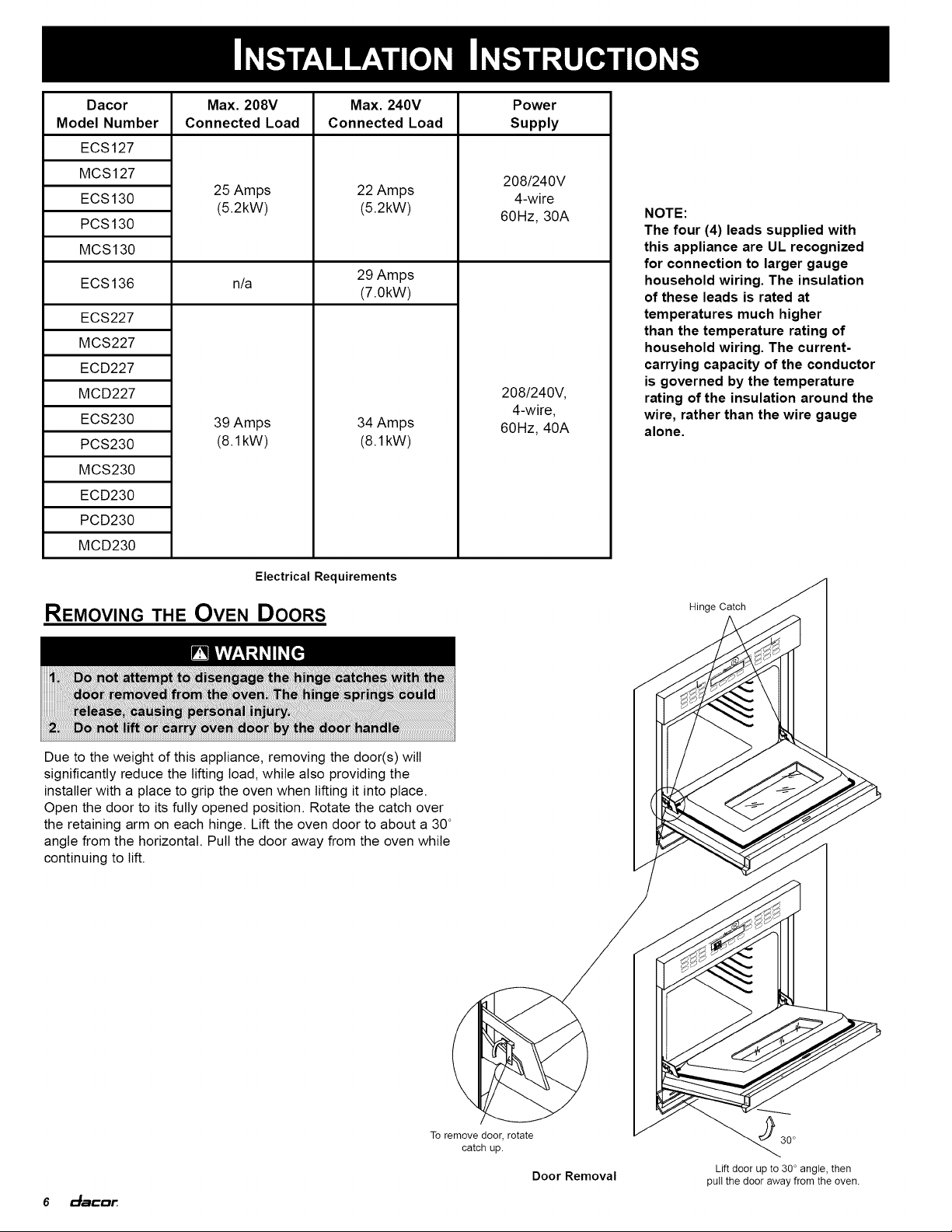
Due
to
the
weight
of
this
appliance,
removing
the
door(s)
will
significantly
reduce
the
lifting
load,
while
also
providing
the
installer
with
a
place
to
grip
the
oven
when
lifting
it
into
place.
Open
the
door
to
its
fully
opened
position.
Rotate
the
catch
over
the
retaining
arm
on
each
hinge.
Lift
the
oven
door
to
about
a
30°
angie
from
the
horizontal.
Pull
the
door
away
from
the
oven
while
continuing
to
lift.
To
remove
door,
rotate
catch
up.
Lift
door
up
to
30°
angle,
then
pull
the
door
away
from
the
oven.
Door
Removal
6
cacor.
INSTALLATION
INSTRUCTIONS
TURNING
OFF
THE
PoweER
SUPPLY
Before
attempting
to
connect
the
appliance
to
power,
turn
off
the
electrical
power
supply.
Also,
always
turn
off
electrical
power
to
the
appliance
prior
to
servicing
it.
WARNING
WARNING
-
Failure
to
disconnect
power
may
result
in
electrical
shock
or
fire
hazard.
ELECTRICAL
CONNECTION
WARNING
This
appliance
must
be
connected
to
a
grounded,
metallic,
permanent
wiring
system.
Alternatively,
a
grounding
conductor
should
be
connected
fo
the
grounding
terminal
or
lead
on
the
appliance.
Failure
to
do
so
may
result
in
an
electrical
shock
hazard.
Do
not
install
a
fuse
in
the
neutral
or
ground
circuit.
A
fuse
in
the
neutral
of
ground
circuit
may
result
in
an
electrical
shock
hazard.
GROUNDING
INSTRUCTIONS
The
appliance must
be
connected
to
the
power
supply
with
copper
wire
only.
The
use
of
aluminum
wire
may
result
in
unsatisfactory
connections.
Flexible
armored
or
non-metallic,
sheathed
copper
cable
(with
grounding
wire)
should
be
used
to
connect
the
appliance
to
the
junction
box.
A
UL-listed
connector
must
be
used
to
directly
connect
the
cable
to
the
junction
box.
Be
certain
to
locate
the
junction
box
such
that
the
electrical
supply
may
be
easily
disconnected
in
the
event
that
service
becomes
necessary.
Also,
provide
extra
slack
in
the
cable
to
allow
the
oven
to
slide
forward
for
servicing.
This
appliance
must
be
electrically
grounded.
With
the
oven
positioned
directly
in
front
of
the
cabinet
cutout,
feed
the
appliance
conduit
to
the
electrical
junction
box.
Then,
depending
upon
local
codes,
utilize
one
of
the
following
techniques
to
connect
the
appliance
to
the
electrical
power
supply:
A.
Connecting
to
a
Four-Wire
Electrical
System
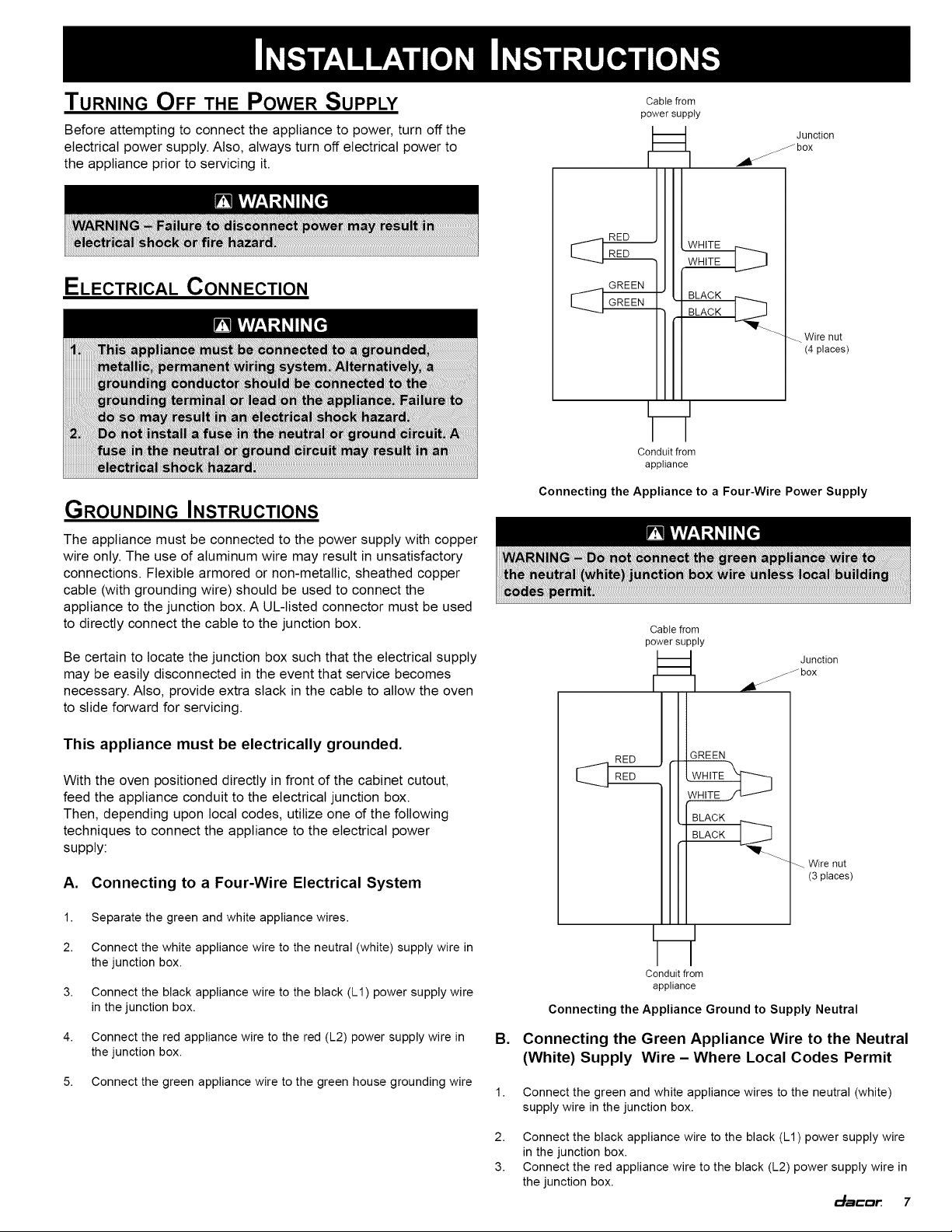
1.
Separate
the
green
and
white
appliance
wires.
2.
Connect
the
white
appliance
wire
to
the
neutral
(white)
supply
wire
in
the
junction
box.
3.
Connect
the
black
appliance
wire
to
the
black
(L1)
power
supply
wire
in
the
junction
box.
4.
Connect
the
red
appliance
wire
to
the
red
(L2)
power
supply
wire
in
the
junction
box.
5.
Connect
the
green
appliance
wire
to
the
green
house grounding
wire
Cable
from
power
supply
Junction
-_—”
WHITE
RED
7}
WHITE
GREEN
|)
GREEN
|
BLACK
_L
BLACK
Wire
nut
(4
places)
Conduit
from
appliance
Connecting
the
Appliance
to
a
Four-Wire
Power
Supply
WARNING
WARNING
—
Do
not
connect
the
green
appliance
wire
to
the
neutral
(white)
junction
box
wire
unless
local
building
codes
permit.
Cable
from
power
supply
Junction
aol
RED
GREEN
RED
WHITE
WHITE
BLACK
1
BLACK
wy
Wire
nut
(3
places)
Conduit
from
appliance
Connecting
the
Appliance
Ground
to
Supply
Neutral
B.
Connecting
the
Green
Appliance
Wire
to
the
Neutral
(White)
Supply
Wire
—
Where
Local
Codes
Permit
Connect
the
green
and
white
appliance
wires
to
the
neutral (white)
supply
wire
in
the
junction
box.
Connect
the
black
appliance
wire
to
the
black
(L1)
power
supply
wire
in
the
junction
box.
Connect
the red
appliance
wire
to
the
black
(L2)
power
supply
wire
in
the
junction
box.
dacor
7
INSTALLATION
INSTRUCTIONS
Cc.
Connecting
the
Green
Appliance
Wire
to
a
Grounded
Junction
Box
Wire
or
Grounded
Cold
Water
Pipe
—-
Where
Local
Codes
Permit
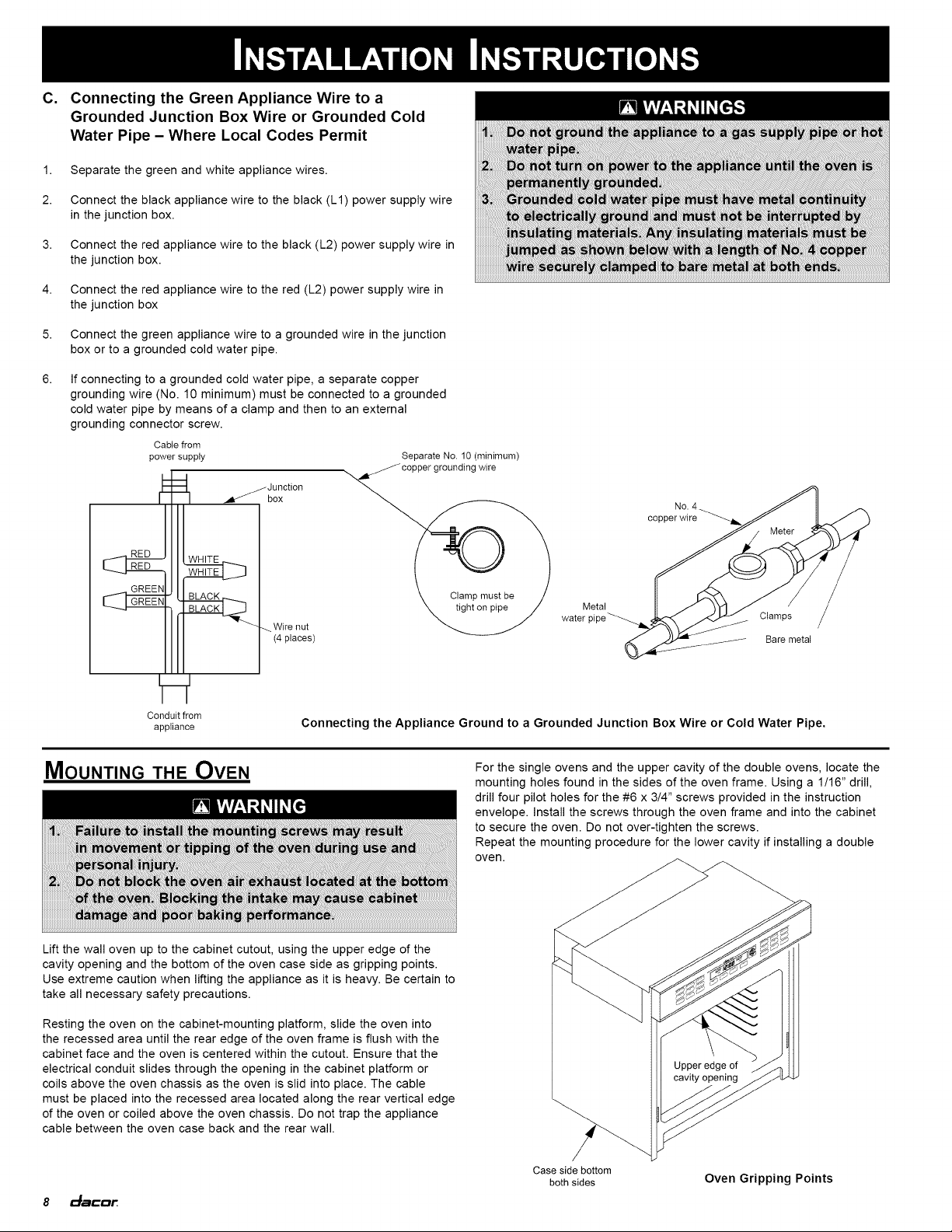
1.
Separate
the
green
and
white
appliance
wires.
2.
Connect
the
black
appliance
wire
to
the
black
(L1)
power
supply
wire
in
the
junction
box.
3.
Connect
the red
appliance
wire
to
the
black
(L2)
power
supply
wire
in
the
junction
box.
4.
Connect
the red
appliance
wire
to
the red
(L2)
power
supply
wire
in
the
junction
box
5.
Connect
the
green
appliance
wire
to
a
grounded
wire
in
the
junction
box
or
to
a
grounded
cold
water
pipe.
6.
If
connecting
to
a
grounded
coid
water
pipe,
a
separate
copper
grounding
wire
(No.
10
minimum)
must
be
connected
to
a
grounded
cold
water
pipe
by
means
of
a
clamp
and
then
to
an
external
grounding
connector
screw.
Cable
from
power
supply
=
Junction
a
box
RED
[
RED
GREEN
GREEN
Wire
nut
(4
places)
Conduit
from
appliance
Clamp
must
be
tight
on
pipe
WARNINGS
Do
not
ground
the
appliance
to
a
gas
supply
pipe
or
hot
water
pipe.
Do
not
turn
on
power
to
the
appliance
until
the
oven
is
permanently
grounded.
Grounded
cold
water
pipe
must
have
metal
continuity
to
electrically
ground
and
must
not
be
interrupted
by
insulating
materials.
Any
insulating
materials
must
be
jumped
as
shown
below
with
a
length
of
No.
4
copper
wire
securely
clamped
to
bare
metal
at
both
ends.
Separate
No.
10
(minimum)
copper
grounding
wire
No.
4
copper
wire
oe
Metal
water
pipe
Bare
metal
Connecting
the
Appliance
Ground
to
a
Grounded
Junction
Box
Wire
or
Coid
Water
Pipe.
MouNTING
THE
OVEN
WARNING
Failure
to
install
the
mounting
screws
may
result
in
movement
or
tipping
of
the
oven
during
use
and
personal
injury.
Do
not
block
the
oven
air
exhaust
located
at
the
bottom
of
the
oven.
Blocking
the
intake
may
cause
cabinet
damage
and
poor
baking
performance.
Lift
the wall
oven
up
to
the
cabinet
cutout,
using
the
upper
edge
of
the
cavity
opening
and
the
bottom
of
the
oven case
side
as
gripping
points.
Use
extreme
caution
when
lifting
the
appliance
as
it
is
heavy.
Be certain
to
take
all
necessary
safety
precautions.
Resting
the
oven
on the
cabinet-mounting
platform,
slide the
oven
into
the
recessed
area
until
the
rear
edge
of
the
oven
frame
is
flush
with
the
cabinet
face
and
the
oven
is
centered
within
the
cutout.
Ensure
that the
electrical
conduit
slides
through
the
opening
in
the
cabinet
platform
or
coils
above
the
oven
chassis
as
the
oven
is
slid
into
place.
The
cable
must
be
placed
into
the
recessed
area
located
along
the
rear
vertical
edge
of
the
oven
or
coiled
above
the
oven
chassis.
Do
not
trap
the
appliance
cable
between
the
oven
case
back
and
the
rear
wall.
8
dacor
For
the
single
ovens
and
the
upper
cavity
of
the
double
ovens,
locate
the
mounting
holes
found
in
the
sides
of
the
oven
frame.
Using
a
1/16”
drill,
drill
four
pilot
holes
for
the
#6
x
3/4”
screws
provided
in
the
instruction
envelope.
Install
the
screws
through
the
oven
frame
and
into
the
cabinet
to
secure
the
oven.
Do
not
over-tighten
the
screws.
Repeat
the
mounting
procedure
for
the
lower
cavity
if
installing
a
double
oven.
Upper
edge
of
cavity
opening
Case
side
bottom
both
sides
Oven
Gripping
Points
INSTALLATION
INSTRUCTIONS
INSTALLING
THE
EXHAUST
GRILL
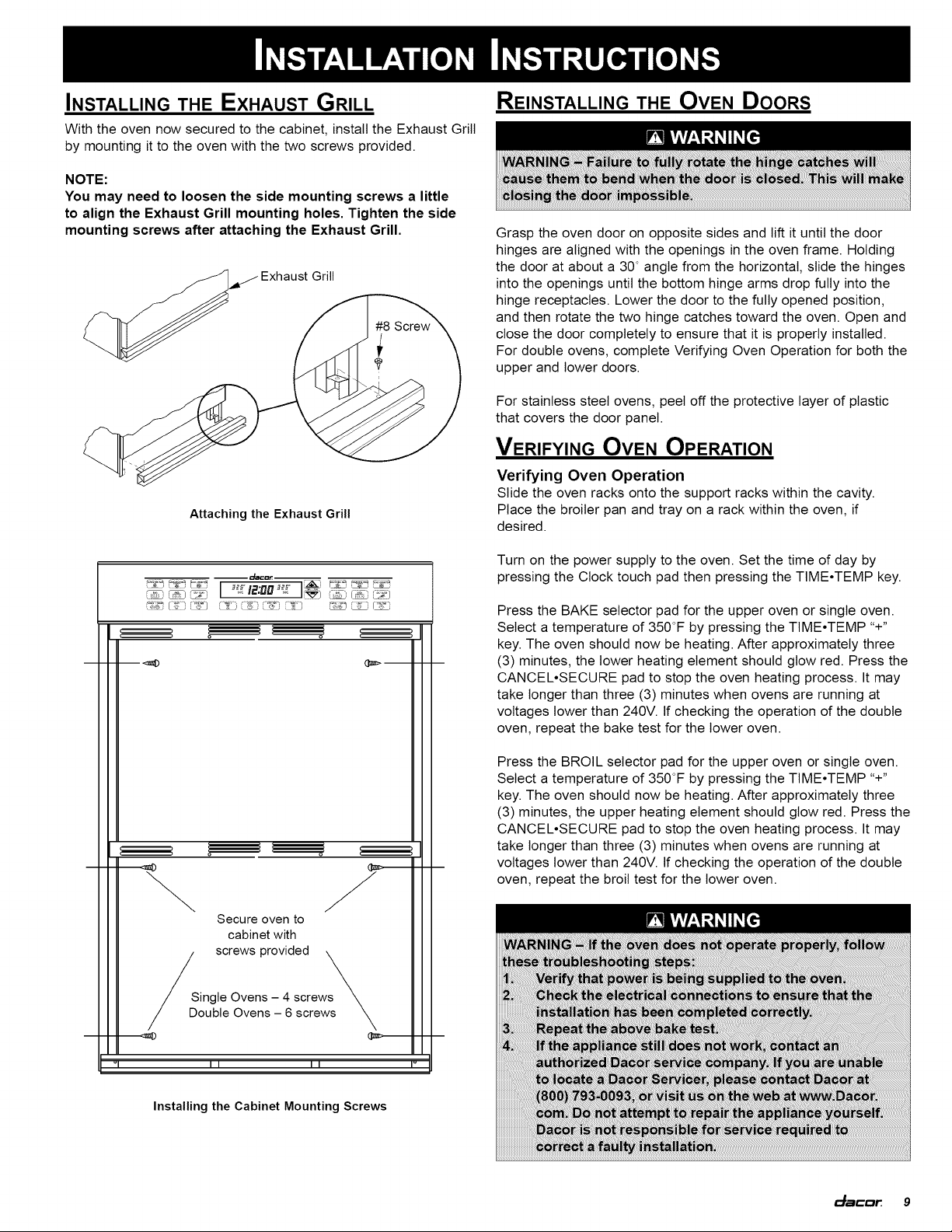
With
the
oven
now
secured
to
the
cabinet,
install
the
Exhaust
Grill
by
mounting
it
to
the
oven
with
the
two
screws
provided.
NOTE:
You
may
need
to
loosen
the
side
mounting
screws
a
little
to
align
the
Exhaust
Grill
mounting
holes.
Tighten
the
side
mounting
screws
after
attaching
the
Exhaust
Grill.
Z
a
Exhaust
Grill
Secure
oven
to
cabinet
with
screws
provided
Single
Ovens
—
4
screws
Double
Ovens
—
6
screws
Installing
the
Cabinet
Mounting
Screws
REINSTALLING
THE
Oven
Doors
WARNING
WARNING
-
Failure
to
fully
rotate
the
hinge
catches
will
cause
them
to
bend
when
the
door
is
closed.
This
will
make
closing
the
door
impossible.
Grasp
the
oven
door
on
opposite
sides
and
lift
it
until
the
door
hinges
are
aligned
with
the
openings
in
the
oven
frame.
Holding
the
door
at
about
a
30°
angle
from
the
horizontal,
slide
the
hinges
into
the
openings
until
the
bottom
hinge
arms
drop
fully
into
the
hinge
receptacles.
Lower
the
door
to
the
fully
opened
position,
and
then
rotate
the
two
hinge
catches
toward
the
oven.
Open
and
close
the
door
completely
to
ensure
that
it
is
properly
installed.
For
double
ovens,
complete
Verifying
Oven
Operation
for
both
the
upper
and
lower
doors.
For
stainless
steel
ovens,
peel
off
the
protective
layer
of
plastic
that
covers
the
door
panel.
VERIFYING
OVEN OPERATION
Verifying
Oven
Operation
Slide
the
oven
racks
onto
the
support
racks
within
the cavity.
Place
the
broiler
pan and
tray
on
a
rack
within
the
oven,
if
desired.
Turn
on
the
power
supply
to
the
oven.
Set
the
time
of
day
by
pressing
the
Clock
touch
pad
then
pressing
the
TIME*TEMP
key.
Press
the
BAKE
selector
pad
for
the
upper
oven
or
single
oven.
Select
a
temperature
of
350°F
by
pressing
the
TIME*TEMP
“+”
key.
The
oven
should
now
be
heating.
After
approximately
three
(3)
minutes,
the
lower
heating
element
should
glow
red.
Press
the
CANCEL*SECURE
pad
to
stop
the
oven
heating
process.
It
may
take
longer
than
three
(3)
minutes
when
ovens
are
running
at
voltages
lower
than
240V.
If
checking
the
operation
of
the
double
oven,
repeat
the
bake
test
for
the
lower oven.
Press
the
BROIL
selector
pad
for
the
upper
oven
or
single
oven.
Select
a
temperature
of
350°F
by
pressing
the
TIME*TEMP
“+”
key.
The
oven
should
now
be
heating.
After
approximately
three
(3)
minutes,
the
upper
heating
element
should
glow
red.
Press
the
CANCEL*SECURE
pad
to
stop
the
oven
heating
process.
It
may
take
longer
than
three
(3)
minutes
when
ovens
are
running
at
voltages
lower
than
240V.
If
checking
the
operation
of
the
double
oven,
repeat
the
broil
test
for
the
lower
oven.
WARNING
WARNING
-—
If
the
oven does
not
operate
properly,
follow
these
troubleshooting
steps:
Verify
that
power
is
being
supplied
to
the
oven.
Check
the
electrical
connections
to
ensure
that
the
installation
has
been
completed
correctly.
Repeat
the
above
bake
test.
If
the
appliance
still
does
not
work,
contact
an
authorized
Dacor
service
company.
If
you
are
unable
to
locate
a
Dacor
Servicer,
please
contact
Dacor
at
(800)
793-0093.
or
visit
us
on
the
web
at
www.Dacor.
com.
Do
not
attempt
to
repair
the
appliance
yourself.
Dacor
is
not
responsible
for
service
required
to
correct
a
faulty
installation.
dacar
9

SERVICE
INFORMATION
If
you
need
service,
be
sure
to
have
the
model
and
serial
numbers
avalable
when
you
call.
Contact
a
Dacor
authorized
servicer,
a
Dacor
dealer
or
the
Dacor
Customer
Service
Team
at
(800)
793-0093.
10
dacor.

Notes
dacar
11

NoTEs
12.
dacor.

Notes
dacar
13

Web
Site:
www.Dacor.com
Phone:
(800)
793-0093
©
2006
Dacor,
all
rights
reserved.