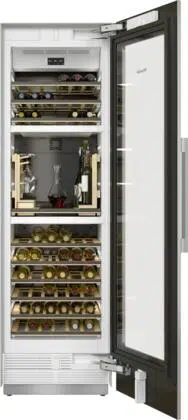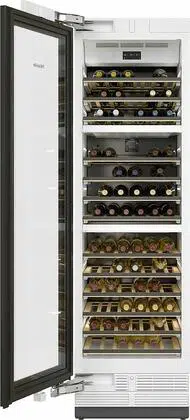
Operating and installation
instructions
Wine conditioning unit
To avoid the risk of accidents or damage to the appliance it is essen-
tial to read these instructions before it is installed and used for the
first time.
en-GB M.-Nr. 11 249 150

Contents
2
Warning and Safety instructions...................................................................... 4
Caring for the environment .............................................................................. 14
Saving energy .................................................................................................... 15
Guide to the appliance...................................................................................... 16
Control panel....................................................................................................... 16
Symbols............................................................................................................... 17
Using the door-opening mechanism correctly .................................................... 19
Accessories ....................................................................................................... 20
Accessories supplied .......................................................................................... 20
Optional accessories........................................................................................... 20
Switching on and off ......................................................................................... 21
Before using for the first time.............................................................................. 21
Operating the wine conditioning unit .................................................................. 21
Switching the wine conditioning unit on ........................................................ 21
Switching off................................................................................................... 22
Switching off for longer periods of time .............................................................. 22
Selecting further settings ................................................................................. 23
Safety lock ...................................................................................................... 23
Audible tones................................................................................................. 24
Display brightness .......................................................................................... 25
The optimum temperature and air quality....................................................... 26
The optimum temperature................................................................................... 26
Setting the temperature.................................................................................. 27
Temperature range ......................................................................................... 28
Temperature display ....................................................................................... 28
Air quality and humidity....................................................................................... 28
Using DynaCool (constant humidity)........................................................ 29
Air filtration with the Active AirClean filter ...................................................... 30
Temperature and door alarm............................................................................ 31
Feature lighting.................................................................................................. 33
Switching the feature lighting on and off............................................................. 33
Setting the brightness of the feature lighting ................................................. 33
Lighting duration of the feature lighting ......................................................... 34
Storing wine bottles .......................................................................................... 35
Maximum stacking height for wine bottles in the cabinet................................... 36

Contents
3
Wooden shelves.................................................................................................. 36
Moving the wooden shelves........................................................................... 36
Adjusting the wooden shelves ....................................................................... 37
Annotating wooden shelves ........................................................................... 38
Inserting the decor shelf................................................................................. 39
Maximum capacity .............................................................................................. 39
Automatic defrosting ........................................................................................ 40
Cleaning and care ............................................................................................. 41
Cleaning agents................................................................................................... 41
Before cleaning the wine unit.............................................................................. 42
Interior, accessories and appliance door ............................................................ 42
Cleaning the ventilation gaps .............................................................................. 43
Cleaning the door seal ........................................................................................ 43
After cleaning ...................................................................................................... 43
Active AirClean filters ....................................................................................... 44
Replacing the Active AirClean filter..................................................................... 44
Problem solving guide ...................................................................................... 46
Noises................................................................................................................. 51
After sales service and warranty ..................................................................... 52
Contact in the event of a fault ............................................................................. 52
EPREL database ................................................................................................. 52
Warranty .............................................................................................................. 52
Installation.......................................................................................................... 53
Location............................................................................................................... 53
Climate range ...................................................................................................... 54
Ventilation............................................................................................................ 54
Different types of ventilation gap ................................................................... 55
Installation dimensions........................................................................................ 56
Installing the wine conditioning unit .................................................................... 56
Before installing the wine conditioning unit.................................................... 56
Electrical connection ........................................................................................... 60
Information for dealers ..................................................................................... 62
Demo mode ...................................................................................................... 62
Warning and Safety instructions
4
This wine conditioning unit complies with all current local and na-
tional safety requirements. Inappropriate use can, however, lead to
personal injury and material damage.
Read the operating and installation instructions carefully before
using the wine conditioning unit. They contain important informa-
tion on safety, installation, use and maintenance. This is to protect
yourself from injury, and from damaging your wine conditioning
unit.
In accordance with standard IEC60335-1, Miele expressly and
strongly advises that you read and follow the instructions in the
chapter on installing the wine conditioning unit as well as the
safety instructions and warnings.
Miele cannot be held liable for injury or damage caused by non-
compliance with these instructions.
Keep these instructions in a safe place and pass them on to any
future owner.
Danger of injury from broken glass.
If installed at altitudes above 1500m there is a risk of the glass in
the door breaking because of changes in air pressure.
Shards of glass can cause severe injury.

Warning and Safety instructions
5
Correct application
This wine conditioning unit is intended for use in the home and in
similar environments, for example
– in shops, offices and similar work settings
– by the guests in hotels, motels, bed & breakfasts and other typical
home settings.
This wine conditioning unit is not intended for outdoor use.
The wine conditioning unit is intended for domestic use only for
storing wine.
It must not be used for any other purpose.
The wine conditioning unit is not suitable for storing and keeping
cool medicines, blood plasma, laboratory preparations or other such
materials or products. Incorrect use of the wine conditioning unit for
such purposes can cause deterioration of the items stored. The wine
conditioning unit is not suitable for use in areas where there is a risk
of explosion.
Miele cannot be held liable for damage resulting from improper or in-
correct use of the appliance.
This wine conditioning unit may only be used by people (including
children) with reduced physical, sensory or mental capabilities or
lack of experience and knowledge if they are supervised whilst using
it.
The wine conditioning unit may only be used by these people
without supervision if they have been shown how to use it in a safe
way and recognise and understand the consequences of incorrect
operation.

Warning and Safety instructions
6
Safety with children
Children under 8years of age must be kept away from the wine
conditioning unit unless they are constantly supervised.
Children aged 8 and older may only use the wine conditioning unit
without supervision if they have been shown how to use it in a safe
manner. Children must be able to understand and recognise the pos-
sible dangers caused by incorrect operation.
Children must not be allowed to clean or maintain the wine condi-
tioning unit unsupervised.
Please supervise children in the vicinity of the wine conditioning
unit and do not let them play with it.
Danger of suffocation! Whilst playing, children could become en-
tangled in packaging (such as plastic wrapping) or pull it over their
head and suffocate. Keep packaging material away from children.
Warning and Safety instructions
7
Technical safety
The refrigerant circuit has been checked for leaks. The wine con-
ditioning unit complies with statutory safety requirements and the
appropriate EU directives.
This wine conditioning unit contains the coolant Isobutane
(R600a), a natural gas which is environmentally friendly. The coolant
does not damage the ozone layer and does not contribute to the
greenhouse effect.
The use of this coolant has, however, led to a slight increase in the
noise level of the appliance. In addition to the noise of the com-
pressor, you might be able to hear the coolant flowing around the
cooling circuit. Unfortunately, this cannot be avoided, but it does not
affect the performance of the wine conditioning unit.
When transporting and installing the wine conditioning unit, ensure
that no parts of the cooling circuit are damaged. Splashes of coolant
can damage the eyes.
In the event of damage:
- Avoid naked flames or anything which creates a spark.
- Disconnect the wine conditioning unit from the mains electricity
supply.
- Ventilate the room where the wine conditioning unit is located for
several minutes.
- Contact the Miele Customer Service Department.
The more coolant there is in a wine conditioning unit, the larger
the room it should be installed in. In the event of a leakage, if the ap-
pliance is in a small room, there is the danger of combustible gases
building up. For every 11 g of coolant at least 1m
3
of room space is
required. The amount of coolant in the appliance is stated on the
data plate inside the wine conditioning unit.

Warning and Safety instructions
8
To avoid the risk of damage to the wine conditioning unit, make
sure that the connection data (fuse rating, frequency and voltage) on
the data plate corresponds to the household supply.
Check that this is the case before connecting the wine conditioning
unit. Consult a qualified electrician if in any doubt.
The electrical safety of the wine conditioning unit can only be
guaranteed when correctly earthed. It is essential that this standard
safety requirement is met. If in any doubt please have the electrical
installation tested by a qualified electrician.
Reliable and safe operation of the wine conditioning unit can only
be assured if it has been connected to the mains electricity supply.
If the electrical connection cable is faulty it must only be replaced
by a Miele authorised service technician to protect the user from
danger.
Do not connect the wine conditioning unit to the mains electrical
supply by a multi-socket adapter or extension lead. These are a fire
hazard and do not guarantee the required safety of the appliance.
If moisture gets into electrical components, it could cause a short
circuit. Therefore, do not operate this wine conditioning unit in areas
which are exposed to moisture (e.g in a garage or utility room).

Warning and Safety instructions
9
This wine conditioning unit must not be used in a non-stationary
location (e.g. on a ship).
Do not use a damaged wine conditioning unit. It could be danger-
ous. Check the wine conditioning unit for visible signs of damage.
For safety reasons, this wine conditioning unit may only be used
after it has been built in.
The wine conditioning unit must be isolated from the electricity
supply during installation, maintenance and repair work.
Unauthorised installation, maintenance and repairs can cause
considerable danger for the user.
Installation, maintenance and repairs must only be carried out by a
Miele authorised technician.
While the wine conditioning unit is under warranty, repairs should
only be undertaken by a Miele authorised service technician. Other-
wise the warranty is invalidated.
Faulty components must only be replaced with genuine Miele ori-
ginal spare parts. Miele can only guarantee the safety standards of
the appliance when Miele replacement parts are used.
This wine conditioning unit is supplied with a special lamp to cope
with particular conditions (e.g. temperature, moisture, chemical res-
istance, abrasion resistance and vibration). This lamp must only be
used for the purpose for which it is intended. The lamp is not suit-
able for room lighting. Replacement lamps may only be fitted by a
Miele authorised technician or by the Miele Customer Service De-
partment. This wine conditioning unit contains several light sources
with at least energy efficiency classG.

Warning and Safety instructions
10
Correct use
The wine conditioning unit is designed for use within a certain cli-
mate range (ambient temperatures), and should not be used outside
this range. The climate range for your wine conditioning unit is stated
on the data plate inside the appliance. Installing it in a room with too
low an ambient temperature, e.g. a garage, will lead to the wine con-
ditioning unit switching off for longer periods so that it cannot main-
tain the required temperature.
Do not cover or block the air vents as this could impair the effi-
ciency of the appliance, increase the electricity consumption and
could cause damage to the components.
If the wine conditioning unit is used for storing food which con-
tains fat or oil, make sure that it does not come into contact with
plastic components. Any spillages of oil or fat could cause stress
cracks to the plastic and cause it to break or split.
Risk of fire and explosion. Do not store explosive materials in the
wine conditioning unit or any products containing propellants (e.g.
spray cans). Electrical components can cause flammable mixes of
gases to ignite.
Danger of explosion. Do not operate any electrical appliances in-
side the wine conditioning unit. Danger of sparking and explosion.
Stainless steel appliances
Adhesives will damage the stainless steel surface and cause it to
lose its dirt-repellent protective coating. Do not use sticky notes,
transparent adhesive tape, masking tape or other types of adhesive
on the stainless steel surface.
The surface is susceptible to scratching. Even magnets can cause
scratching.

Warning and Safety instructions
11
Accessories and spare parts
Only use genuine original Miele accessories and spare parts with
this appliance. Using accessories or spare parts from other manu-
facturers will invalidate the warranty, and Miele cannot accept liabil-
ity.
Miele will guarantee to supply functional spare parts for a min-
imum of 10years and up to 15years following the discontinuation of
your wine unit.

Warning and Safety instructions
12
Cleaning and care
Do not use any oils or grease on the door seals, as these will
cause the seals to deteriorate and become porous with time.
Do not use a steam cleaning appliance to clean this wine condi-
tioning unit.
The steam could reach electrical components and cause a short cir-
cuit.
Sharp edged or pointed objects will damage the evaporator, caus-
ing irreversible damage to the wine conditioning unit. Do not use
sharp edged or pointed objects to
- remove frost and ice,
- remove labels, stickers etc.

Warning and Safety instructions
13
Transporting the appliance
Always transport the wine conditioning unit in an upright position
and in its original transport packaging to avoid damage in transit.
Danger of injury and damage to the appliance. The wine condi-
tioning unit is very heavy and must be transported by two people.
Disposing of your old appliance
If your old wine unit or refrigeration appliance has a door lock,
destroy it.
This will prevent the risk of children playing accidentally locking
themselves in and endangering their lives.
Splashes of coolant can damage the eyes. Be careful not to dam-
age any part of the pipework whilst awaiting disposal, e.g. by
- puncturing the coolant channels in the condenser,
- bending any pipework, or
- scratching the surface coating.
Caring for the environment
14
Disposal of the packing mater-
ial
The packaging is designed to protect
the wine conditioning unit from damage
during transportation. The packaging
materials used are selected from mater-
ials which are environmentally friendly
for disposal and should be recycled.
Recycling the packaging reduces the
use of raw materials in the manufactur-
ing process and also reduces the
amount of waste in landfill sites.
Disposing of your old appli-
ance
Electronic and electrical appliances
contain many valuable materials. They
also contain certain materials, com-
pounds and components which were
essential for their correct functioning
and safety. These could be hazardous
to your health and to the environment if
disposed of with general waste or if
handled incorrectly. Please do not,
therefore, dispose of your old appliance
with general waste.
Instead, please make use of officially
designated collection and disposal
points to dispose of and recycle elec-
trical and electronic appliances in your
local community, with your dealer or
with Miele. By law, you are solely re-
sponsible for deleting any personal data
from the appliance prior to disposal.
Take care not to damage your wine
conditioning unit's pipework before or
during transportation to an authorised
collection depot.
This is to ensure that coolant in the
cooling circuit and oil in the compressor
is contained, and will not leak into the
environment.
Please ensure that your old appliance
poses no risk to children while being
stored prior to disposal. For further in-
formation, see “Warning and safety in-
structions” in these operating and in-
stallation instructions.
Saving energy
15
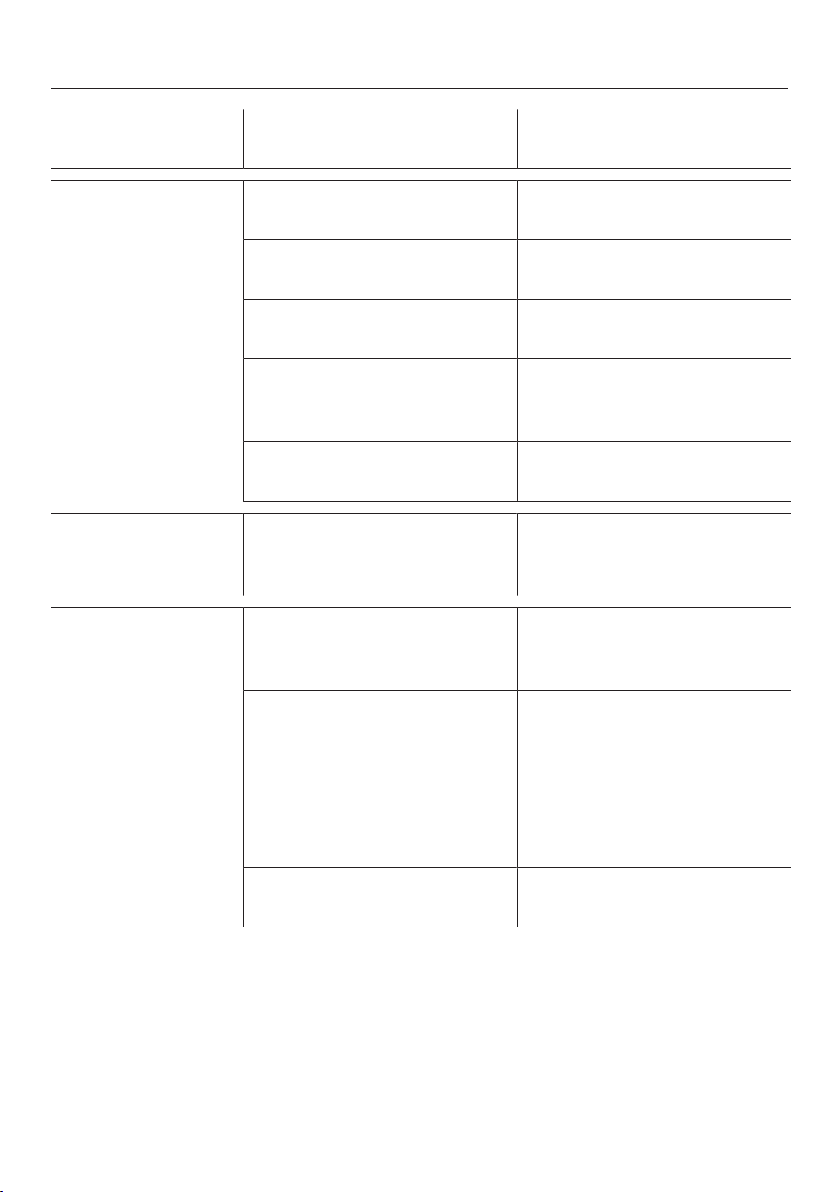
Normal energy consump-
tion
Increased energy con-
sumption
Installation /
Maintenance
In a ventilated room. In an enclosed, unventilated
room.
Protected from direct sun-
light.
In direct sunlight.
Not near to a heat source
(radiator, oven).
Near to a heat source (radi-
ator, oven).
Where the ideal ambient
room temperature is approx.
20°C.
Where the ambient room
temperature is above 25°C.
Ventilation gaps uncovered
and dusted regularly.
Ventilation gaps covered or
dusty.
Temperature
setting
10 to 12°C The lower the temperature,
the higher the energy con-
sumption.
Use Wooden shelves arranged
as they were when the appli-
ance was delivered.
Only open the door when
necessary and for as short a
time as possible. Store wine
bottles in an organised way.
Frequent opening of the
door for long periods will
cause a loss of coldness.
The wine conditioning unit
works harder to cool down
and the compressor runs for
longer periods.
Do not over-fill the appliance
to allow air to circulate.
Poor air circulation will
cause a loss of coldness.
Guide to the appliance
16
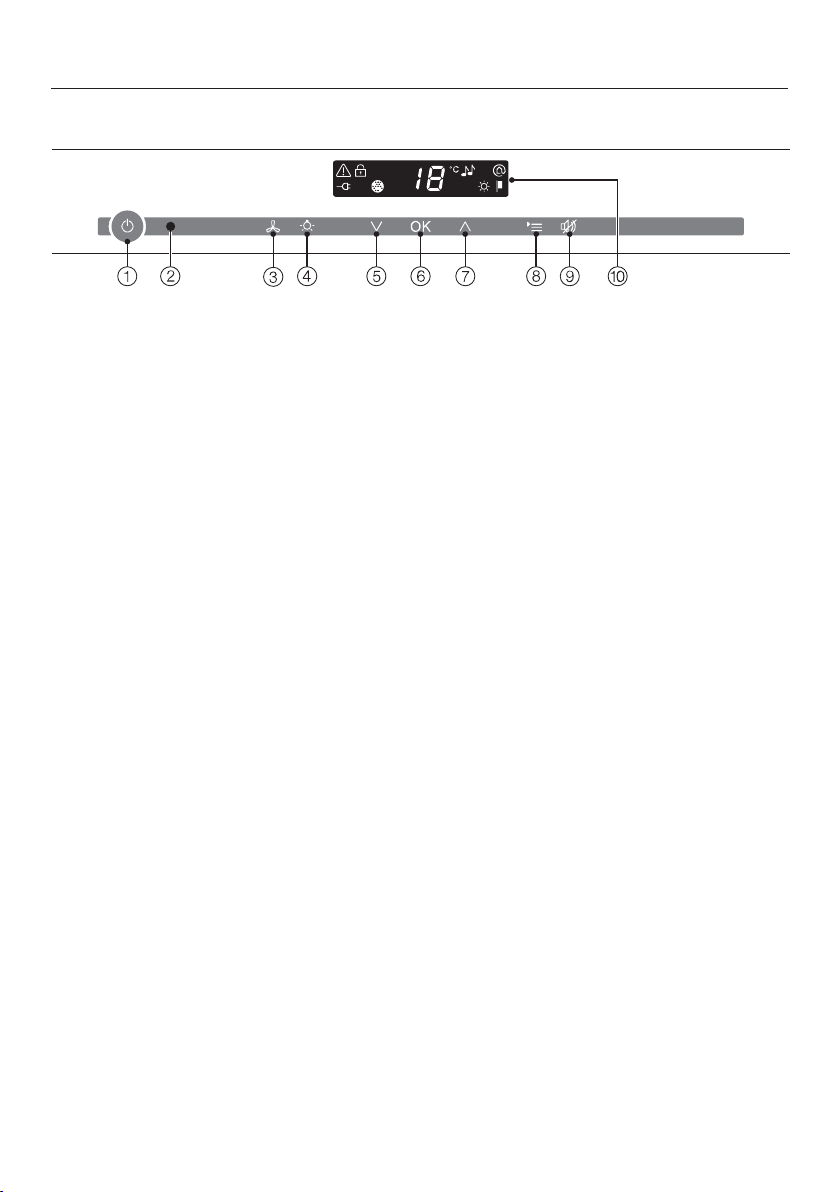
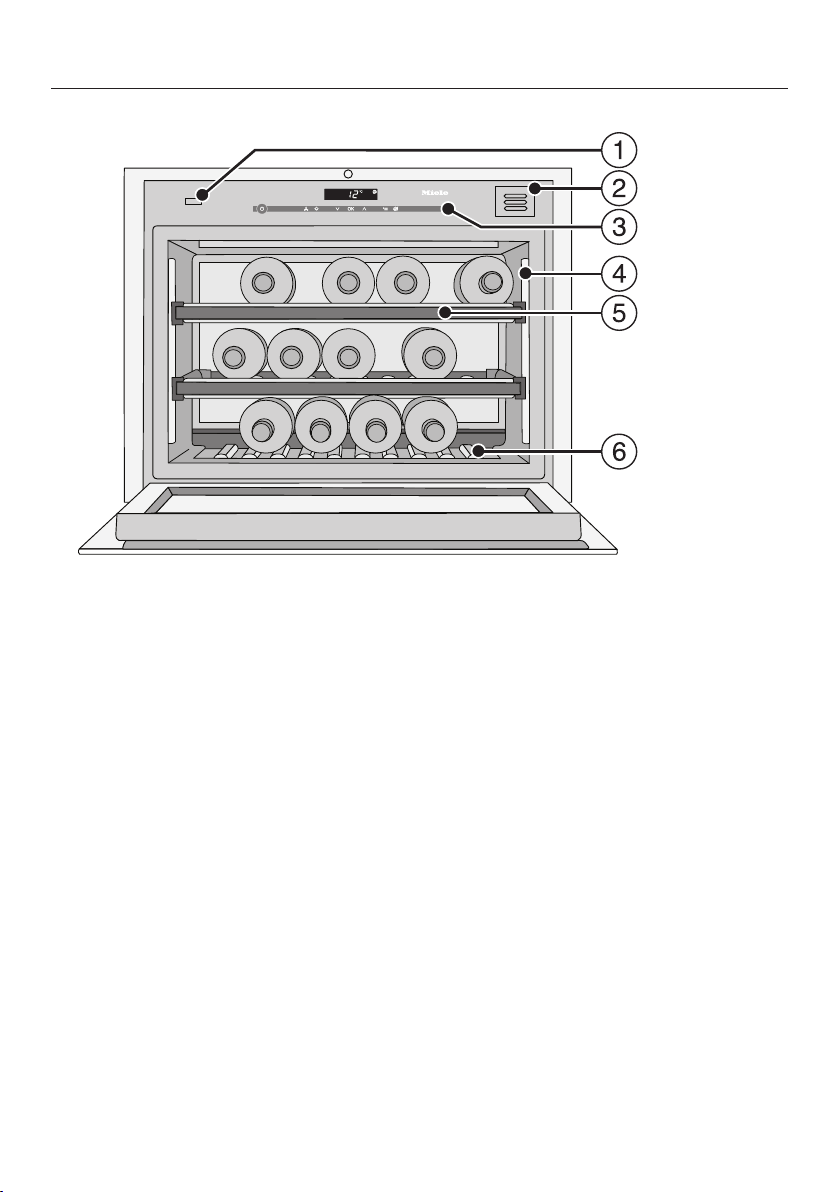
Control panel
a
For switching
the whole wine conditioning unit on and off
b
Optical interface
(for Service technicians only)
c
For switching the DynaCool function (constant humidity) on and off
d
For switching the feature lighting on and off
e
For setting the temperature
( for colder)
f
For confirming a selection (OK sensor)
g
For setting the temperature
( for warmer)
h
For selecting and deselecting settings mode
i
For switching the temperature or door alarm off
j
Display with temperature and symbols (symbols only visible in settings mode;
see chart for an explanation of the symbols)
Guide to the appliance
17
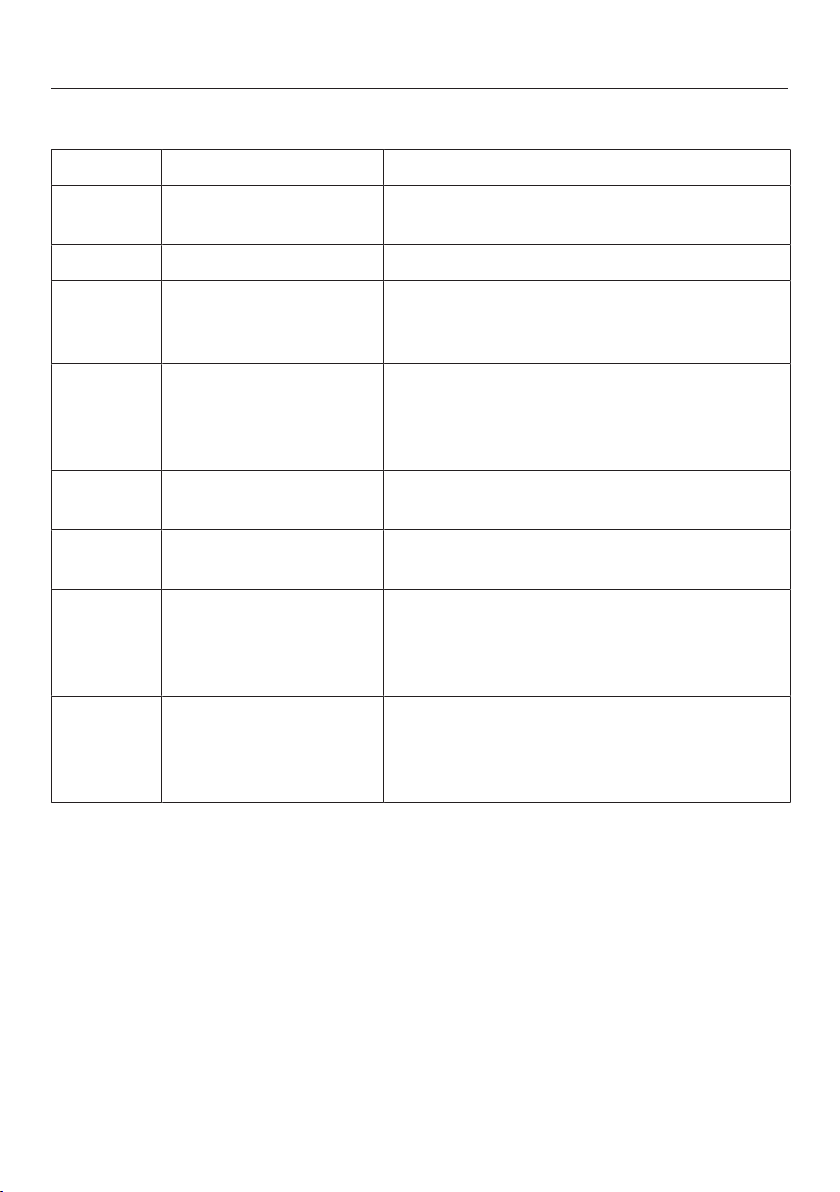
Symbols
Symbol Meaning Function
Lock function To prevent inadvertent switching off and al-
tering of settings
Audible tones Choice of keypad tone and door alarm tone
Miele@home Only visible when a communication module
or communication stick is fitted and signed
on
Demo mode
(only visible when
Demo mode is
switched on)
For switching off Demo mode
Display brightness set-
tings
For adjusting the brightness of the display
Active AirClean filters Lights up when the active charcoal filter
needs changing
Mains connection
(only visible when the
wine conditioning unit
is switched off)
Confirms that the wine conditioning unit is
connected to the electricity supply; flashes
in the event of a power cut
Alarm
(only visible when the
door or temperature
alarm sounds)
Lights up when there is a door alarm;
flashes when there is a temperature alarm,
power cut or other fault
Guide to the appliance
18
a
Door-opening mechanism (Push2open)
b
Active AirClean filter
c
Control panel
d
Lighting
e
Wooden shelves with labels (FlexiFrames with Noteboard)
f
Decor rack
(the decor rack can be taken out.
The data plate is located underneath the decor rack.)
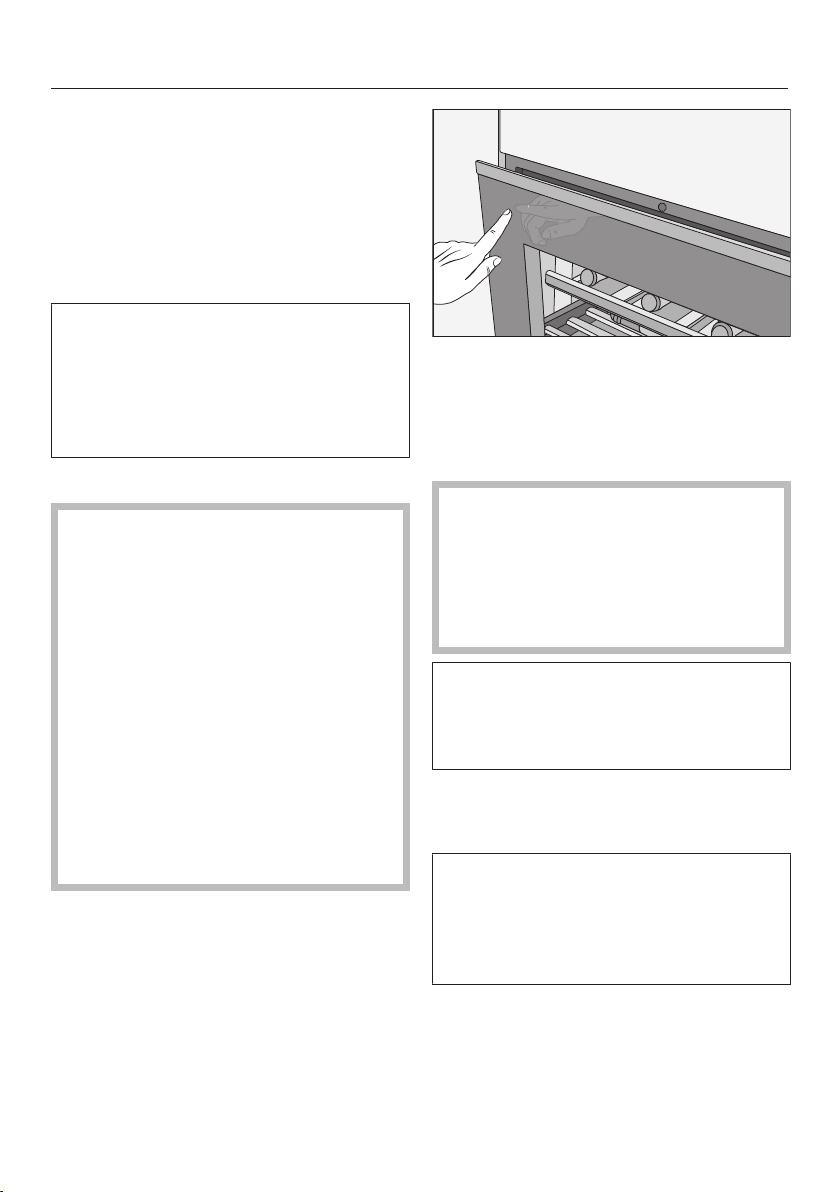
Guide to the appliance
19
Using the door-opening mech-
anism correctly
The Push2open system on your wine
conditioning unit makes it easy to open
the appliance door. The door on your
wine conditioning unit is sensitive to
pressure.
The Push2open system is deactivated
at the factory. The function has to be
activated by touching the On/Off
sensor once the appliance has been
installed in the niche (see “Switching
on and off”).
Opening the appliance door
Risk of damage from incorrect
handling of the door-opening mech-
anism.
Obstructing the appliance door while
opening it, or pushing in or holding
onto the door-opening mechanism
while the door is closing, may cause
damage to the door-opening mech-
anism.
Do not handle the door-opening
mechanism in this way.
To bring the door-opening mechan-
ism into its original position if neces-
sary, remove the plug and reconnect
it again after 5seconds.
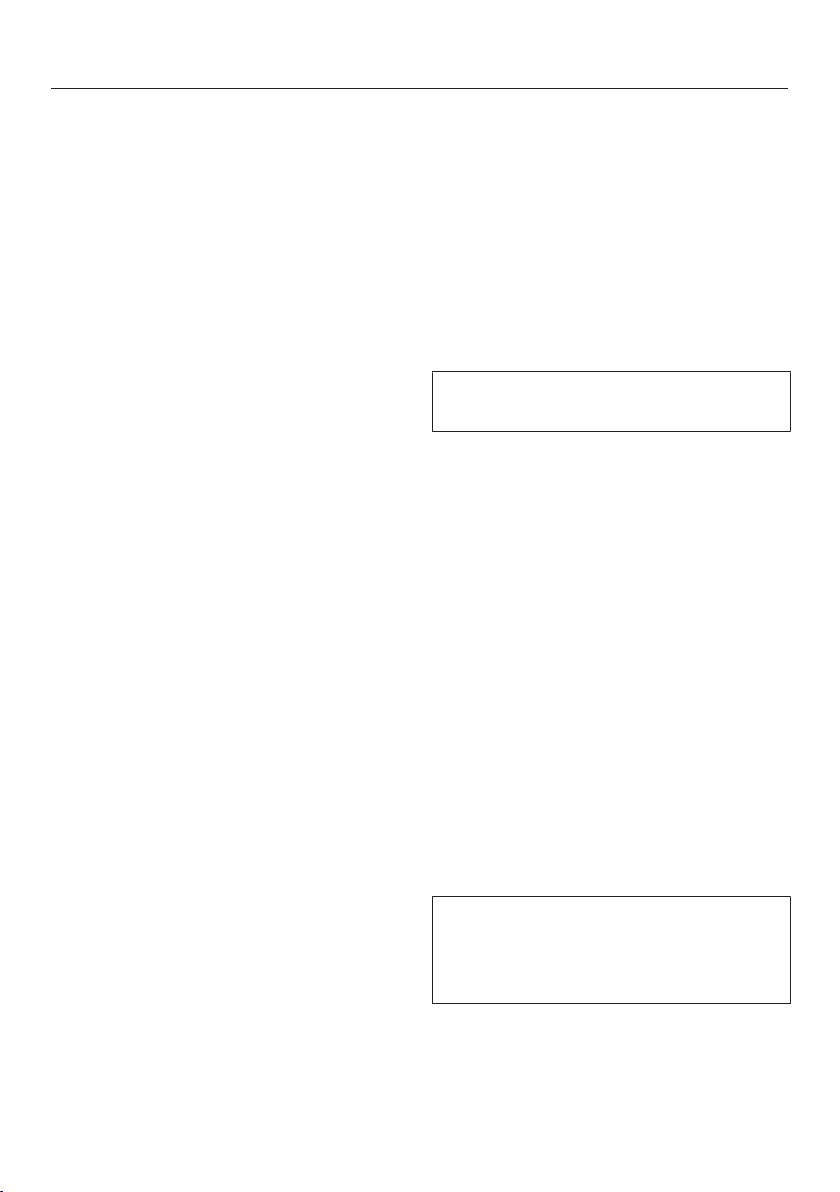
Press briefly against the top left-
hand side of the appliance door
and then release it. The door will then
open a little way automatically.
Then pull the door fully open.
Risk of damage from incorrect
handling of the open appliance door.
Subjecting the door to pressure
when it is open can damage it.
Do not place anything on it whilst
open.
To protect against inadvertent open-
ing, if you do not pull the door open, it
will close again by itself after approx-
imately 3seconds.
Closing the appliance door
Push the door shut.
Please be aware that using magnets in
front of the wine conditioning unit door
can cause it to open by mistake. This
is caused by the door-closing mech-
anism on the wine conditioning unit.
Accessories
20
Accessories supplied
Chalk
Use the chalk to annotate the magnetic
strips on the wooden shelves to identify
your wines quickly and easily.
Active AirClean filter
The Active AirClean filter ensures op-
timum air quality in the wine condition-
ing unit by filtering the incoming air.
Wooden slats for fitting across the
rack
Longer bottles including Magnums can
be stored in the wine conditioning unit
by fitting the longer wooden slats sup-
plied across the rack
Optional accessories
A range of useful Miele accessories and
care products are available for your
wine conditioning unit.
WiFi stick (Miele@home)
The WiFi stick enables your wine condi-
tioning unit to communicate, so that
you can access appliance data at any
time.
The WiFi stick must be fitted by the
Miele Customer Service Department.
Multi-purpose microfibre cloth
The microfibre cloth is suitable for re-
moving fingerprints and light soiling
from surfaces such as stainless steel,
glass, plastic and chrome without the
use of chemicals.
MicroCloth Kit
The MicroCloth Kit contains a universal
cloth, a glass cloth and a polishing
cloth.
These cloths are extremely resistant to
tearing and very robust. Thanks to very
fine microfibres these cloths achieve an
excellent cleaning performance.
Active AirClean filters
See “Accessories supplied”.
Accessories are available to order via
the Miele Webshop, from Miele dir-
ectly (see back cover for contact de-
tails) or from your Miele dealer.
Switching on and off
21
Before using for the first time
Packaging material
Remove all packaging material from
the inside of the appliance.
Protective foil (depending on model)
Stainless steel surfaces have a layer of
protective foil to prevent scratching dur-
ing transportation.
Do not remove the foil until the wine
conditioning unit has been installed in
its final location. Start at one of the
top corners.
Cleaning the wine unit
Please refer to the relevant instruc-
tions in “Cleaning and care”.
Clean the inside of the appliance and
the accessories.
Operating the wine condition-
ing unit
A light touch of the finger on the
sensors is all that is required to operate
this wine conditioning unit.
Every touch of a sensor is confirmed
with an audible tone. This tone can be
switched off (see “Selecting further set-
tings” – “Audible tones ”).
Switching the wine conditioning unit
on
When the wine conditioning unit is con-
nected to the electrical supply, the
mains connection symbol will ap-
pear in the display after a short while.
Touch the On/Off sensor.
The mains connection symbol will
go out and the wine conditioning unit
will start to cool.
The first time the appliance is switched
on, the alarm symbol will flash until
the selected temperature has been
reached.
The interior lighting will come on when
the door is opened.
Switching on and off
22
Switching off
Touch the On/Off sensor.
If this does not work, the safety lock
is still activated.
The temperature display will go out and
the mains connection symbol will
appear.
The interior lighting will go out and the
cooling process will be switched off.
Switching off for longer peri-
ods of time
If the wine unit is not going to be used
for a longer period of time:
Switch the wine unit off.
Switch off at the wall and withdraw
the plug from the socket, or discon-
nect the fuse.
Clean the wine unit.
Leave the door ajar to air the wine
unit and avoid odours building up in-
side it.
If the wine unit is switched off, but
not cleaned, during a long absence
and the door is left shut, there is a
risk of mould building up inside the
appliance.
The wine unit must be cleaned.
Selecting further settings
23
Certain settings on the wine condition-
ing unit can only be selected in settings
mode.
The door alarm is automatically dis-
abled when the appliance is in set-
tings mode.
Safety lock
The safety lock can be activated to pre-
vent:
- the appliance being switched off by
mistake,
- the temperature being changed by
mistake,
- DynaCool being switched on by mis-
take,
- the feature lighting being switched on
by mistake.
Activating or deactivating the safety
lock
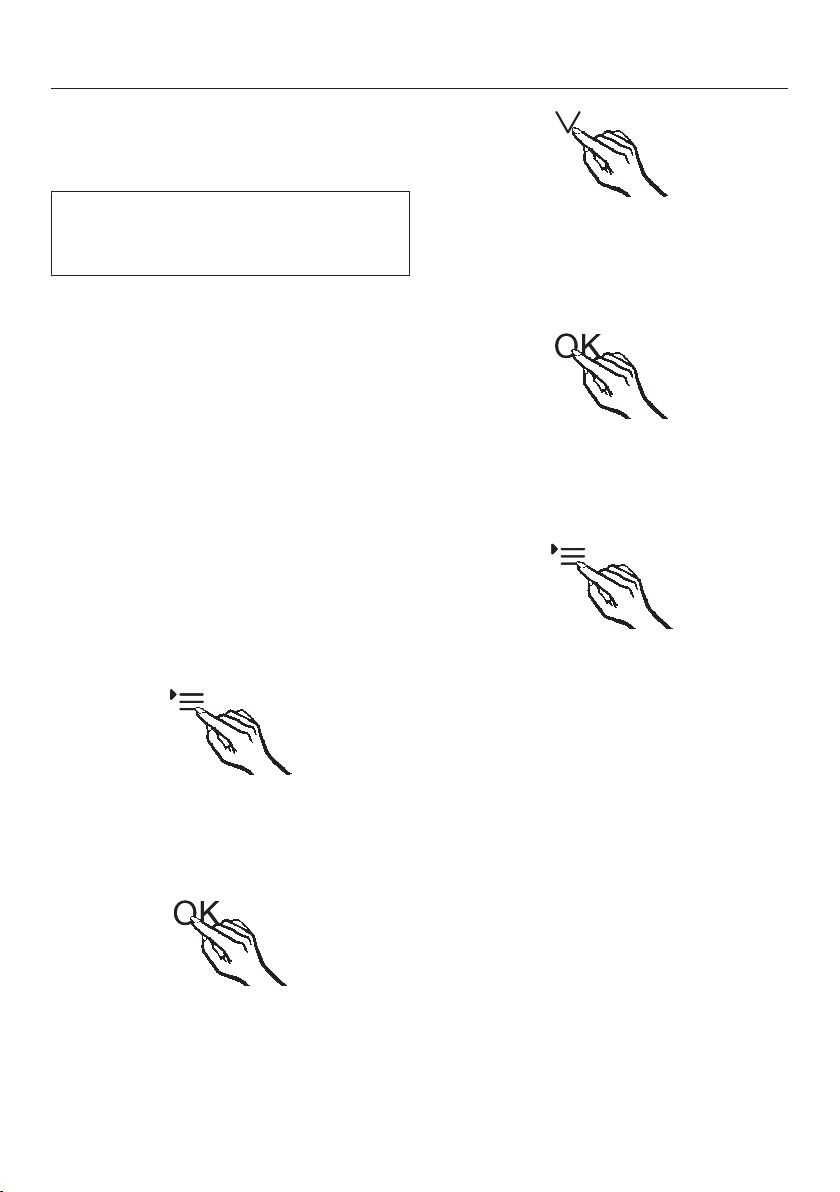
Touch the settings sensor.
All symbols available for selection will
appear in the display and the symbol
flashes.
Touch the OK sensor to confirm your
selection.
The last selected setting flashes and
the symbol lights up in the display.
By touching the or sensor, you
can now select whether the safety
lock is activated or deactivated:
0: the safety lock is deactivated
1: the safety lock is activated
Touch the OK sensor to confirm your
selection.
The selected setting is applied, the
symbol flashes.
Touch the settings sensor to leave
settings mode.
Otherwise the appliance exits set-
tings mode automatically after ap-
proximately one minute.
The symbol will appear in the display
when the lock is activated.
Selecting further settings
24
Audible tones
The wine conditioning unit has audible
tones such as the keypad tone and the
door and temperature alarms.
You can switch the keypad tone or the
door alarm tone on or off but you can-
not deactivate the temperature alarm.
There are four settings to choose from.
Option 3 is set the factory, i.e. the
keypad tone and the door alarm are
switched on.
Switching audible signals on/off
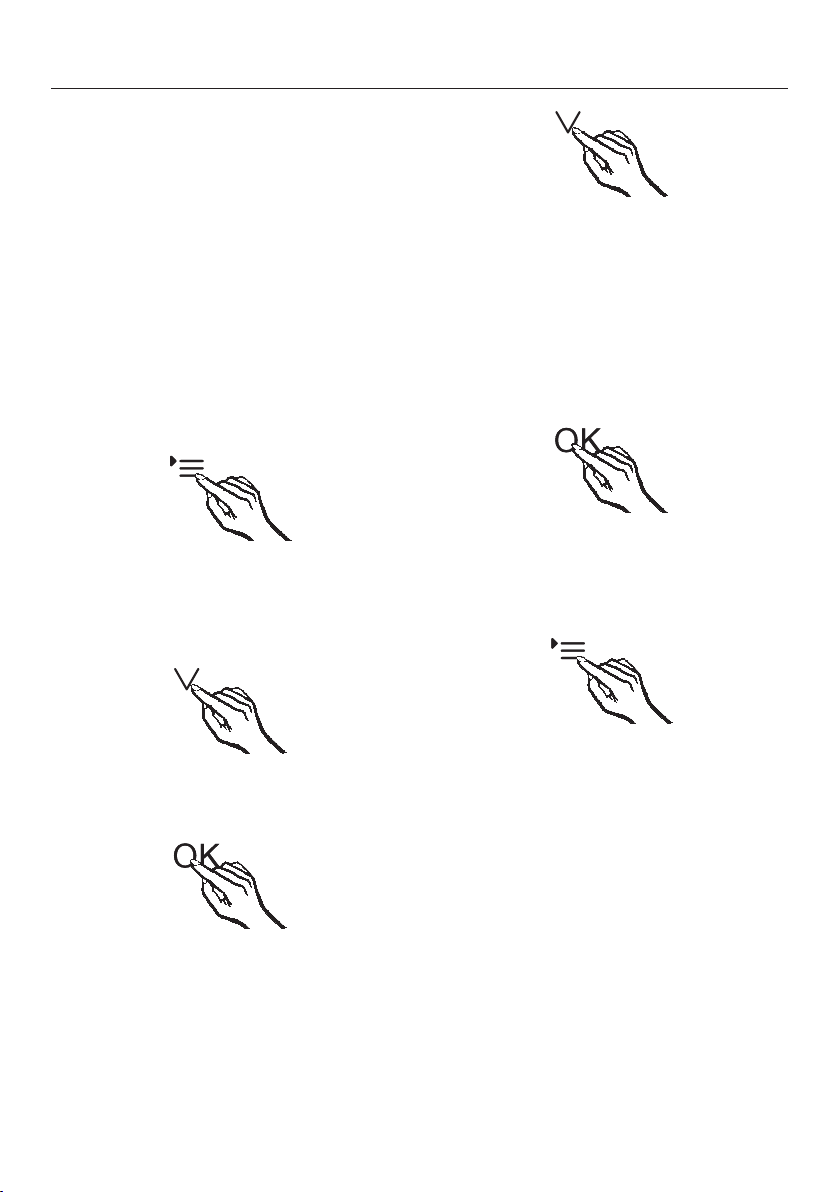
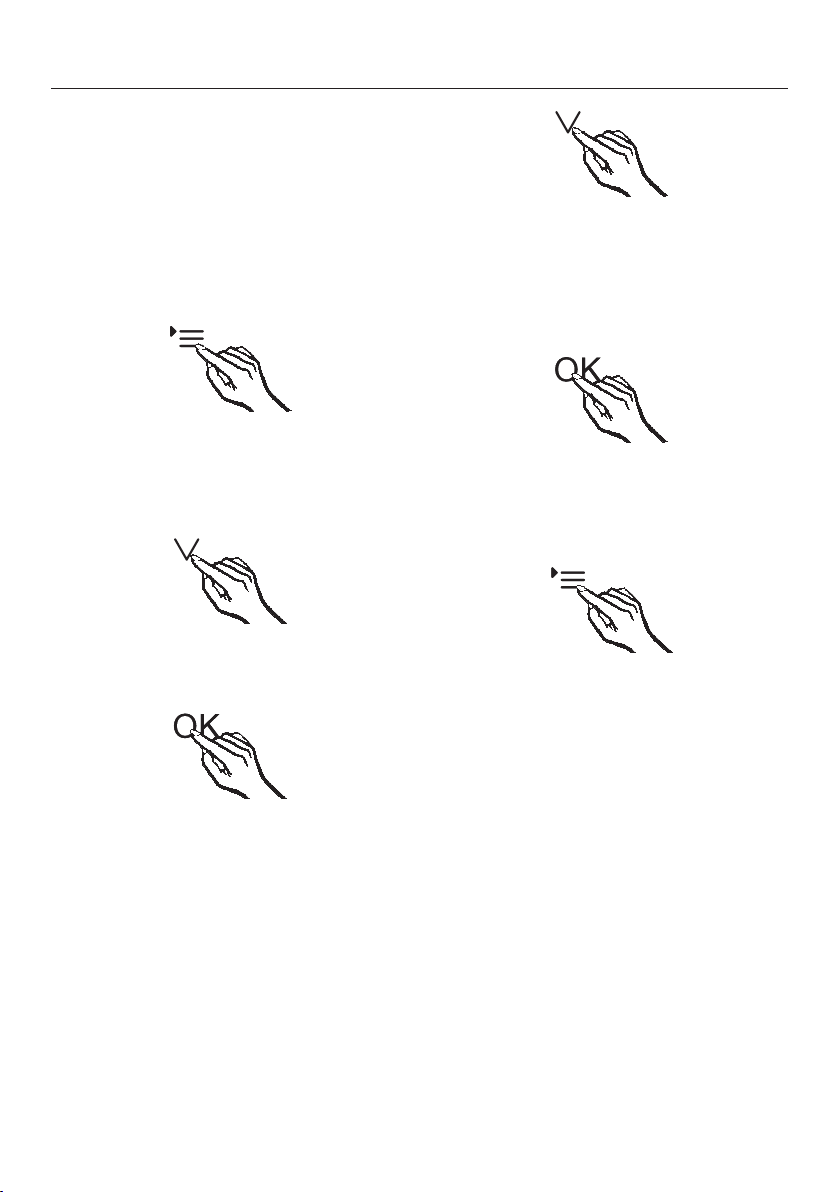
Touch the settings sensor.
All symbols available for selection ap-
pear in the display and the symbol
flashes.
Touch the sensors for setting the
temperature ( or ) repeatedly until
the symbol flashes.
Touch the OK sensor to confirm the
selection.
The most recently selected setting
flashes and the symbol lights up in
the display.
Touch the or sensor now to se-
lect:
0: keypad tone off; door alarm off
1: keypad tone off; door alarm on
(after 4minutes)
2: keypad tone off; door alarm on
(after 2minutes)
3: keypad tone on; door alarm on
(after 2minutes).
Touch the OK sensor to confirm the
selection.
The selected setting is applied, the
symbol flashes.
Touch the settings sensor to exit set-
tings mode.
Otherwise, the appliance electronics
will exit the settings mode automatic-
ally after approximately one minute.
Selecting further settings
25
Display brightness
The display brightness can be adjusted
to suit lighting conditions in the room.
The display brightness can be adjusted
in steps from 1to3. The factory default
setting is 3 (maximum brightness).
Altering the display brightness
Touch the settings sensor.
All symbols available for selection will
appear in the display and the sym-
bol flashes.
Touch the sensors for setting the
temperature ( or ) repeatedly until
the symbol flashes.
Touch the OK sensor to confirm your
selection.
The last selected setting flashes and
the symbol lights up in the display.
By touching the or sensor you
can now alter the brightness of the
display:
1: dimmest setting
2: medium setting
3: brightest setting.
Touch the OK sensor to confirm your
selection.
The selected setting is applied, the
symbol flashes.
Touch the settings sensor to leave
settings mode.
Otherwise the appliance exits set-
tings mode automatically after ap-
proximately one minute.
The optimum temperature and air quality
26
Wine keeps on maturing depending on
the surrounding conditions. The length
of time for which wine can be kept in
good condition will therefore depend
not only on the temperature but also on
the air quality.
The wine conditioning unit with its con-
stant ideal temperature, increased air
humidity and odour free atmosphere of-
fers the perfect conditions for storing
your wine.
It also guarantees a vibration-free envir-
onment (in contrast to a refrigerator) so
that the maturing process is not dis-
turbed.
The optimum temperature
Wine can be stored at a temperature
between 6 and 18°C. If you are storing
white and red wines together, select a
temperature between 12 and 14°C.
This is suitable for both white and red
wines. Red wine should be taken out of
the wine conditioning unit and opened
at least two hours before drinking to al-
low it to breathe and develop its aroma.
At too high a temperature (over 22°C)
wine matures too quickly, which pre-
vents the aromas from developing fur-
ther. Wine cannot mature fully at too
low a temperature (below 5°C).
Fluctuations in temperature put wine
under stress and interrupt the maturing
process. It is therefore very important to
maintain a constant temperature.
Type of wine Recommended
drinking
temperature*
Light, fruity reds: +14°C to +16°C
Full-bodied reds: +18°C
Rosé wines: +8°C to +10°C
Delicate, aromatic
whites:
+8°C to +12°C
Full-bodied or
sweet whites:
+12°C to +14°C
Champagne,
sparkling white
wines, Prosecco:
+6°C to +10°C
* Store the wine 1 or 2°C cooler than
the recommended drinking temperature
as it warms up a little when poured into
the glass.
Tip: Full-bodied reds should be opened
for 2-3 hours before drinking to allow
the wine to breathe and develop its
aroma.

The optimum temperature and air quality
27
Safety device in case of low ambient
temperatures
The appliance is equipped with a safety
thermostat to protect your wine against
a sharp drop in temperature. If the ex-
ternal temperature should fall, a heater
element switches on automatically to
keep the temperature inside as constant
as possible. If the ambient temperature
continues to fall, the appliance switches
itself off automatically.
Setting the temperature
Use the two sensors underneath the
display to set the temperature.
By touching the sensor
- The temperature decreases.
- The temperature increases.
Touch the OK sensor to confirm your
selection
or
wait approximately 5 seconds after
the last touch of a sensor.
The temperature being set will flash in
the display.
The following information shows in the
display while the sensors are being
touched:
- Touching a sensor once: the last
temperature selected flashes.
- Each subsequent touch of the
sensor: adjusts the temperature
shown in 1°C increments.
- Leaving a finger on the sensor
changes the temperature continu-
ously.
A tone will sound (if the sensor tone
is switched on) when the lowest or
highest possible temperature is
reached.
Approximately 5 seconds after the last
time a sensor has been touched, the
current temperature inside the wine
conditioning unit is automatically
shown.
When the temperature is altered, there
is a short delay until the temperature
selected is set.
The temperature display on the control
panel always shows the actual tem-
perature.
The optimum temperature and air quality
28
Temperature range
The temperature can be set between 5
°C and 20 °C.
Temperature display
In normal operation the temperature
display shows the actual temperature in
the appliance.
If the temperature is not within the
range that the appliance is able to dis-
play, dashes will light up in the temper-
ature display.
Depending on the ambient temperature
and the temperature setting, it can take
the appliance a few hours to reach the
temperature required and for this tem-
perature to then be shown as a con-
stant temperature in the display.
Air quality and humidity
In most refrigerators the humidity is too
low for wine and therefore a refrigerator
is not suitable for wine storage. High
humidity levels are necessary when
storing wine to moisten corks from the
outside. When the humidity is too low
the corks dry out and the bottle is no
longer tightly sealed. For this reason
wine bottles should always be stored
horizontally to ensure that corks are
also kept moist from the inside. If air
gets into the bottle, this will have a neg-
ative impact on the wine!
Danger of damage from excess
amounts of moisture
An increase in humidity will lead to
condensation on the interior walls.
Condensate can cause damage such
as corrosion to the wine unit.
Do not introduce additional moisture
to air in the cabinet, e.g. by placing a
dish of water in the wine unit.
The optimum temperature and air quality
29
Using
DynaCool (constant humidity)
DynaCool raises the relative humidity
inside the whole of the wine condition-
ing unit. It also distributes the humidity
and the temperature evenly around the
interior so that you can store all your
wine under the same excellent condi-
tions.
This will create a stable climate in the
unit which imitates that of a wine cel-
lar.
Switching on DynaCool
If you would like to use the wine condi-
tioning unit to store wine over the long
term, we recommend that you keep the
DynaCool function switched on.
Touch the sensor to switch the
DynaCool function on/off. The sensor
will be highlighted in yellow.
Even if DynaCool has not been
switched on, the fans in the wine con-
ditioning unit will come on automatic-
ally as soon as the cooling system
switches on. This ensures the op-
timum climate for your wine is main-
tained.
The fans automatically switch off
when the door is open.
Switching off DynaCool
The wine conditioning unit uses
slightly more energy and is a little
noisier when the DynaCool function is
switched on. You can switch it off now
and then if you wish.
Touch the sensor for switching the
DynaCool function on and off so that
it is no longer highlighted in yellow.

The optimum temperature and air quality
30
Air filtration with the Active AirClean
filter
The Active AirClean filter achieves op-
timum air quality by filtering the incom-
ing air.
Fresh air from the room enters the ap-
pliance via the Active AirClean filter.
The fans (DynaCool function) then dis-
tribute the air evenly throughout the
cabinet.
Filtering the incoming air through the
Active AirClean filter ensures that all the
air entering the appliance is fresh and
free from dust and odours.
This also ensures your wine does not
absorb any unwanted odours through
the corks.
Replace the Active AirClean filter regu-
larly. The symbol will appear in the
display to remind you (see “Active
AirClean filter”).
Temperature and door alarm
31
This wine conditioning unit is equipped
with an alarm system so that the tem-
perature cannot rise or fall unnoticed,
thus possibly damaging the wine.
Temperature alarm
If the temperature becomes too warm
or too cold, the alarm symbol will
flash in the display.
An alarm will also sound.
Audible and visual signals will be activ-
ated, for example,
- when the wine conditioning unit is
switched on if the temperature differs
greatly from the set temperature,
- when too much warm ambient air
enters the cabinet when bottles are
being rearranged or taken out,
- when a large number of bottles are
stored for the first time,
- in the event of a power cut.
The alarm will stop and the alarm sym-
bol will go out as soon as the tem-
perature has dropped down to the cor-
rect level again.
Switching the temperature alarm off
early
If the noise disturbs you, you can
switch the alarm off if you wish.
Touch the sensor for switching off the
temperature alarm.
The alarm will stop.
The alarm symbol will continue to
flash until the set temperature has been
reached.
Temperature and door alarm
32
Door alarm
An alarm will sound if the door has been
left open for longer than 2 minutes. The
alarm symbol will light up in the dis-
play.
The alarm will stop and the alarm sym-
bol will go out as soon as the door
is closed.
Switching the door alarm off early
If the noise disturbs you, you can
switch the alarm off if you wish.
Touch the sensor for switching off the
door alarm.
The alarm sound will stop.
The alarm symbol will continue to be
lit up until the door is closed.
If the alarm does not sound in the
event of a door alarm, then the audible
tone has been switched off in settings
mode (see “Selecting further settings -
Audible tones”).
Feature lighting
33
The interior lighting can be set to re-
main on when the door is closed so
your wines can be on display at all
times.
Thanks to the use of LED lighting, the
wine will not be adversely affected by
heat or UV light.
Switching the feature lighting
on and off
Touch the On/Off sensor for the fea-
ture lighting so that it is highlighted in
yellow.
The interior lighting is now switched on,
even when the appliance door is
closed.
To switch the feature lighting off
again:
Touch the On/Off sensor for the fea-
ture lighting so that it is no longer
highlighted in yellow.
The interior lighting is now switched off
when the appliance door is closed.
Setting the brightness of the feature
lighting
The brightness of the feature lighting
can be adjusted.
Touch the On/Off sensor for the fea-
ture lighting so that it is highlighted in
yellow.
Touch the sensor for the feature light-
ing again for approximately four
seconds until flashes in the display
(after two seconds will flash).
Use the sensors for altering the tem-
perature to set the feature lighting
brightness(and). To do this,
touch and hold the sensors. The
brightness is adjusted directly and is
infinitely variable. The results are not
visible in the display.
By touching the sensor
- the lighting becomes dimmer
- the lighting becomes brighter.
Feature lighting
34
Touch the OK sensor to confirm your
choice.
The set brightness is saved to memory.
The temperature display then appears
again.
As soon as the appliance door is
closed, the set brightness for the fea-
ture lighting takes effect. When the ap-
pliance door is opened, the interior
lighting returns to its normal level.
Lighting duration of the feature light-
ing
The lighting duration for the feature
lighting is set to 30minutes as stand-
ard.
The lighting duration can be set to 30,
60, 90minutes up to 00 (unlimited). The
feature lighting will have the brightness
setting you have selected previously.
Open the appliance door.
Touch the On/Off sensor for the fea-
ture lighting so that it is highlighted in
yellow.
Touch the sensor for the feature light-
ing again for approx. two seconds
until flashes in the display.
Use the and sensors for altering
the temperature to set the feature
lighting duration.
The duration (in minutes) will flash in
the display.
By touching the sensor
- lighting duration is reduced by
30minutes
- lighting duration is increased by
30minutes.
Touch the OK sensor to confirm your
choice.
The selected lighting duration is saved
and the temperature reappears in the
display.
The lighting duration set starts anew
whenever the appliance door is opened
and closed.
Risk of injury from LED lighting.
This lighting corresponds to risk
group RG2. If the cover is defective,
there is a risk of eye injury.
If the lighting cover is defective, do
not look from a close range directly
into the lighting with optical instru-
ments (e.g. magnifying glass or sim-
ilar).
Storing wine bottles
35
Vibration and movement have a negat-
ive effect on the maturing process,
which can in turn affect the taste of the
wine.
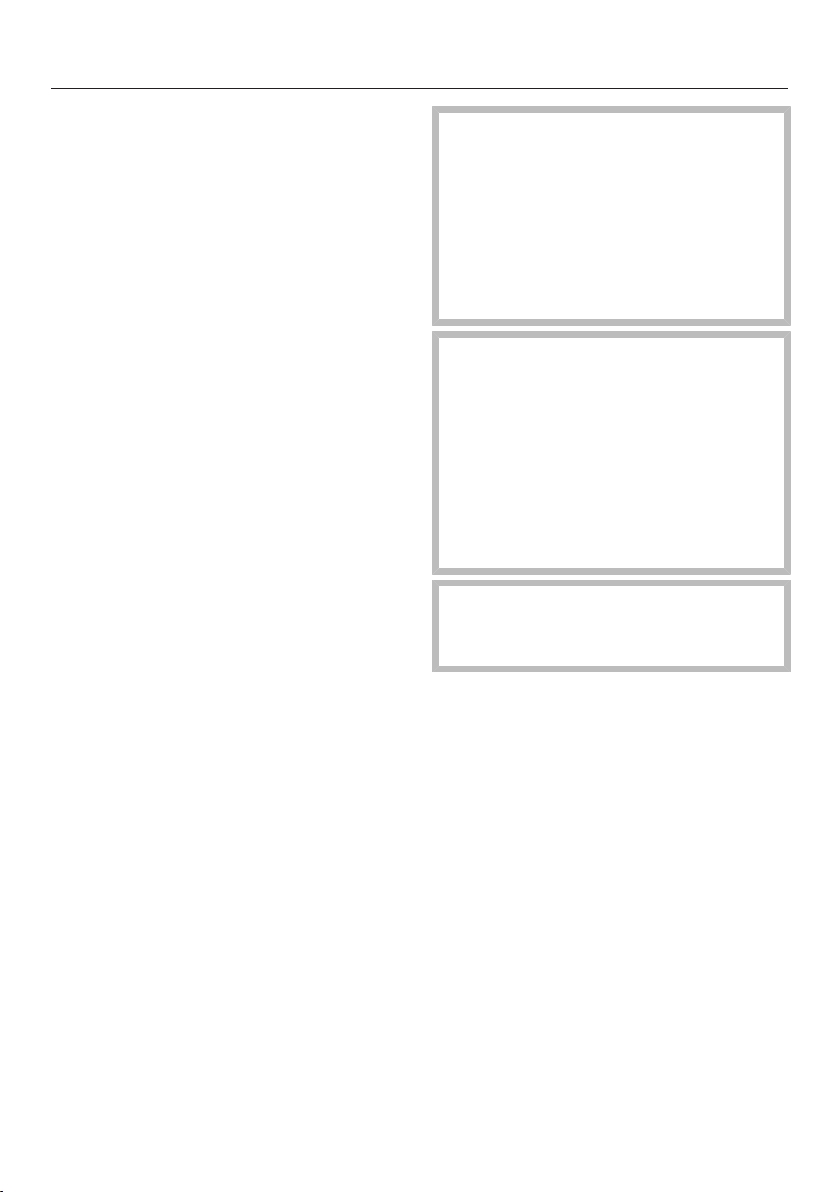
To avoid disturbing other bottles when
removing a bottle of wine, store bottles
of the same type beside each other on
the same shelf. Avoid stacking bottles
on top of one another on the wooden
shelves.
Always place the bottles in a horizontal
position so that the natural corks can
be kept moist on the inside and air is
prevented from getting into the bottles.
Tip: We also recommend increasing the
humidity level inside the wine condition-
ing unit for wine bottles with natural
corks (see “The optimum temperature
and air quality – Using DynaCool (con-
stant humidity)”).
Risk of injury from falling wine
bottles.
Wine bottles may become wedged in
the wooden shelves above and fall
out of the wine conditioning unit
when the shelves are pulled out.
Always pull out the wooden shelves
slowly and carefully.
Risk of damage and injury from
broken glass.
If wooden shelves and bottles pro-
trude too far forwards, they may
damage the glass door when it is
closed.
Please ensure that the wooden
shelves and wine bottles do not pro-
trude.
Do not cover the vents in the rear
wall, as they are essential for keeping
the appliance cool.
Storing wine bottles
36
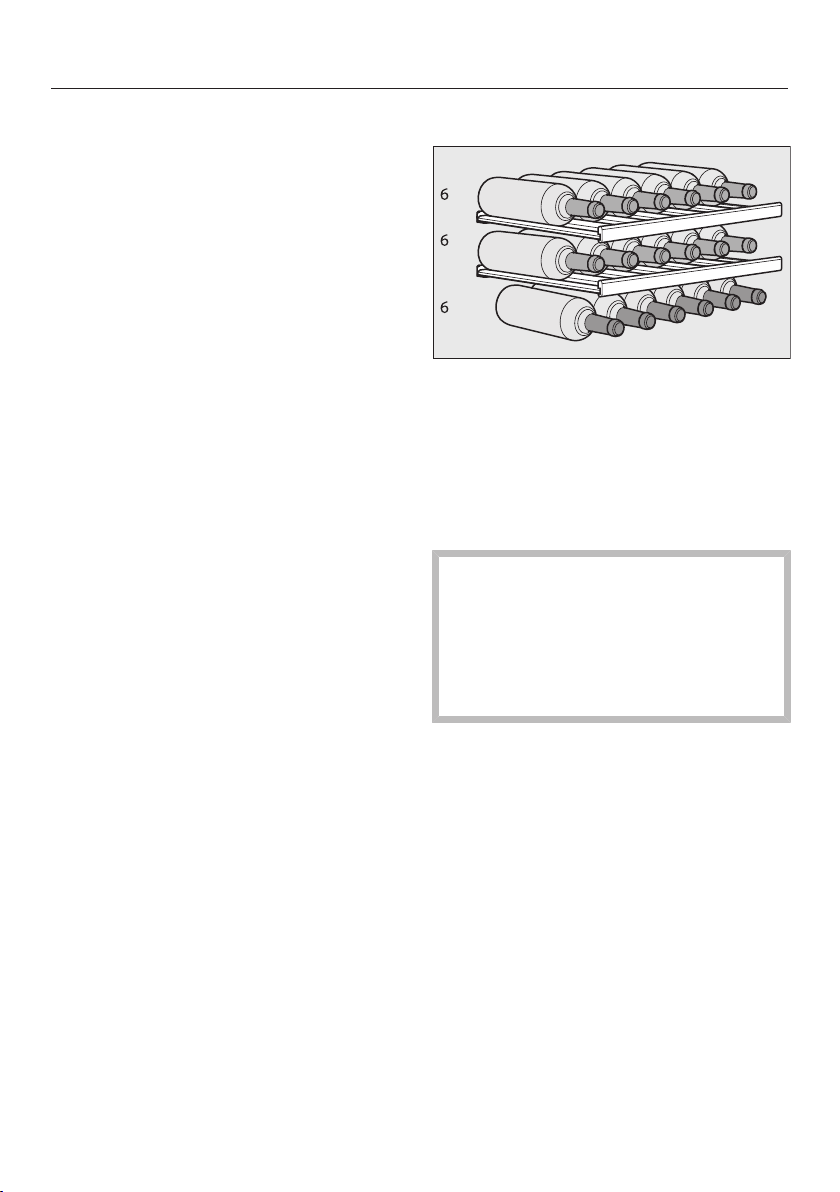
Maximum stacking height for
wine bottles in the cabinet
Wine bottles stored in the wine unit
must not exceed the following heights
(bottles laid flat):
Max. height
Bottles stored
lengthways
(standard)
310mm
Bottles stored
across the appli-
ance
(see “Storing wine
bottles across the
appliance”)
437mm
Wooden shelves
The wooden shelves are on telescopic
runners which can be pulled out to
make it easier to store and remove
bottles.
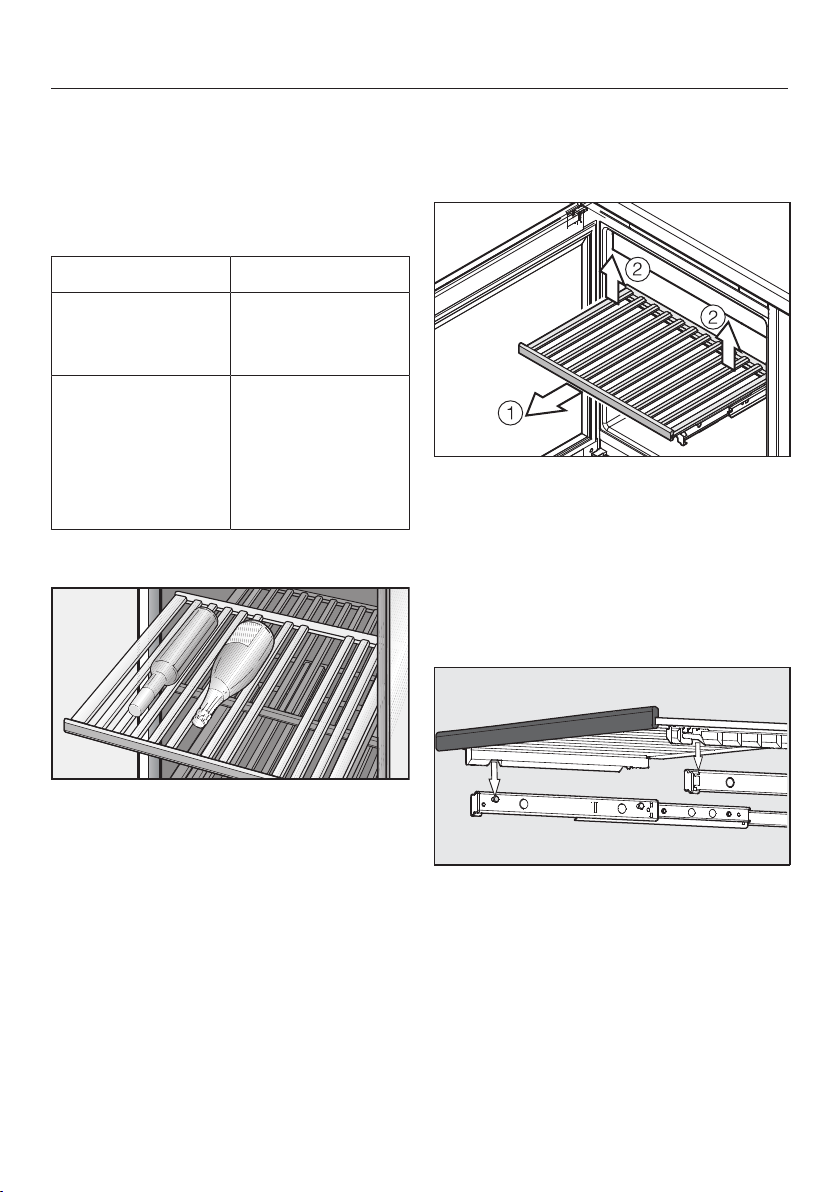
Moving the wooden shelves
The wooden shelves can be removed
and replaced again if required.
Pull the wooden shelf out until it
stops .
Release the wooden shelf at the
back, lifting the shelf on the left and
right at the same time .
Lift the wooden shelf forwards to re-
move it.
To replace the shelf, place it on the
extended rails. The notches in the
wooden shelf fit onto the retaining
bolts. The magnetic strip must face
the front.
Storing wine bottles
37
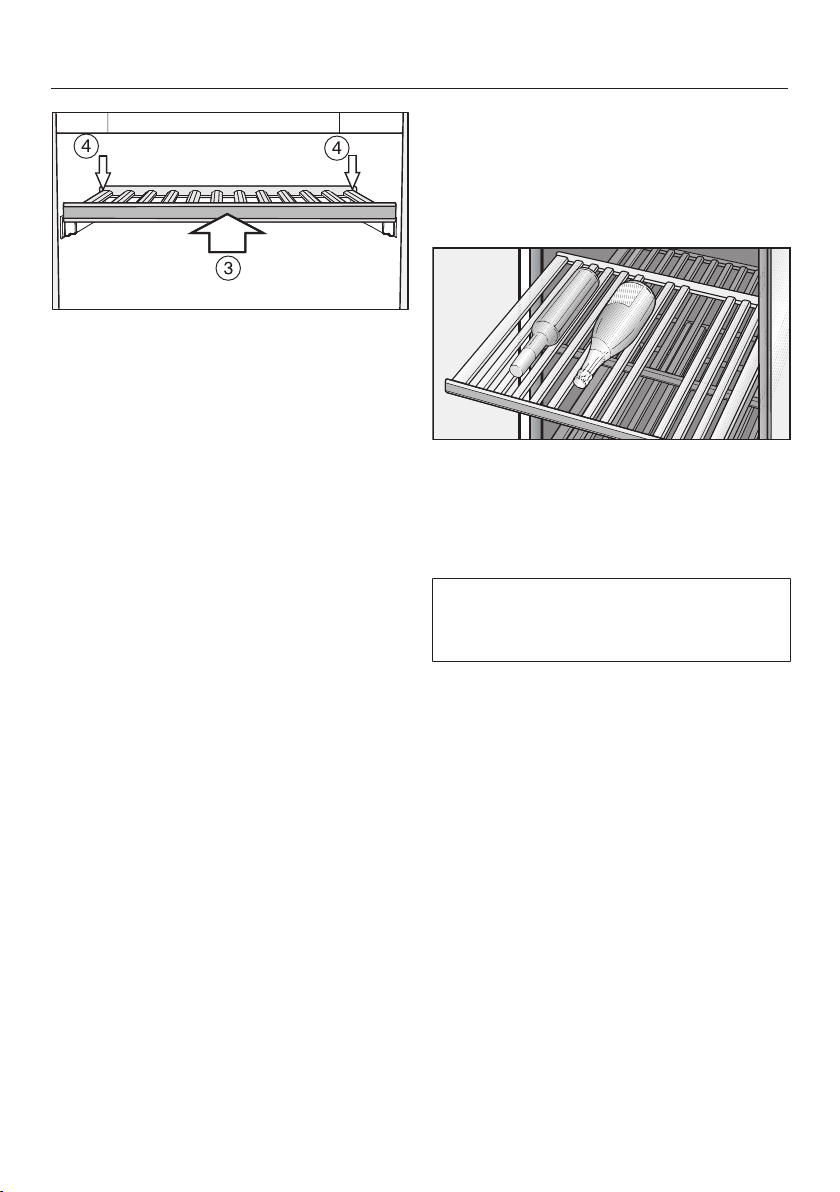
Slide the wooden shelf back into the
appliance as far as it will go .
Push the wooden shelf right back so
that it clicks into place at the front.
Press down on the back of the
wooden shelf until it clicks into place
at the back .
Adjusting the wooden shelves
The slats in the wooden shelves can be
adjusted to suit the size of the bottles
being stored. This way, each bottle can
be held securely in position.
Simply lift individual slats to move or
remove them from the wooden
shelves. This makes it easy to adjust
the wooden shelf to suit the size of
your wine bottles.
The slats in the decor shelf (at the bot-
tom of the appliance) cannot be adjus-
ted.
Storing wine bottles
38
Storing wine bottles across the appli-
ance
Longer bottles including Magnums can
be stored in the wine unit by fitting the
longer wooden slats supplied across
the shelf.
Please note that wine bottles stored
lying down across the wine unit must
not exceed a height of 437mm.
Remove all slats from the wooden
shelf and replace them with the slats
designed for going across the shelf.
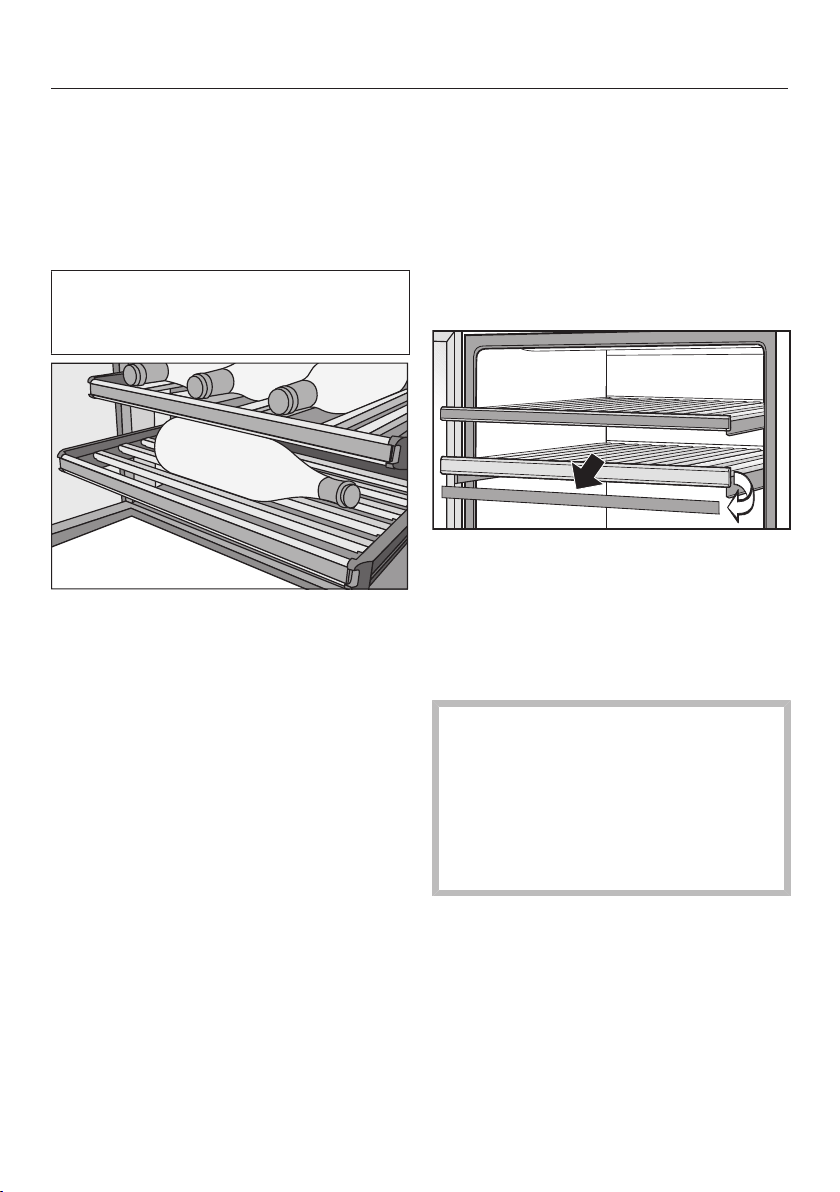
Annotating wooden shelves
For quick and easy identification of the
wines stored, you can write on the
blackboard-painted surface on the
magnetic strips on the wooden shelves.
Use the chalk supplied. You can write
directly on the magnetic strip or remove
it from the wooden shelf. To do so:
Hold the magnetic strip by the sides
and pull it forwards. The magnetic
strip is held on the wooden shelf by
magnets.
The magnetic strip can be wiped
clean with a damp cloth.
Risk of damage from unsuitable
cleaning methods.
Cleaning the magnetic strips with a
cleaning agent may damage the
blackboard surface on them.
Use clean water only to wipe the
magnetic strips.
Annotate the magnetic strip with the
chalk supplied and replace it on the
front of the wooden shelf.
Storing wine bottles
39
Inserting the decor shelf
Place the decor shelf at the very bot-
tom of the appliance (see “Descrip-
tion of the appliance”).
Maximum capacity
Up to 18 Bordeaux bottles (0.75l, max.
bottle height: 310mm) can be stored in
the wine conditioning unit.
The maximum number of bottles can
only be achieved by using all of the
wooden shelves (but not when using
the slats that fit across the shelves).
Risk of damage from overloading
the wooden shelves.
Loading a wooden shelf with more
than 25kg may damage it.
Avoid stacking bottles in more than
two layers.

Automatic defrosting
40
The wine conditioning unit defrosts
automatically.
Cleaning and care
41
Do not let water get into the elec-
tronic unit or the lighting.
Risk of damage due to moisture
ingress.
The steam from a steam cleaner can
damage plastic and and electrical
components.
Do not use a steam cleaner to clean
the wine conditioning unit.
The data plate located inside the wine
conditioning unit must not be re-
moved. It contains information which
is required in the event of a service
call.
Cleaning agents
To avoid damaging the surfaces of your
appliance, do not use
- Cleaning agents containing soda,
ammonia, acids or chlorides
- Cleaning agents containing descaling
agents
- Abrasive cleaning agents (e.g. scour-
ing powder, scouring liquid or pumice
stones)
- Cleaning agents containing solvents
- Stainless steel cleaning agents
- Dishwasher cleaner
- Oven sprays
- Glass cleaner (except on the glass in
the appliance door)
- Hard, abrasive sponges and brushes
(e.g. pot scourers)
- Eraser stain remover blocks
- Sharp metal scrapers
Cleaning and conditioning agents
used inside the wine conditioning
unit must be food safe.
We recommend using lukewarm water
with a little washing-up liquid for clean-
ing.
Cleaning and care
42
Before cleaning the wine unit
Switch the wine unit off.
Take any wine bottles out of the wine
unit and store them in a cool place.
Take out all other removable parts for
cleaning.
Remove the magnetic strips from the
wooden shelves before cleaning
them.
Interior, accessories and appli-
ance door
Clean the wine conditioning unit at
least once a month.
Remove soiling immediately to pre-
vent it from drying on.
Clean the interior with a solution of
lukewarm water and a little washing-
up liquid.
The wooden shelves should only be
wiped with a well wrung-out damp
cloth. They must not be allowed to
get wet.
Risk of damage due to incorrect
cleaning.
The blackboard coating on the mag-
netic strips may be damaged.
Use clean water only to wipe the
magnetic strips at the front of the
wooden shelves. Do not use a clean-
ing agent.
After cleaning, wipe the interior and
accessories with a damp cloth and
dry with a soft cloth. Leave the door
open to air the wine conditioning unit
for a short while.
Clean the glass panes in the appli-
ance door with glass cleaner.
Stainless steel appliances
The stainless steel surface on the appli-
ance front has a special high-quality fin-
ish (CleanSteel). It is resistant to soiling
and is very easy to clean.
Risk of damage as a result of in-
correct cleaning.
The front finish (CleanSteel) will be
damaged.
Do not use stainless steel cleaning
agent on this surface.
Do not use the Miele stainless
steel conditioning agent on these
surfaces. This will cause noticeable
streaks.
Cleaning and care
43
Cleaning the ventilation gaps
A build-up of dust will increase the en-
ergy consumption of the appliance.
The ventilation gaps should be
cleaned on a regular basis with a
brush or vacuum cleaner (you could
use a Miele vacuum cleaner dusting
brush, for example).
Cleaning the door seal
Risk of damage as a result of in-
correct cleaning.
If you treat the door seal with oils or
grease, it can become porous.
Do not use any oils or grease on the
door seal.
The door seal should be cleaned reg-
ularly with clean water, and then
wiped dry with a soft cloth.
After cleaning
Replace all shelves and accessories
in the wine conditioning unit.
Reconnect to the mains and switch
the wine conditioning unit back on.
Place the wine bottles back in the
wine conditioning unit and close the
appliance door.
Active AirClean filters
44
Fresh air from the room enters the wine
conditioning unit through the Active
AirClean filter. Filtering the incoming air
through the Active AirClean filter en-
sures that all the air entering the appli-
ance is fresh and free from dust and
odours.
The reminder to change the Active
AirClean filter will appear every 12
months at the latest.
When the Change Active AirClean filter
symbol lights up in the display, the
Active AirClean filter needs to be
changed.
Replacing the Active AirClean
filter
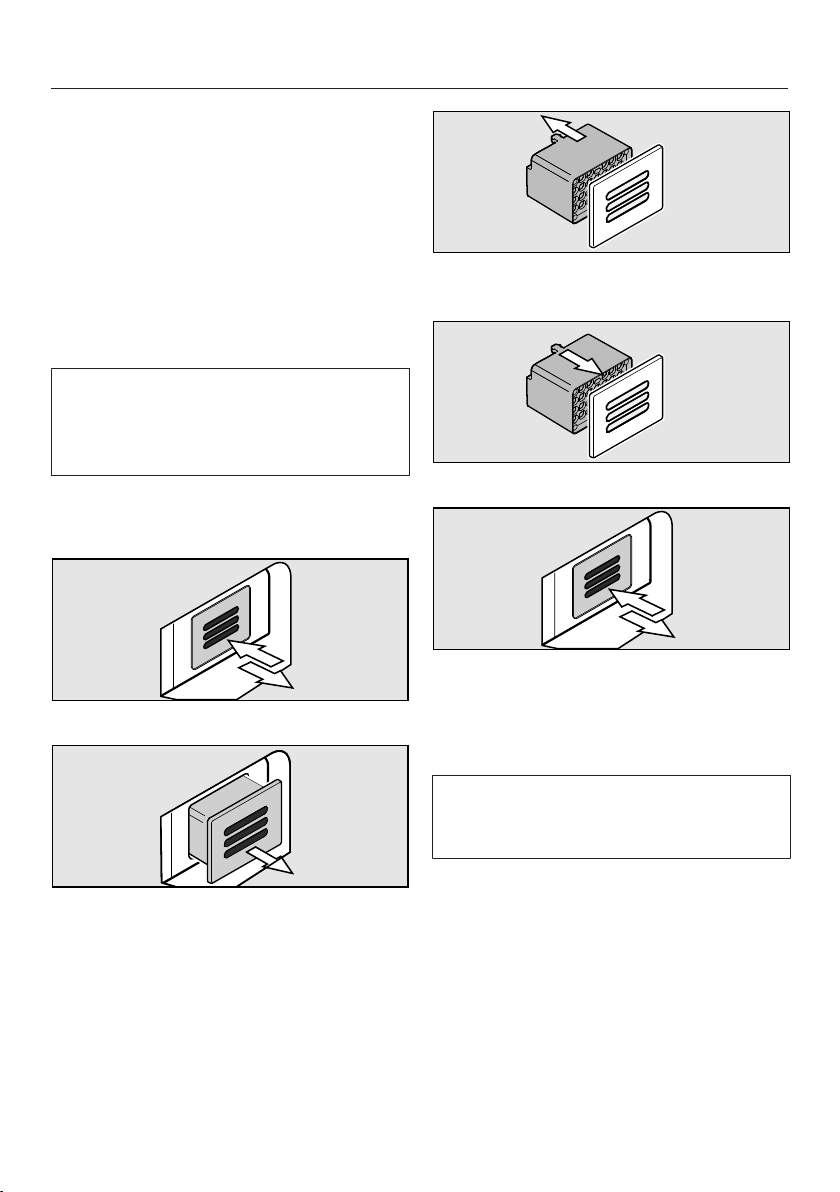
Push the filter in and then release it.
Pull the filter out.
Detach the back part of the filter from
the cover.
Push the new filter onto the cover.
Insert the new filter.
Push the filter in and then release it.
The filter will lock into place automat-
ically with an audible click.
Active AirClean filters can be obtained
from your Miele dealer, Miele or from
the Miele website.
Active AirClean filters
45
To confirm the filters have been
changed
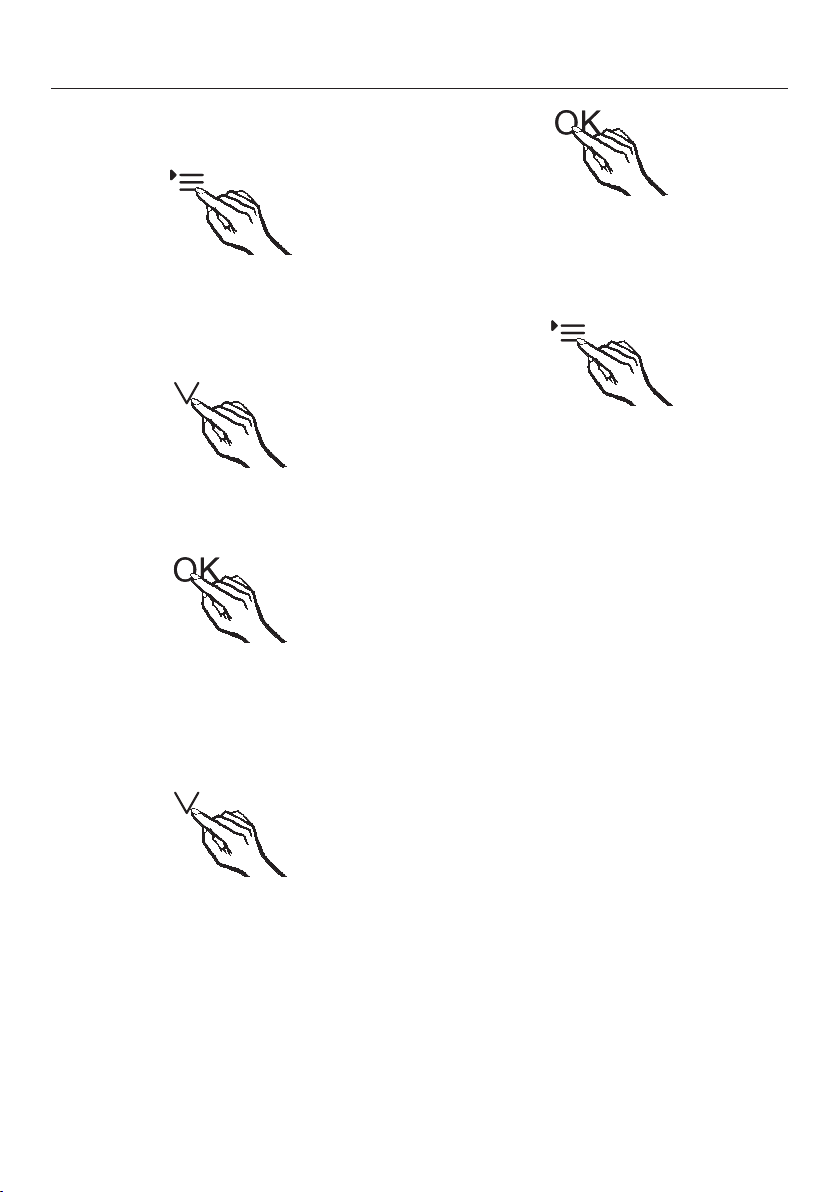
Touch the settings sensor.
All symbols available for selection will
appear in the display and the symbol
flashes.
Touch the sensors for setting the
temperature ( or ) repeatedly until
the symbol flashes.
Touch the OK sensor to confirm your
selection.
The will flash in the display (means:
Active AirClean filter is fitted in the ap-
pliance), the symbol lights up.
Touch the symbols for setting the
temperature ( or ) repeatedly, until
the symbol is displayed (means: the
counter has been reset).
Touch the OK sensor to confirm your
selection.
The selected setting is applied, the
symbol flashes.
Touch the settings sensor to leave
settings mode.
Otherwise the appliance exits set-
tings mode automatically after ap-
proximately one minute.
The in the display goes out.
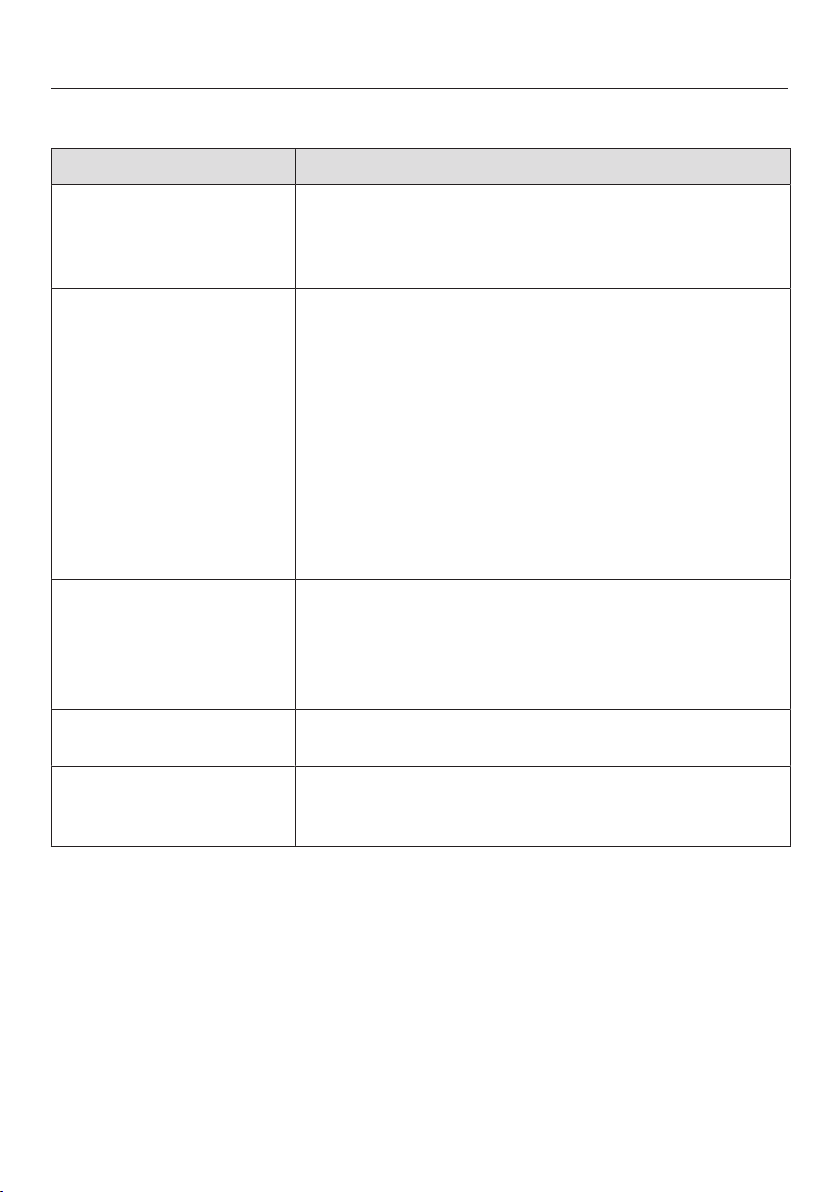
Problem solving guide
46
Many malfunctions and faults that can occur in daily operation can be easily
remedied. Time and money will be saved because a service call will not be
needed.
The following guide may help you to find the reason for a malfunction or a fault,
and to correct it.
Some minor problems can be corrected without contacting Miele.
If, having followed the suggestions below, you still cannot resolve the problem,
please contact Miele.
To prevent unnecessary loss of temperature it is advisable not to open the door
while waiting for the wine conditioning unit to be serviced.
Unauthorised installation, maintenance and repairs can cause considerable
danger for the user.
Installation, maintenance and repairs must only be carried out by a Miele au-
thorised technician.
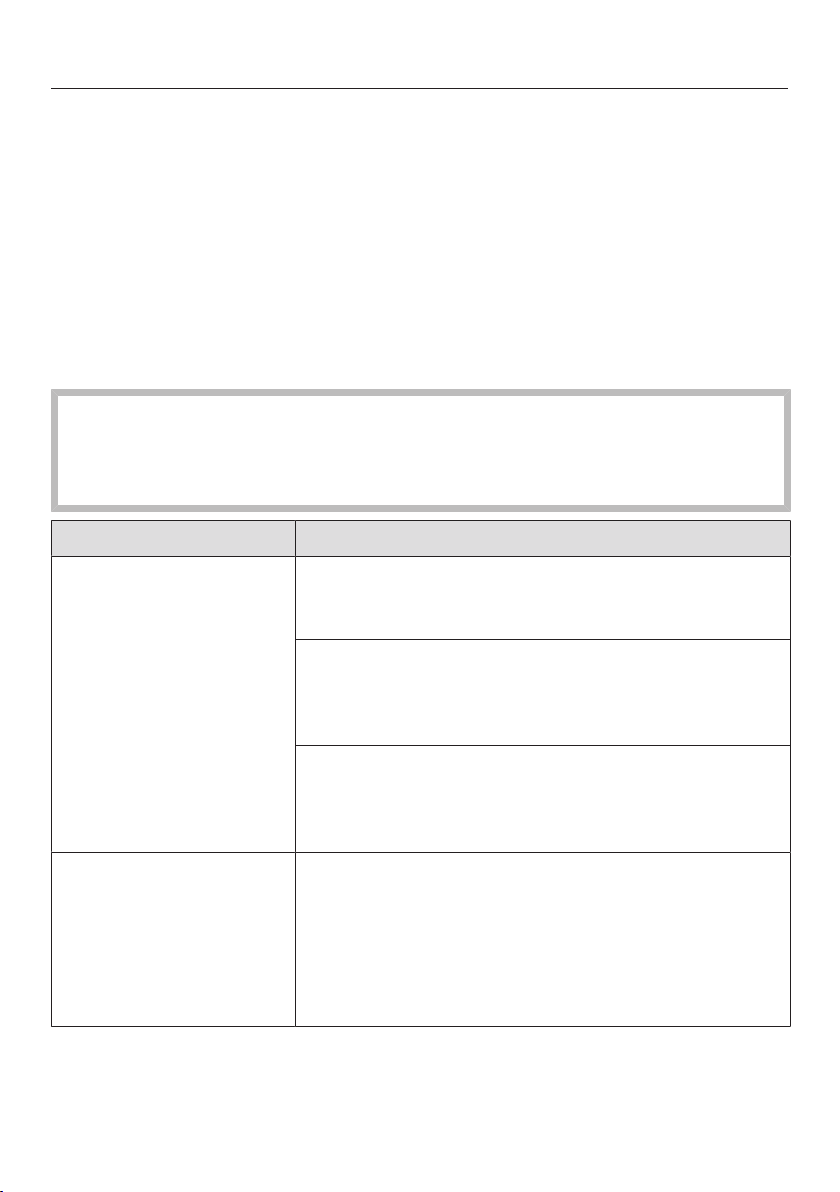
Problem Cause and remedy
The wine conditioning
unit is not getting cold,
the interior lighting
does not come on when
the door is opened, and
the display is not lit up.
The wine conditioning unit is not switched on and the
mains connection symbol is lit up in the display.
Switch on the wine conditioning unit.
The plug is not inserted in the socket correctly.
Insert the plug correctly into the socket. The mains
connection symbol appears in the display
when the wine conditioning unit is switched off.
Check whether the mains fuse has tripped. If it has
there could be a fault with the appliance, the house-
hold electrical wiring or another electrical appliance.
Contact a qualified electrician or Miele.
The symbol is dis-
played, the wine condi-
tioning unit is not get-
ting cold. However, the
appliance and the in-
terior lighting are work-
ing fine.
Demo mode is turned on and the symbol is illumin-
ated in the display.
Switch off Demo mode (see “Information for deal-
ers - Demo mode”).
Problem solving guide
47
Problem Cause and remedy
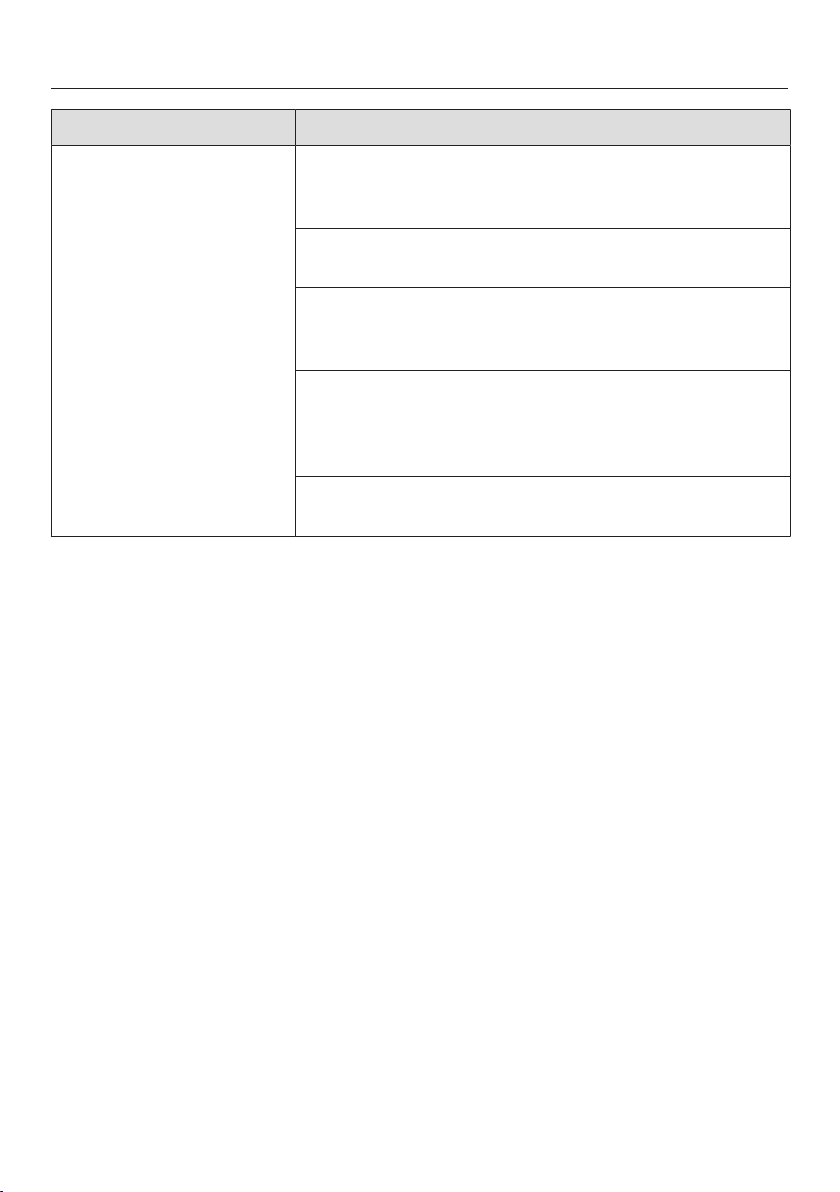
The compressor is
switching on more fre-
quently and for longer
periods of time, the
temperature in the wine
conditioning unit is fall-
ing.
The temperature in the wine conditioning unit is set
too low.
Adjust the temperature.
The appliance door is not properly closed.
Check that the appliance door closes properly.
The appliance door has been opened too frequently.
Only open the door when necessary and for as
short a time as possible.
The ventilation gaps have been covered over or be-
come dusty.
Do not cover the ventilation gaps and dust them
regularly.
The ambient temperature is too warm.
Decrease the ambient temperature.
Problem solving guide
48
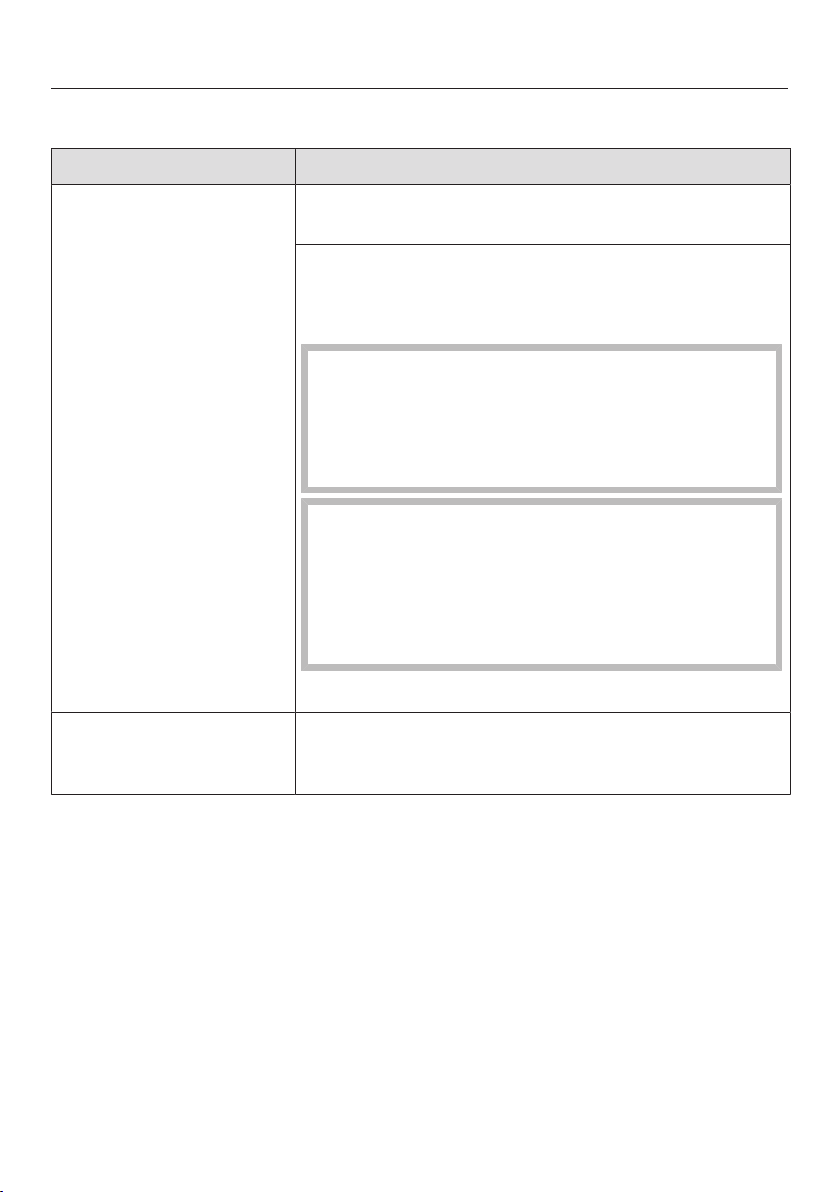
Display warnings
Message Cause and remedy
The alarm symbol is
lit up in the display and
an alarm is also sound-
ing.
The door alarm has been activated.
Close the appliance door. The alarm symbol
will go out and the alarm will stop.
The alarm symbol
flashes in the display.
An alarm tone will also
sound.
The temperature in the wine conditioning unit has
risen higher or fallen lower than the temperature
which has been set.
Possible reasons for this include:
– The appliance door has been opened too fre-
quently.
– The ventilation gaps have been blocked.
– A prolonged power cut (mains outage) has oc-
curred.
Rectify the cause of the alarm. The alarm symbol
will go out, and the alarm tone will stop.
The Change Active
AirClean filter symbol
is lit up.
This is the reminder to change the Active AirClean fil-
ter.
Replace the Active AirClean filter and then confirm
the filter change in settings mode (see “Active
AirClean Filter”).
A dash is lit up up/flash-
ing in the display.
Only temperatures within the range the wine condi-
tioning unit can display will be shown.
“F0”to“F3” or
“S1”to“S3” appear in
the display.
There is a fault.
Call Service.
Problem solving guide
49
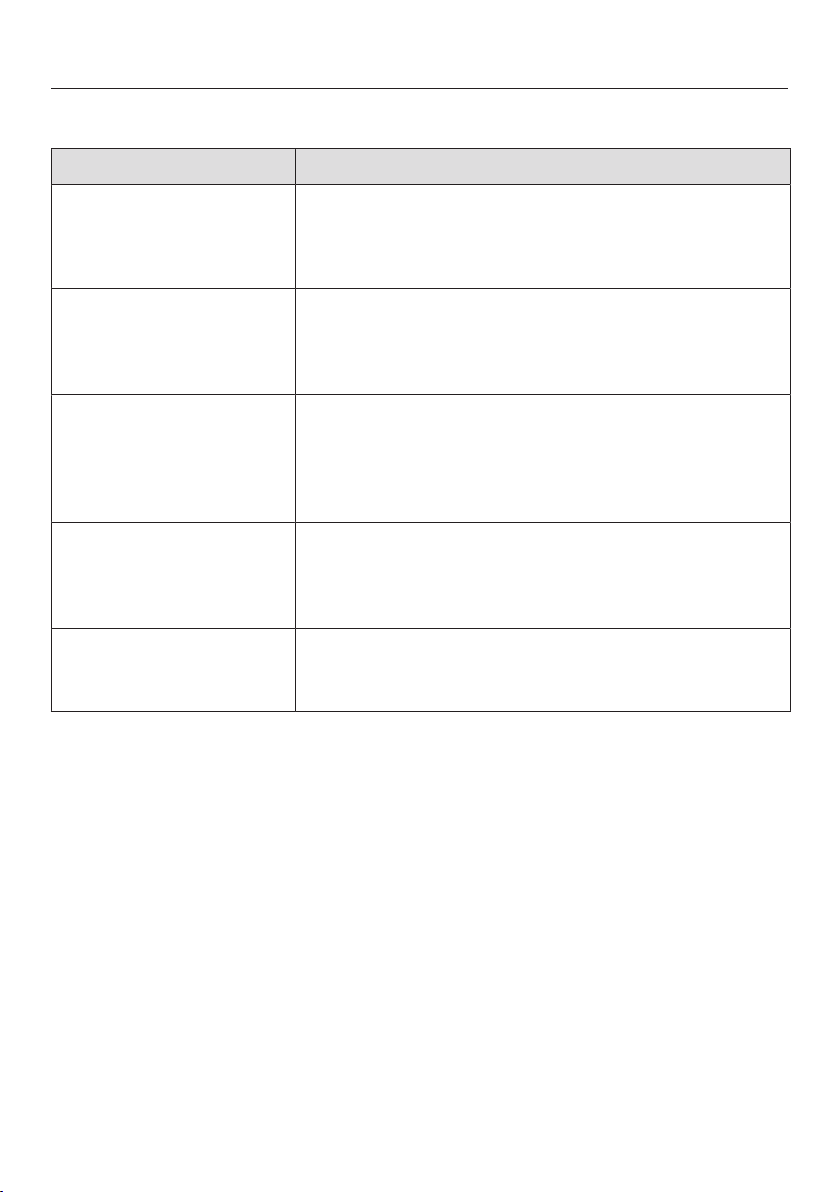
The interior lighting is not working.
Problem Cause and remedy
The LED interior lighting
is not working.
The wine conditioning unit is not switched on.
Switch the wine conditioning unit on.
To avoid overheating, the LED lighting switches itself
off automatically after approx. 15minutes if the door
is left open.
If this is not the cause, then there is a fault.
Danger of electric shock.
There are live electrical components under the
lighting cover.
The LED lighting may only be repaired or replaced
by the Customer Service Department.
Risk of injury from LED lighting.
This lighting corresponds to risk group RG2. If the
cover is defective, there is a danger of eye injury.
If the lighting cover is defective, do not look from a
close range directly into the lighting with optical in-
struments (e.g. magnifying glass or similar).
Call the Customer Service Department.
The LED interior lighting
is on even when the
door is closed.
The feature lighting is switched on.
Switch the feature lighting off (see “Feature light-
ing”).
Problem solving guide
50
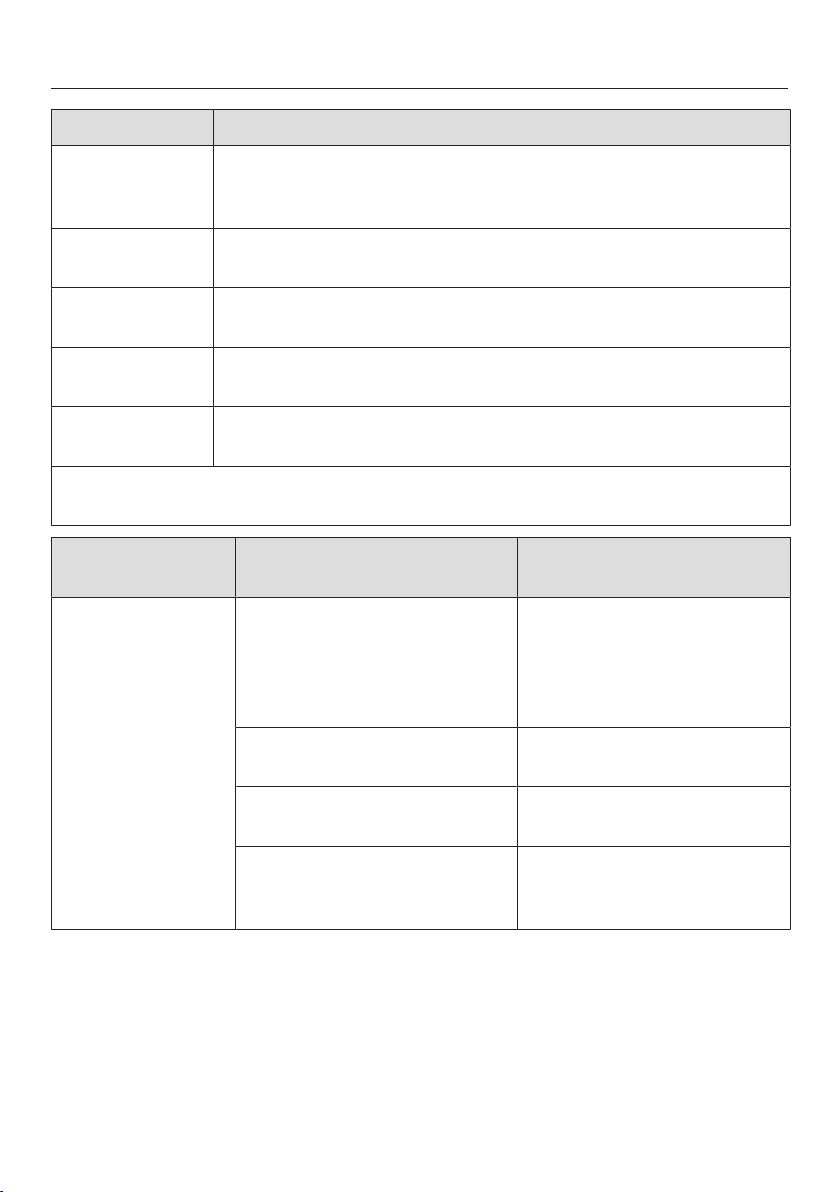
General problems with the wine conditioning unit
Problem Cause and remedy
There is no audible
alarm although the door
has been open for a
long time.
This is not a fault. The alarm tone has been
switched off in settings mode (see “Selecting fur-
ther settings – Audible signals”).
The wine conditioning
unit cannot be switched
off.
The safety lock has been activated.
Completely deactivate the safety lock (see “Select-
ing further settings – Activating and deactivating
the safety lock”).
The slats on the
wooden shelves are
warping.
Volume change due to moisture absorption or drying
out is a typical characteristic of wood. An increase in
humidity will cause wooden components to warp,
which can lead to cracking. Knots and grain patina
are part of the natural character of wood.
Mildew has begun to
form on the wine bottle
labels.
Mildew can begin to form on the labels, depending
on the type of label adhesive used.
Clean the wine bottles and remove any adhesive
residue.
A white deposit has
formed on the wine
bottle corks.
The corks have oxidised due to contact with the air.
Use a dry cloth to wipe off the deposit. The de-
posit will not affect the quality of the wine.
Noises
51
Normal noises What causes them
Brrrrr ... A humming noise is made by the motor (compressor). This
noise can get louder for brief periods when the motor switches
on.
Blubb, blubb ... A gurgling noise can be heard when coolant is circulating
through the pipes.
Click ... Clicking sounds are made when the thermostat switches the
motor on and off.
Sssrrrrr ... On multi-zone wine conditioning units you can sometimes just
hear the sound of the fan inside the appliance.
Crack ... A cracking sound can be heard when material inside the wine
conditioning unit expands.
Remember that the noise of the compressor and the coolant circulating in the
system is unavoidable.
Noises that you
can easily rectify
Possible cause Remedy
Rattling, vibrating The wine conditioning unit is
uneven.
Realign the wine condition-
ing unit using a spirit level,
by raising or lowering the
screw feet underneath the
appliance.
Shelves are unstable or stick-
ing.
Check all removable items
and refit them correctly.
Bottles or containers are
touching each other.
Separate them.
The transport cable clips are
hanging loose at the back of
the appliance.
Remove the cable clips.
After sales service and warranty
52
Contact in the event of a fault
In the event of any faults which you
cannot remedy yourself, please contact
your Miele dealer or the Miele Customer
Service Department.
You can book a Miele Customer Ser-
vice Department call-out online at
www.miele.com/service.
Contact information for the Miele Cus-
tomer Service Department can be
found at the end of this document.
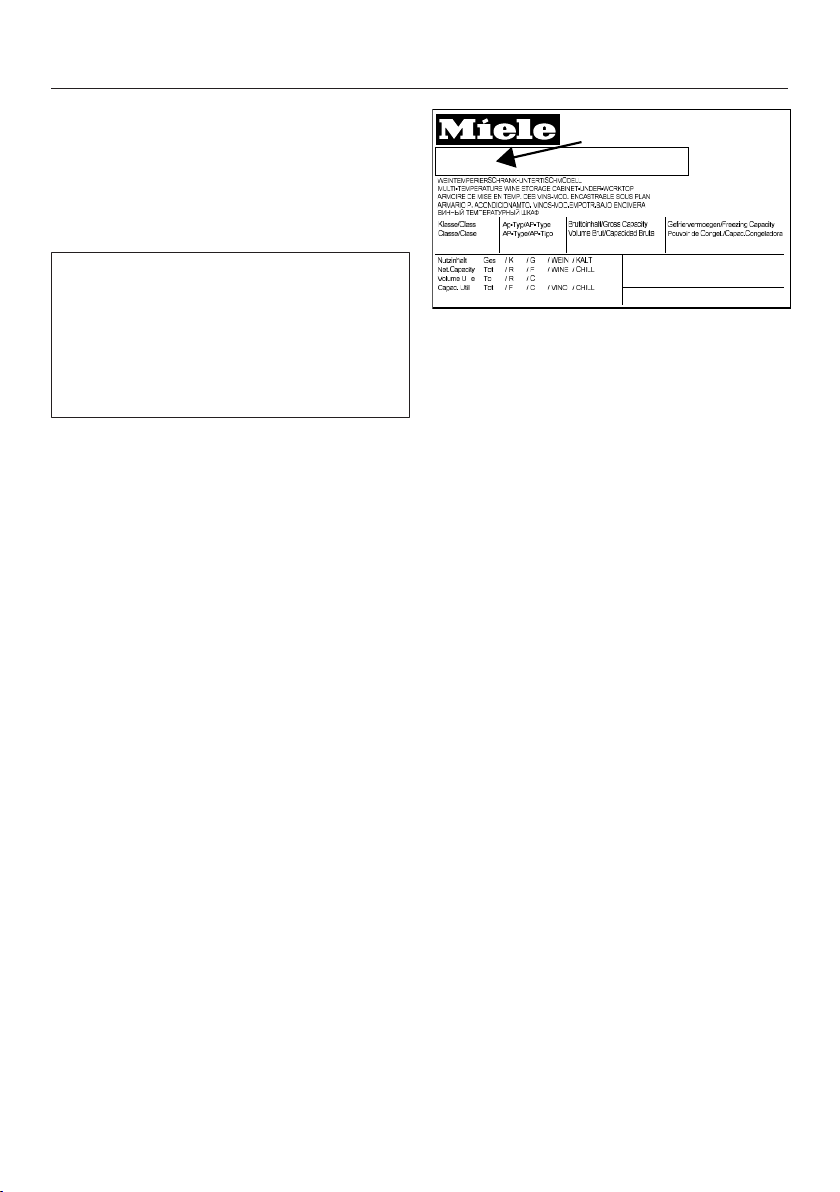
Please quote the model identifier and
serial number of your appliance (Fabr./
SN/Nr.) when contacting the Miele Cus-
tomer Service Department. This inform-
ation can be found on the data plate.
Please note that telephone calls may be
monitored and recorded for training
purposes and that a call-out charge will
be applied to service visits where the
problem could have been resolved as
described in this booklet.
The data plate is located inside the wine
unit.
EPREL database
From 1 March 2021, information on en-
ergy labelling and ecodesign require-
ments will be available in the European
Product Database (EPREL). You can
find the product database at the follow-
ing link https://eprel.ec.europa.eu/. You
will be asked to enter the model identi-
fier.
The model identifier can be found on
the data plate.
SN-ST
R600a:
XXXXXX
Nr. XX/ XXXXXXXXX.
XXX l
XXg
Warranty
The appliance warranty is valid for 2
years from date of purchase. In the UK,
you must activate your cover by calling
0330 160 6640 or registering online at
www.miele.co.uk.
For more information on country-spe-
cific warranty terms and conditions,
please contact Miele Customer Service.
Installation
*INSTALLATION*
53
Location
Risk of damage and injury from
the wine conditioning unit tipping
over.
The wine conditioning unit is very
heavy and can tip forwards when the
appliance door is open.
Keep the appliance door shut until
the wine conditioning unit has been
built in and secured in its building-in
niche in accordance with these oper-
ating and installation instructions.
Risk of damage and injury from
the wine conditioning unit tipping
over.
There is an increased risk of injury
and damage if the wine conditioning
unit is installed by a single person.
Two people are required for installing
the wine conditioning unit.
Fire risk and risk of damage from
appliances which give off heat.
Appliances which give off heat can
catch fire and set fire to the wine
conditioning unit.
This wine conditioning unit must not
be installed underneath a hob.
Fire risk and risk of damage from
appliances which give off heat.
Appliances which give off heat can
catch fire and set fire to the wine
conditioning unit.
Do not install a warming drawer un-
der the wine conditioning unit.
This appliance should be installed in a
dry, well-ventilated room.
When deciding where to install your
wine conditioning unit, please bear in
mind that it will use more energy if in-
stalled near to a heater, a cooker or an-
other appliance that gives off heat. Dir-
ect sunlight should also be avoided.
The higher the room temperature, the
longer the compressor runs and the
higher the energy consumption is.
When installing the wine conditioning
unit, please note:
- The socket must be easily accessible
in an emergency, not concealed be-
hind the appliance.
- The plug and cable must not touch
the back of the wine conditioning unit
as they could be damaged by vibra-
tions from the appliance.
- Do not plug in other appliances be-
hind the wine conditioning unit.
Danger from broken glass!
Danger of injury from broken glass.
If installed at altitudes above 1500m
there is a risk of the glass in the door
breaking because of changes in air
pressure. Shards of glass can cause
severe injury if not handled with care.
Installation
*INSTALLATION*
54
Climate range
The wine conditioning unit is designed
for use within a certain climate range
(ambient temperatures) and should not
be used outside this range. The climate
range of the wine conditioning unit is
stated on the data plate inside it.
Climate range Ambient room
temperature
SN +10°C to +32°C
N +16°C to +32°C
ST +16°C to +38°C
T +16°C to +43°C
Operating in a room which is too cold
will cause the compressor to switch off
for too long, causing the internal tem-
perature in the wine conditioning unit to
rise which could lead to damage.
Risk of damage due to high hu-
midity.
In environments with high humidity,
condensation can build up on the ex-
ternal wine conditioning unit panels,
which can cause corrosion.
Install the wine conditioning unit with
sufficient ventilation in a dry and/or
air-conditioned room.
After installation, make sure that the
appliance door closes properly, the
ventilation gaps are not covered and
that the wine conditioning unit has
been installed in accordance with
these operating and installation in-
structions.
Ventilation
Risk of fire and damage due to
insufficient ventilation.
If the wine conditioning unit is not
ventilated sufficiently, the com-
pressor will run more frequently and
for longer periods. This will result in
increased energy consumption and a
higher operating temperature for the
compressor. This may, in turn, cause
damage to the compressor.
Please ensure that there is adequate
ventilation around the wine condi-
tioning unit.
It is essential to observe the required
ventilation gaps. The ventilation gaps
must not be covered or blocked in
any way.
Installation
*INSTALLATION*
55
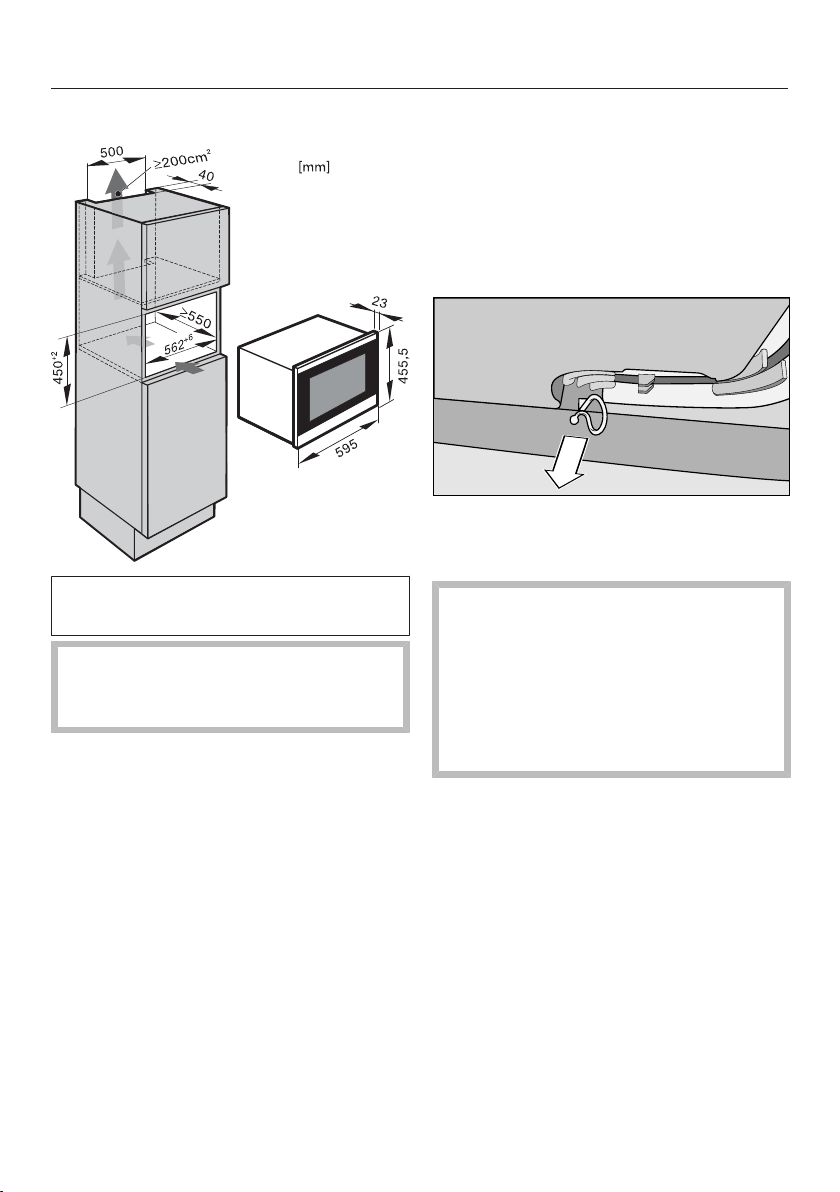
Air at the back of the wine conditioning
unit gets warm. The appliance housing
unit must therefore be constructed to
allow sufficient space for ventilation
(see “Building-in dimensions”):
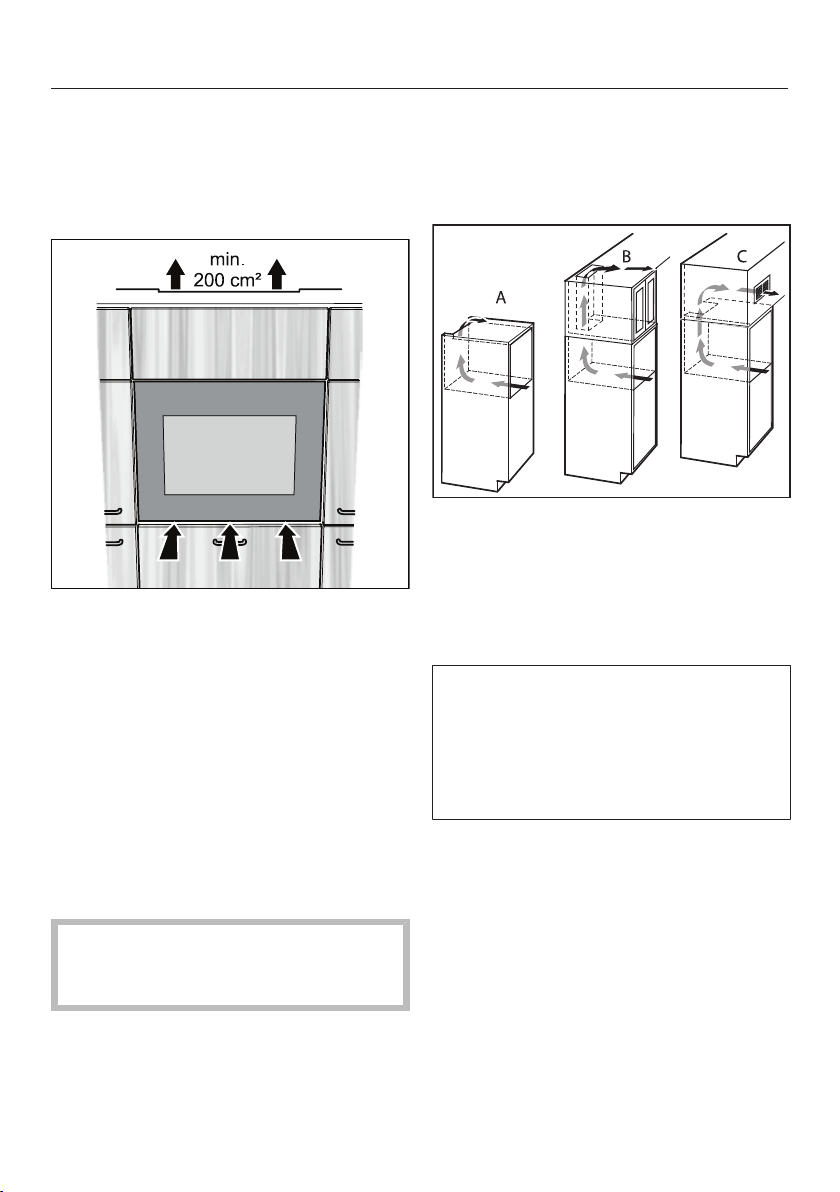
- Air intake is provided underneath the
appliance door.
- Air must be allowed to escape
through a ventilation gap provided
above the wine conditioning unit.
This ventilation gap must have a min-
imum cross-section of 200cm² to
ensure that the warm air can escape
unhindered.
- Important! The larger the ventilation
gaps, the less energy the wine condi-
tioning unit will use.
The ventilation gaps must not be
covered or blocked in any way. They
must also be regularly dusted.
Different types of ventilation gap
The ventilation gap at the top of the ap-
pliance can be constructed in different
ways:
- A: directly above the wine condition-
ing unit
- B: above a top box
- C: in a top box through a ventilation
grille at the front
If ventilation grilles are to be fitted in
the ventilation gaps, the ventilation
gaps must be larger than 200cm².
The unobstructed airflow of 200cm² is
calculated by adding up the total area
of ventilation gaps in the grille.
Installation
*INSTALLATION*
56
Installation dimensions
The mains connection cable is
2300mm long.
The socket must be easily accessible
in an emergency, not concealed be-
hind the appliance.
Installing the wine conditioning
unit
Before installing the wine condition-
ing unit
Take any accessories out of the appli-
ance.
Remove the cable clip from the back
of the appliance (depending on
model).
Risk of damage and injury from
wine conditioning unit tipping over.
There is an increased risk of injury
and damage if the wine conditioning
unit is installed by a single person.
Two people are required for installing
the wine conditioning unit.
Install the wine conditioning unit in a
stable, solid housing unit, positioned
on an even and level floor.
The building-in niche must be hori-
zontally and vertically aligned.
The required ventilation gaps must be
provided (see “Installation” – “Ventila-
tion” and “Building-in dimensions”).
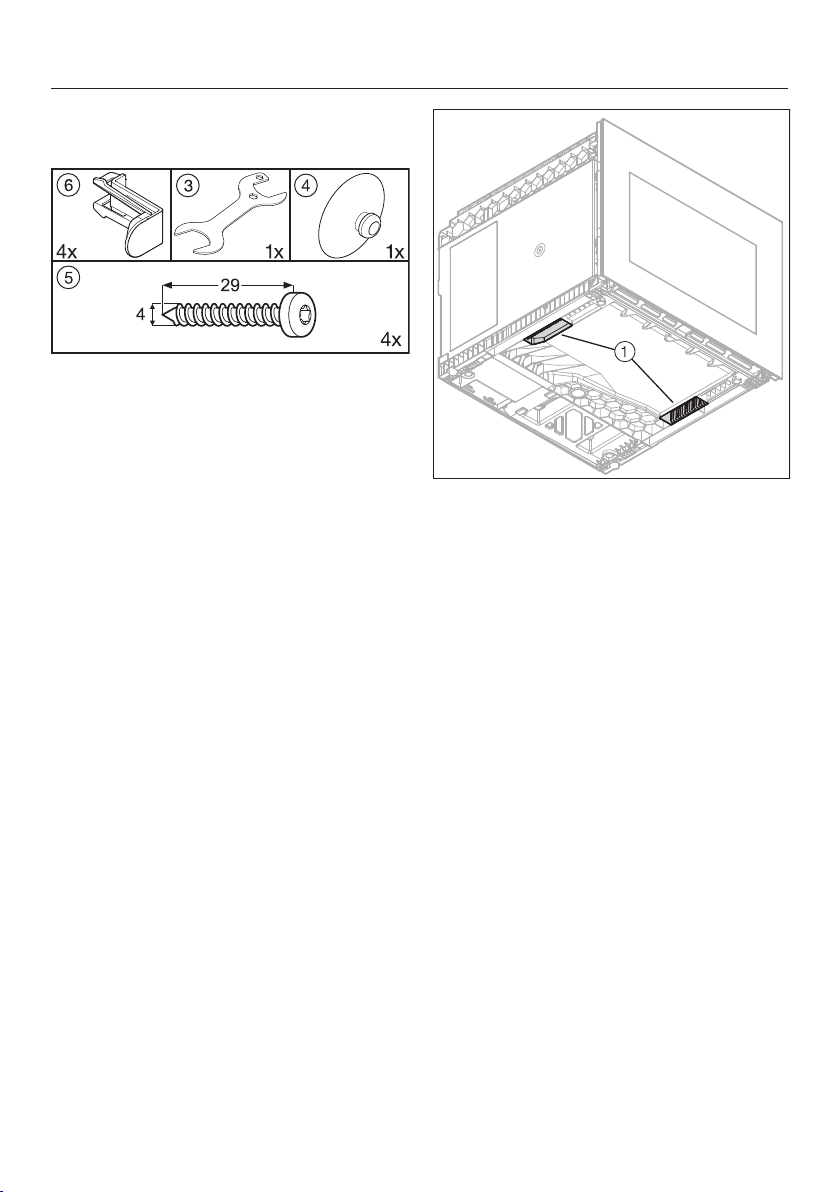
Installation
*INSTALLATION*
57
To install the wine conditioning unit,
you will need the following tools:
You will also need a sprit level and a
screwdriver.
Use the hand holds underneath
the wine conditioning unit when car-
rying it.
Feed the mains cable from the back
of the appliance through to the
socket.
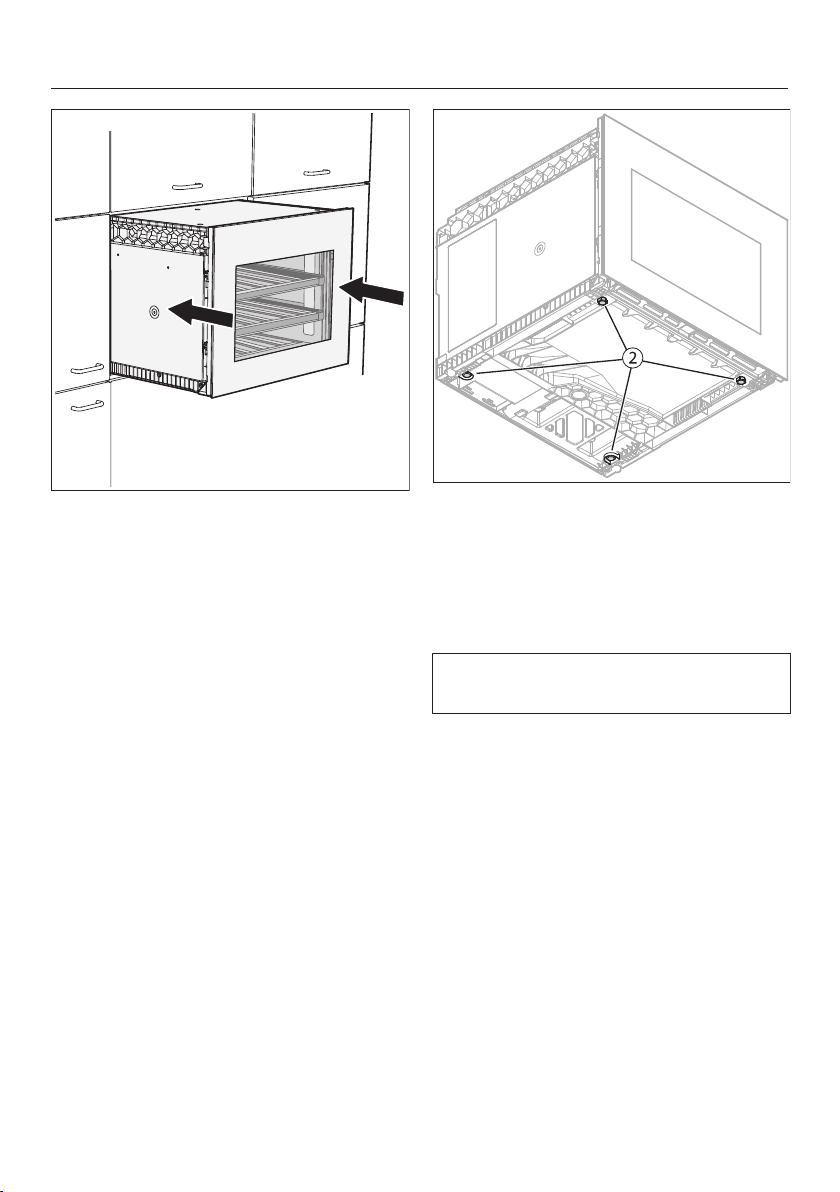
Installation
*INSTALLATION*
58
Push the wine conditioning unit back
into the housing unit. Take care not to
damage the mains cable whilst push-
ing the wine conditioning unit back in.
Align the wine conditioning unit flush
with the surrounding cabinetry,
pulling it forwards if necessary.
If you need to realign the wine condi-
tioning unit, you will need to pull it out
of the housing unit to readjust the
feet underneath it.
Adjust the feet to the required
height.
The feet can be manually adjusted or
adjusted with the spanner supplied.
Push the wine conditioning unit back
into the housing unit and check the
alignment with the adjoining cabinetry
again. Take care not to damage the
mains cable whilst pushing the wine
conditioning unit back in.
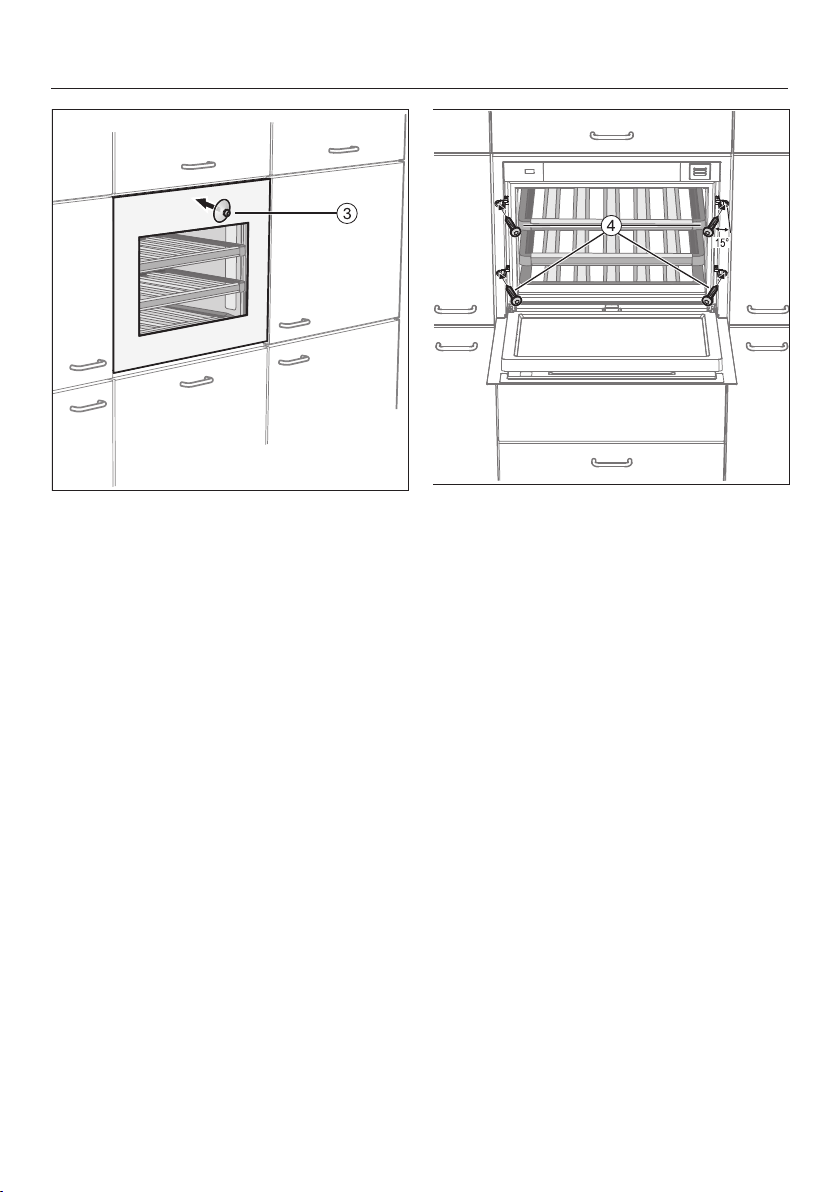
Installation
*INSTALLATION*
59
Attach the suction cap supplied to
the glass door and open the door.
Secure the wine conditioning unit to
the carcase using the four screws
supplied (4x29) . The screws
should be screwed into the carcase
at a slight angle (approx.15°).
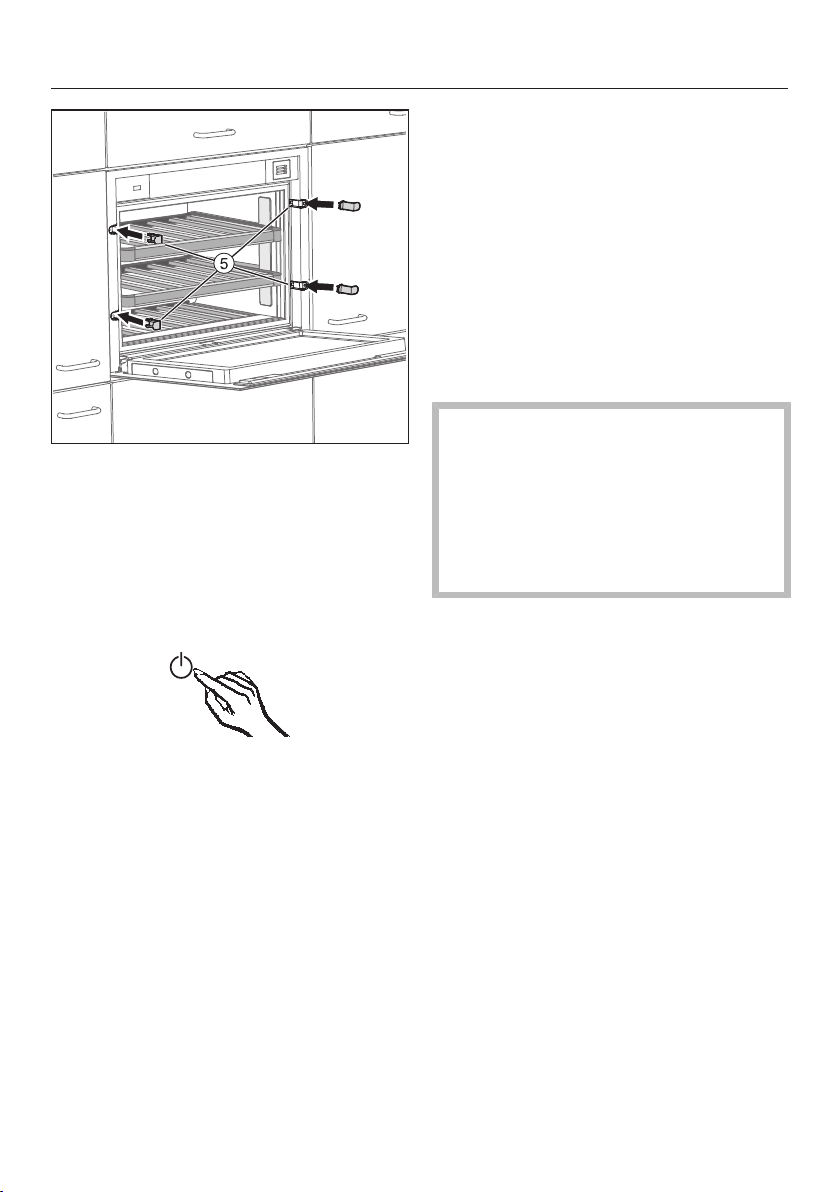
Installation
*INSTALLATION*
60
Fit the covers (supplied).
Now connect the wine conditioning
unit to the electrical supply.
When the wine conditioning unit is con-
nected to the electrical supply, the
mains connection symbol will ap-
pear in the display after a short while.
Touch the On/Off sensor.
The mains connection symbol will
go out and the wine conditioning unit
will start to cool.
The Push2open system on the wine
conditioning unit is now activated (see
“Guide to the appliance” – “Using the
door-opening mechanism correctly”).
Electrical connection
The wine conditioning unit is supplied
with a mains cable with moulded plug
ready for connection to an earthed
socket.
The socket must be easily accessible
after the wine conditioning unit has
been installed. If the socket is not easily
accessible, ensure that a suitable
means of disconnection is provided on
the installation side for each pole.
Risk of fire from overheating.
Connecting the refrigeration appli-
ance to a multi-socket plug adapter
or to an extension lead can overload
the cable.
For safety reasons, do not use an ex-
tension lead or multi-socket adapter.
The electrical system must comply with
local and national safety regulations
(BS7671 in the UK).
For safety reasons, we recommend us-
ing a type residual current device
(RCD) in the assigned electrical installa-
tion for connecting the wine condition-
ing unit.
If the mains connection cable is dam-
aged, it must only be replaced with a
specific mains connection cable of the
same type (available from the Miele
Customer Service Department). For
safety reasons, such replacement may
only be carried out by a qualified spe-
cialist or the Miele Customer Service
Department.

Installation
*INSTALLATION*
61
These operating instructions and the
data plate indicate the nominal power
consumption and the appropriate fuse
rating. Compare this information with
the data of the on-site electrical con-
nection.
If in any doubt, consult a qualified elec-
trician.
Do not connect the wine conditioning
unit to a stand-alone inverter such as
those used with an autonomous power
supply, e.g. solar power. When the wine
conditioning unit is switched on, power
surges could result in an auto switch-
off. This could damage the electronic
module.
Information for dealers
62
Demo mode
The wine conditioning unit can be
demonstrated in the showroom or at
exhibitions in “Demo mode”. In this
mode the control panel and interior
lighting are active but the compressor
remains switched off, so that the appli-
ance does not cool down.
Switching on demo mode
Switch the wine conditioning unit off
by touching the On/Off sensor.
The temperature display will go out and
the mains connection symbol will
appear.
Place your finger on the sensor,
and leave it there.
At the same time, briefly touch the
On/Off sensor (without letting go of
the sensor).
Leave your finger on the sensor
until the symbol appears in the dis-
play.
Then release the sensor.
Demo mode is activated and the sym-
bol appears in the display.
Switching off Demo mode
The symbol is lit up in the display.
Touch the settings sensor.
All symbols available for selection will
appear in the display and the symbol
flashes.
Touch the sensors for setting the
temperature ( or ) repeatedly until
the symbol flashes.
Touch the OK sensor to confirm your
selection.
1 flashes in the display (means: Demo
mode is switched on) and the symbol
lights up.
Information for dealers
63
Touch the or sensor until 0 ap-
pears (means: Demo mode is
switched off).
Touch the OK sensor to confirm your
selection.
The selected setting is applied, the
symbol flashes.
Touch the settings sensor to leave
settings mode.
Otherwise the appliance exits set-
tings mode automatically after ap-
proximately one minute.
Demo mode is switched off, the sym-
bol goes out.




United Kingdom
Miele Co. Ltd., Fairacres, Marcham Road, Abingdon, Oxon, OX14 1TW
Tel: 0330 160 6600, Internet: www.miele.co.uk/service, E-mail: [email protected]
Australia
Miele Australia Pty. Ltd.
ACN 005 635 398
ABN 96 005 635 398
1 Gilbert Park Drive
Knoxfield, VIC 3180
Tel: 1300 464 353
Internet: www.miele.com.au
Miele Electrical Appliances Co., Ltd.
1-3 Floor, No. 82 Shi Men Yi Road
Jing' an District
200040 Shanghai, PRC
Tel: +86 21 6157 3500
Fax: +86 21 6157 3511
E-mail: [email protected],
Internet: www.miele.cn
China Mainland
Miele (Hong Kong) Ltd.
41/F - 4101, Manhattan Place
23 Wang Tai Road
Kowloon Bay, Hong Kong
Tel: (852) 2610 1025
Fax: (852) 3579 1404
Email:
Website: www.miele.hk
Hong Kong, China
Miele India Pvt. Ltd.
1st Floor, Copia Corporate Suites,
Commercial Plot 9,
Mathura Road, Jasola,
New Delhi - 110025
E-mail: customercare@miele.in
Website: www.miele.in
India
Miele Ireland Ltd.
2024 Bianconi Avenue
Citywest Business Campus
Dublin 24
Tel: (01) 461 07 10
Fax: (01) 461 07 97
E-Mail: [email protected]
Internet: www.miele.ie
Ireland
Malaysia
Miele Sdn Bhd
Suite 12-2, Level 12
Menara Sapura Kencana
Petroleum
Solaris Dutamas No. 1
Jalan Dutamas 1
50480 Kuala Lumpur, Malaysia
Phone: +603-6209-0288
Fax: +603-6205-3768
Miele New Zealand Limited
IRD 98 463 631
8 College Hill
Freemans Bay, Auckland 1011
New Zealand
Tel: 0800 464 353
Internet: www.miele.co.nz
New Zealand
Miele Pte. Ltd.
29 Media Circle
#11-04 ALICE@Mediapolis
Singapore 138565
sTel: +65 6735 1191
Fax: +65 6735 1161
E-Mail: [email protected]
Internet: www.miele.sg
Singapore
Miele (Pty) Ltd.
63 Peter Place
Bryanston 2194
P.O. Box 69434
Bryanston 2021
Tel: (011) 875 9000
Fax: (011) 875 9035
E-mail: [email protected]
Internet: www.miele.co.za
South Africa
Miele Appliances Ltd.
Showroom 1
Eiffel 1 Building
P.O. Box 114782 - Dubai
Tel. +971 4 3044 999
Fax. +971 4 3418 852
800-MIELE (64353)
E-Mail: [email protected]
Website: www.miele.ae
United Arab Emirates
Manufacturer:
Miele & Cie. KG, Carl-Miele-Straße 29, 33332 Gütersloh, Germany
Thailand
Miele Appliances Ltd.
BHIRAJ TOWER at EmQuartier
43rd Floor Unit 4301-4303
689 Sukhumvit Road
North Klongton Sub-District
Vadhana District
Bangkok 10110, Thailand
Sheikh Zayed Road, Umm Al Sheif

M.-Nr. 11 249 150 / 01en-GB
KWT 7112 iG ed/cs, KWT 7112 iG grgr, KWT 7112 iG obsw