HowtogetYour
the best from
Buflt-h
Oven
Contents
Aluminum Foil
4, 14
Appliance Registration
2
Btiking,
Baking Guide
9–1 1
Broiling, Broiling Guide
14, 15
Care
and
Cleaning
16,
17
Clock/Timer
7
Consumer Services
23
Control Panel
8
Control
Seltings
6-15
Door Removal
16
Electronic Oven Control
6
Energy-Saving Tips
4
Features
5,6
Light; Bulb Replacement
16
Model
tind
Serial Numbers
2
Power Outage’?
7
Preheating
4,
I
I
Problem Solver
22
Roasting, Roasting Guide
12,
13
Safety Instructions
2-4
Self-Cleaning Instructions
18–20
Thermostat Adjustment
17,20
Timer
7
Vent
Duct
5,
8
Warranty
Back Cover
GE;
Answer
Center’’”
800.626.2000
Use and Care
of
Models
RJ734GP
m736GP
m746GP
Help us help you...
Before using your oven,
read this book carefully.
It
is intended to help you
operate and maintain your new
oven properly.
Keep it handy
for
answers to
your questions.
If you don’t understand something
or need more help, write (include
your phone number):
Consumer Affairs
Hotpoint
Appliance Park
Louisville, KY 40225
Write down the model
and serial numbers.
You’ 11 find them on a label on
the front of the oven behind the
oven door.
These numbers are also on the
Consumer Product Ownership
Registration Card that came with
your oven. Before sending in
this card, please write these
numbers here:
Model Number
Setial
Number
Use these numbers in any
correspondence or service calls
concerning your oven.
Save time and money.
Before you request
service...
Check the Problem Solver in the
back of this book. It lists causes of
minor operating problems that you
can correct yourself.
If you need service...
To obtain service, see the
Consumer Services page in
the back of this book.
We’re proud of our service and
want you to be pleased. If for some
reason you are not happy with the
service you receive, here are three
steps to follow for further help.
FIRST, contact the people who
serviced your appliance. Explain
why you are not pleased. In most
cases, this will solve the problem.
NEXT, if you are still not pleased,
write all the details—including
your phone number—to:
Manager, Consumer Relations
Hotpoint
Appliance Park
Louisville, KY 40225
FINALLY, if your problem is
still
not resolved, write:
Major Appliance
Consumer Action Panel
20 North
Wacker
Drive
Chicago, IL 60606
IMPORTANT
SAFETY
INSTRUCTIONS
Read all instructions
before using this
appliance.
IMPORTANT
SAFETY NOTICE
The California Safe Drinking
Water and Toxic Enforcement
Act requires the Governor of
California to publish a list of
substances known to the state
to cause birth defects or other
reproductive harm, and requires
businesses to warn customers
of potential exposure to
such substances.
The fiberglass insulation in
self-cleaning ovens gives
off a
very small amount of carbon
monoxide during the cleaning
cycle.
Exposure can be
minimized by venting with
an open window or using a
ventilation fan or hood.
When You Get Your Oven
● Have the installer show you
the location of the circuit
breaker or fuse. Mark it for
easy reference.
●
Be sure your appliance
is properly installed and
grounded
by a qualified
technician in accordance with the
provided Installation Instructions.
2
●
I)on
’t attempt to
repair
or
replace
any
part of your
oven
unless it is specifically
recommended in this book.
All
other
servicing should be referred
to
a
~]uulil’ied
technician.
●
IIefore
performing any
service, DISCONNECT
THE
OV~;N
POWER SUPPI.Y
AT
‘1’IIIi
HOUSEHOLD
I)lS’I’RIBUTION
PANEL
13Y
REM[)VING
THE FUSE
(jl<
SW
IT(:HING
OFF
‘1’HE
C: IR(7UIT BREAKER.
●
1)o
not leave children
alone—
(’hi ldrcn
shoLIld
not be left
alone
or u nattcnded in an area
wtlc:re
applitince is in use. They
sl)ould never be allowed to sit
or stand on any part
of
the appliance.
● Don’t allow anyone to climb,
stand or hang on the door.
They
t’ould
damage the oven.
●
CAU’1’ION:
ITEMS
OF
INTEREST TO CHILDREN
SH()[JLD NOT BE STORED
IN
CABINETS ABOVE
AN
OVEN. CHILDREN
CLIMBING ON THE OVEN
‘1’()
R13ACH
ITEMS
COULD
Ilk:
SE; I{ IOUSI,Y INJURED.
●
Never
wear loose-fitting or
hanging garments while using
the
appliance.
Be
careful when
reach i
ng
for itcms stored in
c’ahincts
over the oven.
l~lammablc material could be
iglli[ed
i
[.
bl-~)ught
ill
~c)lltact
wi[h
h~~[
heating elements and
may cause:
severe
burns.
●
1)()
NOT
STORF;
OR
USE:
COMBUSTIBLE
MATF;RIALS,
GASOLINE
OR
OTHE;R
FLAMMABLE
VAPORS
AND LIQUIDS IN
‘1’1113
VICINITY
OF
THIS
OR
ANY OTHER APPLIANCE.
● Use only dry pot holders—
Moist or damp pot holders on
hot
surfaces may result in burns
from steam. Do not let pot
holders touch hot heating
elements. Do not use
a towel or other bulky
cloth.
● For your safety, never use
your appliance for warming
or heating the room.
●
Storage in or on appliance—
Do not store flammable materials
in the oven.
● Keep hood and grease filters
clean to maintain good venting
and to avoid grease fires.
● Do not let cooking grease
or other flammable materials
accumulate in or near
the oven.
● Do not use water on grease
fires. Flame in oven can be
smothered by completely
closing door and pressing
oven
CLEAWOFF pad or use
dry chemical or foam type
extinguisher.
● Do not touch heating
elements or interior
surt”ace
of oven. These surfaces may be
hot enough to burn even though
they are dark in color. During
and after use, do not touch, or
let clothing or other flammable
materials contact any interior
area of the oven; allow
sufficient time
for cooling, first.
Potentially hot surfaces
include the oven vent openings
and surfaces near the openings,
crevices around the oven
door, the edges of the door
window and metal trim parts
above door.
Remember: The inside surface
of the oven may be hot when
the door is opened.
● When cooking pork,
follow
the directions exactly
and
always cook the meat
to
an
internal temperature of
at
least
170°F.
This assures that, in the
remote possibility that trichina
may be present in the
meat,
it
will be killed and the meat will
be safe to eat.
Oven
● Stand away from oven
when opening oven door.
The hot air or steam which
escapes can burn hands, face
antior
eyes.
● Don’t heat unopened food
containers in the oven.
Pressure could build up and
the container could burst,
causing an injury.
●
Keep oven vent duct
unobstructed.
● Keep oven free from
grease buildup.
● Place oven shelf in desired
position while oven is cool.
If shelves must be handled
when hot, do not
let
pot holder
contact heating units in
the oven.
● Pulling out shelf to shelf stop
is a convenience in lifting
heavy foods. It is also a
precaution against burns
from touching hot surfaces of
door or oven walls.
● When using cooking or
roasting bags in oven,
fot
tow
the manufacturer’s directions.
● Do not use your oven to dry
newspapers. If
overheated,
they can catch fire.
((
’ot7t;nl{(,(l
!lc,.\-/
/)(/,q(,
)
3
—

IMPORTANT SAFETY
Energy-Saving
INSTRUCTIONS
(continued)
Tips
Self-Cleaning Oven
(on model
RK746,
the UPPER
OVEN ONLY)
● Do not clean door gasket
before reading special
cleaning instructions in the
Self-Clean section of this
book. The door gasket is
essential for a good seal. Care
should be taken not to rub,
damage or move the gasket.
● Do not use oven cleaners.
No commercial oven cleaner or
oven liner protective coating of
any kind should be used in or
around any part of the oven.
● Clean only parts listed in
this Use and Care Book.
c
Before self-cleaning the
oven, remove broiler pan
and other cookware.
● Listen for fan—a fan noise
may be heard sometime during
the clean cycle. This is normal.
● Do not use aluminum foil
to line oven bottoms, except
as suggested in this book.
Improper installation of these
liners may result in a risk of
electric shock or fire.
● Be sure to wipe up excess
spillage before starting the
self-cleaning operation.
If You Need Service
c
Read the Problem Solver in
the back of this book.
●
Don’t
attempt to repair or
replace any part of your range
unless it is specifically
recommended in this book.
All other servicing should be
referred to a qualified technician.
SAVE THESE
INSTRUCTIONS
● Preheat oven only when necessary.
Most foods will cook satisfactorily
without preheating. If you find
preheating is necessary, listen for
the beep, and put food in oven
promptly after the oven is preheated.
. Always turn oven off before
removing food.
c
During baking, avoid frequent
door openings. Keep door open
as short a time as possible if it
is opened.
● Cook complete oven meals instead
of just one food item. Potatoes, other
vegetables, and some desserts will
cook together with a main-dish
casserole, meat loaf, chicken or
roast. Choose foods that cook at
the same temperature and in
approximately the same time.
● Use residual heat in the oven
whenever possible to finish cooking
casseroles, oven meals, etc. Also,
add rolls or precooked desserts to
warm oven, using residual heat to
warm them.
4
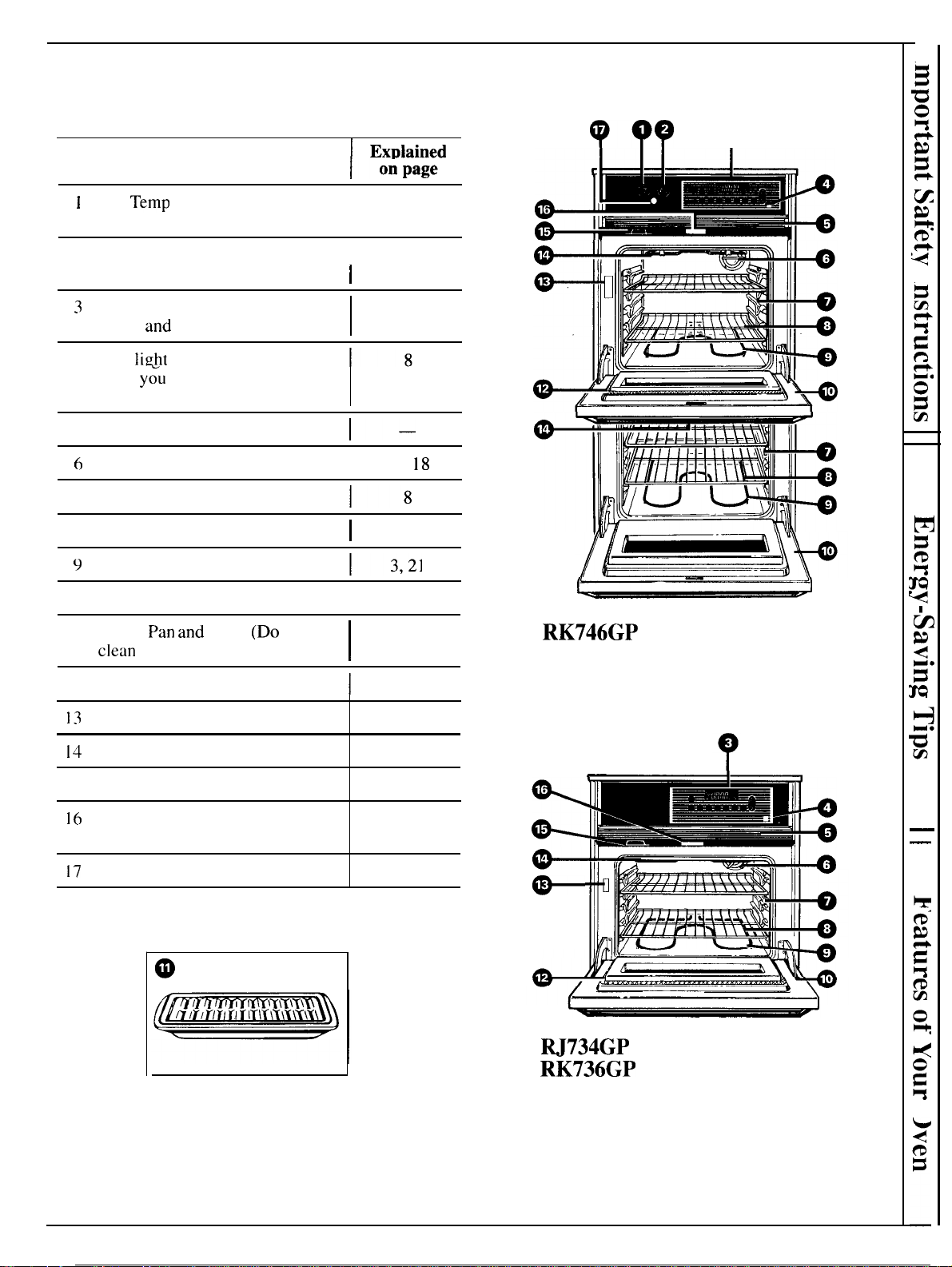
Features of Your Oven
(appearance may vary slightly)
9QQ Q
]
Explained
Feature Index
I
1
Oven
Temp
Knob (Operates the
8
lower oven.)
I
2 Oven Set Knob (Operates the
I
8
lower oven.)
I
3
Electronic Oven Control,
Clock
and
Timer
6
4 Oven
light
Switch
(Lets
y~u
control interior oven
lights.)
5 Grille
l–
6
Oven Interior Light
I
16,
18
7 Oven Shelf Supports
8 Oven Shelves
I
8,11,14,15
9
Bake Unit
1 () Removable Oven Door
I
16,21
RK746GP
I I Broiler
Pan
and
Rack
(Do
not
I
14.15
clean
in self-clean oven.)
I
12 Oven Door Gasket
1
18,20,21
13
Model and Serial Numbers
2
14
Oven Broil Unit
14, 15
I 5 Oven Vent
3,8
16
Automatic Oven Door Latch
18-20
(Self-Cleaning Oven)
17
Oven Cycling Light
8
—
—
M734GP
(not shown)
RK736GP
5
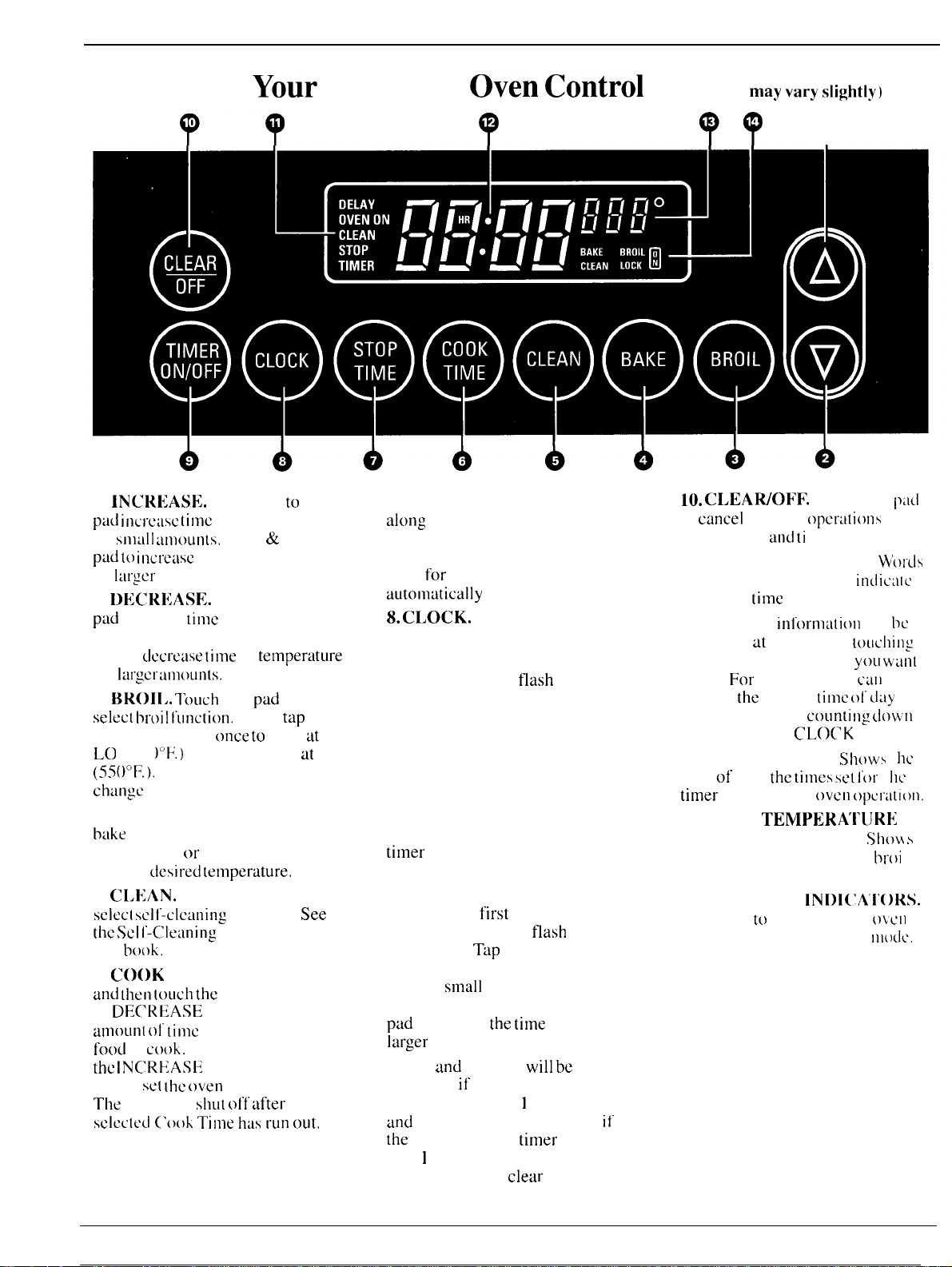
Features of
Your
Electronic
Oven
Control
(appearance
may
vary
slightly)
??
?
??
?
1.
INCnREASE.
Short taps
to
this
pad
incrcasc
time
or temperature
by
snlall
amoun[s.
Press
&
hold
pad
[0
increase
time or temperature
by
larger
amounts.
2.
DECRk;ASE.
Short taps to this
pad
decrease
time
or temperature
by small amounts. Press & hold
pad to
decrease
time
or
tetnperature
by
1:11’:CI”
UtlloU1ltS.
3. BROI1,.
Touch
this
pad
to
select
hrt)il
I“unction.
Then
tap
INCREASE pad
once
to
broil
tit
L() (450
C’F’.)
or twice to broil
at
HI
(5500F.).
Tap DECREASE pad to
change
back to LO broil.
4. BAKE. Touch this pad to select
bake
function. Then tap or press
INCREASE
ot-
DECREASE pad to
display
desired
~etnperature.
5.
CI.F;AN.
Touch this pad to
S~l~Cl
sclt-clcanillg
function.
See
the
Scl
l’-C’leaning
Instructions in
this
book.
6. C()()K TIME. Touch this pad
and
then
loucb
the
INCREASE
or
DE(’REASE pad to set the
amounl
01’
(imc
you want your
food
to
cook.
Touch BAKE and
the
INC’REASE
or DECREASE
pad to
SCI
the
oven
temperature.
The
oven will
shLIt
oft
after
the
s~l~~l~d
(’()()k
Time
has
I.un
out.
7. STOP TIME. Use this pad
along
with COOK TIME and
INCREASE or DECREASE pad to
set the oven to start automatically,
cook
for
a specified time and stop
automfitically
at a time you select.
8.
CLOCK. Touch this pad before
setting the clock.
To set clock, first touch CLOCK
pad. “TIME” will
tlash
in the
display. Tap INCREASE or
DECREASE pad to change the
time of day by small amounts.
Press & hold INCREASE or
DECREASE pad to change the
time of day by larger amounts.
9. TIMER ON/OFF. Touch this
pad to select timer function. The
timer
does not control oven
operations. The timer can time up
to 9 hours and 55 minutes.
To set timer,
first
touch TIMER
pad. “TIMER” will
flash
in
the display.
Tap
INCREASE or
DECREASE pad to change the
time by
small
amounts. Press &
hold INCREASE or DECREASE
pad
to change
the
titne
by
lar&er
amounts.
Hours
and
minutes
will
be
displayed
if
the time set on the
timer is more than
I
hour. Minutes
and
seconds will be displayed
if
the
time set on the
titner
is less
than
I
hour. Press and hold
“TIMER” pad to
clear timer.
10.
CLEAWOFF.
Touch this
p:ld
to
cancel
all oven operatiotls
except clock
and
ti
trier.
11. PROGRAM STATUS. ~’ol”LIS
light up in the display to
indicate
what is in
time
display,
Programmed
itlfornlatic)ll
can
bc
displayed
at
anytime by
touching
the pad of the operation
yOLI
wan[
to see.
For
example, you
c’atl
display
the
current
time
(JI’
dajJ
while the timer is
counti
n:
domtl
by touching the CLO[’K pad.
12.
TIME DISPLAY.
Shows t
hc
time of day,
the
times
set
lot t
tl~
titner
or automatic
oven
opcratit)t].
13. OVEN
TEMPERA’1’IJRF:
AND BROIL DISPLAY. sllo~ \
the oven temperature or the
l>roi
I
setting selected.
14. FUNCTION
IN1)l(lA’l’ORS.
Lights up
to
show whether
okcll
is
in bake. broil or sell’-clcat]
I]lt)dc>.
6
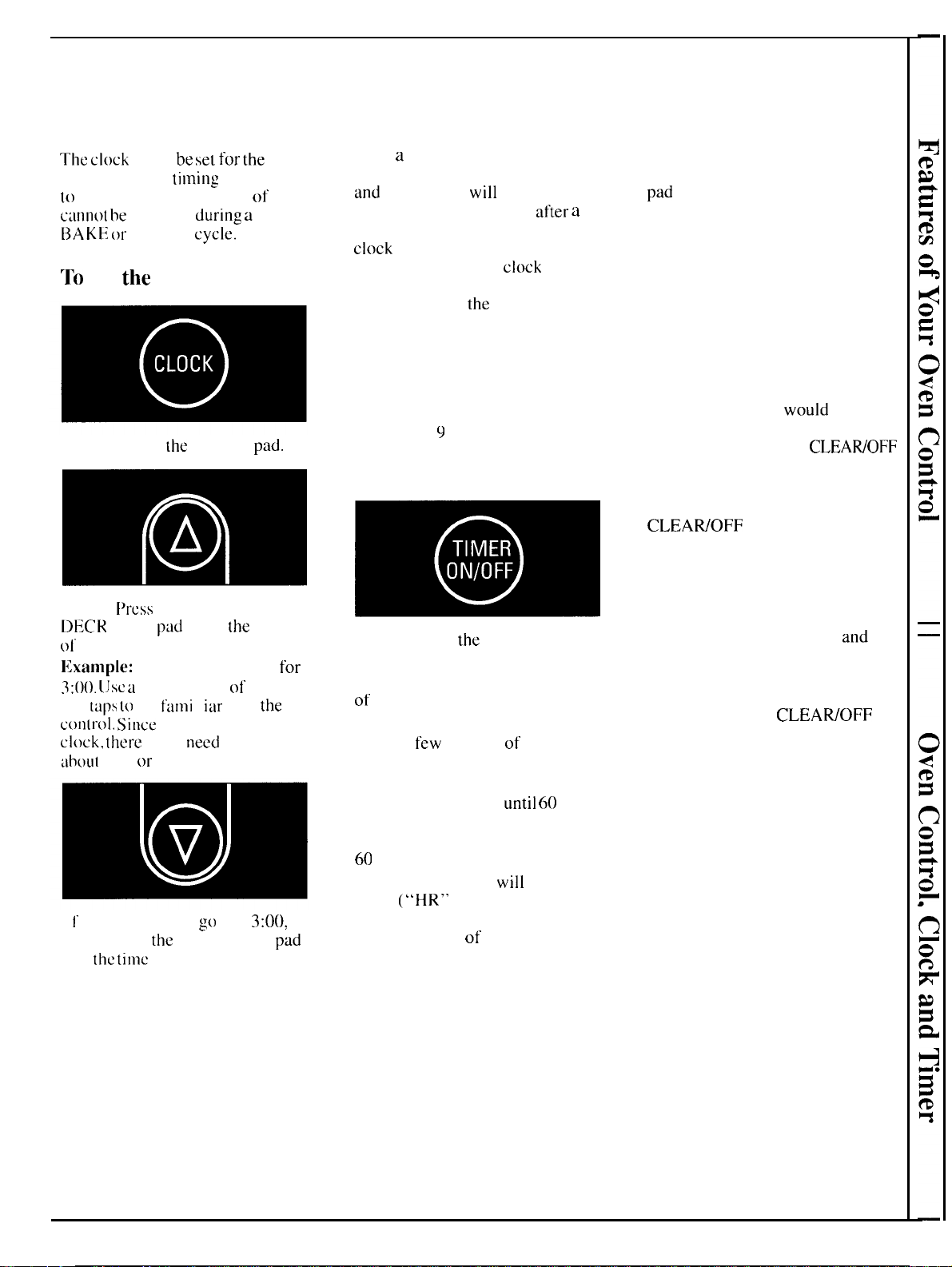
Oven Control, Clock and Timer
Clock
The
clock
must
be
set
for
the
automatic oven
ti
millg
functions
(o
work properly. The time of day
canno[
be
changed
during
a
TIME
[3AKE
or
CLEAN
~y~]e.
TO
Set
the
Clock
Step 1. Touch
the
CLOCK
pad.
Step 2.
f’rcss
INCREASE or
l)ECR EASE
pad
to set
the
time
ot’
day.
Ilxanlpfe: Try setting the time
for
3:()().
(Jsc
a
combination
of
presses
and
[ups
[o
get
fami
I
iar
with
the
con(rol.
Since this is a t 2-hour
clock,
there
is no
need
to worry
ahout
A M
or
PM.
f
1’
you accidentally go past 3:00,
simply press
the DECREASE
pad
until the
time
shows in the display.
Power Outage?
After
a
power outage, when power
is restored the display will flash
and
time shown
will
no longer
be correct—for example,
after
a
5-minute power interruption the
clock
will be 5 minutes slow.
Display flashes until
clock
is reset.
All other functions that were in
operation when
the
power went out
will have to be programmed again.
Timer
The timer does not control oven
operations. The maximum setting on
the timer is
9
hours and 55 minutes.
To Set The Timer
Step 1. Touch
the
TIMER pad.
Step 2. Press INCREASE or
DECREASE pad to set the amount
of
time on timer.
The timer will start automatically
within a
few
seconds of releasing
the pad.
The timer, as you are setting it,
will display seconds
until
60
seconds is reached. Then it will
display minutes and seconds until
60
minutes is reached.
After 60 minutes, it
will
display
hours
(“HR” now appears in
display) and minutes until the
maximum time of 9 hours and
55 minutes is reached.
To Reset Timer
Touch TIMER pad and then press
the INCREASE or DECREASE
pad
until desired time is reached.
To Cancel Timer
Press & hold TIMER pad until the
word “TIMER” quits flashing on
the display (about 4 seconds).
Timer Tones
The timer tone is a series of three
beeps followed by one beep every
six seconds. If you
would
like to
remove the one beep every six
seconds, press and hold CLEAWOFF
pad for 10 seconds.
To return to one beep every 6
seconds, press & hold
CLEAWOFF for 10 seconds.
Display Messages
If “door” appears on the display,
LOCK flashes and oven signals,
you set the self-clean cycle
and
did
not shut the oven door.
If “F” and a number flash on
display,
this indicates function
error code. Touch CLEAWOFF
pad. If function error code does
not clear, disconnect power to the
range and call for service.
7
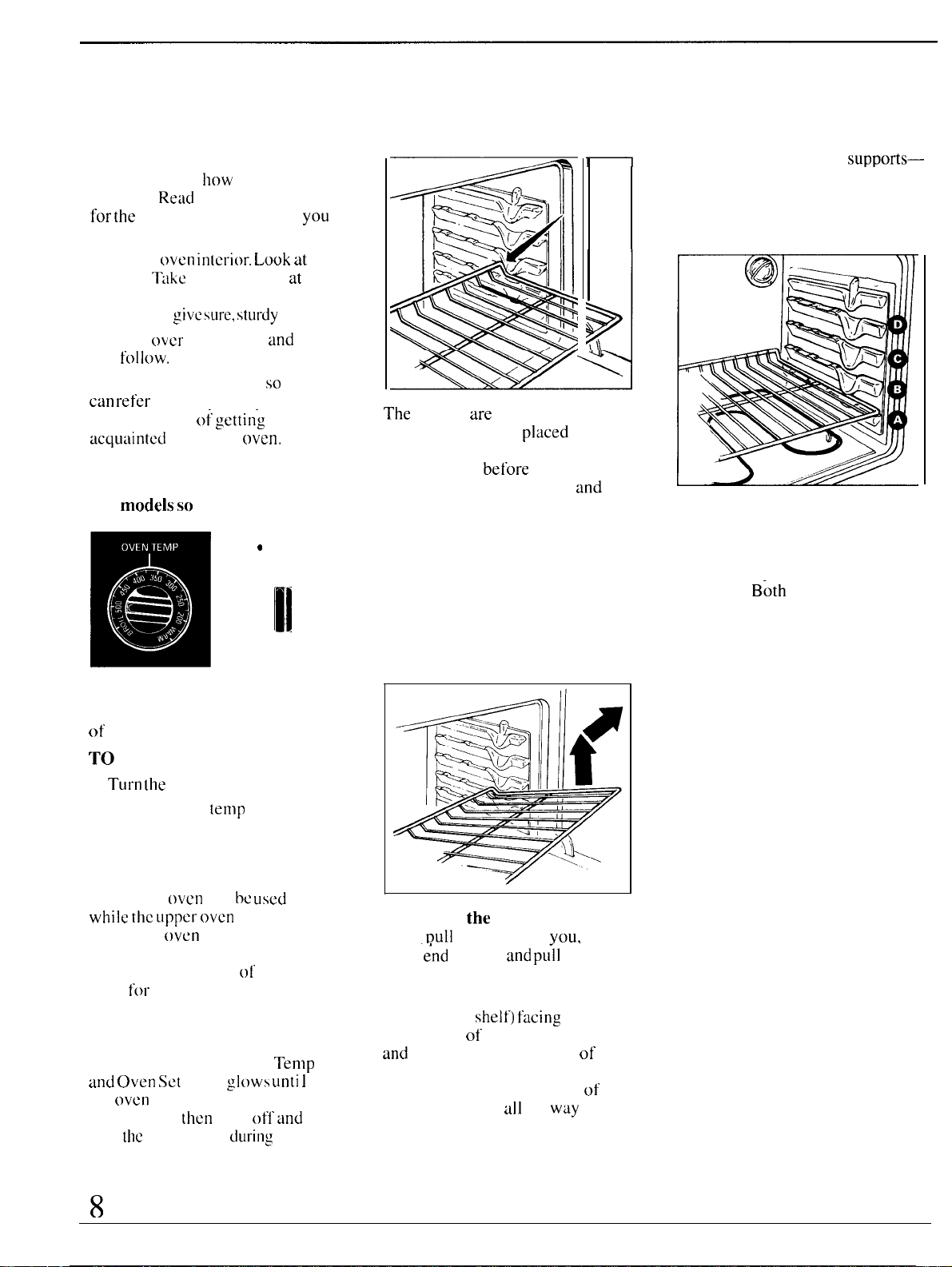
Using Your Oven
Before Using Your Oven Oven Shelves
1. Look at the controls. Be sure
you understand
how
to set them
properly,
Read
over the directions
for
the
Electronic Controls so
you
understand how to use them.
2. Check
oven
in[crior.
Look
at
the
shelves.
Take
a practice run
at
removing and replacing them
property, to
give
sure,
sturdy
support.
3. Read
over
information
and
tips
that
f(Jl]OW.
4. Keep this book handy
so
you
can
refer
to it, especially during
the first weeks
o~.
gettirl-g
acquaintcci
with your
oven,
Lower Oven
(on models
so
equipped)
❑
e
I
II
The LOWER OVEN CONTROL
knobs are located on the left side
of
the control panel.
TO BAKE:
1.
Tul”n
the
oven set knob to bake.
2. Turn the oven
temp
knob to
desired temperature.
3. When finished, turn oven set
knob to OFF.
The lower
oven
can
bc
used
‘~he
shelves
are
designed with
stop-locks so when
placed
correctly on the shelf supports,
they will stop
before
coming
completely out of the oven
and
will not tilt when you are
removing food from them or
placing food on them.
When placing cookware on a shelf,
pull the shelf out to the “stop”
position. Place the cookware on
the shelf, then slide the shelf back
into the oven. This will eliminate
reaching into the hot oven.
while
the
LIppcI”
oven is on.
To remove
the
shelves from the
The lower
oven
has a standard
oven.
Dull
them toward
you,
tilt
porcelain finish. See the Care
and Cleaning section
ol’
this
book
for
cleaning information.
Oven Cycling Light
A light between the Oven
Ternp
and
Oven
Set
knob
gtows
unti
1
the
oven
reaches your selected
temperature.
then
goes ofl
and
on
with
the
oven unit(s)
during
cooking.
front
“~nd
upward
and
pu~l
shelf out.
To replace, place shelf on shelf
support with stop-locks (curved
extension of
shelf)
facing
up and
toward rear
of oven. Tilt up front
and
push shelf toward back of
oven until it goes past “stop” on
oven wall. Then lower front
of
shelf and push it
all
the
way
back.
Shelf Positions
The oven has four shelf
supports—
A (bottom), B, C and D (top).
Shelf positions for cooking are
suggested on Baking and
Roasting pages.
Oven Light
The oven light comes on
automatically when the oven door
is opened.
B6th
lights come on
when one door is opened. Use the
button on the electronic control
panel to turn the light on and off
when the door is closed.
Oven Vent
When the oven is on, heated air
moves through a vent above the
door or between door and grille.
The vent area could get hot
during oven use.
The vent is needed for proper air
flow in the oven and good baking
results. Do not block this vent.
8
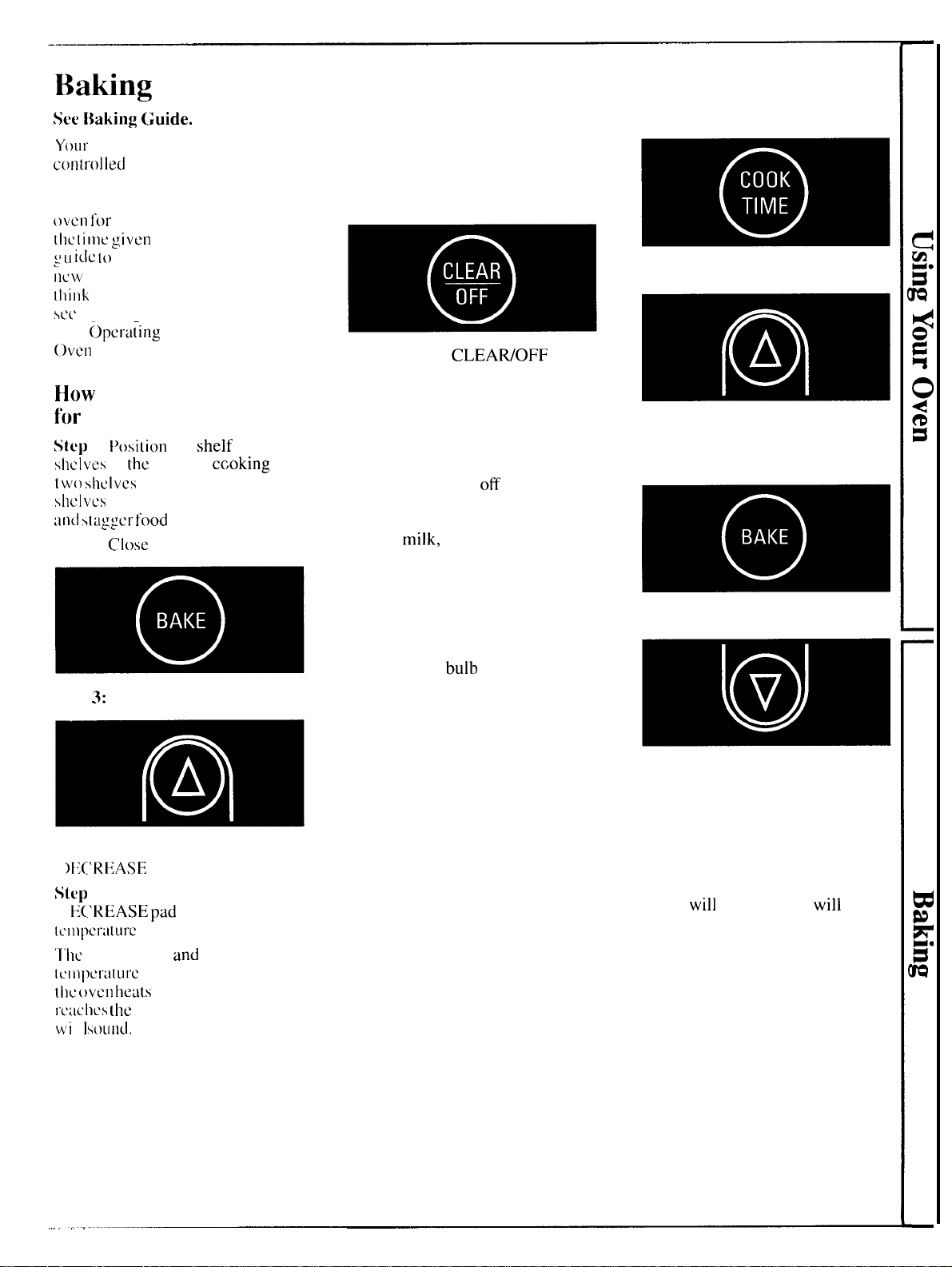
Baking
(for models with Electronic Control)
See
Baking
{;uide.
Your oven temperature is
controlled
very accurately using an
electronic control system. It is
recommended that you operate the
{)vcn
for
a number of weeks using
[he
(ilnc
given
on recipes as a
~
(..1
i(ic
[o
become familiar with your
~lcw
oven’s performance. If you
[hi]lk
an adjustment is necessary,
SC(’
Adjusting Oven Thermostat
under
(~pcrtiting
the Self-Cleaning
oven section.
How
to Set Your Range
fi)r
Baking
Step 1:
l)osition
the shelf or
shelves in
the
oven. If ccoking on
[
w()
shelves
at the same time, place
shi:lvcs
on alternate shelf supports
and
s[aggcr
food
on them.
Step 2:
Close
the oven door.
Step
3:
Touch BAKE pad.
Step 4: Touch INCREASE or
I
)liC’REASE
pad.
Step
5: Press INCREASE or
[)
E(.’REASE
pad
until desired
[c’]l]pcraturc
is displayed.
‘1’hc
word “ON”
and
the changing
lcIIlpera[LIrc
will be displayed as
(I)C
oven
hefits
up. When the oven
rcachcs
[he
set temperature a tone
wi
I
I
SOUilLt.
To change oven temperature during
BAKE cycle, touch BAKE pad and
then INCREASE or DECREASE
pad to get new temperature.
Step 6: Touch CLEAWOFF when
baking is finished and then remove
food from oven.
How to Time Bake
The oven control allows you to
turn the oven on or ofi automatically
at specific times that you set.
Foods that are highly perishable
such as
milk,
eggs, fish, stuffings,
poultry and pork should not be
allowed to sit out for more than
one hour before or after cooking.
Room temperature promotes the
growth of harmful bacteria. Be
sure the oven light is off because
heat from the
bulb
will speed
harmful bacteria growth.
NOTE:
Before beginning make
sure the oven clock shows the
correct time of day. To set the
clock, first touch the CLOCK pad.
“TIME” will flash in the display.
Press INCREASE or DECREASE
pad until correct time of day is
displayed.
How to Set Immediate
Start and Automatic Stop
(Oven turns on right away, cooks
for preset length of time, and turns
off automatically at the preset Stop
Time.)
Step 1: Position the shelf or
shelves in the oven. If cooking on
two shelves at the same time, place
shelves on alternate shelf supports
and stagger food on them.
Step 2: Close the oven door.
Step 3: Touch COOK TIME pad.
Step 4: Press INCREASE pad
until the desired length of baking
time appears in the display.
Step 5: Touch BAKE pad.
Step 6: Press INCREASE or
DECREASE pad until desired
temperature is displayed.
The word “ON” and the rising
oven temperature will be displayed
as the oven heats up. When the
oven reaches the set temperature
a tone
will
sound. Oven
will
continue to cook for the
programmed amount of time,
then shut off automatically.
Step 7: Remove food from oven.
Remember, even though oven
shuts off automatically, foods
continue cooking after controls
are off.
9
Baking
(continued)
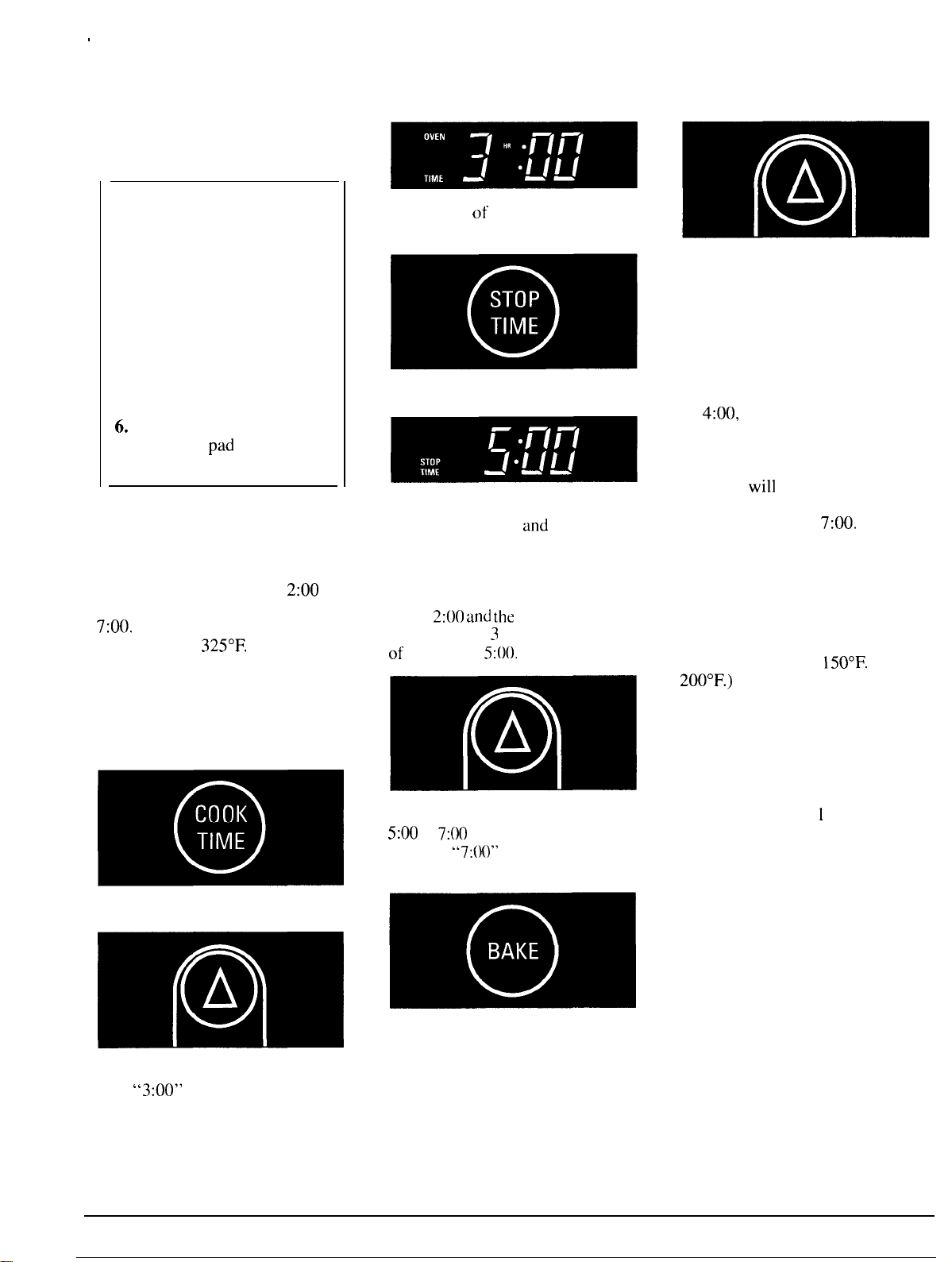
How to Set Delay Start
and Stop
Quick Reminder:
1. Touch COOK TIME pad.
2. Touch INCREASE/
DECREASE pad to set cooking
time.
3. Touch STOP TIME pad.
4. Touch INCREASE/
DECREASE pad until desired
Stop Time appears in display.
5. Touch Bake pad.
6.
Touch INCREASE/
DECREASE
pad
to select oven
temperature.
Delay Start and Stop is setting the
oven-timer to turn the oven on and
off automatically at a later time
than the present time of day.
For example: Let’s say it’s
2:00
and dinner time is shortly after
7:00.
The recipe suggests 3 hours
baking time at
325°F.
Here’s how:
Step
1:
Position the shelf or shelves
in the oven. If cooking on two
shelves at the same time, stagger the
pans for best heat circulation.
Step 2: Close
the oven door.
=
00
Step 3: Touch COOK TIME pad.
~
A
Step 4: Press INCREASE pad
until
“3:00” appears in the display.
Cook Time
of 3 hours now appears
in display.
Step 5: Touch STOP TIME pad.
The earliest possible stop time
appears on display
and
“STOP
TIME” flashes. The control
automatically sets Stop Time by
adding the Cook Time to the time
of day. In this example, the time of
day is
2:00
and
the
Cook Time is 3
hours. Adding
3
hours to the time
of day equals
5:00.
Step
6: Change Stop Time from
5:00
to
7:00
by pressing INCREASE
pad until
“7:(M)”
appears in the
display.
Step 7: Touch BAKE pad.
Step 8: Touch INCREASE pad.
Press DECREASE pad until “325°”
is displayed.
At
4:00,
the oven will turn on
automatically. The word “ON”
and the changing oven temperature
will be displayed as the oven heats
up. Oven
will
continue to cook for
the programmed 3 hours and shut
off automatically at
7:00.
Step 9: Remove food from oven.
Remember, even though oven
shuts off automatically, foods
continue cooking after controls
are off.
Note: The low temperature zone of
this range (between
150°F.
and
200°F.)
is available to keep hot
cooked foods warm. Food kept in
the oven longer than two hours at
these low temperatures may spoil.
When setting your oven for a delay
start, never let foods such as dairy
products, fish, meat, poultry, etc.
stand for more than
1
hour before
actual cooking begins. Room
temperature promotes the growth of
harmful bacteria. Be sure the oven
light is off because heat from the
bulb will speed bacteria growth.
10
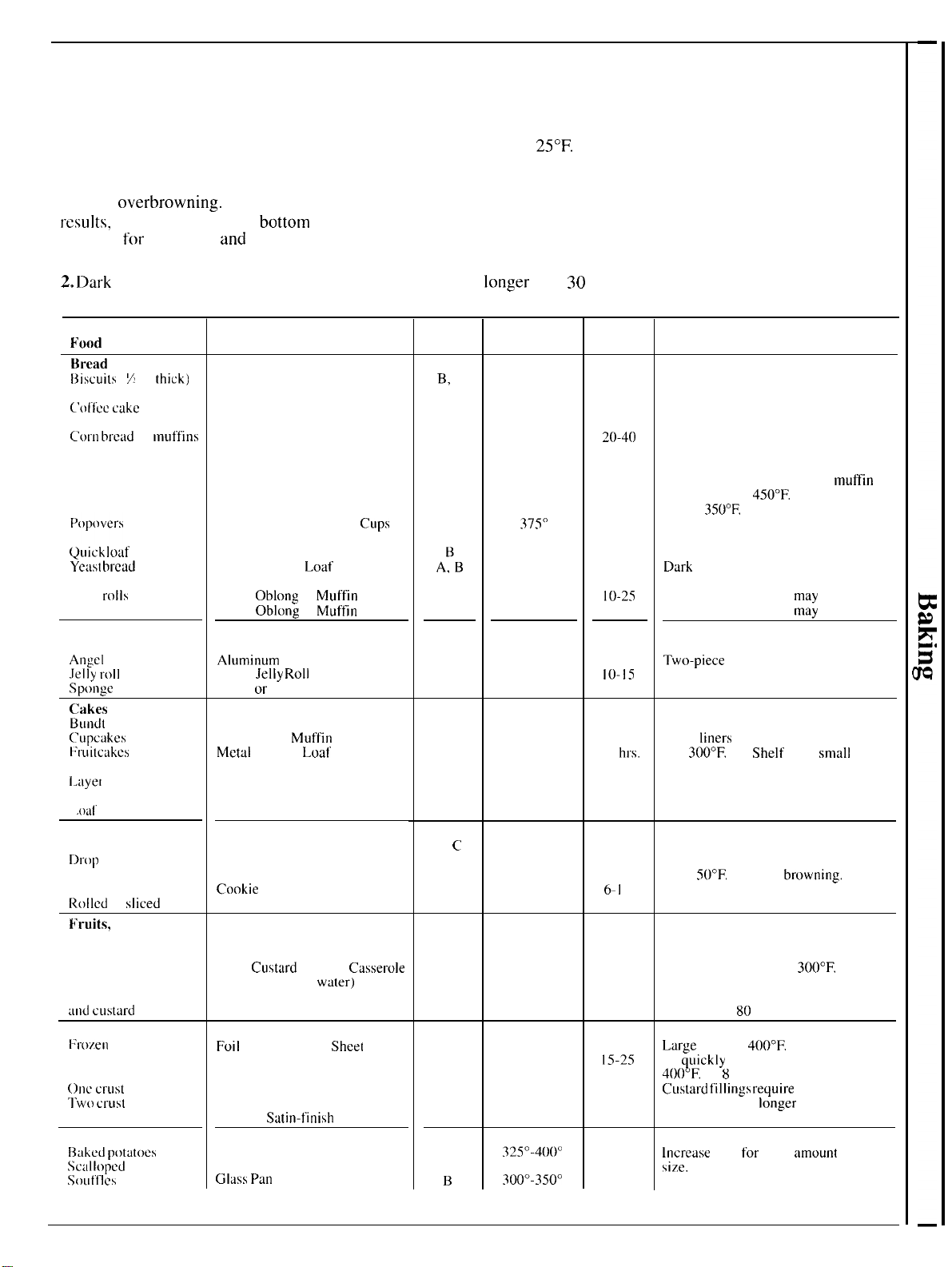
Baking Guide
1. Aluminum pans conduct heat
quickly, For most conventional
baking, light, shiny finishes give
best results because they help
prevent
overbrowning.
For best
results,
we recommend dull
bottom
surfaces
for
cake pans
and
pie
plates.
2.
I>ark
or non-shiny finishes and
glass cookware generally absorb
heat, which may result in dry, crisp
crusts. Reduce oven heat
25°F.
if
lighter crusts are desired. Rapid
browning of some foods can be
achieved by preheating cast iron
cookware.
cooking times, preheating gives
best appearance and crispness.
Although preheating is not
necessary with meats, it is
preferred for baked goods.
4. Open the oven door to check
food as little as possible to prevent
uneven heating and to save energy.
3. Preheating the oven is not
always necessary, especially for
foods which cook
longer
than
30
to
40 minutes. For food with short
Shelf
Positions
Oven
Temperatures
Time,
Minutes
fi’ood
Cookware
Comments
Bread
f3iscuits
(
7
in. thick) Shiny Cookie Sheet
B,
c
B
B
B
B
B
A;B
B
B
A
B
A
4000-
4
750”
3500
-
4000
4000-450’’
3500
4000-
4
250”
375°
350°-3750
375°-4250
375°-4250
3500
-
3750
325°-3750
375°-4000
325°-3500
15-20
20-30”
~()-4()
45-55
20-30”
45-60
45-60
45-60
fo-25
20-30
30-55
fo-15
45-60
Canned, refrigerated biscuits take 2 to
4 minutes fess time.
(’ol”ftic
cake
Shiny
Metaf Pan
with
satin-finish bottom
Cast-iron or Gfass Pan
Shiny Metaf Pan with
satin-finish bottom
Shiny Metaf Muffin Pans
C-orn
bread
or
muffins
Gingerbread
Preheat cast-iron pan for crisp crust,
Muffins
Decrease about 5 minutes for
mufiin
mix, or bake at
450”F.
for 25 minutes,
then at
350°F.
for f O to 15 minutes.
Deep Gfass or Cast-iron
CLIps
Quick
foaf
bread
Ye;tst
bread
(2 loaves)
Metal or Gfass Loaf Pans
Metaf or Gfass Loaf Pans
Dark
metal or glass gives deepest
browning.
For thin roffs, Sheff B
may
be used.
Plain
rolfs
Sweet rolls
Cakes
(without shortening)
Angef
food”
Ieffy
rolf
sponge
Cakes
Bundt
cakes
(Tupcakes
t;ruitcakts
Shiny
Obfong
or
Muffin
Pans
Shiny
Obfong
or
Muffin
Pans For thin roffs, Shelf B ma; be used.
Afuminum
Tube Pan
Metaf
Jefly
Roff
Pan
Metaf
or
Ceramic Pan
Twc~-piece
pan is convenient.
Line pan with waxed paper.
Metaf or Ceramic Pan
Shiny Metaf
Muffin
Pans
Mctaf
or Glass Loal or Tube
Pan
Shiny Metal Pan with
satin-finish bottom
A, B
B
A. B
B
B
325°-3500
3500
-
3750
275°-3000”
350°-3750
3500
45-65
20-25
2-4
hrs.
20-35
40-60”
Paper
finers
produce moister crusts.
Use
300°F.
and
Sheff
B for
smalf
01
individual cakes.
[.ayer
f
.Oaf
Cookies
Brownies
Dl”op
Metaf or Gfass Loaf Pans
Metaf or Gfass Pans
Cookie Sheet
B,
C
B, C
B, C
B. C
325°-3500
3500
-
4000”
400°-4250
375°-4000”
25-35
10-20
6-f 2
7-f 2
Bar cookies from mix use same time.
Use Sheff C and increase temperature
25 to
500F,
for more
brownin&.
Refrigerator
f{offed
or
sficed
Cookie
Sheet
Cookie Sheet
K’ruits,
other Desserts
Baked apples
Custard
Glass or Metaf Pans
Glass
Crrstard
Cups or
Casserofe
(set in pan of hot
wfiter)
Gfass Custard Cups or Casserole
B
B
B
A
B
B
B
B
B
B
B
350°-4000
3000
-
3500”
325°
30-60”
30-60
50-90”
Reduce temperature to
3000F.
for
large custard.
Cook bread or rice pudding with
custard base
80
to 90 minutes.
Puddings. rice
ancf
cus[ard
Pies
I:rozen
Meringue
Foif
Pan on Cookie
Sheet
Spread to crust edges
4000-
4
250”
325°-3500
400”-4250”
4000-
4
250”
4500
45-70
f5-25
40-60”
40-60
f 2- f 5
Large
pies use
4000F.”
and more time
To
quickfy
brown meringue, use
4000F.”
for
8
to f () minutes.
Custal”d
f’iffings
I“equire
fewer
temperature and
fonger
time.
OIIC
~l”LISt
‘]-W()
~l”LISt
Pastry shefl
Miscellaneous
f;~iked
potutoes”
Scaffopert
dishes
SOLltf’f~\
Gfass or Satin-finish Metaf Pan
Gfass or Satin-finish Metaf Pan
Glass or
Stitin-finish
Metaf Pan
Set on Oven Sheff
Glass or Metaf Parr
Glass
Pan
3250-400””
325”-375°
3000-3500
60-90”
30-60”
30-75
fncrease
time
for
large
;lmount
or
size,
11
Roasting
Roasting is cooking by
dry
heat
Tender meat or poultry can be
roasted uncovered in your oven.
Roasting temperatures, which
should be low and steady, keep
spattering to a minimum. When
roasting, it is not necessary to
sear, baste, cover or
add
water
to your meat.
Roasting is
really
a baking
procedure used
for
rncats.
Therefore, oven controls are set
for
BAKE. (You may hear a slight
clicking sound, indicating the oven
is working properly. ) Roasting is
easy; just follow
these
steps:
Step
1:
Check weight of meat, and
place, fat
side
up, on roasting rack
in a shallow pan. (Broiler pan with
rack is a good pan for this. ) Line
broiler pan with aluminum foil
when using pan for
nlarinatillg,
cooking with fruits, cooking
heavily cured meats, or basting
food during cooking. Avoid
spilling these materials on oven
liner
or
door.
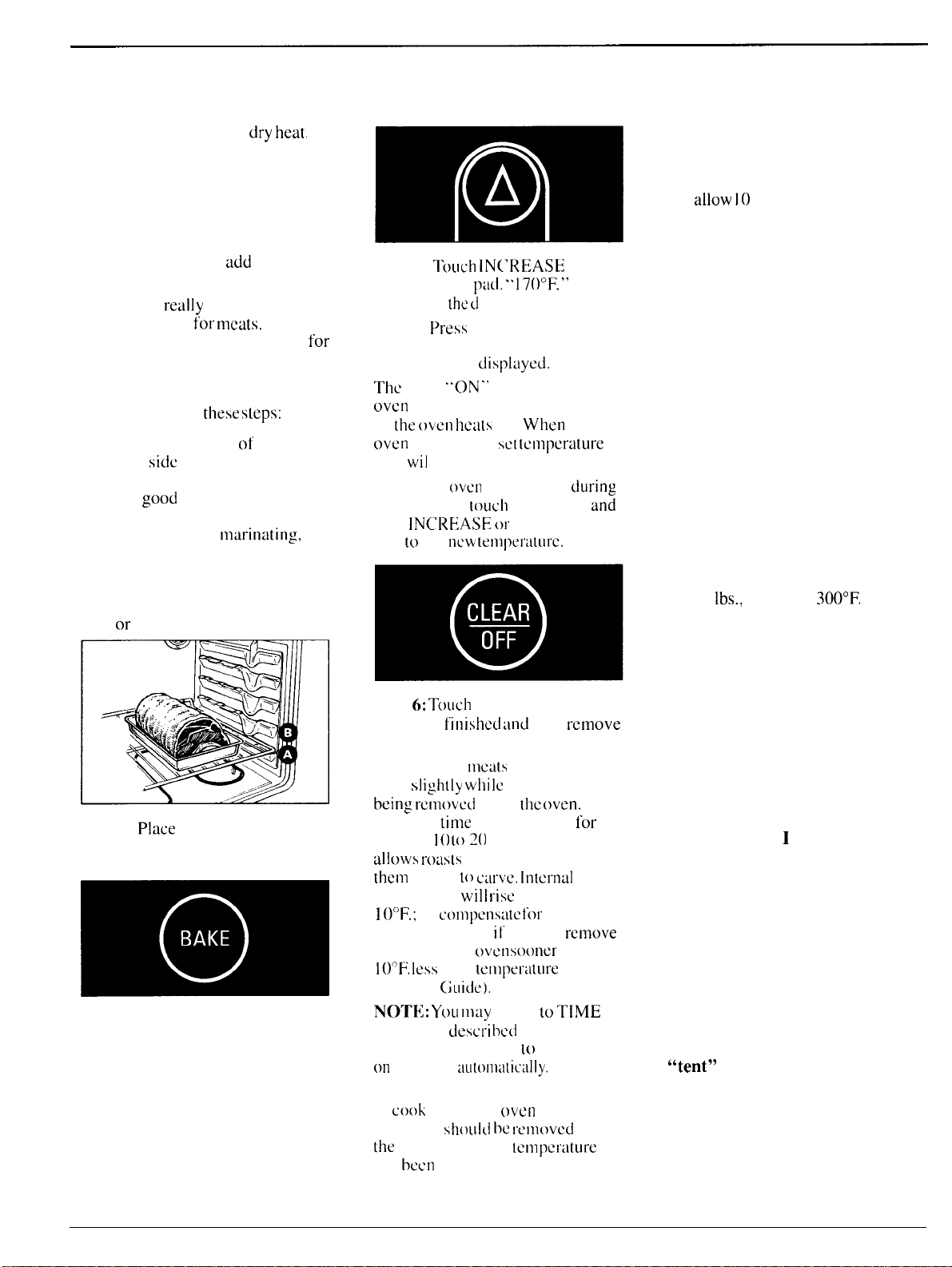
Step 2:
Place
in oven on shelf in
A or B position. No preheating
is necessary.
m
:A
Step
3: Touch BAKE pad.
Step 4:
Touch
IN(’REASE or
DECREASE
pad,
..
170°F.”
appears i n
the
d
i splay.
Step 5:
f>ress
INCREASE or
DECREASE pad until desired
temperature
is displayed.
The
word
“ON.’
and the changing
oven
temperature will be displayed
as
the
oven
hca(s
up.
When
the
oven
reaches [tic
SC1
[cmperature
a
tone
wil
I sound.
To change
oven
temperature
during
BAKE cycle,
[ouch
BAKE pad
and
then
fNCREASE
or
DECREASE
pad
[0
get
IICW’
tClllpCI’il[lll-C.
Step
6:
TOLICI1
CLEAR/OFF when
baking is
finished
and
then
l+emove
food from oven.
Step
7: Most
I]lcats
continue to
cook
s]
ightly
whi
Ic
standing, after
being
rcmovcd
from
[he
oven.
Standing time recommended
lor
roasts is
I
()
1020
minutes. This
a]]ows
rodsts
to firm up and makes
them
easier
to
carve.
lntcrnal
temperature
will
rise
about 5° to
]
OOF.;
to
COI1lPCIISL1(C
for
temperature rise,
il’
desired,
remove
the roast from
oven
sooner
(at 5° to
100F.
less
than
[cmperature
in the
Roasting (;uidc).
NOrrk~:
YOLI
tllay
wish
10
TfME
BAKE, as
describect
in the Baking
section of this book,
10
turn oven
on
and 01.1”
~illt(~tll:itic:llly.
Remember [hat food will continue
to
cook
in the hot
oven
and
therefore
should
he
removed
when
the
desired internal
temperature
has bCCIl reached.
For Frozen Roasts
●
Frozen roasts of beef, pork, lamb,
etc., can be started without thawing,
but
allow
10
to 25 minutes per
pound additional time (10 minutes
per pound for roasts under 5
pounds, more time for larger roasts).
● Thaw most frozen poultry before
roasting to ensure even doneness.
Some commercial frozen poultry
can be cooked successfully without
thawing. Follow directions given
on package label.
Questions and Answers
Q. Is it necessary to check for
doneness with a meat
thermometer?
A.
Checking the finished internal
temperature at the completion of
cooking time is recommended.
Temperatures are shown in Roasting
Guide on opposite page. For roasts
over 8
lbs.,
cooked at
300°F.
with
reduced time, check with
thermometer at half-hour intervals
after half the cooking time has
passed.
Q. Why is my roast crumbling
when I try to carve it?
A. Roasts are easier to slice if
allowed to cool 10 to 20 minutes
after removing from oven. Be sure
to cut across the grain of the meat.
Q. Do I need to preheat my
oven each time
I
cook a roast
or poultry?
A. It is unnecessary to preheat
your oven.
Q. When buying a roast, are
there any special tips that would
help me cook it more evenly?
A. Yes. Buy a roast as even in
thickness as possible, or buy
rolled roasts.
Q. Can I seal the sides of my foil
“tent” when roasting a turkey?
A. Sealing the foil will steam the
meat. Leaving it unsealed allows
the air to circulate and brown
the meat.
12
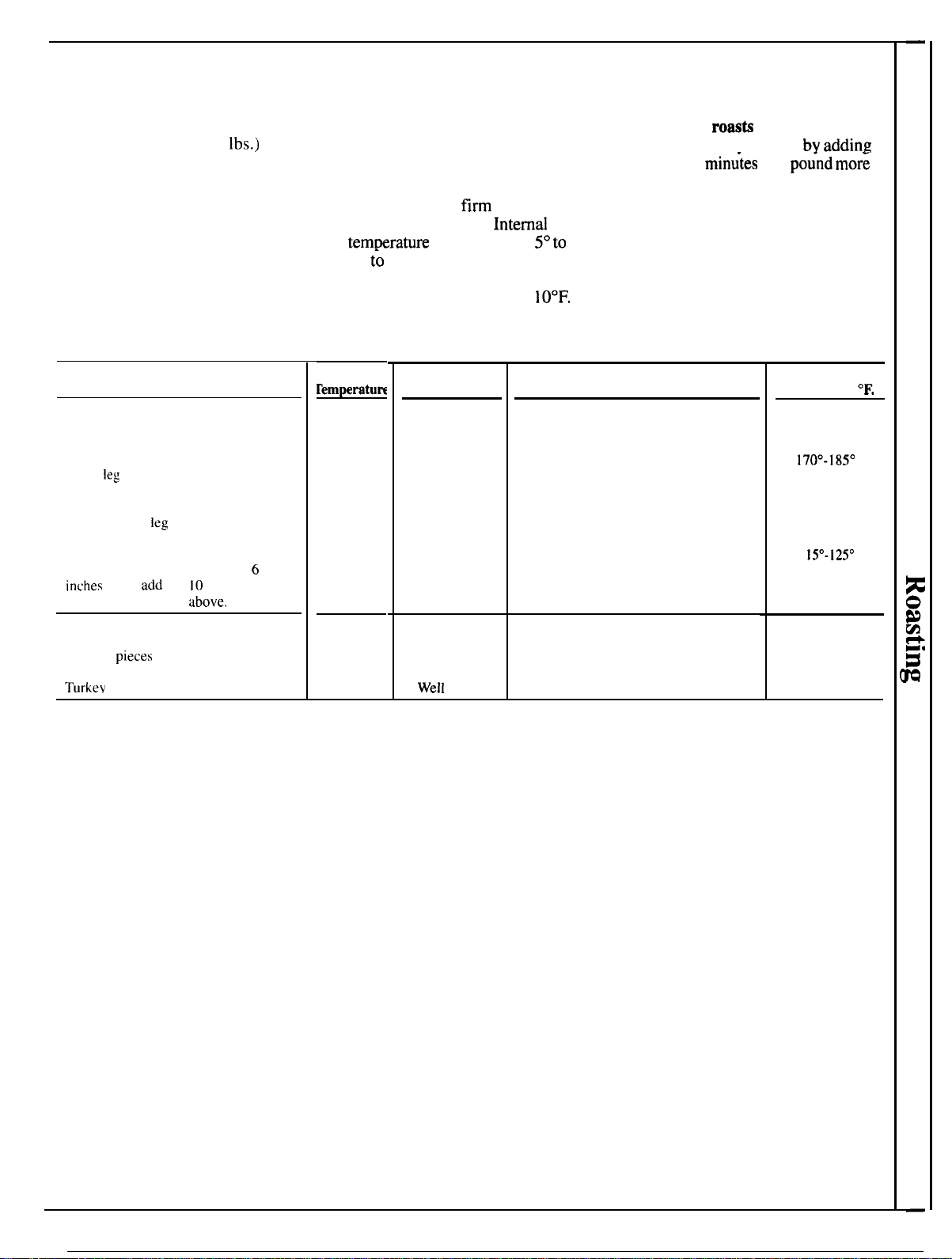
Roasting Guide
1. Position oven shelf at B for
3. Remove fat and drippings as
5.
Frozen
roaz~
can be
small-size roasts (3 to 7
lbs.)
and
necessary. Baste as desired.
conventionally roasted
by
adding
at A for larger roasts.
4.
Standing time recommended
10 to 25
min~tes
per
po~nd
mor;
2. Place meat fat-side-up, or
for roasts is 10 to 20 minutes. This
time than given in guide for
poultry breast-side-up, on broiler
allows roasts to
firm up and makes
refrigerated roasts. (10 minutes per
pan or other shallow pan with
them easier to carve. Interrtd
pound for roasts under 5 pounds.)
trivet. Do not cover. Do not stuff
temkrature
will rise about
5°to
10°
Defrost poultry before roasting,
poultry until just before roasting.
F.;
(o
compensate for temperature
Use meat thermometer for more
accurate doneness. (Do not place
thermometer in stuffing.)
Type
Meat
Tender cuts; rib, high quality sirloin
tip, rump or top round*
Lamb
leg
or bone-in shoulder*
Veal shoulder,
leg
or loin*
Pork loin, rib or shoulder*
Ham, precooked
*For boneless rolled roasts over
6
inches
thick,
add
5 to
10
minutes per
pound to times given
above.
Poultry
Chicken or Duck
Chicken
pieces
Turkev
rise, if desired. remove the roast
from oven sooner (at 5° to
10°F.
less than temperature in this guide).
Oven
remperatu~
325°
32S
0
325°
325°
325°
325°
350°
325°
Doneness
Rare:
Medium:
Well
Done:
Rare:
Medium:
Well Done:
Well Done:
Well
Done:
To Warm:
Well Done:
Well
Done:
WelI
Done:
Approximate Roasting Time
in Minutes
per Pound
3 to 5 Ibs.
6
to
8
tbs.
24-33
18-22
35-39 22-29
40-45
30-35
21-2s
20-23
2S-30 24-28
30-3s
28-33
35-45 30-40
35-4s
30-40
17-20 minutes per pound (any weight)
3
to 5 Ibs.
Over
5
Ibs.
3s-40
30-35
3s-40
10 to 15 Ibs. Over 1S Ibs.
18-2S
1s-20
Internal
Temperature
‘F.
130°-1400
150°-1600
170°-18S0
130°-1400
150°-1600
170°-1850
170°-1800
170°-1800
1
lsO-i2s0
185°-1900
18 S
0
-190
0
In thigh:
18 S
0
-190
0
13
Broiling
(~o~
models with Electronic
Control)
Broiling is cooking
f~~od
by intense
radiant
hcut
from
the upper unit in
the
oven,
Most
fish
and
tender
cuts
of
ule~lt
c:in
be
broiled. Follow
these steps
t{)
keep
spattering and
smoking
(o
a
minimum.
Step l:
11’
nle~lt
11:1s
i:it
or
gristle
neul-
edge.
CLI1
vcrticti]
sl~tshes
through
bolh
:Ibollt
2“
:ipal”t.
[f
desired.
I’;it
mlly
be
trimmed,
lc:lving
Itiycr
about 1/8” thick.
l-o
change
l’rom
HI
Broil to
LO
Broil, touch the BROIL
p:id
thet]
tap
DECREASE
pad
once.
Step 7: Turn
food
only
once
during cooking. Time
foods
l’or
first
side per Broiling
Guide.
Turn
food,
then use times
given
{01
second
side
[is
O
guide
to prcl’erred
dc>neness.
(Where
two thicknesses
and
times are
given
togctbcr,
usc
first
times given for
thinnest
Ii)od.)
Questions
&
Answers
~.
W~IY
should
]
lQ:]V~
tllc
[1[)~),-
closcd
whet)
broiling
(:hickcn
’?
A.
~’hicken
is the only
Ioocl
I“ccollllllclldcd
for
Closc(i-door
t)rt)ilillg.
This is
bcc::~usc
chicken
is
r(:l:l[
ivcly
t
hickcr
th;lrl
olllcr
[’()()ds
you
blc~i
t.
(’l(~sill~:
tl]c
door”
hol~ls
lllor~”
tl~’ill
i]l
th~
(iic:n
which
:11
I{)ws
chi~hc
i]
[(,
t.(lt)k
Cvcn
I v
1
tll’’ouc
110111.
Step 2: l
)
I:ICC
tne:it
on
broiler
rack
Step
8:
Whctl
Broiling is
.,
‘.
in broiler
piul
which
comes with
Q. When
hroiting,
is it
neccssarj
r~ulgc.
Alwi~ys
LISC
rack
so
fat
compteted
touch
CLEAR/OFF:.
Serve
food
inlmeditltcly.
:uld
lc~t\c
t{)
idWa)’S
llse
a
ra(.k
irl
i he
pall’?
drips into broiler
ptin;
otherwise
juices
m~ly
become
hot enough
to
pan outside oven
10
cool
during
meal for easiest
clc:in
ing.
cutch
I.ire.
Step
3:
f>osition
sheff
on
Use of Aluminum
t’oil
recommended
she]
F
position
us
suggested
in
Broi
fing
CIuicfe
on
opp{)site
f~:lge.
I
I
your
r:lnge
is
contlcctcd
to
208
vofts,
you
may
wish to
usc
ii
higher
shelf
position,
prehetlt
the
broifer,
or
broif
a
fittfe
tongcr.
Step 4:
fJc~lvc
door
ajar
at
stop
(excef>t
when broiling chicken).
The
door
stays
open
by
itseff,
yet
proper
tcmpertiture
is
m~iintained
You
can
use
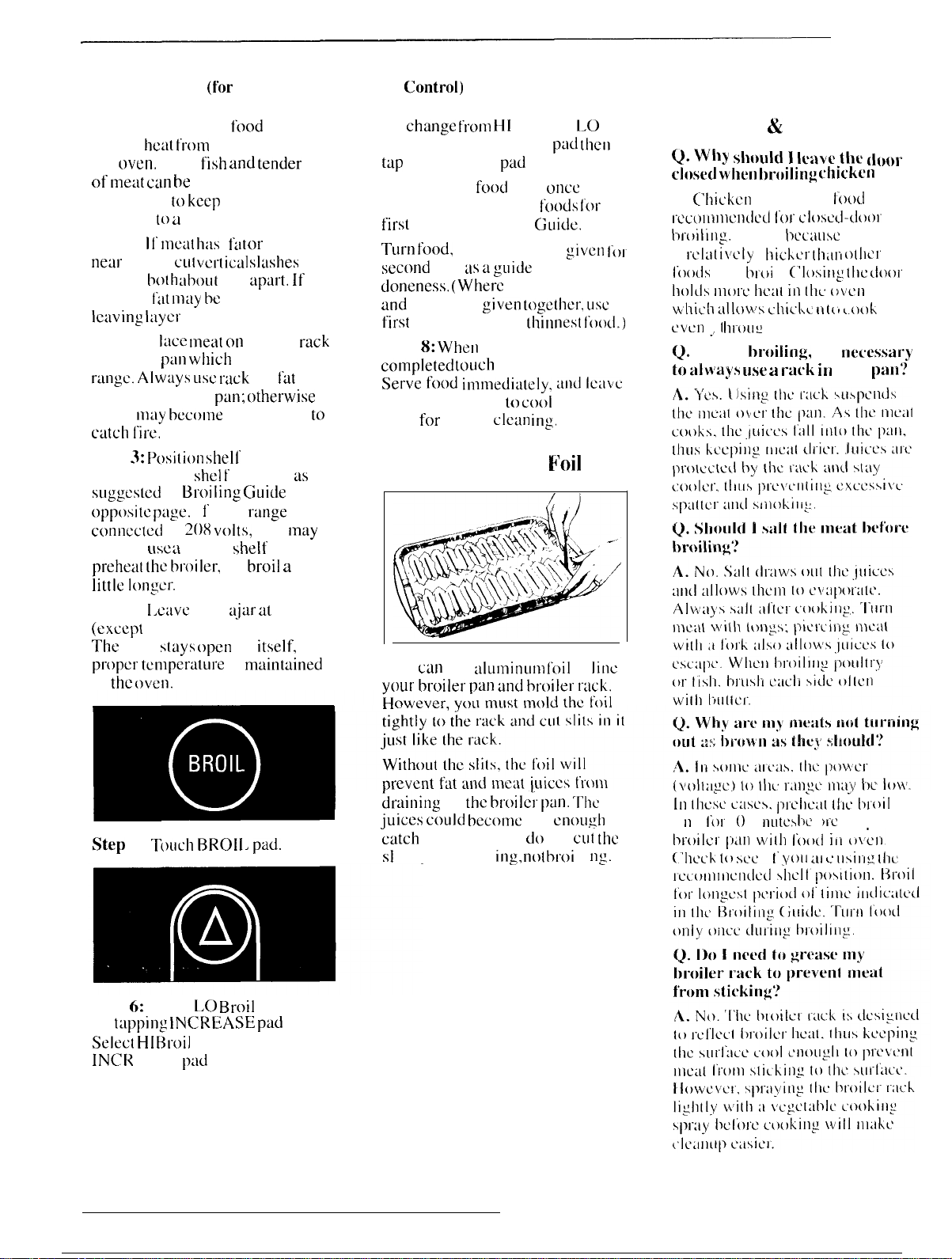
tlfuminum
foit
to
fitlc
in
the
oven.
vour
broiter
Dan
tind
broifer
r:lck.
~raining
to the
btoife;
pan.
The
ill
IIIC;C
;iISCS.
plct);:l(
III;
tlioil
iuices
cottfd
become
hot
enough
to
u
11
it
I’or
I
()
In i
nutcs
I)cl ’(
)Ic
rjl:l~’i112
Step 5:
Toucfl
BROff,
pad.
;utch on fire. f t you
do
not
cut
the
t>roitcr
pill]
wilt]
loo(t”
ill
\)\L1-l
‘
sf
its, you are fry
itlg,
not
broi
f i
IIS.
(’hL>Lk
to
scc
i
1’
Voll
LIf
c’
llsi]-i~
IIIL
Step
6:
Select
f.O
Broif
(4500
F
.)
by
t:l~~f>]ng
IN(;R[3ASE
pad
once.
Sefect
Hf
Broit
(5500
F
.) by tapping
lN(lf<
EASE
p:ld
twice.
14
———..—....—————..—.—. ---—-.. -.--- .-. ------- ..—---. .. ---—.
. . . . . . .
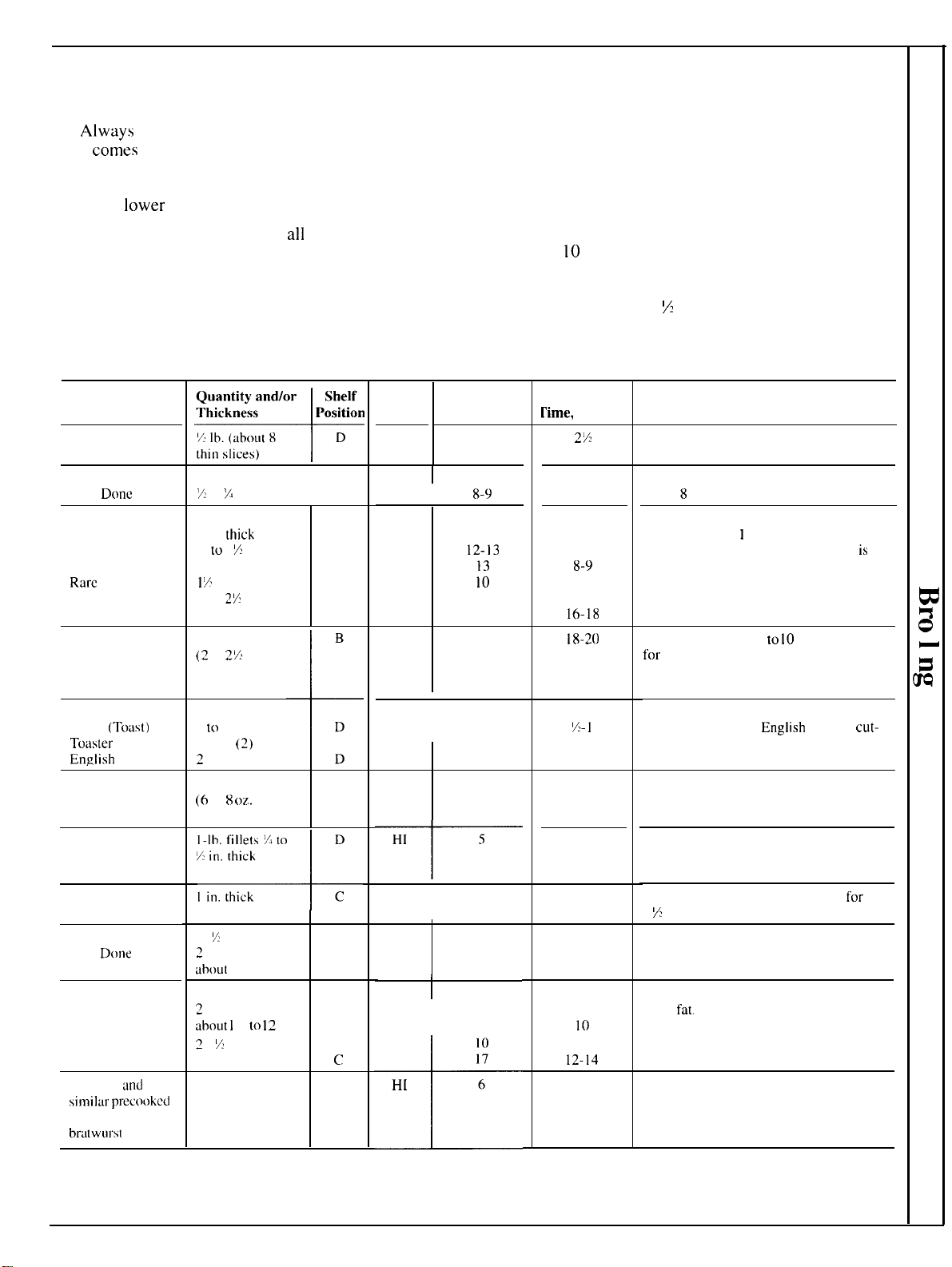
Broiling Guide
outer fat surface just to the edge of
the meat. Use tongs to turn meat
over to prevent piercing meat and
losing juices.
6. Broiler does not need to be
preheated. However, for very thin
foods, or to increase browning,
preheat if desired.
7. Frozen Steaks can be
conventionally broiled by
positioning the oven shelf at next
lowest shelf position and increasing
cooking time given in this guide
1
X
times per side.
1.
Always
use broiler pan and rack
that
comes
with your oven. It is
designed to minimize smoking and
spattering by trapping juices in the
shielded
lower
part of the pan.
4. If desired, marinate meats or
chicken before broiling. Or brush
with barbecue sauce last 5 to
10
minutes only.
2. Oven door should be ajar for
all
foods except chicken; there is a
special position on door which
holds door open correctly.
5. When arranging food on pan, do
not let fatty edges hang over sides,
which could soil oven with fat
dripping.
3. For steaks and chops, slash fat
evenly around outside edges of meat.
To slash, cut crosswise through
HI or
LO
Broil
HI
First Side
Time, Minute!
5
Second Side
rime,
Minutes
Food
Bacon
Comments
2%
6-7
7
5-6
8-9
6-7
9-12
16-18
Arrange in single layer.
I
Ground Beef
Well
Done
I
1 lb. (4 patties)
7 to
X
in. thick
D
Space evenly.
Up to
8
patties take about same time.
Steaks less than
1
in. thick cook
through before browning.
Pan frying
is
recommended. Slash fat.
I
HI 8-9
I
Beef Steaks
Rare
Medium
Well Done
Rare
Medium
Well Done
HI
9
12-13
13
10
15
25
I in.
thick
( I to 1 X lbs. )
D
D
D
D
D
D
I
X
in. thick
(2 to
27,
lbs. )
18-20
Reduce time about 5
to
10
min. per side
for cut-up chicken. Brush each side with
melted butter. Broil with skin-side-down
first and broil with door closed.
Space evenly. Place
Englisb
muffins
cut-
side-up and brush with butter, if desired.
Chicken (450”)
I
whole
(2
to
2X
lbs.),
split lengthwise
+
B
D
D
LO
28-30
I
Bakery Products
Bread
(Toust)
or
Tc)aster
Pastries
EnRlish
Muffins
I
HI
2-3
2
[0
4 slices
I pkg.
(2)
2
(split)
%-1
3-4
Cut through back of shell, spread open.
Brush with melted butter before broiling
and after half of broiling time.
Handle and turn very carefully. Brush with
lemon butter before and during cooking, if
desired. Preheat broiler to increase browning.
Increase time 5 to 10 min. per side
for
I
X
in. thick or home-cured ham.
Lobster tails
~-4
(6
to
8
oz.
each)
c
HI
13-16
Do not
turn over.
5
T
Fish
I
LO
8
8
Ham slices (4500
)
(precooked)
Pork chops
Well
D(me
Iamb chops
Medium
Well Done
Medium
Well Done
Wieners
and
similtir
precooked
Sausages,
bm(wllrs(
Slash fat
2 (
X
in, )
2
( I in. thick).
tibout
I lb.
D
c
HI
10-12
12-13
4-5
8-9
I
2
( I in. thick)
~bout
I
()
to
I
~
OZ.
2 ( I
X
in. thick).
about 1 lb.
D
D
D
c
I
HI
8
10
4-7
10
4-6
1~.14
Slash fat
*
10
17
H[
6
If desired, split sausages in half
lengthwise; cut into 5- to 6-in. pieces.
I -lb. pkg. ( lo)
D
I-2
15
Care and Cleaning
(See Cleaning Guide)
Proper care and cleaning are
important so your oven
wil
I give
you efficient and satisfactory
service. F
O
11
OW
these directions
carefully in caring
for
your oven to
assure safe and proper maintenance.
Oven Shelves
Oven shelves
may
be cleaned with
a mild abrasive cleanser following
manufacturer’s directions. After
cleanin&,
rinse
the
shelves with
clean
water and dry with a
clean cloth.
To
remove heavy, burned-on soil,
soapy metal pads may be used
following manufacturer’s
directions. After scrubbing, wash
with soapy water, rinse and dry.
Oven shelves may be cleaned in
self-cleaning oven. However, they
will
darken, lose their
luster
and
become hard to slide. Wipe the
shelf supports with cooking
oil
after self-cleaning to make shelves
slide more easily.
Broiler Pan & Rack
After broiling, remove the broiler
rack and carefully pour off the
grease. Wash and rinse the pan and
rack in hot, soapy
water.
If food has burned on, sprinkle
the
rack while hot with detergent and
cover with wet paper towels or a
dish cloth. That way, burned-on
foods
will soak loose
while
the
meal is being served.
Do not store a soiled broiler pan
and rack in the oven. Do not clean
in self-cleaning oven.
Oven Light Bulb
The light bulb is located on the
back wall
of the oven. Before
replacing the bulb, disconnect
electric power to the oven at the
main fuse or circuit breaker panel.
Let the bulb cool completely
before removing it. Do not touch a
hot bulb with a damp cloth. If you
do, the bulb will break.
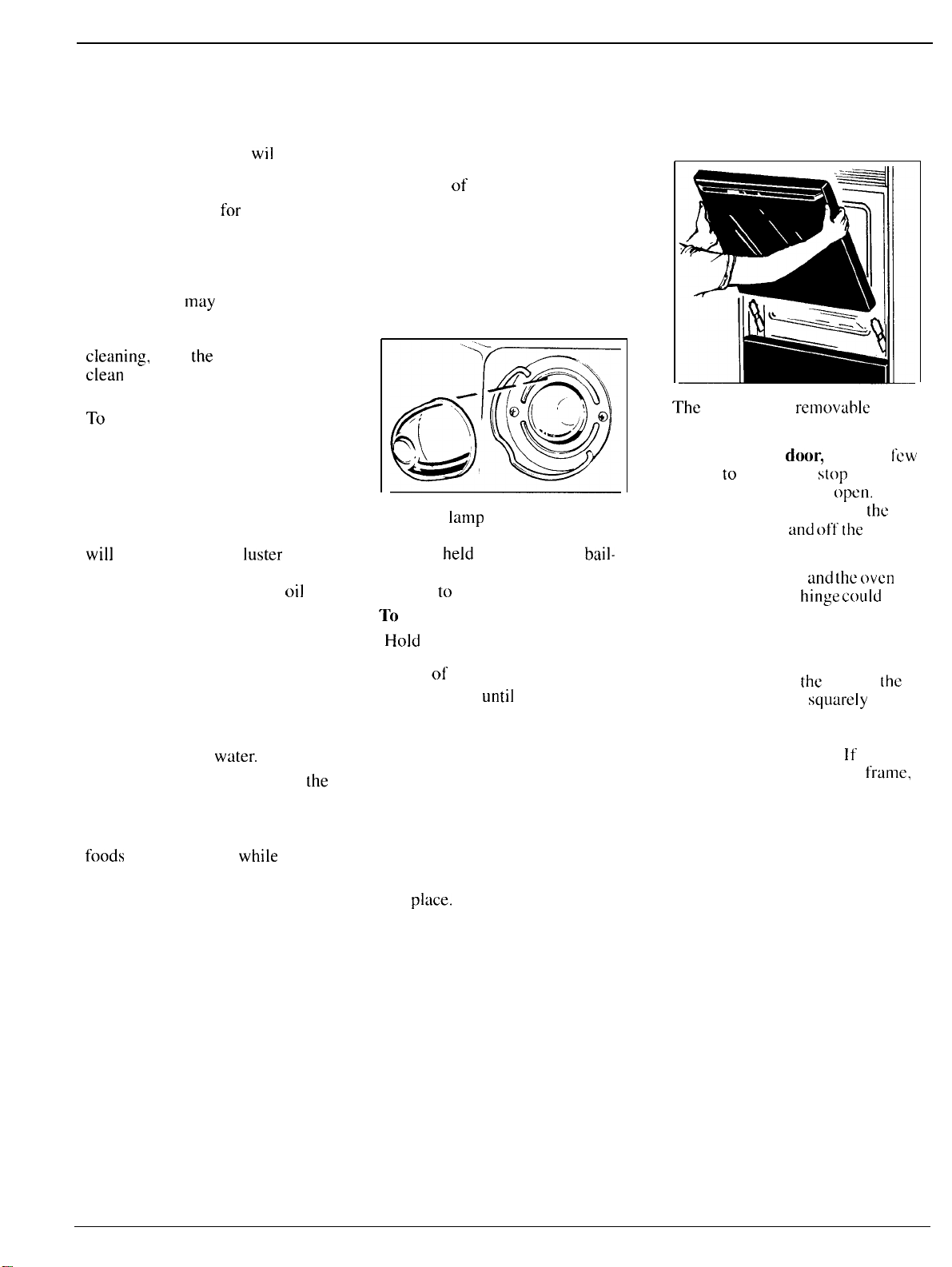
The oven
lamp
(bulb) is covered
with a removable glass cover
which is
held
in place with a
bail-
shaped wire. Remove oven door, if
desired,
to
reach cover easily.
TO
remove:
●
Hold
hand under cover so it
doesn’t fall when released. With
fingers
of
same hand, firmly push
back wire bail
until
it clears cover.
Lift off cover. DO NOT REMOVE
ANY SCREWS TO REMOVE
COVER.
● Replace bulb with 40-watt home
appliance bulb.
To replace cover:
● Place it into groove of lamp
receptacle. Pull wire bail forward
to center of cover until it snaps
into
place.
When in place, wire
holds cover firmly. Be certain wire
bail is in depression in center
of cover.
● Connect electric power to oven.
Lift-Off Oven Door
The
oven door is
removtihle
to
make the interior more accessible.
To remove the
door,
open it a
fcw
inches
to
the special
s[op
position
that will hold the door
open,
Grasp
firmly on each side and lift
the
door straight up
and
off
the
hinges.
Note: Be careful not to place hands
between the hinge
and
the
oven
door frame as the
hinge
could
snap
back and pinch fingers,
To replace the door, make
sure
the hinges are in the special stop
position. Position
the
slots in
[hc
bottom of the door
squtirety
over
the hinges. Then lower the door
slowly and evenly over both
hinges at the same time.
If
hinges
snap back against the oven
frame,
pull them back out.
16
Porcelain Oven Interior
Standard Lower Oven
With proper care, the porcelain
enamel finish on the inside of the
oven—top, bottom, sides, back
and inside of the door—will stay
new-looking for years.
Let oven cool before cleaning. We
recommend that you wear rubber
~loves
when
cleaning
the oven.
Soa~
and water will
normallv
do
Lower Oven Control
Knobs
The oven
control knobs may be
removed for cleaning.
To remove knob, pull it straight off
the stem. If knob is difficult to
remove, place a thin cloth (like a
handkerchie~ or a piece of string
under and around the knob edge
and Dull
UD.
.
.
Wash knobs in
soaD
and water but
find that your foods consistently
brown too little or too much.
the
job. Heavy spattering or.
do not soak. ‘
spillovers
may require cleaning
with a mild abrasive cleanser.
Soapy, wet metal pads may also be
used. Do not allow food spills with
a high sugar or acid content (such
as milk, tomatoes, sauerkraut, fruit
juices or pie filling) to remain on
the surface. They may cause a dull
spot even after cleaning.
Adjusting Lower Oven
Thermostat (OVEN
TEMP
Knob)
Use the time given on a recipe
when cooking the first time.
Oven thermostats, in time, may
“drift” from the factory setting
and differences in timing between
an old
and
a new oven of 5 to
10
minutes are not unusual. If you
Gtiove
in stem
Household ammonia may make the
To replace Oven Set knob,
cleaning job easier. Place 1/2 cup
locate the
groove
in the knob stem.
in a shallow glass or pottery
Locate the-molded rib inside the
container in a cold oven overnight.
knob. Fit the molded rib of the knob
The ammonia fumes will help
into the groove on the knob stem.
loosen the burned-on grease and
food.
If necessary, you may use a caustic
cleaner. Follow package directions.
Cautions about using spray-on
oven cleaners:
● Do not spray oven cleaner on the
electrical controls and switches
because it could cause a short
circuit and result in sparking or
fire.
● Do not
allow
a film from the
cleaner to build up on the
temperature sensor—it
could
cause
the oven to heat improperly. (The
sensor is located at the top of the
oven. ) Carefully wipe the sensor
clean
after each oven cleaning,
being careful not to move the
sensor as a change in its position
could affect how the oven bakes.
●
Do not
spray any oven cleaner on
the oven door, handles or any
exterior surface of the oven, wood
or painted surfaces. The cleaner
can
damage these surfaces.
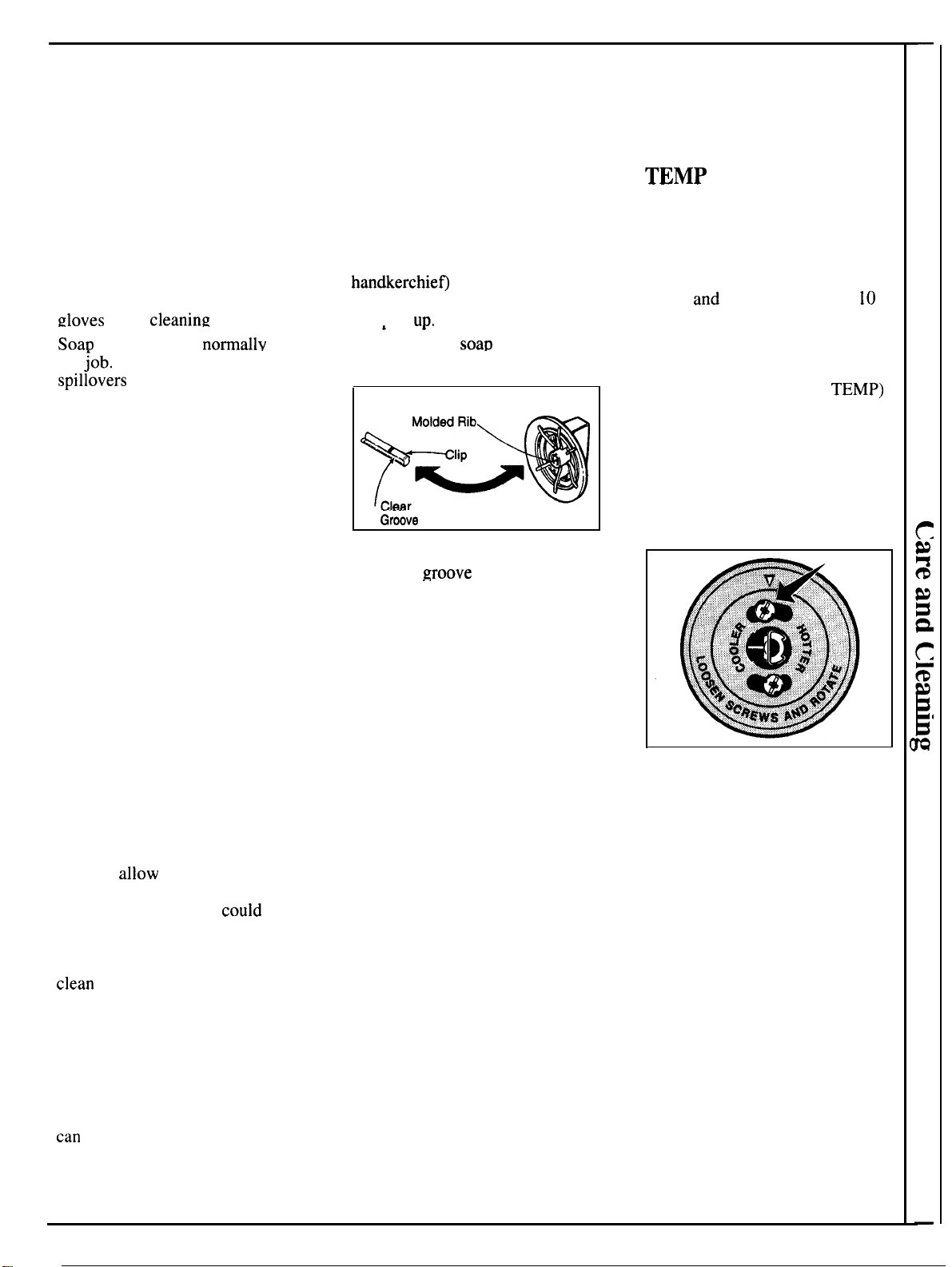
you may make a simple adjustment
in the thermostat (OVEN
TEMP)
knob.
Pull the knob off the shaft, look
at the back of the knob and not
the current setting before making
any adjustment. The knob is
factory set with the top screw
directly under the pointer.
To adjust the thermostat:
1.
Pull off the knob.
2. Loosen both screws on back of
the knob.
3. Hold
both parts of the knob and
turn so the top screw moves in the
desired direction. HOTTER to
increase temperature, COOLER to
decrease temperature. You will
hear and feel the notches as you
turn the knob. Each notch changes
temperature about 15°.
4. Tighten the screws.
5. Return the knob to the range.
Recheck oven performance before
making an additional adjustment.
17
Operating the Self-Cleaning Oven
(Models with Electronic Oven Control)
Normal Cleaning Time:
3
hours
Before a Clean Cycle
Step 1: Remove the broiler pan,
broiler
ruck,
all
cookware and any
aluminum
foil
from
the oven—
they
can
not withstand the high
cleaning temperatures. (Oven
shelves may be left in oven. Note:
Shelves will discolor after the
self-clean cycle. )
Step 2: Wipe up heavy soil on the
oven bottom.
{
Y%
,,,
,,,
,,,
,,,
,,,
,,,
!,,
,,,
,,,
,
,,
,,,
,,,
,,,
,,
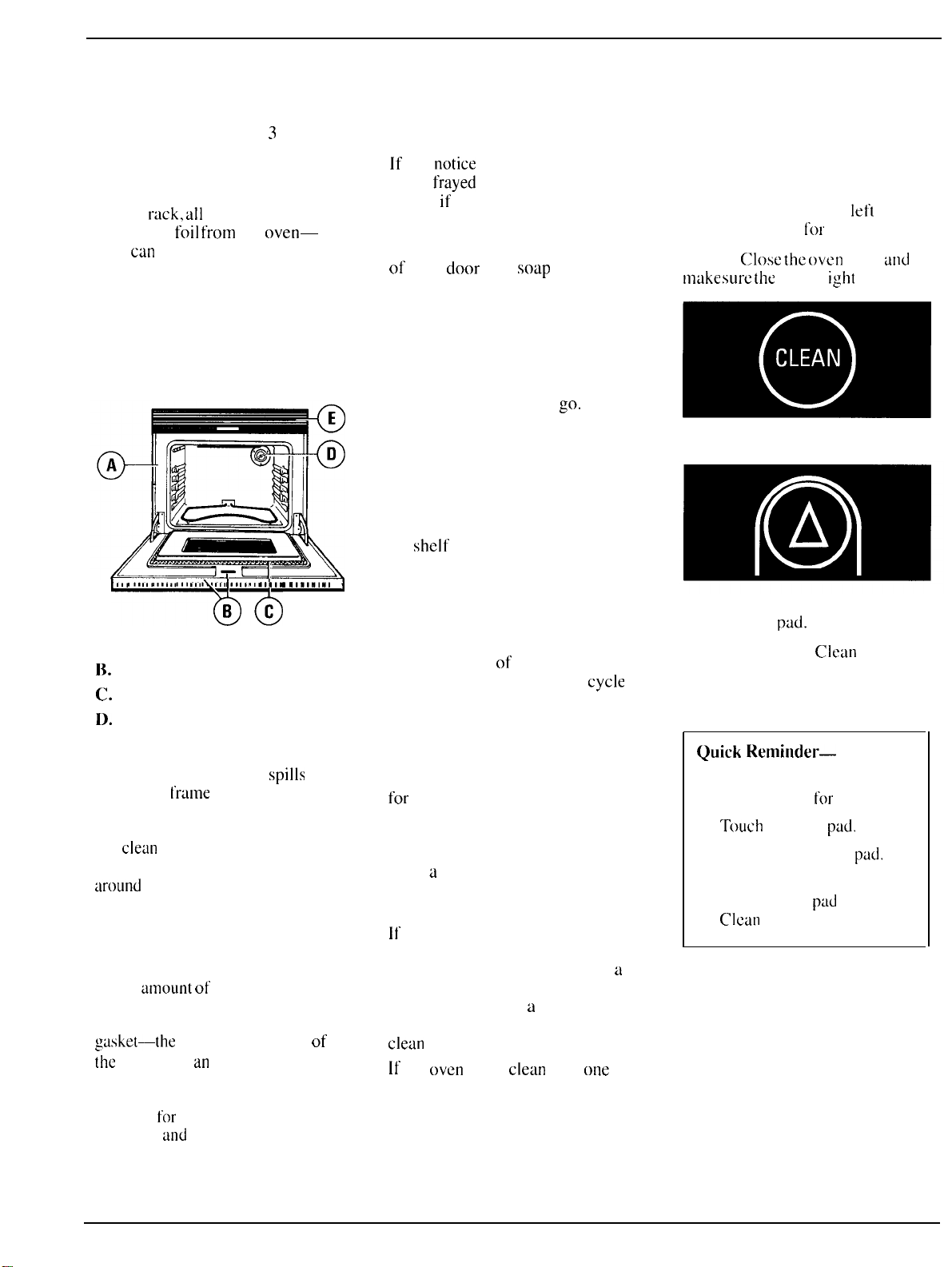
A. Oven Front Frame
l;. Openings in Door
C.
Oven Door Gasket
D.
Oven Light
E.
Air Grille
Step
3: Clean spatters or
spills
on
oven front
t’rtime
(A) and oven door
outside gasket (B) with a dampened
cloth. Polish with a dry cloth. Do
not
cletin
gasket (C). Never use a
commercial oven cleaner in or
around
self-cleaning oven.
Clean the door gasket (C) using a
clean sponge to soak the soiled area
with hydrogen peroxide. Repeated
soaking may be needed depending
on the
timourtt
of soil. Frequent
cleaning will prevent excessive soil
buildup. Do not rub the door
g~ske[—the
fiberglass material of
the
gasket has
an
extremely low
resistance to abrasion. An intact and
well-fitting oven door gasket is
essential
for
energy-efficient oven
operation
and
good baking results.
If
you
notice
the gasket becoming
worn,
frayed
or damaged in any
way or
if
it has become displaced
on the door, you should replace it.
Clean top, sides and outside front
of oven
door
with
soap
and water.
Do not use abrasives or oven
cleaners.
Do not let water run down through
openings in the top of the door (B).
To help prevent water from getting
in these slots when cleaning, open
the door as far as it will
go.
Step 4: Close the door and make
sure the oven light (D) is off.
Oven shelves may be cleaned in
the self-cleaning oven. However,
they will darken, lose their luster
and become hard to slide. Wipe
the shelf supports with cooking
oil after self-cleaning to make
shelves slide more easily.
Do not use commercial oven
cleaners or oven protectors in
or near the self-cleaning oven.
A combination
of
any of these
products plus the high clean
cycle
temperatures may damage the
porcelain finish of the oven.
Important
The oven door must be closed and
all controls must be set correctly
for
the clean cycle to work properly.
After a Clean Cycle
After
a
clean cycle, you may notice
some white ash in the oven. Just
wipe it up with a damp cloth.
It
white spots remain, remove them
with a soap-filled steel wool pad.
Be sure to rinse thoroughly with
a
vinegar and water mixture. These
deposits are usually
a
salt residue
that cannot be removed by the
clean
cycle.
If
the
oven
is not
clean
after
otle
clean cycle, the cycle may be
repeated.
How to Set Oven
for Cleaning
Step 1: Follow steps at
Ief[
to
prepare the oven
[or
cleaning.
Step 2:
Close
the
oven
door
tind
tnuke
sure
the
oven 1
ight
is off.
Step 3: Touch CLEAN pad.
Step 4: Touch INCREASE or
DECREASE
pdd.
Step 5: To change
Clean
Time,
press INCREASE or DECREASE
pad until desired Clean Time is
displayed.
Quick
Reminder-
To Set Self-Clean:
1.)
Prepare oven
for
cleaning,
2.)
Touch
CLEAN
pad.
3.) Touch INCREASE
pad.
4.) Touch INCREASE or
DECREASE
pud
to set
Clean
Time.
18
Clean Time is normally 3 hours.
You can change the Clean Time to
anywhere between 2 and 4 hours,
depending on how dirty the oven is.
The self-clean cycle will
automatically begin after “LOCK”
is displayed and the word “ON”
will appear on the display. When
the word “LOCK” is displayed, it
will not be possible to open the
oven door until the temperature
drops below the lock temperature.
When the clean cycle is finished,
the word “CLEAN” will
go
out in
the display and the oven will begin
to cool. When the oven
temperature has fallen below the
locking temperature (about 20-30
minutes after the word “CLEAN”
goes out at the end of the clean
cycle), the word “LOCK” goes
out and the door can be opened.
Step 6: Wait until
the word
“LOCK”
goes out in the display
before opening the oven door.
How to Delay Start
of Cleaning
Delay Start is setting the oven
timer to start the clean cycle
automatically at a later time than
the present time of day. NOTE:
Before beginning make sure the
oven clock shows the correct time
of day.
Quick Reminder—
Delay Start for Self-Clean:
1.) Prepare oven for cleaning.
2.) Touch CLEAN pad.
3.) Touch INCREASE pad.
4.) Touch STOP TIME pad.
Time that appears is 3 hours
later
than the time of day. Press
INCREASE pad until the Stop
Time you desire appears in the
display. The self-clean cycle
will automatically begin 3 hours
before the stop time you select.
For example: Let’s say it’s
7:00
and you want the oven to begin
self-cleaning at
9:00
after you’re
finished in the kitchen. The oven
is just
soiled
a normal amount so
the normal
Clean
Time of 3 hours
is preferred.
Step 1:
Prepare the oven
for
cleaning.
Step 2: Close the oven door and
make sure the oven light is off.
Oven door will lock automatically.
Step 3: Touch CLEAN pad.
Step 4: Touch INCREASE
pad.
Step 5: Clean Time for heavy soil
can be set for 4 hours.
If longer or
shorter Clean Time is desired,
press
lNCREASE/DECREASE
pad
until
desired Clean Time is
displayed.
Step 7: Change Stop Time from
10:00
to
12:00
by pressing
INCREASE pad until “
12:00”
appears in the display.
The words “DELAY CLEAN”
will also appear in the display.
The self-clean
cycle
will
automatically begin at
9:00
and
finish at
12:00.
The word “ON”
will
appear on the display at
9:00.
The word “LOCK” will be
displayed a few seconds after
entering clean time. If “DOOR” is
displayed, close the door. It will
not be possible to open the oven
door until the temperature drops
below the lock temperature.
When the clean cycle is finished,
the word “CLEAN” will go out
in the display and the oven will
begin to cool. When the oven
temperature has fallen below the
locking temperature (about 20-30
minutes after the word “CLEAN”
goes out at the end of the clean
cycle), the word “LOCK” goes
out and the door can be opened.
Step
8: Wait until the word
“LOCK” goes out in the display
before opening the door.
Step
6: Touch STOP TIME pad.
Earliest possible stop time appears
on display and “STOP TIME”
flashes. The control automatically
sets Stop Time by adding the
Clean Time to the time of day. In
this example, the time of day is
7:00
and the Clean Time is
3
hours. Adding
3
hours to the time
of day equals
10:00.
19
operating
the self-cleaning
Oven
(continued)
Questions and Answers
~.
If my oven clock is not set to
the correct time of day, can
I still
self-clean my oven?
A.Yes, except
for
delayed clean.
Your Automatic Oven Timer uses
the
clock
to help start
and
stop
your self-cleaning cycle.
Q.
Can
1 use commercial
oven cleaners on any part
of my
self’-cleaning
oven?
A. No
clctiners
or
cotitings
should
be
used
around
any
part of this
oven.
If
yoLI
do
use them
and
do
not
wipe the oven absolutely
cletin,
the
residue can scar the
oven surface
and
damage metal
parts the next time the oven is
automat
ical
ly
cleaned.
Q.
Can
I clean the Woven
Gasket around the oven door?
A. Yes,
but carefully,
and
only
with
a
clean
sponge to soak the
soiled area with hydrogen
peroxide. See Self-Cleaning
Instructions.
Q. What should I do if excessive
smoking occurs during cleaning?
A. This is caused by excessive soil.
Press the CLEAR/OFF pad. Open
windows to
rid
room of smoke.
Wait
until
the oven has
cooled
(about
20-30”
minutes) and the
word LOCK is off in the display.
Wipe up the excess soil and reset
the
clean
cycle.
Q. Is the “crackling” sound I
hear during cleaning normal?
A. Yes. This is the sound of the
metul
heuting
and
cooling during
both the cooking and cleaning
functions.
Q. Should there be any odor
during
tbe
cleaning?
A. Yes, there
may
be a slight odor
during
[he
first
few cleanings.
Failure
to wipe out excessive
soil
might
also
cause a strong odor
when
cleaning.
Q. What causes the hair-like
lines on the enameled surface
of my oven?
A. This is a normal condition,
resulting from heating and cooling
during cleaning. These lines do not
affect how your oven performs.
Q. Why do
I
have ash left in my
oven after cleaning?
A. Some types of soil will leave
a deposit which is ash. It can be
removed with a damp sponge
or cloth.
Q. My oven shelves do not slide
easily. What is the matter?
A.
After many cleanings, oven
shelves may become so clean they
do not slide easily. If you wish
shelves to slide more easily,
dampen fingers with a small
amount of cooking oil and rub
lightly over sides of shelf where
they contact shelf supports.
Q. My oven shelves have become
gray after the self-clean
cycle.
Is this normal?
A. Yes. After the self-clean cycle,
the shelves may lose some luster
and discolor to a deep gray color.
Adjusting Oven Thermostat
(Electronic Oven Control)
When cooking a food for the first
time in your oven, use time given
on recipes
as
a
guide. Oven
thermostats, over
a
period
of
years,
may “drift” from the factory setting
and differences in timing between
an old and a new oven of 5 to I
()
minutes are not unusual and you
may be inclined to think that the
new
oven
is not performing
correctly. However, your new oven
has been set correctly at the
ftictory
and is more apt to be accurate than
the oven it replaced.
If you think the oven should
be
hotter or cooler, you can adjust it
yourself. To decide how much to
change
the temperature, set the
oven temperature
25°F.
higher or
lower than the temperature in your
recipe, then bake. The results of
this “test” should give you an
idea
of how much
the
temperature
should be changed.
To adjust temperature:
1.
Touch BAKE
pad.
2. Select an oven temperature
between
500°F.
and
5500F.
3. Immediately, before ON is
displayed, press and hold the
BAKE pad for about 4 seconds.
The red display will change to the
oven adjustment display.
4. The oven temperature can be
adjusted up to
(+)
35°F.
hotter or
(–)
35°F.
cooler. Use the
INCREASE or DECREASE pads
to select the desired change in the
red display.
5. When you have made the
adjustment, press the CLEAR/OFF
pad to go back to the time of
day
display. Use your oven as you
would normally.
NOTE: This adjustment will not
affect Broil or Clean temperatures.
It will be remembered when power
is removed.
Cleaning Guide
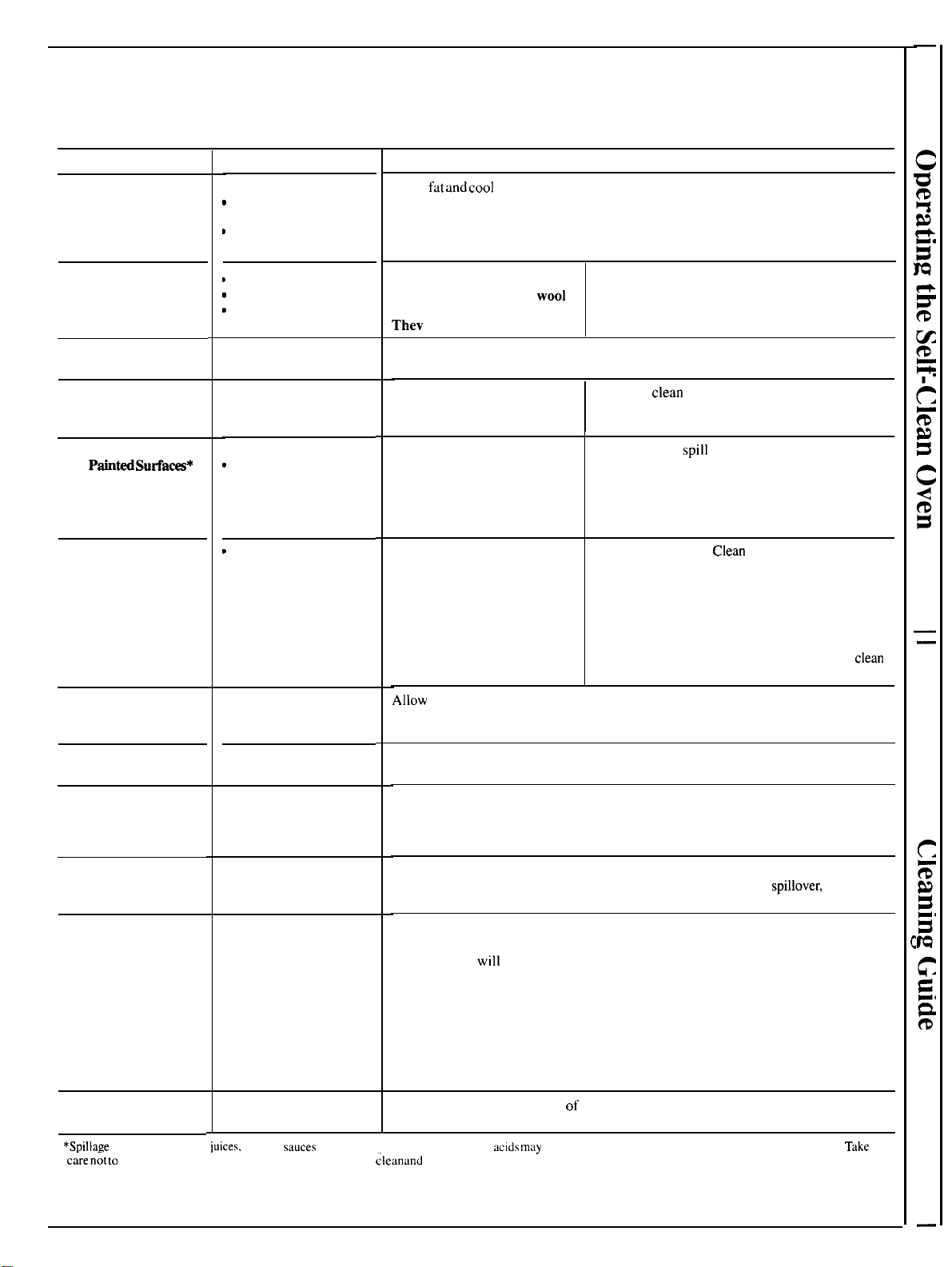
NOTE: Let oven parts cool before touching or handling.
PART
Broiler Pan
and Rack
Control Panel
Outside Glass
Finish
Metal Parts
Porcelain Enamel
and
PainH
Surfa=*
Oven Door*
Oven Liner
(Self-Cleaning Oven)
Oven Gasket
(Self-Cleaning Oven)
Shelves
(See
Self-Cleaning
Oven Directions)
Bake Unit and
Broil Unit
Oven Liner*
(Standard Oven)
CAUTION: When in
use, light bulbs can
become warm enough
to break if touched with
moist cloth or towel.
When cleaning, avoid
touching warm lamps
with cleaning cloths if
lamp cover is removed.
Oven Control Knobs
(on models so equipped)
MATERIALS TO USE
● Soap and Water
c
Soap-Filled
Scouring
Pad
*
Plastic Scouring Pad
●
Dishwasher-Safe
~
Damp Cloth
o
Paper
Towel
D
Soap and Water
● Soap and Water
●
Soap
and Water
● Paper Towel
s
Dry Cloth
● Soap and Water
~
Soap and Water
● Soap and Water
● Hydrogen peroxide
● Soap and Water
● Dishwasher-Safe
● Soap and Water
● Soap-Filled
Scouring Pad
● Commercial Oven
Cleaner
GENERAL DIRECTIONS
Drain
fat
and
cool
pan and rack slightly. (Do not let soiled pan and rack stand in
oven to cool. ) Sprinkle on detergent. Fill the pan with warm water and spread a
damp cloth or paper towel over the rack. Let pan and rack stand for a few minutes.
Wash; scour if necessary. Rinse and dry, OPTION: The broiler pan and rack may
also be cleaned in a dishwasher.
DO NOT USE abrasives,
cleaning powders, steel
wool
or plastic scouring pads.
Thev
will mar the surface.
Wash control panel with soap and water, using a
soft cloth. Rinse and dry with a soft cloth.
Clean outside of cooled black glass door with a glass cleaner that does not contain
ammonia. Do not allow water to run down inside openings in the glass while cleaning.
DO NOT USE steel wool,
To safely
clean surfaces: wash, rinse, and then dry
abrasives, ammonia, acids
with a soft cloth. Do not allow water to run down
or commercial oven cleaners.
inside the surface of the glass while cleaning.
DO NOT USE oven
cleaners, cleansing
powders or harsh
abrasives. These might
scratch the surface.
If acids should
spill
on the oven while it is hot,
use a dry paper towel or cloth to wipe them up
right away. When the surface has cooled, wash
and rinse. For other spills, such as fat smatterings,
etc., wash with soap and water when cooled and
then rinse. Polish with dry cloth.
DO NOT USE oven
INSIDE OF DOOR:
Clean
ONLY the door liner
cleaners, cleansing
outside the gasket. The door is automatically
powders or harsh
cleaned if the oven is in the self-cleaning cycle. DO
abrasives.
NOT
rub or damage the gasket. Avoid getting soap
and water on the gasket or in any openings on the
door. Rinse well. NOTE: Soap left on liner causes
additional stains when oven is reheated. OUTSIDE
OF DOOR: Use soap and water to thoroughly
clean
the top, sides and front of the oven door.
Allow
to cool before cleaning. Frequent wiping with mild soap and water will
prolong the time between self-cleaning cycles. Be sure to rinse thoroughly to
avoid additional stains.
See Self-Cleaning section for more information.
Shelves can be cleaned with the self-cleaning function in the oven. However, they
will darken, lose their luster and become hard to slide. Wipe the shelf supports with
cooking oil after self-cleaning to make shelves slide more easily. For heavy soil,
clean by hand and rinse thoroughly.
Do not clean the bake unit or broil unit. Any soil will bum off when the unit is heated.
NOTE: The bake unit can be lifted gently to clean the oven floor. If
spillover,
residue
or ash accumulates around the bake unit, gently wipe around the unit with warm water.
Cool before cleaning.
FOR LIGHT SOIL: Frequent wiping with mild soap and water (especially after
cooking meat)
will
prolong the time between major cleaning. Rinse thoroughly.
NOTE: Soap left on liner causes additional stains when oven is reheated.
FOR HEAVY SOIL: Choose a nonabrasive cleaner and follow label instructions,
using thin layer of cleaner. Use of rubber gloves is recommended. Wipe or rub
lightly on stubborn spots. Rinse well. Wipe off any oven cleaner that gets on
thermostat bulb. When rinsing oven after cleaning, also wipe thermostat bulb.
See Care and Cleaning section
of
this book for cleaning instructions.
*SDillaEe
of
marinades, fruit
iuices,
tomato
sauces
and hasting materials containing
acids
m~y
cause discoloration and should he wiped
up immediately.
Take
c;re
n;t
to
touch hot portion-of oven.
When surface
is cool,
;Iean
and
rinse.
21
—
.—~~
Questions?
.-———
“.
~--,:
Use This Problem Solver
,—–——
.——
-..————
—
PROBLEM
OVEN WILL
NOT OPERATE
OVEN DOES NOT
COOK PROPERLY
CLOCK AND
MINUTE/SECOND
TIMER DO NOT WORK
OVEN LIGHT DOES
NOT COME ON
SELF-CLEANING
OVEN WILL NOT
SELF-CLEAN
PROPERLT
DELAY SELF-CLEAN
CYCLE WILL NOT
START
SELF-CLEANING
OVEN DOOR WILL
NOT UNLOCK
CONTROL BEEPS
AFTER ENTERING
OVEN TIME OR
STOP TIME
“F-” AND A NUMBER
FLASH ON DISPLAY
POSSIBLE CAUSE AND REMEDY
● Difficulty
may
be in the main distribution
panel
of your house by
a
blown oven
circuit fuse,
a
tripped oven circuit breaker, the main fuse or the main circuit breaker,
depending on nature of the power supply.
[f
a circuit breaker is involved, reset it. If the
control box uses fuses, the oven fuse (a cartridge-type) should be changed BUT
ONLY BY SOMEONE FAMILIAR WITH ELECTRICAL CIRCUITS.
If
after
doing
one of these procedures, the fuse blows or circuit breaker trips again, call for service.
NOTE: Apartment tenants or condominium owners should request their building
management to perform this check before calling
for service.
● Oven controls not properly set.
● Aluminum foil being used improperly in oven.
● Incorrect cookware being used. Check each cooking section for cookware tips.
● Electronic Controls or Lower Oven Control set incorrectly, Review sections on
Electronic Oven Control.
● Check common baking, roasting and broiling problems on appropriate pages.
● Check circuit breaker or fuse.
● Check
for
power outage.
● Bulb may be loose or burned out.
● Electrical plug must be plugged into a live power outlet.
● Switch operating oven light is broken. Call for service.
● Fan not operating.
● Oven temperature is too high to set self-clean operation. Allow the oven to cool to
room temperature and reset the controls.
● Door not closed securely.
● STOP TIME must be between 2 to 4 hours later than START TIME.
● Oven hasn’t cooled to a safe temperature.
● This is reminding you to enter a bake temperature (see Baking section of this book).
● If the time display flashes “F-” and a number, you have a function error code. Press
CLEAR/OFF.
If
the failure code repeats, disconnect all power to the range. Call for service.
If’
you
need
more
help...call,
toll
free:
GE
Answer
Center~~
800.626.2000
consumer information service
22
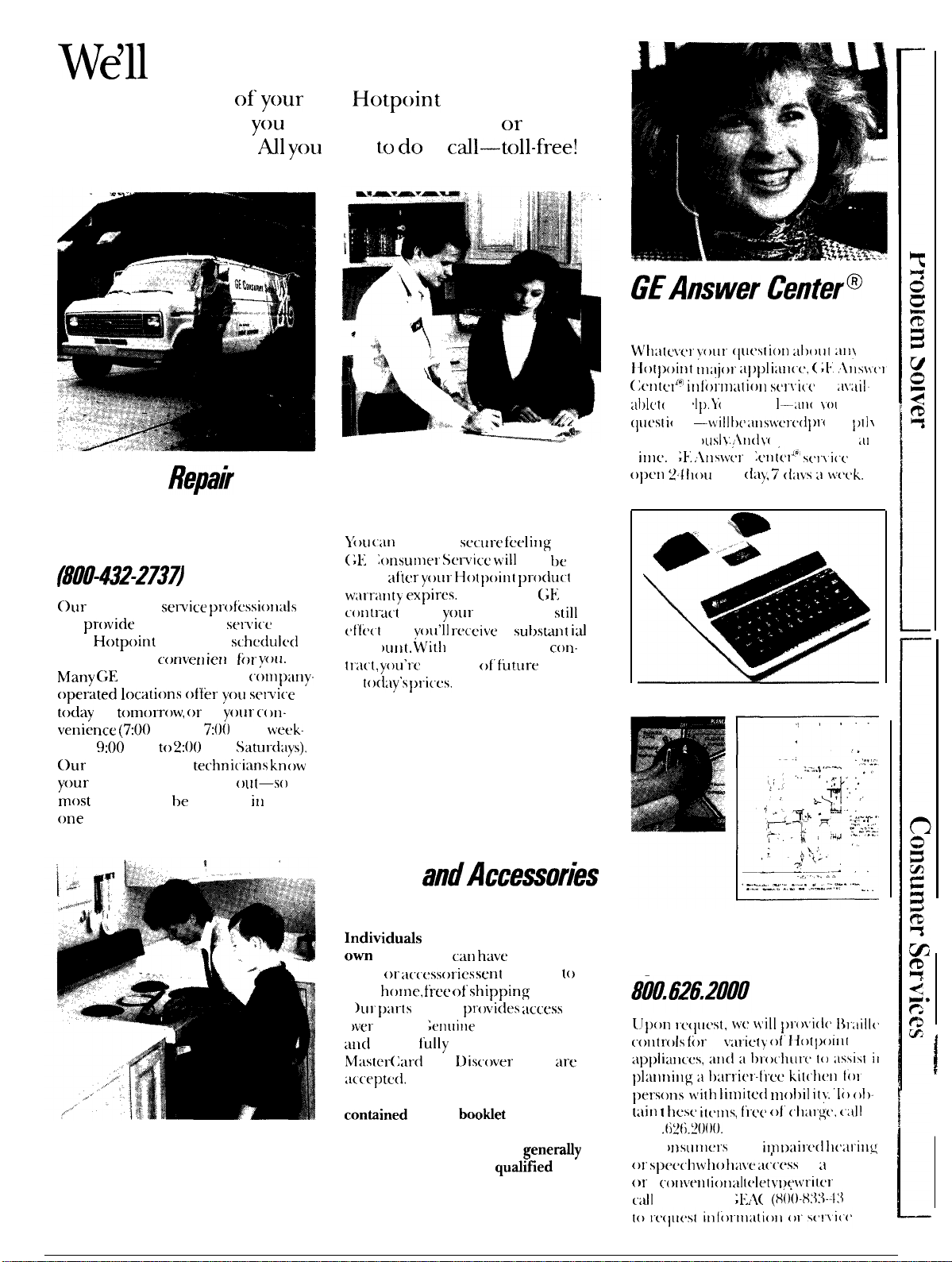
Wdll
Be There
With the purchase
of
your
new Hotpoint appliance, receive
the assurance that if
you
ever need information or assis-
tance, we’ll be there.
Al
you
have
to
do
is cdl—toll-free!
GEAnswer
Centerm
800.626.2000
In-Home
Repak
Service
800-GE-CARES
(8f10-432-273~
our
consumer
service
profi:ssio]lals”
will
provide expert repair
sel~ic.c’
011
your
Hotpoint appliance, scheduled
at a time that’s
cor~ven
iert
t
fi)r
you.
Nfany
(;E
Consumer Service (omp:iIly
operated locati(ms offkr
you
sel~ice
today
or
t(mlorrow,”
or at
yollr
c(
)n-
venience (7:00 a.m. to
7:()()
p.m.
week-
days, 9:00 a.m.
to
2:()()
p.m.
SatuI-days).
our
factory-trained
techrri(iarrs
know
your appliance inside and
()~[t—s()
most repairs can
he
handled
itl
just
one visit.
Service Contracts
800-626-2224
W’tl;ilc\tr
~r)ur
(Iuc’slion
al)t)i)l
;uI\
tfo[point” IIl:ljor
a])plia]l((:,
(
;1.
\lIswrI
(;entc,l<o
irlli)rmatiotl
st]\i((
is
:i\:iil
al)l(’
t(
) I 1(
’tp,
Y“(
)111” (’; II I—:UI( I
}’(
)(
I I
(Iuesl
i(
)11
—-\till
I)(’
alls}~crc’(1
[)1-(
)111
])11
\
and (’(
)[11“1[’(
)Usl
}’.
1111(1
}’(
)( I (’;111
(’:111
;[1
l\
t
illlc’.
(
;1.
ltlsf~[’r (
JC>llt(’liw)
s(r\i(t
is
opc’1]
2/
tloul
’s a
({a),
i
(l:l\’s
ii
ti’(’[’k.
}l)u
can
have the
sccurc’
fticlillg that
(;1{ ( onsunlel” Service
will
still be
there
idier
your
Hotpoillt”
produ(t
wal-r;lnty
exrircs.
Purchase a (;hl
co~ltr-act
while
youl-
warranty is still in
t’f’[i’ct
and
vOLL’11
r“ecei~’e
a
sut~s~nt
id
disco
utlt.
Writl]
a multipte.year
corl-
lra(t,
you’re
assured
of”
fi]fure service
at
loday’s
prices,
Telecommunication
Device for the Deaf
Parts
andAccessories
800-626-2002
Individuds
qualified to service their
ow
appliances can
have
needed
parts
or ;ucessorics
sent
directly
to
their home, free
c)f’
shirping charge!
(
)LII’
p;ll-ts system
pl-ovides
access
to
(
)ver
47,()()() ( ;erl([i]le
Renewal Parts . . .
al]d
all are
f’ully
warranted. VISA,
Nlaster(
;ard
and l)iscover cards arc
:Ic’(’eptcd.
User maintenance instructions
contiined
in this
bootdet
cover proce-
dures intended to be performed by
any user. Other servicing
genera~y
should be referred to
qudiflled
ser-
vice personnel. Caution must be
exercised, since improper servicing
may cause unsafe operation.
For Customers With
Special Needs...
Upon
rc’(lllest,
wc
\iilt
})roli(l(”
Ilr:iill(
(olltrols”
for a
I’al-icly
of’Hotpoilll
i)ersons’Litll
limitc(l
nlol)it
it}:
‘Ii)
ol)-
tain
1
tlc’sc>
itc’tns,
fi-ee
of”
(tlar~~,
(:itl
800.(
i2(~.2000.
(1(
)nslit]lt:rs
with
inll>aire(l
tl[arillg
01”
Sp(’c,(’h
\\’tlo
ha\’e
a(f(’ess
to
ii
‘1’1)1)
or
a
collvt’1]1
iorl;it
lt’tet}l)c’f~r-itcl
111:1}
c’atl
800-’1’1)1)-(”
;1{1!(
:
(H()()-8:1:1.-l:\
22)
YOUR HOTPOINT BUILT-IN OVEN
WARRANTY
Save proof of original purchase date such as your sales slip or
cancelled
check to
establlsh
warranty period
WHAT
IS
COVERED
FULL ONE-YEAR WARRANTY
This warranty is extended to
For one year from date of original
the original purchaser and any
purchase, we will provide, free of
succeeding owner for products
charge,
patis
and service labor in
purchased for
ordinay
home use in
your home to repair or replace
any
the 48 mainland states, Hawaii and
pafi
of
the
oven
that fails because
Washington,
D.C.
In Alaska the
of a manufacturing defect.
warranty is the same except that it is
LIMITED because you must pay to
ship the product
to~he
sewic’e
shop
or for the
sewice
technician’s travel
costs to your home.
All warranty service will be provided
by our Factory
Sewice Centers or
by our authorized Customer Care”
servicers during normal working
hours.
Look in the White or Yellow Pages
of your telephone
directo~
for
HOTPOINT FACTORY SERVICE,
GENERAL
ELECTRIC-HOTPOINT
FACTORY SERVICE or HOTPOINT
CUSTOMER CARE’ SERVICE.
WHAT IS NOT COVERED
●
Sewice trips to your home to teach
you how to use the product.
Read your Use and Care material.
If you then have any questions
about operating the product, please
contact your dealer or our
Consumer Affairs office at the
address below, or call, toll free:
GE Answer Center’
800.626.2000
consumer information service
● Improper installation.
If you have an installation problem,
contact your dealer or installer.
You are responsible for providing
adequate electrical, gas, exhausting
and other connecting facilities.
●
Replacement of house fuses or
resetting of circuit breakers.
c
Failure of the product if it is used
for other than its intended purpose
or used commercially.
●
Damage to product caused by
accident, fire, floods or acts of God.
WARRANTOR IS NOTRESPONSIBLE
FOR CONSEQUENTIAL DAMAGES.
Some states do not allow the exclusion or limitation of incidental or consequential damages, so the above limitation or exclusion
may not apply to you. This warranty gives you specific legal rights, and you may also have other rights which vary from state to state.
To know what your legal rights are in your state, consult your local or state consumer affairs office or your state’s Attorney General.
I
Warrantor: General Electric Company
If further help is needed concerning this warranty, write:
Manager—Consumer Affairs, GE Appliances, Louisville, KY 40225
Part No. 164
D2092P229
Pub.
No.
39-4688
RJ734GP
RK736GP
RK746GP
MNU054
04-91
CG

