Product Cleaning And Maintenance
Please confirm that the power plug has been unplugged before cleaning and
maintenance.
• This machine only needs general external cleaning and maintenance
• Clean the air inlet/ outlet, wipe the body with neutral detergent and so cloth,
and clean the water tank separately aer taking it out.
• Do not wash the product directly with water, and do not use acid-base cleaners,
which may lead to discoloration and machine failure.
•
After cleaning, please dry it with a so dry cloth and place it completely in the
air before use.
•
If the machine is not used for a long time, it shall be powered on for several
minutes from time to time to ensure good performance of the machine.
Matters Needing Attention
• Before the first use, please check whether the voltage you use is consistent
with the product.
•
Please check whether the power cord and plug are damaged before use
• If the power cord is damaged, it must be replaced by professionals of the
maintenance department in order to avoid danger.
•
Do not bend or pull the wire to avoid poor contact.
•
When using, remember not to block the air inlet and outlet to avoid improper
exhaust of the dehumidifier, resulting in excessive internal temperature.
• When leaving or not using for a long time, be sure to cut o the power supply
and unplug the power plug.
•
Turn off the power before pulling out the plug. Do not pull the power cord,
hold the head of the plug and pull it out.
• Do not pull out the power plug with wet hands, there is a risk of electric shock.
•
Place the product in a horizontal place without tilting to prevent water leakage.
•
Do not use iron wire or thin rod to dig out the inside of the machine during
operation to avoid failure or danger.
•
Do not use it in places with much dust or volatile acid, alkali and oil
•
Do not put the adapter in a humid or humid place.
• When dehumidification is not required, press the on key and unplug the power
cord.
• This product is not suitable for people (including children) with physical,
senso or intellectual defects or lack of experience and common sense, unless
they are given adequate care and guidance by their guardian on how to use
this product.
^ceol
Dehumidifier D82
INSTRUCTION MANUAL
I
\
`
^cekool
Your home in sync
�cekool
Model: AR-D02
Ema仆:[email protected]
Website: https:// www.acekool.vip
Made in China
\
�
冗
C
回
仑
O
2
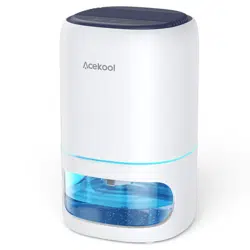
Thank you for purchasing Acekool Dehumidifier. Before operating this unit,
please read these instructions completely and keep the manual ready for
further reference.
Product Oveiew
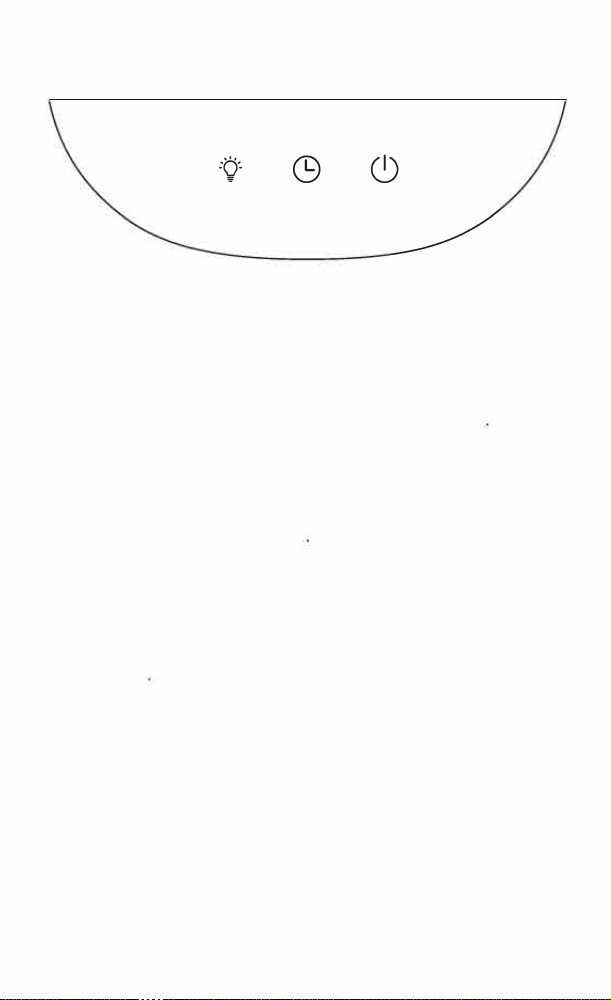
Panel Icon
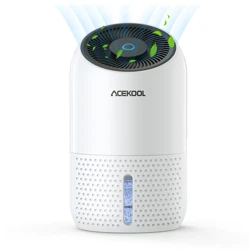
This product is a semiconductor dehumidifier integrating dehumidification and
purification. It has exquisite shape, light weight and low noise. It is suitable for
dehumidification in small spaces and places with poor ventilation eect, such
as wardrobe, bookcase, storage room and other small spaces, so as to prevent
moldy, damp and peculiar smell of important articles such as clothes and books.
Technical Parameters
Rated power: 23 W
Water tank capacity: 1 L
Applicable area: � 15 m'
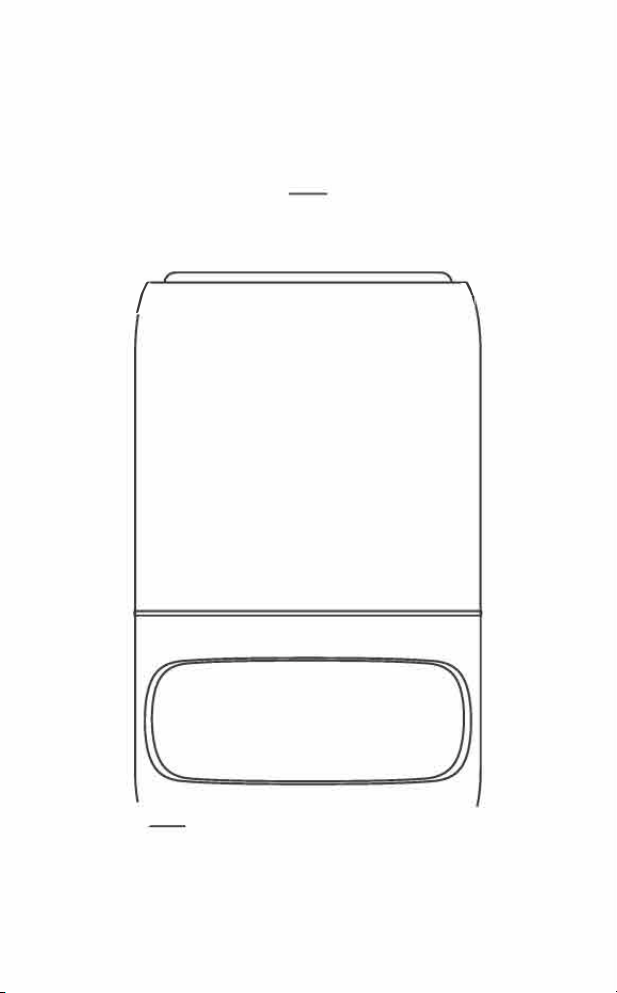
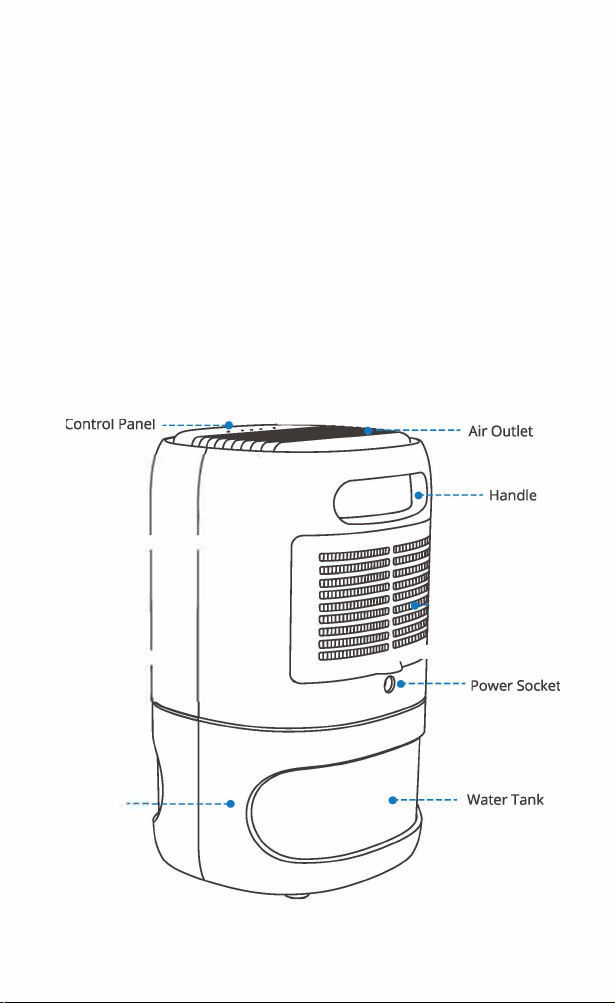
Structure Diagram
Fron
t
Shell
·一----
Water Tank
Assembly
Rated voltage: 9 V, 2.5 A
Dehumidification capacity: 0.35 UD
Size: 156*150*251 mm/ 6.14*5.90*9.88 in
Rear
S
hell
-
--
寸
- ---
---
-
-
-----
-
Air Inlet
•
-
- Rear Panel Cover
4H 8H 12H
0 0 0 0 0
e
e
卷__-
Light Timer Power
Instructions
Please check whether all parts are complete and intact before use
Basic Operation
•
Take out the power adapter and link the product with the socket.
•
Press the power button, the indicator light is always on in blue.
•
Sho「t press the light button to turn on or off the water tank light.
• Press the power button to shut down
Operat
i
eration Panel Instructions
On /O
Tap to start the machine, turn on the dehumidification mode, and then tap to
turn it off again
Timing Mode
This function can only be used aer power on. Touch the timer button once,
the unit will work for 4 hours and then auto o. Touch the button again, the
lights below 8H is on, and the timing is 8 hours. Touch the button again, the
lights below 12H is on, and the timer is set for 12 hours. Touch the timer button
again to turn off the timer function, the light is off.
梦 Light Mode
This function can only be used after power on. Short touch to turn on the light,
and the light mode is cyclic color change. Touch again to fix the instantaneous
light color and keep it on. Tap again to turn off the light function to cycle
Water Pouring Guide
• The dehumidification capacity of this dehumidifier is about 0.35L a day, and
the water tank capacity is 1 L.
•
When the water tank is full, the light will turn red and there will be a prompt
sound, and the machine will stop working automatically. At this time, please
press the power button to shut down, slowly twist the upper part of the host
to the right, and then remove the host upward. Do not tilt the water tank,
otherwise the water will overflow. Remove the water tank cover to pour water.
•
Aer pouring water, install the machine, press the power button to start the
machine, and the machine will start working again.
• When dehumidification is not required, press the "power'' button to shut down,
pour the water, then put the water tank back in its original place for the next
dehumidification.
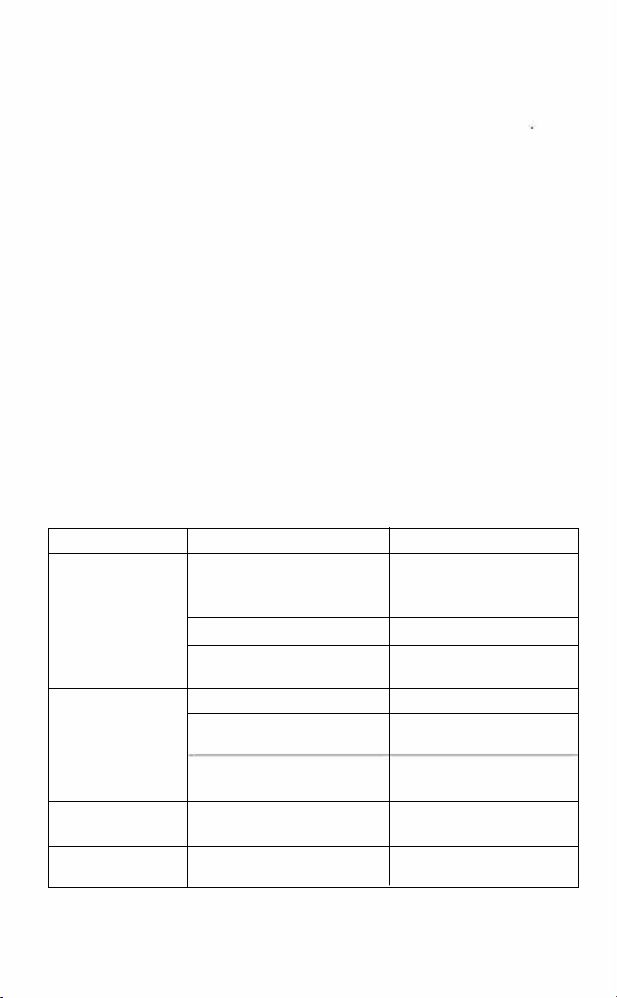
Use Problems And Solutions
Problems Causes Solution
The po
�
d
w
i
e
n
r
o
s
r
u
t
p
h
p
e
ly
1
is not
Plug
in the p
m
o
o
w
d
er supply
plugge
contact
is poor
to ensure go contact
The whole machine
cannot be started
Poor contact of power button Check the power button
Body damage
Send to the maintenance
point for maintenance
Poor contact of power button Check the power button
The whole machine
Body damage
Send to the maintenance
cannot be closed
point for maintenance
The circuit board is
Send to the maintenance
damaged
point for maintenance
Abnormal sound There is for
w
ei
i
g
th
n matter in
Remove foreign matters
of f
a
n
contact the f
a
n
The indicator light
Light damage
Send to the maintenance
is not on
point for maintenance
Product Cleaning And Maintenance
Please confirm that the power plug has been unplugged before cleaning and
maintenance.
• This machine only needs general external cleaning and maintenance
• Clean the air inlet/ outlet, wipe the body with neutral detergent and so cloth,
and clean the water tank separately aer taking it out.
• Do not wash the product directly with water, and do not use acid-base cleaners,
which may lead to discoloration and machine failure.
•
After cleaning, please dry it with a so dry cloth and place it completely in the
air before use.
•
If the machine is not used for a long time, it shall be powered on for several
minutes from time to time to ensure good performance of the machine.
Matters Needing Attention
• Before the first use, please check whether the voltage you use is consistent
with the product.
•
Please check whether the power cord and plug are damaged before use
• If the power cord is damaged, it must be replaced by professionals of the
maintenance department in order to avoid danger.
•
Do not bend or pull the wire to avoid poor contact.
•
When using, remember not to block the air inlet and outlet to avoid improper
exhaust of the dehumidifier, resulting in excessive internal temperature.
• When leaving or not using for a long time, be sure to cut o the power supply
and unplug the power plug.
•
Turn off the power before pulling out the plug. Do not pull the power cord,
hold the head of the plug and pull it out.
• Do not pull out the power plug with wet hands, there is a risk of electric shock.
•
Place the product in a horizontal place without tilting to prevent water leakage.
•
Do not use iron wire or thin rod to dig out the inside of the machine during
operation to avoid failure or danger.
•
Do not use it in places with much dust or volatile acid, alkali and oil
•
Do not put the adapter in a humid or humid place.
• When dehumidification is not required, press the on key and unplug the power
cord.
• This product is not suitable for people (including children) with physical,
senso or intellectual defects or lack of experience and common sense, unless
they are given adequate care and guidance by their guardian on how to use
this product.
^ceol
Dehumidifier D82
INSTRUCTION MANUAL
I
\
`
^cekool
Your home in sync
�cekool
Model: AR-D02
Ema仆:[email protected]
Website: https:// www.acekool.vip
Made in China
\
�
冗
C
回
仑
O
2
Thank you for purchasing Acekool Dehumidifier. Before operating this unit,
please read these instructions completely and keep the manual ready for
further reference.
Product Oveiew
Panel Icon
This product is a semiconductor dehumidifier integrating dehumidification and
purification. It has exquisite shape, light weight and low noise. It is suitable for
dehumidification in small spaces and places with poor ventilation eect, such
as wardrobe, bookcase, storage room and other small spaces, so as to prevent
moldy, damp and peculiar smell of important articles such as clothes and books.
Technical Parameters
Rated power: 23 W
Water tank capacity: 1 L
Applicable area: � 15 m'
Structure Diagram
Fron
t
Shell
·一----
Water Tank
Assembly
Rated voltage: 9 V, 2.5 A
Dehumidification capacity: 0.35 UD
Size: 156*150*251 mm/ 6.14*5.90*9.88 in
Rear
S
hell
-
--
寸
- ---
---
-
-
-----
-
Air Inlet
•
-
- Rear Panel Cover
4H 8H 12H
0 0 0 0 0
e
e
卷__-
Light Timer Power
Instructions
Please check whether all parts are complete and intact before use
Basic Operation
•
Take out the power adapter and link the product with the socket.
•
Press the power button, the indicator light is always on in blue.
•
Sho「t press the light button to turn on or off the water tank light.
• Press the power button to shut down
Operat
i
eration Panel Instructions
On /O
Tap to start the machine, turn on the dehumidification mode, and then tap to
turn it off again
Timing Mode
This function can only be used aer power on. Touch the timer button once,
the unit will work for 4 hours and then auto o. Touch the button again, the
lights below 8H is on, and the timing is 8 hours. Touch the button again, the
lights below 12H is on, and the timer is set for 12 hours. Touch the timer button
again to turn off the timer function, the light is off.
梦 Light Mode
This function can only be used after power on. Short touch to turn on the light,
and the light mode is cyclic color change. Touch again to fix the instantaneous
light color and keep it on. Tap again to turn off the light function to cycle
Water Pouring Guide
• The dehumidification capacity of this dehumidifier is about 0.35L a day, and
the water tank capacity is 1 L.
•
When the water tank is full, the light will turn red and there will be a prompt
sound, and the machine will stop working automatically. At this time, please
press the power button to shut down, slowly twist the upper part of the host
to the right, and then remove the host upward. Do not tilt the water tank,
otherwise the water will overflow. Remove the water tank cover to pour water.
•
Aer pouring water, install the machine, press the power button to start the
machine, and the machine will start working again.
• When dehumidification is not required, press the "power'' button to shut down,
pour the water, then put the water tank back in its original place for the next
dehumidification.
Use Problems And Solutions
Problems Causes Solution
The po
�
d
w
i
e
n
r
o
s
r
u
t
p
h
p
e
ly
1
is not
Plug
in the p
m
o
o
w
d
er supply
plugge
contact
is poor
to ensure go contact
The whole machine
cannot be started
Poor contact of power button Check the power button
Body damage
Send to the maintenance
point for maintenance
Poor contact of power button Check the power button
The whole machine
Body damage
Send to the maintenance
cannot be closed
point for maintenance
The circuit board is
Send to the maintenance
damaged
point for maintenance
Abnormal sound There is for
w
ei
i
g
th
n matter in
Remove foreign matters
of f
a
n
contact the f
a
n
The indicator light
Light damage
Send to the maintenance
is not on
point for maintenance
Product Cleaning And Maintenance
Please confirm that the power plug has been unplugged before cleaning and
maintenance.
• This machine only needs general external cleaning and maintenance
• Clean the air inlet/ outlet, wipe the body with neutral detergent and so cloth,
and clean the water tank separately aer taking it out.
• Do not wash the product directly with water, and do not use acid-base cleaners,
which may lead to discoloration and machine failure.
•
After cleaning, please dry it with a so dry cloth and place it completely in the
air before use.
•
If the machine is not used for a long time, it shall be powered on for several
minutes from time to time to ensure good performance of the machine.
Matters Needing Attention
• Before the first use, please check whether the voltage you use is consistent
with the product.
•
Please check whether the power cord and plug are damaged before use
• If the power cord is damaged, it must be replaced by professionals of the
maintenance department in order to avoid danger.
•
Do not bend or pull the wire to avoid poor contact.
•
When using, remember not to block the air inlet and outlet to avoid improper
exhaust of the dehumidifier, resulting in excessive internal temperature.
• When leaving or not using for a long time, be sure to cut o the power supply
and unplug the power plug.
•
Turn off the power before pulling out the plug. Do not pull the power cord,
hold the head of the plug and pull it out.
• Do not pull out the power plug with wet hands, there is a risk of electric shock.
•
Place the product in a horizontal place without tilting to prevent water leakage.
•
Do not use iron wire or thin rod to dig out the inside of the machine during
operation to avoid failure or danger.
•
Do not use it in places with much dust or volatile acid, alkali and oil
•
Do not put the adapter in a humid or humid place.
• When dehumidification is not required, press the on key and unplug the power
cord.
• This product is not suitable for people (including children) with physical,
senso or intellectual defects or lack of experience and common sense, unless
they are given adequate care and guidance by their guardian on how to use
this product.
^ceol
Dehumidifier D82
INSTRUCTION MANUAL
I
\
`
^cekool
Your home in sync
�cekool
Model: AR-D02
Ema仆:[email protected]
Website: https:// www.acekool.vip
Made in China
\
�
冗
C
回
仑
O
2
Thank you for purchasing Acekool Dehumidifier. Before operating this unit,
please read these instructions completely and keep the manual ready for
further reference.
Product Oveiew
Panel Icon
This product is a semiconductor dehumidifier integrating dehumidification and
purification. It has exquisite shape, light weight and low noise. It is suitable for
dehumidification in small spaces and places with poor ventilation eect, such
as wardrobe, bookcase, storage room and other small spaces, so as to prevent
moldy, damp and peculiar smell of important articles such as clothes and books.
Technical Parameters
Rated power: 23 W
Water tank capacity: 1 L
Applicable area: � 15 m'
Structure Diagram
Fron
t
Shell
·一----
Water Tank
Assembly
Rated voltage: 9 V, 2.5 A
Dehumidification capacity: 0.35 UD
Size: 156*150*251 mm/ 6.14*5.90*9.88 in
Rear
S
hell
-
--
寸
- ---
---
-
-
-----
-
Air Inlet
•
-
- Rear Panel Cover
4H 8H 12H
0 0 0 0 0
e
e
卷__-
Light Timer Power
Instructions
Please check whether all parts are complete and intact before use
Basic Operation
•
Take out the power adapter and link the product with the socket.
•
Press the power button, the indicator light is always on in blue.
•
Sho「t press the light button to turn on or off the water tank light.
• Press the power button to shut down
Operat
i
eration Panel Instructions
On /O
Tap to start the machine, turn on the dehumidification mode, and then tap to
turn it off again
Timing Mode
This function can only be used aer power on. Touch the timer button once,
the unit will work for 4 hours and then auto o. Touch the button again, the
lights below 8H is on, and the timing is 8 hours. Touch the button again, the
lights below 12H is on, and the timer is set for 12 hours. Touch the timer button
again to turn off the timer function, the light is off.
梦 Light Mode
This function can only be used after power on. Short touch to turn on the light,
and the light mode is cyclic color change. Touch again to fix the instantaneous
light color and keep it on. Tap again to turn off the light function to cycle
Water Pouring Guide
• The dehumidification capacity of this dehumidifier is about 0.35L a day, and
the water tank capacity is 1 L.
•
When the water tank is full, the light will turn red and there will be a prompt
sound, and the machine will stop working automatically. At this time, please
press the power button to shut down, slowly twist the upper part of the host
to the right, and then remove the host upward. Do not tilt the water tank,
otherwise the water will overflow. Remove the water tank cover to pour water.
•
Aer pouring water, install the machine, press the power button to start the
machine, and the machine will start working again.
• When dehumidification is not required, press the "power'' button to shut down,
pour the water, then put the water tank back in its original place for the next
dehumidification.
Use Problems And Solutions
Problems Causes Solution
The po
�
d
w
i
e
n
r
o
s
r
u
t
p
h
p
e
ly
1
is not
Plug
in the p
m
o
o
w
d
er supply
plugge
contact
is poor
to ensure go contact
The whole machine
cannot be started
Poor contact of power button Check the power button
Body damage
Send to the maintenance
point for maintenance
Poor contact of power button Check the power button
The whole machine
Body damage
Send to the maintenance
cannot be closed
point for maintenance
The circuit board is
Send to the maintenance
damaged
point for maintenance
Abnormal sound There is for
w
ei
i
g
th
n matter in
Remove foreign matters
of f
a
n
contact the f
a
n
The indicator light
Light damage
Send to the maintenance
is not on
point for maintenance
Product Cleaning And Maintenance
Please confirm that the power plug has been unplugged before cleaning and
maintenance.
• This machine only needs general external cleaning and maintenance
• Clean the air inlet/ outlet, wipe the body with neutral detergent and so cloth,
and clean the water tank separately aer taking it out.
• Do not wash the product directly with water, and do not use acid-base cleaners,
which may lead to discoloration and machine failure.
•
After cleaning, please dry it with a so dry cloth and place it completely in the
air before use.
•
If the machine is not used for a long time, it shall be powered on for several
minutes from time to time to ensure good performance of the machine.
Matters Needing Attention
• Before the first use, please check whether the voltage you use is consistent
with the product.
•
Please check whether the power cord and plug are damaged before use
• If the power cord is damaged, it must be replaced by professionals of the
maintenance department in order to avoid danger.
•
Do not bend or pull the wire to avoid poor contact.
•
When using, remember not to block the air inlet and outlet to avoid improper
exhaust of the dehumidifier, resulting in excessive internal temperature.
• When leaving or not using for a long time, be sure to cut o the power supply
and unplug the power plug.
•
Turn off the power before pulling out the plug. Do not pull the power cord,
hold the head of the plug and pull it out.
• Do not pull out the power plug with wet hands, there is a risk of electric shock.
•
Place the product in a horizontal place without tilting to prevent water leakage.
•
Do not use iron wire or thin rod to dig out the inside of the machine during
operation to avoid failure or danger.
•
Do not use it in places with much dust or volatile acid, alkali and oil
•
Do not put the adapter in a humid or humid place.
• When dehumidification is not required, press the on key and unplug the power
cord.
• This product is not suitable for people (including children) with physical,
senso or intellectual defects or lack of experience and common sense, unless
they are given adequate care and guidance by their guardian on how to use
this product.
^ceol
Dehumidifier D82
INSTRUCTION MANUAL
I
\
`
^cekool
Your home in sync
�cekool
Model: AR-D02
Ema仆:[email protected]
Website: https:// www.acekool.vip
Made in China
\
�
冗
C
回
仑
O
2
Thank you for purchasing Acekool Dehumidifier. Before operating this unit,
please read these instructions completely and keep the manual ready for
further reference.
Product Oveiew
Panel Icon
This product is a semiconductor dehumidifier integrating dehumidification and
purification. It has exquisite shape, light weight and low noise. It is suitable for
dehumidification in small spaces and places with poor ventilation eect, such
as wardrobe, bookcase, storage room and other small spaces, so as to prevent
moldy, damp and peculiar smell of important articles such as clothes and books.
Technical Parameters
Rated power: 23 W
Water tank capacity: 1 L
Applicable area: � 15 m'
Structure Diagram
Fron
t
Shell
·一----
Water Tank
Assembly
Rated voltage: 9 V, 2.5 A
Dehumidification capacity: 0.35 UD
Size: 156*150*251 mm/ 6.14*5.90*9.88 in
Rear
S
hell
-
--
寸
- ---
---
-
-
-----
-
Air Inlet
•
-
- Rear Panel Cover
4H 8H 12H
0 0 0 0 0
e
e
卷__-
Light Timer Power
Instructions
Please check whether all parts are complete and intact before use
Basic Operation
•
Take out the power adapter and link the product with the socket.
•
Press the power button, the indicator light is always on in blue.
•
Sho「t press the light button to turn on or off the water tank light.
• Press the power button to shut down
Operat
i
eration Panel Instructions
On /O
Tap to start the machine, turn on the dehumidification mode, and then tap to
turn it off again
Timing Mode
This function can only be used aer power on. Touch the timer button once,
the unit will work for 4 hours and then auto o. Touch the button again, the
lights below 8H is on, and the timing is 8 hours. Touch the button again, the
lights below 12H is on, and the timer is set for 12 hours. Touch the timer button
again to turn off the timer function, the light is off.
梦 Light Mode
This function can only be used after power on. Short touch to turn on the light,
and the light mode is cyclic color change. Touch again to fix the instantaneous
light color and keep it on. Tap again to turn off the light function to cycle
Water Pouring Guide
• The dehumidification capacity of this dehumidifier is about 0.35L a day, and
the water tank capacity is 1 L.
•
When the water tank is full, the light will turn red and there will be a prompt
sound, and the machine will stop working automatically. At this time, please
press the power button to shut down, slowly twist the upper part of the host
to the right, and then remove the host upward. Do not tilt the water tank,
otherwise the water will overflow. Remove the water tank cover to pour water.
•
Aer pouring water, install the machine, press the power button to start the
machine, and the machine will start working again.
• When dehumidification is not required, press the "power'' button to shut down,
pour the water, then put the water tank back in its original place for the next
dehumidification.
Use Problems And Solutions
Problems Causes Solution
The po
�
d
w
i
e
n
r
o
s
r
u
t
p
h
p
e
ly
1
is not
Plug
in the p
m
o
o
w
d
er supply
plugge
contact
is poor
to ensure go contact
The whole machine
cannot be started
Poor contact of power button Check the power button
Body damage
Send to the maintenance
point for maintenance
Poor contact of power button Check the power button
The whole machine
Body damage
Send to the maintenance
cannot be closed
point for maintenance
The circuit board is
Send to the maintenance
damaged
point for maintenance
Abnormal sound There is for
w
ei
i
g
th
n matter in
Remove foreign matters
of f
a
n
contact the f
a
n
The indicator light
Light damage
Send to the maintenance
is not on
point for maintenance

Product Cleaning And Maintenance
Please confirm that the power plug has been unplugged before cleaning and
maintenance.
• This machine only needs general external cleaning and maintenance
• Clean the air inlet/ outlet, wipe the body with neutral detergent and so cloth,
and clean the water tank separately aer taking it out.
• Do not wash the product directly with water, and do not use acid-base cleaners,
which may lead to discoloration and machine failure.
•
After cleaning, please dry it with a so dry cloth and place it completely in the
air before use.
•
If the machine is not used for a long time, it shall be powered on for several
minutes from time to time to ensure good performance of the machine.
Matters Needing Attention
• Before the first use, please check whether the voltage you use is consistent
with the product.
•
Please check whether the power cord and plug are damaged before use
• If the power cord is damaged, it must be replaced by professionals of the
maintenance department in order to avoid danger.
•
Do not bend or pull the wire to avoid poor contact.
•
When using, remember not to block the air inlet and outlet to avoid improper
exhaust of the dehumidifier, resulting in excessive internal temperature.
• When leaving or not using for a long time, be sure to cut o the power supply
and unplug the power plug.
•
Turn off the power before pulling out the plug. Do not pull the power cord,
hold the head of the plug and pull it out.
• Do not pull out the power plug with wet hands, there is a risk of electric shock.
•
Place the product in a horizontal place without tilting to prevent water leakage.
•
Do not use iron wire or thin rod to dig out the inside of the machine during
operation to avoid failure or danger.
•
Do not use it in places with much dust or volatile acid, alkali and oil
•
Do not put the adapter in a humid or humid place.
• When dehumidification is not required, press the on key and unplug the power
cord.
• This product is not suitable for people (including children) with physical,
senso or intellectual defects or lack of experience and common sense, unless
they are given adequate care and guidance by their guardian on how to use
this product.
^ceol
Dehumidifier D82
INSTRUCTION MANUAL
I
\
`
^cekool
Your home in sync
�cekool
Model: AR-D02
Ema仆:[email protected]
Website: https:// www.acekool.vip
Made in China
\
�
冗
C
回
仑
O
2
Thank you for purchasing Acekool Dehumidifier. Before operating this unit,
please read these instructions completely and keep the manual ready for
further reference.
Product Oveiew
Panel Icon
This product is a semiconductor dehumidifier integrating dehumidification and
purification. It has exquisite shape, light weight and low noise. It is suitable for
dehumidification in small spaces and places with poor ventilation eect, such
as wardrobe, bookcase, storage room and other small spaces, so as to prevent
moldy, damp and peculiar smell of important articles such as clothes and books.
Technical Parameters
Rated power: 23 W
Water tank capacity: 1 L
Applicable area: � 15 m'
Structure Diagram
Fron
t
Shell
·一----
Water Tank
Assembly
Rated voltage: 9 V, 2.5 A
Dehumidification capacity: 0.35 UD
Size: 156*150*251 mm/ 6.14*5.90*9.88 in
Rear
S
hell
-
--
寸
- ---
---
-
-
-----
-
Air Inlet
•
-
- Rear Panel Cover
4H 8H 12H
0 0 0 0 0
e
e
卷__-
Light Timer Power
Instructions
Please check whether all parts are complete and intact before use
Basic Operation
•
Take out the power adapter and link the product with the socket.
•
Press the power button, the indicator light is always on in blue.
•
Sho「t press the light button to turn on or off the water tank light.
• Press the power button to shut down
Operat
i
eration Panel Instructions
On /O
Tap to start the machine, turn on the dehumidification mode, and then tap to
turn it off again
Timing Mode
This function can only be used aer power on. Touch the timer button once,
the unit will work for 4 hours and then auto o. Touch the button again, the
lights below 8H is on, and the timing is 8 hours. Touch the button again, the
lights below 12H is on, and the timer is set for 12 hours. Touch the timer button
again to turn off the timer function, the light is off.
梦 Light Mode
This function can only be used after power on. Short touch to turn on the light,
and the light mode is cyclic color change. Touch again to fix the instantaneous
light color and keep it on. Tap again to turn off the light function to cycle
Water Pouring Guide
• The dehumidification capacity of this dehumidifier is about 0.35L a day, and
the water tank capacity is 1 L.
•
When the water tank is full, the light will turn red and there will be a prompt
sound, and the machine will stop working automatically. At this time, please
press the power button to shut down, slowly twist the upper part of the host
to the right, and then remove the host upward. Do not tilt the water tank,
otherwise the water will overflow. Remove the water tank cover to pour water.
•
Aer pouring water, install the machine, press the power button to start the
machine, and the machine will start working again.
• When dehumidification is not required, press the "power'' button to shut down,
pour the water, then put the water tank back in its original place for the next
dehumidification.
Use Problems And Solutions
Problems Causes Solution
The po
�
d
w
i
e
n
r
o
s
r
u
t
p
h
p
e
ly
1
is not
Plug
in the p
m
o
o
w
d
er supply
plugge
contact
is poor
to ensure go contact
The whole machine
cannot be started
Poor contact of power button Check the power button
Body damage
Send to the maintenance
point for maintenance
Poor contact of power button Check the power button
The whole machine
Body damage
Send to the maintenance
cannot be closed
point for maintenance
The circuit board is
Send to the maintenance
damaged
point for maintenance
Abnormal sound There is for
w
ei
i
g
th
n matter in
Remove foreign matters
of f
a
n
contact the f
a
n
The indicator light
Light damage
Send to the maintenance
is not on
point for maintenance

Product Cleaning And Maintenance
Please confirm that the power plug has been unplugged before cleaning and
maintenance.
• This machine only needs general external cleaning and maintenance
• Clean the air inlet/ outlet, wipe the body with neutral detergent and so cloth,
and clean the water tank separately aer taking it out.
• Do not wash the product directly with water, and do not use acid-base cleaners,
which may lead to discoloration and machine failure.
•
After cleaning, please dry it with a so dry cloth and place it completely in the
air before use.
•
If the machine is not used for a long time, it shall be powered on for several
minutes from time to time to ensure good performance of the machine.
Matters Needing Attention
• Before the first use, please check whether the voltage you use is consistent
with the product.
•
Please check whether the power cord and plug are damaged before use
• If the power cord is damaged, it must be replaced by professionals of the
maintenance department in order to avoid danger.
•
Do not bend or pull the wire to avoid poor contact.
•
When using, remember not to block the air inlet and outlet to avoid improper
exhaust of the dehumidifier, resulting in excessive internal temperature.
• When leaving or not using for a long time, be sure to cut o the power supply
and unplug the power plug.
•
Turn off the power before pulling out the plug. Do not pull the power cord,
hold the head of the plug and pull it out.
• Do not pull out the power plug with wet hands, there is a risk of electric shock.
•
Place the product in a horizontal place without tilting to prevent water leakage.
•
Do not use iron wire or thin rod to dig out the inside of the machine during
operation to avoid failure or danger.
•
Do not use it in places with much dust or volatile acid, alkali and oil
•
Do not put the adapter in a humid or humid place.
• When dehumidification is not required, press the on key and unplug the power
cord.
• This product is not suitable for people (including children) with physical,
senso or intellectual defects or lack of experience and common sense, unless
they are given adequate care and guidance by their guardian on how to use
this product.
^ceol
Dehumidifier D82
INSTRUCTION MANUAL
I
\
`
^cekool
Your home in sync
�cekool
Model: AR-D02
Ema仆:[email protected]
Website: https:// www.acekool.vip
Made in China
\
�
冗
C
回
仑
O
2
Thank you for purchasing Acekool Dehumidifier. Before operating this unit,
please read these instructions completely and keep the manual ready for
further reference.
Product Oveiew
Panel Icon
This product is a semiconductor dehumidifier integrating dehumidification and
purification. It has exquisite shape, light weight and low noise. It is suitable for
dehumidification in small spaces and places with poor ventilation eect, such
as wardrobe, bookcase, storage room and other small spaces, so as to prevent
moldy, damp and peculiar smell of important articles such as clothes and books.
Technical Parameters
Rated power: 23 W
Water tank capacity: 1 L
Applicable area: � 15 m'
Structure Diagram
Fron
t
Shell
·一----
Water Tank
Assembly
Rated voltage: 9 V, 2.5 A
Dehumidification capacity: 0.35 UD
Size: 156*150*251 mm/ 6.14*5.90*9.88 in
Rear
S
hell
-
--
寸
- ---
---
-
-
-----
-
Air Inlet
•
-
- Rear Panel Cover
4H 8H 12H
0 0 0 0 0
e
e
卷__-
Light Timer Power
Instructions
Please check whether all parts are complete and intact before use
Basic Operation
•
Take out the power adapter and link the product with the socket.
•
Press the power button, the indicator light is always on in blue.
•
Sho「t press the light button to turn on or off the water tank light.
• Press the power button to shut down
Operat
i
eration Panel Instructions
On /O
Tap to start the machine, turn on the dehumidification mode, and then tap to
turn it off again
Timing Mode
This function can only be used aer power on. Touch the timer button once,
the unit will work for 4 hours and then auto o. Touch the button again, the
lights below 8H is on, and the timing is 8 hours. Touch the button again, the
lights below 12H is on, and the timer is set for 12 hours. Touch the timer button
again to turn off the timer function, the light is off.
梦 Light Mode
This function can only be used after power on. Short touch to turn on the light,
and the light mode is cyclic color change. Touch again to fix the instantaneous
light color and keep it on. Tap again to turn off the light function to cycle
Water Pouring Guide
• The dehumidification capacity of this dehumidifier is about 0.35L a day, and
the water tank capacity is 1 L.
•
When the water tank is full, the light will turn red and there will be a prompt
sound, and the machine will stop working automatically. At this time, please
press the power button to shut down, slowly twist the upper part of the host
to the right, and then remove the host upward. Do not tilt the water tank,
otherwise the water will overflow. Remove the water tank cover to pour water.
•
Aer pouring water, install the machine, press the power button to start the
machine, and the machine will start working again.
• When dehumidification is not required, press the "power'' button to shut down,
pour the water, then put the water tank back in its original place for the next
dehumidification.
Use Problems And Solutions
Problems Causes Solution
The po
�
d
w
i
e
n
r
o
s
r
u
t
p
h
p
e
ly
1
is not
Plug
in the p
m
o
o
w
d
er supply
plugge
contact
is poor
to ensure go contact
The whole machine
cannot be started
Poor contact of power button Check the power button
Body damage
Send to the maintenance
point for maintenance
Poor contact of power button Check the power button
The whole machine
Body damage
Send to the maintenance
cannot be closed
point for maintenance
The circuit board is
Send to the maintenance
damaged
point for maintenance
Abnormal sound There is for
w
ei
i
g
th
n matter in
Remove foreign matters
of f
a
n
contact the f
a
n
The indicator light
Light damage
Send to the maintenance
is not on
point for maintenance