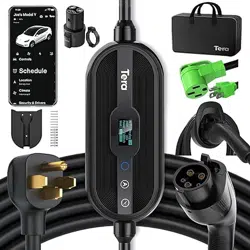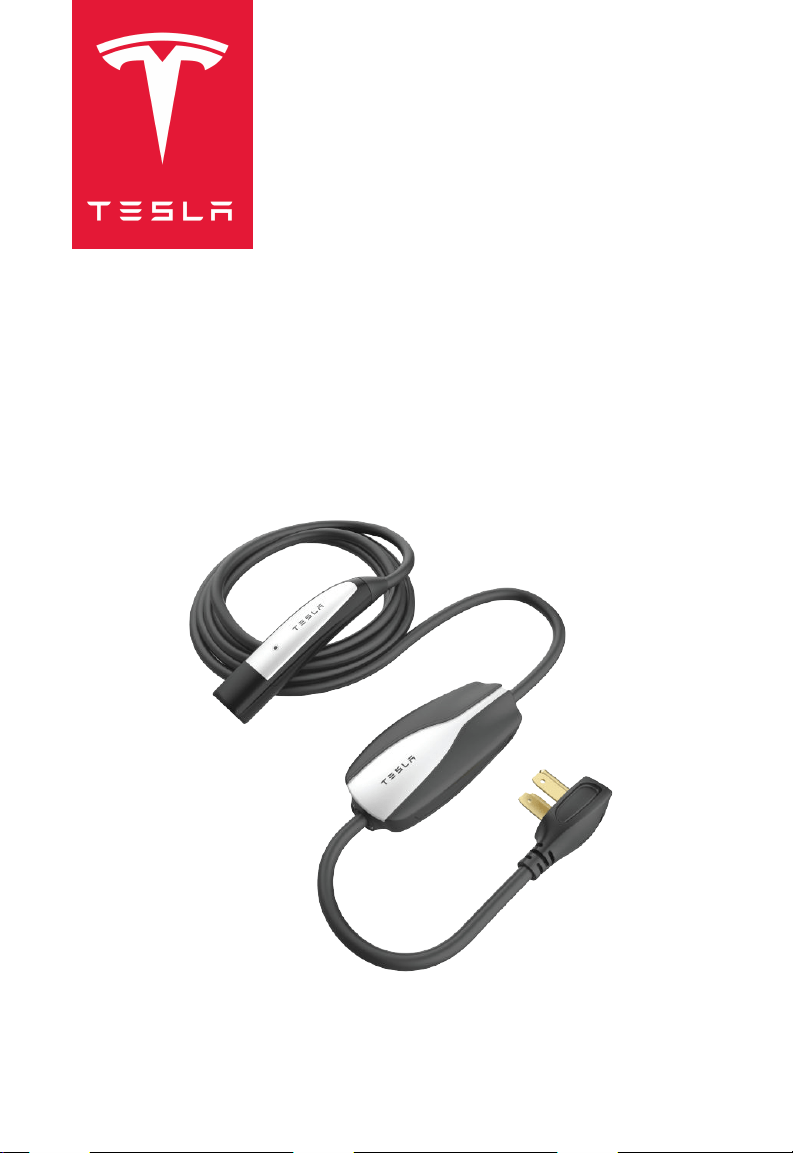
CORDED MOBILE CONNECTOR
OWNER'S MANUAL

Safety Information.................................................................................................................................. 3
General Information................................................................................................................................5
How to Charge......................................................................................................................................... 7
Troubleshooting.......................................................................................................................................9
Index........................................................................................................................................................... 12
Contents
Communications Regulations
Radio and Television Interference
The equipment described in this manual can generate and radiate radio-frequency energy. If it is
not installed and used properly, and in accordance with Tesla's instructions, it can interfere with
radio and television reception.
This device complies with Part 15 of the FCC rules and Industry Canada license-exempt RSS
standard(s). Operation is subject to the following two conditions: (1) This device may not cause
harmful interference and (2) this device must accept any interference received, including
interference that may cause undesired operation.
Important: Changes or modifications to this product not authorized by Tesla could void the FCC
compliance.
Illustrations
Illustrations are provided for demonstration purposes only. Depending on region and date of
purchase, your product may appear slightly dierent.
Errors or Inaccuracies
All specifications and descriptions are known to be accurate at time of publishing. However,
because continuous improvement is a goal at Tesla, we reserve the right to make product
modifications at any time. To communicate any inaccuracies or omissions, or to provide general
feedback or suggestions regarding the quality of this owner information, send an email to
ownersmanualfeedback@tesla.com.
Copyrights and Trademarks
All information in this document is subject to copyright and other intellectual property rights of
Tesla, Inc. and its licensors. This material may not be modified, reproduced or copied, in whole
or in part, without the prior written permission of Tesla, Inc. and its licensors. Additional
information is available upon request. The following are trademarks or registered trademarks of
Tesla, Inc. in the United States and other countries:
All other trademarks contained in this document are the property of their respective owners
and their use herein does not imply sponsorship or endorsement of their products or services.
The unauthorized use of any trademark displayed in this document or on the vehicle is strictly
prohibited.
About this Manual
2
Important Safety Instructions
This document contains important instructions and warnings that must be followed when using
the Corded Mobile Connector.
Warnings
WARNING: Read all the instructions before using this product. Failure to do so or to
follow any of the instructions or warnings in this document can result in fire, electical
shock, serious injury or death.
WARNING: This device should be supervised when used around children.
WARNING: Use the Corded Mobile Connector only within the specified operating
parameters.
WARNING: The Corded Mobile Connector is designed only for charging a Tesla vehicle
(excluding a Tesla Roadster). Do not use it for any other purpose or with any other
vehicle or object. The Corded Mobile Connector is intended only for vehicles that do not
require ventilation during charging.
WARNING: Stop using and do not use the Corded Mobile Connector if it is defective,
appears cracked, frayed, broken, or otherwise damaged, or fails to operate.
WARNING: Do not attempt to disassemble, repair, tamper with, or modify the Corded
Mobile Connector. The Corded Mobile Connector is not user serviceable. Contact Tesla
for any repairs or modification.
WARNING: Do not use an extension cord, power strip, multi-outlet adapter, multi-plugs,
or conversion plugs to plug-in the Corded Mobile Connector.
WARNING: Do not disconnect the Corded Mobile Connector from the wall outlet while
the vehicle is charging.
WARNING: Do not use private power generators as a power source for charging.
WARNING: Do not plug the Corded Mobile Connector into a damaged, loose or worn
power outlet. Ensure the Corded Mobile Connector's wall plug's prongs fit snugly into
the outlet.
WARNING: Do not connect the Corded Mobile Connector into a wall outlet that is not
properly grounded.
WARNING: Do not touch the Corded Mobile Connector’s end terminals with fingers or
sharp metallic objects, such as wire, tools, or needles.
WARNING: Do not forcefully fold or apply pressure to any part of the Corded Mobile
Connector or damage it with sharp objects.
WARNING: Do not insert foreign objects into any part of the Corded Mobile Connector.
WARNING: Use of the Corded Mobile Connector may aect or impair the operation of
any medical or implantable electronic devices, such as an implantable cardiac
pacemaker or an implantable cardioverter defibrillator. Check with your electronic device
manufacturer concerning the eects that charging may have on such electronic devices
before using the Corded Mobile Connector.
Cautions
CAUTION:
Do not use private power generators as a power source for charging.
Safety Information
3

CAUTION: Incorrect installation and testing of the Corded Mobile Connector could
potentially damage either the vehicle’s Battery and/or the Corded Mobile Connector
itself. Any resulting damage is excluded from the New Vehicle Limited Warranty and the
Charging Equipment Limited Warranty.
CAUTION: Do not operate the Corded Mobile Connector in temperatures outside its
operating range of -22°F to 122°F (-30°C to +50°C).
CAUTION: If possible, use a dedicated receptacle with a single socket. If the receptacle
has two sockets, do not plug any other items into the other socket.
Notes
NOTE: Ensure that the Corded Mobile Connector’s charging cable is positioned so it will not be
stepped on, driven over, tripped on, or subjected to damage or stress.
NOTE: Do not use cleaning solvents to clean any of the Corded Mobile Connector’s
components. The outside of the Corded Mobile Connector, the charging cable, and the
connector end of the charging cable should be periodically wiped with a clean, dry cloth to
remove accumulation of dirt and dust.
Safety Information
4
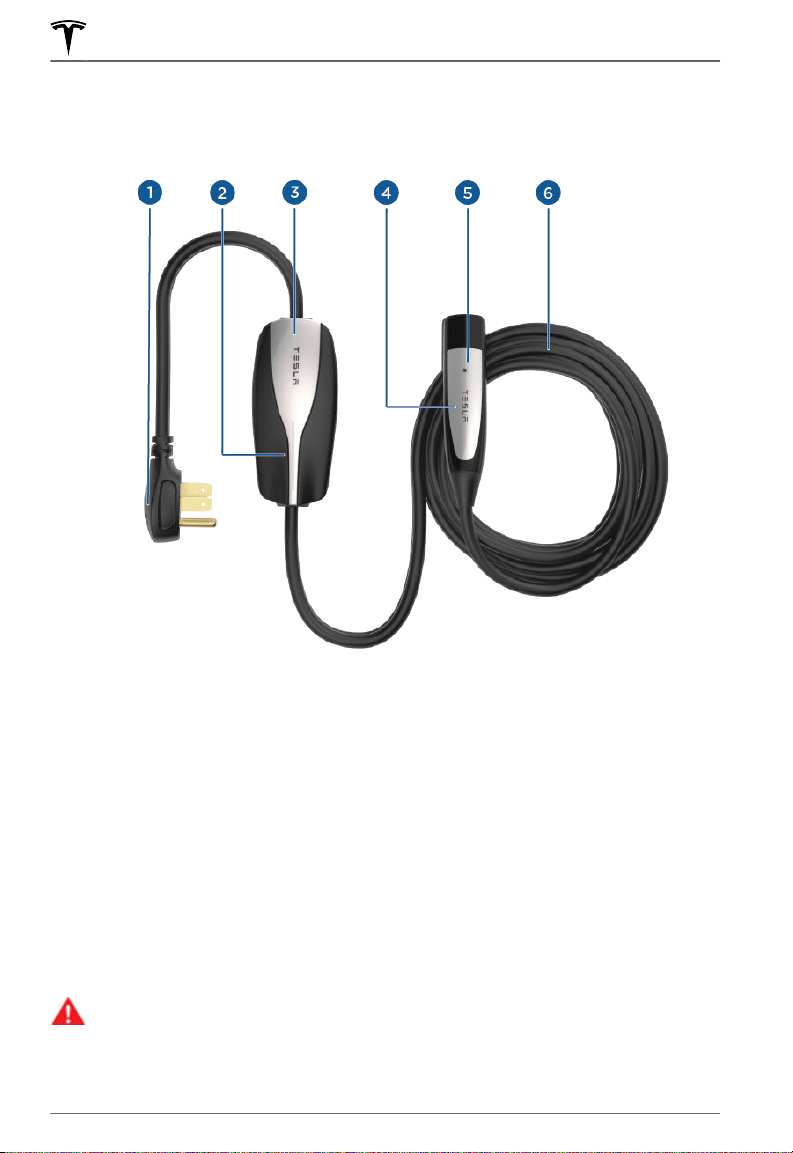
Mobile Connector Component Overview
1.
Wall plug
2.
Status lights
3. Corded Mobile Connector controller
4. Handle
5. Button on handle
6. Cable
Specifications
The Corded Mobile Connector is 20 feet (6 meters) long. Use an existing outlet or install a new
outlet within approximately 13 feet (4 meters) of the vehicle's charge port and at least 18 inches
(45 cm) above the ground. The charge port is located on the left side of the vehicle, behind a
door that is near the rear tail light assembly.
WARNING:
Do not use an extension cord, a multi-outlet adapter, a multi-plug, a
conversion plug, or a power strip to plug in the Corded Mobile Connector.
General Information
5
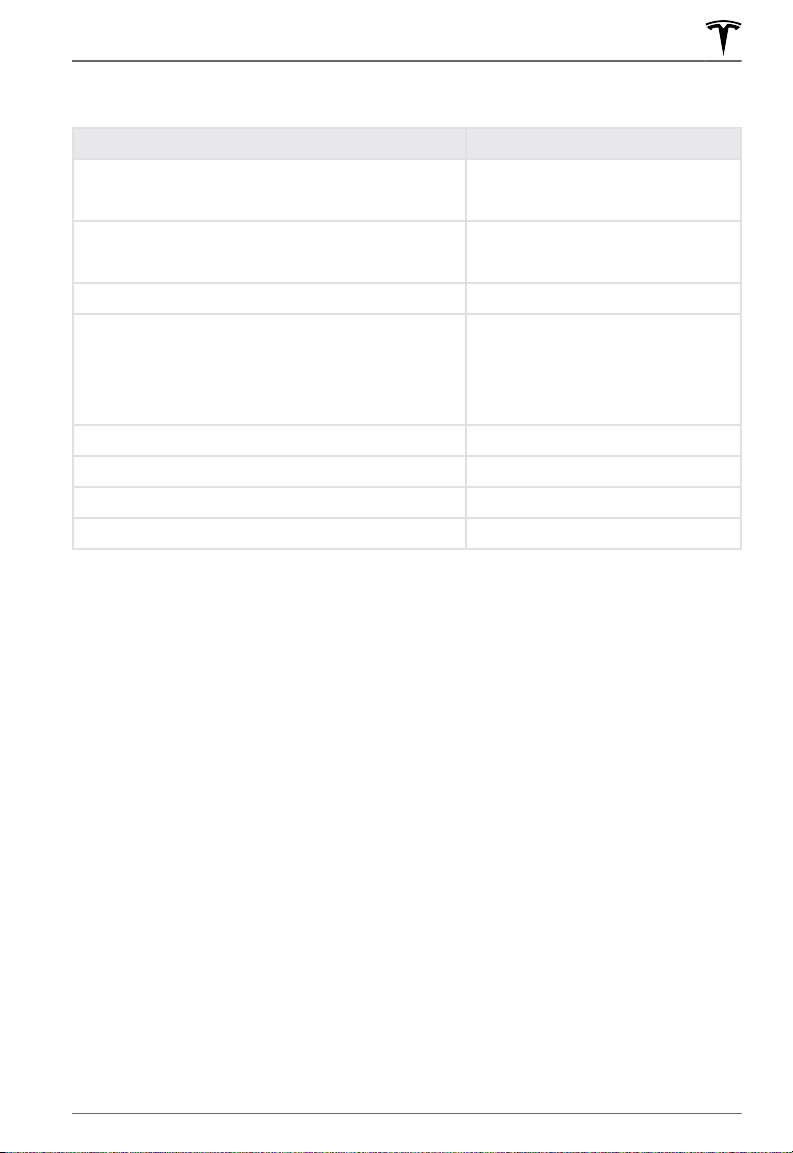
Specifications Reference
Description Specifications
Voltage
100-240 volt AC single-phase
Maximum Current Output
40A
Cable Length 20 ft (6 m)
Corded Mobile Connector Controller Dimensions Height: 7.1 in (179.8 mm)
Width: 3.2 in (81.7 mm)
Depth: 1.9 in (47.3 mm)
Weight 5.2 lbs (2.4 kg)
Operating Temperature -22°F to +122°F (-30°C to +50°C)
Enclosure Type 4X
Ventilation Not Required
Charging Time
Charging times vary based on the voltage and current available from the power outlet, subject
to various conditions. Charge time also depends on ambient temperature and the vehicle’s
Battery temperature. If the Battery is not within the optimal temperature range for charging, the
vehicle heats or cools the Battery before or during charging.
To estimate the total time it takes to recharge the Battery in hours (from near zero percent to
near one hundred percent), divide the battery size (kWh) by power (kW).
Dierent adapters
provide dierent current and power outputs.
While you are charging your vehicle, you can also touch the Charging icon to review the
charging status information; it displays the time remaining until fully charged at the currently
selected charge level.
For more information on how long it takes to charge your Tesla vehicle, go to www.tesla.com/
support.
General Information
6
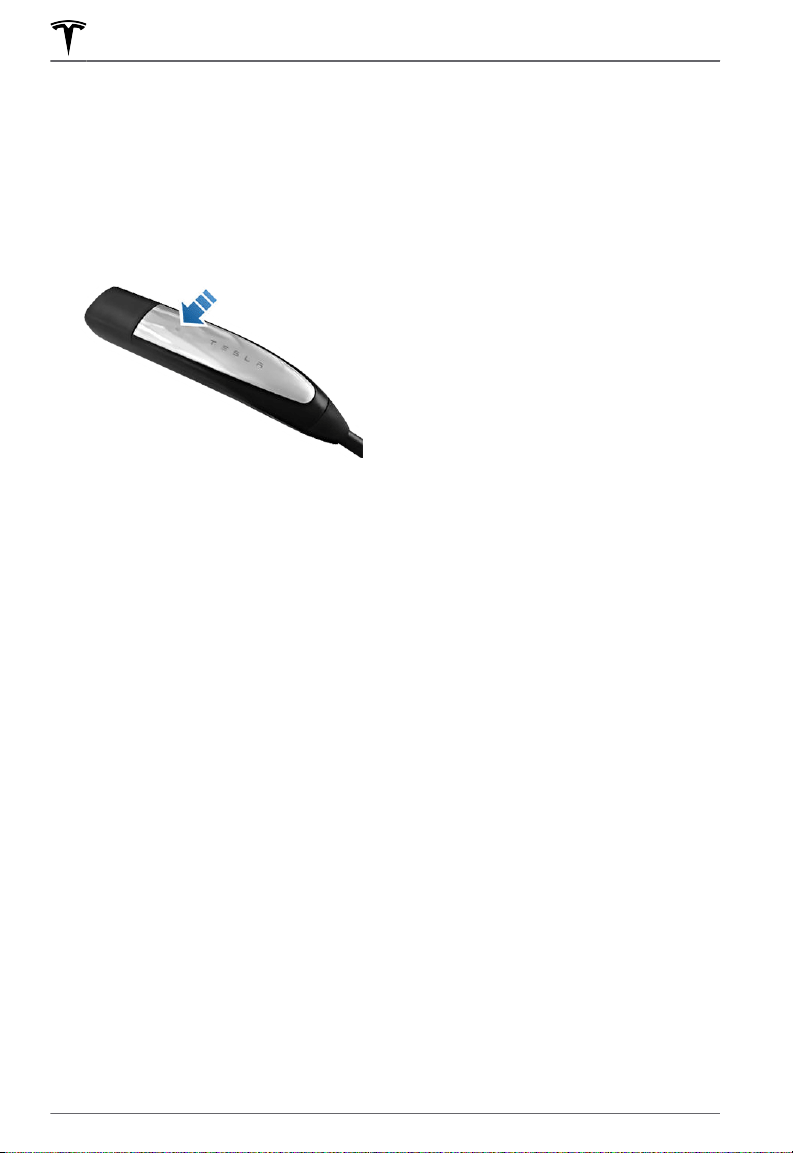
Plugging In
1. Plug the Corded Mobile Connector into the power outlet. The adapter should be inserted
completely into the power outlet.
2.
With your vehicle unlocked, press the button on the top of the Corded Mobile Connector
handle. The charge port door opens.
NOTE: Your vehicle is unlocked when the key is nearby and automatic unlocking is enabled.
You can also open the charge port door using any of these methods:
◦
If equipped with a motorized charge port door, press the charge port door when the
vehicle is unlocked or a recognized key is nearby.
◦
Hold down the rear trunk button on the key fob for 1-2 seconds.
◦
Use the touchscreen to open the Charging menu, and then touch Open Charge Port.
◦
Use the Tesla mobile app.
3. Plug the Corded Mobile Connector handle into your vehicle's charge port.
4.
When you plug the Corded Mobile Connector into your vehicle, the charge port indicator
light pulses green during charging, and the vehicle displays charging information. The
display turns
o after you close all doors, and the charge port indicator light stops pulsing
shortly after you lock the vehicle.
Unplugging
When charging is complete, the light stops pulsing and turns solid green.
1. With the vehicle unlocked, press and hold the button on the Corded Mobile Connector
handle, wait for the charge port indicator light to turn white, and then pull the Corded
Mobile Connector out of the charge port.
NOTE: To prevent unauthorized unplugging, the vehicle must be unlocked or able to
recognize a key nearby before you can disconnect the Corded Mobile Connector handle.
NOTE: When the latch in the charge port retracts, the Corded Mobile Connector stops
supplying power and you can safely unplug it from the vehicle.
2. The charge port door automatically closes after you remove the charge cable.
How to Charge
7

NOTE: If your vehicle is not equipped with a motorized charge port door, you may need to
push the charge port door closed.
Tesla recommends leaving the Corded Mobile Connector plugged into the wall outlet to
reduce wear and tear from day-to-day use. If you do not plan to use the Corded Mobile
Connector for a while (such as when you leave for vacation), unplug it, and store it in an
appropriate location.
For More Information
For more detailed information on how to charge your vehicle (adjust charge settings, view
charging status, etc.), refer to the charging section in your vehicle's Owner's Manual.
How to Charge
8
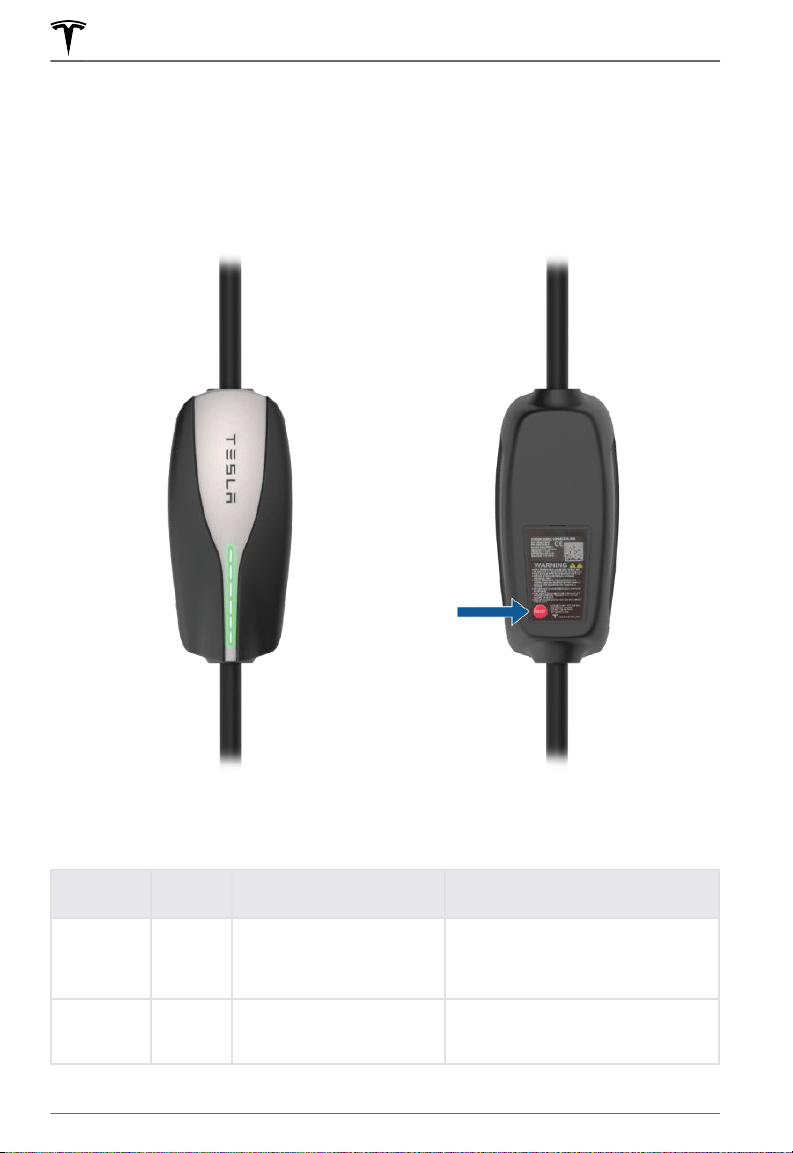
Status Lights and Reset Button
Under normal conditions when charging is in progress, the Corded Mobile Connector's green
lights flow continuously and the red light is o. Identify problems by paying close attention to
these lights when plugging in.
In some cases, you might need to press the RESET button located on the back.
Light Codes
Use the following table to troubleshoot light codes:
Green
Lights
Red Light What it Means What to Do
Top light on O Power on. The Corded
Mobile Connector is
powered and in standby but
not charging.
Nothing.
Streaming
lights
O Charging. The Corded
Mobile Connector is
charging.
Nothing.
Troubleshooting
9
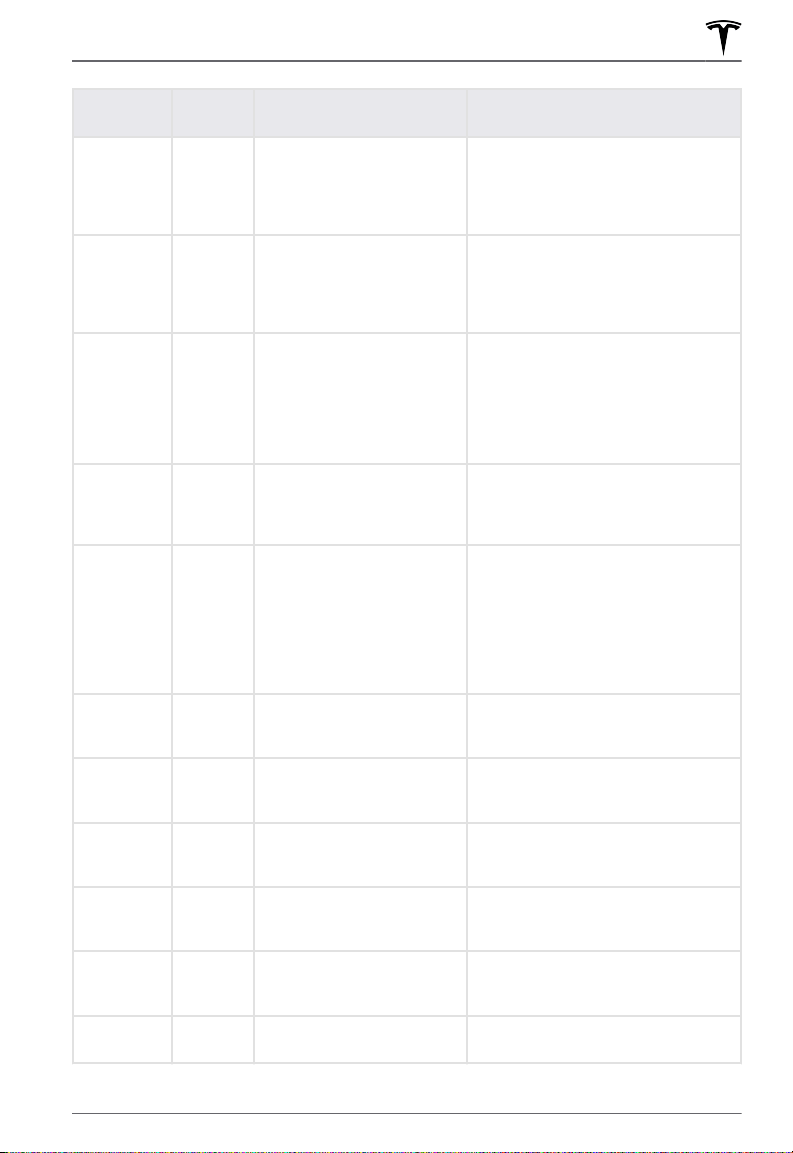
Green
Lights
Red Light What it Means What to Do
O 1 flash Ground: Current is leaking
through unsafe path.
Second neutral ground
error.
Nothing. The unit automatically
resets after 15 minutes. If the
problem persists, ensure no one is
touching the vehicle and press the
Reset button.
O 2 flashes Ground: Self-test error. Press the RESET button. If the
problem persists, unplug the Corded
Mobile Connector from vehicle and
outlet and attempt plugging into a
dierent outlet.
O 3 flashes Contactor error. Disconnect the Corded Mobile
Connector from the vehicle. If the
Corded Mobile Connector clears
itself, then there is an issue with the
vehicle. If it does not clear itself,
replace the Corded Mobile
Connector.
O 4 flashes Over/under voltage
protection.
Consult your electrician for proper
voltage on the circuit breaker
servicing the Corded Mobile
Connector.
O 5 flashes Plug thermal error. The wall plug temperature is too
warm and charging is stopped. The
outlet should be inspected by your
electrician for properly-connected
and properly-sized wiring, as well as
any other signs of wear or damage.
In the meantime, connect to another
outlet, if possible.
O 6 flashes Thermal error: The Corded
Mobile Connector is getting
hot internally.
Move the vehicle to a cooler location
and plug into the Corded Mobile
Connector.
O 7 flashes Pilot A error: The pilot level
is incorrect.
The Corded Mobile Connector might
have water damage if it was used
outdoors.
O 8 flashes Pilot B error: The pilot level
is incorrect.
The Corded Mobile Connector might
have water damage if it was used
outdoors.
O 9 flashes Pilot C error: The pilot level
is incorrect.
The Corded Mobile Connector might
have water damage if it was used
outdoors.
O 10 flashes Pilot F error: The pilot level
is incorrect.
The Corded Mobile Connector might
have water damage if it was used
outdoors.
O 11 flashes 12V rail problem: The 12v rail
is incorrect.
Replace the Corded Mobile
Connector.
Troubleshooting
10

Green
Lights
Red Light What it Means What to Do
O 12 flashes Short detected on the plug
thermal sensor.
Replace the Corded Mobile
Connector.
O 13 flashes Open error detected on the
plug temperature sensor.
Replace the Corded Mobile
Connector.
O 14 flashes Firmware mismatch: The
program on the Corded
Mobile Connector is corrupt.
Power cycle the Corded Mobile
Connector. If the problem persists,
replace the Corded Mobile
Connector.
O 15 flashes Vref error: The voltage
reference on the Corded
Mobile Connector failed.
Power cycle the Corded Mobile
Connector. If the problem persists,
replace the Corded Mobile
Connector.
Questions?
If you have any questions, go to http://tesla.com/support.
Troubleshooting
11


Publication Date: May 4, 2021