MODEL GH7145XF
PART NO. 8169421 4619-652-55304
UseECare
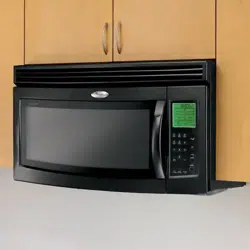
MicrowaveHood
Combination
A Note to You .................. 2
Microwave Oven
Safety .......................... 3-5
Installation
Instructions .................... 6
Getting to Know Your
Microwave Oven ............ 9
Using Your
Microwave Oven .......... 23
Caring for Your
Microwave Oven .......... 36
Cooking Guide .............. 39
Questions and
Answers ........................ 41
Troubleshooting ............ 42
Requesting
Assistance or
Service .......................... 44
Index ............................ 47
Warranty ........................ 48
In the U.S.A. for assistance or service,
call the Consumer Assistance Center:
j_-=,
In Canada for assistance or service,
see page 45.
www.whirlpool.corn
ANOTETOYOU
Thankyouforbuyin_aWHIRLPOOL*appliance.
The Whirlpool Brand is committed to designing quality
products that consistently perform for you to make
your life easier. To ensure that you enjoy years of
trouble-free operation, we developed this Use and
Care Guide. It is full of valuable information about how
to operate and maintain your appliance properly and
safely. Please read it carefully.
Also, complete and mail the Product Registration
Card provided with your appliance. The card helps
us notify you about any new information on
your appliance.
Pleaserecordyourmodel'sinformation.
Whenever you call to request service for your appli-
ance, you need to know your complete model number
and serial number. You can find this information on the
model and serial number label/plate (see "Microwave
oven features" in the "Getting to Know" section). Also,
record the other information shown in the next column.
Look for these _me Smart Tips io_ated
throughout your Use and Care Guide; hey
will _lp you save time and make _he most
of your new appliance_
Model Number
Serial Number
Purchase Date
Dealer Name
Dealer Address
Dealer Phone
Keepthisbookandthesalesslipto_etherinasafeplaceforfuturereference.
ii
OurConsumerAssistanceCenternumberistollfree. J"800"253"1301
To find detailed product information, the location of the nearest Whirlpool dealer or authorized servicer, to
purchase an accessory item, or register your appliance on-line, please visit our Web site at
www.whirlpool.com
InCanada,forassistanceorservice,seethe"Requestin_AssistanceorService"section.
In Canada, visit our Web site at www.whirlpoolappliances.com/canada
MICROWAVEOVENSAF
Yoursafetyandthesafetyofothersisveryimportant.
We have provided many important safety messages in this manual and on your appliance. Always read and
obey all safety messages.
This is the safety alert symbol.
This symbol alerts you to hazards that can kill or hurt you and others.
All safety messages will be preceded by the safety alert symbol and the word "DANGER" or
"WARNING." These words mean:
You will be killed or seriously injured if you don't
follow instructions.
You can be killed or seriously injured if you don't
follow instructions.
All safety messages will identify the hazard, tell you how to reduce the chance of injury, and tell you what can
happen if the instructions are not followed.
IMPORTANT SAFETY INSTRUCTIONS
When using electrical appliances basic safety precautions should be followed, including the following:
WARNING: To reduce the risk of burns,
electric shock, fire, injury to persons or exposure to
excessive microwave energy:
• Read all instructions before using the micro-
wave oven.
• Read and follow the specific "PRECAUTIONS TO
AVOID POSSIBLE EXPOSURE TO EXCESSIVE
MICROWAVE ENERGY" found in this section.
• The microwave oven must be grounded. Connect
only to properly grounded outlet. See "GROUND-
ING INSTRUCTIONS" found at the end of this
section.
• Install or locate the microwave oven only in
accordance with the provided installation
instructions.
• Some products such as whole eggs and sealed
containers - for example, closed glass jars -
may explode and should not be heated in the
microwave oven.
• Use the microwave oven only for its intended use
as described in this manual. Do not use corrosive
chemicals or vapors in the microwave oven. This
type of oven is specifically designed to heat, cook,
or dry food. It is not designed for industrial or
laboratory use.
• As with any appliance, close supervision is
necessary when used by children.
• Do not operate the microwave oven if it has a
damaged cord or plug, if it is not working properly,
or if it has been damaged or dropped.
• The microwave oven should be serviced only by
•qualified service personnel. Call an authorized
service company for examination, repair or
adjustment.
• Do not cover or block any openings on the
microwave oven.
• Do not store the microwave oven outdoors. Do
not use the microwave oven near water - for
example, near a kitchen sink, in a wet basement,
or near a swimming pool, and the like.
• Do not immerse cord or plug in water.
• Keep cord away from heated surfaces.
• Do not let cord hang over edge of table or
counter.
• See door surface cleaning instructions in the
"Caring for Your Microwave Oven" section.
• Do not mount over a sink.
• Do not store anything directly on top of the
microwave oven when the microwave oven is
in operation.
- SAVE THESE INSTRUCTIONS-
continued on next page
IMPORTANT SAFETY INSTRUCTIONS
• To reduce the risk of fire in the oven cavity: • Suitable for use above both gas and electric
- Do not overcook food: Carefully attend the
microwave oven if paper, plastic, or other
combustible materials are placed inside the
oven to facilitate cooking.
- Remove wire twist-ties from paper or plastic
bags before placing bag in oven.
- If materials inside the oven should ignite, keep
oven door closed, turn oven off, and discon-
nect the power cord, or shut off power at the
fuse or circuit breaker panel.
- Do not use the cavity for storage purposes. Do
not leave paper products, cooking utensils, or
food in the cavity when not in use.
cooking equipment.
Intended to be used above ranges with maximum
width of 36 inches.
Clean Ventilating Hoods Frequently - Grease
should not be allowed to accumulate on hood
or filter.
• When flaming foods under the hood, turn the fan
on
• Use care when cleaning the vent-hood filter.
Corrosive cleaning agents, such as lye-based
oven cleaners, may damage the filter.
- SAVE THESE INSTRUCTIONS-
PRECAUTIONS TO AVOID POSSIBLE EXPOSURE TO
EXCESSIVE MICROWAVE ENERGY
(a) Do not attempt to operate this oven with the door
open since open-door operation can result in
harmful exposure to microwave energy. It is
important not to defeat or tamper with the safety
interlocks.
(b)Do not place any object between the oven front
face and the door or allow soil or cleaner residue
to accumulate on sealing surfaces.
(c) Do not operate the oven if it is damaged. It is
particularly important that the oven door close
properly and that there is no damage to the:
(1) door (bent),
(2) hinges and latches (broken or loosened),
(3) door seals and sealing surfaces.
(d) The oven should not be adjusted or repaired by
anyone except properly qualified service personnel.
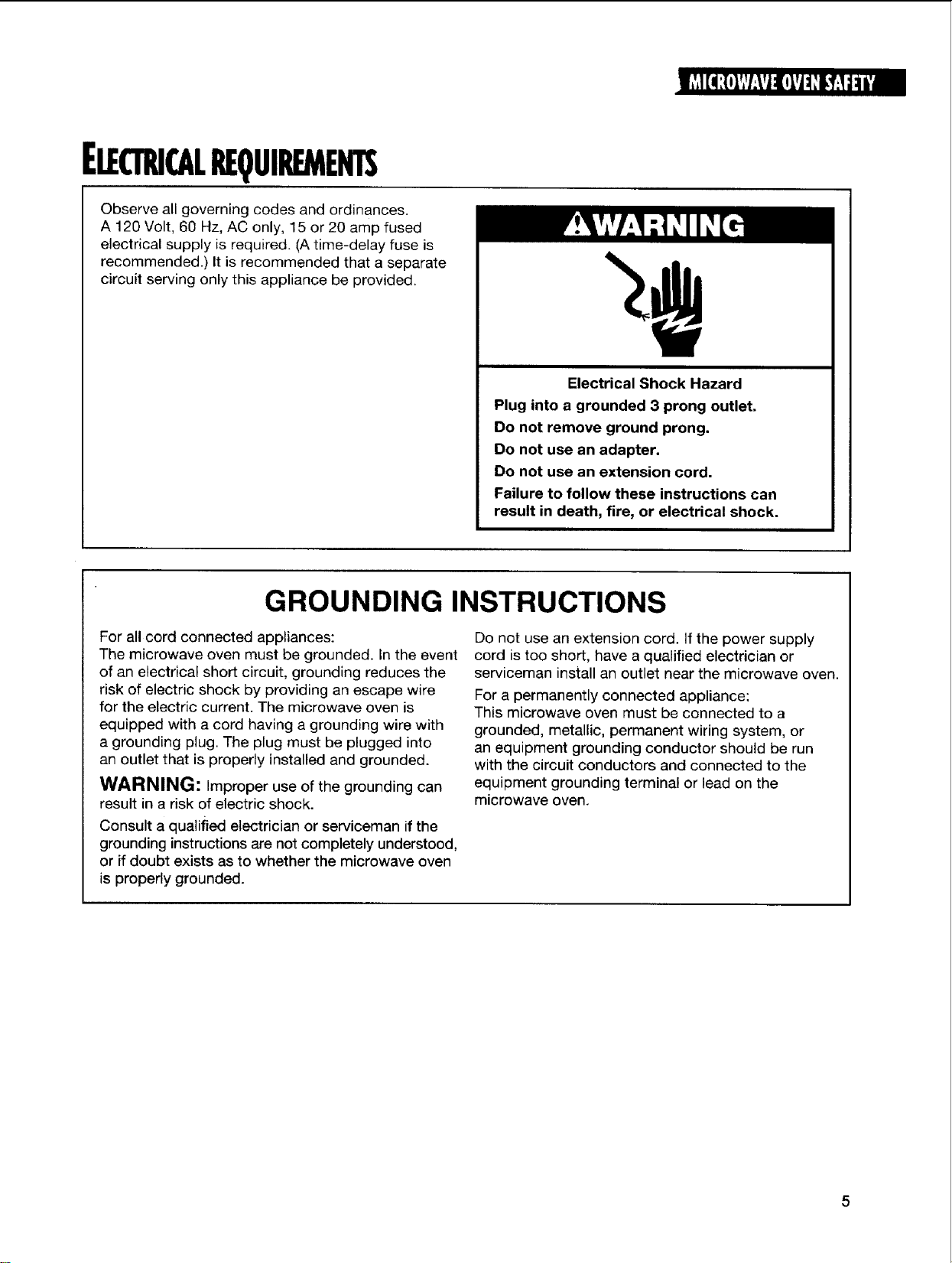
ELE(11U(ALREQUIREMEHTS
Observe all governing codes and ordinances.
A 120 Volt, 60 Hz, AC only, 15 or 20 amp fused
electrical supply is required. (A time-delay fuse is
recommended.) It is recommended that a separate
circuit serving only this appliance be provided.
Electrical Shock Hazard
Plug into a grounded 3 prong outlet.
Do not remove ground prong.
Do not use an adapter,
Do not use an extension cord.
Failure to follow these instructions can
result in death, fire, or electrical shock.
GROUNDING INSTRUCTIONS
For all cord connected appliances:
The microwave oven must be grounded. In the event
of an electrical short circuit, grounding reduces the
risk of electric shock by providing an escape wire
for the electric current. The microwave oven is
equipped with a cord having a grounding wire with
a grounding plug. The plug must be plugged into
an outlet that is properly installed and grounded.
WARNING: Improper use of the grounding can
result in a risk of electric shock.
Consult a qualified electrician or serviceman if the
grounding instructions are not completely understood,
or if doubt exists as to whether the microwave oven
is properly grounded.
Do not use an extension cord. If the power supply
cord is too short, have a qualified electrician or
serviceman install an outlet near the microwave oven.
For a permanently connected appliance:
This microwave oven must be connected to a
grounded, metallic, permanent wiring system, or
an equipment grounding conductor should be run
with the circuit conductors and connected to the
equipment grounding terminal or lead on the
microwave oven.
INSTAUA110NINSTRUCtiONS
SPACEREQUIREMENTS
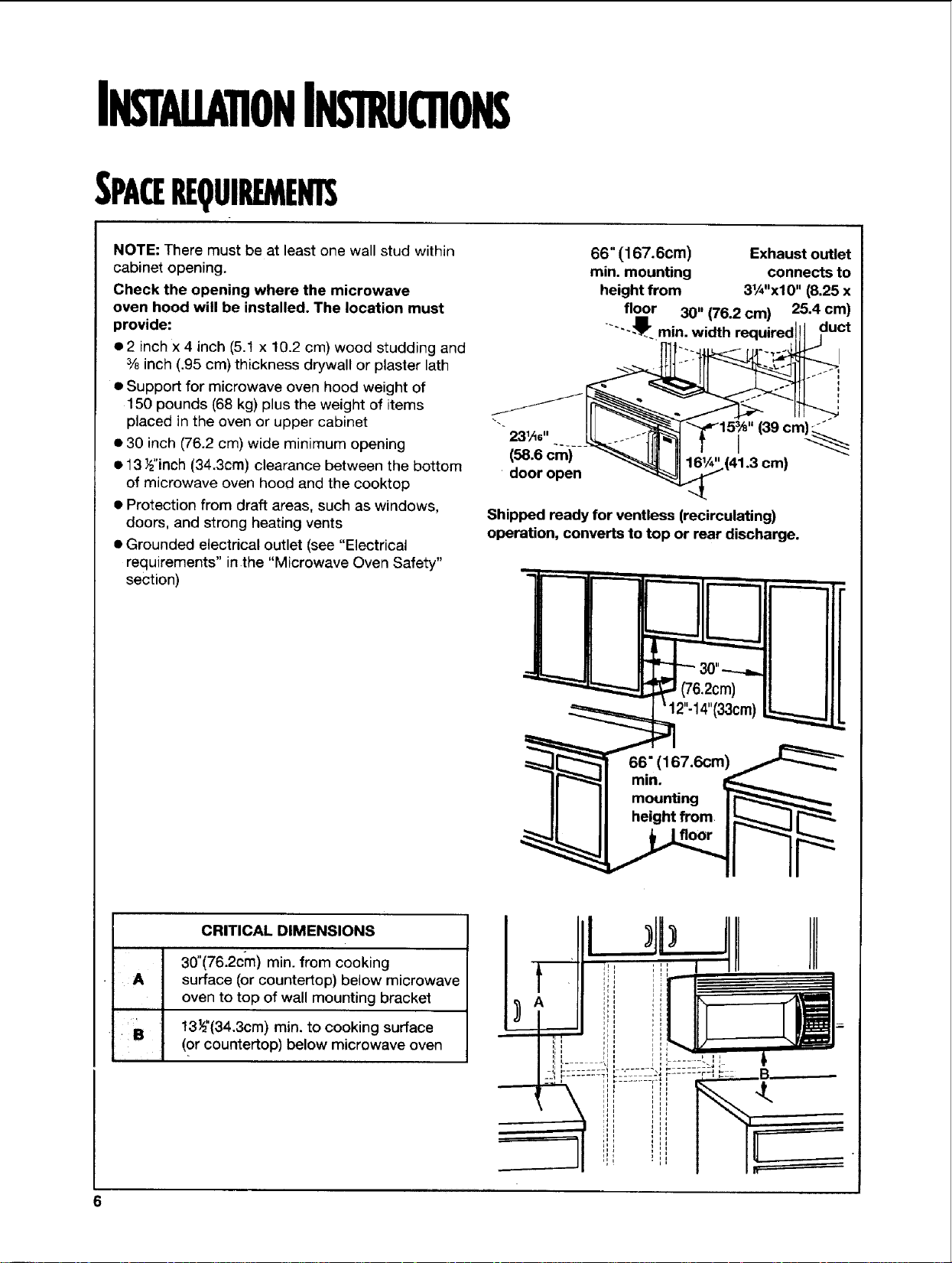
NOTE: There must be at least one wall stud within
cabinet opening.
Check the opening where the microwave
oven hood will be installed. The location must
provide:
e2 inch x4 inch (5.1 x 10.2 cm) wood studding and
3/6inch (.95 cm) thickness drywall or plaster lath
• Support for microwave oven hood weight of
150 pounds (68 kg) plus the weight of items
placed in the oven or upper cabinet
• 30 inch (76.2 cm) wide minimum opening
• 13 _z"inch(34.3cm) clearance between the bottom
of microwave oven hood and the cooktop
• Protection from draft areas, such as windows,
doors, and strong heating vents
• Grounded electrical outlet (see "Electrical
requirements" inthe "Microwave Oven Safety"
section)
66" (167.6cm) Exhaust outlet
rain. mounting connects to
height from 31/_"x10'' (8.25 x
fl°i°r 30" (76.2 cm) 25.4 cm)
..... .'_" min. width req,,uired!iI duct
23,, ..... tf "31 f I "
door open _ - "
Shipped ready for ventless (recirculating)
operation, converts to top or rear discharge.
= (76 2cm)
CRITICAL DIMENSIONS
30"(76.2cm) min. from cooking
surface (or countertop) below microwave
oven to top of wall mounting bracket
,,]
B 13_"(34.3cm) min. to cooking surface
(or countertop) below microwave oven
REMOVINGANDREPLACINGTHEMICROWAVEOVEN
Excessive Weight Hazard
Use two or more people to move and install
microwave oven.
Failure to do so can result in back or
other injury.
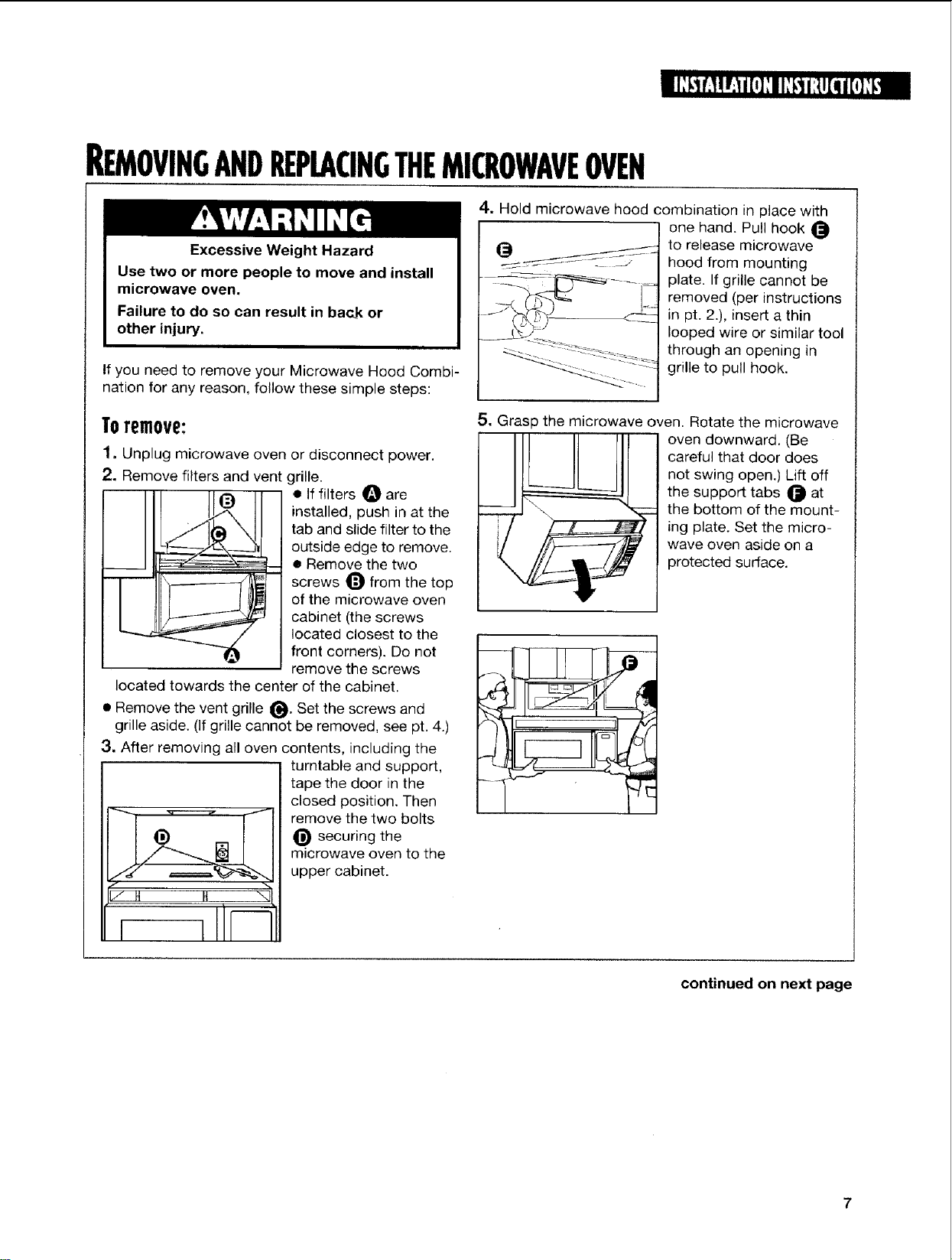
If you need to remove your Microwave Hood Combi-
nation for any reason, follow these simple steps:
Toremove:
1, Unplug microwave oven or disconnect power.
2. Remove filters and vent grille.
• Iffilters 0 are
installed, push in at the
tab and slide filter to the
outside edge to remove.
• Remove the two
screws O from the top
of the microwave oven
cabinet (the screws
located closest to the
front corners). Do not
remove the screws
located towards the center of the cabinet.
• Remove the vent grille _. Set the screws and
grille aside. (If grille cannot be removed, see pt. 4.)
3, After removing all oven contents, including the
e
i i I--1
turntable and support,
tape the door in the
closed position. Then
remove the two bolts
securing the
microwave oven to the
upper cabinet.
4. Hold microwave hood combination in place with
one hand. Pull hook
to release microwave
hood from mounting
plate. If grille cannot be
removed (per instructions
in pt. 2.), insert a thin
looped wire or similar tool
through an opening in
grille to pull hook.
5. Grasp the microwave oven. Rotate the microwave
__!/__ oven downward. (Be
careful that door does
not swing open.) Lift off
the support tabs _ at
__ the bottom of the mount-
ing plate. Set the micro-
wave oven aside on a
protected surface.
continued on next page
REMOVINGANDREPLACINGTHEMICROWAVEOVEN¢CONT.>
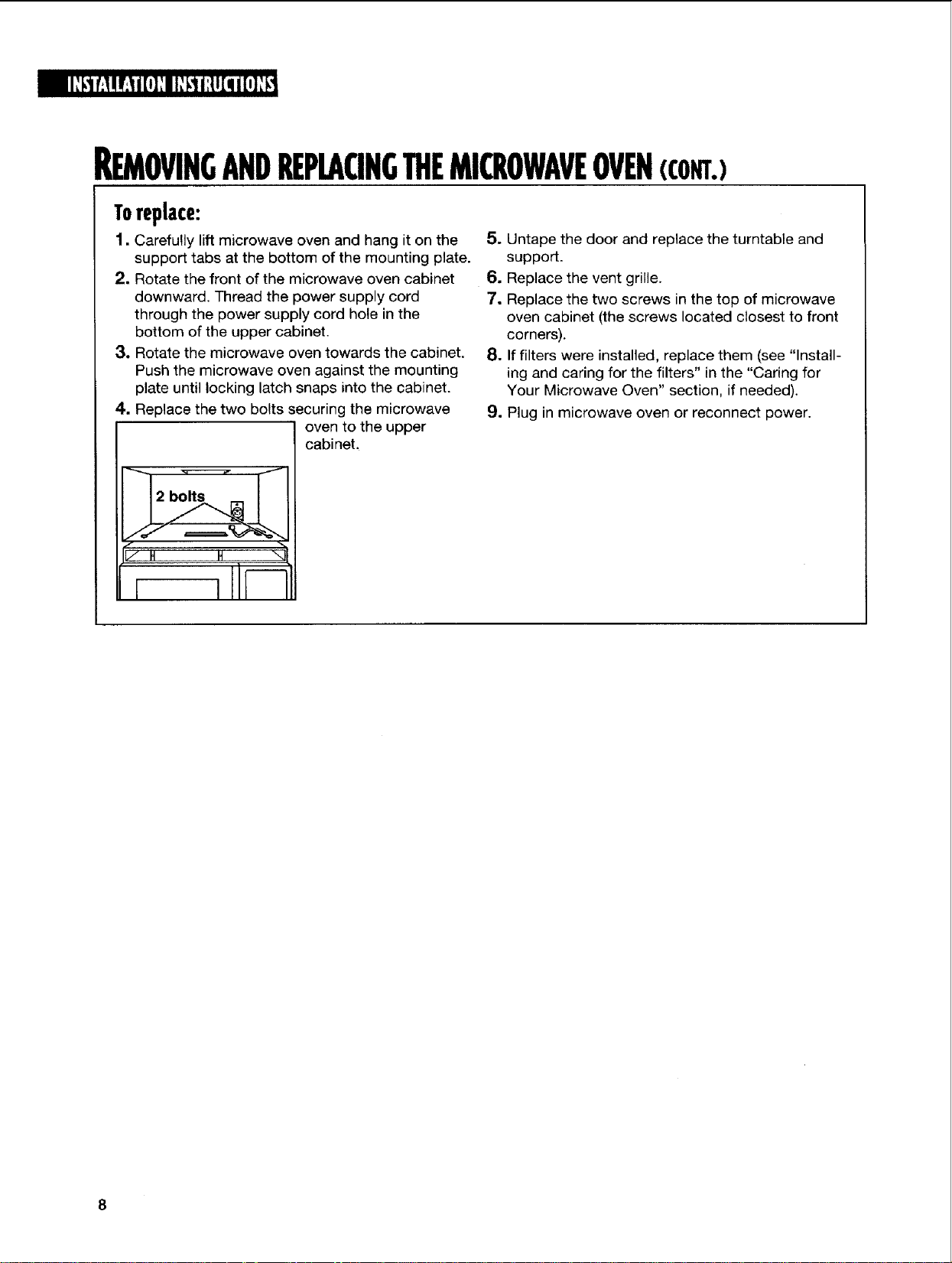
Toreplace:
1. Carefully lift microwave oven and hang it on the
support tabs at the bottom of the mounting plate.
2. Rotate the front of the microwave oven cabinet
downward. Thread the power supply cord
through the power supply cord hole in the
bottom of the upper cabinet.
3. Rotate the microwave oven towards the cabinet.
Push the microwave oven against the mounting
plate until locking latch snaps into the cabinet.
4. Replace the two bolts securing the microwave
oven to the upper
cabineL
5. Untape the door and replace the turntable and
support.
6. Replace the vent grille.
7. Replace the two screws in the top of microwave
oven cabinet (the screws located closest to front
corners).
8. If filters were installed, replace them (see "Install-
ing and caring for the filters" in the "Caring for
Your Microwave Oven" section, if needed).
9. Plug in microwave oven or reconnect power.
GETTINGTOKNOWYOURMICROWAVEOVEN
This section discusses the concepts behind microwave cooking. It also shows you the basics
you need to know to operate your microwave oven. Please read this information before you use
your microwave oven.
HowYOURMICROWAVEOVENWORKS
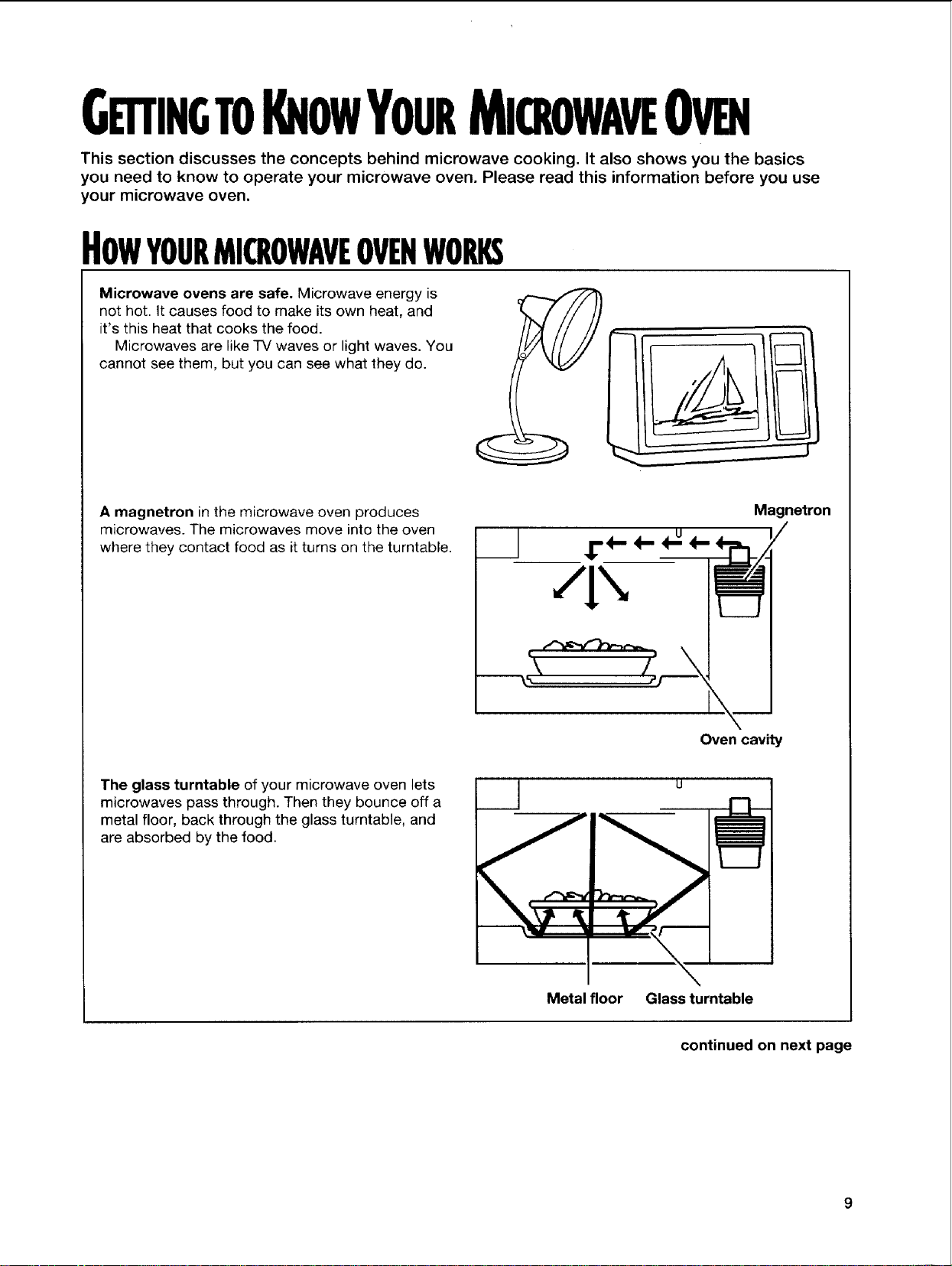
Microwave ovens are safe. Microwave energy is
not hot. It causes food to make its own heat, and
it's this heat that cooks the food.
Microwaves are like TV waves or light waves. You
cannot see them, but you can see what they do.
A magnetron in the microwave oven produces
microwaves. The microwaves move into the oven
where they contact food as it turns on the turntable.
Magnetron
Oven cavity
The glass turntable of your microwave oven lets
microwaves pass through. Then they bounce off a
metal floor, back through the glass turntable, and
are absorbed by the food.
Metal floor Glass turntable
continued on next page
HowYOURMICROWAVEOVENWORKS(CONT.)
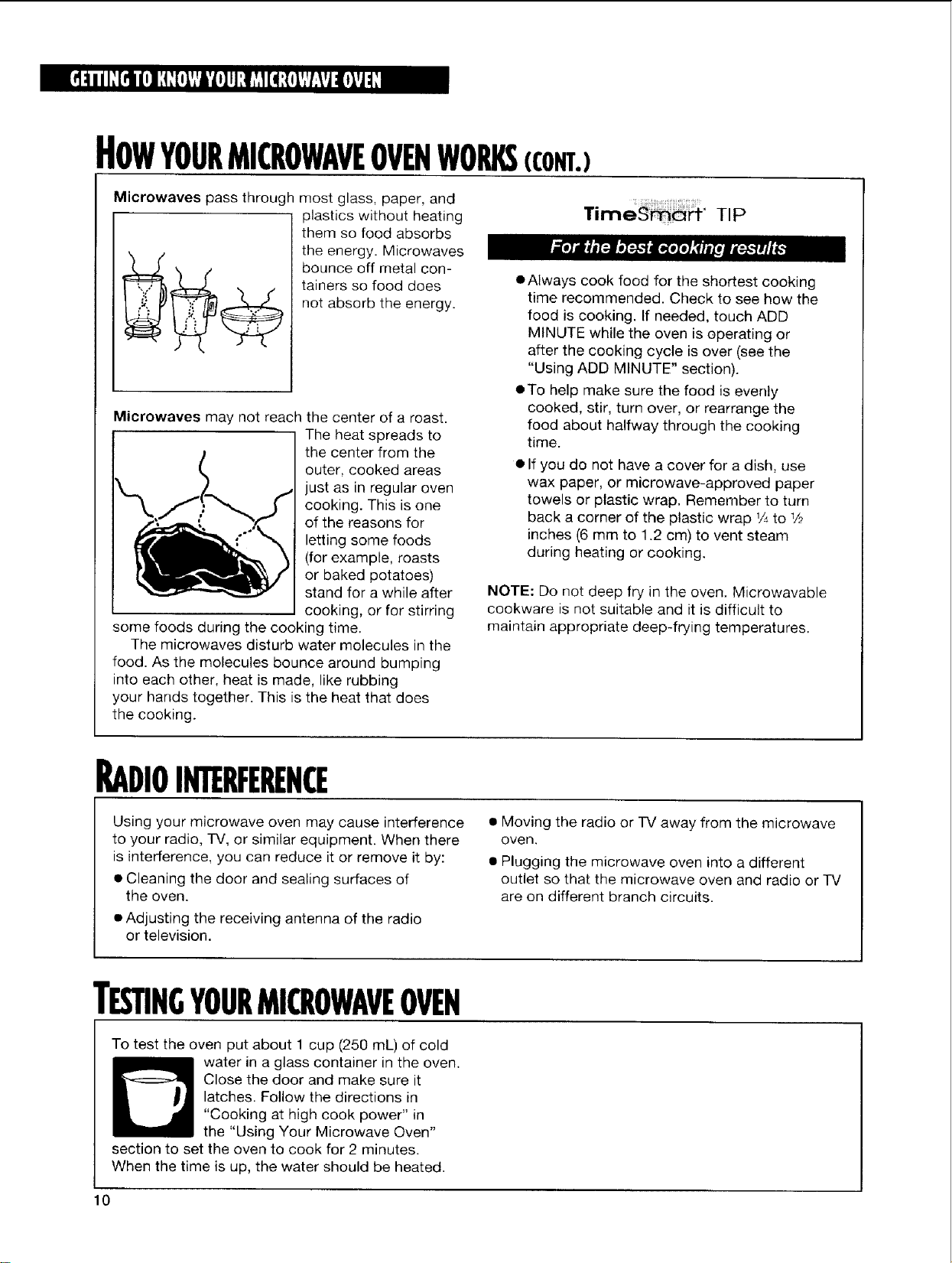
Microwaves pass through most glass, paper, and
plastics without heating
them so food absorbs
the energy. Microwaves
bounce off metal con-
tainers so food does
not absorb the energy.
Microwaves may not reach the center of a roast.
The heat spreads to
the center from the
outer, cooked areas
just as in regular oven
cooking. This is one
of the reasons for
letting some foods
(for example, roasts
or baked potatoes)
stand for a while after
cooking, or for stirring
some foods during the cooking time.
The microwaves disturb water molecules in the
food. As the molecules bounce around bumping
into each other, heat is made, like rubbing
your hands together. This is the heat that does
the cooking.
TimeS_" TIP
mAlways cook food for the shortest cooking
time recommended. Check to see how the
food is cooking. If needed, touch ADD
MINUTE while the oven is operating or
after the cooking cycle is over (see the
"Using ADD MINUTE" section).
oTo help make sure the food is eventy
cooked, stir, turn over, or rearrange the
food about halfway through the cooking
time.
• If you do not have a cover for a dish, use
wax paper, or microwave-approved paper
towels or plastic wrap. Remember to turn
back a corner of the plastic wrap 1/.,to 1/2
inches (6 mm to 1.2 cm) to vent steam
during heating or cooking.
NOTE: Do not deep fry in the oven. Microwavable
cookware is not suitable and it is difficult to
maintain appropriate deep-frying temperatures.
RADIOINTERFERENCE
Using your microwave oven may cause interference
to your radio, TV, or similar equipment. When there
is interference, you can reduce it or remove it by:
• Cleaning the door and sealing surfaces of
the oven.
• Adjusting the receiving antenna of the radio
or television.
• Moving the radio or IV away from the microwave
oven.
• Plugging the microwave oven into a different
outlet so that the microwave oven and radio or IV
are on different branch circuits.
TESTINGYOURMICROWAVEOVEN
To test the oven put about 1 cup (250 mL) of cold
water in a glass container in the oven.
Close the door and make sure it
latches. Follow the directions in
"Cooking at high cook power" in
the "Using Your Microwave Oven"
section to set the oven to cook for 2 minutes.
When the time is up, the water should be heated.
JESTINGYOURDINNERWAREORCOOKWARE
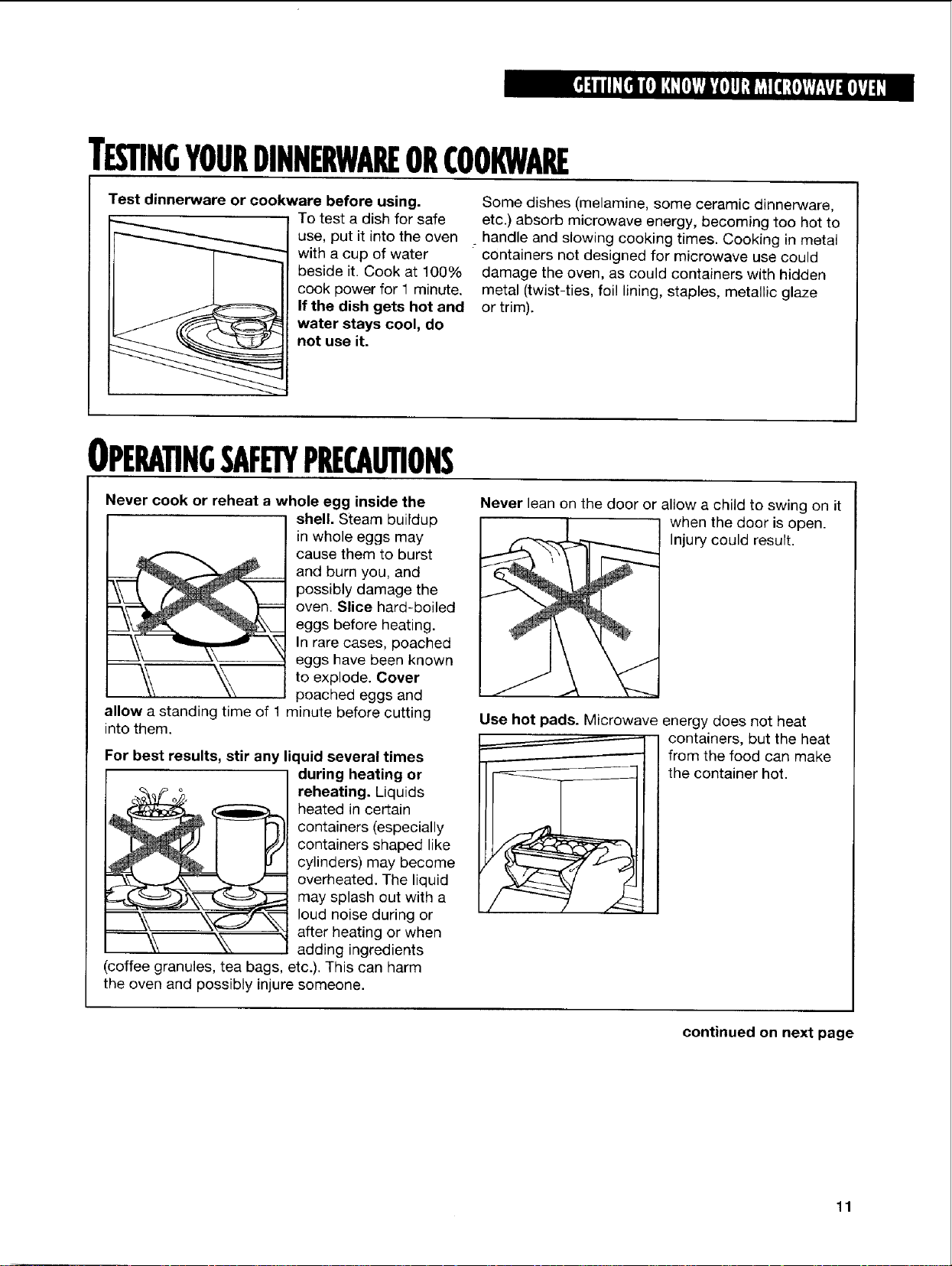
Test dinnerware or cookware before using.
To test a dish for safe
use, put it into the oven
with a cup of water
beside it. Cook at 100%
cook power for 1 minute.
If the dish gets hot and
water stays cool, do
not use it.
Some dishes (melamine, some ceramic dinnerware,
etc.) absorb microwave energy, becoming too hot to
: handle and slowing cooking times. Cooking in metal
containers not designed for microwave use could
damage the oven, as could containers with hidden
metal (twist-ties, foil lining, staples, metallic glaze
or trim).
OPERATINGSAF PRECAUTIONS
Never cook or reheat a whole egg inside the
shell. Steam buildup
in whole eggs may
cause them to burst
and burn you, and
possibly damage the
oven. Slice hard-boiled
eggs before heating.
In rare cases, poached
eggs have been known
to explode. Cover
poached eggs and
allow a standing time of 1 minute before cutting
into them.
For best results, stir any liquid several times
during heating or
reheating. Liquids
heated in certain
containers (especially
containers shaped like
cylinders) may become
overheated. The liquid
may splash out with a
loud noise during or
after heating or when
adding ingredients
(coffee granules, tea bags, etc.). This can harm
the oven and possibly injure someone.
Never lean on the door or allow a child to swing on it
when the door is open.
Injury could result.
J
Use hot pads. Microwave energy does not heat
containers, but the heat
from the food can make
the container hot.
continued on next page
11
OPERATINGSAFETYPRECAUTIONS(CONT.)
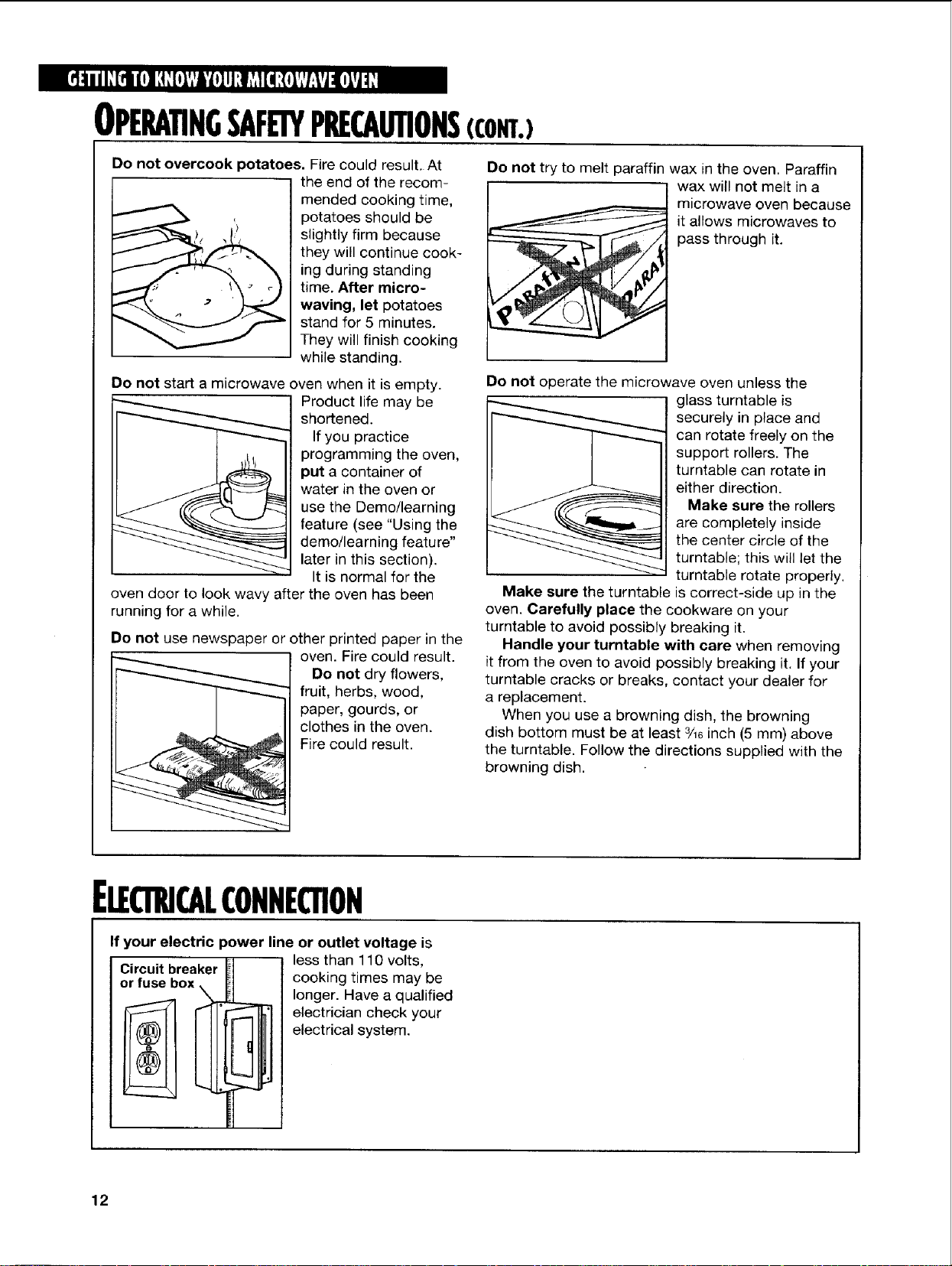
Do not overcook potatoes. Fire could result. At
the end of the recom-
mended cooking time,
potatoes should be
slightly firm because
they will continue cook-
ing during standing
time. After micro-
waving, let potatoes
stand for 5 minutes.
They will finish cooking
while standing.
Do not start a microwave oven when it is empty.
Product life may be
shortened.
If you practice
programming the oven,
put a container of
water in the oven or
use the Demo/learning
feature (see "Using the
demo/learning feature"
later in this section).
It is normal for the
oven door to look wavy after the oven has been
running for a while.
Do not use newspaper or other printed paper in the
oven. Fire could result.
Do not dry flowers,
fruit, herbs, wood,
paper, gourds, or
clothes in the oven.
Fire could result.
Do not try to melt paraffin wax in the oven. Paraffin
wax will not melt in a
microwave oven because
_ t allows microwaves to
pass through it.
i
i
i
Do not operate the microwave oven unless the
glass turntable is
securely in place and
can rotate freely on the
support rollers. The
turntable can rotate in
either direction.
Make sure the rollers
are completely inside
the center circle of the
turntable; this will let the
turntable rotate properly.
Make sure the turntable is correct-side up in the
oven. Carefully place the cookware on your
turntable to avoid possibly breaking it.
Handle your turntable with care when removing
it from the oven to avoid possibly breaking it. If your
turntable cracks or breaks, contact your dealer for
a replacement.
When you use a browning dish, the browning
dish bottom must be at least 3/16inch (5 mm) above
the turntable. Follow the directions supplied with the
browning dish.
ELECTRICALCONNECTION
If your electric power line or outlet voltage is
less than 110 volts,
Circuit breaker
or fuse
cooking times may be
longer. Have a qualified
electrician check your
electrical system.
12
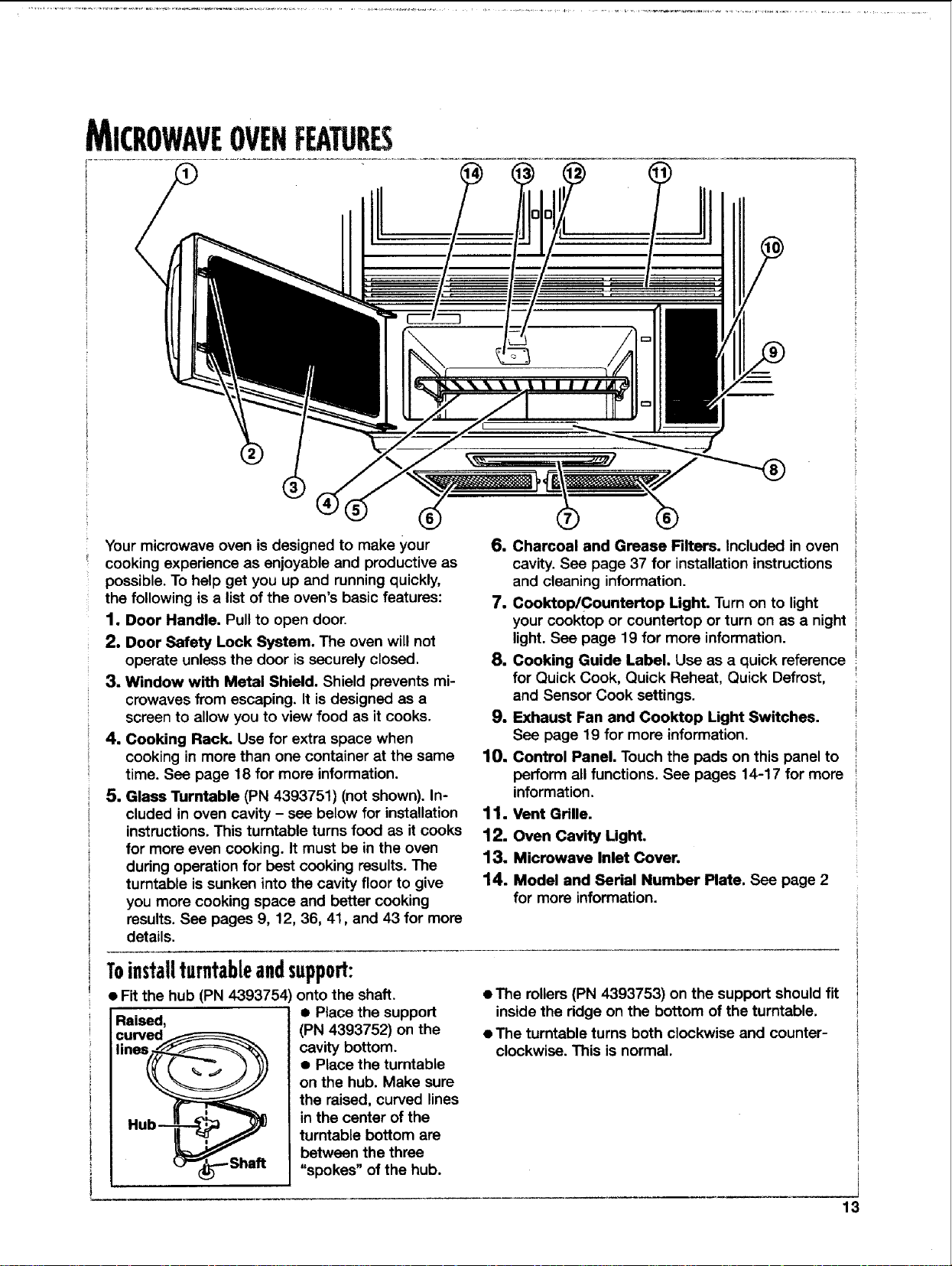
MICROWAVEOVENFEATURES
Your microwave oven is designed to make your
cooking experience as enjoyable and productive as
possible. To help get you up and running quickly,
the following is a list of the oven's basic features:
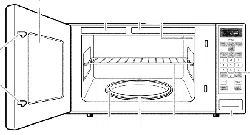
1, Door Handle. Pull to open door.
2. Door Safety Lock System. The oven will not
operate unless the door is securely closed.
3. Window with Metal Shield. Shield prevents mi-
crowaves from escaping. It is designed as a
screen to allow you to view food as it cooks.
4. Cooking Rack. Use for extra space when
cooking in more than one container at the same
time. See page 18 for more information.
5. Glass Turntable (PN 4393751) (not shown). In-
cluded in oven cavity - see below for installation
instructions. This turntable turns food as it cooks
for more even cooking. It must be in the oven
during operation for best cooking results. The
turntable is sunken into the cavity floor to give
you more cooking space and better cooking
results. See pages 9, 12, 36, 41, and 43 for more
details.
6. Charcoal and Grease Filters. Included in oven
cavity. See page 37 for installation instructions
and cleaning information.
7. Cooktop/Countertop Light. Turn on to light
your cooktop or countertop or turn on as a night
light. See page 19 for more information.
8. Cooking Guide Label. Use as a quick reference
for Quick Cook, Quick Reheat, Quick Defrost,
and Sensor Cook settings.
9. Exhaust Fan and Cooktop Light Switches.
See page 19 for more information.
10, Control Panel. Touch the pads on this panel to
perform all functions. See pages 14-17 for more
information.
11. Vent Grille.
12. Oven Cavity Light.
13. Microwave Inlet Cover.
14. Model and Serial Number Plate. See page 2
for more information.
Toinstallturntableandsupport:
• Fit the hub (PN 4393754 _onto the shaft.
Raised,
curved_
lines f-_Y_-'%,_
_"_.--- Shaft
• Place the support
(PN 4393752) on the
cavity bottom.
• Place the turntable
on the hub. Make sure
the raised, curved lines
in the center of the
turntable bottom are
between the three
"spokes" of the hub.
• The rollers (PN 4393753) on the support should fit
inside the ridge on the bottom of the turntable.
• The turntable turns both clockwise and counter-
clockwise. This is normal.
13
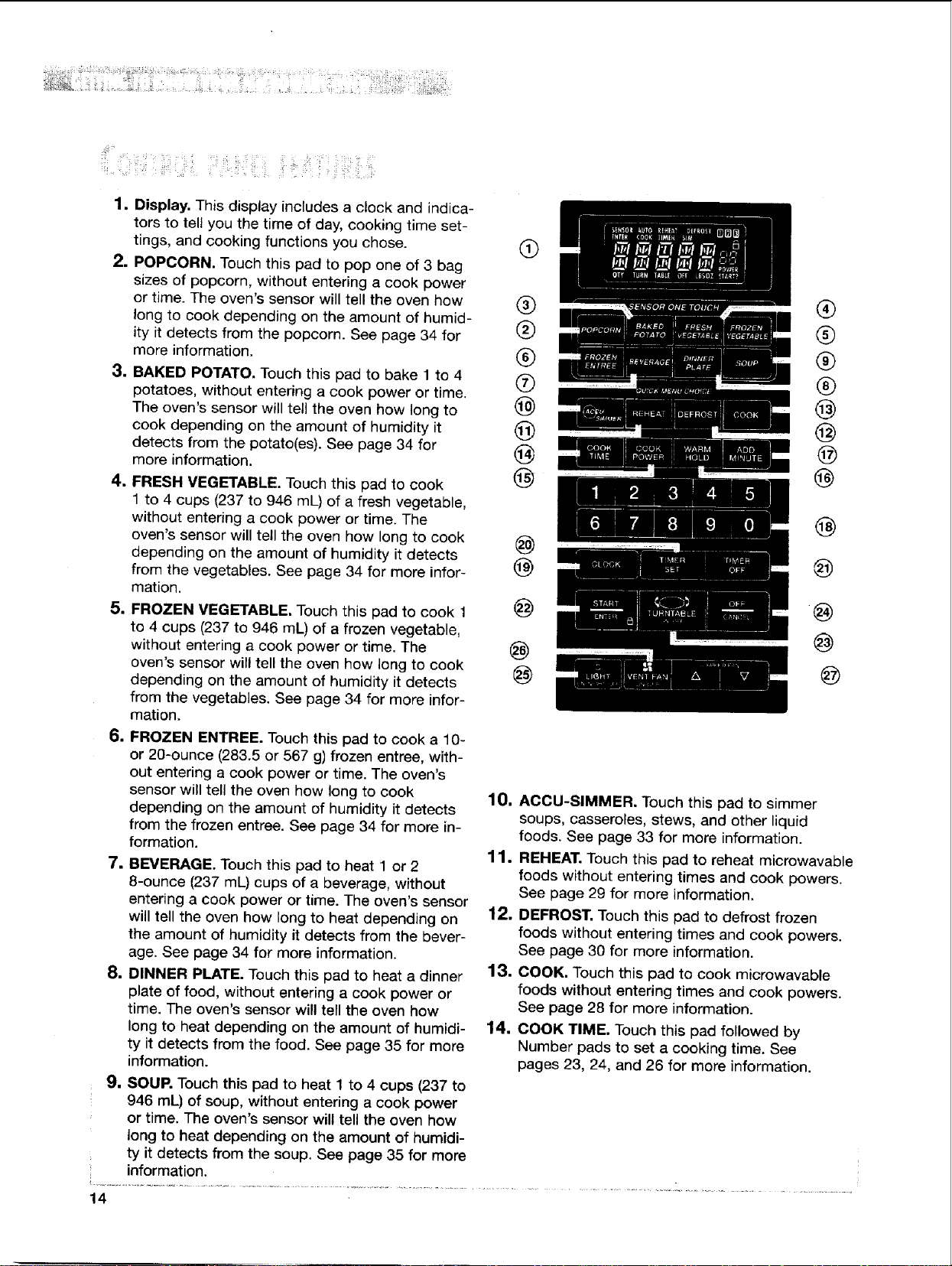
1. Display. This display includes a clock and indica-
tors to teU you the time of day, cooking time set-
tings, and cooking functions you chose.
2. POPCORN. Touch this pad to pop one of 3 bag
sizes of popcorn, without entering a cook power
or time. The oven's sensor will tell the oven how
long to cook depending on the amount of humid-
ity it detects from the popcorn. See page 34 for
more information.
,3. BAKED POTATO. Touch this pad to bake 1 to 4
potatoes, without entering a cook power or time.
The oven's sensor will tell the oven how long to
cook depending on the amount of humidity it
detects from the potato(es). See page 34 for
more information.
4. FRESH VEGETABLE. Touch this pad to cook
1 to 4 cups (237 to 946 mL) of a fresh vegetable,
without entering a cook power or time. The
oven's sensor will tell the oven how long to cook
depending on the amount of humidity it detects
from the vegetables. See page 34 for more infor-
mation.
5. FROZEN VEGETABLE. Touch this pad to cook 1
to 4 cups (237 to 946 mL) of a frozen vegetable,
without entering a cook power or time. The
oven's sensor will tell the oven how long to cook
depending on the amount of humidity it detects
from the vegetables. See page 34 for more infor-
mation.
6. FROZEN ENTREE, Touch this pad to cook a 10-
or 20-ounce (283.5 or 567 g) frozen entree, with-
out entering a cook power or time. The oven's
sensor will tell the oven how long to cook
depending on the amount of humidity it detects
from the frozen entree. See page 34 for more in-
formation.
7, BEVERAGE. Touch this pad to heat 1 or 2
8-ounce (237 mL) cups of a beverage, without
entering a cook power or time. The oven's sensor
will tell the oven how long to heat depending on
the amount of humidity it detects from the bever-
age. See page 34 for more information.
8. DINNER PLATE. Touch this pad to heat a dinner
plate of food, without entering a cook power or
time. The oven's sensor will tell the oven how
long to heat depending on the amount of humidi-
ty it detects from the food. See page 35 for more
information.
9, SOUP. Touch this pad to heat 1 to 4 cups (237 to
946 mL) of soup, without entering a cook power
or time. The oven's sensor will tell the oven how
long to heat depending on the amount of humidi-
ty it detects from the soup. See page 35 for more
information.
@
®
®
®
®
@
@
@
@
@
@
@
@
@
®
®
®
®
@
@
@
@
@
@
@
@
@
10, ACCU-SIMMER. Touch this pad to simmer
soups, casseroles, stews, and other liquid
foods. See page 33 for more information.
11. REHEAT. Touch this pad to reheat microwavable
foods without entering times and cook powers.
See page 29 for more information.
12. DEFROST. Touch this pad to defrost frozen
foods without entering times and cook powers.
See page 30 for more information.
13. COOK. Touch this pad to cook microwavable
foods without entering times and cook powers.
See page 28 for more information.
14. COOK TIME. Touch this pad followed by
Number pads to set a cooking time. See
pages 23, 24, and 26 for more information.
14
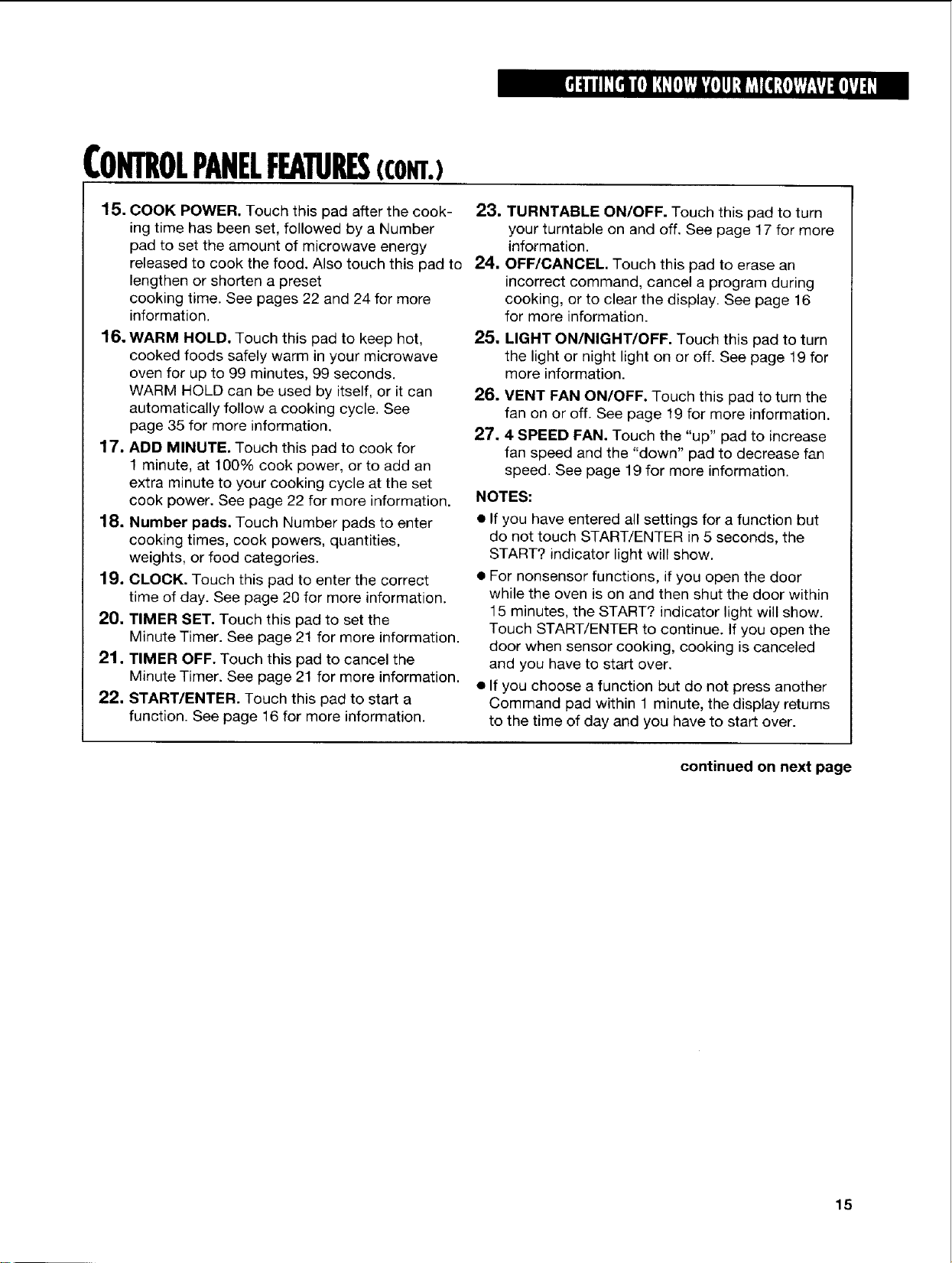
CONTROLPANELFEA RES(com.)
15. COOK POWER. Touch this pad after the cook-
ing time has been set, followed by a Number
pad to set the amount of microwave energy
released to cook the food. Also touch this pad to
lengthen or shorten a preset
cooking time. See pages 22 and 24 for more
information.
16. WARM HOLD. Touch this pad to keep hot,
cooked foods safely warm in your microwave
oven for up to 99 minutes, 99 seconds.
WARM HOLD can be used by itself, or it can
automatically follow a cooking cycle. See
page 35 for more information.
17. ADD MINUTE. Touch this pad to cook for
1 minute, at 100% cook power, orto add an
extra minute to your cooking cycle at the set
cook power. See page 22 for more information.
18. Number pads. Touch Number pads to enter
cooking times, cook powers, quantities,
weights, or food categories.
19, CLOCK. Touch this pad to enter the correct
time of day. See page 20 for more information.
20, TIMER SET. Touch this pad to set the
Minute Timer. See page 21 for more information.
21. TIMER OFF. Touch this pad to cancel the
Minute Timer. See page 21 for more information.
22. START/ENTER. Touch this pad to start a
function. See page 16 for more information.
23, TURNTABLE ON/OFF. Touch this pad to turn
your turntable on and off. See page 17 for more
information.
24. OFF/CANCEL Touch this pad to erase an
incorrect command, cancel a program during
cooking, or to clear the display. See page 16
for more information.
25.
LIGHT ON/NIGHT/OFF. Touch this pad to turn
the light or night light on or off. See page 19 for
more information.
26. VENT FAN ON/OFF. Touch this pad to turn the
fan on or off. See page 19 for more information.
27.4 SPEED FAN. Touch the "up" pad to increase
fan speed and the "down" pad to decrease fan
speed. See page 19 for more information.
NOTES:
• If you have entered all settings for a function but
do not touch START/ENTER in 5 seconds, the
START? indicator light will show.
• For nonsensor functions, if you open the door
while the oven is on and then shut the door within
15 minutes, the START? indicator light will show.
Touch START/ENTER to continue. If you open the
door when sensor cooking, cooking is canceled
and you have to start over.
• If you choose a function but do not press another
Command pad within 1 minute, the display returns
to the time of day and you have to start over.
continued on next page
15
CONTROLPANELFEATURES(com.)
Audiblesignals
Your microwave oven comes with audible signals
that can guide you when setting and using
your oven:
• _ A programming tone will sound each time
you touch a pad.
• [_ One long tone signals the end of a Minute
Timer countdown.
• I-:_11-_)!11-,_1)II.,_1)IFourtonessignal the end of a
cooking cycle.
• r_ Two quick, short tones sound once
every minute for the first 15 minutes after an end-
of-cooking signal as a reminder if the food has not
been removed from the oven.
• [_]_ Two quick, short tones will sound while
entering and exiting from a hidden feature (for
example, Child Lock) or time of day.
• I"}))II:iii)I1"_))IThreetonessoundifyouhave
made an incorrect entry.
To disable the programming tone:
To disable all audible signals except the
end-of-timer and hidden feature signals:
TOUCH
and hold for 5 seconds
To turn signals back on:
TOUCH
and hold for 5 seconds
NOTE: Two tones will sound when audible signals
are turned on or off.
Interruptinlcookins,
You can stop the oven during a cycle by opening
the door. The oven stops heating and the fan stops,
but the light stays on. To restart cooking, close the
door and
TOUCH
TOUCH
and hold for 5 seconds
To turn the programming tone back on:
TOUCH
If you do not want to continue cooking:
• Close the door and the light goes off.
OR
• TOUCH
and hold for 5 seconds
NOTE: Before setting a function, touch OFF/CANCEL
to make sure no other function is on.
16
CONTROLPANELFEATURES(com.)
Heatin morethanoneplateoffood
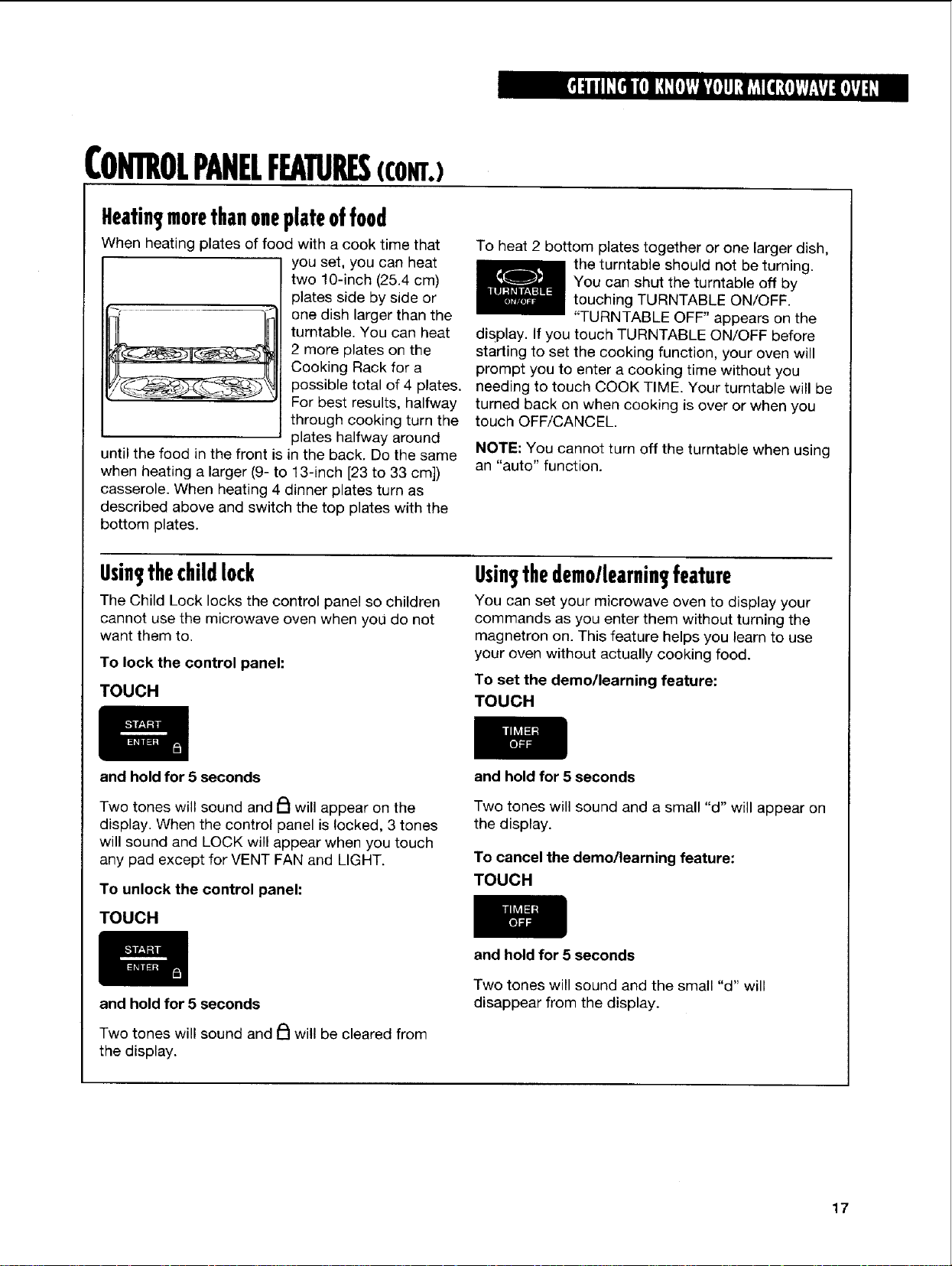
When heating plates of food with a cook time that
you set, you can heat
two 10-inch (25.4 cm)
plates side by side or
one dish larger than the
turntable. You can heat
2 more plates on the
Cooking Rack for a
possible total of 4 plates.
For best results, halfway
through cooking turn the
plates halfway around
until the food in the front is in the back. Do the same
when heating a larger (9- to 13-inch [23 to 33 cm])
casserole. When heating 4 dinner plates turn as
described above and switch the top plates with the
bottom plates.
To heat 2 bottom plates together or one larger dish,
the turntable should not be turning.
You can shut the turntable off by
touching TURNTABLE ON/OFF.
"TURNTABLE OFF" appears on the
disPlay. If you touch TURNTABLE ON/OFF before
starting to set the cooking function, your oven will
prompt you to enter a cooking time without you
needing to touch COOK TIME. Your turntable will be
turned back on when cooking is over or when you
touch OFF/CANCEL
NOTE: You cannot turn off the turntable when using
an "auto" function.
Usin thechildlock
The Child Lock locks the control panel so children
cannot use the microwave oven when you do not
want them to.
To lock the control panel:
TOUCH
Usin thedemollearnin feature
You can set your microwave oven to display your
commands as you enter them without turning the
magnetron on. This feature helps you learn to use
your oven without actually cooking food.
To set the demo/learning feature:
TOUCH
and hold for 5 seconds
Two tones will sound and _1 will appear on the
display. When the control panel is locked, 3 tones
will sound and LOCK will appear when you touch
any pad except for VENT FAN and LIGHT.
To unlock the control panel:
TOUCH
and hold for 5 seconds
Two tones will sound and _ will be cleared from
the display.
and hold for 5 seconds
Two tones will sound and a small "d" will appear on
the display.
To cancel the demo/learning feature:
TOUCH
and hold for 5 seconds
Two tones will sound and the small "d" will
disappear from the display.
17
USINGmECOOKINGRACK
The Cooking Rack gives you extra space when
cooking in more than one container at the same
time.
If you need a replacement rack, you can order
one from your authorized service company, or
by calling the Consumer Assistance Center at
1-800-25.3-1301 (in U.S.A.) or 1-800-461-5681
NOTES:
• Use oven mitts to remove items from
microwave oven.
• Do not store the metal rack in the oven. Arcing
and damage to the oven could result if someone
accidentally starts the oven.
• Do not operate the oven with the metal rack stored
(in Canada). When calling, follow the instructions
and telephone prompts you hear. Make sure to
have your model number when ordering.
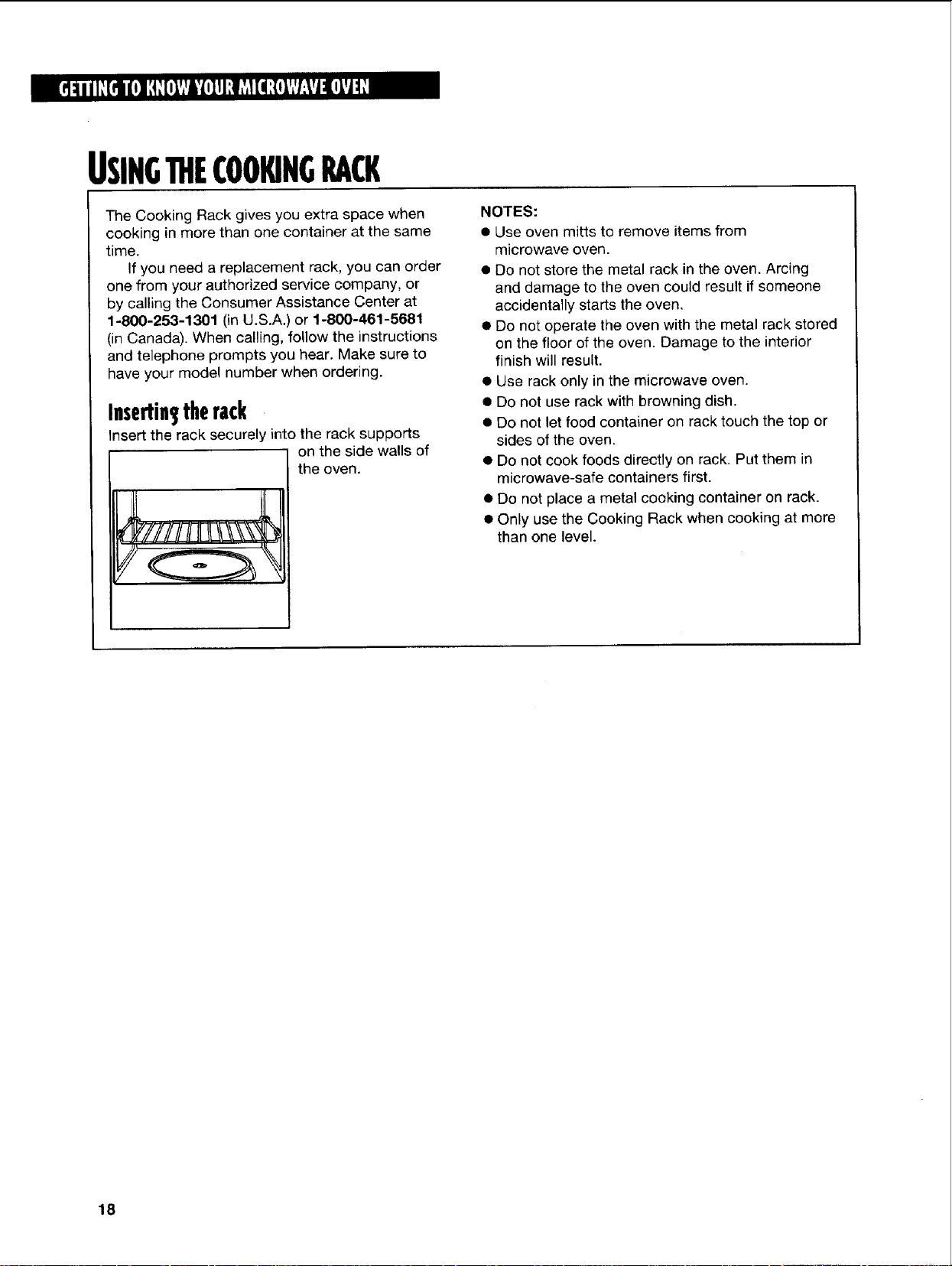
Insertin therack
Insert the rack securely into the rack supports
on the side walls of
I the oven.
on the floor of the oven. Damage to the interior
finish will result.
• Use rack only in the microwave oven.
• Do not use rack with browning dish.
• Do not let food container on rack touch the top or
sides of the oven.
• Do not cook foods directly on rack. Put them in
microwave-safe containers first.
• Do not place a metal cooking container on rack.
• Only use the Cooking Rack when cooking at more
than one level.
18
USINGmEEXHAUSTFAN
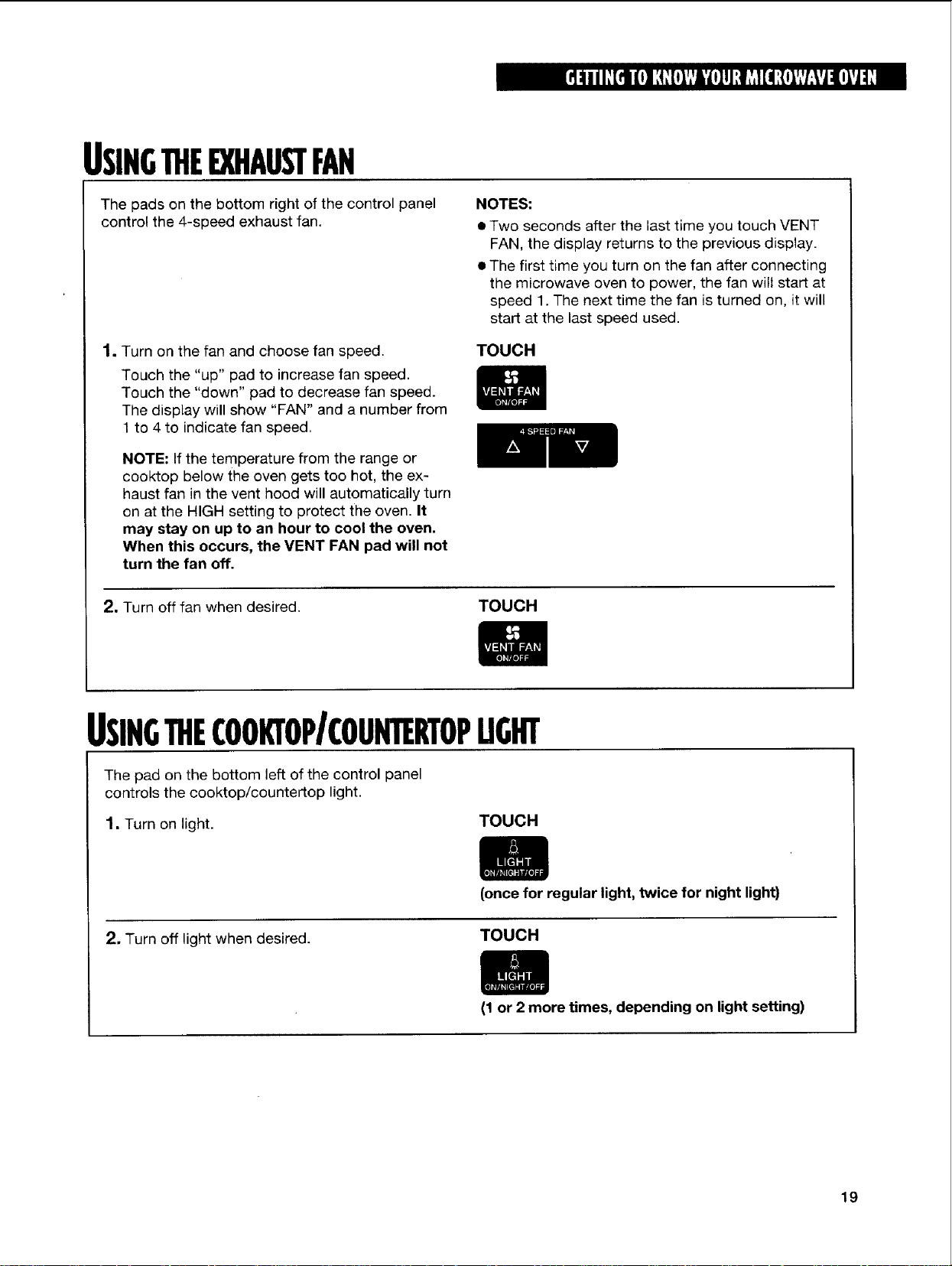
The pads on the bottom right of the control panel
control the 4-speed exhaust fan.
NOTES:
• Two seconds after the last time you touch VENT
FAN, the display returns to the previous display.
• The first time you turn on the fan after connecting
the microwave oven to power, the fan wilt start at
speed 1. The next time the fan is turned on, it will
start at the last speed used.
1. Turn on the fan and choose fan speed.
Touch the "up" pad to increase fan speed.
Touch the "down" pad to decrease fan speed.
The display will show "FAN" and a number from
1 to 4 to indicate fan speed.
TOUCH
NOTE: If the temperature from the range or
cooktop below the oven gets too hot, the ex-
haust fan in the vent hood will automatically turn
on at the HIGH setting to protect the oven. It
may stay on up to an hour to cool the oven.
When this occurs, the VENT FAN pad will not
turn the fan off.
2, Turn off fan when desired.
TOUCH
USINGTHECOOKi"OPICOUNTERTOPUGHT
The pad on the bottom left of the control panel
controls the cooktop/countertop light.
1. Turn on light. TOUCH
2. Turn off light when desired.
(once for regular light, twice for night light)
TOUCH
(1 or 2 more times, depending on light setting)
19
SETTING]HECLOCK
NOTES:
• If you touch in an invalid time and touch CLOCK,
3 tones will sound. Enter the correct time.
• If you touch OFF/CANCEL while setting the clock,
the display will show the last time of day set.
• To turn off the clock touch CLOCK, Number pad
0, and CLOCK again, the set time will disappear
and ":" will show on the display.
When your microwave oven is first plugged in, or
after a power failure, the display will flash ":". If a
time of day is not set, ":" will show until you touch
any pad.
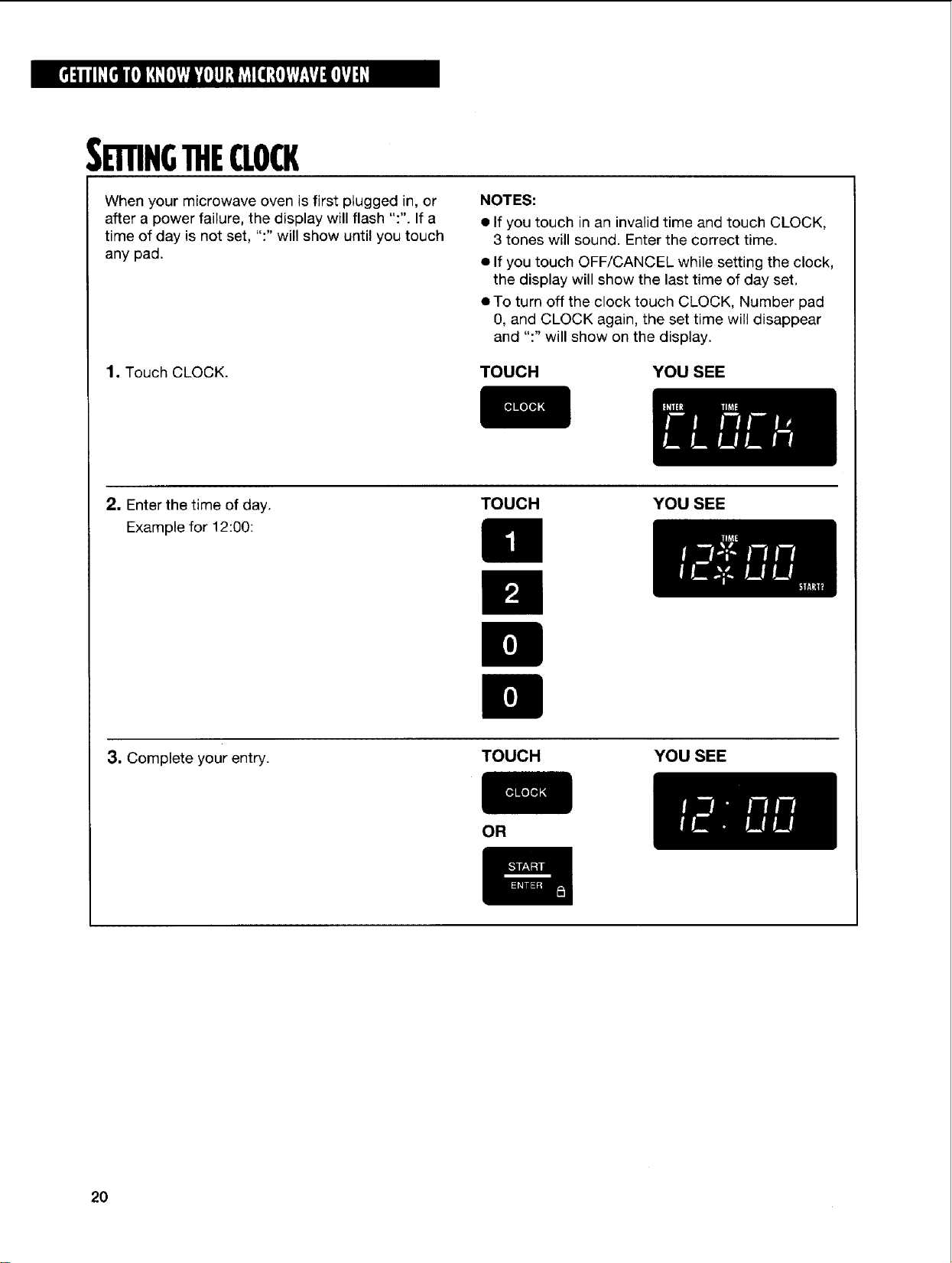
1. Touch CLOCK. TOUCH YOUSEE
2. Enter the time of day.
Example for 12:00:
TOUCH YOUSEE
3, Complete your entry.
TOUCH YOU SEE
OR
2O
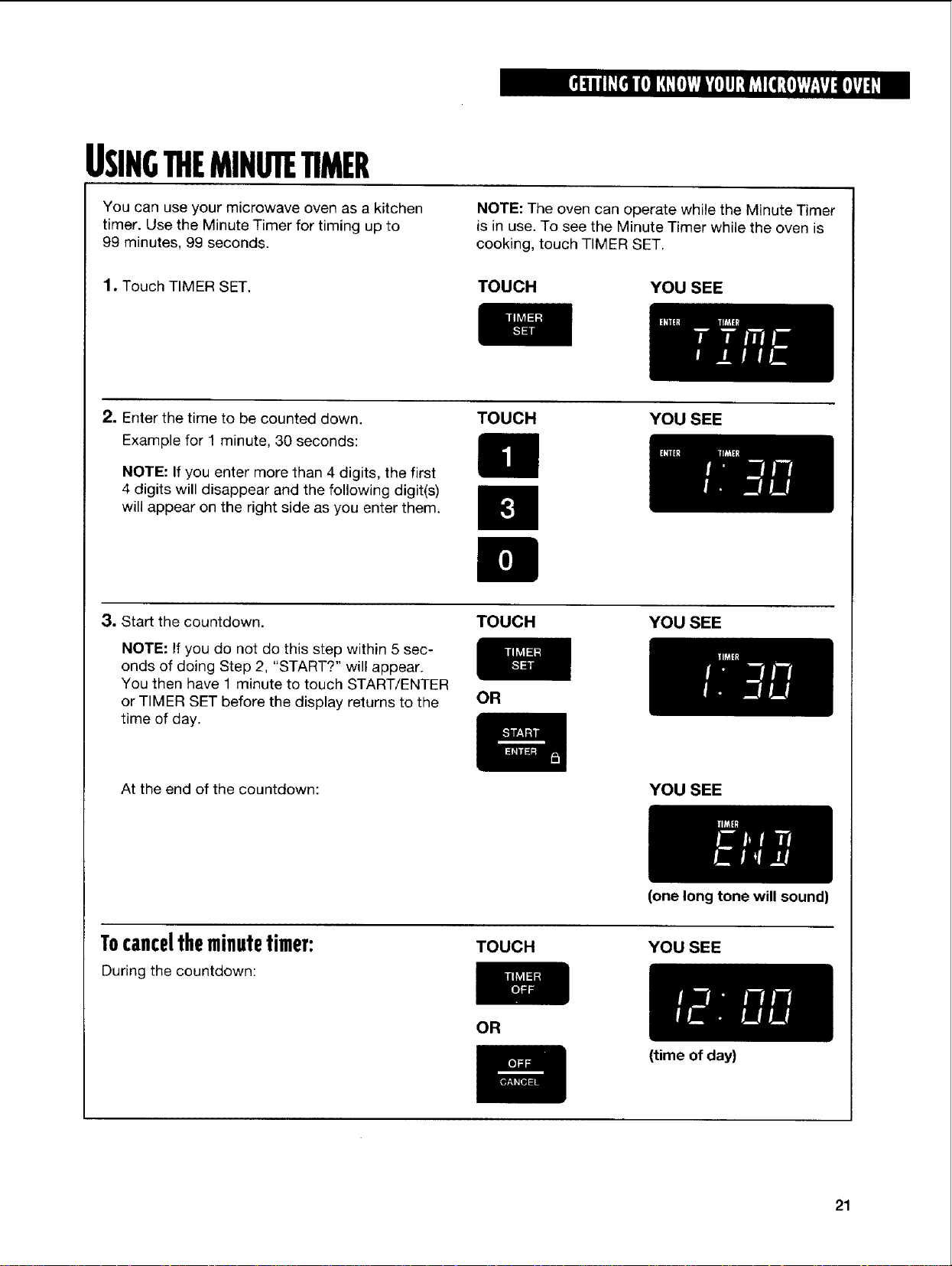
USING11tEMINUTETIMER
You can use your microwave oven as a kitchen
timer. Use the Minute Timer for timing up to
99 minutes, 99 seconds.
NOTE: The oven can operate while the Minute Timer
is in use. To see the Minute Timer while the oven is
cooking, touch TIMER SET.
1. Touch TIMER SET.
TOUCH YOUSEE
2. Enter the time to be counted down.
Example for 1 minute, 30 seconds:
NOTE: If you enter more than 4 digits, the first
4 digits will disappear and the following digit(s)
will appear on the right side as you enter them.
TOUCH YOUSEE
3. Start the countdown.
NOTE: If you do not do this step within 5 sec-
onds of doing Step 2, "START?" will appear.
You then have 1 minute to touch START/ENTER
or TIMER SET before the display returns to the
time of day.
TOUCH YOU SEE
OR
At the end of the countdown: YOU SEE
Tocanceltheminutetimer:
During the countdown:
(one long tone will sound)
TOUCH YOU SEE
OR
(time of day)
21
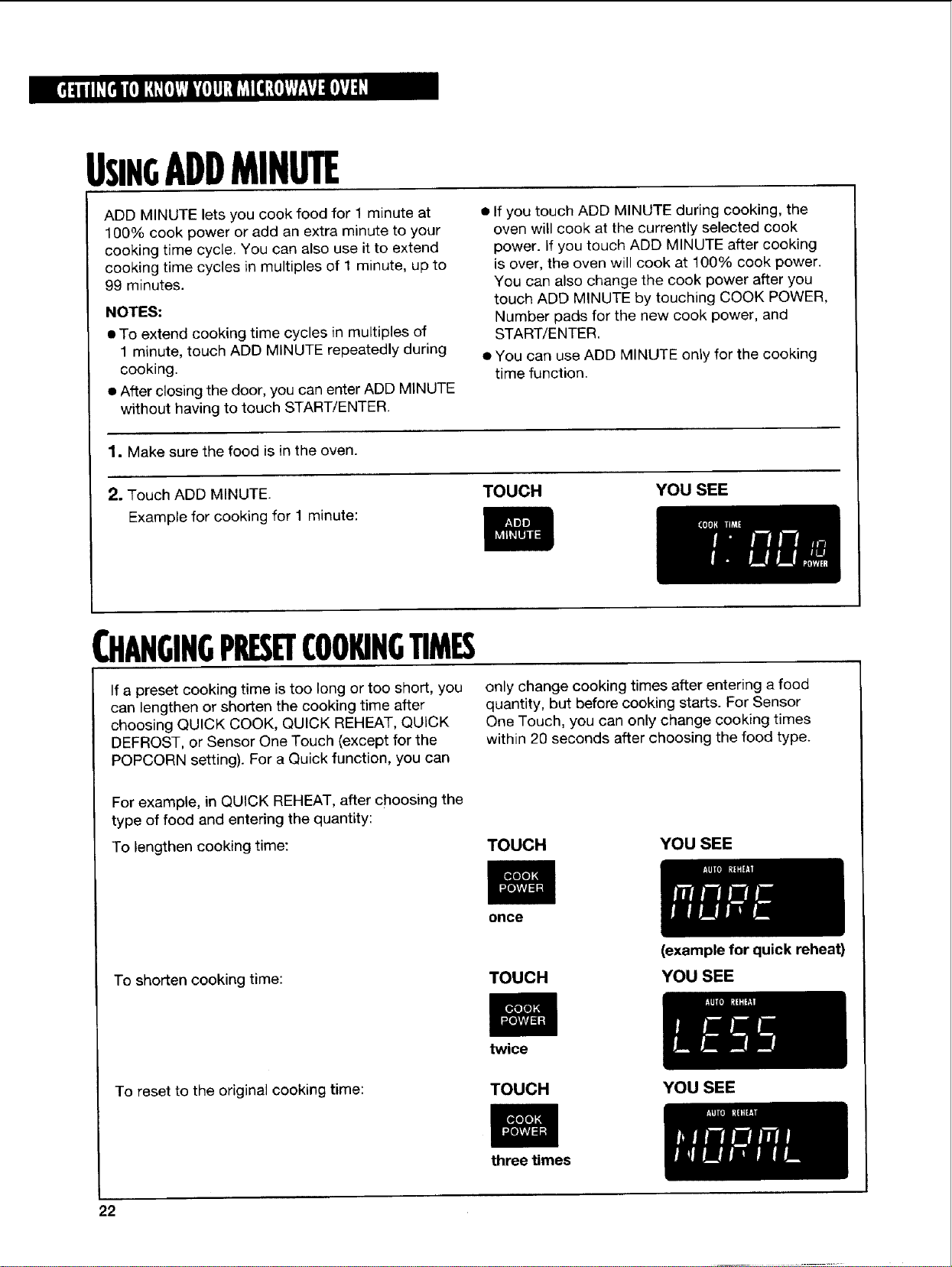
USINGADDMINUTE
ADD MINUTE lets you cook food for 1 minute at
100% cook power or add an extra minute to your
cooking time cycle. You can also use it to extend
cooking time cycles in multiples of 1 minute, up to
99 minutes.
NOTES:
• To extend cooking time cycles in multiples of
1 minute, touch ADD MINUTE repeatedly during
cooking.
• After closing the door, you can enter ADD MINUTE
without having to touch START/ENTER.
• If you touch ADD MINUTE during cooking, the
oven will cook at the currently selected cook
power. If you touch ADD MINUTE after cooking
is over, the oven will cook at 100% cook power.
You can also change the cook power after you
touch ADD MINUTE by touching COOK POWER,
Number pads for the new cook power, and
START/ENTER.
• You can use ADD MINUTE only for the cooking
time function.
1. Make sure the food is in the oven.
2. Touch ADD MINUTE. TOUCH YOU SEE
Example for cooking for 1 minute:
CHANGINGPRESETCOOKINGTIMES
If a preset cooking time istoo long or too short, you
can lengthen or shorten the cooking time after
choosing QUICK COOK, QUICK REHEAT, QUICK
DEFROST, or Sensor One Touch (except for the
POPCORN setting). For a Quick function, you can
only change cooking times after entering a food
quantity, but before cooking starts. For Sensor
One Touch, you can only change cooking times
within 20 seconds after choosing the food type.
For example, in QUICK REHEAT, after choosing the
type of food and entering the quantity:
To lengthen cooking time: TOUCH
YOU SEE
once
To shorten cooking time:
TOUCH
To reset to the original cooking time:
twice
TOUCH
three Umes
22
(example for quick reheat)
YOU SEE
YOU SEE
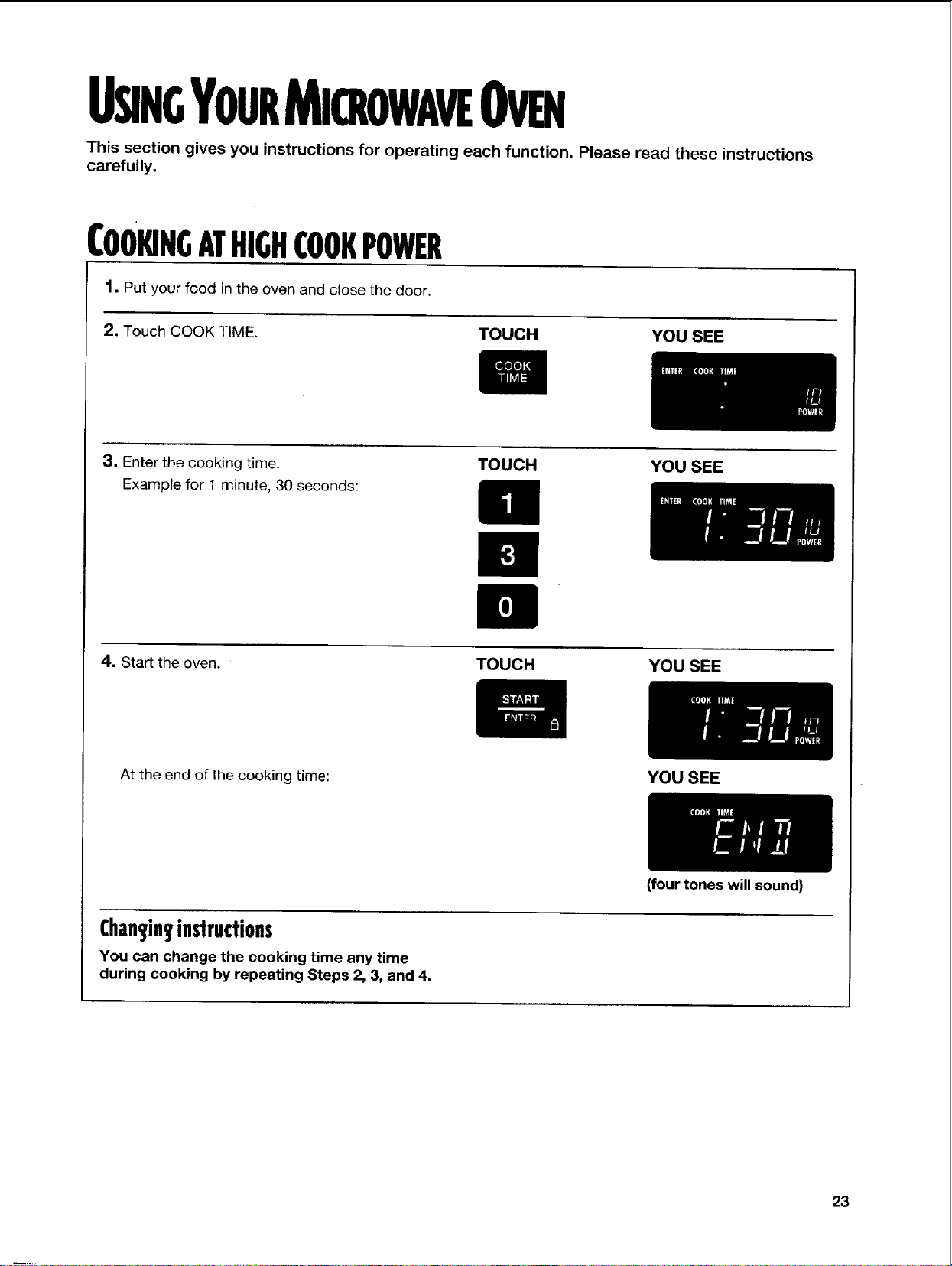
USINGYOURMICROWAVEOVEN
This section gives you instructions for operating each function. Please read these instructions
carefully.
COOKINGATHIGHCOOKPOWER
1. Put your food in the oven and close the door.
2. Touch COOK TIME. TOUCH YOU SEE
3. Enter the cooking time.
Example for 1 minute, 30 seconds:
TOUCH YOU SEE
4. Start the oven. TOUCH YOU SEE
At the end of the cooking time:
Chan_inS,ins'lrudions
You can change the cooking time any time
during cooking by repeating Steps 2, 3, and 4.
YOU SEE
(four tones will sound)
23
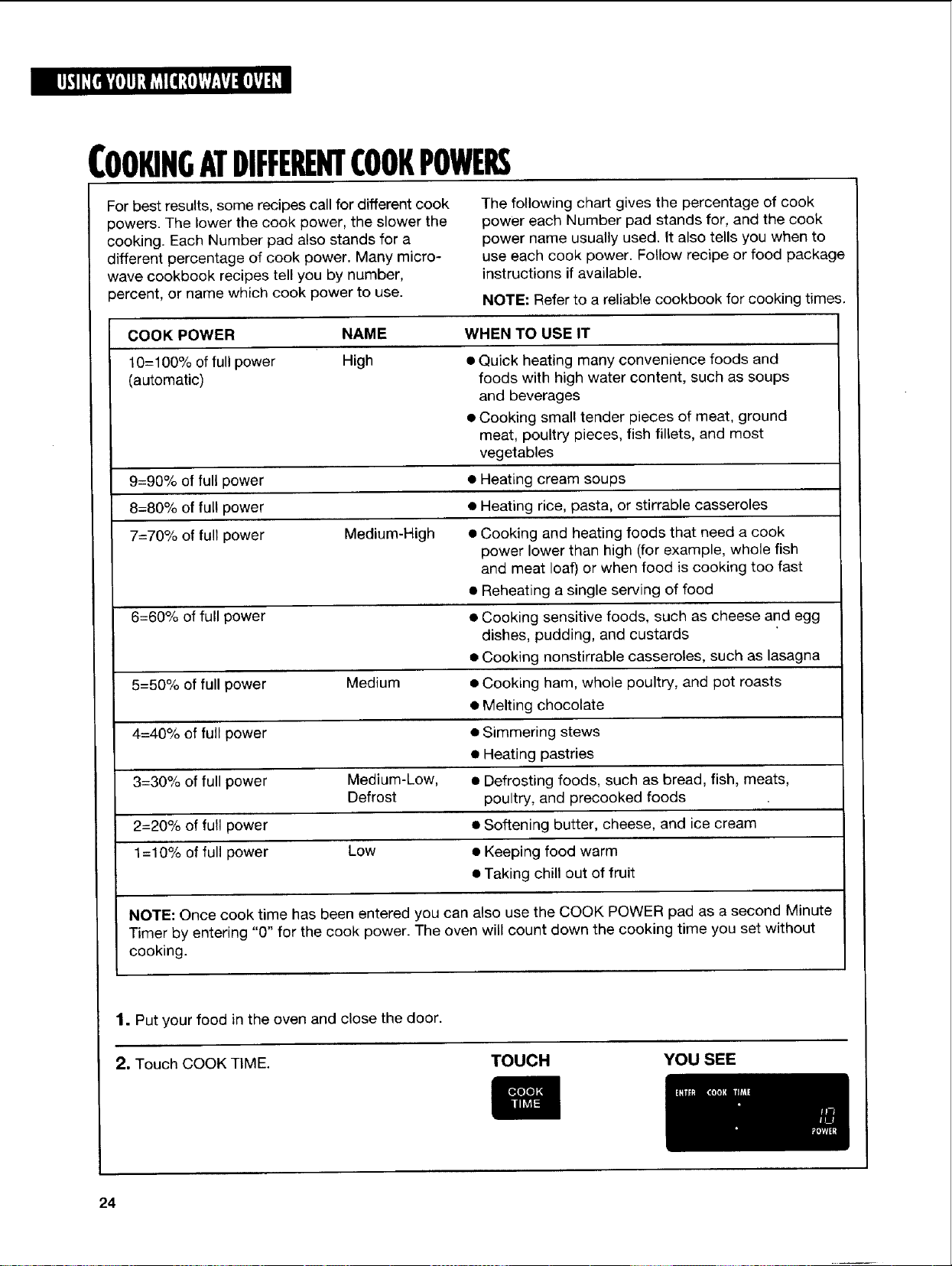
COOKINGATDIFFERENTCOOKPOWERS
For best results, some recipes call for different cook
powers. The lower the cook power, the slower the
cooking. Each Number pad also stands for a
different percentage of cook power. Many micro-
wave cookbook recipes tell you by number,
percent, or name which cook power to use.
The following chart gives the percentage of cook
power each Number pad stands for, and the cook
power name usually used. It also tells you when to
use each cook power. Follow recipe or food package
instructions if available.
NOTE: Refer to a reliable cookbook for cooking times.
COOK POWER
10=100% offullpower
(automatic)
NAME WHEN TO USE IT
High • Quick heating many convenience foods and
foods with high water content, such as soups
and beverages
• Cooking small tender pieces of meat, ground
meat, poultry pieces, fish fillets, and most
vegetables
9=90% of full power • Heating cream soups
8=80% of full power • Heating rice, pasta, or stirrable casseroles
7=70% of full power Medium-High • Cooking and heating foods that need a cook
power lower than high (for example, whole fish
and meat loaf) or when food is cooking too fast
• Reheating a single serving of food
6=60% of full power • Cooking sensitive foods, such as cheese and egg
dishes, pudding, and custards
• Cooking nonstirrable casseroles, such as lasagna
5=50% of full power Medium • Cooking ham, whole poultry, and pot roasts
• Melting chocolate
4=40% of full power • Simmering stews
• Heating pastries
3=30% of full power Medium-Low, • Defrosting foods, such as bread, fish, meats,
Defrost poultry, and precooked foods
2=20% of full power • Softening butter, cheese, and ice cream
1=10% of full power Low • Keeping food warm
• Taking chill out of fruit
NOTE: Once cook time has been entered you can also use the COOK POWER pad as a second Minute
Timer by entering "0" for the cook power. The oven will count down the cooking time you set without
cooking.
1. Put your food in the oven and close the door.
2, Touch COOK TIME. TOUCH YOU SEE
24
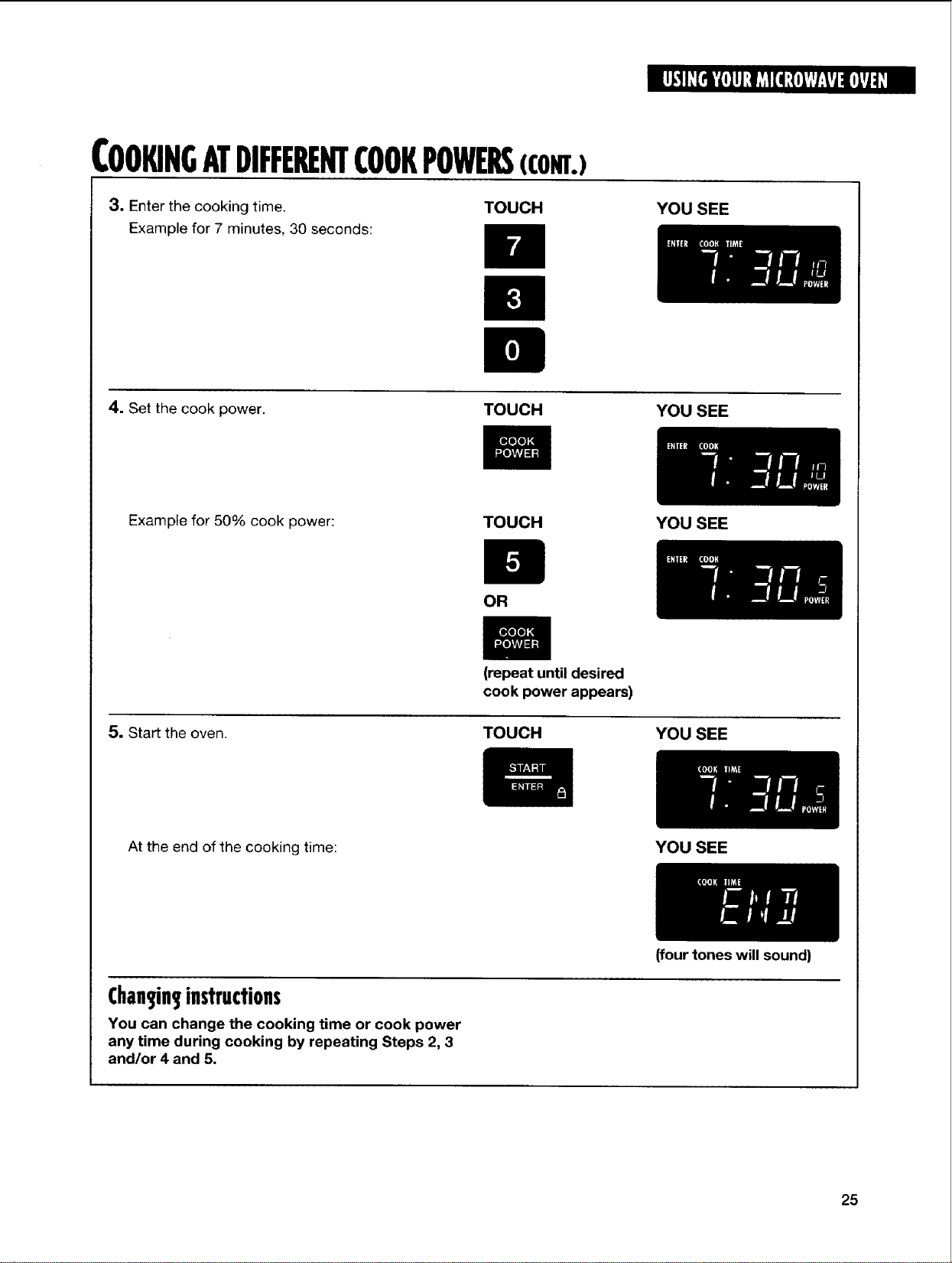
COOKINGATDIFFERENTCOOKPOWERS(com.)
3, Enter the cooking time. TOUCH
Example for 7 minutes, 30 seconds:
YOU SEE
4. Set the cook power. TOUCH
YOU SEE
Example for 50% cook power: TOUCH
5, Start the oven.
OR
(repeat until desired
cook power appears)
TOUCH
YOU SEE
YOU SEE
At the end of the cooking time:
Chan3in3instructions
You can change the cooking time or cook power
any time during cooking by repeating Steps 2, 3
and/or 4 and 5.
YOU SEE
(four tones will sound)
25
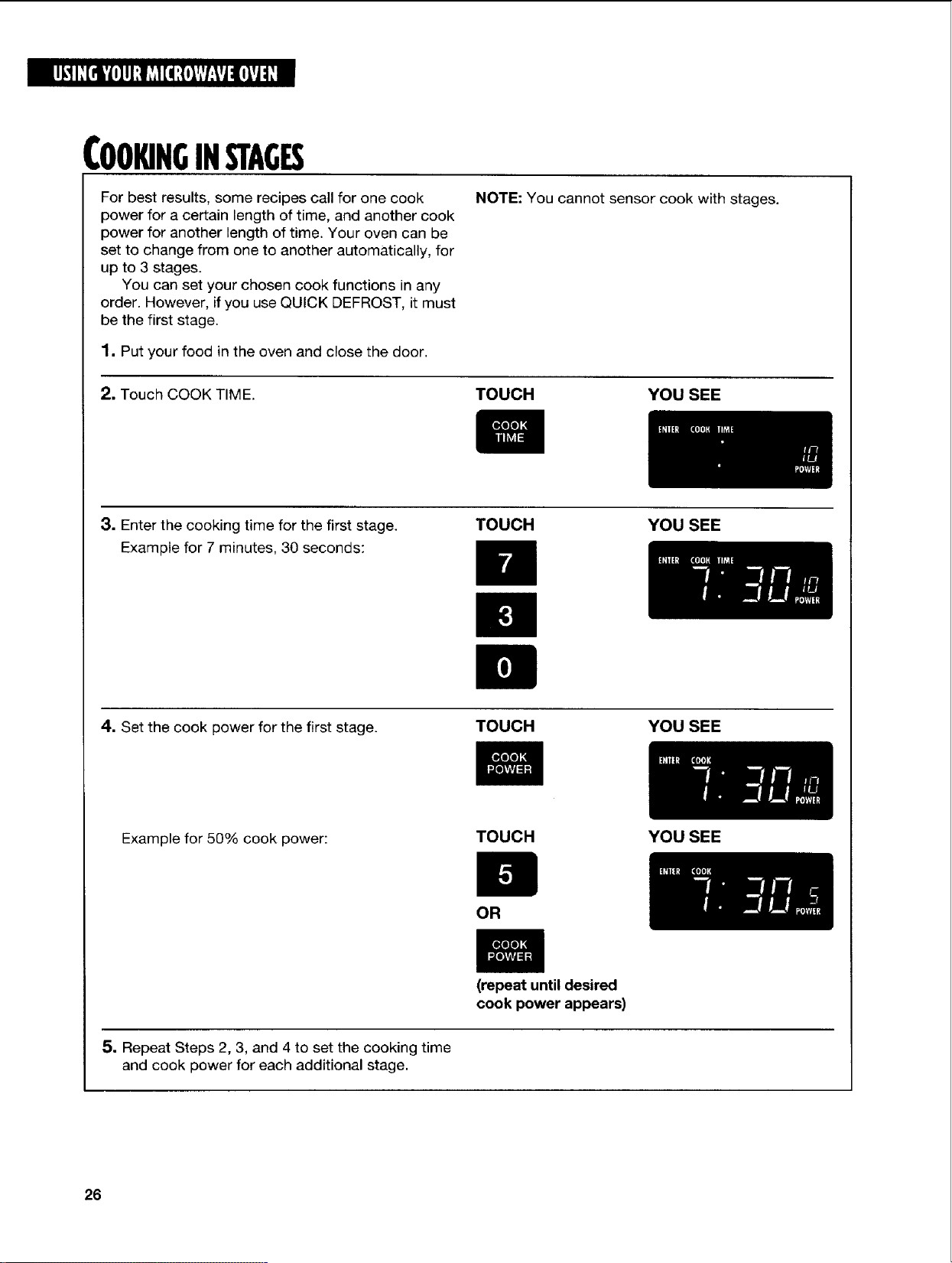
COOKINGINSTAGES
For best results, some recipes call for one cook
power for a certain length of time, and another cook
power for another length of time. Your oven can be
set to change from one to another automatically, for
up to 3 stages.
You can set your chosen cook functions in any
order. However, if you use QUICK DEFROST, it must
be the first stage.
1. Put your food in the oven and close the door.
NOTE: You cannot sensor cook with stages.
2. Touch COOK TIME. TOUCH YOU SEE
3. Enter the cooking time for the first stage.
Example for 7 minutes, 30 seconds:
TOUCH YOU SEE
4. Set the cook power for the first stage.
TOUCH YOU SEE
Example for 50% cook power:
TOUCH YOU SEE
OR
(repeat until desired
cook power appears)
5. Repeat Steps 2, 3, and 4 to set the cooking time
and cook power for each additional stage.
26
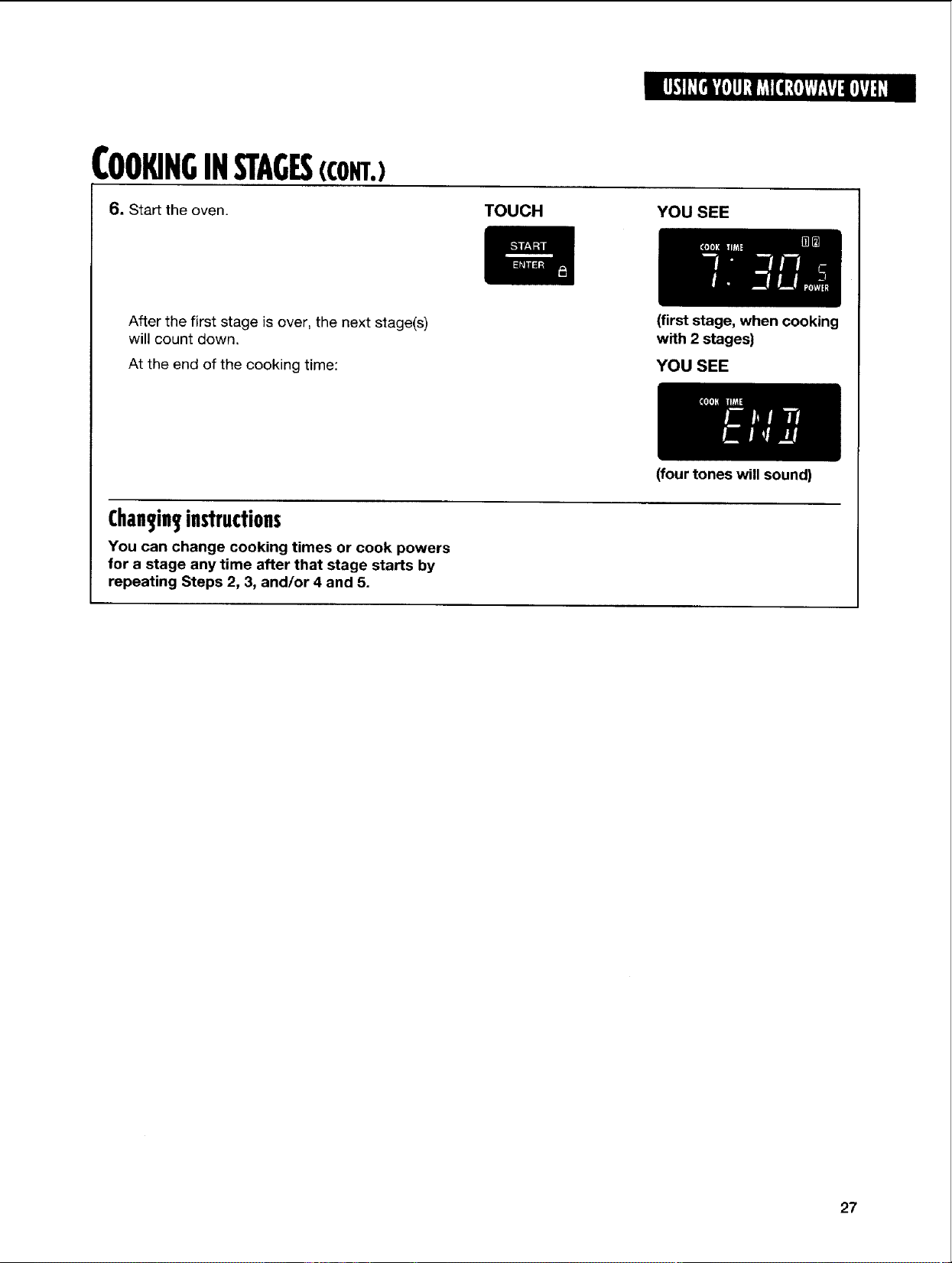
COOKINGINSTAGES(CONT.)
6. Start the oven.
TOUCH
YOU SEE
After the first stage is over, the next stage(s)
will count down.
At the end of the cooking time:
(first stage, when cooking
with 2 stages)
YOU SEE
Chan_in_instructions
You can change cooking times or cook powers
for a stage any time after that stage starts by
repeating Steps 2, 3, and/or 4 and 5.
(four tones will sound)
27
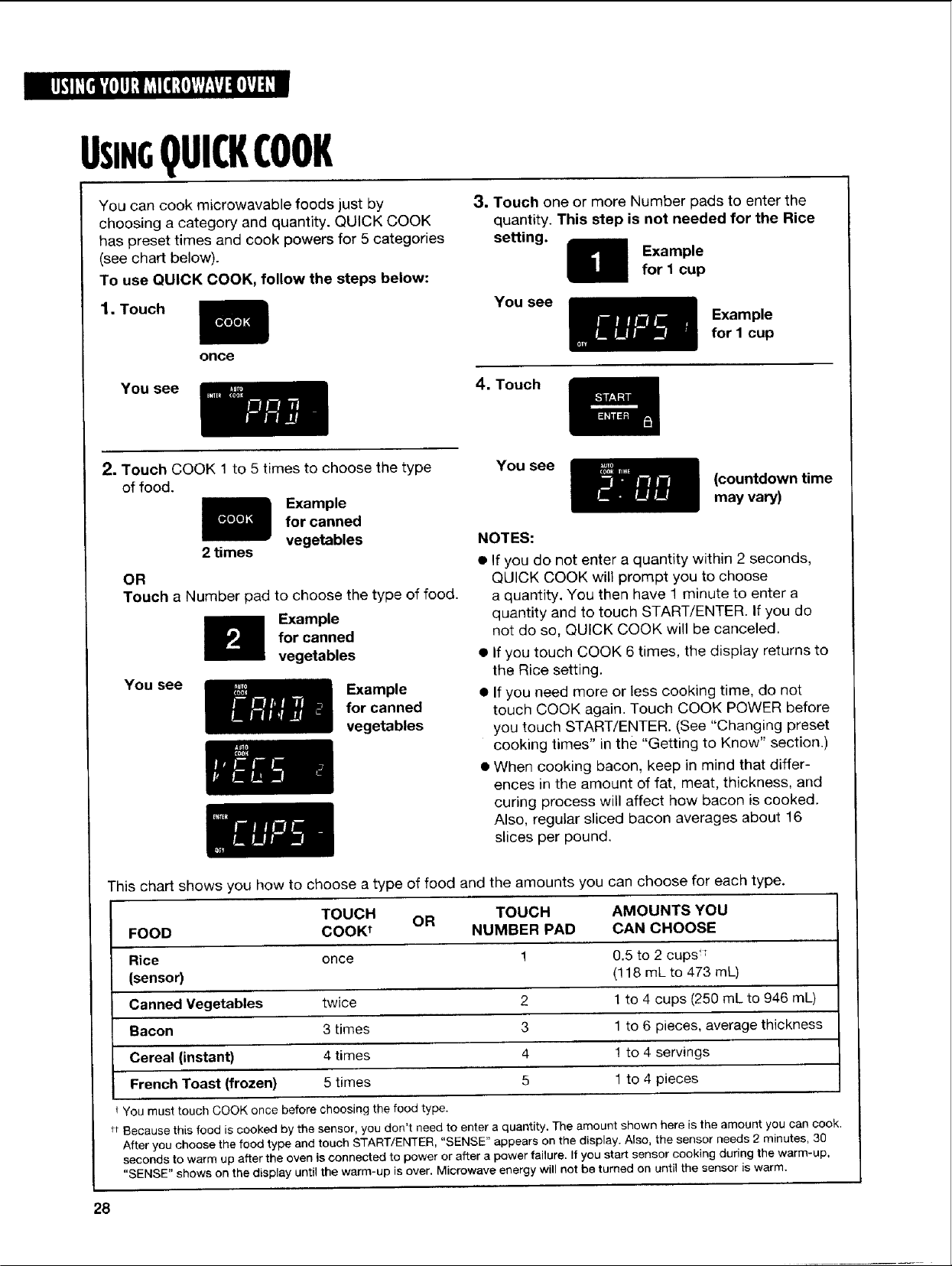
UStN5QUICKCOOK
You can cook microwavable foods just by
choosing a category and quantity. QUICK COOK
has preset times and cook powers for 5 categories
(see chart below).
To use QUICK COOK, follow the steps below:
1, Touch
once
You see
3. Touch one or more Number pads to enter the
quantity. This step is not needed for the Rice
setting.
Example
for 1 cup
You see
Example
for I cup
4. Touch
2, Touch COOK 1 to 5 times to choose the type
of food.
Example
for canned
vegetables
2 times
OR
Touch a Number pad to choose the type of food.
Example
for canned
vegetables
You see
Example
for canned
vegetables
You see
(countdown time
may vary)
NOTES:
• If you do not enter a quantity within 2 seconds,
QUICK COOK will prompt you to choose
a quantity. You then have 1 minute to enter a
quantity and to touch START/ENTER. If you do
not do so, QUICK COOK will be canceled.
• If you touch COOK 6 times, the display returns to
the Rice setting.
• If you need more or less cooking time, do not
touch COOK again. Touch COOK POWER before
you touch START/ENTER. (See "Changing preset
cooking times" in the "Getting to Know" section.)
• When cooking bacon, keep in mind that differ-
ences in the amount of fat, meat, thickness, and
curing process will affect how bacon is cooked.
Also, regular sliced bacon averages about 16
slices per pound.
This chart shows you how to choose a type of food and the amounts you can choose for each type.
TOUCH OR TOUCH AMOUNTS YOU
FOOD COOK t NUMBER PAD CAN CHOOSE
Rice once 1 0.5 to 2 cups T
(sensor) (118 mL to 473 mL)
Canned Vegetables twice 2 1 to 4 cups (250 mL to 946 mL)
Bacon 3 times 3 1 to 6 pieces, average thickness
Cereal (instant) 4 times 4 1 to 4 servings
French Toast (frozen) 5 times 5 1 to 4 pieces
i You must touch COOK once before choosing the food type.
tt Because this food is cooked by the sensor, you don't need to enter a quantity. The amount shown here is the amount you can cook.
After you choose the food type and touch START/ENTER, "SENSE" appears on the display. Also, the sensor needs 2 minutes, 30
seconds to warm up after the oven is connected to power or after a power failure. If you start sensor cooking during the warm-up,
"SENSE" shows on the display until the warm-up is over. Microwave energy will not be turned on until the sensor is warm.
28
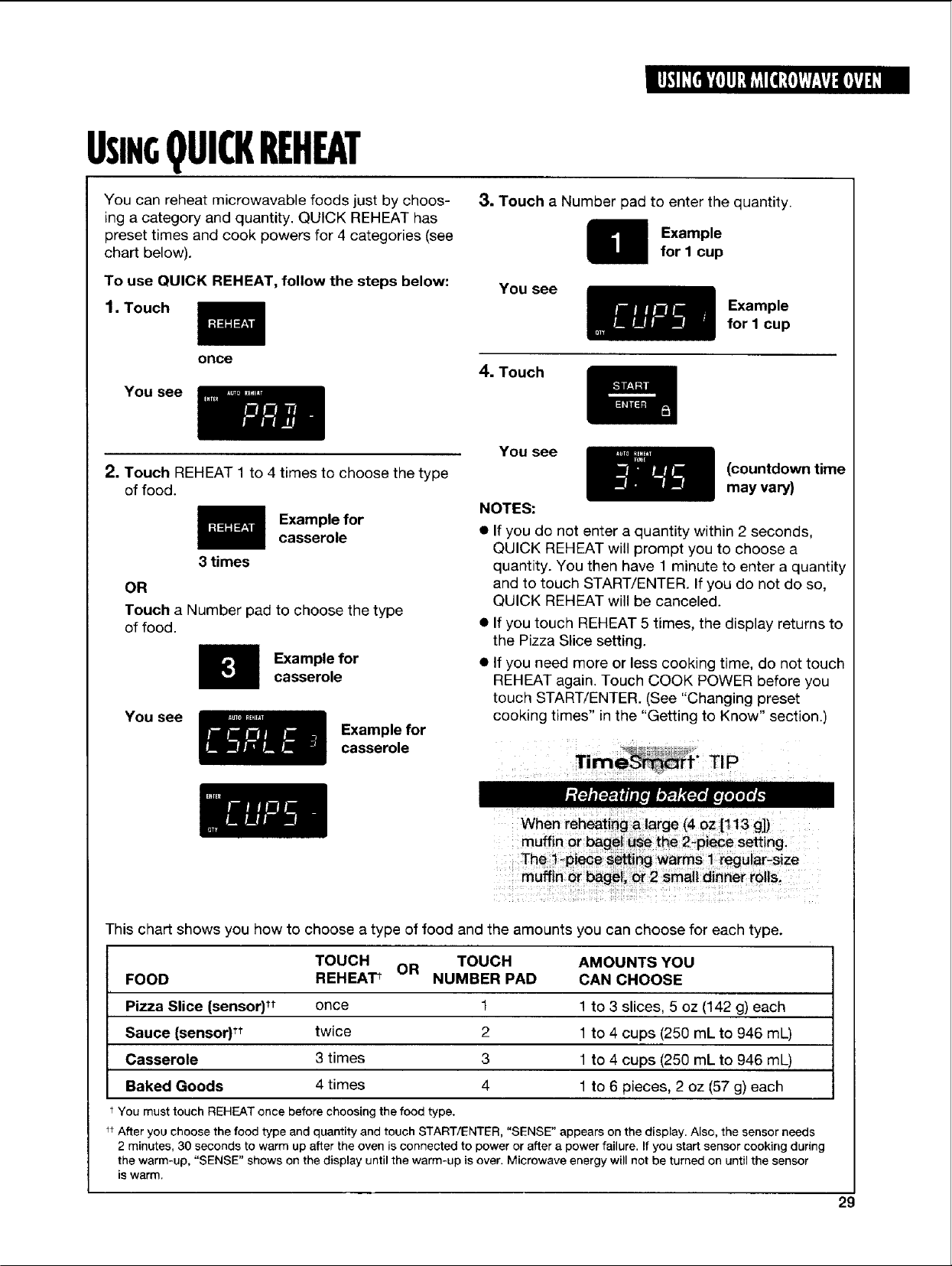
USINGQUICKREHEAT
You can reheat microwavable foods just by choos-
ing a category and quantity. QUICK REHEAT has
preset times and cook powers for 4 categories (see
chart below).
To use QUICK REHEAT, follow the steps below:
1.Touch
3. Touch a Number pad to enter the quantity.
Example
for I cup
You see
Example
for I cup
once
You see
4. Touch
2. Touch REHEAT 1 to 4 times to choose the type
of food.
3 times
Example for
casserole
OR
Touch a Number pad to choose the type
of food.
Example for
casserole
You see
Example for
casserole
You see
NOTES:
(countdown time
may vary)
• Ifyou do not enter a quantity within 2 seconds,
QUICK REHEAT will prompt you to choose a
quantity. You then have 1 minute to enter a quantity
and to touch START/ENTER. If you do not do so,
QUICK REHEAT will be canceled.
If you touch REHEAT 5 times, the display returns to
the Pizza Slice setting.
If you need more or less cooking time, do not touch
REHEAT again. Touch COOK POWER before you
touch START/ENTER. (See "Changing preset
cooking times" in the "Getting to Know" section.)
When reheating _ !arge (40z [113 g])
This chart shows you how to choose a type of food and the amounts you can choose for each type.
TOUCH OR TOUCH AMOUNTS YOU
FOOD REHEAT_ NUMBER PAD CAN CHOOSE
Pizza Slice (sensor)tt once 1 1 to 3 slices, 5 oz (142 g) each
Sauce (sensor) tt twice 2 1 to 4 cups (250 mL to 946 mL)
Casserole 3 times 3 1 to 4 cups (250 mL to 946 mL)
Baked Goods 4 times 4 1 to 6 pieces, 2 oz (57 g) each
t You must touch REHEAT once before choosing the food type.
_t After you choose the food type and quantity and touch START/ENTER, "SENSE" appears on the display. Also, the sensor needs
2 minutes, 30 seconds to warm up after the oven is connected to power or after a power failure. If you start sensor cooking during
the warm-up, "SENSE" shows on the display until the warm-up is over. Microwave energy will not be turned on until the sensor
is warm.
29
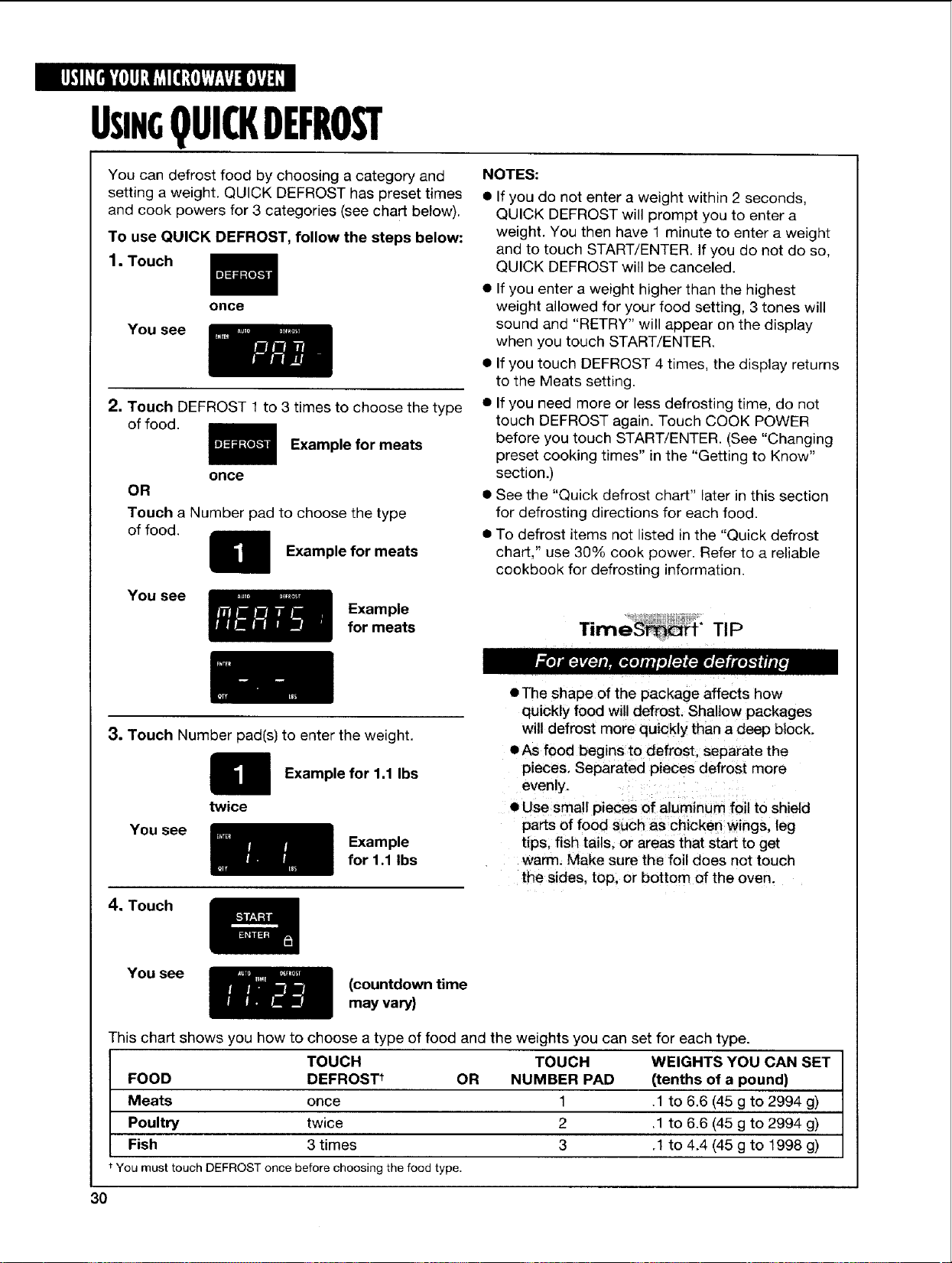
USiN QUICKDEFROST
You can defrost food by choosing a category and
setting a weight. QUICK DEFROST has preset times
and cook powers for 3 categories (see chart below).
To use QUICK DEFROST, follow the steps below:
1.Touch
You see
once
2. Touch DEFROST 1 to 3 times to choose the type
of food.
Example for meats
once
OR
Touch a Number pad to choose the type
of food.
Example for meats
You see
Example
for meats
NOTES:
• If you do not enter a weight within 2 seconds,
QUICK DEFROST will prompt you to enter a
weight. You then have 1 minute to enter a weight
and to touch START/ENTER. If you do not do so,
QUICK DEFROST will be canceled.
• If you enter a weight higher than the highest
weight allowed for your food setting, 3 tones will
sound and "RETRY" will appear on the display
when you touch START!ENTER
• Ifyou touch DEFROST 4 times, the display returns
to the Meats setting.
• Ifyou need more or less defrosting time, do not
touch DEFROST again. Touch COOK POWER
before you touch START!ENTER. (See "Changing
preset cooking times" in the "Getting to Know"
section.)
• See the "Quick defrost chart" later in this section
for defrosting directions for each food.
• To defrost items not listed in the "Quick defrost
chart," use 30% cook power. Refer to a reliable
cookbook for defrosting information.
Time f* TIP
3, Touch Number pad(s) to enter the weight.
Example for 1,1 Ibs
You see
twice
Example
for 1.1 Ibs
4. Touch
• The shape of the package affects how
quickly food will defrost. Shallow packages
will defrost more quickly than a deep block.
• As food begins to defrost, separate the
pieces, Separated pieces defrost more
evenly.
• Use small pieces of aluminum foil to shield
parts of food such as chicken wings, leg
tips, fish tails, or areas that start to get
warm. Make sure the foil does not touch
the sides, top, or bottom of the oven.
You see
(countdown time
may vary)
This chart shows you how to choose a type of food and the weights you can set for each type.
TOUCH TOUCH WEIGHTS YOU CAN SET
FOOD DEFROS_ OR NUMBER PAD (tenths of a pound)
Meats once 1 .1 to 6.6 (45 g to 2994 g)
Poultry twice 2 .1 to 6.6 (45 g to 2994 g)
Fish 3 times 3 .1 to 4.4 (45 g to 1998 g)
You must touch DEFROST once before choosing the food type.
3O
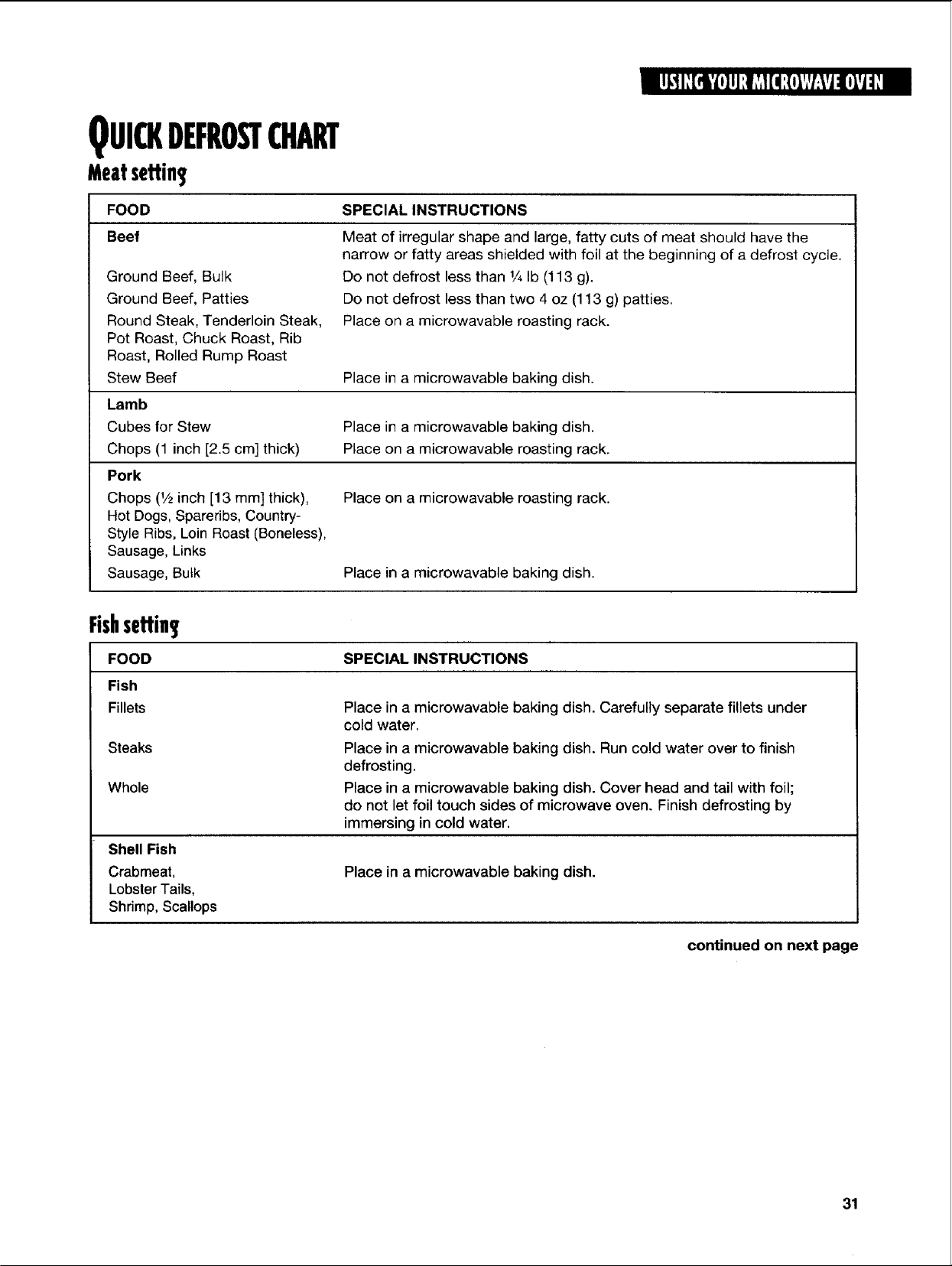
QUICKDEFROSTCHART
Meatsettin
FOOD
Beef
Ground Beef, Bulk
Ground Beef, Patties
Round Steak, Tenderloin Steak,
Pot Roast, Chuck Roast, Rib
Roast, Rolled Rump Roast
Stew Beef
Lamb
Cubes for Stew
Chops (1 inch [2.5 cm] thick)
Pork
Chops (1/2inch [13 mini thick),
Hot Dogs, Spareribs, Country-
Style Ribs, Loin Roast (Boneless),
Sausage, Links
Sausage, Bulk
SPECIAL INSTRUCTIONS
Meat of irregular shape and large, fatty cuts of meat should have the
narrow or fatty areas shielded with foil at the beginning of a defrost cycle.
Do not defrost less than 1/4Ib (113 g).
Do not defrost less than two 4 oz (113 g) patties.
Place on a microwavable roasting rack.
Place in a microwavable baking dish.
Place in a microwavable baking dish.
Place on a microwavable roasting rack.
Place on a microwavable roasting rack.
Place in a microwavable baking dish.
SPECIAL INSTRUCTIONS
Fishseffin
FOOD
Fish
Fillets
Steaks
Whole
Shell Fish
Crabmeat,
Lobster Tails,
Shrimp, Scallops
Place in a microwavable baking dish. Carefully separate fillets under
cold water.
Place in a microwavable baking dish. Run cold water over to finish
defrosting.
Place in a microwavable baking dish. Cover head and tail with foil;
do not let foil touch sides of microwave oven. Finish defrosting by
immersing in cold water.
Place in a microwavable baking dish.
continued on next page
31
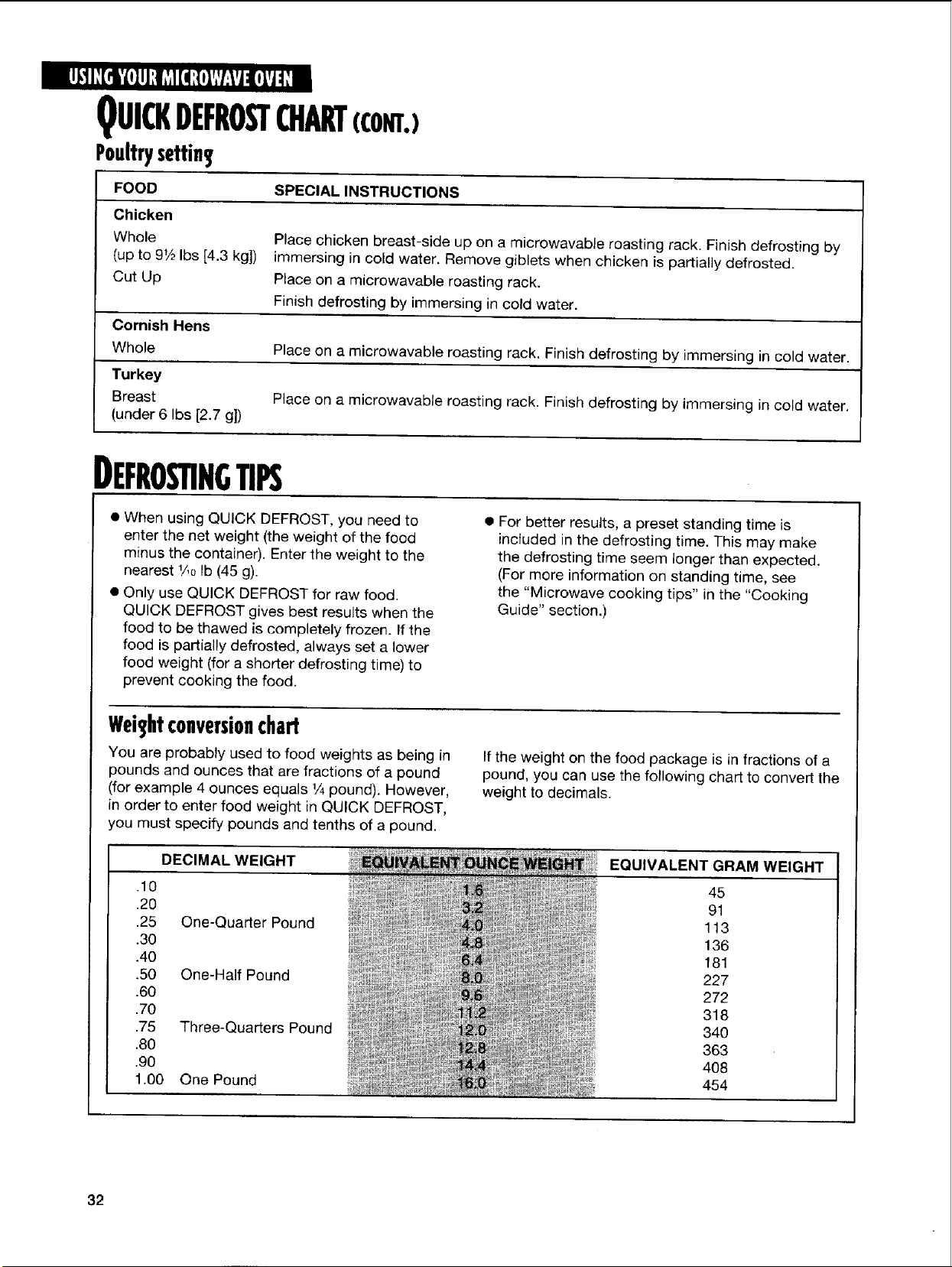
QUI(KDEFROSTCHART(CONT.)
Poultrysettin
FOOD
Chicken
Whole
(up to 91/2Ibs [4.3 kg])
Cut Up
SPECIAL INSTRUCTIONS
Place chicken breast-side up on a microwavable roasting rack. Finish defrosting by
immersing in cold water. Remove giblets when chicken is partially defrosted.
Place on a microwavable roasting rack.
Finish defrosting by immersing in cold water.
Cornish Hens
Whole Place on a microwavable roasting rack. Finish defrosting by immersing in cold water.
Turkey
Breast Place on a microwavable roasting rack. Finish defrosting by immersing in cold water.
(under 6 Ibs [2.7 g])
DEFRONNGTIPS
• When using QUICK DEFROST, you need to
enter the net weight (the weight of the food
minus the container). Enter the weight to the
nearest 1/lOIb (45 g).
• Only use QUICK DEFROST for raw food.
QUICK DEFROST gives best results when the
food to be thawed is completely frozen. If the
food is partially defrosted, always set a lower
food weight (for a shorter defrosting time) to
prevent cooking the food.
• For better results, a preset standing time is
included in the defrosting time. This may make
the defrosting time seem longer than expected.
(For more information on standing time, see
the "Microwave cooking tips" in the "Cooking
Guide" section.)
weightconversionchart
You are probably used to food weights as being in
pounds and ounces that are fractions of a pound
(for example 4 ounces equals 1/4pound). However,
in order to enter food weight in QUICK DEFROST,
you must specify pounds and tenths of a pound.
If the weight on the food package is in fractions of a
pound, you can use the following chart to convert the
weight to decimals.
DECIMAL WEIGHT
.10
.20
.25 One-Quarter Pound
.30
.40
.50 One-Half Pound
.60
.70
.75 Three-Quarters Pound
.80
.90
1.00 One Pound
_i ........ ..... GRAM WEIGHT
EQUIVALENT
45
91
113
136
181
227
272
318
34O
363
408
454
32
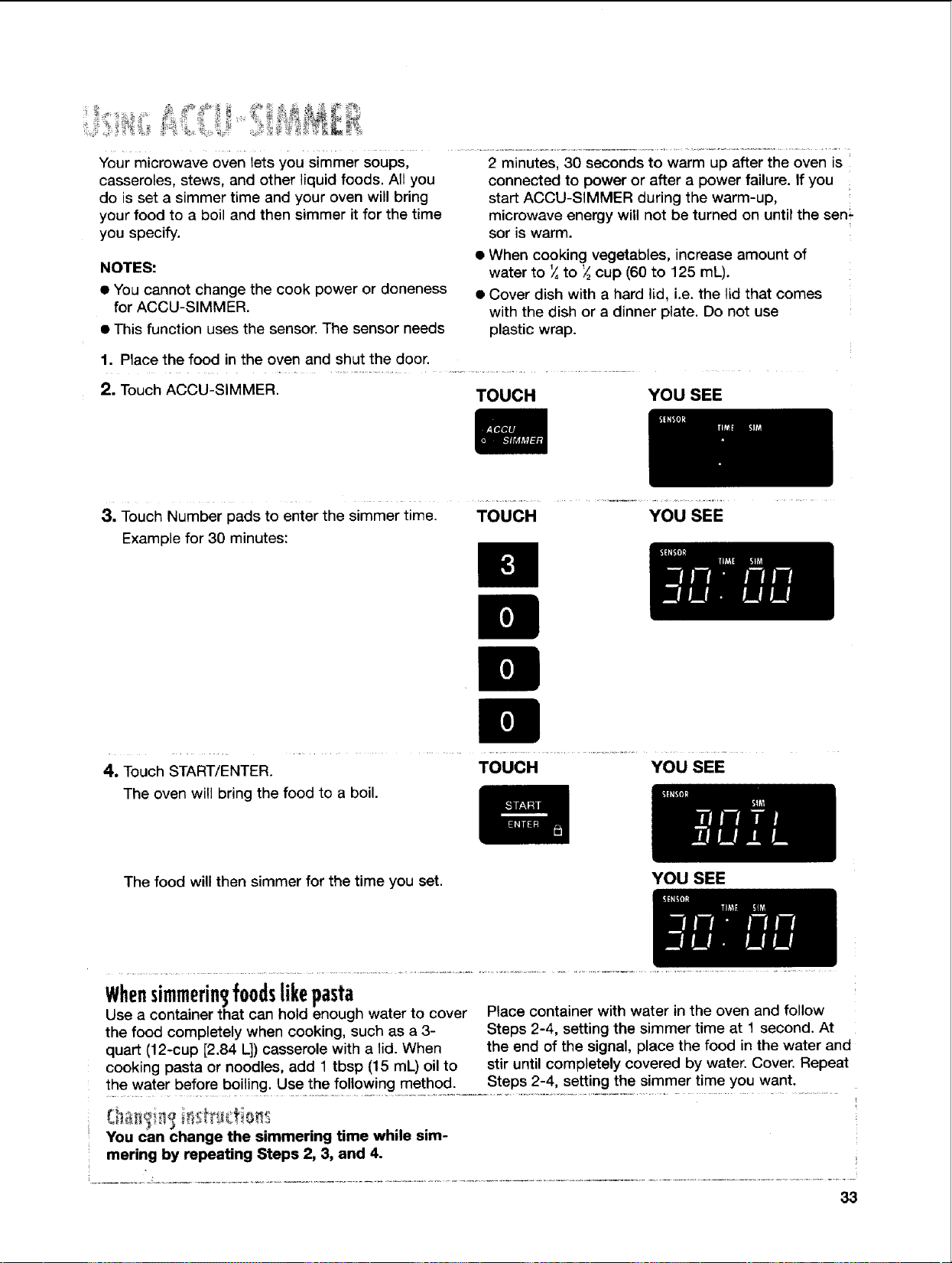
Your microwave oven lets you simmer soups,
casseroles, stews, and other liquid foods. All you
do is set a simmer time and your oven will bring
your food to a boil and then simmer it for the time
you specify.
NOTES:
• You cannot change the cook power or doneness
for ACCU-SIMMER.
• This function uses the sensor. The sensor needs
2 minutes, 30 seconds to warm up after the oven is
connected to power or after a power failure. If you
start ACCU-SIMMER during the warm-up,
microwave energy will not be turned on until the sen
sor is warm.
• When cooking vegetables, increase amount of
water to _,to _ cup (60 to 125 mL).
• Cover dish with a hard lid, i.e. the lid that comes
with the dish or a dinner plate. Do not use
plastic wrap.
1. Place the food in the oven and shut the door.
2. Touch ACCU-SIMMER. TOUCH
YOU SEE
3. Touch Number pads to enter the simmer time. TOUCH YOU SEE
Example for 30 minutes:
4. Touch START/ENTER.
The oven will bring the food to a boil.
TOUCH YOU SEE
The food will then simmer for the time you set.
YOU SEE
Whensimmerin3foodslikepasta
Use a container that can hold enough water to cover
the food completely when cooking, such as a 3-
quart (12-cup [2.84 I_])casserole with a lid. When
cooking pasta or noodles, add 1 tbsp (15 mL) oil to
Place container with water in the oven and follow
Steps 2-4, setting the simmer time at 1 second. At
the end of the signal, place the food in the water and
stir until completely covered by water. Cover. Repeat
the water before bOiling' use.!h_efoIlowingmeth°d:---S!eps2-4!Sett! ngt-h-e Simmer time you want.
You can change the sinlmering thne while sim-
mering by repeating Steps 2, 3, and 4.
33
USINGSENSORONETOUCHCOOKING
Food releases humidity during cooking/heating.
How much humidity food releases is affected by
the quantity, temperature, and shape of the food.
Your microwave oven has a sensor that detects
this humidity. The amount of humidity detected
tells the oven how long to cook or heat your food.
You can use SENSOR ONE TOUCH cooking when
preparing any of 8 types of food. Just touch the
pad for the food you want to cook or heat (see the
chart below).
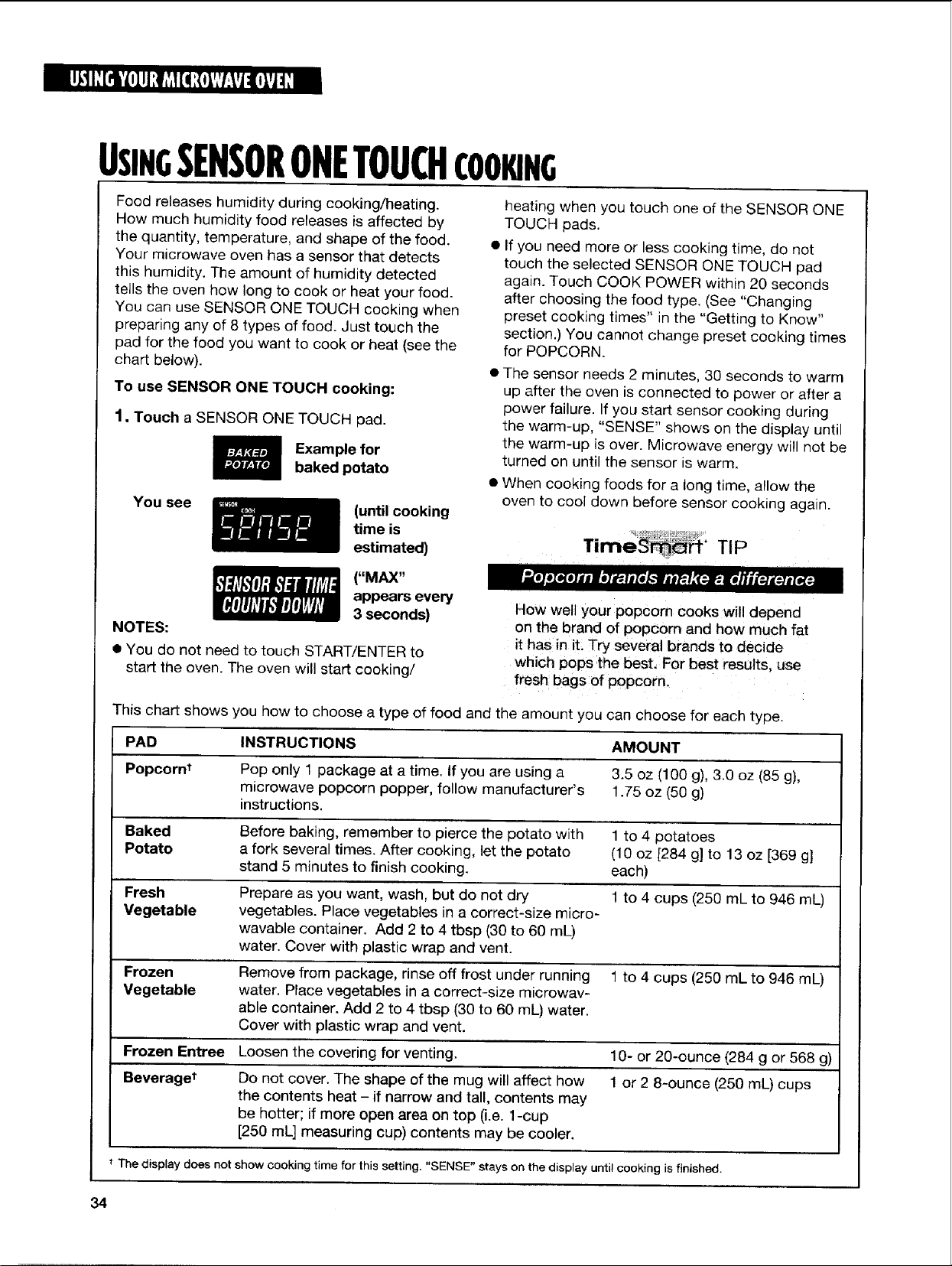
To use SENSOR ONE TOUCH cooking:
1, Touch a SENSOR ONE TOUCH pad.
Example for
baked potato
You see
(until cooking
time is
estimated)
heating when you touch one of the SENSOR ONE
TOUCH pads.
• If you need more or less cooking time, do not
touch the selected SENSOR ONE TOUCH pad
again. Touch COOK POWER within 20 seconds
after choosing the food type. (See "Changing
preset cooking times" in the "Getting to Know"
section.) You cannot change preset cooking times
for POPCORN.
• The sensor needs 2 minutes, 30 seconds to warm
up after the oven is connected to power or after a
power failure, tf you start sensor cooking during
the warm-up, "SENSE" shows on the display until
the warm-up is over. Microwave energy will not be
turned on until the sensor is warm.
• When cooking foods for a long time, allow the
oven to cool down before sensor cooking again.
TIP
("MAX"
appears every
3 seconds)
NOTES:
• You do not need to touch START/ENTER to
start the oven. The oven will start cooking/
How well your popcorn cooks will depend
on the brand of popcorn and how much fat
it has in it: Try several brands to decide
which pops the best, For best results, use
fresh bags of popcorn.
This chart shows you how to choose a type of food and the amount you can choose for each type.
PAD INSTRUCTIONS AMOUNT
Popcorn_ Pop only 1 package at a time. If you are using a 3.5 oz (100 g), 3.0 oz (85 g),
microwave popcorn popper, follow manufacturer's 1.75 oz (50 g)
instructions.
Baked Before baking, remember to pierce the potato with 1 to 4 potatoes
Potato a fork several times. After cooking, let the potato (10 oz [284 g] to 13 oz [369 g]
stand 5 minutes to finish cooking, each)
Fresh Prepare as you want, wash, but do not dry 1 to 4 cups (250 mL to 946 mL)
Vegetable vegetables. Place vegetables in a correct-size micro-
wavable container. Add 2 to 4 tbsp (30 to 60 mL)
water. Cover with plastic wrap and vent.
Frozen Remove from package, rinse off frost under running 1 to 4 cups (250 mL to 946 mL)
Vegetable water. Place vegetables in a correct-size microwav-
able container. Add 2 to 4 tbsp (30 to 60 mL) water.
Cover with plastic wrap and vent.
Frozen Entree Loosen the covering for venting. 10- or 20-ounce (284 g or 568 g)
Beveraget Do not cover. The shape of the mug will affect how 1 or 2 8-ounce (250 mL) cups
the contents heat - if narrow and tall, contents may
be hotter; if more open area on top (i.e. 1-cup
[250 mL] measuring cup) contents may be cooler.
t The display does not show cooking time for this setting. "SENSE" stays on the display until cooking is finished.
34
USINGSENSORONETOUCHCOOKING(CONT.)
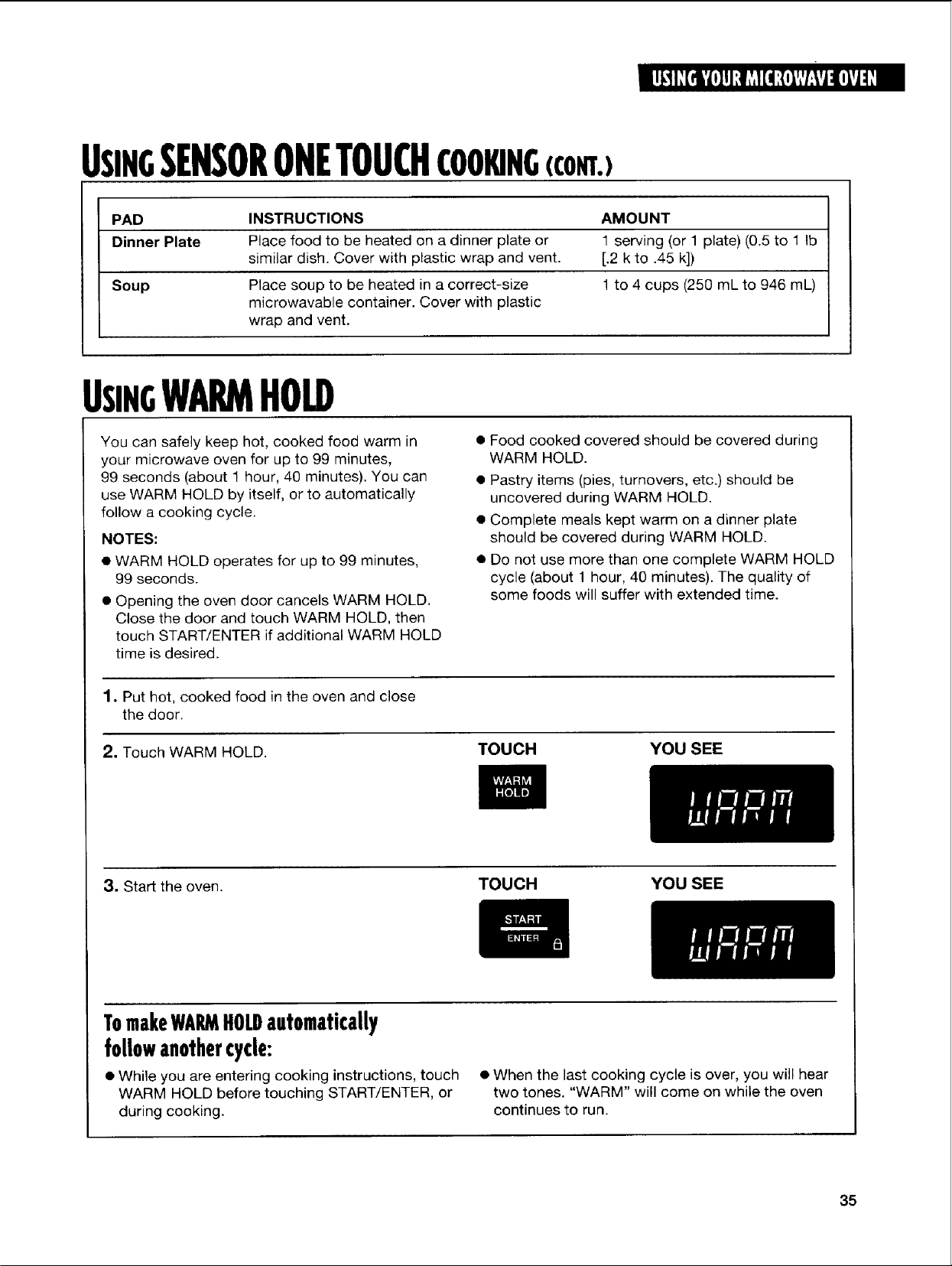
PAD INSTRUCTIONS AMOUNT
Dinner Plate Place food to be heated on a dinner plate or 1 serving (or 1 plate) (0.5 to 1 Ib
similar dish. Cover with plastic wrap and vent. [.2 k to .45 k])
Soup Place soup to be heated in a correct-size 1 to 4 cups (250 mL to 946 mL)
rnicrowavable container. Cover with plastic
wrap and vent.
USINGWARMHOLD
You can safely keep hot, cooked food warm in
your microwave oven for up to 99 minutes,
99 seconds (about 1 hour, 40 minutes). You can
use WARM HOLD by itself, or to automatically
follow a cooking cycle.
NOTES:
• WARM HOLD operates for up to 99 minutes,
99 seconds.
• Opening the oven door cancels WARM HOLD.
Close the door and touch WARM HOLD, then
touch START/ENTER if additional WARM HOLD
time is desired.
• Food cooked covered should be covered during
WARM HOLD.
• Pastry items (pies, turnovers, etc.) should be
uncovered during WARM HOLD.
• Complete meals kept warm on a dinner plate
should be covered during WARM HOLD.
• Do not use more than one complete WARM HOLD
cycle (about 1 hour, 40 minutes). The quality of
some foods will suffer with extended time.
1. Put hot, cooked food in the oven and close
the door.
2. Touch WARM HOLD. TOUCH YOU SEE
3. Start the oven.
TOUCH YOU SEE
TomakeWARMHOLDautomatically
followanothercycle:
• While you are entering cooking instructions, touch
WARM HOLD before touching START/ENTER, or
during cooking.
• When the last cooking cycle is over, you will hear
two tones. "WARM" will come on while the oven
continues to run.
35
CARINGFORYOURMICROWAVEOVEN
To make sure your microwave oven looks good and works well for a long time, you should maintain
it properly. For proper care, please follow these instructions carefully.
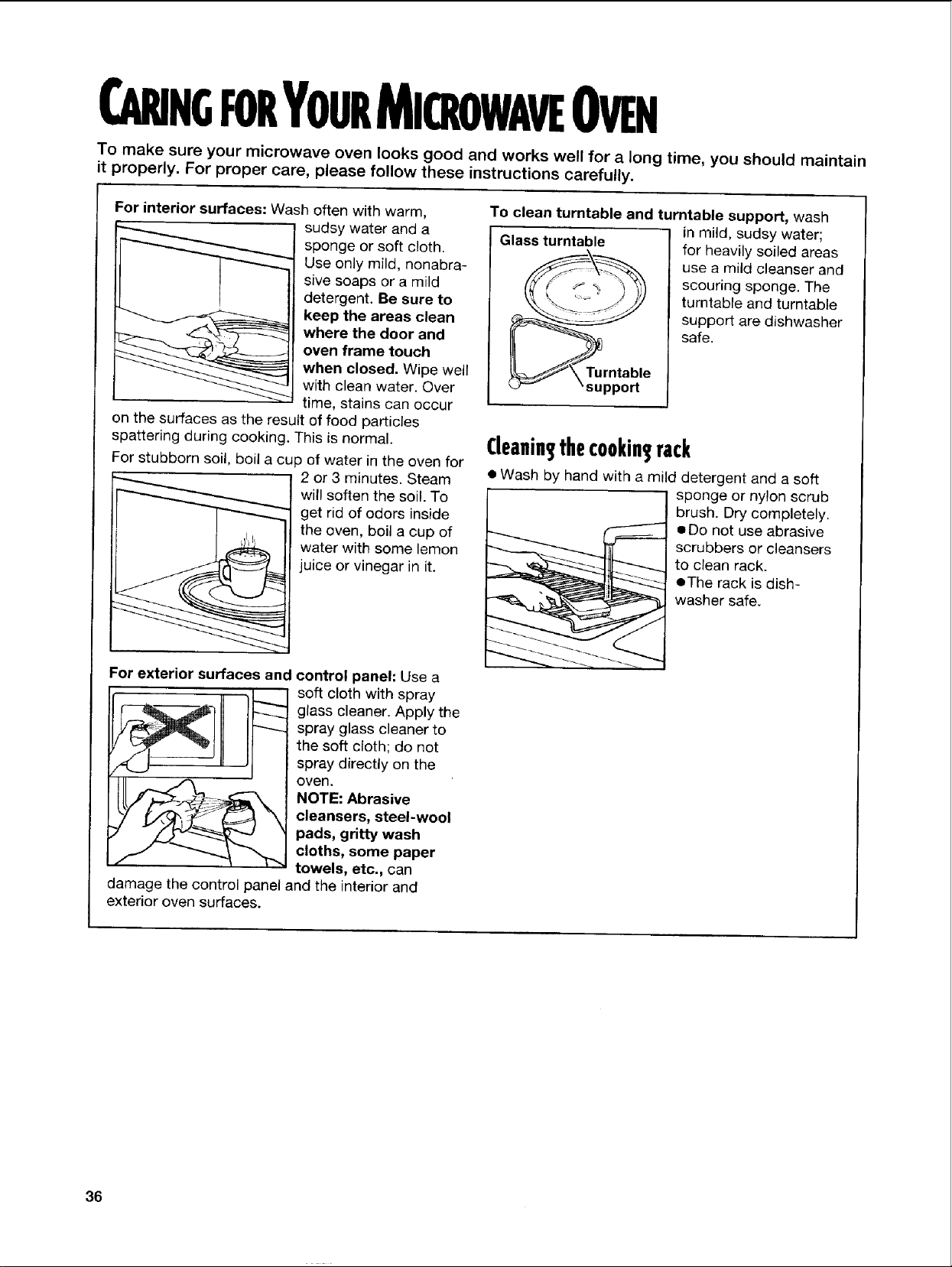
For interior surfaces: Wash often with warm,
sudsy water and a
sponge or soft cloth.
Use only mild, nonabra-
sive soaps or a mild
detergent. Be sure to
keep the areas clean
where the door and
oven frame touch
when closed. Wipe well
with clean water. Over
time, stains can occur
on the surfaces as the result of food particles
spattering during cooking, This is normal.
For stubborn soil, boil a cup of water in the oven for
2 or 3 minutes. Steam
will soften the soil. To
get rid of odors inside
the oven, boil a cup of
water with some lemon
juice or vinegar in it.
For exterior surfaces and control panel: Use a
soft cloth with spray
glass cleaner. Apply the
spray glass cleaner to
the soft cloth; do not
spray directly on the
oven.
NOTE: Abrasive
cleansers, steel-wool
pads, gritty wash
cloths, some paper
towels, etc., can
damage the control panel and the interior and
exterior oven surfaces.
To clean turntable and turntable support, wash
in mild, sudsy water;
Glass turntable_\_ for heavily soiled areas
f _-_-_ use a mild cleanser and
y_ _,, -, , scouring sponge. The
__ turntable and turntable
__ support are dishwasher
safe.
_/\ Turntable
_support
Cleanins,thecookin rack
• Wash by hand with a mild detergent and a soft
sponge or nylon scrub
brush. Dry completely.
• Do not use abrasive
scrubbers or cleansers
to clean rack.
eThe rack is dish-
washer safe.
36
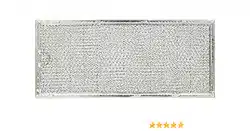
iNSTALUNGANDCARINGFORTHEFILTERS
Do not allow grease and soil to build up in the
grease filters. It will decrease the exhaust fan
efficiency and could cause a fire. Remove and
clean grease filters at least once a month.
NOTE: Your microwave hood combination comes
with a charcoal filter to provide clean recirculated
air. The charcoal filter cannot be cleaned and
should be replaced every 6 to 12 months. You
can order replacements (PN 4393690) in the U.S.A.
by calling 1-800-253-1301, or in Canada by calling
the nearest service branch (see "If you need assis-
tance or service in Canada" in the "Requesting
Assistance or Service" section). Follow the instruc-
tions and telephone prompts you hear.
Electrical Shock Hazard
Disconnect power before removing
filters.
Replace all panels before operating.
Failure to do so can result in death
or electrical shock.
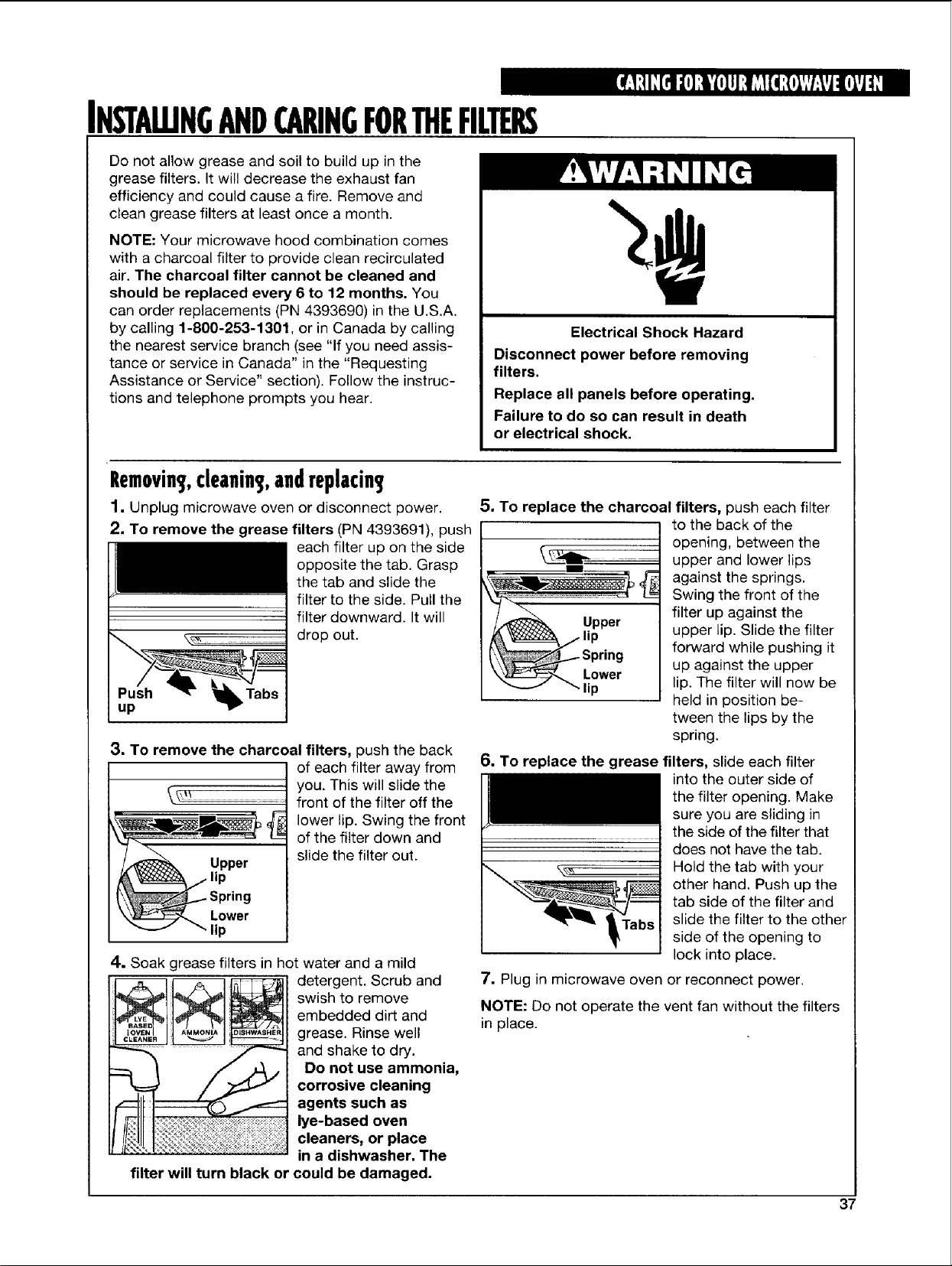
Removing,cleaning,andreplacin
1. Unplug microwave oven or disconnect power.
2. To remove the grease filters (PN 4393691), push
each filter up on the side
opposite the tab. Grasp
the tab and slide the
filter to the side. Pull the
filter downward. It will
drop out.
up
3. To remove the charcoal filters, push the back
O .er
A'_/lip
_-----_ Lower
"" lip
of each filter away from
you. This will slide the
front of the filter off the
lower tip. Swing the front
of the filter down and
slide the filter out.
4. Soak grease filters in hot water and a mild
AMMONI_ DISHWASHER
CLEANER _ _ _ _
filter will turn black or
detergent. Scrub and
swish to remove
embedded dirt and
grease. Rinse wel!
and shake to dry.
Do not use ammonia,
corrosive cleaning
agents such as
lye-based oven
cleaners, or place
in a dishwasher. The
could be damaged.
5. To replace the charcoal filters, push each filter
Lower
to the back of the
opening, between the
upper and lower lips
against the springs.
Swing the front of the
filter up against the
upper lip. Slide the filter
forward while pushing it
up against the upper
lip. The filter will now be
held in position be-
tween the lips by the
spring.
6. To replace the grease filters, slide each filter
into the outer side of
the filter opening. Make
sure you are sliding in
the side of the filter that
does not have the tab.
Hold the tab with your
other hand. Push up the
tab side of the filter and
slide the filter to the other
side of the opening to
lock into place.
7. Plug in microwave oven or reconnect power.
NOTE: Do not operate the vent fan without the filters
in place.
37
REPLACINGTHECOOKTOPANDOVENUGHTS
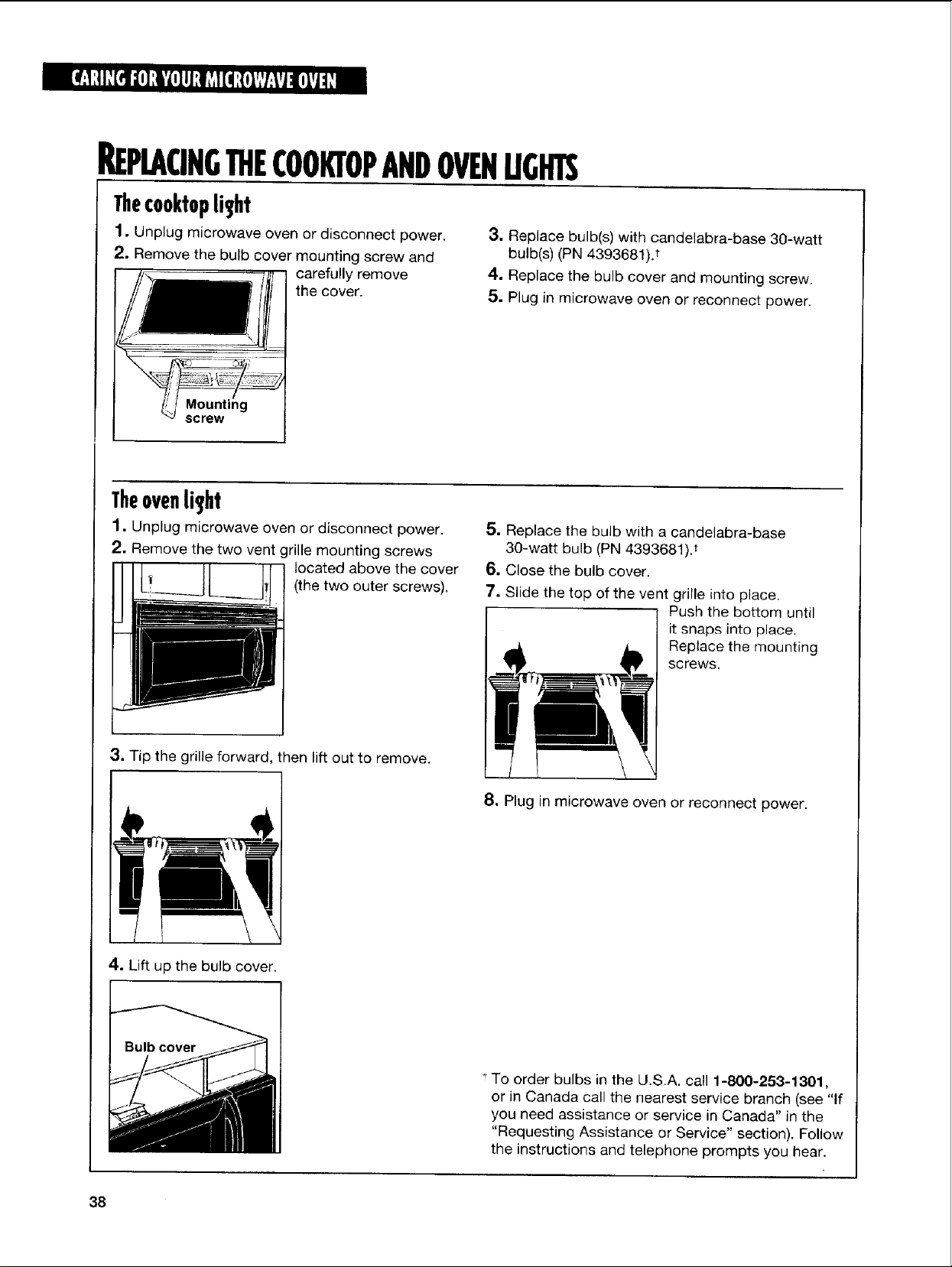
Thecooktoplight
1. Unplug microwave oven or disconnect power.
2. Remove the bulb cover mounting screw and
carefully remove
the cover.
Mounting
screw
3. Replace bulb(s) with candelabra-base 30-watt
bulb(s) (PN 4393681)?
4. Replace the bulb cover and mounting screw.
5, Plug in microwave oven or reconnect power.
Theovenli_,ht
1. Unplug microwave oven or disconnect power.
2, Remove the two vent grille mounting screws
/_ located above the cover
LL___t
(the two outer screws).
3. Tip the grille forward, then lift out to remove.
5. Replace the bulb with a candelabra-base
30-watt bulb (PN 4393681). t
6. Close the bulb cover.
7. Slide the top of the vent grille into place.
Push the bottom until
it snaps into place.
Replace the mounting
screws.
8, Plug in microwave oven or reconnect power.
4. Lift up the bulb cover.
*To order bulbs in the U.S.A. call 1-800-253-1301,
or in Canada call the nearest service branch (see "If
you need assistance or service in Canada" in the
"Requesting Assistance or Service" section). Follow
the instructions and telephone prompts you hear.
38
COOKINGGUIDE
MICROWAVECOOKINGTIPS
Amountoffood
• If you increase or decrease the amount of food
you prepare, the time it takes to cook that food
will also change. For example, if you double a
recipe, add a little more than half the original
cooking time. Check for doneness and, if
necessary, add more time in small increments.
Startin_temperatureoffood
• The lower the temperature of the food being
put into the microwave oven, the longer it takes
to cook. Food at room temperature will be re-
heated more quickly than food at refrigerator
temperature.
Compositionoffood
• Food with a lot of fat and sugar will be heated
faster than food containing a lot of water. Fat and
sugar will also reach a higher temperature than
water in the cooking process.
• The more dense the food, the longer it takes
to heat. "Very dense" food like meat takes longer
to reheat than lighter, more porous food like
sponge cakes.
Sizeandshape
• Smaller pieces of food will cook faster than
larger pieces. Also, same-shaped pieces cook
more evenly than different-shaped pieces.
• With foods that have different thicknesses,
the thinner parts will cook faster than the thicker
parts. Place the thinner parts of chicken wings
and legs in the center of the dish.
Stirring,turnin_jfoods
• Stirring and turning foods spreads heat quickly
to the center of the dish and avoids overcooking
at the outer edges of the food.
Coverin_food
Cover food to:
• Reduce splattering
• Shorten cooking times
• Keep food moist
You can use any covering that lets microwaves pass
through.
Releasing,pressureinfoods
• Several foods (for example: baked potatoes,
sausages, egg yolks, and some fruits) are tightly
covered by a skin or membrane. Steam can build
up under the membrane during cooking, causing
the food to burst. To relieve the pressure and to
prevent bursting, pierce these foods before
cooking with a fork, cocktail pick, or toothpick.
Using]standin_time
• Always allow food to stand after cooking. Stand-
ing time after defrosting and cooking allows the
temperature to evenly spread throughout the food,
improving the cooking results.
• The length of the standing time depends on
how much food you are cooking and how dense
it is. Sometimes it can be as short as the time it
takes you to remove the food from the oven and
take it to the serving table. However, with larger,
denser food, the standing time may be as long
as 10 minutes.
continued on next page
39
MICROWAVECOOKINGTIPS¢CONT.)
Arran in food
For best results, place food evenly on the plate.
You can do this in several ways:
• If you are cooking several items of the same
food, such as baked potatoes, place them in a
ring pattern for uniform cooking.
• When cooking foods of uneven shapes or
thickness, such as chicken breasts, place the
smaller or thinner area of the food towards the
center of the dish where it will be heated last.
• Layer thin slices of meat on top of each other.
• When you cook or reheat whole fish, score the
skin - this prevents cracking.
• Do not let food or a container touch the top or
sides of the oven. This will prevent possible
arcing.
Usin aluminumfoil
Metal containers should not be used in a microwave
oven. There are, however, some exceptions. If you
have purchased food which is prepackaged in an
aluminum foil container, refer to the instructions on
the package. When using aluminum foil containers,
cooking times may be longer because microwaves
will only penetrate the top of the food.
If you use aluminum containers without package
instructions, follow these guidelines:
• Place the container in a glass bowl and add some
water so that it covers the bottom of the container,
not more than 1/4inch (6 mm) high. This ensures
even heating of the container bottom.
• Always remove the lid to avoid damage to
the oven.
• Use only undamaged containers.
• Do not use containers taller than 3/4inch (19 ram).
• Container must be at least half filled.
• To avoid arcing, there must be a minimum
1/4inch (6 ram) between the aluminum container
and the walls of the oven and also between two
aluminum containers.
• Always place the container on the turntable.
• Reheating food in aluminum foil containers usually
takes up to double the time compared to reheating
in plastic, glass, china, or paper containers. The
time when food is ready will vary depending upon
the type of container you use.
• Let food stand for 2 to 3 minutes after heating so
that heat is spread evenly throughout container.
Cookin youshouldnotdoinyour
microwaveoven
• Do not do canning of foods in the oven. Closed
glass jars may explode, resulting in damage to
the oven or possible personal injury.
• Do not use the microwave oven to sterilize objects
(baby bottles, etc.). It is difficult to keep the oven at
the high temperature needed for safe sterilization.
4O
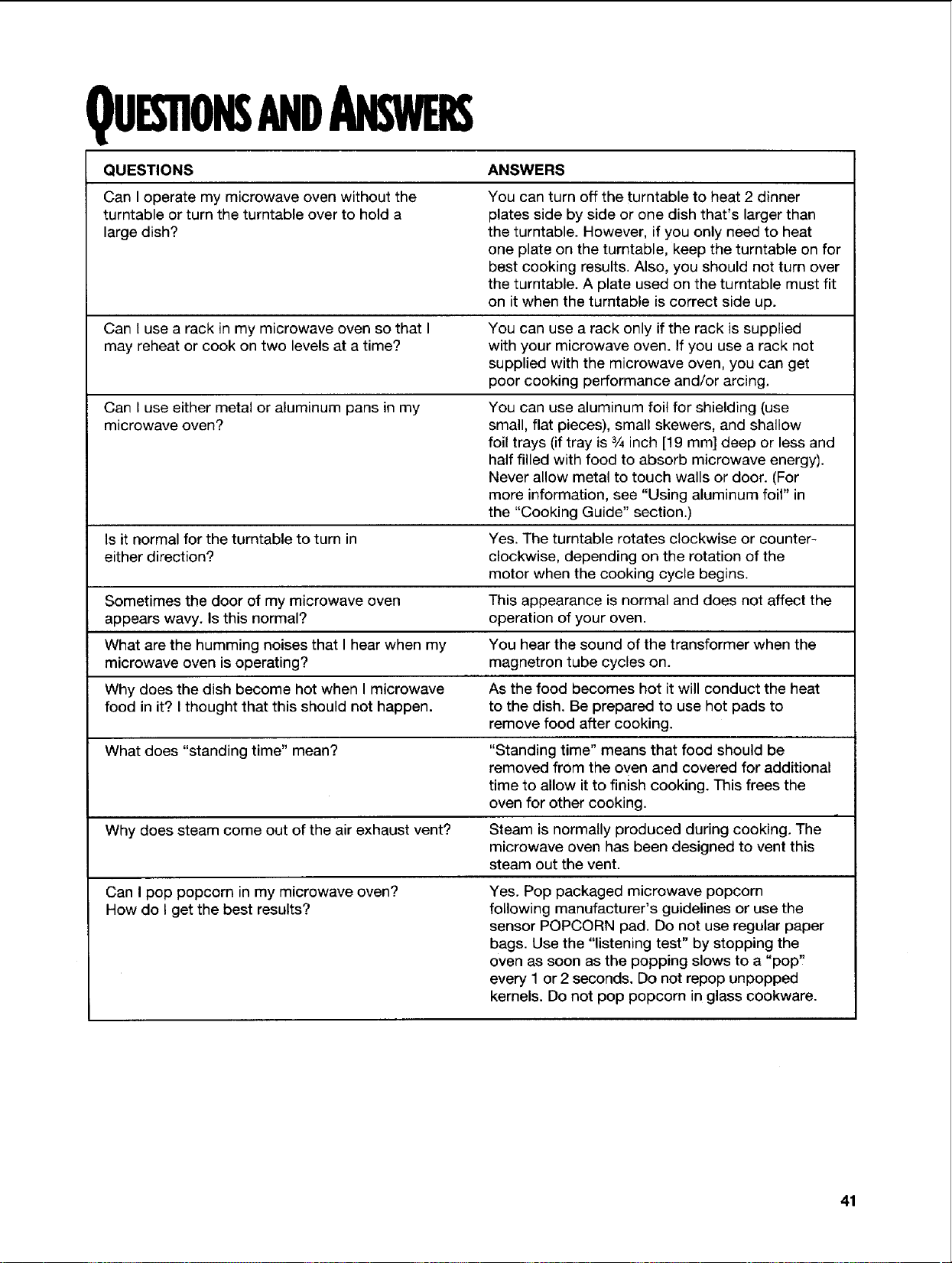
QUESnONSANDANSWE
QUESTIONS ANSWERS
Can I operate my microwave oven without the
turntable or turn the turntable over to hold a
large dish?
Can I use a rack in my microwave oven so that I
may reheat or cook on two levels at a time?
Can I use either metal or aluminum pans in my
microwave oven?
Is it normal for the turntable to turn in
either direction?
Sometimes the door of my microwave oven
appears wavy. Is this normal?
What are the humming noises that I hear when my
microwave oven is operating?
Why does the dish become hot when I microwave
food in it? I thought that this should not happen.
What does "standing time" mean?
Why does steam come out of the air exhaust vent?
Can I pop popcorn in my microwave oven?
How do I get the best results?
You can turn off the turntable to heat 2 dinner
plates side by side or one dish that's larger than
the turntable. However, if you only need to heat
one plate on the turntable, keep the turntable on for
best cooking results. Also, you should not turn over
the turntable. A plate used on the turntable must fit
on it when the turntable is correct side up.
You can use a rack only if the rack is supplied
with your microwave oven. If you use a rack not
supplied with the microwave oven, you can get
poor cooking performance and/or arcing.
You can use aluminum foil for shielding (use
small, flat pieces), small skewers, and shallow
foil trays (if tray is 3/4inch [19 ram] deep or less and
half filled with food to absorb microwave energy).
Never allow metal to touch walls or door. (For
more information, see "Using aluminum foil" in
the "Cooking Guide" section.)
Yes. The turntable rotates clockwise or counter-
clockwise, depending on the rotation of the
motor when the cooking cycle begins.
This appearance is normal and does not affect the
operation of your oven.
You hear the sound of the transformer when the
magnetron tube cycles on.
As the food becomes hot it will conduct the heat
to the dish. Be prepared to use hot pads to
remove food after cooking.
"Standing time" means that food should be
removed from the oven and covered for additional
time to allow it to finish cooking. This frees the
oven for other cooking.
Steam is normally produced during cooking. The
microwave oven has been designed to vent this
steam out the vent.
Yes. Pop packaged microwave popcorn
following manufacturer's guidelines or use the
sensor POPCORN pad. Do not use regular paper
bags. Use the "listening test" by stopping the
oven as soon as the popping slows to a "pop'!
every 1 or 2 seconds. Do not repop unpopped
kernels. Do not pop popcorn in glass cookware.
41
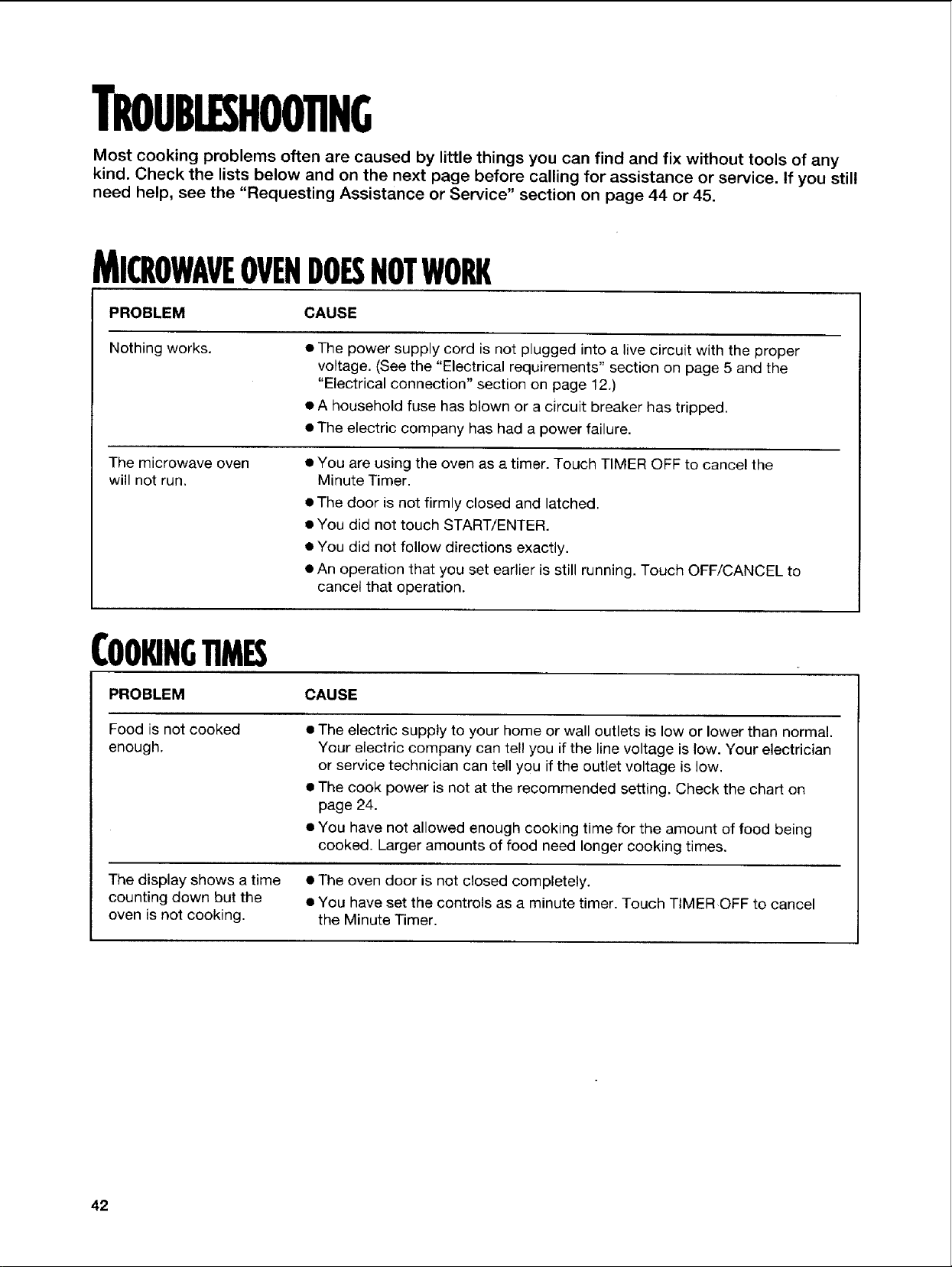
TROUBLESHOOTING
Most cooking problems often are caused by little things you can find and fix without tools of any
kind. Check the lists below and on the next page before calling for assistance or service. If you still
need help, see the "Requesting Assistance or Service" section on page 44 or 45.
MICROWAVEOVENDOESNOTWORK
PROBLEM CAUSE
Nothing works.
• The power supply cord is not plugged into a live circuit with the proper
voltage. (See the "Electrical requirements" section on page 5 and the
"Electrical connection" section on page 12.)
• A household fuse has blown or a circuit breaker has tripped.
• The electric company has had a power failure.
The microwave oven
will not run.
• You are using the oven as a timer. Touch TIMER OFF to cancel the
Minute Timer.
• The door is not firmly closed and latched.
• You did not touch START/ENTER.
• You did not follow directions exactly.
• An operation that you set earlier is still running. Touch OFF/CANCEL to
cancet that operation.
COOKINGTIMES
PROBLEM CAUSE
Food is not cooked
enough.
• The electric supply to your home or wall outlets is low or lower than normal.
Your electric company can tel! you if the line voltage is low. Your electrician
or service technician can tell you if the outlet voltage is low.
• The cook power is not at the recommended setting. Check the chart on
page 24.
• You have not allowed enough cooking time for the amount of food being
cooked. Larger amounts of food need longer cooking times.
The display shows a time • The oven door is not closed completely.
counting down but the • You have set the controls as a minute timer. Touch TIMER OFF to cancel
oven is not cooking, the Minute Timer.
42
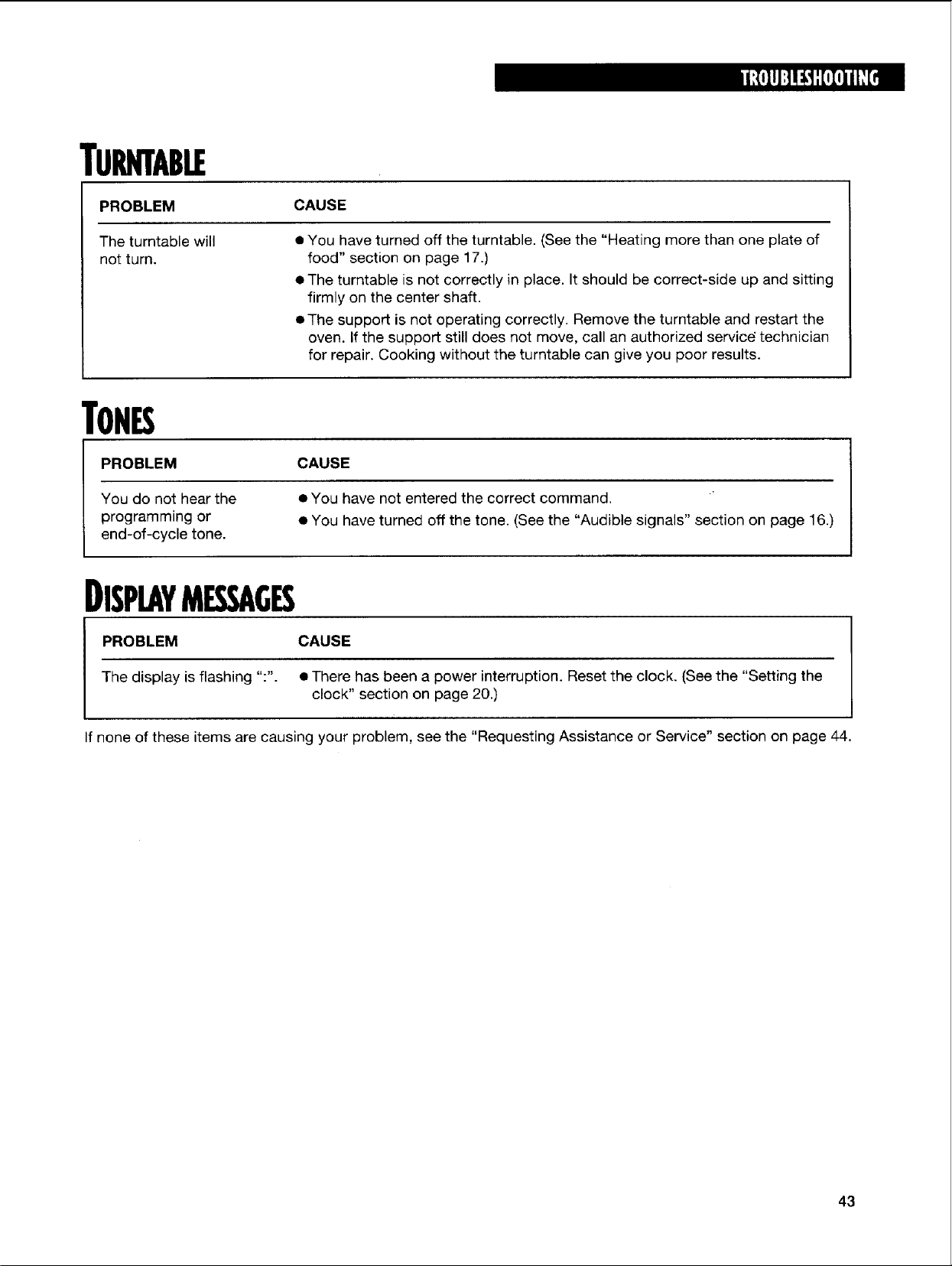
rURNTABLE
PROBLEM
The turntable will
not turn.
CAUSE
• You have turned off the turntable. (See the "Heating more than one plate of
food" section on page 17.)
• The turntable is not correctly in place. It should be correct-side up and sitting
firmly on the center shaft.
• The support is not operating correctly. Remove the turntable and restart the
oven. If the support still does not move, call an authorized service" technician
for repair. Cooking without the turntable can give you poor results.
TONES
PROBLEM CAUSE
You do not hear the • You have not entered the correct command.
programming or • You have turned off the tone. (See the "Audible signals" section on page 16.)
end-of-cycle tone.
DISPLAYMESSAGES
PROBLEM CAUSE
The display is flashing ":". • There has been a power interruption. Reset the clock. (See the "Setting the
clock" section on page 20.)
If none of these items are causing your problem, see the "Requesting Assistance or Service" section on page 44.
43
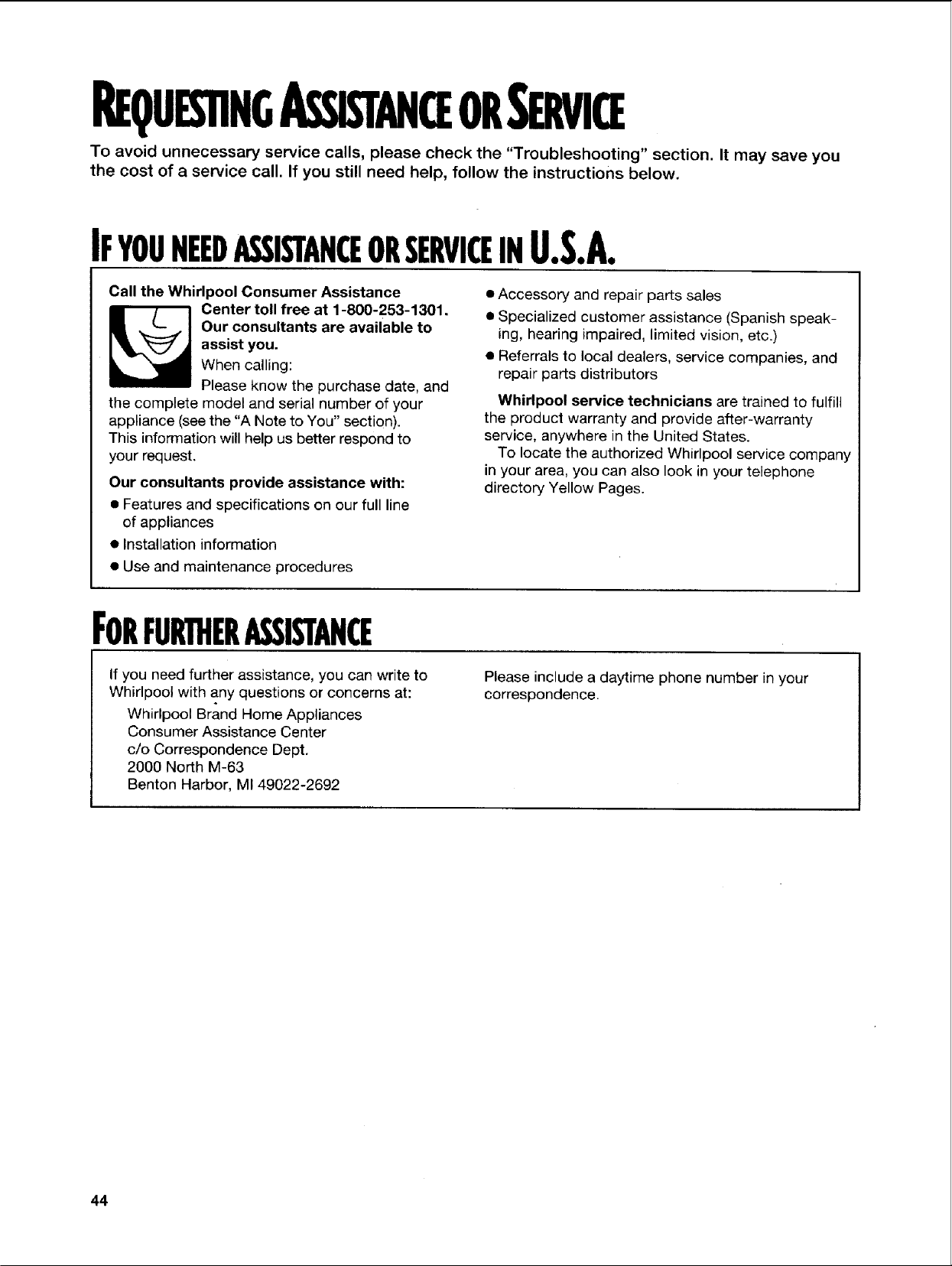
REQUESTINGASSISTANCEORSERVICE
To avoid unnecessary service calls, please check the "Troubleshooting" section. It may save you
the cost of a service call. If you still need help, follow the instructions below.
IFYOUNEEDASSISTANCEORSERVICEINU.S.A.
Call the Whirlpool Consumer Assistance
_ enter toll free at 1-800-253-1301.
Our consultants are available to
assist you.
When calling:
Please know the purchase date, and
the complete model and serial number of your
appliance (see the "A Note to You" section).
This information will help us better respond to
your request.
Our consultants provide assistance with:
• Features and specifications on our full line
of appliances
• Installation information
• Accessory and repair parts sales
• Specialized customer assistance (Spanish speak-
ing, hearing impaired, limited vision, etc.)
• Referrals to local dealers, service companies, and
repair parts distributors
Whirlpool service technicians are trained to fulfill
the product warranty and provide after-warranty
service, anywhere in the United States.
To locate the authorized Whirlpool service company
in your area, you can also look in your telephone
directory Yellow Pages.
• Use and maintenance procedures
FORFURTHERASSISTANCE
If you need further assistance, you can write to
Whirlpool with any questions or concerns at:
Whirlpool Brand Home Appliances
Consumer Assistance Center
c/o Correspondence Dept.
2000 North M-63
Benton Harbor, MI 49022-2692
Please include a daytime phone number in your
correspondence.
44
IFYOUNEEDASSISTANCEORSERVICEINCANADA
I. If theproblemisnotduetooneofthe
itemslistedin"Troubleshootin_"t...
Contact the dealer from whom you purchased your
_ ppliance, or call the Inglis Limited
Consumer Assistance Centre
toll free, 8:30 a.m. - 6 p.m. (EST),
at 1-800-461-5681.
z. Ifyouneedservicer...
Contact your nearest Inglis Limited Appliance Service
branch or authorized servicing outlet to service your
appliance. (See list below.)
t When asking for assistance or service, please
provide a detailed description of the problem,
your appliance's complete model and serial
numbers, and the purchase date. (See the
"A Note to You" section.) This information
will help us respond properly to your request.
In,illsLimitedApplianceService-ConsumerServices
Direct service branches:
BRITISH COLUMBIA 1-800-665-6788
ALBERTA 1-800-661-6291
ONTARIO Ottawa area 1-800-267-3456
(except 807 area code) Outside the Ottawa area 1-800-807-6777
MANITOBA, SASKATCHEWAN 1-800-665-1683
and 807 area code in ONTARIO
QUEBEC Montreal (except South Shore) 1-800-361-3032
South Shore Montreal 1-800-361-0950
Quebec City 1-800-463-1523
Sherbrooke 1-800-567-6966
ATLANTIC PROVINCES 1-800-565-1598
FORFURTHERASSISTANCE
If you need further assistance, you can write to
Inglis Limited with any questions or concerns at:
Consumer Relations Department
Inglis Limited
1901 Minnesota Court
Mississauga, Ontario L5N 3A7
Please include a daytime phone number in your
correspondence.
45
INDEX
This index is alphabetical. It contains all the topics included in this manual, along with the page(s)
on which you can find each topic.
TOPIC PAGE TOPIC PAGE
ALUMINUM FOIL .................................................. 30, 40
AUDIBLE SIGNALS .................................................. 16
CARING FOR YOUR MICROWAVE OVEN .............. 36
CHARTS
Cook powers ........................................................ 24
Quick cook .............................................................. 28
Quick defrost ............................................ 30, 31-32
Quick reheat .......................................................... 29
Sensor one touch cooking ................................ 34-35
Weight conversion ................................................ 32
CONTROL PANEL .............................................. 14-17
ACCU-SlMMER ...................................................... 33
ADD MINUTE .......................................................... 22
BAKED POTATO ...................................................... 34
BEVERAGE .............................................................. 34
Changing preset cooking times ............................ 22
Child lock ................................................................ 17
CLOCK .................................................................... 20
COOK ...................................................................... 28
Cooking at high cook power ................................ 23
Cooking at different cook powers .................. 24-25
COOK POWER ............................ 22, 23, 24, 25, 26
COOK TIME .............................................. 23, 24, 26
DEFROST ................................................................ 30
Demo/learning feature .......................................... 17
DINNER PLATE ...................................................... 35
Display .................................................................. 14
Fan ........................................................................ 19
FRESH VEGETABLE ................................................ 34
FROZEN ENTREE .................................................. 34
FROZEN VEGETABLE ............................................ 34
Interrupting cooking .............................................. 16
Light ...................................................................... 19
Minute timer .......................................................... 21
Number pads ........................................................ 15
OFF/CANCEL .......................................................... 16
POPCORN ............................................................ 34
REHEAT .................................................................. 29
Sensor cooking ...................................................... 34
SOUP ...................................................................... 35
Stage cooking .................................................... 26-27
START/ENTER ...................................................... 16
TIMER OFF ............................................................ 21
TIMER SET .............................................................. 21
TURNTABLE ON/OFF ............................................ 17
WARM HOLD .......................................................... 35
ELECTRICAL REQUIREMENTS .............................. 5, 12
EXHAUST FAN .......................................................... 19
FILTERS .................................................................... 37
HOW YOUR MICROWAVE OVEN WORKS ............ 9-10
INSTALLATION INSTRUCTIONS .............................. 6-8
LIGHTS
Replacing .............................................................. 38
Using .................................................................... 19
PARTS AND FEATURES
Cooking guide label .............................................. 13
Cooking rack .................................................... 13, 18
Door handle .......................................................... 13
Door safety lock system ...................................... 13
Magnetron ........................................................ 9, 41
Microwave inlet cover .......................................... 13
Model and serial number plate ............................ 13
Turntable .................................... 9, 12, 13, 36, 41, 43
Vent grille .............................................................. 13
Window ................................................................ 13
QUESTIONS AND ANSWERS .................................. 41
RACK .................................................................. 18, 41
RADIO INTERFERENCE .......................................... 10
REPLACING COOKTOP AND OVEN LIGHTS .......... 38
REQUESTING ASSISTANCE OR SERVICE ........ 44-45
SAFETY ........................................................ 3-5, 11-12
STANDING TIME .......................................... 32, 39, 41
TESTING YOUR DINNERWARE OR COOKWARE ....11
TESTING YOUR MICROWAVE OVEN ........................ 10
TIPS
Cooking .......................................................... 39, 40
Defrosting ........................................................ 30, 32
Popcorn .................................................................. 34
TROUBLESHOOTING ........................................ 42-43
WARRANTY .............................................................. 48
LENGTH OF WARRANTY WHIRLPOOL WILL PAY FOR
FULL ONE-YEAR FSP* replacement parts and repair labor to correct defects in materials or
WARRANTY workmanship. Service must be provided by an authorized Whirlpool
FROM DATE service company.
OF PURCHASE
LIMITED FOUR-YEAR FSP replacement magnetron tube on microwave ovens if defective in
WARRANTY materials or workmanship.
SECOND THROUGH
FIFTH YEAR FROM
DATE OF PURCHASE
WHIRLPOOL WILL NOT PAY FOR
A. Service calls to:
1. Correct the installation of your microwave oven.
2. Instruct you how to use your microwave oven.
3. Replace house'fuses or correct house wiring.
4. Replace owner-accessible light bulbs.
B. Repairs when your microwave oven is used in other than normal, single-family household use.
C. Pickup and delivery. Your microwave oven is designed to be repaired inthe home.
D. Damage to your microwave oven caused by accident, misuse, fire, flood, acts of God, or use of
products not approved by Whirlpool.
E. Any labor costs during limited warranty.
F. Repairs to parts or systems resulting from unauthorized modifications made to the appliance.
9/97
WHIRLPOOL CORPORATION SHALL NOT BE LIABLE FOR INCIDENTAL OR CONSEQUENTIAL DAMAGES.
Some states do not allow the exclusion or limitation of incidental or consequential damages, so this exclusion or
limitation may not apply to you. This warranty gives you specific legal rights, and you may also have other rights
which vary from state to state.
Outside the United States, a different warranty may apply. For details, please contact your authorized
Whirlpool dealer.
If you need assistance or service, first see the "Troubleshooting" section of this book. After checking
"Troubleshooting," additional help can be found by checking the "Requesting Assistance or Service" section.
In the U.S.A., call our Consumer Assistance Center at 1-800-253-1301.
For warranty information in Canada:
Please contact your authorized Whirlpool dealer or call the Consumer Assistance Centre at 1-800-461-5681
(toll free) between 8:30 a.m. and 6 p.m. EST from anywhere in Canada.
For service or assistance in Canada:
If you need assistance or service in Canada, first see the "Troubleshooting" section of this book. After checking
"Troubleshooting," additional help can be found by checking the "Requesting Assistance or Service" section.
PART NO. 8169421 4619-652-55304
O 1998 Whirlpool Corporalion * Tra_emark of Whirlpool, U.S.A., Inglls Urnited licensee in Canada 2/98