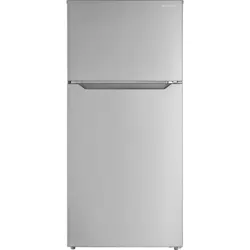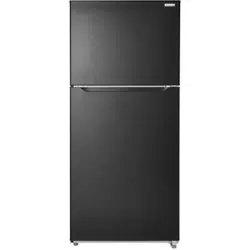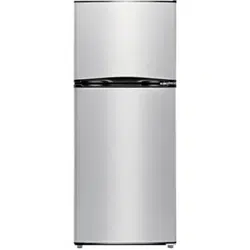

Before using your new product, please read these instructions to prevent any damage.
USER GUIDE
9.9 and 11.5 Cu. Ft.
Top Mount Refrigerator
NS-RTM10WH7/NS-RTM10BK8/NS-RTM10WH7-C/
NS-RTM12SS7-C/NS-RTM12SS7L

www.insigniaproducts.com
2
Contents
Introduction . . . . . . . . . . . . . . . . . . . . . . . . . . . . . . . . . . . . . . . . . . . . . . . . . . . . . . . . . . .2
Important Safety Instructions. . . . . . . . . . . . . . . . . . . . . . . . . . . . . . . . . . . . . . . . . . .3
Grounding requirement. . . . . . . . . . . . . . . . . . . . . . . . . . . . . . . . . . . . . . . . . . . . .5
Features . . . . . . . . . . . . . . . . . . . . . . . . . . . . . . . . . . . . . . . . . . . . . . . . . . . . . . . . . . . . . . .5
Package contents . . . . . . . . . . . . . . . . . . . . . . . . . . . . . . . . . . . . . . . . . . . . . . . . . . .5
Main components . . . . . . . . . . . . . . . . . . . . . . . . . . . . . . . . . . . . . . . . . . . . . . . . . .6
Setting up your refrigerator . . . . . . . . . . . . . . . . . . . . . . . . . . . . . . . . . . . . . . . . . . . .6
Before using your refrigerator . . . . . . . . . . . . . . . . . . . . . . . . . . . . . . . . . . . . . . .6
Finding a suitable location . . . . . . . . . . . . . . . . . . . . . . . . . . . . . . . . . . . . . . . . . . 7
Leveling your refrigerator . . . . . . . . . . . . . . . . . . . . . . . . . . . . . . . . . . . . . . . . . . .7
Providing proper ventilation . . . . . . . . . . . . . . . . . . . . . . . . . . . . . . . . . . . . . . . . 7
Providing a proper power supply . . . . . . . . . . . . . . . . . . . . . . . . . . . . . . . . . . . . 7
Using your refrigerator . . . . . . . . . . . . . . . . . . . . . . . . . . . . . . . . . . . . . . . . . . . . . . . . .8
Setting the refrigerator temperature. . . . . . . . . . . . . . . . . . . . . . . . . . . . . . . . . 8
Setting the freezer temperature . . . . . . . . . . . . . . . . . . . . . . . . . . . . . . . . . . . . . 8
Using the freezer compartment . . . . . . . . . . . . . . . . . . . . . . . . . . . . . . . . . . . . .9
Reversing the door position . . . . . . . . . . . . . . . . . . . . . . . . . . . . . . . . . . . . . . . . . . . .9
Preparing to reverse the door position. . . . . . . . . . . . . . . . . . . . . . . . . . . . . . . 9
Reversing the door position . . . . . . . . . . . . . . . . . . . . . . . . . . . . . . . . . . . . . . . . . 9
Maintaining your refrigerator. . . . . . . . . . . . . . . . . . . . . . . . . . . . . . . . . . . . . . . . . .15
Changing the interior LED light. . . . . . . . . . . . . . . . . . . . . . . . . . . . . . . . . . . . .16
Shutting down your refrigerator - long vacations (several months). . . . . .16
Moving your refrigerator . . . . . . . . . . . . . . . . . . . . . . . . . . . . . . . . . . . . . . . . . . . . . .16
Tips on saving energy . . . . . . . . . . . . . . . . . . . . . . . . . . . . . . . . . . . . . . . . . . . . . . . . .16
Troubleshooting . . . . . . . . . . . . . . . . . . . . . . . . . . . . . . . . . . . . . . . . . . . . . . . . . . . . . .17
Error codes . . . . . . . . . . . . . . . . . . . . . . . . . . . . . . . . . . . . . . . . . . . . . . . . . . . . . . . .17
Specifications . . . . . . . . . . . . . . . . . . . . . . . . . . . . . . . . . . . . . . . . . . . . . . . . . . . . . . . . .20
ONE-YEAR LIMITED WARRANTY . . . . . . . . . . . . . . . . . . . . . . . . . . . . . . . . . . . . . . . .21
Introduction
Congratulations on your purchase of a high-quality Insignia product. Your
NS-RTM10WH7, NS-RTM10BK8, NS-RTM10WH7-C, NS-RTM12SS7-C, or NS-RTM12SS7L
represents the state of the art in refrigerator design and is designed for reliable and
trouble-free performance.
3
9.9 and 11.5 Cu. Ft. Top Mount Refrigerator
www.insigniaproducts.com
Important Safety Instructions
WARNING
1 Read these instructions.
2 Keep these instructions.
3 Heed all warnings.
4 Follow all instructions.
5 Do not use this appliance near water.
6 Clean only with a damp cloth.
7 Do not block any ventilation openings. Install in accordance with the manufacturer's
instructions.
8 Do not install near any heat sources such as radiators, heat registers, stoves, or other
apparatus (including amplifiers) that produce heat.
9 Do not defeat the safety purpose of the polarized or grounding-type plug. A
polarized plug has two blades with one wider than the other. A grounding type plug
has two blades and a third grounding prong. The wide blade or the third prong are
provided for your safety. If the provided plug does not fit into your outlet, consult an
electrician for replacement of the obsolete outlet.
10 Protect the power cord from being walked on or pinched particularly at plugs,
convenience receptacles, and the point where they exit from the appliance.
11 Do not attempt to modify or extend the power cord of this appliance.
12 Unplug this appliance during lightning storms or when it will not be used for long
periods of time.
13 Make sure that the available AC power matches the voltage requirements of this
appliance.
14 Do not handle the plug with wet hands. This could result in an electric shock.
15 Unplug the power cord by holding the plug, never by pulling the cord.
16 Do not turn the appliance on or off by plugging or unplugging the power cord.
17 Turn off the appliance before unplugging it.
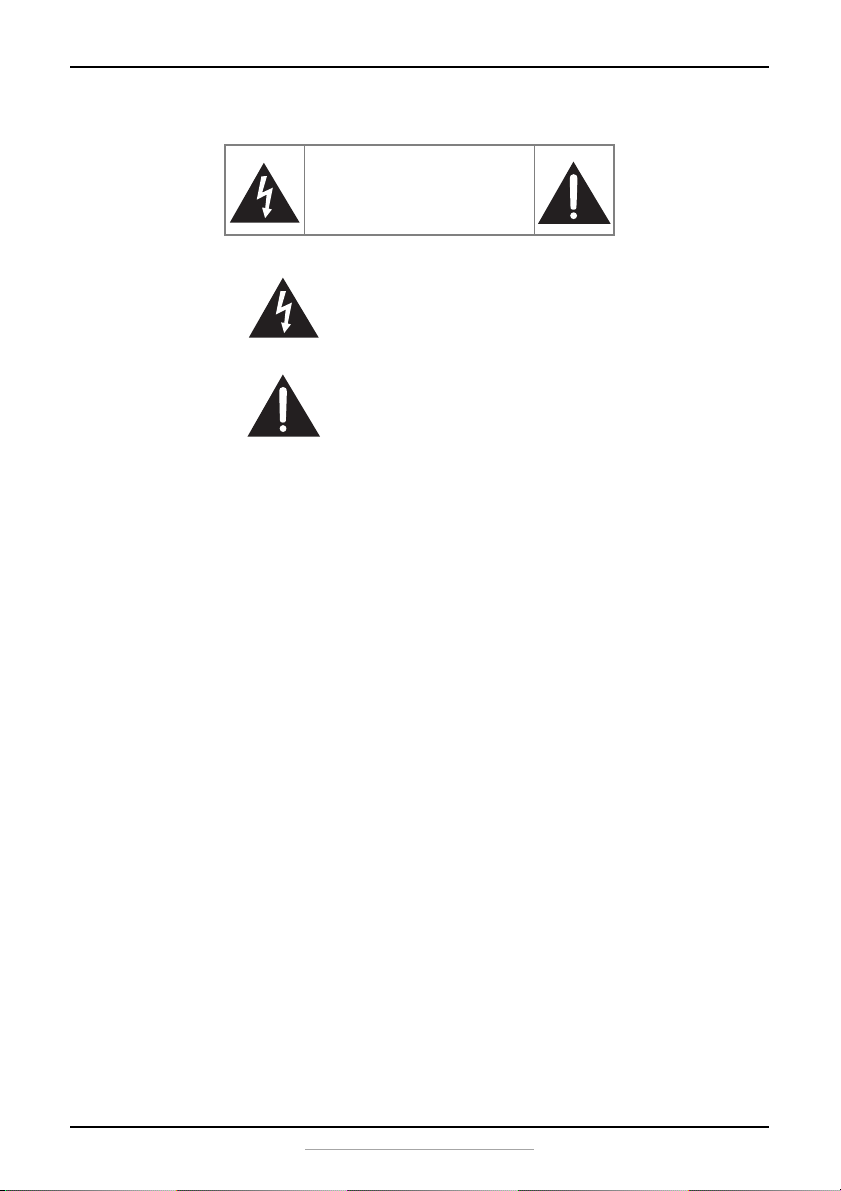
CAUTION
RISK OF ELECTRIC SHOCK
DO NOT OPEN
This symbol indicates that dangerous
voltage constituting a risk of electric
shock is present within your
refrigerator.
This symbol indicates that there are
important operating and maintenance
instructions in the literature
accompanying your refrigerator.
4
www.insigniaproducts.com
18 Refer all servicing to qualified service personnel. Servicing is required when the
appliance has been damaged in any way, such as the power-supply cord or plug is
damaged, liquid has been spilled or objects have fallen into the appliance, the
appliance has been exposed to rain or moisture, does not operate normally, or has
been dropped.
19 To reduce the risk of fire or electric shock, do not expose this appliance to rain,
moisture, dripping, or splashing, and no objects filled with liquids should be placed
on top of it.
WARNING
Electric Shock Hazard
Failure to follow these instructions can result in electric shock, fire,
or death.
1 WARNING–Keep ventilation openings in the appliance clear
of obstruction.
2 WARNING–Do not touch the interior of the freezer
compartment with wet hands. This could result in frost bite.
3 WARNING–Do not use mechanical devices or other means to
accelerate the defrosting process, other than those
recommended by the manufacturer.
4 WARNING–Do not damage the refrigerant tubing when handling, moving, or using
the refrigerator.
5 WARNING–Do not use electrical appliances inside the food storage compartment of
the refrigerator, unless they are of the type recommended by the manufacturer.
6 WARNING–DANGER—Never allow children to play with, operate, or crawl inside the
refrigerator.
Risk of child entrapment. Before you throw away your old refrigerator or freezer:
1) Take off the doors
2) Leave the shelves in place so that children may not easily climb inside
7 Unplug the refrigerator before carrying out user maintenance on it.
8 This appliance can be used by children age 8 years and older and persons with
reduced physical or mental capabilities or lack of experience and knowledge if they
are given supervision or instruction concerning the use of the appliance in a safe way
and understand the hazards involved. Children should not play with the appliance.
Cleaning and maintenance should not be performed by children without supervision.
9 If a component part is damaged, it must be replaced by the manufacturer, its service
agent, or similar qualified persons in order to avoid a hazard.
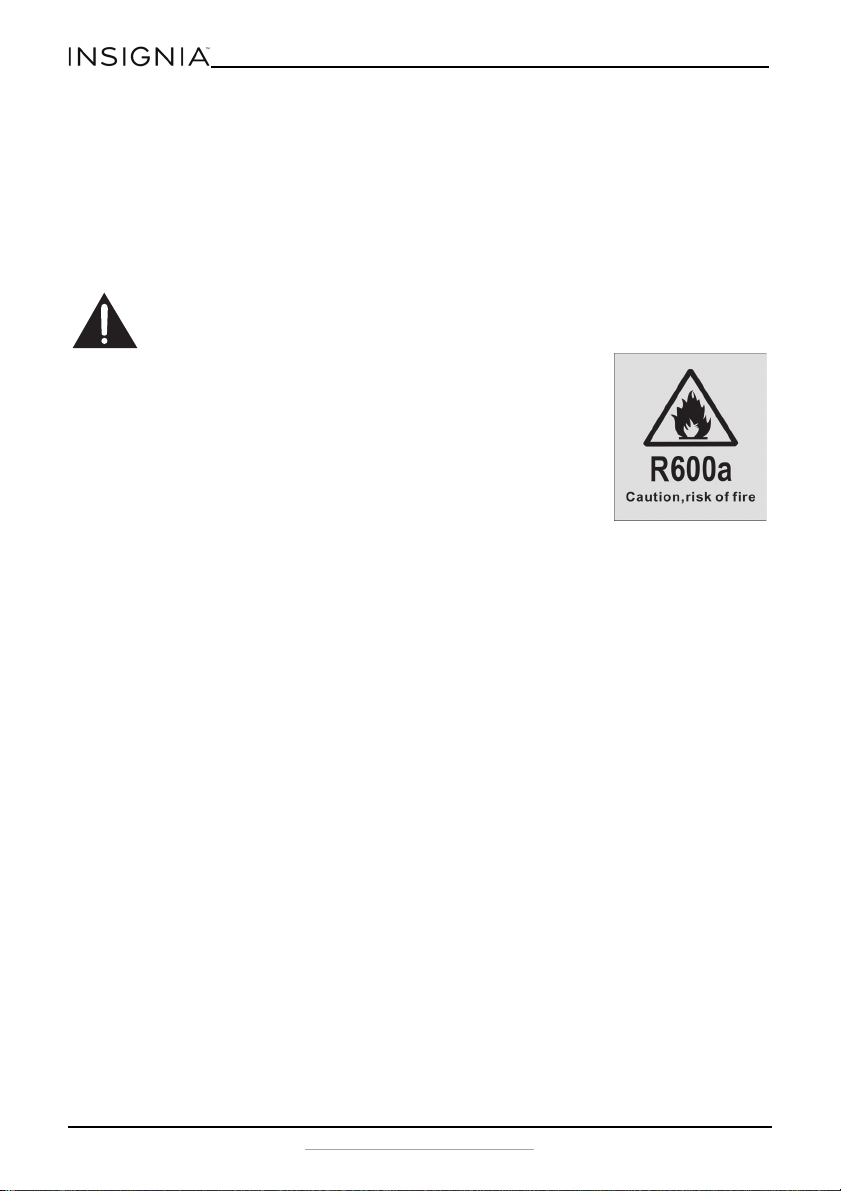
10 Follow local regulations regarding disposal of the appliance due to flammable
refrigerant and gas. All refrigeration products contain refrigerants, which under the
guidelines of federal law must be removed before disposal. It is the consumer's
responsibility to comply with federal and local regulations when disposing of this
product.
11 This appliance is intended to be used in household and similar environments.
12 Do not store or use gasoline or any flammable liquids inside or in the vicinity of this
refrigerator.

5
9.9 and 11.5 Cu. Ft. Top Mount Refrigerator
www.insigniaproducts.com
13 Do not use an extension cord with this appliance. If the power cord is too short, have
a qualified electrician install an outlet near the appliance. Use of an extension cord
can negatively affect the refrigerator’s performance.
Grounding requirement
This appliance must be grounded. This appliance is equipped with a cord having a
grounding wire with a grounding plug. The plug must be inserted into an outlet that is
properly installed and grounded.
Improper use of the grounding plug can result in a risk of electric shock. Consult a
qualified electrician or service person if the grounding instructions are not completely
understood, or if doubt exists as to whether the appliance is properly grounded.
Features
• 9.9 or 11.5 cubic foot capacity
• Electronic control
• Wire shelf for freezer
• Glass spill-safe shelves (2)
• Glass crisper cover
• Crisper drawers (2)
• LED lighting
• Frost free
Package contents
• 9.9 or 11.5 cu. ft. top mount refrigerator
•Hinge kit
• User Guide
6
www.insigniaproducts.com
Main components
Setting up your refrigerator
Before using your refrigerator
1 Remove the interior packing.
2 Let the refrigerator stand upright for approximately four hours before connecting it
to power. This reduces the possibility of a malfunction in the cooling system from
improper handling during transportation.
3 Clean the interior surface with lukewarm water using a soft cloth.
4 Wait for approximately 24 hours after the thermostat has been set before placing any
food in your refrigerator.
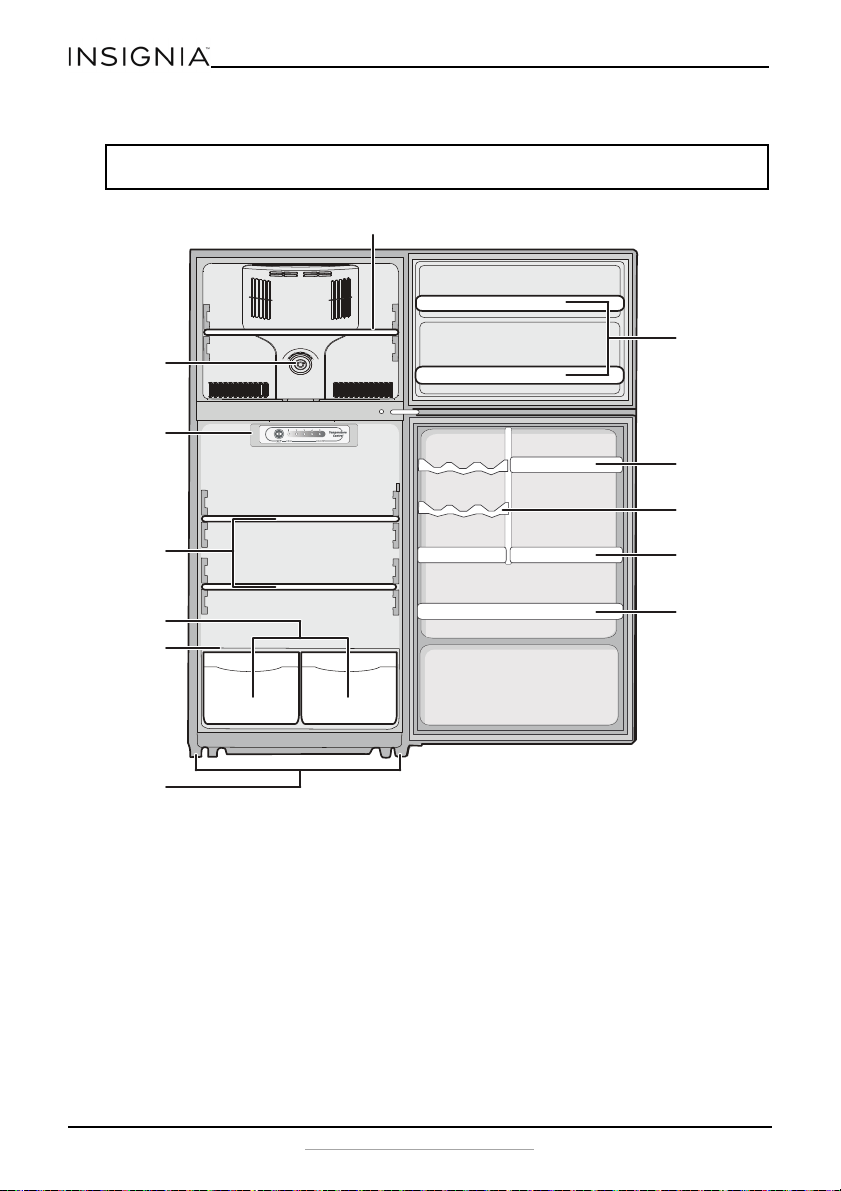
Note: This illustration shows a right-opening refrigerator. Left-opening models are configured the
same, except they open from right to left.
Freezer control
knob
Glass shelves
Crispers
Leveling feet
Freezer door
shelves
Small bottle
rack
Refrigerator
control panel
w/LED
Large bottle
rack
Can rack
Gallon rack
Wire shelf
Glass crisper
cover
7
9.9 and 11.5 Cu. Ft. Top Mount Refrigerator
www.insigniaproducts.com
Finding a suitable location
• This refrigerator is designed to be free standing only.
• Place your refrigerator on a floor that is strong enough to support the
refrigerator when it is fully loaded.
• Locate the refrigerator in your home or garage away from direct sunlight
because it may affect the acrylic coating and heat sources may increase
electrical consumption. To ensure optimal performance, install in areas with
an ambient temperature between 41° F (5° C) and 109° F (42.8° C).
• Avoid locating the refrigerator in moist areas.
• The refrigerator door must be able to swing fully open.
Leveling your refrigerator
• It is very important for the refrigerator to be level. If the refrigerator is not
leveled during installation, the doors may not close or seal properly, causing
cooling, frost, or moisture problems.
• To level your refrigerator, rotate the leveling feet clockwise (to raise) the
refrigerator or counter-clockwise (to lower).
Providing proper ventilation
Place the refrigerator at least one inch from the wall on each side to ensure proper airflow
to the compressor. Do not place the refrigerator near any heat sources, such as a heater
or stove, as this may put a strain on the compressor.
Providing a proper power supply
Check your local power source. This refrigerator requires a 110 V-120 V, 60 Hz power
supply.
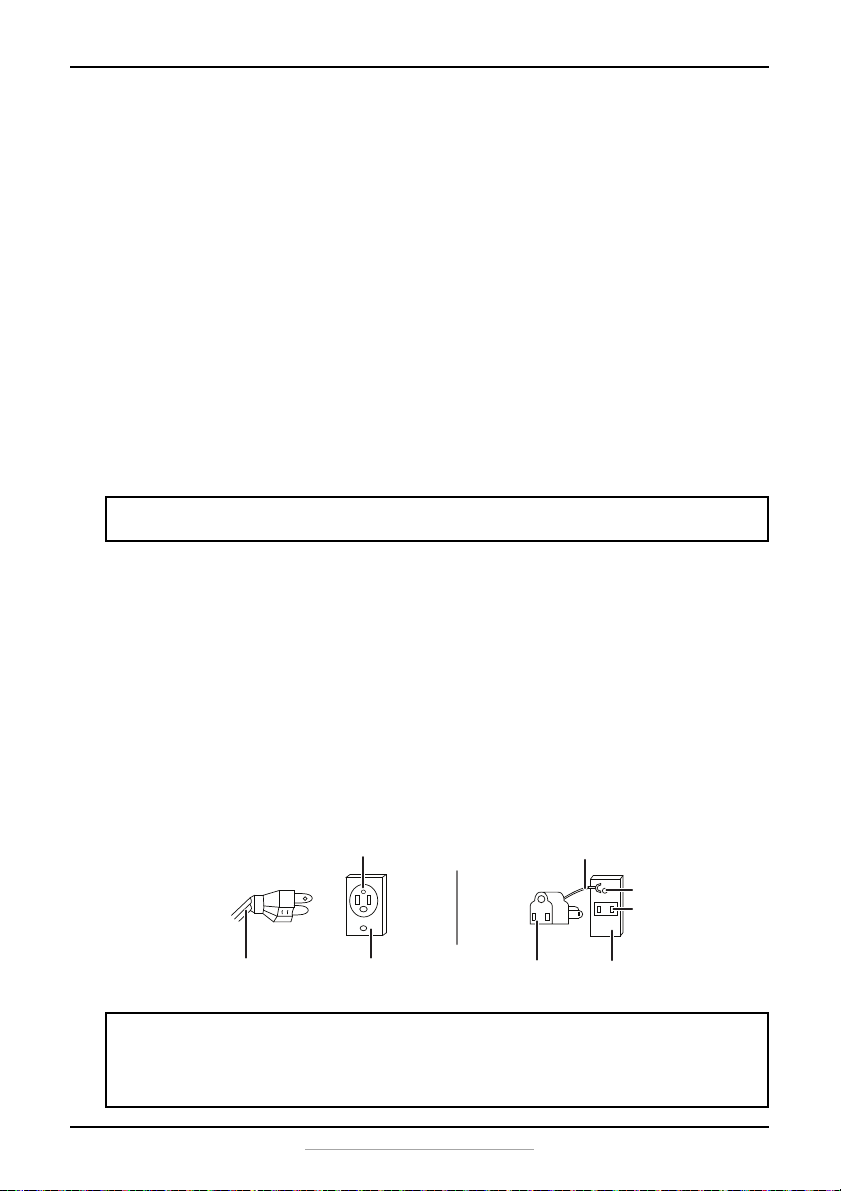
Use a receptacle that accepts the grounding prong. The power cord is equipped with a
3-prong (grounding) plug which mates with a standard 3-prong (grounding) wall outlet
to minimize the possibility of electric shock hazard from this refrigerator.
Note: Having someone push against the top of the refrigerator helps to take some weight off the
leveling foot, making it easier to adjust.
Notes:
• The refrigerator should always be plugged into its own individual electrical outlet which has a
voltage rating that matches the rating plate.
• Never unplug your refrigerator by pulling on the power cord. Always grip the plug firmly and
pull straight out from the outlet.
3-prong receptacle
Receptacle box cover3-prong plug
Grounding lead
Grounding adapter
Receptacle box cover
Screw
Receptacle
Using a 3-prong plug and outlet
Using a grounding adapter
8
www.insigniaproducts.com
Using your refrigerator
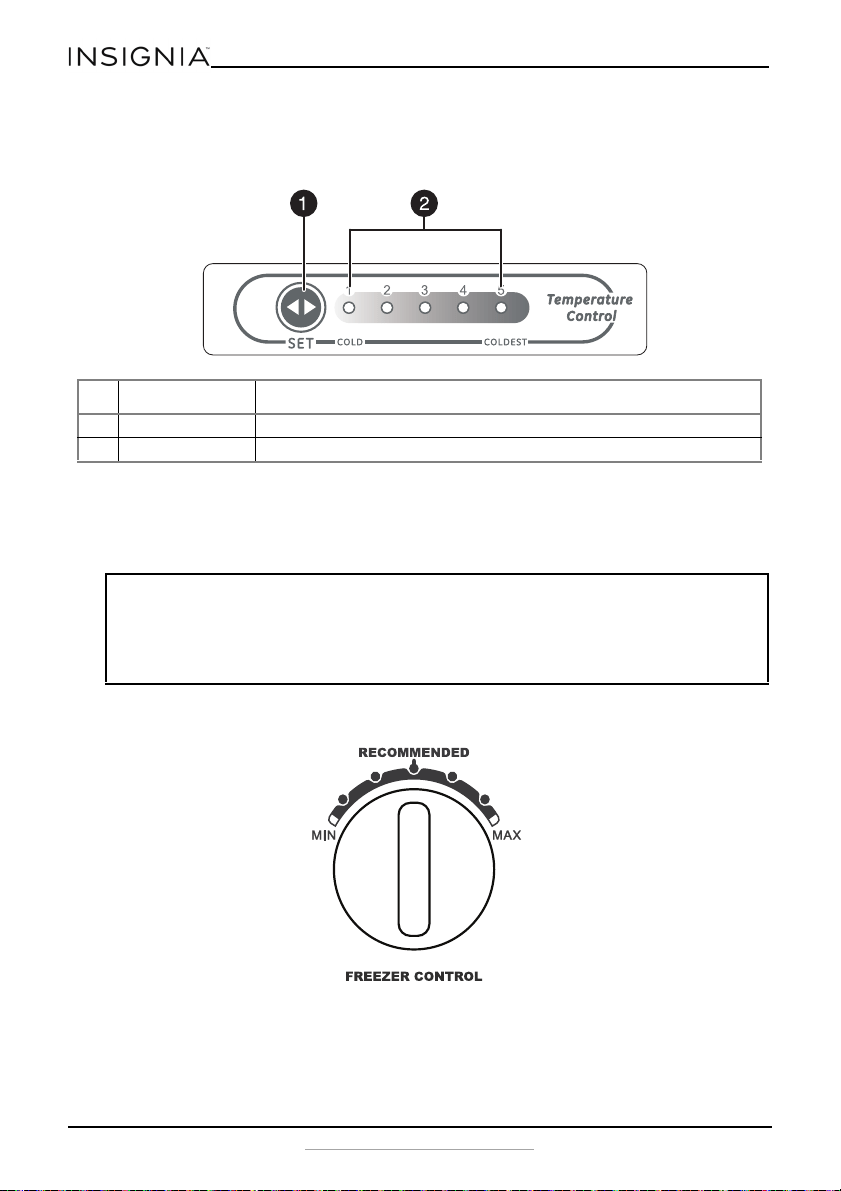
Setting the refrigerator temperature
• The first time you turn the refrigerator on, the control panel LEDs turn on for three
seconds, then displays the current setting (default = 3). Your refrigerator runs
continuously for several hours until it reaches the preset temperature. After your
refrigerator is fully cooled, you can adjust the temperature up or down to your
personal preference.
Setting the freezer temperature
• Turn the control to adjust the freezer temperature. Allow 24 hours for the freezer to
adjust and stabilize.
# ITEM DESCRIPTION
1 SET button Press to change the refrigerator setting from 1 (cold) to 5 (coldest).
2 LED indicators Light to show the current refrigerator setting.
Notes:
• If the refrigerator is unplugged or loses power, you must wait three to five minutes before
restarting it. If you attempt to restart before this time delay, the refrigerator will not start.
• Large amounts of food will lower the cooling efficiency of the refrigerator.
• If you choose to change the thermostat setting, adjust it by one increment at a time. Allow 24
hours for the temperature to stabilize between adjustments.
9
9.9 and 11.5 Cu. Ft. Top Mount Refrigerator
www.insigniaproducts.com
Using the freezer compartment
• Place frozen food into the freezer as quickly as possible after purchase.
• Follow package instructions regarding storage times. The storage life of frozen
foods varies and the recommended storage time should not be exceeded.
Reversing the door position
Based on the location where you plan to use your refrigerator, you may find it more
convenient to reverse the position of the door, to have it open from right to left instead of
left to right.
Preparing to reverse the door position
You will need: A standard screwdriver and a Phillips screwdriver.
• Make sure that your refrigerator is unplugged and empty.
• Have someone available to assist you in the process.
• Keep all of the parts you remove to reuse them later.
Reversing the door position
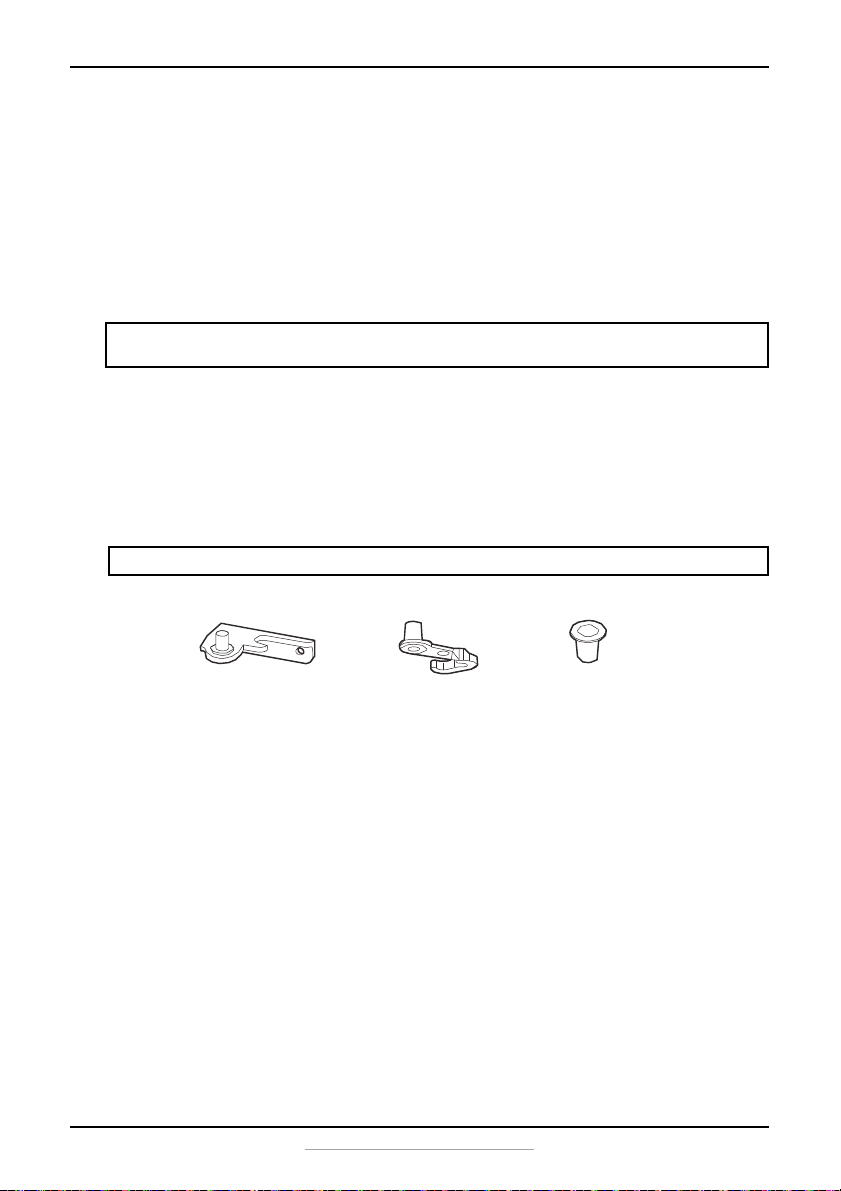
Parts included with the hinge kit:
1 Unplug your refrigerator and remove all food from the door shelves.
CAUTION: To avoid injury to yourself or your property, we recommend that someone assist you
during the door reversal process.
Note: Right-opening model shown for illustration purposes.
Bottom hinge
left or right
Hole plug (3)
Left or right pin
assembly (2)
10
www.insigniaproducts.com
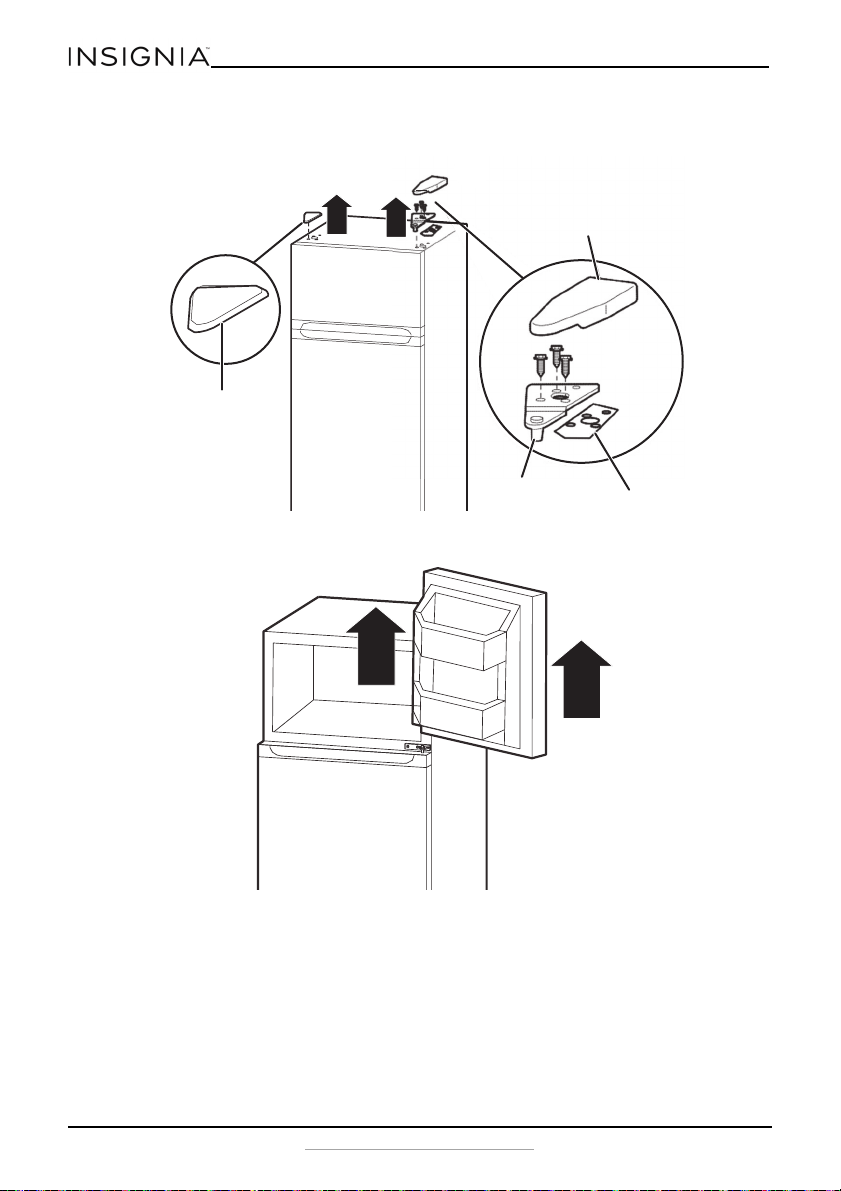
2 Remove the top cap and the top hinge cover, then unscrew and remove the top
hinge and shim. Keep the screws to reuse.
3 Lift the freezer door up and away from your refrigerator.
1
Top cap
Top hinge cover
Top hinge
Top hinge shim
11
9.9 and 11.5 Cu. Ft. Top Mount Refrigerator
www.insigniaproducts.com
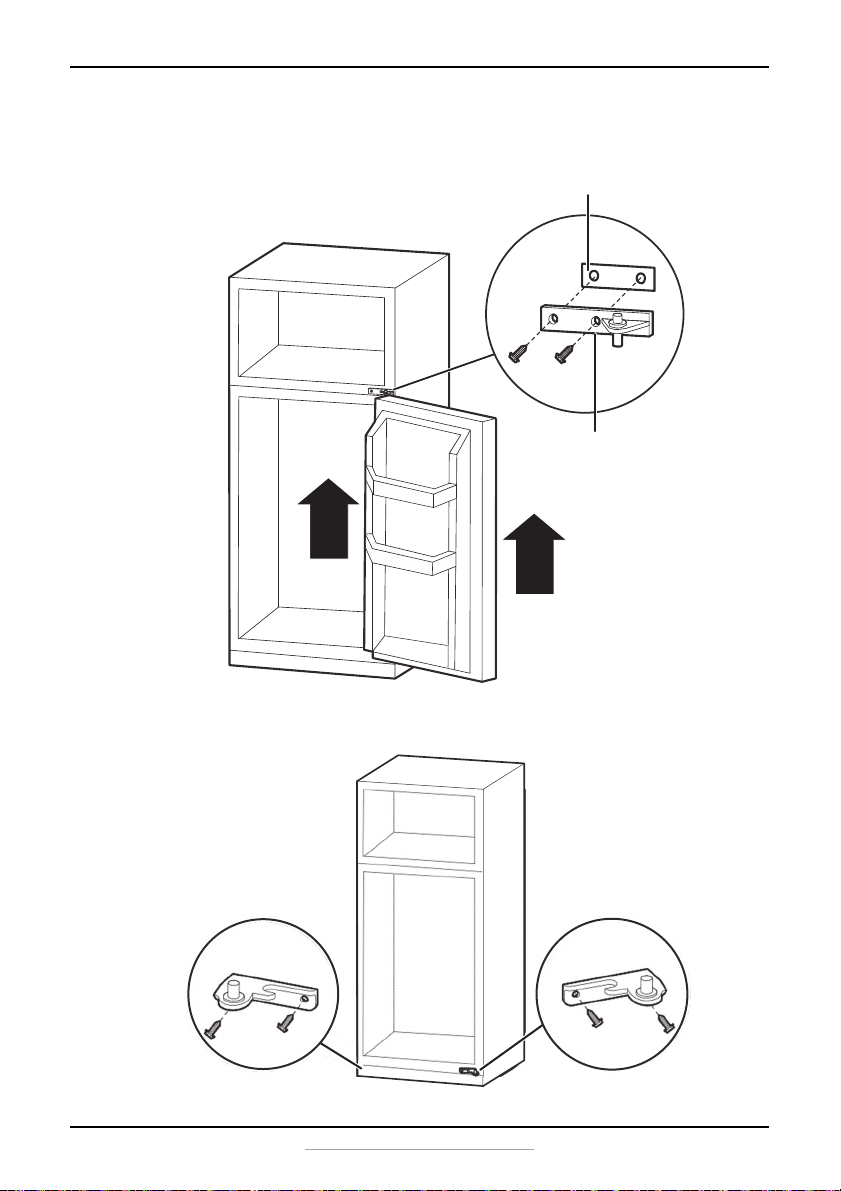
4 Unscrew the two screws holding the center hinge, remove the hinge and center
hinge shim, then lift the refrigerator door up and away from your refrigerator. Save
the screws to reuse.
5 Unscrew the two screws holding the bottom right hinge, then remove the bottom
right hinge.
Center hinge shim
Center hinge
Remove the bottom right hinge
Attach the bottom left hinge
12
www.insigniaproducts.com
6 Remove the screw covers from the bottom left side of the refrigerator and use them
to cover the screw holes on the bottom right side of the refrigerator.
7 Attach the bottom left hinge with the screws you removed from the bottom right
hinge.
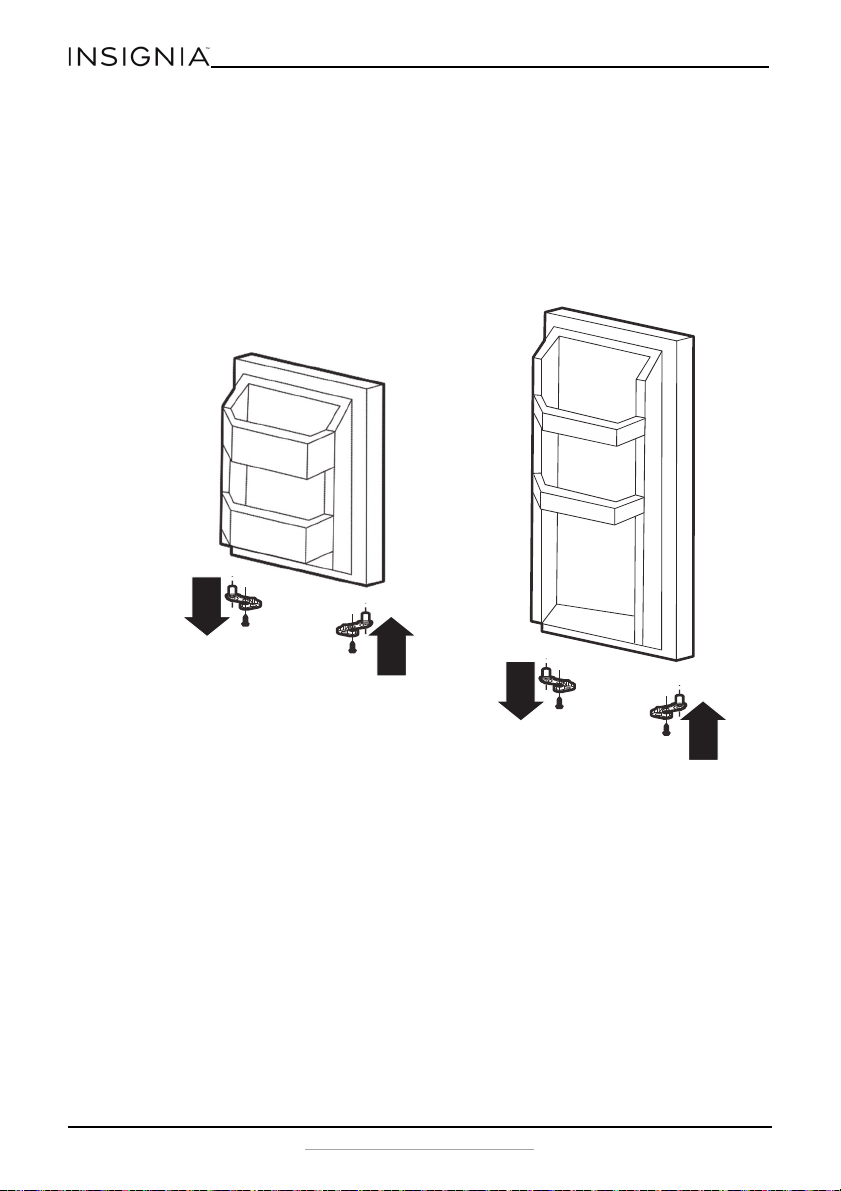
8 Remove the right pin assemblies from the bottom of the freezer and refrigerator
doors.
9 Attach the left pin assemblies to the left side, using the screws you just removed.
Freezer door
Refrigerator door

13
9.9 and 11.5 Cu. Ft. Top Mount Refrigerator
www.insigniaproducts.com
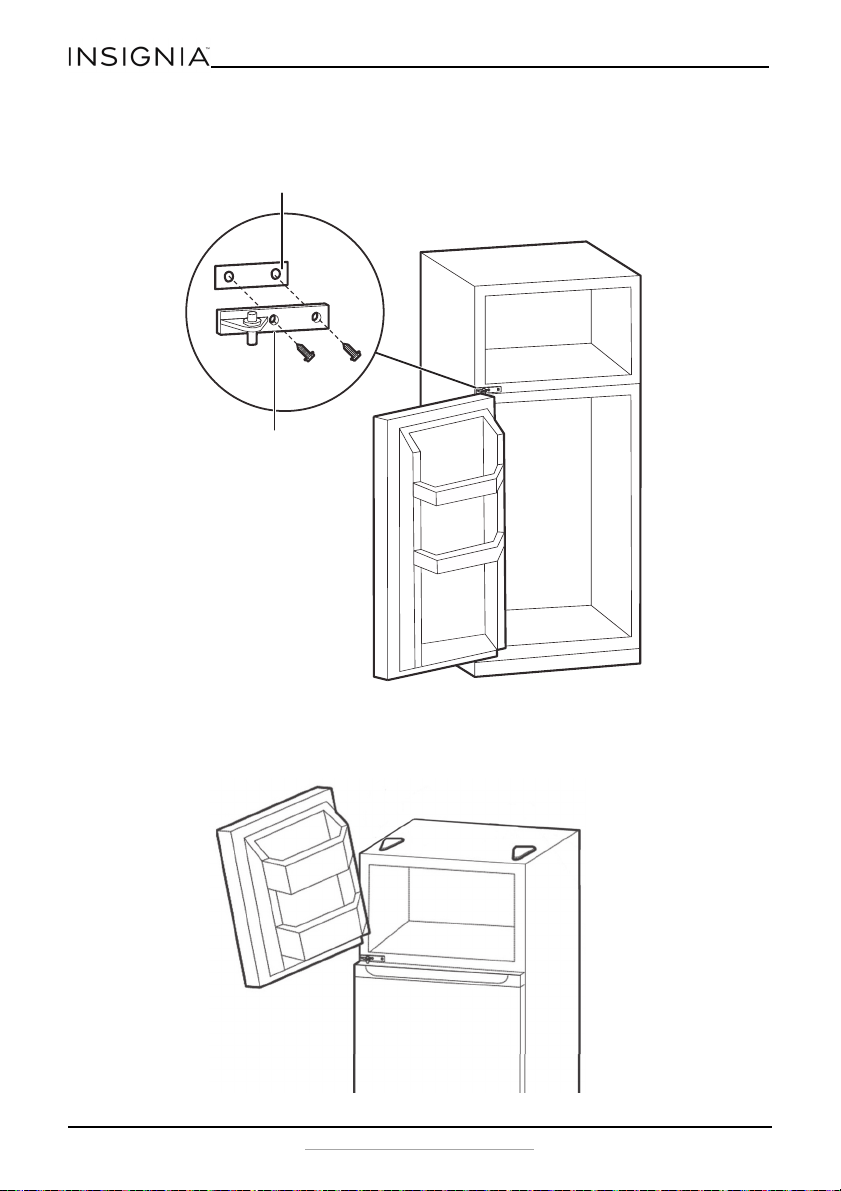
10 Place the refrigerator door on the bottom left hinge. Make sure that the door is
aligned horizontally and vertically.
Center hinge
shim
Center hinge
14
www.insigniaproducts.com
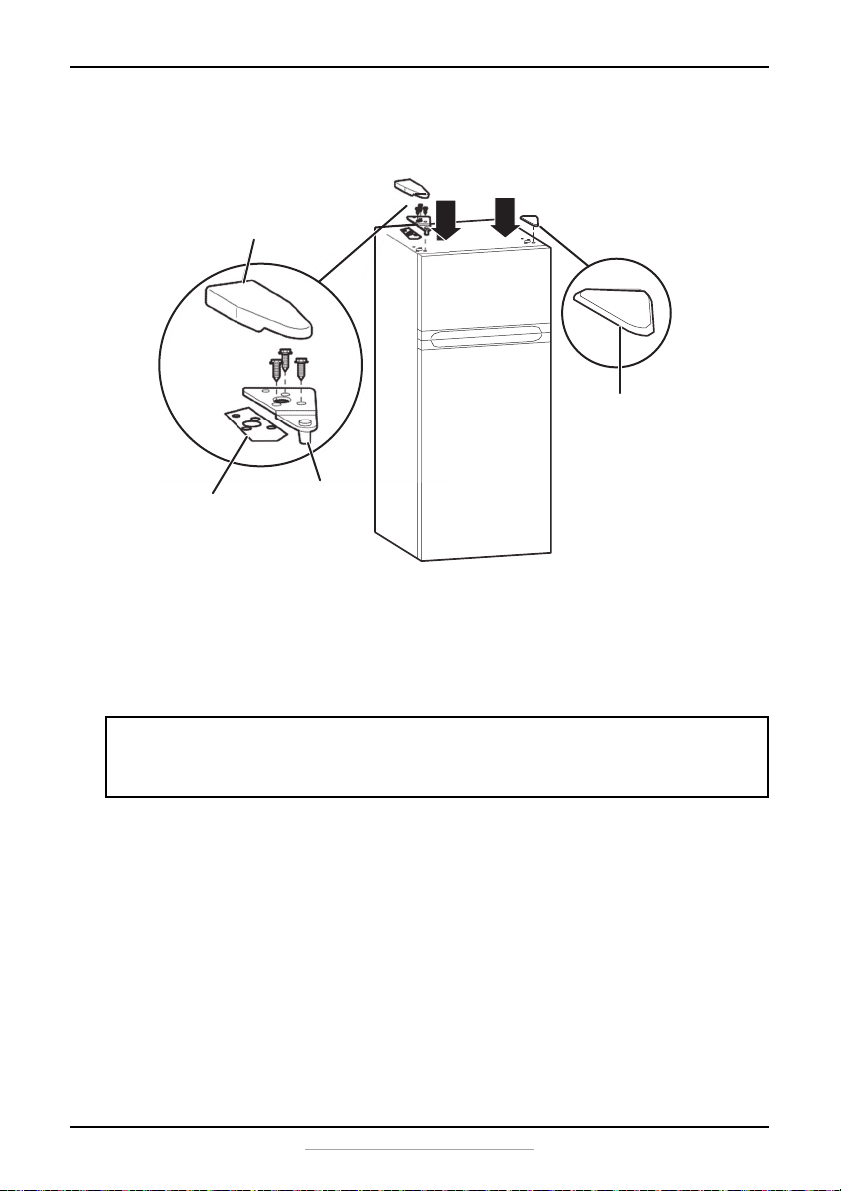
11 Attach the center hinge shim to the back of the center hinge, then align with holes on
the left side of the refrigerator and secure it with the screws you removed from the
right side.
12 Place the freezer door on the center hinge. Make sure that the door is aligned
horizontally and vertically, and that the gasket seals on all sides before attaching the
top hinge.
Center hinge shim
Center hinge
15
9.9 and 11.5 Cu. Ft. Top Mount Refrigerator
www.insigniaproducts.com
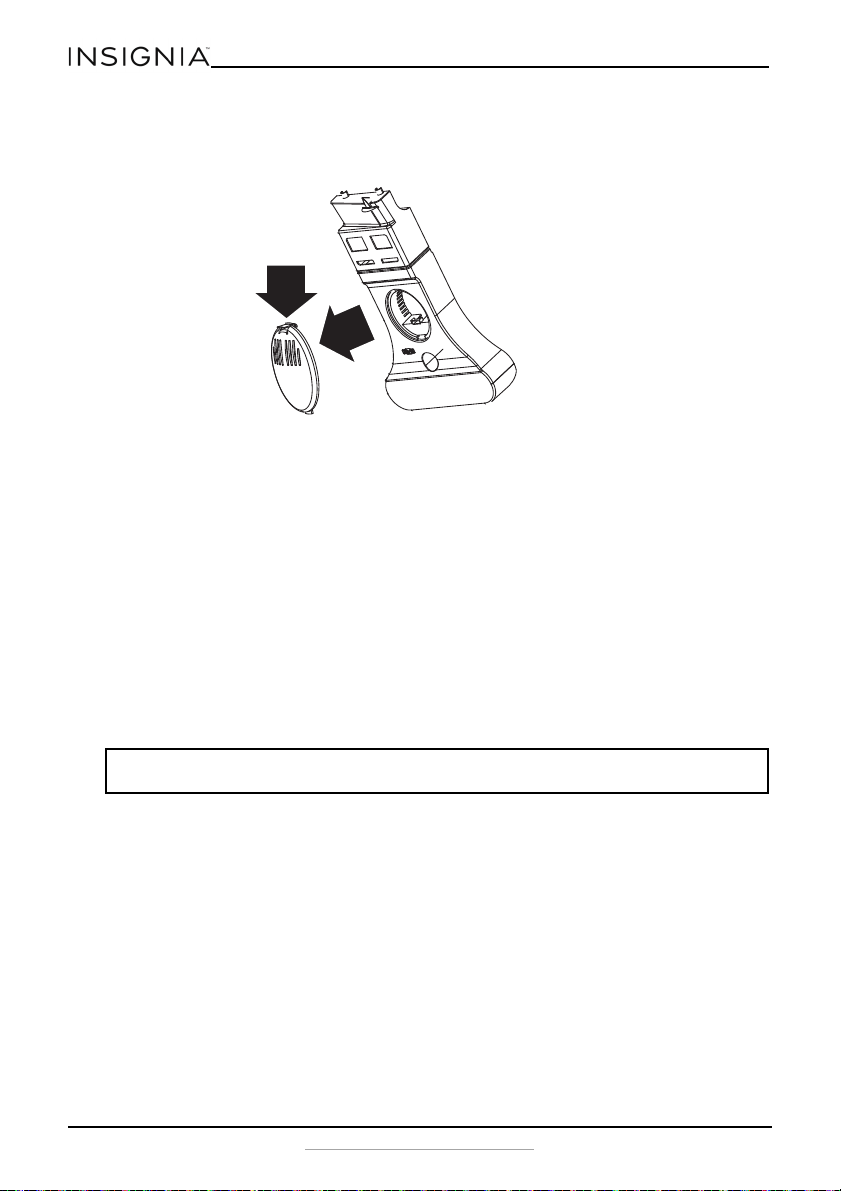
13 Attach the top hinge and shim with the screws you removed previously, then replace
the hinge cover and top cap.
Maintaining your refrigerator
Your refrigerator is designed for year-round use with only minimal cleaning and
maintenance.
When you first receive it, wipe the cabinet with a mild detergent and warm water, then
wipe dry with a dry cloth. Do this periodically to keep your refrigerator looking new.
1 Turn off the refrigerator and unplug it from the wall outlet.
2 Remove all food.
3 Wash the inside with a damp warm cloth soaked in a solution of one quart of
lukewarm water to two tablespoons of baking soda solution.
4 Be sure to keep the door gasket (seal) clean to keep the refrigerator running
efficiently.
5 Dry the interior and exterior with a soft cloth.
Defrosting the freezer
This refrigerator is frost free, so you don't need to defrost it. You just need to clean it
periodically, following the above instructions.
CAUTION:
To prevent damage to the finish, do not use:
• Gasoline, benzine, thinner, or other similar solvents.
• Abrasive cleaners.
1
Top cap
Top hinge shim
Top hinge
Hinge cover
16
www.insigniaproducts.com
Changing the interior LED light
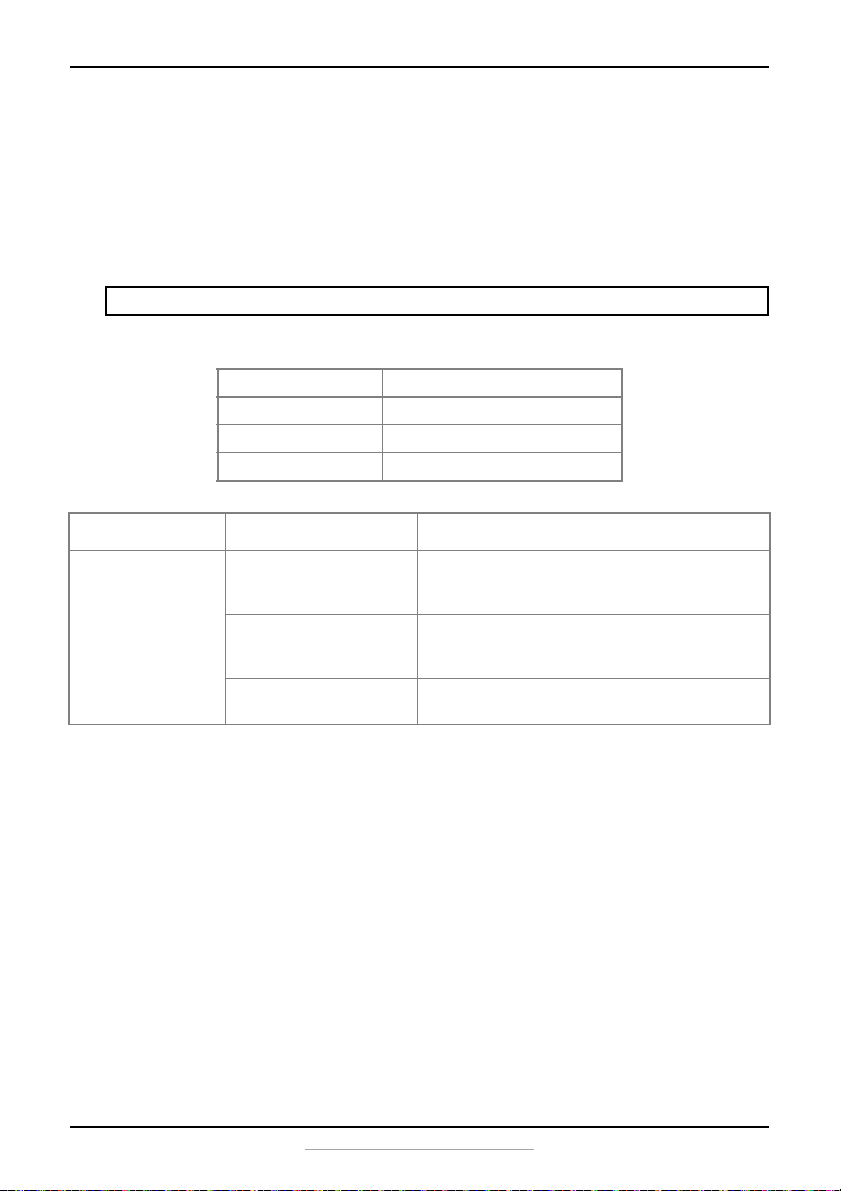
1 Using a flat blade screwdriver or a fingertip, push in the latch to release the lamp
cover, then remove it.
2 Unscrew the LED light bulb from the lamp socket, then replace it with a new LED light
bulb.
3 Reinstall the lamp cover.
Shutting down your refrigerator - long vacations
(several months)
1 Turn off the refrigerator and unplug it from the wall outlet.
2 Remove all food.
3 Clean the refrigerator.
4 Leave the door open slightly to avoid possible formation of condensation, mold, or
odor.
Moving your refrigerator
1 Turn off the refrigerator and unplug it from the wall outlet.
2 Remove all food.
3 Securely tape down all loose items inside your refrigerator.
4 Tape the doors shut.
Be sure the refrigerator stays in the upright position during transportation.
Tips on saving energy
• Locate your refrigerator in the coolest area of the room, away from heat producing
appliances or heating ducts and out of the direct sunlight.
CAUTION: Use extreme caution with children. The refrigerator should not be accessible to child's
play.
Push in here
LED light model: 50241001001C
Lamp base: E12
Input rating: 115V AC 3.5 W
17
9.9 and 11.5 Cu. Ft. Top Mount Refrigerator
www.insigniaproducts.com
• Let hot foods cool before placing them in the refrigerator. Overloading the
refrigerator forces the compressor to run longer. Foods that freeze too slowly may
lose quality or spoil.
• Wrap foods properly and wipe containers dry before placing them in the
refrigerator. This cuts down on frost build-up inside the refrigerator.
• Organize and label food to reduce door openings and extended searches.
Troubleshooting
Error codes
CAUTION: Do not try to repair your refrigerator yourself. Doing so invalidates the warranty.
LED display Problem
LED 1 and LED 2 lit Temperature sensor circuit
LED 1 and LED 3 lit Freezer defrost sensor
LED 1 and LED 4 lit Ambient temperature sensor
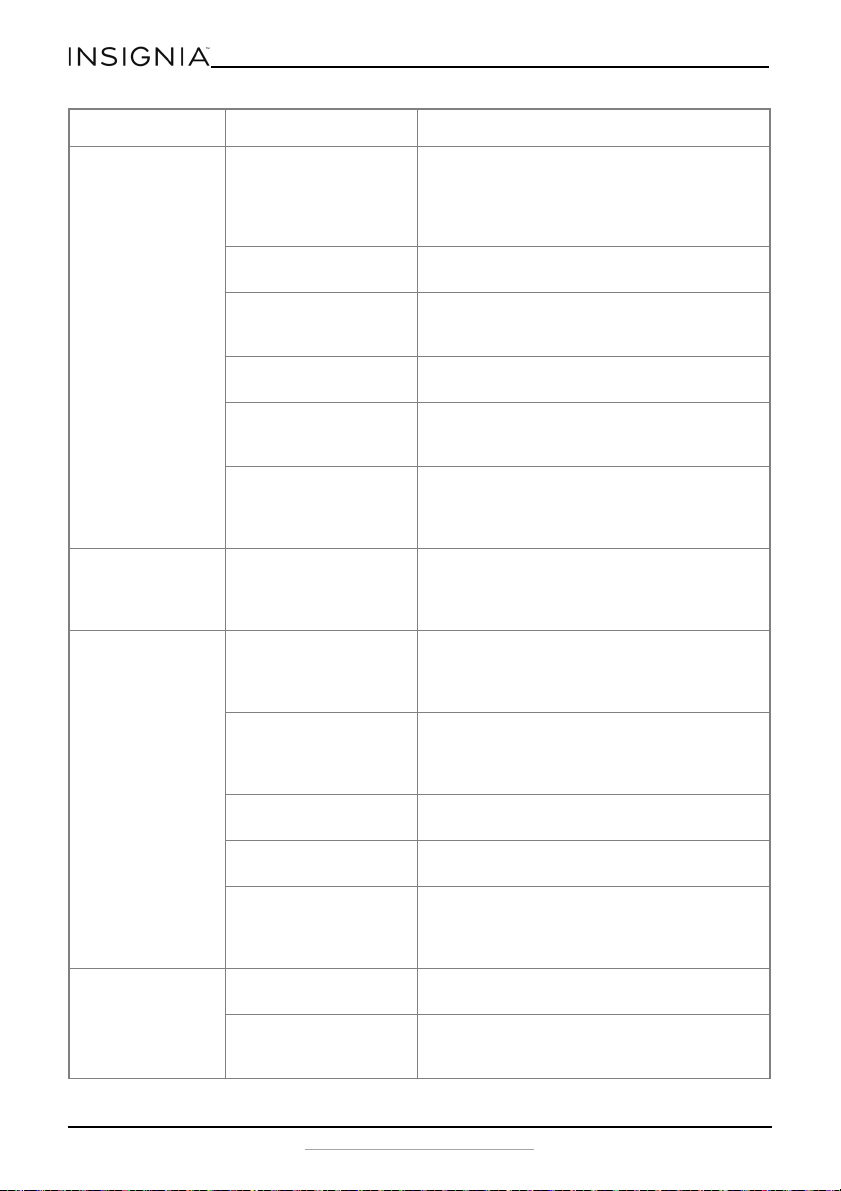
PROBLEM POSSIBLE CAUSE POSSIBLE SOLUTION
The refrigerator
does not operate.
The refrigerator is
unplugged.
Make sure that the refrigerator is plugged in
and that the plug is pushed completely into
the outlet.
The fuse on the circuit is
blown or the circuit
breaker is tripped.
Check the house fuse/circuit breaker box and
replace the fuse or reset the circuit breaker.
Power failure. If a power failure occurs, the refrigerator turns
off. Wait until the power is restored.
18
www.insigniaproducts.com
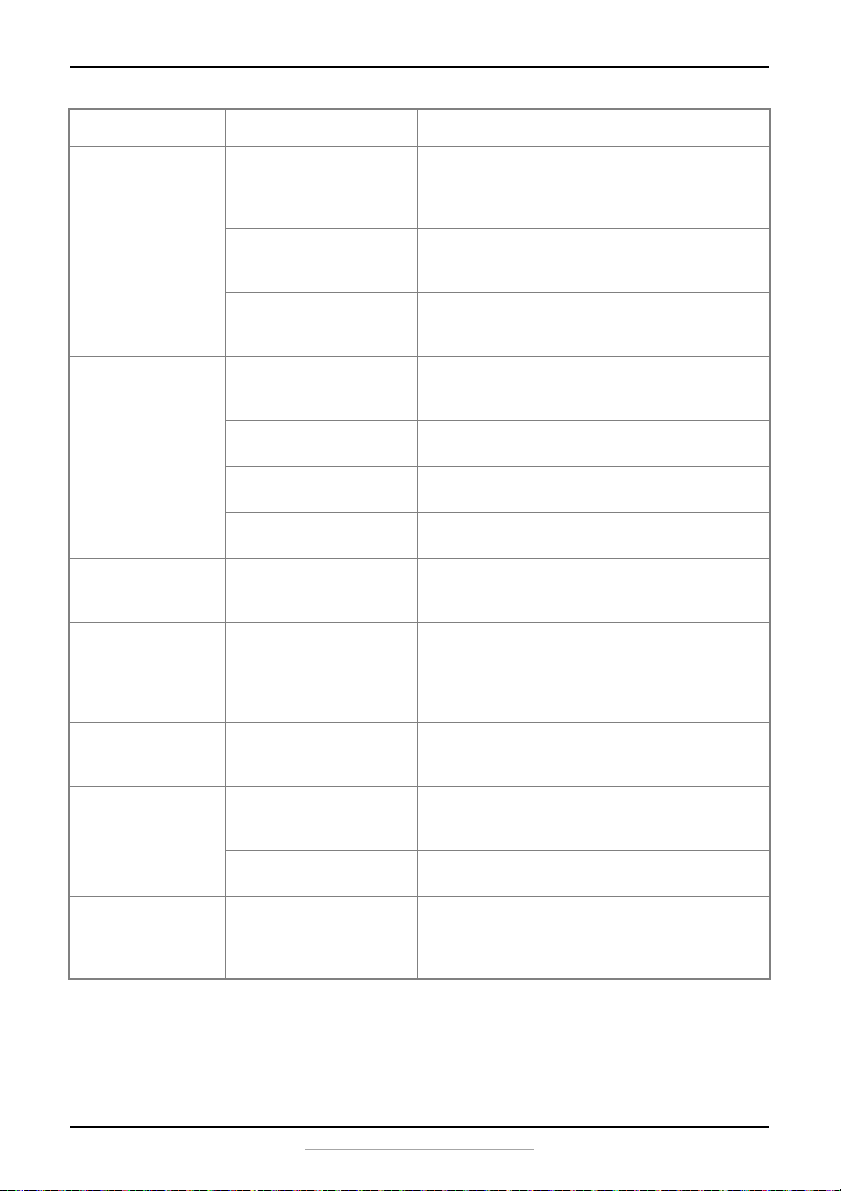
The compressor
turns on and off
frequently.
The door has been
opened too often or
was not closed
properly. The door seal
may be dirty.
Make sure that the door is closed properly.
Clean the door seal if necessary.
The room temperature
is hotter than normal.
This is normal, under the circumstances.
A large amount of food
was recently added to
the refrigerator.
This is normal, under the circumstances.
The thermostat is not
set correctly.
Reset the thermostat correctly.
The refrigerator does
not have the correct
clearances.
The refrigerator should be no closer than five
inches from the adjacent walls.
The refrigerator has
recently been
disconnected for a
period of time.
Allow four hours for the refrigerator to cool
down completely.
Food in the
refrigerator
compartment is
freezing.
The thermostat is set
too cold.
Set the thermostat to a warmer setting.
Food in the
refrigerator
compartment is
not cold.
The door has been
opened too often or
was not closed
properly.
Make sure that the door is closed properly.
You have just added a
large amount of food to
the refrigerator or
freezer compartments.
Allow time for the new food to cool, then
check again.
The thermostat is set
too warm.
Adjust the thermostat to a colder setting.
The door gasket does
not seal properly.
Clean the gasket.
The refrigerator has
recently been
disconnected for a
period of time.
Allow four hours for the refrigerator to cool
completely.
The refrigerator
makes unusual
noises.
The refrigerator may
not be level on the floor.
Level the refrigerator with the leveling feet.
The body of the
refrigerator is touching
a wall.
Move the refrigerator out from the wall.
PROBLEM POSSIBLE CAUSE POSSIBLE SOLUTION
19
9.9 and 11.5 Cu. Ft. Top Mount Refrigerator
www.insigniaproducts.com
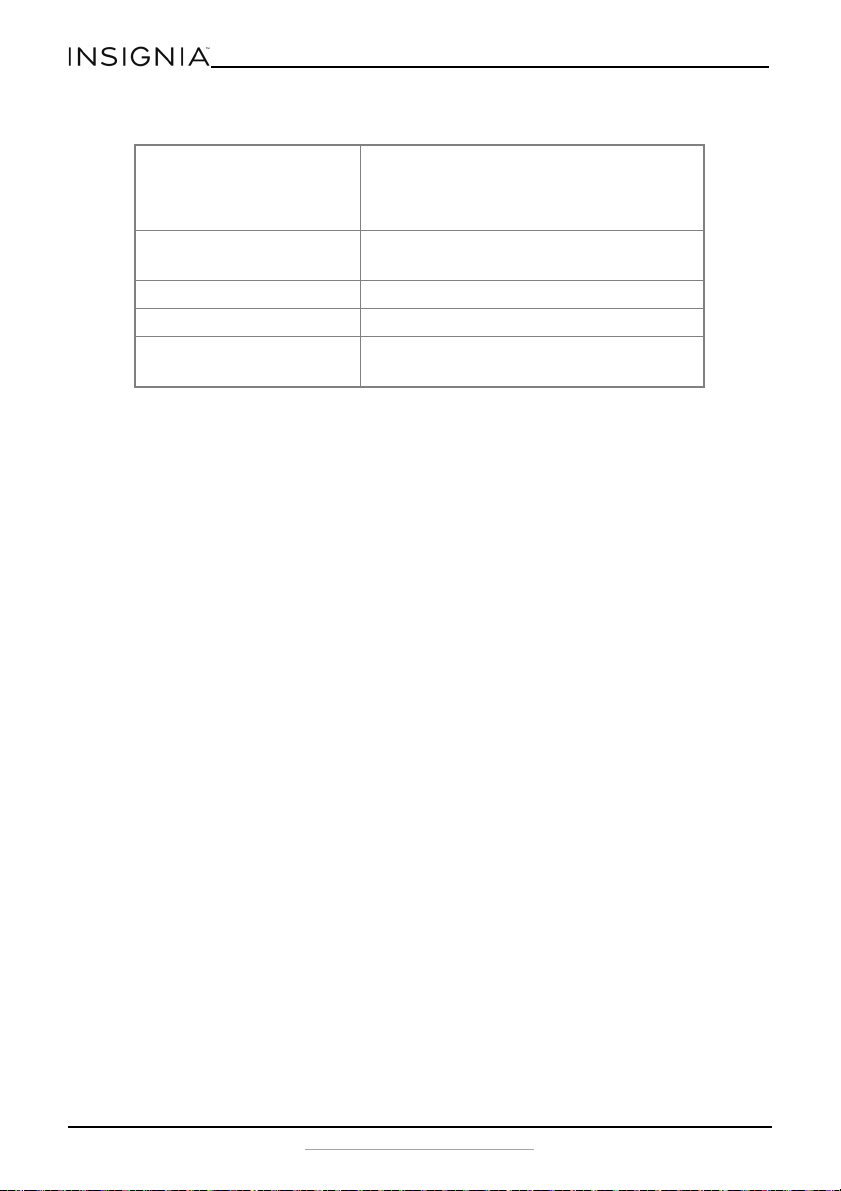
Moisture is
building up in the
interior of the
refrigerator.
The door has been
opened too often or
was not closed
properly.
Make sure that the door is closed properly.
The refrigerator is in a
location that is very
humid.
Move the refrigerator to a dryer location.
The food in the
refrigerator is not
packaged properly.
Repackage the food in the refrigerator to
make sure that it is sealed.
The refrigerator
door does not
close completely.
Food packages are
interfering with the
door.
Move the food packages or remove some
food.
The shelves are out of
position.
Adjust the shelves properly.
The door gaskets are
dirty.
Clean the door gaskets.
The refrigerator is not
level.
Level the refrigerator with the leveling feet.
The exterior of the
refrigerator is
warm.
This is normal.
There is a popping
or crackling sound
when the
compressor comes
on.
This is normal. The sound should level off or disappear as the
refrigerator continues to run.
There is a bubbling
or gurgling sound,
like water boiling.
This is normal.
Vibrations. The refrigerator is not
on a level or sturdy
surface.
Make sure that the refrigerator is on a level,
sturdy surface. Level the refrigerator with the
leveling legs.
The refrigerator may be
touching a wall.
Make sure that the refrigerator is not
touching a wall.
There is moisture
forming on the
external walls of
the refrigerator.
The door may be
slightly open.
Make sure that the door closes completely.
PROBLEM POSSIBLE CAUSE POSSIBLE SOLUTION
20
www.insigniaproducts.com
Specifications
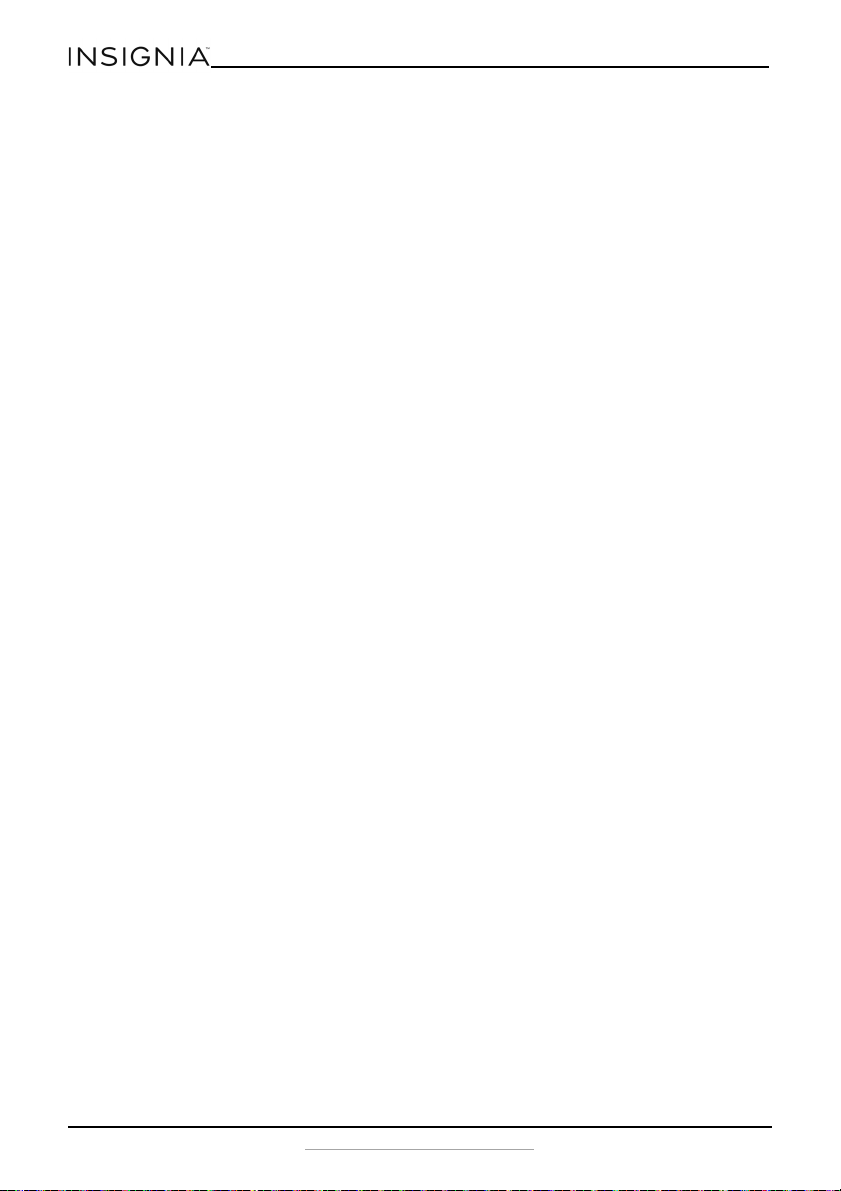
Dimensions (WxDxH) 9.9 cu.ft. - 24 x 26.1 x 59.8 in. (61 x 66.3 x
151.9 cm)
11.5 cu.ft. - 24 x 28.9 x 59.8 in.(61 x 73.3 x
151.9 cm)
Weight 9.9 cu.ft. - 121 lbs (55 kg)
11.5 cu.ft. - 132 lbs (60 kg)
Power requirements 115 V~60 Hz - 160 W
Current 1.4 A
Power consumption
(annual)
9.9 cu.ft. - 296 kWh
11.5 cu.ft. - 311 kWh

21
9.9 and 11.5 Cu. Ft. Top Mount Refrigerator
www.insigniaproducts.com
ONE-YEAR LIMITED WARRANTY
Definitions:
The Distributor* of Insignia branded products warrants to you, the original purchaser of this new
Insignia-branded product (“Product”), that the Product shall be free of defects in the original
manufacturer of the material or workmanship for a period of one (1) year from the date of your
purchase of the Product (“Warranty Period”).
For this warranty to apply, your Product must be purchased in the United States or Canada from a
Best Buy branded retail store or online at www.bestbuy.com or www.bestbuy.ca and is packaged
with this warranty statement.
How long does the coverage last?
The Warranty Period lasts for 1 year (365 days) from the date you purchased the Product. Your
purchase date is printed on the receipt you received with the Product.
What does this warranty cover?
During the Warranty Period, if the original manufacture of the material or workmanship of the
Product is determined to be defective by an authorized Insignia repair center or store personnel,
Insignia will (at its sole option): (1) repair the Product with new or rebuilt parts; or (2) replace the
Product at no charge with new or rebuilt comparable products or parts. Products and parts replaced
under this warranty become the property of Insignia and are not returned to you. If service of
Products or parts are required after the Warranty Period expires, you must pay all labor and parts
charges. This warranty lasts as long as you own your Insignia Product during the Warranty Period.
Warranty coverage terminates if you sell or otherwise transfer the Product.
How to obtain warranty service?
If you purchased the Product at a Best Buy retail store location or from a Best Buy online website
(www.bestbuy.com or www.bestbuy.ca), please take your original receipt and the Product to any
Best Buy store. Make sure that you place the Product in its original packaging or packaging that
provides the same amount of protection as the original packaging.
To obtain warranty service, in the United States and Canada call 1-877-467-4289. Call agents may
diagnose and correct the issue over the phone.
Where is the warranty valid?
This warranty is valid only in the United States and Canada at Best Buy branded retail stores or
websites to the original purchaser of the product in the country where the original purchase was
made.
What does the warranty not cover?
This warranty does not cover:
• Customer instruction/education
• Installation
• Set up adjustments
• Cosmetic damage
• Damage due to weather, lightning, and other acts of God, such as power surges
• Accidental damage
•Misuse
•Abuse
•Negligence
• Commercial purposes/use, including but not limited to use in a place of business or in
communal areas of a multiple dwelling condominium or apartment complex, or otherwise used
in a place of other than a private home.
• Modification of any part of the Product, including the antenna
• Display panel damaged by static (non-moving) images applied for lengthy periods (burn-in).
• Damage due to incorrect operation or maintenance
• Connection to an incorrect voltage or power supply
22
www.insigniaproducts.com
• Attempted repair by any person not authorized by Insignia to service the Product
• Products sold “as is” or “with all faults”
• Consumables, including but not limited to batteries (i.e. AA, AAA, C etc.)
• Products where the factory applied serial number has been altered or removed
• Loss or Theft of this product or any part of the product
• Display panels containing up to three (3) pixel failures (dots that are dark or incorrectly
illuminated) grouped in an area smaller than one tenth (1/10) of the display size or up to five (5)
pixel failures throughout the display. (Pixel based displays may contain a limited number of
pixels that may not function normally.)
• Failures or Damage caused by any contact including but not limited to liquids, gels or pastes.
REPAIR REPLACEMENT AS PROVIDED UNDER THIS WARRANTY IS YOUR EXCLUSIVE REMEDY FOR
BREACH OF WARRANTY. INSIGNIA SHALL NOT BE LIABLE FOR ANY INCIDENTAL OR CONSEQUENTIAL
DAMAGES FOR THE BREACH OF ANY EXPRESS OR IMPLIED WARRANTY ON THIS PRODUCT,
INCLUDING, BUT NOT LIMITED TO, LOST DATA, LOSS OF USE OF YOUR PRODUCT, LOST BUSINESS OR
LOST PROFITS. INSIGNIA PRODUCTS MAKES NO OTHER EXPRESS WARRANTIES WITH RESPECT TO
THE PRODUCT, ALL EXPRESS AND IMPLIED WARRANTIES FOR THE PRODUCT, INCLUDING BUT NOT
LIMITED TO ANY IMPLIED WARRANTIES OF AND CONDITIONS OF MERCHANTABILITY AND FITNESS
FOR A PARTICULAR PURPOSE, ARE LIMITED IN DURATION TO THE WARRANTY PERIOD SET FORTH
ABOVE AND NO WARRANTIES, WHETHER EXPRESS OR IMPLIED, WILL APPLY AFTER THE WARRANTY
PERIOD. SOME STATES, PROVINCES AND JURISDICTIONS DO NOT ALLOW LIMITATIONS ON HOW
LONG AN IMPLIED WARRANTY LASTS, SO THE ABOVE LIMITATION MAY NOT APPLY TO YOU. THIS
WARRANTY GIVES YOU SPECIFIC LEGAL RIGHTS, AND YOU MAY ALSO HAVE OTHER RIGHTS, WHICH
VARY FROM STATE TO STATE OR PROVINCE TO PROVINCE.
Contact Insignia:
1-877-467-4289
www.insigniaproducts.com
INSIGNIA is a trademark of Best Buy and its affiliated companies.
*Distributed by Best Buy Purchasing, LLC
7601 Penn Ave South, Richfield, MN 55423 U.S.A.
©2020 Best Buy. All rights reserved.
V5 ENGLISH
20-0175
www.insigniaproducts.com
1-877-467-4289 (U.S. and Canada) or 01-800-926-3000 (Mexico)
INSIGNIA is a trademark of Best Buy and its affiliated companies.
Distributed by Best Buy Purchasing, LLC
7601 Penn Ave South, Richfield, MN 55423 U.S.A.
©2020 Best Buy. All rights reserved.