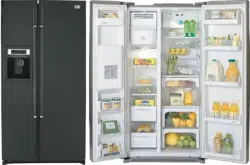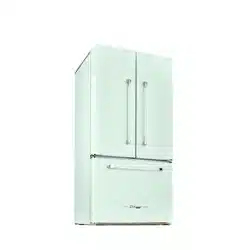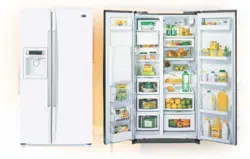
LRSC 26945TT
LRSC 26944TT LRSC 26944SW
LRSC 26930TT LRSC 26930SW
LRSC 26922TT LRSC 26922SW
LRSC 26920TT LRSC 26920SW
LRSC 26911TT LRSC 26911SW
LRSC 26910TT LRSC 26910SW
website:
http://www.lgservice.com
2
Entry
Important Safety Instruction
Identification of Parts
Where to Install
Door Removal
Door Replacement
Water Pipe Installation
Water Connection Instruction Guide
Operation Instruction Guide
Height Adjustment
Starting
Adjusting the Temperatures and functions
(Dispenser/Automatic Icemaker)
Shelf
Wine Holder
Can Server Adjustment
Egg Bin
Humidity Control in the Vegetable Compartment
Convert Into a Vegetable or Meat Compartment
Optichill Temperature Transition Corner
Temperature Change at Optichill
Optichill
Location of Foods
Storing Foods
How to Dismantle Parts
General Information
Cleaning
Troubleshooting
Table of Contents
Introduction
Installation
Operation
Suggestion on
Food Storage
Care and
Maintenance
3
3
4
5
6
7
7
8
10
12
13
13
19
19
19
20
21
21
21
20
20
22
23
24
26
26
27
Entry
The model and serial numbers are found on the inner case or back of refrigerator
compartment of this unit. These numbers are unique to this unit and not
available to others. You should record requested information here and retain
this guide as a permanent record of your purchase. Staple your receipt here.
Date of purchase :
Dealer :
Dealer address :
Dealer phone no. :
Model no. :
Serial no. :
Before use, this refrigerator must be properly installed and located in accordance with
the installation instructions in this manual.
Never unplug your refrigerator by pulling on the power cord. Always grip the plug firmly
and pull it straight out from the outlet.
When moving your appliance away from the wall, be careful not to roll over the power
cord or to damage it in any way. Do not crush or damage the water line.
After your refrigerator is in operation, do not touch the cold surfaces in the freezer
compartment
, particularly when your hands are damp or wet. Skin could adhere to
these extremely cold surfaces.
Unplug the power cord from the power outlet for cleaning or other requirements. Never
touch it with wet hands because you can get an electric shock or be injured.
Never damage, bend, kink, pull out, or twist the power cord because damage to the
power cord can cause product failure, fire, or electric shock. If you have doubts the
appliance is properly grounded, consult a qualified electrician.
Never place glass products in the freezer because they may be broken from expansion
when their contents are frozen.
Never put your hands within the ice storage bin of the automatic icemaker. You can be
injured by the operation of the automatic icemaker.
The appliance is not intended for use by young children without supervision.
Young children should be supervised to ensure that they do not play with the appliance.
Never allow anyone to climb, sit, stand, or hang on the door. These actions may
damage the refrigerator and even tip it over, causing severe personal injury.
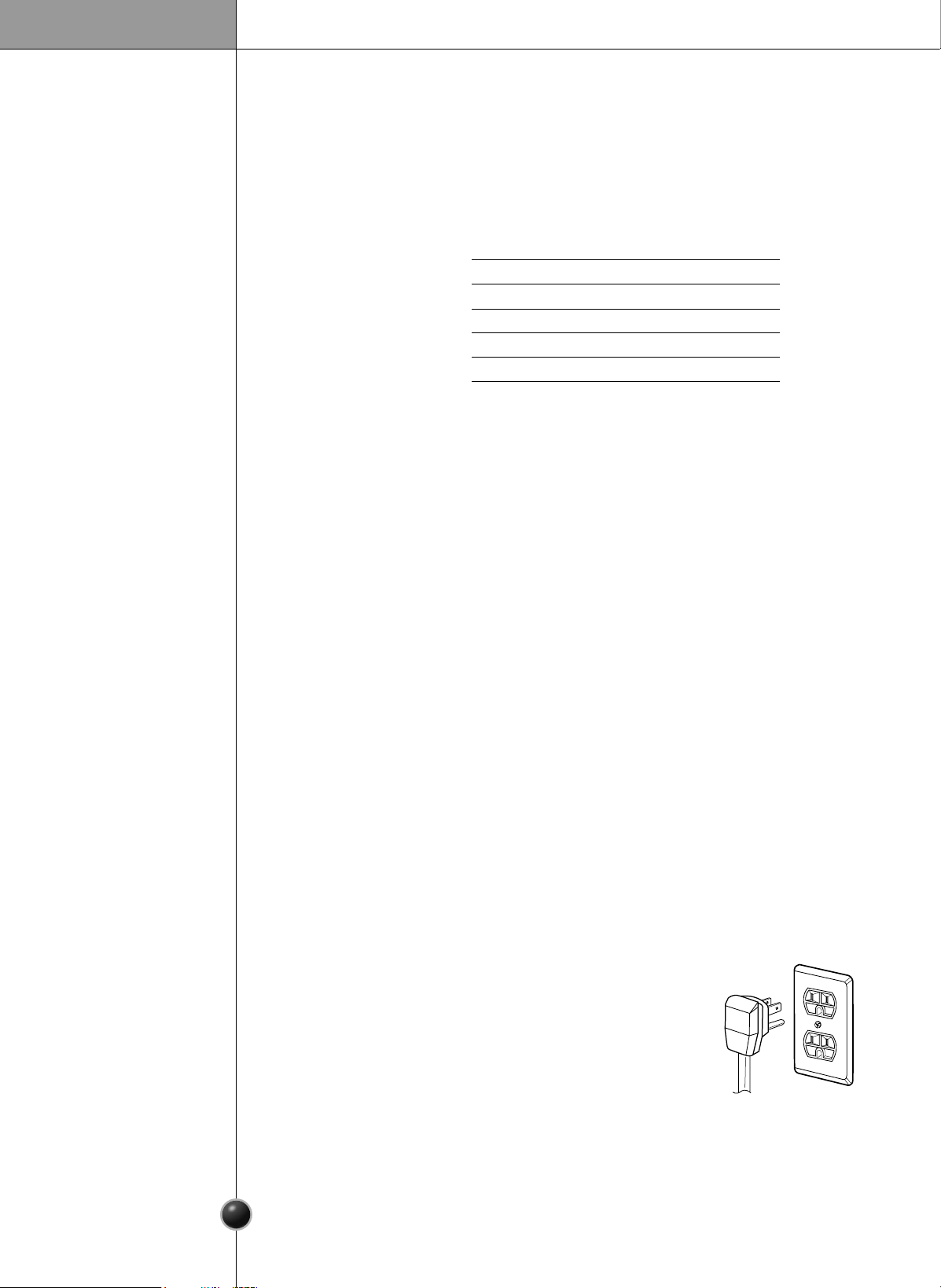
Before you move your refrigerator into its final location,
it is important to make sure you have the proper electrical
connection:
A 115 Volt, 60 Hz., AC only 15, or 20 ampere fused, grounded
electrical supply is required. It is recommended that a separate
circuit serving only your refrigerator be provided. Use an outlet that
cannot be turned off by a switch. Do not use an extension cord.
The refrigerator-freezer should be so positioned that the supply plug
is accessible for quick disconnection in the event of an emergency.
If the supply cord is damaged, it must be replaced by the manufacturer or its service agent or
a similarly qualified person in order to avoid any hazard.
Introduction
3
Important safety instruction
Recommended
Grounding
Method
Accessibility of
Supply Plug
Supply Cord
Replacement
4
Identification of Parts
DANGER: Risk of child entrapment.
Before you throw away your old refrigerator or freezer:
Take off the doors but leave the shelves in place so that children may not easily climb
inside.
The appliance is not intended for use by young children without supervision.
Young children should be supervised to ensure that they do not play with the appliance.
Don’t store or use gasoline or other flammable vapor and liquids in the vicinity of this or
any other appliance.
In the event of an electric short circuit, grounding (earthing) reduces the risk of electric
shock by providing an escape wire for the electric current.
In order to prevent possible electric shock, this appliance must be grounded.
improper use of the grounding plug can result in an electric shock. Consult a qualified
electrician or service person if the grounding instructions are not completely
understood, or if you have doubts on whether the appliance is properly grounded.
Child Entrapment
Warning
Don’t Store
Grounding (Earthing)
Introduction
•
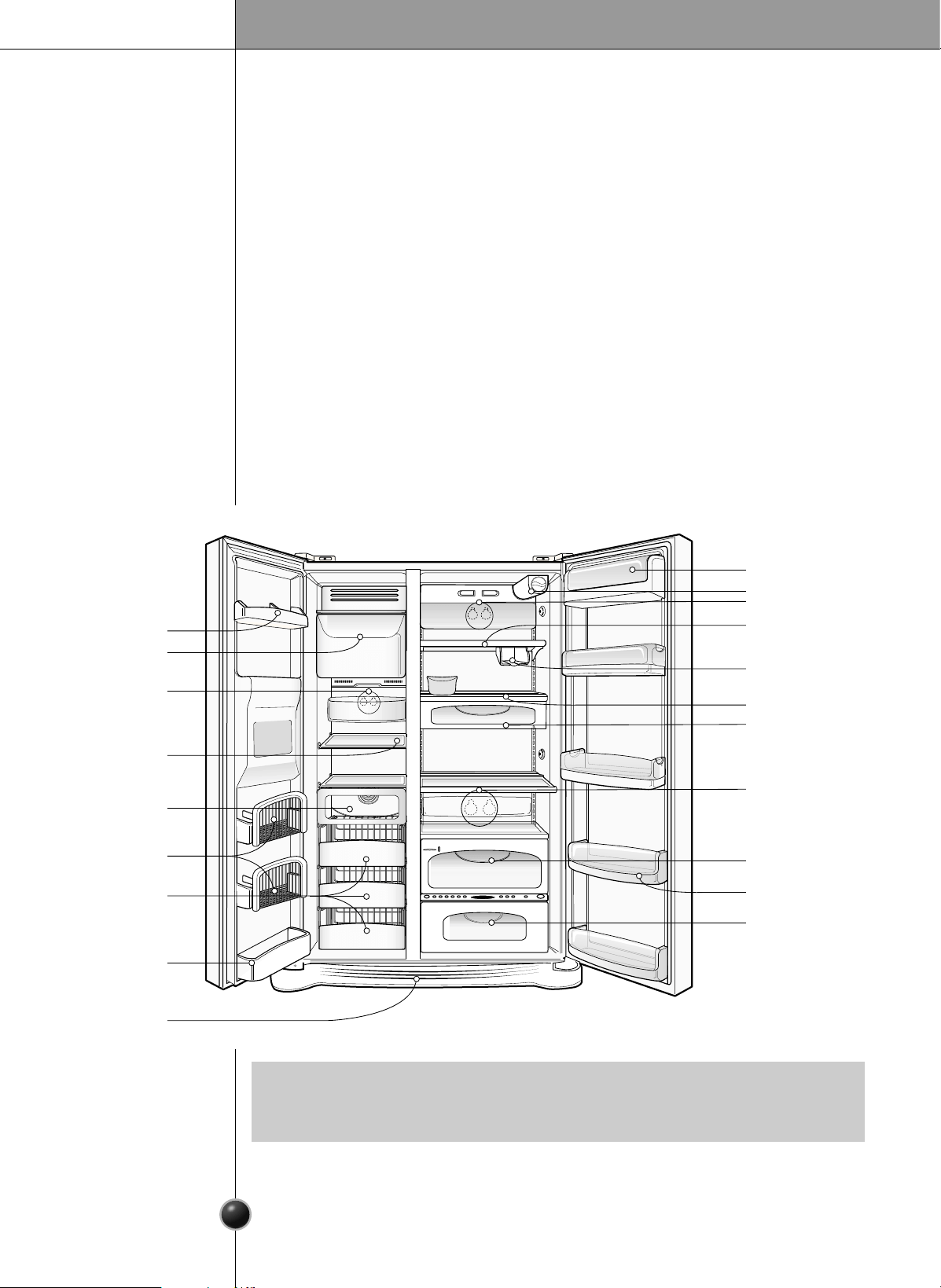
If you found some parts missing of different from your unit, they may be parts only
used in other models. (i.c. the Optichill is not included in all models)
NOTE
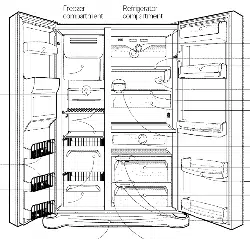
Freezer
Compartment
Refrigerator
Compartment
Dairy Corner
Water Filter
Lamp
Door Rack
Lamp
Automatic
Icemaker
Shelf
(steel or glass)
Jet Freezing
Door Rack
Drawer
Door Rack
Lower Cover
Shelf
Can Server
Shelf
Snack Drawer
Lamp
Vegetable Drawer
Door Rack
Optichill
Installation
5
Select a Good
Location
Where to Locate
1. Place your appliance where it is easy to use.
2. Avoid placing the unit near heat sources, direct sunlight, or moisture.
3. To avoid vibrations, the appliance must be leveled.
4. Do not install this refrigerator in areas where the ambient temperature is below 41°F.
It will have an adverse effect on performance.
Door removal
Failure to do so could result in death or serious injury.
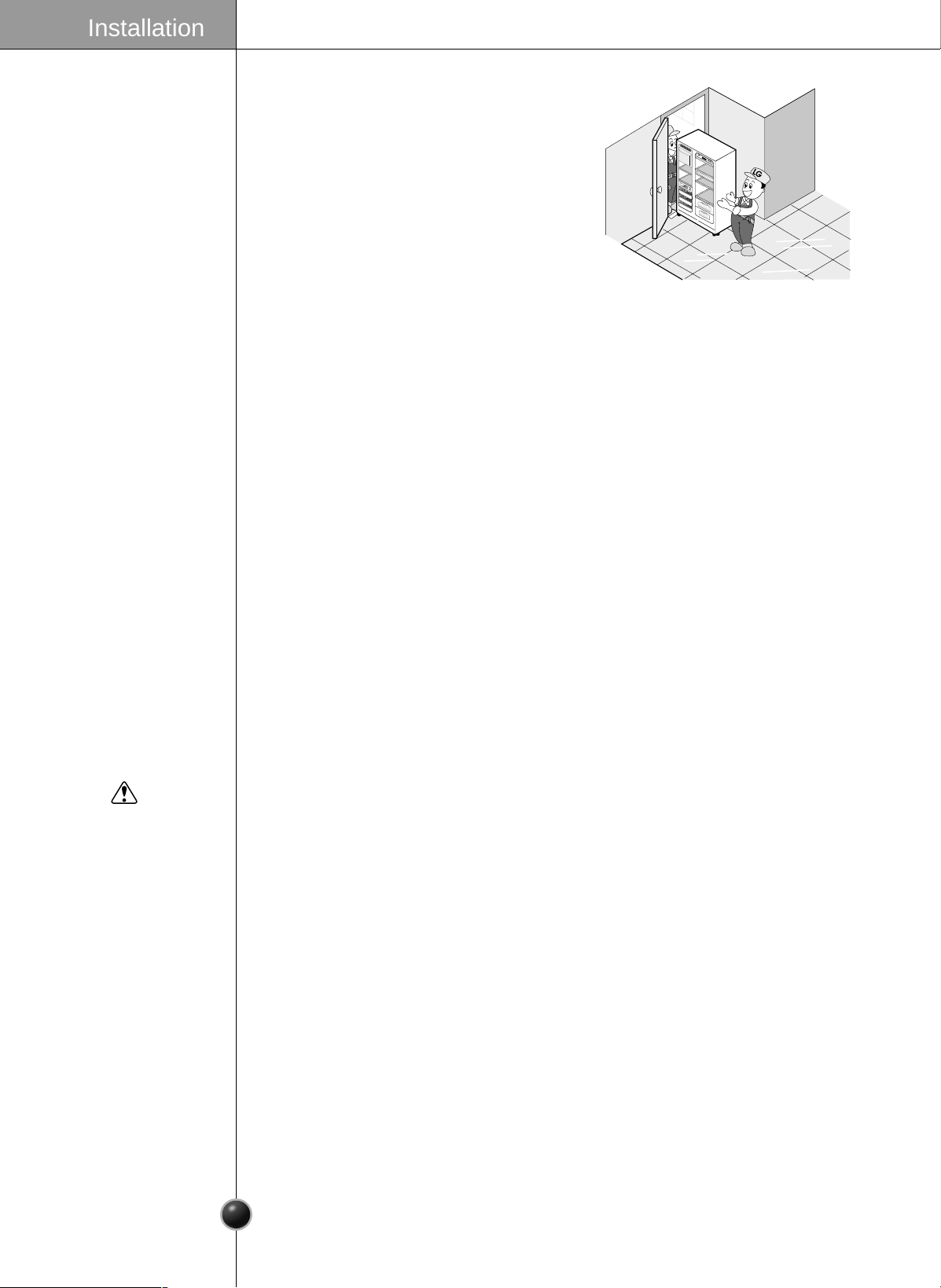
If your entrance door is too narrow for the
refrigerator to pass through, remove the
refrigerator door and pass the refrigerator laterally.
Electric Shock Hazard
Disconnect electrical supply to refrigerator before installing.
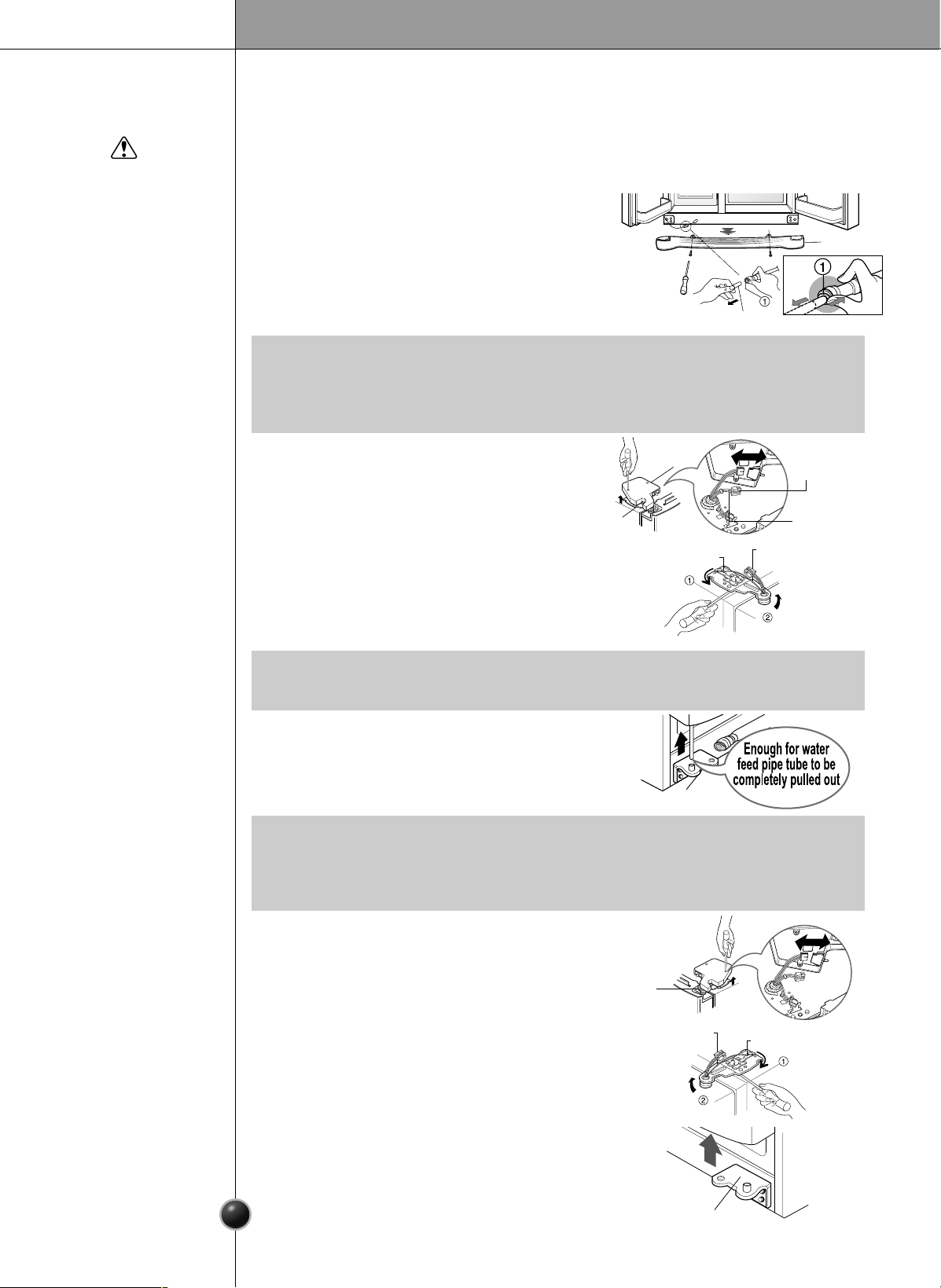
Remove the lower cover by lifting upward, and
then pull up the water feed tube while pressing
area
shown in the figure to the right.
Remove Lower
Cover and
Water Feed Tube
Warning
Remove the
Freezer
Compartment
Door
Remove the
Refrigerator
Door
Installation
6
1) Removing the hinge cover by loosening the
screws. Disconnect all connections except
the ground line.
2) Remove the keeper by rotating it counter
clockwise
and then lifting the upper
hinge up
.
3) Remove the freezer compartment door by
lifting it upward. This time, the door should
be lifted enough for the water feed tube to
be completely pulled out.
1) Loosen the hinge cover screws and remove
the cover. Remove connection wire, if any,
except for the ground line.
2) Remove keeper by rotating it clockwise
and then remove the upper hinge by lifting
it up
.
3) Remove the refrigerator compartment door
by lifting it up.
•
If a tube end is deformed or abraded, trim the part away.
Disconnecting the tube under the door causes about 1.5 litters water to flow out.
Please put up a big container to prevent it.
NOTE
•
When removing the upper hinge, be careful that the door does not fall forward .
NOTE
•
After removing the door, take in into the kitchen where you are installing the
refrigerator. Lay it down on a blanket and be careful to avoid damaging the water
feed tube.
NOTE
Lower Cover
Lower hinge
Lower Hinge
Keeper
Water Feed Tube
Connection
Wires
Connection
Wires
Hinge
Cover
Upper Hinge
Upper Hinge
Keeper
Upper Hinge
Earth Line
7
Door replacement
Feed water tube installation
Push the refrigerator sideways through the
entrance door as shown in the right picture.
Automatic icemaker operation needs water pressure of 21.3~121psi(lb/inch
2
) (That
is, an instant paper cup (7
0z
) will be fully filled within 3 sec.).
If water pressure does not reach the rating 21.3psi(lb/inch
2
) or below, it is necessary
to purchase a separate pressure pump for normal automatic icemaking and cool
water feed.
Keep the total length of the water feed tube within 40 feet and be careful not to
bend or kink the tube. If the tube is longer than 40 feet, the icemaker and water
dispenser will not operate properly.
Install the water feed tube at a place free from heat.
Connect to potable water supply only.
Refer to instructions with water filter kit for installation.
Mount the doors in the reverse order of removal after the refrigerator is brought to
the installation area.
Move the
Refrigerator
Before
Installation
Warning
1
2
3
45
M
a
x
FR
Z
T
E
MP
R
E
F
TEM
P
M
i
n
5
4
3
2
1
M
ax
Installation
8
Water Connection Instruction Guide
Read all directions carefully before you begin.
Connecting
the Refrigerator
to a Water Source
Connect to potable water supply only.
Warning
•
If operating the refrigerator before installing the water connection, turn icemaker
to the OFF position to prevent operation without water.
•
All installations must be in accordance with local plumbing code requirements.
•
Use copper tubing and check for leaks.
•
Install copper tubing only in areas where temperatures will remain above freezing.
•
It may take up to 24 hours for your icemaker to begin producing ice.
IMPORTANT
The icemaker water valve contains a flow washer which is used as a water
pressure regulator.
The icemaker needs to be connected to a cold water line with water pressure
30~120psi(lb/inch
2
)
Cold Water Supply
Standard screwdriver
7/16-inch and 1/2-inch open-end wrenches or two adjustable wrenches
1/4-inch nut driver
1/4-inch drill bit
Hand drill or electric drill (properly grounded)
Tools Required
•
Your refrigerator dealer has a kit available with a 1/4-inch saddle-type shut-off valve,
a union, and copper tubing. Before purchasing, make sure a saddle-type valve
complies with your local plumbing codes. Do not use a piercing-type or 3/16-inch
saddle valve which reduces water flow and clogs more easily.
NOTE
Installation
9
1. Unplug refrigerator or disconnect power.
2. Turn OFF main water supply. Turn on the nearest faucet to relieve the pressure
on the line. It may help to open an outside hydrant to allow the water to drain
from the line in the house.
3. Find a 1/2-inch to 1-1/4-inch vertical COLD water pipe near the refrigerator.
Connect
the Tubing to
Water Line
•
Horizontal pipe will work, but the following precaution must be taken: Drill on the top of
the pipe, not the bottom. This will help keep water away from the drill. This also keeps
normal sediment from collecting in the valve.
NOTE
4. To determine the length of copper tubing you will need, measure from the
connection on the lower left rear of the refrigerator to the water pipe. Add 7
feet (2.1m) to allow for moving refrigerator for cleaning. Use 1/4-inch O.D.
(outside diameter) copper tubing. Be sure both ends of copper tubing are cut
square.
5. Using a drill, drill a 1/4-inch hole in the cold water pipe you have selected.
6. Fasten shut-off valve to cold water pipe with pipe clamp. Be sure outlet end is
solidly in the 1/4-inch drilled hole in the water pipe and that the washer is
under the pipe clamp. Tighten packing nut. Tighten the pipe clamp screws
carefully and evenly so washer makes a watertight seal. Do not overtighten or
you may crush the copper tubing, especially if soft (coiled) copper tubing is
used. Now you are ready to connect the copper tubing.
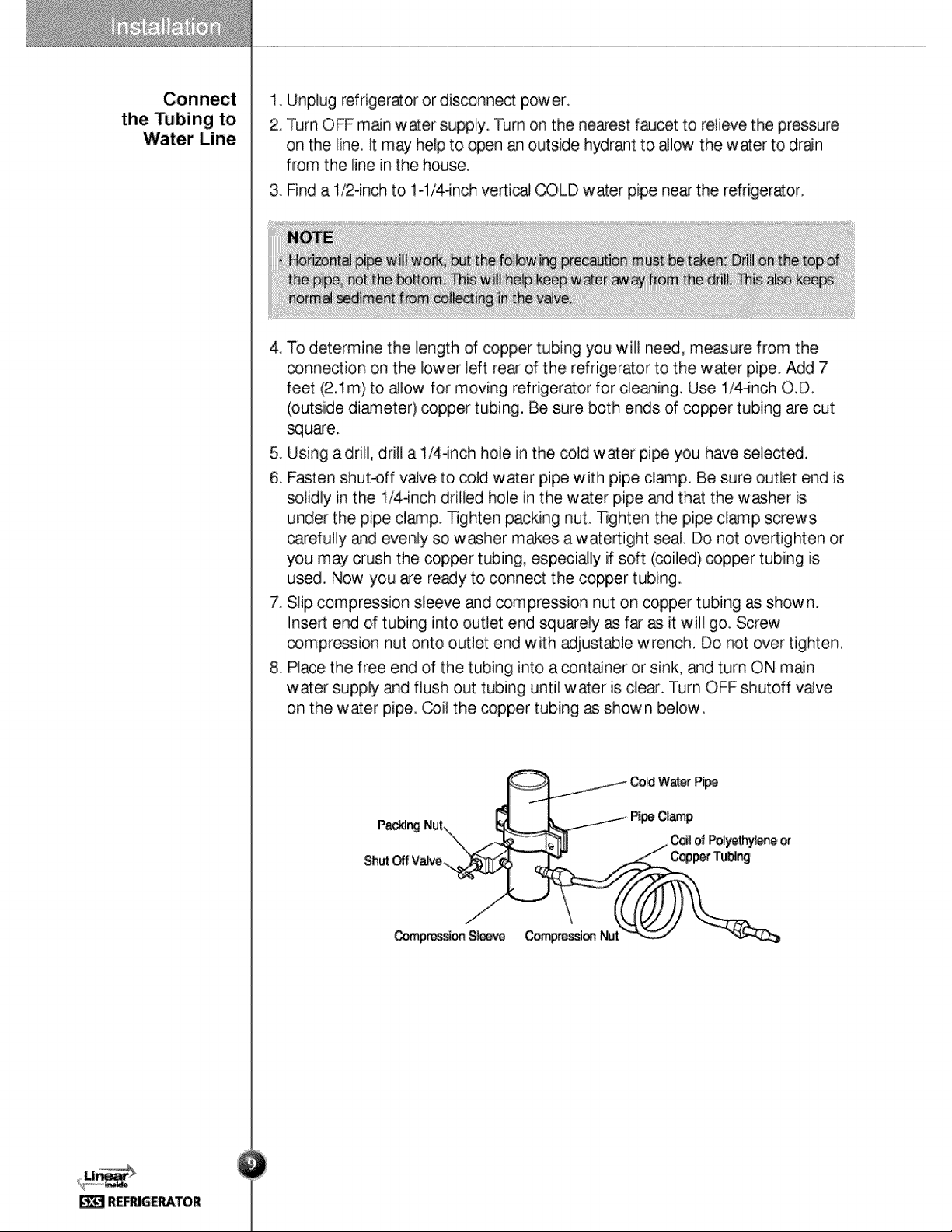
7. Slip compression sleeve and compression nut on copper tubing as shown.
Insert end of tubing into outlet end squarely as far as it will go. Screw
compression nut onto outlet end with adjustable wrench. Do not over tighten.
8. Place the free end of the tubing into a container or sink, and turn ON main
water supply and flush out tubing until water is clear. Turn OFF shutoff valve
on the water pipe. Coil the copper tubing as shown below.
Cold Water Pipe
Pipe Clamp
Coil of Polyethylene or
Copper Tubing
Compression NutCompression Sleeve
Shut Off Valve
Packing Nut
Installation
10
Operation Instruction Guide
Before making the connection to the refrigerator, be sure the refrigerator
power cord is not plugged into the
wall outlet.
• If your refrigerator does not have a
water filter, we recommend
installing one. If your water supply
has sand or particles that could clog
the screen of the refrigerator’s
water valve. Install the filter in the
water line near the refrigerator.
Remove the plastic flexible cap
from the refrigerator connection.
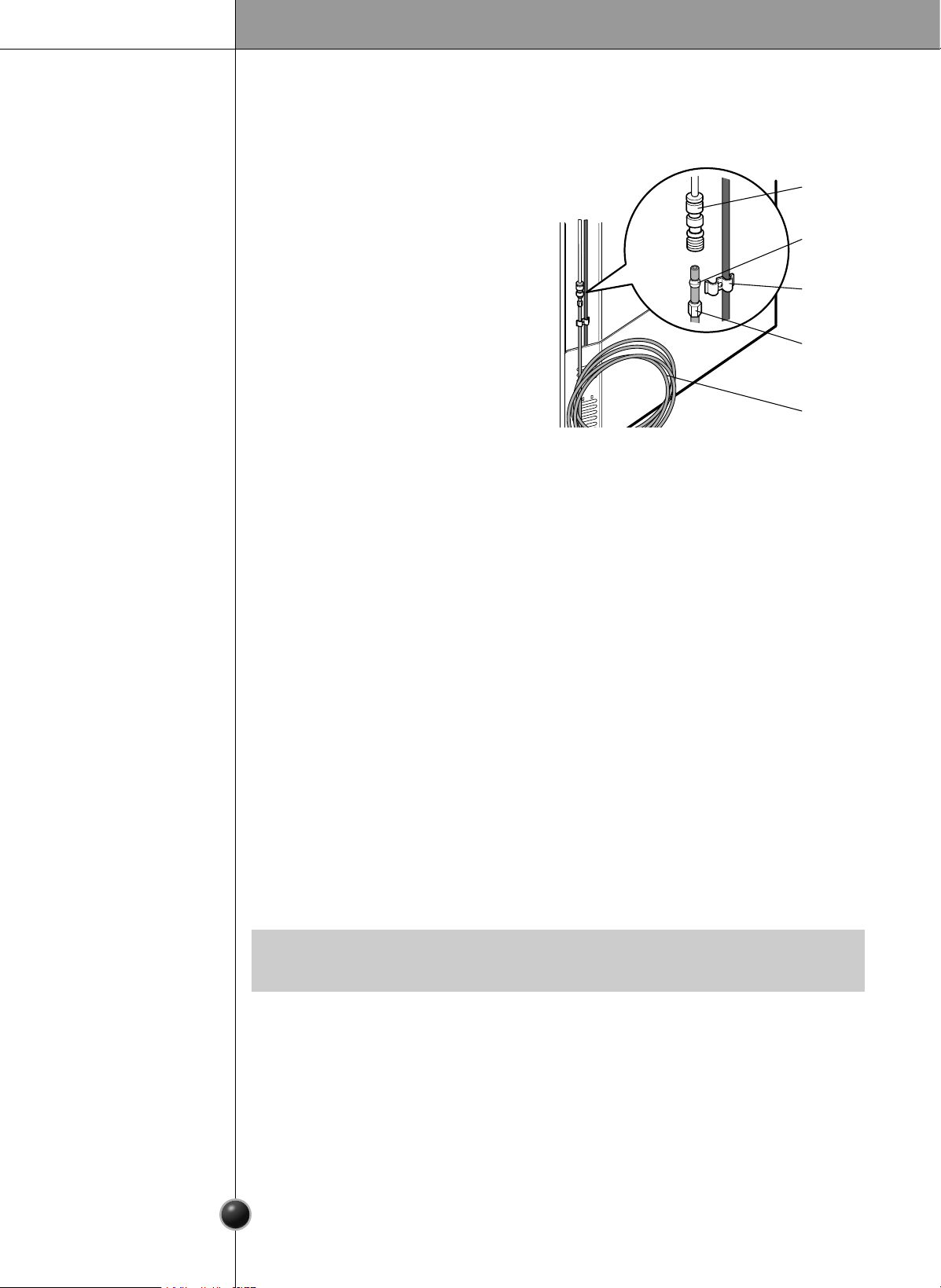
1. Remove the plastic flexible cap
from the water valve.
2. Place the compression nut and
ferrule (sleeve) onto the end of the tubing as shown.
3. Insert the end of the copper tubing into the connection as far as possible. While
holding the tubing, tighten the fitting.
Connect the Tubing
to the Refrigerator
Tighten any connections that leak.
Plug In the Refrigerator
Arrange the coil of copper tubing behind the refrigerator so it does not vibrate
against the back of the refrigerator or against the wall. Push the refrigerator
back to the wall.
Start the lcemaker
Set the icemaking stop switch to the ON position The icemaker will not begin
to operate until it reaches its operating temperature of 15 °F (-9 °C). It will then
begin operation automatically if the icemaking stop switch is in the ON
position.
Turn the Water On at
the Shutoff Valve
The automatic icemaker makes 8 cubes at a time, 120/150 pieces per day.
But these quantities may vary according to circumstance, including ambient
temperature, door openings, freezer load.etc.
The Icemaker stops when the bin is full.
Automatic Ice maker
Refrigerator
Connection
Ferrule
(sleeve)
1/4"
Compression
Nut
Tubing
Clamp
1/4"
Tubing
•
It is normal to hear a noise when ice drips into the bin.
NOTE
Installation
11
Ice is clumped together
When ice is clumped together, take the ice clumps out of the ice storage bin,
break them into small pieces, and then place them into the ice storage bin
again.
When the icemaker produces too small or clumped ice, the amount of water
supplied to the ice maker must be adjusted. Contact the service center.
If ice is not used frequently, it may clump together.
Power failure
Water may drop into the freezer compartment. Take the ice storage bin out and
discard all the ice. Dry the bin and replace it.
The unit is newly installed
It takes about 12 hours for a newly installed refrigerator to make ice.
When Icemaker
Does Not Operate
Smoothly
Throw away the ice.
The first ice and water may include particles or odor from the feed water pipe or
feed water box.
This is also necessary if the refrigerator has not been used for a long time.
Never store beverage cans or other foods in ice storage bin for the purpose of rapid
cooling.
Such actions may damage the automatic ice maker.
Never remove the icemaker cover.
Shake the bin occasionally to cause the ice to settle.
Ice may pile up just around the icemaker causing the icemaker to think that the ice
storage bin is full.
If discolored ice is dispensed, contact an Authorized Service Center immediately.
Do not use the ice or water until the problem is corrected.
CAUTION
Installation
12
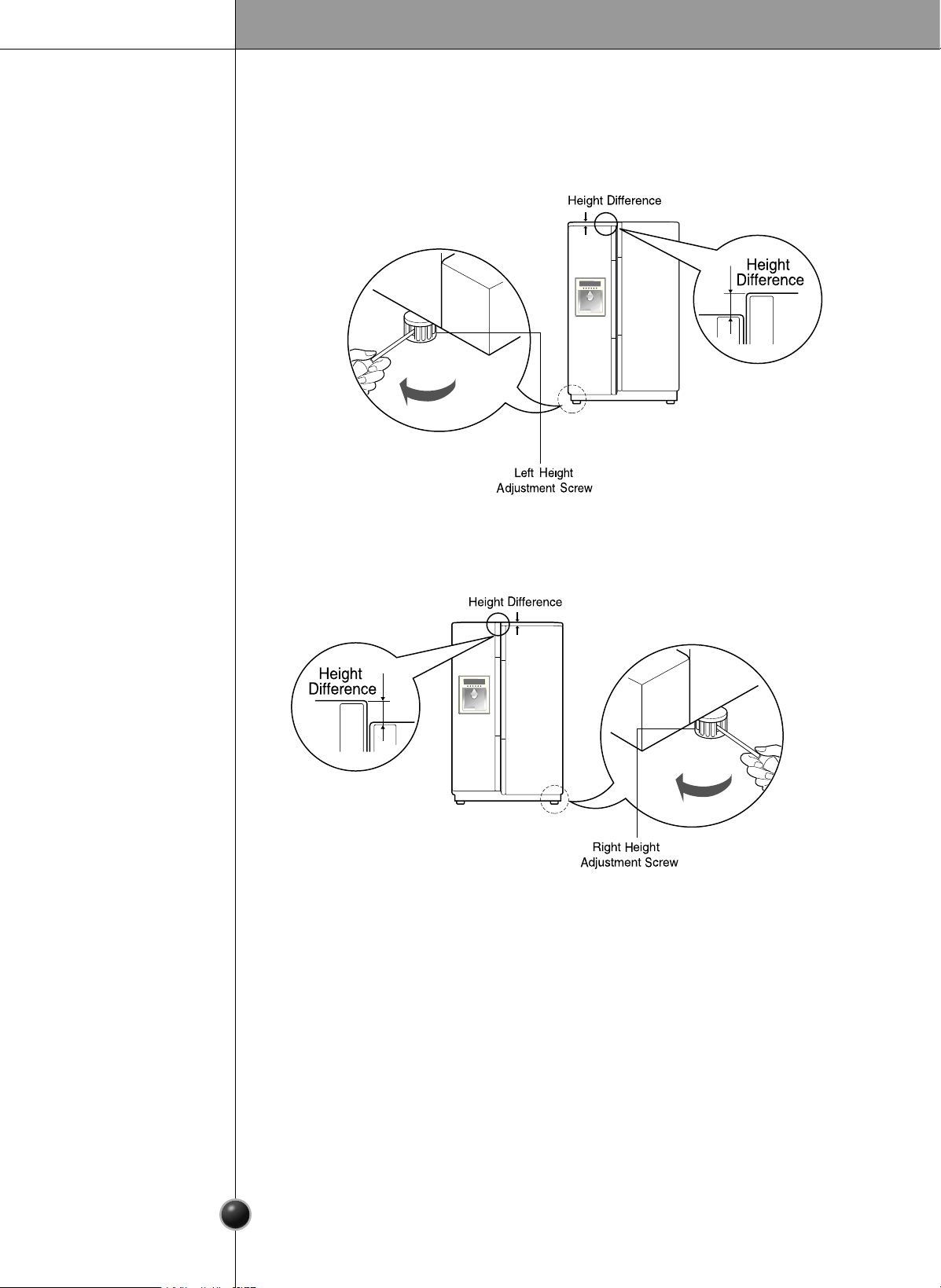
Height Adjustment
Level the door by inserting flat (
-
type) driver into the groove of the left height adjusting
screw and rotating it clockwise .
Level the door by inserting flat (
-
type) driver into the groove of the right height
adjusting screw and rotating it clockwise .
The refrigerator doors will close smoothly by adjusting the height adjusting screw. If
the doors do not close correctly, performance may be affected.
If the freezer
compartment door
is lower than the
refrigerator
compartment door
If the freezer
compartment door
is higher than the
refrigerator
compartment door
After leveling the
door height
Installation
Next
1. Wipe off all dust accumulated during shipping and clean your appliance thoroughly.
2. Install accessories such as the ice cube box, cover evaporating tray, etc., in their
proper places. They are packed together to prevent possible damage during shipping.
3. Connect the power supply cord (or plug) to the outlet. Use this appliance on a
single-outlet circuit.
13
Starting
Adjusting The Temperatures and Functions
When your refrigerator is first installed, allow it to stabilize at normal operating
temperatures for 2-3 hours prior to filling it with fresh or frozen foods.
If operation is interrupted, wait 5 minutes before restarting.
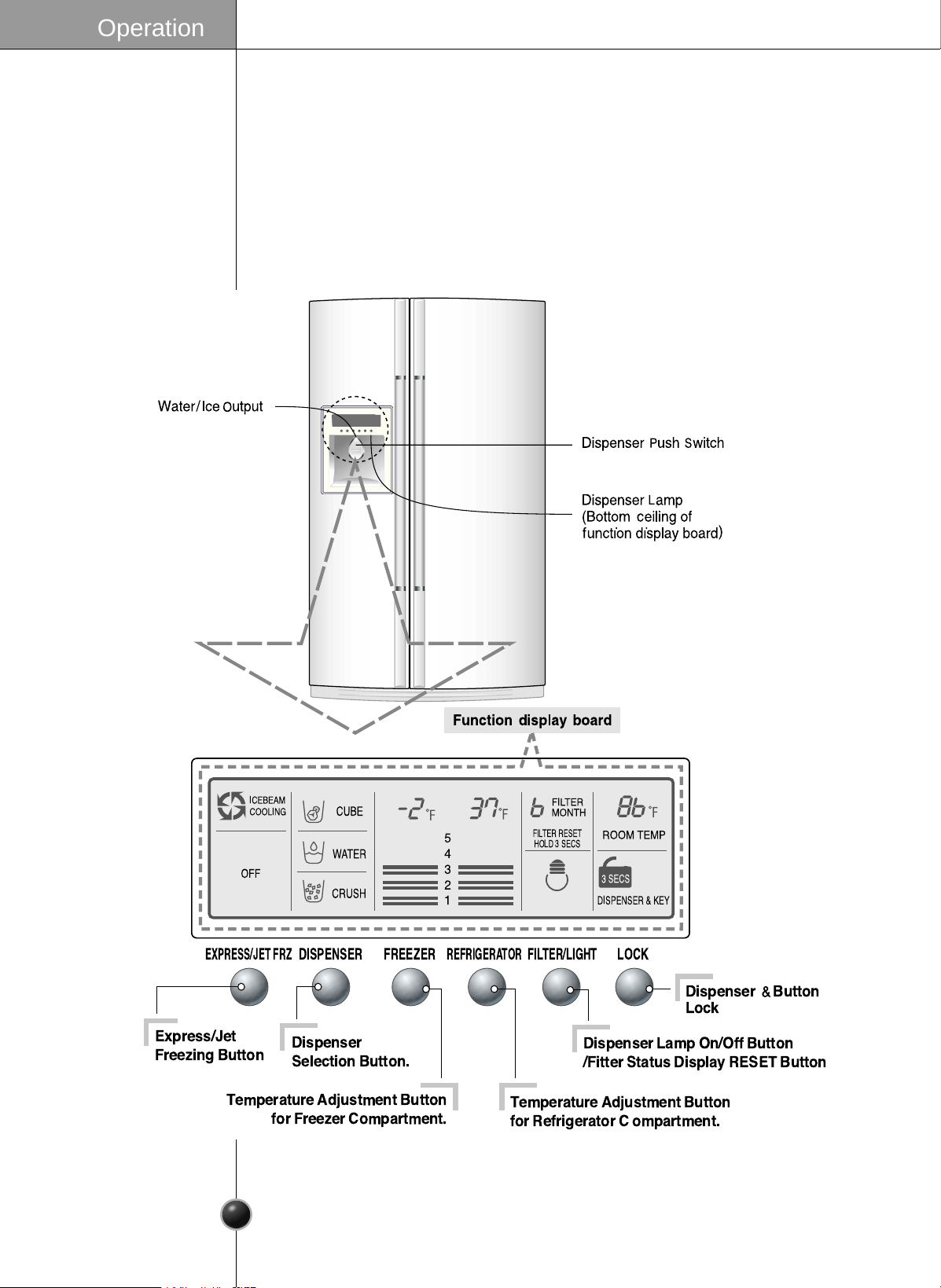
JET FRZ : APPLICABLE TO SOME MODEL ONLY.
When the button is pushed, the buzzer sounds.
EXPRESS/JET FRZ
DISPENSER FREEZER
REFRIGERATOR
FILTER/LIGHT
LOCK
ICEBEAM
COOLING
OFF
CUBE
WATER
ROOM TEMP
3 SECS
DISPENSER & KEY
CRUSH
Dispenser
Selection Button.
Express/Jet
Freezing Button
Dispenser
Button
Lock
Dispenser Lamp On/Off Button
/Fitter Status Display RESET Button
Temperature Adjustment Button
for Refrigerator C ompartment.
Temperature Adjustment Button
for Freezer Compartment.
FILTER RESET
HOLD 3 SECS
FILTER
MONTH
5
4
3
2
1
Operation
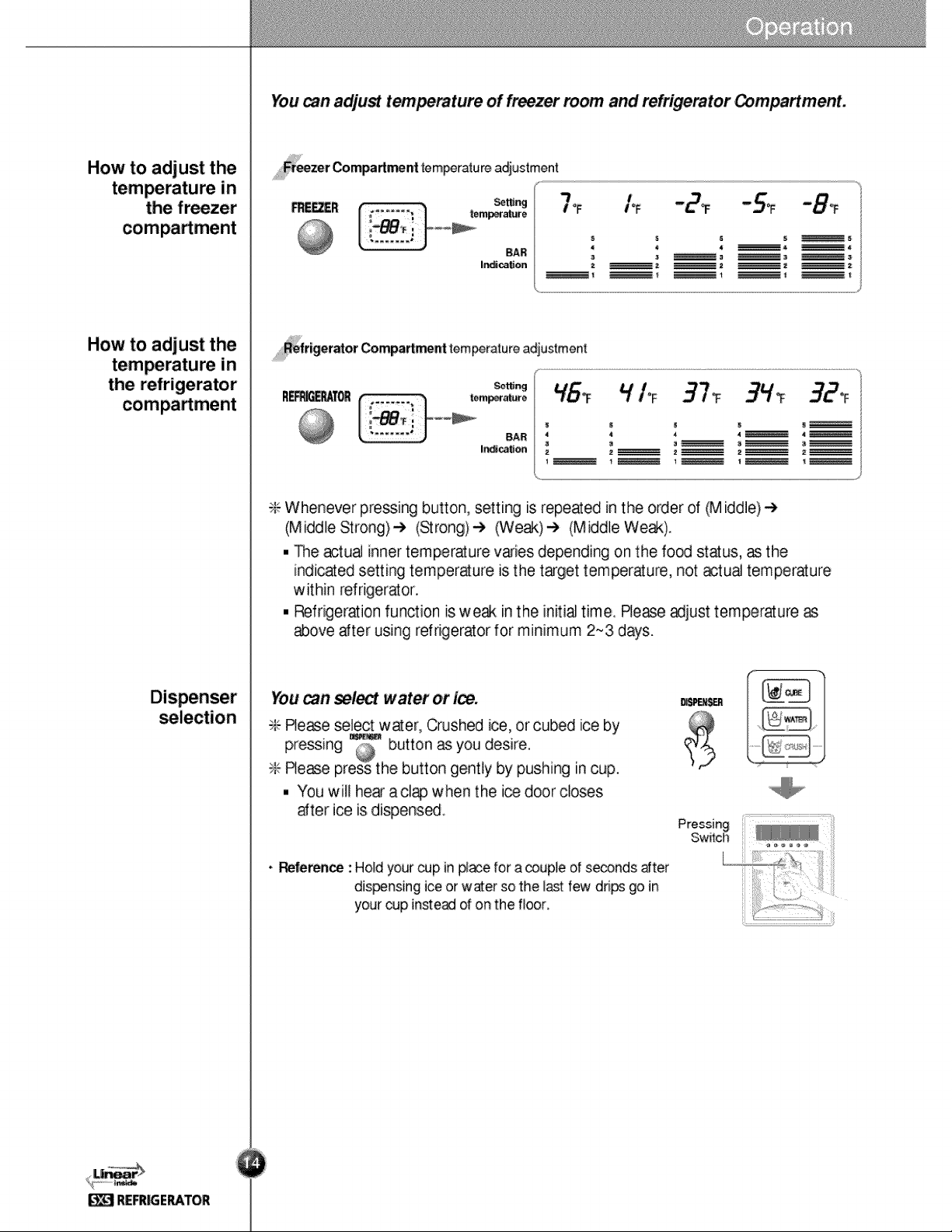
Freezer Compartment temperature adjustment
Setting
temperature
BAR
Indication
Setting
temperature
BAR
Indication
Refrigerator Compartment temperature adjustment
You can adjust temperature of freezer room and refrigerator Compartment.
❇ Whenever pressing button, setting is repeated in the order of (Middle)
➔
(Middle Strong)
➔
(Strong)
➔
(Weak)
➔
(Middle Weak).
The actual inner temperature varies depending on the food status, as the
indicated setting temperature is the target temperature, not actual temperature
within refrigerator.
Refrigeration function is weak in the initial time. Please adjust temperature as
above after using refrigerator for minimum 2~3 days.
You can select water or ice.
❇ Please select water, Crushed ice, or cubed ice by
pressing button as you desire.
❇ Please press the button gently by pushing in cup.
You will hear a clap when the ice door closes
after ice is dispensed.
How to adjust the
temperature in
the freezer
compartment
How to adjust the
temperature in
the refrigerator
compartment
Dispenser
selection
DISPENSER
WATER
CUBE
CRUSH
Operation
DISPENSER
•
Reference : Hold your cup in place for a couple of seconds after
dispensing ice or water so the last few drips go in
your cup instead of on the floor.
Pressing
Switch
14

The automatic icemaker can automatically make 8 cubes at a time,
120~150 pieces per day. This quantity may vary by circumstance, including ambient
temperature, door opening, freezer load. etc.
Icemaking stops when the ice storage bin is full.
If you don't want to use automatic icemaker, turn the icemaker switch to
OFF.
If you want to use automatic ice-maker again, change the switch to ON.
Ice is lumped together
If the ice lumps together, take it out, break it apart, and put it back into the storage
bin.
When the ice maker produces too small or lumped together ice, the amount of
water supplied to the ice maker needs to adjusted. Contact the service center.
❈
If ice is not used frequently, it may lump together.
Power failure
Ice may drop into the freezer compartment. Take the ice storage bin out and discard
all the ice then dry it and place it back. After the machine is powered again, crushed
ice will be automatically selected.
The unit is newly installed
It takes about 12 hours for a newly installed refrigerator to make ice.
Automatic
Icemaker
When ice maker
does not operate
smoothly
Please select this function for prompt freezer.
”OFF➝ EXPRESS FRZ➝ JET FRZ➝ OFF” or
”OFF➝ ON➝ OFF” is repeated whenever
pressing button.
The arrow mark graphic remains at the On
status after flickering 4 times when selecting
Special Refrigeration On
Prompt freezer function automatically turns off
after a fixed time passes.
JET FRZ : Applicable to some model only.
Jet Freezer
•
It is normal that a noise is produced when ice made drops into the ice storage bin.
NOTE
Operation
15
EXPRESS/JET FRZ
EXPRESS/JET FRZ
Ex) In selecting
On
Ex) In selecting
Off
EXPRESS FRZ EXPRESS FRZ
JET FRZ
This button stops operation of different
button and dispenser function.
Locking or Release is repeated whenever the
is pressed more than 3 seconds.
If you use the LOCK button, none of the other
buttons will work until you unlock them.
Lock
LOCK
Ex) In selecting
LOCK
Ex) In selecting
UNLOCK
3 SECS
LOCK
DISPENSER & KEY DISPENSER & KEY
3 SECS
LOCK
16
Operation
How to Use
Dispenser
DISPENSERDISPENSER DISPENSER
CRUSHED
WATER
CUBED
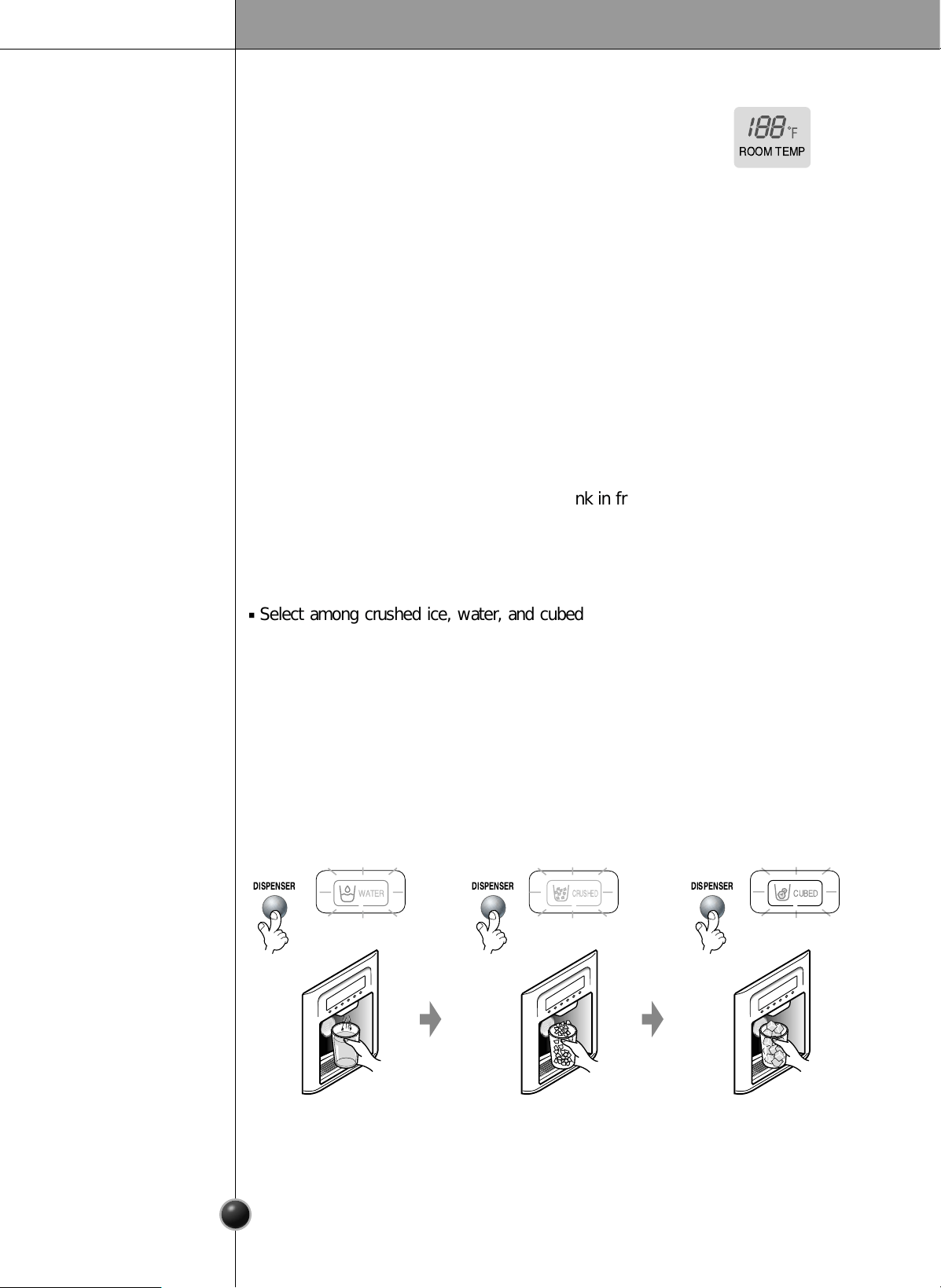
Select among crushed ice, water, and cubed ice and press the push switch with a
glass or other container.
The Other
Functions
Ambient Temperature Display Window.
Temperature is displayed only between 16°F ~ 120°F.
Temperature less than 15°F is indicated with LO and
temperature more than 121°F is indicated with HI.
Door open warning
A warning tone will sound 3 times at thirty-second intervals if the refrigerator or freezer
door is left open for more than sixty seconds.
Please contact with the local service center if warning continue to sound even after
closing the door.
Diagnosis (failure detection) function
Diagnosis function automatically detects failure when failure is found in product during
the use of refrigerator.
If your refrigerator fails, do not turn off the power. Instead, contact a local Authorized
service center or call our support line for assistance. Turning off the appliance will
make it more difficult for the service technician to determine the problem.
Crushed Ice
Light the crushed ice
lamp by pressing the
selection button.
•
C
rushed
ice will be
dispensed by pressing the
push switch with a glass.
Water
Light the water lamp
by pressing the
selection button.
•
Water will be dispensed
by pressing the push
switch with a glass.
Cubed Ice
Light the cubed ice
lamp by pressing
the selection
button.
•
Cubed ice will be dispensed
by pressing the push
switch with a glass.
ROOM TEMP
Water is cooled while stored in the water tank in freezer door, and then sent to the
dispenser.
Ice is made in the automatic icemaker and sent to the dispenser divided into crushed
or cubed ice.
How Ice/Cold
Water is Supplied
17
Operation
The automatic icemaker can automatically make 8 cubes at a time, 120-150 pieces
per day. This quantity may vary by circumstance, including ambient temperature,
door openings, freezer load. etc.
Icemaking stops when the ice storage bin is full.
If you don't want to use automatic icemaker, turn the icemaker switch to OFF.
If you decide you want to use the icemaker, turn the switch to ON.
Ice is lumped together
When ice is lumped together, take the ice out of the ice storage bin, break if into
small pieces, and then place them into the ice storage bin again.
When the ice maker produces too small or lumped together ice, the amount of
water supplied to the ice maker need to adjusted. Contact the service center.
❈
If ice is not used frequently, it may lump together.
Power failure
Ice may drop into the freezer compartment. Take the ice storage bin out and discard
all the ice then dry it and place it back. After the machine is powered again, crushed
ice will be automatically selected.
The unit is newly installed
It takes about 12 hours for a newly installed refrigerator to make ice in the freezer
compartment.
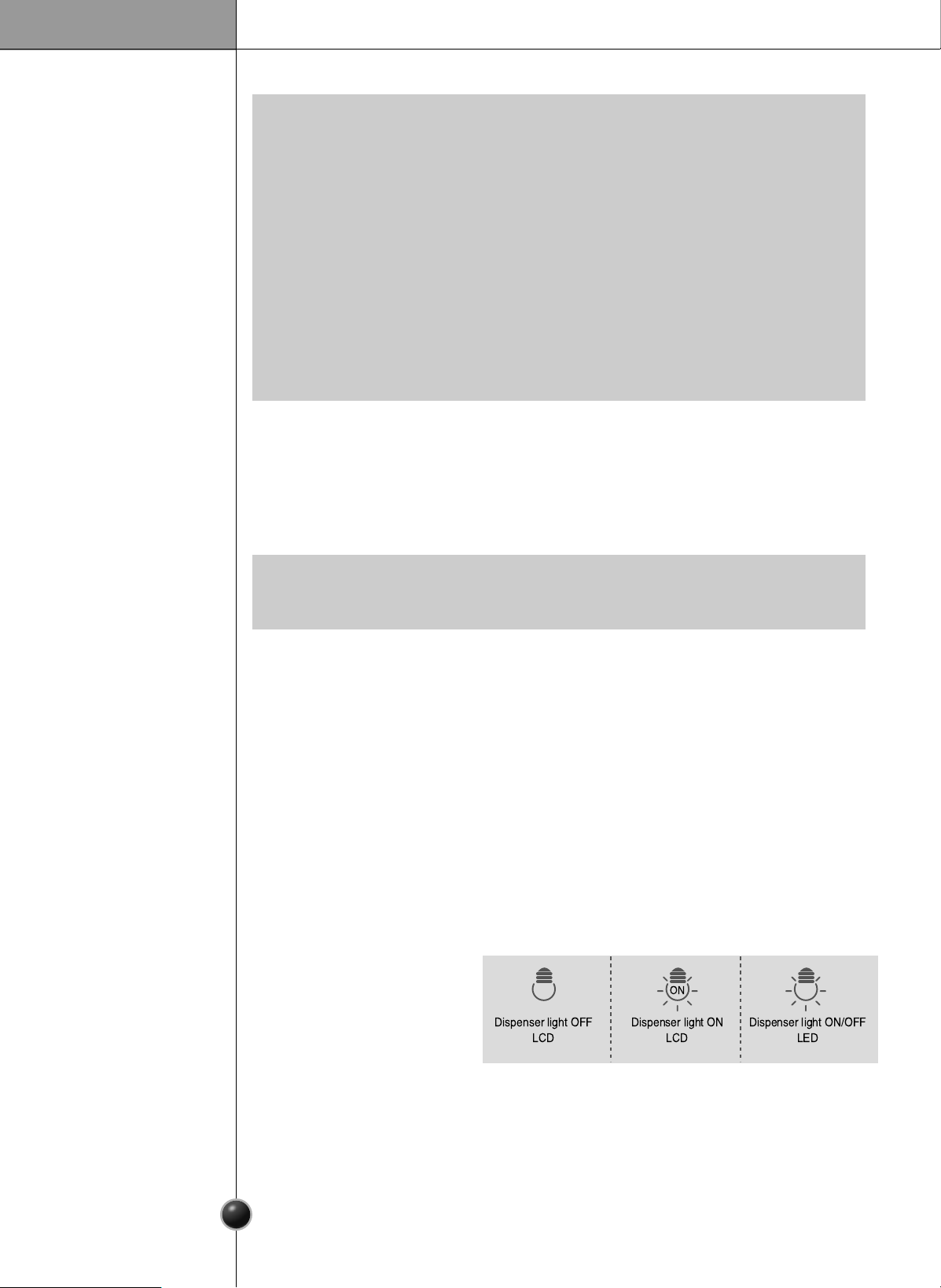
Dispenser Light
Dispenser switch or
dispenser light button turn
the dispenser light in the
dispenser on and off.
The dispenser light
Function is repeated
following below whenever
pressing “FILTER RESET/LIGHT” button.
If dispenser light continuously turns on more than 7 minutes with dispenser light
button, the dispenser light turns off automatically by compulsion.
Automatic Ice
Maker
When Ice Maker
Does Not
Operate
Smoothly
•
Crushed ice will be automatically selected after a power failure or when the power plug
is connected again.
•
Place glasses or other containers near the ice outlet otherwise ice is likely to be dropped
on the floor.
•
A snap sound will be heard 5 seconds after ice is fully dispensed.
This sound is made when the ice outlet is closed.
•
Please leave your glass near the ice outlet for 2-3 seconds after releasing your glass
from pressing the push switch to allow any left over water or ice to be dispensed.
•
Please wipe away water dropped below the dispenser by removing the water collector
cover.
•
If cubed ice is selected following crushed ice, there may still be some left over
crushed ice dispensed.
NOTE
•
It is normal that a noise is produced when ice made is dropped into the ice storage
bin.
NOTE
Dispenser light ON
LCD
ON
Dispenser light OFF
LCD
Dispenser light ON/OFF
LED
18
Operation
Throw away the ice (about 20 pieces) and water (about 7 glasses) first made after
refrigerator installation.
This is also necessary when the refrigerator has not been used for a long time.
Keep children away from the dispenser.
Children may play with or damage the controls.
Be careful that food does not block the ice passage.
If foods are placed at the entrance of ice passage, the dispenser may malfunction. The
passage may also become blocked with frost if only crushed ice is used. Remove the
frost that accumulates.
Storing cans or other items in the ice bin may damage
the icemaker or the container may burst.
Never use thin crystal glass or crockery to collect ice.
Such glasses or containers may be broken.
Put ice first into a glass before filling water or other
beverages.
Water may be splashed if ice is added to existing liquid in a
glass.
Keep your hands and tools out of the ice door and passage.
You might break something or injure yourself.
Never remove the ice maker cover.
Shake the ice bin occasionally to level the ice in it.
Sometimes the ice piles up near the icemaker, causing the icemaker to misread the bin
level and stop producing ice.
If discovered ice or water is dispensed, contact an Authorized service center
immediately and discontinue use until the problem is corrected.
Never use too narrow or deep glass.
Ice may be jammed in ice passage and, thus, the refrigerator may be failed.
Keep the glass at a proper distance from ice outlet.
A glass too close to the outlet may hinder ice from coming out.
Cautions
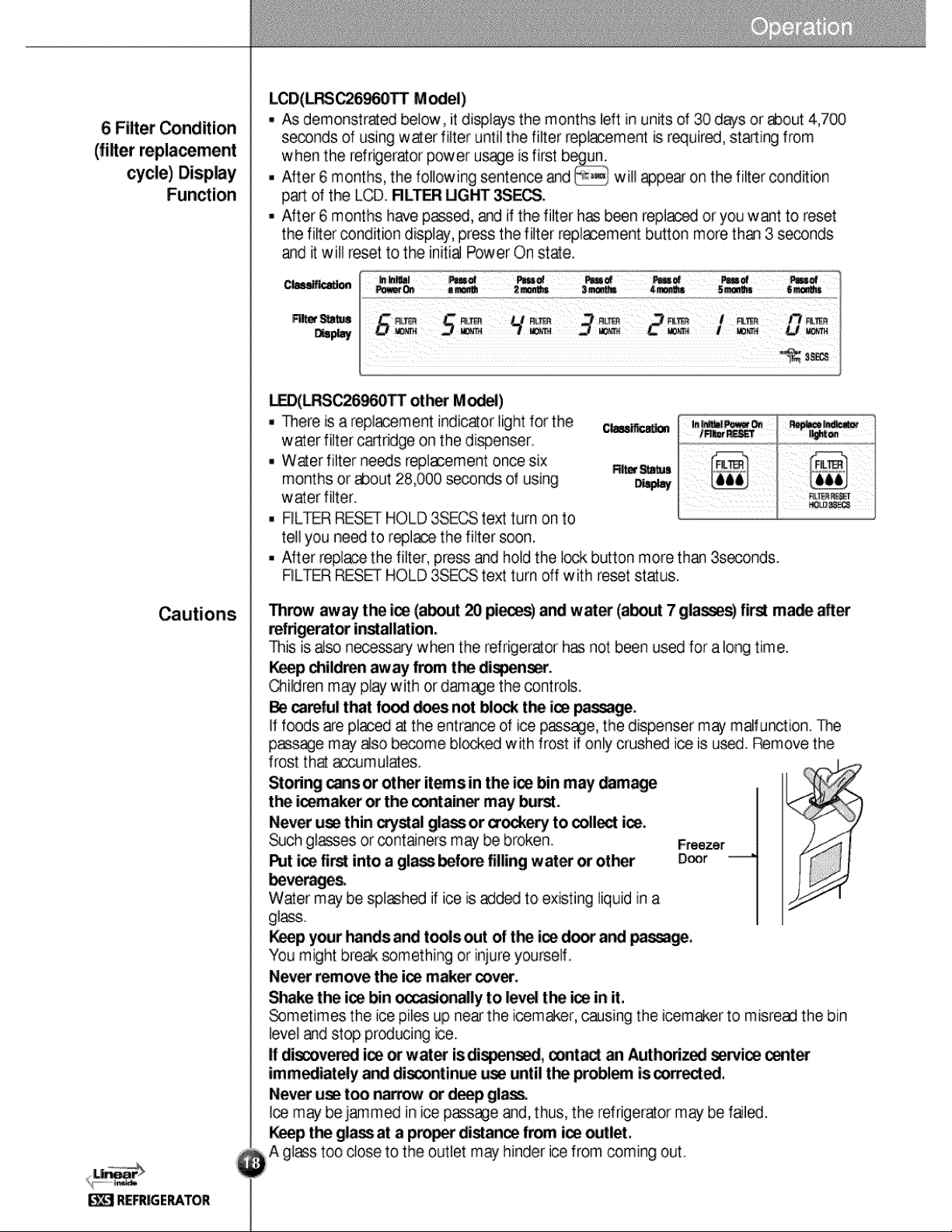
LCD(GR-:267AV(T)BA Model)
As demonstrated below, it displays the months left in units of 30 days or about 4,700
seconds of using water filter until the filter replacement is required, starting from
when the refrigerator power usage is first begun.
After 6 months, the following sentence and will appear on the filter condition
part of the LCD. FILTER LIGHT 3SECS.
After 6 months have passed, and if the filter has been replaced or you want to reset
the filter condition display, press the filter replacement button more than 3 seconds
and it will reset to the initial Power On state.
LED(GR-L267AV(T)BA other Model)
There is a replacement indicator light for the
water filter cartridge on the dispenser.
Water filter needs replacement once six
months or about 28,000 seconds of using
water filter.
FILTER RESET HOLD 3SECS text turn on to
tell you need to replace the filter soon.
After replace the filter, press and hold the lock button more than 3seconds.
FILTER RESET HOLD 3SECS text turn off with reset status.
6 Filter Condition
(filter replacement
cycle) Display
Function
Filter Status
Display
Classification
Pass of
6 months
Pass of
5 months
Pass of
4 months
Pass of
3 months
Pass of
2 months
Pass of
a month
In initial
Power On
FILTER
MONTH
3 SECS
FILTER LIGHT
6
FILTER
MONTH
5
FILTER
MONTH
4
FILTER
MONTH
3
FILTER
MONTH
2
FILTER
MONTH
1
FILTER
MONTH
0
3 SECS
FILTER LIGHT
Filter Status
Display
Classification
FILTER RESET
HOLD 3SECS
FILTERFILTER
In initial Power On
/ Filter RESET
Replace indicator
light on
Operation
19
Shelf
Wine Holder
(Applicable to some models only)
Can Server adjustment
(Applicable to some models only)
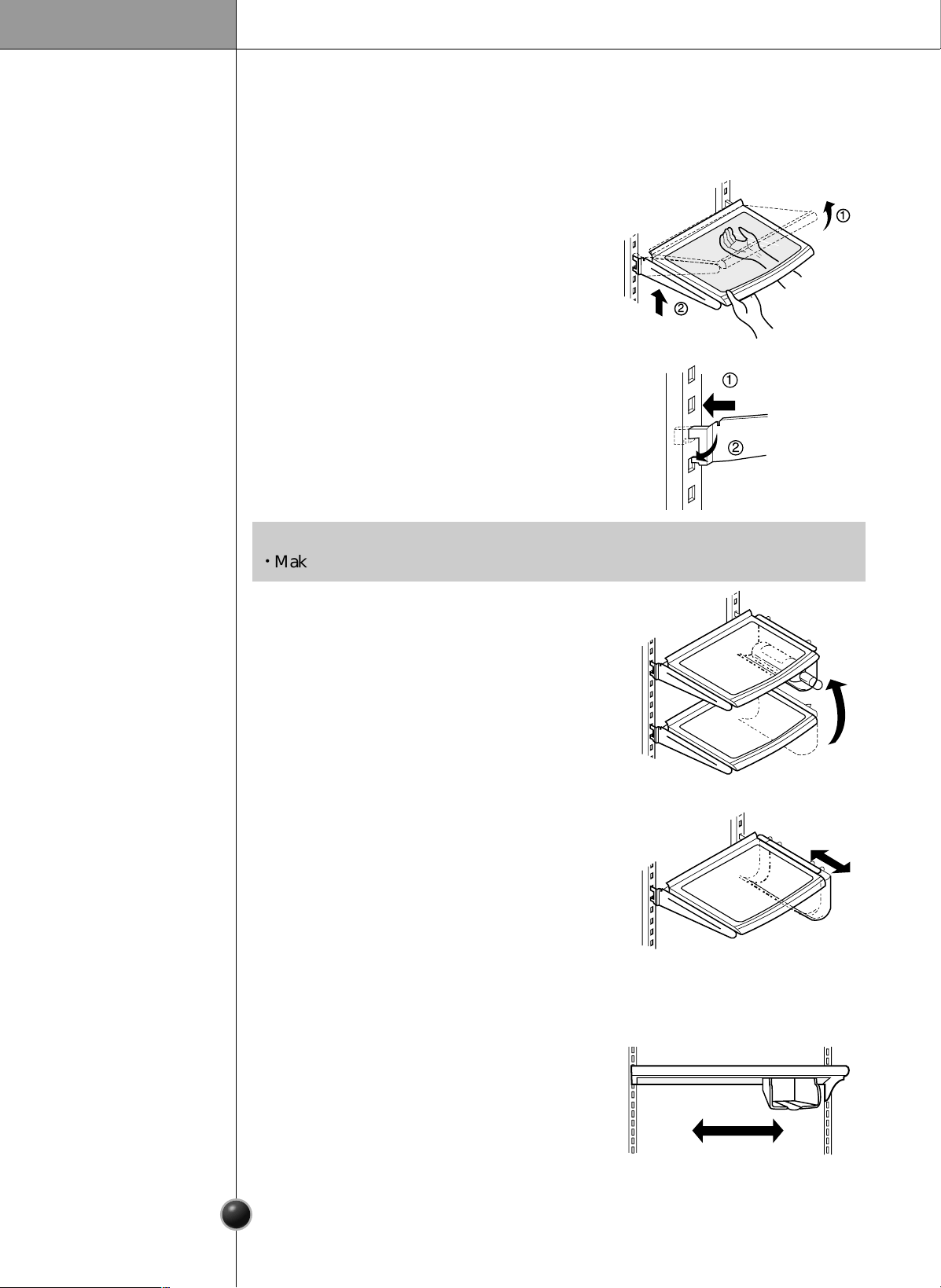
The refrigerator compartment shelf is movable so that you can place it at a height
according to space requirement of foods.
Shelf Height
Adjustment
1
2
1
2
•
Make sure the shelf is horizontal. If not, it may drop.
NOTE
How to separate a shelf :
Lift the shelf a the direction of Arrow,then
remove it from the rack by pulling it in the
direction of Arrow .
How to install a shelf :
Holding the shelf up at the front, insert the
tab at the desired height and lower the shelf
into place.
Wine holder adjustment :
Wine holder can be separated by pulling
it straight out and installed by placing
it at
the end of the shelf you want and
pushing
it inward.
Bottles can be stored on their sides in this
wine rack. It can be attached to any shelf.
Cans be stored on their sides out of the way
using the can-sever. It can be attached to an
upper shelf only.
Wine Holder
Adjustment
Can Server
Adjustment
20
Operation
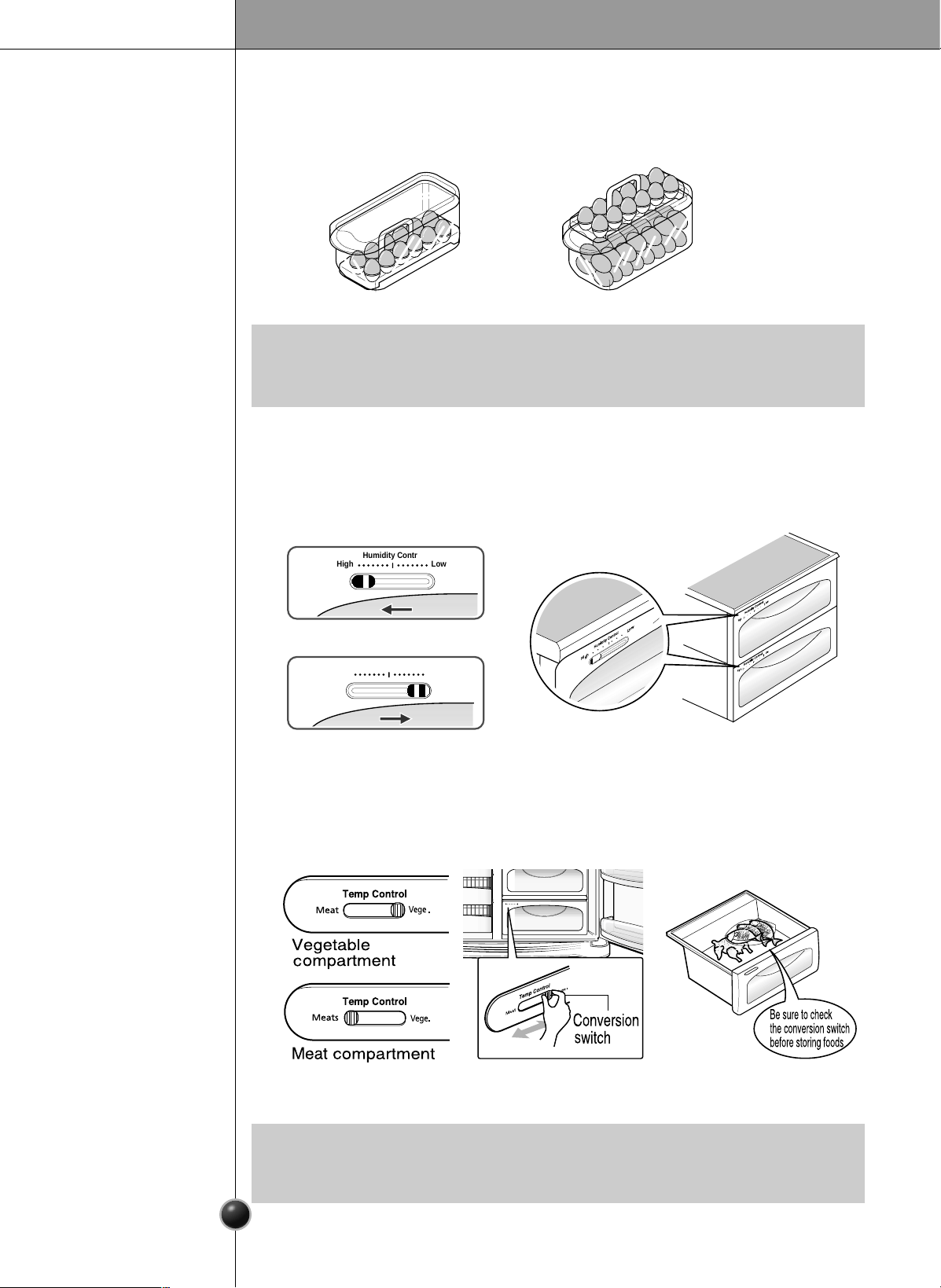
Egg Bin (Applicable to some models only)
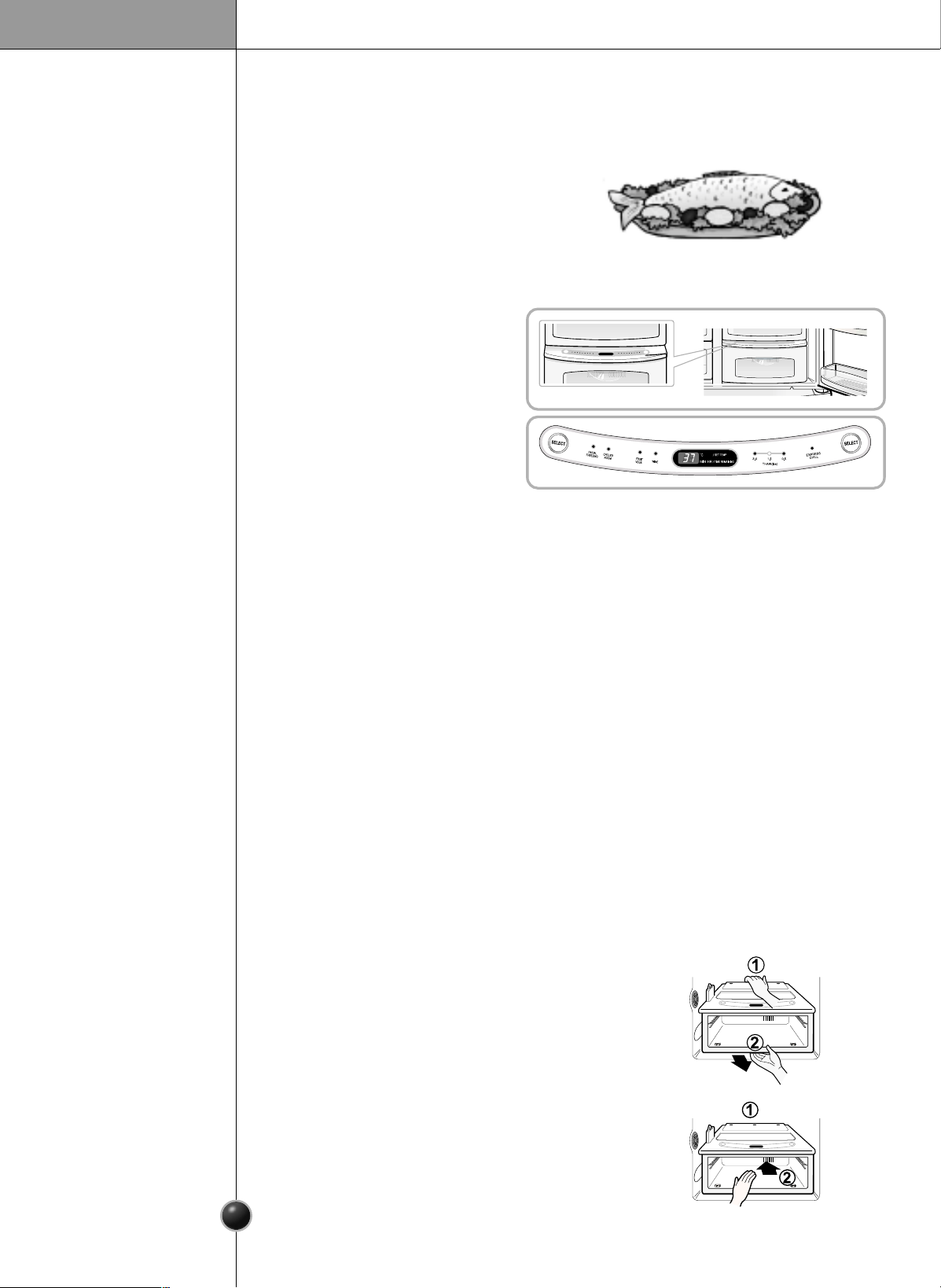
Humidity control in the vegetable compartment
You can place the egg box to wherever you want it.
The humidity can be controlled by adjusting the humidity control switch to the left
or right when storing vegetabes or fruits.
High
High
Low
Low
High
Low
High Low
Humidity Control
High Low
Humidity Control
•
Never use the egg box as an ice storage bin. It can be broken.
•
Never store the egg box in the freezer compartment or fresh compartment.
NOTE
High humidity
Low humidity
Convert into a vegetable or meat compartment
(Applicable to some models only)
The
meat
compartment maintains the temperature at a lower point than the
refrigerator compartment so that meat or fish can be stored fresh longer.
The bottom drawer in the refrigerator can be converted into a vegetable or meat
compartment
•
Vegetables or fruits are frozen if the conversion switch is set to meats
compartment. Be sure to check it before storing foods.
NOTE
[Normal] [For Many Eggs]
21
Operation
OptiChill Temperature Transition Corner
(Applicable to some models only)
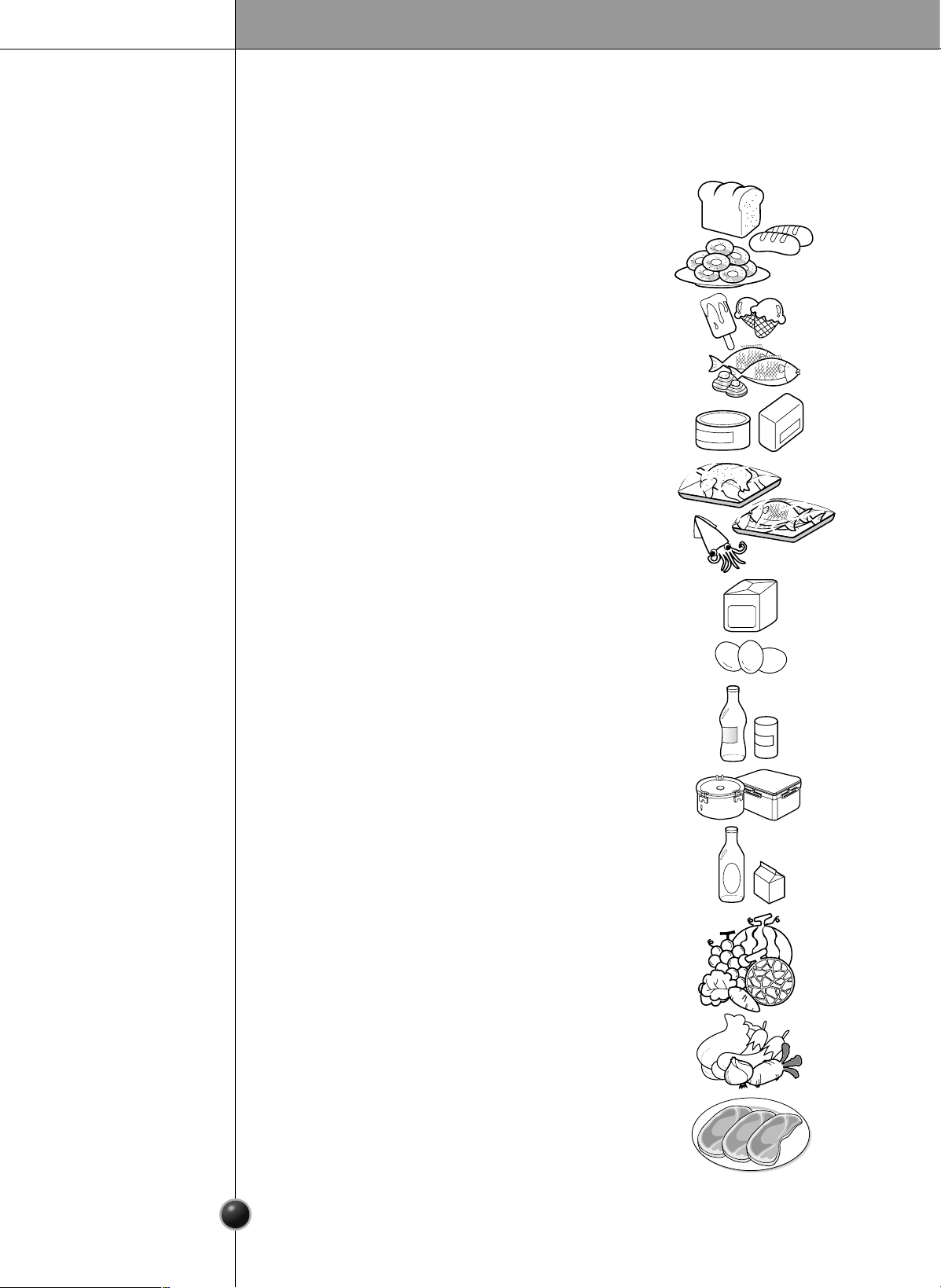
OptiChill
By pressing the button, store vegetables,
fruits or other types of food such as meat to
be defrosted, raw fish, etc.
Temperature Change at OptiChill
You can select optimum temperature
range depending on types of foods
stored.
- Reword as indicated:
four steps of temperature selection
are available, including 27°F,30°F,
39°F and 50°F.Vegetables, fruits,
cold storage items requiring humidity
maintenance, meats, and fishes can
be stored under optimal conditions
by selectiong the correct storage temperature for the foods being stored.
First, remove the vegetable bin.
After holding back and front of the OptiChill and
pull it outward.
Reword as indicated:
When using the OptiChill to store meats or fishes, fruits, or vegetables may be
frozen.
Reword as indicated:
When using the OptiChill to store fruits or vegetables, meats and fishes must be
stored in the freezer compartments.
Reword as indicated:
If you open the refrigerator door, an indicator lamp shows the status of the Optichill.
The lamp goes off when the door is closed.
Reword as indicated:
Press the left SELECT button to cycle through Partial Freezing
➔
Chilled Room
➔
Wine.
Reword as indicated:
Press the right SELECT button to cycle between Thaw
➔
Express Chill.
The thawing setting can be adjusted by the weight of the meats being thawed.
When Removing
OptiChill
Method to Use
Fit the OptiChill case on to the ledge and gently
slide it in .
When forced, the connecting parts can be damaged.
When Installing
OptiChill
22
Suggestion on Food Storage
Location of Foods
(Refer to Identification of Parts)
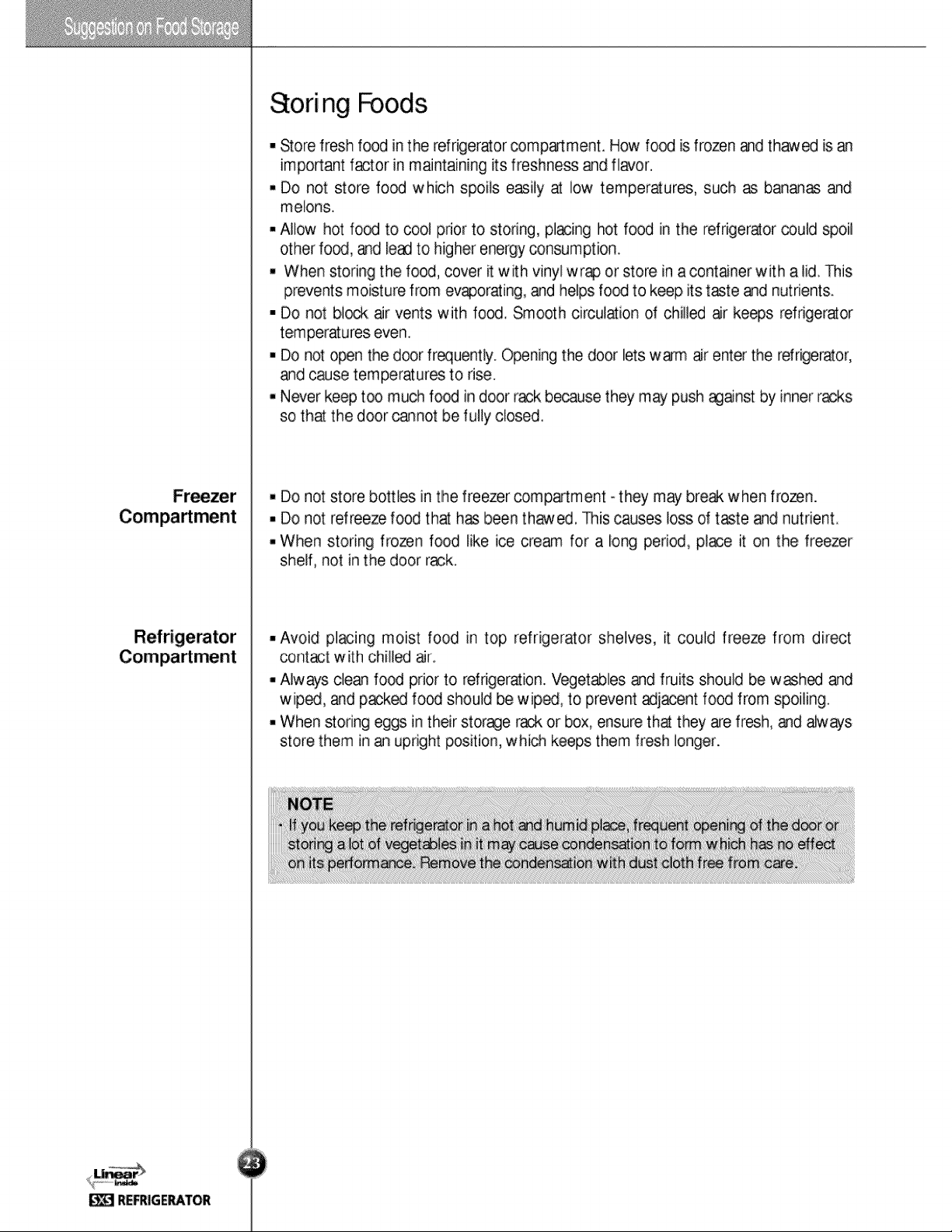
Store wine.
Store small foods such as bread, snacks, etc.
Store various frozen foods such as meat, fish,
ice cream, frozen snacks, etc.
Store small packed frozen food.
Temperature is likely to increase as door
opens.
So, do not store long-term food such
ice cream, etc.
Wine Holder
Snack
Drawer
Freezer
Compartment
Shelf
Freezer
Compartment
Door Rack
Freezer
Compartment
Drawer
Milk Product
Corner
Egg Bin
Refreshment
Center
Refrigerator
Compartment
Shelf
Refrigerator
Compartment
Door Rack
Vegetable Drawer
Vegetable
Drawer
/Meat Drawer
Conversion
Corner
Store meat, fish, chicken, etc. after
wrapping them with thin foil.
Store dry
.
Store milk products such as butter, cheese,
etc.
Place this egg box in the proper location.
Store foods of frequent use such as beverage,
etc.
Store side dishes or other foods at a proper
distance.
Store small packed food or beverages such
as milk, juice, beer, etc.
Store vegetables or fruits.
Store vegetable, fruits, meat to thaw, raw
fish, etc. setting the conversion switch as
necessary.
Be sure to check the conversion switch
setting before storing foods.
Suggestion on Food Storage
23
Storing Foods
Store fresh food in the refrigerator compartment. How food is frozen and thawed is an
important factor in maintaining its freshness and flavor.
Do not store food which spoils easily at low temperatures, such as bananas and
melons.
Allow hot food to cool prior to storing, placing hot food in the refrigerator could spoil
other food, and lead to higher energy consumption.
When storing the food, cover it with vinyl wrap or store in a container with a lid. This
prevents moisture from evaporating, and helps food to keep its taste and nutrients.
Do not block air vents with food. Smooth circulation of chilled air keeps refrigerator
temperatures even.
Do not open the door frequently. Opening the door lets warm air enter the refrigerator,
and cause temperatures to rise.
Never keep too much food in door rack because they may push against by inner racks
so that the door cannot be fully closed.
Do not store bottles in the freezer compartment - they may break when frozen.
Do not refreeze food that has been thawed. This causes loss of taste and nutrient.
When storing frozen food like ice cream for a long period, place it on the freezer
shelf, not in the door rack.
Avoid placing moist food in top refrigerator shelves, it could freeze from direct
contact with chilled air.
Always clean food prior to refrigeration. Vegetables and fruits should be washed and
wiped, and packed food should be wiped, to prevent adjacent food from spoiling.
When storing eggs in their storage rack or box, ensure that they are fresh, and always
store them in an upright position, which keeps them fresh longer.
Freezer
Compartment
Refrigerator
Compartment
•
If you keep the refrigerator in a hot and humid place, frequent opening of the door or
storing a lot of vegetables in it may cause condensation to form which has no effect
on its performance. Remove the condensation with dust cloth free from care.
NOTE
Care and Maintenance
24
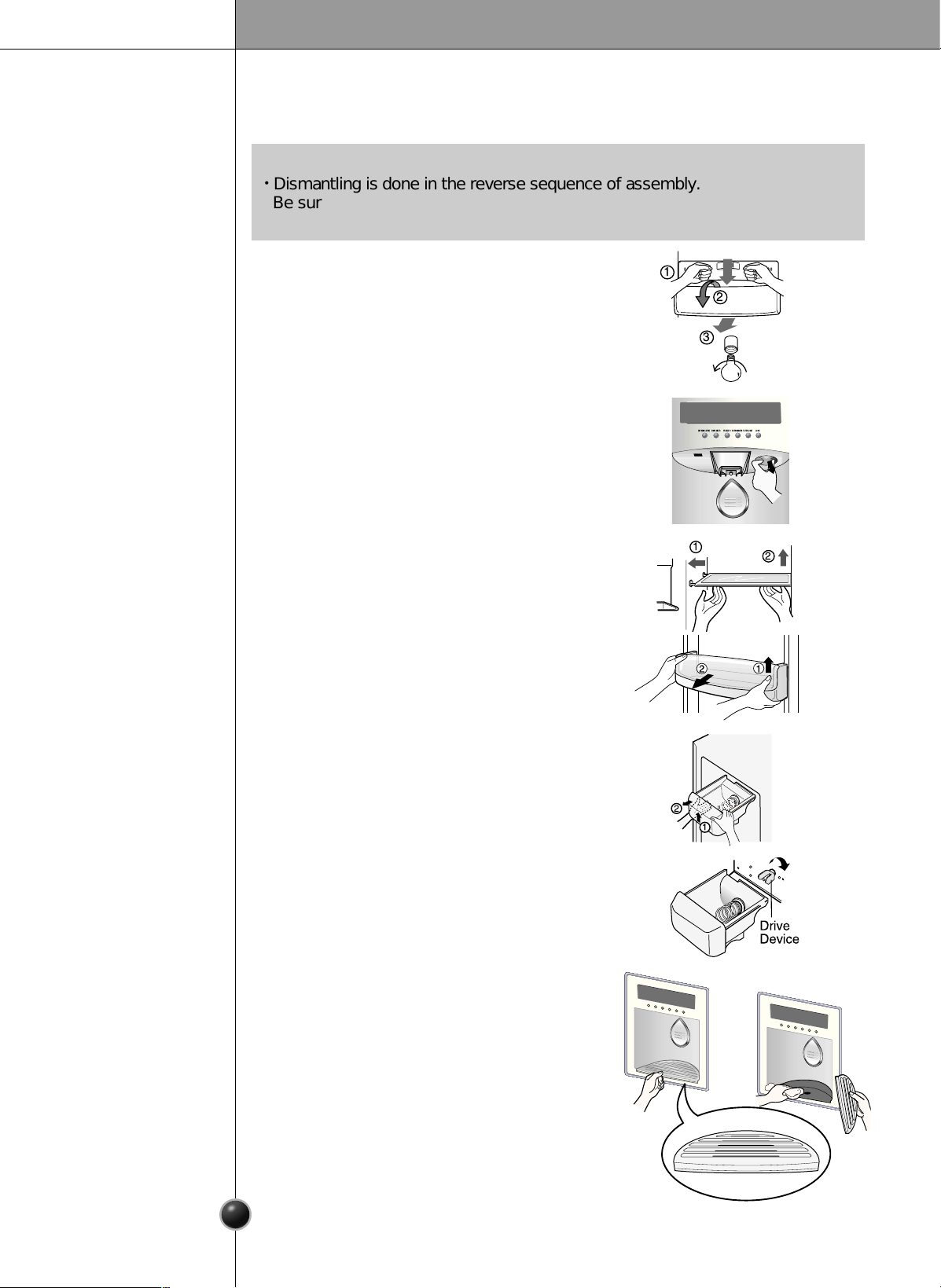
How to Dismantle Parts
Freezer
Compartment
Lamp
Dispenser Lamp
Freezer
Compartment
Shelf
Door Rack and
Support
Ice Storage Bin
After Dispenser
Is Used
Seperate the lamp by pulling it out, and then
remove the lamp. Max. 15 W bulb for
refrigerator is used and can be purchased at a
service center.
To remove a shelf, lift the left part of the shelf
a bit, push it to the direction , lift the right part
to the diretion , and take it out.
Lift the door rack holding both sides and
pull it out to direction.
The water collector has no self-drainage
function. It should be cleaned regularly.
Remove the cover by pulling the front side of
water collector cover and dry it with a cloth.
Hold the ice storage bin as shown in the right
figure and pull it out while slightly lifting it
.
It is recommended not to dismantle the ice
storage bin unless it is necessary.
Use both hands to remove the ice bin to avoid
dropping it.
If the ice bin does not slide into place easily,
twist the drive device slightly.
EXPRESS/JET FRZ
DISPENSER FREEZER
REFRIGERATER
FILTER/LIGHT
LOCK
2
1
1
2
3
•
Dismantling is done in the reverse sequence of assembly.
Be sure to unplug the power plug before dismantling and assembly.
Never apply severe force to dismantle parts. Parts may be damaged.
NOTE
Separate the lamp by pulling it out ➂
while
slightly striking
➀and rotating ➁
the lamp cover.
Turn the bulb counterclockwise. Max. 40 W
bulb
for refrigerator is used and can be purchased at
a service center.
25
Care and Maintenance
To remove the lamp cover, press the protrusion under the lamp cover to the front and
then pull the lamp cover out.
Turn the bulb counterclockwise. Max. 40 W bulb for refrigerator is used and can be
purchased at a service center.
Lamp in
Refrigerator
Compartment
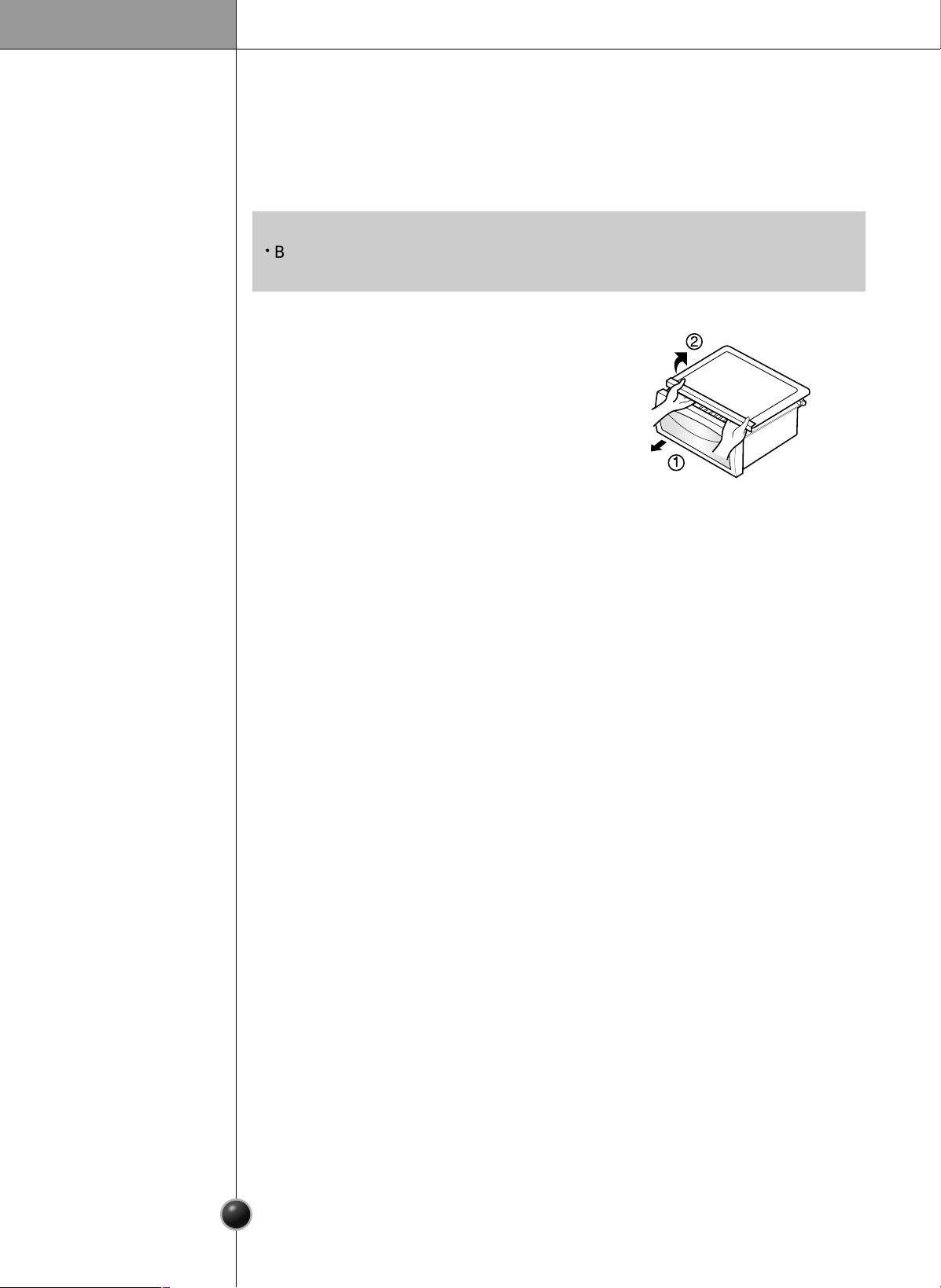
To remove the vegetable compartment
cover, pull out the vegetable compartment
a bit to the front , lift the front part of the
vegetable compartment cover as shown by
, and take it out.
Vegetable
Compartment
Cover
1
2
•
Be sure to remove parts from the refrigerator door when removing the vegetable
compartment,
snack drawer, and refreshment center cover.
NOTE
26
Care and Maintenance
General Information
Cleaning
During average length vacations, you will probably find it best to leave the refrigerator
in operation. Place freezable items in freezer for longer life.
When you plan to store the refrigerator, remove all food, disconnect the power cord,
clean the interior thoroughly, and Block the doors open to prevent mold and mildew.
Be certain the stored refrigerator does not present a child entrapment danger.
Vacation Time
Power Failure
If You Move
Anti-
Condensation
Pipe
Most power failures that are corrected in an hour or two will not affect your
refrigerator temperatures.
However, you should minimize the number of door openings while the power is off.
Remove or securely fasten down all loose items inside the refrigerator.
To avoid damaging the height adjusting screws, turn them all the way into the base.
The outside wall of the refrigerator cabinet may sometimes get warm, especially just
after installation.
Don’t be alarmed. This is due to the anti-condensation pipe, which pumps hot
refrigerant to prevent sweating on the outer cabinet wall.
Regular cleaning is recommended. Wash all compartments a baking soda solution or a
mild detergent and warm water. Rinse and dry.
Please verify that the power cord is not damaged, power plug is not overheated, or
power plug is well inserted into the power consent.
Always remove power cord from the wall outlet prior to cleaning in the vicinity of
electrical parts (lamps, switches, controls, etc.).
Wipe up excess moisture with a sponge or cloth to prevent water or liquid from
getting into any electrical part and causing an electric shock.
Never use metallic scouring pads, brushes, coarse abrasive cleaners, strong alkaline
solutions, flammable or toxic cleaning liquids on any surface.
Do not touch frozen surfaces with wet or damp hands, because damp object will stick
or adhere to extremely cold surfaces.
It is important that your refrigerator be kept clean to prevent undesirable odors. Spilled
food should be wiped up immediately, since it may acidify and stain plastic surfaces if
allowed to settle.
Use a lukewarm solution of mild soap or detergent to clean the durable finish of your
refrigerator. Wipe with a clean damp cloth and then dry.
Exterior
Interior
After Cleaning
Warning
Care and Maintenance
27
Troubleshooting
Before calling for service, review this list. It may save you both time and expense.
This list includes common occurrences that are not the result of defective
workmanship or materials in this appliance.
Possible cause
Refrigerator control is off.
Refrigerator is in defrost cycle.
Plug at wall outlet is disconnected.
Power outage. Check house lights.
Refrigerator is larger than the previous
one you owned.
Room or outside weather is hot.
Refrigerator has recently been
disconnected for a period of time.
Large amounts of warm or hot food
may have been stored recently.
Doors are opened too frequently or too
long.
Refrigerator or freezer door may be
slightly open.
Refrigerator control is set too cold.
Refrigerator or freezer gasket is dirty,
worn, cracked, or poorly fitted.
Thermostat is keeping the refrigerator
at a constant temperature.
Solution
Set refrigerator control. See setting the
controls.
This is normal for a fully automatic
defrosting refrigerator. The defrost
cycle occurs periodically.
Make sure plug is tightly pushed into
outlet.
Call local electric company.
This is normal. Larger, more efficient
units run longer in these conditions.
It is normal for the refrigerator to work
longer under these conditions.
It takes some hours for the refrigerator
to cool down completely.
Warm food will cause the refrigerator to
run longer until the desired temperature
is reached.
Warm air entering the refrigerator
causes it to run longer. Open the door
less often.
Make sure the refrigerator is level.
Keep food and containers from
blocking door. See problem section.
OPENING/CLOSING of doors.
Set the refrigerator control to a
warmer setting until the refrigerator
temperature is satisfactory.
Clean or change gasket. Leaks in the
door seal will cause refrigerator to run
longer in order to maintain desired
temperatures.
This is normal. Refrigerator goes on
and
off to keep the temperature constant.
Runing of refrigerator
Refrigerator
compressor
does not run.
Refrigerator
runs too much
or too long
Occurrence
28
Care and maintenance
Refrigerator
compressor
does not run.
Occurrence
Temperature in the
freezer is too cold
but the refrigerator
temperature is
satisfactory.
Temperatures are too cold
Temperature in the
refrigerator
is too warm but
the freezer
temperature is
satisfactory.
Temperatures in
the refrigerator
or freezer are
too warm.
Temperatures are too warm
Meat stored in
fresh meat
drawer freezes.
Food stored in
drawers freezes.
Possible cause
Thermostat is keeping the refrigerator
at a constant temperature.
Freezer control is set too cold
Doors are opened too frequently or too
long.
Door is slightly open.
Large amounts of warm or hot food
may have been stored recently.
Refrigerator has recently been
disconnected for a period of time.
Refrigerator control is set too warm.
Refrigerator control is set too warm.
Refrigerator control has some effect on
freezer temperature.
Freezer control is set too warm.
Refrigerator control is set too cold.
Refrigerator control is set too cold.
Meat should be stored at a temperature
just below the freezing point of water
(32˚F,
0˚C) for maximum fresh storage time.
Solution
This is normal. The refrigerator goes on
and off to keep the temperature constant.
Set the refrigerator control to a colder
setting.
A refrigerator requires some hours to
cool down completely.
Wait until the refrigerator or freezer
has a chance to reach its selected
temperature.
Warm air enters the refrigerator/ freezer
whenever the door is opened.
Open the door less often.
Set the freezer or refrigerator control to a
colder setting until the freezer or
refrigerator temperature is satisfactory.
Set the freezer or refrigerator control to
a colder setting until the freezer or
refrigerator temperature is satisfactory.
It is normal for ice crystals to form due
to the moisture content of meat.
Set the refrigerator control to a
warmer setting
See above solution.
Set the freezer control to a warmer
setting until the freezer temperature is
satisfactory.
Close the door completely.
Temperature in the
refrigerator is too
cold and the
freezer
temperature
is satisfactory.
29
Care and Maintenance
Sound and noise
Occurrence
Louder sound
levels when
refrigerator is on.
Louder sound
levels when
compressor
comes on.
Moisture collects
on the inside walls
of the refrigerator.
Moisture forms
on the outside of
the refrigerator
or between doors.
Water/Moisture/Ice outside refrigerator
Vibrating or
rattling noise.
Water/Moisture/Ice inside refrigerator
Possible cause
Today’s refrigerators have increased
storage capacity and maintain more
even temperatures.
Refrigerator is touching wall or cabinets.
The weather is hot and humid which
increases the rate of frost buildup
and internal sweating.
Door is slightly open.
Door is opened too often or too long.
Weather is humid.
Door is slightly open,causing cold air
from the inside the refrigerator to meet
warm air from the outside.
Floor is uneven or weak.
Refrigerator rocks on the floor when it is
moved slightly.
Refrigerator operates at higher pressures
during the start of the ON cycle.
Items placed on the top of the refrigerator
are vibrating.
Dishes are vibrating on the shelves in
the refrigerator.
Solution
This time, close the door completely.
This is normal in humid weather.
When humidity is lower, the moisture
should disappear.
See problem section opening/closing of
doors.
Move refrigerator so that it does not
touch the wall or refrigerator.
This is normal.
It is normal for dishes to vibrate slightly.
Move dishes slightly.
Make sure refrigerator is level and firmly
set on floor.
Be sure floor is level and solid and can
adequately support refrigerator.
Remove items.
It is normal for sound levels to be higher.
This is normal. The sound will level off as
the refrigerator continues to run.
Open the door less often.
30
Care and Maintenance
30
Odors in refrigerator
Occurrence
Door(s) will not
close.
Door(s) will not
close.
Drawers are
difficult to move.
Dispenser
Dispenser will not
dispense ice
Opening/Closing of doors/Drawers
Possible cause
Food is touching shelf on top of the
drawer
Track that drawer slides on is dirty.
Ice storage bin is empty.
Freezer temperature is set too warm.
Household water line valve is not open.
Refrigerator or freezer door is not
closed.
Refrigerator is not level. It rocks on the
floor when it is moved slightly.
Floor is uneven or weak.
Refrigerator rocks on the floor when it
is moved slightly.
Refrigerator is touching wall or cabinets.
Interior needs to be cleaned.
Food with strong odor is in the refrigerator.
Some containers and wrapping materials
produce odors.
Food package is keeping door open.
Door was closed too hard, causing other
door to open slightly.
Solution
Be sure both doors are closed.
Open household water line valve and
allow sufficient time for ice to be made.
When ice is made, dispenser should
operate.
Turn the freezer control to a higher
setting so that ice cubes will be made.
When the first supply of ice is made,
the dispenser should operate.
Clean drawer and track.
Be sure floor is level and can adequately
support refrigerator.
Contact carpenter to correct sagging or
sloping floor.
Move refrigerator.
.
Keep less food in drawer.
Adjust the height adjusting screw.
Use a different container or brand of
wrapping
materials
.
Move packages that keep door from
closing.
Close both doors gently.
Cover food completely.
Clean interior with sponge,warm water
and baking soda.
When the first supply of ice is dropped
into the bin, the dispenser should operate.
Care and Maintenance
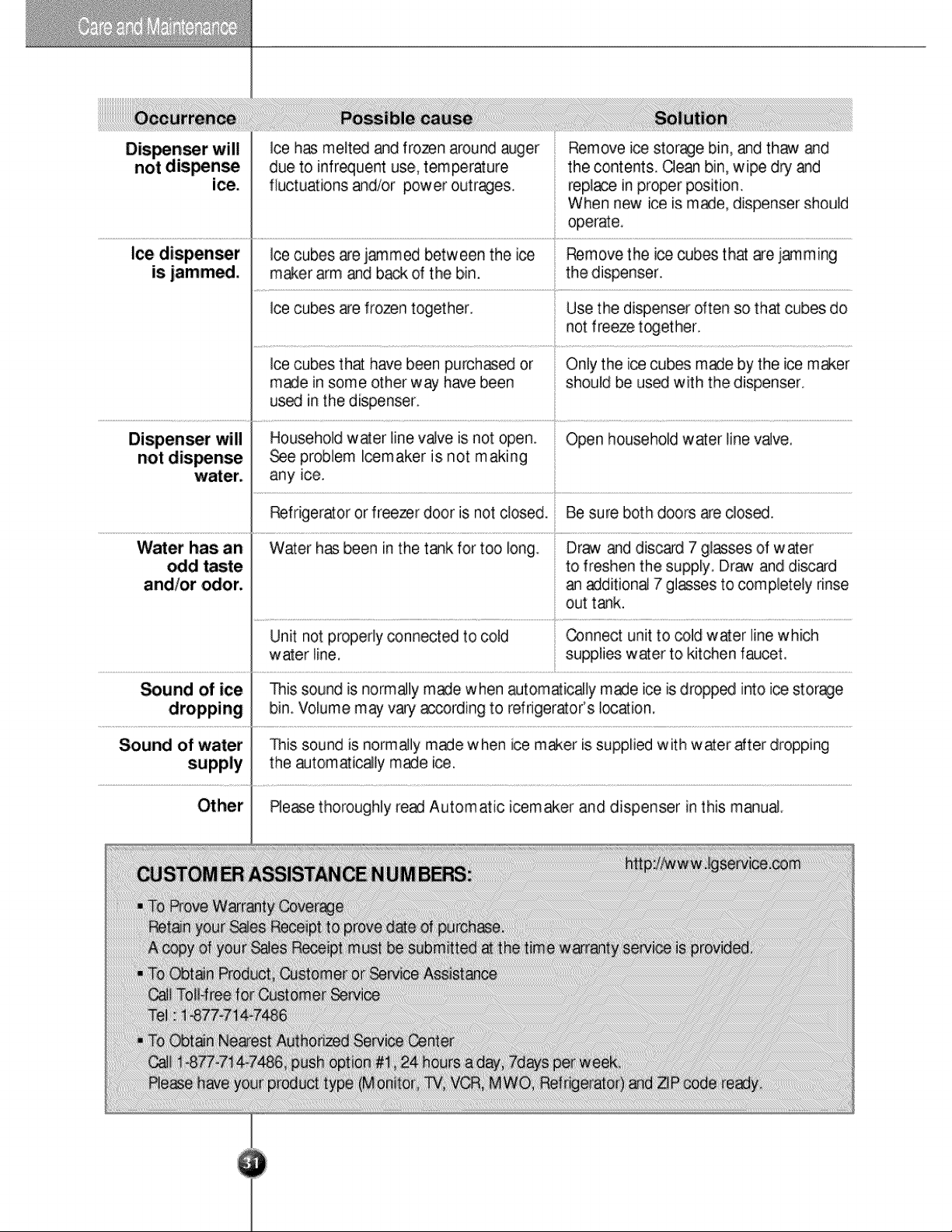
Dispenser will
not
dispense
ice.
Ice dispenser
is jammed.
Occurrence
Water has an
odd taste
and/or odor.
Dispenser will
not dispense
water.
Possible cause
Water has been in the tank for too long.
Unit not properly connected to cold
water line.
This sound is normally made when automatically made ice is dropped into ice storage
bin. Volume may vary according to refrigerator’s location.
This sound is normally made when ice maker is supplied with water after dropping
the automatically made ice.
Please thoroughly read Automatic icemaker and dispenser in this manual.
Ice cubes are frozen together.
Ice has melted and frozen around auger
due to infrequent use, temperature
fluctuations and/or power outrages.
Ice cubes are jammed between the ice
maker arm and back of the bin.
Ice cubes that have been purchased or
made in some other way have been
used in the dispenser.
Household water line valve is not open.
See problem Icemaker is not making
any ice.
Refrigerator or freezer door is not closed.
Solution
Be sure both doors are closed.
Draw and discard 7 glasses of water
to freshen the supply. Draw and discard
an additional 7 glasses to completely rinse
out tank.
Connect unit to cold water line which
supplies water to kitchen faucet.
Open household water line valve.
Use the dispenser often so that cubes do
not freeze together.
Only the ice cubes made by the ice maker
should be used with the dispenser.
Remove the ice cubes that are jamming
the dispenser.
Remove ice storage bin, and thaw and
the contents. Clean bin, wipe dry and
replace in proper position.
When new ice is made, dispenser should
operate.
Sound of ice
dropping
Sound of water
supply
Other
31
CUSTOMER ASSISTANCE NUMBERS:
To Prove Warranty Coverage
Retain your Sales Receipt to prove date of purchase.
A copy of your Sales Receipt must be submitted at the time warranty service is provided.
To Obtain Product, Customer or Service Assistance
Call Toll-free for Customer Service
Tel : 1-877-714-7486
To Obtain Nearest Authorized Service Center
Call 1-877-714-7486, push option #1, 24 hours a day, 7days per week.
Please have your product type (Monitor, TV, VCR, MWO, Refrigerator) and ZIP code ready.
http://www.lgservice.com
P/NO : 3828JD8587C Printed in Korea
LG Twin Tower, 20, Yoido-Dong,
Youngdungpo-Gu, Seoul, 150-721, Korea.
http://www.lge.com