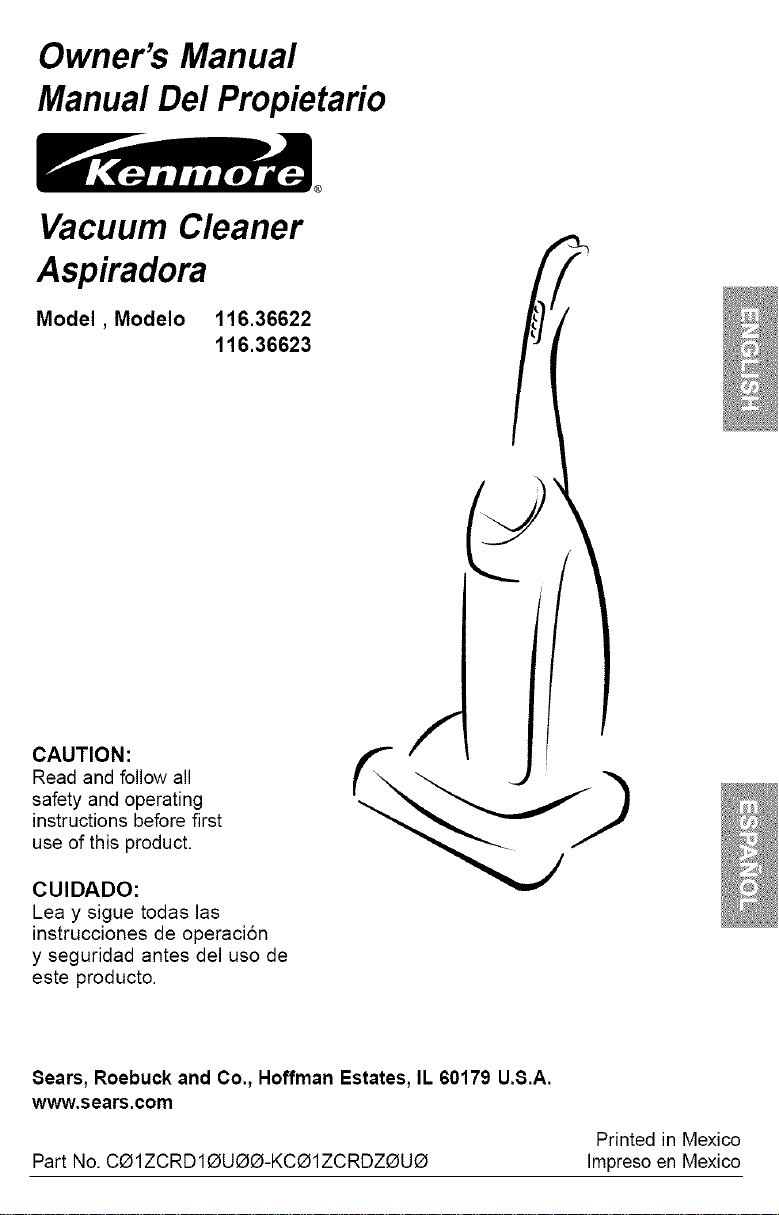
Owner's Manual
Manual Del Propietario
Vacuum Cleaner
Aspiradora
Model, Modelo
116.36622
116.36623
CAUTION:
Read and follow all
safety and operating
instructions before first
use of this product.
CUIDADO:
Lea y sigue todas las
instrucciones de operaci6n
y seguridad antes del uso de
este producto.
Sears, Roebuck and Co., Hoffman Estates, IL 60179 U.S.A.
www.sears.com
Printed in Mexico
Part No. CO1ZCRD1OUO_-KCO1ZCRDZ_UO Impresoen Mexico
Before Using Your New
Vacuum Cleaner .................... 2
Kenmore Vacuum Cleaner Warranty ... 2
Important Safety Instructions ......... 3
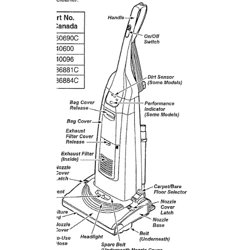
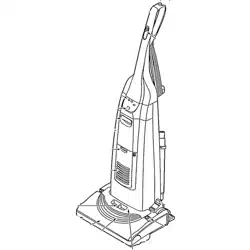
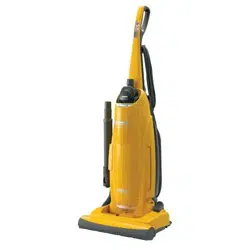
Parts and Features .................. 4
Assembly Instructions ............. 5-6
Operating Instructions ............... 6
Cord Release ....................... 6
Releasing the Handle ................. 7
Touch Control ...................... 7
Pile Height Selection and Setting ........ 8
Carpet/Bare Floor Selector ............. 8
Attachments ..................... 9-10
Attachment Use Table ............... 11
Vacuuming Tips .................... 11
Performance/Safety Features ....... 12-13
Vacuum Cleaner Care ............... 14
Vacuum Cleaner Storage ............. 14
Cleaning Exterior and Attachments ...... 14
Dust Bag Replacement .............. 15
Motor Safety Filter Cleaning ........... 16
Exhaust Filter Replacement ............ 16
Belt Changing and Agitator Cleaning . .17-19
Light Bulb Replacement .............. 20
Clog Removal ..................... 21
Troubleshooting .................... 22
Requesting Assistance Or Service back page
Please read this guide. It will help you assemble and operate your new Kenmore vacuum
cleaner in the safest and most effective way.
For more information about vacuum cleaner care and operation, call your nearest Sears store.
You will need the complete model and serial numbers when requesting information. Your vacu-
um cleaner's model and serial numbers are located on the Model and Serial Number Plate.
Use the space below to record the model number and serial number of your new Kenmore
vacuum cleaner.
Model No.
Serial No.
Date of Purchase
Keep this book and your sales check (receipt) in a safe place for future reference.
ONE YEAR FULL WARRANTY ON KENMORE VACUUM CLEANER
This warranty is for one year from the date of purchase, and includes only private household
vacuum cleaner use. During the warranty year, when this vacuum cleaner is operated and
maintained according to the owner's manual instructions, Sears will repair any defects in
material or workmanship free of charge.
This warranty excludes vacuum cleaner bags, belts, light bulbs, and filters, which are
expendable parts and become worn during normal use.
For warranty service, return this vacuum cleaner to the nearest Sears Service Center in
the United States.
This warranty applies only while this product is in use in the United States. This warranty gives
you specific legal rights, and you may also have other rights which vary from state to state.
Sears, Roebuck and Co., D/817 WA, Hoffman Estates, IL 60179
2
AWARNING:
Your safety is important to us. To reduce the risk
of fire, electrical shock, injury to persons or
damage when using your vacuum cleaner, follow
basic safety precautions including the following:
Read all instructions in this manual before
assembling or using your vacuum cleaner.
Use your vacuum cleaner only as
described in this manual. Use only with
Sears recommended attachments.
Disconnect electrical supply before ser-
vicing or cleaning out the brush area.
Failure to do so could result in the brush
unexpectedly starting, causing personal
injury from moving parts.
Do not leave vacuum cleaner when
plugged in. Unplug from outlet when not in
use and before performing maintenance.
To reduce the risk of electrical shock - Do
not use outdoors or on wet surfaces.
Do not allow to be used as a toy. Close
attention is necessary when used by or
near children.
Do not use with a damaged cord or plug. If
vacuum cleaner is not working as it should,
has been dropped, damaged, left outdoors,
or dropped in water, return it to a Sears
Service Center.
Do not pull or carry by cord, use cord as a
handle, close a door on cord, or pull cord
around sharp edges or corners. Do not run
cleaner over cord. Keep cord away from
heated surfaces.
Do not unplug by pulling on cord. To
unplug, grasp the plug, not the cord.
Do not handle plug or vacuum cleaner with
wet hands.
Do not put any objects into openings.
Do not use with any opening blocked; keep
free of dust, lint, hair, and anything that may
reduce air flow.
Keep hair, loose clothing, fingers, and all
parts of body away from openings and
moving parts.
Turn off all controls before unplugging.
Use extra care when cleaning on stairs.
Do not put on chairs, tables, etc. Keep on
floor.
Do not use vacuum cleaner to pick up
flammable or combustible liquids (gaso-
line, cleaning fluid, perfumes, etc.), or use
in areas where they may be present. The
fumes from these substances can create a
fire hazard or explosion.
Do not pick up anything that is burning or
smoking, such as cigarettes, matches, or
hot ashes.
Do not use vacuum cleaner without dust
bag and/or filters in place.
Always replace the dust bag after vacuum-
ing carpet cleaners or freshener, powders,
and fine dust. These products clog the fil-
ters, reduce airflow and can cause damage
to the vacuum cleaner. Failure to replace
the dust bag could cause permanent dam-
age to the cleaner.
Do not use the vacuum cleaner to pick up
sharp hard objects, small toys, pins, paper
clips, etc. They may damage the cleaner or
dust bag.
Unplug before connecting Handi-mate Jr.®
You are responsible for making sure that
your vacuum cleaner is not used by anyone
unable to operate it properly.
SAVE THESE INSTRUCTIONS
Proper assembly and safe use of your vacuum cleaner are your responsibilities. Your
cleaner is intended for Household use. Read this Owner's Manual carefully for important
use and safety information. This guide contains safety statements under warning and cau-
tion symbols.
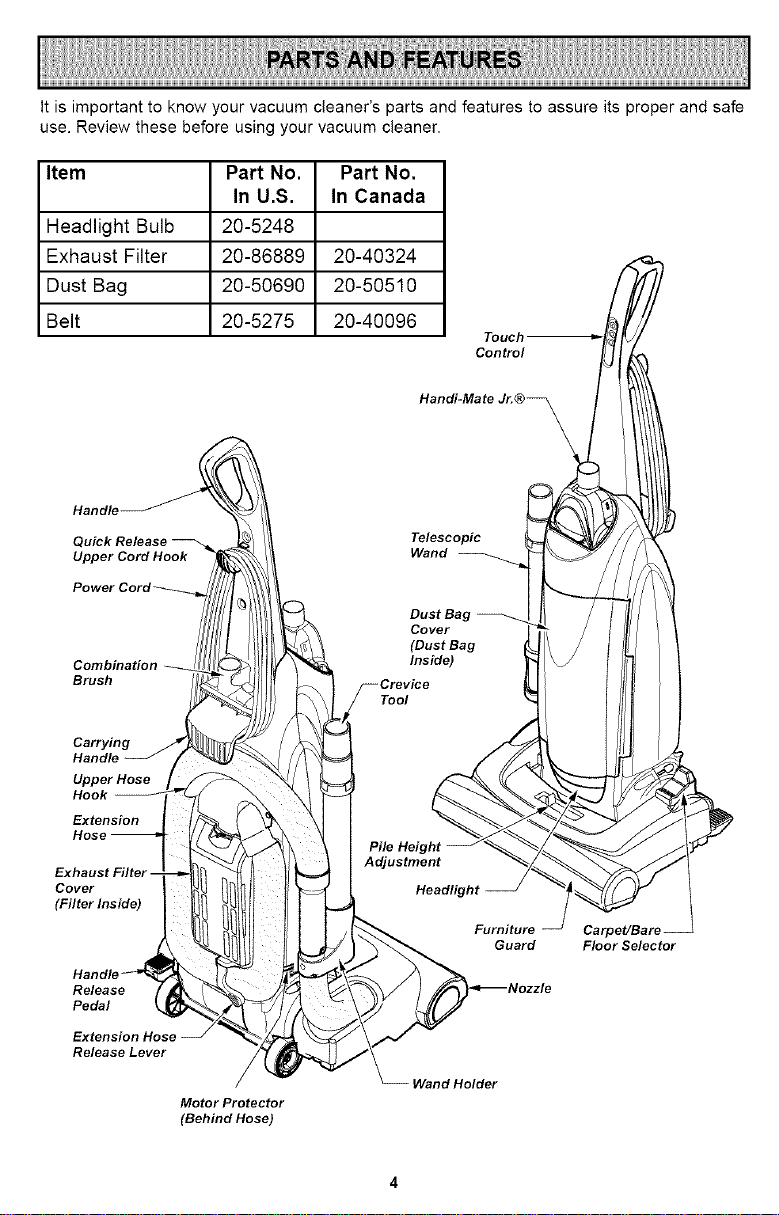
itisimportanttoknowyourvacuumcleaner'spartsandfeaturestoassureitsproperandsafe
use.Reviewthesebeforeusingyourvacuumcleaner.
Item Part No. Part No.
In U.S. In Canada
Headlight Bulb 20-5248
Exhaust Filter 20-86889 20-40324
Dust Bag 20-50690 20-50510
Belt 20-5275 20-40096
Touch
Control
Handi-Mate Jr. ®_
Handle
Upper Cord Hook
Telescopic
Wand
Combination
Brush
Carrying
Handle
Upper Hose
Extension
Hose
Tool
Cover
(Filter Inside)
Release
Pedal
Extension
Release Lever
Motor Protector
(Behind Hose)
Furniture
Guard
Wand Holder
Carpet/Bare
Floor Selector
I
Please pay special attention to these hazard alert boxes, and follow any instructions I
,_ given. WARNING statements alert you to such hazards as fire, electric shock, burns
I
and personal injury. CAUTION statements alert you to such hazards as personal
injury and/or property damage.
WARNING
Electrical Shock Hazard
Do not plug into the electrical supply
until the assembly is complete. Failure
to do so could result in electrical
shock or injury.
Before assembling the vacuum cleaner,
check the PACKING LIST on the cover of
the separate REPAIR PARTS LIST. Use
this list to verify that you have received all
the components of your new Kenmore
vacuum cleaner.
HANDLE ASSEMBLY
Remove the combination brush from
the handle to expose the handle mount-
ing hole.
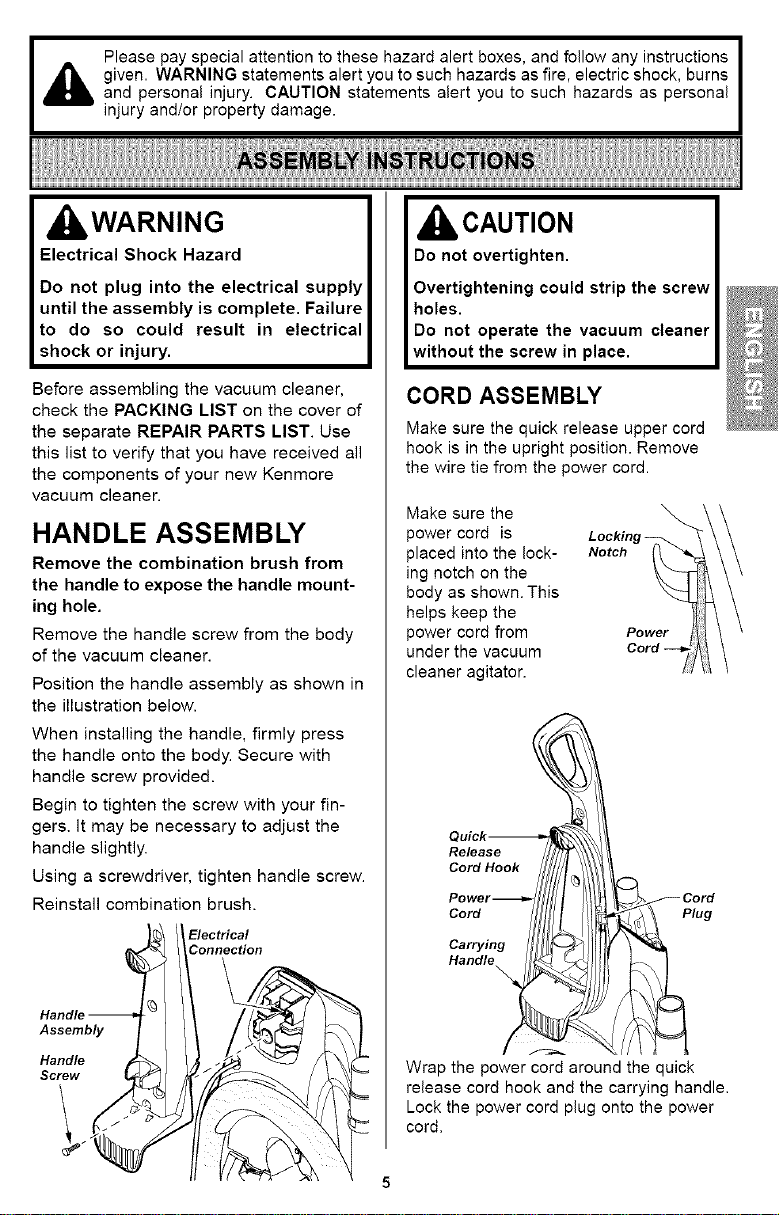
Remove the handle screw from the body
of the vacuum cleaner.
Position the handle assembly as shown in
the illustration below.
When installing the handle, firmly press
the handle onto the body. Secure with
handle screw provided.
Begin to tighten the screw with your fin-
gers. It may be necessary to adjust the
handle slightly.
Using a screwdriver, tighten handle screw.
Reinstall combination brush.
Electrical
Connection
Assembly
Handle
Screw
CAUTION
Do not overtighten.
Overtightening could strip the screw
holes.
Do not operate the vacuum cleaner
without the screw in place.
CORD ASSEMBLY
Make sure the quick release upper cord
hook is in the upright position. Remove
the wire tie from the power cord.
Make sure the
power cord is
placed into the lock-
ing notch on the
body as shown. This
helps keep the
power cord from
under the vacuum
cleaner agitator.
Notch
Power
lug
Wrap the power cord around the quick
release cord hook and the carrying handle.
Lock the power cord plug onto the power
cord.
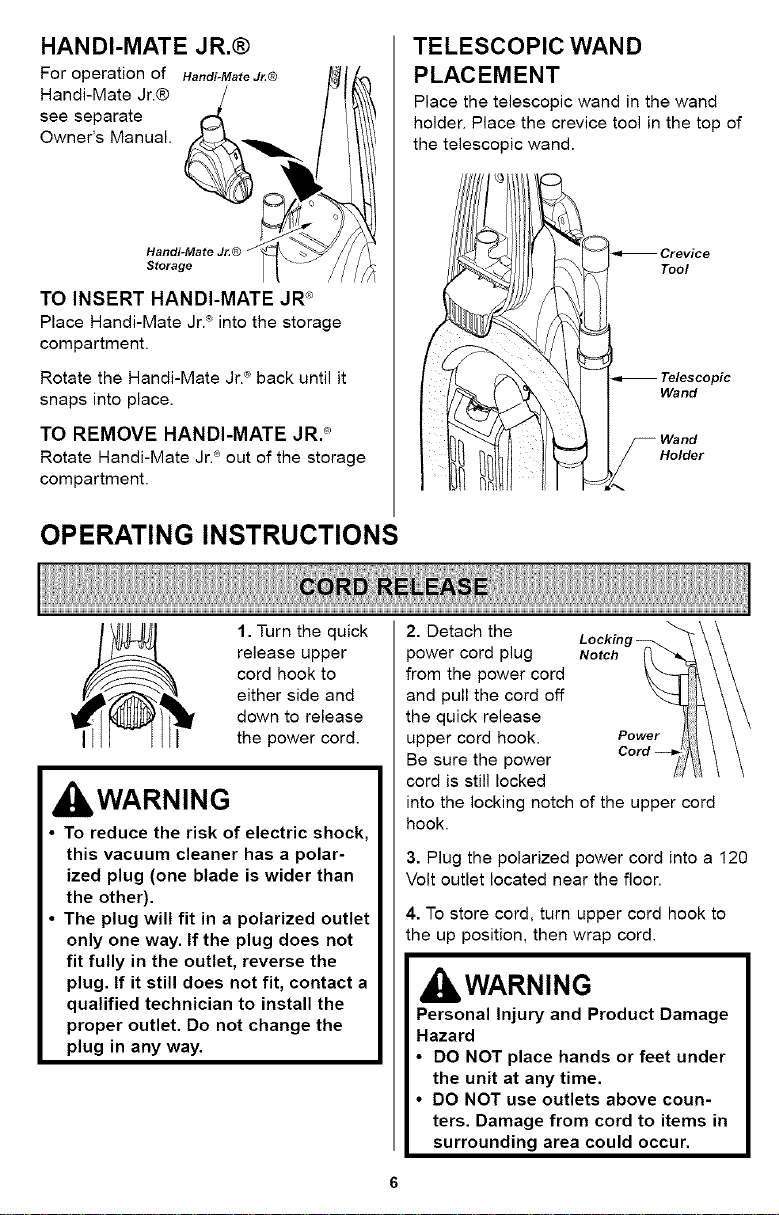
HANDI-MATE JR.@
For operation of Handi-MateJ_® /l_l_
Htond_Me ate J'® __ _
TO INSERT HANDI-MATE JR_'
Place Handi-Mate Jr.® intothe storage
compartment.
Rotate the Handi-Mate Jr.® back untilit
snaps intoplace.
TO REMOVE HANDI-MATE JR._
Rotate Handi-Mate Jr.® out of the storage
compartment.
OPERATING INSTRUCTIONS
TELESCOPIC WAND
PLACEMENT
Place the telescopic wand in the wand
holder. Place the crevice tool in the top of
the telescopic wand.
lipi c
1. Turn the quick
release upper
cord hook to
either side and
down to release
the power cord.
kWARNING
To reduce the risk of electric shock,
this vacuum cleaner has a polar-
ized plug (one blade is wider than
the other).
The plug will fit in a polarized outlet
only one way. If the plug does not
fit fully in the outlet, reverse the
plug. If it still does not fit, contact a
qualified technician to install the
proper outlet. Do not change the
plug in any way.
2. Detach the Lockinl
_ower cord plug Notch
from the power cord
and pull the cord off
the quick release
upper cord hook. Power
Be sure the power
cord is still locked
into the locking notch of the upper cord
hook.
3. Plug the polarized power cord into a 120
Volt outlet located near the floor.
4. To store cord, turn upper cord hook to
the up position, then wrap cord.
IbWARNING
Personal Injury and Product Damage
Hazard
• DO NOT place hands or feet under
the unit at any time.
• DO NOT use outlets above coun-
ters. Damage from cord to items in
surrounding area could occur.
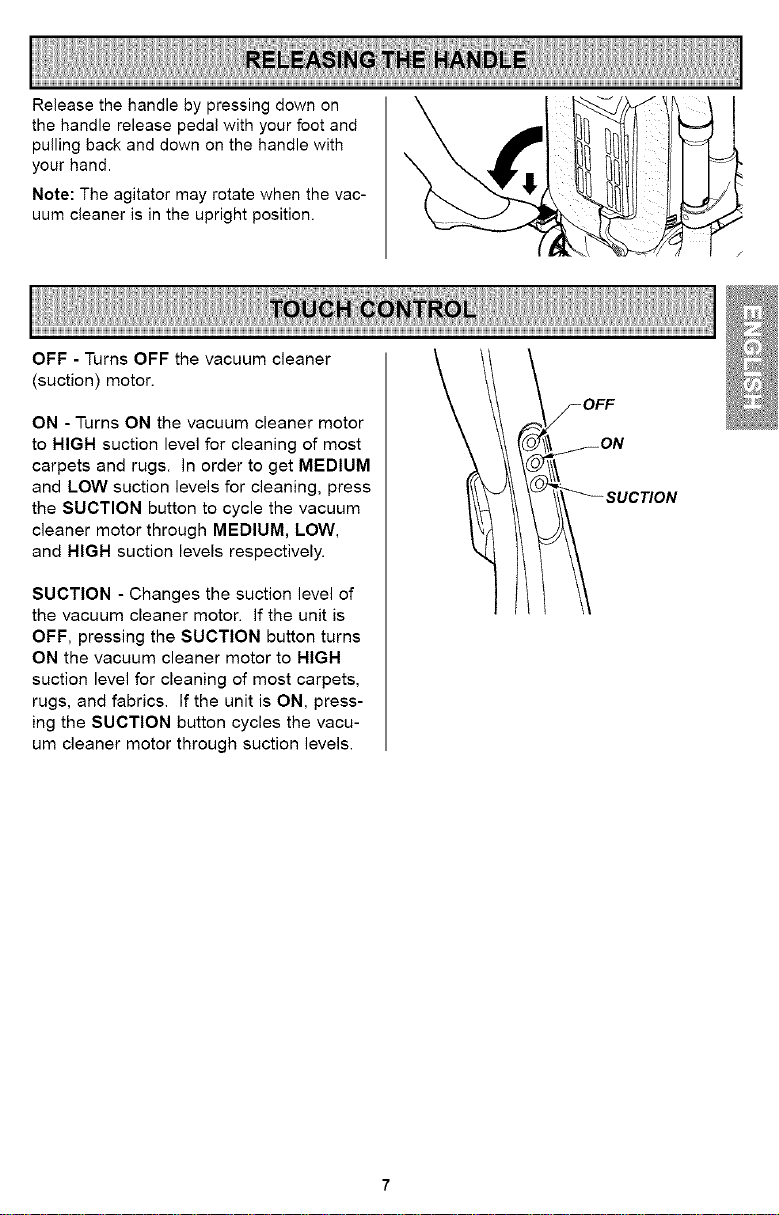
Release the handle by pressing down on
the handle release pedal with your foot and
pulling back and down on the handle with
your hand.
Note: The agitator may rotate when the vac-
uum cleaner is in the upright position.
OFF - Turns OFF the vacuum cleaner
(suction) motor.
ON - Turns ON the vacuum cleaner motor
to HIGH suction level for cleaning of most
carpets and rugs. In order to get MEDIUM
and LOW suction levels for cleaning, press
the SUCTION button to cycle the vacuum
cleaner motor through MEDIUM, LOW,
and HIGH suction levels respectively.
SUCTION - Changes the suction level of
the vacuum cleaner motor. If the unit is
OFF, pressing the SUCTION button turns
ON the vacuum cleaner motor to HIGH
suction level for cleaning of most carpets,
rugs, and fabrics. If the unit is ON, press-
ing the SUCTION button cycles the vacu-
um cleaner motor through suction levels.
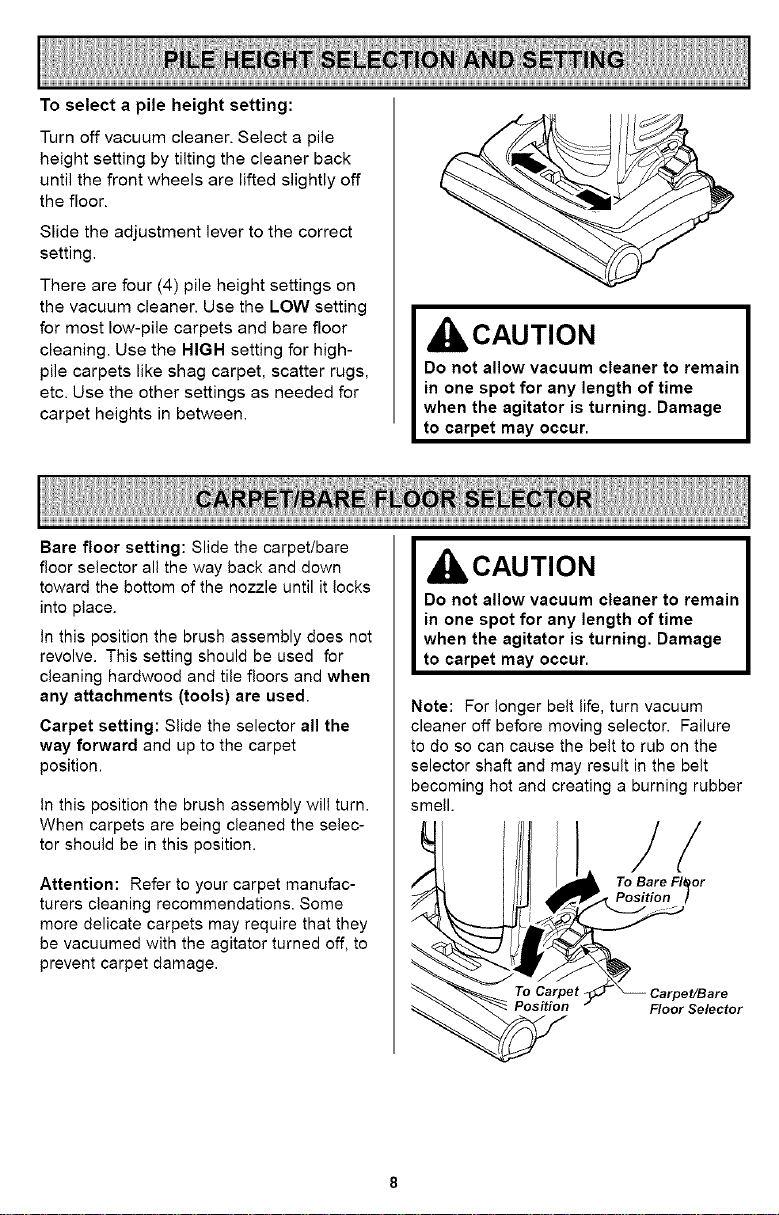
To select a pile height setting:
Turn off vacuum cleaner. Select a pile
height setting by tilting the cleaner back
until the front wheels are lifted slightly off
the floor.
Slide the adjustment lever to the correct
setting.
There are four (4) pile height settings on
the vacuum cleaner. Use the LOW setting
for most low-pile carpets and bare floor
cleaning. Use the HIGH setting for high-
pile carpets like shag carpet, scatter rugs,
etc. Use the other settings as needed for
carpet heights in between.
CAUTION
Do not allow vacuum cleaner to remain
in one spot for any length of time
when the agitator is turning. Damage
to carpet may occur.
Bare floor setting: Slide the carpet/bare
floor selector all the way back and down
toward the bottom of the nozzle until it locks
into place.
in this position the brush assembly does not
revolve. This setting should be used for
cleaning hardwood and tile floors and when
any attachments (tools) are used.
Carpet setting: Slide the selector all the
way forward and up to the carpet
position.
in this position the brush assembly will turn.
When carpets are being cleaned the selec-
tor should be in this position.
Attention: Refer to your carpet manufac-
turers cleaning recommendations. Some
more delicate carpets may require that they
be vacuumed with the agitator turned off, to
prevent carpet damage.
IbCAUTION
Do not allow vacuum cleaner to remain
in one spot for any length of time
when the agitator is turning, Damage
to carpet may occur.
Note: For longer belt life, turn vacuum
cleaner off before moving selector. Failure
to do so can cause the belt to rub on the
selector shaft and may result in the belt
becoming hot and creating a burning rubber
smell.
To Bare FlOor
Position I
Floor Selector
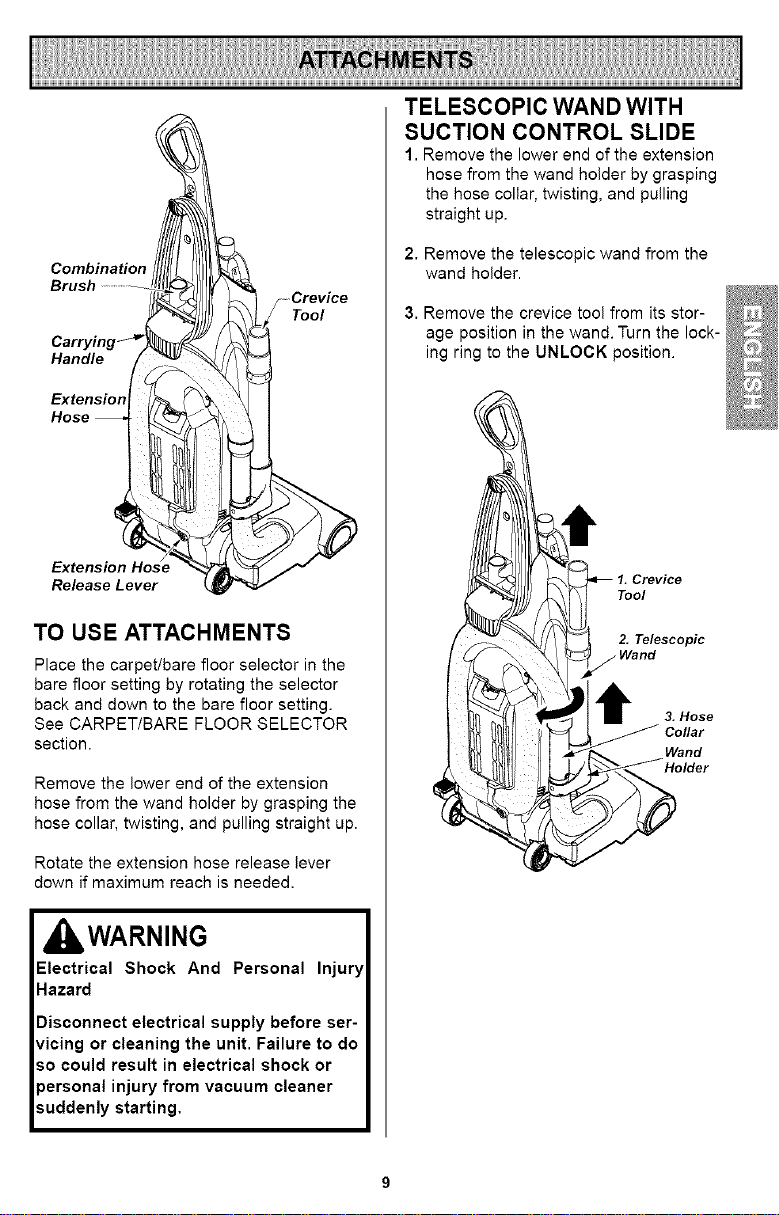
Combination
Brush
Handle
Extension
Release Lever
.....Crevice
Tool
TO USE ATTACHMENTS
Place the carpet/bare floor selector in the
bare floor setting by rotating the selector
back and down to the bare floor setting.
See CARPET/BARE FLOOR SELECTOR
section.
Remove the lower end of the extension
hose from the wand holder by grasping the
hose collar, twisting, and pulling straight up.
Rotate the extension hose release lever
down if maximum reach is needed.
IbWARNING
Electrical Shock And Personal Injury
Hazard
Disconnect electrical supply before ser-
vicing or cleaning the unit. Failure to do
so could result in electrical shock or
personal injury from vacuum cleaner
suddenly starting,
TELESCOPIC WAND WITH
SUCTION CONTROL SLIDE
1. Remove the lower end of the extension
hose from the wand holder by grasping
the hose collar, twisting, and pulling
straight up.
2. Remove the telescopic wand from the
wand holder.
3. Remove the crevice tool from its stor-
age position in the wand. Turn the lock-
ing ring to the UNLOCK position.
1. Crevice
Tool
2. Telescopic
3. Hose
Collar
Wand
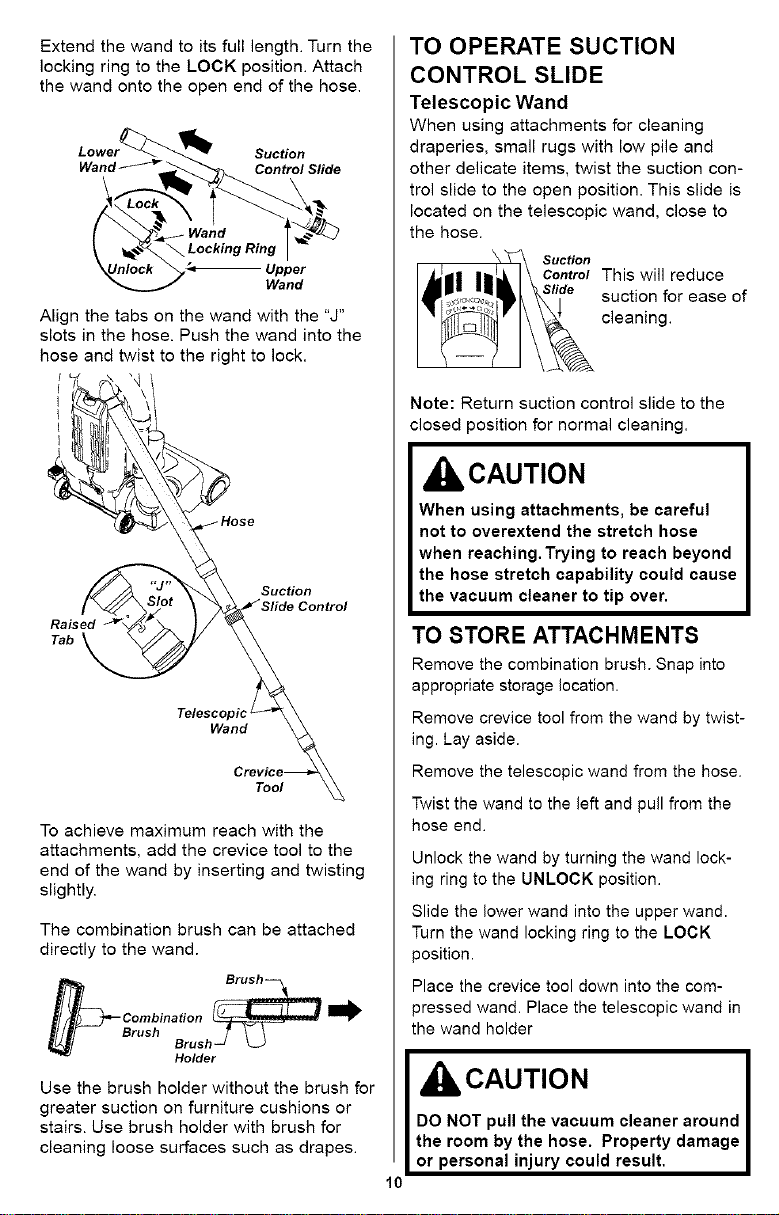
Extend the wand to its full length. Turn the
locking ring to the LOCK position. Attach
the wand onto the open end of the hose.
Lower_-_ _ Suction
Wand_'_r_ Control Slide
f
\ _._<_ Locking Ring I
_Unlock _,_ Upper
Wand
Align the tabs on the wand with the "J"
slots in the hose. Push the wand into the
hose and twist to the right to lock.
Raised
Tab
Suction
Telescopic l
Wand
Tool
To achieve maximum reach with the
attachments, add the crevice tool to the
end of the wand by inserting and twisting
slightly.
The combination brush can be attached
directly to the wand.
b Brush_ ......
Combination _ _
Brush BrushS
Holder
Use the brush holder without the brush for
greater suction on furniture cushions or
stairs. Use brush holder with brush for
cleaning loose surfaces such as drapes.
TO OPERATE SUCTION
CONTROL SLIDE
Telescopic Wand
When using attachments for cleaning
draperies, small rugs with low pile and
other delicate items, twist the suction con-
trol slide to the open position. This slide is
located on the telescopic wand, close to
the hose.
Suction
Control This will reduce
suction for ease of
cleaning.
10
Note: Return suction control slide to the
closed position for normal cleaning.
CAUTION
When using attachments, be careful
not to overextend the stretch hose
when reaching. Trying to reach beyond
the hose stretch capability could cause
the vacuum cleaner to tip over.
TO STORE ATTACHMENTS
Remove the combination brush. Snap into
appropriate storage location.
Remove crevice tool from the wand by twist-
ing. Lay aside.
Remove the telescopic wand from the hose.
Twist the wand to the left and pull from the
hose end.
Unlock the wand by turning the wand lock-
mg ring to the UNLOCK position.
Slide the lower wand into the upper wand.
Turn the wand locking ring to the LOCK
3osition.
Place the crevice tool down into the com-
3ressed wand. Place the telescopic wand in
the wand holder
CAUTION
DO NOT pull the vacuum cleaner around
the room by the hose. Property damage
or personal injury could result.
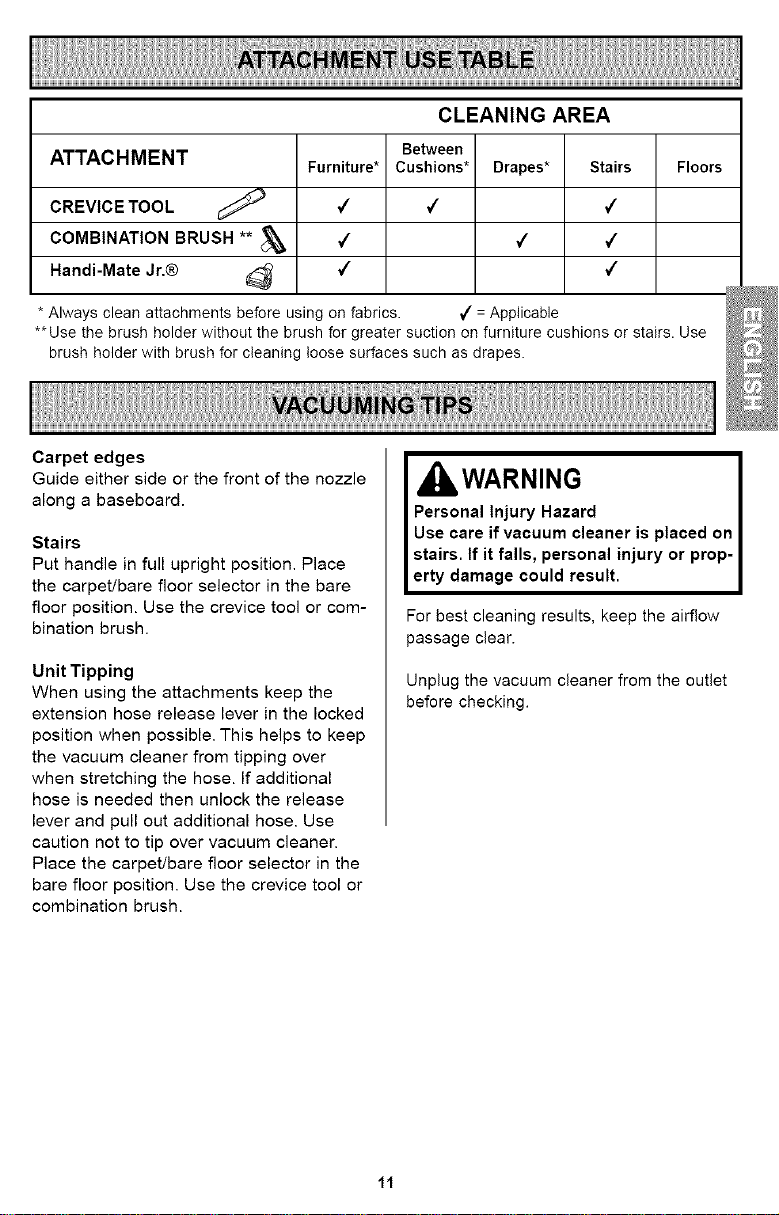
CLEANING AREA
ATTACHMENT Furniture*
CREVICE TOOL _ 4
COMBINATION BRUSH ** _ 4
Handi-Mate Jr.® _ 4
* Always clean attachments before usH_gon fabrics.
Between
Cushions*
Drapes*
FloorsStairs
¢
¢
¢
¢
¢
J = Applicable
**Use the brush holder without the brush for greater suction on furniture cushions or stairs. Use
brush holder with brush for cleaning loose surfaces such as drapes.
Carpet edges
Guide either side or the front of the nozzle
along a baseboard.
Stairs
Put handle in full upright position. Place
the carpet/bare floor selector in the bare
floor position. Use the crevice tool or com-
bination brush.
Unit Tipping
When using the attachments keep the
extension hose release lever in the locked
position when possible. This helps to keep
the vacuum cleaner from tipping over
when stretching the hose. If additional
hose is needed then unlock the release
lever and pull out additional hose. Use
caution not to tip over vacuum cleaner.
Place the carpet/bare floor selector in the
bare floor position. Use the crevice tool or
combination brush.
, WARNING
Personal Injury Hazard
Use care if vacuum cleaner is placed on
stairs. If it falls, personal injury or prop-
erty damage could result.
For best cleaning results, keep the airflow
passage clear.
Unplug the vacuum cleaner from the outlet
before checking.
11
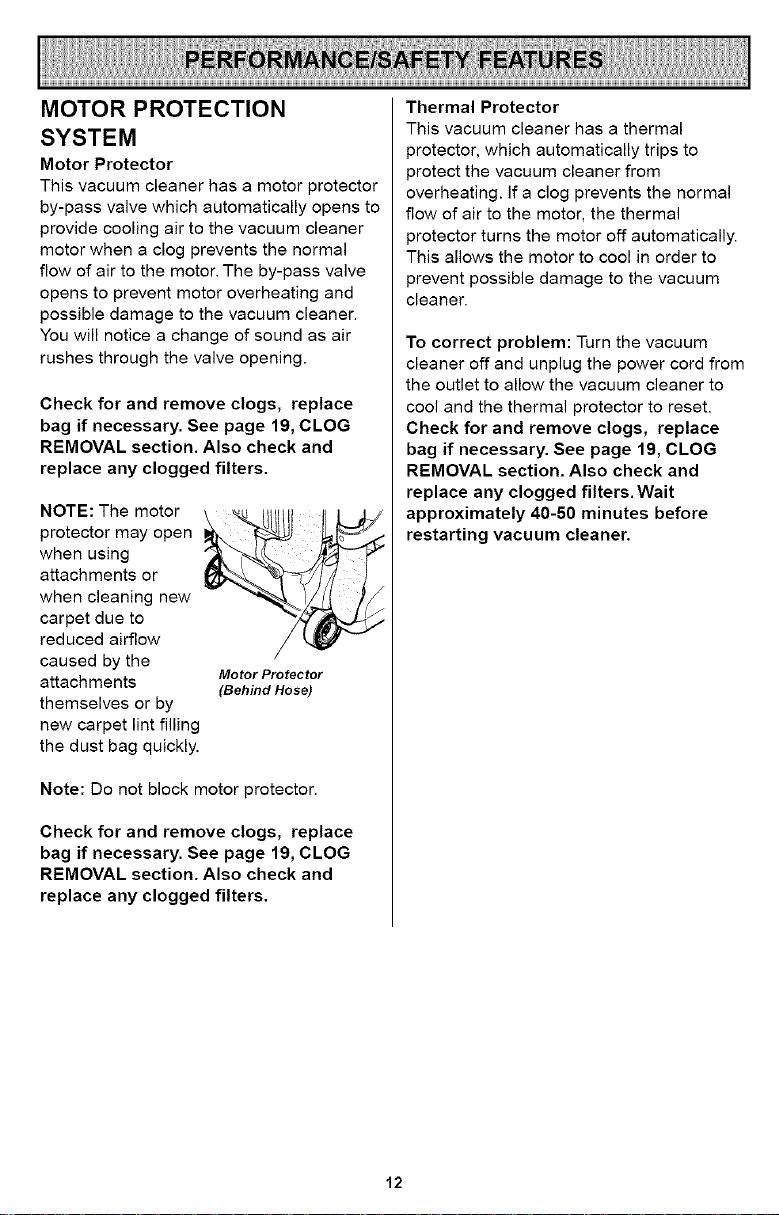
MOTOR PROTECTION
SYSTEM
Motor Protector
This vacuum cleaner has a motor protector
by-pass valve which automatically opens to
provide cooling air to the vacuum cleaner
motor when a clog prevents the normal
flow of air to the motor. The by-pass valve
opens to prevent motor overheating and
possible damage to the vacuum cleaner.
You will notice a change of sound as air
rushes through the valve opening.
Check for and remove clogs, replace
bag if necessary. See page 19, CLOG
REMOVAL section. Also check and
replace any clogged filters.
NOTE: The motor
protector may open
when using
attachments or
when cleaning new
carpet due to
reduced airflow
caused by the
attachments
themselves or by
Motor Protector
(Behind Hose)
new carpet lint filling
the dust bag quickly.
Note: Do not block motor protector.
Check for and remove clogs, replace
bag if necessary. See page 19, CLOG
REMOVAL section. Also check and
replace any clogged filters.
Thermal Protector
This vacuum cleaner has a thermal
protector, which automatically trips to
protect the vacuum cleaner from
overheating, if a clog prevents the normal
flow of air to the motor, the thermal
protector turns the motor off automatically.
This allows the motor to cool in order to
prevent possible damage to the vacuum
cleaner.
To correct problem: Turn the vacuum
cleaner off and unplug the power cord from
the outlet to allow the vacuum cleaner to
cool and the thermal protector to reset.
Check for and remove clogs, replace
bag if necessary. See page 19, CLOG
REMOVAL section. Also check and
replace any clogged filters. Wait
approximately 40-50 minutes before
restarting vacuum cleaner.
12
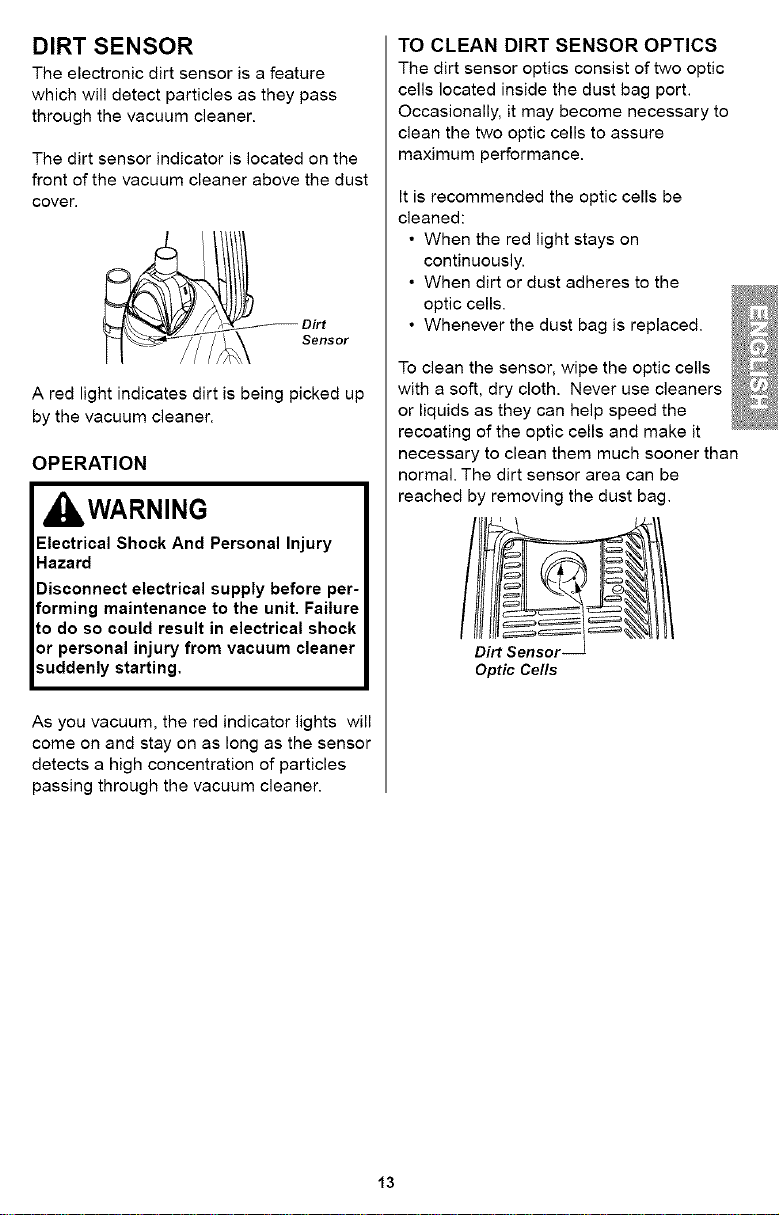
DIRT SENSOR
The electronic dirt sensor is a feature
which will detect particles as they pass
through the vacuum cleaner.
The dirt sensor indicator is located on the
front of the vacuum cleaner above the dust
cover.
A red light indicates dirt is being picked up
by the vacuum cleaner.
OPERATION
IbWARNING
Electrical Shock And Personal Injury
Hazard
Disconnect electrical supply before per-
forming maintenance to the unit. Failure
to do so could result in electrical shock
or personal injury from vacuum cleaner
suddenly starting.
As you vacuum, the red indicator lights will
come on and stay on as long as the sensor
detects a high concentration of particles
passing through the vacuum cleaner.
TO CLEAN DIRT SENSOR OPTICS
The dirt sensor optics consist of two optic
cells located inside the dust bag port.
Occasionally, it may become necessary to
clean the two optic cells to assure
maximum performance.
It is recommended the optic cells be
cleaned:
• When the red light stays on
continuously.
• When dirt or dust adheres to the
optic cells.
• Whenever the dust bag is replaced.
To clean the sensor, wipe the optic cells
with a soft, dry cloth. Never use cleaners
or liquids as they can help speed the
recoating of the optic cells and make it
necessary to clean them much sooner than
normal. The dirt sensor area can be
reached by removing the dust bag.
Optic Cells
13
VACUUM CLEANER CARE
Always follow all safety precautions when
performing maintenance to the vacuum
cleaner.
I=WARNING
Electrical Shock And Personal Injury
Hazard
Disconnect electrical supply before ser.
vicing or cleaning the unit, Failure to dc
so could result in electrical shock or per.
sonal injuryfrom cleanersuddenly starting,
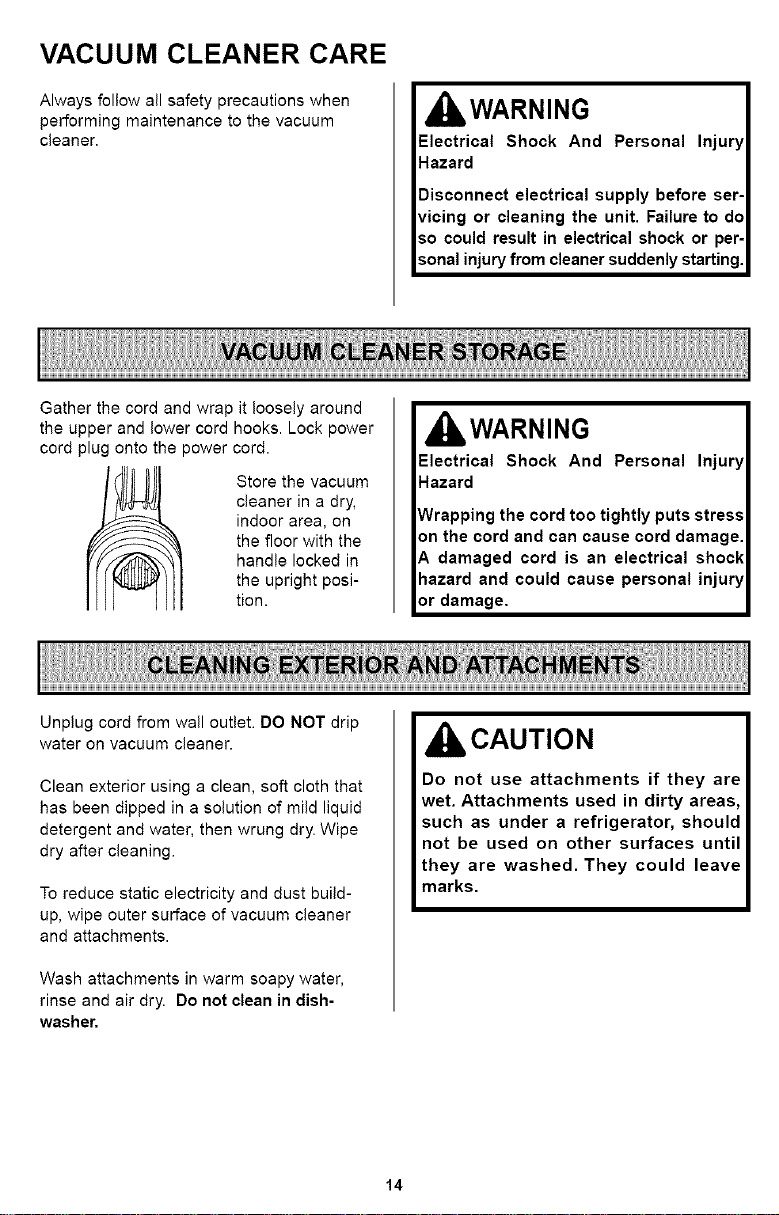
Gather the cord and wrap it loosely around
the upper and lower cord hooks. Lock power
cord plug onto the power cord.
Store the vacuum
cleaner in a dry,
indoor area, on
the floor with the
handle locked in
the upright posi-
tion.
kWARNING
Electrical Shock And Personal Injury
Hazard
Wrapping the cord too tightly puts stress
an the cord and can cause cord damage,
A damaged cord is an electrical shock
hazard and could cause personal injury
or damage,
Unplug cord from wall outlet. DO NOT drip
water on vacuum cleaner.
Clean exterior using a clean, soft cloth that
has been dipped in a solution of mild liquid
detergent and water, then wrung dry. Wipe
dry after cleaning.
To reduce static electricity and dust build-
up, wipe outer surface of vacuum cleaner
and attachments.
Wash attachments in warm soapy water,
rinse and air dry. Do not clean in dish-
washer.
CAUTION
Do not use attachments if they are
wet. Attachments used in dirty areas,
such as under a refrigerator, should
not be used on other surfaces until
they are washed. They could leave
marks.
14
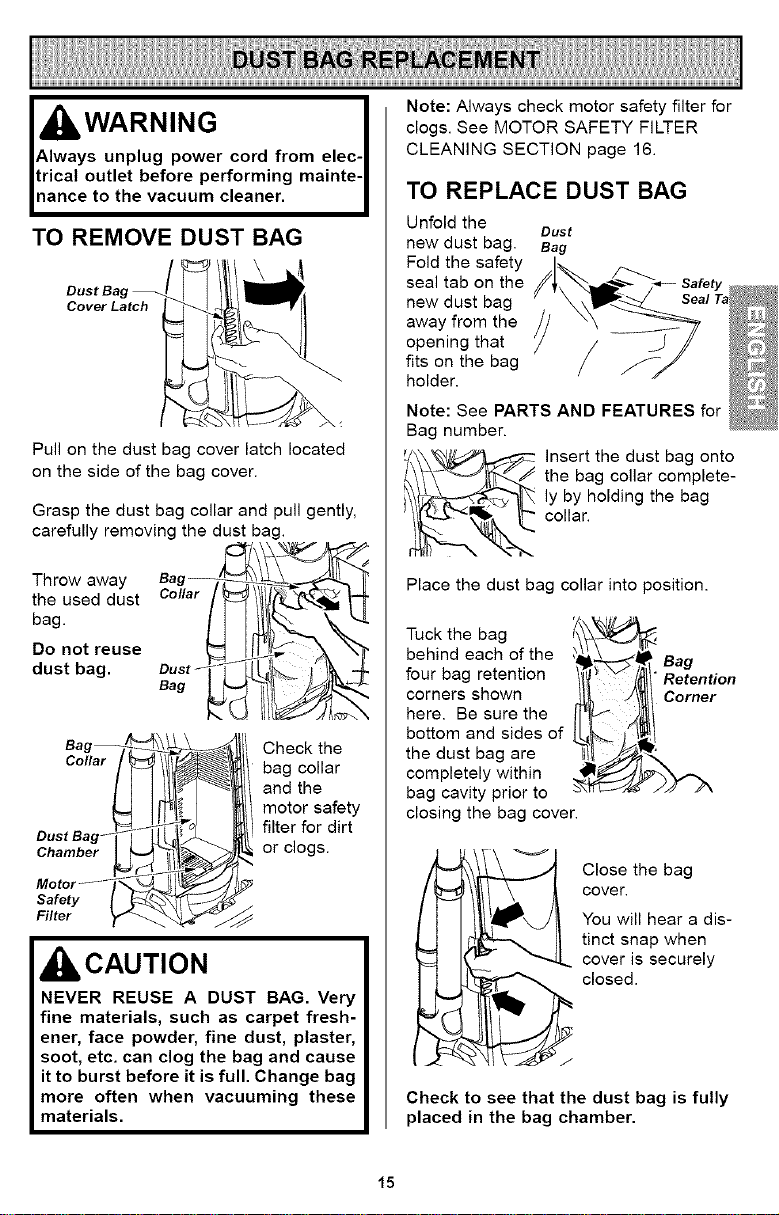
TO REMOVE DUST BAG
Dust Bag
Cover Latch
Pull on the dust bag cover latch located
on the side of the bag cover.
Grasp the dust bag collar and pull gently,
carefully removing the dust bag.
Throw away
the used dust
bag.
Do not reuse
dust bag.
Bag --_1_1__
Collar / _111_1_
II-I
Dus'Bag Z l K
Chamber I _ _,1_'{_ _J
safety I _%-'_SJ/_
Check the
bag collar
and the
motor safety
filter for dirt
or clogs.
CAUTION
NEVER REUSE A DUST BAG. Very
fine materials, such as carpet fresh-
ener, face powder, fine dust, plaster,
soot, etc. can clog the bag and cause
it to burst before it is full. Change bag
more often when vacuuming these
materials.
Note: Always check motor safety filter for
clogs. See MOTOR SAFETY FILTER
CLEANING SECTION page 16.
TO REPLACE DUST BAG
Unfold the
Dust
new dust bag. Bag
Fold the safety
seal tab on the Safety
new dust bag Seal Ta
away from the
opening that
fits on the bag
holder.
Note: See PARTS AND FEATURES for
Bag number.
_ nsert the dust bag onto
the bag collar complete-
ly by holding the bag
collar.
Place the dust bag collar into position.
Tuck the bag
behind each of the
four bag retention
corners shown
here. Be sure the
bottom and sides of
the dust bag are
completely within
bag cavity prior to
closing the bag cover.
_ lose the bag
cover.
You will hear a dis-
tinct snap when
cover is securely
closed.
Check to see that the dust bag is fully
placed in the bag chamber.
15
WARNING
Electrical Shock Hazard
Unplug power cord from electrical out-
let. Do not operate the vacuum cleaner
without the motor safety filter. Be sure
the filter is dry and properly installed to
prevent motor failure and/or electrical
shock.
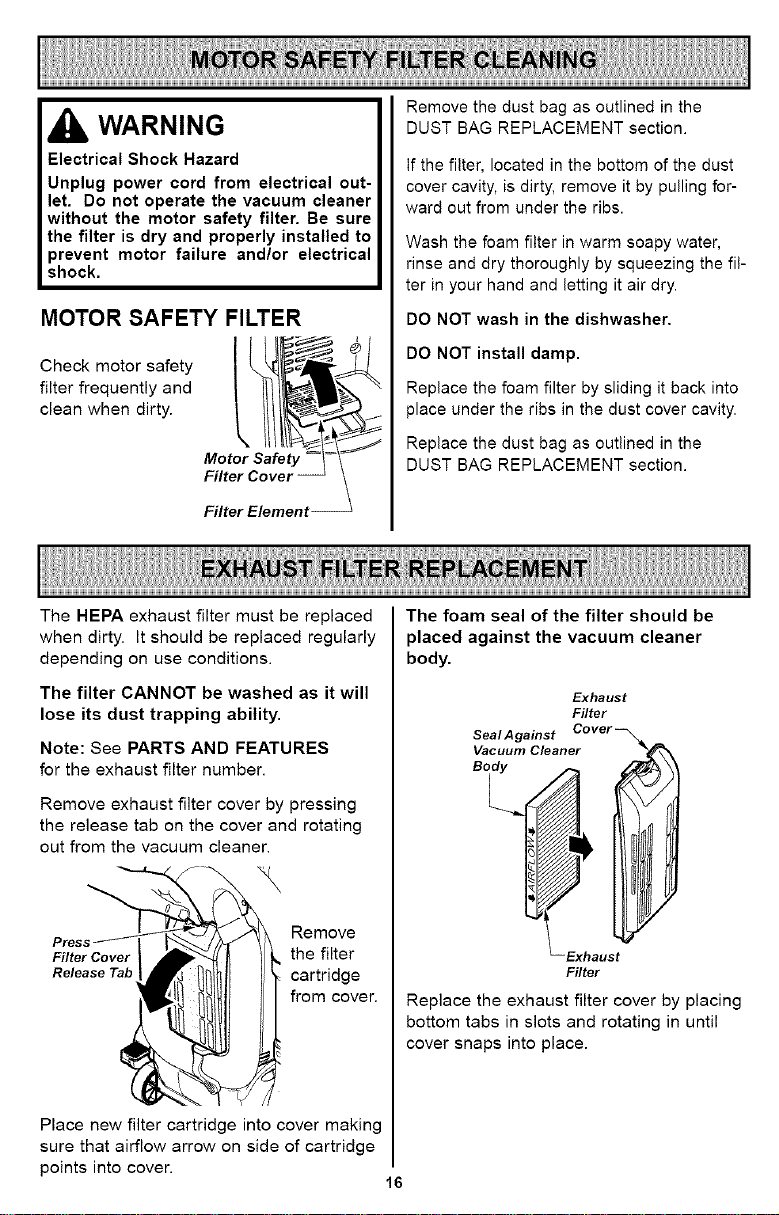
MOTOR SAFETY FILTER
Check motor safety
filter frequently and
clean when dirty.
Filter Element
Remove the dust bag as outlined in the
DUST BAG REPLACEMENT section.
if the filter, located in the bottom of the dust
cover cavity, is dirty, remove it by pulling for-
ward out from under the ribs.
Wash the foam filter in warm soapy water,
rinse and dry thoroughly by squeezing the fil-
ter in your hand and letting it air dry.
DO NOT wash in the dishwasher,
DO NOT install damp.
Replace the foam filter by sliding it back into
place under the ribs in the dust cover cavity.
Replace the dust bag as outlined in the
DUST BAG REPLACEMENT section.
The HEPA exhaust filter must be replaced
when dirty. It should be replaced regularly
depending on use conditions.
The filter CANNOT be washed as it will
lose its dust trapping ability.
Note: See PARTS AND FEATURES
for the exhaust filter number.
Remove exhaust filter cover by pressing
the release tab on the cover and rotating
out from the vacuum cleaner.
\
Filter Cover
Release Tab
Remove
the filter
cartridge
from cover.
Place new filter cartridge into cover making
sure that airflow arrow on side of cartridge
points into cover.
16
The foam seal of the filter should be
placed against the vacuum cleaner
body.
Exhaust
Filter
Seal Against
Vacuum Cleaner
Filter
Replace the exhaust filter cover by placing
bottom tabs in slots and rotating in until
cover snaps into place.
IbWARNING
Electrical Shock Or Personal Injury
Hazard
Disconnect electrical supply before
servicing or cleaning the unit. Failure
to do so could result in electrical
shock or personal injury from vacuum
cleaner suddenly starting.
CLEANING AGITATOR
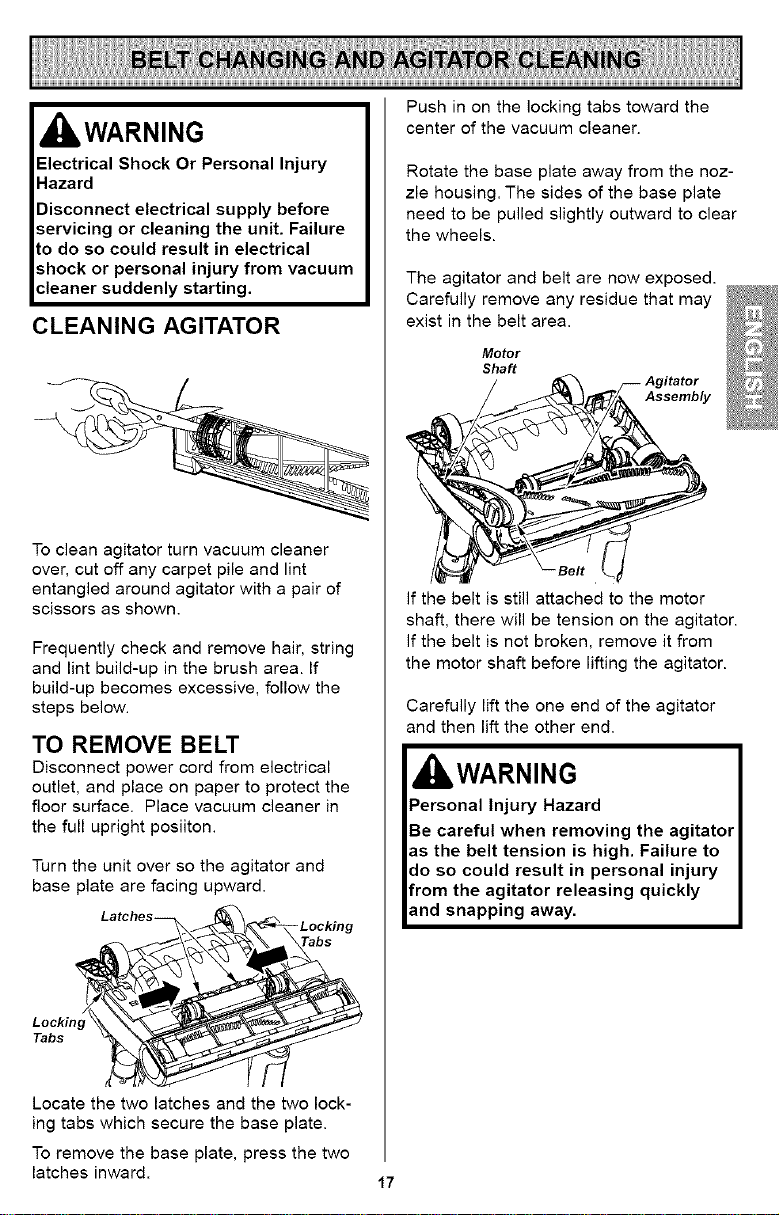
To clean agitator turn vacuum cleaner
over, cut off any carpet pile and lint
entangled around agitator with a pair of
scissors as shown.
Frequently check and remove hair, string
and lint build-up in the brush area. If
build-up becomes excessive, follow the
steps below.
TO REMOVE BELT
Disconnect power cord from electrical
outlet, and place on paper to protect the
floor surface. Place vacuum cleaner in
the full upright posiiton.
Turn the unit over so the agitator and
base plate are facing upward.
Latches--
-Locking
tabs
Lockin,
Tabs
Locate the two latches and the two lock-
ing tabs which secure the base plate.
To remove the base plate, press the two
latches inward.
17
Push in on the locking tabs toward the
center of the vacuum cleaner.
Rotate the base plate away from the noz-
zle housing. The sides of the base plate
need to be pulled slightly outward to clear
the wheels.
The agitator and belt are now exposed.
Carefully remove any residue that may
exist in the belt area.
Motor
Shaft
7- Agitator
_._ Assembly
If the belt is still attached to the motor
shaft, there will be tension on the agitator.
If the belt is not broken, remove it from
the motor shaft before lifting the agitator.
Carefully lift the one end of the agitator
and then lift the other end.
IbWARNING
Personal Injury Hazard
Be careful when removing the agitator
as the belt tension is high. Failure to
do so could result in personal injury
from the agitator releasing quickly
and snapping away.
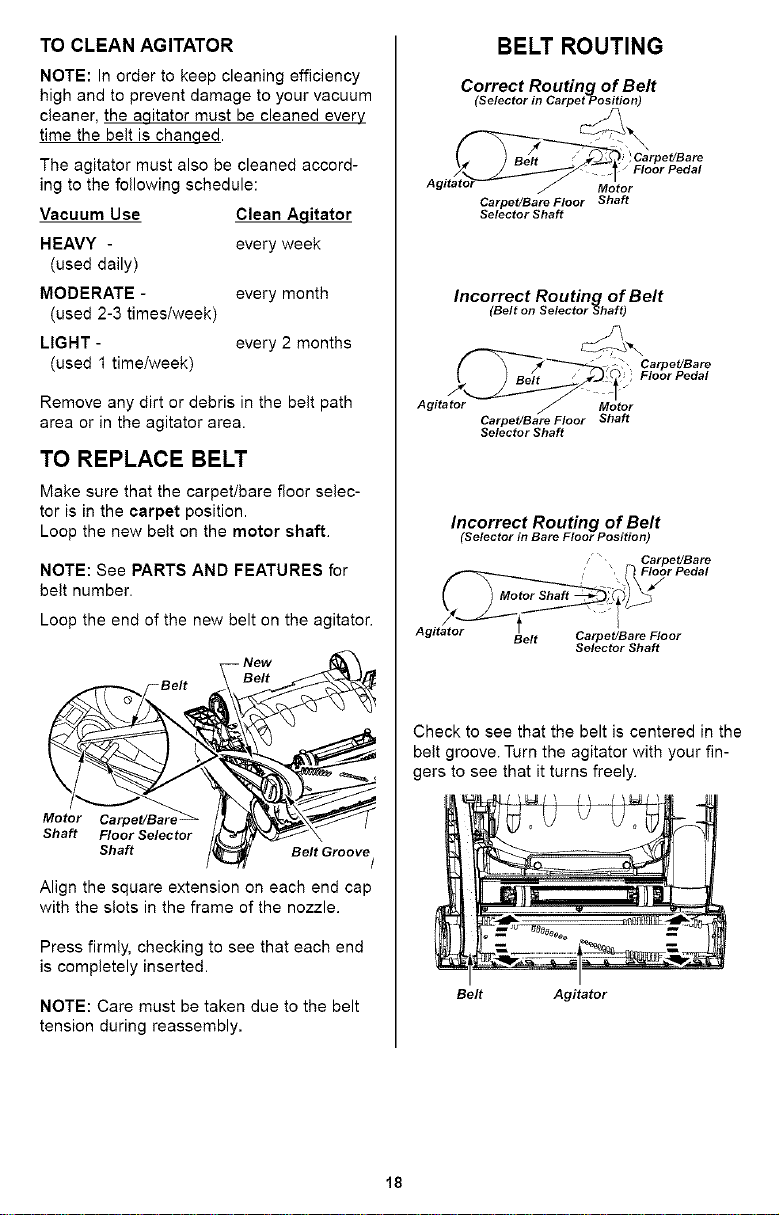
TO CLEAN AGITATOR
NOTE: In order to keep cleaning efficiency
high and to prevent damage to your vacuum
cleaner, the agitator must be cleaned every
time the belt is chanqed.
The agitator must also be cleaned accord-
ing to the following schedule:
Vacuum Use Clean Agitator
HEAVY - every week
(used daily)
MODERATE - every month
(used 2-3 times/week)
LIGHT - every 2 months
(used 1 time/week)
Remove any dirt or debris in the belt path
area or in the agitator area.
TO REPLACE BELT
Make sure that the carpet/bare floor selec-
tor is in the carpet position.
Loop the new belt on the motor shaft.
NOTE: See PARTS AND FEATURES for
belt number.
Loop the end of the new belt on the agitator.
Floor Selector /_ _,-_/_'_,_1_- \
Shaft /t_ Belt Groove/
Align the square extension on each end cap
with the slots in the frame of the nozzle.
Press firmly, checking to see that each end
is completely inserted.
NOTE: Care must be taken due to the belt
tension during reassembly,
BELT ROUTING
Correct Routing of Belt
(Selector in CarpetPosition)
Floor Pedal
Motor
Carpet/Bare Floor Shaft
Selector Shaft
Incorrect Routing of Belt
(Belt on Selector Shaft)
Agitator Motor
Carpet/Bare Floor Shaft
Selector Shaft
Carpet/Bare
Floor Pedal
Incorrect Routing of Belt
(Selector in Bare Floor Position)
/ _" Carpet/Bare
, Floor Pedal
Agitator
Belt Carpet/Bare Floor
Selector Shaft
Check to see that the belt is centered in the
belt groove. Turn the agitator with your fin-
gers to see that it turns freely.
Belt Agitator
18
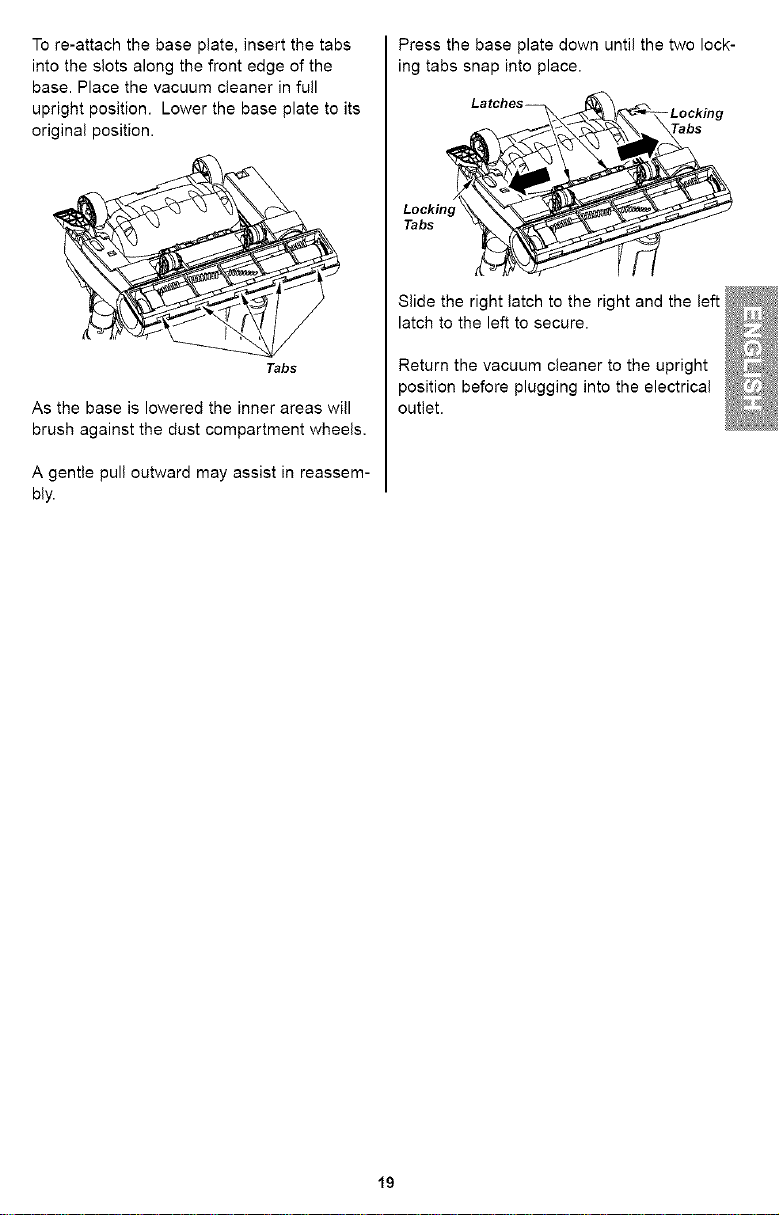
Tore-attachthebaseplate,insertthetabs
intotheslotsalongthefrontedgeofthe
base.Placethevacuumcleanerinfull
uprightposition.Lowerthebaseplatetoits
originalposition.
Tabs
As the base is lowered the inner areas will
brush against the dust compartment wheels.
A gentle pull outward may assist in reassem-
bly.
Press the base plate down until the two lock-
ing tabs snap into place.
Latches_ _._._- Locking
Slide the right latch to the right and the left
latch to the left to secure.
Return the vacuum cleaner to the upright
position before plugging into the electrical
outlet.
19
IbWARNING
Electrical Shock Or Personal Injury
Hazard
Disconnect electrical supply before
performing maintenance to the unit.
Failure to do so could result in
electrical shock or personal injury
from the vacuum cleaner suddenly
starting.
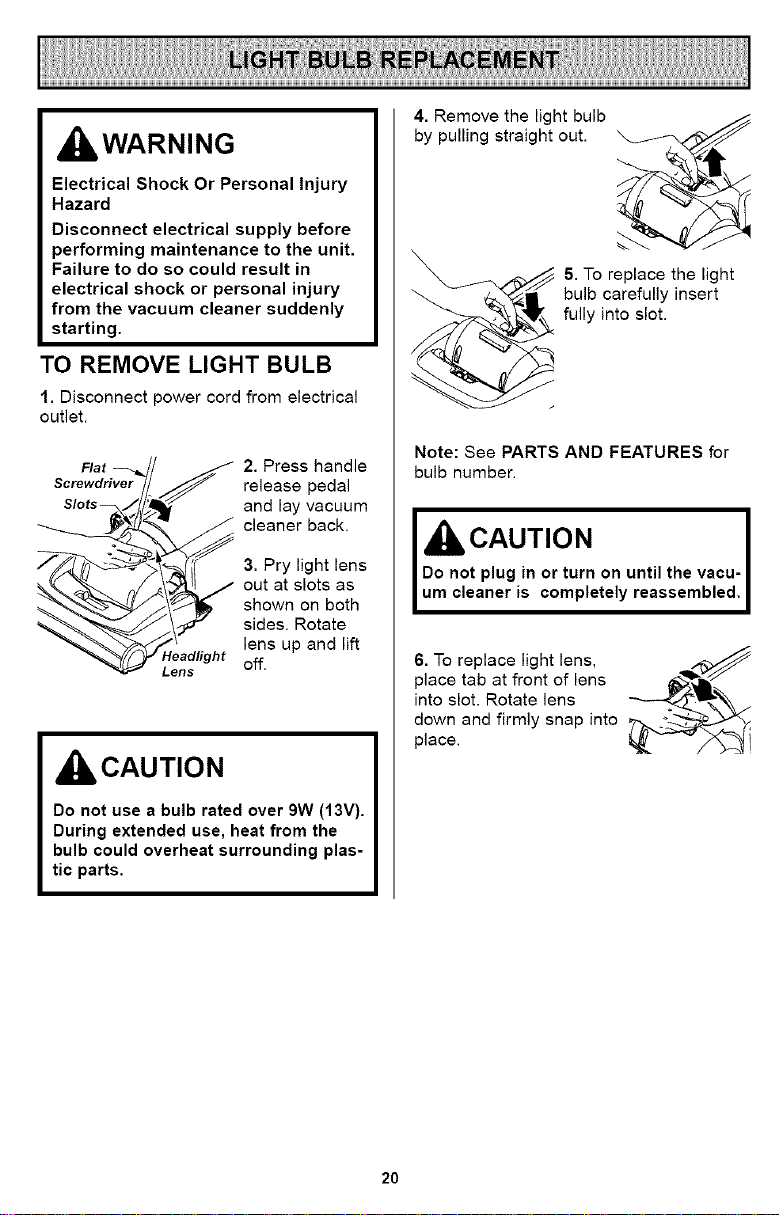
TO REMOVE LIGHT BULB
1. Disconnect power cord from electrical
outlet.
Flat
2. Press handle
release pedal
and lay vacuum
cleaner back.
3. Pry light lens
out at slots as
shown on both
sides. Rotate
lens up and lift
_eadfight off.
Lens
CAUTION
Do not use a bulb rated over 9W (13V).
During extended use, heat from the
bulb could overheat surrounding plas-
tic parts.
4. Remove the light bulb
by pulling straight out.
5. To replace the light
bulb carefully insert
fully into slot.
Note: See PARTS AND FEATURES for
bulb number.
I&O.OT,O. I
Do not plug in or turn on until the vacu- I
um cleaner is completely reassembled, I
6. To replace light lens, _q,_://
place tab at front of lens _-_lk',
into slot. Rotate lens
down and firmly snap into
place.
20
Always follow all safety precautions when per-
forming maintenance to the vacuum cleaner.
WARNING
Electrical Shock Or Personal Injury
Hazard
Disconnect electrical supply before
performing maintenance to the unit.
Failure to do so could result in
electrical shock or personal injury
from the vacuum cleaner suddenly
starting.
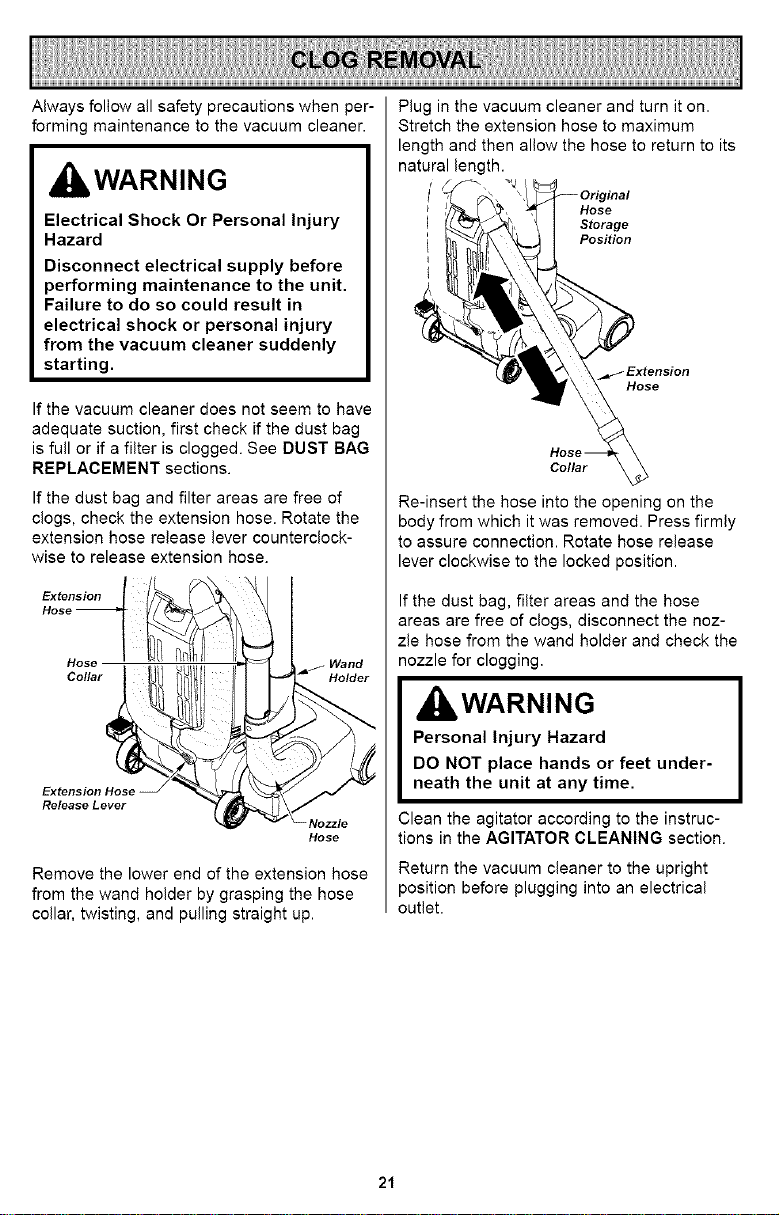
If the vacuum cleaner does not seem to have
adequate suction, first check if the dust bag
is full or if a filter is clogged. See DUST BAG
REPLACEMENT sections.
If the dust bag and filter areas are free of
clogs, check the extension hose. Rotate the
extension hose release lever counterclock-
wise to release extension hose.
Extension
Hose
Collar
Extension Hose
Release Lever
Hose
Remove the lower end of the extension hose
from the wand holder by grasping the hose
collar, twisting, and pulling straight up.
Plug in the vacuum cleaner and turn it on.
Stretch the extension hose to maximum
length and then allow the hose to return to its
natural length.
Hose
Storage
Position
Hose
Collar
Re-insert the hose into the opening on the
body from which it was removed. Press firmly
to assure connection. Rotate hose release
lever clockwise to the locked position.
If the dust bag, filter areas and the hose
areas are free of clogs, disconnect the noz-
zle hose from the wand holder and check the
nozzle for clogging.
d IbWARNING
Personal Injury Hazard
DO NOT place hands or feet under-
neath the unit at any time.
Clean the agitator according to the instruc-
tions in the AGITATOR CLEANING section.
Return the vacuum cleaner to the upright
position before plugging into an electrical
outlet.
21
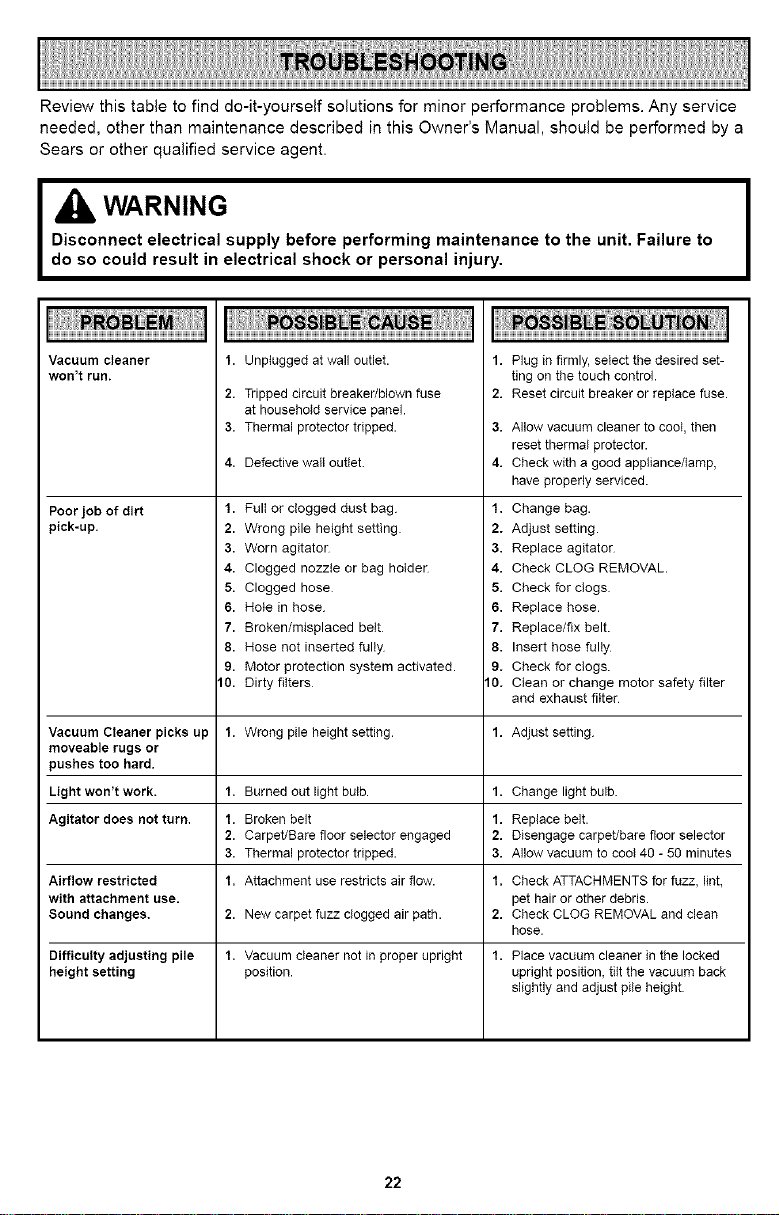
Reviewthistabletofinddo-it-yourselfsolutionsforminorperformanceproblems.Anyservice
needed,otherthanmaintenancedescribedinthisOwner'sManual,shouldbeperformedbya
Searsorotherqualifiedserviceagent.
WARNING
Disconnect electrical supply before performing maintenance to the unit. Failure to
do so could result in electrical shock or personal injury,
Vacuum cleaner
won't run.
Poor job of dirt
pick-up.
1. Unplugged at wall outlet.
2. Tripped circuit breaker/blown fuse
at household service panel.
3. Thermal protector tripped.
4. Defective wall oufiet.
1. Full or clogged dust bag
2. Wrong pile height setting
3. Worn agitaton
4. Clogged nozzle or bag holden
5. Clogged hose
6. Hole in hose.
7. Broken/misplaced belt
8. Hose not inserted fully
9. Motor protection system activated.
10. Dirty filters
Plug in firmly, select the desired set-
ting on the touch control.
Reset circuit breaker or replace fuse.
1,
2.
3. Allow vacuum cleaner to cool, then
reset thermal protector.
4. Check with a good appliance/lamp,
have properly serviced.
1. Change bag.
2. Adjust setting.
3. Replace agitator
4. Check CLOG REMOVAL.
5. Check for clogs
6. Replace hose.
7. Replace/fix belt.
8. Insert hose fully
9. Check for clogs.
10. Clean or change motor safety filter
and exhaust filter
Vacuum Cleaner picks up 1. Wrong pile height setting. 1. Adjust setting.
moveable rugs or
pushes too hard.
Light won't work. 1. Burned out light bulb. 1. Change light bulb.
Agitator does not turn. 1. Broken belt 1. Replace belt.
2. Carpet/Bare floor selector engaged 2. Disengage carpet/bare floor selector
3. Thermal protector tripped. 3. Allow vacuum to cool 40 - 50 minutes
Airflow restricted 1. Attachment use restricts air flow. 1. Check ATTACHMENTS for fuzz, lint,
with attachment use. pet hair or other debris.
Sound changes. 2. New carpet fuzz clogged air path. 2. Check CLOG REMOVAL and clean
hose.
Difficulty adjusting pile 1. Vacuum cleaner not in proper upright 1. Place vacuum cleaner in the locked
height setting position, upright position, tilt the vacuum back
slightly and adjust pile height.
22
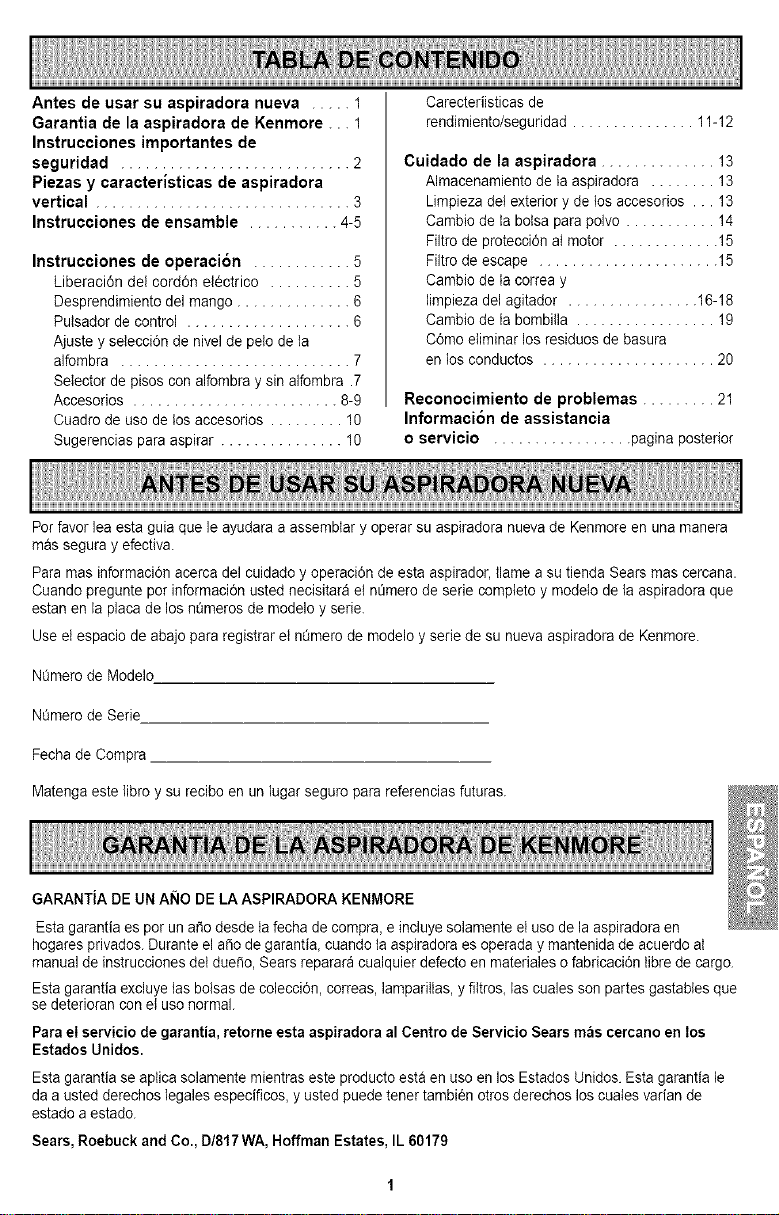
Antes de usar su aspiradora nueva ..... 1
Garantia de la aspiradora de Kenmore ... 1
Instrucciones importantes de
seguridad ............................ 2
Piezas y caracteristicas de aspiradora
vertical ............................... 3
Instrucciones de ensamble ........... 4-5
Instrucciones de operaci6n ............ 5
Liberaci6n del cord6n el6ctrico .......... 5
Desprendimiento del mango .............. 6
Pulsador de control .................... 6
Ajuste y selecci6n de nivel de pelo de la
alfombra ............................ 7
Selector de pisos con alfombra y sin alfombra .7
Accesorios ......................... 8-9
Cuadro de uso de los accesorios ......... 10
Sugerencias para aspirar ............... 10
Carecteriisticas de
rendimiento/seguridad ............... 11-12
Cuidado de la aspiradora .............. 13
Almacenamiento de ta aspiradora ........ 13
Limpieza det exterior y de tos accesorios ... 13
Cambio de la bolsa para polvo ........... 14
Filtrode protecci6n atmotor ............. 15
Filtrode escape ...................... 15
Cambio de la correa y
limpieza del agitador ................ 16-18
Cambio de la bombitla ................. 19
C6mo eliminar los residuos de basura
en los conductos ..................... 20
Reconocimiento de problemas ......... 21
Informaci6n de assistancia
o servicio ................. pagina posterior
Porfavor lea esta guia que le ayudara a assemblar yoperar su aspiradora nuevade Kenmore en una manera
mas segura y efectiva.
Para mas informaci6n acerca del cuidado y operaci6n de esta aspirador, llame a su tienda Sears mas cercana.
Cuando pregunte por informaci6n usted necisitara el nt_merode serie compteto y modelo de la aspiradora que
estan en ia placa de los nQmerosde modelo y serie.
Use el espacio de abajo para registrar el nQmerode modelo y serie de su nueva aspiradora de Kenmore.
NQmerode Modelo
NOmerode Serie
Fecha de Compra
Matenga este libro y su recibo en un lugar seguro para referencias futuras.
GARANTiA DE UN A_IO DE LA ASPIRADORA KENMORE
Esta garantia es pot un a_odesde tafecha decompra, e incluye solamente el uso de la aspiradora en
hogares privados. Durante el a_o de garantia, cuando taaspiradora es operada y mantenida de acuerdo aI
manual de instrucciones del duefio, Sears reparar_ cualquier defecto en materiales ofabricaci6n tibrede cargo.
Esta garantia excluye tas bolsas de colecci6n, correas, lamparillas, y fiItros, las cuales son partes gastabies que
se deterioran con el uso normal.
Para el servicio de garantia, retorne esta aspiradora al Centro de Servicio Sears m_s cercano en los
Estados Unidos.
Esta garantia se aptica solamente mientras este producto esta en uso en los Estados Unidos. Esta garantia le
daa usted derechos legales especificos, y usted puede tenet tambien otrosderechos los cuatesvarian de
estado a estado.
Sears, Roebuck and Co., D/817 WA, Hoffman Estates, IL 60179
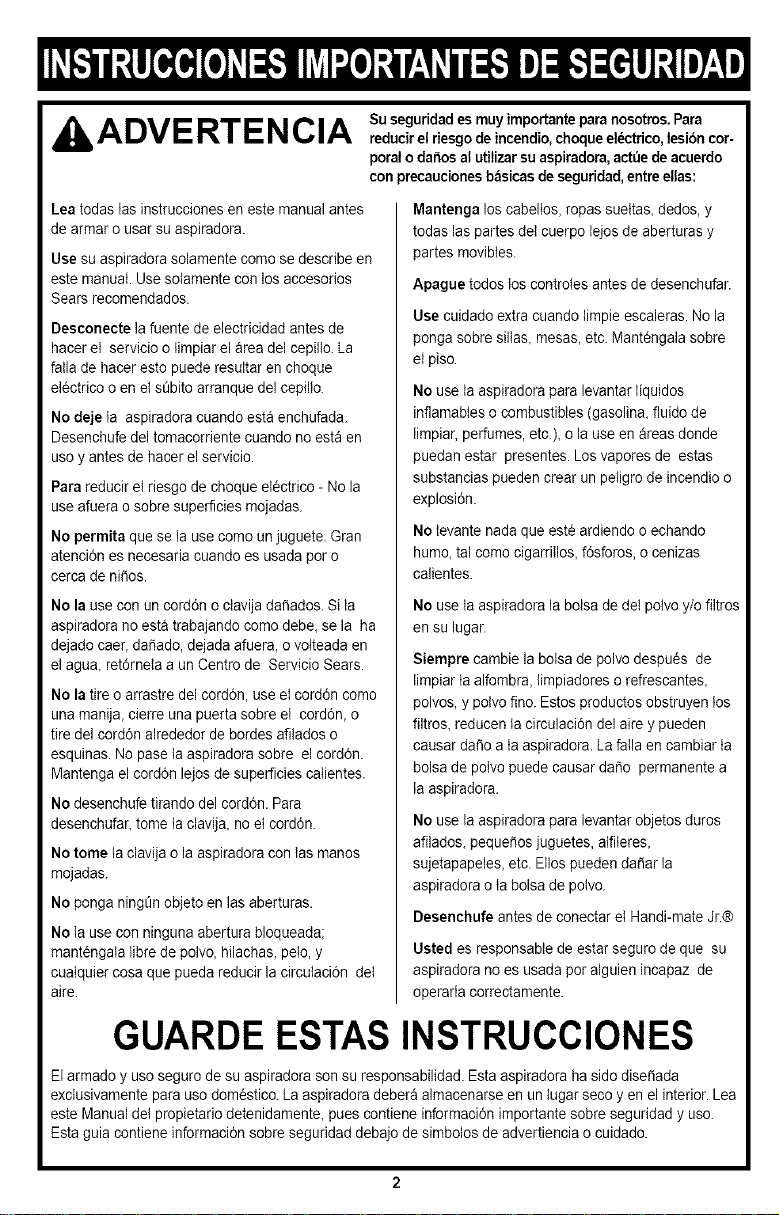
ADVE RTENCIA soseguridades muyimportanteparanosotros. Parareducirel riesgode incendio,choqueel_ctrico,Iesibncor-
poralo dai_osalutUizarsuaspiradora,actue deacuerdo
con precaucionesbasicasde seguridad,entreelias:
Lea todas tas instruccioneseneste manual antes
de armar o usar su aspiradora.
Use su aspiradora solamente come se describe en
este manual. Use sotamente con losaccesorios
Sears recomendados.
Desconecte la fuente de electricidad antes de
hacer el servicio o limpiar el area del cepillo. La
fatia de hacer esto puede resultar encheque
electrico o enel sL_bitoarranque del cepillo.
No deje ta aspiradora cuando esta enchufada.
Desenchufe del tomacorriente cuando noest9 en
uso y antes de hacer el servicio.
Para reducir el riesgo de choque elOctrico- No la
use afuera o sobre superficies mojadas.
No permita que se la use come unjuguete. Gran
atenciOnes necesaria cuando es usada por o
cerca de ni_os.
No la use con uncordon o ctavija dafiados. Si la
aspiradora noesta trabajando como debe,se la ha
dejado caer, da_ado, dejada afuera, o votteadaen
el agua, retOrneIaa un Centro de Servicio Sears.
No la tire o arrastre del cordon, use el cord6n como
una manija, cierre una puerta sobre el cord6n, o
tire del cordon alrededor de bordes afitados o
esquinas. No pase la aspiradora sobre el cordon.
Mantenga elcordon lejos desuperficies calientes.
No desenchufe tirando del cordon. Para
desenchufar, tome la clavija, no etcordon.
No tome la clavija o la aspiradora con tasmanos
mojadas.
No ponga ningL_nobjeto en las aberturas.
No la use con ninguna abertura bloqueada;
mantengala libre de polvo, hilachas, pelo, y
cuatquier cosa que pueda reducir la circulaciOn del
aire.
Mantenga los cabeltos, ropas suettas, dedos, y
todas las partes del cuerpo lejos de aberturas y
partes movibtes.
Apague todos los controles antes de desenchufar.
Use cuidado extra cuando timpie escaleras. No la
ponga sobre silIas, mesas,etc. Mant0ngaia sobre
el piso.
No use la aspiradora para levantarliquidos
inflamabteso combustibles (gasolina, fluido de
limpiar,perfumes, etc.), o la use en &reas donde
puedan estar presentes. Los vapores de estas
substancias pueden crear un peIigro de incendio o
explosion.
No tevante nadaque est0 ardiendo o echando
humo, tal como cigarriIios, fOsforos,o cenizas
calientes.
No use la aspiradora la bolsa de detpolvo y/o filtros
en su lugar.
Siempre cambie la botsa de polvo despuOs de
limpiarta alfombra, limpiadores o refrescantes,
polvos, y potvo fine. Estos productos obstruyen los
flltros, reducen la circulaciOndel aire y pueden
causar dafio a taaspiradora. La falla en cambiar ta
bolsa de polvo puede causar daSo permanente a
la aspiradora.
No use la aspiradora para levantarobjetos duros
afilados, pequer_osjuguetes, atfileres,
sujetapapeles, etc. Ellos pueden da5ar la
aspiradora o tabolsa de potvo.
Desenchufe antes de conectar el Handi-mate Jr.@
Usted es responsabte de estar seguro de que su
aspiradora no es usada per alguien incapaz de
operarla correctamente.
GUARDEESTASINSTRUCCIONES
El armado y use seguro de su aspiradora son su responsabilidad. Esta aspiradora ha sido dise_ada
exctusivamente para uso domestico. La aspiradora debera almacenarse en un tugar seco yen elinterior. Lea
este Manualdel propietario detenidamente, pues contiene informaciOnimportante sobre seguridad y use.
Esta guia contiene informaciOnsobre seguridad debajo de simbolos de advertiencia o cuidado.
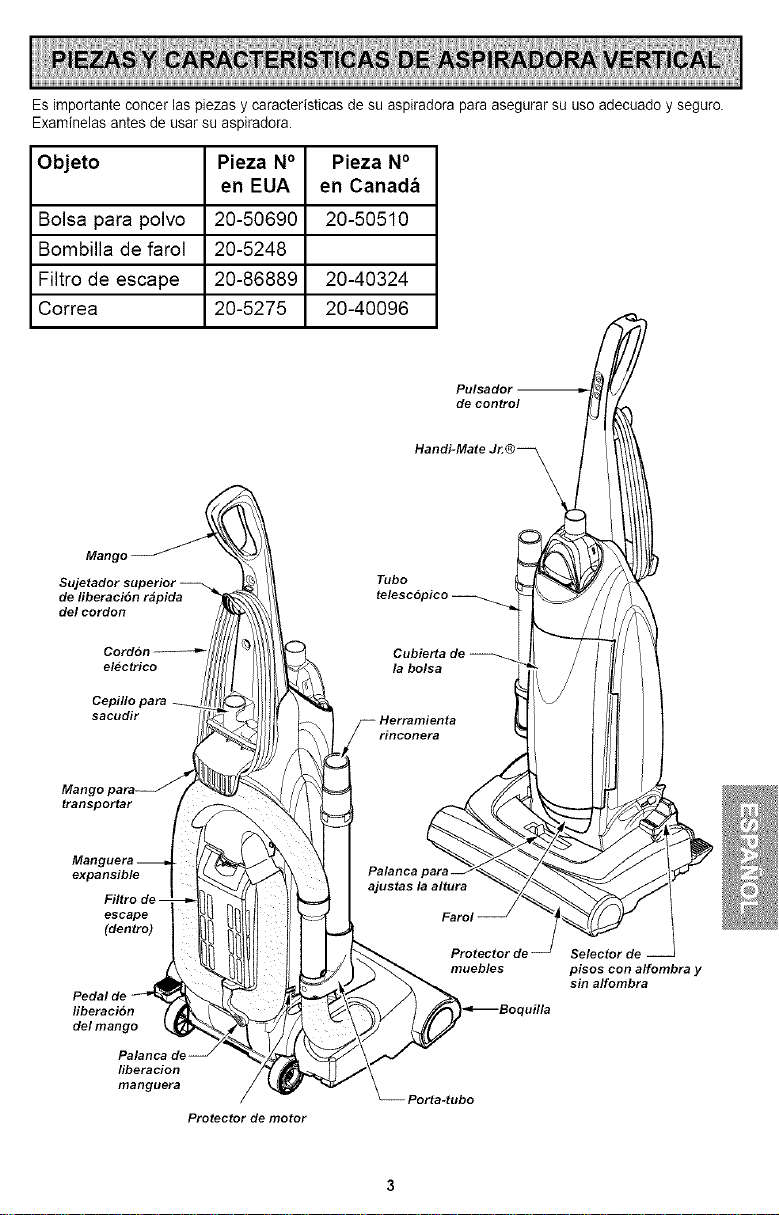
Esimportanteconcerlaspiezasycaracteristicasdesuaspiradoraparaasegurarsuusoadecuadoyseguro.
Examinelasantesdeusarsuaspiradora.
Objeto Pieza N° Pieza N°
en EUA en Canada
Bolsa para polvo 20-50690 20-50510
Bombilla de farol 20-5248
Filtro de escape 20-86889 20-40324
Correa 20-5275 20-40096
Pulsador
de control
Handi-Mate Jr.®_
Mango
de liberaci6n rapida
del cordon
Tubo
electrico
Cepillo para
sacudir
transportar
expansible
escape
(dentro)
fiberaci6n
del mango
liberacion
manguera
Protector de motor
muebles
Por_.tubo
uflla
Selector de
pisos con alfombra y
sin alfombra
Porfavor pongaatenci6n especial a estas instrucciones dadas. Advertencia: Este informaci6n le
alertara de peligro de fuego, choques electrico& quemadas y lesiones. Cuidado: Este
informaci6n te alertara de peligros como lesiones y dafios de propiedad. I
ADVERTENCIA
Peligrode leeibn personaly da_o al producto
No conecte la aspiradora hasta que termine
de armada. De Io contrario podria causar un
choque el_ctrico o lesion corporal.
Antes de armar la aspiradora, revise la LISTA
DE EMBALAJE en la cubierta separada de la
Lista de Partes para Reparaci6n. Use esta
tista para verificar que ha recibido todos los
componentes de su nueva aspiradora Kenmore.
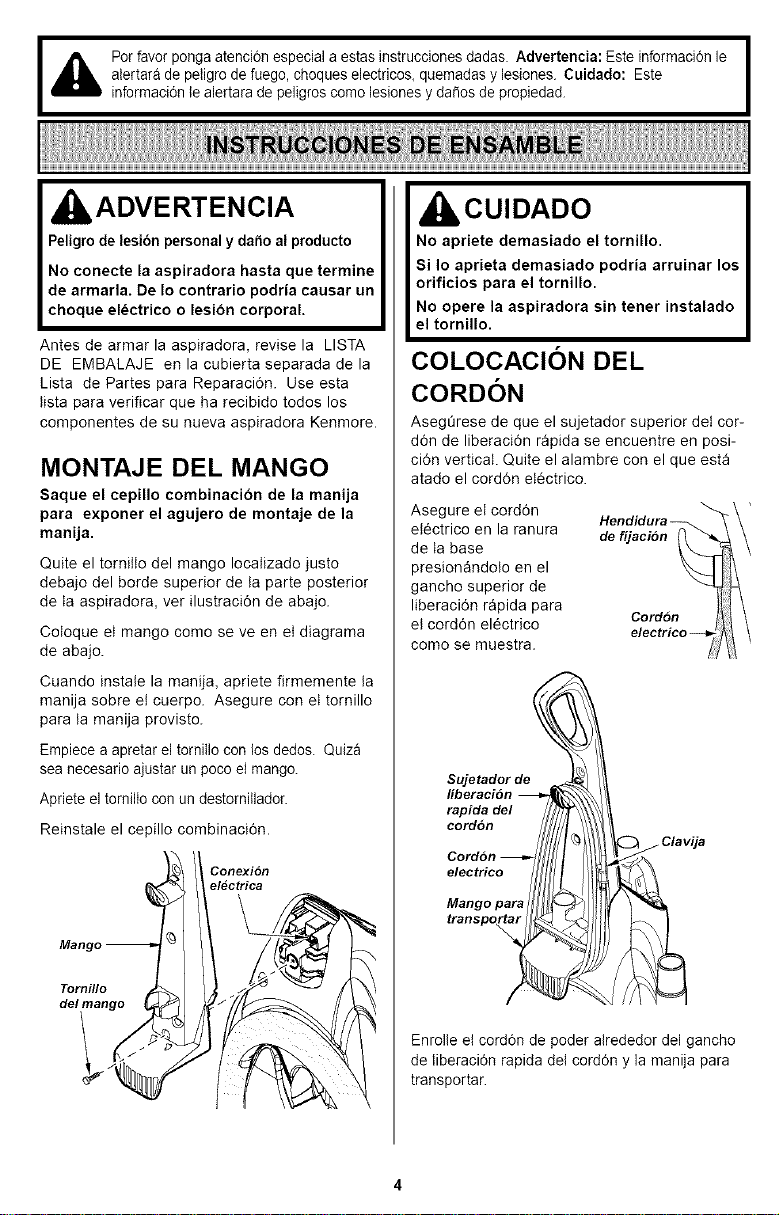
MONTAJE DEL MANGO
Saque el cepillo combinacion de la manija
para exponer el agujero de montaje de la
manija.
Quite el tornitto del mango Iocatizado justo
debajo del borde superior de ta parte posterior
de ta aspiradora, ver ilustraci6n de abajo.
Cotoque et mango como se ve en et diagrama
de abajo.
Cuando instate la manija, apriete firmemente ta
manija sobre et cuerpo. Asegure con et tornillo
para ta manija provisto.
Empiece a apretar el tomiIIo con los dedos. Quiza
sea necesario ajustar un poco el mango.
Apriete el tomiiIo con un destornillador.
Reinstale el cepillo combinaci6n.
Conexion
electrica
CUIDADO
No apriete demasiado el tornillo.
Si Io aprieta demasiado podria arruinar los
orificios para el tornillo.
No opere la aspiradora sin tenet instalado
el tornillo.
COLOCACION DEL
CORDON
AsegGrese de que el sujetador superior det cor-
d6n de liberaci6n rapida se encuentre en posi-
ci6n vertical. Quite el alambre con el que esta
atado el cord6n etectrico.
Asegure el cord6n
etectrico en la ranura
de ta base
presion_ndoto en el
gancho superior de
Iiberaci6n r_pida para
et cord6n electrico
como se muestra.
Hendidura_"_\ '
defijacion _\
Cordon /_11
_ Clavija
Enrolle el cord6n de poder alrededor del gancho
de liberaci6n rapida del cord6n y la manija para
transportar.
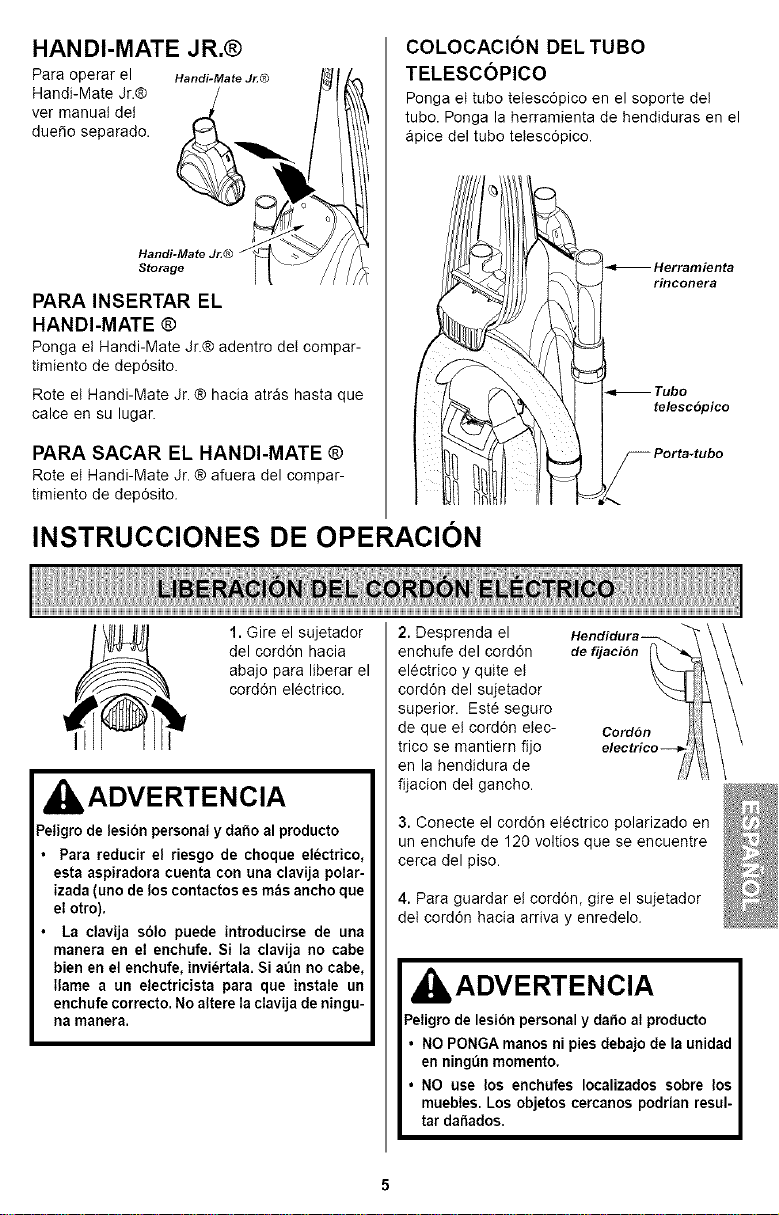
HANDI-MATE JR.®
Para operar el Handi-MateJ_® Ht['_
Handi-Mate Jr.® / F'_\_
ver manual det ,,_
due_e separade. _.,_b._ / lilt
PARA INSERTAR EL
HANDI-MATE ®
Ponga et Handi-Mate Jr.® adentro deI compar-
timiento de dep6sito.
Rote et Handi-Mate Jr. ® hacia atr_s hasta que
calce en su lugar.
PARA SACAR EL HANDI-MATE ®
Rote et Handi-Mate Jr. ® afuera del compar-
timiento de dep6sito.
COLOCACION DEL TUBO
TELESCOPICO
Ponga et tube tetesc6pico en el soporte det
tubo. Ponga la herramienta de hendiduras en el
Spice del tubo tetesc6pico.
INSTRUCCIONES DE OPERACION
1. Gire el sujetador
del cord6n hacia
abajo para Iiberar el
cord6n electrico.
IADVERTENCIA
Peligrode lesibn personaly daho al producto
Para reducir el riesgo de choque electrico,
esta aspiradora cuenta con una clavija polar-
izada (uno de loscontactos es m_s ancho que
el otto).
La clavija s61o puede introducirse de una
manera en el enchufe. Si la clavija no cabe
bien en el enchufe, inviertala. Siaun no cabe,
Ilame a un electricista para que instale un
enchufe correcto. No altere Ia clavija de ningu-
na manera.
2. Desprenda el
enchufe del corddn de fijacion
electrico y quite et
cord6n del sujetador
superior. Este seguro
de queet cord6n etec- Cord6n
trico se mantiern fijo
en la hendidura de
fijacion det gancho.
3. Conecte el cord6n etectrico polarizado en
un enchufe de 120 voltios que se encuentre
cerca del piso.
4. Para guardar et cord6n, gire el sujetador
det cord6n hacia arriva y enredelo.
kADVERTENCIA
Peligro de lesibn personal y da_o al producto
NO PONGA manos ni pies debajo de la unidad
en ningun momento.
NO use los enchufes Iocalizados sobre los
muebles. Los objetos cercanos podrian resul-
tar da_ados.
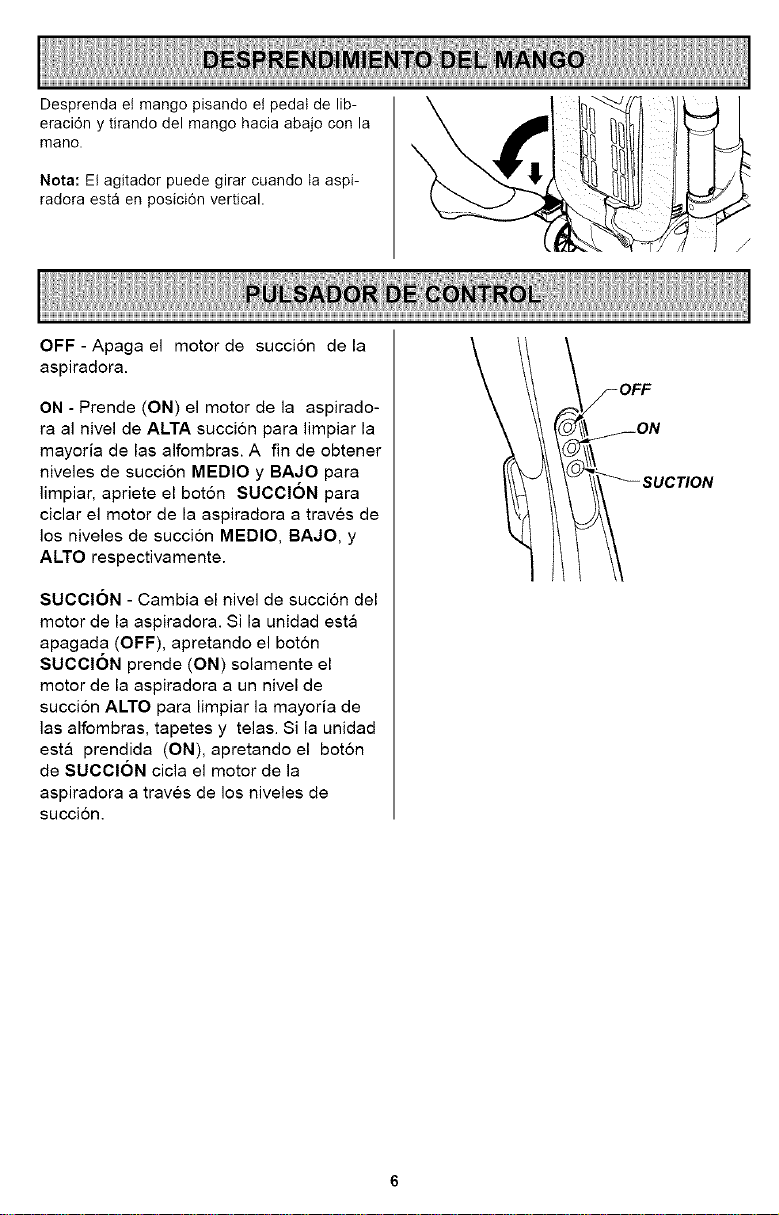
Desprendaetmangopisandoetpedaldelib-
eraci6nytirandodelmangohaciaabajoconla
mano.
Nota:Etagitadorpuedegirarcuandotaaspi-
radoraest8enposici6nvertical.
OFF - Apaga el motor de succi6n de la
aspiradora.
ON - Prende (ON) el motor de la aspirado-
ra al nivel de ALTA succion para limpiar la
mayoria de las alfombras. A fin de obtener
niveles de succion MEDIO y BAJO para
limpiar, apriete el boton SUCCION para
ciclar el motor de la aspiradora a traves de
los niveles de succion MEDIO, BAJO, y
ALTO respectivamente.
SUCClON - Cambia el nivel de succi6n del
motor de la aspiradora. Si la unidad esta
apagada (OFF), apretando el boton
SUCCION prende (ON) solamente el
motor de la aspiradora a un nivel de
succion ALTO para limpiar la mayoria de
las alfombras, tapetes y telas. Si la unidad
esta prendida (ON), apretando el boton
de SUCCION cicla el motor de la
aspiradora a traves de los niveles de
succi6n.
_-OFF
I FON
_ SUCTION
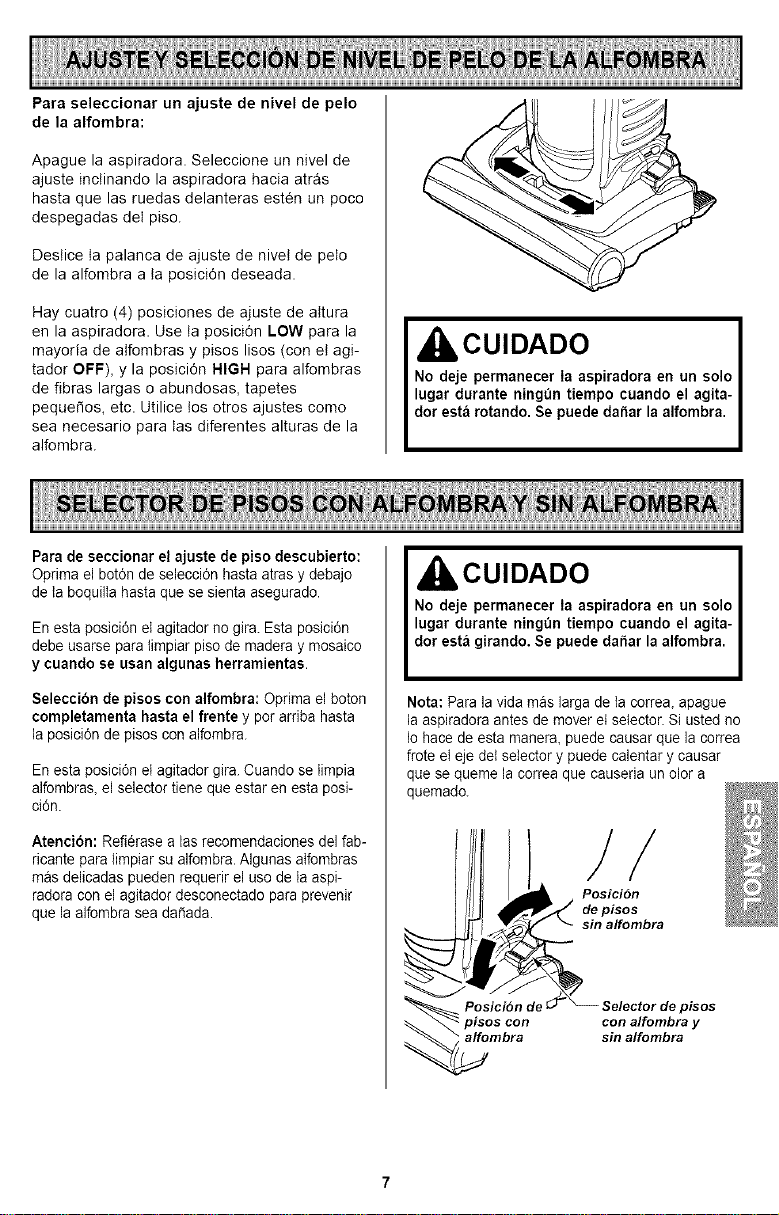
Para seleccionar un ajuste de nivel de pelo
de la alfombra:
Apague la aspiradora. Seleccione un nivel de
ajuste inctinando la aspiradora hacia atr&s
hasta que las ruedas delanteras esten un poco
despegadas det piso.
Destice ta palanca de ajuste de nivet de peto
de la alfombra a ta posici6n deseada.
Hay cuatro (4) posiciones de ajuste de attura
en la aspiradora. Use ta posici6n LOW para la
mayoria de atfombras y pisos lisos (con et agi-
tador OFF), y la posici6n HIGH para alfombras
de fibras largas o abundosas, tapetes
pequefios, etc. Utilice los otros ajustes como
sea necesario para tas diferentes alturas de la
alfombra.
CUIDADO
No deje permanecer Ia aspiradora en un solo
lugar durante ningun tiempo cuando el agita-
dor esta rotando. Se puede da_ar la alfombra.
Para de seccionar el ajuste de piso descubierto:
Optima el bot6n de selecci6n hasta atras y debajo
de la boquiila hasta que se sienta asegurado.
Enesta posici6n et agitador no gira. Esta posici6n
debe usarse para timpiar piso de madera y mosaico
y cuando se usan algunas herramientas.
Seleccibn de pisos con alfombra: Optima el boton
completamenta hasta el frente y por arriba hasta
la posici6n de pisos con alfombra.
Enesta posici6n el agitador gira. Cuando se limpia
alfombras,el selector tiene que estar en esta posi-
ci6n.
Atencibn: Refierase alas recomendaciones del fab-
ricante para limpiar su alfombra. AIgunas alfombras
mas delicadas pueden requerir el uso de ta aspi-
radora con el agitador desconectado para prevenir
que la alfombra sea dafiada.
CUIDADO
No deje permanecer Ia aspiradora en un solo
lugar durante ningun tiempo cuando el agita-
dot esta girando. Se puede dai_ar la alfombra.
Nota: Para la vida mas larga de ta correa, apague
la aspiradora antes de mover et selector. Si usted no
Io hace de esta manera, puedecausar que la correa
frote el eje det selector y puede calentar y causar
que se queme la correa que causeria un oior a
quemado.
/
Posici6n
depisos
sinalfombra
pisos con
affombra
pisos
con alfombra y
sin alfombra
Cepillopara
Mangopara
transportar
expansible
Palanca de
liberaci6n
manguera
Herramienta
_/ rinconera
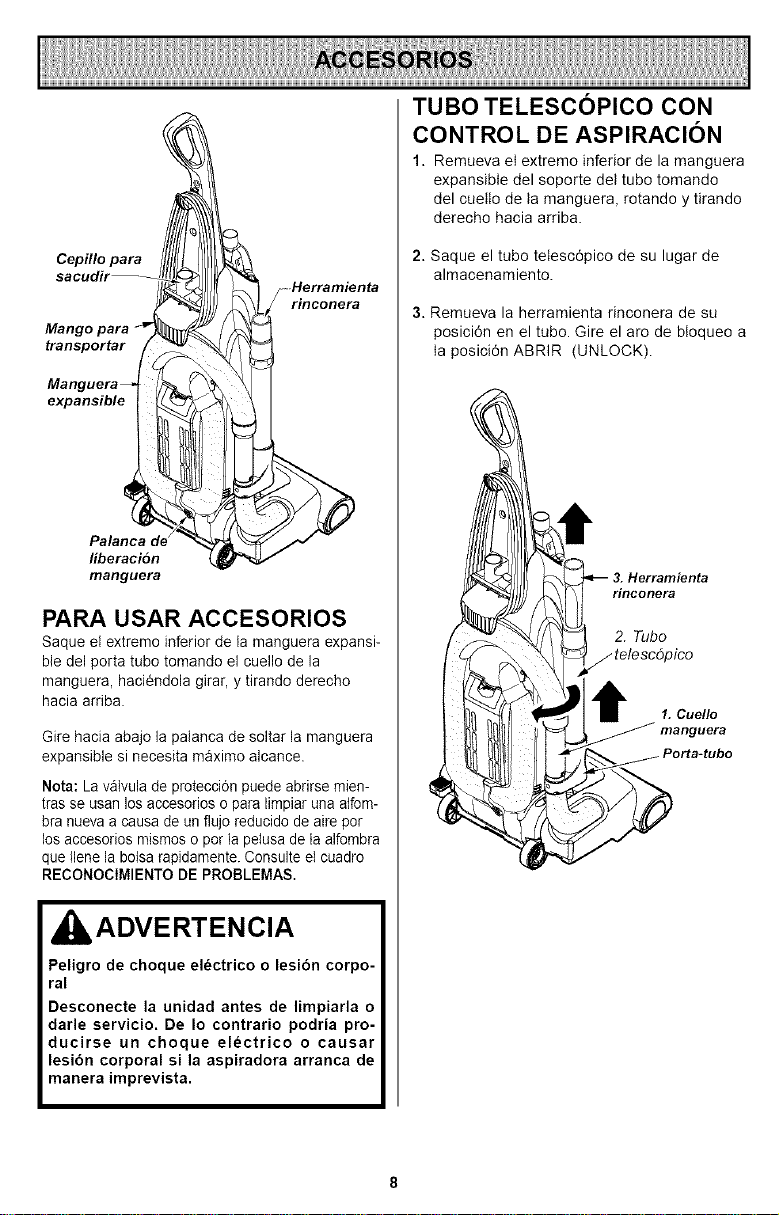
PARA USAR ACCESORIOS
Saque el extremo inferior de la manguera expansi-
ble del porta tubo tomando el cuello de la
manguera, haciendola girar, y tirando derecho
hacia arriba
Gire hacia abajo ia palanca de soltar la manguera
expansible si necesita maximo alcance.
Nota: La v_lvula de protecci6n puede abrirse mien-
tras se usan los accesorios o para limpiar una atfom-
bra nueva a causa de unflujo reducido de aire por
los accesorios mismos o pot lapeIusa de la alfombra
que Ilene la botsa rapidamente. Consulte eI cuadro
RECONOCIMIENTO DE PROBLEMAS.
,ADVERTENCIA
Peligro de choque el_ctrico o lesi6n corpo-
ral
Desconecte la unidad antes de limpiarla o
darle servicio. De Io contrario podria pro-
ducirse un choque electrico o causar
lesibn corporal si la aspiradora arranca de
manera imprevista.
TUBO TELESCOPICO CON
CONTROL DE ASPIRAClON
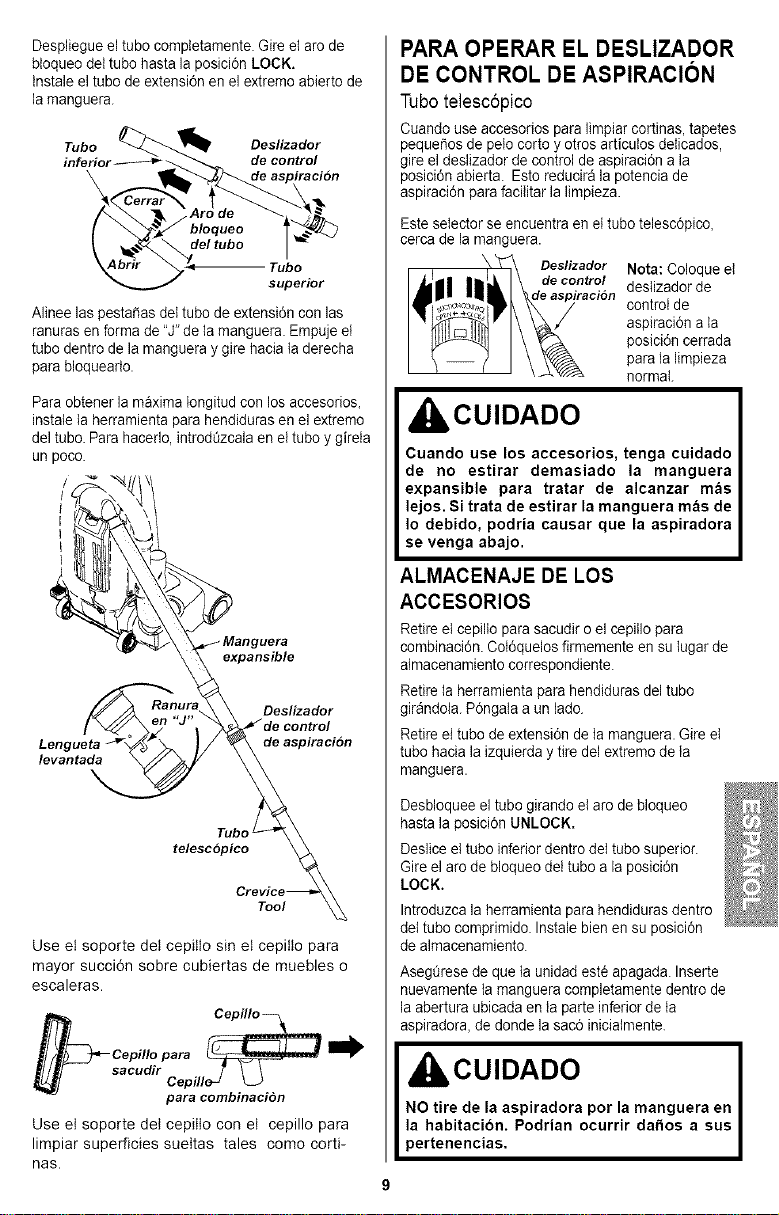
1. Remueva et extremo inferior de la manguera
expansible del soporte det tubo tomando
del cuetto de ta manguera, rotando y tirando
derecho hacia arriba.
2. Saque el tubo tetesc6pico de su lugar de
almacenamiento.
3. Remueva la herramienta rinconera de su
posicidn en el tubo. Gire el aro de bIoqueo a
ta posici6n ABRIR (UNLOCK).
3. Herramienta
rinconera
2. Tubo
1. Cuello
Despliegue el tube comptetamente. Gire el are de
btoqueo dettubo hasta la posici6n LOCK.
tnstaieel tubo de extensi6n en el extremo abierto de
la manguera.
Tubo _'..._ Oeslizador
inferior------_ _ _,_ de control
_Drlr _'<_ Tube
superior
Alinee laspestaSas del tube deextensi6n con las
ranuras enforma de"J" de ta manguera. Empuje et
tubo dentro de la manguera y gire hacia laderecha
para bloquearto.
Paraobtener la maxima Iongitud con los accesorios,
instateta herramienta para hendiduras en el extremo
del tubo. Para hacerlo, introdQzcaiaen el tubo ygireIa
un poco.
expansible
levantada
Deslizador
de aspiraci6n
Tube '
telesc6pico
Tool
Use et soporte det cepitto sin et cepitto para
mayor succi6n sobre cubiertas de maebles o
escaleras.
Cepillo _ .......
_Cepillopara__
_ sacudir Cep illeu L_J
para combinacion
Use et soporte det cepitto con et cepillo para
limpiar superficies suettas tales como corti-
nas.
PARA OPERAR EL DESLIZADOR
DE CONTROL DE ASPIRACION
Tubotelesc6pico
Cuando use accesorios para limpiar cortinas, tapetes
pequet_osde pelo corto y otros articuIos delicados,
gireel deslizador de control de aspiraci6n a la
_osici6nabierta. Esto reducir_ lapotencia de
aspiraci6n para facilitar la limpieza.
Este selector se encuentra en el tube telesc6pico,
cerca de la manguera.
Deslizador Nota: Coloque el
de contro! deslizador de
control de
aspiraci6n ala
posici6n cerrada
para la limpieza
normal
IbCUIDADO
Cuando use los accesorios, tenga cuidado
de no estirar demasiado la manguera
expansible para tratar de alcanzar mas
lejos. Si trata de estirar la manguera m_e de
Io debido, podria causar que la aspiradora
se venga abajo.
ALMACENAJE DE LOS
ACCESORIOS
Retire el cepilto parasacudir oel cepiIIopara
combinaci6n. Cot6quelos firmemente en su lugar de
almacenamiento correspondiente.
Retire la herramienta para hendiduras del tubo
gir_ndola. P6ngaIa a un lade.
Retire ettubo de extensi6n de ta manguera. Gire el
tubo hacia la izquierda y tire del extremo de ta
manguera.
Desbloquee el tube girando elare debloqueo
hasta la posici6n UNLOCK.
Deslice el tube inferior dentro dei tube superior.
Gire el aro de bloqueo dei tubo a la posici6n
LOCK.
Introduzca la herramienta para hendiduras dentro
dettubo comprimido. Instale bien ensu posicidn
de almacenamiento.
AsegQresede que taunidad est6 apagada. Inserte
nuevamente la manguera completamente dentro de
la abertura ubicada en la parte inferior de ta
aspiradora, de donde lasac6 inicialmente.
IbCUIDADO
NO tire de la aspiradora por la manguera en
la habitacion. Podrian ocurrir da_os a sus
)ertenencias,
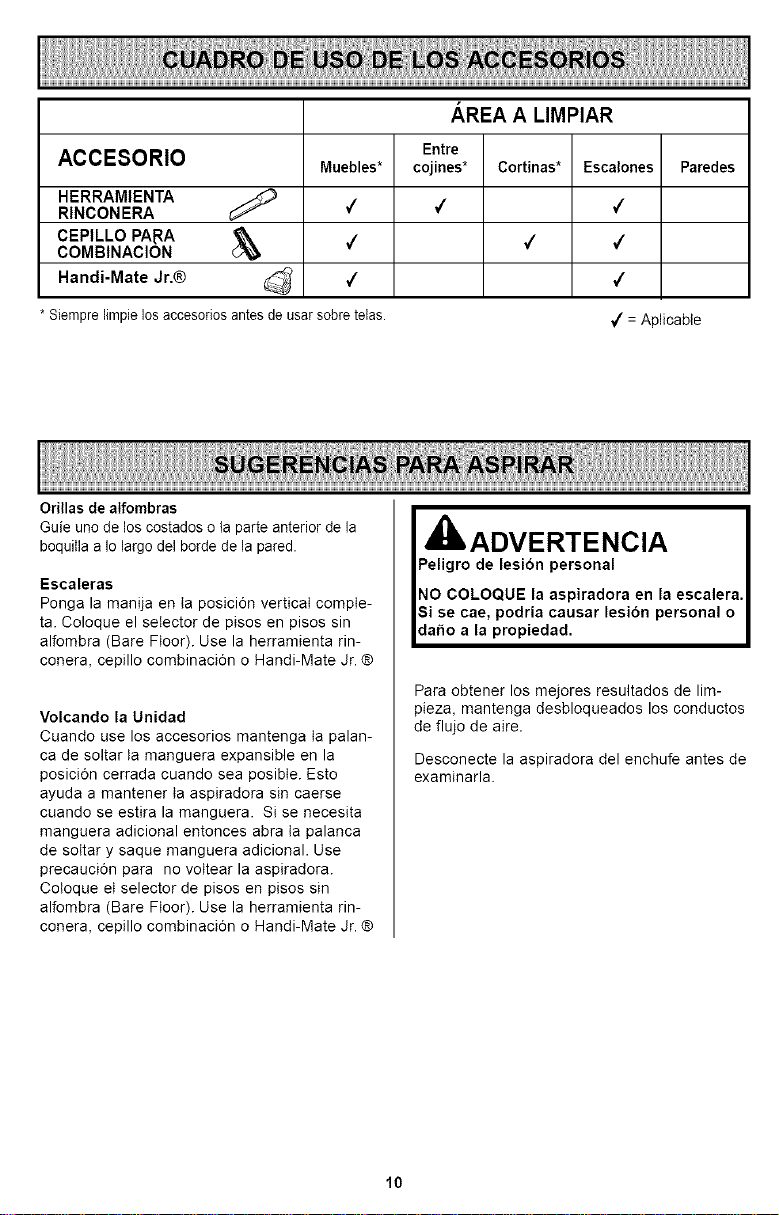
AREA A LIMPIAR
Entre
ACCESORIO Muebles* cojines* Cortinas* Escalones Paredes
HERRAMIENTA _)
RINCONERA 7 4 7
CEPILLO PARA d_ 4 4 4
COMBINACION
Handi-Mate Jr,® _ 4 4
* Siempre limpie los accesorios antes de usar sobre teias.
_/= Aplicable
Orillas de alfombras
Guie uno de los costados o la parte anterior de la
boquilla a Io largo del borde de la pared.
Escaleras
Ponga la manija en ta posici6n vertical compte-
ta. Coloque el selector de pisos en pisos sin
alfombra (Bare Floor). Use la herramienta rin-
conera, cepillo combinaci6n o Handi-Mate Jr. ®
Volcando la Unidad
Cuando use los accesorios mantenga ta palan-
ca de soltar ta manguera expansible en la
posici6n cerrada cuando sea posibte. Esto
ayuda a mantener ta aspiradora sin caerse
cuando se estira la manguera. Si se necesita
manguera adicional entonces abra ta palanca
de sottar y saque manguera adicional. Use
precauci6n para no vottear la aspiradora.
Cotoque et selector de pisos en pisos sin
alfombra (Bare Floor). Use la herramienta rin-
conera, cepillo combinaci6n o Handi-Mate Jr. ®
, !_ !!!!!d!! Ed_r Cln_l a escalera
Para obtener los mejores resultados de lim-
pieza, mantenga desbloqueados los conductos
de flujo de aire.
Desconecte la aspiradora del enchufe antes de
examinarla.
10
SISTEMA DE PROTECTION
DE MOTOR
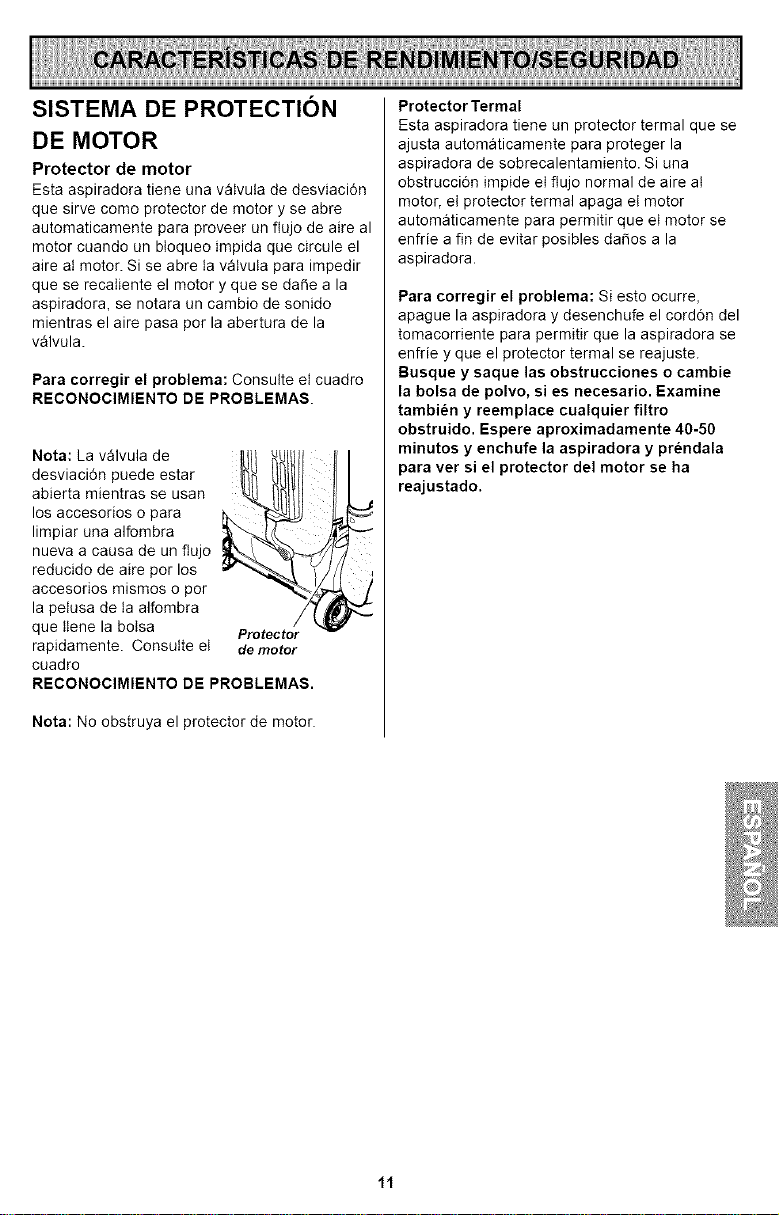
Protector de motor
Esta aspiradora tiene uea vatvuta de desviaci6n
que sirve como protector de motor y se abre
automaticamente para proveer un flujo de aire al
motor cuando un bIoqueo impida que circule el
aire at motor. Si se abre ta vatvuta para impedir
que se recatiente el motor y que se da_e a la
aspiradora, se notara un cambio de sonido
mientras el aire pasa por la abertura de la
v&lvula.
Para corregir el problema:Coesutteetcuadro
RECONOCIMIENTODE PROBLEMAS.
Nota: La v_lvula de
desviaci6n puede estar
abierta mientras se usan
los accesorios o para
limpiar una alfombra
nueva a causa de un flujo
reducido de aire por los
accesorios mismos o por
la petusa de ta alfombra
que ttene la botsa
rapidamente. Consutte et
cuadro
Protector
de motor
RECONOCIMIENTO DE PROBLEMAS.
Nota: No obstruya el protector de motor.
Protector Termal
Esta aspiradora tiene un protector termal que se
ajusta automaticamente para proteger la
aspiradora de sobrecalentamiento. Si una
obstrucci6n impide et flujo normal de aire at
motor, et protector termal apaga et motor
automaticamente para permitir queet motor se
enfrie a fin de evitar posibles da_os a la
aspiradora.
Para corregir el problema: Si esto ocurre,
apague la aspiradora y desenchufe el cord6n del
tomacorrieete para permitir que la aspiradora se
eefrie y que el protector termal se reajuste
Busque y saque las obstrucciones o cambie
la bolsa de polvo, si es necesario. Examine
tambi_n y reemplace cualquier filtro
obstruido. Espere aproximadamente 40-50
minutos y enchufe la aspiradora y pr_ndala
para ver si el protector del motor se ha
reajustado.
11
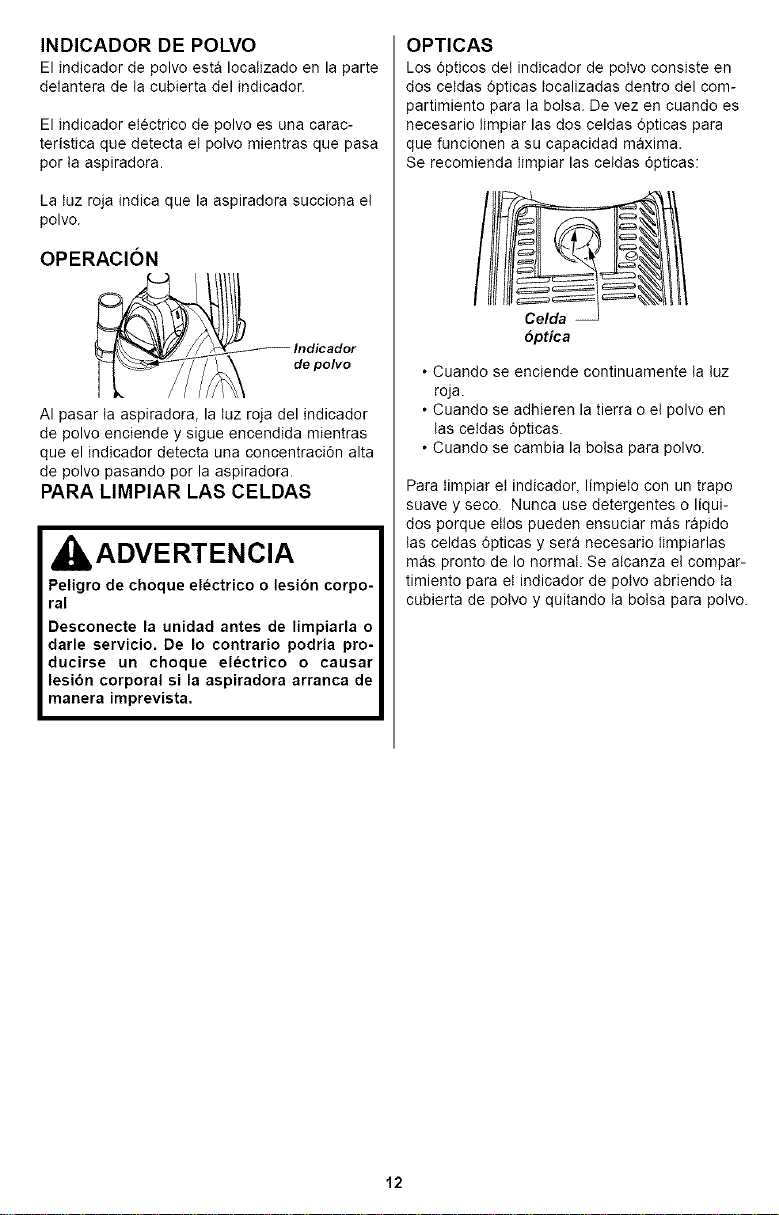
INDICADOR DE POLVO
El indicador de polvo est& Iocalizado en la parte
delantera de ta cubierta del indicador.
El indicador etectrico de polvo es una carac-
teristica que detecta et potvo mientras que pasa
por ta aspiradora.
La tuz roja indica que la aspiradora succiona et
polvo.
OPERACION
de polvo
AI pasar ta aspiradora, la tuz roja del indicador
de polvo enciende y sigue encendida mientras
que el indicador detecta una concentraci6n alta
de polvo pasando por la aspiradora.
PARA LIMPIAR LAS CELDAS
ADVERTENCIA
Peligro de choque electrico o lesion corpo-
ral
Desconecte la unidad antes de limpiarla o
darle servicio. De Io contrario podria pro-
ducirse un choque electrico o causar
lesibn corporal si la aspiradora arranca de
manera imprevista,
OPTICAS
Los 6pticos det indicador de potvo consiste en
dos cetdas 6pticas tocalizadas dentro del com-
partimiento para la botsa. De vez en cuando es
necesario timpiar las dos celdas 6pticas para
que funcionen a su capacidad maxima.
Se recomienda timpiar las cetdas 6pticas:
6ptica
• Cuando se enciende continuamente ta tuz
roja.
• Cuando se adhieren la tierra o et polvo en
tas cetdas 6pticas.
• Cuando se cambia la botsa para polvo.
Para timpiar et indicador, limpieto con un trapo
suave y seco. Nunca use detergentes o liqui-
dos porque ettos pueden ensuciar m_s rapido
tas celdas 6pticas y sera necesario timpiarlas
m_s pronto de Io normaI. Se atcanza et compar-
timiento para et indicador de potvo abriendo ta
cubierta de potvo y quitando ta boIsa para polvo.
12
CUIDADO DE LA ASPIRADORA
Siga siempre todas las instrucciones de
seguridad antes de efectuar el mantenimiento
a su aspiradora.
ADVERTENCIA
Peligro de choque electrico o lesion corporal
Desconecte la unidad antes de efectuar el
mantenimiento a su aspiradora. De Io con-
trario podria producirse un choque el_c-
trico o causar lesibn corporal si la aspira-
dora arranca de manera imprevista.
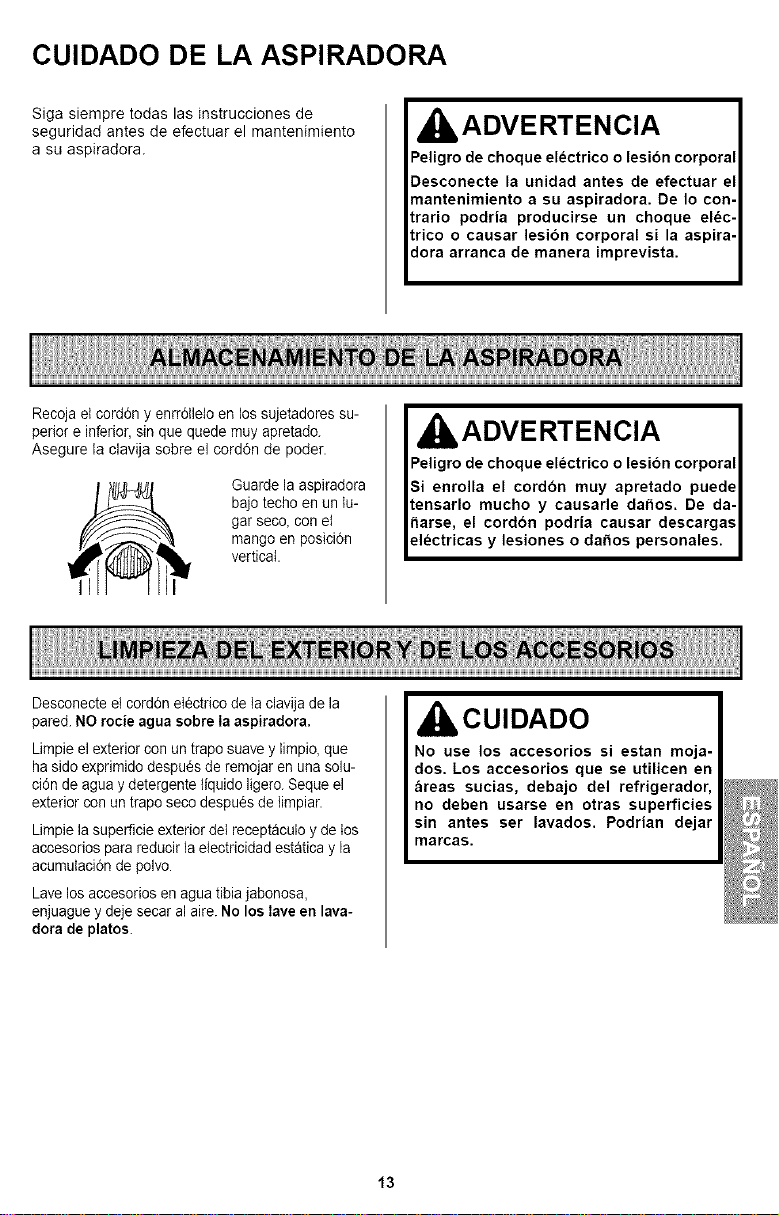
Recoja el cordon y enrrdlleto en los sajetadores su-
perior e inferior, sin que quede muy apretado.
Asegure la clavija sobre el corddn de poder.
Guarde la aspiradora
bajo techo en un tu-
gar seco, con et
mango en posicidn
vertical.
ADVERTENCIA
Peligro de choque electrico o lesion corporal
Si enrolla el cordon muy apretado puede
tensarlo mucho y causarle dafios. De da-
harse, el cordon podria causar descargas
electricas y lesiones o dafios personales.
Desconecte el cordon eIectrico de la clavija de la
pared. NO rocie agua sobre Ia aepiradora.
Limpieel exterior con un trapo suave y limpio, que
haside exprimido despu6s de remojar en una solu-
cidn de agua y detergente liquido ligero. Seque el
exterior con untrapo seco despu6s de timpiar.
Limpie la superficie exterior del receptaculo y de los
accesorios para reducir la electricidad estatica yla
acumulacidn de polvo.
Lave los accesorios en agua tibia jabonosa,
enjuague ydeje secar al aire.No los lave en lava-
dora de platoe.
CUIDADO
No use los accesorios si estan moja-
dos. Los accesorios que se utilicen en
areas sucias, debajo del refrigerador,
no deben usarse en otras superficies
sin antes ser lavados. Podrian clejar
marcas.
13
I ADVERTENCIA
Siempre desconecte el cord6n _lectrico antes
de reparar alguna parte de Ia aspiradora.
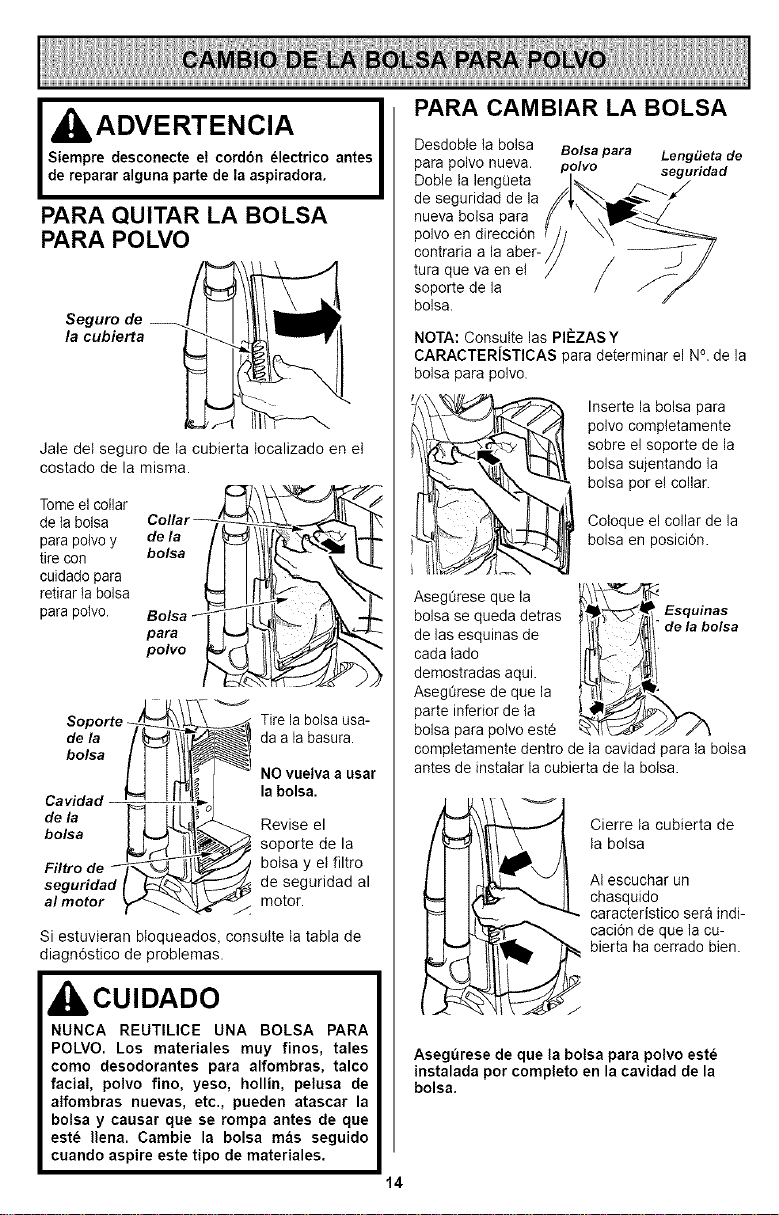
PARA QUITAR LA BOLSA
PARA POLVO
Seguro de
la cubierta
Jale det seguro de ta cubierta tocalizado en et
costado de la misma.
Tome el collar
de la bolsa
para potvo y de la
tire con bolsa
cuidado para
retirar la bolsa
para potvo.
para
polvo
Soporte _ Tire la botsa usa-
de la da a la basura.
bolsa
NO vuelva a usar
la bolsa.
Cavidao
de la Revise el
bolsa
soporte de la
Filtro de botsa y et filtro
seguridad de seguridad al
al motor motor.
Si estuvieran bIoqueados, consutte ta tabla de
diagn6stico de problemas.
CUIDADO
NUNCA REUTILICE UNA BOLSA PARA
POLVO. Los materiales muy finos, tales
como desodorantes para alfombras, talco
facial, polvo fino, yeso, hollin, pelusa de
alfombras nuevas, etc., pueden atascar la
bolsa y causar que se rompa antes de que
este Ilena. Cambie la bolsa mas seguido
cuando aspire este tipo de materiales.
PARA CAMBIAR LA BOLSA
Desdobte la bolsa
para polvo nueva.
Doble la lengOeta
de seguridad de la
nueva bolsa para
polvo en direcci6n
contraria a ia aber-
tura que va en el
soporte de la
bolsa.
Bolsa para Leng_eta de
polvo seguridad
NOTA: Consulte las PII_ZASY
CARACTERiSTICAS para determinar el N°.de la
bolsa para polvo.
Coloque el collar de la
bolsa en posiciOn.
Inserte la bolsa para
polvo completamente
sobre el soporte de la
bolsa sujentando la
bolsa por el collar.
Asegt_rese que la
boisa se queda detras Esquinas
de la bolsa
de las esquinas de
cada lado
demostradas aqui.
AsegL_resede que la
parte inferior de la
bolsa para polvo est6
completamente dentro de la cavidad para la bolsa
antes de instalar la cubierta de la bolsa.
_ ierre ta cubierta de
ta botsa
At escuchar un
chasquido
caracteristico sera indi-
caci6n de que ta cu-
bierta ha cerrado bien.
AsegBrese de que la bolsa para polvo este
instalada por completo en la cavidad de la
bolsa.
14
ADVERTENCIA
Peligro de choque el_ctrico
Desenchufe el cable de poder del
tomacorriente. No opere la limpiadora
sin el filtro primario o el filtro de
escape. Est_ seguro que el filtros est_
instalado propiamente para prevenir
falla del motor y/o sacudida el_ctrica.
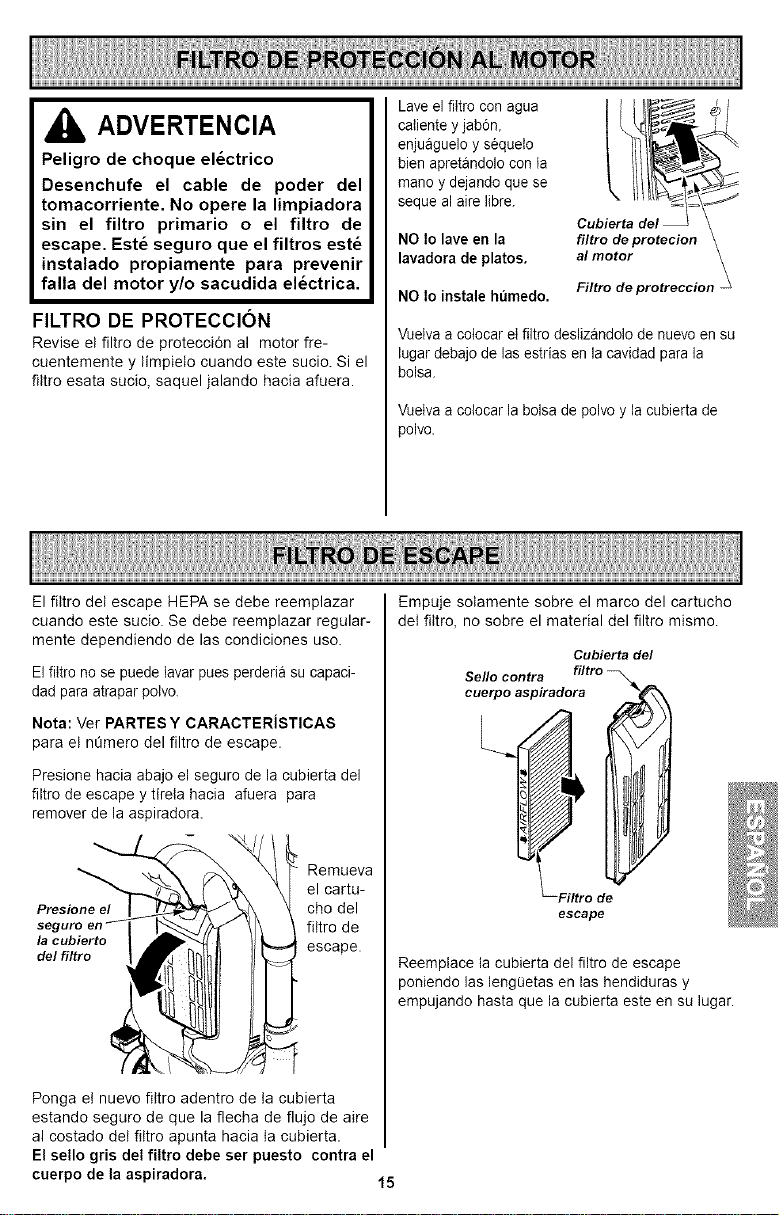
FILTRO DE PROTECCION
Revise et filtro de protecci6n al motor fre-
cuentemente y timpieto cuando este sucio. Si el
fittro esata sucio, saquel jalando hacia afuera.
Lave el fiItro con agua
caiiente y jab6n,
enjuaguelo y s6quelo
bien apretandolo con la
mano y dejando que se
seque al aire libre.
NO Io lave en la
lavadora de platos.
NO Io instale humedo.
Cubierta del \
filtro deprotecion \
al motor
Filtro deprotreccion
Vueiva a cotocar el filtro deslizandolo de nuevo en su
lugar debajo de las estrias en lacavidad para la
bolsa.
Vuetvaa coiocar la bolsa de polvo y la cubierta de
polvo.
El fittro det escape HEPA se debe reemplazar
caando este sucio. Se debe reemplazar regular-
mente dependiendo de las condiciones uso.
El fiItro no se puede tavar pues perderia su capaci-
dad para atrapar polvo.
Nota: Ver PARTES Y CARACTERiSTICAS
para et nQmero del filtro de escape.
Presione hacia abajo el seguro de la cubierta del
filtro de escape y tirela hacia afuera para
remover de la aspiradora.
Remaeva
el carta-
Presione el cho del
seguro fittro de
la cubierto
de/filtro escape.
Ponga et nuevo fittro adentro de ta cubierta
estando seguro de que la flecha de flujo de aire
al costado det fittro apunta hacia ta cabierta.
El sello gris del filtro debe ser puesto contra el
cuerpo de la aspiradora.
Empuje sotamente sobre el marco del cartucho
det fittro, no sobre el material del filtro mismo.
Cubierta de/
Sello contra filtro
cuerpoL l_ Iaspirad°ra1
--Filtro de
escape
Reemptace ta cubierta del filtro de escape
poniendo las lengQetas en las hendiduras y
empujando hasta que la cubierta este en su lugar.
15
ADVERTENCIA
='eligrode choque el_ctrico o lesibn corporal
:)esconecte la unidad antes de limpiarla o darle
_ervicio. De Io contrario podria producirse un
:hoque el_ctrico o causar Iesibn corporal si la
_spiradora arranca de manera imprevista.
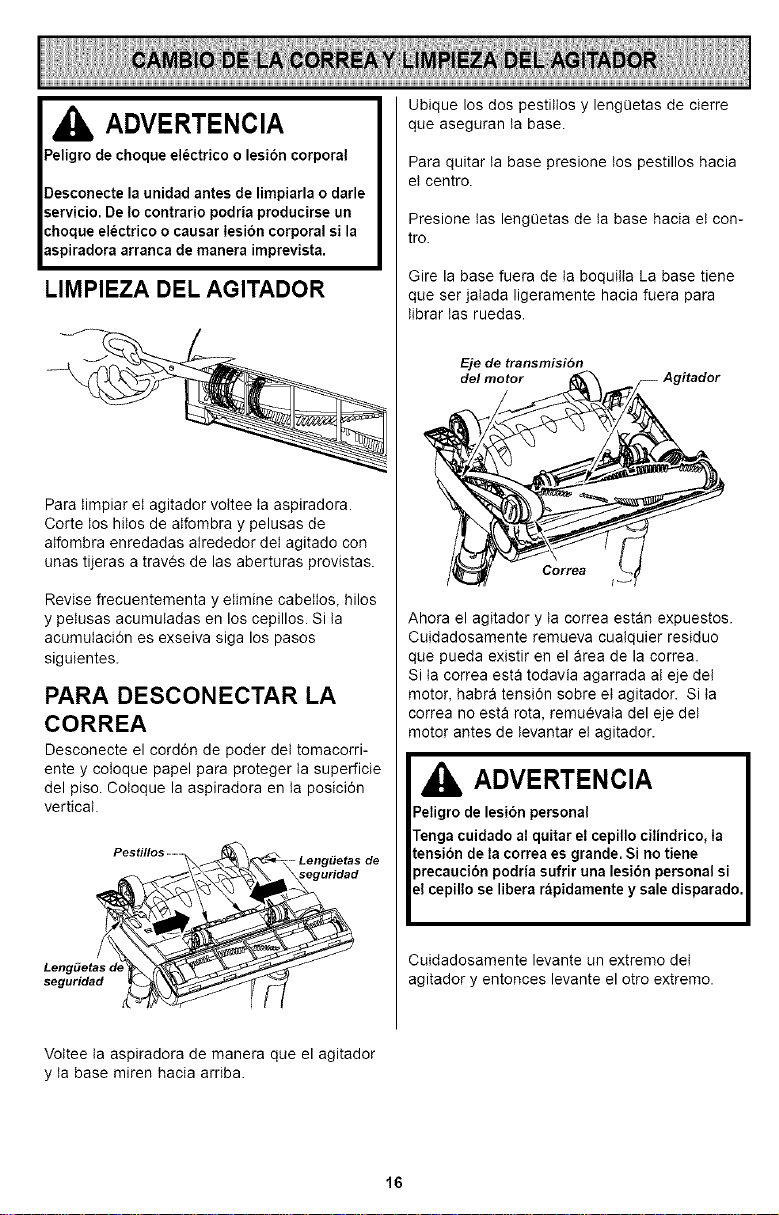
LIMPIEZA DEL AGITADOR
Para timpiar et agitador voItee ta aspiradora.
Corte los hitos de atfombra y pelusas de
atfombra enredadas atrededor det agitado con
unas tijeras a traves de las aberturas provistas.
Revise frecuentementa y etimine cabettos, hilos
y petusas acumutadas en los cepillos. Si ta
acumutacidn es exseiva siga los pasos
siguientes.
PARA DESCONECTAR LA
CORREA
Desconecte el cord6n de poder det tomacorri-
ente y coIoque papel para proteger ta superficie
del piso. Cotoque la aspiradora en ta posici6n
vertical.
Pestillos ...............
-Leng#e_s de
seguridad
Ubique los dos pestittos y lengOetas de cierre
que aseguran ta base.
Para quitar ta base presione los pestillos hacia
et centro.
Presione tas lengOetas de ta base hacia et con-
tro.
Gire la base fuera de ta boquitta La base tiene
que ser jatada ligeramente hacia fuera para
tibrar tas ruedas.
Eje de transmisi6n
del motor _ /_ Agitador
Ahora el agitador y ta correa est_n expuestos.
Cuidadosamente remueva cuaIquier residuo
que pueda existir en el _rea de la correa.
Si ta correa esta todavia agarrada at eje det
motor, habr_ tensi6n sobre et agitador. Si ta
correa no esta rota, remuevata del eje det
motor antes de tevantar et agitador.
ADVERTENCIA
Peligro de lesi6n personal
Tengacuidado al quitar el cepillo cilindrico, Ia
tensi6n de Iacorrea es grande. Si no tiene
_recaucibn podria sufrir una lesibn personal si
cepillo se libera rapidamentey sale disparado.
Cuidadosamente levante un extremo det
agitador y entonces levante el otro extremo.
Vottee ta aspiradora de manera que el agitador
y ta base miren hacia arriba.
16
LIMPIEZA DEL AGITADOR
Nota: Para mantener una atta eficiencia de
limpieza y evitar da_o a ta aspiradora, hay que
limpiar et agitador cada vez que se cambia la
correa.
Tambien hay que limpiar et agitador segQn et
siguiente calendario:
El uso de la Limpie el
aspiradora agitador
Frecuente - cada semana
(usada dirariamente)
Moderado -
(usada 2 o 3 veces
per semana)
cada mes
Ligero - cada 2 meses
(usada 1 vez por semana)
Retire todo indicio de basura o suciedad de la
zona de ta correa y det agitador.
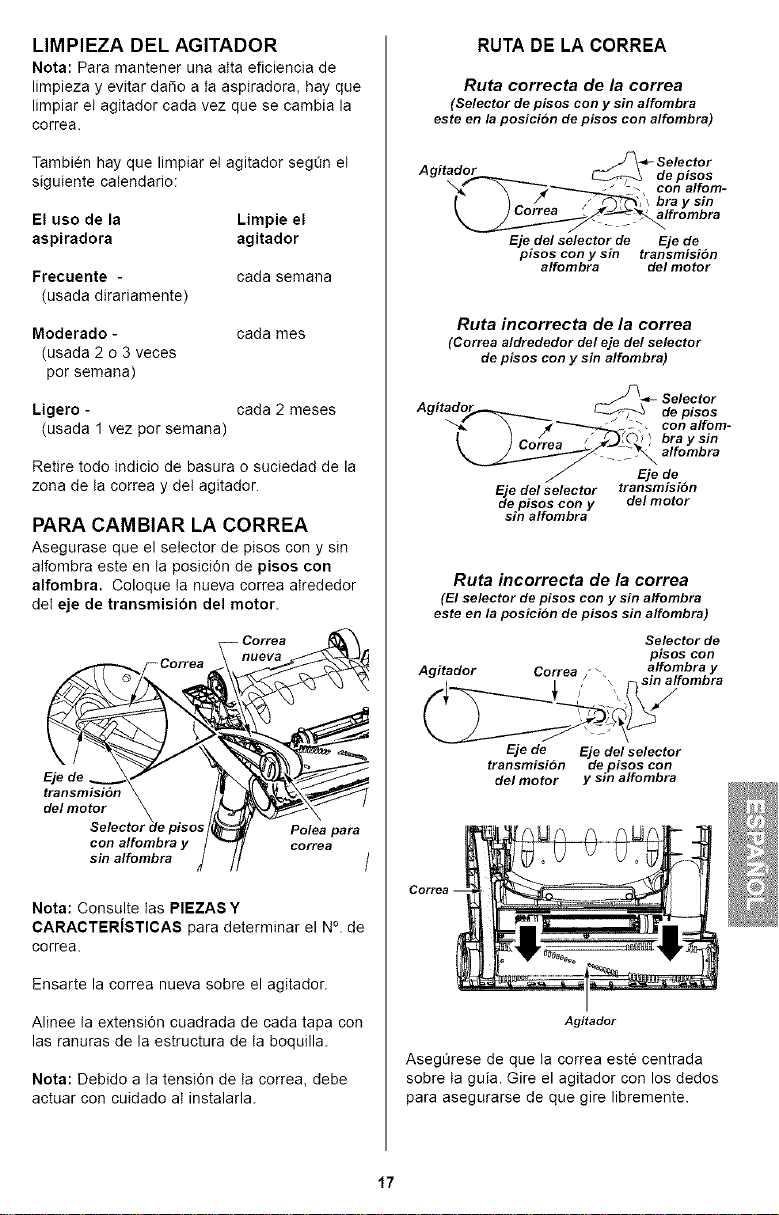
PARA CAMBIAR LA CORREA
Asegurase que el selector de pisos con y sin
alfombra este en ta posici6n de pisos con
alfombra, Coloque ta nueva correa atrededor
det eje de transmision del motor.
_- Correa
d,/mot,r. \. . /,47"/_ 2_ '
Selector de pisos /_ Polea para
con alfombra y / _"_ correa
sin alfombra _ I/ /
Nota: Consulte tas PIEZASY
CARACTERiSTICAS para determinar el N°. de
correa.
Ensarte la correa nueva sobre el agitador.
Alinee ta extensi6n cuadrada de cada tapa con
las ranuras de la estructura de ta boquilla.
Nota: Debido a ta tensi6n de ta correa, debe
actuar con cuidado at instalarla.
RUTADE LA CORREA
Ruta correcta de la correa
(Selector depisos cony sinalfombra
esteen laposici6n depisos con alfombra)
Agitador
de pisos
con alfom-
bray sin
alfrombra
Eje del selector de Eje de
pisos con y sin transmisi6n
alfombra de/motor
Ruta incorrecta de la correa
(Correaaldrededor del eje del selector
de pisos con y sin alfombra)
Eje del selector
de pisos con y
sin alfombra
de pisos
con alfom-
bray sin
alfombra
Eje de
transmisioo
delmotor
Ruta incorrecta de la correa
(El selector de pisos con y sin affombra
este en la posici6n de pisos sin alfombra)
Agitador Correa " _
Selector de
pisos con
affombray
sin alfombra
/
Eje de Eje del selector
transmisi6n de pisos con
del motor y sin alfombra
Agitador
AsegQrese de que ta correa este centrada
sobre ta guia. Gire el agitador con los dedos
para asegurarse de que gire libremente.
17

Para reinstalar la base, inserte las cuatro pesta-
fias dentro de tas cuatro ranuras ubicadas a Io
largo det borde frontal de ta base. Coloque la
aspiradora en ta posici6n vertical.
LengEletas/
Ra_uras
Cotoque ta base en su posici6n original.
Cuando este bajando la base, la parte interior
va a rozar contra tas ruedas. Si ud, jala un
poco afuera te ayudara a ensamblarlo.
Pestillos
Leng#etas de
seguridad
Precione ta base del plato para abajo hasta que
tas lengQetas de seguridad esten en su tugar.
Destize el pestitto de ta izquierda a la izquierda
y el pestitto derecho a la derecha para asegu-
rartos.
Cotoque ta aspiradora en la posici6n verticat
antes de conectarta en el tomacorriente.
18
IbADVERTENCIA
Peligro de choque electrico o lesibn corpo-
ral
Desconecte la unidad antes de limpiarla o
darle servicio. De Io contrario podria pro-
ducirse un choque el_ctrico o causar
lesibn corporal si la aspiradora arranca de
rnanera imprevista.
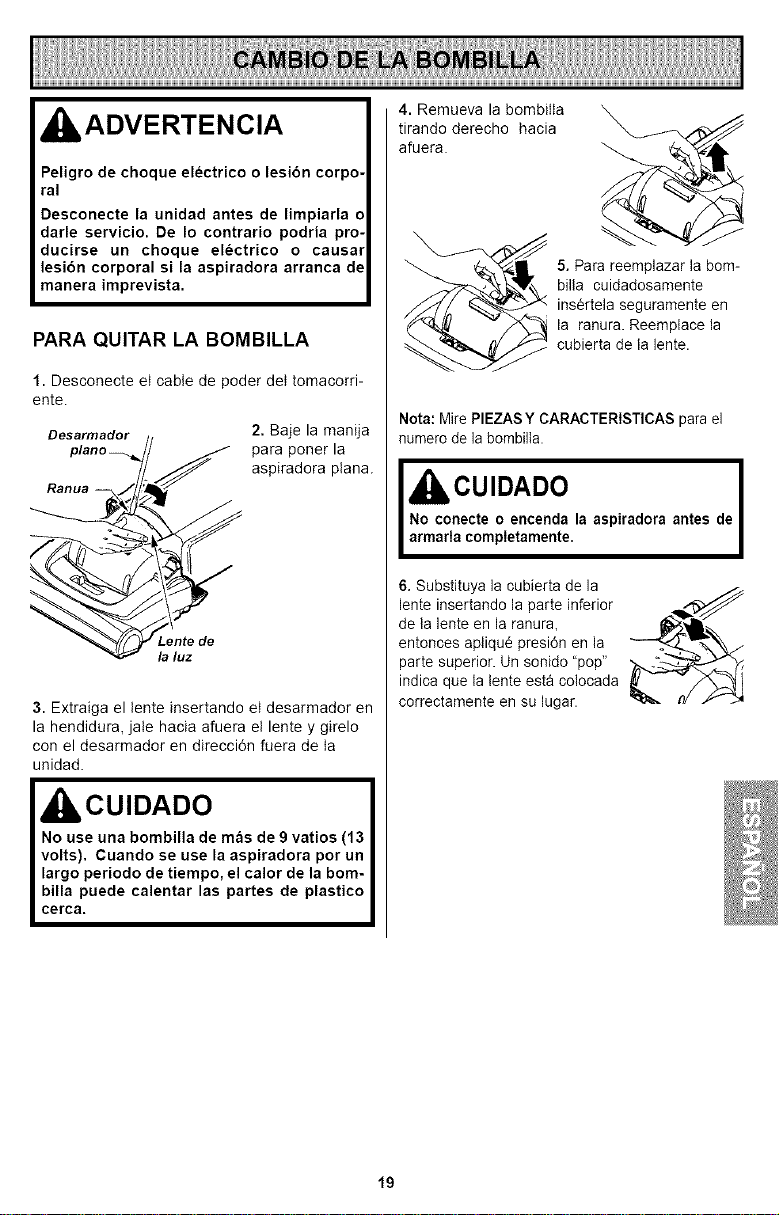
PARA QUITAR LA BOMBILLA
1. Desconecte et cable de poder det tomacorri-
ente.
Desarmador
2. Baje la manija
para poner la
aspiradora plana.
la luz
3. Extraiga el tente insertando et desarmador en
la hendidura, jate hacia afuera et lente y girelo
con el desarmador en direcci6n fuera de ta
unidad.
4. Remueva la bombitta
tirando derecho hacia
afuera.
5. Para reemplazar la bom-
billa cuidadosamente
ins6rtela seguramente en
la ranura. Reemplace la
cubierta de la lente.
Nota: Mire PIEZAS Y CARACTERISTICAS para el
numero de la bombilla.
I kCUIDADO I
No conecte o encenda la aspiradora antes de
armada completamente.
6. Substituya la cubierta de la
lente insertando la parte inferior
de la lente en la ranura,
entonces aplique presi6n en la
parte superior. Un sonido "pop"
indica que la tente esta colocada
correctamente en su lugar.
19
Proceda siempre con precauciones de seguri-
dad antes de efectuar et mantenimiento a su
aspiradora.
ADVERTENCIA
Peligro de choque el_ctrico o lesibn corporal
Desconecte la unidad antes de efectuar el man-
tenimiento a su aspiradora. De Io contrario
podria producirse un choque el_ctrico o causar
lesibn corporal si Iaaspiradora arranca de man-
era imprevista.
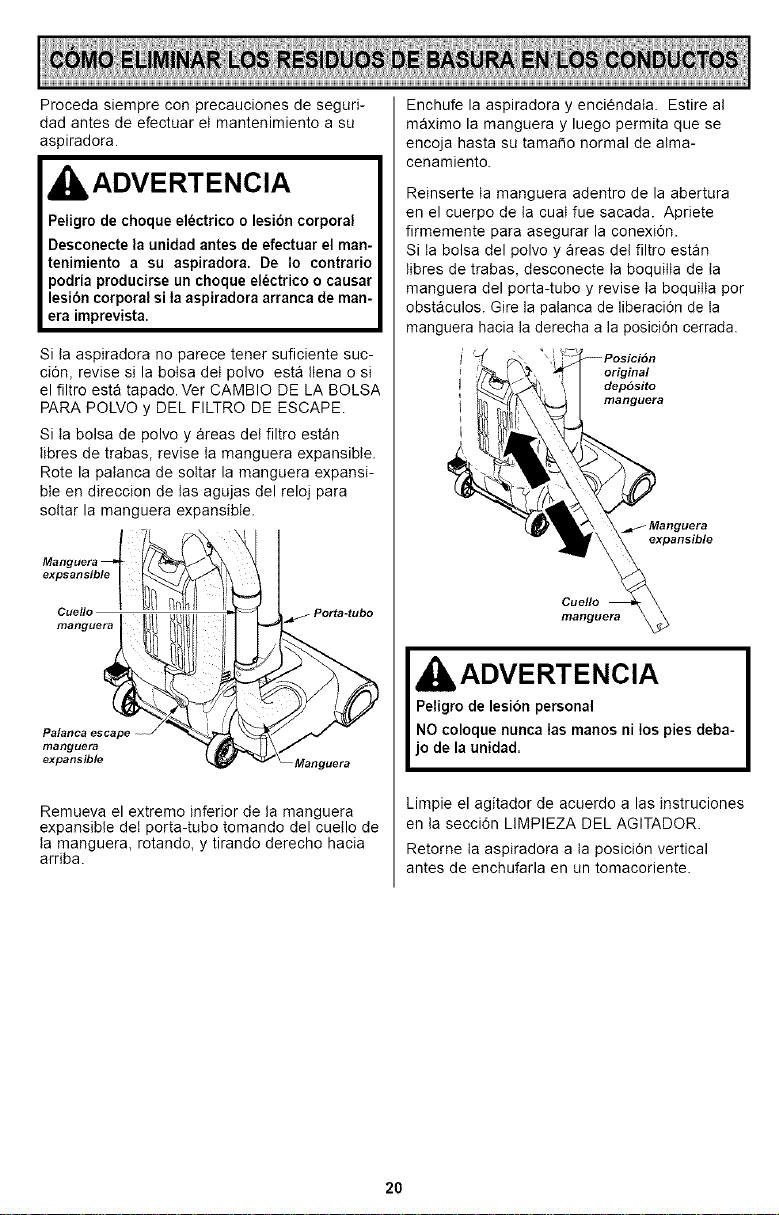
Si ta aspiradora no parece tener suflciente suc-
ci6n, revise si la botsa det polvo est8 ttena o si
el filtro est_ tapado. Ver CAMBIO DE LA BOLSA
PARA POLVO y DEL FILTRO DE ESCAPE.
Si ta bolsa de polvo y areas det filtro estan
Iibres de trabas, revise ta manguera expansible.
Rote la patanca de soItar la manguera expansi-
ble en direccion de tas agujas del reloj para
sottar la manguera expansible.
expsansible
Cuello
manguera
manguera
expansible
Remueva el extreme inferior de ta manguera
expansible deI porta-tubo tomando del cuetlo de
Ia manguera, rotando, y tirando derecho hacia
arriba.
Enchufe la aspiradora y enciendata. Estire at
m&ximo la manguera y luego permita que se
encoja hasta su tamale normal de atma-
cenamiento.
Reinserte ta manguera adentro de la abertura
en el cuerpo de ta cuat fue sacada. Apriete
firmemente para asegurar la conexi6n.
Si Ia bolsa del polvo y areas det filtro estan
tibres de trabas, desconecte ta boquitta de ta
manguera del porta-tubo y revise ta boquitta per
obst_culos. Gire la palanca de liberaci6n de ta
manguera hacia la derecha a la posici6n cerrada.
original
dep6sito
manguera
expans_
Cue//o
manguera
,ADVERTENCIA
Peligro de lesibn personal
NO coloque nunca Ias manos ni los pies deba-
jo de la unidad.
Limpie el agitador de acuerdo alas instruciones
en ta secci6n LIMPIEZA DEL AGITADOR.
Retorne ta aspiradora a ta posici6n vertical
antes de enchufarla en un tomacoriente.
20
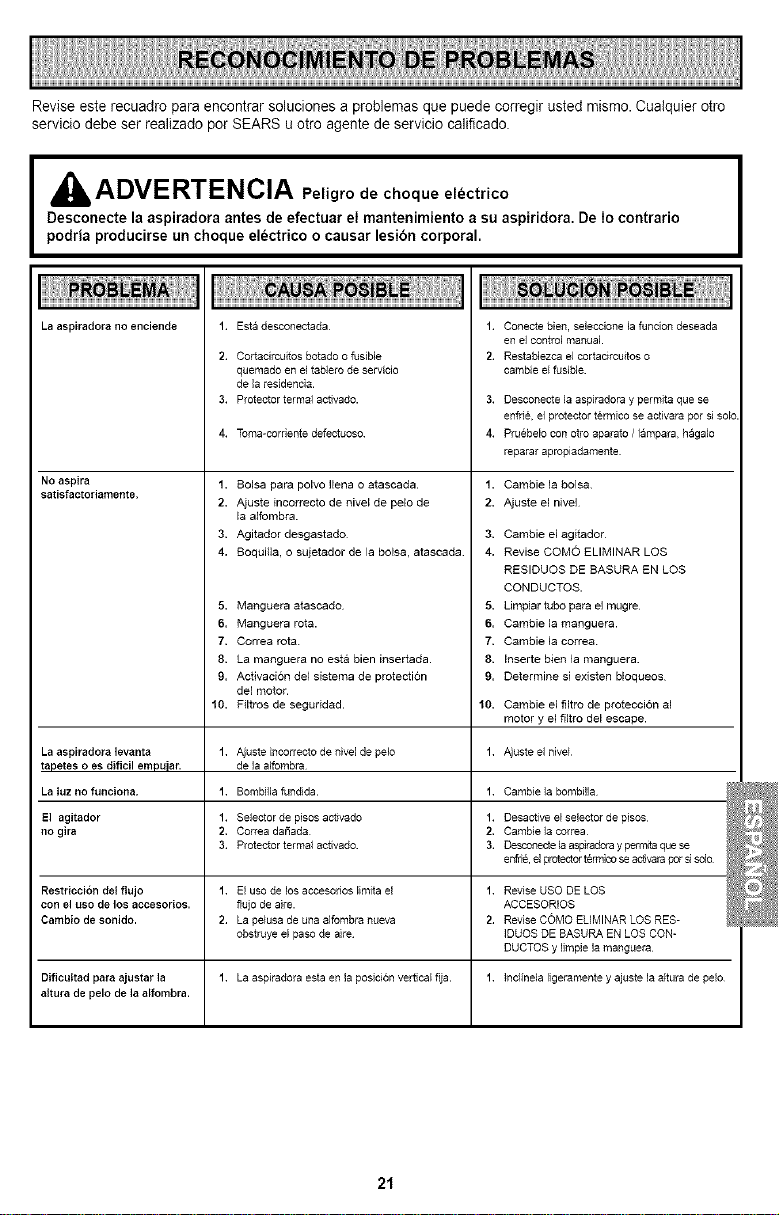
Revise este recuadro para encontrar soluciones a problemas que puede corregir usted mismo. Cuatquier otro
servicio debe ser realizado por SEARS u otro agente de servicio califlcado.
AalIADVERTENCIA Pelig,odechoque electrico
Desconecte la aspiradora antes de efectuar el mantenimiento a su aspiridora. De Io contrario
podria producirse un choque el_ctrico o causar lesibn corporal.
La aspiradora no enciende
No aspira
satisfactoriamente,
1.
2.
3.
4.
La aspiradora levanta 1.
tapetes o es dificil empuiar.
La luz no funciona. 1.
El agitador 1.
no gira 2,
3.
Restriccion del flujo 1.
con e] uso de los accesorios.
Cambio de sonido. 2.
Dificultad para ajustar ]a 1.
aJtura de pelo de ]a alfombra.
Esta desconectada
Cortackcuitos botado o fusible
quemado en el tablero de servicio
de ]aresidencia.
Protector termal activado.
Toma-corriente defeetuoso
1. Bolsa para polvo Hena o atascada.
2. Ajuste incorrecto de nivel de pelo de
la alfombra.
3. Agitador desgastado
4. Boquil]a, o sujetador de la bolsa, atascada
5. Manguera atascado
6. Manguera rota.
7. Correa rota.
8. La manguera no est& bien insertada.
9. Activacion de1sistema de protecti6n
del motor.
10, Filtros de seguddad.
Ajuste incorrecto de hive] de pelo
de ]aalfombra
Bombilla fundida.
Selector de pisos activado
Correa daSada
Protector terma} activado.
1. Conecte bien, seleccJone la funcJon deseada
en el control manual
2. Restab]ezca el cortacircuitos o
cambJe e{fusible.
3. Desconecte la aspiradora y permita que se
enfri& el protector termico se activara pot si sol_
4. Pruebelo con otto aparato / lampara, hagalo
reparar apropiadamente
1. Cambie ]a bolsa.
2. Ajuste el nive]
3. Cambie el agitador
4. Revise COMO ELIMINAR LOS
RESIDUOS DE BASURA EN LOS
CONDUCTOS.
5. Umpiar tubo para el mugre
6. Cambie la manguera.
7. Cambie ]a correa
8. Inserte bien la manguera.
9. Determine si exJsten bloqueos
10. Cambie el filtro de protecci6n al
motor y el filtro del escape.
1. Ajuste el nivef
1. Cambiela bombiHa
1. Desactive el selector de pisos
2, Cambie la correa
3. Desconectela aspkadoray perl_ta quese
enfrie, e]protector termicose activarapot s] sdo
El uso de los accesofios limita el 1. Revise USO DE LOS
flujo de aire. ACCESORIOS
La pe{usa de una alfombra nueva 2. Revise COMO ELIMINAR LOS RES-
obstruye el paso de aire IDUOS DE BASURA EN LOS CQN-
DUCTOS y IJmpie la manguera
La aspiradora esta en la posici(_n vertical fija. 1. hcfinela ligeramente y ajuste la altura de pelo
21

Get it fixed, at your home or ours!
Your Home
For repair - in your home - of al major brand appliances•
lawn and garden equipment• or heating and cooling systems
no matter who made it, no matter who sold it!
For the replacement parts, accessories anc
owner's manuals that you need to do-it-yourself,
For Sears professionai installation of home appliances
and items like garage door openers and water heaters.
1-800-4-MY-HOM E® Anytime,dayornight
•1-800-489-4863 U.S.A.and Canada
www.sears.com www.sears.ca
Our Home
For repair of carry-in products like vacuums, awn equipment
and electronics, call or go on-line for the nearest
Sears Parts and Repair Center.
1-800-488-1222 Anytime, dayor night (U.S.A. only)
www.sears.com
To purchase a protection agreement (U.S.A.)
or maintenance agreement ICanada) on a product serviced by Sears:
1-800-827-6655 (U.S.A. 1-800-361-6665 (Canada
Para cedir servicio de reDaraclon
a domicilio, y oara ordenar Dlezas:
1-888-SU-HOGAR ®
"1-888-784-6427,
Au Canada Dour service en fran£als:
1.800.LE.FOYER _;
1-800-533-6937
www.sears.oa
© Sears, Roebuck and Co
TM SM
® Registered Trademark / Trademark / Service Mark of Bears Brand, LLC
TM SM
® Marca Registrada / Marca de Fabrica / Marca de Servicio de Sears Bra Roebuck ands, LLC
#,1C MD
Marque de commerce / Marque dcposee de Sears Brands, LLC