SIDEBYSIDE
REFRIGERATOR
GREEN
OWNER'SMANUALANDINSTALLATION
CONTENTS
SAFETY WARNING ..............................................................................2
OPERATING INSTRUCTIONS ........................................................ 4
SETTING UP THE REFRIGERATOR ......................................................... 4
MAJOR FEATURES ..................................................................................... 4
CONTROL PANEL........................................................................................ 5
DIGITAL PANEL........................................................................................... 7
TEMPERATURE CONTROL .......................................................................8
ICE AND COLD WATER DISPENSER ........................................................ 8
SHELVES AND BINS ................................................................................... 9
FOOD STORAGE GUIDE ......................................................................... 10
CoolSeleet ZoneTM Drawer GUIDE ............................................................. 12
REMOVING FREEZER ACCESSORIES .................................................. 14
REMOVING REFRIGERATOR ACCESSORIES ..................................... 14
BEVERAGE STATIONTM (optional) ............................................................. 15
CLEANING ACCESSORIES ...................................................................... 16
CHANGING THE INTERIOR LIGHT ......................................................... 16
WATER FILTER .......................................................................................... 17
DOORS ....................................................................................................... 17
INSTALLATION INSTRUCTIONS ................................................ 18
INSTALLATION OF THE REFRIGERATOR ............................................. 18
REMOVING THE REFRIGERATOR DOORS .......................................... 19
REATTACHING THE REFRIGERATOR DOORS ....................................22
ADJUSTING THE CLEARANCE BETWEEN THE DOORS ....................25
CHECKING THE WATER DISPENSER LINE ...........................................27
INSTALLAING THE WATER DISPENSER LINE.......................................28
TROUBLESHOOTING ............................................................................... 33
DA99-OO275B REV(O.5)
/k
WARNING
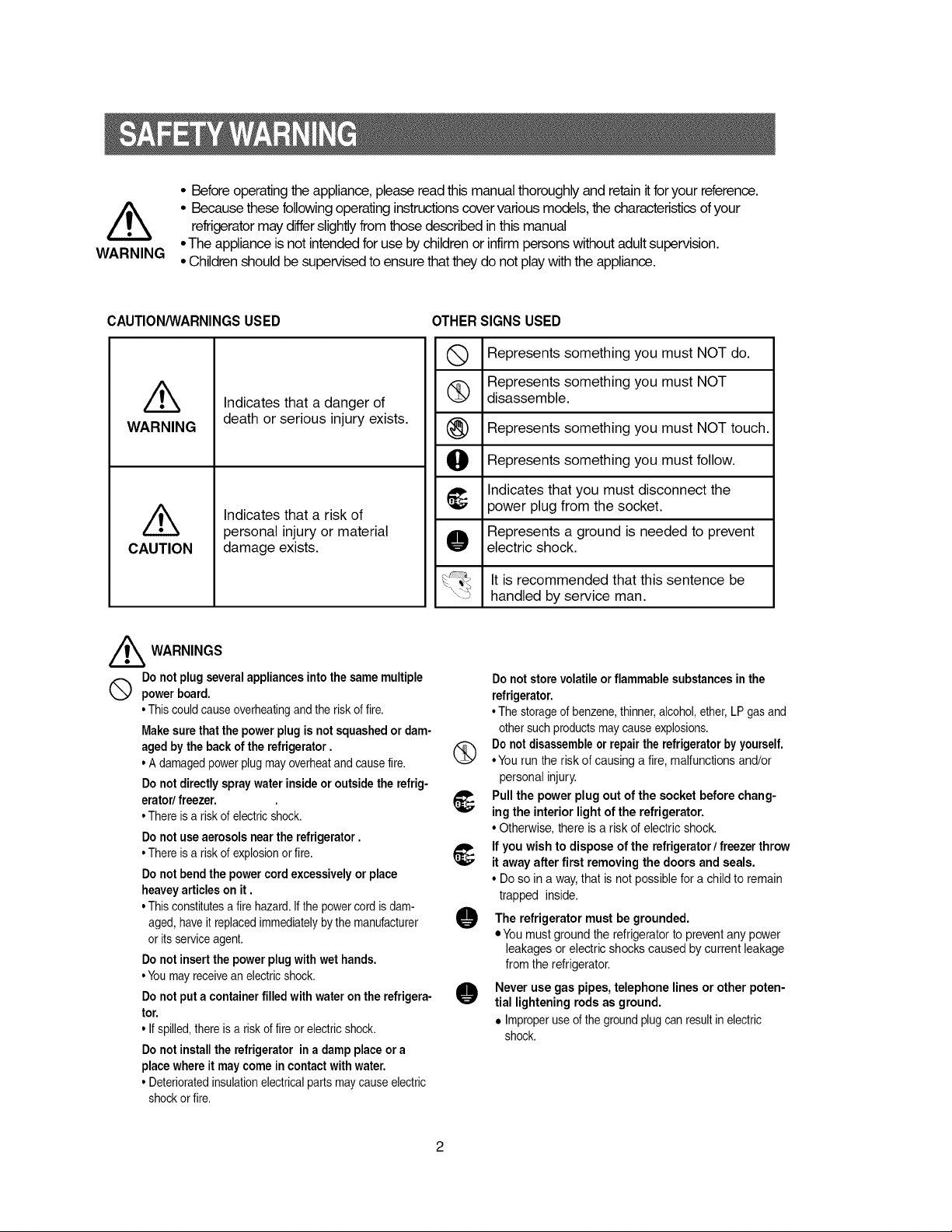
• Before operating the appliance, please read this manual thoroughly and retain it for your reference.
• Because these following operating instructions cover various models, the characteristics of your
refrigerator may differ slightly from those described in this manual
• The appliance is not intended for use by children or infirm persons without adult supervision.
• Children should be supervised to ensure that they do not play with the appliance.
CAUTION/WARNINGSUSED
WARNING
CAUTION
Indicates that a danger of
death or serious injury exists.
Indicates that a risk of
personal injury or material
damage exists.
OTHER SIGNS USED
Q Represents something must NOT do.
you
Represents something you must NOT
_ disassemble.
(_) Represents something you
must NOT touch.
O Represents something you
must follow.
_, Indicates that you must disconnect the
power plug from the socket.
Represents a ground is needed to prevent
electric shock.
It is recommended that this sentence be
handled by service man.
//_ WARNINGS
Do not plug several appliances into the same multiple
Q power board.
• This could cause overheating and the risk of fire.
Make sure that the power plug is not squashed or dam-
aged by the back of the refrigerator.
• A damaged power plug may overheat and cause fire.
Do not directly spray water inside or outside the refrig-
erator/ freezer.
• There is a risk of electric shock.
Do not use aerosols near the refrigerator.
• There is a risk of explosion or fire.
Do not bend the power cord excessively or place
heavey articles on it.
• This constitutes a fire hazard. If the power cord is dam-
aged, have it replaced immediately by the manufacturer
or its service agent.
Do not insert the power plug with wet hands.
• Youmay receive an electric shock.
Do not put a container filled with water on the refrigera-
tor.
• If spilled, there is a risk of fire or electric shock.
Do not install the refrigerator in a damp place or a
place where it may come in contact with water.
• Deteriorated insulation electrical parts may cause electric
shock or fire.
Do not store volatile or flammable substances in the
refrigerator.
• The storage of benzene, thinner, alcohol, ether, LP gas and
other such products may cause explosions.
(_ Do not disassemble or repair the refrigerator by yourself.
• You run the risk of causing a fire, malfunctions and/or
personal injury.
_, Pull the power plug out of the socket before chang-
ing the interior light of the refrigerator.
• Otherwise, there is a risk of electric shock.
_; If you wish to dispose of the refrigerator / freezer throw
it away after first removing the doors and seals.
• Do so in a way, that is not possible for a child to remain
trapped inside.
O he refrigerator must be grounded.
• You must ground the refrigerator to prevent any power
leakages or electric shocks caused by current leakage
from the refrigerator.
O Never use gas pipes, telephone lines or other poten-
tial lightening rods as ground.
• Improper use of the ground plug can result in electric
shock.
///_ CAUTIONS
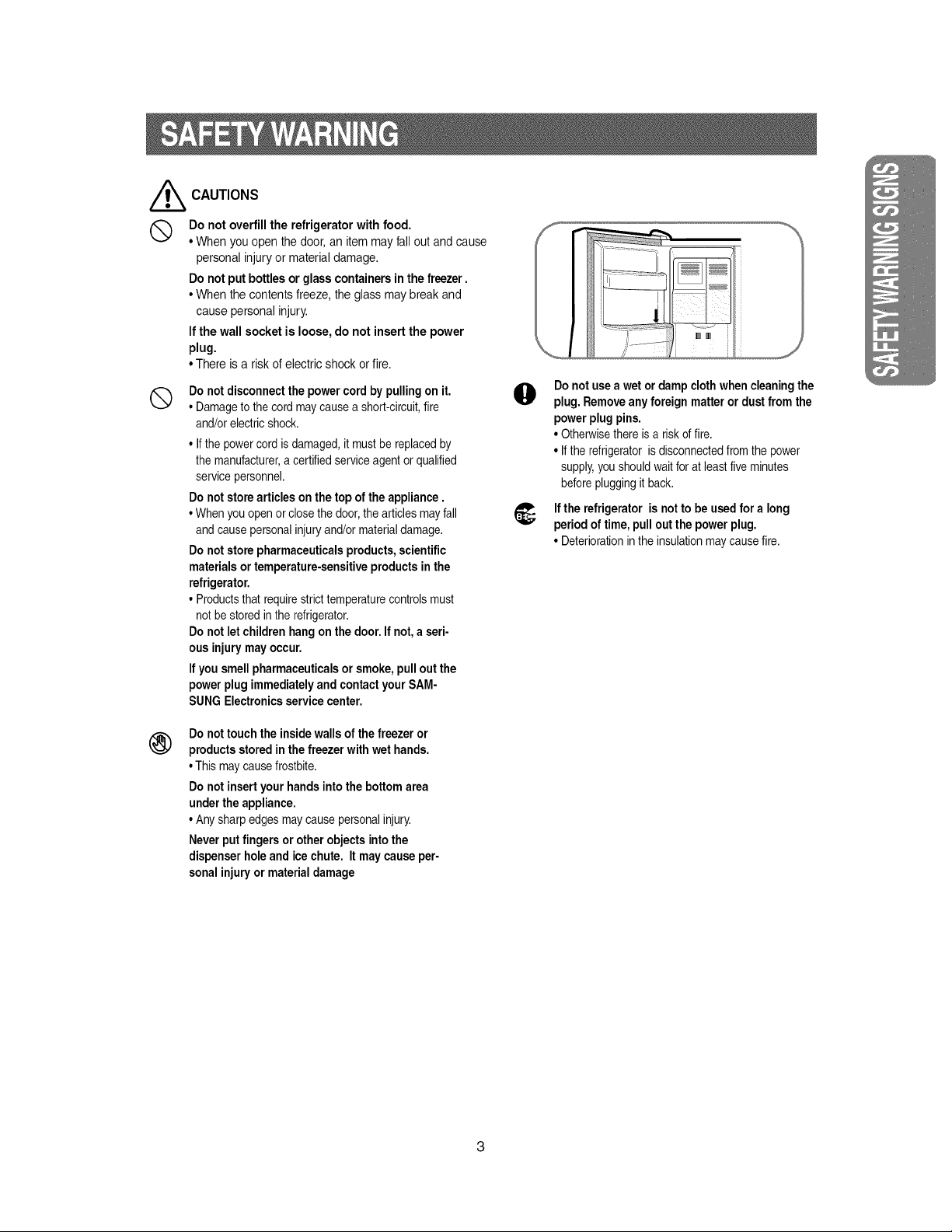
Q Do not overfillthe refrigeratorwith food.
• Whenyou open the door,an itemmayfall outand cause
personalinjuryor materialdamage.
Do notput bottlesor glasscontainersinthe freezer.
• Whenthe contentsfreeze,the glass may break and
causepersonalinjury.
If the wallsocketis loose,do not insertthe power
plug.
• There is a risk of electricshockor fire.
®
Do notdisconnectthe powercordbypullingon it.
• Damageto the cordmaycausea short-circuit,fire
and/orelectricshock.
• Ifthe powercordis damaged,it mustbe replacedby
the manufacturer,a certifiedserviceagentorqualified
servicepersonnel.
Do notstorearticlesonthe topoftheappliance.
• Whenyouopenorclosethedoor,the articlesmayfall
andcausepersonalinjuryand/ormaterialdamage.
Do notstorepharmaceuticalsproducts,scientific
materialsortemperature-sensitiveproductsinthe
refrigerator.
• Productsthatrequirestricttemperaturecontrolsmust
notbestoredinthe refrigerator.
Do notletchildrenhangon the door.If not,a seri-
ousinjurymayoccur.
If you smellpharmaceuticalsorsmoke,pulloutthe
powerplugimmediatelyandcontactyourSAM-
SUNGElectronicsservicecenter.
®
Do nottouchthe insidewallsof thefreezer or
productsstoredinthe freezerwith wethands.
• Thismaycausefrostbite.
Do notinsertyourhandsintothe bottomarea
undertheappliance.
• Anysharpedgesmaycausepersonalinjury.
Neverputfingersorotherobjectsintothe
dispenserholeandicechute. It maycauseper-
sonalinjuryor materialdamage
O
,j
Donotusea wetor dampclothwhencleaningthe
plug. Removeanyforeign matteror dustfrom the
powerplugpins.
• Otherwisethereis a riskof fire.
• Iftherefrigeratoris disconnectedfromthe power
supply,youshouldwaitforat leastfiveminutes
beforepluggingit back.
If the refrigeratoris notto be usedfora long
periodof time,pulloutthe powerplug.
• Deteriorationintheinsulationmaycausefire.
3
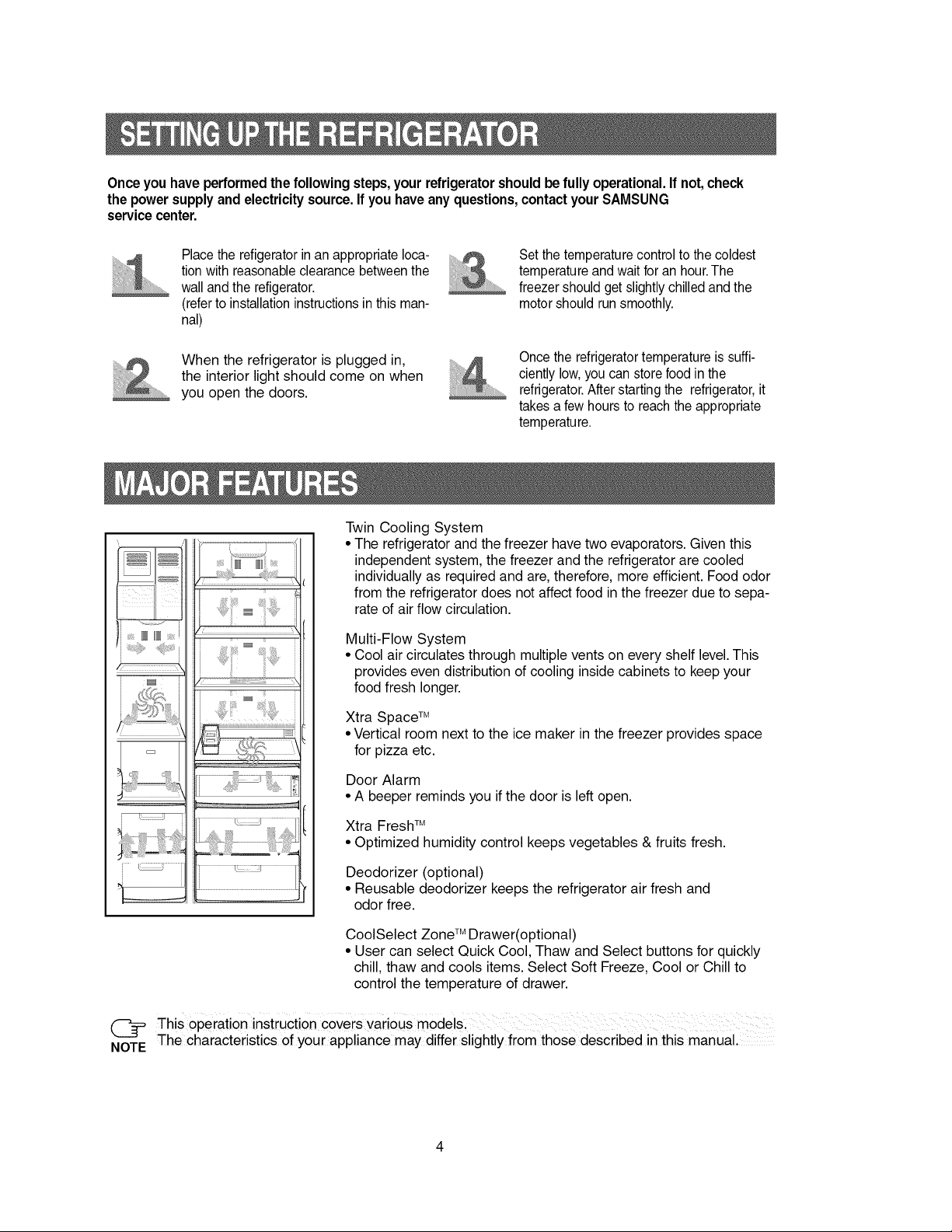
Onceyouhave performedthefollowingsteps,your refrigeratorshouldbefully operational.If not,check
the powersupplyand electricitysource.If you haveanyquestions,contactyourSAMSUNG
servicecenter.
Place the refigerator in an appropriate loca-
tion with reasonable clearance between the
wall and the refigerator.
(refer to installation instructions in this man-
nal)
When the refrigerator is plugged in,
the interior light should come on when
you open the doors.
Set the temperature control to the coldest
temperature and wait for an hour.The
freezer should get slightly chilled and the
motor should run smoothly.
Once the refrigerator temperature is suffi-
ciently low, you can store food in the
refrigerator. After starting the refrigerator, it
takes a few hours to reach the appropriate
temperature.
_IIIIIII
_:_!i!_i_i!_4!ili?_f:_i
i <!.............J i
_iill
Twin Cooling System
• The refrigerator and the freezer have two evaporators. Given this
independent system, the freezer and the refrigerator are cooled
individually as required and are, therefore, more efficient. Food odor
from the refrigerator does not affect food in the freezer due to sepa-
rate of air flow circulation.
Multi-Flow System
• Cool air circulates through multiple vents on every shelf level. This
provides even distribution of cooling inside cabinets to keep your
food fresh longer.
Xtra Space TM
• Vertical room next to the ice maker in the freezer provides space
for pizza etc.
Door Alarm
• A beeper reminds you if the door is left open.
Xtra Fresh TM
• Optimized humidity control keeps vegetables & fruits fresh.
Deodorizer (optional)
• Reusable deodorizer keeps the refrigerator air fresh and
odor free.
CoolSelect Zone TM Drawer(optional)
• User can select Quick Cool, Thaw and Select buttons for quickly
chill, thaw and cools items. Select Soft Freeze, Cool or Chill to
control the temperature of drawer.
This operation instruction covers various models,
NOTE The characteristics of your appliance may differ slightly from those described in this manual.
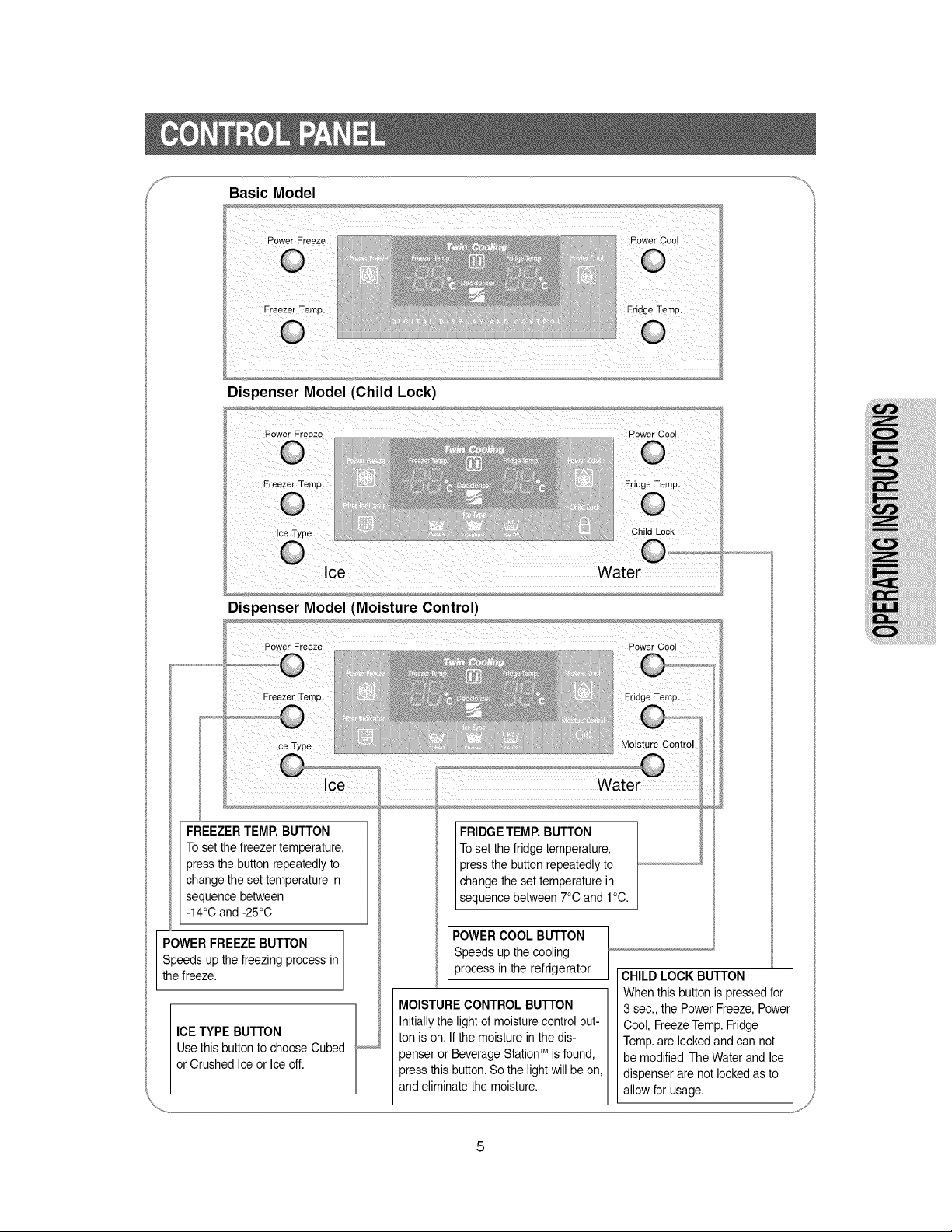
Basic Model
Dispenser Model (Child Lock)
Ice Water
Dispenser Model (Moisture Control)
changetheset temperaturein
sequencebetween
-14°C and-25°C
POWER FREEZE BUTTON in
Speeds up the freezing process
the freeze.
ICE TYPE BUTTON /
Use this button to choose Cubed
or Crushed Ice or Ice off.
%,..........
FRIDGETEMP.BUTTON
Toset the fridgetemperature,
pressthe buttonrepeatedlyto
changetheset temperaturein
sequencebetween7°C and 1°C.
POWER COOL BUTTON
Speeds up the cooling
process in the refrigerator
MOISTURE CONTROL BUTTON
Initially the light of moisture control but-
ton is on. If the moisture in the dis-
penser or Beverage StationTM is found,
press this button. So the light will be on,
and eliminate the moisture.
CHILD LOCK BUTTON
When this button is pressed for
3 sec., the Power Freeze, Power
Cool, Freeze Temp. Fridge
Temp. are locked and can not
be modified. The Water and Ice
dispenser are not locked as to
allow for usage.
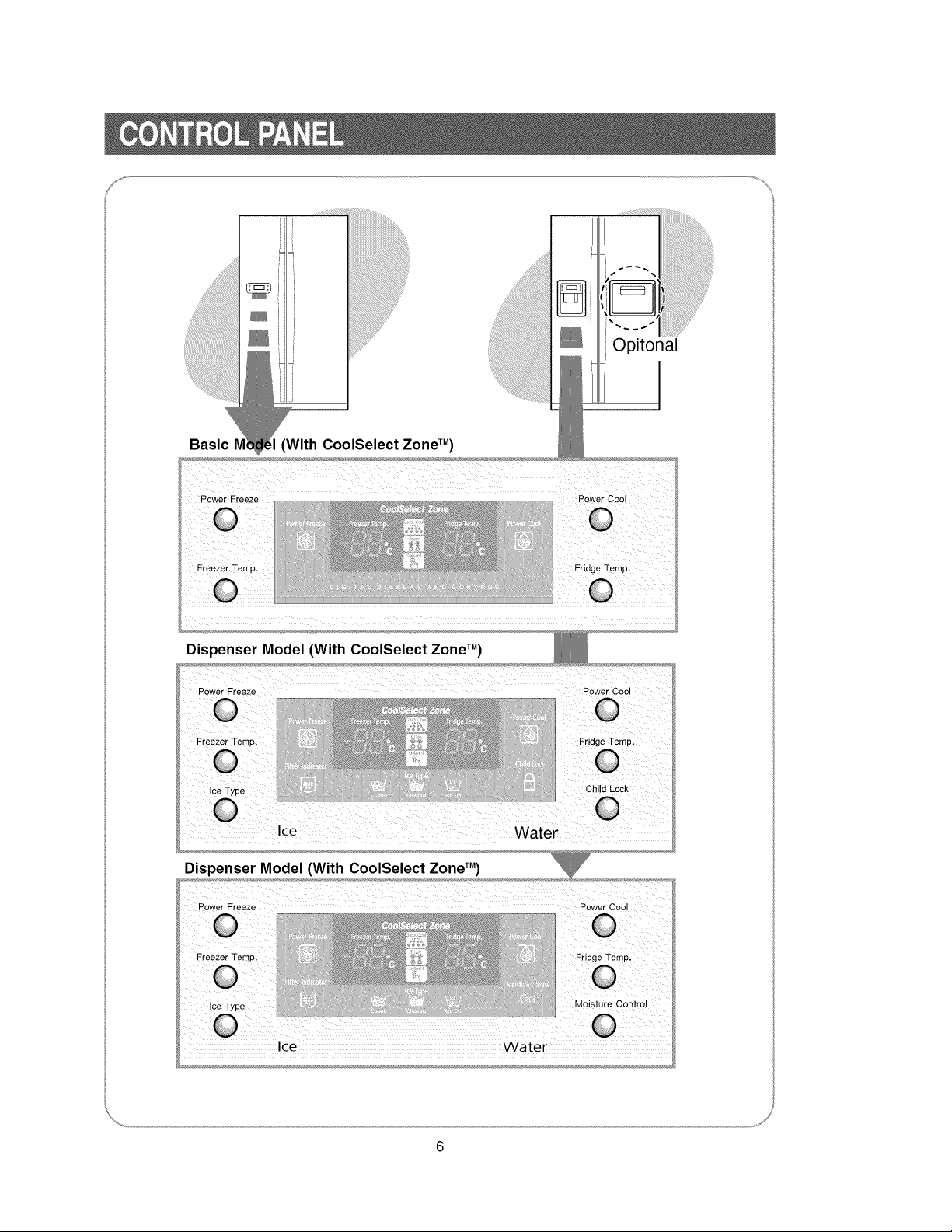
Opitonal
Basic IV
Power Freeze Power Cool
Fridge Temp,
Dispenser Model (With CoolSelect Zone TM)
Dispenser Model (With CoolSelect ZoneTM)
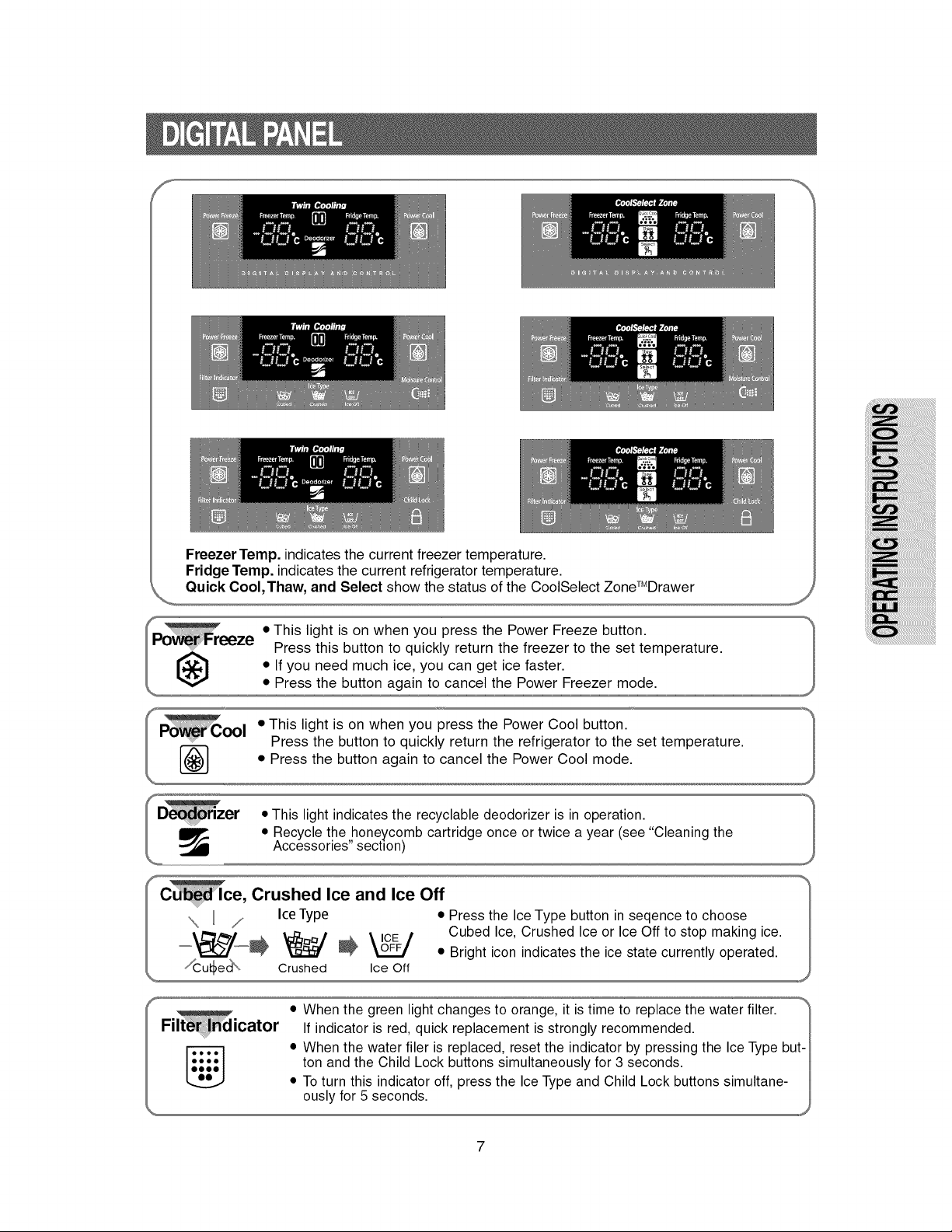
Freezer Temp. indicates the current freezer temperature.
Fridge Temp. indicates the current refrigerator temperature.
Quick Cool,Thaw, and Select show the status of the CooISelect ZoneTMDrawer
\
Oul • This light is on when you press the Powe! Cool button. "_
f Press the button to quickly return the refrigerator to the set temperature. )
e, Crushed Ice and Ice Off
\ / Ice Type • Press the Ice Type button in seqence to choose
Cubed Ice, Crushed Ice or Ice Off to stop making ice.
=_--_ _ _ _ • Bright icon indicates the ice state currently operated.
Crushed Ice Off
% ,
I • When the green light changes to orange, it is time to replace the water filter. _'
Fi icator If indicator is red, quick replacement is strongly recommended.
• When the water filer is replaced, reset the indicator by pressing the Ice Type but-
I:_:_::I ton and the Child Lock buttons simultaneously for 3 seconds.
• To turn this indicator off, press the Ice Type and Child Lock buttons simultane-
ously for 5 seconds. _
7
Freezer
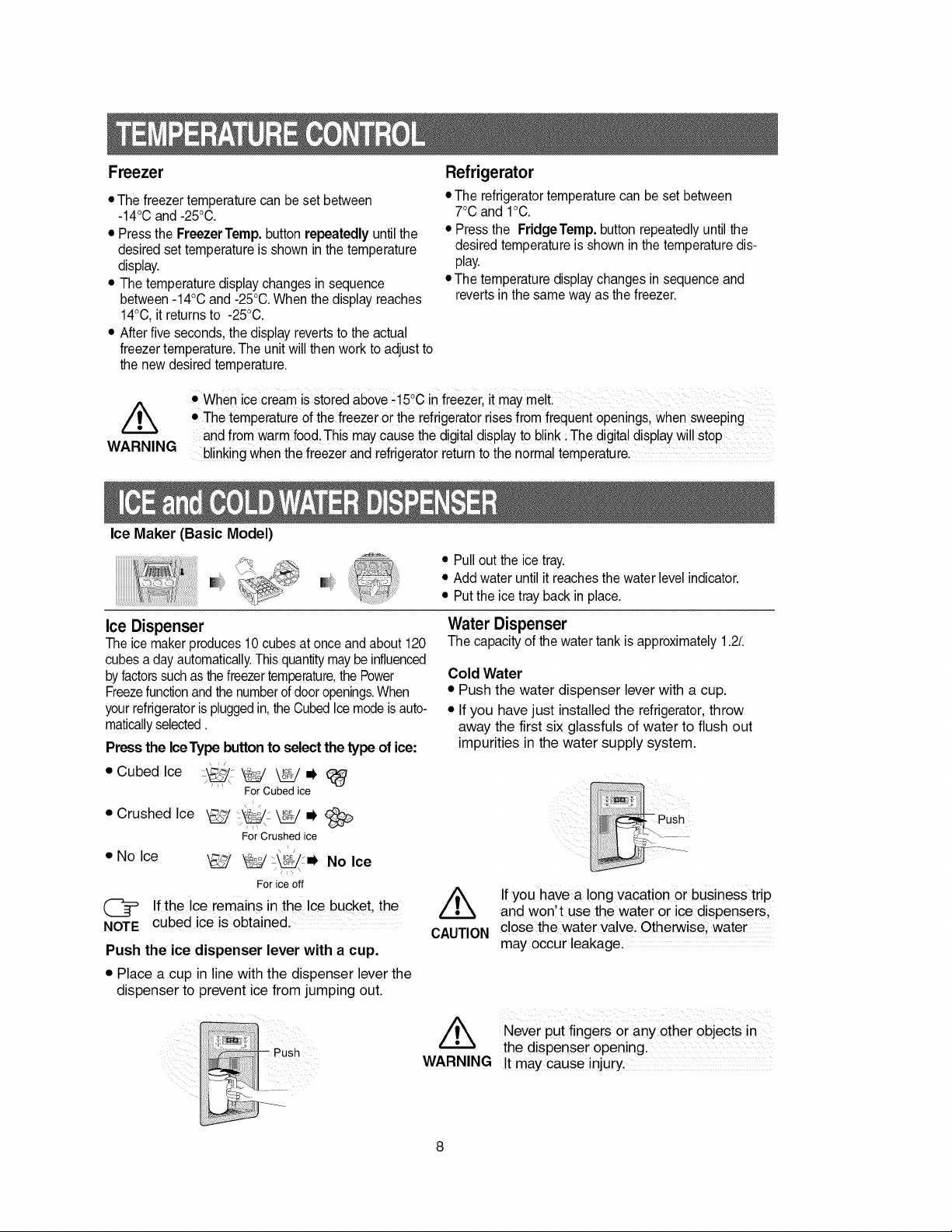
• The freezer temperature can be set between
-14°C and -25°C.
• Press the Freezer Temp. button repeatedly until the
desired set temperature is shown in the temperature
display.
• The temperature display changes in sequence
between -14°C and -25°C. When the display reaches
14°C, it returns to -25°C.
• After five seconds, the display reverts to the actual
freezer temperature. The unit will then work to adjust to
the new desired temperature.
Refrigerator
• The refrigerator temperature can be set between
7°C and 1°C.
• Press the FridgeTemp. button repeatedly until the
desired temperature is shown in the temperature dis-
play.
• The temperature display changes in sequence and
reverts in the same way as the freezer.
/k
WARNING
• When ice cream is stored abOVe.15°c in freezer, it may melL
• The temperature of the freezer 0r the refrigeraTM rises from frequent openings, when sweeping
and from warm food. This may cause the digital display to blink :The digital display will stop
blinking when the freezer and refrigerator return to the normal temperature.
Ice Maker (Basic Model)
• Pull out the ice tray.
• Add water until it reaches the water level indicator.
• Put the ice tray back in place.
Ice Dispenser
The ice maker produces 10 cubes at once and about 120
cubes a day automatically. This quantity may be influenced
by factors such as the freezer temperature,the Power
Freezefunction and the numberof door openings.When
your refrigerator is plugged in, the Cubed Ice mode is auto-
maticallyselected.
Pressthe IceType buttonto selectthe type of ice:
Water Dispenser
The capacity of the water tank is approximately 1.2L
Cold Water
• Push the water dispenser lever with a cup.
• If you have just installed the refrigerator, throw
away the first six glassfuls of water to flush out
impurities in the water supply system.
• Cubedlce j_:,, _ _=_ (_
For Cubed ice
• Crushed Ice \_ j_z _ i,
For Crushed ice
\ '/
• No Ice _,___/_ _ml, No Ice
// \ \
For ice off
(_ If the Ice remains in the Ice bucket, the
NOTE cubed ice is obtained.
Push the ice dispenser lever with a cup.
• Place a cup in line with the dispenser lever the
dispenser to prevent ice from jumping out.
/k
CAUTION
Push
........
If you have a !ong vacation or business trip
and won't use the water or ice dispensers,
close the water valvel Otherwise, water
may occur leakage: .............
//_k Never put fingers or anY other objects in
the dispenser Opening. ............................
WARNING Itmay cause injury,
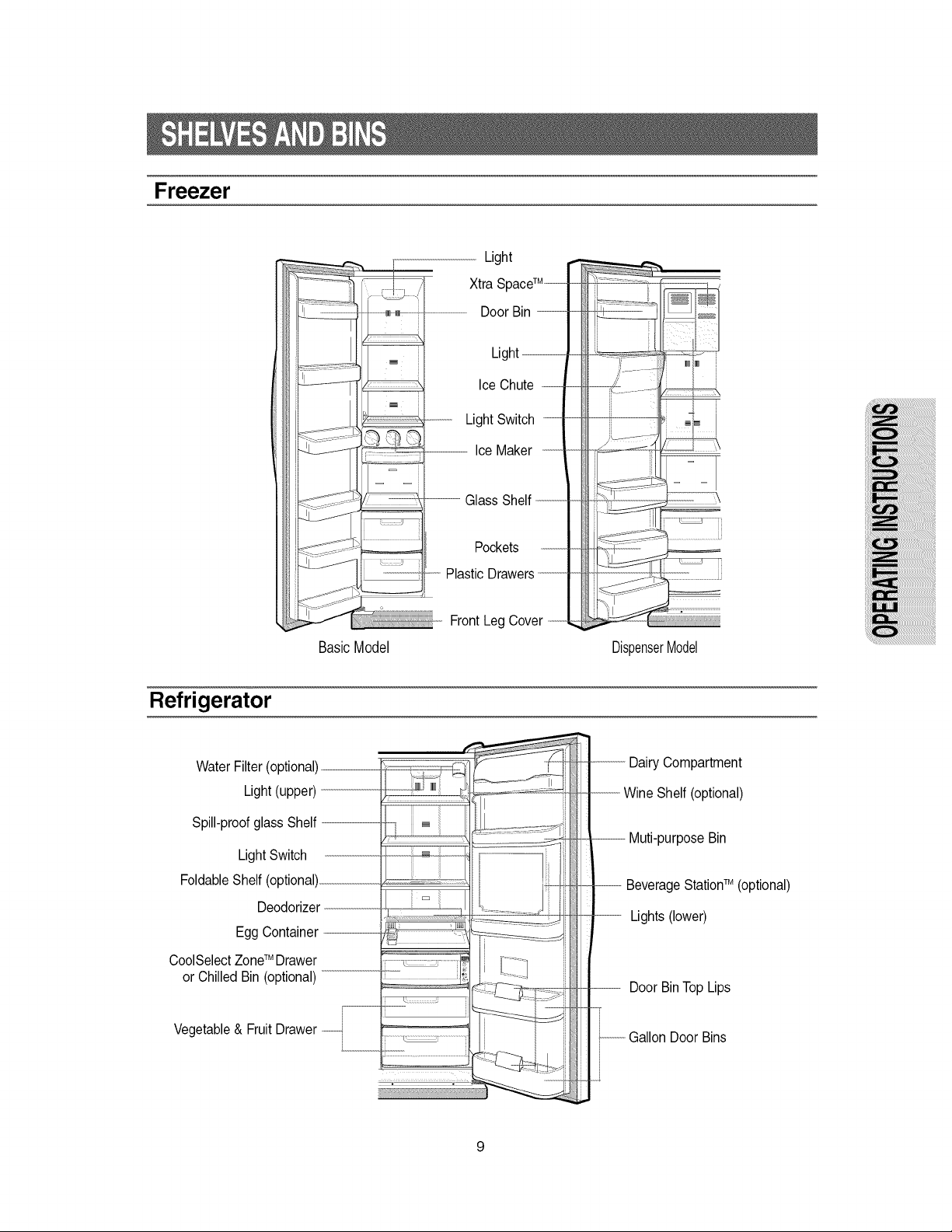
Freezer
Light
Xtra SpaceTM---
Door Bin ----------------------
Light---.----
Ice Chute ..-------
LightSwitch _-
- .........,..............-IceMaker ------
BasicModel
- ----- Glass Shelf----
Pockets
Plastic Drawers--------------------
Front Leg Cover --
DispenserModel
Refrigerator
Water Filter (optional) .......................
Light (upper)
Spill-proof glass Shelf --------
Light Switch
Foldable Shelf (optional)__....................
Deodorizer ---------
Egg Container -----
CooiSelect ZoneTM Drawer
or Chilled Bin (optional)
Vegetable & Fruit Drawer _
L__..._.
Lights (lower)
Door BinTopLips
...---------------Gallon Door Bins
9
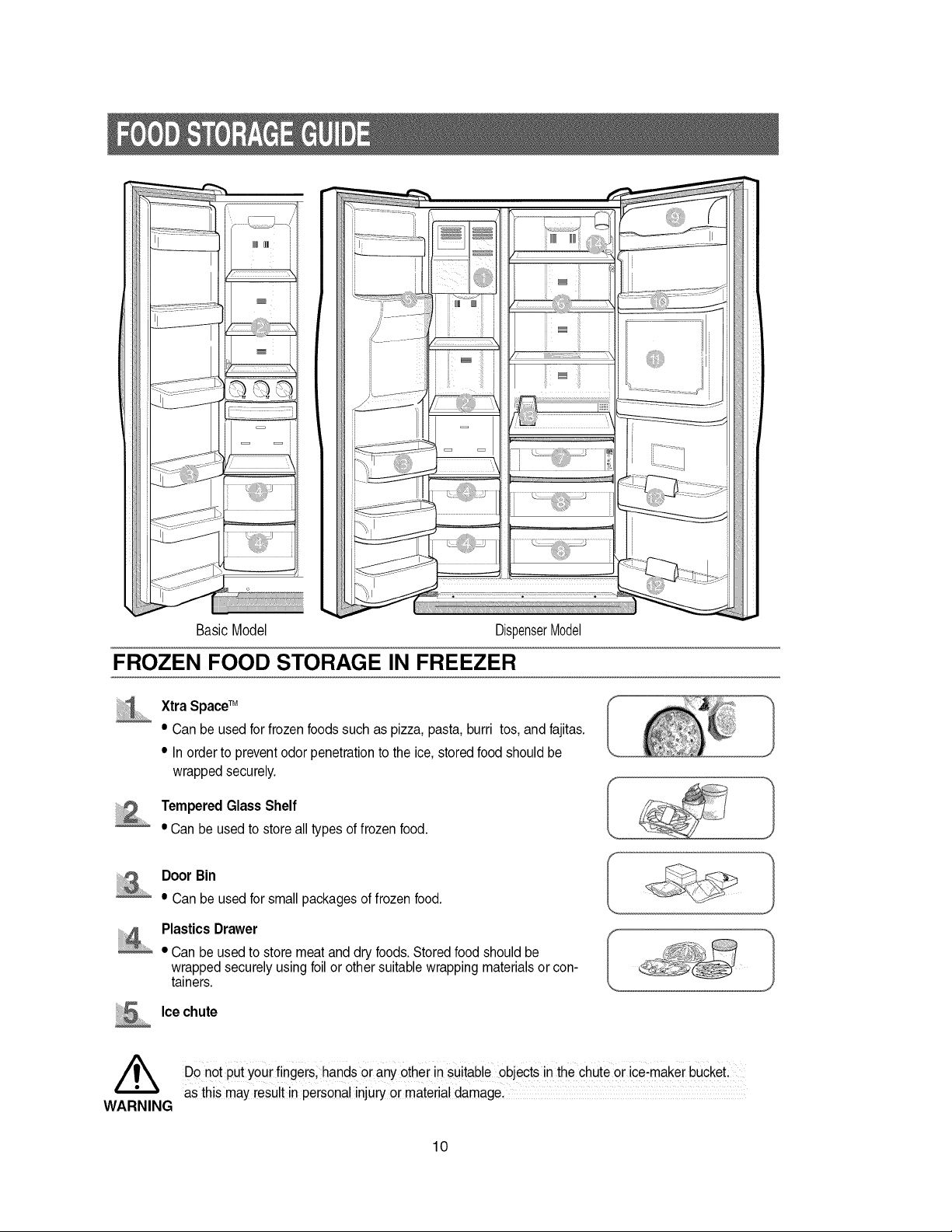
BasicModel
DispenserModel
FROZEN FOOD STORAGE IN FREEZER
.............
Xtra SpaceTM
• Can be used for frozen foods such as pizza, pasta, burri tos, and fajitas.
• In order to prevent odor penetration to the ice, stored food should be
wrapped securely.
Tempered Glass Shelf
• Can be used to store all types of frozen food.
Door Bin
• Can be used for small packages of frozen food.
.... Plastics Drawer
• Can be used to store meat and dry foods. Stored food should be
wrapped securely using foil or other suitable wrapping materials or con-
tainers.
Icechute
,_ DOnot put your fingers; hands or any other in suitable objects in the chute or ice:maker bUCketl
as this may result in personal injury or material damage.
WARNING
10
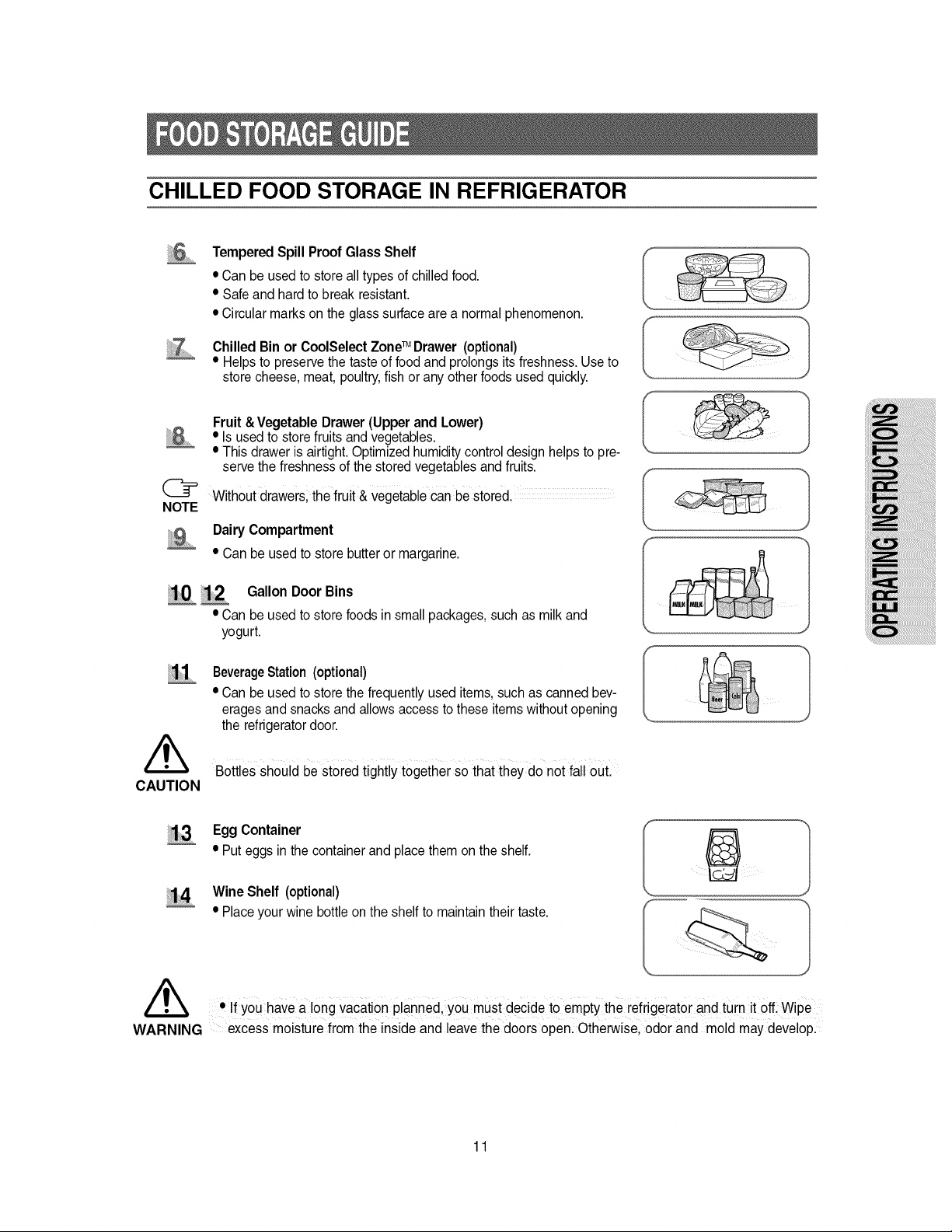
CHILLED FOOD STORAGE IN REFRIGERATOR
Tempered Spill Proof Glass Shelf
• Can be used to store all types of chilled food.
• Safe and hard to break resistant.
• Circular marks on the glass surface are a normal phenomenon.
Chilled Bin or CoolSelect Zone TM Drawer (optional)
• Helps to preserve the taste of food and prolongs its freshness. Use to
store cheese, meat, poultry, fish or any other foods used quickly.
Fruit & Vegetable Drawer (Upper and Lower)
• Is used to store fruits and vegetables.
• This drawer is airtight. Optimized humidity control design helps to pre-
serve the freshness of the stored vegetables and fruits.
@ Without drawer& the fruit & Vegetable can be stored.
NOTE
Dairy Compartment
• Can be usedto store butteror margarine.
!0 _2 Gallon Door Bins
• Can be used to store foods in small packages, such as milk and
yogurt.
/k
CAUTION
BeverageStation (optional)
• Can be used to store the frequently used items, such as canned bev-
erages and snacks and allows access to these items without opening
the refrigerator door.
Bottles should be stored tightly together so that they do not fall out.
EggContainer
• Puteggs inthe containerandplacethemon the shelf.
Wine Shelf (optional)
• Placeyour winebottleonthe shelf to maintaintheir taste.
• If YOUhave a long vacation planned, you must decide to empty the refrigerator and turn it oE Wipe
WARNING excess moisture from the inside and leave the doors open. Otherwise, odor and mold may develop.
11
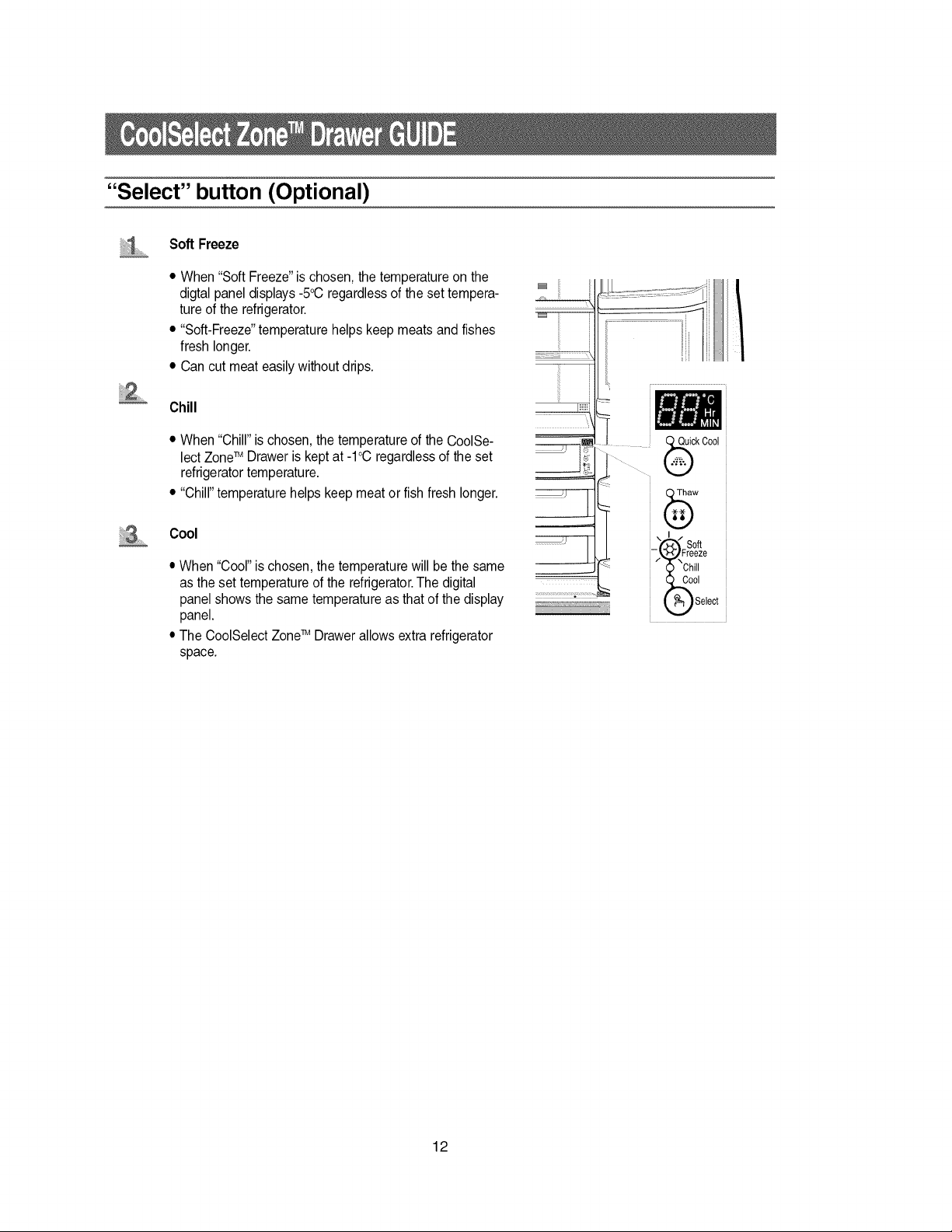
"Select" button (Optional)
Soft Freeze
• When "Soft Freeze" is chosen, the temperature on the
digtal panel displays -5°C regardless of the set tempera-
ture of the refrigerator.
• "Soft-Freeze" temperature helps keep meats and fishes
fresh longer.
• Can cut meat easily without drips.
Chill
• When "Chill" is chosen, the temperature of the CoolSe-
lect ZoneTM Drawer is kept at -1°C regardless of the set
refrigerator temperature.
• "Chill" temperature helps keep meat or fish fresh longer.
Cool
• When "Cool" is chosen, the temperature will be the same
as the set temperature of the refrigerator. The digital
panel shows the same temperature as that of the display
panel.
• The CoolSelect ZoneTM Drawer allows extra refrigerator
space.
12
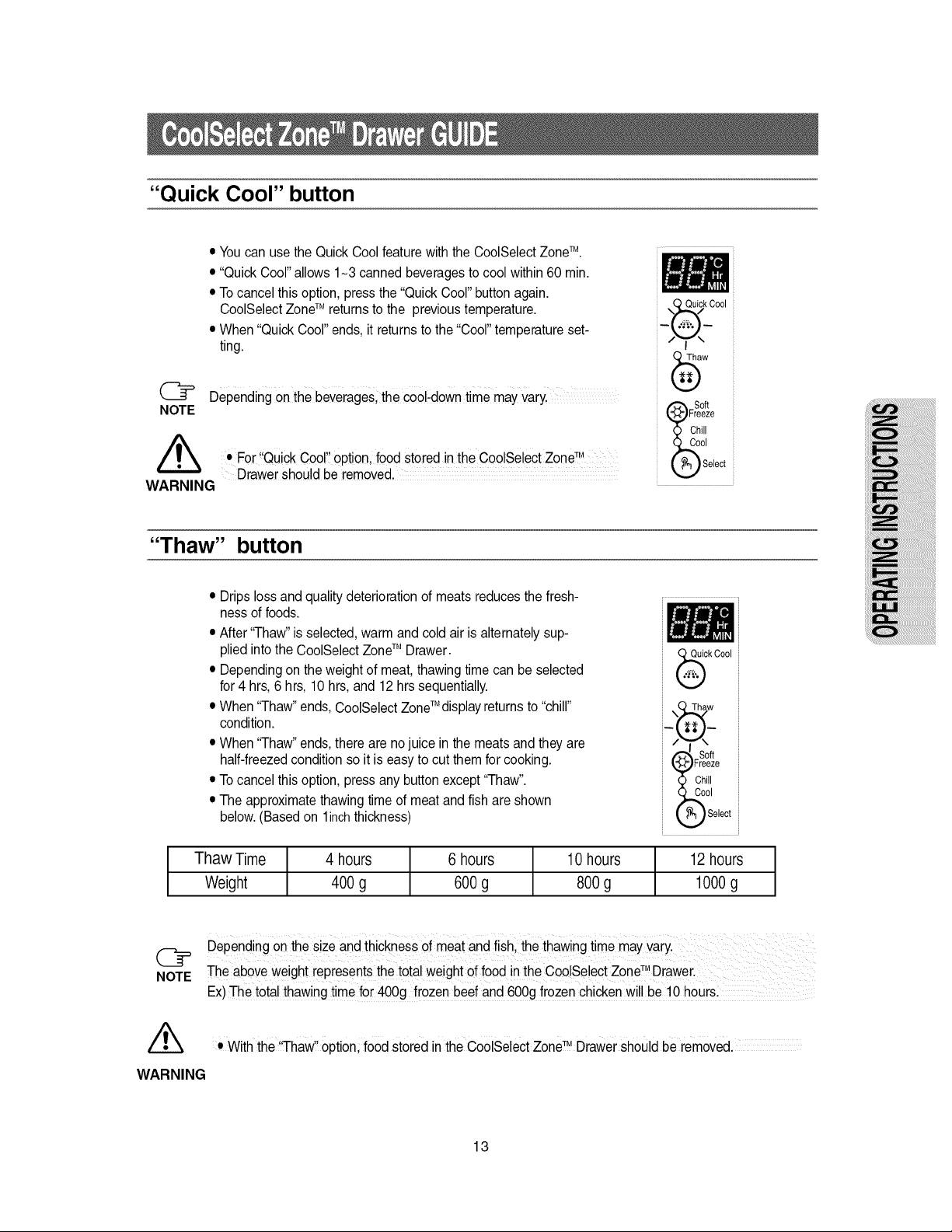
"Quick Cool" button
• You can use the Quick Cool feature withthe CoolSelect ZoneTM.
• "Quick Cool" allows 1-3 canned beverages to cool within 60 min.
• To cancel this option, press the "Quick Cool" button again.
CoolSelect ZoneTM returns to the previous temperature.
• When "Quick Cool" ends, it returns to the "Cool" temperature set-
ting.
@ Depending on the beverages;the Cool:down time may vary.
NOTE
• For Qu!ck Coo! Option, food stored in the CoolSelect ZoneTM.....
Drawer should be removed.
WARNING
0 Quick Cool
N /
_S S°ft
Freeze
Chill
I
elect
"Thaw" button
• Drips loss and quality deterioration of meats reduces the fresh-
ness of foods.
• After "Thaw" is selected, warm and cold air is alternately sup-
plied into the CoolSelect ZoneTM Drawer.
• Depending on the weight of meat, thawing time can be selected
for 4 hrs, 6 hrs, 10 hrs, and 12 hrs sequentially.
• When "Thaw" ends, CoolSelect ZoneTM display returns to "chill"
condition.
• When "Thaw" ends, there are no juice in the meats and they are
half-freezed condition so it is easy to cut them for cooking.
• To cancel this option, press any button except "Thaw".
• The approximate thawing time of meat and fish are shown
below. (Based on linch thickness)
ck Cool
"_'_,w ect
Thaw Time 4 hours 6 hours 10hours 12hours
Weight 400g 600g 800g 1000g
NOTE
Depending on the size and thickness of meat and fishl the thawing time mayVary.
The above weight represents the total weight of food in the Coo!Select ZoneTM Drawer,
Ex) The totai thawing time for 400g frozen beef and 6OOgfrozen chicken wiil be t0 hoursl
• With the "Thaw" Option, food stored in the CooISelect zone TM Drawer should be removed.
WARNING
13
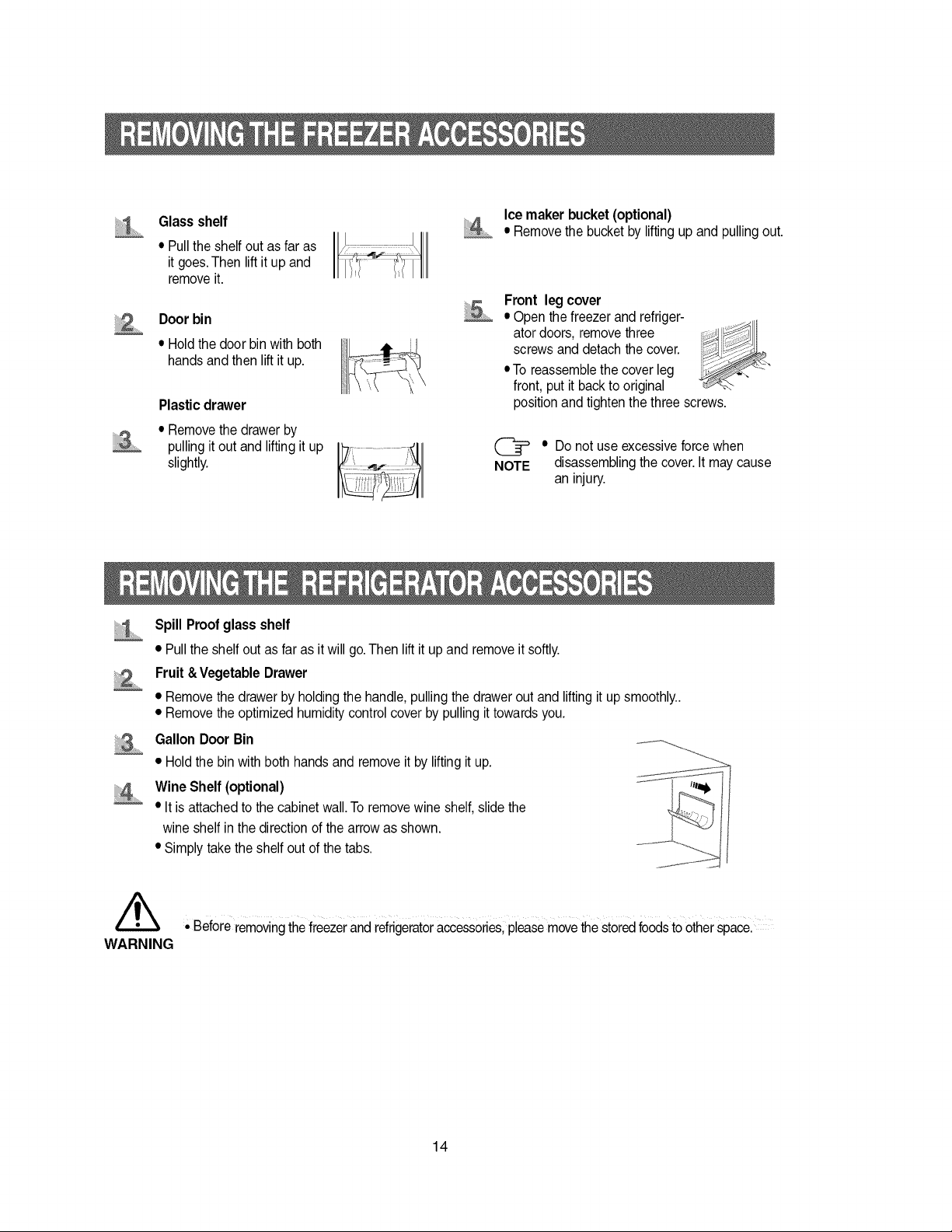
Glass shelf
• Pull the shelf out as far as
it goes. Then lift it up and
remove it.
Door bin
• Hold the door bin with both
hands and then lift it up.
Plasticdrawer
• Remove the drawer by
pulling it out and lifting it up
slightly.
Ice maker bucket (optional)
• Remove the bucket by lifting up and pulling out.
Front leg cover
• Open the freezer and refriger-
ator doors, remove three
screws and detach the cover.
• To reassemble the cover leg
front, put it back to original
position and tighten the three screws.
• Do not use excessive force when
NOTE disassembling the cover. It may cause
an injury.
iiii
Spill Proof glass shelf
• Pull the shelf out as far as it will go. Then lift it up and remove it softly.
Fruit & Vegetable Drawer
• Remove the drawer by holding the handle, pulling the drawer out and lifting it up smoothly..
• Remove the optimized humidity control cover by pulling it towards you.
GallonDoorBin
• Hold the bin with both hands and remove it by lifting it up.
Wine Shelf (optional)
• It is attached to the cabinet wall. To remove wine shelf, slide the
wine shelf in the direction of the arrow as shown.
• Simply take the shelf out of the tabs.
,_k • Before removing the freezer and refrigerator a_essories, please movethe stored foods to other spacel
WARNING
14
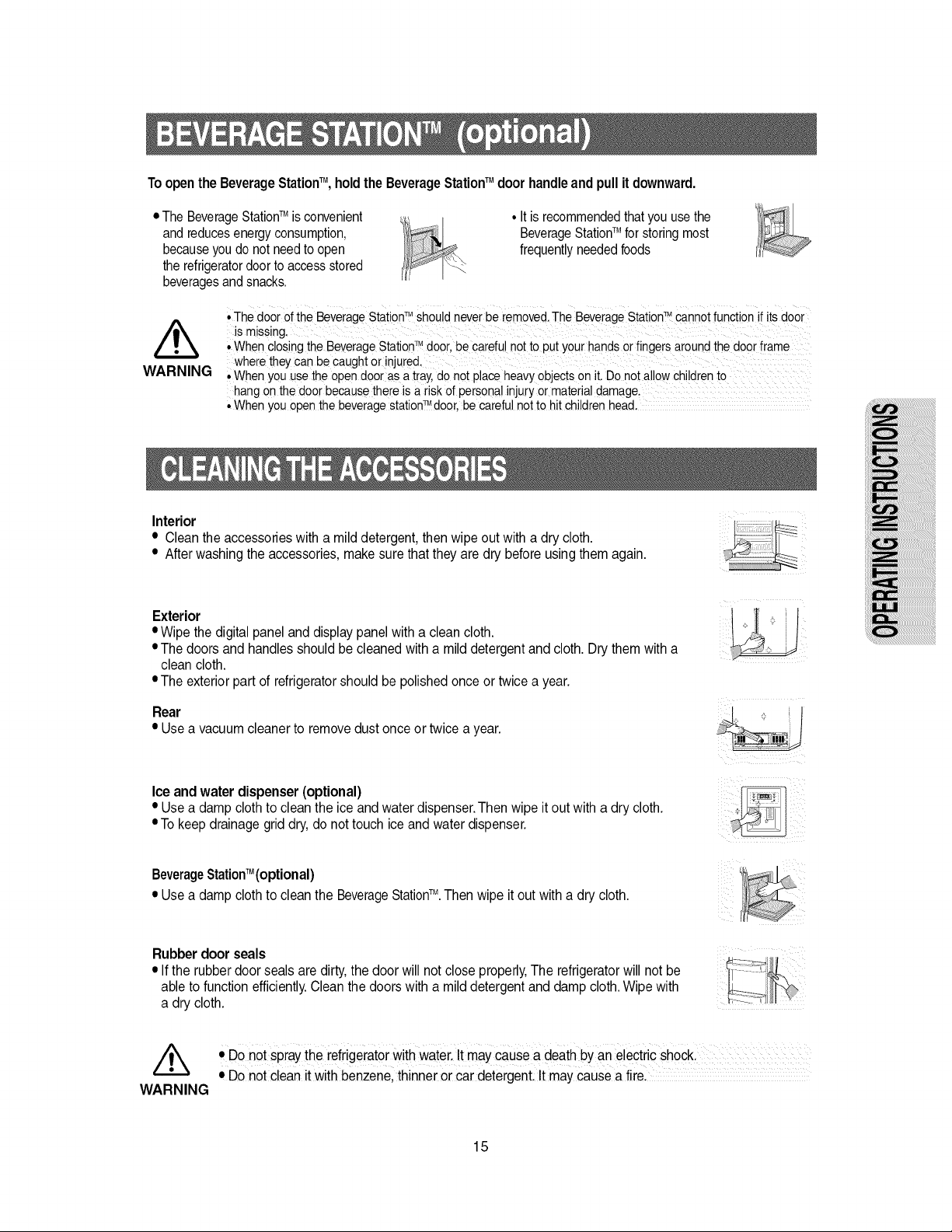
ToopentheBeverageStationTM, holdtheBeverageStationTM doorhandleandpullitdownward.
• The BeverageStationTM is convenient
and reduces energy consumption,
becauseyou do not need to open
the refrigerator door to access stored
beveragesand snacks.
• It is recommendedthatyou use the
BeverageStationTM for storing most
frequently needed foods
WARNING
,,The door of the BeveragestationTM Shouldneverbe removed.The BeveragestationTM CannOtfunction if its door
is missing.
,,When closingthe BeverageStationZMdoor, be carefu!not to put your handsorfingersaroundthedoor#ame
where theycan be caughtor !njure&
, When youuse the open door as atray,do not placeheavyobjectson iLDo not a!!owchi!dren to
hang on thedoor becausethere is a riskof persona!injuryor materialdamage.
• When you openthe beveragestationZMdoor,be carefulnotto hit childrenhead.
Interior
• Clean the accessories with a mild detergent, then wipe out with a dry cloth.
• After washing the accessories, make sure that they are dry before using them again.
Exterior
• Wipe the digital panel and display panel with a clean cloth.
• The doors and handles should be cleaned with a mild detergent and cloth. Dry them with a
clean cloth.
• The exterior part of refrigerator should be polished once or twice a year.
Rear
• Usea vacuumcleanerto removedustonceor twicea year.
Ice and water dispenser (optional)
• Use a damp cloth to clean the ice and water dispenser.Then wipe it out with a dry cloth.
• To keep drainage grid dry, do not touch ice and water dispenser.
TM
BeverageStation (optional)
TM
• Use a damp cloth to clean the BeverageStation .Then wipe it out with a dry cloth.
Rubber door seals
• If the rubber door seals are dirty, the door will not close properly, The refrigerator will not be
able to function efficiently. Clean the doors with a mild detergent and damp cloth. Wipe with
a dry cloth.
//_ • DO not spray the refrigerator with water. It maY cause a death by an electdc shocL
• Do not clean it with benzenel thinnei or car detergenL it maY Causea firel
WARNING
15
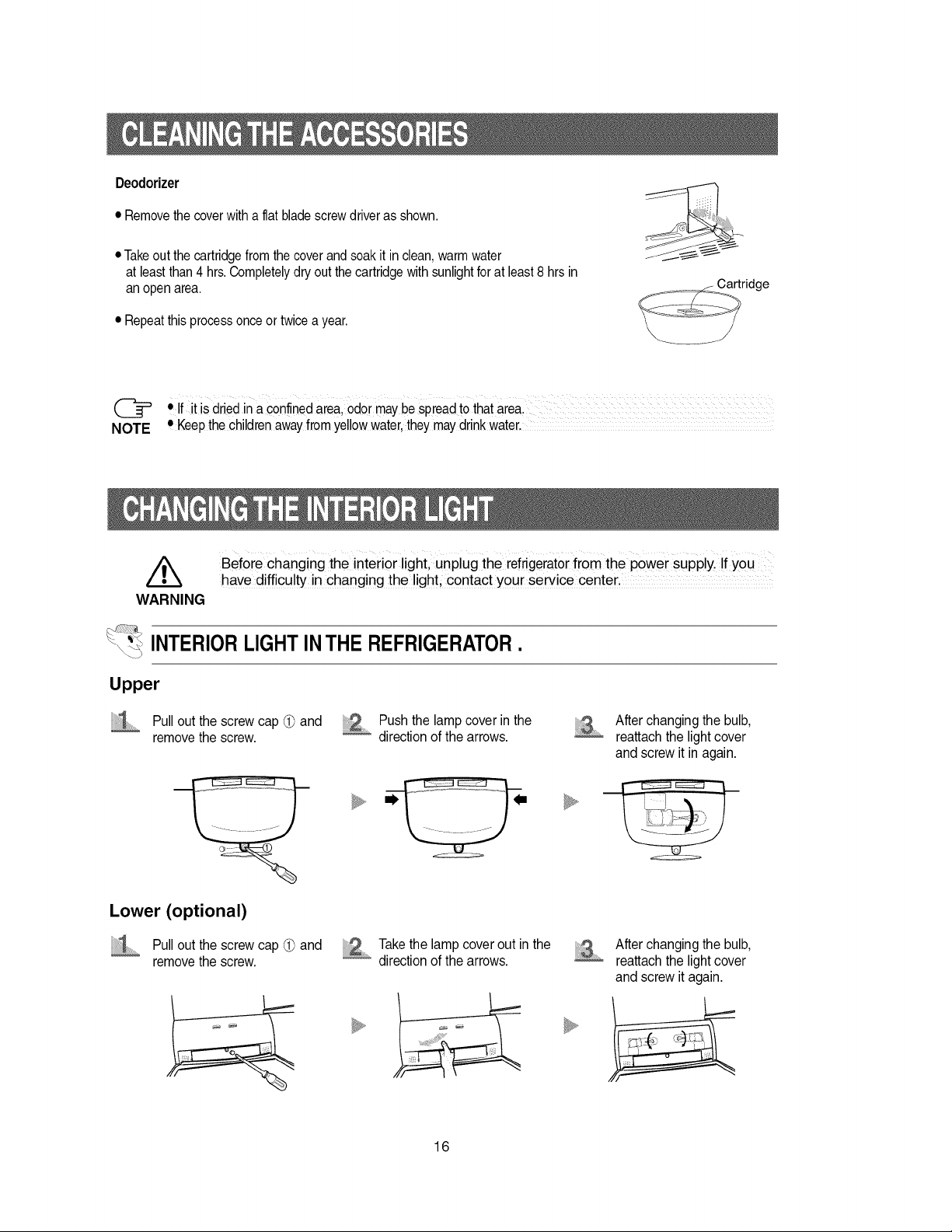
Deodorizer
• Removethecoverwithaflat bladescrewdriveras shown.
• Take out the cartridge from the cover and soak it in clean, warm water
at least than 4 hrs.Completelydry out the cartridge with sunlight for at least 8 hrs in
an open area.
• Repeat this process once or twice a year.
_ Cartridge
• If it is dried in a confined area, odor may be spread to that area. ....................................................
NOTE • Keepthe children away from ye!!owwater, they may drink water.................
WARNING
INTERIOR LIGHT IN THE REFRIGERATOR
\_"i_
Upper
Pull out the screw cap @ and Push the lamp cover in the
remove the screw, direction of the arrows.
Before changing the interior light, unplug the refrigerator fr0m the power supplyl !fyou
have difficulty in changing the light, contact your service center,
After changing the bulb,
reattach the light cover
and screw it in again.
U,
Lower (optional)
Pull out the screw cap _ and
remove the screw.
Take the lamp cover out in the
direction of the arrows.
After changing the bulb,
reattach the light cover
and screw it again.
16
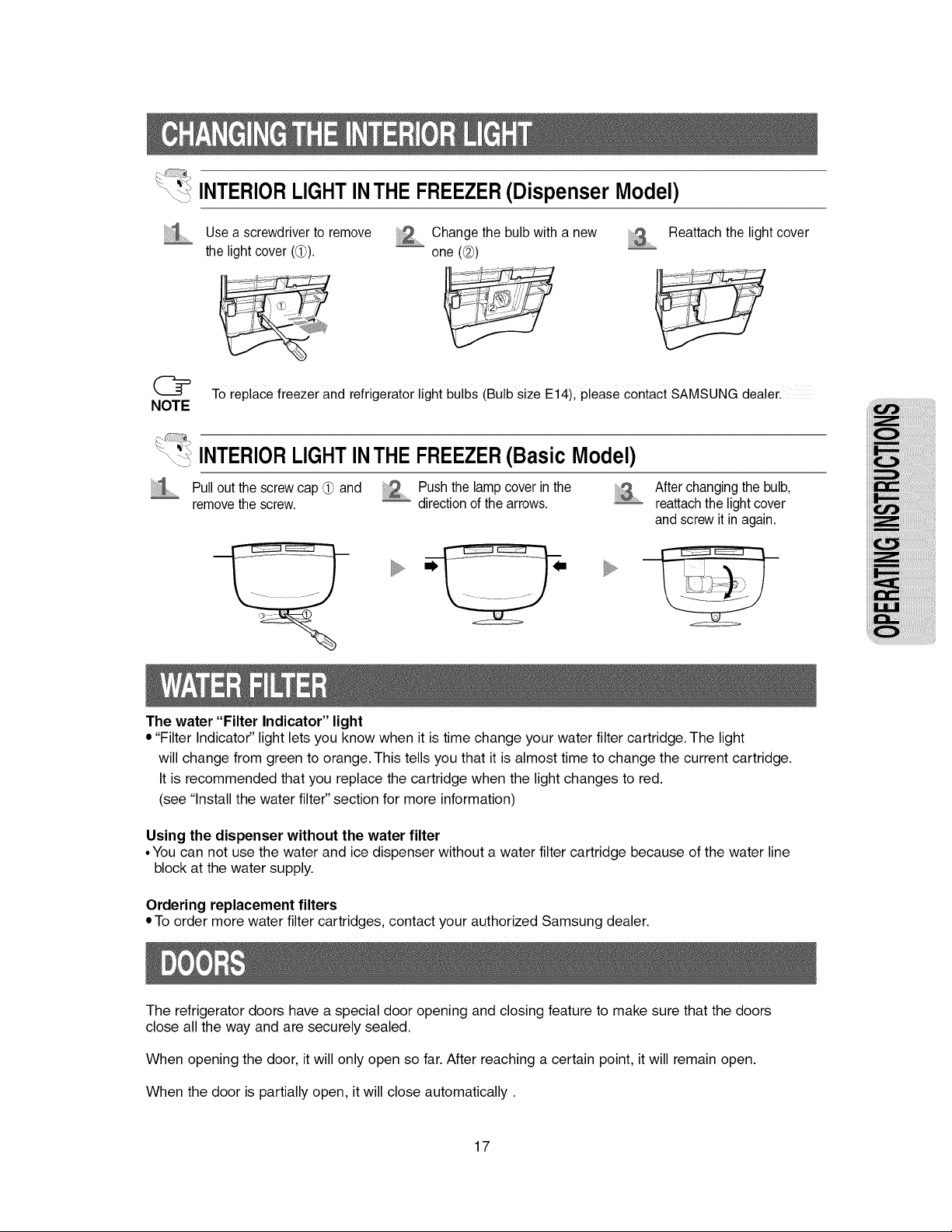
_ INTERIOR LIGHT INTHE FREEZER(Dispenser Model)
Use a screwdriver to remove
the light cover (1_).
_ hange the bulb with a new
one (@)
Reattach the light cover
To replace freezer and refrigerator light bulbs (Bulb size Et4), please contact SAMSUNG dealer,
NOTE
\:-_ INTERIORLIGHTINTHE FREEZER(Basic Model)
Pull out the screw cap _ and Push the lamp cover in the
remove the screw. _ direction of the arrows.
After changing the bulb,
reattach the light cover
and screw it in again.
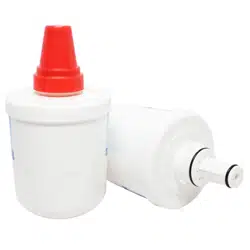
The water "Filter Indicator" light
• "Filter Indicator" light lets you know when it is time change your water filter cartridge. The light
will change from green to orange. This tells you that it is almost time to change the current cartridge.
It is recommended that you replace the cartridge when the light changes to red.
(see "Install the water filter" section for more information)
Using the dispenser without the water filter
• You can not use the water and ice dispenser without a water filter cartridge because of the water line
block at the water supply.
Ordering replacement filters
• To order more water filter cartridges, contact your authorized Samsung dealer.
The refrigerator doors have a special door opening and closing feature to make sure that the doors
close all the way and are securely sealed.
When opening the door, it will only open so far. After reaching a certain point, it will remain open.
When the door is partially open, it will close automatically.
17
__ Checking the Dimensions of your Entrance Door
NOTE
• Check the dimensions of your entrance door to determine whether the refrigerator can pass
through it.
• When refrigerator passes in door and depth or width of refrigerator is bigger, removes
refrigerator doors.
_ Selecting the Location for the Refrigerator
• Select a location with easy access to the water supply.
• Select a location with enough space for the refrigerator.
• Select a location without direct exposure to sunlight.
/_k • Before disassembling the freezer door the water supply line needs to be disconnected,
/,'k
(If not, the water supply line can be damaged.)..........
Caution ' See "Separating the water supply line from the refrigerator" On the next page:
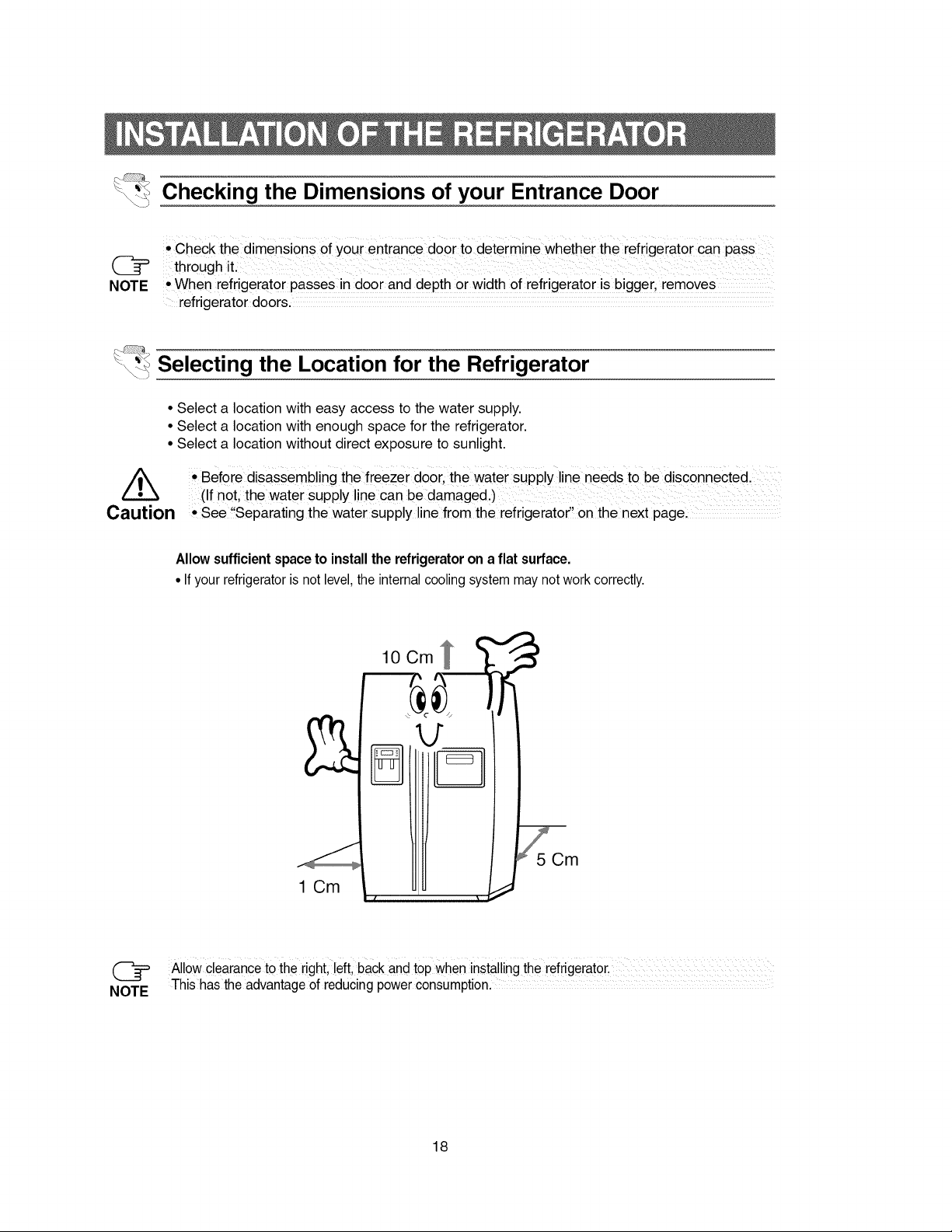
Allowsufficientspaceto installthe refrigerator on a flat surface.
• If your refrigeratoris not level,the internalcoolingsystemmay notwork correctly.
1 Cm
10 Cm
(_ Allow clearanc e to the right, !eft, back and top when installingthe refrigerator, .....................................
NOTE This has the advantage of reducing power consumption.
18
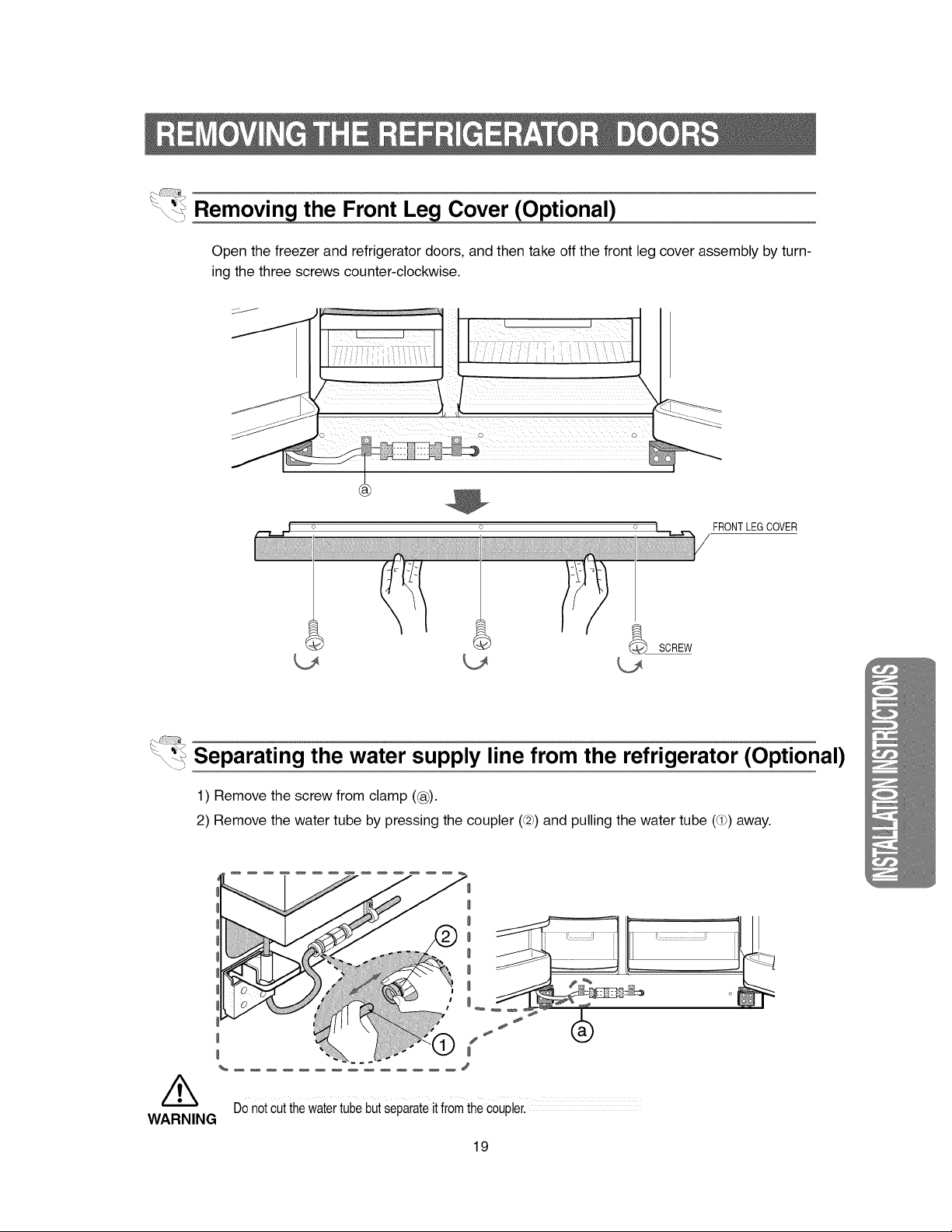
-\-_ Cover (Optional)
Open the freezer and refrigerator doors, and then take off the front leg cover assembly by turn-
ing the three screws counter-clockwise.
FRONTLEG COVER
_ Separating the water supply line from the refrigerator (Optional)
1) Remove the screw from clamp ((®).
2) Remove the water tube by pressing the coupler (@) and pulling the water tube (d_) away.
WARNING
E
I
DOnotCutthe watertube but Separateit from the Coupler.
19
@
NOTE
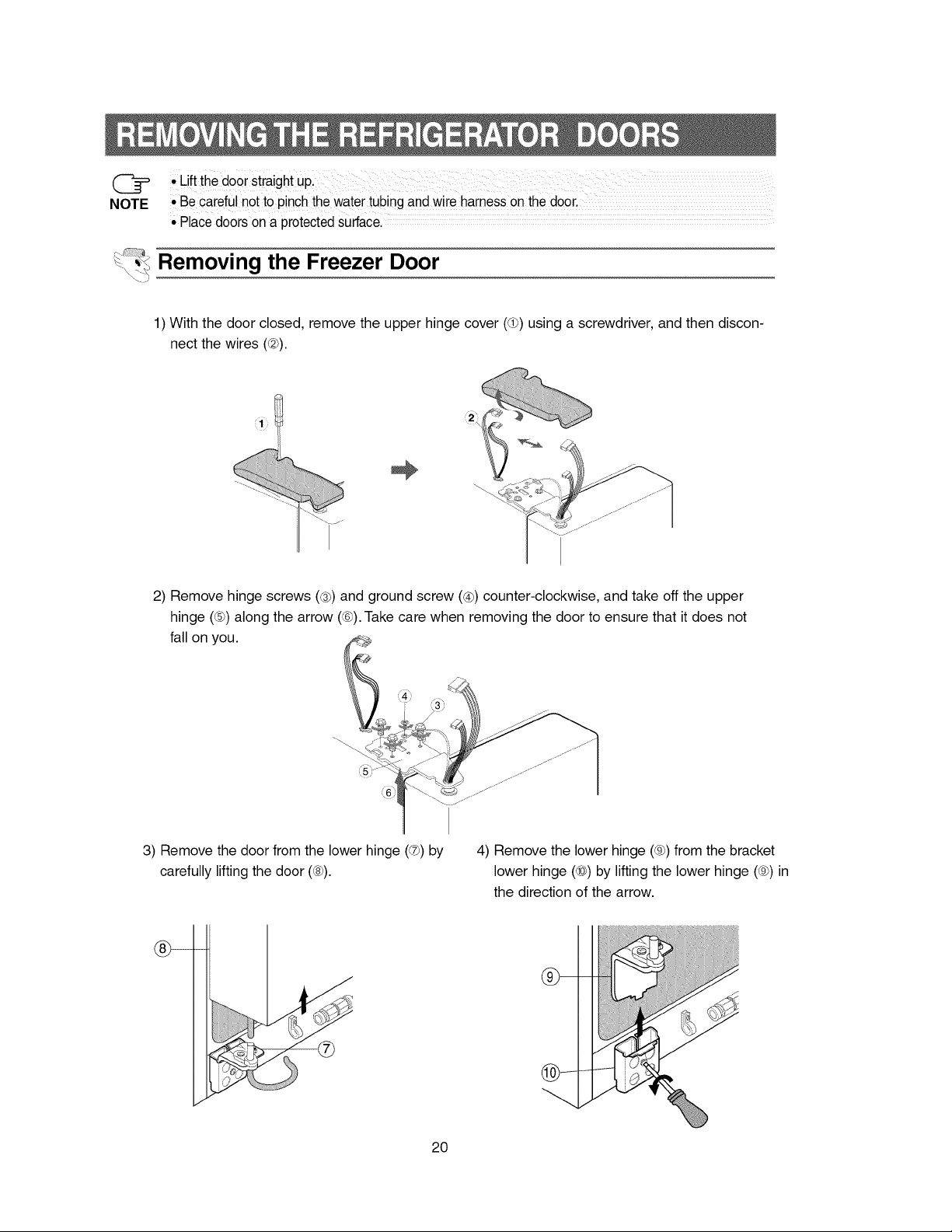
• Lift the door Straight upl
• Be careful not to pinch the water tubing and wire harness On the door.
• Place doors on a protected surface.
Removing the Freezer Door
1) With the door closed, remove the upper hinge cover (®) using a screwdriver, and then discon-
nect the wires (@).
2) Remove hinge screws ((_) and ground screw (®) counter-clockwise, and take off the upper
hinge (®) along the arrow ((-¢).Take care when removing the door to ensure that it does not
fall on you.
3) Remove the door from the lower hinge (®) by
carefully lifting the door ((8_).
4) Remove the lower hinge ((9h)from the bracket
lower hinge (_0_)by lifting the lower hinge ((9h)in
the direction of the arrow.
J
20
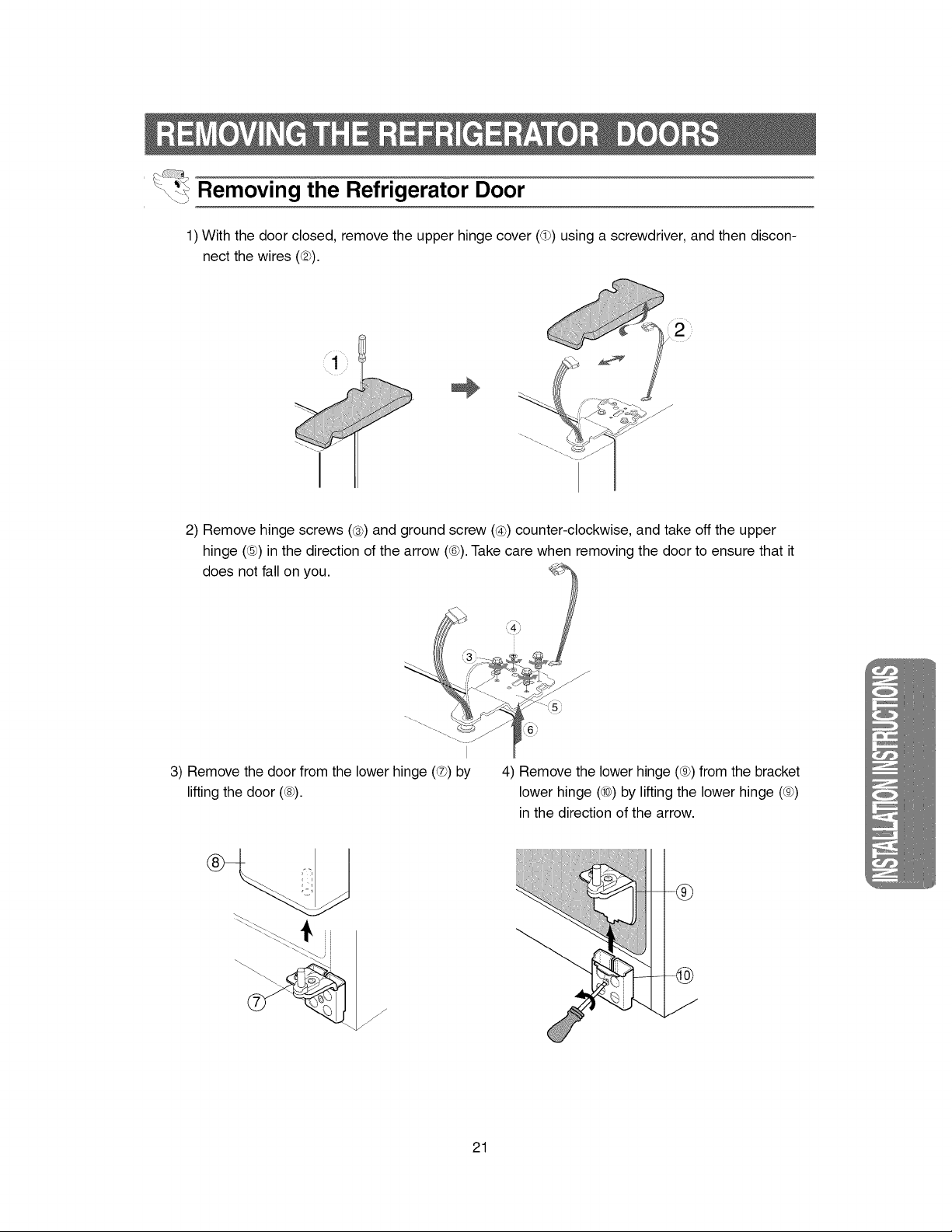
\_-_Removing the Refrigerator Door
1) With the door closed, remove the upper hinge cover (d_) using a screwdriver, and then discon-
nect the wires (@).
I
• 1 •
@
i2
J
2) Remove hinge screws (_) and ground screw (®) counter-clockwise, and take off the upper
hinge (®) in the direction of the arrow (_-6h).Take care when removing the door to ensure that it
does not fall on you.
3) Remove the door from the lower hinge (®) by
lifting the door (_).
\ - i
4) Remove the lower hinge (_gh)from the bracket
lower hinge (_0_)by lifting the lower hinge (_gh)
in the direction of the arrow.
,,,,,
21
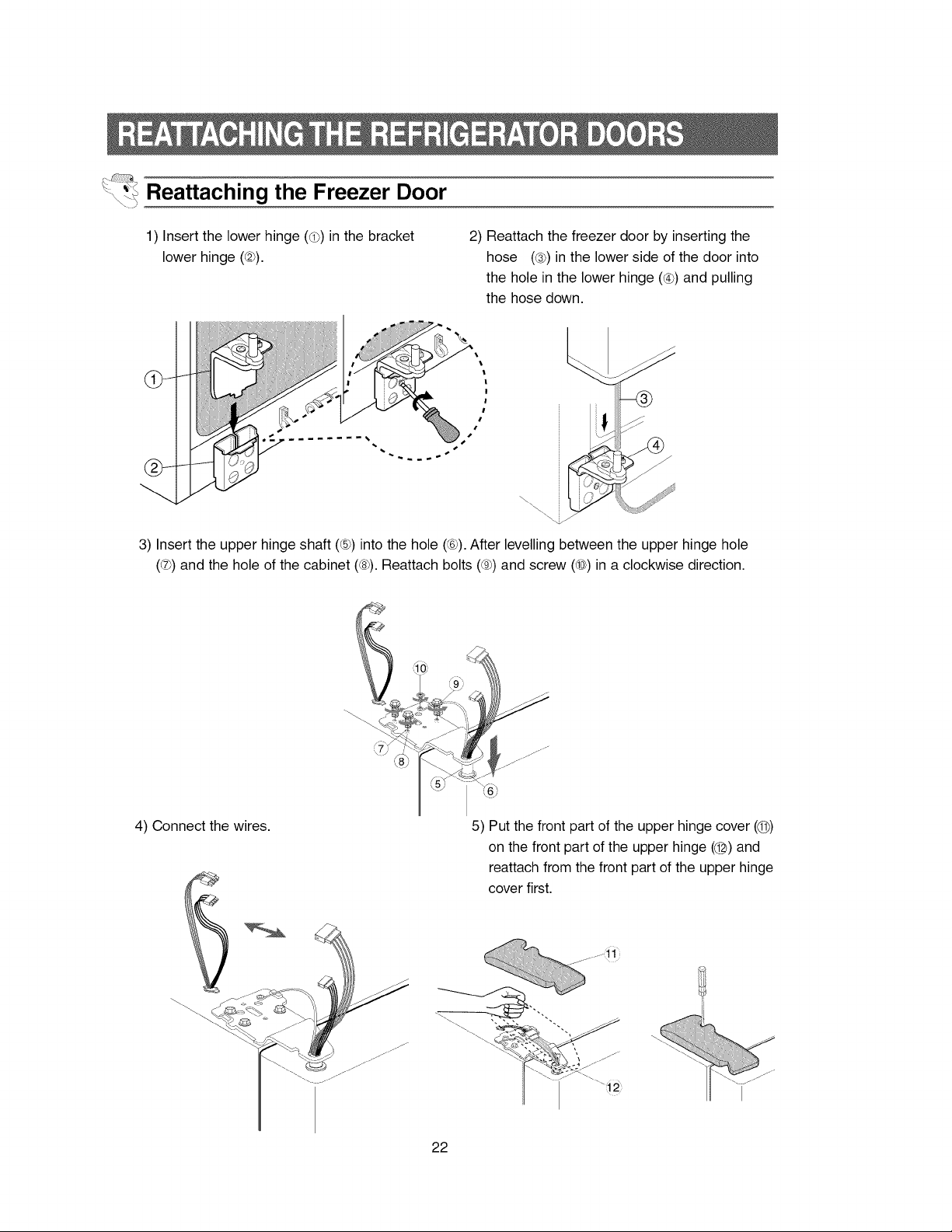
Reattaching the Freezer Door
1) Insert the lower hinge (®) in the bracket
lower hinge (_).
2) Reattach the freezer door by inserting the
hose (_) in the lower side of the door into
the hole in the lower hinge (®) and pulling
the hose down.
!
, -@
i I
j-
Y
3) Insert the upper hinge shaft (®) into the hole (®). After levelling between the upper hinge hole
(®) and the hole of the cabinet (_)). Reattach bolts ((9)) and screw (40))in a clockwise direction.
4) Connect the wires. 5) Put the front part of the upper hinge cover (@)
on the front part of the upper hinge (@) and
reattach from the front part of the upper hinge
cover first.
......;ii
22
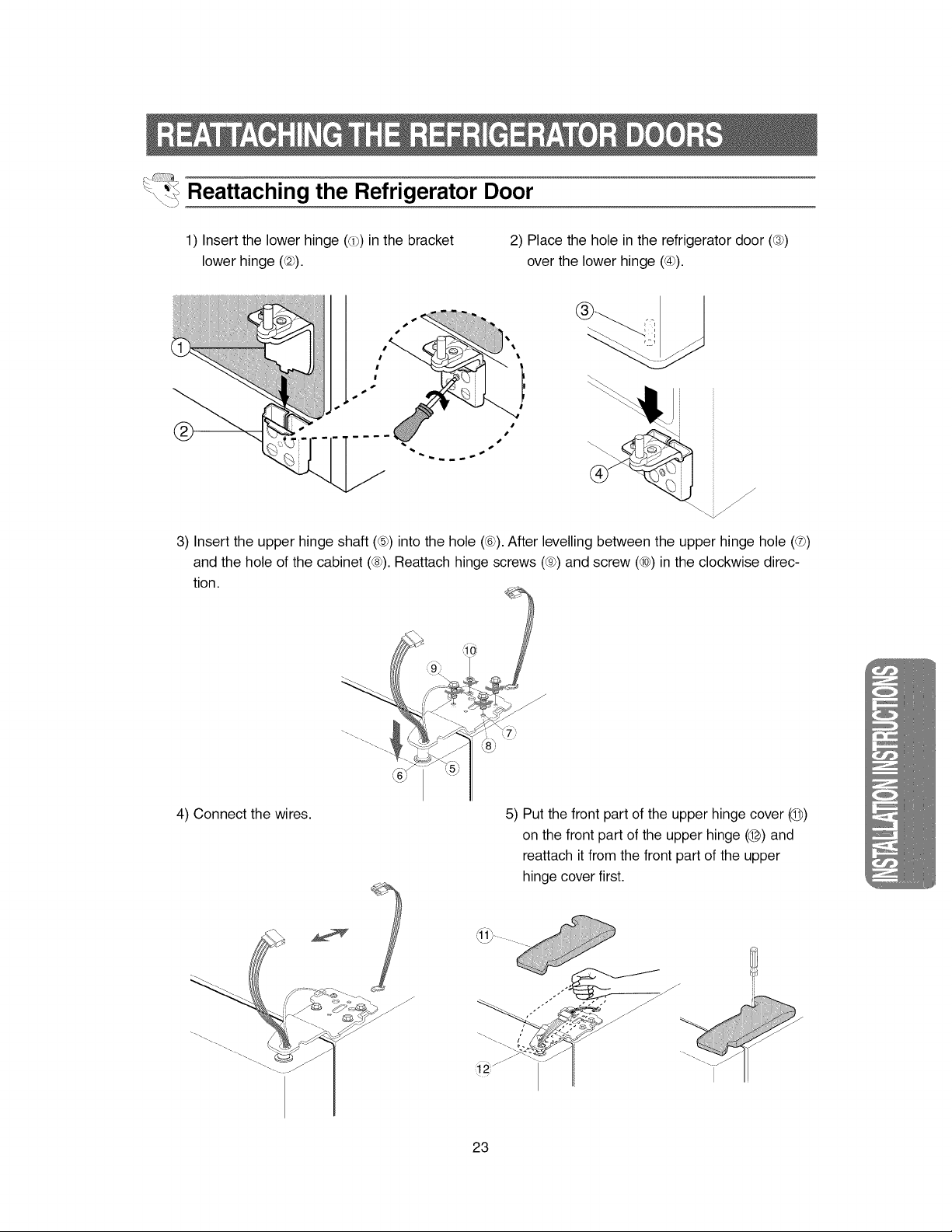
Reattaching the Refrigerator Door
1) Insert the lower hinge (®) in the bracket
lower hinge (_).
2) Place the hole in the refrigerator door (_)
over the lower hinge (®).
f
J
3) Insert the upper hinge shaft (®) into the hole (®). After levelling between the upper hinge hole (®)
and the hole of the cabinet (_). Reattach hinge screws (_gh)and screw (_0_)in the clockwise direc-
tion.
4) Connect the wires. 5) Put the front part of the upper hinge cover (1@)
on the front part of the upper hinge (@) and
reattach it from the front part of the upper
hinge cover first.
,,,,,
j_
23
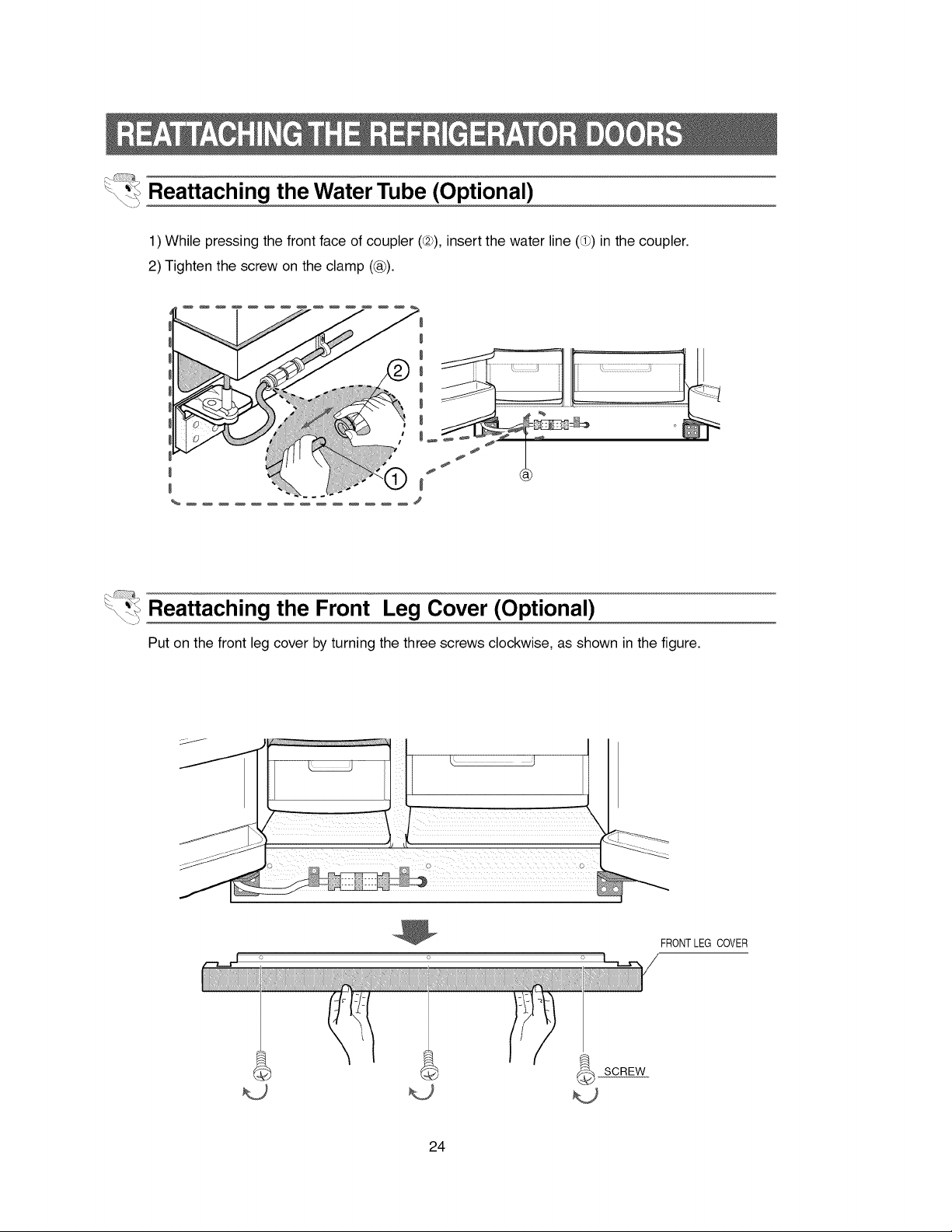
\_t_Reattaching the Water Tube (Optional)
1) While pressing the front face of coupler (Q), insert the water line (d_) in the coupler.
2) Tighten the screw on the clamp ((_).
'_ Reattaching the Front Leg Cover (Optional)
Put on the front leg cover by turning the three screws clockwise, as shown in the figure.
o
iiiii_i_iiiiIi!i_iiiii___!iii!iii!_ii!;ii!iii!_i_iii!_i_iii!_i_iii!_i_iii!_i_iii_iiii_iiiYii!!i_i;¸i!iiiii_iiiiii!iiiiiii!i!ii
FRONTLEG COVER
24
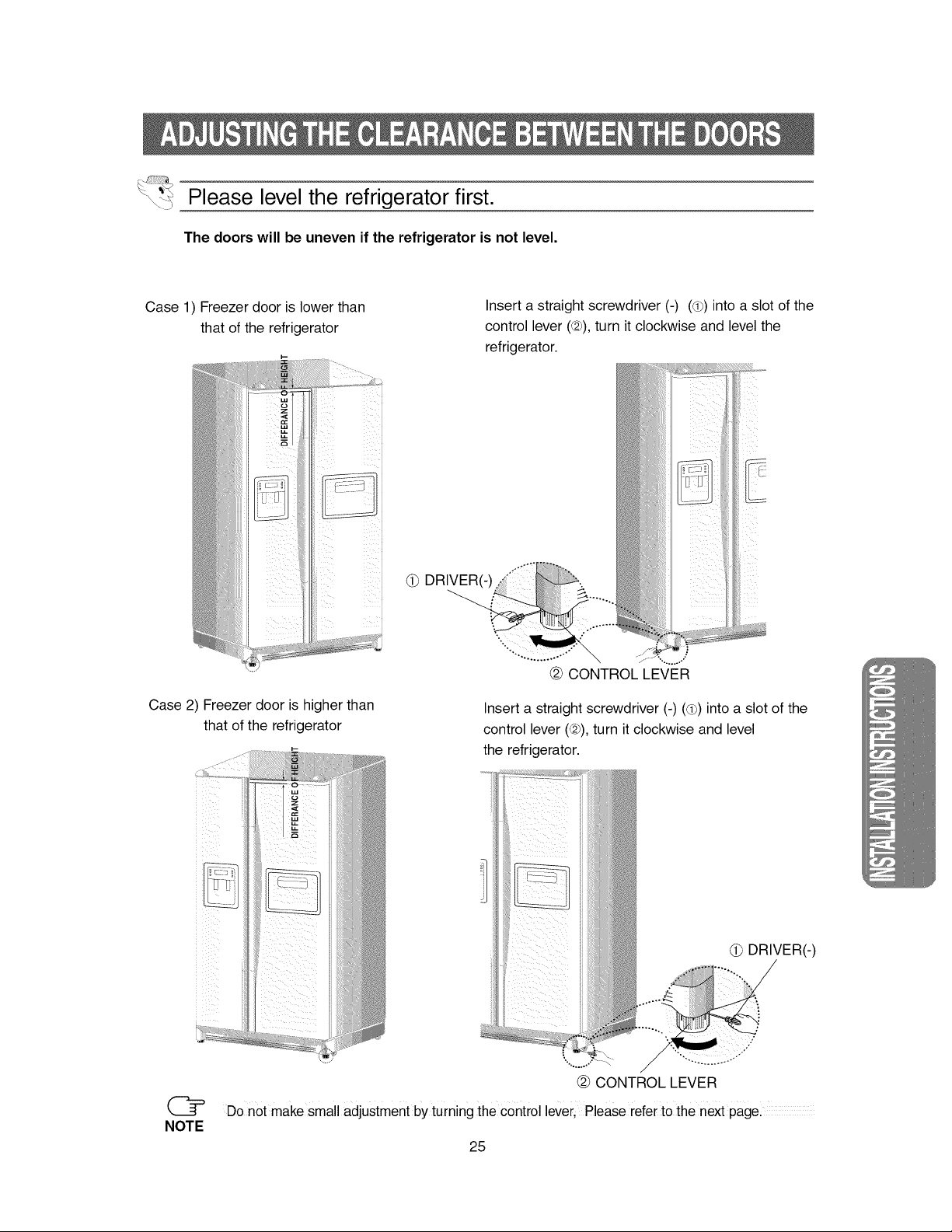
Please level the refrigerator first.
The doors will be uneven if the refrigerator is not level.
Case 1) Freezer door is lower than
that of the refrigerator
Insert a straight screwdriver (-) (d_) into a slot of the
control lever (@), turn it clockwise and level the
refrigerator.
F:
i i
(_ DRIVER(-)
Case 2) Freezer door is higher than
that of the refrigerator
NOTE
Insert a straight screwdriver (-) (d_) into a slot of the
control lever (@), turn it clockwise and level
the refrigerator.
(_ DRIVER(-)
Do not make small adjustment by turning the control leVerl Please refer to the next page.
25
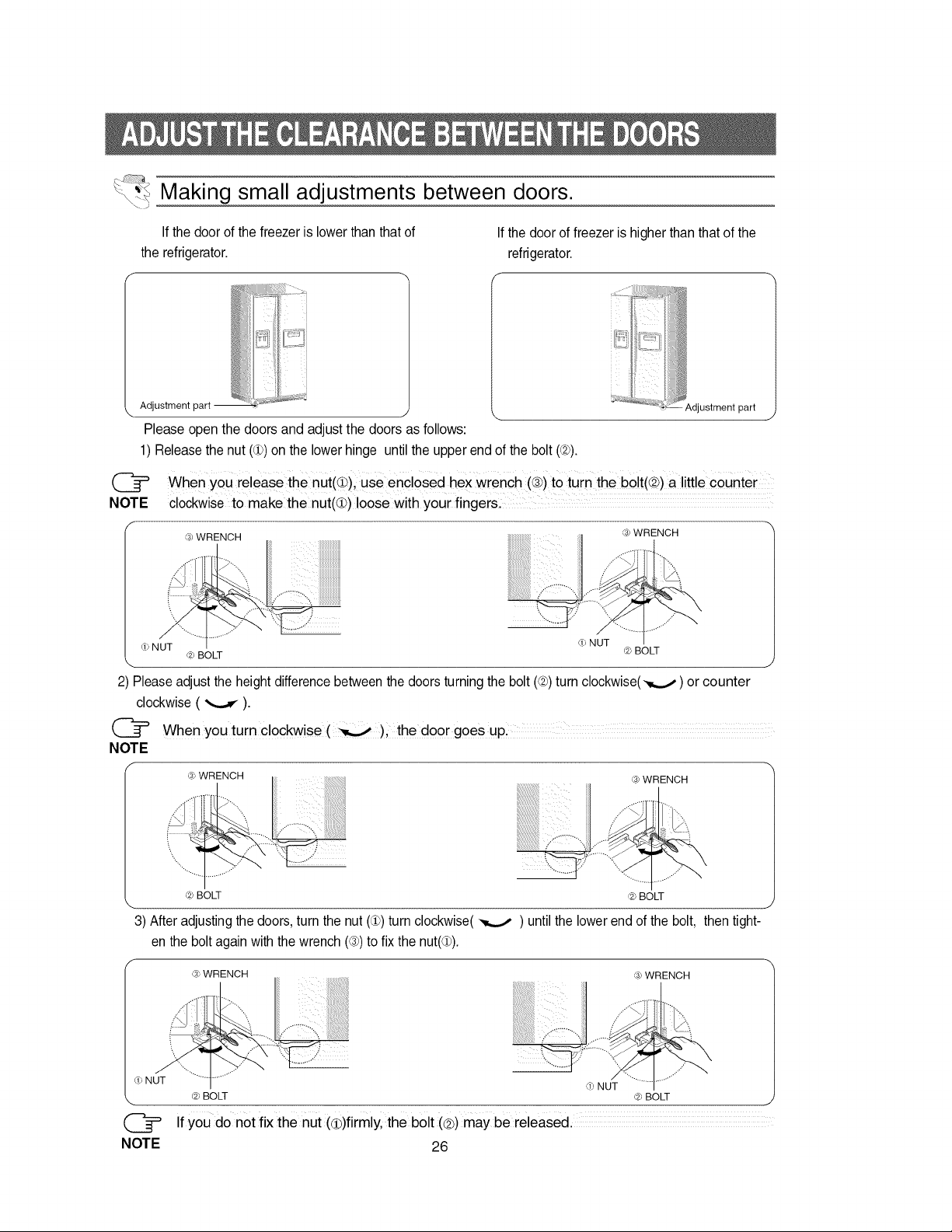
Making small adjustments between doors.
If the door of the freezer is lower than that of
the refrigerator.
k. Adjustment part
iiiiiii _=:_._ii i _s 4i
iiiliii"' i[--_i
Ilii!!ilili i
If the door of freezer is higher than that of the
refrigerator.
i-!
Please open the doors and adjust the doors as follows:
1) Release the nut (d)) on the lower hinge until the upper end of the bolt (@).
_,djustment part
NOTE
When You releas e the nut(O), Use encl0sed hex wrench (_)to turn the bolt(@) a little c0unter
clockwise to make the nut(Q) loose with your fingers. ...............................................................................
_3_WRENCH
i]i]i]i]i]i]i]i]i]i
iiiiiiiiiiiiiiiiii
] \',.
_) NUT __NUT
_,_)BOLT _,_BOLT
2) Please adjust the height difference between the doors turning the bolt (@)turn clockwise(-,_,,._) or counter
clockwise ( _ ).
NOTE
When you turn clockwise (_), the door goes UP,
(3_WRENCH _3_WRENCH
@ BOLT
3) After adjusting the doors, turn the nut (d)) turn clockwise(
en the bolt again with the wrench (@)to fix the nut(d)).
'.-.., ....
_,_BOLT
until the lower end of the bolt, then tight-
(3>WRENCH _3_WRENCH
NUT
NOTE
,i) NUT
_ BOLT _ BOLT j
If you do not fix the nut (cB)firmly, the bolt (<2))may be released.
26
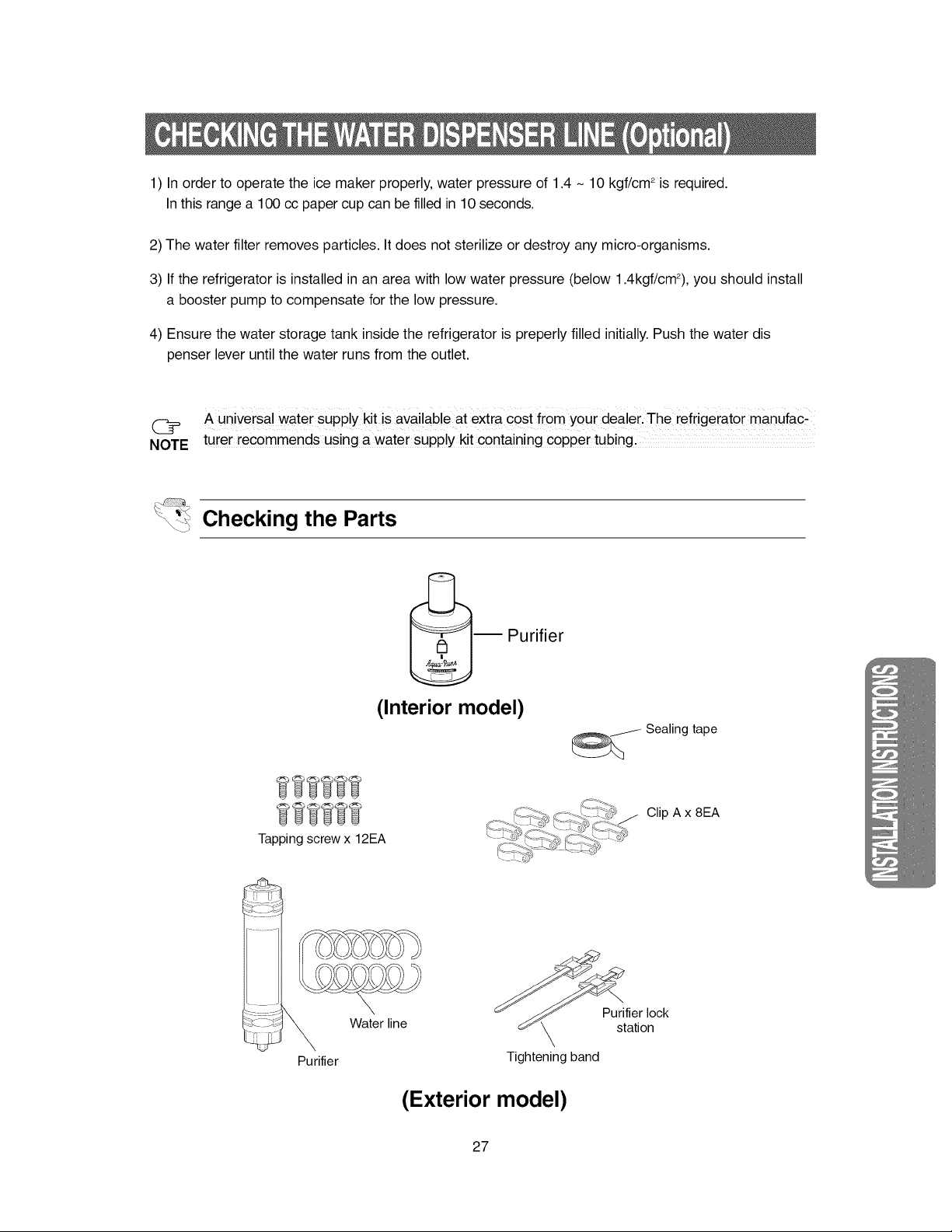
1)Inordertooperatetheicemakerproperly,waterpressureof1.4- 10kgf/cm2isrequired.
Inthisrangea 100ccpapercupcanbefilledin10seconds.
2)Thewaterfilterremovesparticles.Itdoesnotsterilizeordestroyanymicro-organisms.
3)Iftherefrigeratorisinstalledinanareawithlowwaterpressure(below1.4kgf/cm2),youshouldinstall
aboosterpumptocompensateforthelowpressure.
4)Ensurethewaterstoragetankinsidetherefrigeratorispreperlyfilledinitially.Pushthewaterdis
penserleveruntilthewaterrunsfromtheoutlet.
@ AuniversalwatersUPplykitisavailableatextracostfromyourdealer.TherefrigeratormanUfac_
NOTEturerrecommendsusingawatersupplykitcontainingcoppertubing,
Checking the Parts
I :__ Purifier
(Interior model)
Tapping screw x 12EA
_j_- Sealing tape
Clip A x 8EA
Purifier
Water line
Purifier lock
station
Tightening band
(Exterior model)
27
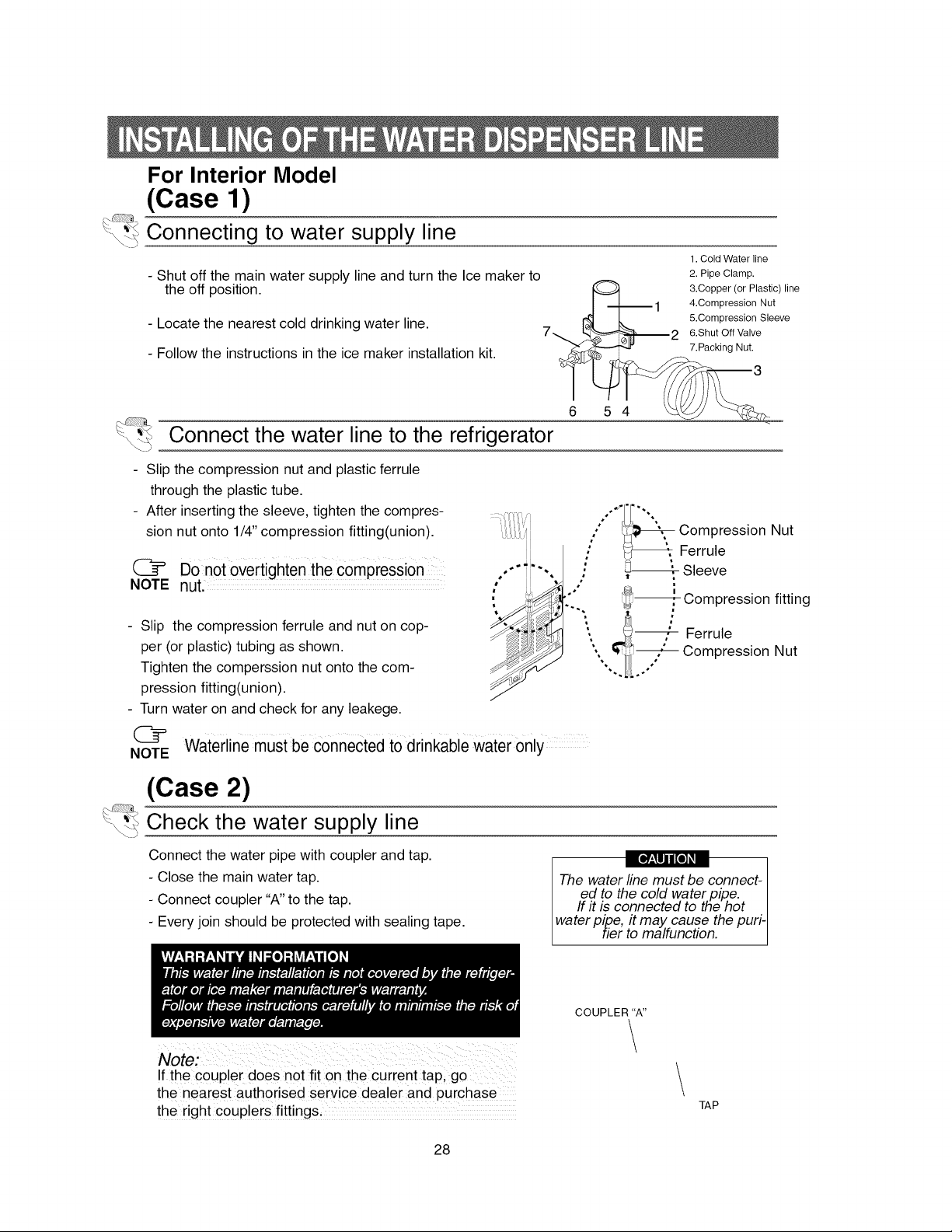
For Interior Model
(Case 1)
"_ Connecting to water supply line
- Shut off the main water supply line and turn the Ice maker to
the off position.
- Locate the nearest cold drinking water line.
- Follow the instructions in the ice maker installation kit.
1. Cold Water line
2. Pipe Clamp.
3.Copper (or Plastic) line
4.Compression Nut
&Compression Sleeve
6.Shut Off Valve
7.Packing Nut.
6 5 4
Connect the water line to the refrigerator
Slip the compression nut and plastic ferrule
through the plastic tube.
After inserting the sleeve, tighten the compres-
sion nut onto 1/4" compression fitting(union).
@ Do n0t0vertighten thec0mPressi0 n
NOTE nut.....................
- Slip the compression ferrule and nut on cop-
per (or plastic) tubing as shown.
Tighten the comperssion nut onto the com-
pression fitting(union).
- Turn water on and check for any leakege.
|
/'_CompressionaUtFerrule
.' Sleeve
/
Compression fitting
_ ,"; Ferrule
Compression Nut
",, _.o°°"
Waterline must be connected to drinkable water only
NOTE
(Case 2)
":< Check the water supply line
\'7
Connect the water pipe with coupler and tap.
- Close the main water tap.
- Connect coupler "A" to the tap.
- Every join should be protected with sealing tape.
The water line must be connect-
ed to the cold water piRe. I
If it is connected to the hot I
water pipe, it may cause the puri- I
tier to malfunction. J
COUPLER"A"
If the c0uple r does not fit on th e curren t tap, go
th e nearest auth0rised service dealer and purchase
the right couplers fittings,
TAP
28
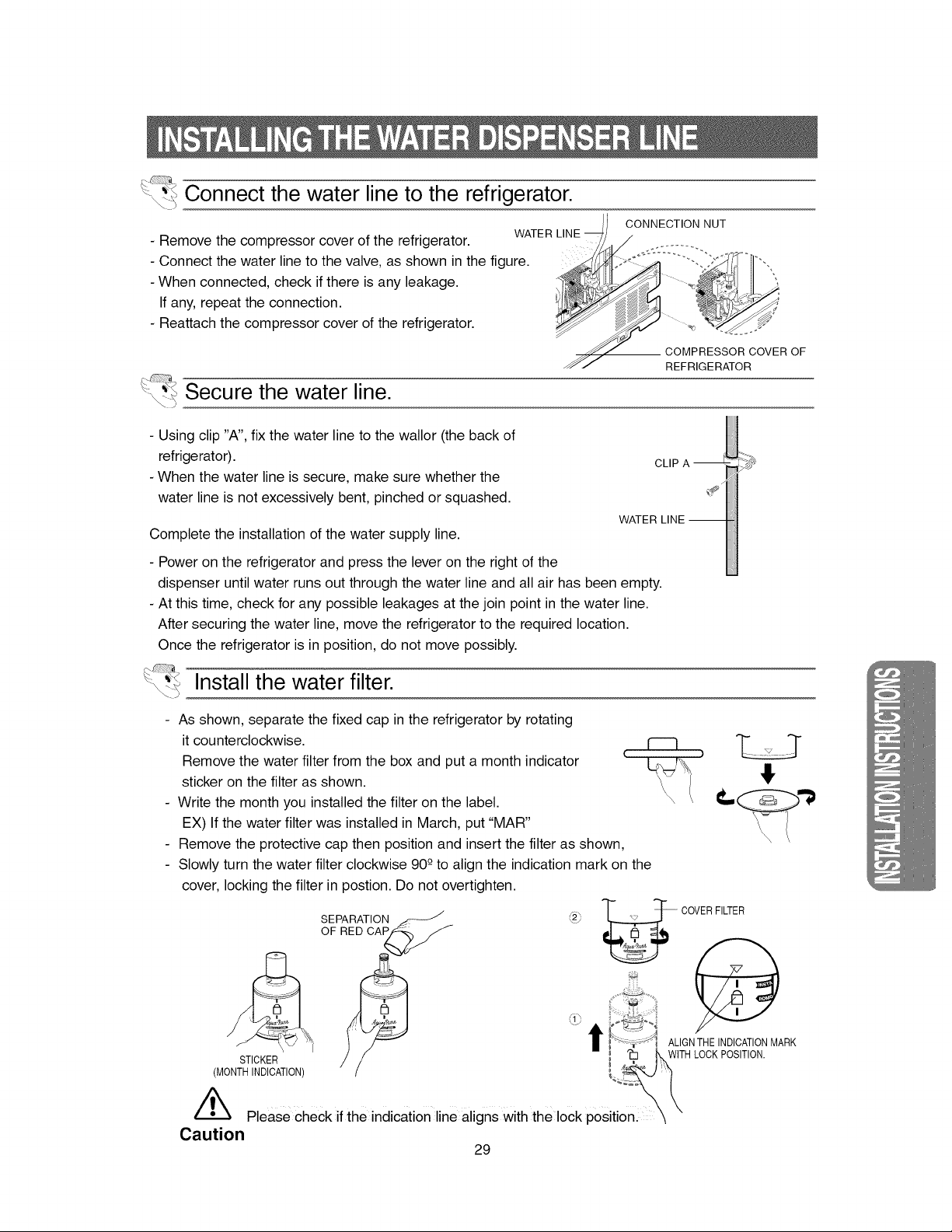
Connect the water line to the refrigerator.
- Remove the compressor cover of the refrigerator. WATER
- Connect the water line to the valve, as shown in the figure.
- When connected, check if there is any leakage.
If any, repeat the connection.
- Reattach the compressor cover of the refrigerator.
JI CONNECTION NUT
Secure the water line.
REFRIGERATOR
- Using clip "A", fix the water line to the wallor (the back of
refrigerator).
- When the water line is secure, make sure whether the
water line is not excessively bent, pinched or squashed.
Complete the installation of the water supply line.
- Power on the refrigerator and press the lever on the right of the
dispenser until water runs out through the water line and all air has been empty.
- At this time, check for any possible leakages at the join point in the water line.
After securing the water line, move the refrigerator to the required location.
Once the refrigerator is in position, do not move possibly.
Install the water filter.
- As shown, separate the fixed cap in the refrigerator by rotating
it counterclockwise.
Remove the water filter from the box and put a month indicator
sticker on the filter as shown.
- Write the month you installed the filter on the label.
EX) If the water filter was installed in March, put "MAR"
Remove the protective cap then position and insert the filter as shown,
- Slowly turn the water filter clockwise 90 -0to align the indication mark on the
cover, locking the filter in postion. Do not overtighten.
i;4
STICKER
(MONTH INDICATION)
'_ Please check if the indication line aligns with the lock positionl
SEPARATION _1_
OF RED CAP --
_2"j _ COVERFILTER
ALIGN THE INDICATIONMARK
t_ 'i WITH LOCKPOSITION.
Caution
29
-__lllllllllllllllllllllllll_
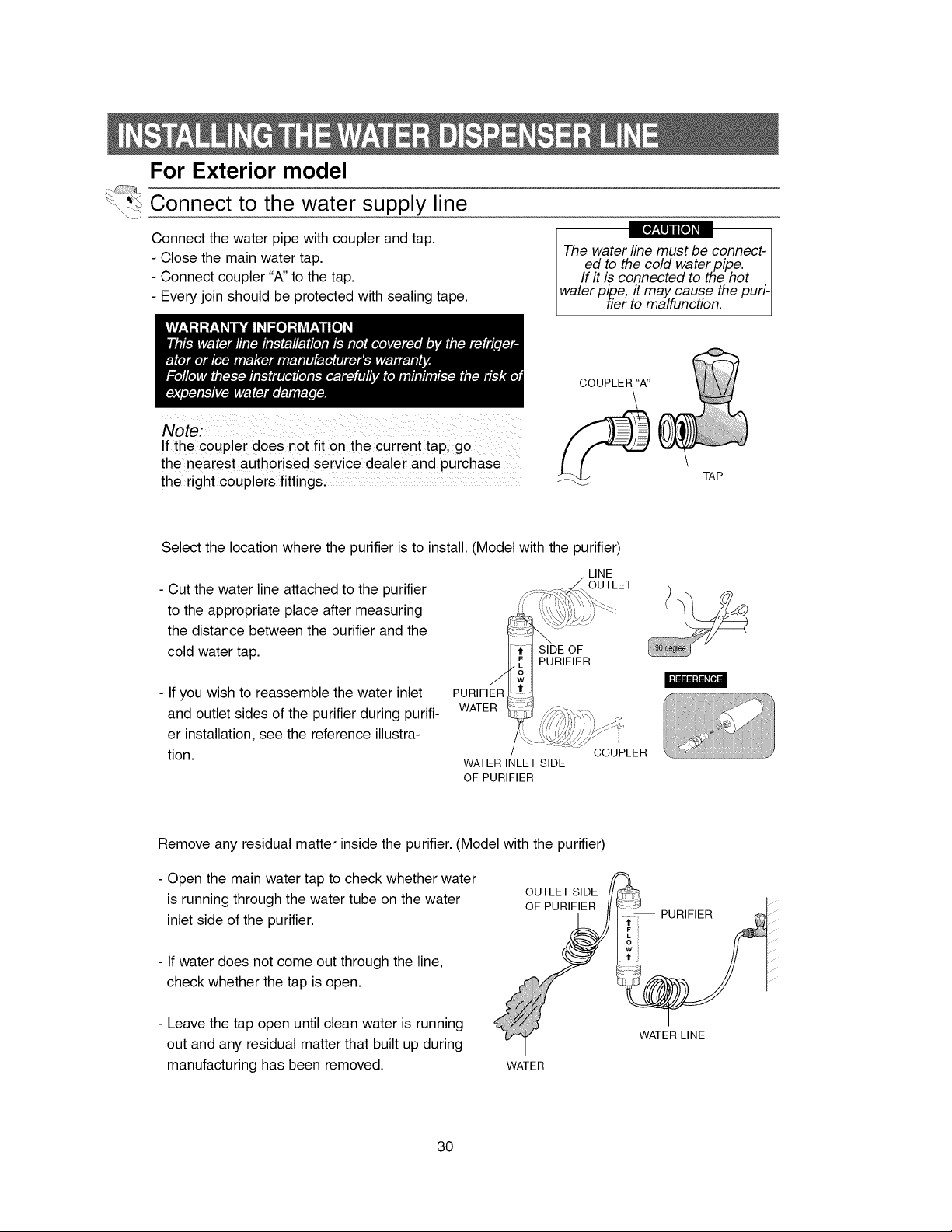
For Exterior model
Connect to the water supply line
Connect the water pipe with coupler and tap.
- Close the main water tap.
- Connect coupler "A" to the tap.
- Every join should be protected with sealing tape.
The water line must be connect-
ed to the cold water pipe. I
If it is connected to the hot
water pipe, it may cause the puri- I
[ tier to malfunction.
COUPLER "A"
If the coupler does no t fit on the curren t tap, go
the nearest authorised service dealer and purchase
the right couplers fittings.
TAP
Select the location where the purifier is to install. (Model with the purifier)
- Cut the water line attached to the purifier
to the appropriate place after measuring
the distance between the purifier and the
cold water tap.
LINE
OUTLET
SIDE OF
PURIFIER
I't:l=:l:l:i_[_:i
- If you wish to reassemble the water inlet
and outlet sides of the purifier during purifi-
er installation, see the reference illustra-
tion.
PURIFIER
WATER
WATER INLET SIDE
OF PURIFIER
COUPLER
Remove any residual matter inside the purifier. (Model with the purifier)
- Open the main water tap to check whether water
is running through the water tube on the water
inlet side of the purifier.
- If water does not come out through the line,
check whether the tap is open.
- Leave the tap open until clean water is running
out and any residual matter that built up during
manufacturing has been removed.
OUTLET SIDE
OF PURIFIER
WATER
PURIFIER
WATER LINE
30
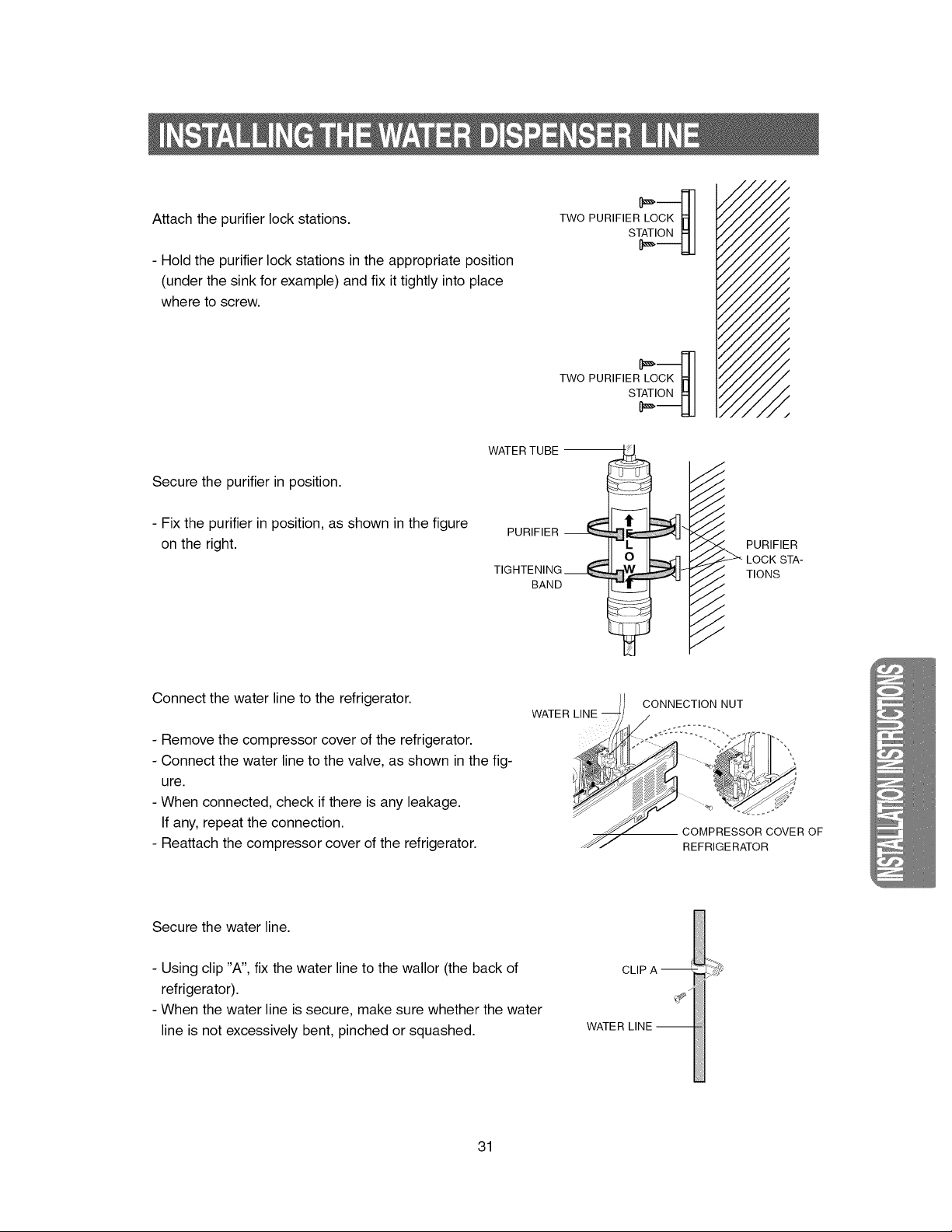
Attachthepurifierlockstations.
- Holdthepurifierlockstationsintheappropriateposition
(underthesinkforexample)andfixittightlyintoplace
wheretoscrew.
TWO PURIFIER L_OCK_
/
/
/
/
/
/
!
/
/
/
Secure the purifier in position.
- Fix the purifier in position, as shown in the figure
on the right.
WATER TUBE
PURIFIER
TIGHTENING ___
BAND
J
,I
J /
J /
J ,/
J /
J i
j I"
X /
/7 _. PURIFIER
/ LOCK STA-
i
/ _ TIONS
/ 7
Connect the water line to the refrigerator.
- Remove the compressor cover of the refrigerator.
- Connect the water line to the valve, as shown in the fig-
ure.
- When connected, check if there is any leakage.
If any, repeat the connection.
- Reattach the compressor cover of the refrigerator.
WATER LINE
CONNECTION NUT
-- COMPRESSOR COVER OF
REFRIGERATOR
Secure the water line.
- Using clip "A", fix the water line to the wallor (the back of
refrigerator).
- When the water line is secure, make sure whether the water
line is not excessively bent, pinched or squashed.
CLIP A
WATE R
31
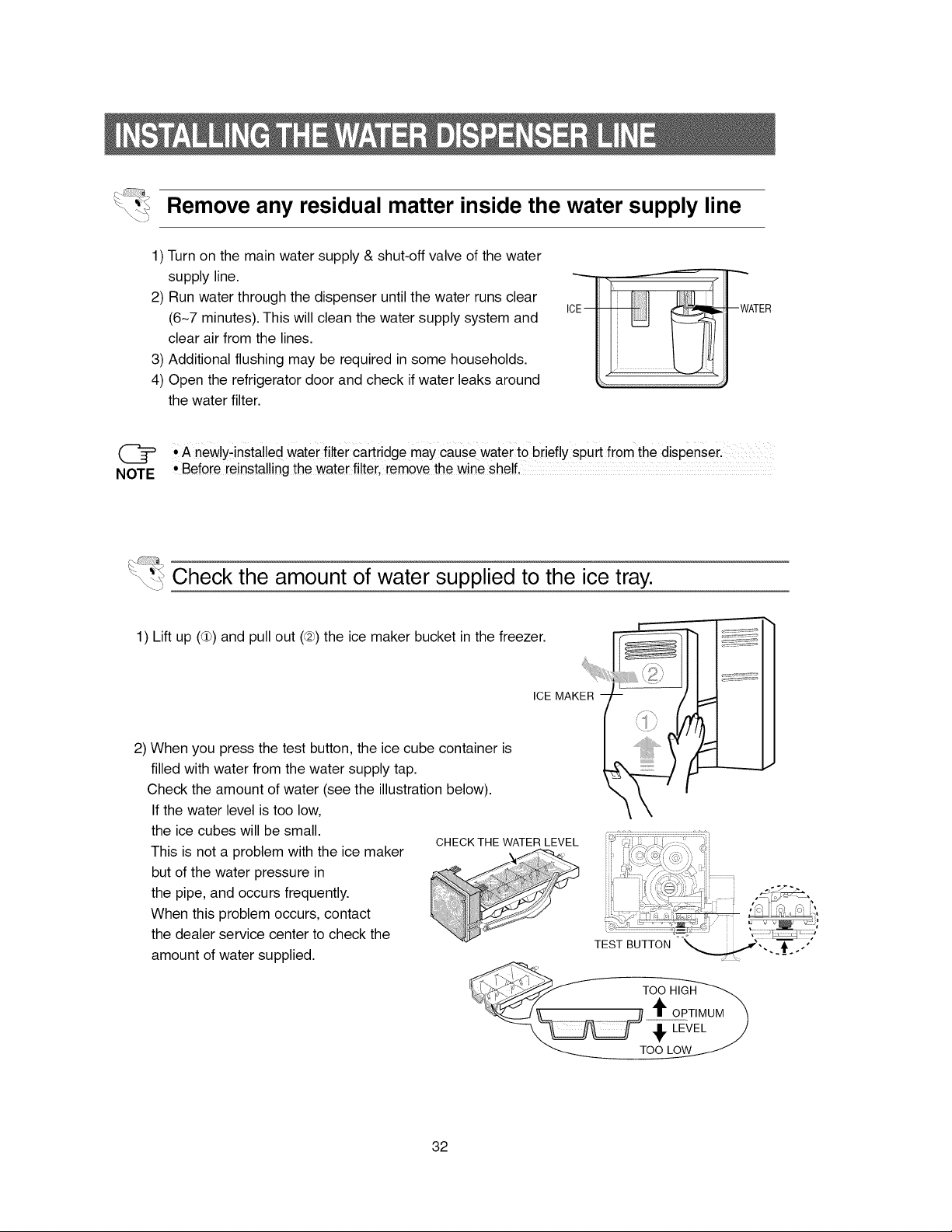
Remove any residual matter inside the water supply line
1) Turn on the main water supply & shut-off valve of the water
supply line.
2) Run water through the dispenser until the water runs clear
(6-7 minutes). This will clean the water supply system and
clear air from the lines.
3) Additional flushing may be required in some households.
4) Open the refrigerator door and check if water leaks around
the water filter.
--..,..,..
ICE - --WATER
(_ • A newly;insta!!ed water filter Cartridge may cause water to biiefly spurt from the dispenser. ......
NOTE ° Before reinstalling the water filter, remove the wine shelf,
_ Check the amount of water supplied to the ice tray.
1) Lift up (dh) and pull out (@) the ice maker bucket in the freezer.
ICE MAKER
2) When you press the test button, the ice cube container is
filled with water from the water supply tap.
Check the amount of water (see the illustration below).
If the water level is too low,
the ice cubes will be small.
This is not a problem with the ice maker
but of the water pressure in
the pipe, and occurs frequently.
When this problem occurs, contact
the dealer service center to check the
amount of water supplied.
CHECK THE WATER LEVEL
i
32
The refrigerator does not work at all or it does not
chill sufficiently
• Check that the power plug is properly connected.
• Is the temperature control on the display panel set to
the correct temperature? Try seting it to a lower tem-
perature.
• Is the refrigerator in direct sunlight or located near a
heat source?
• Is the back of the refrigerator too close to the wall?
The food in the refrigerator is frozen
• Is the temperature control on the display panel set to
the correct temperature? Try seting it to a warmer
temperature.
• Is the temperature in the room too low?
• Did you store the food with a high water content in
the coldest part of the refrigerator.
You can hear unusual noise or sounds
• Check that the floor is levelled and stable.
• Is the back of the refrigerator too near to the wall?
• Was anything dropped behind or under the refrigera-
tor?
• A "ticking" sound may be heard from inside the refrig-
erator, but this is normal. This occurs because vari-
ous accessories are contracted or expanded.
The front corners and sides of the cabinet are hot;
condensation occurs.
• Anti-condensators are installed in the front corners of
the refrigerator to prevent condensation.
• Condensation can occur when you leave the door
open for a long time.
Ice is not dispensed
• Did you stop the ice making function?
• Is there any ice in the ice storage unit?
• Is the water line connected and the shut-off valve
open?
• Is the freezer temperature too warm?
(Set the temperature lower)
• Did you wait for 12 hours after installation of the
water supply line before making ice?
You can hear water bubbling in the refrigerator
• The bubbling comes from the refrigerant circulating in
the refrigerator and is normal.
There is a bad smell in the refrigerator
• Wrap food with a strong smell so that it is airtight.
Throw away any rotten food.
Frost forms on the wall of the freezer
• Is the air vent blocked?
• Allow sufficient space between the foods stored for
efficient air circulation.
• Is the door closed properly?
No water is supplied
• Is the water line connected and the shut-off valve
open?
• Is the water supply line crushed?
• Is the water tank frozen because the refrigerator tem-
perature is too low? Select a warmer setting on the
display panel.
33
f
Ambient Room Temperature Limits
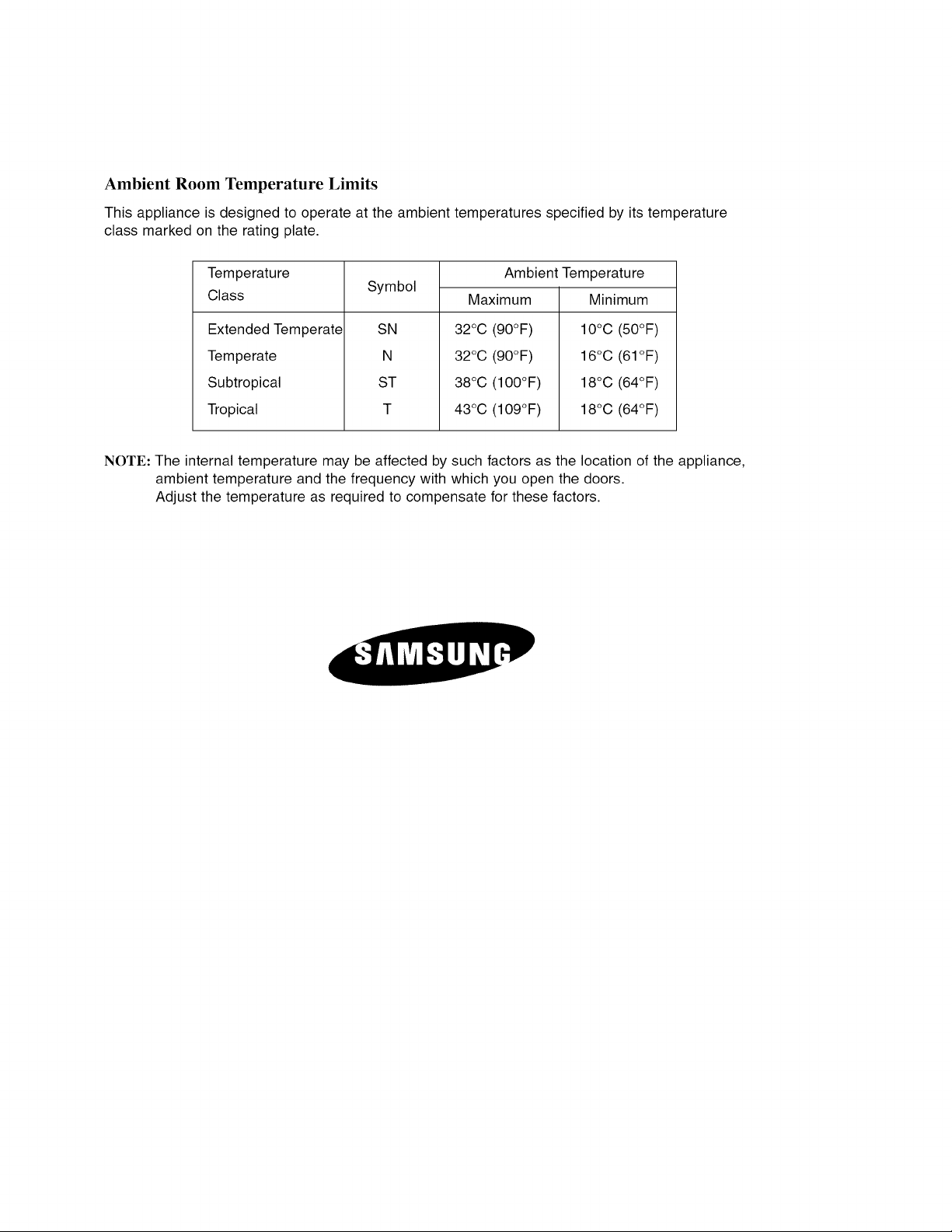
This appliance is designed to operate at the ambient temperatures specified by its temperature
class marked on the rating plate.
Temperature
Class
Extended Temperate
Temperate
Subtropical
Tropical
Symbol
SN
N
ST
Ambient Temperature
Maximum
32°C (90°F)
32°C (90°F)
38°C (100°F)
43°C (109°F)
Minimum
10°C (50°F)
16°C (61 °F)
18°C (64°F)
18°C (64°F)
NOTE: The internal temperature may be affected by such factors as the location of the appliance,
ambient temperature and the frequency with which you open the doors.
Adjust the temperature as required to compensate for these factors.