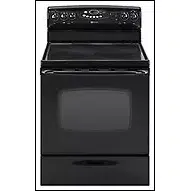
M VrAG USER'S GUIDE
Installer: Please leave this manual with this app]iance.
Consumer: Please read and keep this manua] for future reference.
Keep sales receipt and/or cancelled check as proof of purchase.
k
Model Number
Serial Number
Date of Purchase
If you have questions, call:
1-800-688-9900 (U.S.A.)
1-800-688-2002 (Canada)
1-800-688-2080 ( U.S. TTY for
hearing or speech impaired)
(Mon.-Fri., 8 am-8 pm Eastern Time)
Internet: http:!/www,maytag.com
For service information, see page 19.
In our continuing effort to improve the quality and performance of
our cooking products, it may be necessary to make changes to the
appliance without revising this guide.
Form No, A/03!01 Part No, 8113P289-60 74005905
Table of Contents
Safety Instructions ........... 1-2
Surface Cooking ............. 3-5
Oven Cooking .............. 6-11
Care & Cleaning ............ 12-15
Maintenance ............. 16
Before You Call .............. 17
Warranty .................. 19
Guide de L'utilisateur ........ 20-39
Guia del Usuario .......... 40-59
Litho U.S.A.
Important Safety Instructions
I I IIIIIIIIIIII I
Read and follow all instructions before us-
ing this appliance to prevent the potential
risk of fire, electric shock, personal injury or
damage to the appliance as a result of im-
proper usage ofthe appliance. Use appliance
only for its intended purpose as described in
this guide.
Toensure proper and safe operation: Appli-
ancemust beproperly installed and grounded
by a qualified technician.
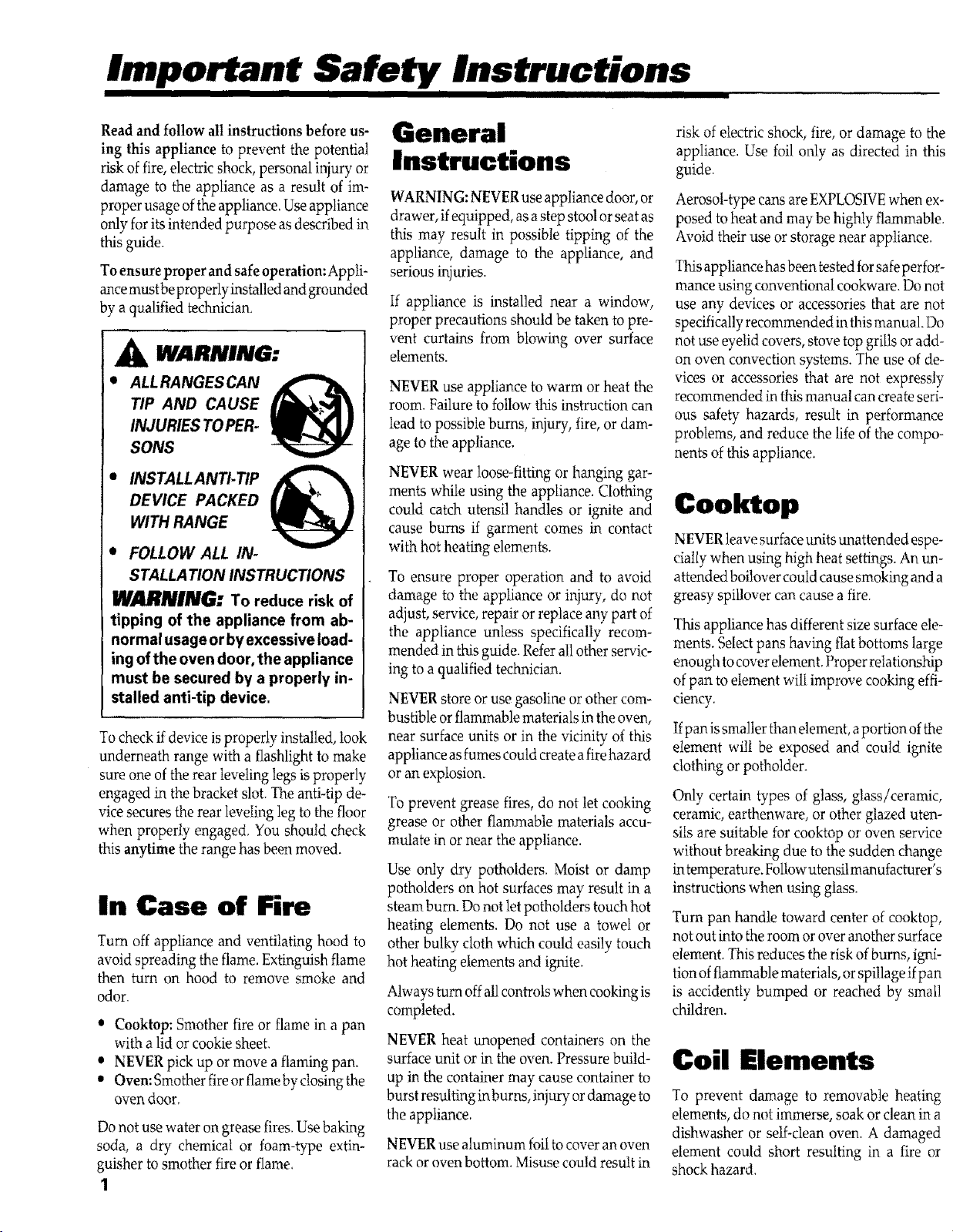
WARNING:
ALLRANGES CAN
TIP AND CAUSE
INJURIES TO PER-
SONS
INSTALL ANTI- TIP
DEVICE PACKED
WITH RANGE
e FOLLOW ALL IN-
STALLA TiON INSTRUCTIONS
WARNING: To reduce risk of
tipping of the appliance from ab-
normal usage or byexcessive load-
ing of the oven door, the appliance
must be secured by a properly in-
stalled anti-tip device,
To check if device is properly installed, look
underneath range with a flashlight to make
sure one of the rear leveling legs is properly
engaged in the bracket slot. The anti-tip de-
vice secures the rear leveling leg to the floor
when properly engaged. You should check
this anytime the range has been moved.
In Case of Fire
Turn off appliance and ventilating hood to
avoid spreading the flame. Extinguish flame
then turn on hood to remove smoke and
odor.
• Cooktop: Sn_other fire or flame in a pan
with a lid or cookie sheet.
• NEVER pick up or move a flaming pan.
• Oven: Smother fire or flame by closing the
oven door,
Do not use water on grease fires. Use baking
soda, a dry chemical or foam-type extin-
guisher to smother fire or flame.
1
General
Instructions
WARNING: NEVER use appliance door, or
drawer, ifequipped, asa step stool or seat as
this may result in possible tipping of the
appliance, damage to the appliance, and
serious injuries.
If appliance is installed near a window,
proper precautions should be taken to pre-
vent curtains from blowing over surface
elements.
NEVER use appliance to warm or heat the
room. Failure to follow this instruction can
lead to possible bums, injury, fire, or dam-
age to the appliance.
NEVER wear loose-fitting or hanging gar-
ments while using the appliance. Clothing
could catch utensil handles or ignite and
cause bums if garment comes in contact
with hot heating elements.
To ensure proper operation and to avoid
damage to the appliance or injury, do not
adjust, service, repair or replace any part of
the appliance unless specifically recom-
mended in this guide. Refer all other servic-
ing to a qualified technician.
NEVER store or use gasoline or other com-
bustible or flammable materials in the oven,
near surface units or in the vicinity of this
appliance as fumes could create a fire hazard
or an explosion.
To prevent grease fires, do not let cooking
grease or other flammable materials accu-
mulate in or near the appliance.
Use only dry potholders. Moist or damp
potholders on hot surfaces may result in a
steam burn. Do not let potholders touch hot
heating elements. Do not use a towel or
other bulky cloth which could easily touch
hot heating elements and ignite.
Always turn off all controls when cooking is
completed.
NEVER heat unopened containers on the
surface unit or in the oven. Pressure build-
up in the container may cause container to
burst resulting in burns, injury or damage to
the appliance.
NEVER use aluminum foil to cover an oven
rack or oven bottom. Misuse could result in
risk of electric shock, fire, or damage to the
appliance. Use foil only as directed in this
guide.
Aerosol-type cans are EXPLOSIVE When ex-
posed to heat and may be highly flammable.
Avoid their use or storage near appliance.
This appliance has been tested for safeperfor-
mance using conventional cookware. Do not
use any devices or accessories that are not
specifically recommended in this manual. Do
not use eyelid covers, stove top grills or add-
on oven convection systems. The use of de-
vices or accessories that are not expressly
recommended in this manual can create seri-
ous safety hazards, result in performance
problems, and reduce the life of the compo-
nents of this appliance.
Cooktop
NEVER leave surface units unattended espe-
cially when using high heat settings. An un-
attended boilover could cause smoking and a
greasy spillover can cause a fire.
This appliance has different size surface ele-
ments. Select pans having flat bottoms large
enough to cover element. Proper relationship
of pan to dement wilt improve cooking effi-
ciency.
Ifpan issmaller than element, a portion ofthe
element will be exposed and could ignite
clothing or potholder.
Only certain types of glass, glass/ceramic,
ceramic, earthenware, or other glazed uten-
siis are suitable for cooktop or oven service
without breaking due to the sudden change
intemperature. Followutensil manufacturer's
instructions when using glass.
Turn pan handle toward center of cooktop,
not out into the room or over another surface
element. This reduces the risk of burns, igni-
tion of flammable materials, or spillage ifpan
is accidently bumped or reached by small
children.
Coil Elements
To prevent damage to removable heating
elements, do not immerse, soak or clean in a
dishwasher or self-clean oven. A damaged
element could short resulting in a fire or
shock hazard.
Makesuredripbowlsareinplaceasabsence
ofthesebowlsduringcookingcoulddamage
wiring.
ProtectiveLiners:Donotusealuminumfoil
tolinesurfaceunitdripbowlsorovenbot-
toms,exceptassuggestedinthemanual.Im-
properinstallationoftheselinersmayresult
inariskofelectricshockorfire.
Glass-Ceramic
Cool(top
NEVER cook on broken cooktop. If cooktop
should break, cleaning solutions and
spillovers may penetrate the broken cooktop
and create a risk of electric shock. Contact a
qualified technician immediately.
Clean cooktop with caution. Some cleaners
can produce noxious fumes ifapplied toa hot
surface. If a wet sponge, cloth or paper towel
is used on a hot cooking area, be careful to
avoid steam burn.
Deep Fat Fryers
Use extreme caution when moving the grease
pan or disposing ofhot grease. Allow grease
to cool before attempting to move pan.
Oven
Use care when opening oven door. Let hot air
or steam escape before removing or replac-
ing food.
Forproper oven operation and performance,
do not block or obstruct oven vent duct.
When oven is in use, the area near the vent
may become hot enough to cause burns.
Always place oven racks in desired locations
while oven is cool. If rack must be moved
while oven is hot, do not let potholder touch
hot heating element.
Self-Cleaning
Oven
Clean only parts listed in this guide. Do not
clean door gasket. The gasket is essential for
a good seal. Do not rub, damage, or move the
gasket.
Do not use oven cleaners. No commercial
oven cleaner or oven liner protective coating
of any kind should be used in or around any
part of the oven.
Before self-cleaning the oven, remove broiler
pan, oven racks and other utensils to prevent
excessive smoking, discoloration of the oven
racks or possible damage to utensils.
Wipe up excessive spillovers, especially greasy
spills, before the clean cycle to prevent smok-
ing, flare-ups or flaming.
It is normal for the cooktop to become hot
during a clean cycle. Therefore, avoid touch-
ing the cooktop, door, window or oven vent
during a clean cycle.
Heating Elements
NEVER touch surface or oven heating ele-
ments, areas near elements, or interior sur-
faces of oven.
Heating elements may be hot even though
they are dark in color. Areas near surface
elements and interior surfaces ofan oven may
become hot enough to cause bums. During
and after use, do not touch or let clothing or
other flammable materials contact heating el-
ements, areas near elements, or interior sur-
faces of oven until they have had sufficient
time to cool.
Other potentially hot surfaces include:
Cooktop, areas facing the cooktop, oven vent,
and surfacesnear the vent opening, ovendoor,
areas around the door and oven window.
Child Safety
NEVERleave children alone or unsupervised
where appliance is in use or is hot.
CAUTION: NEVER store items of interest to
chiMren in cabinets above an appliance oron
backguard of a range. Children climbing on
appliance, door or drawer to reach items could
damage the appliance or be burned or seri-
ously injured.
NEVER allow children to sit or stand on any
part of appliance.
Children must be taught that the appliance
and utensils in or on it can be hot. Let hot
utensils cool in a safe place, out of reach of
children. Children should be taught that an
appliance is not a toy and not to play with
controls or other parts of the unit.
Ventilating Hoods
Clean range hood and filters frequently to
prevent grease or other flammable materials
from accumulating to avoid fires.
Turn the fan on when flamb_ing foods (such
as Cherries Jubilee) under the hood.
Important Safety
Notice and
Warning
The California Safe Drinking Water and Toxic
Enforcement Act of 1986 (Proposition 65) re-
quires the Governor of California to publish
a list of substances known to the State of
California to cause cancer or reproductive
harm, and requires businesses to warn cus-
tomers of potential exposures to such sub-
stances.
Users of this appliance are hereby warned
that when it is engaged in the self-clean cycle,
there may be low level exposure to some of
the listed substances, including carbon mon-
oxide. Exposure can be minimized by prop-
erly venting the oven to the outdoors during
the self-clean cycle by opening a window
and/or door in the room where the appliance
is located.
IMPORTANT NOTICE REGARDING PET
BIRDS: Never keep pet birds in the kitchen
or in rooms where the fumes from the kitchen
could reach. Birds have a very sensitive respi-
rato D'system. Fumes released during an oven
self-cleaning cycle may be harmful or fatal to
birds. Fumes released due tooverheated cook-
ing oil, fat, margarine and overheated non-
stick cookware may be equally harmful.
Save These Instructions for Future Reference
2
SunFace Cooking
II IIIIIIIIIIIII IIIIIIIIIIIIIIIIII IIIIIIIIIIIIIIII
Surface Controls
Use to turn on the surface elements. An
infinite choice of heat settings is available
from LOW to HIGH, The knobs canbe set
on or between any of the settings.
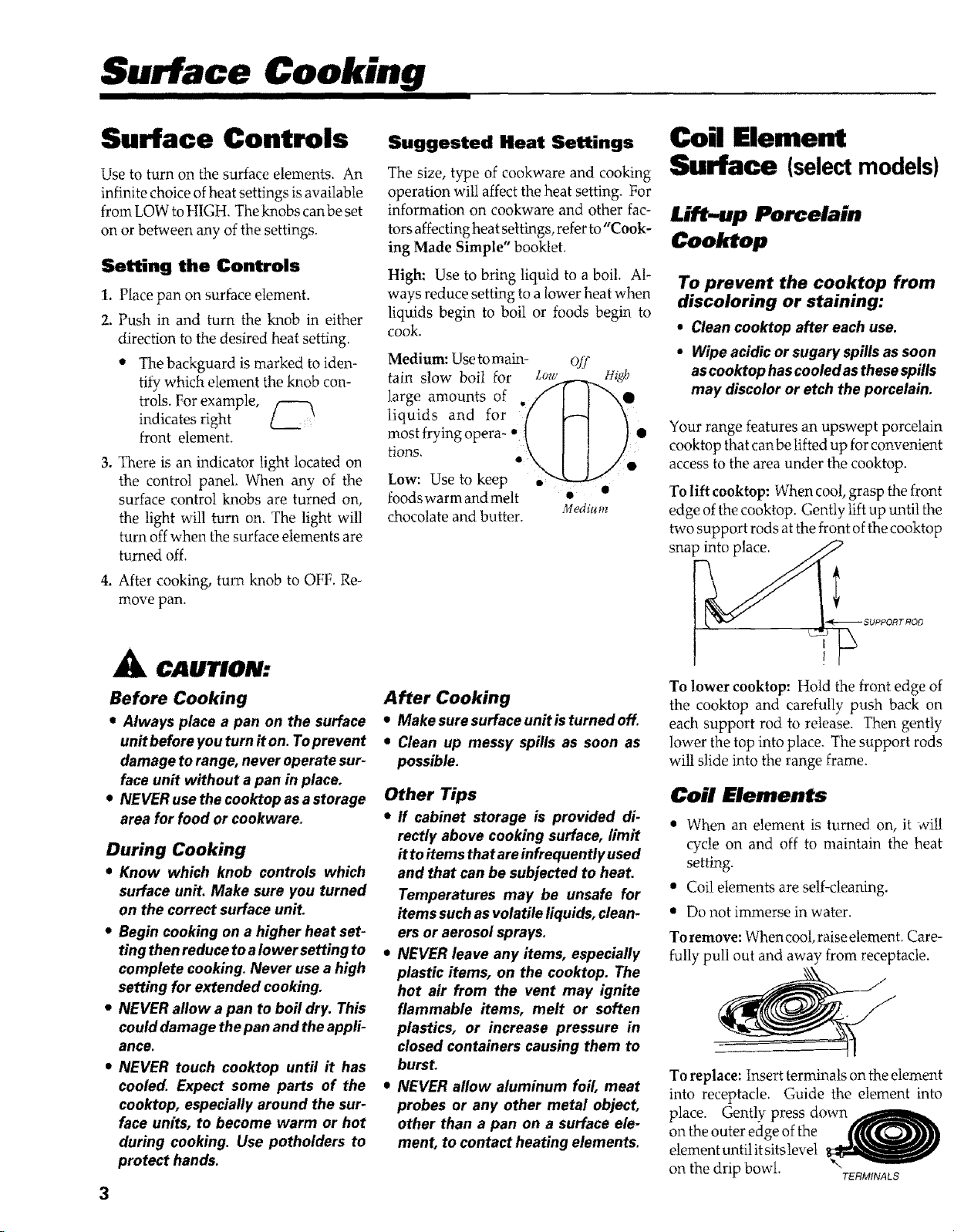
Setting the Controls
1. Place pan on surface element.
2. Push in and turn the knob in either
direction to the desired heat setting.
• The backguard is marked to iden-
tify which element the knob con-
trols. For example,
indicates right
front element.
3. There is an indicator light located on
the control panel, When any of the
surface control knobs are turned on,
the light will turn on, The light will
turn off when the surface elements are
turned off.
4. After cooking, turn knob to OFF. Re-
move pan.
3
CAUTION:
Before Cooking
• Always place a pan on the surface
unit before you turn iton. Toprevent
damage to range, never operate sur-
face unit without a pan in place.
• NEVER use the cooktop asa storage
area for food or cookware.
During Cooking
• Know which knob controls which
surface unit. Make sure you turned
on the correct surface unit.
• Begin cooking on a higher heat set-
ting then reduce toa Iower setting to
complete cooking. Never use a high
setting for extended cooking.
• NEVER allow a pan to boil dry. This
could damage the pan and the appli-
ance.
• NEVER touch cooktop until it has
cooled. Expect some parts of the
cooktop, especially around the sur-
face units, to become warm or hot
during cooking. Use potholders to
protect hands.
Suggested Heat Settings
The size, type of cookware and cooking
operation witl affect the heat setting. For
information on cookware and other fac-
tors affecting heat settings, refer to "Cook-
ing Made Simple" booklet.
High: Use to bring liquid to a boil. Al-
ways reduce setting to a lower heat when
liquids begin to boil or foods begin to
cook.
Medium: Use tomain- off
tain slow boil for lJo_r-._,.,,_gh
large amounts of .// I I "-,e
liquids and for // H '_
most frying opera- * 1 [ [ } •
rions, .\ I I /
Low: Use to keep
foods warm and melt •
chocolate and butter. Me&urn
After Cooking
• Makesuresurfaceunitisturnedoff.
• Clean up messy spills as soon as
possible.
Other Tips
• If cabinet storage is provided di-
rectly above cooking surface, limit
itto items that areinfrequently used
and that can be subjected to heat.
Temperatures may be unsafe for
items such as volatile liquids, clean-
ers or aerosol sprays.
• NEVER leave any items, especially
plastic items, on the cooktop. The
hot air from the vent may ignite
flammable items, melt or soften
plastics, or increase pressure in
closed containers causing them to
burst.
• NEVER allow aluminum foil, meat
probes or any other metal object,
other than a pan on a surface ele-
ment, to contact heating elements.
Coil Element
Surface (selectmodels)
Lift-up Porcelain
Cooktop
To prevent the cooktop from
discoloring or staining:
• Clean cooktop after each use.
• Wipe acidic or sugary spills as soon
as cooktop hascooled asthese spills
may discolor or etch the porcelain,
Your range features an upswept porcelain
cooktop that can be lifted up for convenient
access to the area under the cooktop.
To lift cooktop: When cool, grasp the front
edge of the cooktop. Gently lift up until the
two support rods at the front of the cooktop
snap into place.
To lower cooktop: Hold the front edge of
the cooktop and carefully push back on
each support rod to release. Then gently
lower the top into place. The support rods
will slide into the range frame.
Coil Elements
• When an element is turned on, it will
cycle on and off to maintain the heat
setting.
• Coil elements are self-cleaning,
• Do not immerse in water.
To remove: When cool, raise element. Care-
fully pull out and away from receptacle.
To replace: Insert terminals on the element
into receptacle. Guide the element into
place. Gently press down
on the outer edge of the
element until itsits level
on the drip bowl. TERMINALS
Drip Bowls
The drip bowls, located under each surface
element, are designed to catch boilovers and
must always be used. Absence of these bowls
during cooking may damage wiring or other
parts underneath the cooktop.
To prevent the risk of electric shock or fire,
never line drip bowls with aluminum foil.
Drip bowls will discolor (blue/gold stains)
over time, if overheated. This discoloration is
permanent. However, it will not affect cook-
ing performance.
To protect drip bowl finish:
• Avoid using high heat settings for
long periods of time.
• Donot useoversizedcookware. Pans
should not extend more than 1.2
inchesbeyond the elemenL
• Whenhome canningor cookingwith
oversizedpans,usethe Canning Ele-
ment (Model CE1). Contact your
Maytag dealerfor detailsorcarl1.800-
688-8408.
• Clean frequently. (See cleaning sac.
Glass-Ceramic
Surface (selectmodels)
NOTES:
• Cooktop may emit light smoke and
odor the first few times the cooktop
is used. Thisis normal.
• When a control is turned on, a red
glow can be seen through the glass-
ceramic surface. The element will
cycleon and off to maintain the pre-
set heat setting.
• Glass-ceramic cooktops retain heat
for a period of time after the unit is
turnedoffo WhentheHOTSURFACE
light turnsoff (seeright), the cooking
area will be cool enough to touch.
• NOTE: Do not attempt to lift the
cooktop.
Cooking Areas
The cooking areas on your range are identi-
fied by permanent patterns on the giass<e-
ramic surface. For most efficient cooking, fit
the pan size to the element size.
Pans should not extend more than _hto 1-inch
beyond the cooking area.
For more information on cookware, refer to
"Cooking Made Simple" booklet.
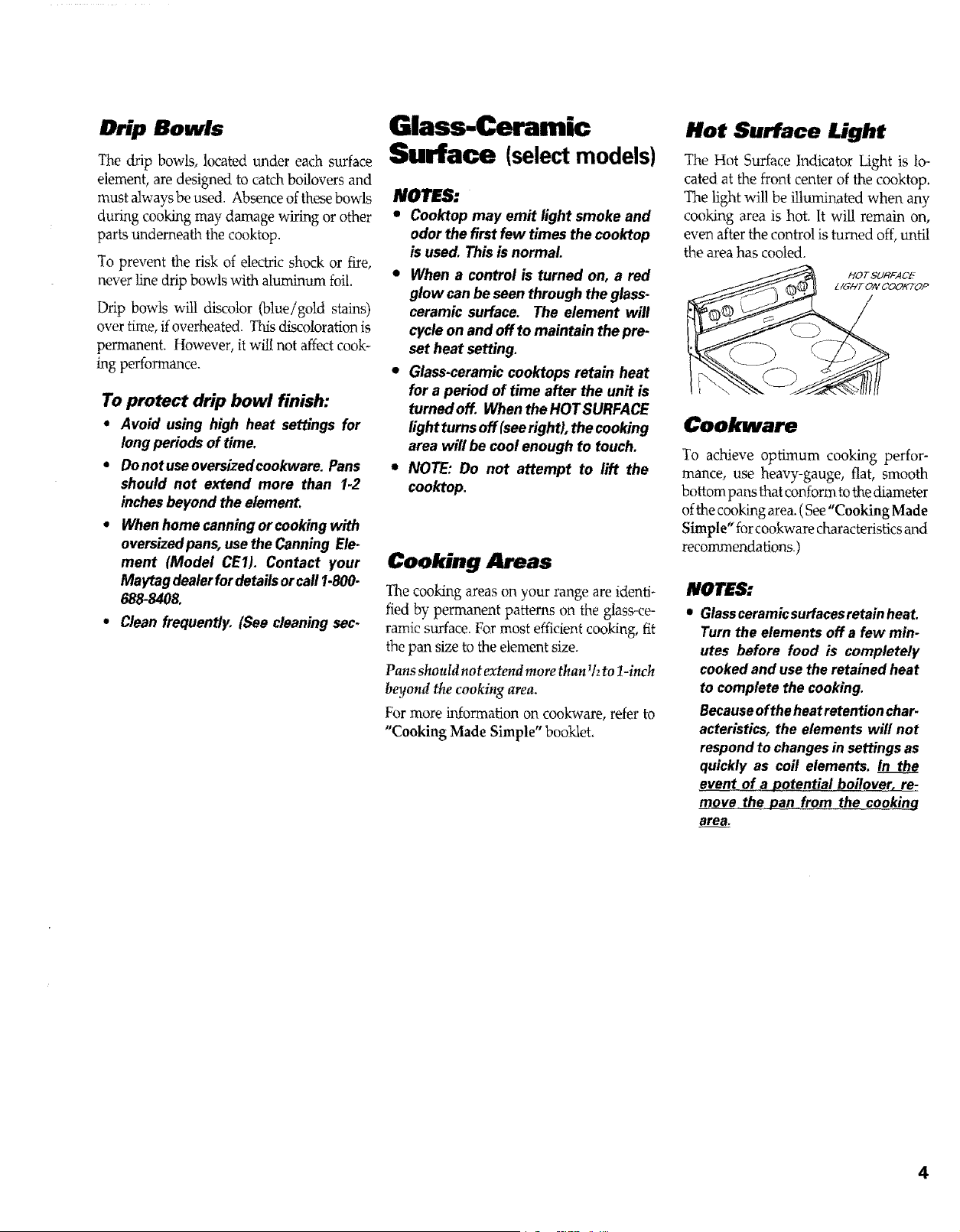
Hot Surface Light
The Hot Surface Indicator Light is lo-
cated at the front center of the cooktop.
'I_e light will be illuminated when any
cooking area is hot. It will remain on,
even after the control is turned off, until
the area has cooled.
Cookware
To achieve optimum cooking perfor-
mance, use heavy-gauge, flat, smooth
bottom pans that conform to the diameter
ofthe cooking area. (See "Cooking Made
Simple" for cookware characteristics and
recommendations.)
NOTES:
• Glassceramicsurfacesretainheat.
Turn the elements off a few min-
utes before food is completely
cookedand usethe retained heat
to complete the cooking.
Becauseoftheheatretentionchar-
acteristics, the elements will not
respondto changesin settings as
quickly as coil elements. In the
event__qf_ boilover, re-
move th_the cooking
area,
4
Surface Cooking. co.t.
L
Tips to Protect the
Glass-Ceramic
Surface
" Before first use, dean the cooktop. (See
Cleaning, page 14.)
• Do not use glass paris. They may scratch
the surface.
• Do not allow plastic, sugar or foods with
high sugar content to melt onto the hot
cooktop. Should this happen, clean im-
mediately. (See Cleaning, page 14.)
• Never let a pan boil dry as this will dam-
age the surface and pan.
• Never use cooktop as a work surface or
cutting board. Never cook food directly
on the surface.
• Never place a trivet or wok ring between
the surface and pan. These items can
mark or etch the top.
• Do not slide aluminum pans across a hot
surface. The pans may leave marks which
need to beremoved promptly. (SeeClean-
ing, page 14.)
• Make sure the surface and the panbottom
are clean before turning on to prevent
scratches.
• To prevent scratching or damage, do not
leave sugar, salt or fats on the cooking
area. Wipe the cooktop surface with a
clean cloth or paper towel before using.
• Never use a soiled dish cloth or sponge to
clean the cooktop surface. A film will
remain which may cause stains on the
cooking surface after the area is heated.
• Do not use a small pan on a large element.
Not only does this waste energy, but itcan
also result in spillovers burning onto the
cooking area which requires extra clean-
ing
• Do not use non-flat specialty items that
are oversized or uneven such as round
bottom woks, rippled bottom and/or
oversized canners and griddles.
• Do not slide heaD' metal pans across the
surface since these may scratch.
• Do not use foilor foil-type containers. Foil
may mett onto the glass. If metal melts on
the cooktop, do not use. Call an autho-
rized servicer.
• if aspillover occurs while cookZng,imme-
diately clean the spill from the cooking
area while it is hot to prevent a tough
cleaning chore later. Using extreme care,
wipe spill with a clean dry towel.
• Do not allow spills to remain on the cook-
ing area or the cooktop trim for a long
period of time.
• Do not use abrasive cleansing powders or
scouring pads which will scratch the
cooktop.
• Do not ttse chlorine bleach, ammonia or
other cleansers not specifically recom-
mended for use on glass-ceramic.
• To retain the appearance of the glass-
ceramic cooktop, clean after each use.
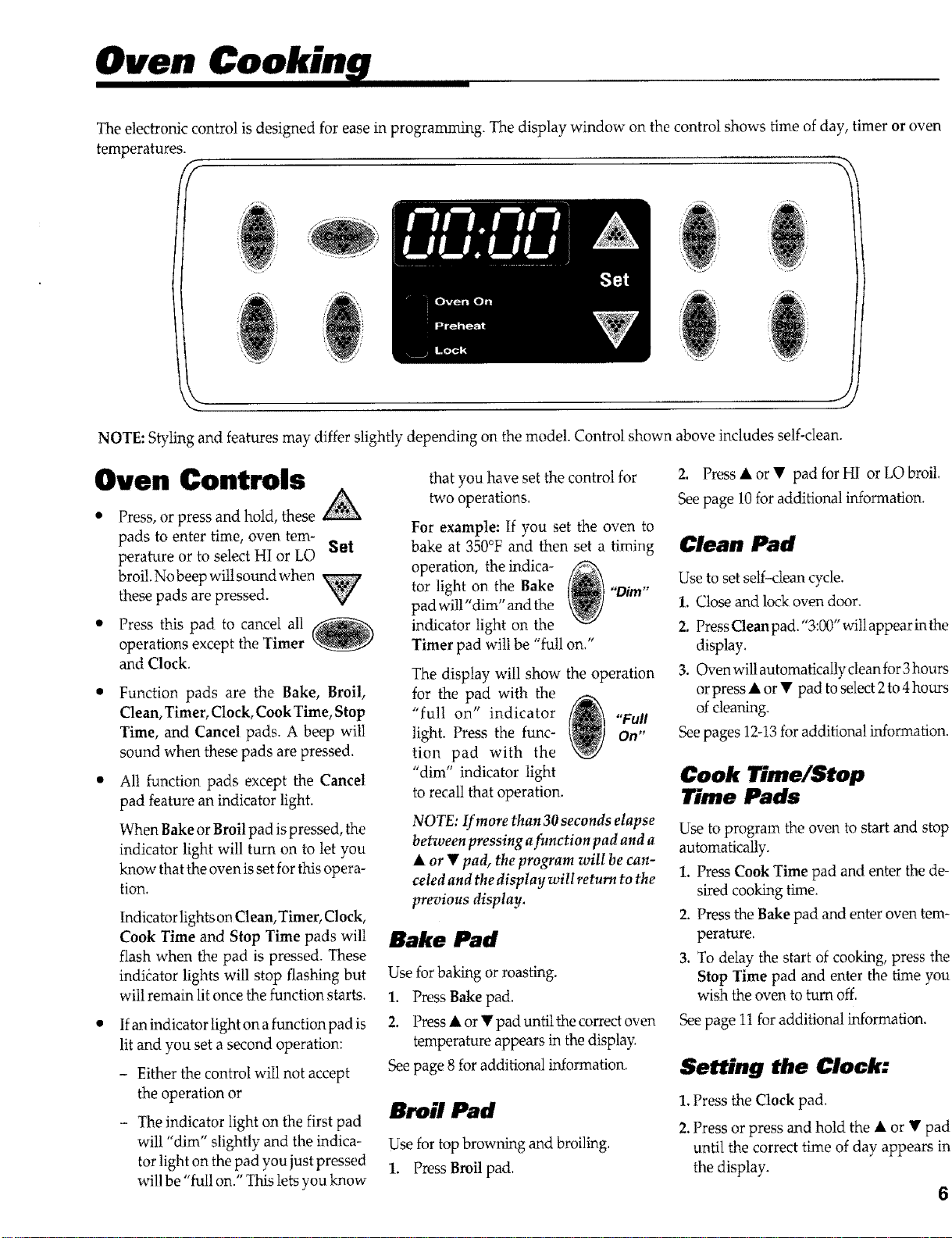
The electronic control is designed for ease in programming. The display window on the control shows time of day, timer or oven
temperatures.
K
/if'_'rii:,
0
NOTE: Styling and features may differ slightly depending on the model. Control shown
Oven Controls
Press, or press and hold, these
pads to enter time, oven tem-
perature or to select HI or LO Set
broil. No beep wit! sound when
these pads are pressed. '_
Press this pad to cancel all
operations except the Timer
and Clock.
Function pads are the Bake, Broil,
Clean, Timer, Clock, Cook Time, Stop
Time, and Cancel pads. A beep will
sound when these pads are pressed.
All function pads except the Cancel
pad feature an indicator light.
When Bake or Broil pad is pressed, the
indicator light will turn on to let you
know that the oven is set for this opera-
tion.
Indicator lights on Clean, Timer, Clock,
Cook Time and Stop Time pads will
flash when the pad is pressed. These
indicator lights will stop flashing but
will remain lit once the function starts.
If an indicator light on a function pad is
lit and you set a second operation:
- Either the control wiI1 not accept
the operation or
- The indicator light on the first pad
will "dim" slightly and the indica-
tor light on the pad you just pressed
will be "full on." This lets you know-
that you have set the control for
Va,o operations.
For example: If you set the oven to
bake at 350°F and then set a timing
operation, the indica-
tor light on the Bake "Dim"
pad will "dim" and the
indicator light on the
Timer pad will be "full on."
The display will show the operation
for the pad with the
"full on" indicator "Full
light. Press the func- On"
tion pad with the
"dim" indicator light
to recall that operation.
NOTE: If more than 30 seconds elapse
between pressing afunction pad and a
A or • pad, the program will be can-
celed and the display wilt return to the
previous display.
Bake Pad
Use for baking or roasting.
1. Press Bake pad.
2. Press • or • pad until the correct oven
temperature appears in the display.
See page 8 for additional information.
Broil Pad
Use for top browning and broiling.
1. Press Broil pad.
.... J
above includes self-clean.
2. Press • or • pad for HI or LO broil.
See page 10 for additional information.
Clean Pad
Use to set self-dean cycle.
1. Close and lock oven door.
2. Press Clean pad."3:00" will appear inthe
display,
3. Oven will automatically clean for 3 hours
or press • or • pad to select 2 to 4 hours
of cleaning.
See pages 12-13 for additional information.
Cook Time/Stop
Time Pads
Use to program the oven to start and stop
automatically.
I. Press Cook Time pad and enter the de-
sired cooking time.
2. Press the Bake pad and enter oven tem-
perature.
3. To delay the start of cooking, press the
Stop Time pad and enter the time you
wish the oven to turn off.
See page 11 for additional information.
Setting the Clock:
1. Press the Clock pad.
2. Press or press and hold the • or • pad
until the correct time of day appears in
the display.
6
Oven " cont.
The display will flashwhen electrical power
is first supplied to the range or if there has
been a power failure.
To recall the time of day when the timer is
displayed, press the Clock pad.
Clock time cannot be changed when the
oven has been programmed for clock con-
trolled cooking, self-clean or delayed self-
clean.
Setting the Timer:
The timer can be set from one minute (0:01)
up to 9hours and 50 minutes (9:50).
The timer can be used independently of
any other oven activity and it can be set
while another oven function is operating.
THETIMER DOES NOT CONTROL THE
OVEN.
1. Press the Timer pad.
2. Press or press and hold the • or V pad
until the correct time appears in the dis-
play.
• The timer wilI start automatically. The
timer indicator on the Timer pad will
light whenever the timer is in use.
• One long beep and "End" will be
briefly displayed to signal the end of
the timer operation.
To cancel the timer: Press and hold Timer
pad for three seconds. Time of day will
reappear in the display.
Control Options
Clock Controlled Oven
Cooking Beep
Option 1. (default option) Four beeps at the
end of cooking, then, one beep every 30
seconds for the next five minutes or until the
Cancel pad is pressed.
Option 2.Four beeps at the end of cooking,
then, no other beeps.
Option 3. Four beeps at the end of cooking,
then, one beep every minute for the next 12
hours or until the Cancel pad is pressed.
Setting Clock Controlled
Oven Cooking Beeps
1. Press Cook Time and Clock pads at the
same time and hold for three seconds,
,
• A single beep will sound.
• Display will show current option.
Press the • or • pad to select the option
number you wish. The current time of
day will reappear in the display after
four seconds.
Cancel Clock Display
If you prefer that the time of day not be
displayed:
To set: Press Clock and Cancel pads at
the same time and hold for three seconds.
When clock display is not shown, press
Clock pad tobriefly recall the time of day, if
desired.
To restore: Press the Clock and Cancel pads
at the same time and hold for three seconds.
The time of day will reappear inthe display.
Automatic Oven Turn
Off/Sabbath Mode
The oven will automatically turn off after 12
hours, if you accidentally leave it on. You
can deactivate this feature, if desired.
To Eliminate 12 Hour Turn
Off
1. Press the Clock pad and hold for three
seconds.
2. Press and hold the • or • pad until 8:88
appears in the display. Current time of
day will reappear in the display after
four seconds.
To restore: Repeat steps i and 2. 12:00 will
appear briefly in the display followed by the
current time of day.
Control Lock-Out
The Control Lock-Out feature prevents the
oven from being turned on.
To Set Control Lock-Out
1. Press and hold both Stop Time and Can-
cel pads for three seconds.
2. "OI*T"will appear in the display when this
feature is activated. Only the clock and
timer functions will operate when Con-
trol Lock-Out feature is activated.
Repeat step 1to deactivate.
Oven Temperature
Adjustment
You may adjust the oven temperature if you
think the oven is not baking correctly. To
decide how much to change the temperature,
set the temper ature 25degrees higher or lower
than your recipe recommends, then bake.
The results of the "test" should give you an
idea of how much to adjust the temperature.
NOTE:It is not recommended to adjust the
temperature if only one or two recipes are in
question.
To Adjust Oven Temperature
1. Press the Bake pad.
2. Enter 550° by pressing • pad.
3. Press and hold the Bake pad for three
seconds until 00° appears in the display.
If the oven temperature was previ-
ously adjusted, the change wilt be
displayed. For example, if the oven
temperature was reduced by 15°,
the display will show -15°.
4. Press and hold the • or • pad to change
the temperature. Each time a pad is
pressed, the temperature changes by 5°.
• The oven temperature can be in-
creased or decreased by 5 °to 35 °.
5. The time of day will automatically reap-
pear in the display.
It is not necessary to readjust the oven tem-
perature if there is a power failure or inter-
ruption. Broiling and cleal_ng temperatures
cannot be adjusted.
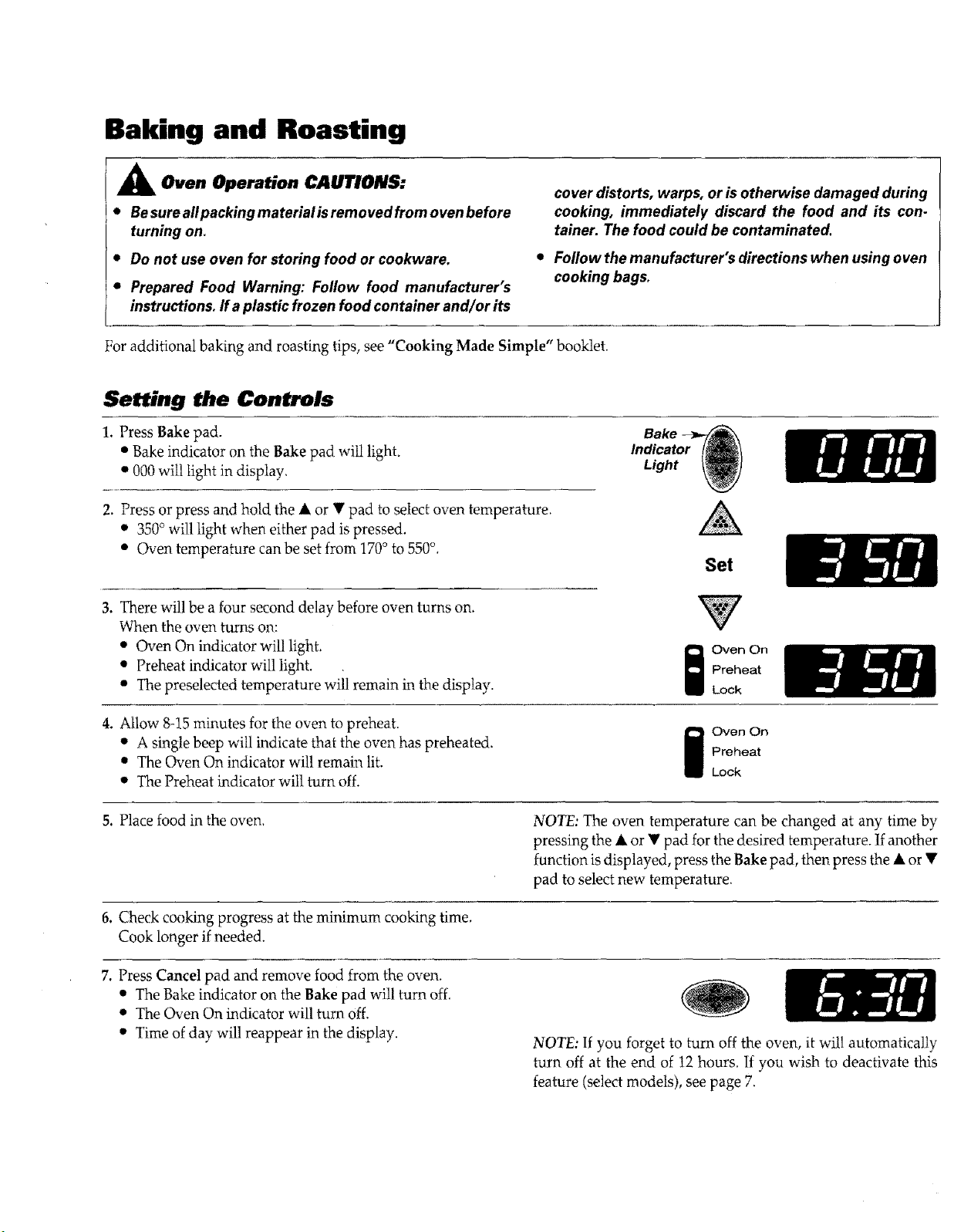
Baking and Roasting
A Oven Operation CAUTIONS:
• Besureallpackingmaterialisremovedfromovenbefore
turning on.
• Do not use oven for storing food or cookware,
• Prepared Food Warning: Follow food manufacturer's
instructions, ff a plastic frozen food container and/or its
cover distorts, warps, or isotherwise damaged during
cooking, immediately discard the food and its con-
tainer. The food could be contaminated.
• Followthemanufacturer'sdirectionswhenusingoven
cooking bags.
For additional baking and roasting tips, see "Cooking Made Simple" booklet.
Setting the Controls
1. Press Bake pad.
• Bake indicator on the Bake pad will light.
• 000 will light in display.
2. Press or press and hold the A or • pad to select oven temperature.
• 350° will light when either pad is pressed.
• Oven temperature can be set from 170o to 550°.
Bake
Indicator ll!
Light
Set
3. There will be a four second delay before oven turns on,
When the oven turns on:
• Oven On indicator will light,
• Preheat indicator will light.
• The preselected temperature will remain in the display.
Oven On
Preheat
Lock
4. Allow 8-15 minutes for the oven to preheat.
• A single beep will indicate that the oven has preheated.
• The Oven On indicator wil! remain lit.
• The Preheat indicator will turn off.
j ven On
Preheat
Lock
5, Place food in the oven.
NOTE: The oven temperature can be changed at any time by
pressing the • or • pad for the desired temperature. If another
function is displayed, press the Bake pad, then press the • or •
pad to select new temperature.
6, Check cooking progress at the minimum cooking time.
Cook longer if needed.
7. Press Cancel pad and remove food from the oven.
• The Bake indicator on the Bake pad will turn off.
• The Oven On indicator will turn off.
• Time of day will reappear in the display.
NOTE: If you forget to turn off the oven, it will automatically
turn off at the end of 12 hours. If you wish to deactivate this
feature (select models), see page 7.
Oven Cooking. cont.
IIIIIIIIII IIIIIIIIIIIII IlllUl
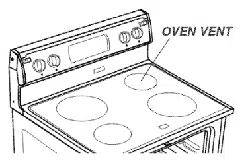
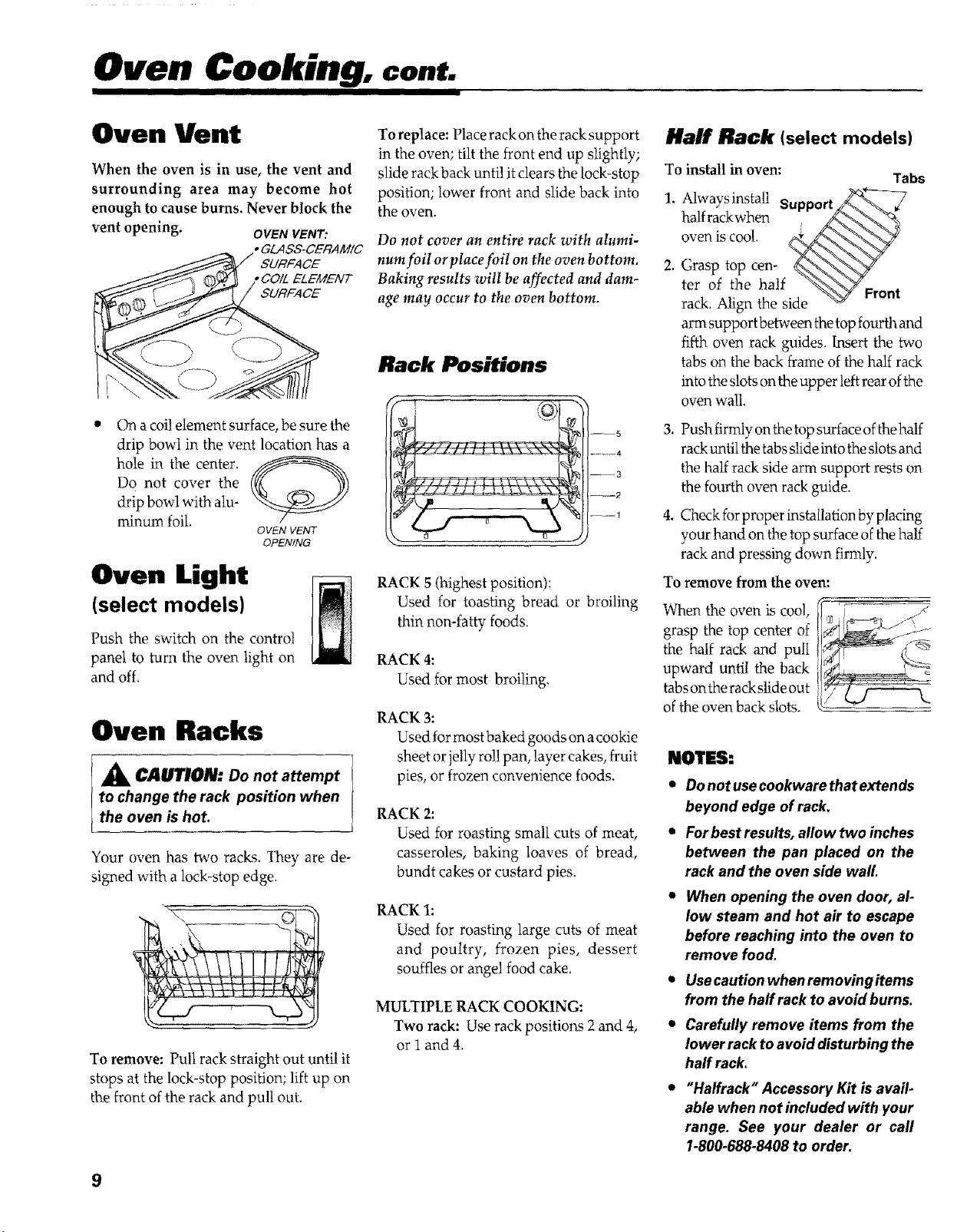
Oven Vent
When the oven is in use, the vent and
surrounding area may become hot
enough to cause burns. Never block the
vent
I
opemng. OVENVENT:
• GLASS-CERAMIC
SURFACE
,COtL ELEMENT
SURFACE
On a coil dement surface, be sure the
drip bowl in the vent location has a
hole in the center.
Do not cover the
drip bowl with alu-
minum foil.
OVEN VENT
OPENING
Oven Light
(select models)
Push the switch on the control
panel to turn the oven light on
and off,
Oven Racks
A CAOTION: Do not attempt
to change the rack position when
the oven is hot.
Your oven has two racks. They are de-
signed with a lock-stop edge.
To remove: Pult rack straight out until it
stops at the lock-stop position; lift up on
the front of the rack and pull out.
To replace: Place rack on the rack support
in the oven; tilt the front end up slightly;
slide rack back until it clears the lock-stop
position; lower front and slide back into
the oven.
Do not cover an entire rack with alumi-
num foiI or place foil on the oven bottom.
Baking results will be affected and dam-
age may occur to the oven bottom.
Rack Positions
--5
........ 4
--3
--------2
--1
RACK 5 (highest position):
Used for toasting bread or broiling
thin non-fatty foods.
RACK 4:
Used for most broiling,
RACK 3:
Used for most baked goods on a cookie
sheet or jelly rol! pan, layer cakes, fruit
pies, or frozen convenience foods.
RACK 2:
Used for roasting small cuts of meat,
casseroles, baking loaves of bread,
bundt cakes or custard pies.
RACK 1:
Used for roasting large cuts of meat
and poultry, frozen pies, dessert
souffles or angel food cake.
MULTIPLE RACK COOKING:
Two rack: Use rack positions 2and 4,
or 1 and 4.
Half Rack (select models)
To
1.
2.
install in oven:
Tabs
Always install ...... _K-,*_---7
Sulapult//_ "%_ €
halfrackwhen
Grasp top cen- __
ter of the half _\_Y_ .
rack. Align the side "_<_g Front
arm support between the top fourth and
fifth oven rack guides. Insert the two
tabs on the back frame of the half rack
into the slots on the upper left rear ofthe
oven wall.
,
Push firmly on the top surface of the half
rack until the tabs slide into the slots and
the half rack side arm support rests on
the fourth oven rack guide.
4. Checkforproperinstallationbyplachag
your hand on the top surface of the half
rack and pressing down fim'dy.
To remove from the oven:
When the oven is cool,
grasp the top center of
the half rack and pull
upward until the back
tabs on the rack slide out
of the oven back slots.
NOTES:
• Donotusecookwarethatextends
beyond edge of rack.
• Forbestresults, allowtwo inches
between the pan placed on the
rack and the oven side wall
• When opening the oven door, al-
low steam and hot air to escape
before reaching into the oven to
remove food,
• Usecaution when removingitems
from the half rack to avoid burns.
• Carefufly remove items from the
lower rack to avoid disturbing the
haff rack.
• "Halfrack" Accessory Kit isavail-
able when not included with your
range, See your dealer or carl
1-800-688-8408 to order,
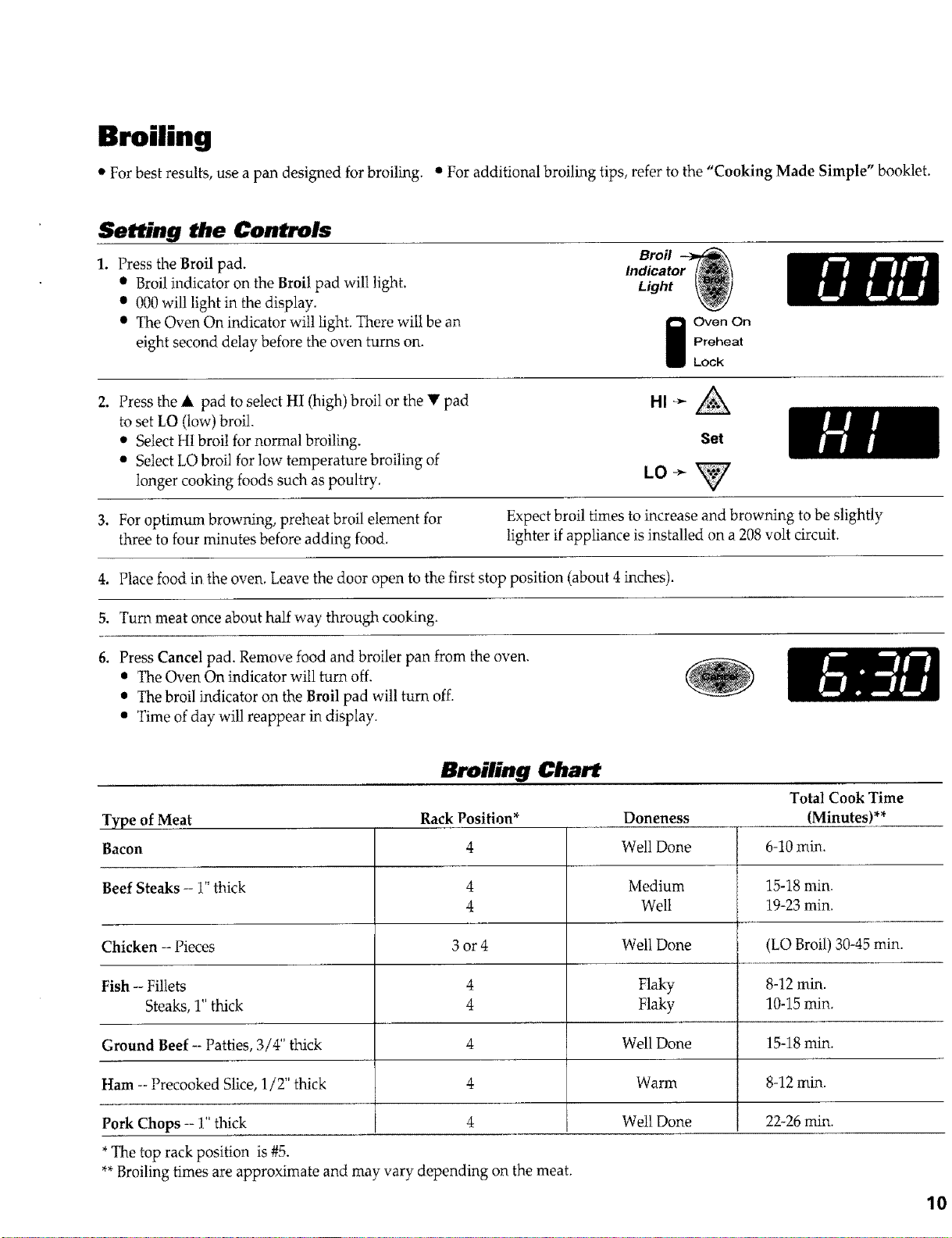
Broiling
• For best results, use a pan designed for broiling. • For additional broiling tips, refer to the "Cooking Made Simple" booklet.
Setting the Controls
Press the Broil pad.
• Broil indicator on the Broil pad will light.
• 000 will light in the display.
• The Oven On indicator will light. There will be an
eight second delay before the oven turns on.
Broil
Indicator
Light
i ven On
Preheat
Lock
2. Press the & pad to select HI (high) broil or the • pad
b set LO (low) broil.
• Select HI broil for normal broiling.
• Select LO broil for low temperature broiling of
longer cooking foods such as poultry.
3. For optimum browning, preheat broil element for
three to four minutes before adding food,
4. Place food in the oven. Leave the door open to the first stop position (about 4 inches).
5. Turn meat once about half way through cooking.
Set
LO-_
Expect broil times to increase and browning to be slightly
lighter if appliance is installed on a 208 volt circuit.
6. Press Cancel pad. Remove food and broiler pan from the oven.
• The Oven On indicator will turn off,
• The broil indicator on the Broil pad will turn off.
• Time of day will reappear in display.
Type of Meat
Bacon
Beef Steaks -- 1" thick
Chicken - Pieces
Fish -- Fillets
Steaks, 1" thick
Ground Beef -- Patties, 3/4" thick
Ham -- Precooked Slice, 1/2" thick
Pork Chops -- 1" thick
*The top rack position is #5.
Broiling (:hart
Rack Position*
4
4
4
3 or4
4
4
4
4
4
Doneness
Well Done
Medium
Welt
Well Done
Flaky
Flaky
Well Done
Warm
Well Done
Total Cook Time
(Minutes)**
6-10 rain.
15-18 min.
19-23 rain.
t (LO Broil) 30-45 rain.
8-12 rain.
10-15 rain.
15-18 rain.
8-12 min.
22-26 rain.
**Broiling times are approximate and may vary depending on the meat.
10
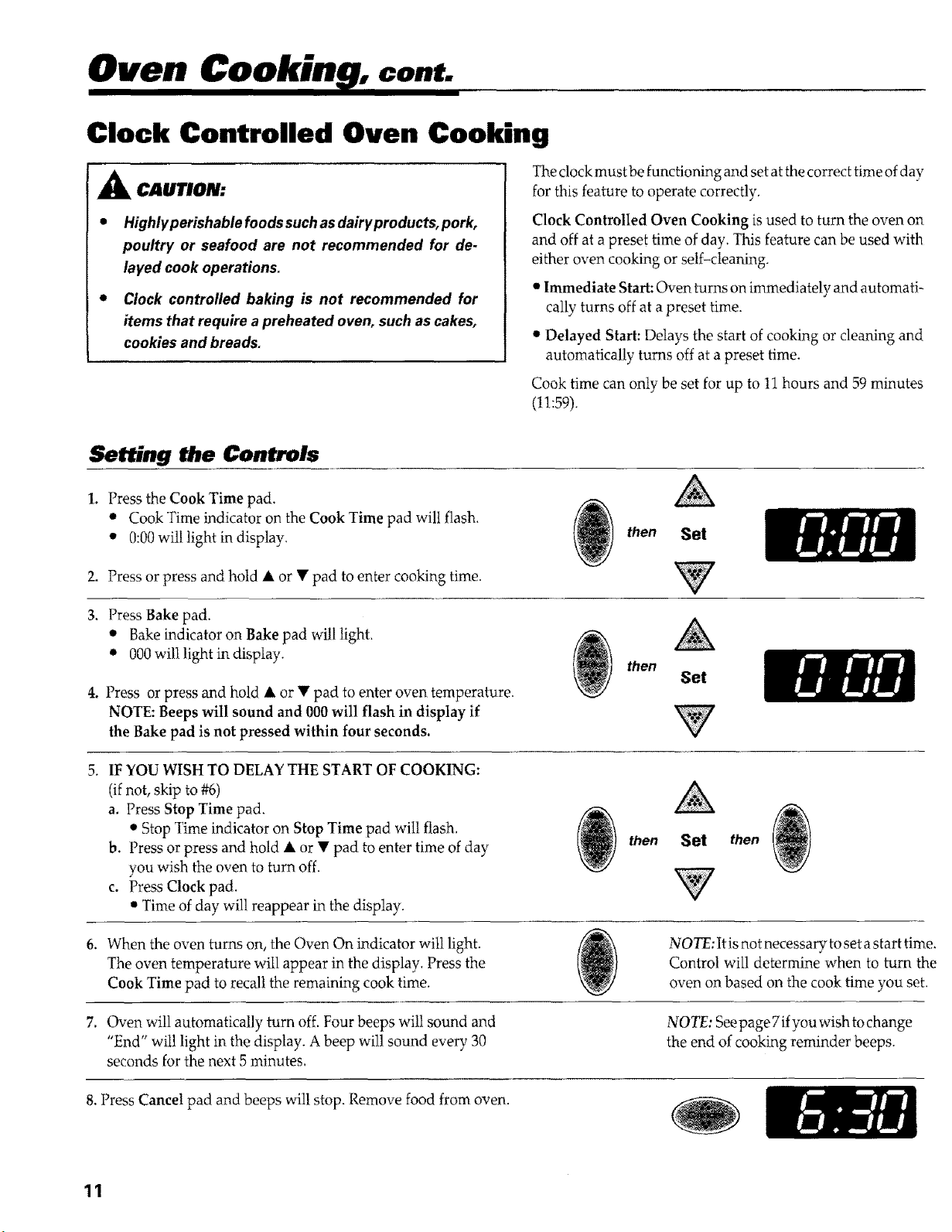
Oven Cookin , cont.
Clock Controlled Oven Cooking
CAUTION:
• Highlyperishablefoodssuchasdairyproducts, pork,
poultry or seafood are not recommended for de-
layed cook operations.
• Clock controlled baking is not recommended for
items that require a preheated oven, such as cakes,
cookies and breads.
The clock must be functioning and set at the correct time of day
for this feature to operate correctly.
Clock Controlled Oven Cooking is used to turn the oven on
and off at a preset time of day, This feature can be used with
either oven cooking or self-cleaning.
• Immediate Start: Oven turns on immediately and automati-
cally turns off at a preset time.
• Delayed Start: Delays the start of cooking or cleaning and
automatically turns off at a preset time.
Cook time can only be set for up to 11 hours and 59 minutes
(!1:59),
Setting the Controls
1, Press the Cook Time pad.
• Cook Time indicator on the Cook Time pad will flash,
• 0:00 wil! light in display.
2. Press or press and hold A or • pad to enter cooking time.
then Set
3, Press Bake pad,
• Bake indicator on Bake pad will light,
• 000 will light in display.
4. Press or press and hold k or • pad to enter overt temperature.
NOTE: Beeps will sound and 000 will flash in display if
the Bake pad is not pressed within four seconds,
then
Set
5. IF YOU WISH TO DELAY THE START OF COOKING:
(if not, skip to #6)
a. Press Stop Time pad,
• Stop Time indicator on Stop Time pad will flash.
b. Press or press and hold A or • pad to enter time of day
you wish the oven to turn off.
c. Press Clock pad.
• Time of day will reappear in the display.
then Set then
6, When the oven turns on, the Oven On indicator will light.
The oven temperature will appear in the display, Press the
Cook Time pad to recall the remaining cook time.
NOTE: It is not necessary to set a start time,
Control will determine when to turn the
oven on based on the cook time you set.
7. Oven willautomatically turn off. Four beeps will sound and
"End" wilt light in the display. A beep will sound every 30
seconds for the next 5 minutes,
NOTE: Seepage 7 if you wish to change
the end of cooking reminder beeps,
8. Press Cancel pad and beeps wil! stop. Remove food from oven.
11
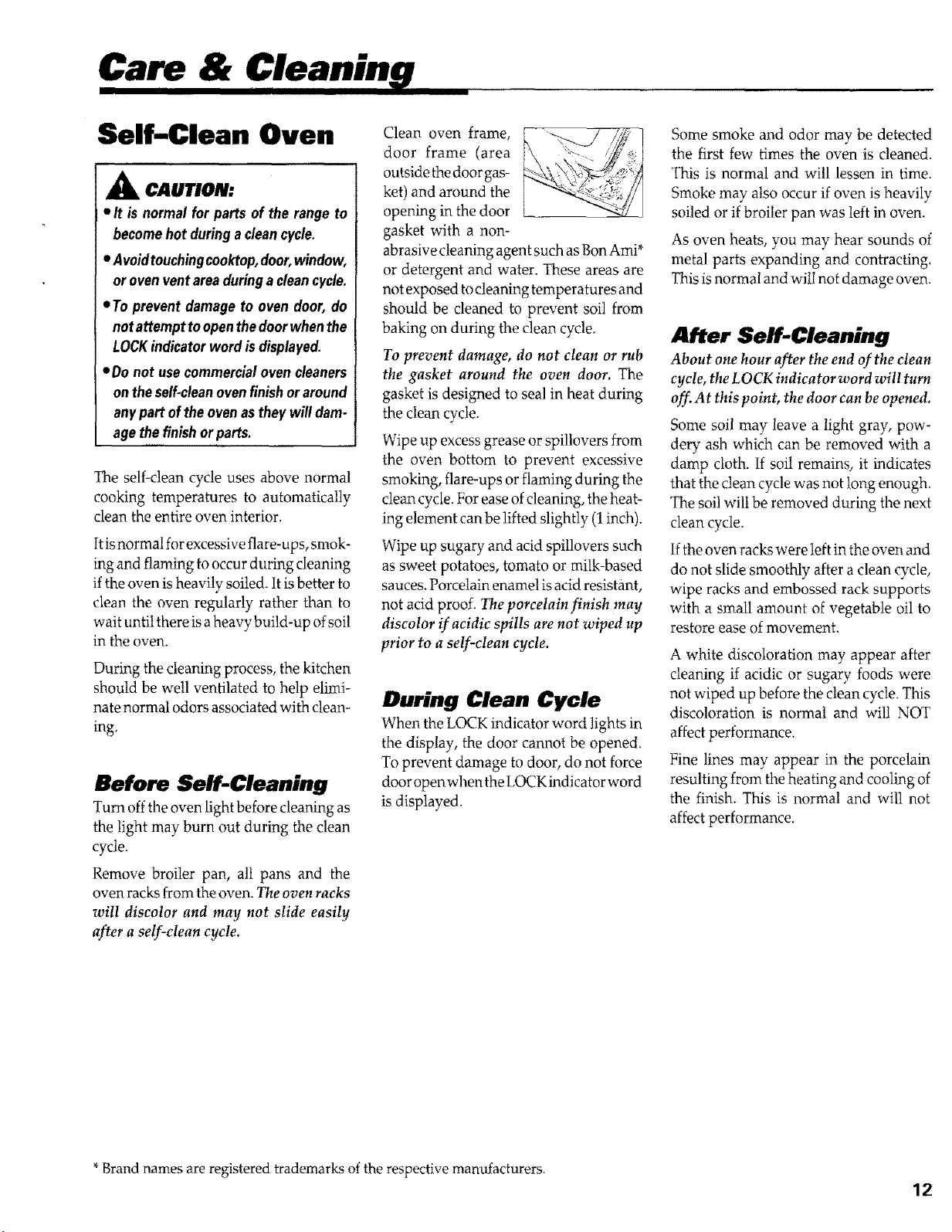
Care &
Self-Clean Oven
A CAUTION:
• It is normal for parts of the rangeto
becomehotduringa cleancycle.
• Avoidtouchingcooktop,door,window,
orovenventareaduringa cleancycle.
=To prevent damageto oven door,do
notattempttoopenthedoorwhenthe
LOCKindicatorwordisdisplayed.
=Do not usecommercialoven cleaners
ontheself-cleanovenfinishoraround
anypart oftheovenastheywill dam-
agethefinishorparts.
The self-clean cycle uses above normal
cooking temperatures to automatically
clean the entire oven interior.
It is normal for excessive flare-ups, smok-
ing and flaming to occur during cIeaning
ifthe oven is heavily soiled. It is better to
clean the oven regularly rather than to
wait until there is aheavy build-up of soil
in the oven.
During the cleaning process, the kitchen
should be well ventilated to help elimi-
nate normal odors associated with clean-
ing.
Before Self-Cleaning
Turn off the oven light before cleaning as
the light may burn out during the clean
cycle.
Remove broiler pan, all pans and the
oven racks from the oven. The oven racks
wilt discolor and may not slide easily
after a self-clean cycle.
i / / ?
Clean oven frame, k _ ./_. !
door frame (area "_ '_'_"_t
outsidethedoorgas- _\ _::
ket) and around the _ _Z_i_!::"
opening in the door _ "-_--_//]
gasket with a non-
abrasive cleaning agent such as Bon Ami*
or detergent and water. These areas are
not exposed to cleaning temperatures and
should be cleaned to prevent soil from
baking on during the clean cycle.
To prevent damage, do not clean or rub
the gasket around the oven door. The
gasket is designed to seal in heat during
the clean cycle.
Wipe up excess grease or spillovers from
the oven bottom to prevent excessive
smoking, flare-ups or flaming during the
clean cycle. For ease of cleaning, the heat-
ing element can be lifted slightly (1 inch).
Wipe up sugary and acid spillovers such
as sweet potatoes, tomato or milk-based
sauces. Porcelain enamel is acid resistant,
not acid proof. The porcelain finlsh may
discolor if acidic spills are not wiped up
prior to a self-clean cycle.
During Clean Cycle
When the LOCK indicator word lights in
the display, the door cannot be opened,
To prevent damage to door, do not force
door open when the I,OCKindicator word
is displayed.
Some smoke and odor may be detected
the first few times the oven is cleaned.
This is normal and will lessen in time.
Smoke may also occur if oven is heavily
soiled or if broiler pan was left in oven.
As oven heats, you may hear sounds of
metal parts expanding and contracting.
This is normal and will not damage oven.
After Self-Cleaning
About one hour after the end of the clean
cycle, the LOCK indicator word will turn
off. At this point, the door can be opened.
Some soil may leave a light gray, pow-
dery ash which can be removed with a
damp cloth. If soil remains, it indicates
that the clean cycle was not long enough.
The soil will be removed during the next
clean cycle.
If the oven racks were left in the oven and
do not slide smoothly after a clean cycle,
wipe racks and embossed rack supports
with a small amount of vegetable oil to
restore ease of movement.
A white discoloration may appear after
cleaning if acidic or sugary foods were
not wiped up before the clean cycle. This
discoloration is normal and will NOT
affect performance.
Fine lines may appear in the porcelain
resulting from the heating and cooling of
the finish. This is normal and will not
affect performance.
*Brand names are registered trademarks of the respective manufacturers.
12
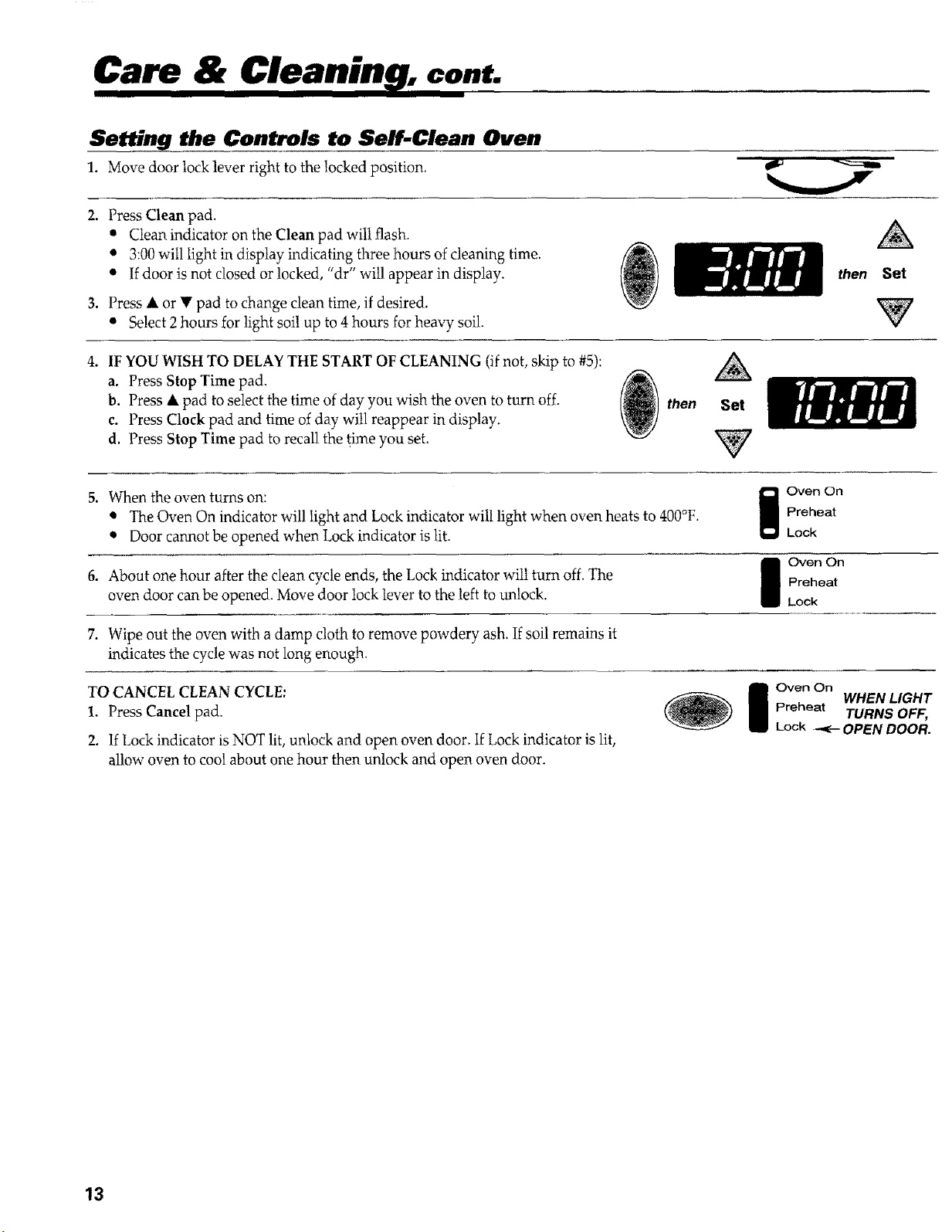
Care & Cleanin , cont.
Setting the Controls to Self-Clean Oven
1. Move door lock lever right to the locked position.
2. Press Clean pad.
• Clean indicator on the Clean pad will flash.
• 3:00 will light in display indicating three hours of cleaning time.
• If door is not closed or locked, "dr" will appear in display.
3. Press • or • pad to change clean time, if desired.
• Select 2hours for light soil up to 4 hours for heavy soil.
then Set
4. IF YOU WISH TO DELAY THE START OF CLEANING (if not, skip to #5):
a. Press Stop Time pad.
b. Press • pad to select the time of day you wish the oven to turn off.
c. Press Clock pad and time of day will reappear in display.
d. Press Stop Time pad to recall the time you set.
_ then Set
5. When the oven turns on: II_ oven on
The Oven On indicator will light and Lock indicator will light when oven heats to 400°F' B Preheat
• Door cannot be opened when Lock indicator is lit. Lock
I Oven On
6. About one hour after the clean cycle ends, the Lock indicator will turn off. The Preheat
oven door can be opened. Move door lock lever to the left to unlock. Lock
7. Wipe out the oven with a damp cloth to remove powdery ash. If soil remains it
indicates the cycle was not long enough.
TO CANCEL CLEAN CYCLE:
1. Press Cancel pad.
2. If Lock indicator is NOT lit, unlock and open oven door, If Lock indicator is lit,
allow oven to cool about one hour then unlock and open oven door.
I Oven On WHENLIGHT
Preheat TURNS OFF,
Lock .+ OPEN DOOR.
13
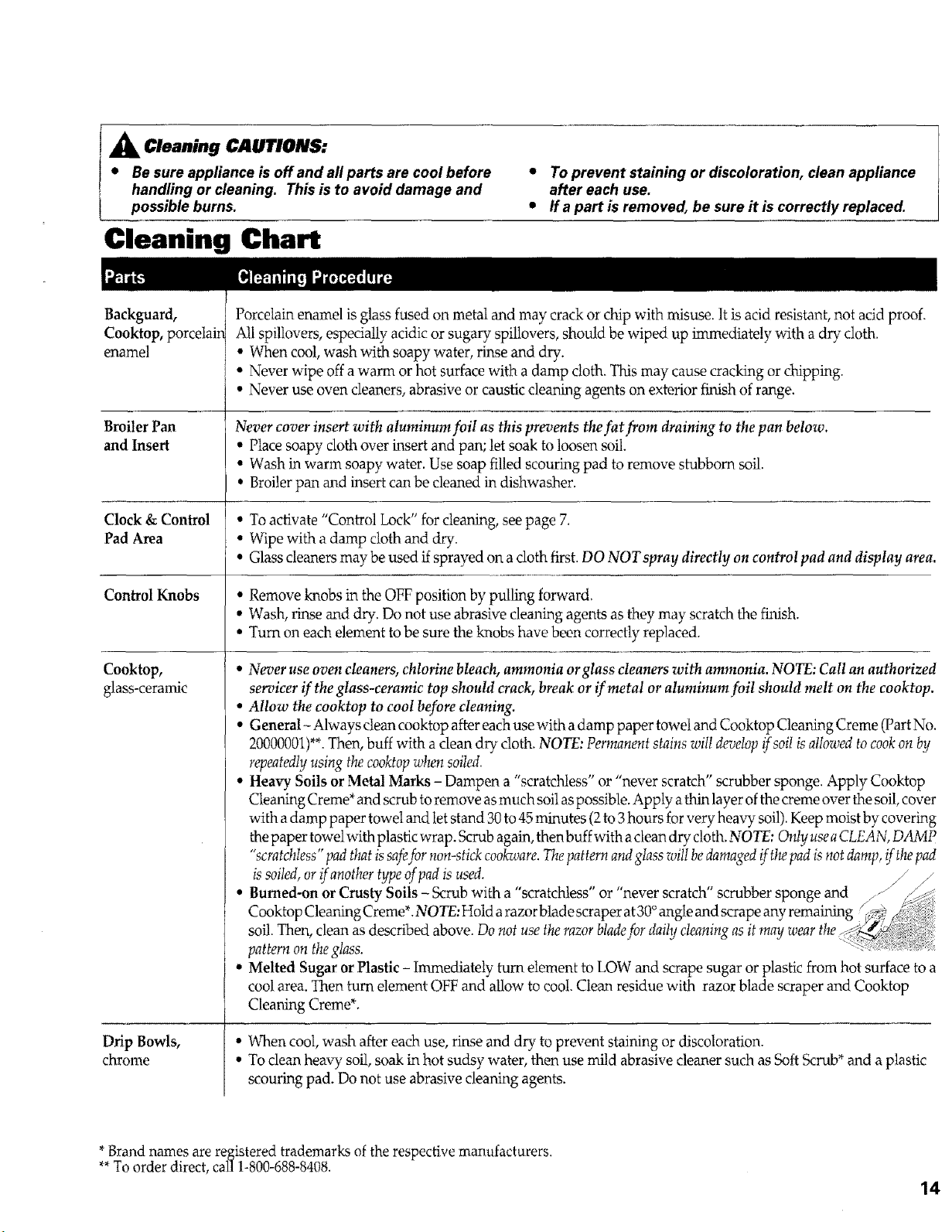
_k Cleaning CAUTIONS:
• Be sure appliance is off and all parts are cool before
handling or cleaning. This is to avoid damage and
possible burns.
Cleaning Chart
• To prevent staining or discoloration, clean appliance
after each use.
• Ira part is removed, be sure it is correctly replaced.
Backguard,
Cooktop, porcelain
enamel
Broiler Pan
and Insert
Clock & Control
Pad Area
Control Knobs
Cooktop,
glass-ceramic
Drip Bowls,
chrome
Porcelain enamel is glass fused on metal and may crack or chip with misuse. It is acid resistant, not acid proof.
All spillovers, especially acidic or sugary spillovers, should be wiped up immediately with a dry cloth.
• When cool, wash with soapy water, rinse and dry.
• Never wipe off a warm or hot surface with a damp cloth. This may cause cracking or chipping.
• Never use oven cleaners, abrasive or caustic cleaning agents on exterior _lish of range.
Never cover insert with aluminum foil as this prevents thefat from draining to the pan below.
• Place soapy cloth over insert and pan; let soak to loosen soil.
• Wash in warm soapy water. Use soap filled scouring pad to remove stubborn soil.
. Broiler pan and insert can be cleaned in dishwasher.
o To activate "Control Lock" for cleaning, see page 7.
• Wipe with a damp cloth and dry.
• Glass cleaners may be used if sprayed on a cloth first. DO NOT spray directly on control pad and display area.
. Remove knobs in the OFF position by pulling forward.
• Wash, rinse and dry. Do not use abrasive cleaning agents as they may scratch the finish.
• Turn on each element to be sure the knobs have been correctly replaced.
• Never use oven cleaners, chlorine bleach, ammonia orglass cleaners with ammonia. NOTE: Call an authorized
servicer if the glass-ceramic top should crack, break or if metal or aluminum foil should melt on the eooktop.
• Allow the cooktop to cool before cleaning.
• General- Always clean cooktop after each use with a damp paper towet and Cooktop Cleaning Creme (Part No.
20000001)**.Then, buff with a clean dry doth. NOTE: Permanent stains will develop _soi[ is allowed to cookon by
repeatedly using the cooktopwhen soiled.
• Heavy Soils or Metal Marks - Dampen a "scratchless" or "never scratch" scrubber sponge. Apply Cooktop
Cleaning Creme* and scrub to remove as much soil as possible. Apply a thin layer of the creme over the soil, cover
with a damp paper towel and let stand 30 to 45 minutes (2to 3hours for very heavy soil). Keep moist by covering
the paper towelwith plastic wrap. Scrub again, then buff with a clean dry cloth. NOTE: Only use aCLEAN, DAMP
"scratchtess" pad that is safefor non-stick cook-avre.Thepattern andglass wiltbedamaged if thepad isnot damp, if the pad
is soiled,or _ another type of pad is used. ,....... _ ,_
* Burned-on or Crusty Soils- Scrub with a scratchtess or never scratch scrubber sponge and z- _(_;
Cooktop Cleaning Creme*. NOTE: Hold a razor blade scraper at30°angle and scrape any remaining
soil. Then, clean as described above. Do not use the razor bladefor daily cleaning as it ,nay wear the
pattern on the glass.
• Melted Sugar orPlastic - lnunediatety turn element to LOW and scrape sugar or plastic from hot surface to a
cool area. Then turn element OFF and allow to coot. Clean residue with razor blade scraper and Cooktop
Cleaning Creme*.
• When cool, wash after each use, rinse and dry to prevent staining or discoloration.
• To clean heavy soil, soak in hot sudsy water, then use mild abrasive cleaner such as Soft Scrub* and a plastic
scouring pad. Do not use abrasive cleaning agents.
*Brand names are registered trademarks of the respective manufacturers.
**To order direct, call 1-800-688-8408.
14
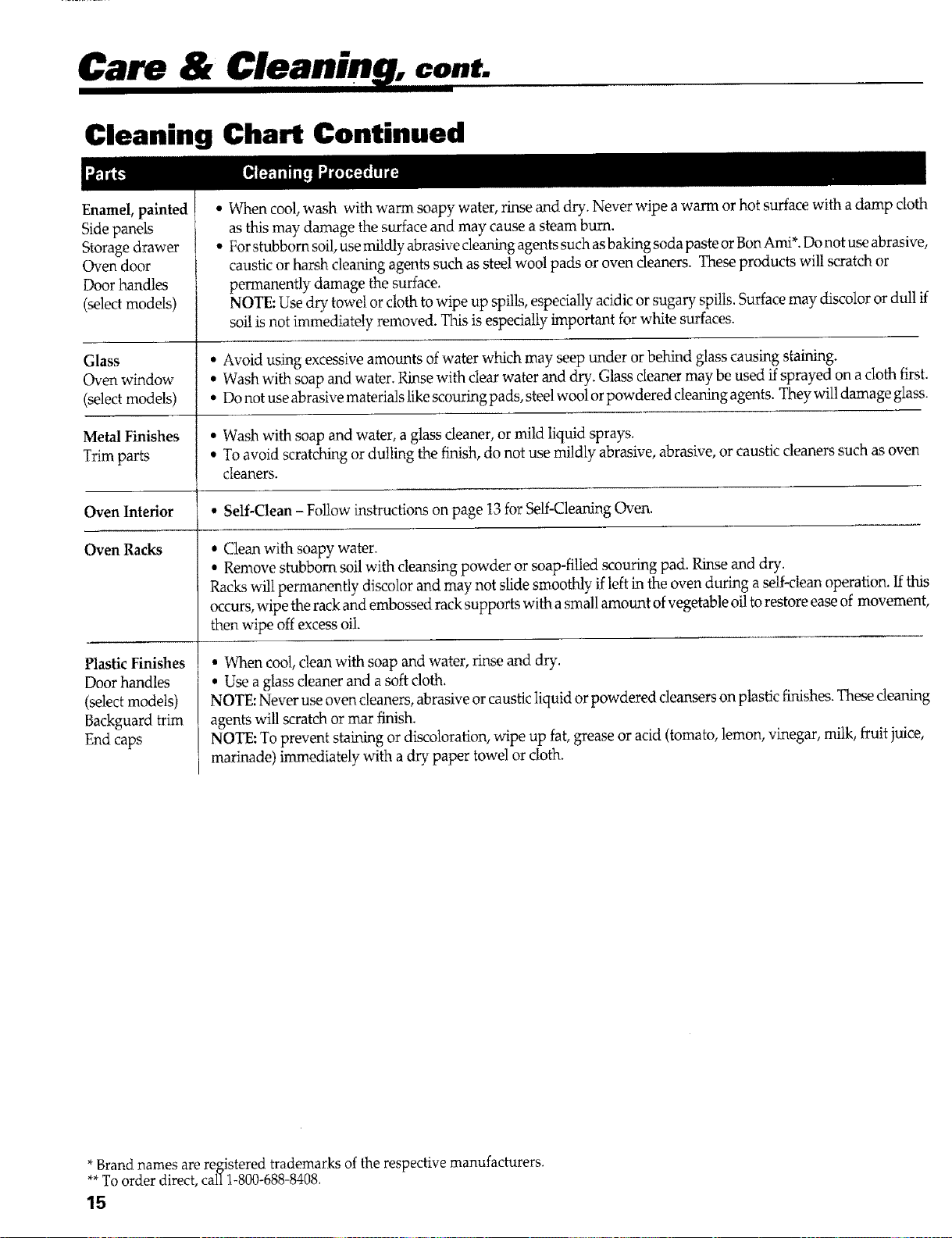
Care & cont.
Cleaning Chart Continued
Enamel, painted
Side panels
Storage drawer
Oven door
Door handles
(select models)
• When cool, wash with warm soapy water, rinse and dry. Never wipe a warm or hot surface with a damp cloth
as this may damage the surface and may cause a steam burn.
• For stubborn soil, use mildly abrasive cleaning agents such as baking soda paste or Bon Ami*. Do not use abrasive,
caustic or harsh cleaning agents such as steel wool pads or oven cleaners. These products will scratch or
permanently damage the surface.
NOTE: Use dry towel or cloth to wipe up spills, especially acidic or sugary spills. Surface may discolor or dull ff
soi! is not immediately removed. This is especially important for white surfaces.
Glass • Avoid using excessive amounts of water which may seep under or behind glass causing staining.
Oven window • Wash with soap and water. Rinse with clear water and dry. Glass cleaner may be used ffsprayed on a cloth first.
(select models) • Do not use abrasive materials like scouring pads, steel wool or powdered cleaning agents. They will damage glass.
Metal Finishes • Wash with soap and water, a glass cleaner, or mild liquid sprays.
Trim parts • To avoid scratching or dulling the finish, do not use mildly abrasive, abrasive, or caustic cleaners such as oven
cleaners.
Oven Interior • Self-Clean - Follow instructions on page 13 for Self-Cleaning Oven.
Oven Racks
PlasticFinishes
Door handles
(select models)
Backguard trim
End caps
• Clean with soapy water.
• Remove stubborn soil with cleansing powder or soap-filled scouring pad. Rinse and dry.
Racks will permanently discolor and may not slide smoothly if left in the oven during a self-clean operation. If this
occurs, wipe the rack and embossed rack supports with a small amount of vegetable oil to restore ease of movement,
then wipe off excess oil.
• When cool, clean with soap and water, rinse and dry.
• Use a glass cleaner and a soft cloth.
NOTE: Never use oven cleaners, abrasive or caustic liquid or powdered cleansers on plastic finishes. These cleaning
agents will scratch or mar finish.
NOTE: To prevent staining or discoloration, wipe up fat, grease or acid (tomato, lemon, vinegar, milk, ffuii juice,
marinade) immediately with a dry paper towel or cloth.
*Brand names are registered trademarks of the respective manufacturers.
**To order direct, call 1-800-688-8408.
15
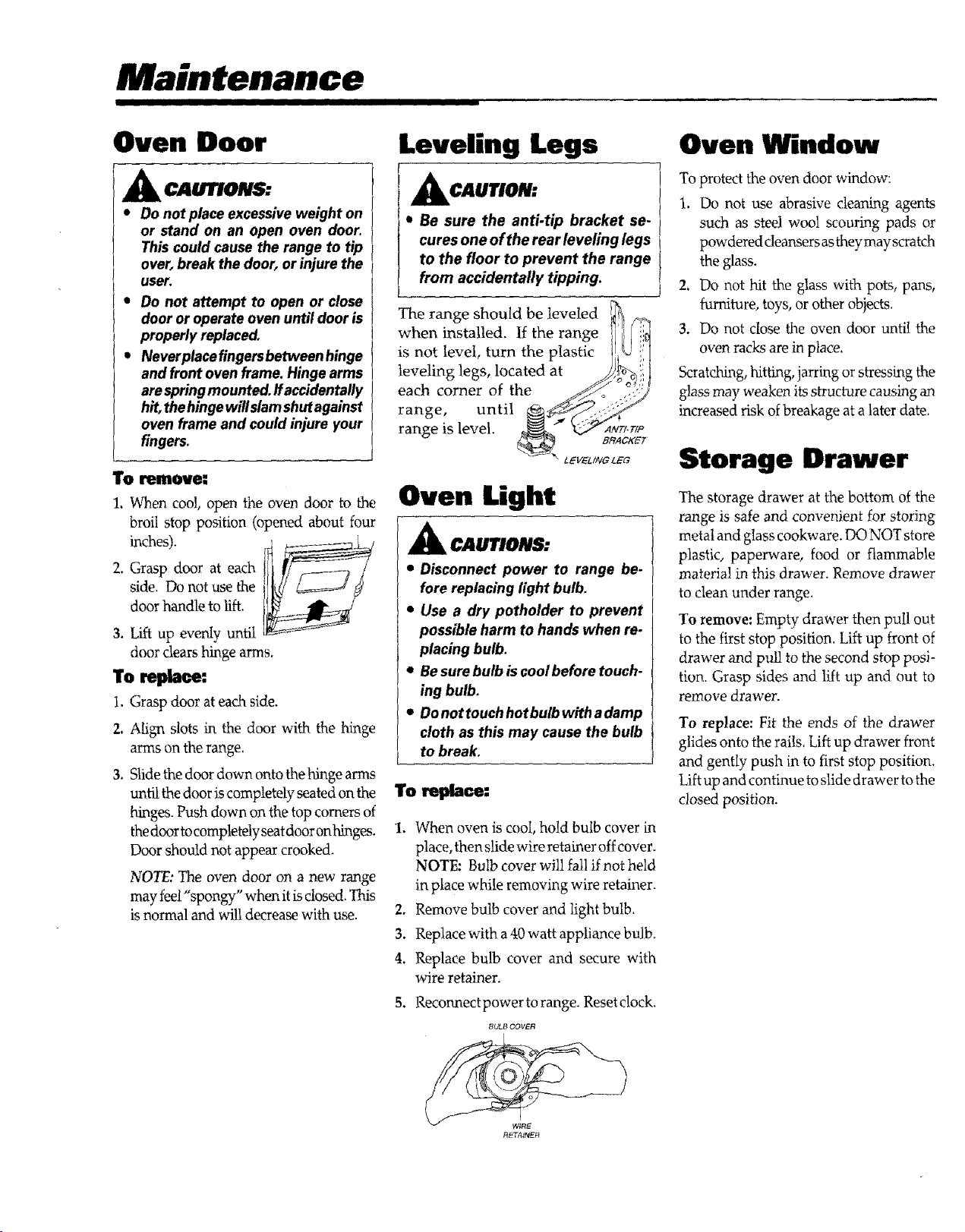
Maintenance
I IIIIIII IIIII III
Oven Door
CAUnON._
• Do not place excessiveweight on
or stand on an open oven door.
This could cause the range to tip
over,break the door, or injure the
user.
• Do not attempt to open or close
door or operate oven until door is
properly replaced,
• Neverplacefingersbetweenhinge
and front oven frame. Hinge arms
arespringmounted, ffaccidentally
hit,thehinge willslamshutagainst
oven frame and could injure your
fingers.
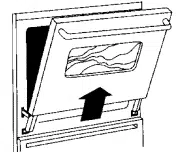
To remove:
1, When coo!, open the oven door to the
broil stop position (opened about four
inches).
2. Grasp door at each
side. Do not use the
door handle to lift.
3. Lift up evenly until
door clears hinge arms.
To replace:
l. Grasp door at each side.
2. Align slots in the door with the hinge
arms on the range.
3. Slide the door down onto the hinge arms
until the door is completely seated on the
hinges. Push down on the top comers of
the door to completely seat door onhinges.
Door should not appear crooked.
NOTE: The oven door on a new range
may feel "spongy" when it is closed. This
is normal and will decrease with use.
Leveling Legs
I CAUTION:
• Be sure the anti-tip bracket se-
cures one of the rear leveling legs
to the floor to prevent the range
from accidentally tipping.
The range should be leveled
when installed, If the range
is not level, turn the plastic
leveling legs, located at
each corner of the
range, until
range is level.
Oven Light
A CAUTIONS:
• Disconnect power to range be-
fore replacing light bulb.
• Use a dry potholder to prevent
possible harm to hands when re-
placing bulb.
• Be sure bulb iscoolbefore touch-
ing bulb,
• Donottouchhotbulbwithadamp
cloth as this may cause the bulb
to break,
1. When oven is cool, hold bulb cover in
place, then slidewire retainer offcover.
NOTE: Bulb cover will fall if not held
in place whiie removing wire retainer.
2. Remove bulb cover and light bulb.
3. Replace with a 40watt appliance bulb.
4. Replace bulb cover and secure with
wire retainer.
5. Reconnectpower torange. Reset clock.
BULB COVER
Oven Window
To protect the oven door window:
1. Do not use abrasive cleaning agents
such as steel wool scouring pads or
powdered cleansers as they may scratch
the glass.
2. Do not hit the glass with pots, pans,
furniture, toys, or other objects.
3. Do not close the oven door until the
oven racks are in place.
Scratching, hittamg,jarring or stressing the
glass may weaken its structure causing an
increased risk of breakage at a later date.
Storage Drawer
The storage drawer at the bottom of the
range is _fe and convenient for storing
metal and glass cookware. DO NOT store
plastic, paperware, food or flammable
material in this drawer. Remove drawer
to clean under range.
To remove: Empty drawer then pull out
to the first stop position. Lift up front of
drawer and pull to the second stop posi-
tion. Grasp sides and lift up and out to
remove drawer.
To replace: Fit the ends of the drawer
glides onto the rails. Lift up drawer front
and gently push in to first stop position.
Lift up and continue to slide drawer to the
closed position.
Before You Call for
I IIII I II I I
For most concerns, try these
first:
• Check if oven controls have been prop-
erly set.
• Check to be sure plug is securely in-
serted into receptacle.
• Check or re-set circuit breaker. Checkor
replace fuse.
• Check power supply.
Part or all of appliance does not
work.
• Check if surface and/or oven controls
have been properly set. See pgs. 3 & 8.
• Checkif oven door is nnlocked after self-
clean cycle. See pg, 13.
• Check ifoven is set for a detayed cook or
clean program. See pgs. 11 & I3.
Baking results not as expected
or differ from previous oven.
• Make sure the oven vent has not been
blocked. See pg, 9 for location.
• Check to make sure range is level.
• Temperatures often vary between a new
oven and an old one. As ovens age, the
oven temperature often "drifts" and may
become hotter or cooler. See pg. 7 for
instructions on adjusting the oven tem-
perature.
• See "Cooking Made Simple" for more
information on bakeware and baking.
Food not broiling properly or
smokes excessively.
• Check oven rack positions, Food may be
too close to element.
• Broil element was not preheated.
• Aluminum foil was incorrectly used.
Never line the broiler insert with foil.
• Oven door was closed during broiling.
Leave the door open to the first stop
position (about 4 inches).
• Trim fat from meat before broiling.
• A soiled broiler pan was used.
Oven will not self-clean.
• Check to make sure the cycle is not set
for a delayed start.
• Check ifdoor is closed.
Oven did not clean properly.
• Longer cleaning time may be needed.
• Excessive spillovers, especially sugary
and!or acidic foods, were not removed
prior to the self-clean cycle.
Oven door will not unlock after
self-clean cycle,
• Oven interior is still hot. Allow about
one hour for the oven to cool after the
completion ofa self-clean cycle. The door
can be opened when the LOCKindicator
word is not displayed.
Moisture collects in oven or on
oven window.
• This is normal when cooking foods high
in moisture.
• Excessive moisture was used when clean-
ing the window.
There is a strong odor or light
smoke when oven is turned on.
• This is normal for a new range and will
disappear after a few uses. Initiating a
clean cycle will "bum off" the odor more
quickly.
• Turning on a ventilation fan will help
remove the smoke and/or odor.
• There are excessive food soils on the
oven bottom. Use a self-clean cycle.
-r.', plus a number appears in
the display.
• This is called a fault code. If a fault code
appears in the display and beeps sound,
press the Cancel pad. If the fault code
and beeps continue, disconnect power
to the appliance. Wait a few minutes,
then reconnect power. If fault code and
beeps still continue, disconnect power
to the appliance and call an authorized
servicer.
• If the oven is heavily soiled, excessive
flare-ups may result in a fault code dur-
ing a clean cycle. Press Cancel pad and
allow the oven to cool completely, Wipe
out the heavy soil, and then reset the
clean cycle. If the fault code and beeps
still continue, disconnect power to the
appliance and callanauthorized servicer.
17

Notes
I IIIIIIII IIIII III
Maytag Range
Warranty
Full One Year Warranty- Partsand
Labor
For one (1) year from the original retail
purchase date, any part which fails in
normal home use will be repaired or re-
placed free of charge.
Limited Warranties
Second Through Fifth Year - From the
original purchase date, parts listed below
which fail in normal home use wil! be
repaired or replaced free ofcharge for the
part itself,with the owner paying allother
costs, including labor, mileage and trans-
portation.
, Electronic Controls
• Electric Heating Elements: surface,
broiland bakeelements,
Canadian Residents
The above warranties only cover an ap-
pliance installed in Canada that has been
certified orlistedby appropriate testagen-
des for compliance to a National Stan-
dard ofCanada unless the appliance was
brought into Canada due to transfer of
residence from the United States to
Canada.
Limited Warranty Outside the United
States and Canada - Parts0nly
Fortwo (2)years fromthe date oforiginal
retail purchase, any part which fails in
normal home use will be repaired or re-
placed free of charge for the part itself,
with the owner paying all other costs,
including labor, mileage and transporta-
tion.
The specificwarrantiesexpressedaboveare
theONLYwarrantiespro-oidedby themanu-
facturer. These warrantiesgive you specific
legal rights, and you may also have other
rightswhich varyfrom state to state.
What is Not Covered By These
Warranties:
1. Conditions and damages resulting from any of the following:
a. Improper installation, delivery, or maintenance.
b. Any repair, modification, alteration, oradjustmentnot authorizedby the manufac-
turer or an authorized servicer.
c. Misuse, abuse, accidents, or unreasonable use.
d. Incorrect electric current, voltage, or supply.
e. Improper setting of any control.
2. Warranties are void if the original serial numbers have been removed, altered, or
cannot be readily determined.
3. Light bulbs.
4. Products purchased for commercial or industrial use.
5. The cost of service or service call to:
a. Correct installation errors.
b. Instruct the user on the proper use of the product.
c. Transport the appliance to the servicer.
6. Consequential or incidental damages sustained by any person as a result of any
breach of these warranties. Some states do not allow the exclusion or limitation of
consequential or incidental damages, so the above exclusion may not apply.
If You Need Service
Call the dealer from whom your appliance was purchased or call Maytag Appliances
Sales Company, Maytag Customer Assistance at 1-800-688-9900, USA or
1-800-688-2002, CANADA to locate an authorized servicer.
Be sure to retain proof of purchase to verify warranty status. Refer to WARIL4NTY
for further information on owner's responsibilities for warranty service.
If the dealer or service company cannot resolve the problem, write to Maytag
Appliances Sales Company, Attn: CAIR ®Center, P.O. Box 2370, Cleveland, TN
37320-2370, or call 1-800-688@900, USA or 1-800-688-2002, CANADA.
U.S, customers using TTY for deaf, hearing impaired or speech impaired, call
1-800-688-2080,
NOTE: When writing or calling about a service problem, please include the following
information:
a. Your name, address and telephone number;
b. Model number and serial number;
c. Name and address of your dealer or servicer;
d. A clear description of the problem you are having;
e. Proof of purchase (sales receipt).
User's guides, service manuals and parts information are available from Maytag
Appliances Sales Company, Maytag Customer Assistance.
19
MAYTAG
403 West Fourth Street North • P.O. Box 39 • Newton, Iowa 50208
• . . http://www.maytag,com