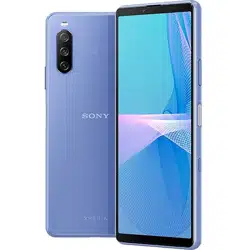
SOG04
Cautions on using the product
Be sure to read this manual before use
•
In this manual, "Xperia 10 III" is usually referred to as "the product" or "main unit".
•
In this manual, "Quick Start Guide", "Cautions on using the product" (this
manual) and " (Full instruction manual)" (Japanese) are
collectively referred to as "Instruction Manual".
•
Descriptions in this manual are based on Android™ 11.
•
In this manual, "microSD™ memory card (commercially available)",
"microSDHC™ memory card (commercially available)" and "microSDXC™
memory card (commercially available)" are abbreviated as "microSD
memory card".
•
Company names and product names referred to in this manual are
trademarks or registered trademarks of respective companies. The TM and
®
marks may be omitted in this manual.
When using the product
Before you start using the product, make sure to read the "Safety Precautions"
to ensure correct use.
Before you assume that the product is malfunctioning, refer to "
(Check here first)" in " (Full Instruction Manual)"
(Japanese).
•
Communication is not possible even inside of the service area in places
where the signal does not reach (e.g. tunnels and basements). Also,
communication is sometimes not possible in poor signal reception areas.
Communication is sometimes interrupted if you move into poor signal
reception area during communication.
•
Since the product uses radio waves, the possibility of communication
intercepts by third parties cannot be eliminated. (Though 5G/LTE/WiMAX 2+/
GSM/UMTS system has highly secure confidential communication features.)
•
For connecting to the emergency call acceptance organization, VoLTE (LTE
network) is used. 3G (Line exchange network) connection is not available.
•
Since the product is a radio station under the Radio Law, you may be asked to
temporarily submit the product for inspection in accordance with the Radio Law.
•
The IMEI information of your mobile phone is automatically sent to your
carrier for maintenance and monitoring operational status of your mobile
phone.
•
Before you start using the product overseas, check the relevant laws and
regulations of the country/region you visit.
•
The Company is not liable for any damages arising from earthquakes,
lightning, storms, floods or other natural disasters, as well as fires, actions
by third parties, other accidents, intentional, mistaken, or incorrect use by
the customer, or use under other unusual conditions outside the
responsibility of the Company.
•
The Company is not liable for any incidental damages (change/
disappearance of described content, loss of business income, disruption of
business, etc.) arising from use of the product or inability to use the product.
•
The Company is not liable for any damages arising from failure to observe
the described content of the "Instruction Manual".
•
The Company is not liable for any damages arising, for example, from
malfunction caused by combination with connected devices or software not
related to the Company.
•
Captured image data or downloaded data may sometimes be altered or lost
due to faults, repair or other handling of the product. The Company is not
liable for any damage or lost income resulting from recovery of these data.

•
It is recommended you keep a copy of important data on your PC's hard
disk etc. Whatever the cause of the defect or malfunction may be, the
Company assumes no responsibility for alteration or loss of saved data.
•
Data saved in the product, such as images/videos, might be altered or lost
by an accident, fault, repair or mishandling. Be sure to keep a copy of
important contents. Note that the Company assume no responsibility for any
damages or lost profits resulting from altered or lost contents.
•
Note that contents data (both charged or free content) saved to the product
cannot be returned to the customer when the product is replaced for repair
of a fault, for example.
•
Although an afterimage may occur when a same screen has been displayed
for a long time, it is not a malfunction. You are recommended to set the sleep
time to a short one to avoid occurrence of afterimage and save the battery
consumption.
•
Although the display used for the product is made using high-precision
technology, some pixels (dots) might be lit or out at all times. This is not a
malfunction.
•
You are recommended to store copies of individual data such as photos you
took, videos and music on your PC by sending each file as mail attachment
etc. Note, however, that you may not be able to make copies of any
copyrighted data even by the above-mentioned means.
•
Do not discard the product together with regular trash. Please cooperate in
the collection of the product (including optional accessories) when it is no
longer needed to protect the environment and effectively use resources.
* "The Company" as appears in the manual refers to your carrier and the
manufacturer (Sony Corporation).
Notice
Reproduction of the content of "Instruction Manual" in part or in whole is
prohibited.
The content of "Instruction Manual" is subject to change without notice.
Some functions may be unavailable due to change of specification of the
OS or change/termination of services.
Every effort has been made in the preparation of "Instruction Manual".
Should you notice any unclear points, omissions, etc., feel free to contact
us.
Safety Precautions (Observe Strictly)
Before using this product, thoroughly read these safety precautions
for proper use.
These "Safety Precautions" describe instructions that should be
observed to prevent damage to property or injury to the customer or
others using the product.
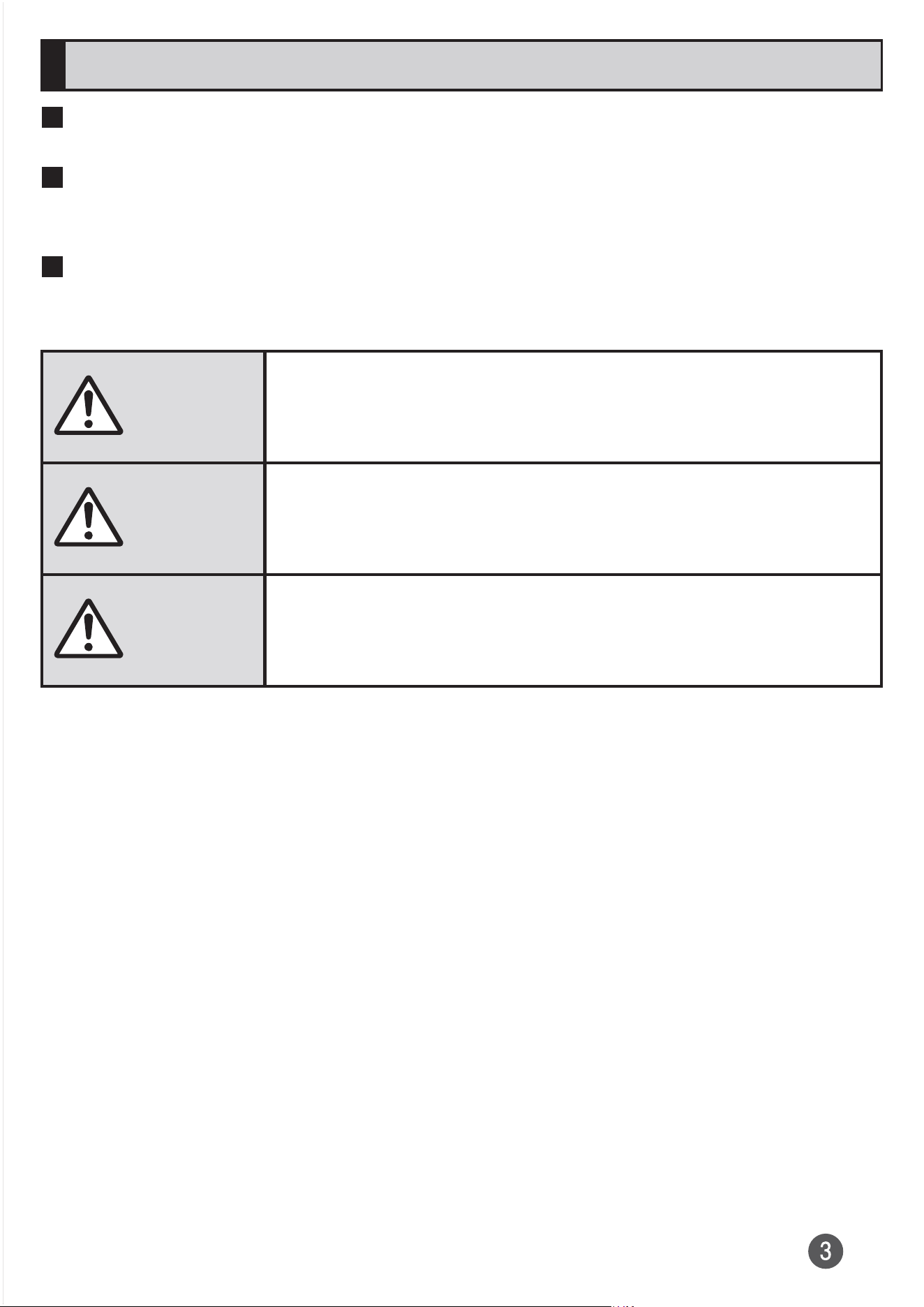
The following symbols indicate the different levels of injury or damage
that may result if the guidelines are not observed and the product is
used improperly.
Danger
This symbol indicates that "death or serious injury
*1
may
directly and immediately result from improper use".
Warning
This symbol indicates that "death or serious injury
*1
may
result from improper use".
Caution
This symbol indicates that "minor injury
*2
and/or
property damage
*3
may result from improper use".
*1 Serious injury: This refers to loss of sight, injury, burns (high- and low
temperature), electric shock, broken bones, injuries with
residual aftereffects from poisoning etc., and injuries
requiring hospital admission for treatment or long-term
hospital attendance as an outpatient.
*2 Minor injury: This refers to injuries, burns (high- and low-temperature),
electric shock, etc. that do not require hospital admission for
treatment or long-term hospital attendance as an outpatient.
*3 Property damage: This refers to extended damage to buildings, furniture,
livestock, pets, etc.
Explanation of graphic symbols
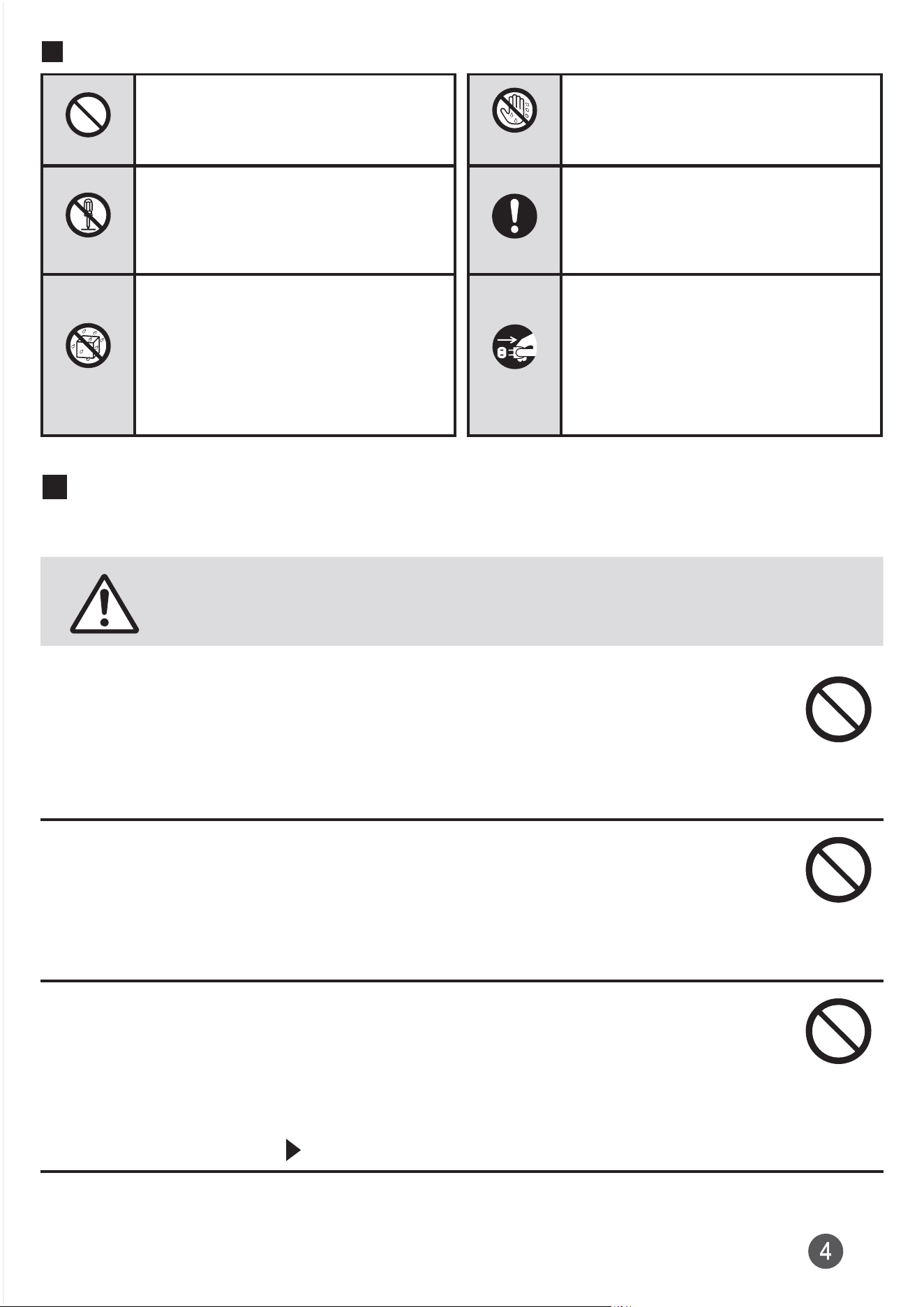
Don't
Indicates an action that is
not allowed.
No wet
hands
Indicates that handling with
wet hands is not allowed.
No disassembly
Indicates that disassembly
is not allowed.
Do
Indicates compulsory
actions in accordance with
instructions.
No liquids
Indicates that use in a
place where the product is
likely to get wet or allowing
the product to get wet is
not allowed.
Unplug
Indicates that the power
plug must be disconnected
from an outlet.
Precautions common to the main unit, internal battery,
charging equipment, SIM card, peripheral devices
Danger
Be sure to read the following hazards
before use.
Do not use, store or leave the equipment in a location where it is
subject to high temperature or accumulation of heat (e.g. by the
fire, near a heater, under a kotatsu or bedding, in direct sunlight,
in a car in the hot sun).
Doing so might cause fire, burns, injury, electric shock, etc.
Do not put the equipment in cooking appliances such as
microwave ovens, IH cooking heaters, or high pressure
containers such as pressure cookers. Do not place the equipment
near such cooking appliances.
Doing so might cause fire, burns, injury, electric shock, etc.
Do not splash sand, soil or mud, or do not directly place the
equipment on it. Also, do not touch the equipment with hands
with sand etc. adhered.
Doing so might cause fire, burns, injury, electric shock, etc.
For waterproofness/dustproofness, refer to "Notes on waterproof and
dustproof properties" ( P. 27).
Do not charge the equipment when it is wet with liquids such as
water (drinking water, sweat, seawater, urine of pet animals, etc.).
Also, do not charge the equipment in a place where water comes
in contact such as bathroom.
Doing so might cause fire, burns, injury, electric shock, etc.
For waterproofness, refer to "Notes on waterproof and dustproof
properties" ( P. 27).
Do not subject the product to strong pressure or break the
product. Especially when bringing the product putting in a pocket
of clothes, do not let the product hit against surroundings or
being put between the objects.
Doing so may cause fire, burns, injury, etc. due to damage of the
internal battery.
*The following are examples that you should be careful of:
•
Sitting or squatting with the product put in a pocket of trousers or skirt
•
Putting the product in a pocket of outer wear and catching them in a
door or a door of car
•
Stepping on the product on a soft object such as a sofa, bed or
bedding, or on a floor
•
Putting the product into a seat of train or bus
Do not disassemble or modify the equipment.
Doing so might cause fire, burns, injury, electric shock, etc.
Do not try to remove the internal battery from the product.
Doing so might cause fire, burns, injury, etc.
The back cover cannot be removed. Do not try to remove it from
the product.
Doing so might cause fire, burns, injury, etc.
Do not let the equipment get wet with liquids such as water
(drinking water, sweat, seawater, urine of pet animals, etc.).
Doing so might cause fire, burns, injury, electric shock, etc.
For waterproofness, refer to "Notes on waterproof and dustproof
properties" ( P. 27).
Do not allow liquids such as water (drinking water, sweat,
seawater, urine of pet animals, etc.) to get inside the charging
terminal, the USB Type-C™ connection terminal, or the headset
connection terminal.
Doing so might cause fire, burns, injury, electric shock, etc.
For waterproofness, refer to "Notes on waterproof and dustproof
properties" ( P. 27).
Use only optional parts specified by the Company for the product.
Using devices other than specified might cause fire, burns, injury,
electric shock, etc.
Warning
Be sure to read the following warnings
before use.
Do not subject the equipment to strong force, impacts, or
vibration such as letting it fall, stepping on it or throwing it.
Doing so might cause fire, burns, injury, electric shock, etc.
Do not allow conductive materials (such as metal objects and
pencil lead) to come into contact with the charging terminal, the
USB Type-C connection terminal, or the headset connection
terminal, or allow dust to get inside of it.
Doing so might cause fire, burns, injury, electric shock, etc.
Do not cover or wrap the equipment with a cloth or bedding in
use or while charging.
Doing so might cause fire, burns, etc.
If charging does not finish after specified time, stop charging.
Failure to do so might cause fire, burns, injury, etc. due to overcharge
etc.
Always turn off the product before you enter a place where
flammable gas may be present, or a place where dusts are
generated. Stop charging the product if you are charging it.
Ignition of flammable gas might cause explosion, fire, etc.
Follow the instructions of a gas station or other such location
before using the product there.
Do not charge the product at a gas station, etc.
Take care not to drop the product at a gas station, etc.; in particular,
do not use the product while filling.
Ignition of flammable gas might cause explosion, fire, etc.
If you notice anything unusual about the equipment such as an
unusual odor, abnormal noise, smoke generation, overheating,
discoloration or deformation during operation, charging or
storage, perform the following measures carefully.
•
Remove the power plug from an outlet
•
Turn off the power of the product
Failure to do so might cause fire, burns, injury, electric shock, etc.
Caution
Be sure to read the following cautions
before use.
Do not use damaged product or peripheral devices.
Doing so might cause fire, burns, injury, etc.
Do not place the product on an unstable or inclined platform. Be
careful especially when vibrator is set.
The product might fall and cause injury etc.
Do not use or keep in a place that is very humid, dusty, or subject
to high temperature.
Doing so might cause fire, burns, electric shock, etc.
For waterproofness/dustproofness, refer to "Notes on waterproof and
dustproof properties" ( P. 27).
If children use the product, parents or guardians should give
them proper instructions and do not allow them to use the
product in the wrong way.
Use of the product in the wrong way might cause accidental
ingestion, injury, electric shock, etc.
Keep the equipment out of the reach of babies and infants.
In particular, be careful where small parts are stored, such as the
microSD memory card/SIM card tray.
Failure to do so might cause accidental ingestion, injury, electric
shock, etc.
Be careful about the temperature when using the product
continuously or while charging because it might become warm.
Also, be careful not to keep touching it unintentionally in a pocket
of clothes, when you fall asleep, etc.
The product or the specified charging equipment (sold separately)
might become warm when using an app, a call, data communication,
watching video etc. continuously or while charging. If you are directly
in contact with warmed part continuously, it might cause a redness of
skin, itch, rash, low-temperature burn, etc. depending on your
physical condition.
Main unit
Danger
Be sure to read the following hazards
before use.
Do not throw the product into fire or apply heat.
Doing so might cause fire, burns, injury, etc.
Do not put excessive force such as sticking with a sharp object
(nail etc.), hitting with a hard object (hammer etc.), or stepping on it.
Doing so might cause fire, burns, injury, etc.
If the internal substance of the product contacts your eyes or
mouth, immediately rinse the eyes or mouth with clean water and
then see a doctor right away.
The effects of the internal substance of the product might cause
blindness, medical problem, etc.
Warning
Be sure to read the following warnings
before use.
Do not turn on the light with the lighting luminescence part close to
the other's eyes. Keep enough distance away especially from babies.
Doing so might cause blurred vision etc. Also an accident such as
injury might occur if he or she is dazzled or frightened.
Do not turn on or flash the light toward a driver of a car etc.
Doing so might disturb driving and cause an accident etc.
Do not look at a repeatedly-blinking screen for a long time.
Doing so might cause cramp, loss of consciousness, etc.
Do not allow liquids such as water (drinking water, sweat,
seawater, urine of pet animals, etc.), metal parts, or flammable
objects to enter to the microSD memory card/SIM card slot of the
product.
Do not set a microSD memory card or SIM card in wrong
insertion, or insert it in wrong orientation.
Doing so might cause fire, burns, injury, electric shock, etc.
Do not expose the camera lens to direct sunlight for a long time.
Doing so might cause fire, burns, injury, etc. due to light-collecting
mechanism of lens.
Power off the product or put it in Airplane mode before boarding
an airplane.
Use of mobile phones on board is restricted. Follow the instructions of
each airline.
The radio waves from the product might adversely affect on-board
electronic equipment.
Prohibited acts related to mobile phone usage on an airplane might
be punished by law.
Follow the instructions of each medical facility for the use of
mobile phones on their premises.
Power off the product in a place where the use is prohibited.
The radio waves from the product might affect electronic equipment
and electronic medical equipment.
Always keep the product away from your ear when you call
handsfree, while sounding the ringtone loudly, or during stand-by.
Also, when you play game, play back videos, music, etc.
connecting the earphone/microphone, etc. to the product, adjust
the volume adequately.
Loud sound is emitted from the product when calling with hands-free set.
Even in standby mode, a ringtone or an alarm sound may sound
suddenly.
Listening to loud sound for long hours continuously may cause a
disability of ears such as deafness.
Moreover, too loud sound makes you barely hear the surrounding
sounds and may cause an accident.
If you have a weak heart, set the vibrator or ringtone volume
carefully.
Sudden vibration or ringtone sounding when for incoming call
astonishes you and it may affect your heart.
If you are wearing any electronic medical equipment, check with
the relevant medical electronic equipment manufacturer or
vendor whether the operation might be affected by radio waves.
The radio waves from the product might affect electronic medical
equipment.
Power off the product near electronic devices or equipment
operating on high precision control or weak signals.
The radio waves from the product might interfere with the operation of
electronic devices or equipment.
* The following are some electronic devices or equipment that you
should be careful of:
Hearing aids, implantable cardiac pacemaker, implantable cardioverter
defibrillator, other electronic medical equipment, and other automatically
controlled devices or equipment. If you use an implantable cardiac
pacemaker, implantable cardioverter defibrillator, or other electronic medical
equipment, check with the medical electronic equipment manufacturer or
vendor whether the operation can be affected by radio waves.
Be careful about broken parts or exposed internal part of the
product when the display, back cover, or the camera lens is
broken.
Touching damaged or exposed part might cause burns, injury,
electric shock, etc.
If the internal battery leaks or gives off a strange smell,
immediately stop using and remove it from the vicinity of open
flames.
The leaking liquid might ignite, catch fire, explode, etc.
Be careful not to allow a pet etc. to bite the product.
Doing so might cause fire, burns, injury, etc. because of ignition,
burst, heat or leaking of the internal battery.
Caution
Be sure to read the following cautions
before use.
When using the motion sensor, check the safety around you, hold
the product firmly, and do not shake it unnecessarily.
Failure to do so might cause an accident such as injury.
If the display is damaged and when the internal substance etc.
leaks out, do not allow it to contact your skin such as face and
hands, clothes, etc.
Doing so might cause injury etc. on your eyes or skin.
If the internal substance gets into your eyes, mouth, etc. or contacts
your skin or clothes, immediately rinse with clean water.
In the case of getting into your eyes, mouth, etc., immediately consult
a doctor after rinsing.
Do not discard the product together with other garbage.
Doing so might cause fire, burns, injury, etc. Also, it might cause
environmental destruction. When the product is no longer used,
dispose of it according to a recycling program of your local
municipality.
If the substance leaks out from the internal battery, do not allow
the fluid to contact with your skin of face, hands, clothes, etc.
Doing so might cause injury etc. on your eyes or skin.
If the internal substance gets into your eyes, mouth, etc. or contacts
your skin or clothes, immediately rinse with clean water.
In the case of getting into your eyes, mouth, etc., immediately consult
a doctor after rinsing.
For using the product in a car, check with the automobile
manufacturer or dealer for the effects by radio waves before
using.
Depending on vehicle model, the radio waves from the product may
affect the vehicle's electronic equipment to malfunction. In that case,
stop using the product immediately.
If any skin abnormality develops due to the use of the product,
immediately stop using the product, and consult a doctor.
Depending on your physical constitution or health, itchiness, a rash,
eczema, etc. might develop.
See "Material list" ( P. 18) for materials used in each part of the
product.
Magnetic components are used in the product's earpiece (center
top), speaker (bottom left on back), and vibrator (bottom right on
back); make sure no metal objects (cutter blade, staple, etc.) are
attached to the product.
Attached objects might cause injury, etc.
Do not leave the main unit in the reach of children or persons
requiring supervision.
The product uses magnets. If swallowed, there is a risk of choking or
serious harm to internal organs.
If the magnet has been swallowed, immediately consult a doctor.
Do not bring the main unit near medical devices.
The product uses magnets; they may affect pacemakers, variable-
pressure hydrocephalus shunts, and other medical devices. Do not
bring the product near persons using these devices. If you use such a
device, consult your doctor before using the product.
Watch the display in an adequately bright place taking a certain
distance from it.
Watching in a dark place or closely might reduce visual acuity etc.
Charging equipment
Warning
Be sure to read the following warnings
before use.
Do not use the specified charging equipment (sold separately) if
the cable is damaged.
Doing so might cause fire, burns, electric shock, etc.
If you hear thunder, do not touch the specified charging
equipment (sold separately).
Doing so might cause electric shock etc.
Do not short-circuit the charging terminal while it is connected to
an outlet. Do not touch the charging terminal with your hands,
fingers, or any part of your body.
Doing so might cause fire, burns, electric shock, etc.
Do not place heavy objects on a cable of the specified charging
equipment (sold separately), or do not apply unreasonable force
to the cable such as pulling.
Doing so might cause fire, burns, electric shock, etc.
Do not contact metal objects to the specified charging equipment
(sold separately) when connecting the plug to or disconnecting it
from an outlet.
Doing so might cause fire, burns, electric shock, etc.
Do not connect the voltage converter (such as a travel converter
for overseas travel) to the specified charging equipment (sold
separately).
Doing so might cause ignition, overheating, electric shock, etc.
Do not put an excessive force to the connection part with the
specified charging equipment (sold separately) connected to the
product.
Doing so might cause fire, burns, injury, electric shock, etc.
Never connect the USB Type-C plug to the product or the
specified charging equipment (sold separately) when it is wet.
Although the product has the waterproof property, inserting USB
Type-C plug to the product when it is wet might cause electric shock
or short-circuit due to the moisture or foreign substance on the
product or USB Type-C plug, or might cause abnormal overheating,
fire damage, fire, burns, or a fault if corrosion occurs.
Do not touch the cable, charging terminals or power plug of the
specified charging equipment (sold separately) with wet hands.
Doing so might cause fire, burns, electric shock, etc.
Use the adapter only on the specified power supply and voltage.
When charging the battery overseas, use AC adapter that can be
used overseas (sold separately).
Using the incorrect power supply and voltage might cause fire, burns,
electric shock, etc.
AC adapter (sold separately): 100V AC (Connect to the AC outlet for
internal household use)
AC adapter (sold separately) that can be used overseas: 100V AC to
240V AC (Connect to the AC outlet for internal household use)
Clean dust from the power plug.
Using it with dust adhered might cause fire, burns, electric shock, etc.
Firmly insert the specified charging equipment (sold separately)
into an outlet.
Insecure inserting might cause fire, burns, electric shock, etc.
When you disconnect a power plug of the specified charging
equipment (sold separately) from an outlet, do not apply
excessive force to it such as pulling the cable. Instead, hold the
adapter main unit to disconnect.
Pulling the cable of the specified charging equipment (sold
separately) might damage the cable causing fire, burns, electric
shock, etc.
When plugging/unplugging the specified charging equipment
(sold separately) into/from the product, plug/unplug it straight
toward the product without applying excessive force such as
pulling the cable.
Incorrect plugging/unplugging might cause fire, burns, injury, electric
shock, etc.
If the charging terminal is deformed such as being bent, stop
using immediately. Do not use it with the deformation restored.
Doing so might cause fire, burns, injury, etc. due to short-circuit of the
charging terminal.
Always remove the power plug from an outlet when not using it.
Keeping it plugged in might cause fire, burns, electric shock, etc.
Immediately remove the power plug from an outlet if liquids such
as water (drinking water, sweat, seawater, urine of pet animals,
etc.) get adhered.
Failure to do so might cause fire, burns, electric shock, etc. due to
short-circuit by adhered object etc.
Before cleaning, remove the power plug from an outlet.
Failure to do so might cause fire, burns, electric shock, etc.
Caution
Be sure to read the following cautions
before use.
Do not touch the specified charging equipment (sold separately)
continuously when it is connected to an outlet.
Doing so might cause a burn etc.
SIM card
Caution
Be sure to read the following cautions
before use.
Be careful of the cut surface not to hurt your fingers etc. when
handling SIM card.
The cut surface may be sharp, and it might cause injury.
Using near medical equipment or in healthcare facilities
Warning
Be sure to read the following warnings
before use.
If you wear electronic medical equipment such as an implantable
cardiac pacemaker or an implantable cardioverter defibrillator,
carry or use the product 15 cm or more away from the implant at
all times.
The radio waves from the product might have harmful effects on the
operation of the electronic medical equipment.
If you need to use electronic medical equipment other than
implantable cardiac pacemakers or implantable cardioverter-
defibrillators outside medical facilities such as treating at home,
consult the relevant medical electronic equipment manufacturer
for effects on the equipment by radio waves.
The radio waves from the product might have harmful effects on the
operation of the electronic medical equipment.
If there is any chance that the distance between the product and a
person closest to you might get shorter than 15 cm such as when
you cannot freely move around, set the product not to emit radio
wave in advance (Airplane mode, power off, etc.).
A person in close proximity to you might wear electronic medical
equipment such as an implantable cardiac pacemaker or an
implantable cardioverter defibrillator. The radio waves from the
product might have harmful effects on the operation of the electronic
medical equipment.
Follow the instructions given by the respective medical facility
regarding use of the product on their premises.
The radio waves from the product might have harmful effects on the
operation of the electronic medical equipment.
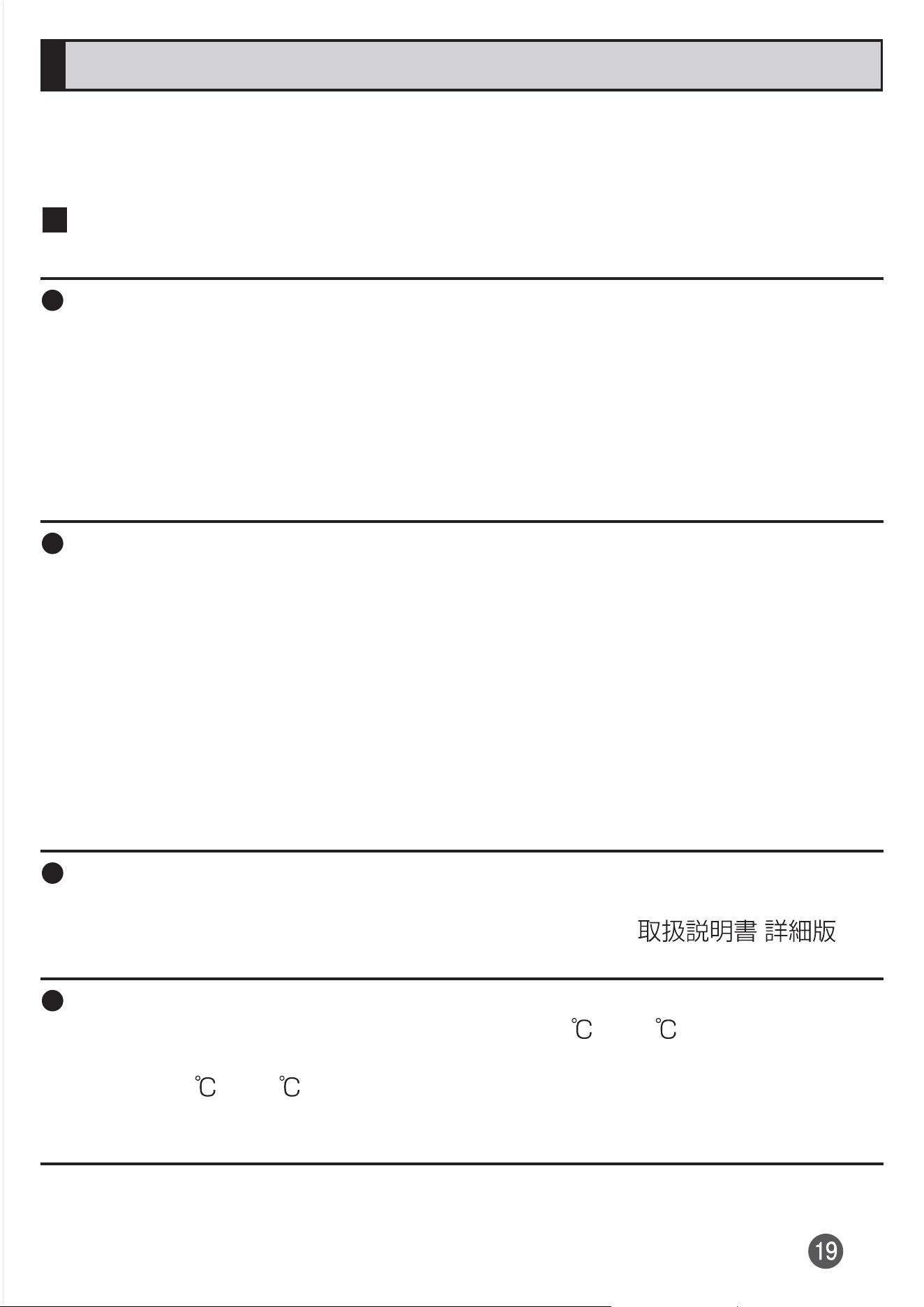
Material list
Main unit
Part Material Surface
treatment
Exterior case (top part, bottom
part, side part)
Nylon resin (with
glass fiber)
Coating
Exterior case (Volume key/Zoom
key, Google Assistant key)
Polycarbonate resin Coating
Exterior case (cover of microSD
memory card/SIM card slot)
Polycarbonate resin
(with glass fiber)
Coating
Exterior case (Camera ring
(peripheral part of main camera))
Aluminum alloy Alumite
treatment
Transparent plate (Display, Back
cover)
Hardened glass AFP treatment
Transparent plate (Camera lens) Hardened glass AFP treatment
+ AR treatment
Power key/Fingerprint sensor Epoxy resin Coating
Earpiece mesh PET
Speaker mesh Polycarbonate resin
Rubber packing on the cover of
microSD memory card/SIM card
slot
Silicon rubber
Tray of microSD memory card/SIM
card
Polycarbonate resin
(with glass fiber) +
SUS plate
PVD treatment
Handling precautions
These precautions are provided to prevent the product from damage and
ensure that performance can be fully demonstrated.
Thoroughly read these precautions to ensure correct use.
Precautions common to the main unit, internal battery,
charging equipment, SIM card, peripheral devices
Do not apply excessive force to the product during use. Be sure not to put
the product into a tightly packed bag or place a heavy object on the
product in a bag. Sitting on the product in your pocket might damage the
display or internal circuit board or cause a malfunction.
Keeping an external device connected to the USB Type-C connection
terminal or headset connection terminal might cause damage of the
connector or a malfunction. Such damage and malfunction are not covered
by the warranty, even if there is no external damage.
To ensure waterproof property (equivalent to IPX5 and IPX8) of the product,
use with the cover of microSD memory card/SIM card slot tightly closed.
Note that the waterproof property is not guaranteed in every usage
condition.
Do not allow water to get inside of the product or splash water on the
specified charging equipment (sold separately) or optional accessories. Do
not open or close the cover of microSD memory card/SIM card slot in the
rain or with water droplets on the surface of the product. Doing so might
cause water intrusion resulting in internal corrosion.
Malfunctions determined to be caused by water intrusion are not covered
by the warranty.
Waterproof/dustproof performance might not be maintained if the product
has an outward abnormality such as damage or deformation. In that case,
make an inquiry to the contact on the back cover of "
(Full Instruction Manual)" (Japanese).
For the following products, do not use them in extremely hot, cold or humid places
.
(Use within an ambient temperature range of 5 to 35 and humidity
range of 35% to 85%. However, temporary use at an ambient temperature
range of 36 to 40 and humidity range of 86% to 90 % is allowed.)
•
Xperia 10 III main unit
•
SIM card (attached to Xperia 10 III main unit)
For the following products, do not use them in extremely hot, cold or humid places
.
(Use within an ambient temperature range of 5 to 35 and humidity
range of 35% to 85%.)
•
Charging equipment
•
Peripheral devices
Do not use in places subject to lots of dust or vibration. Doing so might
cause a malfunction.
Clean the USB Type-C connection terminal and headset connection
terminal with dry cotton swabs etc. every now and then. Soiled terminals
might cause poor connection. Do not exert strong force to clean the USB
Type-C connection terminal and headset connection terminal to prevent
deformation.
Clean the product with a soft dry cloth (e.g. wiping cloth for eyeglasses).
Forceful rubbing with a dry cloth might scratch the display. The display
might be stained if splash or smear is left attached to the surface. Wiping
the product using alcohol, thinner, benzene, detergent, glass cleaner, etc.
might erase the printing on the exterior case or cause a malfunction.
Use as far away as possible from land-line phones, TVs and radios. Use of
the product nearby might affect them.
The product might become warm while talking, charging or during other
operations, depending on the situation, but this is not abnormal.
Do not place near corrosive chemicals or in places where corrosive gas is
generated. Doing so might cause a malfunction.
Do not use outside when you can hear thunder. Doing so might risk
lightning strikes and electric shock.
Be sure to use only the specified peripheral devices. Use of other
peripheral devices might cause a malfunction.
Do not put the product in a cooking apparatus such as microwave oven or
a pressure vessel. Doing so might cause a malfunction.
The customer is not allowed to disassemble, modify or repair the product.
Doing so might cause a malfunction. Modification of the product is in
violation of the Radio Law and Telecommunications Business Act.
Do not allow a part of your body such as finger or conductive foreign
objects (metal fragments, pencil leads, etc.) to come into contact with or to
enter the USB Type-C connection terminal or headset connection terminal.
Doing so might cause a malfunction.
In the event that the product gets wet while charging, immediately
disconnect the plug of the specified charging equipment (sold separately).
Do not use the product while driving an automobile or motorized bicycle,
riding a bicycle or walking. Use of a mobile phone while driving a car or
motorbike is prohibited by law. Use of a mobile phone while riding a bicycle
might be punishable by some regulations.
Using or charging the product in a bag or when it is covered with bedding
might cause a malfunction.
When using the specified charging equipment (sold separately) or an
external device, insert/remove the connector straight to/from the terminal.
Make sure the orientation of the connector is correct. Unless it is correct, it
might cause a malfunction.
Do not expose the camera lens to direct sunlight for an extended period.
Doing so might cause a malfunction.
Do not use, store, and leave the product in places subject to direct sunlight
(e.g. in automobiles), places that get hot, places that get extremely cold,
and in humid or dusty places. Doing so might cause a malfunction.
Do not place the product on an unstable or inclined platform. Be careful
especially while charging or when vibrator is set. The product might fall and
cause a malfunction etc.
Do not exceed the rating of outlet or wiring device when charging the
product, for example, by starburst connection etc.
Main unit
Since the battery is built into the product, you cannot replace it yourself. For
replacing the battery, contact " (For inquiries)" on "
(Full Instruction Manual)" (Japanese).
Do not forcefully press, tap or intentionally subject the display to strong
impact. Doing so might cause scratching or damage.
Do not forcefully press the keys or display surface with your fingernails or
hard objects. Doing so might cause scratching or damage of the keys or
display.
Do not use a remodeled product. Use of a modified device violates the
Radio Law and Telecommunications Business Act.
The product is compliant with rules on the technical standard conformance
of specified wireless equipment based on the Radio Law/
Telecommunications Business Act, and as a proof of it, the "Technical
Compliance Mark " can be checked with the product.
Checking procedure: In the Home screen, slide the screen up
[Settings] [About phone] [Certificates]
If modifications of the internal components of the product are made, the
certification of conformity with the technical standard conformance etc.
becomes invalid. Do not use the product with the certification invalid, as it
is a violation of the Radio Law and Telecommunications Business Act.
Take care not to place magnetized items such as magnetic cards,
speakers and TV sets near the product, as it might cause a malfunction.
Putting a strong magnetism close to the product might cause a false
operation.
Do not bring magnetized cards such as cash cards, credit cards and
prepaid cards closer to the product. It might cause loss of the recorded
data.
When you put the product in your pocket or bag, take care that the display
does not come in contact with metal objects or other hard objects, as it
might cause a scratch or damage. Take care with using a strap whose
member is a hard material such as metal because it can touch the display
and may cause scratch or damage.
When suddenly brought into a warm place from a cold place, or when used
in a humid location or in a place where temperature suddenly changes
(e.g. near the air discharge port of an air conditioner), water droplets (i.e.
condensation) may be formed inside of the product. Note that when used
under such conditions, the humidity might cause corrosion or a
malfunction.
While writing or reading data to or from a microSD memory card, do not
subject the product to vibration or impact, or turn off the power. Doing so
might cause loss of data or a malfunction.
Do not cover the proximity/light sensor with your finger or put a sticker on it.
Doing so might hinder the proximity/light sensor from detecting the ambient
brightness and functioning correctly.
Do not put a sticker, etc. on the proximity/light sensor. Doing so might
cause a malfunction on the sensor and make the display always turned off
while receiving a call or during a call.
Usually use the product with the cover of microSD memory card/SIM card
slot firmly closed. If the cover is open, dirt or water might get inside and
cause a malfunction.
Do not allow liquids, metal and other foreign objects to get inside the USB
Type-C connection terminal, headset connection terminal, microSD
memory card/SIM card slot, earpiece, mouthpiece/microphone, speaker,
second microphone, etc.
Doing so might cause a malfunction.
Do not give strong impact on the product such as dropping, throwing,
stomping. Doing so might cause a malfunction.
Do not put the product directly on sand at a beach etc. Sand or other small
particles might get inside the earpiece, mouthpiece/microphone, speaker,
or second microphone causing the volume to drop. If sand gets inside the
product, it might cause a malfunction.
To prevent possible hearing damage, do not listen at high volume
levels for long periods.
Display (Touch Panel)
The touch panel is designed to be lightly touched by fingers. Do not apply
strong pressure with your fingers or sharp-pointed objects (such as
fingernails, ballpoint pens and pins) to the touch panel.
In the following cases, the touch panel might not respond. Also, it may
cause malfunction.
•
Operation with gloves
•
Operation with fingernails
•
Operation with foreign object on the touch panel
•
Operation with protective sheet or seal on the touch panel
•
Operates when the display is wet with water droplet or fogged
•
Operation with wet or sweaty fingers
•
Operation under water
Putting stickers or sheets (e.g. commercially available protective films,
peep prevention sheets) on the display might hinder correct operation of
the touch panel.
When carrying the product in your pocket or bag, take care not to put the
touch panel close to metals or other conductive materials, as it might cause
false operation of the touch panel.
Organic EL display
Organic EL display may have partially dark part or the colors may be
changed if a same image has been displayed for a long time, or the
brightness of backlight is set to too bright, or it has been used for a
extremely long time. That is due to property of organic EL display and not a
malfunction.
Organic EL display is made with extremely advanced technology and it
may have slightly missing pixels or pixels which are always lit. Also, it may
have unevenness of color streak or brightness, or color change depending
on direction you're looking. That is due to structure of organic EL display
and not a malfunction. Please be forewarned.
Subjecting an organic EL display to direct sunlight may cause a
malfunction. Take care when placing at the window or outdoor.
Internal battery
(The internal battery of the product is a lithium-ion battery)
The internal battery is not fully charged at the time of
purchase. Charge the internal battery before using the
product. Charge the internal battery if you have not used the
product for a long time.
Use in very hot or cold environments, for example, when left in an
automobile with the windows closed in summer, will cause the internal
battery capacity to drop and shorten the available usage time. This will also
shorten the internal battery's service life. Try to use the product as far as
possible at room temperature.
The internal battery gradually discharges after charging even if the product
is not used. The internal battery might discharge completely after long time
no use. Charge before using.
The internal battery is a consumable part. If the performance of a battery
does not recover (e.g. the usable time after each charge has become
extremely short), the battery is at the end of service life, so stop use.
Battery is built into the product. For replacement, contact "
(For inquiries)" on " (Full Instruction Manual)" (Japanese).
And you might not use the product during certain period of time. Please be
forewarned. Note that the length of service life varies depending on the
usage condition etc.
The internal battery sometimes swells up as they approach the end of its
service life. This is due to the properties of lithium-ion batteries, and is not a
problem in terms of safety.
Charging equipment
Do not wrap the cable of the specified charging equipment (sold
separately) around the adapter itself. Do not bend the joint of the plug or
connector and the cable of the specified charging equipment (sold
separately) forcibly. Do not place heavy objects on an adapter or cable, or
do not apply unreasonable force such as pulling. Doing so might cause a
malfunction.
When unplugging the plug of the specified charging equipment (sold
separately) from the outlet, hold and pull the power plug. If you pull the
cable, the cable might be damaged.
Li-ion 00
SIM card
Do not forcibly remove or insert SIM card. Be careful not to exert excessive
force when inserting the card into your phone.
You are responsible for any damage caused by inserting your SIM card into
other IC card reader/writer etc.
Do not put stickers etc. on the SIM card.
Do not insert SIM card with conversion adapter attached. Doing so might
cause a malfunction.
Do not damage the card by using the product in a hot place, dropping into
fire, contacting to the metal parts with foreign object, giving an impact,
bending, applying load, wetting, etc. Doing so might cause loss of data or
a malfunction.
Camera
When photographing important occasions etc., take a trial shot and check
the shot image to make sure it is correctly shot.
Do not shoot in a place where shooting is prohibited.
Copyrights and rights of portrait
You are not allowed to copy, distribute, publish, modify or edit the data you
shot, recorded or downloaded using the product without consent of the
copyright holder, except for personal use such as copying or quoting
where provided for under the copyright law. In addition, do not use or
modify portraits or names of other individuals without the consent, as it
might infringe on rights of portrait. Note that shooting and recording might
be restricted at some live performances, shows and exhibitions even for
personal use.
Be careful about the copyright and portrait right when posting photos you
shot etc. on Internet homepages.
Backup content on the product
Please back up important content recorded to the product or downloaded
to the product from an outside source. Content recorded to memory on the
product sometimes disappears or is altered by unexpected factors, such
as static electricity or a fault, repair, mishandling, etc.
Notes on waterproof and dustproof properties
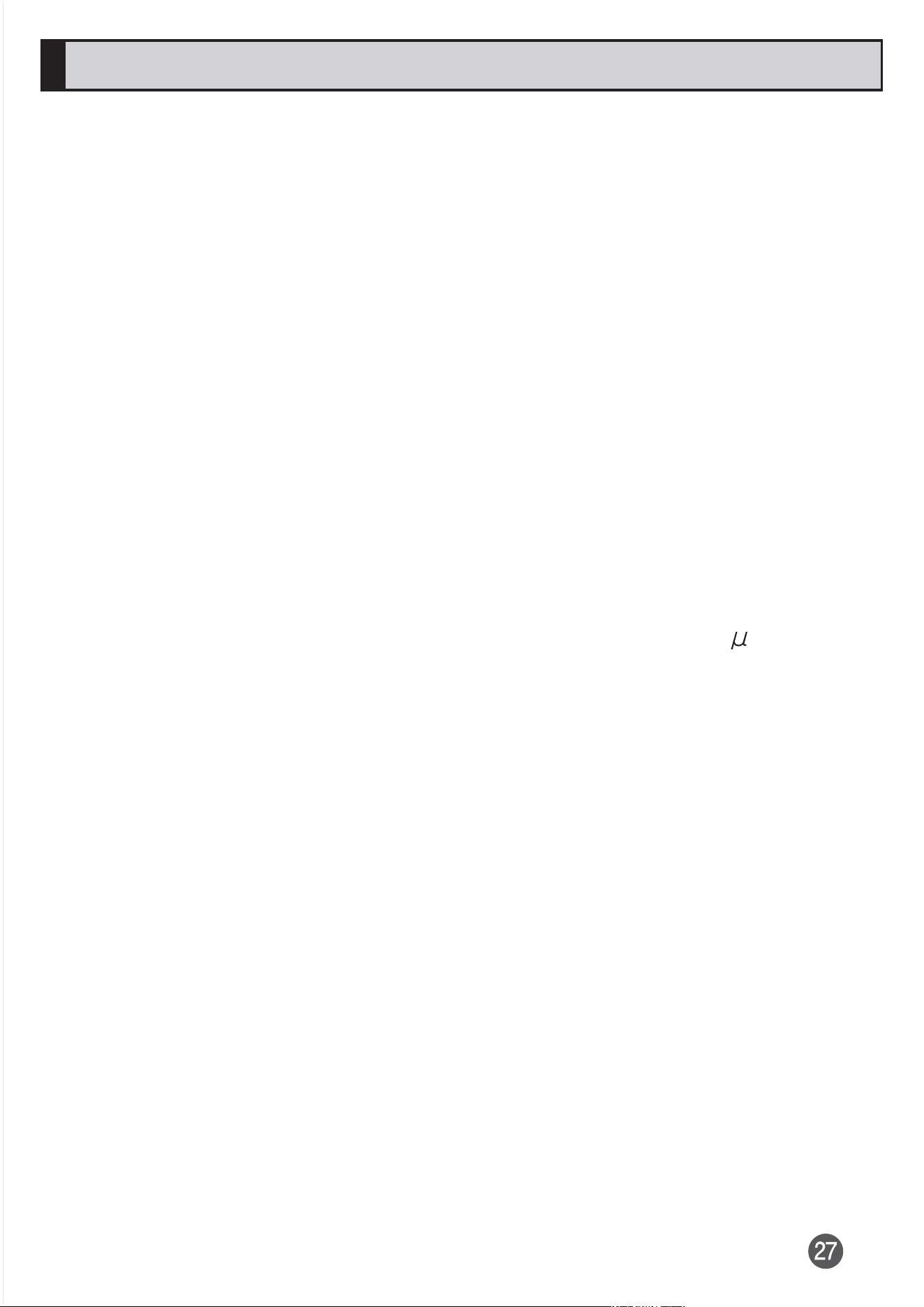
The product has a waterproof property equivalent to JIS waterproof grade (JIS
C 0920) IPX5
*1
and IPX8
*2
, as well as a dustproof property equivalent to JIS
dustproof grade IP6X
*3
on the condition that the cover of microSD memory
card/SIM card slot is securely attached (based on in-house testing).
Before using the product, thoroughly read "Important items to remember
before use" to ensure correct use. Failure to follow the contents described in
the sections might cause intrusion of water, sand or other foreign material,
resulting in overheating, ignition, electric shock, injury or a malfunction.
*1
IPX5 equivalent means that the product will maintain its operability as a
phone even if it is sprayed with water from a 6.3 mm diameter nozzle at a
distance of about 3 meters for more than 3 minutes at a rate of about 12.5
liters per minute from any direction.
*2
IPX8 equivalent means that the product will maintain its operability as a
phone with no water getting inside the main unit even if it is gently
submerged in a tank of still tap water at room temperature to a depth of 1.5
meter for about 30 minutes.
*3
IP6X equivalent means that the product will securely maintain its function
of no grit and dust getting inside the main unit even after it has been
placed in an apparatus with grit and dust of diameters of 75 m or less
and shaken for 8 hours.
Since operation of the product on each usage scene was confirmed based on
the above assumption, proper operation of the product in every possible
condition during actual use is not guaranteed. Malfunctions determined to be
caused by mishandling by the customer are not covered by the warranty.

Important items to remember before use
•
Make sure that the cover of microSD memory card/SIM card slot is firmly
closed. Waterproofness/dustproofness is only effective when the cover is
securely closed.
•
Do not open or close the cover of microSD memory card/SIM card slot if the
product or your hands are wet.
•
Do not sink the product in liquids other than tap water (seawater, pool water,
water of hot spring, water with soap, detergent or bath salt contained,
alcohol, juice, seasonings, etc.) or do not splash such liquid to the product.
Also, do not use in a place where urine of pet animal is splashed. If it is
splashed on the product, immediately wash the product with tap water.
•
Do not put the product directly on sand at a beach etc. Sand or other small
particles might get inside the earpiece, mouthpiece/microphone, speaker, or
second microphone causing the volume to drop. If sand gets inside of the
main unit, it might cause overheating or a malfunction.
•
Do not use the product underwater.
•
Do not leave the product in a humid place such as a bathroom or kitchen for
an extended period of time.
•
Even after draining, water might remain on the product. Although you can
use the product, do not place it near things that must not get wet. Also, take
care not to wet your clothes, bag, etc.
•
Drain water if it becomes temporarily hard to hear the sound due to water
remaining in the earpiece, mouthpiece/microphone, speaker, or second
microphone.
•
Do not spray the product with high-pressure water or submerge it in water
for extended periods of time, as the product is not designed to withstand
high water pressure.
•
Do not wash the product in a washing machine or ultrasound bath.
•
Do not immerse the product into a bathtub. The product is not resistant to
high temperatures.
•
Extreme changes in temperature generates condensation causing a
malfunction. Wait until the main unit reaches room temperature before you
bring the product from a cold place into a warm bathroom.
•
The product does not float on water.
Cover of microSD memory card/SIM card slot
•
Make sure that the cover of microSD memory card/SIM card slot is firmly
closed. Just a small particle (a hair etc.) between contact surfaces can
cause water intrusion or dust penetration.
•
Do not open or close the cover of microSD memory card/SIM card slot with
gloved hands. Just a small particle (a hair etc.) between the contact surfaces
can cause water intrusion or dust penetration. Wipe off any minuscule droplets
of water or dirt with a clean dry cloth before closing the cover
.
•
If the cover of microSD memory card/SIM card slot is deteriorated or
damaged, the waterproof/dustproof property becomes ineffective.
•
For details on how to close the microSD memory card/SIM card slot cover,
refer to " (Full instruction manual)" (Japanese).
If any liquid other than plain water is adhered to the
product
•
If any liquid other than plain water (e.g. seawater, detergent, alcohol, juices)
is adhered to the product, immediately rinse it with plain water.
•
You can wash the product under a mild flow (less than 6 liters per minute) of
tap water at room temperature (5 to 35 ) at a distance of about 10 cm
from the faucet or shower head.
•
If the product gets dirty, wash it with your hands holding the microSD memory
card/SIM card slot cover so that they do not open. Do not use a brush.
After the product gets wet
•
After the product gets wet, drain water, and wipe with a clean dry cloth.
•
In cold climates, water on the product might turn to frost. Using with frosted
might cause a malfunction. Do not leave the product without wiping off water.
Rubber seals
•
The rubber seal on the inner edges of the cover of microSD memory card/
SIM card slot is important to maintain waterproof/dustproof property. Do not
damage or remove the rubber seals.
•
When closing the cover of microSD memory card/SIM card slot, take care
not to get the rubber seal caught. Forcibly closing the cover with the rubber
seals caught might damage them resulting in loss of waterproof/dustproof
property. Just a small particle (a hair etc.) between contact surfaces can
cause water intrusion or dust penetration.
•
If any liquid other than plain water (e.g. alcohol) is adhered to the rubber
seals, it might cause deterioration in durability.
•
Do not insert sharp objects into grooves around the cover of microSD
memory card/SIM card slot. Doing so might damage or deform the product,
damage the rubber seals, etc. causing water intrusion or dust penetration.
Replacing parts
•
It is recommended to replace the parts for maintaining waterproof/dustproof
property once every two years regardless of whether any abnormality is
present. For information on part replacement, contact " (For
inquiries)" on " (Full Instruction Manual)" (Japanese).
Heat resistance
•
Do not sink the product into boiling hot water or do not splash with boiling
hot water to the product. Also, do not use the product in saunas or do not
expose the product to fiery winds from hair dryer etc. the product is not
resistant to high temperatures.
Shock
•
The product is not resistant to shock. Do not drop the product or subject it to
shock. Also, do not poke the earpiece, mouthpiece/microphone, speaker,
second microphone, USB Type-C connection terminal, or headset
connection terminal, etc. with a sharp object. Doing so might damage or
deform the main unit causing water intrusion or dust penetration.
Precautions on charging
The optional accessories are not waterproof/dustproof. Check the following
before and after charging.
•
Never charge the battery if the product is wet. Doing so might cause fire,
burns, injury, electric shock, etc.
•
Check that the product is not wet. If you are charging the battery just after
the product gets wet, drain water well and wipe the remaining water off with
a clean dry cloth.
•
Do not touch the specified charging equipment (sold separately) with wet
hands. Doing so might cause electric shock.
•
Do not splash water over the specified charging equipment (sold separately)
when using them. Do not use them near water such as in a bathroom,
shower room, kitchen or washroom. Doing so might cause fire, burns,
electric shock, or malfunction. Do not bring them into a bathroom etc. even if
you do not charge the product with them. Doing so might cause fire, burns,
electric shock, or malfunction.

Draining water when the product gets wet
Drain the following parts:
Earpiece, Mouthpiece/microphone, Speaker, USB Type-C connection terminal,
Second microphone, Headset connection terminal, Power key/Fingerprint
sensor, Volume key/Zoom key, Google Assistant key, the cover of microSD
memory card/SIM card slot, Camera ring (peripheral part of main camera)
•
If water remains, clothes or bag might get wet or sound might be barely
heard. Drain in the following steps.
1
Wipe off water remained on the product with a dry cloth, etc.
2
Hold the product firmly and shake it approximately 20 times,
then turn upside down and shake it 20 times again
* When shaking the product, check the safety around you and hold it firmly
enough not to drop it.
3
If water flows out from the inside of the product, wipe it off with
a dry cloth etc.
* Face the product downward and push it on a cloth to wipe off the water.
* Turn the upside down and wipe off the water.
4
Place a dry towel or cloth under the product and leave it for a
couple of hours at room-temperature to dry
* If the product is not dried enough, you can barely hear the sound. Leave
the product enough time to dry before use.

Notes on using Bluetooth
®
/wireless LAN
(Wi-Fi
®
) functions
•
The Bluetooth
®
and wireless LAN (Wi-Fi
®
) functions of the product conform
to Japanese domestic standards and FCC standards, and has been
certified.
•
Use of Bluetooth
®
function and Wireless LAN (Wi-Fi
®
) function may be
restricted in some countries/regions. Before using the product overseas,
check the relevant laws and regulations of the country/region you visit.
•
The 2.4 GHz band used by wireless LAN (Wi-Fi
®
) and Bluetooth
®
devices is
shared by various other devices. For this reason, the communication speed
and connectable range may be decreased, or disconnection may occur,
due to interference from other devices.
•
Do not use the product in places where electromagnetic waves are
generated or near electric products, AV and OA equipment, or other
magnetized devices.
•
Subjecting the product to magnetic or electrical noise may increase noise
and prevent it from performing communications (The product is particularly
susceptible to noise when it used near a microwave oven).
•
Using the product near a TV, radio or similar appliance may cause reception
interference and disrupt TV images.
•
The searching might not be successful if there are multiple wireless LAN
(Wi-Fi
®
) access points near to the product or the same channel is being
used.
•
Use of mobile phones on board is restricted. Follow the instructions of each
airline.
•
The communication speed and connectable range vary depending on the
distance between communication devices, obstacles and the devices used.
2.4 GHz frequency band precautions
The frequencies used by the Bluetooth
®
and/or wireless LAN (Wi-Fi
®
) function
of the product are in the 2.4 GHz band. In this frequency band, other similar
wireless stations, in-plant wireless stations for mobile unit identification that
require a license to use, such as factory production lines, specific small power
wireless stations that do not require licenses, amateur wireless stations
(collectively called "other wireless stations" from here on) are operated in
addition to home electrical appliances such as microwave ovens, devices for
industrial, scientific and medical devices.
1. Before using the product, make sure that "other wireless stations" are not in
operation nearby.
2. In the event that instances of radio wave interference have occurred
between the product and "other wireless stations", immediately either
relocate the product or stop operation of the device (stop the emission of
radio waves).
3. If you are unclear on any points or are troubled by anything, contact "
(For inquiries)" on " (Full Instruction Manual)"
(Japanese).
•
The connections between the product and all other Bluetooth
®
and wireless
LAN (Wi-Fi
®
) devices have not been confirmed. Therefore, connections with
all Bluetooth
®
and wireless LAN (Wi-Fi
®
) devices are not guaranteed.
•
This product supports security features for wireless communications that are
compliant with the Bluetooth
®
and wireless LAN (Wi-Fi
®
) standard
specifications, but the security may not be sufficient depending on the
usage environment and configuration. Be careful when making data
communication using Bluetooth
®
or wireless LAN (Wi-Fi
®
) function.
•
Wireless LAN (Wi-Fi
®
) has the advantage that it can be freely connected
anywhere within the radio wave range, as it uses radio waves for exchanging
information. At the same time, there is a risk that a malicious third party may
obtain unauthorized access if security settings have not been configured.
You are recommended to configure security settings before using wireless
LAN (Wi-Fi
®
) at your decision and responsibility.
•
The Company assumes no responsibility for leakage of data or information
that may occur during Bluetooth
®
/wireless LAN (Wi-Fi
®
) communication.
•
Since Bluetooth
®
and wireless LAN (Wi-Fi
®
) functions use the same
frequency band, using the both functions at the same may cause radio wave
interference resulting in decreased communication speed or disconnection
from the network. If connection fails, stop using either of the Bluetooth
®
and
wireless LAN (Wi-Fi
®
) functions.
Bluetooth
®
and wireless LAN (Wi-Fi
®
) functions of the product use frequencies
in the 2.4 GHz band.
Bluetooth
®
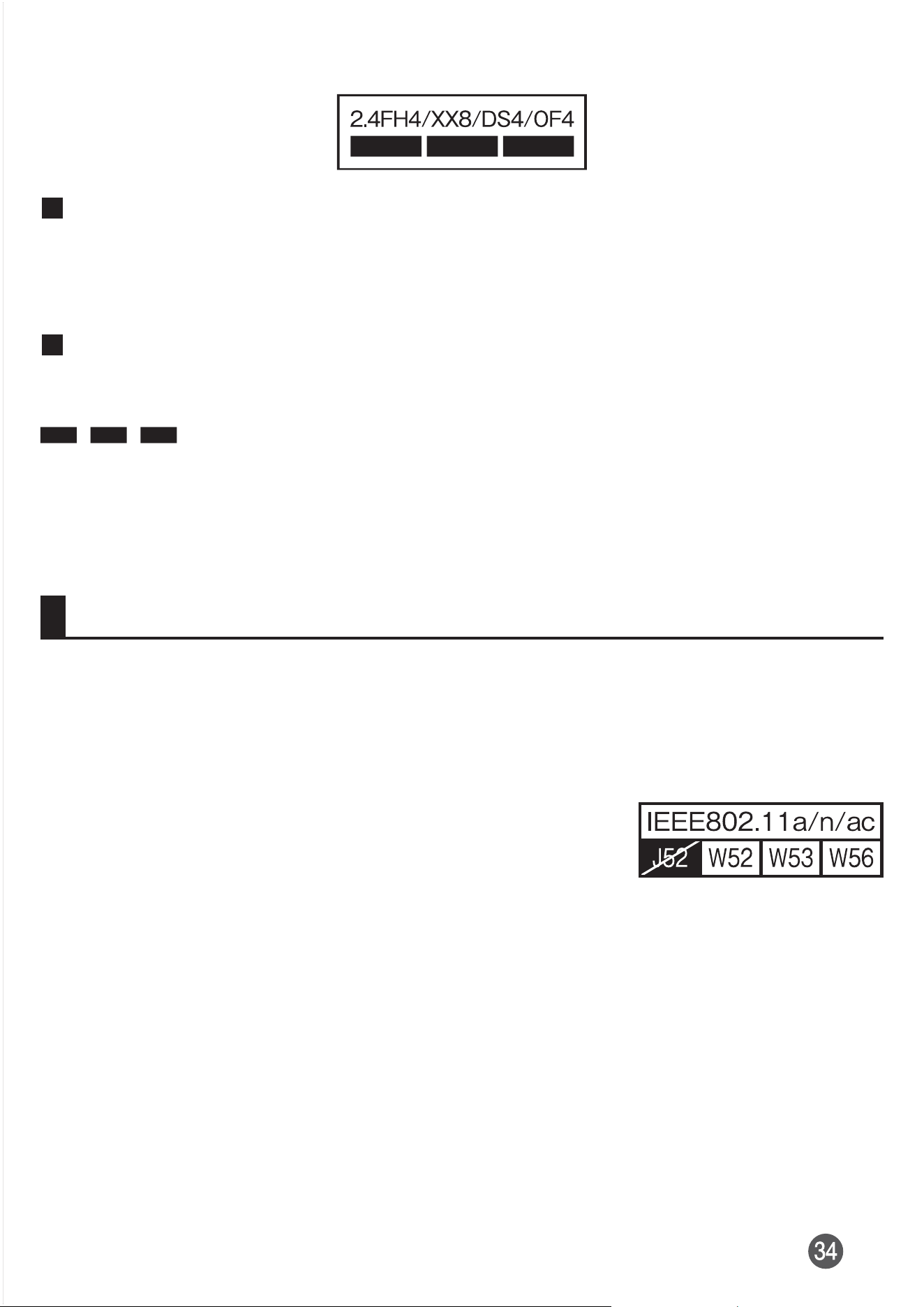
function: 2.4FH4/XX8
The product uses the 2.4 GHz band. FH4 uses FH-SS as the modulation
scheme. The interference distance is about 40 m or less. XX8 uses another
modulation scheme. The interference distance is about 80 m or less.
Wireless LAN (Wi-Fi
®
) function: 2.4DS/OF4
The product uses the 2.4 GHz band. DS-SS and OFDM are used as the
modulation schemes. The interference distance is about 40 m or less.
This means that all bandwidths of 2.4 GHz band can be used, and that
band of mobile unit identification devices can be avoided.
•
Available channels differ depending on the country/region.
•
For use in an airplane, check with the airline company in advance.
5 GHz frequency band precautions
Wireless LAN (Wi-Fi
®
) function of the product uses 5 GHz band. Using a
5.2/5.3-GHz-band wireless LAN outdoors is prohibited by law (except when
communicating with an access point of a 5.2-GHz high-power data
communication system or relay station).
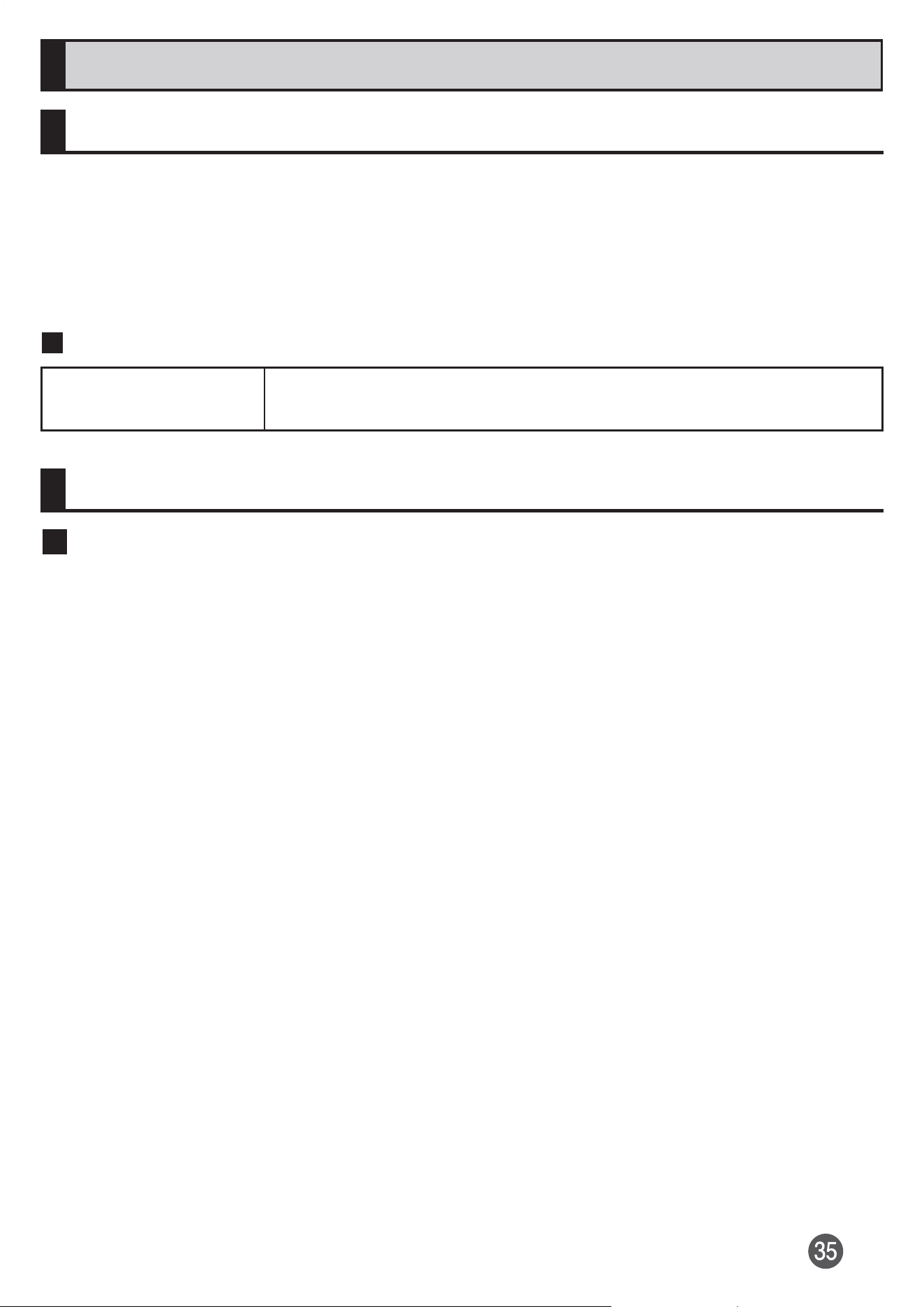
The channels used on the product are as follows.
•
W52 (5.2 GHz band/36, 40, 44, 48 ch)
•
W53 (5.3 GHz band/52, 56, 60, 64 ch)
•
W56 (5.6 GHz band/100, 104, 108, 112, 116, 120,
124, 128, 132, 136, 140, 144 ch)
Security codes/PIN code
Security codes
The product has various security codes that you can use.
The available security codes are as follows. Do not forget the various security
codes that are set as they are necessary for various operations and contracts.
Make sure to change the security codes from the initial values to your own
numbers.
Security code
Initial value A four-digit number chosen by the customer and noted
on the application form
PIN code
PIN code
To prevent unauthorized use of the SIM card by a third party, you can set the
product to require PIN code entry every time the power is turned on. You also
need to enter PIN code when setting whether the PIN code entry is required. If
the PIN code is incorrectly entered three times consecutively, the PIN code will
be locked. You can unlock the PIN code using PUK code.
•
Entering PIN code is not required by default state. In "SIM card lock",
however, you can change the setting requiring to enter PIN code.
Note that setting up "SIM card lock" requires entry of PIN code.
•
When an entry of security code is required for making settings, change the
initial value of the security code to your own number and then use it.
•
PIN code is set to "1234" by default state. In "Change SIM PIN", however, you
can change the PIN code to any four- to eight-digit number as necessary.
•
PIN code is not reset even if you execute "Erase all data (factory reset)".
PUK code
In case the PIN code is locked, you can unlock it by entering the PUK code.
•
PUK code is an eight-digit number given at the time of purchase, and is
printed on the back side of the plastic card on which your SIM card is
attached.
•
After entering the PUK code, you need to set a new PIN code.
•
If the PUK code is incorrectly entered ten times consecutively, contact "
(For inquiries)" on " (Full Instruction Manual)"
(Japanese).
Notes on data communication charge
•
Since a constant Internet connection is possible with the product, data
communication may be performed automatically by some apps, resulting in
high data communication charges. Therefore, subscription to a data
communication charge discount service or flat late plan is recommended.
•
To browse homepages, download apps, communicate using apps, send/
receive e-mails and configure various settings on the product, connection to
the Internet is required and data communication charge applies.
* Data communication charge does not apply to wireless LAN (Wi-Fi
®
)
connection.
Notes on Call Charges
•
When you end a call, make sure to disconnect the call. If you forget to
disconnect, the call charges may be higher.

Notes on applications
•
Be sure to check the security of the app, then install it at your own risk.
Some apps might affect operation of other apps or of the entire cell phone.
They might cause virus infection, damage various data, and send out your
location information, usage history or personal information stored in your
mobile phone via the Internet.
•
The Company assumes no responsibility for any malfunctions that might be
caused by apps you have installed. Repair costs in this case may be
charged even during the warranty period.
•
The Company assumes no responsibility for any disadvantage brought to
you or any third party by the apps you have installed.
•
Insertion of a microSD memory card is necessary to use some apps.
•
Some apps prohibit the product from entering sleep mode while they are
active, or rapidly drain the battery while running in the background.
•
Operational procedures and screen appearances of the apps preinstalled in
the product and those installed by you are subject to change without notice
as a result of version upgrade. In addition, operating procedures described
in "Instruction Manual" might differ from the actual procedures.
Setting app permission
When you activate an app/function that access the functions or information of
the product for the first time, a confirmation screen for requesting access
permission appears.
If the request screen appears, confirm the content and select the option you
want (e.g. "ALLOW"/"DENY").
Example: When activating "Music" app for the first time
1
In the Home screen, slide the screen up [Music]
The request screen appears.
2
[ALLOW]/[DENY]
Information
If you do not permit, app/function may not be activated or use of function
may be restricted.
To change the permission setting, in the Home screen, slide the screen
up [Settings] [Apps & notifications] [SEE ALL XX APPS] Tap
an app to change the setting [Permissions] Tap a function or
information of permission setting to be changed Select the option you
want (e.g. "Allow"/"Deny").
For some apps/functions, an explanation screen for the permission may
appear. Several request screens may appear or the screen content may
differ. Confirm each content and follow the onscreen instructions.
In "Instruction Manual", description of the confirmation screen may be
omitted.
Mobile Phone Etiquette
Use of the product is not allowed in the following places!
•
Do not listen to music or watch videos, etc. while driving a car or motorbike,
or riding a bicycle. Use of mobile phones while driving a car or motorbike is
prohibited by law (Use of mobile phones while riding a bicycle may also be
punishable by law). In addition, stay alert to the traffic around you even
when walking. Surrounding sounds may not be heard clearly, and gazing at
the screen might distract your attention causing a traffic accident. Be
especially careful at railroad crossings, station platform and pedestrian
crossings.
•
Use of mobile phones on board is restricted. Follow the instructions of each
airline.
Consider people around you
•
To prevent ringtone from bothering other people, not only refrain from
making a call but also power off or use Silent mode at a movie theater,
theater, museum, library, etc.
•
In a city area, use in a place where you do not bother people walking.
•
It is extremely dangerous to walk while looking at the screen of the mobile
phone. Do not make calls or operate a mobile phone while walking or by
stopping suddenly.
•
Move to a place where you do not disturb others while you are in
shinkansen, a hotel lobby etc.
•
Be careful not to be loud while talking.
•
Be careful of sound leakage from earphones in trains or other places with
many people around you.
•
Ask permission if you take photos with your mobile phone camera.
•
When using the camera, follow common rules of etiquette regarding camera
use.
•
There may be a person with a cardiac pacemaker nearby at a place filled
with people such as in a crowded train. Set "Airplane mode" or turn the
product off beforehand.
•
When a medical institution has laid down designated areas where use of the
product is prohibited or is not allowed to be brought in, abide by the
instructions of that medical institution.
Updating Software
You can update the product to the most recent software for optimal
performance and to get the latest enhancements.
•
You are charged for the data communication according to your contract
details when accessing the Internet from the product via data
communication. A large amount of data communication is required
especially for upgrading the OS.
•
You are recommended to back up your data before updating software.
•
For details, refer to " (Full instruction manual)" (Japanese).
Downloading and updating software
The update software can be downloaded from the product directly via
Internet.
•
Depending on the status of your Wi-Fi
®
connection, the product searches
available networks automatically and the connection may be switched to
data communication. In this case, note that unexpected communication
charges may be incurred.
1
In the Home screen, slide the screen up [Settings] [System]
[Advanced] [System update]
After that, follow the onscreen instructions.
After-sales service
When asking for repair
For repair, make an inquiry to the contact on the back cover of "
(Full Instruction Manual)" (Japanese).
During the
warranty
period
Repairs will be done based on the terms of services of
the free-of-charge repair warranty.
Outside the
warranty
period
We shall repair the product for a charge as requested by
the customer if repair renders it usable.
* The warranty period is one year from the date you purchased the product.
•
Before handing in the product for repair, make a backup of the contents of
memory since they may disappear during repair. Note that the Company
shall not be liable for any damages and loss of income should the contents
of memory be altered or lost.
•
Recycled parts that meet the Company's quality standards are sometimes
used for repair.
•
Your old terminal collected by replacement mobile phone delivery service is
serviced for reuse and recycled as a replacement terminal. Also, parts
replaced through after-sales service are collected and recycled by the
Company. They cannot be returned to customers.
•
The product which is processed, remodeled, analyzed (including by
modifying or analyzing the software (including by rooting etc.), reverse
engineering, decompiling, reverse-assembling), or repaired by an
unauthorized repair office is not covered by the warranty and repair may be
refused.
•
The battery built-into the main unit is not covered by free-of-charge repair
warranty, as it is a consumable part.
Performance parts for repair
The Company retains performance parts for repair of the Xperia 10 III main
unit and its peripherals for four years after discontinuation of production.
"Performance parts for repair" refers to parts required for maintaining the
functions of the product.