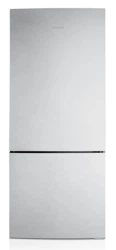
Refrigerator
User manual
Free Standing Appliance
Untitled-1 1 2019-03-07 11:16:50
English2
Contents
Contents
Safety information
4
What you need to know about the safety instructions 4
Important safety symbols and precautions: 5
State of California Proposition 65 Warning 5
Important safety precautions 5
Severe warning signs for transportation and site 7
Critical installation warnings 8
Installation cautions 10
Critical usage warnings 10
Usage cautions 13
Cleaning cautions 14
Critical disposal warnings 15
Installation
16
Refrigerator at a glance 16
Step-by-step installation 19
Operations
40
Main panel 40
SmartThings 50
SMART GRID Function (Demand Response) 53
Dispenser panel 58
Special features 59
Maintenance
65
Handling and care 65
Cleaning 75
Replacement 76
Untitled-1 2 2019-03-07 11:16:50
English 3
Contents
Troubleshooting 78
General 78
Do you hear abnormal sounds from the refrigerator? 82
SmartThings 84
Smart Grid (applicable models only) 85
LIMITED WARRANTY (U.S.A.)
86
SAMSUNG REFRIGERATOR 86
Warranty Information (CANADA)
89
If your refrigerator needs service 89
Limited Warranty for Original Purchaser 89
Obligation to the Original Owner 89
Exclusions of the Warranty 90
Regulatory Notice
91
FCC Notice 91
IC Notice 92
Open Source Announcement
93
Untitled-1 3 2019-03-07 11:16:50
English4
Safety information
Before using your new Samsung Refrigerator, please read this manual thoroughly to
ensure that you know how to operate the features and functions that your new appliance
offers safely and efciently.
What you need to know about the safety instructions
• This appliance is not intended for use by persons (including children) with reduced
physical, sensory or mental capabilities, or lack of experience and knowledge, unless
they have been given supervision or instruction concerning use of the appliance by a
person responsible for their safety. Children should be supervised to ensure that they
do not play with the appliance.
• Because the following instructions cover various models, the characteristics of your
refrigerator may differ slightly from the refrigerator described in this manual.
• If you have any question, contact us at 1-800-SAMSUNG or nd help and information
online at www.samsung.com.
• Refrigerant squirting out of the pipes could ignite or cause an eye injury. When
refrigerant leaks from the pipe, avoid any naked ames and move anything ammable
away from the product and ventilate the room immediately.
- Failing to do so may result in re or explosion.
• Improper use of the grounding plug can result in a risk of electric shock. If it is
necessary to use an extension cord, use only a 3-wire extension cord that has a 3-blade
grounding plug and a 3-slot receptacle that will accept the plug on the appliance.
The marked rating of the extension cord should be AC 115-120 V, 10 A, or more. If a
grounding adapter is used, make sure the receptacle box is fully grounded.
Safety information
Untitled-1 4 2019-03-07 11:16:51
English 5
Safety information
Important safety symbols and precautions:
Please follow all safety instructions in this manual. This manual uses the following safety
symbols.
WARNING
Hazards or unsafe practices that may result in severe personal injury, property damage,
and/or death.
CAUTION
Hazards or unsafe practices that may result in severe personal injury and/or property
damage.
NOTE
Useful information that helps users understand or benet from the refrigerator.
These warning signs are here to prevent injury to you and others.
Please follow them carefully.
After reading this section, keep it in a safe place for future reference.
State of California Proposition 65 Warning
WARNING
Cancer and Reproductive Harm - www.P65Warnings.ca.gov.
Important safety precautions
Warning; Risk of re / ammable materials
WARNING
• R-600a is used as a refrigerant. This product contains ammable gas (Refrigerant
R-600a), contact your local authority in regard to safe disposal of this product.
• In order to avoid the creation of a ammable gas-air mixture if a leak in the
refrigerating circuit occurs, the size of the room in which the appliance may be sited
depends on the amount of refrigerant used. The room must be 35.3 ft³ in size for every
8 g of R-600a refrigerant inside the appliance.
Untitled-1 5 2019-03-07 11:16:51
Safety information
English6
Safety information
• The installation location should not be exposed to direct sunlight and not placed near
any electric appliance or heat source, e.g. stove, oven or hob, radiator, etc.
• If you use two products side by side, for safety reason, be sure to use certied
products in explosive gas atmospheres.
• Never start up an appliance showing any signs of damage. If in doubt, consult your
dealer.
• If the supply cord is damaged, it must be replaced by the manufacturer, its service
agent or similarly qualied persons in order to avoid a hazard.
• The socket must be easily accessible so that the appliance can be quickly disconnected
from the supply in an emergency. It must be outside the area of the rear of the
appliance.
• Do not store explosive substances such as aerosol cans with a ammable propellant in
this appliance.
• New hose-sets supplied with the appliance are to be used and that old hose-sets should
not be reused.
• When positioning the appliance, ensure the supply cord is not trapped or damaged.
• Do not locate multiple portable socket-outlets or portable power supplies at the rear of
the appliance.
WARNING
• System contains refrigerant under high pressure. Do not tamper with the system. It
must be serviced by qualied persons only.
• Fill with potable water only.
• Keep ventilation openings, in the appliance enclosure or in the built-in structure, clear
of obstruction.
• Do not use mechanical devices or other means to accelerate the defrosting process,
other than those recommended by the manufacturer.
• Do not damage the refrigerant circuit.
• Do not use electrical appliances inside the food storage compartments of The appliance,
unless they are of the type recommended by the manufacturer.
• Connect to potable water supply only.
• To avoid a hazard due to instability of the appliance, it must be xed in accordance
with the instructions.
• The refrigeration system is under high pressure. Do not tamper with it. Contact
qualied service personal before disposal.
DANGER
• Risk of child entrapment. Before you throw away your old refrigerator or freezer:
- Take off the doors.
- Leave the shelves in place so that children may not easily climb inside.
Untitled-1 6 2019-03-07 11:16:51
English 7
Safety information
CAUTION
• Risk Of Fire Or Explosion. Flammable Refrigerant Used. Do Not Use Mechanical Devices
To Defrost Refrigerator. Do Not Puncture Refrigerant Tubing.
• Risk Of Fire Or Explosion. Flammable Refrigerant Used. To Be Repaired Only By Trained
Service Personnel. Do Not Puncture Refrigerant Tubing.
• Risk Of Fire Or Explosion. Flammable Refrigerant Used. Consult Repair Manual/Owner’s
Guide Before Attempting to Service This Product. All Safety Precautions Must Be
Followed.
• Risk Of Fire Or Explosion. Dispose Of Properly In Accordance With Federal Or Local
Regulations. Flammable Refrigerant Used.
• Risk Of Fire Or Explosion Due To Puncture Of Refrigerant Tubing; Follow Handling
Instructions Carefully. Flammable Refrigerant Used.
• To Prevent A Child From Being Entrapped, Keep Out Of Reach Of Children And Not In
The Vicinity Of Freezer Or Refrigerator.
This appliance is intended to be used in household and similar applications such
as
• staff kitchen areas in shops, ofces and other working environments;
• farm houses and by clients in hotels, motels and other residential type environments;
• bed and breakfast type environments;
• catering and similar non-retail applications.
Severe warning signs for transportation and site
WARNING
• When transporting and installing the appliance, care should be taken to ensure that no
parts of the refrigerating circuit are damaged.
- Refrigerant leaking from the pipe work could ignite or cause an eye injury. If a leak
is detected, avoid any naked ames or potential sources of ignition and air the room
in which the appliance is standing for several minutes.
- This appliance contains a small amount of isobutane refrigerant (R-600a), a natural
gas with high environmental compatibility that is, however, also ammable.
Untitled-1 7 2019-03-07 11:16:51
Safety information
English8
Safety information
Critical installation warnings
WARNING
• Do not install the refrigerator in a damp location or place where it may come in contact
with water.
- Deteriorated insulation on electrical parts may cause an electric shock or re.
• Do not place this refrigerator in direct sunlight or expose it to the heat from stoves,
room heaters, or other appliances.
• Do not plug several appliances and the refrigerator into the same multiple power strip.
The refrigerator should always be plugged into its own individual electrical outlet
which has a voltage rating that matches the voltage listed on the refrigerator’s rating
plate.
- This provides the best performance and also prevents overloading of house wiring
circuits, which could overheat the wires and cause a re hazard.
• If the wall socket is loose, do not insert the power plug.
- There is a risk of electric shock or re.
• Do not use a power cord that has cracks or abrasion damage along its length or at
either end.
• Do not bend the power cord excessively or place heavy objects on it.
• Do not pull or excessively bend the power cord.
• Do not twist or tie the power cord.
• Do not hook the power cord over a metal object, place a heavy object on the power
cord, insert the power cord between objects, or push the power cord into the space
behind the appliance.
• When moving the refrigerator, be careful not to roll over or damage the power cord.
- This may result in an electric shock or re.
• Never unplug your refrigerator by pulling on the power cord. Always grip the plug
rmly and pull straight out from the outlet.
- Damage to the cord may cause a short-circuit, re, and/or electric shock.
• Do not install this appliance near a heater or ammable material.
• Do not install this appliance in a location where gas may leak.
- This may result in an electric shock or re.
• This refrigerator must be properly located and installed in accordance with the
instructions in this manual before you use it.
• Connect the power plug in the proper position with the cord hanging down.
- If you connect the power plug upside down, the wire can get cut off and cause a re
or electric shock.
• Make sure that the power plug is not crushed or damaged by the back of the
refrigerator.
Untitled-1 8 2019-03-07 11:16:51
English 9
Safety information
• Keep the packing materials out of reach of children.
- There is a risk of death from suffocation if a child puts the packing materials on his
or her head.
• The appliance must be positioned so that the plug is accessible after installation.
- Failing to do so may result in an electric shock or re due to electric leakage.
• Do not install this appliance in a humid, oily or dusty location, or in a location exposed
to direct sunlight or to water (rain drops).
- Deteriorated insulation on electrical parts may cause an electric shock or re.
• If large amounts of dust or water enter the refrigerator, disconnect the power plug and
contact a Samsung Electronics service center.
- Otherwise there is a risk of re.
• Do not stand on top of the appliance or place objects (such as laundry, lighted candles,
lighted cigarettes, dishes, chemicals, metal objects, etc.) on the appliance.
- This may result in an electric shock, re, problems with the product, or injury.
• You need to remove all the protective plastic lm before you initially plug the product
in.
• Children should be supervised to ensure that they do not play with the snap rings used
for door adjustment or the water tube clips.
- There is risk of death by suffocation if a child swallows a snap ring or water tube
clip. Keep the snap rings and water tube clips out of children's reach.
• The refrigerator must be safely grounded.
- Always make sure that you have grounded the refrigerator before attempting to
investigate or repair any part of the appliance. Power leakages can cause severe
electric shock.
• Never use gas pipes, telephone lines, or other potential lightning attractors as an
electrical ground.
- You must ground the refrigerator to prevent any power leakages or electric shocks
caused by current leakage from the refrigerator.
- Current leakage may result in an electric shock, re, explosion, or problems with the
product.
• Plug the power plug into the wall socket rmly. Do not use a damaged power plug,
damaged power cord, or loose wall socket.
- This may result in an electric shock or re.
• Only a qualied technician or service company should be allowed to change the fuse in
the refrigerator.
- Failing to do so may result in an electric shock or personal injury.
Untitled-1 9 2019-03-07 11:16:51
Safety information
English10
Safety information
Installation cautions
CAUTION
• Allow sufcient space around the refrigerator and install it on a at surface.
- Keep the ventilation space in the appliance enclosure or mounting structure clear of
obstructions.
• After you have installed the refrigerator and turned it on, allow the appliance to stand
for 2 hours before loading it with food.
• It is strongly recommended you have a qualied technician or service company install
the refrigerator.
- Failing to do so may result in an electric shock, re, explosion, problems with the
product, or injury.
• Overloading one door may make the refrigerator fall, causing physical injury.
Critical usage warnings
WARNING
• Do not insert the power plug into a wall socket with wet hands.
- This may result in an electric shock.
• Do not store articles on the top of the appliance.
- When you open or close the door, the articles may fall and cause personal injury
and/or material damage.
• Do not insert hands, feet, or metal objects (such as chopsticks, etc.) into the bottom or
the back of the refrigerator.
- This may result in an electric shock or injury.
- Any sharp edges may cause a personal injury.
• Do not touch the inside walls of the freezer or products stored in the freezer with wet
hands.
- This may cause frostbite.
• Do not put a container lled with water on the refrigerator.
- If spilled, there is a risk of re or electric shock.
• Do not keep volatile or ammable objects or substances (benzene, thinner, propane
gas, alcohol, ether, LP gas, and other such products) in the refrigerator.
- This refrigerator is for storing food only.
- This may result in re or explosion.
• Children should be supervised to ensure that they do not play with the appliance.
- Keep ngers out of “pinch point” areas. Clearances between the doors and cabinet
are necessarily small. Be careful when you open the doors if children are in the area.
Untitled-1 10 2019-03-07 11:16:51
English 11
Safety information
• Do not let children hang on the door or door bins. A serious injury may occur.
• Do not let children go inside the refrigerator. They could become trapped.
• Do not insert your hands into the area under the appliance.
- Any sharp edges may cause personal injury.
• Do not store pharmaceutical products, scientic materials, or temperature sensitive
products in the refrigerator.
- Products that require strict temperature controls must not be stored in the
refrigerator.
• Do not place or use electrical appliances inside the refrigerator/freezer, unless they are
of a type recommended by the manufacturer.
• If you smell smoke, pull out the power plug immediately, and then contact a Samsung
Electronics service center.
• If large amounts of dust or water enter the refrigerator, disconnect the power plug and
contact your Samsung Electronics service center.
- Otherwise there is a risk of re.
• Do not let children step on a drawer.
- The drawer may break and cause them to slip.
• Do not leave the doors of the refrigerator open while the refrigerator is unattended
and do not let children enter the refrigerator.
• Do not allow babies or children to go into a drawer.
- It can cause death from suffocation by entrapment or personal injury.
• Do not overll the refrigerator with food.
- When you open the door, an item may fall out and cause personal injury or material
damage.
• Do not spray volatile material such as insecticide onto the surface of the appliance.
- As well as being harmful to humans, it may also result in an electric shock, re, or
problems with the product.
• Never put ngers or any objects into the water dispenser outlet, ice chute, or ice maker
bucket.
- It may cause a personal injury or material damage.
• Do not use or place any substances sensitive to temperature such as ammable sprays,
ammable objects, dry ice, medicine, or chemicals near or inside the refrigerator.
• Do not use a hair dryer to dry the inside of the refrigerator. Do not place a lighted
candle in the refrigerator to remove bad odors.
- This may result in an electric shock or re.
• Fill the water tank and ice cube trays with potable water only (tap water, mineral
water, or puried water).
- Do not ll the tank with tea, juice, or a sports drink. They can damage the
refrigerator.
Untitled-1 11 2019-03-07 11:16:51
Safety information
English12
Safety information
• Do not stand on top of the appliance or place objects (such as laundry, lighted candles,
lighted cigarettes, dishes, chemicals, metal objects, etc.) on the appliance. This may
result in an electric shock, re, problems with the product, or injury. Do not put a
container lled with water on the appliance.
- If spilled, there is a risk of re or electric shock.
• Never stare directly at the UV LED lamp for long periods of time.
- This may result in eye strain due to the ultraviolet rays.
• Do not put a fridge shelf into the refrigerator upside down. The shelf stopper will not
work.
- The glass shelf could fall and cause personal injury.
• Keep ngers out of “pinch point” areas. Clearances between the doors and cabinet are
necessarily small. Be careful when you open the doors if children are in the area.
• If a gas leak is detected, avoid any naked ames or potential sources of ignition, and
air the room in which the appliance is standing for several minutes.
- Do not touch the appliance or power cord.
- Do not use a ventilating fan.
- A spark may result in an explosion or re.
• Use only the LED Lamps provided by the manufacturer or its service agents.
• Bottles should be stored tightly together so that they do not fall over or out.
• This product is intended only for the storage of food in a domestic environment.
• Never put ngers or any objects into the water dispenser outlet, ice chute, or ice maker
bucket.
- This can cause a personal injury or material damage.
• Do not attempt to repair, disassemble, or modify the refrigerator yourself.
- Unauthorized modications can cause safety problems. To reverse an unauthorized
modication, we will charge the full cost of parts and labor.
• Do not use any fuse (such as cooper, steel wire, etc.) other than a standard fuse.
• If your refrigerator needs to be repaired or reinstalled, contact your nearest Samsung
service center.
- Failing to do so may result in an electric shock, re, problems with the product, or
injury.
• If the interior or exterior LED lamp has gone out, contact your nearest Samsung service
center.
• If the refrigerator emits a burning smell or smoke, unplug the refrigerator immediately
and contact a Samsung service center.
- Failing to do so may result in an electric or re hazards.
• Pull the power plug out of the socket before changing the interior lamps of the
refrigerator.
- Otherwise, there is a risk of electric shock.
Untitled-1 12 2019-03-07 11:16:51
English 13
Safety information
• If you experience difculty changing a non-LED light, contact a Samsung service
center.
• If the product is equipped with LED lamps, do not disassemble the Lamp Covers and
LED lamps yourself.
- Contact a Samsung service center.
• Plug the power plug into the wall socket rmly.
• Do not use a damaged power plug, damaged power cord, or loose wall socket.
- This may result in an electric shock or re.
Usage cautions
CAUTION
• Do not re-freeze frozen foods that have thawed completely.
• Use only the ice maker provided with the refrigerator.
• To get the best performance from the product:
- Do not place food too close to the vents at the rear of the refrigerator as this can
obstruct free air circulation in the refrigerator compartment.
- Wrap food up properly or place it in airtight containers before putting it into the
refrigerator.
- Please observe maximum storage times and expiration dates of frozen goods.
• Do not put glass containers or bottles or carbonated beverages into the freezer.
- The container may freeze and break, and this may result in injury.
• Service Warranty and Modication.
- Any changes or modications performed by a 3rd party on this nished appliance
are not covered under Samsung warranty service, nor is Samsung responsible for
safety issues that result from 3rd party modications.
• Do not block the air vents inside the refrigerator.
- If the air vents are blocked, especially with a plastic bag, the refrigerator can be
over cooled. If a cooling period lasts too long, the water lter may break and cause
water leakage.
• If the refrigerator is disconnected from the power supply, you should wait for at least
ve minutes before plugging it back in.
• If large amounts of water enter the refrigerator, pull out the power plug and contact a
Samsung service center.
• Do not strike or apply excessive force to any glass surface.
- Broken glass may result in a personal injury and/or property damage.
Untitled-1 13 2019-03-07 11:16:52
Safety information
English14
Safety information
• Fill the water tank and ice cube trays with potable water only (tap water, mineral
water, or puried water).
- Do not ll the tank with tea, juice, or a sports drink. They can damage the
refrigerator.
• If the refrigerator is ooded, shut off the power to the refrigerator and contact your
nearest Samsung service center.
- There is a risk of electric shock or re.
• Do not keep vegetable oil in your refrigerator’s door bins. The oil can solidify, making it
foul-tasting and difcult to use. In addition, the open container can leak and the leaked
oil can cause the door bin to crack. After opening an oil container, it is best to keep the
container in a cool and shaded place such as a cupboard or pantry.
- Examples of vegetable oil: olive oil, corn oil, grape-seed oil, etc.
Cleaning cautions
CAUTION
• Do not spray water directly on the inside or outside of the refrigerator.
- There is a risk of re or electric shock.
• Do not use a hair dryer to dry the inside of the refrigerator.
• Do not place a lighted candle in the refrigerator to remove bad odors.
- This may result in an electric shock or re.
• Do not spray cleaning products directly on the display.
- Printed letters on the display may come off.
• If any foreign substance such as water has entered the appliance, unplug the power
plug and contact your nearest Samsung service center.
- Failing to do so may result in an electric shock or re.
• Use a clean, dry cloth to remove any foreign matter or dust from the power plug
blades. Do not use a wet or damp cloth when cleaning the plug.
- Otherwise, there is a risk of re or electric shock.
• Do not clean the appliance by spraying water directly onto it.
• Do not use benzene, thinner, or Clorox (bleach) to clean the refrigerator.
- They may damage the surface of the appliance and may cause a re.
• Never put ngers or any objects into the dispenser outlet.
- This can cause a personal injury or material damage.
• Before cleaning or performing maintenance, unplug the appliance from the wall socket.
- Failing to do so may result in an electric shock or re.
• Use a clean sponge or soft cloth and a mild detergent in warm water to clean the
refrigerator.
Untitled-1 14 2019-03-07 11:16:52
English 15
Safety information
• Do not use abrasive or harsh cleansers such as window sprays, scouring cleansers,
ammable uids, muriatic acid, cleaning waxes, concentrated detergents, bleaches,
or cleansers containing petroleum products on exterior surfaces (doors and cabinet),
plastic parts, door and interior liners, and gaskets.
- These can scratch or damage the material.
• Do not clean glass shelves or covers with warm water when they are cold. Glass
shelves and covers may break if exposed to sudden temperature changes or impacts
such as bumping or dropping.
Critical disposal warnings
WARNING
• Children trapped inside a refrigerator can hurt themselves or suffocate to death.
• Please dispose of the packaging material from this product in an environmentally
friendly manner.
• Ensure that none of the pipes on the back of the refrigerator are damaged prior to
disposal.
• This product contains R-600a, a ammable gas, which is used as the refrigerant.
Contact your local authorities regarding safe disposal of this product.
• When disposing of this refrigerator, remove the door/door seals and door latch so that
small children or animals cannot become trapped inside. Children should be supervised
to ensure that they do not play with the appliance.
- If trapped inside, the child could be injured or suffocate to death.
• Cyclopentane is used in the insulation. The gases in the insulation material require
a special disposal procedure. Please contact your local authorities in regard to the
environmentally safe disposal of this product.
• Keep all packaging materials well out of the reach of children, as packaging materials
can be dangerous to children.
- If a child places a bag over his or her head, the child could suffocate.
Untitled-1 15 2019-03-07 11:16:52
English16
Installation
Follow these instructions carefully to ensure a proper installation of this refrigerator and
to prevent accidents before using it.
WARNING
• Use the refrigerator only for its intended purpose as described in this manual.
• Any servicing must be performed by a qualied technician.
• Dispose of the product packaging material in compliance with the local regulations.
• To prevent electric shock, unplug the power plug before servicing or replacing parts.
Refrigerator at a glance
The actual refrigerator and provided component parts of your refrigerator may differ
from the illustrations in this manual, depending on the model and the country.
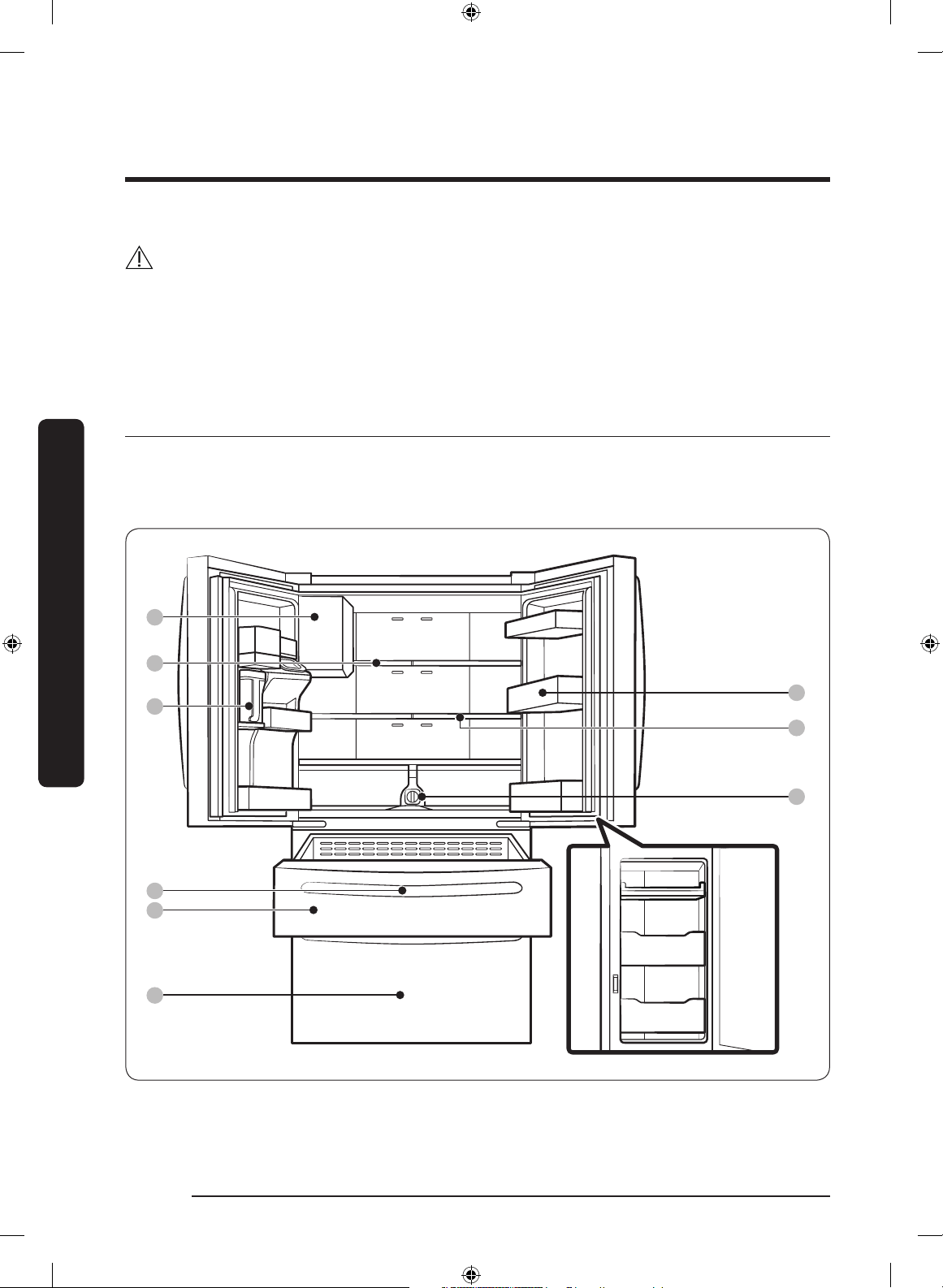
Type A
01
02
03
05
04
06
08
09
07
Installation
Untitled-1 16 2019-03-07 11:16:52
English 17
Installation
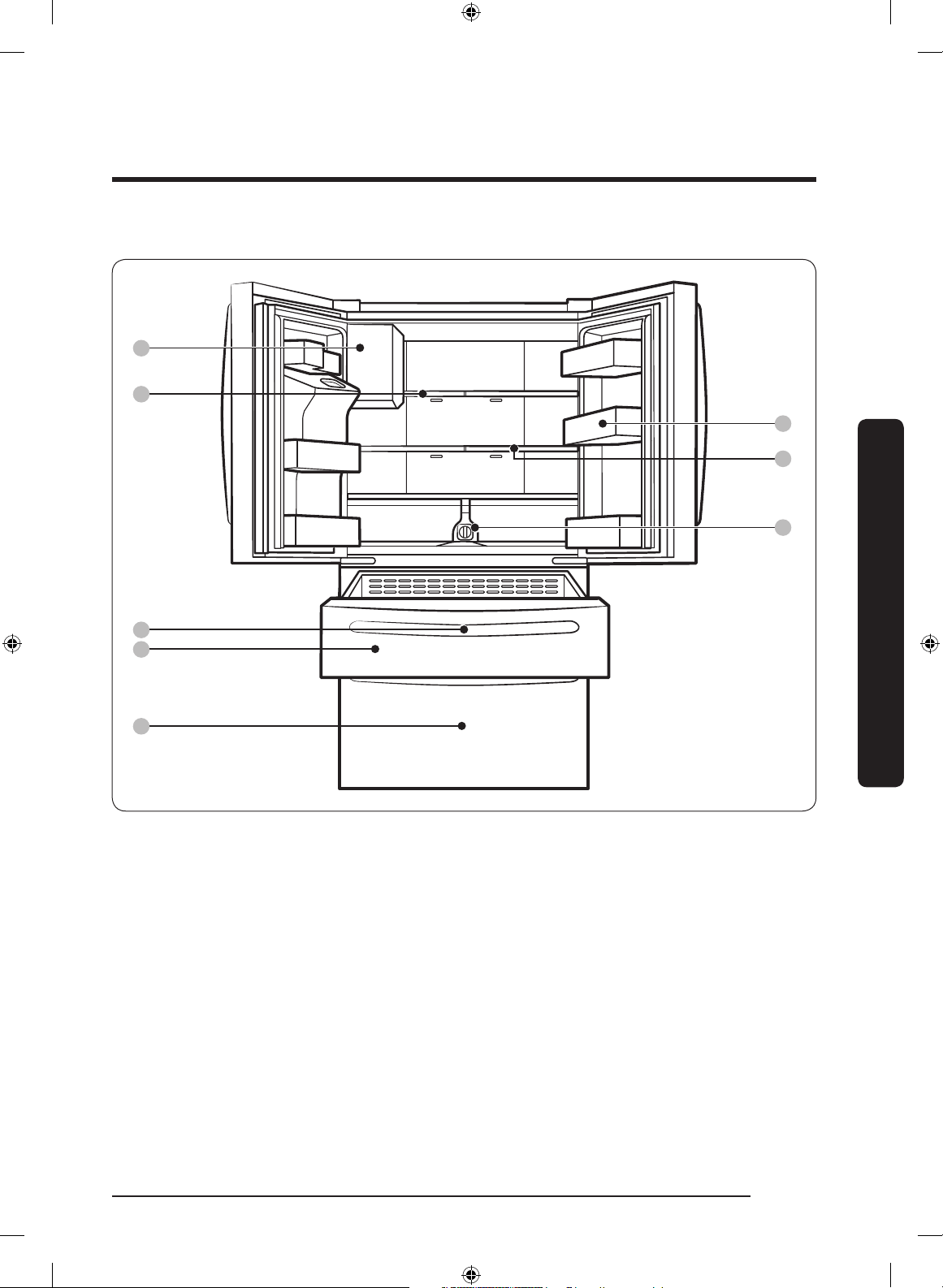
Type B
01
02
05
04
06
08
09
07
01 Auto Ice Maker 02 1-Step Foldable Shelf
03 Water tank (Auto Water Fill) 04 Main panel (on the FlexZone™ handle)
05 FlexZone™ 06 Freezer
07 Door bins 08 2-Step Foldable Shelf
09 Water lter
* applicable models only
Untitled-1 17 2019-03-07 11:16:52
Installation
English18
Installation
NOTE
• For energy efciency, keep all shelves, drawers, and baskets in their original positions.
• When closing the door, make sure the vertical hinged section is in the correct position
to avoid scratching the other door.
• If the vertical hinged section is reversed, put it back into the correct position, and then
close the door.
• Moisture may form at times on the vertical hinged section.
• If you close a door forcefully, the other door may open.
• When a door is opened, the interlock switch automatically disables the auger motor of
the ice maker for safety reasons.
• If the internal or external LED lamp is out of order, contact a local Samsung service
center.
• If the door is left open for too long, the top internal LED will blink. This is normal.
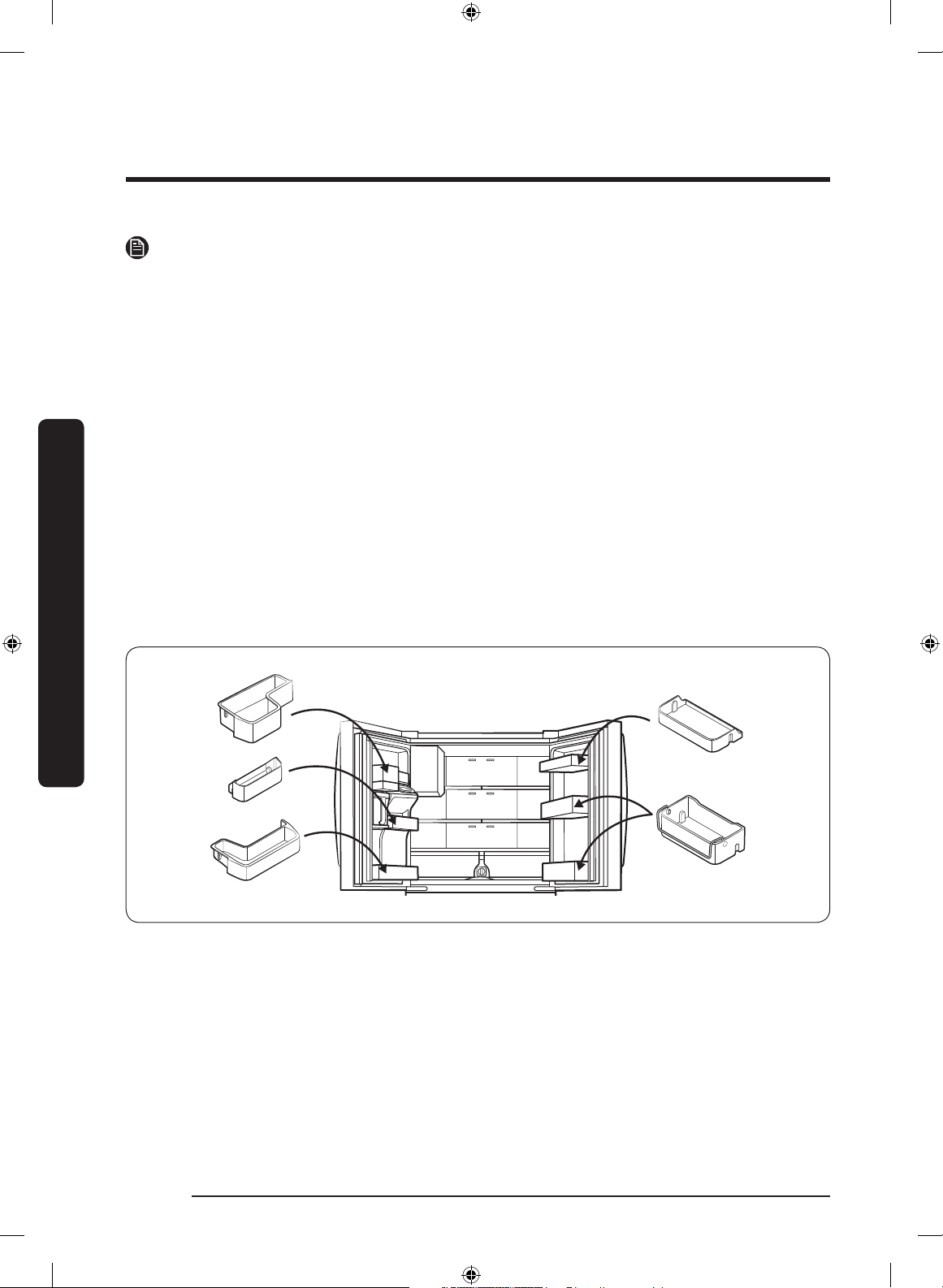
Door bins
Your refrigerator ships with door bins of different types and sizes. If the door bins for
your refrigerator were packaged separately, use the gure below to help you position the
bins properly.
Untitled-1 18 2019-03-07 11:16:52
English 19
Installation
Step-by-step installation
STEP 1 Select a site
Select a site that:
• Has a solid, level surface without carpeting or ooring that may obstruct ventilation
• Is away from direct sunlight
• Has adequate room for opening and closing the door
• Is away from any heat sources
• Provides room for maintenance and servicing
• Has a temperature range between 50 °F (10 °C) and 109 °F (43 °C)
CAUTION
• If your refrigerator is equipped with an ice maker, provide extra space at the rear of
the refrigerator for the water line connection.
• When you install the refrigerator next to a xed wall, you must provide a minimum
clearance of 3
3
/4" (95 mm) from the wall to allow the door to swing open.
NOTE
To facilitate moving your refrigerator to its nal location, be sure to measure the width
and height of doorways, thresholds, ceilings, stairways, and anything else that needs to be
taken into consideration to ensure you can move your refrigerator safely. The following
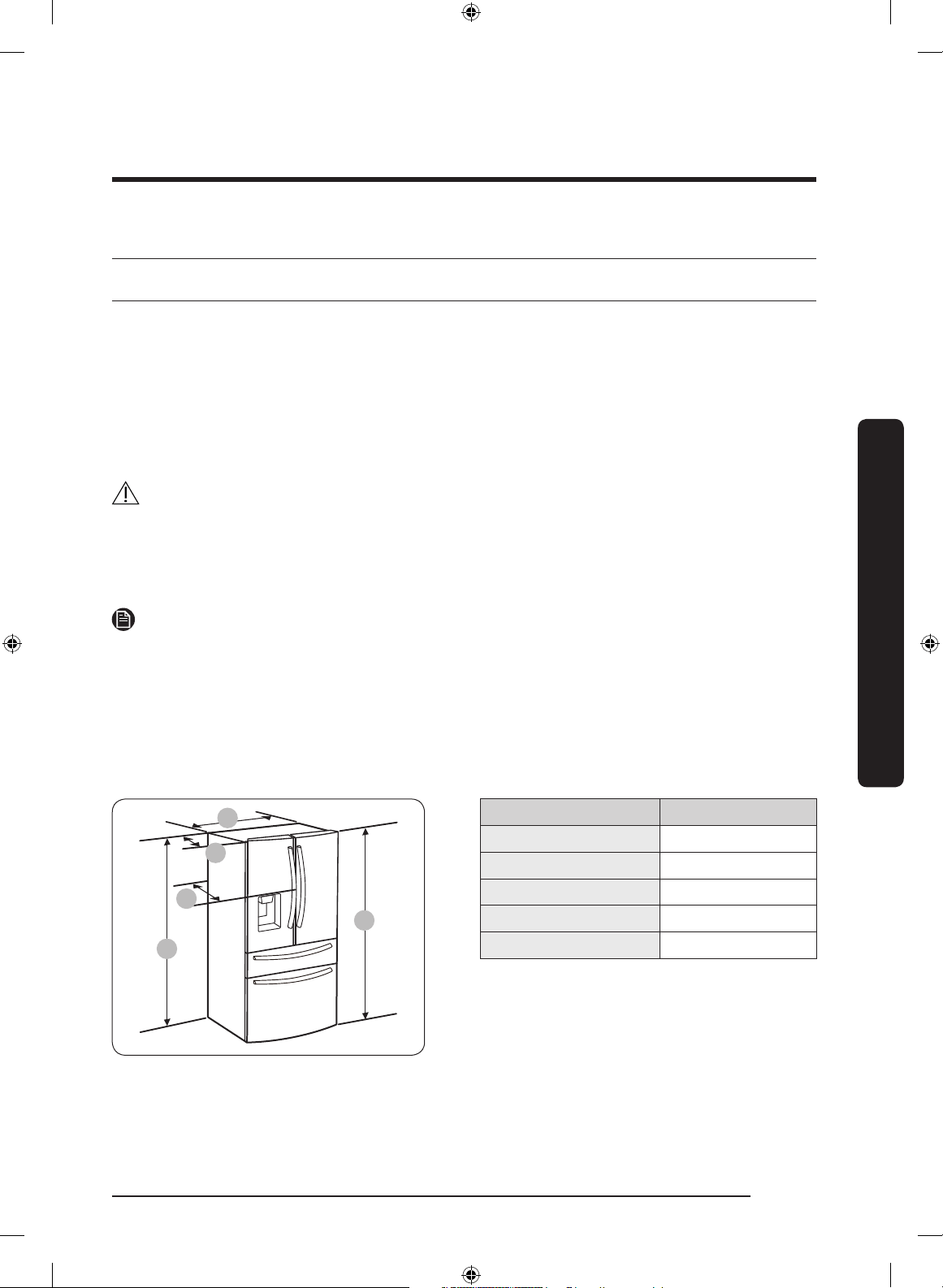
diagram illustrates the exact height and depth (factory specications) of your refrigerator.
Clearance
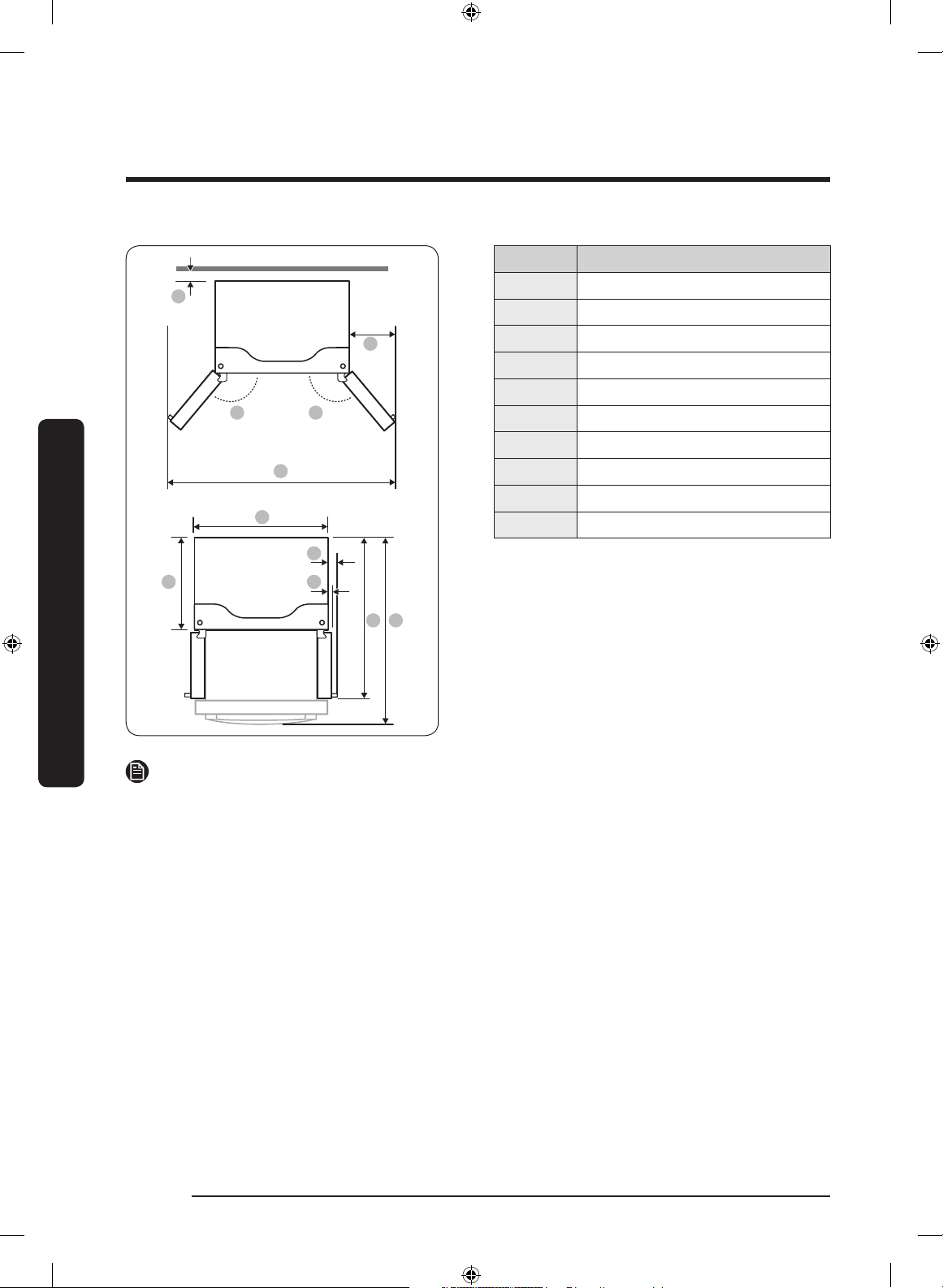
See the pictures and table below for space requirements for installation.
C
D
E
B
A
Model RF28*
Depth “A” 34" (864 mm)
Width “B” 35
6
/8" (908 mm)
Height “C” 68
7
/8" (1749 mm)
Overall Height “D” 70" (1777 mm)
Depth “E” 36
1
/2" (926 mm)
Untitled-1 19 2019-03-07 11:16:53
Installation
English20
Installation
01
02 02
04
03
05
06
09 10
07
08
Model RF28*
01 2" (50 mm)
02 125°
03 62
1
/8" (1578 mm)
04 13
2
/8" (335 mm)
05 35
6
/8" (908 mm)
06 29
3
/8" (748 mm)
07 4
6
/8" (122 mm)
08 2
3
/8" (61 mm)
09 48
1
/4" (1226 mm)
10 53" (1346 mm)
NOTE
The measurements in the table above may differ slightly from the actual measurements,
depending on the measuring and rounding method.
Untitled-1 20 2019-03-07 11:16:53
English 21
Installation
STEP 2 Flooring
If the refrigerator cannot pass through the entrance due to its size, see STEP 3 Door
removal for entrance.
NOTE
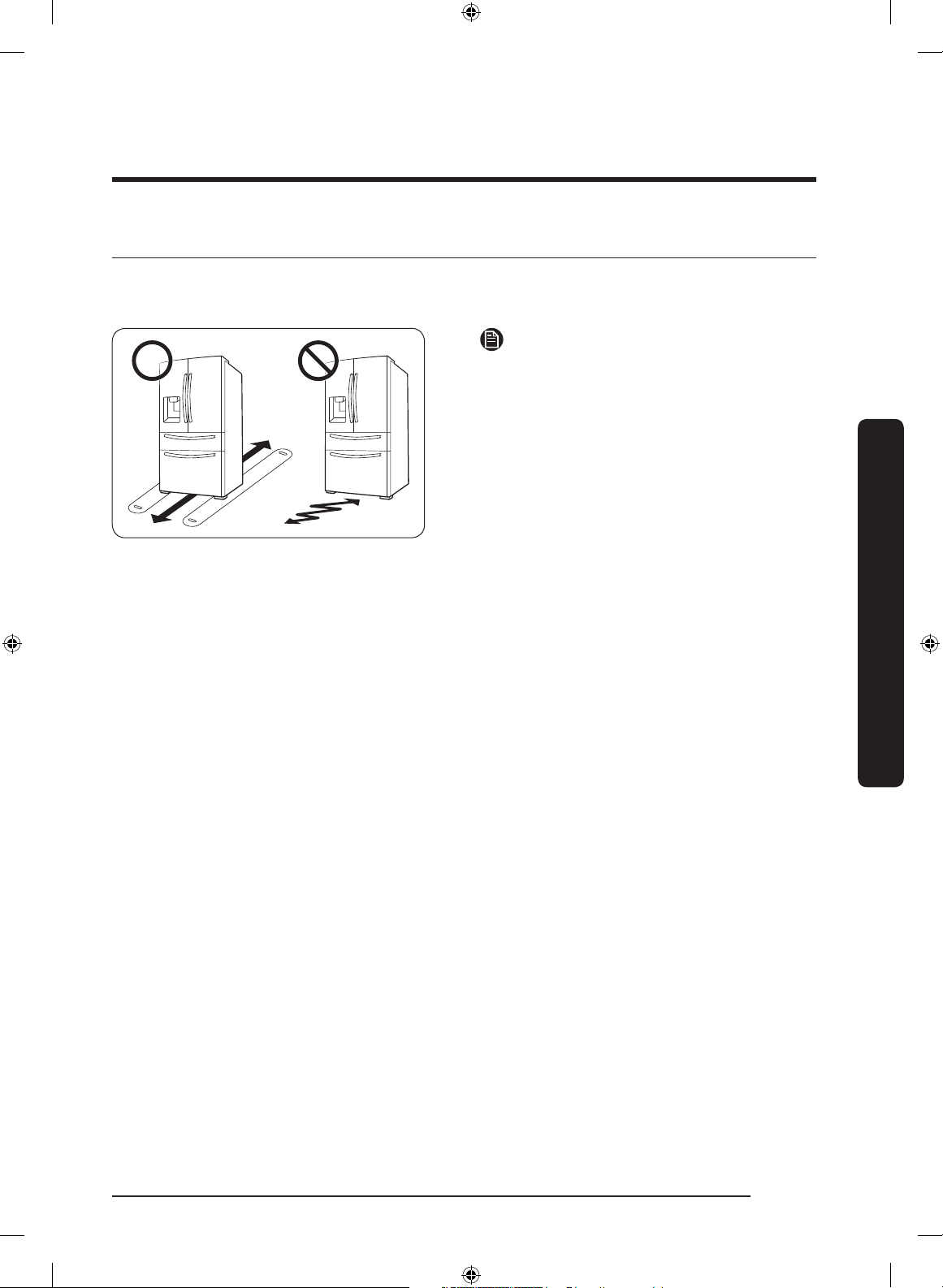
To prevent oor damage, make sure the
front levelling legs are in the upright
position.
• The surface you install the refrigerator
on must support a fully loaded
refrigerator.
• To protect the oor, put a large piece
of cardboard along the path to the
refrigerator's nal installation location.
• Once the refrigerator is in its nal
position, do not move it unless
necessary to protect the oor. If you
have to move the refrigerator, place
thick paper or cloth such as old carpets
along the path of movement.
Untitled-1 21 2019-03-07 11:16:53
Installation
English22
Installation
STEP 3 Door removal for entrance
If the refrigerator cannot pass through the entrance to your home or kitchen due to its
size, follow these instructions to remove and then re-install the refrigerator's doors. If you
do not need to remove the doors, go to page 31 to continue the installation procedure.
WARNING
Unplug the power cord of the refrigerator before removing the doors.
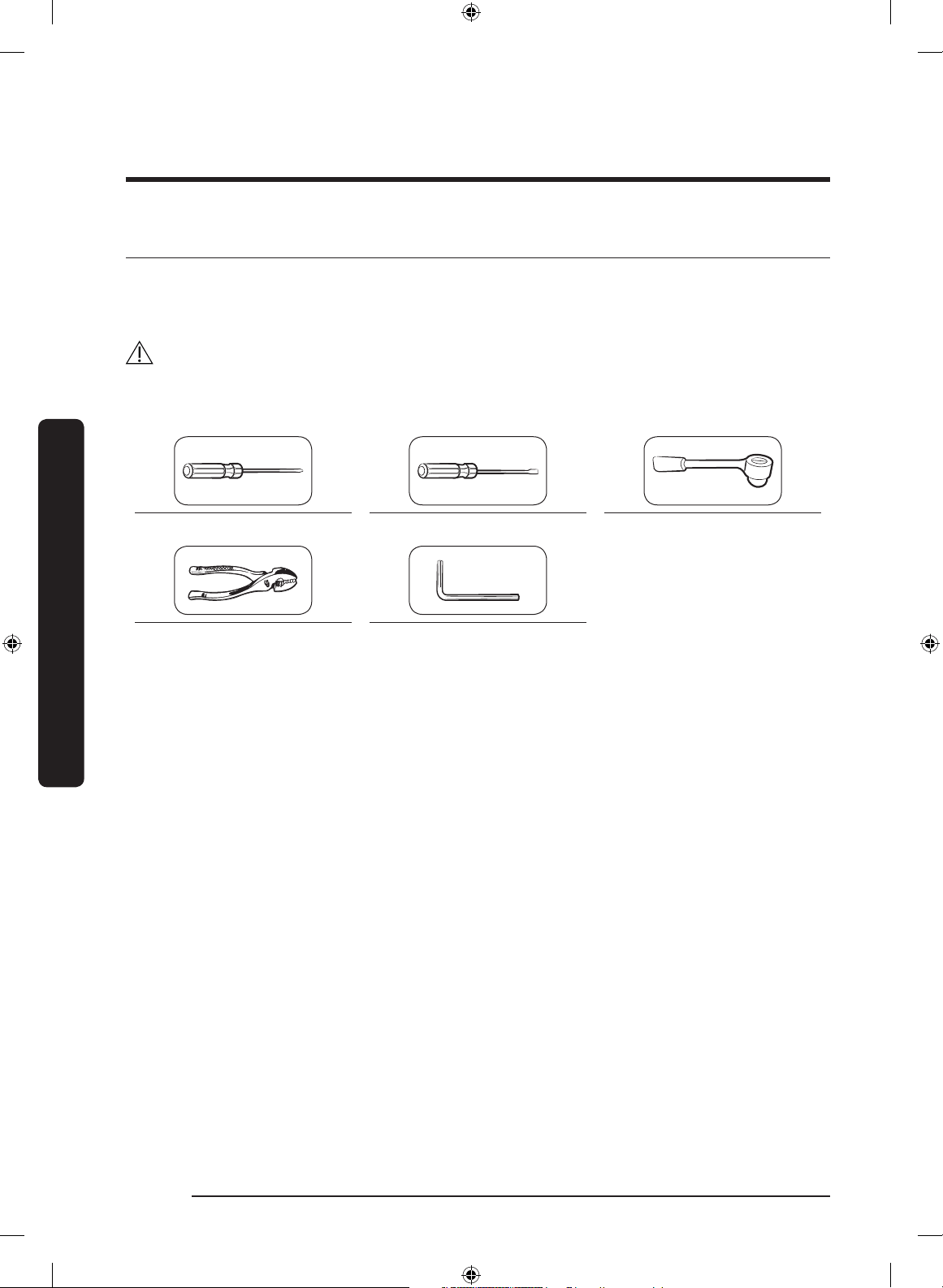
Tools required (not provided)
Phillips screwdriver Flat-heat screwdriver Socket wrench
3
/8" (10 mm)
Pliers Allen wrench
1
/4" (5 mm)
Untitled-1 22 2019-03-07 11:16:54
English 23
Installation
Detach the fridge doors
Left door
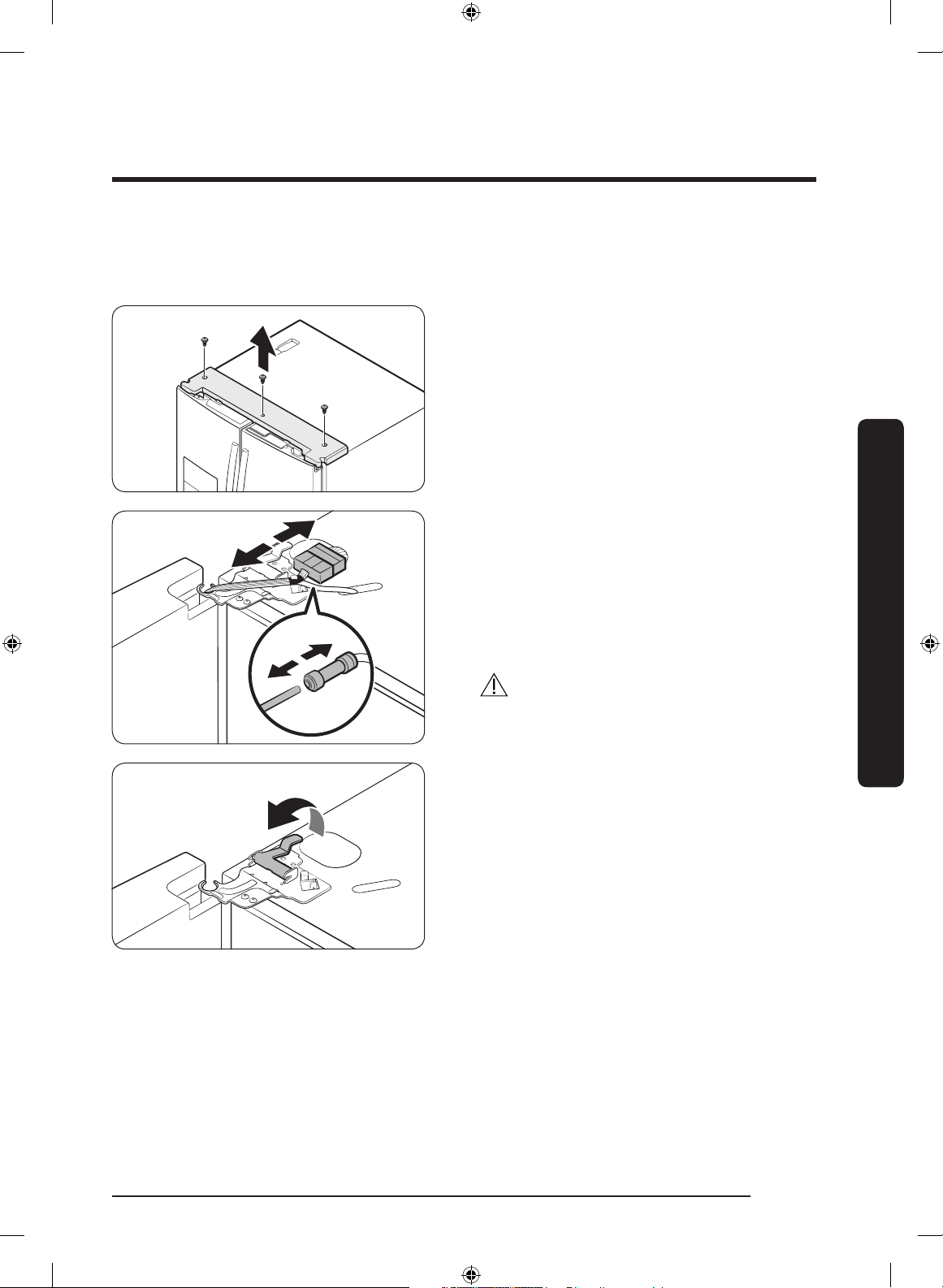
1. With the doors closed, use a Phillips
head screwdriver to remove the screws
(x3) in the top cover.
2. Disconnect the wires and the water
tube from the left-side door. Do the
following sequentially:
• Decouple the connector.
• While holding down one end of the
water line coupler, disconnect the water
tube.
CAUTION
Keep the water tube clips out of children’s
reach.
3. Gently draw up the clamp in several
steps. To prevent nger injuries, do not
apply a sudden force to the clamp.
Untitled-1 23 2019-03-07 11:16:54
Installation
English24
Installation
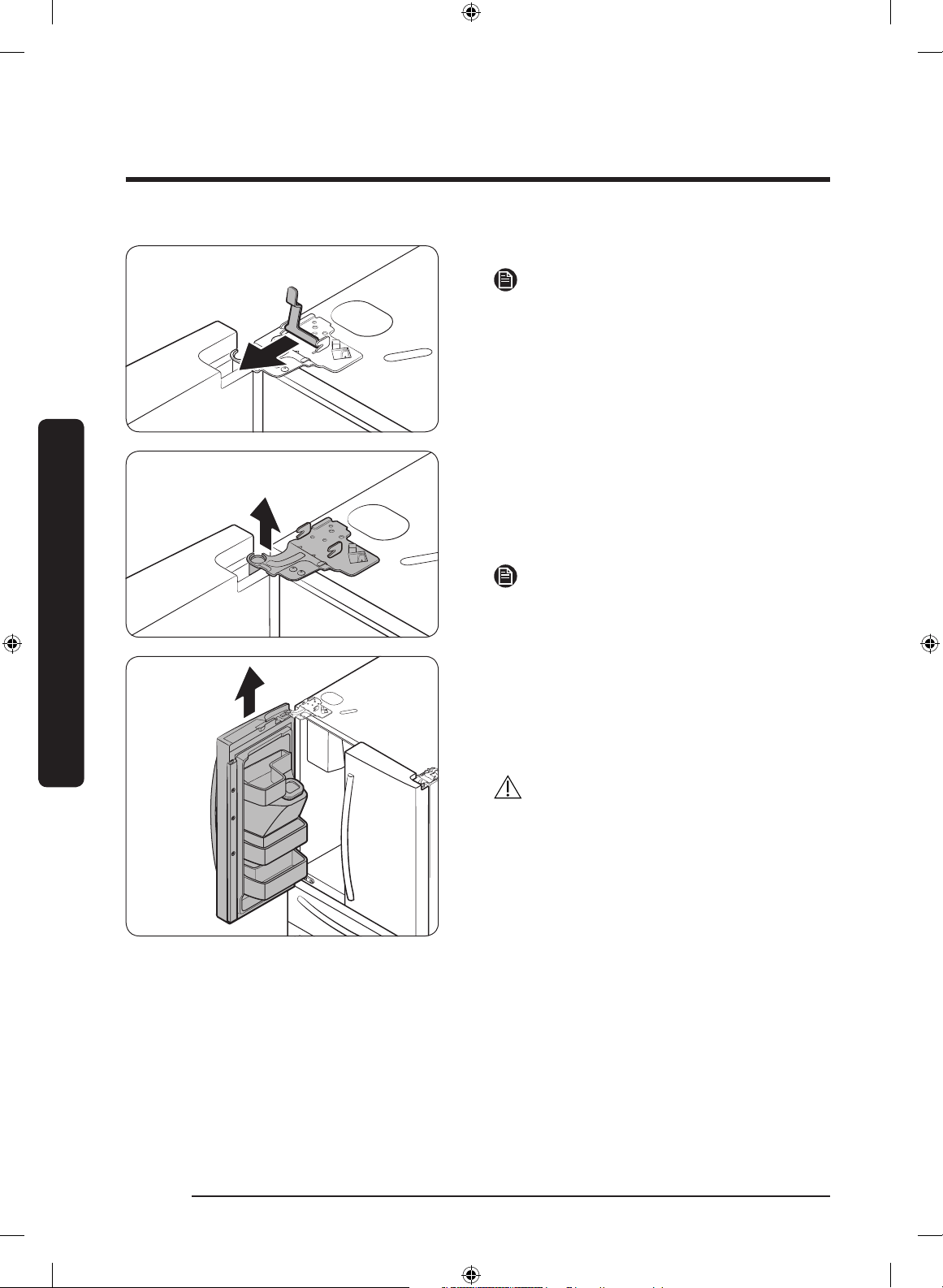
4. Pull up the clamp to remove it.
NOTE
Be careful not to drop the clamp on the
oor.
5. Open the door 90 degrees. While
holding the door, pull up and remove
the top hinge. Be careful not to damage
the connector wires when you remove
the hinge.
NOTE
Be careful not to drop the hinge on the
oor.
6. Gently pull up the door vertically to
remove. Do not apply excessive force
to the door. The door may fall, causing
physical injury.
7. Lay the door down on a at surface.
CAUTION
Please put the door down slowly to
prevent scratches.
Untitled-1 24 2019-03-07 11:16:55
English 25
Installation
Right door
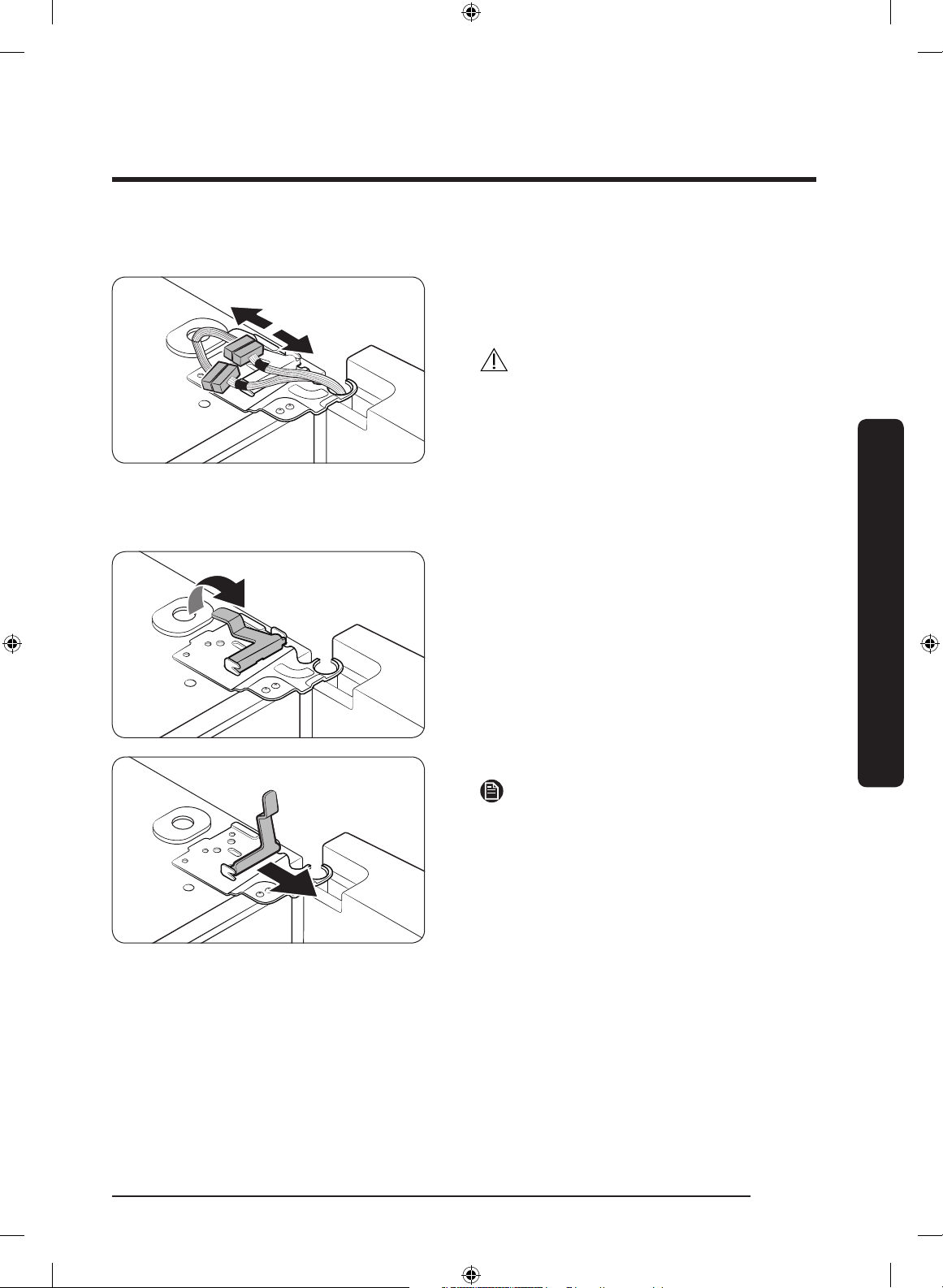
1. Disconnect the wire connectors (x2)
on the right door. The position of the
connectors differs with the model.
CAUTION
• Do not remove both doors
simultaneously. Make sure to remove
one door at a time. Otherwise, one of
the doors may fall and cause physical
injury.
• Make sure the refrigerator is off before
disconnecting the connectors.
2. Gently draw up the clamp in several
steps. To prevent nger injuries, do not
apply a sudden force to the clamp.
3. Pull up the clamp to remove it.
NOTE
Be careful not to drop the clamp on the
oor.
Untitled-1 25 2019-03-07 11:16:55
Installation
English26
Installation
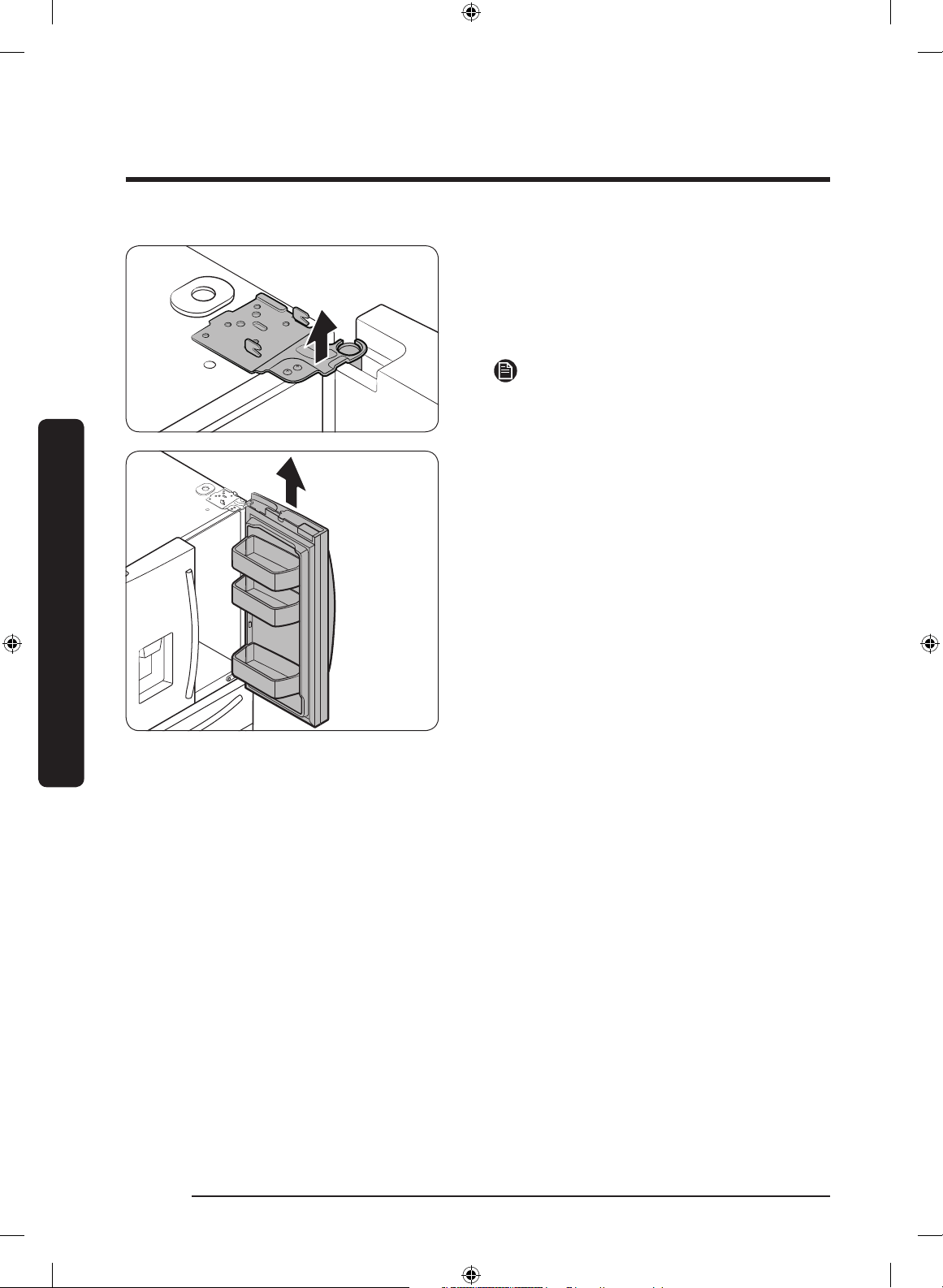
4. Open the door 90 degrees. While
holding the door, pull up and remove
the top hinge. Be careful not to damage
the connector wires when you remove
the hinge.
NOTE
Be careful not to drop the hinge on the
oor.
5. Gently pull up the door vertically to
remove. Do not apply excessive force
to the door. The door may fall, causing
physical injury.
6. Lay the door down on a at surface.
Untitled-1 26 2019-03-07 11:16:55
English 27
Installation
To reattach the fridge door
After you have moved the refrigerator to its nal location, reattach the doors by following
the removal instructions in reverse order.
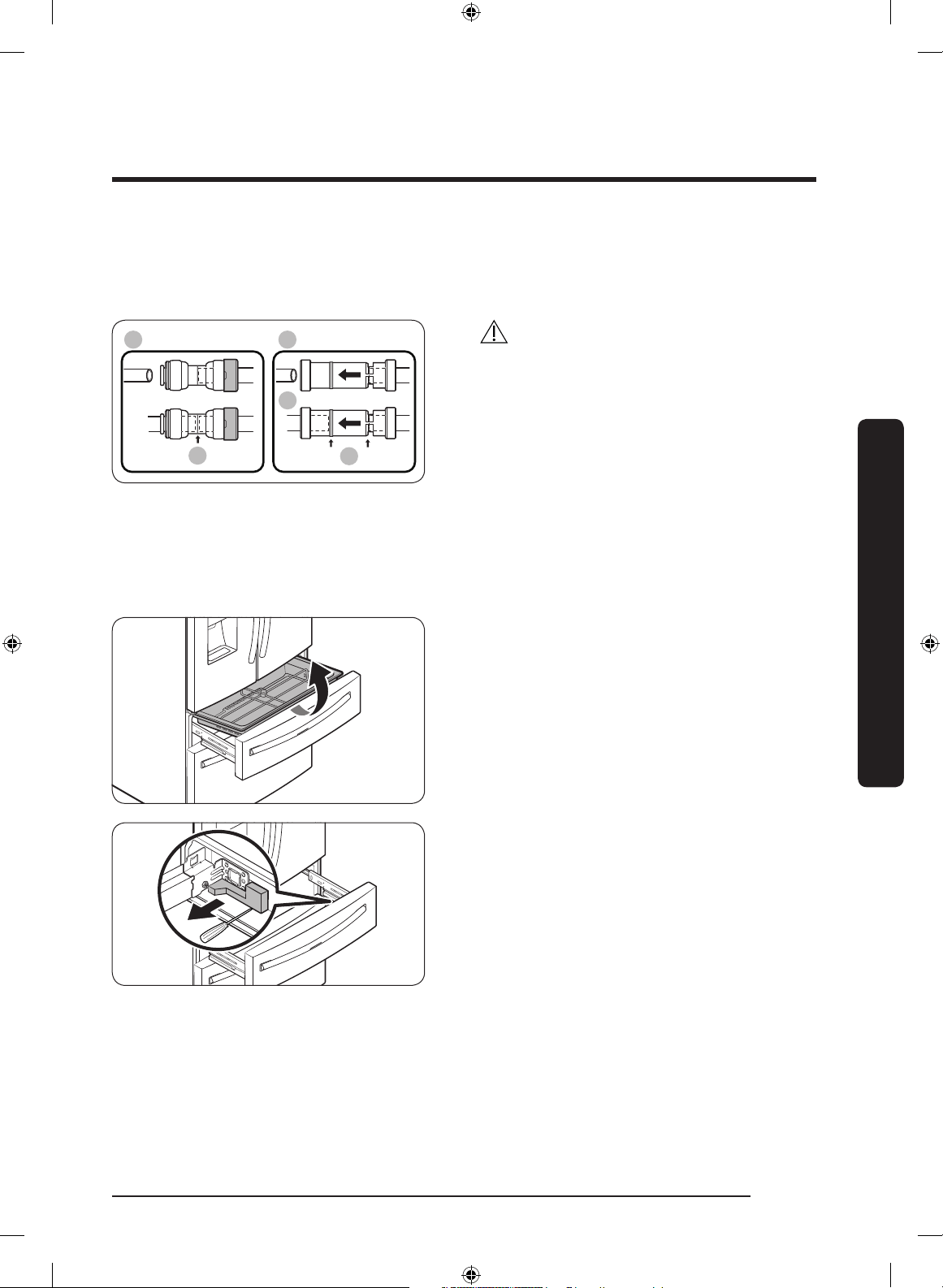
A
01
02
03
B
01 Dispenser
02 Center of transparent coupler
03 Guidelines
CAUTION
To prevent water leaks from the dispenser,
the water line must be fully connected.
Make sure both tubes of the water line are
inserted fully to the center of transparent
coupler (A) or the guidelines (B).
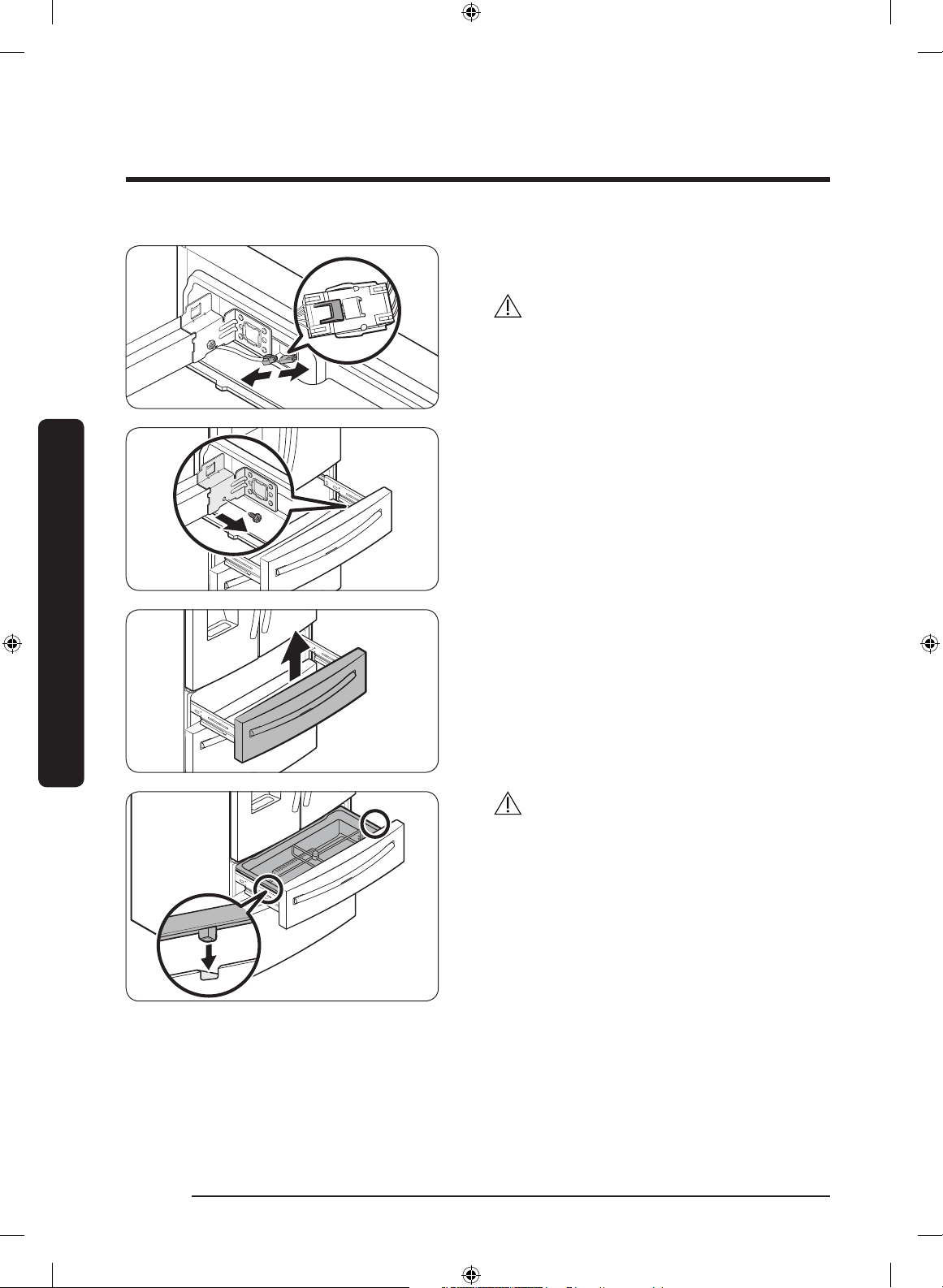
Detach the FlexZone™ drawer
1. Lift up to remove the FlexZone™ basket.
2. Remove the wire cover along with the
connector harness using a at-head
screwdriver.
Untitled-1 27 2019-03-07 11:16:56
Installation
English28
Installation
3. Press the locking tab to disconnect the
wire connector.
CAUTION
When relocking the tab, make sure to fully
connect the wire connector. Otherwise, the
FlexZone™ will not operate.
4. Remove the hex-head bolt on each side
of the drawer using a 10 mm socket
wrench.
5. Lift up to remove the drawer front of
the FlexZone™ from the rail assembly.
CAUTION
• Use caution when removing the rail
assembly, which may fall off causing
damage to the oor.
• Make sure to put the FlexZone™ drawer
in place after removing or mounting
the FlexZone™ basket. The FlexZone™
drawer may not open or close if the
freezer drawer is not in place.
• Do not store too much food in the
FlexZone™ drawer. This prevents
the FlexZone™ drawer from closing
properly, resulting in frost buildup.
Untitled-1 28 2019-03-07 11:16:56
English 29
Installation
To reattach the FlexZone™ drawer
After you have moved the refrigerator to its nal location, re-attach the FlexZone™
drawer by following the removal instructions in reverse order.
CAUTION
If the FlexZone™ or the indicator does not operate properly, make sure the connectors are
connected properly.
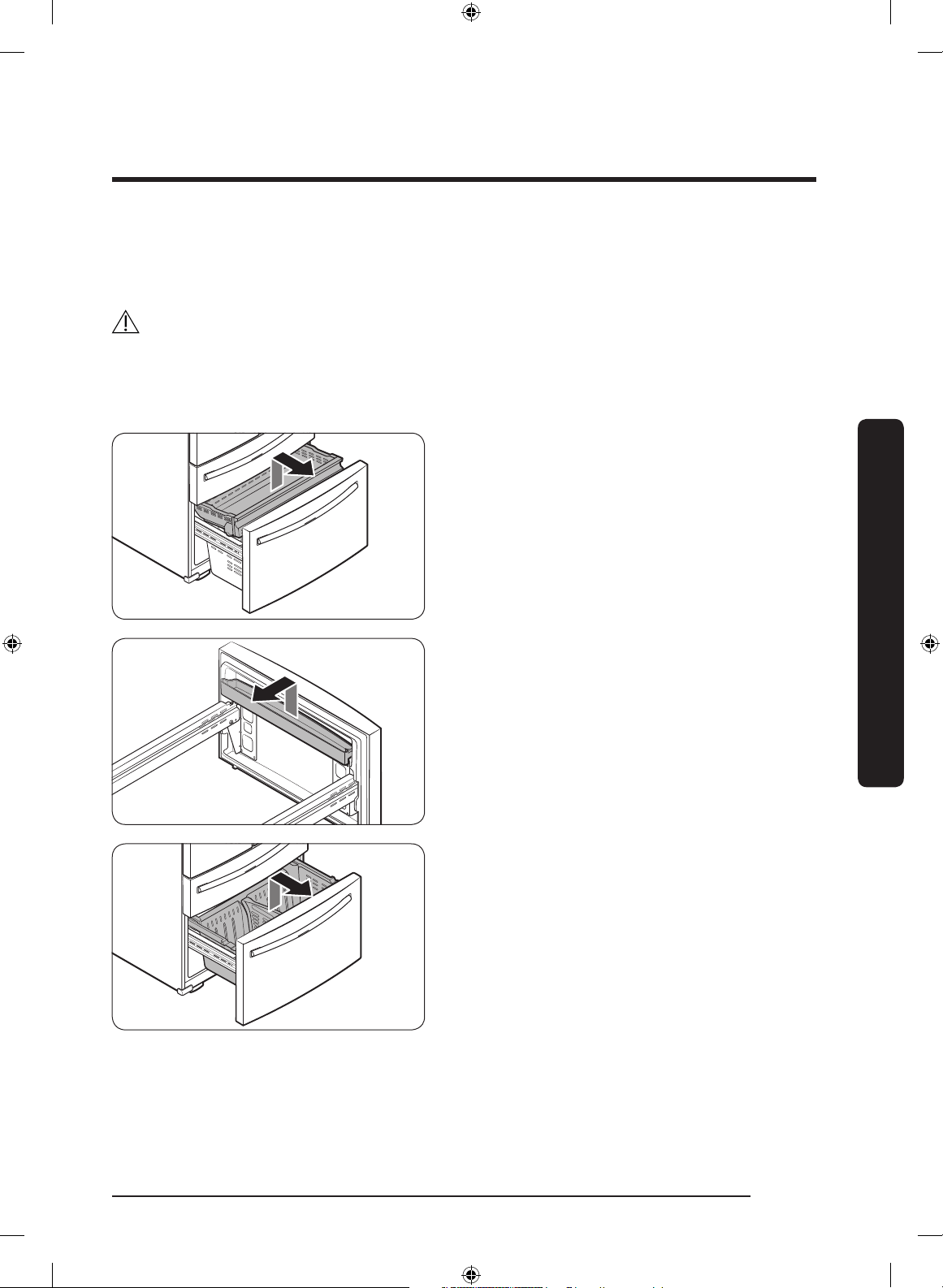
To detach the freezer drawer
1. Push the upper basket to the end, and
then pull up to remove.
2. Lift up to remove the door bin.
3. Then, pull up to remove the lower
basket from the rail assembly.
Untitled-1 29 2019-03-07 11:16:57
Installation
English30
Installation
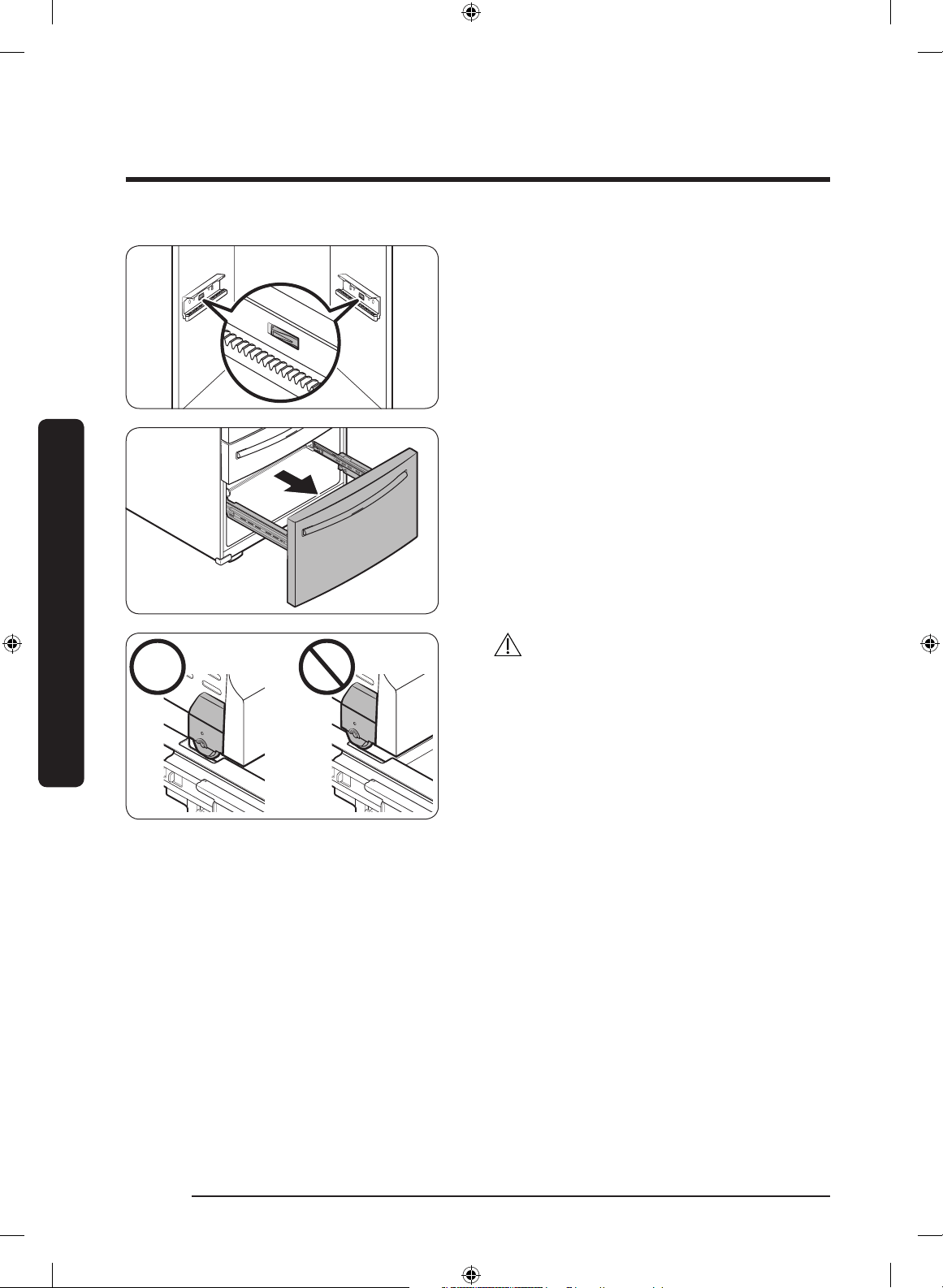
4. Press down the hooks to unlock the rail
assembly.
5. While holding the upper area of the
freezer drawer front, slide the drawer
out all the way to remove the freezer
drawer from the rail assembly.
CAUTION
• Be careful not to scratch or dent the rail
assembly.
• Make sure you mount the freezer
baskets in the correct position.
Otherwise, the door will not open or
close properly, which causes frost to
build up.
• Do not store too much food in the
freezer drawer. This prevents the
freezer drawer from closing properly,
resulting in frost buildup.
To reattach the freezer drawer
Once the refrigerator is in or near it's nal location, re-attach the freezer drawer by
following the directions in the reverse order of removal.
Untitled-1 30 2019-03-07 11:16:57
English 31
Installation
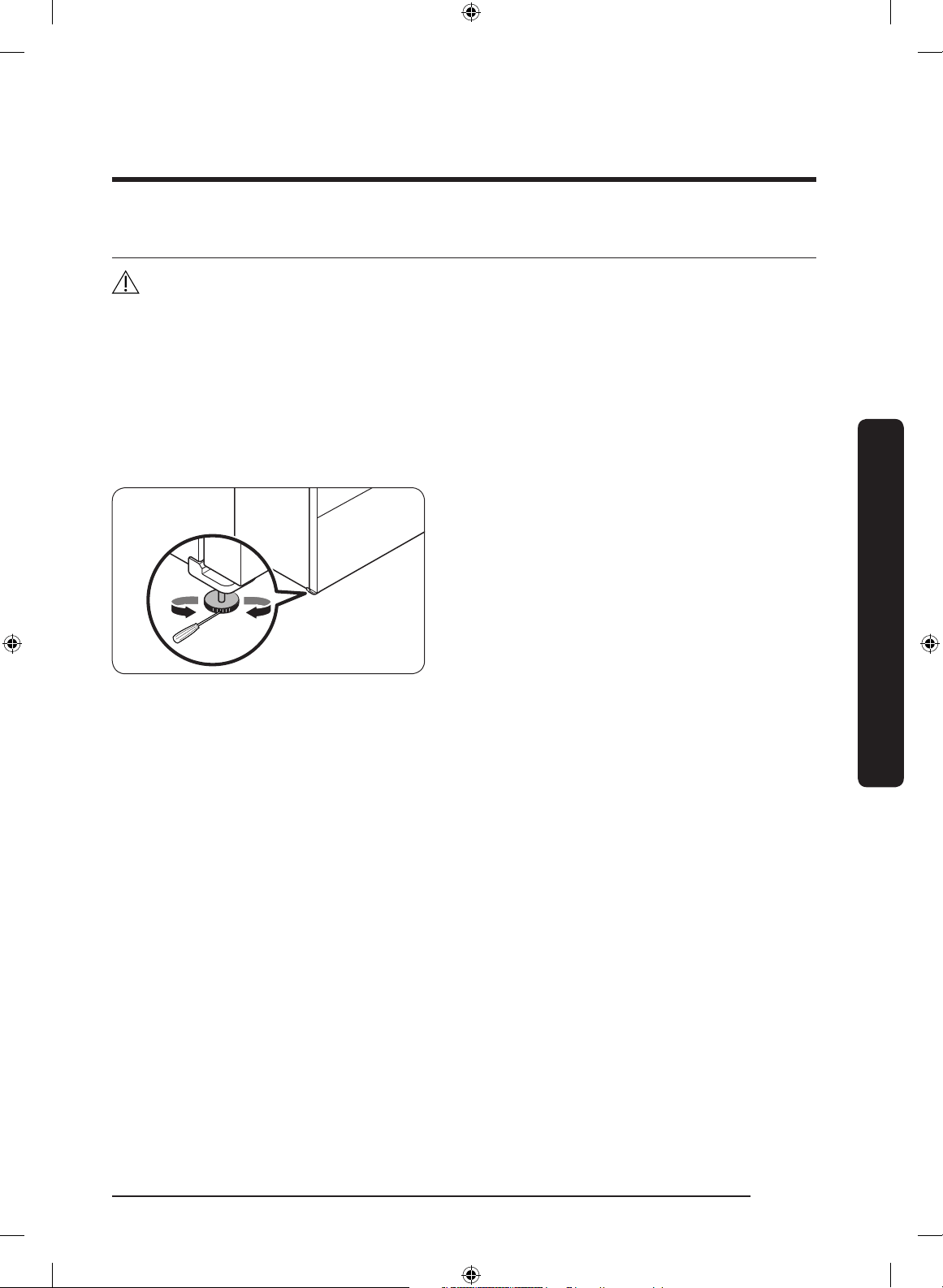
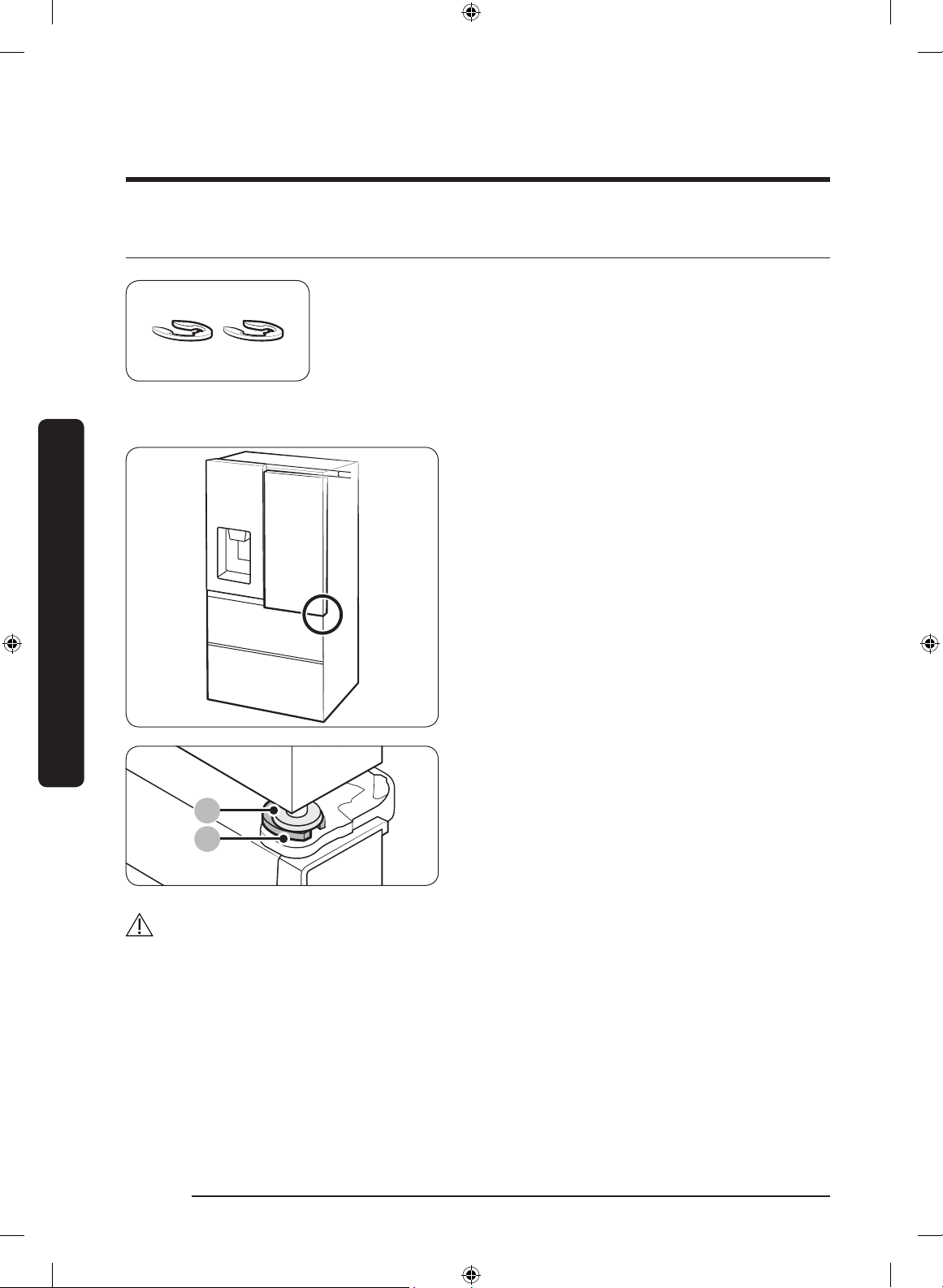
STEP 4 Levelling the refrigerator
CAUTION
• When installed, the refrigerator must be leveled on a at, solid oor. Not leveling the
refrigerator can cause damage to the refrigerator or physical injury.
• Levelling must be performed with the refrigerator empty. Make sure no food items are
inside the refrigerator.
• For safety reasons, adjust the front a little higher than the rear.
Level the refrigerator using the special screws (levellers) on the front legs. Use a at-head
screwdriver to turn the levellers.
• To adjust the height of the left side:
Insert a at-head screwdriver into the
leveller of the left side front leg. Turn
the leveller clockwise to raise the left
side or turn it counterclockwise to
lower.
• To adjust the height of the right side:
Insert a at-head screwdriver into
the leveller of the right side front leg.
Turn the leveller clockwise to raise the
right side or turn it counterclockwise to
lower.
Untitled-1 31 2019-03-07 11:16:58
Installation
English32
Installation
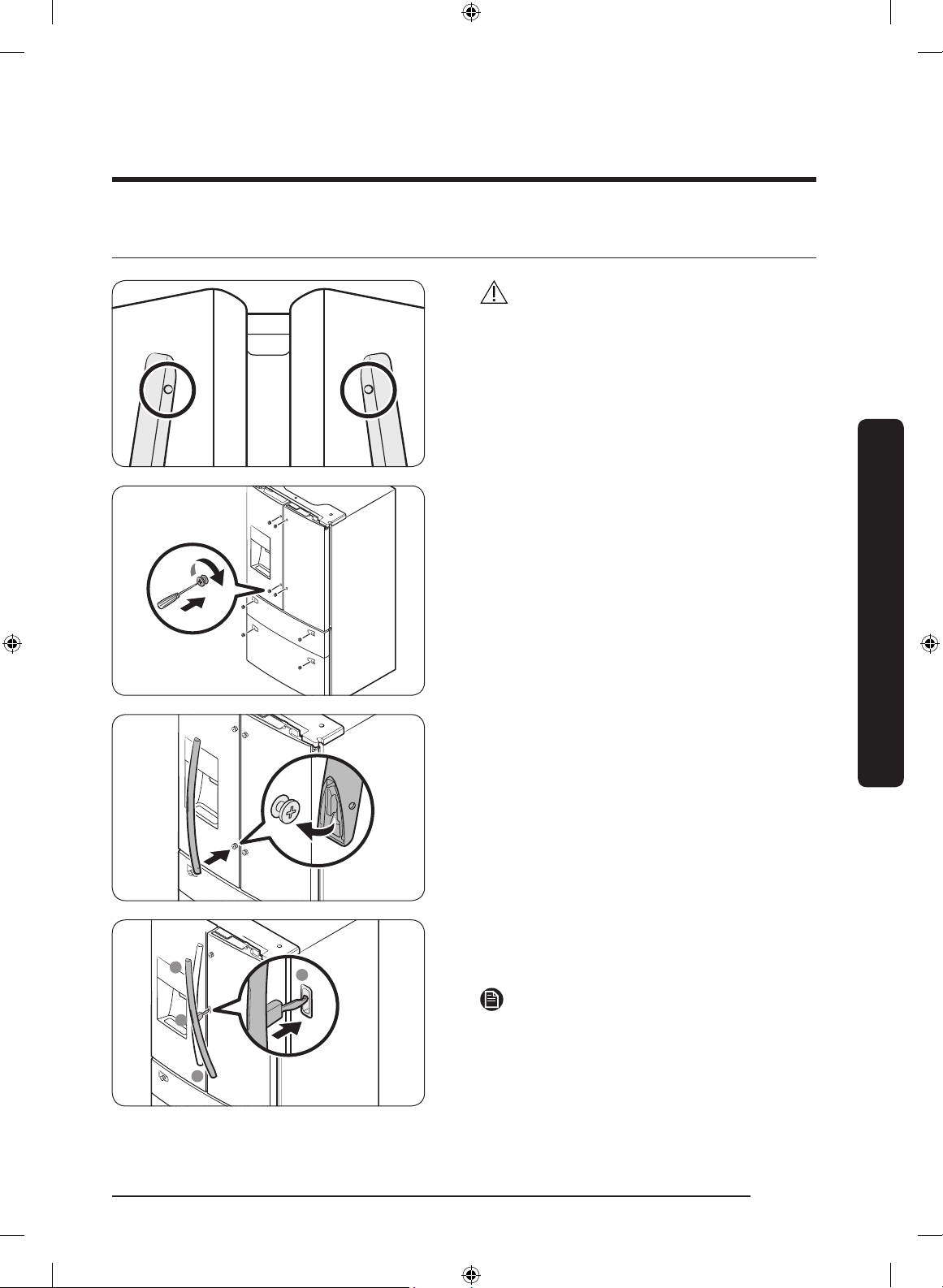
STEP 5 Adjust the door height and the door gap
Snap rings
The height of a door can be adjusted using the provided snap
rings, which come in 4 different sizes (1 mm, 1.5 mm, 2 mm,
and 2.5 mm).
To adjust the height of a door
1. Check the height difference between
the doors, and then lift up and hold the
door with the lower height.
9
2. Insert a suitable-sized snap ring (A)
between the door grommet (B) and the
hinge as shown.
CAUTION
• Insert only one snap ring. If you insert two or more snap rings, the rings may slip out
or make a rubbing noise.
• Keep the snap rings out of children’s reach and keep them for future use.
• Do not raise the door too much. The door can contact and damage the top cover.
Untitled-1 32 2019-03-07 11:16:58
English 33
Installation
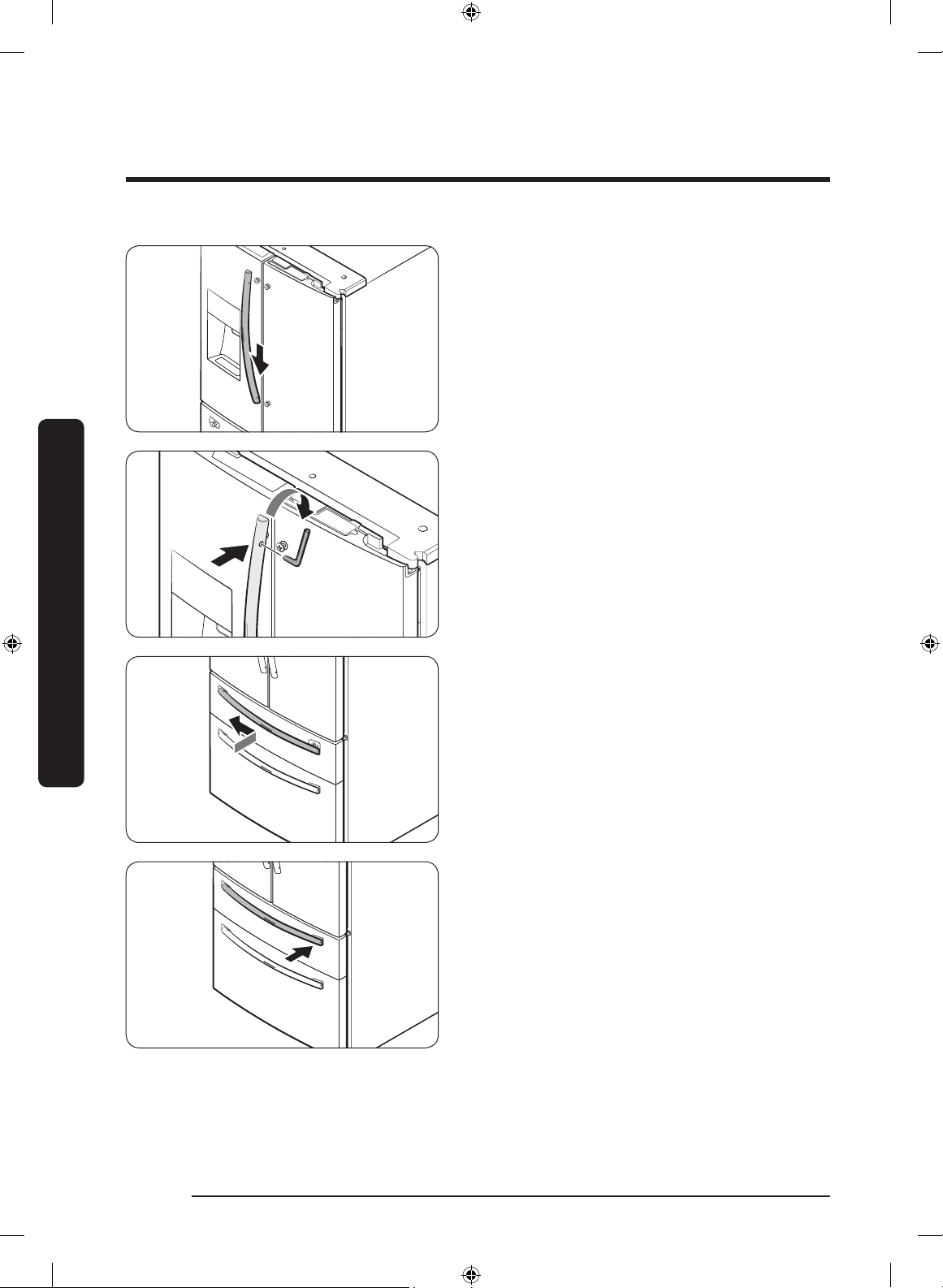
STEP 6 Attach the handles
CAUTION
The refrigerator handles must be oriented
in the correct direction.
• The fridge handles must be attached so
that the holes on each face each other.
• The freezer handle must be attached so
that its hole faces downwards.
1. Using a Phillips screwdriver, attach the
handle screws to the refrigerator, two
for each handle respectively, as shown
in the illustration to the left.
2. To attach the fridge handles to the
refrigerator, rst place the lower side
of one handle onto the lower handle
screw.
1
2
3
2
For type B handle: Attach the handle in the
following order: (1) bottom, (2) middle, (3)
top. Refer to the gure on the left.
NOTE
The design of the right side door handle
may differ depending on your model.
Untitled-1 33 2019-03-07 11:16:59
Installation
English34
Installation
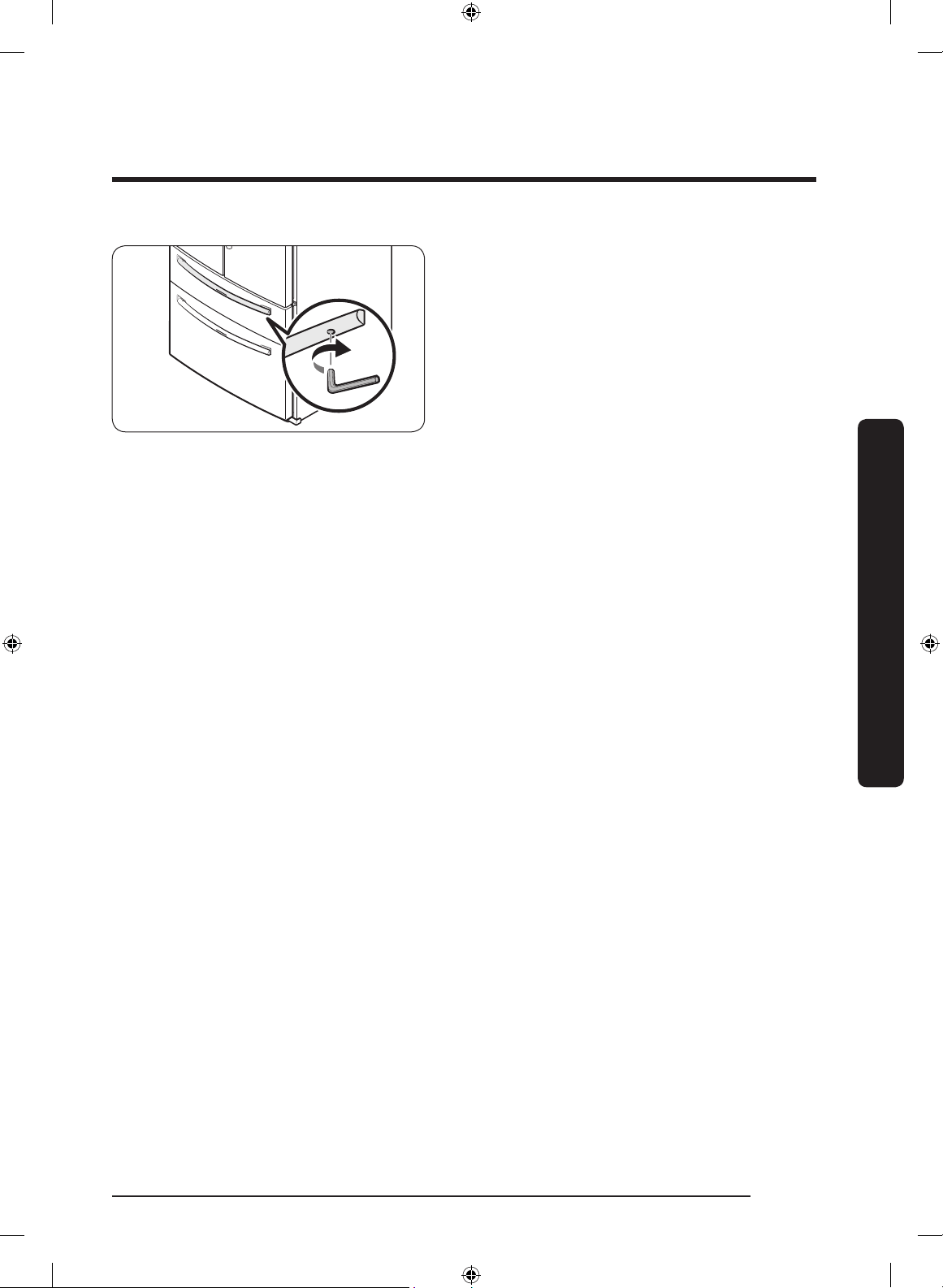
3. Push the handle down, and then place
the upper side of the handle onto the
upper handle screw.
4. Insert the supplied wrench into the
handle hole, and then turn it clockwise
to tighten.
5. Repeat Steps 2 through 4 with the
second refrigerator door handle.
6. To attach the freezer handle to the
refrigerator, rst place the left side of
the freezer handle onto the left handle
screw.
7. Push the handle to the left, and then
place the right side of the freezer
handle onto the right handle screw.
Untitled-1 34 2019-03-07 11:16:59
English 35
Installation
8. Insert the supplied wrench into the
handle hole, and then turn it clockwise
to tighten.
Untitled-1 35 2019-03-07 11:16:59
Installation
English36
Installation
STEP 7 Connect the water dispenser line
A water dispenser with a lter is one of the helpful features on your new refrigerator. To
help promote better health, the water lter removes unwanted particles from your water.
However, it does not sterilize or destroy microorganisms. You may need to purchase a
water purifying system to do that.
The water line also connects to the ice maker. For the ice maker to operate properly,
water pressure of 20-125 psi is required.
If the refrigerator is installed in an area with low water pressure (below 20 psi), you can
install a booster pump to compensate for the low pressure.
After you have connected the water line, make sure the water storage tank inside the
refrigerator is properly lled. To do this, press the water dispenser lever until water runs
from the water outlet.
NOTE
• Water line installation kits are available at extra cost from your retailer. We
recommend using a water line installation kit that contains copper tubing and a
1
/4"
(6 mm) compression nut.
A
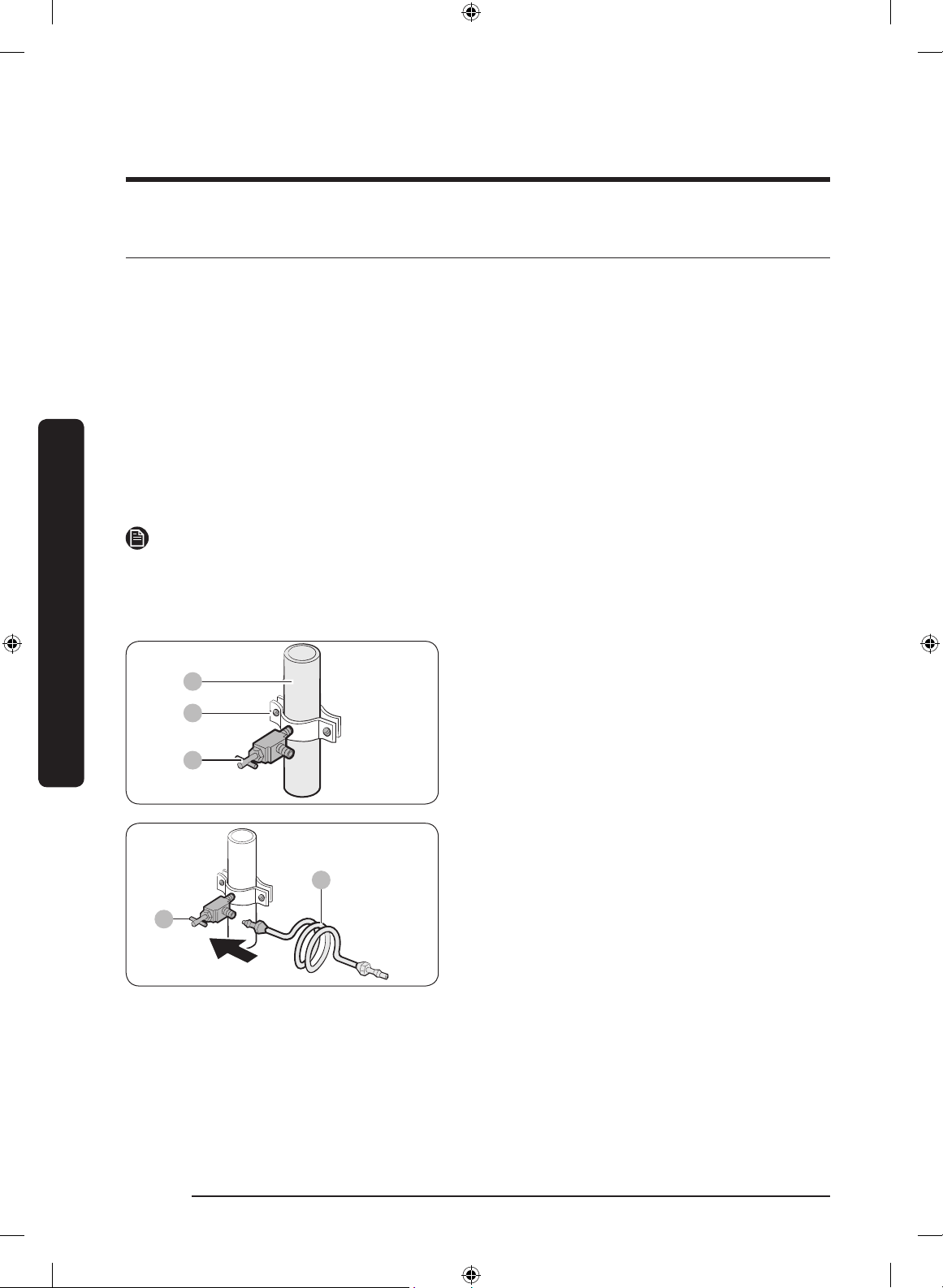
B
C
1. Shut off the main water source.
2. Insert the pipe clamp (B) and the
shutoff valve (C) into the cold water
line (A).
A
B
3. Connect the water line installation kit
(A) to the shutoff valve (B).
Untitled-1 36 2019-03-07 11:17:00
English 37
Installation
Connect the water supply line to the refrigerator
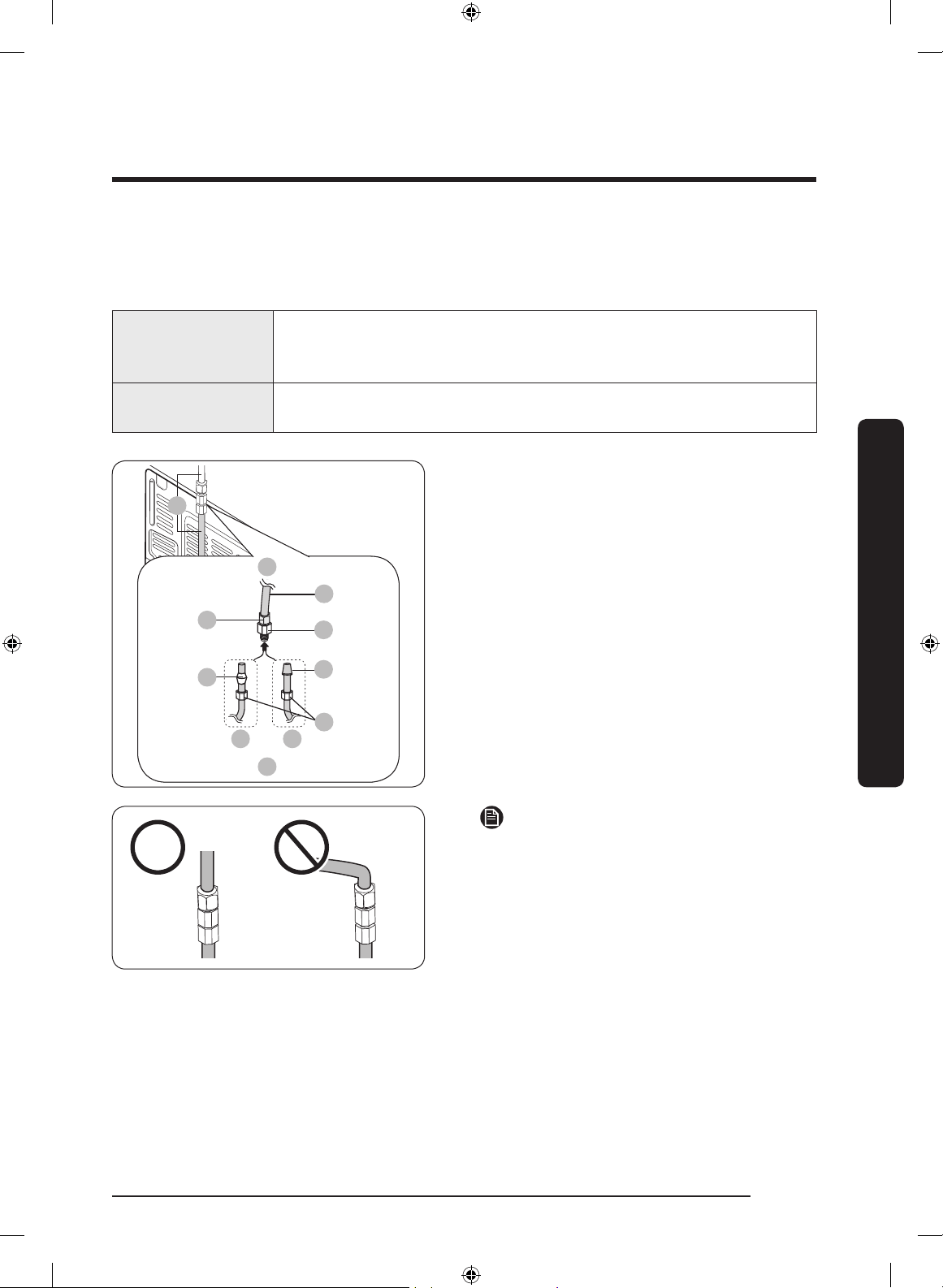
There are several items you must purchase to complete this connection. You may nd
these items sold as a kit at your local hardware store.
Copper Tubing
•
1
/4" copper tubing
•
1
/4" compression nut (1 pc)
• Ferrule (2 pc)
Plastic Tubing
•
1
/4" plastic tubing Molded end (Bulb)
•
1
/4" compression nut (1 pc)
A
01
02
03 08
04
05
06
07
B
C
A. Refrigerator
B. Household water supply line
C. Water Line: must be kept straight.
01 Compression Nut (
1
/4") (Assembled)
02 Ferrule (Not supplied)
03 Copper tubing (Not supplied)
04 Plastic Tubing (Assembled)
05 Compression Fitting (Assembled)
06 Molded end (Bulb)
07 Compression nut (B) (
1
/4") (Not
supplied)
08 Plastic Tubing (A) (Not supplied)
NOTE
If you have to relocate the refrigerator
after connecting the water line (C), make
sure the joined section of the water line is
straight.
Untitled-1 37 2019-03-07 11:17:00
Installation
English38
Installation
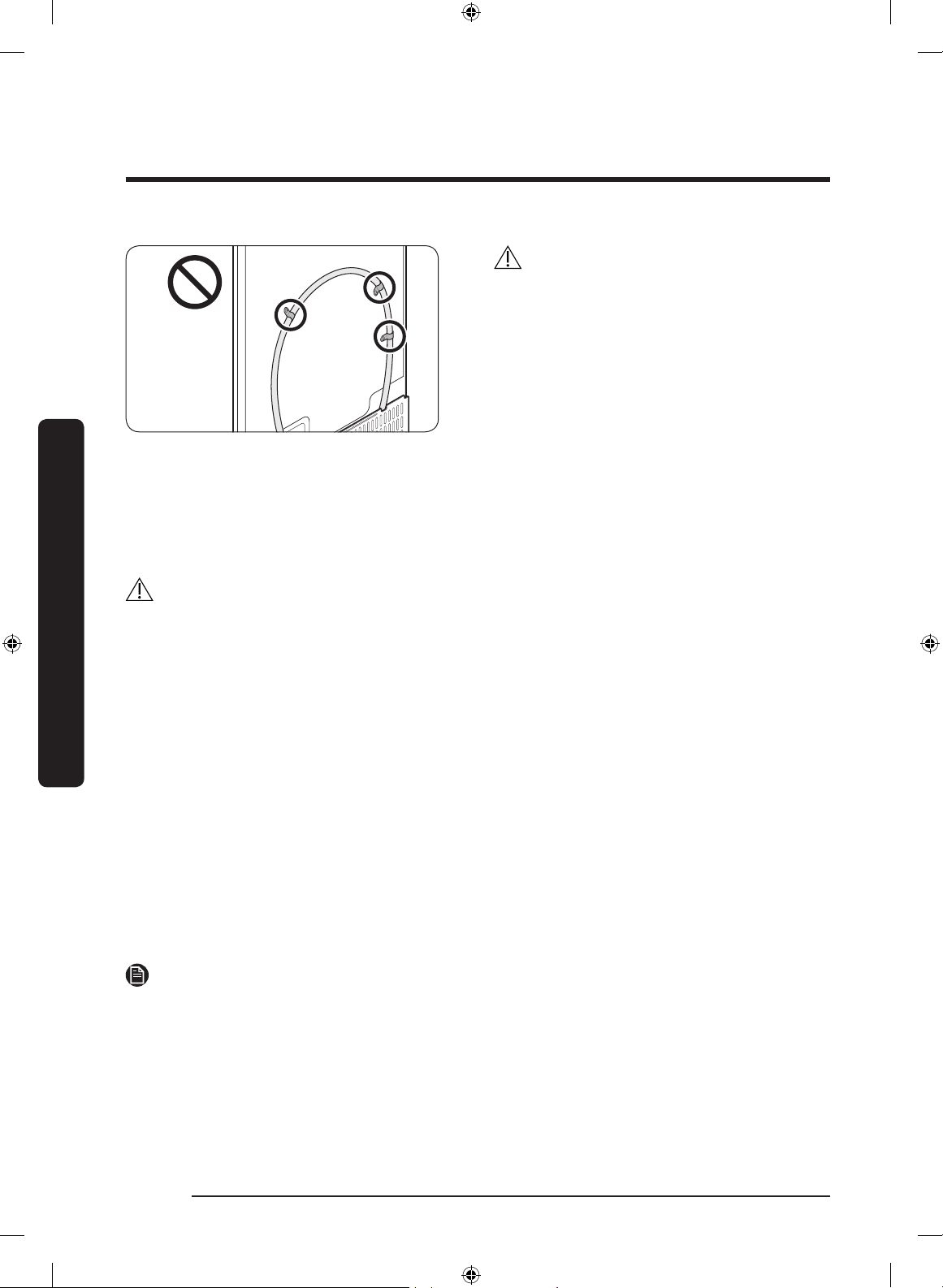
CAUTION
Do not mount the water lter on any part
of the refrigerator. This may damage the
refrigerator.
1. Connect the household water line to the assembled compression tting.
- If you are using copper tubing, slip the compression nut (B) (not supplied) and
ferrule (not supplied) on the copper tubing (not supplied) as shown.
- If you are using plastic tubing (A), insert the molded end (Bulb) of the plastic tubing
(A) into the compression tting.
CAUTION
• If you use plastic tubing (A), do not use it without the molded end (Bulb).
• Leaving the water line disconnected may cause the water valve to produce a buzzing
sound over time. If this is the case, make sure that the ice making function is turned
“OFF” and do not attempt to use the water dispenser.
2. Tighten the compression nut (B) onto the compression tting. Do not over-tighten the
compression nut (B).
3. Turn the water on and check for any leakage. If you nd water drops or leakage in
the connection areas, turn off the main water supply. Check the connections and, if
necessary, tighten.
4. Flush 1 gallon of water through the lter before drinking or using the water from
the refrigerator. (Flush approximately 6 minutes.) To ush, press a large glass or cup
against the water dispenser lever. Fill the glass, empty it, and then repeat.
5. After you turn on the refrigerator, let the ice maker make ice for 1 to 2 days. Over that
period of time, throw out the rst 1 or 2 buckets of ice the ice maker makes to ensure
all impurities have been removed from the water line.
NOTE
Only connect the water line to a potable water source.
• If you have to repair or disassemble the water line, cut off
1
/4“ of the plastic tubing to
make sure you get a snug, leak-free connection.
• You can test the water line quickly using a paper cup. Under normal conditions, the
water dispenser can ll a 5
3
/4 oz. (170 cc) cup in about 10 seconds.
Untitled-1 38 2019-03-07 11:17:00
English 39
Installation
STEP 8 Initial settings
By completing the following steps, the refrigerator should be fully functioning.
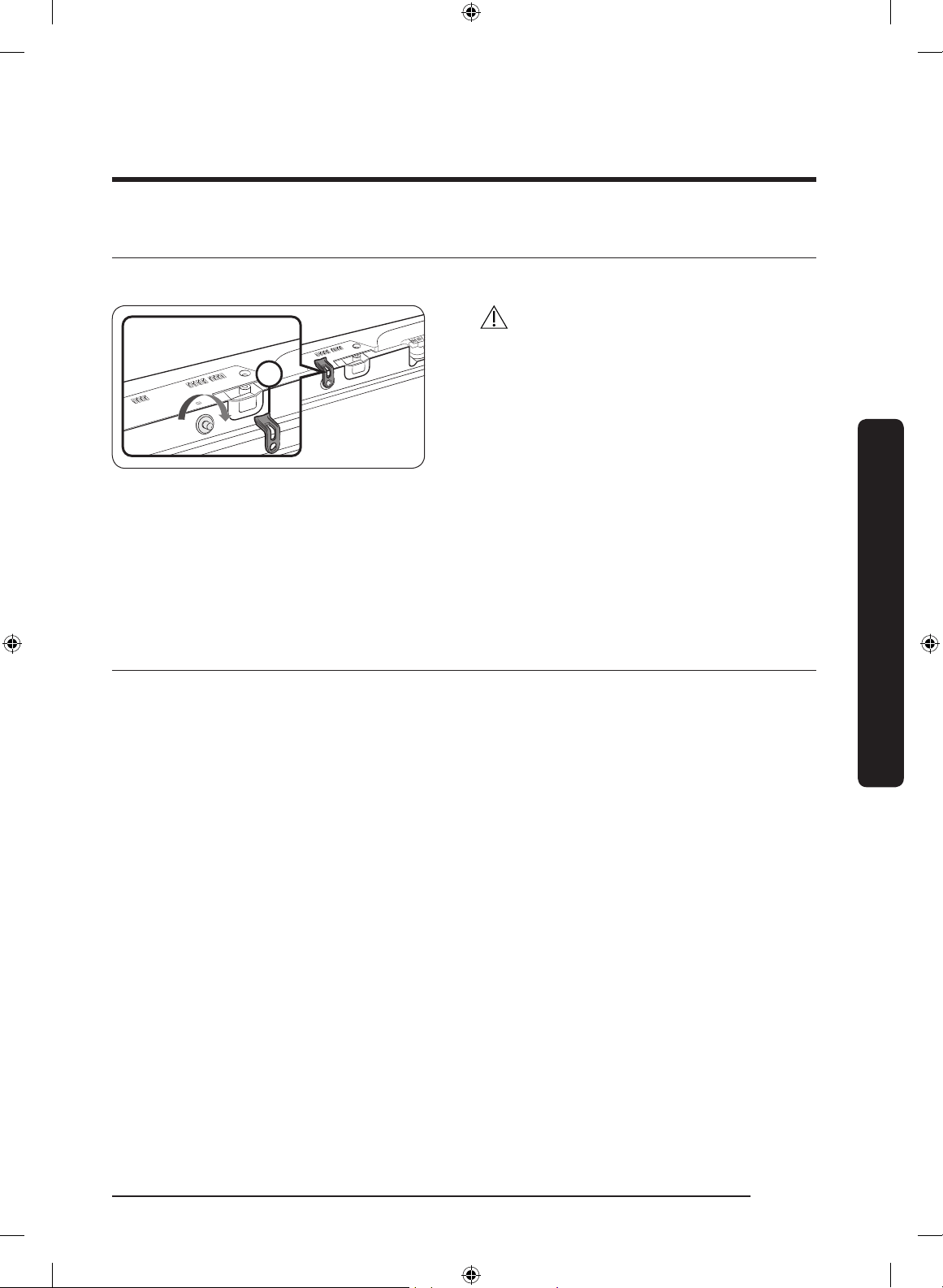
1
CAUTION
Before installing the refrigerator, make
sure to remove the Cover Interlock (1)
from the top of the fridge door. Otherwise,
injuries may be caused by the ice crushing
blade.
1. Plug the power cord into the wall socket to turn the refrigerator on.
2. Open the door, and check if the interior light lights up.
3. Set the temperature to the coldest setting, and wait for about an hour. Then, the
freezer will be slightly chilled, and the motor should be running smoothly.
4. Wait until the refrigerator reaches the set temperature. Now the refrigerator is ready
for use.
STEP 9 Final check
When installation is complete, conrm that:
• The refrigerator is plugged into an electrical outlet and grounded properly.
• The refrigerator is installed on a at, level surface with a reasonable clearance from
walls and cabinets.
• The refrigerator is level and is sitting rmly on the oor.
• The door opens and closes freely, and the interior light turns on automatically when
you open the door.
Untitled-1 39 2019-03-07 11:17:01
English40
Operations
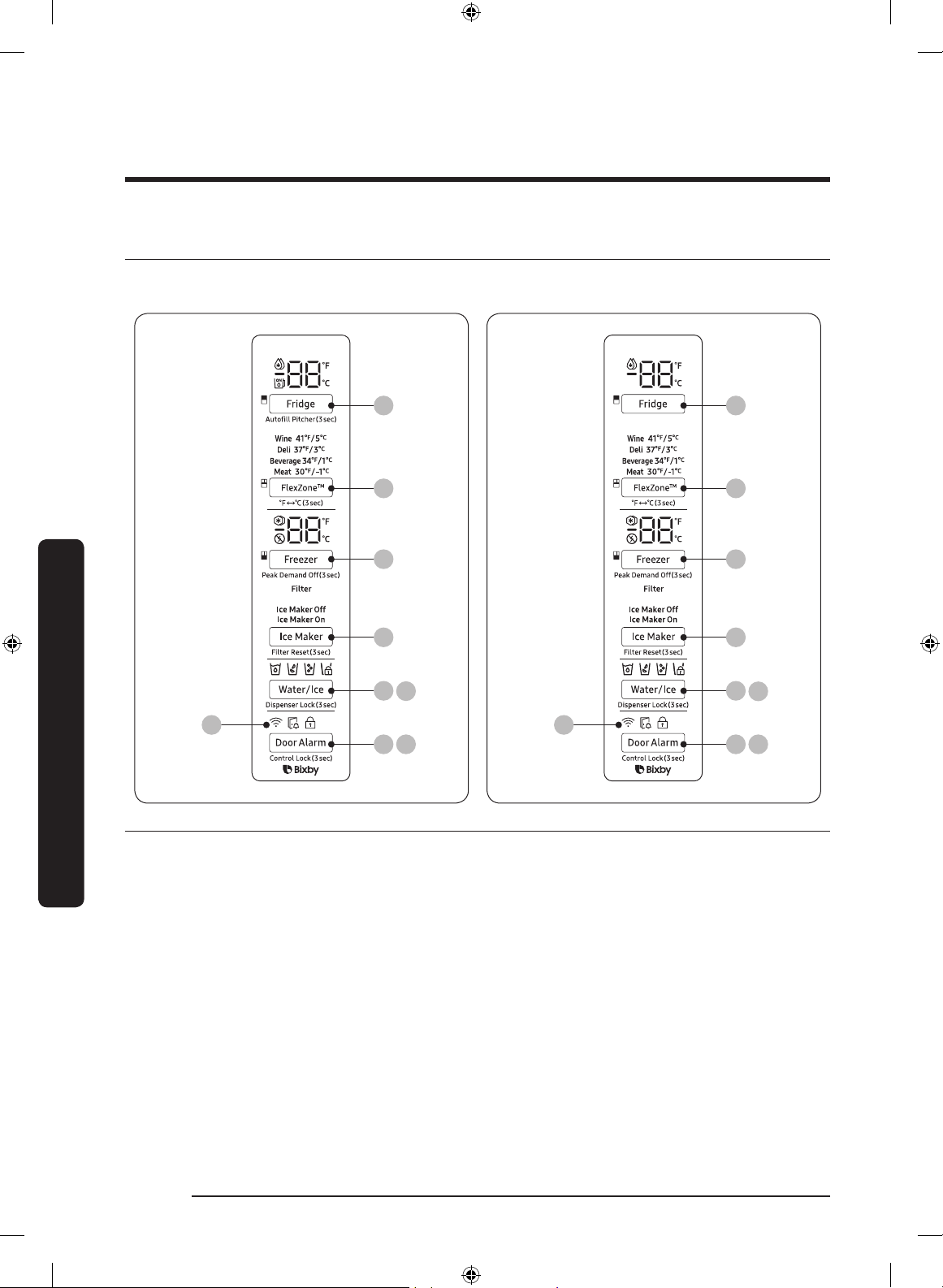
Main panel
Type A Type B
01
02
03
08
08
04
05
07
06
01
02
03
08
08
04
05
07
06
01 Fridge / Auto Fill Water Pitcher * 02 FlexZone™ / °F °C
03 Freezer / Peak Demand Off 04 Ice Maker / Filter Reset
05 Water/Ice / Dispenser Lock 06 Network connection
07 Door Alarm / Control Lock 08 Sabbath Mode
* applicable models only
Operations
Untitled-1 40 2019-03-07 11:17:01
English 41
Operations
NOTE
• When you change the temperature on the panel, the panel displays the actual
temperature inside the refrigerator until the temperature matches the temperature you
set. Then, the panel displays the new set temperature. Note that it will take time for the
refrigerator to reach the new temperature. This is normal. During this time, you do not
need to set the temperature again.
• To ensure optimal performance, we recommend setting the temperature to 0 °F (-18 °C)
for the freezer, and 37 °F (3 °C) for the fridge.
• The temperature in the refrigerator may rise if you open the door frequently or put
a large amount of food into the refrigerator. If this happens, the temperature display
blinks until the refrigerator returns to the specied temperature settings.
• If a communication error occurs between the temperature display and the main
controller, this blinking continues for an extended time. Contact a local Samsung
service center for technical assistance.
• The display of the main panel turns on only if the door is opened and turns off if the
door is closed.
• If you set Control Lock on the main panel, the main panel locks automatically 1 minute
after inactivity.
• Bixby is a Samsung’s intelligence platform, and you can control the product with your
voice. To use the voice command feature, you must connect the product with the
SmartThings app on your phone. For products that do not recognize voice directly
from the product, you can use the Bixby on your smartphone to control some of the
functions of your product after connecting to the app.
Untitled-1 41 2019-03-07 11:17:01
Operations
English42
Operations
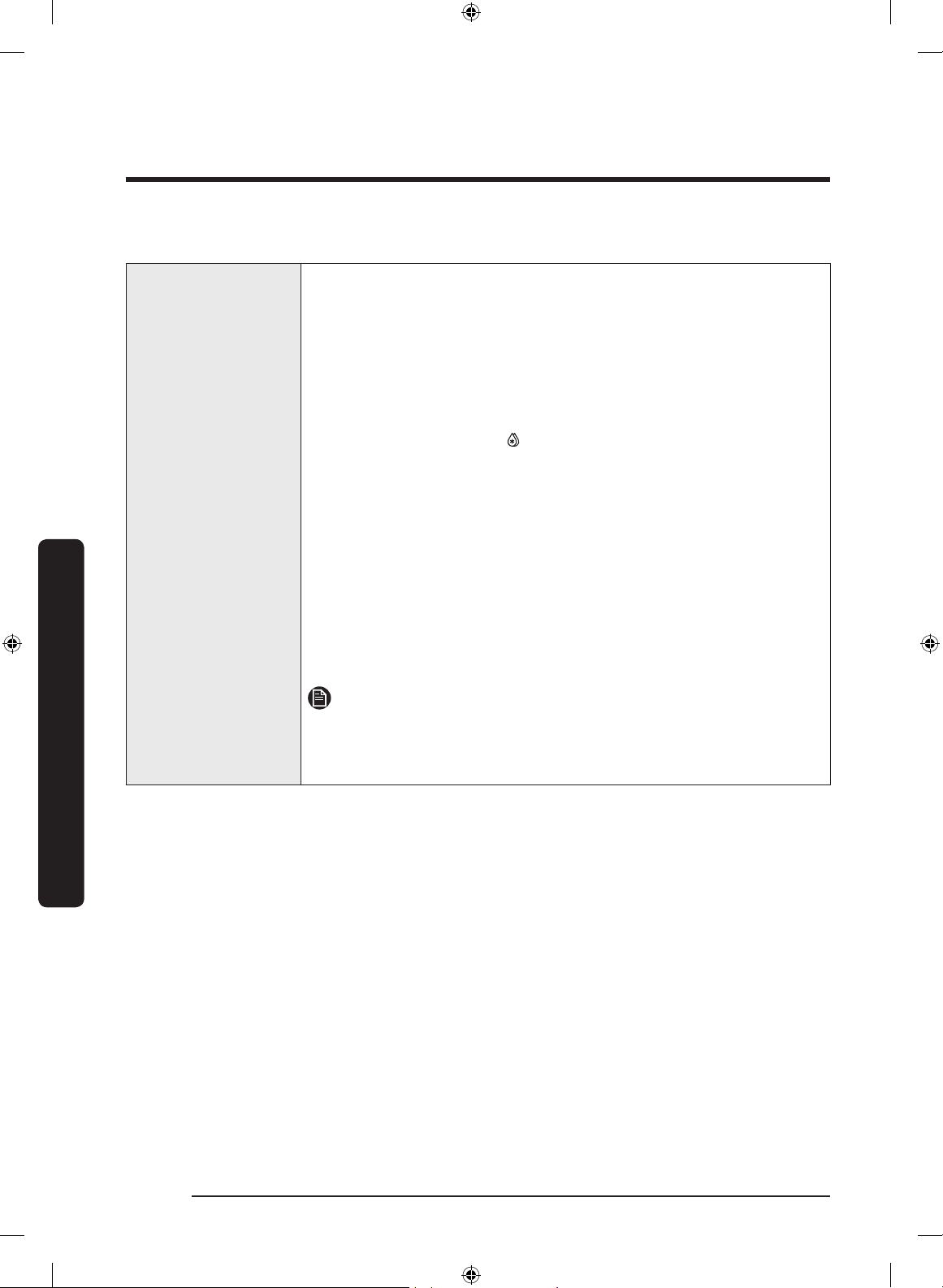
01 Fridge / Auto Fill Water Pitcher (3 sec)
Fridge
You can use the Fridge button to set the fridge temperature or to
activate Power Cool.
• Press
Fridge repeatedly to select a desired temperature
between 34 °F (1 °C) and 44 °F (7 °C).
- The temperature indicator displays the currently set or
selected temperature.
• To activate Power Cool, press
Fridge repeatedly until the
Power Cool indicator ( ) lights up.
- To deactivate Power Cool, simply press
Fridge again while
the Power Cool function is on.
- Power Cool speeds up the cooling process at maximum
power to lower the fridge temperature. The Power Cool
process continues to run for several hours, and then turns
off and the fridge returns to the previous temperature
setting.
- Use Power Cool to rapidly cool food that spoils quickly or
to rapidly cool the refrigerator after the door has been left
open for some time.
NOTE
Using Power Cool increases power consumption. Make sure you
turn it off manually if you no longer need it, and then select the
desired refrigerator temperature.
Untitled-1 42 2019-03-07 11:17:01
English 43
Operations
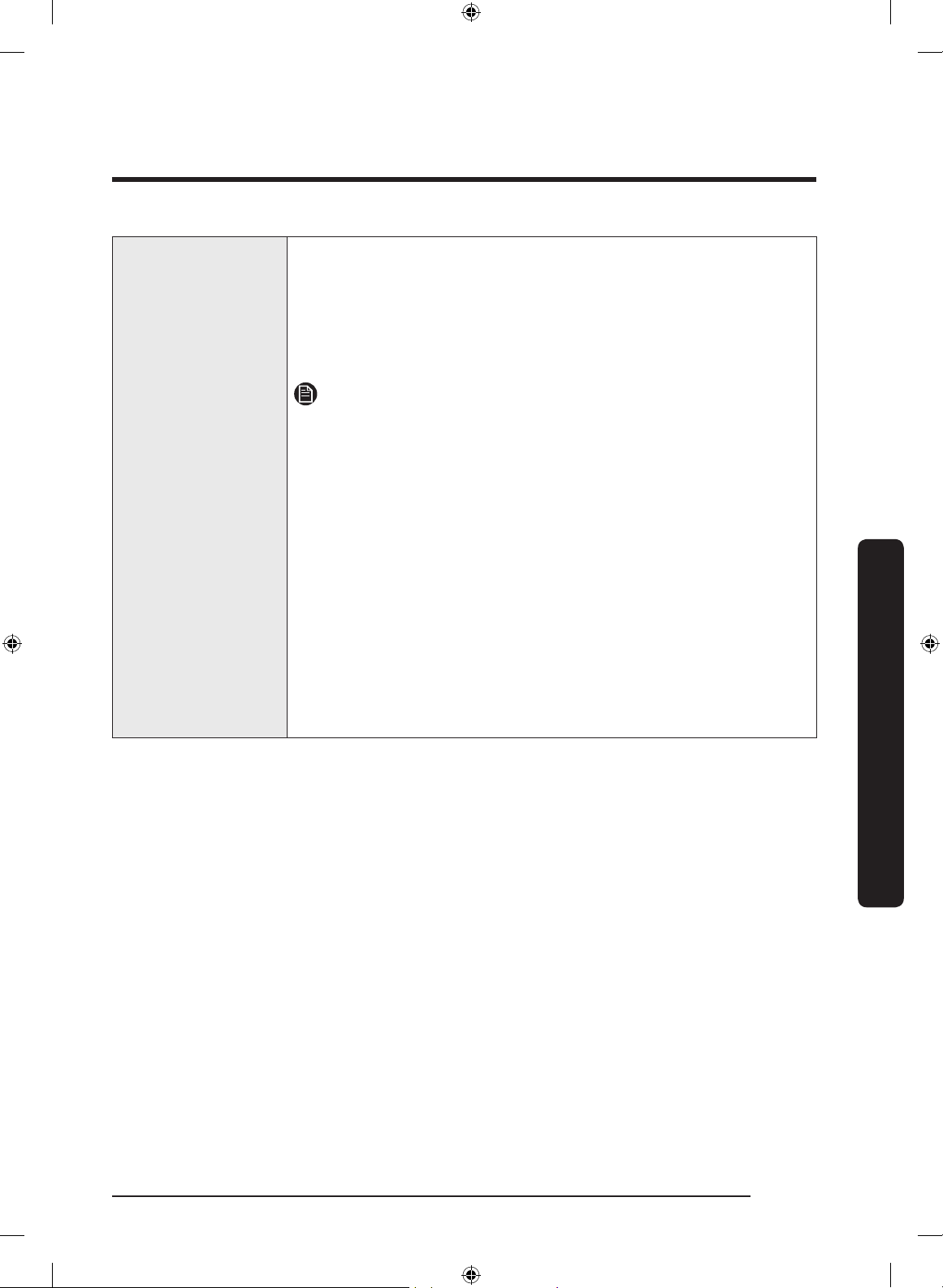
Auto Fill Water
Pitcher
Press and hold Fridge for 3 seconds to turn this function on. Open
the left door of the fridge, and then insert the water tank. Close
the door and the water tank starts to ll with water up to the
preset level.
To turn the function off, press and hold
Fridge again for
3 seconds.
NOTE
• By default, Auto Fill Water Pitcher is disabled. Enable this
function after you have installed the water line.
• If you open the door or push the dispenser lever, this function
is stopped temporarily.
• The Auto Fill Water Pitcher indicators blink if there is a leak.
This may occur because the water tank overows, or the
water-line or water-level sensor fails. If this is the case, follow
these steps.
a. Open the rubber cap and drain water.
b. When draining is complete, the indicators stop blinking and
turn solid.
c. Close the rubber cap.
• If the indicators continue to blink, this might be a system
failure. Contact a local service center.
Untitled-1 43 2019-03-07 11:17:01
Operations
English44
Operations
02 FlexZone™ / °F °C (3 sec)
The FlexZone™ is a full-width drawer featuring temperature control. It has a temperature
sensor that adjusts the amount of cold air allowed into the zone.
• Press
FlexZone™ repeatedly to select a desired mode. By default, Deli is selected.
• The refrigerator adjusts the temperature in the FlexZone™ according to the selected
mode.
Mode Description Examples
Wine
Select Wine to keep food fresh for a long time.
The temperature of the FlexZone™ will be kept
around 41 °F (5 °C).
Wine, cocktails,
cake, cheese
Deli
Select Deli to keep food fresh for a longer time.
The temperature of the FlexZone™ will be kept
around 37 °F (3 °C).
Pineapples,
lemons, biscuits,
potatoes
Beverage
Select Beverage to keep drinks cold and
refreshing.
The temperature of the FlexZone™ will be kept
around 34 °F (1 °C).
Bottled water,
juice, soft drinks,
beer
Meat
Select Meat to keep meat or sh fresh for a longer
time.
The temperature of the FlexZone™ will be kept
around 30 °F (-1 °C).
Steaks, cold cuts,
bacon, chili dogs
CAUTION
• Do not use the FlexZone™ to store most kinds of fruit or leafy vegetables. These food
items may suffer cold-temperature damage.
• Do not store glass bottles in the FlexZone™ in Beverage or Meat mode. They may break
and cause physical injury.
°F °C
You can also use the FlexZone™ button to switch the temperature
scale between Celsius and Fahrenheit.
To switch the temperature scale, press and hold
FlexZone™ for
3 seconds to change the current temperature scale.
Untitled-1 44 2019-03-07 11:17:01
English 45
Operations
03 Freezer / Peak Demand Off (3 sec)
Freezer
You can use the Freezer button to set the freezer temperature or
to activate Power Freeze.
• Press
Freezer repeatedly to select a desired temperature
between 5 °F (-15 °C) and -8 °F (-23 °C).
- The temperature indicator displays the currently set or
selected temperature.
• To activate Power Freeze, press
Freezer repeatedly until the
Power Freeze indicator ( ) lights up.
- To deactivate Power Freeze, simply press
Freezer again
while the Power Freeze function is on.
- Power Freeze speeds up the freezing process at maximum
power to lower the freezer temperature. The Power Freeze
process continues to run for several hours, and then turns
off and the freezer returns to the previous temperature
setting.
- To freeze large amounts of food, activate Power Freeze for
at least 20 hours before putting the food in the freezer.
NOTE
Using Power Freeze increases power consumption. Make sure you
turn it off manually if you no longer need it, and then select the
desired freezer temperature.
Peak Demand Off
The Peak Demand Off function activates/deactivates Smart Grid.
(See Page 53)
Press
Freezer for 3 seconds to set/clear the Peak Demand Off
function.
Untitled-1 45 2019-03-07 11:17:02
Operations
English46
Operations
04 Ice Maker / Filter Reset (3 sec)
Ice Maker
Press Ice Maker to turn the ice maker on or off.
The ice maker has 2 indicators (
/ )
to indicate its operating status.
• When the ice maker operates, the corresponding indicator
(
) turns on.
• When the ice maker is turned off, the corresponding
indicator ( ) turns on. In this case, ice making
is disabled even if you press the Cubed or Crushed Ice
buttons on the dispenser panel. To enable ice making, you
must turn the ice maker on.
NOTE
If the ice maker is turned off, it will turn on if you press and
hold the ice lever for more than 5 seconds.
Filter Reset
After about 6 months (and typically, about 300 gallons (1200
L) of water), the Filter indicator blinks red for several seconds
when you open the door, reminding you that the lter needs
to be replaced.
When this happens, replace the lter, and then press and hold
Filter Reset for 3 seconds. The lter lifecycle will be reset and
the Filter indicator turns off.
NOTE
• Some regions have relatively large amounts of lime in
their water. This can reduce the lifecycle of the lter. In
these areas, you will have to replace the water lter more
often than specied above.
• If water is not dispensing properly, the water lter is most
likely clogged. Replace the water lter.
Untitled-1 46 2019-03-07 11:17:02
English 47
Operations
05 Water/Ice / Dispenser Lock (3 sec)
Water/Ice
You can dispense chilled water, cubed ice, or crushed ice. To
dispense, press Water/Ice. The corresponding indicator turns on.
Dispenser Lock
(Dispenser panel /
Dispenser lever)
To prevent use of the dispenser panel buttons and the dispenser
lever, press and hold
Water/Ice for more than 3 seconds.
If you press and hold the button again for more than 3 seconds,
the dispenser lock will be deactivated.
NOTE
• The Dispenser Lock on the dispenser panel does not affect the
controls on the main panel. To lock the main panel, use the
Control Lock function on the main panel.
• If you press Water/Ice for 3 seconds when both control lock
and dispenser lock are active, you will deactivate both control
lock and dispenser lock.
06 Network connection
You can control and monitor your refrigerator on the SmartThings app. For more
information, see the SmartThings section.
07 Door Alarm / Control Lock (3 sec)
Door Alarm
If the door is left open for more than 2 minutes, an alarm will
sound and the alarm indicator will blink. You can toggle the alarm
on and off by pressing Door Alarm. The alarm is enabled by
factory default.
If the door is left open for 5 minutes, internal lights (in the
fridge, FlexZone™, and freezer) will blink for 10 seconds and then
turn on. The whole process will be repeated every minute for
5 minutes. This is to alert hearing-impaired users that a door is
open. Note that this function is normal.
Untitled-1 47 2019-03-07 11:17:02
Operations
English48
Operations
Control Lock
To prevent accidental setting changes, press and hold Door Alarm
for 3 seconds. The main panel will be disabled and the Lock
indicator ( ) will turn on.
When Control Lock is on, the indicator blinks if any button on the
main panel is pressed.
If you press and hold the button again for more than 3 seconds,
Control Lock will be deactivated.
However, Control Lock will be reactivated if no button is pressed
within 1 minute.
NOTE
Control Lock on the main panel does not affect the dispenser.
The dispenser operates independently and so does the dispenser
lever. To lock the dispenser and the dispenser lever, use the
Dispenser Lock function.
Untitled-1 48 2019-03-07 11:17:02
English 49
Operations
08 Sabbath Mode
The Sabbath mode stays active for 85 hours once it is activated. After that, it will be
deactivated automatically.
• To activate Sabbath Mode, press and hold
Door Alarm and Water/Ice simultaneously
for 5 seconds. When the refrigerator is in Sabbath mode, the buttons, the display, and
the internal lights do not function. The refrigerator and freezer, however, continue to
cool.
• To deactivate Sabbath Mode, press and hold Door Alarm and Water/Ice simultaneously
again for 5 seconds.
NOTE
If the refrigerator powers off and restarts (for example, if there is a power failure), the
Sabbath mode remains active. To end Sabbath Mode, you must deactivate it as described
above.
09 Cooling Off
Cooling Off mode (also called Shop mode) is designed for use by retailers when they are
displaying refrigerators on a retail oor.
In Cooling Off mode, the refrigerator’s fan motor and lights operate normally, but the
compressors do not run so neither the refrigerator nor the freezer become cold.
To enter or exit the Cooling Off mode, press and hold
Fridge and FlexZone™
simultaneously for 6 seconds. Then, when the display blinks, press Door Alarm.
When the Cooling Off mode is on, the refrigerator chime sounds, and the refrigerator
shows “0” on the fridge temperature display and “FF” on the freezer temperature display.
Untitled-1 49 2019-03-07 11:17:02
Operations
English50
Operations
SmartThings
Installation
Visit the Google Play Store, Galaxy Apps, or Apple App Store and search for “SmartThings”.
Download and install the SmartThings app provided by Samsung Electronics to your smart
device.
NOTE
• The SmartThings app is designed for Android 6.0 (Marshmallow) or later, iOS 10.0
or later, iPhone 6 or later, and is optimized for Samsung smartphones (Galaxy S and
Galaxy Note series).
• For improved performance, the SmartThings app is subject to change without notice or
discontinued support according to the manufacturer’s policy.
• Recommended encryption systems include WPA/TKIP and WPA2/AES. Any newer or
non-standard Wi-Fi authentication protocols are not supported.
• Wireless networks may be affected by the surrounding wireless communication
environment.
• If your Internet service provider has registered the MAC address of your PC or modem
for identication, your Samsung Smart Refrigerator may fail to connect to the Internet.
If this happens, contact your Internet service provider for technical assistance.
• The rewall settings of your network system may prevent your Samsung Smart
Refrigerator from accessing the Internet. Contact your Internet service provider for
technical assistance. If this symptom continues, contact a local Samsung service center
or retailer.
• To congure the wireless access point (AP) settings, see the user manual of the AP
(router).
• Samsung Smart Refrigerators support both Wi-Fi 2.4 GHz with IEEE 802.11 b/g/n and
Soft-AP protocols. (IEEE 802.11 n is recommended.)
• Unauthorized Wi-Fi wireless routers may fail to connect to applicable Samsung Smart
Refrigerators.
Untitled-1 50 2019-03-07 11:17:02
English 51
Operations
Samsung account
You are required to register your Samsung account to use the app. If you don’t have a
Samsung account, follow the app’s onscreen instructions to create a free Samsung account.
Getting started
Turn on the device you want to connect, open the SmartThings app on your phone, and
then follow the instructions below.
If a pop-up appears saying that a new device has been found, tap
ADD NOW.
If a pop-up doesn't appear, tap the
+ button, and then select the device you want to
connect from the list of available devices.
If your device isn't in the list of available devices, tap
Supported Devices, select the device
type (Refrigerator), and then select the specic device model.
Follow the instructions in the app to set up your device. Once setup is complete, your
refrigerator will appear as a "card" on your
Devices screen.
Refrigerator app
Integrated control
You can monitor and control your refrigerator at home and on the go.
• Tap the refrigerator icon on the SmartThings Dashboard or tap the Devices icon at the
bottom of the Dashboard, and then tap the refrigerator "card" to open the Refrigerator
page.
• Check the operation status or notications related to your refrigerator, and then
change options or settings if necessary.
NOTE
Some options or settings of the refrigerator may not be available for remote control.
Untitled-1 51 2019-03-07 11:17:02
Operations
English52
Operations
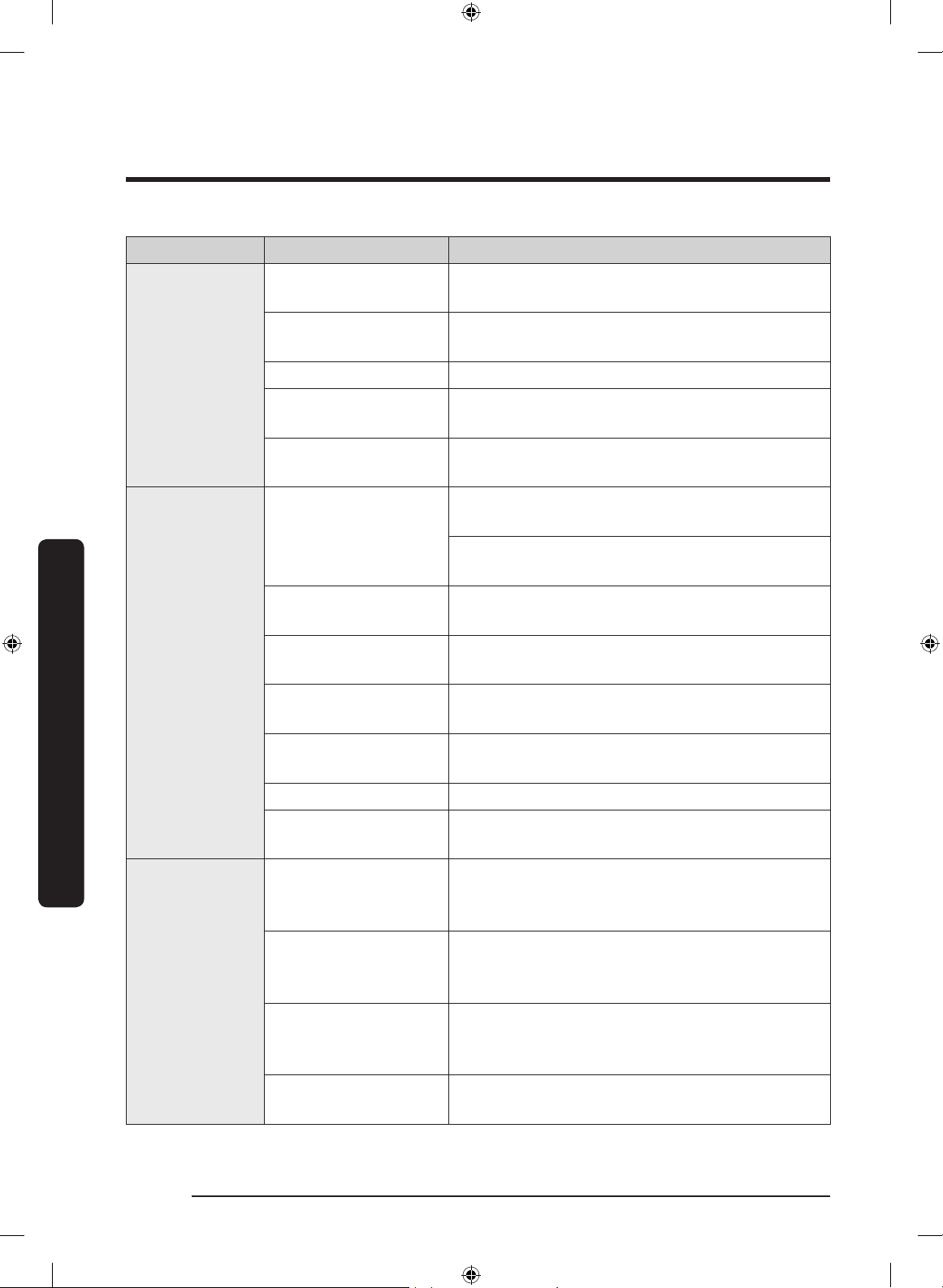
Category Item Description
Monitoring
Fridge temperature
Displays the desired temperature setting of the
fridge.
Freezer temperature
Displays the current temperature of the
freezer.
FlexZone™ settings Displays the settings of the FlexZone™.
Diagnosis
Detects abnormal operations of the
refrigerator.
Energy monitoring
Checks the accumulated power consumption of
the refrigerator for the last 180 days.
Functions
Ice making
You can turn the ice making function on or off,
and check the current settings of the function.
You can also check the status and progress of
ice making.
Power Cool
You can turn Power Cool on or off, and check
the current settings.
Power Freeze
You can turn Power Freeze on or off, and
check the current settings.
Fridge temperature
You can set the desired temperature of the
fridge.
Freezer temperature
You can set the desired temperature of the
freezer.
FlexZone™ settings You can set the desired FlexZone™ mode.
Sabbath Mode
You can activate and deactivate the Sabbath
mode.
Alarms
Abnormally high
temperature
This alarm is triggered when the fridge, the
freezer, or the FlexZone™ has abnormally high
temperatures.
Door opening
This alarm is triggered if the fridge door, the
freezer drawer, or the FlexZone™ drawer is
open for a specic time.
Auto Water Fill
overowing
If the Auto Water Fill function senses an
overow, it triggers this alarm to let you know
the status of the overow.
Water lter
replacement
This alarm reminds you that the water lter
must be replaced.
Untitled-1 52 2019-03-07 11:17:02
English 53
Operations
SMART GRID Function (Demand Response)
When the refrigerator operates in SMART GRID (Demand Response) mode, the Energy
Management Refrigerator function can control energy usage or delay the operation of
some functions to save money when energy prices or demand are the highest.
NOTE
• You can deactivate the SMART GRID (Demand Response) function at any time using the
Peak Demand Off function.
• To use the SMART GRID (Demand Response) function, you need a separate contract with
your electric utility company.
In addition, to use the Smart Grid (Demand Response) function, you must register for the
service with your electric company. The company must have an EMS (Energy Management
System) that supports SEP (Smart Energy prole).
Using the SMART GRID (Demand Response) Function
This feature monitors energy prices and demand information from your utility company
and sends notications to the refrigerator to run high energy consuming tasks during off-
peak times when electricity costs and demand are lower.
If the refrigerator receives a control signal from the utility company, the refrigerator will
display the DAL (L3) ~ TALR (L4) levels on the refrigerator display and control the power
consumption according to the level.
[Exception condition] The DAL and TALR control signals from a utility company work as
long as product performance is maintained.
If the refrigerator receives the SMART GRID (Demand Response) signal (DAL or TALR), the
refrigerator will operate in Delay Appliance Load (Display:L3) or Temporary Appliance
Load Reduction (Display:L4) mode.
• Delay Appliance Load (L3): The refrigerator responds to a DAL signal by providing a
moderate load reduction for the duration of the delay period. This function controls
functions that consume a lot of energy such as adjusting the Cooling system, running
the defrost cycle, and making ice.
- When the refrigerator operates in DAL (L3) mode, “L3” is displayed on the
refrigerator display.
- DAL mode is automatically deactivated after it lasts for the amount of time
stipulated by the DAL signal (max. 4.5 hours) or when the Peak Demand Off key is
pressed.
Untitled-1 53 2019-03-07 11:17:02
Operations
English54
Operations
• Temporary Appliance Load Reduction (L4): The refrigerator responds to a TALR signal
by aggressively reducing the load for a short time period. This function reduces energy
consumption by stopping the compressor and controlling the functions that consume a
lot of energy such as the defrost cycle and making ice.
- When the refrigerator operates in TALR (L4) mode, “L4” is displayed on the
refrigerator display.
- TALR (L4) mode is automatically deactivated after it lasts for the received duration
(max. 15 minutes), or when the Peak Demand Off key is pressed. The mode is
immediately deactivated and the refrigerator returns to the normal state when the
door is opened or closed, or the dispenser is used.
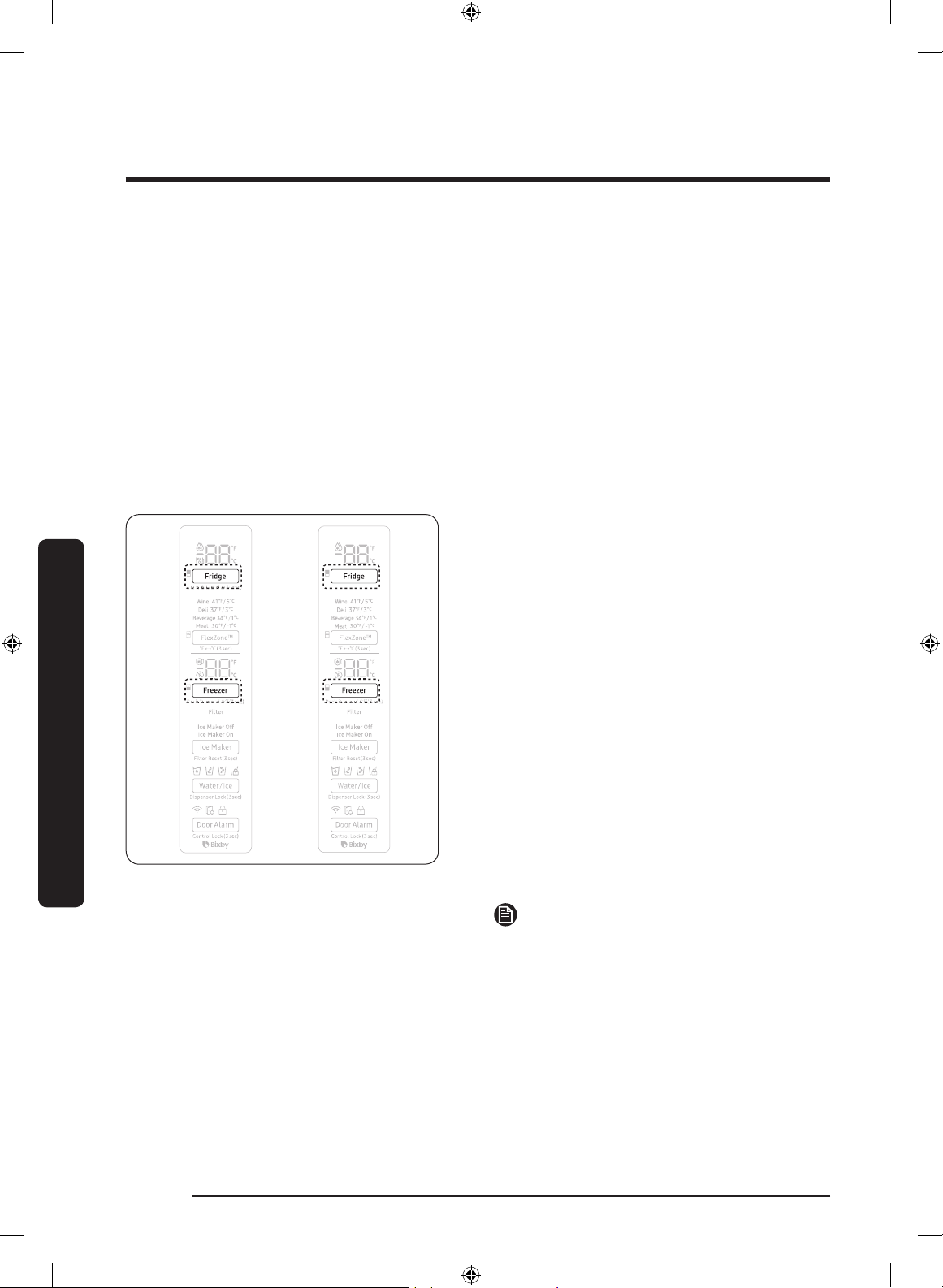
To check the MAC address
1. In this mode, the MAC address appears
on the temperature panel (on both the
freezer and the fridge sections of the
panel) sequentially for 1 minute.
Press and hold both Freezer and Fridge
for 6 seconds. The temperature panel
blinks. Then, press Freezer again to
display the MAC address. The fridge
beeps.
2. For example, if the MAC address is
"11-22-33-44-55-66", the temperature
panel displays the address for 1 minute
in this sequence: "-- / --" "11 / 22"
"33 / 44" "55 / 66" "-- / --".
After the 1 minute, the MAC address
disappears and the temperature panel
returns to the normal state.
NOTE
The temperature panel displays "-- / --"
for an unknown MAC address or if a Wi-Fi
connection is not established or is lost.
Peak Demand Off (Override mode)
When you want the refrigerator to ignore the SMART GRID (Demand Response) signal
from the utility company, you can activate Peak Demand Off (Override mode).
When you activate Peak Demand Off (Override mode), the refrigerator ignores the SMART
GRID (Demand Response) signal and is not controlled by the utility company.
Untitled-1 54 2019-03-07 11:17:03
English 55
Operations
Activating and deactivating Peak Demand Off (Override mode)
1. Press and hold Freezer for 3 seconds.
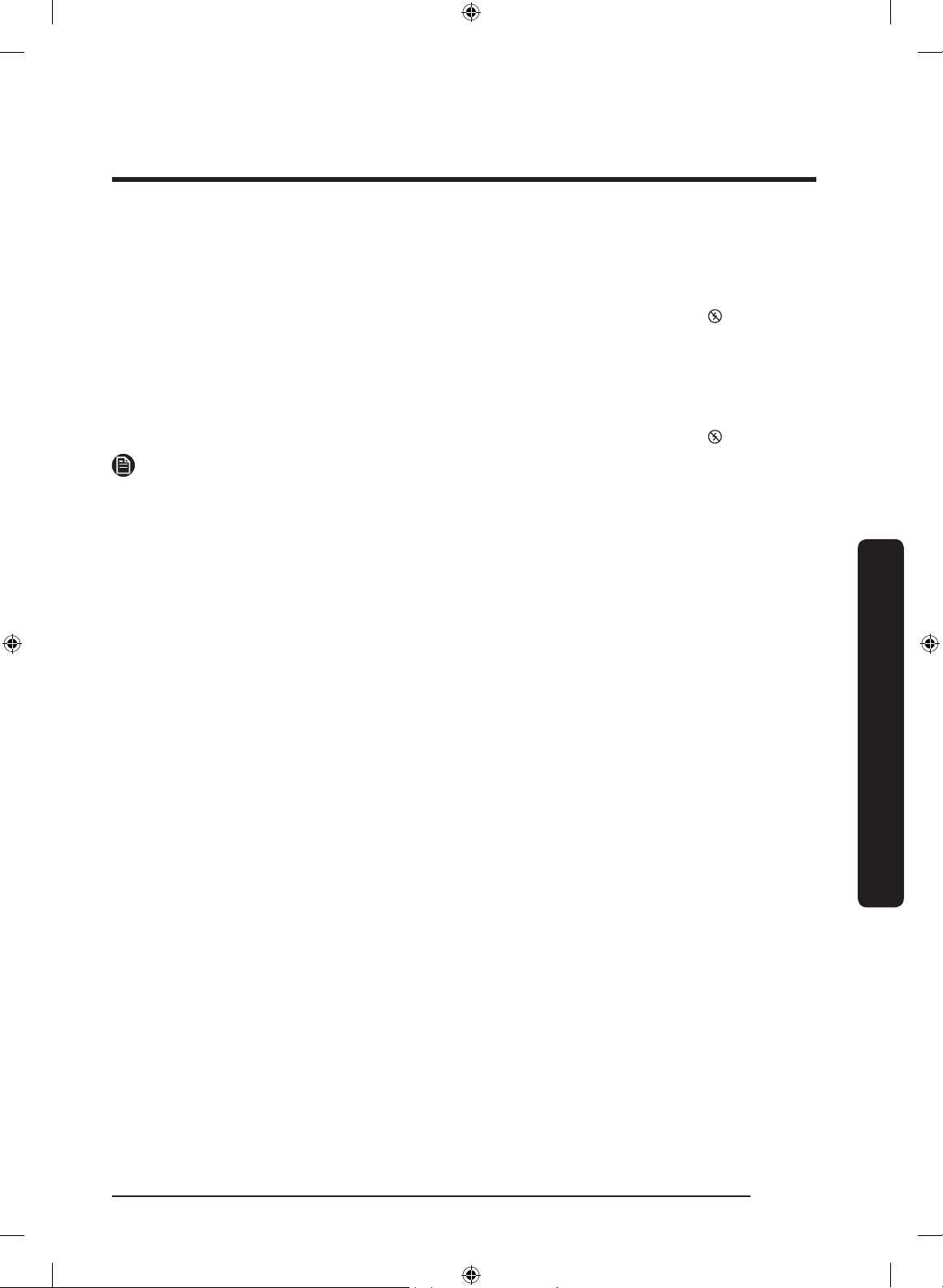
2. A buzzer sounds and ‘Or’ and ‘on’ is displayed in the freezer and fridge temperature
displays for 5 seconds. Then the Peak Demand Off (Override mode) icon ( ) turns on.
3. If the refrigerator receives a SMART GRID (Demand Response) signal from the utility
company, ’Or’ is displayed in the freezer temperature display.
4. To deactivate Peak Demand Off (Override mode), press and hold Freezer for 3 seconds.
5. A buzzer sounds and ‘Or’ and ‘oF’ is displayed in the freezer and fridge temperature
displays for 5 seconds. Then the Peak Demand Off (Override mode) icon ( ) turns off.
NOTE
• Alternatively, you can activate or deactivate Peak Demand Off (Override mode) using
the SmartThings app and the Energy Management function. See the next page.
Untitled-1 55 2019-03-07 11:17:03
Operations
English56
Operations
Using the Energy Management Function
The Energy Management function enables you to control and monitor your Energy
Management refrigerator using the SmartThings app for your convenience.
NOTE
• To use the Energy Management refrigerator functions, you have to install the
corresponding app rst.
1. Operational Status
- You can check the DR and Peak Demand Off (Override mode) status.
2. Energy Consumption Reporting
- Shows the accumulated power consumption. Power consumption data is updated
every 10 minutes.
NOTE
The energy consumption report may differ from the power consumption specications of
the product depending on the operating environment and the stored food.
3. Delay Defrost Capability
- The Delay Defrost Capability function saves energy by delaying the defrost
operation to a time specied by the user. You can congure the time. and this
function will save energy during the specied period in a 24 hour cycle. If the
time is not set, the function works with the default time settings. The default time
settings are below:
- 6 am to 10 am: 1st. November ~ 30th. April
- 3 pm to 7 pm: 1st. May ~ 31th. October
To change the time setting for the Delay Defrost Capability
You can change the time setting for the Delay Defrost Capability on the app.
Untitled-1 56 2019-03-07 11:17:03
English 57
Operations
Provision for Open Access to the Connected Product Requirements
1. SGIP Open Standards (Smart Energy Prole 2.0 - http://www.csep.org/)
- Energy Consumption Reporting
- Demand Response
2. Samsung OPEN API
- Operational Status, User Settings & Messages
- ICE Maker Status: GET /icemaker/status/vs/0
- Door Open Alarm: GET /doors/vs/0
- DR Status: GET /drlc/vs/0
- Delay Defrost Capability
- Set Schedule of the Defrost Delay: POST /defrost/reservation/vs/0?op=add
- Get Schedule of the Defrost Delay : GET /defrost/reservation/vs/0
- Delete Schedule of the Defrost Delay: POST /defrost/reservation/vs/0?op=remove
- Defrost Delay On/OFF: POST /defrost/delay/vs/0
Untitled-1 57 2019-03-07 11:17:03
Operations
English58
Operations
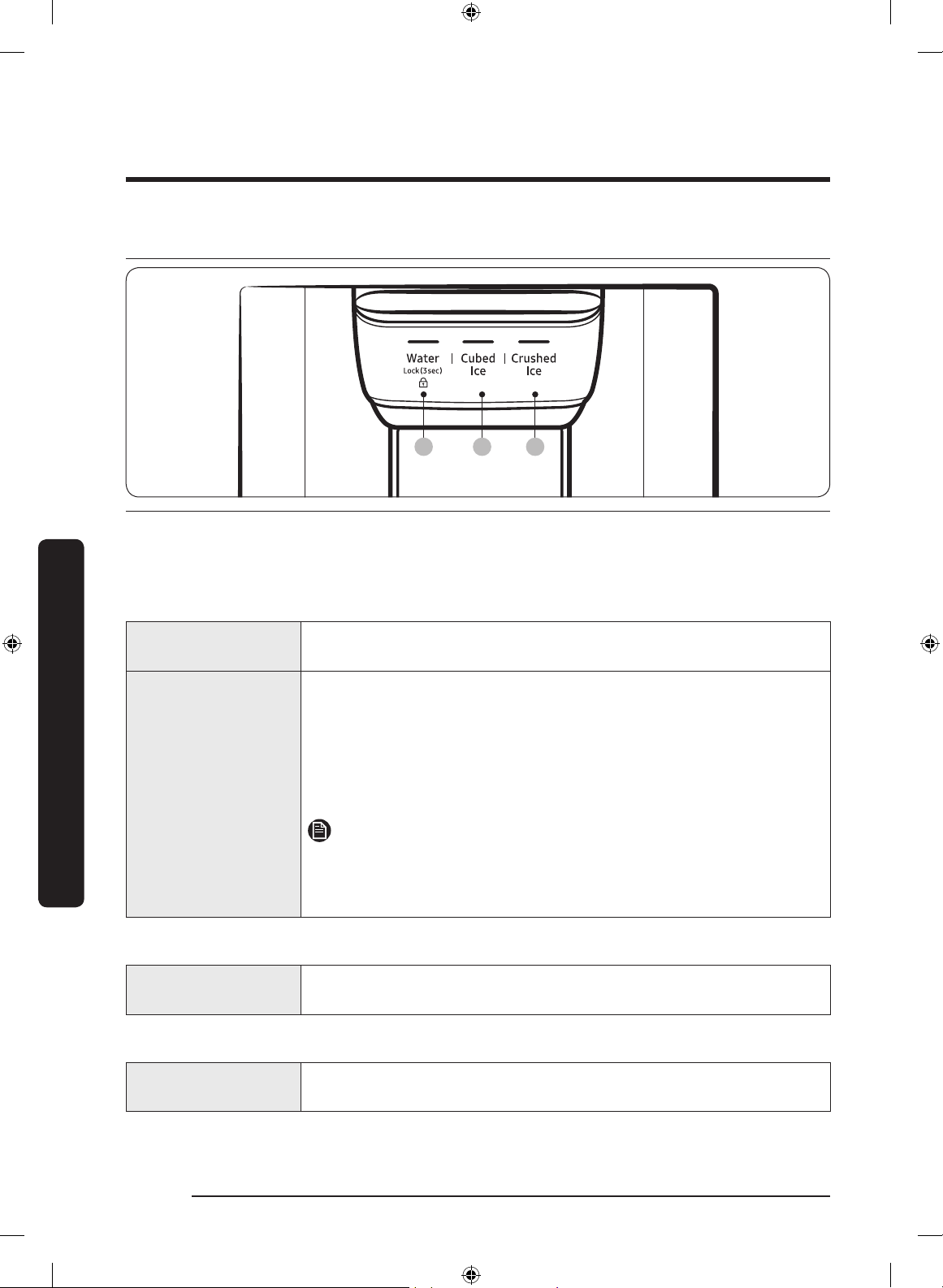
Dispenser panel
01 02 03
01 Water / Lock 02 Cubed Ice
03 Crushed Ice
01 Water / Lock (3 sec)
Water
To dispense chilled water, press Water. The corresponding
indicator turns on.
Lock
(Dispenser panel /
Dispenser lever)
To prevent the use of the dispenser panel buttons and the
dispenser lever, press and hold
Water for more than 3 seconds.
If you press and hold the button again for more than 3 seconds,
the dispenser lock will be deactivated.
When dispenser lock is on, the indicator blinks if any button on
the dispenser panel is pressed or the dispenser lever is pressed.
NOTE
The Lock on the dispenser panel does not affect the controls
on the main panel. To lock the main panel, use the Control Lock
function on the main panel.
02 Cubed Ice
Cubed Ice
Press Cubed Ice to dispense cubed ice. The corresponding
indicator turns on.
03 Crushed Ice
Crushed Ice
Press Crushed Ice to dispense crushed ice. The corresponding
indicator turns on.
Untitled-1 58 2019-03-07 11:17:03
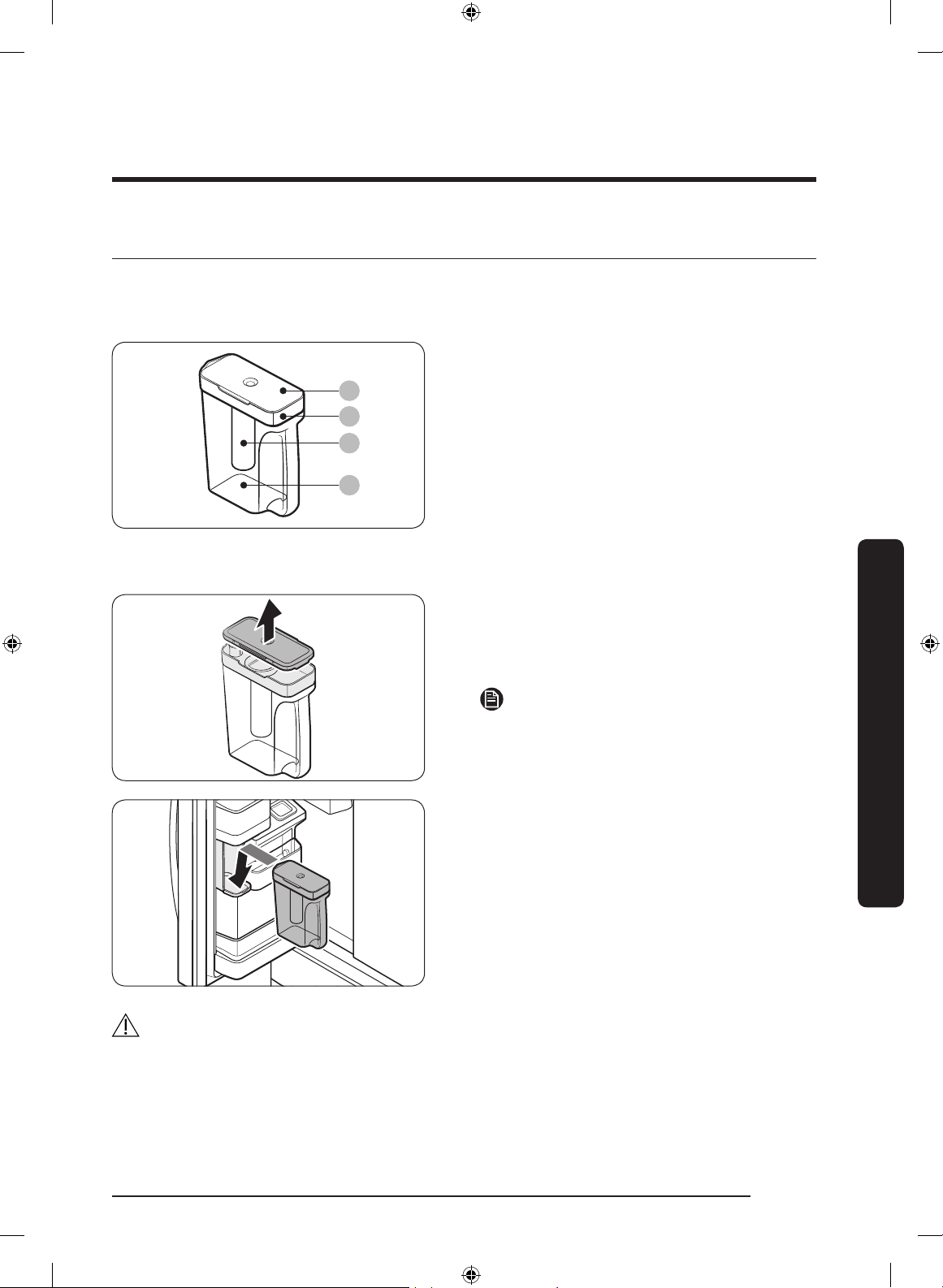
English 59
Operations
Special features
Water tank (Auto Water Fill) (applicable models only)
The Auto Water Fill function lets you enjoy cold brewed tea in your refrigerator.
01
02
03
04
01 Lid
02 Sealed mouth
03 Infuser
04 Body
To ll the water tank
1. Grasp a handle groove of the sealed
mouth, and then pull up to open the lid.
2. Put tea leaves or fruit to your taste into
the infuser.
NOTE
If you want to keep the infused water in its
initial concentration, turn the Auto Water
Fill function off.
3. Enable the Auto Water Fill function on
the main panel. Open the left door of
the fridge door, and then mount the
water tank onto the holder. Push it
straight in as shown in the illustration
on the left.
4. Close the door. The infuser will start to
ll with chilled water a short time later.
CAUTION
Make sure the infuser ts in the water tank holder.
Untitled-1 59 2019-03-07 11:17:04
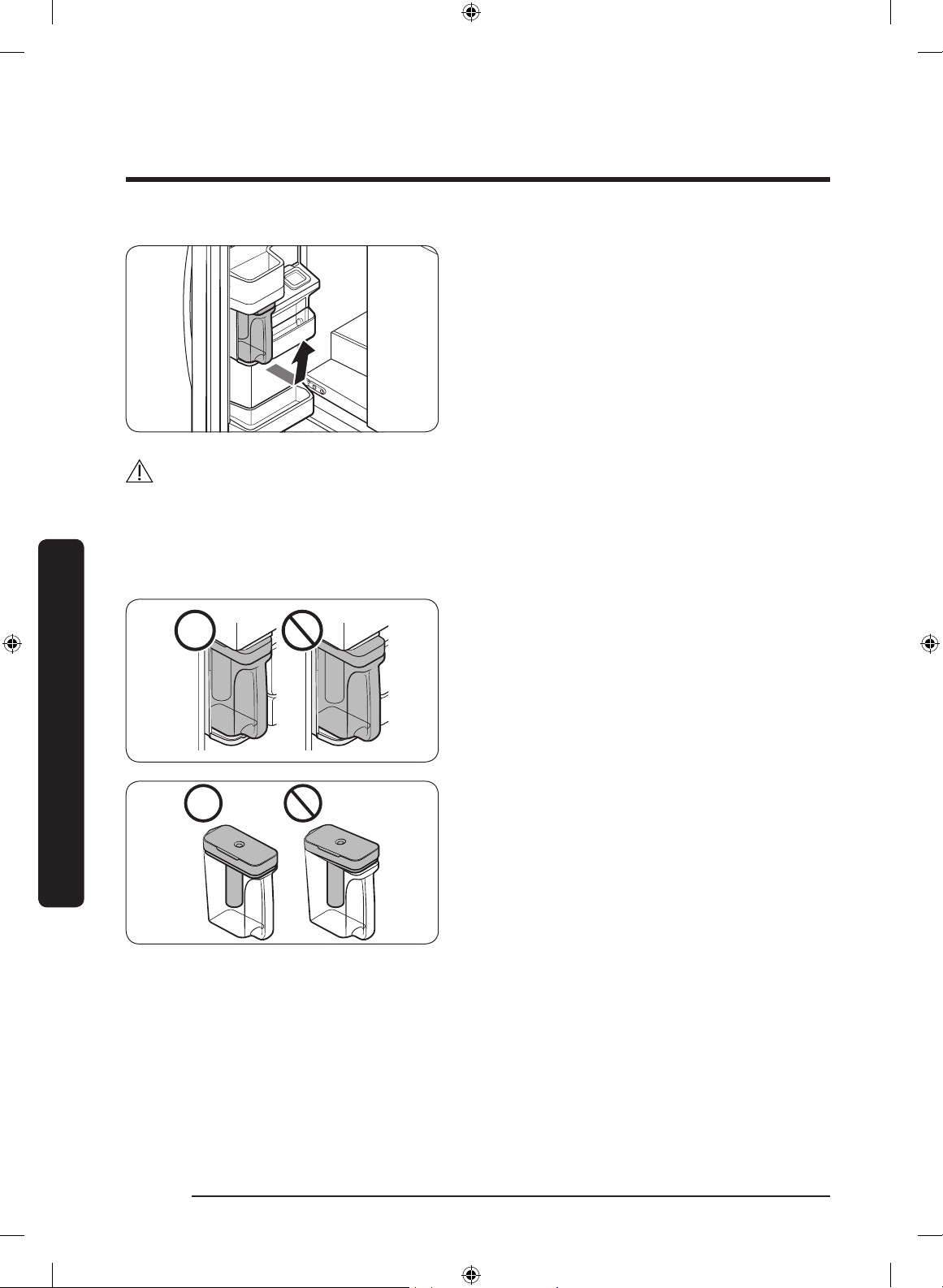
Operations
English60
Operations
5. To drink tea, open the door and detach
the water tank. Pull it straight out.
CAUTION
• We recommend consuming fruit infused water within 24 hours. After that, the infused
water can spoil over time.
• You must clean the water tank after you have consumed the infused water. Also clean
the water tank if you haven't used it for a long time.
• To prevent the water tank from tipping
over or leaking, make sure the water
tank ts in the water tank holder.
• To prevent the water tank from spilling
over or leaking, make sure the sealed
mouth is properly inserted.
Untitled-1 60 2019-03-07 11:17:04
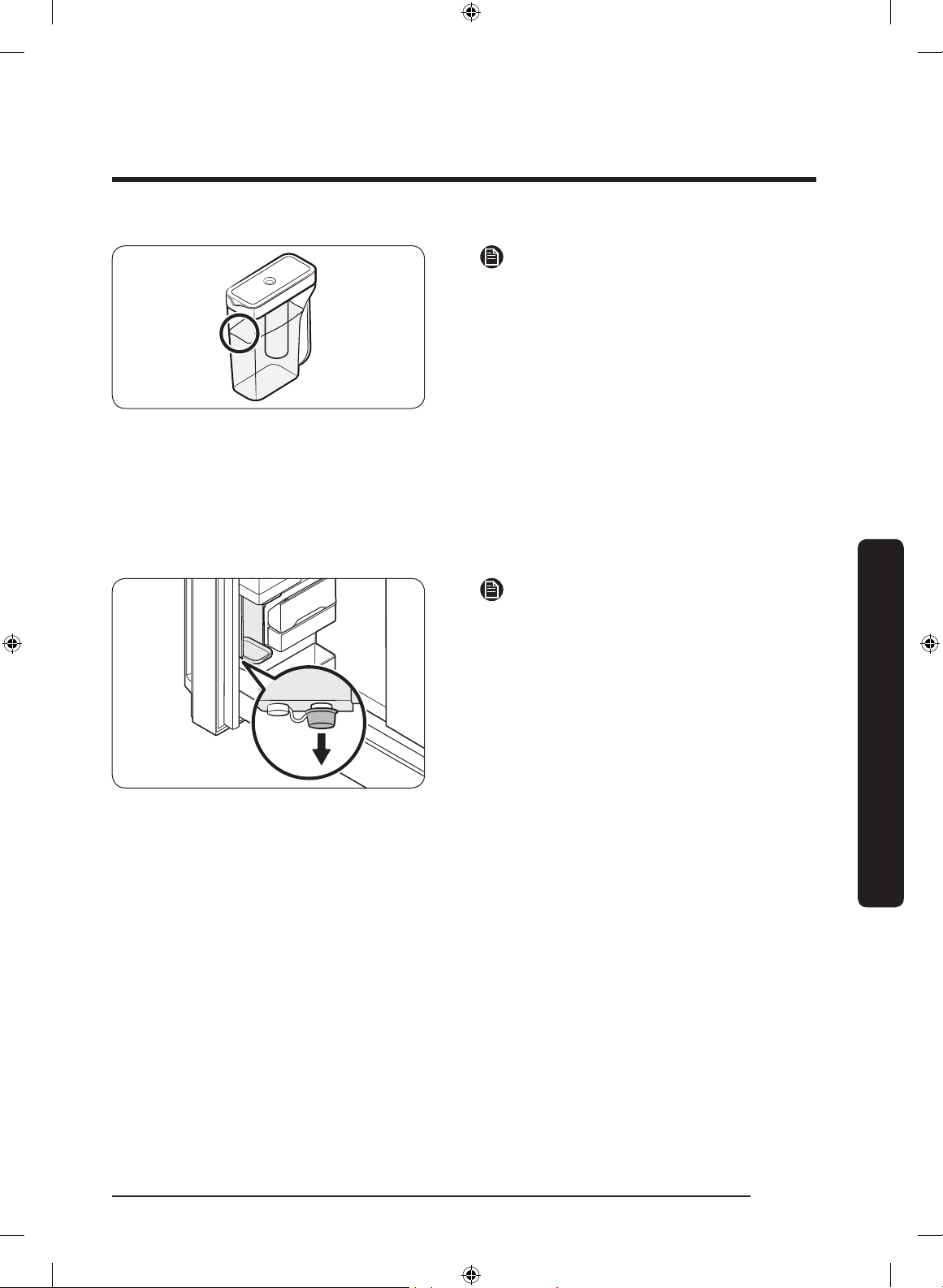
English 61
Operations
NOTE
• If the front side (specically marked
area) of the water tank has too much
moisture, the water tank may not fully
ll. Remove the moisture, and then try
again.
• Auto Water Fill will stop supplying
water to the water tank if the water
tank does not ll after a certain amount
of time. If this happens, check if the
water line is properly connected.
Remove and reinsert the water tank,
and then try again.
NOTE
• Wipe around the infuser holder if the
infuser overows or leaks.
• Water drops off if the rubber cap is
opened.
• The Auto Water Fill indicator blinks if
there is a leak. In case of a leak, open
the rubber cap so that the leaked water
drains. The indicator will then turn off.
However, if the indicator continues to
blink, there might be a system failure.
Contact your local Samsung service
center.
• The Auto Water Fill indicators blink if
there is a leak. See page 42 for more
information.
Untitled-1 61 2019-03-07 11:17:04
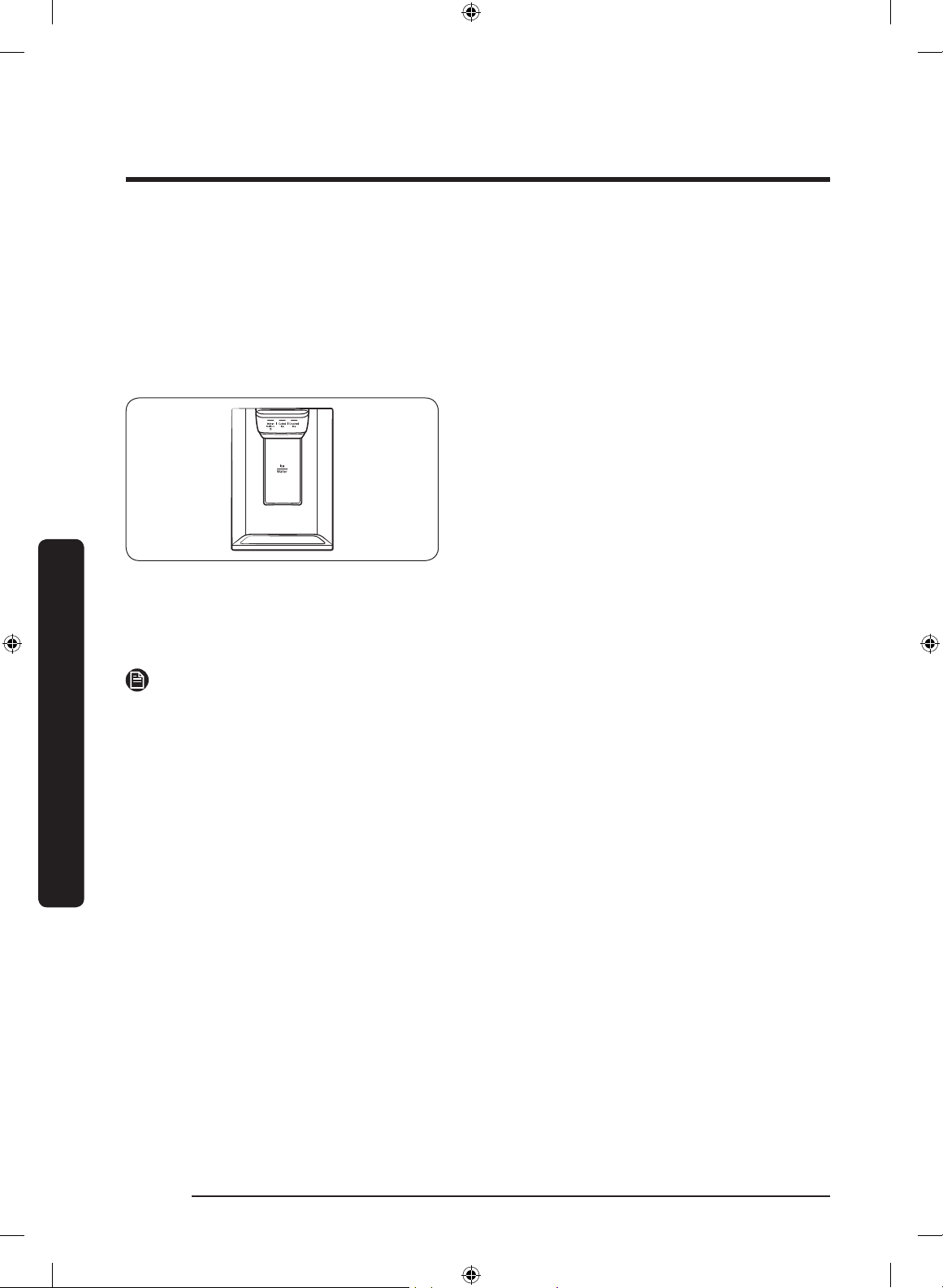
Operations
English62
Operations
Water/Ice dispenser
Using the dispenser, you can dispense water with or without ice.
The water dispenser offers 3 options: chilled water, cubed ice, and crushed ice. To
dispense chilled water, press
Water on the dispenser panel. Put a water glass under the
dispenser, and then push the dispenser lever.
To dispense water with ice
1. With the Ice Maker enabled, press
Cubed Ice or Crushed Ice to select the
ice type.
2. Put a water glass under the dispenser,
and then push the dispenser lever with
the glass. Ice will be dispensed from the
dispenser.
3. Press Water to select water.
4. Push the dispenser lever with the
glass. Water will be dispensed from the
dispenser.
NOTE
• The dispenser will stop dispensing if you keep pushing the dispenser lever for about 1
minute. To dispense more water, release and push the lever again.
• Make sure the glass is in line with the dispenser to prevent the dispensed water from
spilling out.
• If you do not use the water dispenser for 2-3 days, the dispensed water may have an
abnormal smell or taste. This is not a system failure. Discard the rst 1-2 glasses of
water.
Ice maker
The refrigerator has a built-in ice maker that automatically dispenses ice so that you can
enjoy ltered water with cubed or crushed ice.
Ice making
After you have installed your refrigerator and plugged it in, follow these instructions to
ensure proper ice making and to keep the ice bucket full of ice:
1. Let the refrigerator operate for at least 24 hours to ensure optimal performance.
2. Dispense the rst 4 to 6 ice cubes into a glass.
3. Wait another 8 hours and dispense another 4 to 6 ice cubes.
4. Then, wait another 16 hours and dispense the rst glass-full of ice.
Untitled-1 62 2019-03-07 11:17:05
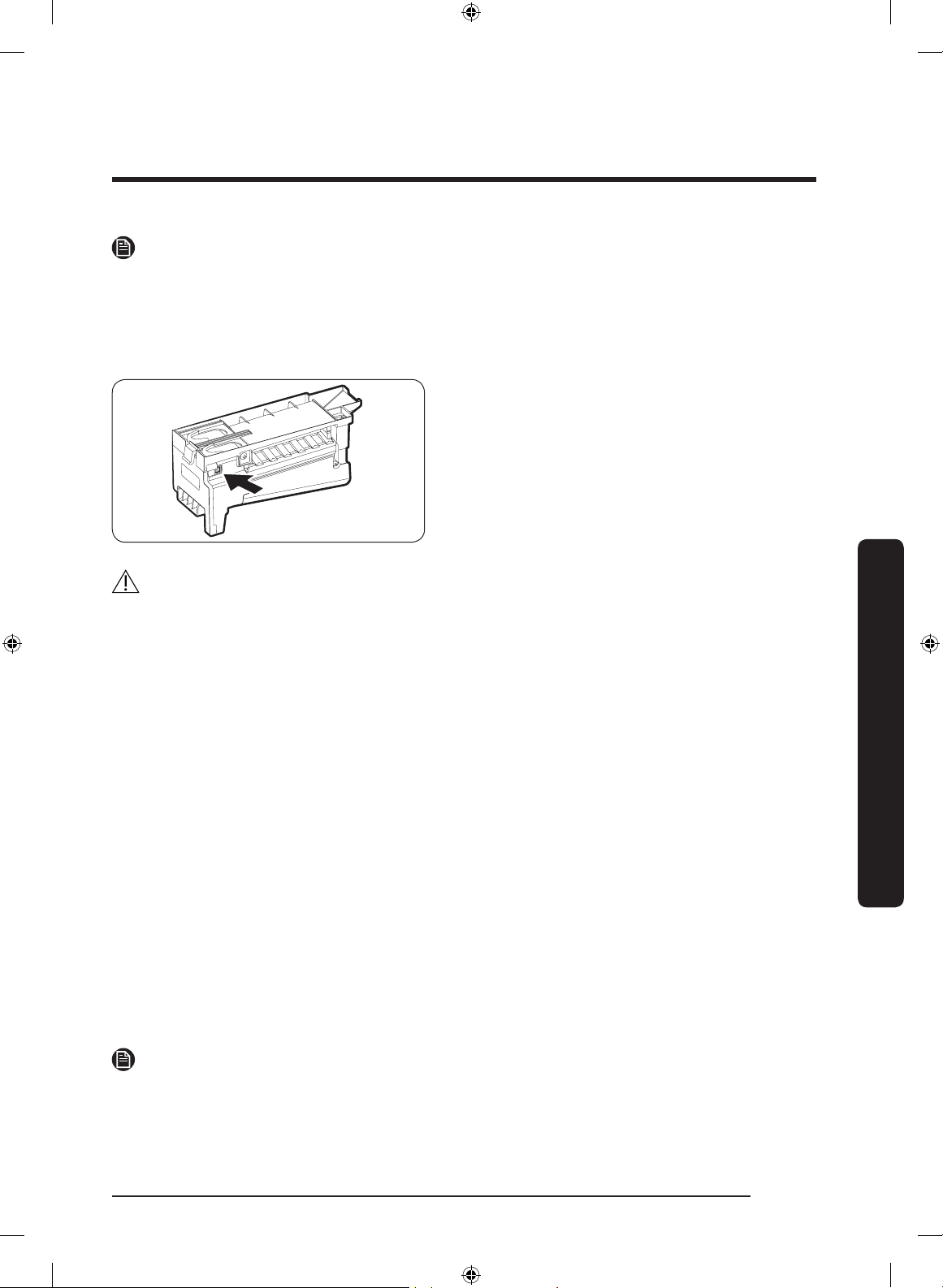
English 63
Operations
NOTE
• If you consume all the ice at once, you must wait 8 hours before dispensing the rst 4
to 6 cubes. This ensures that the ice bucket is lled with ice properly.
• Ice cubes generated rapidly may look white, which is normal.
Diagnosis
If ice does not dispense, rst check the ice
maker.
1. Press Test on the side of the ice maker.
You will hear a chime (ding-dong) when
you press the button.
2. You will hear another chime if the ice
maker is operating properly.
CAUTION
• If the ice making chime rings repeatedly, contact your waterline installer or a local
Samsung service center.
• Do not press Test repeatedly after the ice tray is lled with ice or water. Water may
overow or ice may jam.
• Do not put food in the ice bucket. The frozen food may damage the ice maker,
especially when you open or close the door.
• When the refrigerator recovers power after a power failure, the ice bucket may contain
a mix of melted and jammed ice cubes, which can prevent the ice maker from working
properly. To prevent this, make sure to empty the ice bucket so the ice bucket can rell
with fresh, loose ice cubes.
• Do not put ngers or any objects into the dispenser outlet or the ice maker. This can
cause physical injury or property damage.
• When reinserting the ice maker tray, make sure that the tray is properly centered at
the entrance. Otherwise, the tray can get stuck.
If You Turn the Ice Maker Off
If you press and hold
Ice Maker for more than 3 seconds to turn the ice maker off, make
sure to remove all ice cubes from the ice bucket. Remaining ice cubes may clump together,
making it difcult to remove them.
To remove the ice bucket, see the Ice bucket (applicable models only) section on page 65.
NOTE
• Removal of the ice bucket does not affect the thermal and mechanical performance of
the refrigerator.
Untitled-1 63 2019-03-07 11:17:05
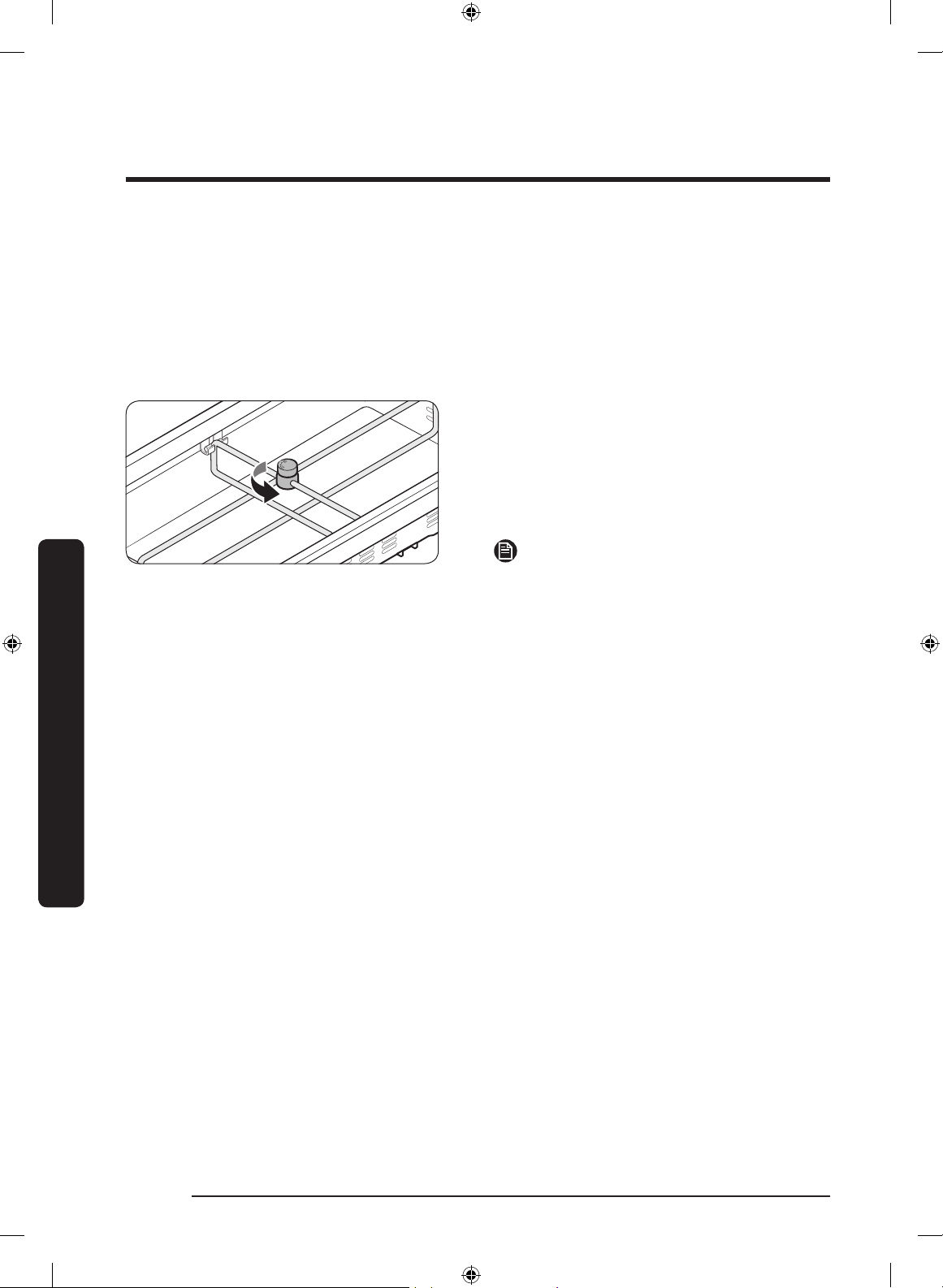
Operations
English64
Operations
Water clouding
Water supplied to the refrigerator ows through a core alkaline lter. During this ltering
process, the water pressure of the water increases and the water becomes saturated with
oxygen and nitrogen. This causes the water to look misty or cloudy temporarily when
dispensed. This is normal and the water will look clear after a few seconds.
FlexZone™ divider
You can change the divider position.
To do this, unlock the divider by turning
the divider dial counter clockwise. Then,
move the width and height bars as
appropriate. When done, turn the dial
clockwise to lock the divider.
NOTE
If the divider lock does not function, wipe
the bars to remove moisture on them.
Untitled-1 64 2019-03-07 11:17:05
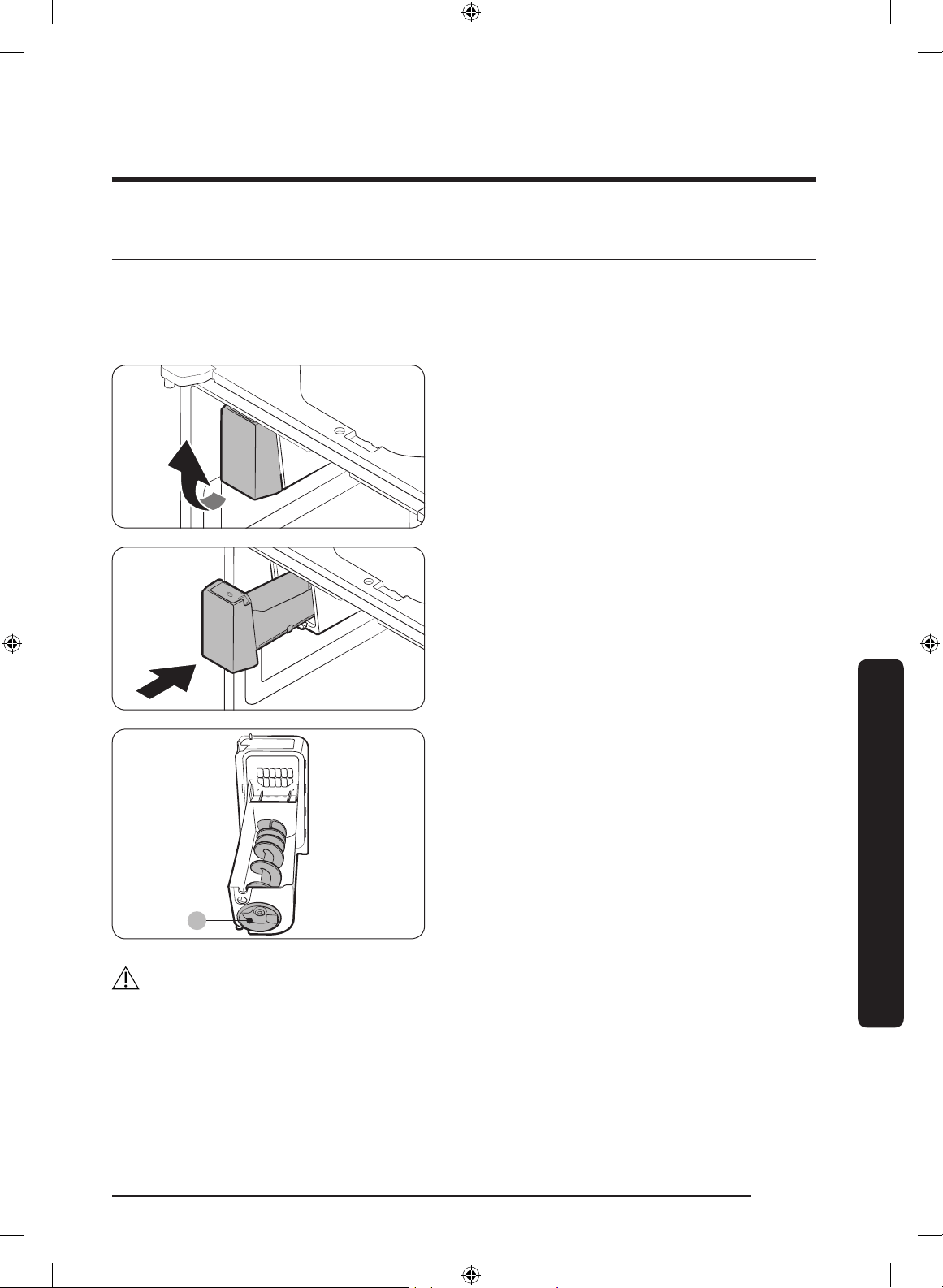
English 65
Maintenance
Handling and care
Ice bucket (applicable models only)
If you do not dispense ice for an extended period, ice may form clumps inside the bucket.
If this happens, remove and empty the ice bucket.
1. To remove the ice bucket, gently lift
it up, and then pull it out slowly while
holding the bottom of the bucket with
one hand and the side with the other
hand.
2. Empty the bucket.
3. When done, put the bucket back into
position. If the bucket does not t in,
turn the helix screw 90 degrees, and
then try again.
A
If the ice bucket is not rmly inserted,
turn the Helix (A) 90 degrees, and then try
again.
CAUTION
• Do not apply excessive force to the bucket cover. The cover may break.
• Do not forcefully close the door. Water may spill over the ice maker.
• To prevent injury, make sure to clean up any ice or water that has fallen on the oor.
• To prevent accidents or injury, do not let children play with the water dispenser or the
ice maker.
Maintenance
Untitled-1 65 2019-03-07 11:17:06
Maintenance
English66
Maintenance
• Do not put your hand or an object into the ice chute. This may cause physical injury or
product damage.
• Use only the provided ice bucket. Third-party ice buckets may cause a system failure.
NOTE
• The water pressure required for ice making is between 20 psi and 125 psi (138 and
862 kPa).
• Noise from the the ice maker as it produces ice during the ice making process is
normal.
• While the door is open, neither the ice maker nor the water dispenser operates.
Untitled-1 66 2019-03-07 11:17:06
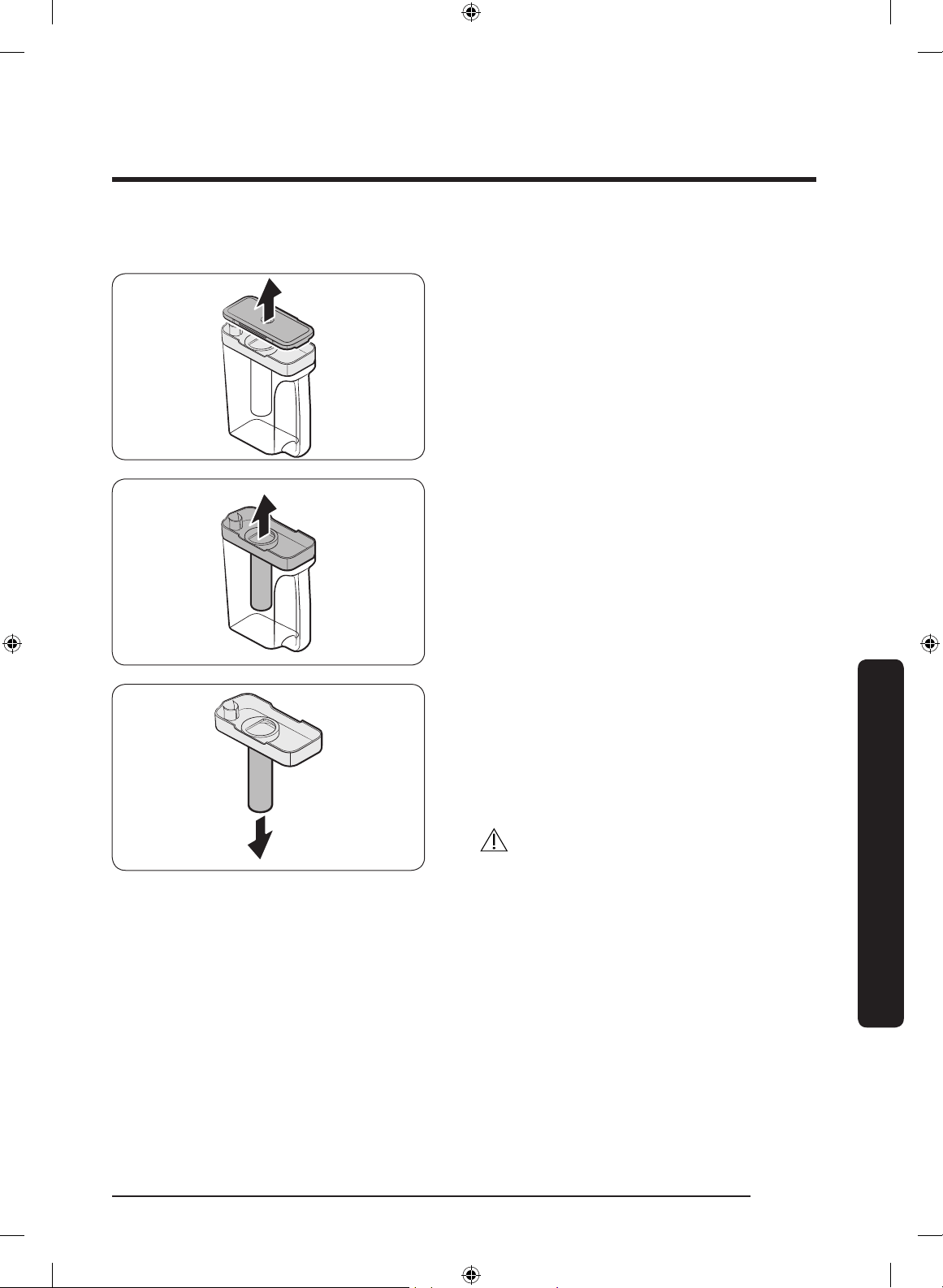
English 67
Maintenance
Auto Water Fill (applicable models only)
1. Grasp a handle groove of the sealed
mouth, and then pull up to remove.
2. Grasp both sides of the sealed mouth,
and then lift to remove.
3. While slightly twisting the infuser, pull
it out of the sealed mouth.
4. Clean the infuser with neutral agents
and running water. Rinse and dry well.
5. Reassemble the Auto Water Fill in the
reverse order of disassembly.
CAUTION
Water pitcher and lid are not dishwasher
safe and can deform under high
temperatures. Please hand wash as
needed.
Untitled-1 67 2019-03-07 11:17:06
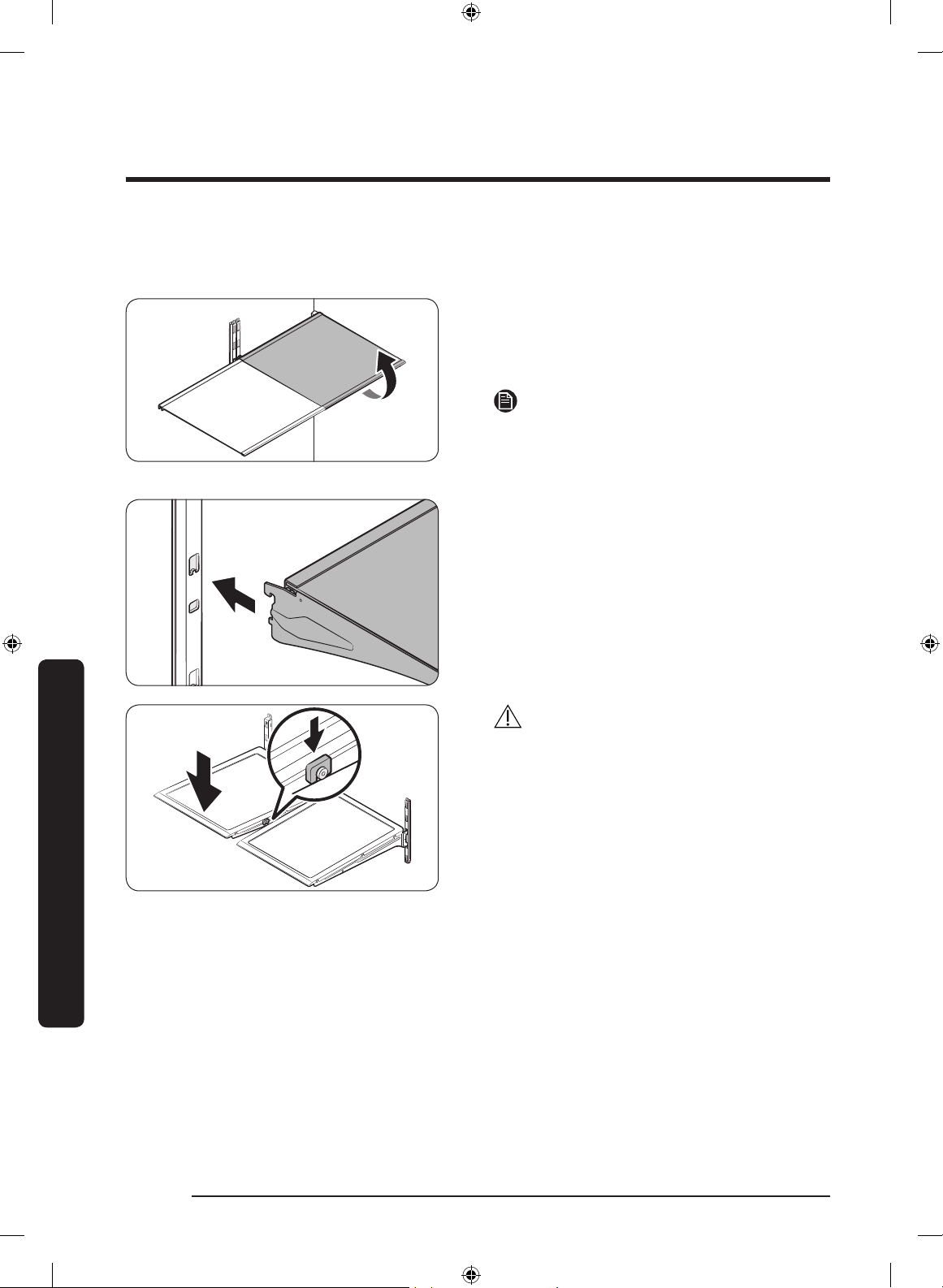
Maintenance
English68
Maintenance
Fridge shelves
The appearance of the shelves differs by model.
• To remove a shelf, fully open the
corresponding door. Hold the front of
the shelf, and then gently lift up and
slide out.
NOTE
Do not lift up the shelf fully when
removing or reinserting the shelf. The rear
wall of the fridge room can be dented.
• To reinsert, hold the shelf at an angle
so the front is higher than the back, and
then insert the top hook into the top
shelf notch. Then, lower the shelf and
insert the bottom shelf hook into the
bottom shelf notch.
CAUTION
• The tempered glass shelves are heavy.
Use caution when removing them.
• The shelf must be inserted correctly. Do
not insert upside down.
• Glass containers may scratch the
surface of glass shelves.
Untitled-1 68 2019-03-07 11:17:06
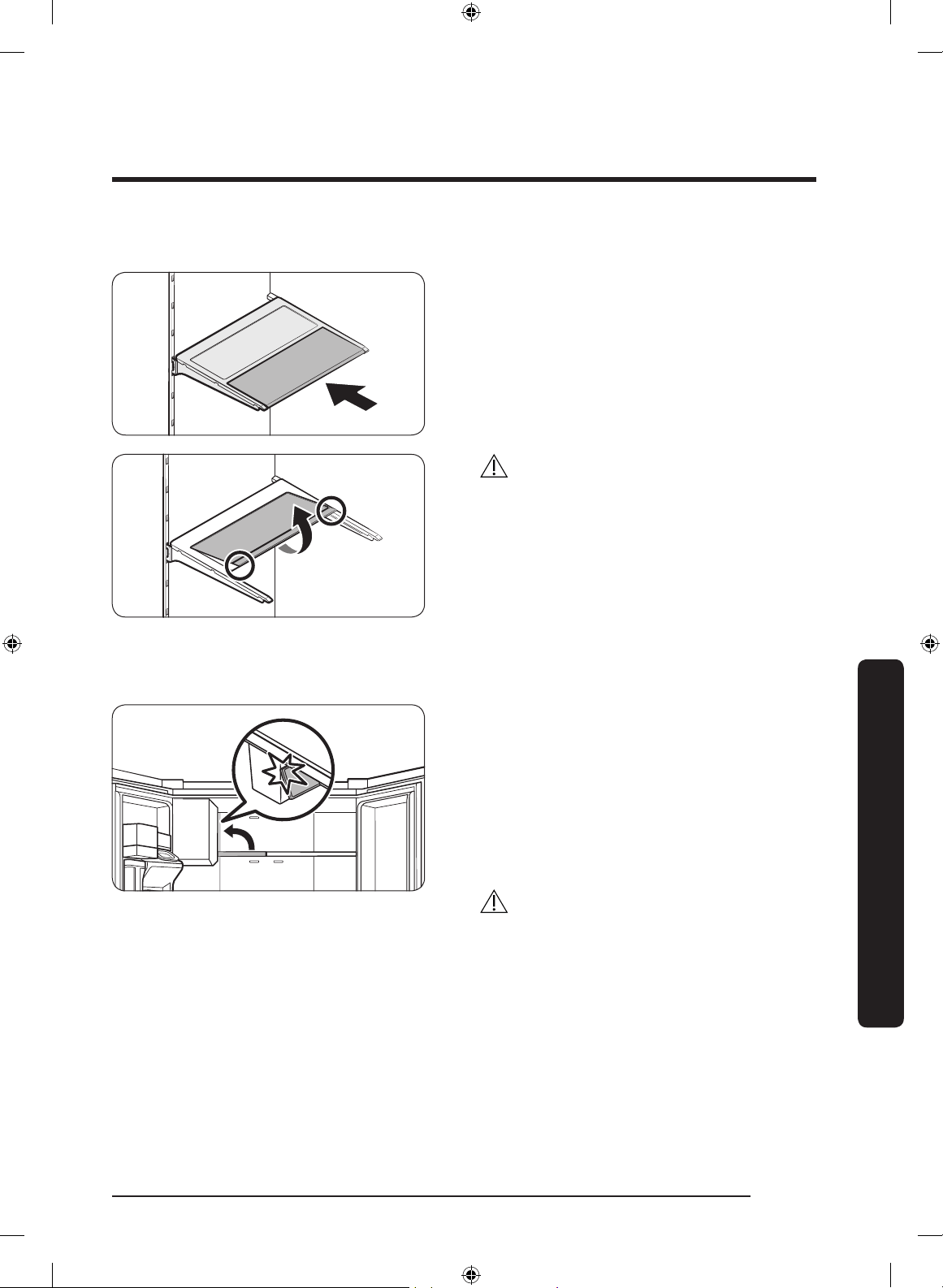
English 69
Maintenance
Foldable shelf
To remove, slide up the front of the shelf
so that it folds. Then gently lift up and
pull out. To reinsert, place the shelf on the
angled frame in the main unit, and then,
press down to unfold.
CAUTION
After sliding the foldable shelf in and
folding it, the front of the shelf can be
removed for your convenience. If you use
the shelf without removing the front of the
shelf, be aware that it can separate from
the rear portion. Take care when handling
food items near the shelf.
Recommended foldable shelf location
The foldable shelf folds up from the center,
giving you more room for storage.
• Insert the shelf in the right side of the
fridge. Left side insertion does not
allow the shelf to fold completely.
• To fold, push the front area of the shelf
inward so that it folds up from the
middle.
CAUTION
Do not lift up quickly or twist the foldable
shelf to take out food under it. It may fall
off.
Untitled-1 69 2019-03-07 11:17:07
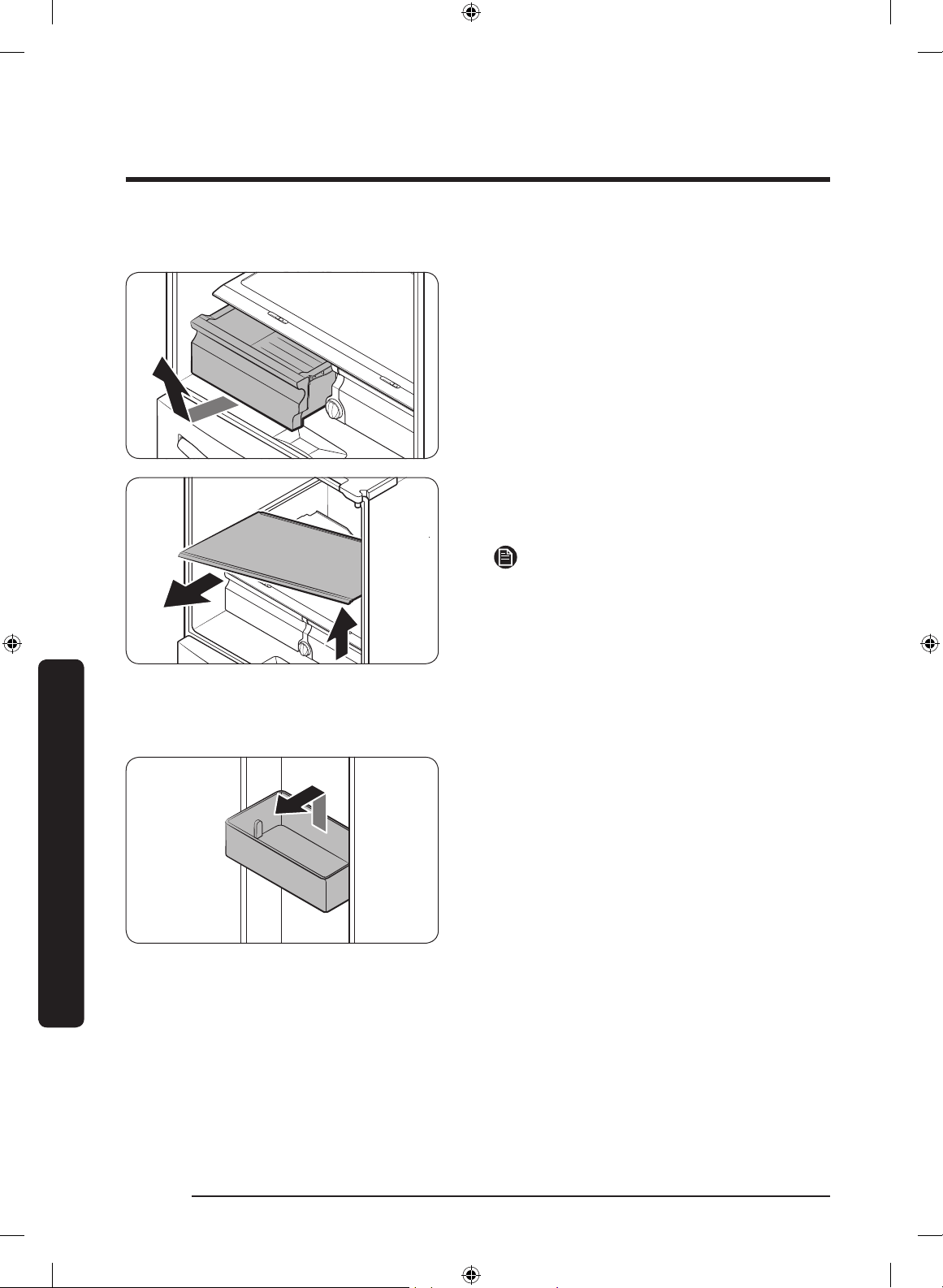
Maintenance
English70
Maintenance
Vegetable shelf
1. Slide out the left-side vegetable drawer.
2. While supporting the vegetable shelf
with one hand, slide it out with the
other hand.
NOTE
To use the space that is opened up after
removing the foldable shelf, take out the
vegetable shelf.
To reinsert, follow the steps above in the
reverse order.
Door bins
• To remove the top door bin, hold the
front sides of the bin, and then gently
lift up to remove.
• To reinsert, insert the door bin slightly
above its nal location making sure that
the back of the bin is against the door.
Hold the rear of the door bin with both
hands, and then press down so that it
ts snugly.
Untitled-1 70 2019-03-07 11:17:07
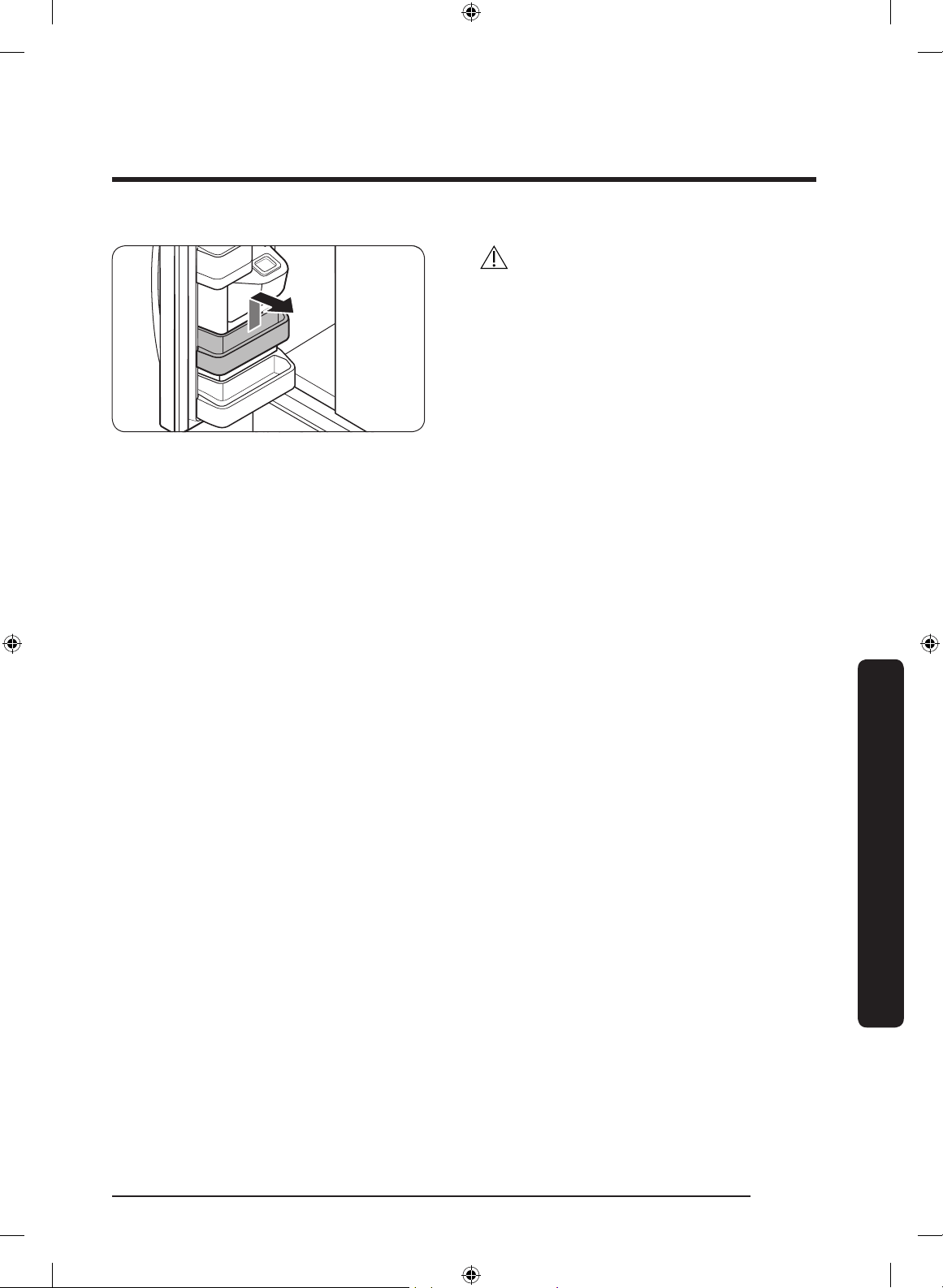
English 71
Maintenance
CAUTION
• Do not remove a bin that is lled with
food. Empty the bin beforehand.
• Use caution when opening the door if
the bottom bin contains larger bottles,
which may fall over.
• Do not allow children to play with the
bins. Sharp corners of the bin may
cause injury.
Untitled-1 71 2019-03-07 11:17:08
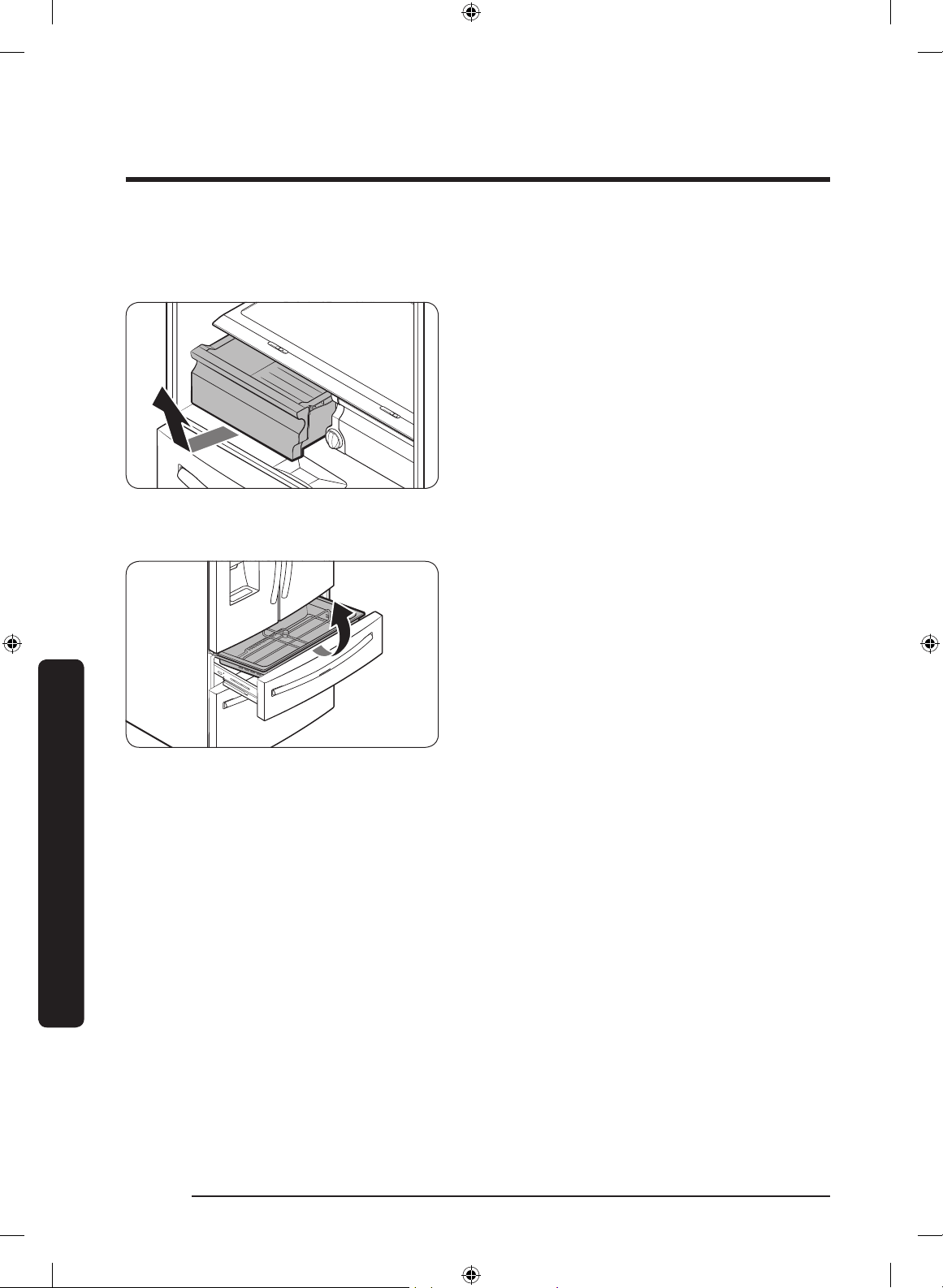
Maintenance
English72
Maintenance
Fridge drawers
Vegetable / fruit drawers
Gently lift up the front of the drawer and
slide out.
• We recommend that you remove the
door bins before removing the drawer.
This is to prevent damage to the door
bins.
• To reinsert, insert the drawer into the
frame rails and then slide inward.
FlexZone™ basket
• To remove, fully open the FlexZone™
drawer. Lift up the FlexZone™ basket,
and then pull out with both hands.
• To reinsert, fully open the FlexZone™
drawer. While tilting up the front of the
basket, insert the rear of the basket into
the rail assembly. Lower the front until
the basket is in place.
• If the divider lock does not function,
wipe the bars to remove moisture on
them.
Untitled-1 72 2019-03-07 11:17:08
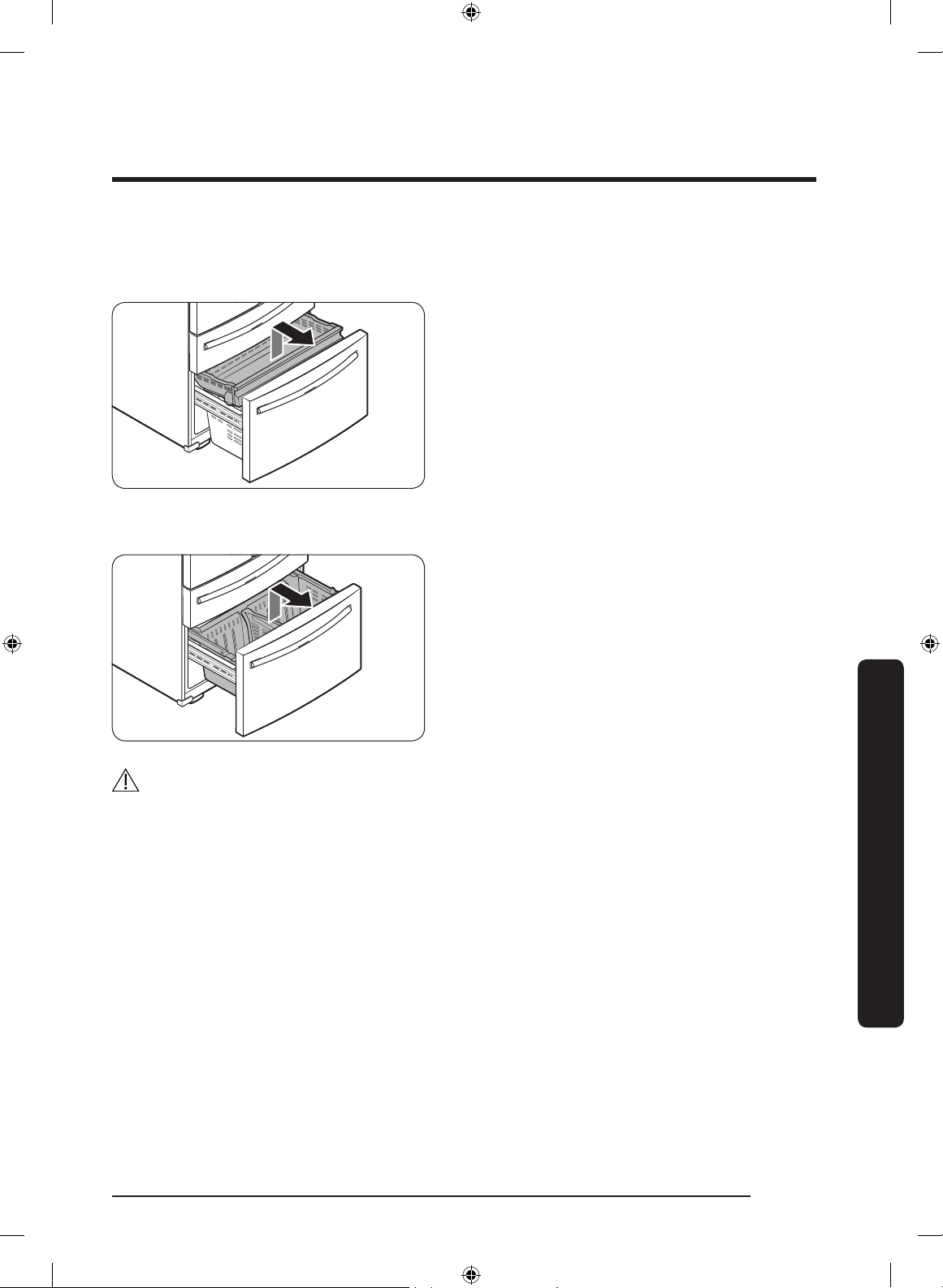
English 73
Maintenance
Freezer baskets
Upper basket
• To remove, fully slide open the freezer
drawer. Push the upper basket to the
end, and then pull up to remove.
• To reinsert, align the front wheels of
the upper basket with the end of the
lower basket. Slide the upper basket to
the front.
Lower basket
• To remove, rst remove the upper
basket. Then, tilt up the front of the
lower basket to pull out.
• To reinsert, put the basket onto the rail
assembly rear side rst.
CAUTION
• Do not twist the basket when removing or reinserting the basket. The basket can be
scratched.
• To prevent physical injury, property damage, or suffocation, keep children away from
freezer baskets that have been removed.
• Do not remove the divider.
• Put the wheels of the upper basket on the end of the rails of the lower basket. Then,
slide the upper basket all the way to the front. Otherwise, the drawer will not open or
close properly, which will cause frost to build up.
Untitled-1 73 2019-03-07 11:17:08
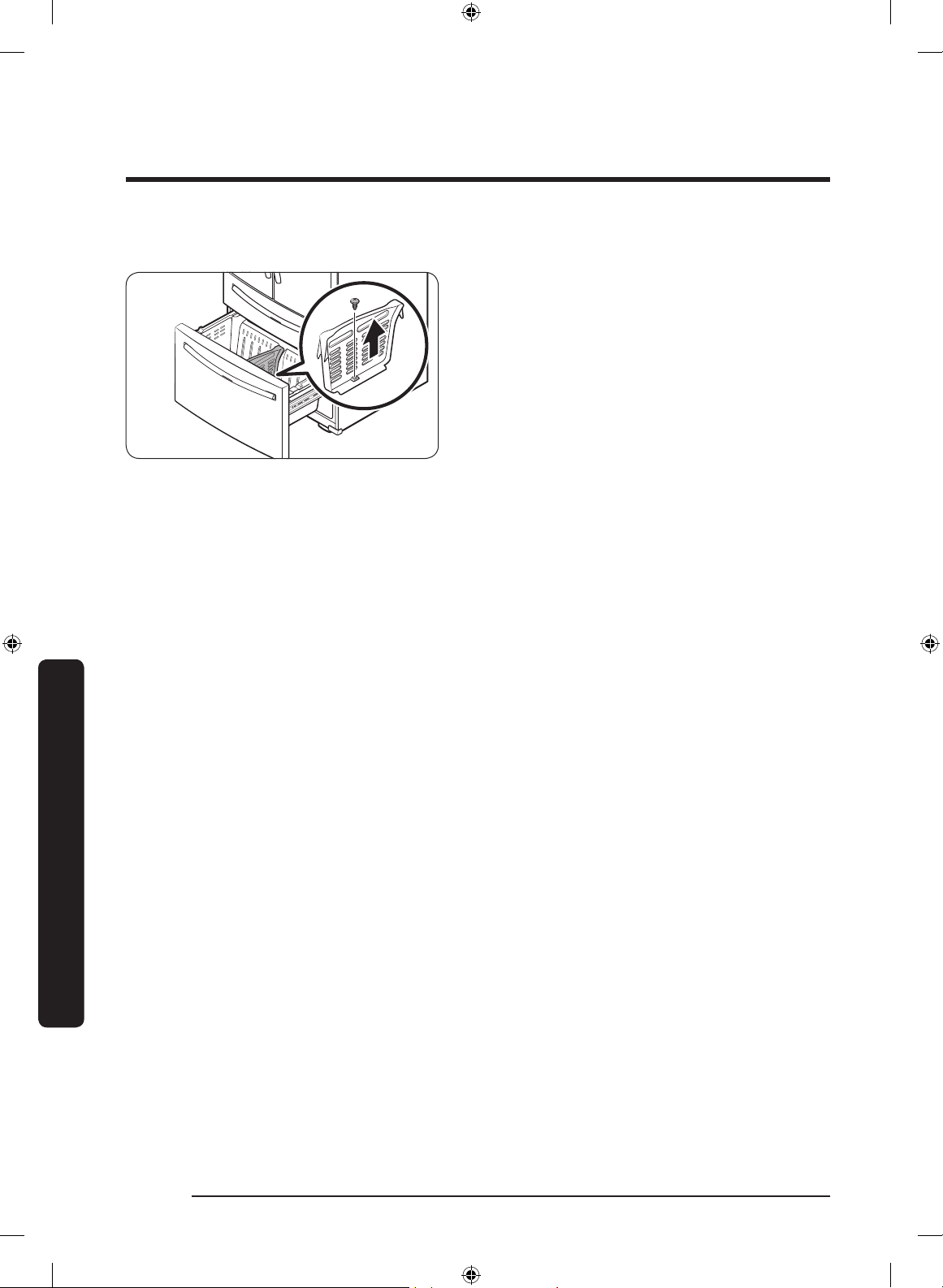
Maintenance
English74
Maintenance
Freezer basket divider
Loosen and remove the screw from
the lower side of the divider. Then, pull
straight up to remove the divider.
Untitled-1 74 2019-03-07 11:17:08
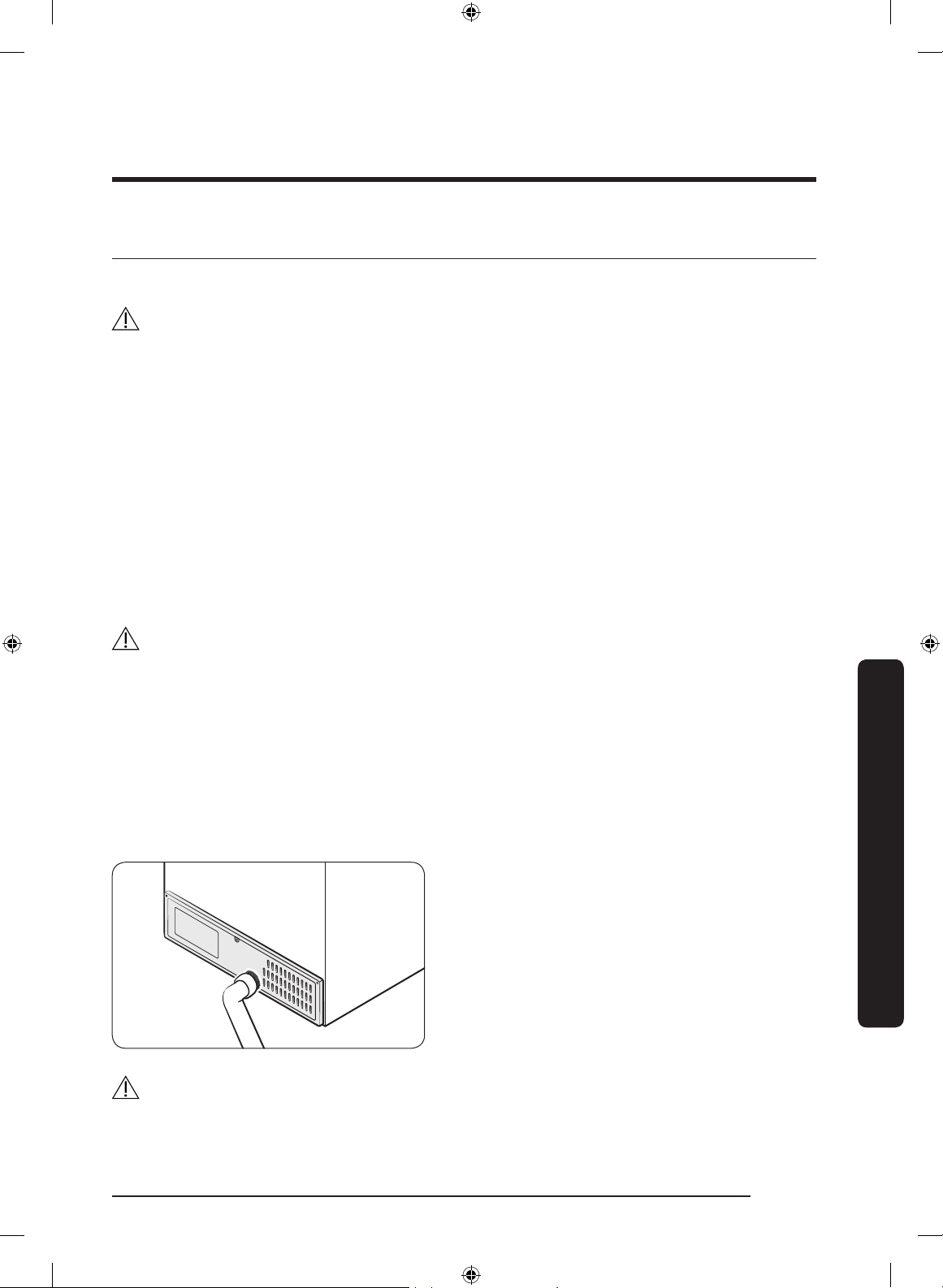
English 75
Maintenance
Cleaning
Interior and exterior
WARNING
• Do not use benzene, thinner, home/car detergent, or Clorox™ to clean the refrigerator.
They may damage the surface of the refrigerator and cause a re.
• Do not spray water onto the refrigerator. This may cause electric shock.
Regularly use a dry cloth to remove all foreign substances such as dust or water from the
power plug terminals and contact points.
1. Unplug the power cord.
2. Use a moistened, soft, lint-free cloth or paper towel to clean the refrigerator’s interior
and exterior.
3. When done, use a dry cloth or paper towel to dry well.
4. Plug in the power cord.
Ice / Water dispenser
CAUTION
When crushed ice is selected, some residual ice chips may collect in the ice chute. To
prevent this, remove the residual ice from the chute using a soft, clean cloth.
Rubber seals
If the rubber seals of a door become dirty, the door may not close properly and reducing
refrigerator performance and efciency. Use a mild detergent and damp cloth to clean the
rubber seals. Then, dry well with a cloth.
Rear panel
To keep cords and exposed parts of the
rear panel free of dirt, vacuum the panel
once or twice a year.
CAUTION
Do not remove the rear panel cover. Electric shock may occur.
Untitled-1 75 2019-03-07 11:17:09
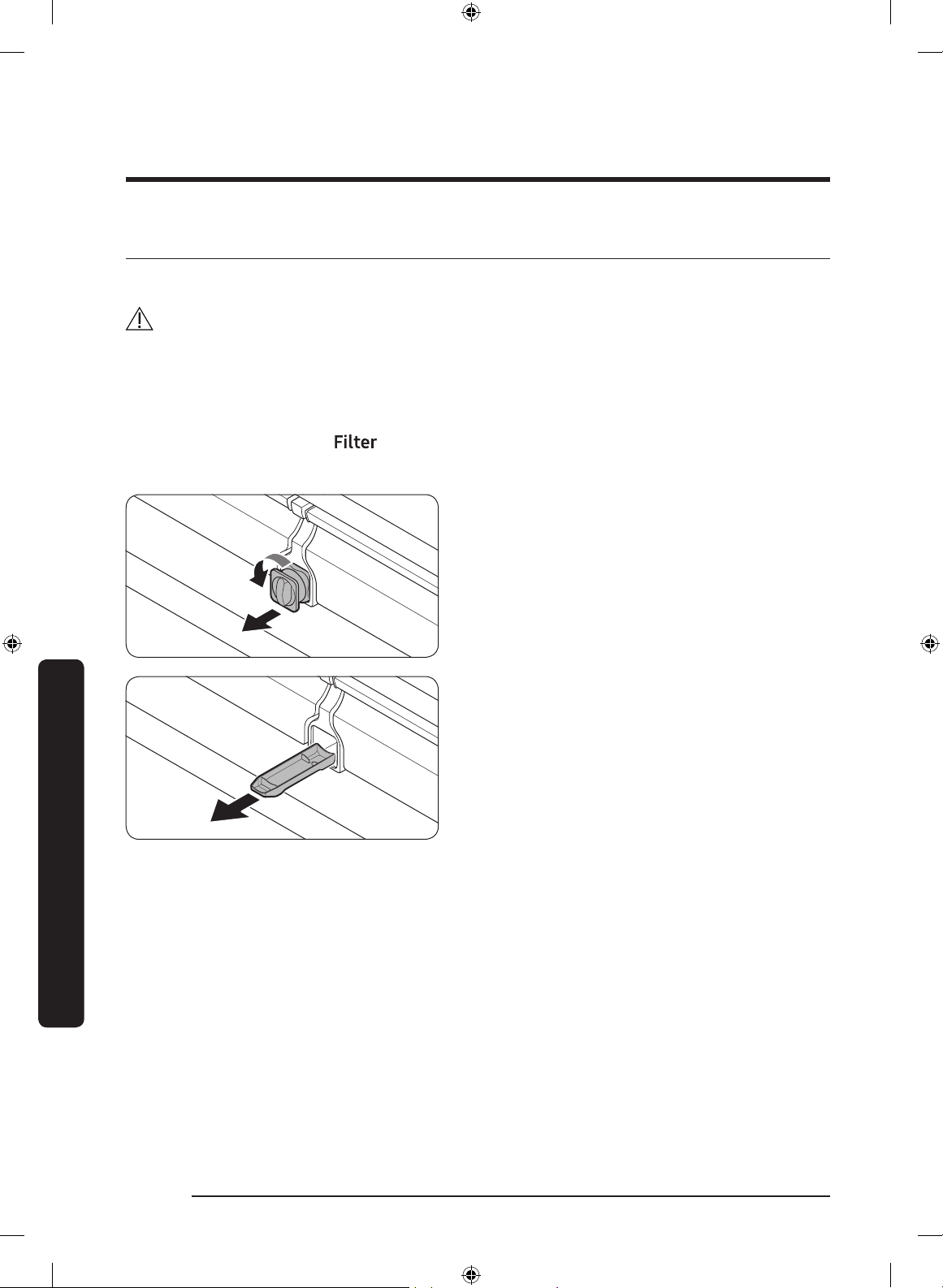
Maintenance
English76
Maintenance
Replacement
Water lter
WARNING
• Do not use third-party water lters. Use only Samsung-provided or -approved lters.
• Unapproved lters may leak and damage the refrigerator, causing electric shock.
Samsung is not responsible for any damage that may occur from use of third-party
water lters.
The Filter Reset indicator (
) turns red to let you know it is time to replace the water
lter. Before replacing the lter, make sure the water supply line is shut off.
1. Shut off the water supply line.
2. Turn the knob of the lter cartridge
counter clockwise 90 degrees (1/4
turn). The lter cartridge unlocks.
3. Pull out to remove the cartridge.
- If the water lter is severely
contaminated, the cartridge may not
be easy to remove. If that is the case,
use force to remove the cartridge.
- To prevent water leaks from the
lter opening, pull the cartridge
straight out while removing it.
4. Insert a new lter cartridge. Use only
Samsung-provided or approved lters.
Untitled-1 76 2019-03-07 11:17:09
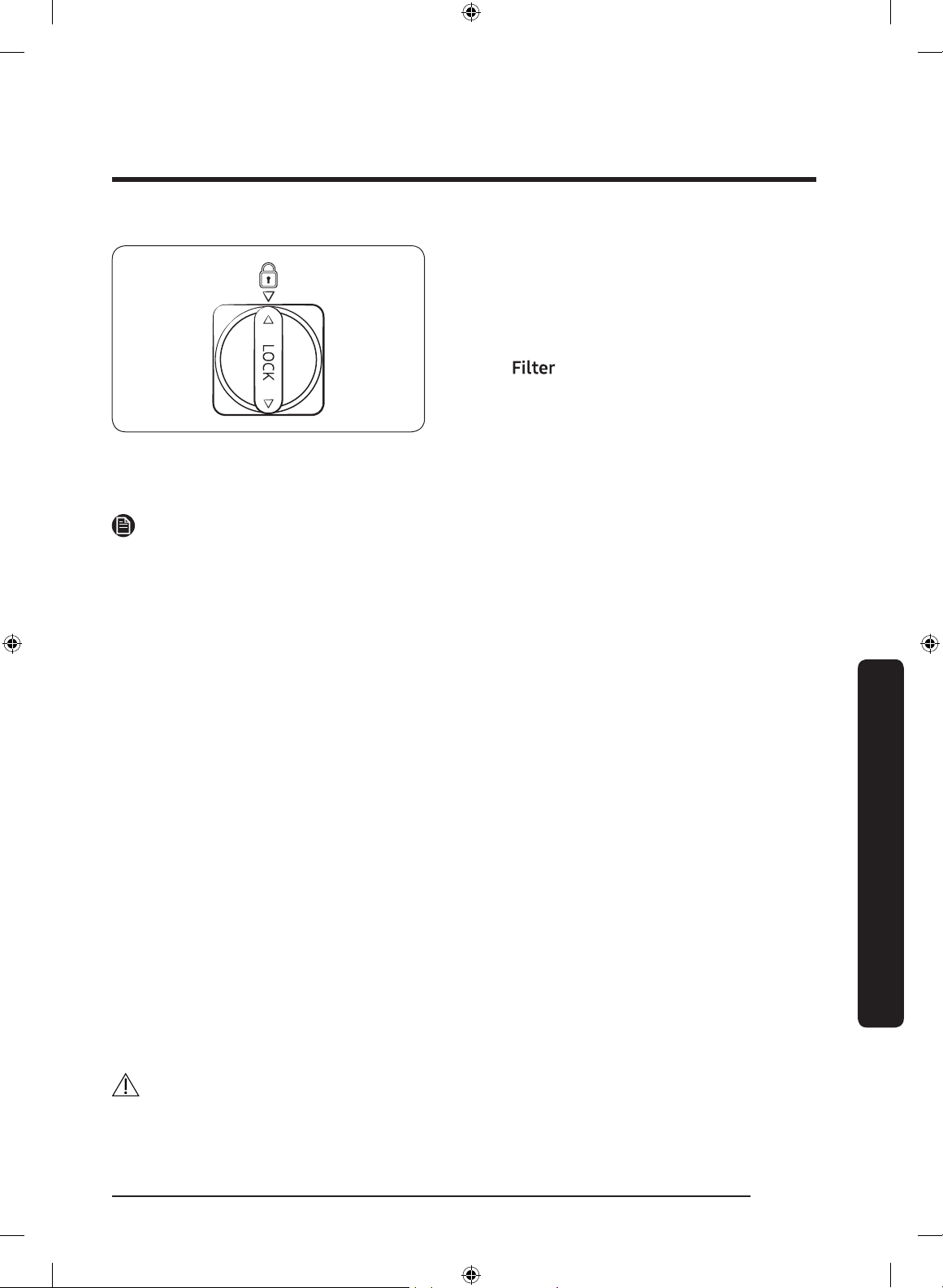
English 77
Maintenance
5. Turn the cartridge knob clockwise to
lock into place.
6. Press and hold Filter Reset on the main
panel for 3 seconds to reset the life
cycle detector. The Filter Reset indicator
( ) turns off.
7. When you are done replacing the lter,
open the water valve and run water
through the dispenser for about 7
minutes. This is to remove impurities
and air from the water line.
NOTE
• A newly installed lter may cause the water dispenser to spurt water briey. This is
because air has entered the waterline.
• The replacement process may cause the water dispenser to drip for a short period of
time. If it drips, simply wipe up any water on the oor with a dry towel.
Reverse osmosis water ltration system
The water pressure of the water supply system to a reverse osmosis water ltration
system must be between 35 psi and 120 psi (241 kPa and 827 kPa).
The water pressure of the reverse osmosis water ltration system to the refrigerator’s
cold water line must be at least 40 psi (276 kPa). If the water pressure is below these
specications:
• Check if the sediment lter in the reverse osmosis system is blocked. Replace the lter
if necessary.
• Rell the water tank in the reverse osmosis system with water.
• If your refrigerator has a water lter, it may further reduce the water pressure when
used in conjunction with a reverse osmosis system. Remove the water lter.
For more information or servicing, contact a licensed plumbing professional.
Ordering a new lter
To purchase a new water lter, contact a local Samsung service center or visit www.
samsungparts.com on the web.
LED Lamps
To replace the lamps of the refrigerator, contact a local Samsung service center.
WARNING
• The lamps are not user-serviceable. Do not attempt to replace a lamp yourself. This can
cause electric shock.
Untitled-1 77 2019-03-07 11:17:09
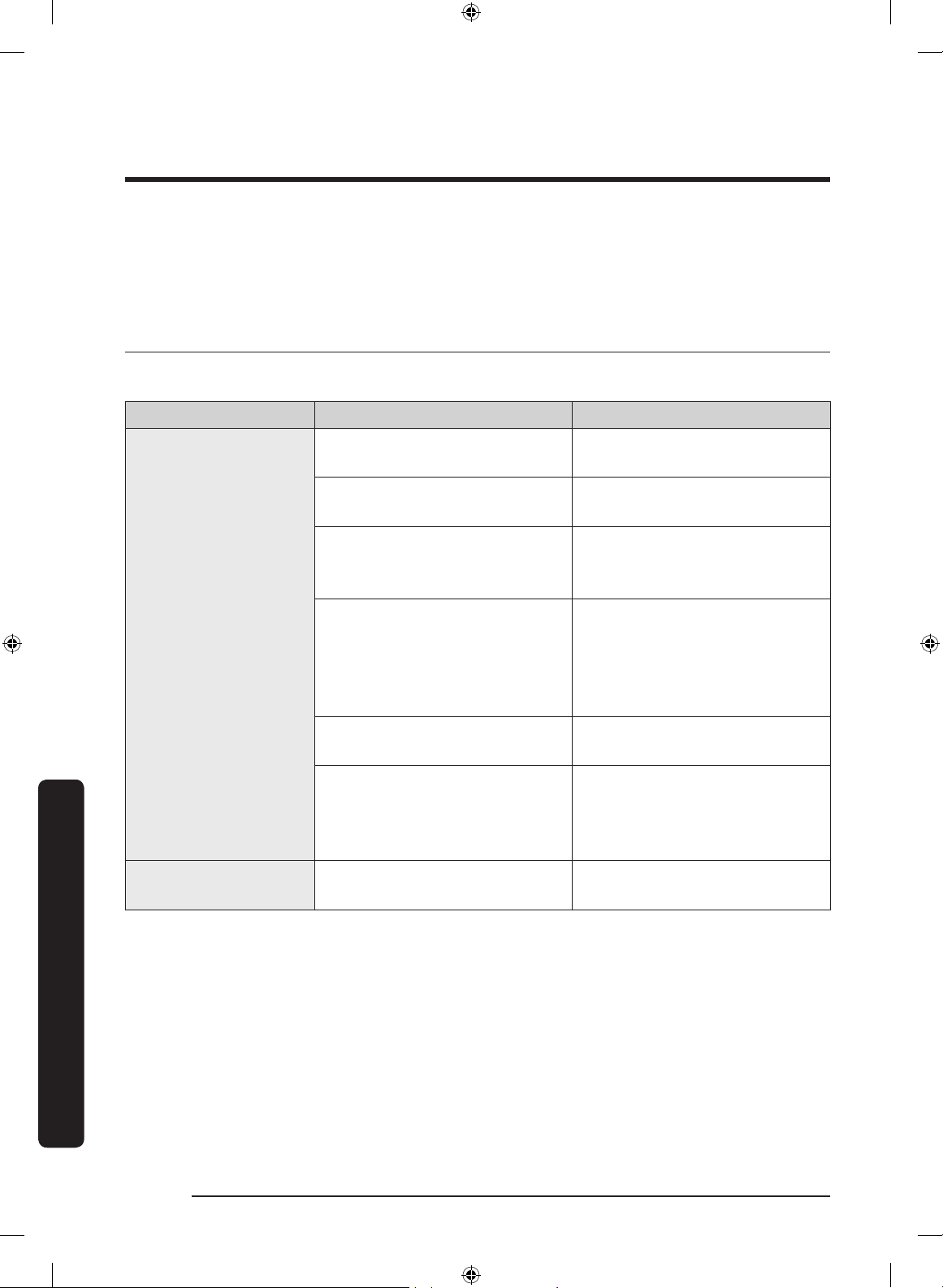
English78
Troubleshooting
Before calling for service, review the symptoms and recommended solutions below. If
none of the suggested solutions resolve your problem, please visit our website at www.
samsung.com or call Samsung Customer Care at 1-800-SAMSUNG (726-7864). Note that
you will be charged for any service visits in which no defects were found.
General
Temperature
Symptom Possible causes Solution
Fridge/freezer does
not operate.
Fridge/freezer
temperature is warm.
• Power cord is not plugged
in properly.
• Properly plug in the power
cord.
• Temperature control is not
set correctly.
• Set the temperature lower.
• Refrigerator is located near
a heat source or direct
sunlight.
• Keep the refrigerator away
from direct sunlight or a
heat source.
• Not enough clearance
between refrigerator and
nearby walls or cabinets.
• Make sure there is a gap of
at least 2.5 inches (5 cm)
between the refrigerator
back and sides and any
nearby walls or cabinets.
• Energy Saver mode is
activated.
• Deactivate Energy Saver
mode.
• The refrigerator is
overloaded. Food is
blocking the refrigerator
vents.
• Do not overload the
refrigerator. Do not allow
food to block vents.
Fridge/freezer is
over-cooling.
• Temperature control is not
set correctly.
• Set the temperature higher.
Troubleshooting
Untitled-1 78 2019-03-07 11:17:09
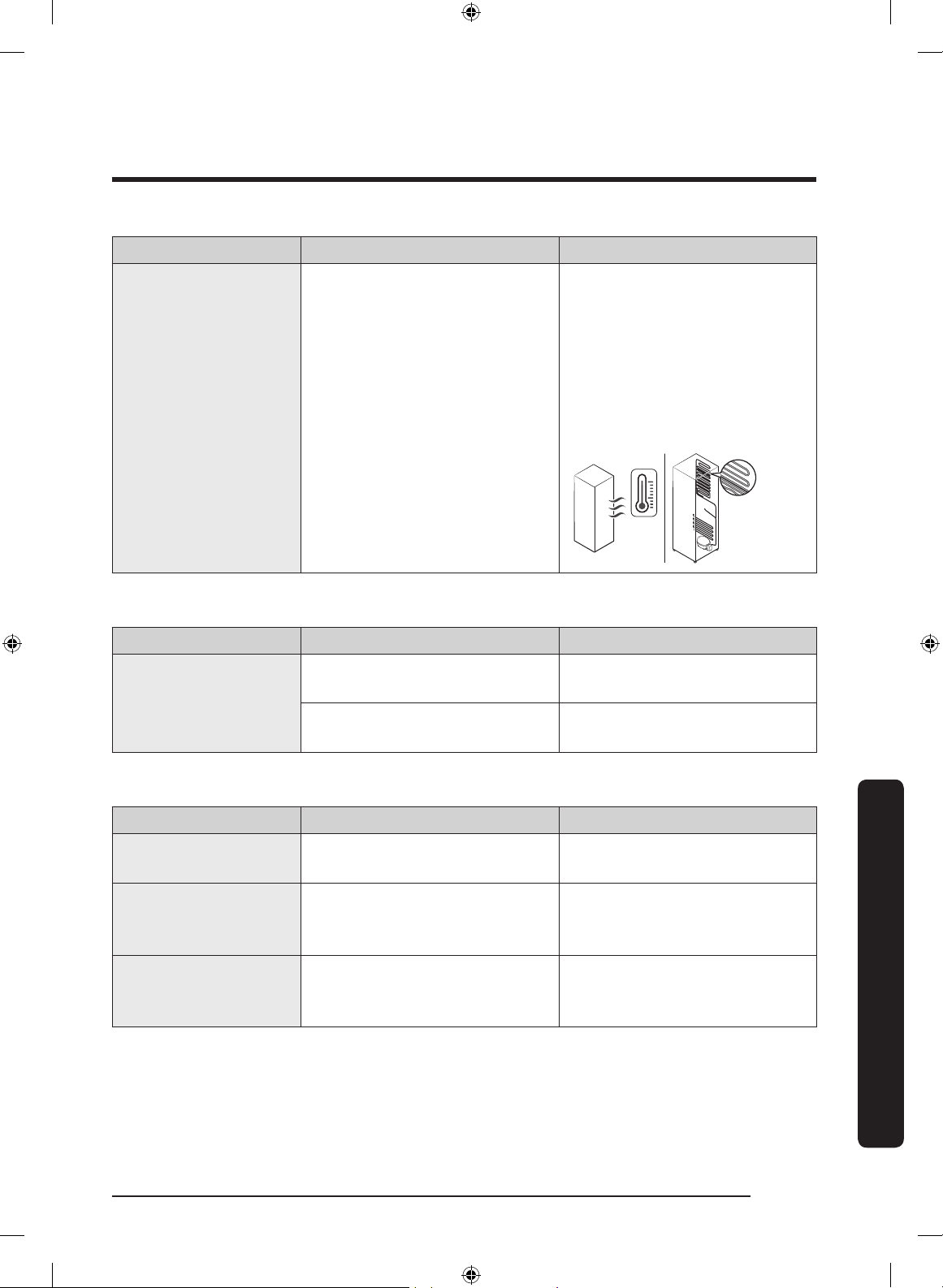
English 79
Troubleshooting
Symptom Possible causes Solution
Interior wall is hot.
• Refrigerator has heat-proof
piping in the interior wall.
• To prevent condensation
from forming, the
refrigerator has heat-proof
piping in the front corners.
If the ambient temperature
rises, this equipment may
not work effectively. This is
not a system failure.
Odors
Symptom Possible causes Solution
Refrigerator has
odors.
• Spoiled food.
• Clean the refrigerator and
remove any spoiled food.
• Food with strong odors.
• Make sure strong smelling
food is wrapped airtight.
Frost
Symptom Possible causes Solution
Frost around the
vents.
• Food is blocking the vents.
• Make sure no food blocks
the refrigerator vents.
Frost on interior
walls.
• Door is not closed properly.
• Make sure food does not
block the door. Clean the
door gasket.
Fruits or vegetables
are frozen.
• Fruits or vegetables are
stored in the FlexZone™.
• Do not store most kinds of
fruit or vegetables in the
FlexZone™.
Untitled-1 79 2019-03-07 11:17:09
Troubleshooting
English80
Troubleshooting
Condensation
Symptom Possible causes Solution
Condensation forms
on the interior walls.
• If door is left open, moisture
enters the refrigerator.
• Remove the moisture and
do not leave a door open
for extended periods of
time.
• Food with high moisture
content.
• Make sure food is wrapped
airtight.
Water/ice (dispenser models only)
Symptom Possible causes Solution
Water ow is weaker
than normal.
• Water pressure is too low.
• Make sure the water
pressure is between 20 and
120 psi.
Ice maker makes a
buzzing sound.
• The ice maker function is
activated, but the water
supply to the refrigerator
has not been connected.
• Press
Ice Maker.
Ice maker does not
make ice.
• Ice maker has just been
installed.
• You must wait for 12 hours
for the refrigerator to make
ice.
• Freezer temperature is too
high.
• Set the freezer temperature
below 0 °F (-18 °C) or -4 °F
(-20 °C) in warm ambient
air.
• Dispenser panel Lock is
activated.
• Deactivate dispenser panel
Lock.
• Ice maker is off. • Turn on the ice maker.
Untitled-1 80 2019-03-07 11:17:10
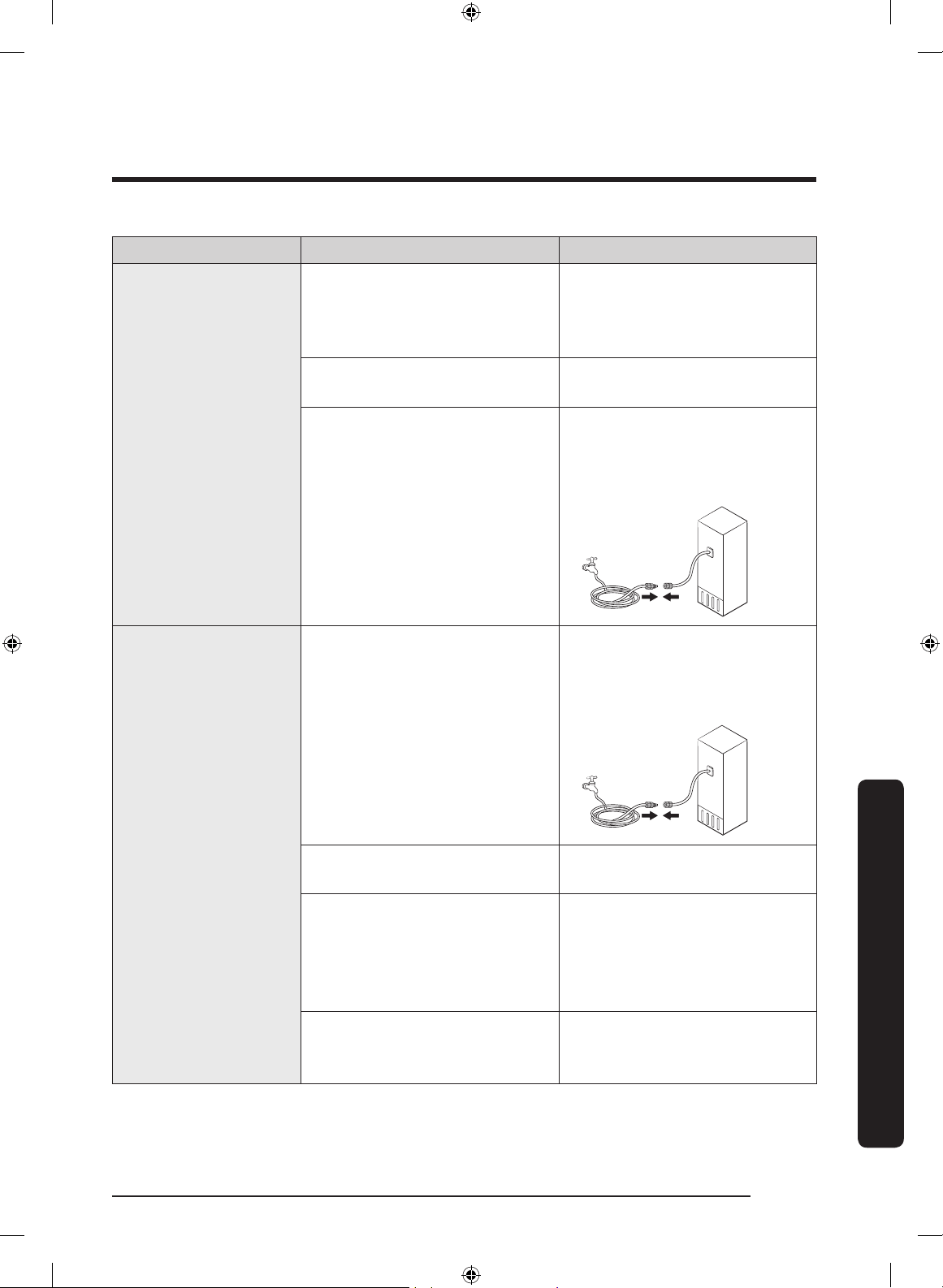
English 81
Troubleshooting
Symptom Possible causes Solution
Ice does not dispense.
• Ice may jam if the ice
dispenser is not used for a
long time (approx. 3 weeks).
• If you won't be using the
refrigerator for a long time,
empty the ice bucket and
turn off the ice maker.
• Ice bucket is not properly
inserted.
• Make sure the ice bucket is
properly inserted.
• Water line is not connected
properly or water supply is
not on.
• Check if the water line is
installed correctly. Check if
the water line stop cock is
closed.
Water does not
dispense.
• Water line is not connected
properly or water supply is
not on.
• Check if the water line is
installed correctly. Check if
the water line stop cock is
closed.
• Dispenser panel Lock is
activated.
• Deactivate dispenser panel
Lock.
• A third-party water lter
was installed.
• Use only Samsung-provided
or approved lters.
• Unapproved lters may
leak and damage the
refrigerator.
• Water lter indicator turns
on or blinks.
• Replace the water lter.
After replacing, reset the
lter indicator sensor.
Untitled-1 81 2019-03-07 11:17:10
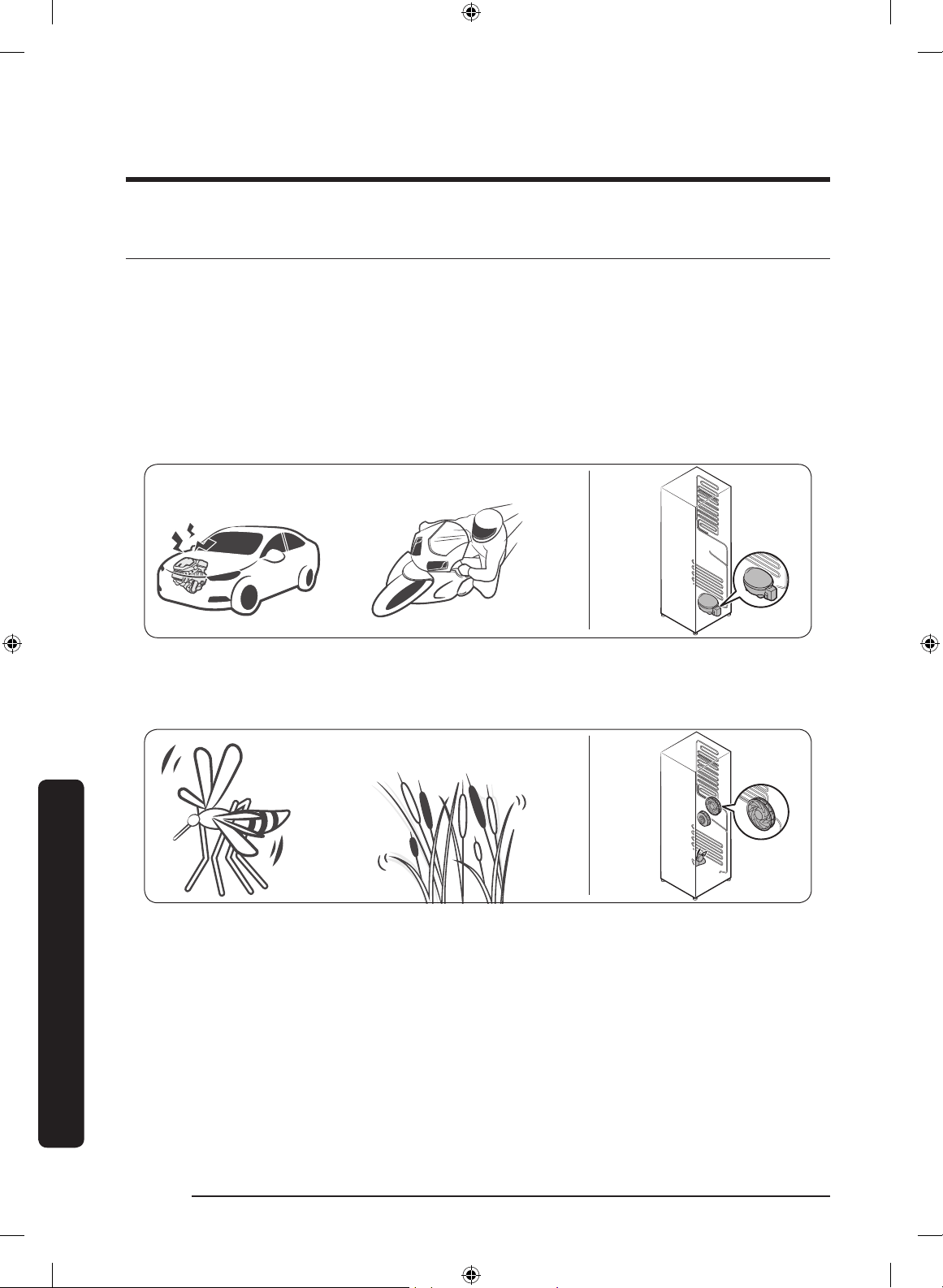
Troubleshooting
English82
Troubleshooting
Do you hear abnormal sounds from the refrigerator?
Before calling for service, review the information below. If you still have questions
about sounds your refrigerator is making, please call Samsung Customer Care at
1-800-SAMSUNG (726-7864). Note that you will be charged for any service visits related
to normal operating sounds in which no defects were found.
These sounds are normal.
• When starting or ending an operation, the refrigerator may make sounds similar to a
car engine ignition. As the operation stabilizes, the sounds will decrease.
Clicking!
or Chirping!
Buzzing!
• While the fan is operating, these sounds may occur. When the refrigerator reaches the
set temperature, the fan sound will stop.
SSSRRR!
Whir!
Untitled-1 82 2019-03-07 11:17:10
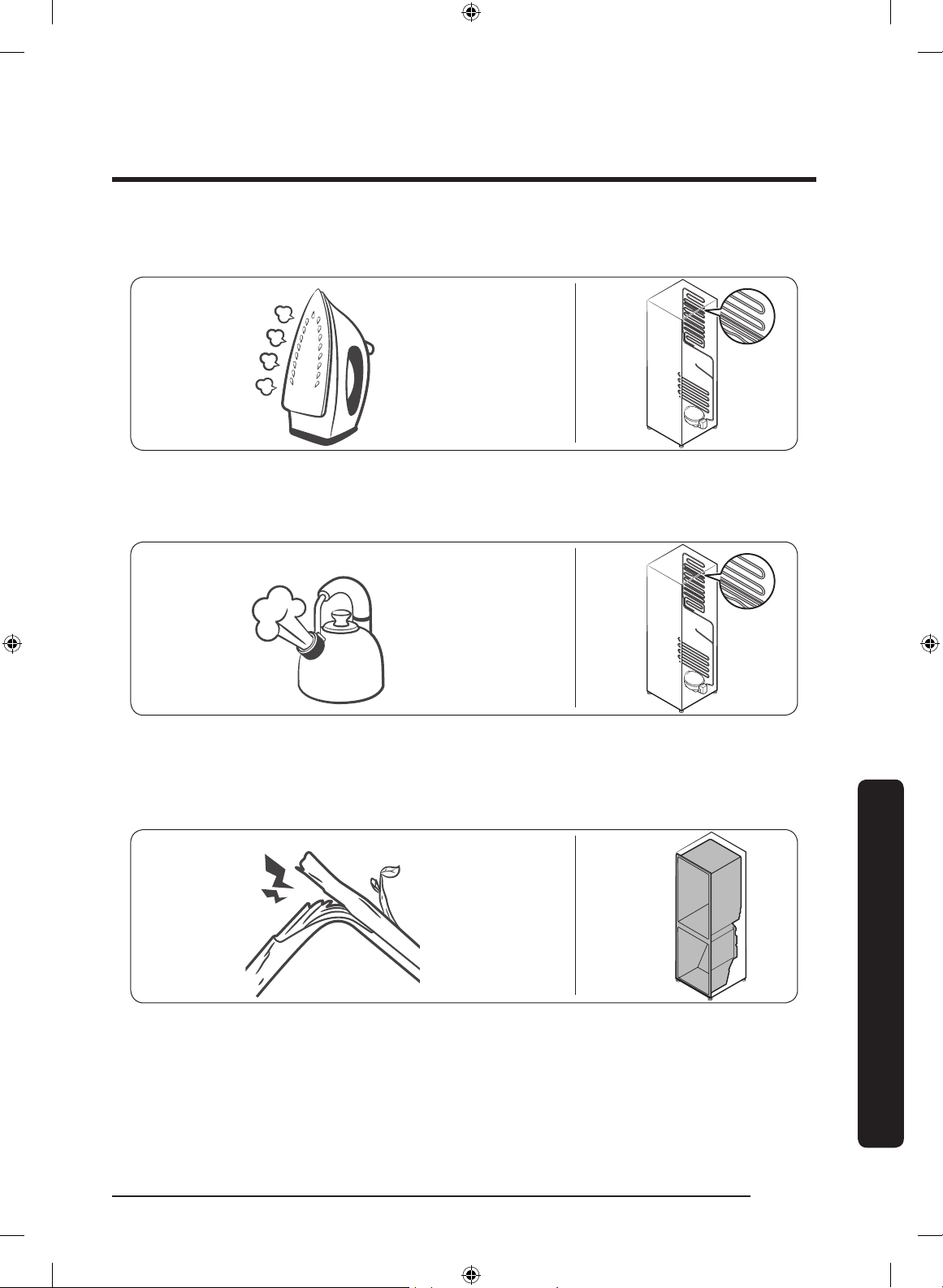
English 83
Troubleshooting
• During a defrost cycle, water may drip on the defrost heater, causing sizzling sounds.
HiSS!
• As the refrigerator cools or freezes, refrigerant gas moves through sealed pipes,
causing bubbling sounds.
Bubbling!
• As the refrigerator temperature increases or decreases, plastic parts contract and
expand, creating knocking noises. These noises occur during the defrosting cycle or
when electronic parts are working.
Cracking!
• For ice maker models: When the water valve opens to ll the ice maker, you may hear
a buzzing sound.
• Due to pressure equalizing when you open and close the refrigerator door, you may
hear a whooshing sound.
Untitled-1 83 2019-03-07 11:17:11
Troubleshooting
English84
Troubleshooting
SmartThings
Symptom Action
Could not nd
“SmartThings” in the
app market.
• The SmartThings app is designed for Android 6.0
(Marshmallow) or later, iOS 10.0 or later, iPhone 6 or later,
and is optimized for Samsung smartphones (Galaxy S and
Galaxy Note series).
The SmartThings app
fails to operate.
• The SmartThings app is available for applicable models only.
• The old Samsung Smart Refrigerator app cannot connect with
Samsung Smart Home models.
The SmartThings app
is installed but is
not connected to my
refrigerator.
• You must log into your Samsung account to use the app.
• Make sure that your router is operating normally.
• If you have not connected your refrigerator to the
SmartThings App after the app was installed, you must make
the connection using the device registration function of the
app.
Could not log into the
app.
• You must log into your Samsung account to use the app.
• If you don’t have a Samsung account, follow the app’s
onscreen instructions to create one.
An error message
appears when I
try to register my
refrigerator.
• Easy Connection may fail due to the distance from your
access point (AP) or electrical interference from the
surrounding environment. Wait a moment and try again.
The SmartThings
app is successfully
connected to my
refrigerator but does
not run.
• Exit and restart the SmartThings app or disconnect and
reconnect the router.
• Unplug the power cord of the refrigerator, and then plug it in
again after 1 minute.
Untitled-1 84 2019-03-07 11:17:11
English 85
Troubleshooting
Smart Grid (applicable models only)
Symptom Action
What Do I Need
to use the Energy
Management and
Smart Grid functions?
To use the Smart Grid (Demand Response) and Energy
Management functions on your refrigerator, you need the
following:
Devices
• A wireless access point (router)
• A Samsung Energy Management-supported refrigerator
• A smartphone
Registration
• Connect your refrigerator to your home Wi-Fi network.
• Register for the EMS service with your electric company.
Your electric company must have an EMS (Energy
Management System) supporting SEP (Smart Energy prole).
App
• Download the SmartThings app from the Google Play Store,
Apple App Store, or Samsung Galaxy Apps.
• Install and run the SmartThings app on your smartphone.
Why isn’t the Energy
Management function
working normally?
• Make sure that your home router is operating normally with
proper Internet service and connection.
• Make sure that the refrigerator is connected to the AP
(router).
Checkpoints
• Connect your smartphone to the router (AP, Access Point),
and then check if you can browse the Internet on the
smartphone.
Why isn’t the Delay
Defrost Capability
working normally?
• Make sure that your home router is operating normally with
proper Internet service and connection.
Untitled-1 85 2019-03-07 11:17:11
English86
LIMITED WARRANTY (U.S.A.)
SAMSUNG REFRIGERATOR
LIMITED WARRANTY TO ORIGINAL CONSUMER PURCHASER WITH PROOF OF
PURCHASE
This SAMSUNG brand product, as supplied and distributed by Samsung Electronics
America, Inc. (SAMSUNG) and delivered new, in the original carton to the original
consumer purchaser, is warranted by SAMSUNG against manufacturing defects in
materials or workmanship for the limited warranty period of:
One (1) year parts and labor
Five (5) years parts and labor on Sealed Refrigeration System Only (Compressor,
Evaporator, Condenser, Drier, and Connecting Tubing)
Ten (10) years part and Five (5) years labor on Digital Inverter Compressor Only
This limited warranty is valid only on products purchased and used in the United States
that have been installed, operated, and maintained according to the instructions attached
to or furnished with the product. To receive warranty service, the purchaser must contact
SAMSUNG at the address or phone number provided below for problem determination and
service procedures. Warranty service can only be performed by a SAMSUNG authorized
service center. The original dated bill of sale must be presented upon request as proof
of purchase to SAMSUNG or SAMSUNG’s authorized service center to receive warranty
service.
SAMSUNG will provide in-home service within the contiguous United States during the
warranty period at no charge, subject to availability of SAMSUNG authorized servicers
within the customer’s geographic area. If in-home service is not available, SAMSUNG may
elect, at its option, to provide transportation of the product to and from an authorized
service center. If the product is located in an area where service by a SAMSUNG
authorized servicer is not available, you may be responsible for a trip charge or required
to bring the product to a SAMSUNG authorized service center for service.
To receive in-home service, product must be unobstructed and accessible to the service
agent.
During the applicable warranty period, a product will be repaired, replaced, or the
purchase price refunded, at the sole option of SAMSUNG. SAMSUNG may use new
or reconditioned parts in repairing a product, or replace the product with a new or
reconditioned product. Replacement parts and products are warranted for the remaining
portion of the original product’s warranty or ninety (90) days, whichever is longer. All
replaced parts and products are the property of SAMSUNG and you must return them to
SAMSUNG.
Untitled-1 86 2019-03-07 11:17:11
English 87
This limited warranty covers manufacturing defects in materials or workmanship
encountered in normal household, noncommercial use of this product and shall not
cover the following: damage that occurs in shipment, delivery, installation, and uses
for which this product was not intended; damage caused by unauthorized modication
or alteration of the product; product where the original factory serial numbers have
been removed, defaced, changed in any way, or cannot be readily determined; cosmetic
damage including scratches, dents, chips, and other damage to the product’s nishes;
damage caused by abuse, misuse, pest infestations, accident, re, oods, or other acts
of nature or God; damage caused by use of equipment, utilities, services, parts, supplies,
accessories, applications, installations, repairs, external wiring or connectors not supplied
or authorized by SAMSUNG; damage caused by incorrect electrical line current, voltage,
uctuations and surges; damage caused by failure to operate and maintain the product
according to instructions; in-home instruction on how to use your product; and service
to correct installation not in accordance with electrical or plumbing codes or correction
of household electrical or plumbing (i.e., house wiring, fuses, or water inlet hoses). The
cost of repair or replacement under these excluded circumstances shall be the customer’s
responsibility.
Visits by an authorized servicer to explain product functions, maintenance or installation
are not covered by this limited warranty. Please contact SAMSUNG at the number below
for assistance with any of these issues.
EXCLUSION OF IMPLIED WARRANTIES
IMPLIED WARRANTIES, INCLUDING THE IMPLIED WARRANTIES OF MERCHANTABILITY
OR FITNESS FOR A PARTICULAR PURPOSE, ARE LIMITED TO ONE YEAR OR THE SHORTEST
PERIOD ALLOWED BY LAW. Some states do not allow limitations on how long an implied
warranty lasts, so the above limitations or exclusions may not apply to you. This warranty
gives you specic rights, and you may also have other rights, which vary from state to
state.
Untitled-1 87 2019-03-07 11:17:11
LIMITED WARRANTY (U.S.A.)
English88
LIMITATION OF REMEDIES
YOUR SOLE AND EXCLUSIVE REMEDY IS PRODUCT REPAIR, PRODUCT REPLACEMENT,
OR REFUND OF THE PURCHASE PRICE AT SAMSUNG’S OPTION, AS PROVIDED IN THIS
LIMITED WARRANTY. SAMSUNG SHALL NOT BE LIABLE FOR SPECIAL, INCIDENTAL OR
CONSEQUENTIAL DAMAGES, INCLUDING BUT NOT LIMITED TO TIME AWAY FROM WORK,
HOTELS AND/OR RESTAURANT MEALS, REMODELING EXPENSES, LOSS OF REVENUE OR
PROFITS, FAILURE TO REALIZE SAVINGS OR OTHER BENEFITS REGARDLESS OF THE LEGAL
THEORY ON WHICH THE CLAIM IS BASED, AND EVEN IF SAMSUNG HAS BEEN ADVISED OF
THE POSSIBILITY OF SUCH DAMAGES. Some states do not allow exclusion or limitation of
incidental or consequential damages, so the above limitations or exclusions may not apply
to you. This warranty gives you specic rights, and you may also have other rights, which
vary from state to state.
SAMSUNG does not warrant uninterrupted or error-free operation of the product. No
warranty or guarantee given by any other person, rm, or corporation with respect to this
product shall be binding on SAMSUNG.
To obtain warranty service, please contact SAMSUNG at:
Samsung Electronics America, Inc.
85 Challenger Road
Ridgeeld Park, NJ 07660
1-800-SAMSUNG (726-7864)
www.samsung.com/us/support
Untitled-1 88 2019-03-07 11:17:11
English 89
Warranty Information (CANADA)
If your refrigerator needs service
Do not hesitate to call any Samsung Authorized Service Center nearby giving them your
name, address and telephone number if your product is not functioning properly.
Limited Warranty for Original Purchaser
This Samsung product is warranted by Samsung Electronics Canada Inc. (hereafter referred
to as SECA) against manufacturing defects in material or workmanship for the following
periods:
Labor : 1 year (in-home)
Parts : 1 year
Inverter Compressor : 10 years (Part only)
SECA further warrants that if this product fails to operate properly within the specied
warranty period and the failure is due to improper workmanship or defective material,
SECA will repair or replace the product at its option. In-home service is not available in all
areas. Contact us to nd out if in-home service is currently available in your area by using
the contact information at the back of this warranty.
All warranty repairs or part replacements must be performed by a SECA Authorized
Service Center. (To nd the nearest SECA Service Center, call 1-800-SAMSUNG (7267864)
or visit our web site at www.samsung.com/ca)
Obligation to the Original Owner
The original dated sales receipt must be retained by the customer and is the only
acceptable proof of purchase. It must be presented to a SECA Authorized Service Center
at the time service is requested before warranty services are rendered. On all carry-in
models, transportation to and from the Authorized Service Center is the responsibility of
the customer.
Untitled-1 89 2019-03-07 11:17:11
Warranty Information (CANADA)
English90
Exclusions of the Warranty
This warranty does not cover damage due to accident, re, ood, and/or other Acts of
God, misuse, incorrect line voltage, improper installation, improper or unauthorized
repairs, commercial use, or damage that occurs during shipping. Customer adjustments
which are explained in this owners manual are not covered under the terms of this
warranty. This warranty will automatically be voided for any unit found with a missing
or altered serial number. This warranty is valid only on products purchased and used in
Canada.
SAMSUNG CUSTOMER CARE CENTER
Samsung Electronics Canada Inc.
2050 Derry Road West
Mississauga, Ontario L5N 0B9
Canada
1-800-SAMSUNG (726-7864)
www.samsung.com/ca/support (English)
www.samsung.com/ca_fr/support (French)
Untitled-1 90 2019-03-07 11:17:11
English 91
Regulatory Notice
FCC Notice
FCC CAUTION:
Any changes or modications not expressly approved by the party responsible for
compliance could void the user’s authority to operate the equipment.
Contains Transmitter Module FCC ID: A3LCWAM210S
This device complies with Part 15 of FCC Rules. Operation is Subject to the following two
conditions:
(1) This device may not cause harmful interference, and
(2) This device must accept any interference received including interference that cause
undesired operation.
For products available in the US and Canadian markets, only channels 1~11 are available.
You cannot select other channels.
FCC STATEMENT:
This equipment has been tested and found to comply within the limits for a Class B
digital device, pursuant to part 15 of the FCC Rules. These limits are designed to provide
reasonable protection against harmful interference in a residential installation.
This equipment generates, uses, and can radiate radio frequency energy and, if not
installed and used in accordance with the instructions, may cause harmful interference
to radio communications. However, there is no guarantee that interference will not occur
in a particular installation. If this equipment does cause harmful interference to radio or
television reception, which can be determined by turning the equipment off and on, the
user is encouraged to try to correct the interference by one or more of the following
measures:
• Reorient or relocate the receiving antenna
• Increase the separation between the equipment and receiver
• Connect the equipment to an outlet that is on a different circuit than the receiver.
• Consult the dealer or an experienced radio/TV technician for help.
FCC RADIATION EXPOSURE STATEMENT:
This equipment complies with FCC radiation exposure limits set forth for an uncontrolled
environment.
This equipment should be installed and operated so there is at least 8 inches (20 cm)
between the radiator and your body. This device and it’s antennas must not be co-located
or operated in conjunction with any other antenna or transmitter except in accordance
with FCC multi-transmitter product procedures.
Untitled-1 91 2019-03-07 11:17:11
Regulatory Notice
English92
IC Notice
Contains Transmitter Module IC: 649E-CWAM210S
The term “IC” before the radio certication number only signies that Industry Canada
technical specications were met. Operation is subject to the following two conditions : (1)
this device may not cause interference, and (2) this device must accept any interference,
including interference that may cause undesired operation of the device.
This Class B digital apparatus complies with Canadian ICES-003.
Cet appareil numérique de la classe B est conforme á la norme NMB-003 du Canada.
For products available in the US and Canadian markets, only channels 1~11 are available.
You cannot select other channels.
IC RADIATION EXPOSURE STATEMENT:
This equipment complies with IC RSS-102 radiation exposure limits set forth for an
uncontrolled environment. This equipment should be installed and operated so there is at
least 8 inches (20 cm) between the radiator and your body. This device and it’s antennas
must not be co-located or operated in conjunction with any other antenna or transmitter
except in accordance with FCC multi-transmitter product procedures.
SAVE THESE INSTRUCTIONS
Untitled-1 92 2019-03-07 11:17:11
English 93
Open Source Announcement
The software included in this product contains open source software. You may obtain the
complete corresponding source code for a period of three years after the last shipment of
this product by sending an email to mailto:[email protected].
It is also possible to obtain the complete corresponding source code in a physical medium
such as a CD-ROM; a minimal charge will be required.
The following URL http://opensource.samsung.com/opensource/SMART_AT_051/seq/0
leads to the download page of the source code made available and open source license
information as related to this product. This offer is valid to anyone in receipt of this
information.
Untitled-1 93 2019-03-07 11:17:11
Memo
Untitled-1 94 2019-03-07 11:17:11
Memo
Untitled-1 95 2019-03-07 11:17:11
Scan the QR code* or visit
www.samsung.com/spsn
to view our helpful
How-to Videos and Live Show
s
* Requires reader to be installed on your
smartphone
Contact SAMSUNG WORLD WIDE
If you have any questions or comments relating to Samsung products, please contact the
SAMSUNG Customer Care Center.
Country Contact Center Web Site
U.S.A
1-800-SAMSUNG (726-7864)
1-844-SAM-PAYS (726-7297)
www.samsung.com/us/support
CANADA
1-800-SAMSUNG (726-7864)
1-844-SAM-PAYS (726-7297)
www.samsung.com/ca/support (English)
www.samsung.com/ca_fr/support (French)
DA68-03833A-01
Untitled-1 96 2019-03-07 11:17:12