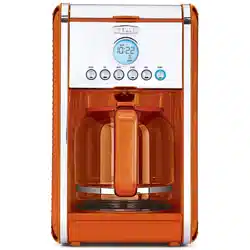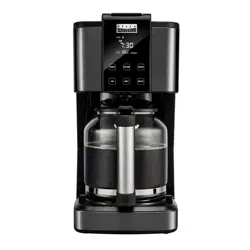

TOUCHSCREEN 14-CUP
COFFEE MAKER
Instruction Manual

Thank You for your purchase
Register & sign up for special
announcements and trendy recipes!
Tell us what you think!
Rate, review or ask us a question.
@bellahousewares.com
#getinspired
BellaLife BellaLifestyle

Important Safeguards ..................................................................................................... 2-4
Additional Important Safeguards .................................................................................. 5-6
Notes On The Plug ...............................................................................................................7
Notes On The Cord .............................................................................................................. 7
Plasticizer Warning ..............................................................................................................8
Electric Power .......................................................................................................................8
Carafe Safety Precautions ..................................................................................................9
Coffee Yield ..........................................................................................................................9
Permanent Coffee Filter Basket ...................................................................................... 10
Getting To Know Your Touchscreen 14-Cup Coffee Maker ..........................................10
Before Using For The First Time .................................................................................... 11
Setting Up The Machine .............................................................................................. 11-12
Setting The Clock ............................................................................................................... 12
Brew Strength Selection ................................................................................................... 13
Setting The Auto Start ......................................................................................................13
Pause And Serve ................................................................................................................ 14
Keep Warm Mode .............................................................................................................. 14
Time Since Brew ................................................................................................................ 14
Auto Shut Off .....................................................................................................................15
Setting the Indicator Beep Sound ................................................................................... 15
Brewing A Second Carafe Of Coffee ............................................................................... 15
Hints For Great Tasting Coffee ........................................................................................16
User Maintenance Instructions ........................................................................................16
Care & Cleaning Instructions ...........................................................................................17
Auto Clean And Descaling ................................................................................................18
Storing Instructions ...........................................................................................................18
Warranty ....................................................................................................................... 19-20
Table of ContentsTable of Contents

2
IMPORTANT SAFEGUARDS
When using electrical appliances, basic safety precautions should always
be followed including the following:
1. Read all instructions.
2. Do not touch hot surface. Use handles or knobs only.
3. This appliance is not intended for use by persons (including children)
with reduced physical, sensory or mental capabilities, or lack of
experience and knowledge, unless they have been given supervision
or instruction concerning use of the appliance by a person responsible
for their safety.
4. Close supervision is necessary when any appliance is used by
or near children.
5. In order to minimize the risk of property damage, never place the
Coffee Maker under cabinets. Make sure the area several feet above
the Coffee Maker is clear from all furniture or cabinetry.
6. Do not open top cover while coffee is brewing. Scalding may occur if
the cover is lifted or removed during the brewing cycle.
7. Do not use outdoors.
8. Unplug unit from outlet when either the appliance or display clock is
not in use, and before cleaning. Allow unit to cool before putting on
or taking off parts, and before cleaning.
9. To protect against electrical shock, do not immerse cord, plugs,
or appliance in water or other liquids.

3
10. Do not operate any appliance with a damaged cord or plug, or after
the appliance malfunctions, or has been damaged in any manner.
Return appliance to the nearest authorized service facility for
examination, repair or adjustment.
NOTE: DO NOT ATTEMPT TO REPAIR THE UNIT YOURSELF.
THIS WILL VOID THE WARRANTY.
11. The use of accessory attachments not recommended by the appliance
manufacturer may result in re, electric shock or injury to persons.
12. Never move the appliance by pulling the cord. Do not let the cord
hang over the edge of a table or counter or touch hot surfaces.
13. Stand the appliance on a table or at surface.
14. Do not use a cracked glass carafe or a carafe having a loose or
weakened handle.
15. Only use the glass carafe with this appliance. Handle with care as the
glass may become hot.
16. Snap lid securely onto glass carafe before serving coffee.
17. Never use your Coffee Maker without water in it.
18. Do not place appliance on or near a hot gas or electric burner or in a
heated oven.
19. The carafe is designed for use with this appliance. It must never be
used on a range top.
20. Do not set hot glass carafe on a wet or cold surface.
21. Do not clean glass carafe with cleaners, steel wool pads, or other
abrasive material.

4
22. Press the BREW-OFF button to turn the appliance OFF during a
brew cycle. Unplug the power cord from the electrical outlet when the
appliance is not in use, left unattended, or when the carafe is empty.
23. Do not use this appliance for other than its intended use.
24. Scalding may occur if the lid is removed during the brewing cycles.
25. To reduce the risk of re, do not mount unit over or near any portion
of a heating or cooking appliance.
26. To reduce the risk of electric shock, do not mount over a sink.
27. To reduce the risk of re, do not store anything directly on top of the
appliance surface when the appliance is in operation.
FOR HOUSEHOLD USE ONLY

5
ADDITIONAL IMPORTANT
SAFEGUARDS
WARNING: This appliance generates heat and escaping steam during
use. Proper precautions must be taken to prevent the risk of burns,
res, or other injury to persons or damage to property.
1. All users of this appliance must read and understand this Instruction
Manual before operating or cleaning this appliance.
2. The cord to this appliance should be plugged into a 120V AC electrical
outlet only.
3. Use water only in this appliance! Do not put any other liquids or food
products in this appliance. Do not mix or add anything to the water
placed in this appliance, except as instructed in the User Maintenance
Instructions to clean the appliance.
4. DO NOT attempt to move an appliance containing hot liquids.
Allow appliance to cool completely before moving.
5. Keep appliance at least 4 inches away from walls or other objects
during operation. Do not place any objects on top of appliance while
it is operating. Place the appliance on a surface that is resistant to
heat.
6. If this appliance begins to malfunction during use,
immediately unplug the cord. Do not use or attempt to repair the
malfunctioning appliance.
7. If this appliance falls or accidentally becomes immersed in water or
any other liquid, unplug it immediately. Do not reach into the water!
Do not use this appliance after it has fallen into or has become
immersed in water.

6
8. The appliance must be left to cool down sufciently before adding
more water to avoid exposure to steam.
9. Always use fresh, cool water in your appliance. Warm water or
other liquids, except as listed in cleaning section, may cause damage
to the appliance.
10. DO NOT put carafe into a microwave oven.
11. DO NOT leave empty carafe on warming plate when appliance is
turned ON, as the carafe may crack or become otherwise damaged.
12. The ow valve is located on the bottom of the removable lter holder
and is activated when the carafe is removed. This design makes it
possible for you to remove the carafe and pour a cup of coffee before
the entire carafe is brewed.
13. CAUTION: To prevent injury when utilizing the auto pour and serve
feature, replace carafe within 30 seconds of removing during brewing
process.
SAVE THESE INSTRUCTIONS

7
NOTES ON THE PLUG
This appliance is equipped with a grounded-type 3-wire cord (3-prong
plug). This plug will only t into an electrical outlet made for a 3-prong
plug. This is a safety feature. If the plug should fail to t the outlet,
contact an electrician to replace the obsolete outlet. Do not attempt to
defeat this safety feature.
NOTES ON THE CORD
a) A short power-supply cord (or detachable power-supply cord) is
provided to reduce risks resulting from becoming entangled in or
tripping over a longer cord.
b) Longer detachable power-supply cords or extension cords are
available and may be used if care is exercised in their use.
c) If a long detachable power-supply cord or extension cord is used:
1) The marked electrical rating of the detachable power-supply cord or
extension cord should be at least as great as the electrical rating of
the appliance;
2) If the appliance is of the grounded type, the extension cord should
be a grounding- type 3-wire cord; and
3) The longer cord should be arranged so that it will not drape over
the counter top or table top where it can be pulled on by children
or tripped over.

8
PLASTICIZER WARNING
CAUTION: To prevent Plasticizers from migrating from the nish of the
counter top or table top or other furniture, place NON-PLASTIC coasters
or place mats between the appliance and the nish of the counter top
or table top. Failure to do so may cause the nish to darken; permanent
blemishes may occur or stains can appear.
ELECTRIC POWER
If the electrical circuit is overloaded with other appliances, your appliance
may not operate properly. It should be operated on a separate electrical
circuit from other appliances.

9
CARAFE SAFETY PRECAUTIONS
1. Do not use a cracked carafe or any carafe with a loose or weakened handle.
2. This carafe is designed to be used only on the warming plate of your Coffee Maker.
Do not use in a conventional oven.
3. To avoid breakage, handle carafe with care. Avoid impact. Glass will break as a result
of impact. Use care when lling with water to avoid hitting faucet.
4. Do not place hot carafe on cool or wet surface. Allow carafe to cool before washing or
adding liquids.
5. Do not set empty carafe on a hot heating surface. Do not clean with steel wool pads,
abrasive cleanser, or any other materials that may scratch.
6. Do not bump or scratch the carafe. Remove carafe from the warming plate to avoid burning
or scorching. Never operate the Coffee Maker with a carafe that has boiled dry.
7. Discard carafe if it is cracked, scratched, or heated while empty for an extended period
of time.
COFFEE YIELD
14 Cup Coffee Maker: 14 (5 oz.) cups
NOTE: A 5-oz.cup is the American industry standard and is used by most Coffee Maker
manufacturers. To ll your favorite over-sized mug, ll Coffee Maker reservoir with enough water
for 3 to 4 cups (15 to 20 ounces).
NOTE: The amount of brewed coffee will always be less than the amount of water placed into the
water reservoir; as much as 10% may be absorbed by coffee grounds and steam loss.
WARNING: To avoid the risk of re or electric shock, do not unscrew the under side cover. there
are no user-serviceable parts inside. repair should be done by authorized service personnel only.
10
PERMANENT COFFEE FILTER BASKET
The permanent coffee lter basket takes the place of disposable paper lters. Simply place the
permanent coffee lter basket into the removable lter basket holder.Unfold and use handle to
lift basket of used coffee grounds up and out of the Coffee Maker; fold handle down to close
the water reservoir lid.
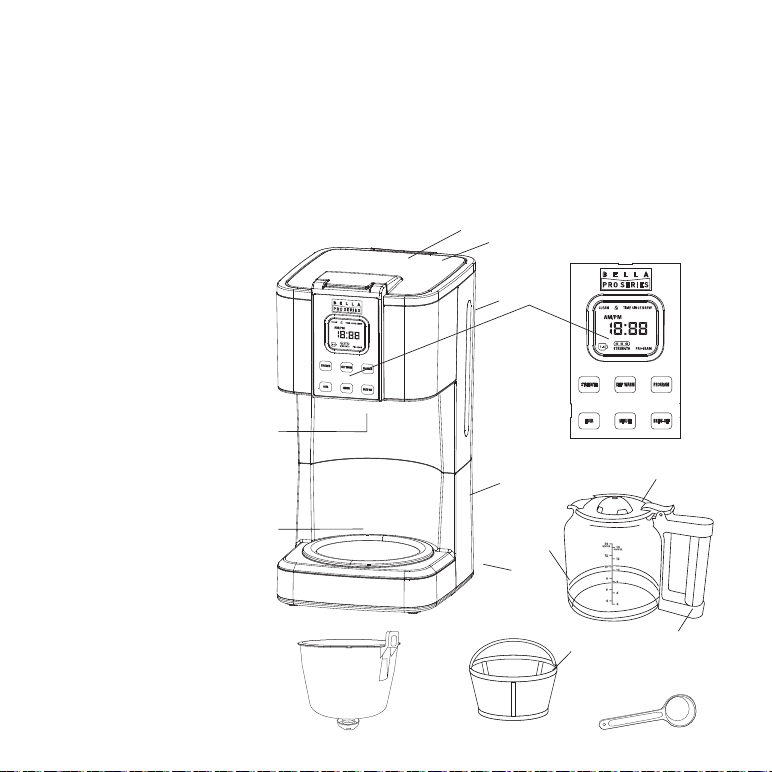
GETTING TO KNOW YOUR TOUCHSCREEN
14-CUP COFFEE MAKER
Product may vary slightly from illustration
1. Coffee Maker Lid
2. Water Reservoir
(not shown)
3. Water Level Indicator
4. Touchscreen Control Panel
5. Pause and Serve Valve
(not shown)
6. Warming Plate
7. Cord Storage
(not shown)
8. 3-Prong Plug
(not shown)
9. Carafe
10 Carafe Lid
11. Carafe Handle
12. Removable Filter Holder
13. Permanent Coffee Filter
14. Coffee Scoop
5
6
1
2
3
7
11
13
9
10
4
Figure 1
8
14
12

11
BEFORE USING FOR THE FIRST TIME
CAUTION: To protect against electrical shock, do not immerse the Coffee Maker or allow power
cord to come into contact with water or other liquids.
1. Remove all packing material and labels from the inside and outside of the Coffee Maker.
Place the unit on a at, clean surface.
2. Before preparing coffee, thoroughly clean the glass carafe with lid, removable lter holder
and permanent coffee lter in hot, sudsy water. Rinse and dry. Replace disassembled parts.
See Care & Cleaning Instructions for a detailed description.
NOTE: The permanent lter and removable lter holder are all top rack dishwasher safe.
The reusable scoop is also dishwasher safe but it should be placed in the machine alongside
the cutlery.
3. Clean the inside of the Coffee Maker by brewing 2 full carafes of tap water
(see “setting up the machine”). Do not add the permanent coffee lter or ground coffee
for this initial cleaning.
4. Brew a second carafe of fresh water.
SETTING UP THE MACHINE
IMPORTANT: Before brewing, always check to make sure water level is past the MIN line and add
water if needed. Never exceed the MAX ll line.
NOTE: The amount of brewed coffee will always be less than the amount of water placed into
the water reservoir; as much as 10% is absorbed by coffee grounds and lter.
1. Lift to open the Coffee Maker lid. Fill carafe with cold water and pour into water reservoir
at the back of the unit. The transparent water gauge can be easily viewed inside unit.
2. Place empty carafe on the warming plate.
3. Place the permanent lter in the removable lter holder. Measure 2 level tablespoons
or 1 scoop with the provided scooper cup, of drip or regular ground coffee for each cup of
coffee desired. For stronger or milder coffee, adjust amount of coffee to suit your taste.

12
4. Lower the lter holder down into the housing. Close the lid.
5. Plug the power cord into 120V/60HZ power supply socket, the background indicator
will illuminate, and “AM 12:00” will ash. The backlight indicator will go into sleep mode
within 15 seconds if no further buttons are selected.
6. Press the BREW-OFF button. The Coffee Maker will begin the brew cycle.
NOTE: To interrupt the brew process at any time, press the BREW-OFF button until you hear
a beep.
7. Upon completion of the brew cycle, wait at least 1 minute until the dripping coffee from the
ow valve into the carafe has stopped. The carafe lid should be kept in place to facilitate
safe serving and help keep coffee at a proper serving temperature. Tilt the carafe slightly
and pour the hot coffee very slowly, so that the ow of the brewed coffee does not exceed
the width of the spout.
Once the brew cycle is complete, the LCD screen will show the TIME SINCE BREW icon and
0:00 will begin counting up. This represents the time since the brew cycle nished. To shut
down the unit, press the BREW-OFF button.
8. Press BREW-OFF button to turn the Coffee Maker OFF when the carafe is empty or when
unit is not in use.
SETTING THE CLOCK
1. When the coffee maker is plugged in “AM 12:00” will ash.
2. Press HOUR button to select the Hour. Press and hold HOUR to toggle quickly.
3. Press MINUTE button to select the minutes. Press and hold MINUTE to toggle quickly.
4. Press on the any button, except the HOUR or MINUTE button, to conrm the time
5. To re-set the clock: press and hold the HOUR or MINUTE button until the previously
set time ashes. Then follow the clock setting method.

13
BREW STRENGTH SELECTION
1. To select the strength of coffee push on the strength button.
2. For regular strength press once.
3. For gourmet strength press twice.The gourmet setting adjusts the brewing cycle of a full
pot of coffee to extract a higher percent of solubles. This results in a more avorful pot
of coffee.
4. For bold strength press three times.The Bold setting adjusts the brewing cycle of a full pot
of coffee, allowing more time for the coffee to “steep” to extract further oils and avor from
the coffee bean. This results in a bolder tasting pot of coffee
5. For 1-4 cup mode press 4 times. Automatically adjusts the brewing process for maximum
avor when brewing small quantities. Ideal for brewing 4 cups of coffee.
* If 14 cups of water are poured into the water tank then 14 cups of coffee will brew.
SETTING THE AUTO START
Press and hold the PROGRAM button for 3 seconds. The clock will ash 12:00 AM. Follow the
clock setting method to set hour and minute. To conrm your selection, press the program
button. The unit will beep and display the current time along with the word PROGRAM. Once the
current time reaches the set time for the auto brew, the unit will automatically start the brewing
cycle.

14
PAUSE AND SERVE
If you wish to serve a cup of coffee before the brew cycle is complete, simply remove carafe from
the warming plate. Dripping will automatically cease. Return the carafe onto the warming plate;
dripping will resume.
CAUTION: To prevent injury when utilizing the pause and serve feature, replace carafe within 30
seconds after removing during the brewing process.
1. After approximately 2 cups of coffee have been brewed, the carafe may be slowly removed
and the coffee will stop dripping.
2. The ow valve is located on the bottom of the lter holder and is activated when the carafe
is removed. (See Figure 1.) This design makes it possible for you to remove the carafe and
pour a cup of coffee before the entire carafe is brewed.
IMPORTANT: When replacing the lter holder, the ow valve must be properly inserted into
the front hole of the machine, so that it can be seen as it sits on the top of the carafe lid.
(See Figure 1.)
3. When using this feature, make sure that the carafe is replaced under the lter holder within 30
seconds to prevent overow.
KEEP WARM MODE
To set the time for the Keep Warm feature press the KEEP WARM button. The KEEP WARM icon
will appear and 2:00 hours will ash. The default keep warm time is 2 hours. To select the period
of keep warm time push the HOUR or MINUTE button. Each time the button is pushed the keep
warm time will increase by increments of 15 minutes. The keep warm time is between 0 minutes
up to 4 hours. Once the desired keep warm time is reached, wait 5 seconds without pressing any
buttons to conrm the selection. The coffee maker will beep.
TIME SINCE BREW
When the brew cycle is complete, TIME SINCE BREW will appear on the LCD display and the
TIME SINCE BREW will count up from 0:00 to the selected KEEP WARM TIME to let you know
how fresh your coffee is. After the KEEP WARM TIME is reached,
the coffee maker will beep and the TIME SINCE BREW icon will disappear. The current time will
reappear on the LCD display.

15
AUTO SHUT OFF
The coffee maker will automatically shut off once the keep warm time has elapsed after brew.
SETTING THE INDICATOR BEEP SOUND
To turn off the beep sound, press and hold the PROGRAM and MINUTE button for 3 seconds, the
LCD will show the
icon. To turn it back on, press and hold the PROGRAM and MINUTE button
until the
icon disapears.
BREWING A SECOND CARAFE OF COFFEE
1. To brew another carafe of coffee, press the BREW-OFF button to turn the Coffee Maker OFF.
Remove plug from wall outlet.
CAUTION: Failure to allow Coffee Maker to cool sufciently could cause hot steam
and spray when the water is added to the water reservoir. The hot steam can cause
severe burns.
2. Lift the Coffee Maker lid. Unfold the handle, lift and remove the permanent coffee lter;
discard used coffee grounds, rinse.
3. Lift the removable lter holder up and out of the Coffee Maker.
4. Rinse the glass carafe and removable lter holder in cool, clean water.
IMPORTANT: Before brewing a second carafe, always check to make sure water level is past
the MIN line; add the desired amount of cold water into the water reservoir.
5. Place empty carafe on the warming plate.
6. Place the permanent lter into the removable lter holder. Measure 2 level tablespoons of
drip or regular grind coffee for each cup of coffee desired.
7. Place the lter holder down into the housing. Close the lid.
8. Plug Coffee Maker into a 120V AC electrical wall outlet.
9. Press the BREW-OFF button. Brewing will begin.

16
HINTS FOR GREAT TASTING COFFEE
• A clean Coffee Maker is essential for making great tasting coffee. Regular cleaning, as
described in the Care & Cleaning Instructions and Descaling sections of this Instruction
Manual is highly recommended.
• Always use fresh, cold water in your Coffee Maker.
• Finer grinds, such as drip coffee, promote fuller extraction and provide rich,
full-bodied coffee. Regular grind will require slightly more coffee per cup to provide
the strength of a ner grind.
• Store coffee in a cool, dry place. Once coffee has been opened, keep it tightly sealed in the
refrigerator to maintain freshness.
• For optimum coffee avor, buy whole beans and grind them nely just before brewing.
• Do not re-use coffee grounds since this will greatly impair coffee avor.
• Reheating coffee is not recommended. Coffee is at its peak avor immediately after
brewing.
• Small oil droplets on the surface of brewed, black coffee is due to the extraction of oil from
the coffee grounds. Oiliness may occur more frequently if heavily roasted coffees are used.
Overextraction may also cause oiliness, indicating a need to clean your Coffee Maker.
USER MAINTENANCE INSTRUCTIONS
This appliance requires little maintenance. It contains no user-serviceable parts.
Any servicing requiring disassembly other than cleaning must be performed by a qualied
appliance repair technician.

17
CARE & CLEANING INSTRUCTIONS
1. Always make sure Coffee Maker is unplugged and the warming plate is cool before
attempting to clean.
2. After every use, remove the permanent coffee lter, discard used coffee grounds,
rinse thoroughly.
3. Wash the removable lter holder and glass carafe in hot, sudsy water. If necessary, scrub
the inside of the carafe lid with a soaped kitchen brush. The permanent lter and removable
lter holder are all top rack dishwasher safe. The reusable scoop is also dishwasher safe but
it should be placed in the machine alongside the cutlery.
WARNING: To avoid breakage, handle carafe with care. Avoid impact. Glass will break as a
result of impact. Use care when lling with water to avoid hitting faucet.
4. Wipe the exterior with a damp cloth to remove supercial stains. For stubborn stains, use
a nylon or plastic pad with a non-abrasive cleanser. Do not use metal scouring pads or
abrasive cleansers.
5. Dry and replace disassembled parts. Make sure the removable lter holder drops down and is
properly seated into the housing.
6. Close the lid.

18
AUTO CLEAN AND DESCALING
Special cleaning of your Coffee Maker is recommended at least once a month, depending on
frequency of use and quality of water used in the unit. If water in your area is especially hard, the
following cleaning procedure should be performed every 2 weeks, since minerals in water can
detract from the avor of the coffee and possibly lengthen brew time.
1. Combine 6 cups of white vinegar and 4 cups of cold water in carafe.
2. Pour into water reservoir.
3. Place an 8 to 12 cup cupcake style paper lter in the removable lter basket.
Insert lter basket into lter basket holder and close lid.
4. Make sure the lid of the carafe is in place and place the empty carafe on the keep
warm plate.
5. Press and hold the HOUR and MINUTE button for 3 seconds until CLEAN appears
on the LCD display.
6. Press the BREW-OFF button to start the cleaning cycle. The light around the BREW-OFF button
will turn on and the unit will beep.
7. Once the cleaning cycle is complete, the light around the BREW-OFF button will turn off and
the unit will beep.
8. Discard all water/vinegar solution from carafe & water tank.
9. Repeat the brew cycle 2-3 times with cold water before brewing coffee again
STORING INSTRUCTIONS
1. Unplug unit and allow to cool.
2. Store Coffee Maker in its box or in a cool, dry place.
3. Never store unit while it is still plugged in.

Limited Two-Year Warranty
SENSIO Inc. hereby warrants that for
a period of TWO YEARS from the date
of purchase, this product will be free
from mechanical defects in material
and workmanship, and for 90 days in
respect to non-mechanical parts. At its
sole discretion, SENSIO Inc. will either
repair or replace the product found to
be defective, or issue a refund on the
product during the warranty period.
The warranty is only valid for the
original retail purchaser from the date
of initial retail purchase and is not
transferable. Keep the original sales
receipt, as proof of purchase isrequired
to obtain warranty validation. Retail
stores selling this product do not have
the right to alter, modify, or in any way
revise the terms and conditions of the
warranty.
Exclusions:
The warranty does not cover normal
wear of parts or damage resulting
from any of thefollowing: negligent
use of the product, use of improper
voltage or current, improper routine
maintenance, use contrary to the
operating instructions, disassembly,
repair, or alteration by anyone other than
qualied SENSIO Inc. personnel. Also,
the warranty does not cover
Acts of God such as re, oods,
hurricanes, or tornadoes.
SENSIO Inc. shall not be liable for any
incidental or consequential damages
caused by the breach of any express
or implied warranty. Apart from the
extent prohibited by applicable law, any
implied warranty of merchantability or
tness for a particular purpose is limited
in time to the duration of the warranty.
Some states, provinces or jurisdictions
do not allow the exclusion or limitation
of incidental or consequential damages,
or limitations on how long an implied
warranty lasts, and therefore, the above
exclusions or limitations may not apply
to you. The warranty covers specic
legal rights which may vary by state,
province and/or jurisdiction.
19

20
How To Obtain Warranty Service:
You must contact Customer Service at
our toll-free number: 1-866-832-4843.
A Customer Service Representative
will attempt to resolve warranty issues
over thephone. If the Customer Service
Representative is unable to resolve the
problem, you will be provided with a
case number and asked to return the
product to SENSIOInc. Attach a tag to
the product that includes: your name,
address, daytime contact telephone
number, case number, and description of
the problem.
Also, include a copy of the original sales
receipt. Carefully package the tagged
product with the sales receipt, and send
it (with shipping and insurance prepaid)
to SENSIO Inc.’s address. SENSIO Inc.
shall bear no responsibility or liability
for the returned product while in transit
to SENSIO Inc.’s Customer Service
Center.


For customer service questions or comments
1-866-832-4843
bellahousewares.com
90101-90117 R4
Sensio Inc.
New York, NY 10016/USA