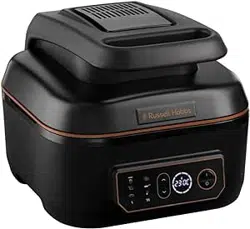
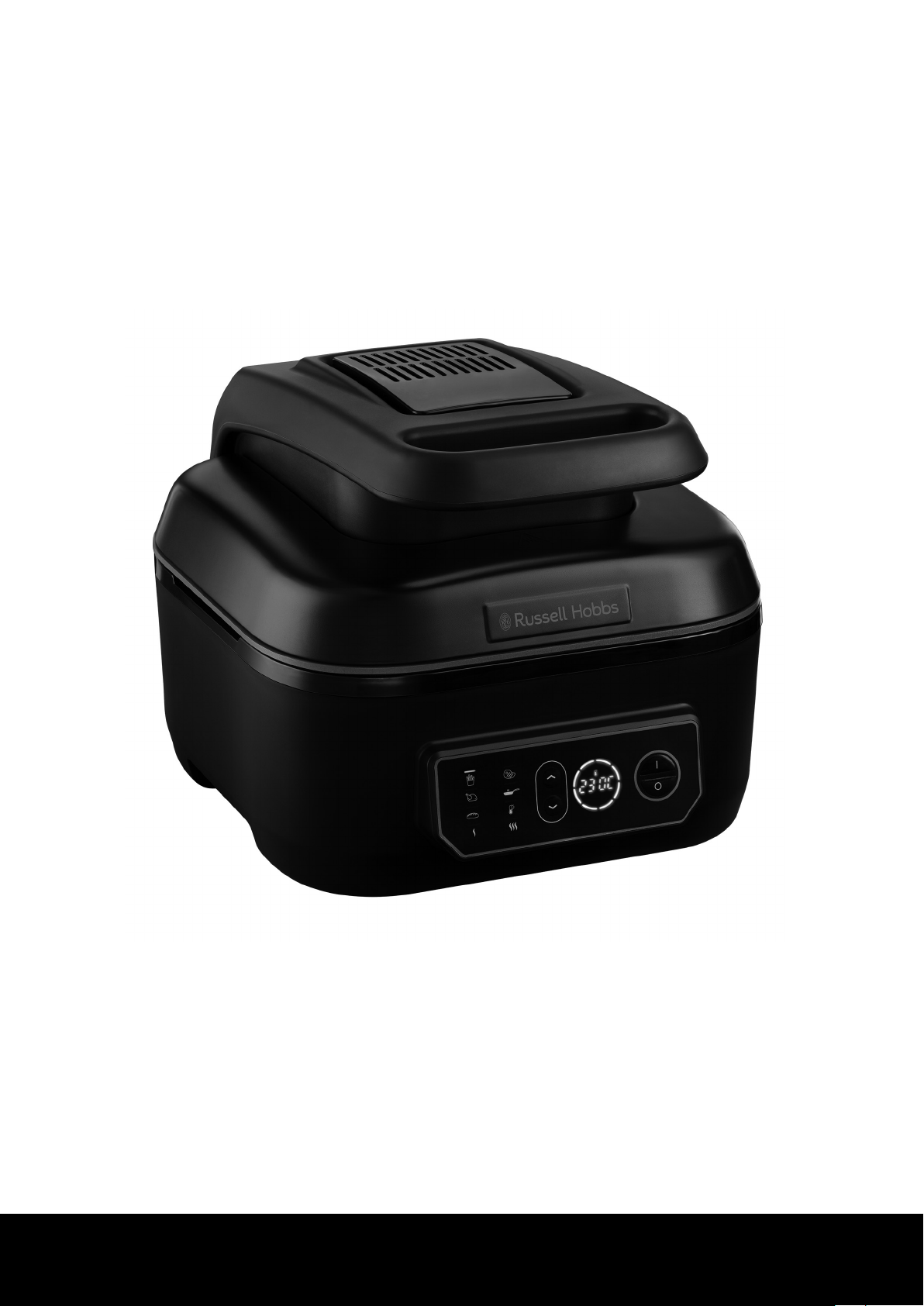
1
Visit uk.russellhobbs.com/product-registration You must register within 28 days of purchase
I www.russellhobbs.com
26520
Register online for an EXTRA year guarantee
r
2
e
f
g
i

3
Read the instructions, keep them safe, pass them on if you pass the appliance on. Remove all packaging before use.
IMPORTANT SAFEGUARDS
Follow basic safety precautions, including:
This appliance can be used by children aged from 8 years and above and persons with reduced physical,
sensory or mental capabilities or lack of experience and knowledge if they have been supervised/instructed
and understand the hazards involved. Children shall not play with the appliance. Cleaning and user
maintenance shall not be done by children unless they are older than 8 and supervised. Keep the appliance
and cable out of reach of children under 8 years.
If the cable is damaged, it must be replaced by the manufacturer, its service agent, or someone similarly
qualified, to avoid hazard.
h The surfaces of the appliance will get hot.
i Do not immerse in any liquid.
Don’t connect the appliance via a timer or remote control system.
• Remove the cooking pot from the unit before washing it separately.
• Leave a space of at least 50 mm all round the appliance.
• Use extreme caution when moving the appliance when it contains hot food or hot liquids.
• Use oven gloves or similar protection when opening the lid. Beware of escaping steam when opening the lid.
• Do not use this appliance outdoors.
• Don’t cover the appliance or put anything on top of it.
• Unplug the appliance when not in use, before moving and before cleaning.
• Don’t use accessories or attachments other than those we supply.
• Don’t use the appliance for any purpose other than those described in these instructions.
• Don’t operate the appliance if it’s damaged or malfunctions.
• Don’t place the cooking pot on any surface affected by heat. Always place the pot onto a trivet or heat-proof mat.
• The base of the cooking pot has a rough surface and can leave scratches or other marks on delicate or polished surfaces.
Always place protective padding under the cooking pot to protect these types of surface.
HOUSEHOLD USE ONLY
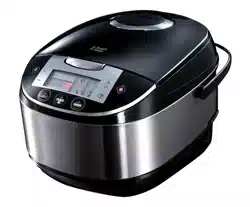
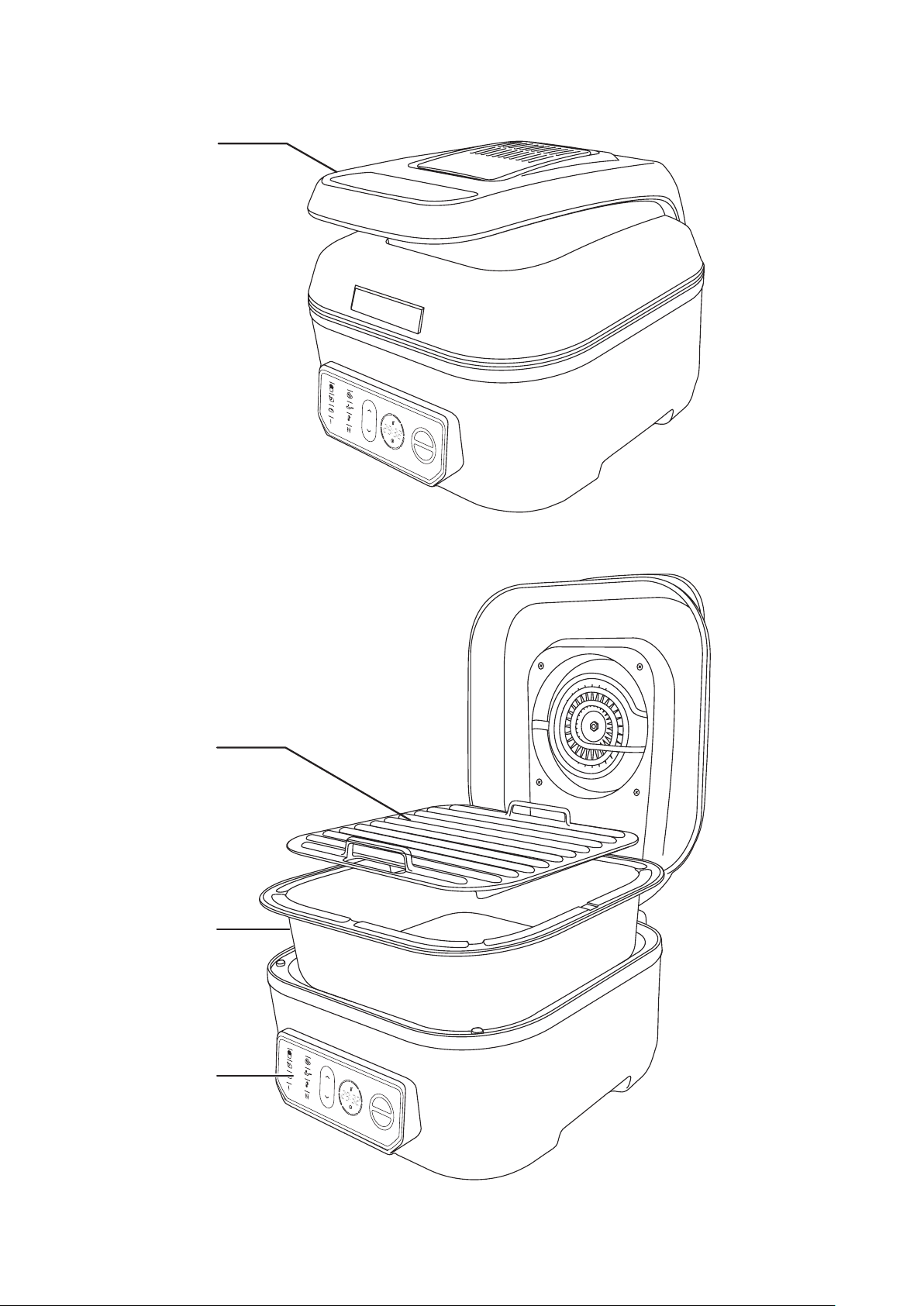
PARTS
1. Handle
2. Grill plate
3. Cooking pot
4. Control panel
BEFORE USING FOR THE FIRST TIME
Remove any packaging material and labels. Wash the removable parts in warm soapy water, rinse well, drain, and air dry.
CONTROLS AND LIGHTS
a
Air Fry Light Air Fry mode selected
f
Keep Warm Light Keep Warm mode selected
b
Grill Light Grill mode selected
h
Slow Cook High Light Slow cooker high setting mode
selected
c
Roast Light Roast mode selected
l
Slow Cook Low Light Slow cooker low setting mode
selected
d
Sear Light Sear mode selected
ij
Used to select cooking modes and increase/decrease
temperature or time values.
e
Bake Light Bake mode selected I/O Used to start or stop the appliance.
TEMPERATURE UNITS
To switch back and forth between °F and °C press and hold the O button for 3 seconds.

4
COOKING FUNCTIONS
Air Fry: Use your multi cooker for healthier air frying with top and bottom heat, and a fan for even browning.
Grill: Use to grill food. The preheat cycle can be used to heat the grill plate to add sear/grill marks.
Roast: Use to cook whole pieces of meat, fish, or vegetables.
Sear: Use your multi cooker to sauté and sear.
Bake: Use your multi cooker for baking.
Slow Cook: Perfect for casseroles, soups, stews, and combinations of meats and vegetables.
Keep Warm: Allows you to keep cooked food warm before serving.
Cooking Temperatures and Times
Mode
Heat Temperature (º C) Time (minutes)
Preheat
Top Bottom Default Range Default Range
Air Fry
l l
215 80 - 230 20 1 - 59 NO
Grill
l l
230 80 - 260 20 1 - 59 YES
Roast
l l
190 65 - 260 30 1 - 120 NO
Sear -
l
230 230 - 260 10 1 - 120 NO
Bake
l l
175 65 - 230 30 1 - 120 YES
Slow Cook High -
l
- - 240 1 - 1440 NO
Slow Cook Low -
l
- - 480 1 - 1440 NO
Keep Warm -
l
- - 240 - NO
FEATURES COMMON TO ALL COOKING MODES
Changing the time or temperature during cooking
Once cooking has started you can change the time or temperature as follows:
1. To adjust the time, use the i and j buttons. The display will flash while you are changing it.
2. To change the temperature, press the I button while the unit is cooking. The currently selected temperature will start to
flash. Use the i and j buttons to make any desired changes.
Opening the lid during cooking
The lid can be opened during cooking to add or to stir ingredients. Cooking and the timer will be paused when the lid is
opened and continue once the lid is closed again.
Auto Sleep Mode
If no buttons are pressed within 5 minutes, your multi cooker will go into sleep mode to save power. To wake it, press any
button.
Light Ring Display
The 8 leds which surround the temperature and time display do various things during use but are mainly used to show the
following:
• During cooking, they all light up and go out one by one as cooking progresses.
• If cooking is cancelled for any reason, they will all flash briefly before going out.
• During the preheating cycle (Grill and Bake modes), the will flash until the set temperature is reached.
Hints and Tips
• Once the cooking cycle has finished you can remove the food and transfer to a serving plate. You can also fully remove
the cooking pot. Take great care and use appropriate protection such as oven gloves.
• To speed up the cooling down process, leave the lid open after removing your food.
• If you are batch cooking, empty the oil from the removable cooking pot after every 2 batches. This will help prevent
grease from burning and causing smoke.
5
AIR FRY
• For best results, leave enough space around the ingredients to allow hot air to circulate.
• Place the ingredients into the cooking pot and close the lid.
1. Plug in the appliance. Your multi cooker will beep and display will go through its start up sequence. After a few moments
the display will go out with just the Air Fry (a) light flashing.
2. With the Air Fry light flashing, press the I button. The display will show the default temperature.
3. Change the temperature as required using the i and j buttons. Press the I button to confirm the selected temperature.
4. The default cooking time will be displayed. Change the cooking time as required using the i and j buttons. Each press
will increase or decrease the time by 1 minute. Press and hold the button to rapidly increase or decrease the time.
5. Press the I button to confirm the selected time.
6. To begin cooking, press the I button. Cooking will start and the display will start to count down.
7. When the timer reaches 00:00, your multi cooker will beep twice and the heater will be turned off. The display will show
“End”. The fan will continue to run for a short time.
• To cancel cooking at any time, press the O button.
COOKING TIMES AND FOOD SAFETY
• To be used purely as a guide
• Check food is cooked through before serving. If in doubt, cook it a bit more.
• Cook meat, poultry, and any derivatives (mince, burgers, etc.) till the juices run clear.
• Cook fish till the flesh is opaque throughout.
• When cooking pre-packed foods, follow any guidelines on the package or label.
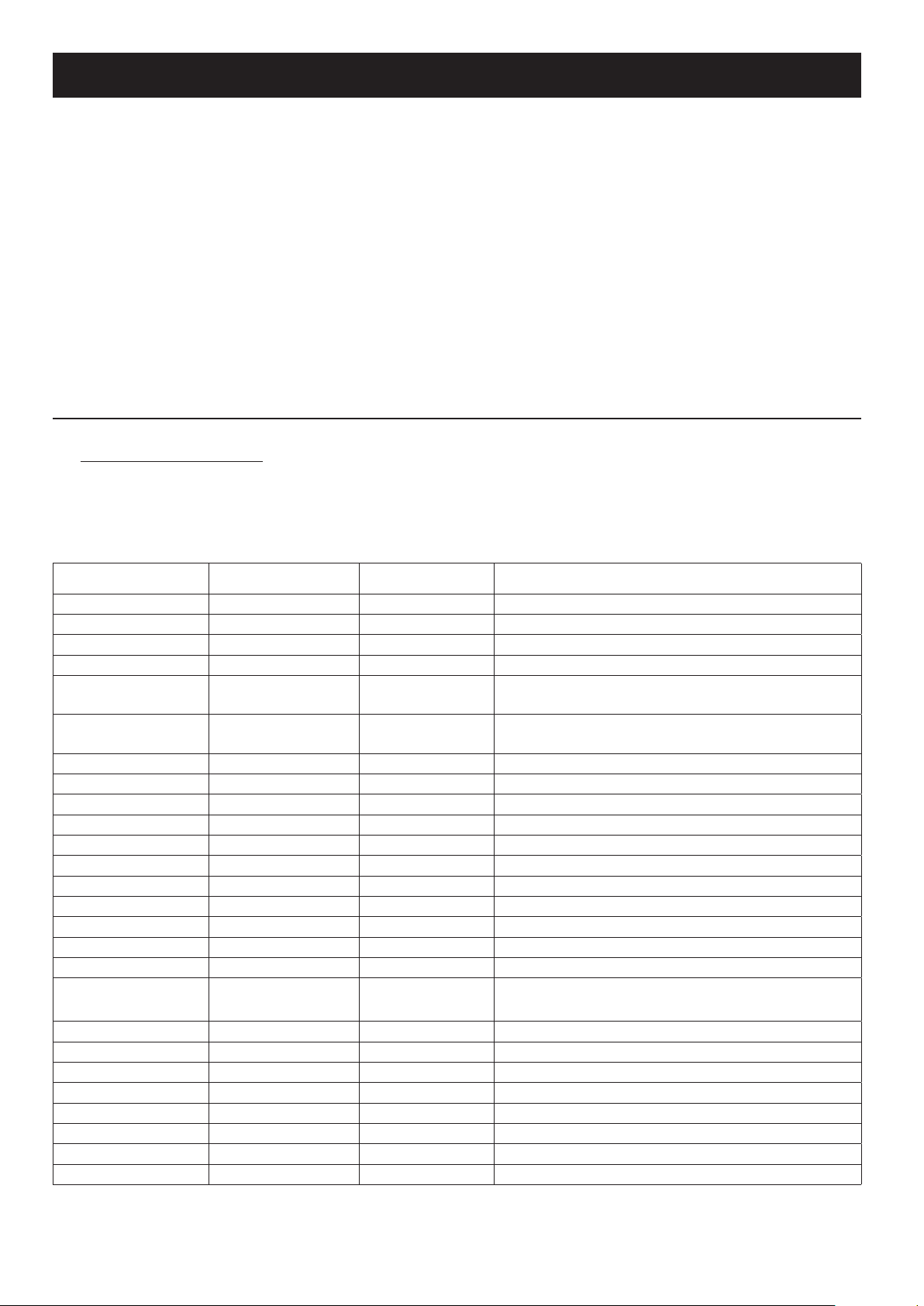
Food Temperature ºC Time (minutes) Remarks
Chips 200 25 Rinse, dry, toss in salt, pepper, and oil
Potato wedges 200 15-20 Rinse, dry, toss in salt, pepper, and oil
Sweet potato wedges 200 15-20 Rinse, dry, toss in salt, pepper, and oil
Jacket potato 180 30-40 For a crispy jacket, brush with oil
Roast potatoes 180 25-35
Rinse, dry, toss in salt, pepper, crushed rosemary
(optional) and oil
Mixed Mediterranean
vegetables
180 6-10
All cut to similar sizes, approx. 1-2cm pieces, toss in oil
and season
Chicken Breast 180 15-20
Chicken Thighs 180 25-30 Cooking time depends on size. Brush with oil, season
Chicken wings 180 23-28 Cooking time depends on size. Brush with oil, season
Burgers 180 8-12 Cooking time depends on size. Brush with oil, season
Sausages 180 8-12
Pork chop 180 22 Brush with oil, season
Salmon fillet 180 8-12 Brush with oil, season
White fish fillet 180 8-12 Brush with oil, season
Sausage Roll 200 13-15 Brush with oil, season
Spring Roll 200 8-10
Muffins 180 15-18
Frozen Food
Temperature
ºC
Time
(min)
Remarks
Chips 200 25
Potato wedges 200 15-20
French fries 200 12-20
Chicken Nuggets 200 6-10
Fish fillets 200 10-12
Fish Fingers 180 6-10
Onion Rings 180 10-15
Scampi 180 15
NOTE:
High fat foods (e.g. pork) may create smoke. This is normal as oil residue is cooked at a high temperature. Reducing
temperature may decrease the effect of smoke.
6
GRILLING
• For best results, leave enough space around the ingredients to allow hot air to circulate.
1. Place the cooking pot in the unit and insert the grill plate.
2. Plug in the appliance. Your multi cooker will beep and display will go through its start up sequence. After a few moments
the display will go out with just the Air Fry (a) light flashing.
3. Use the i and j buttons to select Grill (b).
4. With the Grill light flashing, press the I button. The display will show the default temperature.
5. Change the temperature as required using the i and j buttons. Press the I button to confirm the selected temperature.
6. The default cooking time will be displayed. Change the cooking time as required using the i and j buttons. Each press
will increase or decrease the time by 1 minute. Press and hold the button to rapidly increase or decrease the time.
7. Press the I button to confirm the selected time.
8. Press the I button to start the preheat cycle. Your multi cooker will beep and preheating will begin. While preheating, the
display will read “PrE” until the unit reaches the selected temperature and then beep. Add food ingredients after the unit
is preheated.
9. When the timer reaches 00:00, your multi cooker will beep twice and the heater will be turned off. The display will show
“End”. The fan will continue to run for a short time.
• To cancel cooking at any time, press the O button.
COOKING TIMES AND FOOD SAFETY
• To be used purely as a guide
• Check food is cooked through before serving. If in doubt, cook it a bit more.
• Cook meat, poultry, and any derivatives (mince, burgers, etc.) till the juices run clear.
• Cook fish till the flesh is opaque throughout.
• When cooking pre-packed foods, follow any guidelines on the package or label.
Food Temperature ºC Time (minutes) Remarks
Burgers 230 8-12 120-160g
Sausages 230 8-12
Chicken breast 230 15-20 200-250g
Salmon 230 5-8 120 -140g
Steak 230
Rare 4
200-250g
Medium rare 5
Medium 6
Well done 7-8
Bacon 230 3-7 Time depends on desired crispness
Pork chop 230 10 -14 220-260g
Lamb leg steak 230 3-6 150-200g
Mediterranean
vegetables
230 6-8 All cut to similar sizes (1-2cm). Toss in oil and season.
ROASTING
• For best results, leave enough space around the ingredients to allow hot air to circulate.
• Place the ingredients into the cooking pot and close the lid.
1. Plug in the appliance. Your multi cooker will beep and display will go through its start up sequence. After a few moments
the display will go out with just the Air Fry (a) light flashing.
2. Use the i and j buttons to select Roast (c).
3. With the Roast light flashing, press the I button. The display will show the default temperature.
4. Change the temperature as required using the i and j buttons. Press the I button to confirm the selected temperature.
5. The default cooking time will be displayed. Change the cooking time as required using the i and j buttons. Each press
will increase or decrease the time by 1 minute. Press and hold the button to rapidly increase or decrease the time.

7
6. Press the I button to confirm the selected time.
7. To begin cooking, press the I button. Cooking will start and the display will start to count down.
8. When the timer reaches 00:00, your multi cooker will beep twice and the heater will be turned off. The display will show
“End”. The fan will continue to run for a short time.
• To cancel cooking at any time, press the O button.
Tips
• The approximate maximum capacity for roasting is a 1.3–2.0 kg chicken or a 1.3–1.8 kg roast.
• If you desire the deeper flavour of browned meat use the sear function before roasting to brown the meat.
• Using a meat thermometer can help significantly improve and give a more accurate end result.
SEARING
• Place the ingredients into the cooking pot and close the lid.
• For best results, leave enough space around the ingredients to allow hot air to circulate.
1. Plug in the appliance. Your multi cooker will beep and display will go through its start up sequence. After a few moments
the display will go out with just the Air Fry (a) light flashing.
2. Use the i and j buttons to select Sear (d).
3. With the Sear light flashing, press the I button. The display will show the default temperature.
4. Change the temperature as required using the i and j buttons. Press the I button to confirm the selected temperature.
5. The default cooking time will be displayed. Change the cooking time as required using the i and j buttons. Each press
will increase or decrease the time by 1 minute. Press and hold the button to rapidly increase or decrease the time.
6. Press the I button to confirm the selected time.
7. To begin cooking, press the I button. Cooking will start and the display will start to count down.
8. When the timer reaches 00:00, your multi cooker will beep twice and the heater will be turned off. The display will show
“End”. The fan will continue to run for a short time.
• To cancel cooking at any time, press the O button.
BAKING
• The ingredients for cakes and similar items should be placed into a suitable cooking container (cake tin, etc.) which will fit
into the cooking pot. Once your multi cooker has finished its preheat cycle, open the lid and carefully place the prepared
ingredients into the cooking pot and close the lid.
• If you don’t want to use the preheat cycle, or your recipe doesn’t call for it, then place the ingredients into the cooking
pot at the beginning of the cooking cycle.
1. Plug in the appliance. Your multi cooker will beep and display will go through its start up sequence. After a few moments
the display will go out with just the Air Fry (a) light flashing.
2. Use the i and j buttons to select Bake (e).
3. With the Bake light flashing, press the I button. The display will show the default temperature.
4. Change the temperature as required using the i and j buttons. Press the I button to confirm the selected temperature.
5. The default cooking time will be displayed. Change the cooking time as required using the i and j buttons. Each press
will increase or decrease the time by 1 minute. Press and hold the button to rapidly increase or decrease the time.
6. Press the I button to confirm the selected time.
7. Press the I button to start the preheat cycle. Your multi cooker will beep and preheating will begin. While preheating, the
display will read “PrE” until the unit reaches the selected temperature and then beep.
8. Open the lid and place the ingredients into the cooking pot then close the lid.
9. When the timer reaches 00:00, your multi cooker will beep twice and the heater will be turned off. The display will show
“End”. The fan will continue to run for a short time.
• To cancel cooking at any time, press the O button.

8
SLOW COOKING
THE BENEFITS OF SLOW COOKING
• Health: The gentle cooking action reduces damage to vitamins and retains more of the nutrients and flavours.
• Economy: Long, slow cooking can tenderise the cheaper, tougher cuts of meat, and uses about a quarter of the power of
the small ring on the average hob.
• Convenience: Prepare the ingredients the night before, put them in the slow cooker before you leave, and have a
delicious meal waiting for you when you get home.
USING THE SLOW COOKING MODE
• Note: The temperature cannot be set or adjusted in the slow cooking function.
• Place the ingredients into the cooking pot and close the lid.
1. Plug in the appliance. Your multi cooker will beep and display will go through its start up sequence. After a few moments
the display will go out with just the Air Fry (a) light flashing.
2. Use the i and j buttons to select either Slow Cook High (h) or Slow Cook Low (l).
3. With the desired slow cook mode light flashing, press the I button. The display will show the default cooking time.
4. Change the cooking time as required using the i and j buttons. Each press will increase or decrease the time by 1
minute. Press and hold the button to rapidly increase or decrease the time.
5. Press the I button to confirm the selected time.
6. To begin cooking, press the I button. Cooking will start and the display will start to count down.
7. When the timer reaches 00:00, your multi cooker will beep twice and the heater will be turned off. The display will show
“End”. The fan will continue to run for a short time.
• To cancel cooking at any time, press the O button.
GENERAL TIPS
• Keep in mind that ingredients used straight from the fridge can increase the cooking time.
• Try not to open the lid unnecessarily during cooking. A lot of heat can escape when you do this and it can take your multi
cooker a long time to recover.
• When testing a dish to see if it’s cooked, don’t forget that root vegetables usually take longer to cook.
• Thaw frozen food completely before adding it to the cooking pot.
• Pre-browning meat beforehand is not strictly necessary but can help seal in the moisture and add depth to the flavour.
Use your multi cooker’s sear function to brown meat.
• Store ingredients prepared beforehand (e.g. the night before) in containers in the fridge. Don’t put the multi cooker or
the cooking pot into the fridge.
• When cooking with rice, use at least 150ml (¼ pt) of cooking liquid for each 100g (4 oz) of rice.
• Pasta isn’t suitable for slow cooking, it becomes too soft. If your recipe requires pasta, it should be pre-cooked and then
stirred in 30-40 minutes before the end of the cooking time.
• After all the ingredients are put into the cooking pot, it shouldn’t be more than about three quarters full. If you overfill, it
may spit hot liquid or overflow during use.
• If the finished dish is too liquid, it can be thickened using a little cornflour, arrowroot, etc. For each 250-300 ml of liquid,
mix together 2 tbsp of cornflour with enough water to form a thin paste. Add the paste to the dish approx. 30-45 minutes
before the end of cooking. Alternatively, stir in ready-made gravy granules following the manufacturer’s instructions.
COOKING GUIDELINES
Vegetables
Slow cooking is ideal for vegetables. There’s little evaporation, so all the juices and flavours are retained.
Root vegetables like potato, carrot, turnip, and swede, need more slow cooking than meat. Cut them into bite-size pieces and
immerse in the cooking liquid. Place the vegetables as close to the bottom of the pot as possible.
Quickly cooked vegetables, like peas and sweet corn, should be added half an hour before the end of cooking.
Pulses (Beans, Peas and Lentils)
Some dried pulses (lentils, peas, etc.) may need soaking before use. Always check any recommendations on the packaging
before using.

9
WARNING dried beans (e.g. red kidney beans, cannellini, etc.) should be soaked for a minimum of 8 hours and boiled for at
least 10 minutes before adding to the slow cooker. They’re poisonous if eaten raw or under cooked.
Meat and Poultry
• Slow cooking tenderises cheaper cuts, and reduces shrinkage and evaporation, retaining flavour and nutritional value.
The leanest cuts of meat are best for slow cooking.
• Trim excess fat from the meat because this can add to the liquid during cooking in the form of fat.
• Where possible, use chicken without skin.
• Cut the meat into evenly sized cubes (approx. 2.5 cm) for casseroles and stews.
Suitable cuts include:
Beef - Brisket, shin, silverside, topside, stewing steak, braising steak, chuck
Pork - Leg, shoulder, belly, cheek, chump
Lamb - Shanks, leg, shoulder, neck
CONVERTING RECIPES FROM A TRADITIONAL OVEN
These times are approximate and can vary depending on the ingredients and quantities. Always check that the food is
thoroughly cooked before serving.
Oven cooking time Time on low (hours) Time on high (hours)
15-30 minutes 4-6 1-2
30-60 minutes 6-8 2-4
1-3 hours 8-12 4-7
KEEP WARM
• IMPORTANT: Do not use the Keep Warm setting to cook. Only use it to keep warm cooked food that is already hot.
1. Start with already cooked and hot ingredients in the cooking pot.
2. Plug in the appliance. Your multi cooker will beep and display will go through its start up sequence. After a few moments
the display will go out with just the Air Fry (a) light flashing.
3. Use the i and j buttons to select either Keep Warm (f).
• The display will start counting down from 4 hours (04:00) to zero (00:00).
• After the keep warm setting has been on for 4 hours, the unit will stop heating.
• Note: Do not keep foods on the keep warm setting for more than 4 hours.
CARE AND MAINTENANCE
1. Unplug the appliance and let it cool down before cleaning or storing away.
2. Clean the exterior surfaces with a slightly damp cloth and then dry them thoroughly.
3. The cooking pot and grill plate can be cleaned in the dishwasher, or hand washed in warm soapy water.
4. Allow to dry thoroughly before storing or using again.
• Don’t use harsh or abrasive cleaners, solvents, scourers, wire wool, or soap pads.

10

11

12
T22-9002549
RECYCLING
W
To avoid environmental and health problems due to hazardous substances, appliances and rechargeable
and non-rechargeable batteries marked with one of these symbols must not be disposed of with unsorted
municipal waste. Always dispose of electrical and electronic products and, where applicable, rechargeable
and non-rechargeable batteries, at an appropriate official recycling/collection point.
SERVICE
If you ring Customer Service, please have the Model Number to hand, as we won’t be able to help you without it. It’s on the
rating plate (usually underneath the product).
The product isn’t user-serviceable. If it’s not working, read the instructions, check the plug fuse and main fuse/circuit breaker.
If it’s still not working, consult your retailer.
If that doesn’t solve the problem – ring Customer Service – they may be able to offer technical advice.
If they advise you to return the product to us, pack it carefully, include a note with your name, address, day phone number,
and what’s wrong. If under guarantee, say where and when purchased, and include proof of purchase (till receipt). Send it to:
Customer Service
Spectrum Brands (UK) Ltd
Fir Street, Failsworth, Manchester M35 0HS
email: support@russellhobbs.com
telephone: 0345 658 9700 (local rate number)
Please note: If you have purchased the product within the last 6 months, please contact the retailer in the first instance to deal
with any matters relating to warranty.
GUARANTEE
Defects affecting product functionality appearing within the guarantee period will be corrected by replacement or repair at
our option provided the product is used and maintained in accordance with the instructions. Your statutory rights are not
affected.
This warranty shall not be valid where it is contrary to U.S. and other applicable laws, or where the warranty would be
prohibited under any economic sanctions, export control laws, embargos, or other restrictive trade measures enforced by the
United States or other applicable jurisdictions. This includes, without limitation, any warranty claims implicating parties from,
or otherwise located in, Cuba, Iran, North Korea, Syria and the Crimea region.
Guarantee period = 2 years from first retail purchase.
To claim an extra 1 year guarantee, register your product online within 28 days of purchase. Register at: uk.russellhobbs.
com/product-registration
Consumables are guaranteed only for their recommended lifecycle. Replacement/Spare parts* are excluded and are only
covered by a 1 year warranty.
* Examples include filters, removable grill plates, drip trays/crumb trays etc.
J ONLINE
www.russellhobbs.com for more products