USER
MANUAL
EN User Manual
Washing Machine
L9FEB969C
CONTENTS
1. SAFETY INFORMATION......................................................................................3
2. SAFETY INSTRUCTIONS.................................................................................... 5
3. PRODUCT DESCRIPTION...................................................................................7
4. TECHNICAL DATA............................................................................................... 9
5. INSTALLATION...................................................................................................10
6. ACCESSORIES.................................................................................................. 15
7. BEFORE FIRST USE..........................................................................................16
8. THE WATER SOFTENER (SOFT WATER)....................................................... 16
9. CONTROL PANEL..............................................................................................20
10. PROGRAMMES................................................................................................27
11.
WI-FI - CONNECTIVITY SETUP................................................................. 31
12. DAILY USE....................................................................................................... 34
13. HINTS AND TIPS..............................................................................................39
14. CARE AND CLEANING.................................................................................... 40
15. TROUBLESHOOTING......................................................................................46
16. CONSUMPTION VALUES................................................................................52
17. ENVIRONMENTAL CONCERNS......................................................................53
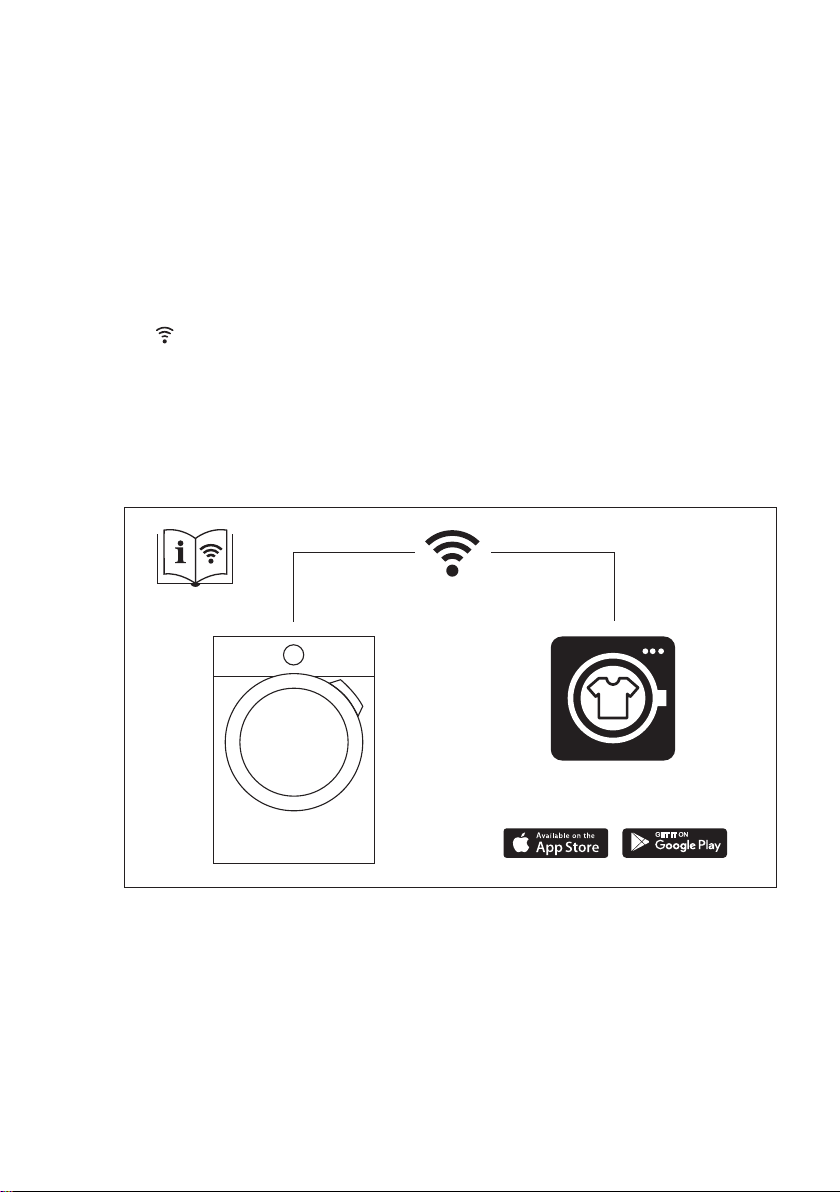
My AEG Care app
www.aeg.com2
FOR PERFECT RESULTS
Thank you for choosing this AEG product. We have created it to give you
impeccable performance for many years, with innovative technologies that help
make life simpler – features you might not find on ordinary appliances. Please
spend a few minutes reading to get the very best from it.
Visit our website to:
Get usage advice, brochures, trouble shooter, service and repair information:
www.aeg.com/support
Register your product for better service:
www.registeraeg.com
Buy Accessories, Consumables and Original spare parts for your appliance:
www.aeg.com/shop
CUSTOMER CARE AND SERVICE
Always use original spare parts.
When contacting our Authorised Service Centre, ensure that you have the
following data available: Model, PNC, Serial Number.
The information can be found on the rating plate.
Warning / Caution-Safety information
General information and tips
Environmental information
Subject to change without notice.
1. SAFETY INFORMATION
Before the installation and use of the appliance, carefully
read the supplied instructions. The manufacturer is not
responsible for any injuries or damage that are the result
of incorrect installation or usage. Always keep the
instructions in a safe and accessible location for future
reference.
1.1 Children and vulnerable people safety
• This appliance can be used by children aged from 8
years and above and persons with reduced physical,
sensory or mental capabilities or lack of experience
and knowledge if they have been given supervision or
instruction concerning the use of the appliance in a
safe way and understand the hazards involved.
ENGLISH 3

• Children between 3 and 8 years of age and persons
with very extensive and complex disabilities shall be
kept away from the appliance unless continuously
supervised.
• Children of less than 3 years of age should be kept
away from the appliance unless continuously
supervised.
• Children should be supervised to ensure that they do
not play with the appliance.
• Keep all packaging away from children and dispose of
it appropriately.
• Keep detergents away from children.
• Keep children and pets away from the appliance when
the door is open.
• If the appliance has a child safety device, it should be
activated.
• Children shall not carry out cleaning and user
maintenance of the appliance without supervision.
1.2 General Safety
• Do not change the specification of this appliance.
• This appliance is intended to be used in household
and similar applications such as:
– staff kitchen areas in shops, offices and other
working environments;
– by clients in hotels, motels, bed & breakfast and
other residential type environments;
– areas for communal use in blocks of flats or in
launderettes.
• The appliance maximum load is 9 kg. Do not exceed
the maximum load of each programme (refer to the
“Programmes” chapter).
• The operating water pressure at the water entry point
from the outlet connection must be between 0.5 bar
(0.05 MPa) and 8 bar (0.8 MPa).
• The ventilation opening in the base must not be
covered by a carpet, mat, or any floor covering.
www.aeg.com4
• The appliance must be connected to the water mains
using the new supplied hose sets, or other new hose
sets supplied by the Authorised Service Centre.
• Old hose sets must not be reused.
• If the mains power supply cable is damaged, it must
be replaced by the manufacturer, its Authorised
Service Centre or similarly qualified persons to avoid
an electrical hazard.
• Before any maintenance operation, deactivate the
appliance and disconnect the mains plug from the
socket.
• Do not use high pressure water sprays and/or steam
to clean the appliance.
• Clean the appliance with a moist cloth. Use only
neutral detergents. Do not use abrasive products,
abrasive cleaning pads, solvents or metal objects.
2. SAFETY INSTRUCTIONS
2.1 Installation
The installation must comply
with relevant national
regulations.
• Remove all the packaging and the
transit bolts including rubber bush
with plastic spacer.
• Keep the transit bolts in a safe place.
If the appliance is to be moved in the
future they must be reattached to lock
the drum to prevent an internal
damage.
• Always take care when moving the
appliance as it is heavy. Always use
safety gloves and enclosed footwear.
• Follow the installation instructions
supplied with the appliance.
• Do not install or use a damaged
appliance.
• Do not install or use the appliance
where the temperature can be less
than 0°C or where it is exposed to the
weather.
• The floor area on which the appliance
is to be installed must be flat, stable,
heat resistant and clean.
• Make sure that there is air circulation
between the appliance and the floor.
• When the appliance is in its
permanent position, check if it is
levelled correctly with the aid of a
spirit level. If it is not, adjust the feet
accordingly.
• Do not install the appliance directly
above a floor drain.
• Do not spray water on the appliance
and do not expose it to excessive
humidity.
• Do not install the appliance where the
appliance door cannot be fully
opened.
• Do not put a closed container to
collect possible water leakage under
the appliance. Contact the Authorised
Service Centre to ensure which
accessories can be used.
2.2 Electrical connection
WARNING!
Risk of fire and electric
shock.
• WARNING: This appliance is
designed to be installed / connected
ENGLISH 5
to a grounding connection in the
building.
• Always use a correctly installed
shockproof socket.
• Make sure that the parameters on the
rating plate are compatible with the
electrical ratings of the mains power
supply.
• Do not use multi-plug adapters and
extension cables.
• Make sure not to cause damage to
the mains plug and to the mains
cable. Should the mains cable need to
be replaced, this must be carried out
by our Authorised Service Centre.
• Connect the mains plug to the mains
socket only at the end of the
installation. Make sure that there is
access to the mains plug after the
installation.
• Do not touch the mains cable or the
mains plug with wet hands.
• Do not pull the mains cable to
disconnect the appliance. Always pull
the mains plug.
• This appliance is fitted with a 13 A
mains plug. If it is necessary to
change the mains plug fuse, use only
a 13 A ASTA (BS 1362) fuse (UK and
Ireland only).
2.3 Water connection
• The inlet water shall not exceed
25 °C.
• Do not cause damage to the water
hoses.
• Before connection to new pipes, pipes
not used for a long time, where repair
work has been carried out or new
devices fitted (water meters, etc.), let
the water flow until it is clean and
clear.
• Ensure that there are no visible water
leaks during and after the first use of
the appliance.
• Do not use an extension hose if the
inlet hose is too short. Contact the
Authorised Service Centre for the
replacement of the inlet hose.
• When unpacking the appliance, It is
possible to see water flowing from the
drain hose. This is due to the testing
of the appliance with the use of water
in the factory.
• You can extend the drain hose to
maximum 400 cm. Contact the
Authorised Service Centre for the
other drain hose and the extension.
• Make sure that there is access to the
tap after the installation.
2.4 Use
WARNING!
Risk of injury, electric shock,
fire, burns or damage to the
appliance.
• Follow the safety instructions on the
detergent packaging.
• Do not put flammable products or
items that are wet with flammable
products in, near or on the appliance.
• Do not wash fabrics which are heavily
soiled with oil, grease or other greasy
substances. It can damage rubber
parts of the washing machine.
Prewash such fabrics by hand before
loading them into the washing
machine.
• Do not touch the glass door while a
programme operates. The glass can
get hot.
• Make sure that all metal objects are
removed from the laundry.
2.5 Internal lighting
WARNING!
Risk of injury.
• Visible LED radiation, do not look
directly into the beam.
• To replace the internal lighting,
contact the Authorised Service
Centre.
2.6 Service
• To repair the appliance contact the
Authorised Service Centre. Use
original spare parts only.
• Please note that self-repair or non-
professional repair can have safety
consequences and might void the
guarantee.
• The following spare parts will be
available for 10 years after the model
has been discontinued: motor and
motor brushes, transmission between
motor and drum, pumps, shock
www.aeg.com6

absorbers and springs, washing drum,
drum spider and related ball bearings,
heaters and heating elements,
including heat pumps, piping and
related equipment including hoses,
valves, filters and aquastops, printed
circuit boards, electronic displays,
pressure switches, thermostats and
sensors, software and firmware
including reset software, door, door
hinge and seals, other seals, door
locking assembly, plastic peripherals
such as detergent dispensers. Please
note that some of these spare parts
are only available to professional
repairers, and that not all spare parts
are relevant for all models.
• Concerning the lamp(s) inside this
product and spare part lamps sold
separately: These lamps are intended
to withstand extreme physical
conditions in household appliances,
such as temperature, vibration,
humidity, or are intended to signal
information about the operational
status of the appliance. They are not
intended to be used in other
applications and are not suitable for
household room illumination.
2.7 Disposal
WARNING!
Risk of injury or suffocation.
• Disconnect the appliance from the
mains electrical and water supplies.
• Cut off the mains electrical cable
close to the appliance and dispose of
it.
• Remove the door catch to prevent
children or pets from becoming
trapped in the drum.
• Dispose of the appliance in
accordance with local requirements
for the disposal of Waste Electrical
and Electronic Equipment (WEEE).
3. PRODUCT DESCRIPTION
3.1 Special features
Your new washing machine meets all
modern requirements for an effective
treatment of laundry with low water,
energy and detergent consumption and
proper care of fabric.
• The Wi-Fi connection and Remote
Start enable you to start a cycle, to
interact with your washing machine
and to check the washing cycle status
in remote control.
• The SoftWater Technology acts as
water softener and removes harsh
minerals from the inlet water and
supplies soft water for the washing.
Wash after wash, fabric stiffness,
shrinkage and colour fading are
prevented.
• The water softener function acts
through special resins present in
the appliance. To regenerate the
resins and make them ready to soften
the water pour a special salt in the
compartment
Salt
.
• The Oko-Mix technology has been
designed to protect the fabric fibres
thanks to different pre-mixing phases
that dissolves first the detergent and
then fabric softener in the water
before they are distributed in the
laundry. So every fibre is reached and
cared for.
• The ProSense technology detects
the laundry load size defining the
programme duration in 30 seconds.
The washing programme is tailored to
the laundry load and the type of fabric
without consuming more time, energy
and water than necessary.
• The steam has a quick and easy way
to refresh the clothes. The gentle
steam programmes remove odours
and reduce creases in dry fabrics so
they need little ironing.
The Plus Steam option, finishes
every cycle with gentle steam that
relaxes the fibres and reduces fabric
creasing. Ironing will be easier!
• The Stains option pre-treats
stubborn stains optimizing the
effectiveness of the stain remover.
• Thanks to the Soft Plus option, the
fabric softener is uniformly spread out
in the laundry and deeply penetrates
ENGLISH 7
the fabric fibres favouring a perfect
softness.
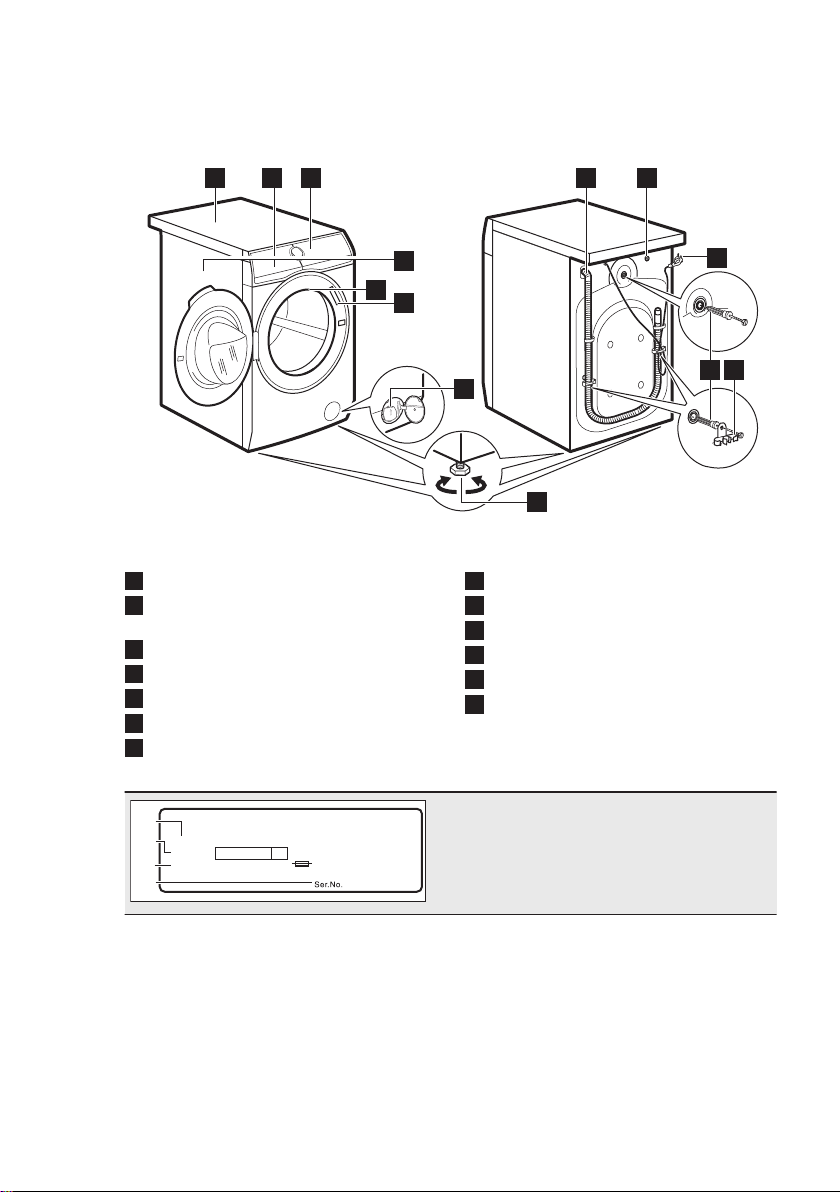
3.2 Appliance overview
1 2 3
10
6
7
8
4
11
9
12 13
5
1
Worktop
2
Detergent dispenser and salt
compartment
3
Control panel
4
Door handle
5
Internal light
6
Rating plate
7
Drain pump filter
8
Feet for levelling the appliance
9
Drain hose
10
Inlet hose connection
11
Mains cable
12
Transit bolts
13
Hose support
00000000
00A
Mod.
xxxxxxxxx
000V ~ 00Hz 0000 W
910000000
00
A
B
C
Prod.No.
D
The rating plate reports the model name
(A), product number (B), electrical ratings
(C) and serial number (D).
www.aeg.com8
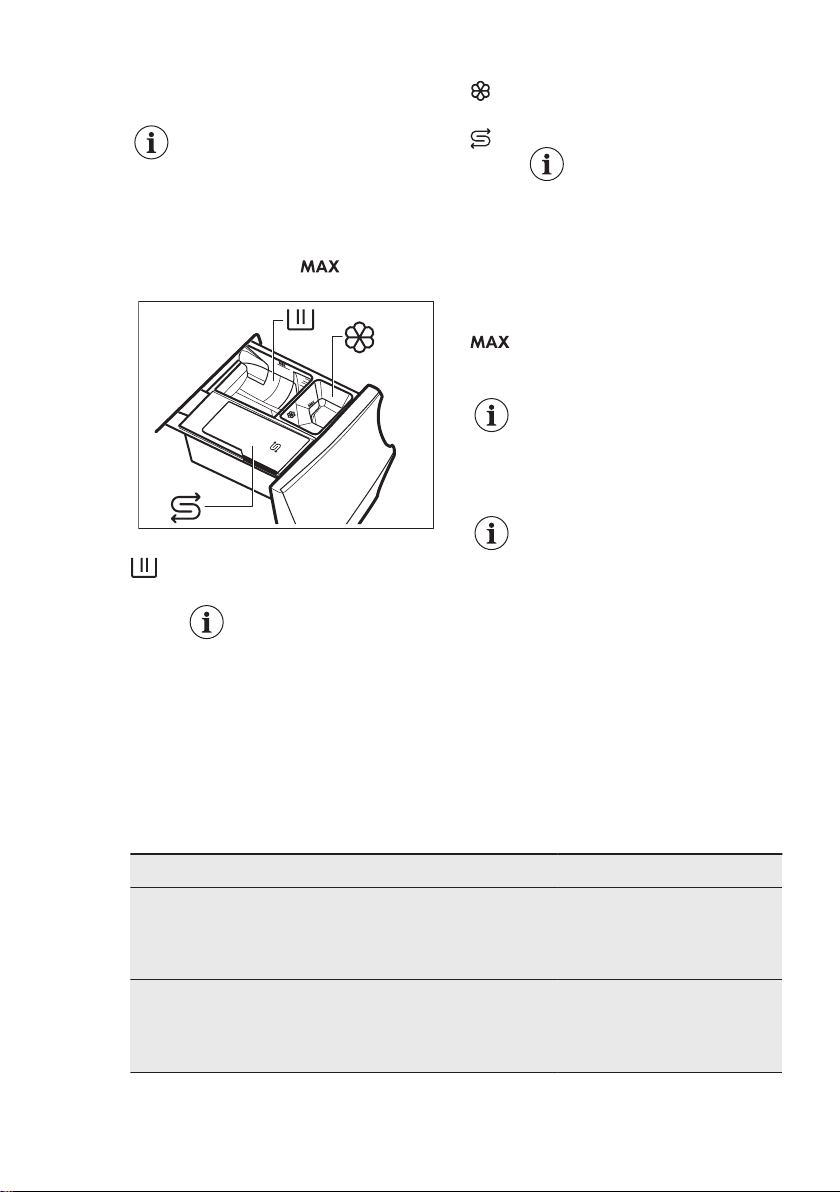
3.3 Detergent dispenser and
salt compartment
Always follow the
instructions that you find on
the packaging of the
detergent products. Anyway,
we recommend not to
exceed the maximum
indicated level in each
compartment ( ).
M
ax
▼
M
a
x
▼
Ma
x
▼
Salt
Salt
Compartment for washing phase:
powder detergent, stain remover.
When using liquid
detergent, make sure
that the special
container for liquid
detergent is inserted.
Refer to 'Filling the
detergent and
additives' in 'Daily
Use' chapter.
Compartment for liquid additives
(fabric conditioner, starch).
Salt
Compartment for salt.
Read carefully 'The
Water Softener
technology (Soft
Water)'.
Salt refilling when
required by the
appliance maintains
the Soft Water
efficient.
Maximum level for detergent/
additives quantity.
When selecting a prewash
phase, put the detergent/
additive in a dosing ball
inside the drum.
After a washing cycle, if
necessary, remove any
detergent residue from the
detergent dispenser.
4. TECHNICAL DATA
Dimension Width/ Height/ Total depth 59.7 cm /84.7 cm /66.0 cm
Electrical connection Voltage
Overall power
Fuse
Frequency
230-240 V
2200 W
13 A
50 Hz
Level of protection against ingress of solid particles and
moisture ensured by the protective cover, except where
the low voltage equipment has no protection against mois‐
ture
IPX4
ENGLISH 9
Water supply pressure
1)
Minimum
Maximum
0.5 bar (0.05 MPa)
8 bar (0.8 MPa)
Water supply
2)
Cold water
Maximum Load Cotton 9 kg
Spin Speed Maximum spin speed 1551 rpm
1)
The appliance works correctly if the water pressure is not lower than 0.05 MPa (0.5 bar). If you cannot
connect the water inlet hose to the cold water tap of the primary hydraulic system, connect it to your do‐
mestic cold water storage system. Make sure not to exceed a distance of 5.02 m (16.5 ft) between the
appliance inlet hose and the bottom of the water storage tank.
2)
Connect the water inlet hose to a water tap with a 3/4'' thread.
5. INSTALLATION
WARNING!
Refer to Safety chapters.
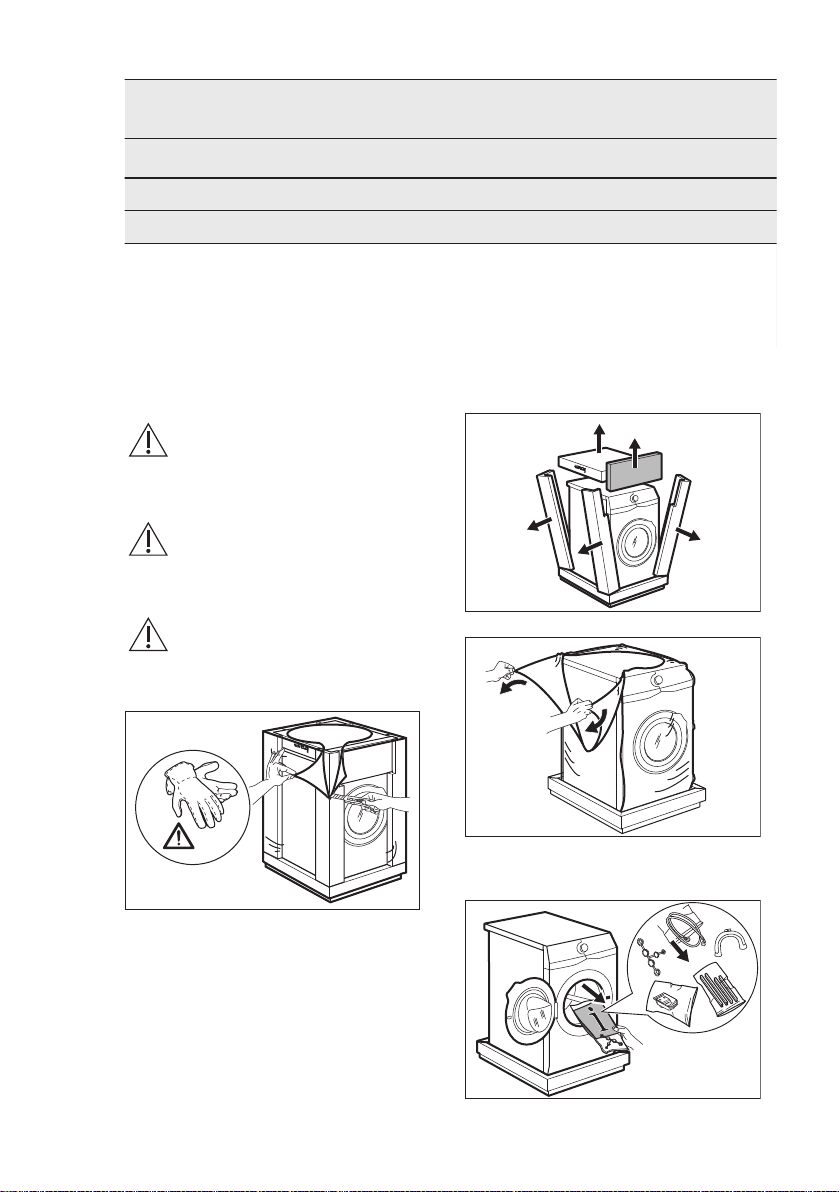
5.1 Unpacking
WARNING!
Remove all the packaging
and the transit bolts before
installing the appliance.
WARNING!
Use the gloves.
1. Remove the external film. If
necessary, use a cutter.
2. Remove the cardboard top and the
polystyrene packaging materials.
3. Remove the internal film.
4. Open the door and remove the
polystyrene piece from the door seal
and all the items from the drum.
www.aeg.com10
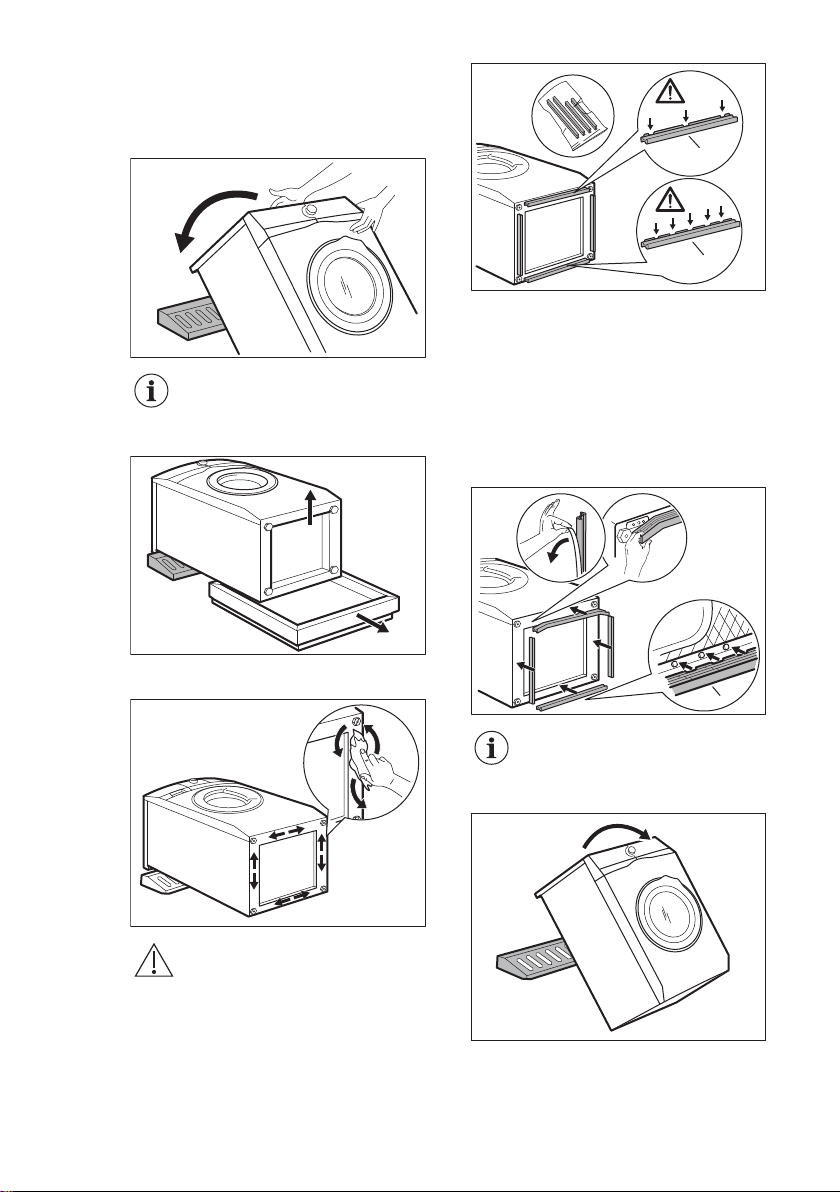
5. Carefully put the appliance down on
its rear side.
6. Put the front polystyrene packaging
element on the floor under the
appliance.
Make sure not to damage
the hoses.
7. Remove the polystyrene protection
from the bottom.
1
2
8. Fully clean and dry the bottom of the
appliance.
CAUTION!
Do not use alcohol, solvents
or chemical products.
9. Make sure to identify the different
sizes and the positions of the sound
barriers. Refer to the illustration:
A
B
• A (FRONT) = Front of the
appliance
• B (BACK) = Rear of the appliance
10. Remove the adhesive strip from the
silent barriers.
11. Attach the four barriers to bottom of
the appliance.
12. Refer to the illustration. Make sure
that the barriers are securely
attached.
B
x4
Attach the sound barriers at
a room temperature.
13. Pull up the appliance in vertical
position.
14. Remove the power supply cable and
the drain hose from the hose holders.
ENGLISH 11
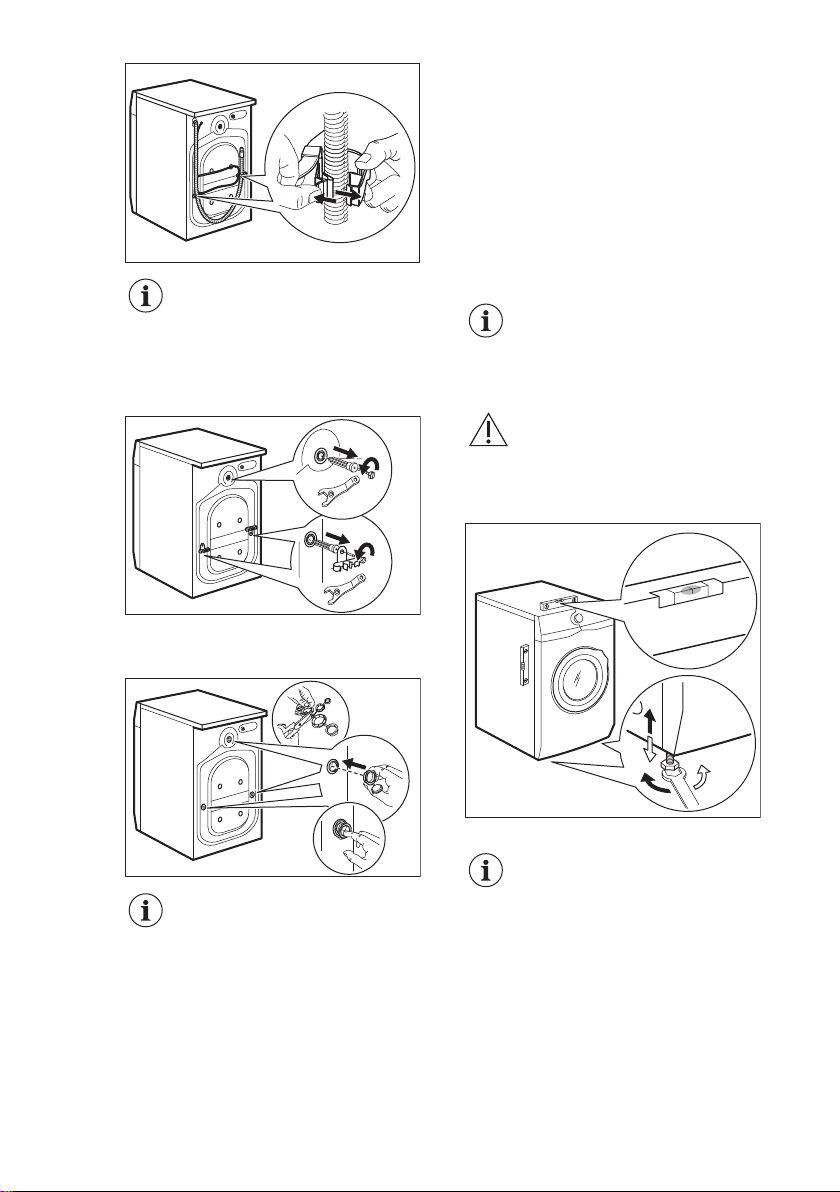
It is possible to see water
flowing from the drain hose.
This is due to the testing
with water of the appliance
in factory.
15. Remove the three bolts by using the
spanner supplied with the appliance.
16. Pull out the plastic spacers.
17. Put the plastic caps, that you find in
the user manual bag, in the holes.
We recommend that you
keep the packaging and the
transit bolts for any
movement of the appliance.
5.2 Installation on suspended
flooring
Suspended wooden floors are
particularly susceptible to vibration.
To limit vibration we recommend placing
a waterproof wooden panel, at least 15
mm thick, under the appliance. It should
be screwed to at least 2 floor beams and
should extend beyond the front feet.
If possible, install the appliance where
the floor is more stable.
5.3 Positioning and levelling
1. Install the appliance on a flat hard
floor.
Make sure that the appliance
does not touch the wall or
other units.
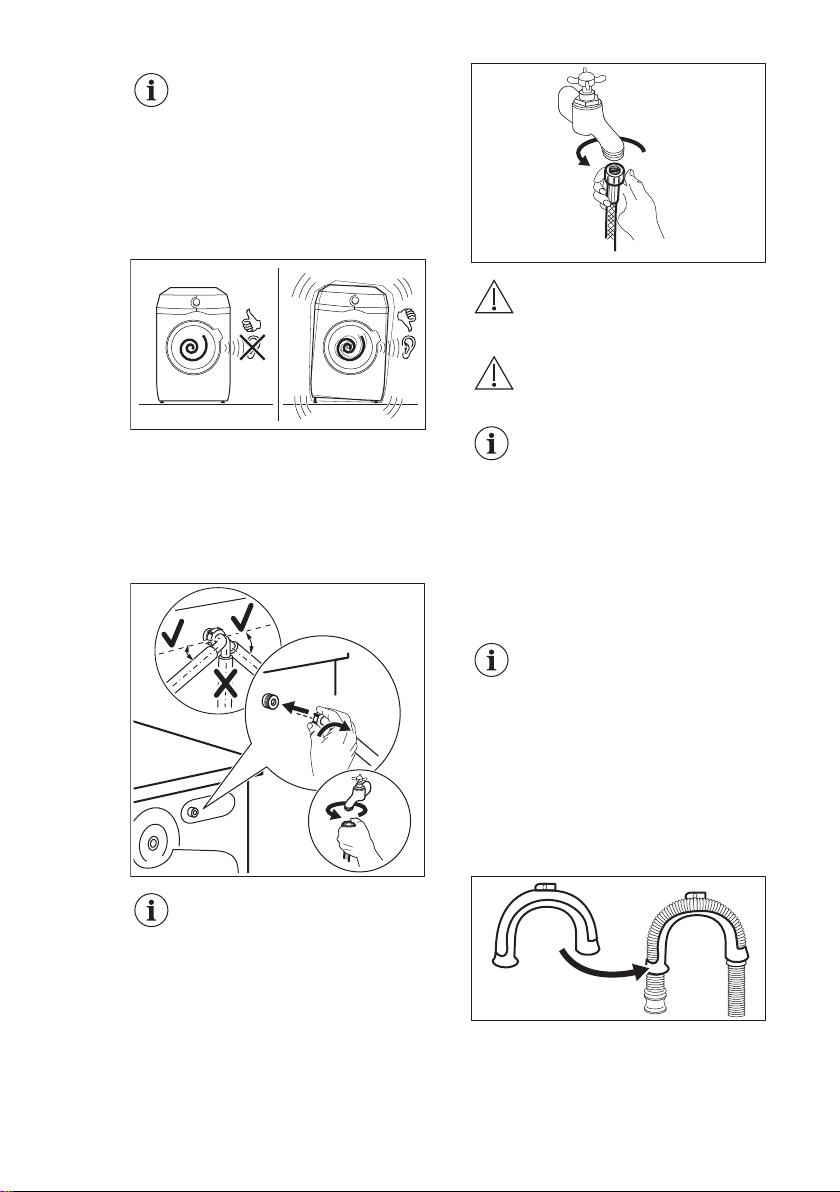
2. Loosen or tighten the feet to adjust
the level.
WARNING!
Do not put cardboard, wood
or equivalent materials
below the appliance feet to
adjust the level.
x4
The appliance must be level and stable.
A correct adjustment of the
appliance level prevents the
vibration, noise and the
movement of the appliance
when in operation.
www.aeg.com12
When the appliance is
installed on a plinth or a
tumble dryer is stacked on
the washing machine, use
the accessories described in
chapter 'Accessories'. Read
carefully the instructions
supplied with the appliance
and with the accessory.
5.4 The inlet hose
1. Connect the water inlet hose to the
back of the appliance.
2. Position it toward left or right
depending on the position of the
water tap.
20º20º
45º45º
Make sure that the inlet hose
is not in vertical position.
3. If necessary, loose the ring nut to set
it in the correct position.
4. Connect the water inlet hose to the
cold water tap with 3/4" thread.
WARNING!
The inlet water shall not
exceed 25 °C.
CAUTION!
Make sure that there are no
leaks from the couplings.
Do not use an extension
hose if the inlet hose is too
short. Contact the service
centre for the replacement of
the inlet hose.
5.5 Water drainage
The drain hose should be positioned at a
height of not less than 60 cm and not
more than 100 cm from the floor.
You can extend the drain
hose to maximum 400 cm.
Contact the authorized
service centre for the other
drain hose and the
extension.
It is possible to connect the drain hose in
different ways:
1. Make a U shape with the drain hose
and put it around the plastic hose
guide.
2. On the edge of a sink - Fasten the
guide to the water tap or to the wall.
ENGLISH 13
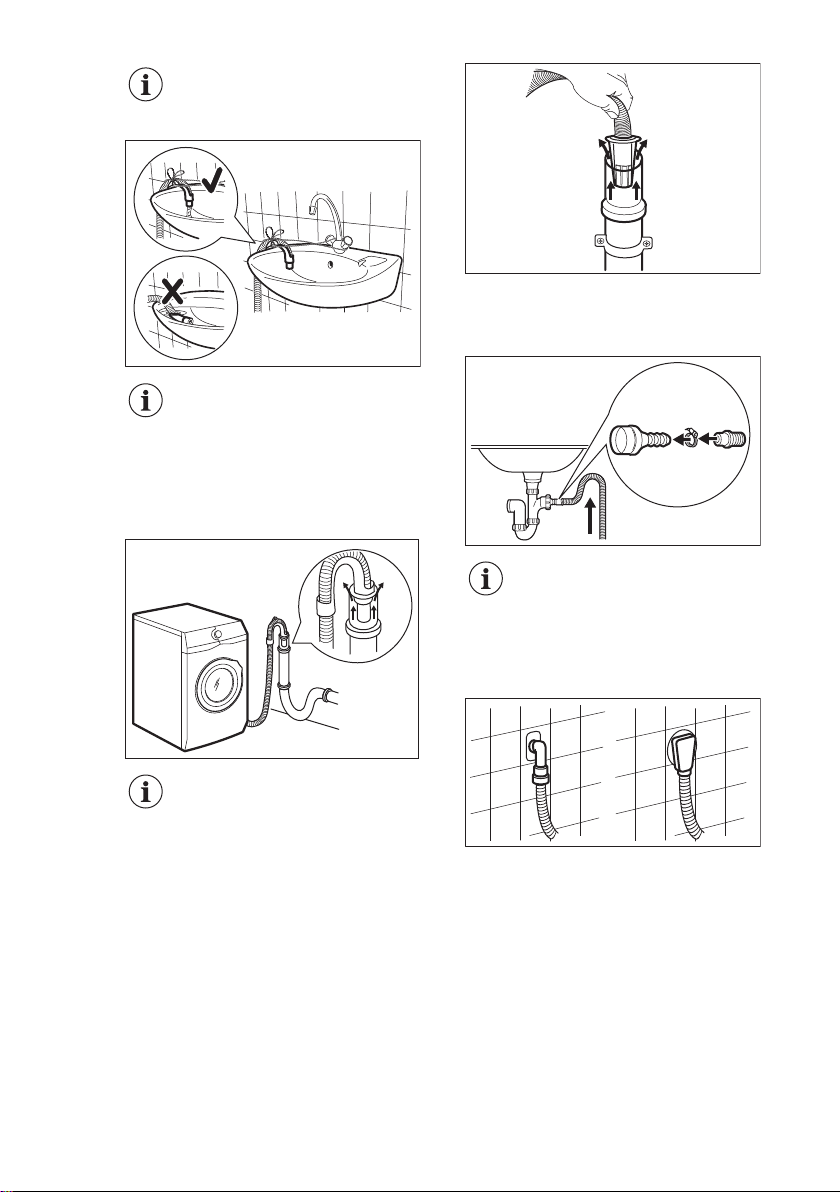
Make sure that the plastic
guide cannot move when the
appliance drains.
Make sure that the drain
hose end is not immersed in
the water. There may be a
return of dirty water into the
appliance.
3. To a stand pipe with vent-hole -
Insert the drain hose directly into a
drain pipe. Refer to the illustration.
The end of the drain hose
must always be ventilated ,
i.e. the inner diameter of the
drain pipe (min. 38 mm -
min. 1.5") must be larger
than the external diameter of
the drain hose.
4. If the end of the drain hose looks like
this (see the picture), you can push it
directly into the stand pipe.
5. Without the plastic hose guide, to
a sink spigot - Put the drain hose in
the spigot and tighten it with a clamp.
Refer to the illustration.
Make sure that the drain
hose makes a loop to
prevent particles going into
the appliance from the sink.
6. Position the hose directly to a built-
in drain pipe in the room wall and
tighten it with a clamp.
5.6 Electrical connection
At the end of installation you can connect
the mains plug to the mains socket.
The rating plate and the 'Technical Data'
chapter indicate the necessary electrical
ratings. Make sure that they are
compatible with the mains power supply.
Check that your domestic electrical
installation can take the maximum load
required, also taking into account any
other appliances in use.
www.aeg.com14
Connect the appliance to an earthed
socket.
The power supply cable must be easily
accessible after installing the appliance.
For any electrical work required to install
this appliance, contact our Authorised
Service Centre.
The manufacturer does not accept any
responsibility for damage or injury
through failure to comply with the above
safety precaution.
6. ACCESSORIES
6.1 Available in
www.aeg.com/shop or from
authorised dealer
Read carefully the instructions supplied
with the accessory.
Only appropriate
accessories approved by
AEG ensure the safety
standards of the appliance. If
unapproved parts are used,
any claims will be
invalidated.
6.2 Fixing plate kit
If you install the appliance on a plinth
that is not an accessory supplied by
AEG, secure the appliance in the fixing
plates.
Read carefully the instructions supplied
with the accessory.
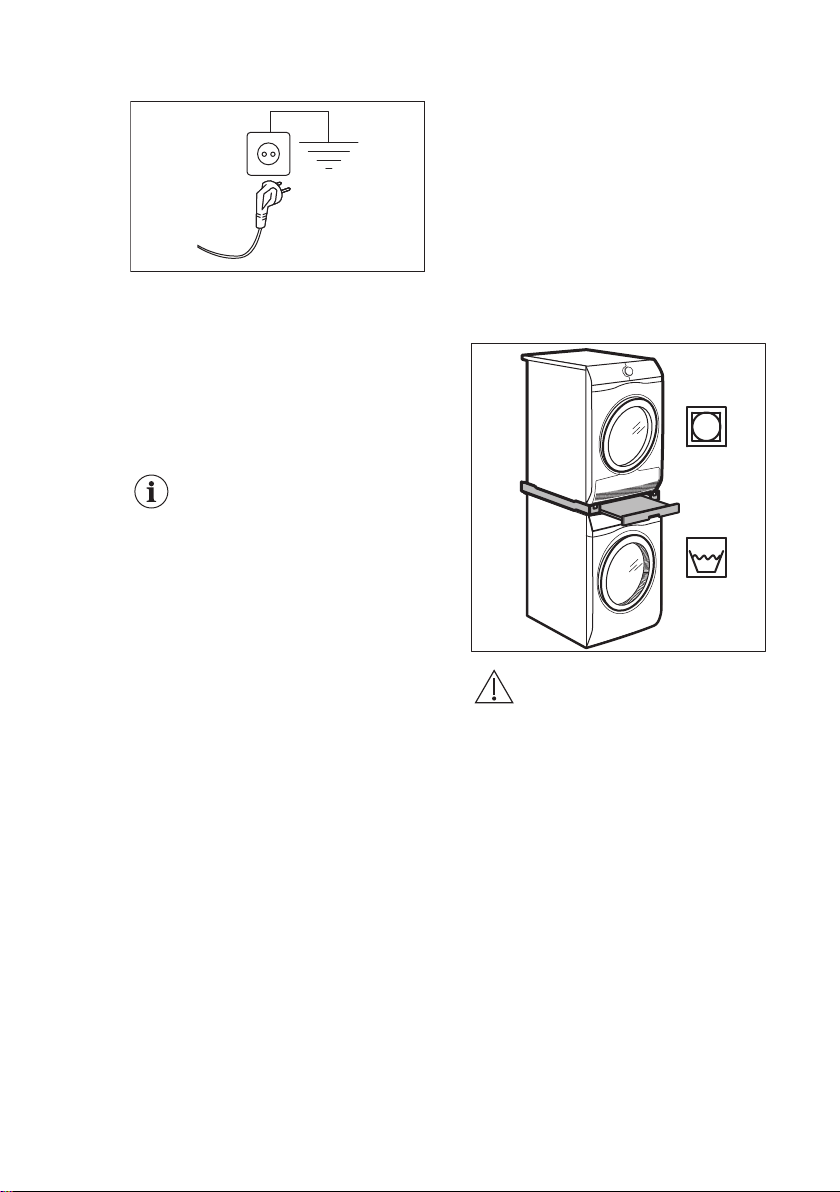
6.3 Stacking kit
The tumble dryer can be stacked on the
top of the washing machine only by
using the correct stacking kit.
WARNING!
Do not put the tumble dryer
under the washing machine.
Verify the compatible
stacking kit by checking the
depth of your appliances.
ENGLISH 15
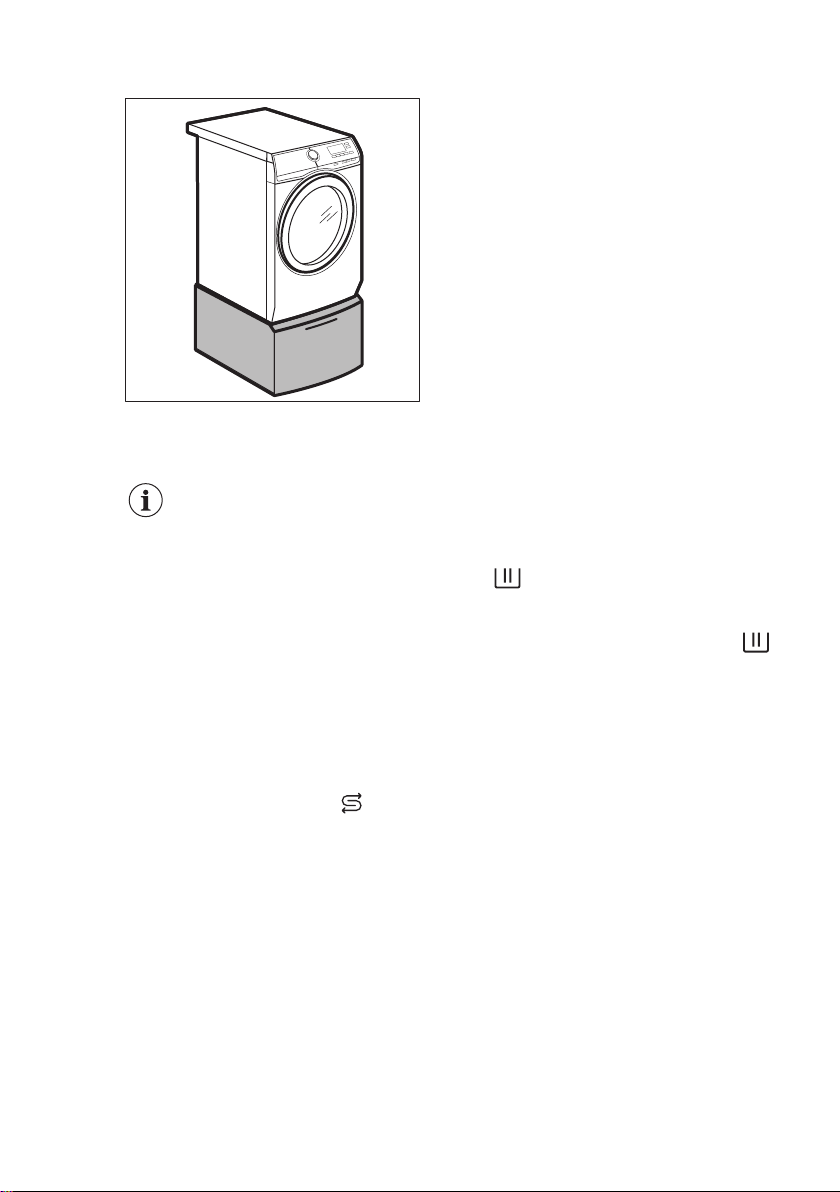
6.4 Pedestal with the drawer
To raise your appliance and make
loading and unloading laundry easier.
The drawer can be used for laundry
storage e.g.: towels, cleaning products
and more.
7. BEFORE FIRST USE
During installation or before
first use you may observe
some water in the appliance.
This is a residual water left
in the appliance after a full
functional test in the factory
to ensure the appliance is
delivered to customers in
perfect working order and is
no cause for concern.
1. Make sure that all transit bolts have
been removed from the appliance.
2. Make sure that the electrical power is
available and the water tap is open.
3. Make sure that there is salt in the
compartment marked by
Salt
and set
the proper water hardness level.
Refer to "How to set the water
hardness level".
4. Pour 2 litres of water into the
detergent compartment marked by
.
This action activates the drain system.
5. Pour a small quantity of detergent
into the compartment marked by .
6. Set and start a programme for cotton
at the highest temperature without
any laundry in the drum.
This removes all possible dirt from the
drum and the tub.
8. THE WATER SOFTENER (SOFT WATER)
8.1 Introduction
The water contains harsh minerals. The
higher the content of these minerals the
harder the water is.
Hard water can reduce the effectiveness
of the detergent, reduce the softness of
fabrics and contribute towards shrinkage
and colour fading.
This appliance is equipped with a water
softener able to provide the right degree
of water softening to preserve the fabric
integrity, colour brightness and ensuring
good wash performances at low
temperature.
The water softener should be adjusted
according to the water hardness of your
inlet water. A correct setting allows to
achieve the best washing results and the
maximum garments protection.
To set the water softener correctly,
please refer to 'How to set the water
hardness level'.
www.aeg.com16
8.2 How to set the water
hardness level
The appliance allows you to chose
between 7 levels corresponding to 7
different ranges of water hardness.
Depending on the country, the water
hardness is expressed in equivalent
scales: e.g. French degrees (°f), German
degrees (°d), English degrees (°e),
mmol/l and ppm.
If necessary, please contact your local
water authority to check the water
hardness in your area.
Check in the "Water hardness levels"
table which is the proper level.
To set the water hardness level:
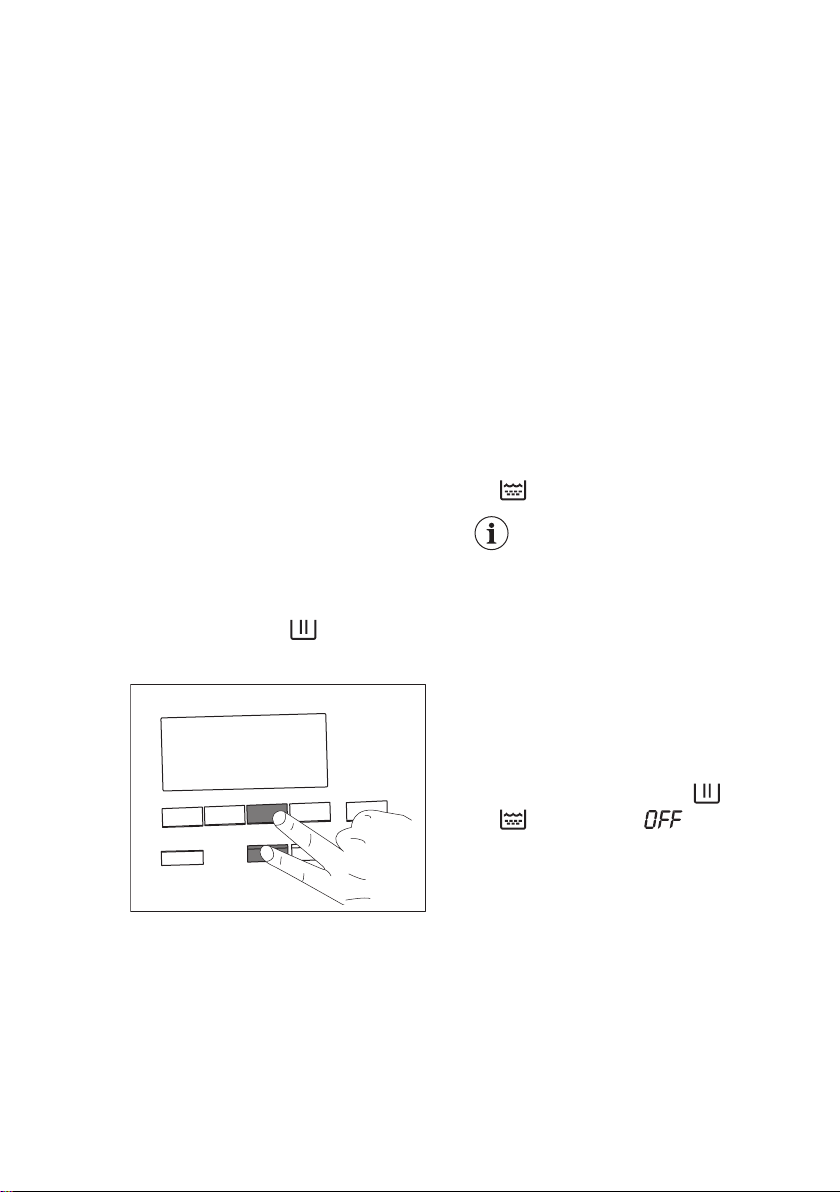
1. Press the On/Off button for a few
seconds to activate the appliance.
2. Wait about 10 seconds for appliance
internal check.
3. Touch the Stains/Prewash and the
Plus Steam buttons simultaneously
(by touching the two buttons at the
same instant, as shown in the next
drawing) for some seconds until the
display shows the default level C04
and the indicator
goes on. It
means the water softener is active
during washing only.
4. Touch repeatedly the Stains/Prewash
button until the desired level appears
(from C01 to C07).
5. Touch the Start/Pause button to
confirm your choice and exit the
menu.
How to set the water softener
also during rinse phase
The factory setting allows to soften the
water during washing phase only. This
setting satisfies most of the use
condition. However, if the inlet water is
particularly hard (C06 and C07 levels),
we suggest to set the water softener also
during rinsing phase to preserve the
fabric softness.
Once you have entered the menu by
pressing Stains/Prewash and the Plus
Steam buttons:
1. Touch the Plus Steam button. The
goes on.
This setting increases
the salt consumption.
2. Touch the Start/Pause button to
confirm your choice and exit the
menu.
How to deactivate the water
softener
Once you have entered the menu by
pressing Stains/Prewash and the Plus
Steam buttons:
1. By touching the Plus Steam button
twice, the water softener is excluded
completely. The indicator and
go off and the appears in
the display.
2. Touch the Start/Pause button to
confirm your choice and exit the
menu.
ENGLISH 17
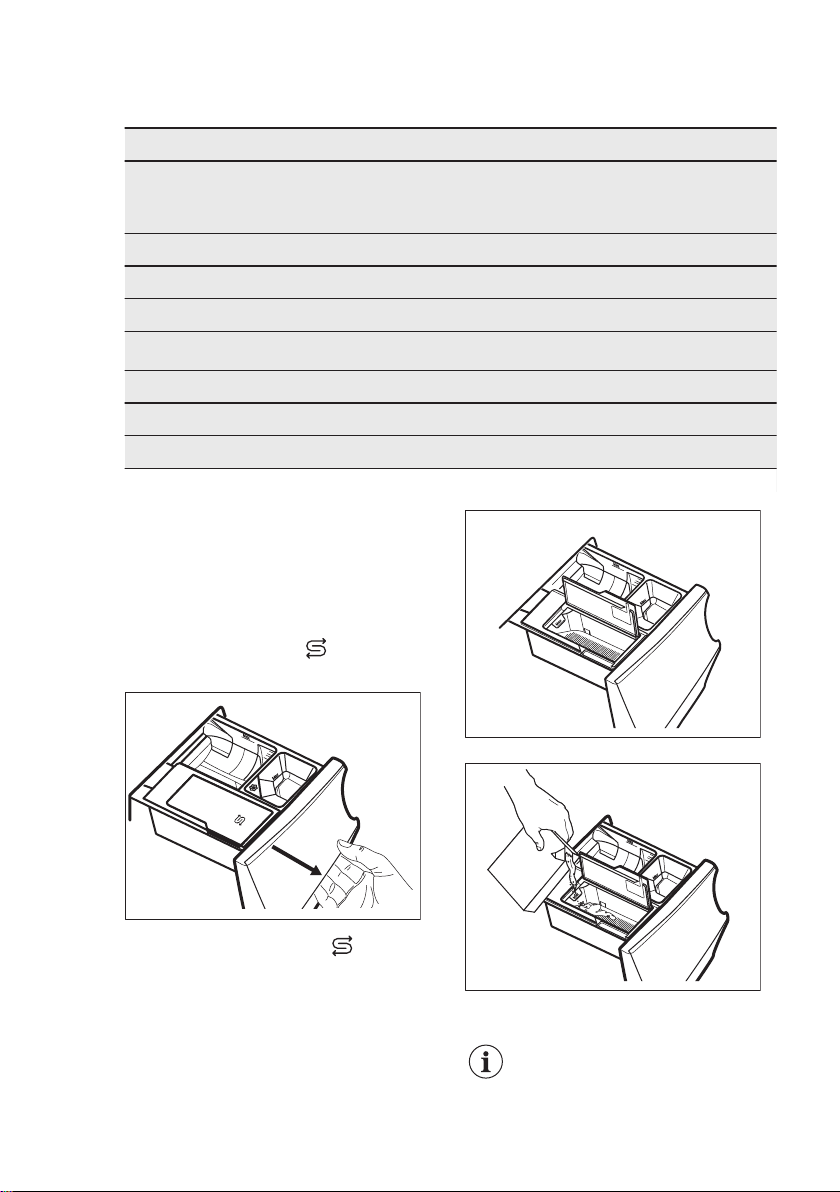
Water hardness levels
Levels Water hardness range
°f
(French de‐
grees)
°d
(German de‐
grees)
°e
(English de‐
grees)
mmol/l ppm
C01 ≤5 ≤3 ≤ 4 ≤0.5 ≤ 50
C02 6 - 13 4 - 7 5 - 9 0.6 - 1.3 60 - 130
C03 14 - 21 8 - 11 10 -15 1.4 - 2.1 140 - 210
C04
1)
22 - 29 12 - 16 16 - 20 2.2 - 2.9 220 - 290
C05 30 - 37 17 - 20 21 - 26 3.0 - 3.7 300 - 370
C06 38 - 45 21 -25 27 - 32 3.8 - 4.5 380 - 450
C07 ≥46 ≥26 ≥33 ≥4.6 ≥460
1)
Factory setting, able to satisfy most of the use conditions.
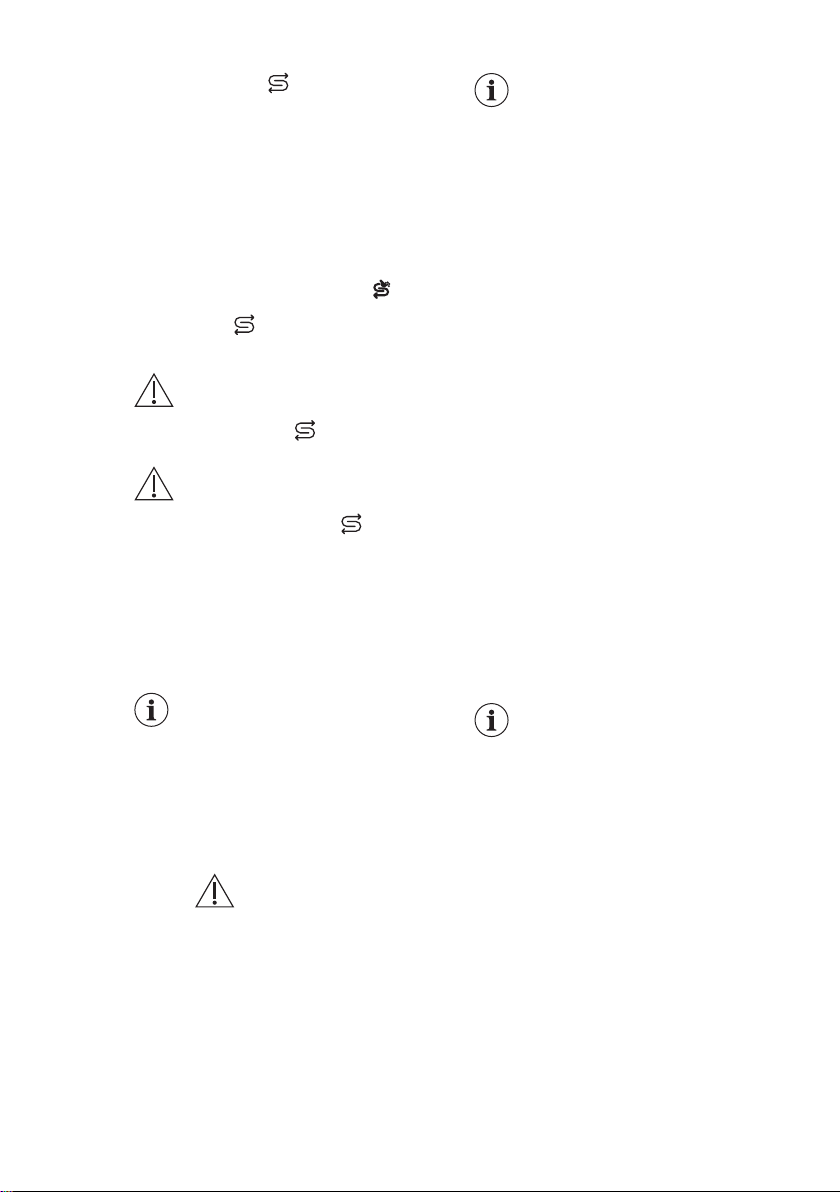
8.3 Pouring salt
The water softener function acts through
special resins present in the appliance.
To regenerate the resins and make them
ready to soften the water pour a special
salt in the compartment
Salt
:
1. Open the detergent dispenser.
M
ax
▼
M
a
x
▼
Ma
x
▼
Salt
2. Open the compartment
Salt
.
Max
▼
M
a
x
▼
Max
▼
3. Pour the special salt.
Max
▼
Max
▼
Max
▼
SALT
4. Close the salt compartment and the
detergent dispenser.
Regularly check if there is
enough salt.
www.aeg.com18
The compartment
Salt
can contain about
600 gr of salt that are sufficient for about
two months if the default water hardness
level (C04) is set and the water softener
is activated during wash phase only. A
different water hardness level or different
setting may increase or decrease the salt
consumption. Refer to 'How to set the
water hardness level' and 'How to set the
water softener also during rinse phase'.
The display shows the indicator when
compartment
Salt
needs to be refilled with
salt, even if a little salt still remains.
WARNING!
Pour the salt in the
compartment
Salt
only.
WARNING!
Do not put anything but salt
in the compartment
Salt
. If
any other detergent/additive
is poured inadvertently in
this compartment, please
refer to 'Eliminating
detergent or other additives
from salt compartment' in
'Troubleshooting' chapter.
Only use special salt for
dishwasher and/or washing
machine. The proper salt
can be ordered from the web
site!
Other types of salts are less
efficient and over time could
damage the water softener
technology permanently.
WARNING!
Do not use fine
salt!
The appliance works
exploiting its full potential
with salt. Salt refilling when
required by the appliance
maintains the softening
system efficient. If you use
the appliance without salt for
a long time, once the salt is
finally refilled, the water
softener function is
completely restored after a
few long washing cycles.
8.4 Water softener
regeneration
After a few cycles, the appliance may
need to regenerate the water softener.
The regeneration process is
automatically ensured when running
programmes such as Cottons and
Synthetics routinely, even if the
programme duration is reduced by taping
the Time Save button once.
The regeneration process is
automatically ensured when running
programmes such as Cottons and
Synthetics routinely.
Other programmes may perform the
regeneration process automatically,
when settings and conditions allow it.
If you usually run very short
cycles, the regeneration
process may not occur: you
could see that salt has not
been used, since it is
consumed during
regeneration phase only.
To ensure the regeneration
process run a Cottons or a
Synthetics programme
once a week or every two
weeks at least.
ENGLISH 19
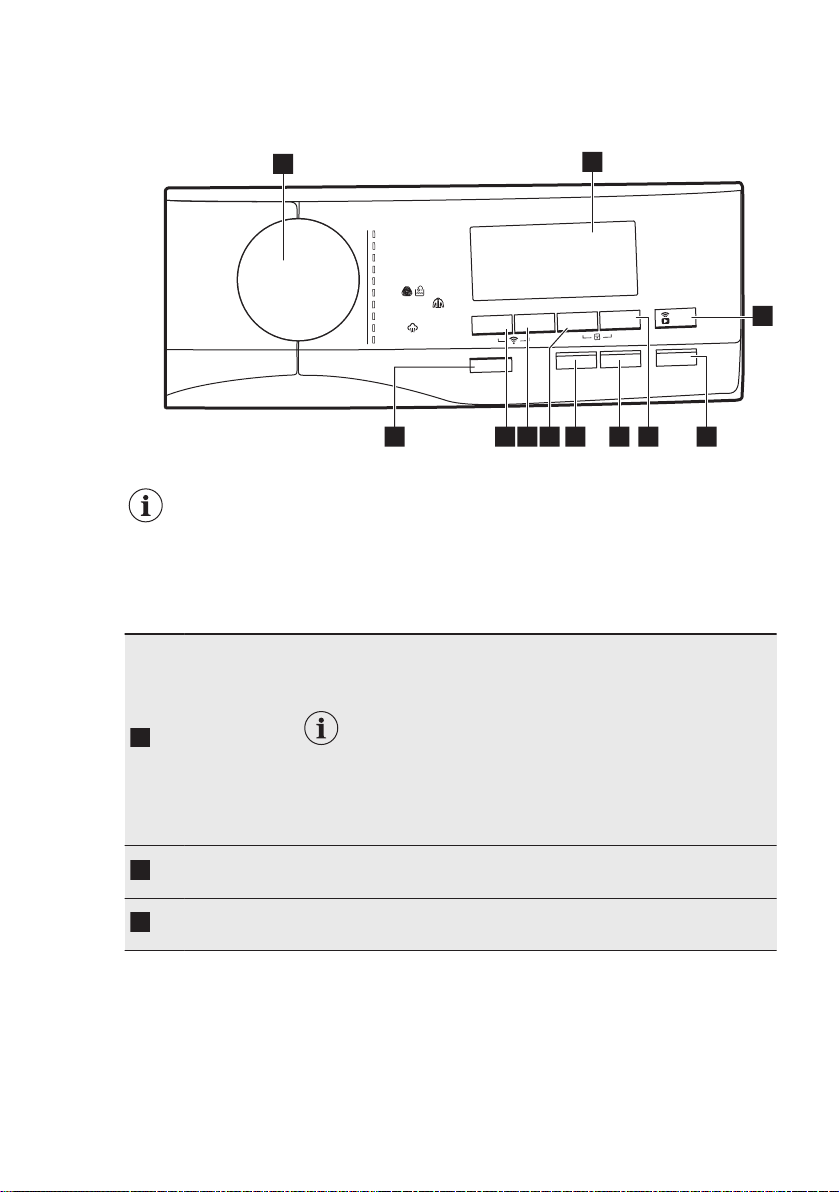
9. CONTROL PANEL
9.1 Control panel description
O
n/Off
Plus St
e
am
Time Save
Progr
am
me
C
ottons
Eco 40-60
MyWash 49min
S
y
nthetic
s
Wo
o
l
S
te
a
m
2
0 Min. - 3
kg
S
pin/Drain
Down Jackets
Del
icates
Temperature
S
p
in
Stain
s
/
Prewash
Extra
Rinse
D
elay
St
a
rt
Start/Pause
3
51 10 9 7
2
4
6811
The options are not selectable with all washing programmes. Check the
compatibility between options and washing programmes in the "Available
options in each programmes" paragraph in the "Programmes" chapter. An
option can exclude another one, in this case the appliance doesn't allow
you to set the incompatible options together.
Make sure the screen and touch buttons are always clean and dry.
1
On/Off push
button
Pressing this button for a few seconds allows to activate or deacti‐
vate the appliance. Two different tunes sound while switching the
appliance on or off.
As the Stand-by function automatically deacti‐
vates the appliance to decrease the energy con‐
sumption in a few cases, you may need to acti‐
vate the appliance again.
Refer to "Stand-by option" paragraph in "Daily
Use" chapter for more details.
2
Programme
dial
For selecting the desired washing programme. Refer to "Pro‐
grammes" chapter for more details.
3
Display
It provides information about the setting programme. Refer to
"Display" paragraph for more details.
www.aeg.com20
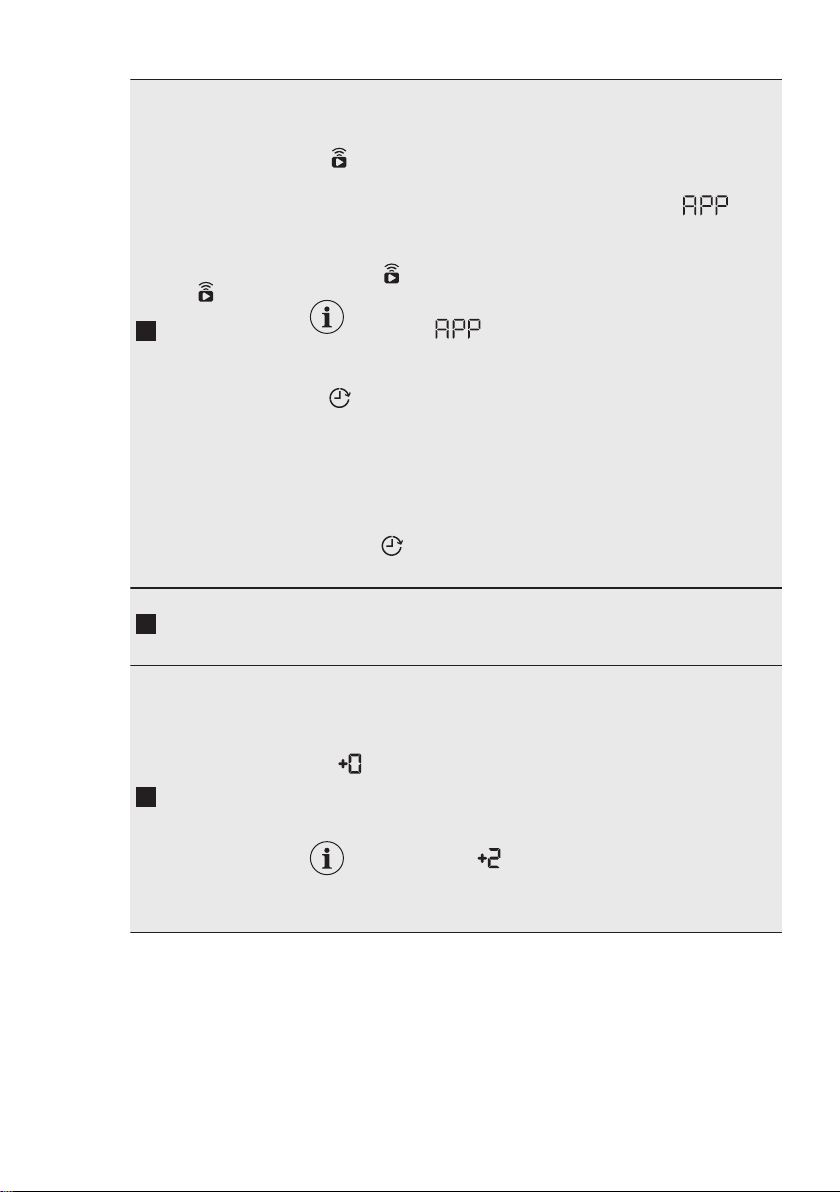
4
Remote
Start/Delay
Start touch
button
Press this button repeatedly to activate one of the two options or
both.
The relevant indicator comes on in the display.
• Remote Start
Select this option to connect appliance with App.
Touch this button, the display shows the indicator blink‐
ing for a few seconds.
After touching the Start/Pause button, the display shows the in‐
dicator
and the Remote Start is confirmed.
When touching the Start/Pause button after the
indicator stops blinking, the Remote
Start is not activated, but the set programme
starts.
• Delay Start
With this option you can delay the start of a programme in a
more convenient time.
Touch the button repeatedly to set the required delay. The time
increases by steps of 30 minutes up to 90' and from 2 hours up
to 20 h.
After touching the Start/Pause button, the display shows the in‐
dicator and the selected delay time and the appliance be‐
gins the countdown.
5
Start/Pause
touch button
Touch this button to start, pause the appliance or interrupt a run‐
ning programme.
6
Extra Rinse
touch button
With this option you can add up to 3 rinses accordingly to the se‐
lected washing programmes.
Useful for people allergic to detergents and in areas where the
water is soft.
The
indicator shows the selected number of rinses.
This option increases the programme duration.
If the Extra Rinse is set as a default option and
you select a compatible washing programme, the
display shows . In this case, by pressing the
Extra Rinse button , it is possible to add just one
rinse.
ENGLISH 21
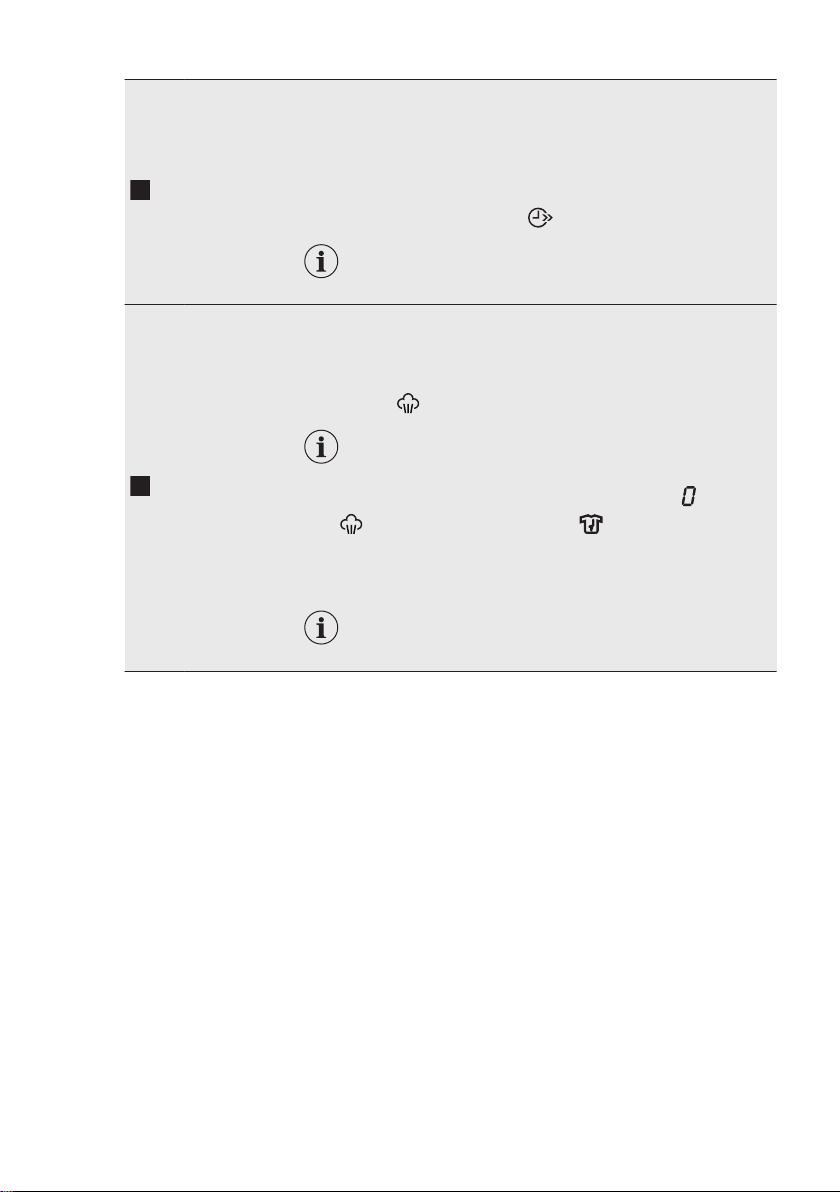
7
Time Save
touch button
With this option you can decrease the programme duration:
• If your laundry is normally or lightly soiled, it may be advisable
to shorten the washing programme. Touch this button once to
decrease the duration.
• In case of smaller load, touch this button twice to set an extra
quick programme.
The display shows the indicator .
This option can also be used to shorten the
Steam programme duration.
8
Plus Steam
touch button
This option adds a steam phase followed by a short anti-crease
phase at the end of the washing programme.
The steam phase reduces fabric creasing and facilitates the fabric
ironing.
The indicator flashes on the display during steam phase.
This option can increase the programme duration.
When the programme stops the display shows a zero , the indi‐
cator
is steady on and the indicator starts flashing. The
drum performs smooth movements for about 30 minutes to keep
the steam benefit. By touching any button the anti-crease move‐
ments stop and the door unlocks.
A small laundry load helps to reach better results.
www.aeg.com22
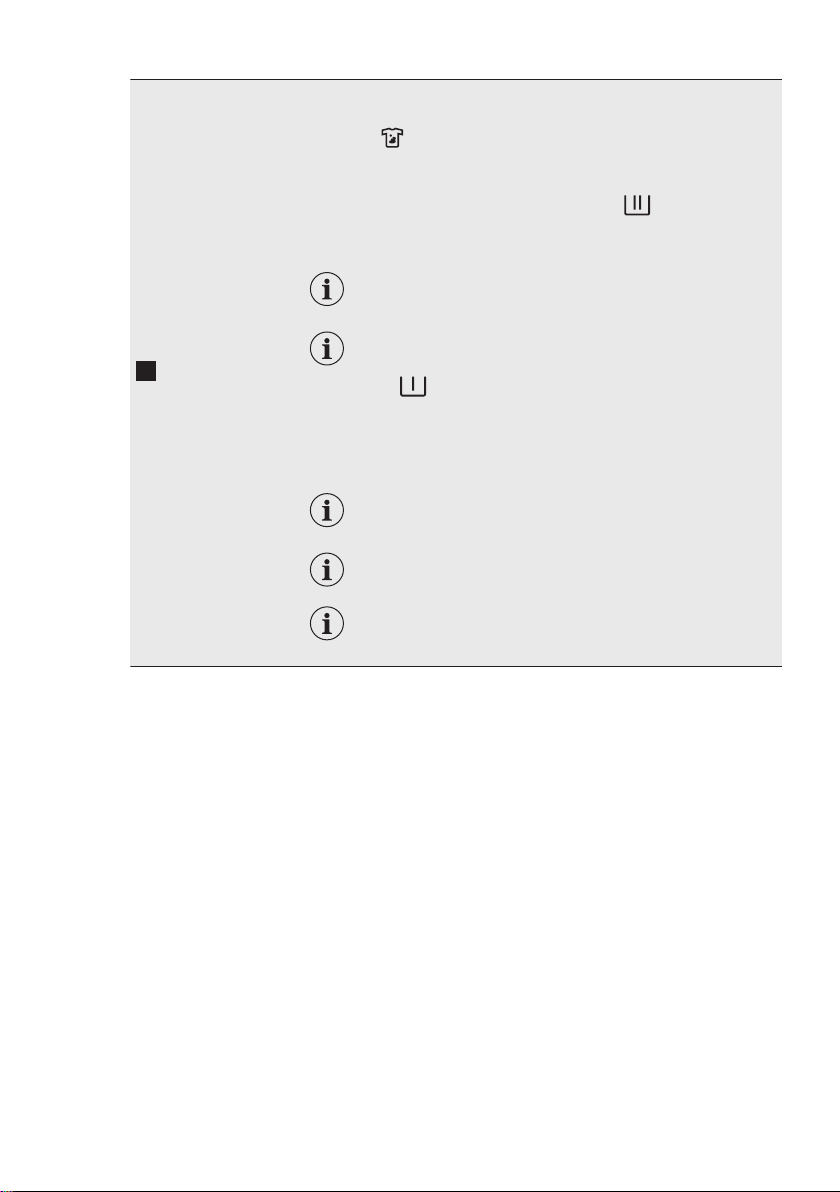
9
Stains/
Prewash
touch button
Press this button repeatedly to activate one of the two options.
The relevant indicator goes on in the display.
• Stains
Select this option to pre-treat heavily soiled or stained laundry
using stain remover.
Pour the stain remover into compartment . The stain re‐
mover is pre-mixed and heated with detergent in order to im‐
prove its effectiveness.
This option can increase the programme dura‐
tion.
This option is not available with a temperature
lower than 40 °C.
• Prewash
Use this option to add a prewash phase at 30 °C before the
washing phase.
This option is recommended for heavily soiled laundry, espe‐
cially if containing sand, dust , mud and other solid particles.
Put the detergent for prewash in a dosing ball
inside the drum.
This option can increase the programme dura‐
tion.
These two options cannot be set together.
ENGLISH 23
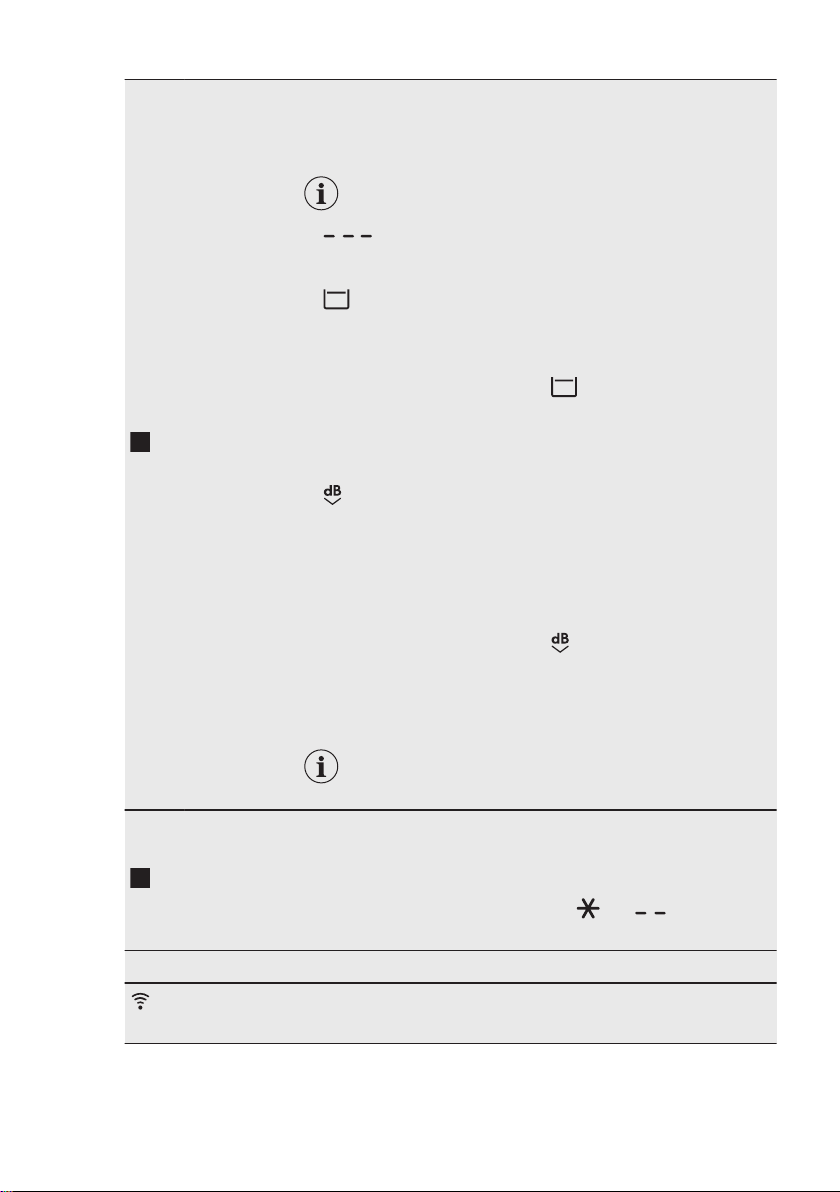
10
Spin button
When you set a programme, the appliance automatically selects
the default spin speed.
Touch this button repeatedly to:
• Change the spin speed.
The display shows only the spin speeds availa‐
ble for the set programme.
• Set No spin option.
This option set with Spin/Drain option (if present) performs the
drain phase only.
•
Activate the Rinse Hold option .
The water of the last rinse is not drained out to prevent the fab‐
rics from creasing. The washing programme ends with water in
the drum and the final spin phase is not performed.
The display shows the indicator .
The door stays locked. The drum turns regularly to reduce
creasing. You must drain the water to unlock the door.
Touch Start/Pause button: the appliance performs the spinning
phase and drains the water.
•
Activate the Quiet option.
All spinning phases (intermediate spin and final spin) are sup‐
pressed and the programme ends with water in the drum. This
helps to reduce creasing.
As the programme is very quiet, it is suitable for use at night
time when cheaper electricity tariffs are available. In some pro‐
grammes the rinses are performed with more water.
The display shows the indicator .
The door stays locked. The drum turns regularly to reduce
creasing. You must drain the water to unlock the door.
Touch the Start/Pause button button: the appliance performs
only the draining phase.
The appliance empties the water out automatical‐
ly after approximately 18 hours.
11
Temperature
touch button
When you select a washing programme, the appliance automati‐
cally proposes a default temperature.
Touch this button repeatedly until the desired temperature value
appears on the display.
When the display shows the indicators and , the appliance
does not heat the water.
Button combination:
Connectivity
To activate/deactivate this option, touch the Temperature and
Spin buttons simultaneously for about 6 seconds.
www.aeg.com24
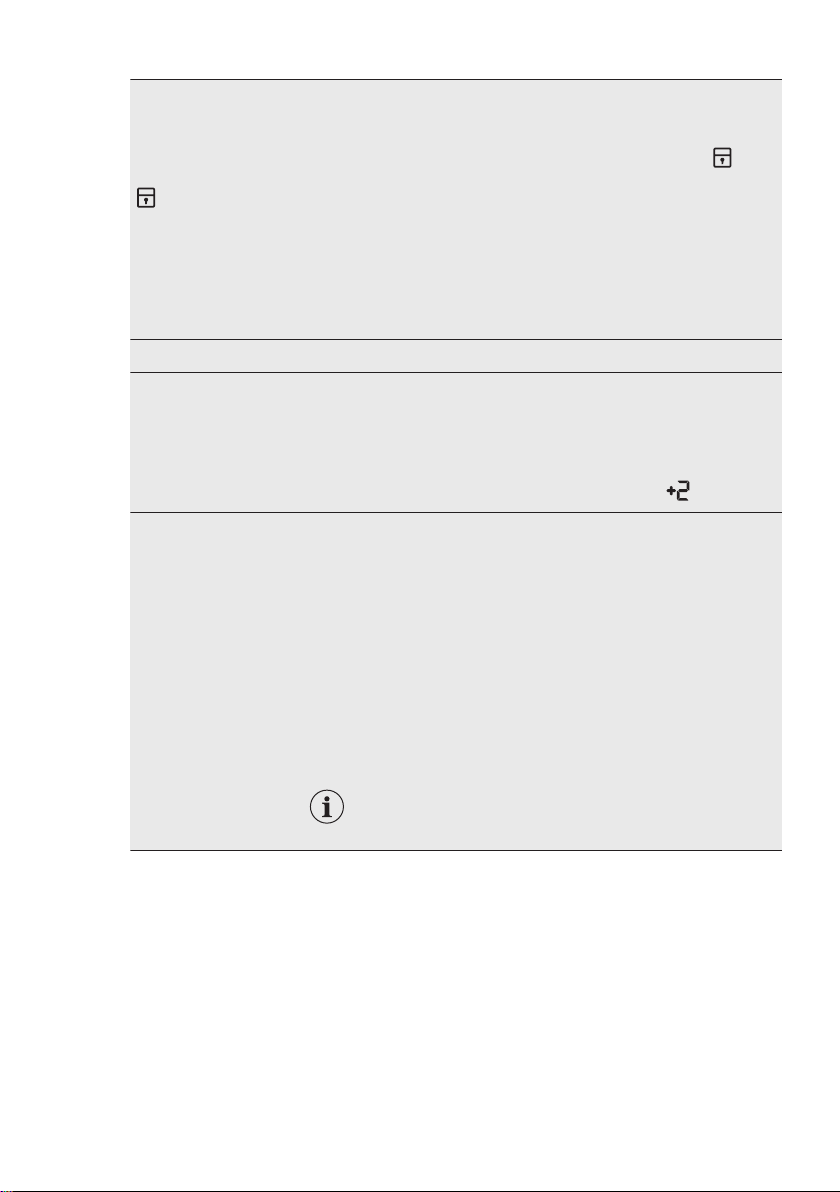
Child Lock
With this option you can prevent that the children play with the
control panel.
To activate/deactivate this option, touch the Stains/Prewash and
the Extra Rinse buttons simultaneously until the indicator
comes on/goes off on the display.
You can activate this option:
• After you touch the Start/Pause button: all the buttons and the
programme dial are deactivated (except On/Off button).
• Before you touch the Start/Pause button: the appliance cannot
start.
The appliance keeps the selection of this option after you switch it
off.
Soft Water Carefully read the "The Water Softener (Soft Water)" chapter.
Permanent Extra
Rinse
With this option you can permanently have an extra rinse when
you set a programme where it is selectable.
To activate/deactivate this option touch the Extra Rinse button
and the Dealy Start button simultaneously the relevant indicator
comes on/goes off.
This option adds two rinses and the display shows
.
Acoustic signals
This appliance is provided with different acoustic signals, that op‐
erate when:
• You activate the appliance (special short tune).
• You deactivate the appliance (special short tune).
• You touch the buttons (click sound).
• You make a wrong selection (3 short sounds).
• The programme is completed (sequence of sounds for about 2
minutes).
• The appliance has a malfunction (sequence of short sounds for
about 5 minutes).
To deactivate/activate the acoustic signals when the programme
is completed, touch the Extra Rinse and the Time Save buttons si‐
multaneously for about 6 seconds.
If you deactivate the acoustic signals, they contin‐
ue operate when the appliance has a malfunction.
ENGLISH 25
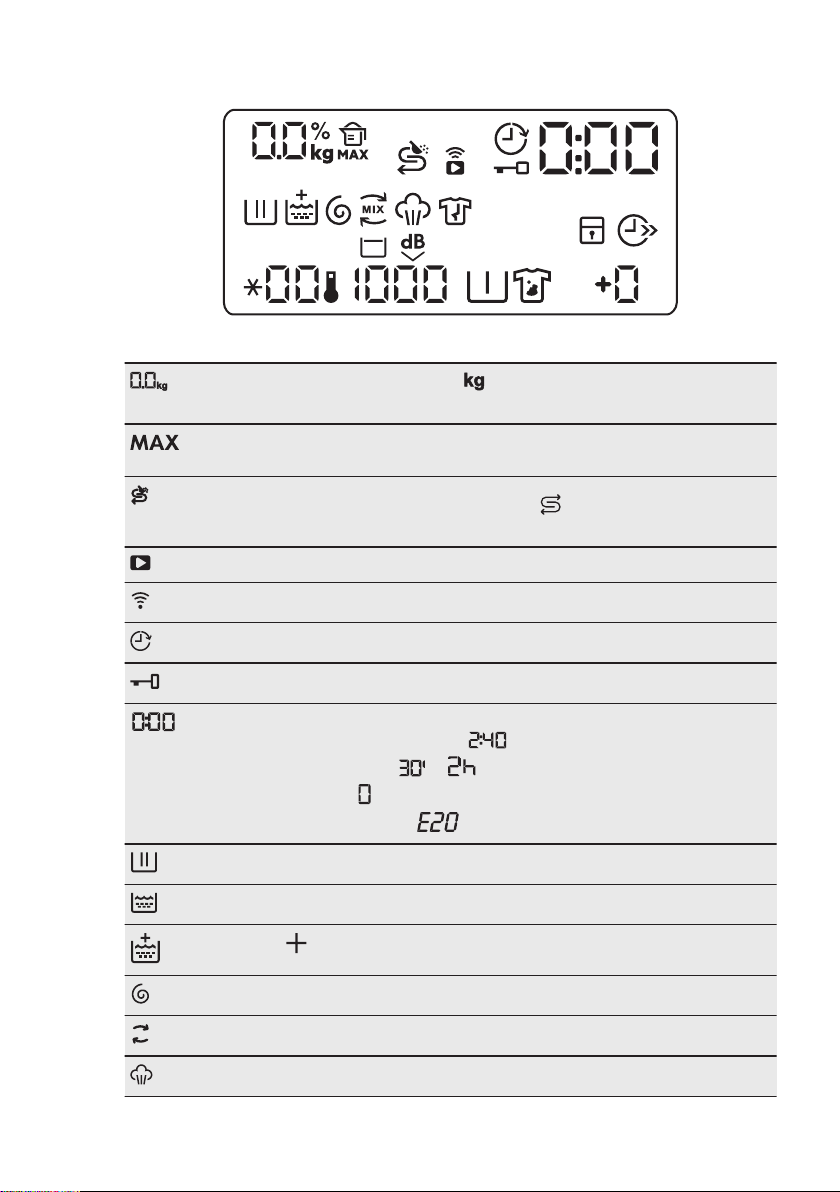
9.2 Display
Maximum load indicator. The icon flashes during laundry load estima‐
tion (refer to "ProSense load detection" paragraph).
Maximum laundry indicator. It flashes when the laundry load exceeds the
maximum declared load of the selected programme.
Salt refilling indicator. The compartment
Salt
needs salt refilling: the com‐
partment is empty or the salt is not enough.
Remote connection indicator.
Wi-Fi connection indicator.
Delay start indicator.
Door locked indicator.
The digital indicator can show:
• Programme duration (e. g. ).
• Delay time (e. g. or ).
• Cycle end (
).
• Warning code (e.g. ).
Washing phase indicator: it flashes during prewash and wash phase.
Rinsing phase indicator: it flashes during rinse phase.
The indicator appears when the Extra Rinse option is activated.
Spin and drain phase indicator. It flashes during spin and drain phase.
MIX
OKO MIX indicator.
Steam phase indicator.
www.aeg.com26
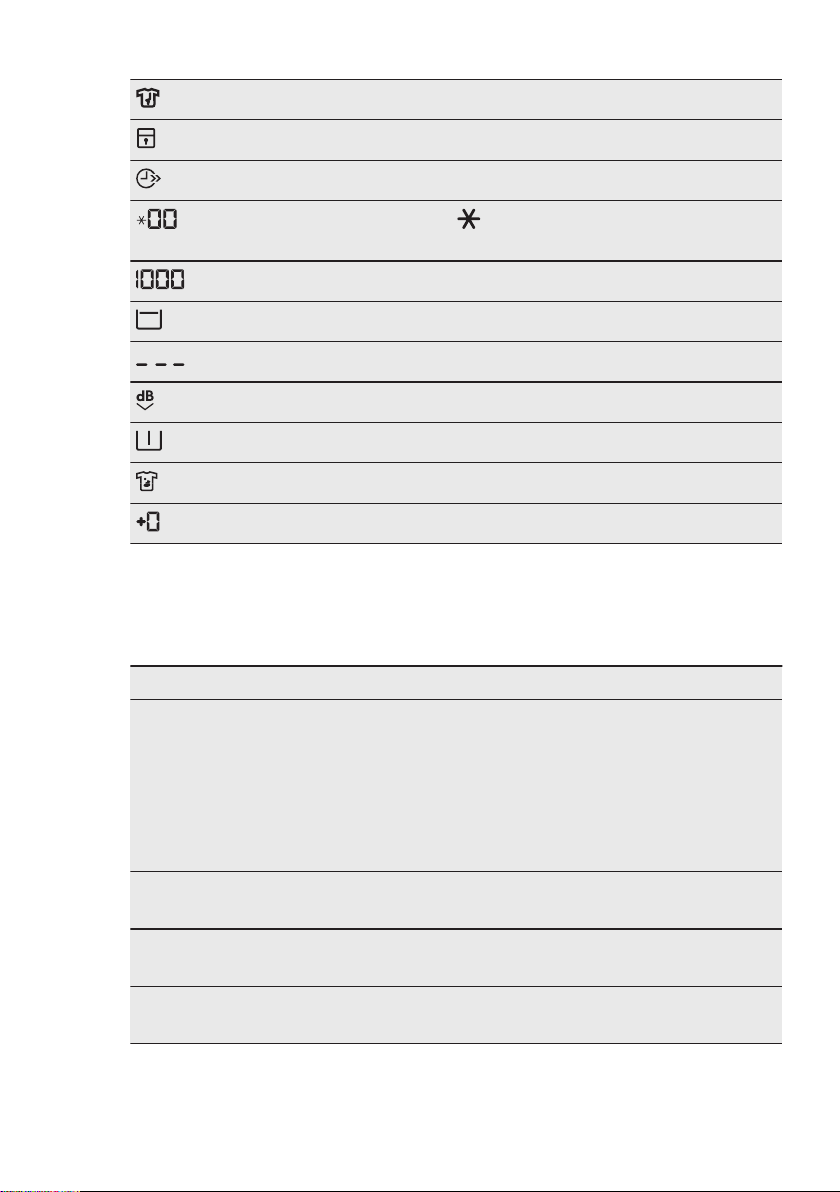
Anti-crease phase indicator.
Child safety lock indicator.
Time saving indicator.
Temperature indicator. The indicator appears when a cold wash is
set.
Spin speed indicator.
Rinse hold indicator.
No spin indicator. Available with Spin/Drain programme only, if present.
Quiet indicator.
Pre-wash indicator.
Stain indicator.
Extra rinse indicator.
10. PROGRAMMES
10.1 Programme Chart
Washing programmes
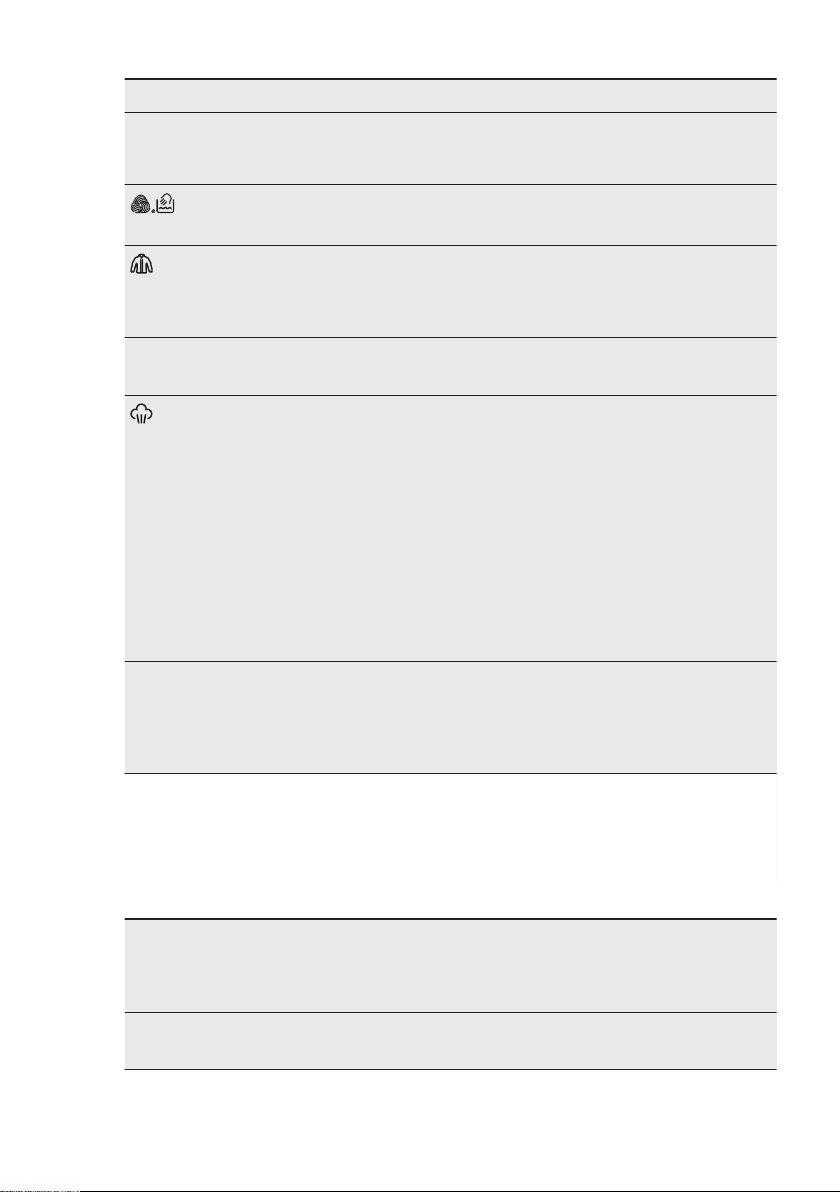
Programme Programme description
MyWash 49min
Cottons and mixed fabrics. Normal soiled. Ideal for your ev‐
eryday laundry. This programme washes with extreme care
cotton and synthetic fabrics and - thanks to Soft Water technol‐
ogy - ensures optimal washing results already at 30° C and in
maximum 49 minutes, protecting garments from colour fading
and pilling formation. If you wash a small laundry load (up to 2
kg) the programme lasts 39 minutes only and water and ener‐
gy consumption decreases proportionally.
Cottons
White cotton and coloured cotton. Normally, heavily and
lightly soiled items.
Eco 40-60
White cotton and coloured cotton. Normally, heavily and
lightly soiled items.
Synthetics
Synthetic items or mixed fabric items. Normally soiled
items.
ENGLISH 27
Programme Programme description
Delicates
Delicate fabrics such as acrylics, viscose and mixed fab‐
rics requiring gentler washing. Normally and lightly soiled
items.
Wool
Machine washable wool, hand washable wool and other
fabrics with «hand washing» care symbol
1)
.
Down Jackets
Special programme for a single feather/down jacket or du‐
vet, also with synthetic filling. If the garment care label allows
it, run a complete wash and dry cycle to preserve appearance
and thermal functionality.
20 Min. - 3 kg
Cotton and synthetic items lightly soiled or once worn.
Steam
Cotton, synthetics and mixed items. Special steam cycle
without washing that can be used to prepare your dried laundry
for ironing or refreshing garments worn once
2)
. This pro‐
gramme reduces creases and odours
3)
and relaxes the fibres.
When the programme is completed, quickly remove the laun‐
dry from the drum. After a steam programme, ironing becomes
effortless. Do not use any detergent. If necessary, remove
stains by washing or using localized stain removal. Steam pro‐
grammes do not perform any hygienic cycle. Do not set a
Steam programme with these types of items:
• Items that are not suitable for tumble drying.
• Items with label "Dry clean only".
Spin/Drain
All fabrics, except woollens and very delicate fabrics. Pro‐
gramme for spinning the laundry and draining the water left in
the drum. The default spin speed is the one used for cotton
programmes. Reduce the spin speed accordingly to the type of
laundry.
1)
During this cycle the drum rotates slowly to ensure a gentle wash. It can seem that the drum doesn't
rotate or doesn't rotate properly, but this is normal for this programme.
2)
If you set a Steam programme with dried laundry, at the end of the cycle the laundry can be humid.
Line dry the items for about 10 minutes.
3)
Steam programme doesn't remove particularly intense odour.
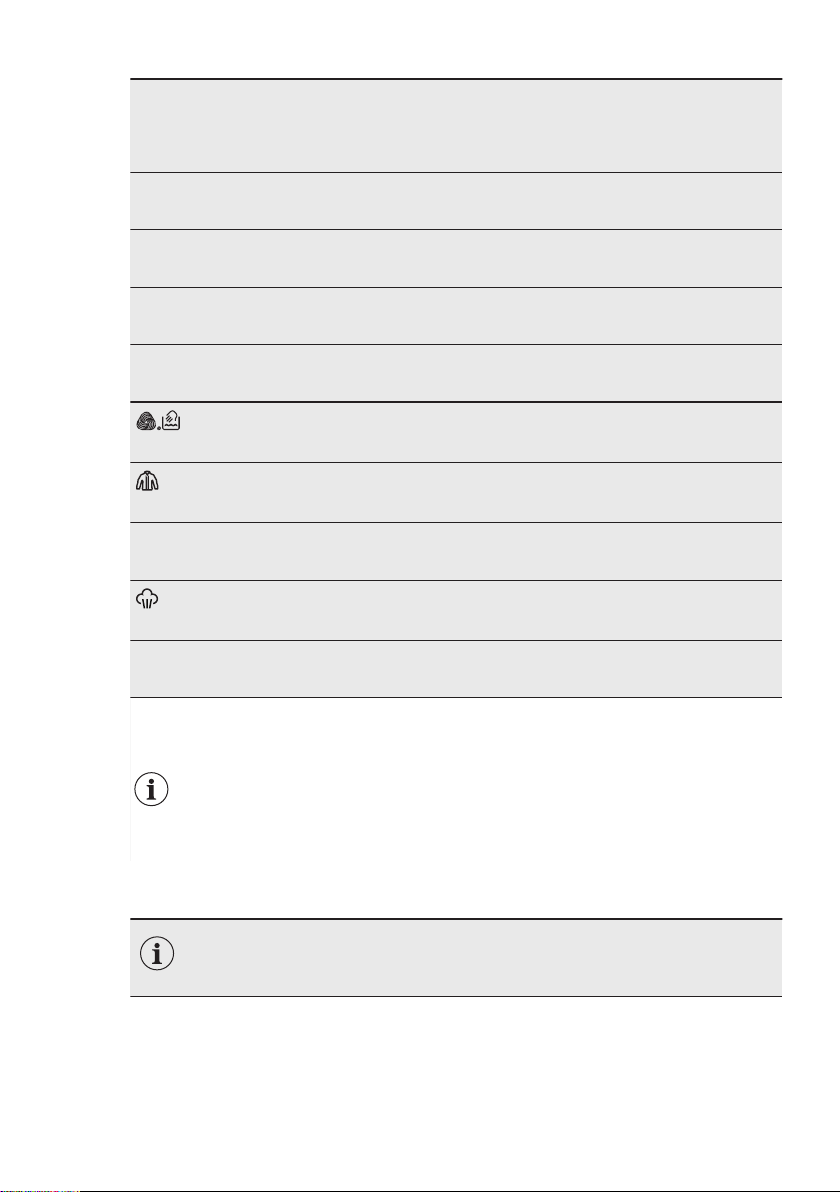
Programme temperature, reference spin speed and maximum load
Programme Default tempera‐
ture
Temperature
range
Reference spin
speed
Spin speed range
Maximum load
MyWash 49min
30 °C
60 °C - 30 °C
1600 rpm
1600 rpm - 400 rpm
5 kg
www.aeg.com28
Programme Default tempera‐
ture
Temperature
range
Reference spin
speed
Spin speed range
Maximum load
Cottons
40 °C
95 °C - Cold
1600 rpm
1600 rpm - 400 rpm
9 kg
Eco 40-60
40 °C
1)
1600 rpm
1600 rpm - 400 rpm
9 kg
Synthetics
40 °C
60 °C - Cold
1200 rpm
1200 rpm - 400 rpm
4 kg
Delicates
30 °C
40 °C - Cold
1200 rpm
1200 rpm - 400 rpm
2 kg
Wool
40 °C
40 °C - Cold
1200 rpm
1200 rpm - 400 rpm
2 kg
Down Jackets
30 °C
40 °C - Cold
1200 rpm
1200 rpm - 400 rpm
2 kg
20 Min. - 3 kg
30 °C
40 °C - 30 °C
1200 rpm
1200 rpm - 400 rpm
3 kg
Steam
- - 1 kg
Spin/Drain
-
1600 rpm
1600 rpm - 400 rpm
9 kg
1)
According to UK Ecodesign for Energy-Related Products and Energy Information Regulations, this
programme at 40 °C is able to clean normally soiled cotton laundry declared to be washable at 40 °C or
60 °C, together in the same cycle.
For the reached temperature in the laundry, the programme duration and other data,
please refer to 'Consumption Values' chapter.
The most efficient programmes in terms of energy consumption are generally those that
perform at lower temperatures and longer duration.
10.2 Options compatibility with programmes
Additional programmes and settings are available downloading the APP.
ENGLISH 29
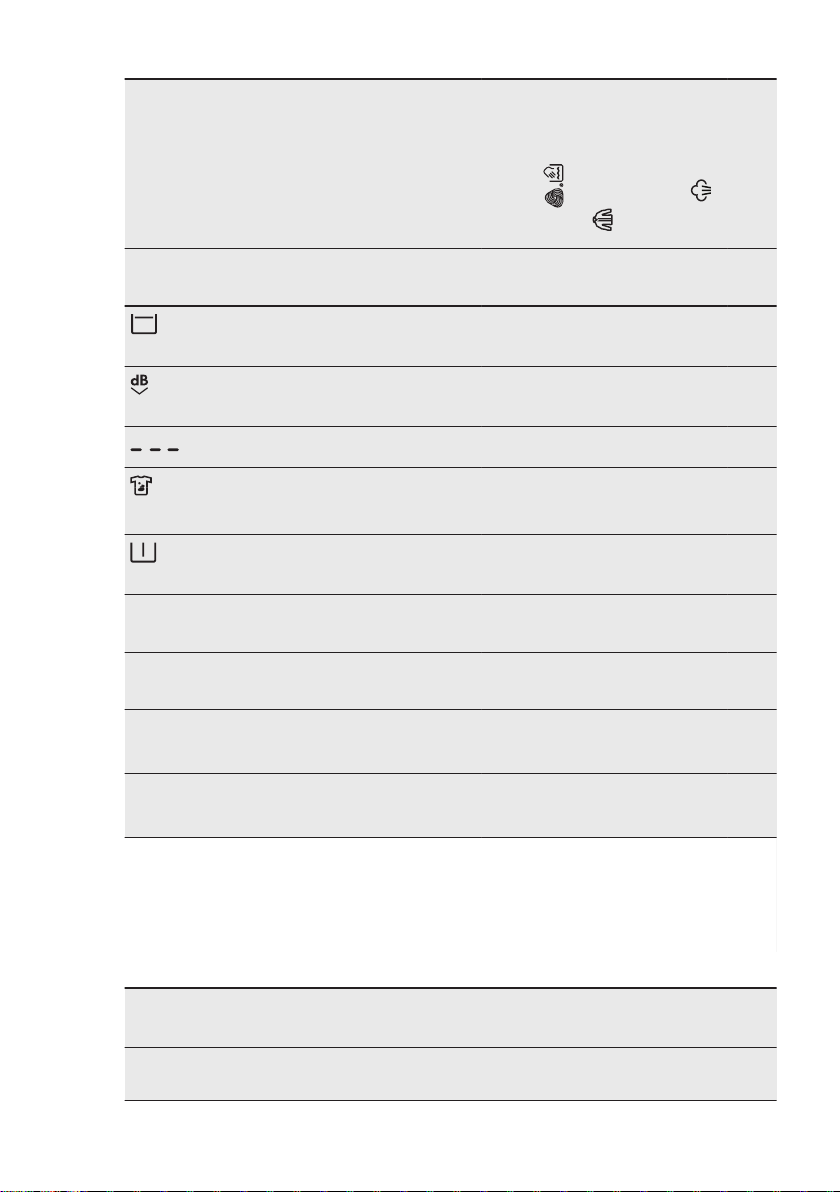
MyWash 49min
Cottons
ECO 40-60
Synthetics
Delicates
Wool
Down Jackets
20 Min. - 3 kg
Steam
Spin/Drain
Spin
■ ■ ■ ■ ■ ■ ■ ■ ■
Rinse Hold
■ ■ ■ ■ ■ ■ ■
Quiet
■ ■ ■ ■
■
1)
Stains
2)
■ ■ ■
Prewash
■ ■ ■
Extra Rinse
■ ■ ■ ■ ■ ■
Delay Start
■ ■ ■ ■ ■ ■ ■ ■ ■ ■
Time Save
3)
■ ■ ■ ■ ■
Plus Steam
4)
■ ■ ■
1)
This setting performs drain phase only.
2)
This option is not available with temperature lower than 40 °C.
3)
If you set the shortest duration, we recommend that you decrease the load size. It is possible to fully
load the appliance, however the washing results can be less satisfactory.
4)
This option is not available with temperature lower than 40 °C.
Suitable detergents for washing programmes
Programme Universal
powder
1)
Liquid Uni‐
versal
Liquid for
coloureds
Delicates
woollens
Special
MyWash
49min
▲ ▲ ▲ -- --
www.aeg.com30
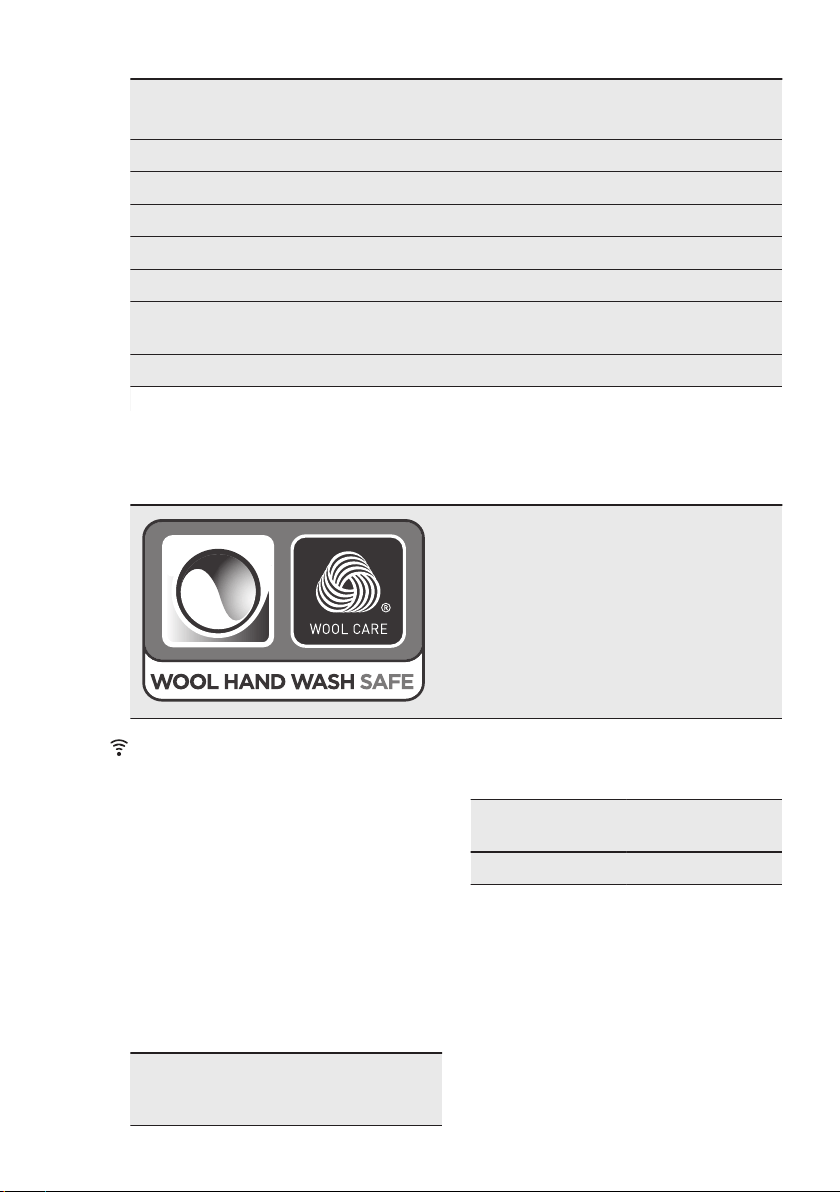
Programme Universal
powder
1)
Liquid Uni‐
versal
Liquid for
coloureds
Delicates
woollens
Special
Cottons ▲ ▲ ▲ -- --
Eco 40-60 ▲ ▲ ▲ -- --
Synthetics ▲ ▲ ▲ -- --
Delicates -- -- -- ▲ ▲
Wool -- -- -- ▲ ▲
Down Jack‐
ets
-- ▲ ▲ -- ▲
20 Min. - 3 kg -- ▲ ▲ -- --
1)
At temperature higher than 60 °C the use of powder detergent is recommended.
▲ = Recommended -- = Not recommended
10.3 Woolmark Wool Care - Green
The wool wash cycle of this machine has
been approved by The Woolmark Company
for the washing of wool garments labelled as
«hand wash» provided that the products are
washed according to the instructions on the
garment label and those issued by the manu‐
facturer of this washing machine. M1361
The Woolmark symbol is a Certification mark
in many countries.
11. WI-FI - CONNECTIVITY SETUP
This chapter describes how to connect
the smart appliance to the Wi-Fi network
and to link it to mobile devices.
By this functionality you can receive
notifications, control and monitor your
appliance from your mobile devices.
To connect the appliance to enjoy the full
range of features and services you need:
• Wireless network at home with
internet connection enabled.
• Mobile device connected to wireless
network.
Frequency 2.412 - 2.472 GHz
for European mar‐
ket
Protocol IEEE 802.11b/g/n
two stream radio
Max Power <20 dBm
ENGLISH 31
11.1 Installing and
configuring "My AEG"
"My AEG" allows you to
control your laundry through
a mobile device.
It contains a large number of
programmes, useful features
and product information
tailored perfectly to the
appliance.
Through the app you can
select the programmes
already available from the
appliance control panel, plus
unlock additional
programmes available only
from a mobile device
Additional programmes can
change over the time along
with new versions of the
app.
It's personalized laundry
care - all from your mobile
device.
When connecting the appliance to the
application, stand near it with your smart
device.
Make sure that your smart device is
connected to the wireless network.
1. Go to the App Store on your smart
device.
2. Download and install the App "My
AEG" .
3. Make sure you started a Wi-fi
connection in the appliance. If not,
read the next paragraph 'Configuring
the appliance wireless connection'.
4. Start the application. Select the
country and language and login with
Your email and password. If you do
not have an account, create a new
one following the instructions in "My
AEG" .
5. Follow the instructions on the App for
the appliance registration and
configuration.
11.2 Configuring the
appliance wireless
connection
1. Press the On/Off button for a few
seconds to activate the appliance.
Wait about 10 seconds before
proceeding with wireless
configuration.
2. Select a programme by turning the
programme dial.
3. Press and hold the Temperature and
the Spin buttons simultaneously for a
few seconds until a 'click' sounds.
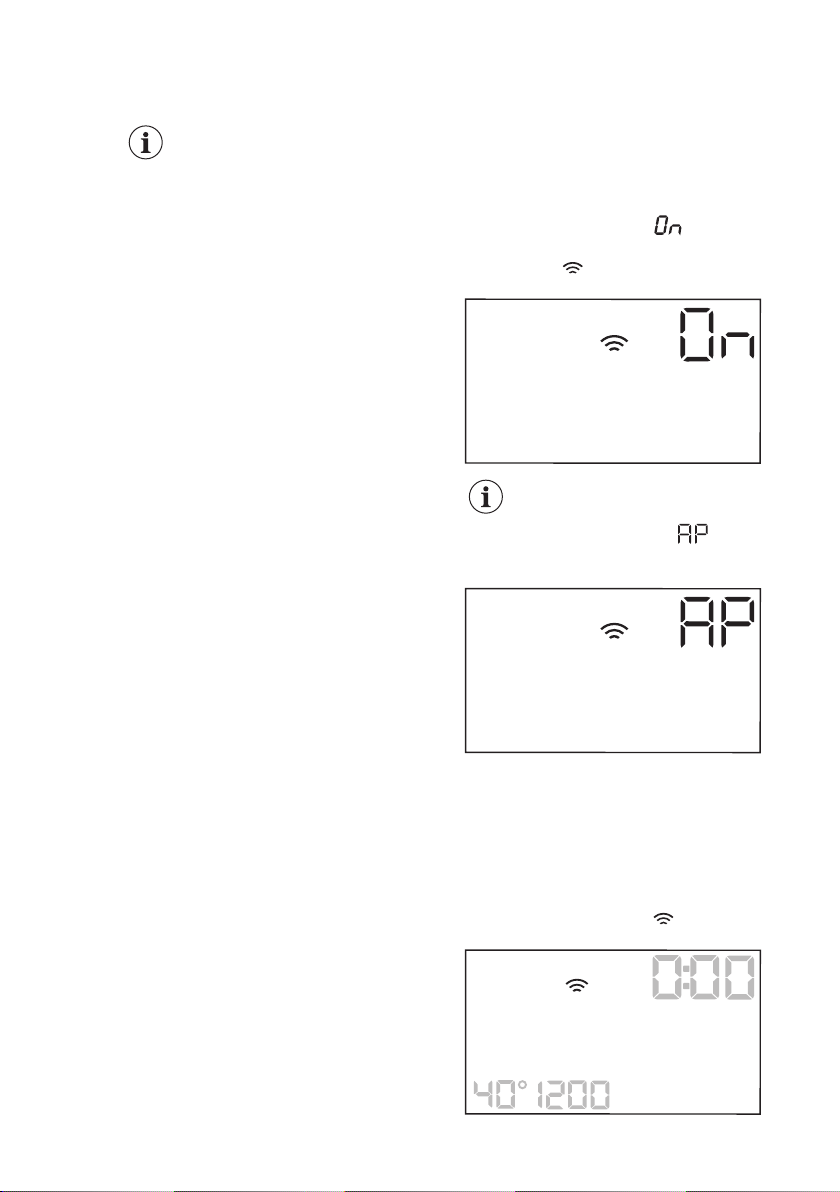
Release the buttons. appears on
the display for 5 seconds and the
indicator starts blinking.
The wireless module begins starting up.
Make sure that you APP is
ready for connection.
4. After about 45 seconds,
(Access Point) appears on the
display.
The access point will be open for about 3
minutes.
5. Configure the "My AEG" app on your
smart device and follow the
instructions to connect the appliance
to your Wi-Fi network.
6. If the connectivity is configured, when
the programme information screen
returns, the indicator is on the
display.
www.aeg.com32
Every time you switch the
appliance on, the appliance
takes 45 seconds to connect
to the network automatically.
When the indicator stops
blinking the connection is
ready.
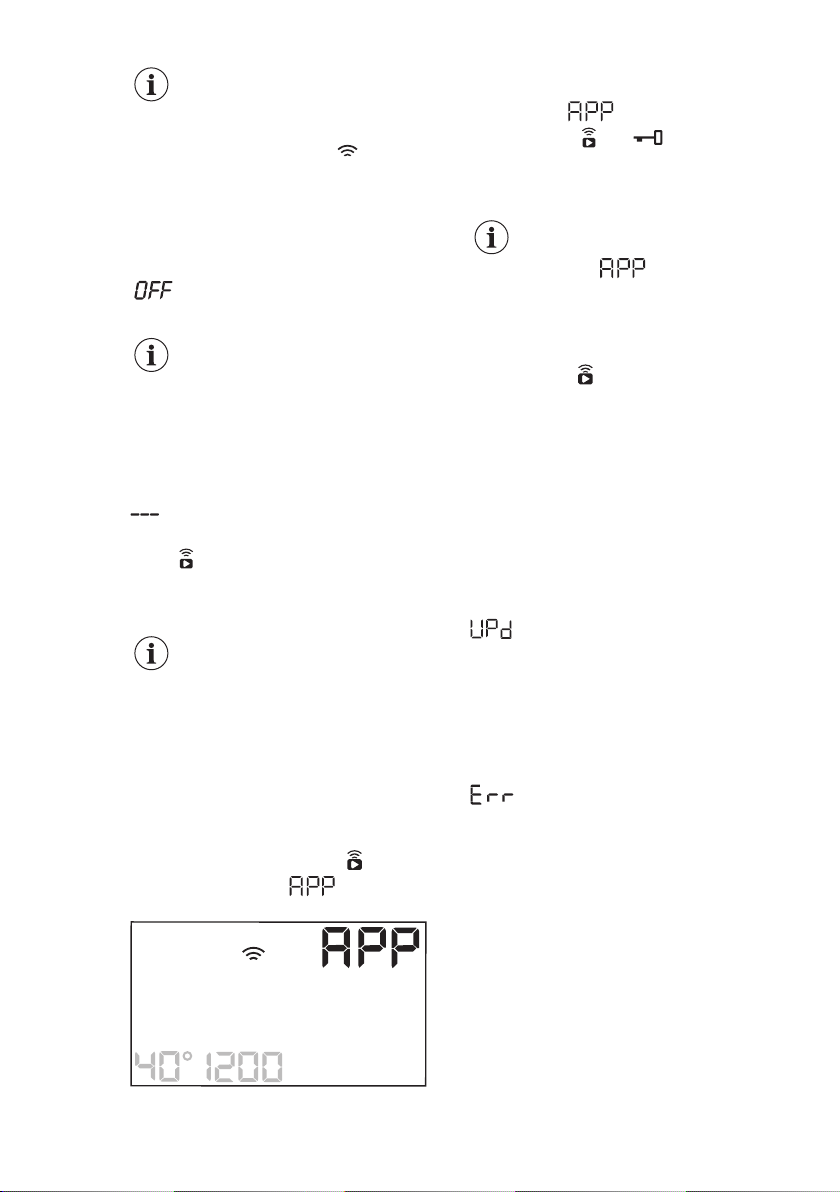
To switch the wireless connection off,
press and hold the Temperature and the
Spin buttons simultaneously for a few
seconds until the first acoustic signal:
appears on the display for 5
seconds.
If you switch the appliance
off and on again, the
wireless connection is
automatically off.
To remove the wireless credentials,
press and hold the Temperature and the
Spin buttons simultaneously for 10
seconds until the second acoustic signal:
appears on the display.
11.3 Remote Start
The Remote Start enables you to start a
cycle in remote control.
The Remote Control
activates automatically when
you press the Start/Pause
button to start the
programme, but it is also
possible to start a washing
programme remotely.
When the App is installed and the
wireless connection is complete, you can
activate the Remote Start:
1. Touch the Remote Start button
and the indicator blinks on the
display for a few seconds.
2. Touch the Start/Pause button to
activate the Remote Start before the
indicator stops blinking.
The indicators and appear on the
display and the door is locked. Now it is
possible to start the programme
remotely.
When touching the Start/
Pause button after the
indicator stops
blinking, the Remote Start is
not activated, but the set
programme starts.
To remove the Remote Start, tap on the
Remote Start button and confirm by
pressing the Start/Pause button.
11.4 Over-the-air update
The App may propose an update for your
appliance.
The update is accepted via App only.
If a programme is running, the App
notifies that the update will start at the
end of the programme.
During the update, the appliance shows
in the display.
Do not switch off or unplug the appliance
during update.
The appliance will usable again at the
end of the update, without any
notification about successful update.
If an error occurs, the appliance shows
in the display: just press any
buttons or turn the knob to return to
normal use.
ENGLISH 33
12. DAILY USE
WARNING!
Refer to Safety chapters.
12.1 Activating the appliance
1. Connect the mains plug to the mains
socket.
2. Open the water tap.
3. Press the On/Off button for a few
seconds to activate the appliance.
A short tune sounds (if activated). The
appliance automatically proposes a
default programme. The relevant
indicator illuminates.
The display shows the maximum load,
the default temperature, the default spin
speed, the indicators of the phases
making up the programme and the cycle
duration.
12.2 Loading the laundry
1. Open the appliance door.
2. Shake the items before you put them
in the appliance.
3. Put the laundry in the drum, one item
at a time.
Make sure not to put too much laundry in
the drum.
4. Close the door firmly.
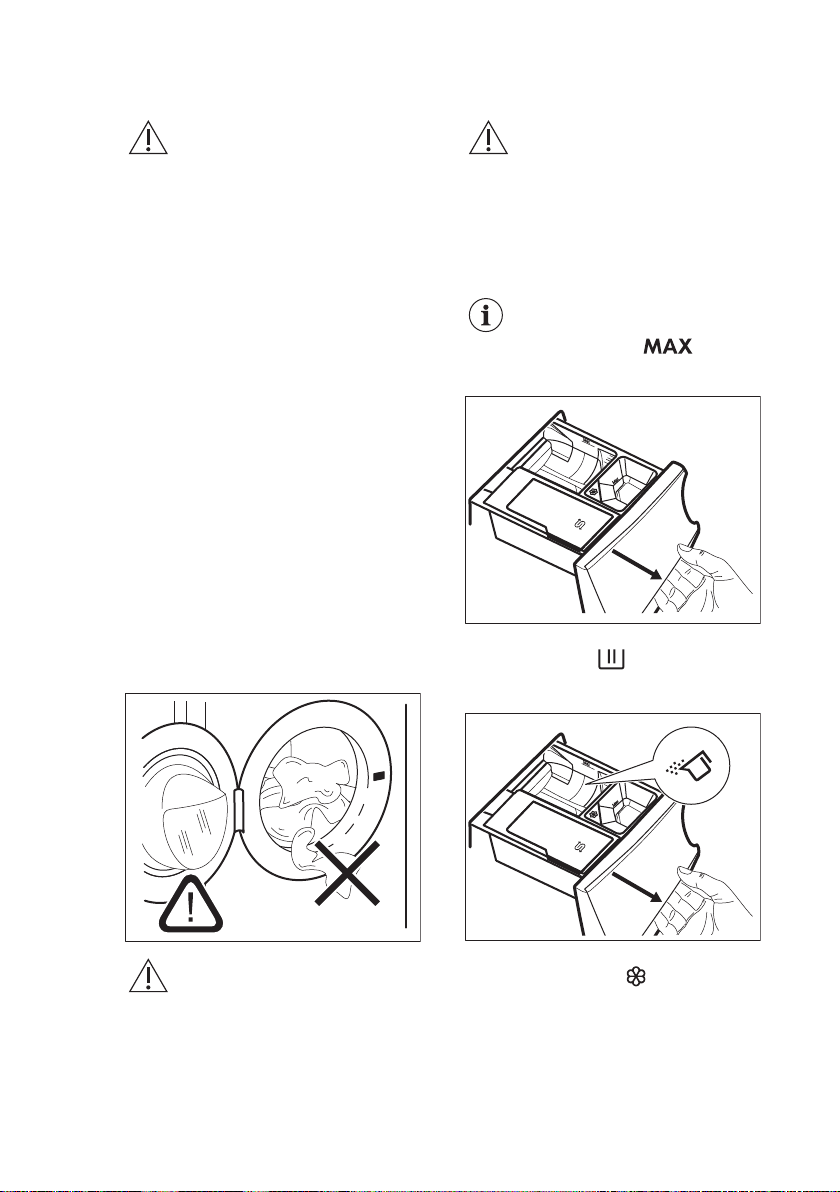
CAUTION!
Make sure that no laundry
stays between the seal and
the door. There is a risk of
water leakage or damage to
the laundry.
CAUTION!
Washing heavily oiled,
greasy stains could cause
damage rubber parts of the
washing machine.
12.3 Filling the detergent and
additives
We recommend that you do
not exceed the maximum
indicated level ( ).
1. Open the detergent dispenser.
M
ax
▼
M
a
x
▼
Ma
x
▼
Salt
2. Put the powder detergent in the
compartment
. If using liquid
detergent, refer to 'Filling the liquid
detergent'.
M
ax
▼
M
a
x
▼
Ma
x
▼
Salt
3. If desired, pour the fabric softener in
the compartment .
www.aeg.com34
Max
▼
Max
▼
Max
▼
Salt
4. Close the detergent dispenser.
M
ax
▼
M
a
x
▼
Ma
x
▼
Salt
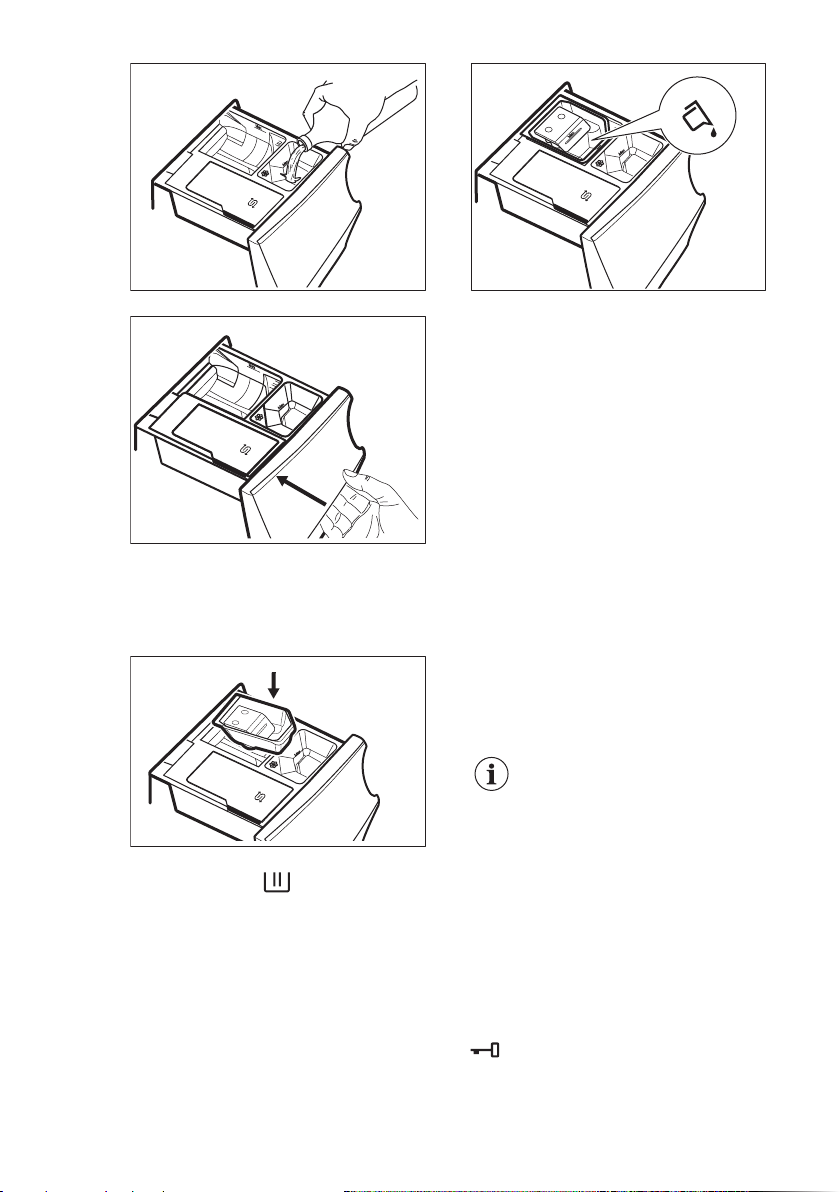
Filling the liquid detergent
1. Insert the proper container for liquid
detergent.
M
ax
▼
M
a
x
▼
Ma
x
▼
Salt
2. Pour the liquid detergent in the
compartment .
M
ax
▼
M
a
x
▼
Ma
x
▼
Salt
Liq uid
Max
▼
3. Close the detergent dispenser.
12.4 Setting a programme
1. Turn the programme dial to select the
desired washing programme. The
related programme indicator comes
on.
The indicator of the Start/Pause button
flashes.
The display shows the maximum
declared load for the programme, the
default temperature, the default spin
speed, the washing phase indicators
(when available) and an indicative
programme duration.
2. To change the temperature and/or
the spin speed, touch the related
buttons.
3. If desired, set one or more options by
touching the related buttons. The
related indicators come on in the
display and the given information
changes accordingly.
In case a selection is not
possible, no indicator
comes on and an acoustic
signal sounds.
12.5 Starting a programme
Touch the Start/Pause button to start the
programme.
The related indicator stops flashing and
stays on.
In the display, the indicator of the
operating phase starts flashing.
The programme starts, the door is
locked. The display shows the indicator
.
ENGLISH 35
The drain pump can operate
shortly before the appliance
fills water.
12.6 Starting a programme
with the delay start
1. Touch this repeatedly until the
display shows the desired delay time.
The indicator comes on.
2. Touch the Start/Pause button.
The appliance starts the countdown of
the delay start.
When the countdown is completed, the
programme starts.
The ProSense estimation
starts at the end of the
countdown.
Cancelling the delay start
after the countdown has
started
To cancel the delay start:
1. Touch the Start/Pause button to
pause the appliance. The related
indicator flashes.
2. Touch the Delay Start button
repeatedly until the display shows .
3. Touch the Start/Pause button again
to start the programme immediately.
Changing the delay start after
the countdown has started
To change the delay start:
1. Touch the Start/Pause button to
pause the appliance. The related
indicator flashes.
2. Touch the Delay Start button
repeatedly until the display shows the
desired delay time.
3. Touch the Start/Pause button again
to start the new countdown.
12.7 The ProSense load
detection
The programme duration in
the display is referred to a
medium/high load.
After touching the Start/Pause button,
the maximum declared load indicator
goes off, the indicator flashes, the
ProSense starts the laundry load
detection:
1. The appliance detects the load in the
first 30 seconds: the indicator and
the time dots
flash, the drum rotates
shortly.
2. At the end of the load detection, the
indicator goes off and the time
dots stop flashing. The programme
duration will be adjusted accordingly
and could increase or decrease. After
further 30 seconds, the water filling
starts.
At the end of the load detection, in case
of drum overload, the indicator is
flashing in the display:
In this case, for 30 seconds, it is possible
to pause the appliance and remove the
exceeding garments.
Once removed the exceeding garments,
touch the Start/Pause button to start the
programme again. The ProSense phase
can be repeated up to three times (see
point 1).
Important! If the laundry amount will not
be reduced, the washing programme
starts anyway, despite the overload. In
this case, it will be not possible to
guarantee the best washing results.
About 20 minutes after the
programme start, the
programme duration could
be adjusted again depending
on the capacity of water
absorption of the fabrics.
The ProSense detection is
carried out with complete
washing programmes only
(no skipping phase
selected).
The ProSense is not
available with some
programmes, such as Wool,
programmes with short
cycles and without washing
phase.
www.aeg.com36
12.8 Programme phase
indicators
When the programme starts the indicator
of the running phase flashes and the
other phase indicators are steady on.
E.g. the washing or pre wash phase is
running:
.
When the phase ends the relevant
indicator stops flashing and is steady on.
The next phase indicator starts flashing.
E.g. the rinse phase is running:
.
During the washing cycle, the appliance
mixes the detergent, the stain removal
for fabric treatment and/or the fabric
softener with water before introducing
them into the drum; the indicator
MIX
appears and disappears on the display
according to the different programme
phases (the arrows flash alternatively).
If you select the Plus Steam the steam
phase indicators come on.
The steam phase is running:
.
The anti-crease phase is running:
.
12.9 Interrupting a
programme and changing the
options
When the programme is running, you
can change only some options:
1. Touch the Start/Pause button.
The related indicator flashes.
2. Change the options. The given
information in the display changes
accordingly.
3. Touch the Start/Pause button again.
The washing programme continues.
12.10 Cancelling a running
programme
1. Press the On/Off button to cancel the
programme and to deactivate the
appliance.
2. Press the On/Off button again to
activate the appliance.
Now, you can set a new washing
programme.
If the ProSense phase is
already carried out and the
water filling is already
started, the new programme
starts without repeating the
ProSense phase. The water
and the detergent are not
drained out in order to avoid
waste. The display shows
the maximum duration of the
programme, updating it
about 20 minutes after the
starting of the new
programme.
12.11 Opening the door -
Adding garments
While a programme or the delay start
operates, the appliance door is locked.
If the temperature and level
of the water in the drum are
too high and/or the drum still
rotates you cannot open the
door.
1. Touch the Start/Pause button.
In the display the related door lock
indicator goes off.
2. Open the appliance door. If
necessary, add or remove the items.
3. Close the door and touch the Start/
Pause button.
The programme or the delay start
continues.
4. The door can be opened when the
programme is complete. You may
also set a spinning or draining
programme/option and than press
Start/Pause button. If the spin and
drain programmes are not available
in the programme dial, they can be
set via App.
ENGLISH 37
12.12 End of the programme
When the programme has finished, the
appliance stops automatically. The
acoustic signals operate (if they are
active).
In the display all washing phase
indicators become steady and the time
area shows
.
The indicator of the Start/Pause button
goes off.
The door unlocks and the indicator
goes off.
1. Press the On/Off button to deactivate
the appliance.
After five minutes from the end of the
programme, the energy saving function
automatically deactivates the appliance.
When you activate the
appliance again, the display
show the end of the last
selected programme. Turn
the programme dial to set a
new cycle.
2. Remove the laundry from the
appliance.
3. Make sure that the drum is empty.
4. Keep the door and the detergent
dispenser slightly ajar to prevent
mildew and odours.
5. Close the water tap.
12.13 Draining water out after
end of cycle
If you have chosen a programme or an
option that does not empty out the water
of the last rinse, the programme is
completed, but:
• The display shows the indicator
, the
option indicator
or and the
door locked indicator . The
indicator of the running phase
flashes.
• The drum still turns at regular
intervals to prevent the creases in the
laundry.
• The door stays locked.
• You must drain the water to open the
door:
1. If necessary, touch the Spin button to
decrease the spin speed proposed
by the appliance.
2. Touch the Start/Pause button:
• If you have set , the appliance
drains the water and spins.
• If you have set , the appliance
only drains the water.
The option indicator
or goes off,
while the indicator flashes and then
goes off.
3. When the programme is completed
and the door locked indicator
goes off, you can open the door.
4. Press the On/Off button a few
seconds to deactivate the appliance.
In any case, the appliance
empties the water out
automatically after
approximately 18 hours.
12.14 Stand-by option
The Stand-by function automatically
deactivates the appliance to decrease
the energy consumption when:
• You do not use the appliance for 5
minutes before you touch the Start/
Pause button.
Press the On/Off button to activate
the appliance again.
• After 5 minutes from the end of the
washing programme
Press the On/Off button to activate
the appliance again.
The display shows the end of the last
set programme.
Turn the programme dial to set a new
cycle.
If you set a programme or an
option that ends with water
in the drum, the Stand-by
function doesn't deactivate
the appliance to remind you
to drain the water.
www.aeg.com38
13. HINTS AND TIPS
WARNING!
Refer to Safety chapters.
13.1 The laundry load
• Divide the laundry into: white,
coloured, synthetics, delicates and
wool.
• Follow the washing instructions on the
laundry care labels.
• Do not wash white and coloured items
together.
• Some coloured items can discolour
with the first wash. We recommend
that you wash them separately for the
first couple of times.
• Turn multilayered fabrics, wool and
items with printed illustrations inside
out.
• Pre-treat stubborn stains.
• Wash stubborn stains with a special
detergent.
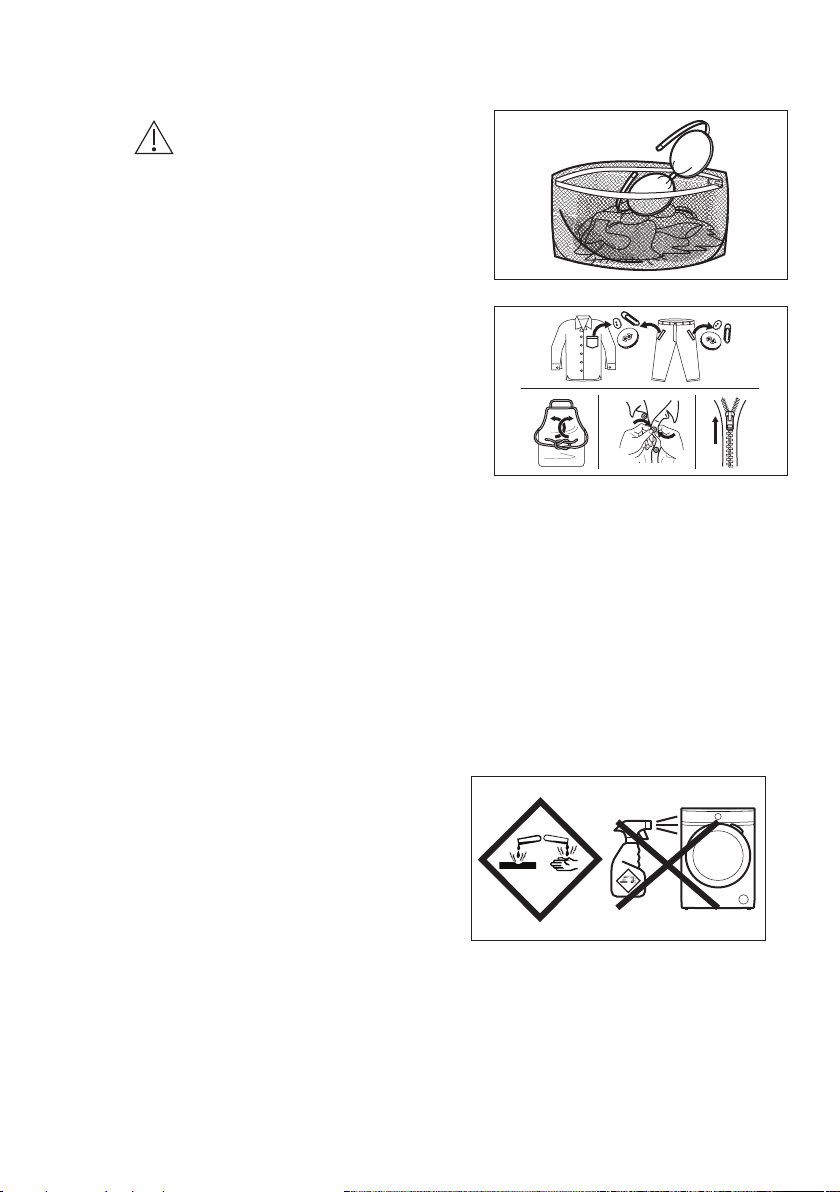
• Be careful with curtains. Remove the
hooks and put the curtains in a
washing bag or pillowcase.
• A very small load can cause balance
problems with the spin phase leading
to excessive vibration. If this occurs:
a. interrupt the programme and
open the door (refer to "Daily
Use" chapter);
b. manually redistribute the load so
that the items are spaced evenly
around the tub;
c. press the Start/Pause button.
The spin phase continues.
• Button up pillowcases, close zippers,
hooks and poppers. Tie up belts,
cords, shoelaces, ribbons and any
other loose elements.
• Do not wash laundry without hems or
with cuts. Use a washing bag to wash
small and/or delicate items (e.g.
underwired bras, belts, tights,
shoelaces, ribbons, etc. ).
• Empty pockets and unfold the items.
13.2 Stubborn stains
For some stains, water and detergent is
not sufficient.
We recommend that you pre-treat these
stains before you put the items in the
appliance.
Special stain removers are available.
Use the special stain remover that is
applicable to the type of stain and fabric.
Do not spray stain remover on garments
near the appliance as it is corrosive to
the plastic parts.
13.3 Detergent type and
quantity
The choice of detergent and use of
correct quantities not only affects your
wash performance, but also helps to
avoid waste and protect the environment:
ENGLISH 39
• Use only detergents and other
treatments specially made for
washing machines. First, follow these
generic rules:
– powder detergents (also tablets
and single-dose detergents) for all
types of fabric, excluding delicate.
Prefer powder detergents
containing bleach for whites and
laundry sanitization,
– liquid detergents (also single-dose
detergents) , preferably for low
temperature wash programmes
(60 °C max) for all types of fabric,
or special ones for woollens only.
• The choice and quantity of detergent
will depend on: type of fabric
(delicates, woollens, cottons, etc), the
colour of clothes, size of the load,
degree of soiling, wash temperature
and hardness of the water used.
• Follow the instructions that you find
on packaging of the detergents or
other treatments without exceeding
the indicated maximum level (
).
• Do not mix different types of
detergents.
• Use less detergent if:
– you are washing a small load,
– the laundry is lightly soiled,
– there is large amounts of foam
during washing.
• When using detergent tabs or pods,
always put them inside the drum, not
in the detergent dispenser and follow
the manufacturer's
recommendations .
Insufficient detergent may cause:
• unsatisfactory washing results,
• the wash load to turn grey,
• greasy clothes,
• mould in the appliance.
Excessive detergent may cause:
• sudsing,
• reduced washing effect,
• inadequate rinsing,
• a greater impact for the environment.
13.4 Ecological hints
To save water, energy and to help
protect the environment, we recommend
that you follow these tips:
• Normally soiled laundry may be
washed without prewash in order to
save detergent, water and time (the
environment is protected too!).
• Loading the appliance to the
maximum capacity indicated for
each programmes helps to reduce
energy and water consumption.
• With adequate pre-treatment, stains
and limited soiling can be removed;
the laundry can then be washed at a
lower temperature.
• Set the maximum possible spin
speed for the selected washing
programme before drying your
laundry in a tumble dryer. This will
save energy during drying!
14. CARE AND CLEANING
WARNING!
Refer to Safety chapters.
14.1 Periodic cleaning
schedule
Periodic cleaning helps to extend the
life of your appliance.
After each cycle, keep the door and the
detergent dispenser slightly ajar to get air
circulation and dry the humidity inside
the appliance: this will prevent mildew
and odours.
If the appliance is not used for a long
time: close the water tap and unplug the
appliance.
Indicative periodic cleaning schedule:
Descaling Twice a year
Maintenance wash Once a month
Clean door seal Every two months
Clean drum Every two months
Clean detergent dis‐
penser and salt
compartment
Twice a year
www.aeg.com40
Clean drain pump
filter
Twice a year
Clean the inlet hose
and the valve filter
Twice a year
The following paragraphs explain how
you should clean each part.
14.2 Removing foreign
objects
Make sure that pockets are
empty and all loose
elements are tied up before
running your cycle. Refer to
'The laundry load' in 'Hints
and tips'.
Remove any foreign objects (such as
metal clip, buttons, coins, etc) that you
may find in the door seal, the filters and
the drum. Refer to 'Door seal with double
lip trap', 'Cleaning the drum', 'Cleaning
the drain pump' and 'Cleaning the inlet
hose and the valve filter' paragraphs. If
necessary, please contact the Authorised
Service Centre.
14.3 External cleaning
Clean the appliance with mild soap and
warm water only. Fully dry all the
surfaces.
Do not use a scouring pads or any
scratching material.
CAUTION!
Do not use alcohol, solvents
or chemical products.
CAUTION!
Do not clean the metal
surfaces with chlorine-based
detergent.
14.4 Descaling
If you use the salt
regularly to activate the
SoftWater Technology, the
descaling procedure
described in this
paragraph is not
necessary.
If the water hardness in your
area is high or moderate, we
recommend that you use a
water descaling product for
washing machines.
Regularly examine the drum to check for
limescale.
The regular detergents already contain
water softening agents, but we
recommend to run a cycle with empty
drum and a descaling product
occasionally.
Always follow the
instructions that you find on
the packaging of the
product.
14.5 Maintenance wash
The repeated and prolonged use of low
temperature and short programmes can
cause detergent deposits, fluff residues,
bacterial growth and biofilm formation
inside the drum and the tub. This could
generate bad odours and mildew.
To eliminate these deposits and
hygienize the inner part of the appliance,
run a maintenance wash at least once a
month:
1. Remove all laundry from the drum.
2. Run a cotton programme with the
highest temperature with a small
quantity of powder detergent.
14.6 Door seal
This appliance is designed with a self
cleaning draining system, allowing light
fluff fibers that fall off the clothes to be
drained out with the water. Regularly
examine the seal. Coins, buttons, other
small items can be recovered at the end
of the cycle.
ENGLISH 41
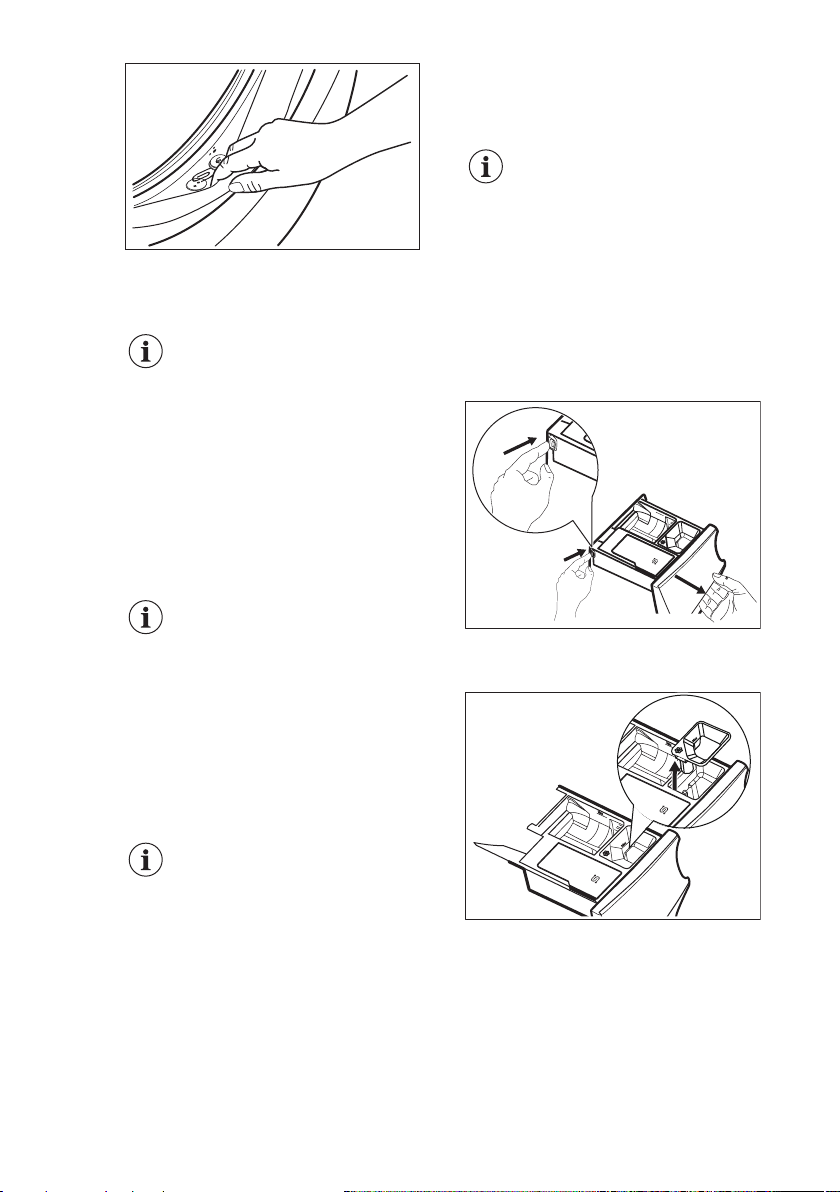
Clean it when needed, using ammonia
cream cleanser agent without scratching
the seal surface.
Always obey the instructions
that you find on the
packaging of the product.
14.7 Cleaning the drum
Regularly examine the drum to prevent
unwanted deposits.
Rust deposits in the drum may occur due
to rusting foreign body in the washing or
tap water containing iron.
Clean the drum with special products for
stainless steel.
Always follow the
instructions that you find on
the packaging of the
product.
Do not clean the drum with
acidic descaling products,
scouring products containing
chlorine or iron or steel.
For a thorough clean:
1. Clean the drum with special products
for stainless steel.
Always follow the
instructions that you find on
the packaging of the
product.
2. Run a short cotton programme at
high temperature with empty drum
and with a small quantity of powder
detergent or, if available, run the
Machine Clean programme.
14.8 Cleaning the detergent
dispenser and the salt
compartment
Before cleaning, make sure
that the all compartments
are empty.
To prevent possible deposits of dried
detergent, clotted fabric softener,
formation of mould in the dispenser
drawer and/or salt fouling in the salt
compartment, once in a while carry out
the following cleaning procedure:
1. Open the drawer. Press the catch as
indicated in the picture and pull the
drawer out.
Max
▼
Max
▼
Max
▼
Salt
Max
2. Remove the insert for the softener
and, if inserted, the container for
liquid detergent.
Max
▼
Max
▼
Max
▼
Salt
Max
▼
Max
▼
Salt
Max
▼
www.aeg.com42
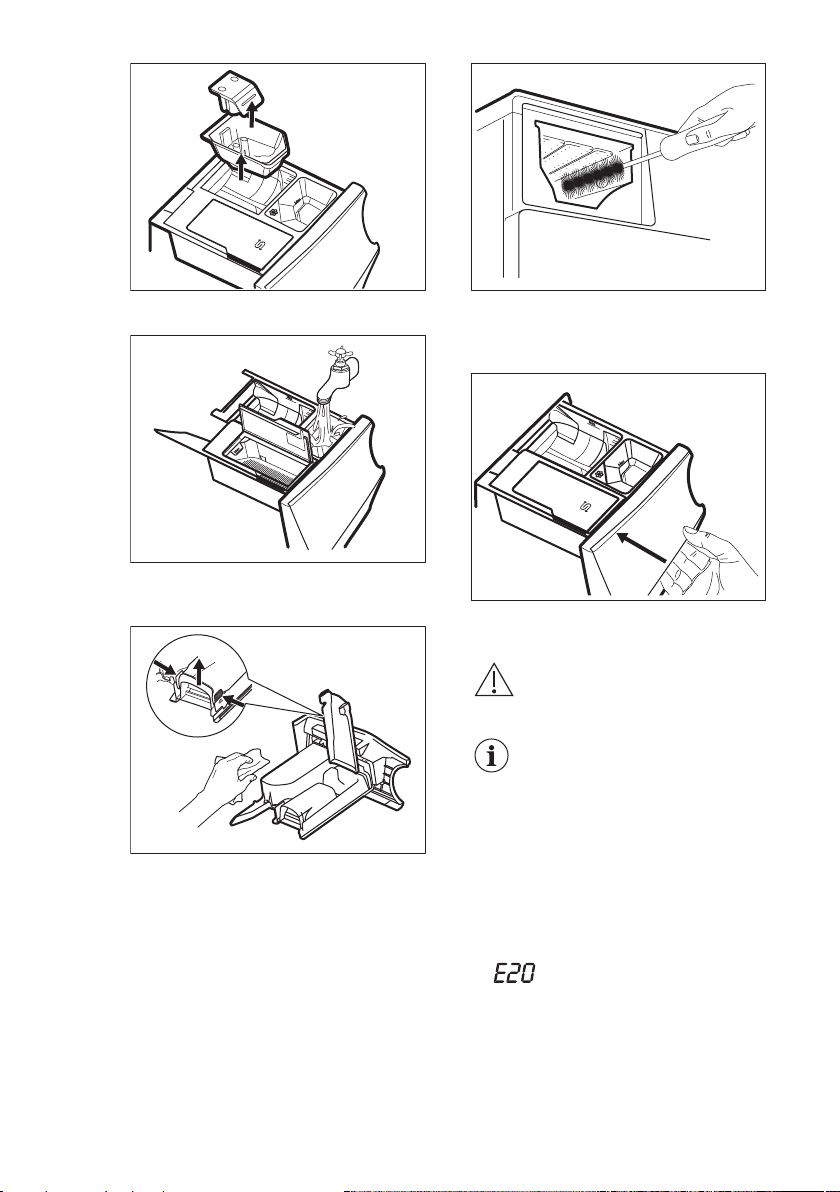
M
ax
▼
M
a
x
▼
Ma
x
▼
Salt
3. Wash the drawer and all inserts
under running water.
Max
▼
Max
▼
4. Make sure that all detergent residue
is removed from the detergent
conveyor. Use a cloth.
5. Make sure that all detergent residue
is removed from the upper and lower
part of the recess. Use a small brush
to clean the recess.
6. Insert the detergent drawer into the
guide rails and close it. Run the
rinsing programme without any
clothes in the drum.
M
ax
▼
M
a
x
▼
Ma
x
▼
Salt
14.9 Cleaning the drain pump
WARNING!
Disconnect the mains plug
from the mains socket.
Regularly check the drain
pump filter and make sure
that it is clean.
Clean the drain pump if:
• The appliance does not drain the
water.
• The drum does not turn.
• The appliance makes an unusual
noise because of the blockage of the
drain pump.
• The display shows the alarm code
.
ENGLISH 43
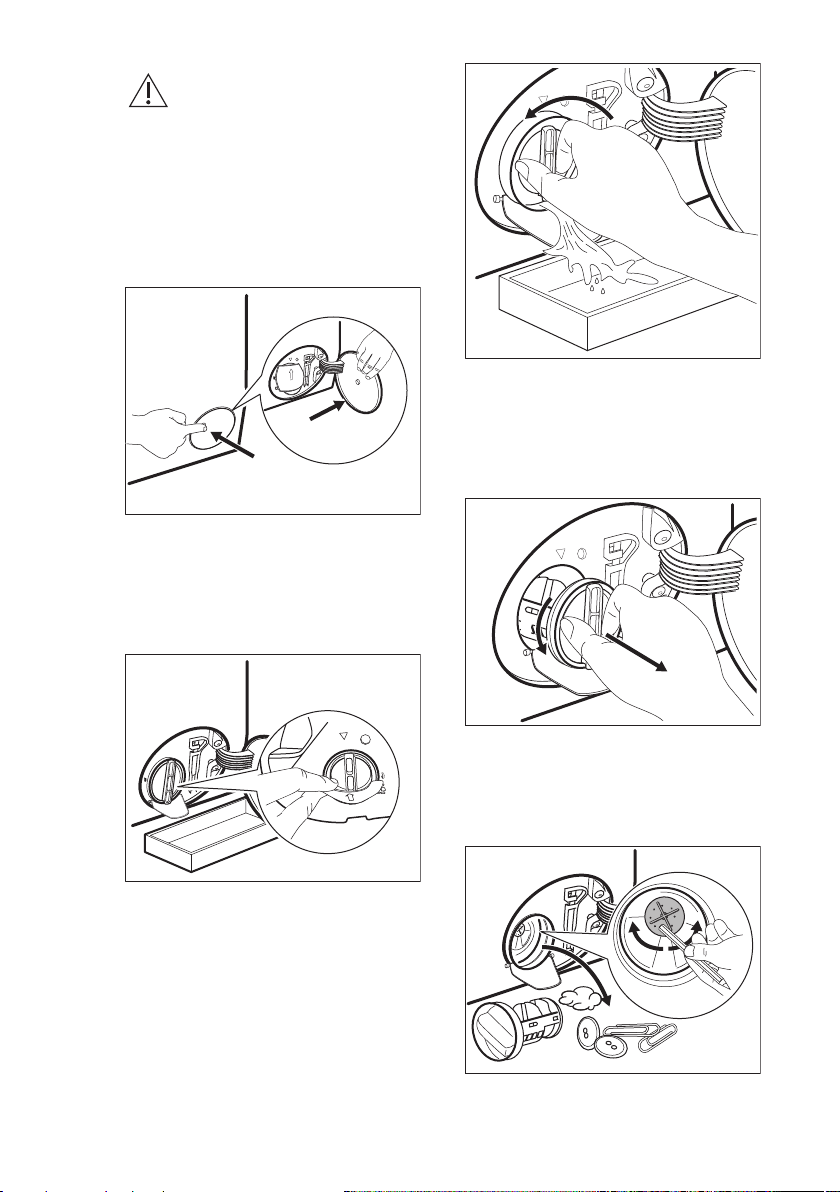
WARNING!
• Do not remove the filter
while the appliance
operates.
• Do not clean the pump if
the water in the appliance
is hot. Wait until the water
cools down
Proceed as follows to clean the pump:
1. Open the pump cover.
1
2
2. Place a suitable bowl below the drain
pump access to collect the water that
flows out.
3. Open the chute downwards. Always
keep a rag nearby to dry up any
water spillages when removing the
filter.
4. Turn the filter 180 degrees in anti-
clockwise direction to open it, without
removing. Let the water flow out.
5. When the bowl is full of water, turn
the filter back and empty the
container.
6. Repeat the steps 4 and 5 until the
water stops to flow out.
7. Turn the filter anti-clockwise to
remove it.
1
2
8. If it is necessary, remove fluff and
objects from the filter recess.
9. Make sure that the impeller of the
pump can rotate. If it does not rotate,
contact the Authorised Service
Centre.
10. Clean the filter under the water tap.
www.aeg.com44
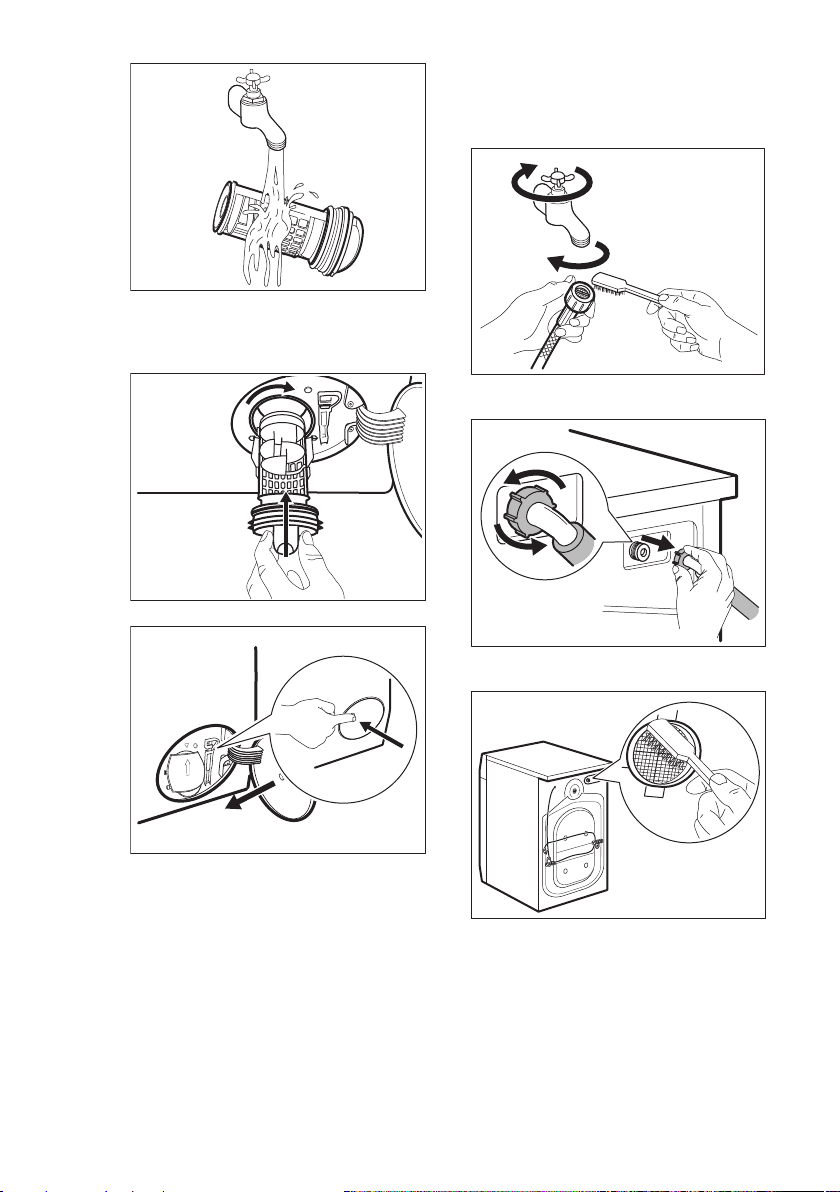
11. Put the filter back into the special
guides by turning it clockwise. Make
sure that you tighten the filter
correctly to prevent leakages.
2
1
12. Close the pump cover.
2
1
When you drain the water with the
emergency drain procedure, you must
activate the drain system again:
a. Put 2 litres of water in the main
wash compartment of the
detergent dispenser.
b. Start the programme to drain the
water.
14.10 Cleaning the inlet hose
and the valve filter
It is recommended to clean both the
filters of the inlet hose and valve
occasionally to remove any deposit,
collected over the time:
1. Remove the inlet hose from the tap
and clean the filter.
1
2
3
2. Remove the inlet hose from the
appliance by loosening the ring nut.
3. Clean the valve filter on the back of
the appliance with a toothbrush.
4. When you reconnect the hose to the
back of the appliance, turn it left or
right (not in vertical position)
depending on the position of your
water tap.
ENGLISH 45
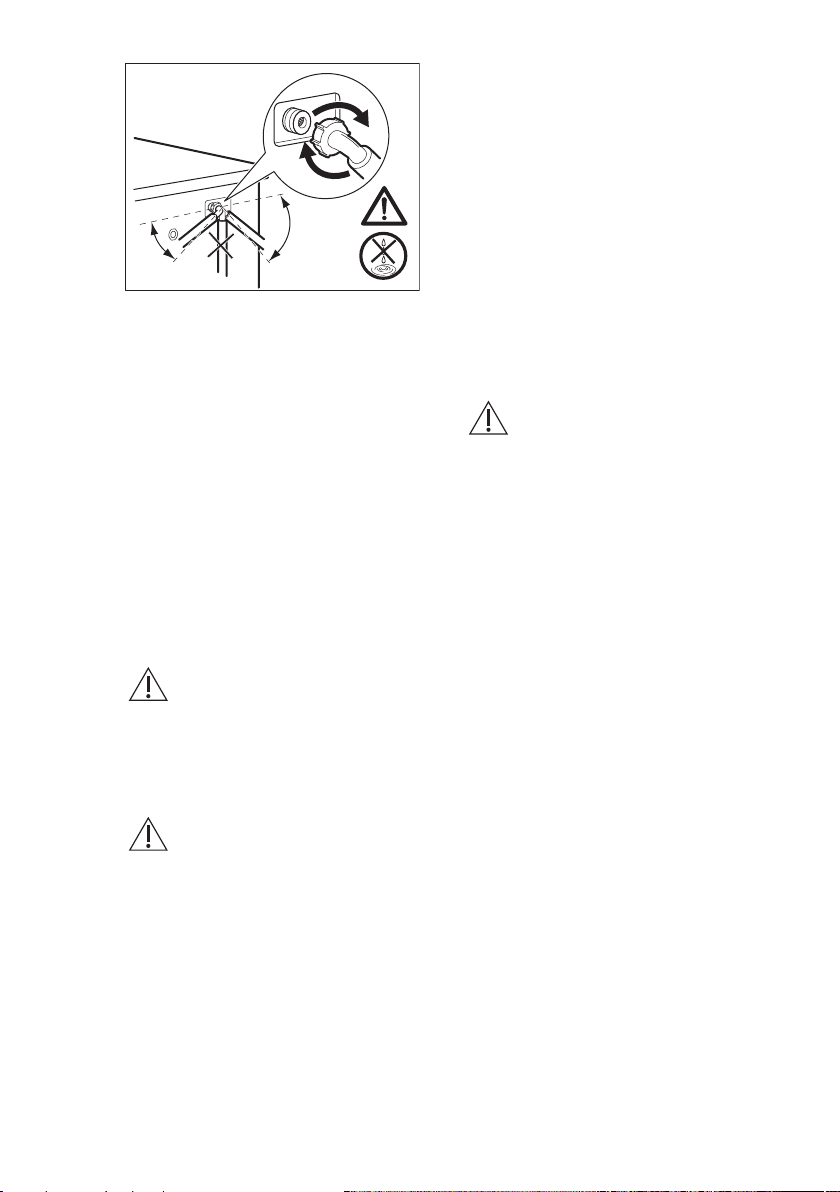
45°
20°
14.11 Emergency drain
If the appliance cannot drain the water,
carry out the same procedure, described
in 'Cleaning the drain pump' paragraph. If
necessary, clean the pump.
When you drain the water with the
emergency drain procedure, you must
activate the drain system again:
1. Put 2 litres of water in the main wash
compartment of the detergent
dispenser.
2. Start the programme to drain the
water.
14.12 Frost precautions
If the appliance is installed in an area
where the temperature can reach the
values around 0° C or drop below,
remove the remaining water from the
inlet hose and the drain pump.
1. Disconnect the mains plug from the
mains socket.
2. Close the water tap.
3. Put the two ends of the inlet hose in
a container and let the water flow out
of the hose.
4. Empty the drain pump. Refer to the
emergency drain procedure.
5. When the drain pump is empty,
install the inlet hose again.
WARNING!
Make sure that the
temperature is higher than
0 °C before you use the
appliance again.
The manufacturer is not
responsible for damages
caused by low temperatures.
15. TROUBLESHOOTING
WARNING!
Refer to Safety chapters.
15.1 Alarm Codes and Possible failures
The appliance does not start or it stops during operation. First try to find a solution to the
problem (refer to the tables).
WARNING!
Deactivate the appliance before carrying out any check.
www.aeg.com46
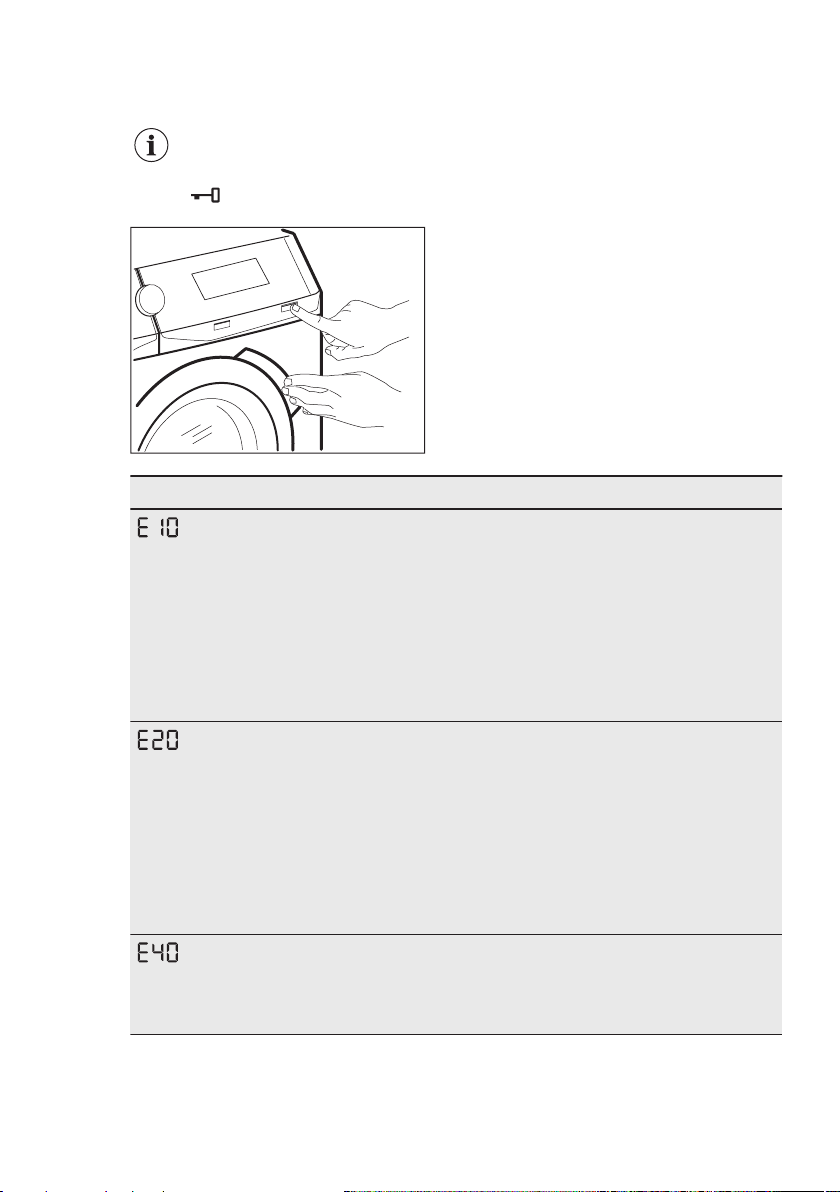
With some problems, the display shows an alarm code and the
Start/Pause button may flash continuously:
If the appliance is overloaded, remove some items
from the drum and/or keep pressed the door while
touching the Start/Pause button until the indicator
stops flashing (see the picture below).
Problem Possible solution
The appliance does
not fill with water prop‐
erly.
• Make sure that the water tap is open.
• Make sure that the pressure of the water supply is not too low.
For this information, contact your local water authority.
• Make sure that the water tap is not clogged.
• Make sure that the inlet hose has no kinks, damages or
bends.
• Make sure that the connection of the water inlet hose is cor‐
rect.
• Make sure that the filter of the inlet hose and the filter of the
valve are not clogged. Refer to 'Care and cleaning'.
The appliance does
not drain the water.
• Make sure that the sink spigot is not clogged.
• Make sure that the drain hose has no kinks or bends.
• Make sure that the drain filter is not clogged. Clean the filter, if
necessary. Refer to "Care and cleaning".
• Make sure that the connection of the drain hose is correct.
• Set the drain programme if you set a programme without drain
phase. If the drain programme is not available in the pro‐
gramme dial, it can be set via App.
• Set the drain programme if you set an option which ends with
water in the tub.
The appliance door is
open or not closed
correctly.
• Make sure that the door is properly closed.
ENGLISH 47
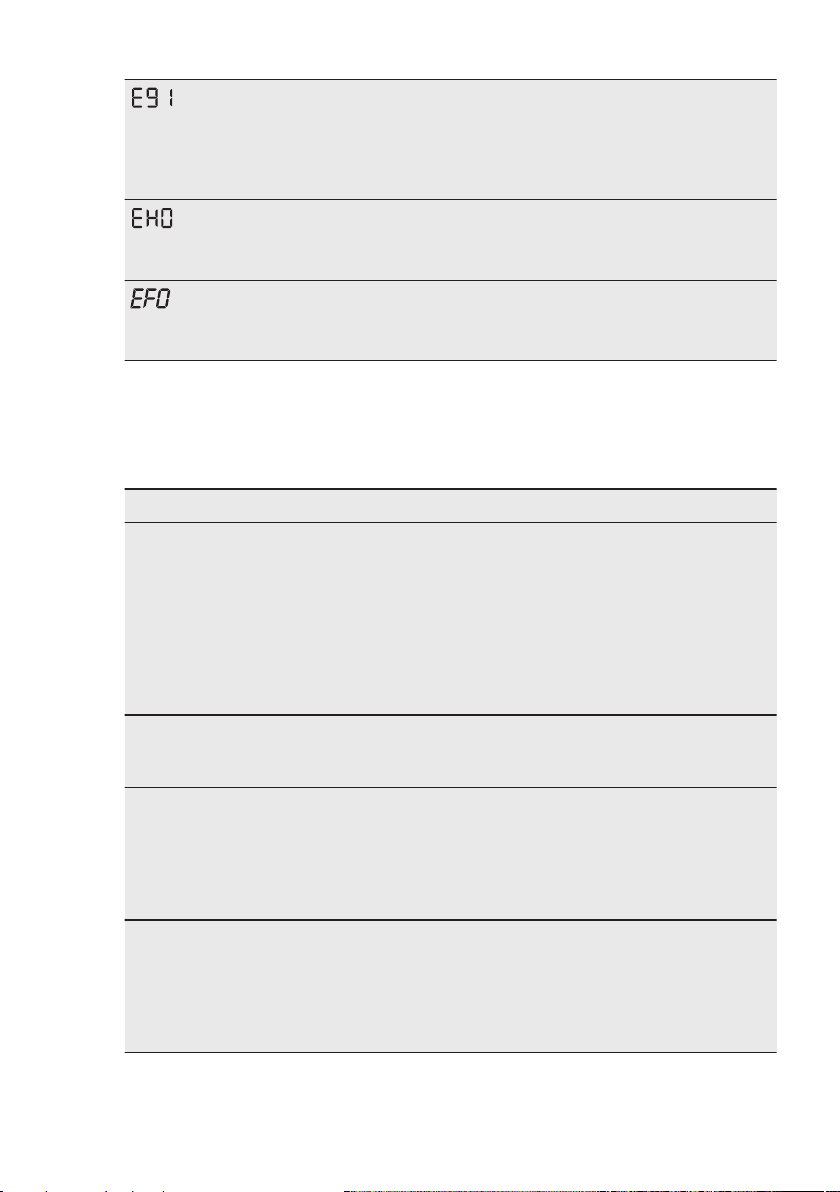
Internal fail. No com‐
munication between
electronic elements of
the appliance.
• The programme was not finished properly or the appliance
stopped too early. Switch the appliance off and on again.
• If the alarm code appears again, contact the Authorised Serv‐
ice Centre.
The mains supply is
unstable.
• Wait until mains supply is stable.
The anti-flood device
is on.
• Disconnect the appliance and close the water tap. Contact the
Authorised Service Centre.
If the display shows other alarm codes, deactivate and activate the
appliance. If the problem continues, contact the Authorised Service
Centre.
In case of different problem with the washing machine check the
table below for possible solutions.
Problem Possible solution
The programme does
not start.
• Make sure that the mains plug is connected to the mains
socket.
• Make sure that the appliance door is closed.
• Make sure that there is no damaged fuse in the fuse box.
• Make sure that the Start/Pause has been touched.
• If the delay start is set, cancel the setting or wait for the end of
countdown.
• Deactivate the Child Lock function if it is on.
• Check the position of the knob on the selected programme.
The appliance fills with
water and drains im‐
mediately.
• Make sure that the drain hose is in the correct position. The
hose may be positioned too low. Refer to "Installation instruc‐
tion".
The spin phase does
not operate or the
washing cycle lasts
longer than usual.
• Set the spin programme. If the drain programme is not availa‐
ble in the programme dial, it can be set via App’.
• Make sure that the drain filter is not clogged. Clean the filter, if
necessary. Refer to "Care and cleaning".
• Adjust manually the items in the tub and start the spin phase
again. This problem may be caused by balance problems.
There is water on the
floor.
• Make sure that the couplings of the water hoses are tight and
there is not water leakages.
• Make sure that the water inlet hose and the drain hose have
no damages.
• Make sure you use the correct detergent and the correct
quantity of it.
www.aeg.com48
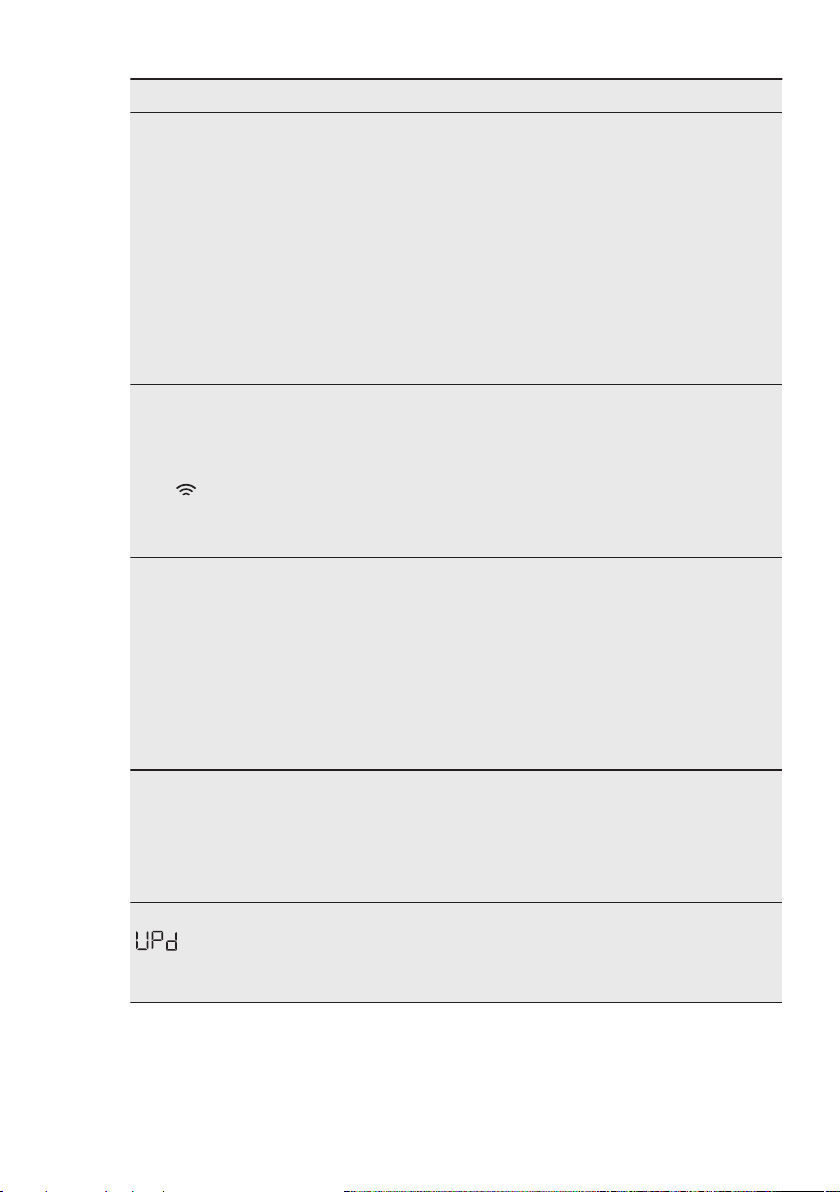
Problem Possible solution
You cannot open the
appliance door.
• Make sure that a washing programme that ends with water in
tub, has not been selected.
• Make sure that the washing programme is finished.
• Set the drain or the spin programme if there is water in the
drum. If the spin and drain programmes are not available in
the programme dial, they can be set via App.
• Make sure that the appliance receives electrical power.
• This problem may be caused by a failure of the appliance.
Contact the Authorised Service Centre.
If you need to open the door, please read carefully "Emergen‐
cy door opening".
• Make sure that the Remote Start is not activated. Deactivate
it.
The display does not
show the wireless indi‐
cator .
• Check the wireless signal.
• Make sure that the wireless connection is on. Refer to para‐
graph "Configuring the washing machine wireless connection"
in "Wi-Fi - Connectivity setup" chapter.
• Check your home network and router.
• Restart the router.
• Contact your wireless service provider if there are further
problems with the wireless network.
The App cannot con‐
nect to the appliance.
• Check the wireless signal.
• Check if your smart device is connected to the wireless net‐
work.
• Check your home network and router.
• Restart the router.
• Contact your wireless service provider if there are problems
with the wireless network.
• The appliance, the smart device, or both, need to be config‐
ured again because a new router has been installed or the
router configuration has been changed.
The App cannot fre‐
quently connect to the
appliance.
• Make sure that the wireless signal reaches the appliance. Try
to move the home router as near the appliance as possible or
consider purchasing a wireless range extender.
• Make sure the wireless signal is not disrupted by microwave.
Turn the microwave off. Avoid using the microwave and the
remote control at the same time.
The display shows
. All buttons are
inactive, except the the
On/Off .
• The appliance is downloading any available updates. Wait un‐
til the update process is complete. If you deactivate the appli‐
ance during update, it resumes when you activate the appli‐
ance again.
ENGLISH 49
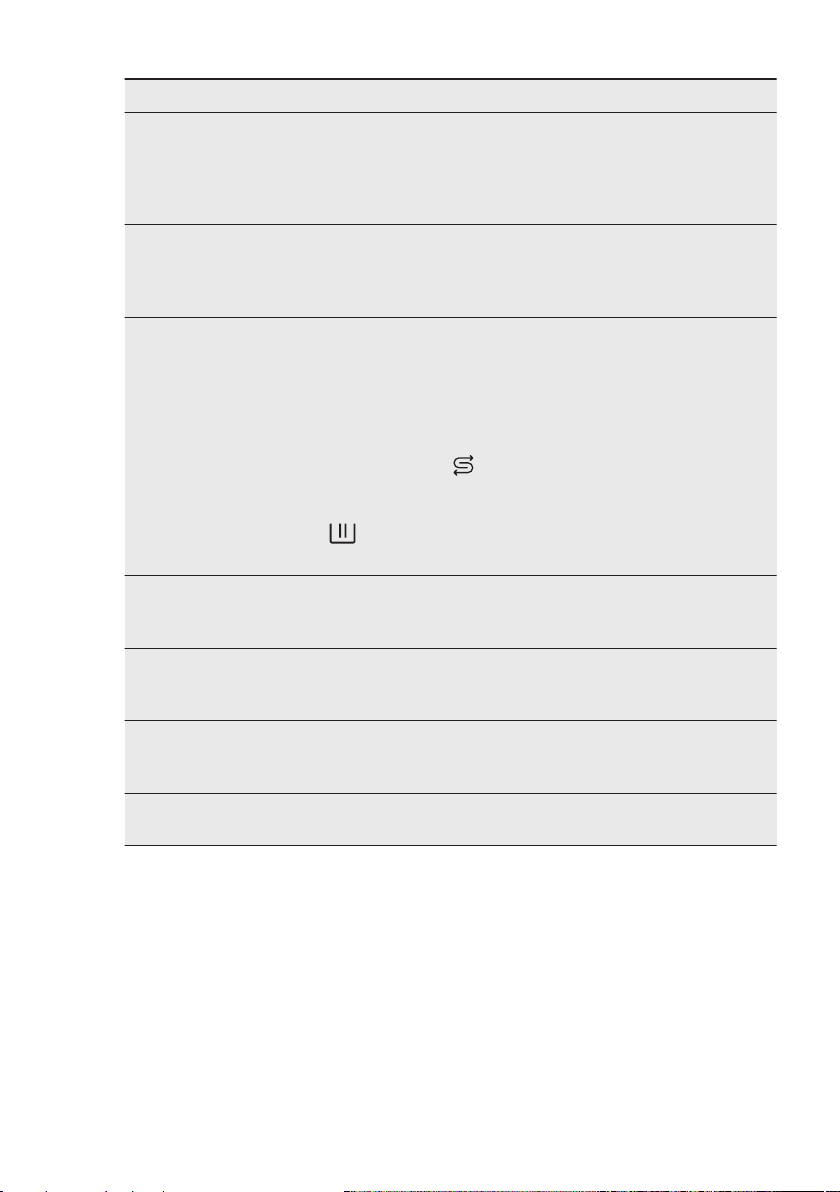
Problem Possible solution
The appliance makes
an unusual noise and
vibrates.
• Make sure the levelling of the appliance is correct. Refer to
"Installation instruction".
• Make sure that the packaging and/or the transit bolts are re‐
moved. Refer to "Installation instruction".
• Add more laundry in the drum. The load may be too small.
The programme dura‐
tion increases or de‐
creases during pro‐
gramme execution.
• The ProSense System is able to adjust the programme dura‐
tion according to the type and the laundry load size. Refer to
"The ProSense System load detection" in "Daily Use" chapter.
The washing results
are not satisfactory.
• Increase the detergent quantity or use a different detergent.
• Use special products to remove the stubborn stains before
you wash the laundry.
• Make sure that you set the correct temperature.
• Decrease the laundry load.
• Make sure that no other type of detergent has been poured
the compartment
Salt
. In this case, refer to "Eliminating deter‐
gent or other additives from salt compartment'.
• Make sure that no salt has been poured in the compartment
. If it happens, run a rinse cycle or run the washing cycle
again.
Too much foam in the
drum during the wash‐
ing cycle.
• Reduce the quantity of detergent or the number of tablets or
single-dose detergents.
Excessive consump‐
tion of salt.
• Check if the water softener has been set to act also during
rinse phase. Refer to "How to set the water hardness level" in
"The Water Softener (Soft Water)" chapter.
Salt is not consumed.
• The appliance may need a water softener regeneration: run a
a Cottons or a Synthetics cycle. Refer to "Water softener re‐
generation" in "The Water Softener (Soft Water)" chapter.
The drum light does
not go on.
• Make sure that the LED lamp is not burned. To replace it, con‐
tact the Authorised Service Centre.
After the check, activate the appliance. The programme continues
from the point of interruption.
If the problem occurs again, contact the Authorised Service Centre.
The necessary data for the service centre are on the rating plate.
15.2 Emergency door
opening
In case of power failure or functioning
failure the appliance door remains
locked. The washing programme
continues when the power is restored. If
the door remains locked in case of
failure, it is possible to open it using the
emergency unlock function.
Before opening the door:
www.aeg.com50
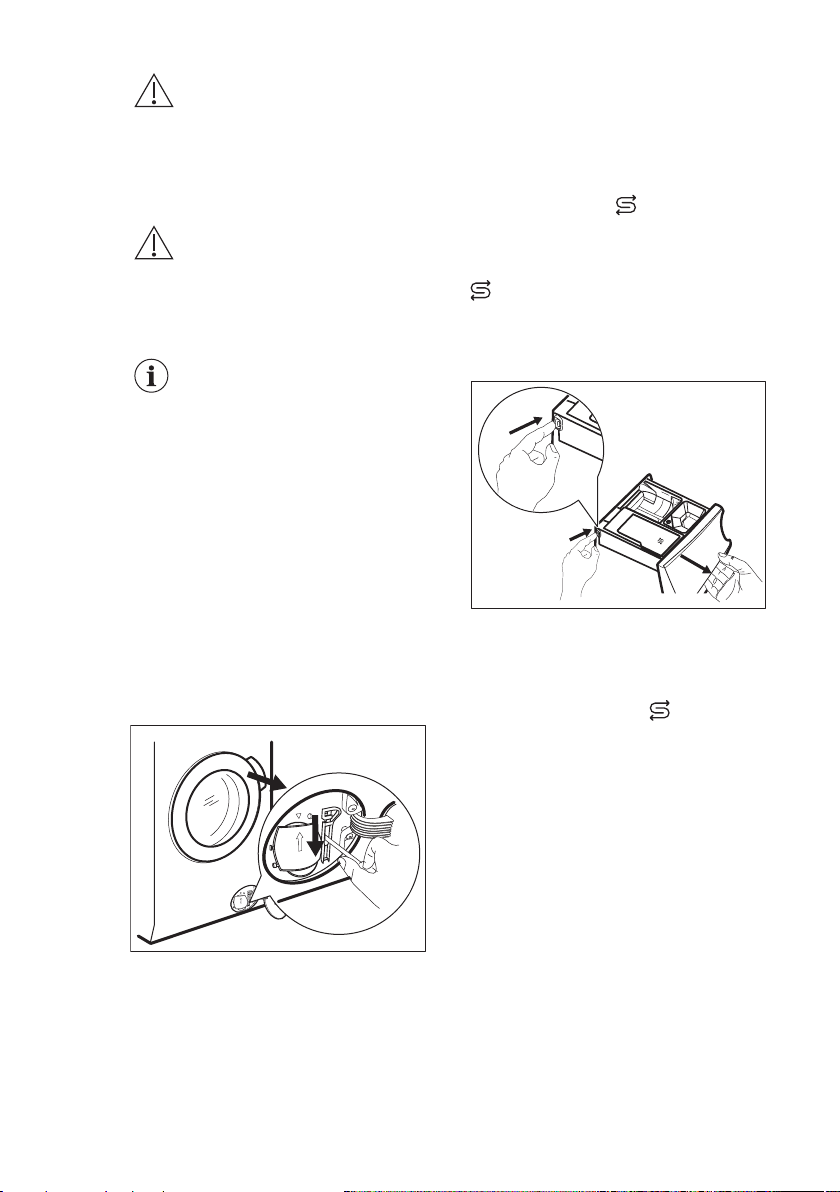
CAUTION!
Risk of burns! Make sure
that the water temperature
is not too high and the
laundry is not hot. If
necessary, wait until they
cool down.
CAUTION!
Risk of injury! Make sure
that the drum is not
rotating. If necessary, wait
until the drum stops
rotating.
Make sure that the water
level inside the drum is
not too high. If necessary,
proceed with an
emergency drain (refer to
«Emergency drain» in
«Care and cleaning»
chapter).
To open the door, proceed as follows:
1. Press the On/Off button to switch the
appliance off.
2. Disconnect the mains plug from the
mains socket.
3. Open the filter flap.
4. Pull the emergency unlock trigger
downward once. Pull it downward
once again, keep it tensed and, in the
meanwhile, open the appliance door.
5. Take out the laundry and then close
the appliance door.
6. Close the filter flap.
15.3 Eliminating detergent or
other additives from salt
compartment
Salt
Any type of detergent and additives
inadvertently poured in the compartment
Salt
must be eliminated completely.
If this happens, please proceed as
follows:
1. Pull the drawer out.
Max
▼
Max
▼
Max
▼
Salt
Max
2. Eliminate any trace of detergent or
additive and clean the compartment
thoroughly.
3. Insert the drawer back and pour salt
in the compartment
Salt
.
4. Close the drawer.
5. Run a cotton or synthetic cycle,
without reducing time, to restore the
water softener function.
ENGLISH 51
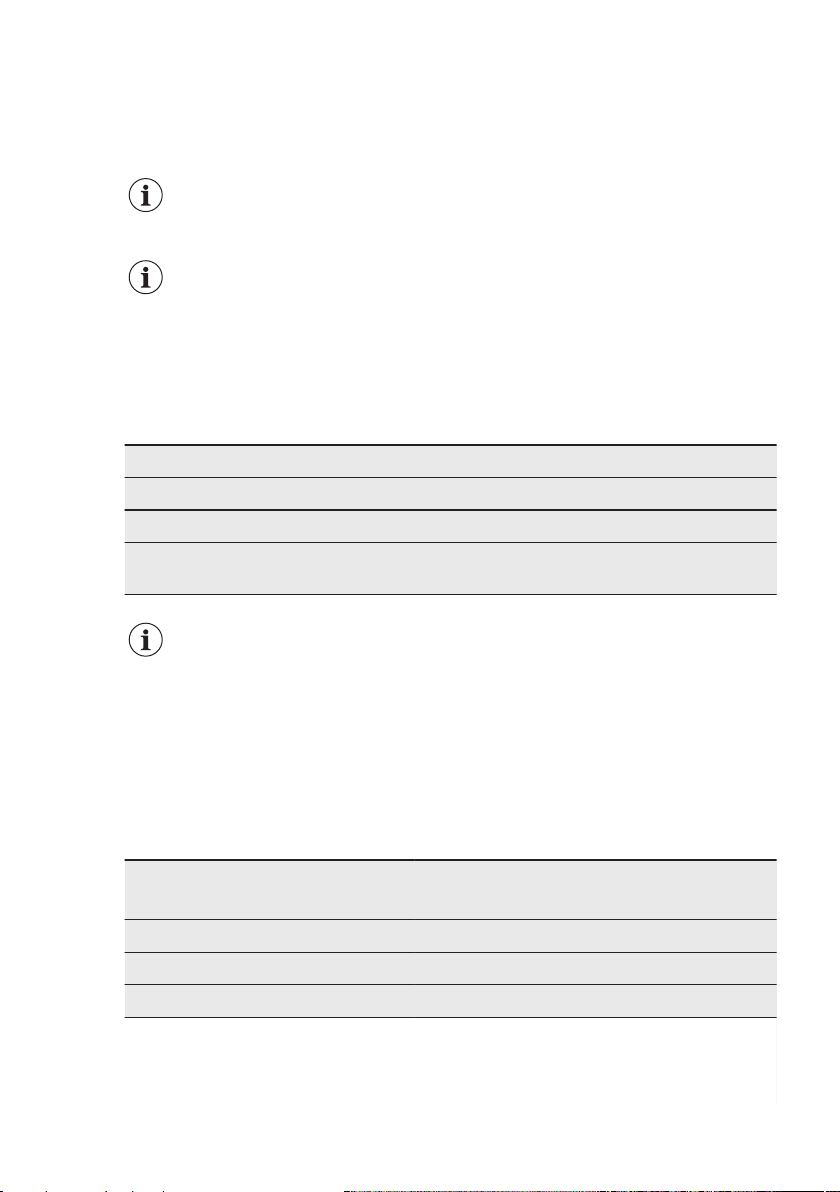
16. CONSUMPTION VALUES
16.1 Introduction
See the web link www.theenergylabel.eu for
detailed information about Energy Label.
The QR code on the energy label supplied with the
appliance provides a web link to the product
information sheet. Keep the energy label for
reference together with the user manual and all
other documents provided with this appliance.
16.2 Legend
kg Laundry load. h:mm Programme duration.
kWh Energy consumption. °C Temperature in the laundry.
Litres Water consumption. rpm Spin speed.
% Remaining moisture at the end of spinning phase. The higher is the spin speed,
the higher is the noise and the lower is the remaining moisture.
Values and programme duration may differ depending on different
conditions (e.g. room temperature, water temperature and pressure, load
size and type of laundry, supply voltage) and also if you change the
default setting of a programme.
16.3 According to UK
Ecodesign for Energy-
Related Products and Energy
Information Regulations
Eco 40-60 pro‐
gramme
1)
kg kWh Litres h:mm % °C
rpm
2)
Full load 9 0.730 60 3:40 50 33 1551
Half load 4.5 0.535 50 2:45 50 31 1551
Quarter load 2.5 0.265 40 2:45 54 24 1551
1)
The performance results and low energy consumption are guaranteed by the use of softened water.
To maintain this achievement over time, it is essential to set the right water hardness level by following
the user manual instructions and use salt regularly for regenerating the resins.
2)
Maximum spin speed.
www.aeg.com52
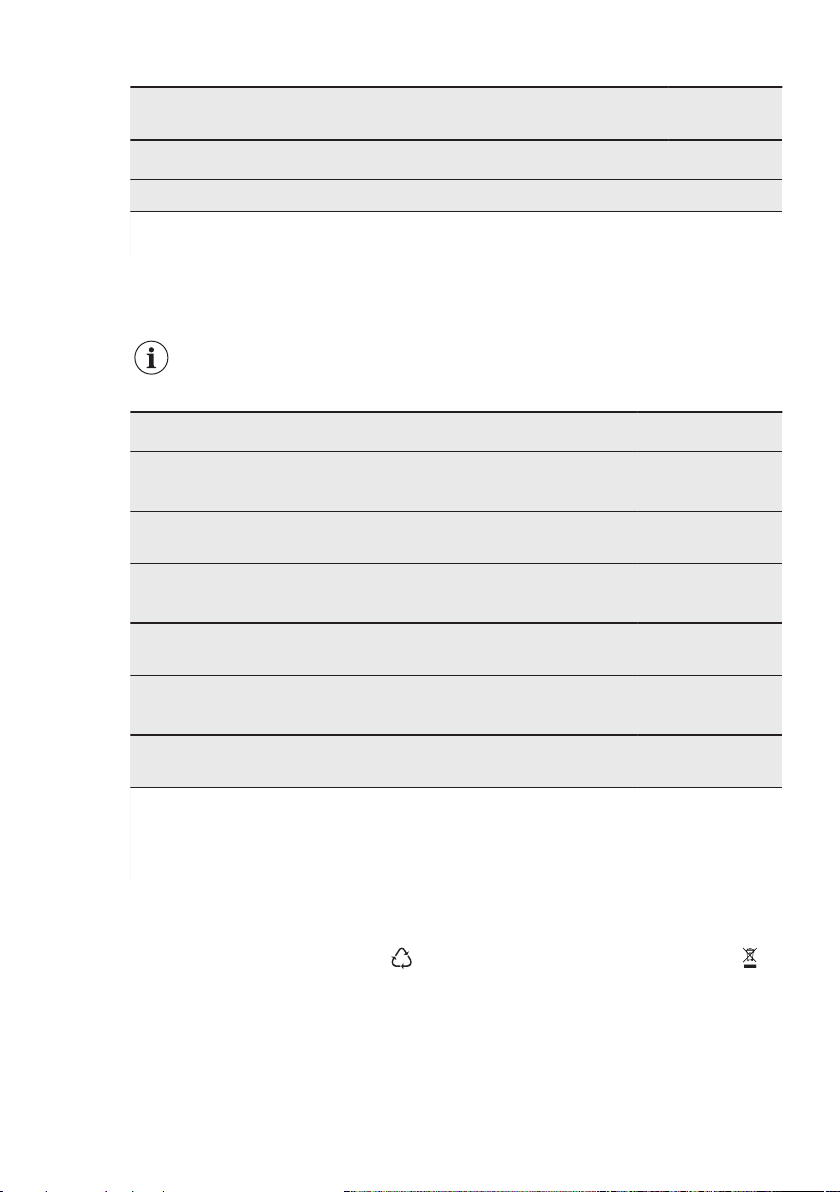
Power consumption in different modes
Off (W) Stand-by (W)
Delay start
(W)
Networked
standby (W)
0.30 0.30 4.00
2.00
1)
Time to Off/Standby mode is 15 minutes maximum.
1)
The energy consumption of the connected function is approximately 17.5 kWh per year. To disconnect
this function, please refer to the chapter 'Wi-fi - Connectivity setup'.
16.4 Common programmes
These values are indicative only.
Programme
kg kWh Litres h:mm % °C
rpm
1)
Cottons
2)
95°C
9 2.15 85 3:35 44 85 1600
Cottons
60°C
9 1.55 80 3:50 44 55 1600
Cottons
3)
20°C
9 0.35 80 3:10 44 20 1600
Synthetics
40°C
4 0.80 50 2:25 35 40 1200
Delicates
4)
30°C
2 0.30 45 1:10 35 30 1200
Wool
30°C
2 0.25 65 1:05 30 30 1200
1)
Reference indicator of the spin speed.
2)
Suitable for washing heavily soiled textiles.
3)
Suitable for washing lightly soiled cottons, synthetic and mixed fabrics.
4)
It also performs as quick washing cycle for lightly soiled laundry.
17. ENVIRONMENTAL CONCERNS
Recycle materials with the symbol .
Put the packaging in relevant containers
to recycle it. Help protect the
environment and human health by
recycling waste of electrical and
electronic appliances. Do not dispose of
appliances marked with the symbol
with the household waste. Return the
product to your local recycling facility or
contact your municipal office.
*
ENGLISH 53


My AEG Care app
The software in this product contains components that are based on free and open source software. AEG gratefully
acknowledges the contributions of the open software and robotics communities to the development project.
To access the source code of these free and open source software components whose license conditions require
publishing, and to see their full copyright information and applicable license terms, please visit:
http://aeg.opensoftwarerepository.com (folder NIUX)
www.aeg.com/shop
157031972-A-422021