0
ge.com
®
Safetg Information ............. 2
Installation Instructions .... 3-14
Step-bLI-step instructions ........ 6-14
Operating Instructions
Breaking a salt bridge ............. 16
Cleaning the nozzle and
venturi assemblg .................. 16
Features .......................... 17
Service ..................... 15, 18-20
Water softener sgstem ......... 15-20
Care and Cleaning ............. 21
Troubleshooting Tips ...... 22-24
Consumer Support
Consumer Support ........ Back Cover
Parts list/catalog ............... 27-30
WarrantLl (U.S.) .................... 31
WarrantLI (Canada) ................ 32
Water
Softening
Sgstem
Models GXSH39E, GNSH45E
Sistema Suavizante
de Agua
Modelos GXSH39E, GNSH45E
La secci6n en espa_ol empieza en la p6gina 33
Sgstem tested and certified bg NSF International against NSF/ANSI Standard 44 for the
chemical reduction claims specified on the performance data sheet.
Sistema probado g certificado par NSF International contra norma 44 de NSF/ANSI para las
afirmaciones de reducci6n de los productos quimicos especificadas en la hoja de datos de
funcionamiento.
0
Sgstem Tested and Certified bg the Water Qualitg Association against CSAB485.!.
Sistema probado g certificado par Water Qualitg Association en cumplimiento con CSAB485.!.
Write the model and serial
numbers here:
Model #
Serial #
To find these numbers, lift the
cover and look on the rim
below the control panel.
7283950 215Cl173P025
49-50180-2 09-08JR
IMPORTANT SAFETY INFORMATION.
READ ALL INSTRUCTIONS BEFORE USING.
WARNING!
For Four safet_l, the information in this manual must be followed to minimize the risk of electric
shock, property damage or personal injury.
SAFETY PRECAUTIONS
Check and comply with your state and local codes.
You must follow these guidelines.
iiiilDiiii:,
Use care when handling the water softening
system. Do not turn upside down, drop, drag
or set on sharp protrusions.
Water softening systems using sodium chloride
(salt) for recharge add sodium to the water.
Persons on sodium restricted diets should consider
the added sodium as part of their overal! intake.
Potassium chloride can be used as on alternative
to sodium chloride in your softener.
The water softening system works on 24 volt-60 Hz
electrical power only. Be sure to use only the
included transformer.
Use clean water softening salts only, at least 99.5%
pure. NUGGET,PELLETor coarse SOLARsalts are
recommended. Do not use rock, block, granulated
or ice cream making salts. They contain dirt and
sediments, or mush and cake, and will create
maintenance problems.
Keep the salt hole cover in place on the softener
unless servicing the unit or refilling with salt.
WARN!NG: 00notusewithwaterthat
is microbiologically unsafe or of unknown quality
without adequate disinfection before or after the
system.
Transformer must be plugged into an indoor
120 volt, grounded outlet only.
PROPER INSTALLATION
This water softening system must be properly installed and located in accordance with the
Installation Instructions before it is used.
iiiilDiiii:_
Install or store where it will not be exposed to
temperatures below freezing or exposed to any
type of weather. Water freezing in the system will
break it. Do not attempt to treat water over !O0°R
Do not install in direct sunlight. Excessive sun or
heat may cause distortion or other damage to
non-metallic parts.
Properly ground to conform with all governing
codes and ordinances.
;, Use only lead-free solder and flux for all
sweat-solder connections, as required by
state and federal codes.
Softener resins may degrade in the presence of
chlorine above 2 ppm. If you have chlorine in excess
of this amount, you may experience reduced life
of the resin. In these conditions, you may wish to
consider purchasing a GE point-of-entry household
filtration system with a chlorine reducing filter.
WARNING: Discard all unused parts
and packaging material after installation. Small
parts remaining after the installation could be
a choke hazard.
iiiiiiiiii;,
The water softening system requires a minimum
water flow of three gallons per minute at the inlet.
Maximum allowable inlet water pressure is 125 psi.
If daytime pressure is over 80 psi, nighttime pressure
may exceed the maximum. Use a pressure reducing
valve to reduce the flow if necessary.
READ AND FOLLOW THIS SAFETY INFORMATION CAREFULLY.
SAVE THESE INSTRUCTIONS
I
I
stall ti
str cti
Water Softening System
Models G×SH39E and GNSH45E
WAR NIN G: Read entire manual. Failure to follow all guides and rules could cause personal
injury or property damage.
• Check with your state and/or local public works department for plumbing codes. You must follow their
guides as you install the Water Softening system.
NOTE: Failure to comply with these installation instructions will void the product warranty, and the
installer will be responsible for any service, repair or damages caused thereby.
BEFORE BEGINNING INSTALLATION
Read these instructions completely and carefully.
•IMPORTANT - Savetheseinstructions
for local inspector's use.
• IMPORTANT - Observeallgoverning
codes and ordinances.
• Note to Installer- Be sure to leave these
instructions with the Consumer.
Note to Consumer - Keep these instructions
for future reference.
Proper installation is the responsibilitg of the
installer.
Product failure due to improper installation
is not covered under the Warranty.
A shutoff valve must be available or added near
the installation point.
IMPORTANT INSTALLATION
RECOMMENDATIONS
• In the Commonwealth of Massachusetts,
Plumbing Code 248 CMR shell be adhered to.
Consult with your licensed plumber.
• Use onlg lead-free solder and flux for oil sweat-
solder connections, as required bg state and
federal codes.
• Connect the softener to the main water supplg
pipe before or ahead of the water heater.
DO NOT RUN HOT WATER THROUGH THE
SOFTENER. Temperature of water passing
through the softener must be less than 120%.
IMPORTANT INSTALLATION
RECOMMENDATIONS (CONT.)
Use care when handling the softener. Do not
turn upside down, drop, drag or set on sharp
protrusions.
Maximum allowable inlet water pressure is 125
psi. If dagtime pressure is over 80 psi, nighttime
pressure mog exceed the maximum. Use o
pressure reducing valve if necessorg. (Adding o
pressure reducing valve mag reduce the flow.)
The softener works on 24 volt-60 Hz electrical
power onlg. Be sure to use the included
transformer. Be sure the electric outlet and
transformer are in an inside location to protect
from moisture.
• See Where to Install the Softener section
for more details.
-&WARNING: Do not use with water
that is microbiologicollg unsafe or of unknown
qualitg without adequate disinfection before or
after the sgstem. The water should be tested
periodicollg to verifg that the sgstem is
performing satisfactorilg.
• Small ports remaining after the installation could
be a choke hazard. Discord safelg.
Installation Instructions
UNPACKING AND INSPECTION
Be sure to check the entire softener for ang
shipping damage or parts loss. Also note damage
to the shipping cartons. Contact the transportation
compang for all damage and loss claims. The
manufacturer is not responsible for damages
in transit.
Small parts needed to install the softener are
packaged either in a bag or on a cardboard
sheet. To avoid loss of the small parts, keep them
packaged until gou are readg to use them. Be sure
not to discard components hidden in packaging.
TOOLS AND MATERIALS REgUIRED
FOR INSTALLATION
• Pliers
• Screwdriver
• Teflon tape
• Razor knife
o
o
Two adjustable wrenches
Additional tools mag be required if modification
to home plumbing is necessarg.
In and out fittings included with the softener are
1" NPT male adapters. You should maintain the
same, or larger, pipe size as the water supplg
pipe, up to the softener inlet and outlet. Then,
use the necessorg adapters to connect the water
supplg to the 1" NPT male adapters.
Use the included bgpass valve to install the
softener. The bgpass valve allows gou to turn off
water to the softener for servicing, but still have
water in the house pipes. The in and out fittings
referred to above connect to the bgpass valve
with the included bgpass clips.
Use appropriate fitting/pipe material (i.e., copper,
brass, galvanized or CPVC) to connect the 1" NTP
plastic adapters to the house plumbing.
If additional drain hose is needed for valve and
salt tank drains, it can be ordered from GE Parts
at 800.626.2002, part number WS07X10004.
If a rigid valve drain is needed to complg with
plumbing codes, gou can bug the parts needed
to connect u 1/2" copper tubing or plastic pipe
drain. See Step 5.
Clean nugget or pellet water softener salt is
needed to fill the brine tank. See Step 9.
WHERE TO INSTALL THE SOFTENER
Place the softener us close as possible to a
sewer drain, or other acceptable drain point
or standpipe.
It is recommended to keep outside faucets
on hard water to save soft water and salt.
Do not install the softener in a place where it
could freeze. Freeze damage is not covered bg
the warrantg.
Do not install the softener where it would block
access to the water heater or access to the main
water shutoff.
Put the softener in a place where water damage
is least likelg to occur if a leak develops. The
manufacturer will not repair or pug for water
damage.
A 120-volt electric outlet is needed to plug in the
included transformer. The softener has a 10-foot
power cable. If the outlet is remote (up to 100
feet), use 18 gauge wire to connect. Be sure the
electric outlet and transformer are in an inside
location, to protect from wet weather. Be sure
the outlet is unswitched to prevent accidental
shutoff.
If installing in an outside location, gou must
take the steps necessarg to assure the softener,
installation plumbing, wiring, etc., are as well
protected from the elements (sunlight, rain, wind,
heat, cold), contamination, vandalism, etc., as
when installed indoors. Outdoor installation is
not recommended, and voids the warrantg.
Keep the softener out of direct sunlight.
The sun's heat mag distort non-metallic
parts and mug damage the electronics.
4
Installation Instructions
PLAN HOW YOU WILL INSTALL THE
SOFTENER
You must first decide how to run in and out pipes
to the softener. Look at the house main water pipe
at the point where you will connect the softener.
Is the pipe soldered copper, glued plastic or
threaded galvanized? What is the pipe size?
WARNING: Use only lead-free solder and
flux to prevent lead poisoning.
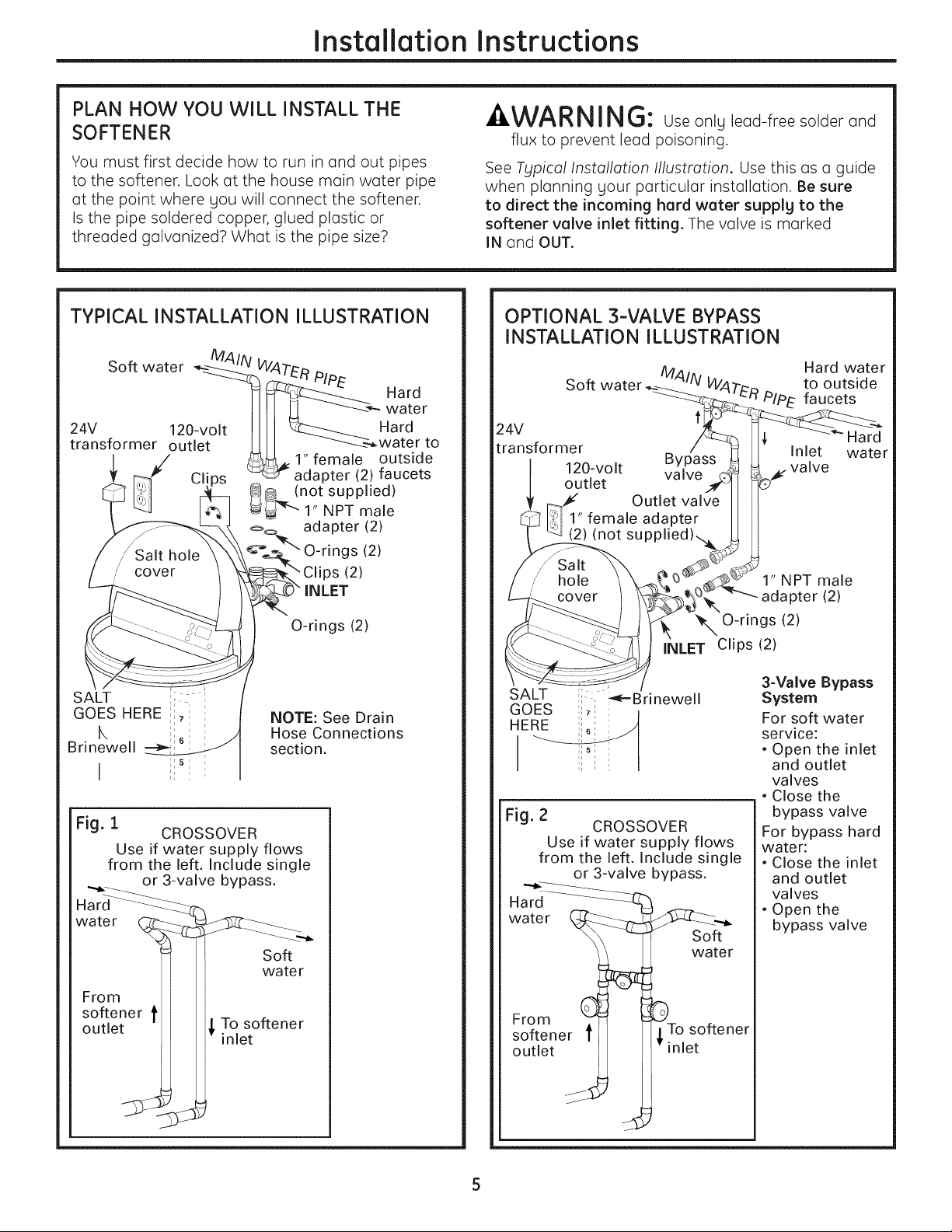
See Typical Installation Illustration. Use this as a guide
when planning your particular installation. Be sure
to direct the incoming hard water supply to the
softener valve inlet fitting. The valve is marked
IN and OUT.
TYPICAL INSTALLATION ILLUSTRATION
O-rings (2)
NOTE: See Drain
Hose Connections
section.
Fig. 1
CROSSOVER
Use if water supply flows
from the left. Include single
or 3-valve bypass.
water
From
softener t
outlet
Soft
water
To softener
inlet
OPTIONAL 3-VALVE BYPASS
INSTALLATION ILLUSTRATION
Soft water
Hard water
to outside
PIPE faucets
24V
transformer
120-volt
outlet
Inlet
valve
F
Hard
water
1" NPT male
adapter (2)
_'X O-rings (2)
INLET Clips (2)
SALT
GOES
HERE
Fig. 2
CROSSOVER
Use if water supply flows
from the left. Include single
or 3-valve bypass.
Hard
water
Soft
water
From
softener _,To softener
outlet inlet
3-Valve Bypass
System
For soft water
service:
• Open the inlet
and outlet
valves
• Close the
bypass valve
For bypass hard
water:
• Close the inlet
and outlet
valves
• Open the
bypass valve
Installation Instructions
BEFORE YOU BEGIN
• Turn off the gas or electric supplg to the water
heater, in the possibilitg that the water heater
mag be drained while draining pipes.
• Turn off the water supplg to pipes to be cut and
drain the house water pipes.
• Open both hot and cold faucets at the lowest
location possible.
NOTE: For easier installation, remove the top cover.
Release 2 clips at rear of cover. Rotate cover
forward and lift up.
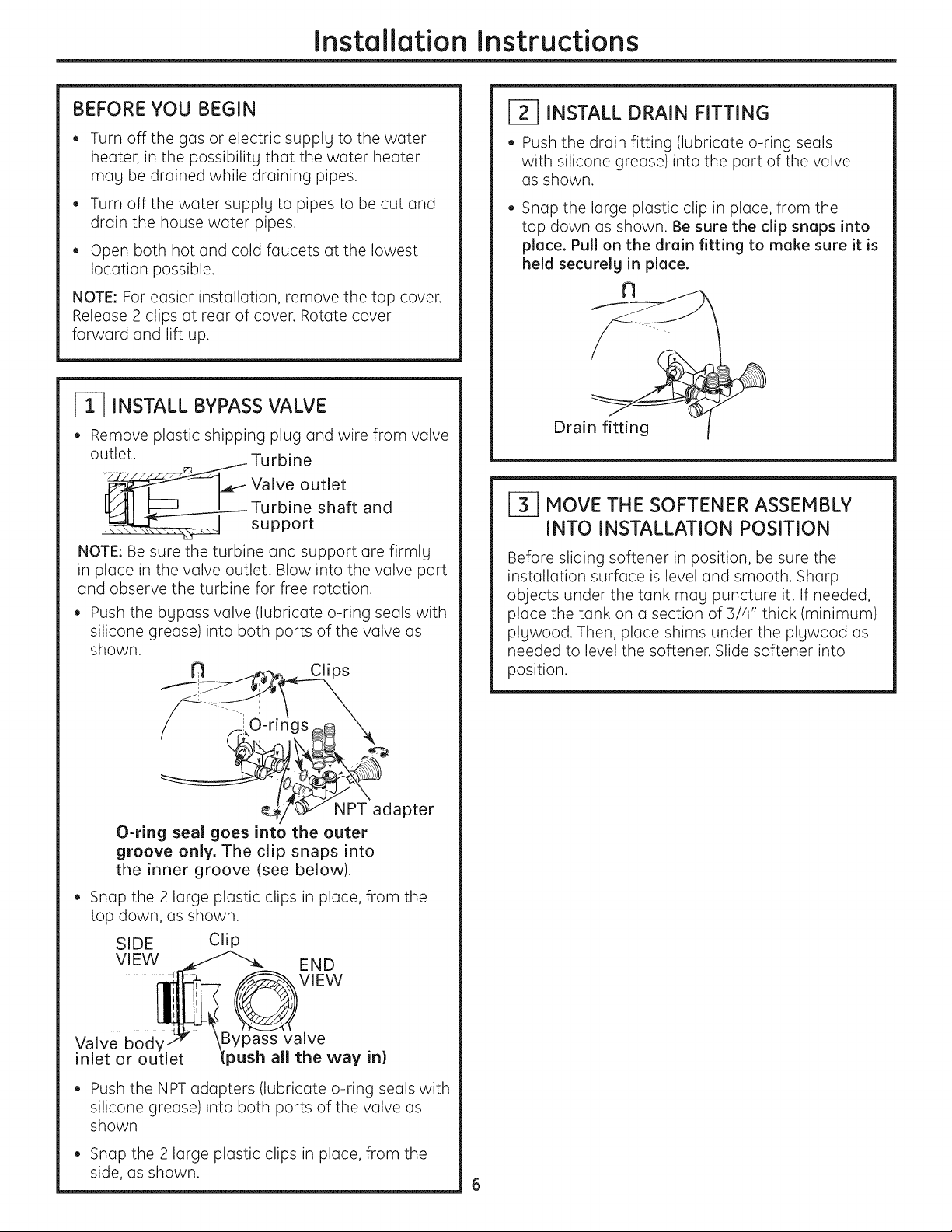
INSTALL BYPASS VALVE
• Remove plastic shipping plug and wire from valve
outlet. Turbine
_ Valve outlet
Turbine shaft and
• support
NOTE: Be sure the turbine and support are firmlg
in place in the valve outlet. Blow into the valve port
and observe the turbine for free rotation.
Push the bypass valve (lubricate o-ring seals with
silicone grease) into both ports of the valve as
shown.
dapter
O-ring seal goes into the outer
groove only. The clip snaps into
the inner groove (see below).
• Snap the 2 large plastic clips in place, from the
top down, as shown.
SIDE Clip
VIEW
Valve
inlet or
END
VIEW
valve
all the way in}
• Push the NPT adapters (lubricate o-ring seals with
silicone grease) into both ports of the valve as
shown
• Snap the 2 large plastic clips in place, from the
side, as shown.
1-_ INSTALL DRAIN FITTING
• Push the drain fitting (lubricate o-ring seals
with silicone grease) into the part of the valve
as shown.
• Snap the large plastic clip in place, from the
top down as shown. Be sure the clip sneps into
piece. Pull on the drein fitting to meke sure it is
held securely in piece.
Drai
HOVE THE SOFTENER ASSEMBLY
INTO INSTALLATION POSITION
Before sliding softener in position, be sure the
installation surface is level and smooth. Sharp
objects under the tank may puncture it. If needed,
place the tank on a section of 3/4" thick (minimum)
plgwood. Then, place shims under the plgwood as
needed to level the softener. Slide softener into
position.
Installation Instructions
PLUMB "IN" AND "OUT" PIPES
TO AND FROM SOFTENER
-4,CAUTION: Observea,ofthefollowing
cautions as you connect inlet and outlet
plumbing, See Typical Installation lllustration.
• BE SURE INCOMING HARD WATER SUPPLY IS
DIRECTED TO THE SOFTENER VALVE INLET PORT.
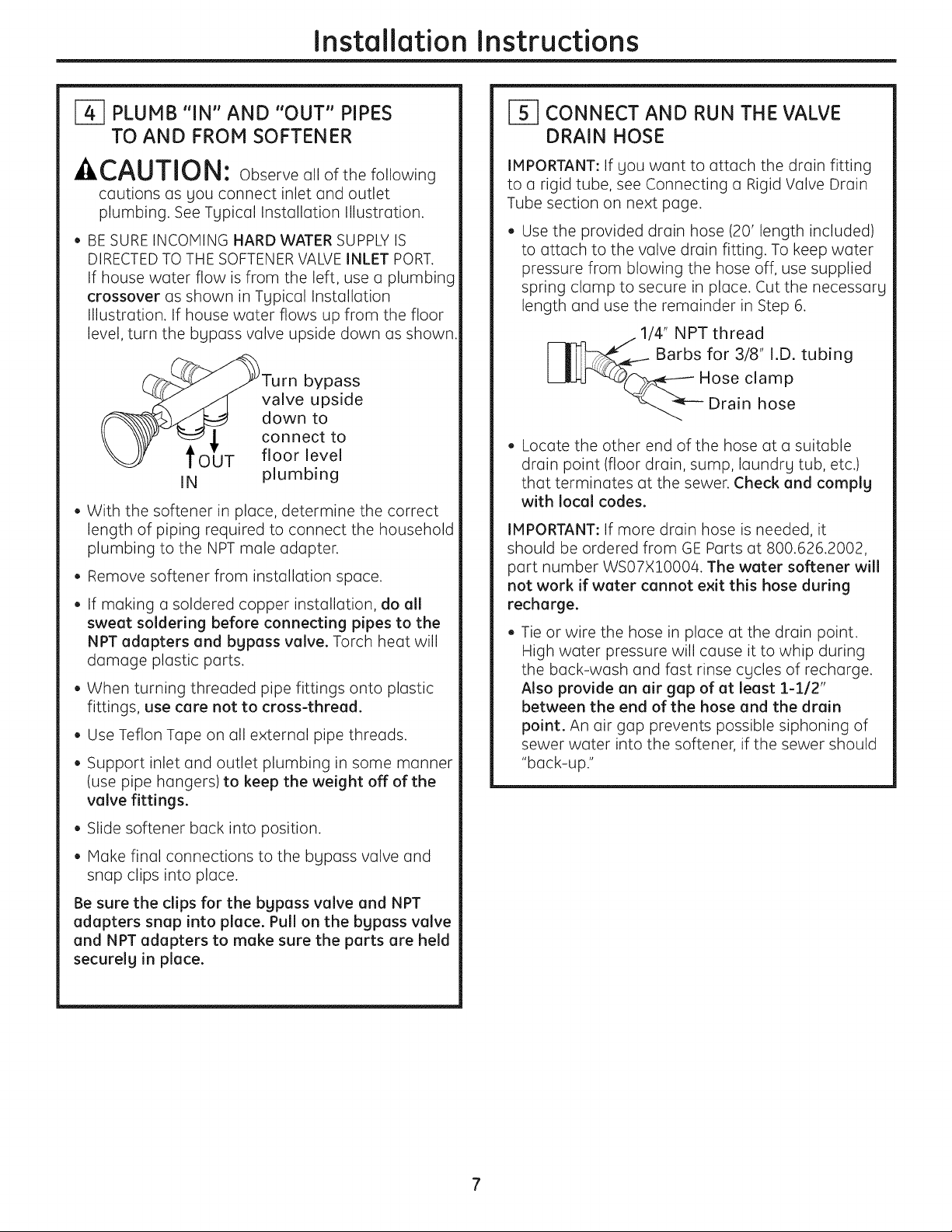
If house water flow is from the left, use a plumbing
crossover as shown in Typical Installation
Illustration. If house water flows up from the floor
level, turn the bgpass valve upside down as shown.
___O_T urn bypass
valve upside
down to
connect to
floor level
IN plumbing
• With the softener in place, determine the correct
length of piping required to connect the household
plumbing to the NPT male adapter.
• Remove softener from installation space.
• If making a soldered copper installation, do all
sweat soldering before connecting pipes to the
NPT adapters and bypass valve. Torch heat will
damage plastic parts.
• When turning threaded pipe fittings onto plastic
fittings, use care not to cross-thread.
• Use Teflon Tape on all external pipe threads.
• Support inlet and outlet plumbing in some manner
(use pipe hangers)to keep the weight off of the
valve fittings.
• Slide softener back into position.
• Make final connections to the bLIpass valve and
snap clips into place.
Be sure the clips for the bgpass valve and NPT
adapters snap into place. Pull on the bgpass valve
and NPT adapters to make sure the parts are held
securelg in place.
I-_ CONNECT AND RUN THE VALVE
DRAIN HOSE
IMPORTANT: If LlOUwant to attach the drain fitting
to a rigid tube, see Connecting a Rigid Valve Drain
Tube section on next page.
Use the provided drain hose (20' length included)
to attach to the valve drain fitting. To keep water
pressure from blowing the hose off, use supplied
spring clamp to secure in place. Cut the necessary
length and use the remainder in Step 6.
1/4" NPT thread
Barbs for 3/8" I.D. tubing
Hose clamp
Drain hose
Locate the other end of the hose at a suitable
drain point (floor drain, sump, laundrg tub, etc.)
that terminates at the sewer. Check and comply
with local codes.
IMPORTANT: If more drain hose is needed, it
should be ordered from GE Parts at 800.626.2002,
part number WS07X10004. The water softener will
not work if water cannot exit this hose during
recharge.
Tie or wire the hose in place at the drain point.
High water pressure will cause it to whip during
the back-wash and fast rinse cgcles of recharge.
Also provide an air gap of at least 1-1/2"
between the end of the hose and the drain
point. An air gap prevents possible siphoning of
sewer water into the softener, if the sewer should
"back-up."
Installation Instructions
CONNECT AND RUN THE VALVE
DRAIN HOSE {CONT.)
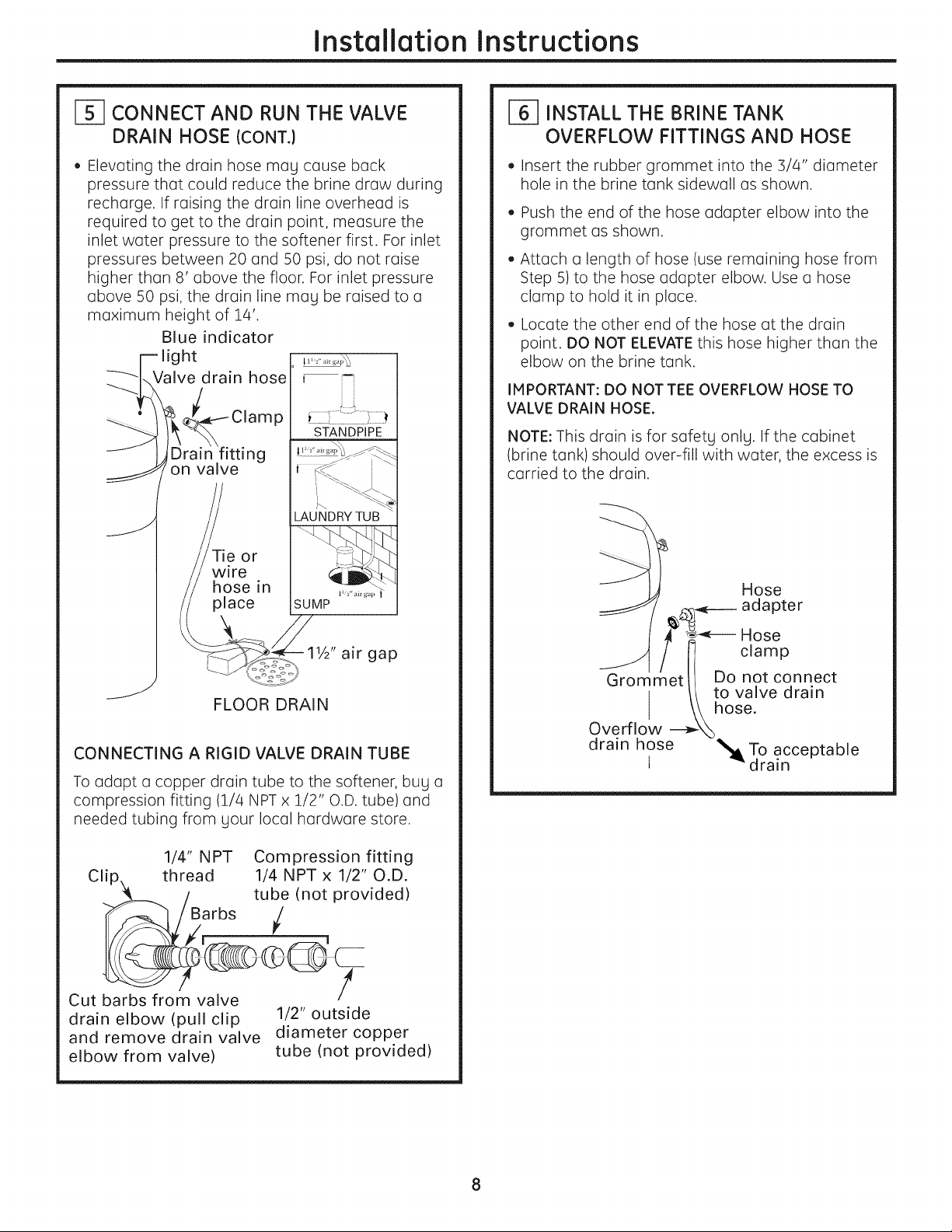
• Elevating the drain hose may cause back
pressure that could reduce the brine draw during
recharge. If raising the drain line overhead is
required to get to the drain point, measure the
inlet water pressure to the softener first. For inlet
pressures between 20 and 50 psi, do not raise
higher than 8' above the floor. For inlet pressure
above 50 psi, the drain line Hag be raised to a
maximum height of 14'.
Blue indicator
light
Valve drain hose
P
g
on valve
Tie or
wire
hose in
place
i
ii
1W' air gap
FLOOR DRAIN
CONNECTING A RIGID VALVE DRAIN TUBE
To adapt a copper drain tube to the softener, bug a
compression fitting (1/4 NPT x 1/2" O.D. tube) and
needed tubing from gout local hardware store.
1/4" NPT Compression fitting
Clip thread 1/4 NPT x 1/2" O.D.
_l__)e___. vided)
Cut barbs from valve
drain elbow (pull clip 1/2" outside
and remove drain valve diameter copper
elbow from valve) tube (not provided)
i-_ INSTALL THE BRINE TANK
OVERFLOW FITTINGS AND HOSE
• Insert the rubber grommet into the 3/4" diameter
hole in the brine tank sidewall as shown.
• Push the end of the hose adapter elbow into the
grommet as shown.
• Attach a length of hose (use remaining hose from
Step 5) to the hose adapter elbow. Use a hose
clamp to hold it in place.
• Locate the other end of the hose at the drain
point. DO NOT ELEVATE this hose higher than the
elbow on the brine tank.
IMPORTANT: DO NOT TEE OVERFLOW HOSE TO
VALVE DRAIN HOSE.
NOTE: This drain is for safetg onlg. If the cabinet
(brine tank) should over-fill with water, the excess is
carried to the drain.
J
Hose
_.4_---- adapter
_----- Hose
t i clamp
Grommetll Do not connect
/1 to valve drain
l \\hose.
Overflow ----_
drain hose '_To acceptable
t -"drain
Installation Instructions
I-_ INSTALL GROUNDING CLAMP
A DANGER: Failure to properly attach
ground clamp could result in electrical shock.
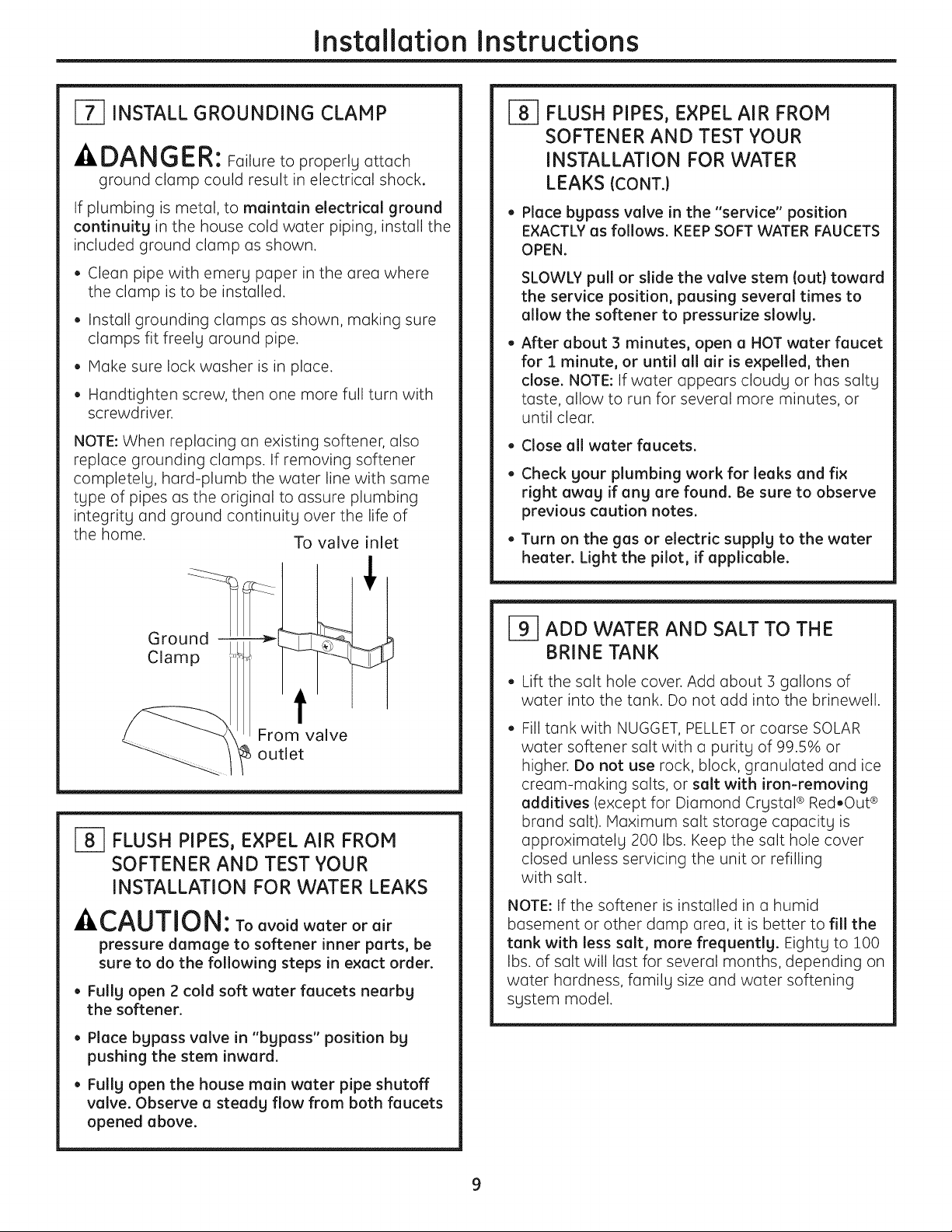
If plumbing is metal, to maintain electrical ground
continuity in the house cold water piping, install the
included ground clamp as shown.
• Clean pipe with emery paper in the area where
the clamp is to be installed.
• Install grounding clamps as shown, making sure
clamps fit freely around pipe.
• Make sure lock washer is in place.
• Handtighten screw, then one more full turn with
screwdriver.
NOTE: When replacing an existing softener, also
replace grounding clamps. If removing softener
completely, hard-plumb the water line with same
type of pipes as the original to assure plumbing
integrity and ground continuity over the life of
the home. To valve inlet
Ground -
Clamp
From valve
_ outlet
l-_ FLUSH PIPES, EXPEL AIR FROM
SOFTENER AND TEST YOUR
INSTALLATION FOR WATER LEAKS
-ACAUTION: Toavoidwaterorair
pressure damage to softener inner parts, be
sure to do the following steps in exact order.
• Fully open 2 cold soft water faucets nearby
the softener.
• Place bypass valve in "bypass" position by
pushing the stem inward.
• Fully open the house main water pipe shutoff
valve. Observe a steady flow from both faucets
opened above.
J_] FLUSH PIPES, EXPEL AIR FROM
SOFTENER AND TEST YOUR
INSTALLATION FOR WATER
LEAKS {CONT.)
• Place bypass valve in the "service" position
EXACTLY as follows. KEEP SOFT WATER FAUCETS
OPEN.
SLOWLY pull or slide the valve stem (out} toward
the service position, pausing several times to
allow the softener to pressurize slowly.
After about 3 minutes, open a HOT water faucet
for 1 minute, or until all air is expelled, then
close. NOTE: If water appears cloudy or has salty
taste, allow to run for several more minutes, or
until clear.
• Close all water faucets.
Check your plumbing work for leaks and fix
right away if any are found. Be sure to observe
previous caution notes.
Turn on the gas or electric supply to the water
heater. Light the pilot, if applicable.
_1 ADD WATER AND SALT TO THE
BRINE TANK
• Lift the salt hole cover. Add about :3gallons of
water into the tank. Do not add into the brinewell.
Fill tank with NUGGET, PELLET or coarse SOLAR
water softener salt with a purity of 99.5% or
higher. Do not use rock, block, granulated and ice
cream-making salts, or salt with iron-removing
additives (except for Diamond Crystal ® Red.Out ®
brand salt). Maximum salt storage capacity is
approximately 200 Ibs. Keep the salt hole cover
closed unless servicing the unit or refilling
with salt.
NOTE: If the softener is installed in a humid
basement or other damp area, it is better to fill the
tank with less salt, more frequently. Eighty to 100
Ibs. of salt will last for several months, depending on
water hardness, family size and water softening
system model.
Installation Instructions
CONNECT TO ELECTRICAL POWER
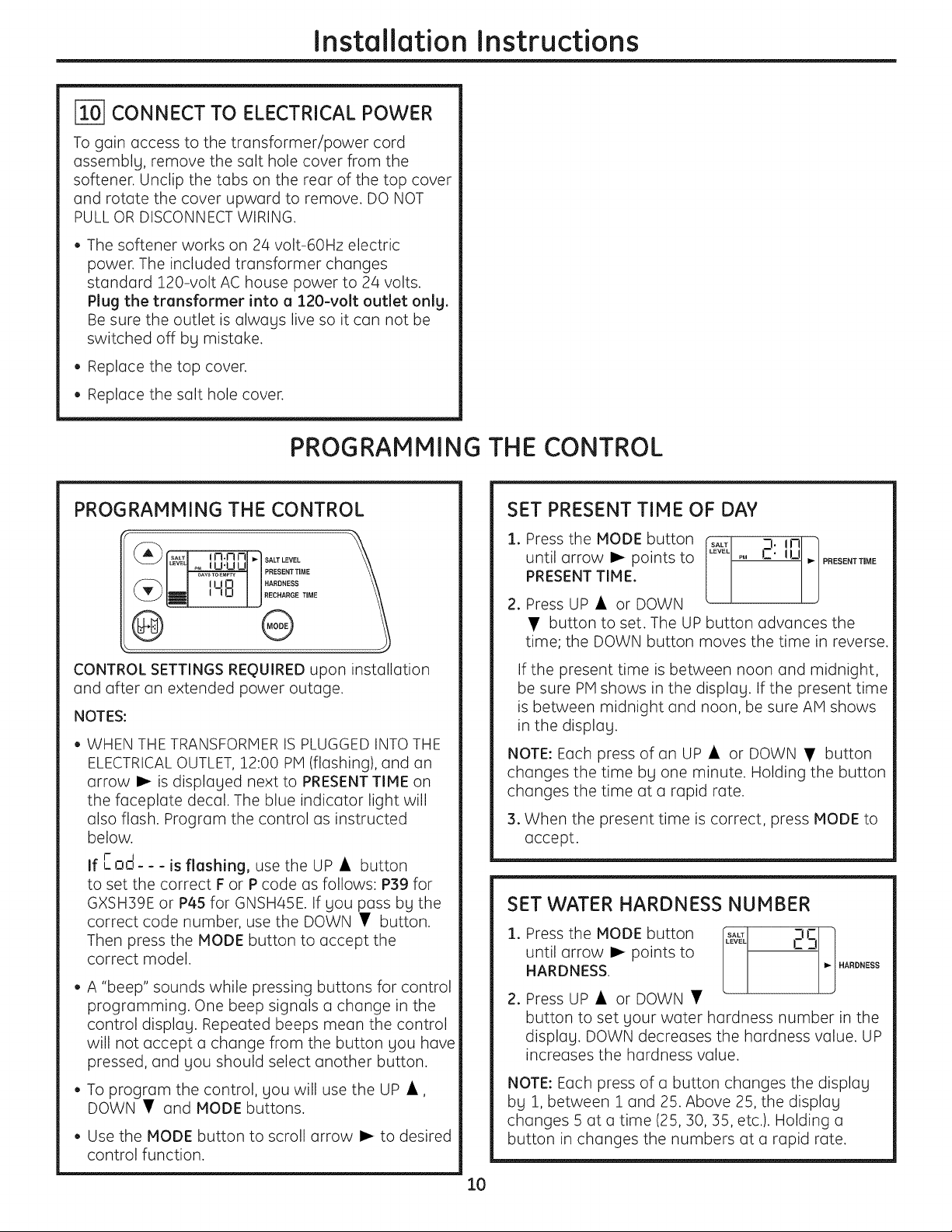
To gain access to the transformer/power cord
assemblg, remove the salt hole cover from the
softener. Unclip the tabs on the rear of the top cover
and rotate the cover upward to remove. DO NOT
PULL OR DISCONNECT WIRING.
• The softener works on 24 volt-60Hz electric
power. The included transformer changes
standard 120-volt AC house power to 24 volts.
Plug the transformer into a 120-volt outlet onlg.
Be sure the outlet is alwags live so it can not be
switched off bg mistake.
• Replace the top cover.
• Replace the salt hole cover.
PROGRAMMING THE CONTROL
CONTROL SETTINGS REgUIRED upon installation
and after an extended power outage.
NOTES:
• WHEN THE TRANSFORMER IS PLUGGED INTO THE
ELECTRICAL OUTLET, 12:00 PM (flashing), and an
arrow I_ is displaLled next to PRESENT TIME on
the faceplate decal. The blue indicator light will
also flash. Program the control as instructed
below.
I- i
If ,-no--- is flashing, use the UP • button
to set the correct F or P code as follows: P39 for
GXSH39E or P4S for GNSH45E. If you pass by the
correct code number, use the DOWN • button.
Then press the MODE button to accept the
correct model.
• A "beep" sounds while pressing buttons for control
programming. One beep signals a change in the
control displaLI. Repeated beeps mean the control
will not accept a change from the button Llou have
pressed, and Llou should select another button.
• To program the control, Llou will use the UP •,
DOWN • and MODE buttons.
• Use the MODE button to scroll arrow !_ to desired
control function.
10
SET PRESENT TIME OF DAY
1. Press the MODE button _L 2: In
until arrow I_ points to p, __ ILl i_ PRESENTTJME
L
PRESENT TIME.
2. Press UP • or DOWN
• button to set. The UP button advances the
time; the DOWN button moves the time in reverse.
If the present time is between noon and midnight,
be sure PM shows in the displaLI. If the present time
is between midnight and noon, be sure AM shows
in the displaLI.
NOTE: Each press of an UP • or DOWN • button
changes the time bLI one minute. Holding the button
changes the time at a rapid rate.
3. When the present time is correct, press MODE to
accept.
SET WATER HARDNESS NUMBER
1. Press the MODE button &'v_ 2Ei_
until arrow I_ points to - -_
.j
HARDNESS. .ARDNESS
2. Press UP • or DOWN •
button to set Llour water hardness number in the
displaLI. DOWN decreases the hardness value. UP
increases the hardness value.
NOTE: Each press of a button changes the displaLI
bLI 1, between 1 and 25. Above 25, the displaLI
changes 5 at a time (25, 30, 35, etc.). Holding a
button in changes the numbers at a rapid rate.
Installation Instructions
SET WATER HARDNESS NUMBER (CONT.}
3. When the display shows your water hardness
(in grains per gallon), press MODE to accept.
NOTE: If there is clear water iron in your water
supply, you will need to increase the hardness
setting by 5 for each 1 ppm of clear water iron
in your water supply.
You can get the grains per gallon (gpg}
hardness of your water supply from a water
analysis laboratory. If you are on a municipal
supply, call your local water department. Or
call Legend Technical Services, an independent
laboratory, to request a water hardness test kit
at 1.800.949.8220, Option 4. If your report shows
hardness in parts per million {ppm} or milligrams
per liter (my/I}, simply divide by 17.1 to get the
equivalent number of grains per gallon.
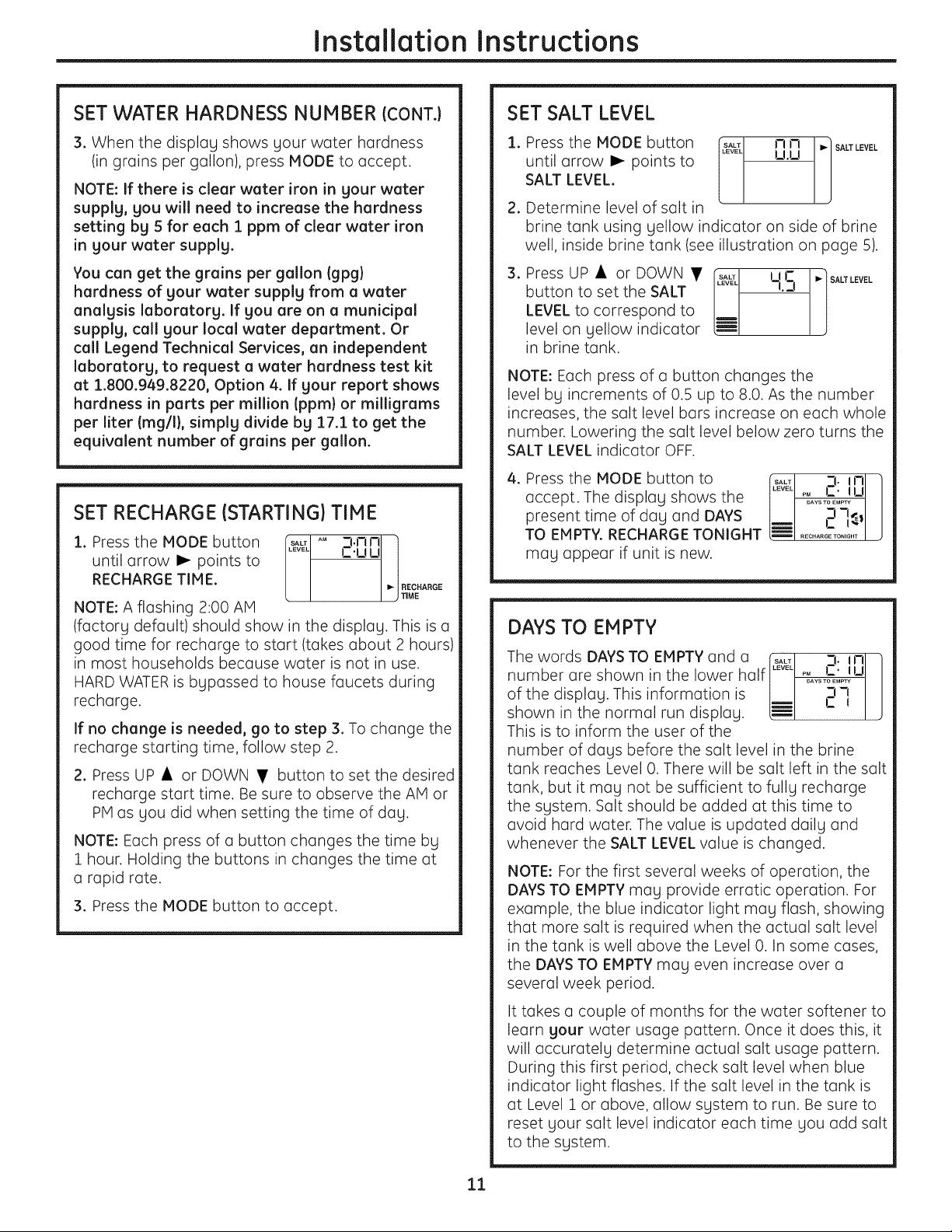
SET RECHARGE (STARTING} TIME
AM:,.nOli
i. Press the MODE button t_l C.uu
until arrow I_ points to
RECHARG ETI M E. I _| RECHARGE
I ) TIME
NOTE: A flashing 2:00 AM
(factory default) should show in the display. This is e
good time for recharge to start (takes about 2 hours)
in most households because water is not in use.
HARD WATER is bypassed to house faucets during
recharge.
If no change is needed, go to step 3. To change the
recharge starting time, follow step 2.
2. Press UP • or DOWN • button to set the desired
recharge start time. Be sure to observe the AM or
PM as you did when setting the time of day.
NOTE: Each press of u button changes the time by
1 hour. Holding the buttons in changes the time at
a rapid rate.
3. Press the MODE button to accept.
SET SALT LEVEL
i. Press the MODE button It_1 m m ,.] SALTLEVEL
until arrow I_ points to [ u.u ]
SALT LEVEL.
2. Determine level of salt in
brine tank using yellow indicator on side of brine
well, inside brine tank (see illustration on page 5).
.
Press UP • or DOWN •
button to set the SALT
LEVEL to correspond to
level on yellow indicator
in brine tank.
SALT I I h'_ _] SALT LEVEL
..... -t. 3
J
NOTE: Each press of e button changes the
level by increments of 0.5 up to 8.0. As the number
increases, the suit level burs increase on each whole
number. Lowering the suit level below zero turns the
SALT LEVEL indicator OFF.
4. Press the MODE button to
accept. The display shows the
present time of day end DAYS
TO EMPTY. RECHARGE TONIGHT
may appear if unit is new.
3._nl I
DAYS TO EMPTY
The words DAYS TO EMPTY and o rSALTI 3. inl 1
numberareshownthe,owerha,fI..... I
of the display.Thisinformationis Iml i-I--I
I
shown inthe normal run display. LEI J
This is to inform the user of the
number of days before the suit level in the brine
tank reaches Level 0. There will be suit left in the salt
tank, but it mug not be sufficient to fully recharge
the system. Suit should be added at this time to
avoid hard water. The value is updated daily and
whenever the SALT LEVEL value is changed.
NOTE: For the first several weeks of operation, the
DAYS TO EMPTY may provide erratic operation. For
example, the blue indicator light may flash, showing
that more salt is required when the actual salt level
in the tank is well above the Level 0. In some cases,
the DAYS TO EMPTY may even increaseover a
severalweek period.
It takes a couple of months for the water softener to
learn your water usage pattern. Once it does this, it
will accurately determine actual salt usage pattern.
During this first period, check salt level when blue
indicator light flashes. If the salt level in the tank is
at Level 1 or above, allow system to run. Be sure to
reset your salt level indicator each time you add salt
to the system.
ll
Installation Instructions
OPTIONAL CONTROL SETTINGS
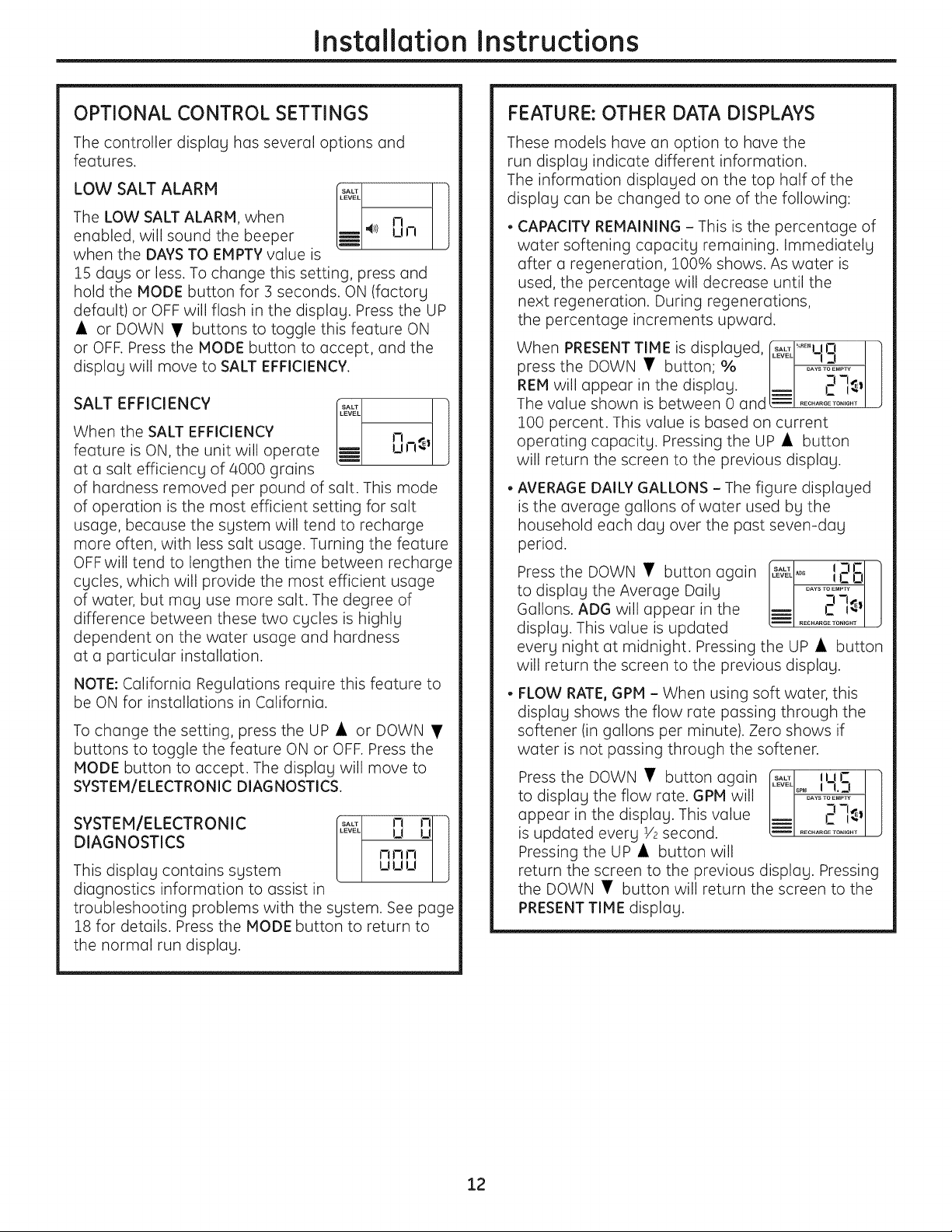
The controller display has several options and
features.
LOW SALT ALARM [,L_ ]
The
LOW SALT ALARM, when I.--- J-I
J
enabled, will sound the beeper LiE 4_/ un
when the DAYS TO EMPTY value is
15 days or less. To change this setting, press and
hold the MODE button for 3 seconds. ON (factory
default) or OFF will flash in the display. Press the UP
• or DOWN • buttons to toggle this feature ON
or OFF. Press the MODE button to accept, and the
display will move to SALT EFFICIENCY.
SALT EFFICIENCY I_&__ ]
When the SALT EFFICIENCY rl
feature is ON, the unit will operate _ up-!_
at a salt efficiency of 4000 grains
of hardness removed per pound of salt. This mode
of operation is the most efficient setting for salt
usage, because the system will tend to recharge
more often, with less salt usage. Turning the feature
OFF will tend to lengthen the time between recharge
cycles, which will provide the most efficient usage
of water, but may use more salt. The degree of
difference between these two cycles is highly
dependent on the water usage and hardness
at a particular installation.
NOTE: California Regulations require this feature to
be ON for installations in California.
To change the setting, press the UP • or DOWN •
buttons to toggle the feature ON or OFF. Press the
NODE button to accept. The display will move to
SYSTEM/ELECTRONIC DIAGNOSTICS.
SYSTEM/ELECTRONIC _ I_ _ I
DIAGNOSTICS n r, n
This display contains system uuu
diagnostics information to assist in
troubleshooting problems with the system. See page
18 for details. Press the MODE button to return to
the normal run display.
FEATURE: OTHER DATA DISPLAYS
These models have an option to have the
run display indicate different information.
The information displayed on the top half of the
display can be changed to one of the following:
CAPACITY REMAINING - This is the percentage of
water softening capacity remaining. Immediately
after a regeneration, 100% shows. As water is
used, the percentage will decrease until the
next regeneration. During regenerations,
the percentage increments upward.
When PRESENT TIME is displayed, f_#_\l",_"_°UO I ]
press the DOWN • button; % J J_ .... t /
REH will appear in the display. J: I
The value shown is between 0 andL_! ........-;...... ! J
100 percent. This value is based on current
operating capacity. Pressing the UP • button
will return the screen to the previous display.
• AVERAGE DAILY GALLONS - The figure displayed
is the average gallons of water used by the
household each dog over the post seven-dog
period.
Press the DOWN • button again
to display the Average Daily
Gallons. ADG will appear in the
display. This value is updated
SALT 3 IT
........ CO
= 2
RECHARGE TONI6HT
every night at midnight. Pressing the UP • button
will return the screen to the previous display.
FLOW RATE, GPH - When using soft water, this
display shows the flow rate passing through the
softener (in gallons per minute). Zero shows if
water is not passing through the softener.
Press the DOWN • button again _1 ,uc ]
I_W!o_o,Lj I I
todisplaytheflowrate.GPM willII ..... I
appear inthe display.Thisvalue
I I'_
is updated every Ve second. ...... ......I J
Pressing the UP • button will
return the screen to the previous display. Pressing
the DOWN • button will return the screen to the
PRESENT TIME display.
12
Installation Instructions
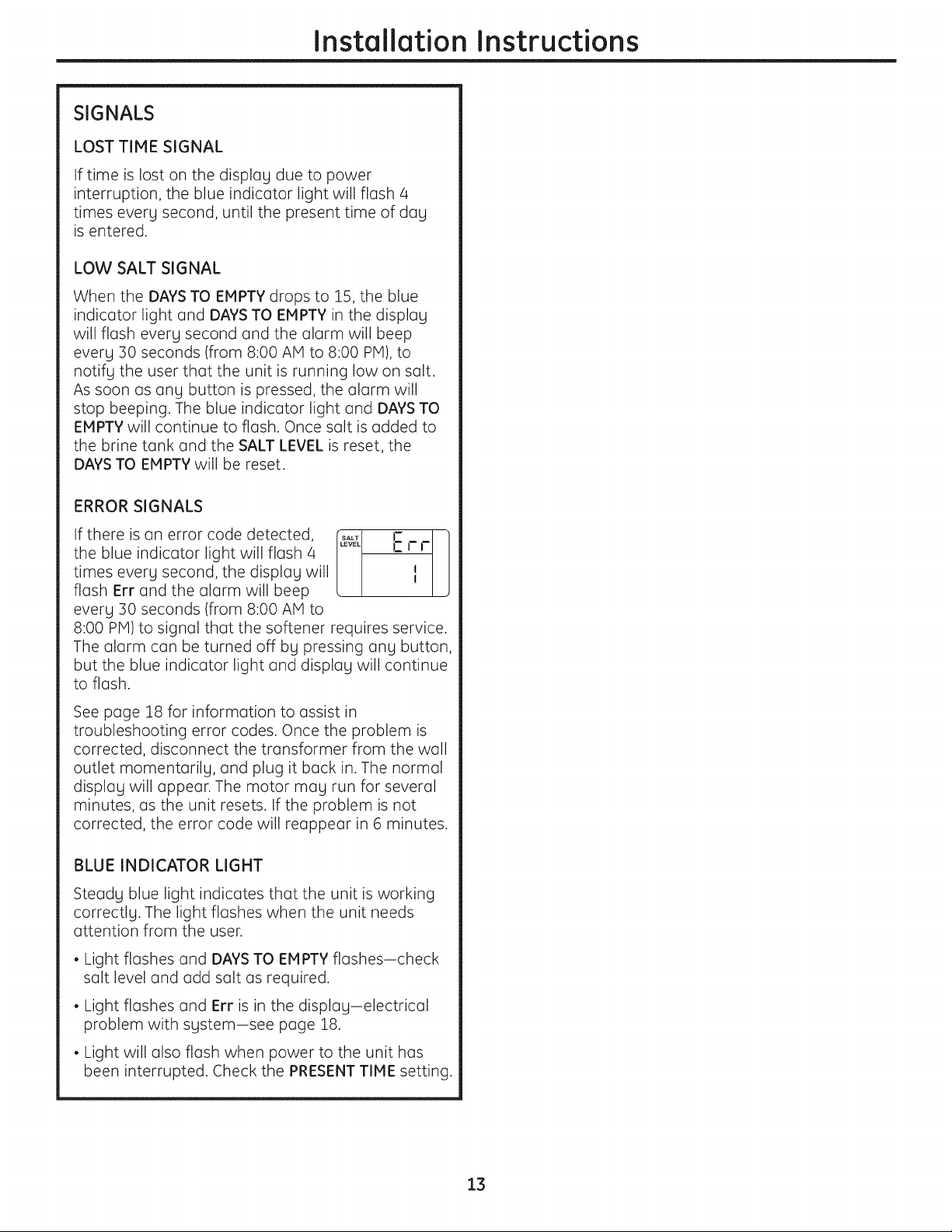
SIGNALS
LOST TIME SIGNAL
If time is lost on the display due to power
interruption, the blue indicator light will flash 4
times every second, until the present time of day
is entered.
LOW SALT SIGNAL
When the DAYS TO EMPTY drops to 15, the blue
indicator light and DAYS TO EMPTY in the display
will flash every second and the alarm will beep
every 30 seconds (from 8:00 AM to 8:00 PM), to
notify the user that the unit is running low on salt.
As soon as any button is pressed, the alarm will
stop beeping. The blue indicator light and DAYS TO
EMPTY will continue to flash. Once salt is added to
the brine tank and the SALT LEVEL is reset, the
DAYS TO EMPTY will be reset.
ERROR SIGNALS
If there is an error code detected, [t_ E r r ]
the blue indicator light will flash 4
J
times every second, the display will I
flash Err and the alarm will beep
every 30 seconds (from 8:00 AM to
8:00 PM) to signal that the softener requires service.
The alarm can be turned off by pressing any button,
but the blue indicator light and display will continue
to flash.
See page 18 for information to assist in
troubleshooting error codes. Once the problem is
corrected, disconnect the transformer from the wall
outlet momentarily, and plug it back in. The normal
display will appear. The motor may run for several
minutes, as the unit resets. If the problem is not
corrected, the error code will reappear in 6 minutes.
BLUE INDICATOR LIGHT
Steady blue light indicates that the unit is working
correctly. The light flashes when the unit needs
attention from the user.
• Light flashes and DAYS TO EMPTY flashes-check
salt level and odd salt as required.
• Light flashes and Err is in the display-electrical
problem with system-see page 18.
• Light will also flash when power to the unit has
been interrupted. Check the PRESENT TIME setting.
13
Installation Instructions
SANITIZING PROCEDURES
To complete the installation, do the following
sanitizing procedures.
Care is taken at the factory to keep your water
softener clean and sanitary. Materials used to make
the softener will not infect or contaminate your water
supply and will not cause bacteria to form or grow.
However, during shipping, storage, installation and
operation, bacteria could get into the softener. For
this reason, sanitizing as follows is suggested when
installing.
NOTE: Sanitizing is recommended by the
Water Quality Association for disinfecting.
.
.
Be sure to complete all installation steps, including
programming the control.
Pour about 3/4 oz. (1Vz tablespoons) of common
5.25% unscented household bleach (Clorox, Linco,
Bo Peep, White Sail, Eagle, etc.)into the brinewell.
Refer to illustration on page 5.
. IMPORTANT: Press and hold for 3 seconds
the faceplate RECHARGE _ button to start an
immediate recharge. RECHARGE begins to flash in
the display. The bleach will be drawn through the
water softener, and out the drain. This process
takes approximately 2 hours.
4. If, after sanitization, water from the house
faucet tastes salty or has a slight color, this is a
preservative from the resin tank. Turn on the cold
soft water faucets and drain for a few minutes or
until clear.
NOTE: When the sanitizing recharge is over, all
remaining bleach is flushed from the conditioner
and your house COLD water supply is fully soft
immediately. However, your water heater is filled
with hard water and as hot water is used, it will refill
with soft water. When all the hard water is replaced
in the water heater, hot only and mixed hot and cold
water will be fully soft. If you want totally soft water
immediately, after the above recharge, drain the
water heater until the water runs cold.
-&WARNING: ,f you do drain the water
heater, use extreme care as the hot water could
cause burns. Turn the water heater off prior to
draining.
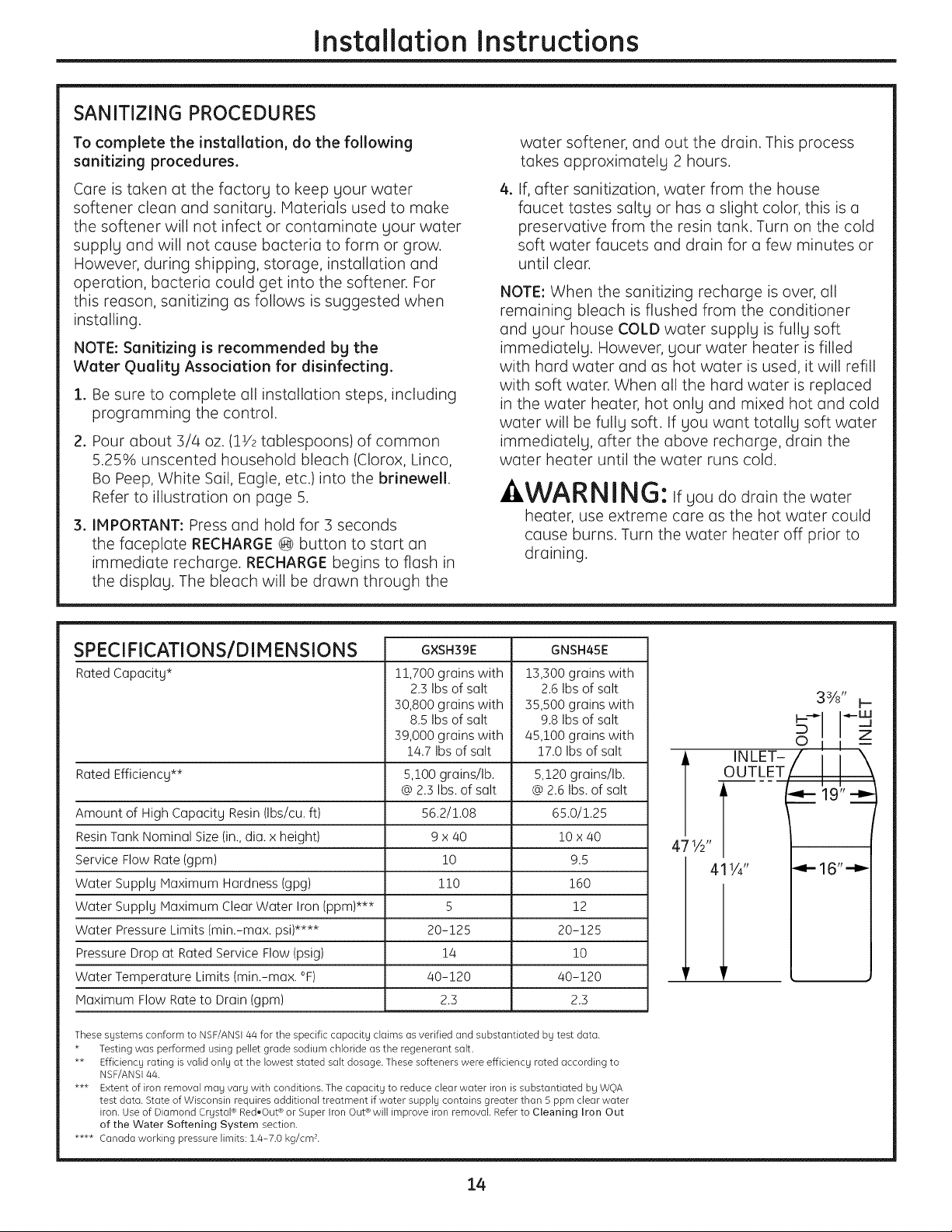
SPECI FICATIONS/D IM ENSIONS
Rated Capacity*
Rated Efficiency**
Amount of High Capacity Resin (Ibs/cu. ft)
Resin Tank Nominal Size (in.,dia. x height)
Service Flow Rate (gpm)
Water Supply Maximum Hardness (gpg)
Water Supply Maximum Clear Water Iron (ppm)***
Water Pressure Limits (min.-max. psi)****
Pressure Drop at Rated Service Flow (psig)
Water Temperature Limits (min.-max. °F)
Maximum Flow Rate to Drain (gpm)
G×SH39E
!!,700 grains with
2.3 Ibs of salt
30,800 grains with
8.5 Ibs of salt
39,000 grains with
1/4.7Ibs of salt
5,100 grains/lb.
@2.3 Ibs. of salt
56.2/1.08
9x 40
10
110
5
20-125
1/4
40-120
2.3
GNSH45E
13,300 grains with
2.6 Ibs of salt
35,500 grains with
9.8 Ibs of salt
45,100 grains with
17.0 Ibs of salt
5,!20 grains/lb.
@ 2.6 Ibs. of salt
65.0/1.25
i0 x 40
9.5
160
12
20-125
10
40-120
2.3
These systems conform to NSF/ANS144 for the specific capacity claims as verified and substantiated by test data.
* Testing was performed using pellet grade sodium chloride as the regenerant salt.
** Efficiency rating is valid only at the lowest stated salt dosage. These softeners were efficiency rated according to
NSF/ANS144.
*** Extent of iron removal may vary with conditions. The capacity to reduce clear water iron is substantiated by WOA
test data. State of Wisconsin requires additional treatment if water supply contains greater than 5 ppm clear water
iron. Use of Diamond Crystal ® Red,Out ®or Super Iron Out® will improve iron removal. Refer to Cleaning Iron Out
of the Water Softening System section.
**** Canada working pressure limits: 1.4-7.0 kg/cm<
471A"
3%" k---
-___
INLET-
OOT_ _ T/\
i -q- 19" -m_
411/4" _- 16"-_
14
About the water softener system, ge.com
Service
When the water softening system is providing
soft water, it is called "Service." During service,
hard water flows from the house main water pipe
into the water softening system. Inside the water
softening system resin tank is a bed made up of
thousands of tiny, plastic resin beads. As hard
water passes through the bed, each bead
attracts and holds the hard minerals. This is
called ion-exchanging. It is much like a magnet
attracting and holding metals. Water without
hard minerals (soft water) flows from the water
softening system and to the house pipes.
After a period of time, the resin beads become
coated with hard minerals and they have to be
cleaned. This cleaning is called recharge.
Recharge is started at 2:00 AM (factory setting)
by the water softening system control, and
consists of five stages or cycles. These are FILL,
BRINING, BRINE RINSE,BACKWASH and FAST
RINSE.
Automatic Hard Water Bgpass During Recharge
For emergency needs, hard water is available
to the home during the recharge cycles.
However, you should avoid using HOT water
because the water heater will fill with the hard
water.
Fill
Salt dissolved in water is called brine. Brine is
needed to clean the hard minerals from resin
beads. To make the brine, water flows into the
salt storage area during the fill stage.
Brining
During brining, brine travels from the salt storage
area into the resin tank. Brine is the cleaning
agent needed to remove hard minerals from the
resin beads. The hard minerals and brine are
discharged to the drain.
The nozzle and venturi create a suction to move
the brine, maintaining a very slow rate to get the
best resin cleaning with the least salt.
Brine Rinse
After a pre-measured amount of brine is used,
the brine valve closes. Water continues to flow in
the same path as during brining, except for the
discontinued brine flow. Hard minerals and brine
flush from the resin tank to the drain.
Backwash
During backwash, water travels up through
the resin tank at a fast flow rate, flushing
accumulated iron, dirt and sediments
from the resin bed and to the drain.
Fast Rinse
Backwash is followed by a fast flow of water
down through the resin tank. The fast flow
flushes brine from the bottom of the tank,
and packs the resin bed.
After fast rinse, the water softening system
returns to soft water service.
15
About the water softener system.
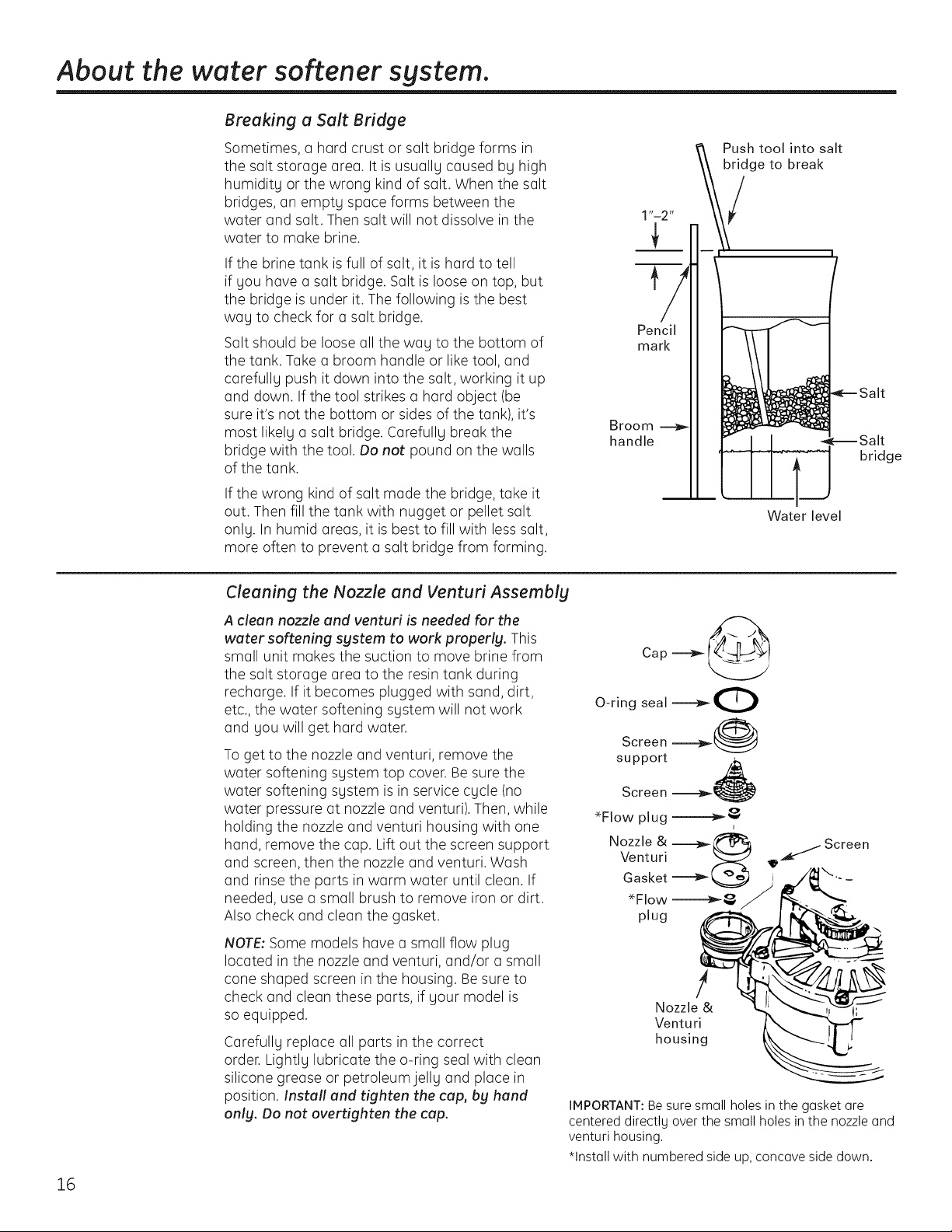
Breaking a Salt Bridge
Sometimes, a hard crust or salt bridge forms in
the salt storage area. It is usuallg caused bg high
humiditg or the wrong kind of salt. When the salt
bridges, an emptg space forms between the
water and salt. Then salt will not dissolve in the
water to make brine.
If the brine tank is full of salt, it is hard to tell
if gou have a salt bridge. Salt is loose on top, but
the bridge is under it. The following is the best
wag to check for a salt bridge.
Salt should be loose all the wag to the bottom of
the tank. Take a broom handle or like tool, and
carefullg push it down into the salt, working it up
and down. If the tool strikes a hard object (be
sure it's not the bottom or sides of the tank), it's
most likelg a salt bridge. Carefullg break the
bridge with the tool. Do not pound on the walls
of the tank.
If the wrong kind of salt made the bridge, take it
out. Then fill the tank with nugget or pellet salt
onlg. In humid areas, it is best to fill with less salt,
more often to prevent a salt bridge from forming.
Pencil
mark
Broom
handle
Push tool into salt
bridge to break
Water level
bridge
16
Cleaning the Nozzle and Venturi Assembly
A clean nozzle and venturi is needed for the
water softening system to work properly. This
small unit makes the suction to move brine from
the salt storage area to the resin tank during
recharge. If it becomes plugged with sand, dirt,
etc., the water softening sgstem will not work
and gou will get hard water.
To get to the nozzle and venturi, remove the
water softening sgstem top cover. Be sure the
water softening sgstem is in service cgcle (no
water pressure at nozzle and venturi). Then, while
holding the nozzle and venturi housing with one
hand, remove the cap. Lift out the screen support
and screen, then the nozzle and venturi. Wash
and rinse the parts in warm water until clean. If
needed, use a small brush to remove iron or dirt.
Also check and clean the gasket.
NOTE: Some models hove a small flow plug
located in the nozzle and venturi, and/or a small
cone shaped screen in the housing. Besure to
check and clean these parts, if gout model is
so equipped.
Carefullg replace all parts in the correct
order. Lightlg lubricate the o-ring seal with clean
silicone grease or petroleumjellg and place in
position. Install and tighten the cap, bg hand
onlg. Do not overtighten the cap.
Cap __
O-ring seal _O
Screen _@
support
Screen
_Flow plug __
i
Nozzle & Z_
Venturi
Gasket
_Flow __
plug
_ Screen
!
Nozzle & l
Venturi
housing
IMPORTANT:Be sure small holes in the gasket are
centered directlg over the small holes in the nozzle and
venturi housing,
*Install with numbered side up, concave side down.
ge.com
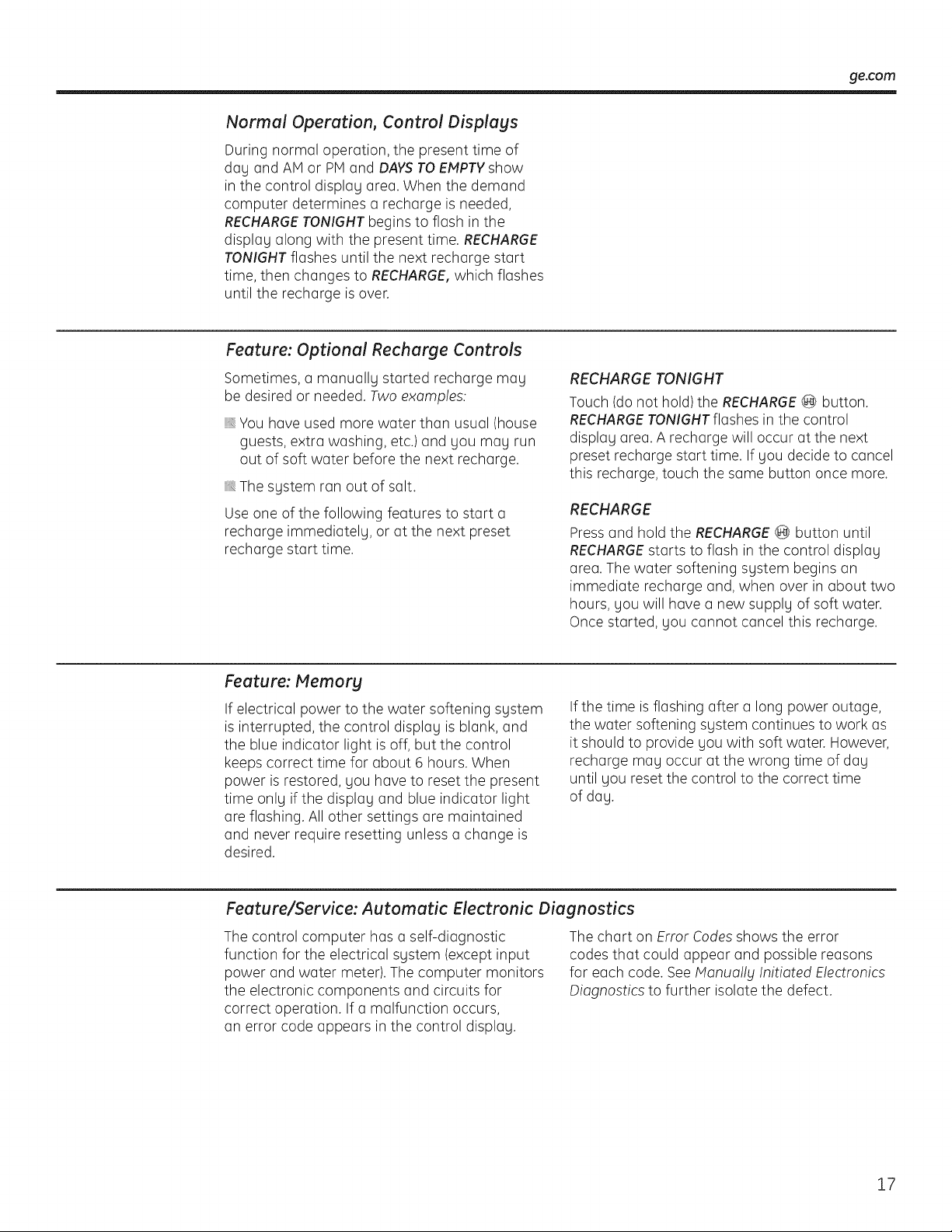
Normal Operation, Control Displays
During normal operation, the present time of
dQy QndAM or PH and DAYSTO EMPTYshow
in the control displQy QreQ.When the demand
computer determines a rechQrge is needed,
RECHARGETONIGHT begins to flQsh in the
display along with the present time. RECHARGE
TONIGHT flashes until the next rechQrge start
time, then chQnges to RECHARGE,which flQshes
until the rechQrge is over.
Feature: Optional Recharge Controls
Sometimes, a manuQIly started rechQrge may
be desired or needed. Two exomples:
You hove used more water thQn usuQI (house
guests, extra washing, etc.) and you may run
out of soft water before the next rechQrge.
The system ran out of sQIt.
Use one of the following feQtures to start a
rechQrge immediQtely, or at the next preset
rechQrge start time.
RECHARGE TONIGHT
Touch (do not hold) the RECHARGE_ button.
RECHARGETONIGHTflQshes in the control
displQy areQ. A rechQrge will occur at the next
preset recharge start time. If you decide to cancel
this recharge, touch the same button once more.
RECHARGE
Press and hold the RECHARGE@ button until
RECHARGEstarts to flash in the control display
area. The water softening system begins an
immediate recharge and, when over in about two
hours, you will have a new supply of soft water.
Once started, you cannot cancel this recharge.
Feature: Memory
If electrical power to the water softening system
is interrupted, the control display is blank, and
the blue indicator light is off, but the control
keeps correct time for about 6 hours. When
power is restored, you have to reset the present
time only if the display and blue indicator light
are flashing. All other settings are maintained
and never require resetting unless a change is
desired.
If the time is flashing after a long power outage,
the water softening system continues to work as
it should to provide you with soft water. However,
recharge may occur at the wrong time of day
until you reset the control to the correct time
of day.
Feature/Service: Automatic Electronic Diagnostics
The control computer has a self-diagnostic
function for the electrical system (except input
power and water meter). The computer monitors
the electronic components and circuits for
correct operation. If a malfunction occurs,
an error code appears in the control display.
The chart on Error Codes shows the error
codes that could appear and possible reasons
for each code. See Monuo!ly Initioted Electronics
Diognostics to further isolate the defect.
17
About the water softener sgstem.
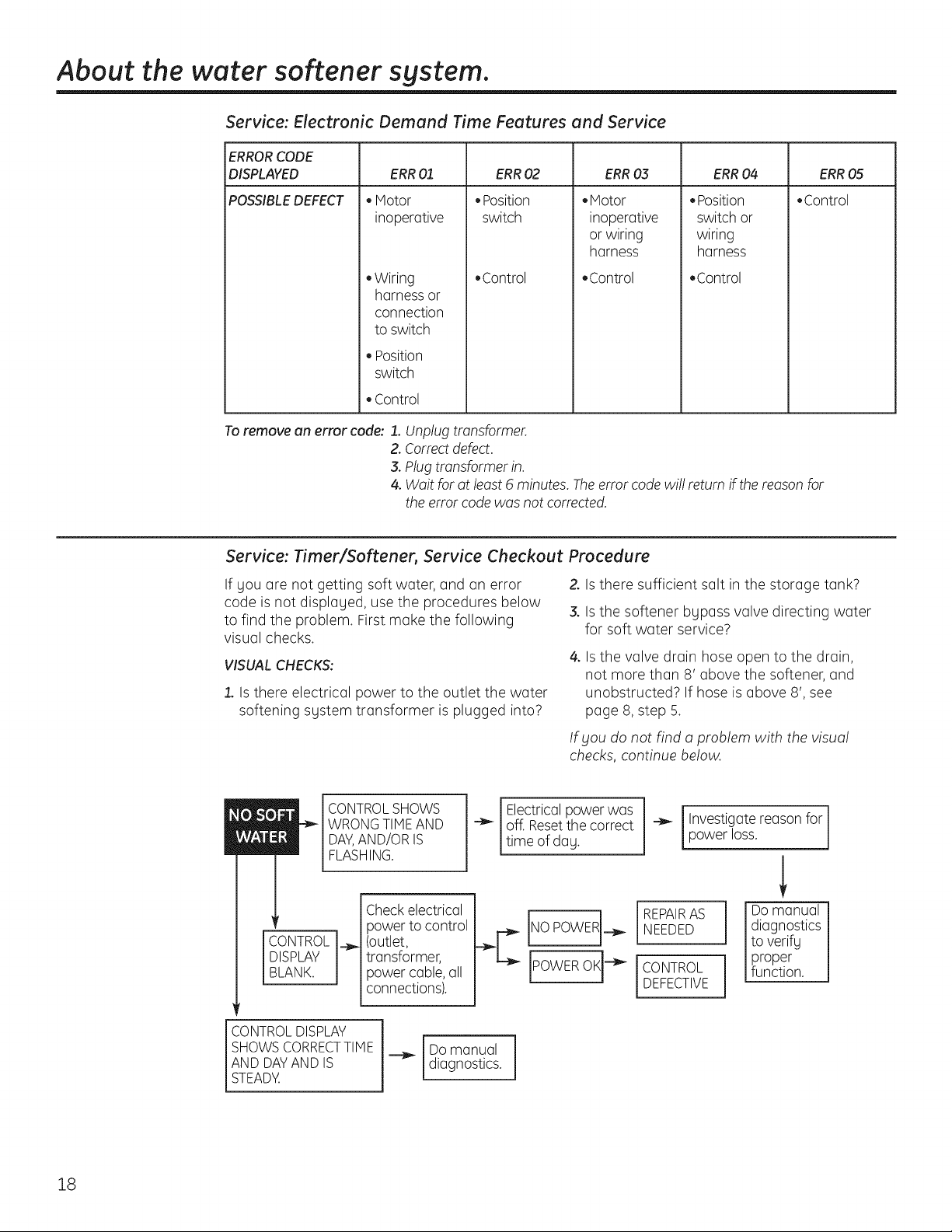
Service: Electronic Demand Time Features and Service
ERRORCODE
DISPLAYED ERR0,3 ERR04 ERR05
POSSIBLEDEFECT • Control
ERR 01
• Motor
inoperative
• Wiring
harness or
connection
to switch
• Position
switch
• Control
ERR 02
• Position
switch
• Control
.Motor
inoperative
or wiring
harness
,Control
• Position
switch or
wiring
harness
• Control
To remove an error code: 1. Unplug transformer.
2. Correct defect.
3. Plug transformer in.
4. Wait for at least 6 minutes. Theerror code wi!! return if the reason for
the error code was not corrected.
Service: Timer/Softener, Service Checkout Procedure
If you are not getting soft water, and an error
code is not displayed, use the procedures below
to find the problem. First make the following
visual checks.
VISUAL CHECKS:
1. Is there electrical power to the outlet the water
softening system transformer is plugged into?
Z Is there sufficient salt in the storage tank?
3. Is the softener bypass valve directing water
for soft water service?
4. Is the valve drain hose open to the drain,
not more than 8' above the softener, and
unobstructed? If hose is above 8', see
page 8, step 5.
If you do not find a problem with the visual
checks, continue below.
i
CONTROL
DISPLAY
BLANK.
CONTROL SHOWS
WRONG TIHE AND
DAY,AND/OR IS
FLASHING.
Check electrical
power to control
__ (outlet,
transformer,
power cable, all
connections).
Electricalpower was
off. Resetthe correct
time of day.
REPAIRAS
NEEDED
CONTROL
DEFECTIVE
Investigate reason for
power loss.
i Do manual
diagnostics
to verify
proper
function.
CONTROL DISPLAY
SHOWS CORRECTTIHE
AND DAY AND IS
STEADY.
Do manual
diagnostics.
18
ge.com
Service: Manually Initiated Electronics Diagnostics
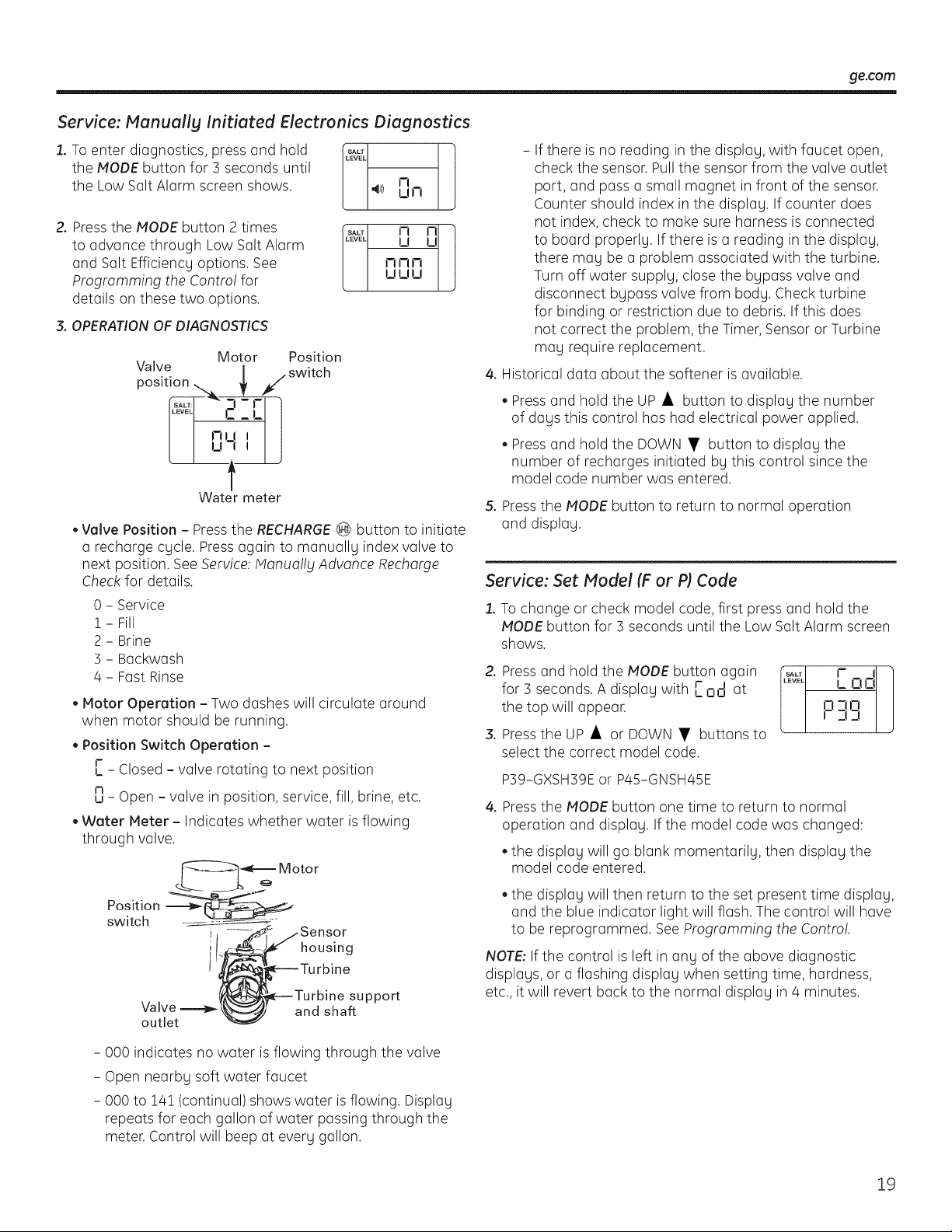
1. To enter diagnostics, press and hold
the MODE button for 3 seconds until
the Low Salt Alarm screen shows.
SALT l
LEVEL
4_/) 0 rl
2.PresstheMODEbutton2times Ft _ 1
to advance through Low Salt Alarm 2_ U
and Salt Efficiency options. See ftmn
Programming the Contro! for U U U
details on these two options.
3. OPERATION OF DIAGNOSTICS
Motor Position
Valve ] , switch
pos,t, f
r ;L
Water meter
• Valve Position - Press the RECHARGE_ button to initiate
a recharge cycle. Press again to manually index valve to
next position. See Service: Monuo!ly Advance Recharge
Check for details.
0 - Service
i - Fill
2 - Brine
3 - Backwash
4 - Fast Rinse
Motor Operation - Two dashes will circulate around
when motor should be running.
Position Switch Operation -
r
,_- Closed - valve rotating to next position
n
u - Open - valve in position, service, fill, brine, etc.
Water Meter - Indicates whether water is flowing
through valve.
Position
switch
i
i housing
Valve
outlet
support
and shaft
- 000 indicates no water is flowing through the valve
- Open nearby soft water faucet
- 000 to 141 (continual) shows water is flowing. Display
repeats for each gallon of water passing through the
meter. Control will beep at every gallon.
- If there is no reading in the display, with faucet open,
check the sensor. Pull the sensor from the valve outlet
port, and pass a small magnet in front of the sensor.
Counter should index in the display. If counter does
not index, check to make sure harness is connected
to board properly. If there is a reading in the display,
there may be a problem associated with the turbine.
Turn off water supply, close the bypass valve and
disconnect bypass valve from body. Check turbine
for binding or restriction due to debris. If this does
not correct the problem, the Timer, Sensor or Turbine
may require replacement.
4. Historical data about the softener is available.
Press and hold the UP • button to display the number
of days this control has had electrical power applied.
Press and hold the DOWN • button to display the
number of recharges initiated by this control since the
model code number was entered.
5. Press the MODE button to return to normal operation
and display.
Service: Set Model (F or P) Code
1. To change or check model code, first press and hold the
MODE button for 3 seconds until the Low Salt Alarm screen
shows.
2. Press and hold the MODE button again
for 3 seconds. A display with r
__on at
the top will appear.
3. Press the UP • or DOWN • buttons to
select the correct model code.
SALT F i
..... L 0 0
p-irl
33
P39-GXSH39E or P45-GNSH45E
4. Press the MODE button one time to return to normal
operation and display. If the model code was changed:
the display will go blank momentarily, then display the
model code entered.
the display will then return to the set present time display,
and the blue indicator light will flash. The control will have
to be reprogrammed. See Programming the Contro!.
NOTE: If the control is left in any of the above diagnostic
displays, or a flashing display when setting time, hardness,
etc., it will revert back to the normal display in 4 minutes.
19
About the water softener sgstem.
Service: Manuallg Advance Recharge Check
NOTE:The control display must show a steady
time (not flashing).
1. Press the RECHARGE@ button and hold in for
three seconds. RECHARGEbegins to flash as
the water softening system enters the fill cycle
of recharge. Remove the brinewell cover and,
using a flashlight, observe fill water entering
the brine tank. If water does not enter the tank,
look for an obstructed nozzle, venturi, fill flow
plug or brine tubing. See Care and Cleaning of
the Water Softener System section.
2. After observing fill, press the RECHARGE@
button to move the water softening system
into brining. A slow flow of water to the drain
will begin. Verify brine draw from the brine
tank by shining a flashlight into the brinewell
and observing a noticeable drop in the liquid
level over an extended period of time.
NOTE: Besure a salt bridge is not preventing
water from contacting salt. See Care and
cleaning of the water softening system section.
If the water softening sgstem does not draw
brine, check:
,, nozzle and/or venturi dirty or defective.
defective nozzle and venturi seal.
,, nozzle and venturi not seated properly
on gasket.
,, other inner valve defect (rotor seal, rotor and
disc, wave washer, etc.).
,, restricted drain (check drain fitting and
hose).
NOTE: If water system pressure is low, an
elevated drain hose may cause back pressure,
stopping brine draw.
3. Again, press the RECHARGE@ button to move
the water softening system into backwash.
Look for a fast flow of water from the drain
hose. A slow flow indicates a plugged top
distributor, backwash flow plug or drain hose.
4. Press the RECHARGE@ button to move the
water softening system into fast rinse. Again
look for a fast drain flow. Allow the water
softening system to rinse for a few minutes
to flush out any brine that may remain in
the resin tank from the brining cycle test.
5. To return the water softening system to
service, press the RECHARGE@ button.
20
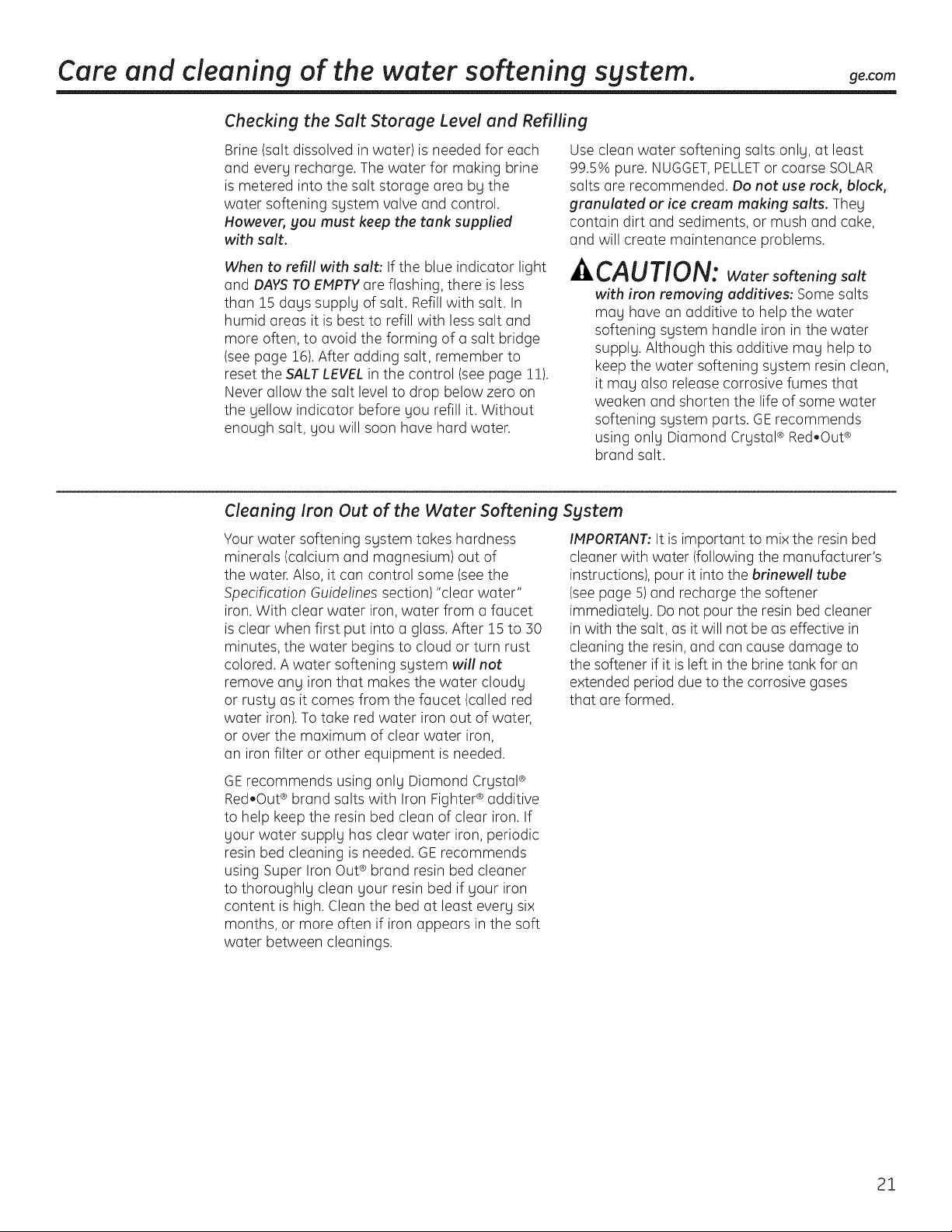
Care and cleaning of the water softening system, ge.com
Checking the Suit Storage Level and Refilling
Brine (salt dissolved in water)is needed for each
and every recharge. The water for making brine
is metered into the salt storage area by the
water softening system valve and control.
However, you must keep the tank supplied
with salt.
When to refill with salt: If the blue indicator light
and DAYSTO EHPTY are flashing, there is less
than 15 days supply of salt. Refill with salt. In
humid areas it is best to refill with less salt and
more often, to avoid the forming of a salt bridge
(see page 16).After adding salt, remember to
reset the SALT LEVEL in the control (see page 1!).
Never allow the salt level to drop below zero on
the yellow indicator before you refill it. Without
enough salt, you will soon have hard water.
Use clean water softening salts only, at least
99.5% pure. NUGGET,PELLETor coarse SOLAR
salts are recommended. Do not use rock, block,
granulated or ice cream making salts. They
contain dirt and sediments, or mush and cake,
and will create maintenance problems.
CAUTiON: Water softeningsalt
with iron removing additives: Some salts
may have an additive to help the water
softening system handle iron in the water
supply. Although this additive may help to
keep the water softening system resin clean,
it may also release corrosive fumes that
weaken and shorten the life of some water
softening system parts. GErecommends
using only Diamond Crystal® Red.Out ®
brand salt.
Cleaning Iron Out of the Water Softening System
Your water softening system takes hardness
minerals (calcium and magnesium) out of
the water. Also, it can control some (see the
Specification Guidelines section)"clear water"
iron. With clear water iron, water from a faucet
is clear when first put into a glass. After 15 to ]0
minutes, the water begins to cloud or turn rust
colored. A water softening system will not
remove any iron that makes the water cloudy
or rusty as it comes from the faucet (called red
water iron). To take red water iron out of water,
or over the maximum of clear water iron,
an iron filter or other equipment is needed.
IMPORTANT:It is important to mix the resin bed
cleaner with water (following the manufacturer's
instructions), pour it into the brinewell tube
(see page 5) and recharge the softener
immediately. Do not pour the resin bed cleaner
in with the salt, as it will not be as effective in
cleaning the resin,and can cause damage to
the softener if it is left in the brine tank for an
extended period due to the corrosive gases
that are formed.
GErecommends using only Diamond Crystal®
Red.Out ®brand salts with Iron Fighter ®additive
to help keep the resin bed clean of clear iron. If
your water supply has clear water iron, periodic
resin bed cleaning is needed. GErecommends
using Super Iron Out® brand resin bed cleaner
to thoroughly clean your resin bed if your iron
content is high. Clean the bed at least every six
months, or more often if iron appears in the soft
water between cleanings.
21
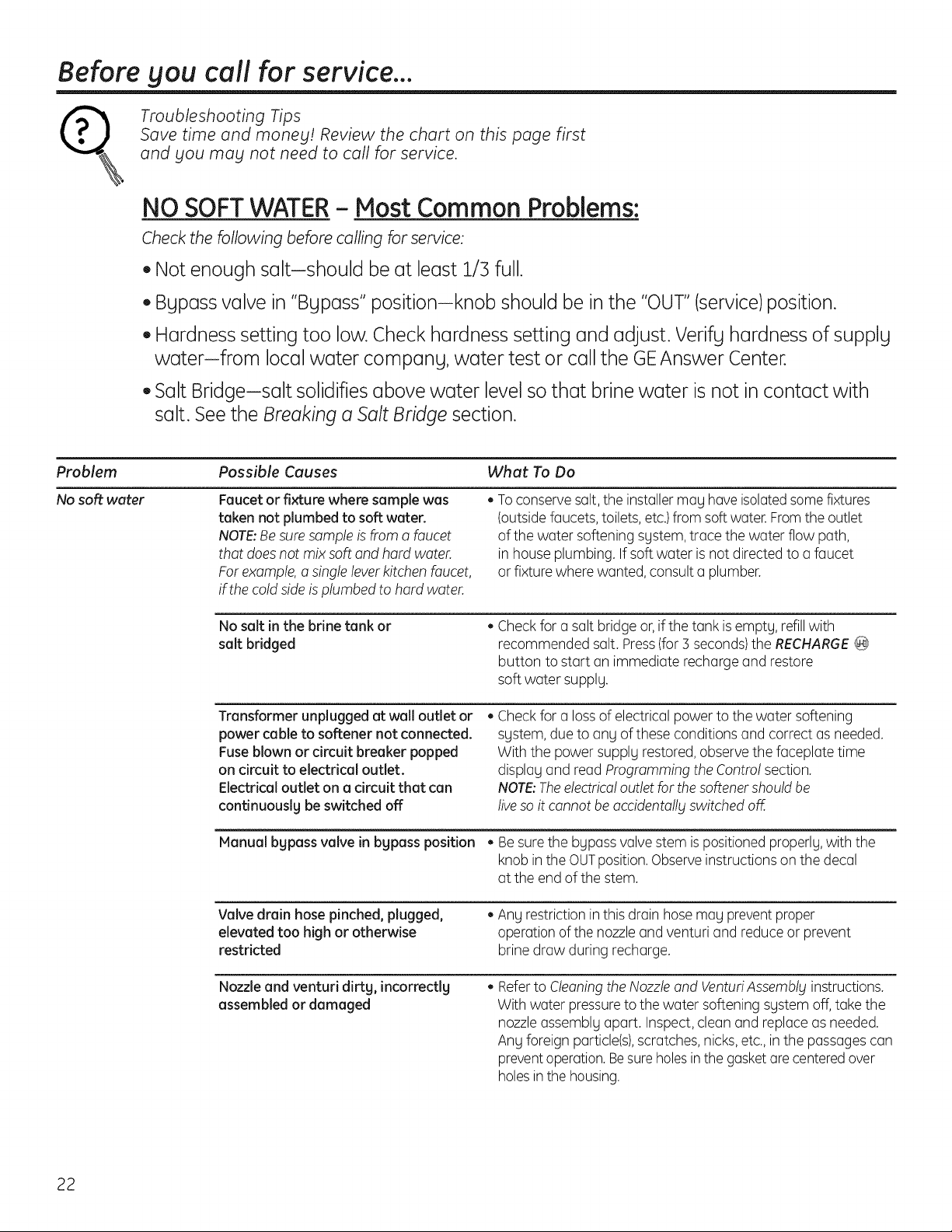
Before you call for service...
Troubleshooting Tips
Save time and money! Review the chart on this page first
and you may not need to call for service.
NO SOFTWATER - Most Common Problems:
Check the following before calling for service:
• Not enough salt-should be at least 1/3 full.
Bypass valve in "Bypass" position-knob should be in the "OUT"(service)position.
Hardness setting too low. Check hardness setting and adjust. Verify hardness of supply
waterifrom local water company, water test or call the GEAnswer Center.
Salt Bridge-salt solidifies above water level so that brine water is not in contact with
salt. See the Breaking a Salt Bridge section.
Problem Possible Causes What To Do
No soft water Faucet or fixture where sample was
taken not plumbed to soft water.
NOTE:Besure sample is from a faucet
that does not mix soft and hard water.
For example, a single lever kitchen faucet,
if the cold side is plumbed to hard water.
• Toconserve salt, the installermag have isolated some fixtures
(outsidefaucets, toilets, etc.)from soft water. Fromthe outlet
of the water softening system, trace the water flow path,
in house plumbing. If soft water is not directed to a faucet
or fixture where wanted, consult a plumber.
No salt in the brine tank or
salt bridged
Check for a salt bridge or, if the tank is emptg, refill with
recommended salt. Press(for 3 seconds)the RECHARGE@
button to start an immediate recharge and restore
soft water supplg.
Transformer unplugged at wall outlet or
power ca ble to softener not connected.
Fuse blown or dmuit breaker popped
on cimuit to electrical outlet.
Electrical outlet on a cimuit that can
continuouslg be switched off
Check for a lossof electrical power to the water softening
sgstem, due to ang of these conditions and correct as needed.
With the power supplg restored, observe the faceplate time
displag and read programming the Contro! section.
NOTE:Theelectrica!outlet for the softener should be
liveso it cannot be accidenta!lgswitched off.
Manualbgpassvalvein bgpassposition• Be sure the bgpass valve stem is positionedproperlg, with the
knob in the OUTposition. Observeinstructions on the decal
at the end of the stem.
Valve drain hose pinched, plugged,
elevated too high or otherwise
restricted
• Any restriction in this drain hose mag preventproper
operation of the nozzle and venturi and reduce or prevent
brine draw during recharge.
Nozzle and venturi dirtg, incorrectlg
assembled or damaged
Referto Cleaning the Nozzle and VenturiAssembly instructions.
With water pressureto the water softening sgstem off, take the
nozzleassemblg apart. Inspect, clean and replace as needed.
Ang foreign particle(s),scratches,nicks,etc.,in the passages can
preventoperation.Besure holesin the gasket are centered over
holes in the housing.
22
ge.com
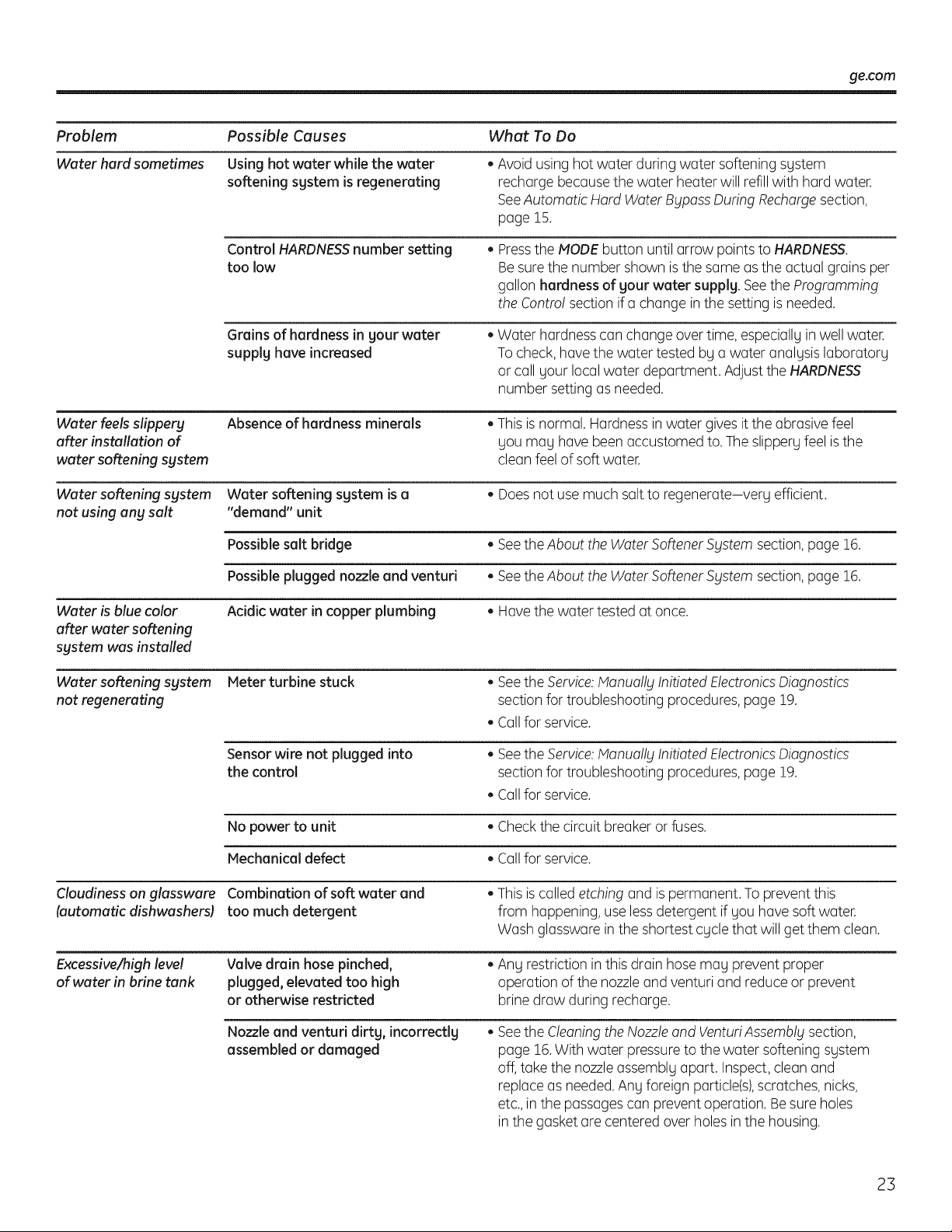
Problem
Water hard sometimes
Possible Causes
Using hot water while the water
softening system is regenerating
Control HARDNESS number setting
too low
Grains of hardness in your water
supply have increased
What To Do
Avoid using hot water during water softening system
recharge because the water heater will refill with hard water.
SeeAutomatic Hard Water Bypass During Rechargesection,
page 15.
Pressthe MODE button until arrow points to HARDNESS.
Be sure the number shown is the same as the actual grains per
gallon hardness of your water supply See the Programming
the Control section if a change in the setting is needed.
Water hardness can change over time, especially in well water.
To check, have the water tested by a water analysis laboratory
or call your local water department. Adjust the HARDNESS
number setting as needed.
Water feels slippery Absence of hardness minerals • This is normal. Hardness in water gives it the abrasive feel
after installation of you may have been accustomed to. The slippery feel isthe
water softening system clean feel of soft water.
Water softening system Water softening system is a • Does not use much salt to regenerate-very efficient.
not using any salt "demand" unit
Possible salt bridge • Seethe About the Water SoftenerSystem section, page 16.
Possible plugged nozzle and venturi • Seethe About the Water SoftenerSystem section, page 16.
Water is blue color Acidic water in copper plumbing • Have the water tested at once.
after water softening
system was installed
Water softening system Meter turbine stuck • See the Service: lanua!lg Initiated Electronics Diagnostics
not regenerating section for troubleshooting procedures, page 19.
Callfor service.
Sensor wire not plugged into • See the Service: lanua!lg Initiated Electronics Diagnostics
the control section for troubleshooting procedures, page 19.
Callfor service.
No power to unit • Check the circuit breaker or fuses.
Mechanical defect • Callfor service.
Cloudiness on glassware Combination of soft water and • This is called etching and is permanent. To prevent this
(automatic dishwashersl too much detergent from happening, use less detergent if you have soft water.
Wash glassware in the shortest cycle that will get them clean.
Excessive/high level Valve drain hose pinched, • Any restriction in this drain hose may prevent proper
of water in brine tank plugged, elevated too high operation of the nozzleand venturi and reduce or prevent
or otherwise restricted brine draw during recharge.
Nozzle and venturi dirty, incorrectly
assembled or damaged
• Seethe Cleaningthe Nozzle and VenturiAssembly section,
page 16.With water pressureto the water softening system
off, take the nozzleassembly apart. Inspect, clean and
replace as needed.Any foreign particle(s),scratches, nicks,
etc.,in the passages can prevent operation. Besure holes
in the gasket are centered over holes in the housing.
23
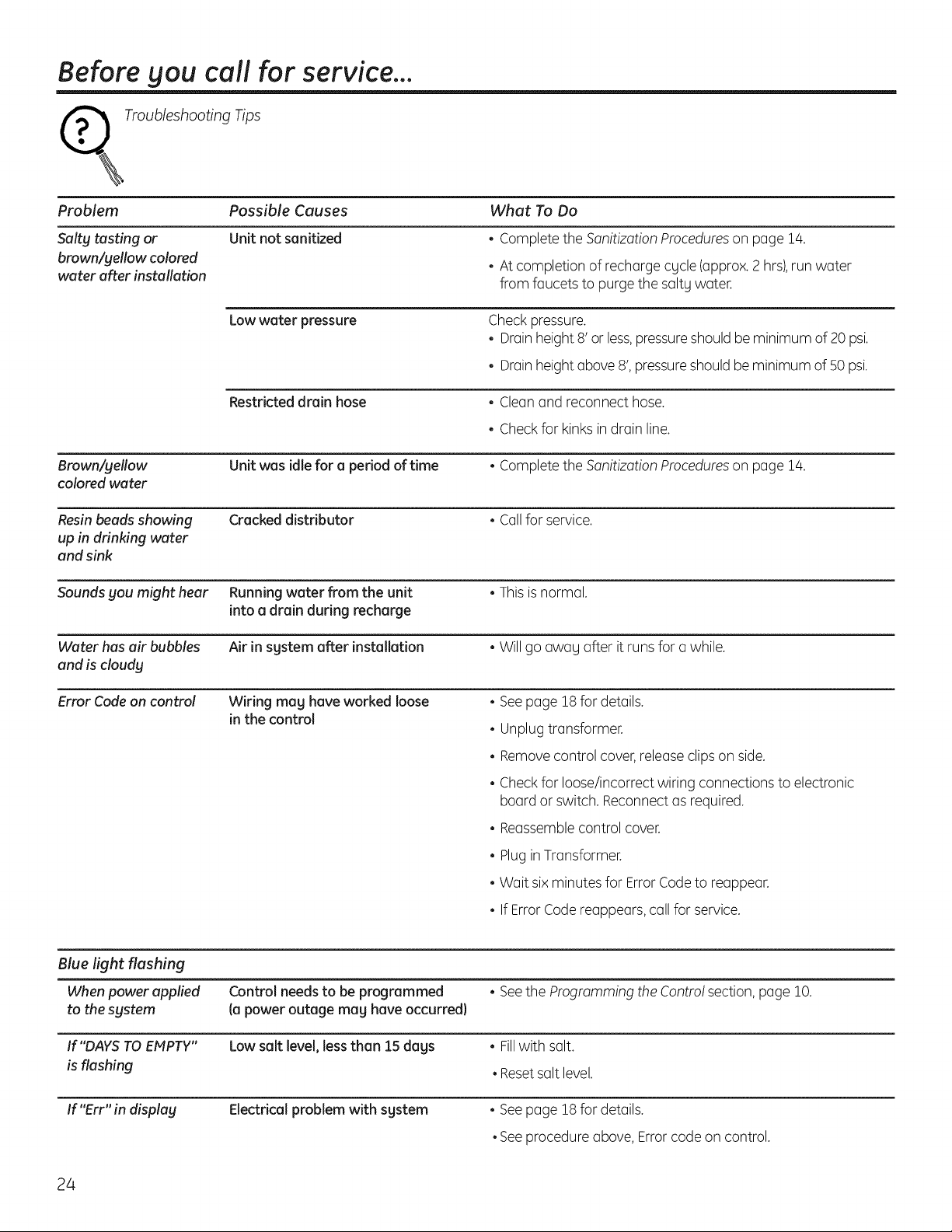
Before you call for service...
_ Troubleshooting Tips
Problem
Salty tasting or
brown/yellow colored
water after installation
Possible Causes
Unit not sanitized
What To Do
• Complete the Sanitization Procedureson page 14.
• At completion of recharge cgcle (approx.2 hrs),run water
from faucets to purge the salty water.
Low water pressure
Check pressure.
• Drainheight 8' or less,pressure should be minimum of 20 psi.
• Drainheight above 8', pressureshould be minimum of 50 psi.
Restricted drain hose • Clean and reconnect hose.
• Check for kinks indrain line.
Brown!yellow
colored water
Unit was idle for a period of time • Complete the Sanitization Procedureson page !4.
Resin beads showing
up in drinking water
and sink
Cracked distributor • Callfor service.
Sounds you might hear Running water from the unit • Thisis normal.
into a drain during recharge
Water has air bubbles Air in sgstem after installation • Will go awag after it runs for a while.
and is cloudy
Error Code an control Wiring mag have worked loose
in the control
• Seepage 18 for details.
• Unplug transformer.
• Removecontrol cover,release clips on side.
• Check for loose/incorrect wiring connections to electronic
board or switch. Reconnectas required.
• Reassemblecontrol cover.
• Plug in Transformer.
• Wait six minutes for Error Codeto reappear.
• If Error Code reappears,call for service.
Blue light flashing
When power applied Control needs to be programmed • Seethe Programming the Contro! section, page !0.
to the system (a power outage mag have occurred}
If"DAYS TO EIvIpTY'' Low salt level, less than 15 dags • Fillwith salt.
is flashing • Reset salt level.
If"Err" in displag Electrical problem with sgstem • See page 18for details.
• See procedure above, Error code on control.
24

Notes.
25

Notes.
26
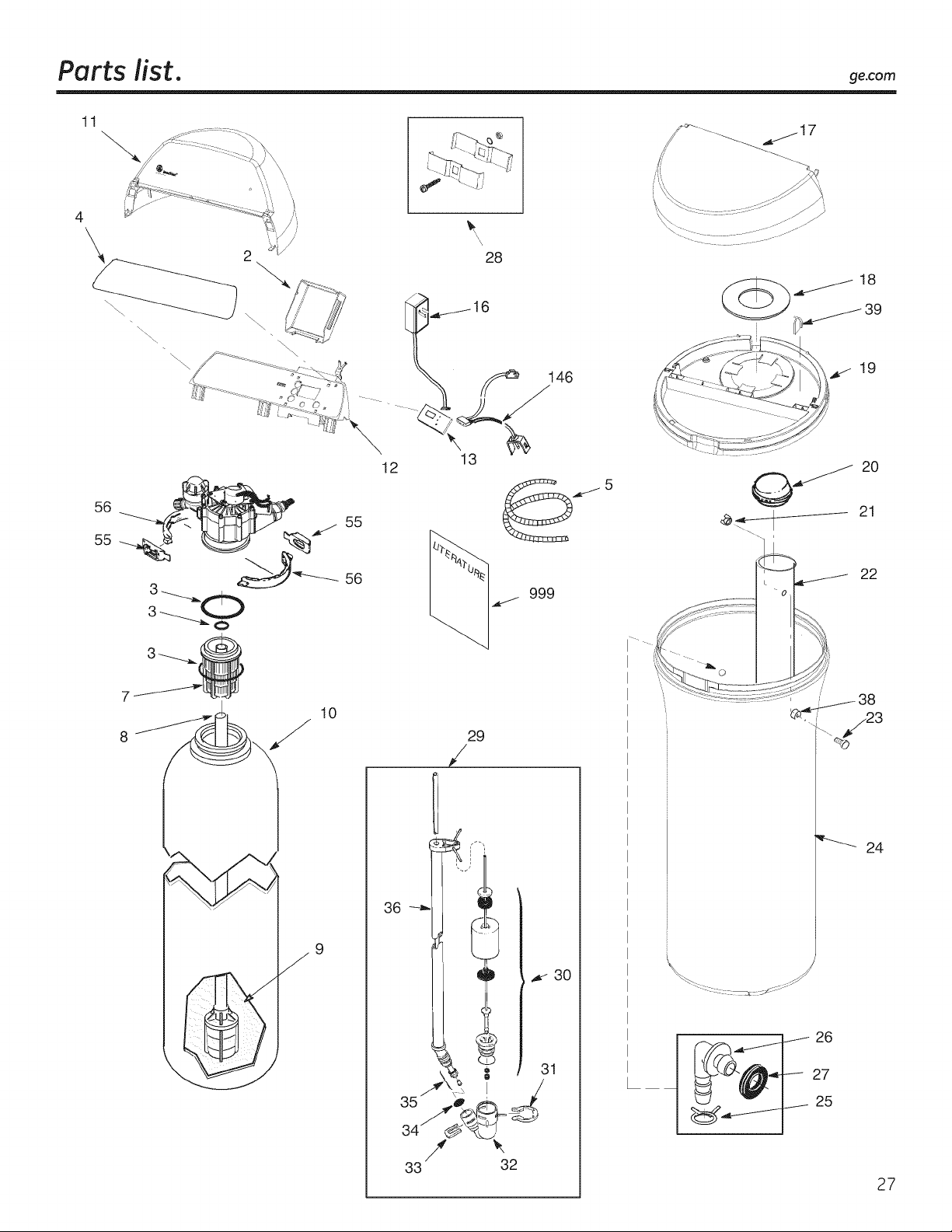
Parts list. ge.com
11
4
\
56
55
\
_,/ 55
56
10
9
28
16
/_ 146
13
12
29
/
J
33 32
19
_ 20
<__ 21
22
24
26
27
25
27
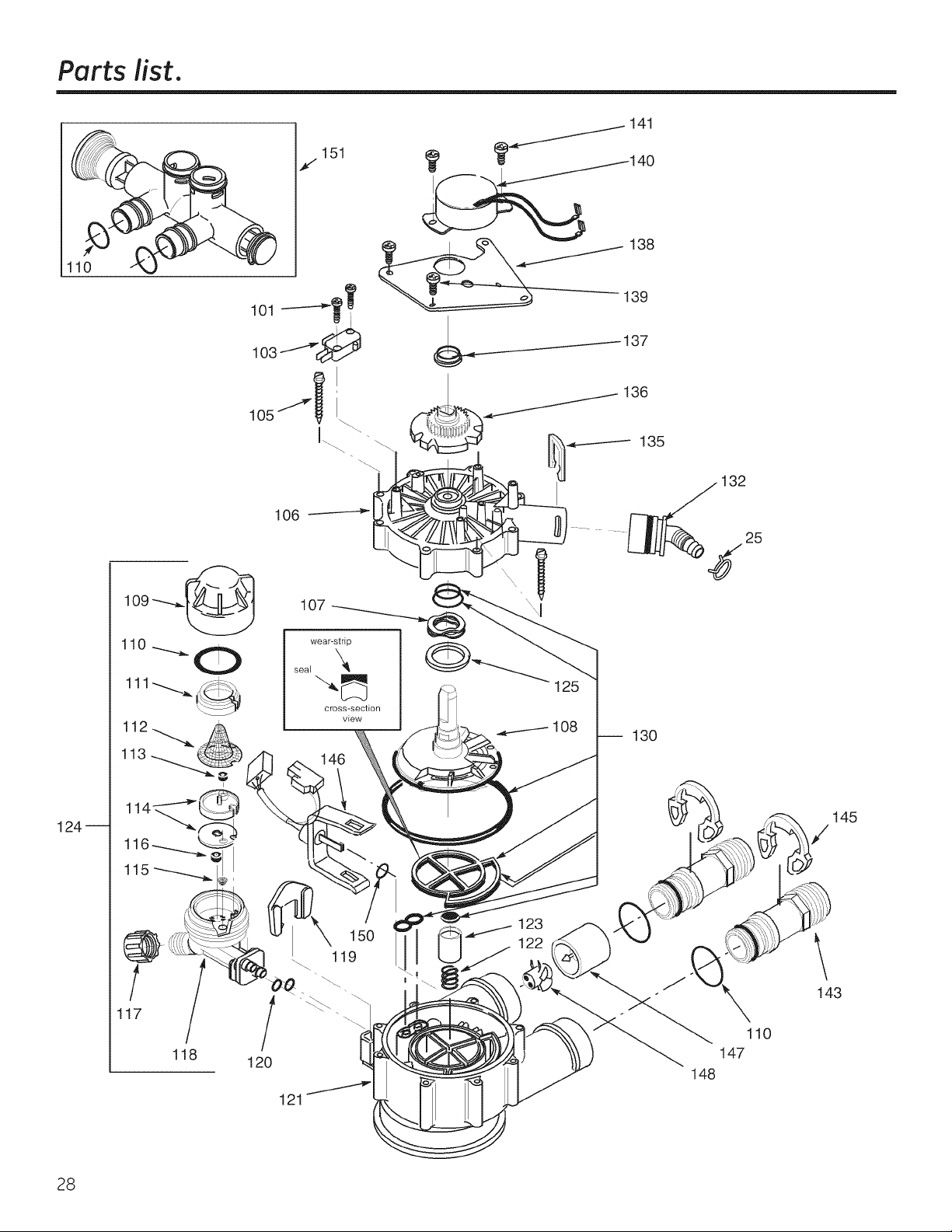
Parts list.
110
124--
j151
I
1
11
115
.
/
117
/
118
105
106
146
/
120
123
122
121
141
_------137
136
135
32
-- 130
148
\
145
143
28
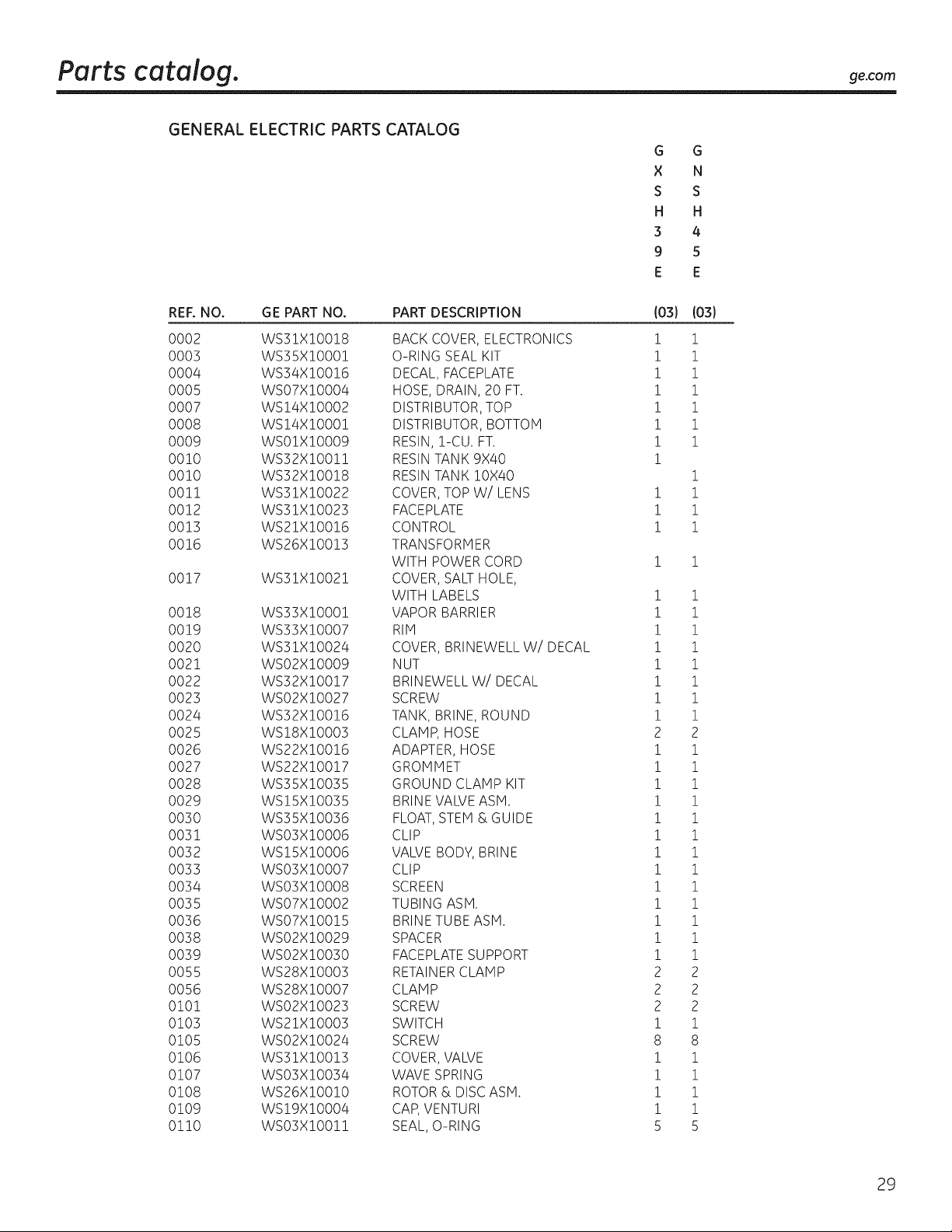
Parts catalog, ge.com
GENERAL ELECTRIC PARTS CATALOG
G G
X N
S S
H H
3 4
9 5
E E
REF. NO. GE PART NO. PART DESCRIPTION
0002 WSZlX!0018 BACK COVER, ELECTRONICS
0005 WSZ5X!0001 O-RING SEAL KIT
0004 WS34X!O0!6 DECAL, FACEPLATE
0005 WSO7X!O004 HOSE, DRAIN, 20 FT.
0007 WS!4X!O002 DISTRIBUTOR, TOP
0008 WS!4X!O00! DISTRIBUTOR, BOTTOM
0009 WS01X!0009 RESIN, 1-CU. FT.
0010 WS32XIO011 RESIN TANK 9X40
00!0 WS32X!00!8 RESIN TANK !0X40
00!1 WS31X!0022 COVER, TOP W/LENS
0012 WS31X!0023 FACEPLATE
0013 WS21X!00!6 CONTROL
0016 WS26X!00!3 TRANSFORMER
WITH POWER CORD
00!7 WS31X!002! COVER, SALT HOLE,
WITH LABELS
0018 WS33X!000! VAPOR BARRIER
0019 WS33X!0007 RIM
0020 WS31X10024 COVER, BRINEWELL W/DECAL
0021 WS02X10009 NUT
0022 WS32X10017 BRINEWELL W/DECAL
0023 WS02X10027 SCREW
0024 WS32X!00!6 TANK, BRINE, ROUND
0025 WS18X10003 CLAMP, HOSE
0026 WS22X10016 ADAPTER, HOSE
0027 WS22X10017 GROMMET
0028 WS35X10035 GROUND CLAMP KIT
0029 WS15X10035 BRINE VALVE ASM.
0030 WS35X10036 FLOAT, STEM & GUIDE
0031 WS03X10006 CLIP
0032 WS15X10006 VALVE BODY, BRINE
0033 WS03X10007 CLIP
0034 WS03X!0008 SCREEN
0035 WS07X!0002 TUBING ASM.
0036 WS07X!00!5 BRINE TUBE ASM.
0038 WS02X10029 SPACER
0039 WS02X10030 FACEPLATE SUPPORT
0055 WS28X10003 RETAINER CLAMP
0056 WS28X10007 CLAMP
0101 WS02X10023 SCREW
0103 WS21X!0003 SWITCH
0105 WS02X10024 SCREW
0106 WS31XI0013 COVER, VALVE
0107 WS03X10034 WAVE SPRING
0108 WS26X10010 ROTOR & DISC ASM.
0109 WS19X10004 CAP, VENTURI
0110 WSO3X!O0!! SEAL, O-RING
(o3) (o3)
i i
i i
i i
i i
i i
i i
i i
i
i
i i
i i
i i
i i
i i
i i
i i
i i
i i
i i
i i
i i
2 2
1 1
1 1
1 1
1 1
1 1
1 1
1 1
1 1
1 1
1 1
1 1
1 1
1 1
2 2
2 2
2 2
1 1
8 8
1 1
1 1
1 1
1 1
5 5
29
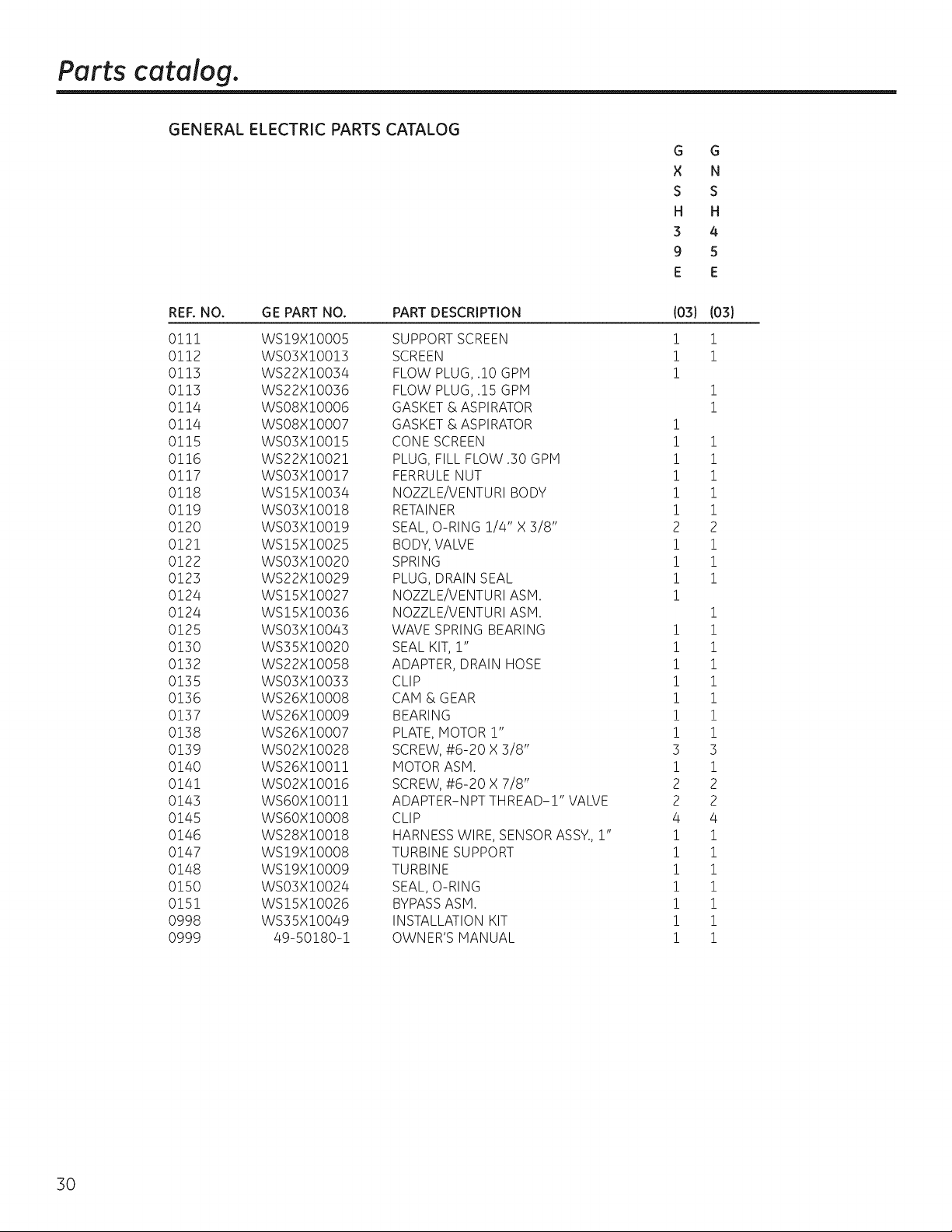
Parts catalog.
GENERAL ELECTRIC PARTS CATALOG
G G
× N
S S
H H
3 4
9 5
E E
REF. NO. GE PART NO. PART DESCRIPTION
011! WS!9X!0005 SUPPORT SCREEN
0!12 WS03X!0013 SCREEN
0113 WS22X!0034 FLOW PLUG, .10 GPM
0113 WS22X!0036 FLOW PLUG, .15 GPM
0114 WS08X!0006 GASKET & ASPIRATOR
0114 WS08X!0007 GASKET & ASPIRATOR
0115 WS03X!0015 CONE SCREEN
0116 WS22X!O02! PLUG, FILL FLOW .30 GPH
0117 WSO3X!O0!7 FERRULE NUT
0118 WS!SX!O034 NOZZLE/VENTURI BODY
0119 WSO3X!O0!8 RETAINER
0120 WSO3X!O0!9 SEAL, O-RING 1/4" X 3/8"
0121 WS!SX!O025 BODY, VALVE
0122 WSO3X!O020 SPRING
0123 WS22X!O029 PLUG, DRAIN SEAL
0124 WS!SX!O027 NOZZLE/VENTURI ASM.
0124 WS!5X!0036 NOZZLE/VENTURI ASH.
0125 WSO3X!O043 WAVE SPRING BEARING
0130 WS35X!O020 SEAL KIT, !"
0132 WS22X!O058 ADAPTER, DRAIN HOSE
0135 WS03X!0033 CLIP
0136 WS26X!0008 CAM & GEAR
0137 WS26X!O009 BEARING
0138 WS26X!O007 PLATE, MOTOR !"
0139 WSO2X!O028 SCREW, #6-20 X 3/8"
0140 WS26X!O0!! MOTOR ASH.
0141 WSO2X!O0!6 SCREW, #6-20 X 7/8"
0143 WS6OX!O0!! ADAPTER-NPT THREAD-I" VALVE
0145 WS6OX!O008 CLIP
0146 WS28X!O0!8 HARNESS WIRE, SENSOR ASSY., !"
0147 ws!gx!o008 TURBINE SUPPORT
0148 ws!gx!o009 TURBINE
0150 WSO3X!O024 SEAL, O-RING
0151 WSISXI0026 BYPASS ASH.
0998 WS35X10049 INSTALLATION KIT
0999 49-50180-1 OWNER'S MANUAL
I03}
i
i
i
i
i
i
i
i
i
2
i
i
i
i
i
i
i
i
i
i
i
3
i
2
2
4
i
i
i
i
i
i
i
I03}
1
1
1
1
i
i
i
i
i
2
i
i
i
i
i
i
i
i
i
i
i
3
i
2
2
4
i
i
i
i
i
i
i
30
GE Water Softening System Warranty. (For Customers in the United States)
All warranty service provided by our SmartWater T"Authorized Servicer
Network. To schedule service, call 800.952.5039 (U.&) or 866.777.7627
(Canada). Please have serial number and model number available when
calling for service.
Staple gout receipt here.
Proof of the original purchase
date is needed to obtain service
under the warrants.
For The Period Of:
We Will Replace:
Ang part of the Water Softening System which fails due to a defect in materials or workmanship.
During this limited one-gear warrants, GEwill also provide, free of charge, all labor and related
service to replace the defective part.
One Year
From the date of the
origina! purchase
Three Years The electronic monitor, if it fails due to a defect in materials or workmanship. During this
From the date of the three-gear limited warrants, you will be responsiblefor any labor or related service costs.
origina! purchase
Ten Years A replacement brine tank or cabinet, if either fails due to a defect in materials or workmanship.
From the date of the During this ten-gear limited warrants, you will be responsible for any labor or related service costs.
origina! purchase
What Is Not Covered:
m Service trips to sour home to teach Sou how to use
the product.
m Improper installation, delivery or maintenance.
I Failure of the product if itis abused, misused, altered, used
commerciallg or used for other than the intended purpose.
I Use of this product where water is microbiologically unsafe
or of unknown quality, without adequate disinfection before
or after the system. Systems certified for cyst reduction may
be used on disinfected water that meg contain filterable
cgsts.
IIReplacement of house fuses or resetting of circuit breakers.
I Damage to the product caused by accident, fire, floods or
acts of God.
I Incidental or consequential damage caused bg possible
defects with this appliance, its installation or repair.
[]Product not accessibleto provide requiredservice.
EXCLUSION OF IMPLIED WARRANTIES--Your sole and exclusive remedy is product repair as provided in this
Limited Warranty. Any implied warranties, including the implied warranties of merchantability or fitness for
a particular purpose, are limited to one gear or the shortest period allowed by law.
This warrants is extended to the original purchaser and ang succeeding owner for products purchased for home use within
the USA. If the product is located in an area where service bg a GE Authorized Servicer is not available, Sou mag be
responsible for a trip charge or Sou mag be required to bring the product to an Authorized GEService location for service.
In Alaska, the warrants excludes the cost of shipping or service calls to sour home.
Some states do not allow the exclusion or limitation of incidental or consequential damages. This warrants gives Sou
specific legal rights, and Sou mag also have other rights which varg from state to state. To know what gout legal
rights are, consult gout local or state consumer affairs office or gout state's Attomeg General.
li
Warrantor: General Electric Company. Louisville, KY 40225
31
GE Water Softening System Warranty. (ForCustomers in Canada)
All warranty serviceprovided by our Factory ServiceCentersor an authorized technician. Forservice,
call toll free 1.866.777.7627. Please have serial number and model number available when calling for service.
For The Period Of: We Will Replace:
One Year Any part of the Water Softening System which fails due to a defect in materials or workmanship.
From the date of the During this limited one-gear warranty, GEwill also provide, free of charge, all labor and related
origina! purchase service to replace the defective part.
Three Years The electronic monitor, if it fails due to a defect in materials or workmanship. During this
From the date of the three-gear limited warranty, you will be responsible for any labor or related service costs.
origina! purchase
Ten Years
From the date of the
origina! purchase
A replacement #fine tank or cabinet, if either fails due to a defect in materials or workmanship.
During this ten-gear limited warranty, you will be responsible for any labor or related service costs.
What Is Not Covered:
Service trips to your home to teach you how to use
the product.
m Improper installation, delivery or maintenance.
m Failure of the product if it is abused, misused, altered, used
commercially or used for other than the intended purpose.
m Use of this product where water is microbiologically unsafe
or of unknown quality, without adequate disinfection before
or after the system. Systems certified for cyst reduction may
be used on disinfected water that may contain filterable
cysts.
ImReplacement of house fuses or resetting of drcuit breakers.
m Damage to the product caused by accident, fire, floods or
acts of God.
II Incidental or consequential damage caused by possible
defects with this appliance, its installation or repair.
[] Product not accessible to provide required service.
EXCLUSION OF IMPLIED WARRANTIES--Your sole and exclusive remedy is product repair as provided in this
Limited Warranty. Any implied warranties, including the implied warranties of merchantability or fitness for
a particular purpose, are limited to one gear or the shortest period allowed by law.
This warrant_l is extended to the original purchaser and an_l succeeding owner for products purchased for home use within
Canada. In-home warrantbt service will be provided in areas where it is available and deemed reasonable bbt Mabe to provide.
WARRANTOR IS NOT RESPONSIBLE FOR CONSEQUENTIAL DAMAGES.
Warrantor: MABE CANADA INC.
32
Informaci6n de seguridad .... s4
Instrucciones
de instalaci6n ............... s 5-46
Instrucciones paso pot paso .... 38-46
Instrucciones para la operaci6n
C6mo limpiar la ensambladura
de la boquilla g el Venturi .......... 49
C6mo romper un puente de sal ..... 48
Funciones ......................... 50
Servicio .................... 47, 51-53
Sistema de descalcificaci6n
de agua ....................... 47-53
Cuidado y limpieza ............ 54
Consejos para la soluci6n
de averias ................... 55-57
Soporte al cliente
Garantia ........................... 62
Lista de partes/cat61ogo ........ 58-61
Soporte al consumidor ............. 63
Escriba aqui los n(_meros de modelo
y de lu serie:
Modelo No.
Serie No.
Para encontrar estos nOmeros,
levante la cubierta g mire en el borde,
debajo del panel del control.
33
INFORMACION IMPORTANTE DE SEGURIDAD.
LEA TODAS LAS INSTRUCCiONES ANTES DEL USO.
ADVERTENCIA
Pot su seguridad, se debe seguir la informaci6n en este manual con el fin de reducir el riesgo de
una descarga eldctrica, dahos a la propiedad o dahos personales.
PRECAUCIONES DE SEGURIDAD
Reviseg cumpla con todos los cbdigos estatales g
locales. Observe las pautas aquf presentadas.
iiiB,
Tenga cuidado al manipular el sistema de
descalcificaci6n de agua. No Io voltee, deje caer,
arrastre o coloque en protuberancias extremas.
Lossistemas de descalcificaci6n de agua que utilicen
cloruro de sodio (sadpara la recarga agregan sodio al
agua. Laspersonas que siguen dietascon restricciones
de sodio deben considemr e! sodio adiciona! como
parte de su consumo general. E!c!orum depotasio
puedeservir como una altemativa pare e! dorum de
sodio de su descalcificador.
Elsistema de descalcificaci6nde agua funciona
solamente con 24 voltios-60 Hz.Cercidresede usar
exclusivamentee! transformador incluido.
Utilice Onicamente salespara descalcificaci6n
del agua, al menos con 99,5% de pureza. Se
recomiendan las sales en PEPITAS,BOLITAS
o SALGRUESASOLAR.No utilice sales en roca,
bloque, granuladas o sales para la elaboraci6n
de helados. _stas pueden contener suciedad g
sedimentos, o pasta g masa g podrian crear
problemas de mantenimiento.
Hantenga la tapa del orificio de la sal en su lugar
en el descalcificador a menos que est@realizando
mantenimiento o reponiendo la sal.
ADVERTENCIA: Nou,,con agua
que sea microbiol6gicamente insegura o de calidad
desconocida sin Ilevara cabo la desinfecci6n
adecuada antes o despu_s del sistema.
Eltransformador se debe conectar Onicamente
a un tomacorriente interior con conexi6n a tierra
de 120 voltios.
INSTALACI()N CORRECTA
Este sistema de descalcificaci6n de agua debe instalarse correctamente _t colocarse de acuerdo a las
instrucciones de instalaci6n antes de su uso.
Instale o almacene donde no quede expuesto a
temperaturas por debajo del punto de congelaci6n
ni est@expuesto a ningOntipo de inclemencias
atmosf@icas. Siel agua Ilega a congelarse dentro
del sistema, @stepodrfa romperse. No intente dar
tratamiento al agua si se encuentra a una
temperatura pot encima de 38 °C (!00 °F).
No instale expuesto a los ragos directos del sol.
Exposici6nal sol a calor excesivospodrfan causar
distorsi6n u otros da_os alas partes no met61icas.
Conecte a tierra de manera apropiada segQnlos
c6digos g ordenanzas aplicables.
Usesolamente fundente y soldadura sin p!omo para
todas las conexiones de condensaci6n soldadas,
segOnlos c6digos estatales g federales aplicables.
Elsistema de descalcificaci6nde agua requiere un
flujo de agua mfnimo de tres galones pot minuto en la
entrada. La presi6nde entrada m6xima permitida es de
iiiB_
125psi.Sila presi6n durante el dfa es por encima
de 80 psi,la presi6n nocturna podrfa exceder el
m(_ximo.Use una vcilvulareductora de presi6n
para reducir elflujo si es necesario.
Lasresinasde descalcificaci6npodrfan degradarse
ante la presenciade cloro pot encima de 2 ppm.
Siustedtiene una cantidad de cloro magor a @sta,
quizcisexperimente una vida menor de la resina.
Enestas condiciones,es posibleque quiera
considerar la compra de un sistema de filtraci6n
del punto de admisi6n para casas GEcon un filtro
reductor de cloro.
kADVERTENCIA: Desechetodaslas
partes g los materiales de embalaje no utilizados
despu@sde la instalaci6n. PartespequeSas
restantes despu@sde la instalaci6n podrfan
representar un peligro de asfixia.
LEAYSIGAESTAINFORIACION DESEGURIDADCUIDADOSAIENTE.
GUARDE ESTASINSTRUCCiONES
34
I strucciones
dei stalaci"
SistemaSuavizantede Agua
Modelos G×SH39E g GNSH45E
_ tiPreguntas? Llame 800.GE.CARES (800.432.2737) o Visite nuestra p6gina en la red en: ge.com
i
ADVERTENCIA: Leaestemanualensutotalidad.Noseguir todas las pautas g normas
podria causar lesiones personales o da5os a la propiedad.
• Consulte con la autoridad de obras p6blicas estatal/Iocal para los c6digos de plomeria. Deber6 seguir
estas pautas para instalar el sistema de filtrad6n de agua.
NOTA: No cumplir con estas instrucciones de instalaci6n invalidar6 la garantia del producto, g el instalador
ser6 responsable por cualquier servido, reparad6n o da5os causados.
ANTES DE EMPEZAR LA INSTALACI6N
Lea estas instrucdones completa g
cuidadosamente.
• IMPORTANTE - Guardeestas
instrucciones para usa del inspector local.
• IMPORTANTE -Observetodoslos
c6digos g ordenanzas vigentes.
• Nota alinstalador - AsegOrese de dejarestas
instrucciones al consumidor.
• Nota al consumidor - Conserve estas
instrucciones para consultas posteriores.
• Lo instoloci6n apropiada es la responsabilidad
del instolodor.
• Las averias del producto causadas par una
instalaci6n inadecuada no estan cubiertas par
la garantia.
• Debe existir una valvula de cierre disponible o se
debe agregar una cerca al punto de instalaci6n.
RECOMENDACIONES IMPORTANTES
PARA LA INSTALACION
• En el estado de Massachusetts, la instalaci6n
debe ajustarse al C6digo de P]omer[a 248 CMR.
Consulte a su plomero certificado.
• Use solamente fundente g soldadura sin plomo
para todas las conexiones de condensaci6n
soldadas, segOn los c6digos estatales g federales
aplicables.
• Conecte el descalcificador en la tuberia de
suministro principal antes del calentador de
agua. NO HAGA PASAR AGUA CALIENTE A
TRAVES DEL DESCALCIFICADOR. La temperatura
del agua qua pase a trav6s del descalcificador
debeser manor de 49 °C (120 °F).
35
RECOMENDACIONES IMPORTANTES
PARA LA INSTALACION {CONT.)
Tenga cuidado cuando manipule el
descalcificador. No Io coloque boca arriba,
ni Io deje caer, ni Io arrastre, ni Io apoge
en protuberancias.
La presi6n de entrada maxima permitida es de
125 psi. Si la presi6n durante el dia es par encima
de 80 psi, la presi6n nocturna podria exceder el
maxima. Use una valvula reductora de presi6n
para reducir el flujo si es necesario. (Agregar
una valvula reductora de presi6n podria reducir
el fiujo.)
El sistema de descalcificaci6n funciona
solamente con 24 voltios-60 Hz. Cerci6rese de
usar exclusivamente el transformador incluido.
Cerci6rese de que el tomacorriente el6ctrico g el
transformador estan en el interior de un recinto
para protegerlos de la humedad.
Consulte la secci6n Donde instalar el
descalcificador para mas detalles.
-_ADVERTENCIA: Nousecon agua
que sea microbiol6gicamenteinsegurao de
calidaddesconocida sinllevara cabola
desinfecci6nadecuada antes o despu6s del
sistema. El agua debe probarse peri6dicamente
para verificar que el sistema se encuentra
funcionando satisfactoriamente.
• Partes pequeflas restantes despu6s de la
instalaci6n podrian representar un peligro
de asfixia. Deseche con toda seguridad.
Instruccionesde instalaci6n
DESEMPACADO E INSPECCI6N
Cerci6resede inspeccionar completamente el
descalcificador en busca de daflos durante el envfo o partes
que puedan haberse perdido.Tambi6n reviseen busca de
da_os en la caja de envb. P6ngaseen contacto con la
compaflfa de transporte para cualquier reclamo par daflo
o p@dida.Elfabricante no es responsable par daflos sufridos
durante el tr6nsito.
LaspartespequeBasnecesariasparainstalarel
descalcificadorse encuentranen una piezadecart6n
termoconformada.Paraevitarla p@didade laspartes
peque_as,mant6ngalasenel paquetetermoconformado
hastaqueustedest6listoparausarlas.Cerci6resede no
descartarcomponentesquepodrianestarescondidos
enelembalage.
HERRAMIENTAS Y MATERIALES
NECESARIOS PARA LA INSTALACI6N
• Alicates
• Destornillador
• Cinta de tefl6n
• Cuchilla
• DosIlavesajustables
• Sepueden requerir herramientas adicionales,si se
necesita efectuar modificaciones a la plomeria de la
vivienda.
• Losaccesorios de entrada y salida incluidoscon el
descalcificador est6n adaptadores macho NPTde 1" (2,5
cm). Debe mantener un tamano igual o mayor de tubas
que los tubas del suministro del agua, hacia la entrada y
salida deldescalcificador.Luego use los adaptadores
necesariospara conectar el suministro de agua, hacia los
adaptadores macho NPTde 1" (2,5cm).
Usela v61vulade bypass incluida para instalar el
descalcificador.Lav61vulade bypass le permite
desconectar el suministro de agua hacia el
descalcificador para efectuar servicio,peroa0n mantiene
el agua Ilegando alas tuberfas de la casa. Losaccesorios
de entrada y salida a que nos referimos anteriormente se
conectan a la v61vulade bypass con losclips de bypass
incluidos.
Utilice material de conexi6nituberfa apropiado (par
ejemplo: cobre,lat6n, galvanizado o CPVC)para conectar
los adaptadores pl6sticos NTPde 1" a la plomerfa de la
vivienda.
• Siuna manguera adicional es necesariapara
el drenaje de la v61vulay eltanque de sal,usted la puede
solicitar en AccesoriosGEIlamando a1800.626.2002,no.
de parte WSO7X10004.
• Sinecesita una v61vularfgida de drenaje para cumplir con
los c6digos de plomeria, podr6 comprar las partes
necesariaspara conectar un drenaje de tuberia de cobre
o pl6stico de 1/2" (1,27cm). Consulteel Paso5.
• Saldel descalcificador en una pepita limpia o bolita de
agua es necesaria para Ilenar eltanque de agua
salmuera. Consulte el Paso 9.
36
DONDE INSTALAR
EL DESCALCIFICADOR
Coloqueel descalcificadorIom6scercanoposiblea
un sumidero,o a otro puntodedrenajeo columnade
suministro.
• Serecomienda que los grifos externos se dejen con agua
dura para asi ahorrar agua descalcificada y sal.
• No instale el descalcificador en un lugar donde se pueda
congelar.Los da5os debido el congelamiento no est6n
cubiertos par la garantia.
• No instale el descalcificador donde pueda bloquear el
acceso al calentador de agua o el acceso a la v61vulade
cierre principal del agua.
• Coloque el descalcificador en un lugar donde sea menos
probable que ocurra dana causado par el agua si es que
eventualmente ocurriese alguna fuga. Elfabricante no
reparar6 ni pagar6 par donas ocasionados par agua.
• Untomacorriente de 120voltios es necesario para
conectar el transformador que viene incluido.El
descalcificador tiene un cable el6ctrico de 10 pies.Siel
tomacorriente est6 colocado demasiado lejos (basra 100
pies),use un cable calibre 18 para conectarlo.Cerci6rese
de que el tomacorriente el_ctrico y el transformador
est_n en el interior de un recinto para protegerlos de la
humedad. Cerci6resede que el tomacorriente est6
desconectado para prevenir un carte el6ctrico accidental.
• Sise dispone a Ilevar a cabola instalaci6n en el
exterior,debe tomar las medidas necesariaspara
asegurarse de que el descalcificador,la instalaci6n de
plomeria, el cableado,etc. est6n tambi6n protegidos de
los elementos (rayos del sol, Iluvia,viento, calor,frio),de la
contaminaci6n, vandalismo, etc. tal y coma Io estarfan si
fueran instalados internamente. La instalaci6n en el
exterior no es recomendada, g anula la garantia.
• Hantenga el descalcificador alejado de los rayos
directos del sol. Elcalor del sol podrfa causar distorsi6n
u arras danos a las partes no met61icasy podrfa hacer
dana a las partes electr6nicas.
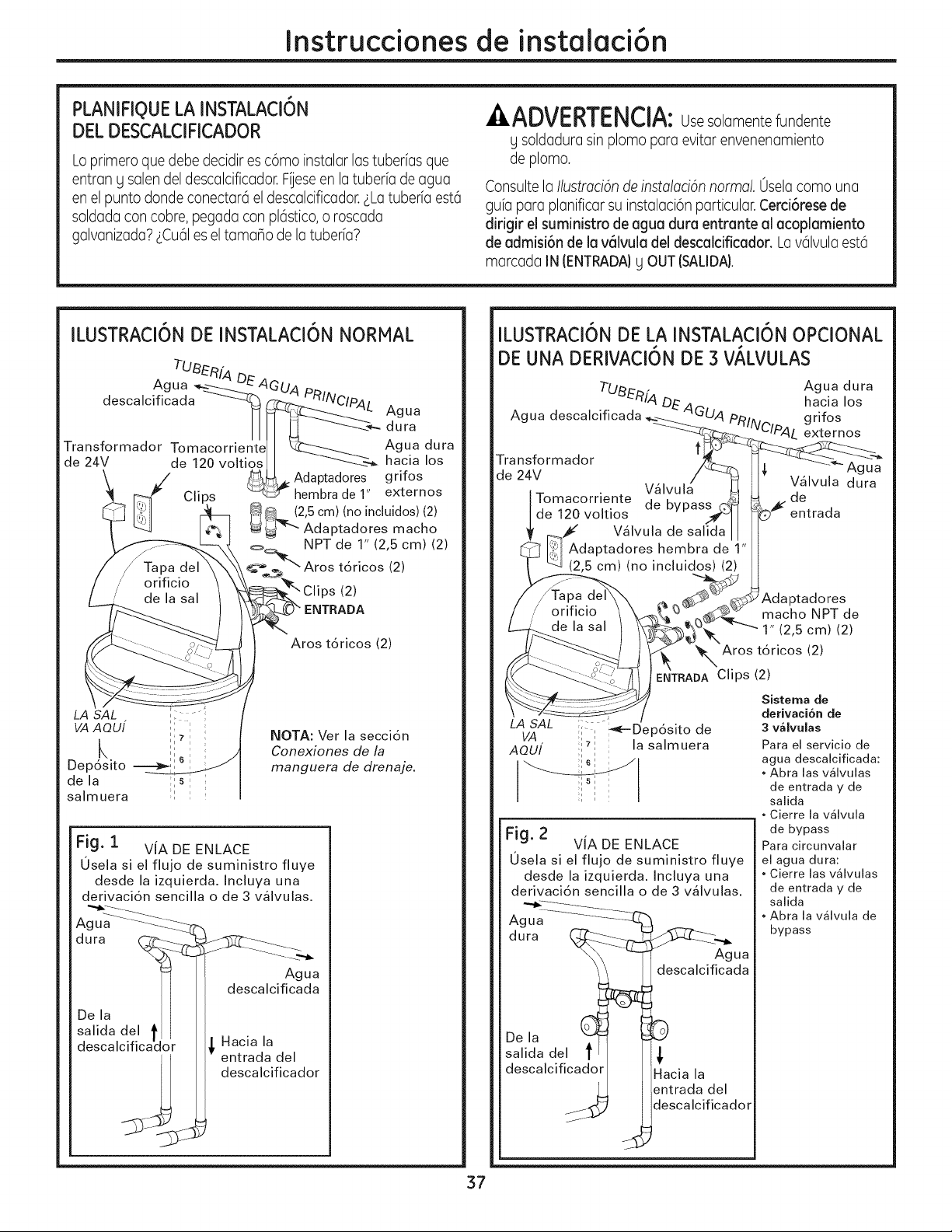
Instruccionesde instalaci6n
PLANIFIQUELA INSTALACI6N
DEL DESCALCIFICADOR
Loprimero que debe decidir es c6mo instalar las tuberias que
entran g salen del descalcificador.Fiese en la tuberfa de agua
en el punto donde conectar6 el descalcificador.LLatuberfa est6
soldada con cobre, pegada con pl6stico,o roscada
galvanizada?LCu61es el tamano de la tuberfa?
,&ADVERTENCIA:Usesolamemtefundente
g soldadura sin plomo para evitar envenenamiento
de plomo.
Consulte la Ilustmcian de instalacian normal. 0sela coma una
gufa para planificar su instalaci6n particular. Cerci6rese de
dirigir el suministro de agua dura entrante al acoplamiento
de admisi6n de la v61vula del descalcificador. La v61vulaest6
marcada IN (ENTRADA)g OUT (SALIDA).
ILUSTRACI6N DE INSTALACI6N NORMAL
TUBER[A DE
Agua _--._"---------Z_'
descalcificada -------4_
Transformador Tomacorriente
de 24V de 120 voltios
LA SAL ; -;
VAAOUI ''
k ,,
Dep6sito -=--__
i
de la ;1s : :
salmuera ;l :
_ __-- dura
L._-._._ Agua dura
--'-_-_ hacia los
Adaptadores grifos
_hembradel" externos
4_.. (2,5 cm) (no incluidos) (2)
_ Adaptadores macho
_ NPT de 1" (2,5 cm) (2)
t__.'_"" Aros t6ricos (2)
_ Clips (2)
?" ENTRADA
Aros t6ricos (2)
NOTA: Ver la secci6n
Conexiones de la
manguera de drenaje.
Fig. i VIA DE ENLACE
0sela si el flujo de suministro fluye
desde la izquierda. Incluya una
derivaci6n sencilla o de 3 v_lvulas.
dura __-_ _)_'_Z----_
Agua
descalcificada
De la I I
salida del t I
descalcificador _ Hacia la
entrada del
/_. descalcificador
ILUSTRACI6N DE LA INSTALACI6N OPCIONAL
DE UNA DERIVACI6N DE 3 VALVULAS
Tu_nf4
Agua descalcificada DEAG
Transformador
de 24V
Tomacorriente
de 120 voltios
Agua dura
hacia los
g ri fos
JClpA L externos
Agua
V_lvula dura
de
entrada
macho NPT de
1" (2,5 cm) (2)
_., Aros t6ricos (2)
' ENTRADA Clips (2)
LA SAL :,. _--Dep6sito de
VA I I
AOU[ i_i la salmuera
Fig. 2
VIA DE ENLACE
0sela si el flujo de suministro fluye
desde la izquierda. Incluya una
derivaci6n sencilla o de 3 v41vulas.
A ua..... _._7_
g ....
dura (_
De la (_
salida del t
descalcificador
Agua
descalcificada
Hacia la
entrada del
descalcificador
Sistema de
derivaci6n de
3 valvulas
Para el servicio de
agua descalcificada:
• Abra las valvulas
de entrada y de
salida
• Cierre la valvula
de bypass
Para circunvalar
el agua dura:
• Cierre las valvulas
de entrada y de
salida
• Abra la valvula de
bypass
37
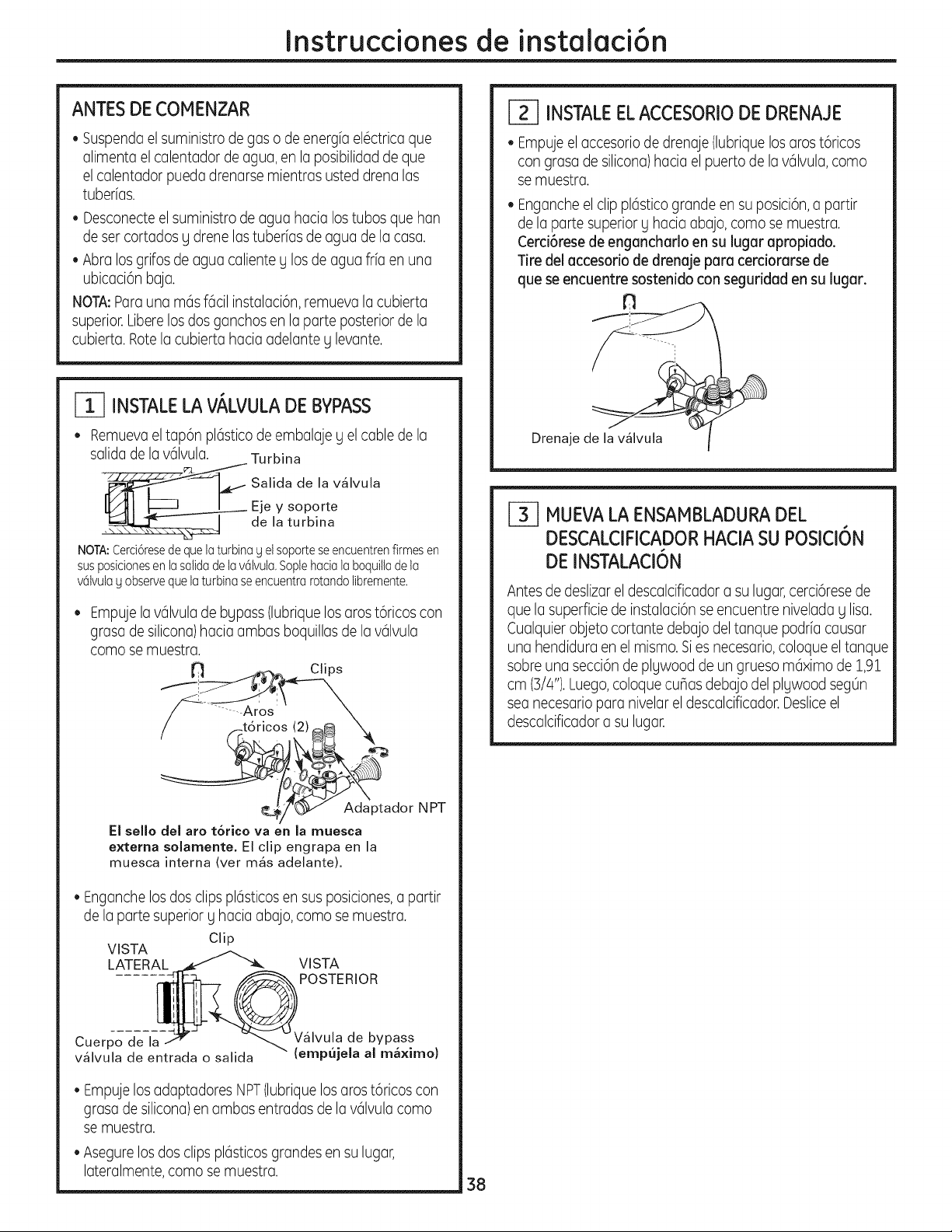
Instruccionesde instalaci6n
ANTES DE COMENZAR
• Suspenda elsuministro de gas o de energfa el6ctrica que
alimenta el calentador de agua, en la posibilidad de que
el calentador pueda drenarse mientras usted drena las
tuberfas.
• Desconecteel suministro de agua hacia los tubos que han
de ser cortados g drene las tuberfas de agua de la casa.
• Abra los grifos de agua caliente y los de agua frfa en una
ubicaci6n baja.
NOTA:Parauna m6s f6cil instalaci6n, remueva la cubierta
superior.Liberelosdos ganchos en la parte posterior de la
cubierta. Rotela cubierta hacia adelante g levante.
INSTALELA VALVULADE BYPASS
• Remuevael tap6n pl6stico de embalaje g el cable de la
salida de lav61vula. Turbina
_ alida de la v41vula
Eje y soporte
• de la turbina
NOTA:Cerci6resede quela turbinag el soporteseencuentrenfirmesen
susposicionesenlasalidade lav61vula,Soplehacia laboquiltade la
v61vulag observequelaturbina seencuentrarotandolibremente,
Empuje la v61vulade bypass (lubriquelos aros t6ricos con
grasa de silicona)hacia ambas boquillas de la v61vula
como se muestra.
/ f.tdricos (2)_ "X.
ptador N PT
El sello del aro t6rico va en la muesca
externa solamente, El clip engrapa en la
muesca interna (ver m4s adelante).
• Enganche los dos clips pl6sticosen sus posiciones,a partir
de la parte superior g hacia abajo, como se muestra.
Clip
VISTA
LATERAL VISTA
POSTERIOR
Cuerpo de la
v41vula de entrada o salida
de bypass
(empujeJa al ma×imo)
• Empuje los adaptadores NPT(lubrique los aros t6ricos con
grasa de silicona)en ambas entradas de la v61vulacomo
se muestra.
• Asegure los dos clips pl6sticosgrandes en su lugar,
lateralmente, como se muestra.
r_ INSTALEELACCESORIODE DRENAJE
• Empuje elaccesorio de drenaje (lubriquelos aros t6ricos
con grasa de silicona)hacia el puerto de la v61vula,como
se muestra.
• Enganche el clip pl6stico grande en su posici6n,a partir
de la parte superior g hacia abajo, como se muestra.
Cerci6rese de engancharlo en su lugar apropiado.
Tire del accesorio de drenaje para cerciorarse de
que se encuentre sostenido con seguridad en su lugar.
fn
Drenaje de I
F_ MUEVALAENSAMBLADURADEL
DESCALCIFICADORHACIA SU POSICI6N
DE INSTALACI6N
Antesde deslizar el descalcificador a su lugar,cerci6rese de
que la superficie de instalaci6n se encuentre nivelada g lisa.
Cualquier objeto cortante debajo del tanque podrfa causar
una hendidura en el mismo.Sies necesario,coloque el tanque
sobre una secci6n de plywood de un grueso m6ximo de 1,91
cm (3/4").Luego,coloque cuBasdebajo del plywood seg0n
sea necesario para nivelar el descalcificador. Desliceel
descalcificador a su lugar.
38
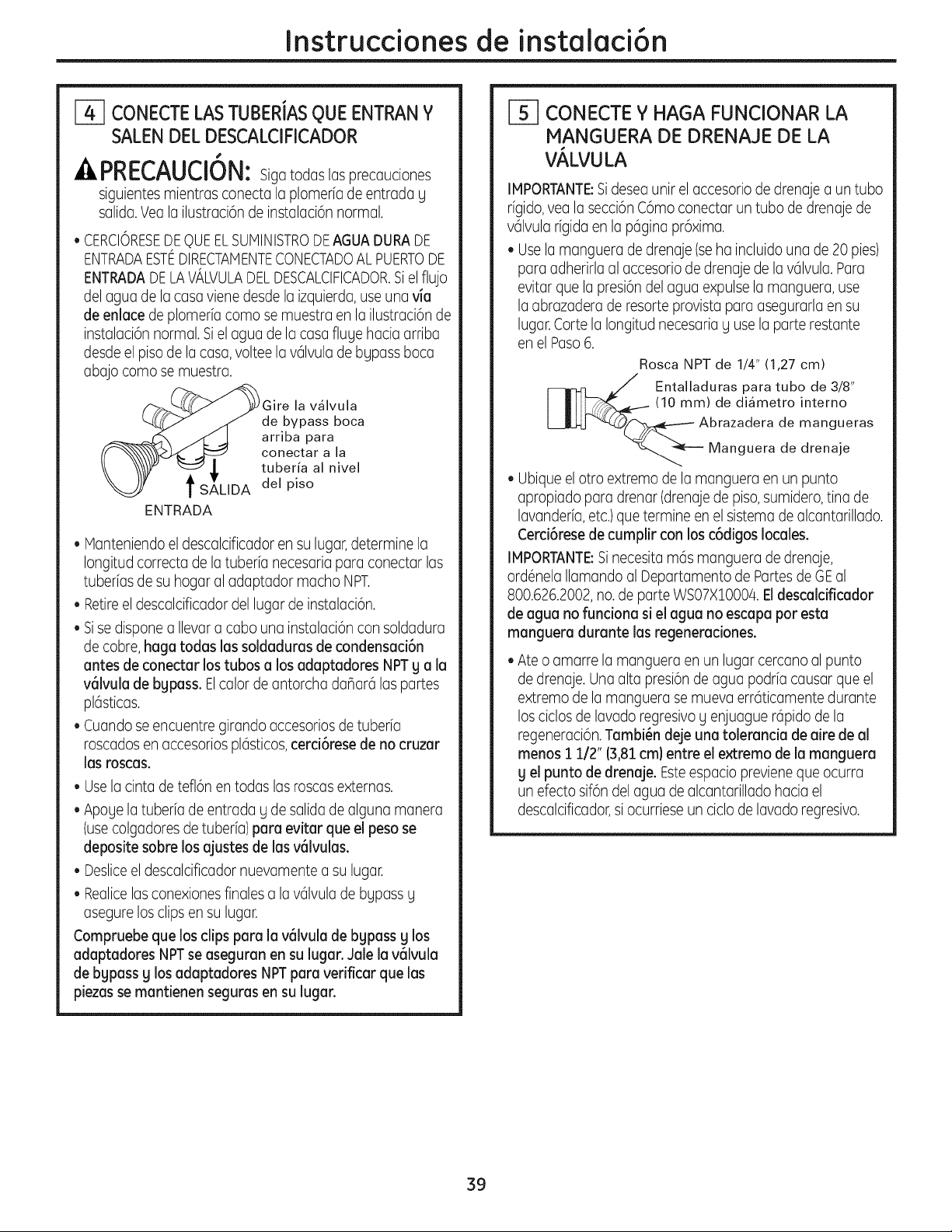
Instruccionesde instalaci6n
CONECTE LAS TUBERiAS QUE ENTRAN Y
SALEN DEL DESCALCIFICADOR
41_ri_U_lUi_: Siga todas las precauciones
siguientes mientras conecta la plomeria de entrada y
salida.Vea la ilustraci6n de instalaci6n normal.
• CERCIORESEDEQUEELSUNINISTRODEAGUADURADE
ENTRADAESTEDIRECTANENTECONECTADOALPUERTODE
ENTRADADELAVALVULADELDESCALCIFICADOR.SJel flujo
delagua de la casa viene desde la izquierda,use una via
de enlace de plomeria coma se muestra en la ilustraci6n de
instalaci6n normal. Siel agua de la casa fluye hacia arriba
desde el piso de la casa, voltee la v61vulade bypass boca
abajo coma se muestra.
Gire la v_lvula
de bypass boca
arriba para
conectar a la
tuberia al nivel
del piso
ENTRADA
Manteniendo el descalcificador en su lugar,determine la
Iongitud correcta de la tuberfa necesaria para conectar las
tuberfas de su hogar al adaptador macho NPT.
Retireel descalcificador del lugar de instalaci6n.
Sise dispone a Ilevar a cabo una instalaci6n con soldadura
de cobre,haga todas los soldaduras de condensaci6n
antes de conectar los tubos a los adaptadores NPT g a la
v61vulade bypass. Elcalor de antorcha dahar6 las partes
pl6sticas.
• Cuando se encuentre girando accesoriosde tuberia
roscados en accesorios pl6sticos,cerci6rese de no cruzar
las roscas.
• Use la cinta de tefl6n en todas las roscasexternas.
Apoye latuberfa de entrada y de salida de alguna manera
(usecolgadores de tuberia) para evitar que el peso se
deposite sabre los ajustes de las v61vulas.
• Desliceel descalcificador nuevamente a su lugar.
• Realicelas conexiones finales a lav61vulade bypass y
asegure los clips en su lugar.
Compruebe que los clips para la v61vulade bypass g los
adaptadores NPTse asegumn en su lugar. Jale la v61vulo
de bypass g los adaptadores NPTpan verificar que los
piezas se mantienen segums en su lugar.
CONECTE Y HAGA FUNCIONAR LA
MANGUERA DE DRENAJE DE LA
VALVULA
IMPORTANTE:Sideseaunitelaccesoriodedrenajea untuba
rfgido,yeala secci6nC6moconectaruntuba dedrenajede
v61vularfgidaen la p6ginapr6xima.
Usela mangueradedrenaje(seha incluidouna de20pies)
paraadherirlaal accesoriodedrenajede lav61vula.Para
evitarque la presi6ndelaguaexpulsela manguera,use
la abrazaderaderesorteprovistaparaasegurarlaensu
lugar.Cartela Iongitudnecesariay usela parterestante
enelPaso6.
Rosca NPT de 1/4" (1,27 cm)
Entalladuras para tuba de 3/8'
(10 mm) de di_metro interno
brazadera de mangueras
Manguera de drenaje
• Ubique el otro extremo de la manguera en un punto
apropiado para drenar (drenajede piso, sumidero,tina de
lavanderfa,etc.)que termine en el sistema de alcantarillado.
Cerci6rese de cumplir con los c6digos locales.
IMPORTANTE:Sinecesita m6s manguera de drenaje,
ord6nela Ilamando al Departamento de Partes de GEal
800.626.2002,no.de parte WS07X10004. Eldescalcificador
de agua no funciona si el agua no escapa par esta
manguera durante las regeneraciones.
• Ate o amarre la manguera en un lugar cercano al punto
de drenaje. Una alta presi6n de agua podria causar que el
extremo de la manguera se mueva err6ticamente durante
los ciclos de lavado regresivoy enjuague r6pido de la
regeneraci6n.Tambi_n deje una tolerancia de aire de al
menos 1 1/2" (3,81cm) entre el extremo de Io manguero
g el punto de drenaje. Esteespacio previene que ocurra
un efecto sif6n delagua de alcantarillado hacia el
descalcificador,si ocurriese un ciclo de lavado regresivo.
39
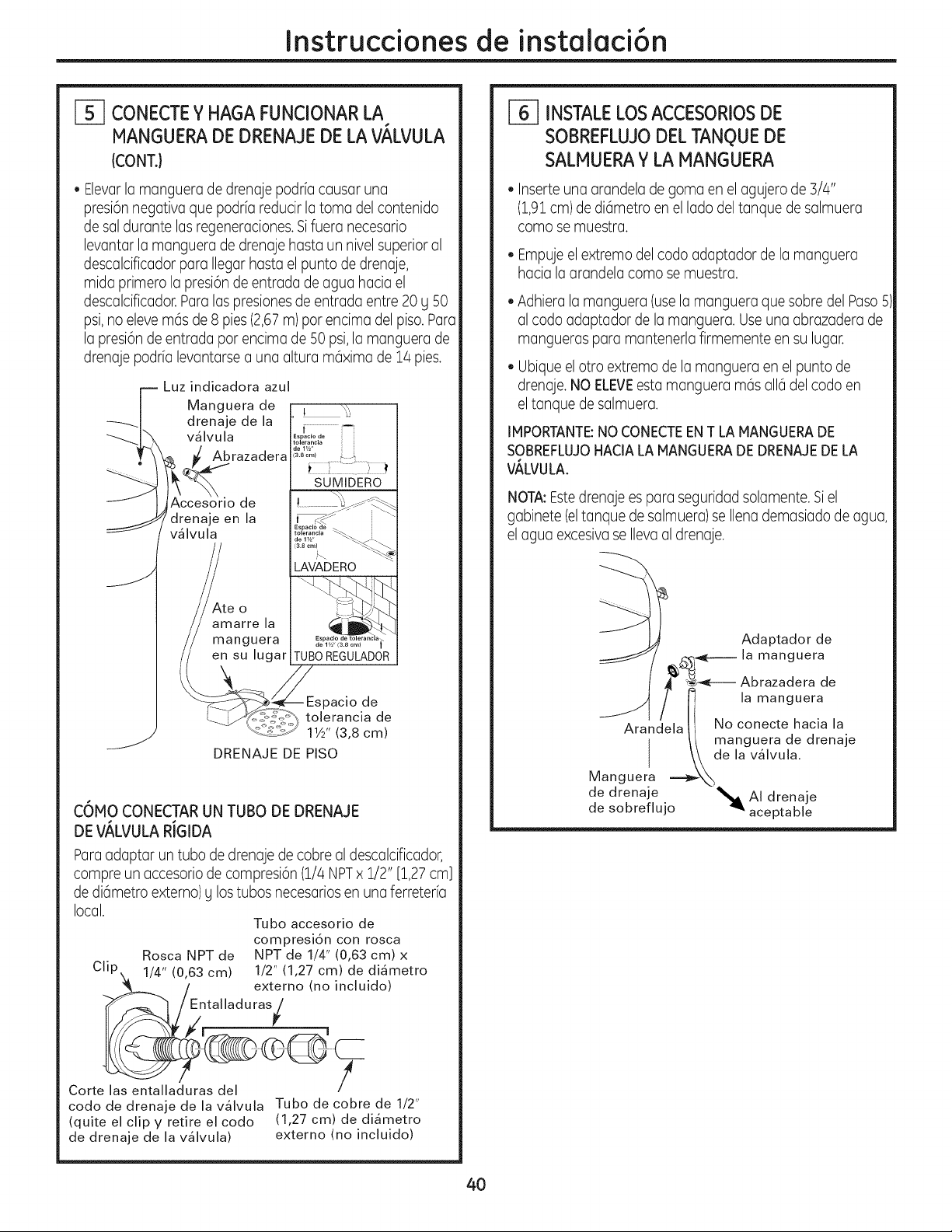
Instruccionesde instalaci6n
i-5--I CONECTEY HAGA FUNCIONAR LA
MANGUERADE DRENAJEDE LA VALVULA
(CONT.}
• Elevarla mangueradedrenajepodriacausaruna
presi6nnegativaque podriareducirla tomadelcontenido
desaldurantelasregeneraciones.Sifuera necesario
levantarla mangueradedrenajehastaunnivelsuperioral
descalcificadorparaIlegarhastael puntodedrenaje,
midaprimerola presi6ndeentradadeaguahaciael
descalcificador.Paralaspresionesdeentradaentre20U50
psi,noelevem6sde8 pies(2,67m)porencimadelpiso.Para
la presi6ndeentradapotencimade50psi,la manguerade
drenajepodrialevantarsea una alturam6ximade14pies.
r-- Luz indicadora azul
| Manguera de
_-_| drenaje de la
_I_X v_lvula
_ rozo ero
J,jAccesorio de
drenaje en la
[ v_lvula
_te o
amarre la
manguera
en su lugar
S
s acio e
3.8cml . ;_
SUMIDERO
de 1w' (3.8 cml
TUBO REGULADOR
pacio de
tolerancia de
11/2'' (3,8 cm)
DRENAJE DE PISO
C6HO CONECTAR UN TUBO DE DRENAJE
DE V,_LVULA RiGIDA
Paraadaptar un tubo de drenaje de cobre al descalcificador,
compre un accesorio de compresi6n (1/4 NPTx 1/2" [1,27 cm]
de di6metro externo) Ulos tubos necesariosen una ferreterb
local.
Tubo accesorio de
compresi6n con rosca
Rosca NPT de NPT de 1/4" (0,63 cm) x
1/4" (0,63 cm) 1/2" (1,27 cm) de di4metro
externo (no incluido)
/
1
Corte las entalladuras del
codo de drenaje de la v41vula
(quite el clip y retire el codo
de drenaje de la v41vula)
Tubo de cobre de 1/2"
(1,27 cm) de diametro
externo (no incluido)
[-_ INSTALELOSACCESORIOSDE
SOBREFLUJODEL TANQUEDE
SALMUERAY LA IANGUERA
• Inserte una arandela de goma en el agujero de 3/4"
(1,91cm)de di6metro en el lado deltanque de salmuera
como se muestra.
• Empujeelextremodelcodoadaptadorde lamanguera
haciala arandelacomose muestra.
• Adhieralamanguera(usela mangueraque sobredel Paso5
al codoadaptadordela manguera.Useunaabrazaderade
manguerasparamantenerlafirmementeensu lugar.
• Ubique el otro extremo de la manguera en el punto de
drenaje. NO ELEVEesta manguera m6s all6 del codo en
eltanque de salmuera.
IMPORTANTE:NO CONECTEENT LA MANGUERADE
SOBREFLUJOHACIALA HANGUERADE DRENAJEDELA
VALVULA.
NOTA:Estedrenaje es para seguridad solamente. Siel
gabinete (eltanque de salmuera)se Ilena demasiado de agua,
el agua excesiva se Ilevaal drenaje.
B
Adaptador de
,_¢_----- la manguera
A _-_e---- Abrazadera de
_ f I1 lamanguera
Arandela II No conecte hacia la
// manguera de drenaje
I \k de la v41vula.
Manguera. _-X_
de drenaje _ AI drenaje
de sobreflujo _' aceptable
40
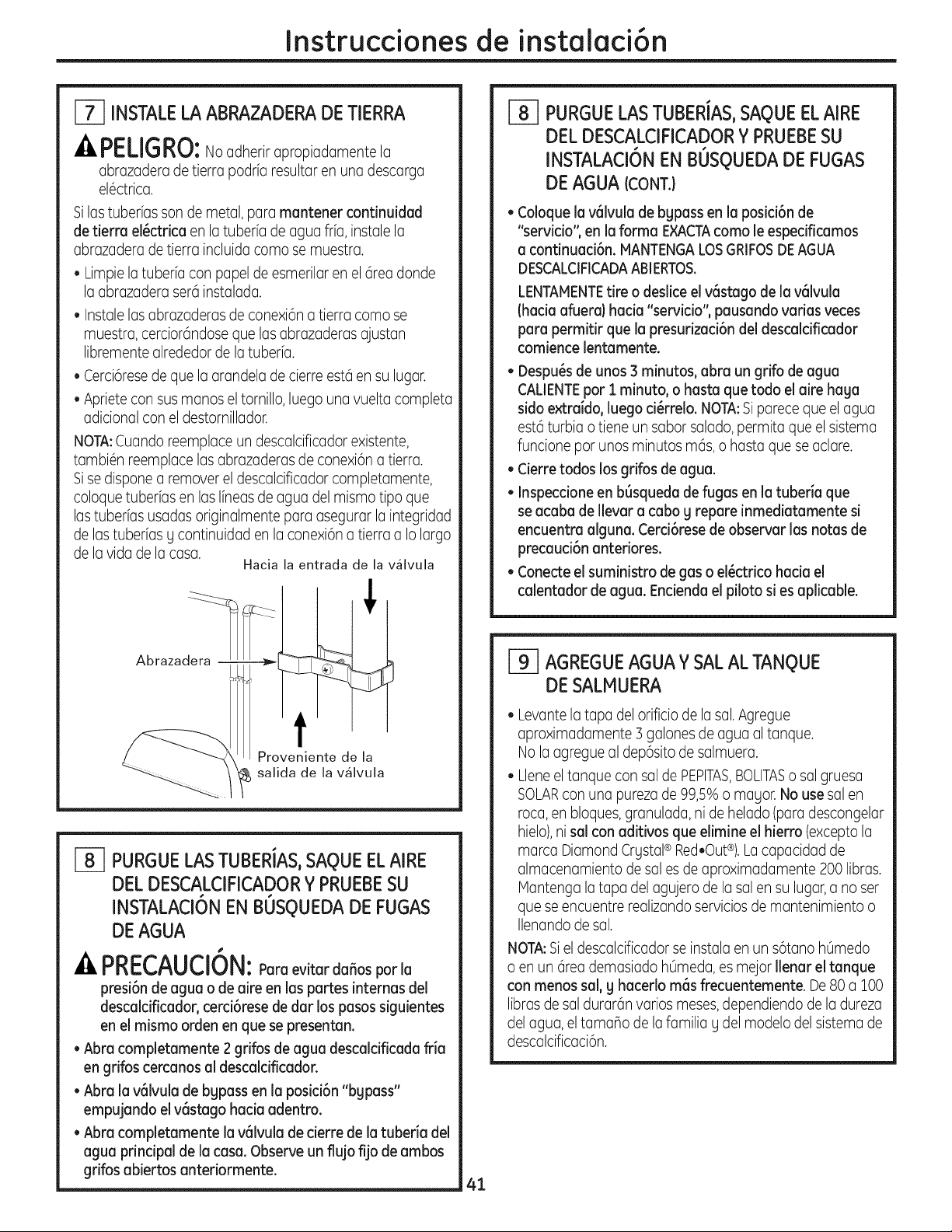
Instruccionesde instalaci6n
[_ INSTALELA ABRAZADERADE TIERRA
PELIGRO:No adherir apropiadamente la
abrazaderade tierrapodrfaresultaren unadescarga
el6ctrica.
Silas tuberfas son de metal, para mantener continuidad
de tierra el_ctrica en la tuberfa de agua frfa, instale la
abrazadera de tierra incluida como se muestra.
• Limpie la tuberia con papel de esmerilar en el 6rea donde
laabrazaderaser6instalada.
• Instale las abrazaderas de conexi6n a tierra como se
muestra, cercior6ndose que las abrazaderas ajustan
libremente alrededor de la tuberfa.
• Cerci6resede que la arandela de cierre est6 en su lugar.
• Apriete con susmanos el tornillo, luego una vuelta completa
adicional con el destornillador.
NOTA:Cuando reemplace un descalcificador existente,
tambi6n reemplace las abrazaderas de conexi6n a tierra.
Sise dispone a remover el descalcificador completamente,
coloque tuberfas en las Ifneasde agua del mismo tipo que
las tuberfas usadas originalmente para asegurar la integridad
de las tuberias g continuidad en la conexi6na tierra a Io largo
de la vida de la casa.
Hacia la entrada de la v_lvula
Abrazadera -
Proveniente de la
_ salida de la v41vula
[-_ PURGUELASTUBERIAS,SAQUEELAIRE
DEL DESCALCIFICADORY PRUEBESU
INSTALACION
EN BUSQUEDA DE FUGAS
DE AGUA
#
A PRECAUCION:Poraevitardaffosporla
presi6n de agua o de aire en las partes internas del
descalcificador, cerci6rese de dar los pasos siguientes
en el mismo orden en que se presentan.
• Abra completamente 2 grifos de agua descalcificada fria
en grifos cercanos al descaldficador.
• Abra la v6lvula de bgpass en la posici6n "bgpass"
empujando el v6stago hacia adentro.
• Abra completamente la v61vula de cierre de la tuberia del
agua principal de la casa. Observe un flujo fijo de ambos
gdfos abiertos antedormente.
_] PURGUELAS TUBERIAS,SAQUEELAIRE
DEL DESCALCIFICADORY PRUEBESU
INSTALACI6N EN BUSQUEDADE FUGAS
DE AGUA (CONT.)
• Coloque la v6lvula de bgpass en la posici6n de
"servicio", en la forma EXACTAcoma le especificamos
a continuaci6n. MANTENGALOSGRIFOSDEAGUA
DESCALCIFICADAABIERTOS.
LENTAMENTEtire o deslice el v6stago de la v61vula
(hacia afuera) hacia "servicio", pausando varias veces
para permitir que la presurizad6n del descaldficador
comience lentamente.
• Despu_s de unos 3 minutos, abra un grifo de agua
CALIENTEpot i minuto, o hasta que todo el aire haga
sido extraido, luego d_rrelo. NOTA:Siparece que el agua
est6 turbia o tiene un sabor salado, permita que el sistema
funcione pot unos minutos m6s, o basra que se aclare.
• Cierre todos los grifos de agua.
• Inspeccione en b6squeda de fugas en la tuberia que
se acaba de Ilevar a cabo g repare inmediatamente si
encuentra aJguna.Cerci6rese de observar las notas de
precaud6n anteriores.
• Conecte eJsuministro de gas o el_ctrico hacia el
caJentador de agua. Endenda eJpiloto si es apJicable.
[_ AGREGUEAGUAY SAL AL TANQUE
DE SALMUERA
• Levante la tapa del orificio de la sal.Agregue
aproximadamente 3 galones de agua al tanque.
No laagregue al dep6sito de salmuera.
• Llene el tanque con sal de PEPlTAS,BOLITASo sal gruesa
SOLARcon una pureza de 99,5% o magor. No use sal en
roca,en bloques, granulada, ni de helado (paradescongelar
hielo),ni sal con aditivos que elimine el hierro (excepto la
marca DiamondCrystal® Red,Out®).Lacapacidadde
almacenamientode salesde aproximadamente200 libras.
Mantengalatapadelagujerode lasalen su lugar,a no ser
queseencuentrerealizandoserviciosde mantenimientoo
Ilenando de sal.
NOTA:Siel descalcificador se instala en un s6tano hOmedo
o en un 6tea demasiado h0meda, es mejor Ilenar el tanque
con menos sal, 9 hacedo mas frecuentemente. De80 a 100
libras de sal durar6n varios meses,dependiendo de la dureza
del agua, el tamaho de la familia g del modelo del sistema de
descalcificaci6n.
41
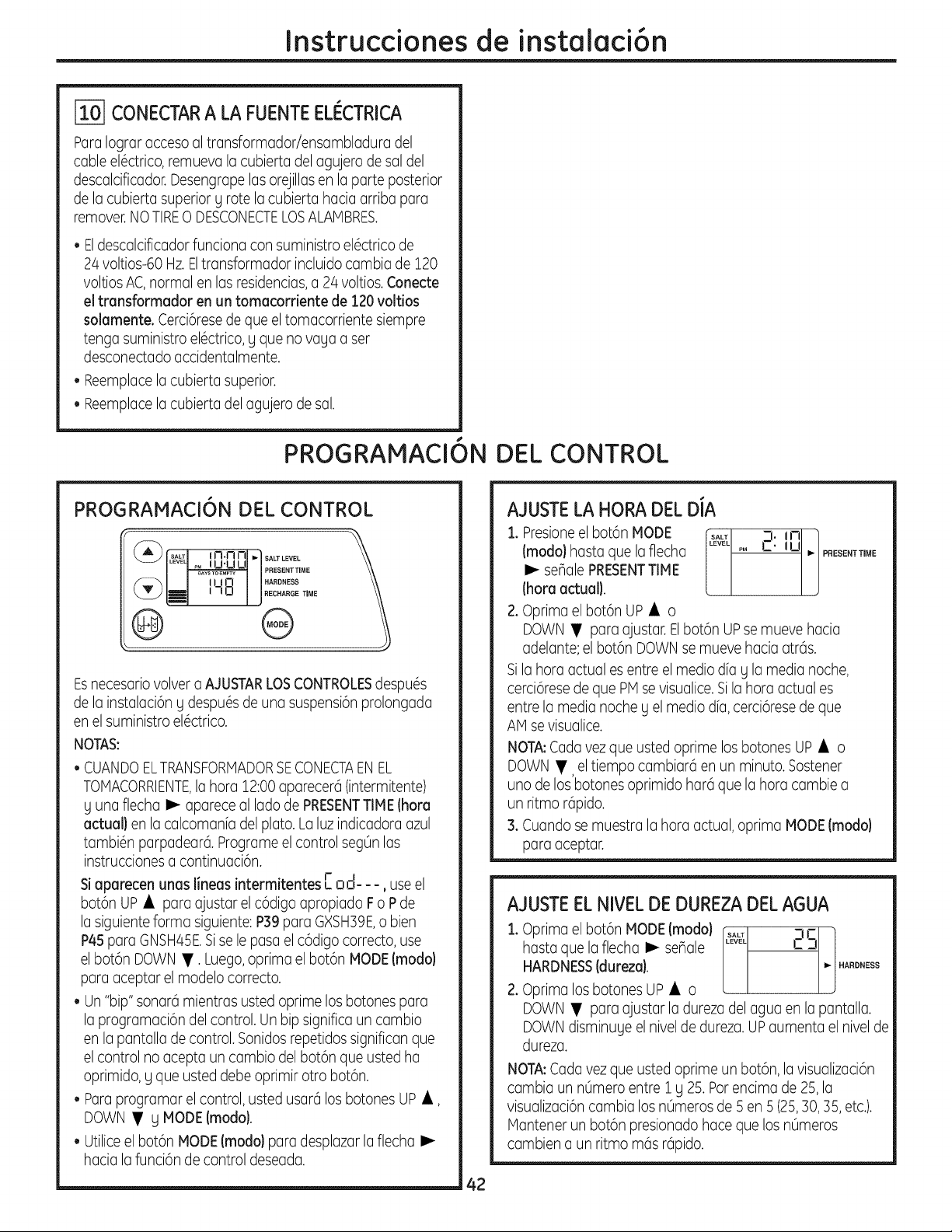
Instruccionesde instalaci6n
CONECTARA LA FUENTEELI_CTRICA
Paralograraccesoaltransformadoriensambladuradel
cableel6ctrico,remuevalacubiertadelagujerode saldel
descalcificador.Desengrapelasorejillasen laparteposterior
de lacubiertasuperiorg rotelacubiertahaciaarribapara
remover.NO TIRE0 DESCONECTE LOSALAMBRES.
• Eldescalcificador funciona con suministro el6ctrico de
24 voltios-60 Hz.Eltransformador incluido cambia de 120
voltios AC,normal en las residencias,a 24 voltios.Conecte
el transformador en un tomacorriente de 120 voltios
solamente. Cerci6resede que el tomacorriente siempre
tenga suministro el6ctrico, g qua no vaga a set
desconectado accidentalmente.
• Reemplacela cubierta superior.
• Reemplacela cubierta del agujero de sal.
PROGRAMACI6N DEL CONTROL
PROGRAMACI6N DEL CONTROL
(_[" SALT I { N.n I--II"I SALT LEVEL
ILEVEq_MLI I--I'U L.IJ I
[ml ,-,o i J°EC,A°O T,OE
@ @
Esnecesariovolver a AJUSTARLOSCONTROLESdespu6s
de la instalaci6n g despu6s de una suspensi6nprolongada
en el suministro el6ctrico.
NOTAS:
• CUANDOELTRANSFORMADORSECONECTAEN EL
TOMACORRIENTE,la hora 12:00aparecer6 (intermitente)
g una flecha I_ aparece al lado de PRESENTTIME(hora
actual} en la calcomanfa del plato. La luz indicadora azul
tambi6n parpadear6. Programe el control segOnlas
instrucciones a continuaci6n.
, • • J- I
Siaparecen unas hneas mtermltentes C ,:,,3-- -, useel
bot6n UP • para ajustar elc6digo apropiado Fo P de
la siguienteforma siguiente: P39 para GXSH39E,o bien
P4Spara GNSH45E.Sise le pasa el c6digo correcto, use
elbot6n DOWN •. Luego,oprima el bot6n MODE(modo)
para aceptar el modelo correcto.
• Un "bip" sonar6 mientras usted optima los botones para
la programaci6n del control. Un bip significa un cambio
en la pantalla de control. Sonidosrepetidos significan que
elcontrol no acepta un cambio del bot6n que usted ha
oprimido, g qua usted debe oprimir otto bot6n.
• Para programar el control, usted usar6 los botones UP •,
DOWN • g MODE(modo).
• Utilice el bot6n MODE(modo) para desplazar laflecha I_
hacia la funci6n de control deseada.
AJUSTELA HORA DEL DIA
1. Presioneel bot6n MODE _ t_l: in ]
(modo)hastaquelaflecha P. U I,,-PFIESENTTmME
[ ]
I_ seBalePRESENTTIME
(horaactual).
2. Oprima el bot6n UP • o
DOWN • para ajustar. Elbot6n UPse mueve hacia
adelante;el bot6n DOWNse mueve hacia atr6s.
Sila hora actual es entre el media dfag la media noche,
cerci6resede que PM sevisualice. Si la hora actual es
entre la media noche g el media dia, cerci6rese de que
AM se visualice.
NOTA:Cada vez que usted oprime los botones UP • o
DOWN •, el tiempo cambiarci en un minuto. Sostener
uno de los botones oprimido har6 que la hora cambie a
un ritmo r@ido.
3. Cuando se muestra la hora actual, oprima MODE(modo}
para aceptar.
AJUSTEEL NIVELDE DUREZADEL AGUA
:1.Oprima el bot6n MODE(modo) .... i_J
hasta que la flecha I_ senale ..... 2S
HARDNESS(dureza). _ .ARD.ESS
2. Oprima los botones UP • o
DOWN • para ajustar la dureza del agua en la pantalla.
DOWNdisminuge el nivel de dureza. UPaumenta el nivel de
dureza.
NOTA:Cada vez que usted oprime un bot6n, la visualizaci6n
cambia un nOmeroentre 1 g 25. Parencima de 25,la
visualizaci6ncambia los nOmerosde 5 en 5 (25,30, 35, etc.).
Mantener un bot6n presionado hace qua los nOmeros
cambien a un ritmo m6s r6pido.
42
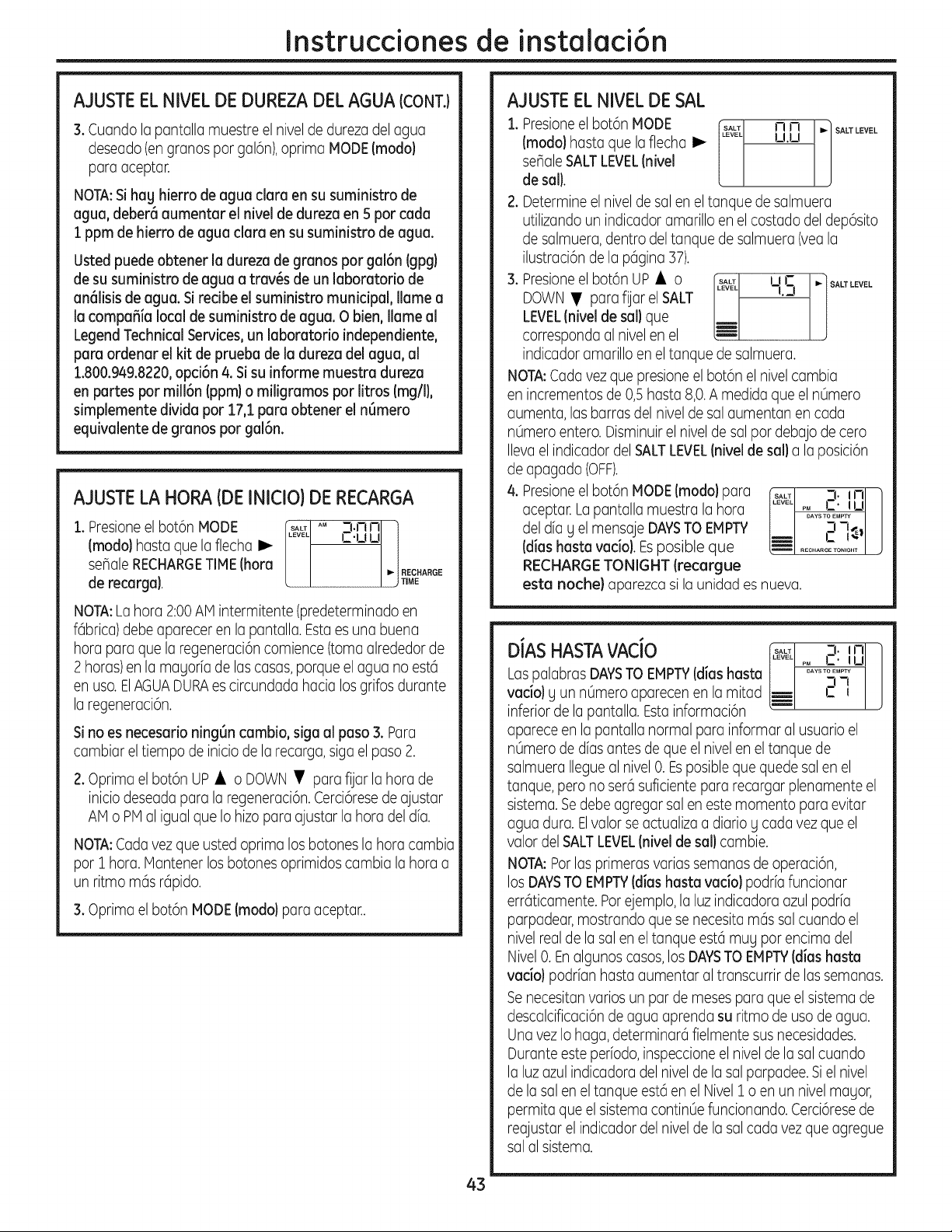
Instrucdonesde instalaci6n
AJUSTEEL NIVELDE DUREZA DELAGUA (CONT.)
3. Cuandolapantallamuestre el niveldedurezadelagua
deseado(engranDspargal6n),oprimaMODE (modo}
paraaceptar.
NOTA:Si hag hierro de agua clara en su suministro de
agua, deber6 aumentar el nivel de dureza en 5 par cada
1ppm de hierro de agua clara en su suministro de agua.
Usted puede obtener la dureza de granos par gal6n (gpg)
de su suministro de agua a tray,s de un laboratorio de
an61isisde agua. Si redbe el suministro municipal, Ilame a
la compafiia local de suministro de agua. O bien, llame al
LegendTechnical Services, un laboratorio independiente,
para ordenar el kit de prueba de la dureza del agua, al
1.800.949.8220,opd6n 4. Sisu informe muestra dureza
en partes par mill6n (ppm) o miligramos par litros (rag/I),
simplemente divida par 17,1 para obtener el n6mero
equivalente de granos par gal6n.
AJUSTELA HORA (DE INICIO) DE RECARGA
1. Presioneel bot6n MODE _ AM
(modal hasta que la flecha I,_
seflale RECHARGETIME(hora
de recarga}.
3.nnl i
,=.uul/
I _! RECHARGE
/ j TiME
NOTA:Lahora2:00AMintermitente(predeterminadoen
fGbrica)debeapareceren la pantalla.Estaesuna buena
horaparaquela regeneraci6ncomience(tomaalrededorde
2 horas)enla magoriadelascasas,porqueelaguano est6
en usa.ElAGUADURAescircundadahacialosgrifosdurante
la regeneraci6n.
Sino es necesario ning6n cambio, siga al paso 3. Para
cambiar el tiempo de inicio de la recarga,siga el paso 2.
2. Oprima el bot6n UP • o DOWN • para fijar la hora de
inicio deseada para la regeneraci6n.Cerci6resede ajustar
AM o PM al igual que Io hizo para a]ustar la hora del dfa.
NOTA:Cada vez que usted oprima los botones la hora cambia
par 1 hora. Mantener los botones oprimidos cambia la hora a
un ritmo mGsrGpido.
3. Optima el bot6n MODE (modal para aceptar..
AJUSTEEL NIVELDE SAL
1. Presioneel bot6n MODE ft_1 n n M SALTLEVEL
(modo) hasta que la flecha I_ [ u.u J
seflale SALTLEVEL(nivel
de sail.
2. Determine el nivel de sal en el tanque de salmuera
utilizando un indicador amarillo en elcostado del dep6sito
de salmuera, dentro del tanque de salmuera (yea la
ilustraci6n de la pGgina37).
3. Presioneel bot6n UP • o I,_lJ ,,r ..l SALTLEVEL
DOWN • para fiat el SALT -L3
LEVEL(niveJde saJ}que
corresponda al nivel en el _-
indicador amarillo en el tanque de salmuera.
NOTA:Cada vez que presione el bot6n el nivel cambia
en incrementos de 0,5 hasta 8,0.A medida que el n0mero
aumenta, las barras del nivel de sal aumentan en cada
n0mero entero. Disminuir el nivel de sal par debajo de cero
Ilevael indicador del SALTLEVEL(nivel de sail a la posici6n
de apagado (OFF).
4. Presioneel bot6n MODE (modal para
aceptar. La pantalla muestra la hora
deldiag elmensajeDAYSTO EMPTY
(dias hasta vacio). Esposible que
RECHARGETONIGHT (recargue
3._nl 1
-i -t_ /
estanoche)aparezcasilaunidadesnueva.
3._nl /
DJASHASTAVACJO _s_ A_s_s:_ju/
LaspalabrasDAYS TO EMPTY (diashasta
vacio}g un nOmeroaparecenen lamitad _ t-I-J J
inferior de la pantalla. Estainformaci6n
aparece en la pantalla normal para informar al usuario el
n0mero de dias antes de que el nivel en el tanque de
salmuera Ilegueal nivel0. Esposible que quede sal en el
tanque, pero no set6 suficiente para recargar plenamente el
sistema. Sedebe agregar sal en este momenta para evitar
agua dura. Elvalor se actualiza a diario g cada vez que el
valor del SALTLEVEL(nivel de sail cambie.
NOTA:Par las primeras varias semanas de operaci6n,
losDAYSTO EMPTY (dias hastavaciol podrfafuncionar
errGticamente.Par ejemplo, la luz indicadora azul podr[a
parpadear, mostrando que se necesita mGssal cuando el
nivel realde la sal en el tanque est6 mug par encima del
Nivel0. Enalgunos casos,los DAYSTO EMPTY(dias hasta
vadol podrian hasta aumentar al transcurrir de las semanas.
Senecesitan ratios un par de meses para que el sistema de
descalcificaci6n de agua aprenda su ritmo de usa de agua.
Una vez Io haga, determinarci fielmente sus necesidades.
Durante este periodo, inspeccione el nivel de lasal cuando
la luzazul indicadora del nivel de la sal parpadee. Siel nivel
de la sal en eltanque est6 en el Nivel 1 o en un nivel mayor,
permita que el sistema contin0e funcionando. Cerci6resede
reajustarelindicadordelnivelde lasalcadavezque agregue
sal al sistema.
43
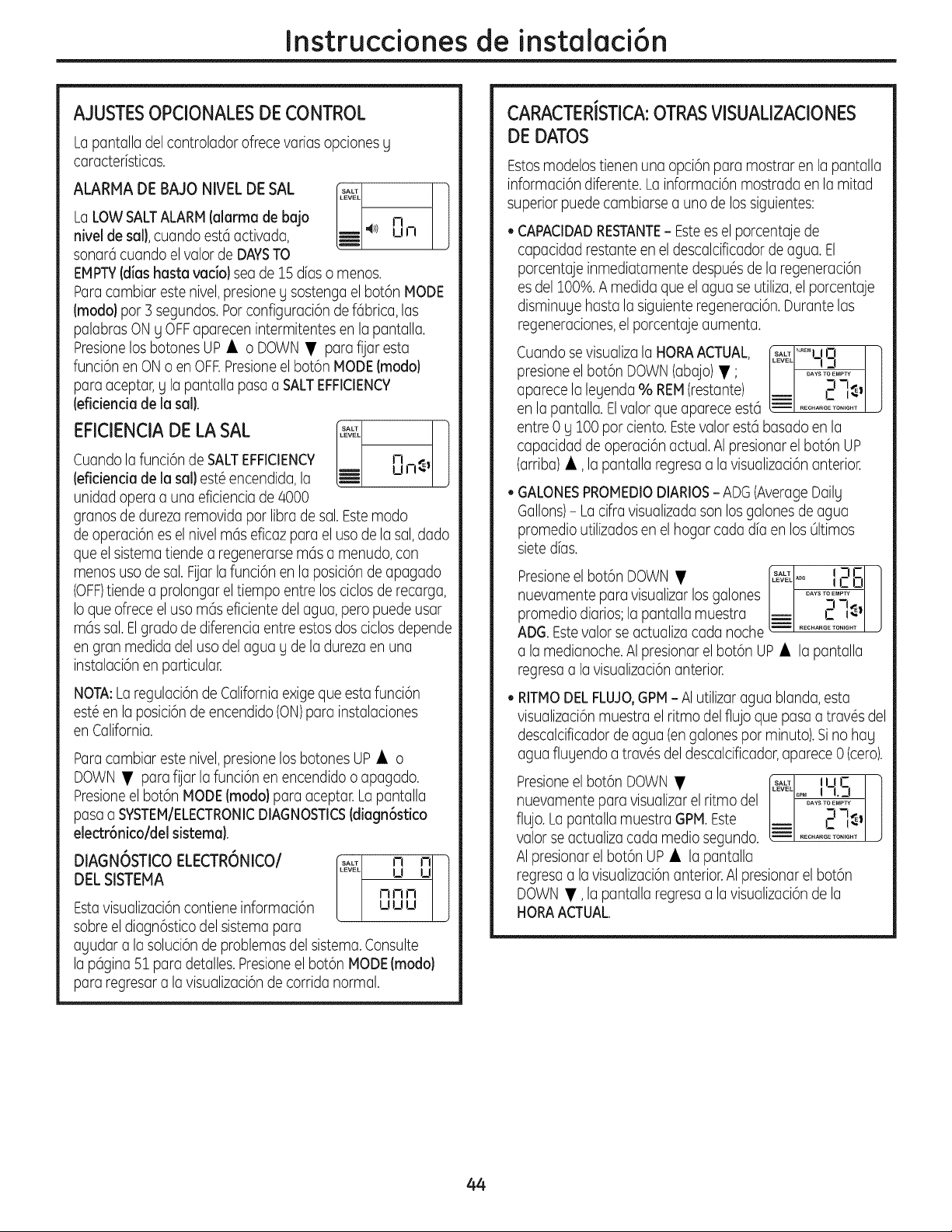
Instruccionesde instalaci6n
AJUSTESOPCIONALESDECONTROL
Lopantalla del controlador ofrece varias opciones g
caracterfsticas.
ALARMA DE BAJO NIVEL DE SAL I'&_1 ]
LaLOW SALTALARM(alarma de bajo b-- n
J
nivel de sal}, cuandoest6activada, LiE +>) u n
sonar6 cuando el valor de DAYSTO
EMPTY(d[ashasta vac[o} sea de 15 dias o menos.
ParacambJareste nJvel,presJoneg sostenga el bot6n MODE
(modo} par 3 segundos. Par configuracJ6nde f6brJca,las
palabras ON y OFFaparecen intermitentes en la pantalla.
Presionelos botones UP • o DOWN • para fijar esta
funci6n en ON o en OFF.Presioneel bot6n MODE(modo}
para aceptar, g la pantalla pasa a SALTEFFICIENCY
(eficiencia de la sal}.
EFICIENCIADE LA SAL _L ]
Cuando la funci6n de SALTEFFICIENCY n
(eficiencia de la sal} est6 encendida, la _- u n_ I
unidad opera a una eficiencia de 8000
granos de dureza removida par libra de sal. Este modo
de operaci6n es el nivel m6s eficaz para el usa de la sal,dado
que el sistema tiende a regenerarse m6s a menudo, con
menos usa de sal.Fijar la funci6n en la posici6n de apagado
(OFF)tiende a prolongar el tiempo entre los ciclos de recarga,
Io que ofrece elusa m6s eficiente del agua, pero puede usar
m6s sal. Elgrado de diferencia entre estos dos ciclos depende
en gran medida del usa del agua y de la dureza en una
instalaci6n en particular.
NOTA:Laregulaci6ndeCaliforniaexigeque estafunci6n
est6enla posici6ndeencendido(ON)parainstalaciones
enCalifornia.
Paracambiar este nivel, presione los botones UP • o
DOWN • para fUarla funci6n en encendido o apagado.
Presioneel bot6n MODE(modal para aceptar. La pantalla
pasa a SYSTEM/ELECTRONICDIAGNOSTICS(diagn6stico
electr6nico/del sistema).
DIAGNOSTICO ELECTRONICOI
DEL SlSTEMA
Estavisualizaci6ncontiene informaci6n
sabre el diagn6stico del sistema para
nnn
uuu
ayudara lasoluci6nde problemasdelsistema.Consulte
la p6gina51paradetalles.Presioneelbot6nMODE(modo}
pararegresara lavisualizaci6ndecorridanormal.
CARACTERISTICA:OTRASVISUALIZACIONES
DE DATOS
Estosmodelostienenuna opci6nparamostrarenlapantalla
informaci6ndiferente.Lainformaci6nmostradaenla mitad
superiorpuedecambiarsea unode lossiguientes:
CAPACIDADRESTANTE- Estees el porcentaje de
capacidad restante en el descalcificador de agua. El
porcentaje inmediatamente despu6sde la regeneraci6n
es de1100%.A medida que el agua se utiliza,el porcentaje
disminuge hasta la siguiente regeneraci6n. Durante las
regeneraciones,el porcentaje aumenta.
Cuando sevisualiza la HORAACTUAL,
presione el bot6n DOWN(abajo) • ;
aparece la legenda % REM(restante)
en la pantalla. Elvalor que aparece est6
entre 0 y 100 par ciento. Estevalor est6 basado en la
capacidad de operaci6n actual. AI presionar el bot6n UP
(arriba) •, la pantalla regresa a la visualizaci6n anterior.
+A,_+l+m,o I ]
..... I n] Jl
GALONESPROMEDIODIARIOS- ADG(AverageDailg
Gallons)-Lacifravisualizadasonlosgalonesdeagua
promedioutilizadosenel hogarcadadiaen los01timos
sietedias.
Presioneel bot6n DOWN • __I +o 2 G
nuevamente para visualizar los galones ....._+n+_,
promedio diarios;la pantalla muestra _ C h.
ADG.Estevalor se actualiza cada noche ................
a la medianoche. AI presionar el bot6n UP • la pantalla
regresa a la visualizaci6n anterior.
RITMODEL FLUJO,GPM- AI utilizaragua blanda, esta
visualizaci6n muestra el ritmo del flujo que pasa a trav6s del
descalcificador de agua (engalones par minuto). Sino hag
agua flugendo a trav6s del descalcificador,aparece 0 (cero).
Presioneelbot6nDOWN• r.... I ,ur I 1
/..... !+ ,o !/
nuevamente para visualizarel ritmodel / I ....._°_1_11J
flu;oLapantallamuestraGPMEste !--I...............I ;
valor se actualiza cada media segundo.
AI presionar el bot6n UP • la pantalla
regresa a lavisualizaci6n anterior.AI presionar el bot6n
DOWN •, la pantalla regresa a la visualizaci6n de la
HORA ACTUAL.
44
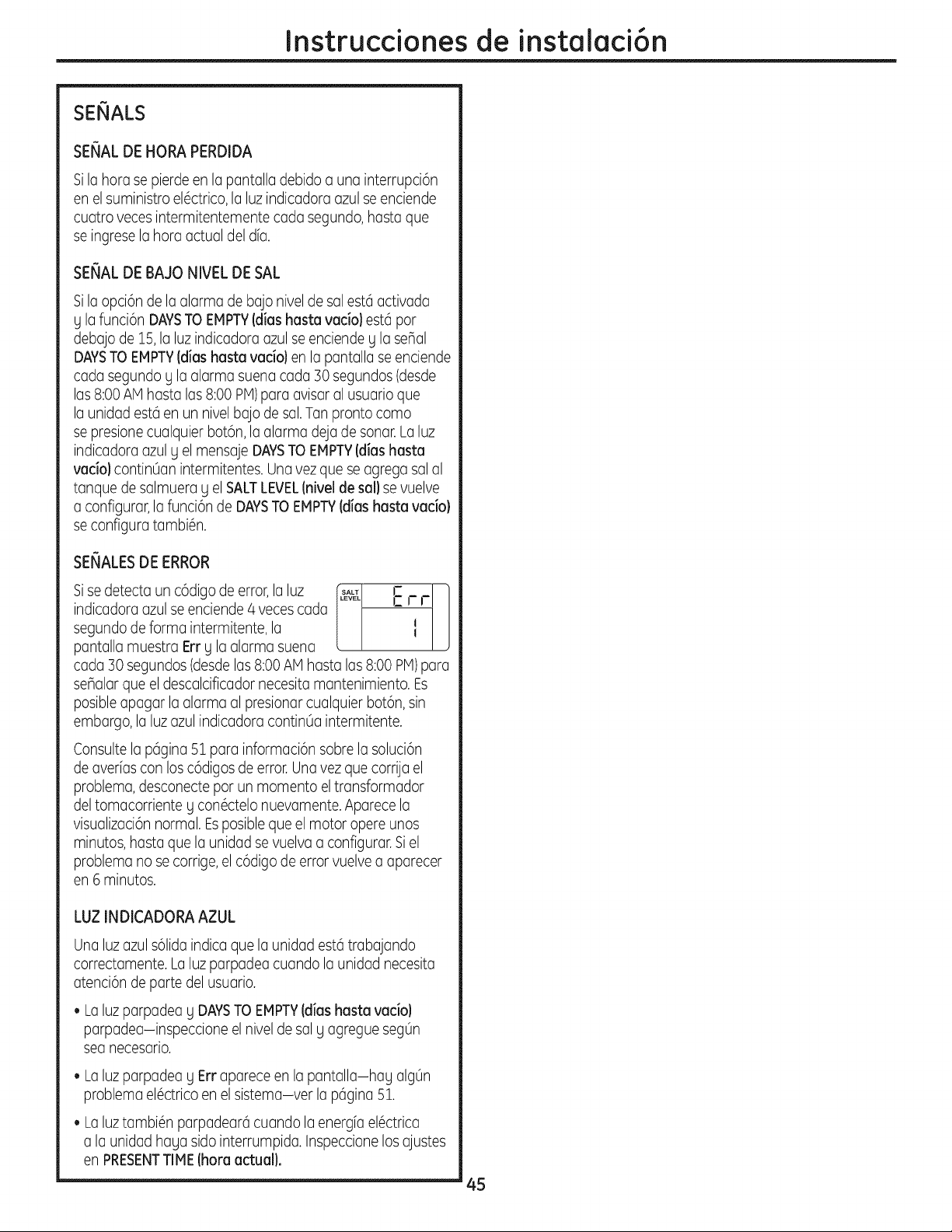
Instruccionesde instalaci6n
SEIIALS
SENAL DE HORA PERDIDA
Sila horasepierdeenla pantalladebidoa una interrupci6n
enelsuministroel6ctrico,laluzindicadoraazulseenciende
cuatrovecesintermitentementecada segundo,hastaque
seingreselahoraactualdeldia.
SENAL DE BAJO NIVEL DE SAL
Sila opci6n de la alarma de bajo nivel de sal est6 activada
g la funci6n DAYSTO EMPTY(dias haste vacio) est6 pot
debajo de 15,la luz indicadora azul se enciende g la seBal
DAYSTO EMPTY(dias hasta vacio) en la pantalla se enciende
cada segundo g la alarma suena cada 30 segundos(desde
las 8:00 AM hasta las 8:00 PM)para avisar al usuario que
la unidad est6 en un nivel bajo de sal. Tan pronto como
se presione cualquier bot6n, la alarma deja de sonar.La luz
indicadora azul y el mensaje DAYSTO EMPTY(dias hasta
vacio) contin0an intermitentes. Una vez que se agrega sal al
tanque de salmuera y el SALTLEVEL(nivel de sal) se vuelve
a configurar, la funci6n de DAYSTO EMPTY(dias hasta vacio)
se configura tambi6n.
SENALESDE ERROR
Sise detecta un c6digo de error,la luz [_ LZ r r ]
indicadora azul se enciende 4 veces cada
J
segundo de forma intermitente, la I
pantalla muestra Err g la alarma suena
cada 30 segundos (desdelas 8:00 AM basra las 8:00 PM)para
sehalar que el descalcificador necesita mantenimiento. Es
posible apagar la alarma al presionar cualquier bot6n, sin
embargo, la luz azul indicadora continOa intermitente.
Consulte la p6gina 51 para informaci6n sobre la soluci6n
de averias con los c6digos de error. Unavez que corrija el
problema, desconecte pot un momento el transformador
del tomacorriente g con6ctelo nuevamente.Aparece la
visualizaci6nnormal. Esposibleque el motor opere unos
minutos, basra que la unidad se vuelva a configurar. Si el
problema no se corrige,el c6digo de error vuelve a aparecer
en rominutos.
LUZ INDICADORA AZUL
Unaluzazuls61idaindicaque la unidadest6trabajando
correctamente.Laluz parpadeacuandola unidadnecesita
atenci6ndepartedelusuario.
• La luz parpadea g DAYSTO EMPTY(dias hasta vacio)
parpadea-inspeccione el nivel de sal g agregue seg0n
sea necesario.
• Laluzparpadeag Errapareceenla pantalla-hag alg0n
problemael6ctricoen elsistema-ver la p6gina51.
• La luztambi6n parpadear6 cuando la energfa el6ctrica
a la unidad haga sido interrumpida. Inspeccionelosajustes
en PRESENTTIME (hora actual).
45
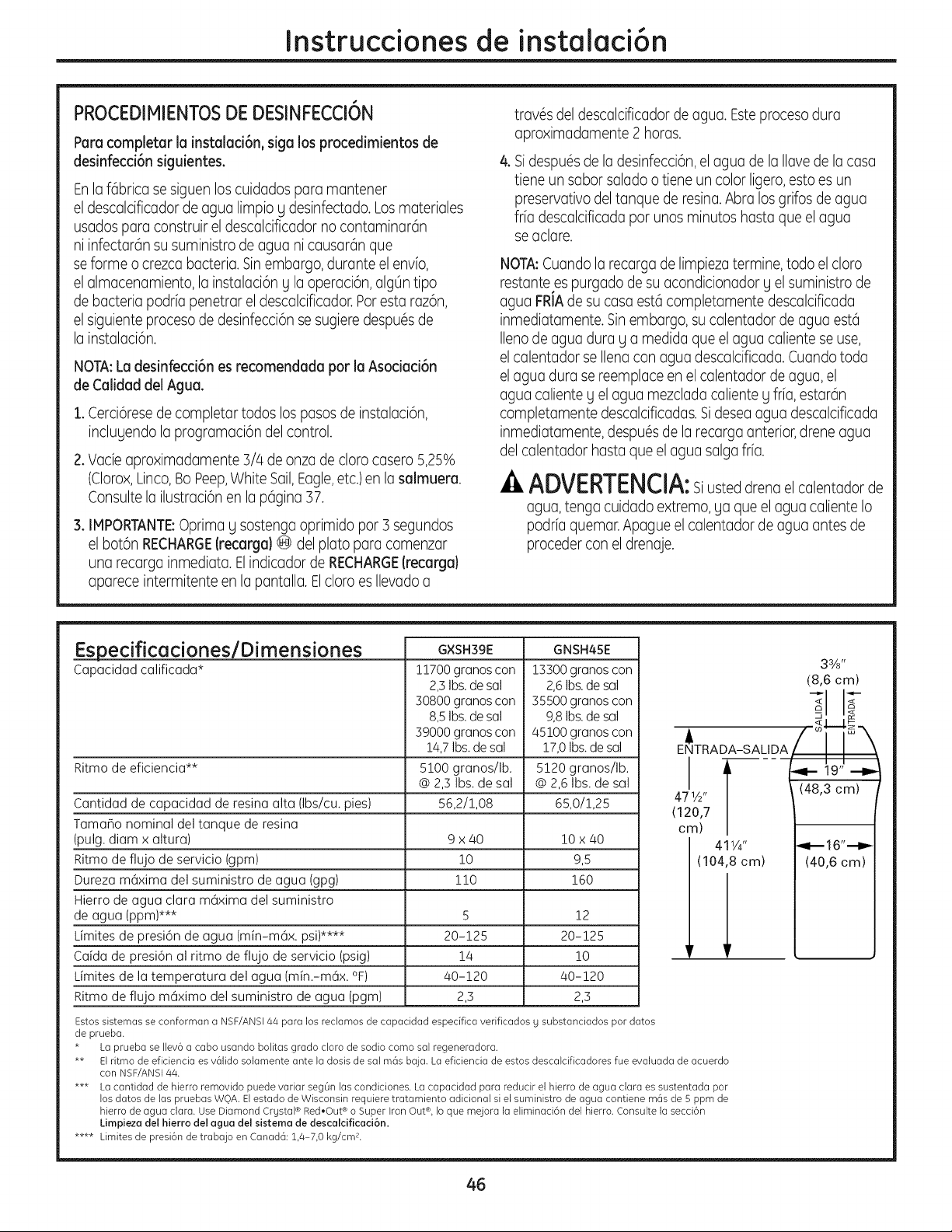
Instruccionesde instalaci6n
PROCEDIMIENTOSDE DESINFECCI6N
Parecompleter la instalaci6n, siga los procedimientos de
desinfecci6n siguientes.
Enlaf6bricasesiguenloscuidadosparamantener
el descalcificadordeaguelimpioy desinfectado.Losmateriales
usadospare construireldescalcificadornocontaminarGn
ni infectarGnsusuministrode aguanicausardnque
seformeo crezcabacteria.Sinembargo,duranteelenvio,
el almacenamiento,la instalaci6ng laoperaci6n,alg0ntipo
debacteriapodriapenetrarel descalcificador.Paresta raz6n,
el siguienteprocesode desinfecci6nsesugieredespuGsde
la instalaci6n.
NOTA:Le desinfecci6n es recomendede par le Asocied6n
de Celided del Ague.
1. Cerci6resede completar todos los pasosde instalaci6n,
inclugendo la programaci6n del control.
2.Vade aproximadamente3/4de onzade claracasero5,25%
(Clorox,Linco,BoPeep,White Sail,Eagle,etc.)en la salmuere.
Consulte la ilustraci6n en la pGgina 37.
3. IMPORTANTE:Oprimay sostengaoprimidopar 3 segundos
el bot6n RECHARGE(recerga)@ delplatopara comenzar
una recargainmediata.ElindicadordeRECHARGE(recerga}
apareceintermitenteen la pantalla.ElclaraesIlevadoa
travGsdeldescalcificadorde agua.Esteprocesodura
aproximadamente2 horas.
& SidespuGsde ladesinfecci6n,elagua de lallavede lacasa
tiene un sabor salado o tiene un color ligero,esto es un
preservativo deltanque de resina.Abra los grifos de agua
fr[a descalcificada par unos minutos haste que el ague
se aclare.
NOTA:Cuando la recarga de limpieza termine, todo elclara
restante es purgado de su acondicionador g el suministro de
agua FRIAde su casa est6 completamente descalcificada
inmediatamente. Sinembargo, su calentador de agua est6
Ileno de agua dura g a medida que el agua caliente se use,
el calentador se Ilena con agua descalcificada. Cuando toda
el agua dura se reemplace en el calentador de agua, el
agua caliente g el agua mezclada caliente g frfa, estarGn
completamente descalcificadas.Sidesea agua descalcificada
inmediatamente, despuGsde la recarga anterior,drene agua
del calentador hasta que el agua salga fib.
ADVERTENCIA:Si usteddrenael calentadorde
agua,tengacuidadoextremo,ga queel aguacalienteIo
podriaquemar.Apagueel calentadordeaguaantesde
procederconel drenaje.
E_EspecificacioneslDimensiones
Capacidad calificada*
G×SH39E
11700 granos con
2,3Ibs.de sal
30800 granos con
8,SIbs.de sal
39000 granos con
14,7Ibs. de sal
5100 granos/Ib.
@ 2,3 Ibs. de sal
56,2/1,08
GNSH45E
Ritmo de eficiencia**
Cantidad de capacidad de resina alta (Ibs/cu. pies)
TamaBo nominal del tanque de resina
(pulg. diam x altura) 9 x/40 ZOx/40
Ritmo de flujo de servicio (gpm) !0 9,5
Dureza m6xima del suministro de agua (gpg) i10 !60
Hierro de agua clara m6xima del suministro
de agua (ppm)*** S 12
Limites de presi6n de agua (min-m6x. psi)**** 20-125 20-125
Caida de presi6n al ritmo de flujo de servicio (psig) 14 i0
Limites de la temperatura del agua (min.-m6x. °F) /40-120 /40-120
Ritmo de flujo m6ximo del suministro de agua (pgm) 2,3 2,3
13300 granos con
2,6Ibs.de sal
35500 granos con
9,8Ibs.de sal
!4S100 granos con
!7,0 Ibs.de sal
5!20 granos/Ib.
@ 2,6 Ibs. de sal
65,0/1,25
33/8"
(8,6 cm)
-_1 I_
. _......_u-4_.,
A
ENTRADA-SALIDA/ '_
471V2" / I (48,3 cm)
112o,7|
cm/ |
411/4" '_-- 16"'--_'-
(104,8 cm) (40,6 cm)
Estos sistemas se conforman a NSF/ANSI/44 para los reclamos de capaddad especifica verificados g substanciados par datos
de prueba.
* La prueba se Ilev6 a caba usanda balitas grade clara de sadie coma sal regeneradara.
** El ritma de eficiencia es v61ida solamente ante la dosis de sal m6s baja. La eficiencia de estos descalcificadores fue evaluada de acuerdo
con NSF/ANSI 4/4.
*** La cantidad de hierro removido puede variar segLin las candicianes. La capacidad para reducir el hierro de agua clara es sustentada par
los dates de las pruebas WQA. Elestada de Wisconsin requiere tratamiento adicional si el suministro de agua cantiene m6s de S ppm de
hierro de agua clara. Use Diamond Crgstal ® Red,Out ®a Super Iron Out®, Io que mejara la eliminaci6n del hierra. Consulte la secci6n
Limpieza del hierro del ague del sistema de descalcificaci6n.
**** Limites de presi6n de trabajo en Canad6:1,4-7,0 kg/cm 2.
46
Sobre el sistema de descaicificaci6n de agua. ge. om
Servicio
Cuando elsistema descalcificador de agua est6
proporcionando agua descalcificada, a esto sele
llama "Servicio".Durante el servicio, el agua dura
fluge desde la tuberfa de agua principal de la
casa hacia el sistema de descalcificaci6n de agua.
Enel interior del tanque de resina del sistema de
descalcificaci6n de agua hag una pelfcula o capa
compuesta de miles de resinas plGsticasdiminutas.
Cuando elagua durapasaa tray,sde lacapa,cada
resina diminuta atrapa los minerales duros.A esto
sele llama intercambio de iones.Escoma un imGn
que atrae g atrapa metales. Luego,el agua sin
minerales duros (agua descalcificada o agua
blanda) fluge hacia la casa desde el sistema de
descalcificaci6n.
Despu_s de un perfodo de tiempo, la capa de
resina se obstruge o se satura con los minerales
duros g debe limpiarse. Estalimpieza se denomina
recarga. La recarga comienza alas 2:00 AM
(ajustado en fGbrica)par el control del sistema
de descalcificaci6n de agua, g consiste en cinco
etapas o cicIos. Estasson FILL(llenado), BRINING
(proceso de salado), BRINERINSE(enjuague
salado), BACKWASH(lavado regresivo) UFAST
RINSE(lavado r_pido).
Circunvalaci6n autom6tica del agua dura durante la recarga
Encasos de emergencia, el agua dura est6 Sin embargo, usted debe evitar usar agua
disponible hacia la casa durante losciclos de CALIENTEporque el calentador de agua se Ilenar6
recarga, con ague dura.
Llenado
La sal disuelta en agua es Ilamada salmuera. La
salmuera es necesaria para limpiar los minerales
duros de las diminutas particulas de resina. Para
formar la salmuera, el agua fluye hacia el interior
del tanque de sal durante el perfodo de Ilenado.
Salado
Durante el proceso de salado, la salmuera se
desplaza del area del tanque de almacenamiento
de la sal hacia el tanque de la resina. La salmuera
es el agente de limpieza necesario para remover los
minerales duros de la capa de resina.Los minerales
duros y la salmuera son descargados hacia el
desagOe.
La boquilla g el Venturi crean una succi6n para
mover la salmuera, manteniendo un ritmo mug
bajo para obtener la resina de limpieza con la
menor cantidad de sal.
Enjuague de Salmuera
Despu@sde quese useuna cantidadde salmuera
medidacon anterioridad,lav(ilvulade salmuera
se cierra. El agua contin0a flugendo en la misma
tragectoria que durante el proceso de salado,
excepto par el flujo de salmuera discontinuado.
Los minerales duros Y la salmuera flugen
del tanque de resina hacia el desagOe.
Lavado Regresivo
Durante el lavado regresivo,el agua viaja hacia
arriba a trav@sdel tanque de resina a un flujo de
ritmo rOpido,purgando el hierro acumulado, la
suciedad, y los sedimentos desde la capa de
resina hacia el desagOe.
Enjuague R6pido
Ellavado regresivo es seguido par un flujo de agua
rcipido hacia abajo a trav_s del tanque de resina. El
flujo rcipido purga la salmuera del fondo deltanque,
y rellena el tanque de resina.
A continuaci6n del enjuague rcipido,el sistema de
descalcificaciGnde agua regresa al servicio de agua
descalcificada.
47
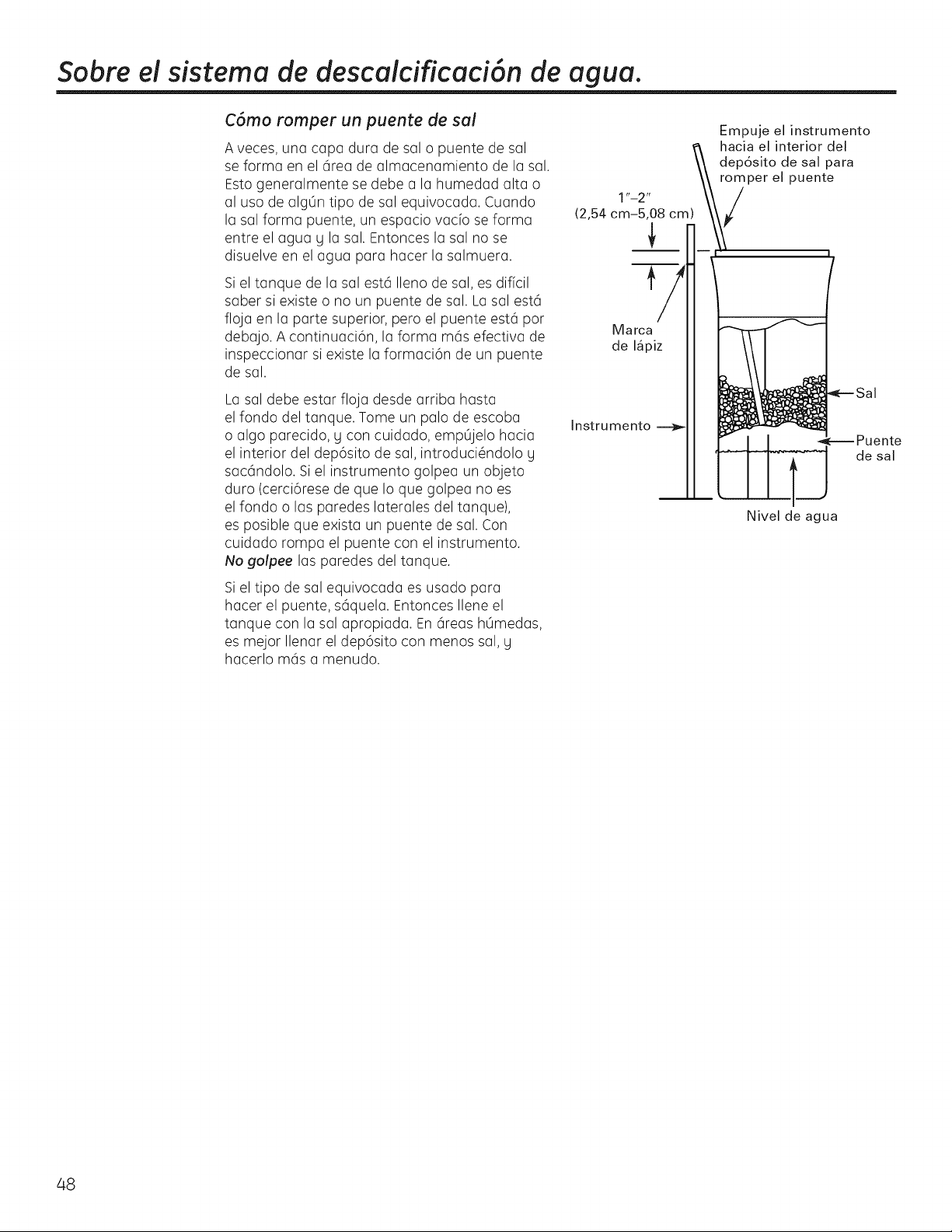
Sobre el sistema de descaicificaci6n de agua.
C6mo romper un puente de sal
A veces, una capa dura de sal o puente de sal
se forma en el 6rea de almacenamiento de la sal.
Esto generalmente se debe a la humedad alta o
al uso de alg0n tipo de sal equivocada. Cuando
la sal forma puente, un espacio vacio se forma
entre el agua U la sal. Entonces la sal no se
disuelve en el agua para hacer la salmuera.
Si el tanque de la sal est6 Ileno de sal, es dificil
saber si existe o no un puente de sal. La sal est6
floja en la parte superior, pero el puente est6 por
debajo. A continuaci6n, la forma m6s efectiva de
inspeccionar si existe la formaci6n de un puente
de sal.
La sal debe estar floja desde arriba hasta
el fondo del tanque. Tome un palo de escoba
o algo parecido, g con cuidado, empOjelo hacia
el interior del dep6sito de sal, introduci_ndolo g
sac6ndolo. Si el instrumento golpea un objeto
duro (cerci6rese de que Io que golpea no es
el fondo o las paredes laterales del tanque),
es posible que exista un puente de sal. Con
cuidado rompa el puente con el instrumento.
No golpee las paredes del tanque.
Si el tipo de sal equivocada es usado para
hacer el puente, s6quela. Entonces Ilene el
tanque con la sal apropiada. En 6reas hOmedas,
es mejor Ilenar el dep6sito con menos sal, g
hacerlo m6s a menudo.
Marca
de I_piz
Instrumento
Empuje el instrumento
hacia el interior del
dep6sito de sal para
romper el puente
_---- Puente
de sal
Nivel de agua
48
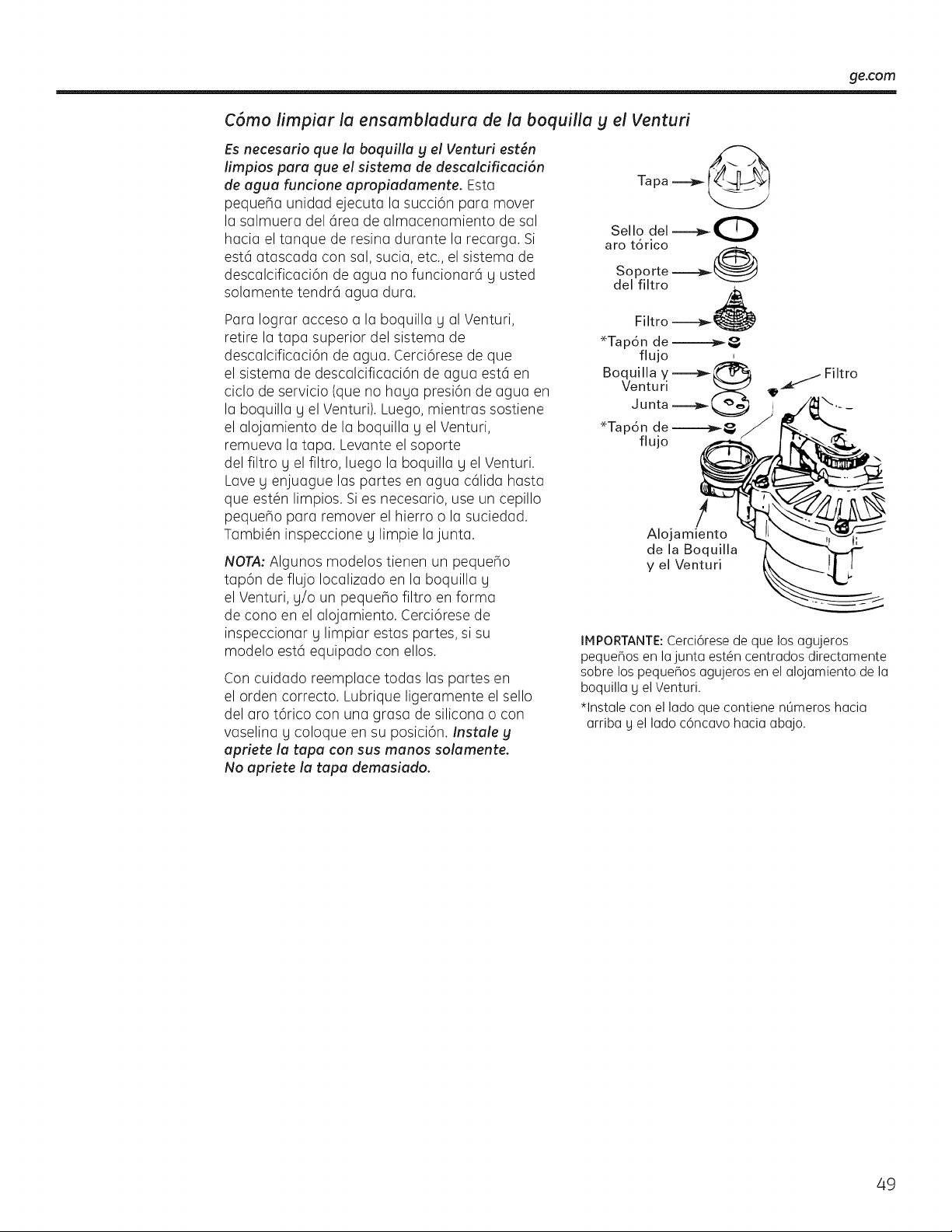
ge.com
C6mo limpiar la ensambladura de la boquilla g el Venturi
Es necesario que la boquilla g el Venturi est6n
limpios para que el sistema de descalcificaci6n
de agua funcione apropiadamente. Esta
pequeSa unidad ejecuta la succi6n para mover
la salmuera del 6rea de almacenamiento de sal
hacia el tanque de resina durante la recarga. Si
est6 atascada con sal, sucia, etc., el sistema de
descalcificaci6n de agua no funcionar6 y usted
solamente tendr6 agua dura.
Para Iograr acceso a la boquilla y al Venturi,
retire la tapa superior del sistema de
descalcificaci6n de agua. Cerci6rese de que
el sistema de descalcificaci6n de agua est6 en
ciclo de servicio (que no haya presi6n de agua en
la boquilla y el Venturi). Luego, mientras sostiene
el alojamiento de la boquilla y el Venturi,
remueva la tapa. Levante el soporte
del filtro y el filtro, luego la boquilla y el Venturi.
Lave y enjuague las partes en agua c61ida hasta
que est@nlimpios. Si es necesario, use un cepillo
peque_o para remover el hierro o la suciedad.
Tambi@ninspeccione y limpie lajunta.
NOTA: Algunos modelos tienen un peque5o
tap6n de flujo Iocalizado en la boquilla g
el Venturi, g/o un pequeho filtro en forma
de cono en el alojamiento. Cerci6rese de
inspeccionar g limpiar estas partes, si su
modelo est6 equipado con ellos.
Con cuidado reemplace todas las partes en
el orden correcto. Lubrique ligeramente el sello
del aro t6rico con una grasa de silicona o con
vaselina g coloque en su posici6n. Instale g
apriete la tapa con sus manos solamente.
No apriete la tapa demasiado.
Tapa _
Sello del ---_0
aro tdrico
Soporte -----a_ @
del filtro
Fi Itro ----_
*Tapdn de---_ _,
fl ujo
Boquilla y _ Filtro
Venturi 9_
Junta _ _.- _
!
Alojamiento
de la Boquilla
y el Venturi
j_
IMPORTANTE: Cerci6rese de que los agujeros
pequeBos en la junta est@ncentrados directamente
sobre los pequeBos agujeros en el alojamiento de la
boquilla U el Venturi.
*lnstale con el lado que contiene nQmeros hacia
arriba U el lado c6ncavo hacia abajo.
49
Sobre el sistema de descaicificaci6n de agua.
Operaci6n normal, Pantalla de control
Durante la operaci6n normal, la hora actual
del dfa y AM o PM y DAYSTO EtvtPTY(d[ushaste
vudoJ se muestra en el 6rea de la pantalla de
control. Cuando la computadora de demanda
determina que una recarga es necesaria, el
mensaje RECHARGE TONIGHT (recargue esta
noche) comienza a parpadear en la pantalla
con la hora actual. RECHARGE TONIGHT
(recargue esta noche) parpadea hasta el
momento de inicio de la pr6xima recarga,
cuando cambiar6 a RECHARGE (recarga),
el cual parpadea hasta que la recarga concluga.
Funci6n: Controles opcionales de recargado
A veces, es posible que usted desee o
necesite una recarga iniciada manualmente.
Oos ejemp!os:
Usted ha usado m6s agua que de costumbre
(hu_spedes en la casa, lavado adicional, etc.) g
quiz6s se quede sin agua descalcificada antes
de la pr6xima recarga.
Se le acab6 la sal al sistema.
Use una de las funciones siguientes para
comenzar una recarga inmediatamente,
o en el pr6ximo inicio de recarga preprogramada.
RECARGUE ESTA NOCHE
Oprima (no sostenga oprimido) el bot6n de
RECHARGE(recarga) @. RECHARGETONIGHT
(recargue esta noche) comienza a parpadear
en el 6rea de la pantalla de control. Una recarga
ocurrir6 en el pr6ximo inicio de recarga
preprogramada. Si decide cancelar esta
regeneraci6n, toque el mismo bot6n una
vez m6s.
RECARGA
Oprima g sostenga oprimido el botbn de
RECHARGE(recarga) @ hasta que RECHARGE
(recarga) comience a parpadear en la pantalla
de control. Elsistema de descalcificaci6n de agua
comienza una recarga inmediata U, cuando
termine en unas dos horas, usted tendr6 un
nuevo suministro de agua descalcificada. Una
vez haua iniciado, usted no puede cancelar la
recarga.
Funci6n: Memoria
Si el suministro el@ctrico del sistema de
descalcificaci6n de agua es interrumpido,
la pantalla de control estar6 en blanco, g la
luz indicadora azul se apaga, pero el control
mantiene la hora correcta pot seis horas
aproximadamente. Cuando el suministro es
restaurado, usted tendr6 que reajustar la hora
actual solamente si la visualizaci6n g la luz
indicadora azul est6n intermitentes. Todos los
otros ajustes se mantienen y nunca requieren
ser ajustados a no ser que usted desee hacer
algOn cambio.
Si la hora est6 intermitente despu_s de una
interrupci6n prolongada en el suministro el@ctrico,
el sistema de descalcificaci6n de agua contin0a
operando como deberfa para proporcionarle
agua descalcificada. Sin embargo, la recarga
podrian ocurrir a la hora equivocada del dia
hasta que usted reajuste el control a la hora
correcta del dia.
Caracteristica/Servicio: Diagn6stico electr6nico autom6tico
La computadora de control tiene una funci6n
de diagn6stico autom6tico para el sistema
el@ctrico(excepto para la energfa de entrada g la
medici6n del agua). La computadora monitorea
los componentes electr6nicos g los circuitos para
una operaci6n correcta. Si ocurre un error, un
c6digo de error aparece en la pantalla de control.
La tabla de C6digos de Ermres (Error Codes)
muestra los c6digos de errores que podrfan
aparecer g las razones posibles para cada
c6digo. Ver Diagn6stico electr6nico manualmente
para aislar el defecto a0n m6s.
50
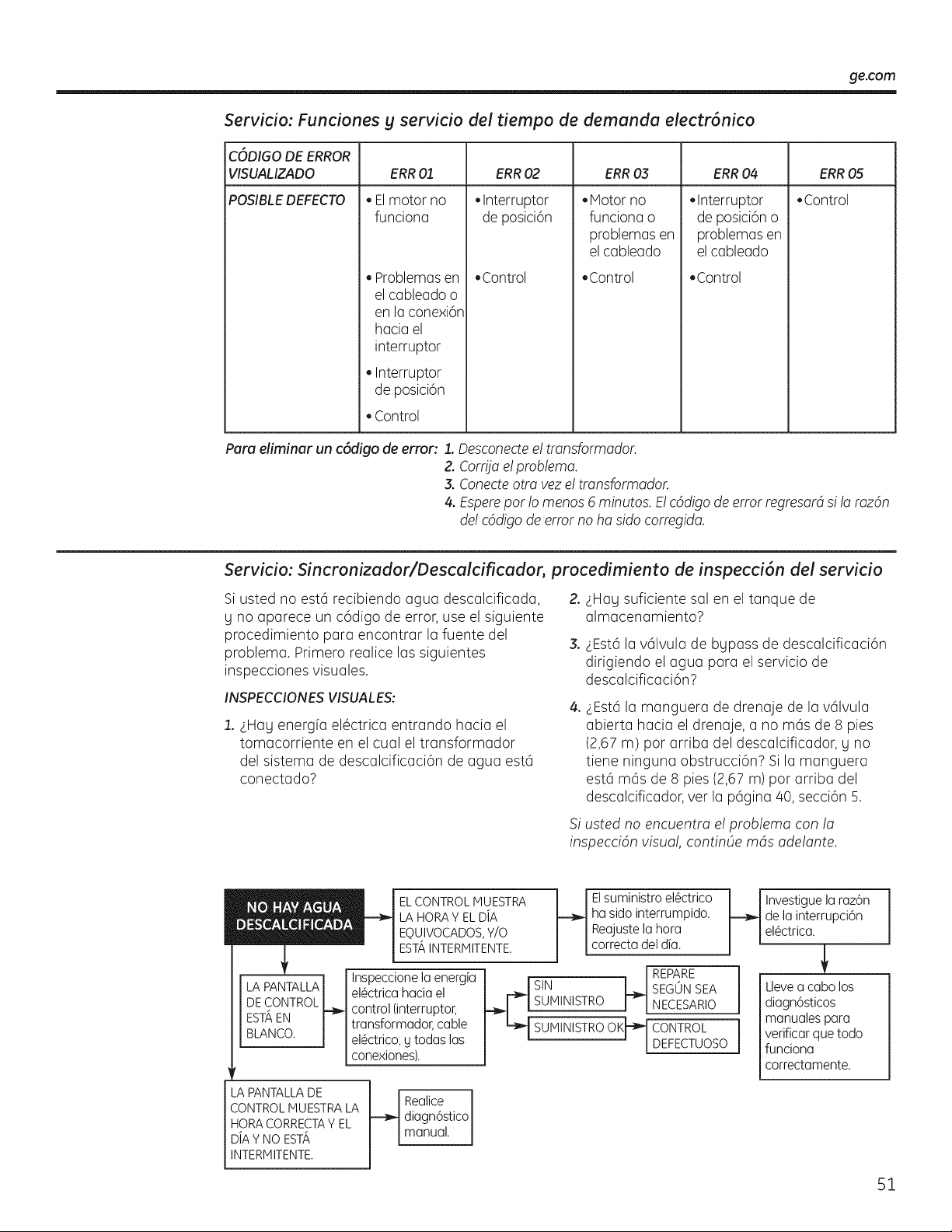
ge.com
Servicio: Funciones g servicio de! tiempo de demanda electr6nico
C6DIGO DE ERROR
VISUAMZADO ERR03 ERR04 ERR05
POSIBLEDEFECTO • Control
ERR01
Elmotor no
funciona
Problemasen
el cableado o
en la conexi6n
hacia el
interruptor
• Interruptor
de posici6n
Control
ERR02
Interruptor
de posici6n
Control
Motor no
funciona o
problemas en
el cableado
.Control
Interruptor
de posici6n o
problemas en
el cableado
Control
Para eliminar un c6digo de error: 1. Desconectee! tmnsformador.
Z Corfija e!problema.
3. Conecteotto vez e! tmnsformador.
4. Esperepar !o menos 6 minutos. E!c6digo de error regresardsi !a mz6n
de! c6digo de error no ha sido corregida.
Servicio: Sincronizador/Descalcificador, procedimiento de inspecci6n del servicio
Si usted no est6 recibiendo agua descalcificada, 2.
y no aparece un c6digo de error, use el siguiente
procedimiento para encontrar la fuente del
3.
problema. Primero realice las siguientes
inspecciones visuales.
INSPECCIONES VISUALES:
1. LHay energfa el6ctrica entrando hacia el
tomacorriente en el cual el transformador
del sistema de descalcificaci6n de agua est6
conectado?
4_
€Hay suficiente sal en el tanque de
almacenamiento?
LEst6 la v61vula de bypass de descalcificaci6n
dirigiendo el agua para el servicio de
descalcificaci6n?
LEst6 la manguera de drenaje de la v61vula
abierta hacia el drenaje, a no m6s de 8 pies
(2,67 m) par arriba del descalcificador, y no
tiene ninguna obstrucci6n? Si la manguera
est6 m6s de 8 pies (2,67 m) par arriba del
descalcificador, vet la p6gina 40, secci6n 5.
Si usted no encuentra e! problema con la
inspeccidn visual, continOe mds adelante.
ELCONTROLMUESTRA
LA HORAY ELDiA
EQUIVOCADOS,Y/O
EST',INTERMITENTE
Inspeccione la energia
el6ctrica hacia el
control (interruptor,
transformador, cable
el6ctrico, y todas las
conexiones).
EIsuministroel6ctrico
hasidointerrumpido.
Reajustela hora
correctadeldia.
SUMINISTRO OK_
U
REPARE
SEGUN SEA
NECESARIO
CONTROL
DEFECTUOSO
LA PANTALLA DE
CONTROL MUESTRA LA
HORA CORRECTAY EL
D/A Y NO ESTA
INTERMITENTE
t_ ealice J
diagn6stico
manua. J
Investiguela raz6n
de la interrupci6n
el_ctrica.
Llevea cabolos
diagn6sticos
manualespara
verificarquetodo
funciona
correctamente.
51
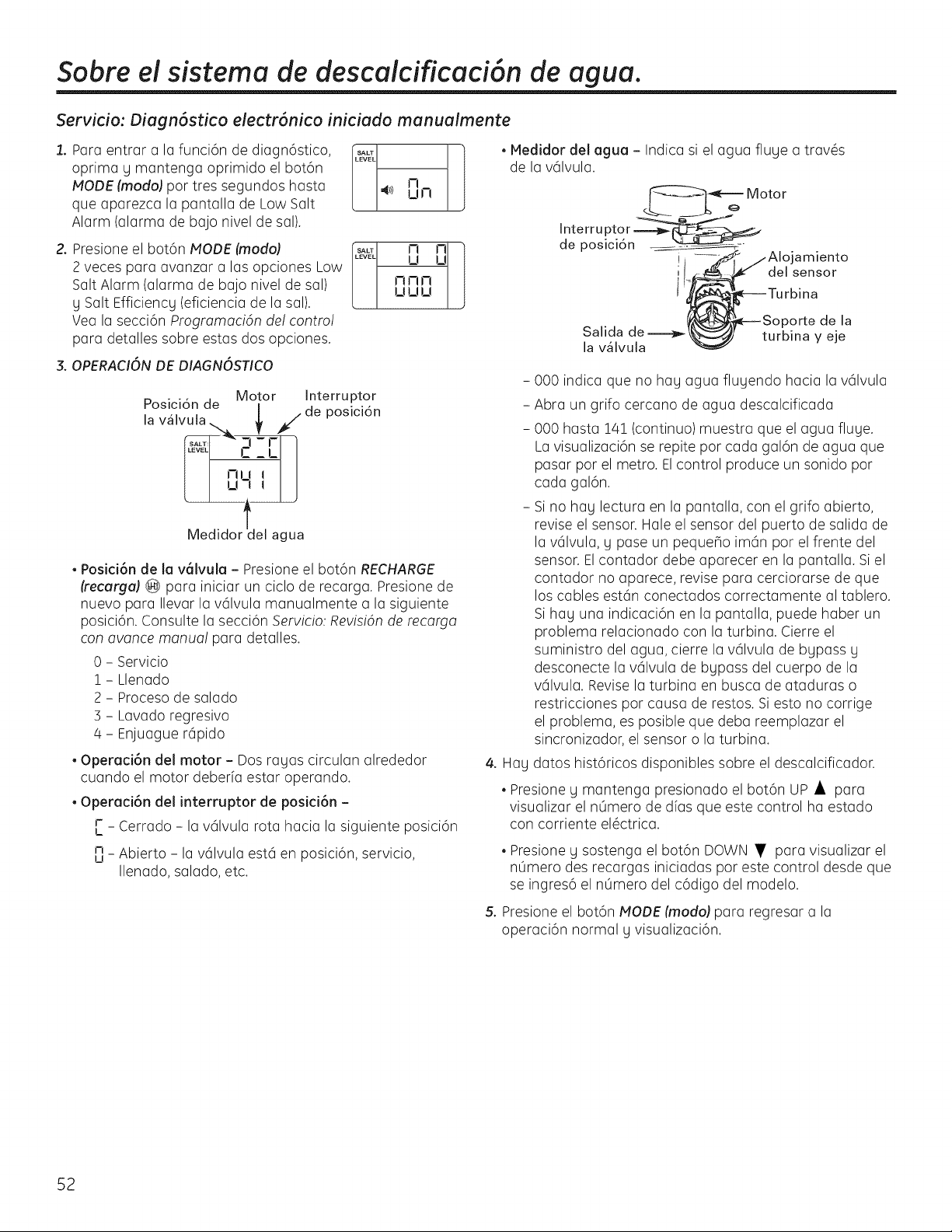
Sobre el sistema de descaicificaci6n de agua.
Servicio: Diagn6stico electr6nico iniciado manualmente
1. Para entrar a la funci6n de diagn6stico,
oprima y mantenga oprimido el bot6n
MODE (modoJ pot tres segundos hasta
que aparezca la pantalla de Low Salt
Alarm (alarma de bajo nivel de sal).
2. Presione el bot6n MODE (modo}
2 veces para avanzar alas opciones Low
Salt Alarm (alarma de bajo nivel de sal)
y Salt Efficiency (eficiencia de la sal).
Vea la secci6n ProgramaciOn del contro!
para detalles sobre estas dos opciones.
3. OPERACIONDE DIAGNOSTICO
SALT 1
LEVEL
41)) El !--!
p .... Motor Interruptor
oslclon de |
la v_lvula. _ jde posicidn
C_L
?'2J
Medidortdel agua
• Posid6n de la v_lvula - Presione el bot6n RECHARGE
(recarga) @ para iniciar un ciclo de recarga. Presione de
nuevo para Ilevar la v61vula manualmente a la siguiente
posici6n. Consulte la secci6n Servicio: RevisiOnde recarga
con avarice manua! para detalles.
0 - Servicio
1 - Llenado
2 - Proceso de salado
3 - Lavado regresivo
4 - Enjuague r6pido
• Operaci6n del motor - Dos ragas circulan alrededor
cuando el motor deberfa estar operando.
• Opereci6n del interruptor de posici6n -
r _ Cerrado - la v61vula rota hacia la siguiente posici6n
I_
n _ Abierto - la v61vulaest6 en posici6n, servicio,
u
Ilenado, salado, etc.
• Medidor del agua - Indica si el agua fluye a trav@s
de la v61vula.
Interru ptor
de posici6n
I
Motor
amiento
del sensor
Salida de
la v_lvula
)orte de la
turbina y eje
- 000 indica que no hay agua fluyendo hacia la v61vula
- Abra un grifo cercano de agua descalcificada
- 000 hasta 14! (continuo) muestra que el agua fluye.
La visualizaci6n se repite por cada gal6n de agua que
pasar por el metro. Elcontrol produce un sonido por
cada gal6n.
- Si no hay lectura en la pantalla, con el grifo abierto,
revise el sensor. Hale el sensor del puerto de salida de
la v61vula, y pase un pequeho im6n por el frente del
sensor. El contador debe aparecer en la pantalla. Si el
contador no aparece, revise para cerciorarse de que
los cables est6n conectados correctamente al tablero.
Si hay una indicaci6n en la pantalla, puede haber un
problema relacionado con la turbina. Cierre el
suministro del agua, cierre la v61vula de bypass y
desconecte la v61vula de bypass del cuerpo de la
v61vula. Revise la turbina en busca de ataduras o
restricciones pot causa de restos. Si esto no corrige
el problema, es posible que deba reemplazar el
sincronizador, el sensor o la turbina.
4. Hay datos hist6ricos disponibles sobre el descalcificador.
• Presione y mantenga presionado el bot6n UP • para
visualizar el nOmero de dfas que este control ha estado
con corriente el@ctrica.
• Presione y sostenga el bot6n DOWN • para visualizar el
nOmero des recargas iniciadas pot este control desde que
se ingres6 el nOmero del c6digo del modelo.
5. Presione el bot6n MODE (modo} pararegresar a la
operaci6n normal g visualizaci6n.
52
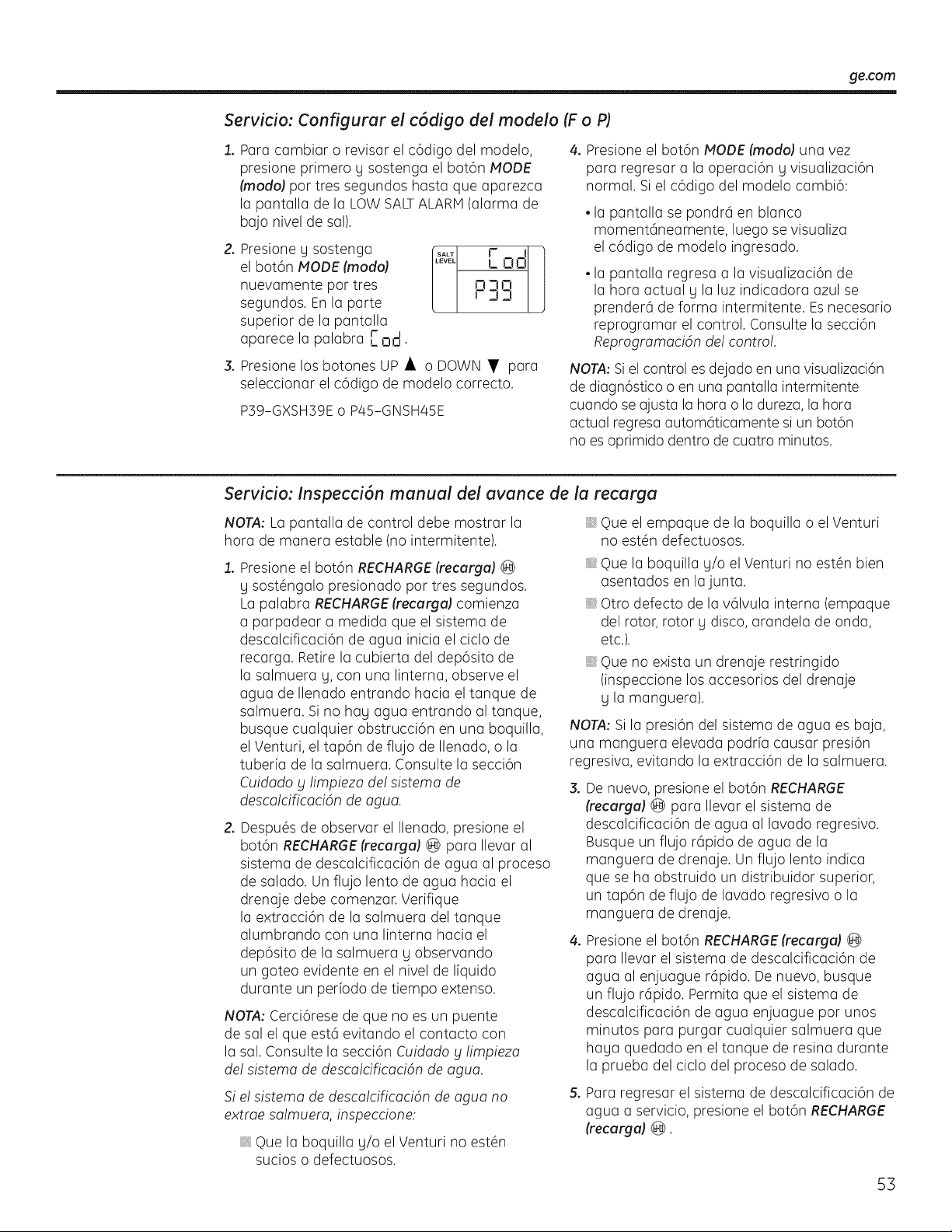
ge.con3
Servicio: Configurar el c6digo del modelo (F o P)
1. Para cambiar o revisar el c6digo del modelo,
presione primero y sostenga el bot6n MODE
(modoJpar tres segundos hasta que aparezca
la pantalla de la LOW SALTALARM(alarma de
bajo nivel de sal).
2. Presione y sostenga
el bot6n MODE (modo)
nuevamente par tres
segundos. En la parte
superior de la pantalla
aparece la palabra [ n,-l.
F I
!
i-i 3 FI !
F33 ]
3. Presione los botones UP • o DOWN • para
seleccionar el c6digo de modelo correcto.
P39-GXSH39E o P45-GNSH45E
4. Presione el bot6n MODE (modo) una vez
para regresar a la operaci6n g visualizaci6n
normal. Si el c6digo del modelo cambi6:
• la pantalla se pondr6 en blanco
moment6neamente, luego se visualiza
el c6digo de modelo ingresado.
• la pantalla regresa a la visualizaci6n de
la hora actual g la luz indicadora azul se
prender6 de forma intermitente. Esnecesario
reprogramar el control. Consulte la secci6n
Reprogramacidn de! control.
NOTA: Si el control es dejado en una visualizaci6n
de diagn6stico o en una pantalla intermitente
cuando se ajusta la hora o la dureza, la hora
actual regresa autom6ticamente si un bot6n
no es oprimido dentro de cuatro minutos.
Servicio: Inspecci6n manual del avance de la recarga
NOTA: La pantalla de control debe mostrar la
hora de manera estable (no intermitente).
1. Presione el bot6n RECHARGE(recurgu) @
g sost@ngalo presionado par tres segundos.
La palabra RECHARGE(recurgu) comienza
a parpadear a medida que el sistema de
descalcificaci6n de agua inicia el ciclo de
recarga. Retire la cubierta del dep6sito de
la salmuera g, con una linterna, observe el
agua de Ilenado entrando hacia el tanque de
salmuera. Si no hag agua entrando al tanque,
busque cualquier obstrucci6n en una boquilla,
el Venturi, el tap6n de flujo de Ilenado, o la
tuberfa de la salmuera. Consulte la secci6n
Cuidado y limpieza de! sistemo de
descalcificaci6n de agua.
2. Despu@sde observar el Ilenado, presione el
bot6n RECHARGE(recurgul @ para Ilevar al
sistema de descalcificaci6n de agua al proceso
de salado. Un flujo lento de agua hacia el
drenaje debe comenzar. Verifique
la extracci6n de la salmuera del tanque
alumbrando con una linterna hacia el
dep6sito de la salmuera g observando
un goteo evidente en el nivel de Ifquido
durante un perbdo de tiempo extenso.
NOTA: Cerci6rese de que no es un puente
de sal el que est6 evitando el contacto con
la sal. Consulte la secci6n Cuidado y limpiezo
de! sistema de descalcificaci6n de agua.
Si e! sistema de descalcificaci6n de aguo no
extrae salmuera, inspeccione:
Que la boquilla g/o el Venturi no est#n
sucios o defectuosos.
Que el empaque de la boquilla o el Venturi
no est#n defectuosos.
,, Que la boquilla g/o el Venturi no est#n bien
asentados en la junta.
Otro defecto de la v61vula interna (empaque
del rotor, rotor g disco, arandela de onda,
etc.).
Que no exista un drenaje restringido
(inspeccione los accesorios del drenaje
g la manguera).
NOTA: Si la presi6n del sistema de agua es baja,
una manguera elevada podrb causar presi6n
regresiva, evitando la extracci6n de la salmuera.
3. De nuevo, presione el bot6n RECHARGE
(recurguJ @ para Ilevar el sistema de
descalcificaci6n de agua al lavado regresivo.
Busque un flujo r6pido de agua de la
manguera de drenaje. Un flujo lento indica
que se ha obstruido un distribuidor superior,
un tap6n de flujo de lavado regresivo o la
manguera de drenaje.
4. Presione el bot6n RECHARGE(recurgu) @
para Ilevar el sistema de descalcificaci6n de
agua al enjuague r6pido. De nuevo, busque
un flujo r6pido. Permita que el sistema de
descalcificaci6n de agua enjuague par unos
minutos para purgar cualquier salmuera que
haga quedado en el tanque de resina durante
la prueba del ciclo del proceso de salado.
5. Para regresar el sistema de descalcificaci6n de
agua a servicio, presione el bot6n RECHARGE
(recarga) @.
53
Cuidado y iimpieza del sistema de descakificaci6n de agua.
Inspeccione el nive! de almacenamiento de la sal y el rellenado
Se necesita salmuera (sal disuelta en agua)
para cada recarga. El agua para hacer la
salmuera es medida cuando entra al 6rea de
almacenamiento de la sal a trav6s de la v61vula
del sistema de descalcificaci6n de agua g el
control. Sin embargo, usted debe mantener el
tanque con saL
Cu6ndo rellenar con sah Si una luz indicadora
azul se enciende g muestra DAYSTOEMPTY
(dias hasta racial parpadeando, hag menos de
!5 dfas de suministro de sal. Rellene con sal. En
6reas h0medas es mejor Ilenar con menos sal
g hacerlo m6s frecuentemente, para evitar la
formaci6n de puentes de sal, consulte la p6gina
/48.Despu6s de agregar sal, recuerde restablecer
el SALT LEVEL (nivel de sal) en el control
(consulte la p6gina 43). Nunca permita que el
nivel de sal dejar caer bajo cero en la indicadora
amarilla antes de usted rellenarlo. Sin suficiente
sal, pronto tendr6 agua dura.
Utilice sales de sistemas de descalcificaci6n
de agua solamente, pot Io menos 99,5% puras.
Recomendamos PEPITAS,BOLITASo SALGRUESA
SOLAR.No use sal en roca, en bloques,
granulada, ni de helado (para descongelar
hielo). Estas contienen suciedad g sedimentos,
o pasta g nasa, g crear6n problemas de
mantenimiento.
PRECAUCidN:
Sal descalcificadora de agua con aditivos
que remueven el hierro: Algunas sales
podrfan tenet aditivos para agudar al
sistema de descalcificaci6n de agua con
el hierro en el suministro de agua. Aunque
este aditivo puede agudar a mantener
limpio el sistema de descalcificaci6n de
agua, el mismo tambi6n puede crear gases
corrosivos que debilitan g acortan la vida de
las partes del sistema de descalcificaci6n de
agua. GE solamente recomienda el uso de la
marca de sal Diamond Crgstal® Red.Out ®.
C6mo limpiar el hierro de su sistema de descalcificaci6n de agua
Su sistema de descalcificaci6n de agua toma
la dureza de los materiales (calcio g magnesio)
g la extrae del agua. Tambi6n, puede controlar
una cantidad considerable del hierro del
"agua clara" (Consulte la secci6n Directrices de
especificaciones). Con hierro de agua clara, el
agua de un grifo es clara cuando se coloca en
un vaso al principio. De !5 a S0 minutos m6s
tarde, el agua comienza a ponerse turbia o a
cambiar a un color rojo ladrillo. Un sistema de
descalcificaci6n de agua no remueve el hierro
que causa queel agua setometurbia o que
adquiera el color rojo ladrillo cuando sale del
grifo (llamada agua rojo ladrillo). Para extraer
el hierro de esta agua se requiere un filtro u
otro equipo.
IMPORTANTE:Esimportante mezclar el
limpiador de la capa de resina con agua (siga
las instrucciones del fabricante) g vaciarlo en
el dep6sito de la salmuera (ver p6gina S7)
g proceda a regenerar el descalcificador
inmediatamente. No vierta el limpiador de la capa
de resina con la sal, ga que no ser6 tan eficiente
en su funci6n de limpieza de la resina, g puede
causar da_os al descalcificador si se deja en el
tanque de la sal pot un periodo de tiempo
prolongado debido a que gases corrosivos
se formarian.
GErecomienda que se usen las marcas de sal
Diamond Crgstal ®Red.Out ®con aditivo Iron
Fighter® para agudar a mantener la capa de
resina limpia del hierro. Si su suministro de agua
tiene hierro de agua clara, es necesario que
usted limpie peri6dicamente la capa de resina.
GErecomienda usar un limpiador de capas
de resina Super Iron Out®,para limpiar asf
eficientemente dicha capa, especialmente
cuando el contenido de hierro es alto. Limpie la
capa por Io menos cada seis meses, o m6s a
menudo si comienza a aparecer hierro en su
agua descalcificada entre limpieza g limpieza.
54
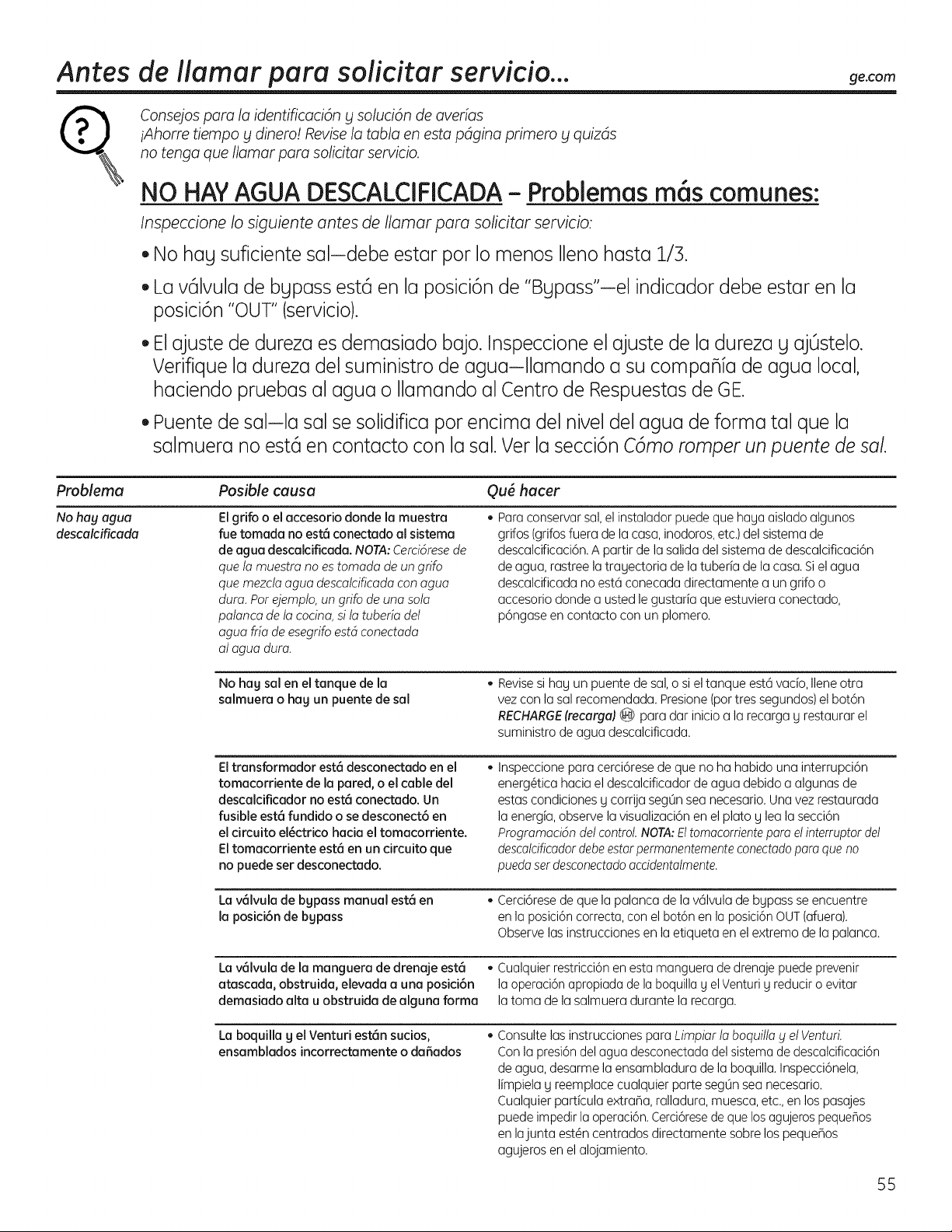
Antes de ilamar para solicitar servicio.., ge.com
R
consejospara la identificaci6ny soluci6n de averias
iAhorre tiempo y dinero! Revisela tabla en estapdgina primero y quizds
no tenga que Ilamar para solicitarservicio.
NO HAYAGUA DESCALCIFICADA- Problemas m6s comunes:
InspeccioneIo siguienteantes de Ilamar para solicitarservicio:
• No hay suficientesal-debe estar pot Io menosIlenohasta 1/S.
Lav61vulade bgpassest6 en la posici6nde "Bgpass'iel indicadordebe estar en la
posici6n"OUT"(servicio).
Elajustede durezaes demasiadobajo. Inspeccioneel ajustede la durezay ajOstelo.
Verifiquela durezadel suministrode agua-Ilamando a su compa_ia de agua local,
haciendopruebasal agua o Ilamandoal Centrode Respuestasde GE.
Puentedesal-la salse solidificapot encima del niveldel agua de forma tal que la
salmuera noest6 en contacto con la sal.Ver la secci6nC6moromper unpuentede saL
Problema
No hag agua
descalcificada
Posible causa Ou6 hacer
Elgrifo o el accesorio donde la muestra
fue tomada no est6 conectado al sistema
de agua descalcificada. NOTA:Cerci6resede
que la muestra no es tomada de un grifo
que mezcta agua descalcificada con agua
dura. Pot ejemplo, un grifo de una sola
palanca de la cocina, si la tuberia dd
agua fria de esegrifo estd conectada
al agua dura.
Para conservar sal, el instalador puede que haga aislado algunos
grifos (grifos fuera de la casa,inodoros, etc.)del sistema de
descalcificaci6n. A partir de la salida del sistema de descalcificaci6n
de agua, rastree la tragectoria de la tuberia de la casa.Siel agua
descalcificada no est6 conecada directamente a un grifo o
accesorio donde a usted le gustaria que estuviera conectado,
p6ngase en contacto con un plomero.
No hag sal en el tanque de la
salmuera o hag un puente de sal
Revisesi hag un puente de sal,o si el tanque est6 vacio, Ilene otra
vez con la sal recomendada. Presione (portres segundos)el bot6n
RECHARGE(recarga)_ para dar inicio a la recarga g restaurar el
suministro de agua descalcificada.
Eltransformador est6 desconectado en el
tomacorriente de la pared, o el cable del
descalciflcador no est6 conectado. Un
fusible est6 fundido o se desconect6 en
el circuito el_ctrico hacia el tomacorriente.
Eltomacorriente est6 en un circuito que
no puede set desconectado.
Inspeccione para cerci6rese de que no ha habido una interrupci6n
energ@ica hacia el descalcificador de agua debido a algunas de
estas condiciones g corrija segOnsea necesario. Una vez restaurada
la energia, observe la visualizaci6n en el plato g lea la secci6n
Programaci6n del control.NOTA:Eltomacorrientepare el interruptor del
descolcificadordebeestorpermanentemente conectodopore que no
pueda set desconectado accidentalmente,
La v61vula de bgpass manual est6 en
la posici6n de bgpass
• Cerci6resede que la palancade la v61vulade bgpassse encuentre
enlaposici6ncorrecta,conel bot6nen la posici6nOUT(afuera).
Observelasinstruccionesen la etiquetaen el extremode la palanca.
La v61vula de la manguera de drenaje est6 • Cualquier restricci6n en esta manguera de drenaje puede prevenir
atascada, obstruida, elevada a una posici6n la operaci6n apropiada de la boquilla g el Venturi g reducir o evitar
demasiado alta u obstruida de alguna forma la toma de la salmuera durante la recarga.
La boquilla g el Venturi est6n sucios,
ensamblados incorrectamente o da5ados
Consulte las instrucciones para Limpiar la boquilla y el VenturL
Con la presi6n del agua desconectada del sistema de descalcificaci6n
de agua, desarme la ensambladura de la boquilla. Inspecci6nela,
limpiela g reemplace cualquier parte segOnsea necesario.
Cualquier particula extraBa, ralladura, muesca, etc.,en los pasajes
puede impedir la operaci6n.Cerci6resede que los agujeros pequeBos
en lajunta est@ncentrados directamente sobre los peque_os
agujeros en el alojamiento.
55
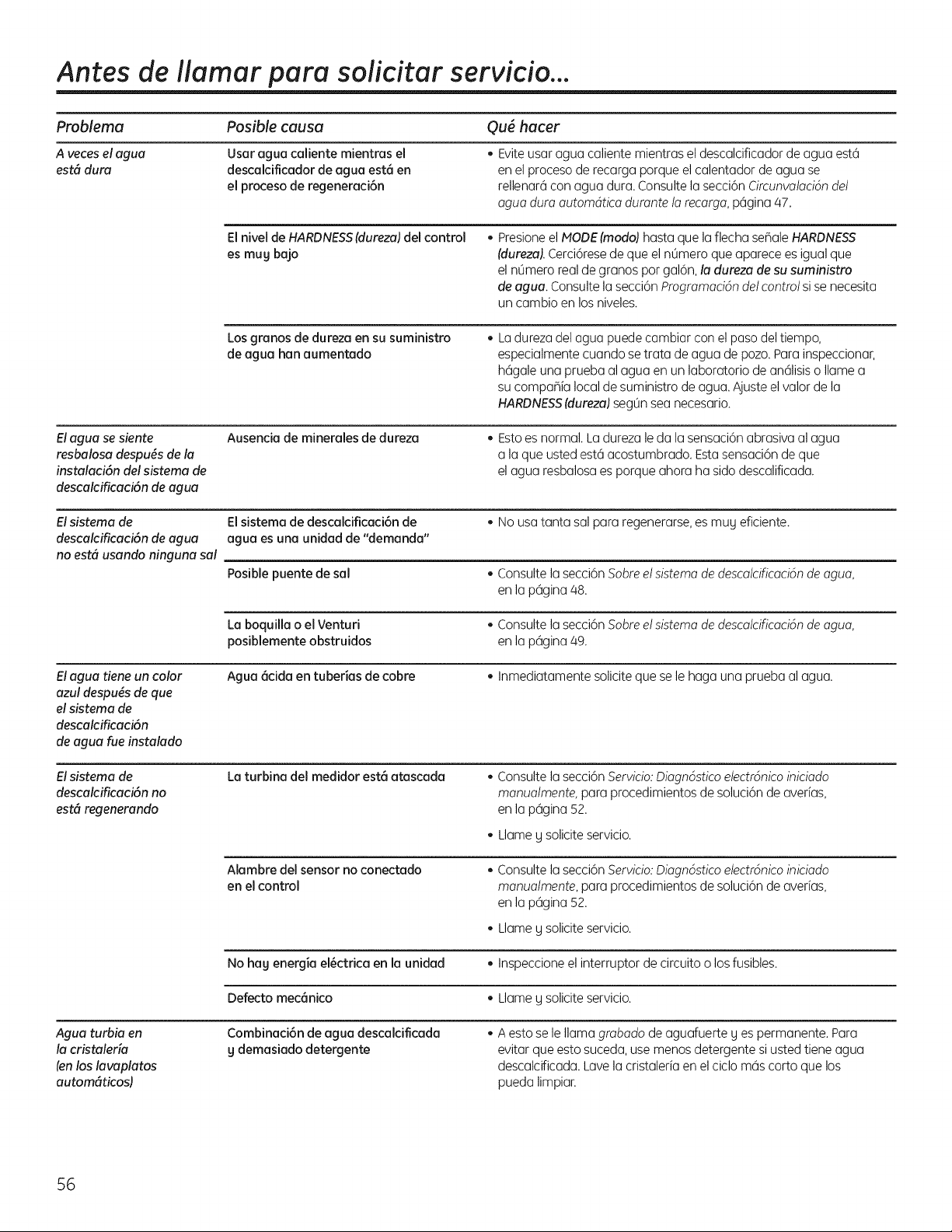
Antes de ilamar para solicitar servicio...
ProNema Posible causa Qu6 hacer
A veces el agua Usar agua caliente mientras el • Evite usar agua caliente mientras el descalcificador de agua est6
estd dura descalciflcador de agua est6 en en el proceso de recarga porque el calentador de agua se
el proceso de regeneraci6n rellenar6 con agua dura. Consulte la secci6n Circunvalacidndel
agua dura autom6tica durante la recarga, p6gina 47.
El nivel de HARDNESS(dureza) del control
es mug ba]o
• Presioneel NODE(modo) hasta que la flecha seflale HARDNESS
fdureza).Cerci6resede que el nOmero que aparece es igual que
el nt3meroreal de granos por gal6n, la dureza de su suministro
de agua. Consulte la secci6n Programacidn del control si se necesita
un cambio en los niveles.
Los granos de dureza en su suministro
de agua han aumentado
Ladurezadelaguapuedecambiarconelpasodeltiempo,
especialmentecuandosetrata de agua de pozo.Parainspeccionar,
h6galeunapruebaal agua en un laboratoriode an61isiso Ilamea
sucompahialocalde suministrode agua.Ajusteelvalorde la
HARDNESS(dureza)segOnseanecesario.
Elagua se siente
resbalosa despu6s de la
instalaci6n del sistema de
descalcificaci6n de agua
Ausencia de minerales de dureza
Esto es normal. La dureza le da la sensaci6n abrasiva al agua
a la que usted est6 acostumbrado. Esta sensaci6n de que
el agua resbalosa es porque ahora ha sido descalificada.
Elsistema de El sistema de descalcificaci6n de • No usa tanta sal para regenerarse,es mug eficiente.
descalcificaci6n de agua agua es una unidad de "demanda"
no est6 usando ninguna sol
Posible puente de sol • Consulte la secci6n Sobre el sistema de descalcificacidn de agua,
en la p6gina 48.
La boquilla o el Venturi • Consulte la secci6n Sobre el sistema de descalcificacidn de agua,
posiblemente obstruidos en la p6gina 49.
Elagua tiene un color Agua 6cida en tuberias de cobre • Inmediatamente solicite que se le haga una prueba al agua.
azul despu6s de que
el sistema de
descalcificaci6n
de agua rue instalado
Elsistema de
descalcificaci6n no
est6 regenerando
La turbina del medidor est0 atascada
Consulte la secci6n Servicio: Diagn6stico electr6nico iniciado
manualmente, para procedimientos de soluci6n de averias,
en la p6gina S2.
Llame g solicite servicio.
Alambre del sensor no conectado
en el control
Consulte la secci6n Servicio: Diagn6stico electr6nico iniciado
manualmente, para procedimientos de soluci6n de averias,
en la p6gina S2.
Llame g solicite servicio.
No hag energia el6ctrica en la unidad • Inspeccione el interruptor de circuito o losfusibles.
Defecto mecOnico • Llame g solicite servicio.
Agua turbia en
la cristaleria
fenlos lavaplatos
autom6ticos)
Combinaci6n de agua descalcificada
g demasiado detergente
Aestosele llamagrabadodeaguafuerteg espermanente.Para
evitarqueestosuceda,usemenosdetergentesi ustedtieneagua
descalcificada.Lavela cristaleriaen elciclom6scortoquelos
puedalimpiar.
56
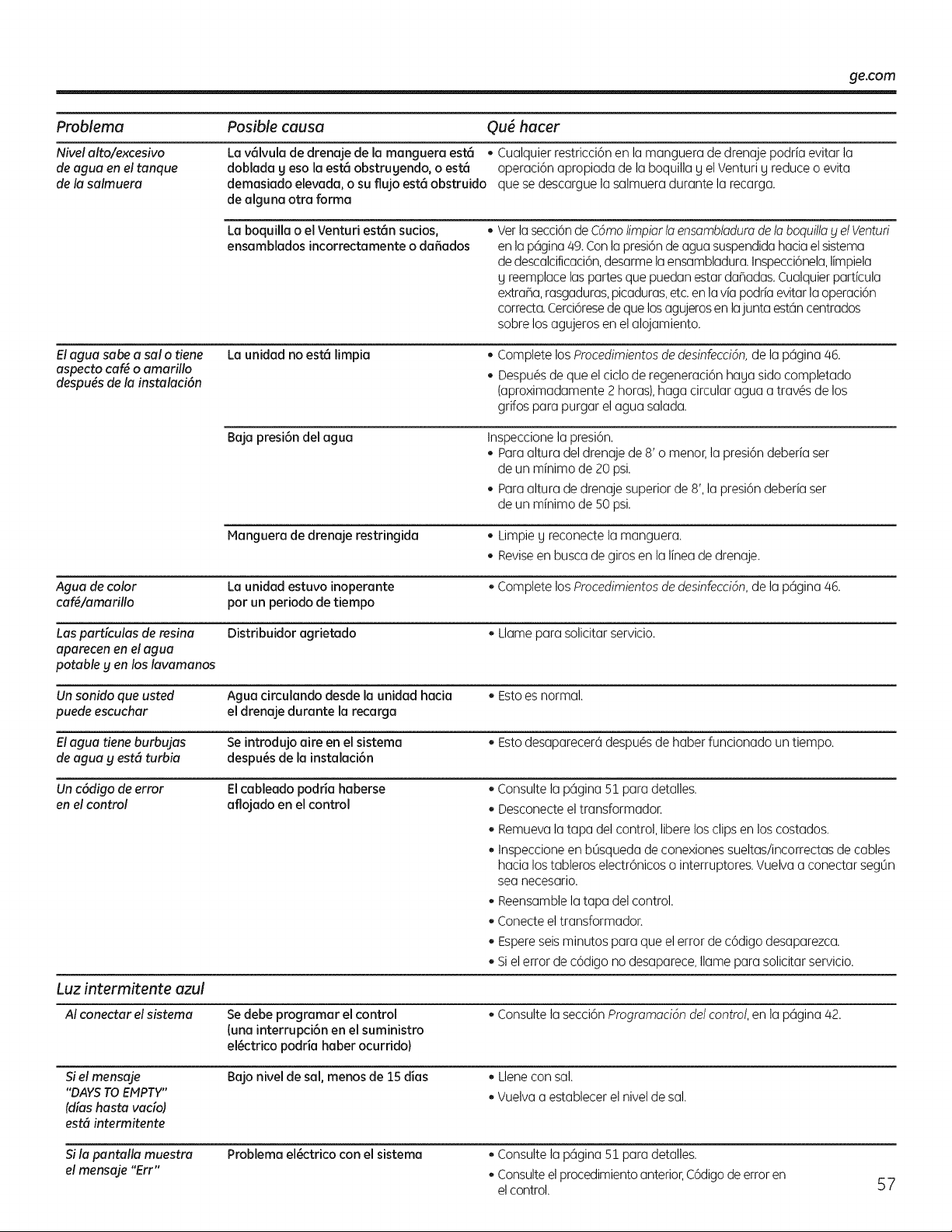
ge.com
Problema Posible causa Qu_ hacer
Nivel alto/excesiva La v_lvula de drenaje de la manguera est6 • Cualquier restricci6n en la manguera de drenaje podria evitar la
de agua en el tanque doblada g eso la est6 obstrugendo, o est6 operaci6n apropiada de la boquilla g el Venturi g reduce o evita
de la salmuera demasiado elevada, o su flujo est8 obstruido que se descargue la salmuera durante la recarga.
de alguna otra forma
Elagua sabe a sal o tiene
aspecto cafg o amarillo
despugs de la instalaci6n
La boquilla o el Venturi est6n sucios,
ensamblados incorrectamente o da5ados
• Verla secci6nde Cdmolimpiar la ensambladura de la boquilla y el Venturi
en la p6gina 49. Conla presi6nde agua suspendida hacia el sistema
de descalcificaci6n,desarme la ensambladura. Inspecci6nela,limpiela
g reemplace las partes que puedan estar daBadas. CualquierparticuJa
extraBa,rasgaduras, picaduras,etc. en la via podria evitar la operaci6n
correcta.Cerci6resede que losagujeros en lajunta est6n centrados
sobre los agujeros en el alojamiento.
La unidad no est6 limpia CompletelosProcedimientosde desinfeccidn,dela p6gina46.
Despu@sde queel ciclode regeneraci6nhagasidocompletado
(aproximadamente2 horas),hagacircularaguaa trav@sdelos
grifosparapurgarelaguasalada.
Baja presi6n del agua Inspeccione la presi6n.
• Para altura del drenaje de 8' o menor, la presi6n deberia ser
de un minimo de 20 psi.
Para altura de drenaje superior de 8', la presi6n deberia ser
de un minimo de 50 psi.
Manguera de drenaje restringida • Limpie g reconecte la manguera.
Reviseen busca de giros en la linea de drenaje.
Agua de color La unidad estuvo inoperante • Complete los Procedimientosde desinfeccidn,de la p6gina 46.
oaf,/amarillo por un periodo de tiempo
Las pardculas de resina Distribuidor agrietado • Llame para solicitar servicio.
aparecen en el agua
potable y en los lavamanos
Un sonido que usted Agua circulando desde la unidad hacia • Esto es normal.
puede escuchar el drenaje durante la recarga
Elagua tiene burbujas Se introdujo aire en el sistema • Esto desaparecer6 despu@s de haber funcionado un tiempo.
de agua g est6 turbia despu6s de la instalaci6n
Un c6digo de error Elcableado podria haberse • Consulte la p6gina 51 para detalles.
en el control aflojado en el control • Desconecte el transformador.
Remueva la tapa del control, libere los clips en los costados.
Inspeccione en bOsqueda de conexiones sueltas/incorrectas de cables
hacia los tableros electr6nicos o interruptores. Vuelva a conectar segOn
sea necesarJo.
Reensamble la tapa del control.
Conecte el transformador.
Espereseisminutos para que el error de c6digo desaparezca.
Siel error de c6digo no desaparece, Ilame para solicitar servicio.
Luz intermitente azul
AI conectar el sistema
Si el mensaje
"DAYSTOEMPTY"
(aliashasta vacio)
est6 intermitente
Sila pantalla muestra
el mensaje "Err"
Sedebe programar el control
(una interrupci6n en el suministro
el6ctrico podria haber ocurrido}
Bajo nivel de sal, menos de 15 dias
• Consulte la secci6n Programaci6n del control,en la p6gina 42.
• Llene con sal.
• Vuelva a establecer el nivel de sal.
Problema el6ctrico con el sistema
• Consulte la p6gina 51 para detalles.
Consulteel procedimientoanterior,C6digode error en
elcontrol.
57
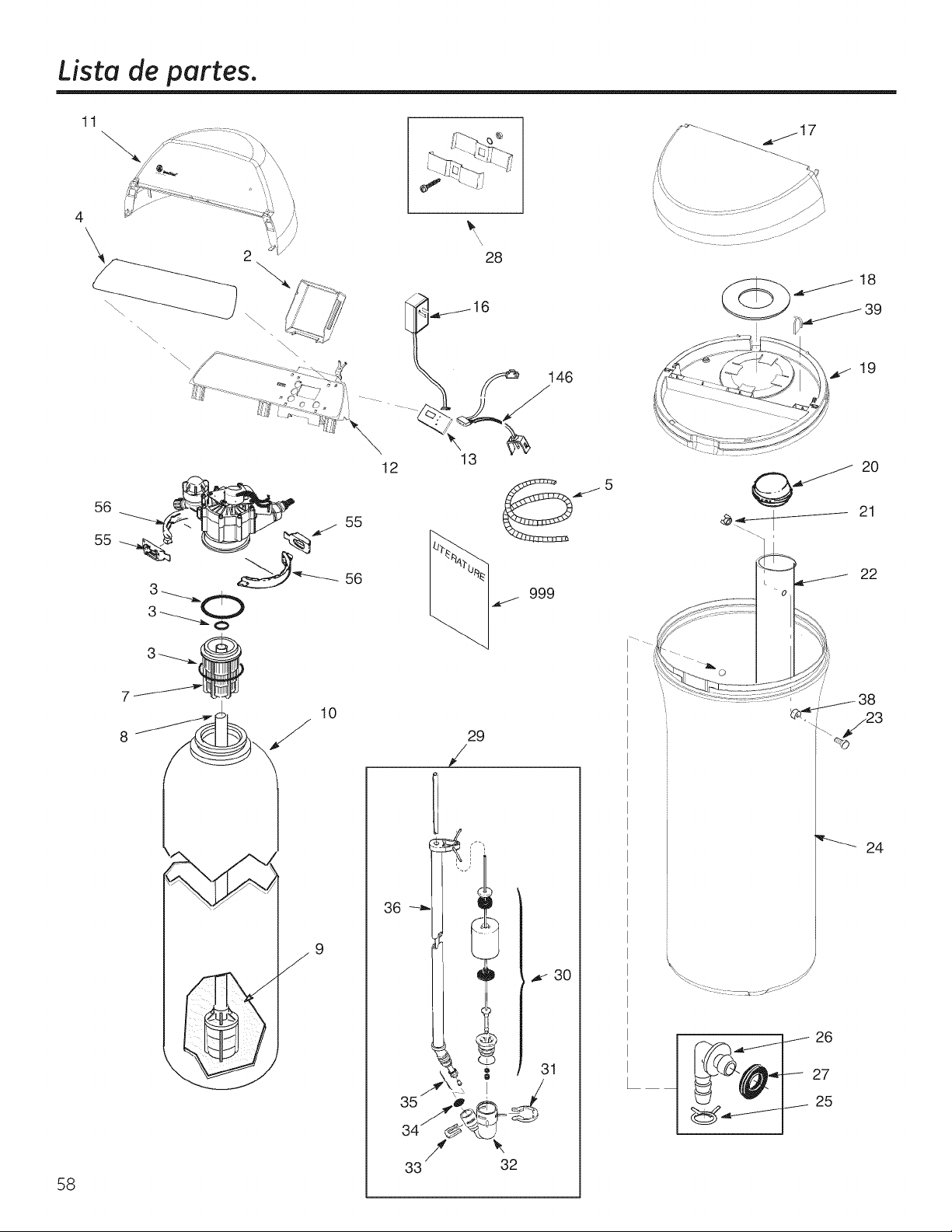
Lista de partes.
11
58
\
56
55
28
16
13
12
56
10
9
29
/
/
33 32
._j_17
19
_ 20
<__ 21
22
24
26
27
25
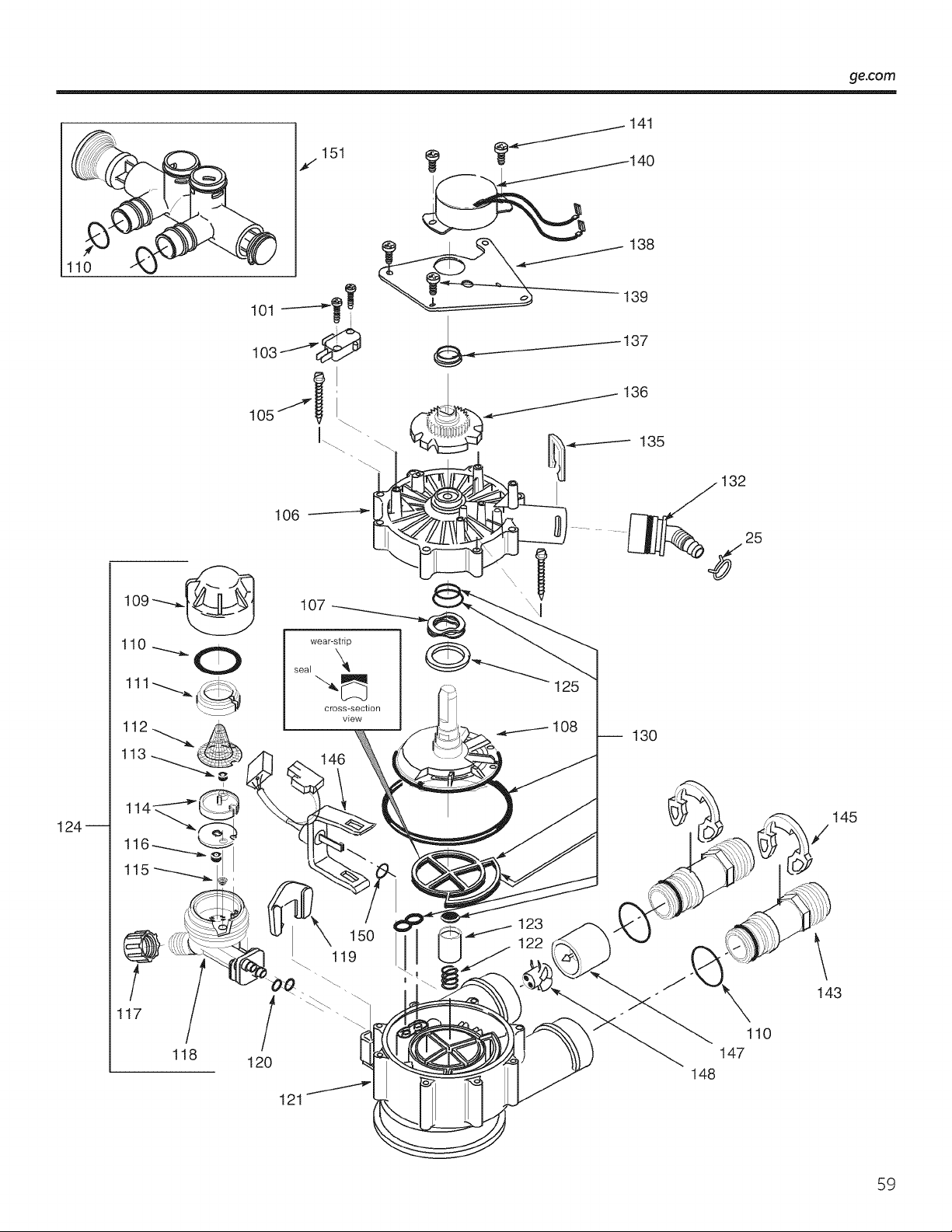
ge.com
110
124--
j151
105
106
I
1
11
115
.
/
117
/
118
146
/
120
123
122
121
141
_------137
136
135
32
-- 130
148
\
145
143
59
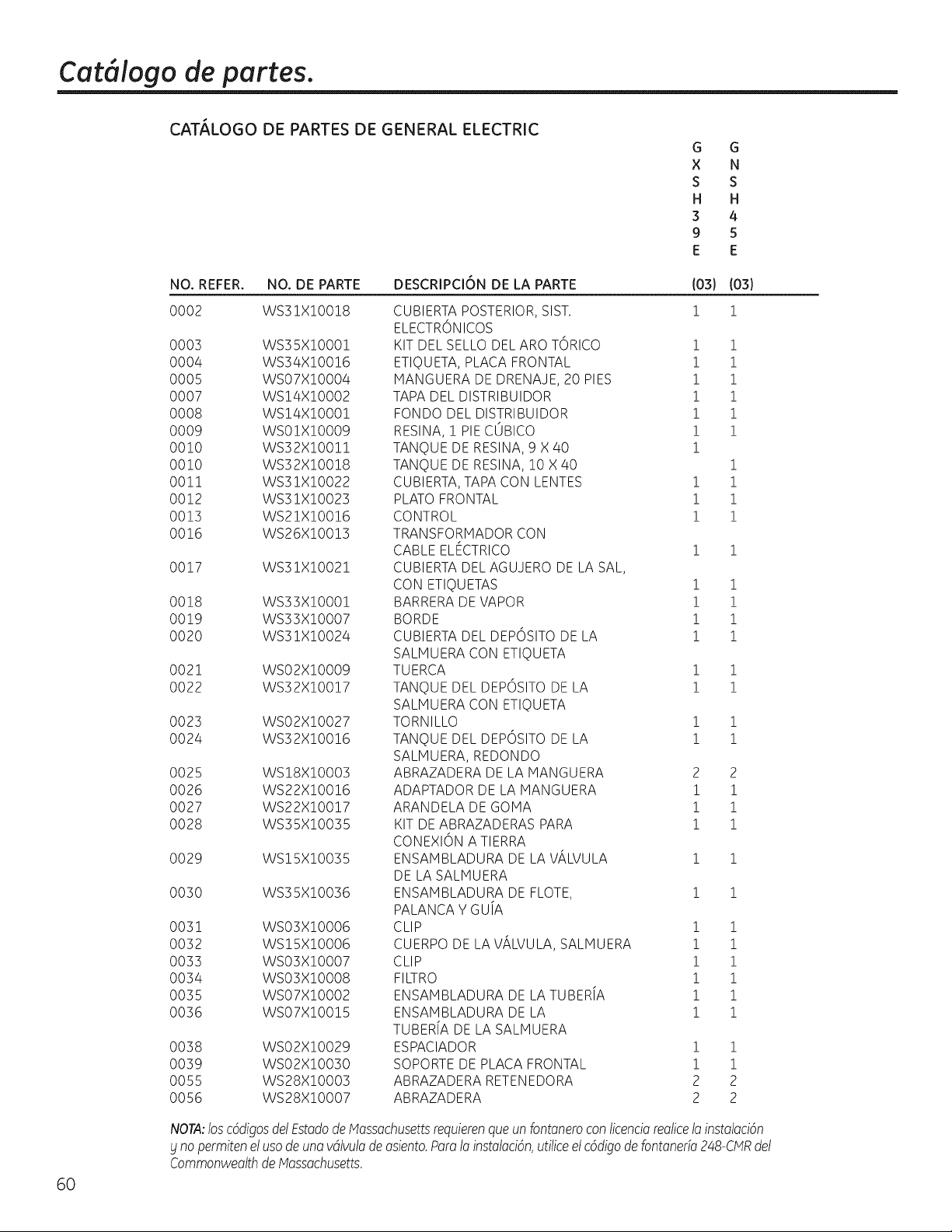
Cat, logo de partes.
6O
CAT,_LOGO DE PARTES DE GENERAL ELECTRIC
G G
X N
S S
H H
3 4
9 5
E E
NO. REFER. NO. DE PARTE
0002 WS31X!00!8
0003 WS35X10001
0004 WS34X10016
0005 WS07X10004
0007 WS14X10002
0008 ws!axIO001
0009 WSOIXIO009
00!0 WS32X10011
00!0 WS32X10018
00!1 WS3!X!0022
0012 WS3!X!O023
0013 WS21X!O0!6
0016 WS26X!O0!3
0017 WS31X!002!
0018 WS33X!O001
0019 WS33X!O007
0020 WS31X!O024
0021 WS02X!0009
0022 WS32X!00!7
0023 WS02X!0027
0024 WS32X!00!6
0025 WS!8X!O003
0026 WS22X!00!6
0027 WS22X!00!7
0028 WS35X10035
0029 WS!SX!O035
0030 WS35X!O036
0031 WSO3X!O006
0032 WS!5X!O006
0033 WSO3X!O007
0034 WSO3X!O008
0035 WSO7X!O002
0036 WSO7X!O0!5
0038 WSO2X!O029
0039 WSO2X!O030
0055 WS28X!O003
0056 WS28X!0007
DESCRIPCI6N DE LA PARTE
CUBIERTA POSTERIOR, SIST.
ELECTRONICOS
KIT DEL SELLO DEL ARO TORICO !
ETIQUETA, PLACA FRONTAL !
MANGUERA DE DRENAJE, 20 PIES !
TAPA DEL DISTRIBUIDOR 1
FONDO DEL DISTRIBUIDOR 1
RESINA, ! PIE COBICO !
TANQUE DE RESINA, 9 X 40 1
TANQUE DE RESINA, 10 X 40
CUBIERTA, TAPA CON LENTES i
PLATO FRONTAL 1
CONTROL 1
TRANSFORMADOR CON
CABLE ELECTRICO 1
CUBIERTA DEL AGUJERO DE LA SAL,
CON ETIQUETAS 1
BARRERA DE VAPOR 1
BORDE 1
CUBIERTA DEL DEPOSITO DE LA 1
SALHUERA CON ETIQUETA
TUERCA 1
TANQUE DEL DEPOSITO DE LA 1
SALHUERA CON ETIQUETA
TORNILLO 1
TANQUE DEL DEPOSITO DE LA 1
SALHUERA, REDONDO
ABRAZADERA DE LA HANGUERA 2
ADAPTADOR DE LA MANGUERA 1
ARANDELA DE GO[viA 1
KIT DE ABRAZADERAS PARA 1
CONEXION A TIERRA
ENSAHBLADURA DE LA ViLVULA 1
DE LA SALMUERA
ENSAHBLADURA DE FLOTE, 1
PALANCA Y GU[A
CLIP !
CUERPO DE LA VALVULA, SALHUERA 1
CLIP !
FILTRO 1
ENSAHBLADURA DE LA TUBERiA 1
ENSAHBLADURA DE LA 1
TUBERiA DE LA SALHUERA
ESPACIADOR !
SOPORTE DE PLACA FRONTAL !
ABRAZADERA RETENEDORA 2
ABRAZADERA 2
(03)
!
(03)
!
i
i
i
i
i
i
i
i
i
i
i
i
i
i
1
1
1
1
2
i
i
i
i
i
i
i
i
i
i
i
2
2
NOTA:losc6digosdelEstadode Massachusettsrequierenqueunfontaneroconticenciarealicela instalacbn
£ nopermitenelusode uno vdlvuladeosiento.Poro1oinstoloci6n,utiliceelc6digodefontone@248-CMRdel
CommonweolthdeMossochusetts.
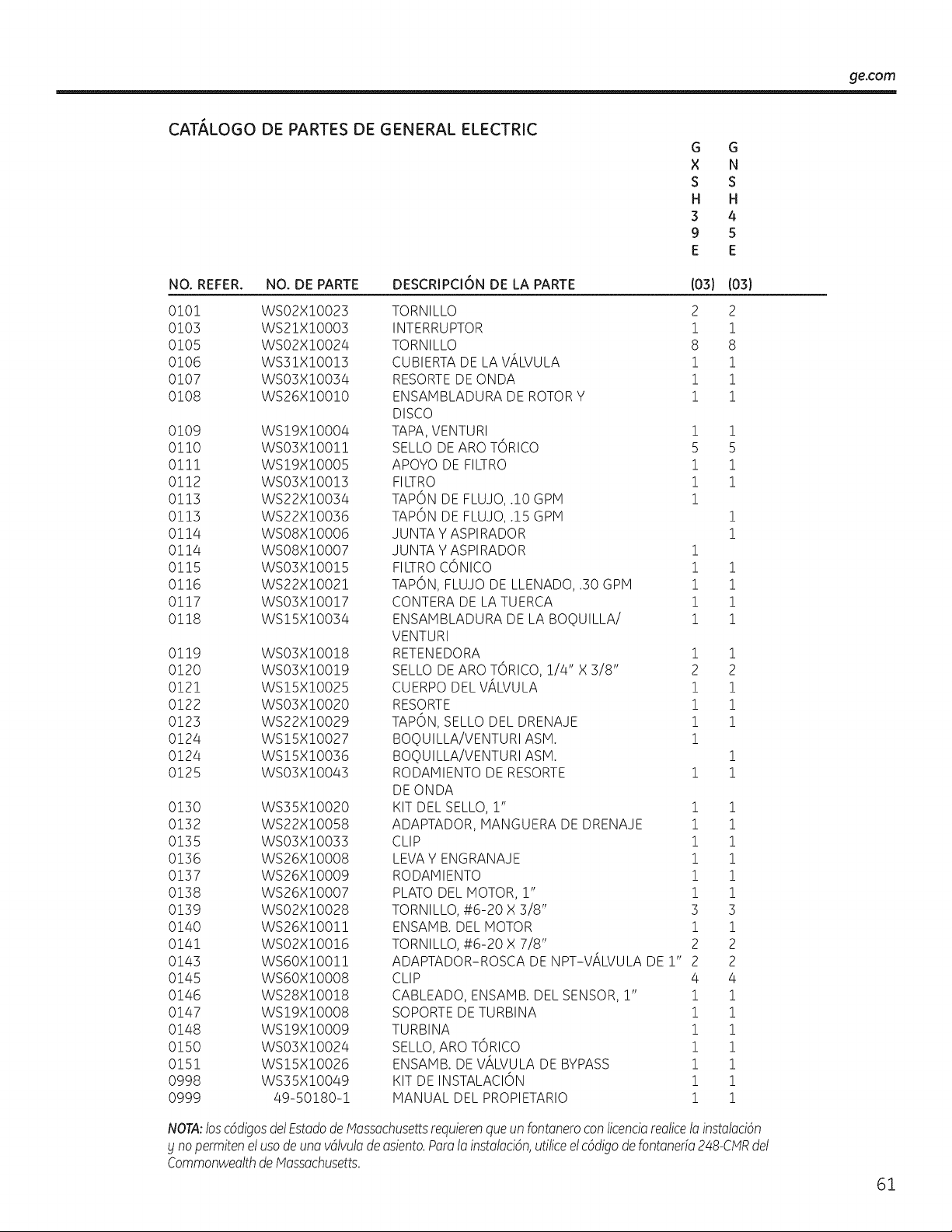
_e.com
CAT,_LOGO DE PARTES DE GENERAL ELECTRIC
G G
X N
S S
H H
3 4
9 5
E E
NO. REFER. NO. DE PARTE
0101 WS02XI0023
0103 WS21XI0003
0105 WS02XI0024
0106 WS31X10013
0107 WS03X10034
0108 WS26X10010
0109 WS!9X!O004
0!10 WSO3X!O0!!
0!1! WS!9X!O005
0112 WSO3X!O0!3
0113 WS22XIO034
0113 WS22XlO036
0114 WSO8XIO006
0114 WSO8XIO007
0115 WSO3XIO015
0116 WS22XIO021
0117 WSO3XIO017
0118 WSI5XIO034
0119 WSO3X!O0!8
0120 WSO3X!O0!9
0121 WS!5X!O025
0122 WSO3X!O020
0123 WS22X!0029
0124 WS!5X!O027
0124 WS!5X!O036
0125 WSO3X!OO43
0130 WS35X!O020
0132 WS22X!O058
0135 WSO3X!O033
0136 WS26X!O008
0137 WS26X!O009
0138 WS26X!O007
0139 WSO2X!O028
0140 WS26X!O0!!
0141 WSO2X!O0!6
0143 WS6OX!O0!!
0145 WS6OX!O008
0146 WS28X!O0!8
0147 WS!9X!O008
0148 WS!9X!O009
0150 WSO3X!O024
0151 WS15X!O026
0998 WS35X!O049
@999 49-50180-1
DESCRIPCI6N DE LA PARTE
TORNILLO
INTERRUPTOR
TORNILLO
CUBIERTA DE LA ViLVULA
RESORTE DE ONDA
ENSAMBLADURA DE ROTOR Y
DISCO
TAP#,,VENTURI
SELLO DE ARO TORICO
APOYO DE FILTRO
FILTRO
TAPON
TAPON
JUNTA
JUNTA
(03}
2
i
8
i
i
i
!
5
!
!
!
(03}
2
i
8
i
i
i
!
5
!
!
DE FLUJO, .!0 GPH
DE FLUJO, .15 GPH !
Y ASPIRADOR !
Y ASPIRADOR i
FILTROCONICO i i
TAPON, FLUJO DE LLENADO, .30 GPM ! !
CONTERA DE LA TUERCA ! !
ENSAHBLADURA DE LA BOQUILLA/ i i
VENTURI
RETENEDORA 1 1
SELLO DE ARO TORICO, 1/4" X 3/8" 2 2
CUERPO DEL ViLVULA i i
RESORTE 1 1
TAPON, SELLO DEL DRENAJE 1 1
BOQUILLA/VENTURI ASH. 1
BOQUILLA/VENTURI ASH. 1
RODAMIENTO DE RESORTE 1 1
DE ONDA
KIT DEL SELLO, r' 1 1
ADAPTADOR, MANGUERA DE DRENAJE 1 1
CLIP 1 1
LEVA Y ENGRANAJE 1 1
RODAMIENTO 1 1
PLATO DEL MOTOR, r' 1 1
TORNILLO, #6-20 X 3/8" 3 3
ENSAMB. DEL MOTOR i i
TORNILLO, #6-20 X 7/8" 2 2
ADAPTADOR-ROSCA DE NPT-ViLVULA DE 1" 2 2
CLIP 4 4
CABLEADO, ENSAHB. DEL SENSOR, r' i i
SOPORTE DE TURBINA 1 1
TURBINA 1 1
SELLO, ARO TORICO 1 1
ENSAMB. DE VALVULA DE BYPASS 1 1
KIT DE INSTALACION ! !
MANUAL DEL PROPIETARIO 1 1
NOTA:loscSdigosdel EstadodeMossachusettsrequierenqueun fontoneroconticencioreolice1oinstolociSn
£ nopermitenel usodeuno vdlvulodeosiento.Poro1oinstoloci6n,utiliceel c6digodefontone@248-CMRdel
CommonweolthdeMossochusetts.
61
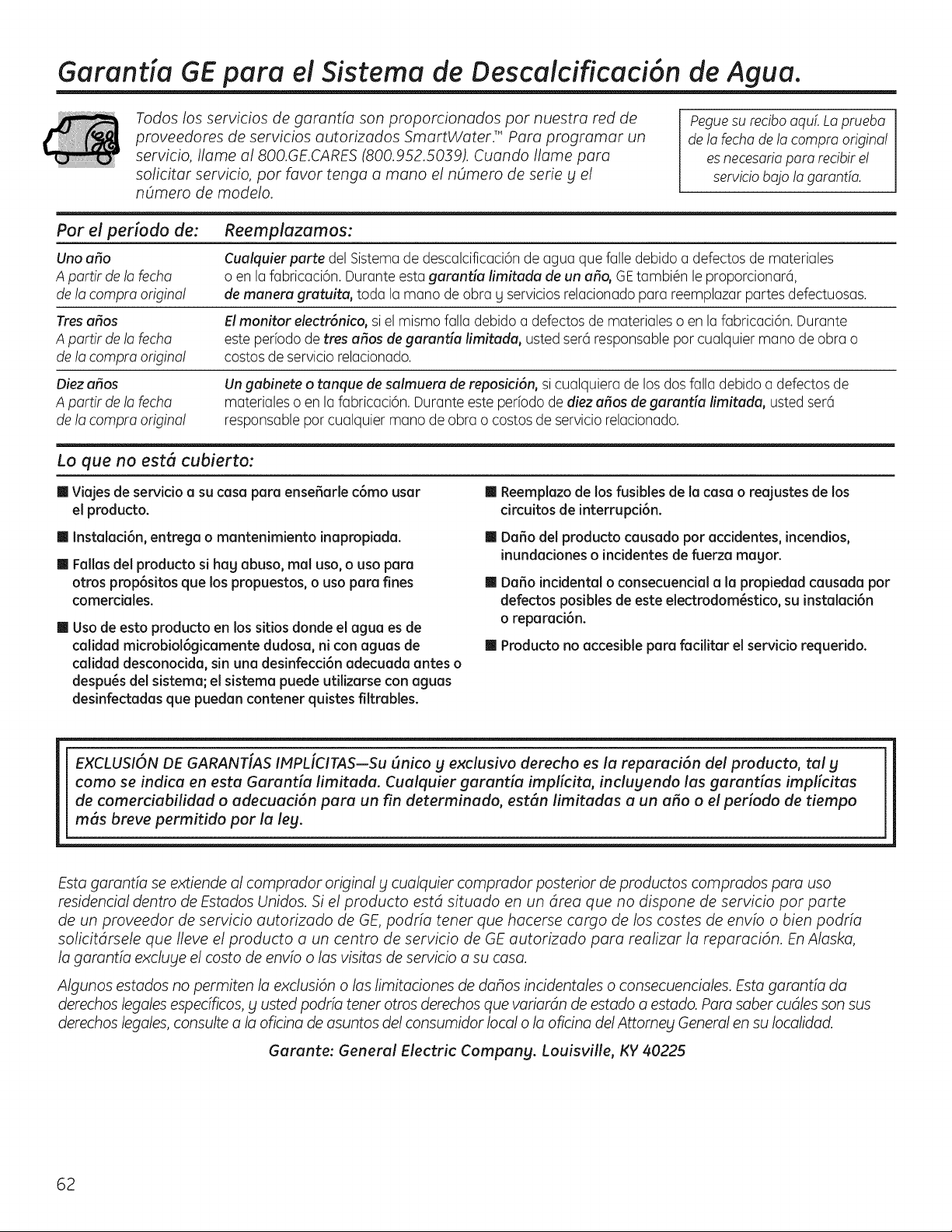
Garantia GE para el Sistema de Descaicificaci6n de Agua.
Todos los servicios de garantia son proporcionados pot nuestra red de
proveedores de servicios autorizados SmartWaterF Para programar un
servicio, Ilame a1800.GE.CARES(800.952.5039). Cuando Ilame para
solicitar servicio, pot favor tenga a mano el nOmero de serie y el
nOmero de modelo.
Peguesu recibo aquL La pmeba
de la fecha de la compm origina!
es necesaria pare recibir e!
servicio ba]o la garantfa.
Par el periodo de:
Uno atlo
A partir de !a fecha
de la compra origina!
Tresatlas
A partir de !a fecha
de la compra origina!
Oiez atlas
A partir de !a fecha
de la compra origina!
Reemplazamos:
Cualquierparte del Sistema de descalcificaci6n de agua que falle debido a defectos de materiales
o en la fabricaci6n. Durante esta garanda limitada de un at!o, GE tambi_n le proporcionar6,
de manera gratuita, toda la mano de obra g servicios relacionado para reemplazar partes defectuosas.
El monitor electr6nico, si el mismo falla debido a defectos de materiales o en la fabricaci6n. Durante
este periodo de tres atlas de garanda limffada, usted sere1 responsable par cualquier mano de obra o
costos de servicio relacionado.
Un gabinete o tanque de salmuera de reposici6n, si cualquiera de los dos falla debido a defectos de
materiales o en la fabricaci6n. Durante este periodo de diez atlas de garantia limitada, usted sere1
responsable par cualquier mano de obra o costos de servicio relacionado.
Lo que no est6 cubierto:
m Viajes de servicio a su casa pare ense_arle c6mo usar
el producto.
Ill Reemplazo de los fusibles de la casa o reajustes de los
circuitosde interrupci6n.
m Instalaci6n, entrega o mantenimiento inapropiada.
m Fallas del producto si hag abuso, real usa, o usa para
otros prop6sitos que los propuestos, o usa para fines
comerdales.
Ill Usa de esto producto en los sitios donde el agua es de
calidad microbiol6gicamente dudosa, ni con aguas de
calidad desconodda, sin una desinfecci6n adecuada antes o
despu_s del sistema; el sistema puede utilizarse con aguas
desinfectadas que puedan contener quistes filtmbles.
II Da_o del producto causado por acddentes, incendios,
inundaciones o incidentes de fuerza magor.
m DaSo incidental o consecuencial a la propiedad causada par
defectos posibles de este electrodom_stico, su instalaci6n
o repamci6n.
m Producto no accesible pare facilitar el serviciorequeddo.
EXCLUSION DE GARANT[AS IMPL[CITAS--Su (mica g exclusivo derecho es la reparaci6n del producto, tal g
como se indica en esta Garantia limitada. Cualquier garantia impficita, indugendo las garantias implicitas
de comerciabilidad o adecuaci6n para un fin determinado, est6n limitadas a un aria o el periodo de tiempo
m6s breve permitido par la leg.
Esta garantia se extiende al comprador original g cualquier comprador posterior de productos comprados para usa
residencial dentro de Estados Unidos. Si el producto estd situado en un drea que no dispone de servicio par parte
de un proveedor de servicio autorizado de GE, podria tenet que hacerse cargo de los castes de envio o bien podria
solicitdrsele que Ileve el producto a un centro de servicio de GE autorizado para realizar la reparaci6n. En Alaska,
la garantia excluge el costa de envio olas visitas de servicio a su casa.
Algunos estados no permiten la exclusi6n olas limitaciones de dahos incidentales o consecuenciales. Esta garantia da
derechos legales especificos, bl usted podfia tenet arras derechos que variardn de estado a estado. Para saber cudles son sus
derechos legales, consulte a la oficina de asuntos del consumidor local o la oficina del Attomeg General en su Iocalidad.
Garante: General Electric Compang. Louisville, KY 40225
62
Soporte a! Consumidor.
Pdgina Web de GEAppliances
ge.com
_Tienealguna pregunta sabre su electrodom@stico?iPruebe la p6gina Web de GEAppliances 2/4horas
al dfa,cualquier dfa del aflo! Para mayor conveniencia y servicio m6s r6pido, ya puede descargar los Manuales
de los Propietarioso pedir piezas en Ifnea.
Soliciteuna reparoci6n ge.com
Elservicio de expertos GE est6 a tan s61oun paso de su puerta. Llame al 800.GE.CARES(800./452.2757)durante
horas normales de oficina para solicitar su reparaci6n.
RealLifeDesignStudio(Estudiode disehopara la vidareal) ge.com
GEapoga el concepto de Diseho Universal-productos, servicios g ambientes que pueden usar gente de todas
las edades, tamahos g capacidades. Reconocemosla necesidad de diseflar para una gran gama de habilidades
g dificultades fisicas g mentales. Param6s detalles cobre las aplicaciones de GEDiseho Universal,inclugendo
ideas de diseho para la cocina para personas con discapacidades, mire nuestra p6gina Web hog mismo. Para
personas con dificultades auditivas, favor de Ilamar al 800.TDD.GEAC(800.833./4322).
Garantiasampliadas ge.com
Compre una garantfa ampliada y obtenga detalles sabre descuentos especialesdisponibles mientras su garantfa
est6 a0n activa. Puedecomprarla en Ifnea en cualquier momenta, o Ilamar al (800.626.2224)durante horas
normales de oficina. GEConsumer Home Servicesestar6 a0n ahf cuando su garantfa termine.
--i Piezasblaccesorios ge.com
Aquellos individuos con la calificaci6n necesaria para reparar sus propios electrodom@sticospueden pedir que
seles manden las piezaso accesorios directamente a sus hogares (aceptamos las tarjetas VISA,NasterCard y
Discover).Haga su pedido en I[nea hoy, 24 horas cada d[a o Ilamar por tel_fono al 800.626.2002 durante horas
normales de oficina.
Las instrucdones descritas en este manual cubren los procedimientos a seguir por cualquier usuano.
Cualquier otra reparad6n deberia, por regla general, refedrse a personal calificado autonzado. Debe
ejercerse precaud6n ga que las reparadones incorrectas pueden causar condidones de fundonamiento
inseguras.
P6ngase en contacto con
nosotros
Sino est6 satisfecho con el servicio que recibe de GE,p6ngase en contacto con nosotros en nuestra p6gina
Web indicando todos los detalles asf coma su n0mero de tel@fonoo escrfbanos a:
General Manager, Customer Relations
GE Appliances, Appliance Park
Louisville, KY/40225
ge.com
"l Registre su electrodom_stico ge.com
iRegistre su nuevo electrodom_stico en linea--cuando usted prefiera! Elregistrar su producto a tiempo le
proporcionar6, si surgiera la necesidad, una major comunicaciSn y un servicio m6s r6pido bajo los t_rminos de
su garantfa. Tambi_n puede enviar su tarjeta de registro pre-impresa que se incluye en el material de embalaje.
63

Consumer Support.
GE Appliances Website
Have a question or need assistance with your appliance? Try the GEAppliances Website 24 hours a day,
any day of the year! For greater convenience and faster service,you can now download Owner's Hanuals
or order parts online.
ge.corrl
Schedule Service ge.com
Expert GErepair service is only one step away from your door. Scheduleyour service at your convenience by
calling 800.GE.CARES(800.412.2717)during normal business hours.
Real Life Design Studio ge.com
GEsupports the Universal Design concept-products, services and environments that can be used by
people of all ages, sizesand capabilities.We recognizethe need to design for a wide range of physical and
mental abilities and impairments. For details of GE'sUniversal Designapplications, including kitchen design ideas
for people with disabilities,check out our Website today. Forthe hearing impaired, please call 800.TDD.GEAC
(800.8]].4122).
Extended Warranties
Purchasea GEextended warranty and learn about special discounts that are available while your warranty
is still in effect. You can purchase it on-line anytime, or call 800.626.222/4during normal business hours.
GEConsumer Home Serviceswill still be there after your warranty expires.
ge.corrl
Parts and Accessories
ge.corrl
Individuals qualified to service their own appliances can have parts or accessoriessent directly to their homes
(VISA,HasterCard and Discovercards are accepted). Order on-line today, 2/4hours every day or
by phone at 800.626.2002 during normal business hours.
Instructions contained inthis manual cover procedures to be performed bg ang user. Other servicing
generally should be referred to qualified service personnel. Caution must be exercised, since improper
servicing may cause unsafe operation.
Contact Us
If you are not satisfiedwith the service you receive from GE,contact us on our Website with all the details
including your phone number, or write to: General Hanager, Customer Relations
GEAppliances,Appliance Park
Louisville,KY/40225
ge.corrl
Register Your Appliance
Register your new appliance on-line--at gour convenience! Timely product registration will allow for
enhanced communication and prompt service under the terms of your warranty, should the need arise.
Youmay also mail inthe pre-printed registration card included in the packing material, or detach and
use the form in this Owner's Hanual.
ge.corrl
Printed in the United States

