BUILT B_TT_R THAN IT H&$ T@ BE'°
r's Manua|
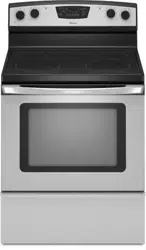
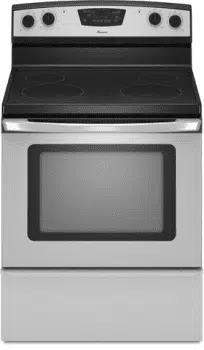
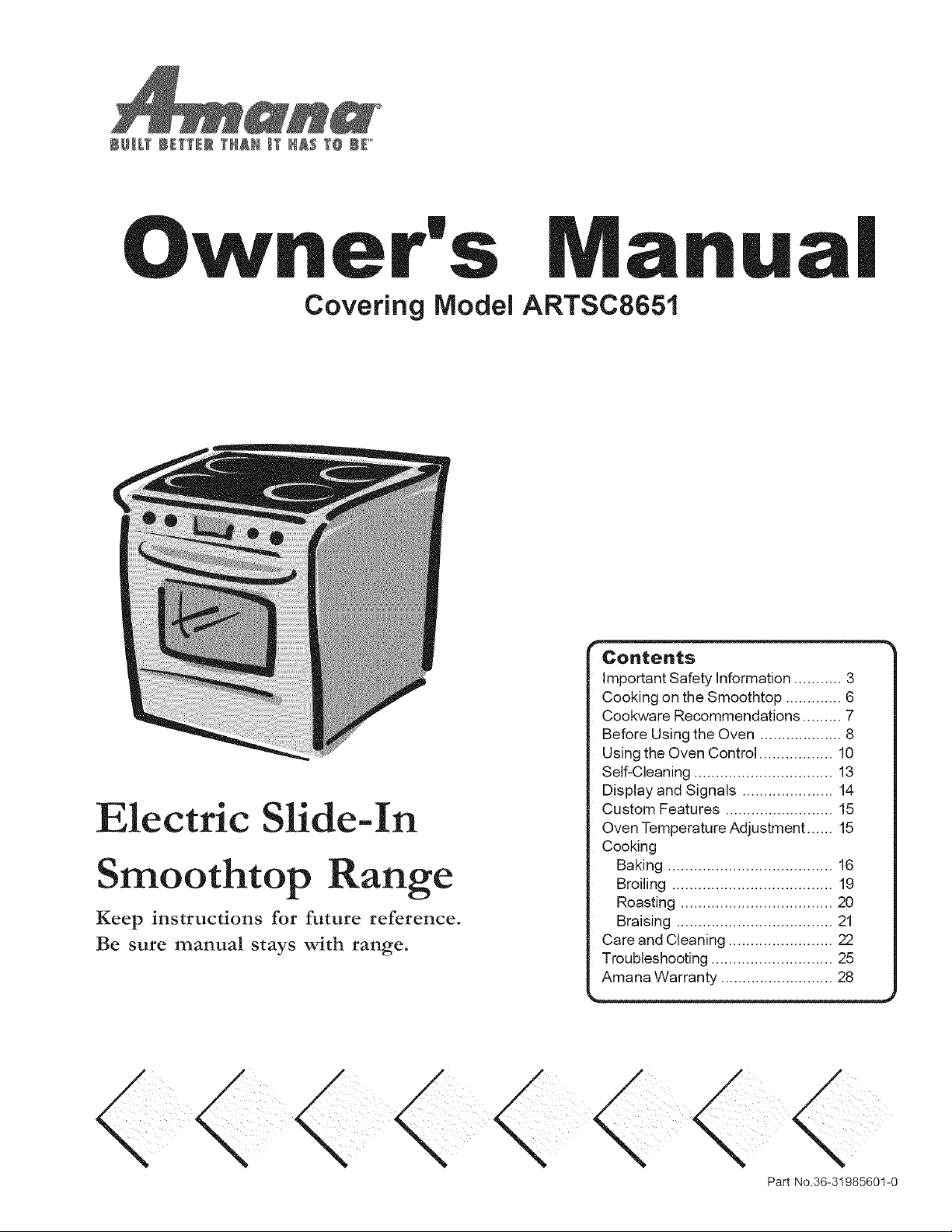
Covering Model ARTSC8651
Electric Slide-In
Smoothtop Range
Keep instructions for future reference.
Be sure manual stays with range.
Contents
Important Safety Information ........... 3
Cooking on the Smoothtop ............. 6
Cookware Recommendations ......... 7
Before Using the Oven ................... 8
Using the Oven Control ................. 10
Self-Cleaning ................................ 13
Display and Signals ..................... 14
Custom Features ......................... 15
Oven Temperature Adjustment ...... 15
Cooking
Baking ...................................... 16
Broiling ..................................... 19
Roasting ................................... 20
Braising .................................... 21
Care and Cleaning ........................ 22
Troubleshooting ............................ 25
Amana Warranty .......................... 28
Part No.36-31985601-0
Thank you for buying an Amana Range!
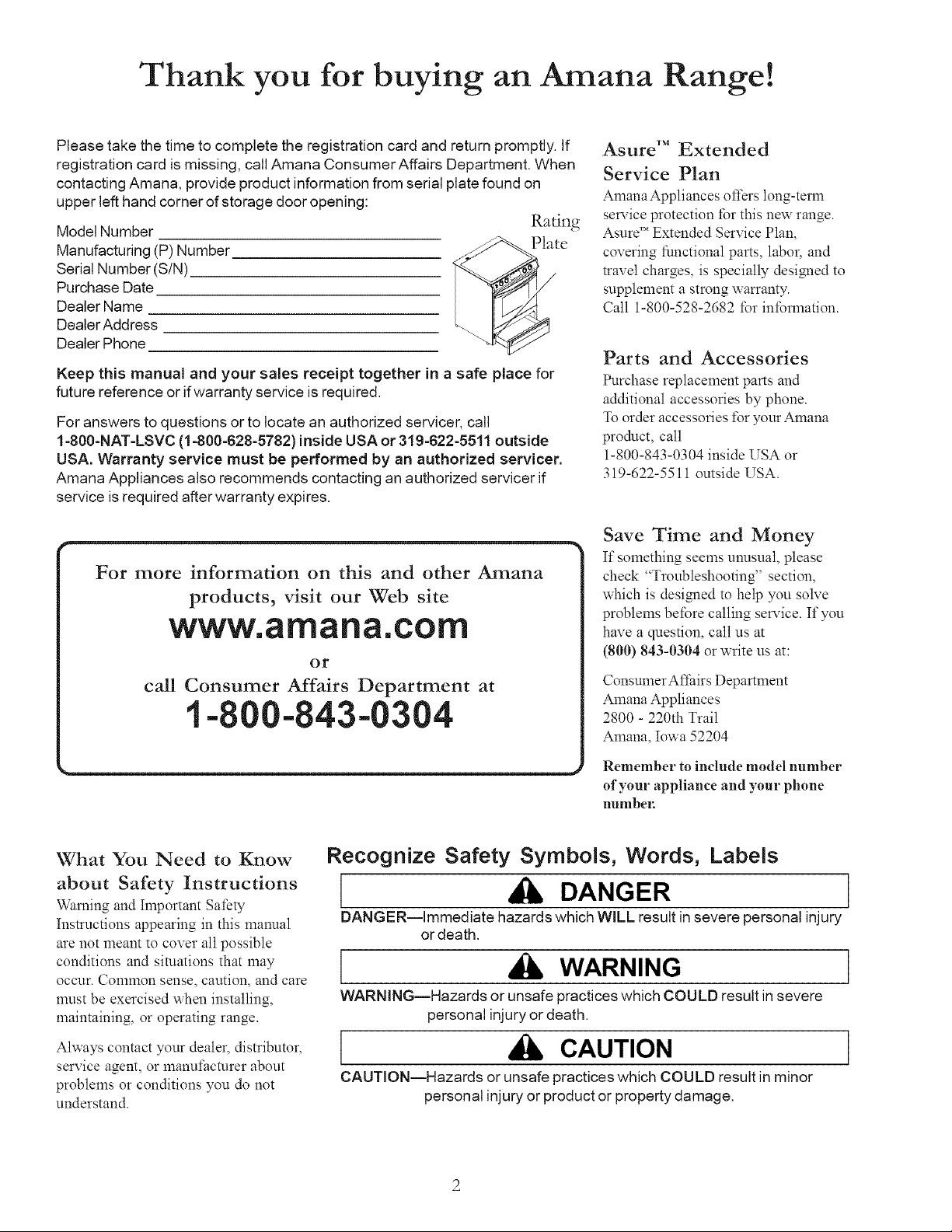
Model Number
Manufacturing (P) Number
Serial Number (S/N)
Purchase Date
Dealer Name
Dealer Address
Dealer Phone
Please take the time to complete the registration card and return promptly. If
registration card is missing, call Amana ConsumerAffairs Department. When
contacting Amana, provide product information from serial plate found on
upper left hand corner of storage door opening:
Raring
Keep this manual and your sales receipt together in a safe place for
future reference or ifwarranty service is required.
For answers to questions or to locate an authorized servicer, call
1-800-NAT-LSVC (1-800-628-5782)inside USA or 319-622-5511 outside
USA. Warranty service must be performed by an authorized servicer.
Amana Appliances also recommends contacting an authorized servicer if
service is required after warranty expires.
F_formationon th'sl and other Amana
I pmduc s_'t our Web site
] www, a%a_a,CO[_
] c_ Affairs Department at
Asure TM Extended
Service Plan
AmanaAppliances offers long-term
sela:ice protection for this new range.
Asure" Extended Service Plan,
covering functional parts, labor, and
travel charges, is specially designed to
supplement a strong warranty.
Call 1-800-528-2682 for information.
Parts and Accessories
Purchase replacement parts and
additional accessories by phone.
To order accessories t\_ryour Amana
product, call
1-800-843-0304 inside USA or
319-622-5511 outside USA.
Save Time and Money
]Ifsomething seems unusual, please
check "Troubleshooting" section,
which is designed to help you soNe
problems before calling sela:ice. If you
have a question, call us at
(800) 843-0304 or write us at:
Consumer Affairs Department
Amana Appliances
2800 - 220th Trail
Amana, ]Iowa52204
Remember to include model number
of your appliance and your phone
number.
What You Need to Know
about Safety Instructions
Warning and ]Important Safety
instructions appearing in this manual
are not meant to cover all possible
conditions and situations that may
OCCl_Ir.Conlnlon sense, caution, and care
must be exercised when installing,
maintaining, or operating range.
Always contact your dealer, distributor,
service agent, or manut:acturer about
problems or conditions you do not
understand.
Recognize Safety Symbols, Words, Labels
DANGER
DANGER--immediate hazards which WILL result in severe personal injury
or death,
WARNING
WARNING--Hazards or unsafe practices which COULD result in severe
personal injury or death,
CAUTION
CAUTION--Hazards or unsafe practices which COULD result in minor
personal injury or product or property damage,
IMPORTANT SAFETY INFORMATION
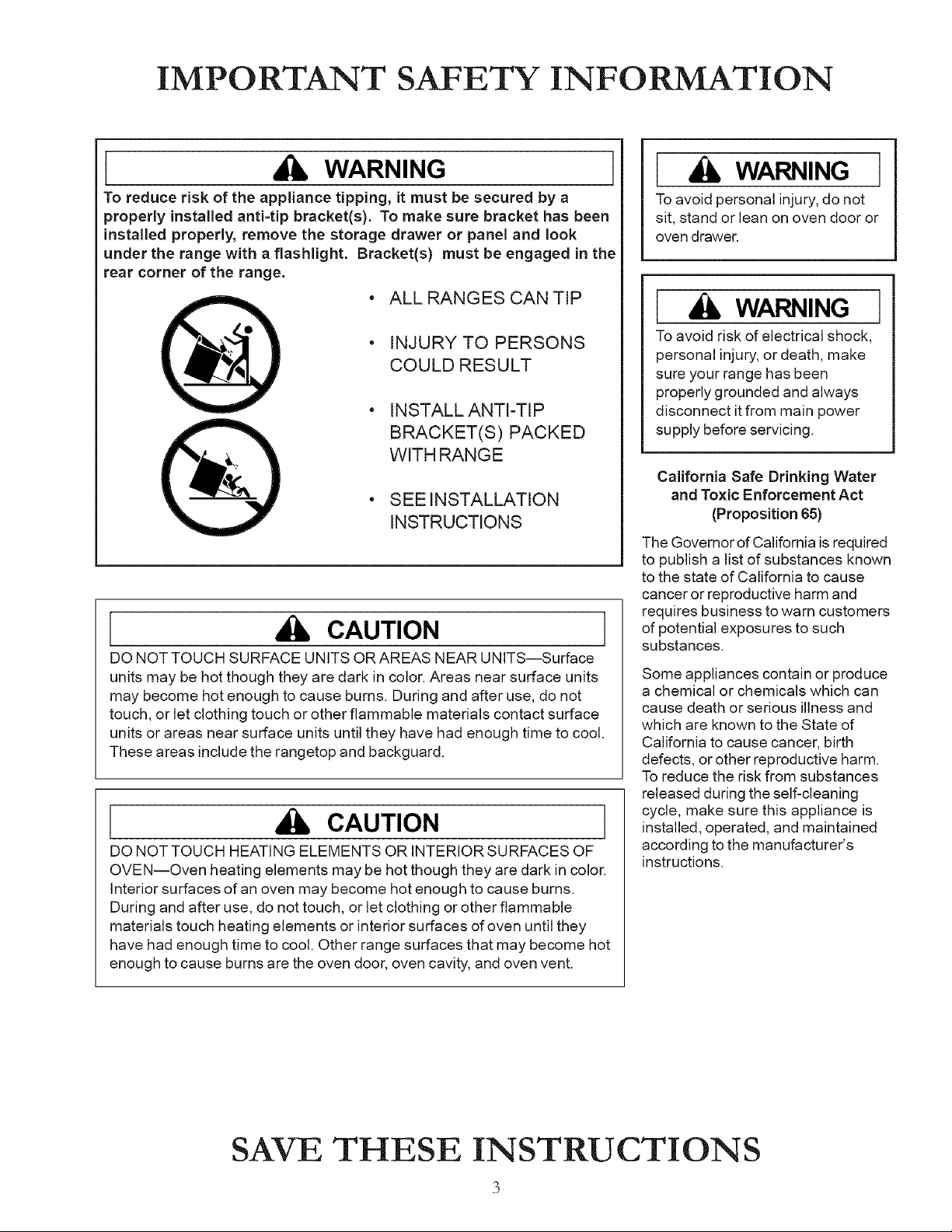
WARNING
To reduce risk of the appliance tipping, it must be secured by a
properly installed anti-tip bracket(s). To make sure bracket has been
installed properly, remove the storage drawer or panel and look
under the range with a flashlight. Bracket(s) must be engaged in the
rear corner of the range.
• ALL RANGES CAN TIP
• INJURY TO PERSONS
COULD RESULT
• INSTALL ANTI-TIP
BRACKET(S) PACKED
WITH RANGE
• SEE INSTALLATION
INSTRUCTIONS
CAUTION
DO NOT TOUCH SURFACE UNITS OR AREAS NEAR UNITS--Surface
units may be hot though they are dark in color. Areas near surface units
may become hot enough to cause burns. During and after use, do not
touch, or let clothing touch or other flammable materials contact surface
units or areas near surface units until they have had enough time to cool.
These areas include the rangetop and backguard.
I CAUTION ]
DO NOT TOUCH HEATING ELEMENTS OR INTERIOR SURFACES OF
OVEN--Oven heating elements may be hot though they are dark in color.
Interior surfaces of an oven may become hot enough to cause burns.
During and after use, do not touch, or let clothing or other flammable
materials touch heating elements or interior surfaces of oven until they
have had enough time to cool. Other range surfaces that may become hot
enough to cause burns are the oven door, oven cavity, and oven vent.
[ WARNING ]
To avoid personal injury, do not
sit, stand or lean on oven door or
oven drawer.
[ WARNING ]
To avoid risk of electrical shock,
personal injury, or death, make
sure your range has been
properly grounded and always
disconnect itfrom main power
supply before servicing.
California Safe Drinking Water
and Toxic Enforcement Act
(Proposition 65)
The Governor of California is required
to publish a list of substances known
to the state of California to cause
cancer or reproductive harm and
requires business to warn customers
of potential exposures to such
substances.
Some appliances contain or produce
a chemical or chemicals which can
cause death or serious illness and
which are known to the State of
California to cause cancer, birth
defects, or other reproductive harm.
To reduce the risk from substances
released during the self-cleaning
cycle, make sure this appliance is
installed, operated, and maintained
according to the manufacturer's
instructions.
SAVE THESE INSTRUCTIONS
IMPORTANT SAFETY INFORMATION (cont,¢
,
,
,
,
,
,
,
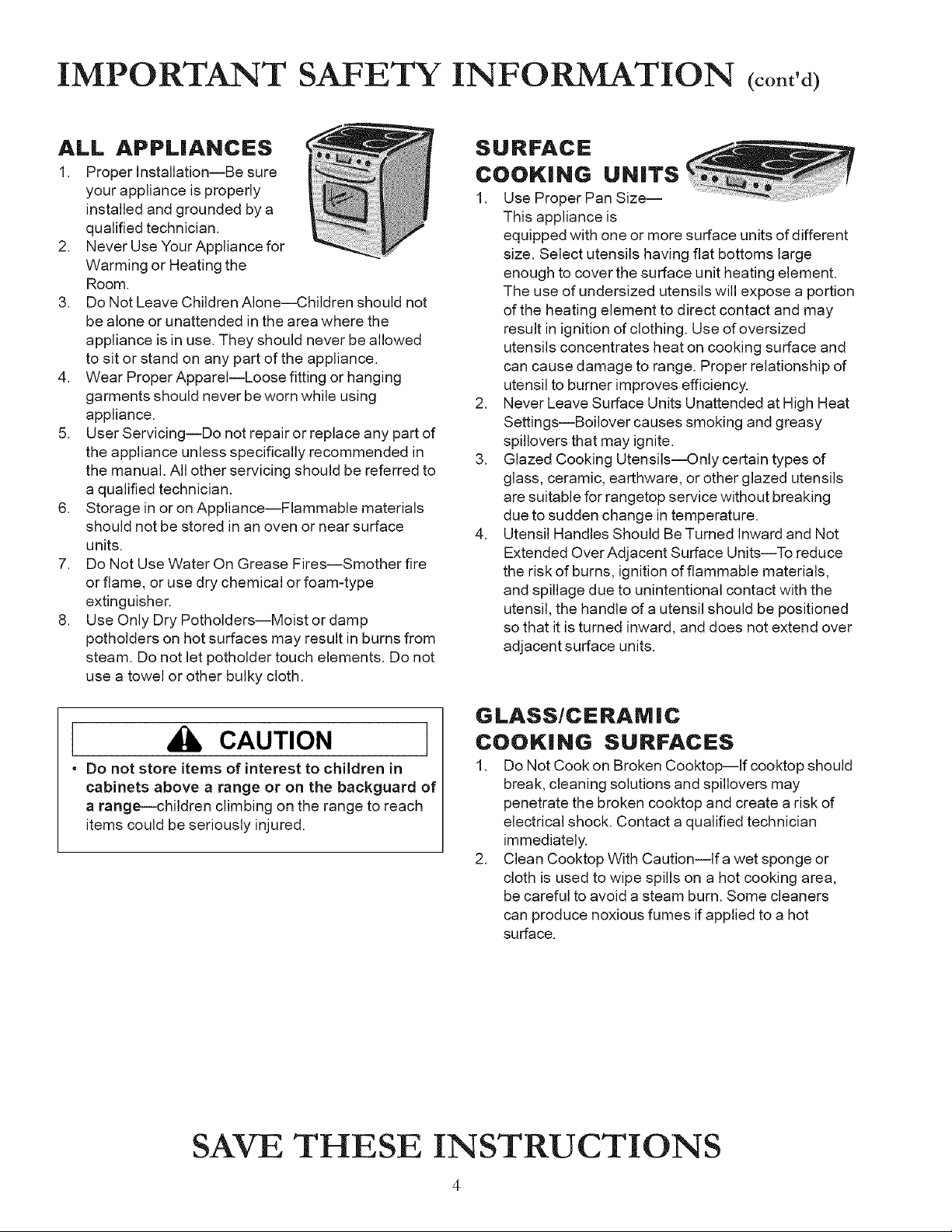
APPLIANCES
Proper InstallationJBe sure
your appliance is properly
installed and grounded by a
qualified technician.
Never Use Your Appliance for
Warming or Heating the
Room.
Do Not Leave Children Alone--Children should not
be alone or unattended in the area where the
appliance is in use. They should never be allowed
to sit or stand on any part of the appliance.
Wear Proper Apparel--Loose fitting or hanging
garments should never be worn while using
appliance.
User Servicing--Do not repair or replace any part of
the appliance unless specifically recommended in
the manual. All other servicing should be referred to
a qualified technician.
Storage in or on Appliance--Flammable materials
should not be stored in an oven or near surface
units.
Do Not Use Water On Grease Fires--Smother fire
or flame, or use dry chemical or foam-type
extinguisher.
Use Only Dry Potholders--Moist or damp
potholders on hot surfaces may result in burns from
steam. Do not let potholder touch elements. Do not
use a towel or other bulky cloth.
CAUTION
• Do not store items of interest to children in
cabinets above a range or on the backguard of
a range--children climbing on the range to reach
items could be seriously injured,
SURFACE
COOKING
1.
,
,
,
UNITS
Use Proper Pan Size--
This appliance is
equipped with one or more surface units of different
size. Select utensils having flat bottoms large
enough to cover the surface unit heating element.
The use of undersized utensils will expose a portion
of the heating element to direct contact and may
result in ignition of clothing. Use of oversized
utensils concentrates heat on cooking surface and
can cause damage to range. Proper relationship of
utensil to burner improves efficiency.
Never Leave Surface Units Unattended at High Heat
Settings--Boilover causes smoking and greasy
spillovers that may ignite.
Glazed Cooking Utensils--Only certain types of
glass, ceramic, earthware, or other glazed utensils
are suitable for rangetop service without breaking
due to sudden change in temperature.
Utensil Handles Should Be Turned Inward and Not
Extended Over Adjacent Surface Units--To reduce
the risk of burns, ignition of flammable materials,
and spillage due to unintentional contact with the
utensil, the handle of a utensil should be positioned
so that it is turned inward, and does not extend over
adjacent surface units.
GLASS/CERAM IC
COOKING SURFACES
1. Do Not Cook on Broken Cooktop--lf cooktop should
break, cleaning solutions and spillovers may
penetrate the broken cooktop and create a risk of
electrical shock. Contact a qualified technician
immediately.
2. Clean Cooktop With Caution--lfa wet sponge or
cloth is used to wipe spills on a hot cooking area,
be careful to avoid a steam burn. Some cleaners
can produce noxious fumes if applied to a hot
surface.
SAVE THESE INSTRUCTIONS
IMPORTANT SAFETY INFORMATION (cont,¢
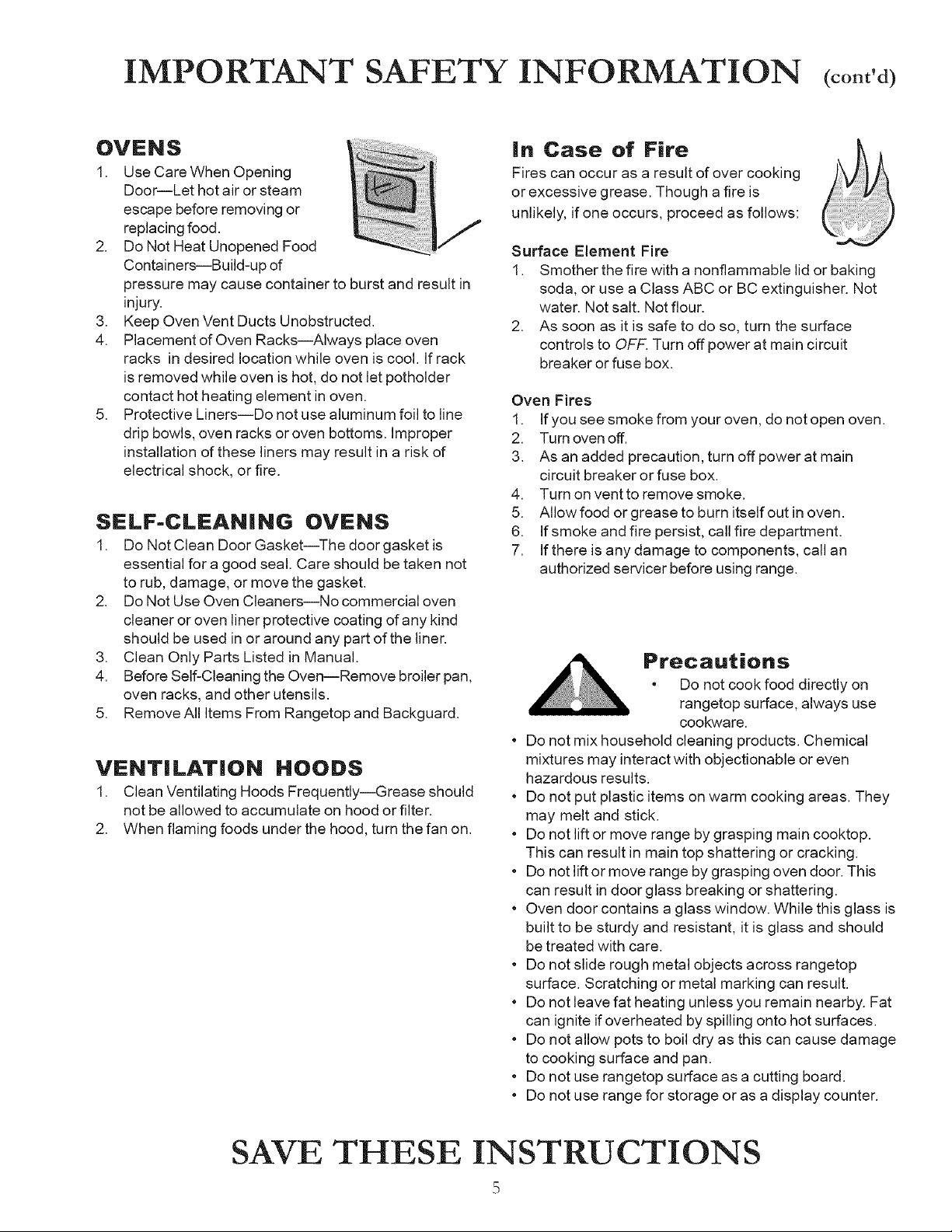
OVENS
1. Use Care When Opening
Door--Let hot air or steam
escape before removing or
replacing food.
2. Do Not Heat Unopened Food
Containers--Build-up of
pressure may cause container to burst and result in
injury.
3. Keep Oven Vent Ducts Unobstructed.
4. Placement of Oven Racks--Always place oven
racks in desired location while oven is cool. If rack
is removed while oven is hot, do not let potholder
contact hot heating element in oven.
5. Protective Liners--Do not use aluminum foil to line
drip bowls, oven racks or oven bottoms. Improper
installation of these liners may result in a risk of
electrical shock, or fire.
SELF-CLEANING OVENS
1. Do Not Clean Door Gasket--The door gasket is
essential for a good seal. Care should be taken not
to rub, damage, or move the gasket.
2. Do Not Use Oven Cleaners--No commercial oven
cleaner or oven liner protective coating of any kind
should be used in or around any part of the liner.
3. Clean Only Parts Listed in Manual.
4. Before Self-Cleaning the Oven--Remove broiler pan,
oven racks, and other utensils.
5. Remove All Items From Rangetop and Backguard.
VENTiLATiON HOODS
1. Clean Ventilating Hoods Frequently--Grease should
not be allowed to accumulate on hood or filter.
2. When flaming foods under the hood, turn the fan on.
in Case of Fire
Fires can occur as a result of over cooking
or excessive grease. Though a fire is
unlikely, if one occurs, proceed as follows:
Surface Element Fire
1.
,
Smother the fire with a nonflammable lid or baking
soda, or use a Class ABC or BC extinguisher. Not
water. Not salt. Not flour.
As soon as it is safe to do so, turn the surface
controls to OFF. Turn off power at main circuit
breaker or fuse box.
Oven Fires
1. If you see smoke from your oven, do not open oven.
2. Turn oven off.
3. As an added precaution, turn off power at main
circuit breaker or fuse box.
4. Turn on vent to remove smoke.
5. Allow food or grease to burn itself out in oven.
6. If smoke and fire persist, call fire department.
7. If there is any damage to components, call an
authorized servicer before using range.
o
o
o
o
o
o
o
o
o
Precautions
• Do not cook food directly on
rangetop surface, always use
cookware.
Do not mix household cleaning products. Chemical
mixtures may interact with objectionable or even
hazardous results.
Do not put plastic items on warm cooking areas. They
may melt and stick.
Do not lift or move range by grasping main cooktop.
This can result in main top shattering or cracking.
Do not lift or move range by grasping oven door. This
can result in door glass breaking or shattering.
Oven door contains a glass window. While this glass is
built to be sturdy and resistant, it is glass and should
be treated with care.
Do not slide rough metal objects across rangetop
surface. Scratching or metal marking can result.
Do not leave fat heating unless you remain nearby. Fat
can ignite if overheated by spilling onto hot surfaces.
Do not allow pots to boil dry as this can cause damage
to cooking surface and pan.
Do not use rangetop surface as a cutting board.
Do not use range for storage or as a display counter.
SAVE THESE INSTRUCTIONS
m
D
Cooking on the Smoothtop
Cooking Safely with
Surface Elements
WARNING
Toavoid risk of serious personal
injury, property damage, or fire,
do not leave surface elements
unattended while in operation.
Grease and spillovers can ignite
causing a fire.
WARNING
To avoid risk of electrical shock
or serious personal injury,
* never cook on a broken
smoothtop cooking surface.
Spillovers can penetrate broken
surface and cause electric
shock.
* never clean broken cooktop.
Cleaners can penetrate broken
surface and cause electric
shock.
If smoothtop cooking surface
breaks, discontinue use and
notify an authorized servicer
immediately.
WARNING
Toavoid serious personal injury,
do not use a damp or wet cloth
to clean up spills on a hot or
warm cooktop. Moist or damp
cloths on hot surfaces may
result in burns from steam.
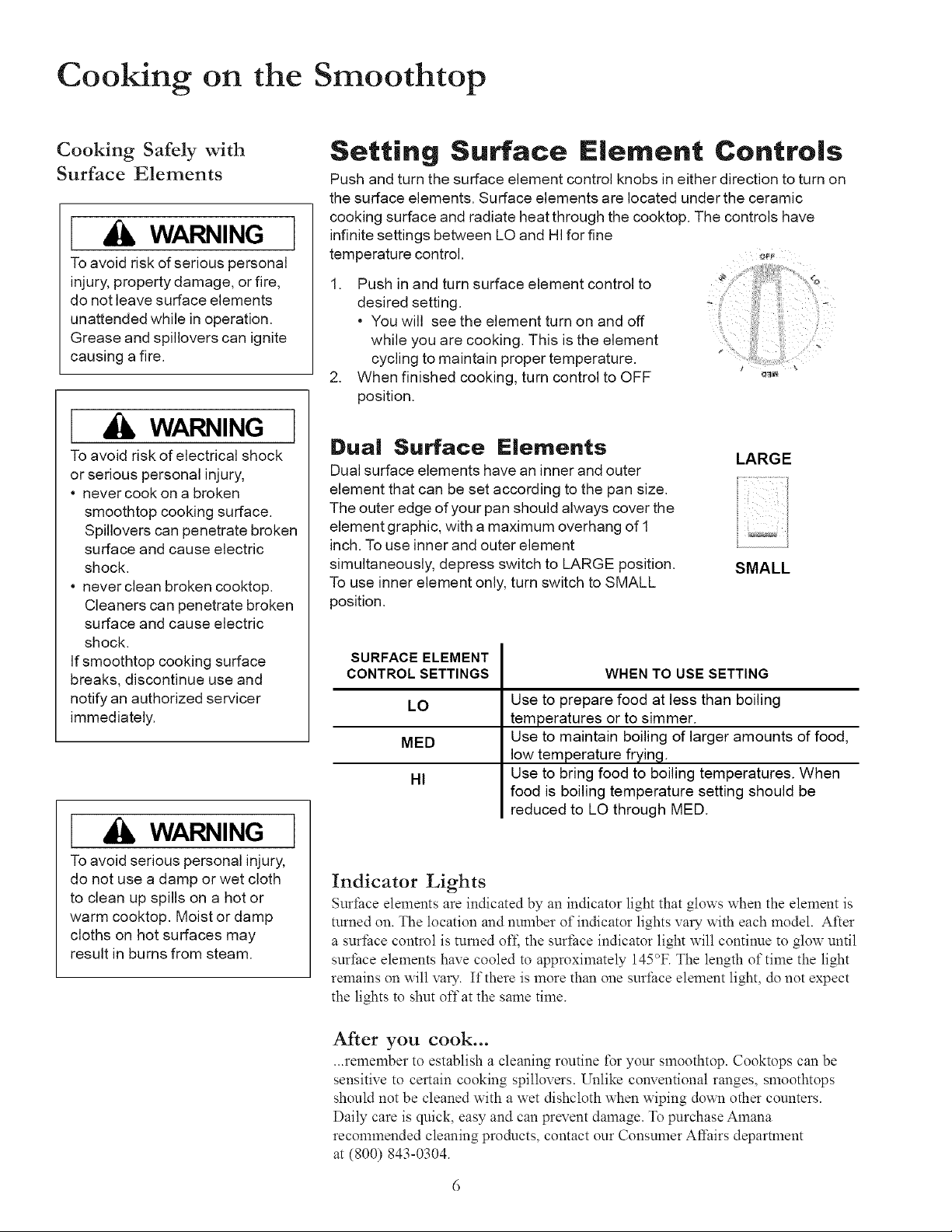
Setting Surface E|ement Contro|s
Push and turn the surface element control knobs in either direction to turn on
the surface elements. Surface elements are located under the ceramic
cooking surface and radiate heat through the cooktop. The controls have
infinite settings between LO and HI for fine
temperature control. _
1. Push in and turn surface element control to
desired setting, i' -
* You will see the element turn on and off
while you are cooking. This is the element ....
cycling to maintain proper temperature.
2. When finished cooking, turn control to OFF _
position.
Dual Surface E|ements
LARGE
Dual surface elements have an inner and outer
element that can be set according to the pan size.
The outer edge of your pan should always cover the
element graphic, with a maximum overhang of 1
inch. Touse inner and outer element
simultaneously, depress switch to LARGE position. SMALL
To use inner element only, turn switch to SMALL
position.
SURFACE ELEMENT
CONTROL SETTINGS
LO
MED
HI
WHEN TO USE SETTING
Use to prepare food at less than boiling
temperatures or to simmer.
Use to maintain boiling of larger amounts of food,
low temperature frying.
Use to bring food to boiling temperatures. When
food is boiling temperature setting should be
reduced to LO through MED.
Indicator Lights
Surthce elements are indicated by an indicator light that glows when the element is
turned on. The location and number of indicator lights vary with each model. After
a surfi_ce control is turned off; the surthce indicator light will continue to glow until
surface elements have cooled to approximately 145°F. The length of time the light
remains on will vary. ][fthere is more than one suflhce element light, do not expect
the lights to shut offat the same time.
After you cook...
•..remember to establish a cleaning routine t\_r your smoothtop. Cooktops can be
sensitive to certain cooking spillovers. Unlike conventional ranges, smoothtops
should not be cleaned with a wet dishcloth when wiping down other counters.
Daily care is quick, easy and can prevent damage. To purchase Amana
recommended cleaning products, contact our Consumer Aft:airs department
at (800) 843-0304.
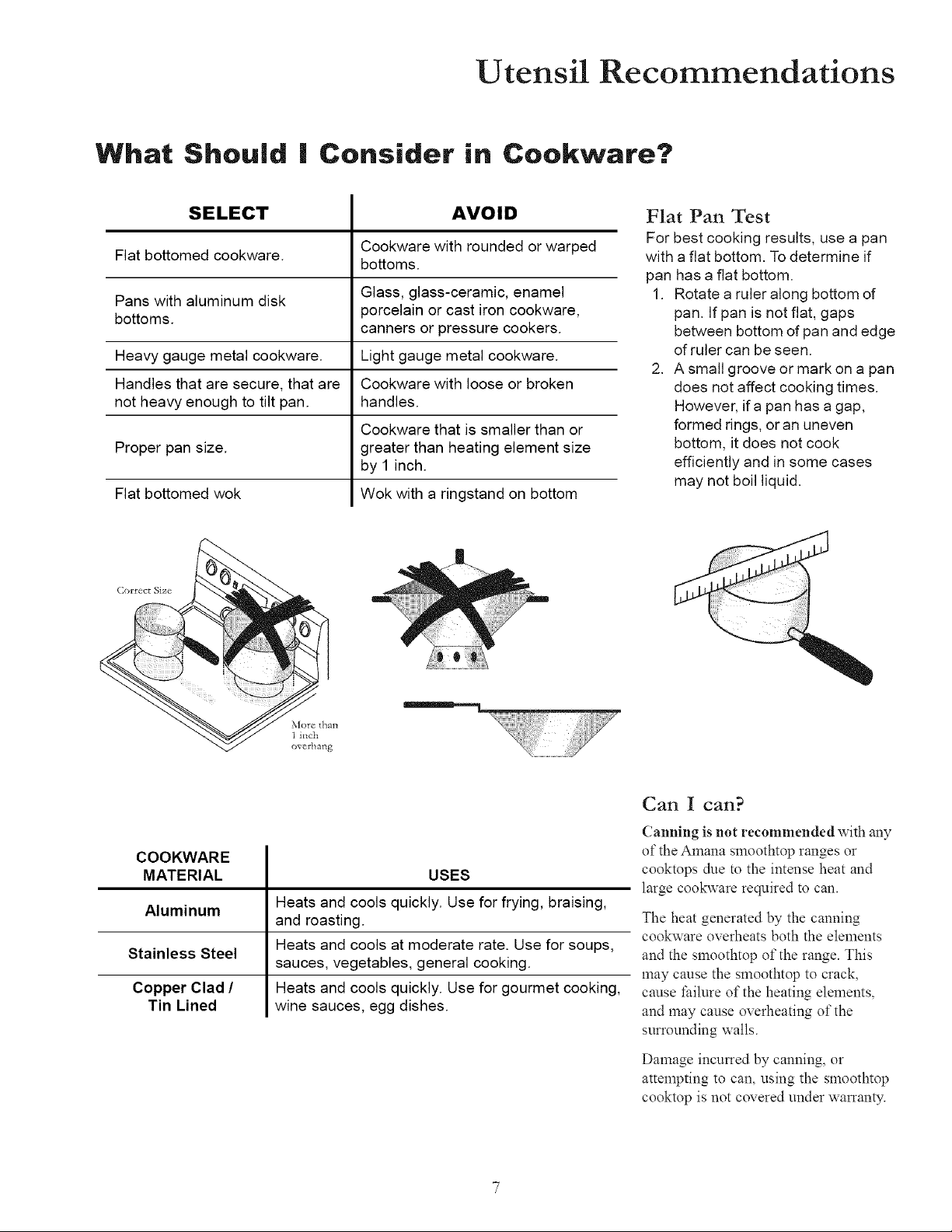
Utensil Recommendations
What Should | Consider in Cookware?
SELECT AVOID
Cookware with rounded or warped
Flat bottomed cookware.
bottoms.
Pans with aluminum disk Glass, glass-ceramic, enamel
bottoms, porcelain or cast iron cookware,
canners or pressure cookers.
Heavy gauge metal cookware. Light gauge metal cookware.
Handles that are secure, that are Cookware with loose or broken
not heavy enough to tilt pan. handles.
Cookware that is smaller than or
Proper pan size. greater than heating element size
by 1 inch.
Flat bottomed wok Wok with a ringstand on bottom
Flat Pan Test
For best cooking results, use a pan
with a flat bottom. Todetermine if
pan has a flat bottom.
1. Rotate a ruleralong bottom of
pan. If pan is not flat, gaps
between bottom of pan and edge
of ruler can be seen.
2. A small groove or mark on a pan
does not affect cooking times.
However, ira pan has a gap,
formed rings, oran uneven
bottom, it does not cook
efficiently and in some cases
may not boil liquid.
Correct Size
COOKWARE
MATERIAL USES
Aluminum
Stainless Steel
Copper Clad /
Tin Lined
Heats and cools quickly. Use for frying, braising,
and roasting.
Heats and cools at moderate rate. Use for soups,
sauces, vegetables, general cooking.
Heats and cools quickly. Use for gourmet cooking,
wine sauces, egg dishes.
Can I can?
Canning is not recommended with any
of the Amana smoothtop ranges or
cooktops due to the intense heat and
large cookware required to can.
The heat generated by the canning
cookware overheats both the elements
and the smoothtop of the range. This
may cause the smoothtop to crack,
cause fifilure of the heating elements,
and may cause overheating of the
surrounding walls.
Damage incurred by canning, or
attempting to can, using the smoothtop
cooktop is not covered under warranty.
Before Using the Oven
Before Using the Oven (coned)
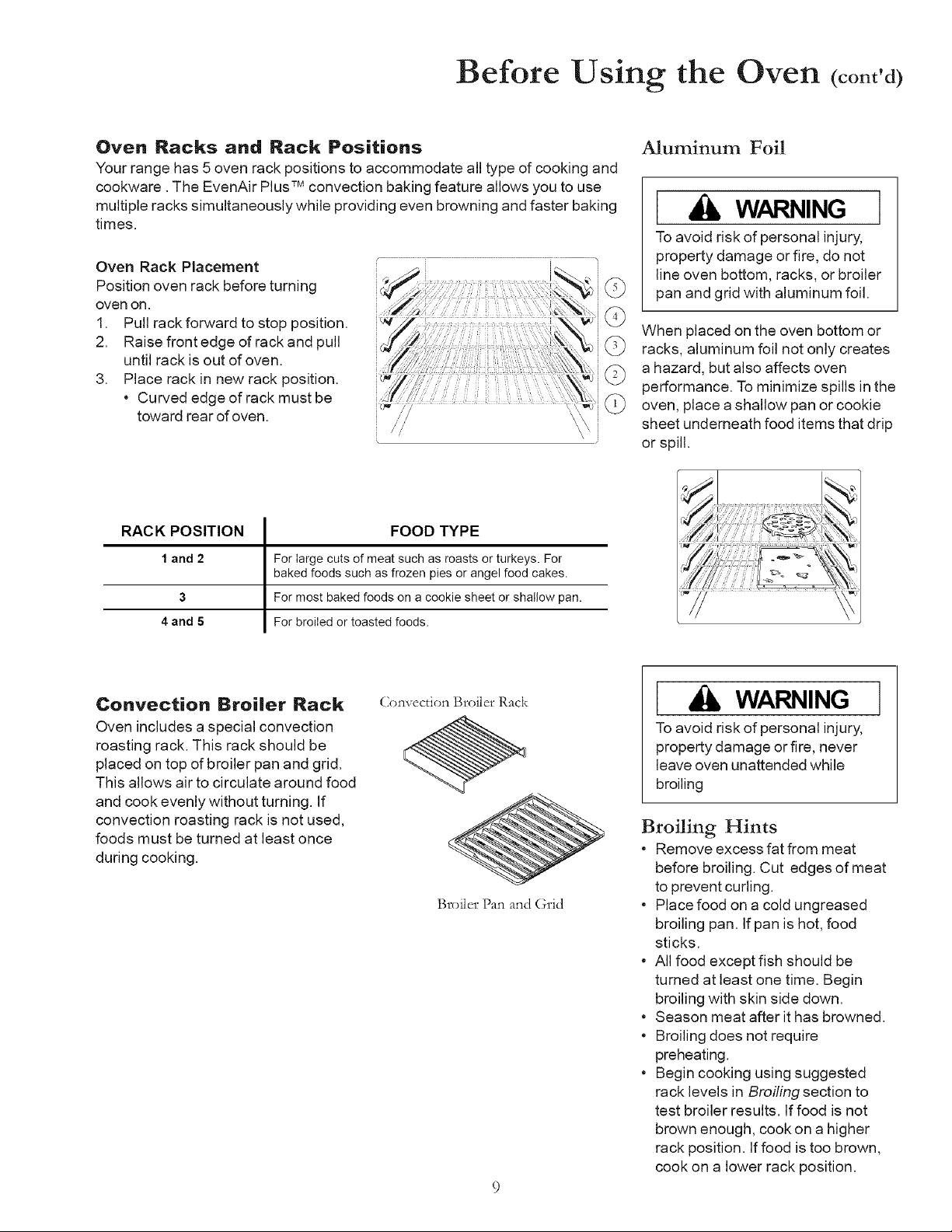
Oven Racks and Rack Positions
Your range has 5 oven rack positions to accommodate all type of cooking and
cookware. The EvenAir Plus TM convection baking feature allows you to use
multiple racks simultaneously while providing even browning and faster baking
times.
Oven Rack Placement
Position oven rack before turning
oven on.
1. Pull rack forward to stop position.
2. Raise front edge of rack and pull
until rack is out of oven.
3. Place rack in new rack position.
* Curved edge of rack must be
toward rear of oven.
Aluminum Foil
[ Ji, WARNING ]
To avoid risk of personal injury,
property damage or fire, do not
line oven bottom, racks, or broiler
pan and grid with aluminum foil.
When placed on the oven bottom or
racks, aluminum foil not only creates
a hazard, but also affects oven
performance. To minimize spills in the
oven, place a shallow pan or cookie
sheet underneath food items that drip
or spill.
RACK POSITION FOOD TYPE
1 and 2 For large cuts of meat such as roasts or turkeys. For
baked foods such as frozen pies or angel food cakes.
3 For most baked foods on a cookie sheet or shallow pan.
4 and 5 For broiled or toasted foods.
Convection Broiler Rack
Oven includes a special convection
roasting rack. This rack should be
placed on top of broiler pan and grid.
This allows air to circulate around food
and cook evenly without turning. If
convection roasting rack is not used,
foods must be turned at least once
during cooking.
Q)nvecfion Broiler Rack
Broiler Pan and Grid
[ WARNING ]
To avoid risk of personal injury,
property damage or fire, never
leave oven unattended while
broiling
Broiling Hints
• Remove excess fat from meat
before broiling. Cut edges of meat
to prevent curling.
• Place food on a cold ungreased
broiling pan. If pan is hot, food
sticks.
• All food except fish should be
turned at least one time. Begin
broiling with skin side down.
• Season meat after it has browned.
• Broiling does not require
preheating.
• Begin cooking using suggested
rack levels in Broiling section to
test broiler results. If food is not
brown enough, cook on a higher
rack position. If food is too brown,
cook on a lower rack position.
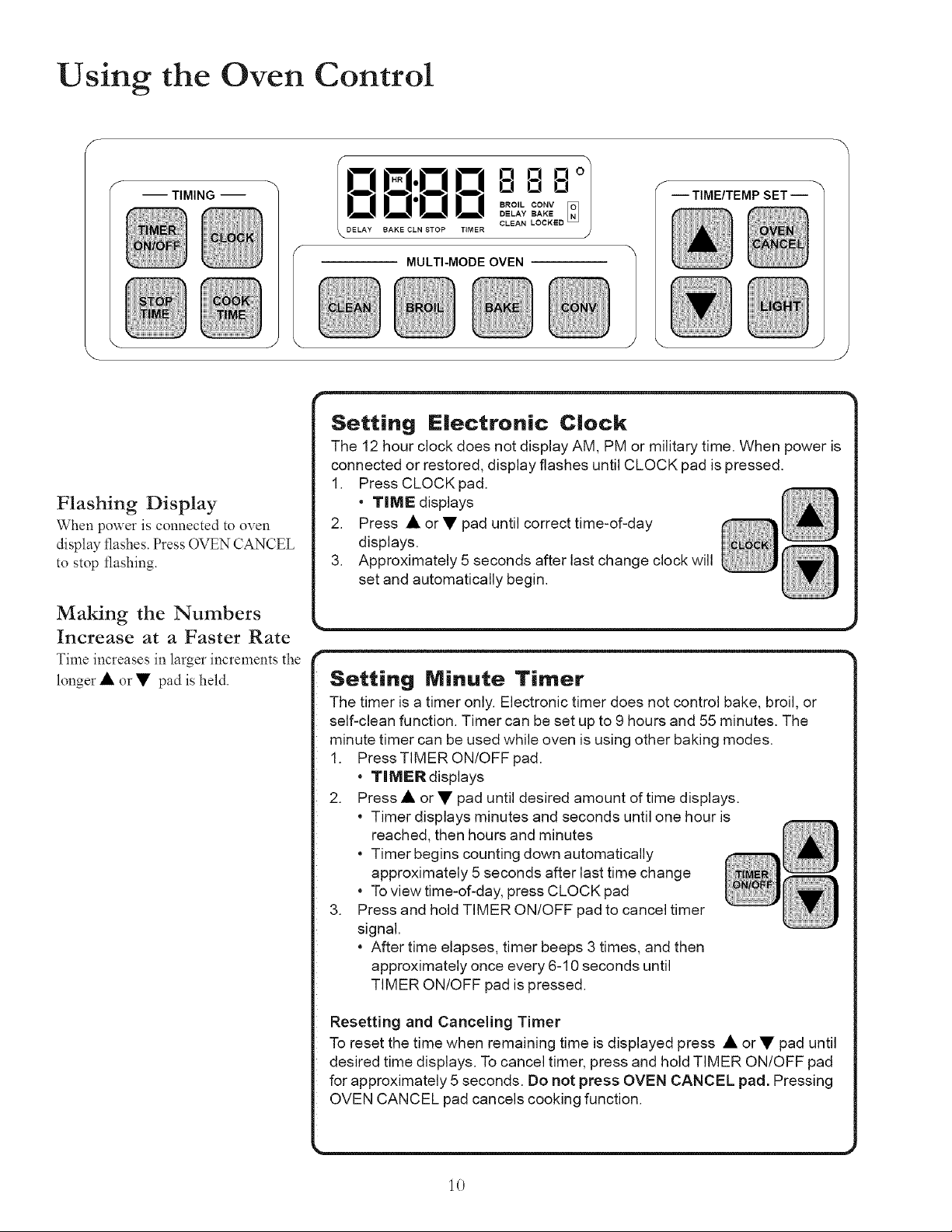
Using the Oven Control
-- TIMING --
f
\
0 El 0o7
IO0"O0 o o o /
BAKE CLN STOP TIMER
MULTI-MODE OVEN
J
-- TIME/TEMP SET --
Flashing Display
When power is connected to oven
display flashes. Press OVEN CANCEL
to stop t]ashing.
Making the Numbers
Increase at a Faster Rate
Time increases in larger increments the
longer • or • pad is held.
Setting Electronic Clock
Th_ does not display AM_y time. When power is
_ed or restored_ CLOCK pad is pressed.
r ....................................
Setting Minute Timer
|The timer is a timer only. Electronic timer does not control bake, broil, or
|self-clean function. Timer can be set up to 9 hours and 55 minutes. The
|minute timer can be used while oven is using other baking modes.
|1. Press TIMER ON/OFFpad.
| • TIMER displays
|2. Press • or • pad until desired amount of time displays.
| • Timer displays minutes and seconds until one hour is
| , reached, then hours and minutes
| Timer begins counting clown automatically
| approximately 5 seconds after last time change
| • To view time-of-clay, press CLOCK pad
|3. Press and hold TIMER ON/OFF pad to cancel timer
| signal.
| • After time elapses, timer beeps 3 times, and then
| approximately once every 6-10 seconds until
TIMER ON/OFF pad is pressed.
|Resetting and Canceling Timer
|To reset the time when remaining time is displayed press • or• pad until
|desired time displays. Tocancel timer, press and hold TIMER ON/OFF pad
|for approximately 5 seconds. Do not press OVEN CANCEL pad. Pressing
10
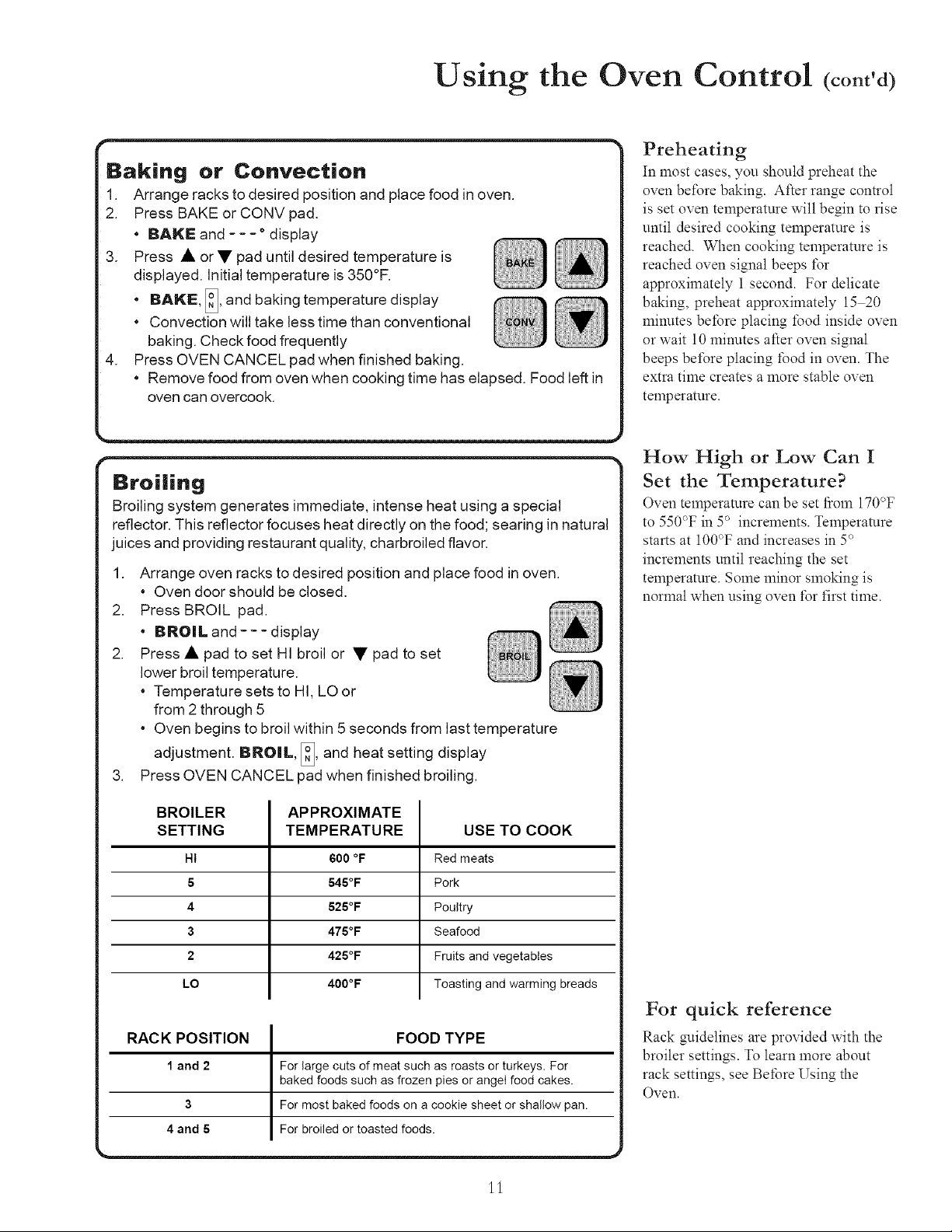
Using the Oven Control (cont'd)
Baking
1.
2.
3.
.
or Convection
Arrange racks to desired position and place food in oven.
Press BAKE or CONV pad.
• BAKE and .... display
Press • or• pad until desired temperature is
displayed. Initial temperature is 350°F.
• BAKE, I_' and baking temperature display
• Convection will take less time than conventional
baking. Check food frequently
Press OVEN CANCEL pad when finished baking.
• Remove food from oven when cooking time has elapsed. Food left in
oven can overcook.
Broiling
Broiling system generates immediate, intense heat using a special
reflector. This reflector focuses heat directly on the food; searing in natural
juices and providing restaurant quality, charbroiled flavor.
.
2.
2.
.
Arrange oven racks to desired position and place food in oven.
• Oven doorshould be closed.
Press BROIL pad.
• BROIL and--- display
Press • pad to set HI broil or • pad to set
lower broil temperature.
• Temperature sets to HI, LO or
from 2 through 5
• Oven begins to broil within 5 seconds from last temperature
adjustment. BNO|L, [_, and heat setting display
Press OVEN CANCEL pad when finished broiling.
BROILER
SETTING
HI
5
4
3
2
LO
APPROXIMATE
TEMPERATURE
600 °F
545°F
525°F
475°F
425°F
400°F
USE TO COOK
Red meats
Pork
Poultry
Seafood
Fruits and vegetables
Toasting and warming breads
RACK POSITION FOOD TYPE
1 and 2 For large cuts of meat such as roasts or turkeys. For
baked foods such as frozen pies or angeI food cakes.
3 For most baked foods on a cookie sheet or shallow pan.
4 and 5 For broiled or toasted foods.
Preheating
In most cases, you should preheat the
oven before baking. After range control
is set oven temperature will begin to rise
until desired cooking temperature is
reached. When cooking temperature is
reached oven signal beeps t\_r
approximately 1 second. For delicate
baking, preheat approximately 15 20
minutes before placing food inside oven
or wait 10 minutes after oven signal
beeps bet\_re placing food in oven. The
extra time creates a more stable oven
temperature.
How High or Low Can I
Set the Temperature?
Oven temperature can be set *}om 170°F
to 550°F in 5° increments. Temperature
starts at 100°F and increases in 5°
increments until reaching the set
temperature. Some minor smoking is
normal when using oven *\_rfirst time.
For quick reference
Rack guidelines are provided with the
broiler settings. To learn more about
rack settings, see Before Using the
Oven.
11
Using the Oven Control (cont'd)
CAUTION
To reduce risk of food poisoning
due to bacterial growth and
production of toxins, never hold
meat, milk or eggs for more than
2 hours before cooking.
What's the difference
between TIMED and
DELAYED cooking?
When using TIMED cooking, the oven
begins to heat immediately after the
oven control is set. Then, the oven
cooks for the desired length of time set.
When using DELAYED cooking, the
oven begins to cook later in the day.
Set the time that you want to end
cooking and the how long you want to
cook. The oven control calculates when
to start cooking from those times.
How Far Ahead Can I Set
the Time?
Cook time and stop time can be set up
to 11 hours and 59 minutes ahead of
time-of-day. To view cook time, press
and hold COOK TIME pad. When
cooking time has elapsed, an end of
cycle signal sounds, oven automatically
turns off and display returns to time of
day. Oven signal sounds 3 times, then
once every 3 seconds for 5 minutes or
until OVEN CANCEL pad is pressed.
Broil can not be set to Timed or
Delayed.
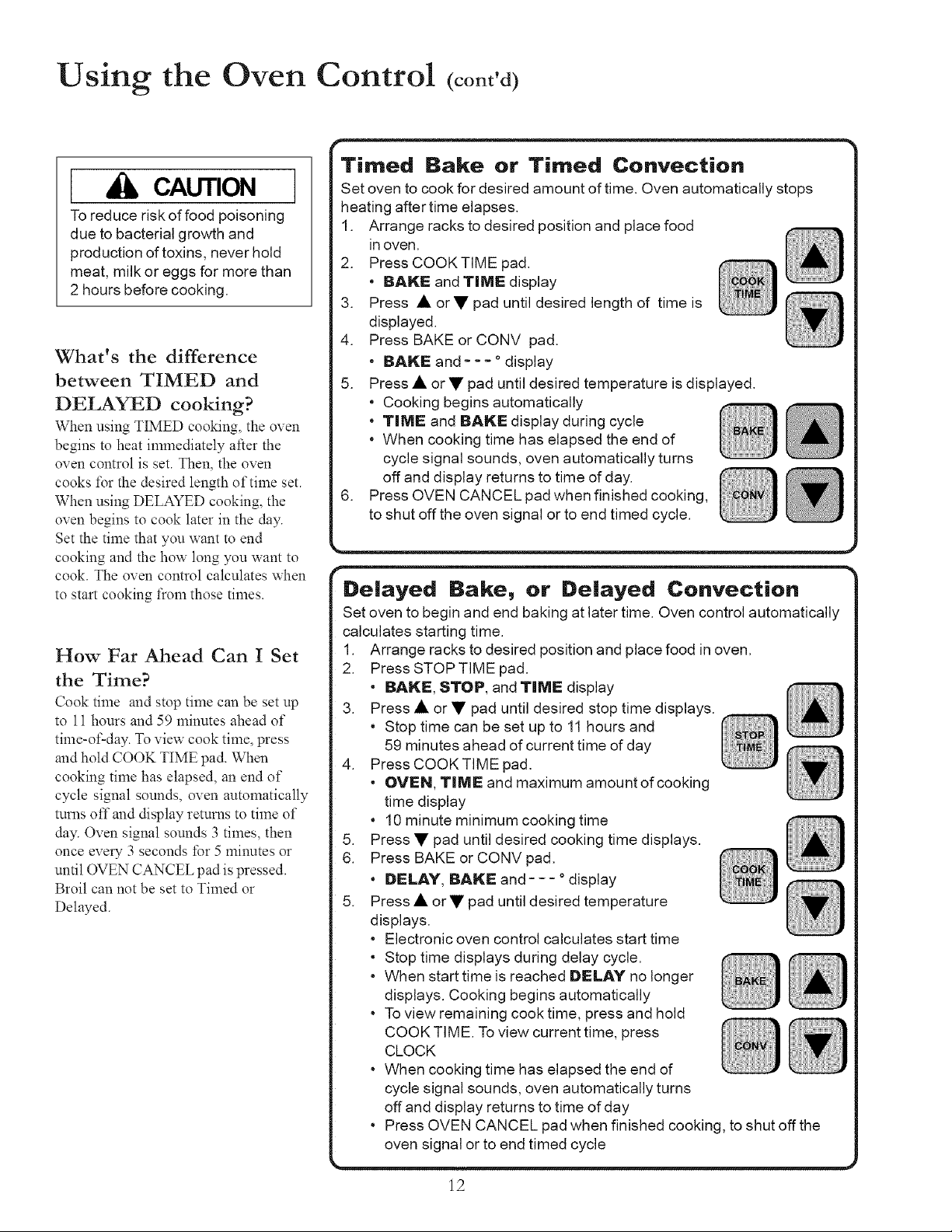
Timed Bake or Timed Convection
Set oven to cook for desired amount of time. Oven automatically stops
heating after time elapses.
1. Arrange racks to desired position and place food
in oven.
2. Press COOK TIME pad.
• BAKE and TiME display
3. Press • or • pad until desired length of time is
displayed.
4. Press BAKE or CONV pad.
• BAKE and .... display
5. Press • or • pad until desired temperature is displayed.
• Cooking begins automatically
• TiME and BANE display during cycle
• When cooking time has elapsed the end of
cycle signal sounds, oven automatically turns
off and display returns to time of day.
6. Press OVEN CANCEL pad when finished cooking,
to shut off the oven signal or to end timed cycle.
Delayed Bake, or Delayed Convection
Set oven to begin and end baking at later time. Oven control automatically
calculates starting time.
1. Arrange racks to desired position and place food in oven.
2. Press STOP TIME pad.
• BAKE, STOP, and TiME display
3. Press • or • pad until desired stop time displays,
• Stop time can be set up to 11 hours and
59 minutes ahead of current time of day
4. PressCOOKTIME pad.
• OVEN, TilVlE and maximum amount of cooking
time display
• 10minute minimum cooking time
5. Press • pad until desired cooking time displays.
6. Press BAKE or CONV pad.
• DELAY, BAKE and .... display
5. Press • or • pad until desired temperature
displays.
• Electronic oven control calculates start time
• Stop time displays during delay cycle.
• When start time is reached DELAY no longer
displays. Cooking begins automatically
• To view remaining cook time, press and hold
COOK TIME. To view current time, press
CLOCK
• When cooking time has elapsed the end of
cycle signal sounds, oven automatically turns
off and display returns to time of day
• Press OVEN CANCEL pad when finished cooking, to shut off the
oven signal or to end timed cycle
12
Using the Oven Control (cont'd)
I CAUTION I
To avoid fire or smoke damage,
remove any flammable materials
from storage drawer. Items like
plastic containers and paper
manuals can melt or burn.
WARNING I
To avoid risk of personal injury, do
not touch oven vents or area
around vents during self-cleaning.
These areas can become hot
enough to cause burns.
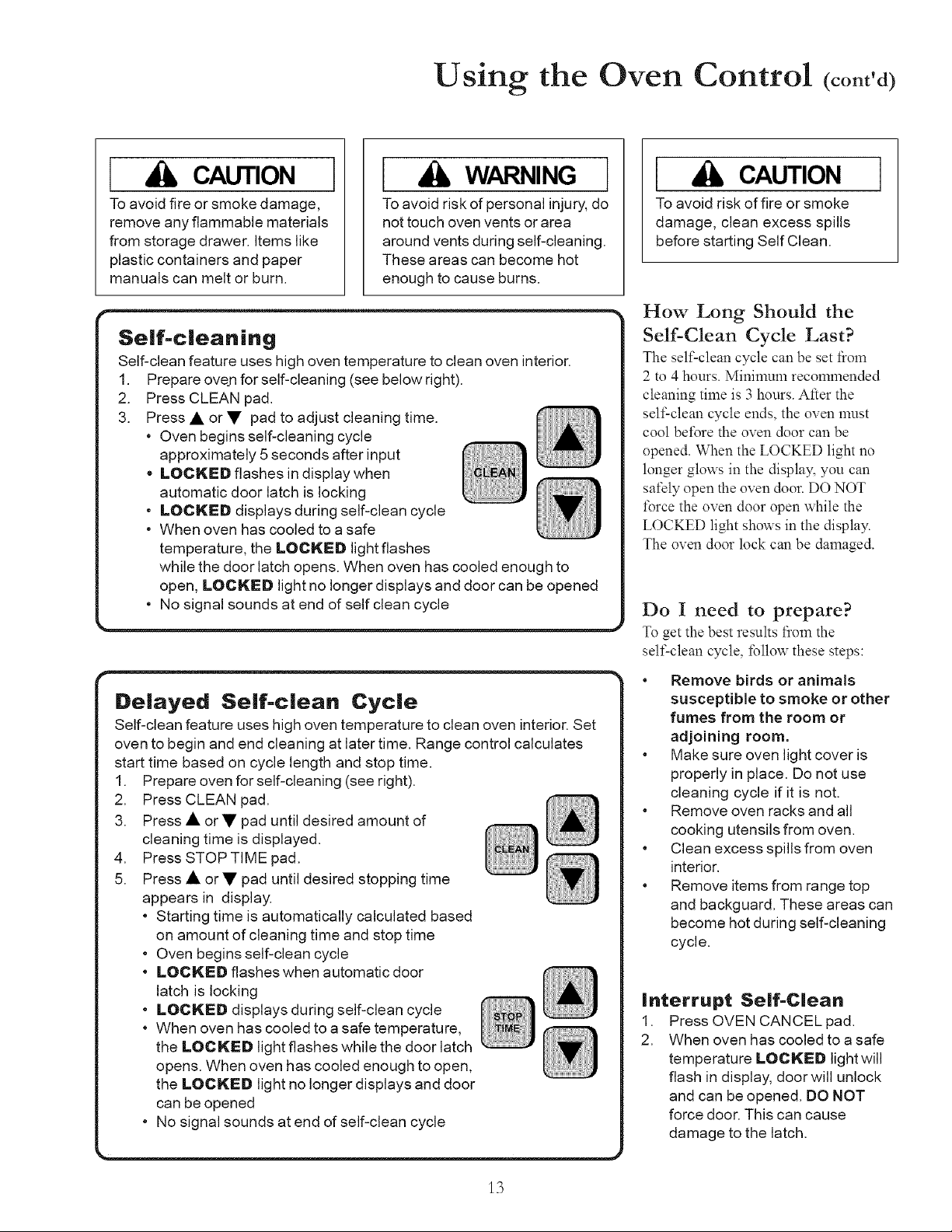
I Se|f=c|eaning ]
Self-clean feature uses high oven temperature to clean oven interior. |
1. Prepare ove.nfor self-cleaning (see below right). |
2. Press CLEAN pad. |
3. Press • or • pad to adjust cleaning time. _ |
Oven begins self-cleaning cycle _ _ |
approximately 5 seconds after input _ /
o LOCNED flashes in display when |
, automatic door latch is locking |
LOCKED displays during self-clean cycle |
• When oven has cooled to a safe |
temperature, the LOCKED light flashes |
while the door latch opens. When oven has cooled enough to |
open, LOCKED light no longer displays and door can be opened |
• No signal sounds at end of self clean cycle
oven t_ge control calculates
start time based on cycle length and stop time.
1_clearfing (see right).
_cally calculated based
on amount of cleaning time and stop time
• Oven begins self-clean cycle
the LOCNED light no longer displays and door
can be opened
, No signal sounds at end of self-clean cycle
CAUTION
To avoid risk of fire or smoke
damage, clean excess spills
before starting Self Clean.
How Long Should the
Self-Clean Cycle Last?
The self-clean cycle can be set fi:om
2 to 4 hours. Minimum recommended
cleaning time is 3 hours. After the
self-clean cycle ends, the oven must
cool before the oven door can be
opened. When the LOCKED light no
longer glows in the display, you can
safely open the oven door. DO NOT
force the oven door open while the
LOCKED light shows in the display.
The oven door lock can be damaged.
Do I need to prepare?
To get the best results from the
self-clean cycle, follow these steps:
• Remove birds or animals
susceptible to smoke or other
fumes from the room or
adjoining room.
• Make sure oven light cover is
properly in place, Do not use
cleaning cycle if it is not,
• Remove oven racks and all
cooking utensils from oven,
• Clean excess spills from oven
interior,
• Remove items from range top
and backguard, These areas can
become hot during self-cleaning
cycle,
Interrupt Se|f=C|ean
1. Press OVEN CANCEL pad.
2. When oven has cooled to a safe
temperature LOCN[IED light will
flash in display, door will unlock
and can be opened. DO NOT
force door. This can cause
damage to the latch.
13
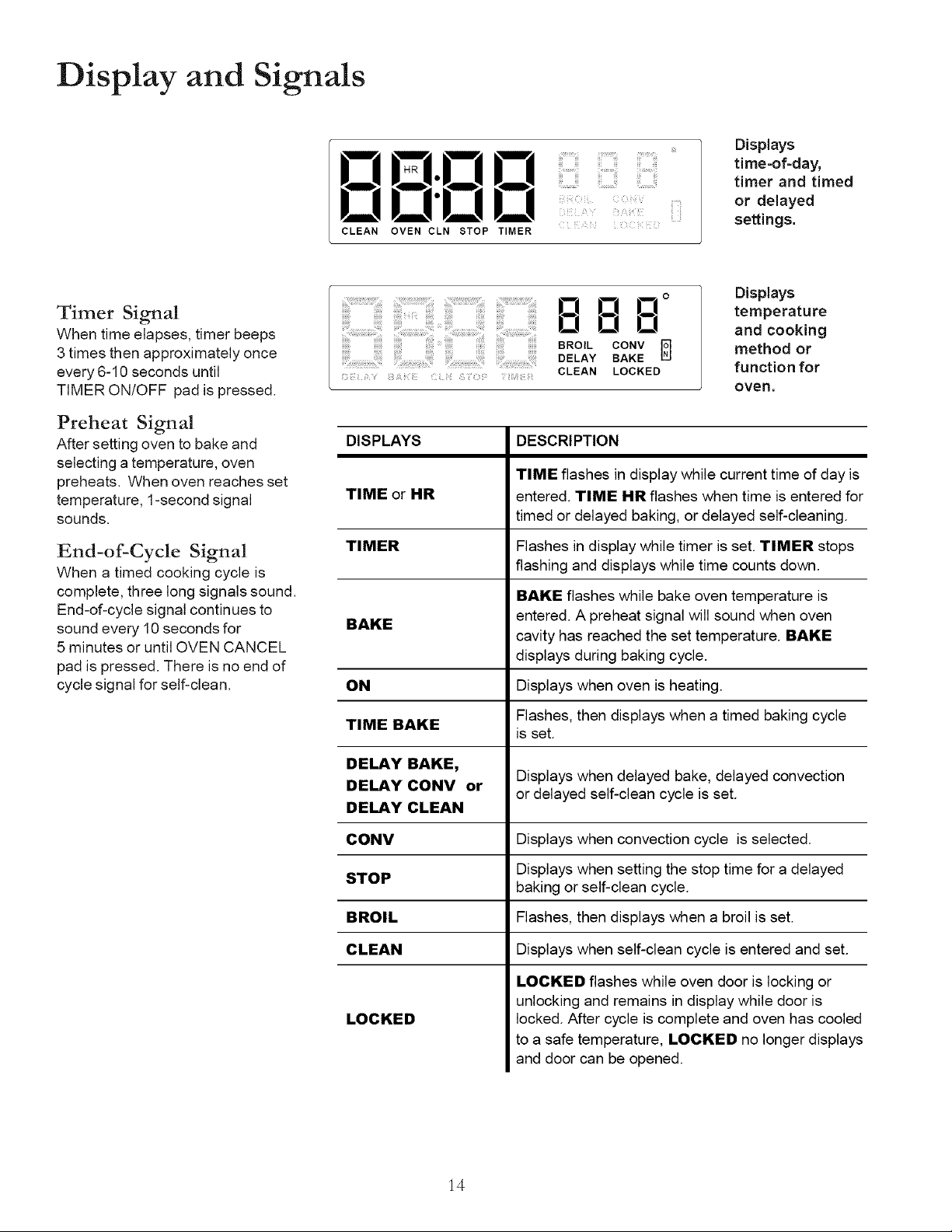
Display and Signals
IQ U-U D
DD'DD
CLEAN OVEN CLN STOP TIMER
Displays
time-of-day,
timer and timed
or delayed
settings.
Timer Signal
When time elapses, timer beeps
3 times then approximately once
every 6-10 seconds until
TIMER ON/OFF pad is pressed.
Preheat Signal
After setting oven to bake and
selecting a temperature, oven
preheats. When oven reaches set
temperature, 1-second signal
sounds.
End-of-Cycle Signal
When a timed cooking cycle is
complete, three long signals sound.
End-of-cycle signal continues to
sound every 10 seconds for
5 minutes or until OVEN CANCEL
pad is pressed. There is no end of
cycle signal for self-clean.
000 °
0 O0
BROIL CONV _]
DELAY BAKE
CLEAN LOCKED
Displays
temperature
and cooking
method or
function for
oveR.
DISPLAYS
TIME or HR
DESCRIPTION
TIME flashes in display while current time of day is
entered. TIME HA flashes when time is entered for
timed or delayed baking, or delayed self-cleaning.
TIMER Flashes in display while timer is set. TIMER stops
flashing and displays while time counts down.
BAKE flashes while bake oven temperature is
entered. A preheat signal will sound when oven
BAKE
cavity has reached the set temperature. BAKE
displays during baking cycle.
ON Displays when oven is heating.
TIME BAKE Flashes, then displays when a timed baking cycle
is set.
DELAY BAKE,
Displays when delayed bake, delayed convection
DELAY CONV or or delayed self-clean cycle is set.
DELAY CLEAN
CONV Displays when convection cycle is selected.
STOP Displays when setting the stop time for a delayed
baking or self-clean cycle.
BROIL Flashes, then displays when a broil is set.
CLEAN Displays when self-clean cycle is entered and set.
LOCKED
LOCKED flashes while oven door is locking or
unlocking and remains in display while door is
locked. After cycle is complete and oven has cooled
to a safe temperature, LOCKED no longer displays
and door can be opened.
14
Custom Features
12-hour automatic cancel
This safety feature turns off the oven if it has been left on for over 12 hours.
To prevent the oven from shutting off after 12 hours of use, simply press any
option. Any time a pad is touched, 12-hour automatic cancel is reset.
Child lockout
This safety feature prevents children from accidentally programming oven by
disabling electronic oven control. It is also useful when cleaning the oven
control by preventing accidental programming. Press and hold BAKE and
CLOCK pads for approximately 5 seconds. OFF displays where the
temperature normally appears. To reactivate control, press and hold BAKE
and CLOCK pads for approximately 5 seconds on the oven control. Child
lockout must be reset after a power failure.
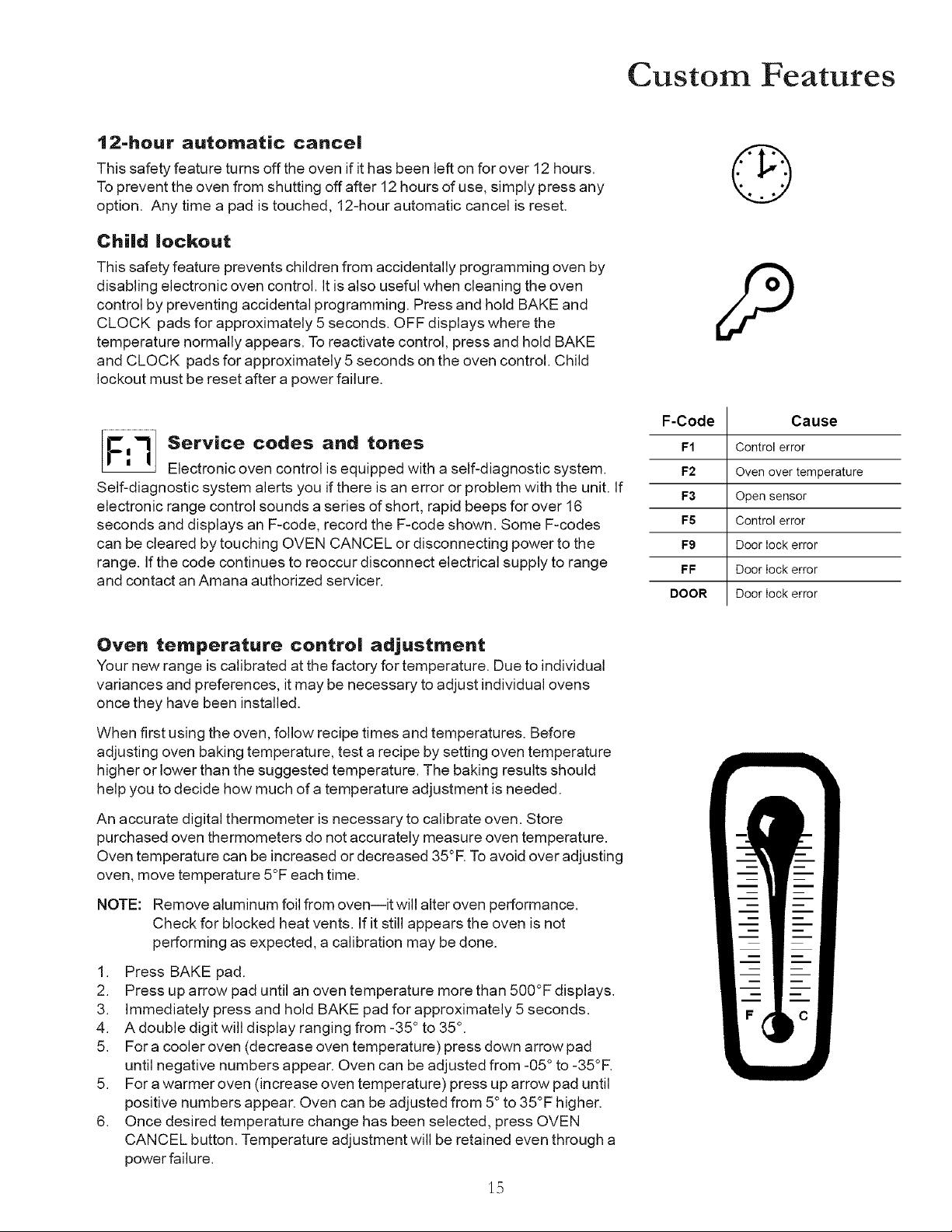
Service codes and tones
Electronic oven control is equipped with a self-diagnostic system.
Self-diagnostic system alerts you if there is an error or problem with the unit. If
electronic range control sounds a series of short, rapid beeps for over 16
seconds and displays an F-code, record the F-code shown. Some F-codes
can be cleared by touching OVEN CANCEL or disconnecting power to the
range. If the code continues to reoccur disconnect electrical supply to range
and contact an Amana authorized servicer.
F-Code
F1
F2
F3
F5
F9
FF
DOOR
Cause
Control error
Oven over temperature
Open sensor
Control error
Door lock error
Door lock error
Door lock error
Oven temperature control adjustment
Your new range is calibrated at the factory for temperature. Due to individual
variances and preferences, it may be necessary to adjust individual ovens
once they have been installed.
When first using the oven, follow recipe times and temperatures. Before
adjusting oven baking temperature, test a recipe by setting oven temperature
higher or lower than the suggested temperature. The baking results should
help you to decide how much of a temperature adjustment is needed.
An accurate digital thermometer is necessary to calibrate oven. Store
purchased oven thermometers do not accurately measure oven temperature.
Oven temperature can be increased or decreased 35°R Toavoid over adjusting
oven, move temperature 5°F each time.
NOTE: Remove aluminum foil from ovenlit will alter oven performance.
Check for blocked heat vents. If it still appears the oven is not
performing as expected, a calibration may be done.
1. Press BAKE pad.
2. Press up arrow pad until an oven temperature more than 500°F displays.
3. Immediately press and hold BAKE pad for approximately 5 seconds.
4. A double digit will display ranging from -35 ° to 35°.
5. For a cooler oven (decrease oven temperature) press down arrow pad
until negative numbers appear. Oven can be adjusted from -05 ° to -35°F.
5. For a warmer oven (increase oven temperature) press up arrow pad until
positive numbers appear. Oven can be adjusted from 5° to 35°F higher.
6. Once desired temperature change has been selected, press OVEN
CANCEL button. Temperature adjustment will be retained even through a
power failure.
1.5
Cooking
Baking Guidelines
Remember when baking with a new oven temperatures vary from oven to oven. Store-bought thermometers are
generally not accurate and cannot be used to evaluate oven temperatures. A general rule with a convection bake cycle
is to reduce your temperature by 25°F. Ingredients should be at ambient temperature prior to baking.
Hints for Cookies,
• Shiny, flat cookie sheets should
be used. Avoid cookie pans with
high sides--this will cause
uneven browning on the top.
• Cookie sheet should not touch
the sides of the oven or door.
Cakes,
• Determine pan size from recipe
directions. Shiny pans work best
for cakes.
• Cake baked in too large a pan
will be thin and dry. Too small a
pan results in undercooked or
unevenly cooked cake and batter
may spill.
Pies
• Pies should be baked in dark or
dull pans to increase browning.
, Frozen pies should be heated on
an aluminum cookie sheet.
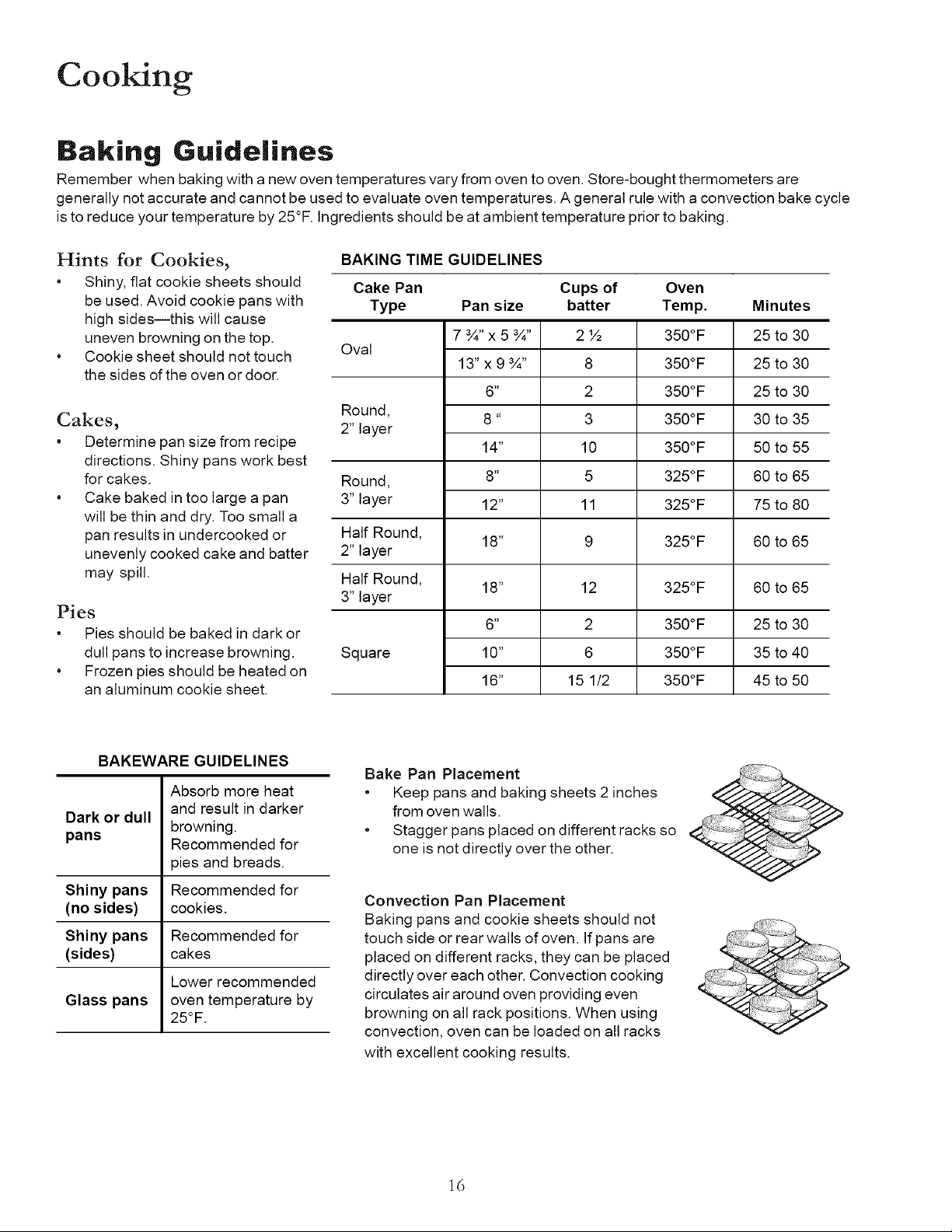
BAKING TIME GUIDELINES
Cake Pan Cups of Oven
Type Pan size batter Temp. Minutes
7 ¾" x 5 ¾" 2 ½ 350°F 25 to 30
Oval
13" x 9 ¾" 8 350°F 25 to 30
6" 2 350°F 25 to 30
Round, 8" 3 350°F 30 to 35
2" layer
14" 10 3500F 50 to 55
Round, 8" 5 3250F 60 to 65
3" layer 12" 11 3250F 75 to 80
Half Round, 18" 9 325°F 60 to 65
2" layer
Half Round, 18" 12 325°F 60 to 65
3" layer
6" 2 3500F 25 to 30
Square 10" 6 350°F 35 to 40
16" 15 1/2 350°F 45 to 50
BAKEWARE GUIDELINES
Absorb more heat
and result in darker
Dark or dull
browning.
pans Recommended for
pies and breads.
Shiny pans Recommended for
(no sides) cookies.
Shiny pans Recommended for
(sides) cakes
Lower recommended
Glass pans oven temperature by
25°F.
Bake Pan Placement
• Keep pans and baking sheets 2 inches
from oven walls.
• Stagger pans placed on different racks so
one is not directly over the other.
Convection Pan Placement
Baking pans and cookie sheets should not
touch side or rear walls of oven. If pans are
placed on different racks, they can be placed
directly over each other. Convection cooking
circulates air around oven providing even
browning on all rack positions. When using
convection, oven can be loaded on all racks
with excellent cooking results.
,ii++;!i1+__-,,,
16
Cooking (cont'd)
Common Baking Problems
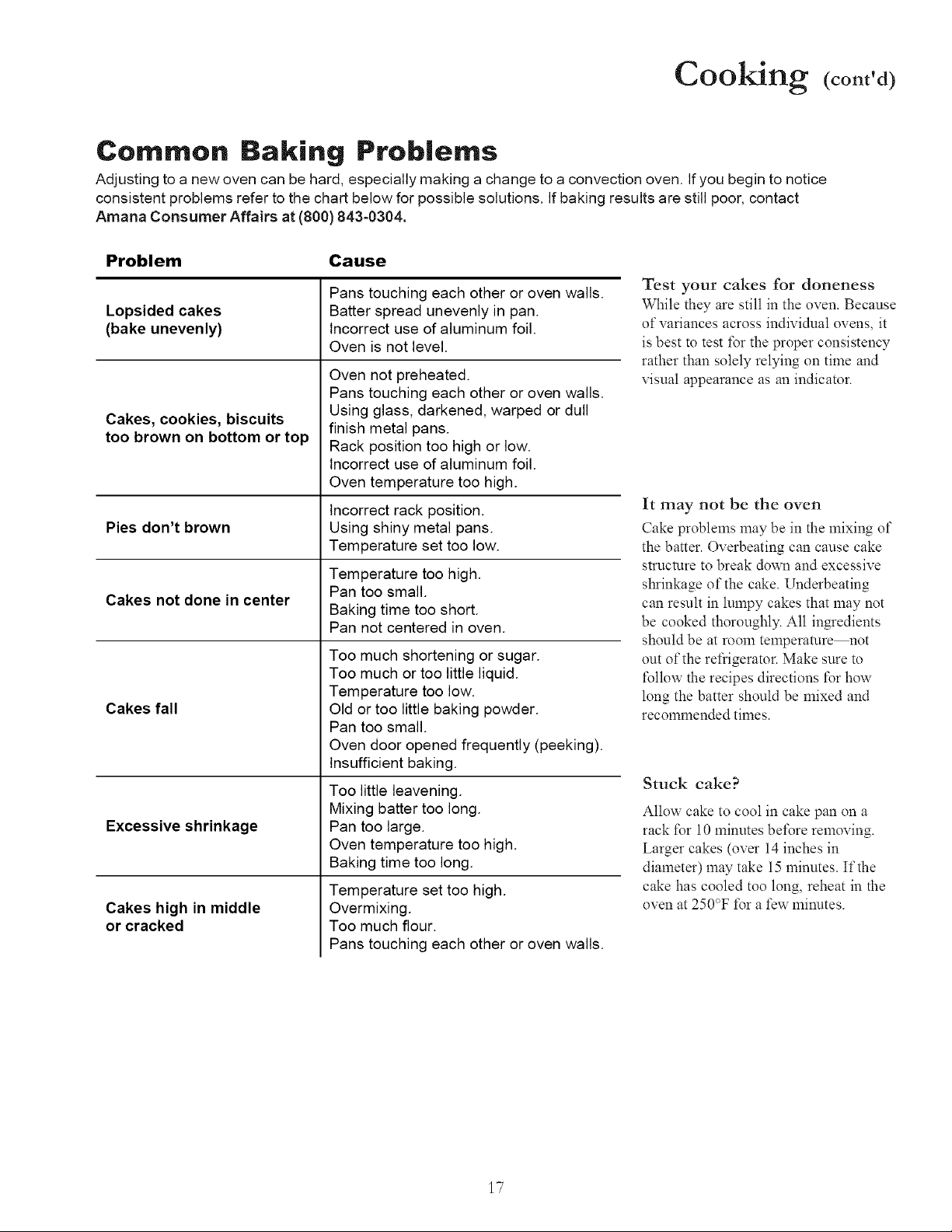
Adjusting to a new oven can be hard, especially making a change to a convection oven. If you begin to notice
consistent problems refer to the chart below for possible solutions. If baking results are still poor, contact
Amana Consumer Affairs at (800) 843-0304.
Problem Cause
Lopsided cakes
(bake unevenly)
Cakes, cookies, biscuits
too brown on bottom or top
Pies don't brown
Cakes not done in center
Cakes fall
Excessive shrinkage
Cakes high in middle
or cracked
Pans touching each other or oven walls.
Batter spread unevenly in pan.
Incorrect use of aluminum foil.
Oven is not level.
Oven not preheated.
Pans touching each other or oven walls.
Using glass, darkened, warped or dull
finish metal pans.
Rack position too high or low.
Incorrect use of aluminum foil.
Oven temperature too high.
Incorrect rack position.
Using shiny metal pans.
Temperature set too low.
Temperature too high.
Pan too small.
Baking time too short.
Pan not centered in oven.
Too much shortening or sugar.
Too much or too little liquid.
Temperature too low.
Old or too little baking powder.
Pan too small.
Oven door opened frequently (peeking).
Insufficient baking.
Too little leavening.
Mixing batter too long.
Pan too large.
Oven temperature too high.
Baking time too long.
Temperature set too high.
Overmixing.
Too much flour.
Pans touching each other or oven walls.
Test your cakes for doneness
While they are still in the oven. Because
of variances across individual ovens, it
is best to test for the proper consistency
rather than solely relying on time and
visual appearance as an indicator.
It may not be the oven
Cake problems may be in the mixing of
the batter. Overbearing can cause cake
structure to break down and excessive
shrinkage of the cake. Underbeating
can result in lmnpy cakes that may not
be cooked thoroughly. All ingredients
should be at room temperamre_ot
out of the refrigerator. Make sure to
follow the recipes directions t\_r how
long the batter should be mixed and
recommended times.
Stuck cake?
Allow cake to cool in cake pan on a
rack t\_r 10 minutes be_\_reremoving.
Larger cakes (over 14 inches in
diameter) may take 15 minutes. If the
cake has cooled too long, reheat in the
oven at 250°F _\_ra few minutes.
17
Cooking (cont'd)
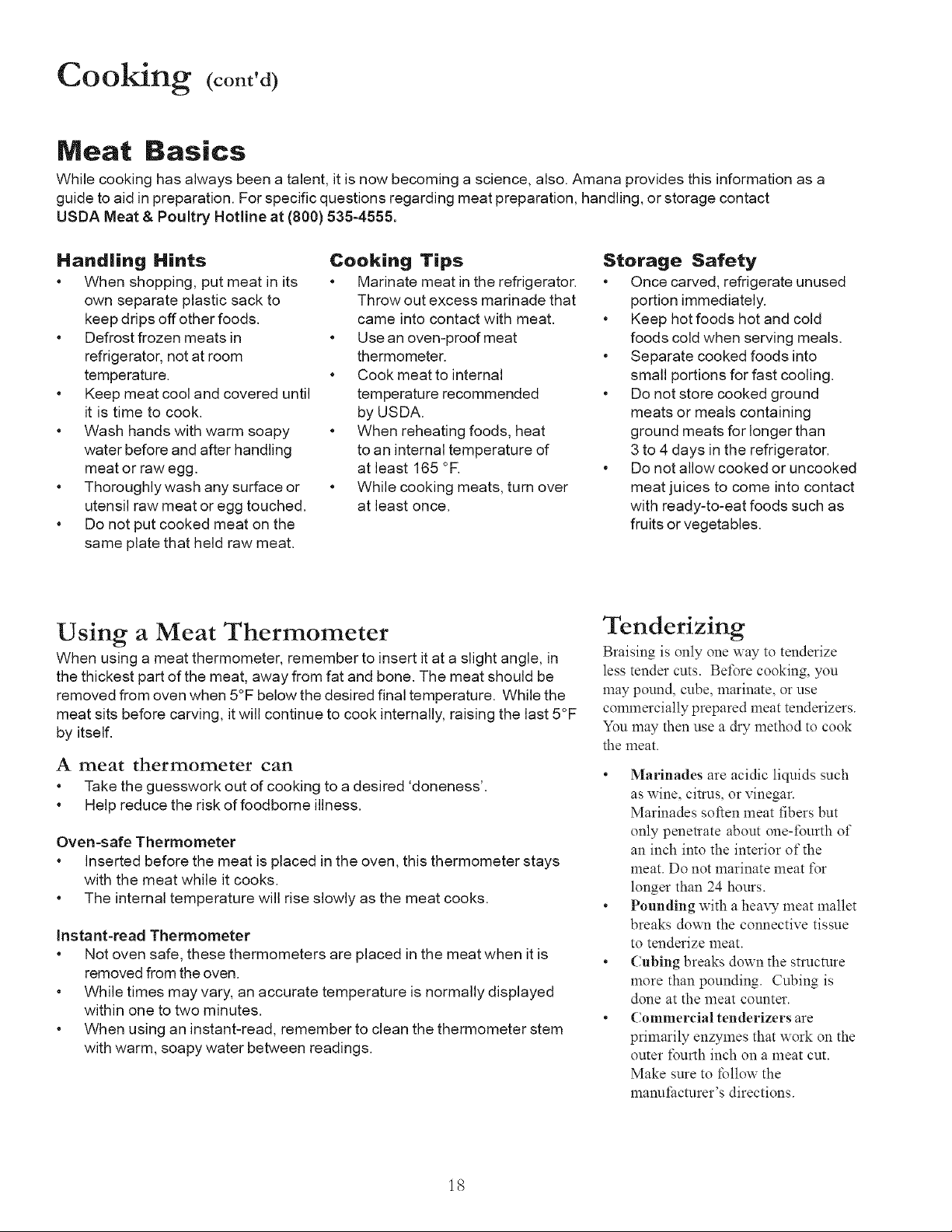
Meat Basics
While cooking has always been a talent, it is now becoming a science, also. Amana provides this information as a
guide to aid in preparation. For specific questions regarding meat preparation, handling, or storage contact
USDA Meat & Poultry Hotline at (800) 535-4555.
Handling Hints
* When shopping, put meat in its
own separate plastic sack to
keep drips off other foods.
* Defrost frozen meats in
refrigerator, not at room
temperature.
* Keep meat cool and covered until
it is time to cook.
* Wash hands with warm soapy
water before and after handling
meat or raw egg.
* Thoroughly wash any surface or
utensil raw meat or egg touched.
* Do not put cooked meat on the
same plate that held raw meat.
Cooking Tips
* Marinate meat in the refrigerator.
Throw out excess marinade that
came into contact with meat.
* Use an oven-proof meat
thermometer.
* Cook meat to internal
temperature recommended
by USDA.
* When reheating foods, heat
to an internal temperature of
at least 165 °R
* While cooking meats, turn over
at least once.
Storage Safety
* Once carved, refrigerate unused
portion immediately.
* Keep hot foods hot and cold
foods cold when serving meals.
* Separate cooked foods into
small portions for fast cooling.
* Do not store cooked ground
meats or meals containing
ground meats for longer than
3 to 4 days in the refrigerator.
* Do not allow cooked or uncooked
meat juices to come into contact
with ready-to-eat foods such as
fruits or vegetables.
Using a Meat Thermometer
When using a meat thermometer, remember to insert it at a slight angle, in
the thickest part of the meat, away from fat and bone. The meat should be
removed from oven when 5°F below the desired final temperature. While the
meat sits before carving, it will continue to cook internally, raising the last 5°F
by itself.
A meat thermometer can
* Take the guesswork out of cooking to a desired 'doneness'.
* Help reduce the risk of foodborne illness.
Oven-safe Thermometer
* Inserted before the meat is placed in the oven, this thermometer stays
with the meat while it cooks.
* The internal temperature will rise slowly as the meat cooks.
Instant-read Thermometer
* Not oven safe, these thermometers are placed in the meat when it is
removed from the oven.
* While times may vary, an accurate temperature is normally displayed
within one to two minutes.
* When using an instant-read, remember to clean the thermometer stem
with warm, soapy water between readings.
Tenderizing
Braising is only one way to tenderize
less tender cuts. Bet\3re cooking, you
may pound, cube, marinate, or use
commercially prepared meat tenderizers.
You may then use a dry method to cook
the meat.
• Marinades are acidic liquids such
as wine, citrus, or vinegar.
Marinades soften meat fibers but
only penetrate about one-t\3urth of
an inch into the interior of the
meat. Do not marinate meat t\3r
longer than 24 hours.
• Pounding with a heaxT meat mallet
breaks down the connective tissue
to tenderize meat.
• Cubing breaks down the structure
more than pounding. Cubing is
done at the meat counter.
• Commercial tenderizers are
primarily enzymes that work on the
outer I\3urth inch on a meat cut.
Make sure to follow the
manuIi_cturer's directions.
18
Cooking (cont'd)
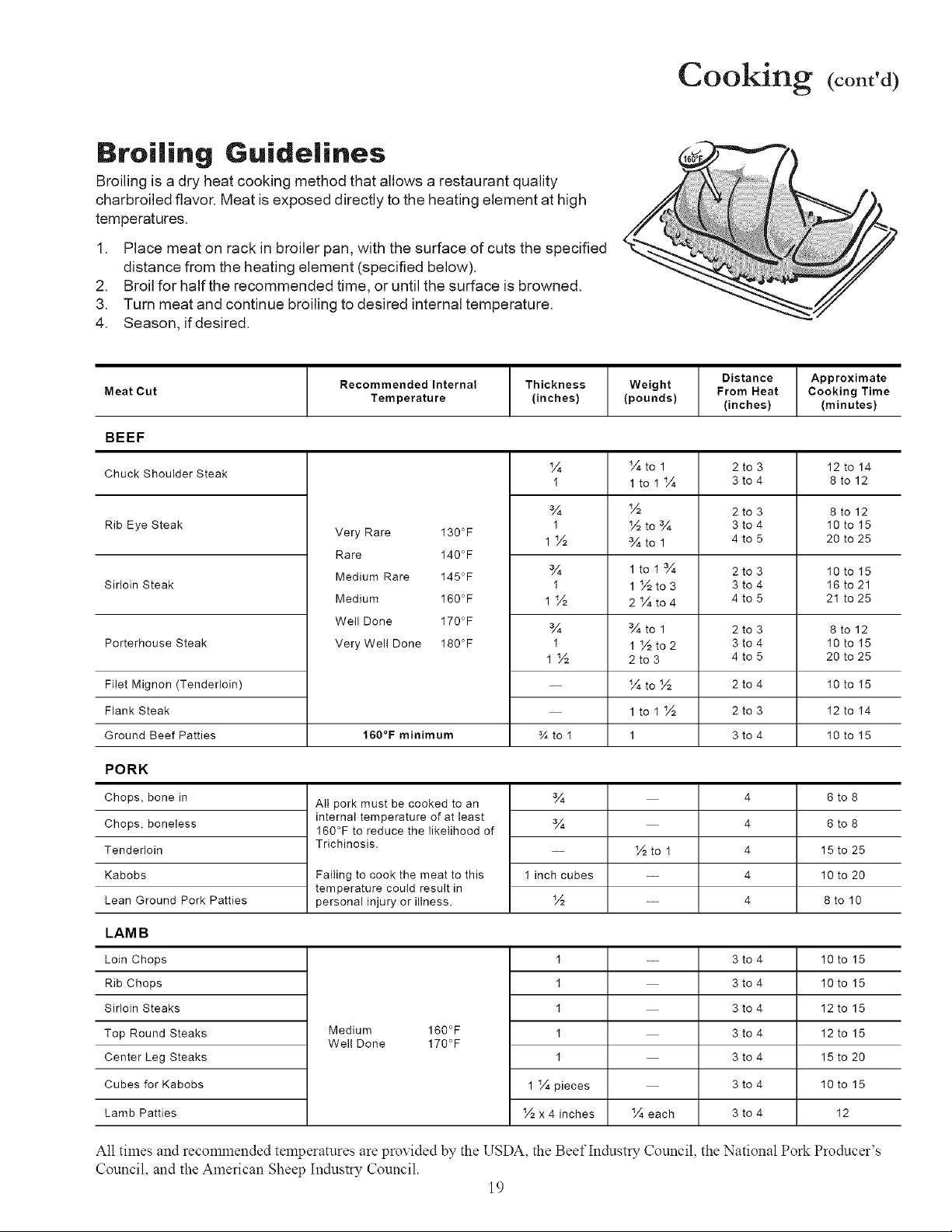
Broiling Guidelines
Broiling is a dry heat cooking method that allows a restaurant quality
charbroiled flavor. Meat is exposed directly to the heating element at high
temperatures.
1. Place meat on rack in broiler pan, with the surface of cuts the specified
distance from the heating element (specified below).
2. Broil for half the recommended time, or until the surface is browned.
3. Turn meat and continue broiling to desired internal temperature.
4. Season, if desired.
Meat Cut
Recommended Internal
Temperature
Thickness
(inches)
Weight
(pounds)
Distance
From Heat
(inches)
Approximate
Cooking Time
(minutes)
BEEF
Chuck Shoulder Steak
Rib Eye Steak
Sirloin Steak
Porterhouse Steak
Fitet Mignon (Tenderloin)
Flank Steak
Ground Beef Patties
Very Rare I30°F
Rare I40°F
Medium Rare I45°F
Medium I60°F
Welt Done I70°F
Very Wel! Done I80°F
160°F minimum
¼
I
¾
I
1½
¾
I
1½
¾
I
1½
¾to I
¼to 1
ltoI¼
½
½to¾
¾to 1
ltoi¾
1 ½to3
2¼to4
¾to 1
1 ½to2
2to 3
¼to½
ltoi½
1
2
3
4
2
3
4
2
3
4
2
3
to 3
to 4
to 3
to 4
to 5
to 3
to 4
to 5
to 3
to 4
to 5
to 4
to 3
to 4
12 to 14
8to12
8to12
I0 to I5
20 to 25
I0 to I5
I6 to 21
21 to 25
8to12
I0 to I5
20 to 25
I0 to I5
I2 to I4
I0 to I5
PORK
Chops, bone in
Chops, boneless
Tenderloin
Kabobs
Lean Ground Pork Patties
LAMB
Loin Chops
Rib Chops
Sirloin Steaks
Top Round Steaks
Center Leg Steaks
Cubes for Kabobs
Lamb Patties
All pork must be cooked to an
internal temperature of at least
160°F to reduce the likelihood of
Trichinosis.
Failing to cook the meat to this
temperature could result in
personal injury or illness.
¾
¾
I inch cubes
½
½to I
4 6 to 8
4 6 to 8
4 15 to 25
4 10 to 20
4 8to I0
Medium 160°F
Wel! Done 170°F
I
I
I
I
I
1 ¼ pieces
½ x 4 inches ¼each
-- 3to4
3to4
3to4
3to4
3to4
3to4
3to4
10 to 15
10 to 15
12 to 15
12 to 15
15 to 20
10 to 15
I2
All times and recommended temperatures are provided by the USDA, the Beef Industry Council, the National Pork Producer's
Council, and the American Sheep Industry Council.
19
Cooking (cont'd)
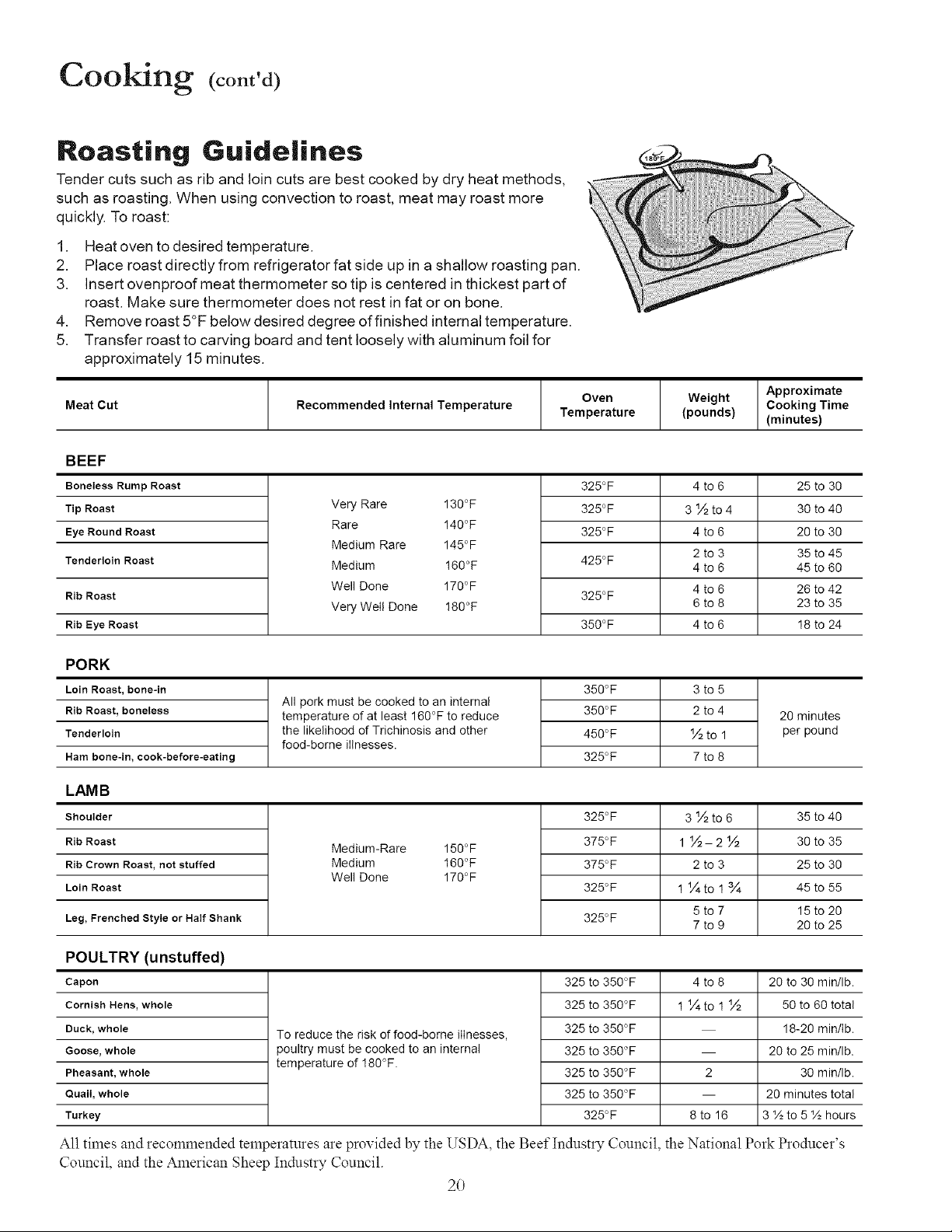
Roasting Guidelines
Tender cuts such as rib and loin cuts are best cooked by dry heat methods,
such as roasting. When using convection to roast, meat may roast more
quickly. To roast:
1. Heat oven to desired temperature.
2. Place roast directly from refrigerator fat side up in a shallow roasting pan.
3. Insert ovenproof meat thermometer so tip is centered in thickest part of
roast. Make sure thermometer does not rest in fat or on bone.
4. Remove roast 5°F below desired degree of finished internal temperature.
5. Transfer roast to carving board and tent loosely with aluminum foil for
approximately 15 minutes.
Meat Cut Recommended Internal Temperature
Oven
Temperature
Weight
(pounds)
Approximate
Cooking Time
(minutes)
BEEF
Boneless Rump Roast
Tip Roast
Eye Round Roast
Tenderloin Roast
Rib Roast
Rib Eye Roast
Very Rare 130°F
Rare 140°F
Medium Rare 145°F
Medium !60°F
Well Done 170°F
Very Well Done 180°F
325°F
325°F
325°F
425°F
325°F
350°F
4 to6
3½to4
4 to6
2to 3
4to6
4to6
6to 8
4 to6
25 to 30
30 to 40
20 to 30
35 to 45
45 to 60
26 to 42
23 to 35
18 to 24
PORK
Loin Roast, bone-in
Rib Roast, boneless
Tenderloin
Ham bone-in, cook-before-eating
All pork must be cooked to an internal
temperature of at least 160°F to reduce
the likelihood of Trichinosis and other
food-borne illnesses.
350°F 3 to 5
350°F 2 to 4
450°F ½ to 1
325°F 7 to 8
20 minutes
per pound
LAM B
Shoulder
Rib Roast
Rib Crown Roast, not stuffed
LoinRoast
Leg, Frenched Style or Half Shank
Medium-Rare 150°F
Medium 160°F
Well Done 170°F
325°F
375°F
375°F
325°F
325°F
3Y2to6
1½-2½
2to 3
1 1/4to 1 3/4
5to 7
7to 9
35 to 40
30 to 35
25 to 30
45 to 55
15to 20
20 to 25
POULTRY (unstuffed)
Capon
Cornish Hens, whole
Duck,whole
Goose,whole
Pheasant,whole
Quail, whole
Turkey
To reduce the risk of food-borne illnesses,
poultry must be cooked to an internal
temperature of 180°F.
325 to 350°F
325 to 350°F
325 to 350°F
325 to 350°F
325 to 350°F
325 to 350°F
325°F
4to8
1 1/4to 1 ½
2
8to 16
20 to 30 min/Ib.
50 to 60 total
18-20 min/Ib.
20 to 25 min/Ib.
30 min/Ib.
20 minutes total
3 ½ to 5 ½ hours
All times and recommended temperatures are provided by the USDA, the Beef Industry Council, the National Pork Producer's
Council and the American Sheep Industry Council.
20
Cooking (cont'd)
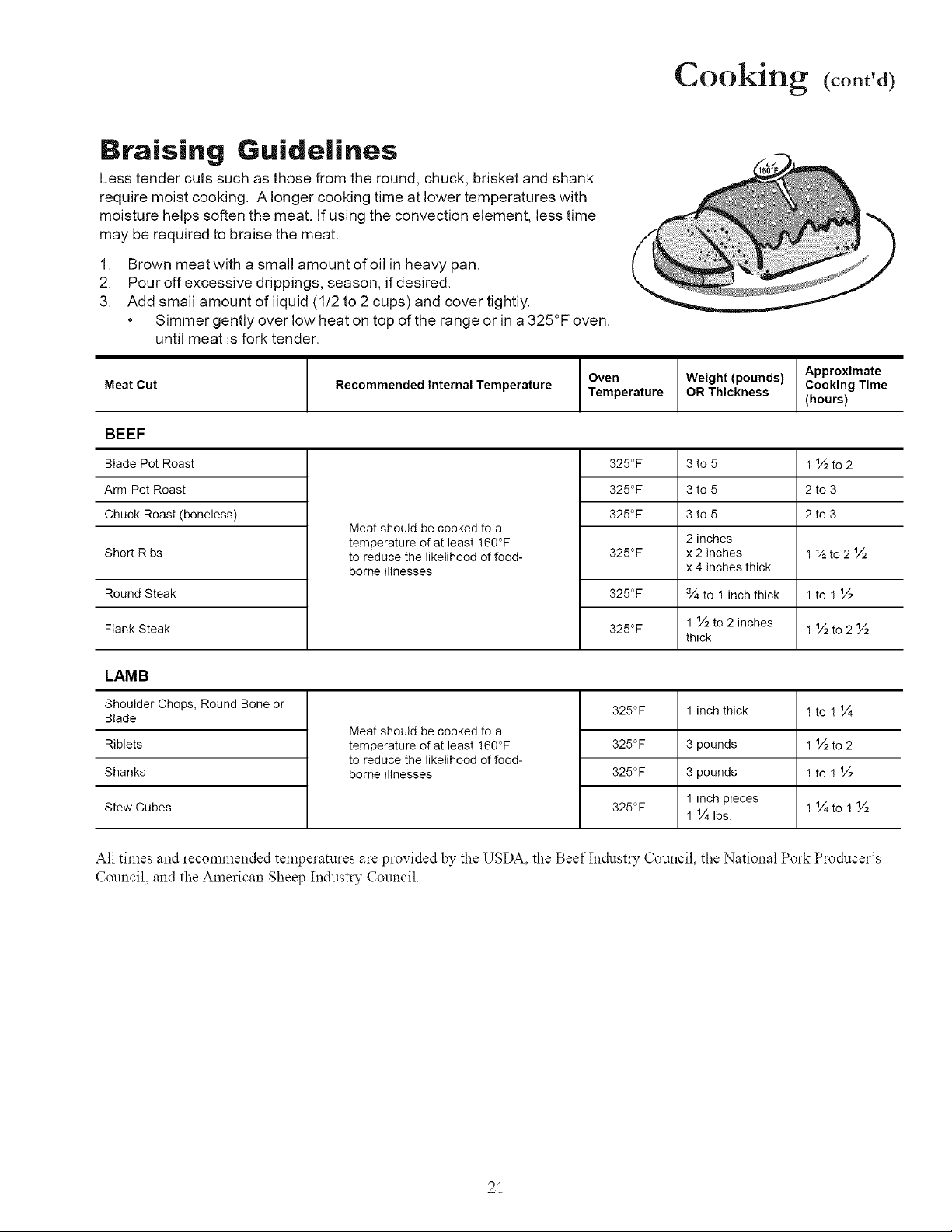
Braising Guidelines
Less tender cuts such as those from the round, chuck, brisket and shank
require moist cooking. A longer cooking time at lower temperatures with
moisture helps soften the meat. If using the convection element, less time
may be required to braise the meat.
1. Brown meatwith a small amount ofoil in heavy pan.
2. Pouroffexcessivedrippings, season, ifdesired.
3. Add small amount of liquid (1/2 to 2 cups) and cover tightly.
• Simmer gently over low heat on top of the range or in a 325°F oven,
until meat is fork tender.
Meat Cut
Recommended Internal Temperature
Oven Weight (pounds)
Temperature OR Thickness
Approximate
Cooking Time
(hours)
BEEF
Blade Pot Roast
Arm Pot Roast
Chuck Roast (boneless)
Short Ribs
Round Steak
Flank Steak
Meat should be cooked to a
temperature of at least !60°F
to reduce the likelihood of food-
borne illnesses.
325°F 1 ½ to 2
325°F 2 to 3
325°F 2 to 3
325°F 1½to2½
325°F
325°F
3to5
3to 5
3to 5
2 inches
x 2 inches
x 4 inches thick
3/4to 1 inch thick
1 ½ to 2 inches
thick
lto1½
1 ½to2½
LAMB
1 inch thick
Shoulder Chops, Round Bone or
Blade
Riblets
Shanks
Stew Cubes
Meat should be cooked to a
temperature of at least !60°F
to reduce the likelihood of food-
borne illnesses.
325°F
325°F
325°F
325°F
3 pounds
3 pounds
linch pieces
1 1/41bs.
1to 11¼
1 ½to2
1to!½
1¼to1½
All times and recommended temperatures arc provided by the USDA, the Beef Industry Council, the National Pork Producer's
Council, and the American Sheep Industry Council.
21
Care and Cleaning
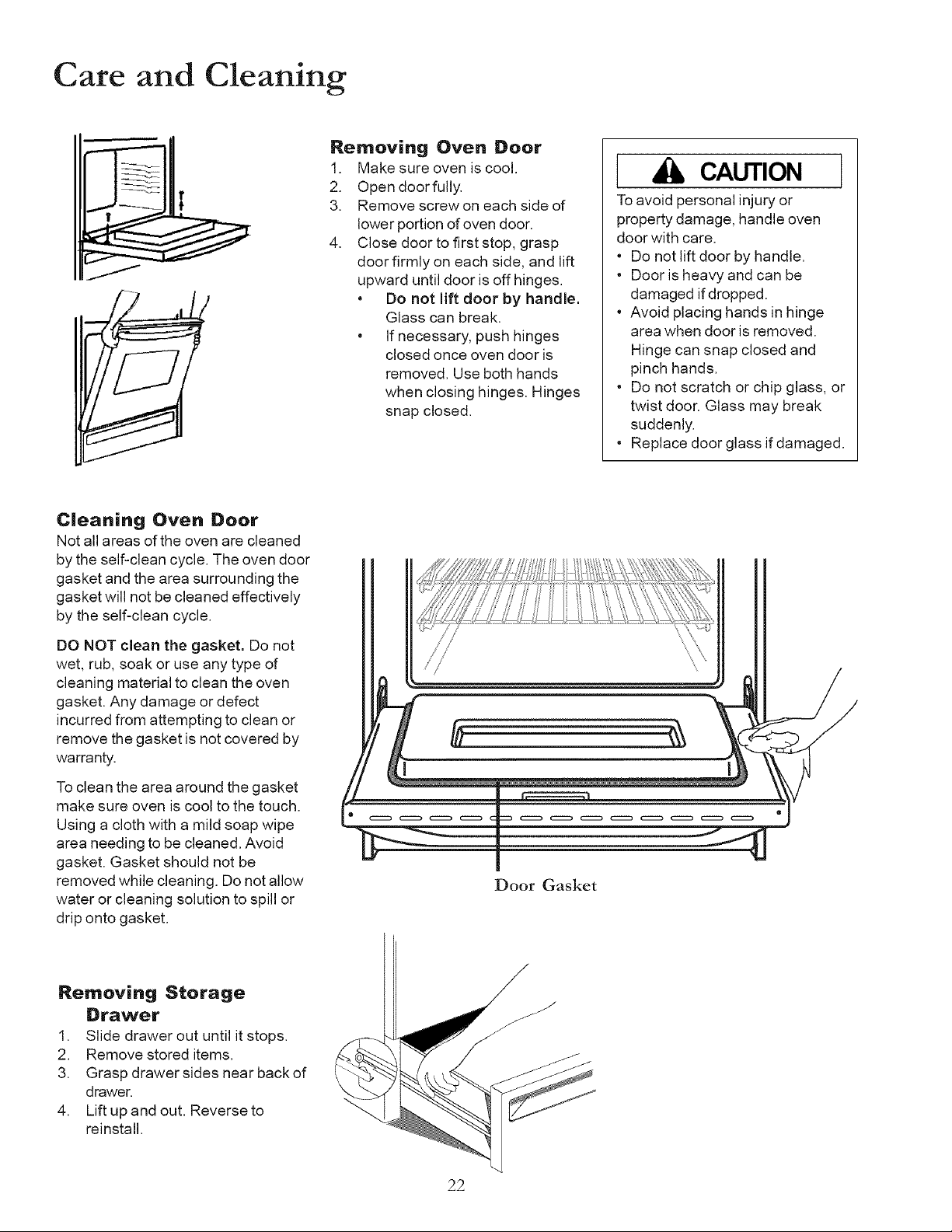
Removing Oven Boor
1. Make sure oven is cool.
2. Open doorfully.
3. Remove screw on each side of
lower portion of oven door.
4. Close door to first stop, grasp
door firmly on each side, and lift
upward until door is off hinges.
• Do not lift door by handle.
Glass can break.
• If necessary, push hinges
closed once oven door is
removed. Use both hands
when closing hinges. Hinges
snap closed.
I CAUTION
Toavoid personal injury or
property damage, handle oven
door with care.
• Do not lift door by handle.
• Door is heavy and can be
damaged if dropped.
• Avoid placing hands in hinge
area when door is removed.
Hinge can snap closed and
pinch hands.
o
1
Do not scratch or chip glass, or
twist door. Glass may break
suddenly.
Replace door glass if damaged.
C|eaning Oven Door
Not all areas of the oven are cleaned
by the self-clean cycle. The oven door
gasket and the area surrounding the
gasket will not be cleaned effectively
by the self-clean cycle.
DO NOT clean the gasket. Do not
wet, rub, soak or use any type of
cleaning material to clean the oven
gasket. Any damage or defect
incurred from attempting to clean or
remove the gasket is not covered by
warranty.
To clean the area around the gasket
make sure oven is cool to the touch.
Using a cloth with a mild soap wipe
area needing to be cleaned. Avoid
gasket. Gasket should not be
removed while cleaning. Do not allow
water or cleaning solution to spill or
drip onto gasket.
\
\
\
Door Gasket
Removing Storage
Drawer
1. Slide drawer out until it stops.
2. Remove stored items.
3. Grasp drawer sides near back of
drawer,
4. Lift up and out. Reverse to
reinstall.
22
Care and Cleaning (cont'd)
I WARNING
To avoid risk of burns or electrical
shock:
• disconnect electrical supply to
oven before changing light bulb,
• before replacing light bulb make
sure oven and bulb are cool,
• Do not operate oven without
bulb and cover in place,
CAUTION
Wear gloves to protect hands from
accidental bulb breakage.
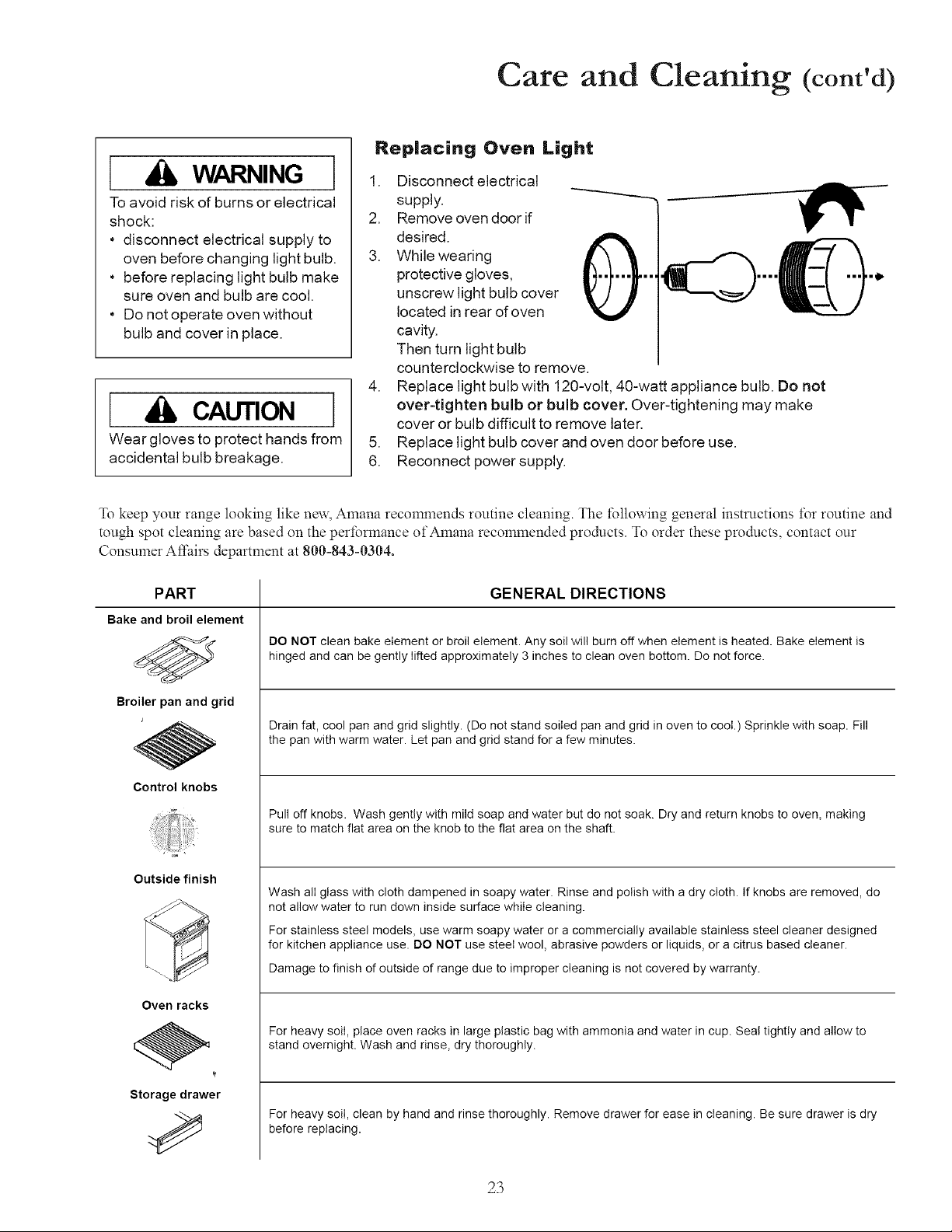
Replacing Oven Light
,
2.
3.
,
.
6.
Disconnect electrical
supply.
Remove oven door if
desired.
While wearing
protective gloves,
unscrew light bulb cover
located in rear of oven
cavity.
Then turn light bulb
counterclockwise to remove.
Replace light bulb with 120-volt, 40-watt appliance bulb. Do not
over-tighten bulb or bulb cover. Over-tightening may make
cover or bulb difficult to remove later.
Replace light bulb cover and oven door before use.
Reconnect power supply.
To keep your range looking like new, Amana recommends routine cleaning. The follm_ing general instructions for routine and
tough spot cleaning are based on the performance of Amana recommended products. To order these products, contact our
Consumer A_:airs department at 800-843-0304.
PART
Bake and broilelement
Broiler pan and grid
Control knobs
Outside finish
Oven racks
Storage drawer
GENERAL DIRECTIONS
DO NOT clean bake element or broil element. Any soil will burn off when element is heated. Bake element is
hinged and can be gently lifted approximately 3 inches to clean oven bottom. Do net force.
Drain fat, cool pan and grid slightly. (Do not stand soiled pan and grid in oven to cool.) Sprinkle with soap. Fill
the pan with warm water. Let pan and grid stand for a few minutes.
Pull off knobs. Wash gently with mild soap and water but do not soak. Dry and return knobs to oven, making
sure to match flat area on the knob to the flat area on the shaft.
Wash all glass with cloth dampened in soapy water. Rinse and polish with a dry cloth. If knobs are removed, do
not allow water to run down inside surface while cleaning.
For stainless steel models, use warm soapy water or a commercially available stainless steel cleaner designed
for kitchen appliance use. DO NOT use steel wool, abrasive powders or liquids, or a citrus based cleaner.
Damage to finish of outside of range due to improper cleaning is not covered by warranty.
For heavy soil, place oven racks in large plastic bag with ammonia and water in cup. Seal tightly and allow to
stand overnight. Wash and rinse, dry thoroughly.
For heavy soil, clean by hand and rinse thoroughly. Remove drawer for ease in cleaning. Be sure drawer is dry
before replacing.
23
Care and Cleaning (cont'd)
Can I use liquid cleaners
on my stainless steel?
Just because a cleaner is a liquid
@ does not mean it is
nonabrasive. Many liquid cleansers
designed to be gentle on tile and
smoothtop ranges still damage stainless
steel. Cosmetic damage from using
non-recomlnended products is not
covered under warranty.
Ciear|ing Stainless Steel (some models)
Stainless steel ranges have been factory finished for high shine and luster.
Tomaintain this quality appearance:
DO USE:
• Warm soapywaterfor routine
cleaning on a cool range.
• Dry with soft, clean cloth.
• For heavy soil, ONLY a stainless
steel cleaner designed for
kitchen appliance use.
DO NOT USE:
Abrasive powders or liquids
Citrus based cleaners
Ammonia
Steel wool pads
Abrasive cloths,
Oven cleansers,
Acidic or vinegar based cleaners
Citric Acid
To prevent damage to the
finish of your stainless
steel range, do not allow
mustard, tomato juice, marinara
sauce, or other citrus based sauces
or products to remain on stainless
steel surface. Citric acid permanently
discolors stainless steel.
Damage to stainless steel finish due to improper use of cleaning
products, or using non-recommended cleaning products, is not covered
under warranty. For Amana recommended products, call our Consumer
Affairs division at (800) 843-0304.
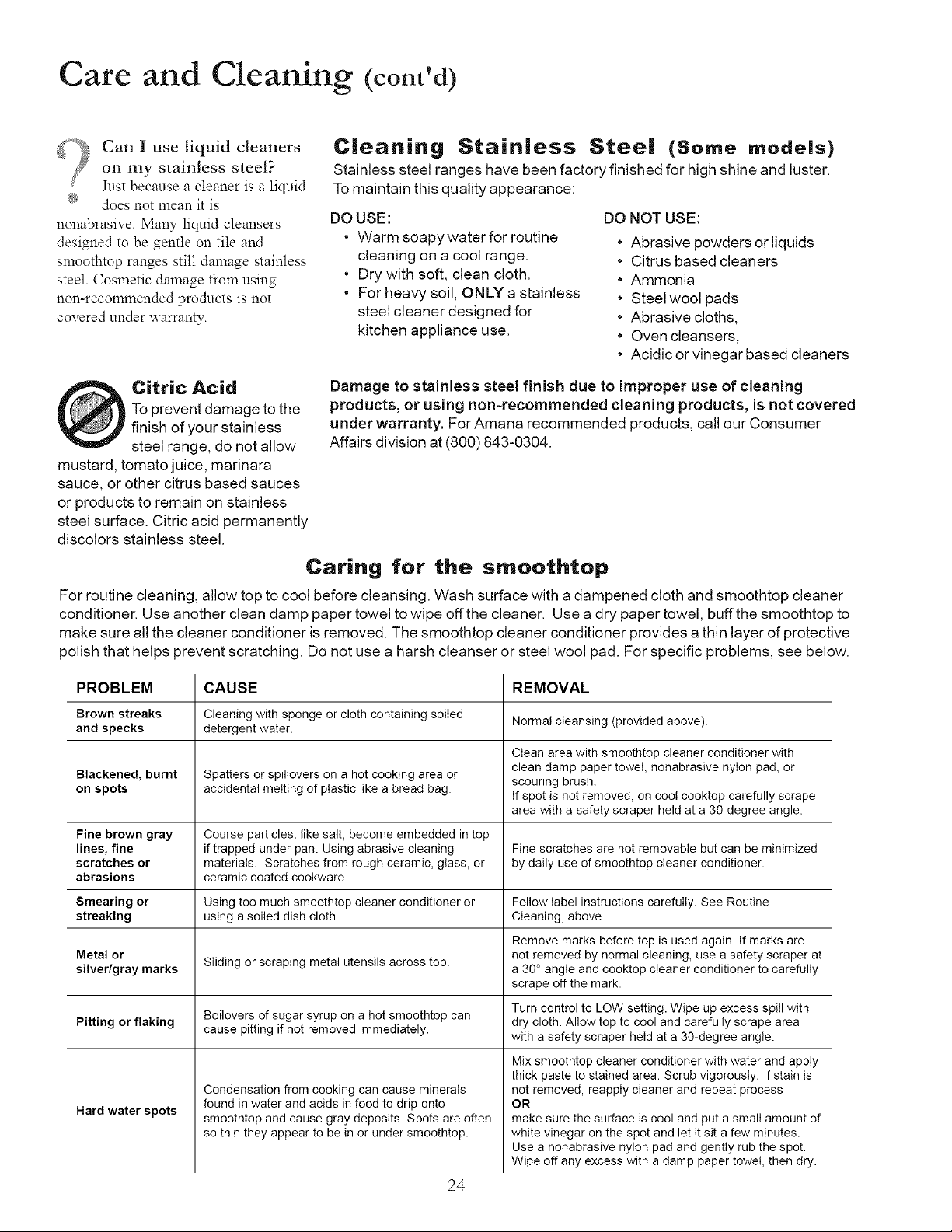
Caring for the smoothtop
For routine cleaning, allow top to cool before cleansing. Wash surface with a dampened cloth and smoothtop cleaner
conditioner. Use another clean damp paper towel to wipe off the cleaner. Use a dry paper towel, buff the smoothtop to
make sure all the cleaner conditioner is removed. The smoothtop cleaner conditioner provides a thin layer of protective
polish that helps prevent scratching. Do not use a harsh cleanser or steel wool pad. For specific problems, see below.
PROBLEM CAUSE REMOVAL
Brown streaks Cleaning with sponge or cloth containing soiled
Normal cleansing (provided above).
and specks detergent water.
Clean area with smoothtop cleaner conditioner with
clean damp paper towel, nonabrasive nylon pad, or
Blackened, burnt Spatters or spillovers on a hot cooking area or scouring brush.
on spots accidental melting of plastic like a bread bag. If spot is not removed, on coot cooktop carefully scrape
area with a safety scraper held at a 30-degree angle.
Fine brown gray Course particles, like salt, become embedded in top
lines, fine if trapped under pan. Using abrasive cleaning Fine scratches are not removable but can be minimized
scratches or materials. Scratches from rough ceramic, glass, or by daily use of smoothtop cleaner conditioner.
abrasions ceramic coated cookware.
Smearing or Using too much smoothtop cleaner conditioner or Follow label instructions carefully. See Routine
streaking using a soiled dish cloth. Cleaning, above.
Remove marks before top is used again. If marks are
Metal or Sliding or scraping metal utensils across top. not removed by normal cleaning, use a safety scraper at
silver/gray marks a 30° angle and cooktop cleaner conditioner to carefully
scrape off the mark.
Turn control to LOW setting. Wipe up excess spill with
Pitting or flaking Boilovers of sugar syrup on a hot smoothtop can dry cloth. Allow top to cool and carefully scrape area
cause pitting if not removed immediately.
with a safety scraper held at a 30-degree angle.
Hard water spots
Condensation from cooking can cause minerals
found in water and acids in food to drip onto
smoothtop and cause gray deposits. Spots are often
so thin they appear to be in or under smoothtop.
Mix smoothtop cleaner conditioner with water and apply
thick paste to stained area. Scrub vigorously. If stain is
not removed, reappIy cleaner and repeat process
OR
make sure the surface is cool and put a small amount of
white vinegar on the spot and let it sit a few minutes.
Use a nonabrasive nylon pad and gently rub the spot.
Wipe off any excess with a damp paper towel, then dry.
24
r o
T oubleshootmg
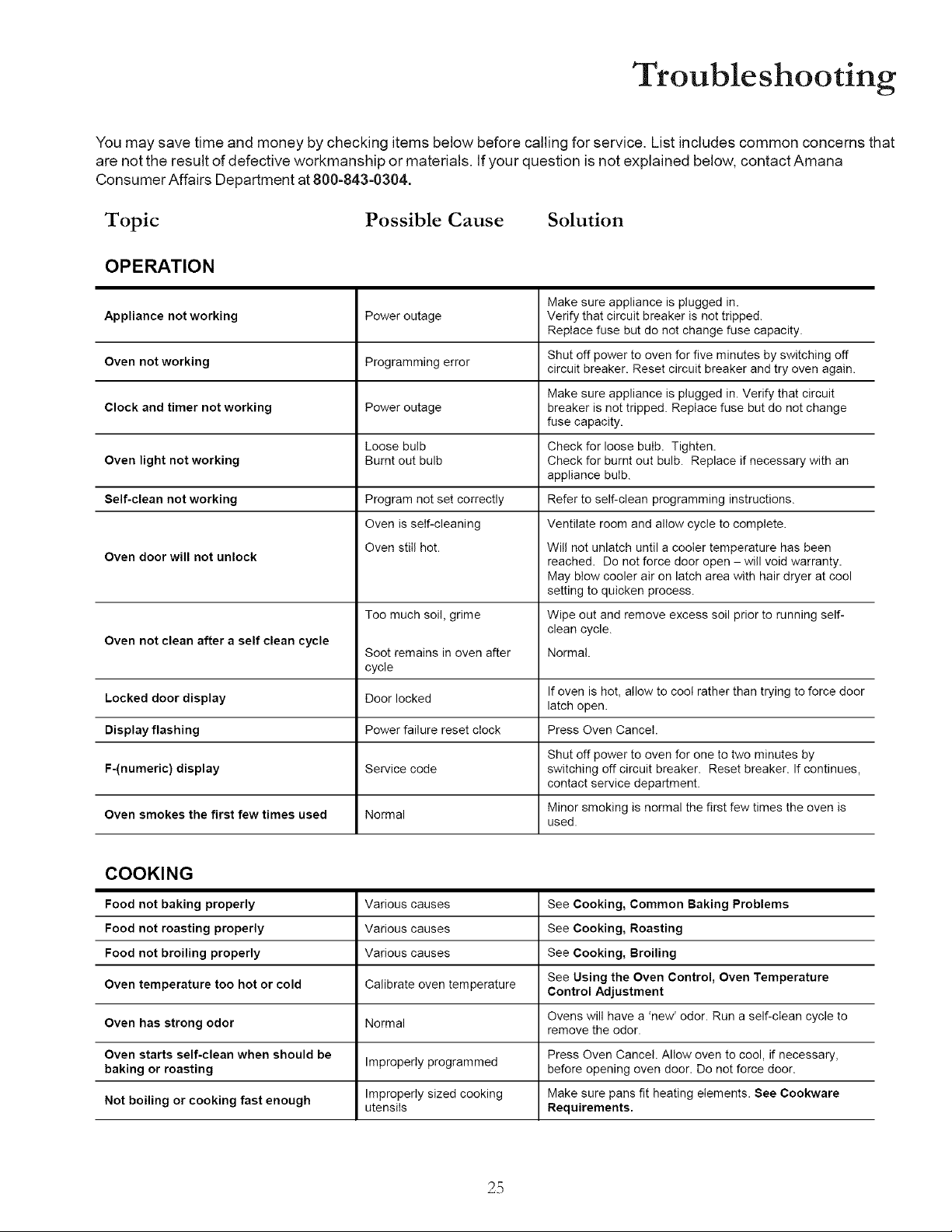
You may save time and money by checking items below before calling for service. List includes common concerns that
are not the result of defective workmanship or materials. Ifyour question is not explained below, contact Amana
Consumer Affairs Department at 800-843-0304.
Topic
Possible Cause Solution
OPERATION
Make sure appliance is plugged in.
Verify that circuit breaker is not tripped.
Replace fuse but do not change fuse capacity.
Appliance not working Power outage
Oven not working Programming error Shut off power to oven for five minutes by switching off
circuit breaker. Reset circuit breaker and try oven again.
Make sure appliance is plugged in. Verify that circuit
Clock and timer not working Power outage breaker is not tripped. Replace fuse but do not change
fuse capacity.
Loose bulb Check for loose bulb. Tighten.
Oven light not working Burnt out bulb Check for burnt out bulb. Replace if necessary with an
appliance bulb.
Self-clean not working Program not set correctly Refer to self-clean programming instructions.
Oven is self-cleaning Ventilate room and allow cycle to complete.
Oven still hot. Will not unlatch until a cooler temperature has been
Oven door will not unlock reached. Do not force door open - will void warranty.
May blow cooler air on latch area with hair dryer at cool
setting to quicken process.
Too much soil, grime Wipe out and remove excess soil prior to running self-
clean cycle.
Oven not clean after a self clean cycle
Soot remains in oven after Normal.
cycle
If oven is hot, allow to coot rather than trying to force door
Locked door display Door locked
latch open.
Display flashing Power failure reset clock Press Oven Cancel.
Shut off power to oven for one to two minutes by
F-(numeric) display Service code switching off circuit breaker. Reset breaker. If continues,
contact service department.
Oven smokes the first few times used Normal Minor smoking is normal the first few times the oven is
used.
COOKING
Food not baking properly Various causes See Cooking, Common Baking Problems
Food not roasting properly Various causes See Cooking, Roasting
Food not broiling properly Various causes See Cooking, Broiling
See Using the Oven Control, Oven Temperature
Oven temperature too hot or cold Calibrate oven temperature Control Adjustment
Ovens will have a 'new' odor. Run a self-clean cycle to
Oven has strong odor Normal
remove the odor.
Oven starts self-clean when should be Improperly programmed Press Oven Cancel. Allow oven to cool, if necessary,
baking or roasting before opening oven door. Do not force door.
Improperly sized cooking Make sure pans fit heating elements. See Cookware
Not boiling or cooking fast enough utensils Requirements.
2.5
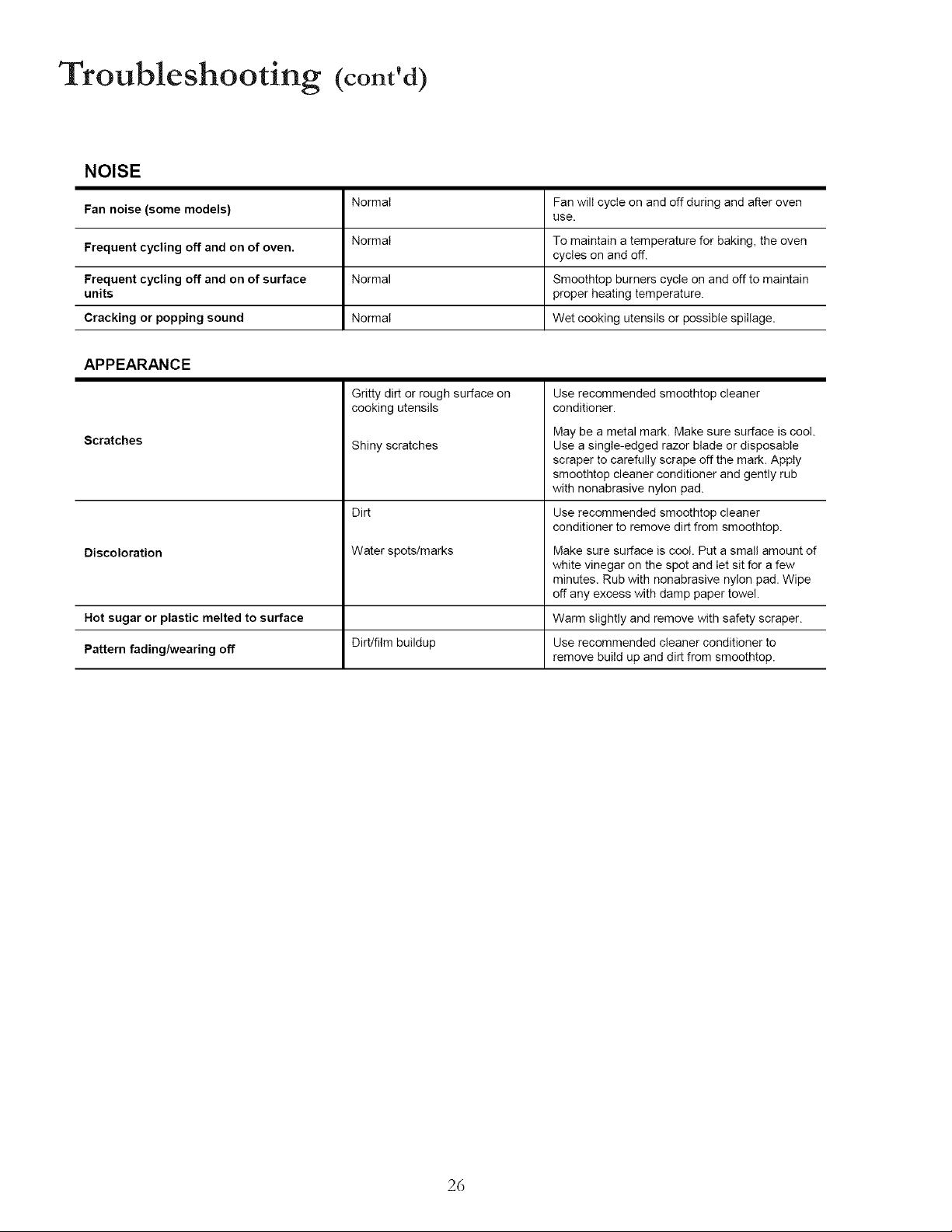
Troubleshooting (cont'd)
NOISE
Fan noise (some models)
Frequent cycling off and on of oven.
Frequent cycling off and on of surface
units
Cracking or popping sound
Normal
Normal
Normal
Normal
Fan will cycle on and off during and after oven
use.
To maintain a temperature for baking, the oven
cycles on and off.
Smoothtop burners cycle on and off to maintain
proper heating temperature.
Wet cooking utensils or possible spillage.
APPEARANCE
Scratches
Discoloration
Gritty dirt or rough surface on
cooking utensils
Shiny scratches
Dirt
Water spots/marks
Use recommended smoothtop cleaner
conditioner.
May be a metal mark. Make sure surface is cool.
Use a single-edged razor blade or disposable
scraper to carefully scrape off the mark. Apply
smoothtop cleaner conditioner and gently rub
with nonabrasive nylon pad.
Use recommended smoothtop cleaner
conditioner to remove dirt from smoothtop.
Make sure surface is cool. Put a small amount of
white vinegar on the spot and let sit for a few
minutes. Rub with nonabrasive nylon pad. Wipe
off any excess with damp paper towel.
Hot sugar or plastic melted to surface Warm slightly and remove with safety scraper.
Pattern fadingh,vearing off Dirt/film buildup Use recommended cleaner conditioner to
remove build up and dirt from smoothtop.
26

27
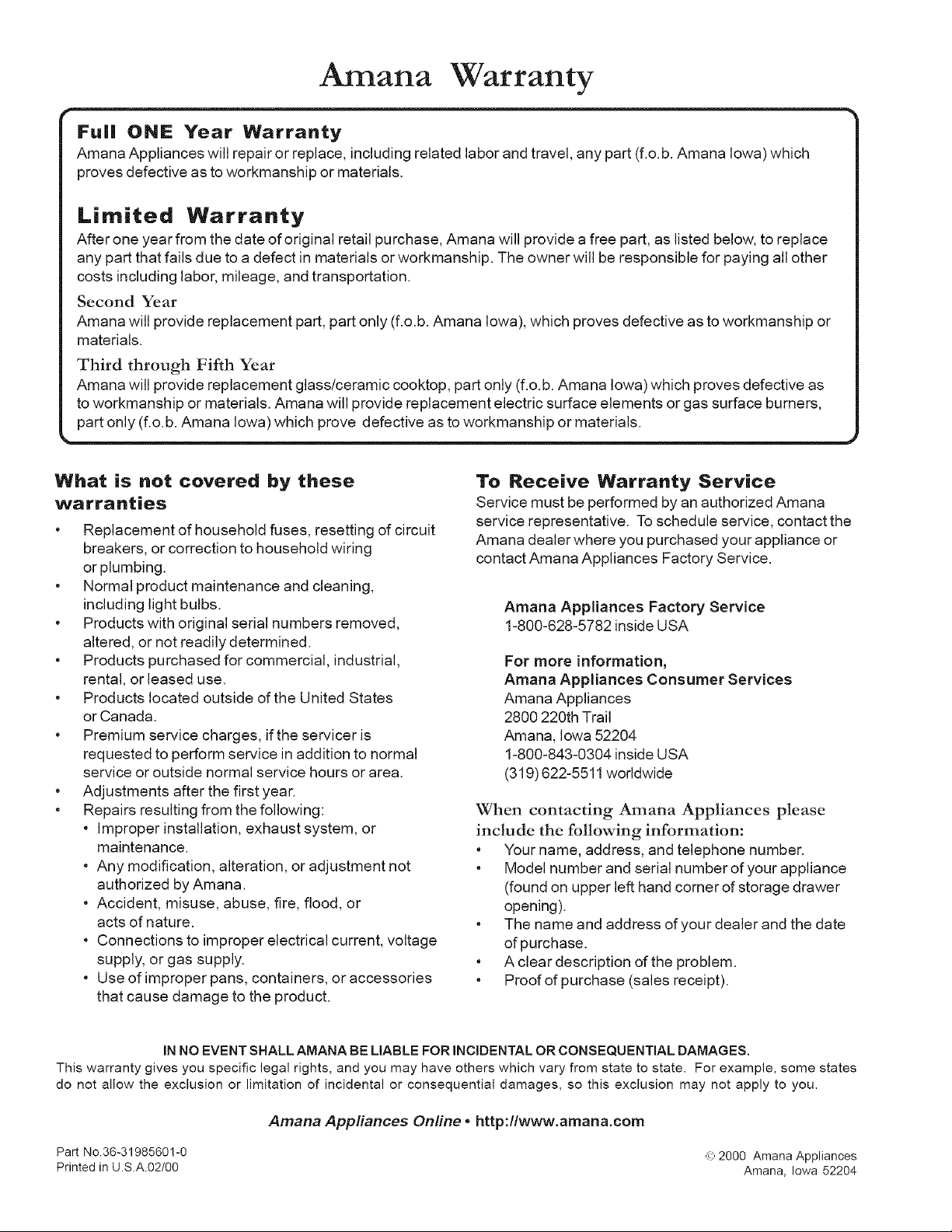
Amana Warranty
I proves defective as to workmanship or materials. I
L part only (f.o.b. Amana Iowa) which prove defective as to workmanship or materials.
What is not covered by these
warranties
• Replacement of household fuses, resetting of circuit
breakers, or correction to household wiring
or plumbing.
• Normal product maintenance and cleaning,
including light bulbs.
• Products with original serial numbers removed,
altered, or not readily determined.
• Products purchased for commercial, industrial,
rental, or leased use.
• Products located outside of the United States
or Canada.
• Premium service charges, ifthe servicer is
requested to perform service in addition to normal
service or outside normal service hours or area.
• Adjustments after the first year.
• Repairs resulting from the following:
• Improper installation, exhaust system, or
maintenance.
• Any modification, alteration, or adjustment not
authorized by Amana.
• Accident, misuse, abuse, fire, flood, or
acts of nature.
• Connections to improper electrical current, voltage
supply, or gas supply.
• Use of improper pans, containers, or accessories
that cause damage to the product.
To Receive Warranty Service
Service must be performed by an authorized Amana
service representative. Toschedule service, contact the
Amana dealer where you purchased your appliance or
contact Amana Appliances Factory Service.
Amana Appliances Factory Service
1-800-628-5782 inside USA
For more information,
Amana Appliances Consumer Services
Amana Appliances
2800 220th Trail
Amana, Iowa 52204
1-800-843-0304 inside USA
(319) 622-5511 worldwide
When contacting Amana Appliances please
include the following information:
• Your name, address, and telephone number.
• Model number and serial number of your appliance
(found on upper left hand corner of storage drawer
opening).
• The name and address of your dealer and the date
of purchase.
• A clear description of the problem.
• Proof of purchase (sales receipt).
IN NO EVENT SHALL AMANA BE LIABLE FOR INCIDENTAL OR CONSEQUENTIAL DAMAGES.
This warranty gives you specific legal rights, and you may have others which vary from state to state. For example, some states
do not allow the exclusion or limitation of incidental or consequential damages, so this exclusion may not apply to you.
Amana Appliances Online * http:flwww.amana.com
Part No.36-31985601-0 _.,_2000 Amana Appliances
Printed in U.S.A.02/00 Amana, Iowa 52204