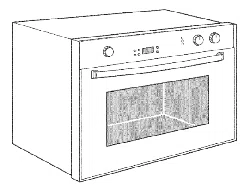
BOSCH
Use & Care Manual
For
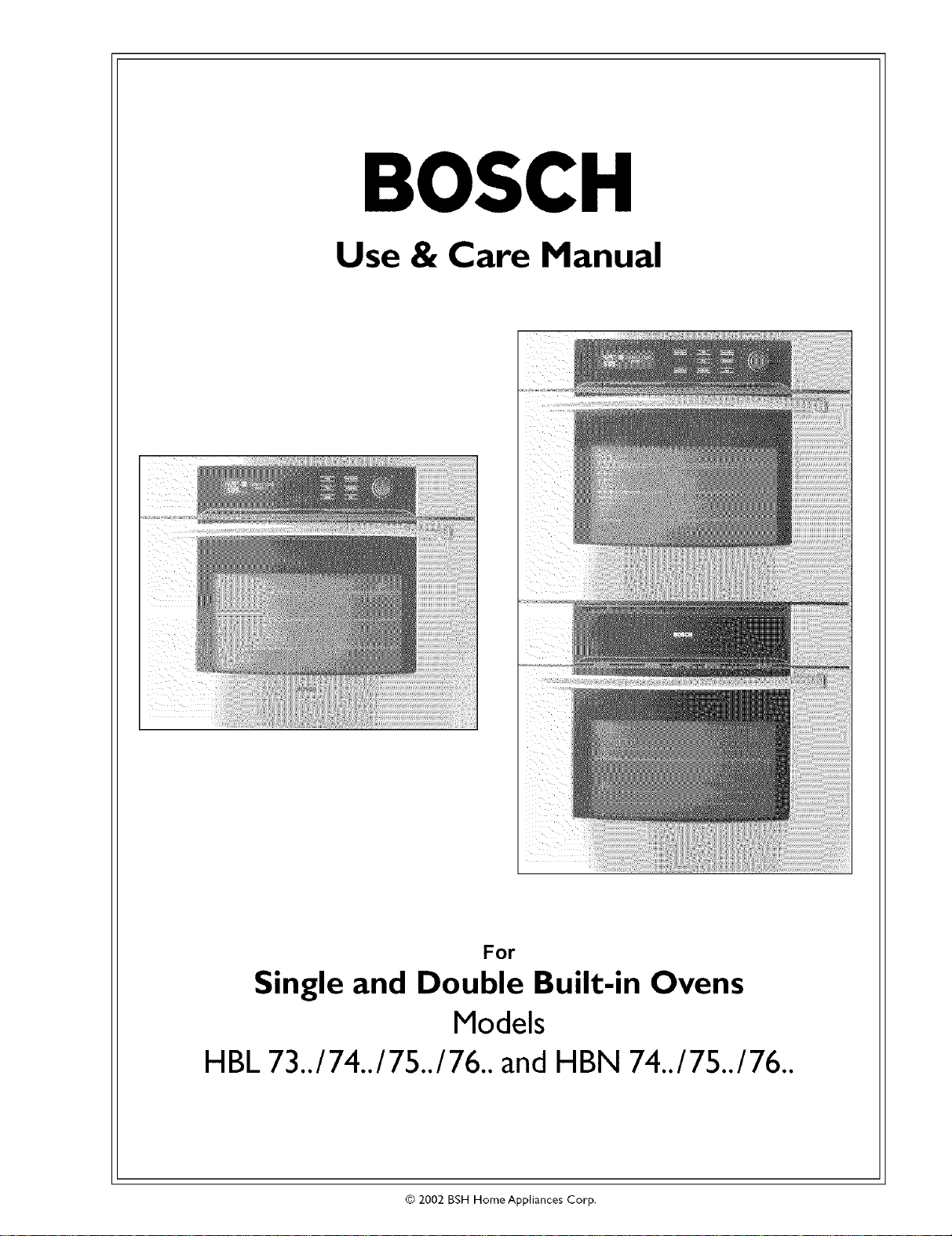
Single and Double Built-in Ovens
Models
HBL 73../74../75../76.. andHBN 74../75../76..
© 2002 BSH Home Appliances Corp.
Bosch Oven Introduction
A Special Message
to Our Customers
Dear Bosch Oven Owner:
Thank you and congratulations on the purchase of your Bosch oven.
Whether you are an expert chef or an aspiring cool<, we know that
your new oven will exceed your expectations. Decades of knowledge
and experience are built into this oven making it among the highest
quality, most versatile and most efficient available.
We ask that you read this manual thoroughly before using your new
oven. Please pay particular attention to the Safety Precautions printed
at the front of this book and the numerous safety hints and cautions
placed throughout. Also, be sure to familiarize yourself with the proper
operation of the oven and its cleaning and maintenance procedures.
Adherence to these instructions and procedures will assure that you
realize the full potential of your new Bosch oven as well as maintain it
for years of dependable use.
Thank you and good cooking,
BSH Home Appliances
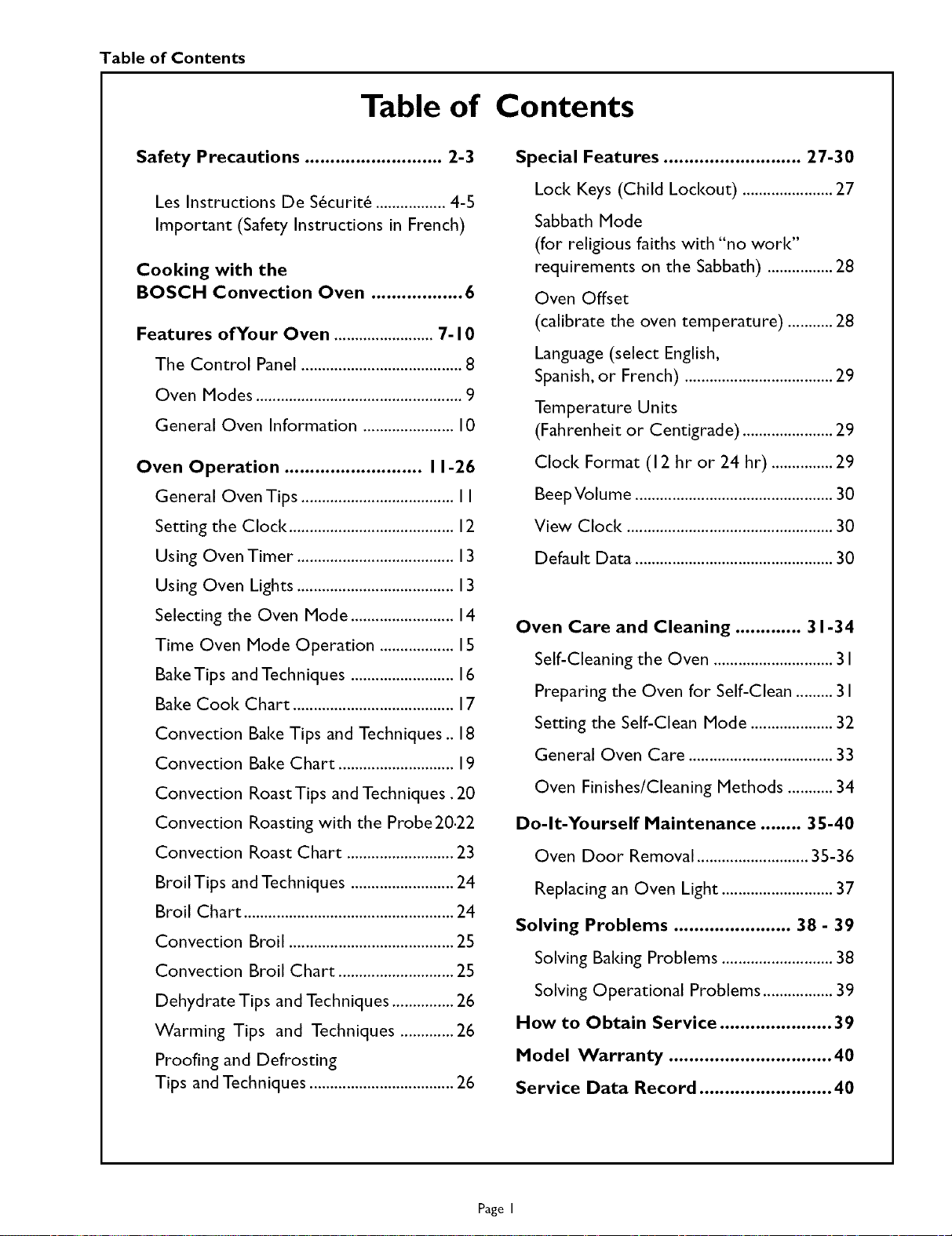
Table of Contents
Table of Contents
Safety Precautions ........................... 2-3
Les Instructions De S_curit_ ................. 4-5
Important (Safety Instructions in French)
Cooking with the
BOSCH Convection Oven .................. 6
Features of Your Oven ........................ 7- I 0
The Control Panel ....................................... 8
Oven Modes .................................................. 9
General Oven Information ...................... 10
Oven Operation ........................... I 1-26
General Oven Tips ..................................... II
Setting the Clock ........................................ 12
Using Oven Timer ...................................... 13
Using Oven Lights ...................................... 13
Selecting the Oven Mode ......................... 14
Time Oven Mode Operation .................. 15
Bake Tips and Techniques ......................... 16
Bake Cook Chart ....................................... 17
Convection Bake Tips and Techniques .. 18
Convection Bake Chart ............................ 19
Convection Roast Tips and Techniques. 20
Convection Roasting with the Probe 20.22
Convection Roast Chart .......................... 23
Broil Tips and Techniques ......................... 24
Broil Chart ................................................... 24
Convection Broil ........................................ 25
Convection Broil Chart ............................ 25
Dehydrate Tips and Techniques ............... 26
Warming Tips and Techniques ............. 26
Proofing and Defrosting
Tips and Techniques ................................... 26
Special Features ........................... 27-30
Loci< Keys (Child Loci<out) ...................... 27
Sabbath Mode
(for religious faiths with "no work"
requirements on the Sabbath) ................ 28
Oven Offset
(calibrate the oven temperature) ........... 28
Language (select English,
Spanish, or French) .................................... 29
Temperature Units
(Fahrenheit or Centigrade) ...................... 29
Clock Format (I 2 hr or 24 hr) ............... 29
BeepVolume ................................................ 30
View Clock .................................................. 30
Default Data ................................................ 30
Oven Care and Cleaning ............. 31-34
Self-Cleaning the Oven ............................. 3 I
Preparing the Oven for Self-Clean ......... 3 I
Setting the Self-Clean Mode .................... 32
General Oven Care ................................... 33
Oven Finishes/Cleaning Methods ........... 34
Do-It-Yourself Maintenance ........ 35-40
Oven Door Removal ........................... 35-36
Replacing an Oven Light ........................... 37
Solving Problems ....................... 38 - 39
Solving Baiting Problems ........................... 38
Solving Operational Problems ................. 39
How to Obtain Service ...................... 39
Model Warranty ................................ 40
Service Data Record .......................... 40
Page I
Safety Precautions Bosch HBL7/HBM7 Oven Use and Care Manual
General Appliance and Oven
SAFETY PRECAUTIONS
Please read all instructions before using this appliance.
WARNING
When properly cared for, your new Bosch oven has
been designed to be a safe,reliable appliance. Read
all instructions carefully before using this oven.
These precautions will reduce the risk of burns,
electric shock, fire, and injury to persons. When
using kitchen appliances, basic safety precautions
must be followed, including the following:
This appliance must be properly installed and
grounded by a qualified technician. Connect only
to properly grounded outlet. See "Grounding
Instructions" found in the Installation Instructions.
This appliance should beserviced only by a qualified
service technician. Contact the nearest
authorized service center for examination,
repair or adjustment.
Do not repair or replace any part of the oven
unless specifically recommended. Refer service to
an authorized servicer.
Do not operate this appliance if it is not working
properly or if it has been damaged, until an
authorized servicer has examined it.
Install or locate this appliance only in accordance
with the Installation Instructions.
Usethis oven only asintended bythe manufacturer.
Ifyou have anyquestions, contactthe manufacturer.
Do not cover or block any openings on this
appliance.
Use this appliance only for its intended use as
described in this manual. Do not use corrosive
chemicals, vapors, or nonfood products in this
appliance. This type of oven isspecifically designed
to heat or cook. It is not designed for industrial or
laboratory use. The use of corrosive chemicals in
heating or cleaning will damage the appliance.
In the event that personal clothing or hair catches
fire, DROP AND ROLL IMMEDIATELY to
extinguish flames.
Do not allow children to use this appliance unless
closely supervised by an adult. Children and pets
should not be left alone or unattended in the area
where the appliance is in use. Never allow children
to sit or stand on any part of the oven.
Do not store items of interest to children above
the oven. Ifchildren should climb onto the appliance
to reach these items, they could be seriously
injured.
To reduce the risk of fire in the oven cavity:
I. Do not store flammable materials in or near the
oven.
2. Do not usewater on a grease fire. Smother fire or
use a dry chemical or foam-type extinguisher.
3. It ishighlyrecommended that afire extinguisher be
readily available and highly visible next to any
cooking appliance.
4. Do not overcook food. Carefully attend oven if
paper, plastic or other combustible materials are
placed inside the oven.
5. Do not use the cavity for storage purposes. Do
not leave paper products, cooldng utensils or food
in the cavity when not being used.
6. If materials insidethe oven should ignite, keep oven
door closed. Turn oven off and disconnect the
circuit at the circuit breaker box.
7. Do not block any vent openings.
8. Be sure the blower fan runs whenever the oven is
in operation. If the fan does not operate, do not
use the oven. Call an authorized service center.
9. Never use the oven to warm or heat a room. This
can damage the oven parts.
10.
For personal safety, wear proper clothing. Loose
fitting or garments with hanging sleeves should
never be worn while using this appliance.
Continued on next page
Page 2
Safety Precautions Bosch HBL7/HBN7 Oven Use and Care Manual
IMPORTANT SAFETY INSTRUCTIONS
Please read all instructions before using this appliance.
SAFETY FOR THE OVEN
• Tie long hair so that it doesn't hang loose.
• Do nottouch heating elements or interior surfaces
ofoven,
The heating elements may be hot even though they
are dark in color. Interior surfaces of an oven
become hot enough to cause burns.
During and after use, do not touch or let clothing
or other flammable materials contact the heating
elements or the interior surfaces of the oven until
they have had sufficient time to cool.
The trim on the top and sides ofthe oven door may "
become hot enough to cause burns.
Use care when opening the door. Open the door
slightly to let hot air or steam escape before
removing or replacing food.
Do not heat unopened food containers. Build-up
of pressure may cause the container to burst and
cause injury.
Always place oven racks in desired location while
oven is cool. Ifa rack must be moved while oven
is hot, do not let pot holder contact the hot
heating elements.
Use only dry pot holders. Moist or damp pot
holders on hot surfaces may result in burns from
steam. Do not let pot holder touch hot heating
elements. Do not use atowel or other bulky cloth.
SAFETY FOR THE SELF-CLEANING OVEN
Confirm that the door locks and will not open
once START is touched and the door loci< icon
appears. If the door does not loci<, touch UPPER
CANCEL or LOWER CANCEL and do not run
Self-Clean. Phone 800/735-4328 for service (see
Page 39 for obtaining service).
Do not clean the door gasket. It is essential for a
good seal. Care should be taken not to rub,
damage, move or remove the door gasket.
Do not use commercial oven cleaners or oven
liner protective coatings of any Idnd in or around
any part of the oven.
Clean only oven parts listed in this manual.
Before self-cleaning the oven, remove the broiler
pan, oven racks, other utensils and excess soft
spillage.
WARNING
The California Safe Drinldng Water and
Toxic Enforcement Act requires businesses
to warn customers of potential exposure
to substances which are known by the
State of California to cause cancer or
reproductive harm.
The elimination of soil during self-cleaning
generates some by-products which are on
this list of substances.
To minimize exposure to these substances,
always operate this oven according to the
instructions in this manual and provide
good ventilation to the room during and
immediately after self-cleaning the oven.
Page 3
Safety Instructions Bosch HBL7/HBN7 Oven Use and Care Hanual
INSTRUCTIONS DE SECURITE
pour four et appareil en g n ral
Life toutes les instructions avant d'utiliser cet appareil.
AVERTISSEMENT
Lorsque rentreden est effectu_ defa_on appropri_e,
ce nouveau four Bosch a _t_ congu pour offrir
s_curit_ et fiabilit_. Life attentivement routes
les instructions avant d'utiliser ce four. Ces
precautions permettront de r_duire tout ris-
que de br_lures, de chocs _lectriques,
d'incendie et de blessures. Au moment
d'utiliser des _lectrom_nagers, des
precautions de base doivent &tre observ_es,
incluant ce qui suit.
Cet appareil doit _tre install_ et mis _ la terre de
fa_on appropri_e par un technicien qualifi_.
Brancher seulement sur une prise mise _ la terre.
Voir <<Instructions de mise _ la terre >>dans les
instructions d'installation.
Seul un technicien qualifi_ peut effectuer le service
de cet appareil. Communiquer avec un centre de
service autoris_ pour route v_rification, r_paration
ou r_glage.
Dans le cas o_ des v_tements ou des cheveux
prennent feu, SE LAISSER TOMBER AU SOL ET
SEROULER IMMFDIATEMENT pour _teindre les
flammes.
Ne pas laisser des enfant utiliser cet appareil,
moins d'une surveillance _troite d'un adulte. Les
enfants ou des animaux ne doivent pas &tre laiss_s
seuls ou sans surveillance Iorsque cet appareil est
utilis& Ne jamais hisser les enfants s'asseoir ou
monter sur rappareil.
Ne jamais ranger d'articles, pouvant int_resser les
enfants, au-dessus du four. Si les enfants doivent
monter sur le four pour atteindre ces objets, ils
peuvent se blesser s_rieusement.
Pour r_duire les risques d'incendie dans la
cavit_ du four :
I.
2.
Ne pas r_parer ni remplacer route piece du four _ 3.
moins que cela ne soit recommand&
sp&cifiquement. Consulter un centre de service
autoris_. 4.
Ne pas utiliser cet appareil s'il ne fonctionne pas
ad&quatement ou s'il a &t_ endommag_ sans qu'un
technicien qualifi& ne rait d'abord v_rifi&
Installer cet appareil seulement selon les
instructions d'installation.
Utiliser ce four pour rusage auquel il est destin_
par le fabricant. Pour route question,communiquer
avec le fabricant.
.
.
Ne pas couvrir ni obstruer les ouvertures de cet 7.
appareil. 8.
Utiliser cet appareil seulement pour rusage auquel
il est destin& selon les instructions de ce guide. Ne
pas utiliser de produits corrosifs, chimiques, ou des
produits non alimentaires dans cet appareil. Ce type
de four est congu sp&cifiquement pour chauffer et
cuire. II n'est pas destin_ _ un usage industriel ou
en laboratoire. L'utilisation de produits chimiques
corrosifs pour le chauffage ou le nettoyage peut
endommager rappareil.
Ne pas ranger de mat_riaux inflammables pros
ou dans le four.
Ne pas utiliser d'eau sur un feu de graisse. Ftouffer
le feu ou utiliser un extincteur de type _ mousse
ou chimique sec.
II est recommand_ qu'un extincteur soit disponible
et plac_ visiblement pros de rappareil de cuisson.
Ne pas surcuire les aliments. Faire attention si du
papier, du plastique ou autres mat_riaux
combustibles sont places dans le four.
Ne pas utiliser la cavit_ _ des fins de rangement.
Ne pas laisser de produits en papier, des ustensiles
ou des aliments dans la cavit_ si rappareil n'est
pas utilis_.
Si des mat_riaux dans le four s'enflamment, hisser
la porte du four ferm_e. Me_re le four hors circuit,
d_brancher le circuit _ la bo_te de jonction.
Ne pas obstruer les _vents.
S'assurer que le ventilateur fonctionne Iorsque le
four est en marche. Si le ventilateur ne fonctionne
pas, ne pas utiliser le four. Communiquer avec un
centre de service autoris_.
.
10.
Ne jamais utiliser ce four pour chauffer ou
r_chauffer une pi&ce. Ceci peut endommager les
pi&ces du four.
Pour plus de s_curit_, porter des v_tements
ad_quats. Des v_tements I_ches ou pendants ne
doivent jamais _tre port,s si ron utilise le four.
Suite _ la page suivante
Page 4
Safety Instructions Bosch HBL7/HBN7 Oven Use and Care Hanual
INSTRUCTIONS DE SECURITE IMPORTANTES
Lire toutes les instructions avant d'utiliser cet appareil.
SECURITE POUR LE FOUR
• Les cheveux longs doivent &tre attaches.
• Ne pas toucher aux _l_ments chauffants ni aux
surfaces int_rieures du four.
Les _l_ments chauffants peuvent 6tre chauclsm6me
s'ils sont de couleur fonc_e. Les surfaces
int_rieures du four sont suffisamment chaudes
pour causer des br61ures.
Pendant et apr&s rutilisation, ne pas toucher, ni
laisser des v6tements ou autres mat_riaux
inflammables entrer en contact avec les _l_ments
chauffants ou les surfaces int_rieures du four.
Laisser suffisamment de temps au four pour
refroidir.
• Les garnitures sur le dessus et les c6t_s de la porte
du four peuvent devenir assez chaudes pour causer
des brOlures.
Faire attention en ouvrant la porte du four. Ouvrir
la porte 16g6rement pour laisser rair chaud ou la
vapeur s'6chapper avant d'enlever ou de mettre
des aliments dans le four.
Ne pas faire chauffer des contenants d'aliments
herm6tiques. L'accumulation de pression peut faire
exploser le contenant et causer des blessures.
Toujours placer les tablettes & rendroit d6sir6
Iorsque le four est froicl. Si une tablette dolt 6tre
enlev6e Iorsque le four est chaud, ne pas laisser
les tire-plats entrer en contact avec les 616ments
chauffants.
Utiliser seulement des tire-plats secs. Des tire-plats
humides ou mouill6s sur des surfaces chaudes
peuvent causer des brQlures de vapeur. Ne pas
toucher aux 616ments chauffants. Ne pas utiliser
de serviettes ou autres chiffons.
SECURITE POUR LE FOURAUTO-
NETTOYANT
S'assurer que la porte est verrouill6e et ne peut
s'ouvrir une lois la touche START press6e et que
ricone de porte verrouill6e s'affiche. Si la porte ne
se verrouille pas, presser la touche UPPER
CANCEL ou LOWER CANCEL (annulation
sup6rieure ou annulation inf6rieure) et ne pas
actionner la fonction auto-nettoyante.T616phoner
au 800-735-4328 pour tout service (voir page 39
concernant le service).
Ne pas nettoyer les joints de la porte. Cela est
essentiel pour une bonne 6tanch6it6. II faut faire
attention pour ne pas r6curer, endommager,
d6placer ou enlever le joint de la porte.
Nettoyer seulement les pi6ces indiqu6es dans ce
guide.
Avant d'effectuer le nettoyage du four, enlever le
plateau, les tablettes, les ustensiles et tout
d6versement.
AVERTISSEMENT
Le r_glement <<California Safe Drinking Water
and Toxic Enforcement Act >>exige que les
compagnies avisent les clients du danger potentiel
d'exposition aux substances reconnues par r6tat
de la Californie comme pouvant causer le cancer
ou des probl6mes de sant6 reli6s &la reproduc-
tion.
L'61imination des r6sidus pendant le
fonctionnement auto-nettoyant peut g6n6rer
certains sous produits d6riv6s donn6s dans la
liste.
Afin de minimiser rexposition & ces substances,
toujours faire fonctionner cefour conform6ment
aux instructions de ce guide et assurer une bonne
ventilation & la pi6ce pendant et imm6diatement
apr6s le nettoyage du four.
Page 5
Cooking with the Bosch Convection Oven Bosch HBL7/HBN7 Oven Use and Care Manual
Cooking with the BOSCH Convection Oven
In a conventional oven,the heat source cycles on and offto maintain an average temperature in the oven cavity.
As the temperature gradually rises and falls, gentle air currents are produced within the oven. This natural
convection tends to be inefficient because the currents are irregular and slow. In the Bosch convection system,
the heat is"conveyed" by a fan that provides continuous circulation of the hot air.
The Bosch Genuine European Convection TM system provides state-of-the-art engineering and advanced design
to create the finest convection oven. In standard convection ovens,a fan simply circulates the hot air around the
food.The Bosch convection system is characterized by the combination of an additional heating element located
around the convection fan and the venting panel that distributes heated air in three dimensions: along the sides,
the top and the full depth of the oven cavity. This Genuine European Convection system aids in maintaining a
more even oven temperature throughout the oven cavity.
The circulating air aids in speeding up the baiting process and cooks the food more evenly. By controlling the
movement of heated air, convection cooking produces evenly browned foods that are crispy on the outside yet
moist inside. Convection cooking works best for breads and pastries as well as meats and poultry.Air-leavened
foods like angel food cakes, souffl& and cream puffs rise higher than in a conventional oven. Meats stay juicy and
tender while the outside is flavorful and crisp.
By using Bosch Genuine European Convection,foods can be cooked at a lower temperature and cooldng times
can be shorter. When using the Convection Bake mode, the standard oven temperature should be lowered by
25°E Foods requiring a cooldng time of less than 30 minutes should be checked slightly earlier than normal.
Items that typically cool< for 45 minutes or more should take 15-25% less time. For best results,foods should be
cooked uncovered, in low-sided pans to take advantage of the forced air circulation.When using the Convection
Roast mode, the standard oven temperature does not need to be reduced.
Advantages of Convection Cooking
• Even baiting, browning and crisping are achieved.
• During roasting, juices and flavors are sealed in while the exterior is crisp.
• Yeast breads are lighter, more evenly textured, more golden and crustier.
• Air-leavened foods such as cream puffs, souffl& and meringues are higher and
lighter.
• Baking on multiple racks at the same time is possible with even results.
• Multiple-rack baking savestime.
• Prepare whole meals at once with no flavor transfer.
• Dehydrates herbs, fruits and vegetables.
• Requires no specialized bakeware.
• Savestime and energy.
• Convection broiling allows for extraordinary grilling with thicker cuts of food.
Page 6
Oven Features Bosch HBL7/HBN7 Oven Use and Care Manual
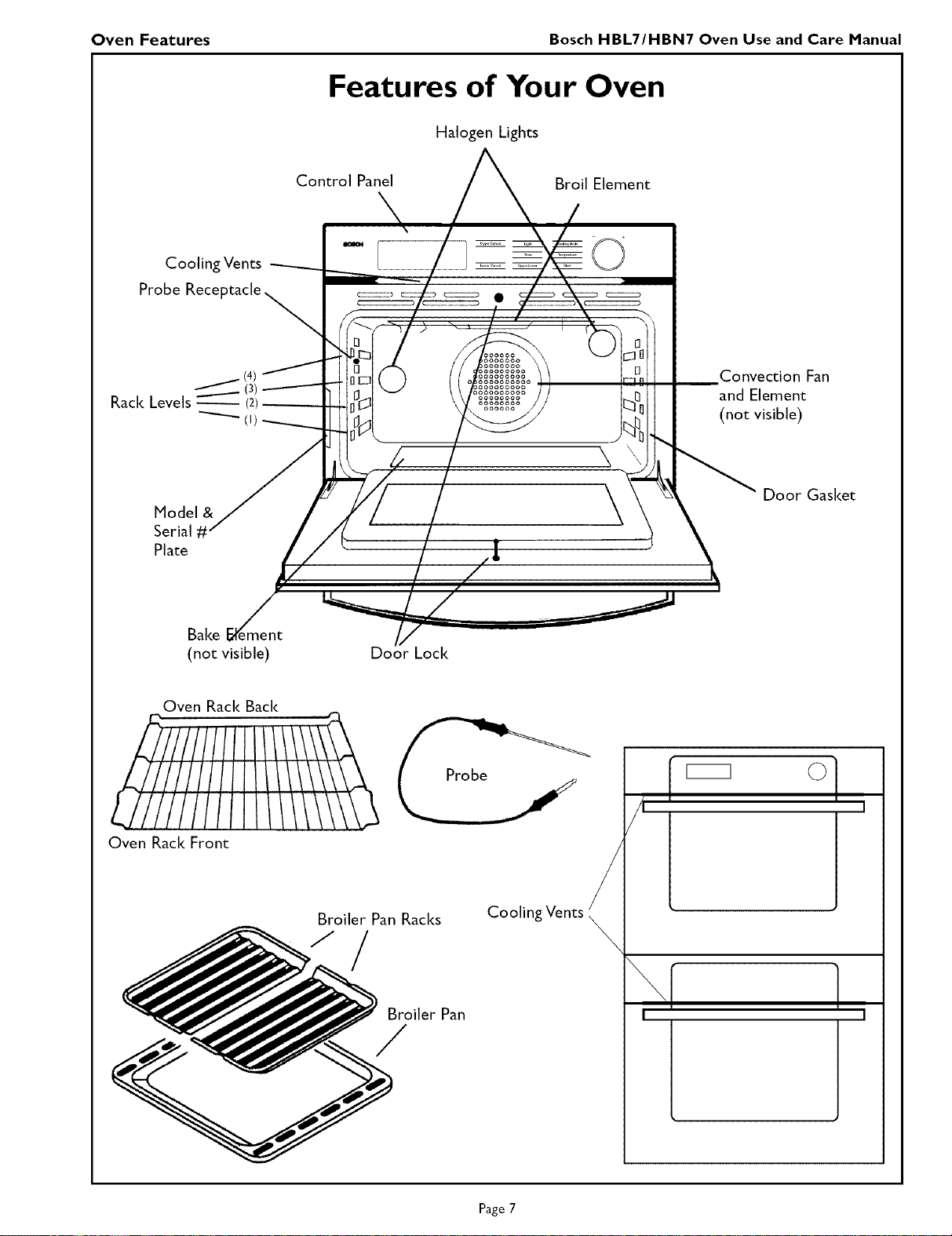
Features of Your Oven
Halogen Lights
Control Panel
Broil Element
Cooling Vents
Probe Receptacle
_(4)
(3)
Rack Levels _ (2)
Model &
Serial #'
Plate
oooooooo
oooooooo
\
\
l
Convection Fan
and Element
(not visible)
Door Gasket
Bake
(not visible)
Do,_r Loci<
Oven Rack Back
Oven Rack Front
Broiler Pan Racks
_)oiler Pan
Cooling Vents
I
I
Page 7
Oven Features Bosch HBL7/HBN7 Oven Use and Care Manual
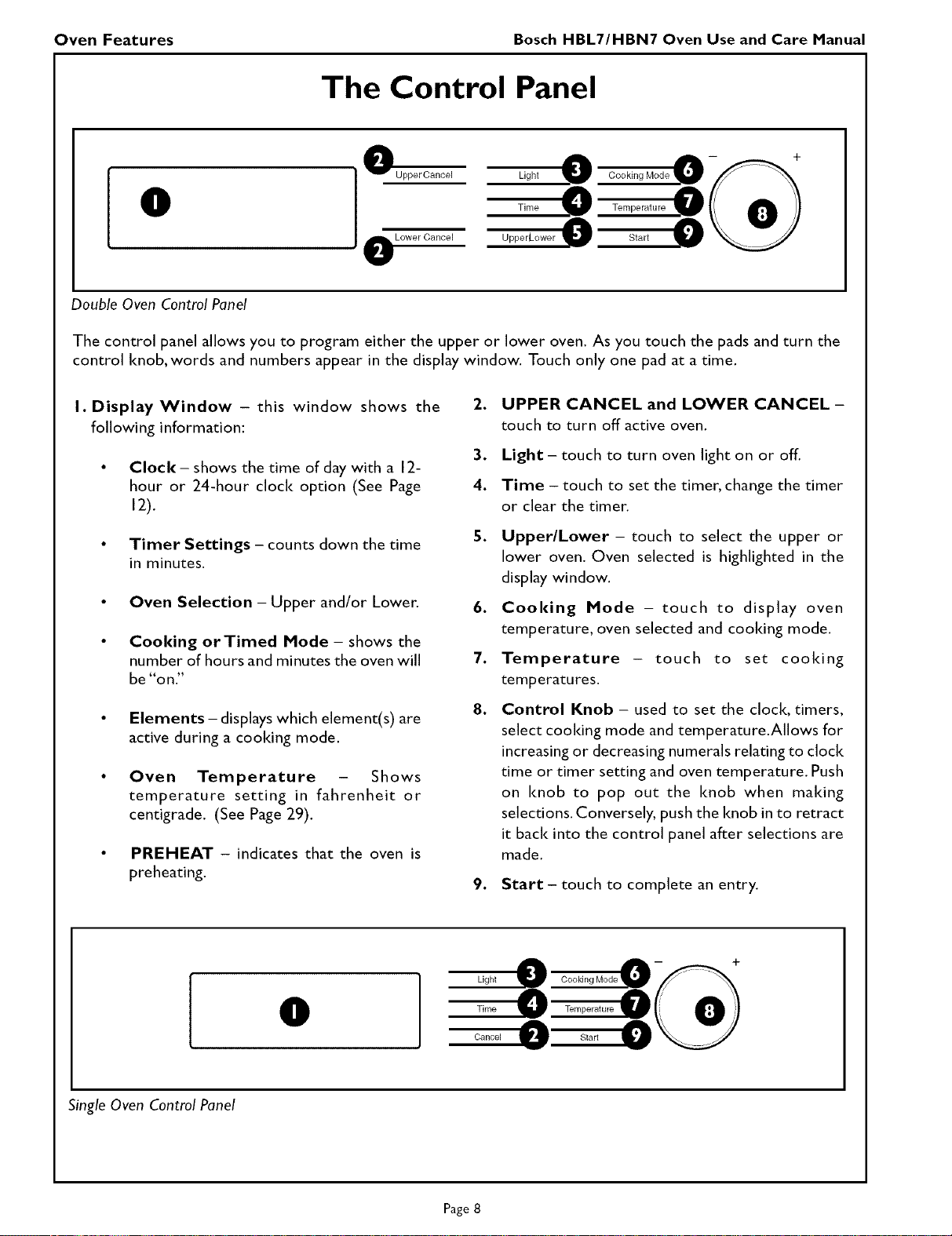
The Control Panel
O
OUpper Cancel
Lower Cancel
Light _ Cooking Mode D --
Time _ Temperature
UpperLower Start 0
Double Oven Control Panel
The control panel allows you to program either the upper or lower oven. As you touch the pads and turn the
control knob, words and numbers appear in the display window. Touch only one pad at a time.
I. Display Window - this window shows the
following information:
• Clock - shows the time of day with a 12-
hour or 24-hour clock option (See Page
12).
• Timer Settings - counts down the time
in minutes.
• Oven Selection - Upper and/or Lower,
• Cooking orTimed Mode - shows the
number of hours and minutes the oven will
be "on."
• Elements - displays which element(s) are
active during a cooldng mode.
• Oven Temperature - Shows
temperature setting in fahrenheit or
centigrade. (See Page 29).
• PREHEAT - indicates that the oven is
preheating.
.
3.
4.
5.
UPPER CANCEL and LOWER CANCEL -
touch to turn off active oven.
Light - touch to turn oven light on or off.
Time - touch to set the timer, change the timer
or clear the timer.
Upper/Lower - touch to select the upper or
lower oven. Oven selected is highlighted in the
display window.
6. Cooking Mode - touch to display oven
temperature, oven selected and cooldng mode.
7. Temperature - touch to set cooking
temperatures.
8. Control Knob - used to set the clock, timers,
select cooldng mode and temperature.Allows for
increasing or decreasing numerals relating to clock
time or timer setting and oven temperature. Push
on knob to pop out the knob when making
selections. Conversely, push the knob in to retract
it back into the control panel after selections are
made.
9. Start - touch to complete an entry.
O
Ligh_
Time Temperature
Cancel _ Start 0
Single Oven Control Panel
Page 8
Oven Features Bosch HBL7/HBN7 Oven Use and Care Manual
Oven Modes
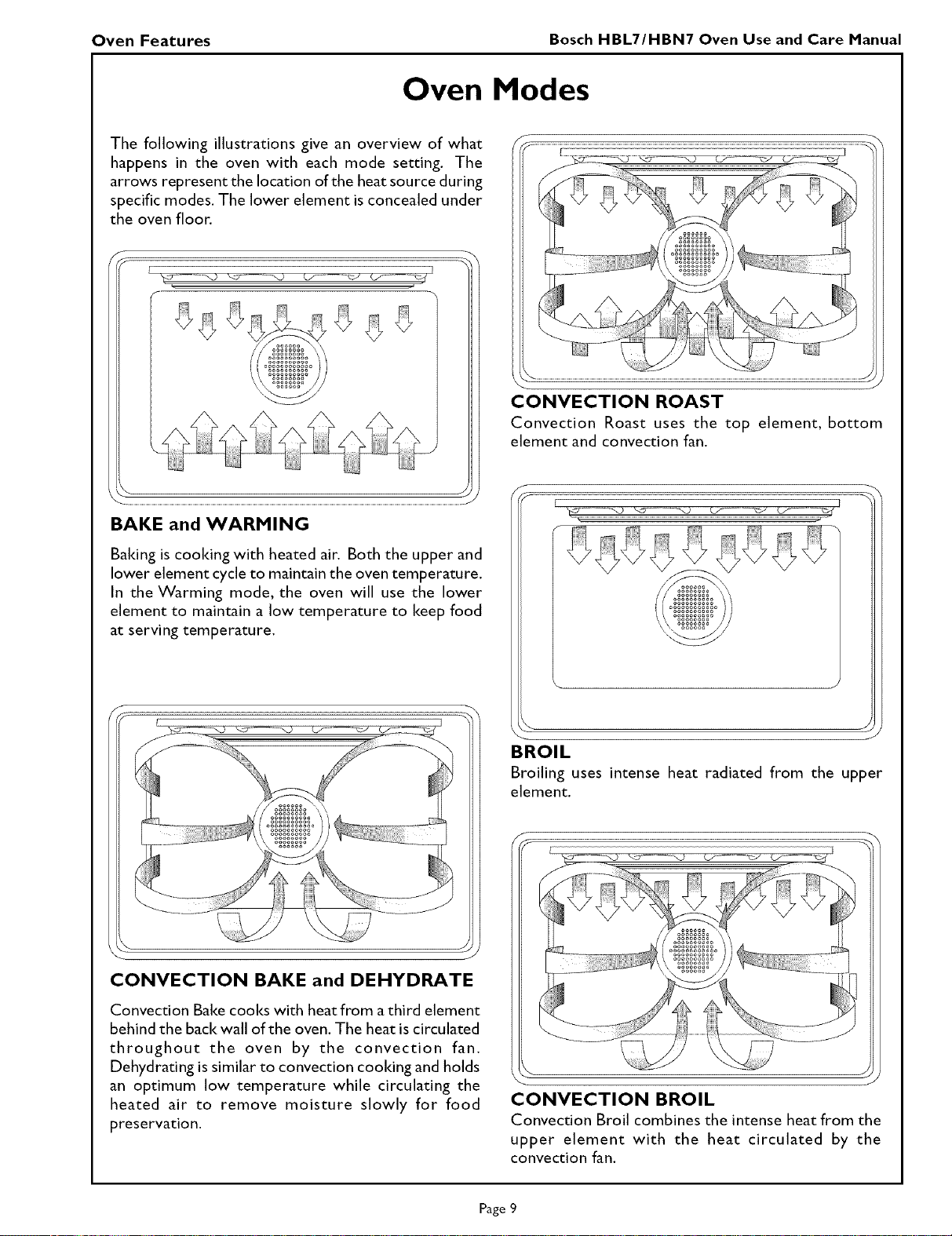
The following illustrations give an overview of what
happens in the oven with each mode setting. The
arrows represent the location of the heat source during
specific modes. The lower element isconcealed under
the oven floor.
Baking is cooldng with heated air. Both the upper and
lower element cycle to maintain the oven temperature.
In the Warming mode, the oven will use the lower
element to maintain a low temperature to keep food
at serving temperature.
J
CONVECTION BAKE and DEHYDRATE
Convection Bake cooks with heat from athird element
behind the back wall of the oven. The heat is circulated
throughout the oven by the convection fan.
Dehydrating issimilar to convection cooking and holds
an optimum low temperature while circulating the
heated air to remove moisture slowly for food
preservation.
..................................................................................................................Z7...................................................................................................ZZ...................................................................................................................
CONVECTION ROAST
Convection Roast uses the top element, bottom
element and convection fan.
\ J
J
BROIL
Broiling uses intense heat radiated from the upper
element.
f
..........................................................I
• J
CONVECTION BROIL
Convection Broil combines the intense heat from the
upper element with the heat circulated by the
convection fan.
Page 9
Oven Features Bosch HBL7/HBN7 Oven Use and Care Manual
General Oven Information
Before using your Bosch oven for the first time remove
all packing and foreign materials from the oven(s). Any
material of this sort lee in the oven(s) may melt and/
or burn when the oven(s)is(are) used.
Flashing Symbols or Numbers
Signalsan incomplete setting and callsfor another step
or START to be touched.
Power Failure
After the power returns to the oven,the clock displays
the time when the power was lost or turned off.
Default Settings
The cooking modes automatically select a suitable
temperature. These can be changed when a different
one is needed.
Beeps
Signals that more information must be entered or
confirms the receipt of an entry. Beeps also signal the
end of a function or an oven fault.
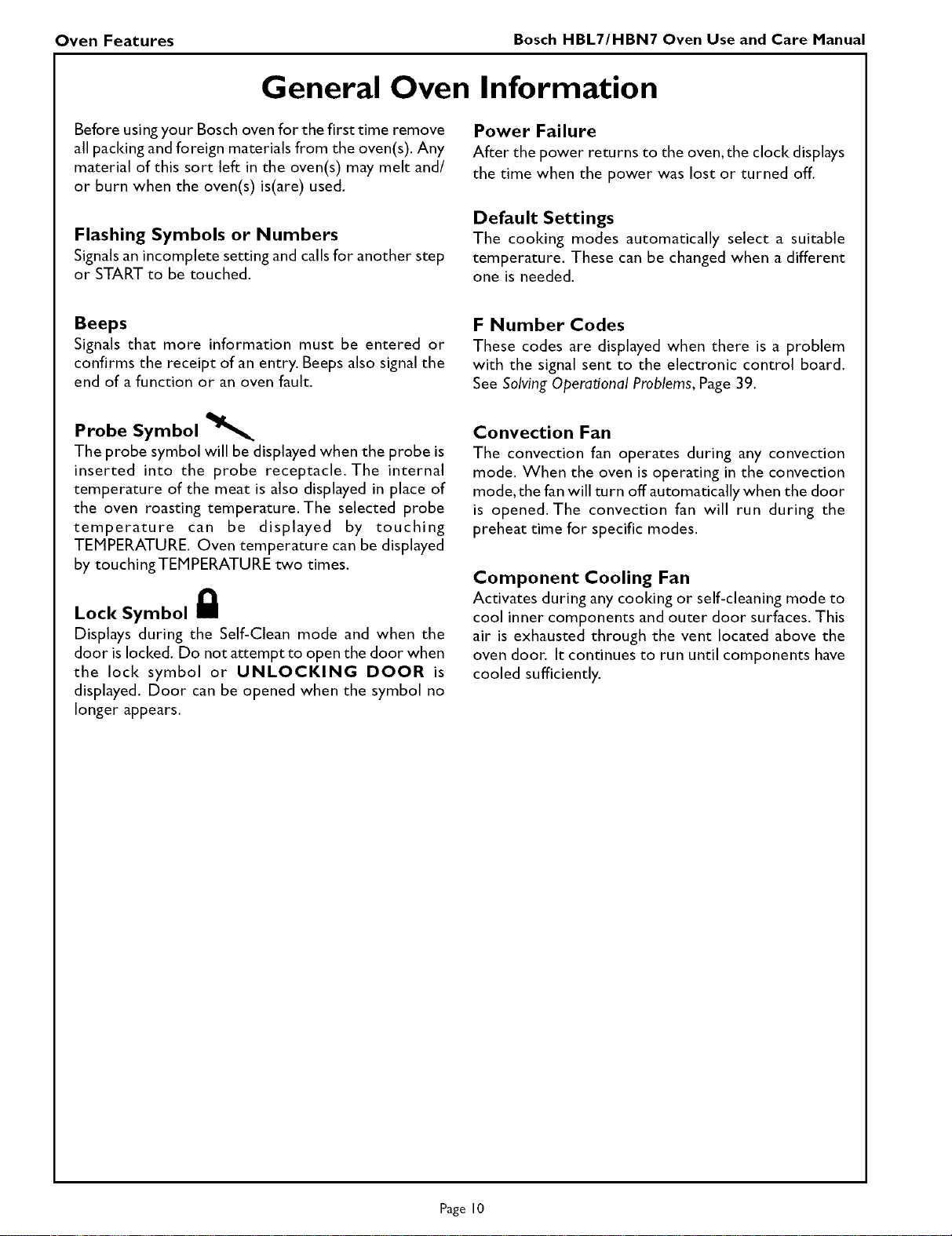
Probe Symbol
The probe symbol will be displayed when the probe is
inserted into the probe receptacle. The internal
temperature of the meat is also displayed in place of
the oven roasting temperature. The selected probe
temperature can be displayed by touching
TEMPERATURE. Oven temperature can be displayed
by touchingTEMPERATURE two times.
Lock Symbol g
Displays during the Self-Clean mode and when the
door is locked. Do not attempt to open the door when
the lock symbol or UNLOCKING DOOR is
displayed. Door can be opened when the symbol no
longer appears.
F Number Codes
These codes are displayed when there is a problem
with the signal sent to the electronic control board.
See SolvingOperational Problems,Page 39.
Convection Fan
The convection fan operates during any convection
mode. When the oven is operating in the convection
mode, the fan will turn off automatically when the door
is opened. The convection fan will run during the
preheat time for specific modes.
Component Cooling Fan
Activates during any cooking or self-cleaning mode to
cool inner components and outer door surfaces. This
air is exhausted through the vent located above the
oven door. It continues to run until components have
cooled sufficiently.
Page I0
Oven Operations Bosch HBL7/HBM7 Oven Use and Care Manual
General Oven Tips
Preheating the Oven
• Preheat the oven when using the Bake, Convection
Bake and Convection Roast modes.
• Preheating for Convection Roast when using the
probe is not recommended. See Pages 20 through
22 for details and tips.
• Selecting a higher temperature does not shorten
the preheat time.
• Preheating is necessary for good results when baking
cakes, cooldes, pastry and breads.
• Preheating will help to sear roasts and seal in meat
juices.
• Place oven racks in their proper position before
preheating.
• During preheat, the selected cooking temperature
can be displayed by touching TEMPERATURE.
• A beep will confirm that the oven is preheated and
the selected cooking temperature will be displayed.
• Fast Preheat Bakeand Fast Preheat Convection Bake
can be used when time is crucial.
Operational Suggestions
• Use the cooldng charts as a guide.
• Do not set pans on the opened oven door.
• Use the interior oven light to view the food through
the oven door window rather than opening the door
frequently.
Utensils
• Glass baIting dishes absorb heat. Reduce oven
temperature 25°F when baiting in glass.
• Use pans that give the desired browning. The type
of finish on the pan will help determine the amount
of browning that will occur.
• Shiny,smooth metal or light nonsticldanodized pans
reflect heat, resulting in lighter, more delicate
browning. Cakes and cooldes require this type of
utensil.
• Dark, rough or dull pans will absorb heat resulting
in a browner, crisper crust. Use this type for pies.
• For brown, crisp crusts,use dark nonsticldanodized
or dark, dull metal utensils or glass bakeware.
Insulated baiting pans may increase the length of
cooldng time.
• Do not cookwith the empty broiler pan in the oven,
as this could change cooking performance. Store
the broil pan outside of the oven.
High Altitude Baking
• When cooldngat highaltitude,recipes and cooking
time will vary from the standard. For accurate
information,write the Extension Service,Colorado
State University, Fort Collins, Colorado 80521.
There may be a charge for the bulletins.
Oven Condensation and Temperature
• It is normal for a certain amount of moisture to
evaporate from the food during any cooking
process. The amount depends on the moisture
content of the food. The moisture may condense
on any surface cooler than the inside of the oven,
such as the control panel.
• Your new Bosch oven has an electronic
temperature sensor that accurately maintains the
temperature selected.Your previous oven may have
had a mechanical thermostat that drifted gradually
over time to a higher temperature. It is normal
that you may need to adjust your favorite recipes
when cooldng in a new oven.
Oven Racks
• The oven has rack guides at four levels as shown
in the illustration on Page 7.
• Rack positions are numbered from the bottom rack
guide (#l) to the top (#4).
• Check cooldng charts for best rack positions to
use when cooldng.
• Each level guide consists of paired supports formed
in the walls on each side of the oven cavity.
• Always be sure to position the oven racks before
turning on the oven. Make sure that the racks are
level once they are in position.
• To remove oven rack from the oven, pull rack
forward, lift rack up at front and then remove it.
• To replace an oven rack:
I. Place rear of rack between rack level guides.
2. While lifting front of rack, slide rack in all
the way while lowering the front. Please
refer to illustration on Page 7 ifthere is any
question as to which side is the front of the
rack.
• The racks are designed to stop when pulled
forward to their limit.
CAUTION! Never use aluminum foil to cover
the oven racks or to line the oven. It can cause
damage to the oven liner if heat is trapped under
the foil.
1201240 vs. 1201208 Volt Connection
• Most oven installations will have a 120/240 voltage
connection.
• If your oven is installed with 120/208 voltage, the
preheat time may be slightly longer than with 120/
240 voltage.
• The Self-Clean mode may also require a longer
clean time, depending on the amount of soil.
Page II
Oven Operations Bosch HBL7/HBN7 Oven Use and Care Manual
Setting the Clock
• The time of day is displayed in hours and minutes.
• Always set the clock immediately after installation or after a power failure. Once power returns to the
oven, the clock displays the time of day when the power was turned off or lost.
• The clock time will appear during all oven operations except when the timer or a timed cooking operation
is running.
• The oven is preset to a 12-hour clock and indicates AM and PM.
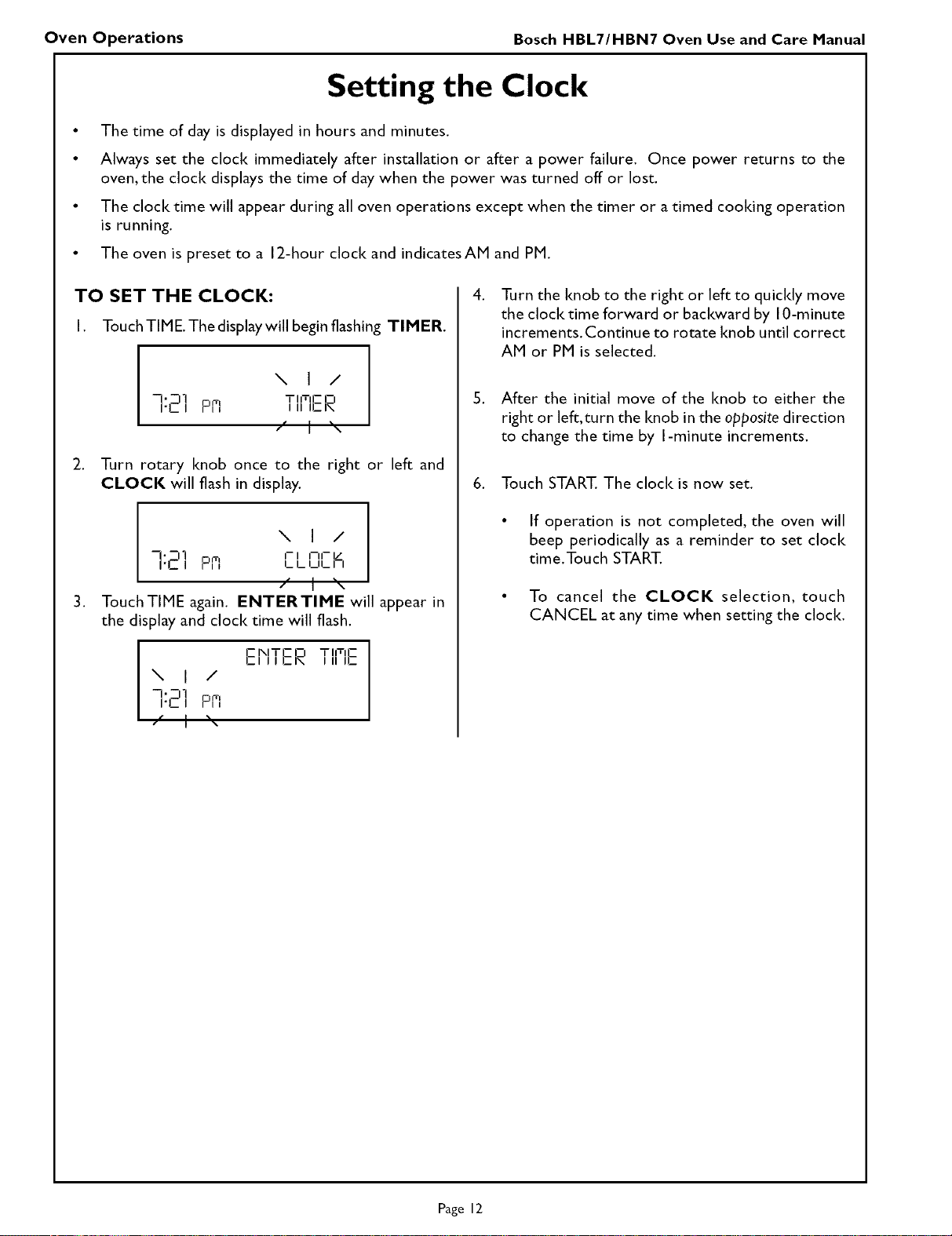
TO SET THE CLOCK:
I. TouchTIME. Thedisplaywillbeginflashing TIMER.
,
-'D1
I'Ll PR
\ I /
TIITIE O
III ICI\
t
Turn rotary knob once to the right or left and
CLOCK will flash in display.
,
\ I /
q:E'] Pn C'
LULI I
ff I _\
TouchTIME again. ENTERTIME will appear in
the display and clock time will flash.
f- IXlTE El T IITIE
El II I_IN I II I1_
\ I /
-I.D1
rL I PFI
,
Turn the knob to the right or left to quicldy move
the clock time forward or backward by 10-minute
increments. Continue to rotate knob until correct
AM or PM is selected.
5. After the initial move of the knob to either the
right or left, turn the knob in the opposite direction
to change the time by I-minute increments.
6. Touch START. The clock is now set.
• If operation is not completed, the oven will
beep periodically as a reminder to set clock
time.Touch START.
• To cancel the CLOCK selection, touch
CANCEL at any time when setting the clock.
Page 12
Oven Operations Bosch HBL7/HBN7 Oven Use and Care Manual
Using Oven Timer
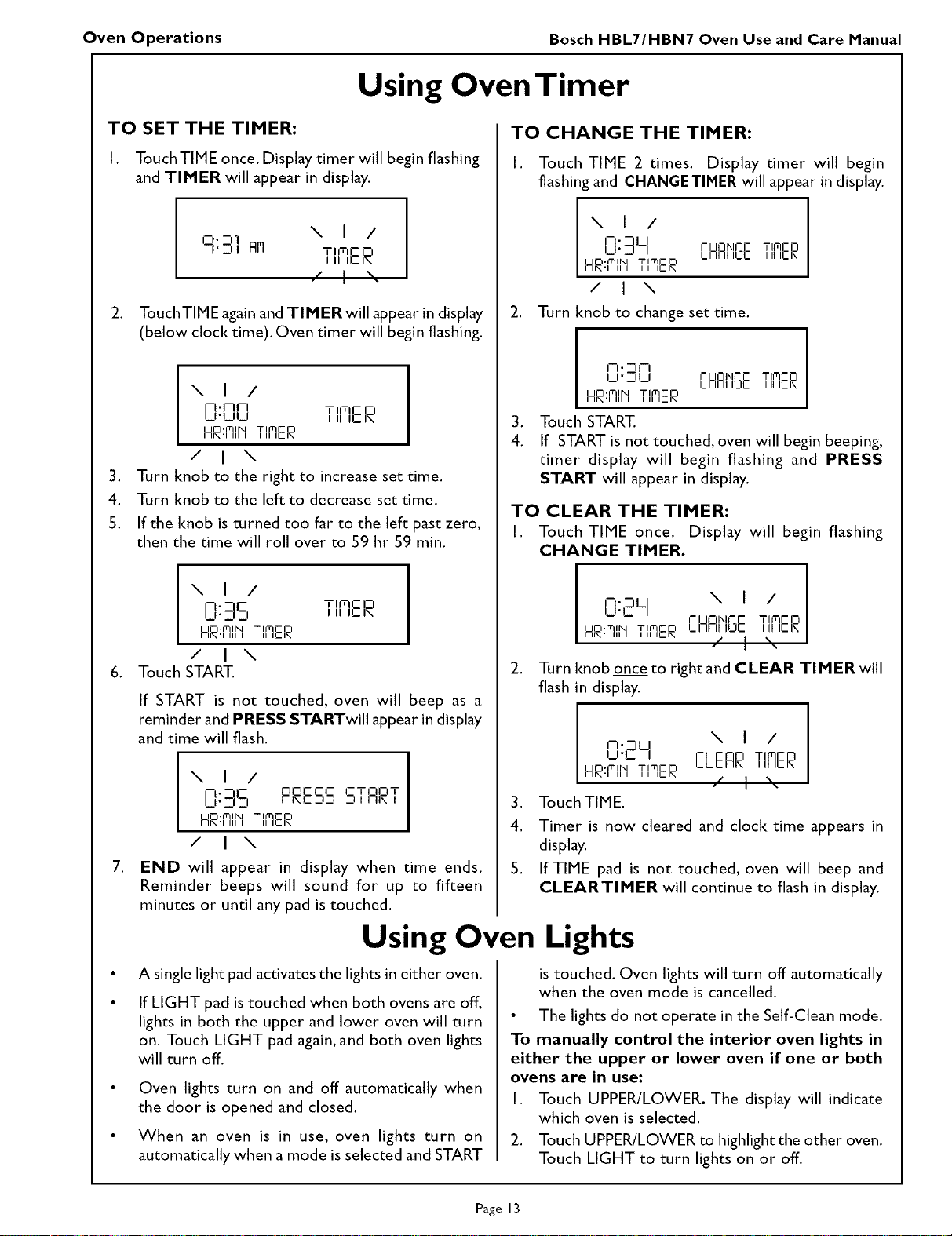
TO SET THE TIMER:
I. Touch TIME once. Display timer will begin flashing
and TIMER will appear in display.
.
\ I /
i]- -i 1
I';11 FI_I TIITIE O
Ill ILK
/ I %-
TouchTIME again and TIMER will appear in display
(below clock time). Oven timer will begin flashing.
,
4.
5.
\ I /
-- •I--II--I TIITIE El
--'-- J I II ILK
He:flll_l TlfflER
/ I \
Turn knob to the right to increase set time.
Turn knob to the left to decrease set time.
If the knob is turned too far to the left past zero,
then the time will roll over to 59 hr 59 min.
,
\ I /
I--I" _--IE
U'_ D
HR:mlIMTIMER
/ I \
Touch START.
T IITIE O
III IEI\
If START is not touched, oven will beep as a
reminder and PRESS STARTwill appear in display
and time will flash.
\ I /
0:35 PRESSSTfiRT
HR:FIII_ITIMER
/ I \
END will appear in display when time ends.
Reminder beeps will sound for up to fifteen
minutes or until any pad is touched.
TO CHANGE THE TIMER:
I. Touch TIME 2 times. Display timer will begin
flashing and CHANGETIMER will appear in display.
\ I /
-" -ILI
_._ I- UOI\IC F TII'-IE O
Cnnl ICIC Ill ICl\
He:FIII'I TIFIEe
/ I \
Turn knob to change set time,
,
4.
i-. EIJ-i
_1"_ _1 I-UOIXICF TII'-IEO
LI IFII ILJlZ III IEIX
HR:flll"l TI FI IlrrlCe
Touch START.
If START is not touched, oven will begin beeping,
timer display will begin flashing and PRESS
START will appear in display.
TO CLEAR THE TIMER:
I. Touch TIME once. Display will begin flashing
CHANGE TIMER.
I
-'-IU \ I / I
_ "C I-IJOI\ll-C TIFqCN
Il l_C_ I_11FII IL]IZ III IEIRHR:fllr'l TI F
2. Turn knob onceto rightand CLEAR TIMERwill
flash in display.
\ I /
I-.DU
_I'L 71 cNn TII'QCN
I_ L E J-II_ III ICI_
HR:flll"l TI FI Ilff[C e
3. Touch TIME.
4.
S,
Timer is now cleared and clock time appears in
display.
If TIME pad is not touched, oven will beep and
CLEARTIMER will continue to flash in display.
Using Oven Lights
A single light pad activates the lights in either oven.
If LIGHT pad istouched when both ovens are off,
lights in both the upper and lower oven will turn
on. Touch LIGHT pad again, and both oven lights
will turn off.
Oven lights turn on and off automatically when
the door is opened and closed.
When an oven is in use, oven lights turn on
automatically when a mode is selected and START
is touched. Oven lights will turn off automatically
when the oven mode is cancelled.
• The lights do not operate in the Self-Clean mode.
To manually control the interior oven lights in
either the upper or lower oven if one or both
ovens are in use:
I. Touch UPPER/LOWER. The display will indicate
which oven is selected.
2.. Touch UPPER/LOWER to highlightthe other oven.
Touch LIGHT to turn lights on or off.
Page 13
Oven Operations Bosch HBL7/HBM7 Oven Use and Care Manual
Selecting the Oven Mode
The following oven modes will appear inthe display 5.
when COOKING MODE istouched and the knob
is turned: 6.
BRISE
BROIL 7
COMI)ECTIOMBAISE
COMI)ECTIOMBROIL 8.
COMI)ECTIOMROAST
CLEAM
WARFIIMG
FAST PREHEAT BAKE
FAST PREHEAT [OMPEET BAIZE
9.
DEHYDRATE l0
SABBATH (optional)
• When the oven is operating, the selected cooking
mode will be displayed.
• The oven temperature will appear in the dispaly. I I.
TO SETA COOKING MODE:
I. For double ovens, touch UPPER/LOWER to select
the upper oven or lower oven.The selected oven
will be highlighted in the display. 12.
2. Touch COOKING MODE.
3. The last mode used will flash in the display.The
default temperature for that mode will also be 13.
displayed.
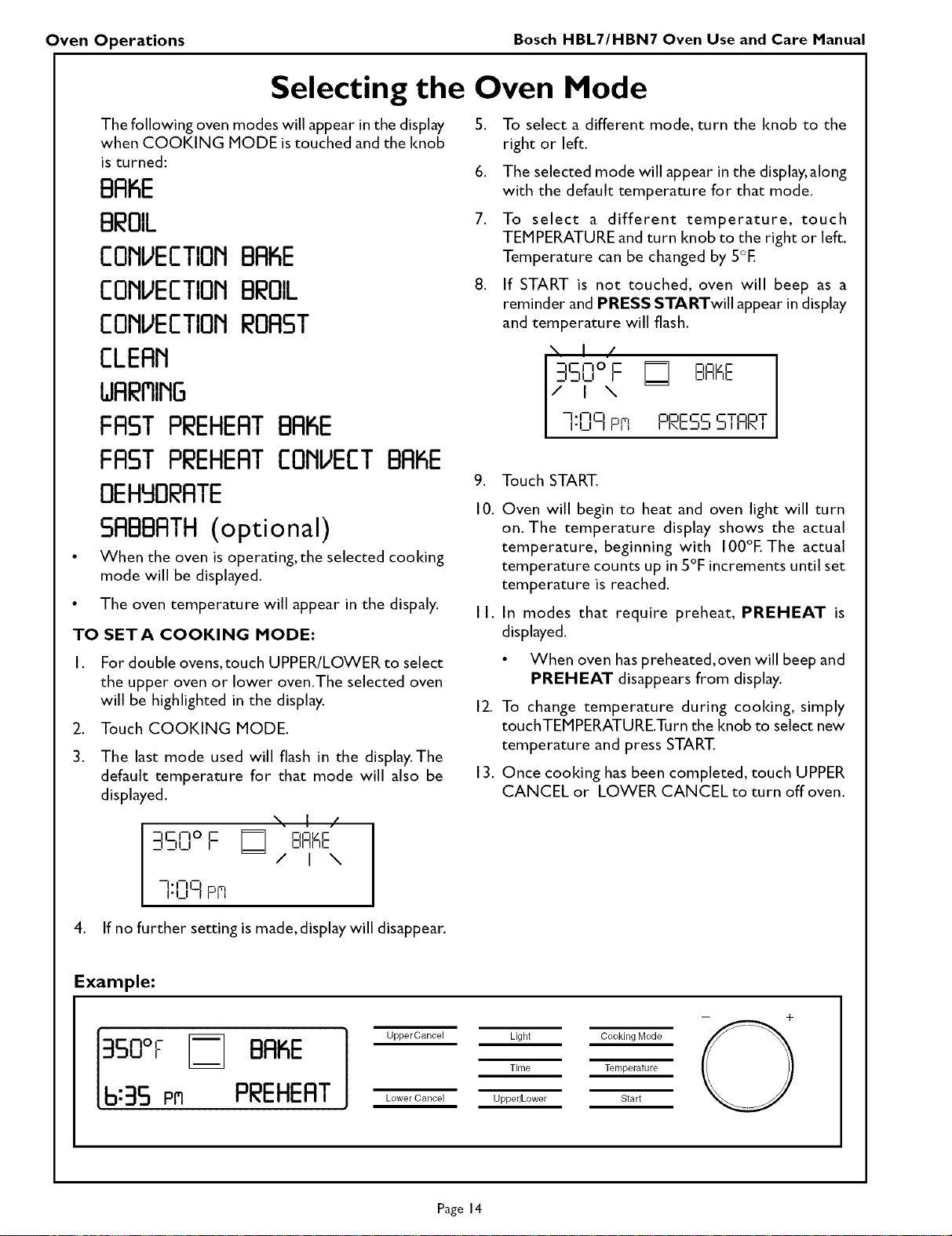
\. I /
_qSFloF BRaE
/ I \
To select a different mode, turn the knob to the
right or left.
The selected mode will appear in the display,along
with the default temperature for that mode.
To select a different temperature, touch
TEMPERATURE and turn knob to the right or left.
Temperature can be changed by 5°E
If START is not touched, oven will beep as a
reminder and PRESS STARTwill appear in display
and temperature will flash.
\ I /
-,F_noC £RI_E
iD_iJ
-- "J--0 C ¢q t_TOOT
] ]._, p,, ooccc
I INE_I_I _ I I I1\ I
Touch START.
Oven will begin to heat and oven light will turn
on. The temperature display shows the actual
temperature, beginning with 100°E The actual
temperature counts up in 5°F increments until set
temperature is reached.
In modes that require preheat, PREHEAT is
displayed.
• When oven haspreheated, oven will beep and
PREHEAT disappears from display.
To change temperature during cooldng, simply
touchTEMPERATURETurn the knob to select new
temperature and press START.
Once cooking has been completed, touch UPPER
CANCEL or LOWER CANCEL to turn off oven.
]:lZlq pfi
4. If no further setting is made, display will disappear.
Example:
3S0°F BAKE
6:35 Prl PREHEAT
Upper Cancel Light Cooking Mode
Time Temperature
Lower Cancel Upper/Lower Start
Page 14
Oven Operations Bosch HBL7/HBM7 Oven Use and Care Manual
Time Oven Mode Operation
• In double oven models, both ovens can be set
independently to operate a timed mode.
• Be sure that the time-of-day clock is displaying the
correct time.
• The timed mode turns off the oven at the end of
the cool< time.
TO SET TIMED MODE:
,
,
Use knob to enter the time of day the oven will
stop cooking or turn off.
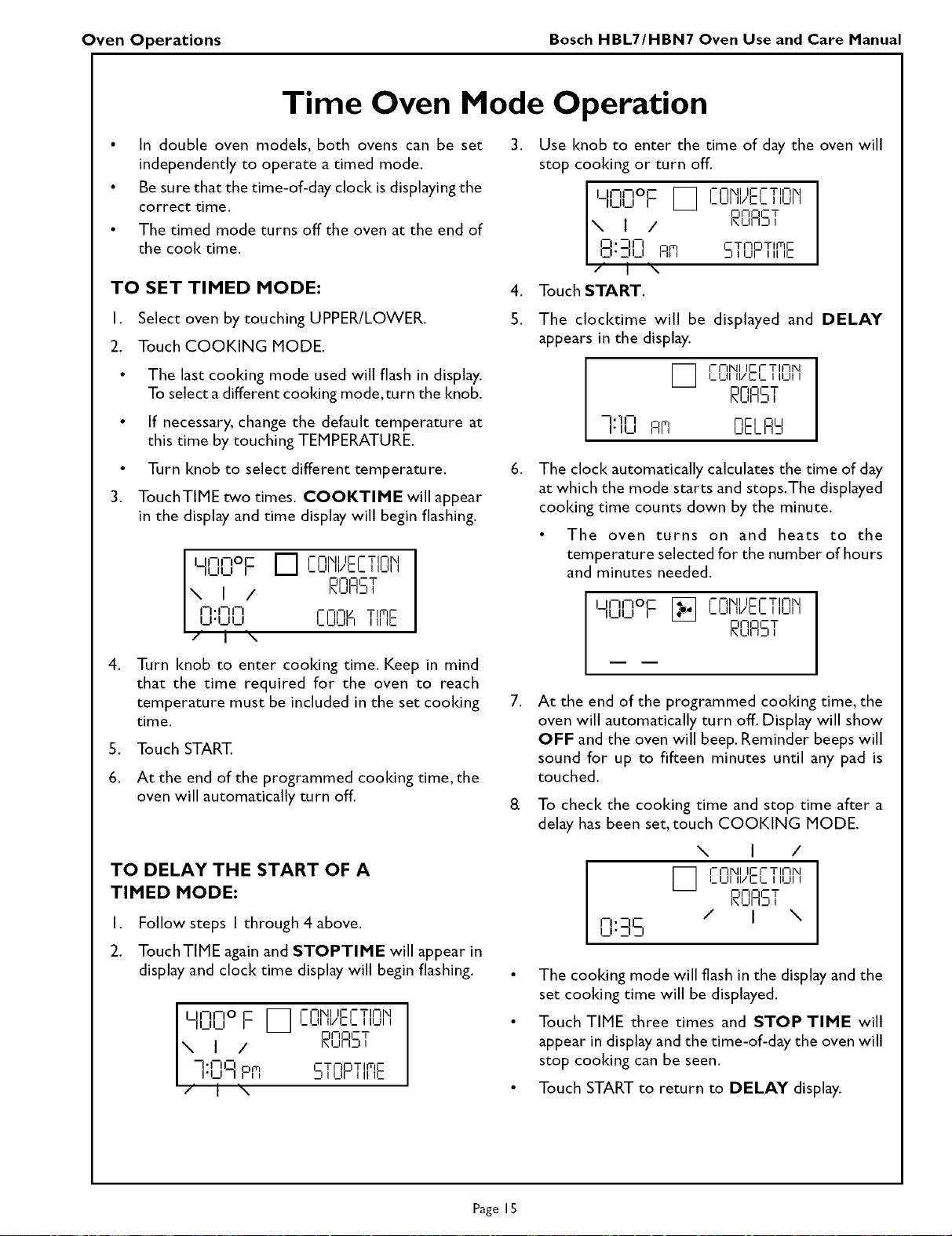
UNPlO c _ I-I-INI IEI-TINIXI
I_l_ll II/CI_ I IUI I
Iblbl I I I F- I-I1- CT
_IjHj J
\ 1 /
O'-I-I _ _Flail_
Ii.,--,L,Am c,TOnT'mE
/ I x
Touch START.
I. Select oven by touching UPPER/LOWER. 5.
2. Touch COOKING MODE.
• The last cooldng mode used will flash in display.
To select adifferent cooking mode,turn the knob.
• If necessary, change the default temperature at
this time by touching TEMPERATURE.
• Turn knob to select different temperature. 6.
3. TouchTIME two times. COOKTIME will appear
in the display and time display will begin flashing.
,
S,
6.
U -IF oE
F7
FnNI I[- [- Tlnlkl
LUI II/EL I IUI I
II_II_II _ ,
oONCT
\ I / I\UILI
rl iI-II- I- NFIE T IITIE
I ,.,.,_,L,, I_l_lUllIIIIE
/ I \
Turn knob to enter cooking time. Keep in mind
that the time required for the oven to reach
temperature must be included in the set cooking
time.
Touch START.
At the end of the programmed cooking time, the
oven will automatically turn off.
TO DELAY THE START OF A
TIMED MODE:
I. Follow steps I through 4 above.
2. TouchTIME again and STOPTIME will appear in
display and clock time display will begin flashing.
U-l-O I- _ I-NNI IEI-TININI
I I I_I_11II/EI_ III_III
II_II_I r
DNOCT
hI_II l_J I
IX I I
I
--" PII--I m
I I-LI-IPI, C T I-IO T II,-tE
_11 I_IF I II IC
/ I I\
The clocl<dme will be displayed and DELAY
appears in the display.
[_ I-NNI I[-I-TINN
I_1_1111/Cl_ I ILII I
_NOCT
I_11 I.._7I
1"I-I nEl ou
"11_1 A m UELI I_I
The clock automatically calculates the time of day
at which the mode starts and stops.The displayed
cooking time counts down by the minute.
• The oven turns on and heats to the
temperature selected for the number of hours
and minutes needed.
iqrlqo F 1-17,XIIIEI-TINN
I_I_IIII/CI_ I ILIII
FII-IOCT
UII_I I
At the end of the programmed cooking time, the
oven will automatically turn off. Display will show
OFF and the oven will beep. Reminder beeps will
sound for up to fifteen minutes until any pad is
touched.
To check the cooking time and stop time after a
delay has been set, touch COOKING MODE.
I-.-!E
_r_ ZJ
\ I /
I_ I-NI\IIIEI-TINI\I
I_I_llIIIEI_ I IUI I
F II-IOCT
I_111_11
/ I \
The cooking mode will flash in the display and the
set cooking time will be displayed.
Touch TIME three times and STOP TIME will
appear in display and the rime-of-day the oven will
stop cooking can be seen.
Touch START to return to DELAY display.
Page 15
Oven Operations Bosch HBL7/HBN7 Oven Use and Care Manual
Bake Tips and Techniques
Baiting is cooldng with heated air. Both upper and
lower elements in the oven are used to heat the air but
no fan is used to circulate the heat.
Follow the recipe or convenience food directions for
baiting temperature, time and rack position. Baking
time will vary with the temperature of ingredients and
the size, shape and finish of the baking utensil.
• Check for doneness at the minimum time.
• Use metal bakeware (with or without a nonstick
finish), heatproof glass, glass-ceramic, pottery or
other utensils suitable for the oven.
• When using heatproof glass, reduce temperature
by 25°F from recommended temperature.
General Guidelines
• For best results, bake food on a single rack with at
least I" space between utensils and oven walls.
• Use a maximum of two racks when selecting the
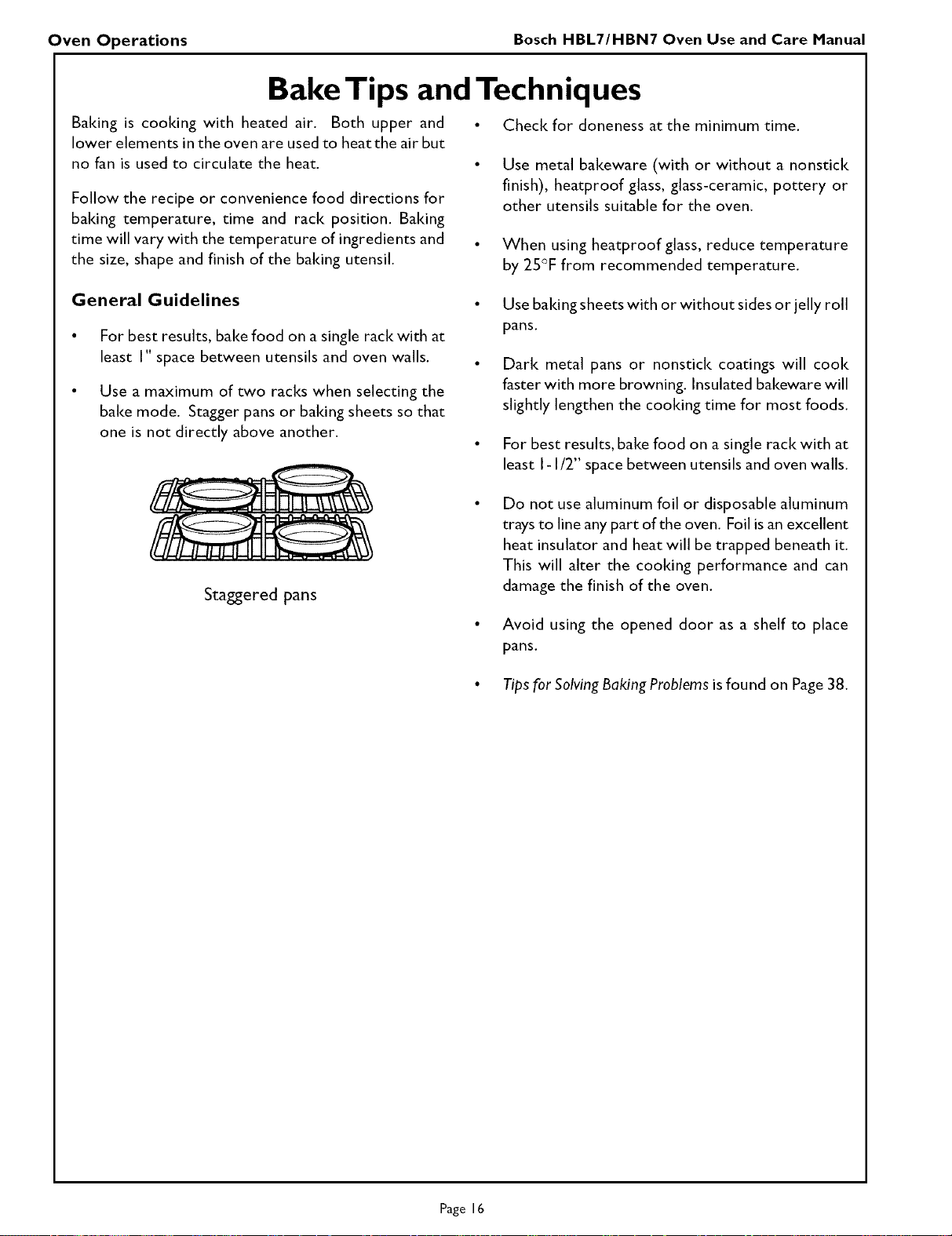
bake mode. Stagger pans or baiting sheets so that
one is not directly above another.
• Use baking sheets with or without sides or jelly roll
pans.
• Dark metal pans or nonstick coatings will cook
faster with more browning. Insulated bakeware will
slightly lengthen the cooking time for most foods.
• For best results, bake food on a single rack with at
least I-I/2" space between utensils and oven walls.
Staggered pans
Do not use aluminum foil or disposable aluminum
trays to line any part of the oven. Foil isan excellent
heat insulator and heat will be trapped beneath it.
This will alter the cooking performance and can
damage the finish of the oven.
• Avoid using the opened door as a shelf to place
pans.
• Tips for SolvingBaking Problems is found on Page 38.
Page 16
Oven Operations Bosch HBL7/HBN7 Oven Use and Care Manual
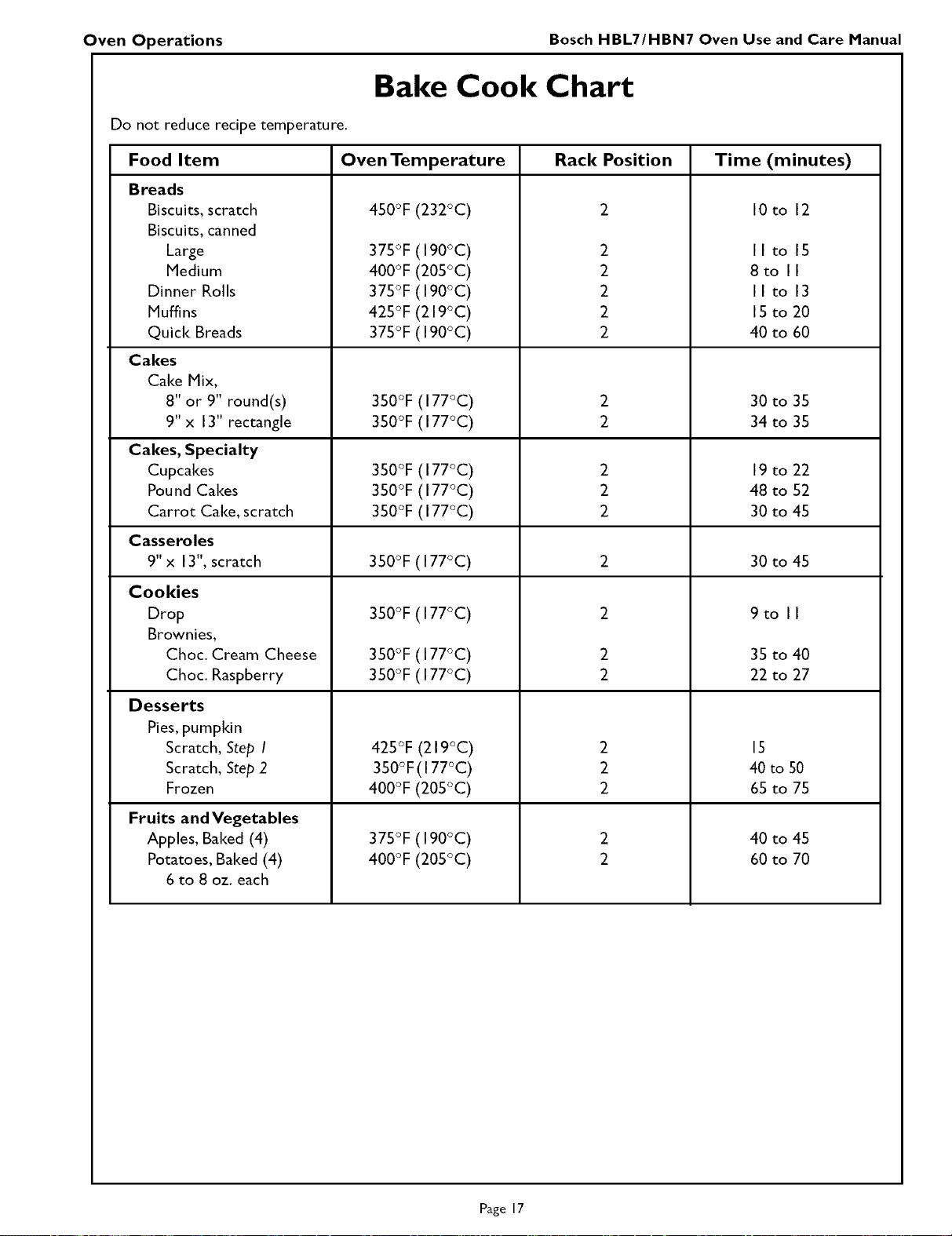
Bake Cook Chart
Do not reduce recipe temperature.
Food Item Oven Temperature Rack Position Time (minutes)
Breads
Biscuits, scratch
Biscuits, canned
Large
Medium
Dinner Rolls
Muffins
Quick Breads
Cakes
Cake Mix,
8" or 9" round(s)
9" x 13" rectangle
Cakes, Specialty
Cupcakes
Pound Cakes
Carrot Cake, scratch
450°F (232°C)
375°F (190°C)
400°F (205°C)
375°F (190°C)
425°F (219°C)
375°F (190°C)
3SO°F(177°C)
350°F(177°C)
3SO°F(177°C)
350°F(177°C)
3SO°F(177°C)
2
2
2
2
2
2
2
2
2
2
IOto 12
Ilto 15
8to II
Ilto 13
15 to 20
40 to 60
30 to 35
34 to 35
19 to 22
48 to 52
30 to 45
Casseroles
9"x 13", scratch 3SO°F(177°C) 2 30 to 45
Cookies
Drop
Brownies,
Choc. Cream Cheese
Choc. Raspberry
Desserts
Pies, pumpldn
Scratch, Step I
Scratch, Step 2
Frozen
2
2
2
2
2
2
2
350°F(177°C)
350°F(177°C)
350°F(177°C)
425°F (219°C)
350°F(I 77°C)
400°F (205°C)
375°F(190°C)
400°F(205°C)
Fruits and Vegetables
Apples, Baked (4)
Potatoes, Baked (4)
6 to 8 oz. each
9to II
35 to 40
22 to 27
15
40 to 50
65 to 75
40 to 45
60 to 70
Page 17
Oven Operations Bosch HBL7/HBN7 Oven Use and Care Manual
Convection Bake Tips and Techniques
Reduce recipe baiting temperatures by 25°E
For best results, foods should be cooked
uncovered, in low-sided pans to take advantage of
the forced air circulation. Use shiny aluminum pans
for best results unless otherwise specified
Heatproof glass or ceramic can be used. Reduce
temperature by another 25°F when using
heatproof glass dishes for a total reduction of 50°E
Dark metal pans may be used.Note that food may
brown faster when using dark metal bakeware.
The number of racks used is determined by the
height of the food to be cooked.
Baited items, for the most part, cook extremely
well in convection. Don't try to convert recipes
such as custards, quiches, pumpkin pie, or
cheesecakes, which do not benefit from the
convection-heating process. Use the regular Bake
mode for these foods.
Multiple rack cooldng for oven meals is done on
rack positions I, 2 and 3.All four racks can be
used for cooldes, biscuits and appetizers.
Converting your own recipe can be easy.Choose
a recipe that will work well in convection.
Reduce the temperature and cooldng time if
necessary. It may take some trial and error to
achieve a perfect result. Keep track of your
technique for the next time you want to prepare
the recipe using convection.
Tips for Solving Baiting Problems are found on Page
38.
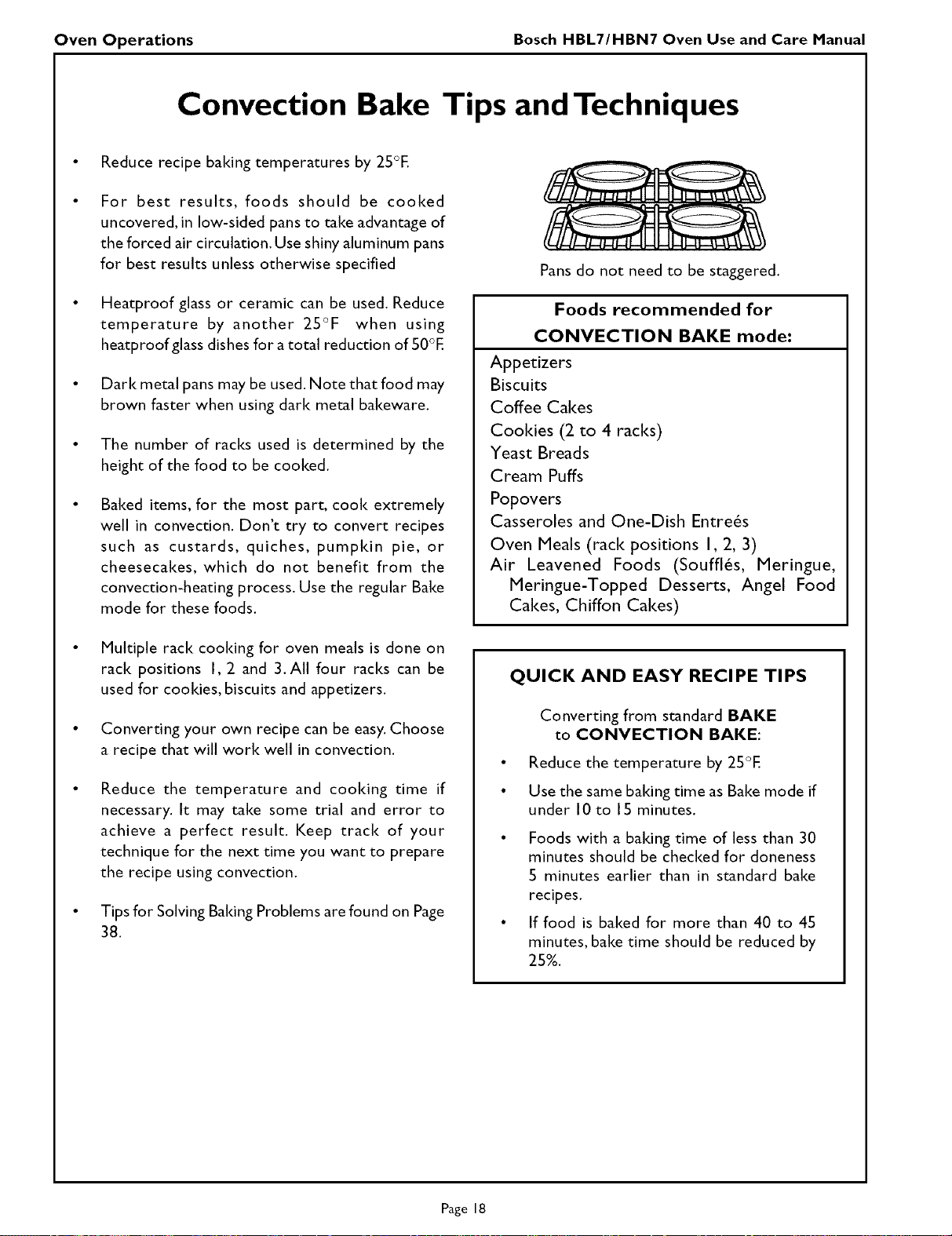
Pans do not need to be staggered.
Foods recommended for
CONVECTION BAKE mode:
Appetizers
Biscuits
Coffee Cakes
Cooldes (2 to 4 racks)
Yeast Breads
Cream Puffs
Popovers
Casseroles and One-Dish Entre6s
Oven Meals (rack positions I, 2, 3)
Air Leavened Foods (Souffl6s, Meringue,
Meringue-Topped Desserts, Angel Food
Cakes, Chiffon Cakes)
QUICK AND EASY RECIPE TIPS
Converting from standard BAKE
to CONVECTION BAKE:
• Reduce the temperature by 25°E
• Use the same baiting time as Bake mode if
under 10 to 15 minutes.
• Foods with a baiting time of less than 30
minutes should be checked for doneness
5 minutes earlier than in standard bake
recipes.
• If food is baited for more than 40 to 45
minutes, bake time should be reduced by
25%.
Page 18
Oven Operations Bosch HBL7/HBN7 Oven Use and Care Manual
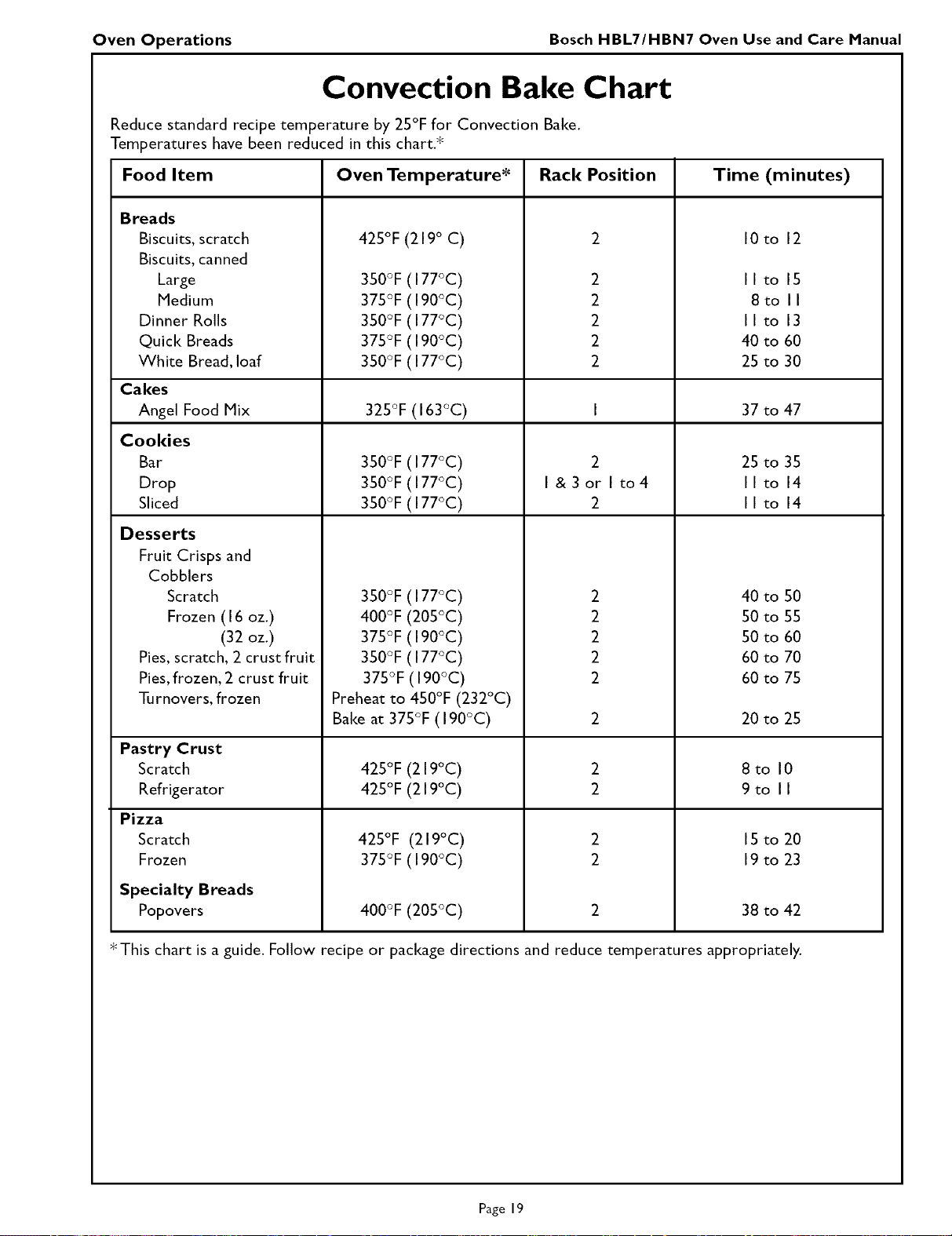
Convection Bake Chart
Reduce standard recipe temperature by 25°F for Convection Bake.
Temperatures have been reduced in this chart.*
Food Item Oven Temperature* Rack Position
Breads
Biscuits, scratch
Biscuits, canned
Large
Medium
Dinner Rolls
Quick Breads
White Bread, loaf
Cakes
Angel Food Mix
Cookies
Bar
Drop
Sliced
Desserts
Fruit Crisps and
Cobblers
Scratch
Frozen (I 6 oz.)
(32 oz.)
Pies, scratch, 2 crust fruit
Pies, frozen, 2 crust fruit
Turnovers,frozen
425°F (219 ° C)
350°F (I 77°C)
375°F (190°C)
350°F (I 77°C)
375°F (190°C)
350°F (I 77°C)
325°F (I 63°C)
3SO°F(I 77°C)
3SO°F(I 77°C)
3SO°F(I 77°C)
350°F (I 77°C)
400°F (205°C)
375°F (190°C)
350°F (I 77°C)
375°F (190°C)
Preheat to 450°F (232°C)
Bake at 375°F (190°C)
Time (minutes)
2 IOto 12
2 Ilto 15
2 8to II
2 Ilto 13
2 40 to 60
2 25 to 30
I 37 to 47
25 to 35
Ilto 14
Ilto 14
2 40 to 50
2 50 to 55
2 50 to 60
2 60 to 70
2 60 to 75
2 20 to 25
2
I &3or I to4
2
Pastry Crust
Scratch
Refrigerator
Pizza
Scratch
Frozen
Specialty Breads
Popovers
425°F (219°C)
425°F (219°C)
425°F (219°C)
375°F (190°C)
400°F (205°C)
2
2
2
2
8to 10
9to II
IS to 20
19 to 23
38 to 42
* This chart is a guide. Follow recipe or package directions and reduce temperatures appropriately.
Page 19
Oven Operations Bosch HBL7/HBN7 Oven Use and Care Manual
Convection Roast Tips and Techniques
Preheat for Convection Roast.
Roast in a low-sided, uncovered pan.
When roasting whole chickens or turkey, tuck
wings behind back and loosely tie legs with
Idtchen string.
Use the 3-piece broil pan for roasting
uncovered.
Use the probe or a meat thermometer to
determine the internal aloneness on "END"
temperature (see cooldng chart).
Double-check the internal temperature of
meat/poultry by inserting meat thermometer
into another position.
When roasting a large roast or turkey, roasting
pan may need to be rotated during roasting
time. This will allow for more even cooking.
Large birds may also need to be covered with
foil (and pan roasted) during a portion of the
roasting time to prevent over-browning.
QUICK AND EASY RECIPE TIPS
Converting from standard BAKE
to CONVECTION ROAST:
Temperature cloesnot haveto be lowered.
Roasts, large cuts of meat and poultry
generally take 10-20% less cooldng time.
Check doneness early.
Casseroles or pot roasts that are baked
covered in CONVECTION ROAST
will cool( in about the same amount of
The minimum safe temperture for stuffing in
poultry is 165°F (74°C).
After removing the item from the oven, cover
loosely with foil for 10 to 15 minutes before
carving.
While covered, roast temperatures increase by 5°
to IO°F.
Convection Roasting with the Probe
The meat probe can be used to determine the internal doneness or the "END" temperature (see cooldng
chart, Page 23).
The temperature range for the probe is 130°F to 210°F (55°C to 100°C).The probe automatic default
temperature is programmed at 170°F (77°C) but can be set for your recipe.
Preheating the oven for Convection Roast is not recommended when using the probe. A hot oven will
impair your ability to easily connect the probe to the receptacle and into the meat.
TO USE THE PROBE
I,
2.
3.
4.
Prepare meat and place in roasting pan (or on rack in roasting pan as recipe specifies). Insert the probe into
the thickest center portion of the meat.
Make sure the probe is not touching fat, bone, the roast rack or the pan.
Place roasting pan with meat in cold oven on recommended oven rack. Plug probe into the probe receptacle.
The probe symbol will appear in display.
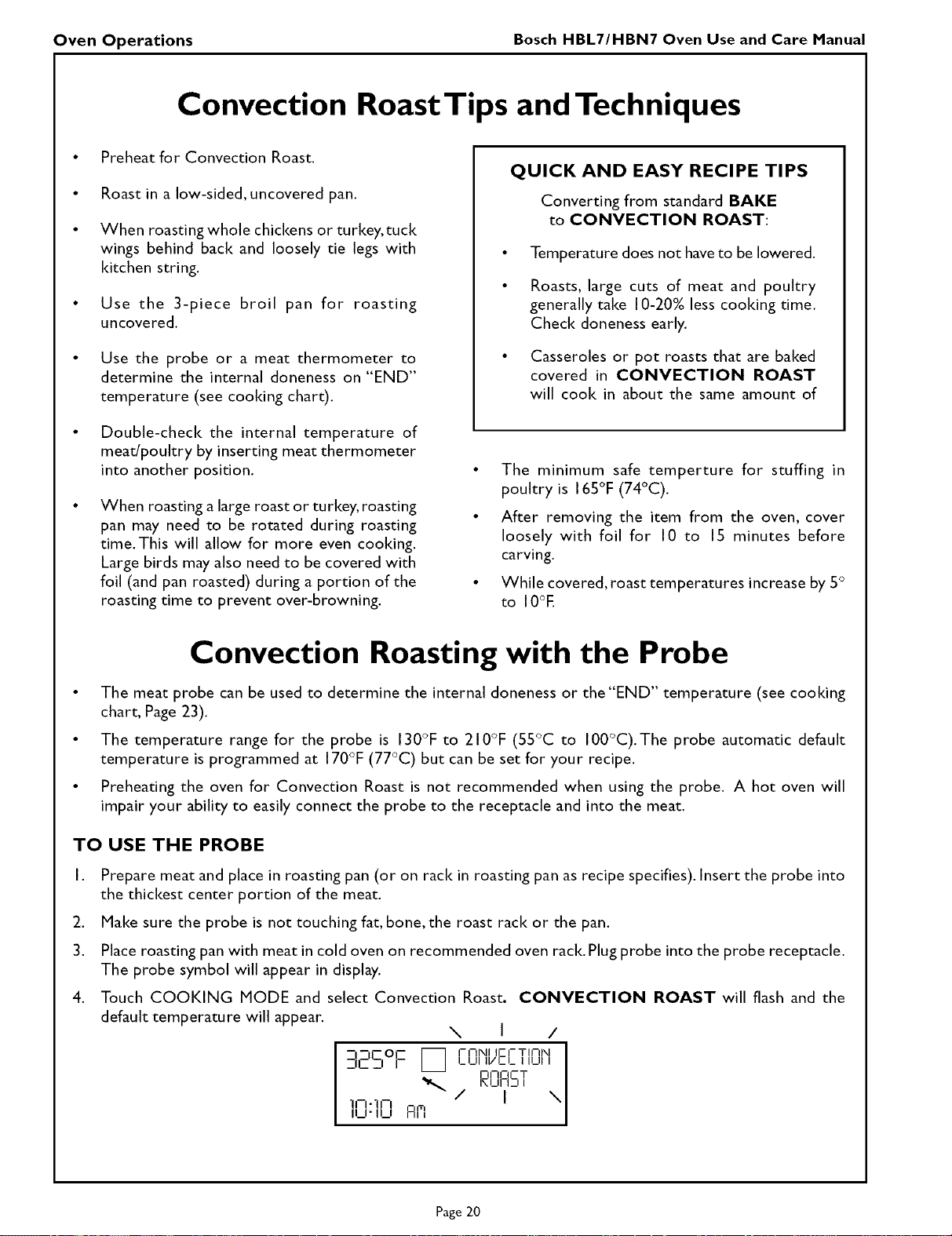
Touch COOKING MODE and select Convection Roast. CONVECTION ROAST will flash and the
default temperature will appear.
N I /
--I_ICO_ _ I-I-INI fl-I-TII-tN
_--I1_ _1 I _ I_1_11 II/CI_ I ILII I
N CT
_uF_J,
_'" / I \
"11--1-] F
.J" u_, Flffl
Page 20
Oven Operations Bosch HBL7/HBN7 Oven Use and Care Manual
Convection Roasting with the Probe, continued
,
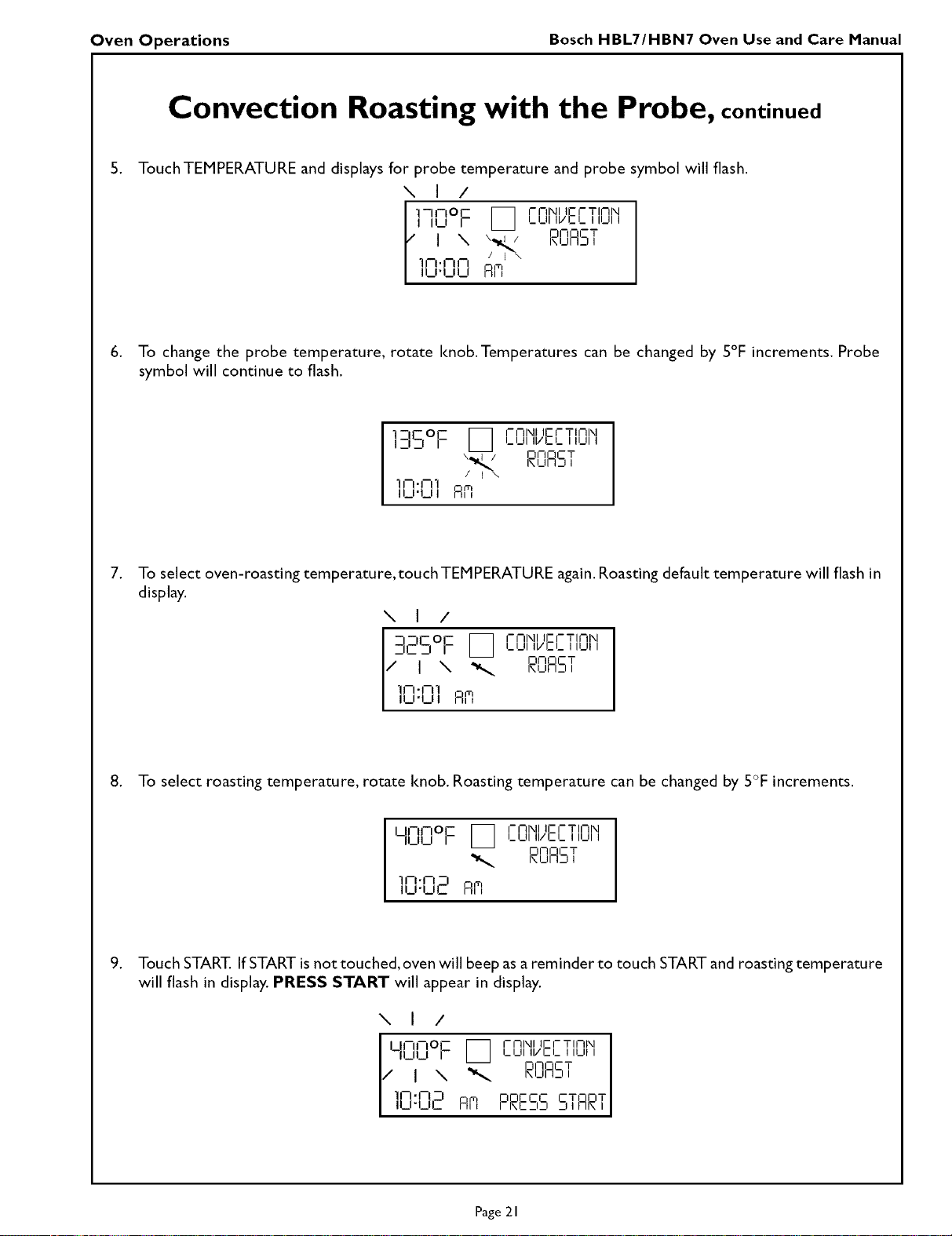
Touch TEMPERATURE and displays for probe temperature and probe symbol will flash.
\ I /
"1--11--01-- I_ I-I-II\IIIFI-TINN
I ILl r i_ i_i_11ll/Cl_ 111_111
/ I \ \ I / DNOCT
.1,_.,_,_, ;_i ,,u,,_,,
._,'uu Fire
6. To change the probe temperature, rotate knob.Temperatures can be changed by 5°F increments. Probe
symbol will continue to flash.
] --IC OI-- _ I-I-IIXII IF-I-TINIXI
I --I _1 r _ i_ i_ll ii/c L I II_ll I
\_,_/ DI-IOCT
I_ I_11I_1 I
/ I \
1-r -I 1
_._ S_
,
To select oven-roasting temperature,touch TEMPERATURE again.Roasting default temperature will flash in
display.
N I /
:IE'S°F I_ Ir-I-rlM/JEIr-TILnH
I_LII I_1 I
17-I \ _ NI-IOCT
I
"I-i-- "I m
I,,_,-L,,a,,
8. To select roasting temperature, rotate knob. Roasting temperature can be changed by 5°F increments.
U--flOE _ I-I-II\IIIEI-TINI\I
l_IJ r _ l_Ul ll/Cl_ iii_iii
DNOCT
I\UI IJ I
1A,N -I
_u.ur_ AR
,
Touch START. If START isnot touched, oven will beep asa reminder to touch START and roasting temperature
will flash in display. PRESS START will appear in display.
\ I /
U-IFOE [_ I-NI\II II-I-TINN
I_UI II/CI_ I ILII I
I1_11_1I I I m T
/ I \ _ P_,_,AS,
-in-n _ T T
U-UL Am PP_ESSS,AP_,
Page 21
Oven Operations Bosch HBL7/HBM7 Oven Use and Care Manual
Convection Roasting with the Probe, continued
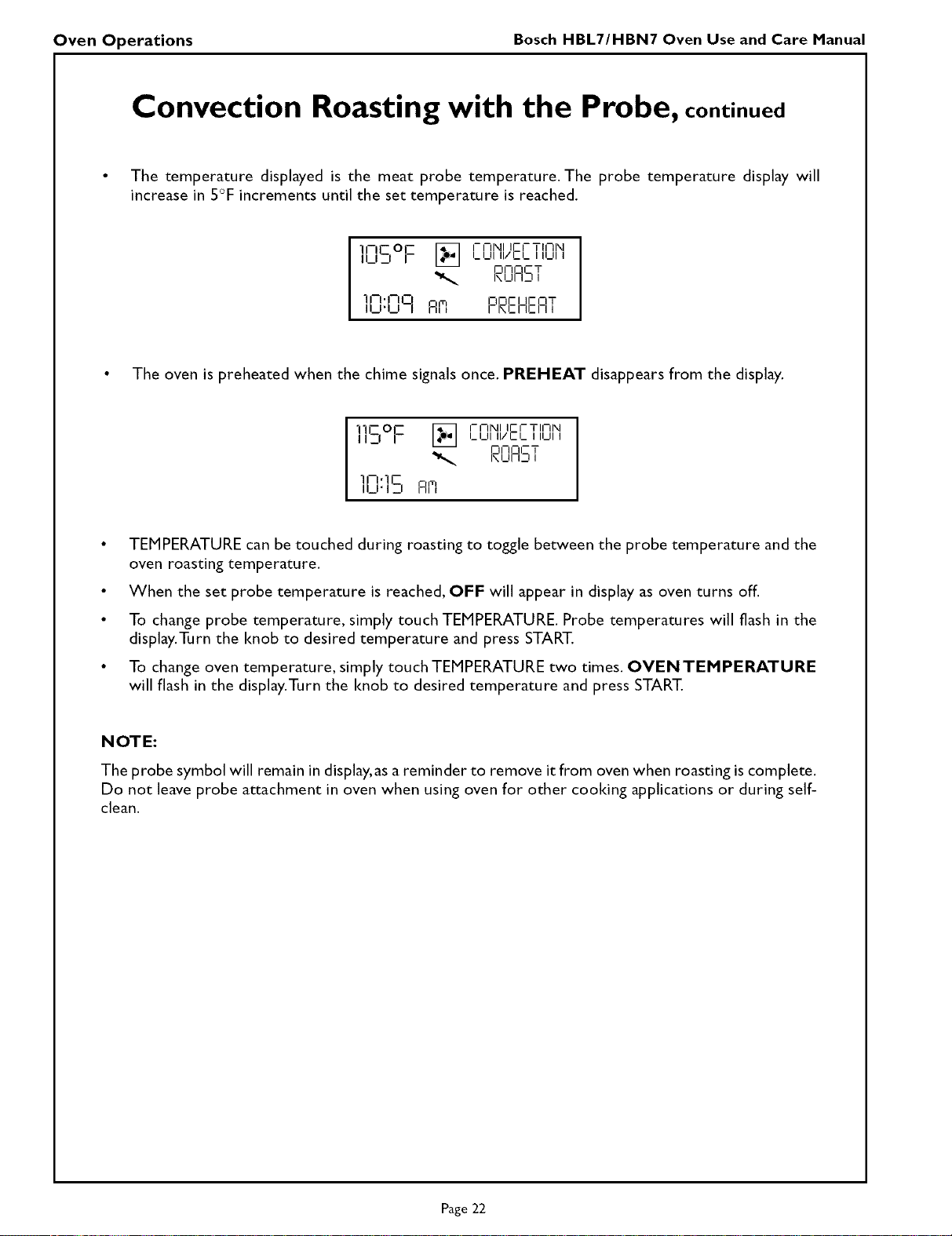
• The temperature displayed is the meat probe temperature. The probe temperature display will
increase in 5°F increments until the set temperature is reached.
11--1-- OF" _ I-Nl\ll IEI-TII-II\I
Ibl_l m _ LUI II/CI.. II1_11I
!Dr-IOCT
i\ I_ll i__qI
11- ,I-0 on_-i lEnT
I1_1"1_1 I A_ l-ROMEO I
• The oven is preheated when the chime signals once. PREHEAT disappears from the display.
111--0_ _ I-Nl\ll II-I-TINI\II_1 I LLII II/C'I_ I ILIII
N CT
li-l,ll-
iu'izI AR
• TEMPERATURE can be touched during roasting to toggle between the probe temperature and the
oven roasting temperature.
• When the set probe temperature is reached, OFF will appear in display as oven turns off.
• To change probe temperature, simply touch TEMPERATURE. Probe temperatures will flash in the
display.Turn the knob to desired temperature and press START.
• To change oven temperature, simply touch TEMPERATURE two times. OVEN TEMPERATURE
will flash in the display.Turn the knob to desired temperature and press START.
NOTE:
The probe symbol will remain in display,asa reminder to remove it from oven when roasting is complete.
Do not leave probe attachment in oven when using oven for other cooking applications or during self-
clean.
Page 22
Oven Operations
Bosch HBL7/HBN7 Oven Use and Care Manual
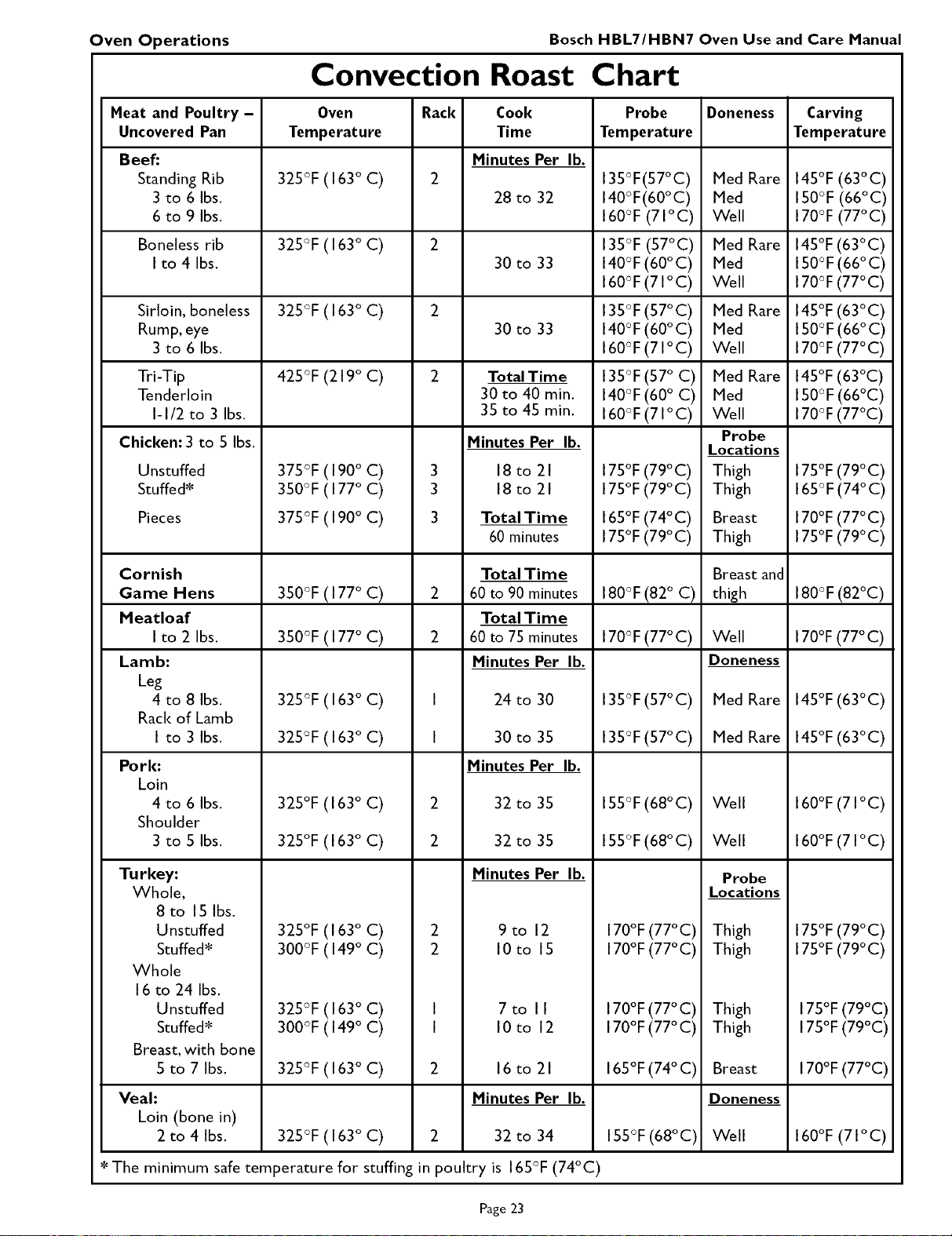
Convection Roast Chart
Meat and Poultry -
Uncovered Pan
Beef:
Standing Rib
3 to 6 Ibs.
6 to 9 Ibs.
Boneless rib
I to 4 Ibs.
Sirloin, boneless
Rump, eye
3 to 6 Ibs.
Tri-Tip
Tenderloin
I-I/2 to 3 Ibs.
Chicken: 3 to 5 Ibs.
Unstuffed
Stuffed*
Pieces
Cornish
Game Hens
Meatloaf
I to 2 Ibs.
Lamb:
Leg
4 to 8 Ibs.
Rack of Lamb
I to 3 Ibs.
Pork:
Loin
4 to 6 Ibs.
Shoulder
3 to 5 Ibs.
Turkey:
Whole,
8 to I5 Ibs.
Unstuffed
Stuffed*
Whole
16 to 24 Ibs.
Unstuffed
Stuffed*
Breast, with bone
5 to 7 Ibs.
Veal:
Loin (bone in)
2 to 4 Ibs.
Oven Rack Cook
Temperature Time
Minutes Per lb.
325°F(163 ° C) 2
28 to 32
325°F(163 ° C) 2
30 to 33
325°F(163 ° C) 2
30 to 33
425°F (219 ° C) 2 Total Time
30 to 40 min.
35 to 45 min.
Minutes Per lb.
375°F (190°C) 3 18 to 21
350°F (177°C) 3 18 to 21
375°F(190 ° C) 3 TotalTime
60 minutes
350°F(177 ° C)
350°F(177 ° C)
Total Time
2 60to90 minutes
Total Time
2 60to75 minutes
Minutes Per lb.
325°F (163°C) I 24 to 30
325°F (163°C) I 30 to 35
Minutes Per lb.
325°F (163 ° C) 2 32 to 35
325°F (163 ° C) 2 32 to 35
Minutes Per lb.
325°F (163 ° C) 2 9 to 12
300°F (149°C) 2 10 to 15
325°F (163°C) I 7 to II
300°F (149°C) I 10 to 12
325°F (163°C) 2 16 to 21
Minutes Per lb.
325°F (163°C) 2 32 to 34
* The minimum safetemperature for stuffing in poultry is 165°F (74°C)
Probe
Temperature
135°F(57°C)
140°F(60°C)
160°F(71°C)
135°F (57°C)
140°F (60°C)
160°F (71°C)
135°F (57°C)
140°F (60°C)
160°F (71°C)
135°F(57 ° C)
140°F (60° C)
160°F (71°C)
175°F(79°C)
175°F(79°C)
165°F(74°C)
175°F(79°C)
180°F (82° C)
170°F(77° C)
135°F (57°C)
135°F (57°C)
155°F (68° C)
155°F (68° C)
170°F(77°C)
170°F(77°C)
170°F(77°C)
170°F(77°C)
165°F(74° C)
155°F(68°C)
Doneness
Med Rare
Med
Well
Med Rare
Med
Well
Med Rare
Med
Well
Med Rare
Med
Well
Probe
Locations
Thigh
Thigh
Breast
Thigh
Breast and
thigh
Well
Doneness
Med Rare
Med Rare
Well
Well
Probe
Locations
Thigh
Thigh
Thigh
Thigh
Breast
Doneness
Well
Carving
Temperature
145°F(63°C)
150°F(66°C)
170°F(77°C)
145°F (63°C)
I50°F (66°C)
170°F(77°C)
145°F (63°C)
I50°F (66°C)
170°F(77°C)
145°F (63°C)
I50°F (66°C)
170°F (77°C)
175°F (79°C)
165°F(74° C)
170°F(77°C)
175°F(79°C)
180°F (82°C)
170°F(77°C)
145°F (63°C)
145°F (63°C)
160°F (71°C)
160°F (71°C)
175°F(79°C)
175°F(79°C)
175°F(79°C)
175°F(79°C)
170°F(77°C)
160°F(71°C)
Page 23
Oven Operations Bosch HBL7/HBN7 Oven Use and Care Manual
Broil Tips and Techniques
• Place rack in the required position needed before turning on the oven.
• Start broiling with a cool oven and broiler pan.There is no need to preheat oven for broiling.
• Broil with the oven door positioned at the Broil door stop (open door broiling).
• Use the three-piece broil pan for Broil.
• Brush fish and lean cuts of meat with vegetable oil before broiling to prevent sticking.
• Start broiling poultry with sldn side down.
• Turn food after one half of total cooldng time. Thicker cuts of meat or poultry can be turned more often.
• Slotted top racks on broiler pan let fat drip away,reducing spattering and smoking.
• When top-browning casseroles, use only metal or glass-ceramic (Pyroceram TM) such as Corningware ®
bakeware.
• Never use heat-proof glass (Pyrexware ®) pottery; they cannot tolerate the high temperatures.
• Refer to Page 14for setting Broil mode.
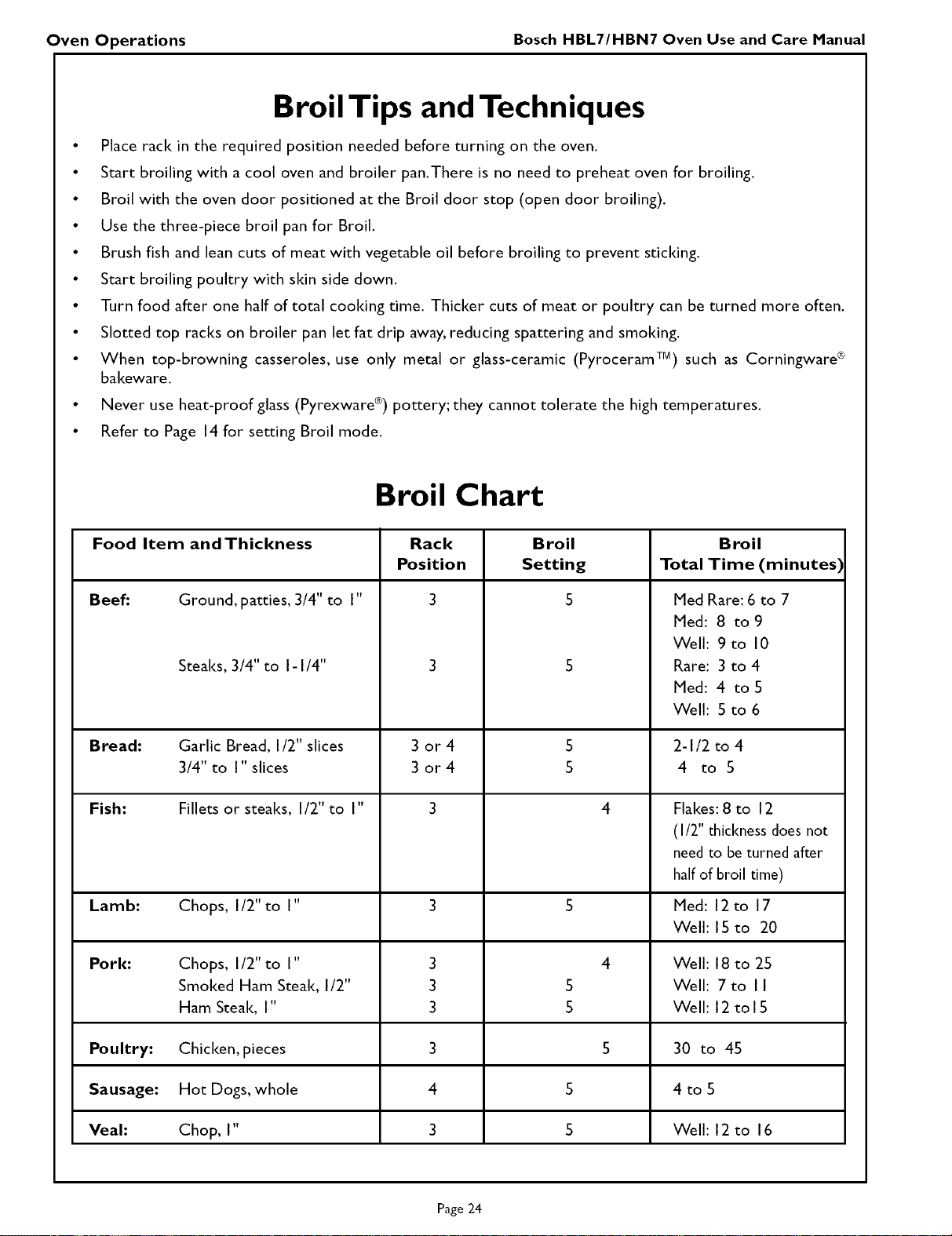
Broil Chart
Food Item and Thickness Rack Broil Broil
Position Setting Total Time (minutes)
Beef: Ground, patties, 3/4" to I" 3 S
Steal<s, 3/4" to I-I/4"
Med Rare: 6 to 7
Med: 8 to 9
Well: 9to 10
Rare: 3 to 4
Med: 4 to 5
Well: 5 to 6
Bread: Garlic Bread, I/2" slices 3 or 4 5 2-I/2 to 4
3/4" to I" slices 3 or 4 5 4 to 5
Fish: Fillets or steal<s, I/2" to I" 3 4 Flakes: 8 to 12
(I/2" thickness does not
need to beturned after
halfof broil time)
Lamb: Chops, I/2"to I" 3 S Med: 12to 17
Well: 15 to 20
Pork: Chops, I/2" to I" 3 4 Well: 18 to 25
Smoked Ham Steal<,I/2" 3 5 Well: 7 to I I
Ham Steal<, I" 3 5 Well: 12 to 15
Poultry: Chicken, pieces 3 5 30 to 45
Sausage: Hot Dogs, whole 4 5 4 to 5
Veal: Chop, I" 3 S Well: 12 to 16
Page 24
Oven Operations Bosch HBL7/HBM7 Oven Use and Care Manual
Convection Broil
• Place rack in the required position needed before turning on the oven.
• Use Convection Broil mode with the oven door closed (closed door broiling).
• Oven can be preheated for Convection Broil.
• Use the 3-piece broil pan for Convection Broil.
• Meats may be brushed with cooking oil to prevent sticking.
• Thicker cuts of meat will cool< in less time when using Convection Broil rather than in standard Broil.
• Refer to Page 14for setting Convection Broil mode.
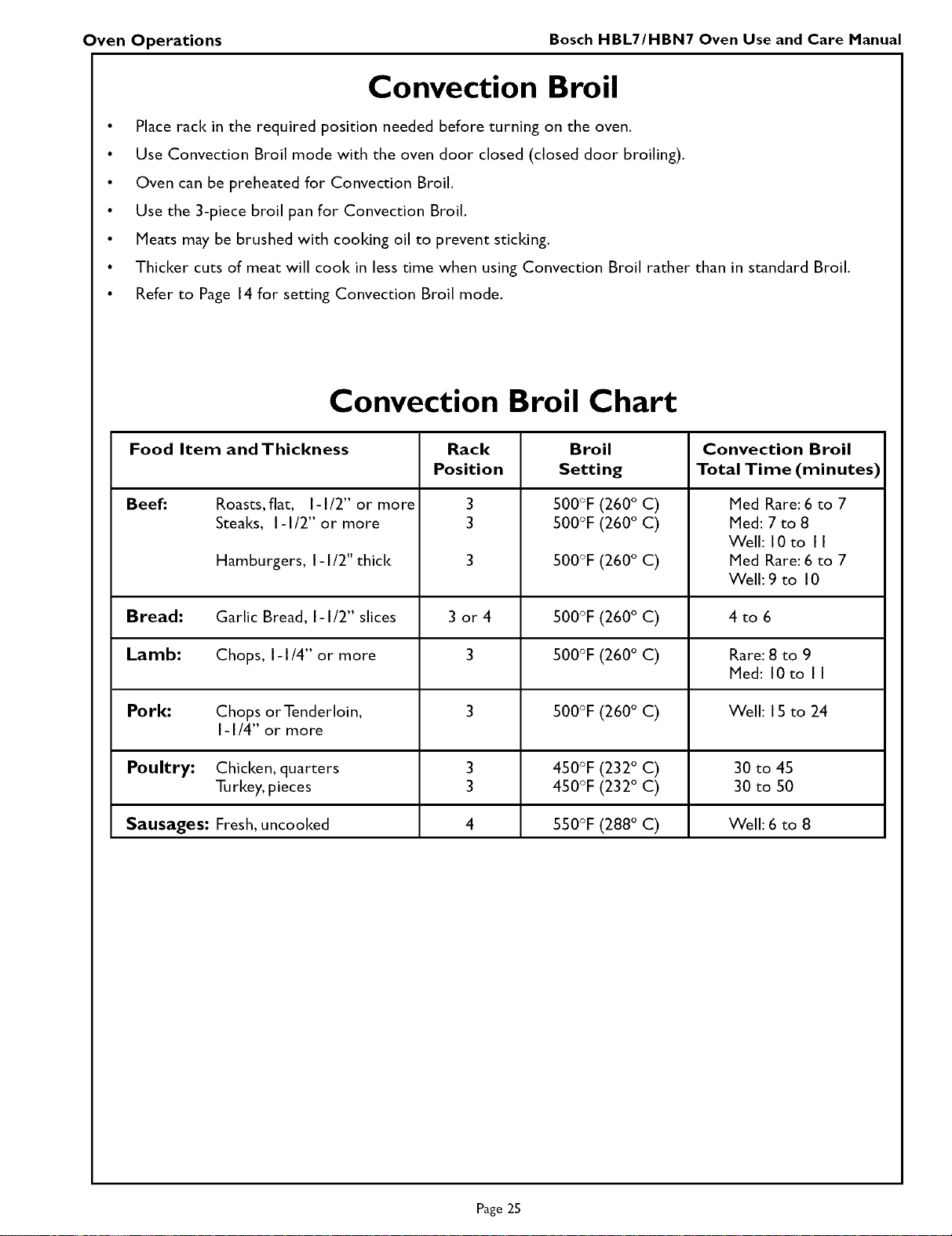
Convection Broil Chart
Food Item and Thickness Rack Broil Convection Broil
Position Setting Total Time (minutes)
Beef." 3
3
Roasts, flat, I-I/2" or more
Steal<s, I-I/2" or more
Hamburgers, I-I/2" thicl<
SO0°F(260° C)
SO0°F(260° C)
500°F (260 ° C)
Med Rare: 6 to 7
Med: 7 to 8
Well: I0 to I I
Med Rare: 6 to 7
Welh9 to 10
Bread: Garlic Bread, I-I/2" slices 3 or 4 500°F (260 ° C) 4 to 6
Lamb: Chops, I- I/4" or more 3 500°F (260 ° C) Rare: 8 to 9
Med: 10to II
Pork: Chops or Tenderloin, 3 500°F (260 ° C) Well: 15 to 24
I-I/4" or more
Poultry: Chicken, quarters 3 450°F (232 ° C) 30 to 45
Turkey, pieces 3 450°F (232 ° C) 30 to 50
Sausages: Fresh, uncooked 4 550°F (288 ° C) Well: 6 to 8
Page 25
Oven Operations Bosch HBL7/HBM7 Oven Use and Care Manual
Dehydrate Tips and Techniques
• Dehydrating can be done using the Dehydrate mode. A lower temperature is used and the circulating
heated air slowly removes the moisture for food preservation.
• The Dehydrate mode temperature is preprogrammed at 140°F (60°C).
• The Dehydrate mode temperatures available are 120°F (49°C) to 160°F (7 I°C).
• Multiple racks can be used simultaneously.
• Some foods require as much as 14-15 hours of time to fully dehydrate.
• Consult a food preservation book for specific times and the handling of various foods.
• This mode is suitable for a variety of fruits, vegetables, herbs and meat strips.
• Drying screens can be purchased at specialty kitchen shops.
• By using paper towels, some food moisture can be absorbed before dehydrating begins (such as with
sliced tomatoes or sliced peaches).
Warming Tips and Techniques
• Call on your oven Warming mode to keep foods hot until you are ready to serve them.
• TheWarming mode default temperature is preprogrammed at 170°F (75°C).
• Warming mode temperatures available are 100°F to 210°F (38°C to 99°C).
• Recommended safe temperatures for keeping foods hot are between 140°F and 210°F (66°C to 99°C).
Use the chart below as a guide.
• Foods needing to be kept moist should be covered with a lid or aluminum foil.
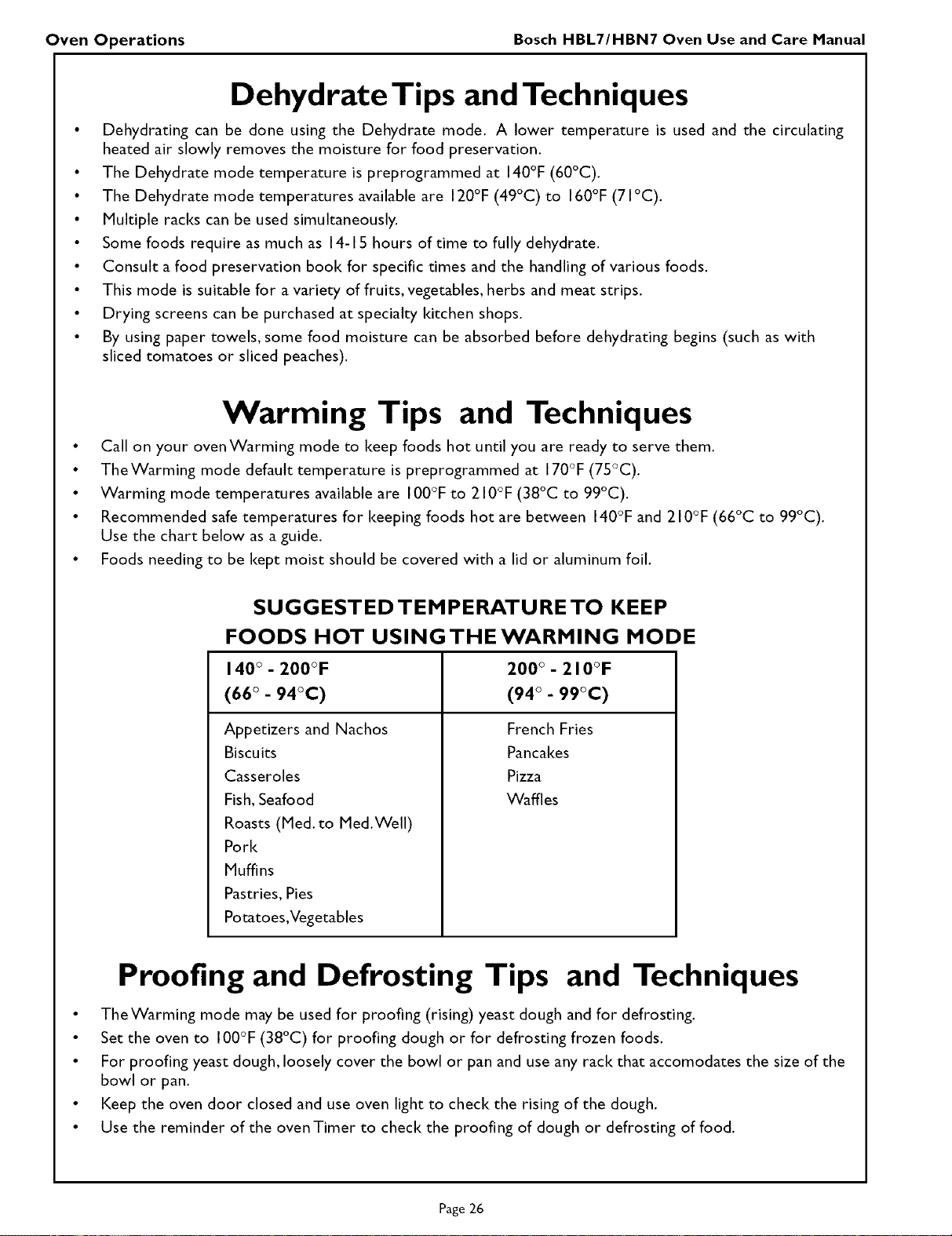
SUGGESTED TEMPERATURE TO KEEP
FOODS HOT USING THE WARMING MODE
140 ° - 200°F 200 ° - 210°F
(66 ° - 94°C) (94 ° - 99°C)
Appetizers and Nachos French Fries
Biscuits Pancakes
Casseroles Pizza
Fish, Seafood Waffles
Roasts (Med. to Med.Well)
Pork
Muffins
Pastries, Pies
Potatoes,Vegetables
Proofing and Defrosting Tips and Techniques
• TheWarming mode may be used for proofing (rising) yeast dough and for defrosting.
• Set the oven to 100°F (38°C) for proofing dough or for defrosting frozen foods.
• For proofing yeast dough, loosely cover the bowl or pan and use any rack that accomodates the size of the
bowl or pan.
• Keep the oven door closed and use oven light to check the rising of the dough.
• Use the reminder of the oven Timer to check the proofing of dough or defrosting of food.
Page 26
S )ecial Features Bosch HBL7/HBN7 Oven Use and Care Manual
Special Features
The Special Features function can be used to select the following 10 special oven features:
I. LOCK KEYS (Child Lockout)
2. SABBATH MODE (for religious faiths with "no work" requirements on the Sabbath)
3. OVEN OFFSET I (upper oven - used to calibrate the oven temperature)
4. OVEN OFFSET 2 (lower oven - used to calibrate the oven temperature)
5. LANGUAGE (select English, Spanish, or French)
6. ° SELECT UNITS (switch temperature scale to Fahrenheit or Centigrade)
7. CLOCK FORMAT (12 hr or 24 hr)
8. BEEPVOLUME (decrease or increase loudness of oven beeps)
9. VIEW CLOCK (yes or no)
I0. DEFAULT DATA (change all feature settings back to original factory settings)
To select special features, follow the steps below:
a. Touch and hold COOKING MODE for 3 seconds.
b. Clock time disappears and display screen clears.
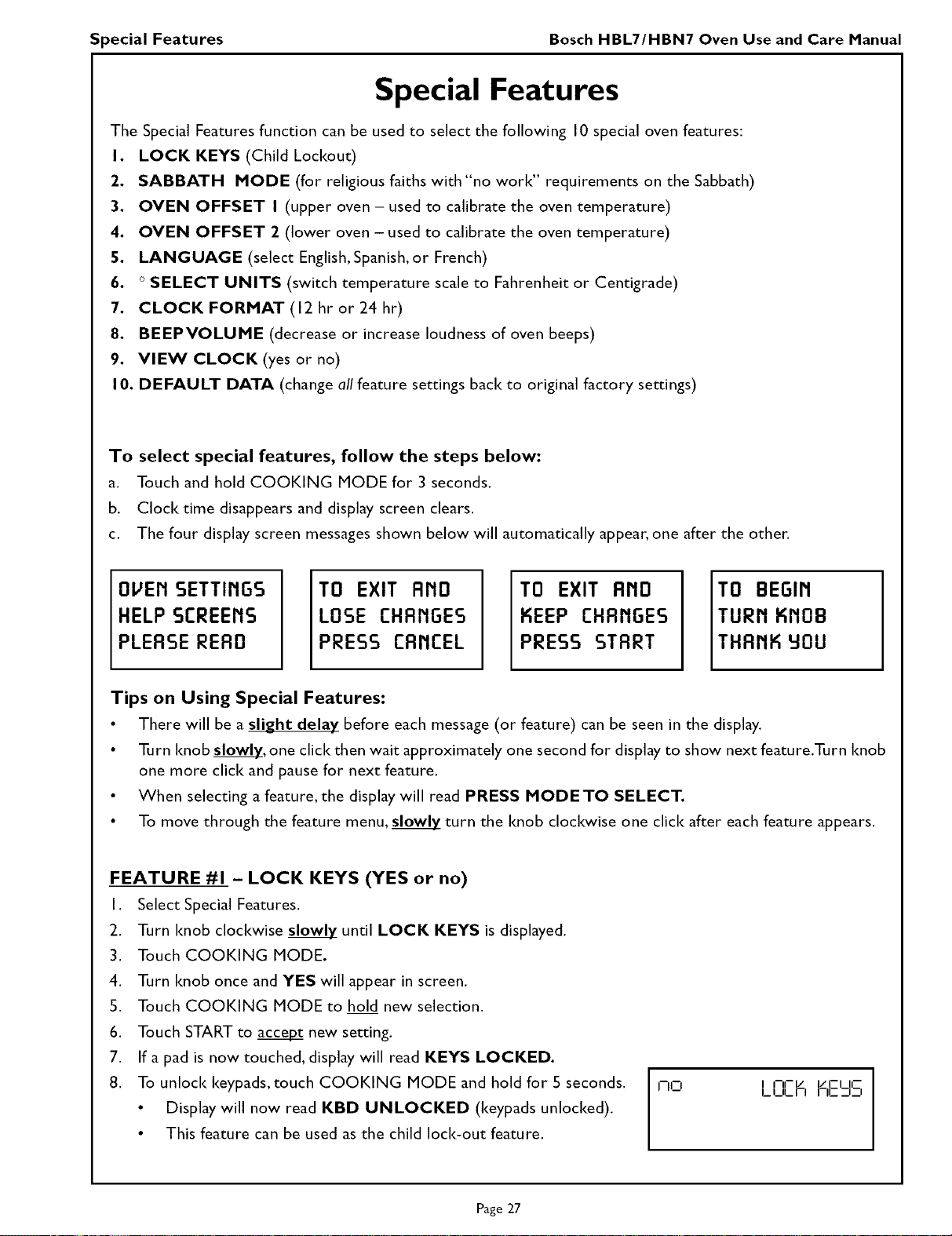
c. The four display screen messages shown below will automatically appear, one after the other.
OVEri SETTIriGS
HELP SCREEriS
PLERSE RERO
TO EXIT Arid
LOSE CHRriGES
PRESS CRMCEL
TO EXIT RriO
KEEP CHRriGES
PRESS STRRT
TO BEGIri
TURN KriOB
THRriK 90U
Tips on Using Special Features:
• There will be a slight delay before each message (or feature) can be seen in the display.
• Turn knob slowl_£,one click then wait approximately one second for display to show next feature.Turn knob
one more click and pause for next feature.
• When selecting a feature, the display will read PRESS MODE TO SELECT.
• To move through the feature menu, _ turn the knob clockwise one click after each feature appears.
FEATURE #1 - LOCK KEYS (YES or no)
I. Select Special Features.
2. Turn knob clockwise slowl_ until LOCK KEYS is displayed.
3. Touch COOKING MODE.
4. Turn knob once and YES will appear in screen.
5. Touch COOKING MODE to hold new selection.
6. Touch START to accept new setting.
7. If a pad is now touched, display will read KEYS LOCKED.
8. To unlock keypads, touch COOKING MODE and hold for 5 seconds.
• Display will now read KBD UNLOCKED (keypads unlocked).
• This feature can be used as the child lock-out feature.
I'-ICI I I-II-L__ I/CI II--
LI_ILI I I--II-- ;lII
Page 27
Special Features Bosch HBL7/HBN7 Oven Use and Care Manual
Special Features, continued
FEATURE #2 - SABBATH MODE (YES or no)
I. Select Special Features.
2. Turn knob clockwise slowly until SABBATH MODE is displayed.
3. Touch COOKING MODE.
4. Turn knob once and YES will appear in screen.
5. Touch COOKING MODE to hold new selection.
6. Touch START to accept Sabbath mode.
• Sabbath mode uses only the Bake mode (no convection or broil modes can be used; no timed bake or probe
mode can be used).
WHEN SABBATH MODE FEATURE HAS BEEN SET ANDYOUWlSHTO USETHE MODE
I. Touch COOKING MODE.
2. Turn knob until SABBATH appears in display.
3. Touch TEMPERATURE if a different temperature is needed and turn knob to select temperature.
4. Touch START and oven will begin operating in the Sabbath mode.
• Oven lights will remain on or off as previously set, even if the door is open or closed.
• PREHEAT will not show in display.
• All pads, except the UPPER CANCEL or LOWER CANCEL, will be inactive.
• No beep signal is generated.
• Oven will remain on indefinitely until UPPER CANCEL or LOWER CANCEL is touched.
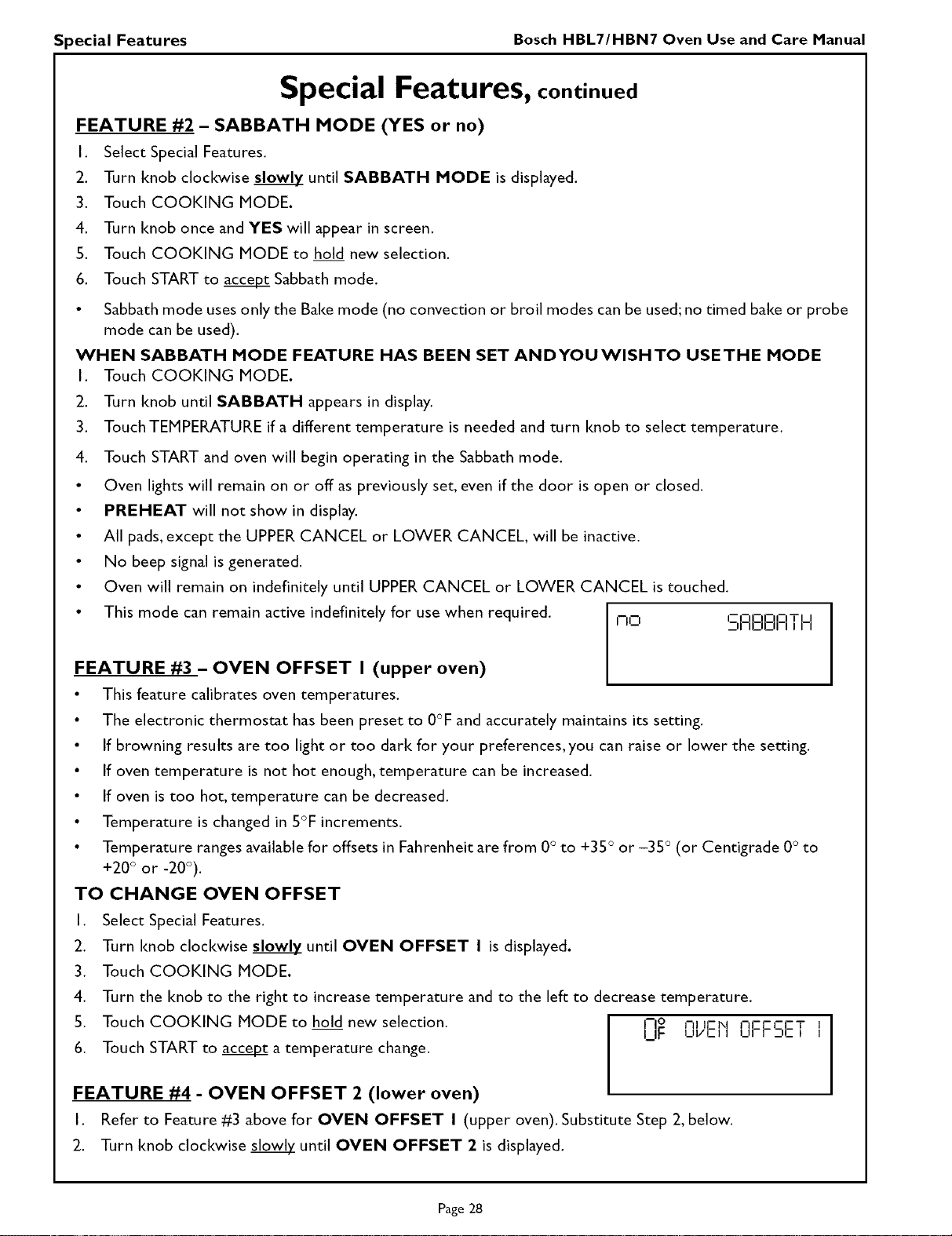
• This mode can remain active indefinitely for use when required. I-IO I--I:IOOI--ITI_I
--II IEIEII--I I I I
FEATURE #3 - OVEN OFFSET I (upper oven)
• This feature calibrates oven temperatures.
• The electronic thermostat has been preset to 0°F and accurately maintains its setting.
• If browning results are too light or too dark for your preferences, you can raise or lower the setting.
• If oven temperature is not hot enough, temperature can be increased.
• If oven is too hot, temperature can be decreased.
• Temperature is changed in 5°F increments.
• Temperature ranges available for offsets in Fahrenheit are from 0° to +35 ° or -35 ° (or Centigrade 0° to
+20° or -20°).
TO CHANGE OVEN OFFSET
I. Select Special Features.
2. Turn knob clockwise slowly until OVEN OFFSET I is displayed.
3. Touch COOKING MODE.
4. Turn the knob to the right to increase temperature and to the left to decrease temperature.
5. Touch COOKING MODE to hold new selection. I-I£ nl IrN nrrN-T
UI- LN/CII UFFDCI I
6. Touch START to accept_a temperature change.
FEATURE #4 - OVEN OFFSET 2 (lower oven)
I. Refer to Feature #3 above for OVEN OFFSET I (upper oven). Substitute Step 2, below.
2. Turn knob clockwise slowl_ until OVEN OFFSET 2 is displayed.
Page 28
Special Features Bosch HBL7/HBN7 Oven Use and Care Manual
Special Features, continued
FEATURE #5 - LANGUAGE
• Language choices are English (EnG), Spanish (ESP), and French (FrA).
• When first installed, ENGLISH appears in the display.
TO CHANGE THE LANGUAGE
I. Select Special Features.
2. Turn knob clockwise slowlz until LANGUAGE is displayed.
3. Touch COOKING MODE.
4. Turn knob clockwise to select a different language
5. Touch COOKING MODE to hold new selection.
6. Touch START to accept_a language change.
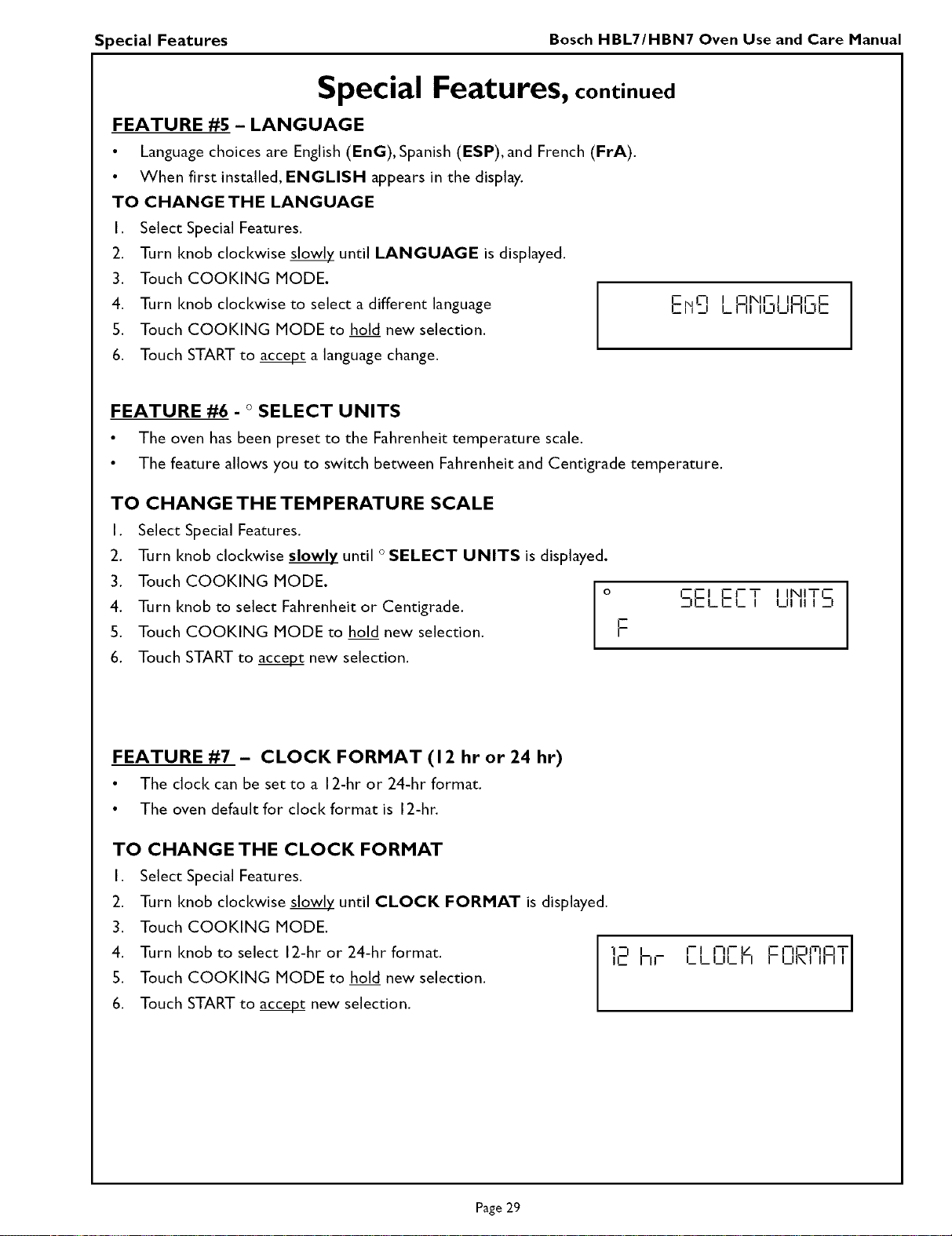
I
ENL--! riNlr c!r_.
i__, LFI ZIu .312
FEATURE #6 - ° SELECT UNITS
• The oven has been preset to the Fahrenheit temperature scale.
• The feature allows you to switch between Fahrenheit and Centigrade temperature.
TO CHANGE THE TEMPERATURE SCALE
I,
2.
3.
4.
5.
6.
Select Special Features.
Turn knob clockwise slowly until ° SELECT UNITS is displayed.
Touch COOKING MODE.
o
Turn knob to select Fahrenheit or Centigrade.
Touch COOKING MODE to hold new selection.
Touch START to accep_ new selection.
F
rE CF
:,E,_E_T XIITI-
I
FEATURE #7 - CLOCK FORMAT (12 hr or 24 hr)
• The clock can be set to a 12-hr or 24-hr format.
• The oven default for clock format is 12-hr.
TO CHANGE THE CLOCK FORMAT
I. Select Special Features.
2. Turn knob clockwise slowl_ until CLOCK FORMAT is displayed.
3. Touch COOKING MODE.
4. Turn knob to select 12-hr or 24-hr format.
5. Touch COOKING MODE to hold new selection.
6. Touch START to acce_ new selection.
],E'hr I- - - IL _11_ I_ L U _ I F'-o,m,o T
Page 29
Special Features Bosch HBL7/HBN7 Oven Use and Care Manual
Special Features, continued
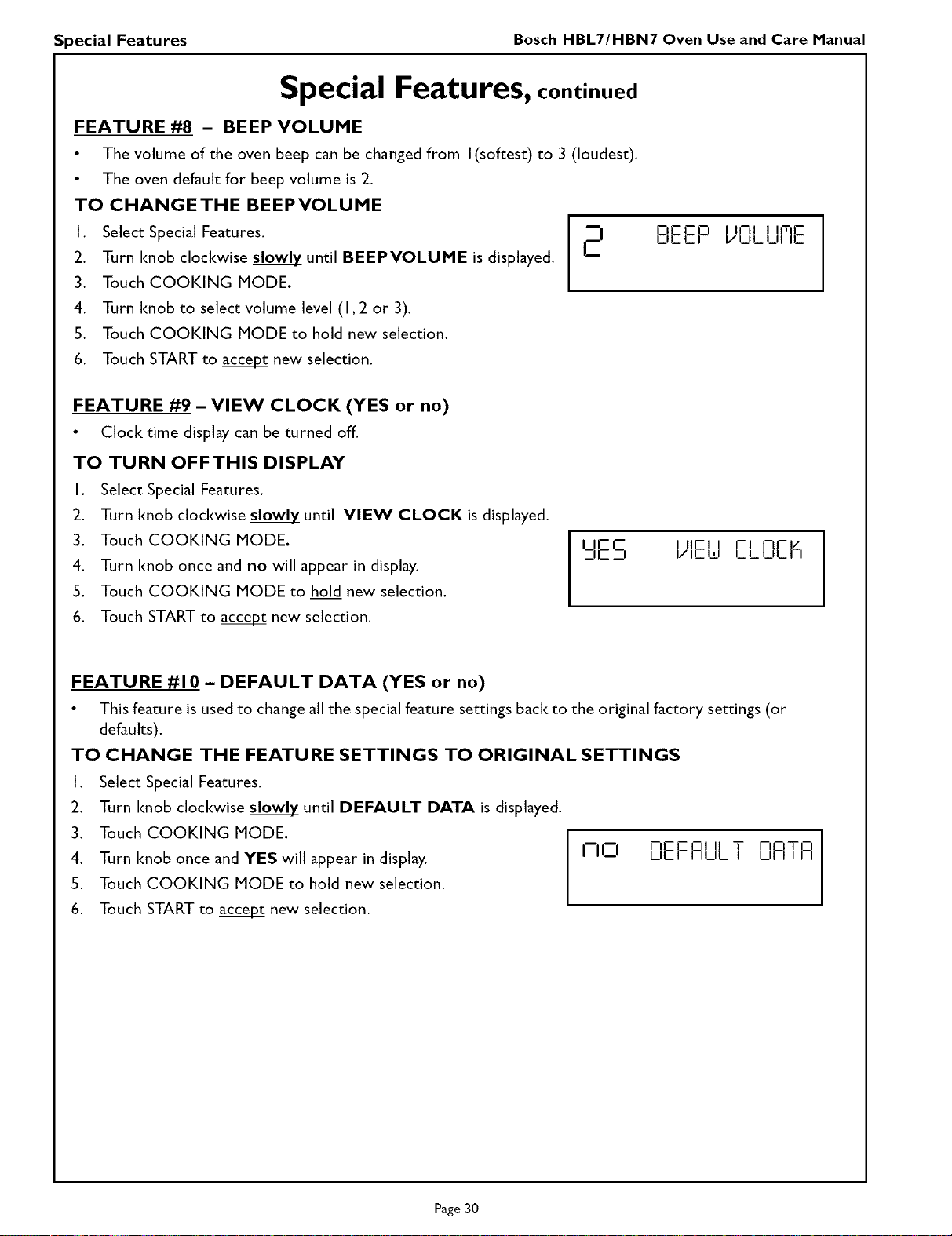
FEATURE #8 - BEEP VOLUME
• The volume of the oven beep can be changed from I(softest) to 3 (loudest).
• The oven default for beep volume is 2.
TO CHANGETHE BEEPVOLUME
I
I. Select Special Features. I
I
2. Turn knob clockwise slowly until BEEPVOLUME is displayed.
3. Touch COOKING MODE.
4. Turn knob to select volume level (I, 2 or 3).
5. Touch COOKING MODE to hold new selection.
6. Touch START to accepZ new selection.
FIE.El / _L _ O
l EIIZE IZI I1-1 IT E
FEATURE #9 - VIEW CLOCK (YES or no)
• Clock time display can be turned off.
TO TURN OFFTHIS DISPLAY
I. Select Special Features.
2. Turn knob clockwise slowly until VIEW CLOCK is displayed.
3. Touch COOKING MODE.
4. Turn knob once and no will appear in display.
5. Touch COOKING MODE to hold new selection.
6. Touch START to acce_ new selection.
,,E,- I/,c,_,l,_L__,_IE --I IIF_I I-- I-IF ]_/
FEATURE #10 - DEFAULT DATA (YES or no)
• This feature is used to change all the special feature settings back to the original factory settings (or
defaults).
TO CHANGE THE FEATURE SETTINGS TO ORIGINAL SETTINGS
I. Select Special Features.
2. Turn knob clockwise slowly until DEFAULT DATA is displayed.
3. Touch COOKING MODE.
4. Turn knob once and YES will appear in display.
5. Touch COOKING MODE to hold new selection.
6. Touch START to accept new selection.
no EIEF°_LT
nOTrl I
LII I I FI
Page 30
Care and Cleaning Bosch HBL7/HBN7 Oven Use and Care Manual
Oven Care and Cleaning
SELF-CLEANING THE OVEN
Bosch ovens feature a pyrolytic self-cleaning function that eliminates the difficult and time consuming manual
scrubbing of the oven interior. During self-cleaning, the oven uses a very high temperature (approx. 885°F) to
burn away food soil and grease.
• Only one oven at a time can be set to Self-Clean.
• It is common to see smoke and/or an occasional flame-up during the Self-Clean cycle, depending on the
content and amount of soil remaining in the oven. If a flame persists, turn off the oven and allow it to cool
before opening the door to wipe up the excessive food soil.
• The door latch is automatically activated after selecting the Self-Clean cycle. The door lock symbol will
appear in the display. This ensures that the door cannot be opened while the oven interior is at clean
temperatures.
• The oven light does not operate during this mode.
• During Self-Clean, the Idtchen should be well ventilated to help eliminate odors associated with Self-Clean.
Odors will lessen with use.
• Three hours is the preset length of cleaning.
• The mode automatically stops at the end of the clean hours.
• When the oven heat drops to a safe temperature, the automatic door lock will release and the door can be
opened.
PREPARING THE OVEN FOR SELF-CLEAN
Remove all utensils and bakeware.I,
2. Remove oven racks. If oven racks are left in the oven during the self-clean cycle, they will permanently lose
the shiny finish and change to a dull dark finish. See Oven Cleaning Chart for proper care, Pages33 to 34.
3. Wipe up any soft soil spills and grease with paper towels. Excess grease will cause flames and smoke inside
the oven during self-cleaning.
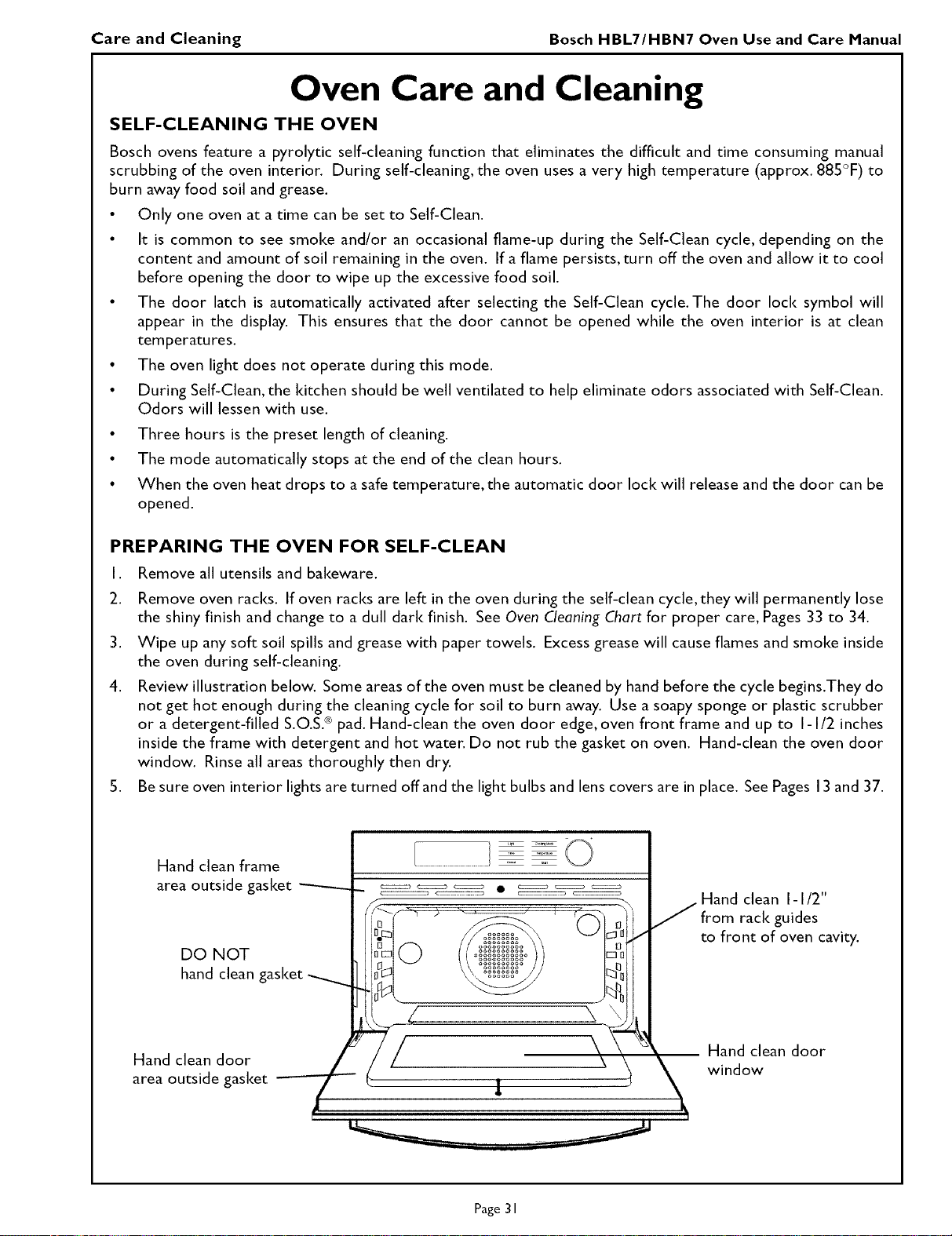
4. Review illustration below. Some areas of the oven must be cleaned by hand before the cycle begins.They do
not get hot enough during the cleaning cycle for soil to burn away. Use a soapy sponge or plastic scrubber
or a detergent-filled S.O.S.® pad. Hand-clean the oven door edge, oven front frame and up to I-I/2 inches
inside the frame with detergent and hot water. Do not rub the gasket on oven. Hand-clean the oven door
window. Rinse all areas thoroughly then dry.
5. Be sure oven interior lights are turned off and the light bulbs and lens covers are in place. See Pages 13and 37.
Hand clean frame
area outside gasket ---------
DO NOT
hand clean gasket
Hand clean door
area outside gasket --
[ LT_ _
y
Hand clean I-I/2"
from rack guides
to front of oven cavity.
_ Hand clean door
window
Page 31
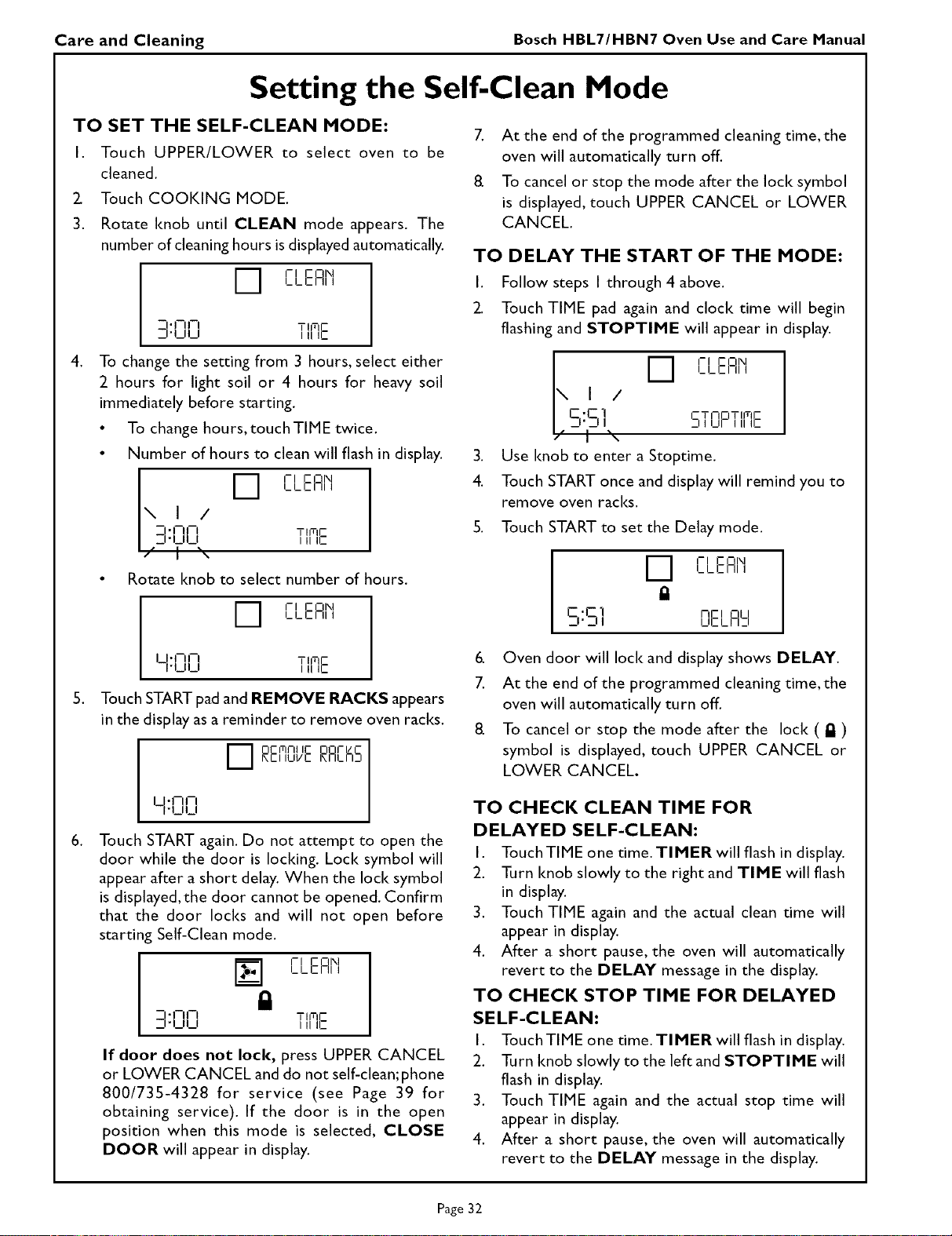
Care and Cleaning Bosch HBL7/HBN7 Oven Use and Care Manual
Setting the Self-Clean Mode
TO SET THE SELF-CLEAN MODE:
I. Touch UPPER/LOWER to select oven to be
cleaned.
Z Touch COOKING MODE.
3. Rotate knob until CLEAN mode appears. The
number of cleaning hours is displayedautomatically.
PI ENIXl
I_LCrll I
,
_!"I--II--I TIITIE
_l'l_llJ IIIIC
To change the setting from 3 hours, select either
2 hours for light soil or 4 hours for heavy soil
immediately before starting.
• To change hours, touchTIME twice.
• Number of hours to clean will flash in display.
I 0 r, EnN
I_LCFII I
\ I /
I -l-rll-i iiiit_
I,-,-uu
• Rotate knob to select number of hours.
PI EOI\I
LLr_FII I
,
U- - i-i TlfflE
• _II_ I IIIC
Touch STARTpad and REMOVE RACKS appears
in the display asa reminder to remove oven racks.
0 REI]n ERArh5
,
U.AA
l'blbl
Touch START again. Do not attempt to open the
door while the door is Iocldng. Loci< symbol will
appear after a short delay. When the lock symbol
is displayed,the door cannot be opened. Confirm
that the door locks and will not open before
starting Self-Clean mode.
-- "_1 _1
PI E rll\l
I_LCrll I
TIITIC
IIIIC
If door does not loci(, press UPPER CANCEL
or LOWER CANCEL and do not self-clean;phone
800/735-4328 for service (see Page 39 for
obtaining service). If the door is in the open
position when this mode is selected, CLOSE
DOOR will appear in display.
7. At the end of the programmed cleaning time, the
oven will automatically turn off.
8. To cancel or stop the mode after the loci< symbol
is displayed, touch UPPER CANCEL or LOWER
CANCEL.
TO DELAY THE START OF THE MODE:
I. Follow steps I through 4 above.
Z Touch TIME pad again and clock time will begin
flashing and STOPTIME will appear in display.
,
4.
I_ PI EOI\I
L L F2"_rtl i
I /
CFC_'i 5TrIOTImC
_'_l _J_r_,_c
] _\
Use knob to enter a Stoptime.
Touch START once and display will remind you to
remove oven racks.
5. Touch START to set the Delay mode.
PI E rll\l
I_LCrll I
Cq-I nol ou
_1- --I I UE L lid
6. Oven door will loci< and display shows DELAY.
7. At the end of the programmed cleaning time, the
oven will automatically turn off.
8 To cancel or stop the mode after the lock ( _ )
symbol is displayed, touch UPPER CANCEL or
LOWER CANCEL.
TO CHECK CLEAN TIME FOR
DELAYED SELF-CLEAN:
I. Touch TIME one time. TIMER will flash in display.
2. Turn knob slowly to the right and TIME will flash
in display.
3. Touch TIME again and the actual clean time will
appear in display.
4. After a short pause, the oven will automatically
revert to the DELAY message in the display.
TO CHECK STOP TIME FOR DELAYED
SELF-CLEAN:
I Touch TIME one time. TIMER will flash in display
2. Turn knob slowly to the left and STOPTIME will
flash in display.
3. Touch TIME again and the actual stop time will
appear in display.
4. After a short pause, the oven will automatically
revert to the DELAY message in the display.
Page 32
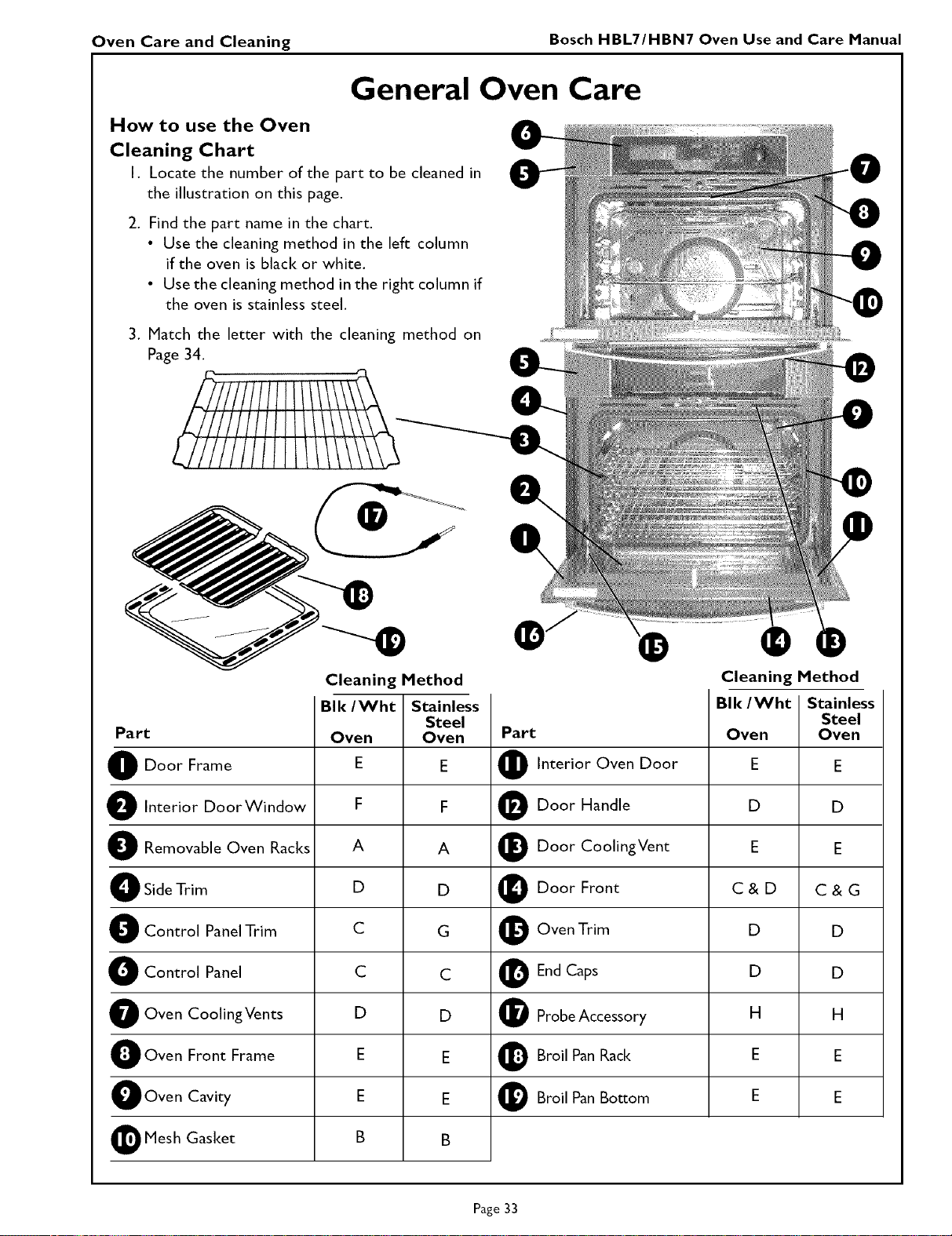
Oven Care and Cleaning Bosch HBL7/HBN7 Oven Use and Care Manual
General Oven Care
How to use the Oven
Cleaning Chart
I. Locate the number of the part to be cleaned in
the illustration on this page.
2. Find the part name in the chart.
• Use the cleaning method in the left column
if the oven is black or white.
• Use the cleaning method in the right column if
the oven iS stainless steel.
3. Match the letter with the cleaning method on
Page 34.
f
l//////11 11111\\\
z7///////1
Cleaning Method
Cleaning Method
BIk/Wht Stainless
Steel
Oven Oven
E E
F F
A A
D D
C G
C C
D D
E E
E E
B B
Part Part
D Door Frame O Interior Oven Door E E
D Interior DoorWindow O Door Handle D D
D Removable Oven Racks t_ Door CoolingVent E E
O Side Trim _ Door Front C & D C & G
O Control Panel Trim O Oven Trim D D
O Control Panel _ End Caps D D
O Oven CoolingVents O Probe Accessory H H
O Oven Front Frame _ Broil Pan Rack E E
OOven Cavity _t Broil Pan Bosom E E
I_ Mesh Gasket
BIE/Wht Stainless
Steel
Oven Oven
Page 33
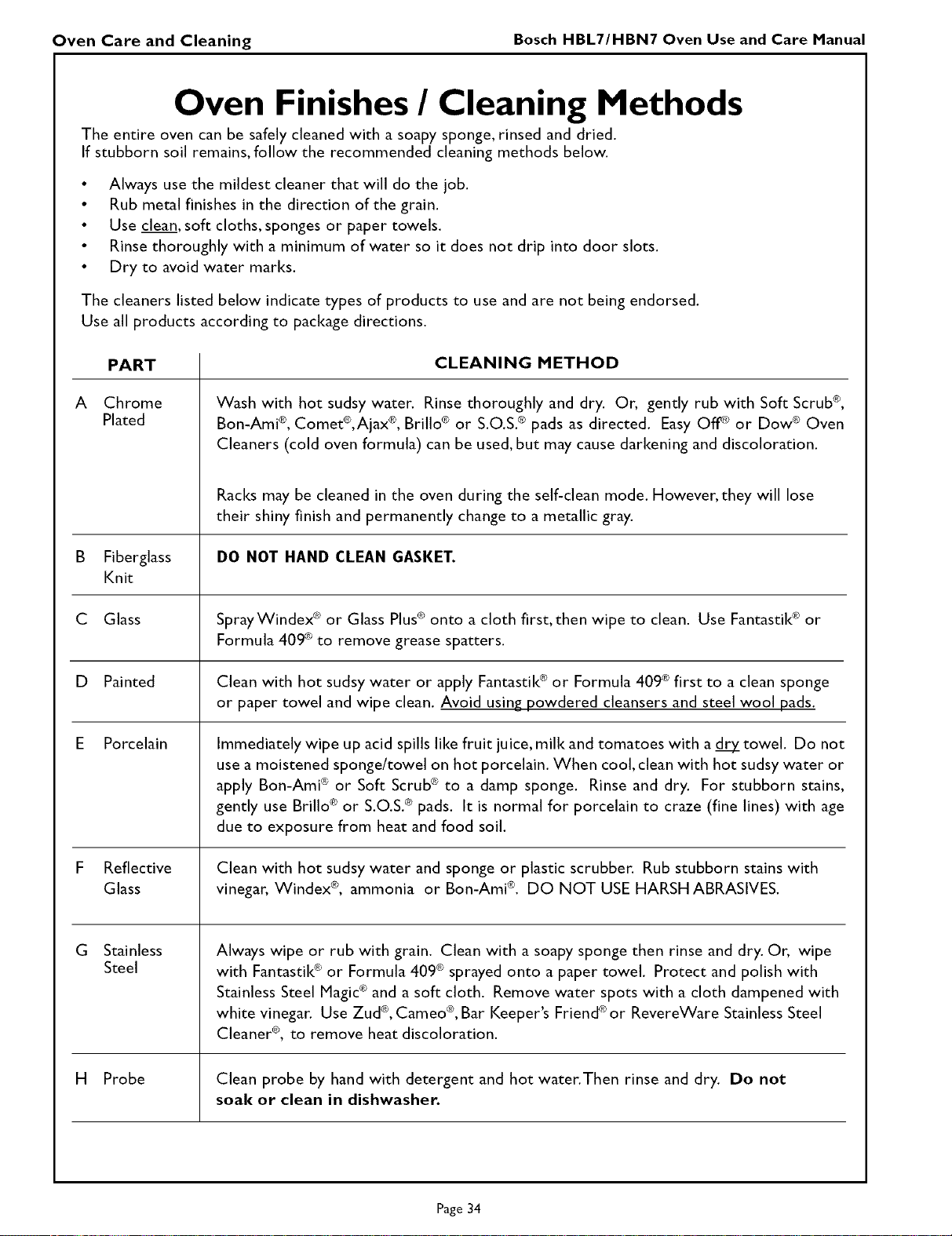
Oven Care and Cleaning Bosch HBL7/HBN7 Oven Use and Care Manual
Oven Finishes / Cleaning Methods
The entire oven can be safely cleaned with a soapy sponge, rinsed and dried.
If stubborn soil remains, follow the recommended cleaning methods below.
• Always use the mildest cleaner that will do the job.
• Rub metal finishes in the direction of the grain.
• Use clean, soft cloths, sponges or paper towels.
• Rinse thoroughly with a minimum of water so it does not drip into door slots.
• Dry to avoid water marks.
The cleaners listed below indicate types of products to use and are not being endorsed.
Use all products according to package directions.
A
PART
Chrome
Plated
CLEANING METHOD
Wash with hot sudsy water. Rinse thoroughly and dry. Or, gently rub with Soft Scrub®,
Bon-Ami <">,Comet®,Ajax ®,Brillo ® or S.O.S.® pads as directed. Easy OfF_ or Dow ® Oven
Cleaners (cold oven formula) can be used, but may cause darkening and discoloration.
Racks may be cleaned in the oven during the self-clean mode. However, they will lose
their shiny finish and permanently change to a metallic gray.
B Fiberglass DO NOT HAND CLEAN GASKET.
Knit
C Glass SprayWindex ®or Glass Plus® onto a cloth first, then wipe to clean. Use Fantastik ®or
Formula 409®to remove grease spatters.
D Painted
Porcelain
Reflective
Glass
Stainless
Steel
Clean with hot sudsy water or apply Fantastik ®or Formula 409 ®first to a clean sponge
or paper towel and wipe clean. Avoid using powdered cleansers and steel wool pads.
Immediately wipe up acid spills like fruit juice, milk and tomatoes with a _y_ towel. Do not
use a moistened sponge/towel on hot porcelain. When cool, clean with hot sudsy water or
apply Bon-Ami ® or Soft Scrub ® to a damp sponge. Rinse and dry. For stubborn stains,
gently use Brillo ® or S.O.S. ® pads. It is normal for porcelain to craze (fine lines) with age
due to exposure from heat and food soil.
Clean with hot sudsy water and sponge or plastic scrubber. Rub stubborn stains with
vinegar, Windex ®, ammonia or Bon-Ami ®. DO NOT USE HARSH ABRASIVES.
Always wipe or rub with grain. Clean with a soapy sponge then rinse and dry. Or, wipe
with Fantastik® or Formula 409® sprayed onto a paper towel. Protect and polish with
Stainless Steel Magic® and a soft cloth. Remove water spots with a cloth dampened with
white vinegar. Use Zud ®,Cameo ®,Bar Keeper's Friend ®or RevereWare Stainless Steel
Cleaner ®, to remove heat discoloration.
H Probe Clean probe by hand with detergent and hot water.Then rinse and dry. Do not
soak or clean in dishwasher.
Page 34
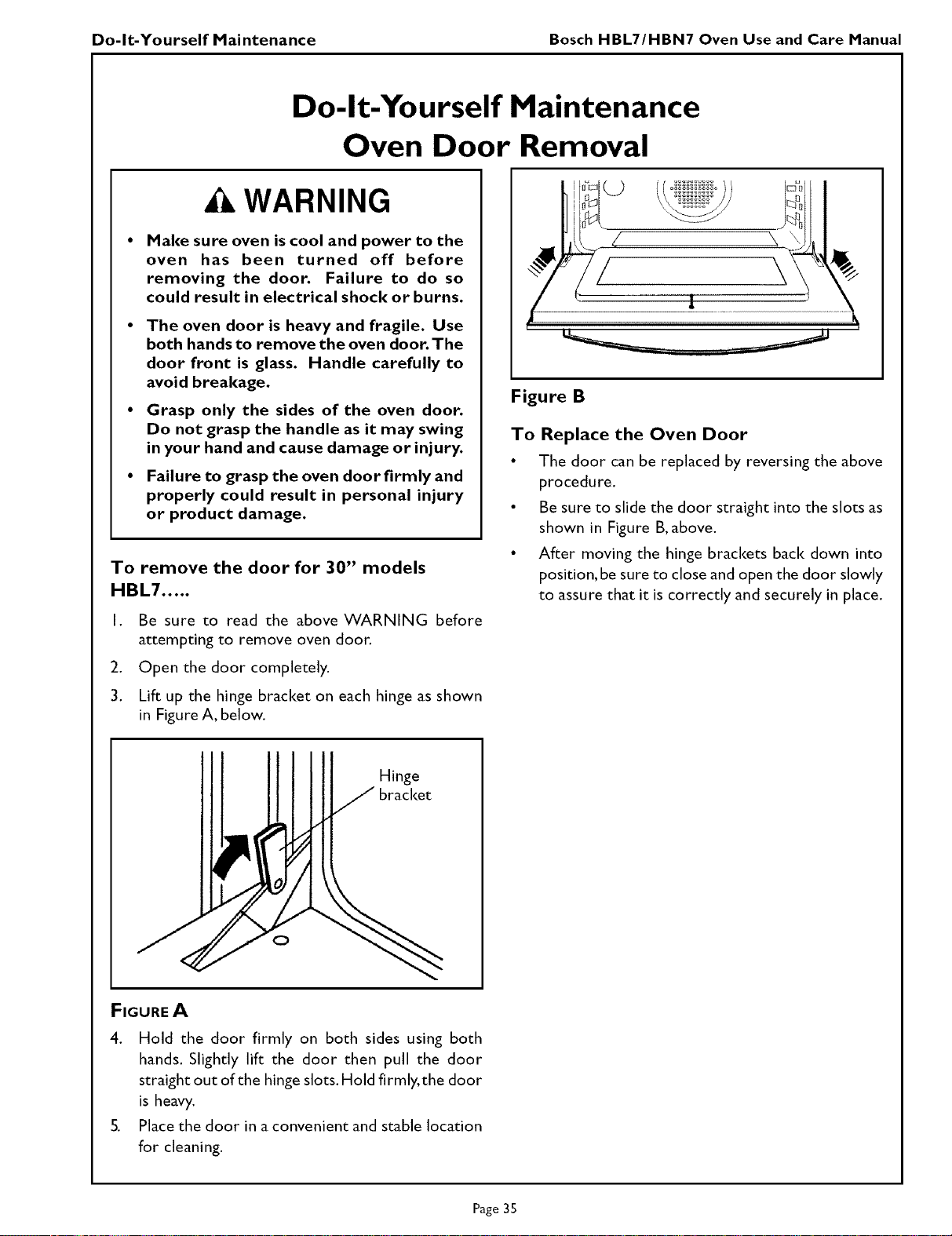
Do-It-Yourself Maintenance Bosch HBL7/HBN7 Oven Use and Care Manual
Do-It-Yourself Maintenance
Oven Door Removal
WARNING
Make sure oven is cool and power to the
oven has been turned off before
removing the door. Failure to do so
could result in electrical shock or burns.
• The oven door is heavy and fragile. Use
both hands to remove the oven door. The
door front is glass. Handle carefully to
avoid breakage.
• Grasp only the sides of the oven door.
Do not grasp the handle as it may swing
in your hand and cause damage or injury.
• Failure to grasp the oven door firmly and
properly could result in personal injury
or product damage.
To remove the door for 30" models
HBL7 .....
I. Be sure to read the above WARNING before
attempting to remove oven door.
2. Open the door completely.
3. Lift up the hinge bracket on each hinge as shown
in Figure A, below.
./
i
Figure B
To Replace the Oven Door
• The door can be replaced by reversing the above
procedure.
• Be sure to slide the door straight into the slots as
shown in Figure B,above.
• After moving the hinge brackets back down into
position, be sure to close and open the door slowly
to assure that it is correctly and securely in place.
Hinge
O
FIGUREA
4. Hold the door firmly on both sides using both
hands. Slightly lift the door then pull the door
straight out of the hinge slots. Hold firmly, the door
is heavy.
5. Place the door in a convenient and stable location
for cleaning.
Page 35
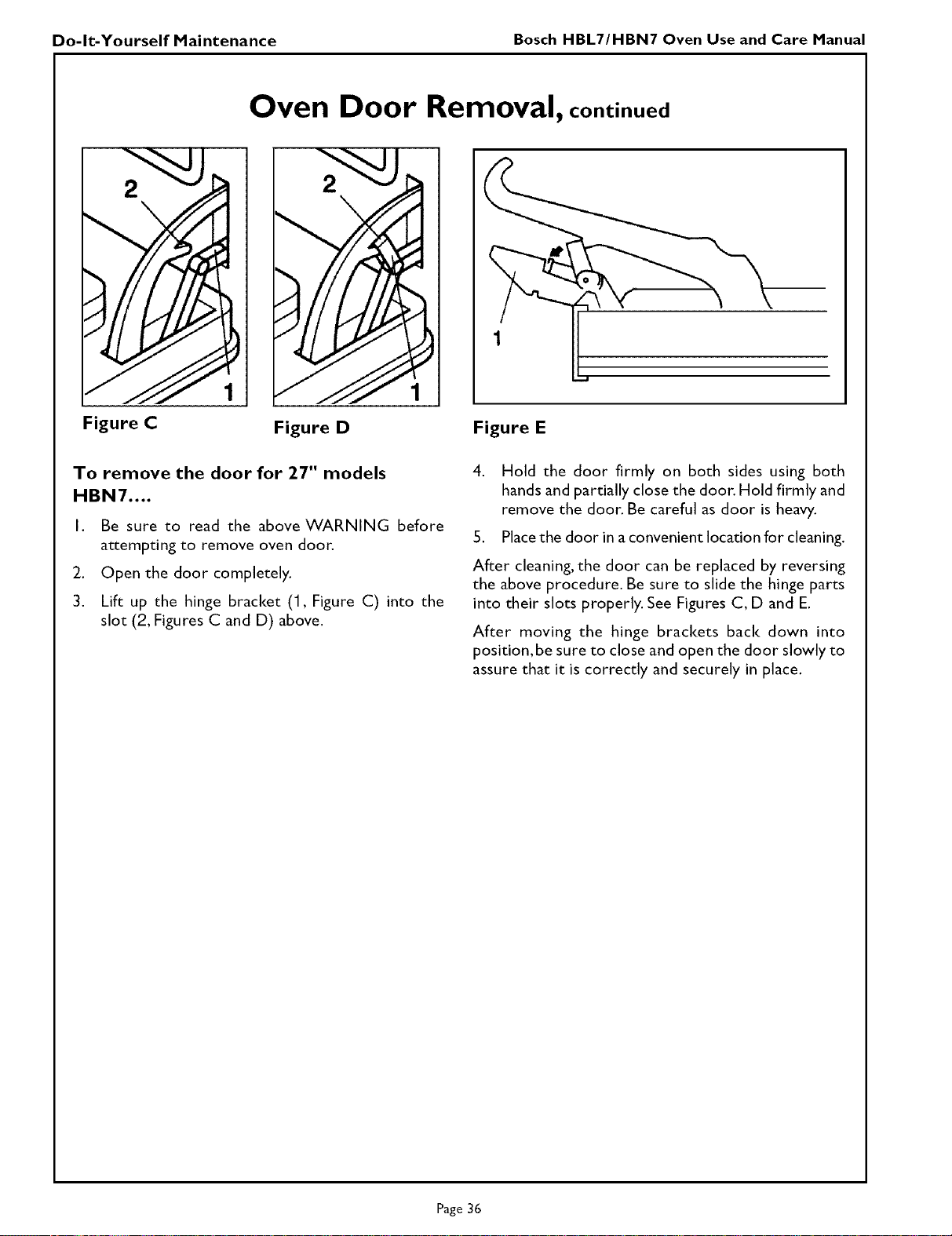
Do-It-Yourself Maintenance Bosch HBL7/HBN7 Oven Use and Care Manual
Oven Door Removal, continued
2
Figure C Figure D Figure E
To remove the door for 27" models
HBN7 ....
I Be sure to read the above WARNING before
attempting to remove oven door.
2. Open the door completely.
3. Lift up the hinge bracket (1, Figure C) into the
slot (2, Figures C and D) above.
4. Hold the door firmly on both sides using both
hands and partially close the door. Hold firmly and
remove the door. Be careful as door is heavy.
5. Place the door in a convenient location for cleaning.
After cleaning, the door can be replaced by reversing
the above procedure. Be sure to slide the hinge parts
into their slots properly. See Figures C, D and E.
After moving the hinge brackets back down into
position,be sure to close and open the door slowly to
assure that it is correctly and securely in place.
Page 36
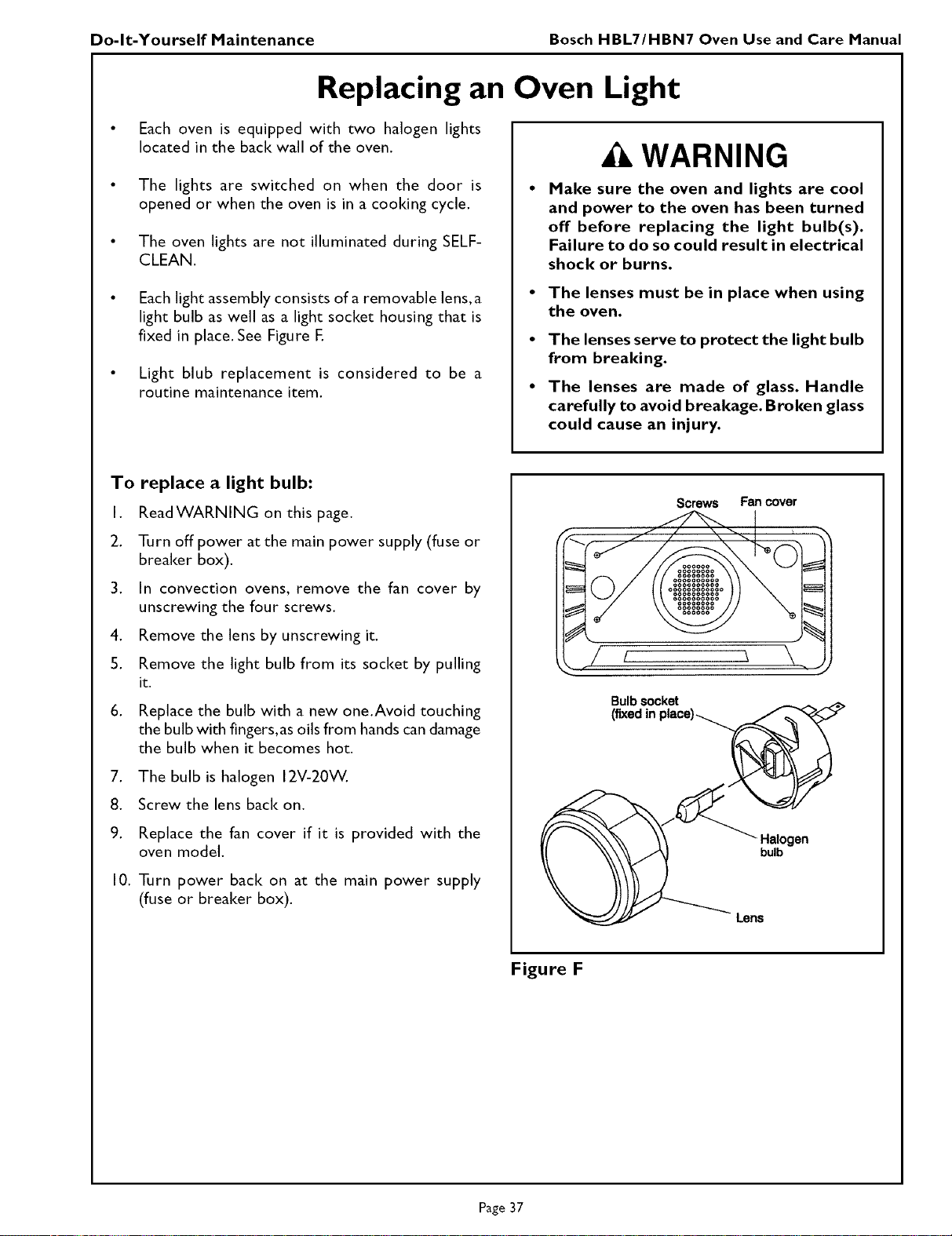
Do-It-Yourself Maintenance Bosch HBL7/HBN7 Oven Use and Care Manual
Replacing an Oven Light
Each oven is equipped with two halogen lights
located in the back wall of the oven.
The lights are switched on when the door is
opened or when the oven is in a cooking cycle.
The oven lights are not illuminated during SELF-
CLEAN.
Each light assembly consists of a removable lens, a
light bulb as well as a light socket housing that is
fixed in place. See Figure E
Light blub replacement is considered to be a
routine maintenance item.
WARNING
Make sure the oven and lights are cool
and power to the oven has been turned
off before replacing the light bulb(s).
Failure to do so could result in electrical
shock or burns.
The lenses must be in place when using
the oven.
• The lenses serve to protect the light bulb
from brealdng.
• The lenses are made of glass. Handle
carefully to avoid breakage. Broken glass
could cause an injury.
To replace a light bulb:
I. ReadWARNING on this page.
2. Turn off power at the main power supply (fuse or
breaker box).
3. In convection ovens, remove the fan cover by
unscrewing the four screws.
4. Remove the lens by unscrewing it.
S. Remove the light bulb from its socket by pulling
it.
6. Replace the bulb with a new one.Avoid touching
the bulb with fingers,as oils from hands can damage
the bulb when it becomes hot.
7. The bulb is halogen 12V-20W.
8. Screw the lens back on.
9. Replace the fan cover if it is provided with the
oven model.
I0. Turn power back on at the main power supply
(fuse or breaker box).
Screws Fan cover
Bulbsocket
Halogen
bulb
Lens
Figure F
Page 37
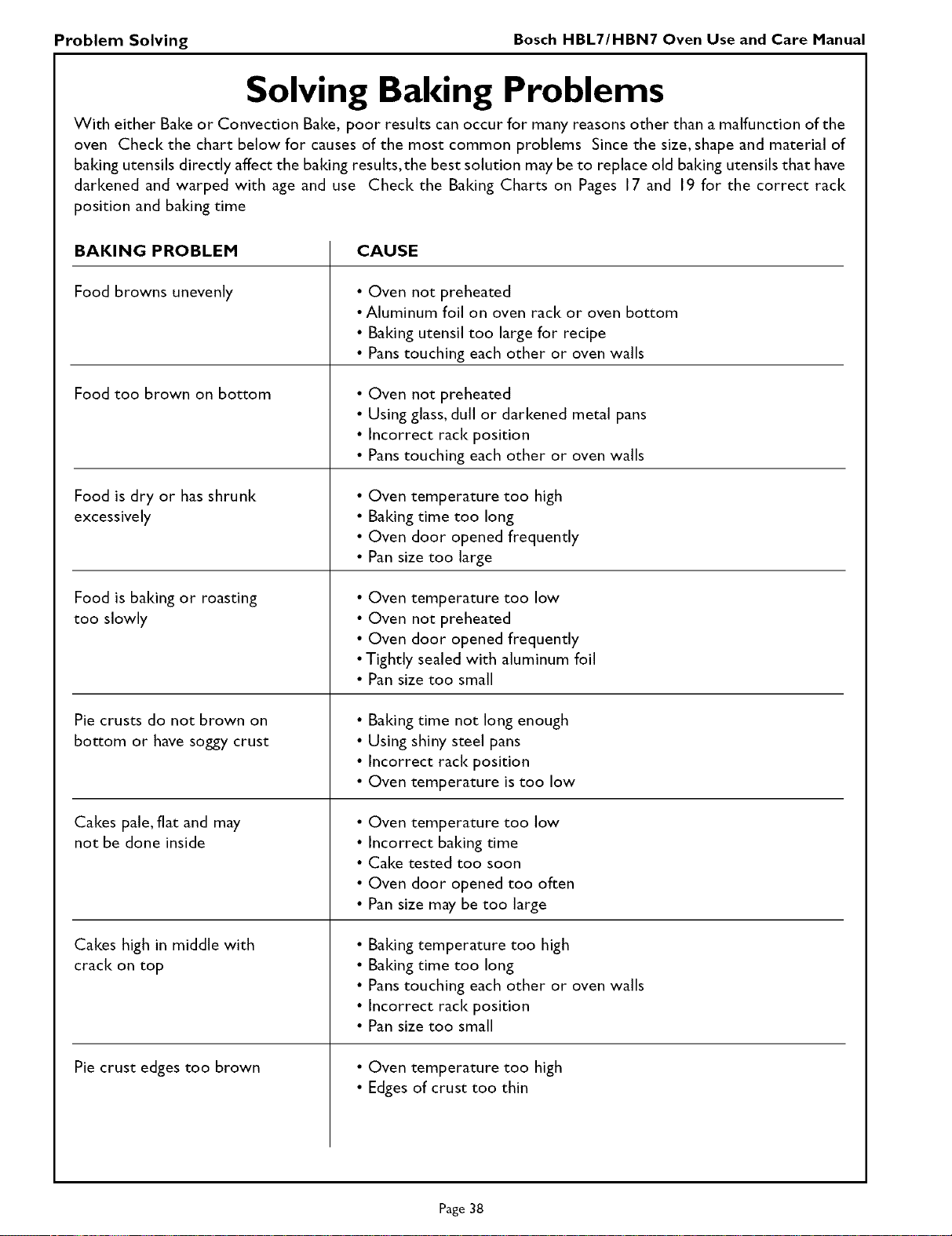
Problem Solving Bosch HBL7/HBN7 Oven Use and Care Manual
Solving Baking Problems
With either Bake or Convection Bake, poor results can occur for many reasons other than a malfunction of the
oven Check the chart below for causes of the most common problems Since the size, shape and material of
baking utensils directly affect the baking results,the best solution may be to replace old baiting utensils that have
darkened and warped with age and use Check the Baking Charts on Pages 17 and 19 for the correct rack
position and baiting time
BAKING PROBLEM
Food browns unevenly
Food too brown on bottom
Food is dry or has shrunk
excessively
Food is baiting or roasting
too slowly
Pie crusts do not brown on
bottom or have soggy crust
Cakes pale, fiat and may
not be done inside
Cakes high in middle with
crack on top
Pie crust edges too brown
CAUSE
• Oven not preheated
•Aluminum foil on oven rack or oven bottom
• Baking utensil too large for recipe
• Panstouching each other or oven walls
• Oven not preheated
• Using glass, dull or darkened metal pans
• Incorrect rack position
• Panstouching each other or oven walls
• Oven temperature too high
• Baiting time too long
• Oven door opened frequently
• Pan size too large
• Oven temperature too low
• Oven not preheated
• Oven door opened frequently
•Tightly sealed with aluminum foil
• Pan size too small
• Baiting time not long enough
• Using shiny steel pans
• Incorrect rack position
• Oven temperature is too low
• Oven temperature too low
• Incorrect baiting time
• Cake tested too soon
• Oven door opened too often
• Pan size may be too large
• Baiting temperature too high
• Baiting time too long
• Panstouching each other or oven walls
• Incorrect rack position
• Pan size too small
• Oven temperature too high
• Edges of crust too thin
Page 38
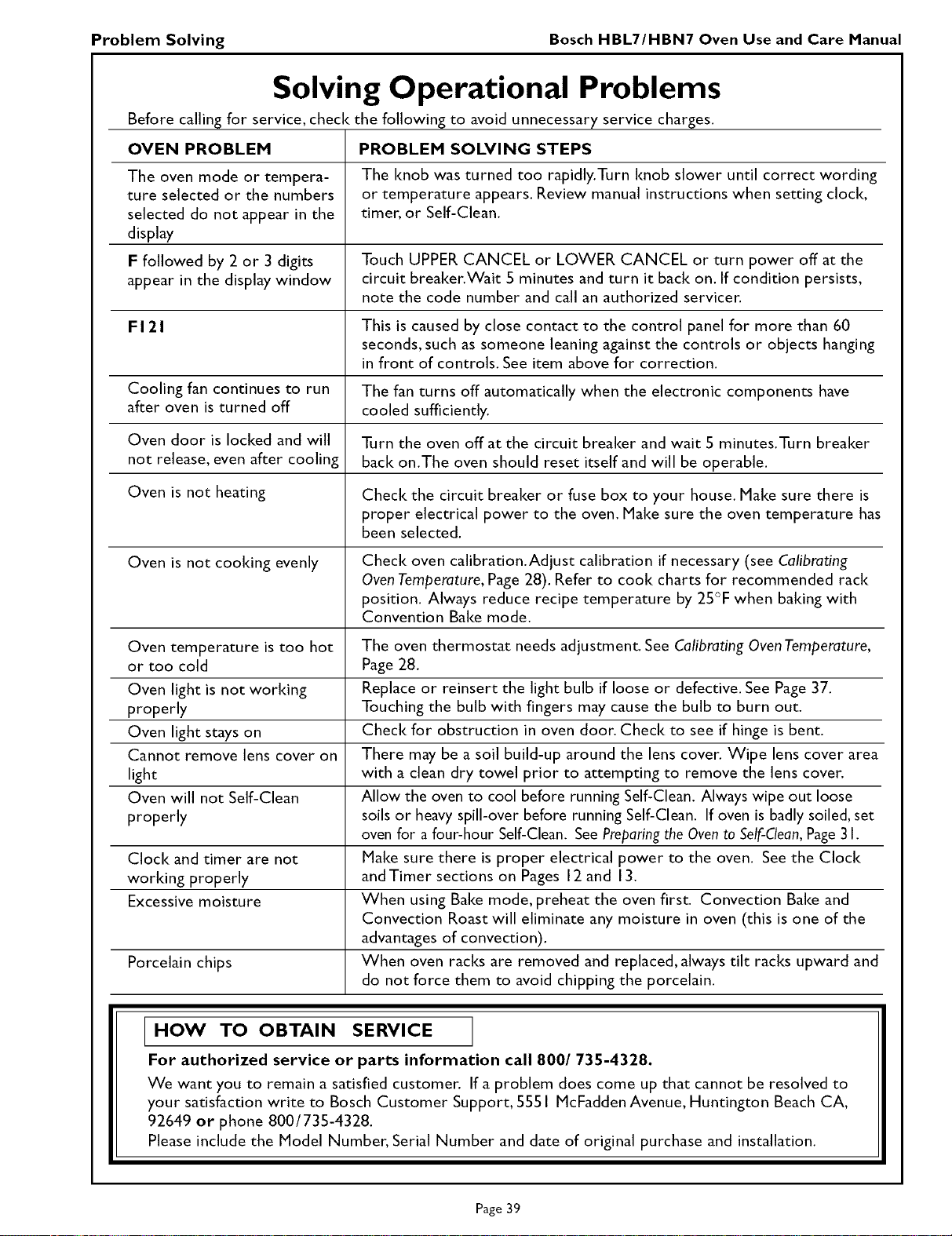
Problem Solving Bosch HBL7/HBN7 Oven Use and Care Manual
Solving Operational Problems
Before calling for service, check the following to avoid unnecessary service charges.
OVEN PROBLEH PROBLEH SOLVING STEPS
The oven mode or tempera- The knob was turned too rapidly.Turn knob slower until correct wording
ture selected or the numbers or temperature appears. Review manual instructions when setting clock,
selected do not appear in the timer, or Self-Clean.
display
F followed by 2 or 3 digits Touch UPPER CANCEL or LOWER CANCEL or turn power off at the
appear in the display window circuit breaker.Wait 5 minutes and turn it back on. If condition persists,
note the code number and call an authorized servicer.
F 121 This is caused by close contact to the control panel for more than 60
seconds, such as someone leaning against the controls or objects hanging
in front of controls. See item above for correction.
Cooling fan continues to run The fan turns off automatically when the electronic components have
after oven is turned off cooled sufficiently.
Oven door is locked and will Turn the oven off at the circuit breaker and wait 5 minutes.Turn breaker
not release, even after cooling back on.The oven should reset itself and will be operable.
Oven is not heating Check the circuit breaker or fuse box to your house. Make sure there is
proper electrical power to the oven. Make sure the oven temperature has
been selected.
Oven is not cooking evenly Check oven calibration.Adjust calibration if necessary (see Calibrating
OvenTemperature, Page 28). Refer to cook charts for recommended rack
position. Always reduce recipe temperature by 25°F when baking with
Convention Bake mode.
Oven temperature is too hot The oven thermostat needs adjustment. See Calibrating OvenTemperature,
or too cold Page 28.
Oven light is not working Replace or reinsert the light bulb if loose or defective. See Page 37.
properly Touching the bulb with fingers may cause the bulb to burn out.
Oven light stays on Check for obstruction in oven door. Check to see if hinge is bent.
Cannot remove lens cover on There may be a soil build-up around the lens cover. Wipe lens cover area
light with a clean dry towel prior to attempting to remove the lens cover.
Oven will not Self-Clean Allow the oven to cool before running Self-Clean. Always wipe out loose
properly soils or heavy spill-over before running Self-Clean. If oven is badly soiled, set
oven for a four-hour Self-Clean. See Preparing the Oven to Self-Clean, Page 3 I.
Clock and timer are not Make sure there is proper electrical power to the oven. See the Clock
working properly andTimer sections on Pages 12 and 13.
Excessive moisture When using Bake mode, preheat the oven first. Convection Bake and
Convection Roast will eliminate any moisture in oven (this is one of the
advantages of convection).
Porcelain chips When oven racks are removed and replaced, always tilt racks upward and
do not force them to avoid chipping the porcelain.
HOW TO OBTAIN SERVICE
For authorized service or parts information call 800/735-4328.
We want you to remain a satisfied customer. If a problem does come up that cannot be resolved to
your satisfaction write to Bosch Customer Support, 5551 McFadden Avenue, Huntington Beach CA,
92649 or phone 800/735-4328.
Please include the Model Number, Serial Number and date of original purchase and installation.
Page 39
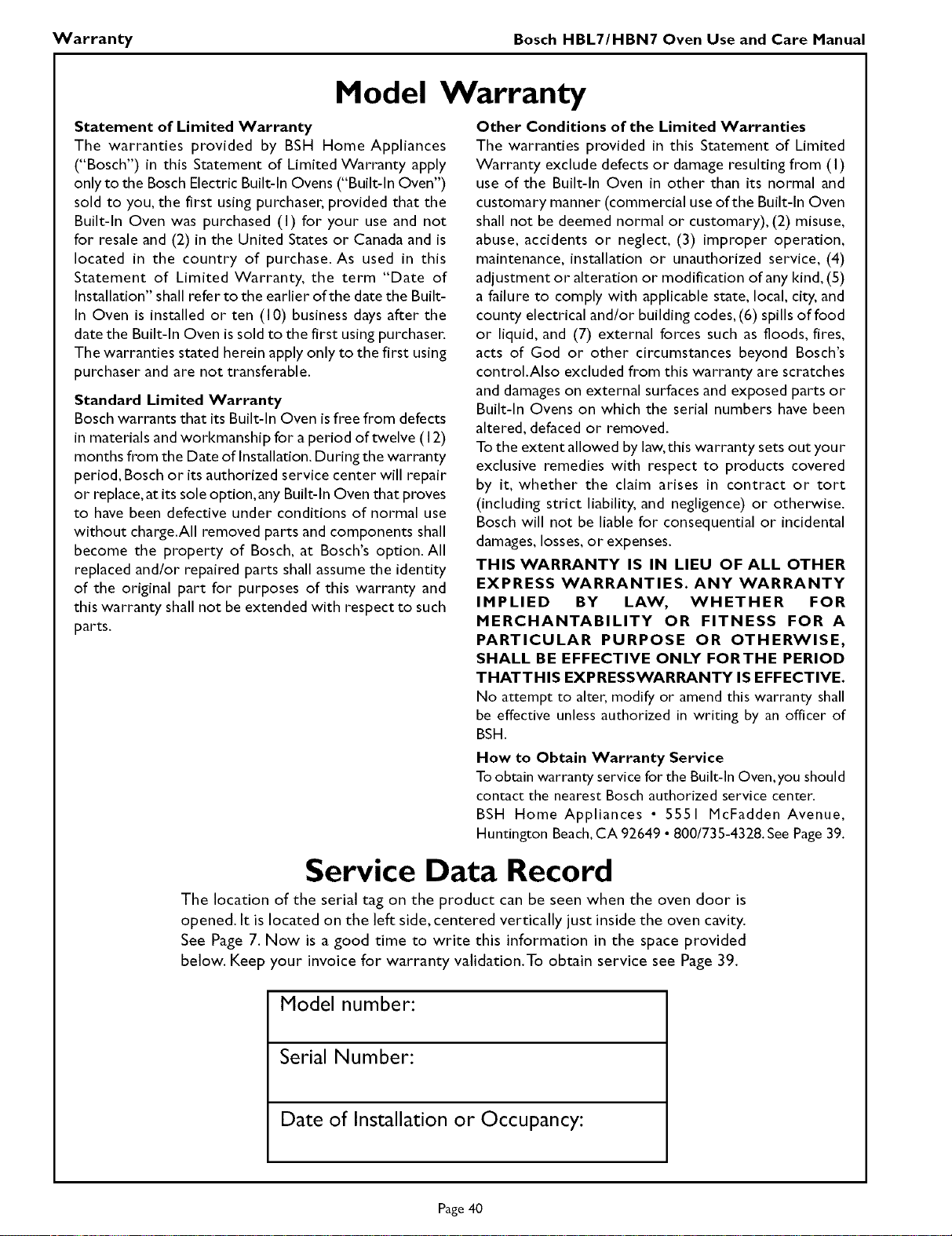
Warranty Bosch HBL7/HBN7 Oven Use and Care Manual
Model Warranty
Statement of Limited Warranty
The warranties provided by BSH Home Appliances
("Bosch") in this Statement of Limited Warranty apply
only to the Bosch Electric Built-In Ovens ("Built-in Oven")
sold to you, the first using purchaser, provided that the
Built-In Oven was purchased (I) for your use and not
for resale and (2) in the United States or Canada and is
located in the country of purchase. As used in this
Statement of Limited Warranty, the term "Date of
Installation" shall refer to the earlier of the date the Built-
In Oven is installed or ten (10) business days after the
date the Built-ill Oven is sold to the first using purchaser.
The warranties stated herein apply only to the first using
purchaser and are not transferable.
Standard Limited Warranty
Bosch warrants that itsBuilt-In Oven isfree from defects
in materials and workmanship for a period of twelve (I 2)
months from the Date of Installation. During the warranty
period, Bosch or its authorized service center will repair
or replace,at its sole option,any Built-In Oven that proves
to have been defective under conditions of normal use
without charge.All removed parts and components shall
become the property of Bosch, at Bosch's option. All
replaced and/or repaired parts shall assume the identity
of the original part for purposes of this warranty and
this warranty shall not be extended with respect to such
parts.
Other Conditions of the Limited Warranties
The warranties provided in this Statement of Limited
Warranty exclude defects or damage resulting from (I)
use of the Built-In Oven in other than its normal and
customary manner (commercial useof the Built-In Oven
shall not be deemed normal or customary), (2) misuse,
abuse, accidents or neglect, (3) improper operation,
maintenance, installation or unauthorized service, (4)
adjustment or alteration or modification of any kind, (5)
a failure to comply with applicable state, local, city, and
county electrical and/or building codes,(6) spills of food
or liquid, and (7) external forces such as floods, fires,
acts of God or other circumstances beyond Bosch's
control.Also excluded from this warranty are scratches
and damageson external surfaces and exposed parts or
Built-In Ovens on which the serial numbers have been
altered, defaced or removed.
Tothe extent allowed by law,this warranty setsout your
exclusive remedies with respect to products covered
by it, whether the claim arises in contract or tort
(including strict liability, and negligence) or otherwise.
Bosch will not be liable for consequential or incidental
damages,losses, or expenses.
THIS WARRANTY IS IN LIEU OF ALL OTHER
EXPRESS WARRANTIES. ANY WARRANTY
IMPLIED BY LAW, WHETHER FOR
MERCHANTABILITY OR FITNESS FOR A
PARTICULAR PURPOSE OR OTHERWISE,
SHALL BE EFFECTIVE ONLY FORTHE PERIOD
THATTHIS EXPRESSWARI_NTY IS EFFECTIVE.
No attempt to alter,modify or amend this warranty shall
be effective unless authorized in writing by an officer of
BSH.
How to Obtain Warranty Service
To obtainwarranty servicefor the Built-In Oven,youshould
contactthe nearest Bosch authorizedservicecenter.
BSH Home Appliances * 5551 McFadden Avenue,
Huntington Beach,CA 92649 * 800/735-4328.SeePage39.
Service Data Record
The location of the serial tag on the product can be seen when the oven door is
opened. It is located on the left side, centered vertically just inside the oven cavity.
See Page 7. Now is a good time to write this information in the space provided
below. Keep your invoice for warranty validation.To obtain service see Page 39.
Model number:
Serial Number:
Date of Installation or Occupancy:
Page 40

Notes

BOSCH
5551 McFadden Avenue, Huntington Beach, CA 92649 • 800/735-4328
09BH0270 • © 2002 BSH HomeAppliances Corp.. Litho Date: 1/02
Bosch is a registered trademark of the Robert Bosch Corporation. Genuine
European Convection is a trademark of BSH Home Appliances Corporation.
All other trademarks are property of their respective owners.