Midea -
Window Air Conditioner MAW - User Manual
Models: MAW12V1DWT, MAW10V1DWT, MAW08V1DWT and MAW08V1QWT.
CAUTION
- For support, please call the Service Center at 1-866-646-4332
- This appliance is not intended for use by people (including children) with reduced physical, sensory, or mental capabilities or lack of experience and knowledge. unless they have been given supervision or instruction concerning use of the appliance by a person responsible for their safety.
- Children should be supervised to ensure that they do not play with the appliance.
- The appliance shall be installed in accordance with national wiring regulations
- Do not operate your air conditioner in a wet room such as a bathroom or laundry room.
Safety Precautions
To prevent injury to the user or other people and property damage, the instructions shown here must be followed. Incorrect operation due to ignoring of instructions may cause harm or damage. The level of risk is shown by the following indications.
This symbol indicates a hazardous situation which, if not avoided, could result in death or serious injury.
This symbol indicates a hazardous situation, which, if not avoided, could result in minor or moderate injury.
NOTICE This symbol addresses practices not related to physical.
WARNING:
+ Be sure the air conditioner has been securely and correctly installed according to the installation instructions in this manual. Save this manual for possible future use in removing or installing this unit.
+ Plug in power cord plug properly. Otherwise, it may cause electric shock or fire due to excess heat generation.
+ Do not modify power cord length or share the outlet with other appliances as it may cause electric shock or fire due to overheating.
+ Always ensure effective grounding. Incorrect grounding may cause electric shock.
+ Unplug the unit if you notice unusual sounds or smells or smoke coming from it. A damaged product may cause fire and electric shock.
+ Ventilate room before operating the air conditioner if there is a gas leakage from another appliance.
+ Do not operate or stop the unit by inserting or pulling out the power cord plug.
+ Do not operate with wet hands or in very humid enviroments. It may cause electric shock.
+ Do not allow water to come into contact with any electric parts. It may cause failure or electric shock.
+ Do not use the socket if it is loose or damaged. It may cause fire and electric shock.
+ Do not use or keep the power cord close to heating appliances. It may cause fire and electric shock.
+ Do not use any devices or materials for installation that are not recommended in this manual.
+ Do not disassemble or modify unit. It may cause failure and electric shock.
+ Do not damage or use an alternate power cord. It may cause fire and electric shock. If the power cord is damaged, it must be replaced by the manufacturer or an authorized service center or a similarly qualified person in order to avoid a hazard.
+ Do not direct airflow straight into persons to avoid possible health hazard.
+ Do not open the unit during operation. It may cause electric shock.
+ Do not use the power cord near flammable gas or combustibles, such as gasoline. benzene, thinner, etc. It may cause an explosion or fire.
+ Do not let children hang on the air conditioner or bracket. A serious injury may occur.
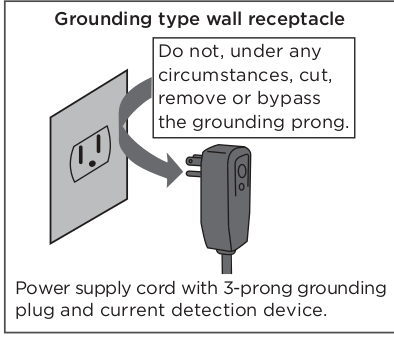
+ Avoid fire hazard or electric shock. Do not use an extension cord or an adaptor plug. Do not remove any prongs from the power cord.
+ Be sure the air conditioner is properly grounded. To minimize shock and fire hazards, proper grounding is important. The power cord is equipped with a three-prong grounding plug for protection against shock hazards.
+ Your air conditioner must be used in a properly grounded wall receptacle. If the wall receptacle you intend to use is not adequately grounded or protected by a time delay fuse or circuit breaker, have a qualified electrician install the proper receptacle. Ensure the receptacle is accessible after the unit installation.
+ Be sure the electrical service is adequate for the model you have chosen. This information can be found on the serial plate, which is located on the side of the cabinet and behind the grille.
CAUTION
- When the air filter is to be removed, do not touch the metal parts of the unit. It may cause injury.
- When the unit needs cleaning, switch off, and turn off the circuit breaker.
- Do not clean unit when power is on as it may cause fire, electric shock or injury.
- Do not place obstacles around air inlets or inside of air outlet. It may cause failure or accident.
- Clean with a soft cloth only. Do not use strong detergents that contain wax or thinners as it may damage the product.
- Use caution when unpacking and installing. Sharp edges could cause injury.
- Do not clean the air conditioner with water.
- Water may enter the unit and degrade the insulation which could lead to electric shock.
- Do not put a pet or house plant where it will be exposed to direct air flow. This could injure the pet or harm the plant.
- Hold the plug by the head of the power plug when taking it out. Otherwise, it may cause electric shock and damage.
- Ensure that the installation is properly secured to prevent the product from potentially falling.
- Do not place heavy objects on the power cord and ensure that the cord is not compressed. Otherwise, there is danger of fire or electric shock.
- If water is spilled on the unit, turn off the unit and switch off the circuit breaker.
- Isolate supply by taking the power-plug out and contact a qualified service technician.
- Do not use near gas stove or other gas burning appliances, as air flow may affect gas combustion.
- Do not use for any purpose other than room comfort.
- Do not use this air conditioner to preserve precision devices, food, pets, plants. and art objects. It may cause deterioration.
- Turn off the main power switch if the unit is not to be used for an extended time. Always insert the filters securely. Clean filter once every two weeks. Operation without filters may cause failure.
- Do not drink water drained from the air conditioner.
Operation of Current Device
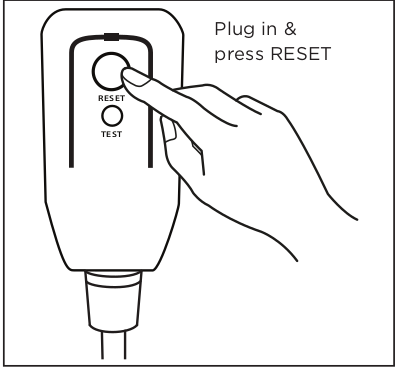
The power supply cord contains a current device that senses damage to the power cord. Test your power supply cord as follows:
1. Plug in the air conditioner.
2. The power supply cord will have TWO buttons on the plug head. Press the TEST button. You will notice a click as the RESET button pops out.
3. Press the RESET Button. You will notice a click as the button engages.
4. The power supply cord is now supplying electricity to the unit. (On some products this is also indicated by a light on the plug head.)
NOTICE
The power supply cord with this air conditioner contains a current detection device designed to reduce the risk of fire. In the event that the power supply cord is damaged, it can not be repaired. It must be replaced with a cord from the manufacturer.
NOTICE
+ Do not use this device to turn the unit on or off.
+ Always make sure the RESET button is pushed in for correct operation.
+ The power supply must be replaced if it fails to reset when either the TEST button is pushed, or it can not be reset. Please contact Customer Service.
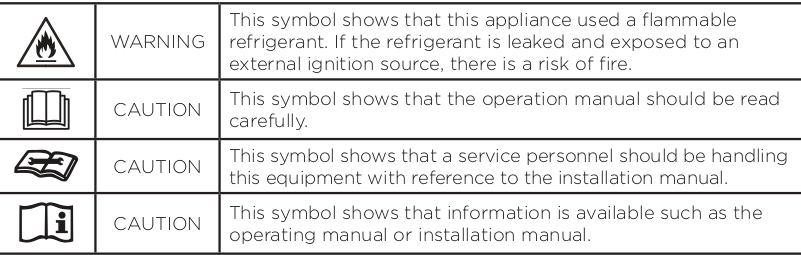
EXPLANATION OF SYMBOLS DISPLAYED ON THE UNIT
WARNING
- Do not try to accelerate the defrosting process or methods of cleaning that are not recommended by the manufacturer.
- The appliance shall be stored in a room without a continuously operating ignition source (for example, open flames or an operating gas appliance) or an ignition source (for example, an operating electric heater) close to the appliance. The appliance shall also be stored in a room without ignition sources.
- Do not pierce or burn.
- Be aware that the refrigerants may not contain an odor.
- Compliance with national gas regulations shall be observed.
- Keep ventilation openings clear of obstruction.
- The appliance shall be stored in a well-ventilated area where the room size corresponds to the room area as specied for operation.
- Unit is only to be serviced by a Midea authorized servicer, please call Customer Service at 1-866-646-4332 for support.
- Flammable refrigerant R32 is used within air conditioner. Please follow the instructions carefully to handle, install, clean, and service the air conditioner to avoid damage or hazard. Do not dispose of air conditioner in regular trash.
- Contact qualified agency for proper disposal.
- No open fire or devices that generate spark/arcing shall be around the air conditioner to avoid causing ignition of the flammable refrigerant used. Please follow the instructions carefully to store or maintain the air conditioner to prevent mechanical damage from occurring.
- Be aware that refrigerants may not contain an odor.
Operating Instructions
Normal Sounds
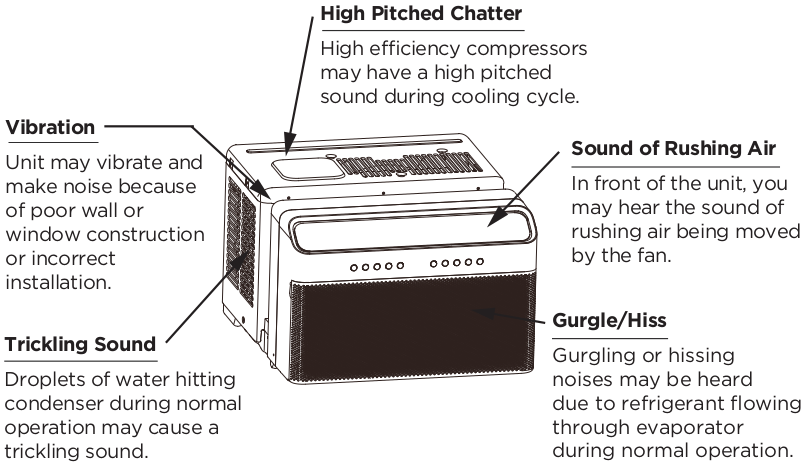
The following table shows the sound performance data for these window air conditioners.
Please use your specific model number to reference the correct sound power number in the table.
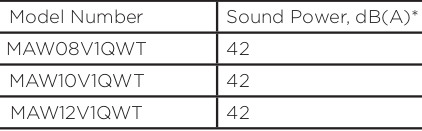
* per ISO 3744 at low fan speed.
Air Conditioner Operation
WARNING: To reduce the risk of fire, electrical shock, or injury to people or property, read the SAFETY PRECAUTIONS before operating this appliance.
NOTICE: The cool circuit has an automatic 3 minutes time delayed start if the unit is turned off and on quickly. This prevents overheating of the compressor and possible circuit breaker tripping.
To begin operating the air conditioner, follow these steps:
- Plug in the air conditioner (be sure to follow the power cord instructions on Page 6).
- Turn the power on to the air conditioner, using the ON/OFF button.
- Set the thermostat to the coldest temperature setting.
- Select the Cool mode setting.
- Adjust the louver for comfortable air flow (see Air Directional Louvers).
- Once the room has cooled, adjust the thermostat to the setting you find most comfortable.
- Make sure the air flow inside and outside is not obstructed by anything.

NOTICE
+ The relative humidity of room should be less than 80%. If the unit is used in a condition with a relative humidity over 80%, there will be condensed water on the surface of the unit.
+ Performance may be reduced outside of these operating temperatures.
Air Directional Louvers
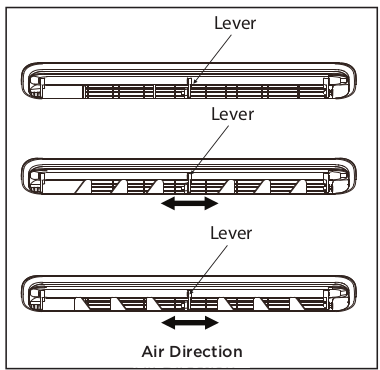
The louvers will allow you to direct the air flow up or down (on some models) and left or right throughout the room as needed.
Pivot horizontal louvers until the desired up/down direction is obtained.
Move the louvers from side to side until the desired left/right direction is obtained.
Before you begin, thoroughly familiarize yourself with the control panel as shown below and all its functions, then follow the symbol for the functions you desire. The unit can be controlled by the unit control panel, with the remote control, smart phone app, or voice control
ELECTRONIC CONTROL OPERATING INSTRUCTIONS
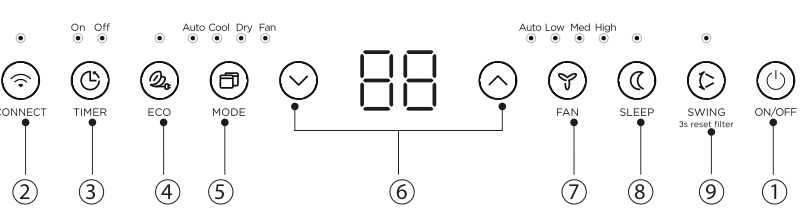
1. (ON/OFF) Button
Press ON/OFF button to turn unit on or off.
2. (CONNECT) Button
For the first time using the WiFi function. press the button for 3 seconds to initiate the WiFi connection mode. The LED DISPLAY shows AP’ to indicate you can set up the WiFi connection. Please also refer to the included WiFi manual for further instructions.
If connection (router) is successful within 8 minutes, the unit will exit WiFi connection mode automatically and the CONNECT indicator illuminates.
If connection failed within 8 minutes. the unit exits WiFi connection mode automatically.
After WiFi connection is successful, you can press and hold CONNECT and DOWN (Y) buttons at the same time for 3 seconds to turn off WiFi function and the LED DISPLAY shows OF’ for 3 seconds. press CONNECT and UP (A) buttons at the same time to turn on WiFi function and the LED DISPLAY shows On’ for 3 seconds.
3. (TIMER) Button
Press Timer button, the TIMER ON or TIMER OFF indicator light illuminates.
It indicates the Auto Start or Auto Stop program is initiated. For some units. continuing to press the Timer button will cancel the timer settings.
Press or hold the UP (A) or DOWN (VY) button to change the Auto time by 0.5 hour increments, up to 10 hours, then at 1 hour increments up to 24 hours. The display will count down the time remaining until start. The selected time will register in 5 seconds, and the system will automatically revert back to display the previous temperature setting or room temperature when the unit is on. When the unit is off, there is no display.
Turning the unit ON or OFF at any time or adjusting the timer setting to 0.0 will cancel the Auto Start/Stop timed program.
4. (ECO) Button
Press ECO button to initiate this function.
This function is available on COOL, DRY. and AUTO (only AUTO-COOLING and AUTO-FAN) modes. The fan will continue to run for 3 minutes after the compressor shuts off.
The fan then cycles on for 2 minutes at 10 minute intervals until the room temperature is above the set temperature. at which time the compressor turns back on and Cooling Starts.
5. (MODE) Button
+ To choose operating mode, press MODE button. Each time you press the button, a mode is selected in a sequence that goes from Auto, Cool. Dry and Fan. The indicator light beside the button will be illuminated and remain on once that mode is selected.
+ The unit will automatically initiate the Energy Saver function under Cool. Dry, and Auto (only Auto-Cooling and Auto-Fan) modes.
To operate on AUTO feature:
+ When you set the air conditioner to AUTO mode, it will automatically select cooling or fan only operation. depending on what temperature you have selected and the current room temperature.
The air conditioner will control room temperature automatically according based on the temperature you've set.
In this mode, the fan speed cannot be adjusted, it starts automatically at a speed according to the room temperature.
To operate on COOL mode:
+ Choose Cool Mode to set the cooling function. Use the UP (A) or DOWN () buttons to choose the desired temperature. When Cool Mode is selected, the fan speed can be adjusted by pressing the FAN button.
To operate on DRY mode:
+ In this mode, the air conditioner will generally operate as a dehumidifier. Since the conditioned space is a closed or sealed area, some degree of cooling will continue. On Dry mode, the fan speed is not adjustable.
To operate on FAN mode:
+ Use this function only when cooling is not desired, such as for room air circulation or to exhaust stale air (on some models). (Remember to open the vent during this function, but keep it closed during cooling for maximum cooling efficiency.) You can choose any fan speed you prefer.
+ In Fan Only mode, the temperature can not be adjusted.
6. (UP/DOWN) Button
Press UP (A) or DOWN (Y) button to change temperature setting.
7. (FAN SPEED) Button
Press FAN button to select the Fan Speed in four steps - Auto, Low, Med or High. Each time the button is pressed, the fan speed mode is shifted.
8. (SLEEP) Button
Press SLEEP button to initiate the sleep mode. In this mode the selected temperature will increase (in cooling mode) by 2°F/1 (or 2)°C 30 minutes after the mode is selected. The temperature will then increase (in cooling mode) by another 2°F/1(or 2)°C after an additional
30 minutes.
This new temperature will be maintained for 7 hours before it returns to the originally selected temperature.
This ends the Sleep mode and the unit will continue to operate as originally programmed. The Sleep mode program can be cancelled at any time during operation by pressing the SLEEP button again.
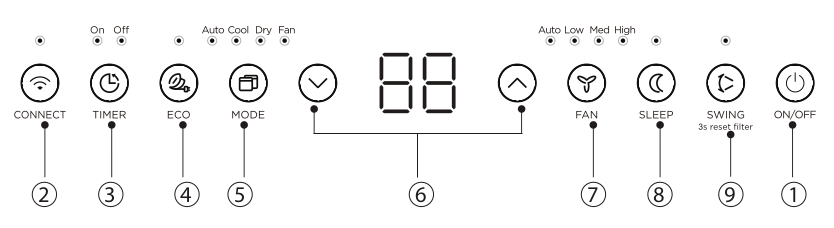
9. (SWING) Button
Used to initiate the Auto swing feature. When the operation is ON, pressing the SWING button can stop the louver at the desired angle.
Press SWING button for 3 seconds to initiate the Iter feature. This feature is a reminder to clean the Air Filter for more ecient operation. The LED (the light above the button) will illuminate after 250 hours of operation.
DISPLAYS
LED Display:
Shows the set temperature in “°C” or “°E" and the Auto-timer settings. While on Fan Only mode, it shows the room temperature. If the room temperature is too high or low, it will display “ HI” or “ LO”.
To convert from one to the other, press and hold the UP (A) and DOWN (Y) buttons at the same time for 3 seconds.
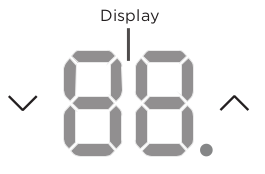
Error codes:
The unit may stop operation or continue to run safely. If the error codes appear. wait for about 10 minutes.
The problem may resolve itself. If not. disconnect the power, then connect it again. Turn the unit on.
If the problem persists, disconnect the power and contact customer service. Error code appears and begins with the letters as the following in the window display of indoor unit:
EH(xx), EL(xx), EC(xx), PH(xx), PLOxx), PC(xx).
NOTICE
If your problem persists after performing the checks and diagnostics above, turn off your unit immediately and contact an authorized service center by calling 1-866-646-4332.
NOTICE
If the unit turns off unexpectedly due to the power being cut, it will automatically restart with the previous function setting when the power resumes.
Installation Instructions
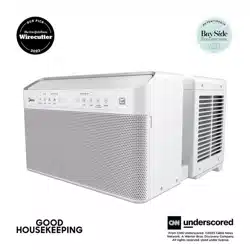
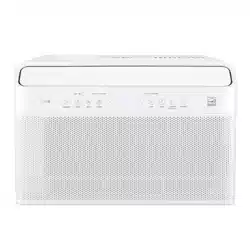
NOTICE: The unit you purchased may look like the following:
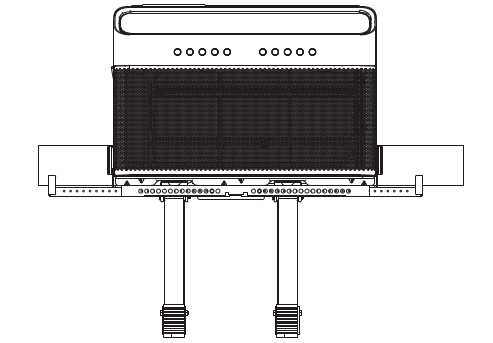
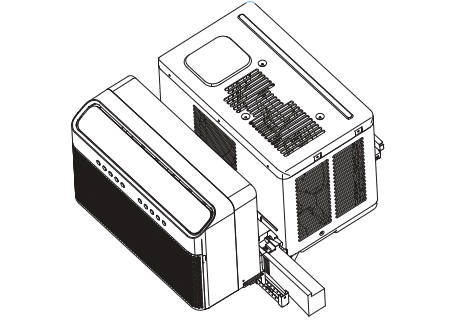
NOTICE: All the illustrations in this manual are for explanation purpose only. The actual installation may vary.
WARNING - Before You Begin
Read these instructions completely and carefully.
+ IMPORTANT - Save these instructions.
+ IMPORTANT - Observe all governing codes and ordinances.
We recommend that two people install this product.
Proper installation is the responsibility of the installer.
Product failure due to improper installation is not covered under the Limited Warranty.
You MUST use all supplied parts and use proper installation procedures as described in these instructions when installing this air conditioner.
Do not, under any circumstances, cut or remove the third (ground) prong from the power cord.
Do not change the plug on the power cord of the air conditioner.
Aluminum house wiring may present special problems - consult a qualified electrician.
When handling unit, be careful to avoid cuts from sharp metal edges and aluminum fins on front and rear coils. Please wear cut-resistant gloves.
WINDOW REQUIREMENTS
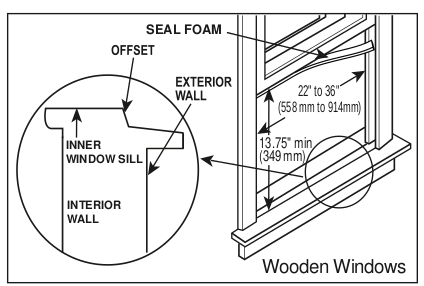
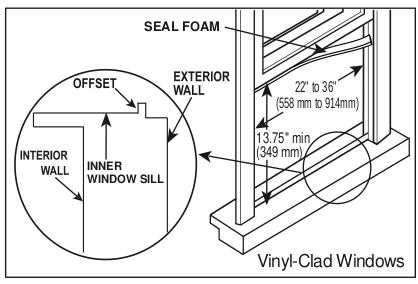
Your air conditioner is designed to install in standard double hung windows with opening widths of 22 to 36 inches (558mm to 914mm) and a window height of 13.75” (349mm).
NOTICE
You will probably want to clean both sides of the glass first. If the window is a triple-track type with a screen panel included, remove the screen completely before installation.
Tools You Will Need
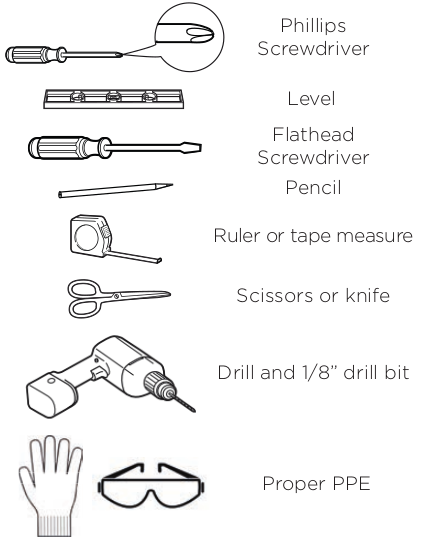
1. INSTALL THE SUPPORT BRACKET
Lower sash must open sufficiently to allow a clear vertical opening of 13.5 inches. Side louvers and the rear of the AC must have clear air space to allow enough airflow through the condenser for heat removal. The rear of the unit must be outdoors, not inside a building or garage.
WARNING: Bracket should only be used for its intended purpose. If not, the warranty will be voided.
NOTICE: Save carton and these Installation Instructions for future reference. The carton is the best way to store unit during winter, or when not in use.
Remove the air conditioner and hardware from the carton and place on a flat surface.
Required Installation Hardware
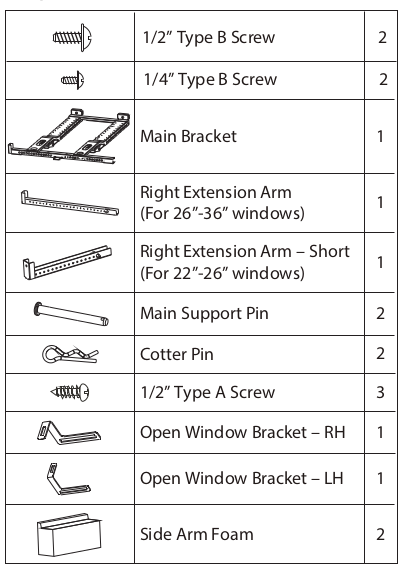
Optional Installation Hardware
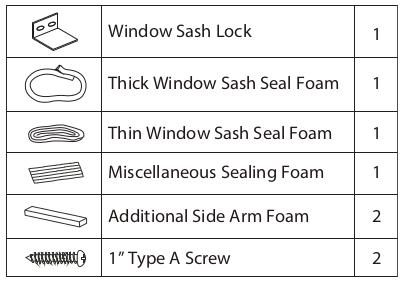
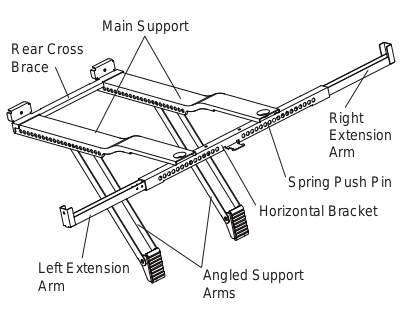
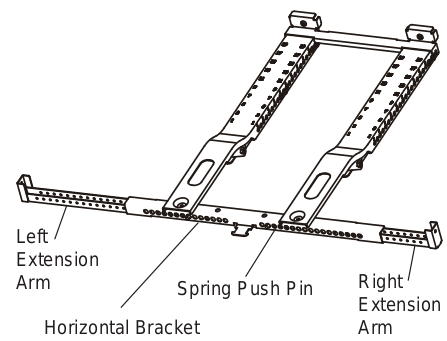

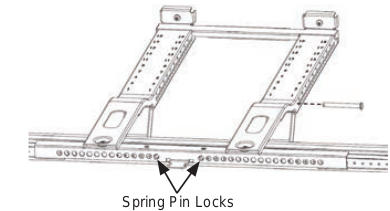
On a flat surface such as a table. press the spring push pin and adjust the Left Extension Arm to the Left side of the Horizontal Bracket.
Then install the Right Extension Arm into the Right side of the Horizontal Bracket. These will be adjusted ina later step.
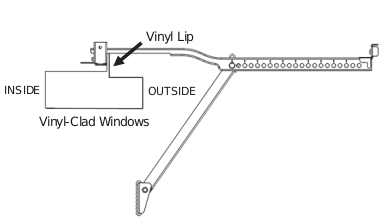
For windows where the front of the bracket to sit on the window sill. adjust the extension arms to your window sill width. For windows where the front of the bracket will rest against the vinyl! lip, these arms will be adjusted in a later step.
NOTICE
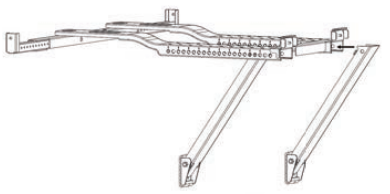
The Angled Support Arms should come installed into the Main Supports from the factory.
The small tabs on the sides of the Angle Support Arms must sit on the inside bottom of the Main Support.
A. Before placing the bracket in the window, allow the Angled Support Arms to rotate down and make sure they don't fall out of the Main support arms.
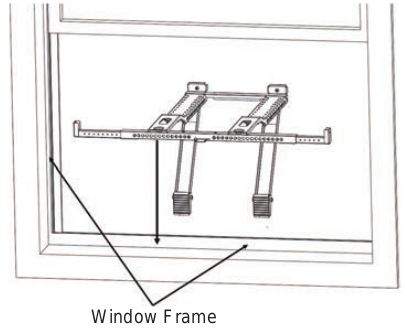
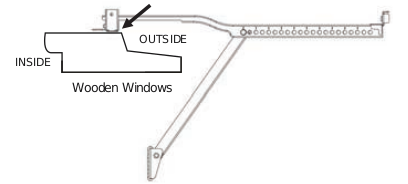
Place the support bracket assembly in your window opening on the bottom windowsill. The Horizontal Bracket and Extension Arms must be located on the indoor side of your window frame.
For installations where the bracket sits on the window sill, secure the bracket to the window (reference Step E).
WARNING: Maintain control of the bracket until installation is complete.

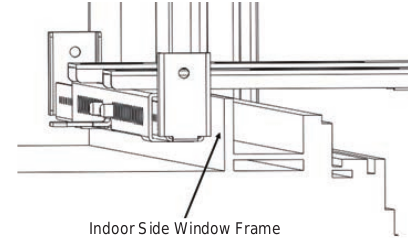
NOTICE
The front of the Support Bracket should be located on the indoor side of the window frame (refer to image on the left).
Do not place the Horizontal Bracket and Extension Arms inside the Window Track where the window sash sits.
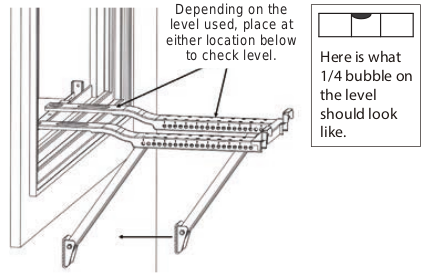
B. Move the Angled Support Arms toward the exterior wall until the Angled Support Feet touch the wall. Place a level on a flat area of the bracket and adjust the Angled Support Arms so the bracket is tilted downwards toward the outdoors to allow condensate to drain out. The proper angle is when the level reads 1/4 bubble (reference image for 1/4 bubble).
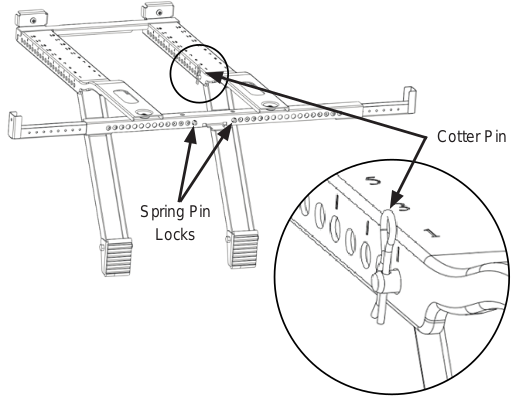
C. Insert the Main Support Pin through the Main Support holes and Angled Support Arm holes to secure the Angled Support Arm. Repeat for the other Angled Support Arm using the numbers stamped on the Main Support to help place both Angled Support Arms in equal locations.
D. After securing both Angled Support Arms. check the level and ensure the bracket feels secure. Minor adjustments may be needed.
Once secured, insert the Cotter Pins into the Main Support Pins.
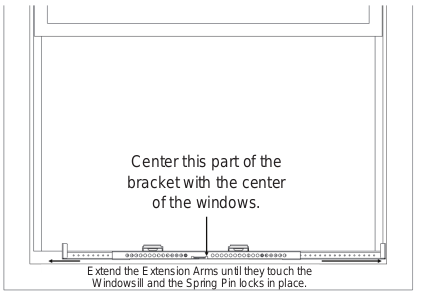
E. Center the Support Bracket with the center of the window. Note, due to the design of the Air Conditioner, the Support Bracket is biased to the left. Once centered, extend the Left and Right Extension Arms until they touch the side of the windowsill and are in front of the side window frame.
Secure the bracket to the window with a screw at the end of each extension arm as shown. Holes at the end or bottom of the Extension Arms can be used to secure the Support Bracket to the window.
2. SECURE THE UNIT ON THE BRACKET
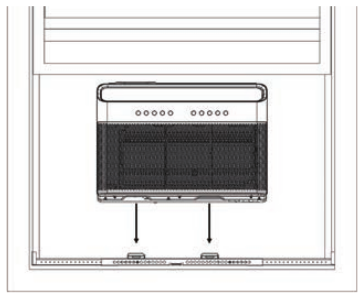
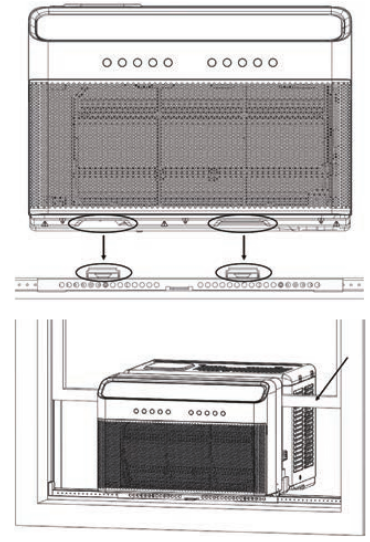
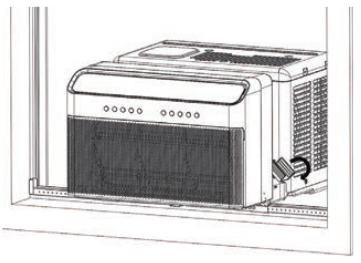
A. Set the air conditioner on top of the support bracket. Ensure the grooves on the bottom of the air conditioner align with the Main Supports. Using a level, check for proper tilt towards the outside.
WARNING
Do not leave the unit unattended during installation.
Pull the window down into the slot to help align the unit in the correct location. Keep the window partially inserted into the window slot to help support the air conditioner during installation.
B. Fold both Side Arm Hinges down and measure the distance between the Side Arm Hinge and the Window Frame.
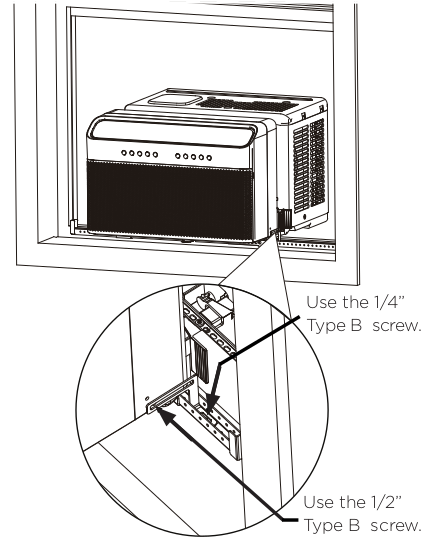
C. You must install the Open Window Brackets using the provided screws shown here.
-or-
For installations where the bracket sits on the window sill or a storm window spacer - Use the provided 1” Type A screw to secure the bracket to the window sill.
NOTE: Drill 1/8” pilot holes before screwing into the window sill.
WARNING: Failing to install the Open Window Brackets could cause injury or property damage.
3. SEAL AND CLOSE THE WINDOW
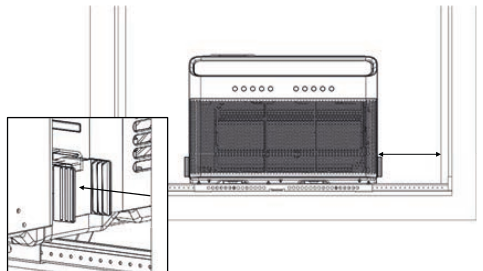
D. Measure the distance between the Side Arm Hinge and the closest part of the window frame in line with the Side Arm.
Add 1/4” to this distance and cut the Side Arm Foam to length. Insert the Side Arm Foam into the Side Arm Hinge and repeat for the other side.
WARNING: Do not leave the unit unattended during installation.
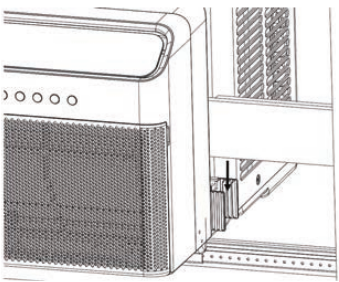
E. You must extend the Anti-Tip Brackets into the Window Track Opening (the vertical track that your window slides up and down in) until they touch the window frame.
Secure the Anti-Tip Bracket in place with the provided phillips screw. The air conditioner may need to be adjusted front to back so the Anti-Tip Brackets align with the Window Track Opening.
Top view
Remove the factory installed 1/2” screw and extend the Anti-Tip Brackets into the window track.
Secure the Anti-Tip Brackets by re-using the factory installed 1/2” screw. Failing to use this screw could damage the air conditioner.
NOTICE: For Window Track Openings 1/2” or less, remove the Anti-Tip Brackets and rotate them so the smaller end of the bracket can be inserted into the Window Track Opening. THEY MUST STILL BE INSTALLED, so keep both Anti-Tip Brackets.
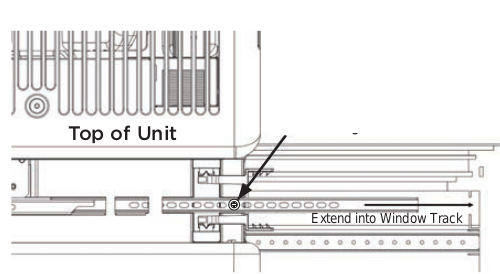
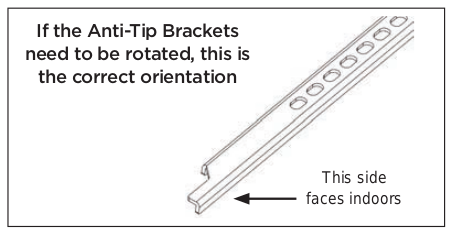
WARNING: You must extend the Anti-Tip Brackets into the Window Track Opening. Failure to follow this warning may cause serious injury.

The images to the left show what a properly installed Anti-Tip Bracket into the window track should look like.
NOTICE: Side Arm Foam removed from image for illustrative purposes. Keep foam in place during Anti-Tip Bracket installation.
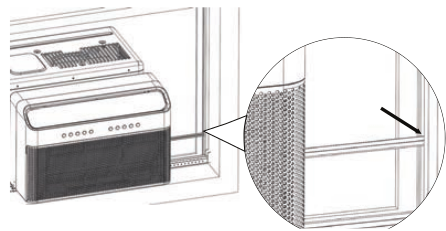
The images to the left show what a properly installed Anti-Tip Bracket into the window track should look like.
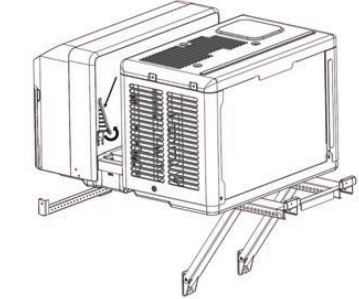
F. Close the window and extend both window locks located in the window slot to prevent the window from opening. Be sure to fully extend the locks so that they come in direct contact with the window.
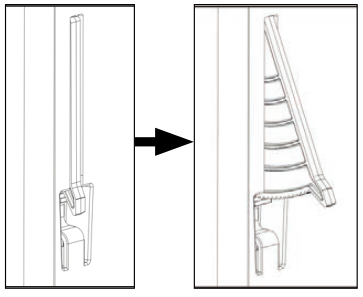
NOTICE: For additional security, you may use the provided window locking hardware and lock the window in place using the sash lock.
Also note that if you want to raise your window, this lock will need to be removed.
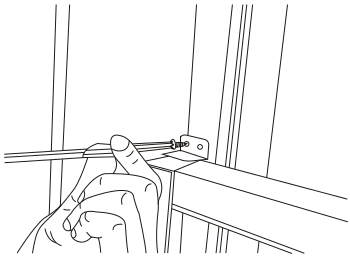
To secure lower sash in place, attach right angle sash lock with 1/2” Type A Screws as shown.
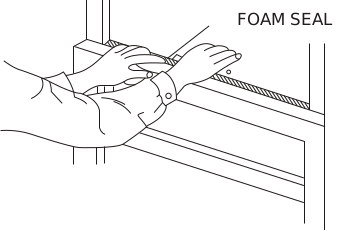
Cut window sash seal foam and insert it in the space between the upper and lower sashes.
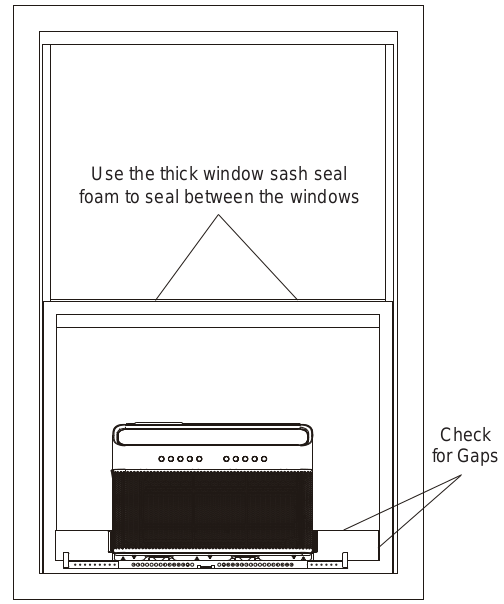
Review the installation and check for any gaps or openings to the outdoor air. Cover these gaps with the provided foam ensuring no outdoor air leaks inside. See image for areas to check for gaps.
IF AC IS BLOCKED BY STORM WINDOW
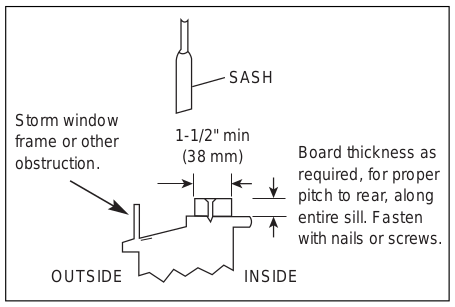
Add wood as shown, or remove storm window before air conditioner is installed.
If storm window frame must remain, be sure the drain holes or slots are not caulked or painted shut. Accumulated rain water or condensation must be allowed to. drain out.
You must secure the support bracket to the added wood piece using the provided 1" Type A Screws. Refer to the Open Window Bracket installation step.
Care and Cleaning
CAUTION: Clean your air conditioner occasionally to keep it looking new. Be sure to unplug the unit before cleaning to prevent shock or fire hazards.
Air Filter Cleaning
The air filter should be checked at least once every two weeks to see if cleaning is necessary. Trapped particles in the filter can build up and cause an accumulation of frost on the cooling coils and reduce performance.
+ Grasp the filter by the center and pull up and out.
+ Wash the filter using warm water. Rinse filter thoroughly.
+ Gently shake excess water from the filter. be sure the fitter is thorougniy ary berore replacing.
+ Instead of washing, you may also vacuum the filter clean rather than washing.
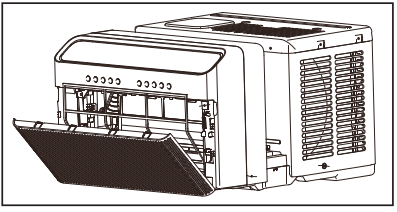
NOTICE: Never use hot water over 104°F (40°C) to clean the air filter. Never attempt to operate the unit without the air filter.
Cabinet Cleaning
+ Be sure to unplug the air conditioner to prevent shock or fire hazard. The cabinet and front may be dusted with an oil-free cloth or washed with a cloth dampened in a solution of warm water and mild liquid dishwashing detergent. Rinse thoroughly and wipe dry.
+ Never use harsh cleansers, wax, or polish on the air conditioner.
+ Besure to wring excess water from the cloth before wiping around the controls. Excess water in or around the controls will cause damage to the air conditioner.
+ Plug in air conditioner.
Winter Storage
If you plan to store the air conditioner during the winter, remove it carefully from the window according to the installation instructions. Be careful not to spill any potentially standing water from the unit’s base pan. If water is present, carefully drain it. Cover the unit with plastic or return it to the original carton.
Troubleshooting Tips
Before calling for service, review this list. It may save you time and expense. This list includes common occurrences that are not the result of defective workmanship or materials in this appliance. Problems and solutions:
Air conditioner does not start.
- Wall plug disconnected. Push plug firmly into wall outlet.
- Circuit breaker tripped. Reset circuit breaker.
- Check if the light on the plug is on. If it is off, press the RESET button.
- Power is OFF. Turn power ON.
- Unit turned off and then on quickly. Turn unit off and wait 3 minutes before restarting.
Air from unit does not feel cold enough.
- Room temperature below 62°F (17°C). Cooling may not occur until room temperature rises above 62°F (17°C).
- Temperature sensor behind the air filter is touching the cold coil. Try to move it so it does not contact the cold coil.
- Reset to a lower temperature.
- Compressor shut-off by changing modes. Wait approximately 3 minutes and listen for compressor to restart when set in thebCOOL mode.
- Check for potential obstructions blocking the outdoor intake/ exhaust. Clear any obstructions.
Air conditioner cooling, but room is too warm- ice forming on cooling coil behind air filter.
- Outdoor temperature below 64°F (18°C). To defrost the coil, set to FAN ONLY mode.
- Air filter may be dirty. Clean filter. Refer to Care and Cleaning section. To defrost, set to FAN ONLY mode.
- Thermostat set too cold for night-time cooling. To defrost the coil. set to FAN ONLY mode. Then, set temperature to a higher setting.
Air conditioner cooling, but room is too warm- NO ice forming on cooling coil behind air filter.
- Dirty or restricted air filter. Clean filter. Refer to Care and Cleaning section. To defrost, set to FAN ONLY mode.
- Temperature is set too high, set temperature to a lower setting.
- Air directional louvers positioned improperly. Position louvers for better air distribution.
- Front of unit is blocked by drapes, blinds, furniture, etc. - restricts air distribution. Clear obstruction in front of unit.
- Any open doors, windows, or registers may allow cold air to escape. Close any doors, windows, or registers.
- The room may be too warm. Allow additional time to remove “stored heat” from walls, ceiling, floor and furniture.
Air conditioner turns on and off rapidly.
- Dirty air filter- air restricted. Clean air filter.
- Outside temperature extremely hot. Set FAN speed to a higher setting to bring air past cooling coils more frequently.
- Check for potential obstructions blocking the outdoor intake/ exhaust. Clear any obstructions.
Noise when unit is cooling.
- Air movement sound. This is normal. If too loud, set to a slower FAN setting.
- Window vibration - poor installation. Refer to installation instructions or check with installer.
Water Gripping INSIDE when unit is cooling.
- Improper installation. Tilt air conditioner slightly to the outside to allow water drainage. Refer to installation instructions - check with installet
Water dripping OUTSIDE when unit is cooling.
Unit removing large quantity of moisture from humid room. This is normal during excessively humid days.
Remote sensing deactivating prematurely (some models).
- Remote control not located within range. Place remote control within 20 feet & 180°, radius of the front of the unit, and pointed in the general direction of the air conditioner unit.
- Remote control signal obstructed. Remove obstruction.
Room too cold.
- Temperature setting too low. Increase temperature setting.
Noise when unit starts.
- A “da-da” sound may occur for thirty seconds when the unit is turned on due to the compressor starting. It is normal.
Window does not insert into the U-shaped slot.
- Ensure that the “U-shaped” slot is in line with the window, if not. align the slot with the window. Ensure that the unit is not slanted too much to cause interference with the top of the unit. Reference steps on pages 15-23 for those instructions.
Warranty
Air Conditioner Limited Warranty
Your product is protected by this Limited Warranty:
Warranty service must be obtained from Midea Consumer Services or an authorized Midea servicer.
Warranty
+ One Year Limited Warranty from original purchase date. Five Year Limited Sealed Systern Warranty (includes components containing refrigerant) from original purchase date. Three Year Limited Compressor Warranty from original purchase date. lea, through its authorized servicers
+ Pay all costs for reparing or replacing parts of this appliance which prove to be defective in materials or workmanship.
Consumer will be responsible for:
+ Diagnostics, removal, transportation and reinstallation cost required because of service
+ Costs of service calls that are a result of items listed under NORMAL RESPONSABILITIES OF THE CONSUMER**
Midea replacement parts shall be used and will be warranted only for the original warranty.
NORMAL RESPONSABILITIES OF THE CONSUMER™*
This warranty applies only to products in ordinary household use, and the consumer is respon: listed below:
1. Proper use of the appliance in acordance with instructions provided with the product.
2. Routine maintenance and cleaning necessary to keep the good working condition.
3. Proper installation by an authorized service professional in accordance with instructions provided with the appliance and in accordance with all local plumbing, electrical and/or gas codes.
4. Proper connection to a grouded power supply of sufficient voltage, replacement of blown fuses, repair of loosen connections or defects in house wiring.
5. Expenses for making the appliance accessible for servicing.
6. Damages to finish after intallation.
EXCLUSIONS
This warranty does not cover the following: le for the items
1) Failure caused by damage to the unit while in your possesion (other than damage caused by defect or malfunction), by its improper installation, or by unreasonable use of the unit, including without limitation, failure to provide reasonable and necessary maintenance or to follow the written installation and Operating Instructions.
2) Damages caused by serviced performed by persons other than those authorized by Midea customer service; or external causes such as abuse, misuse, inadequate power supply or acts of God.
3) If the unit is put to commercial, business, rental, or other use or application other than for consumer use, we make no warranties, express or implied, including but not limited to, any implied warranty of merchantability or fitness for use or purpose.
4) Products without original serial numbers or products that have serial numbers which have been altered or cannot be readily determined. idental or consequential damages. So this limitation or exclusion may not apply to you.
IF YOU NEED SERVICE
Keep your bill of sale, delivery slip, or some other appropriate payment Record.
The date on the bill establishes the warranty period, should service be required.
If service is performed, its your best interest to obtain and keep all receipts.
This written warranty gives you specific legal rights. You may also have other rights that vary from state to state. Service under this warranty must be obtained by following these steps, in order:
1) Contact Midea Consumer Services or an authorized Midea services at | 866 646 4332.
2) If there is a question as to where to obtain service, contact our consumer relations Departament.