SJENN-AIR
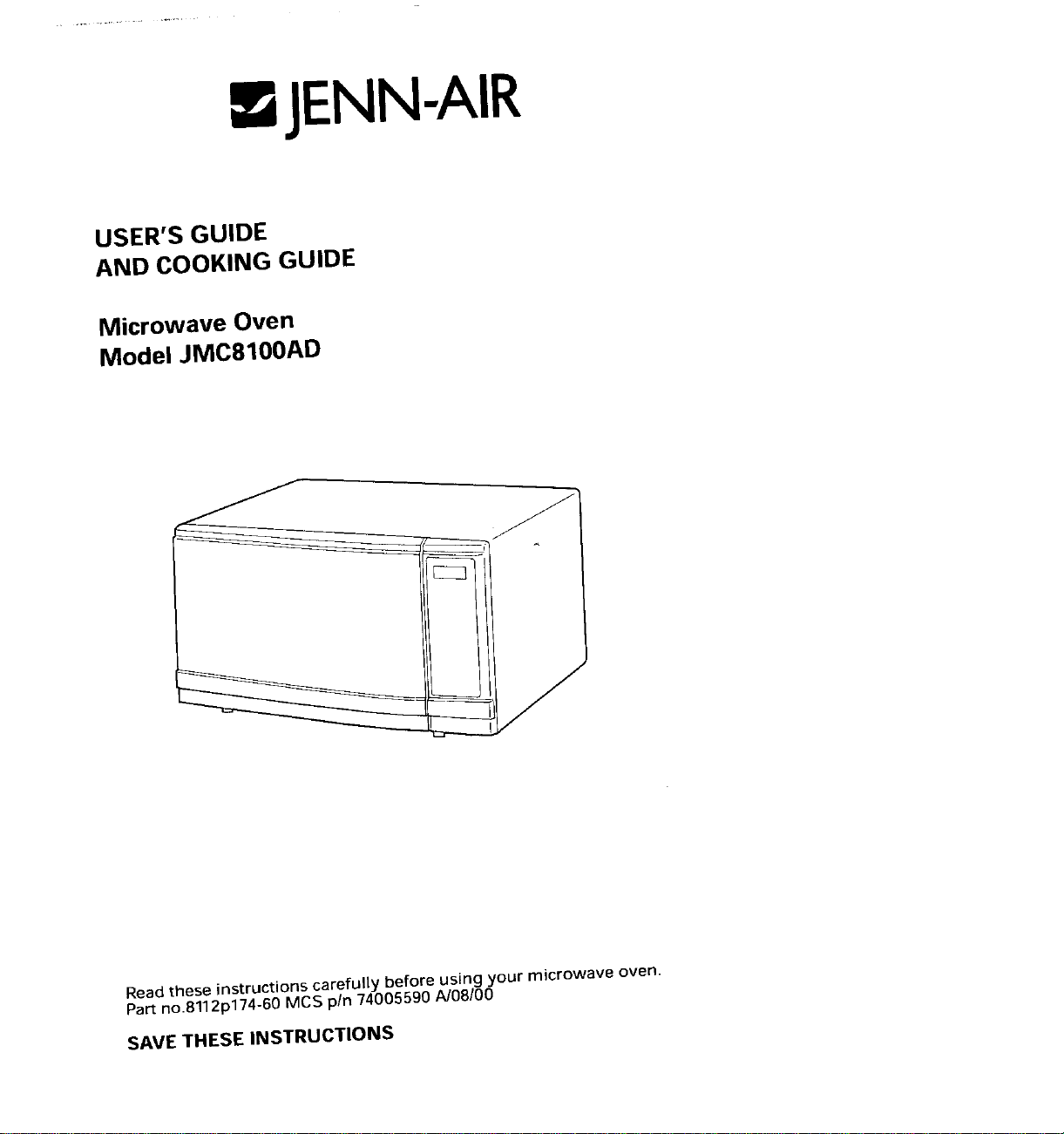
USER'S GUIDE
AND COOKING GUIDE
Microwave Oven
Model JMC8100AD
Read these instructions carefully before using your microwave oven.
Part no.8112p174-60 MCS pin 74005590 A/08/00
SAVETHESEINSTRUCTIONS
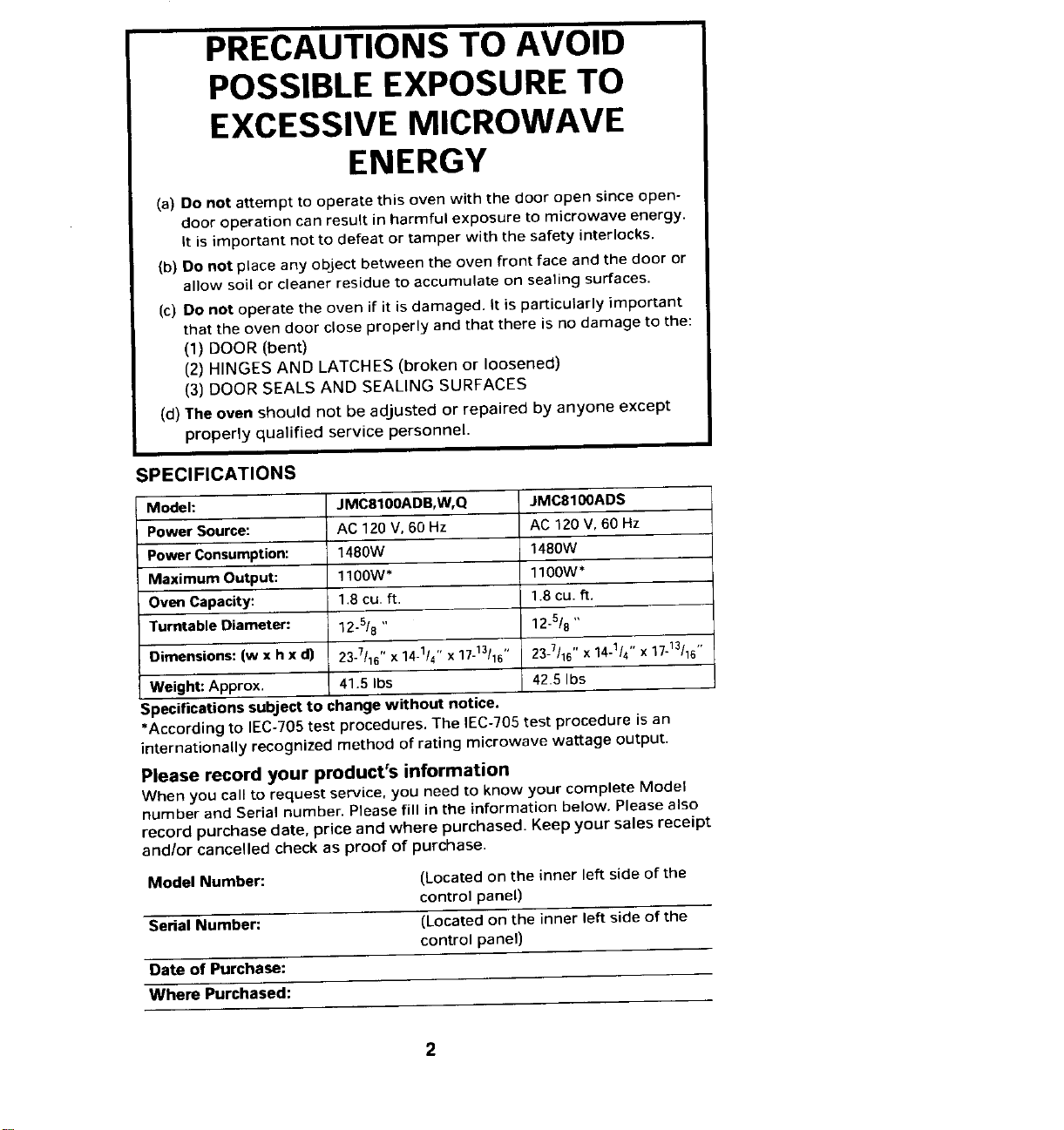
PRECAUTIONSTO AVOID
POSSIBLEEXPOSURETO
EXCESSIVEMICROWAVE
ENERGY
(a) Do not attempt to operate this oven with the door open since open-
door operation can result in harmful exposure to microwave energy.
It is important not to defeat or tamper with the safety interlocks.
(b) Do not place any object between the oven front face and the door or
allow soil or cleaner residue to accumulate on sealing surfaces.
(c) Do not operate the oven if it is damaged. It is particularly important
that the oven door close properly and that there is no damage to the:
(1) DOOR (bent)
(2) HINGES AND LATCHES (broken or loosened)
(3) DOOR SEALS AND SEALING SURFACES
(d) The oven should not be adjusted or repaired by anyone except
properly qualified service personnel.
SPECIFICATIONS
Model: JMC8100ADB,W,Q JMC8100ADS
Power Source: AC 120 V, 60 Hz AC 120V, 60 Hz
Power Consumption: 1480W 148OW
Maximum Output: 1100W* 1100W*
Oven Capacity: 1.8 cu.ft. 1.8 cu. ft.
Turntable Diameter: 12-5/8" 12-5/8"
Dimensions: (w x h x d) 23-7/16"x14-1/4'' x17-13/15" 23-7/16'' x14-1/4'' x17-13/16''
Weight: Approx, 41.5 Ibs 42.5 Ibs
Specifications subject to change without notice.
*According to IEC-705 test procedures. The IEC-705 test procedure is an
internationally recognized method of rating microwave wattage output.
Please record your product's information
When you call to request service, you need to know your complete Model
number and Serial number. Please fill in the information below. Please also
record purchase date, price and where purchased. Keep your sales receipt
and/or cancelled check as proof of purchase.
Model Number: (Located on the inner left side of the
control panel)
Serial Number: (Located on the inner left side of the
control panel)
Date of Purchase:
Where Purchased:
For additional questions, please REGISTRATION CARD packed with
contact us: the oven. I
B
Maytag Appliance Sales Company 1. Check the model and serial
Atten: CAIR ®Center numbers on the card to see that
P.O.Box 2370 they match the numbers on the
Cleveland, TN 37320-2370 data plate. The data plate is
1-800-688-1100(USA and CANADA) located on the inner left side of
1-800-688-2080(U.S.TTY for deaf, control panel when the door is
hearing impaired or speech open. If the numbers on the card I
impaired) are not the same as those on the
i
(Mon.-Fri., 8am-8pm Eastern Time) data plate, cross out the numbers
Internet: http://www.maytag.com on the card and write in the
numbers as they appear on the
For service and warranty data plate.
information, see pages 36-37. 2. Mail the card. The return address
IMPORTANT is included on the reverse side of
Please keep your sales slip. Should the card. I
any warranty service be required, If you move or are not the original
proof of original date of purchase is owner of this oven, you must by law
needed, renew the registration. Send the
NOTE renewal registration information to:
In our continuing effort to improve Maytag Customer Service
the quality of our appliances, it may Warranty Administration
be necessaryto makechangestothe R O. Box 4970
appliance without revising this Cleveland, TN 37320-4970
guide. Renewal Registration information
REGISTRATION must provide:
Federal law requires registration of a) Your name and address.
all microwave ovens.To comply with b) The microwave oven's model and
the law, please fill out the PRODUCT serial numbers.
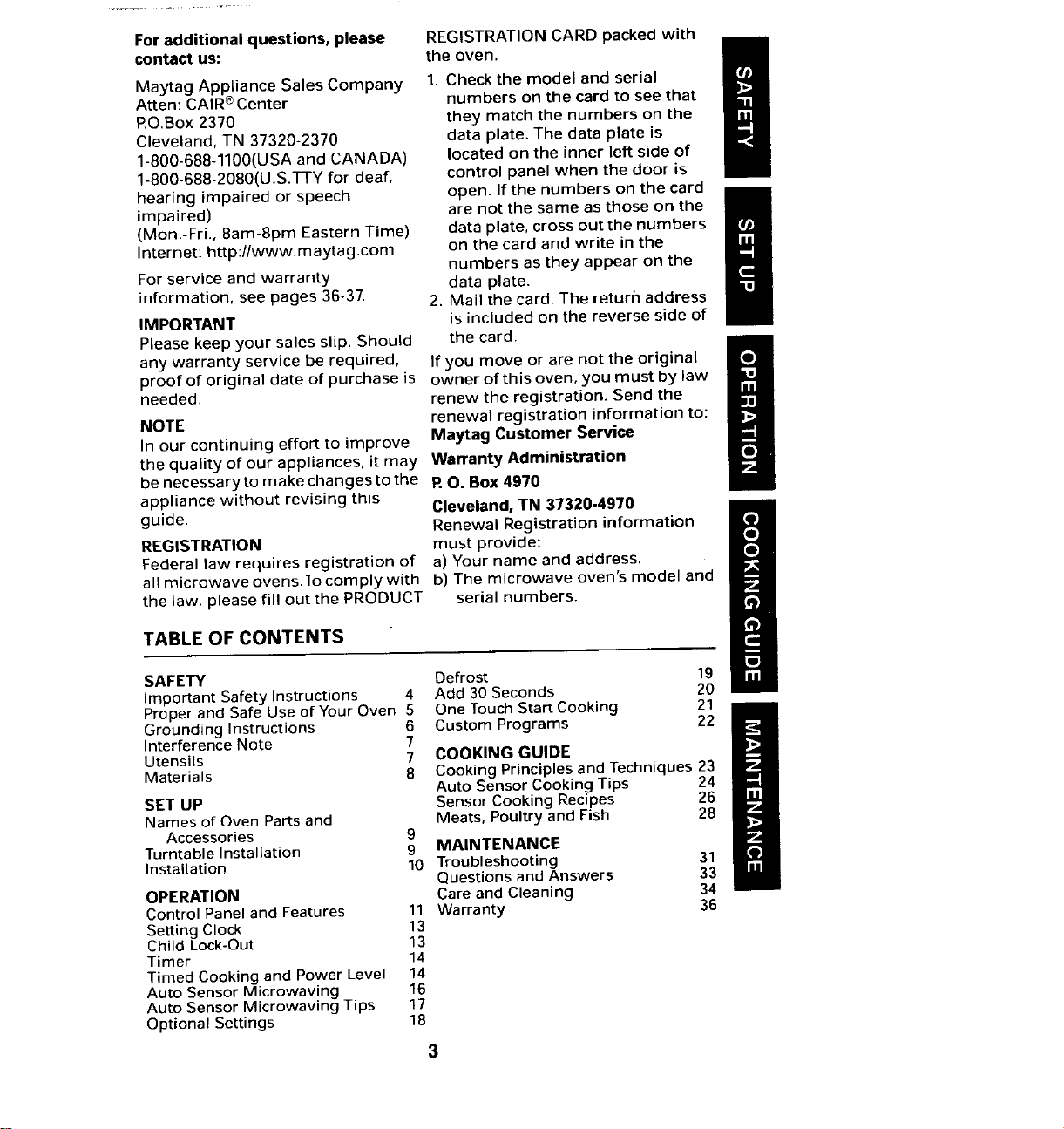
TABLEOFCONTENTS
SAFETY Defrost 19
Important Safety Instructions 4 Add 30 Seconds 20
Proper and Safe Use of Your Oven 5 One Touch Start Cooking 21
Grounding Instructions 6 Custom Programs 22
Interference Note 7
Utensils 7 COOKING GUIDE
Materials 8 Cooking Principles and Techniques 23
Auto Sensor Cooking Tips 24
SET UP Sensor Cooking Recipes 26
Names of Oven PaRs and Meats, Poultry and Fish 28
Accessories 9
Turntable Installation 9 MAINTENANCE
Installation 10 Troubleshooting 31
Questions and Answers 33
OPERATION Care and Cleaning 34
Control Panel and Features 11 Warranty 36
Setting Clock 13
Child Lock-Out 13
Timer 14
Timed Cooking and Power Level 14
Auto Sensor Microwaving 16
Auto Sensor Microwaving Tips 17
Optional Settings 18
3
SAFETY
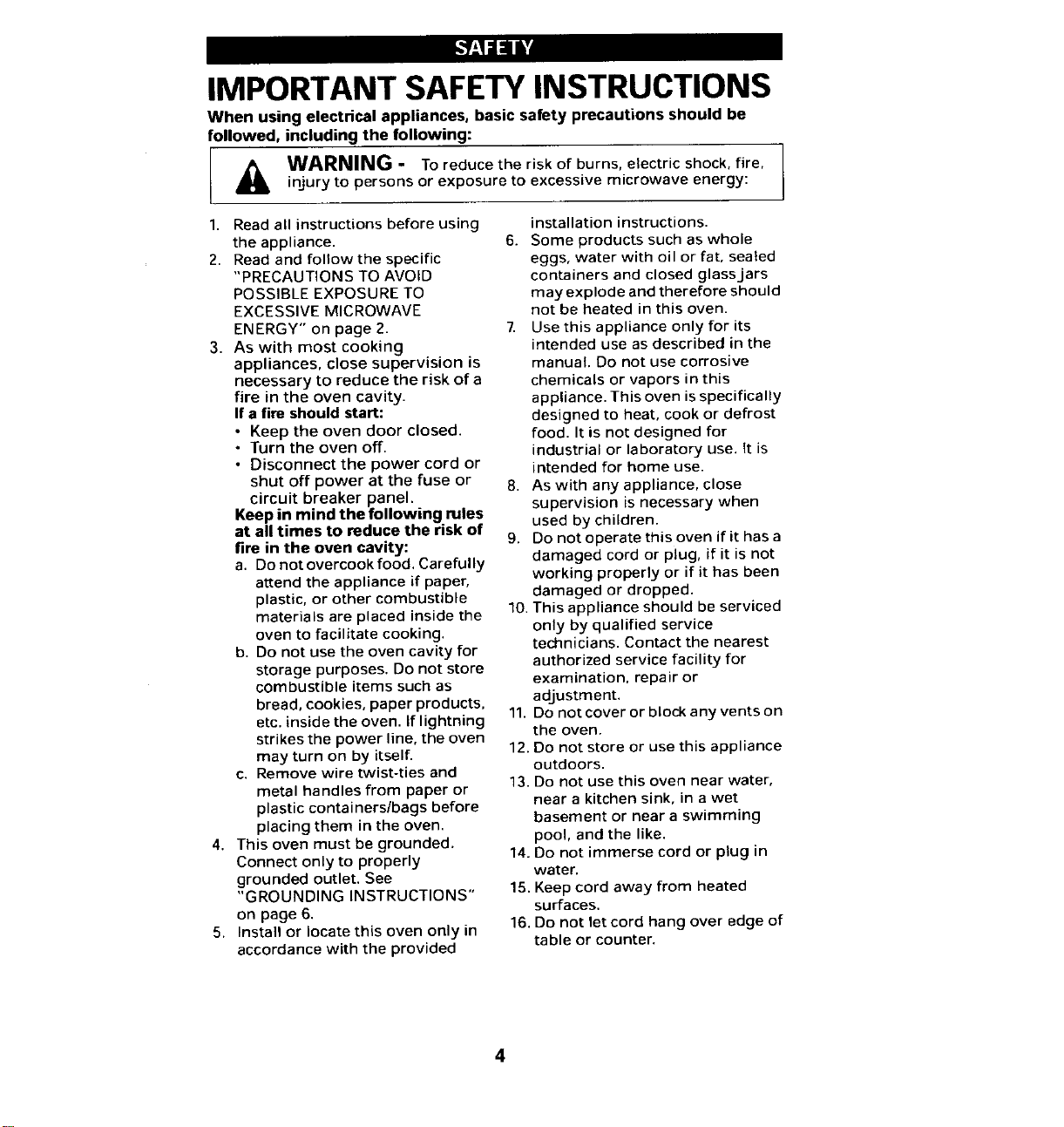
IMPORTANTSAFETYINSTRUCTIONS
When using electrical appliances, basic safety precautions should be
followed, including the following:
_Ib WARNING - To reduce the risk of burns, electric shock, fire,
injury to persons or exposure to excessive microwave energy:
1. Read all instructions before using installation instructions.
the appliance. 6. Some products such as whole
2. Read and follow the specific eggs, water with oil or fat, sealed
"PRECAUTIONS TO AVOID containers and closed glass jars
POSSIBLE EXPOSURE TO may explode and therefore should
EXCESSIVE MICROWAVE not be heated in this oven.
ENERGY" on page 2. 7. Use this appliance only for its
3. As with most cooking intended use as described in the
appliances, close supervision is manual. Do not use corrosive
necessary to reduce the risk of a chemicals or vapors in this
fire in the oven cavity, appliance. This oven isspecifically
If a fire should start: designed to heat, cook or defrost
• Keep the oven door closed, food. It is not designed for
• Turn the oven off. industrial or laboratory use. it is
• Disconnect the power cord or intended for home use.
shut off power at the fuse or 8. As with any appliance, close
circuit breaker panel, supervision is necessary when
Keep in mind the following rules used by children.
at all times to reduce the risk of 9. Do not operate this oven if it has a
fire in the oven cavity: damaged cord or plug, if it is not
a. Do not overcook food. Carefully working properly or if it has been
attend the appliance if paper, damaged or dropped.
plastic, or other combustible 10. This appliance should be serviced
materials are placed inside the only by qualified service
oven to facilitate cooking, technicians. Contact the nearest
b. Do not use the oven cavity for authorized service facility for
storage purposes. Do not store
examination, repair or
combustible items such as
adjustment.
bread, cookies, paper products, 11. Do not cover or block any vents on
etc. inside the oven. If lightning the oven.
strikes the power line, the oven
12. Do not store or use this appliance
may turn on by itself.
c. Remove wire twist-ties and outdoors.
13. Do not use this oven near water,
metal handles from paper or near a kitchen sink, in a wet
plastic containers/bags before basement or near a swimming
placing them in the oven. pool, and the like.
4. This oven must be grounded. 14. Do not immerse cord or plug in
Connect only to properly water.
grounded outlet. See
"GROUNDING INSTRUCTIONS" 15. Keep cord away from heated
surfaces.
on page 6.
5. Install or locate this oven only in 16. Do not let cord hang over edge of
accordance with the provided table or counter.
17. When cleaning door and oven applied with a sponge or soft I
surfaces that meet when door is cloth. (See ' Cleaning'
/
closed, use only mild, instructions on page 34.)
nonabrasive soaps or detergents
SAVE THESE INSTRUCTIONS
PROPER AND SAFE USE OF YOUR OVEN
• The oven must be level. • Do not heat baby bottles or baby
• The turntable and turntable roller food in the microwave oven.
rest must be in the oven during Uneven heating may occur and
cooking, could cause physical injury.
• Place the cookware gently on the • Do not heat narrow-necked
turntable and handle it carefully containers, such as syrup bottles.
to avoid possible breakage. • Do not attempt to deep-fry in your
• Incorrect use of browning dish microwave oven.
may cause the turntable to break. • Do not do home canning in this
See page 8. microwave oven as it is
• When using the Popcorn feature impossible to be sure all contents
of this microwave oven, use of the jar have reached boiling
only the bag sizes specified in temperature.
the instruction manual. • Do not use this microwave oven
• Do not pop popcorn except in a for commercial purposes. This
microwave approved popcorn microwave oven is made for
popper or in a commercial household use only.
package recommended • Liquids, such as beverages, that
especially for microwave ovens, are heated in a microwave oven,
can overheat beyond their boiling
• The oven has several built-in
safety switches to ensure that the point without any evidence of
power remains off when the door bubbling. This could result in hot
liquids suddenly boiling over.
is open. Do not tamper with these To prevent this occurrence, the
switches.
following steps should be taken:
• Do not operate the microwave (a) Avoid using straight-sided
oven empty. Operating the oven containers with narrow necks.
without any food or food that is (b) Do not overheat.
extremely low in moisture can (c) Stir the liquid before placing
cause fire, charring or sparking, the container in the oven and
• Do not cook bacon directly on the again halfway through the
turntable. Excessive local heating heating time.
of the turntable may cause it to (d) After heating, allow to stand in
break, the oven for a short time,
stirring again before carefully
removing the container,
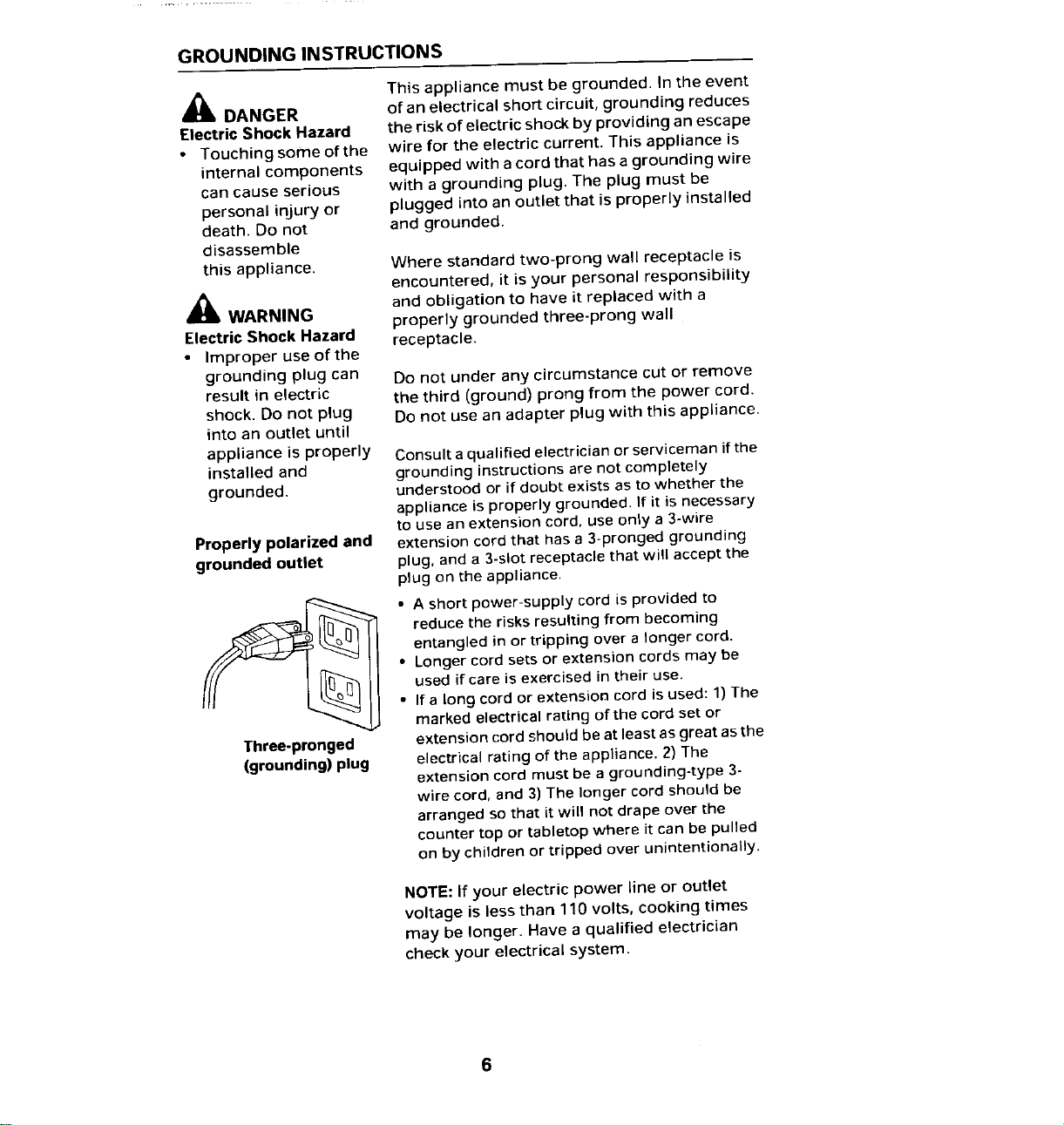
GROUNDING INSTRUCTIONS
This appliance must be grounded. In the eventDANGER of an electrical short circuit, grounding reduces
Electric Shock Hazard the risk of electric shock by providing an escape
• Touching some of the wire for the electric current. This appliance is
internal components equipped with a cord that has a grounding wire
can cause serious with a grounding plug. The plug must be
personal injury or plugged into an outlet that is properly installed
death. Do not and grounded.
disassemble
this appliance. Where standard two-prong wall receptacle is
encountered, it is your personal responsibility
and obligation to have it replaced with a
WARNING properly grounded three-prong wall
Electric Shock Hazard receptacle.
• Improper use of the
grounding plug can Do not under any circumstance cut or remove
result in electric the third (ground) prong from the power cord.
shock. Do not plug Do not use an adapter plug with this appliance.
into an outlet until
appliance is properly Consult aqualified electrician or serviceman if the
installed and grounding instructions are not completely
grounded, understood or if doubt exists as to whether the
appliance is properly grounded. If it is necessary
to use an extension cord, use only a 3-wire
Properly polarized and extension cord that has a 3-pronged grounding
grounded outlet plug, and a 3-slot receptacle that will accept the
plug on the appliance.
• A short power-supply cord is provided to
reduce the risks resulting from becoming
entangled in or tripping over a longer cord.
• Longer cord sets or extension cords may be
used if care is exercised in their use.
• If a long cord or extension cord is used: 1) The
marked electrical rating of the cord set or
Three-pronged extension cord should be at least as great asthe
(grounding) plug electrical rating of the appliance. 2) The
extension cord must be a grounding-type 3-
wire cord, and 3) The longer cord should be
arranged so that it will not drape over the
counter top or tabletop where it can be pulled
on by children or tripped over unintentionally.
NOTE: If your electric power line or outlet
voltage is less than 110 volts, cooking times
may be longer. Have a qualified electrician
check your electrical system.
INTERFERENCE NOTE /
Microwave ovens generate radio frequency energy during operation and
if not installed properly may cause interference to radio and television
reception. You can determine if this unit is causing interference by turning
it on and off while the interference is occurring. If interference occurs, it
may be corrected by one or more of the following measures:
• clean door and seal surfaces of the oven.
• reorient the television or radio receiving antenna.
• relocate the oven with respect to the television or radio receiver.
• plug the oven into a different outlet so that it, and the television or
radio receiver, are on different circuits.
If the interference persists, you may want to consult an experienced radio/
television technician for additional suggestions.
UTENSILS
See following page for further instructions on
_lb CAUTION "materials you can use in microwave oven or
to be avoided in microwave oven." Do the test
Personal Injury Hazard below to see if the utensil is safe for use in a
• Tightly-closed microwave oven.
utensils could
explode. Closed Utensil Test:
containers should be 1. Fill a microwave-safe container with 1 cup
opened and plastic of cold water (250 mL) along with the utensil
pouches pierced, in question.
2. Cook on maximum power (P100) for 1
minute.
3. Carefully feel the utensil.
If the empty utensil is warm, do not use it for
microwave cooking.
Do not exceed 1 minute testing time.
CAUTION:
1. Do not use plastic containers for testing,
2. Some containers and dishware may be
warm (or hot) in only one area. Do not use a
container that becomes warm anywhere.
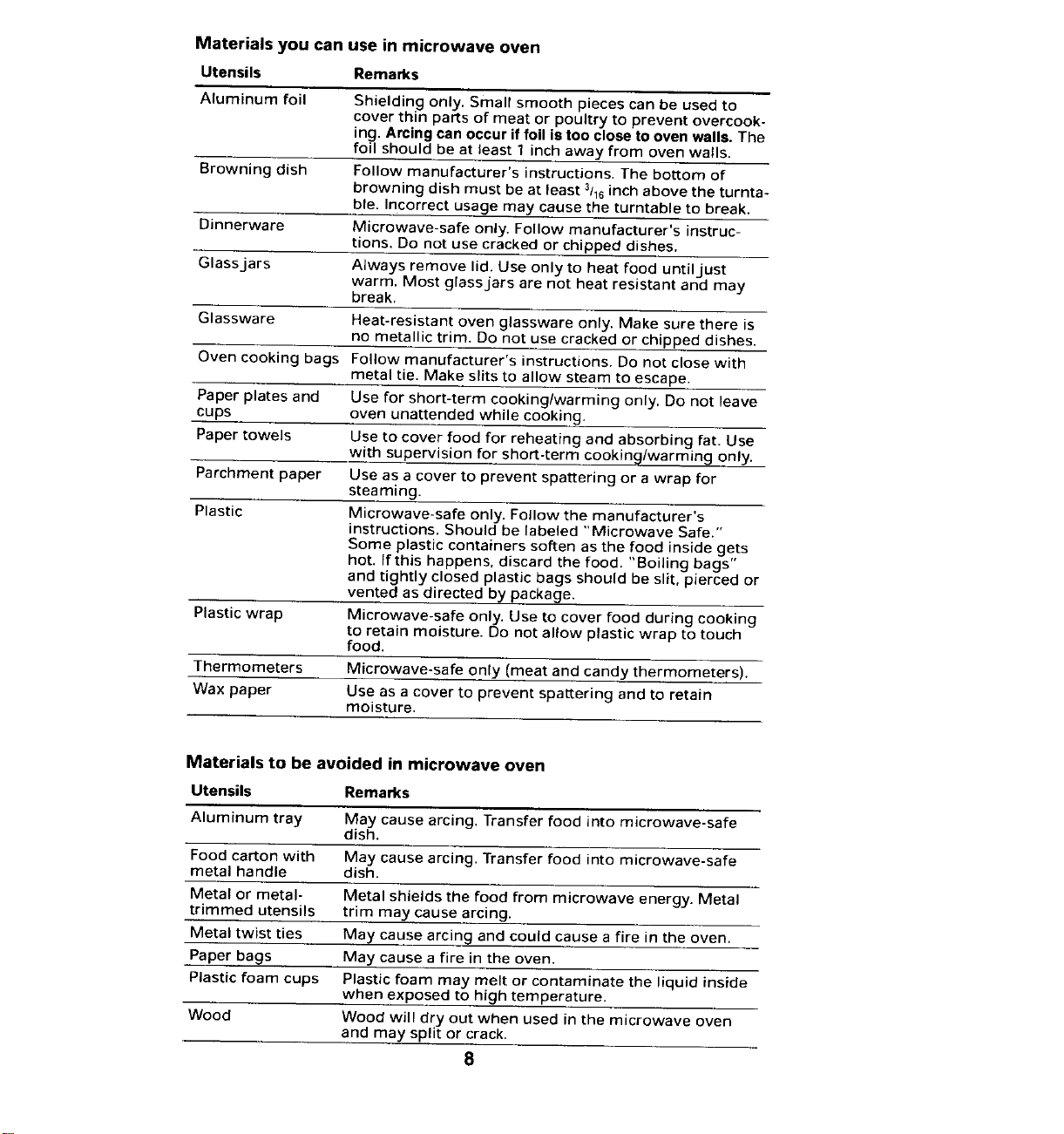
Materials you can use in microwave oven
Utensils Remarks
Aluminum foil Shielding only. Small smooth pieces can be used to
cover thin parts of meat or poultry to prevent overcook-
ing. Arcing can occur if foil is too close to oven walls. The
foil should be at least 1 inch away from oven walls.
Browning dish Follow manufacturer's instructions. The bottom of
browning dish must be at least 3116inch above the turnta-
ble. Incorrect usage may cause the turntable to break.
Dinnerware Microwave-safe only, Follow manufacturer's instruc-
tions. Do not use cracked or chipped dishes.
Glassjars Always remove lid. Use only to heat food until just
warm. Most glassjars are not heat resistant and may
break.
Glassware Heat-resistant oven glassware only. Make sure there is
no metallic trim. Do not use cracked or chipped dishes.
Oven cooking bags Follow manufacturer's instructions. Do not close with
metal tie. Make slits to allow steam to escape.
Paper plates and Use for short-term cooking/warming only. Do not leave
cups oven unattended while cooking.
Paper towels Use to cover food for reheating and absorbing fat. Use
with supervision for short-term cooking/warmin_ only.
Parchment paper Use as a cover to prevent spattering or a wrap for
steaming.
Plastic Microwave-safe only. Follow the manufacturer's
instructions. Should be labeled "Microwave Safe."
Some plastic containers soften as the food inside gets
hot. If this happens, discard the food. "Boiling bags"
and tightly closed plastic bags should be slit, pierced or
vented as directed by package.
Plastic wrap Microwave-safe only. Use to cover food during cooking
to retain moisture. Do not allow plastic wrap to touch
food.
Thermometers Microwave-safe only (meat and candy thermometers).
Wax paper Use as a cover to prevent spattering and to retain
moisture.
Materials to be avoided in microwave oven
Utensils Remarks
Aluminum tray May cause arcing. Transfer food into microwave-safe
dish.
Food carton with May cause arcing. Transfer food into microwave-safe
metal handle dish.
Metal or metal- Metal shields the food from microwave energy. Metal
trimmed utensils trim may cause arcing.
Metal twist ties May cause arcing and could cause a fire in the oven.
Paper bags May cause a fire in the oven.
Plastic foam cups Plastic foam may melt or contaminate the liquid inside
when exposed to high temperature.
Wood Wood will dry out when used in the microwave oven
and may split or crack.
8
SET UP
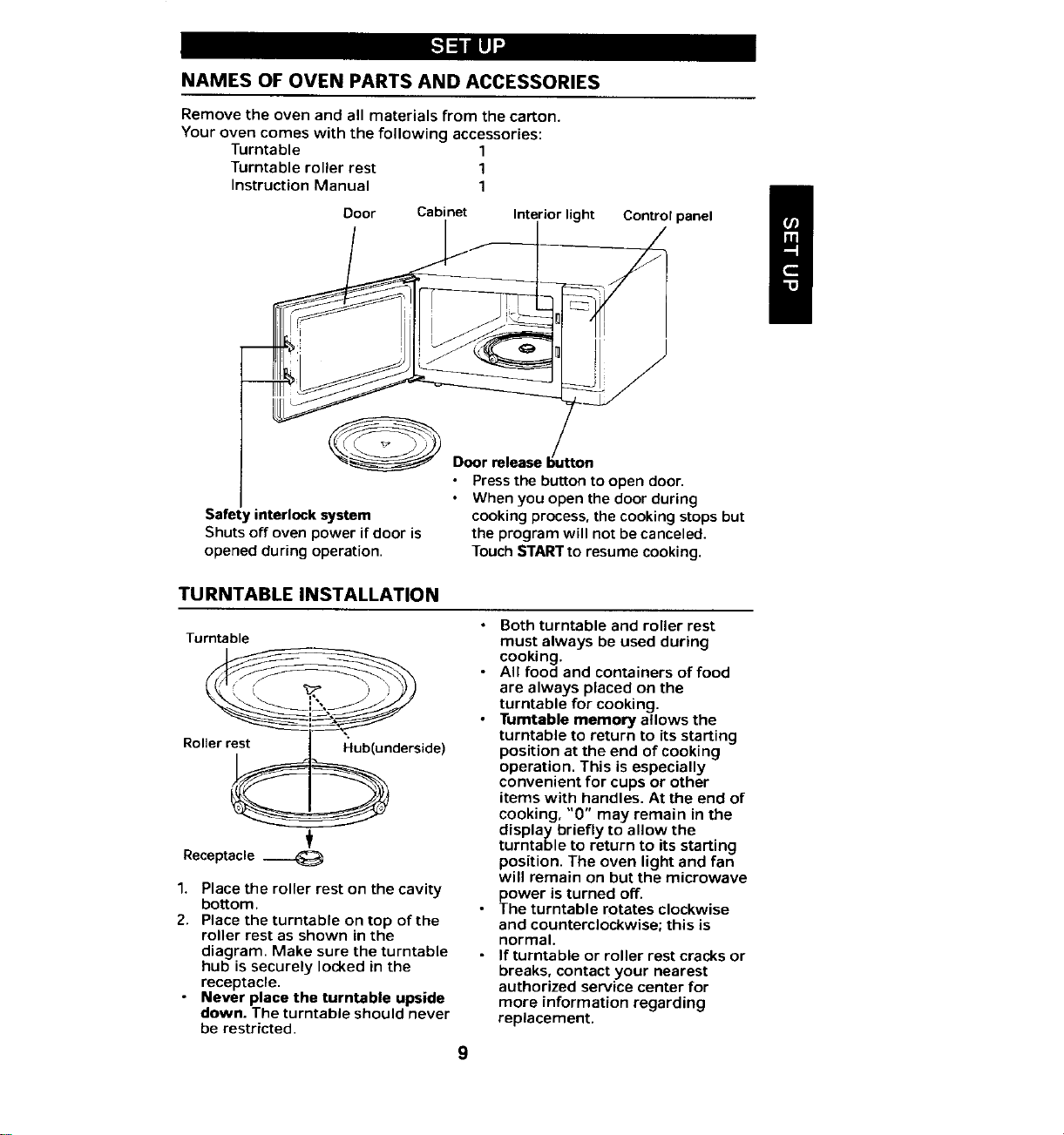
NAMES OFOVEN PARTSAND ACCESSORIES
Remove the oven and all materials from the carton.
Your oven comes with the following accessories:
Turntable 1
Turntable roller rest 1
Instruction Manual 1
/
Door Cabinet Interior light Control panel
/XJlL I o /
_ Door release b_/tton
• Pressthe button to open door.
• When you open the door during
Safer rinterlock system cooking process, the cooking stops but
Shuts off oven power if door is the program will not be canceled.
opened during operation. TouchSTARTto resume cooking.
TURNTABLEINSTALLATION
• Both turntable and roller rest
Turntable must always be used during
• All food and containers of food
are always placed on the
___ turntable for cooking.
• Turntable memory allows the
_n turntable to return to its starting
Rollerr derside) position at the end of cooking
operation. This is especially
convenient for cups or other
items with handles. At the end of
cooking, "0" may remain in the
display briefly to allow the
turntable to return to its starting
Receptacle ___ position. The oven light and fan
will remain on but the microwave
1. Place the roller rest on the cavity power is turned off.
bottom. • The turntable rotates clockwise
2. Place the turntable on top of the and counterclockwise; this is
roller rest as shown in the normal.
diagram. Make sure the turntable • If turntable or roller rest cracks or
hub is securely locked in the breaks, contact your nearest
receptacle, authorized service center for
• Never place the turntable upside more information regarding
down. The turntable should never replacement.
be restricted.
9
INSTALLATION
Remove all packing material and accessories. Examine the oven for any
damage such as dents or broken door. Do not install if oven is damaged.
NOTE: This unit is not designed for 50 Hz or any circuit other than a 120-volt/
60-Hz AC circuit. This oven is designed for countertop installation.
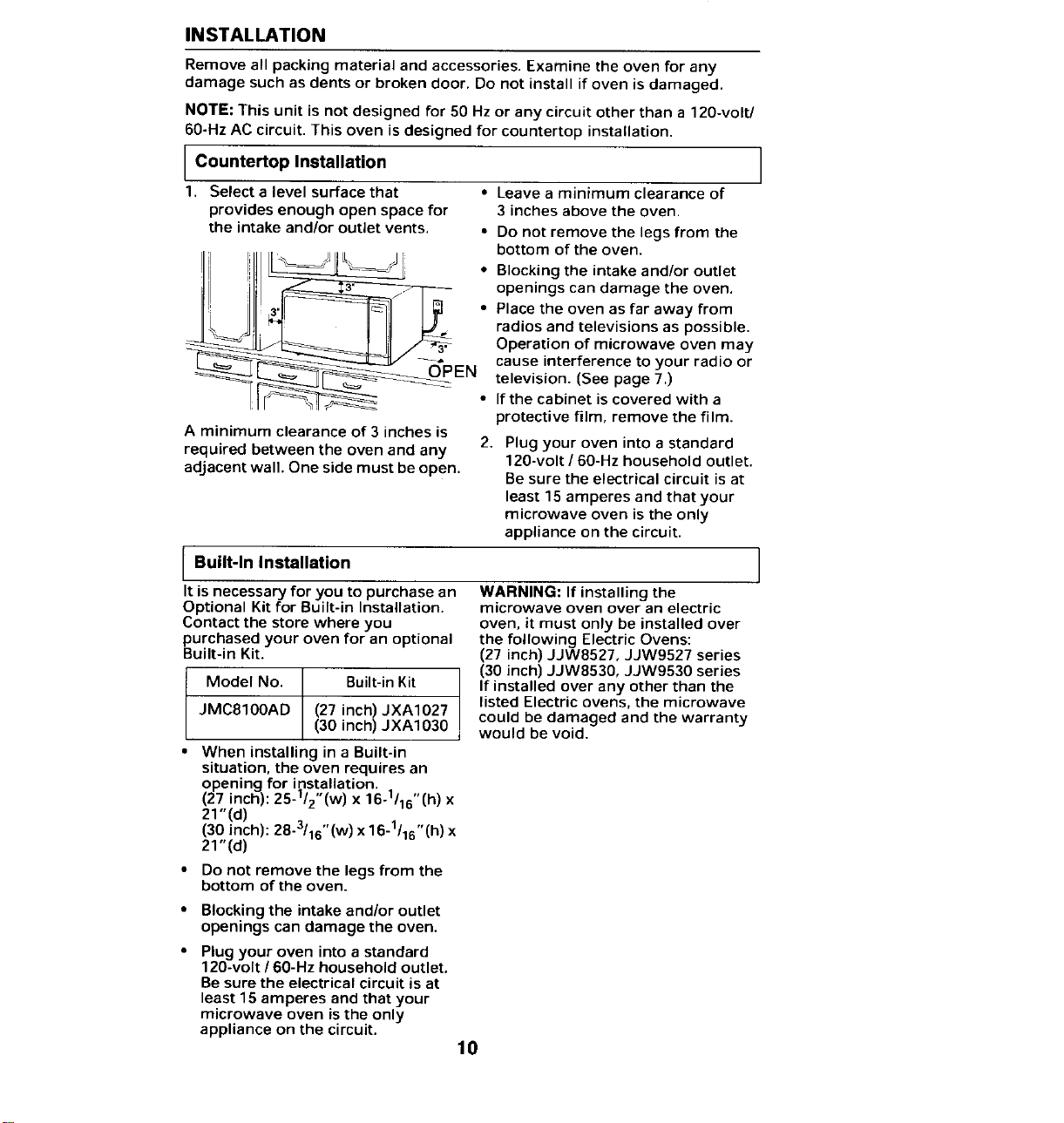
CountertopInstallation
1. Select a level surface that • Leave a minimum clearance of
provides enough open space for 3 inches above the oven.
the intake and/or outlet vents. • Do not remove the legs from the
bottom of the oven.
• Blocking the intake and/or outlet
openings can damage the oven.
• Place the oven as far away from
radios and televisions as possible.
_ Operation of microwave oven may
cause interference to your radio or
_ television. (See page 7.)
• If the cabinet is covered with a
protective film, remove the film.
A minimum clearance of 3 inches is
required between the oven and any 2. Plug your oven into a standard
120-volt / 60-Hz household outlet.
adjacent wall. One side must be open. Be sure the electrical circuit is at
least 15 amperes and that your
microwave oven is the only
appliance on the circuit.
Built-In Installation
It is necessary for you to purchase an WARNING: If installing the
Optional Kit for Built-in Installation. microwave oven over an electric
Contact the store where you oven, it must only be installed over
purchased your oven for an optional the following Electric Ovens:
Built-in Kit. (27 inch) JJW8527, JJW9527 series
(30 inch) JJW8530, JJW9530 series
Model No. Built-in Kit If installed over any other than the
JMC8100AD (27 inch) JXA1027 listed Electric ovens, the microwave
(30 inch) JXA1030 could be damaged and the warranty
would be void.
When installing in a Built-in
situation, the oven requires an
opening for installation. ,,
(27 inch): 25-1/2 (w) x 16-1/16 (h) x
21"(d)
(30 inch): 28-3/16"(w) x 16-1/16"(h) x
21"(d)
• Do not remove the legs from the
bottom of the oven.
• Blocking the intake and/or outlet
openings can damage the oven.
• Plug your oven into a standard
120-volt / 60-Hz household outlet.
Be sure the electrical circuit is at
least 15 amperes and that your
microwave oven is the only
appliance on the circuit.
10
OPERATION
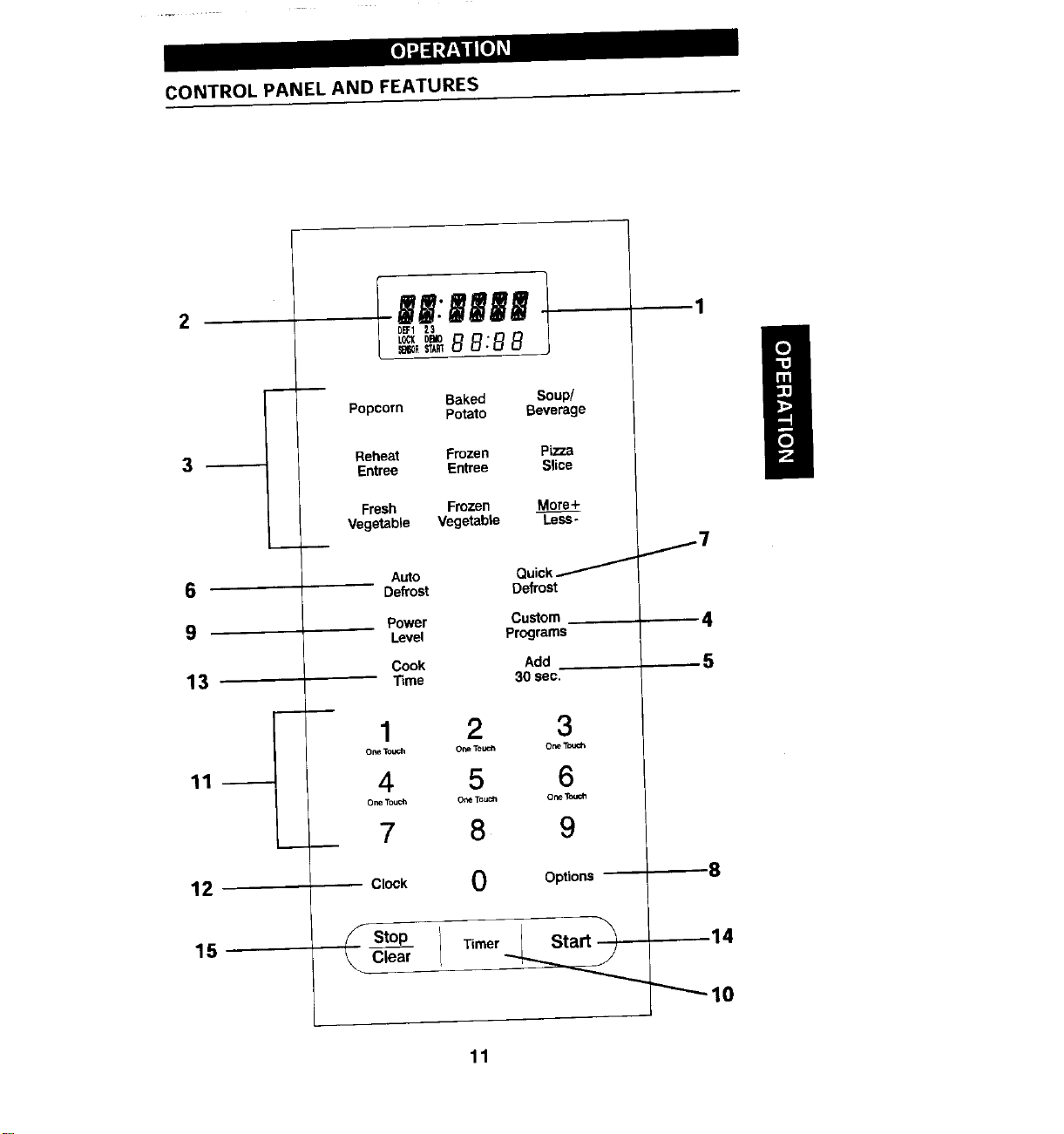
CONTROLPANELAND FEATURES
IB|:|'||| t 1
2 D_I 23
H
Baked Soup/
Popcorn Potato Beverage
Reheat Frozen Pizza
3 Entree Entree Slice
Fresh Frozen More+
Vegetable Vegetable Less-
_7
Auto Quick
6 Defrost Defrost
Power Custom 4
9 Level Programs
Cook Add 5
13 T_me 30 sec.
1 2 3
oneTouch OceTouch OneTm¢_
11 4 5 6
OneTouCh o_e TouCh ore Toucll
• 7 8 9
12 Clock 0 Options "8
._ StOp Timer._Sta__ 14
15 _ Clear _
L_lO
11
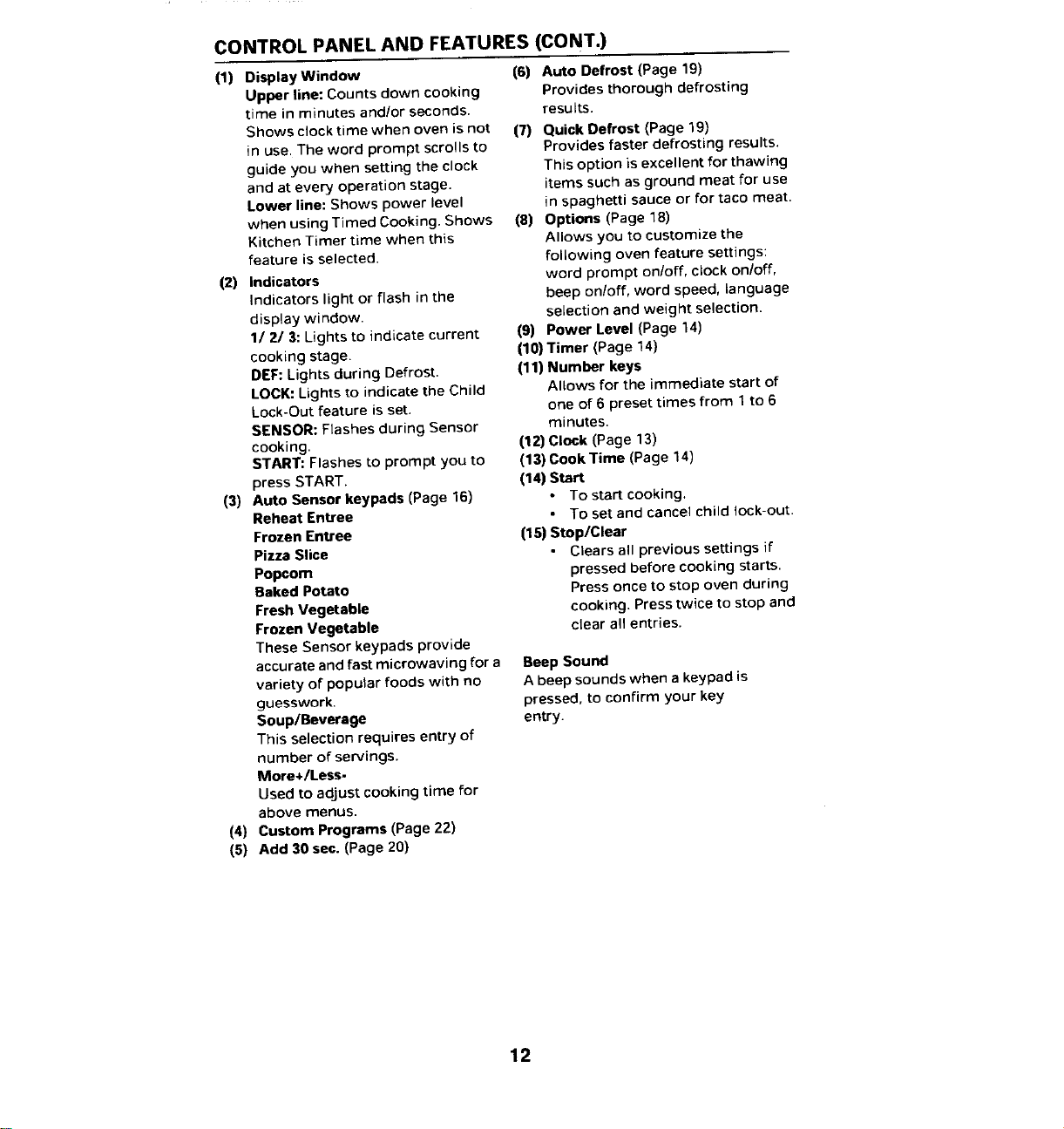
CONTROLPANELAND FEATURES(CONT.)
(1) Display Window (6) Auto Defrost (Page 19)
Upper line: Counts down cooking Provides thorough defrosting
time in minutes and/or seconds, results.
Shows clock time when oven is not (7) Quick Defrost (Page 19)
in use. The word prompt scrolls to Provides faster defrosting results.
guide you when setting the clock This option is excellent for thawing
and at every operation stage, items such as ground meat for use
Lower line: Shows power level in spaghetti sauce or for taco meat.
when using Timed Cooking. Shows (8) Options (Page 18)
Kitchen Timer time when this Allows you to customize the
feature is selected, following oven feature settings:
(2) Indicators word prompt on/off, clock on/off,
Indicators light or flash in the beep on/off, word speed, language
display window, selection and weight selection.
1/2/3: Lights to indicate current (9) Power Level (Page 14)
cooking stage. (10) Timer (Page 14)
DEF:Lights during Defrost. (11) Number keys
LOCK:Lights to indicate the Child Allows for the immediate start of
Lock-Out feature is set. one of 6 preset times from 1to 6
SENSOR: Flashes during Sensor minutes.
cooking. (12)Clock (Page 13)
START: Flashes to prompt you to (13) Cook Time (Page 14)
press START. (14) Start
(3) Auto Sensor keypads (Page 16) • To start cooking.
Reheat Entree • To set and cancel child lock-out.
Frozen Entree (15) Stop/Clear
Pizza Slice • Clears a(I previous settings if
Popcom pressed before cooking starts.
Baked Potato Press once to stop oven during
Fresh Vegetable cooking. Press twice to stop and
Frozen Vegetable clear all entries.
These Sensor keypads provide
accurate andfast microwaving for a Beep Sound
variety of popular foods with no A beep sounds when a keypad is
guesswork, pressed, to confirm your key
Soup/Beverage entry.
This selection requires entry of
number of servings.
More+/Less-
Used to adjust cooking time for
above menus.
(4) Custom Programs (Page 22)
(5) Add 30 sec. (Page 20)
12
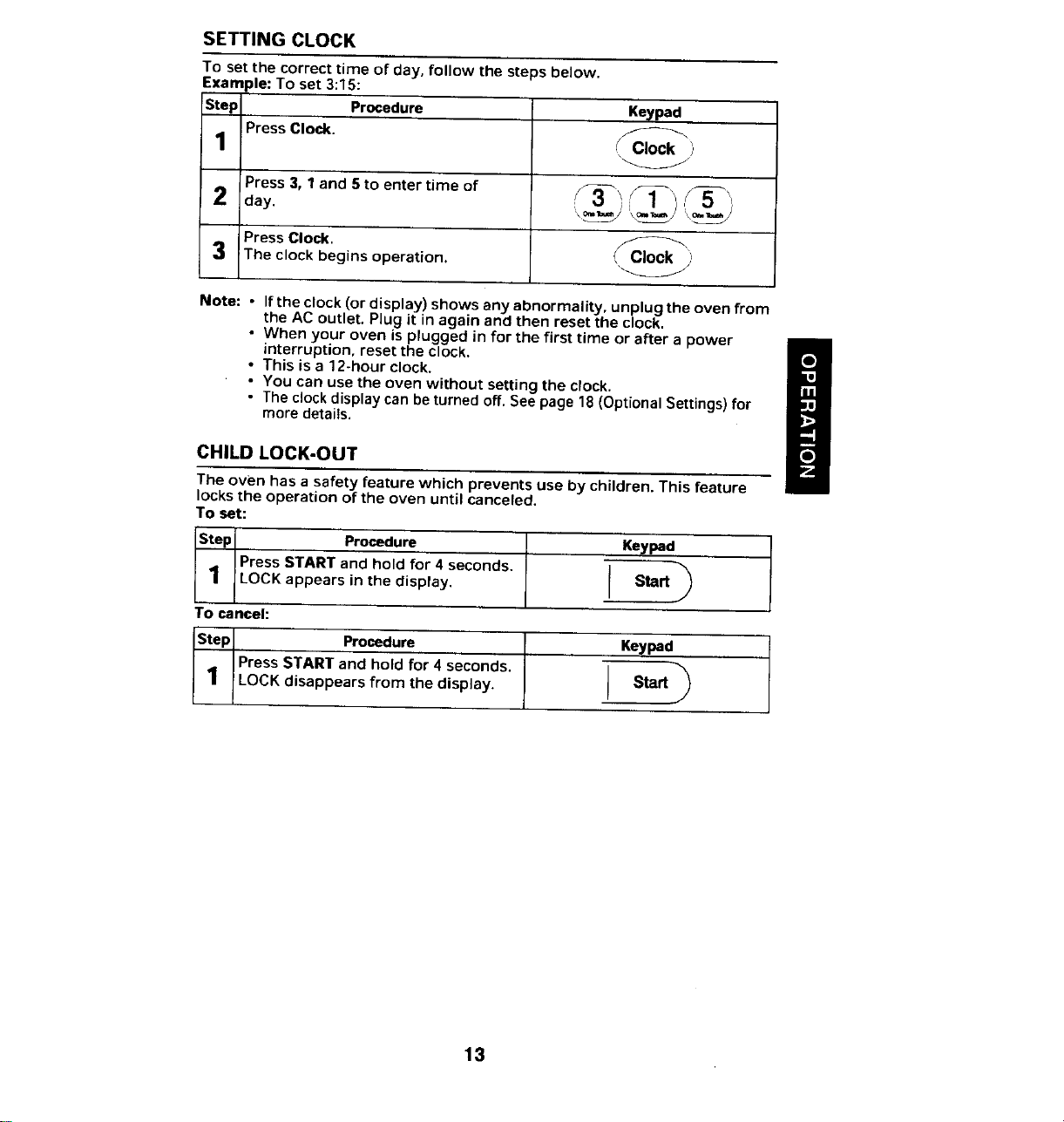
SETTINGCLOCK
To set the correct time of day, follow the steps below.
Exam de:To set 3:15:
Step Procedure Keypad
Press Clock.
1 _ Clock )
"W
Press 3, 1 and 5 to enter time of S_ _1"1 "__5_)
_) day. "_-_=/_' ='\_S'
Press Clock. _Cl_ock, '
3 The clock begins operation. , ,,
W
Note: - Ifthe clock (or display) shows any abnormality, unplug the oven from
the AC outlet. Plug it in again and then reset the clock.
• When your oven is plugged in for the first time or after a power
interruption, reset the clock.
/
• This is a 12-hour clock.
• You can use the oven without setting the clock.
• The clock display can be turned off. See page 18 (Optional Settings) for
more detai_s.
CHILDLOCK-OUT
The oven has a safety feature which prevents use by children. This feature
locks the operation of the oven until canceled.
To set:
Step Procedure Keypad
Press START and hold for 4 seconds. _,
1 LOCK appears in the display. Start
9
To cancel:
Step Procedure . Keypad
Press START and hold for 4 seconds. _,
1 !LOCK disappears from the display. Start
9
13
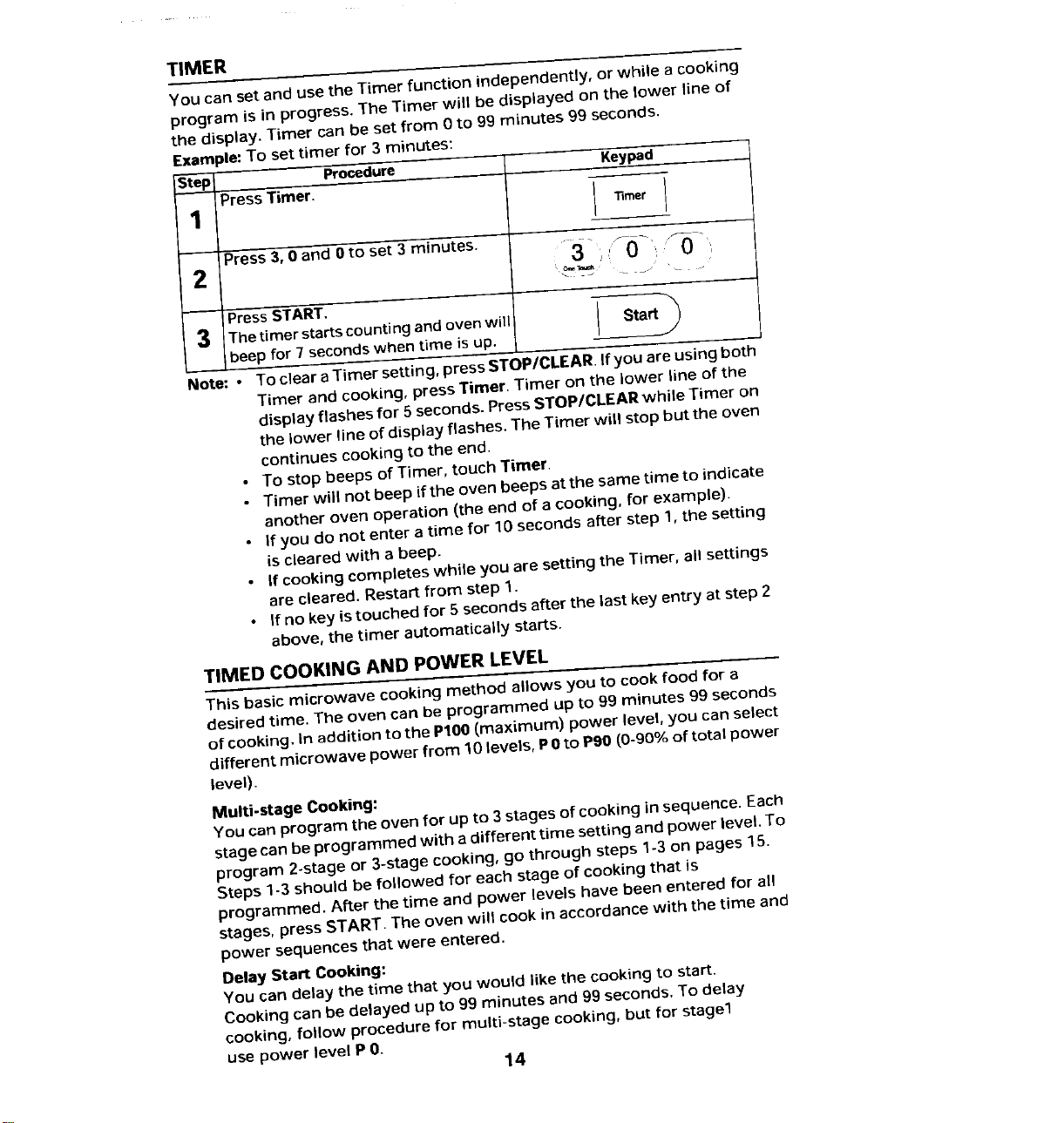
TIMER
You can set and use the Timer function independently, or while a cooking
program is in progress. The Timer will be displayed on the lower line of
the display. Timer can be set from 0 to 99 minutes 99 seconds.
Example:To set timer for 3 minutes:
Step Procedure Keypad
PressTimer.
"13mer
Press3, 0 and 0 to set 3 minutes.
2
PressSTART.
3 Thetimer startscountingandovenwill Start_
beep for 7 seconds when time is up.
J
Note:. To clear a Timer setting, press STOP/CLEAR.If you are using both
Timer and cooking, press Timer. Timer on the lower line of the
display flashes for 5 seconds. Press STOP/CLEARwhile Timer on
the lower line of display flashes. The Timer will stop but the oven
continues cooking to the end.
• To stop beeps of Timer, touch Timer,
• Timer will not beep if the oven beeps atthe same time to indicate
another oven operation (the end of a cooking, for example).
• If you do not enter a time for 10 seconds after step 1,the setting
is cleared with a beep.
• If cooking completes while you are setting the Timer, all settings
are cleared. Restart from step 1.
• If no key istouched for 5 seconds after the last key entry at step 2
above, the timer automatically starts.
TIMED COOKING AND POWER LEVEL
This basic microwave cooking method allows you to cook food for a
desired time, The oven can be programmed up to 99 minutes 99 seconds
of cooking. In addition to the P100(maximum) power level, you can select
different microwave power from 10 levels, P0 to Pgo(0-90% of total power
level).
Multi-stage Cooking:
You can program the oven for up to 3stages of cooking insequence. Each
stage canbe programmed with a different time setting and power level. To
program 2-stage or 3-stage cooking, go through steps 1-3 on pages 15.
Steps 1-3 should be followed for each stage of cooking that is
programmed. After the time and power levels have been entered for all
stages, press START. The oven will cook in accordance with the time and
power sequences that were entered,
Delay Start Cooking:
You can delay the time that you would likethe cookingto start.
Cooking can be delayed up to 99 minutes and 99 seconds.To delay
cooking, follow procedure for multi-stage cooking, but for stage1
use power level P 0.
14
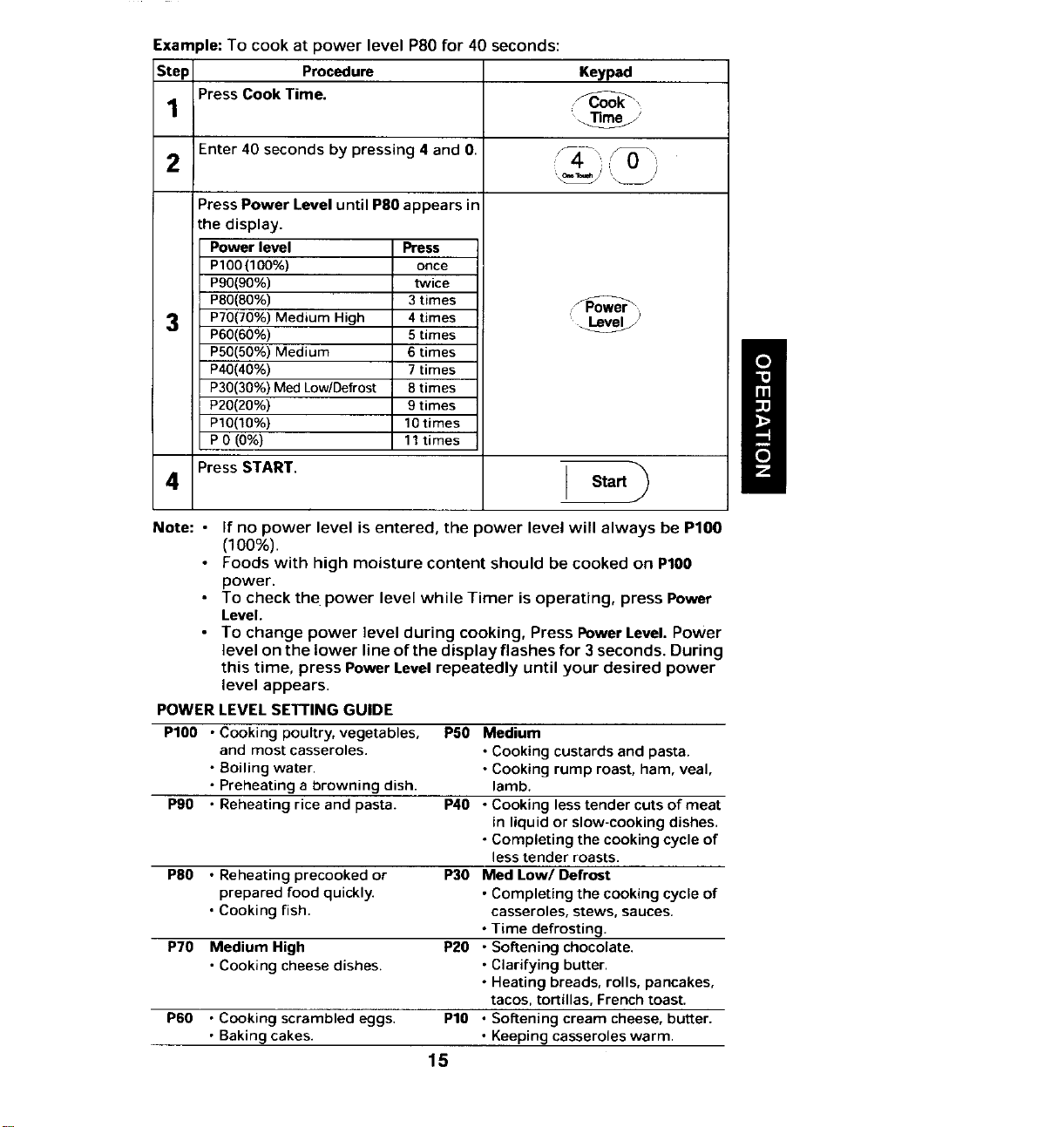
Example: To cook at power level P80 for 40 seconds:
Step Procedure Keypad
1 Press Cook Time.
_J
2 Enter 40 seconds by pressing 4 and 0. / 0 1
Press Power Level until P80 appears in
the display.
Power level Press
P100(100%) once
P90(90%) twice
P80(80%) 3 times
3 P70(70%)Medium High 4 times '_
P60(60%) 5 times
I
P50(50%)Medium 6times
P40(40%) 7 times
/
P30(30%)MedLow/Defrost 8times
P20(20%) 9 times
P10(10%) 10times
P0 (0%) 11times
4 Press START. Start
Note: • If no power level is entered, the power level will always be PIO0
(100%).
• Foods with high moisture content should be cooked on PIO0
power.
• To check the power level while Timer is operating, press Power
Level.
• To change power level during cooking, Press Power Level. Power
level on the lower line of the display flashes for 3 seconds. During
this time, press Power Level repeatedly until your desired power
level appears.
POWER LEVEL SETTING GUIDE
P100 • Cooking poultry, vegetables, PS0 Medium
and most casseroles. • Cooking custards and pasta.
• Boiling water • Cooking rump roast, ham, veal,
• Preheating a browning dish. lamb.
Pg0 • Reheating rice and pasta. P40 • Cooking lesstender cuts of meat
in liquid or slow-cooking dishes.
• Completing the cooking cycle of
less tender roasts.
P80 • Reheating precooked or P30 Med Low/Defrost
prepared food quickly. • Completing the cooking cycle of
• Cooking fish. casseroles, stews, sauces.
• Time defrosting.
P70 Medium High P20 • Softening chocolate.
• Cooking cheese dishes. • Clarifying butter.
• Heating breads, rolls, pancakes,
tacos, tortillas, Frenchtoast.
P60 • Cooking scrambled eggs. P10 • Softening cream cheese, butter.
• Baking cakes. • Keeping casseroles warm.
15
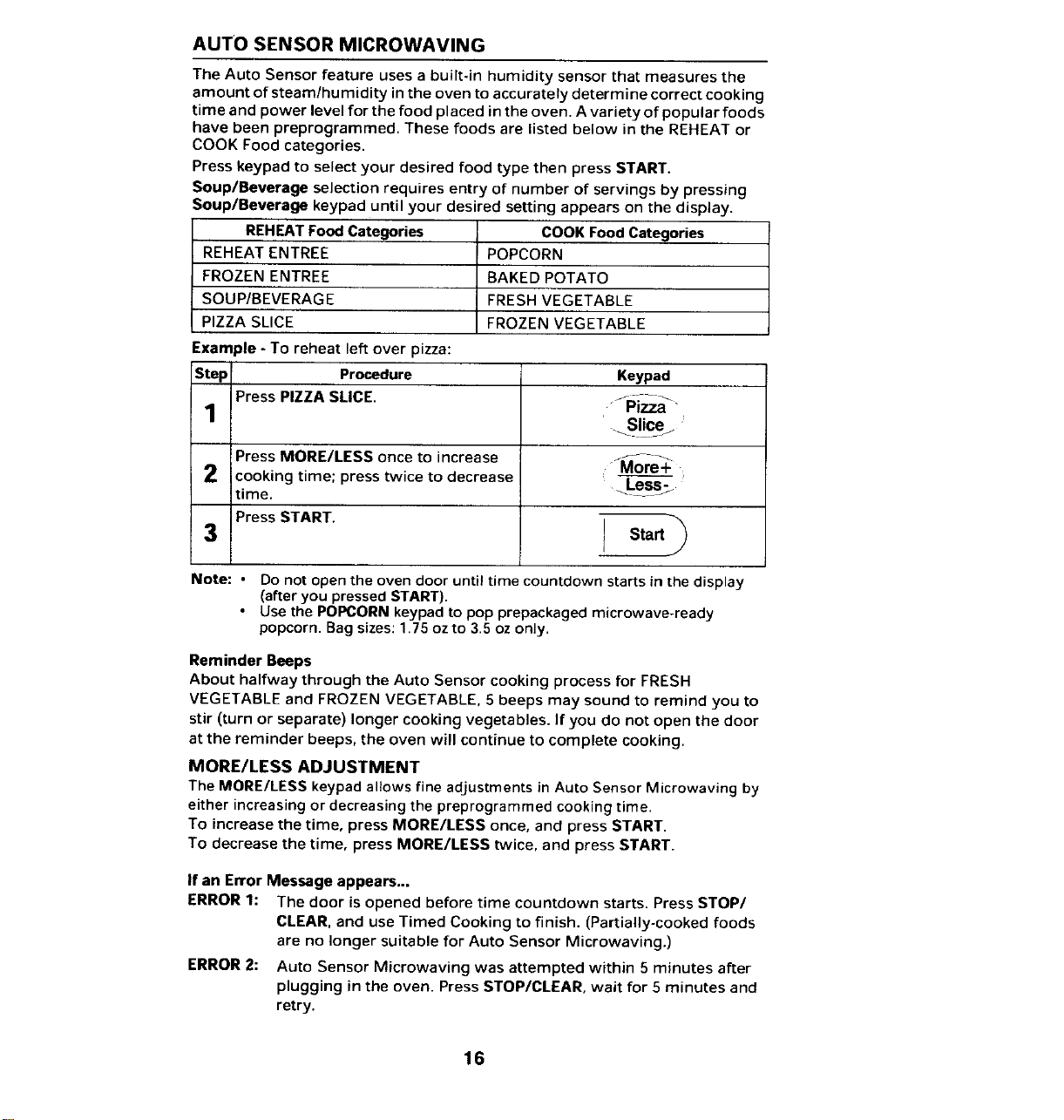
AUTO SENSOR MICROWAVING
The Auto Sensor feature uses a built-in humidity sensor that measures the
amount of steam/humidity in the oven to accurately determine correct cooking
time and power level for the food placed in the oven. A variety of popular foods
have been preprogrammed. These foods are listed below in the REHEAT or
COOK Food categories.
Press keypad to select your desired food type then press START.
Soup/Beverage selection requires entry of number of servings by pressing
Soup/Beverage keypad until your desired setting appears on the display.
REHEAT Food Categories COOK Food Categories
REHEAT ENTREE POPCORN
FROZEN ENTREE BAKED POTATO
SOUP/BEVERAGE FRESH VEGETABLE
PIZZA SLICE FROZEN VEGETABLE
Example - To reheat left over pizza:
Step Procedure Keypad
PressPIZZASLICE. fPiz_-
1 ' Slicez
Press MORE/LESS once to increase ./_ore _
2 cooking time; press twice to decrease =
time. Le_>
Press START.
3 Start
Note: • Do not open the oven door until time countdown starts in the display
(after you pressed START).
• Use the POPCORN keypad to pop prepackaged microwave-ready
popcorn. Bag sizes: 1.75 ozto 3.5 oz only,
Reminder Beeps
About halfway through the Auto Sensor cooking process for FRESH
VEGETABLE and FROZEN VEGETABLE, 5 beeps may sound to remind you to
stir (turn or separate) longer cooking vegetables. If you do not open the door
at the reminder beeps, the oven will continue to complete cooking.
MORE/LESS ADJUSTMENT
The MORE/LESS keypad allows fine adjustments in Auto Sensor Microwaving by
either increasing or decreasing the preprogrammed cooking time.
To increase the time, press MORE/LESS once, and press START.
To decrease the time, press MORE/LESS twice, and press START.
If an Error Message appears...
ERROR 1: The door is opened before time countdown starts, Press STOP/
CLEAR, and use Timed Cooking to finish. (Partially-cooked foods
are no longer suitable for Auto Sensor Microwaving.)
ERROR 2: Auto Sensor Microwaving was attempted within 5 minutes after
plugging in the oven. Press STOP/CLEAR, wait for 5 minutes and
retry.
16
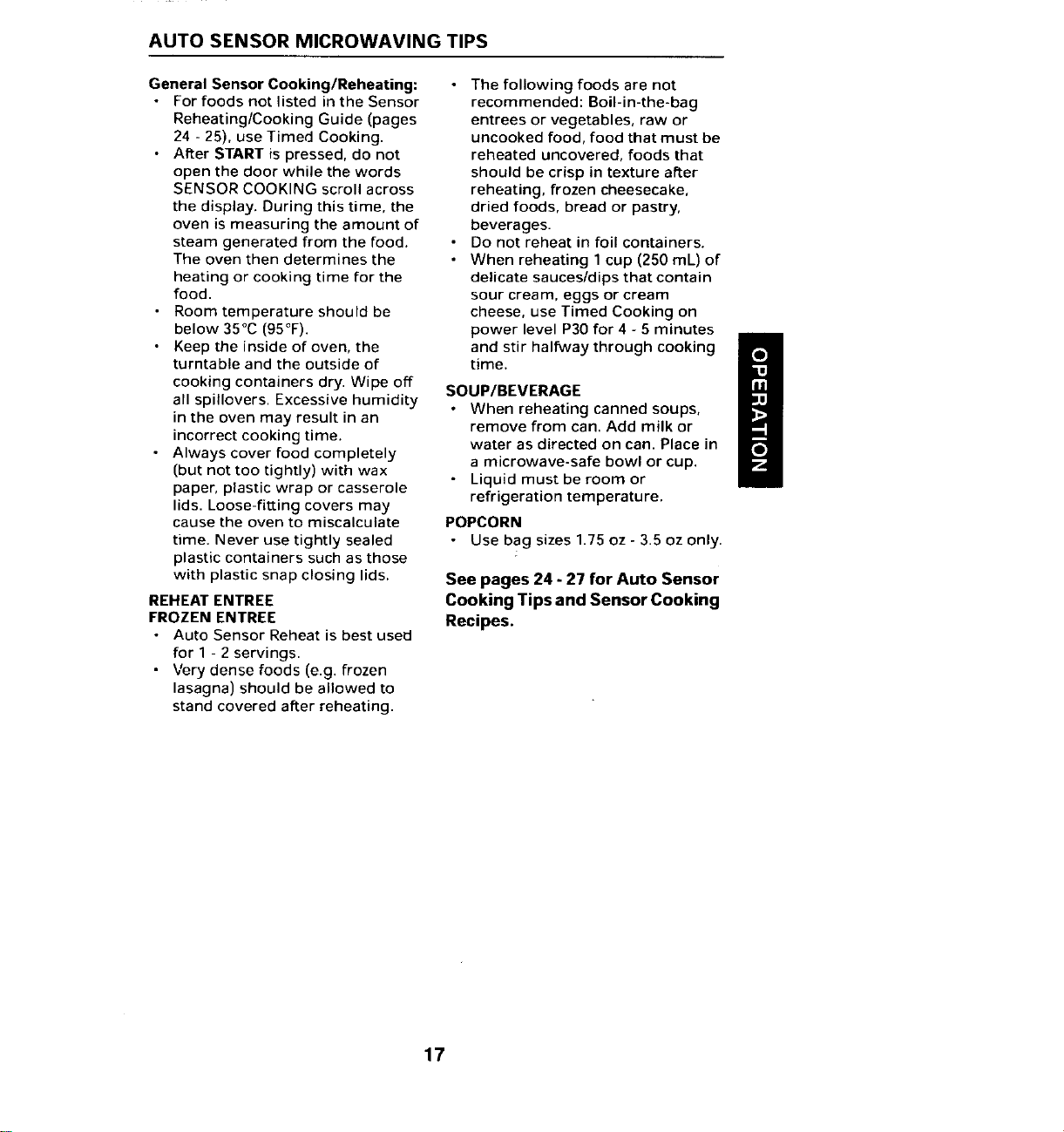
AUTO SENSOR MICROWAVING TIPS
General Sensor Cooking/Reheating: • The following foods are not
• For foods not listed in the Sensor recommended: Boil-in-the-bag
Reheating/Cooking Guide (pages entrees or vegetables, raw or
24 - 25), use Timed Cooking. uncooked food, food that must be
• After START is pressed, do not reheated uncovered, foods that
open the door while the words should be crisp in texture after
SENSOR COOKING scroll across reheating, frozen cheesecake,
the display. During this time, the dried foods, bread or pastry,
oven is measuring the amount of beverages.
steam generated from the food. • Do not reheat in foil containers.
The oven then determines the • When reheating 1 cup (250 mL) of
heating or cooking time for the delicate sauces/dips that contain
food. sour cream, eggs or cream
• Room temperature should be cheese, use Timed Cooking on
below 35°C (95°F). power level P30 for 4 - 5 minutes
I
• Keep the inside of oven, the and stir halfway through cooking I_
turntable and the outside of time.
U
cooking containers dry. Wipe off SOUP/BEVERAGE
all spillovers. Excessive humidity • When reheating canned soups,
in the oven may result in an remove from can. Add milk or
incorrect cooking time.
• Always cover food completely water as directed on can. Place in
(but not too tightly) with wax a microwave-safe bowl or cup.
• Liquid must be room or
paper, plastic wrap or casserole refrigeration temperature.
lids. Loose-fitting covers may
cause the oven to miscalcuiate POPCORN
time. Never use tightly sealed • Use bag sizes 1.75 oz - 3.5 oz only.
plastic containers such as those
with plastic snap closing lids. See pages 24 - 27 for Auto Sensor
REHEAT ENTREE Cooking Tips and Sensor Cooking
FROZEN ENTREE Recipes.
• Auto Sensor Reheat is best used
for 1 - 2 servings.
• Very dense foods (e.g. frozen
lasagna) should be allowed to
stand covered after reheating.
17
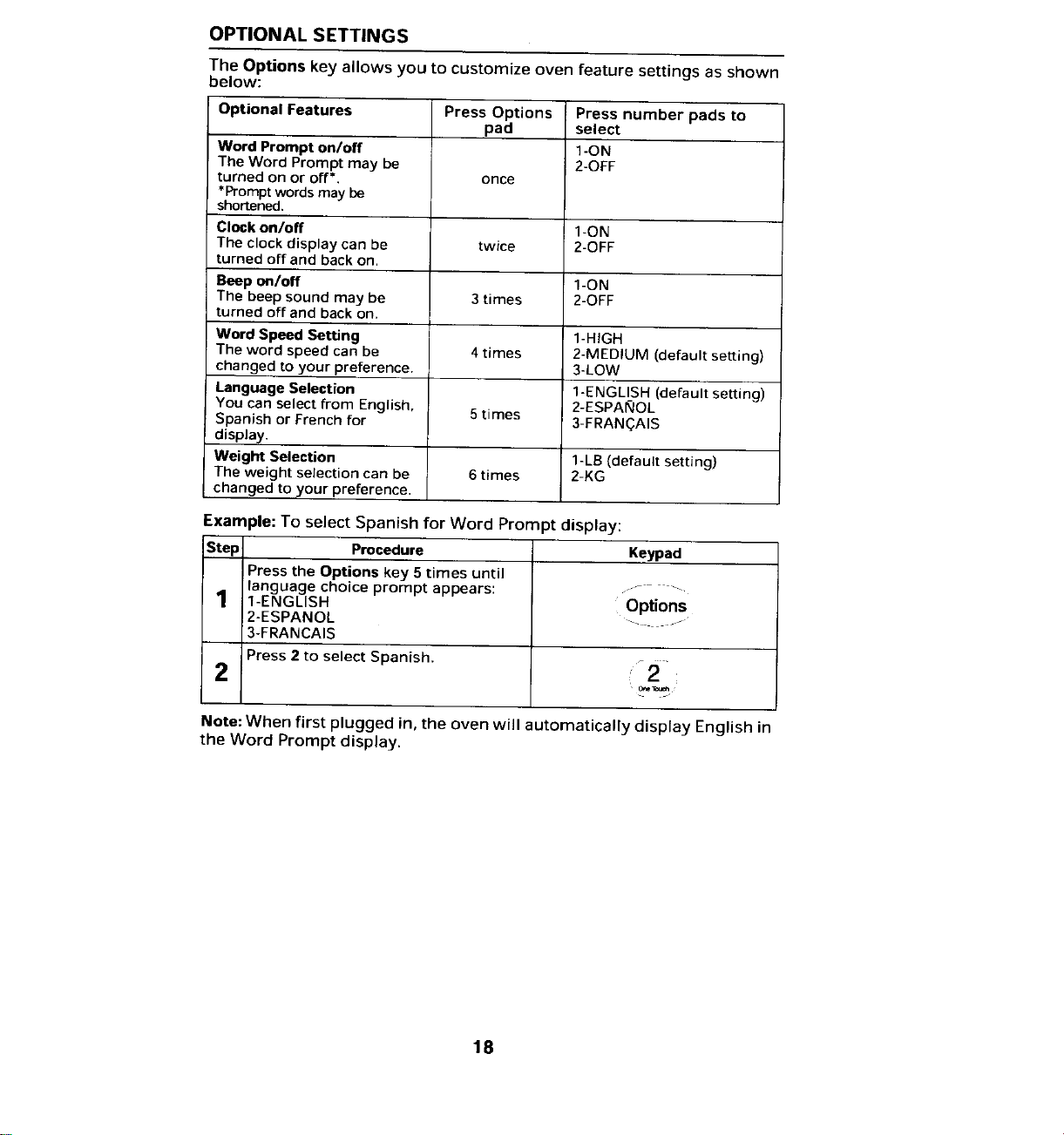
OPTIONAL SETTINGS
The Options key allows you to customize oven feature settings as shown
below:
Optional Features Press Options Press number pads to
pad select
Word Prompt on/off 1-ON
The Word Prompt may be 2-OFF
turned on or off'. once
*Prompt words may be
shortened.
Clock on/off 1-ON
The clockdisplay can be twice 2-OFF
turned offand backon,
Beep t_n/off 1-ON
The beep sound may be 3 times 2-OFF
turned off and back on.
Word Speed Setting 1-HIGH
The word speed can be 4times 2-MEDIUM (default setting)
changed to your preference. 3-LOW
Language Selection 1-ENGLISH (default setting)
You can select from English, 5times 2-ESPAI_OL
Spanish or French for 3-FRANC_AIS
display.
Weight Selection 1-LB (default setting)
The weight selection can be 6times 2-KG
changed to your preference.
Example: To select Spanish for Word Prompt display:
Step Procedure Keypad
Press the Options key 5 times until
language choice prompt appears: - -.....
1 1-ENGLISH Options
2-ESPANOL ........
3-FRANCAIS
Press 2 to select Spanish .......
2 :12:
Note: When first plugged in, the oven will automatically display English in
the Word Prompt display.
18
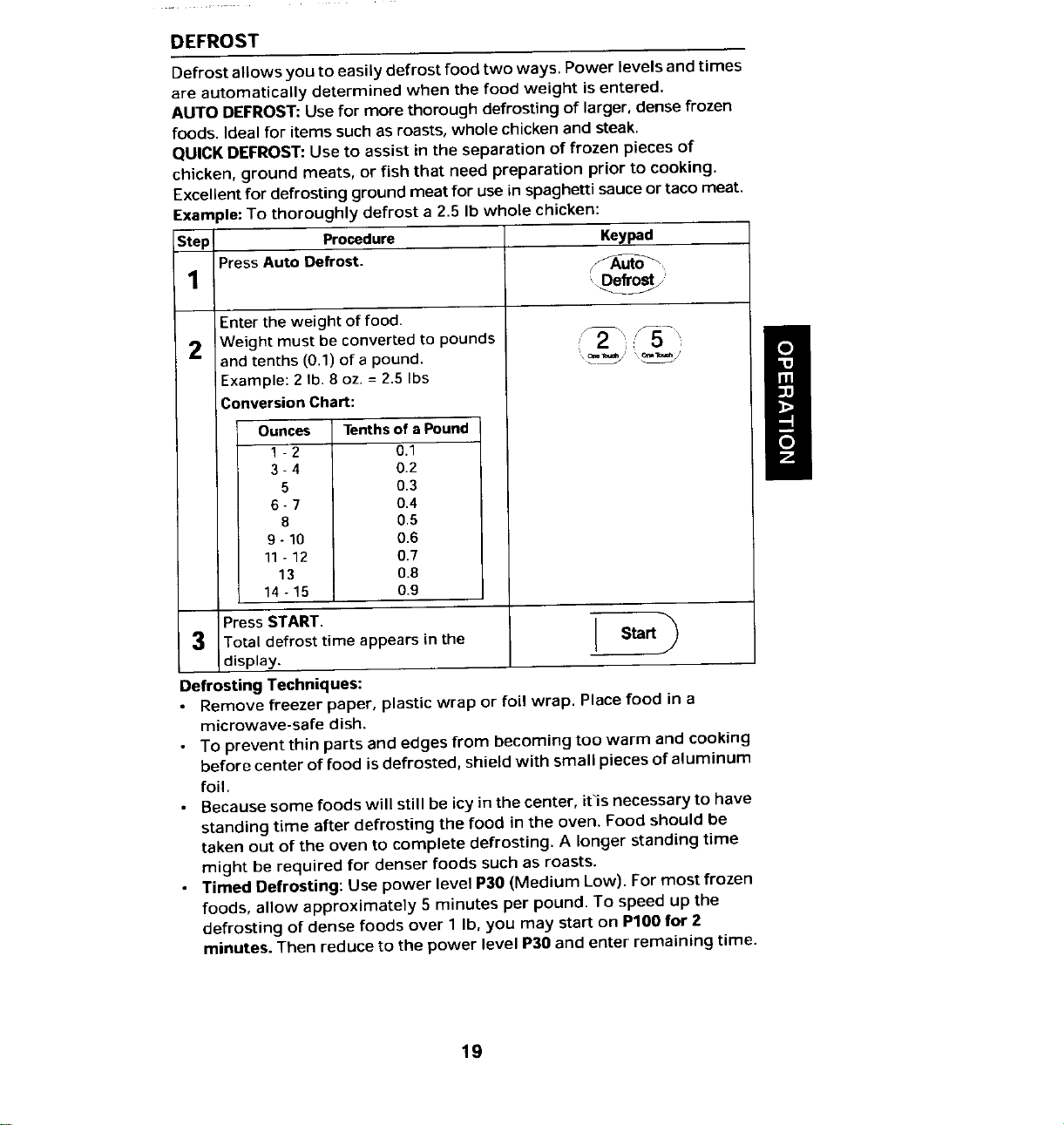
DEFROST
Defrost allows you to easily defrost food two ways. Power levels and times
are automatically determined when the food weight is entered.
AUTO DEFROST: Use for more thorough defrosting of larger, dense frozen
foods. Ideal for items such as roasts, whole chicken and steak.
QUICK DEFROST: Use to assist in the separation of frozen pieces of
chicken, ground meats, or fish that need preparation prior to cooking.
Excellent for defrosting ground meat for use in spaghetti sauce or taco meat.
Example: To thoroughly defrost a 2.5 Ib whole chicken:
Step Procedure Keypad
Press Auto Defrost. ,_Au_
1
Enter the weight of food.
Weight must be converted to pounds :JY5
2
and tenths (0.1) of a pound. '_' _'
Example: 2 Ib. 8 oz. = 2.5 Ibs
Conversion Chart:
Ounces Tenths of a Pound
1 - 2 0.1
3- 4 0.2
5 0.3
6- 7 0.4
8 0.5
9 - 10 0.6
11- 12 0.7
13 0.8
14 - 15 0.9
Press START.
3 Total defrost time appears in the Start
display.
Defrosting Techniques:
• Remove freezer paper, plastic wrap or foil wrap, Place food in a
microwave-safe dish.
• To prevent thin parts and edges from becoming too warm and cooking
before center of food is defrosted, shield with small pieces of aluminum
foil.
• Because some foods will still be icy in the center, it_is necessary to have
standing time after defrosting the food in the oven. Food should be
taken out of the oven to complete defrosting. A longer standing time
might be required for denser foods such as roasts.
• Timed Defrosting: Use power level P30 (Medium Low). For most frozen
foods, allow approximately 5 minutes per pound. To speed up the
defrosting of dense foods over 1 Ib, you may start on P100 for :)
minutes. Then reduce to the power level P30 and enter remaining time.
19
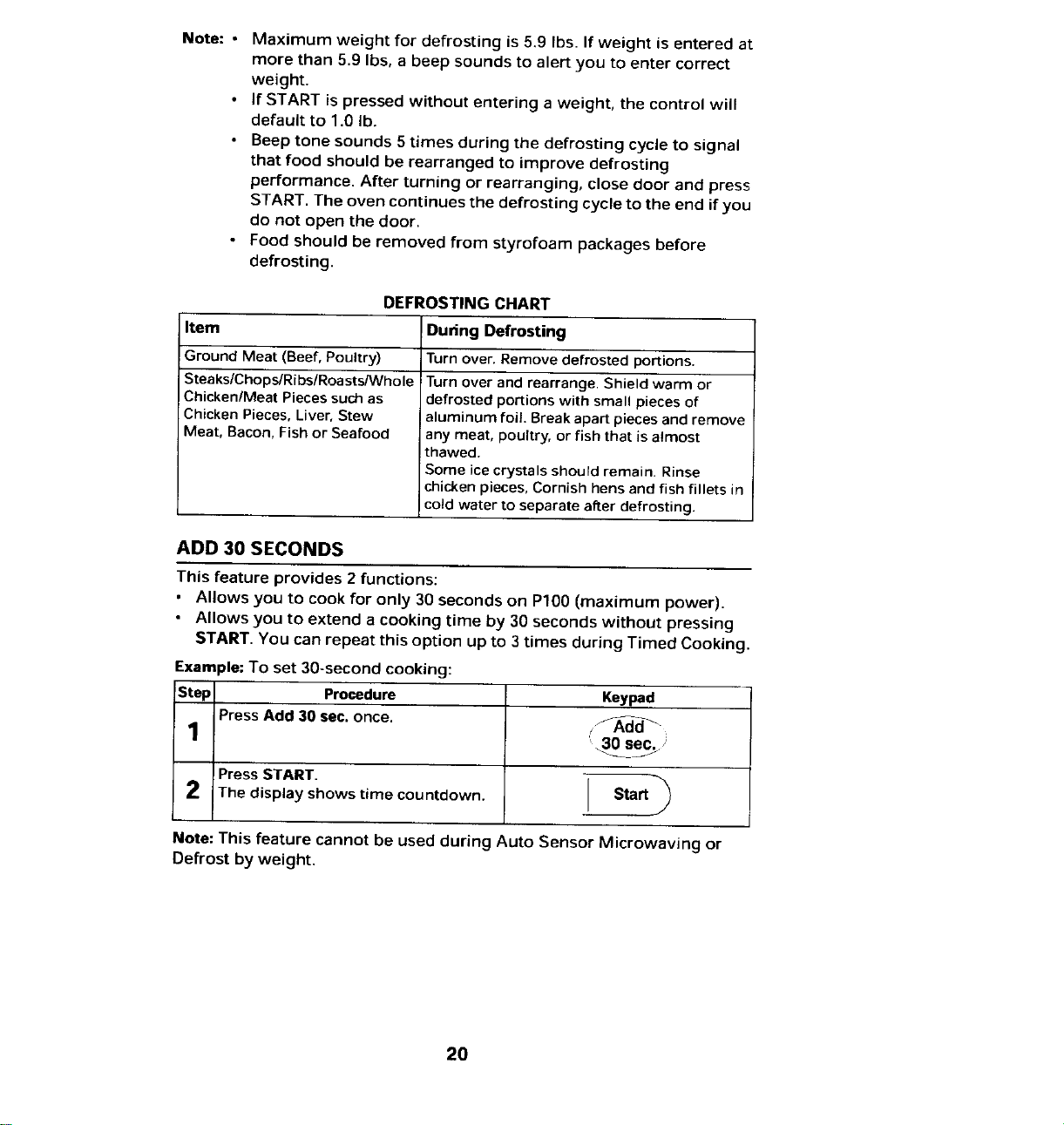
Note: • Maximum weight for defrosting is 5.9 Ibs. If weight is entered at
more than 5.9 Ibs, a beep sounds to alert you to enter correct
weight.
• If START is pressed without entering a weight, the control will
default to 1.0 lb.
• Deep tone sounds 5 times during the defrosting cycle to signal
that food should be rearranged to improve defrosting
performance. After turning or rearranging, close door and press
START, The oven continues the defrosting cycle to the end if you
do not open the door.
• Food should be removed from styrofoam packages before
defrosting.
DEFROSTING CHART
Item During Defrosting
Ground Meat (Beef, Poultry) Turn over. Remove defrosted portions.
SteakslChopslRibslRoastslWhole Turn over and rearrange. Shield warm or
Chicken/Meat Pieces such as defrosted portions with small pieces of
Chicken Pieces, Liver, Stew aluminum foil. Break apart pieces and remove
Meat, Bacon, Fish or Seafood any meat, poultry, or fish that is almost
thawed.
Some ice crystals shourd remain. Rinse
chicken pieces, Cornish hens and fish fillets in
cold water to separate after defrosting.
ADD 30 SECONDS
This feature provides 2 functions:
• Allows you to cook for only 30 seconds on Pl00 (maximum power).
• Allows you to extend a cooking time by 30 seconds without pressing
START, You can repeat this option up to 3 times during Timed Cooking.
Example: To set 30-second cooking:
Step Procedure Keypad
Press Add 30 sec, once. _d-_
1 _30 sec.;
Press START. "_
2 The display shows time countdown. Start
Note: This feature cannot be used during Auto Sensor Microwaving or
Defrost by weight.
20
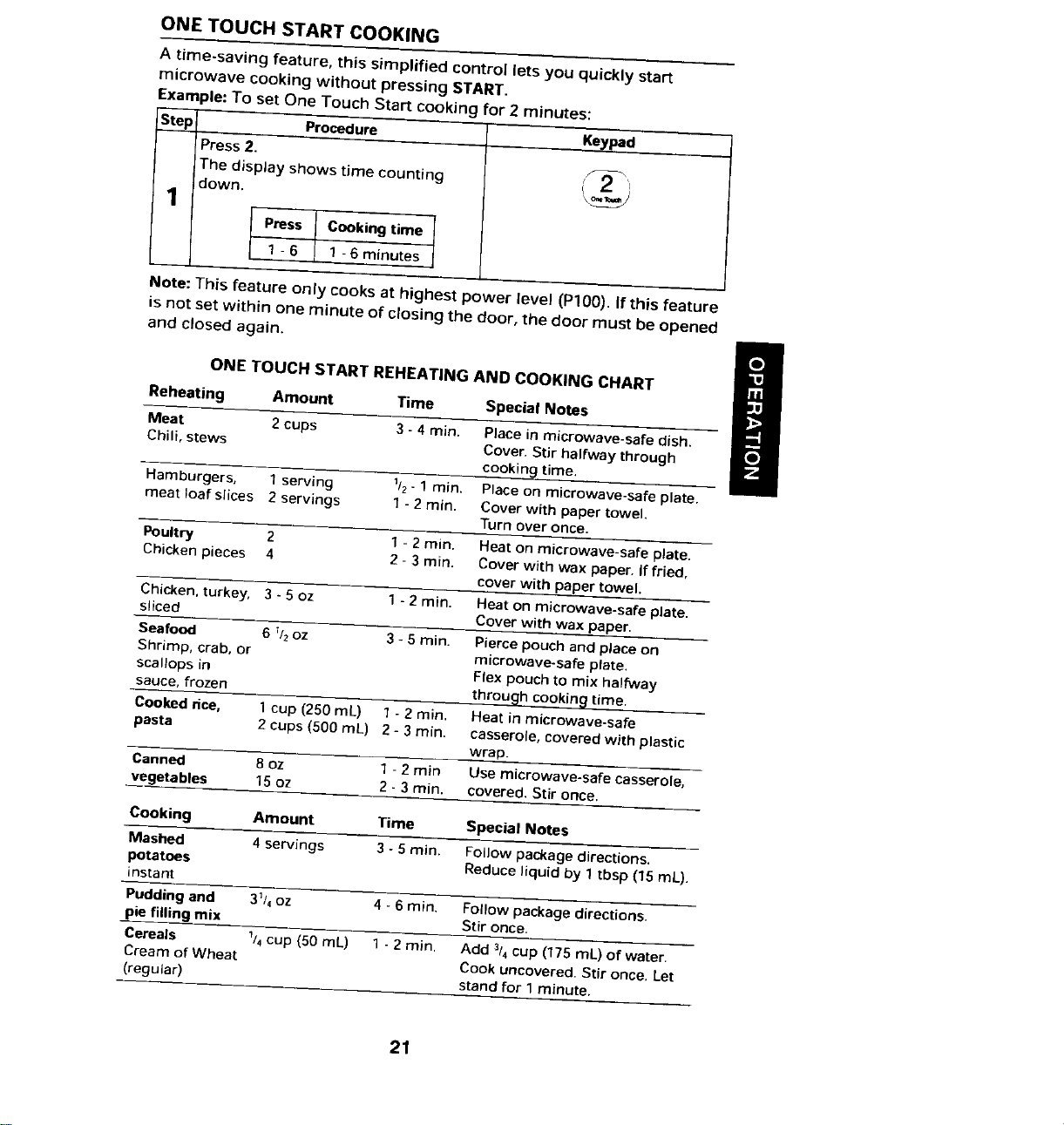
ONE TOUCH START COOKING
A time-saving feature, this simplified control lets you quickly start
microwave cooking without pressing START.
Example: To set One Touch Start cooking for 2 minutes:
Step l Procedure Keypad
Press 2.'
The display shows time counting
down.
1
Press Cooking time
1 - 6 1 -6 minutes
Note: This feature only cooks at highest power level (Pl00). If this feature
is not set within one minute of closing the door, the door must be opened
and closed again, m
/
ONE TOUCH START REHEATING AND COOKING CHART
Reheating Amount Time Special Notes
Meat 2cups 3 - 4 rain. Place in microwave-safe dish.
Chill, stews Cover. Stir halfway through
cooking time.
Hamburgers, 1 serving 11z- 1 rain. Place on microwave-safe plate.
meat loaf slices 2 servings 1- 2 rain. Cover with paper towel.
Turn over once.
Poultry 2 1 - 2 rain, Heat on microwave-safe plate.
Chicken pieces 4 2 - 3rain, Cover with wax paper. If fried,
cover with paper towel.
Chicken. turkey, 3- 5 oz 1 - 2 rain. Heat on microwave-safe plate,
sliced Cover with wax paper.
Seafood 6 _/2oz 3 - 5 rain, Pierce pouch and place on
Shrimp, crab, or microwave-safe plate.
scallops in Flex pouch to mix halfway
sauce, frozen through cooking time.
Cooked dce, 1cup (250 mL) 1 - 2 rain, Heat in microwave-safe
pasta 2 cups (500 mL) 2 - 3 rain. casserole, covered with plastic
wrap.
Canned 80Z 1- 2 rain Use microwave-safe casserole,
vegetables 15 oz 2 - 3 rain. covered. Stir once.
Cooking Amount Time Special Notes
Mashed 4 servings 3- 5 rain. Follow package directions.
potatoes Reduce liquid by 1tbsp (15 mL).
instant
Pudding and 31/4oz 4 -6 rain. Follow package directions,
pie filling mix Stir once.
Cereals 1/4cup (50 mL) 1 - 2 rain. Acid 3/4cup (175 mL) of water.
Cream of Wheat Cook uncovered. Stir once. Let
(regular) stand for 1 minute.
21
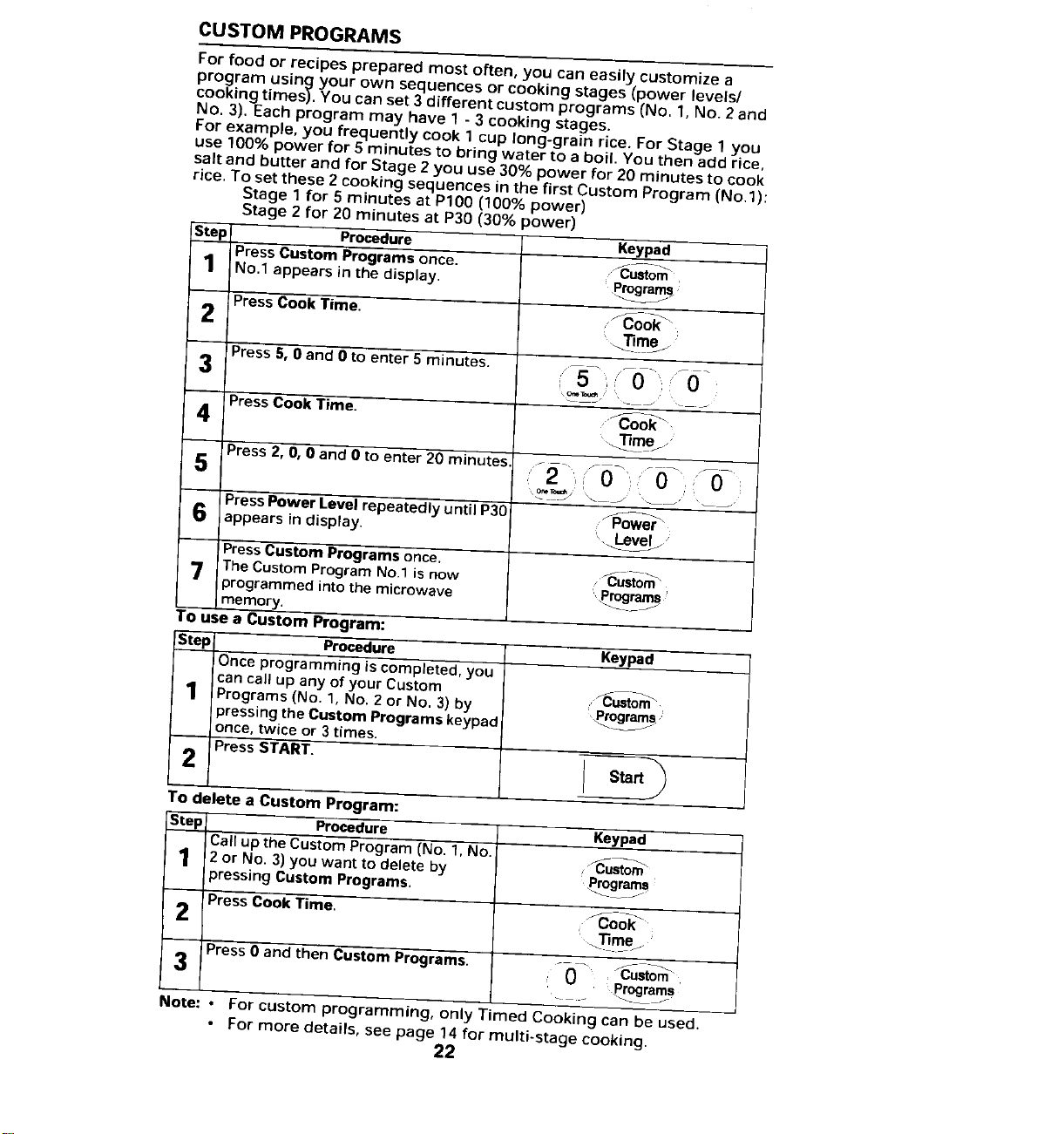
CUSTOM PROGRAMS
For food or recipes prepared most often, you can easily customize a
program using your own sequences or cooking stages (power levels/
cooking times). You can set 3 different custom programs (No, 1, No. 2 and
No. 3).Each program may have 1 - 3 cooking stages.
For example, you frequently cook 1 cup long-grain rice. For Stage 1 you
use 100% power for 5 minutes to bring water to a boil. You then add rice,
salt and butter and for Stage 2 you use 30% power for 20 minutes to cook
rice. To set these 2 cooking sequences in the first Custom Program (No,l):
Stage 1 for 5 minutes at P100 (100% power)
Stage 2 for 20 minutes at P30 (30% power)
Step Procedure Keypad
Press Custom Programs once. "_..u_sto_,
1 No.1 appears in the display. Progooooooo_s,
2 Press Cook Time. _ook _
_mej
3 Presss,oand0toenter_minutes. ,=s0--,._ -
4 Press Cook Time. "_oo_
5 Press 2, O,0 and 0 to enter 20 minutes ......... - ..... ,
2 0 ' '0 :'_0-
Press Power Level repeatedly until P30 _o_rer"
6 appears in display. ;,._l_evelj."
PressCustom Programs once.
7 The Custom Program No.1 is now ,_usto_"
programmed into the microwave 'programs
memory.
To use a Custom Program:
Step Procedure Keypad
Once programming is completed, you
can call up any of your Custom
1 Programs (No. 1, No, 2or No. 3) by pProgr_s J
pressing the Custom Programs keypad
once, twice or 3 times.
2 Press START.
Start'_
To delete a Custom Program:
Step Procedure Keypad
Call up the Custom Program (No. 1, No, _,_--- _
1 2 or No. 3) you want to delete by ," Custom
pressing Custom Programs. pmmgrams
2 Press Cook Time. , ._ok -_
3 Press 0 and then Custom Programs. :i--0 -" _--Cust°m_'
. __ progr_s
Note: • For custom programming, only Timed Cooking can be used.
• For more details, see page 14 for multi-stage cooking.
22
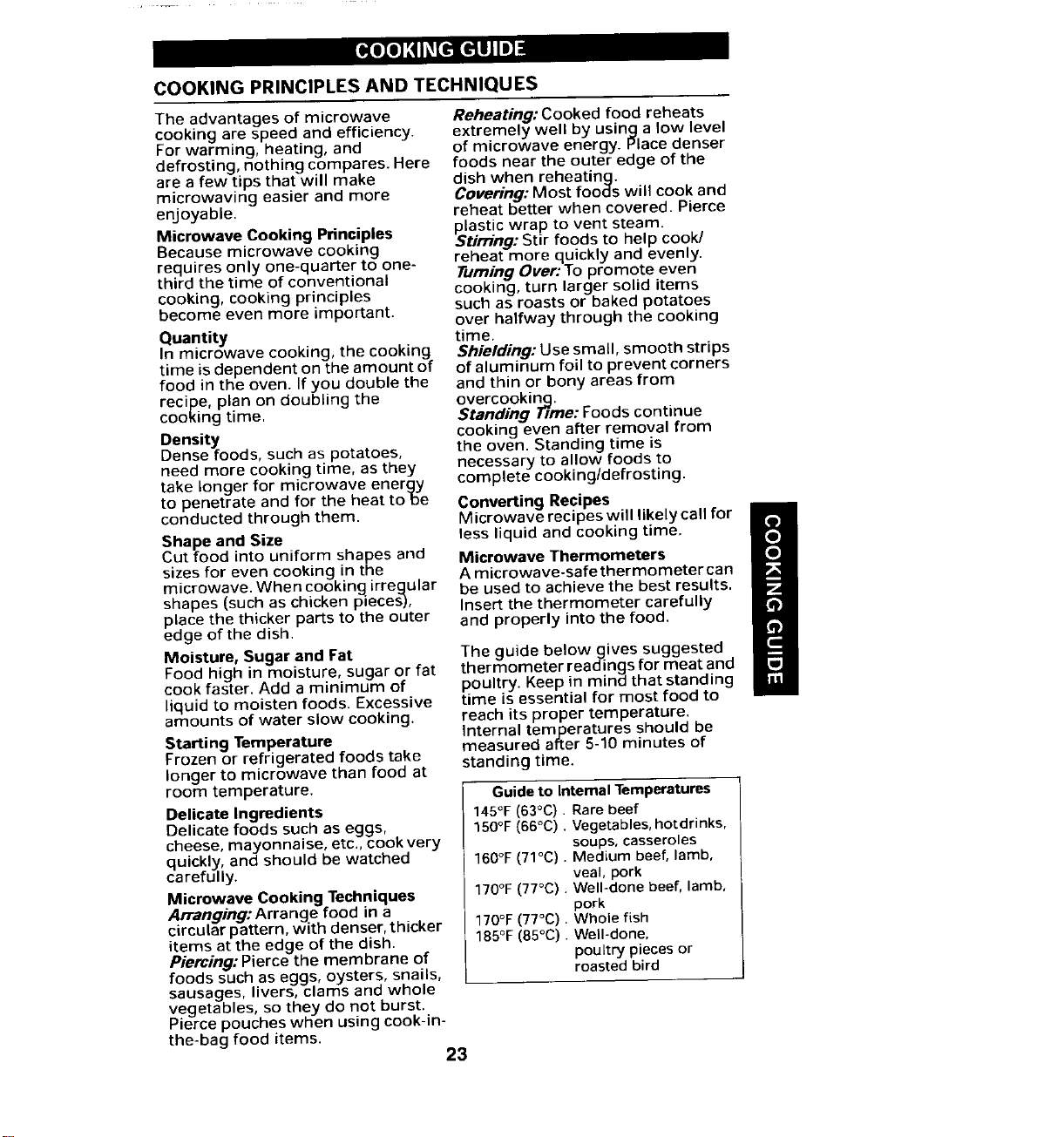
COOKING GUIDE
COOKING PRINCIPLES AND TECHNIQUES
The advantages of microwave Reheating: Cooked food reheats
cooking are speed and efficiency, extremely well by using a low level
For warming, heating, and of microwave energy. Place denser
defrosting, nothing compares. Here foods near the outer edge of the
are a few tips that will make dish when reheating.
microwaving easier and more Covering: Most foods will cook and
enjoyable, reheat better when covered. Pierce
plastic wrap to vent steam.
Microwave Cooking Principles Stirring: Stir foods to help cook/
Because microwave cooking
reheat more quickly and evenly.
requires only one-quarter to one- Turning Over: To promote even
third the time of conventional
cooking, cooking principles cooking, turn larger solid items
become even more important, such as roasts or baked potatoes
over halfway through the cooking
Quantity time.
In microwave cooking, the cooking Shielding: Use small, smooth strips
time is dependent on the amount of of aluminum foil to prevent corners
food in the oven. If you double the and thin or bony areas from
recipe, plan on doubling the overcooking.
cooking time. Standing TTrne:Foods continue
Density cooking even after removal from
Dense foods, such as potatoes, the oven. Standing time is
need more cooking time, as they necessary to allow foods to
take longer for microwave energy complete cooking/defrosting.
to penetrate and for the heat robe Converting Recipes
conducted through them. Microwave recipes will likely call for
Shape and Size less liquid and cooking time.
Cut food into uniform shapes and Microwave Thermometers
sizes for even cooking in the A microwave-safethermometercan
microwave. When cooking irrecJular be used to achieve the best results,
shapes (such as chicken pieces-), Insert the thermometer carefully
place the thicker parts to the outer and properly into the food.
edge of the dish.
Moisture, Sugar and Fat The guide belowgives suggested
Food high in moisture, sugar or fat thermometer readings for meat and
cook faster. Add a minimum of poultry. Keep in mind that standing
liquid to moisten foods. Excessive time is essential for most food to
amounts of water slow cooking, reach its proper temperature.
Internal temperatures should be
measured after 5-10 minutes of
Starting Temperature
Frozen or refrigerated foods take standing time.
longer to microwave than food at
room temperature. Guide to Internal Temperatures
Delicate Ingredients 145°F(63°C). Rare beef
Delicate foods such as eggs, 150°F (66°C). Vegetables, hotdrinks,
cheese, mayonnaise, etc., cook very soups, casseroles
quickly, and should be watched 160°F (71°C). Medium beef, lamb,
carefully, veal, pork
170°F (77°C). Well-done beef, lamb,
Microwave Cooking Techniques
Arranging:Arrange food in a pork
circular pattern, with denser, thicker 170°F(77°C). Whole fish
185°F(85°C). Well-done,
items at the edge of the dish.
Piercing: Pierce the membrane of poultry pieces or
roasted bird
foods such as eggs, oysters, snails,
sausages, livers, clams and whole
vegetables, so they do not burst.
Pierce pouches when using cook-in-
the-bag food items.
23
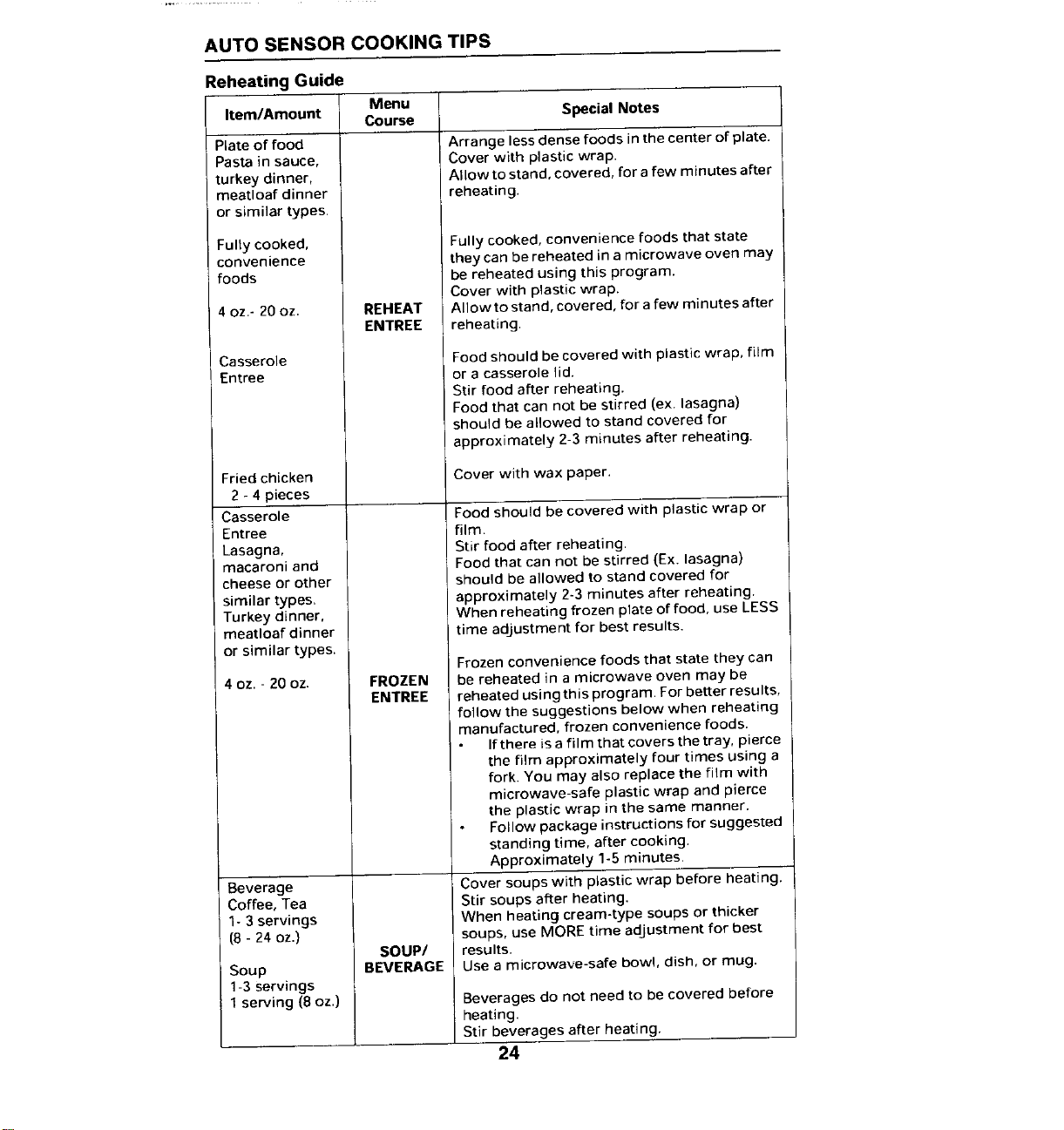
AUTO SENSOR COOKING TIPS
ReheatingGuide
Item/Amount Menu
Course Special Notes
Plate of food Arrange less dense foods in the center of plate.
Pasta in sauce, Cover with plastic wrap.
turkey dinner, Allow to stand, covered, for a few minutes after
meattoaf dinner reheating.
or similar types.
Fully cooked, Fully cooked, convenience foods that state
convenience they can be reheated in a microwave oven may
foods be reheated using this program.
Cover with plastic wrap.
4 oz.- 20 oz. REHEAT Allow to stand, covered, for a few minutes after
ENTREE reheating.
Casserole Food should be covered with plastic wrap, film
Entree or a casserole lid.
Stir food after reheating.
Food that can not be stirred (ex. lasagna)
should be allowed to stand covered for
approximately 2-3 minutes after reheating.
Fried chicken Cover with wax paper.
2 - 4 pieces
Casserole Food should be covered with plastic wrap or
Entree film.
Lasagna, Stir food after reheating.
macaroni and Food that can not be stirred (Ex. lasagna)
cheese or other should be allowed to stand covered for
similar types, approximately 2-3 minutes after reheating.
Turkey dinner, When reheating frozen plate of food, use LESS
meatloaf dinner time adjustment for best results.
or similar types.
Frozen convenience foods that state they can
4 oz. - 20 oz. FROZEN be reheated in a microwave oven may be
ENTREE reheated using this program. For better results,
follow the suggestions below when reheating
manufactured, frozen convenience foods.
Ifthere isa film that covers the tray, pierce
the film approximately four times using a
fork. You may also replace the film with
microwave-safe plastic wrap and pierce
the plastic wrap in the same manner.
Follow package instructions for suggested
standing time, after cooking.
Approximately 1-5 minutes.
Beverage Cover soups with plastic wrap before heating.
Coffee, Tea Stir soups after heating.
1- 3 servings When heating cream-type soups or thicker
(8 - 24 OZ.) soups, use MORE time adjustment for best
SOUP/ results.
Soup BEVERAGE Use a microwave-safe bowl, dish, or mug.
1-3 Servings
1serving (8 oz.) Beverages do not need to be covered before
heating,
Stir beverages after heating.
24
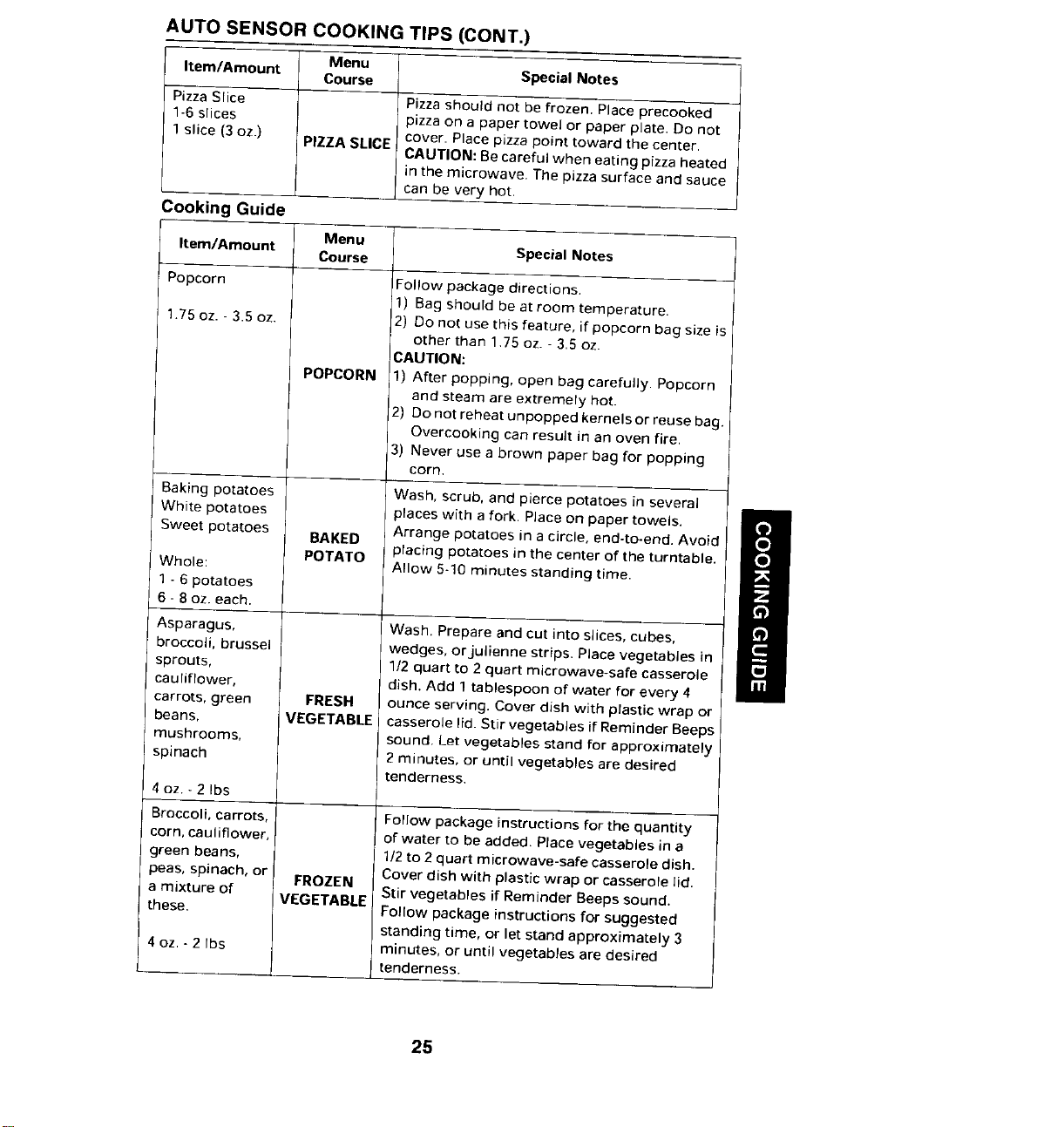
AUTO SENSOR COOKING TIPS (CONT.)
Menu
Item/Amount Course Special Notes
Pizza Slice Pizzashould not be frozen. Place precooked
1-6slices pizza on a paper towel or paper plate. Do not
cover. Place pizza point toward the center,
1slice (3 oz.) PIZZA SLICE CAUTION: Becareful when eating pizza heated
in the microwave. The pizza surface and sauce
can be very hot,
Cooking Guide
Menu
Item/Amount Course Special Notes
Popcorn Follow package directions.
1) Bag should be at room temperature.
1,75oz. - 3.5 oz. 2) Do not use this feature, if popcorn bag size is
other than 1.75 oz. - 3.5 oz.
CAUTION:
POPCORN 1) After popping, open bag carefully. Popcorn
and steam are extremely hot.
2) Do not reheat unpopped kernels or reuse bag.
Overcooking can result in an oven fire,
3) Never use a brown paper bag for popping
corn.
Baking potatoes Wash, scrub, and pierce potatoes in several
White potatoes places with a fork. Place on paper towels.
Sweet potatoes BAKED Arrange potatoes in acircle, end-to-end. Avoid
POTATO placing potatoes inthe center of the turntable.
Whole: Allow 5-10 minutes standing time.
1 - 6 potatoes
6- 8oz. each.
Asparagus, Wash. Prepare and cut into slices, cubes,
broccoli, brussel wedges, orjulienne strips, Place vegetables in
sprouts, 1/2 quart to 2 quart microwave-safe casserole
cauliflower, dish. Add 1 tablespoon of water for every 4
carrots, green FRESH ounce serving. Cover dish with ptastic wrap or
beans, VEGETABLE casserole lid. Stir vegetables if Reminder Beeps
mushrooms, sound. Let vegetables stand for approximately
spinach 2minutes, or until vegetables are desired
tenderness.
4oz. - 2 Ibs
Broccoli, carrots, Follow package instructions for the quantity
corn, cauliflower, of water to be added. Place vegetables in a
green beans, 1/2to 2 quart microwave-safe casserole dish.
peas, spinach, or FROZEN Cover dish with plastic wrap or casserole lid.
Stir vegetables if Reminder Beeps sound.
these.amixture of VEGETABLE ! Follow package instructions for suggested
standing time, or let stand approximately 3
4oz. - 2 Ibs minutes, or until vegetables are desired
tenderness.
25
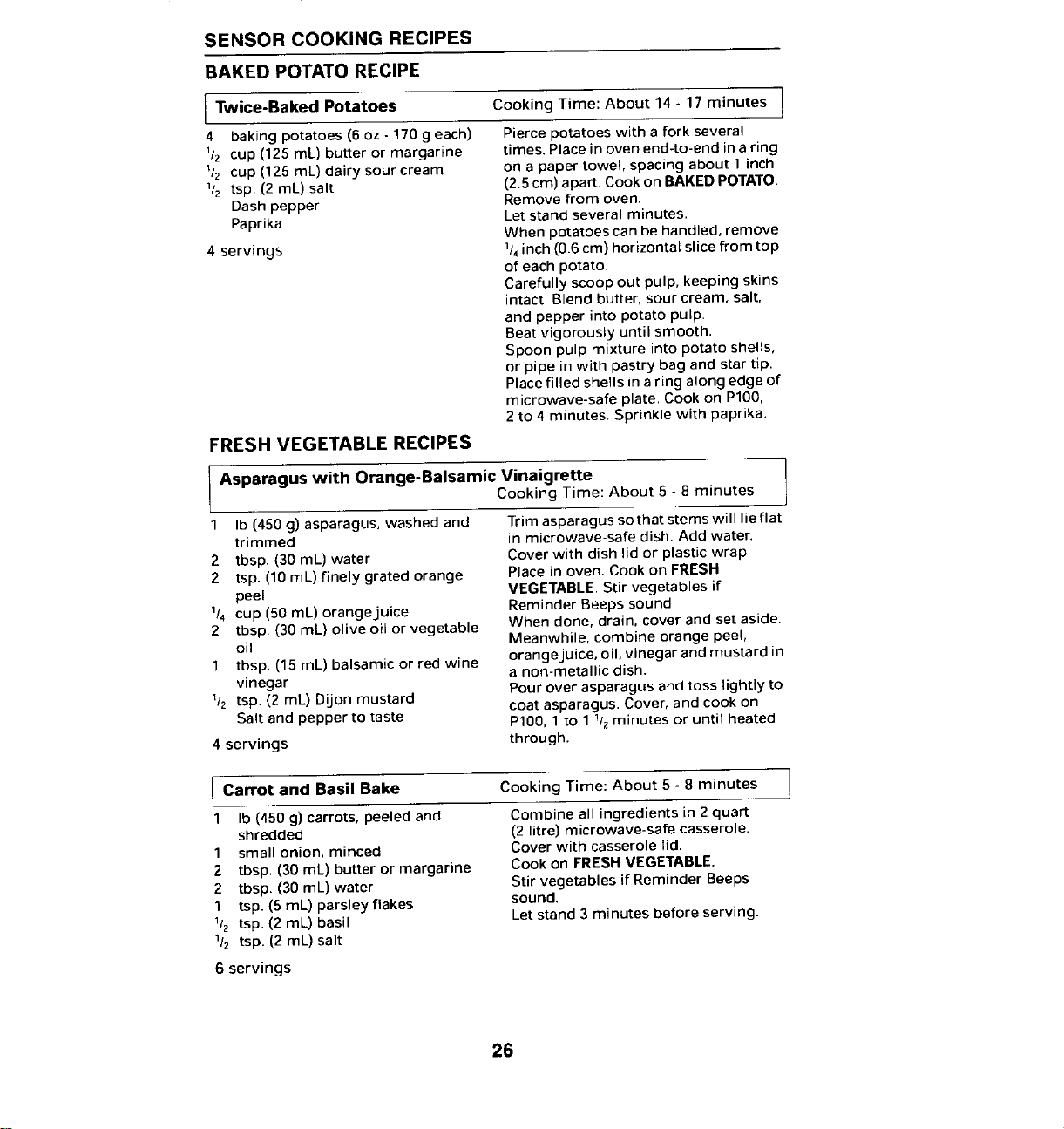
SENSOR COOKING RECIPES
BAKED POTATORECIPE
Twice-Baked Potatoes Cooking Time: About 14- 17 minutes I
I
4 baking potatoes (6 oz - 170 g each) Pierce potatoes with a fork several
1/z cup (125 mL) butter or margarine times. Placein oven end-to-end Jna ring
1/2 cup (125 mL) dairy sour cream on a paper towel, spacing about 1 inch
1/2 tsp. (2 mL) salt (2.5cm) apart. Cook on BAKEDPOTATO.
Dash pepper Remove from oven.
Paprika Let stand several minutes,
When potatoes can be handled, remove
4 servings 1/4inch (0.6 cm) horizontal slice from top
of each potato.
Carefully scoop out pulp, keeping skins
intact, Blend butter, sour cream, salt,
and pepper into potato pulp.
Beat vigorously until smooth.
Spoon pulp mixture into potato shells,
or pipe in with pastry bag and star tip.
Place filled shells in aring along edge of
microwave-safe plate. Cook on P100,
2 to 4 minutes. Sprinkle with paprika.
FRESH VEGETABLE RECIPES
Asparaguswith Orange-BalsamicVinaigrette
Cooking Time: About 5 - 8 minutes
1 Ib (450 g) asparagus, washed and Trim asparagus sothatstemswill lieflat
trimmed in microwave-safe dish. Add water.
2 tbsp. (30 mL) water Cover with dish lid or plastic wrap.
2 tsp. (10 mL) finely grated orange Place in oven. Cook on FRESH
peel VEGETABLE.Stir vegetables if
1/4 cup (50 mL) orange juice Reminder Beeps sound.
2 tbsp. (30 mL) olive oil or vegetable When done, drain, cover and set aside.
oil Meanwhile, combine orange peel,
orange juice, oil, vinegar and mustard in
1 tbsp. (15 mL) balsamic or red wine a non-metallic dish.
vinegar Pour over asparagus and toss lightly to
1/2 tsp. (2 mL) Dijon mustard coat asparagus. Cover, and cook on
Salt and pepper to taste P100, 1 to 1 1/zminutes or until heated
4 servings through.
Carrot and Basil Bake Time: About 5 8 minutes
Cooking
1 Ib (450 g) carrots, peeled and Combine all ingredients in 2quart
shredded (2 litre) microwave-safe casserole.
1 small onion, minced Cover with casserole lid.
2 tbsp. (30 mL) butter or margarine Cook on FRESH VEGETABLE.
2 tbsp. (30 mL) water Stir vegetables if Reminder Beeps
1 tsp. (5 mL) parsley flakes sound.
1/2 tsp. (2 mL) basil Let stand 3 minutes before serving.
1/2 tsp. (2 mL) salt
6 servings
26
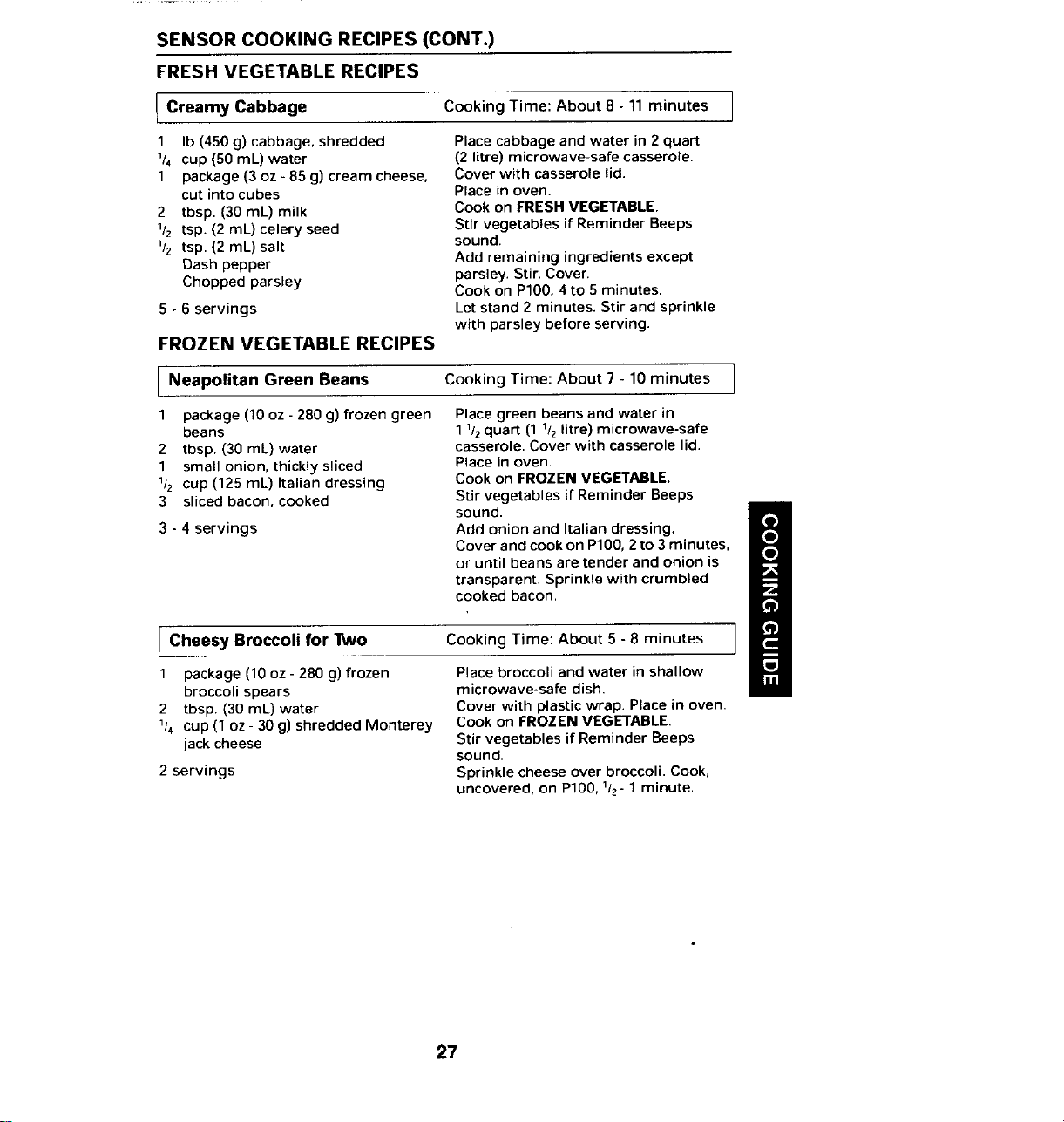
SENSOR COOKING RECIPES (CONT.)
FRESH VEGETABLE RECIPES
I Creamy Cooking Time: About 8- 11 minutes I
Cabbage
1 Ib (450 g) cabbage, shredded Place cabbage and water in 2quart
1/4 cup (50 mL) water (2 litre) microwave-safe casserole.
1 package (3 oz -85 g) cream cheese, Cover with casserole lid.
cut into cubes Place in oven.
2 tbsp. (30 mL) milk Cook on FRESH VEGETABLE.
1/z tsp. (2 mL) celery seed Stir vegetables if Reminder Beeps
1/2 tsp. (2 mL) salt sound.
Dash pepper Add remaining ingredients except
Chopped parsley parsley. Stir. Cover.
Cook on P100, 4to 5 minutes.
5 - 6 servings Let stand 2 minutes. Stir and sprinkle
with parsley before serving.
FROZEN VEGETABLE RECIPES
I Neapolitan Green Beans Cooking Time: About 7 - 10 minutes I
1 package (10 oz - 280 g) frozen green Placegreen beans and water in
beans 11/2quart (1 1/2litre) microwave-safe
2 tbsp. (30 mL) water casserole. Cover with casserole lid.
1 small onion, thickly sliced Place in oven.
1/2 cup (125 mL) Italian dressing Cook on FROZEN VEGETABLE.
3 sliced bacon, cooked Stir vegetables if Reminder Beeps
sound.
3 - 4 servings Add onion and Italian dressing.
Cover and cookon P100, 2 to 3 minutes
or until beans are tender and onion is
transparent, Sprinkle with crumbled
cooked bacon,
Cheesy Broccoli for Two Cooking Time: About 5 - 8 minutes
1 package (10 oz - 280 g) frozen Place broccoli and water in shallow
broccoli spears microwave-safe dish.
2 tbsp. (30 mL) water Cover with plastic wrap. Place in oven.
1/4 cup (1 oz - 30 g) shredded Monterey Cook on FROZEN VEGETABLE.
jack cheese Stir vegetables if Reminder Beeps
sound.
2 servings Sprinkle cheese over broccoli. Cook,
uncovered, on P100, 1/2-1 minute.
27
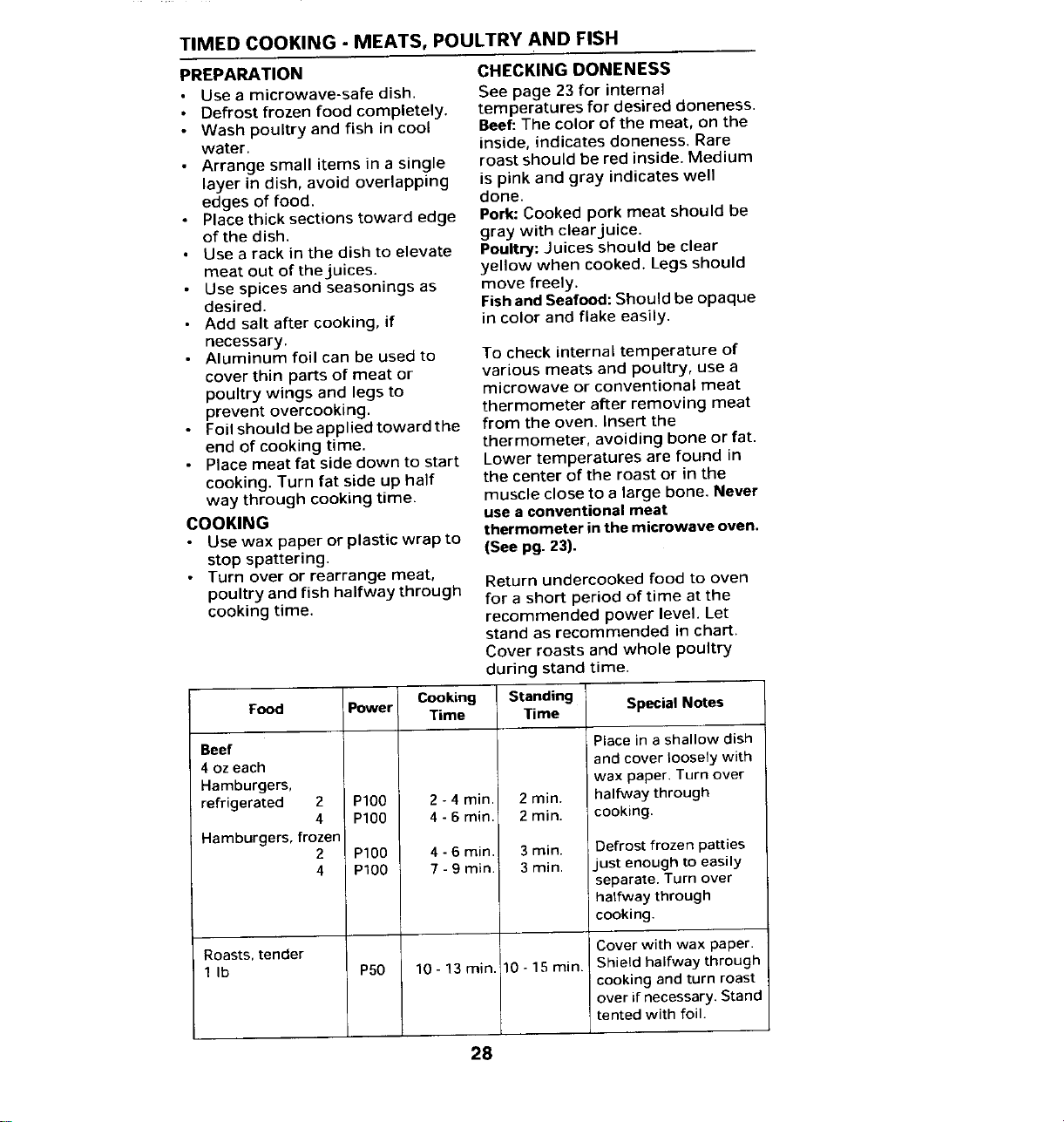
TIMED COOKING - MEATS, POULTRY AND FISH
PREPARATION CHECKINGDONENESS
• Use a microwave-safe dish. See page 23 for internal
• Defrost frozen food completely, temperatures for desired doneness.
• Wash poultry and fish in cool Beef: The color of the meat, on the
water, inside, indicates doneness. Rare
• Arrange small items in a single roast should be red inside. Medium
layer in dish, avoid overlapping is pink and gray indicates well
edges of food. done.
• Place thick sections toward edge Pork: Cooked pork meat should be
of the dish. gray with clearjuice.
• Use a rack in the dish to elevate Poultry: Juices should be clear
meat out of theluices, yellow when cooked. Legs should
• Use spices and seasonings as move freely.
desired. Fish and Seafood: Should be opaque
• Add salt after cooking, if in color and flake easily.
necessary.
• Aluminum foil can be used to To check internal temperature of
cover thin parts of meat or various meats and poultry, use a
poultry wings and legs to microwave or conventional meat
prevent overcooking, thermometer after removing meat
• Foil should be applied toward the from the oven. Insert the
end of cooking time. thermometer, avoiding bone or fat.
• Place meat fat side down to start Lower temperatures are found in
cooking. Turn fat side up half the center of the roast or in the
way through cooking time. muscle close to a large bone, Never
COOKING use a conventional meat
thermometer in the microwave oven.
• Use wax paper or plastic wrap to (See pg. 23).
stop spattering.
• Turn over or rearrange meat, Return undercooked food to oven
poultry and fish halfway through for a short period of time at the
cooking time. recommended power level. Let
stand as recommended in chart.
Cover roasts and whole poultry
during stand time.
Food Power Cooking Standing Special Notes
Time Time
Beef Place in ashallow dish
4 oz each and cover loosely with
Hamburgers, wax paper. Turn over
refrigerated 2 PIO0 2 - 4 min, 2 min. halfway through
4 P100 4 - 6 min. 2 min. cooking.
Hamburgers, frozen
2 P100 4 - 6 rain. 3 min. Defrost frozen patties
4 P100 7 - 9 min. 3 min. just enough to easily
separate. Turn over
halfway through
cooking.
Roasts, tender Cover with wax paper.
1 Ib P50 10-13rain. 10-15rain. Shield halfway through
cooking and turn roast
over if necessary, Stand
tented with foil.
28
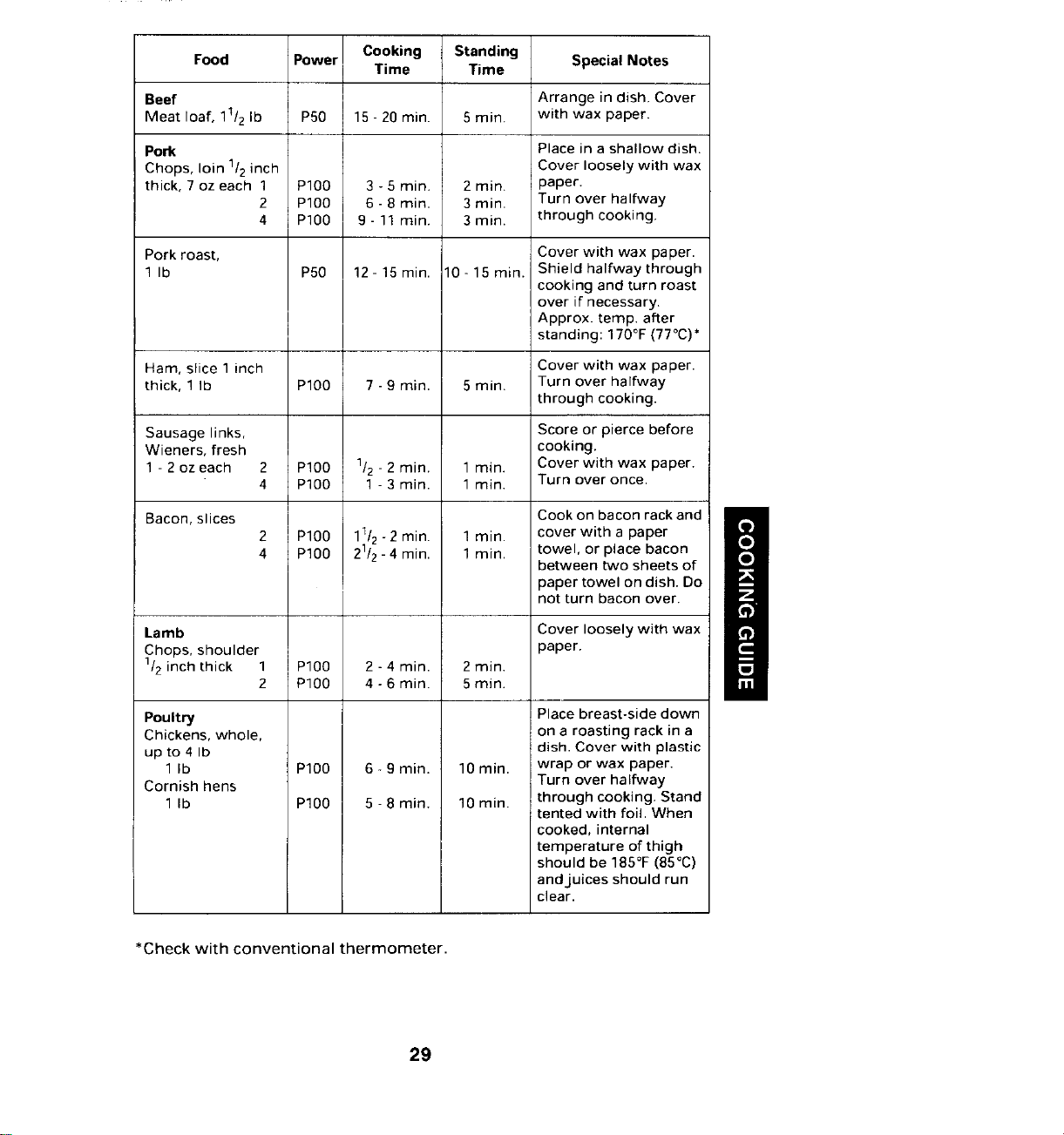
Food Power Cooking Standing
Time Time Special Notes
Beef Arrange in dish, Cover
Meat loaf, 11/2Ib PS0 15 - 20 rain. 5 min. with wax paper.
Pork Place in ashallow dish.
Chops, loin 1/2inch Cover loosely with wax
thick, 7 oz each 1 P100 3 - 5 min. 2 min. paper.
2 PIO0 6 - 8 rain. 3 rain. Turn over halfway
4 P100 9- 11 rain. 3 min. through cooking.
Pork roast, Cover with wax paper.
1 Ib P50 12-15rain. 10-15min. Shield halfway through
cooking and turn roast
over if necessary.
Approx. temp. after
standing: 170°F(77°C)*
Ham, slice 1inch Cover with wax paper.
thick, 1 Ib P100 7 -9 min. 5 min. Turn over halfway
through cooking.
Sausage links, Score or pierce before
Wieners, fresh cooking.
1- 2 oz each 2 PIO0 1/2- 2 min. 1 rain. Cover with wax paper.
4 PIO0 1 - 3 min. 1 rain. Turn over once.
Bacon, slices Cook on bacon rack and
2 PIO0 11/2-2 min. 1min. cover with a paper
4 P100 21/z- 4 min. 1min. towel, or place bacon
between two sheets of
paper towel on dish. Do
not turn bacon over.
Lamb Cover loosely with wax
Chops, shoulder paper.
1/2inch thick 1 P100 2 -4 min. 2 min.
2 PIO0 4 -6 min. 5 rain.
Poultry Place breast-side down
Chickens, whole, on a roasting rack in a
up to 4 Ib dish. Cover with plastic
1 Ib PIO0 6- 9 min. 10 rain. wrap or wax paper.
Cornish hens Turn over halfway
1 Ib P100 5 -8 min. 10 min. through cooking. Stand
tented with foil. When
cooked, internal
temperature of thigh
should be 185°F(85°C)
andjuices should run
clear.
*Check with conventional thermometer.
29
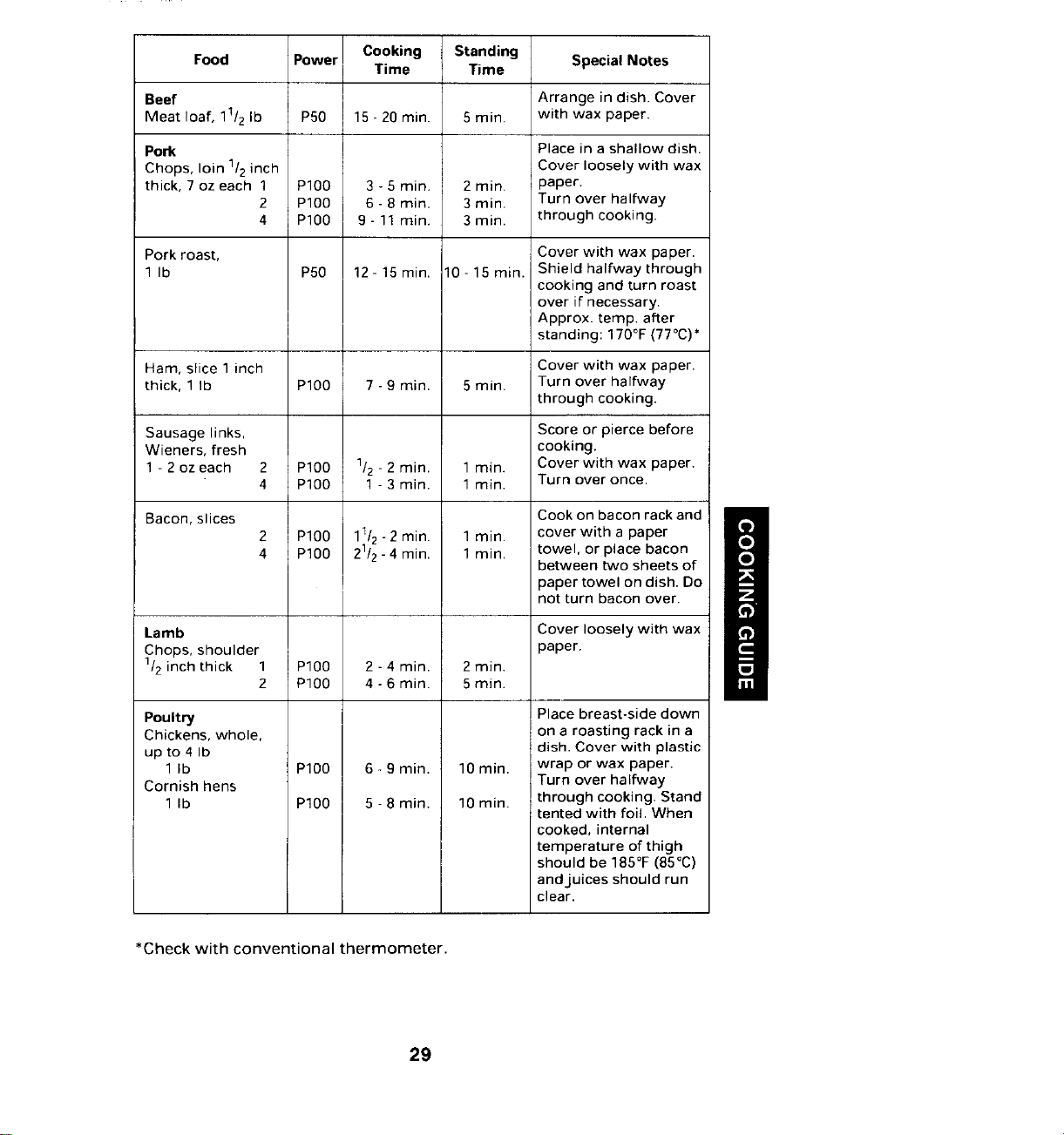
Food Power Cooking Standing
Time Time Special Notes
Beef Arrange in dish, Cover
Meat loaf, 11/2Ib PS0 15 - 20 rain. 5 min. with wax paper.
Pork Place in ashallow dish.
Chops, loin 1/2inch Cover loosely with wax
thick, 7 oz each 1 P100 3 - 5 min. 2 min. paper.
2 PIO0 6 - 8 rain. 3 rain. Turn over halfway
4 P100 9- 11 rain. 3 min. through cooking.
Pork roast, Cover with wax paper.
1 Ib P50 12-15rain. 10-15min. Shield halfway through
cooking and turn roast
over if necessary.
Approx. temp. after
standing: 170°F(77°C)*
Ham, slice 1inch Cover with wax paper.
thick, 1 Ib P100 7 -9 min. 5 min. Turn over halfway
through cooking.
Sausage links, Score or pierce before
Wieners, fresh cooking.
1- 2 oz each 2 PIO0 1/2- 2 min. 1 rain. Cover with wax paper.
4 PIO0 1 - 3 min. 1 rain. Turn over once.
Bacon, slices Cook on bacon rack and
2 PIO0 11/2-2 min. 1min. cover with a paper
4 P100 21/z- 4 min. 1min. towel, or place bacon
between two sheets of
paper towel on dish. Do
not turn bacon over.
Lamb Cover loosely with wax
Chops, shoulder paper.
1/2inch thick 1 P100 2 -4 min. 2 min.
2 PIO0 4 -6 min. 5 rain.
Poultry Place breast-side down
Chickens, whole, on a roasting rack in a
up to 4 Ib dish. Cover with plastic
1 Ib PIO0 6- 9 min. 10 rain. wrap or wax paper.
Cornish hens Turn over halfway
1 Ib P100 5 -8 min. 10 min. through cooking. Stand
tented with foil. When
cooked, internal
temperature of thigh
should be 185°F(85°C)
andjuices should run
clear.
*Check with conventional thermometer.
29
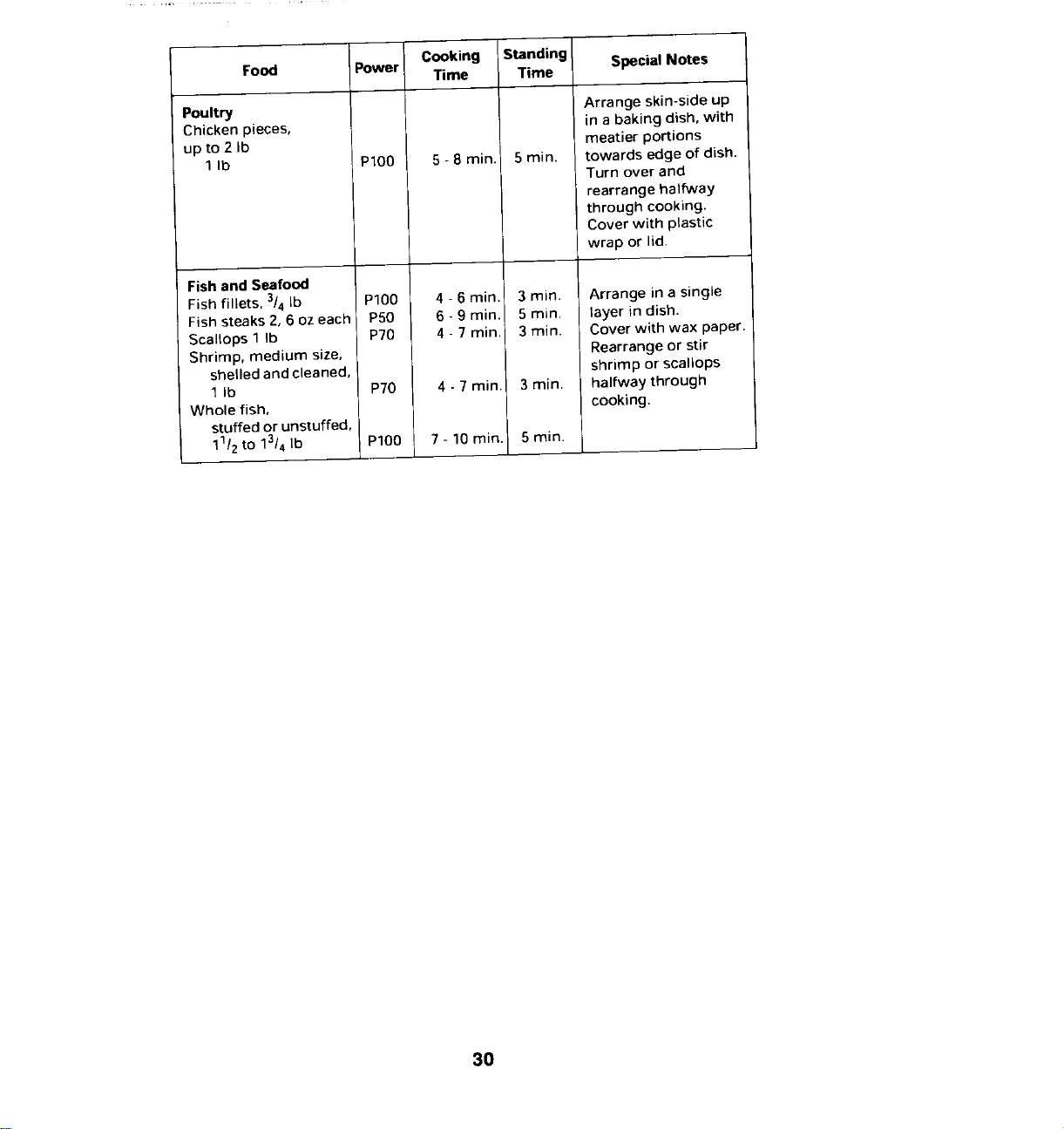
Cooking Standing Special Notes
Food Power Time Time
Poultry Arrange skin-side up
Chicken pieces, in abaking dish, with
up to 2 Ib meatier portions
1Ib P100 5 - 8 rain. 5 rain. towards edge of dish.
Turn over and
rearrange halfway
through cooking.
Cover with plastic
wrap or lid.
Fish and Seafood
Fish fillets, 3/4Ib P100 4 - 6 min. 3 min. Arrange in a single
Fish steaks 2, 6 oz each PS0 6- 9 min. 5 min. layer in dish.
Scallops 1Ib P?0 4 - 7 rain. 3 rnin. Cover with wax paper.
Shrimp, medium size, Rearrange or stir
shelled and cleaned, shrimp or scallops
1 Ib PT0 4 - 7 min. 3 rain. halfway through
Whole fish, cooking.
stuffed or unstuffed,
11/2to 13/4 Ib P100 7 - 10 rain. 5 rnin.
30
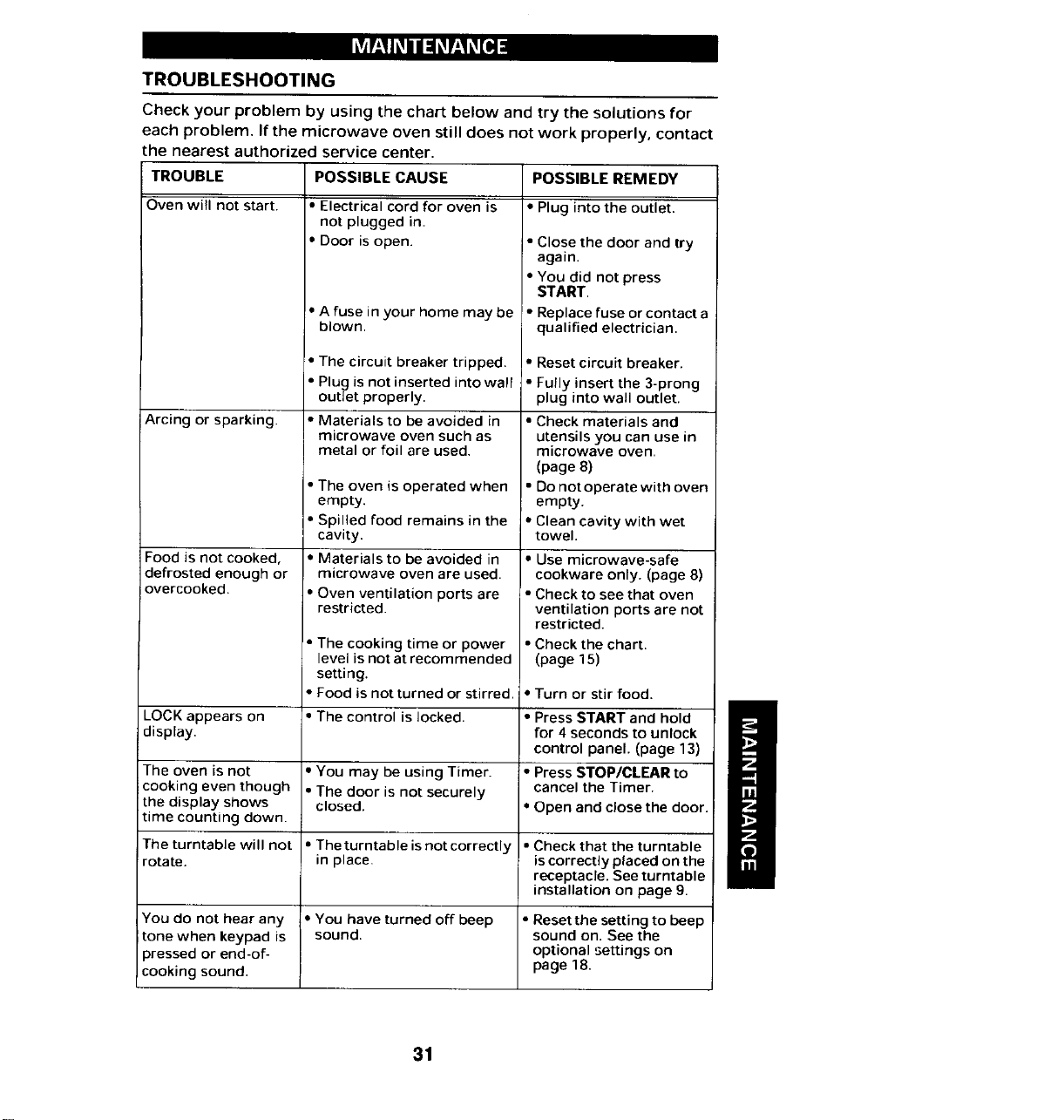
MAINTENANCE
TROUBLESHOOTING
Check your problem by using the chart below and try the solutions for
each problem, If the microwave oven still does not work properly, contact
the nearest authorized service center,
TROUBLE POSSIBLE CAUSE POSSIBLE REMEDY
Oven will not start. • Electrical cord for oven is • Plug into the outlet.
not plugged in.
• Door is open. • Close the door and try
again.
• You did not press
START.
• A fuse in your home may be • Replace fuse or contact a
blown, qualified electrician.
• The circuit breaker tripped. • Reset circuit breaker.
• Plug is not inserted into wall • Fully insert the 3-prong
outlet properly, plug into wall outlet.
Arcing or sparking. • Materials to be avoided in • Check materials and
microwave oven such as utensils you can use in
metal or foil are used. microwave oven.
(page 8)
• The oven is operated when • Do not operate with oven
empty, empty.
• Spilled food remains in the • Clean cavity with wet
cavity, towel.
Food is not cooked, • Materials to be avoided in • Use microwave-safe
defrosted enough or microwave oven are used. cookware only. (page 8)
overcooked. • Oven ventilation ports are • Check to see that oven
restricted, ventilation ports are not
restricted.
• The cooking time or power ° Check the chart.
level is not at recommended (page 15)
setting.
• Food is not turned or stirred. • Turn or stir food.
LOCK appears on • The control is locked. • Press START and hold
display, for 4 seconds to unlock
control panel. (page 13)
The oven is not • You may be using Timer. • Press STOP/CLEAR to
cooking even though • The door is not securely cancel the Timer.
the display shows closed. * Open and close the door.
time counting down.
The turntable will not • The turntable isnot correctly • Check that the turntable
rotate, in place, is correctly placed on the
receptacre. See turntable
installation on page 9.
You do not hear any • You have turned off beep • Resetthe setting to beep
tone when keypad is sound, sound on. See the
pressed or end-of- optional settings on
cooking sound, page 18.
31
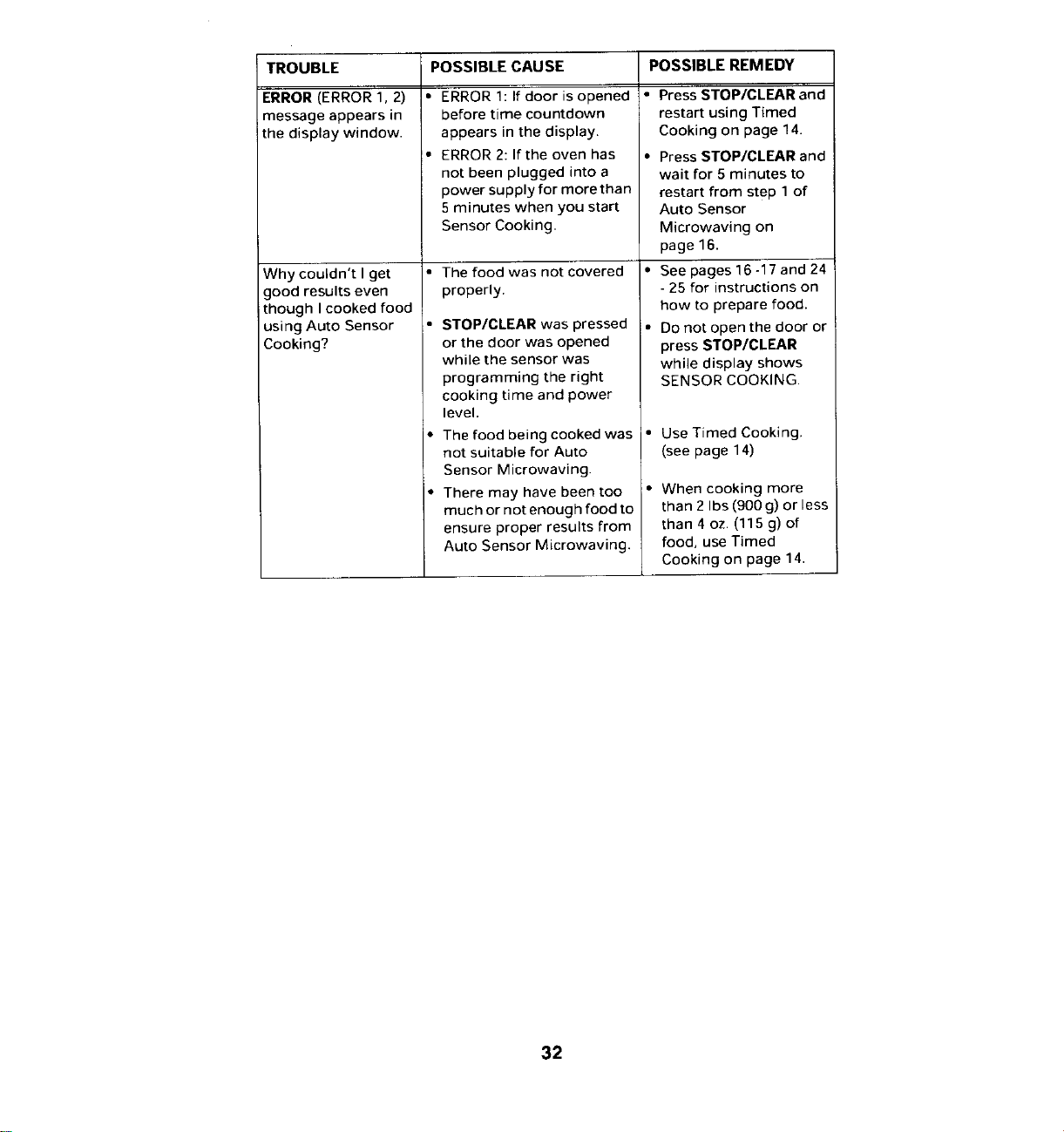
TROUBLE POSSIBLE CAUSE POSSIBLE REMEDY
ERROR(ERROR1,2) * ERRORl: lf door isopened • Press STOP/CLEAR and
message appears in before time countdown restart using Timed
the display window, appears in the display. Cooking on page 14.
'. ERROR2: If the oven has • Press STOP/CLEAR and
not been plugged into a wait for 5 minutes to
power supply for more than restart from step 1 of
5minutes when you start Auto Sensor
Sensor Cooking. Microwaving on
page 16.
Why couldn't l get • The food was not covered • See pages16 -17 and 24
good results even properly. -25 for instructions on
though I cooked food how to prepare food.
using Auto Sensor • STOP/CLEAR was pressed • Do not open the door or
Cooking? or the door was opened press STOP/CLEAR
while the sensor was while display shows
programming the right SENSOR COOKING.
cooking time and power
level.
• The food being cooked was ° Use Timed Cooking.
not suitable for Auto (see page 14)
Sensor Microwaving
• There may have been too • When cooking more
much or not enough food to than 2Ibs (900 g) or less
ensure proper results from than 4 oz. (115 g) of
Auto Sensor Microwaving. food, use Timed
Cooking on page 14.
32
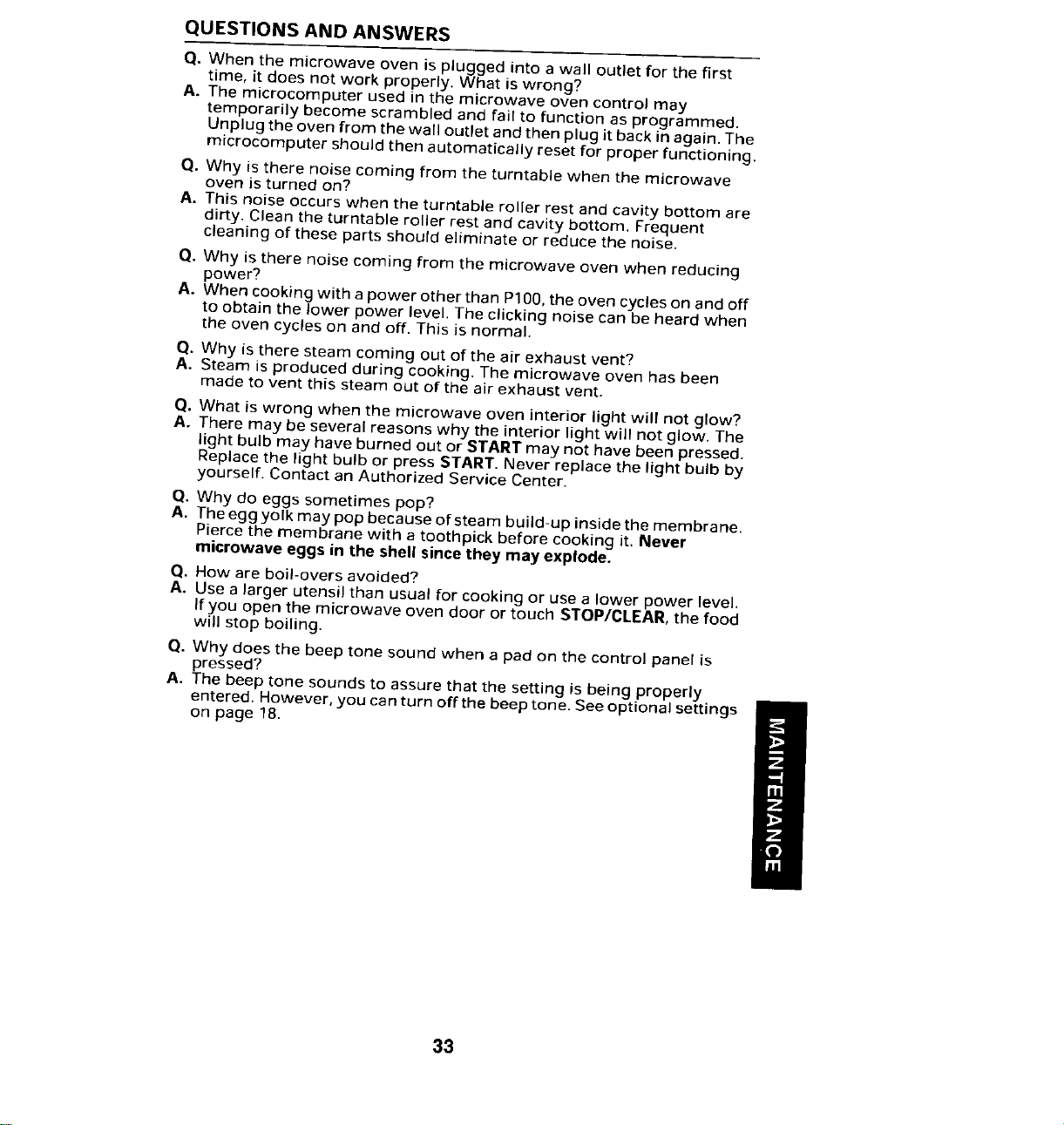
QUESTIONS AND ANSWERS
Q, When the microwave oven is plugged into a wall outlet for the first
time, it does not work properly. What is wrong?
A. The microcomputer used in the microwave oven control may
temporarily become scrambled and fail to function as programmed.
Unplug the oven from the wall outlet and then plug it back in again. The
microcomputer should then automatically reset for proper functioning.
Q. Why is there noise coming from the turntable when the microwave
oven is turned on?
A. This noise occurs when the turntable roller rest and cavity bottom are
dirty. Clean the turntable roller rest and cavity bottom. Frequent
cleaning of these parts should eliminate or reduce the noise.
Q. Why is there noise coming from the microwave oven when reducing
power?
A. When cooking with a power other than P100,the oven cycles on and off
to obtain the lower power level, The clicking noise can be heard when
the oven cycles on and off. This is normal.
Q. Why is there steam coming out of the air exhaust vent?
A, Steam is produced during cooking. The microwave oven has been
made to vent this steam out of the air exhaust vent.
Q. What is wrong when the microwave oven interior light will not glow?
A. There may be several reasons why the interior light will not glow. The
light bulb may have burned out or START may not have been pressed.
Replace the light bulb or press START. Never replace the light bulb by
yourself. Contact an Authorized Service Center.
Q. Why do eggs sometimes pop?
A. The egg yolk may pop because of steam build-up inside the membrane.
Pierce the membrane with a toothpick before cooking it. Never
microwave eggs in the shell since they may explode.
O. How are boil-overs avoided?
A. Use a larger utensil than usual for cooking or use a lower power level.
If you open the microwave oven door or touch STOP/CLEAR, the food
will stop boiling.
Q. Why does the beep tone sound when a pad on the control panel is
pressed?
A. The beep tone sounds to assure that the setting is being properly
entered. However, you can turn off the beep tone. See optional settings
on page 18.
33
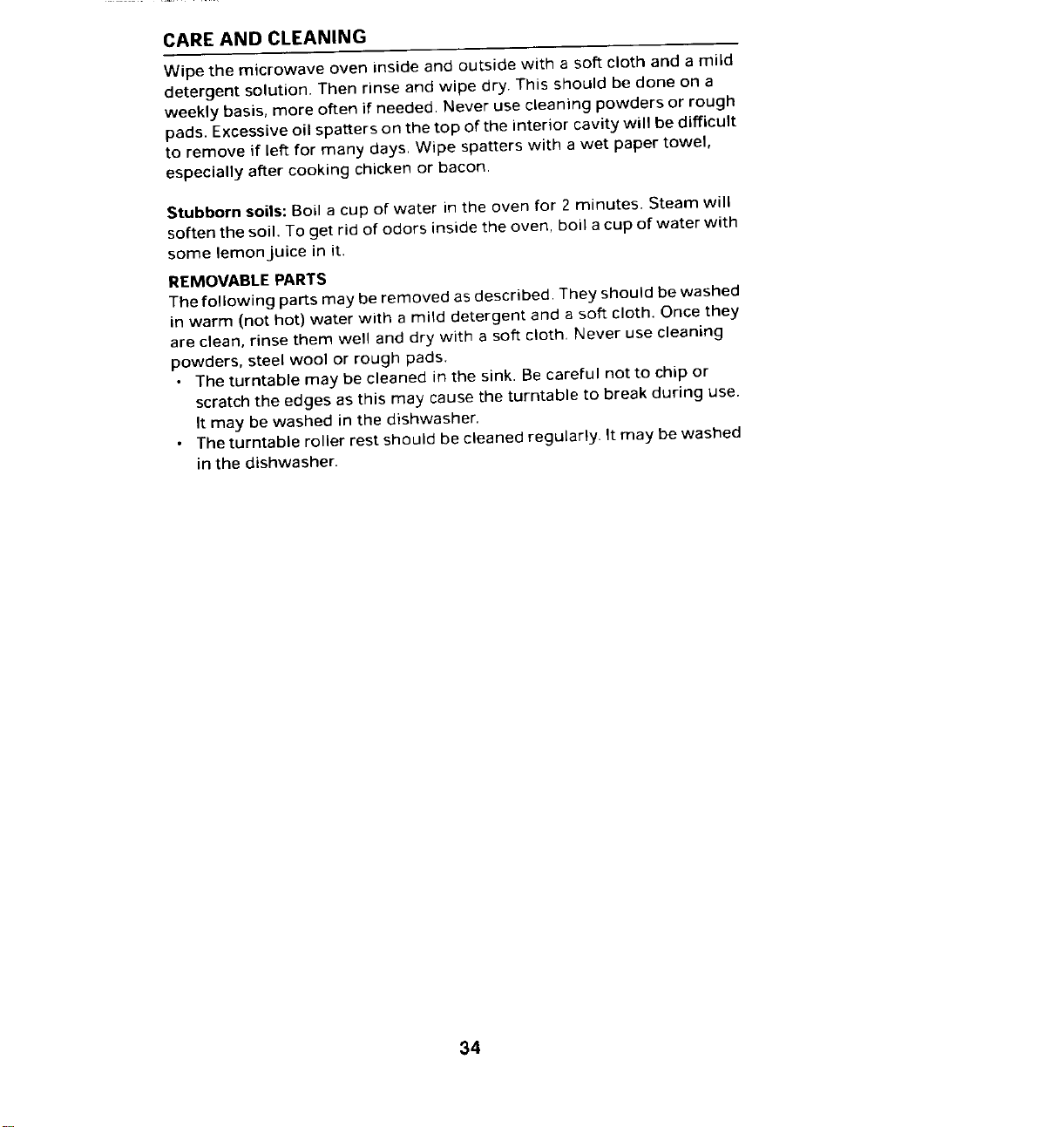
CARE AND CLEANING
Wipe the microwave oven inside and outside with a soft cloth and a mild
detergent solution. Then rinse and wipe dry. This should be clone on a
weekly basis, more often if needed. Never use cleaning powders or rough
pads. Excessive oil spatters on the top of the interior cavity will be difficult
to remove if left for many days Wipe spatters with a wet paper towel,
especially after cooking chicken or bacon.
Stubborn soils: Boil a cup of water in the oven for 2 minutes. Steam will
soften the soil. To get rid of odors inside the oven, boil a cup of water with
some lemon juice in it.
REMOVABLE PARTS
The following parts may be removed as described. They should be washed
in warm (not hot) water with a mild detergent and a soft cloth. Once they
are clean, rinse them well and dry with a soft cloth. Never use cleaning
powders, steel wool or rough pads.
• The turntable may be cleaned in the sink. Be careful not to chip or
scratch the edges as this may cause the turntable to break during use.
It may be washed in the dishwasher.
• The turntable roller rest should be cleaned regularly. It may be washed
in the dishwasher.
34
SPECIALCARE
For best performance and safety, the inner door panel and the oven front
frame should be free of food or grease buildup. Clean them often with a
mild detergent. Then rinse and wipe dry. Never use cleaning powders or
abrasive pads.
STAINLESS STEEL/BRUSHED CHROME (SELECT MODELS):
• DO NOT USE ANY CLEANING PRODUCT CONTAINING CHLORINE
BLEACH.
• ALWAYSWIPE WITH THE GRAIN WHEN CLEANING.
•TO PREVENT SCRATCHING,DO NOT USE ABRASIVEOR CAUSTIC
AGENTS.
•Daily Cleaning/Light Soil -- Wipe with one of the following -soapy water,
white vinegar/water solution, Formula 409 Glass and Surface Cleaner*
or a similar multi-surface cleaner - using a sponge or soft cloth. Rinse
and dry. To polish and help prevent fingerprints, follow with Stainless
Steel Magic Spray (Part No.20000008).* *
• Moderate/Heavy Soil -- Wipe with one of the following - Bon Ami or Soft
Scrub* - using a clamp sponge or soft cloth. Rinse and dry. To restore
luster and remove streaks, follow with Stainless Steel Magic Spray.
• Discoloration -- Using a damp sponge or soft cloth, wipe with Cameo
Stainless Steel Cleaner*. Rinse immediately and dry. Topolish and help
prevent fingerprints, follow with Stainless Steel Magic Spray.
After cleaning the control panel, press STOP/CLEAR to clear any entries
that might have been entered accidentally while cleaning the panel.
TheCHILD LOCK- OUT feature can be activated when cleaning the control
panel. (See page 13.)
•Brand names and registered trademarks of the respective manufacturer.
•*To order, call 1-800-688-8408.
35
MICROWAVE OVEN WARRANTY
Full Two Year Warranty
For two (2)years from the date of original retail purchase, any part
which fails in normal home use will be repaired or replaced free of
charge.
Limited Parts Warranty
After the second year from the date of original retail purchase through
the fifth year, the following parts which fail in normal home use will be
repaired or replaced free of charge for the part itself, with the owner
paying all other costs, including labor, when the appliance is located in
the United States Or Canada: (1)Touch pad and microprocessor, (2)
Magnetron tube, (3)High voltage transformer, (4) High voltage capacitor
(5) High voltage rectifier.
Limited Parts Warranty Outside the United States or Canada
Forone (1) year from the date of original retail purchase, any part which
fails in normal home use will be repaired or replaced free of charge for
the part itself, with the owner paying all other costs, including labor,
when the appliance is located outside the United States or Canada,
Canadian Residents
This warranty covers only those appliances installed in Canada that
have been listed with Canadian Standards Association unless the
appliances are brought into Canada due to transfer of residence from
the United States to Canada.
What is Not Covered by These Warranties
1.Conditions and damages 4. Products purchased for
resulting from any of the commercial or industrial use.
following: 5.The cost of service or service call
a. Improper installation, delivery to:
or maintenance, a. Correct installation errors.
b. Any repair, modification, b. Instruct the user on the proper
alteration, or adjustment not use of the product.
authorized by the manufacturer c. Transport the appliance to the
or an authorized servicer, servicer.
c. Misuse, abuse, accidents or 6. Consequential or incidental
unreasonable use. damages sustained by any
d. Incorrect electric current, person as a result of any breach
voltage or supply, of these warranties.
e. Improper setting of any control.
2.Warranties are void ifthe original Some states do not allow the
serial numbers have been exclusion or limitation of
removed, altered, or cannot be consequential or incidental
readily determined, damages, so the above exclusion
3. Light bulbs, may not apply.
36
MICROWAVE OVEN WARRANTY(CONT.)
If You Need Service
• Call the dealer from whom your appliance was purchased or call
Maytag Appliances Sales Company, Maytag Customer Assistance at
1-800.688-1100, USA and Canada or 1-423-472-3333to locate an
authorized servicer.
• Be sure to retain proof of purchase to verify warranty status. Refer to
WARRANTY (above) for further information on owner's
responsibilities for warranty service.
•If the dealer or service company cannot resolve the problem, write to
Maytag Appliances Sales Company, Attn: CAIR®Center, P.O. Box
2370, Cleveland, TN 3/320-2370, or call 1-800-688-1100 or 1-423-4"/2-
3333. U.S. customers using TTY for deaf, hearing impaired or speech
impaired, call 1-800-688-2080.
NOTE: When writing or calling about a service problem, please
include the following information:
a. Your name, address and telephone number;
b. Model number and serial number;
c. Name and address of your dealer or servicer;
d. A clear description of the problem you are having;
e. Proof of purchase (sales receipt).
• User's guides, service manuals and parts catalogs are available from
Maytag Appliances Sales Company, Maytag Customer Assistance.
37