GH68-53615A
Printed in Korea
Need support? Get connected
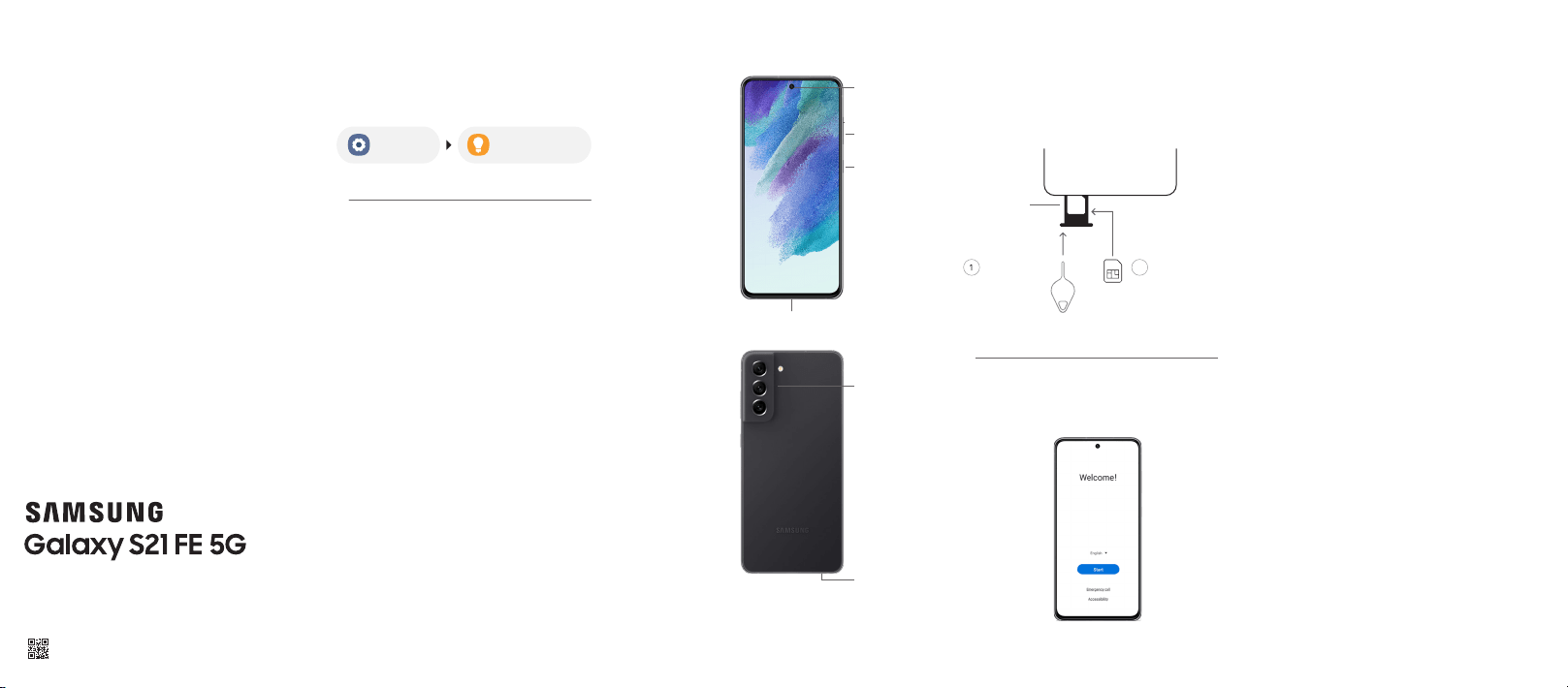
Use the SIM tool
to open the SIM
tray.
SIM card tray
SIM cardSIM tool
Insert the SIM card
in the tray.
2
Follow setup screens
and transfer content to your new phone
User manual
From your device
Settings Tips and help
Samsung Support
Get direct access to FAQs, tips and tricks,
videos, and more.
Visit Samsung.com/us/support
Samsung Care - YouTube
Check out the latest support videos to
help you with your Samsung product.
Visit Youtube.com/samsungcare
Samsung Care +
Get coverage for repairs and 24/7
dedicated support.
To learn more, visit Samsung.com/us/
support/samsung-care-plus
Insert the SIM card
in the SIM card tray as shown
Get to know your device
Use only Samsung-approved chargers and cables.
To avoid injury or damage to your device, do not
use incompatible, worn or damaged batteries,
chargers or cables.
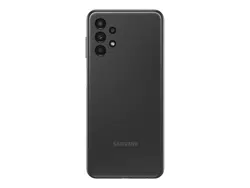
Front
camera
Volume
Side key
Power
On/Off
Charging & Audio port
Camera
SIM card
tray
5G: Not all devices, signals, or uses
are compatible; check device specs.
Check with your carrier for your 5G
coverage area, access, & network
management details.
Approved firmware versions
This device will only operate with
rmware versions that have been
approved for use by your wireless
carrier and the device manufacturer. If
unauthorized rmware is placed on the
device it will not function.
Information about
safeguarding devices
We encourage customers to take
appropriate measures to secure their
devices and invite them to take advantage
of the features available on this device
to help secure it from theft and/or other
unauthorized access and use. This device
has a locking function (e.g., user-dened
codes or patterns) that can serve as a rst
line of defense against unauthorized use
or access to stored information. Preloaded
security applications that allow customers
to track or locate misplaced devices
can be found on several devices. Lost or
stolen devices should be immediately
reported to your wireless carrier so that
proper measures can be taken to protect
accounts. For additional information, visit
your wireless carrier's Privacy Policy.
Quick
Start
Guide
&
Terms and
Conditions

Terms and Conditions
Read this document before operating the
mobile device, accessories, or software
(dened collectively and individually as the
“Product”) and keep it for future reference.
This document contains important Terms
and Conditions. Electronic acceptance,
opening the packaging, use, or retention of
the Product constitutes acceptance of these
Terms and Conditions.
Arbitration Agreement - This Product is
subject to a binding Arbitration Agreement
between you and SAMSUNG ELECTRONICS
AMERICA, INC. (“Samsung”). You can opt
out within 30 calendar days of purchase:
email [email protected] or calling
1-800-SAMSUNG (726-7864) and providing
the applicable information.
The Arbitration Agreement, Standard One-year
Limited Warranty, End User License Agreement
(EULA), and Health & Safety Information for your
device are available at:
English:
www.samsung.com/us/support/legal/mobile
Spanish:
www.samsung.com/us/support/legal/mobile-sp
This information is on the device:
Settings > About phone or About device or
About tablet > Legal information > Samsung
legal or, search for “Legal”.
You can view the Federal Communications
Commission (FCC) certication, if applicable, by
opening Settings > About phone or About
device or About tablet > Status or Status
information
Specific Absorption Rate (SAR)
certification information
For information about SAR, visit:
• https://www.fcc.gov/general/radio-
frequency-safety-0
• www.fcc.gov/encyclopedia/specic-
absorption-rate-sar-cellular-telephones
• www.samsung.com/sar
Samsung mobile products and
recycling
WARNING! Never dispose of batteries in a re
because they may explode. Do not disassemble,
crush, puncture, heat, burn or reuse.
For more recycling information, go to our
website: www.samsung.com/recycling or call
1-800-SAMSUNG.
FCC Part 15 Information and Notices
This device complies with part 15 of the FCC Rules.
Operation is subject to conditions:
(1) This device may not cause harmful interference,
and (2) this device must accept any interference
received, including interference that may cause
undesired operation.
Operate devices that support wireless power sharing
at least 8 inches/20 cm away from your body.
Emergency calls
Emergency calls may not be possible on all wireless
mobile device networks or when certain network
services and/or mobile device features are in use.
Check with local service providers. If certain features
are in use (e.g. call blocking) you may rst need to
deactivate those features before you can make an
emergency call.
HAC for Newer Technologies
This device has been tested and rated for use with
hearing aids for some of the wireless technologies
that it uses. However, there may be some newer
wireless technologies used in this device that have
not been tested yet for use with hearing aids. It is
important to try the different features of this device
thoroughly and in different locations, using your
hearing aid or cochlear implant, to determine if
you hear any interfering noise. Consult your service
provider or the manufacturer of this device for
information on hearing aid compatibility. If you have
questions about return or exchange policies, consult
your service provider or device retailer.
FCC Hearing Aid Compatibility (HAC)
regulations for wireless devices
The FCC established requirements for devices
to be compatible with hearing aids and other
hearing devices. For more information, visit
https://www.fcc.gov/consumers/guides/
hearing-aid-compatibility-wireline-and-
wireless-telephones
Exposure to Radio Frequency (RF)
signals
For information, go to www.samsung.com/us/
support/legal/mobile > Health and Safety
Information > Exposure to Radio Frequency
(RF) signals
Responsible listening
CAUTION! Avoid potential hearing loss by not
exposing yourself to loud sounds for a prolonged
period of time. For more information, go to
www.samsung.com/us/support/legal/
mobile > Health and Safety Information >
Responsible listening
Smart practices while driving
Samsung is committed to both promoting
responsible driving and giving drivers tools to
address distractions. For more information, go
to www.samsung.com/us/support/legal/
mobile > Health and Safety Information >
Smart practices while driving
Samsung Electronics America, Inc.
85 Challenger Road
Ridgeeld Park, NJ 07660
Phone: 1.800.SAMSUNG (726-7864)
Internet: www.samsung.com
Pacemaker and implantable medical
devices
CAUTION! Persons who have implantable medical
devices should consult their health care provider
before using mobile electronic devices, and can
go to www.samsung.com/us/support/legal/
mobile > Health and Safety Information >
Pacemaker and implantable medical devices
for information.
For additional Health & Safety information,
including Samsung's Knox security platform,
Maintaining Dust & Water Resistance, Navigation,
GPS, AGPS, and Wireless Emergency Alerts (WEA),
see
English:
www.samsung.com/us/support/legal/mobile
Spanish:
www.samsung.com/us/support/legal/mobile-sp
©
2021 Samsung Electronics America, Inc. Samsung & Samsung
Galaxy are registered trademarks of Samsung Electronics Co.,
Ltd. Other company and product names mentioned herein
may be trademarks of their respective owners. Screen images
simulated. Appearance of device may vary. Images shown are for
reference only. If you use a screen protector, make sure it allows
for use of touch-screen features.