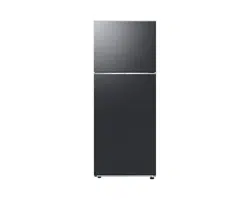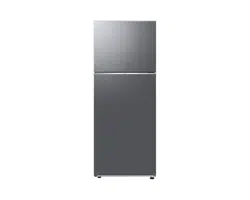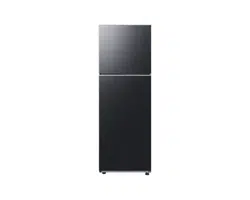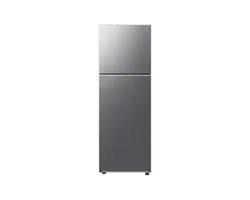
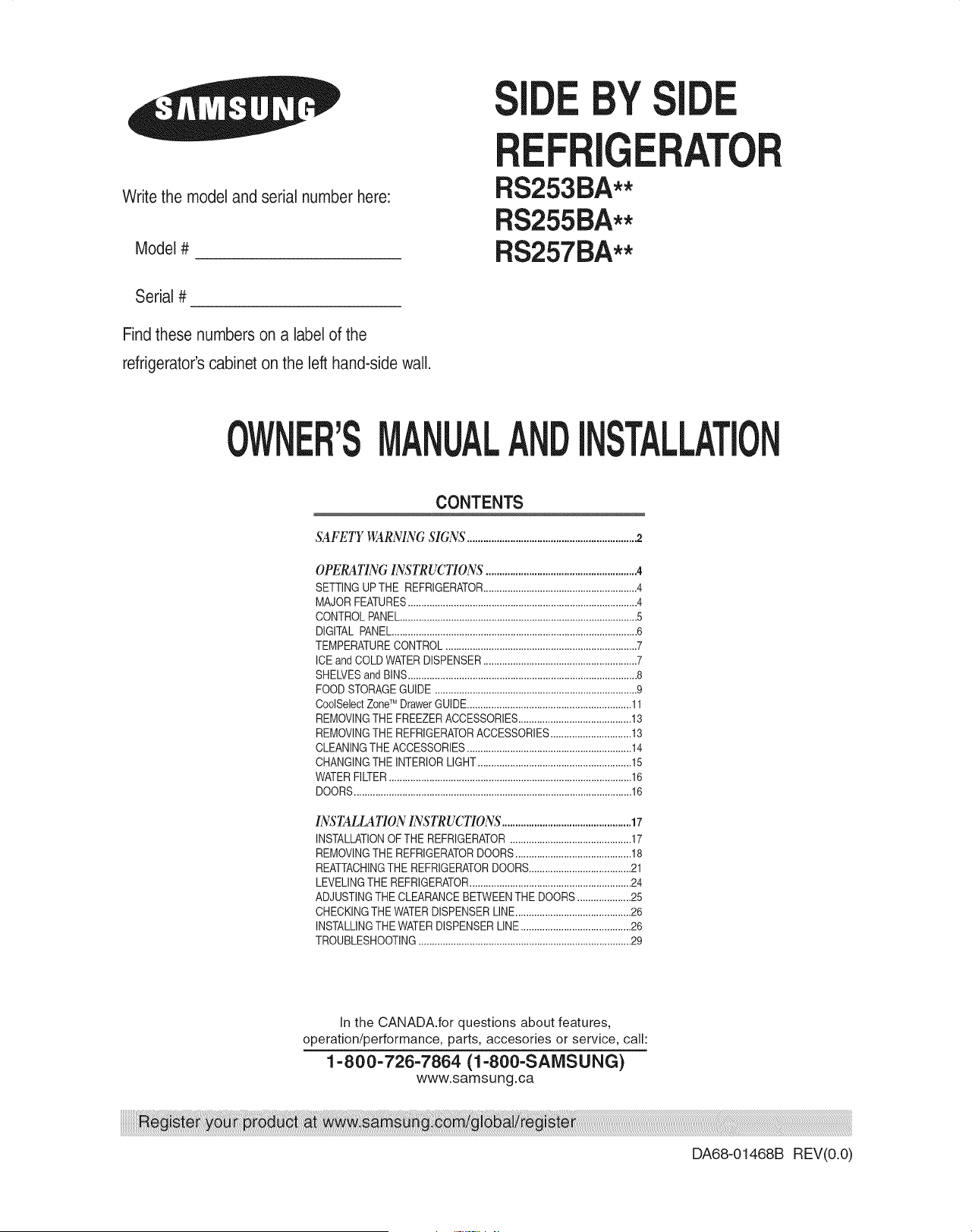
Write the model and serial number here:
Model #
Serial #
Find these numbers on a label of the
refrigerator'scabinet on the left hand-side wall.
BY
RS253BA**
RS255BA**
RS257BA**
I
MANUAL TALLATION
CONTENTS
SAFETY WARNING SIGNS ...............................................................2
OPERATING INSTRUCTIONS ........................................................4
SETTINGUPTHE REFRIGERATOR.........................................................4
MAJORFEATURES.....................................................................................4
CONTROLPANEL........................................................................................5
DIGITAL PANEL...........................................................................................6
TEMPERATURECONTROL .......................................................................7
ICE and COLDWATERDISPENSER.........................................................7
SHELVESand BINS.....................................................................................8
FOODSTORAGEGUIDE ...........................................................................9
CoolSelectZoneTM DrawerGUIDE.............................................................11
REMOVINGTHE FREEZERACCESSORIES..........................................13
REMOVINGTHE REFRIGERATORACCESSORIES..............................13
CLEANINGTHE ACCESSORIES.............................................................14
CHANGINGTHE INTERIORLIGHT.........................................................15
WATERFILTER..........................................................................................16
DOORS.......................................................................................................16
INSTALLATION INSTRUCTIONS................................................17
INSTALLATIONOF THE REFRIGERATOR.............................................17
REMOVINGTHE REFRIGERATORDOORS...........................................18
REATTACHINGTHE REFRIGERATORDOORS......................................21
LEVELINGTHEREFRIGERATOR............................................................24
ADJUSTINGTHE CLEARANCEBETWEENTHE DOORS....................25
CHECKINGTHE WATERDISPENSERLINE...........................................26
INSTALLINGTHE WATERDISPENSERLINE.........................................26
TROUBLESHOOTING...............................................................................29
In the CANADA.for questions about features,
operation/performance, parts, accesories or service, call:
1-800-726-7864 (1-800-SANISUNG)
www.samsung.ca
DA68-O1468B REV(O.O)
WARNING
• Beforeoperatingthe appliance,pleasereadand retainthis manualthoroughlyfor yourreference.
Becausethesefollowingoperatinginstructionscovervariousmodels,the characteristicsof your refrigerator
maydifferslightlyfromthosedescribedinthismanual.
The applianceis notintendedfor useby childrenorinfirmpersonswithoutadultsupervision.
Childrenshouldbe supervisedto ensurethattheydo notplaywiththe appliance.
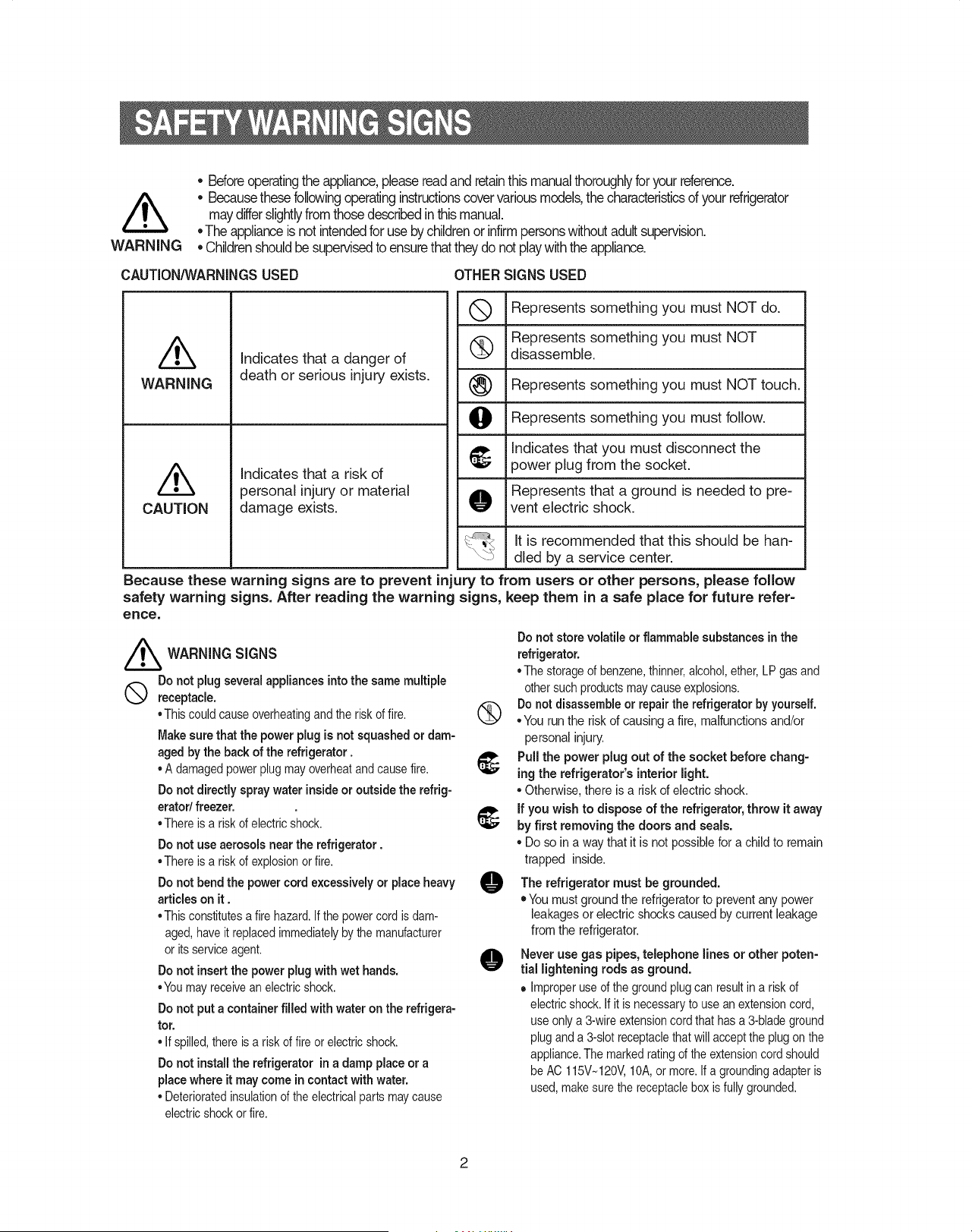
CAUTION/_NARNiNGSUSED OTHER SIGNS USED
Q Represents something you must NOT do.
Represents something you must NOT
disassemble.
Represents something you must NOT touch.
Represents something you must follow.
t_ Indicates that you must disconnect the
power plug from the socket.
Represents that a ground is needed to pre-
O vent electric shock.
/k
WARNING
/k
CAUTION
Indicates that a danger of
death or serious injury exists.
Indicates that a risk of
personal injury or material
damage exists.
It is recommended that this should be han-
dled by a service center.
Because these warning signs are to prevent injury to from users or other persons, please follow
safety warning signs. After reading the warning signs, keep them in a safe place for future refer=
ence.
//_ WARNING SIGNS
Do not plugseveralappliancesintothe same multiple
Q receptacle.
• Thiscould causeoverheatingand the riskof fire.
Make sure that the power plug is not squashed or dam-
aged by the back of the refrigerator.
• A damagedpowerplugmay overheatandcausefire.
Do not directly spray water insideor outside the refrig-
eratod freezer.
• There is a riskof electricshock.
Do not use aerosols near the refrigerator.
• There is a riskof explosionorfire.
Do not bend the power cord excessively or place heavy
articles on it.
• Thisconstitutesa firehazard.If the powercord is dam-
aged, haveit replacedimmediatelyby themanufacturer
or its serviceagent.
Do not insertthe power plug with wet hands.
• Youmayreceivean electricshock.
Do not put a container filled with water on the refrigera-
tor.
• If spilled,there is a riskof fire or electricshock.
Do not installthe refrigerator in a damp place or a
place where it may come in contact with water.
• Deterioratedinsulationof theelectricalparts maycause
electricshockor fire.
Do not store volatile or flammable substances inthe
refrigerator.
• The storageof benzene,thinner,alcohol,ether,LP gas and
othersuchproductsmay causeexplosions.
Do not disassembleor repair the refrigerator by yourself.
° You run the riskof causing a fire, malfunctions and/or
personal injury.
Pull the power plug out of the socket before chang-
ing the refrigerator's interior light.
• Otherwise,there isa risk of electric shock.
if you wish to dispose of the refrigerator,throw it away
by first removing the doors and seals.
° Do so ina way that it is not possiblefor a child to remain
trapped inside.
O refrigerator must grounded.
The be
• You must ground the refrigeratorto prevent any power
leakages or electric shocks caused by current leakage
from the refrigerator.
O Never use gas pipes, telephone lines or other poten-
tial lightening rods as ground.
• Improperuse of theground plugcan resultin a risk of
electricshock.If it is necessaryto use an extensioncord,
use onlya 3-wireextensioncord that has a 3-bladeground
pluganda 3-slotreceptaclethatwill acceptthe plugon the
appliance.The markedrating of the extensioncord should
be AC 115V~120V,10A,or more.If a groundingadapteris
used,makesure thereceptaclebox is fullygrounded.
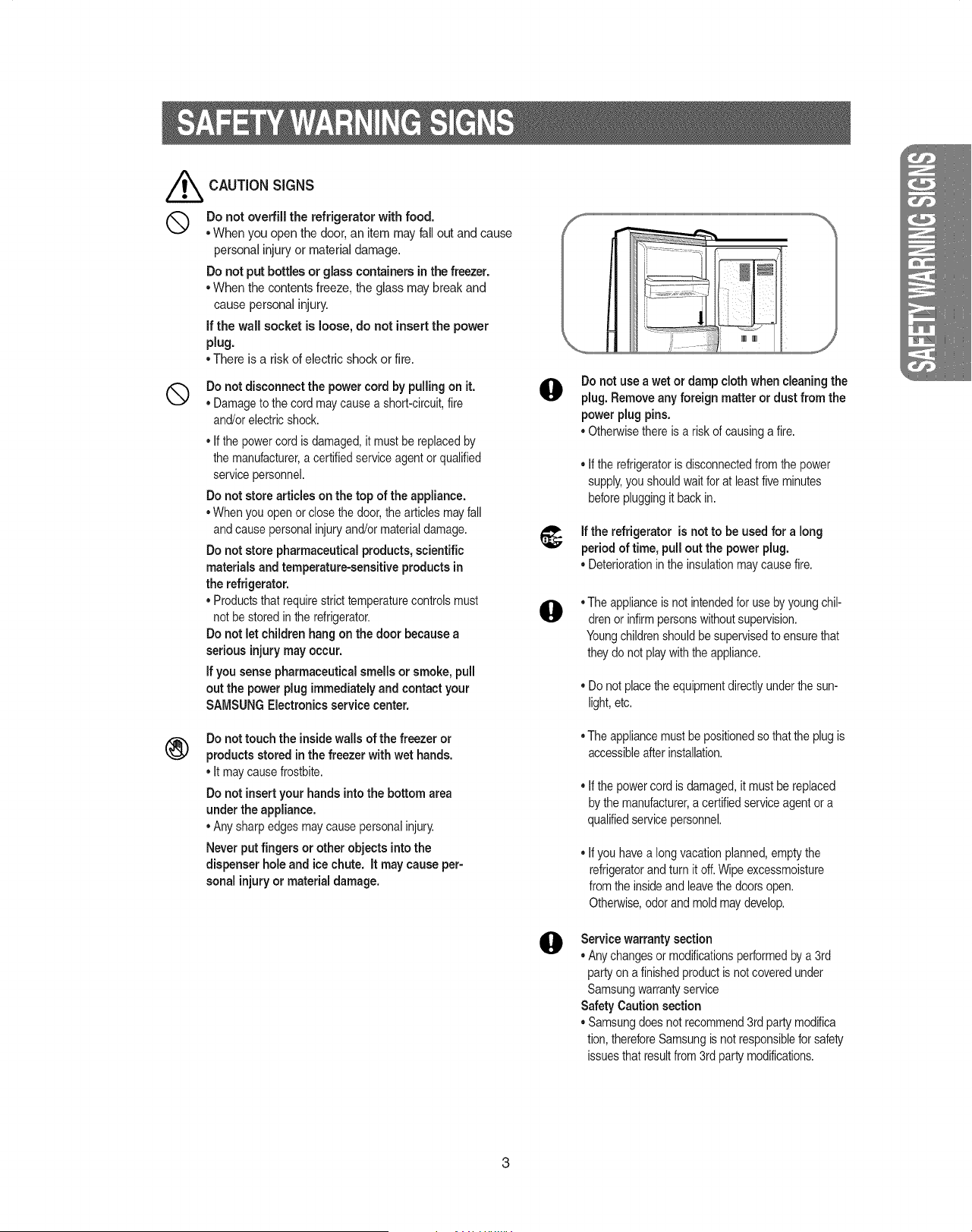
///_ CAUTION SIGNS
Q Do not overfill the refrigeratorwith food.
• When you open the door, an itemmay fall out and cause
personal injury or material damage.
Do not put bottles or glasscontainersinthe freezer.
° When the contents freeze, the glass may break and
cause personal injury.
if the wall socket is loose, do not insert the power
plug.
° There is a riskof electric shock or fire.
®
Do not disconnect the power cord by pullingon it.
° Damageto the cord maycausea short-circuit,fire
and/orelectricshock.
° Ifthe powercord is damaged,it mustbe replacedby
the manufacturer,a certifiedserviceagent or qualified
servicepersonnel.
Do not store articles on the top of the appliance.
°When you openor closethe door,the articlesmay fall
and causepersonalinjuryand/or materialdamage.
Do not storepharmaceuticalproducts, scientific
materials and temperature-sensitive products in
the refrigerator.
° Productsthatrequirestrict temperaturecontrolsmust
not be stored in the refrigerator.
Do not let children hang on the door becausea
serious injury may occur.
if you sense pharmaceutical smells or smoke, pull
out the power plug immediatelyand contact your
SAMSUNGElectronics service center.
®
Do nottouch the insidewalls of the freezer or
products storedin the freezer with wet hands.
° It maycause frostbite.
Do not insert your hands into the bottom area
under the appliance.
°Any sharp edges maycausepersonalinjury.
Neverput fingers or other objects into the
dispenser holeand ice chute. It may cause per-
sonal injury or material damage.
@
Do not use a wet or damp cloth when cleaningthe
plug. Remove any foreign matter or dust from the
power plug pins.
° Otherwisethereis a riskof causinga fire.
° If therefrigeratoris disconnectedfrom the power
supply,you shouldwaitfor at leastfive minutes
beforepluggingit back in.
If the refrigerator is not to be used for a long
period of time, pull out the power plug.
° Deteriorationin the insulationmaycausefire.
@
@
• The applianceis not intendedfor use byyoungchil-
drenor infirmpersonswithoutsupervision.
Youngchildrenshouldbe supervisedto ensurethat
theydo not playwiththe appliance.
• Donot placetheequipmentdirectlyunderthe sun-
light,etc.
• The appliancemustbe positionedso thatthe plugis
accessibleafterinstallation.
• If thepowercord is damaged,it must be replaced
bythe manufacturer,a certifiedserviceagentor a
qualifiedservicepersonnel.
• Ifyou havea longvacationplanned,emptythe
refrigeratorand turn it off.Wipeexcessmoisture
from the insideand leavethedoors open.
Otherwise,odorandmoldmaydevelop.
Service warranty section
• Any changesor modificationsperformedby a 3rd
party on a finishedproductis not coveredunder
Samsungwarrantyservice
Safety Caution section
• Samsungdoesnotrecommend3rd party modifica
tion,thereforeSamsungis not responsibleforsafety
issuesthatresultfrom 3rd partymodifications.
Once you have performed the following steps, your refrigerator should be fully operational, if not,check
the power supply and electricity source, if you haveany questions,contact your SAMSUNG Electronics
service center.
Place the refigeratorin an appropriate loca-
tion with reasonableclearance betweenthe
wall and the refrigerator.
(referto installationinstructionsin this man-
nal)
Set the temperature control to the coldest
temperature and waitfor an hour.The
freezer should get slightly chilled and the
motorshould runsmoothly.
When the refrigerator is plugged in,
the interior light should come on when
you open the doors.
Once the refrigeratortemperature is suffi-
ciently low,you can storefood in the
refrigerator.After starting the refrigerator,it
takes a few hours to reach the appropriate
temperature.
//
i
i
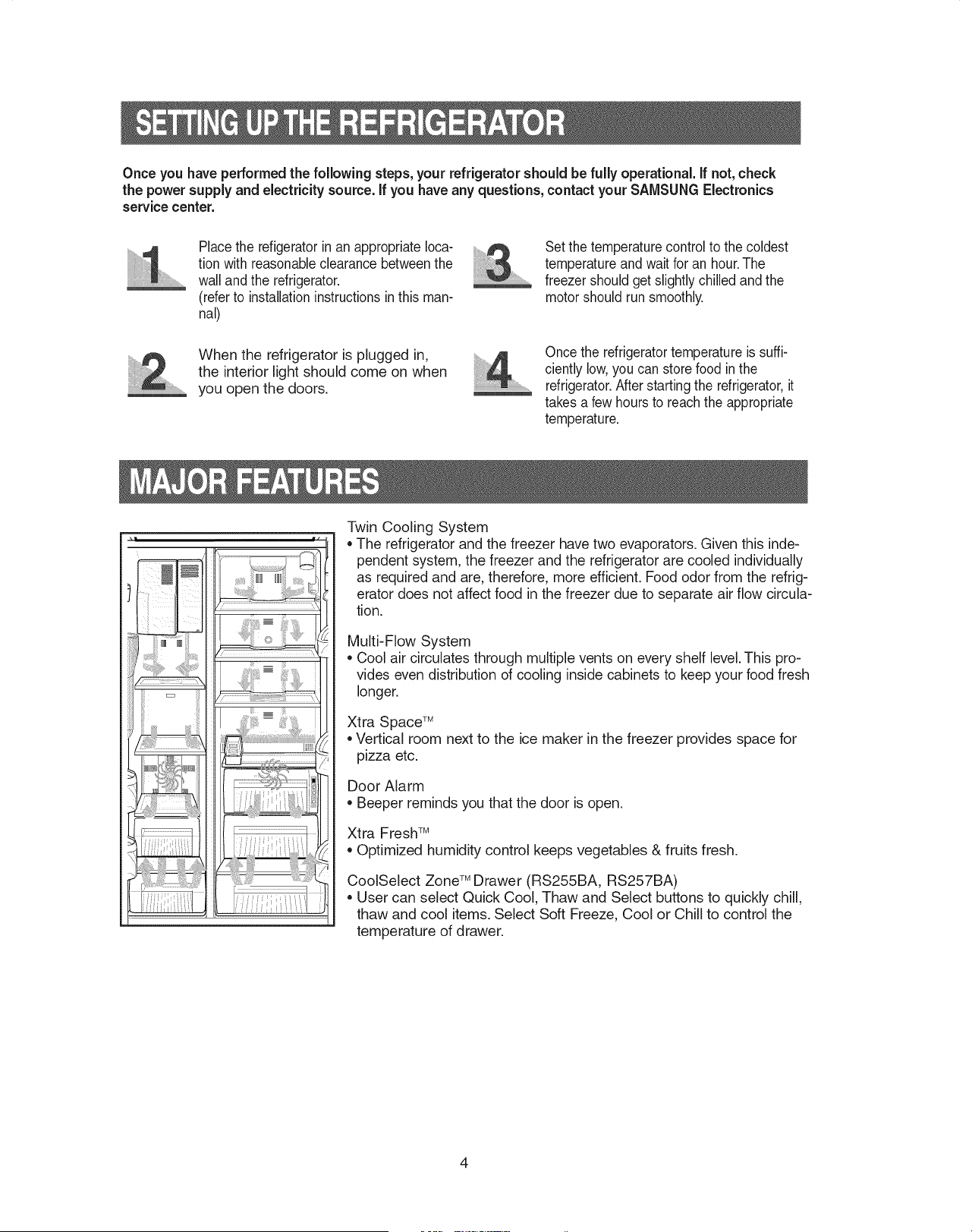
Twin Cooling System
,,The refrigerator and the freezer have two evaporators. Given this inde-
pendent system, the freezer and the refrigerator are cooled individually
as required and are, therefore, more efficient. Food odor from the refrig-
erator does not affect food in the freezer due to separate air flow circula-
tion.
Multi-Flow System
Cool air circulates through multiple vents on every shelf level. This pro-
vides even distribution of cooling inside cabinets to keep your food fresh
longer.
Xtra Space TM
,,Vertical room next to the ice maker in the freezer provides space for
pizza etc.
Door Alarm
Beeper reminds you that the door is open.
Xtra Fresh TM
Optimized humidity control keeps vegetables & fruits fresh.
CoolSelect Zone TM Drawer (RS255BA, RS257BA)
,, User can select Quick Cool, Thaw and Select buttons to quickly chill,
thaw and cool items. Select Soft Freeze, Cool or Chill to control the
temperature of drawer.
RS253BA
Power Freeze
Power Cool
......... Pcocoa
@_OOo/ Jii_;iGi nno ,
i F!;_9!Z '--'OF Lock
Fridge Temp. Hold 3 sees.
o
Filter Cubed Crushed Ice Off Child Lock
Ice Water
RS255BA, RS257BA
Power Freeze Power Cool
E I--I1--1o |%,,_ ..... ,,_. I--I1--1° - I
==-ill=iF | D B ill=iF i Lock
Freezer Temp. | Chill Quick Cool Fridge Temp. _ Hold 3 sees. _>_,_ _,_,
Freezer FiltOr C_b_"l_dc_,h_d _eOff Chil.Lo_k Fridge
Ice Type. Filter Change _ ................................
, ( ) .o,d.i, .....
t Ice Water
fHHHHHHHHHHHHHHHHHH,Hn,Hn,Hn,Hn,Hn,Hn
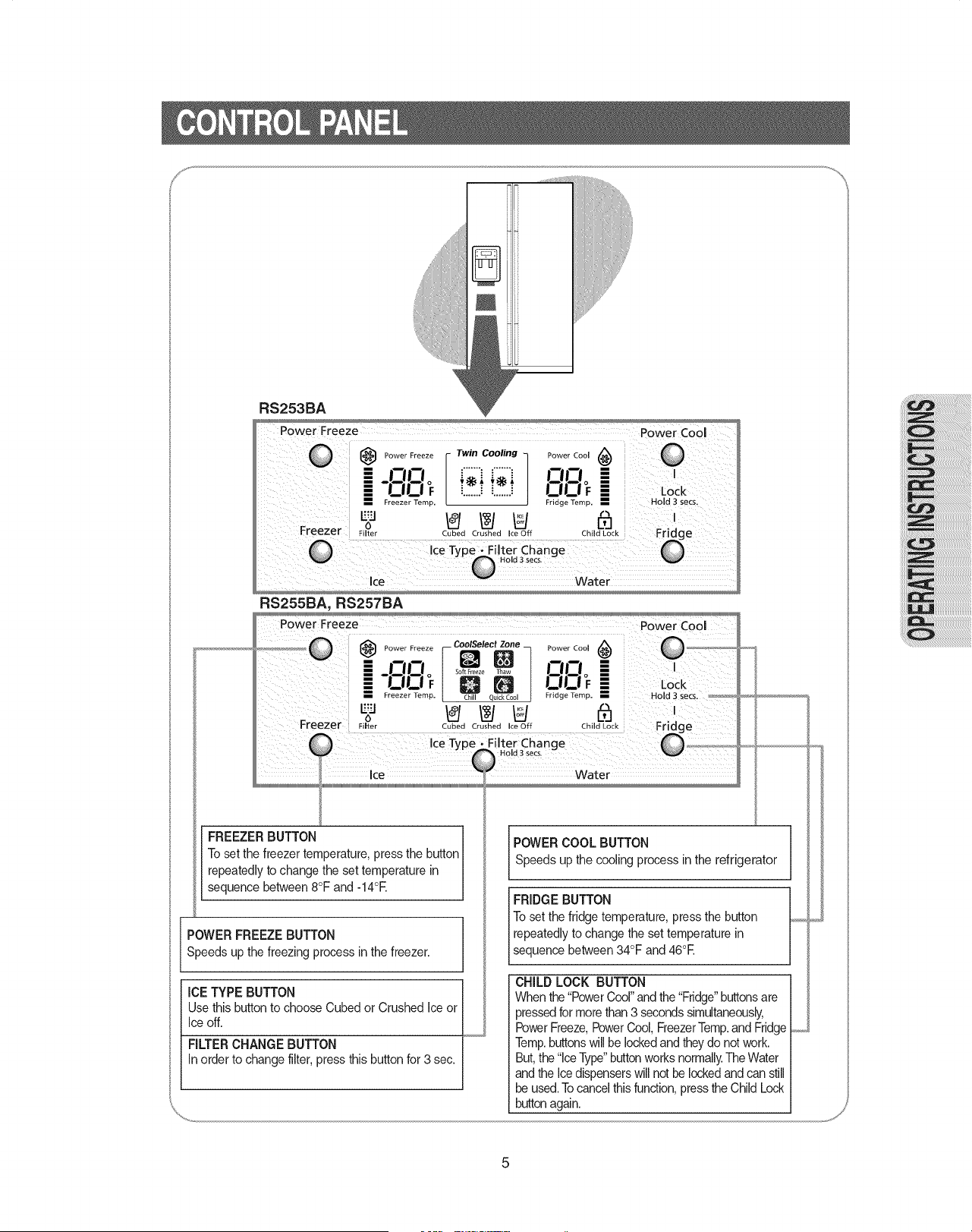
FREEZERBUTTON1 I POWERCOOLBUTTON I
Toset the freezertemperature press the button
....... ' . I Speeds up the cooling process in the refrigerator I
repealeqly lo cnange lne set temperalure in I -- J
sequence between 8°F and -14°E
I FRIDGE BUTTON I
To set the ffidge temperature, press the button I........
POWER FREEZE BUTTON repeatedly to change the set temperature in I
Speeds up the freezing process in the freezer, sequence between 34°F and 46°E I
ICE TYPE BUTTON
Use this button to choose Cubed or Crushed Ice or
Ice off.
FILTER CHANGE BUTTON
In order to change filter,press this button for 3 sec.
CHILD LOCK BUTTON
When the"PowerCool"andthe "Fridge"buttonsare
pressedfor more than3 seconds simultaneously,
PowerFreeze,PowerCool, FreezerTemp.and Ffidge
Temp.buttonswill belockedand they do notwork.
But,the "IceType"buttonworks normally.The Water
and the Ice dispenserswill not be lockedand can still
be used.Tocancel this function,press the Child Lock
buttonagain.
P F.... ..... FTwinCoolingTPCool(#_ ..... A
@_OOo f;i f;i OL-',o
i I I |ooF
Fridge Temp.
L.",0 _ _ U N
Filter Cubed Crushed Ice Off Child Lock
or
Power Freeze I CooISelect ZOBe _
i mmo Q_
Soft Freeze Thaw
-OOF D B
Freezer Temp. Chill Quick Cool
"'"o if_/ _ U
Filter Cubed Crushed Ice Off
Power Cool (_
Fridge Temp.
t"_
[]
Child Lock
RS253BA
RS255BA, RS257BA
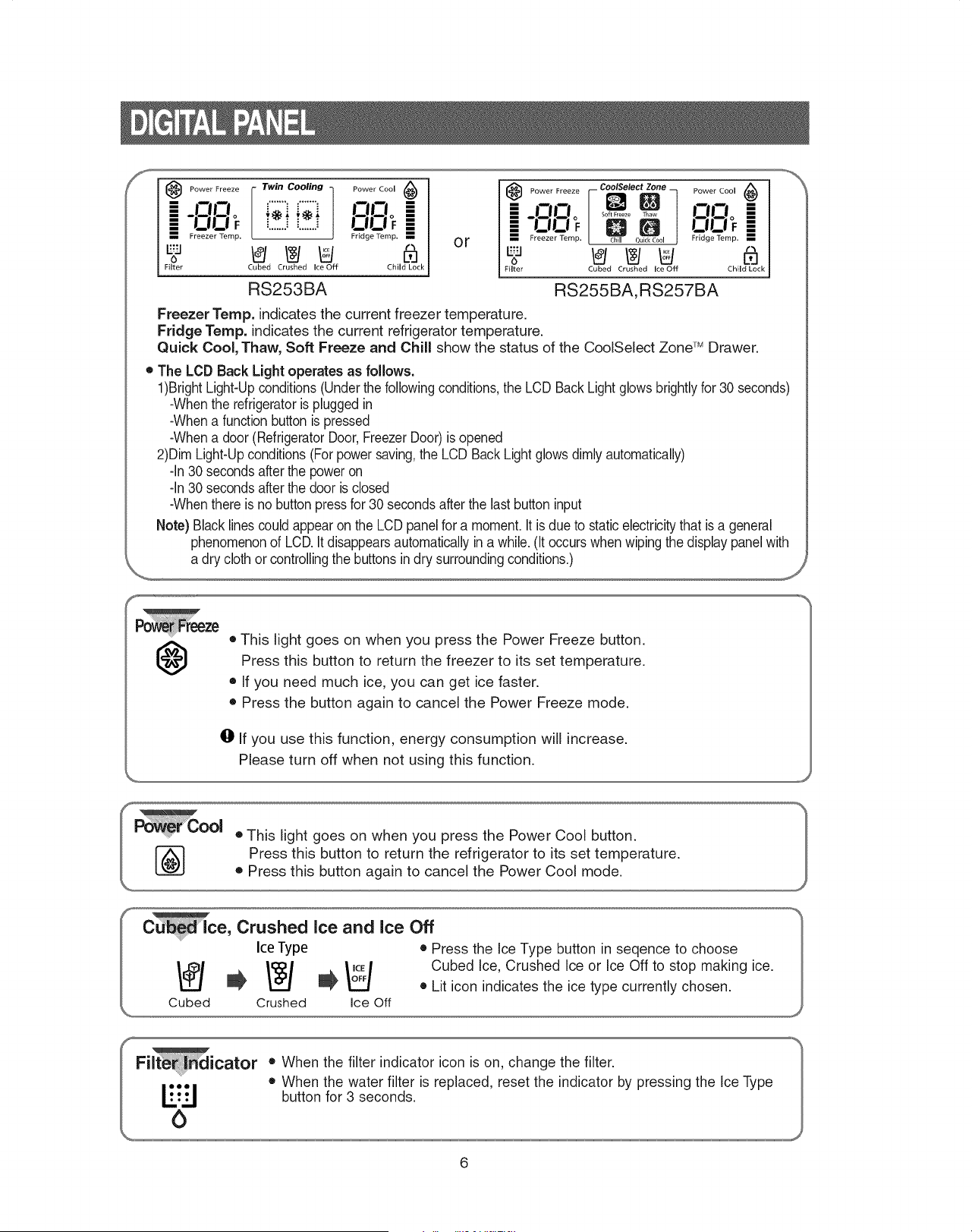
Freezer Temp. indicates the current freezer temperature.
Fridge Temp. indicates the current refrigerator temperature.
Quick Cool, Thaw, Soft Freeze and Chill show the status of the CoolSelect Zone 'M Drawer.
• The LCD Back Light operates as follows.
1)BrightLight-Upconditions(Underthe followingconditions,the LCD Back Light glows brightly for 30 seconds)
-Whenthe refrigeratoris pluggedin
-Whena function buttonis pressed
-Whena door (RefrigeratorDoor, FreezerDoor) is opened
2)Dim Light-Upconditions(For powersaving,the LCD BackLight glowsdimly automatically)
-In 30 secondsafter the poweron
-In30 secondsafterthe door is closed
-Whenthere is no button pressfor 30 secondsafter the last button input
Note) Black lines could appear on the LCD panel for a moment.It is due to staticelectricitythat is a general
phenomenonof LCD.It disappearsautomaticallyin a while. (It occurs when wipingthe displaypanel with
a dry cloth or controllingthe buttons in dry surroundingconditions.)
f
@
• This light goes on when you press the Power Freeze button.
Press this button to return the freezer to its set temperature.
• If you need much ice, you can get ice faster.
• Press the button again to cancel the Power Freeze mode.
O If you use this function, energy consumption will increase.
Please turn off when not using this function.
Freezer
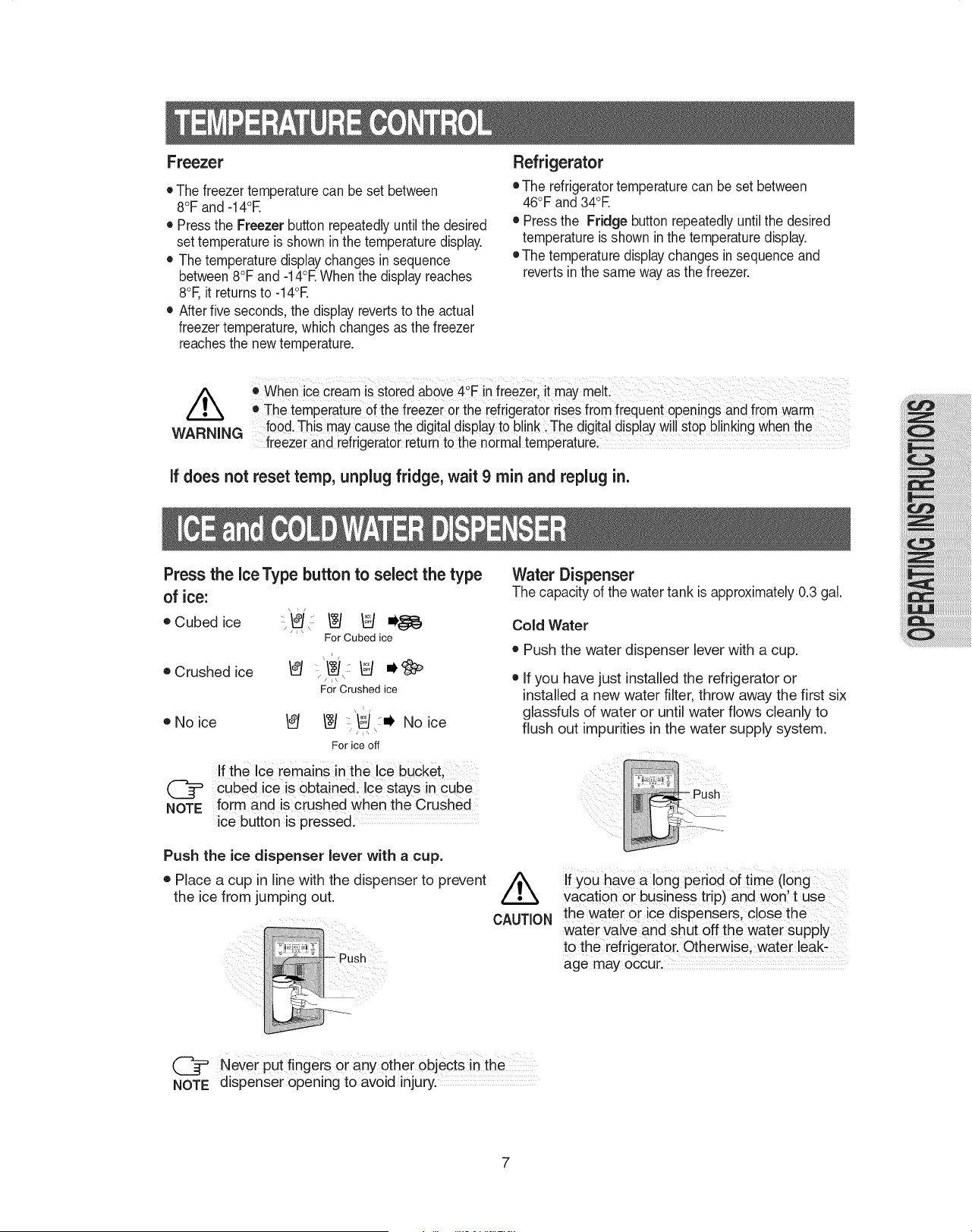
• The freezer temperaturecan be set between
8°F and -14°E
• Pressthe Freezer buttonrepeatedlyuntil the desired
set temperature is shown in the temperature display.
• The temperature displaychanges in sequence
between8°F and -14°EWhen the displayreaches
8°F,it returnsto -14°E
• After five seconds, the display revertsto the actual
freezer temperature,which changes as the freezer
reachesthe new temperature.
Refrigerator
• The refrigeratortemperature can be set between
46°F and 34°E
• Pressthe Fridge button repeatedly until the desired
temperature is shown in the temperature display.
• The temperature displaychanges in sequence and
reverts inthe same way as the freezer.
o when ice cream is storedabove 4°F in freezer; it may melL
• The temperature 0f the freezer orthe refrigeratorrises from frequent openingsand from warm
food.This may causethe digita!display to blink: The digital display w!ll stop blinking whenthe
WARNING freezer and refrigeratorreturn to the normal temperature,
If does not reset temp, unplug fridge, wait 9 rain and replug in.
Press the ice Type button to select the type
of ice:
• Cubed ice ::'_J' _ _ o_}_
/Jl\
For Cubed ice
• Crushed ice
\ i/
/i\
For Crushed ice
oNoice _ _ _ :i, No ice
/ ,
For ice off
If the Ice remains in the ice buCket,
cubed ice is obtained. Ice stays in cube
NOTE form and is crushed when the Crushed
ice button is pressed.
Push the ice dispenser lever with a cup.
• Place a cup in line with the dispenser to prevent
the ice from jumping out.
Water Dispenser
The capacity of the water tank is approximately 0.3 gal.
Cold Water
• Push the water dispenser lever with a cup.
• If you have just installed the refrigerator or
installed a new water filter, throw away the first six
glassfuls of water or until water flows cleanly to
flush out impurities in the water supply system.
:iiiiii
/k
CAUTION
If you have a 10ng period Of time(long
Vacati0n or business trip) and won tuse
the water orice dispensers, close the
water Valve and shut Off the water Supply
to the refrigerator. Otherwise; water leak:
age may occur.
@ Never put fingers or any other objects in the
NOTE dispenser opening to avoid injury.
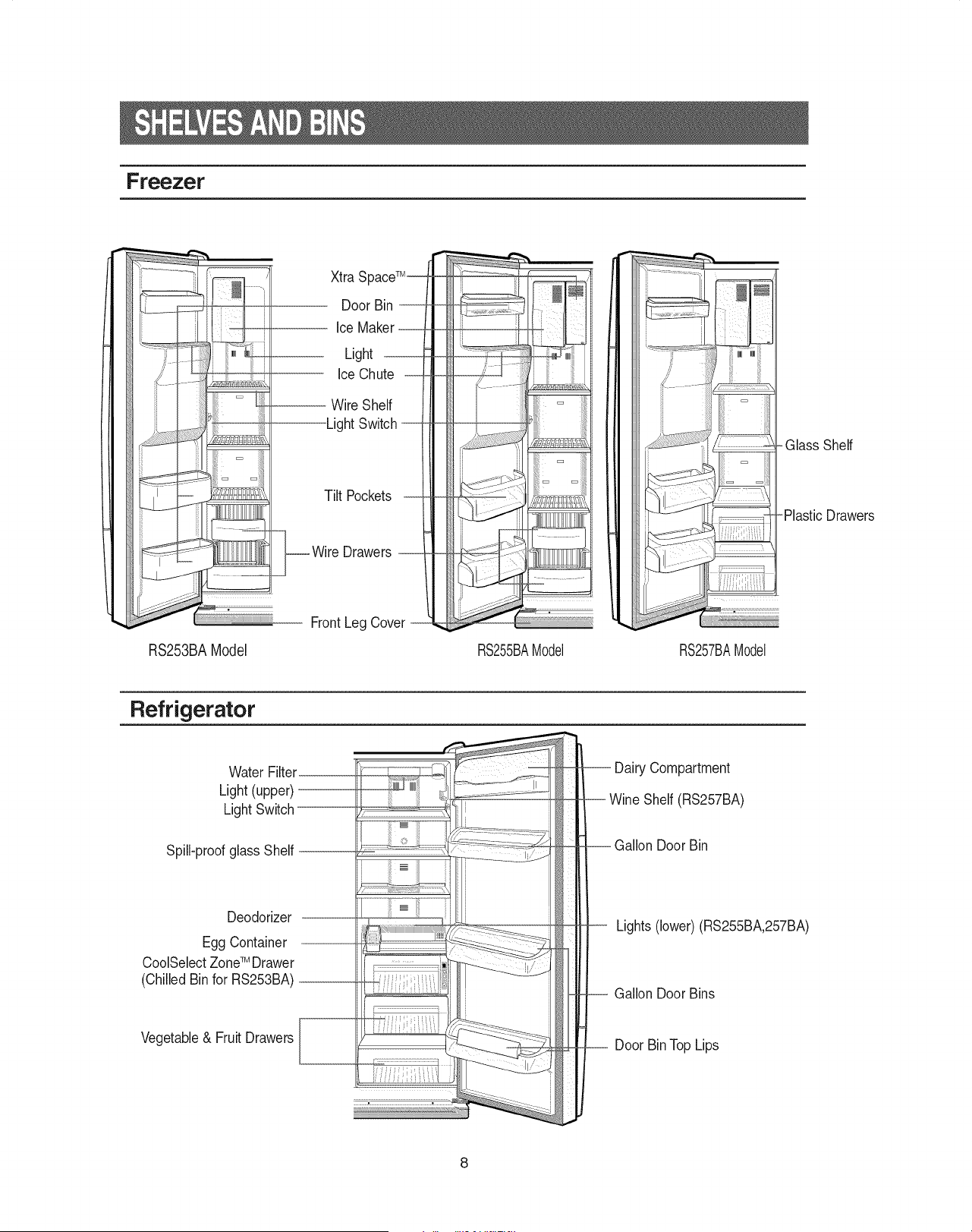
Freezer
RS253BA Model
Xtra S
Door Bin --
Light
Ice Chute
-- Wire Shelf
Light
Tilt Pockets
__ q_Wire Drawers --
FrontLeg Cover
RS255BAModel RS257BAModel
Glass Shelf
-Plastic Drawers
Refrigerator
Water Filter.
Light (upper)
Light Switch
Spill-proof glass Shelf
Deodorizer
Egg Container
CoolSelectZoneTM Drawer
(Chilled Binfor RS253BA)
Vegetable& Fruit Drawers
-- Dairy Compartment
-- Wine Shelf (RS257BA)
. Gallon Door Bin
Lights (lower) (RS255BA,257BA)
-- Gallon Door Bins
-- Door BinTop Lips
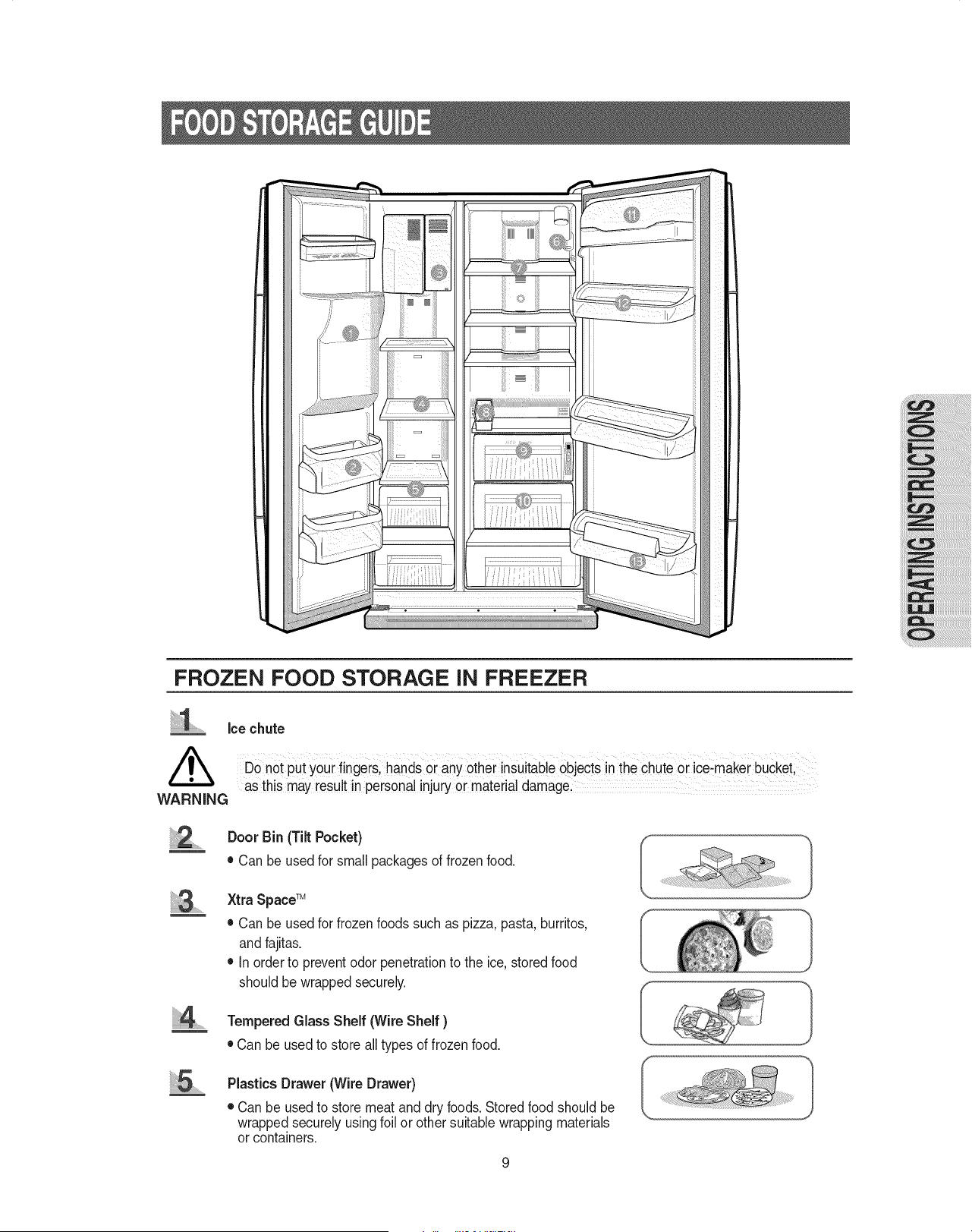
FROZEN FOOD STORAGE iN FREEZER
ice chute
Do not put your fingers,hands oi anYother insuitable Objectsin theChute or iCe)makerbuCket;
as this may resultin personalinjuryoi material damage
WARNING
.......
.................
Door Bin (Tilt Pocket)
• Can be used for small packagesof frozenfood.
Xtra SpaceTM
• Can be used for frozenfoods such as pizza, pasta, burritos,
and fajitas.
• In orderto prevent odor penetrationto the ice,stored food
should be wrapped securely.
Tempered Glass Shelf (Wire Shelf )
• Can be used to store all types of frozen food.
Plastics Drawer (Wire Drawer)
• Can be usedto store meat and dry foods. Stored food should be
wrapped securely usingfoil or other suitable wrapping materials
or containers.
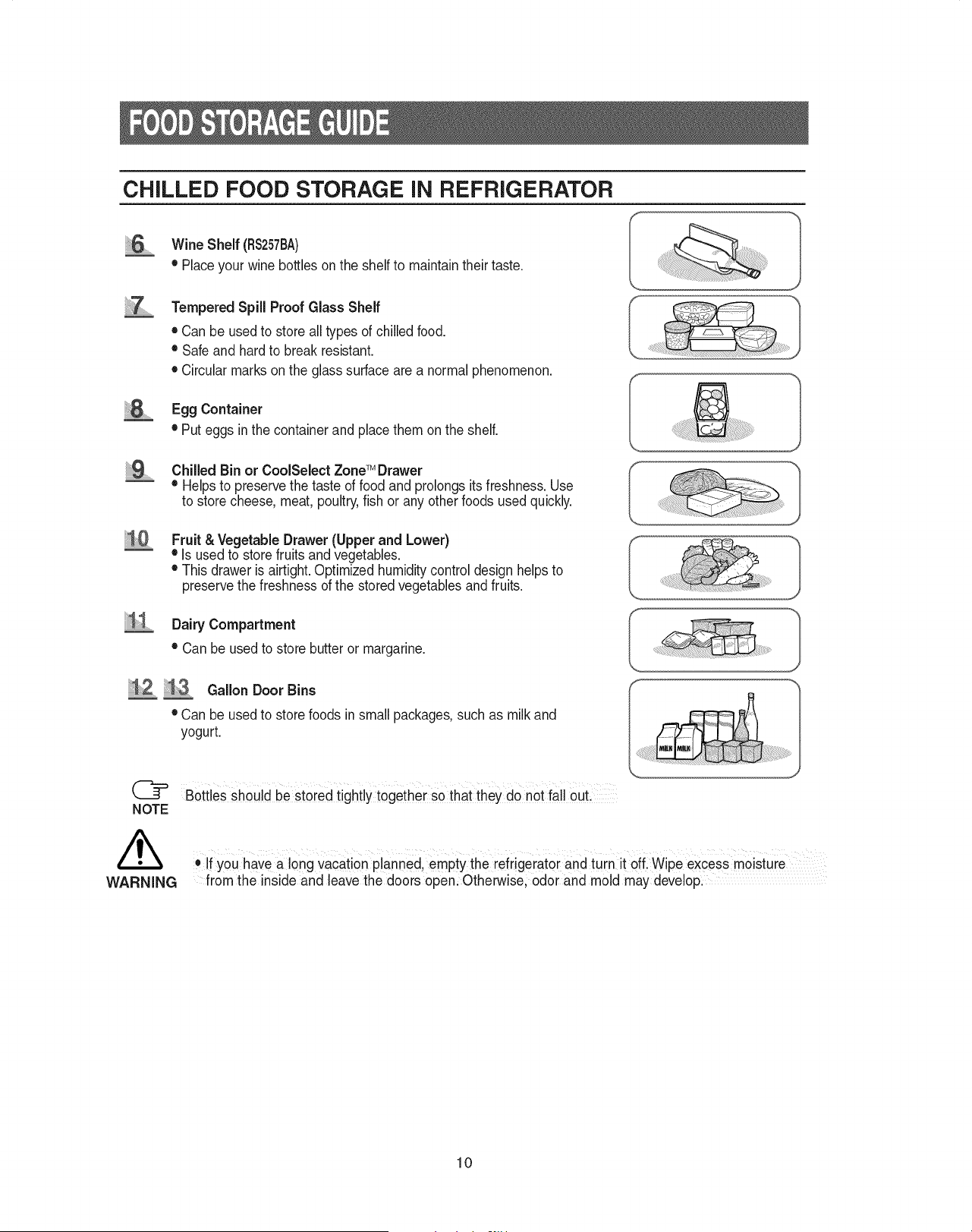
CHILLED FOOD STORAGE iN REFRIGERATOR
Wine Shelf (RS257BA)
• Placeyour wine bottles on the shelf to maintaintheir taste.
Tempered Spill Proof Glass Shelf
• Can be usedto store all types of chilled food.
• Safe and hardto break resistant.
• Circularmarks on the glass surface are a normal phenomenon.
Egg Container
• Put eggs inthe container and place them on the shelf.
ChilledBinorCoolSelectZoneTM Drawer
• Helpsto preservethe taste of food and prolongs its freshness. Use
to storecheese, meat, poultry,fish or any other foods used quickly.
Fruit & Vegetable Drawer (Upper and Lower)
• Is used to storefruits and vegetables.
• This drawer is airtight.Optimized humiditycontrol design helpsto
preservethe freshnessof the stored vegetables and fruits.
Dairy Compartment
• Can be used to store butter or margarine.
Gallon Door Bins
• Can be used to store foods in small packages, such as milk and
yogurt.
WARNING
Bottles Should be stored tightly together so that they do not fall Out:
. if you havea long vacatien planned, emptYthe Fefrigeiat0iand turn it off Wipe eXcessmoisture
from the inside and leave the doors open. Otherwise, odor and mold may develop:
10
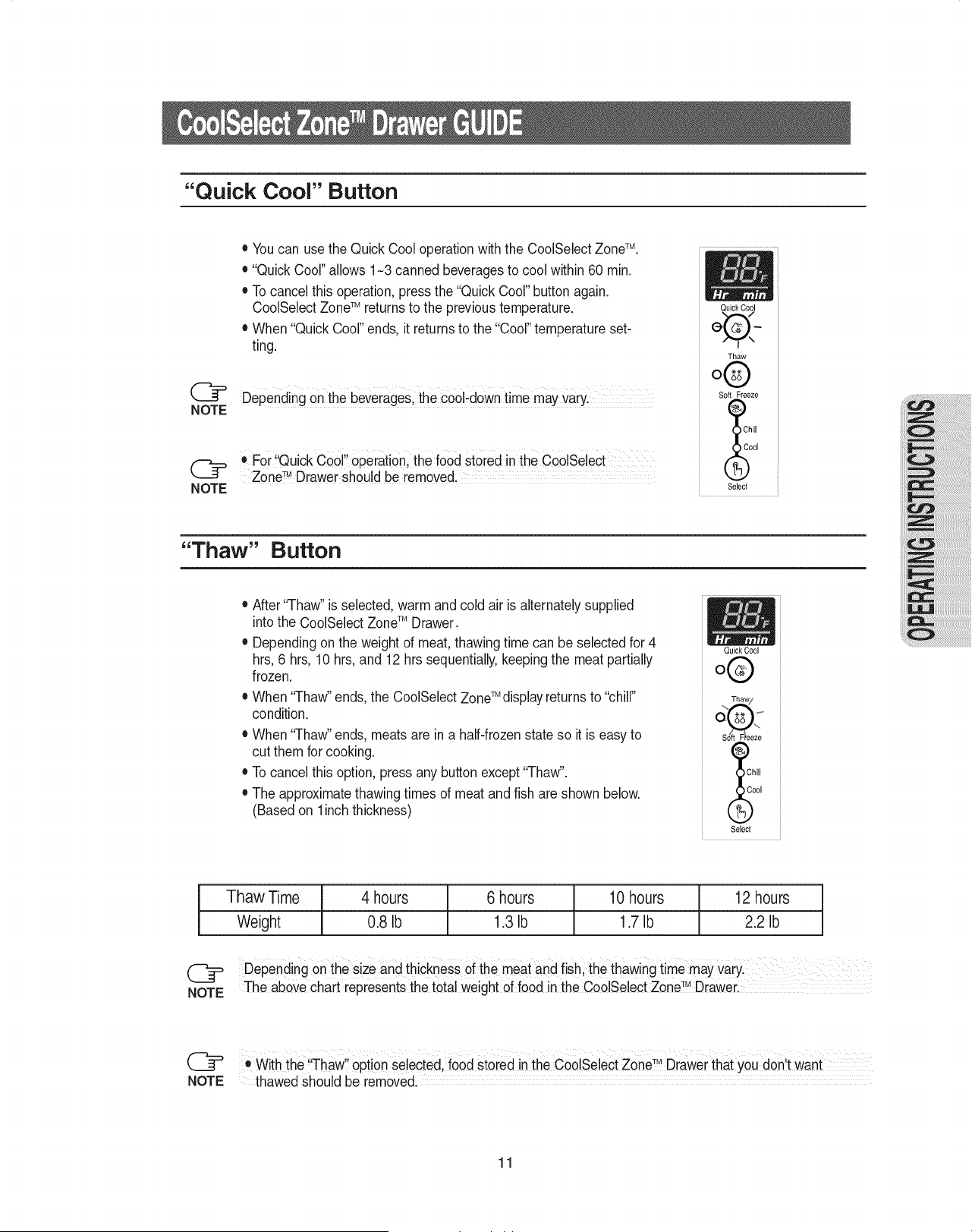
"Quick Cool" Button
NOTE
• Youcan use the Quick Cool operation withthe CoolSelectZoneTM.
• "Quick Cool" allows 1-3 canned beveragesto cool within 60 min.
• To cancelthis operation, press the "Quick Cool"button again.
CoolSelect ZoneTM returns to the previoustemperature.
• When "Quick Cool" ends, it returnsto the "Cool" temperature set-
ting.
Depending Onthe beverages;the CoOl'doWntime may varyl
For Qu ck Cool operat on the food stored n the CoolSelect...........
ZoneTM Drawershould be removed.
NOTE
QuickCool
Thaw
o®
Soft Freeze
el
Select
"Thaw" Button
• After"Thaw" is selected,warm and cold air is alternatelysupplied
intothe CoolSelectZoneTM Drawer.
• Dependingon the weight of meat,thawing time can be selectedfor 4
hrs,6 hrs, 10 hrs, and 12 hrs sequentially,keepingthe meat partially
frozen.
TM ' '_ ' _
• When "ThaW'ends,the CoolSelectZone displayreturns to chill
condition.
QuickCool
o®
• When "ThaW'ends, meats are in a half-frozenstate so it is easy to
cut them for cooking. 1_
• To cancelthis option, press any buttonexcept "ThaW'. _)Ch_,,
• The approximatethawingtimes of meat andfish are shown below. .._oo,
(Based on linch thickness)
Select
Thaw Time
Weight
4 hours
0.8 Ib
6 hours 10 hours 12 hours
1.3Ib 1.7 Ib 2.2 Ib
Depending on the size and thickness of the meatand fish, the thawing time may vaiyl
TM
NOTE The abovechart representsthe totalweightof food in the CoolSe!ect Zone Drawer:
I1 TM I
o With the 'Thaw option selected, food stored inthe CoolSelectZone Drawer that you don t want
NOTE thawed should be removed.
11
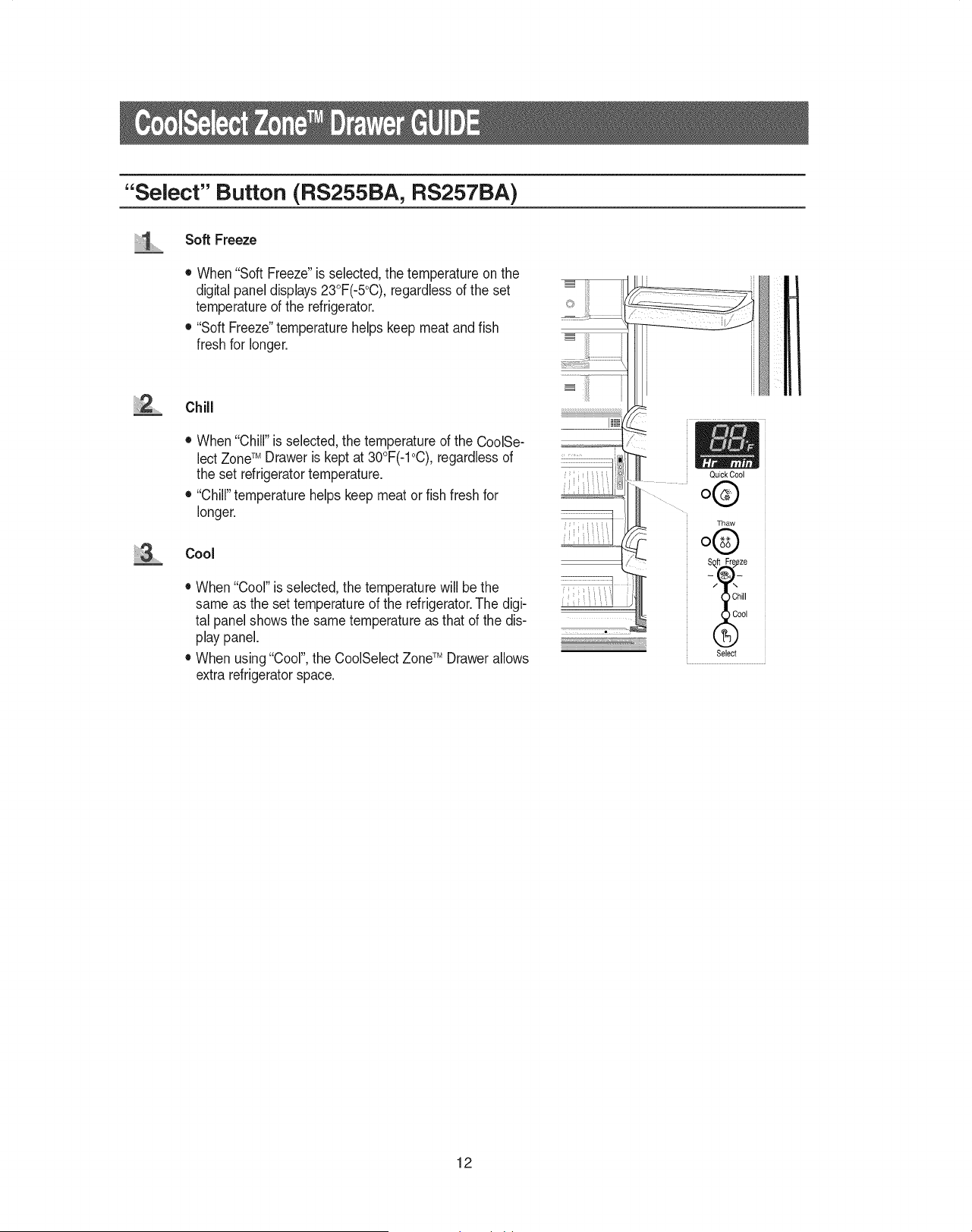
"Select" Button (RS255BA, RS257BA)
iiiiiiiiiii_!_....... Soft Freeze
2
• When "Soft Freeze"is selected,the temperature on the
digital panel displays23°F(-5°C), regardlessof the set
temperatureof the refrigerator.
• "Soft Freeze"temperature helps keep meat and fish
fresh for longer.
Chill
• When "Chill"is selected, the temperature of the CoolSe-
lectZoneTM Draweris kept at 30°F(-1°C),regardless of
the set refrigeratortemperature.
• "Chill"temperature helps keep meator fish fresh for
longer.
Cool
• When "Cool"is selected, the temperature will bethe
same as the set temperature of the refrigerator.The digi-
tal panelshows the same temperature as that of the dis-
play panel.
• When using"Cool",the CoolSelectZoneTM Drawer allows
extra refrigeratorspace.
iiiiiiiiiiiiiiiiiiiiiiiiiiiiiiiiiiiiiiiiiiiiiiiiiiiiiiiiiiiiiiiiiiiiiiiL_i
i!iiiliiiiii
Quick Cool
o®
Thaw
o®
S_ft Fre/eze
/_hill
( oo,
Select
12
iiii iiiS,............
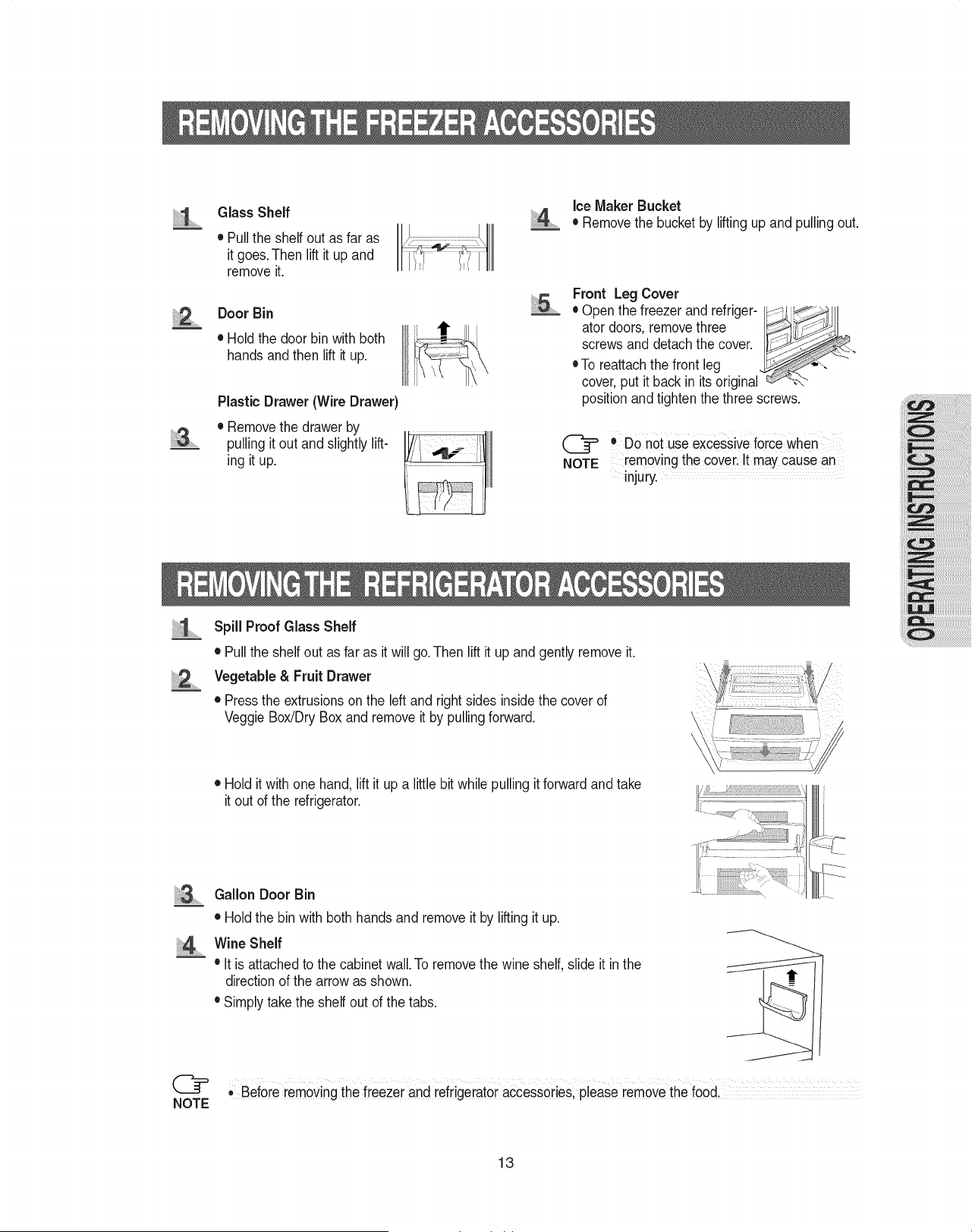
Glass Shelf
• Pullthe shelf out as far as
it goes.Then lift it up and
removeit.
Door Bin
• Hold the door bin with both
hands andthen lift it up.
PlasticDrawer (Wire Drawer)
• Removethe drawer by
pullingit out and slightly lift-
ing it up.
iiiii ...........
Ice Maker Bucket
• Removethe bucket by liftingup and pulling out.
Front Leg Cover
• Open the freezer and refriger- I_;--__lll
ator doors, removethree I
screws and detachthe cover. I
• To reattachthe front leg
cover, put it back in its original _-b
positionand tighten the three screws.
@ ® Do not use excessiveforce when
NOTE removing the cover.It may cause an
injury.
2
Spill Proof Glass Shelf
• Pullthe shelf out as far as it will go.Then lift it up and gently remove it.
Vegetable & Fruit Drawer
• Pressthe extrusionson the left and right sides insidethe cover of
VeggieBox/DryBox and removeit by pulling forward.
• Hold it with one hand, lift it up a little bit while pulling it forwardand take
it out of the refrigerator.
@
NOTE
Gallon Door Bin
• Hold the bin with both hands and remove it by lifting it up.
Wine Shelf
• it is attached to the cabinet wall. To removethe wine shelf, slide it inthe
directionof the arrow as shown.
• Simply take the shelf out of the tabs.
,, Befoie iemovingthe fieezer and refrigerator accessoi!es; pleaSeremove the food,
13
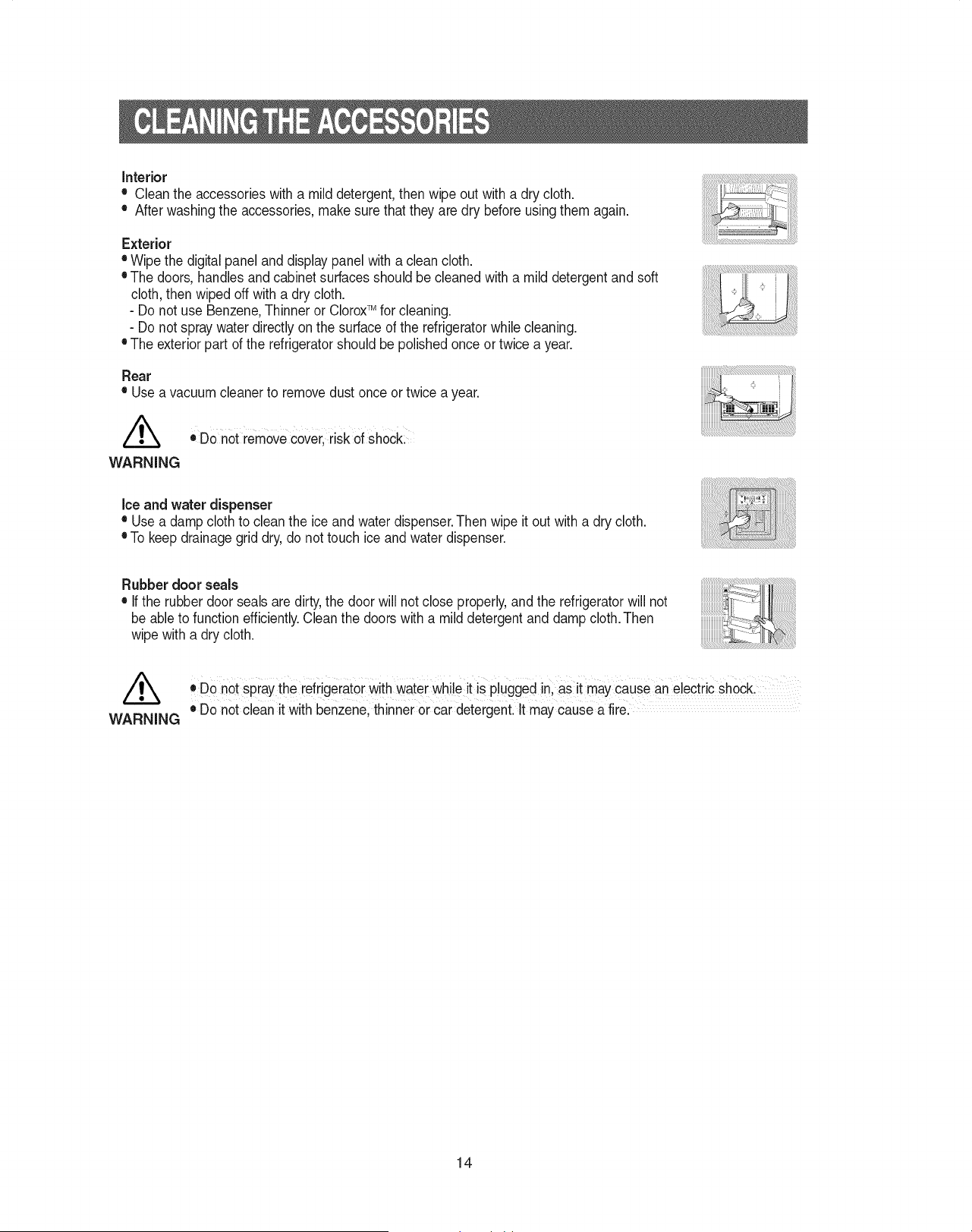
Interior
• Cleantheaccessorieswithamilddetergent,thenwipeoutwithadrycloth.
• Afterwashingtheaccessories,makesurethattheyaredrybeforeusingthemagain.
Exterior
• Wipethedigitalpanelanddisplaypanelwithacleancloth.
•Thedoors,handlesandcabinetsurfacesshouldbecleanedwithamilddetergentandsoft
cloth,thenwipedoffwithadrycloth.
- Do not use Benzene,Thinner or CloroxTM for cleaning.
- Do not spray water directly on the surface of the refrigeratorwhile cleaning.
• The exterior part of the refrigeratorshould be polished once or twice a year.
Rear
• Use a vacuum cleaner to remove dust once or twice a year.
oDo not removecover, risk of shock:
WARNING
Ice and water dispenser
• Usea damp cloth to clean the ice and water dispenser.Then wipe it out with a dry cloth.
• To keep drainagegrid dry, do not touch ice and water dispenser.
Rubber door seals
• Ifthe rubber door seals are dirty,the door will not close properly, and the refrigeratorwill not
be able to function efficiently.Clean the doors with a mild detergent and damp cloth.Then
wipe with a dry cloth.
®Do not spraythe refrigeratorWithwater while it iS plugged in, as it maycause an electric shockl
WARNING e Do not clean it with benzene, thinner or car detergenL it mayCausea firel
14
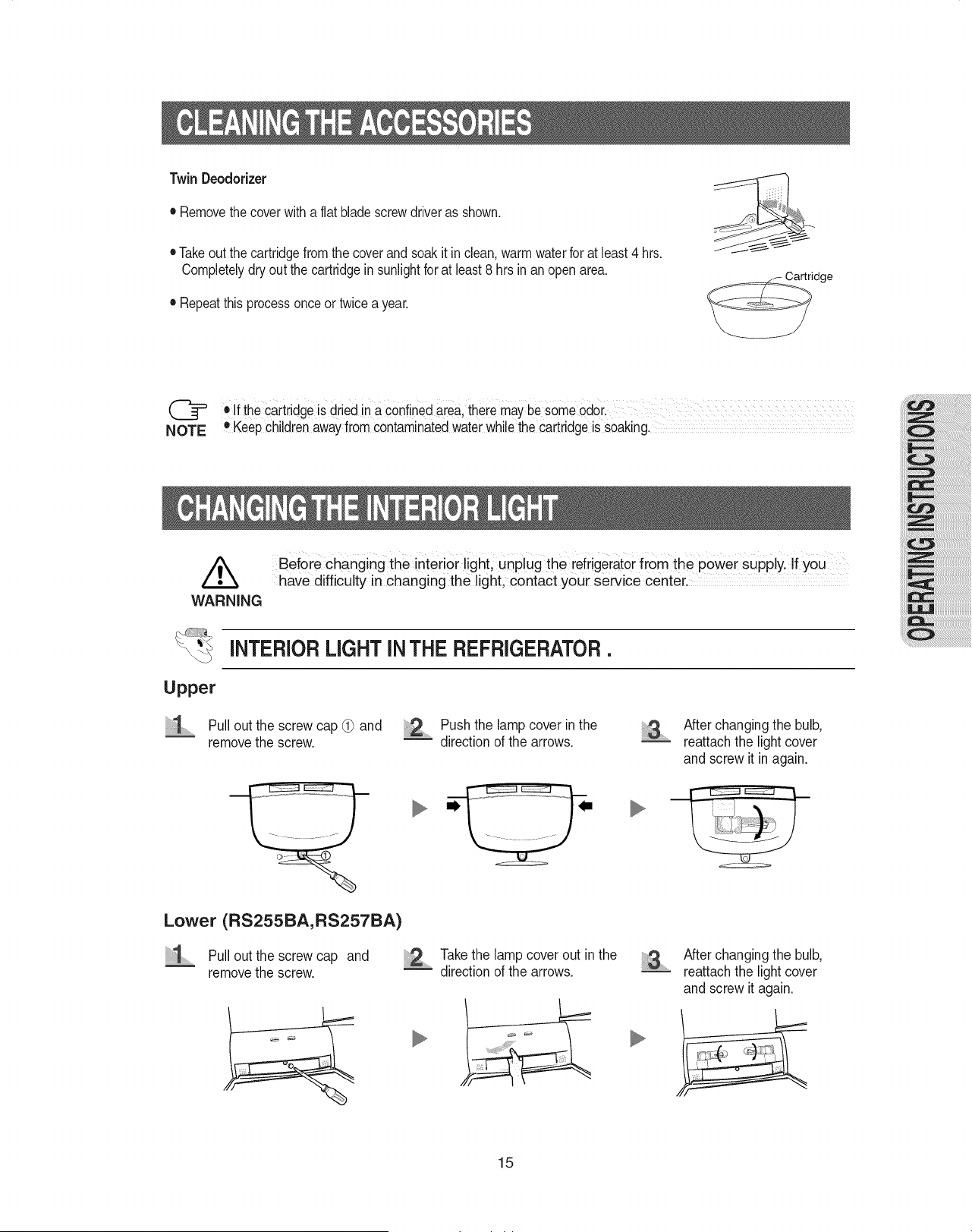
TwinDeodorizer
• Removethecoverwithaflatbladescrewdriverasshown.
• Takeoutthecartridgefromthecoverandsoakitinclean,warmwaterforatleast4hrs.
Completelydryoutthecartridgeinsunlightforatleast8hrsinanopenarea.
• Repeatthisprocessonceortwiceayear.
dge
@ ,If the cartridgeis dried in aCOnfinedaiea,there maybe some odor.
O
NOTE Keepchi!drenawayfrom contaminatedwaterwhi!ethe cartridgeis soaking.
,/_ Before changing the interior light, unplug the refrigeratorfrom the power supply. If you
have difficulty in changing the light, contact your service center.
WARNING
INTERIOR LIGHT IN THE REFRIGERATOR.
Upper
...........Pull out the screw cap (_ and
removethe screw.
Push the lampcover in the .........
directionof the arrows.
After changing the bulb,
reattachthe light cover
and screw it in again.
m.
Lower (RS255BA, RS257BA)
:1 Pull out the screw cap and Takethe lamp cover out in the
removethe screw. _ directionof the arrows.
........
After changing the bulb,
reattachthe light cover
and screw it again.
15
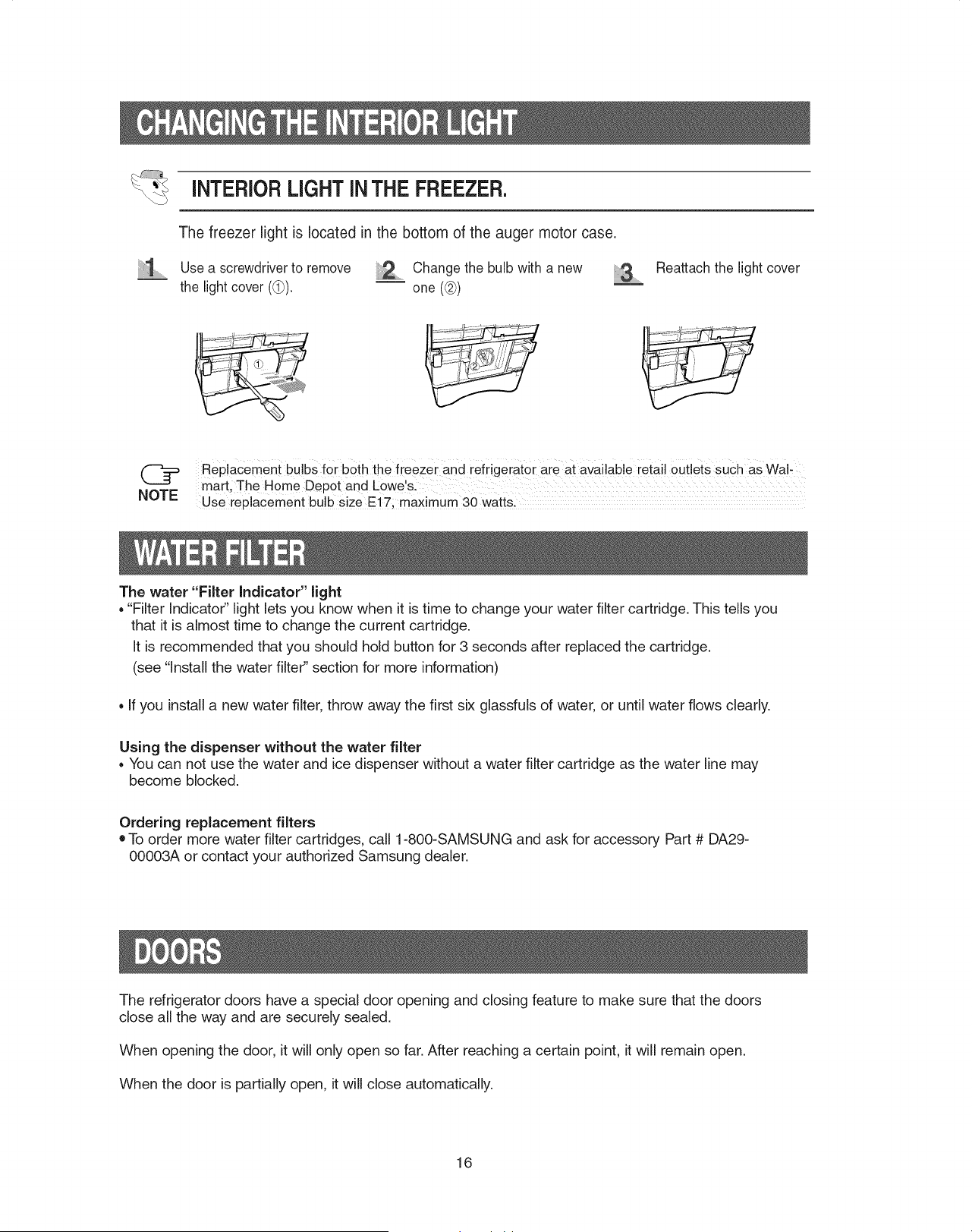
iNTERiOR LIGHTiN THE FREEZER.
The freezer light is located in the bottom of the auger motor case.
Use a screwdriverto remove _,,, Change the bulb with a new ..........
the light cover ((_). _ one (@)
Reattach the light cover
Replacement bulbs for both the freezer and refrigeiatoi aie at available ietai! 0Utlets SuCh as Wa!,
mart, The Home Depot and Lowe's.
NOTE Use replacement bu!b size E!7; maximum 30 watts.
The water "Filter Indicator" light
, "Filter Indicator" light lets you know when it is time to change your water filter cartridge. This tells you
that it is almost time to change the current cartridge.
It is recommended that you should hold button for 3 seconds after replaced the cartridge.
(see "Install the water filter" section for more information)
, If you install a new water filter, throw away the first six glassfuls of water, or until water flows clearly.
Using the dispenser without the water filter
, You can not use the water and ice dispenser without a water filter cartridge as the water line may
become blocked.
Ordering replacement filters
• To order more water filter cartridges, call 1-800-SAMSUNG and ask for accessory Part # DA29-
00003A or contact your authorized Samsung dealer.
The refrigerator doors have a special door opening and closing feature to make sure that the doors
close all the way and are securely sealed.
When opening the door, it will only open so far. After reaching a certain point, it will remain open.
When the door is partially open, it will close automatically.
16
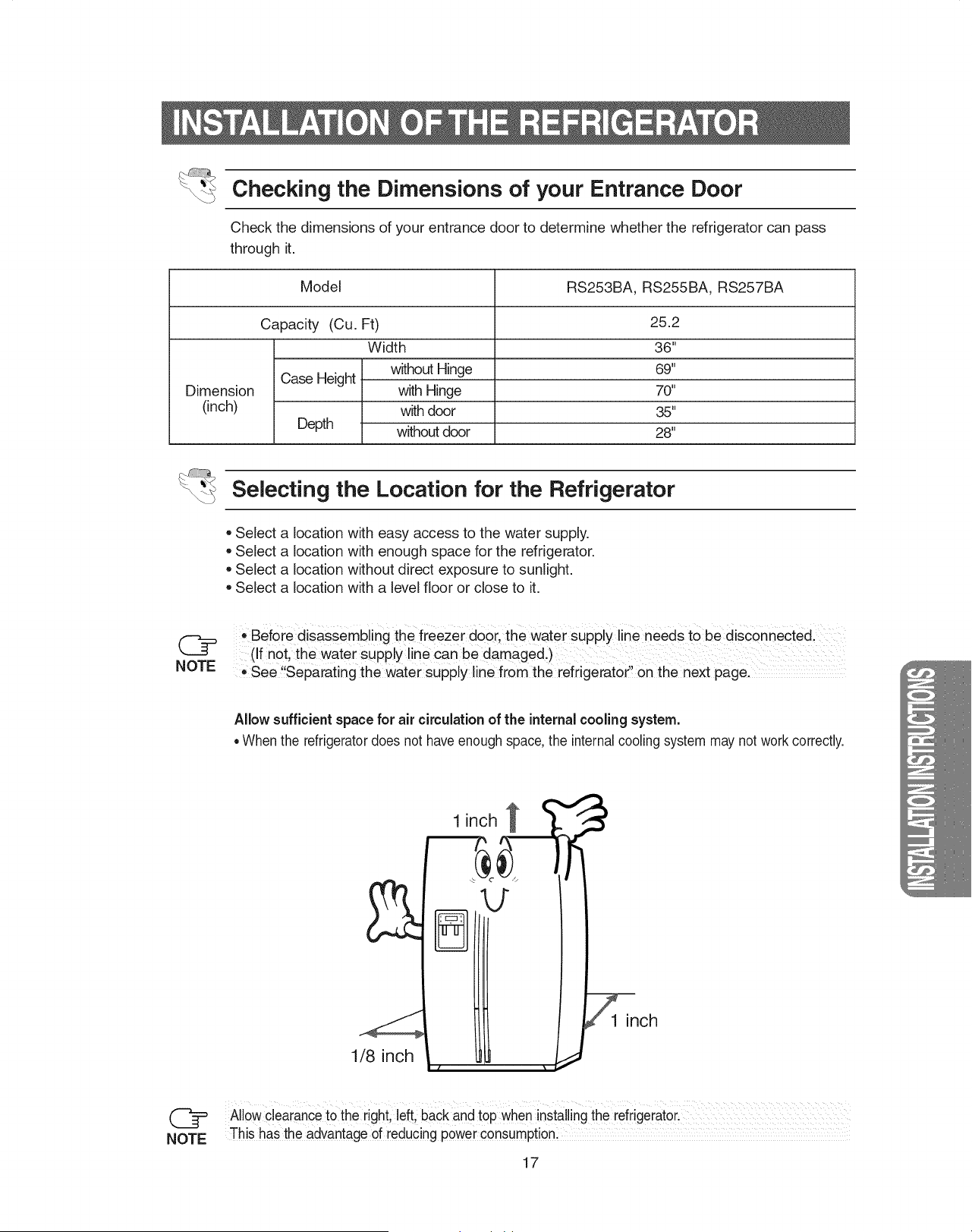
Checking the Dimensions of your Entrance Door
Check the dimensions of your entrance door to determine whether the refrigerator can pass
through it.
Model RS253BA, RS255BA, RS257BA
Capacity (Cu. Ft) 25.2
Width 36"
without Hinge 69"
Case Height
Dimension with Hinge 70"
(inch) with door 35"
Depth without door 28"
Selecting the Location for the Refrigerator
• Select a location with easy access to the water supply.
• Select a location with enough space for the refrigerator.
• Select a location without direct exposure to sunlight.
• Select a location with a level floor or close to it.
i,,Before disassembling the freezer door, ihe water supply line needs tObe disconnected,
(_ (If not, the water Supply line Can be damaged.)
NOTE See"Separating the Water suPply line from the refrigerator' on the next pagel
Allow sufficient space for air circulationof the internal cooling system.
• When the refrigeratordoes not have enoughspace, the internalcooling system may not work correctly.
1 inch
1/8 inch
@
NOTE
Allow clearanceto the right,left, back and top wheninstalling the refrigerator,
This has the advantage of reducing p0werc0nsumpti0nl
17
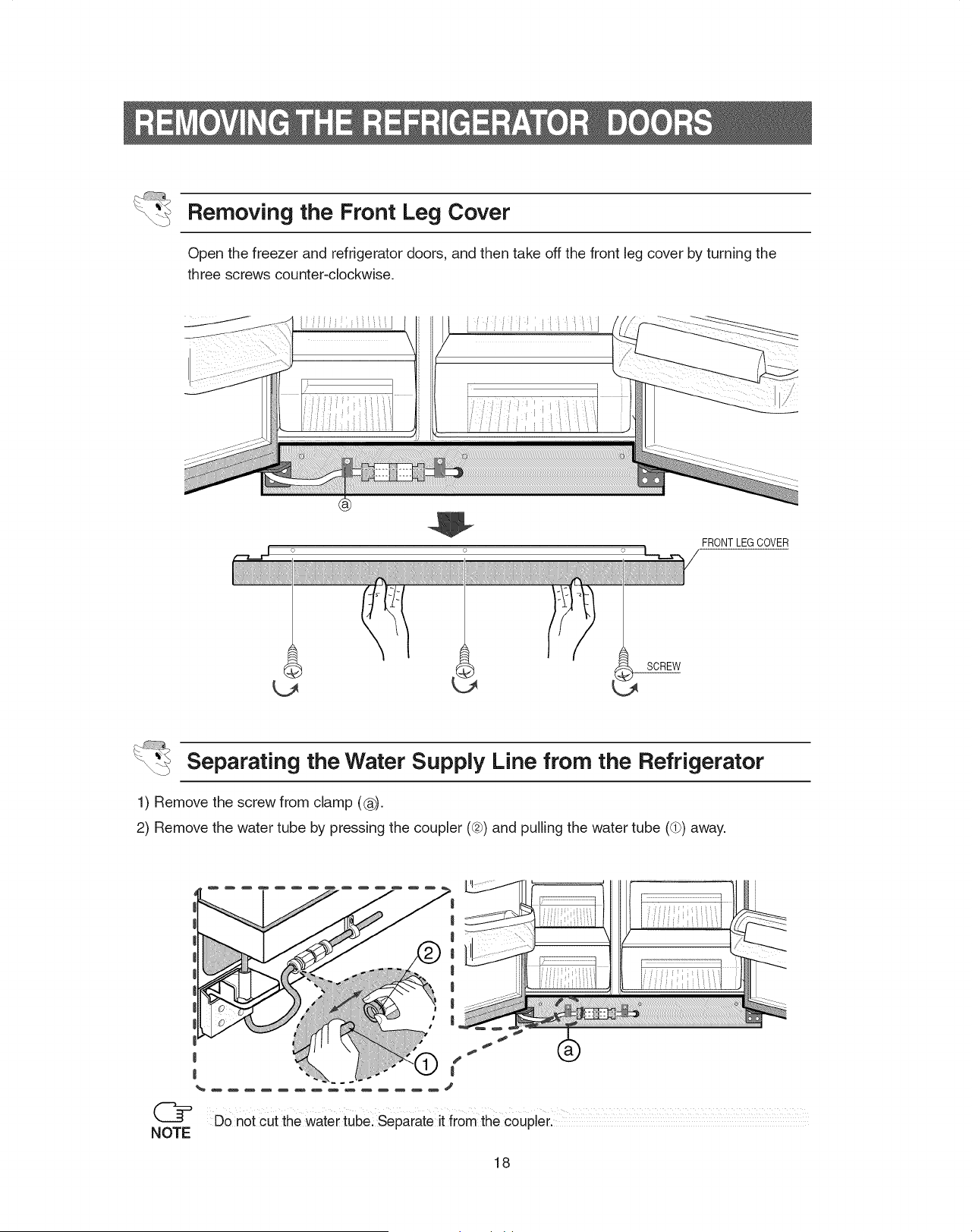
Removing the Front Leg Cover
Open the freezer and refrigerator doors, and then take off the front leg cover by turning the
three screws counter-clockwise.
FRONT LEG COVER
Separating the Water Supply Line from the Refrigerator
1) Remove the screw from clamp (®).
2) Remove the water tube by presstng the coupler ((2_)and pulling the water tube (dP)away.
NOTE
Do not cut the water tube: Separate it from the coupler.
18
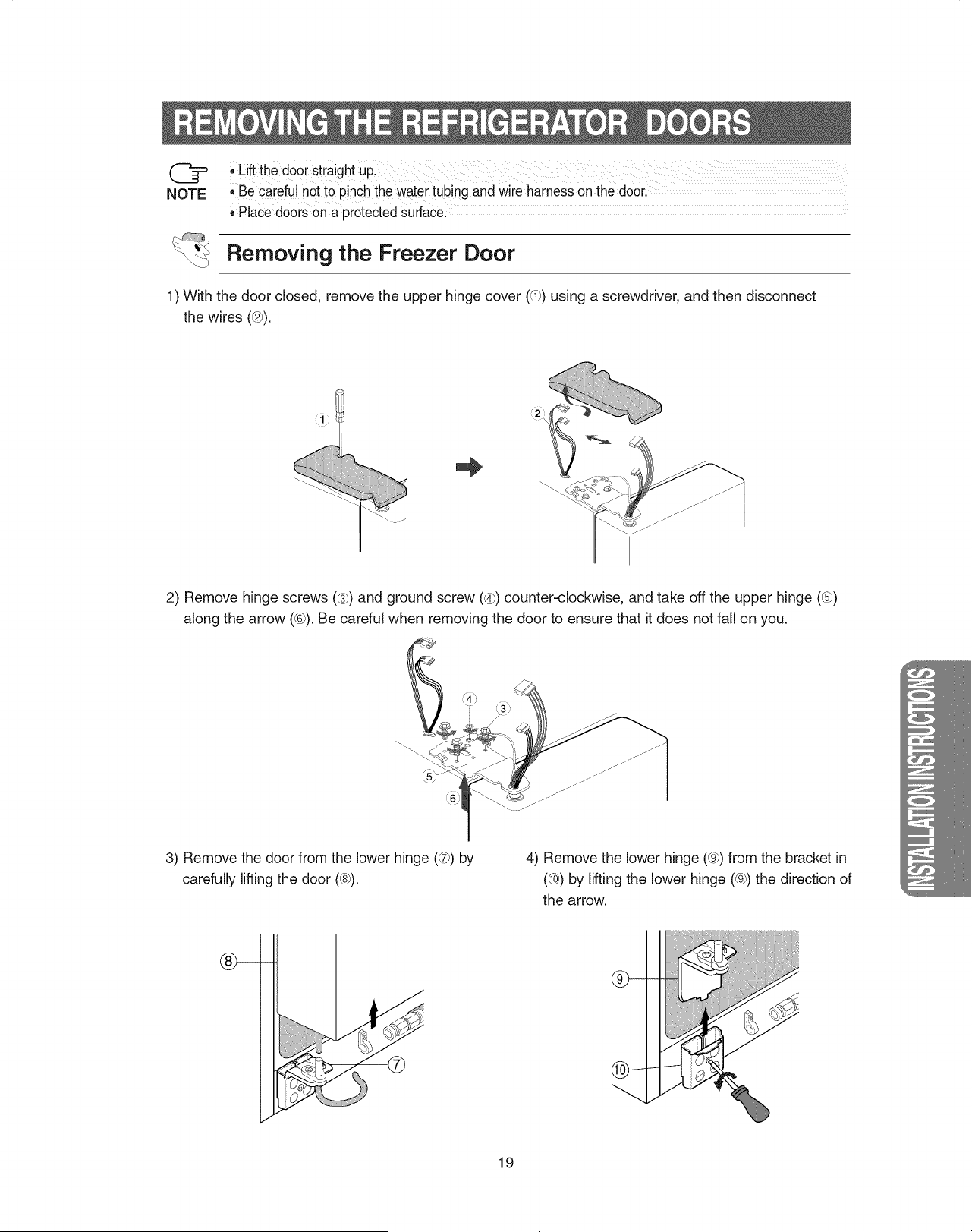
NOTE
.Lift the doorStraightupl
•Be careful not to pinch the watertubing and wire harness on the door,
,,PlaCedoors on a protectedsurface
Removing the Freezer Door
1) With the door closed, remove the upper hinge cover (®) using a screwdriver, and then disconnect
the wires (@).
i
2) Remove hinge screws (@)and ground screw (@) counter-clockwise, and take off the upper hinge (®)
along the arrow (®). Be careful when removing the door to ensure that it does not fall on you.
3) Remove the door from the lower hinge (@) by
carefully lifting the door (@).
4) Remove the lower hinge (@) from the bracket in
(®) by lifting the lower hinge (@) the direction of
the arrow.
19
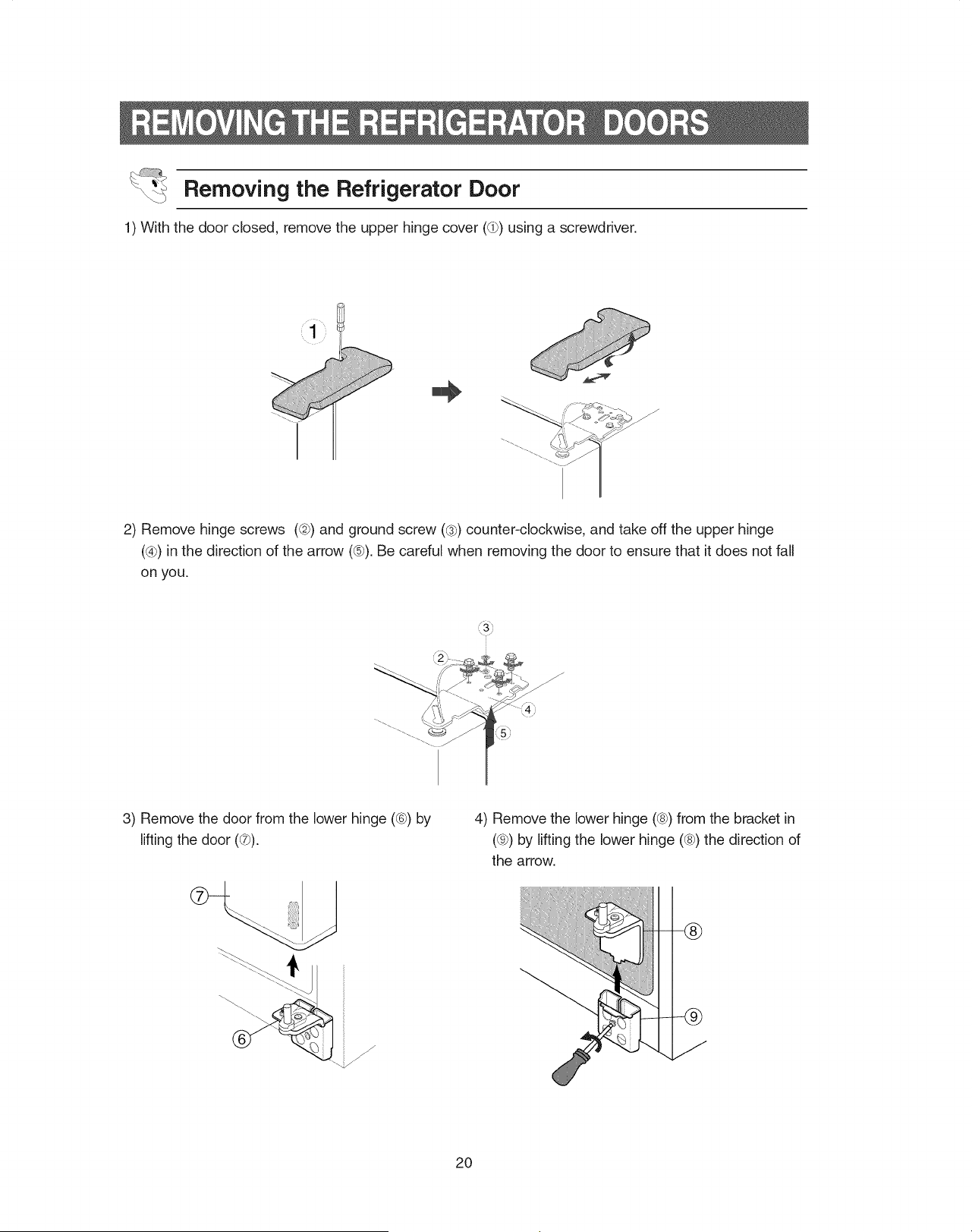
Removing the Refrigerator Door
1) With the door closed, remove the upper hinge cover (@) using a screwdriver.
i
I
J
2) Remove hinge screws (@)and ground screw (@) counter-clockwise, and take off the upper hinge
(@) in the direction of the arrow (@).Be careful when removing the door to ensure that it does not fall
on you.
3) Remove the door from the lower hinge ((6})by
lifting the door (@).
f
4) Remove the lower hinge (@)from the bracket in
(@) by lifting the lower hinge (@)the direction of
the arrow.
=-@
2O
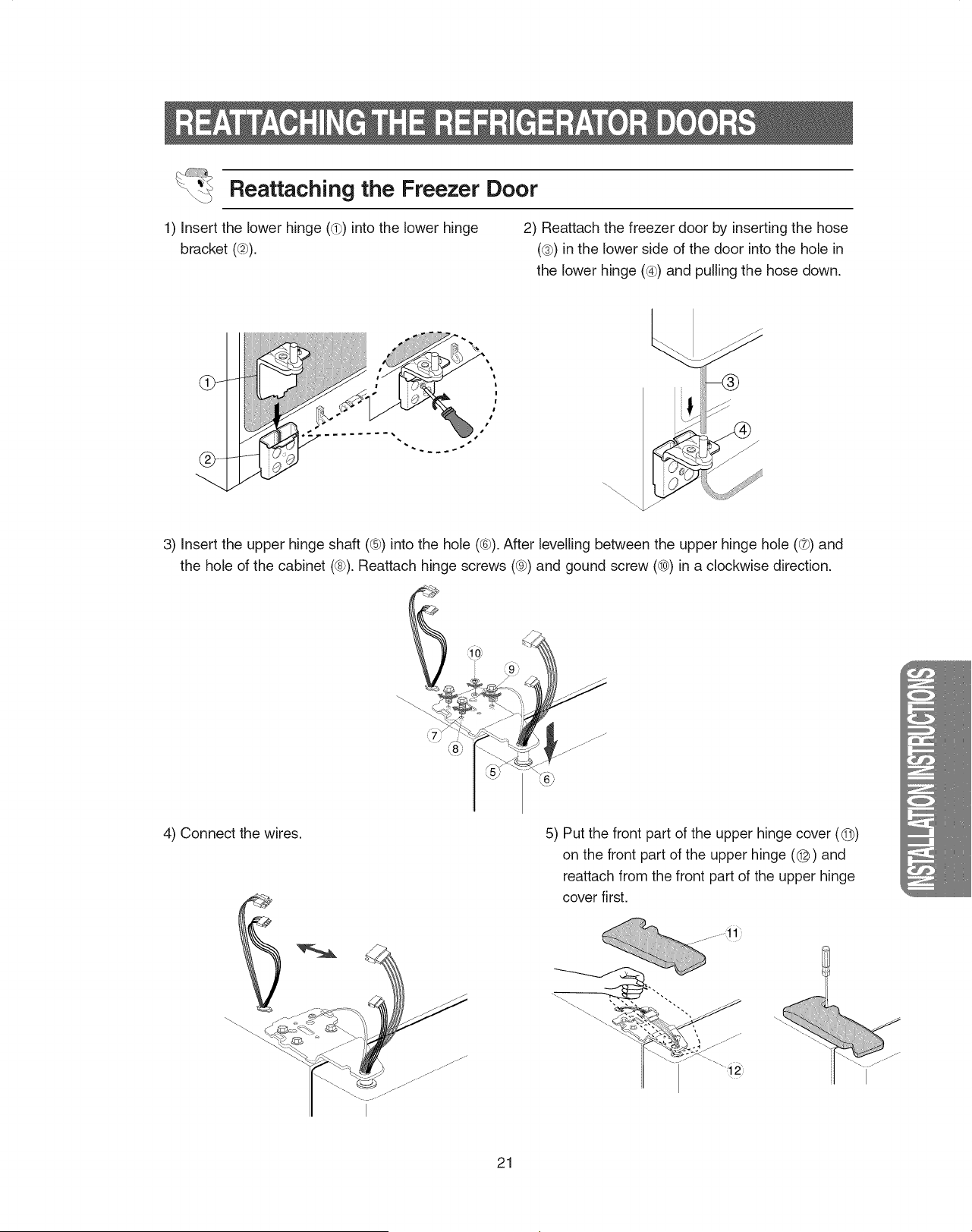
Reattaching the Freezer Door
1) Insert the lower hinge (®) into the lower hinge
bracket (@).
2) Reattach the freezer door by inserting the hose
(_3_)in the lower side of the door into the hole in
the lower hinge ((_) and pulling the hose down.
/
j-
/
/
3) Insert the upper hinge shaft (®) into the hole (®). After levelling between the upper hinge hole ((7_)and
the hole of the cabinet (®). Reattach hinge screws ((e_)and gound screw (®) in a clockwise direction.
4) Connect the wires. 5) Put the front part of the upper hinge cover (@)
on the front part of the upper hinge (@) and
reattach from the front part of the upper hinge
cover first.
21
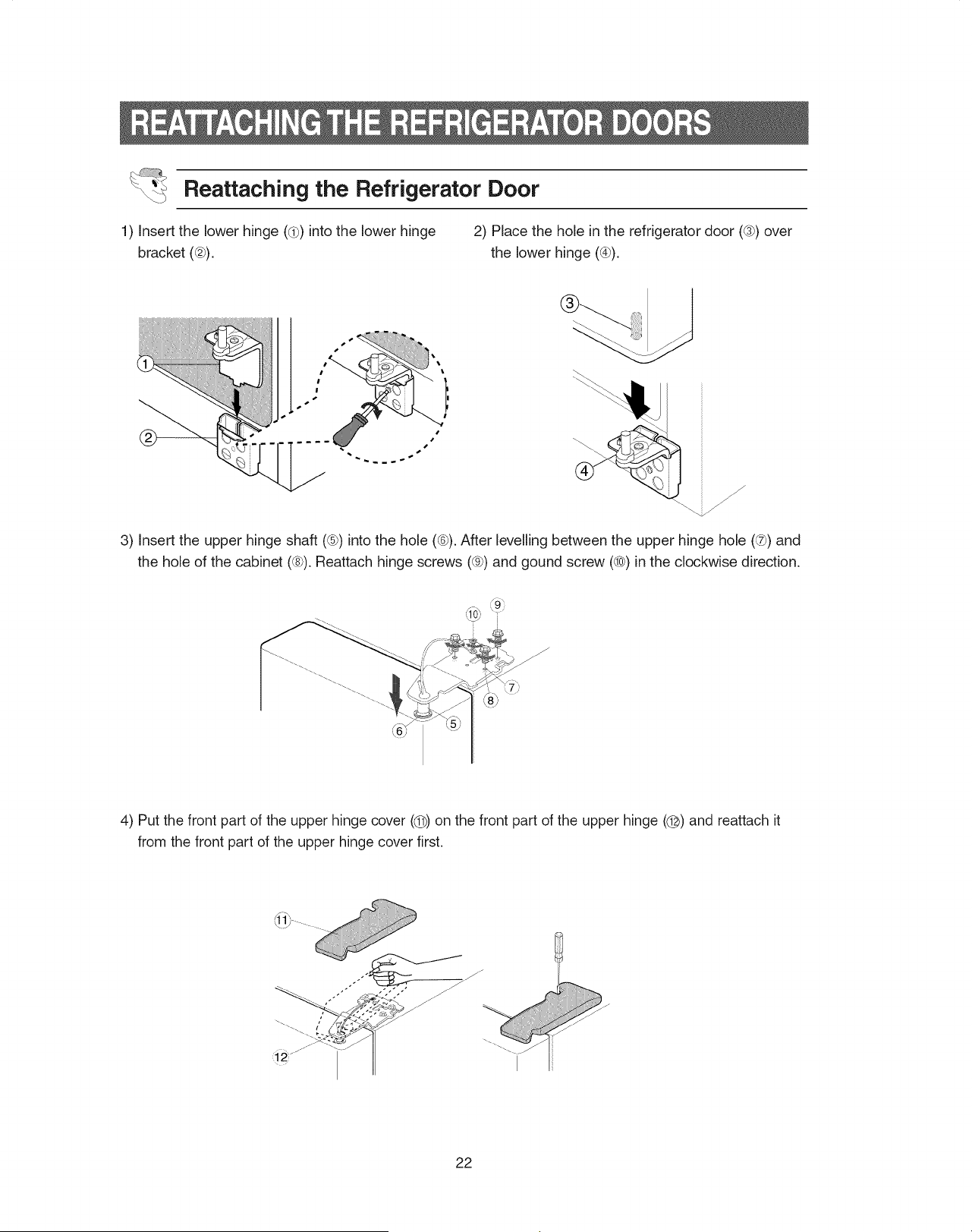
Reattaching the Refrigerator Door
1) Insert the lower hinge (@) into the lower hinge 2) Place the hole in the refrigerator door ((s})over
bracket ((2)). the lower hinge (_4_).
/-
f
J
J
3) Insert the upper hinge shaft (®) into the hole (®). After levelling between the upper hinge hole (_) and
the hole of the cabinet (®). Reattach hinge screws (_) and gound screw (®) in the clockwise direction.
4) Put the front part of the upper hinge cover (@) on the front part of the upper hinge (@) and reattach it
from the front part of the upper hinge cover first,
22
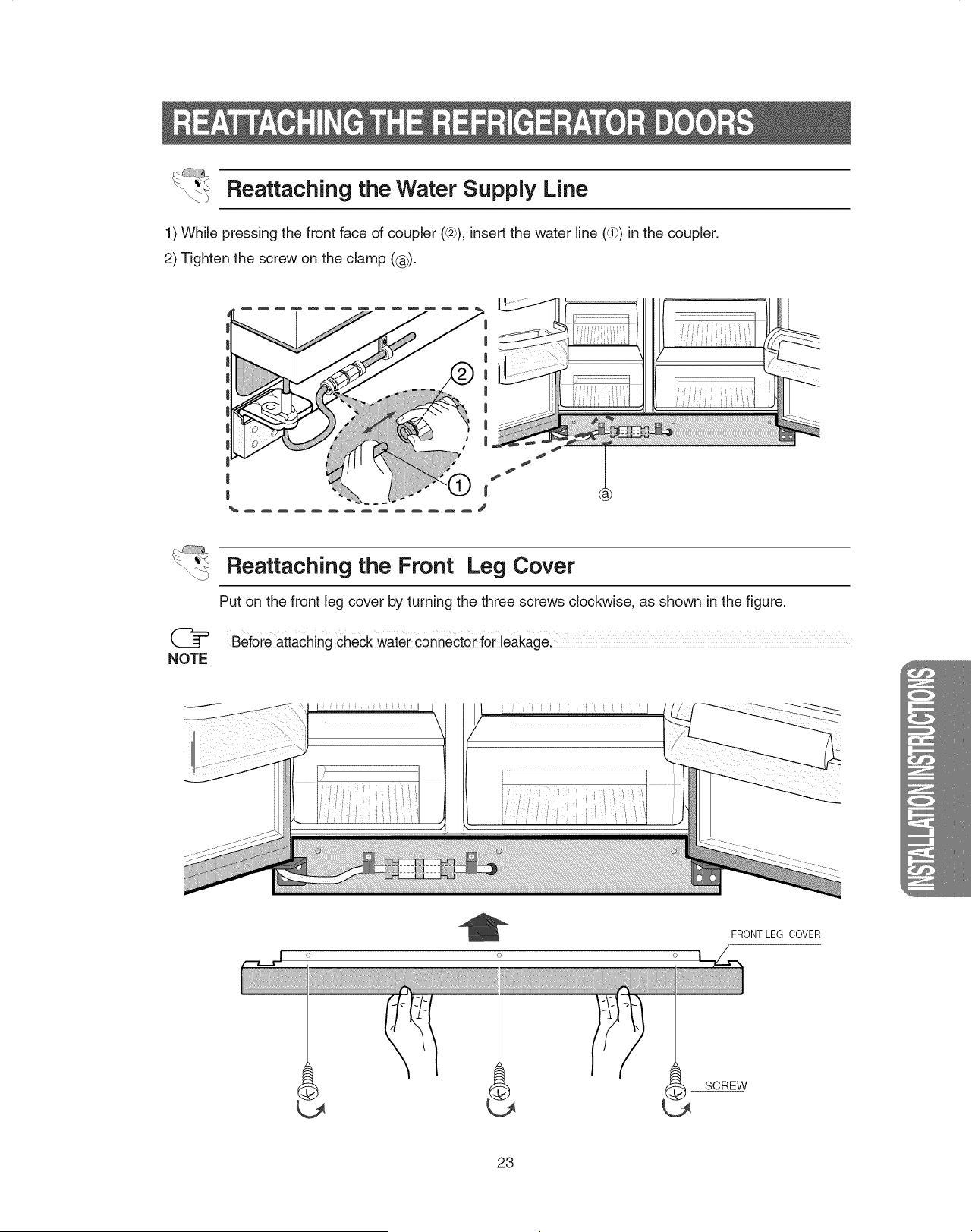
Reattaching the Water Supply Line
1) While pressing the front face of coupler ((2)),insert the water line (dP)in the coupler.
2) Tighten the screw on the clamp (®).
@
NOTE
Reattaching the Front Leg Cover
Put on the front leg cover by turning the three screws clockwise, as shown in the figure,
Before attaching cheCk water connector f0r leakagel
I i i
FRONT LEG COVER
SCREW
23
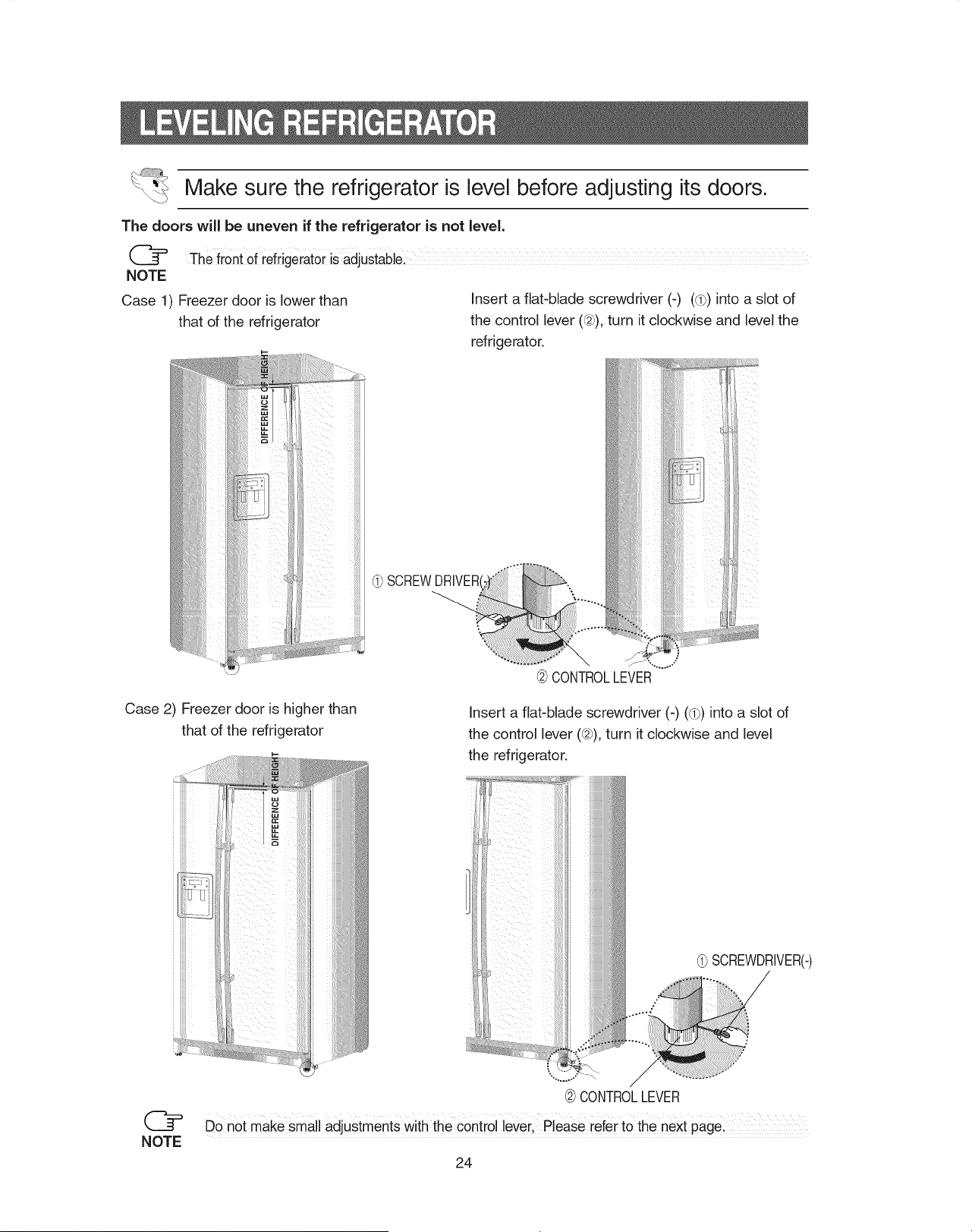
Make sure the refrigerator is level before adjusting its doors.
The doors will be uneven if the refrigerator is not level.
NOTE
Case 1) Freezer door is lower than
that of the refrigerator
iiiiiiiiiiii
iiiiiiiiiiii
iiiiiiiiiiiii
iiiiiiiiiiii_
Insert a flat-blade screwdriver (-) (d_) into a slot of
the control lever (@), turn it clockwise and level the
refrigerator.
(_ SCREWDRIVERI
@CONTROLLEVER
Case 2) Freezer door is higher than
that of the refrigerator
Insert a flat-blade screwdriver (-) (d_)into a slot of
the control lever (@), turn it clockwise and level
the refrigerator.
(_ SCREWDRIVER(-)
NOTE
@CONTROLLEVER
DO not makesmall adjustments With the control lever Please iefer tO the next pagel
24
@
NOTE
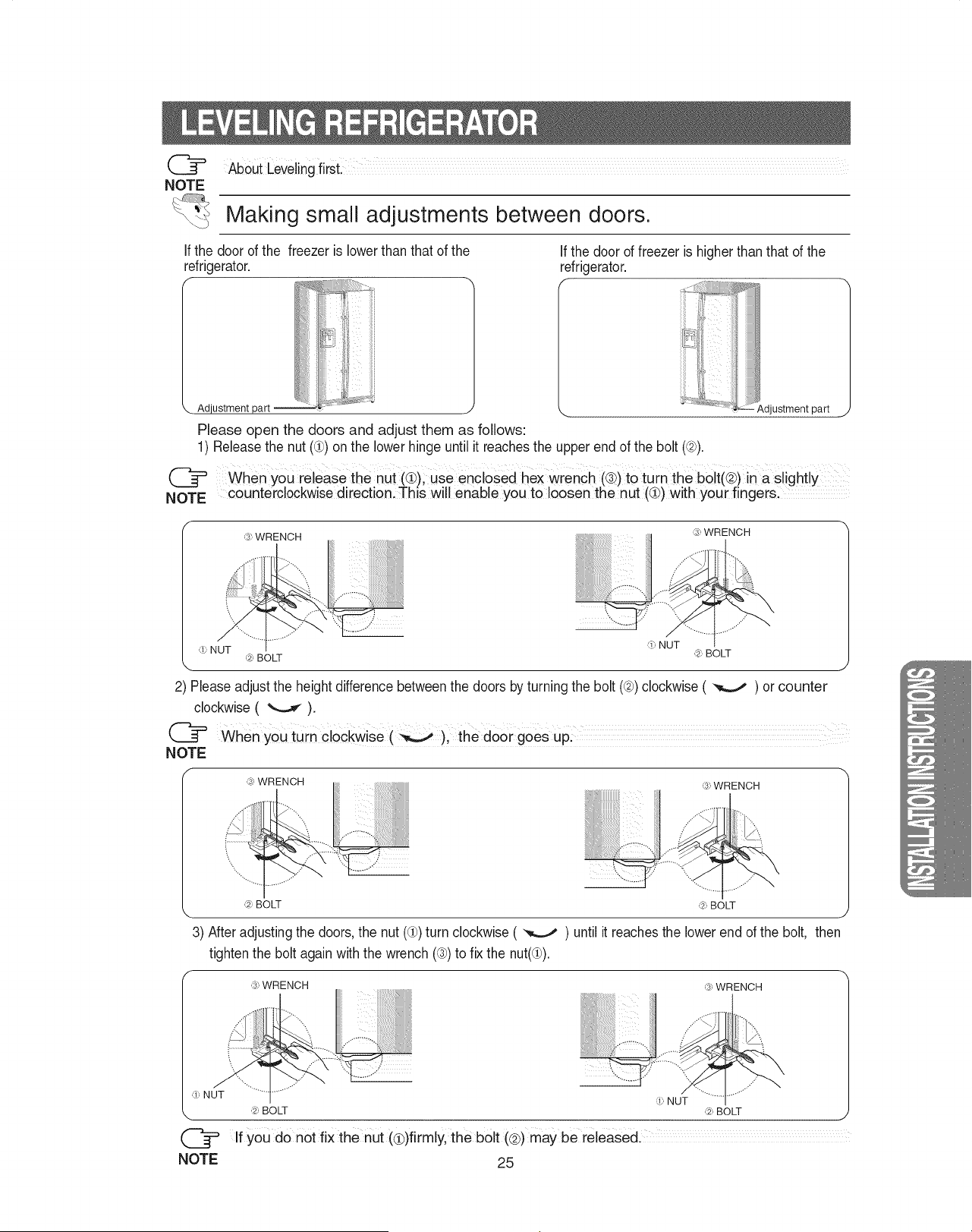
Making small adjustments between doors.
If the door of the freezer is lower than that of the
refrigerator.
If the door of freezer is higher than that of the
refrigerator.
f .... ...................
_-4I_'_i!iili_ !
Please open the doors and adjust them as follows:
1) Release the nut (d_)on the lower hinge until it reachesthe upper end of the bolt (@).
\djustment part J
@ When you release the nUt (_)i use enclosed hex wrenCh (®)to turn the bolt(@)in a slight y
NOTE counterclockwise direction. This will enable you to loosen the nut (@)with your fingersl
,;, WRENCH
,_,*;,BOLT
,_, NUT
(_l BOLT
2) Please adjust the height difference betweenthe doors by turning the bolt (@)clockwise ( _ ) or counter
clockwise ( _ ).
@ When You turn clockwise(_ ), thed0org0esup!
NOTE
,;, WRENCH
/
(_:,BOLT (_:,BOLT
\ J
3) After adjusting the doors, the nut ((_)turn clockwise ( _ ) until it reaches the lower end of the bolt, then
tightenthe bolt againwith the wrench ((3))to fix the nut(Q).
,;, WRENCH ,;, WRENCH
(!, NUT d, NUT
,_-_:,BOLT (_:,BOLT
Ify0u do not fix the nut (€)firmly, the bolt (@)may be released.
NOTE 25
1)Inordertooperatetheicemakerproperly,waterpressureof20~125psi isrequired.
Inthisrangea 170ccpapercupcanbefilledin10secs.
2)Thewaterfilterremovesparticles.It doesnotsterilizeordestroyanymicro-organisms.
3)Iftherefrigeratorisinstalledinanareawithlowwaterpressure(below20psi),youshouldinstalla
boosterpumptocompensateforthelowpressure.
4)Ensurethewaterstoragetankinsidetherefrigeratorisproperlyfilledinitially.Pushthewaterdispenser
leveruntilthewaterrunsfromtheoutlet.
Waterlineinstallationkitis availableatextracostfromyourdealer,Therefrigeratormanufacturer
recommendsusingaWatersUpplykitCOntainingcoppertubingl
NOTE
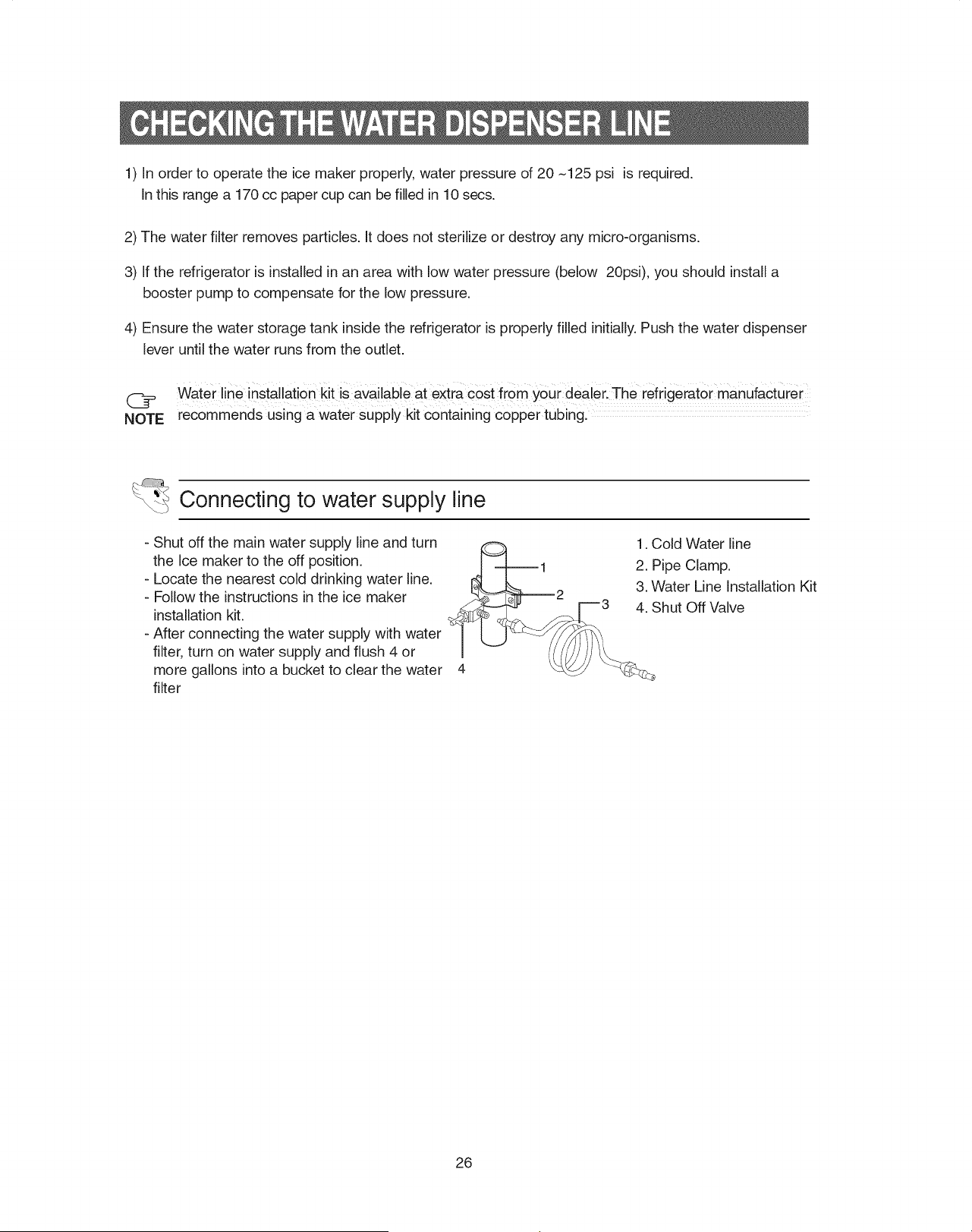
Connecting to water supply line
- Shut off the main water supply line and turn
the Ice maker to the off position.
- Locate the nearest cold drinking water line.
- Follow the instructions in the ice maker
installation kit.
- After connecting the water supply with water
filter, turn on water supply and flush 4 or
more gallons into a bucket to clear the water
filter
1. Cold Water line
2. Pipe Clamp.
3. Water Line Installation Kit
4. Shut Off Valve
26
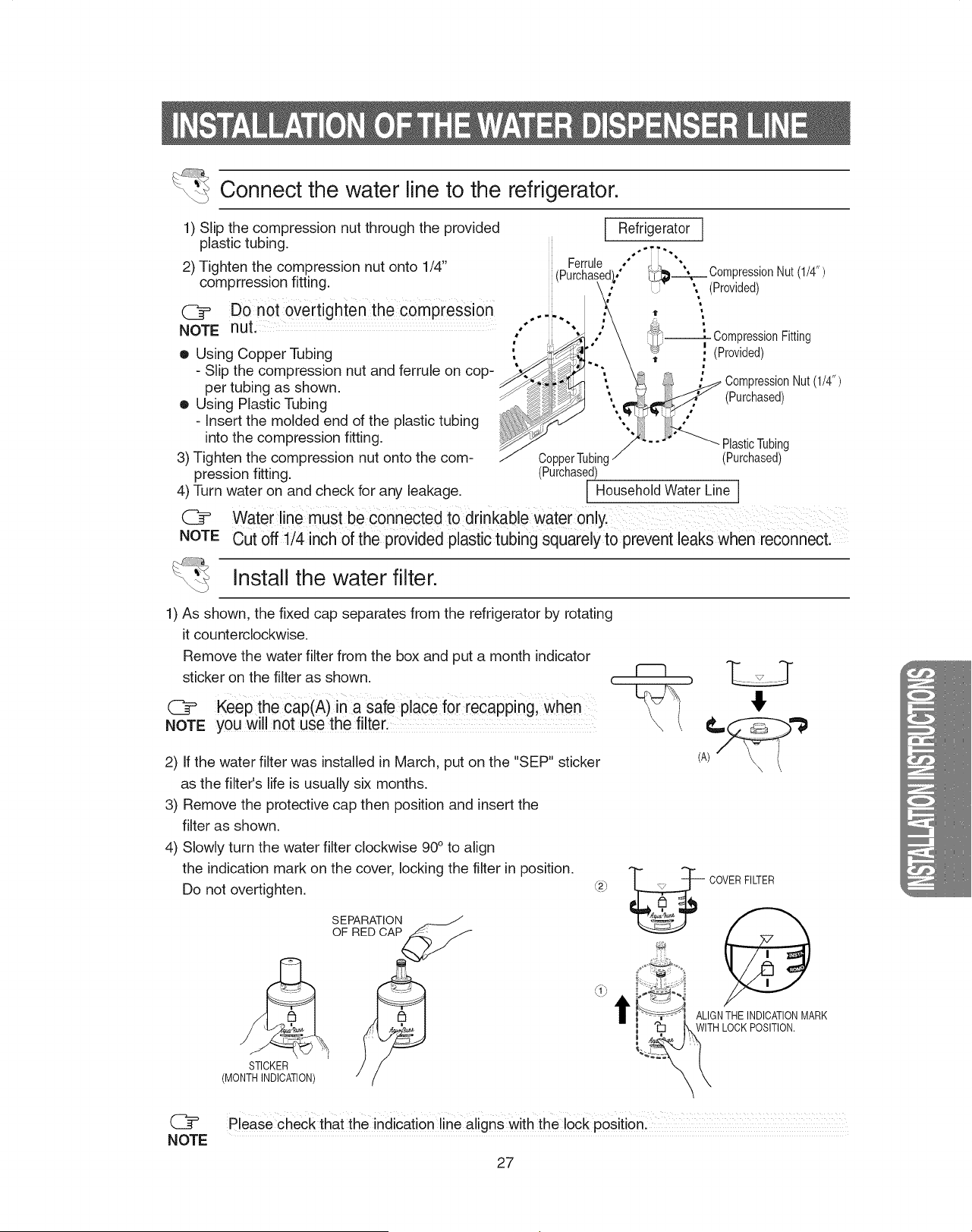
Connect the water line to the refrigerator.
1) Slip the compression nut through the provided
plastic tubing.
2) Tighten the compression nut onto 1/4"
comprression fitting.
@ DOnot oVertighten the compression
NOTE nut.
• Using Copper Tubing
- Slip the compression nut and ferrule on cop-
per tubing as shown.
• Using Plastic Tubing
- Insert the molded end of the plastic tubing
into the compression fitting.
3) Tighten the compression nut onto the com-
pression fitting.
4) Turn water on and check for any leakage.
C_
NOTE
Ferrule
Refrigerator
s * , i •
i •
°" _Compresslon Nut(1/4)
, ". (Provided)
ii " '
*'" " ' CompressionFitting
!
' , (Provided)
I 11" m
CompressionNut(1/4")
(Purchased)
PlasticTubing
CopperTubing (Purchased)
(Purchased)
[ Household Water Line ]
Waterline must be connected tOdrinkable water only.
Cut off 1/4 inch of the provided plastic tubing squarely to prevent leaks when reconnect.
Install the water filter.
1) As shown, the fixed cap separates from the refrigerator by rotating
it counterclockwise.
Remove the water filter from the box and put a month indicator
sticker on the filter as shown, i"---1
@ Keepthe cap(A)in a safe place for recapping, When
NOTE you will not use the filter:
2) If the water filter was installed in March, put on the "SEP" sticker
as the filter's life is usually six months.
3) Remove the protective cap then position and insert the
filter as shown.
4) Slowly turn the water filter clockwise 90° to align
the indication mark on the cover, locking the filter in position.
Do not overtighten.
STICKER
(MONTHINDICATION)
SEPARATION ___
OF
_j
t
COVERFILTER
ALIGNTHEINDICATIONMARK
WITHLOCKPOSITION.
\
Please check that the indication line aligns with the lock position:
NOTE
27
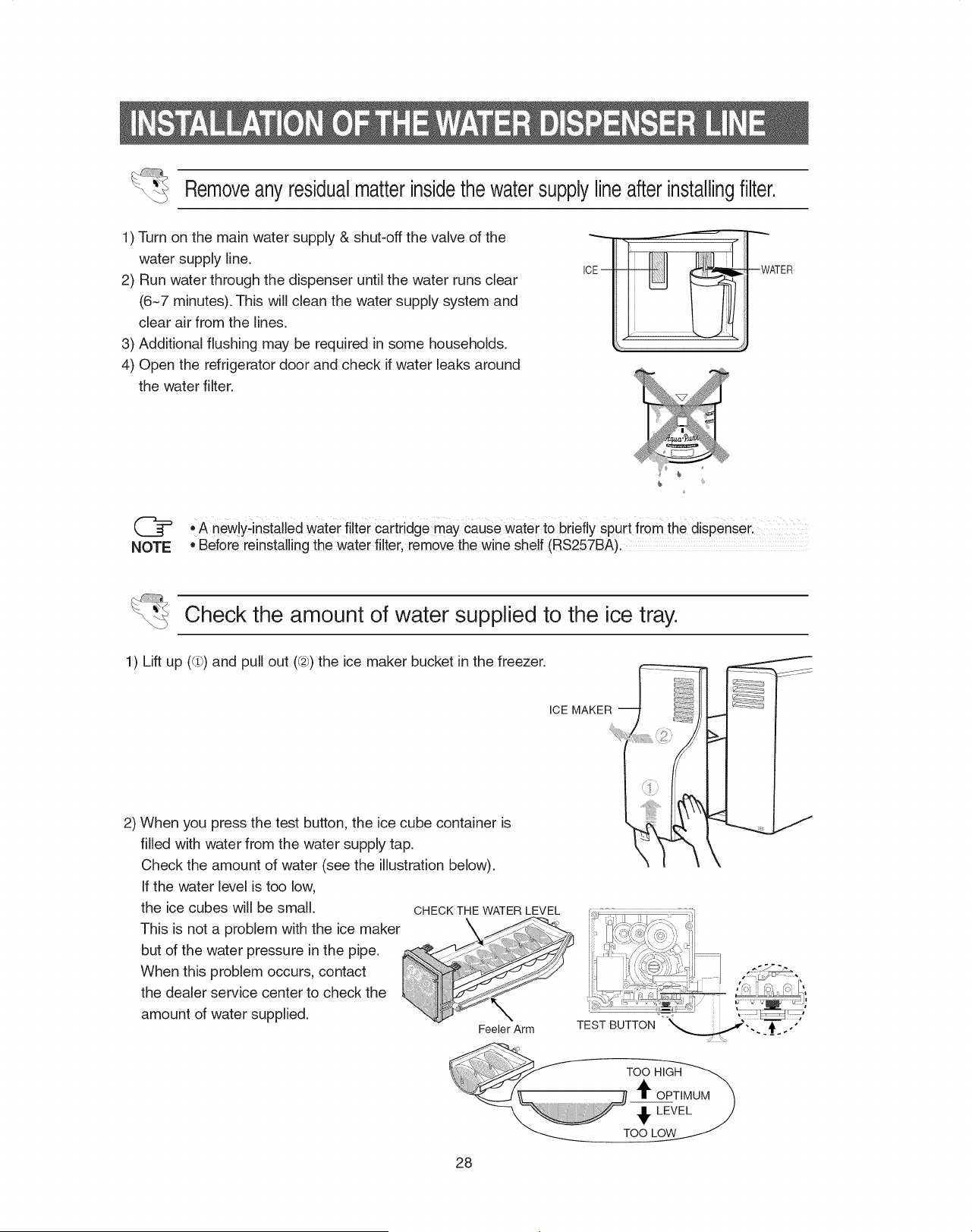
Removeanyresidualmatterinsidethe watersupplylineafterinstallingfilter.
1) Turn on the main water supply & shut-off the valve of the
water supply line.
2) Run water through the dispenser until the water runs clear
(6~7 minutes). This will clean the water supply system and
clear air from the lines.
3) Additional flushing may be required in some households.
4) Open the refrigerator door and check if water leaks around
the water filter.
ICEm --WATER
@ • A new!y_installedwater filter cartr!dge may cause Water to briefly spurt fr0m the dispenseri
NOTE • Before reinstalling the water filter, remove the wine shelf (RS257BA)I ...........
Check the amount of water supplied to the ice tray.
1) Lift up ((ih)and pull out (@)the ice maker bucket in the freezer.
ICE MAKER
2) When you press the test button, the ice cube container is
filled with water from the water supply tap.
Check the amount of water (see the illustration below).
If the water level is too low,
the ice cubes will be small.
This is not a problem with the ice maker
but of the water pressure in the pipe.
When this problem occurs, contact
the dealer service center to check the
amount of water supplied.
1
\
f
CHECK THE WATER LEVEL [_'_'_" ii _'"i:i
i%_i_¢:-,',,_!,_
Feeler Arm TEST BUTTON ,, . ._ ."
28
The refrigerator does not work at all or it does not
chill sufficiently
• Check that the power plug is properly connected.
• Isthe temperature control on the display panel set to
the correct temperature? Try setting it to a lower tem-
perature.
• Isthe refrigerator in direct sunlight or located near a
heat source?
• Is the back of the refrigerator too close to the wall?
The food in the refrigerator is frozen
• Isthe temperature control on the display panel set to
the correct temperature? Try setting it to a warmer
temperature.
• Isthe temperature in the room too low?
• Did you store the food with a high water content in
the coldest part of the refrigerator?
You hear unusual noises or sounds
• Check that the floor is leveled and stable.
• Isthe back of the refrigerator too close to the wall?
• Was anything dropped behind or under the refrigera-
tor?
• A "ticking" sound may be heard from inside the refrig-
erator, this is normal.This occurs because various
accessories are contracted or expanded.
The front corners and sides of the cabinet are hot;
condensation occurs.
• Anti-condensators are installed in the front corners of
the refrigerator to prevent condensation.
• Condensation can occur when you leave the door
open for a long time.
Ice is not dispensed
• Did you stop the ice making function?
• Is there any ice in the ice storage unit?
• Is the water line connected and the shut-off valve
open?
• Is the freezer temperature too warm?
(Set the temperature lower)
• Did you wait for 12 hours after installation of the
water supply line before making ice?
You can hear water bubbling in the refrigerator
The bubbling comes from the refrigerant circulating in
the refrigerator and is normal.
There is a bad smell in the refrigerator
Wrap strong smelling food so that it is airtight.
Throw away any rotten food.
Frost forms on the walls of the freezer
• Is the air vent blocked?
• Allow sufficient space between the foods stored for
efficient air circulation.
• Is the door closed properly?
No water is supplied
• Is the water line connected and the shut-off valve
open?
• Is the water supply line crushed?
• Is the water tank frozen because the refrigerator tem-
perature is too low? Select a warmer setting on the
display panel.
29
3O
31
If you have any questions or comments relating to Samsung products,
please contact the SAMSUNG customer care center.
SAMSUNG ELECTRONICS CANADA, INC.
55 STANDISH COURT MISSISSAUGA, ONTARIO L5R 4B2 CANADA
TEL :905-542-3535 FAX : 905-542-3835
1-800-SAMSUNG (7267864)
www.samsung.com/ca
To obtain service, please call our toll-free CAMCO CUSTOMER SERVICE
number at 1-800-361-3400
If further help is needed concerning warranty, contact:
Manager, Consumer Relations
Camco, Inc.
1 Factory Lane
Moncton, New Brunswick
E1C 9M3
You can also contact us on our web site: www.geappliances.ca