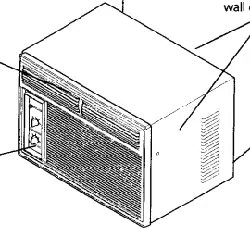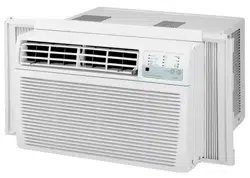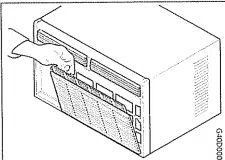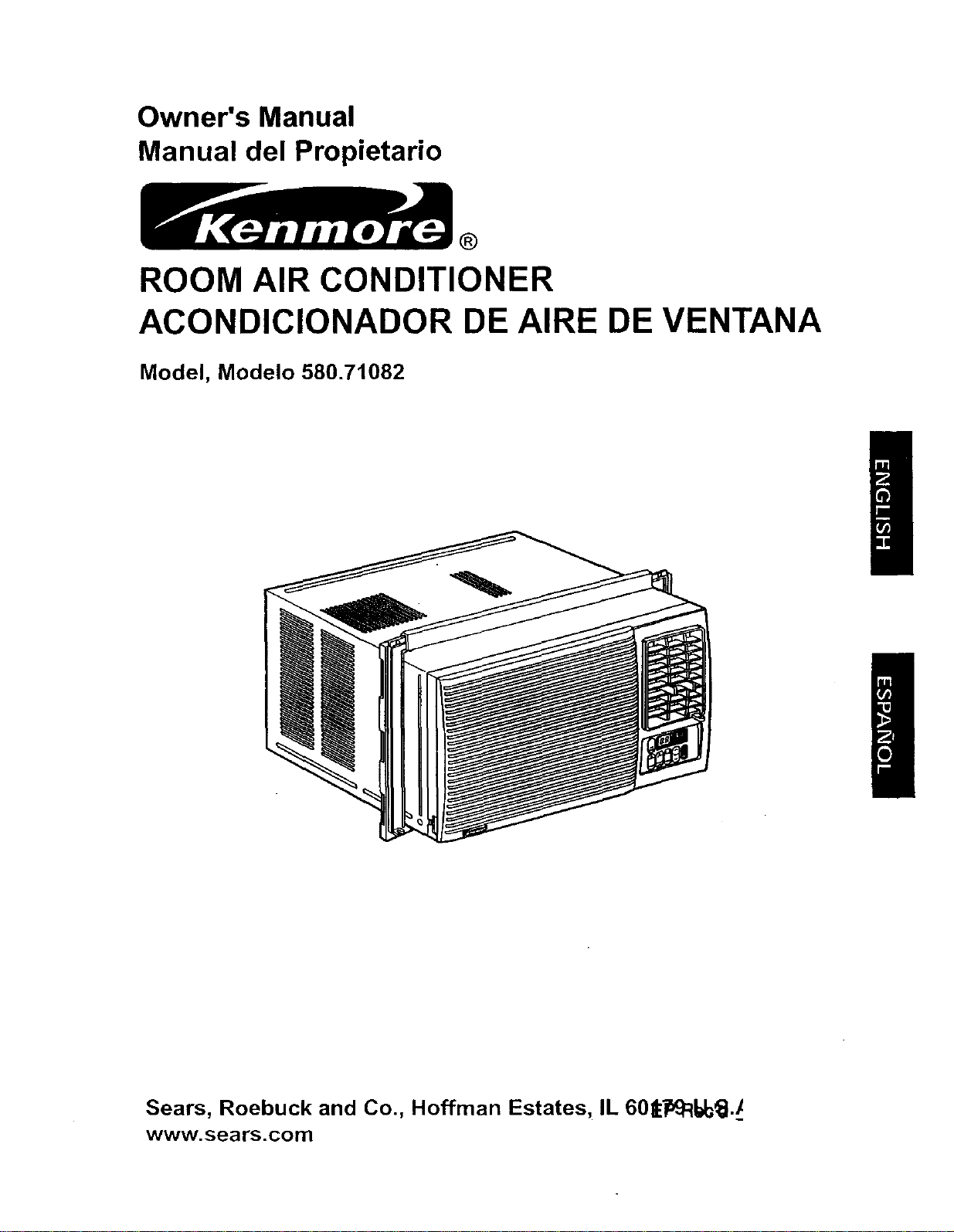
Owner's Manual
Manual del Propietario
®
ROOM AIR CONDITIONER
ACONDICIONADOR DE AIRE DE VENTANA
Model, Modelo 580.71082
Sears, Roebuck and Co., Hoffman Estates, IL 60t_R_l./
www.sears.com

TABLE OF CONTENTS ........................ 2
WARRANTY .............................................. 2
SAFETY ..................................................... 3
Important Safety Instructions ...................... 3
ELECTRICAL REQUIREMENTS .......4
INSTALLATION ........................................ 5
Installation Requirements ......................... 5
Installation ................................................ 6
How to Install ............................................ 6
Removal from Window ................................. 8
OPERATION ............................................. 9
How and Why ........................................... 9
Normal Sounds ........................................ 9
Capacity and Running Time ..................... 9
Features ................................................. 10
Using the Air Conditioner ....................... 10
Display ................................................... 11
Remote Control ...................................... 12
MAINTENANCE ..................................... 13
Air Filter Cleaning ................................... 13
Air Conditioner Cleaning ........................ 13
How to Remove the Front Grille .................. 13
How to Replace the Front Grille .................. 13
TROUBLESHOOTING ......................... 14
Before Calling for Service ...................... 14
REPAIR PARTS .................................... 16
ESPANOL ................................................ 26
SERVICE NUMBERS ............Back Cover
FULL ONE YEAR WARRANTY ON
ROOM AIR CONDITIONER
For one year from th_ date of purchase, when this
air conditioner is operated and maintained for
normal room cooling according to instructions in this
owner's manual, Sears will repair this air
conditioner, free of charge, if defective in matedat or
workmanship.
FULL FIVE-YEAR WARRANTY ON
SEALED REFRIGERATION SYSTEM
For five years from the date of purchase, when this
air conditioner is operated and maintained for
normal room cooling according to instruCtions in this
owner's manual, Sears will repair the sealed
refrigeration system (consisting of refrigerant,
connecting tubing, and compressor), free of charge,
if defective in material or workmanship.
WARRANTY SERVICE IS AVAILABLE BY
CONTACTING THE NEAREST SEARS
SERVICE CENTER IN THE UNITED STATES.
Warranty coverage applies only to air conditioners
used for non-commercial, private household
purposes.
This warranty applies only while this product is in
use in the United States.
This warranty gives you specific legal rights, and
you may also have other right which vary from state
to state.
Sears, Roebuck and Co., D/817WA,
Hoffman Estates, IL 60179 U.S.A.
-2-
IMPORTANT SAFETY INSTRUCTIONS
The safety instructions below will tell you how to use your room air conditioner to avoid harm to yourself or
damage to your ROOM AIR CONDITIONER.
FOR YOUR SAFETY
Do not store or use gasoline or other flammable
vapors and liquids in the vicinity of this or any other
appliance. Read product labels for flammability and
other warnings.
_ PREVENT ACCIDENTS
To reduce the risk of fire, electrical shock, or injury
to persons when using your air conditioner, follow
basic precautions, including the following:
• Be sure the electrical service is adequate for the
model you have chosen.
• If the air conditioner is to be installed in a window,
you will probably want to clean both sides of the
glass first. If the window is a triple-track type with a
screen panel included, you may want to remove
the screen completely before installation.
• Be sure the air conditioner has been securely and
correctly installed according to the separate
installation instructions provided with this manual.
Save this manual and installation instructions for
possible future use in removing or reinstalling this
unit.
• When handling the air conditioner, be careful to
avoid cuts from sharp metal fins on front and rear
coils.
ELECTRICAL INFORMATION
The complete electrical rating of your new room air
conditioner is stated on the serial plate. Refer to the
rating when checking the electrical requirements.
• Be sure the air conditioner is propedy grounded.
To minimize shock and fire hazards, proper
grounding is important. The power cord is
equipped with a three-prong grounding plug for
protection against shock hazards.
• Your air conditioner must be plugged into in a
properly grounded wall receptacle. If the wall
receptacle you intend to use is not adequately
grounded or protected by a time delay fuse or
circuit breaker, have a qualified electrician install
the proper receptacle.
• Do not run air conditioner with outside protective
cover in place. This could result in mechanical
damage within the air conditioner.
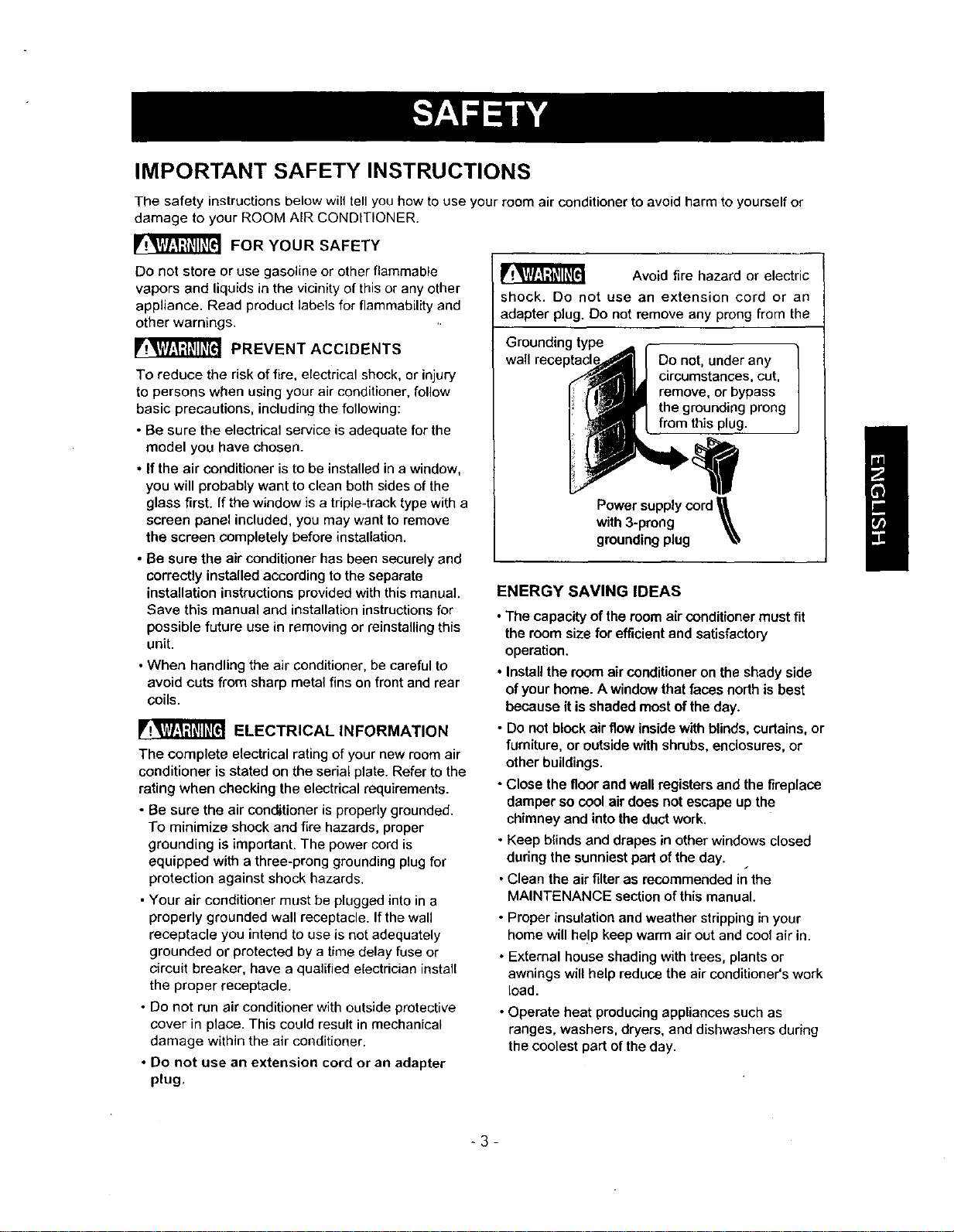
• Do not use an extension cord or an adapter
plug.
Avoid fire hazard or electric
shock. Do not use an extension cord or an
adapter plug. Do not remove any prong from the
Grounding type )
wall reeeptacl Do not, under any
circumstances, cut,
remove, or bypass
the grounding prong
from this plug.
Power supply cord
with 3-prong _,_,
grounding plug _,,
ENERGY SAVINGIDEAS
• The capacity of the room air conditioner must fit
the room size for efficient and satisfactory
operation.
• Install the room air conditioner on the shady side
of your home. A window that faces north is best
because it is shaded most of the day.
• Do not block air flow inside with blinds, curtains, or
furniture, or outside with shrubs, enclosures, or
other buildings.
• Close the floor and wall registers and the fireplace
damper so cool air does not escape up the
chimney and into the duct work.
• Keep blinds and drapes in other windows closed
during the sunniest part of the day.
s
• Clean the air filter as recommended in the
MAINTENANCE section of this manual.
• Proper insulation and weather stripping in your
home will help keep warm air out and cool air in.
• External house shading with trees, plants or
awnings will help reduce the air conditioner's work
load.
• Operate heat producing appliances such as
ranges, washers, dryers, and dishwashers during
the coolest part of the day.
/
-3-

OBSERVE ALL LOCAL CODES AND
ORDINANCES.
DO NOT, UNDER ANY CIRCUMSTANCES,
REMOVETHEPOWERSUPPLYCORD
GROUND PRONG.
ELECTRICAL GROUND IS REQUIRED ON
THIS APPLIANCE.
A 115-volt 60 Hz, AC only, 15A fused and "
properly grounded electrical supply is required.
A time delay fuse or time delay circuit breaker
is recommended. Use a dedicated circuit,
serving only this appliance.
DO NOT USE AN EXTENSION CORD.
RECOMMENDED GROUNDING METHOD
For your personal safety, this appliance must
be grounded. This appliance has a power
supply cord with a 3-prong grounding plug. To
minimize possible shock hazard, the cord must
be plugged into a mating grounding type wall
receptacle and grounded in accordance with
the National Electrical Code (ANSI/NFPA 70)
latest edition and all local codes and
ordinances. If a mating wall receptacle is not
available, it is the personal responsibility and
obligation of the customer to have a properly
grounded 3-prong wall receptacle installed by a
qualified electrician.
Electrical Shock Hazard
Plug into a grounded 3 prong outlet.
Do not remove ground prong.
Do not use an adapter.
Do not use an extension cord.
Failure to follow these instructions can result
in death, fire, or electdcal shock.
,_3-prong
3-pron,g. -.._ IIn- ,lll,%und ,qg
g_o;na,ng _ _L_ receptacle
_-_ Ground
Power _ prong
supply
cord
-4-
INSTALLATION REQUIREMENTS
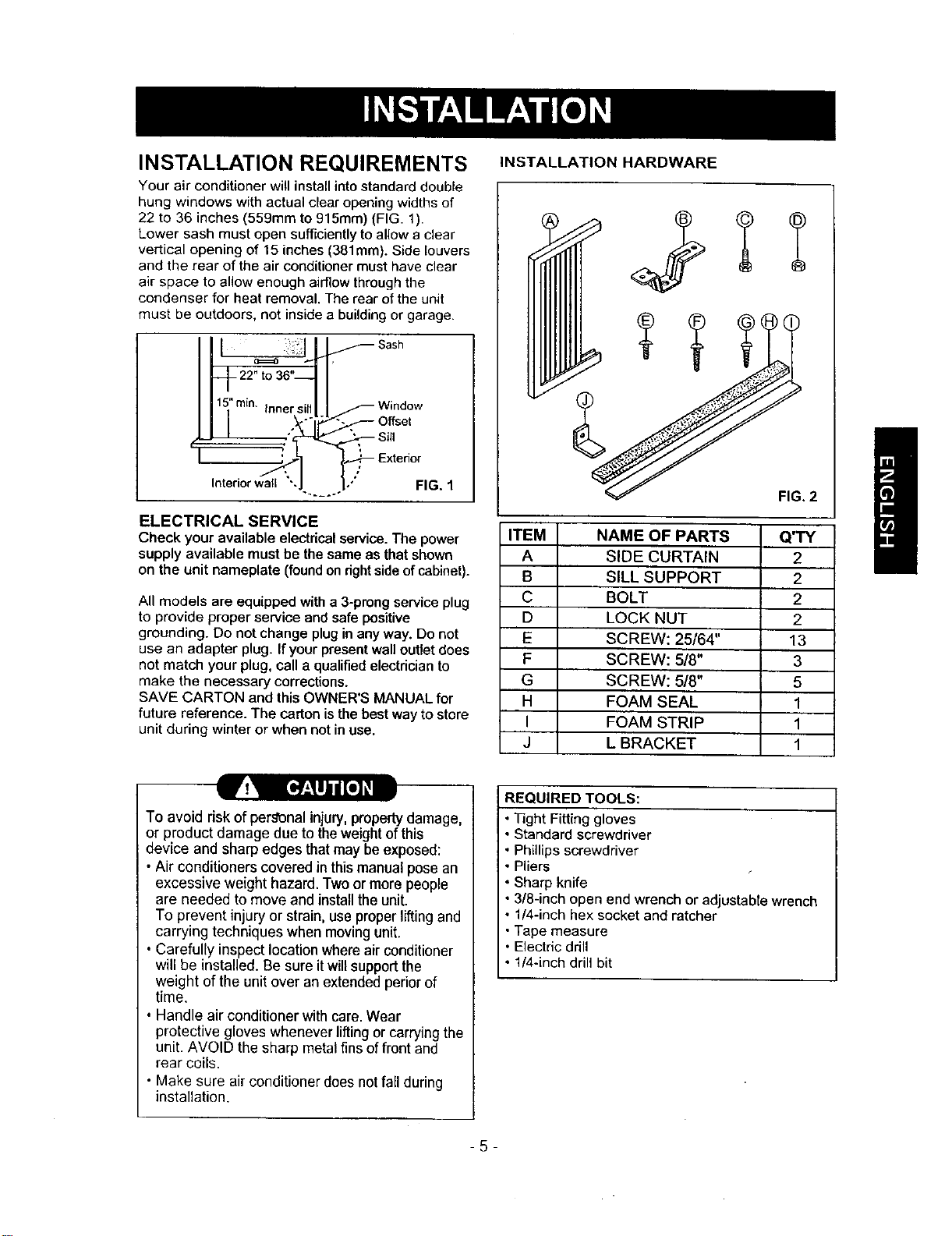
Your air conditioner will install into standard double
hung windows with actual clear opening widths of
22 to 36 inches (559mm to 915mm) (FIG. 1).
Lower sash must open sufficiently to allow a clear
vertical opening of 15 inches (381mm). Side louvers
and the rear of the air conditioner must have clear
air space to allow enough airflow through the
condenser for heat removal. The rear of the unit
must be outdoors, not inside a building or garage.
_._ _ Sash
-1-22" to 36"--
1 II .
5=mm. Inner sill _ Window
- O,se,
l s,,
Intedor wall "
FIG. 1
ELECTRICAL SERVICE
Check youravailable electricalservice.The power
supply available mustbe thesame as thatshown
on the unitnameplate(foundonrightsideofcabinet).
All models are equipped with a 3-prong service plug
to provide proper service and safe positive
grounding. Do not change plug in any way. Do not
use an adapter plug. If your present wall outlet does
not match your plug, call a qualified electrician to
make the necessary corrections.
SAVE CARTON and this OWNER'S MANUAL for
future reference. The carton is the best way to store
unit during winter or when not in use.
INSTALLATION HARDWARE
ITEM NAME OF PARTS
A SIDE CURTAIN
B SILL SUPPORT
C BOLT
D LOCK NUT
E SCREW: 25/64"
F SCREW: 5/8"
G SCREW: 5/8"
H FOAM SEAL
I FOAM STRIP
J L BRACKET
REQUIRED TOOLS:
FIG. 2 i
Q'TY
2
2
2
2
13
3
5
1
1
1
To avoid risk of personal injury, propertydamage,
or product damage due to the weightofthis
device and sharp edges that may be exposed:
• Air conditioners covered in this manual pose an
excesswe weight hazard. Two or more people
are needed to move and install the unit.
To prevent injury or strain, use proper liftingand
carrying techniques when moving unit.
• Carefully inspect location where air conditioner
will be installed. Be sure itwillsupport the
weight of the unit over an extended perior of
time.
• Handle air conditioner with care. Wear
protective gloves whenever lifting or carrying the
unit. AVOID the sharp metal fins of front and
rear coils.
• Make sure air conditioner does notfall during
installation.
• Tight Fitting gloves
• Standard screwdriver
• Phillips screwdriver
• Pliers
• Sharp knife
• 3/8-inch open end wrench or adjustabte wrench
• 1/4-inch hex socket and ratcher
• Tape measure
• Electric drill
• 1/4-inch drill bit
5
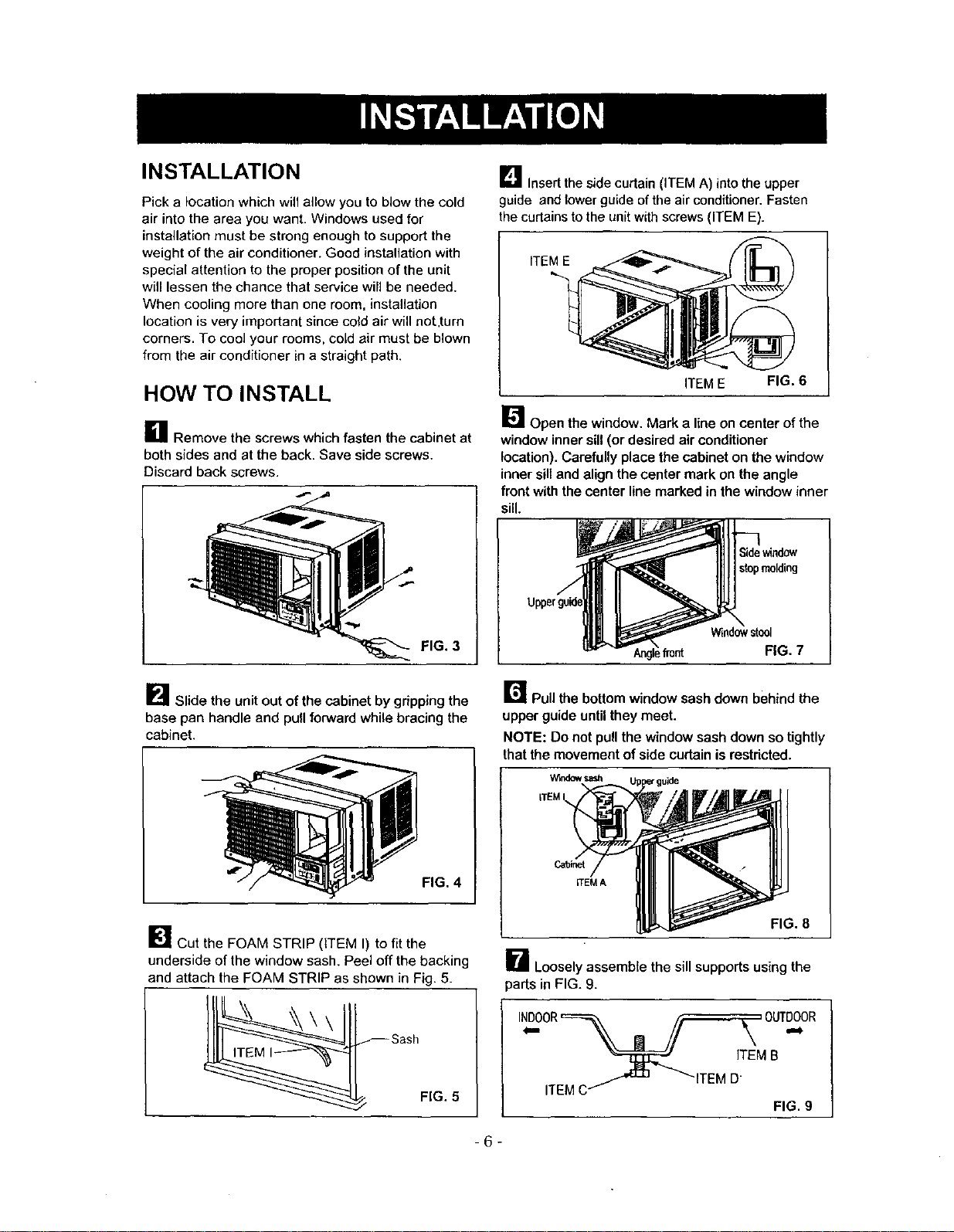
INSTALLATION
Pick a location which will allow you to blow the cold
air into the area you want. Windows used for
installation must be strong enough to support the
weight of the air conditioner. Good installation with
special attention to the proper position of the unit
will lessen the chance that service will be needed.
When cooling more than one room, installation
location is very important since cold air will not,turn
corners. To cool your rooms, cold air must be blown
from the air conditioner in a straight path.
HOW TO INSTALL
U Remove the screws which fasten the cabinet at
both sides and at the back. Save side screws.
Discard back screws.
FIG. 3
_"_ Slide the unit out of the cabinet by gripping the
base pan handle and pull forward while bracing the
cabinet.
FIG. 4
_]i Cut the FOAM STRIP (ITEM I) to fit the
underside of the window sash. Peel off the backing
and attach the FOAM STRIP as shown in Fig. 5.
FIG. 5
L_ Insertthe side curtain (ITEM A) into the upper
guide and lower guide of the air conditioner. Fasten
the curtains to the unit with screws (ITEM E).
ITEM E
ITEM E FIG. 6
_'_ Open the window. Mark a line on center of the
window inner sill (or desired air conditioner
location). Carefully place the cabinet on the window
inner sill and align the center mark on the angle
front with the center line marked in the window inner
sill.
stopmolding
Windowstool
ifront FIG. 7
r_ Pullthe bottomwindowsashdownbehind the
upperguide untilthey meet.
NOTE: Do notpullthewindowsashdownsotightly
thatthemovementof sidecurtainisrestdcted.
ITEMI
Cabinet
ITEMA
FIG. 8
B Looselyassemblethe sill supports usingthe
-6-
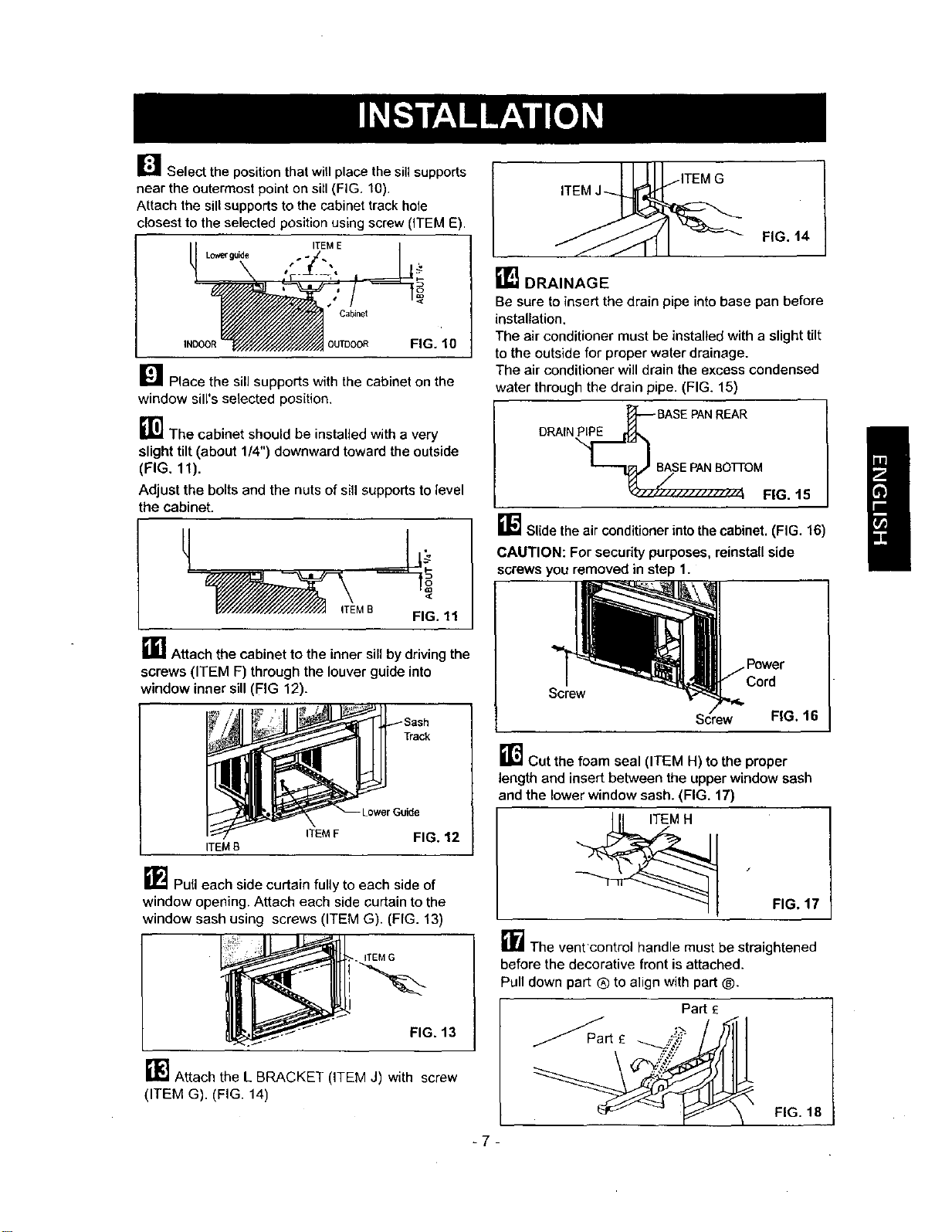
_J_ Select the position that will place the sift supports
near the outermost point on sill (FIG. 10),
Attach the sill supports to the cabinet track hole
closest to the selected position using screw (ITEM E).
ITEM E
Lc,'._ guide
Cabinet
INDOOR DUTDOOR FIG. 10
_'1 Place the sill supports with the cabinet on the
window sill's selected position.
_1_ The cabinet should be installed with a very
slight tilt (about 1/4") downward toward the outside
(FIG. 11).
Adjust the bolts and the nuts of sill supports to level
the cabinet.
FIG. 11
_]_] Attach the cabinet to the inner sill by driving the
screws (ITEM F) through the louver guide into
window inner sill (FIG 12).
ITEM B
Track
)wer Guide
ITEM F FIG. 12
_'_ Pull each side curtain fully to each side of
window opening. Attach each side curtain to the
window sash using screws (ITEM G). (FIG. 13)
__. ITEM G
_- FIG. 13
_'] Attach the L BRACKET (ITEM J) with screw
(ITEM G). (FIG. 14)
FIG. 14
[] DRAINAGE
Be sure to insert the drain pipe into base pan before
installation,
The air conditioner must be installed with a slight tilt
to the outside for proper water drainage.
The air conditioner will drain the excess condensed
water through the drain pipe. (FIG. 15)
REAR
DRAINPIPE
FIG. t5
_1_ Slide the air conditioner into the cabinet. (FIG. 16)
CAUTION: For security purposes, reinstall side
screws you removed in step 1.
-7-
Screw
Screw FIG. 16
_1"_ Cut the foam seal (ITEM H) to the proper
length and insert between the upper window sash
and the lower window sash. (FIG. 17)
FIG, 17
_'_ The vent control handle must be straightened
before the decorative front is attached.
Pull down part ® to align with part ®.
Part E
FIG. 18
I
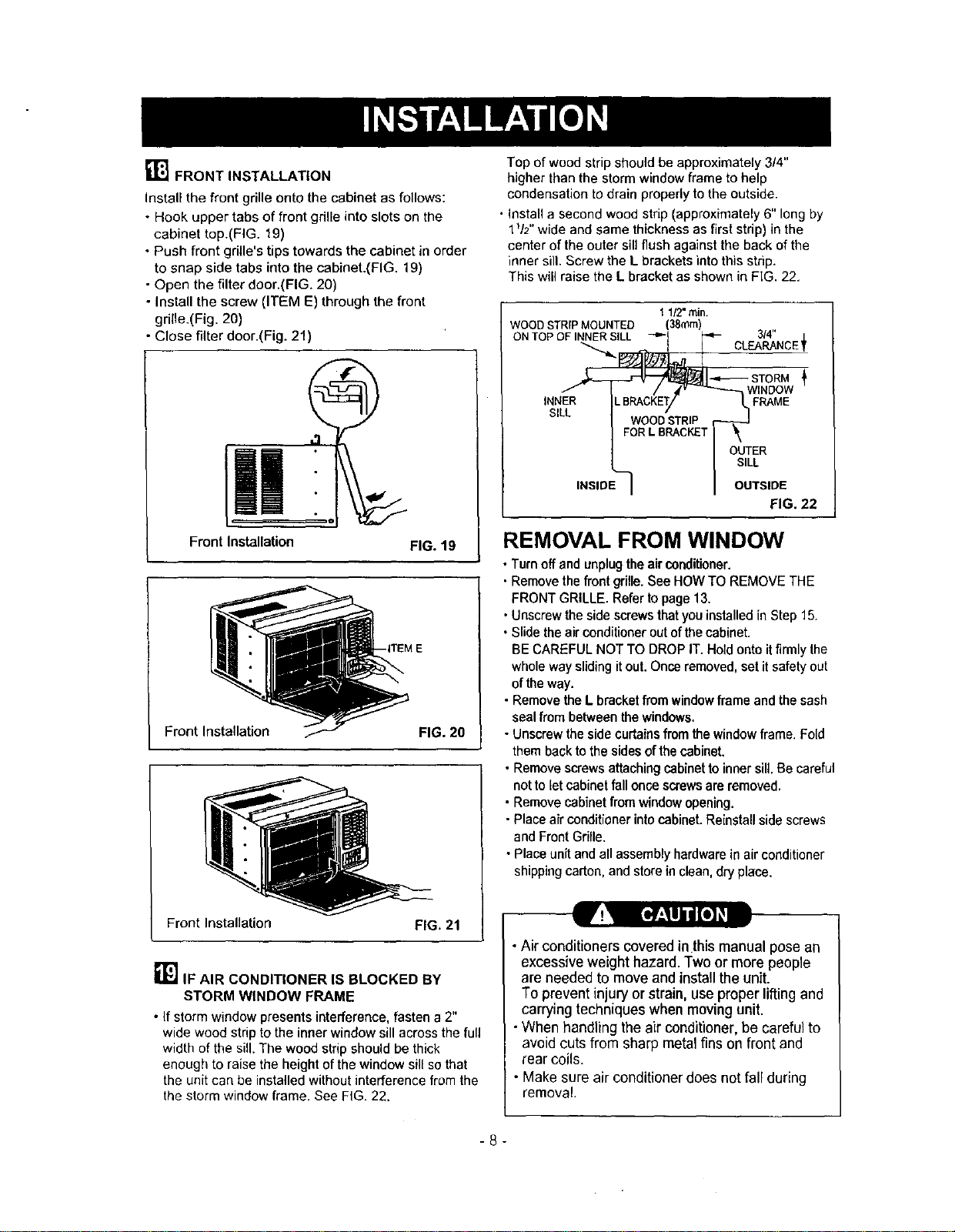
[]FRONT INSTALLATION
Install the front grille onto the cabinet as follows:
- Hook upper tabs of front gdlle into slots on the
cabinet top.(FIG. 19)
• Push front grille's tips towards the cabinet in order
to snap side tabs into the cabinet.(FIG. 19)
• Open the filter door.(FIG. 20)
• Install the screw (ITEM E) through the front
grille.(Fig. 20)
• Close filter door.(Fig. 21)
Front Installation
FIG. 19
Front Installation FIG. 20
Frontlnstallation FIG. 21
RI_IF AIR CONDITIONER IS BLOCKED BY
STORM WINDOW FRAME
• If storm window presents interference, fasten a 2"
wide wood strip to the inner window sill across the full
width of the sill. The wood strip should be thick
enough to raise the height of the window sill so that
the unit can be installed without interference from the
the storm window frame. See FIG. 22.
Top of wood strip should be approximately 3/4"
higher than the storm window frame to help
condensation to drain properly to the outside.
• Install a second wood strip (approximately 6" long by
1V2" wide and same thickness as first strip) in the
center of the outer sill flush against the back of the
inner sill. Screw the L brackets into this strip.
This will raise the L bracket as shown in FiG. 22.
11/2"rain.
WOODSTRIPMOUNTED (38ram)
ONTOPOFINNERSILL 3/4"
CLEARANCE_
INNER
SILL
STORM
WINDOW
FRAME
OUTER
SILL
INSIDE OUTSIDE
FIG. 22
REMOVAL FROM WINDOW
• Turn off and unplug the air conditioner.
• Remove the front grille. See HOW TO REMOVE THE
FRONT GRILLE. Refer to page 13.
• Unscrew the side screws that you installed in Step 15.
• Slide the air conditioner out of the cabinet.
BE CAREFUL NOT TO DROP IT. Hold onto it firmly the
whole way sliding itout. Once removed, set it safety out
of the way.
• Remove the L bracket from window frame and the sash
seal from between the windows,
• Unscrew the side curtains from the window frame. Fold
them baok to the sides of the cabinet.
• Remove screws attaching cabinet to inner sULBe careful
not to letcabinet fall once screws are removed,
• Remove cabinet from windowopening.
• Place air conditioner into cabinet. Reinstall side screws
and Front Grille.
• Place unit and all assembly hardware in air conditioner
shipping carton, and store in clean, dry place.
•Air conditioners covered in thismanual pose an
excessive weight hazard. Two or more people
are needed to move and install the unit.
To prevent injuryor strain, use proper lifting and
carrying techniques when moving unit.
•When handling the air conditioner, be careful to
avoid cuts from sharp metal fins on front and
rear coils.
• Make sure air conditioner does not fall during
removal.
-8-
HOW AND WHY
Your room air conditioner provides the following
functions to make hot weather living more
comfortable:
• Cools and circulates room air.
• Lowers humidity by removing excess moisture.
• Filters out summertime dust, dirt, and some
airborne impurities.
The air conditioner performs these functions by
drawing room air through a filter which traps dust
and dirt particles. The air then passes over a
cooling coil which refrigerates the air and removes
excess moisture. The same air is then returned to
the room- cooler, drier, and cleaner. Moisture
removed from the room air is carried to the outside
and evaporated.
Your air conditioner is designed to be easy to
operate and to provide plenty of cooling power.
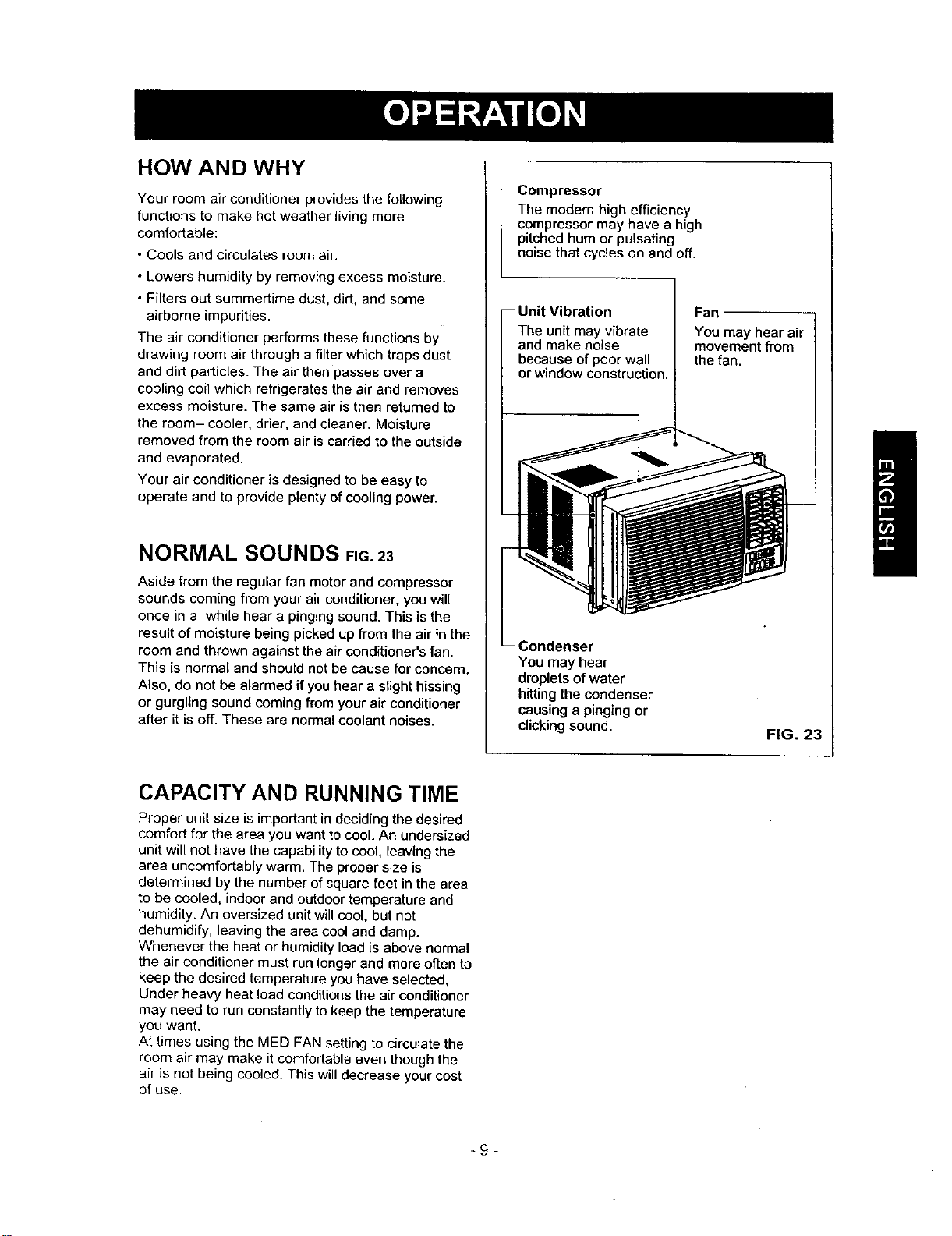
NORMAL SOUNDS FIG.23
Aside from the regular fan motor and compressor
sounds coming from your air conditioner, you will
once in a while hear a pinging sound. This is the
result of moisture being picked up from the air in the
room and thrown against the air conditioner's fan.
This is normal and should not be cause for concern.
Also, do not be alarmed if you hear a slight hissing
or gurgling sound coming from your air conditioner
after it is off. These are normal coolant noises.
i ompressor
The modern high efficiency
compressor may have a high
pitched hum or pulsating
noise that cycles on and off.
-- Unit Vibration
The unit may vibrate
and make noise
because of poor wall
or window construction.
You may hear
droplets of water
hitting the condenser
causing a pinging or
clicking sound.
Fan
You may hear air
movement from
the fan.
FIG. 23
I
CAPACITY AND RUNNING TIME
Proper unit size is important in deciding the desired
comfort for the area you want to cool. An undersized
unit will not have the capability to coot, leaving the
area uncomfortably warm. The proper size is
determined by the number of square feet in the area
to be cooled, indoor and outdoor temperature and
humidity. An oversized unit will cool, but not
dehumidify, leaving the area cool and damp.
Whenever the heat or humidity load is above normal
the air conditioner must run longer and more often to
keep the desired temperature you have selected,
Under heavy heat load conditions the air conditioner
may need to run constantly to keep the temperature
you want.
At times using the MED FAN setting to circulate the
room air may make it comfortable even though the
air is not being cooled. This will decrease your cost
of use.
_9-
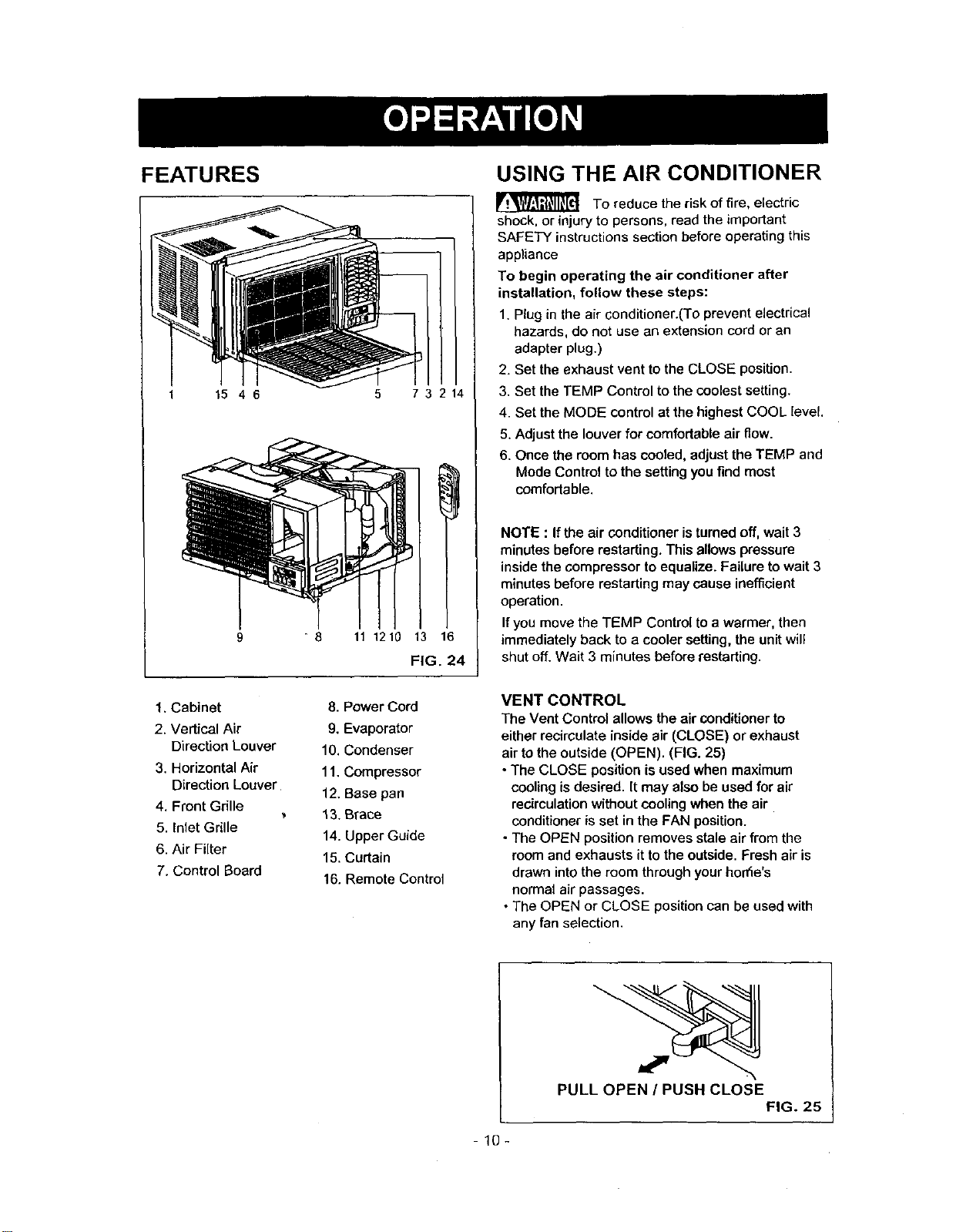
FEATURES
1 15 46
8
5 73214
11 1210 13 16
FIG. 24
USING THE AIR CONDITIONER
To reduce the risk of fire, electric
shock, or injury to persons, read the important
SAFETY instructions section before operating this
appliance
To begin operating the air conditioner after
installation, follow these steps:
1. Plug in the air conditioner.(To prevent electrical
hazards, do not use an extension cord or an
adapter plug.)
2. Set the exhaust vent to the CLOSE position.
3. Set the TEMP Control to the coolest setting.
4. Set the MODE control at the highest COOL level.
5, Adjust the louver for comfortable air flow.
6. Once the room has cooled, adjust the TEMP and
Mode Control to the setting you find most
comfortable.
NOTE : If the air conditioner is turned off, wait 3
minutes before restarting. This allows pressure
inside the compressor to equalize. Failure to wait 3
minutes before restarting may cause inefficient
operation.
If you move the TEMP Control to a warmer, then
immediately back to a cooler setting, the unit will
shut off. Wait 3 minutes before restarting.
1. Cabinet
2. Vertical Air
Direction Louver
3. Horizontal Air
Direction Louver
4. Front Grille
5. Inlet Grille
6. Air Filter
7. Control Board
8. Power Cord
9. Evaporator
10. Condenser
11. Compressor
12. Base pan
13. Brace
14. Upper Guide
15. Curtain
16. Remote Control
VENT CONTROL
The Vent Control allows the air conditioner to
either recirculate inside air (CLOSE) or exhaust
air to the outside (OPEN). (FIG. 25)
• The CLOSE position is used when maximum
cooling is desired. [t may also be used for air
recirculation without cooling when the air
conditioner is set in the FAN position.
- The OPEN position removes stale air from the
room and exhausts it to the outside. Fresh air is
drawn into the room through your hon'ie's
normal air passages.
• The OPEN or CLOSE position can be used with
any fan selection.
PULL OPEN / PUSH CLOSE
FIG. 25
10-
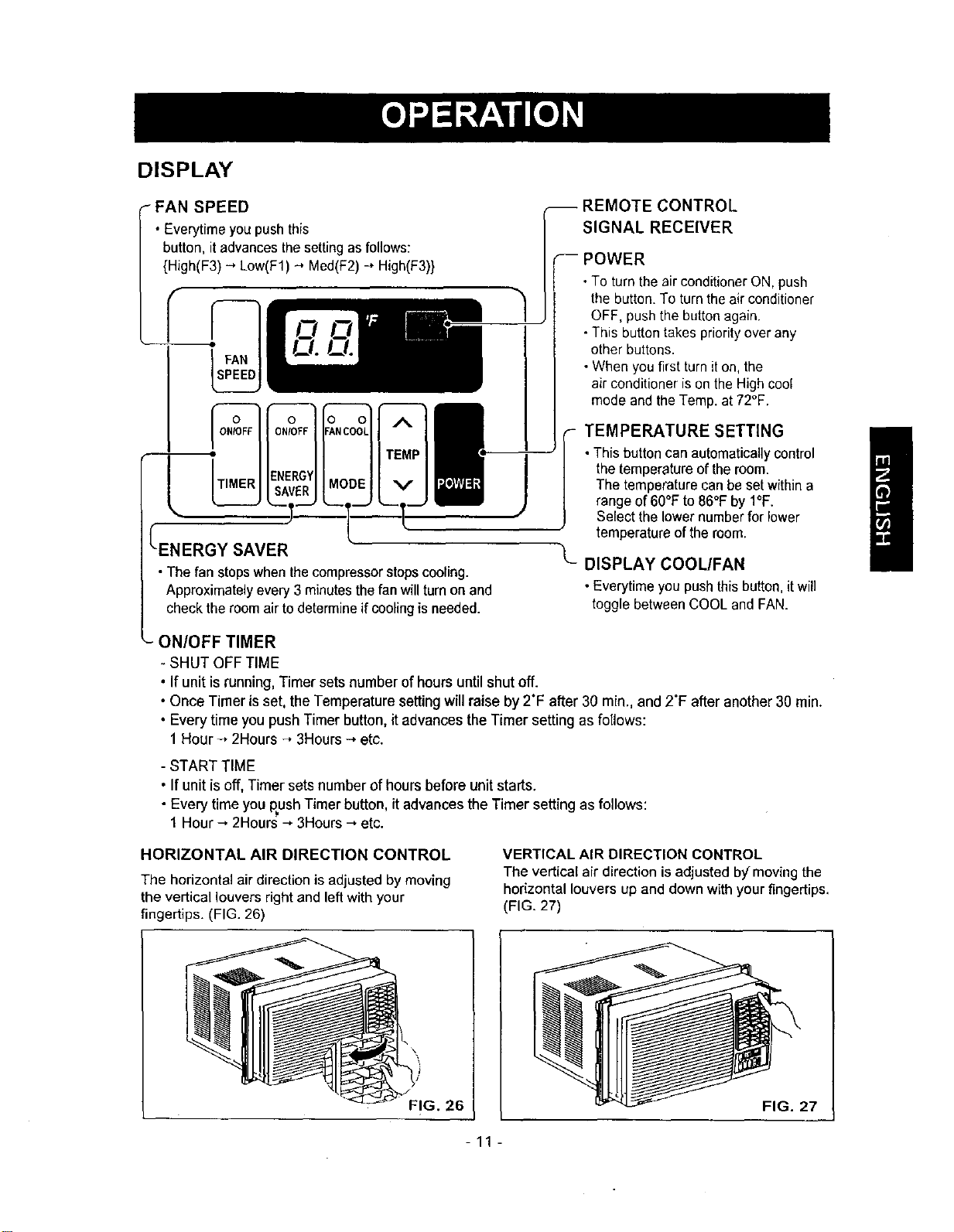
DISPLAY
FAN SPEED
• Everytime youpushthis
button, itadvancesthesettingas follows:
{High(F3) --*Low(F1) -_ Med(F2)-" High(F3)}
SAVER
•The fan stopswhenthecompressorstopscooling.
Approximately every 3 minutesthefan willturn on and
checkthe roomair to determineif coolingis needed.
J
REMOTE CONTROL
SIGNAL RECEIVER
POWER
•To turn the air conditionerON, push
the button.To turn theair conditioner
OFF, pushthe button again.
•This buttontakes priorityover any
other buttons.
•When you first turnit on,the
air conditioner is onthe Highcoo(
mode and the Temp.at 72°F.
i TEMPERATURE SETTING
•Thisbuttoncanautomaticallycontrol
the temperatureoftheroom.
The temperaturecanbe setwithina
range of6O°Fto 86°Fby I°F.
Select thelowernumberfor lower
temperatureof the room.
DISPLAY COOL/FAN
•Everytime you pushthis button, itwill
toggle betweenCOOL and FAN.
_- ON/OFF TIMER
- SHUT OFF TIME
• If unitisrunning, Timersetsnumber ofhours untilshutoff.
•Once Timer is set,the Temperature setting willraise by 2"F after 30 rain., and 2"F after another 30 rain.
• Every time you push Timer button, it advances the Timer setting as follows:
1 Hour -, 2Hours -, 3Hours ---,etc.
- START TIME
, If unit is off, Timer sets number of hours before unit starts.
• Every time you push Timer button, itadvances the Timer setting as follows:
1 Hour --,2Hours --,3Hours--,etc.
HORIZONTAL AIR DIRECTION CONTROL
The horizontal air direction is adjusted by moving
the vertical louvers right and left with your
fingertips. (FIG. 26)
VERTICAL AIR DIRECTION CONTROL
The vertical air direction is adjusted b)f moving the
horizontal Louvers up and down with your _ngertips,
(FIG. 27)
26
FIG. 27
-11-
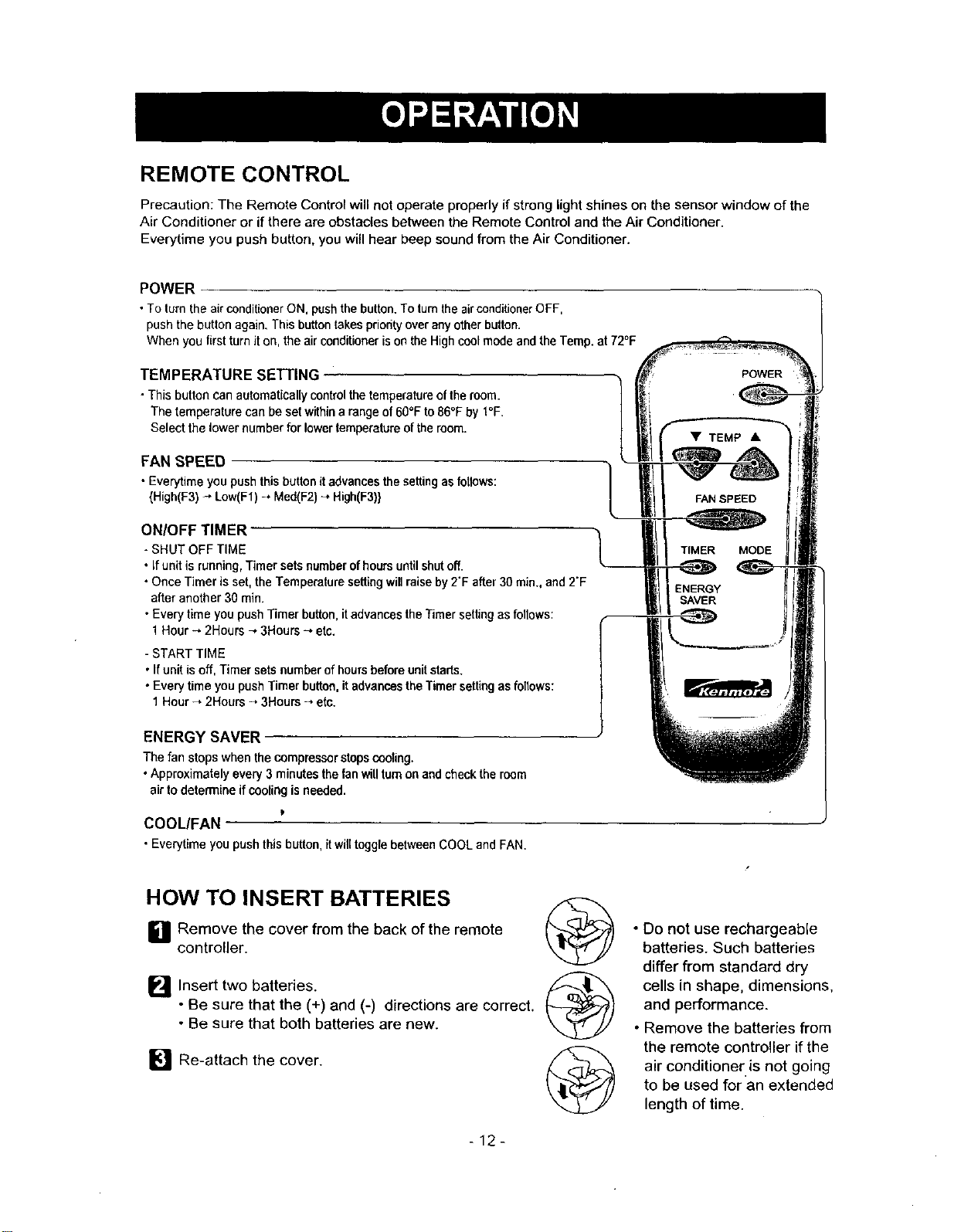
REMOTE CONTROL
Precaution; The Remote Control will not operate properly if strong light shines on the sensor window of the
Air Conditioner or if there are obstacles between the Remote Control and the Air Conditioner.
Everytime you push button, you will hear beep sound from the Air Conditioner.
POWER
• To turn the air conditioner ON, push the button. To turn the air conditioner OFF,
push the button again, This button takes priodty over any other button.
When you first turn it on, the air conditioner is on the High cool mode and the Temp. at 72°F
TEMPERATURE SETTING
• Thisbutton can automatical[ycontrolthe temperatureoftheroom.
The temperaturecan be setwithina range of60°F to86°F by t°F.
Select the lower numberfor lower temperatureofthe room.
FAN SPEED
• Everytimeyou pushthisbuttonitadvancesthesettingasfotlows:
{High(F3)_ Low(F1)_ Meal(F2)-, High(F3)} FAN SPEED
ON/OFF TIMER
- SHUT OFF TIME
• Ifunit is running,Timer setsnumberofhours untilshut off.
• OnceTimerisset,the Temperaturesettingwillraiseby2"F after30min., and2"F
after another30 min.
• Everytime you pushTimerbutton,itadvancestheTimersettingasfollows:
1Hour-, 2Hours_,3Hours_,etc.
- START TIME
• Ifunit isoff, Timersets numberofhoursbeforeunitstarts.
• Everytime you pushTimerbutton,it advancestheTimersettingasfollows:
1Hour -_2Hours _,3Hours -, etc.
TIMER
ENERGY
SAVER
ENERGY SAVER
The fan stops whenthe compressorstopscooling.
• Approximately every 3minutes thefanwill turnonandcheckthe room
air todetermine if cooling is needed.
P
COOL/FAN
• Everytimeyou push this button,it will togglebetween COOLand FAN.
MODE
HOW TO INSERT BATTERIES
L1 Remove the cover from the back of the remote
controller.
Insert two batteries.
• Be sure that the (+) and (-) directions are correct.
• Be sure that both batteries are new.
[] Re-attach the cover.
®
•Do not use rechargeable
batteries. Such batteries
differ from standard dry
cells in shape, dimensions,
and performance.
• Remove the batteries from
the remote controller if the
air conditioner.is not going
to be used for an extended
length of time.
-12-
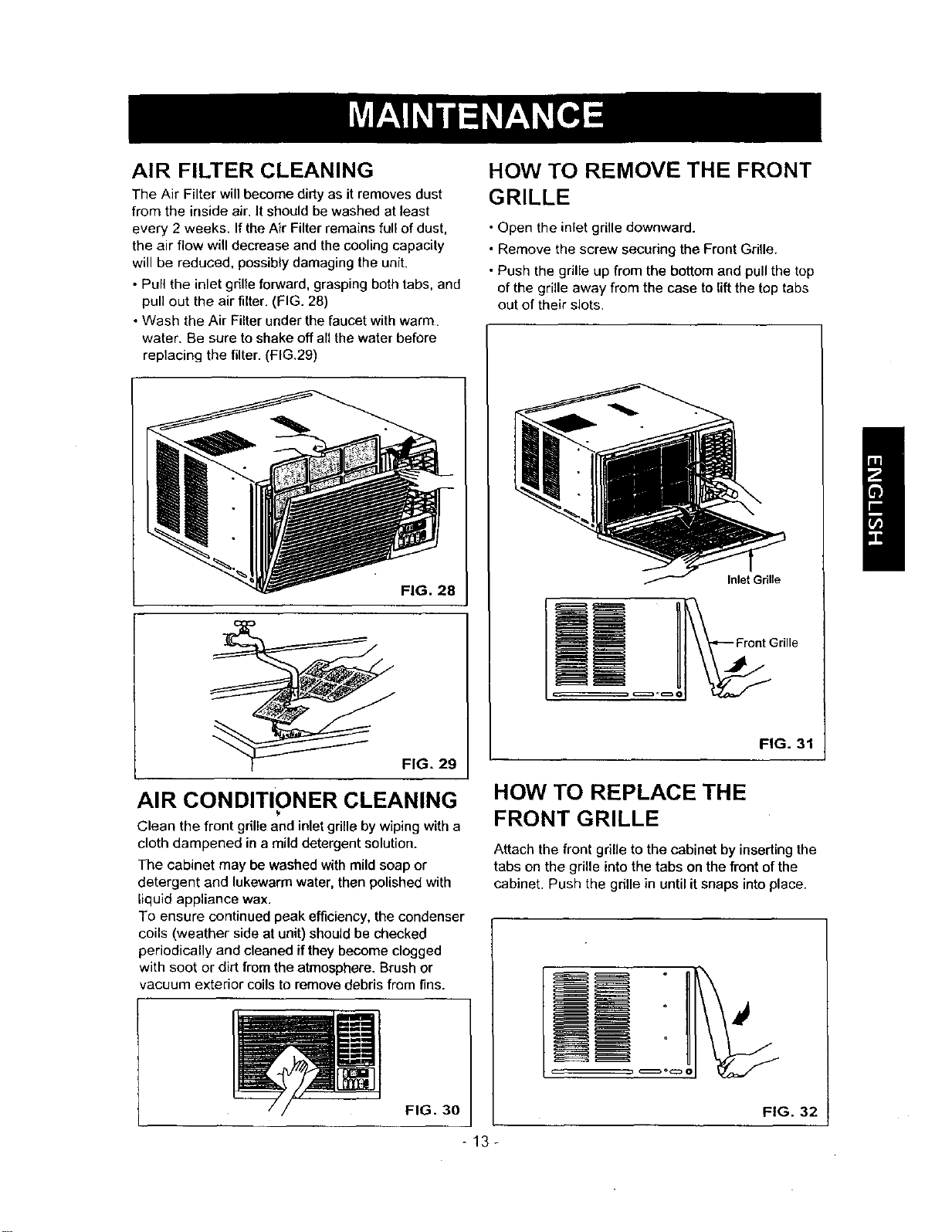
AIR FILTER CLEANING
The Air Filter will become dirty as it removes dust
from the inside air, It should be washed at least
every 2 weeks. If the Air Filter remains furl of dust.
the air flow will decrease and the cooling capacity
will be reduced, possibly damaging the unit.
• Pull the inlet grille forward, grasping both tabs, and
pull out the air filter. (FIG. 28)
• Wash the Air Filter under the faucet with warm.
water. Be sure to shake off an the water before
replacing the filter. (FIG.29)
FIG. 28
FIG. 29
AIR CONDITIONER CLEANING
Clean the front grille and inlet grille by wiping with a
cloth dampened in a mild detergent solution.
The cabinet may be washed with mild soap or
detergent and lukewarm water, then polished with
liquid appliance wax.
To ensure continued peak efficiency, the condenser
coils (weather side at unit) should be checked
periodically and cleaned if they become clogged
with soot or dirt from the atmosphere. Brush or
vacuum exterior coils to remove debris from fins.
FIG. 30
HOW TO REMOVE THE FRONT
GRILLE
• Open the inlet grille downward.
• Remove the screw secudng the Front Grille.
• Push the grille up from the bottom and pull the top
of the grille away from the case to lift the top tabs
out of their slots.
Inlet Grille
FIG. 31
HOW TO REPLACE THE
FRONT GRILLE
Attach the front grille to the cabinet by inserting the
tabs on the grille into the tabs on the front of the
cabinet. Push the grille in until itsnaps into place.
FIG. 32
-13-
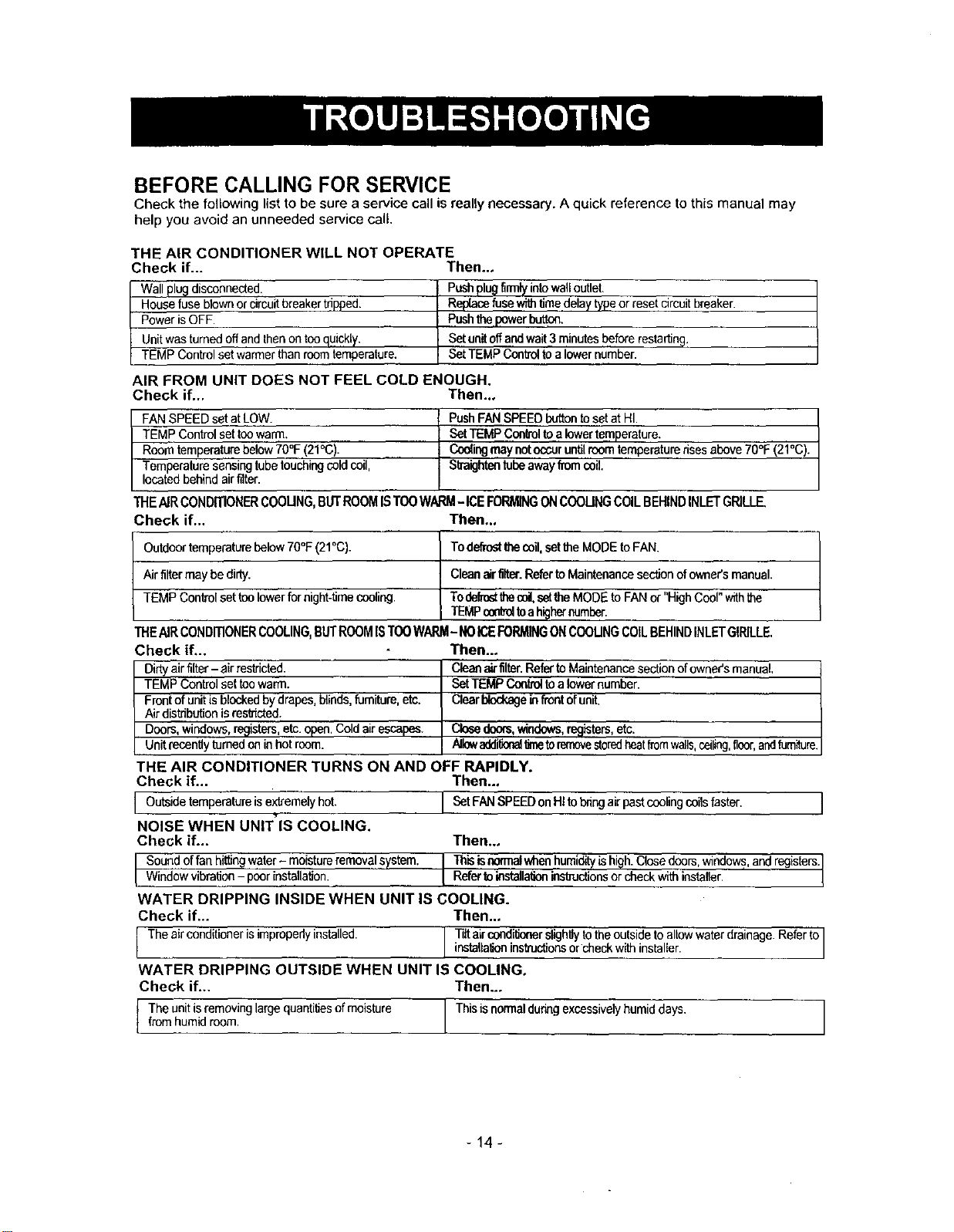
BEFORE CALLING FOR SERVICE
Check the following list to be sure a service call is really necessary. A quick reference to this manual may
help you avoid an unneeded service call.
THE AIR CONDITIONER WILL NOT OPERATE
Check if... Then...
Wallplugdisconnected.
Housefuse btownorcircuitbreakertripped.
PowerisOFF.
Unitwasturnedoffandthenon tooquickly.
TEMP Controlsetwarmerthanroomtemperature.
Pushplugfirmlyintowalloutlet.
Replacefusewithfimedelaytypeor resetcircuitbreaker.
Pushthepowerbutton.
Setunitoffandwait3minutesbeforerestarting.
SetTEMPControltoalowernumber.
AIR FROM UNIT DOES NOT FEEL COLD ENOUGH.
Check if... Then..,
FANSPEEDsetatLOW.
TEMPControlsettoowarm.
Roomtemperaturebelow70°F(21°C).
Temperaturesensingtubetouchingcoldcoil,
locatedbehindairfilter.
PushFANSPEEDbuttontosetatHI.
SetTEMPControltoa lowertemperature.
Coo(ingmay nutoccuruntilroomtemperaturerisesabove70°F(21°C).
Straightentubeawayfromcoil.
THEAIRCONDITIONERCOOUNG,BUTROOMISTOOWARM-ICEFORMINGONCOOUNGCOILBEHINDINLETGRILLE,
Check if... Then..,
Outdoortemperaturebelow70°F(21°C). Todefrostthecoil,settheMODEtoFAN.
Air filtermay bedirty. Cleanairfilter.RefertoMaintenancesectionofowner'smanual.
TEMP Controlsettoolowerfornight-timecooling. Todefrostthecoil,setthe MODEtoFANor "HighCool"withthe
TEMPoo_ toahighernumber.
THEAIR CONDITIONERCOOLING,BUTROOMISTOOWARM- NOICEFORMINGONCOOUNGCOILBEHINDINLETGIRILLE.
Check if...
Dirtyairfilter- air restricted.
TEMP Controlsettoowarm.
Frontofunitisblockedbydrapes,blinds,furniture,etc.
Air distributionisresthcted.
Doors,windows,registers,etc.open.Cold airescapes.
Unitrecentlyturnedon inhot room.
Then..,
Cleanairfilter.RefertoMaintenancesectionofowner'smanual,
SetTEMPCoutroltoa lowernumber.
Clearblockageinfrontofunit.
Closedoors,windows,registurs,etc.
Allowadd'_nal_ toremovestcredheatfromwalls,ceiling,floor,andfumilore.
THE AIR CONDITIONER TURNS ON AND OFF RAPIDLY.
Check if... Then...
I Outsidetemperatureisextremelyhot. I SetFANSPEEDonHItobrthgairpastceolingcoilsfaster.
NOISE WHEN UNIT'IS COOLING.
Check if...
I Soundoffanhittlogwater- moistureremovalsystem.
Windowvibration- poorinstallafion.
I
Then..,
I Thisisearmalwheahumid_ishigh.Closedoors,windows,and registers.
Refertolostalla_onins_ctions or checkwth nstaller.
WATER DRIPPING INSIDE WHEN UNIT IS COOLING.
Check if... Then..,
I Theairooedtlionerisimproperlyinstalled. I Tilta,rcondtllonerslightlytotheoutsideto allowwaterdrainage.Referto
instaUattoninstructonsorcheckw th nsta er.
WATER DRIPPING OUTSIDE WHEN UNIT IS COOLING,
Check if... Then...
I The unit is removing large quantilies ofmoisture This is normal duringexcessively humiddays.fromhumidroom.
-14-
-15-
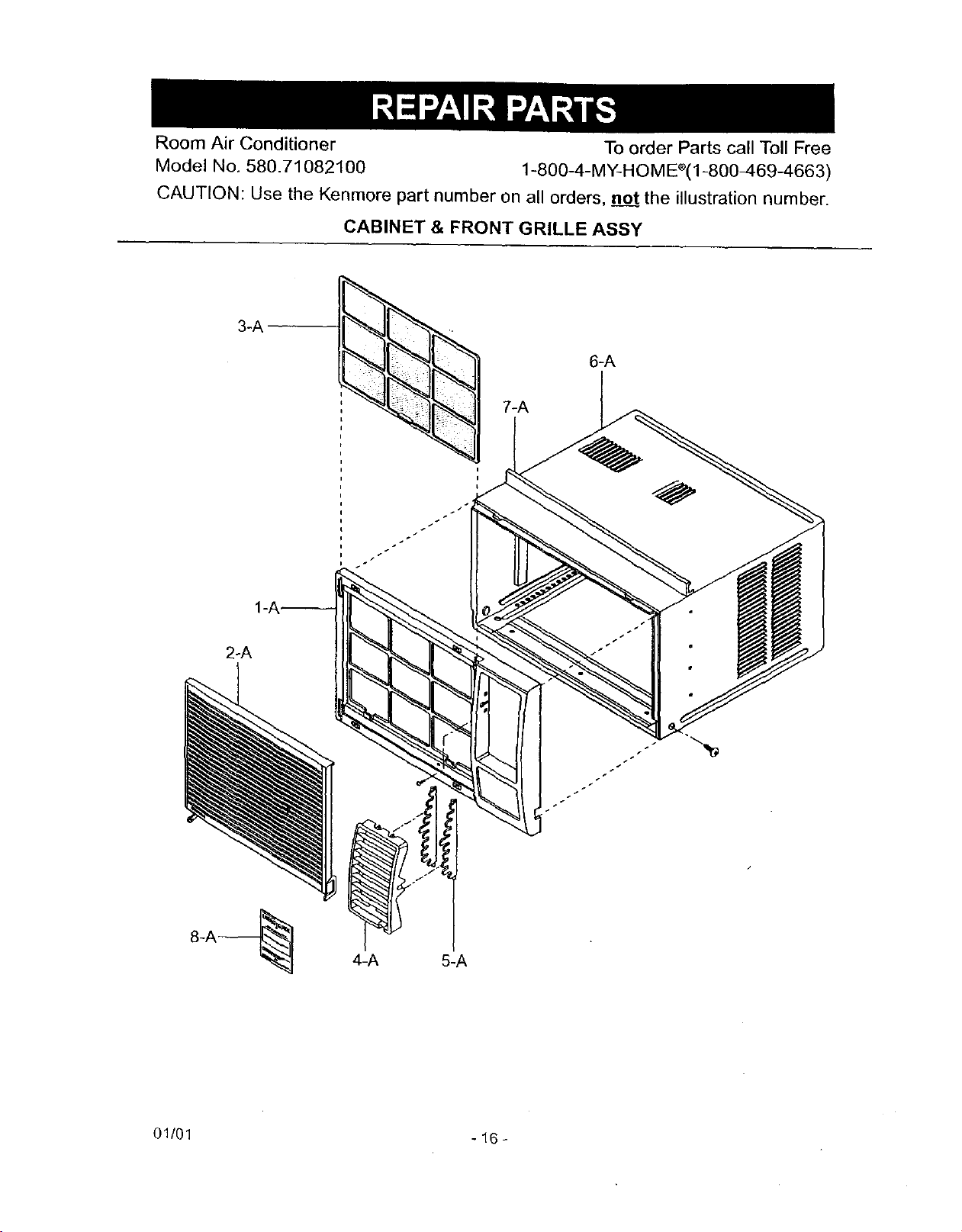
Room Air Conditioner To order Parts call Toll Free
Model No, 580.71082100 1-800-4-MY-HOME'(I-800-469-4663)
CAUTION: Use the Kenmore part number on all orders, no___ttthe illustration number.
CABINET & FRONT GRILLE ASSY
3-A
2-A
4-A 5-A
01/01 - 16 -
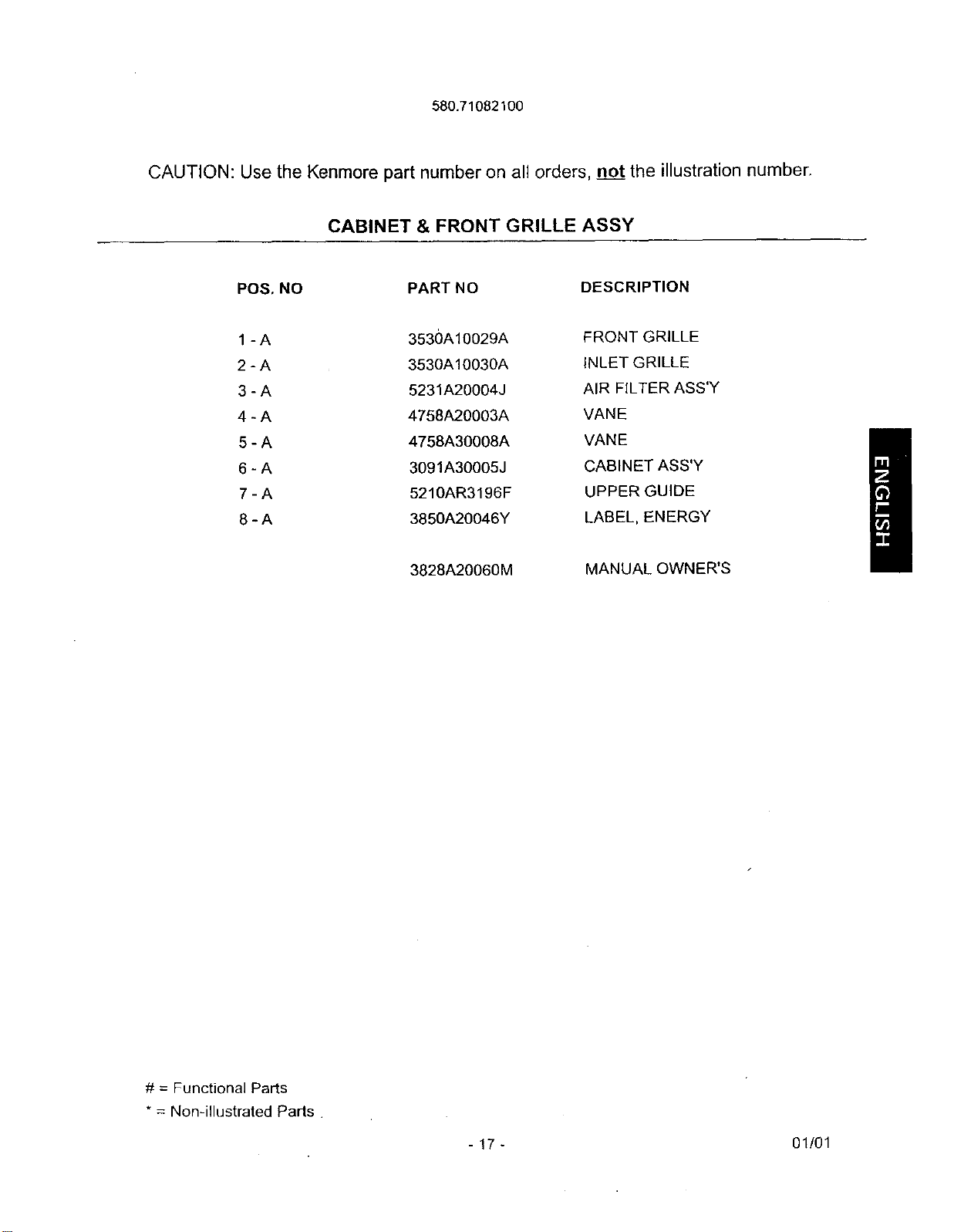
580.71082100
CAUTION: Use the Kenmore part number on all orders, no__ttthe illustration number.
CABINET & FRONT GRILLE ASSY
POS, NO PART NO DESCRIPTION
1 - A 3530A10029A FRONT GRILLE
2 - A 3530A10030A INLET GRILLE
3 - A 5231A20004J AIR FILTER ASS'Y
4 - A 4758A20003A VANE
5 - A 4758A30008A VANE
6 - A 3091A30005J CABINET ASS'Y
7 - A 5210AR3196F UPPER GUIDE
8 - A 3850A20046Y LABEL, ENERGY
3828A20060M
MANUAL OWNER'S
# = Functional Parts
* = Non-illustrated Parts
-17- 01/01
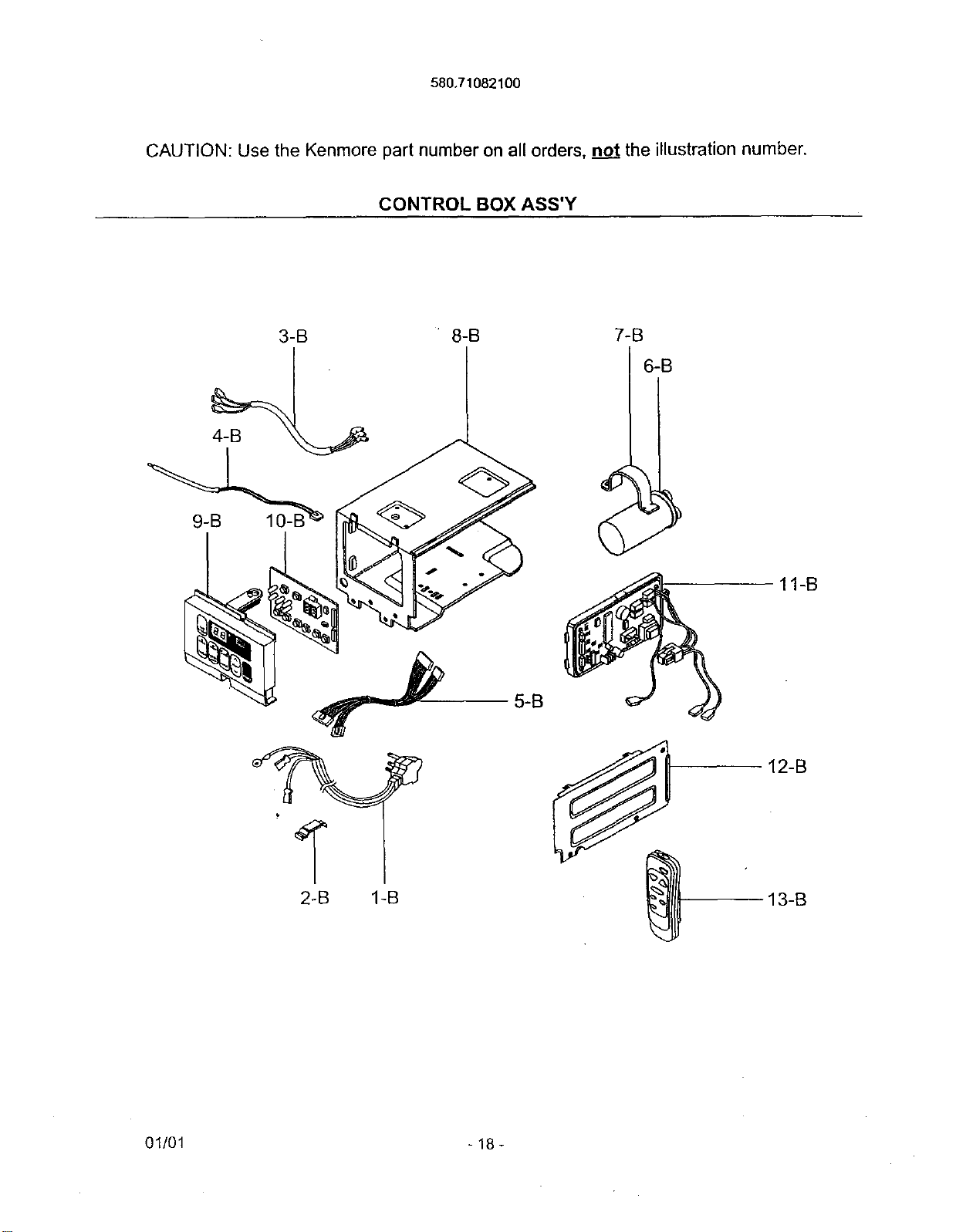
580,71082100
CAUTION: Use the Kenmore part number on all orders, not the illustration number.
CONTROL BOX ASS'Y
11-B
I
2-B 1-B
12-B
13-B
01/01 - 18 -
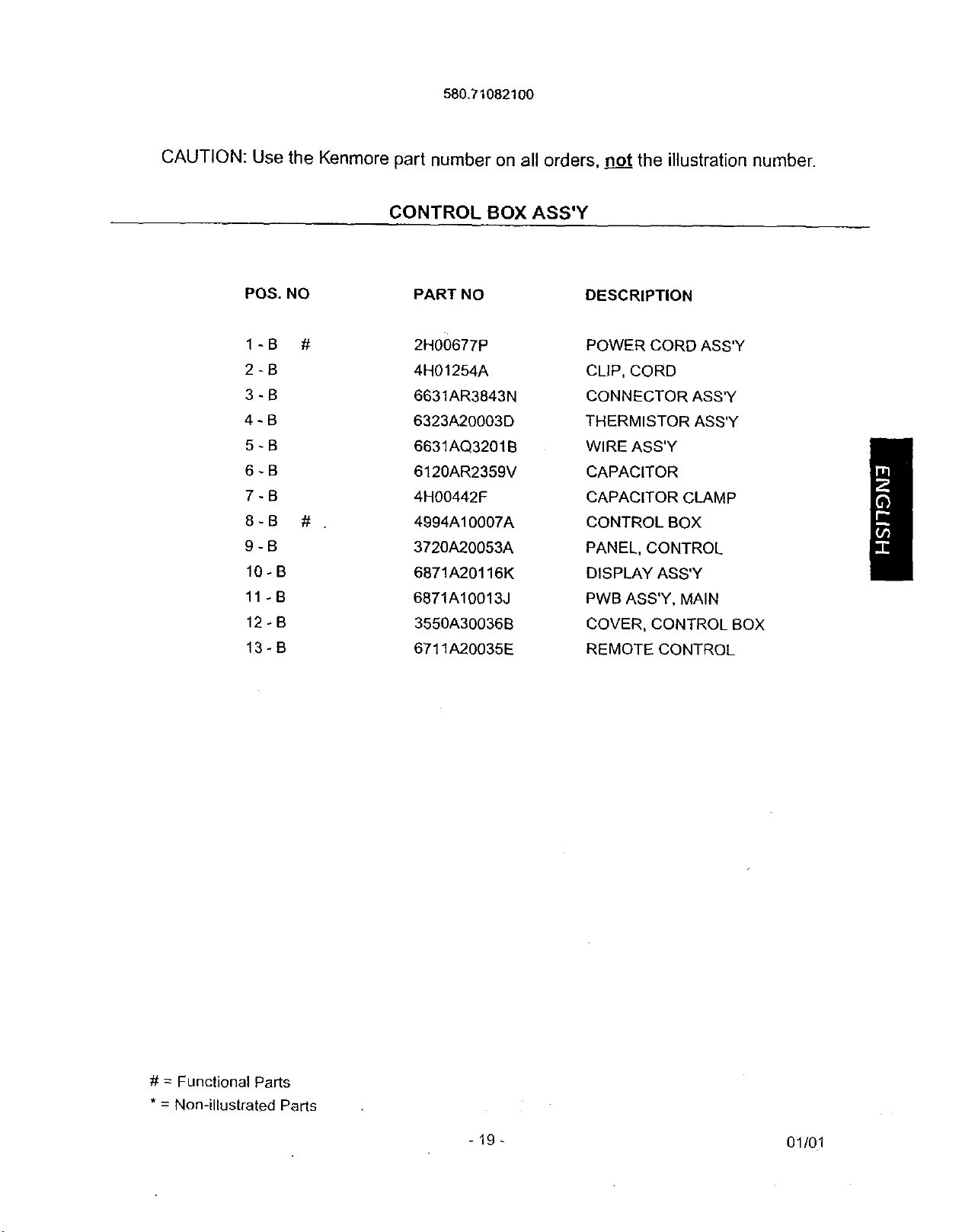
580.71082100
CAUTION: Use the Kenmore part number on all orders, _ the illustration number.
CONTROL BOX ASS'Y
POS. NO PART NO
1-B # 2H00677P
2-B 4H01254A
3-B 6631AR3843N
4-B 6323A20003D
5-B 6631AQ3201B
6-B 6120AR2359V
7-B 4H00442F
8-B # . 4994A10007A
9- B 3720A20053A
10-B 6871A20116K
11-B 6871A10013J
12°B 3550A30036B
13-B 6711A20035E
DESCRIPTION
POWER CORD ASS'Y
CLIP, CORD
CONNECTOR ASS'Y
THERMISTOR ASS'Y
WIRE ASS'Y
CAPACITOR
CAPACITOR CLAMP
CONTROL BOX
PANEL, CONTROL
DISPLAY ASS'Y
PWB ASS'Y, MAIN
COVER, CONTROL BO)
REMOTE CONTROL
# = Functional Parts
* = Non-illustrated Parts
- 19 - 01/01
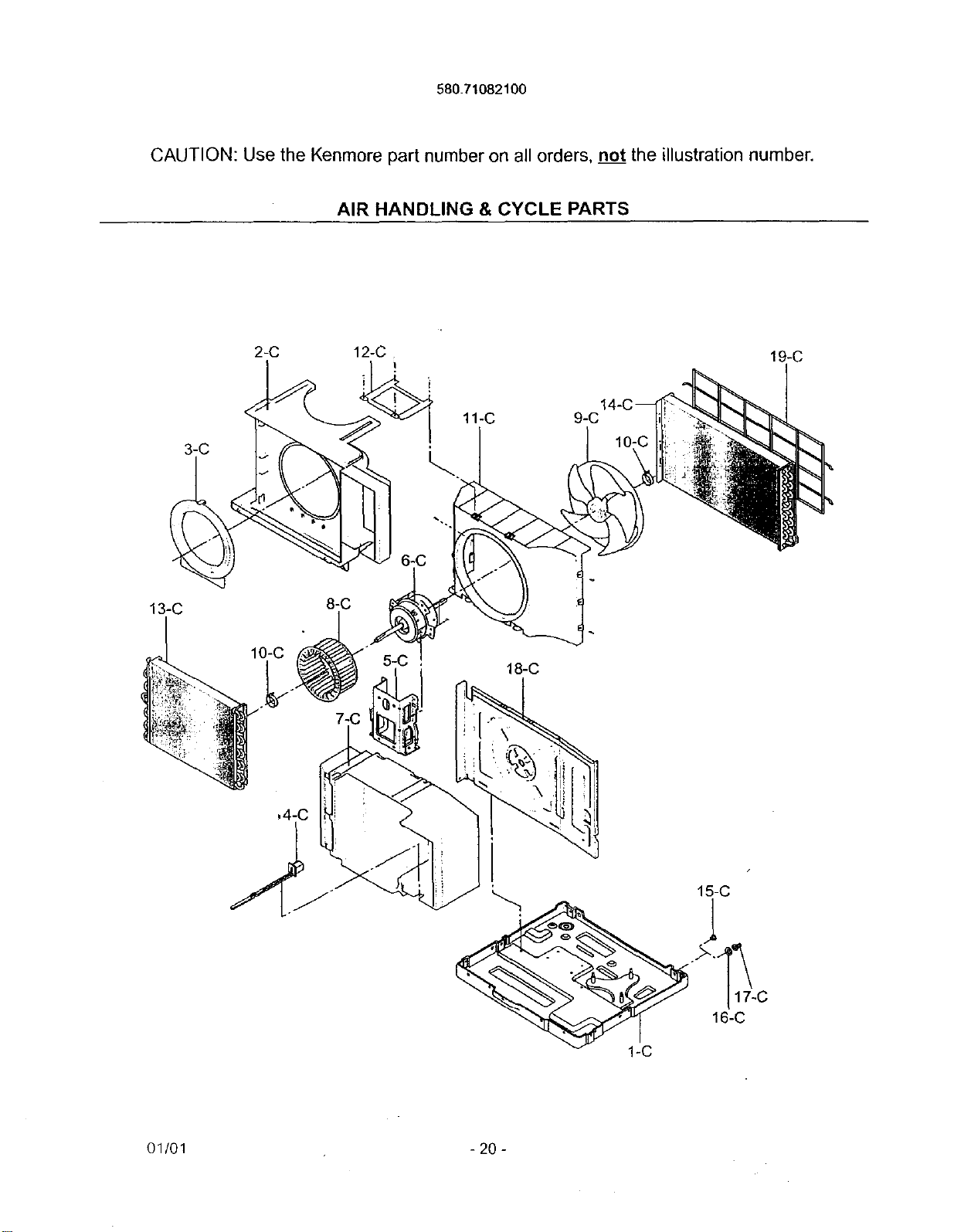
580.71082100
CAUTION: Use the Kenmore part number on all orders, not the illustration number.
AIR HANDLING & CYCLE PARTS
2-C 12-C
I
19-C
11-C
13-C 8-C
10-C
18-C
15-C
1
16-C
01/01 - 20 -
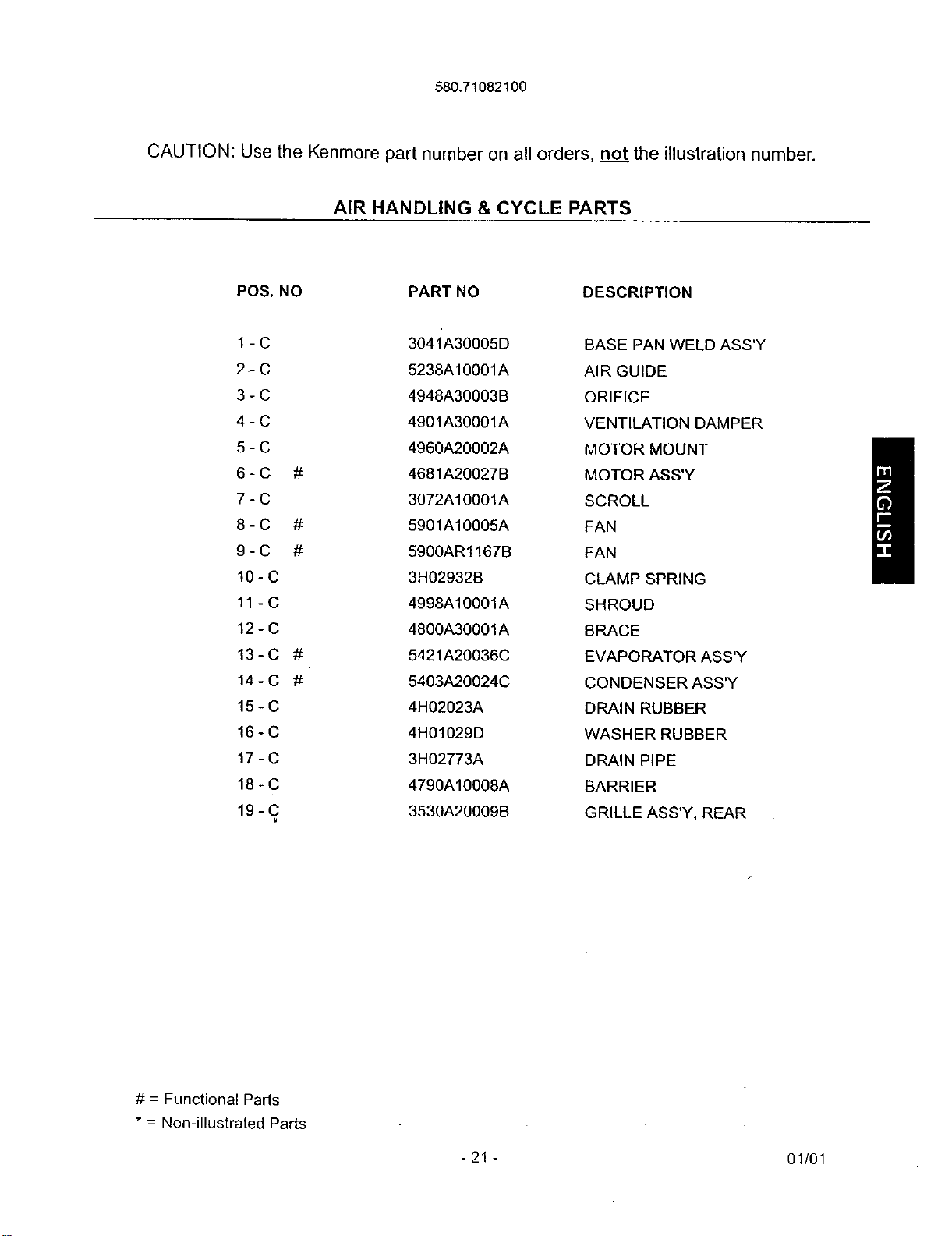
580.71082100
CAUTION: Use the Kenmore part number on all orders, not the illustration number.
AIR HANDLING & CYCLE PARTS
POS. NO PART NO DESCRIPTION
1 - C 3041'A30005D BASE PAN WELD ASS'Y
2- C 5238A10001A AIR GUIDE
3 - C 4948A30003B ORIFICE
4 - C 4901A30001A VENTILATION DAMPER
5 - C 4960A20002A MOTOR MOUNT
6 - C # 4681A20027B MOTOR ASS'Y
7 - C 3072A10001A SCROLL
8 - C # 5901A10005A FAN
9 - C # 5900AR1167B FAN
10 - C 3H02932B CLAMP SPRING
11 - C 4998A10001A SHROUD
12 - C 4800A30001A BRACE
13-C # 5421A20036C EVAPORATOR ASS'Y
14-C # 5403A20024C CONDENSER ASS'Y
15 - C 4H02023A DRAIN RUBBER
16 - C 4H01029D WASHER RUBBER
17 - C 3H02773A DRAIN PIPE
18 - C 4790A10008A BARRIER
19 - C 3530A20009B GRILLE ASS'Y, REAR
/
# = Functional Parts
* = Non-illustrated Parts
-21- 01/01
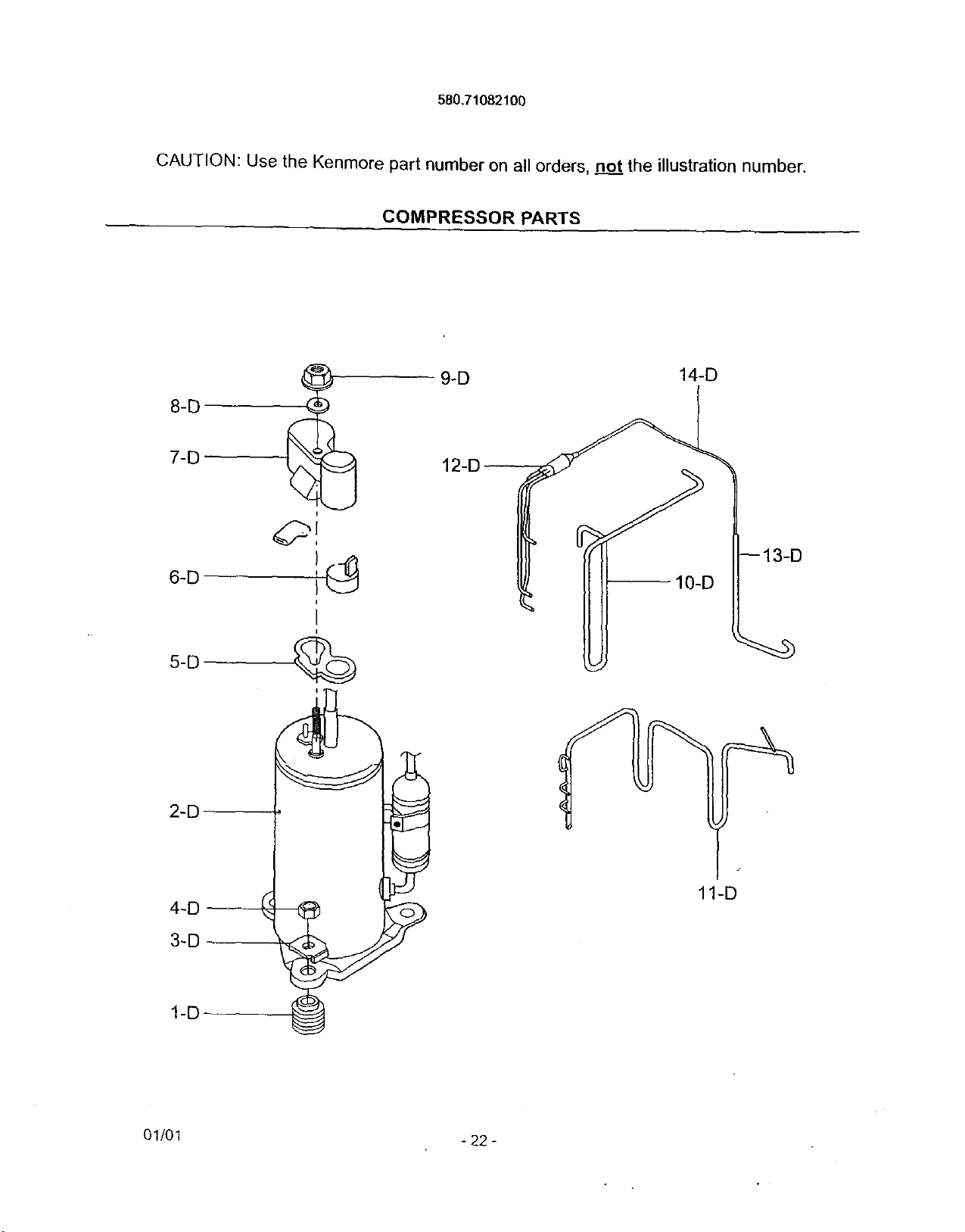
580,71082100
CAUTION: Use the Kenmore part number on all orders, not the illustration number.
COMPRESSOR PARTS
4
8-D
7_o
6-D
5-D
2-D
4-D
3-D
1-D
i
9-D 14-D
10-D
11-D
01/01 - 22 -
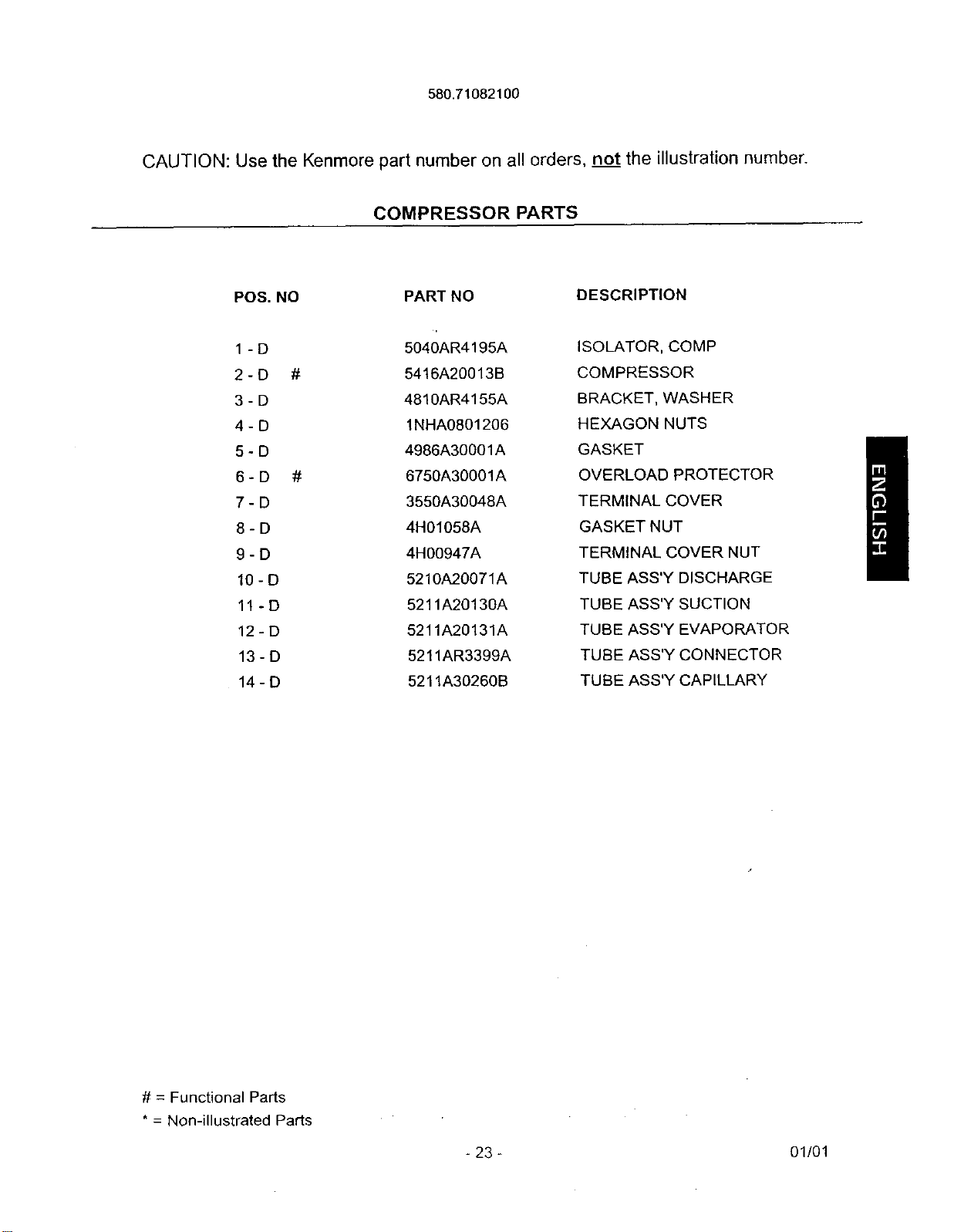
580.71082100
CAUTION: Use the Kenmore part number on all orders, not the illustration number.
COMPRESSOR PARTS
POS. NO PART NO
DESCRIPTION
1-D 5040AR4195A
2-D # 5416A20013B
3-D 4810AR4155A
4-D 1NHA0801206
5-D 4986A30001A
6-D # 6750A30001A
7-D 3550A30048A
8-D 4H01058A
9-D 4H00947A
10- D 5210A20071A
11- D 5211A20130A
12-D 5211A20131A
13-D 5211AR3399A
14-D 5211A30260B
ISOLATOR, COMP
COMPRESSOR
BRACKET, WASHER
HEXAGON NUTS
GASKET
OVERLOAD PROTECTOR
TERMINAL COVER
GASKET NUT
TERMINAL COVER NUT
TUBE ASS'Y DISCHARGE
TUBE ASS'Y SUCTION
TUBE ASS'Y EVAPORATOR
TUBE ASS'Y CONNECTOR
TUBE ASS'Y CAPILLARY
# = Functional Parts
* = Non-illustrated Parts
-23- 01/01
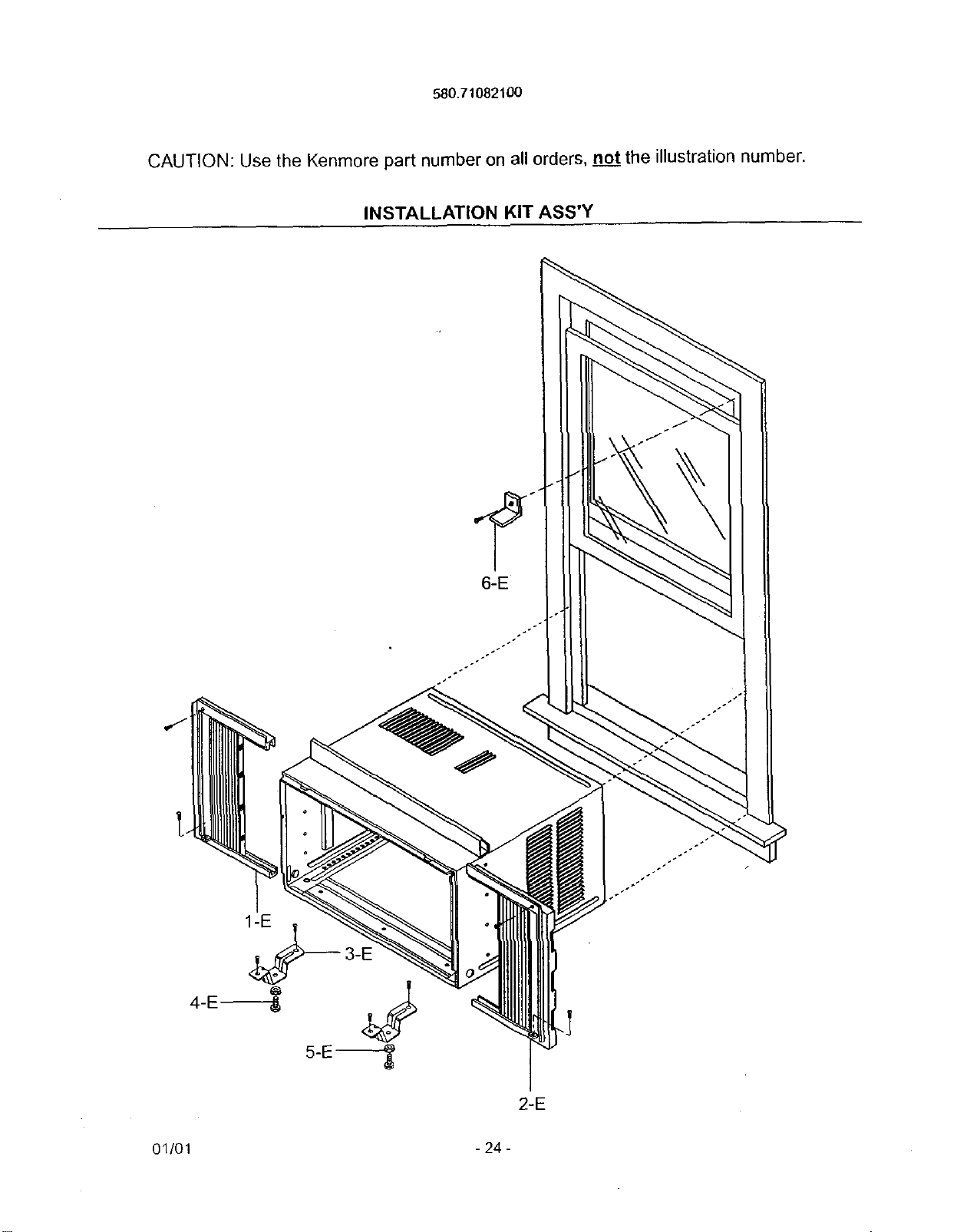
580.71082100
CAUTION: Use the Kenmore part number on all orders, no.._jtthe illustration number.
INSTALLATION KIT ASS'Y
,J
2-E
01/01 - 24 -
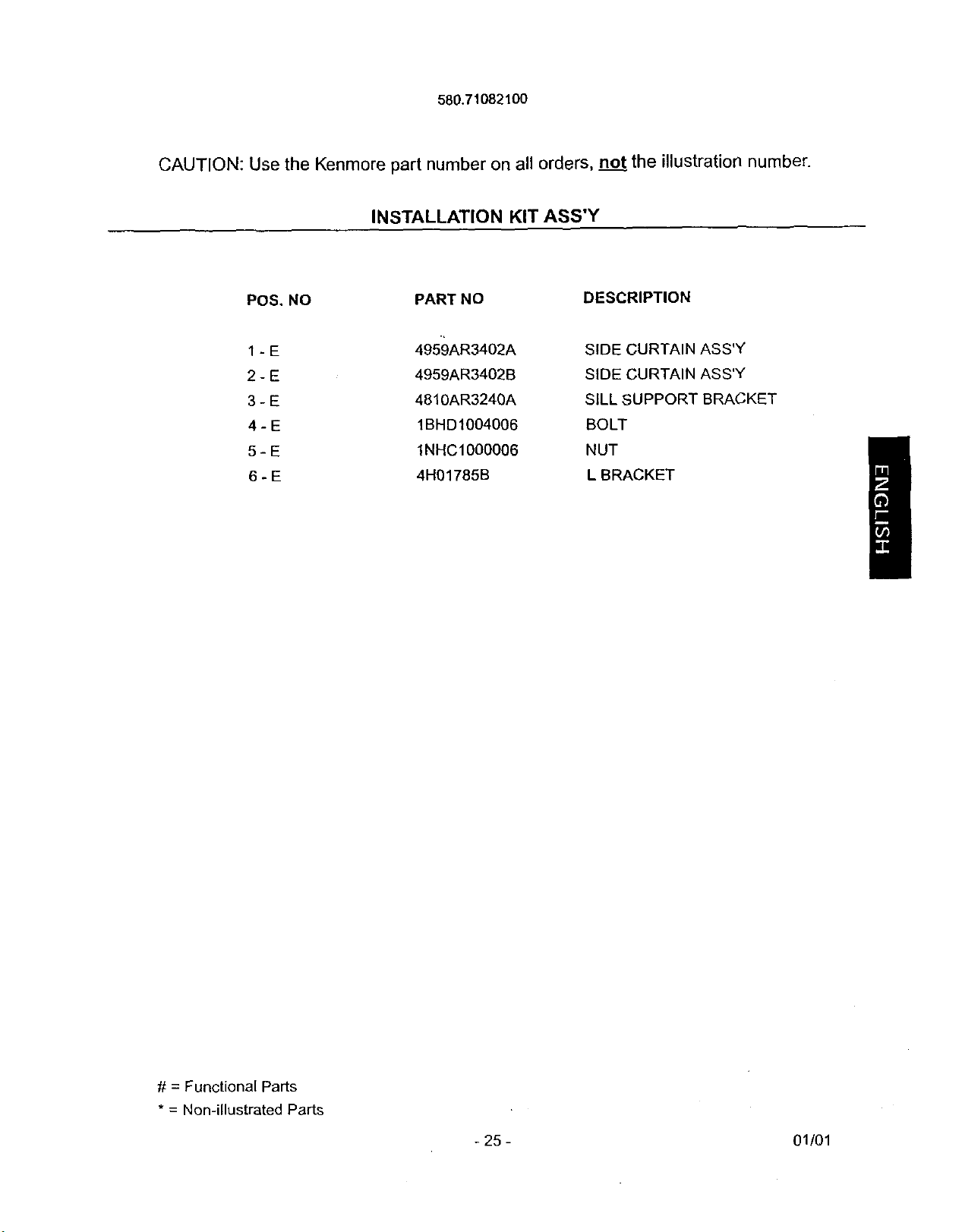
580.7108210O
CAUTION: Use the Kenmore part number on all orders, not the illustration number.
INSTALLATION KIT ASS'Y
POS. NO PART NO DESCRIPTION
1 - E 4959AR3402A SIDE CURTAIN ASS'Y
2 - E 4959AR3402B StDE CURTAIN ASS'Y
3 - E 4810AR3240A SILL SUPPORT BRACKET
4 - E 1BHD1004006 BOLT
5 - E 1NHC1000006 NUT
6 - E 4H01785B L BRACKET
# = Functional Parts
* = Non-illustrated Parts
-25- 01/01