OWNER’S MANUAL AND INSTALLATION
CONTENTS
SAFETY WARNING SIGNS
..............................................................2
OpERATING INSTRUCTIONS
........................................................4
SETTING UP THE rEfrIGEraTor .......................................................4
MaJor fEaTUrES ....................................................................................4
CoNTroL PaNEL .......................................................................................5
DIGITaL PaNEL ..........................................................................................6
DEMo MoDE ..............................................................................................6
TEMPEraTUrE CoNTroL .....................................................................7
ICE and CoLD WaTEr DISPENSEr ........................................................7
SHELVES and BINS ....................................................................................8
fooD SToraGE GUIDE ..........................................................................9
CoolSelect zone
TM
Drawer GUIDE ...........................................................11
rEMoVING THE frEEzEr aCCESSorIES .........................................13
rEMoVING THE rEfrIGEraTor aCCESSorIES .............................13
CLEaNING THE aCCESSorIES ............................................................14
CHaNGING THE INTErIor LIGHT ........................................................15
WaTEr fILTEr .........................................................................................16
DoorS ......................................................................................................16
INSTAllATION INSTRUCTIONS
...............................................17
INSTaLLaTIoN of THE rEfrIGEraTor ............................................17
rEMoVING THE rEfrIGEraTor DoorS ..........................................18
rEaTTaCHING THE rEfrIGEraTor DoorS ....................................21
LEVELING THE rEfrIGEraTor ...........................................................24
aDJUSTING THE CLEaraNCE BETWEEN THE DoorS ...................25
CHECkING THE WaTEr DISPENSEr LINE .........................................26
INSTaLLaTIoN of THE WaTEr DISPENSEr LINE .............................27
TroUBLESHooTING ..............................................................................30
CONSUMER SUppORT
...................................................................31
WarraNTY ..............................................................................................31
Write the model and serial number here:
Model #
Serial #
find these numbers on a label of the
refrigerator’s cabinet on the left hand-side wall.
Da99-01506B rEV(0.0)
register your product at www.samsung.com/global/register
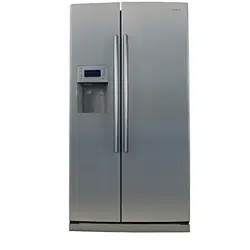
SIDE BY SIDE
REFRIGERATOR
RS275** RS277**
SAFETY WARNING SIGNS
2
To prevent injury to users or other persons, please follow the safety warning signs. After reading
this owner’s manual, please keep it in a safe place for reference.
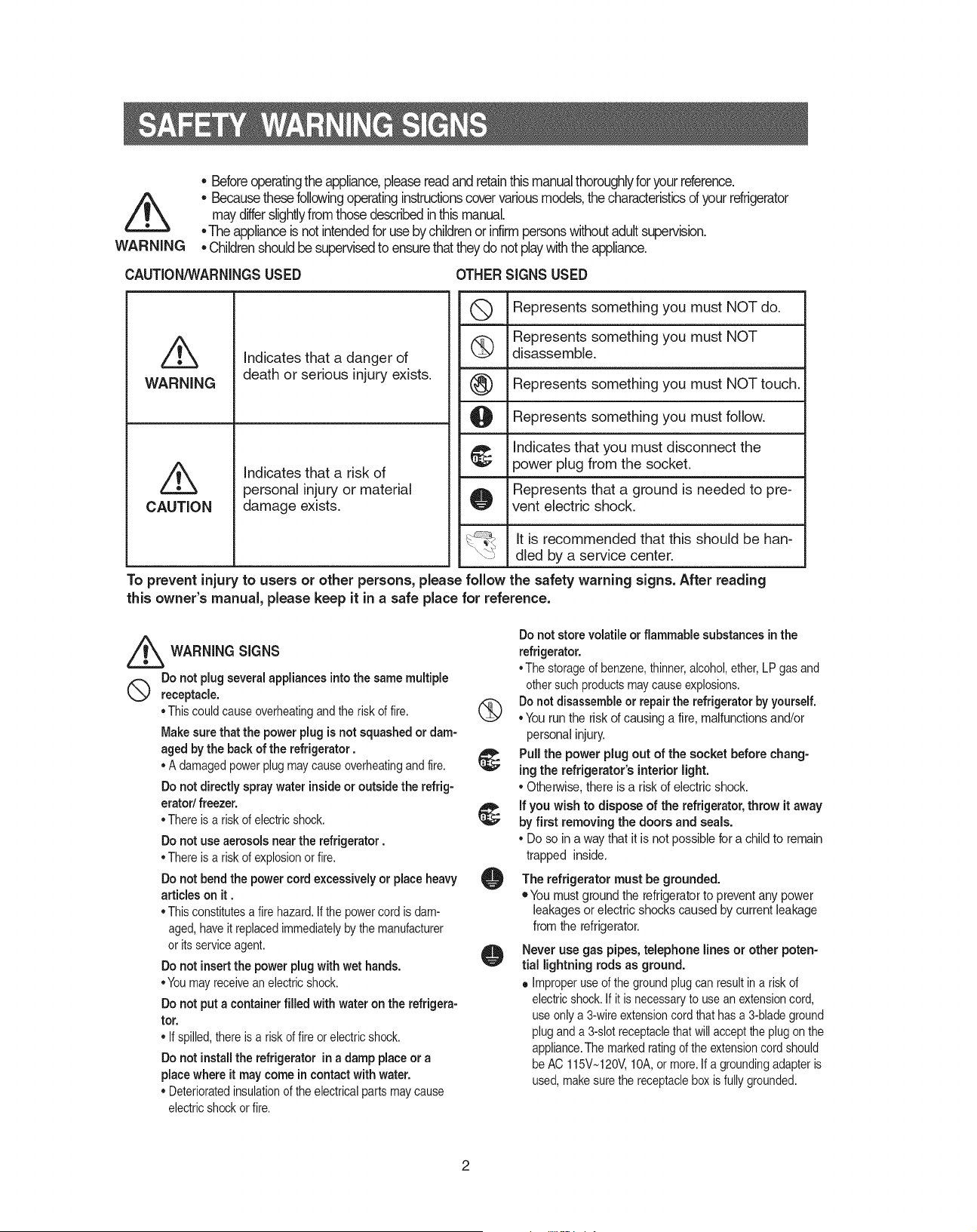
• Before operating the appliance, please read and retain this manual thoroughly for your reference.
• Because these following operating instructions cover various models, the characteristics of your
refrigerator may differ slightly from those described in this manual.
• The appliance is not intended for use by children or infirm persons without adult supervision.
• Children should be supervised to ensure that they do not play with the appliance.
WARNING
Do not plug several appliances into the same multiple
receptacle.
• This could cause overheating and the risk of fire.
Make sure that the power plug is not squashed or
damaged by the back of the refrigerator
.
• a damaged power plug may cause overheating and fire.
Do not directly spray water inside or outside the refrig-
erator
/
freezer.
• There is a risk of electric shock.
Do not use aerosols near the refrigerator
.
• There is a risk of explosion or fire.
Do not bend the power cord excessively or place
heavy articles on it .
• This constitutes a fire hazard. If the power cord is dam-
aged, have it replaced immediately by the manufacturer
or its service agent.
Do not insert the power plug with wet hands.
• You may receive an electric shock.
Do not put a container filled with water on the refrig-
erator.
• If spilled, there is a risk of fire or electric shock.
Do not install the refrigerator
in a damp place or a
place where it may come in contact with water.
• Deteriorated insulation of the electrical parts may cause
electric shock or fire.
Pull the power plug out of the socket before chang-
ing the refrigerator’s interior light.
• otherwise, there is a risk of electric shock.
If you wish to dispose of the
refrigerator,
throw it away
by first removing the doors and seals.
• Do so in a way that it is not possible for a child to remain
trapped inside.
Do not store volatile or flammable substances in the
refrigerator.
• The storage of benzene, thinner, alcohol, ether, LP gas and
other such products may cause explosions.
Do not disassemble or repair the
refrigerator
by yourself.
• You run the risk of causing a fire, malfunctions and/or
personal injury.
WARNING SIGNS
The refrigerator must be grounded.
•
You must ground the refrigerator to prevent any power
leakages or electric shocks caused by current leakage
from the refrigerator.
Never use gas pipes, telephone lines or other poten-
tial lightning rods as ground.
Improper use of the ground plug can result in a risk of
electric shock. If it is necessary to use an extension cord,
use only a 3-wire extension cord that has a 3-blade ground
plug and a 3-slot receptacle that will accept the plug on the
appliance. The marked rating of the extension cord should
be aC 115V~120V, 10a, or more. If a grounding adapter is
used, make sure the receptacle box is fully grounded.
•
CAUTION/WARNINGS USED OTHER SIGNS USED
Indicates that a danger of
death or serious injury exists.
Indicates that a risk of
personal injury or material
damage exists.
WARNING
CAUTION
represents something you must NoT touch.
represents something you must follow.
Indicates that you must disconnect the
power plug from the socket.
represents that a ground is needed to pre-
vent electric shock.
represents something you must NoT
disassemble.
represents something you must NoT do.
It is recommended that this should be han-
dled by a service center.
3
SAFETY WARNING SIGNS
SAFETY WARNING SIGNS
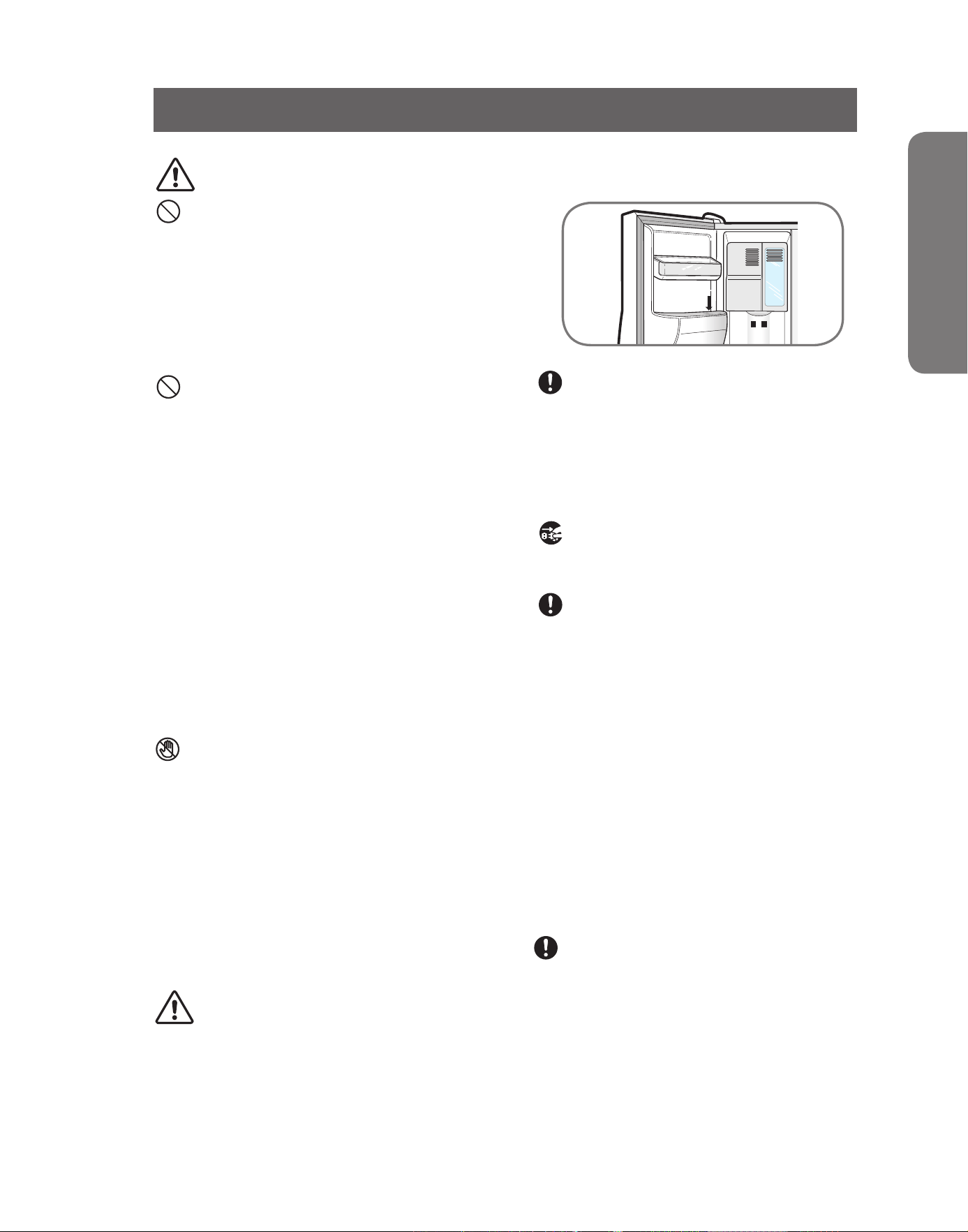
Do not disconnect the power cord by pulling on it.
• Damage to the cord may cause a short-circuit, fire
and/or electric shock.
• If the power cord is damaged, it must be replaced by
the manufacturer, a certified service agent or qualified
service personnel.
Do not store articles on the top of the appliance.
• When you open or close the door, the articles may
fall and cause personal injury and/or material dam-
age.
Do not store pharmaceutical products, scientific
materials and temperature-sensitive products in
the refrigerator.
• Products that require strict temperature controls must
not be stored in the refrigerator.
Do not let children hang on the door because a
serious injury may occur.
If you sense pharmaceutical smells or smoke, pull
out the power plug immediately and contact your
SAMSUNG Electronics service center.
Do not touch the inside walls of the freezer or
products stored in the freezer with wet hands.
• It may cause frostbite.
Do not insert your hands into the bottom area
under the appliance.
• any sharp edges may cause personal injury.
Never put fingers or other objects into the
dispenser hole and ice chute. It may cause per-
sonal injury or material damage
Be careful not to damage the door switches on the
inside walls or middle of the refrigerator.
• If they are damaged, refrigerator does not operate
well.
Do not use a wet or damp cloth when cleaning
the plug. Remove any foreign matter or dust from
the power plug pins.
• otherwise there is a risk of causing a fire.
• If the refrigerator is disconnected from the power
supply, you should wait for at least five minutes
before plugging it back in.
If the refrigerator
is not to be used for a long
period of time, pull out the power plug.
• Deterioration in the insulation may cause fire.
CAUTION SIGNS
Do not overfill the refrigerator with food.
• When you open the door, an item may fall out and cause
personal injury or material damage.
Do not put bottles or glass containers in the
freezer
.
• When the contents freeze, the glass may break and
cause personal injury.
If the wall socket is loose, do not insert the power
plug.
• There is a risk of electric shock or fire.
• The appliance is not intended for use by young chil-
dren or infirm persons without supervision.
Young children should be supervised to ensure that
they do not play with the appliance.
• Do not place the equipment directly under the sun-
light, etc.
• The appliance must be positioned so that the plug is
accessible after installation.
• If the power cord is damaged, it must be replaced
by the manufacturer, a certified service agent or a
qualified service personnel.
• If you have a long vacation planned, empty the
refrigerator and turn it off. Wipe excess mois-
ture from the inside and leave the doors open.
otherwise, odor and mold may develop.
Service warranty section
• any changes or modifications performed by a 3rd
party on a finished product is not covered under
Samsung warranty service
Safety Caution section
• Samsung does not recommend 3rd party modifica-
tion, therefore Samsung is not responsible for safety
issues that result from 3rd party modifications.
DANGER
Risk of child entrapment. Before you throw away
your old refrigerator or freezer
• Take off the doors
• Leave the shelves in places so that children may
not easily climb inside.
4
MAJOR FEATURES
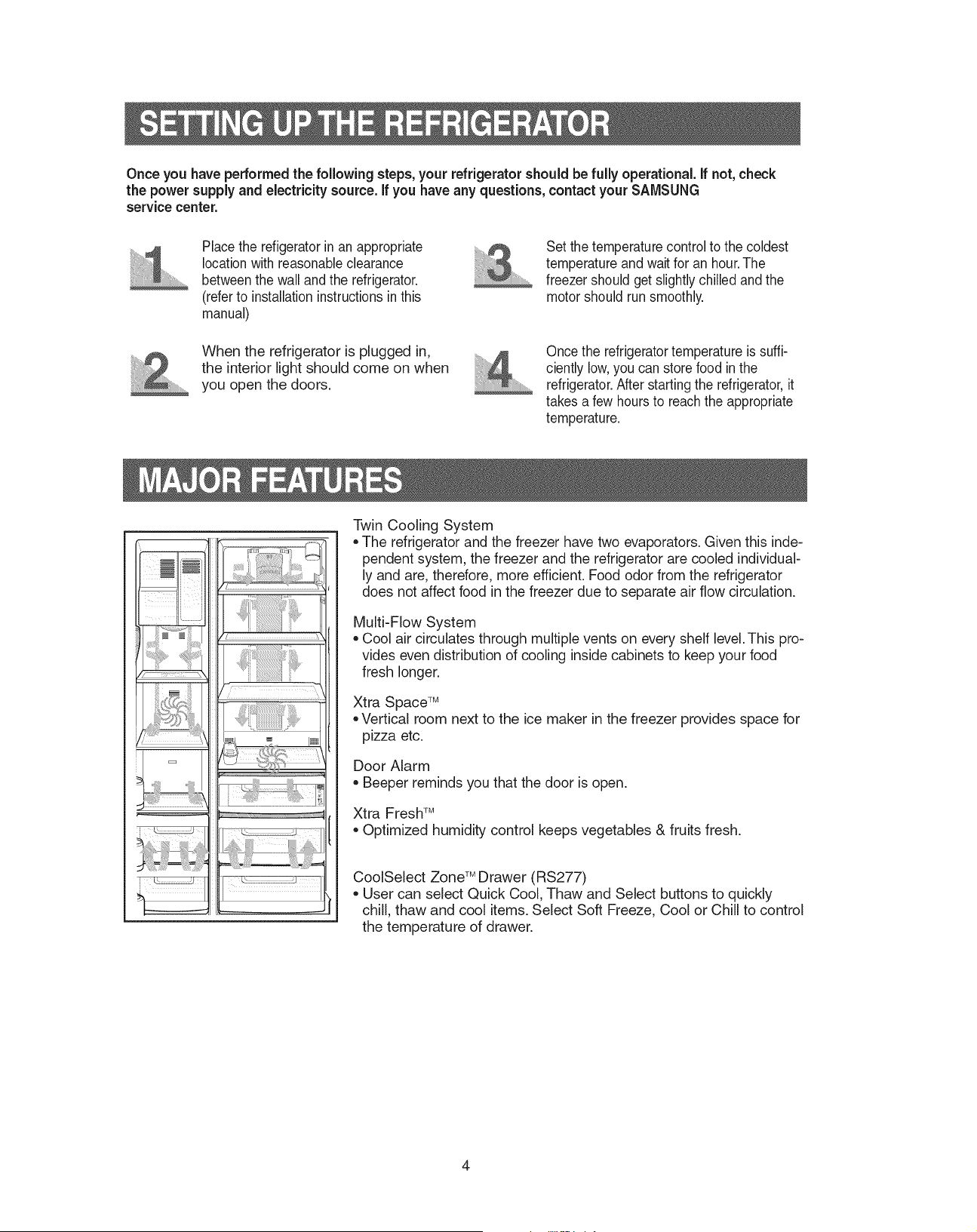
Twin Cooling System
•
The refrigerator and the freezer have two evaporators. Given this
independent system, the freezer and the refrigerator are cooled
individually and are, therefore, more efficient. food odor from the
refrigerator does not affect food in the freezer due to separate air flow
circulation.
Multi-flow System
•
Cool air circulates through multiple vents on every shelf level. This
provides even distribution of cooling inside cabinets to keep your food
fresh longer.
Xtra Space
TM
• Vertical room next to the ice maker in the freezer provides space for
pizza etc.
Door alarm
•
Beeper reminds you that the door is open.
Xtra fresh
TM
• optimized humidity control keeps vegetables & fruits fresh.
CoolSelect zone
TM
Drawer (rS277)
• User can select Quick Cool, Thaw and Select buttons to quickly
chill, thaw and cool items. Select Soft freeze, Cool or Chill to con-
trol the temperature of drawer.
SETTING UP THE REFRIGERATOR
Once you have performed the following steps, your refrigerator should be fully operational. If-not, check
the power supply and electricity source. If you have any questions, contact your SAMSUNG
service center.
Set the temperature control to the cold-
est temperature and wait for an hour. The
freezer should get slightly chilled and the
motor should run smoothly.
Place the refigerator in an appropri-
ate location with reasonable clearance
between the wall and the refrigerator.
(refer to installation instructions in this
manual)
once the refrigerator temperature is suf-
ficiently low, you can store food in the
refrigerator. after starting the refrigerator, it
takes a few hours to reach the appropriate
temperature.
When the refrigerator is plugged in,
the interior light should come on when
you open the doors.
5
OPERATING INSTRUCTIONS
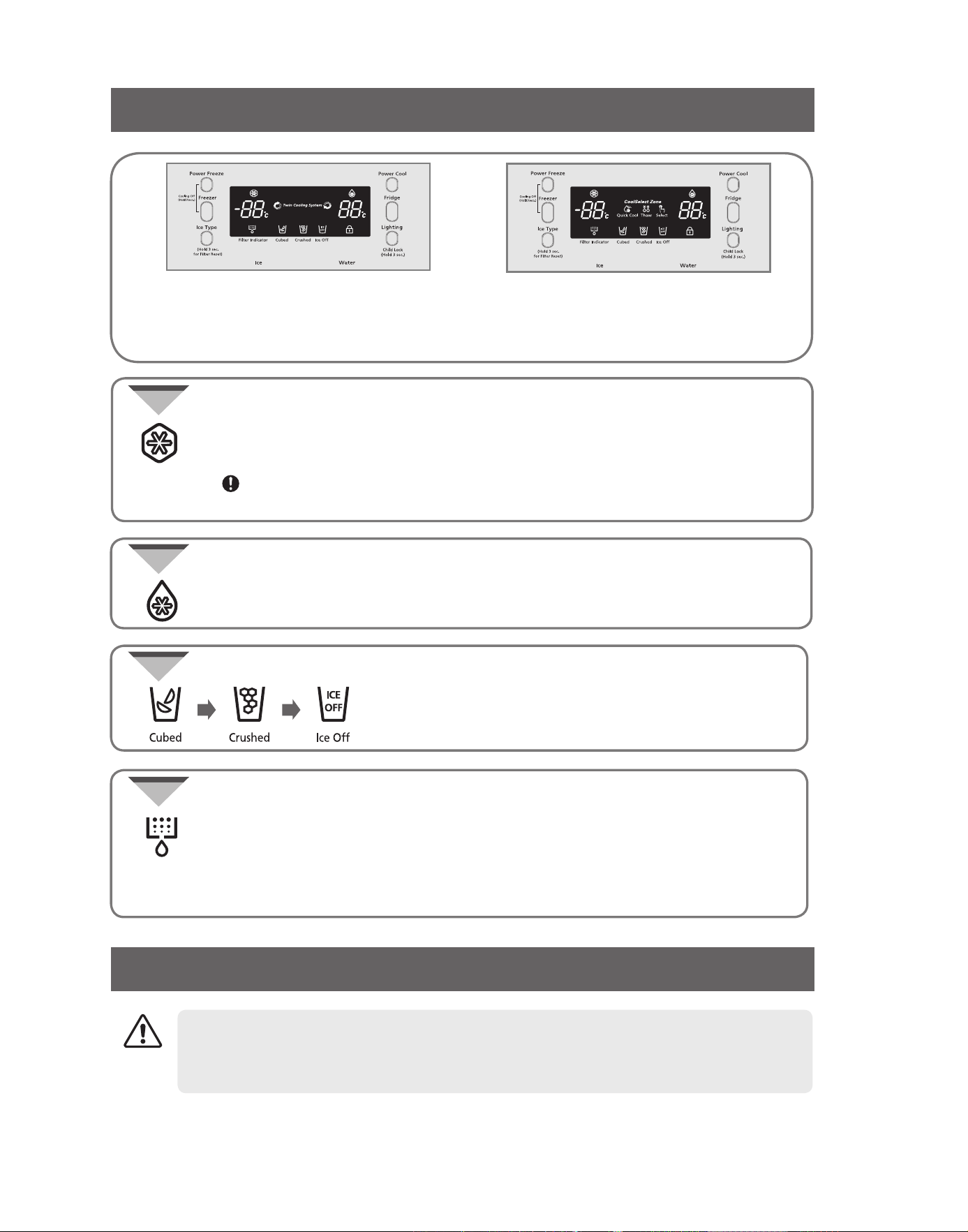
CONTROL PANEL
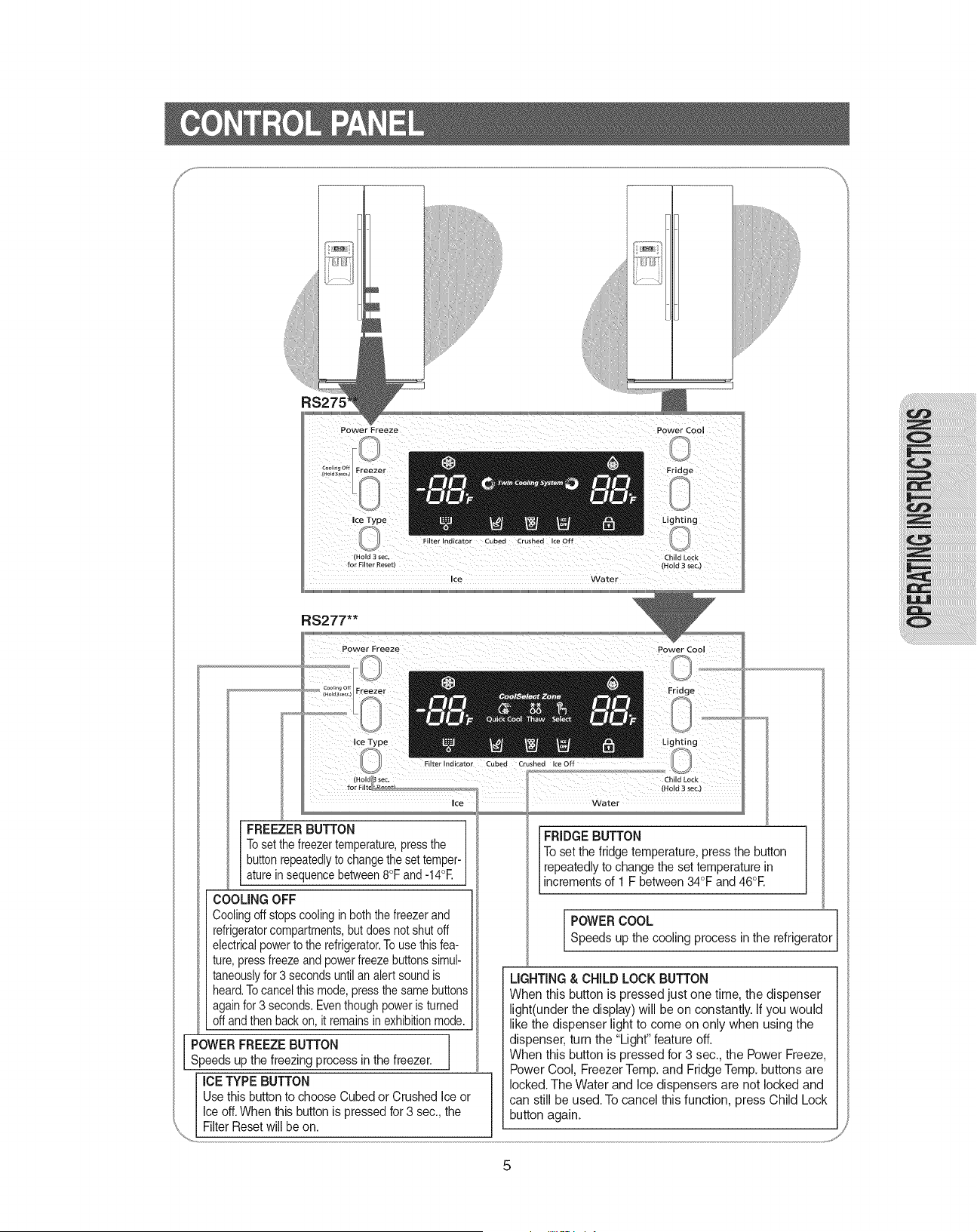
FREEZER BUTTON
To set the freezer temperature, press the
button repeatedly to change the set tempera-
ture in sequence between -14°C and -25°C.
FRIDGE BUTTON
To set the fridge temperature, press the button
repeatedly to change the set temperature in
increments of 1°C between 1°C. and 7°C.
POWER COOL
Speeds up the cooling process in the refrigerator
POWER FREEZE BUTTON
Speeds up the freezing process in the freezer.
LIGHTING & CHILD LOCK BUTTON
When this button is pressed just one time, the dispenser
light(under the display) will be on constantly. If you would
like the dispenser light to come on only when using the
dispenser, turn the “Light” feature off.
When this button is pressed for 3 sec., the Power freeze,
Power Cool, freezer Temp. and fridge Temp. buttons are
locked. The Water and Ice dispensers are not locked and
can still be used. To cancel this function, press Child Lock
button again.
COOLING OFF
Cooling off stops cooling in both the freezer and
refrigerator compartments, but does not shut off
electrical power to the refrigerator. To use this
feature, press freeze and power freeze buttons
simultaneously for 3 seconds until an alert sound is
heard. To cancel this mode, press the same buttons
again for 3 seconds. Even though power is turned
off and then back on, it remains in exhibition mode.
ICE TYPE BUTTON
Use this button to choose Cubed or Crushed Ice or
Ice off. When this button is pressed for 3 sec., the
filter reset will be on.
RS275**
RS277**
6
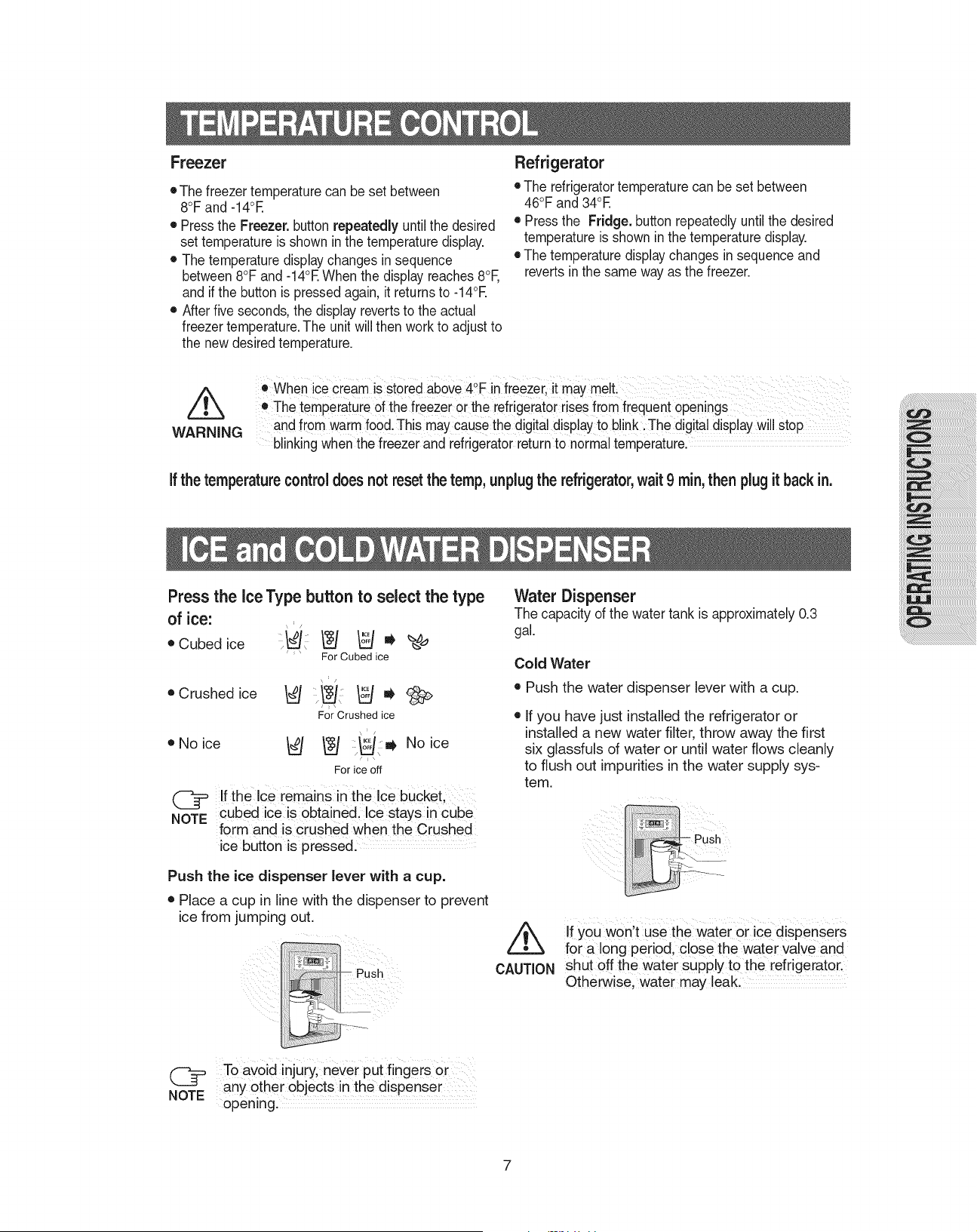
DIGITAL PANEL
DEMO MODE
•
This indicator goes on when you press the Power Cool button.
Press this button to quickly return the refrigerator to its set temperature.
•
Press this button again to cancel the Power Cool mode.
Power Cool
or
rS275**
rS277**
Freezer indicates the current freezer temperature.
Fridge indicates the current
refrigerator
temperature.
Quick Cool, Thaw, and Select show the status of the CoolSelect zone
TM
Drawer
•
This indicator turns on when you press the Power freeze button.
Press this button to quickly return the freezer to its set temperature.
•
This feature enables you to get ice faster.
•
Press the button again to cancel the Power freeze mode.
If you use this function, energy consumption will increase.
Please turn off when not using this function.
Power Freeze
•
Change filter every 6 months. If indicator is purple, the filter has 1 month left.
If indicator is red, quick replacement is strongly recommended.
•
When the water filter is replaced, reset the indicator by pressing the Ice Type
button for 3 seconds.
•
To turn this indicator off, press the Ice Type and Child Lock buttons simultane-
ously and hold for 5 seconds.
Filter Indicator
•
Press the Ice Type button to choose Cubed Ice,
Crushed Ice or Ice off to stop making ice.
•
Lit icon indicates the ice type currently chosen.
Cubed Ice, Crushed Ice and Ice Off
Canceling Exhibition Mode
In case of Exhibition Mode, It seems working but doesn't make cool air. To cancel this
mode, press Power freeze and freezer buttons at the same time for 3 seconds until a
"Ding-Dong" sounds off.
CAUTION
7
OPERATING INSTRUCTIONS
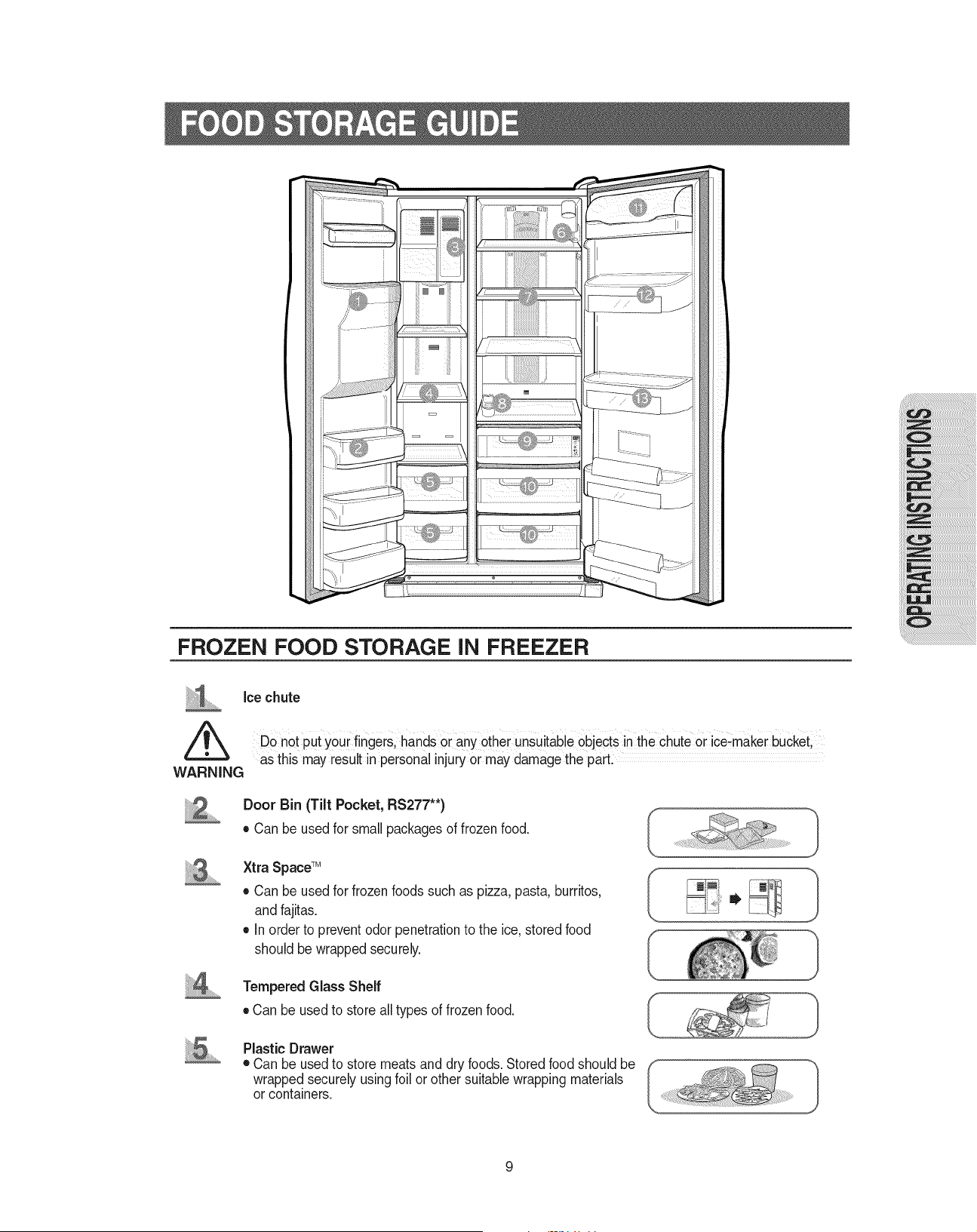
TEMPERATURE CONTROL
Freezer
•
The freezer temperature can be set between
-14°C and -25°C.
•
Press the Freezer. button repeatedly until the desired
set temperature is shown in the temperature display.
•
The temperature display changes in sequence
between -14°C and -25°C. When the display reaches
-14°C, and if the button is pressed again, it returns to
-25°C.
•
after five seconds, the display reverts to the actual
freezer temperature. The unit will then work to adjust
to the new desired temperature.
Refrigerator
•
The refrigerator
temperature can be set between
7°C and 1°C.
•
Press the Fridge. button repeatedly until the desired
temperature is shown in the temperature display.
•
The temperature display changes in sequence and
reverts in the same way as the freezer.
•
When ice cream is stored above -16°C in freezer, it may melt.
•
The temperature of the freezer or the refrigerator rises from frequent openings
and from warm food. This may cause the digital display to blink. The digital display will stop
blinking when the freezer and refrigerator return to normal temperature.
WARNING
If the temperature control does not reset the temp, unplug the refrigerator, wait 9 min, then plug it back in.
ICE and COLD WATER DISPENSER
Water Dispenser
The capacity of the water tank is approximately 1liter.
Cold Water
•
Push the water dispenser lever with a cup.
•
If you have just installed the refrigerator or
installed a new water filter, throw away the
first six glassfuls of water or until water flows
cleanly to flush out impurities in the water sup-
ply system.
If you won’t use the water or ice dispens-
ers for a long period, close the water valve
and shut off the water supply to the refrig-
erator. otherwise, water may leak.
Push
CAUTION
No ice
Push
NOTE
Press the Ice Type button to select the type
of ice:
•
Cubed ice
•
Crushed ice
•
No ice
Push the ice dispenser lever with a cup.
•
Place a cup in line with the dispenser to prevent
ice from jumping out.
To avoid injury, never put fingers or
any other objects in the dispenser
opening.
If the Ice remains in the Ice bucket,
cubed ice is obtained. Ice stays in cube
form and is crushed when the Crushed
ice button is pressed.
NOTE

8
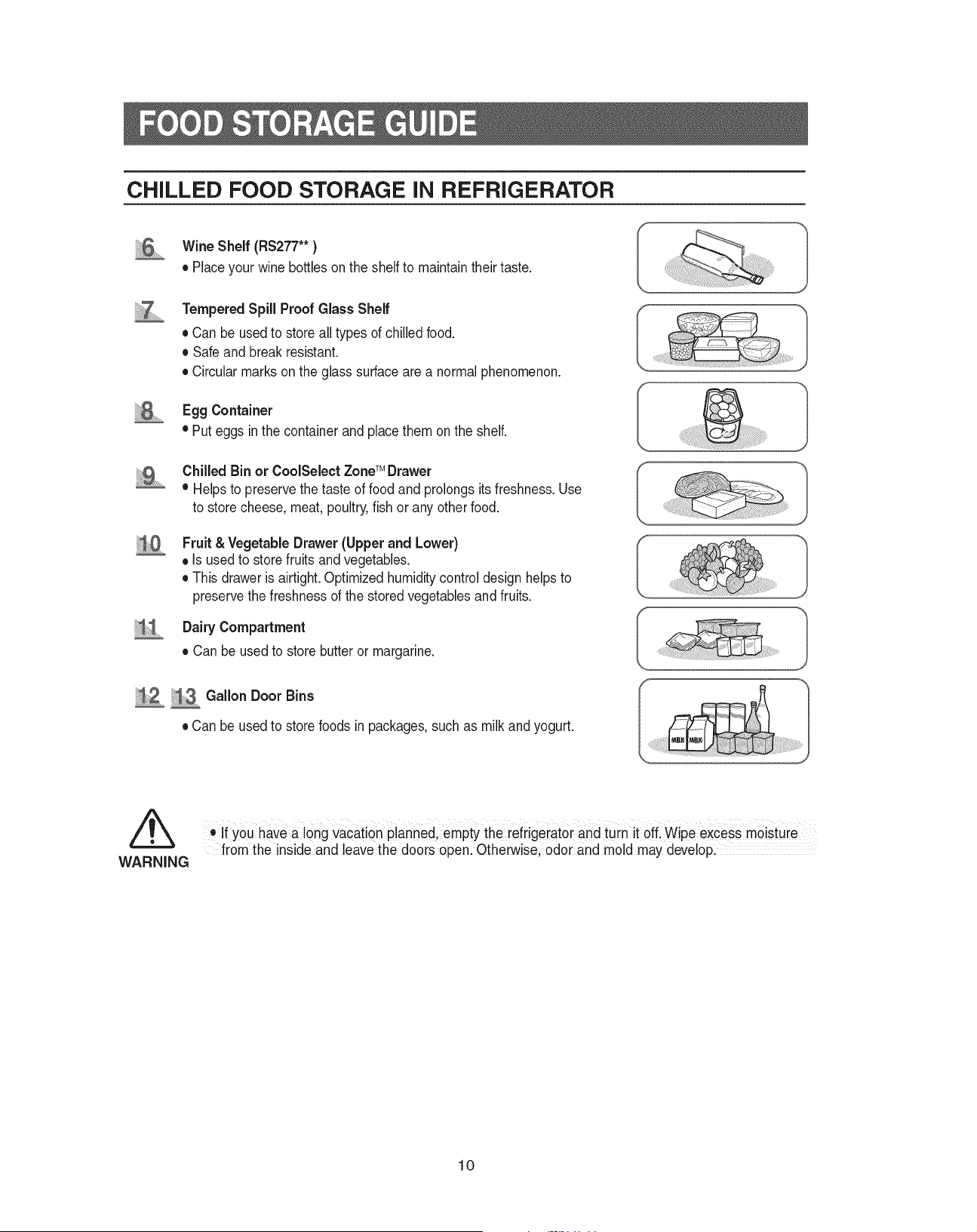
SHELVES AND BINS
Door Bin
Xtra Space
TM
Ice Maker
Light
Ice Chute
Glass Shelf
Light Switch
Light Switch
Plastic Drawers
front Leg Cover
Door Bin for rS275
(Tilt Pocket for rS277)
Freezer
Egg Container
foldable Shelf
(rS277)
Light (upper)
Water filter Compartment
Spill-proof glass Shelf
Dairy Compartment
Wine Shelf (rS277)
Gallon Door Bin
Lights (lower)
(rS277)
Gallon Door Bins
Door Bin Top Lips
CoolSelect zone
TM
Drawer for rS277
(Chilled bin for rS275)
Vegetable & fruit Drawers
Refrigerator
OPERATING INSTRUCTIONS
9
FOOD STORAGE GUIDE
FROZEN FOOD STORAGE IN FREEZER
Ice chute
Door Bin (Tilt Pocket, RS277**)
•
Can be used for small packages of frozen food.
Xtra Space
TM
•
Can be used for frozen foods such as pizza, pasta, burritos,
and fajitas.
•
In order to prevent odor penetration to the ice, stored food
should be wrapped securely.
Tempered Glass Shelf
•
Can be used to store all types of frozen food.
Plastic Drawer
•
Can be used to store meats and dry foods. Stored food should be
wrapped securely using foil or other suitable wrapping materials
or containers.
WARNING
Do not put your fingers, hands or any other unsuitable objects in the chute or ice-maker bucket,
as this may result in personal injury or may damage the part.
10
FOOD STORAGE GUIDE
CHILLED FOOD STORAGE IN REFRIGERATOR
Wine Shelf (RS277** )
•
Place your wine bottles on the shelf to maintain their taste.
Tempered Spill Proof Glass Shelf
•
Can be used to store all types of chilled food.
•
Safe and break resistant.
•
Circular marks on the glass surface are a normal phenomenon.
Egg Container
•
Put eggs in the container and place them on the shelf.
Chilled Bin or CoolSelect Zone
TM
Drawer
•
Helps to preserve the taste of food and prolongs its freshness. Use
to store cheese, meat, poultry, fish or any other food.
Fruit & Vegetable Drawer (Upper and Lower)
•
Is used to store fruits and vegetables.
•
This drawer is airtight. optimized humidity control design helps to
preserve the freshness of the stored vegetables and fruits.
Dairy Compartment
•
Can be used to store butter or margarine.
Gallon Door Bins
•
Can be used to store foods in packages, such as milk and yogurt.
•
If you have a long vacation planned, empty the refrigerator and turn it off. Wipe excess moisture
from the inside and leave the doors open. otherwise, odor and mold may develop.
WARNING
11
OPERATING INSTRUCTIONS
CoolSelect Zone
TM
Drawer GUIDE
RS277**
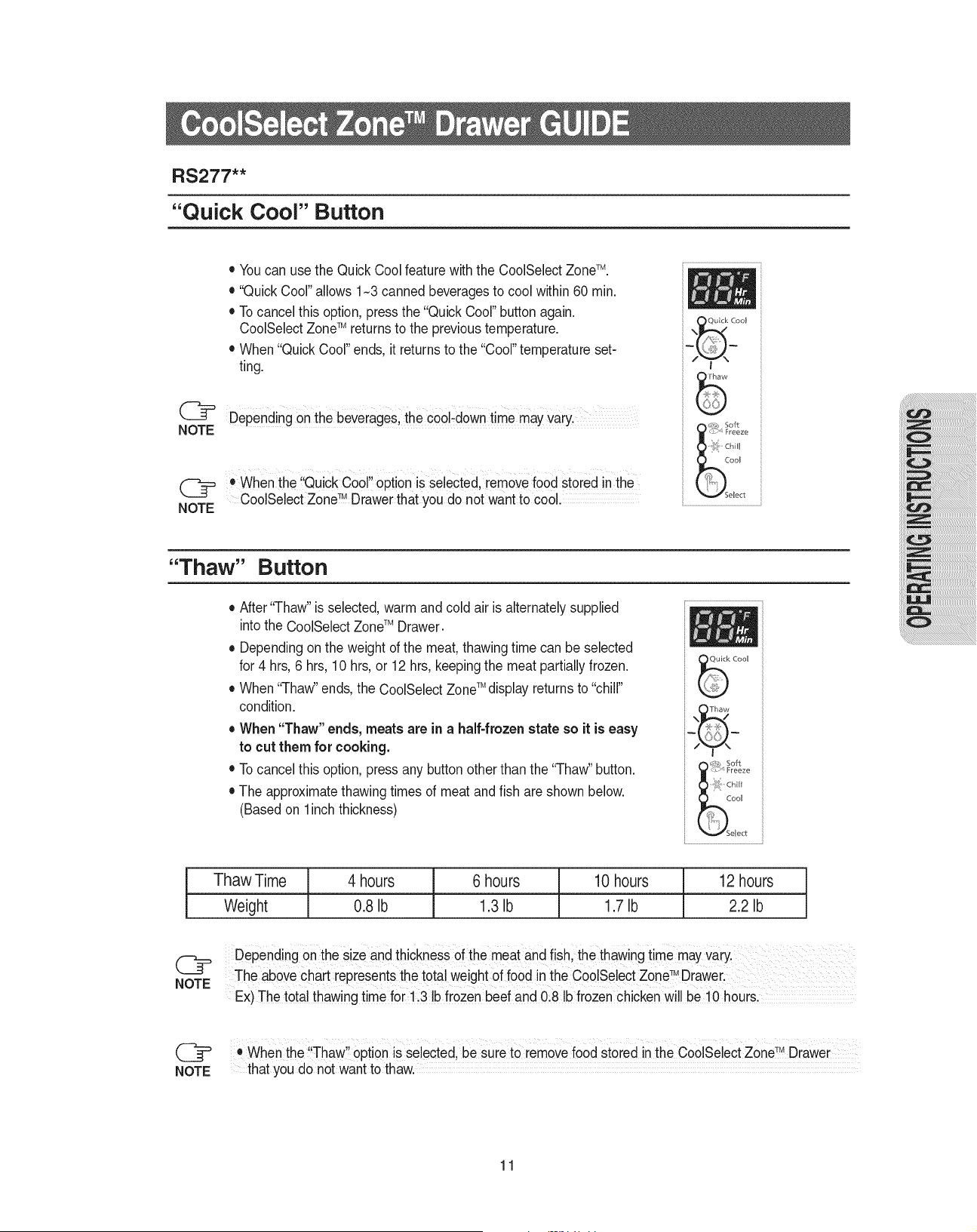
Thaw
Time 4 hours 6 hours 10 hours 12 hours
Weight 0,35 kg 0,60 kg 0,77 kg 1 kg
NOTE
NOTE
Depending on the size and thickness of the meat and fish, the thawing time may vary.
The above chart represents the total weight of food in the CoolSelect zone
TM
Drawer.
Ex) The total thawing time for 0,60kg frozen beef and 0,35kg frozen chicken will be 10 hours.
•
When the “Thaw” option is selected, be sure to remove food stored in the CoolSelect zone
TM
Drawer
that you do not want to thaw.
“Quick Cool” Button
•
You can use the Quick Cool feature with the CoolSelect zone
TM
.
•
“Quick Cool” allows 1~3 canned beverages to cool within 60 min.
•
To cancel this option, press the “Quick Cool” button again. Cool-
Select zone
TM
returns to the previous temperature.
•
When “Quick Cool” ends, it returns to the “Cool” temperature set-
ting.
Depending on the beverages, the cool-down time may vary.
•
When the “Quick Cool” option is selected, remove food stored in the
CoolSelect zone
TM
Drawer that you do not want to cool.
NOTE
NOTE
“Thaw” Button
•
after “Thaw” is selected, warm and cold air is alternately supplied
into the
CoolSelect zone
TM
Drawer
.
•
Depending on the weight of the meat, thawing time can be selected
for 4 hrs, 6 hrs, 10 hrs, or 12 hrs, keeping the meat partially frozen.
•
When “Thaw” ends, the
CoolSelect zone
TM
display returns to “chill”
condition.
•
When “Thaw” ends, meats are in a half-frozen state so it is
easy to cut them for cooking.
•
To cancel this option, press any button other than the “Thaw” button.
•
The approximate thawing times of meat and fish are shown below.
(Based on 2.5Cm thickness)
12
CoolSelect Zone
TM
Drawer GUIDE
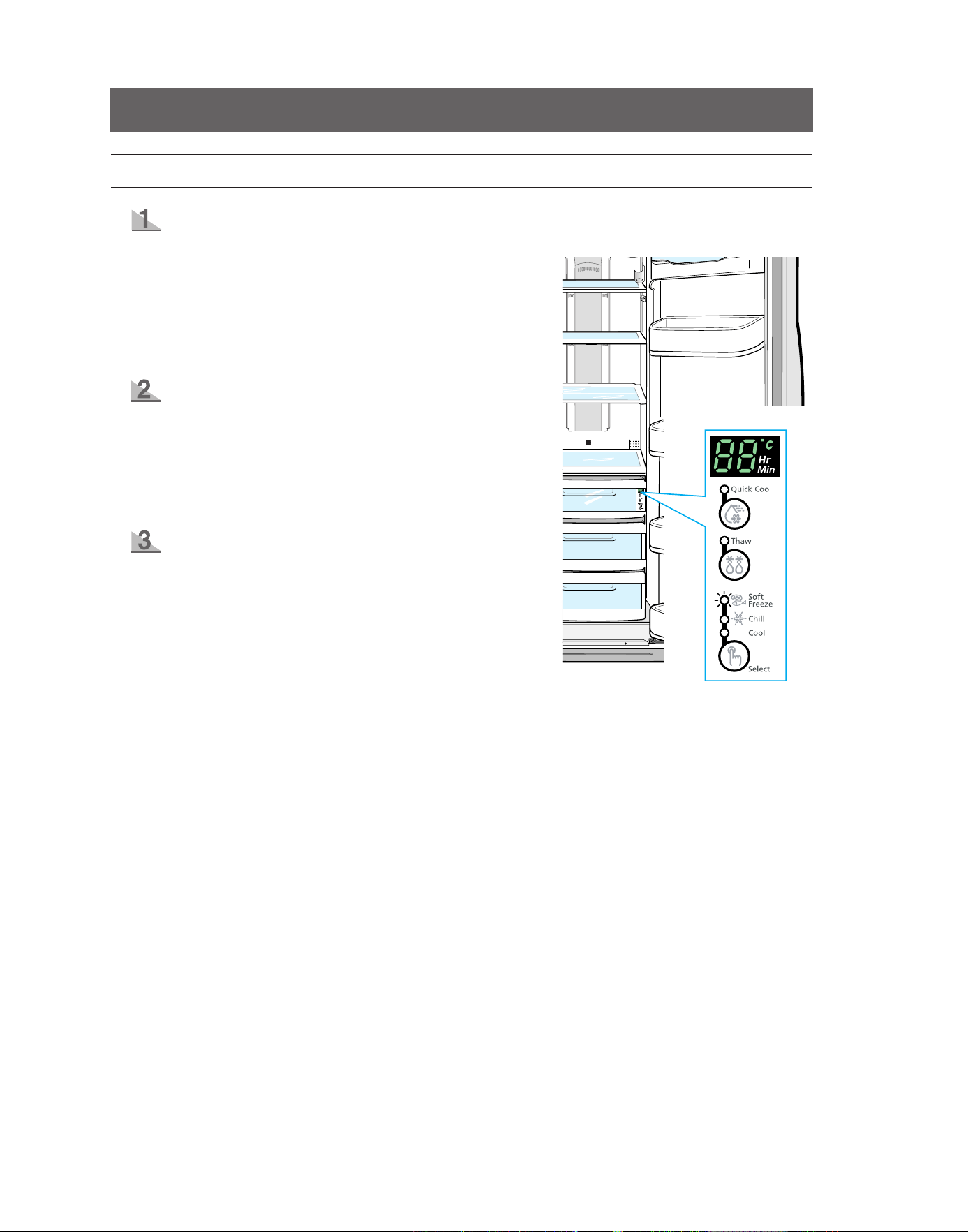
“Select” Button
Soft Freeze
•
When “Soft freeze” is selected, the temperature on
the digital panel displays -5°C all the time as soon as,
regardless of the set temperature of the refrigerator.
•
“Soft freeze” temperature helps keep meat and fish
fresh for longer.
Chill
•
When “Chill” is selected, the temperature of the
CoolSe-
lect zone
TM
Drawer is kept at -1°C, regardless of the set
refrigerator temperature.
•
“Chill” temperature helps keep meat or fish fresh for
longer.
Cool
•
When “Cool” is selected, the temperature will be the
same as the set temperature of the refrigerator. The
digital panel shows the same temperature as that of the
Control panel.
•
The CoolSelect zone
TM
Drawer allows extra refrigerator
space.
13
OPERATING INSTRUCTIONS
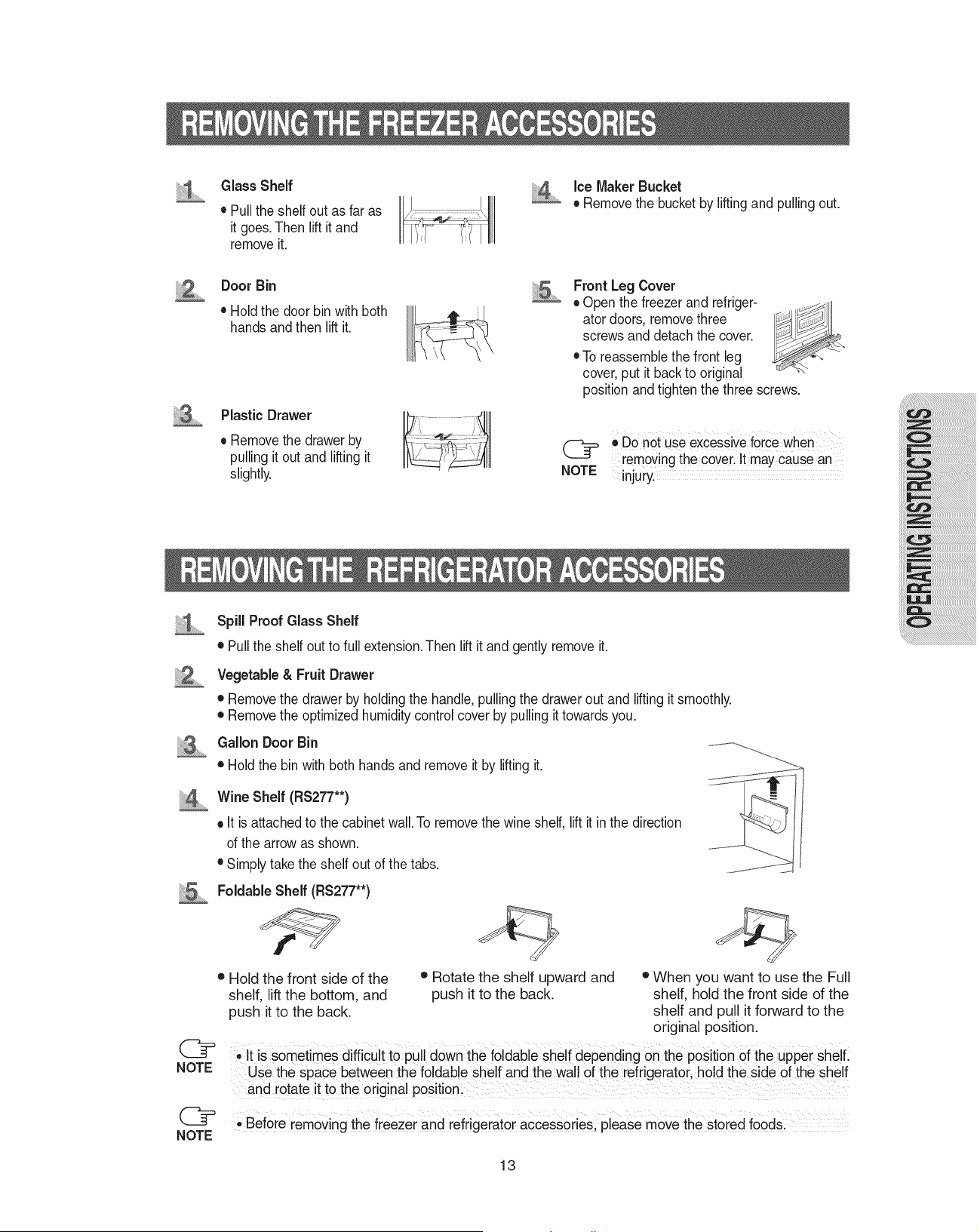
REMOVING THE FREEZER ACCESSORIES
•
Do not use excessive force when
removing the cover. It may cause an
injury.
Glass Shelf
•
Pull the shelf out as far as
it goes. Then lift it and
remove it.
Door Bin
•
Hold the door bin with both
hands and then lift it.
Plastic Drawer
•
remove the drawer by
pulling it out and lifting it
slightly.
Ice Maker Bucket
•
remove the bucket by lifting and pulling out.
Front Leg Cover
•
open the freezer and refrigera-
tor doors, remove three screws
and detach the cover.
•
To reassemble the front leg
cover, put it back to original
position and tighten the three screws.
NOTE
REMOVING THE REFRIGERATOR ACCESSORIES
Spill Proof Glass Shelf
•
Pull the shelf out to full extension. Then lift it and gently remove it.
Vegetable & Fruit Drawer
•
remove the drawer by holding the handle, pulling the drawer out and lifting it smoothly.
•
remove the optimized humidity control cover by pulling it towards you.
Gallon Door Bin
•
Hold the bin with both hands and remove it by lifting it.
Wine Shelf (RS277**)
•
It is attached to the cabinet wall. To remove the wine shelf, lift it in the direction
of the arrow as shown.
•
Simply take the shelf out of the tabs.
Foldable Shelf (RS277**)
NOTE
•
Before
removing the freezer and refrigerator accessories, please move the stored foods.
NOTE
•
It is sometimes difficult to pull down the foldable shelf depending on the position of the upper
shelf. Use the space between the foldable shelf and the wall of the refrigerator, hold the side of
the shelf and rotate it to the original position.
• Hold the front side of the
shelf, lift the bottom, and
push it to the back.
• rotate the shelf upward and
push it to the back.
• When you want to use the full
shelf, hold the front side of the
shelf and pull it forward to the
original position.
14
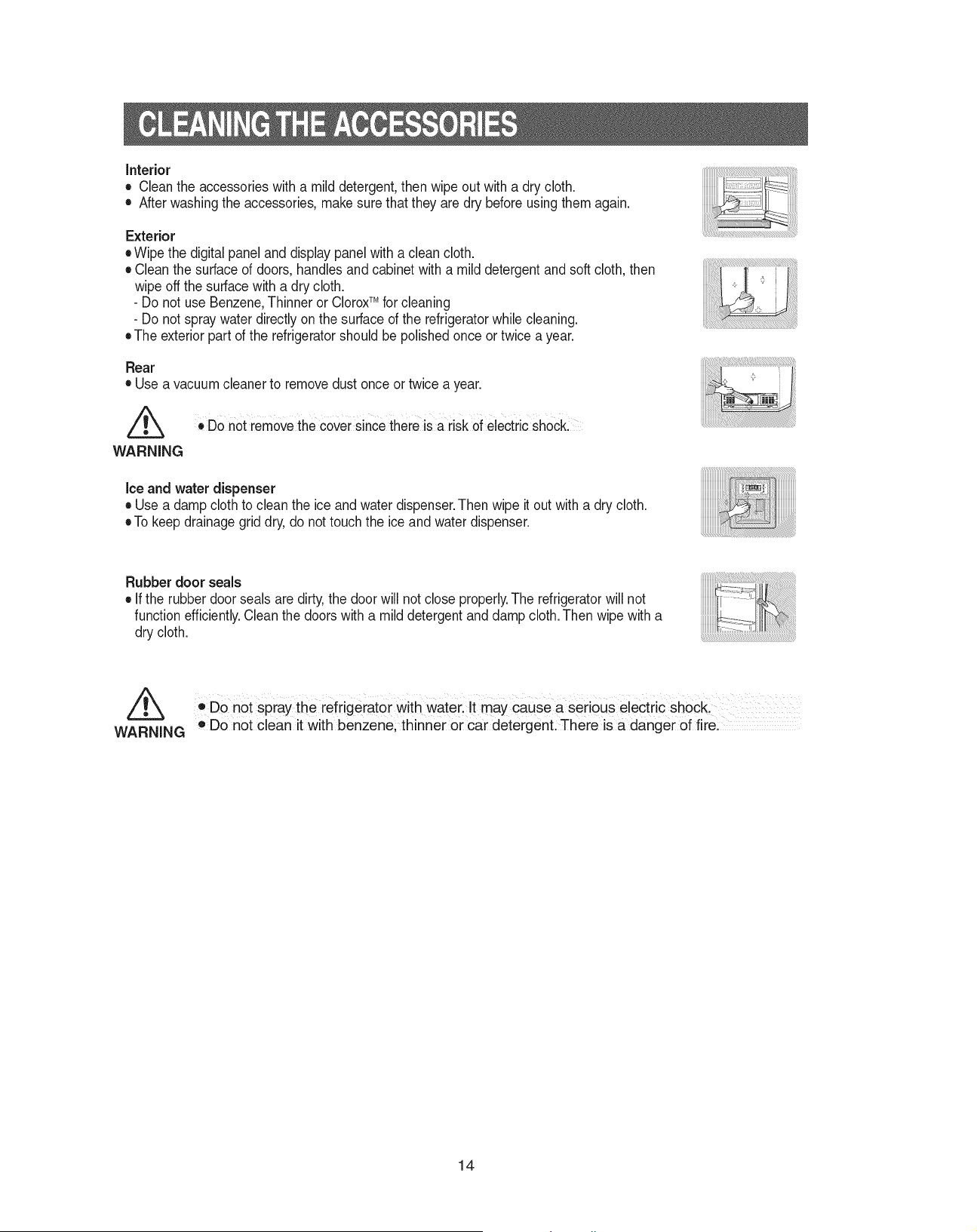
CLEANING THE ACCESSORIES
•
Do not spray the refrigerator with water. It may cause a serious electric shock.
•
Do not clean it with benzene, thinner or car detergent. There is a danger of fire.
Rubber door seals
•
If the rubber door seals are dirty, the door will not close properly. The refrigerator will not
function efficiently. Clean the doors with a mild detergent and damp cloth. Then wipe with a
dry cloth.
Ice and water dispenser
•
Use a damp cloth to clean the ice and water dispenser. Then wipe it out with a dry cloth.
•
To keep drainage grid dry, do not touch the ice and water dispenser.
Interior
•
Clean the accessories with a mild detergent, then wipe out with a dry cloth.
•
after washing the accessories, make sure that they are dry before using them again.
Exterior
•
Wipe the digital panel and display panel with a clean cloth.
•
Clean the surface of doors, handles and cabinet with a mild detergent and soft cloth, then
wipe off the surface with a dry cloth.
- Do not use Benzene, Thinner or Clorox
TM
for cleaning
- Do not spray water directly on the surface of the refrigerator while cleaning.
•
The exterior part of the refrigerator should be polished once or twice a year.
Rear
•
Use a vacuum cleaner to remove dust once or twice a year.
WARNING
•
Do not remove the cover since there is a risk of electric shock.
WARNING
15
OPERATING INSTRUCTIONS
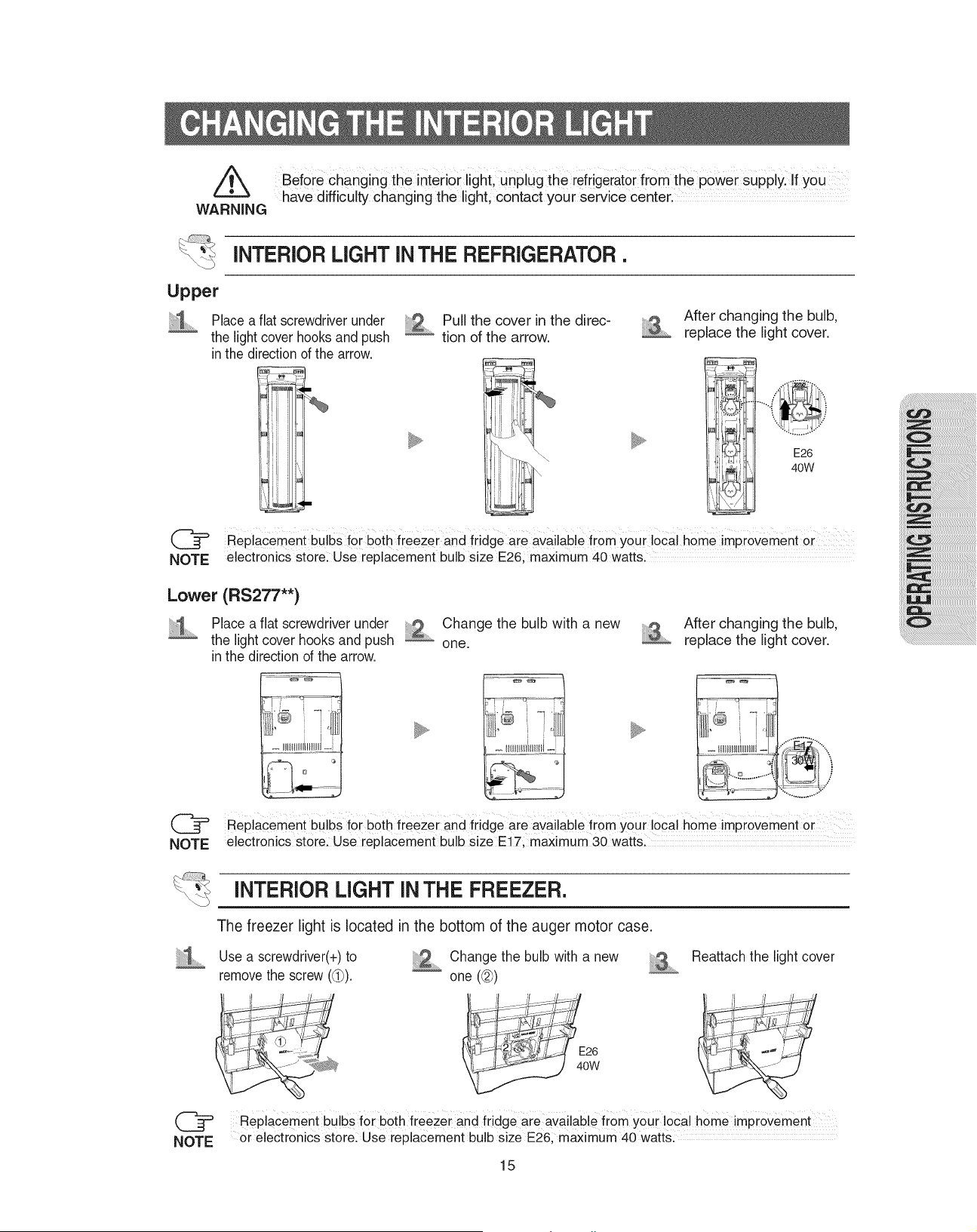
INTERIOR LIGHT IN THE REFRIGERATOR .
Before changing the interior light, unplug the
refrigerator
from the power supply. If you
have difficulty changing the light, contact your service center.
WARNING
Place a flat screwdriver under
the light cover hooks and push
in the direction of the arrow.
Change the bulb with a new
one.
CHANGING THE INTERIOR LIGHT
replacement bulbs for both freezer and fridge are available from your local home improvement or
electronics store. Use replacement bulb size E26, maximum 40 watts.
NOTE
replacement bulbs for both freezer and fridge are available from your local home improvement or
electronics store. Use replacement bulb size E17, maximum 30 watts.
NOTE
Upper
Lower (RS277**)
after changing the bulb,
replace the light cover.
E26
40W
E17
30W
Place a flat screwdriver under
the light cover hooks and push
in the direction of the arrow.
Pull the cover in the direc-
tion of the arrow.
after changing the bulb,
replace the light cover.
Use a screwdriver(+) to
remove the screw (
➀
).
Change the bulb with a new
one (
➁
)
reattach the light cover
INTERIOR LIGHT IN THE FREEZER.
NOTE
replacement bulbs for both freezer and fridge are available from your local home improvement
or electronics store. Use replacement bulb size E26, maximum 40 watts.
The freezer light is located in the bottom of the auger motor case.
E26
40W
16
WATER FILTER
The water “Filter Indicator” light
•
“filter Indicator” light lets you know when it is time to change your water filter cartridge. The light
will change from green to orange. This tells you that it is almost time to change the current cartridge.
We recommend that you replace the cartridge when the light changes to red.
(see “Install the water filter” section for more information)
•
When you install the water filter, throw away the first six glassfulls of water filter, or until water flows
clearly to flush impurities in the water supply system.
Using the dispenser without the water filter
•
You can not use the water and ice dispenser without a water filter cartridge because the water line
blocks the water supply.
Ordering Replacement Water Filter
•
for replacement waster filter you can visit your local home center or contact the Samsung Parts distributor.
blocks the water filter has the SaMSUNG logo on the box and the water filter.
Link : http://www.samsungparts.com
When moving your refrigerator
To prevent floor damage be sure the front leveling legs are in
the up position (above the floor).
refer to ‘Leveling the refrigerator’ in the manual(at page 24)
DOORS
The refrigerator doors have a special door opening and closing feature to make sure that they close all
the way and are securely sealed.
When opening the door, it will only open to 135º. after reaching a certain point, it will remain open.
When the door is partially open, it will close automatically.
The refrigerator should be properly installed & leveled.
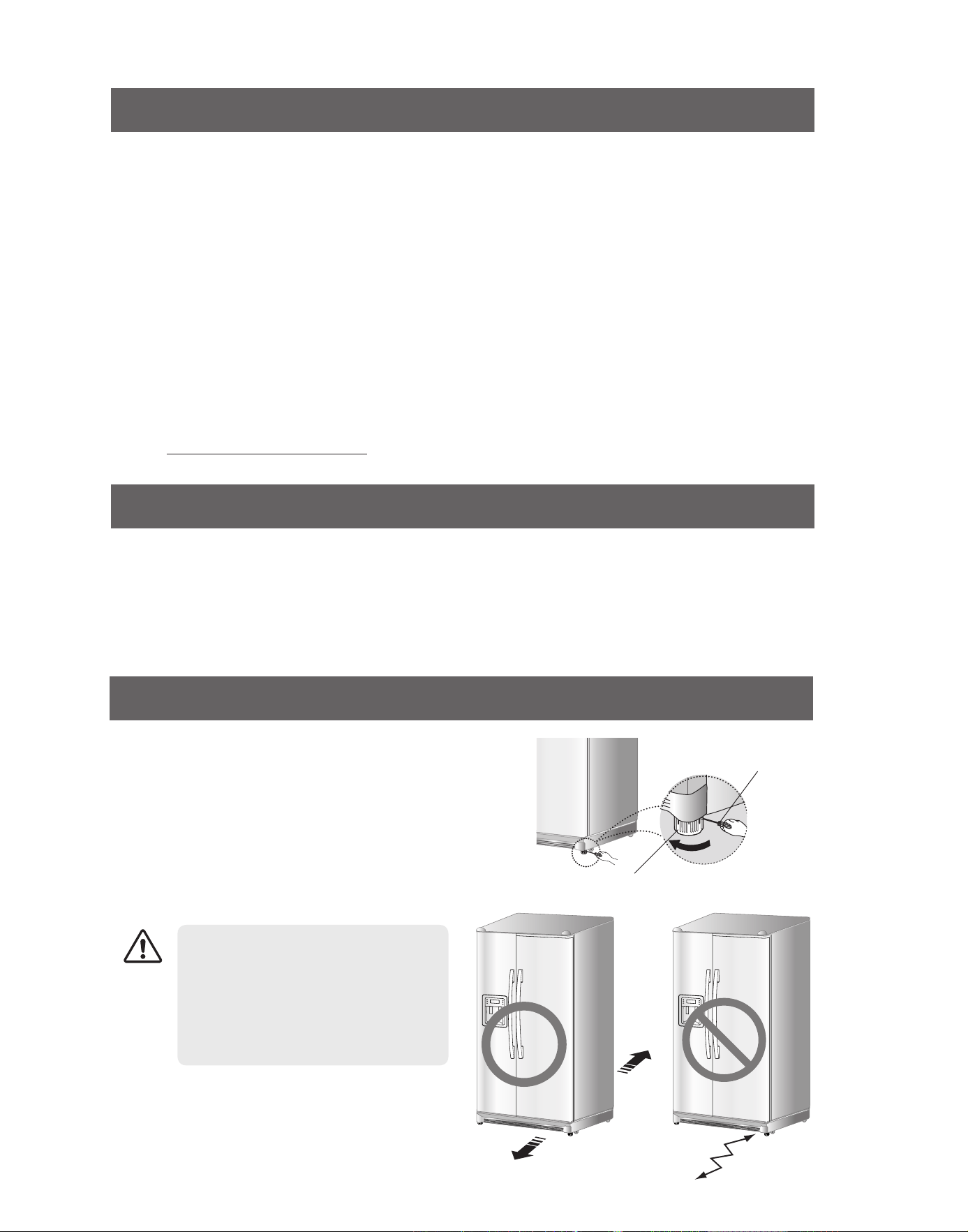
INSTALLATION OF THE REFRIGERATOR
When installing, servicing, or cleaning
behind the refrigerator, be sure to pull
the unit straight out and push back
in straight after finishing. also, make
sure your floor supports the full-load
refrigerator. otherwise, it may cause
floor damage.
CAUTION
SCrEWDrIVEr(-)
CoNTroL LEVEr

17
INSTALLATION INSTRUCTIONS
INSTALLATION OF THE REFRIGERATOR
Check the dimensions of your entrance door to determine whether the refrigerator can pass through it.
• Before disassembling the freezer door, the water supply line needs to be disconnected.
(If not, the water supply line can be damaged.)
• See “Separating the water supply line from the refrigerator” on the next page.
Checking the Dimensions of your Entrance Door
• Select a location with easy access to the water supply.
• Select a location with enough space for the refrigerator.
• Select a location which is not exposed to sunlight.
• Select a location with level floor.
Selecting the Location for the Refrigerator
How to assemble the separable door handle
Allow sufficient space to circulate the air in the internal cooling system.
•
If the refrigerator does not have enough space, the internal cooling system
may not work correctly.
5 cm
2 mm
5 cm
NOTE
●
allow clearance to the right, left, back and the top when installing the
refrigerator. This has the advantage of reducing power consumption.
●
Do not install the refrigerator where the temperature will go below
10°C.
NOTE
Dimension
(centimeter)
Width
Capacity (liter)
Model
rS275 / rS277
750
Case Height
Depth
without Hinge
with Hinge
with door
without door
91.12
174
178
86
78
- Make sure the “UP” mark on the rear
of the handle is facing right side up.
- Match the upper and lower Handle
Locking Tabs on the doors to the
handles.
fix the handles to the doors
by sliding them down firmly.
- Check the installation of the han-
dles by pulling them.
- If the handles are inserted properly,
they should not move.
18
REMOVING THE REFRIGERATOR DOORS
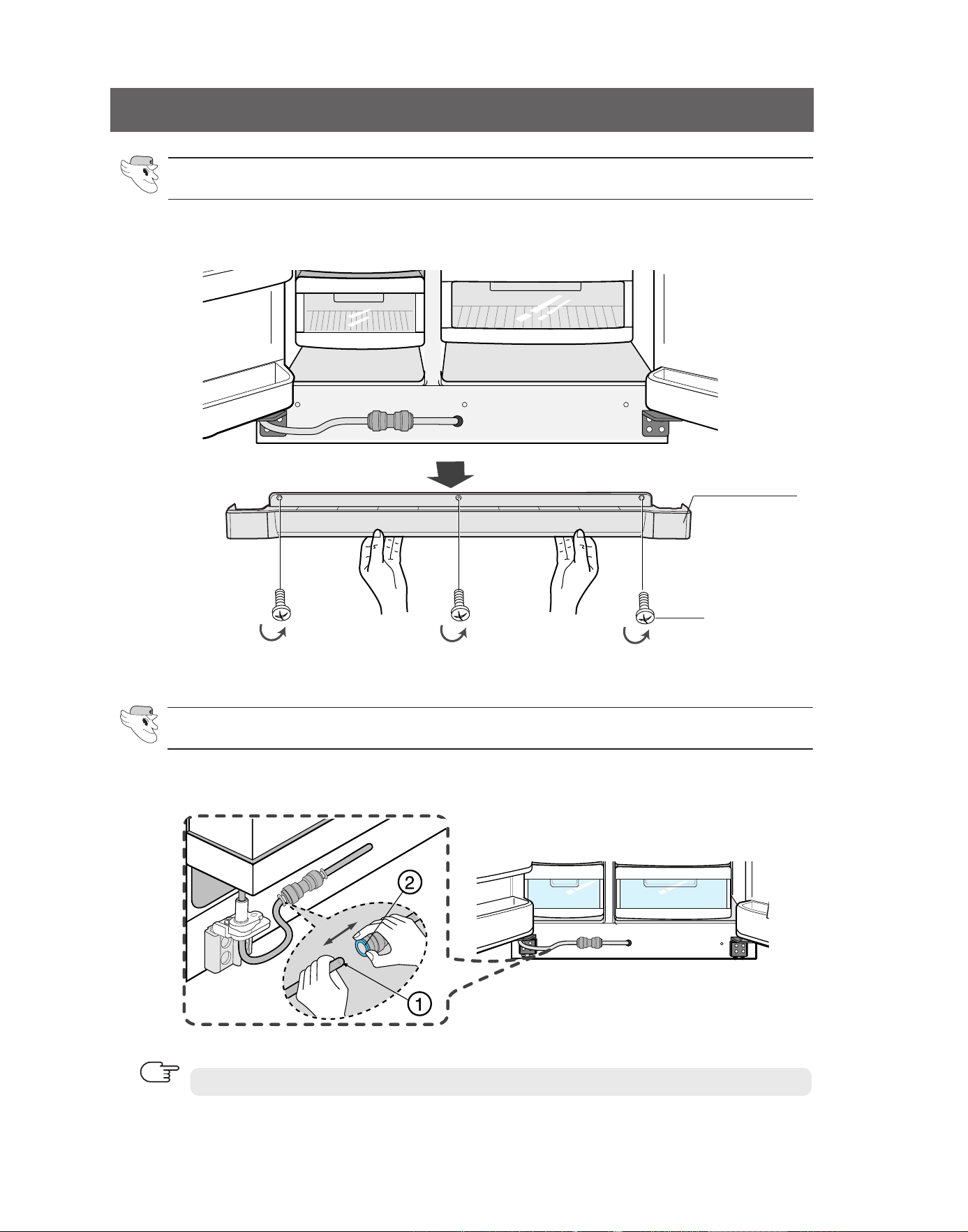
Removing the Front Leg Cover
remove the water tube by pressing the coupler (
➁
) and pulling the water tube (
➀
) away.
Separating the Water Supply Line from the Refrigerator
Do not cut the water tube. Separate it from the coupler.
NOTE
open the freezer and refrigerator doors, and then take off the front Leg Cover by turning the
three screws counter-clockwise.
froNT LEG CoVEr
SCrEWS
19
INSTALLATION INSTRUCTIONS
REMOVING THE REFRIGERATOR DOORS
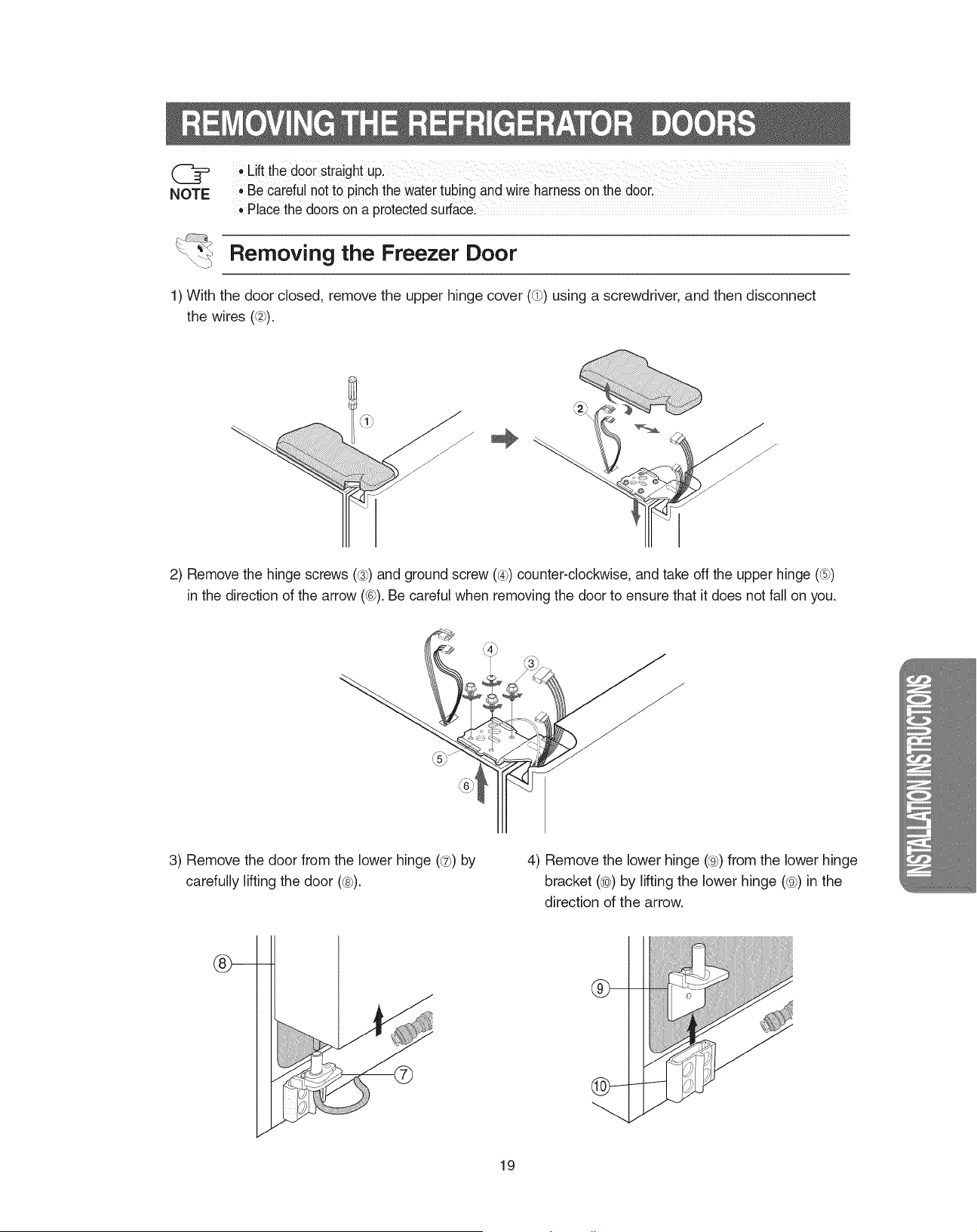
1) With the door closed, remove the upper hinge cover (➀) using a screwdriver, and then disconnect
the wires (➁).
2)
remove the hinge screws (
➂
) and ground screw (
➃
) counter-clockwise, and take off the upper hinge
(➄) in the direction of the arrow (➅). Be careful when removing the door to ensure that it does not fall on
you.
3) remove
the door from the lower hinge
(
➆
)
by
carefully lifting the door (
➇
).
4) remove the lower hinge (
➈
) from the lower hinge
bracket (
➉
) by lifting the lower hinge (
➈
) in the
direction of the arrow.
Removing the Freezer Door
•
Lift the door straight up.
•
Be careful not to pinch the water tubing and wire harness on the door.
•
Place the doors on a protected surface.
NOTE
20
REMOVING THE REFRIGERATOR DOORS
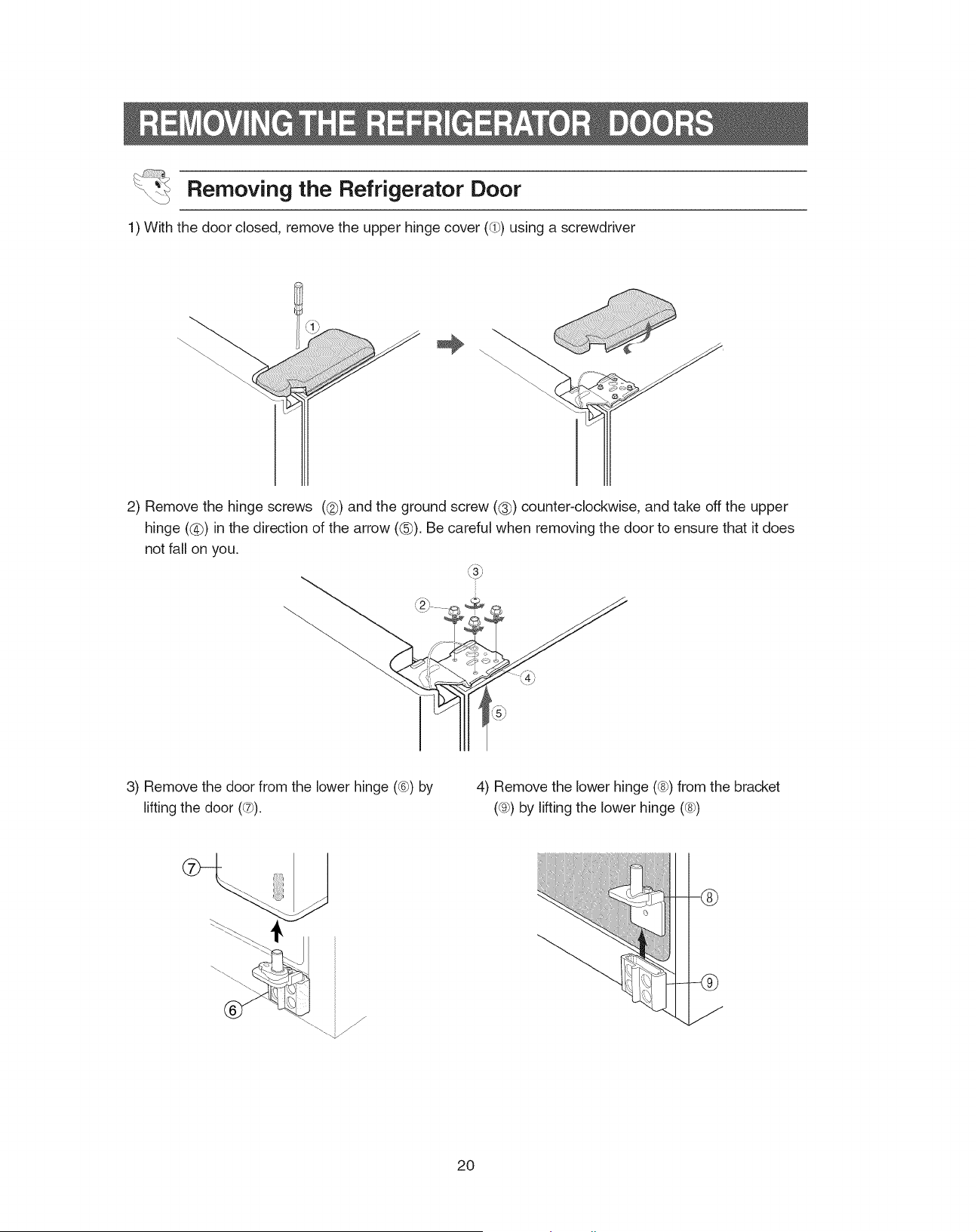
3) remove
the door from the lower hinge
(➅)
by
lifting the door (
➆
).
4) remove the lower hinge (
➇
) from the bracket
(➈) by lifting the lower hinge (
➇
)
1) With the door closed, remove the upper hinge cover (➀) using a screwdriver
2) remove the hinge
screws (➁) and the ground screw (
➂
) counter-clockwise, and take off the upper
hinge (
➃
) in the direction of the arrow (
➄
). Be careful when removing the door to ensure that it does
not fall on you.
Removing the Refrigerator Door
21
INSTALLATION INSTRUCTIONS
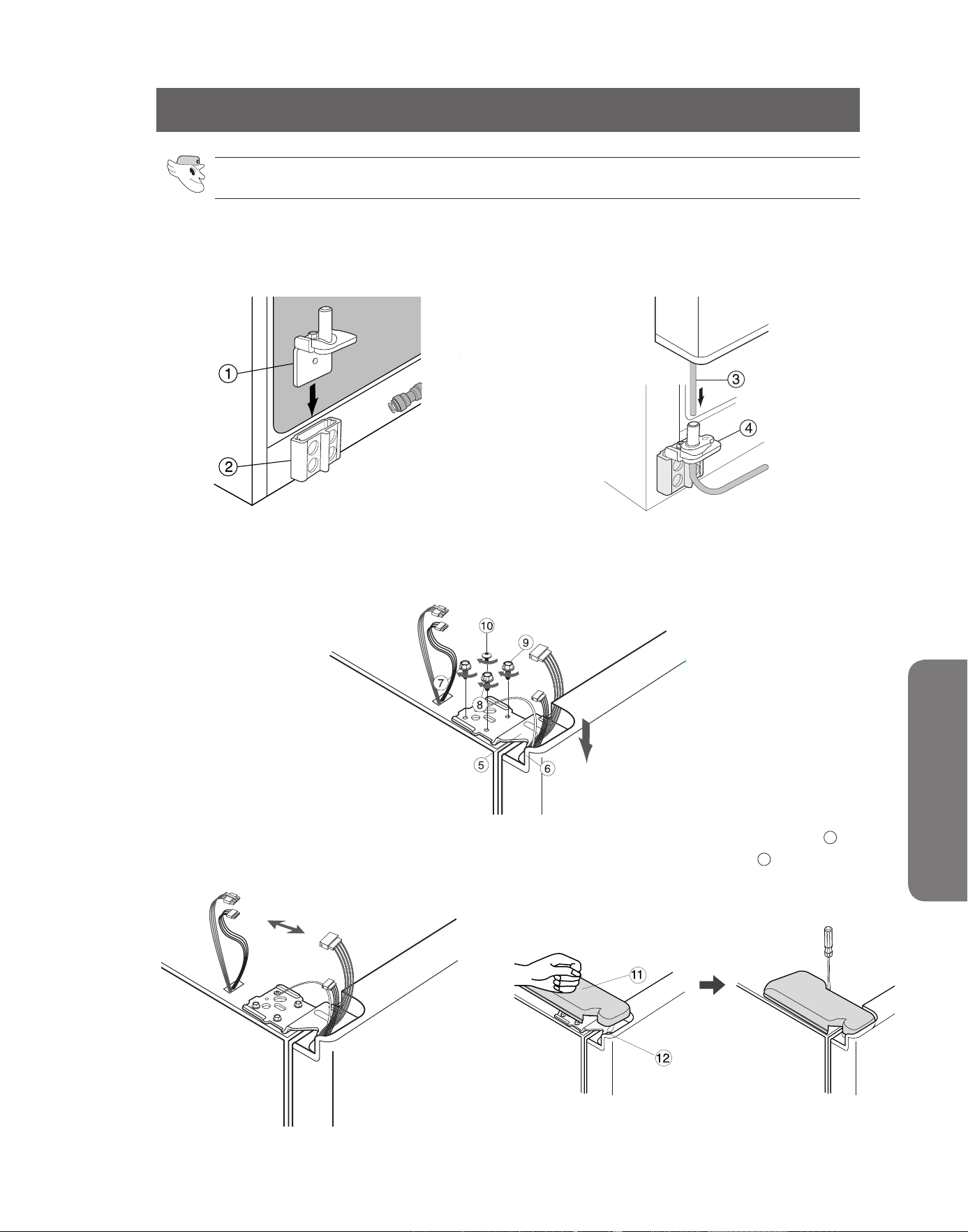
Reattaching the Freezer Door
REATTACHING THE REFRIGERATOR DOORS
1) Insert the lower hinge (
➀
) in the lower hinge
bracket (➁).
2) reattach the freezer door by inserting the hose
(
➂
) in the lower side of the door into the hole in
the lower hinge (
➃
) and pulling the hose down.
3) Insert the upper hinge shaft (➄) into the hole (➅). after leveling between the upper hinge hole (➆) and
the hole of the cabinet
(➇).
Put the
hinge
screws
(➈) and the ground screw (➉) back by turning the
screws in the clockwise direction.
4) Connect the wires. 5)
Put the front part of the upper hinge cover ( ) on
the front part of the upper hinge ( ) and reattach
the front part of the upper hinge cover first.
11
12
22
REATTACHING THE REFRIGERATOR DOORS
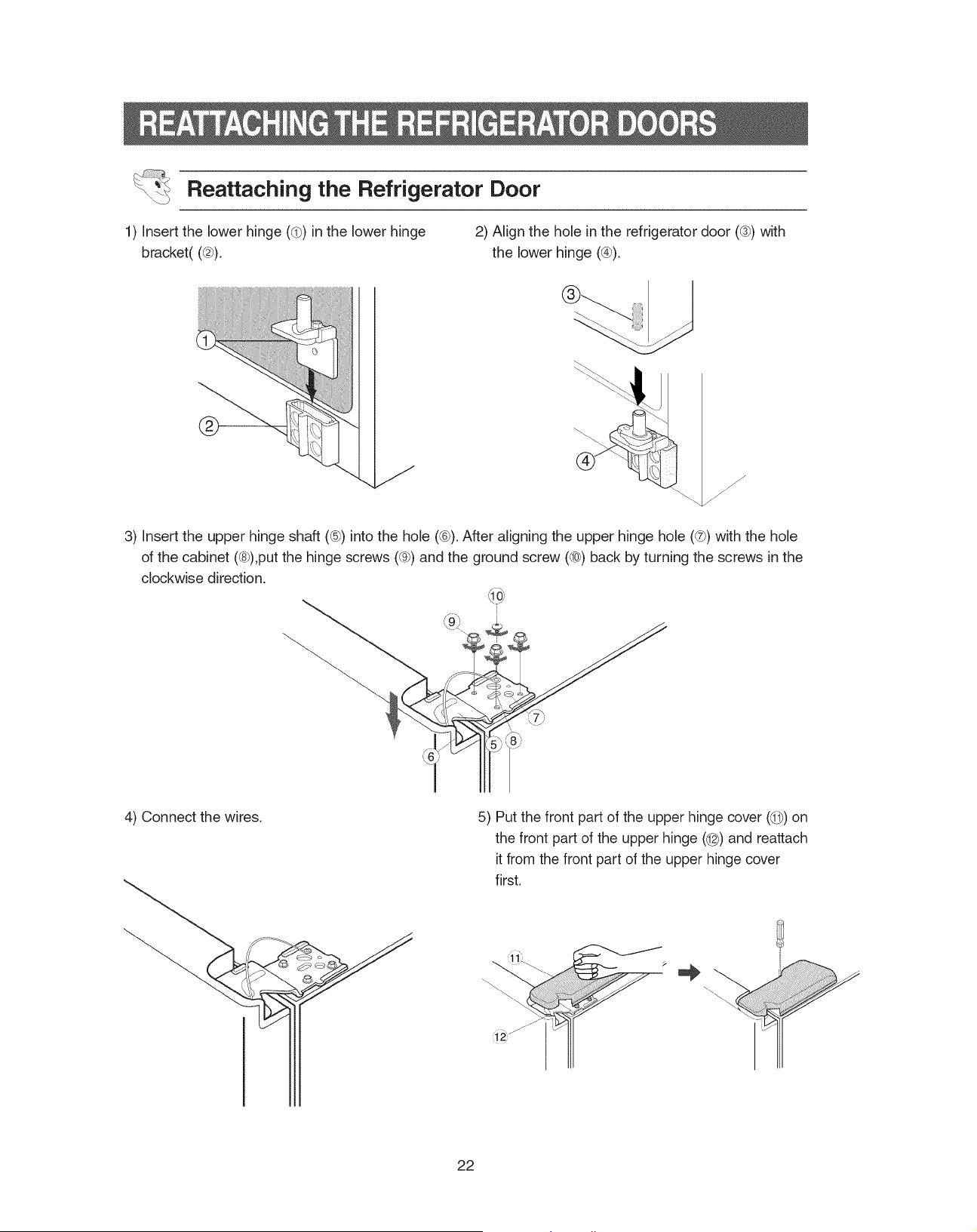
Reattaching the Refrigerator Door
1) Insert the lower hinge (
➀
) in the lower hinge
bracket( (➁).
2) align the hole in the refrigerator door (➂) with
the lower hinge (➃).
3) Insert the upper hinge shaft (➄) into the hole (➅). after aligning the upper hinge hole (➆) with the hole
of the cabinet
(➇),put the hinge screws
(➈) and the ground screw (➉) back by turning the screws in the
clockwise direction.
4) Connect the wires. 5)
Put the front part of the upper hinge cover ( ) on
the front part of the upper hinge ( ) and reattach
it from the front part of the upper hinge cover
first.
11
12
23
INSTALLATION INSTRUCTIONS
REATTACHING THE REFRIGERATOR DOORS
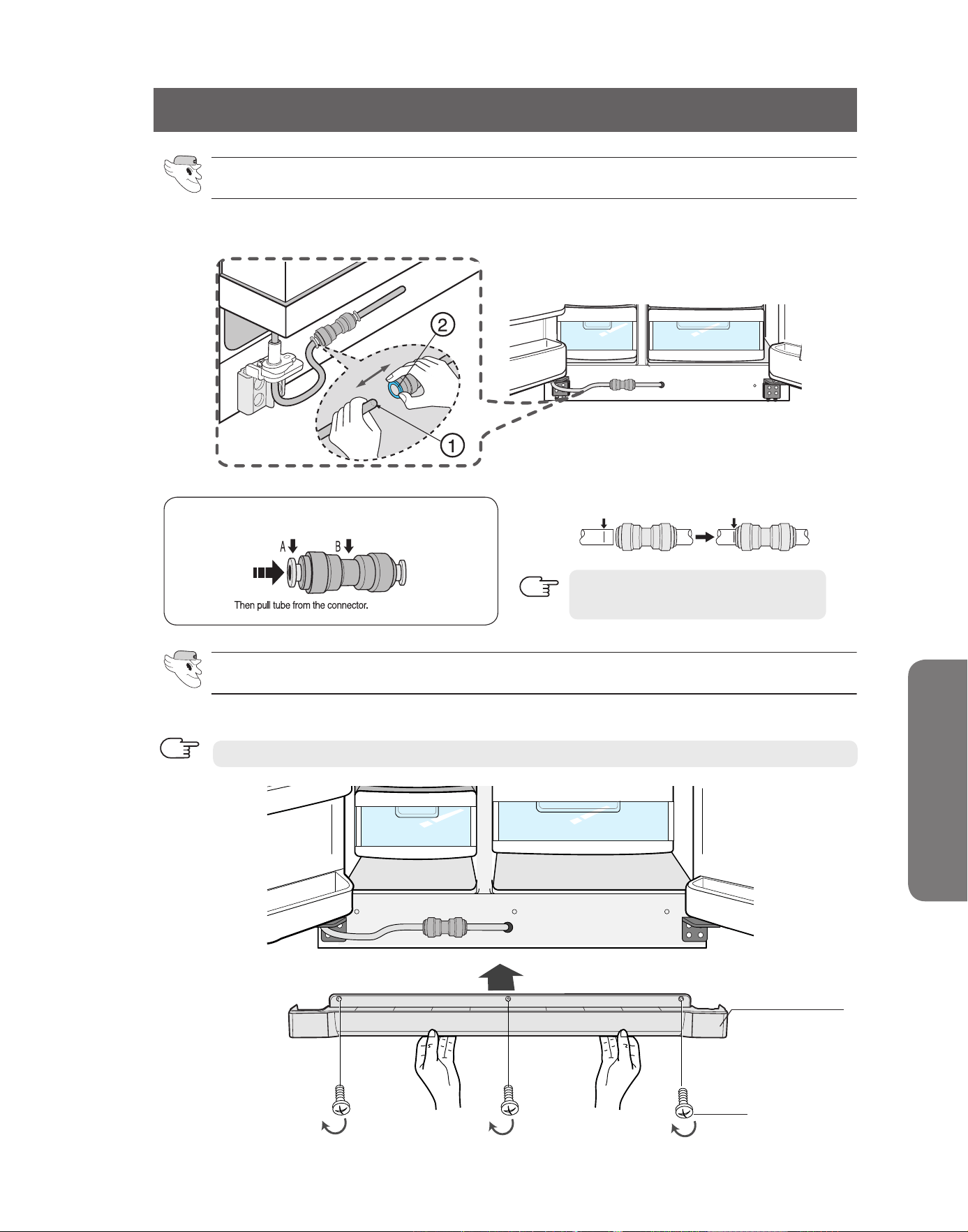
Put on the front Leg Cover cover by turning the three screws clockwise, as shown in the figure.
Reattaching the Water Supply Line
Reattaching the Front Leg Cover
Push the "a" collar to the "B" body and hold.
Tube must be fully inserted to the
marked line to avoid leaks.
NOTE
While pressing the front face of the coupler (➁), insert the water line (➀) in the coupler.
froNT LEG CoVEr
SCrEWS
Before attaching check water connector, be sure to check for leakage.
NOTE
24
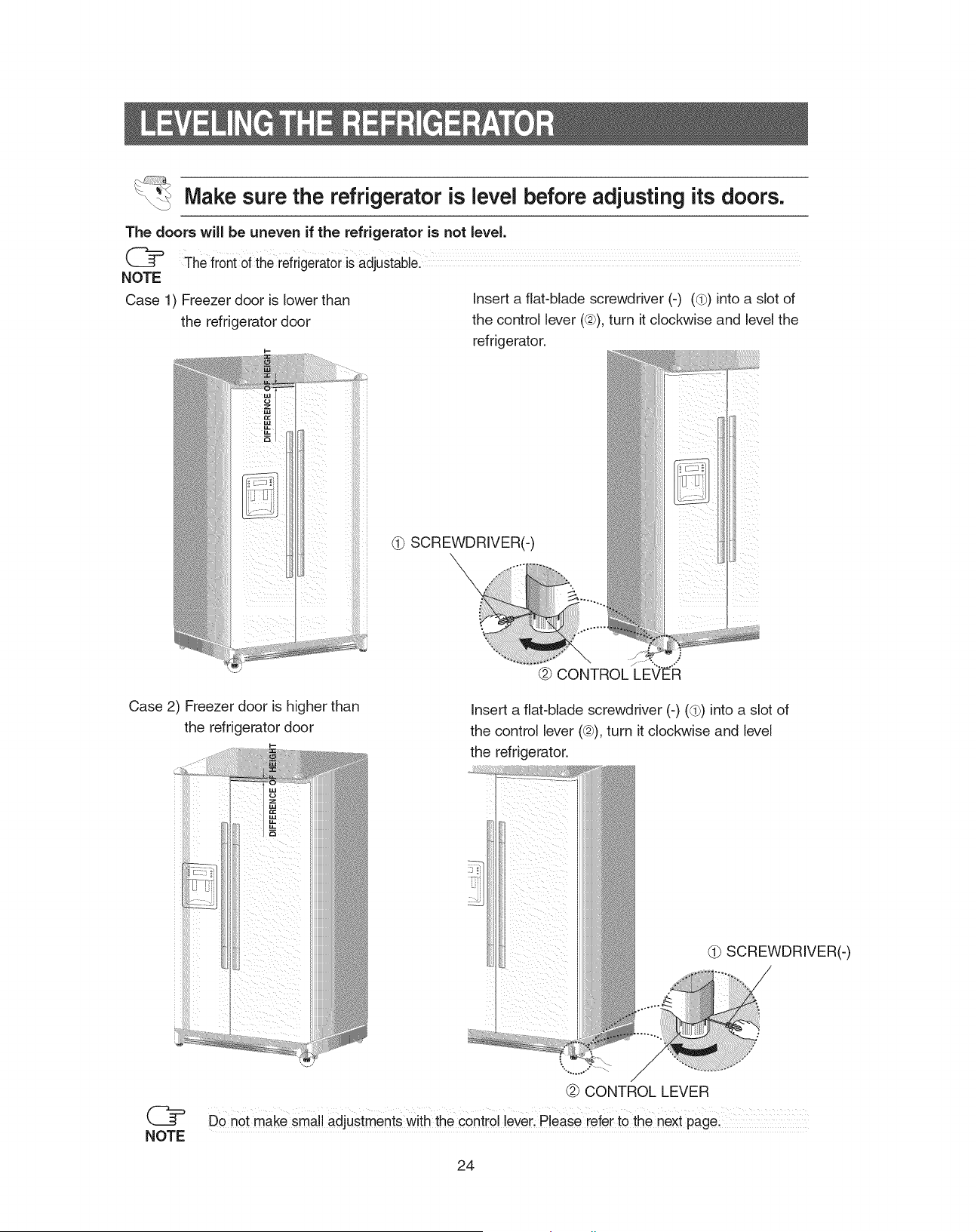
LEVELING THE REFRIGERATOR
Case 1) freezer door is lower than
the refrigerator door
Insert a flat-blade screwdriver (-) (
➀
) into a slot of
the control lever (➁), turn it clockwise and level the
refrigerator.
Case 2) freezer door is higher than
the refrigerator door
Insert a flat-blade screwdriver (-) (
➀
) into a slot of
the control lever (➁), turn it clockwise and level
the refrigerator.
Do not make small adjustments with the control lever. Please refer to the next page.
DIFFERENCE OF HEIGHT
DIFFERENCE OF HEIGHT
➀
SCrEWDrIVEr(-)
➁ CoNTroL LEVEr
➀
SCrEWDrIVEr(-)
➁ CoNTroL LEVEr
NOTE
The doors will be uneven if the refrigerator is not level.
Make sure the refrigerator is level before adjusting its doors.
The front of the refrigerator is adjustable.
NOTE
25
INSTALLATION INSTRUCTIONS
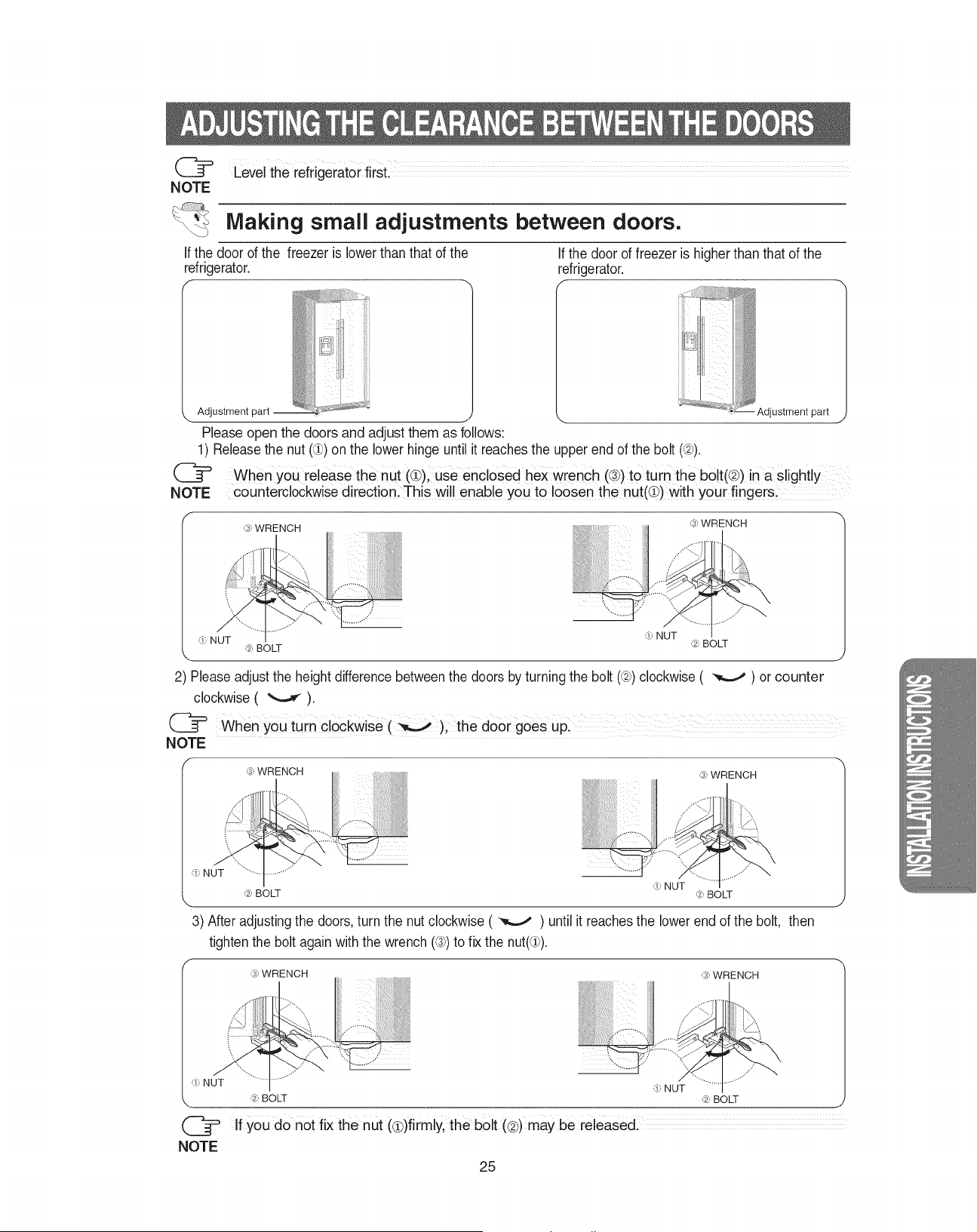
ADJUSTING THE CLEARANCE BETWEEN THE DOORS
Making small adjustments between doors.
If the door of the freezer is lower than that of the
refrigerator.
If the door of freezer is higher than that of the
refrigerator.
If you do not fix the nut (
①
)firmly, the bolt (
➁
) may be released.
2) Please adjust the height difference between the doors by turning the bolt (➁) clockwise ( ) or
counter
clockwise
( ).
When you turn clockwise ( ), the door goes up.
➂ WrENCH
adjustment part
adjustment part
➀ NUT
➁ BoLT
➂ WrENCH
➀ NUT
➁ BoLT
➂ WrENCH
➂ WrENCH
➁ BoLT
➁ BoLT
Please open the doors and adjust them as follows:
1) release the nut (①) on the lower hinge until it reaches the upper end of the bolt (➁).
➀ NUT
3) after adjusting the doors, turn the nut clockwise ( ) until it reaches the lower end of the bolt, then
tighten the bolt again with the wrench (➂) to fix the nut(①).
➀ NUT
➁ BoLT
➂ WrENCH
➁ BoLT
➂ WrENCH
➀ NUT
NOTE
NOTE
Level the refrigerator first.
NOTE
NOTE
When you release the nut (①), use enclosed hex wrench (➂) to turn the bolt(➁) in a slightly
counter
clockwise
direction. This will enable you to loosen the nut(①) with your fingers.
➀ NUT
26
CHECKING THE WATER DISPENSER LINE
1) for the ice maker to operate properly, water pressure of 20 ~125 psi is required.
In this range, a 170 cc (5.74ounces) paper cup can be filled in 10 secs.
2) The water filter removes foreign particles. It does not sterilize or destroy any micro-organisms.
3) If the refrigerator is installed in an area with low water pressure (below 20psi), you should install a
booster pump to compensate.
4) Ensure the water storage tank inside the refrigerator is properly filled initially. Push the water dispens-
er lever until the water runs from the outlet.
NOTE
a Water line installation kit is available at extra cost from your dealer. The refrigerator
manufacturer recommends that you use a water supply kit containing copper tubing.
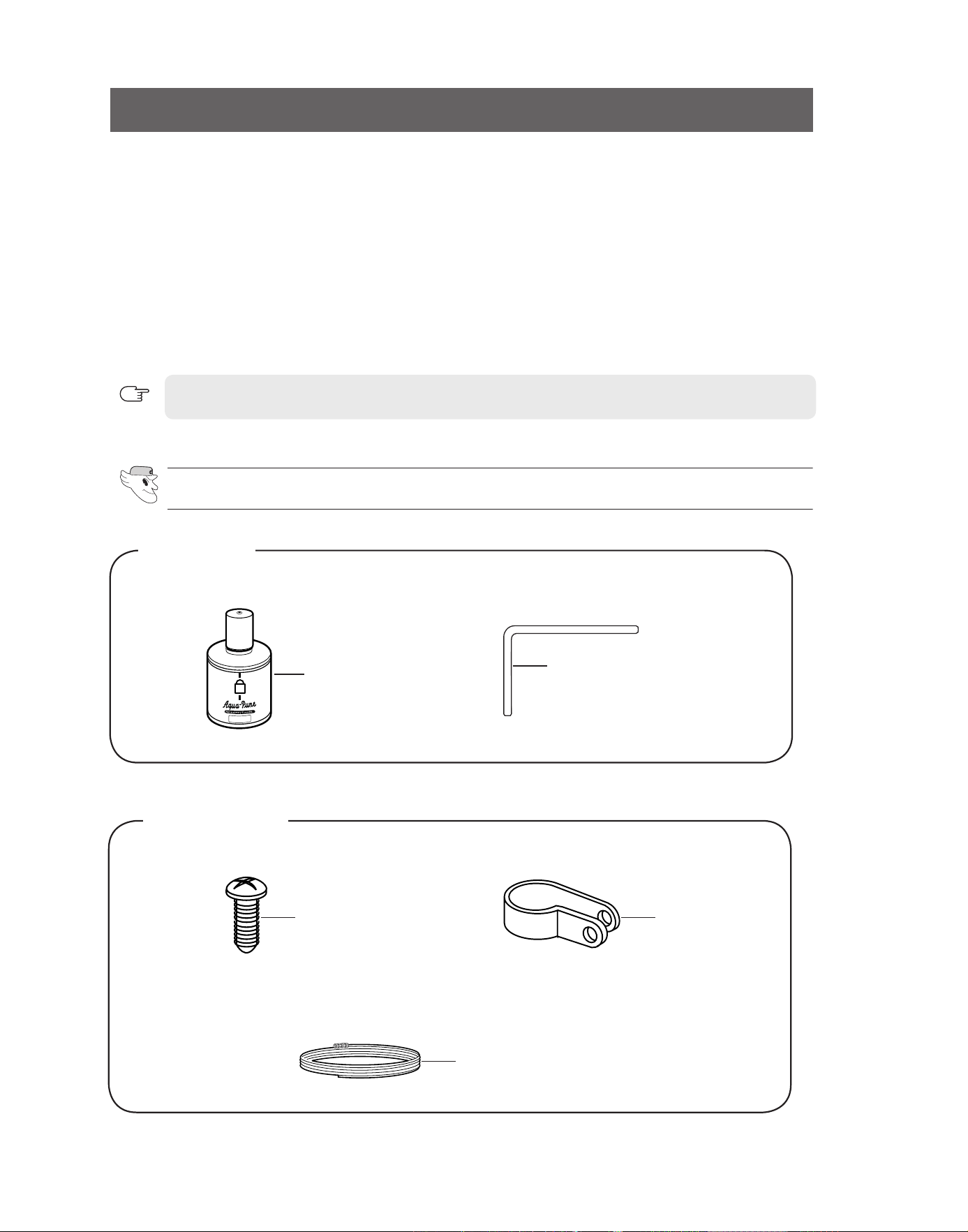
Checking the Parts
Water filter
Clamp ×12Ea
Wrench
Tapping screw ×12Ea
Water pipe
Basic parts
Optional parts
27
INSTALLATION INSTRUCTIONS
INSTALLATION OF THE WATER DISPENSER LINE
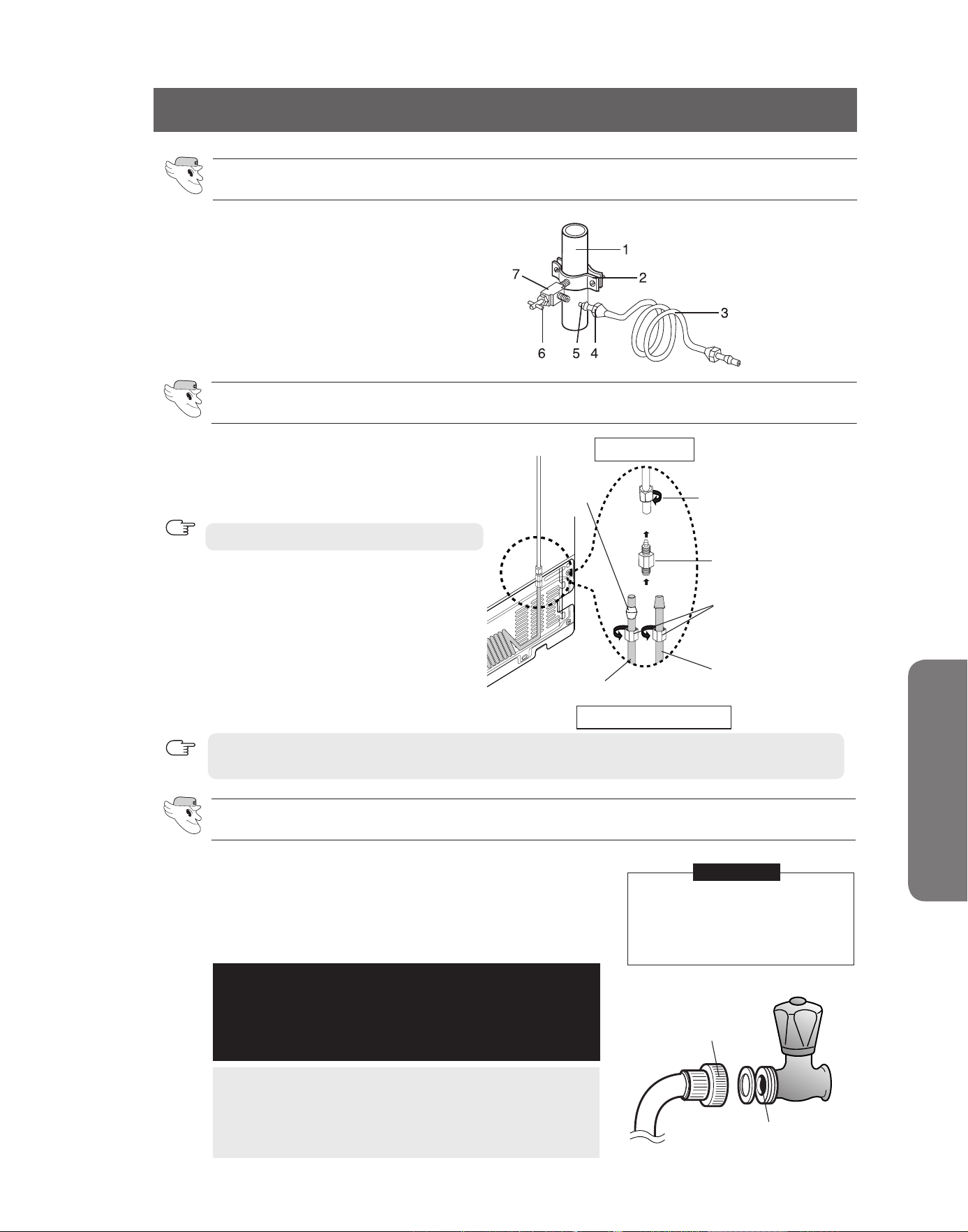
Connecting to water supply line
- Shut off the main water supply line and turn the Ice
maker to the off position.
- Locate the nearest cold drinking water line.
- follow the instructions in the ice maker installation kit.
1. Cold Water line
2. Pipe Clamp.
3.Copper (or Plastic) line
4.Compression Nut
5.Compression Sleeve
6.Shut off Valve
7.Packing Nut.
Check the water supply line
Connect the water pipe with coupler and tap.
- Close the main water tap.
- Connect coupler “a” to the tap.
- Every joint should be protected with sealing tape.
Note:
If the coupler does not fit on the current tap, go to
the nearest authorised service dealer and purchase
the right couplers fittings.
WARRANTY INFORMATION
This water line installation is not covered by the
refrigerator or‑ice maker manufacturer's warranty.
Follow these instructions carefully to minimise the risk
of expensive water damage.
The water line must be connect‑
ed to the cold water pipe.
If it is connected to the hot
water‑pipe, it may cause the
purifier to malfunction.
CaUTIoN
TaP
CoUPLEr “a”
Connect the water line to the refrigerator.
Water line must be connected to drinkable water only.
Cut off 1/4 inch of the provided plastic tubing squarely to prevent leaks when reconnecting.
Do not overtighten the compression nut.
NOTE
NOTE
Compression Nut (1/4″)
(Not Provided)
Plastic Tubing
(Not Provided)
Copper Tubing
(Not Provided)
Compression Nut (1/4″)
(Provided)
Compression fitting
(Provided)
ferrule
(Not Provided)
Household Water Line
refrigerator
1) Slip the compression nut through the provided
plastic tubing.
2) Tighten the compression nut onto the 1/4”
compression fitting.
3) Tighten the compression nut onto the com-
pression fitting.
4) Turn water on and check for any leakage.
●
Using Copper Tubing
- Slip the compression nut and ferrule on
copper tubing as shown.
●
Using Plastic Tubing
- Insert the molded end of the plastic tubing
into the compression fitting.
28
INSTALLATION OF THE WATER DISPENSER LINE
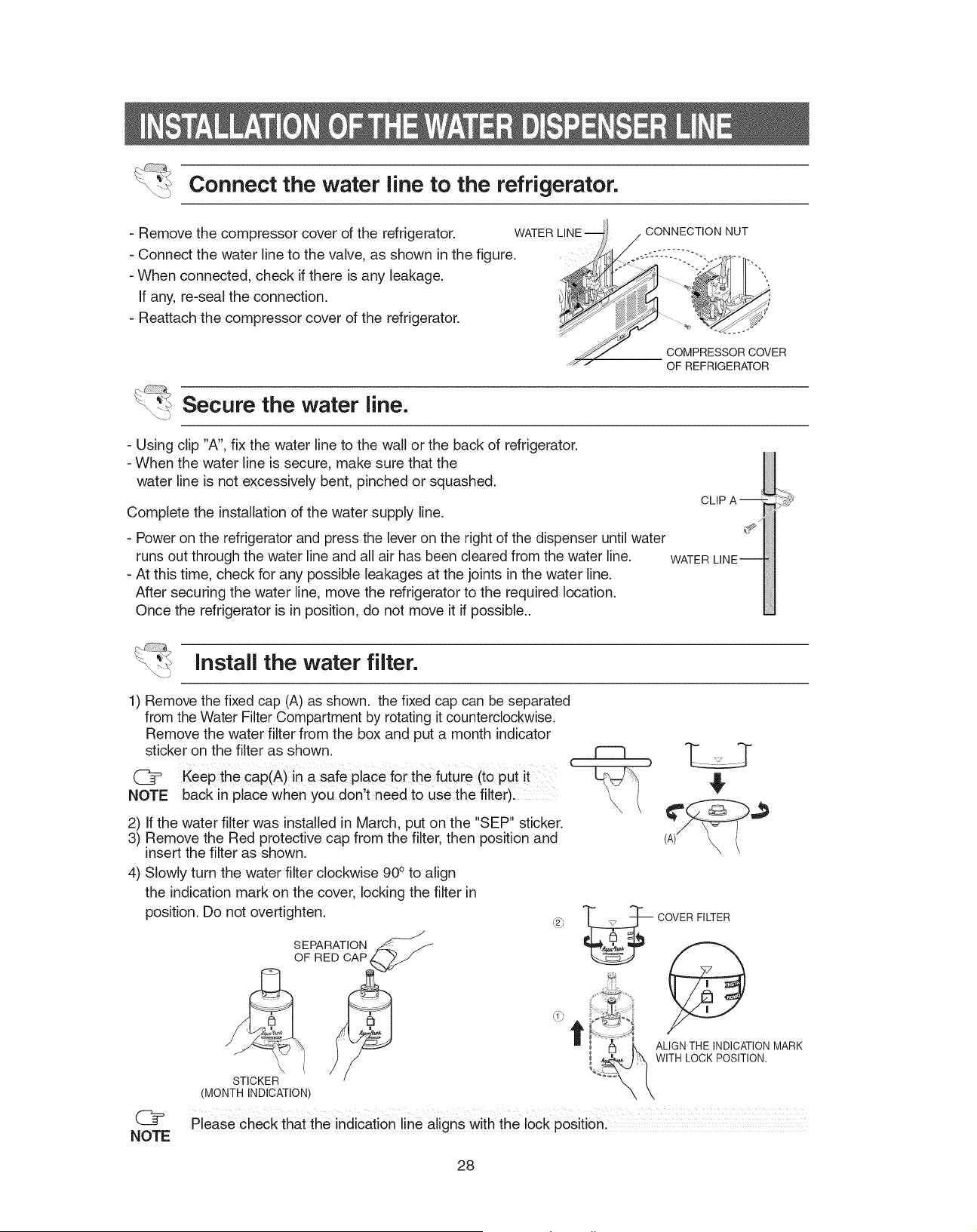
1)
remove the fixed cap (a) as shown. the fixed cap can be separated
from the Water filter Compartment by rotating it counterclockwise.
remove the water filter from the box and put a month indicator
sticker on the filter as shown.
2) If the water filter was installed in March, put on the "SEP" sticker.
3) remove the red protective cap from the filter, then position and
insert the filter as shown.
4)
Slowly turn the water filter counter clockwise 90º to align
the indication mark on the cover, locking the filter in
position. Do not overtighten.
CoVEr fILTEr
aLIGN THE INDICaTIoN Mark
WITH LoCk PoSITIoN.
Install the water filter.
Please check that the indication line aligns with the lock position.
NOTE
Connect the water line to the refrigerator.
Secure the water line.
keep the cap(a) in a safe place for the future (to put it
back in place when you don’t need to use the filter).
NOTE
(a)
SEParaTIoN
of rED CaP
STICkEr
(MoNTH INDICaTIoN)
- remove the compressor cover of the refrigerator.
- Connect the water line to the valve, as shown in the figure.
- When connected, check if there is any leakage.
If any, re-seal the connection.
- reattach the compressor cover of the refrigerator.
CoMPrESSor CoVEr
of rEfrIGEraTor
CoNNECTIoN NUT
WaTEr LINE
- Using clip ”a”, fix the water line to the wall or the back of refrigerator.
- When the water line is secure, make sure that the
water line is not excessively bent, pinched or squashed.
Complete the installation of the water supply line.
-
Power on the refrigerator and press the lever on the right of the dispenser until
water runs out through the water line and all air has been cleared from the water line.
- at this time, check for any possible leakages at the joints in the water line.
after securing the water line, move the refrigerator to the required location.
once the refrigerator is in position, do not move it if possible.
CLIP a
WaTEr LINE
INSTALLATION INSTRUCTIONS
WaTEr
ICE
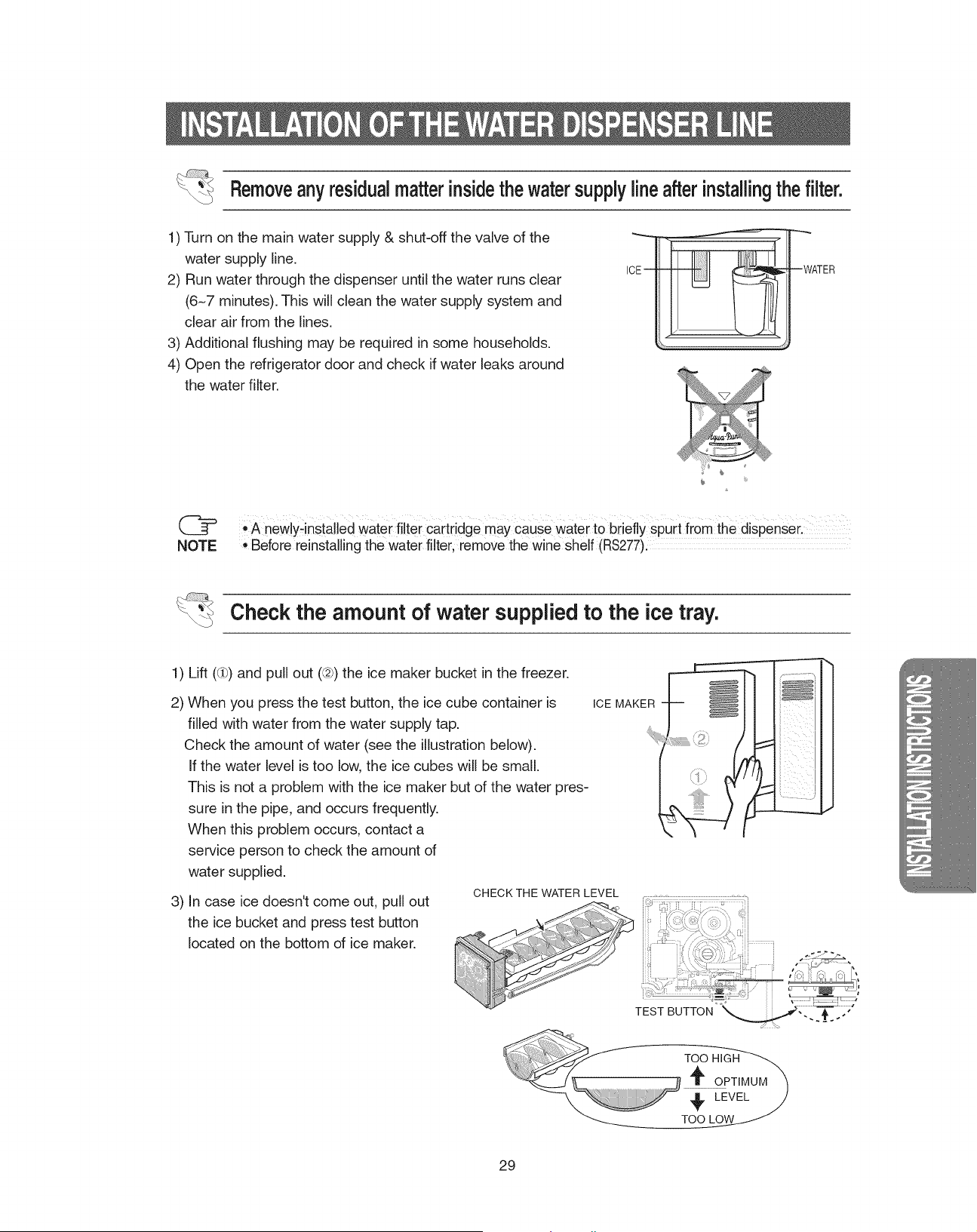
INSTALLATION OF THE WATER DISPENSER LINE
Remove any residual matter inside the water supply line after installing the filter.
Check the amount of water supplied to the ice tray.
1) Lift (①) and pull out (➁) the ice maker bucket in the freezer.
2) When you press the test button, the ice cube container is
filled with water from the water supply tap.
Check the amount of water (see the illustration below).
If the water level is too low, the ice cubes will be small.
This is not a problem with the ice maker but of the water pres-
sure in the pipe, and occurs frequently.
When this problem occurs, contact a service person to check
the amount of water supplied.
3) In case ice doesn't come out, pull out
the ice bucket and press test button
located on the bottom of ice maker.
ICE MakEr
1) Turn on the main water supply & shut-off the valve of the
water supply line.
2) run water through the dispenser until the water runs clear
(6~7 minutes). This will clean the water supply system and
clear air from the lines.
3) additional flushing may be required in some households.
4) open the refrigerator door and check if water leaks around
the water filter.
•
a newly-installed water filter cartridge may cause water to briefly spurt from the dispenser.
•
Before reinstalling the water filter, remove the wine shelf (
rS277
).
NOTE
CHECk THE WaTEr LEVEL
TEST BUTToN
Too HIGH
oPTIMUM
LEVEL
Too LoW
29
TROUBLESHOOTING
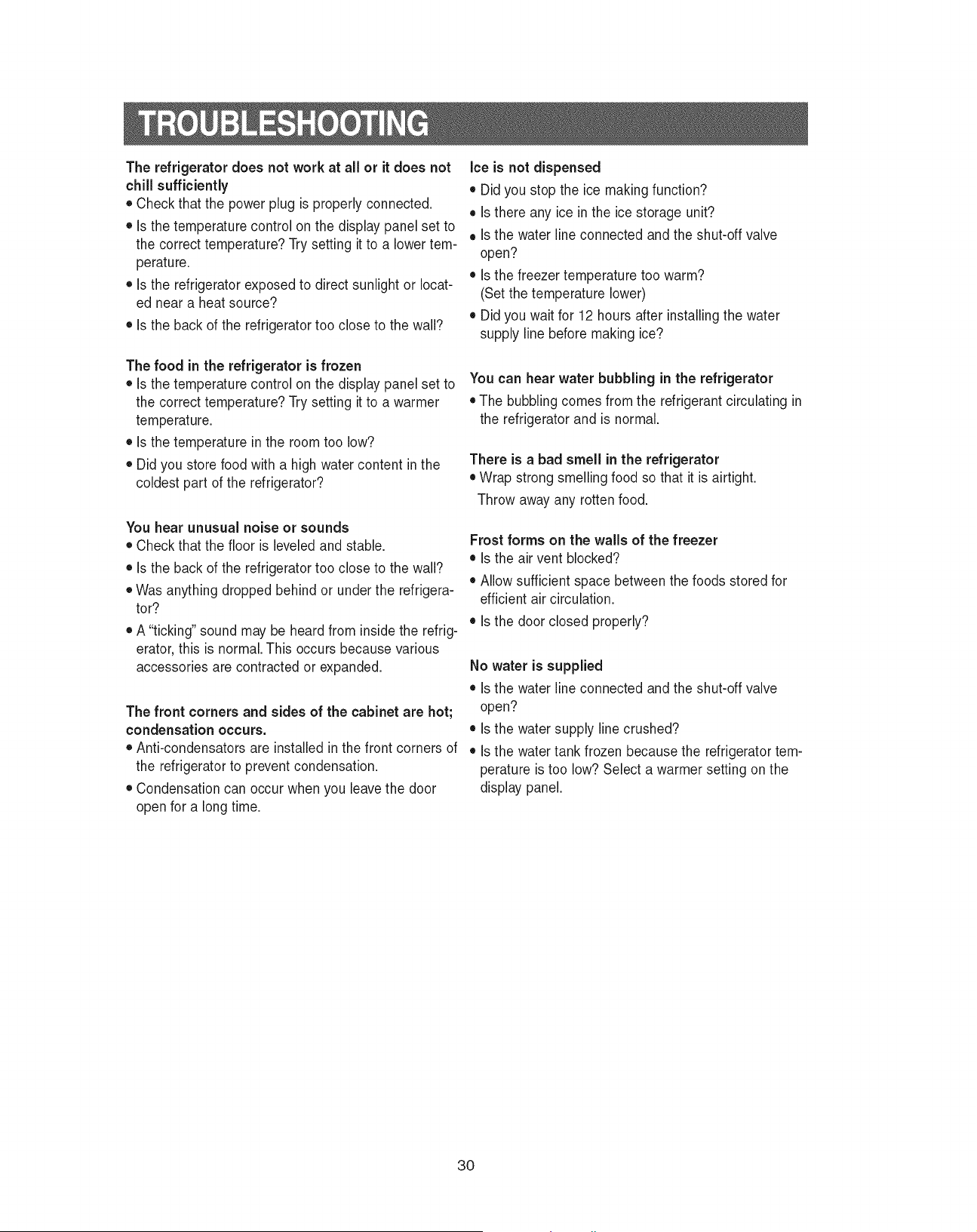
The refrigerator does not work at all or it does not
chill sufficiently
•
Check that the power plug is properly connected.
•
Is the temperature control on the display panel set
to the correct temperature? Try setting it to a lower
temperature.
•
Is the refrigerator exposed to direct sunlight or locat-
ed near a heat source?
•
Is the back of the refrigerator too close to the wall?
The food in the refrigerator is frozen
•
Is the temperature control on the display panel set
to the correct temperature? Try setting it to a warmer
temperature.
•
Is the temperature in the room too low?
•
Did you store food with a high water content in the
coldest part of the refrigerator?
You hear unusual noise or sounds
•
Check that the floor is leveled and stable.
•
Is the back of the refrigerator too close to the wall?
•
Was anything dropped behind or under the refrigera-
tor?
•
a “ticking” sound may be heard from inside the refrig-
erator, this is normal. This occurs because various
accessories are contracted or expanded.
The front corners and sides of the cabinet are hot;
condensation occurs.
•
anti-condensators are installed in the front corners of
the refrigerator to prevent condensation.
•
Condensation can occur when you leave the door
open for a long time.
Ice is not dispensed
•
Did you stop the ice making function?
•
Is there any ice in the ice storage unit?
•
Is the water line connected and the shut-off valve
open?
•
Is the freezer temperature too warm?
(Set the temperature lower)
•
Did you wait for 12 hours after installing the water
supply line before making ice?
You can hear water bubbling in the refrigerator
•
The bubbling comes from the refrigerant circulating
in the refrigerator and is normal.
There is a bad smell in the refrigerator
•
Wrap strong smelling food so that it is airtight.
Throw away any rotten food.
Frost forms on the walls of the freezer
•
Is the air vent blocked?
•
allow sufficient space between the foods stored for
efficient air circulation.
•
Is the door closed properly?
No water is supplied
•
Is the water line connected and the shut-off valve
open?
•
Is the water supply line crushed?
•
Is the water tank frozen because the refrigerator
temperature is too low? Select a warmer setting on
the display panel.
30
IN CASE THE NEED FOR SERVICING ARISES
Do not hesitate to call any Samsung Authorized Service Center nearby giving
them your name, address and telephone number when your product is not
functionning properly.
31
WARRANTY INFORMATION
Limited Warranty for Original Purchaser
This Samsung product is warranted by Samsung Electronics Canada, Inc. (hereafter referred
to as SECA) against manufacturing defects in material or workmanship for the following
periods:
Labor : 1 year (in-home)
Parts : 1 year
Compressor : 5 year
SECA further warrants that if this product fails to operate properly within the specified
warranty period and the failure is due to improper workmanship or defective material, SECA
will repair or replace the product at its option.
All warranty repairs or part replacements must be performed by a SECA Authorized Service
Center. (To find the nearest SECA Service Center, call 1-800-SAMSUNG (7267864) or visit
our web site at www.samsung.com/ca)
Obligation to the Original Owner
The original dated sales receipt must be retained by the customer and is the only acceptable
proof of purchase. It must be presented to a SECA Authorized Service Center at the time service
is requested before warranty services are rendered. On all carry-in models, transportation to
and from the Authorized Service Center is the responsibility of the customer.
Exclusions of the Warranty
This warranty does not cover damage due to accident, fire, flood, and/or other Acts of
God, misuse, incorrect line voltage, improper installation, improper or unauthorized repairs,
commercial use, or damage that occurs during shipping. Customer adjustments which
are esplained in this owner s manual are not covered under the terms of this warranty.
This warranty will automatically be voided for any unit found with a missing or altered serial
number. This warranty is valid only on products purchased and used in the Canada.
Samsung Electronics Canada Inc., Customer Service
55 Standish Court Mississauga, Ontario L5R 4B2
Canada
Customer Care Center 1-800-SAMSUNG(7267864)
Customer Care Center fax. (905) 542-1199
If you have any questions or comments relating to Samsung products,
please contact the SaMSUNG customer care center.
SaMSUNG ELECTroNICS CaNaDa, INC.
55 STaNDISH CoUrT MISSISSaUGa, oNTarIo L5r 4B2 CaNaDa
TEL : 905-542-3535 faX : 905-542-3835
1-800-SaMSUNG (7267864)
www.samsung.com/ca
CIRCUIT DIAGRAM