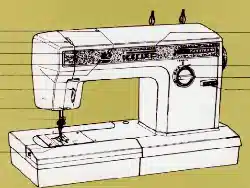
Kenmope
SEWING MACHINE 19502
/
4
S
SEARS, ROEBUCK AND CO.
Dear Homemaker,
CONGRATULATIONS!
You have just purchased a Kenmore Sensor Sew 70, a sewing machine that can, with some easy setting
by you, do both decorative and utility sewing more quickly and accurately than you ever dreamed
possible. This machine can take the guesswork, the frustrating trial and error out of sewing, virtually
eliminating hand-sewing, By just pressing a button or two, you can sew a seam or smock a dress,
reinforce a sleeve or darn socks, create a border or embroider a sampler.
This manual will show you how to perform these wonders, making your sewing creations and crafts the
"talk of the town", and make you the "star of the bazaar"
You can also program this machine to automatically sew your borders and monogram your clothing, and
it wit1 remember the entire sequence and repeat it when you press the foot control again.
Practice makes an expert I Follow these directions and suggestions carefully. Get to know your
machine intimately and it will turn your sewing tasks into an adventure !
These instructions wil] help you obtain the best sewing results and avoid unnecessary service expense for
conditions beyond our control. Advice on the operation and care of your machine is always available
at your nearest Sears Retail Store. Please remember, if you have questions about your machine, always
mention the model number and serial number when you inquire.
Write them here, for easy reference: Model No. 385.
Serial No.
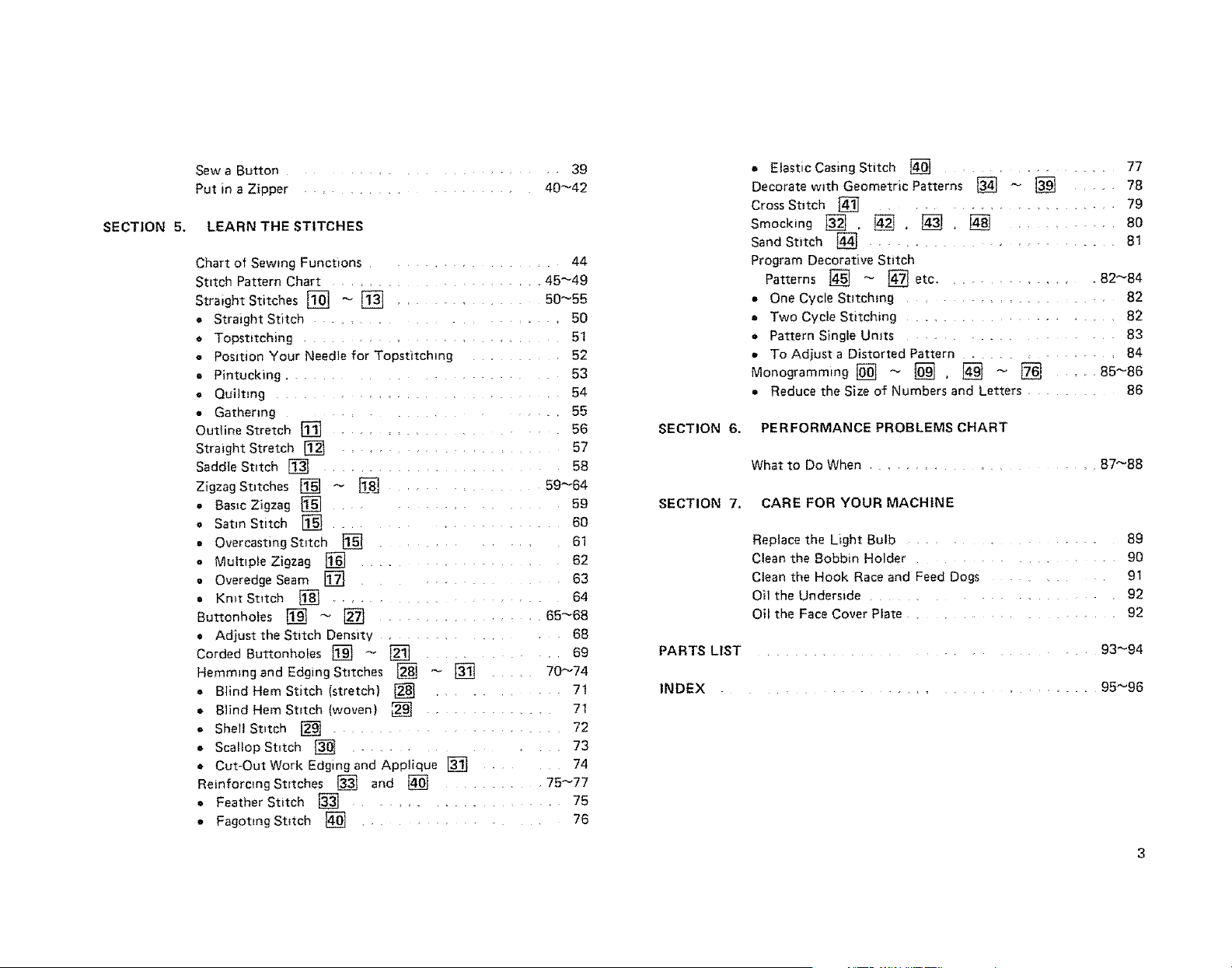
TABLE OF CONTENTS
SECTION 1.
SECTION 2.
KNOW YOUR MACHINE
A Portable Case or Cabinet _sAvailable , . 4
Locate and Identify the Parts ........ 5_6
Locate and Identify the Accessories 6
PREPARE YOUR MACHINE FOR SEWING
7_11
Set Up the Machtne ....
= Piug m the Machme and Switch on the Power 7
• Set the Foot Control ...... 8
Check Your Feed Balance Dial ........ 8
• Set the Pressure DiaE . . . 8
9
o Adjust the Presser Foot Lever . . ,
9
o Thread Cutter ............
o Free-Arm Sewtng: the RemovaloJe
Extenston Table . . 10_11
Know What the Presser Feet Will Do 12_15
• Foot Storage Compartment 12
• Presser FootTypes .... t3_15
13
A. Zigzag Foot -
B. Transparent Buttonhole Foot _ 13
C. Overedge Foot .... 13
D. Quifter ........ t4
E. Zipper Foot. . !4
F. Satin StLtch Foot ......... 14
G, Blind Stitch Hem Foot ......... 15
H. Straight Foot ..... 15
J. Sliding Buttonhole Foot .... 15
Choose Your Needle and Thread .......... 16_17
• Check Your Needle ...... - .... 16
• Fabric, Needle, Thread and Stitch Length Chart .... 17
To Change Your NeedLe ............... 17
Prepare the Bobbin .............. 18_21
• Put Thread on the Spool ..... - ..... 18
° Addittonal Spool Pin ............... 18
SECTION 3.
SECTION 4.
• To Remove the Bobbin from the Machine ....... 19
• Wind the Bobbin ................ 19_20
• Insert the Bobbin into the Bobbin Holder ..... 21
Prepare Your Top Thread ................ 22_27
• Check Your Presser Foot ................. 22
• Change the Presser Foot ......... 23
• Thread Your Needle ............ 24
• Pick Up Your Bobbin Thread ........... 25
• Adjust the Top Thread Tension ....... 26_27
For Straight Stitch ............ 26
For Zigzag Stitch ................... 27
LEARN TO USE THE CONTROLS
Up/Down Needle Posit_on Button ........... 29
Controt Panei ....................... 29
Pattern indicator Screen ............... 30
Pattern Selection Buttons ................. 30
Memory Button ................. 3t
Clear Button ..................... 31
Straight and Zigzag Stitch Buttons ....... 31
Stitch Width and Length Buttons .......... 32_33
• Stitch Width Button ................. 32
o Stitch Length Button ................ 33
Reverse Stitch and Auto-Lock Buttons .......... 34
• Reverse Stitch Button .................... 34
• Auto-Lock Button ....................... 34
PRACTICE COMMON STITCHING SKILLS
Use the Seam Guides ....................... 35
Turn a Square Corner ................... 35
Sew on Heavy Fabrics .......... ...... 36
Use the Darning PIate .............. 36
Basting [] .................. 37
Darning _ .................... 38
SewaButton 39
PutJnaZipper 40_42
SECTION5. LEARNTHE STITCHES
Chart ot Sewing FunctEons 44
Stitch Pattern Chart ........ 45_49
Straight Stitches [] _ [] 50_55
a Straight Stitch . 50
o Topst_tching ......... 51
. Posltton Your Needle for Topstitchmg . 52
• Pintucking. 53
• Quilting ......... 54
o Gathering 55
Outline Stretch [] • . 56
Strazght Stretch [] ..... 57
Saddle Stitch [] . . 58
Zigzag Stitches _ -- [] 59_64
• Basic Zigzag [] 59
• Satin Stttch [] 60
• Overcasting Stitch [] 61
• Multiple Zigzag [] 62
• Overedge Seam [] 63
• Kmt Stitch [] .... 64
Buttonholes [] -- [] .... 65_68
o Adjust the Stitch Density 68
Corded Buttonholes t_ _ _ 69
Hemmmgand EdgmgStltches [] _ [] . 70_74
• Blind Hem Stitch (stretch) [_ ....... 71
• Blind Hem Stitch (woven) _ ...... 71
o Shell Stitch [] ......... 72
• Scallop Stitch [] ...... 73
o Cut-Out Work Edging and Applique [] 74
ReioforclngStltches [] and [] ..... 75_77
• Feather Stitch [] .......... 75
• FagotmgSt_tch [] ....... 76
Elastic Casing Stitch [] ........... 77
Decorate wlth Geometric Patterns [_ _ [] 78
Cross Stitch [] .................. 79
Smocking [] ........ B0
Sand Stitch [] ............... 81
Program Decorative Stitch
Patterns [] _ [] etc ............... 82_84
• One Cycle Stitching ...................... 82
Two Cycle Stitching ................ 82
• Pattern Single Units .................... 83
- To Adjust a Distorted Pattern .......... 84
Monogramming[] ~ [] 85--Be
Reduce the Size of Numbers and Letters .......... 86
SECTION 6, PERFORMANCE PROBLEMS CHART
What to Do When ................. 87_88
SECTION 7. CARE FOR YOUR MACHINE
Replace the Light Bulb .................... 89
Clean the Bobbin Holder ............... 90
Clean the Hook Race and Feed Dogs ........... 91
0_1 the Underside ..................... 92
Oil the Face Cover Plate ........... 92
PARTS LIST ................ 93_94
INDEX .............. 95_96
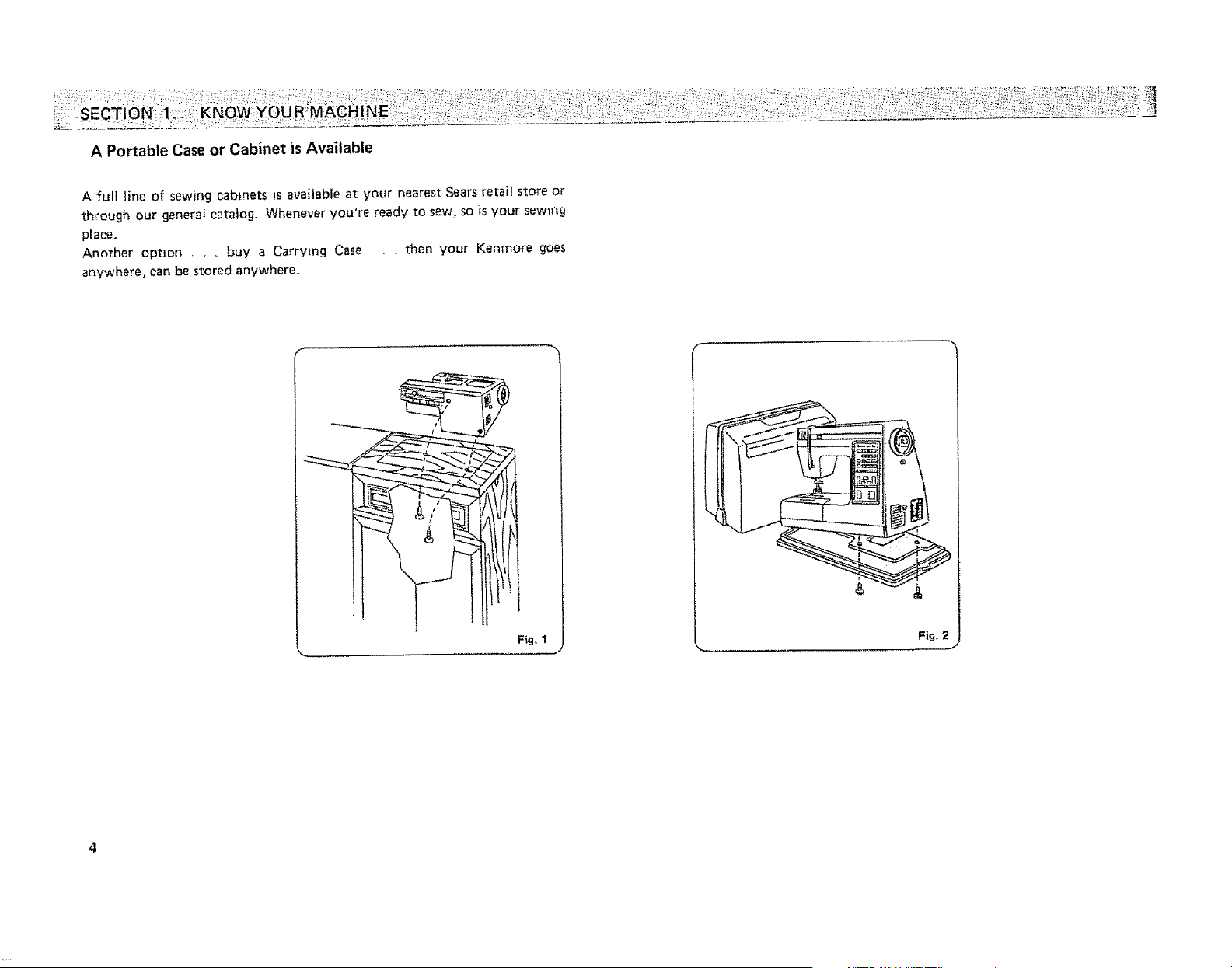
A Portable Case or Cabinet is Available
A fult line of sewing cabinets is available at your nearest Sears retail store or
through our generaf catalog. Whenever you're ready to sew, so is your sewing
place.
Another option , _ , buy a Carrying Case • , . then your Kenmore goes
anywhere, can be stored anywhere.
Fig, I
Fig. 2
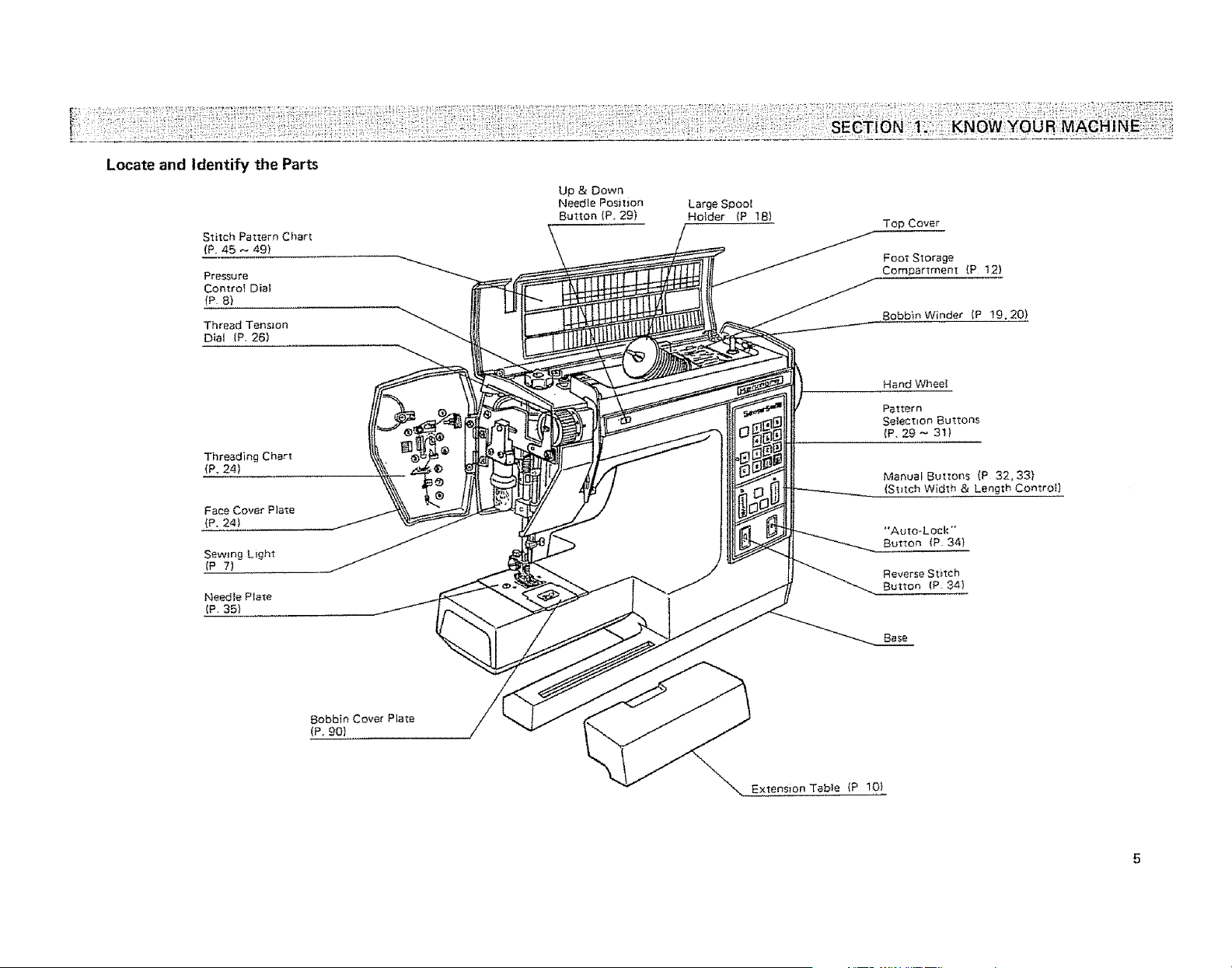
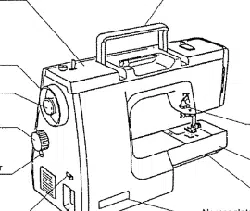
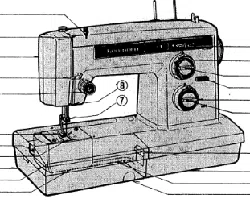
Locate and Identify the Parts
Stitch Pattern Chart
(P. 45 _ 49)
Pressure
Control Diai
{P 8)
Thread Tensmn
Dial (P, 26)
Threading Chart
(P. 24)
Face Cover Plate
(P, 24)
Sewing Light
(P 7)
Needle Plate
(P. 35}
Bobbin Cover Plate
(P. 90)
Up & Down
Needle Position
Button (P. 29)
Large SPool
Holder (P 1B)
Top Cover
Foot Storage
Compartment (P t2)
Winder (P 19,20}
Hand Wheel
Pattern
Select_on Buttons
(P. 29 _ 31)
Manual Buttons (P 32, 33}
(Stitch Width & Length Contro_)
"Auto-Lock"
Button tP 34}
Reverse Stitch
Button iP 34)
Base
n Table {P 10}
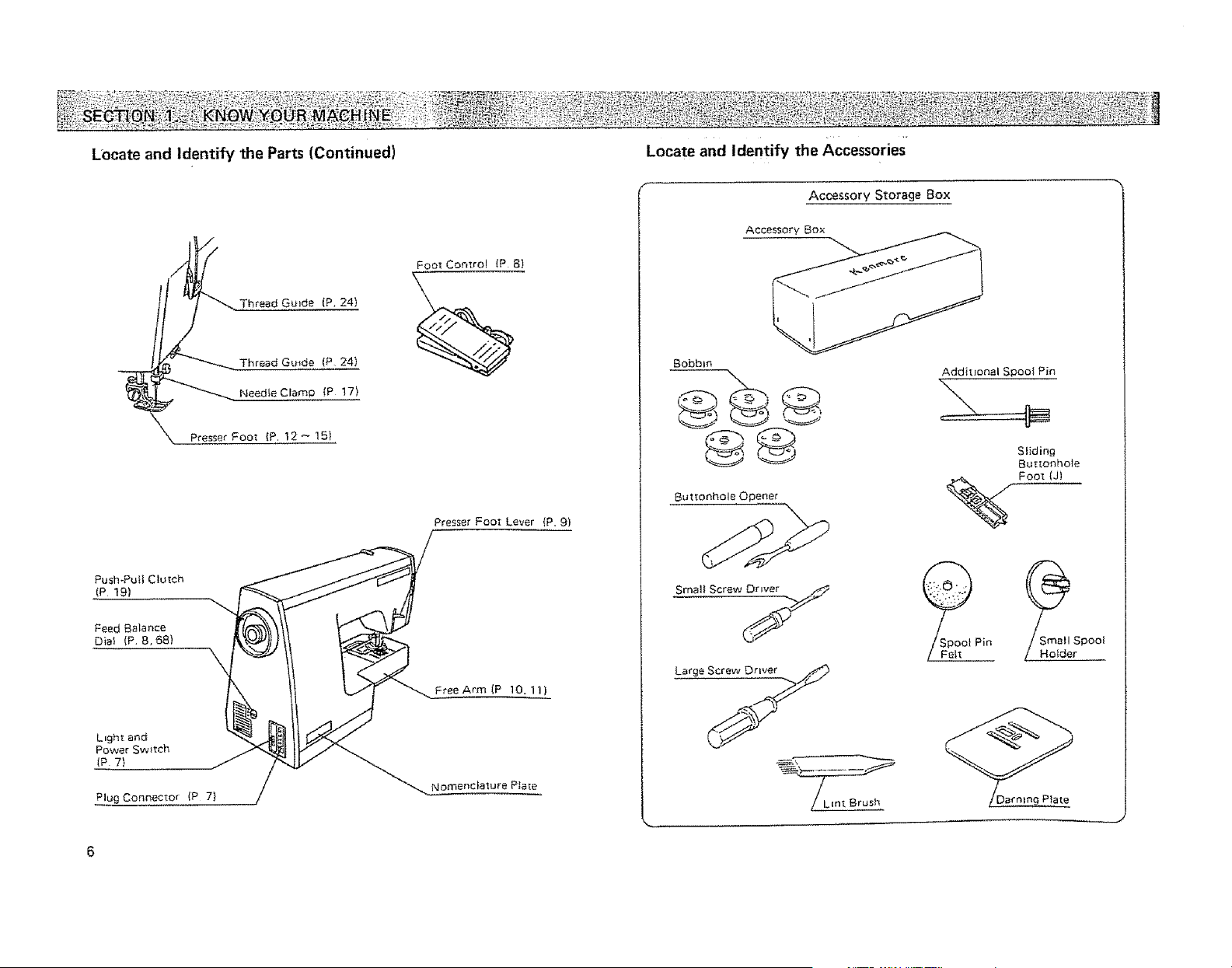
Locate and Identify the Parts (Continued) Locate and Identify the Accessories
Thread Guide (P. 24)
Thread Guide (P 24)
Needte Clamp _P 171
Presser Foot {P, 12 _ 15)
L_ght and
Power Switch
(P 71
Plug Connector (P 7}
Foot Control (P 8)
Presser Foot Laver (P. 9)
FreeArm (P 10. 11)
Nomenclature PJate
Accessory Storage Box
Bobbin
Buttonhole Opener
Addi[_onal Spool Pin
Sliding
Buttonhole
Foot fJ}
%
Small Screw_
Large Screw E)r_ver _
J
-
mt Brush
J
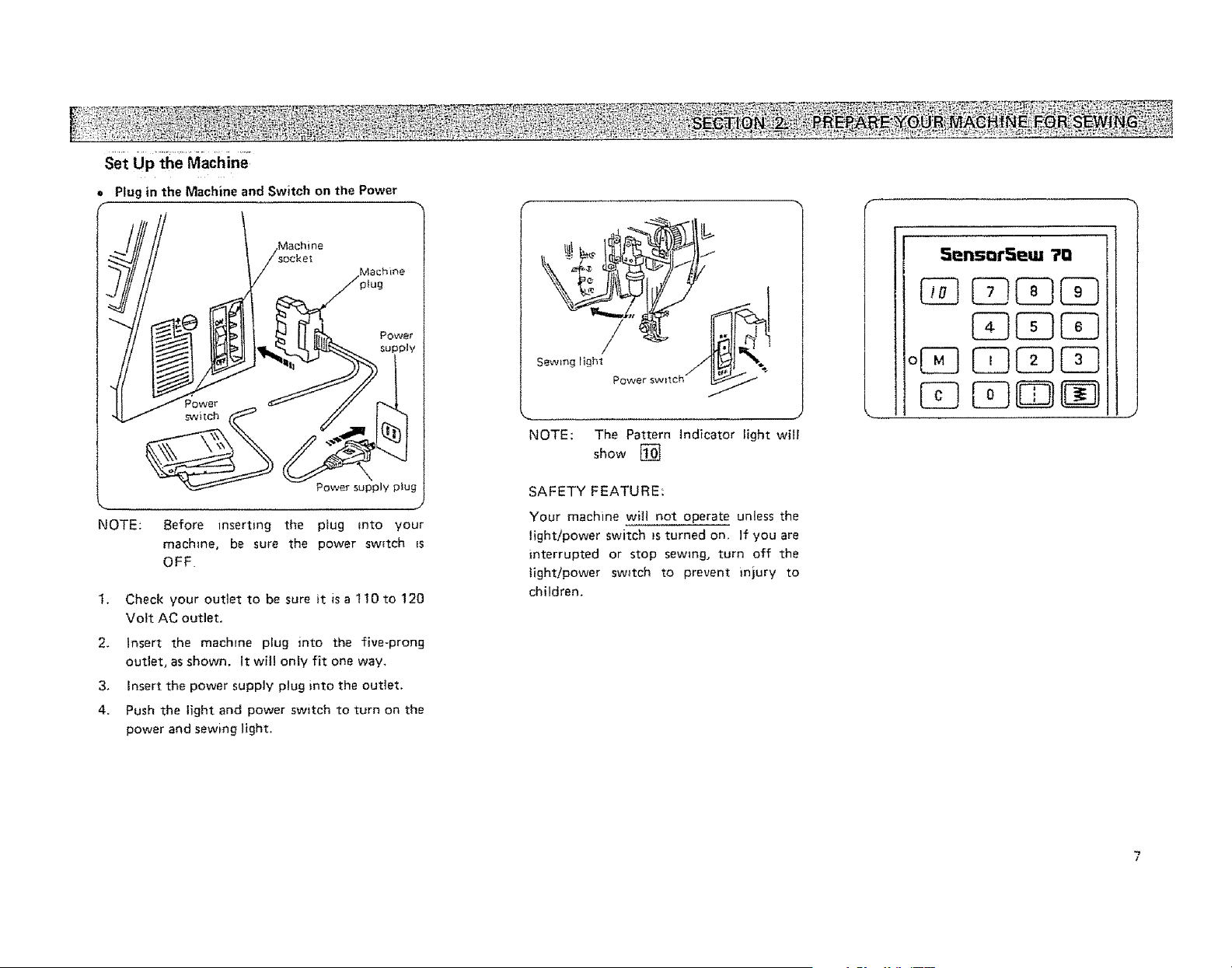
Set Up the Machine
Plug in the Machine and Switch on the Power
_ J
NOTE: Before inserting the plug into your
machine, be sure the power sw_tch _s
OFF.
1. Check your outlet to be sure it is a 110 to 120
Volt AC outlet.
2, Insert the machine plug into the five-prong
outlet, as shown, It will only fit one way,
3, Insert the power supply plug into the outlet,
4. Push the light and power switch to turn on the
power and sewing light,
/
Sewing light
NOTE: The Pattern Indicator light wilt
show [_
SAFETY FEATURE:
Your machine wil! not operate unless the
light/power switch is turned on. If you are
interrupted or stop sewing, turn off the
tight/power sw_tch to prevent injury to
children.
5ensatS_m ?Q
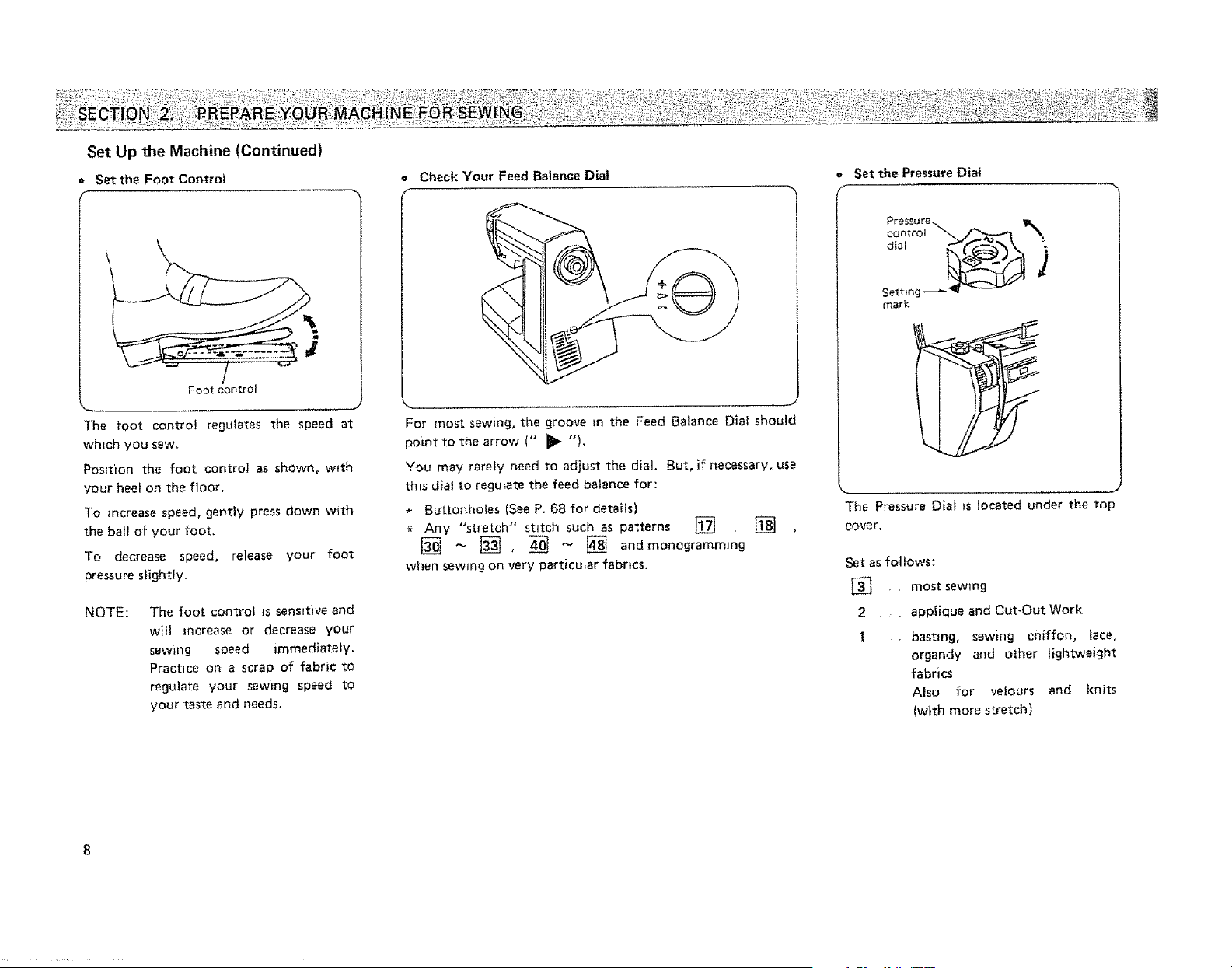
Set Up the Machine (Continued)
= Set the Foot Contro}
The foot control regulates the speed at
which you sew.
Position the foot control as shown, with
your heel on the floor.
To increase speed, gently press down with
the ball of your foot,
To decrease speed, release your foot
pressure slightly.
NOTE: The foot control _s sensttive and
wilt increase or decrease your
sewing speed immediately.
Practice on a scrap of fabric to
regulate your sewing speed to
your taste and needs.
o Check Your Feed Balance Dial
F
For most sewing, the groove =n the Feed Balance Dial should
point to the arrow (" _1_ ").
You may rarely need to adjust the diat. But, if necessary, use
this diat to regulate the feed balance for:
* Buttonholes (See P. 68 for details)
* Any "stretch" stitch such as patterns [] []
[] _ r_ , [] _ [4_ and monogramm,ng
when sewing on very particular fabrics.
o Set the Pressure Dial
f
Pressure._ Vr_
control _ _,
Setting _ "_
mark
The Pressure Dial is located under the top
cover,
Set as follows:
[_ . • most sewing
2 .appiique and Cut-OutWork
t ,, basting, sewing chiffon, tace,
organdy and other lightweight
fabrics
Also for velours and knits
(with more stretch)
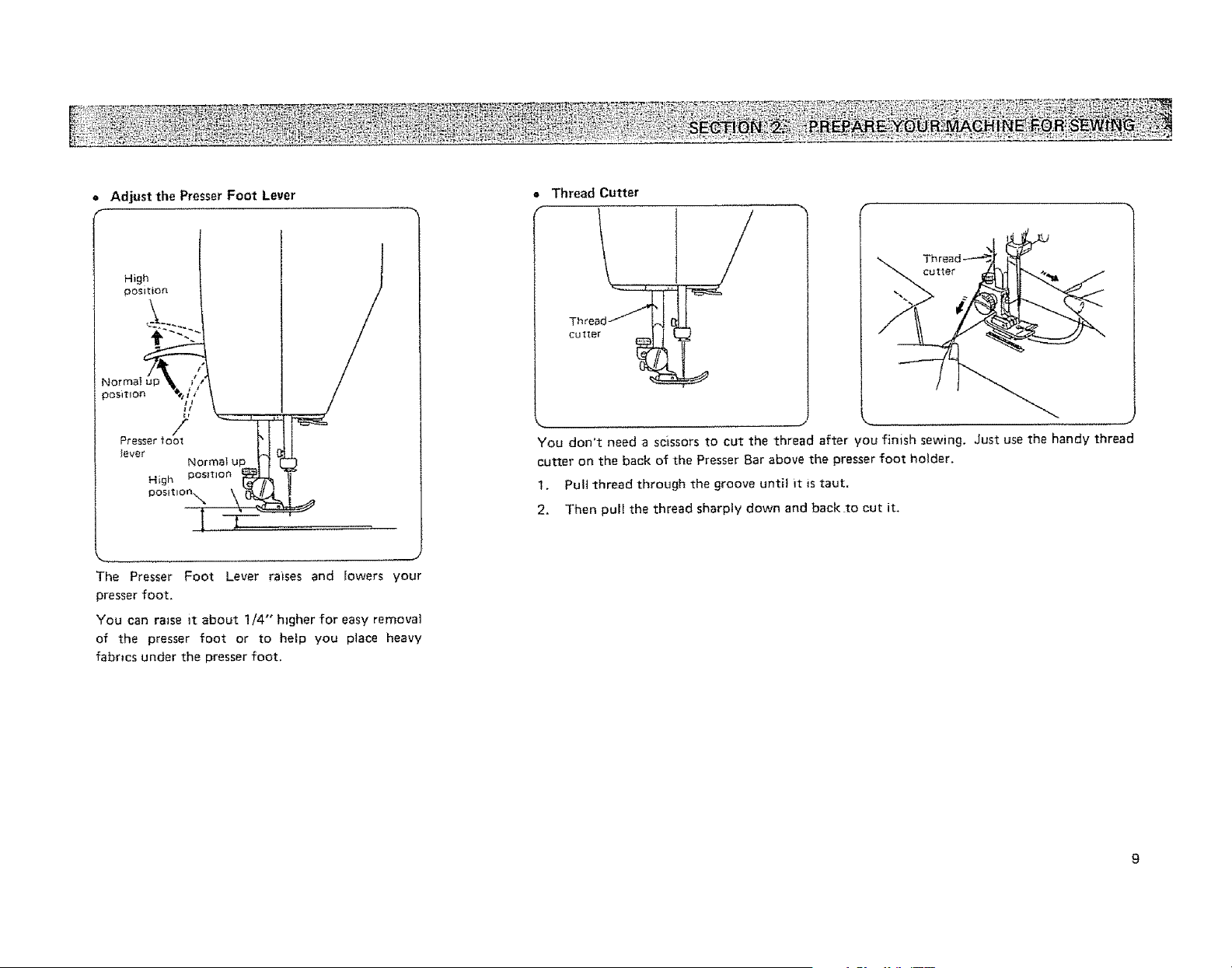
• Adjust the Presser Foot Lever
High
position
The Presser Foot Lever raises and lowers your
presser foot.
You can raise it about 1/4" hlgher for easy removal
of the presser foot or to help you place heavy
fabrics under the presser foot.
o Thread Cutter
cutter
You don't need a smssors to cut the thread after you finish sewing. Just use the handy thread
cutter on the back of the Presser Bar above the presser foot holder.
1. PuN thread through the groove until it is taut.
2. Then pull the thread sharply down and back to cut it.
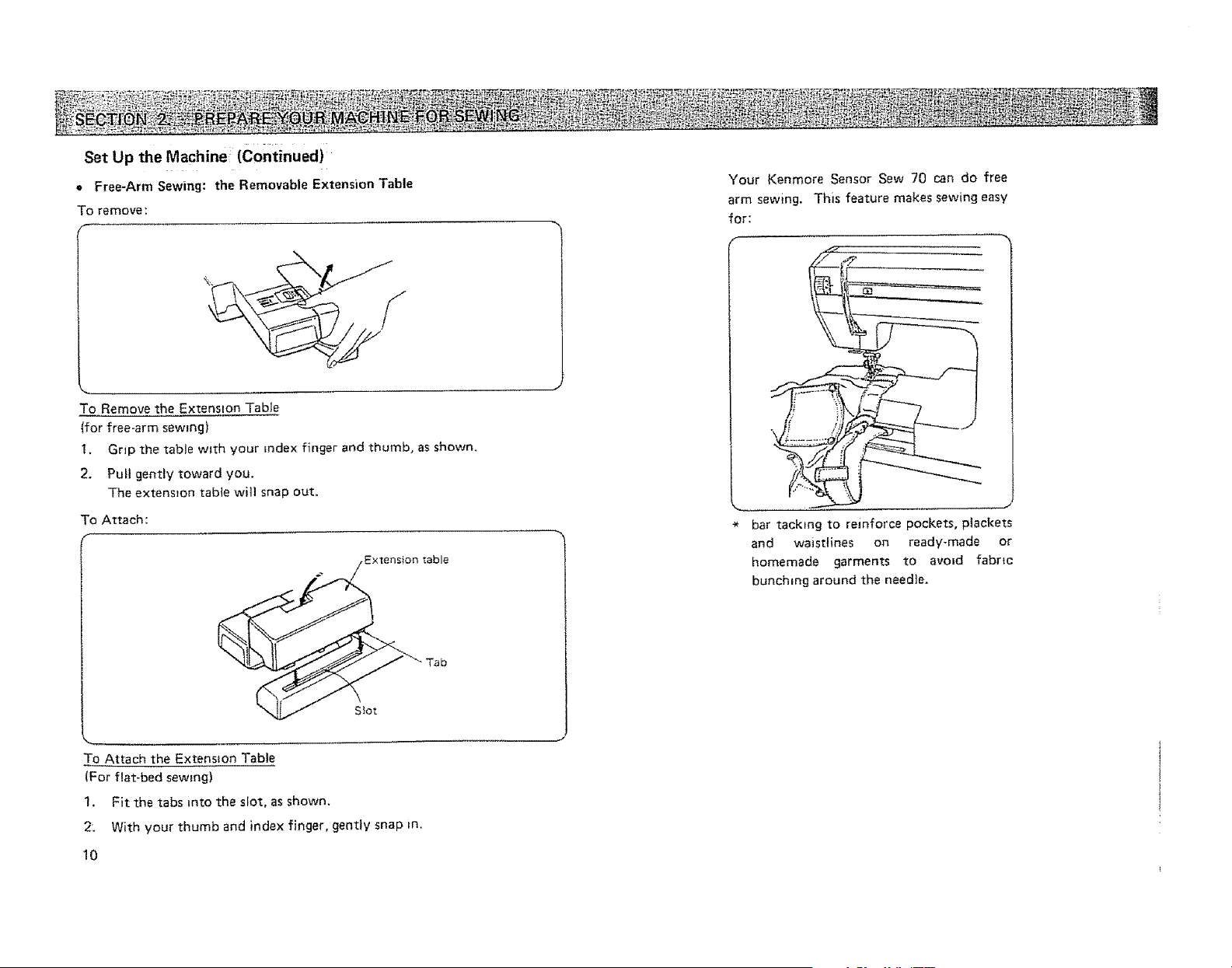
Set Up the Machine (continued);
o Free-Arm Sewing: the Removable Extension Table
To remove:
To Remove the Extension Table
(for free-arm sewing)
1. Grip the table with your index finger and thumb, as shown.
2. Pull gently toward you.
The extension tabie will snap out.
To A_tach:
To Attach the Extension Table
(For flat-bed sewing)
1. Fit the tabs into the slot, as shown.
2: With your thumb and index finger, gently snap m.
10
Your Kenmore Sensor Sew 70 can do free
arm sewing. This feature makes sewing easy
for:
F
* bar tacking to reinforce pockets, plackets
and waistlines on ready-made or
homemade garments to avoid fabrtc
bunching around the needle.
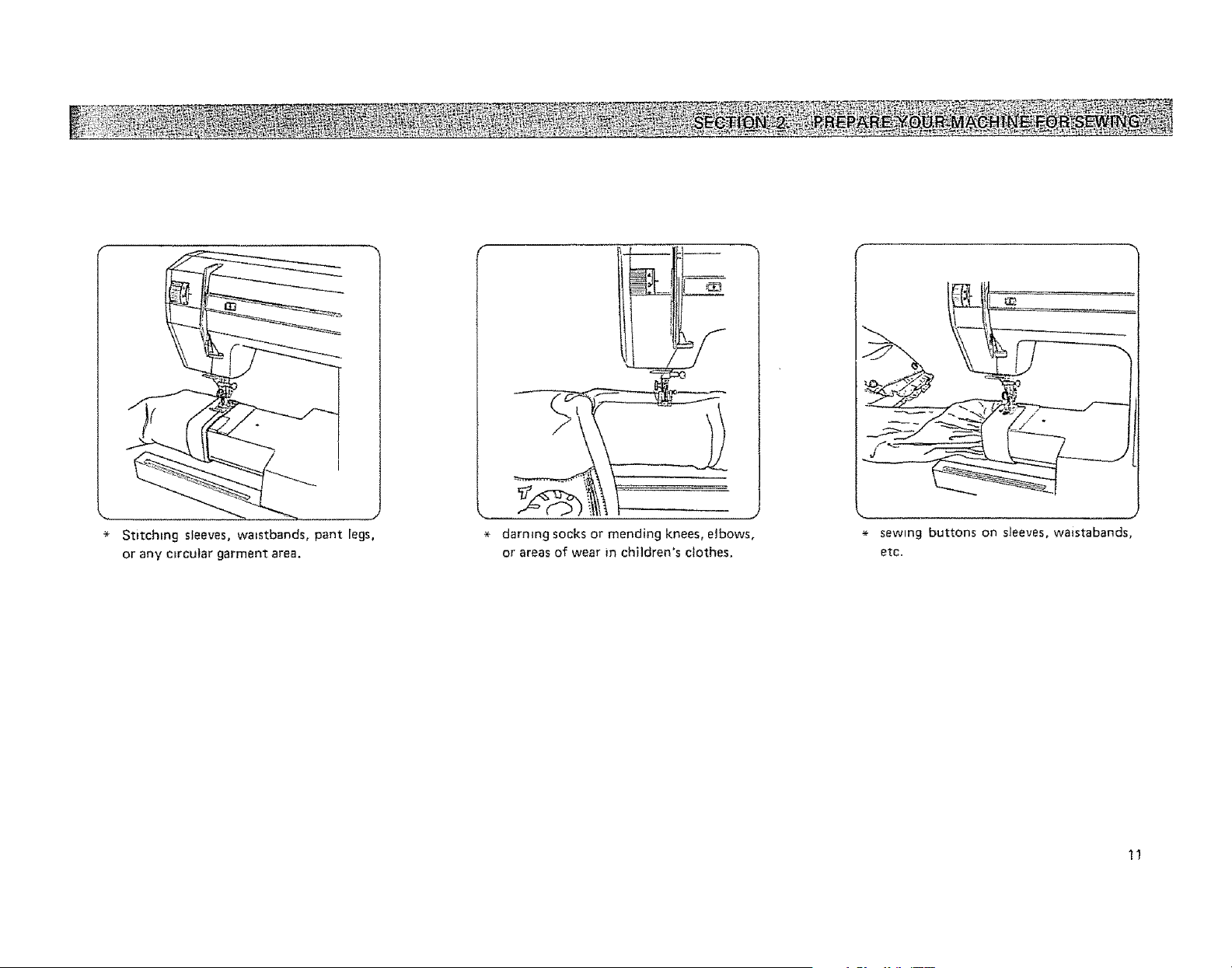
* Stitchingsleeves,waistbands,pantlegs,
oranymrculargarmentarea.
darningsocksormendingknees,elbows,
orareasofwearinchUdren'sclothes.
. sewtngbuttonsonsleeves,waistabands,
etc.
Know What the Presser Feet Will Do
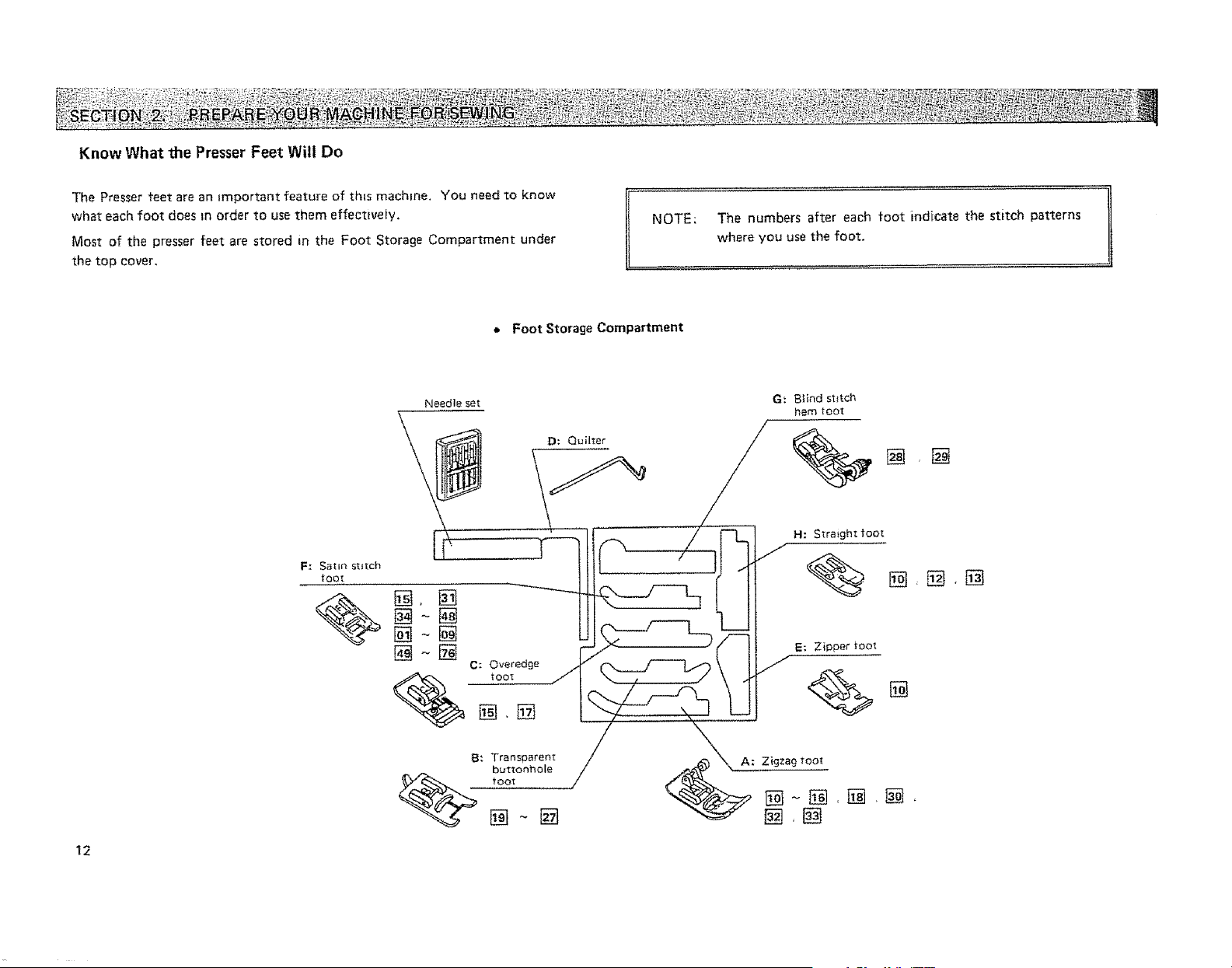
The Presser teet are an important feature of this machine. You need to know
what each foot does m order to use them effectively,
Most of the presser feet are stored tn the Foot Storage Compartment under
the top cover,
' ' , b-
NOTE: The numbers after each foot indicate the stitch patterns
where you use the foot.
• Foot Storage Compartment
12
Needle set G: Blind stitch
hem toot
F: Satin Stitch
toot
%
H: Straigh_ too',
%o
E: Zioper foot
%°
= PresserFoot Types
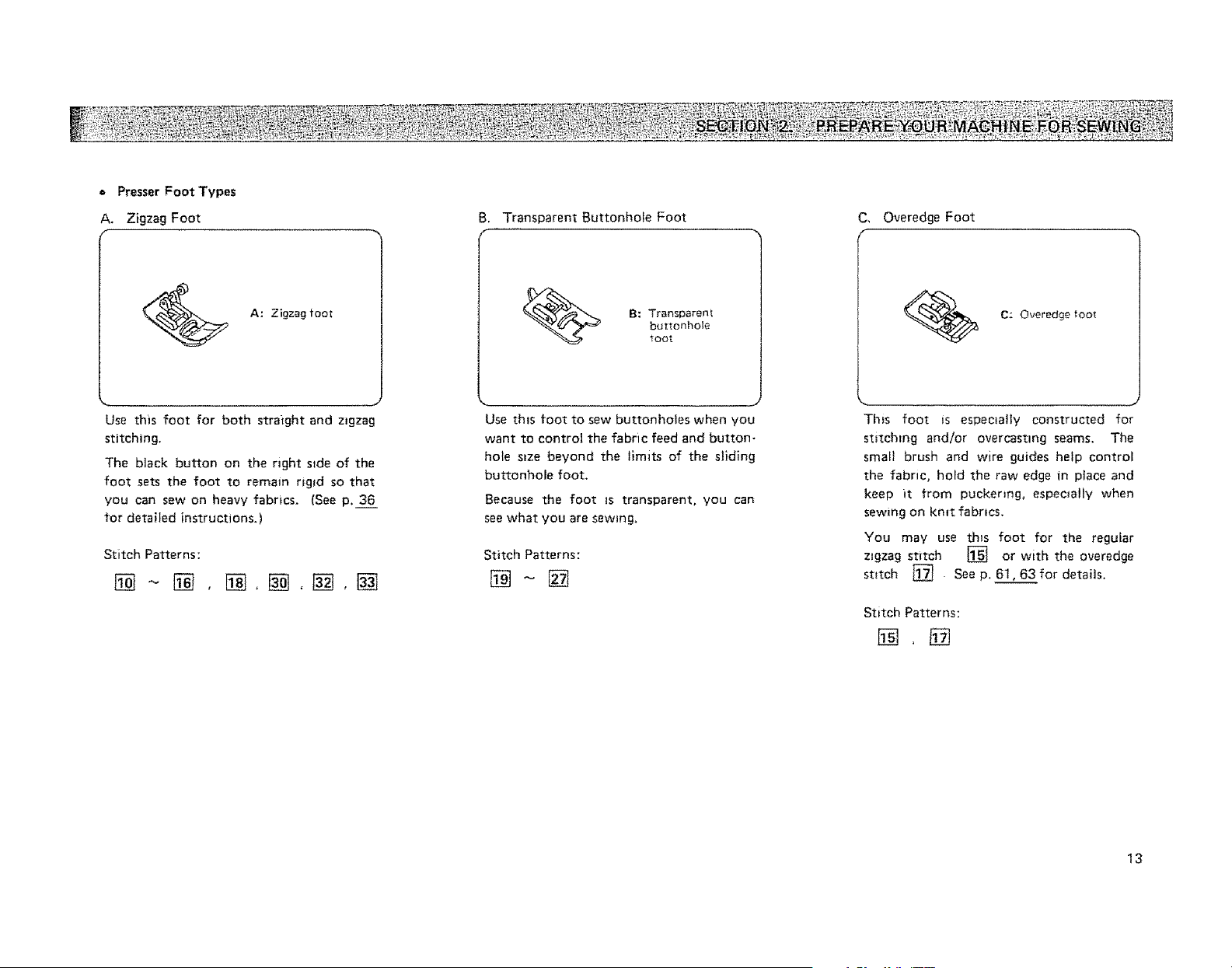
A. Zigzag Foot
A: Zigzag toot
Use th}s foot for both straight and z_gzag
stitching.
The black button on the right slde of the
foot sets the foot to remain rigid so that
you can sew on heavy fabrics. (See p. 36
for detailed instructions.
Stitch Patterns:
B. Transparent Buttonhole Foot
f
B: Transparent
buttonhole
too[
Use this foot to sew buttonholes when you
want to control the fabric feed and button-
hole size beyond the limits of the sliding
buttonhole foot.
Because the foot is transparent, you can
see what you are sewing.
Stitch Patterns:
C, Overedge Foot
C: Overedge too_
This foot is especially constructed for
stitching and/or overcasting seams. The
small brush and wire guides help control
the fabric, hold the raw edge in place and
keep it from puckering, especially when
sewing on kmt fabrics.
You may use this foot for the regutar
zigzag stitch _-_ or with the overedge
stttch [_ See p. 61,63for details.
Stitch Patterns:
13
• PresserFoot Types (Continued)
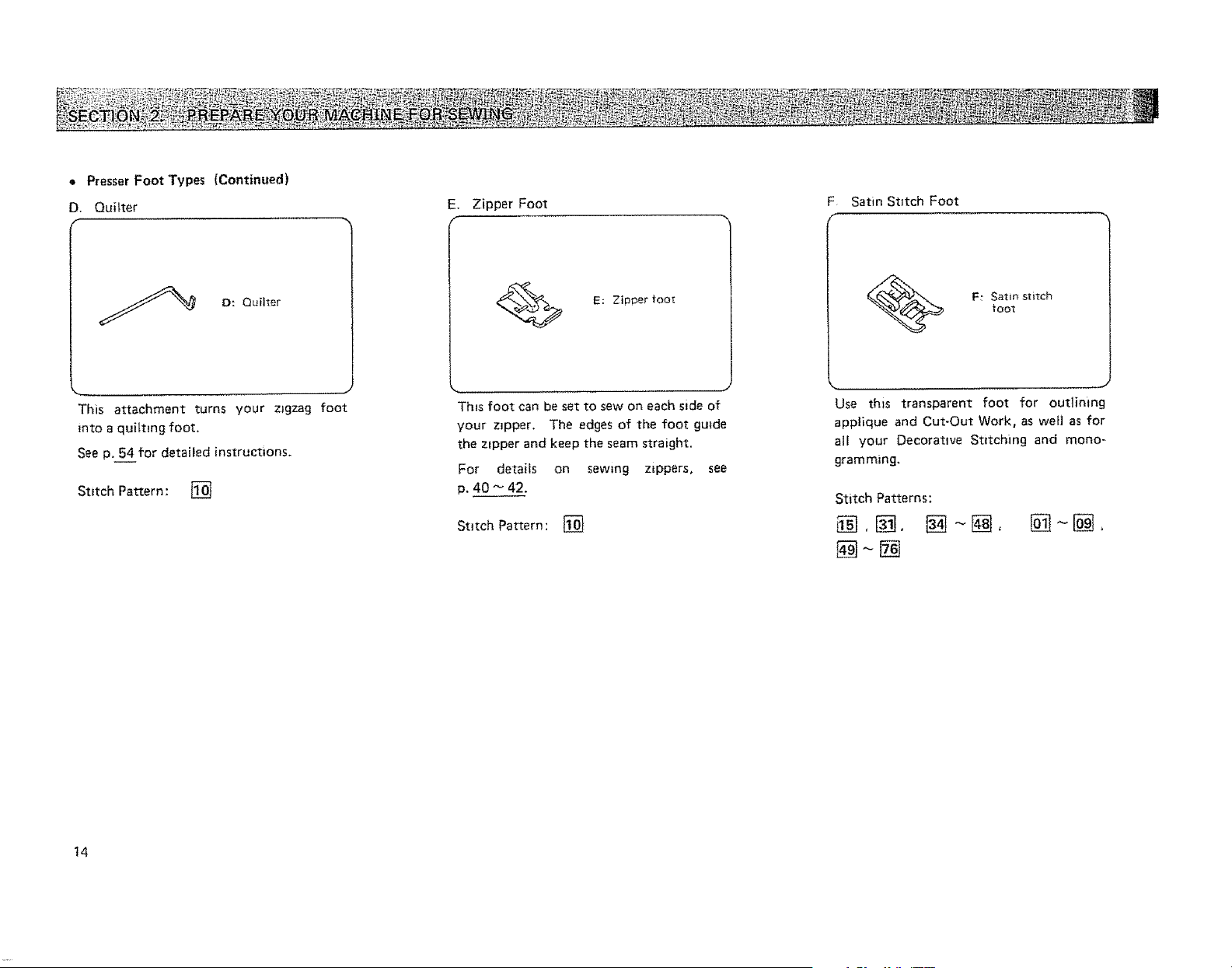
D, Quitter
D: Quilter
This attachment turns your zigzag foot
into a quilting foot.
See p. 5__44for detailed instructions.
Stitch Pattern: [_
E. Zipper Foot
F
E: Zippertoo_
Th_s foot can be set to sew on each side of
your zJppar. The edges of the foot guide
the ztpper and keep the seam straight.
For details on sewing z_ppers, see
p. 40 _ 42.
Stitch Pattern: []
F Satin Stitch Foot
F: Satin stitch
foot
Use this transparent foot for outlining
applique and Cut-Out Work, as well as for
all your Decoratwe Stitching and mono-
gramming.
Stitch Patterns:
14
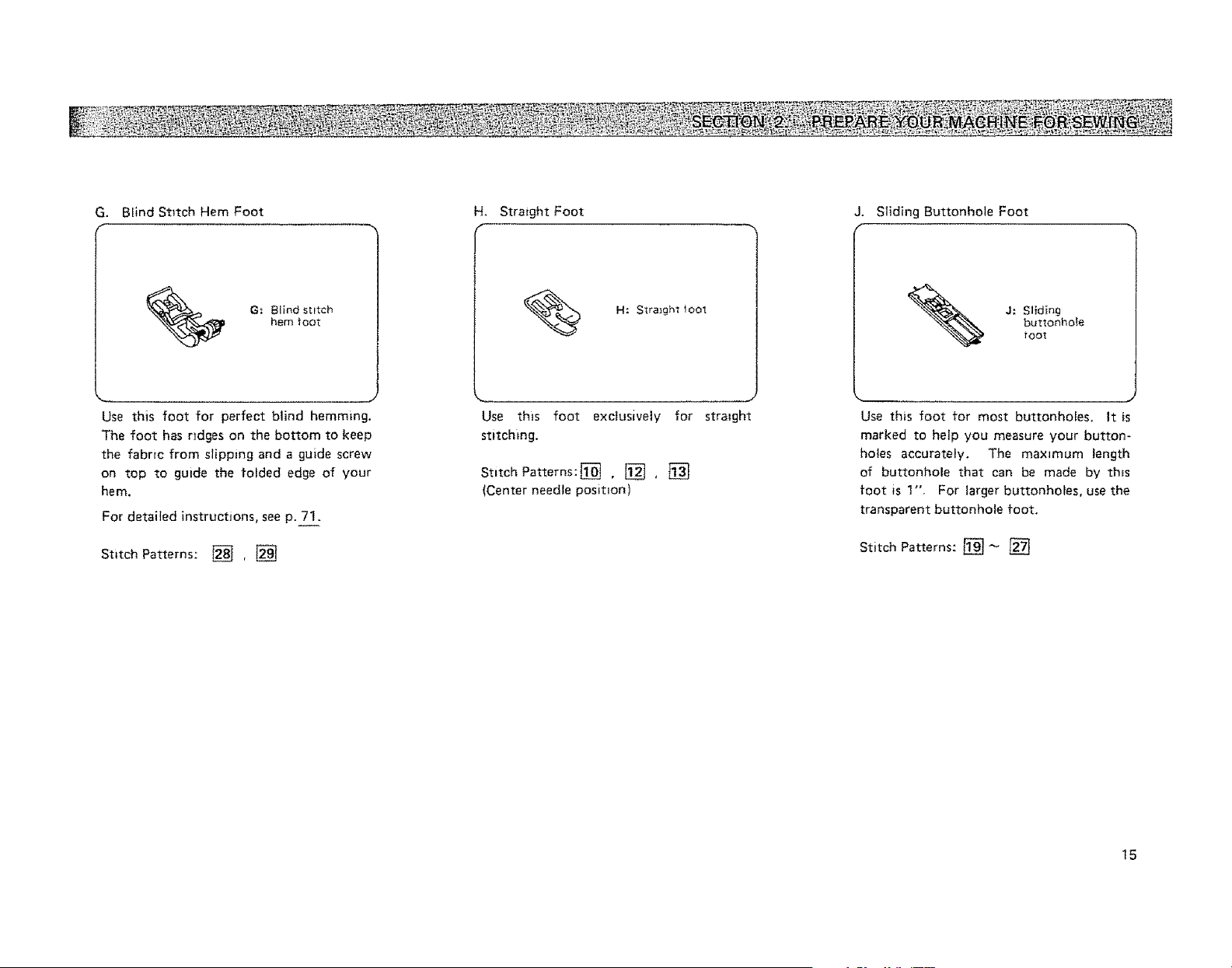
G. Blind Stltch Hem Foot
G: BIind stitch
hem toot
Use this foot for perfect blind hemming.
The foot has r_dges on the bottom to keep
the fabrrc from slipping and a guide screw
on top to guide the folded edge of your
hem.
For detailed instructions, see p. 71._:.
Stitch Patterns: _ , []
H. Straight Foot
H: S_ra_ght toot
Use thzs foot exclusively for straight
stitching.
StitchPatterns:[_] , [_ , []
{Center needle position)
J. Sliding Buttonhole Foot
J: Sliding
buttonhole
fool
Use this foot for most buttonholes. It is
marked to help you measure your button-
holes accurately. The maximum length
of buttonhole that can be made by this
foot is 1". For larger buttonholes, use the
transparent buttonhole foot.
Stitch Patterns: _] _ []
15
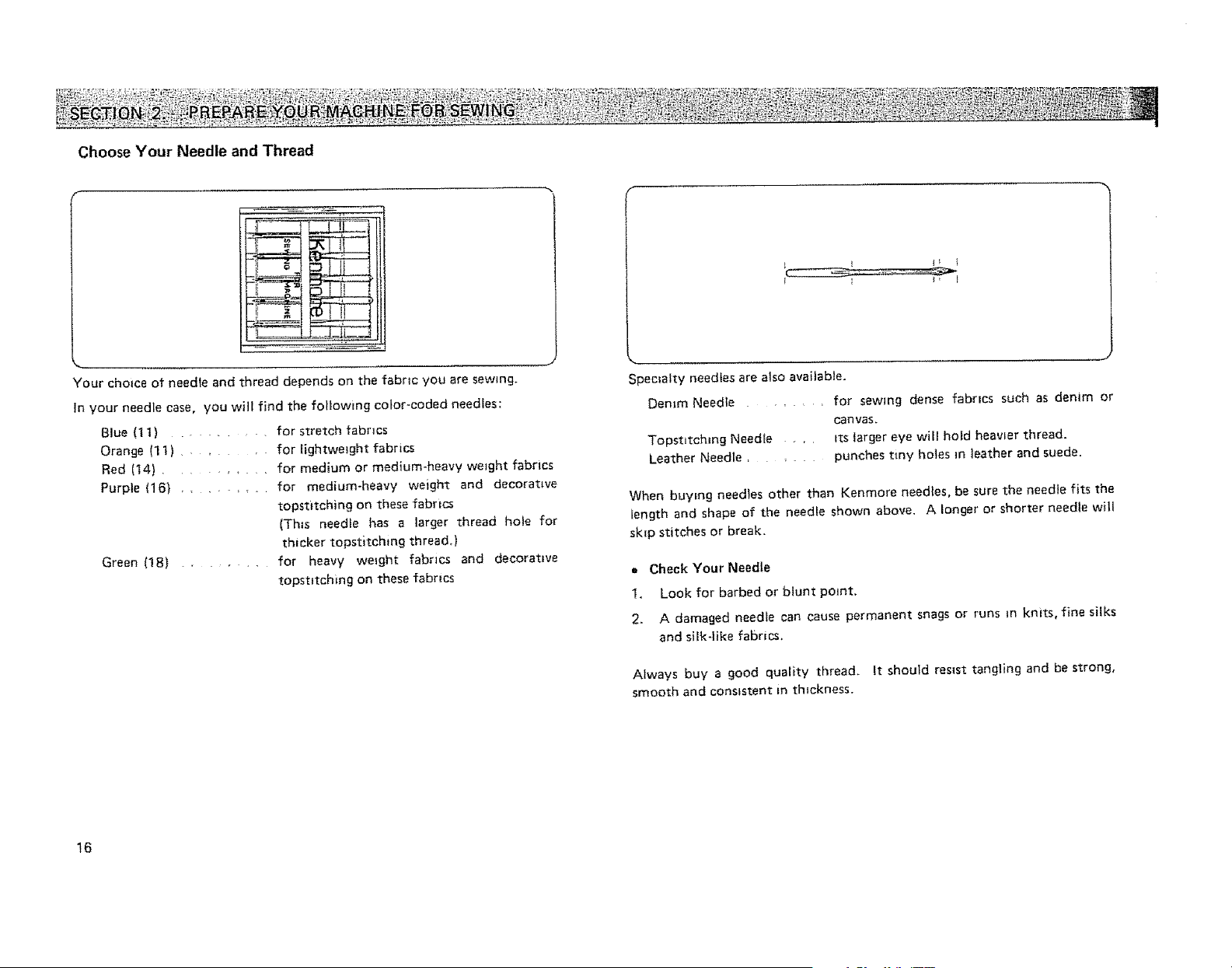
Choose Your Needle and Thread
Your choice of needle and thread depends on the fabric you are sewing.
In your needle case, you will find the following color-coded needles:
Blue (11) ...... for stretch fabrics
Orange (11) .... for lightwelght fabrics
Red (14) ......... for medium or medium-heavy weight fabrics
Purple (16) ....... for medium*heavy weight and decoratwe
topsI_tching on these fabric_
(This needle has a larger thread hole for
thicker topstitching thread,)
Green f18) ..... for heavy weight fabrics and decorattve
topst_tch_ng on these fabrics
Specialty needles are also available.
Denim Needle ......... for sewing dense fabrics such as denim or
can vas.
Topstitchmg Needle • , its larger eye will hold heavier thread.
Leather Needle ...... punches ttny holes in leather and suede.
When buy=rig needles other than Kenmore needles, be sure the needle fits the
_ength and shape of the needle shown above. A longer or shorter needle wi|l
skip stitches or break.
,_ Check Your Needle
1. Look for barbed or blunt point.
2. A damaged needle can cause permanent snags or runs in knits, fine silks
and silk4ike fabrics.
Always buy a good quality thread. It should resist tangling and be strong,
smooth and consistent in thickness.
16
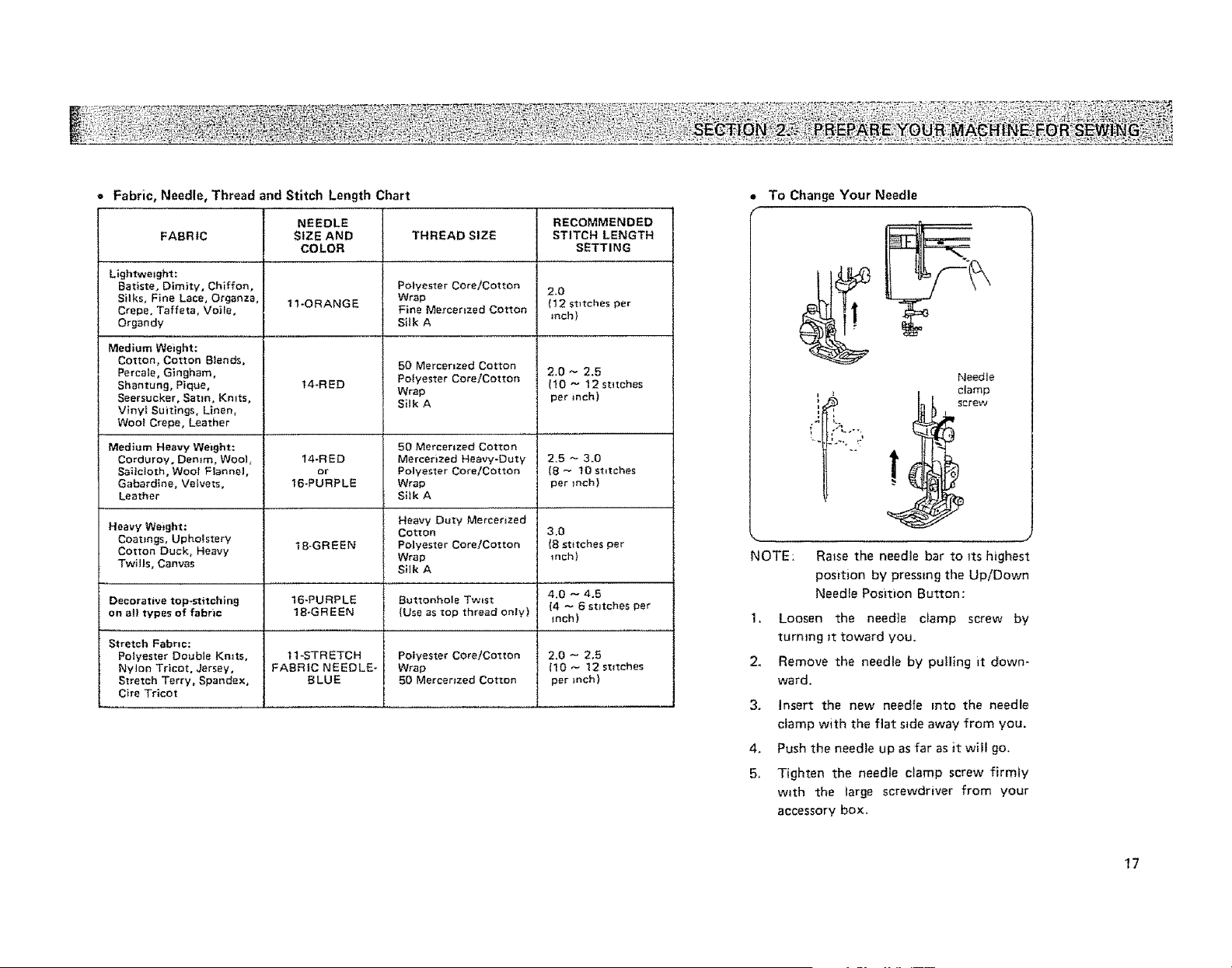
Fabric, Needle, Thread and Stitch Length Chart
NEEDLE
FABRIC SIZE AND
COLOR
Lightweight:
Batiste. Dimity, Chiffon,
Silks, Fine Lace, Organza, 11-ORANGE
Crepe. Taffeta. Voile,
Organdy
Medium Weight:
Cotton, Cotton Blends,
Percale, Gingham,
Shantung, Pique, 14-RED
Seersucker, Satin, Kmts,
Viny_ $uitlngs, Linen,
Wool Crepe, Leather
Medium Heavy Weight:
Corduroy, Denim, Woo]_ 14-RED
Sailcloth, Wool Flannel, or
Gabardine, Vetvets, 16-PURPLE
Leather
Heavy Wmght:
Coatings, Upholstery
Cotton Duck_ Heavy 1B-GREEN
Twills, Canvas
Decorative top-_tltching
on all types of fabric
Stretch Fabric:
Polyester Double Kmte,
Nylon Tricot, Jersey,
Stretch Terry, Spandex,
Clre Tricot
RECOMMENDED
THREAD SIZE STITCH LENGTH
SETTING
Polyester Core/Cotton
Wrap
Fine Mercerized Cotton
Silk A
50 Mercerized Cotton
Polyester Core/Cotton
Wrap
Silk A
50 Mercerized Cotton
Mercerized Heavy-Duty
Polyester Core/Cotton
Wrap
Silk A
2.0
{12 stitches per
_nch}
2.0 _ 2.5
(10 _ 12 stttches
per inch)
2.5 _ 3.0
(8 _ 10 stitches
per mch}
Heavy Duty Mercerized
Cotton 3.0
Polyester Core/Cotton (8 stitches per
Wrap mch)
Silk A
16*PURPLE Buttonhole Twist 4.0 N 4.5
18-GREEN (Use as top thread only) {4 _ 6 stitches per
mch)
11-STRETCH Polyester Core!Cotton 2.0 _ 2,5
FABRIC NEEDLE- Wrap (10 _ 12 stitches
BLUE 50 Mereertzed Cotton per _nch}
To Change Your Needle
-%
4 L
_3
Needle
clamp
scre_J
NOTE: Raise the needle bar to its highest
position by pressing the Up/Down
Needle Posmon Button:
1. Loosen the needle c_amp screw by
turning )t toward you.
2, Remove the needle by pulling it down-
ward.
3. Insert the new needle into the needle
clamp with the flat s_de away from you.
4. Push the needle up as far as it wiil go,
5, Tighten the needle clamp screw firmly
wath the large screwdriver from your
accessory box.
17
Prepare the Bobbin
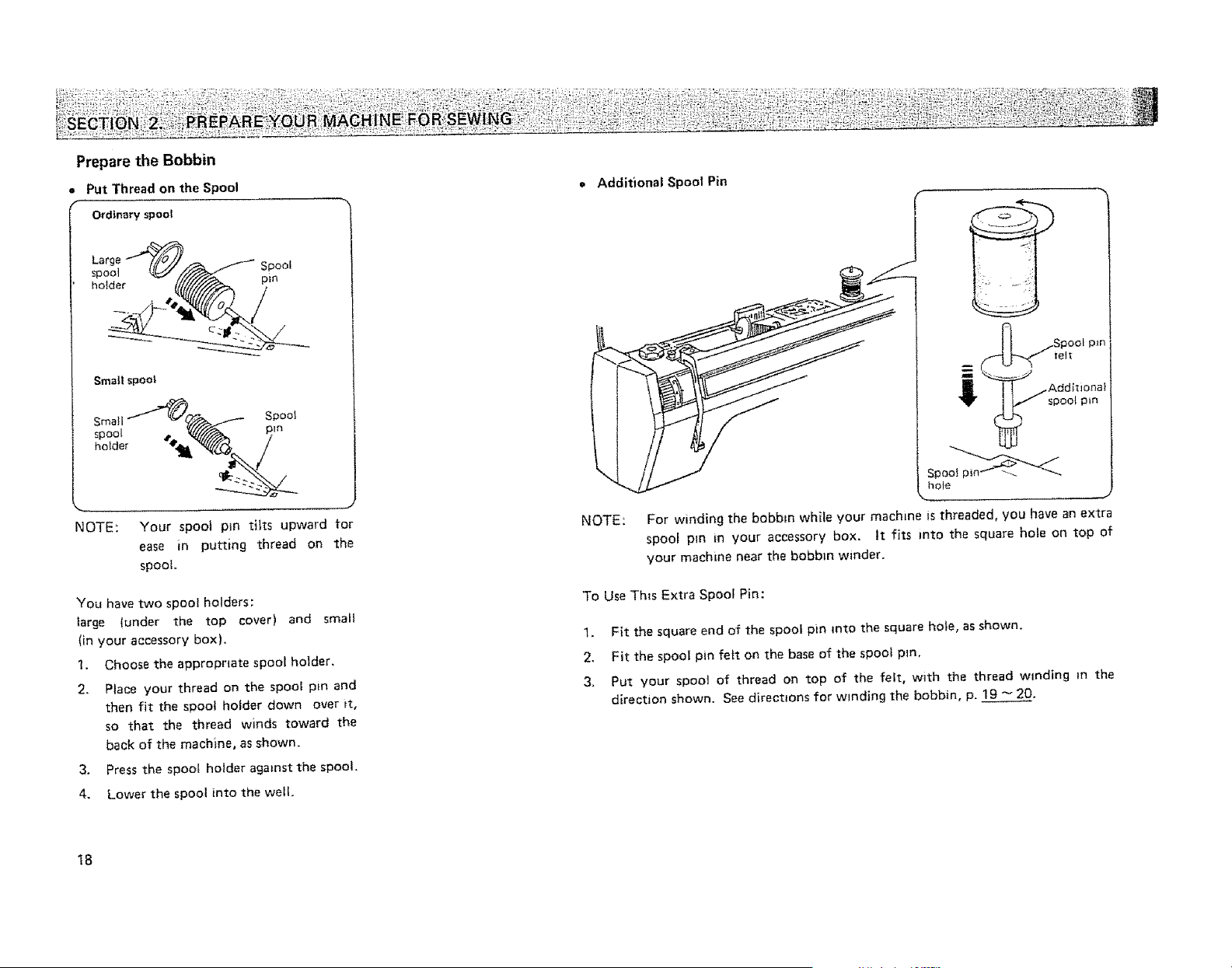
Put Thread on the Spool
Ordinary spool
pin
Small spool
Small "_'_ z___________________F Spool
NOTE: Your spool pin tilts upward for
ease in putting thread on the
spool,
You have two spool holders:
large (under the top cover)
Iin your accessory box).
1.
and small
Choose the appropriate spool holder.
2. Place your thread on the spool pin and
then fit the spool holder down over it,
so that the thread winds toward the
back of the machine, as shown.
3. Press the spool holder against the spool.
4. Lower the spool into the well.
18
NOTE:
Additional Spool Pin
/Spool p_l
._ _-U_ felt
I _-Addhiona'
_V" _spool pln
Spo_
hole
.................. J
For winding the bobbin while your machine is threaded, you have an extra
SpooJ pin in your accessory box, tt fits into the square hole on top of
your machine near the bobbin winder.
To Use Thts Extra Spool Pin:
1. Fit the square end of the spool pin into the square bote, as shown.
2. Fit the spool pin felt on the base of the spool pro,
3. Put your spool of thread on top of the felt, with the thread winding m the
direction shown. See directions for winding the bobbin, p. 19 _ 20.
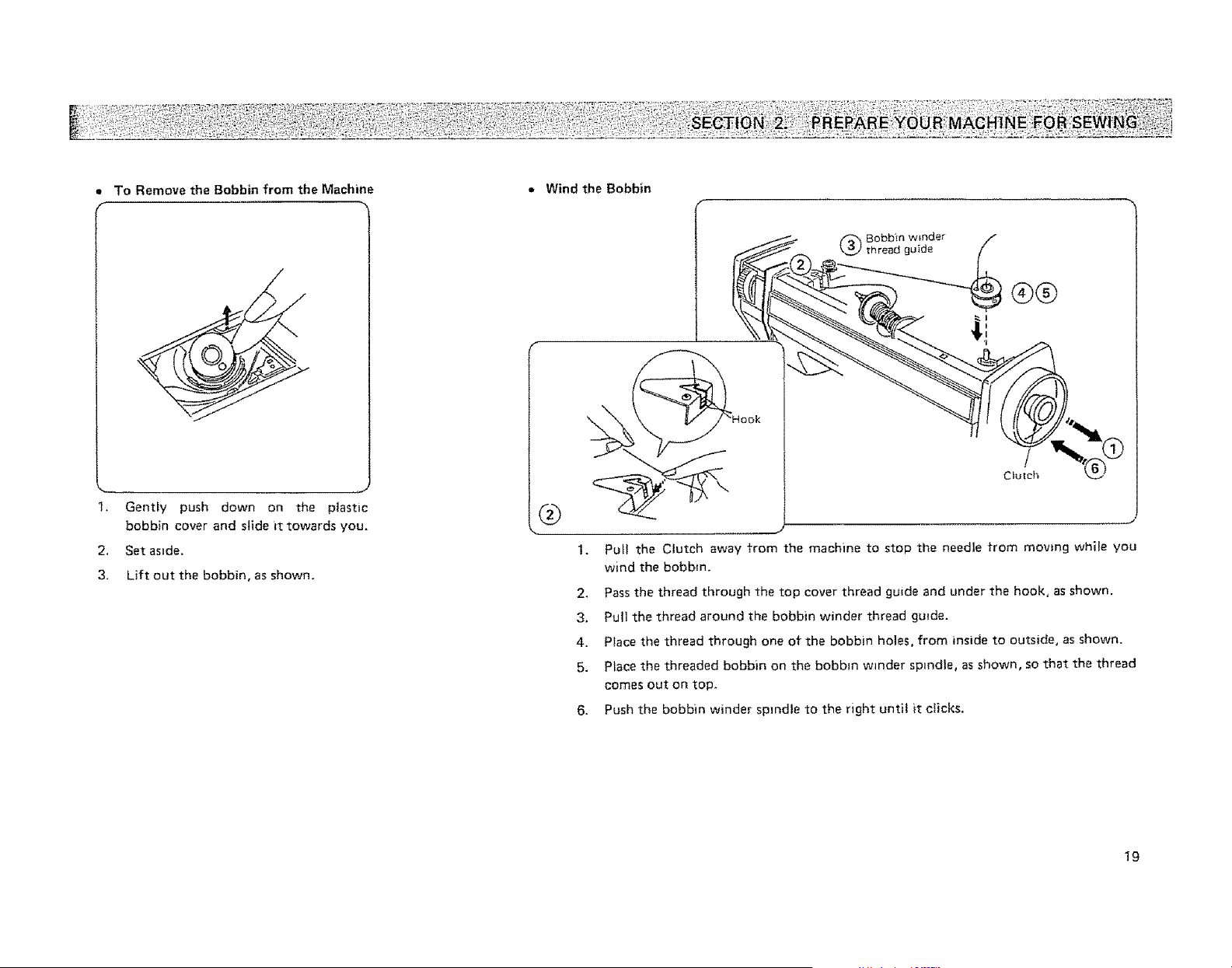
= To Remove the Bobbin from the Machine
/-
1. Gently push down on the plastic
bobbin cover and slide it towards you.
2. Set aside,
3. Lift out the bobbin, as shown.
®
. Wind the Bobbin
...... J
1. Pull the Clutch away from the machine to stop the needle from mowng while you
wind the bobbin.
2. Pass the thread through the top cover thread guide and under the hook, as shown.
3. Pull the thread around the bobbin winder thread guide.
4. Pface the thread through one of the bobbin holes, from inside to outside, as shown.
5. Place the threaded bobbin on the bobbin winder spindle, as shown, so that the thread
comes out on top.
6, Push the bobbin winder spindle to the right until it clicks.
19
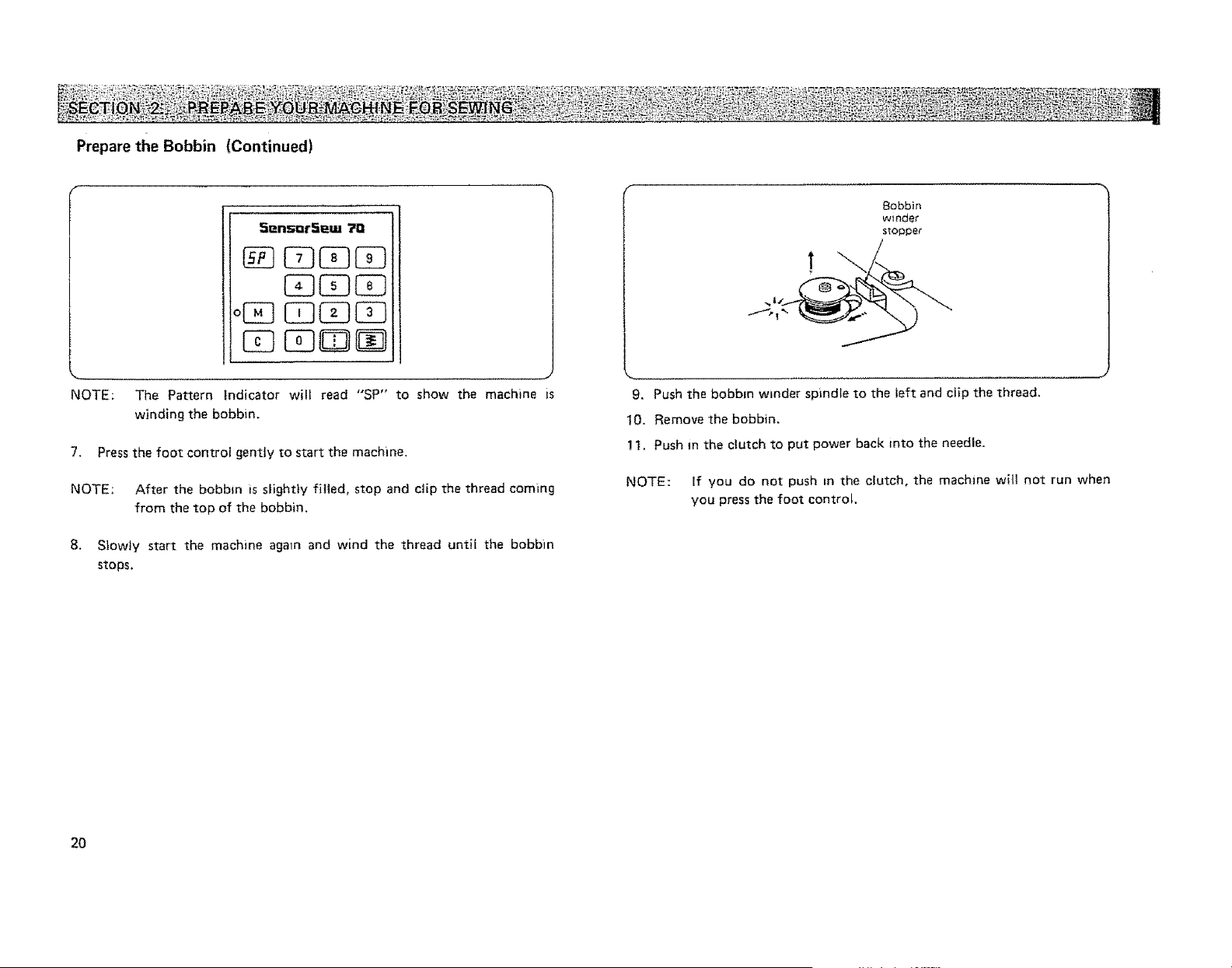
Prepare the Bobbin (Continued)
5ensQr5em 7 n
Bobbin
winder
stopper
..,1. ¢
NOTE; The Pattern Indicator will read "SP" to show the machine is
winding the bobbin,
7, Press the foot control gentty to start the machine.
NOTE; After the bobbin is slightly filled0 stop and dip the thread coming
from the top of the bobbin.
8, Slowly start the machine again and wind the thread unlit the bobbin
slops.
9. Push the bobbin winder spindle to the left and clip the thread,
10. Remove the bobbin.
! 1. Push in the clutch to put power back into the needle,
NOTE: If you do not push Jn the dutch, the machine wit] not run when
you press the foot control
2O
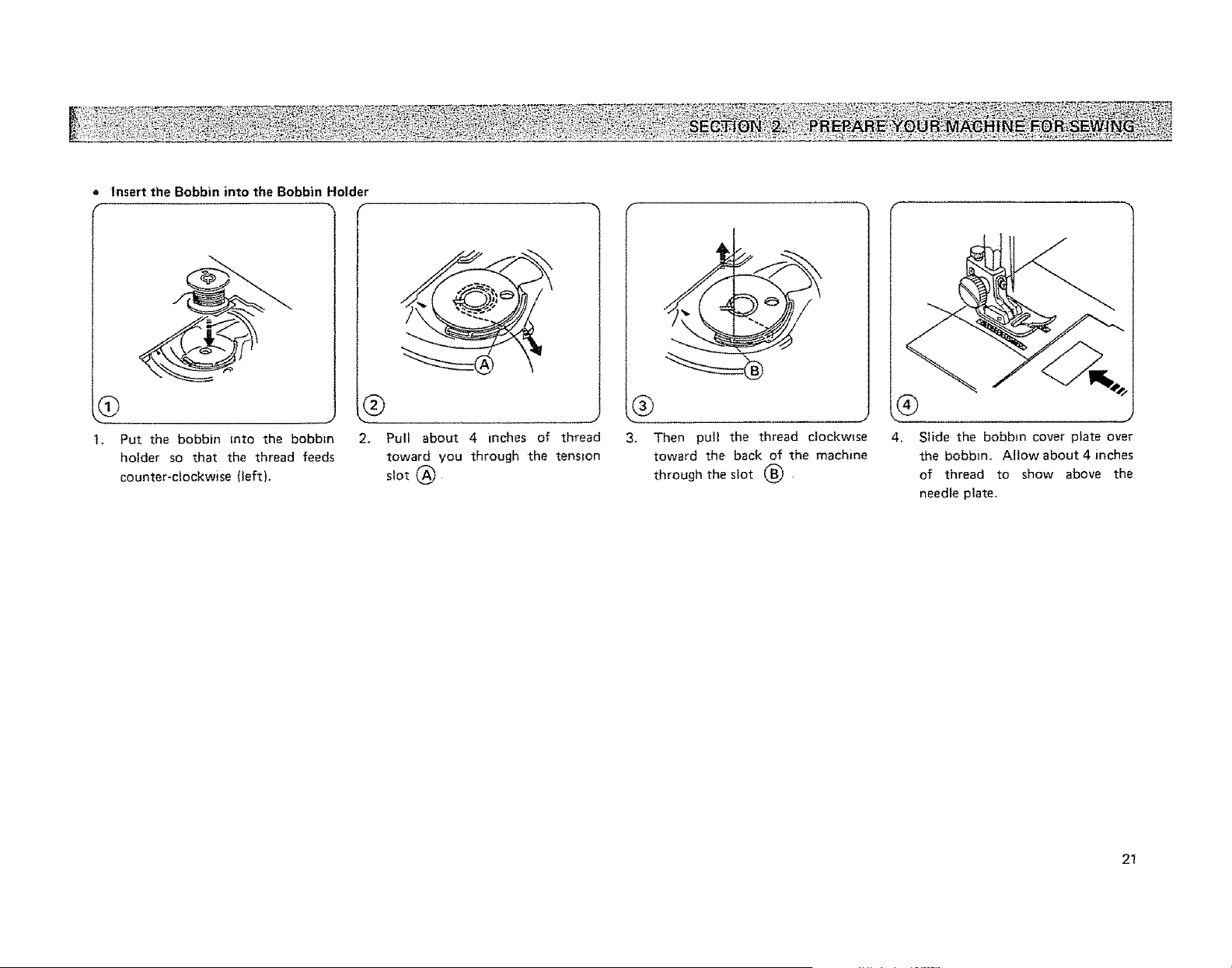
= Insert the Bobbin into the Bobbin Holder
t, Put the bobbin into the bobbin
holder so that the thread feeds
counter-clockwise (left).
2. Pul_ about 4 inches of thread
toward you through the tension
slot @
3"
3. Then pull the thread cJockw_se
toward the back of the machine
through the slot (_)
4. Slide the bobbin cover plate over
the bobbin. Allow about 4 inches
of thread to show above the
needle plate.
21
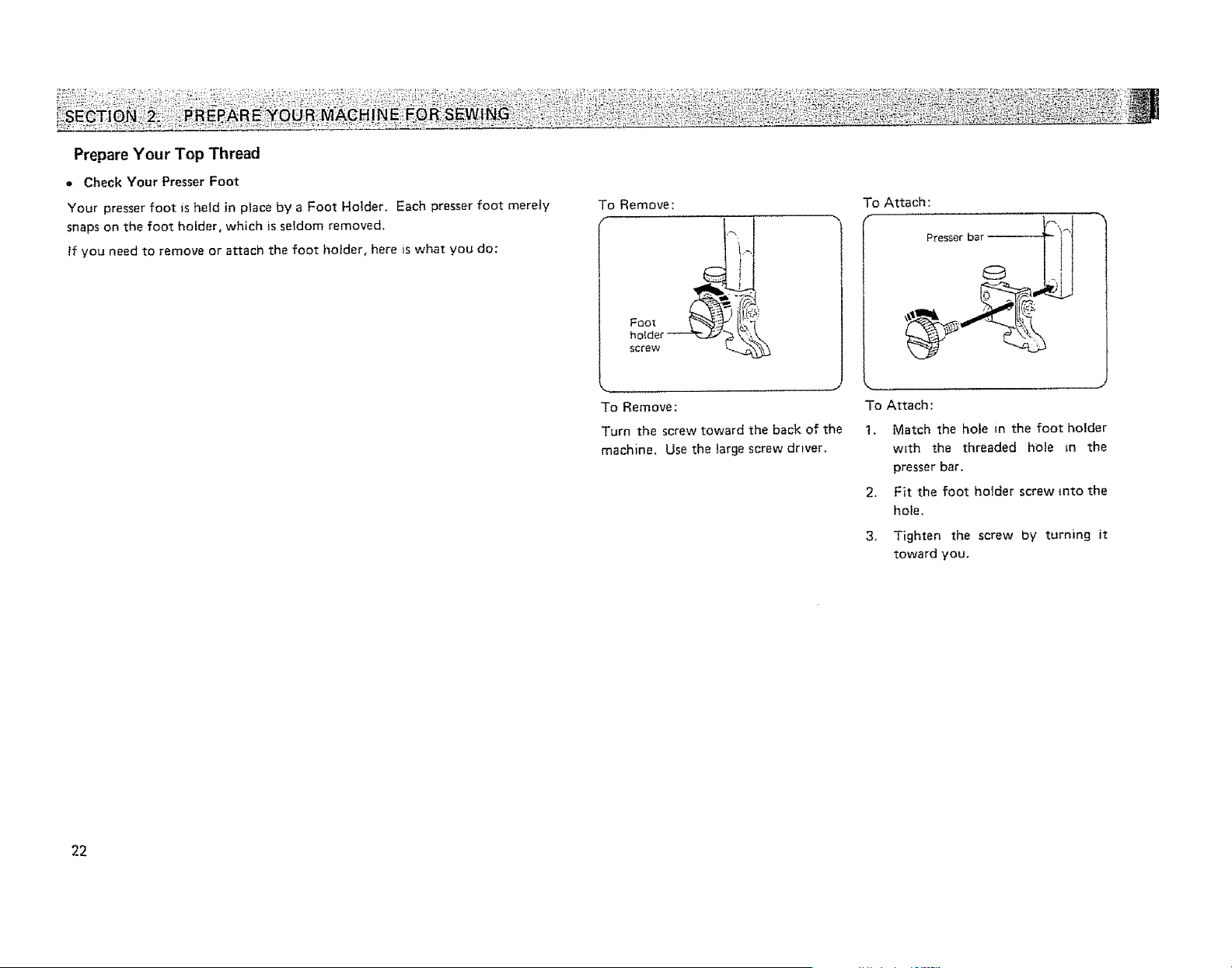
Prepare Your Top Thread
Check Your Presser Foot
Your presser foot is held in place by a Foot Holder. Each presser foot merely
snaps on the foot hofder, which is seldom removed.
}f you need to remove or attach the foot holder, here is what you do:
To Remove:
Foot _
holder _
screw
To Remove:
Turn the screw toward the back of the
machine, Use the large screw driver.
To Attach:
Presser bar
To Attach:
1. Match the hole in the foot holder
with the threaded hole _n the
presser bar.
2. Fit the foot holder screw into the
hole.
3, Tighten the screw by turning it
toward you.
22
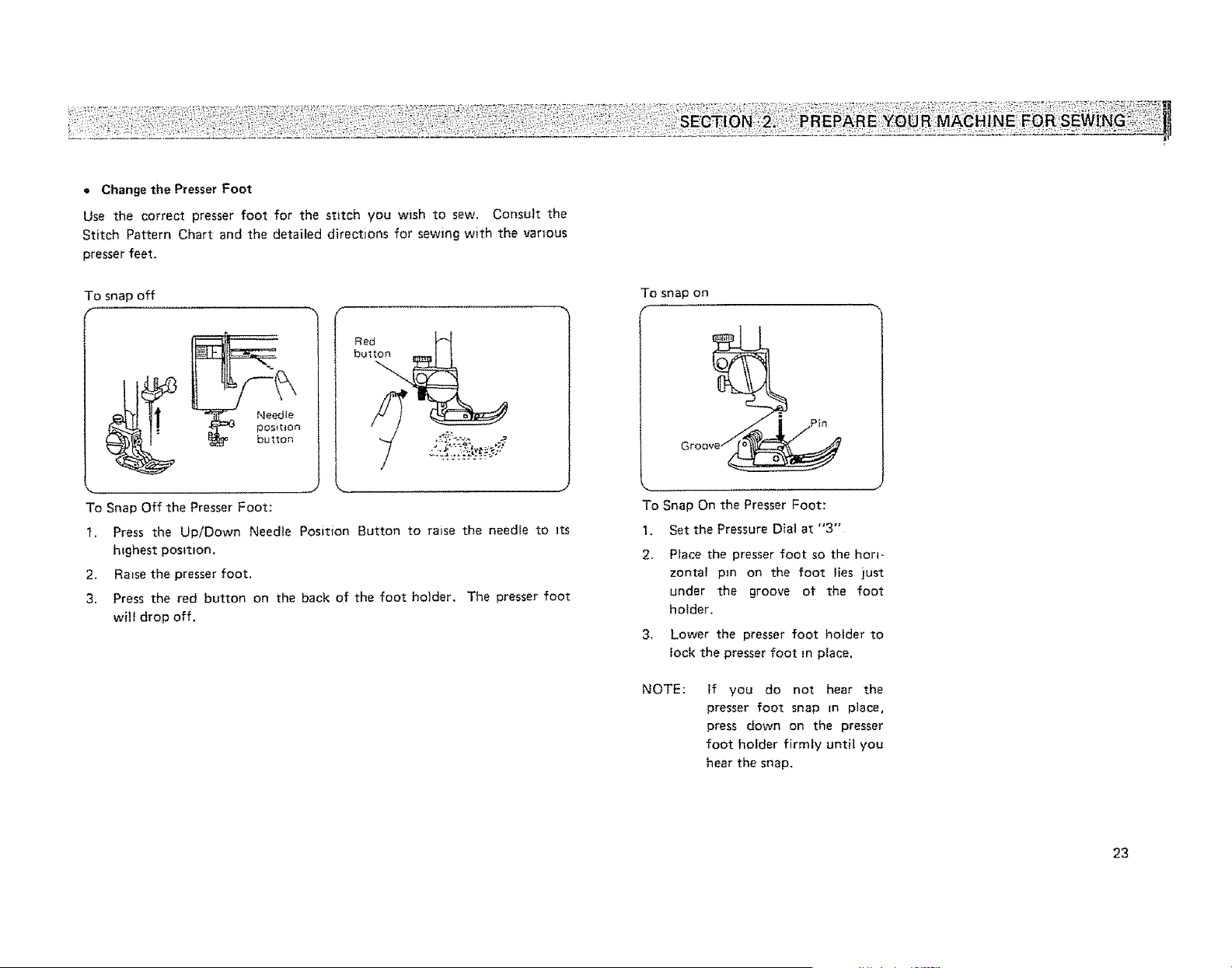
Change the Presser Foot
Use the correct presser foot for the stitch you wish to sew. Consult the
Stitch Pattern Chart and the detailed directions for sewing with the various
presser feet,
To snap off
Red
button
To Snap Off the Presser Foot:
1, Press the Up/Down Needle Position Button to raise the needle to its
h_ghest position.
2. Raise the presser foot.
3. Press the red button on the back of the foot holder. The presser foot
will drop off.
To snap on
To Snap On the Presser Foot:
1. Set the Pressure Dial at "3"
2_
Place the presser foot so the hori-
zontal pm on the foot lies just
under the groove of the foot
holder.
3, Lower the presser foot holder to
lock the presser foot in place.
N OTE:
If you do not hear the
presser foot snap m place,
press down on the presser
foot holder firmly until you
hear the snap.
23
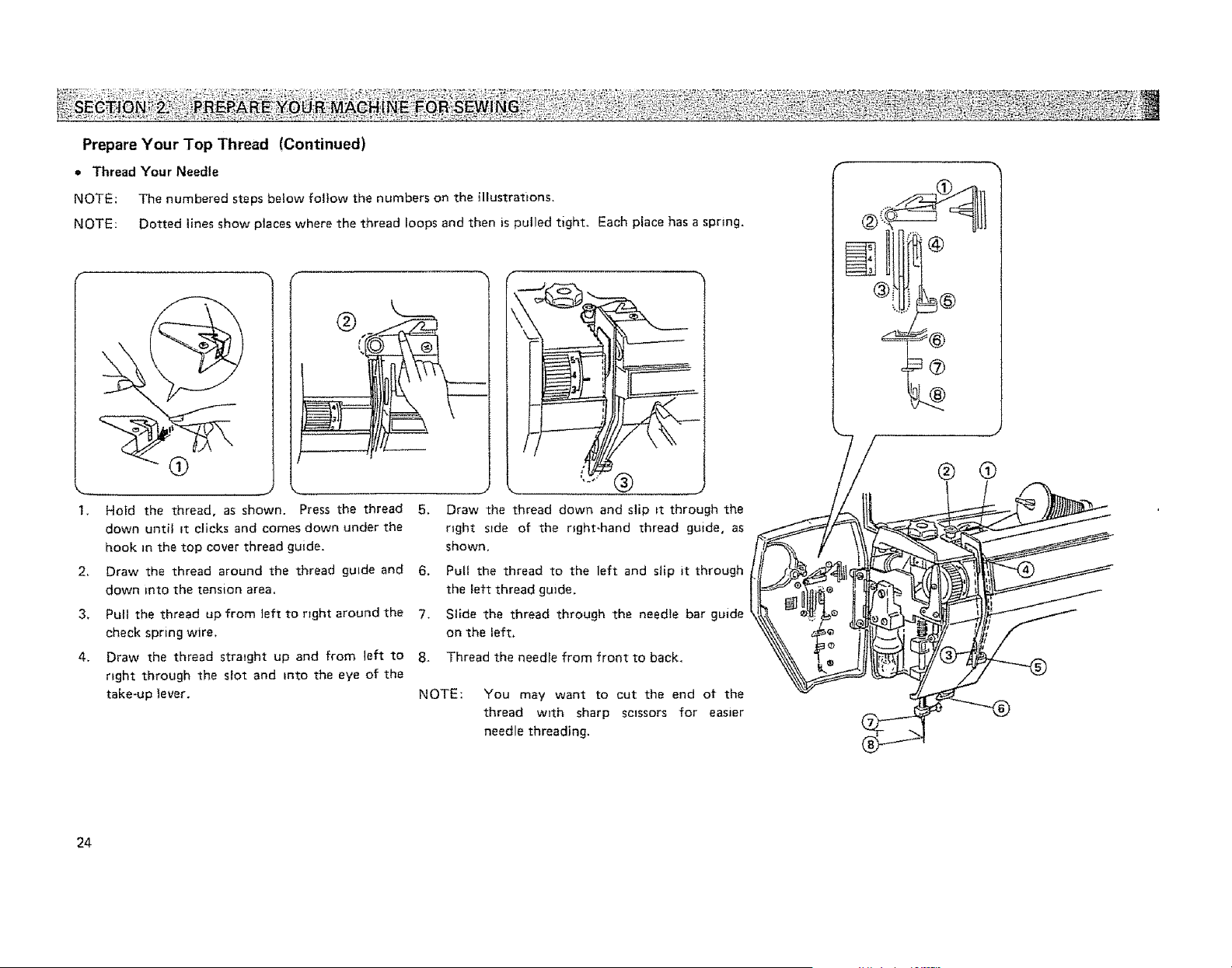
Prepare Your Top Thread {Continued)
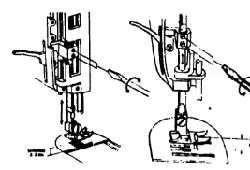
• Thread Your Needle
NOTE: The numbered steps below follow the numbers on the iHustrat=ons,
NOTE: Dotted tines show places where the thread loops and then is pulled tight. Each place has a spring.
®
1. Hotd the thread, as shown. Press the thread 5.
down until _t clicks and comes down under the
hook Jn the top cover thread guide.
2. Draw the thread around the thread guide and 6.
down into the tension area,
3_ Putt the thread up from left to right around the 7.
check spr_ng wire.
4, Draw the thread straight up and from left to 8.
r=ght through the slot and _nto the eye of the
take-up lever.
Draw the thread down and slip it through the
right side of the right-hand thread guide, as
shown,
Pull the thread to the left and slip it through
the left thread guide.
Slide the thread through the needle bar guide
on the left.
Thread the needle from front to back,
NOTE: You may want to cut the end of the
thread w}th sharp scissors for easier
needle threading.
24
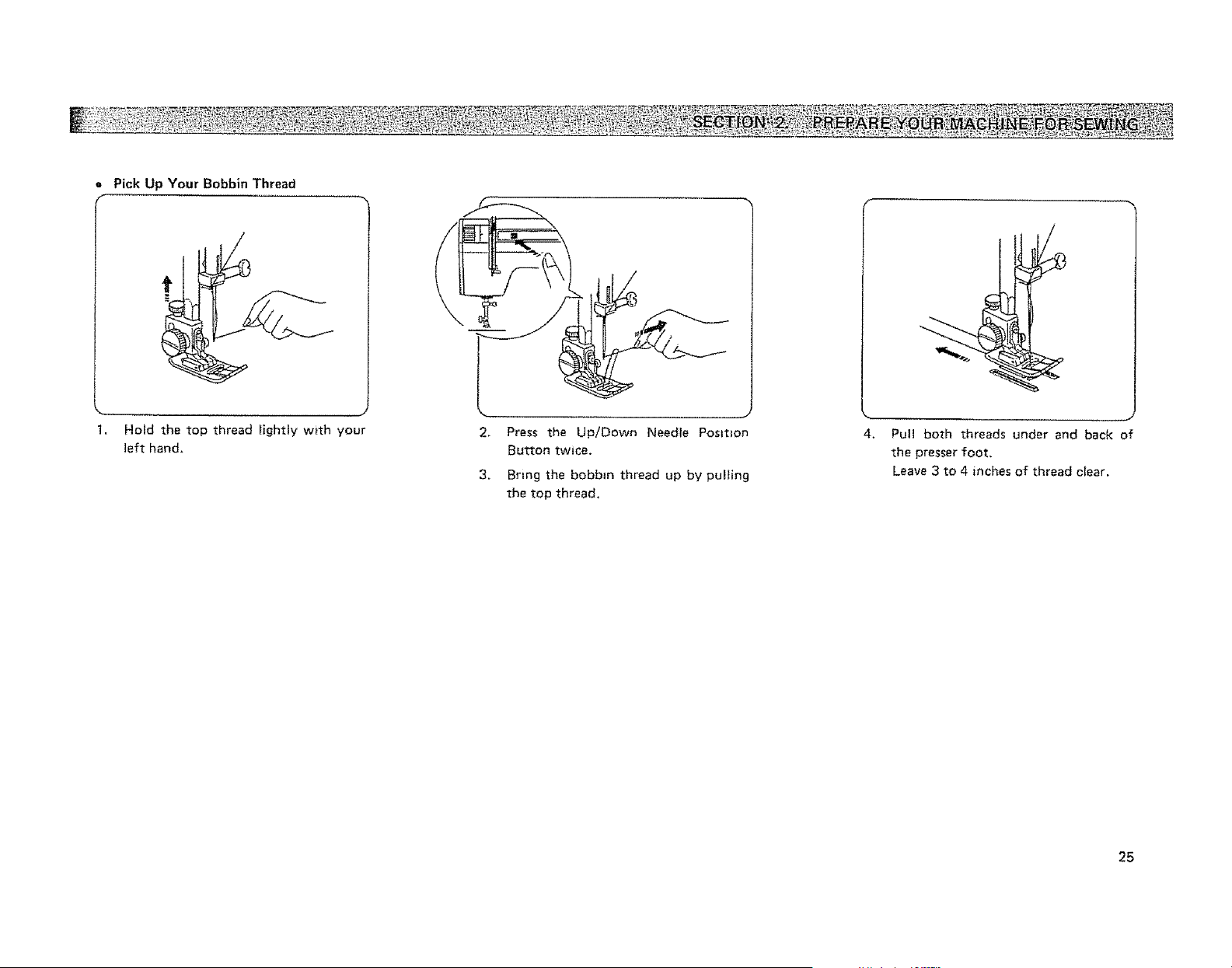
= Pick Up Your Bobbin Thread
1. Hold the top thread lightly with your
left hand,
2,
3,
Press the Up/Down Needle Position
Button twice.
Bring the bobbin thread up by pul_ing
the top thread.
,J
Pull both threads under and back of
the presser foot,
Leave 3 to 4 inches of thread clear.
25
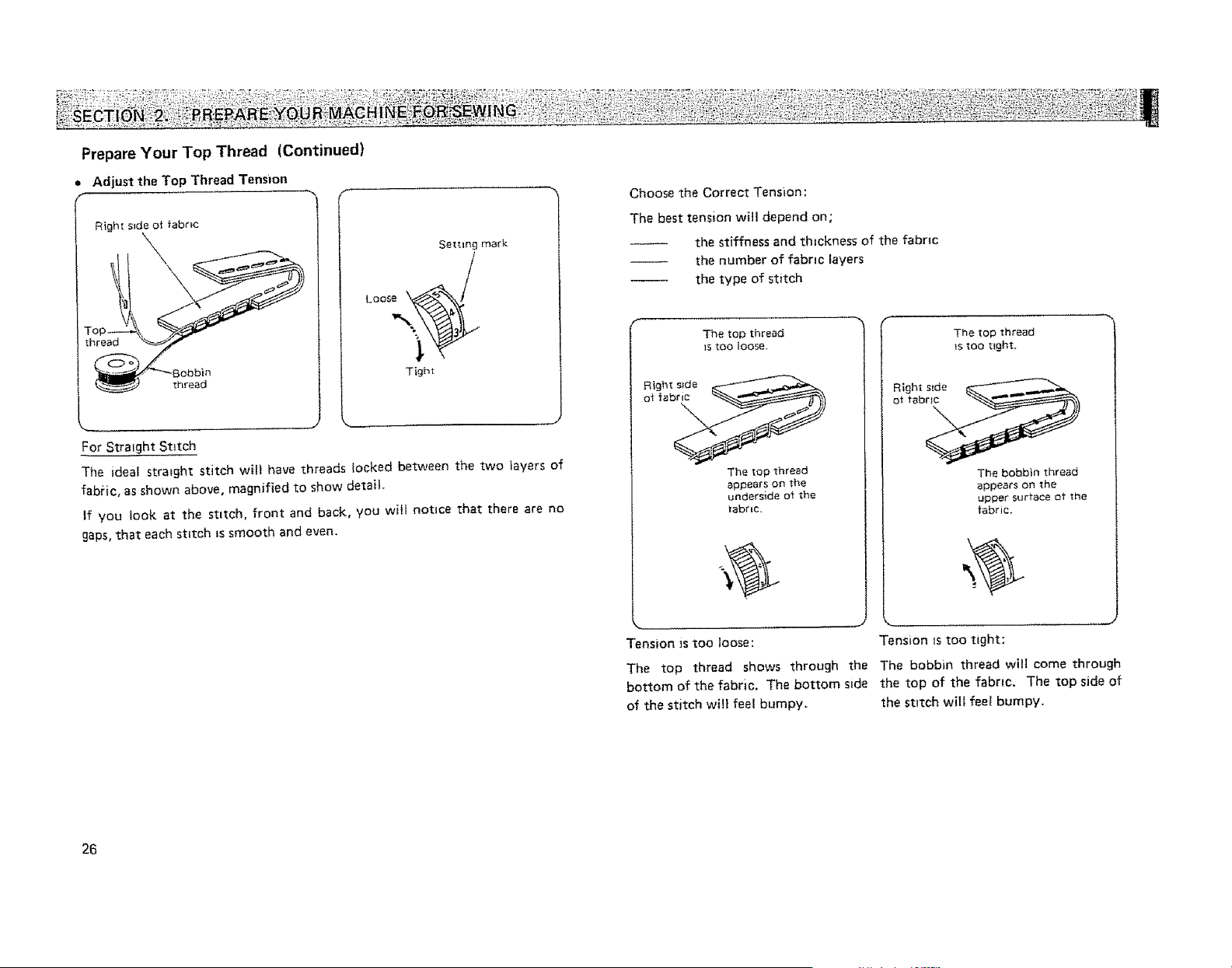
Prepare Your Top Thread (Continued)
Adjust the Top Thread Tension
Right s=deof fabric
\
Bobbin
thread
For Straight Stitch
Setting mark
Loos__
Tight
The ideal straight stitch wilf have threads locked between the two tayers of
fab#ic, as shown above, magnified to show detail.
If you look at the stttch, front and back, you wi{t notice that there are no
gaps, that each stitch Js smooth and even,
Choose the Correct Tension:
The best tension will depend on;
the stiffness and thickness of the fabric
the number of fabric layers
the type of stitch
The top thread
is too ioose.
The top thread
appears on the
underside of the
rabrLc.
®
The top thread
_stoo t_ght.
The bobbin thread
appears on the
upper surface of the
fabric.
Tension is too loose: Tension ts too tight:
The top thread shows through the The bobbin thread will come through
bottom of the fabric, The bottom side the top of the fabric. The topside of
of the stitch will feel bumpy, the stitch wilt feel bumpy.
26
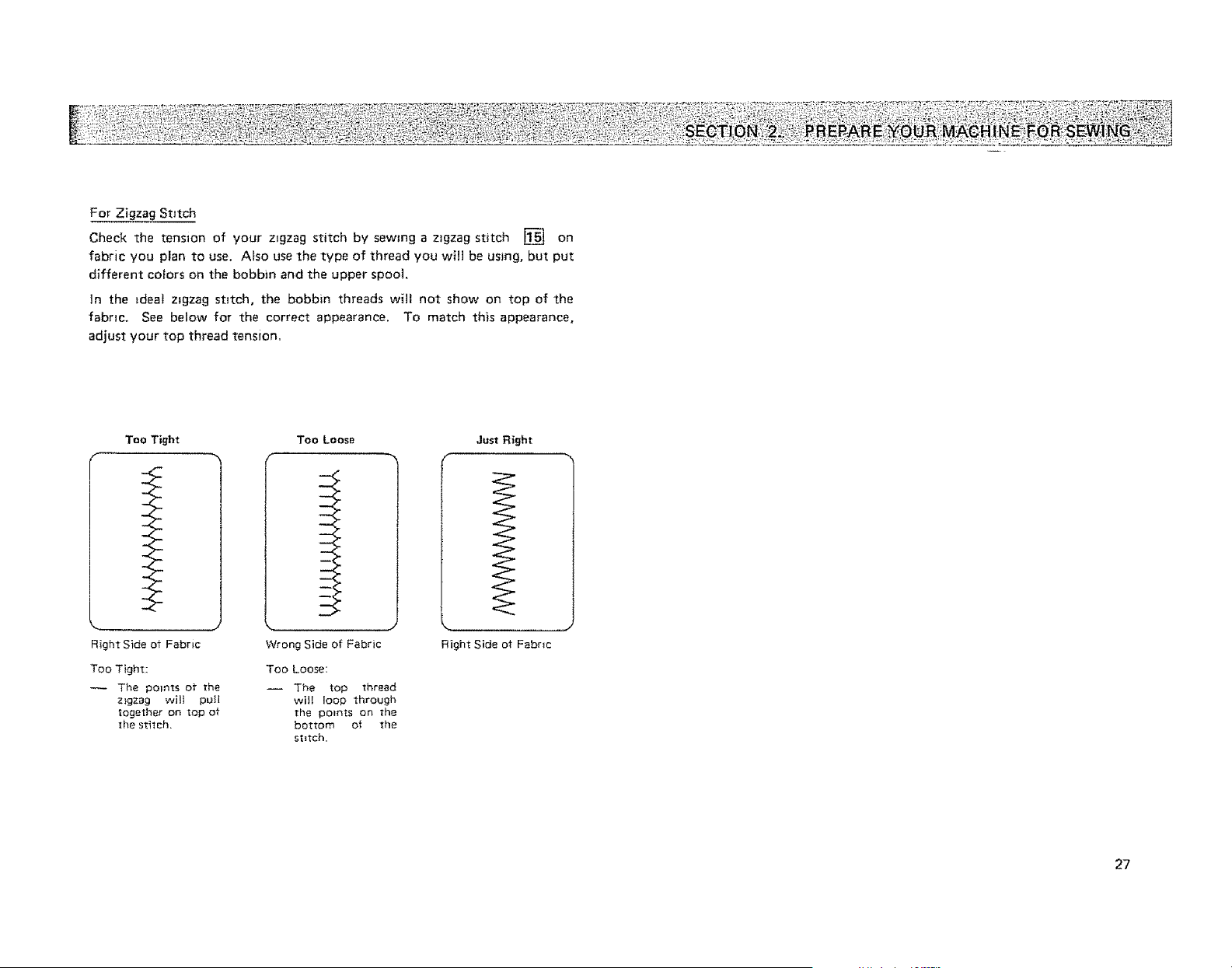
For Zigzag Stitch
Check the tension of your zigzag stitch by sewing a ztgzag stitch [] on
fabric you plan to use. Also use the type of thread you will be using, but put
different colors on the bobbin and the upper spool.
in the _deal zigzag stitch, the bobbin threads wilt not show on top of the
fabric. See below for the correct appearance. To match this appearance,
adjust your top thread tension.
Too Tight Too Loose Just Right
p-
Right Side of Fabric
Too Tight:
-- The po}n_s ot the
z_gzag wilt pull
together on top of
the stitch.
J
Wrong Side of Fabric
Too Loose:
-- The top thread
wil! loop through
the points on the
bottom of the
stitch.
Right Side of Fabric
27
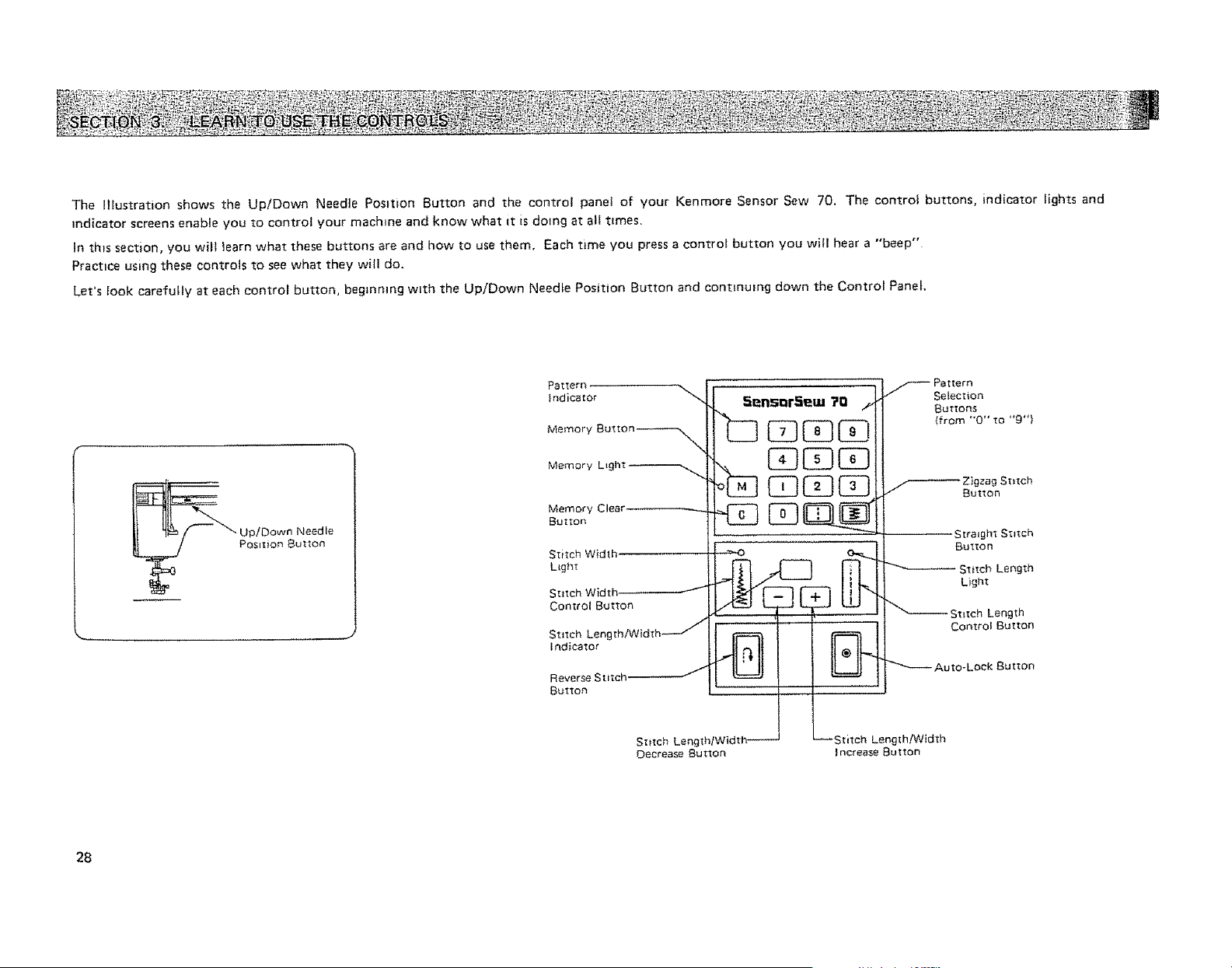
The Illustration shows the Up/Down Needle Position Button and the control panel of your Kenmore Sensor Sew 70. The control buttons, indicator lights and
indicator screens enable you to control your machine and know what tt is doing at all t_mes,
In th_s section, you will learn what these buttons are and how to use them, Each t_me you press a control button you will hear a "'beep"
Practice using these controls to see what they witl do.
Let's Iook carefully at each control button, begmmng wLth the Up/Down Needle Position Button and continuing down the Control Panel
Pattern,
Indicator "_
Memory But to n _--,_
Memory L_ght _.,_
Memory Clear _
Button
Stitch Width
L_gh_
Stztch Width _"_--'---'_
Control Button
Stitch Length/Width _-_
Indicator
Reverse Stitch _
Button
5ensarSetu ?Q f
[1-
Stitch Length/Width--
Oecrease Button
._ Pattern
Selection
Buttons
{from "0" tO "g"I
_ Zigzag Stitch
Button
-- Straight Stitch
Stitch Length
Licjht
_ Stitch Length
Control Button
""_ Auto- Lock Button
_Stitch Length!Width
ncrease Button
28
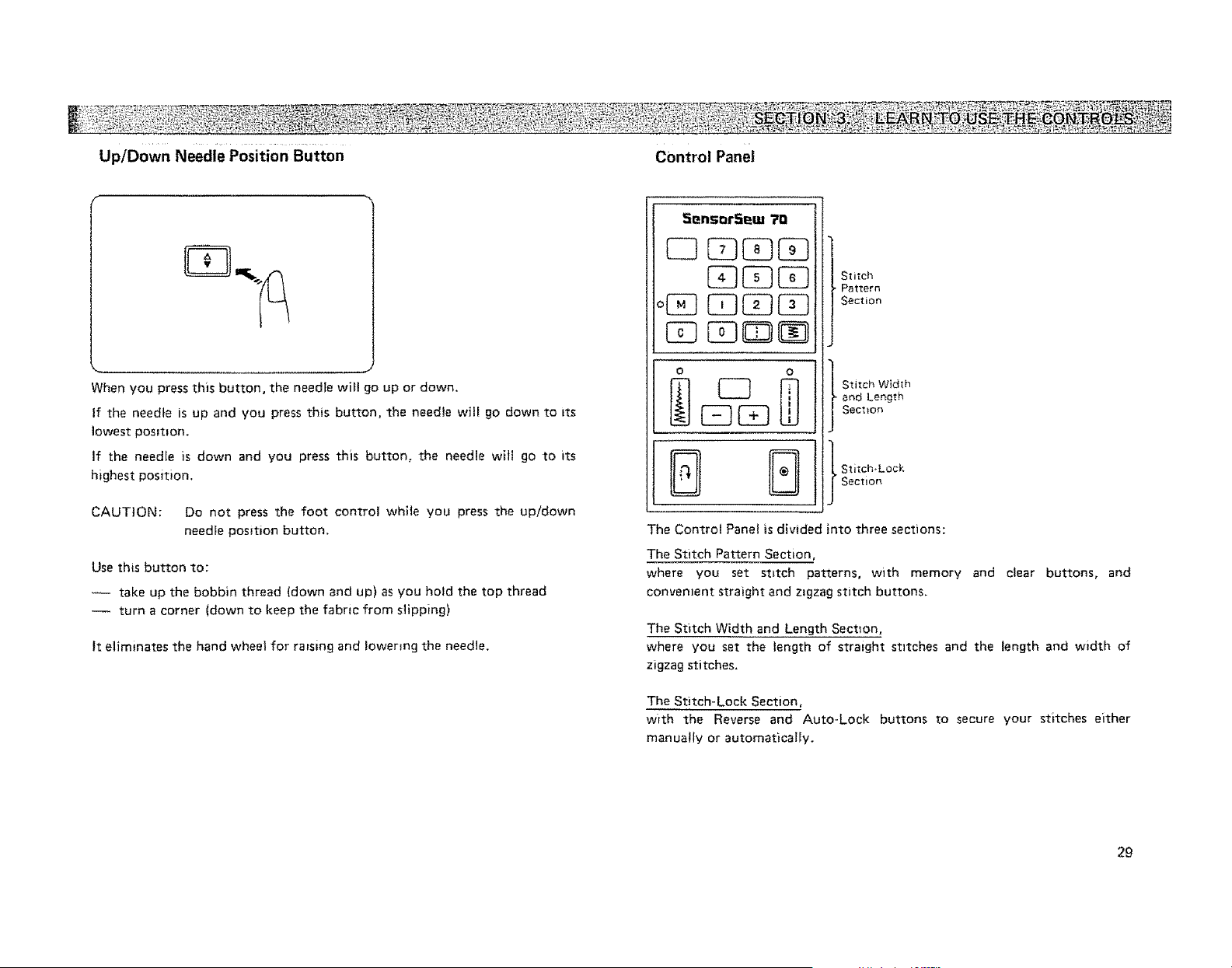
Up/Down Needie P0sition Button control Panel
When you press this button, the needle will go up or down,
If the needte is up and you press this button, the needle will go down to Lts
lowest posTt_on.
If the needle is down and you press this button, the needle will go to its
highest position.
CAUTION: Do not press the foot control while you press the up!down
needle position button.
Use this button to:
take up the bobbin thread (down and up) as you hold the top thread
turn a corner (down to keep the fabric from slipping)
It eliminates the hand wheel for raising and lowering the needle.
5r_ns_rSem ?n
0 0
B 8
Stitch
, Pattern
Section
Stitch Width
and Length
Section
Stitch-Lock
• Section
The Control Panel is divided into three sections:
The Stitch Pattern Section,
where you set stitch patterns, with memory and clear
convement straight and z_gzag stitch buttons.
buttons, and
"The Stitch Width and Length Sectlon,
where you set the length of straight stitches and the length and width of
zigzag stitches.
The Stitch-Lock Section,
wrth the Reverse and Auto-Lock buttons to secure your st'_tches either
manually or automatically.
29
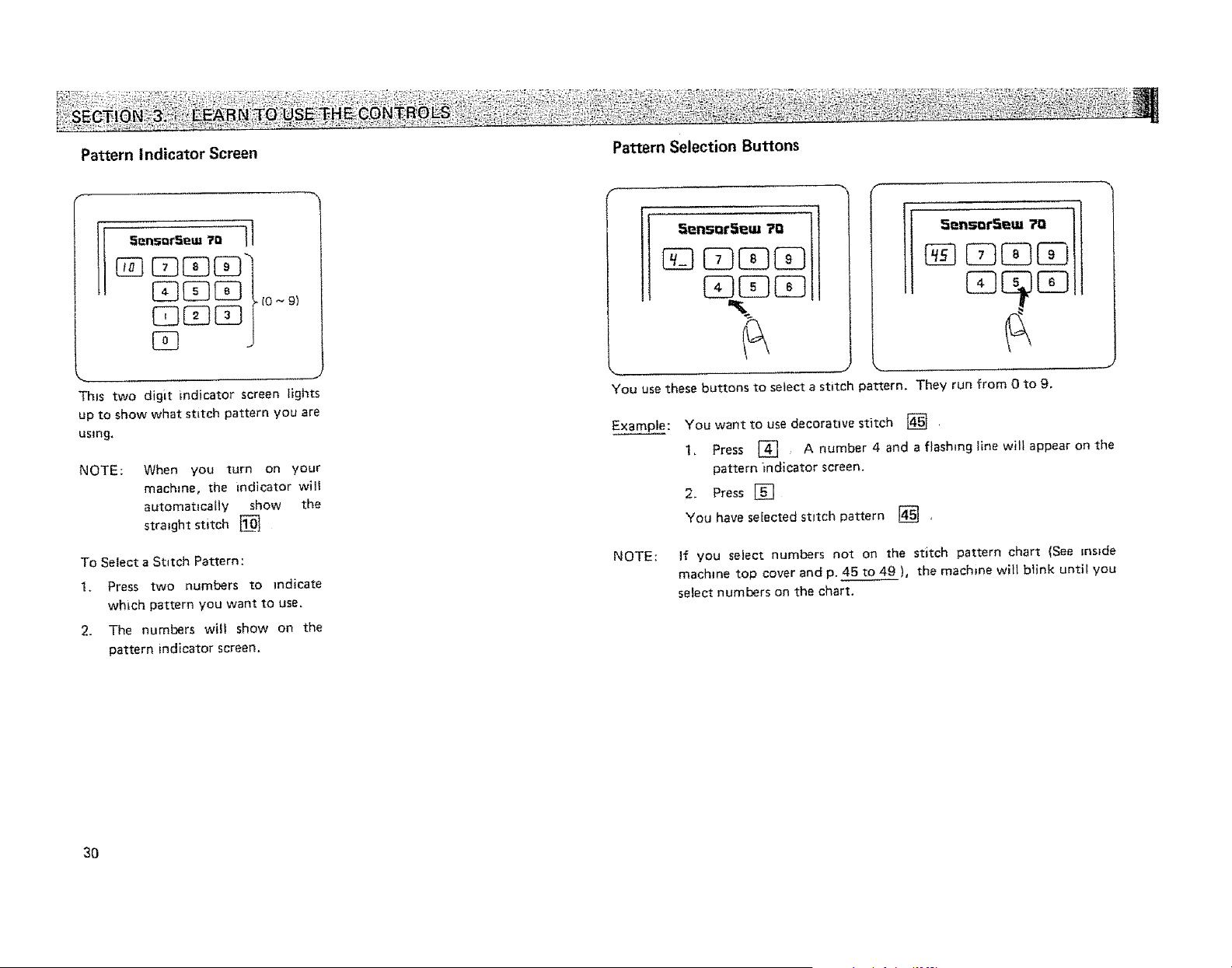
Pattern indicator Screen Pattern Selection Buttons
5_nsar_= ?r.
This two digit indicator screen lights
up to show what stitch pattern you are
usmg_
NOTE:
When you turn on your
machine, the indicator vvi]i
automatlcafly show the
straight stitch
To Select a Stitch Pattern:
1. Press two numbers to indicate
which pattern you want to use.
2. The numbers will show on the
pattern indicator screen,
5_n_DrS_m 70
°°°°°,'°°'°II
You use these buttons to select a stitch pattern. They run from 0 to 9,
Exampte: You want to use decorative stitch [] ,
1. Press [] A number 4 and a flashing line witl appear on the
pattern _ndicator screen,
2. Press []
You have selected stitch pattern _ ,
NOTE: If you select numbers not on the stitch pattern chart (See inside
machine top cover and p, 45 to 49 ), the machine will blink until you
select numbers on the chart.
30
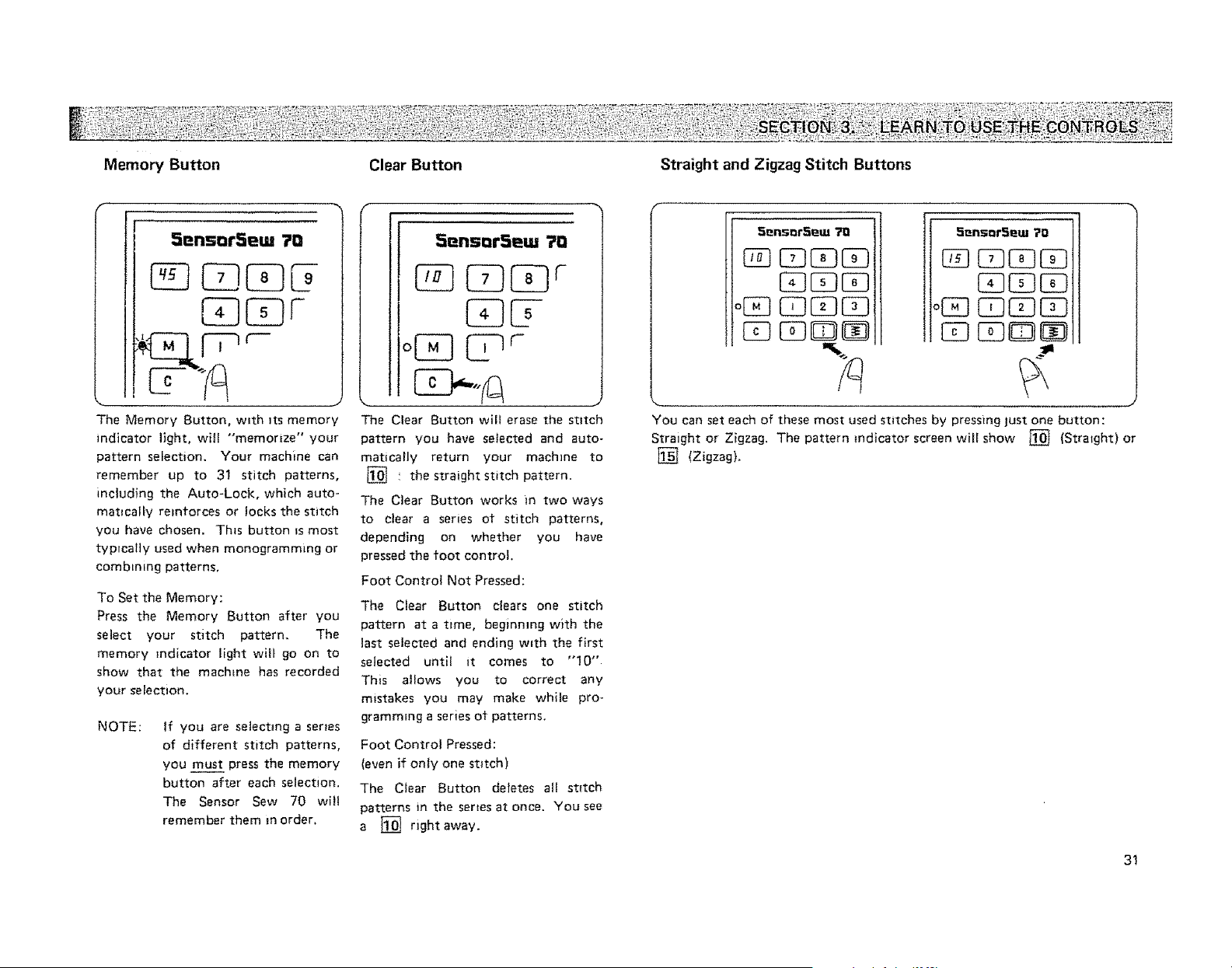
Memory Button Clear Button Straight and Zigzag Stitch Buttons
5r_nsarSetu ?0
The Memory Button, w_th _ts memory
indicator light, ,wil! "memorize" your
pattern selection. Your machine can
remember up to 31 stitch patterns,
including the Auto-Lock, which auto-
mat_caJfy reinforces or locks the stitch
you have chosen. Th_s button =smost
typrcally used when monogramming or
combining patterns,
To Set the Memory:
Press the Memory Button after you
select your stitch pattern. The
memory indicator light wilt go on to
show that the machine has recorded
your selection.
NOTE:
If you are selecting a series
of different stitch patterns,
you must press the memory
button after each selection.
The Sensor Sew 70 wil!
remember them in order.
f
tlo
The Clear Button will erase the stitch
pattern you have selected and auto-
matically return your machine to
[] ' the straight stitch pattern.
The Clear Button works m two ways
to clear a series ot stitch patterns,
depending on whether you have
pressed the foot control.
Foot Control Not Pressed:
The Clear Button clears one stitch
pattern at a ttme, beginmng with the
last selected and ending w_th the first
selected until it comes to "10"
This allows you to correct any
mistakes you may make while pro-
gramming a series of patterns.
Foot Control Pressed:
(even if only one stitch)
The Clear Button deletes al! st=tch
patterns in the ser_es at once. You see
a [] right away.
5_'nSDfS_tU
o[-q [Z]
._l!nsQf._l_tu ?o
a
You can set each of these most used stitches by pressing just one button:
Straight or Zigzag. The pattern indicator screen will show [] (Strmght) or
[] (Zigzag),
31
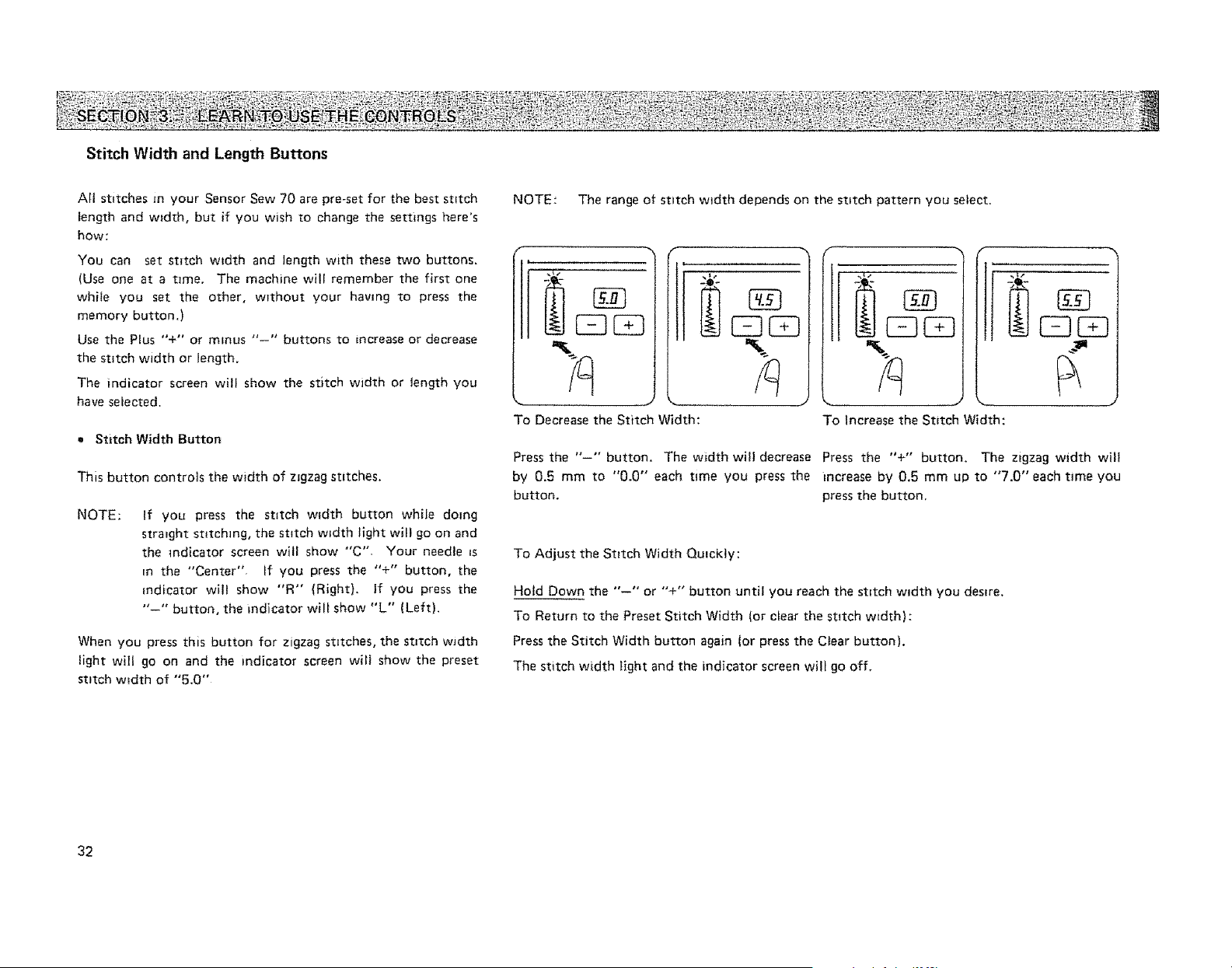
Stitch Width and Length Buttons
All stitches in your Sensor Sew 70 are pre-set for the best stitch
length and w_dth, but if you wish to change the settings here's
how:
You can set stitch w_dth and length with these two buttons.
(Use one at a time. The machine will remember the first one
while you set the other, wwthout your hawng to press the
memory button.)
Use the Plus "+" or minus "-" buttons to increase or decrease
the stitch width or length.
The indicator screen will show the stitch width or length you
have selected.
• Stitch Width Button
This button controls the width of z_gzag stitches.
NOTE:
If you press the stitch w_dth button whi_e doing
straight stitching, the stitch w=dth light will go on and
the _ndicator screen will show "C"- Your needle ts
m the "Center" If you press the "+" button, the
indicator wiil show "R" (Right). If you press the
"-" button, the indicator will show "L" (Left).
When you press this button for zigzag stitches, the stitch width
light will go on and the indicator screen will show the preset
stitch w_dth of "5.0"
NOTE: The range of stitch width depends on the stitch pattern you select.
t
F
.....
To Decrease the Stitch Width:
I CZ3
r--
To Increase the Stitch Width:
Press the "-" button. The width will decrease Press the "+" button, The zigzag width will
by 0.5 mm to "0.0" each t4me you press the increase by 0.5 mm up to "7.0" each time you
button, press the button,
To Adjust the Stitch Width Quickly:
Hold Down the "'--°" or "+" button until you reach the stitch w_dth you desire.
To Return to the Preset Stitch Width (or clear the stitch width):
Press the Stitch Width button again ior press the Clear button).
The stitch width light and the indicator screen will go off.
32
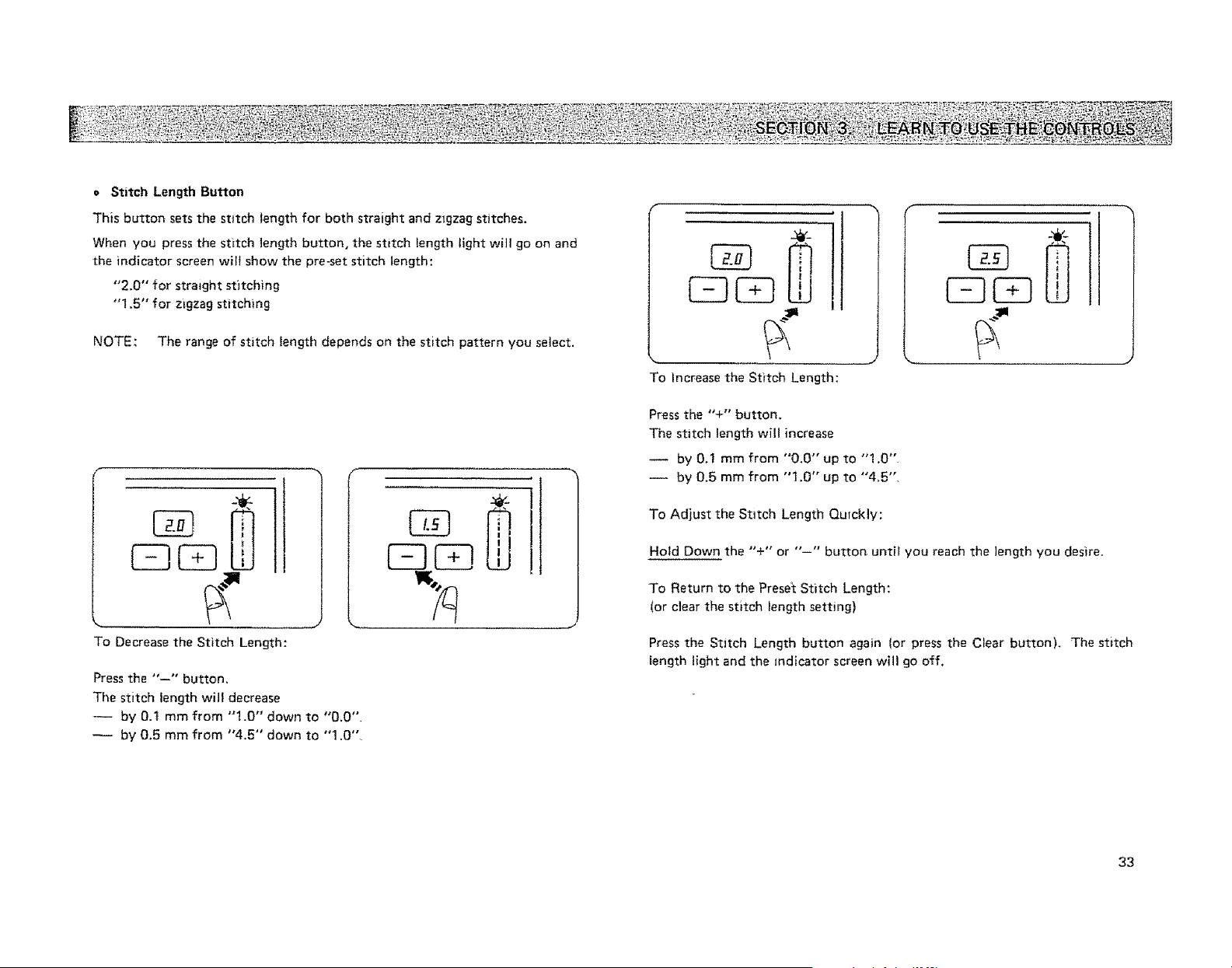
o Stitch Length Button
This button sets the stitch length for both straight and zigzag stitches.
When you press the stitch length button, the stitch length light wilt go on and
the indicator screen wilt show the pre-set stitch length:
"'2.0" for straight stitching
"1.5" for zigzag stitching
NOTE: The range of stitch length depends on the stitch pattern you select.
Ci3
To Decrease the Stitch Length:
Press the "-" button,
The stitch length will decrease
-- by 0.1 mm from "l.0" down to "0.0'"
-- by 0.5 mm from "4.5" down to "1.0",
............... J
To increase the Stitch Length:
Press the "+" buttom
The stitch length will increase
-- by 0.1 mm from "0.0" up to "1,0'"
-- by 0.5 mm from "1.0'" up to "4_5",
To Adjust the Stitch Length Quickly:
Hold Down the "'+'" or ,,i,, button unti_ you reach the length you desire.
To Return to the Prese_ Stitch Length:
(or clear the stitch _ength setting)
Press the Stitch Length button again (or press the Clear button), The stitch
length light and the indicator screen will go off.
33
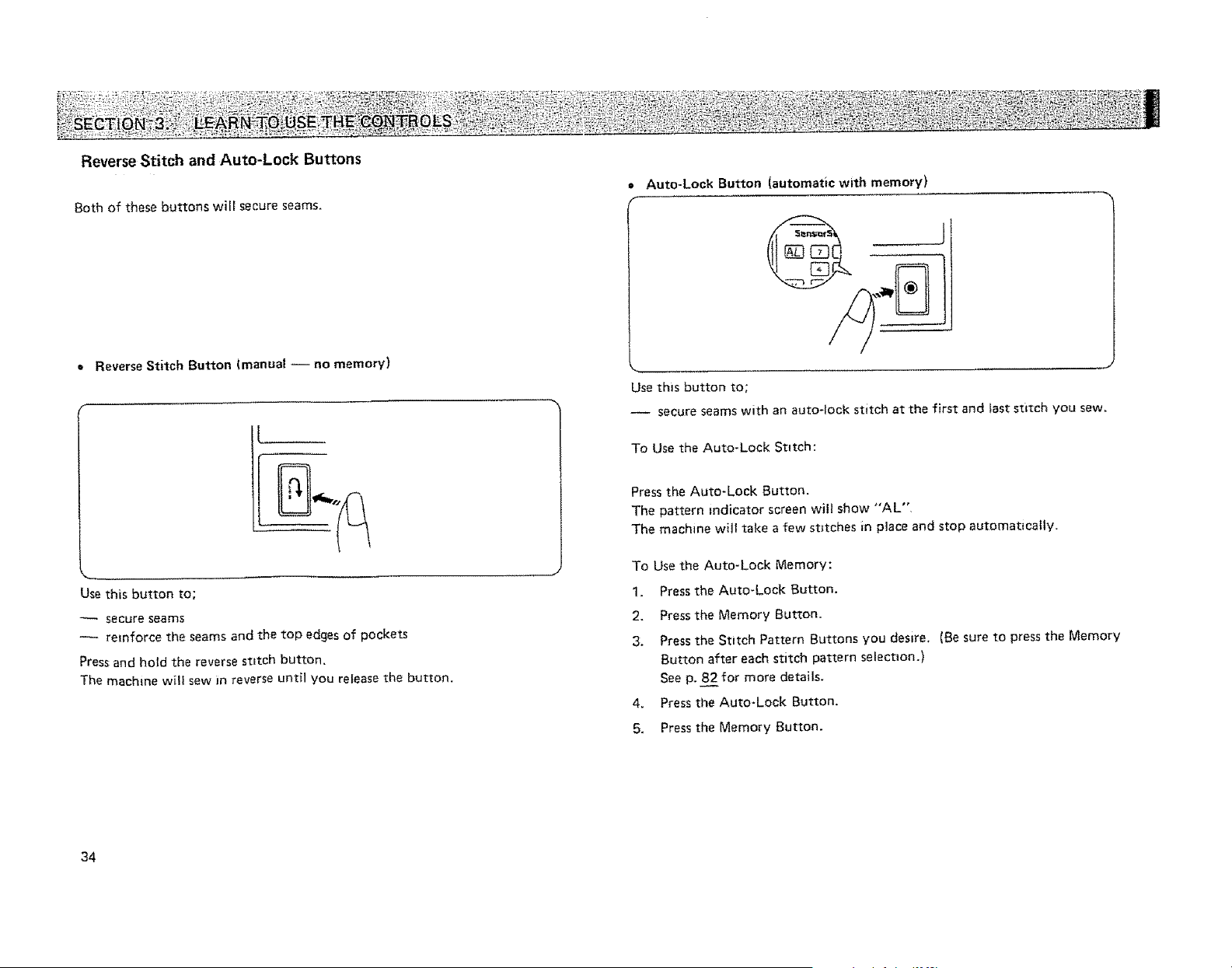
Reverse Stitch and Auto-Lock Buttons
Both of these buttons will secure seams.
= Reverse Stitch Button (manual -- no memory)
Use this button to;
secure seams
reinforce the seams and the top edges of pockets
Press and hold the reverse stttch button.
The machine will sew _n reverse until you refease the button.
34
Auto-Lock Button (automatic with memory)
J
Use this button to,
-- secure seams with an auto-!ock stitch at the first and last stitch you sew.
To Use the Auto-Lock Stitch:
Press the Auto-Lock Button.
The pattern indicator screen will show "'AL".
The machine will take a few stitches in place and stop automatically.
To Use the Auto-Lock Memory:
1, Press the Auto-Lock Button.
2. Press the Memory Button.
3. Press the Stitch Pattern Buttons you desire. (Be sure to press the Memory
Button after each stitch pattern selection.)
See p. 8_2for more details.
4. Press the Auto-Lock Button,
5. Press the Memory Button.
TheStitchingskillscoveredmthissectionrequire
somespecialskill from you. Forall other
stitches,yourmachinedoesmostof thework,
Evenif youareskilledat thesestitches,youwill
wantto learnthe featuresof thismachinethat
maybenewtoyou.
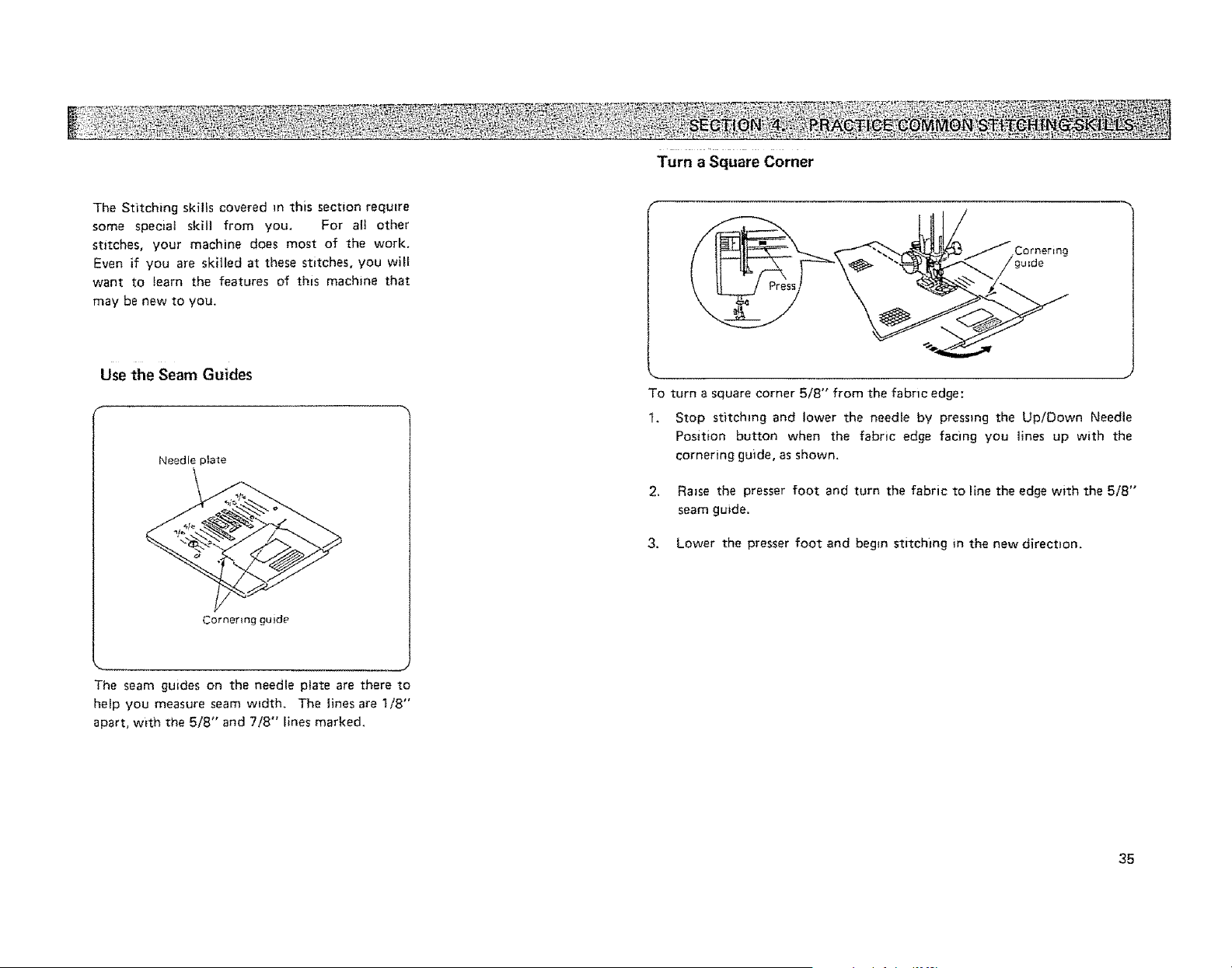
Use the Seam Guides
Needle plate
Cornering guide
The seam gutdes on the needle plate are there to
help you measure seam w_dth. The lines are 1/8"
apart, w_th the 5/8" and 7/8" lines marked,
Turn a Square Corner
To turn a square corner 5/8" from the fabric edge:
t. Stop stitching and lower the needle by pressing the Up/Down Needle
Position button when the fabric edge facing you lines up with the
cornering guide, as shown,
2, Raise the presser foot and turn the fabric to line the edge with the 5/8"
seam guide.
3. Lower the presser foot and begin stitching in the new direction.
35
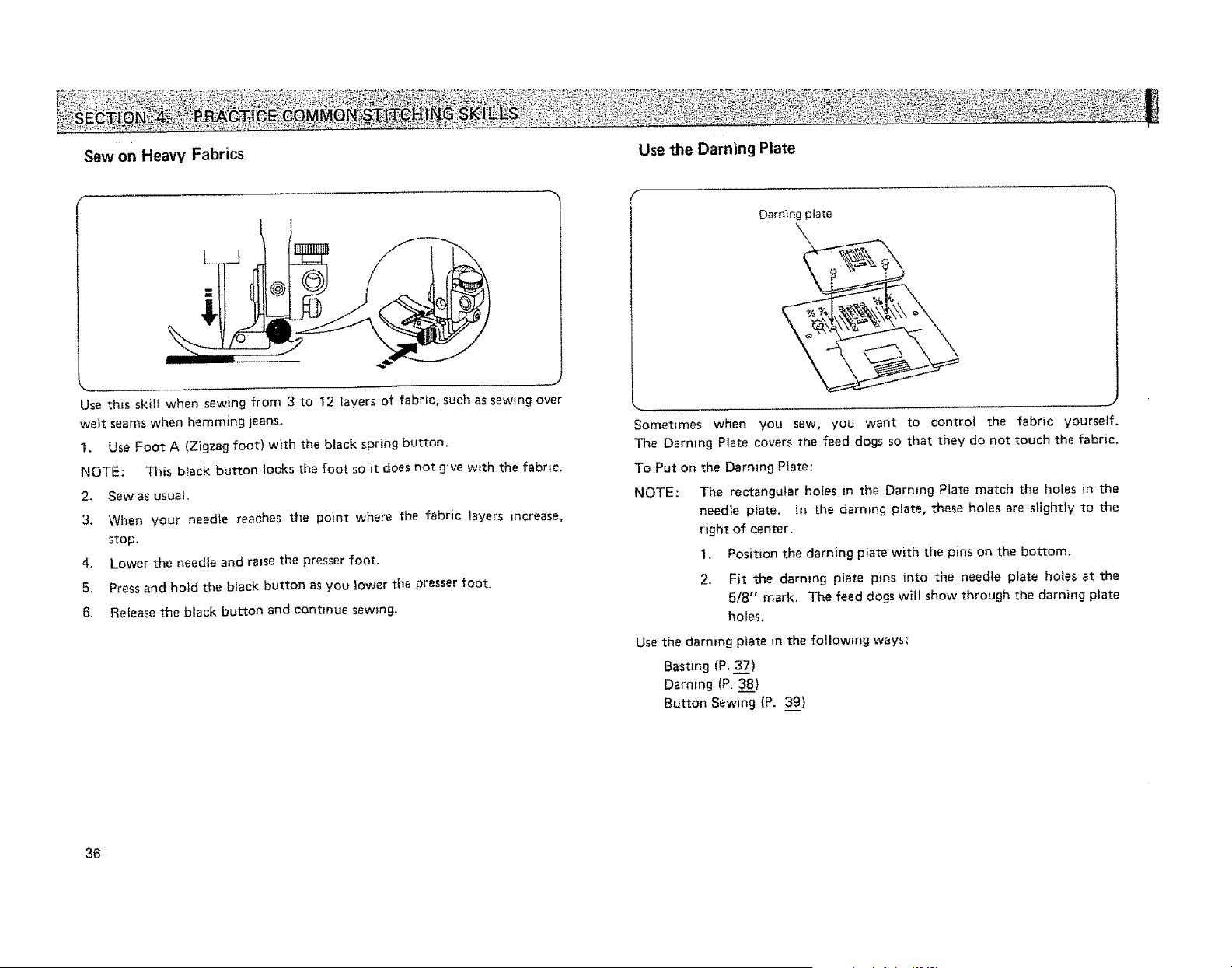
Sew on Heavy Fabrics Use the Darning Plate
Use this skill when sewing from 3 to 12 layers of fabric, such as sewing over
welt seams when hemming jeans.
1. Use Foot A (Zigzag foot) with the black spring button,
NOTE: This black button locks the foot so it does not give with the fabric.
2. Sew as usuat.
3. When your needte reaches the point where the fabric ]ayers increase,
stop.
4, Lower the needle and raise the presser foot.
5, Press and hold the black button as you lower the presser foot.
6. Release the black button and continue sewing.
Darmng p{ate
Sometimes when you sew, you want to control the fabric yourself.
The Darning Plate covers the feed dogs so that they do not touch the fabric,
To Put on the Darning Plate:
NOTE: The rectangular holes in the Darmng Plate match the hotes in the
needle plate, in the darning plate, these holes are stightly to the
right of center.
1, Position the darning p_ate with the pins on the bottom.
2. Fit the darning plate pins into the needle plate holes at the
5/8" mark. The feed dogs will show through the darning ptate
hofes.
Use the darning p_ate m the following ways:
Basting (P= 37)
Darning (P. 3_88)
Button Sewing {P. 39)
36
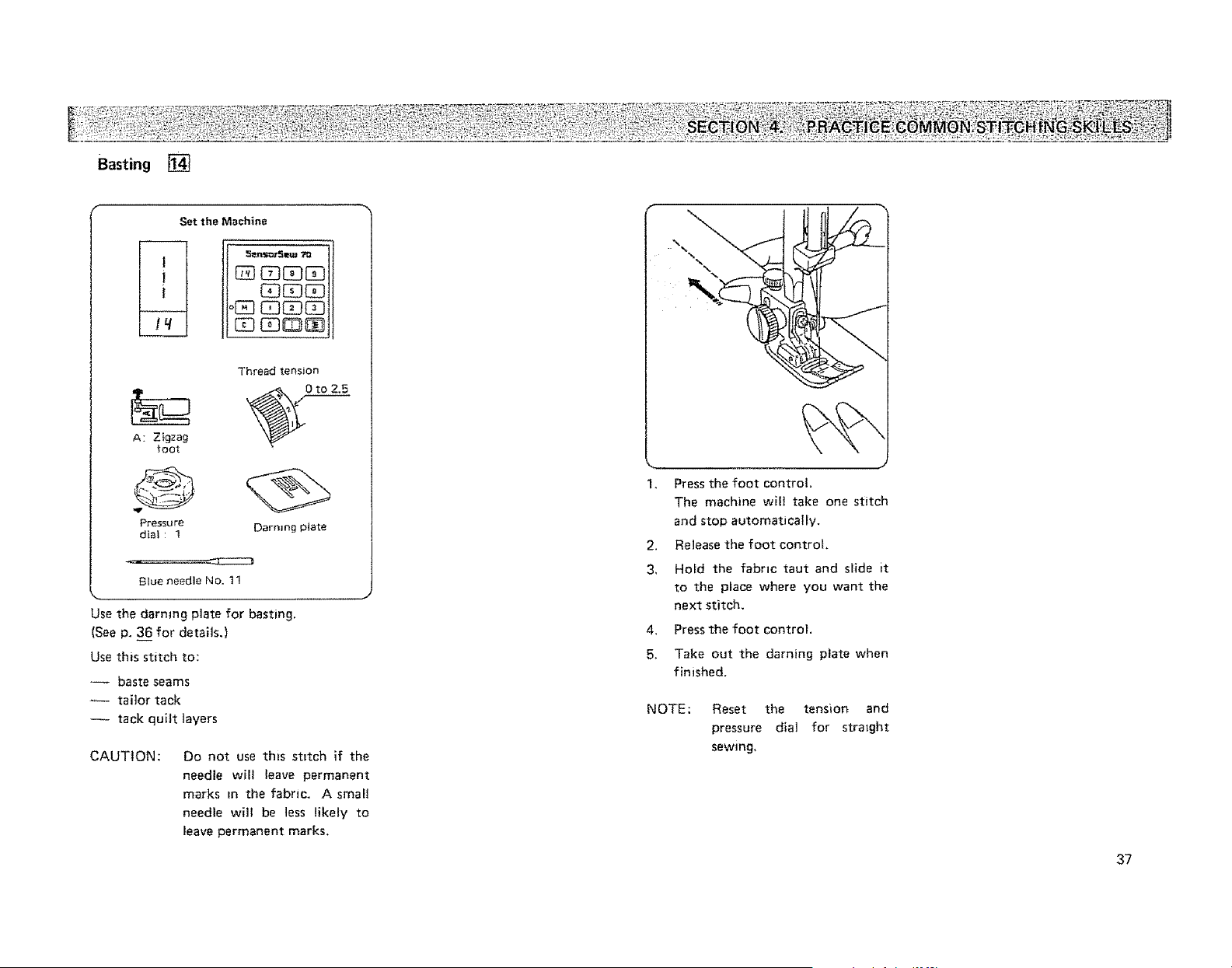
Basting
Set the Machine
f 1t
A: Zigzag
foOt
Pressure
dial: I
Thread tension
f0 to 2,5
Darning plate
=:3CCCC_
Blue needle No. t I
Use the darning plate for basting.
(See p. 366 for details.)
Use this stitch to:
baste seams
tailor tack
-- tack quilt layers
CAUTION: Do not use this stitch if the
needle will leave permanent
marks _n the fabric. A small
needle will be less likely to
leave permanent marks,
I, Press the foot control.
The machine will take one stitch
and stop automatically.
2. Release the foot controL.
3, Hold the fabric taut and slide it
to the place where you want the
next stitch.
4, Press the foot control,
5, Take out the darning plate when
finished.
NOTE: Reset the tension and
pressure dial for straight
sewing.
37
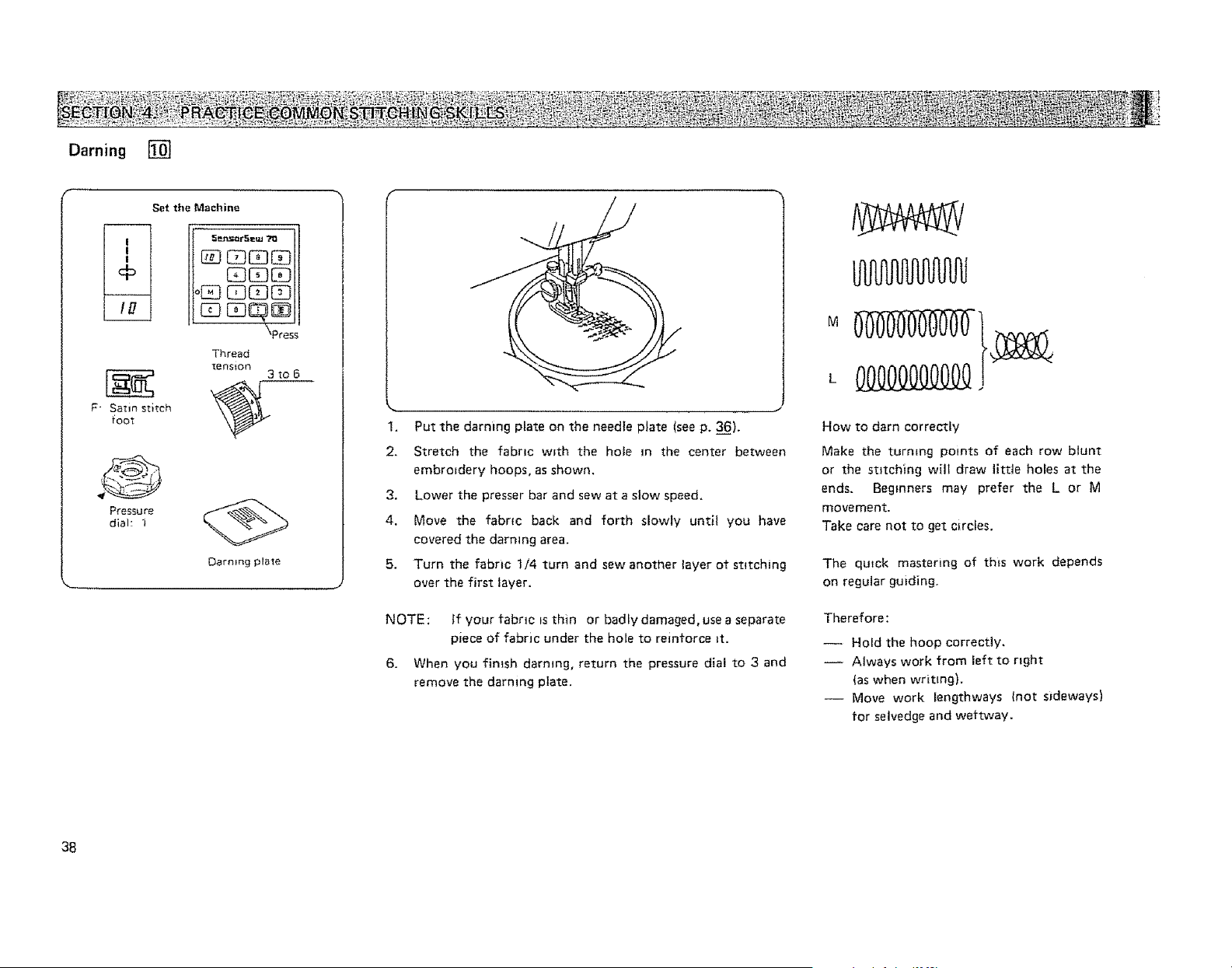
Darning []
F- Satin stitch
foot
Pressure
diah t
Set the Machine
\Press
Thread
l[eriSfo_
3to6
1. Put the darning plate on the needle plate (see p. 36).
2. Stretch the fabric with the hole in the center between
embroidery hoops, as shown.
3. Lower the presser bar and sew at a slow speed.
4. Move the fabric back and forth slowly unti! you have
covered the darmng area.
5. Turn the fabric 1/4 turn and sew another tayer of stitching
over the first layer.
NOTE : If your fabric is thin or badly damaged, use a separate
piece of fabric under the hole to reinforce it.
6. When you finish darning, return the pressure dial to 3 and
remove the darning plate.
How to darn correctly
Make the turmng points of each row btunt
or the stitching will draw littJe holes at the
ends. Beginners may prefer the L or M
movement.
Take care not to get circles.
The quick mastering of this work depends
on regular guiding.
Therefore:
-- Hold the hoop correctly.
-- Always work from teft to right
(as when writing).
-- Move work lengthways (not sideways)
for selvedge and wettway.
38
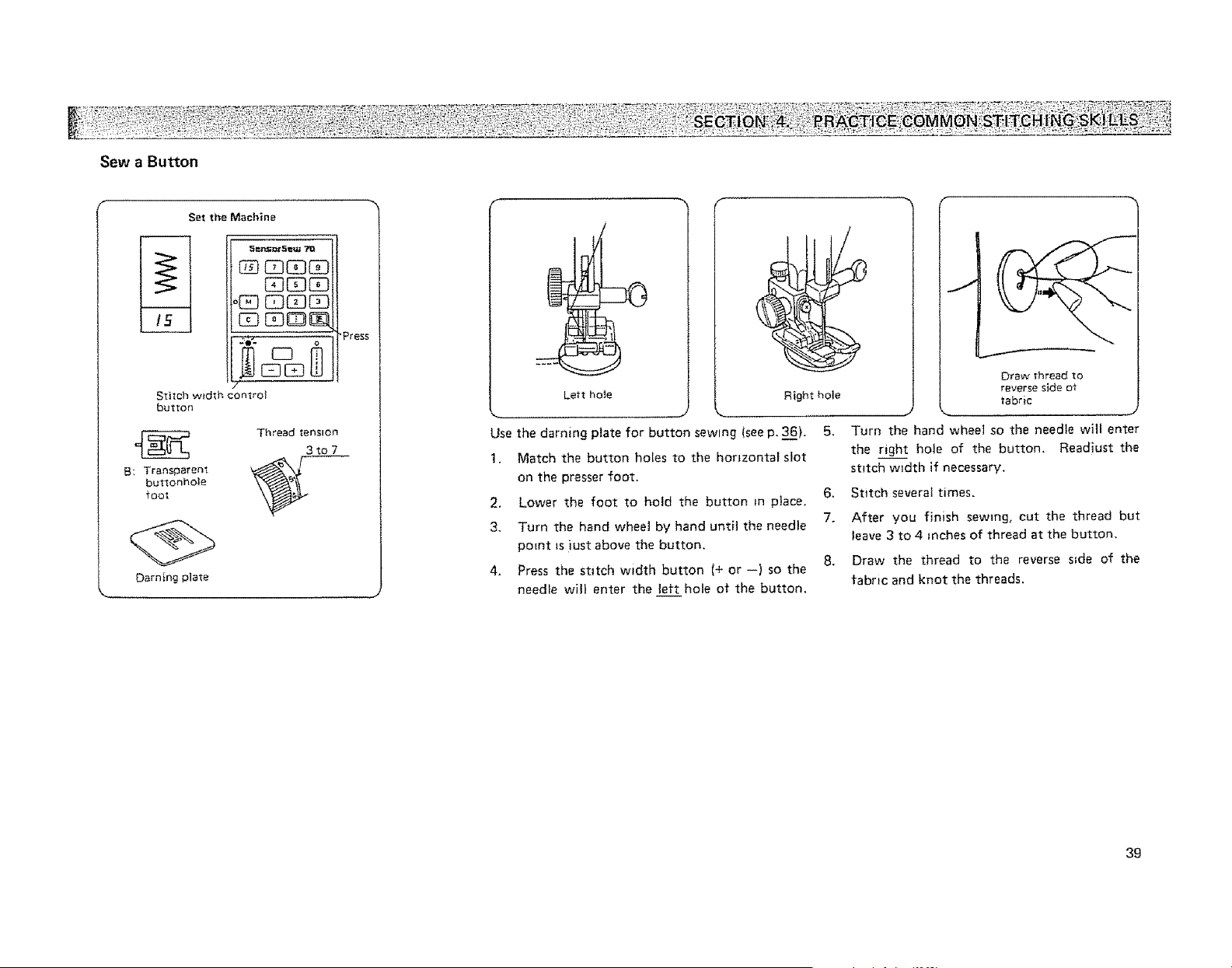
Sew a Button
Set the Machine
5=r_o_SeuJ 7t_
/
Stitch width control
button
Press
Thread tension3to 7
B: Transparent _--
buttonhole
_'oot
Darning plate
Left hole
Right hole
Use the darning plate for button sewing (see p, 366).
1. Match the button holes to the horizontal slot
on the presser foot.
2. Lower the foot to hold the button in place,
3. Turn the hand wheel by hand until the needle
pmnt _siust above the button.
4. Press the stitch width button (+ or i) so the
needle will enter the left hole of the button.
J
Draw thread to
reverse side ot
fabric
5. Turn the hand wheel so the needle will enter
the right hole of the button. Readiust the
stitch width if necessary.
6. Stitch several times.
7. After you finish sewing, cut the thread but
leave 3 to 4 inches of thread at the button.
8. Draw the thread to the reverse side of the
fabric and knot the threads.
39
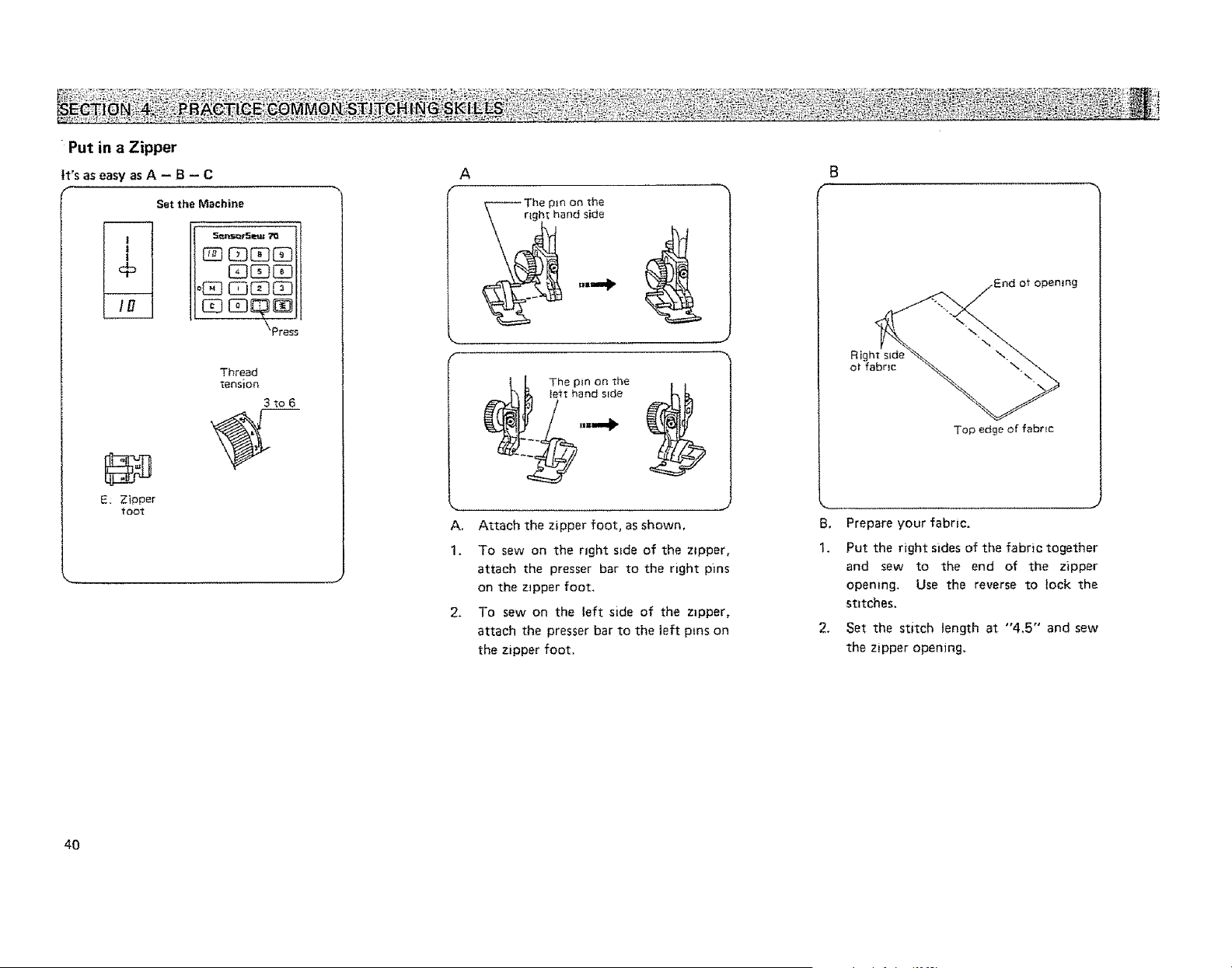
Put in a Zipper
It's as easy as A - B - C
f
Set the Machine
EDEDED
\Press
E: Zipper
tool
Thread
tension
3_o6
A
The pin on the
"lght hand side
_ he pin on the
lett hand side
.....J
A. Attach the zipper foot, as shown.
1. To sew on the right s_de of the zipper,
attach the presser bar to the right pms
on the z_pper foot.
2. To sew on the left side of the zipper,
attach the presser bar to the left pros on
the zipper foot.
B,
1.
2.
Top edge of fabric
Prepare your fabric.
Put the right sides of the fabric together
and sew to the end of the zipper
opening. Use the reverse to lock the
stitches.
Set the stitch length at "4,5" and sew
the zipper opening.
4O
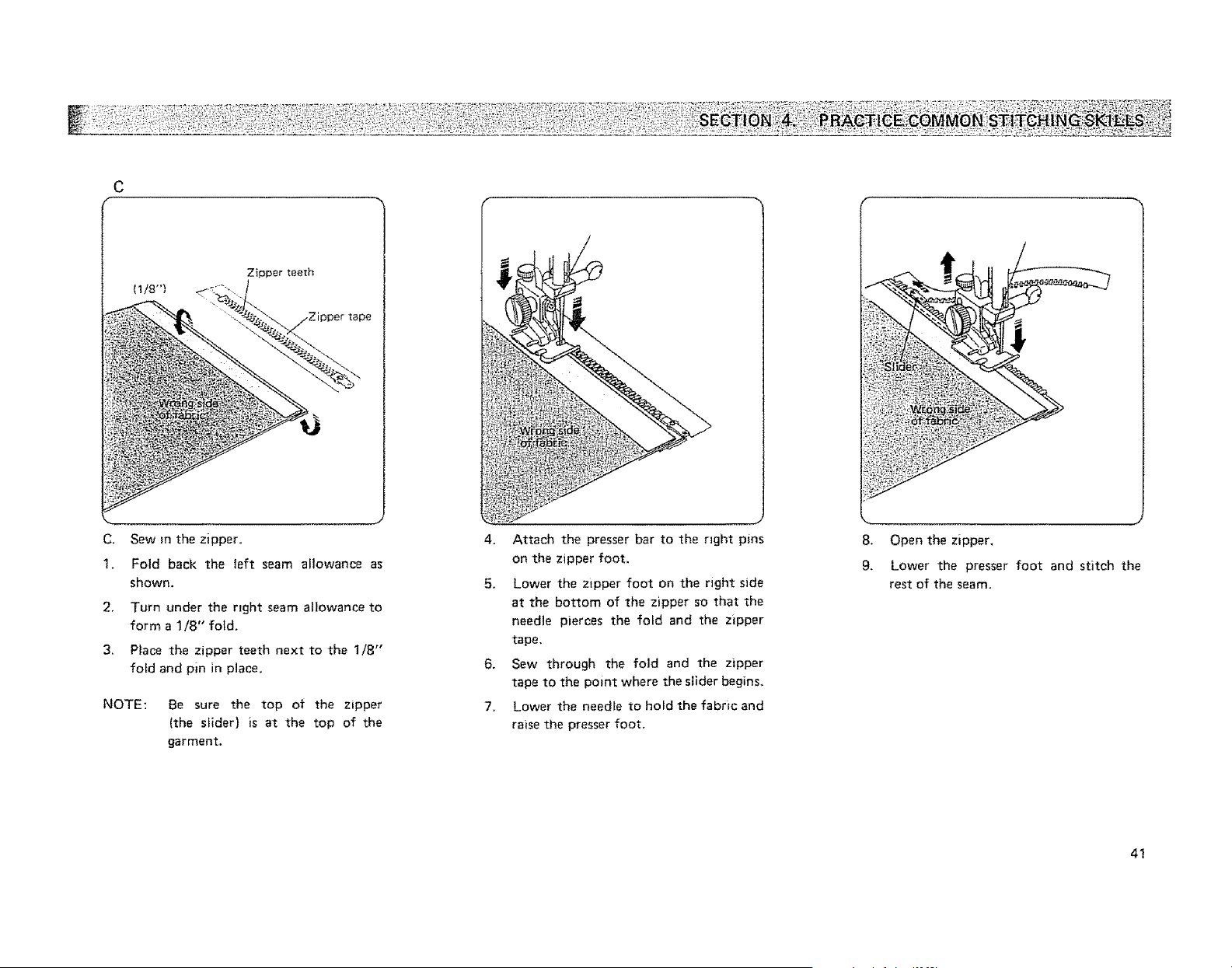
C
C. Sew _n the zipper.
1. Fold back the left seam allowance as
shown.
2, Turn under the right seam allowance to
form a 1/8" fotd.
3, Place the zipper teeth next to the 1/8'"
fold and pin in place.
NOTE: Be sure the top of the zipper
(the slider) is at the top of the
garment,
J
4. Attach the presser bar to the right pins
on the zipper foot.
5. Lower the z_pper foot on the right side
at the bottom of the zipper so that the
needle pierces the fold and the zipper
tape,
6, Sew through the fold and the zipper
tape to the point where the slider begins.
7, Lower the needle to hold the fabric and
raise the presser foot.
8. Open the zipper,
9. Lower the presser foot and stitch the
rest of the seam.
41
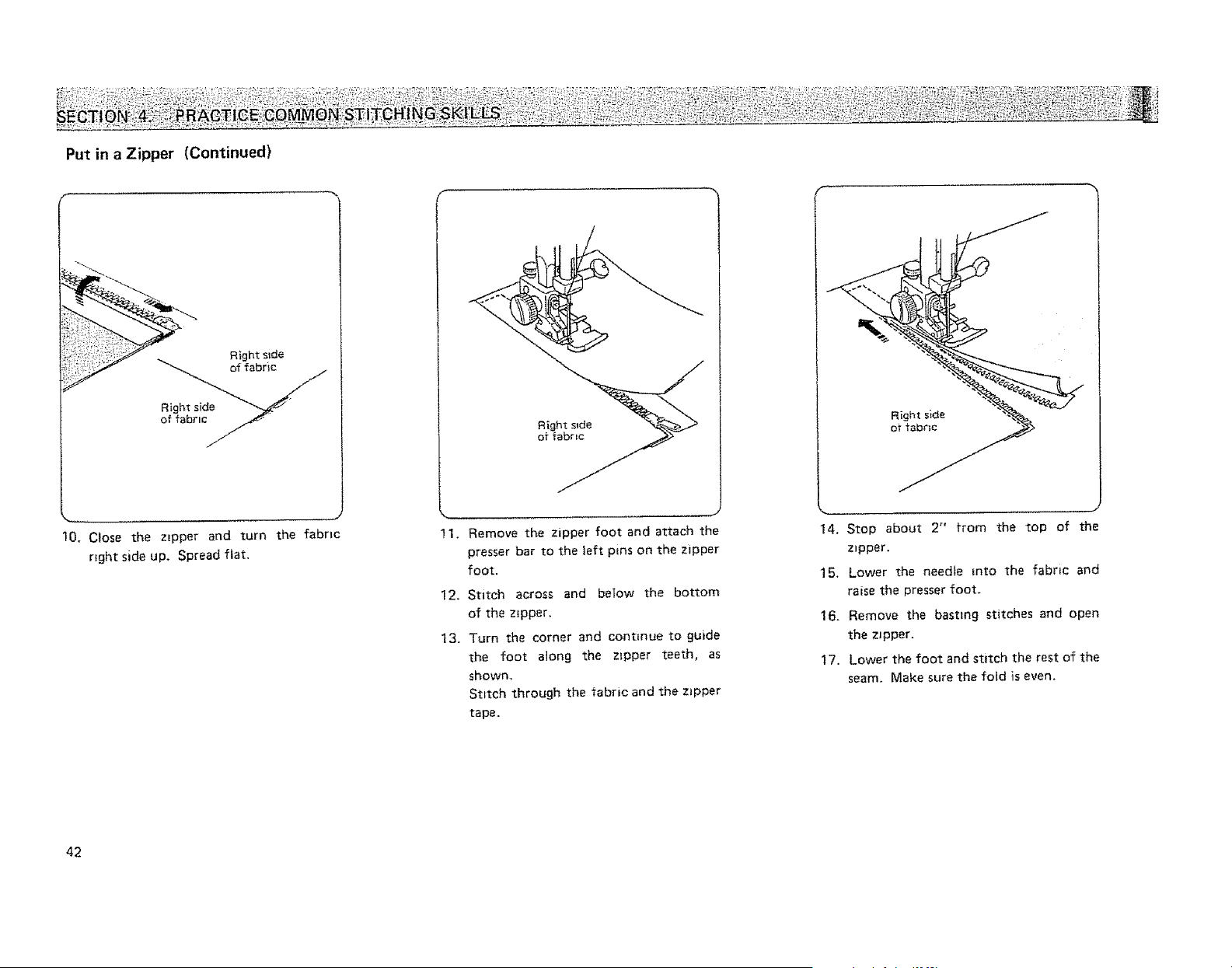
Put in a Zipper (Continued)
R_ght slde
of fabric
Right side
of fabric
10. Close the zipper and turn the fabric
right side up_ Spread fiat.
!1. Remove the zipper foot and attach the
presser bar to the left pmns on the zipper
foot.
12. Stitch across and betow the bottom
of the z_pper.
t3. Turn the corner and continue to guide
the foot aJong the zipper teeth, as
shown.
Stitch through the fabric and the zipper
tape.
Right side
of _abrlc
14. Stop about 2" from the top of the
zipper.
15. Lower the needle into the fabric and
raise the presser foot.
16. Remove the basting stitches and open
the zipper.
17. Lower the foot and stitch the rest of the
seam. Make sure the fold is even.
42
This section, discussing the many stitches available to you on ths machine is organized by the stitch numbers on your Chart of Stitch Patterns. There are some
variations and overlaps, but generally the stitches are here m numerical order.
However, you may know what you want to sew but may not be aware of the stitch to use to complete your sewing task, A Chart of Sewing FunctEons precedes the
Chart of Stitch Patterns and the discussion of stitches, to aid you in locating quickly the stitch pattern and instructrons you need.
NOTE: tf a stitch pattern on this machine can be used for stitching stretch fabrics, you will find the word "stretch" in parentheses after the stitch pattern name,
All stitch pattern on the Chart of Stitch Patterns (P 45 to 49) will be labeled with an "S'" in the name box.
43
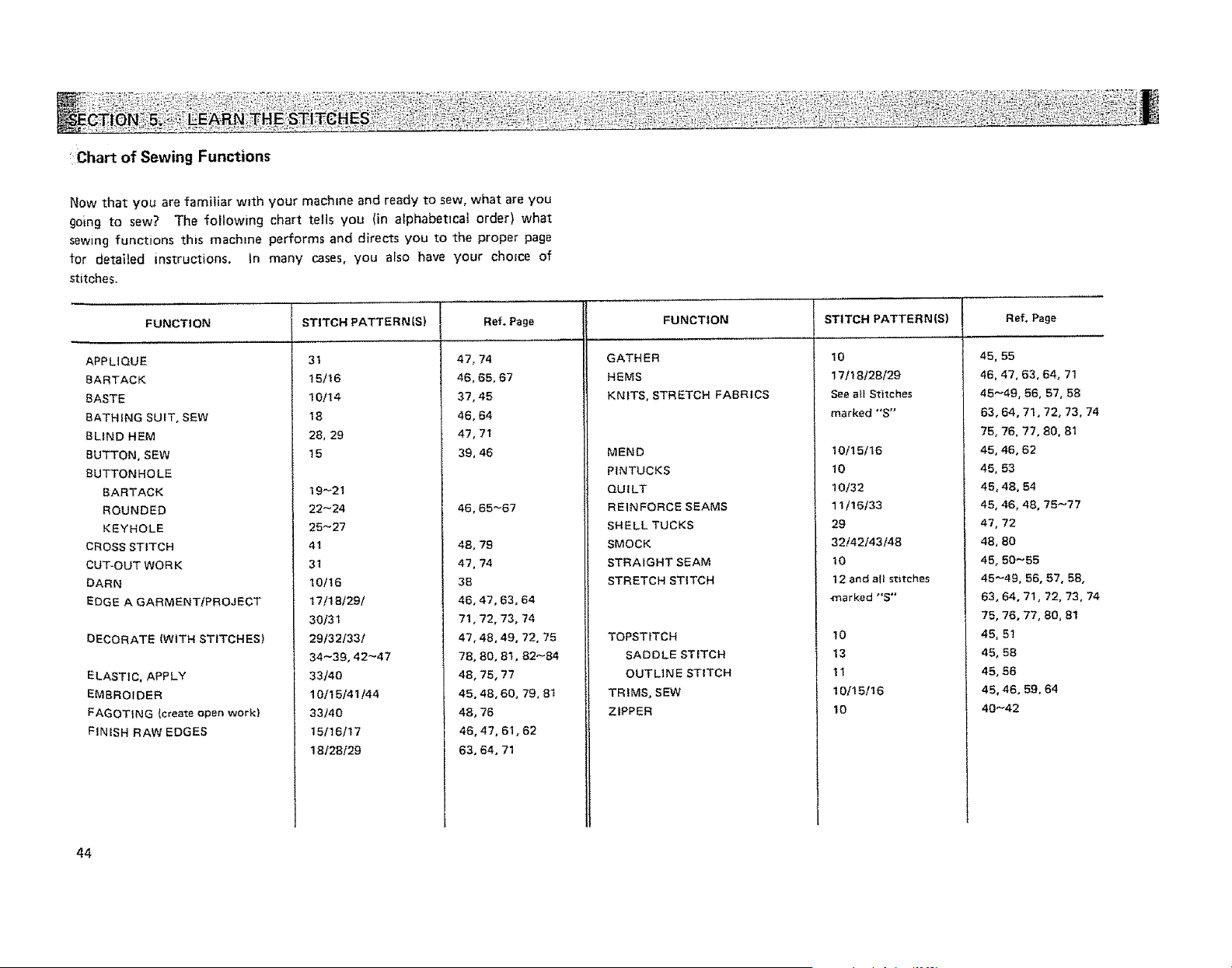
Chart of Sewing Functions
Now that you are ram{liar with your machine and ready to sew, what are you
going to sew? The following chart tells you (in alphabetical order) what
sewing functions this machine performs and directs you to the proper page
for detailed instructions, in many cases, you also have your choice of
stitches.
FUNCTION STITCH PATTERN{S) Re{. Page
APPLIQUE
8ARTACK
BASTE
BATHING SUIT, SEW
8L_ND HEM
BUTTON, SEW
BUTTONHOLE
BARTACK
ROUNDED
KEYHOLE
CROSSSTITCH
CUTOUT WORK
DARN
EDGE A GARMENT/PROJECT
DECORATE (WITH STITCHES)
ELASTIC, APPLY
EMBROIDER
FAGOTING (create open work)
FINISH RAW EDGES
31
15/!6
10/14
18
28, 29
15
19_21
22_24
25_27
41
31
10/16
17!18/29/
30/31
29t32133/
34_39, 42~47
33/40
10/15/41/44
33/40
15/16/17
18/28/29
47, 74
46, 65, 67
37,45
46, 64
47, 71
39, 46
46,65_67
48,79
47,74
38
46,47,63,64
71,72,73,74
47,48,49,72,75
78o80,81,82_84
48,75,77
45,48,60,79,81
48,76
46,47,61,62
63,64,71
FUNCTION STITCH PATTERN(S) Ref. Page
GATHER
HEMS
KNITS, STRETCH FABRICS
10
17118!28/29
See a}t Stitches
marked "S"
45,55
46,47,63,64,71
45_49,56, 57, 58
63,64,71,72,73074
MEND
PINTUCKS
QUILT
REINFORCE SEAMS
SHELL TUCKS
SMOCK
STRAIGHT SEAM
10/15/16
10
10/32
11/16/33
29
32/42_3/48
10
75,76,77,80,81
45,46,62
45,53
45,48,54
45,46,48,75N77
47,72
48,80
45°50~55
STRETCH STITCH
TOPSTITCH
SADDLE STITCH
OUTLINE STITCH
TRIMS, SEW
ZIPPER
12 and atl stitches
_narked "'S"
10
13
11
10/! 5/16
1o
45_49,56,57,58,
63,64,71, 72,73,74
75,76,77,80,81
45,51
45, 58
45,56
45,46,59,64
40--42
44
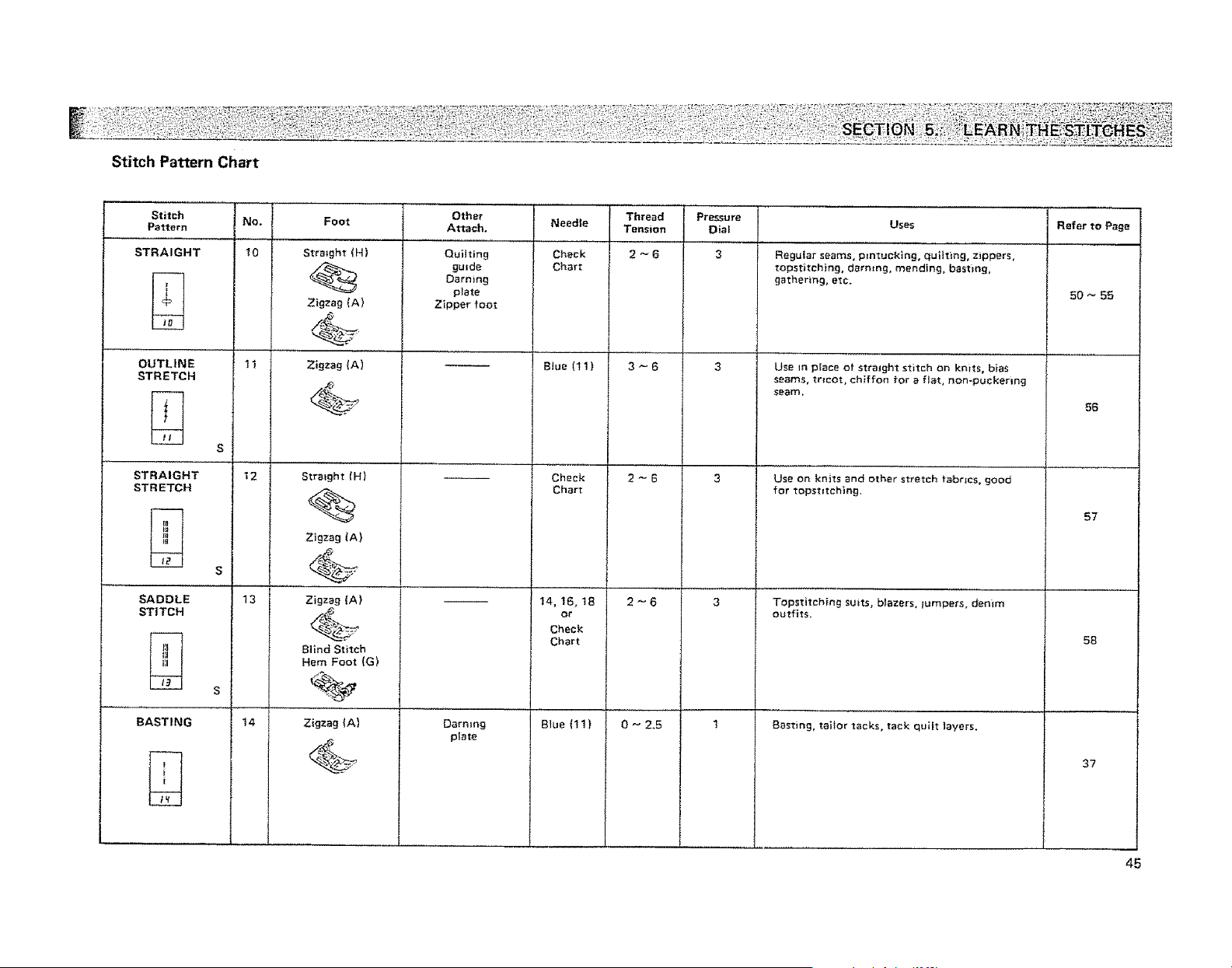
Stitch Pattern Chart
Stitch
Pattern
STRAIGHT
OUTLINE
STRETCH
STRAIGHT
STR ETCH
SADDLE
STITCH
BASTING
.No.
10
11
S
12
S
13
S
14
Foot Other Thread Pressure
Attach. Needle Tension Dial Uses Refer to Page
Check 2 _ 6 3
Chart
Straight (H)
Zigzag (A)
Zigzag (A)
Stra=ght Ill}
%
Zigzag _A}
Zigzag tA)
Blind Stitch
Hem Foot (G)
Zigzag {A)
Quilting
gu=de
Darning
plate
Zipper foot
DarRIng
plate
Blue (11)
Check
Chart
14, 16, t8
or
Cheek
Chart
Blue (11)
3_6
2_6
2_6
0 N 2.5
Regular seams, pmtueklng, quilting, zippers,
topstitching, darmng, mending, basttng,
gathering, etc.
Use m p_ace of straight stitch on knits, bias
seams, tricot, chlffon for a flat, non-puckering
seam,
Use on knits and other stretch fabrics, good
for topstttching.
Topstitching suits, blazers,/umpers, denim
outfits,
Basting, tailor tacks, tack qui_t layers.
50 _ 55
56
57
58
37
45
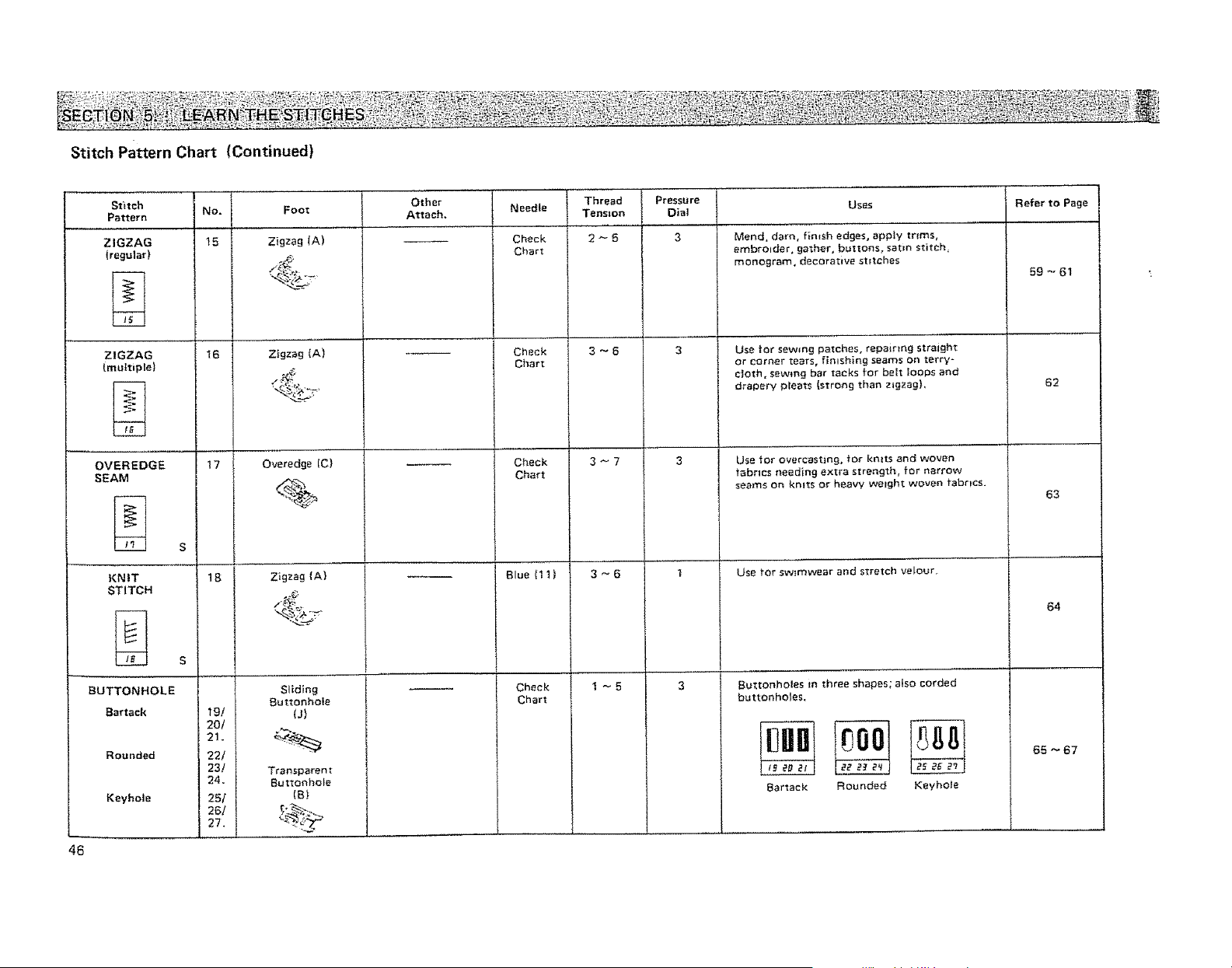
Stitch Pattern Chart (Continued)
St=tch
Pattern
ZIGZAG
(regular)
3
ZIGZAG
(multiple}
OVEREDGE
SEAM
KNIT
STITCH
NUTTONHOLE
Barrack
Rounded
Keyhole
46
No.
!5
I
i
I
17!
s
18
s
' I
19!
2o/ I
21. 1
22/
23/ I
24. /
25/
26/ t
27. I
Foot
Zigzag (A)
Zigzag (A)
Overedge (C)
Zigzag (A}
Sliding
Buttonho!e
(J}
%
Transparent
Buttonhole
Other
Attach,
Needle
Check
Chart
Check
Chart
Check
Chart
Blue (1 t )
Check
Chart
Thread
Tension
2_5
3_6
3_7
3~6
1_5
Pressu re
Dial
Uses
Mend, darn, finish edges, apply trims,
embroider, gather buttons, sat n st tch
monogram, decorative stitches
Use for sewing patches, repairing straight
or corner tears, flnlshing seams on terry-
cloth, sewing bar tacks for bett loops and
drapery pleats (strong than zigzag),
Use for overcasting, for knits and woven
tabrles needing extra strength, for narrow
seams on knits or heavy weight woven tabr=cs.
Use tot sw]mwear and stretch velour.
Buttonholes m three shapes; also corded
buttonholes.
13arrack Rounded Keyhole
Refer to Page
59 ~ 61
62
63
64
65 _ 67
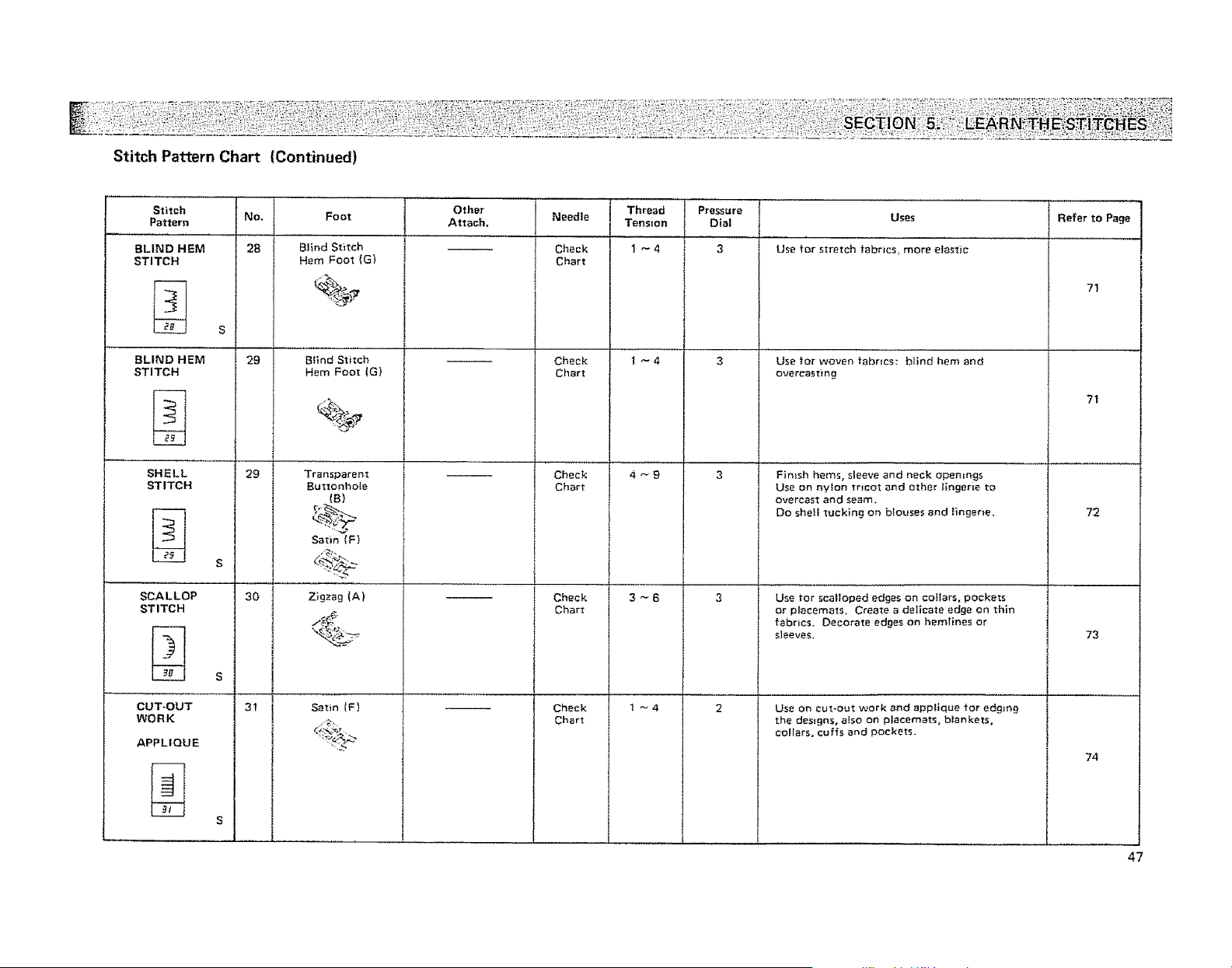
Stitch Pattern Chart (Continued)
Stitch
Pattern
BLIND HEM
STITCH
BLIND HEM
STITCH
SHELL
STITCH
SCALLOP
STITCH
CUT_OUT
WORK
APPLIQUE
No,
28
S
29
29
S
30
S
31
S
Foot
Blind Stitch
Hem Foot (G}
%,
Blind Stitch
Hem Foot (G)
Transparent
Buttonhole
(B)
Satin (F}
Zigzag tA)
Satin (F)
Other
Attach,
Needle
Check
Chart
Check
Chart
Check
Chart
Check
Chart
Check
Chart
Thread
Tension
I_4
I_4
4_9
Pressure
Dial
Uses
Use tot stretch fabrics, more elastic
Use tot woven fabrics: blind hem and
overcasting
Finish hems, sleeve and neck opemngs
Use on nylon tricot and other linger=e to
overcast and seam.
Do shell tucking on blouses and lingerie.
Use for scalloped edges on collars, pockets
or placemats. Create a delicate edge on thin
fabrics. Decorate edges on hemlines or
sleeves,
Use on cut-out work and applique for edging
the designs, also on ptacernats, blankets,
collars, cuffs and pockets.
Refer to Page
71
71
72
73
74
47
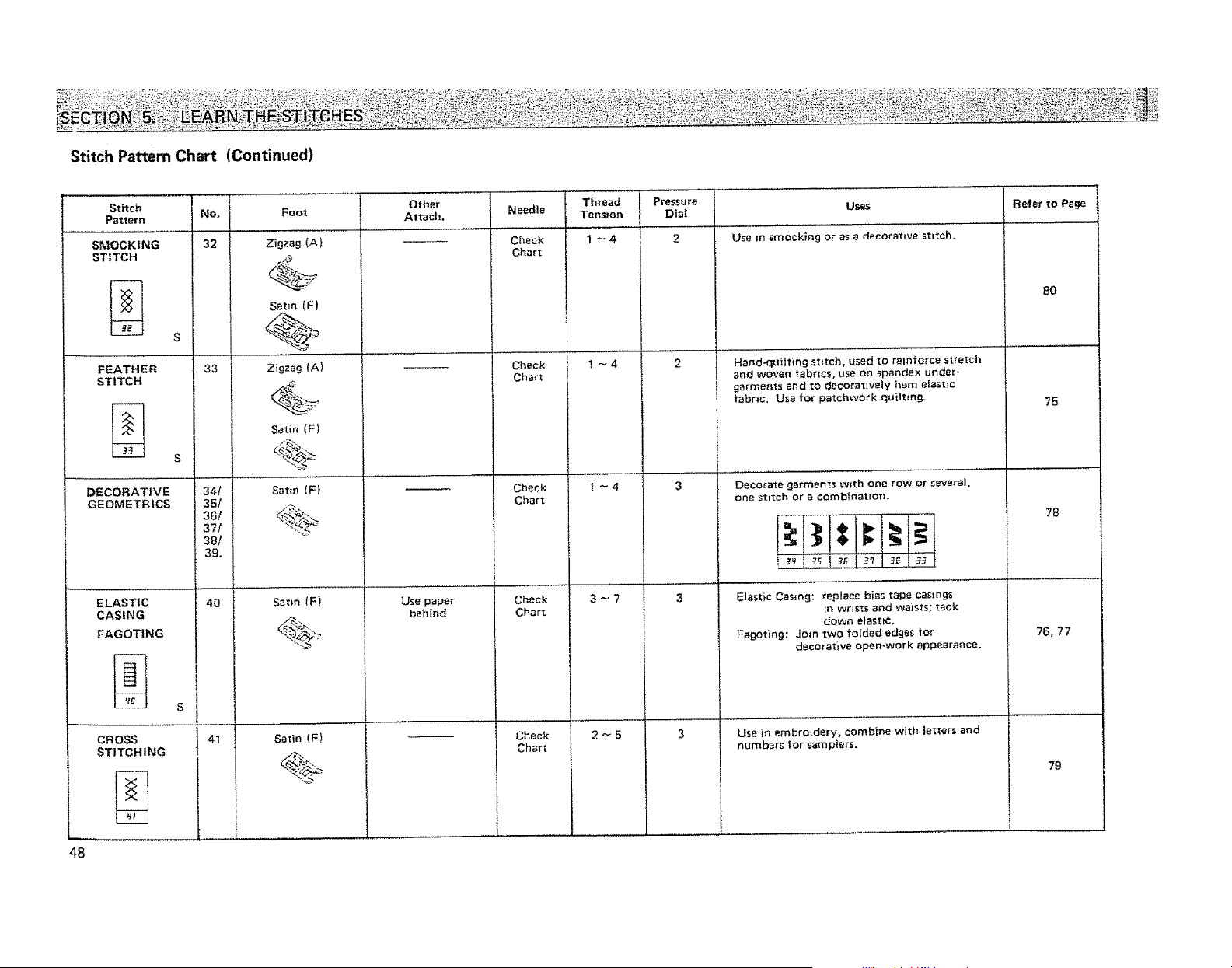
Stitch Pattern Chart (Continued)
Stitch
Pattern
SMOCKING
STITCH
FE ATH E R
STITCH
DECORATIVE
GEOMETR|CS
ELASTIC
CASING
FAGOTING
CROSS
STITCHING
32
S
................ t
33
S
34/
35/
36/
37I t
38/
39.
40
S
41
Foot
Zigzag (At
Satm (F)
%
Zi£zag _A)
Satin (F)
Satin {F)
Satm (F)
Satin (F)
Needle
Check
Chart
Thread
Tension
Other
Attach,
Use paper
behind
Check
Chart
Check
Chart
Check
Chart
Check
Chart
t~4
t_4
1_4
3_7
2_5
Pressure
Diat
Uae_
Use _n smocking or as a decorative stitch_
Hand-quilting stitch, used to reinforce stretch
and woven fabr=cs, use on spandex under-
garments end to decoratively hem elastic
fabric, Use for patchwork quilting.
Decorate garments w_th one row or several,
one st=tch or a combinatton.
Elastic Casing: replace bias tape casings
in wrists and waists; tack
down elastic,
Fagoting: Join two forded edges for
decorative open-work appearance.
Use in embroidery, combine with letters and
numbers for samplers,
Refer to Page
8O
75
78
76, 77
79
48
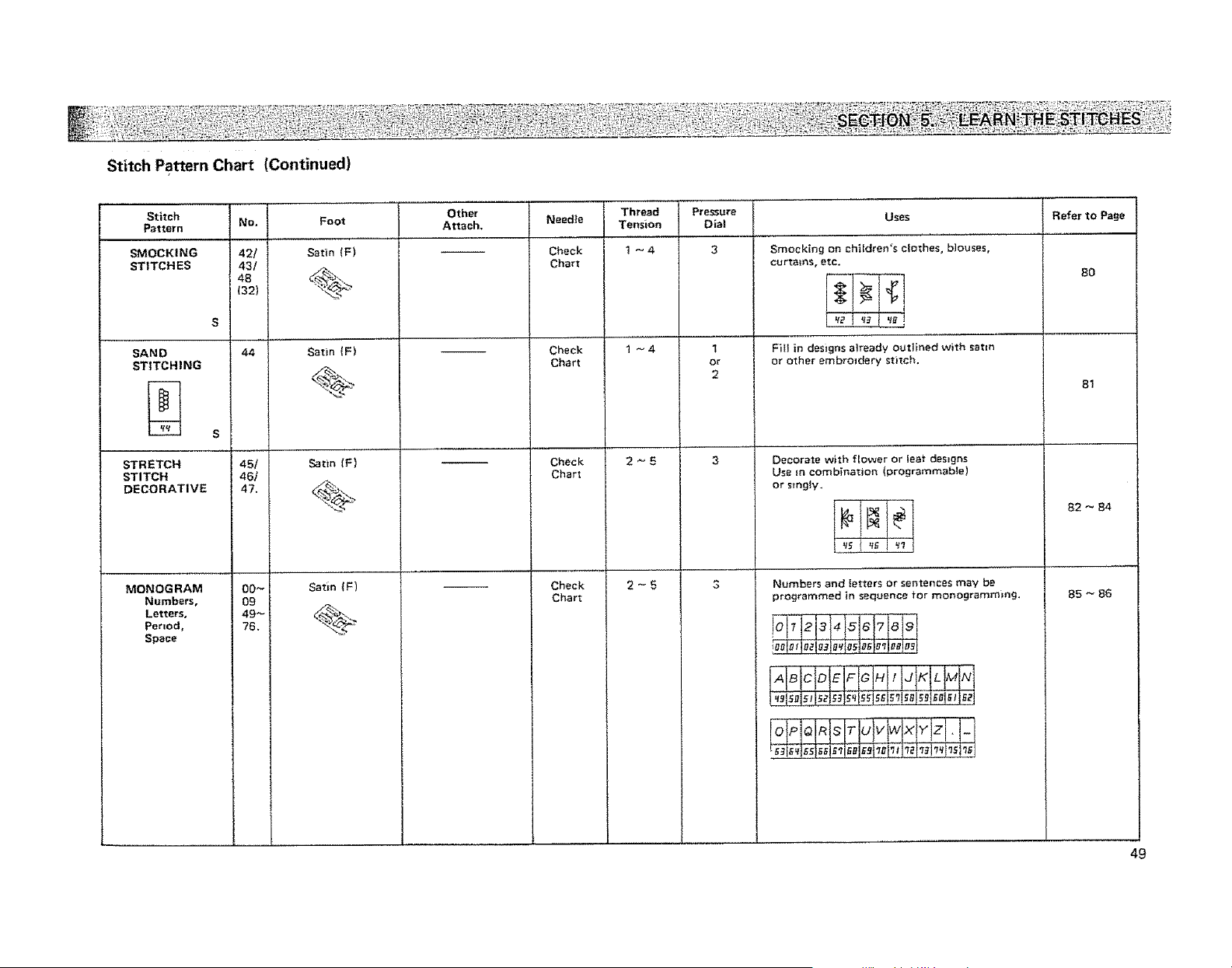
Stitch Pattern Chart (Continued)
Stitch
Pattern
SMOCKING
STITCHES
SAND
STITCHING
S
STRETCH
STITCH
DECORATIVE
MONOGRAM
Numbers,
Letters,
period,
Space
I No. t
42/ t
I 431 1
00~
09
Foot
Satin {F)
%
Satin {F)
Satin (F)
Satin (F)
%
Other
Attach.
Needle
Check
Chart
Check
Chart
Check
Chart
Thread
Tension
1~4
1_4
2~5
Pressure
Dial
3
Uses
Smocking on children's clothes, blouses,
curtains, etc.
Fill in designs already outlined with satin
or other embroidery stitch,
Decorate with flower or leaf designs
Use in combination (programmable)
or srngty.
Check
Chart
2-5
1
or
2
Numbers and letters or sentences may be
programmed in sequence for monogramming.
olp-o___1_1__l_k14
1t ..........-I
Refer to Page
80
81
82 _ 84
85 _ 86
49
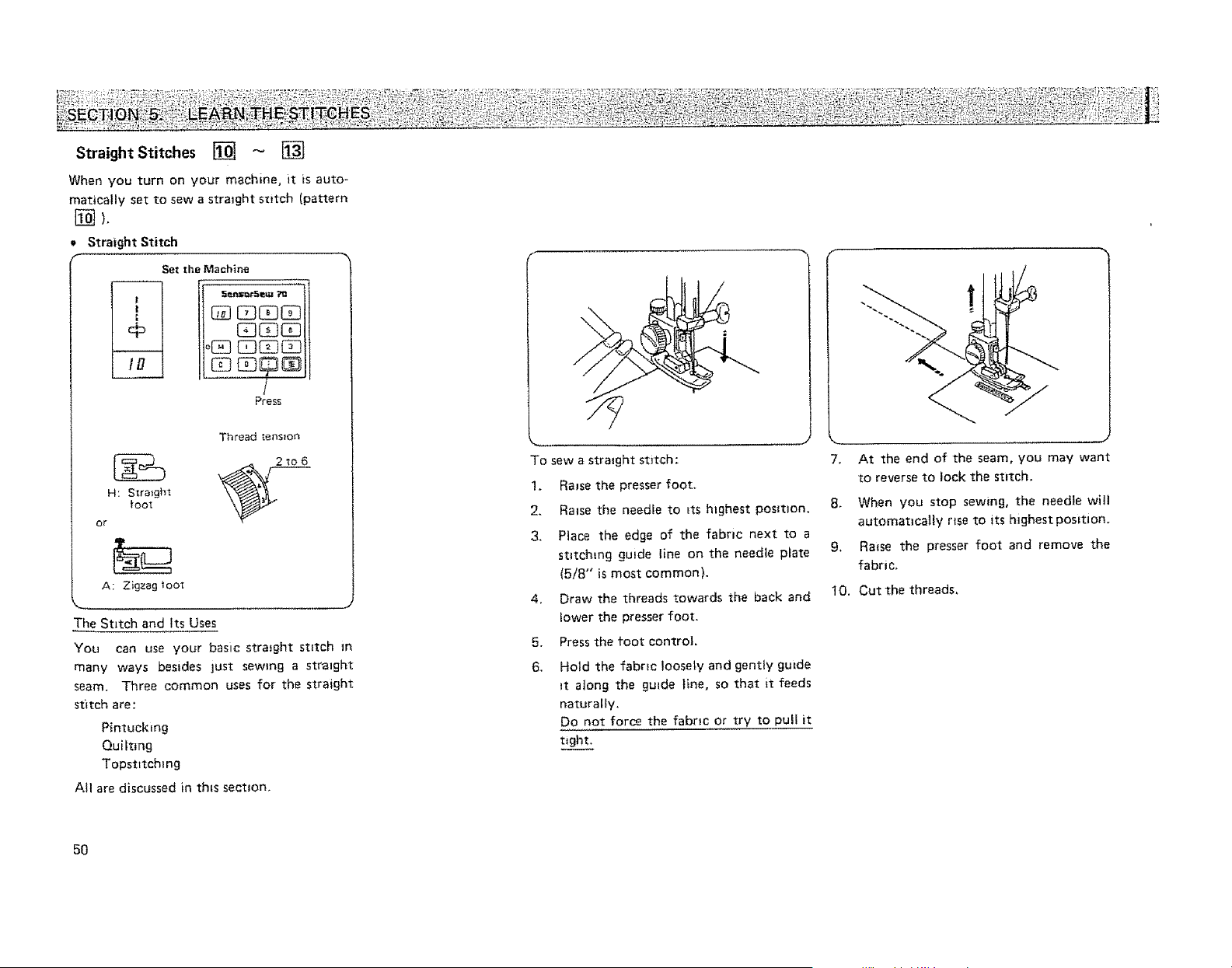
Straight Stitches [] _ []
When you turn on your machine, it is auto-
matically set to sew a straight s_itch (pattern
rf i t,
• Straight Stitch
Set the Machine
/
/
Press
H: Straight
foot
or
A: Zigzag foot
Thread [ens_on
2to6
The Stitch and Its Uses
You can use your basic straight st=tch in
many ways besides just sewing a straight
seam. Three common uses for the straight
stEtch are:
Pintucking
Quittmg
Topstitch ng
All are discussed in this section.
To sew a straight stitch:
1.
2.
3.
4,
5.
6,
Raise the presser foot.
Raise the needle to tts highest position.
Place the edge of the fabric next to a
stitching guide line on the needle plate
(5/8" is most common).
Draw the threads towards the back and
lower the presser foot.
Press the foot control,
Hold the fabric loosely and gently guide
_t along the guide line, so that it feeds
naturally.
Do not force the fabric or try to pull it
tight,
%
7. At the end of the seam, you may want
to reverse to lock the stitch.
8. When you stop sewing, the needle will
automatically rise to its highest position.
9, Ratse the presser foot and remove the
fabric,
10. Cut the threads,
50
Topstitching
Set the Machine
Press
Thread tension
2to6
A: Zigzag foot
or
G, Bl_nd slitch hem foot
The Stitch and its Uses
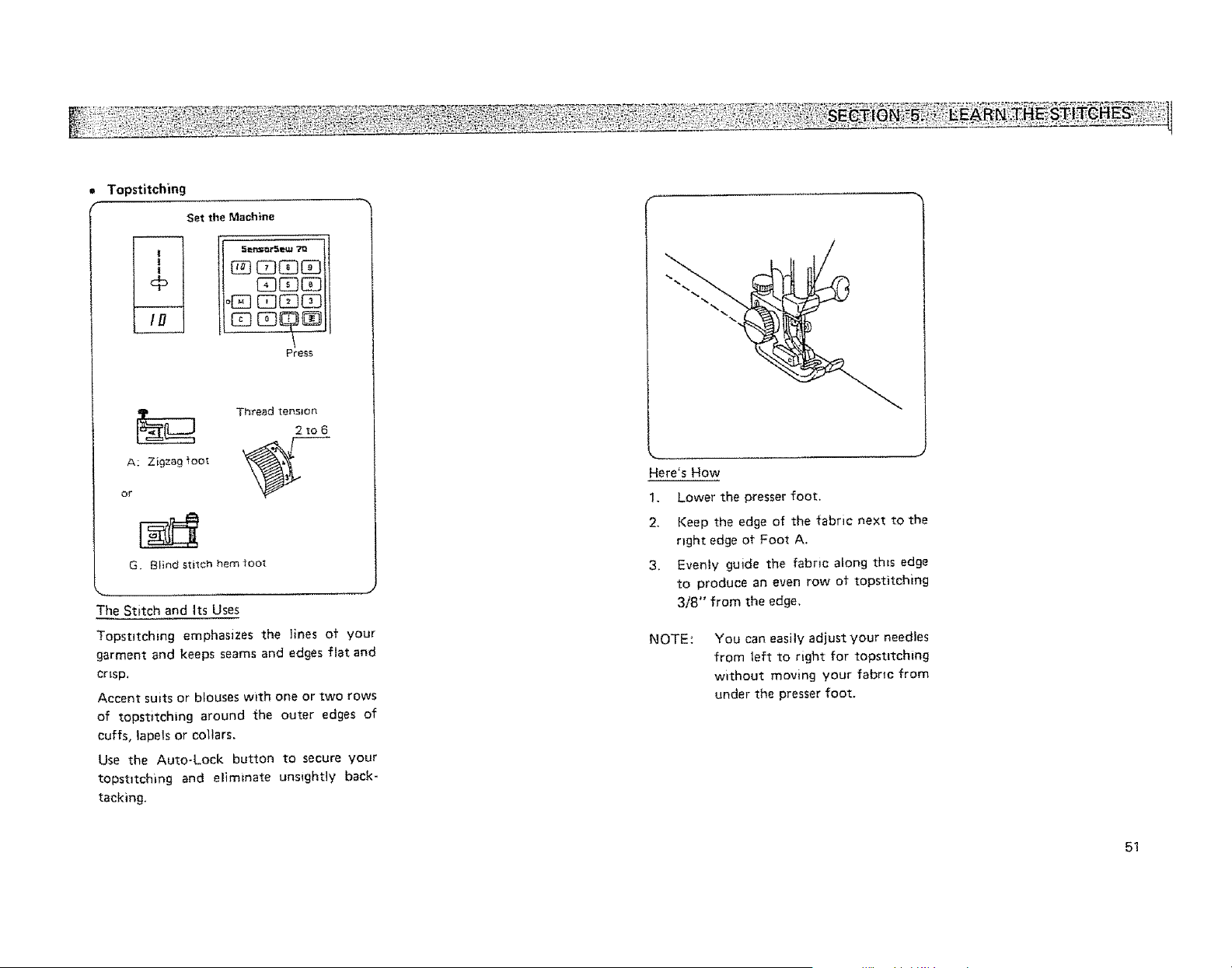
TopstJtching emphasizes the lines of your
garment and keeps seams and edges fiat and
Crisp.
Accent suitsor b_ouses with one or two rows
of topstitching around the outer edges of
cuffs,lapelsor collars.
Use the Auto-Lock button to secure your
topstltching and eJiminate unsightly back-
tacking.
Here's How
1. Lower the presser foot,
2, Keep the edge of the fabric next to the
right edge of Foot A.
3. Evenly guide the fabric along thts edge
to produce an even row of topstitching
3/8" from the edge,
NOTE:
You can easily adjust your needles
from left to right for topstltching
without moving your fabric from
under the presserfoot.
51
Straight Stitches [] _ [] (Continued)
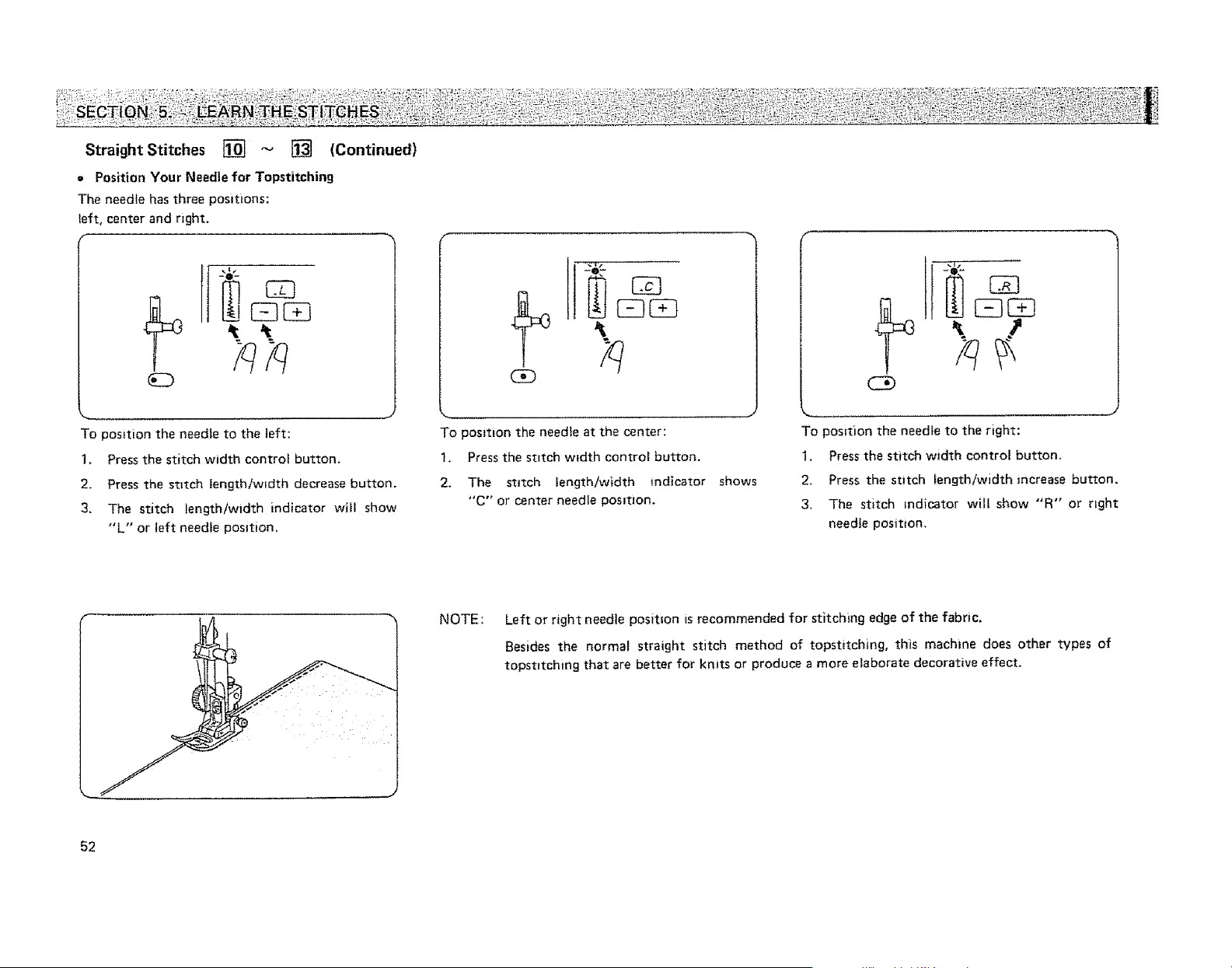
= Position Your Needle for Topstitching
The needle has three positions:
left, center and right.
f
CD
©
To position the needle to the left:
1, Press the stitch width control button.
2. Press the stitch length/width decrease button.
3. The stitch length/width indicator will show
"L" or left needle position,
To position the needle at the center:
1. Press the stitch width control button.
2. The st=tch length/width indicator
"C" or center needle position.
shows
To position the needle to the right:
1. Pressthe stitch width control button,
2,
3,
Press the stitch length/width increase button.
The stitch indicator will show "'R" or right
needle position.
NOTE:
Left or right needle positson is recommended for stitching edge of the fabric.
Besides the normal straight stitch method of topstitching, this machine does other types of
topstJtching that are better for knits or produce a more elaborate decorative effect.
52
Pintucking
Set the Machine
E2Q
\
Press
Thread
_ension
3to6
G. Blind Stitch
hem foot
The Stitch and Its Uses
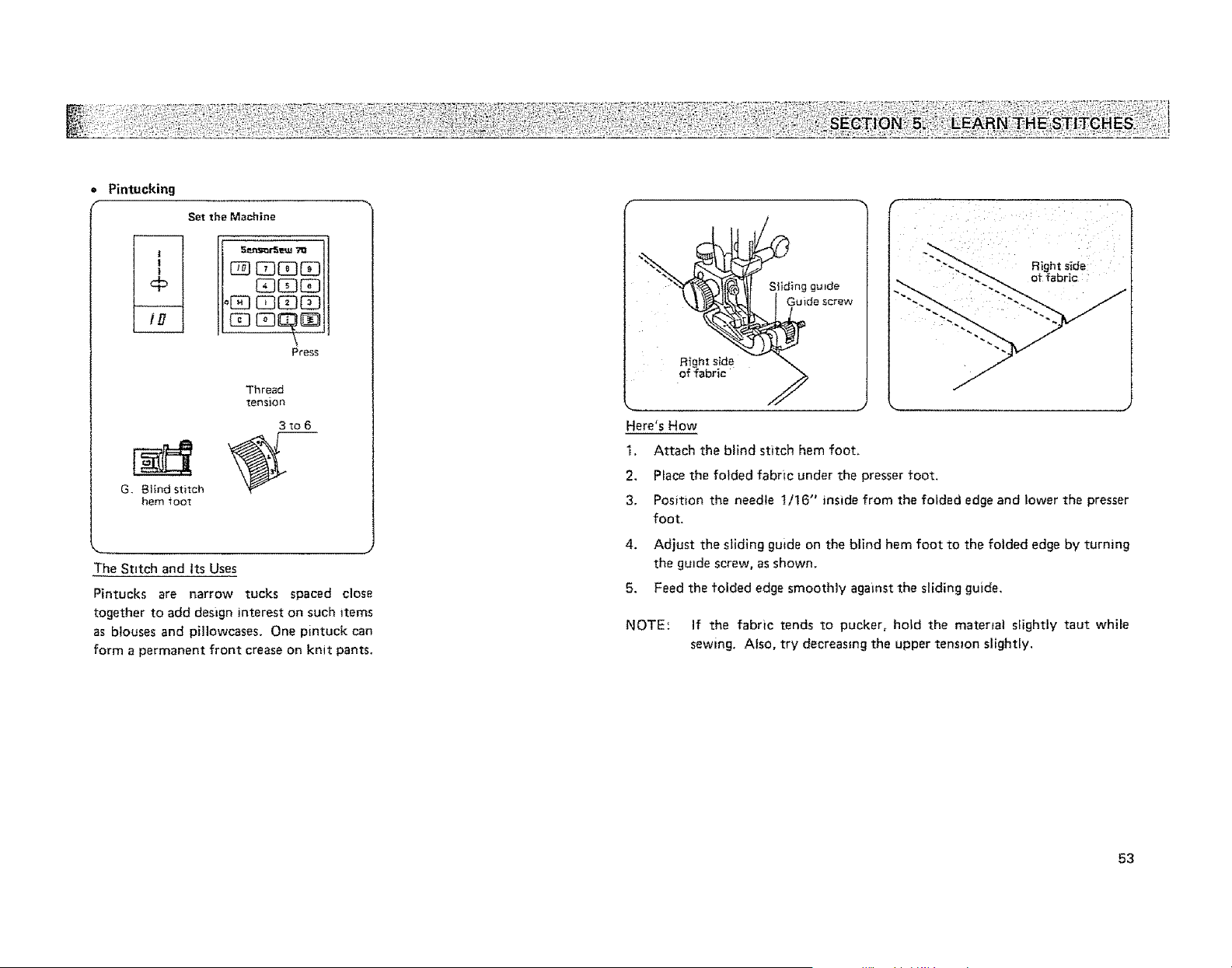
Pintucks are narrow tucks spaced close
together to add design interest on such items
as blouses and pillowcases. One pintuck can
form a permanent front crease on knit pants.
Here's How
1,
2.
3,
4,
5.
NOTE:
liding guide
Gu ide screw
Attach the blind stitch hem foot.
Place the folded fabric under the presser foot.
Position the needle t/16" inside from the folded edge and }ower the presser
foot.
Adjust the sliding guide on the blind hem foot to the folded edge by turning
the guide screw, as shown.
Feed the foided edge smoothly against the sliding guide,
If the fabric tends to pucker, hold the material sfightty taut while
sewing. Also, try decreasing the upper tensmn slightly.
53
Straight Stitches [] _ []
* Quilting
Set the Machine
//
Press
(Continued)
Thread
te_tloq
3to6
D: Quilter
of
A: Zigzag foot H: S_ratght toot
The Stitch and Its Uses
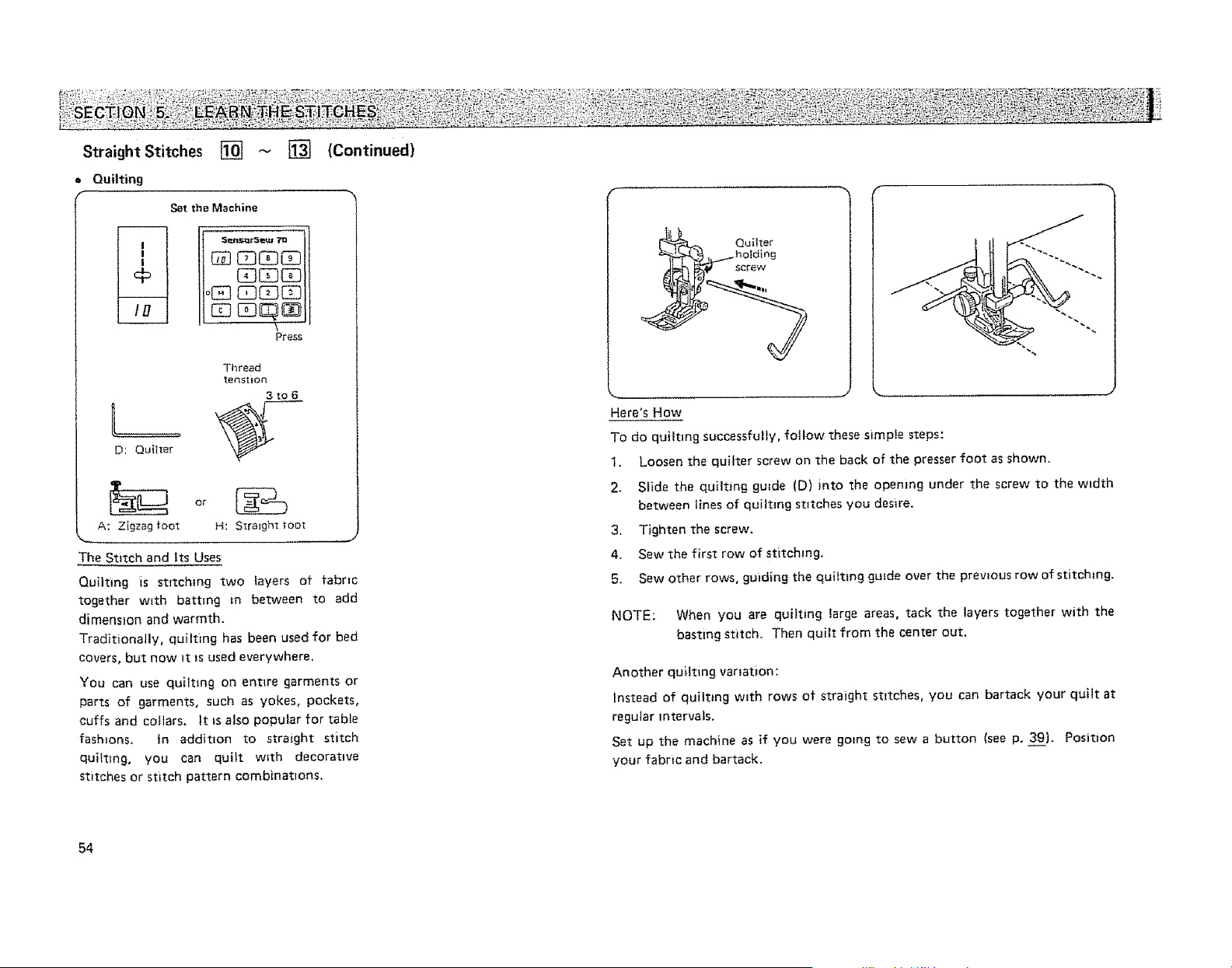
Quilting is stttching two layers of fabric
together w_th batting in between to add
dimension and warmth.
Traditionally, quilting has been used for bed
covers, but now =t is used everywhere.
You can use quiftmg on entire garments or
parts of garments, such as yokes, pockets,
cuffs and collars, it is also popular for table
fashions, in addition to straight stitch
quiftlng, you can quilt with decorative
stitches or stitch pattern combinations.
54
Quilter
Another quilting variation:
Instead of quilting with rows of straight stitches, you can bartack your quilt at
regular intervals.
Set up the machine as if you were going to sew a button (see p. 39). Position
your fabric and bartack.
Here's How
To do quilting successfully, follow these simple steps:
1. Loosen the quilter screw on the back of the presser foot as shown.
2. Slide the quilting guide (D) into the opening under the screw to the width
between lines of quitting stitches you desire.
3. Tighten the screw.
4. Sew the first row of stitching.
5. Sew other rows. guiding the quilting gutde over the prewous row of stitching.
NOTE: When you are quilting large areas, tack the layers together with the
basting stitch. Then quilt from the center out.
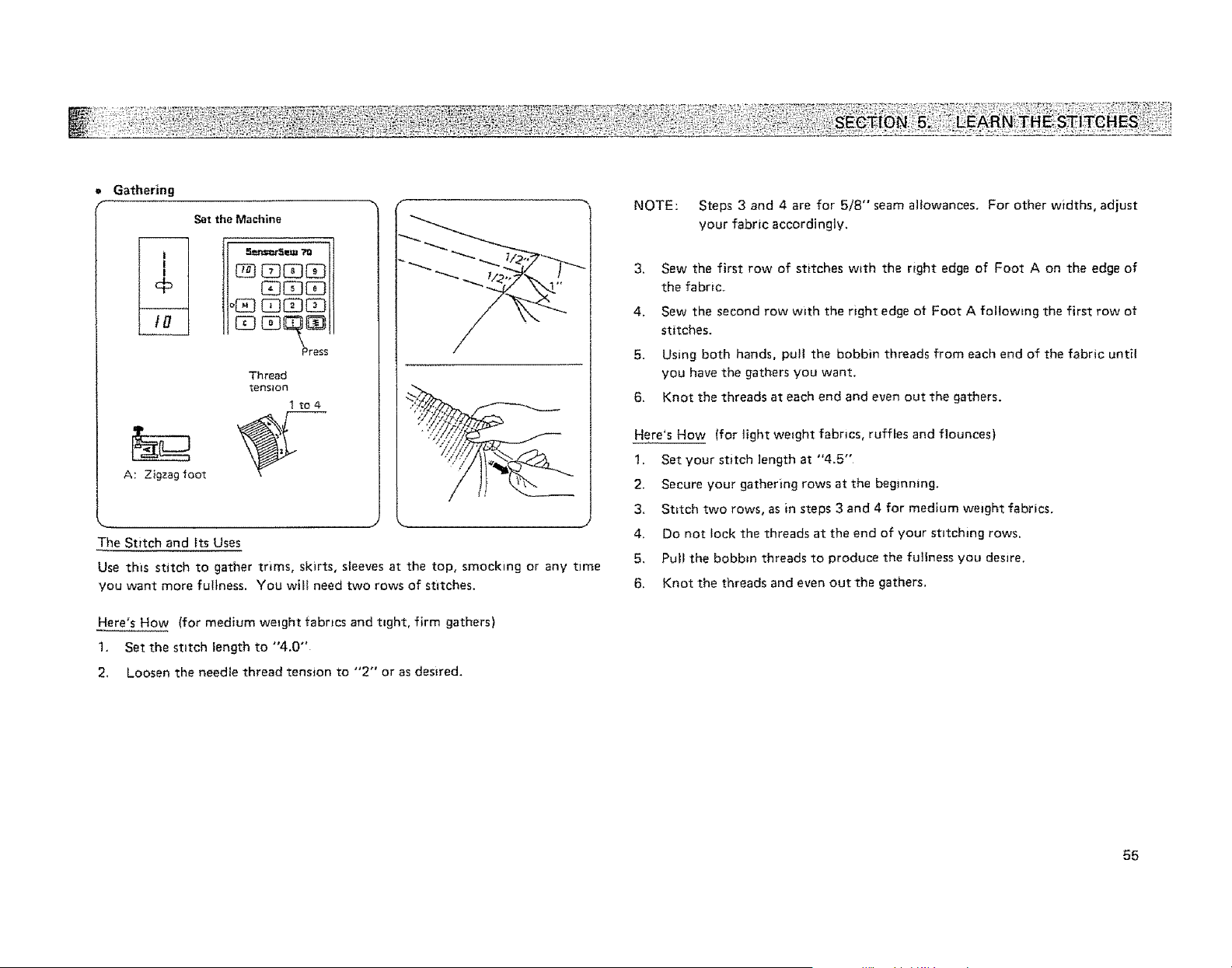
m Gathering
Set the Machine
_m,J_rSetu 70
Press
Thread
_enslon
I to4
A: Zigzag foo_
%.
k_,,
The Stitch and Its Uses
Use thts stitch to gather trims, skirts, sleeves at the top, smocking or any time
you want more fullness. You wilt need two rows of stitches.
Here's How (for medium weight fabrics and tight, firm gathers)
1. Set the stitch length to "'4.0"
2. Loosen the needle thread tension to "2" or as desired.
NOTE: Steps 3 and 4 are for 5/8" seam allowances. For other widths, adjust
your fabric accordingly,
3. Sew the first row of stitches with the right edge of Foot A on the edge of
the fabric.
4. Sew the second row with the right edge of Foot A following the first row ot
stitches.
5, Using both hands, pull the bobbin threads from each end of the fabric until
you have the gathers you want.
6, Knot the threads at each end and even out the gathers.
Here's How (for tight weight fabrics, ruffles and flounces)
1. Set your stitch length at "4.5'"
2. Secure your gathering rows at the beginning.
3. Stitch two rows, as in steps 3 and 4 for medium weight fabrics.
4. Do not lock the threads at the end of your stitching rows.
5. Pull the bobbin threads to produce the fullness you desire.
6. Knot the threads and even out the gathers.
55
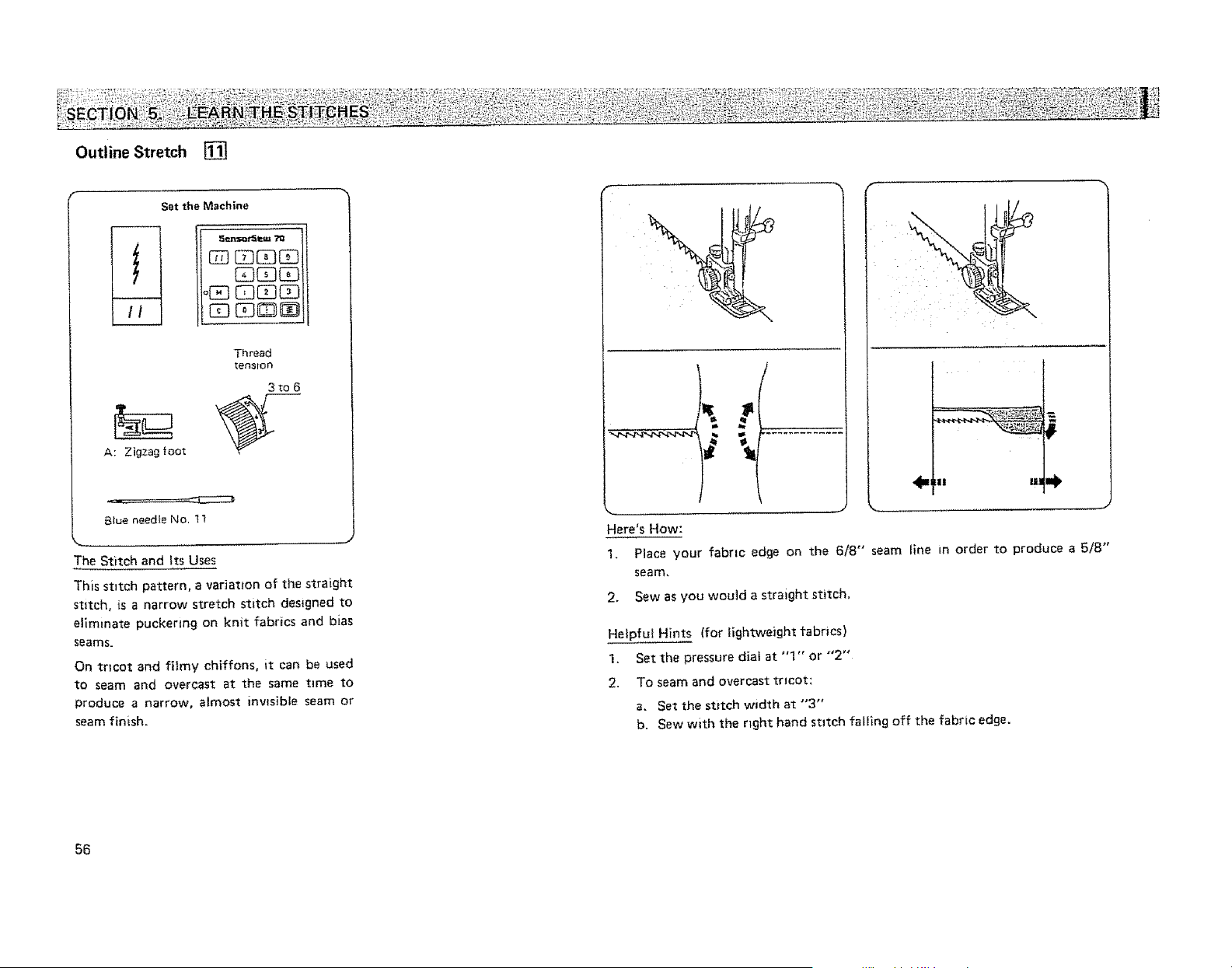
Outline Stretch [_]
Set the Machine
A: Zigzag toot
Thread
_e_stor_
3_o 6
81ue needle No, 1 1
The Stitch and Its Uses
This stitch pattern, a variation of the straight
stitch, is a narrow stretch stitch designed to
eliminate puckering on knit fabrics and bias
seams.
On tricot and filmy chiffons, it can be used
to seam and overcast at the same t_me to
produce a narrow, almost inwsible seam or
seam finish,
56
Here's How:
1,
2,
Helpful Hints lfor lightweight fabrics)
1. Set the pressure dial at "1" or "2"
2. To seam and overcast tricot:
a. Set the stitch width at "3"
b. Sew with the r_ght hand stitch falling off the fabric edge.
Place your fabr=c edge on the 6/8" seam line m order to produce a 5/8"
seam,
Sew as you would a straight stitch,
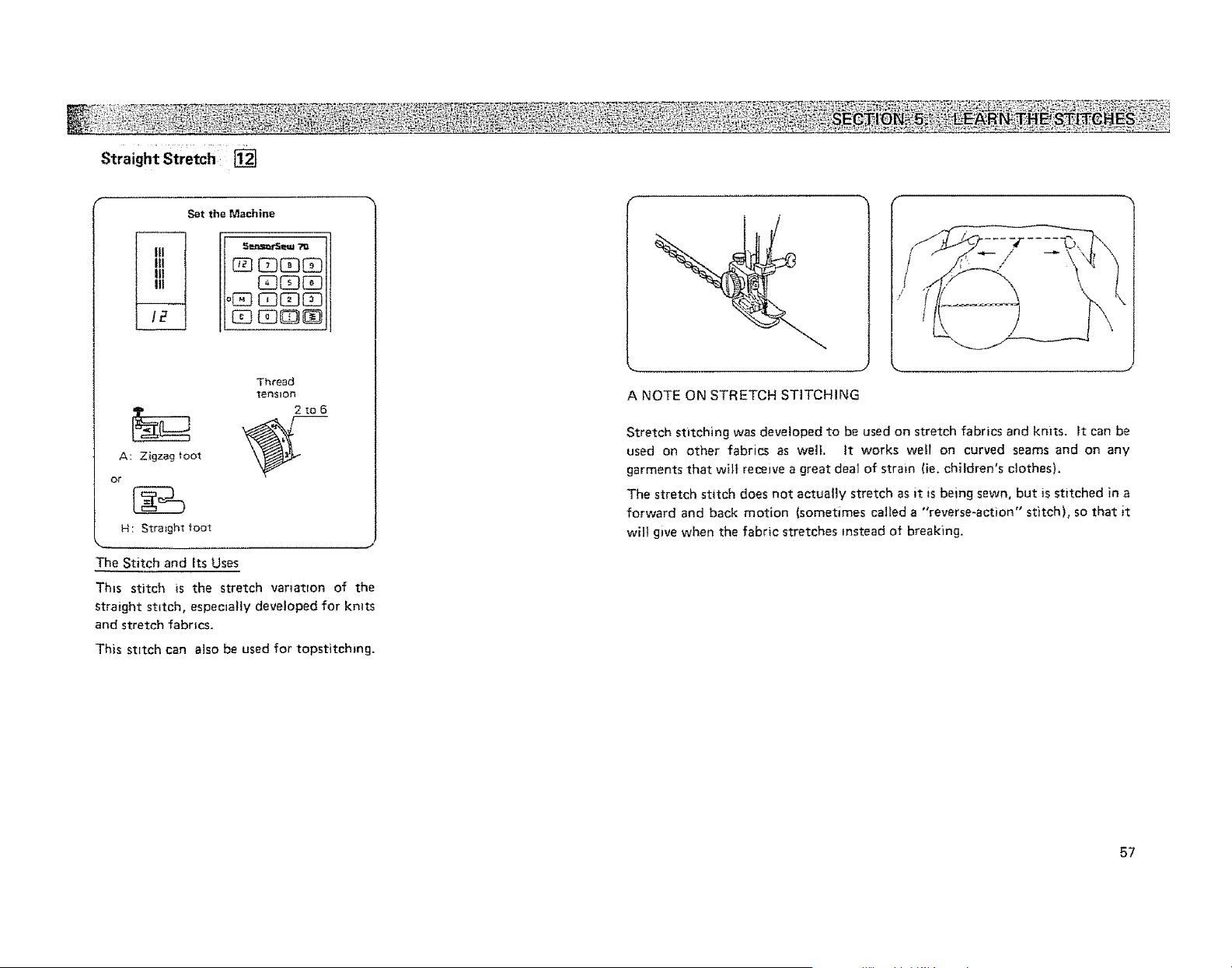
Straight s_etch
Set the Machine
/[c Go J
A: Zigzag toot
or
H: Straight toot
The Stitch and Its Uses
Thread
_[_i_slorl
2to6
This stitch is the stretch variation of the
straight stitch, especially developed for knits
and stretch fabrics.
This stitch can also be used for topstitching.
A NOTE ON STRETCH STITCHING
......... ./
Stretch stttching was developed to be used on stretch fabrics and knits, It can be
used on other fabrics as well, It works welt on curved seams and on any
garments that wi]! receive a great deal of strain (ie, children's clothes).
The stretch stitch does not actually stretch as it is being sawn, but is stitched in a
forward and back motion (sometimes called a "reverse-action" stitch), so that it
will give when the fabric stretches instead of breaking.
57
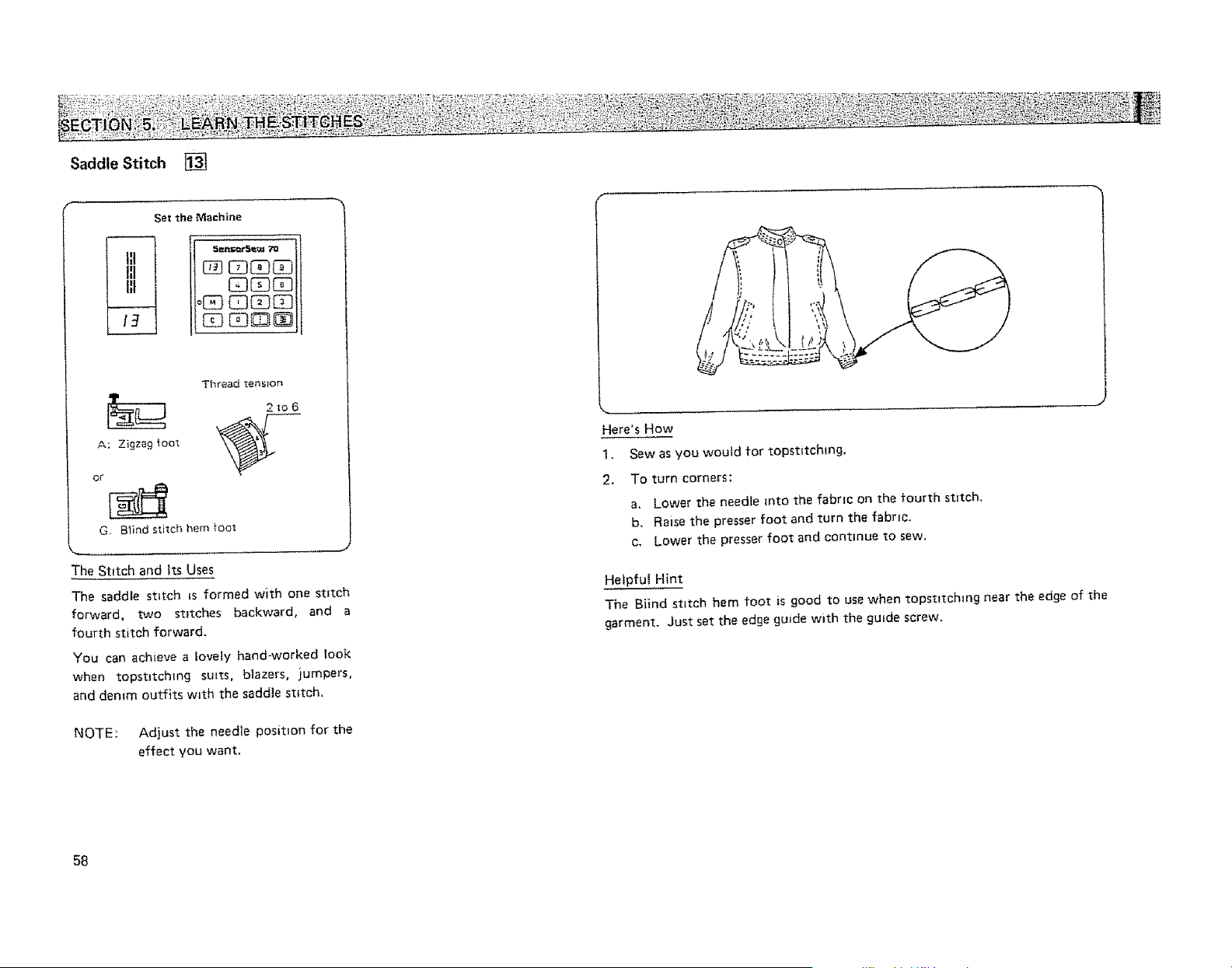
Saddle Stitch []
Set the Machine
G35DOO
A: Zigzag _oot
"Thread tension
;to6
G, Blind stitch hem foot
The Stitch and Its Uses
The saddle stitch is formed with one stitch
forward, two stitches backward, and a
fourth stitch forward.
You can achieve a lovely hand-worked look
when topstltching suits, blazers, jumpers,
and denim outfits with the saddle stitch,
NOTE: Adjust the needle posit_on for the
effect you want.
58
Here's How
1. Sew as you would for topstitchmg.
2. To turn corners:
a. Lower the needle into the fabric on the fourth stitch.
b. Raise the presser foot and turn the fabric.
c. Lower the presser foot and continue to sew.
Helpful Hint
The Biind stitch hem toot is good to use when topstttchmg near the edge of the
garment. Just set the edge guide with the guide screw.
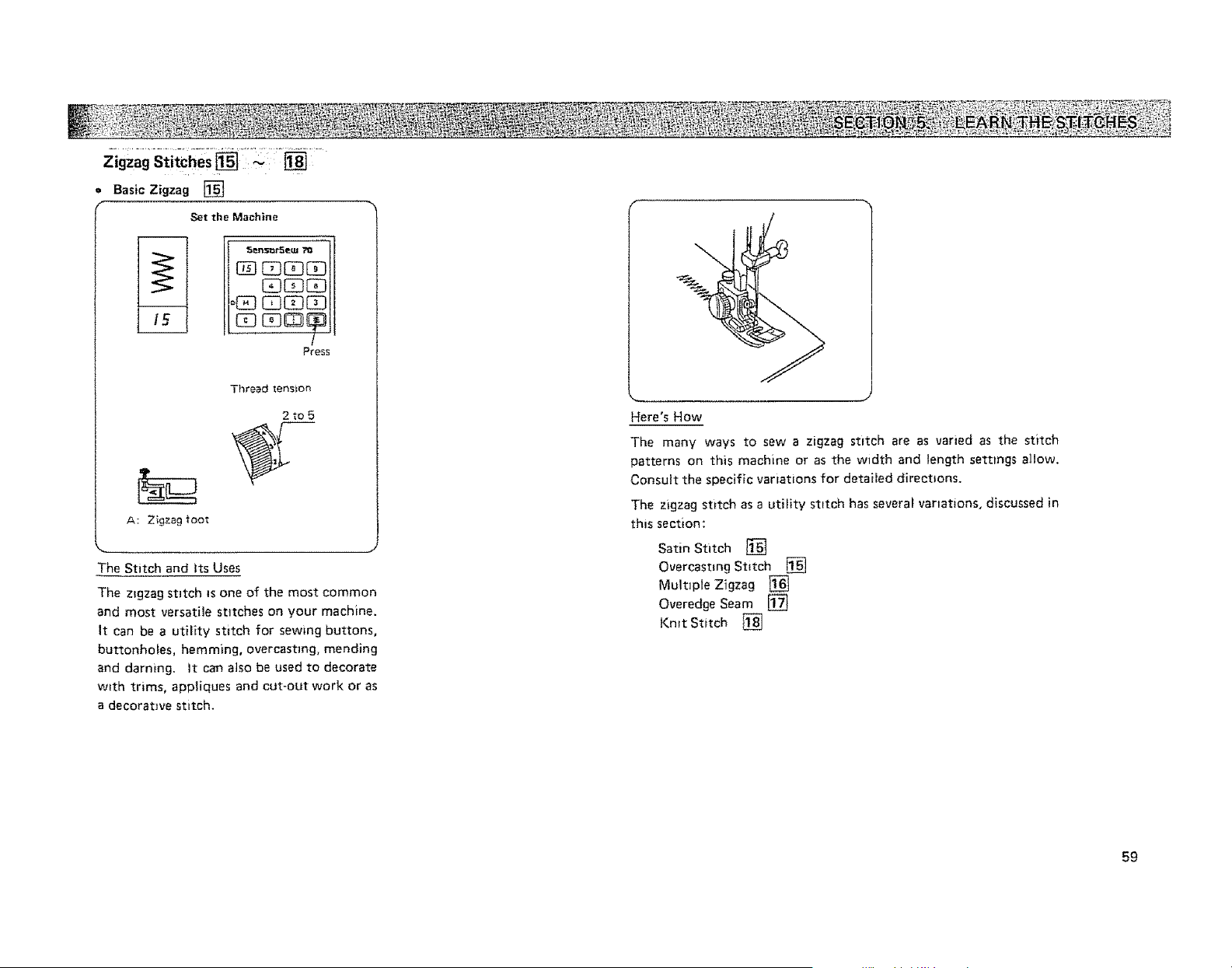
= Basic Zigzag []
Set the Machine
Press
A: Zigzag toot
Thread tensior_
2 to5
The Stitch and its Uses
The z_gzag stitch _sone of the most common
and most versatile stitches on your machine.
It can be a utility stitch for sewing buttons,
buttonholes, hemming, overcasting, mending
and darning, it can aJso be used to decorate
w_th trims, appliques and cut-out work or as
a decorative stitch.
Here's How
The many ways to sew a zigzag strtch are as varied as the stitch
patterns on this machine or as the width and length settings allow.
Consult the specific variations for detailed directions.
The zigzag stitch as a utility stitch has several variations, discussed in
this section:
Satin Stitch []
Overcasttng Stitch []
Multiple Zigzag []
Overedge Seam []
KmtStitch []
59
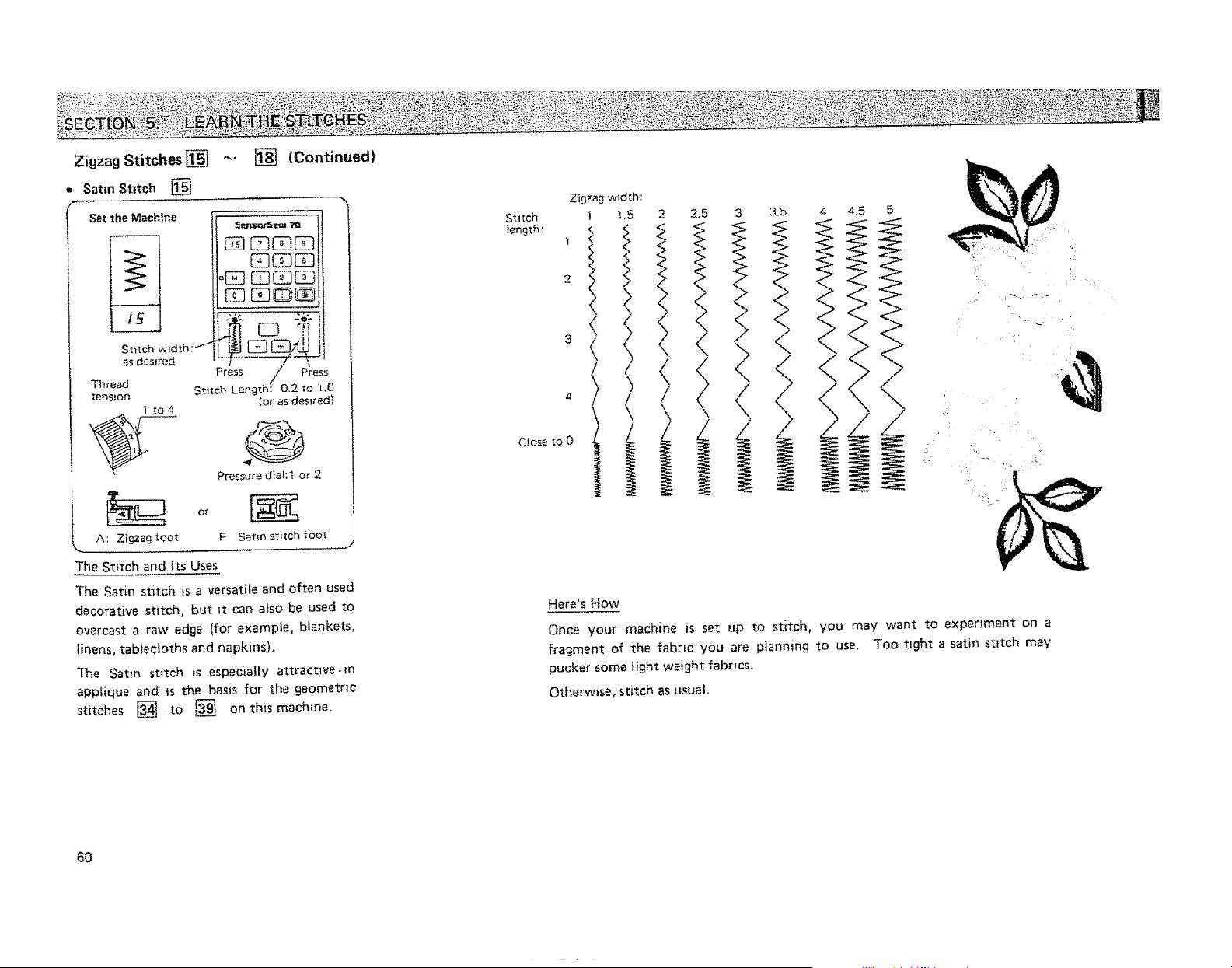
Zigzag Stitches [] _ _ (Continued)
SatinStitch []
Set the Machine
Stitchwidth:_
asdesired
Thread
_'enslon
I _o4
A: Zigzag toot
[_] CZ]CX]_
@]CDG]
_(Z] CZ]ii]CZ]
Press / Press
Stitch Length: 0.2 to 'L0
{or as desired)
Pressure dial:t or 2
or
F Satin stitch toot
The Stitch and Its Uses
The Satin stitch ss a versatile and often used
decorative stitch, but _t can also be used to
overcast a raw edge (for example, blankets,
linens, tab)ecioths and napkins).
The Satin stttch is especially attractlve.m
appiique and is the basis for the geometric
stitches _ .to _] on this machine.
Stitch
length:
Close to 0
Zigzag w_dth:
1 1,5 2 2.5
<
3 3,5
< <
<
<
4 4_5
>
>
>
>
\
Here's How
Once your machine is set up to stitch, you may want to experiment on a
fragment of the fabric you are planning to use. Too tight a satin stitch may
pucker some light weight fabrics.
Otherwise, stitch as usual.
6O
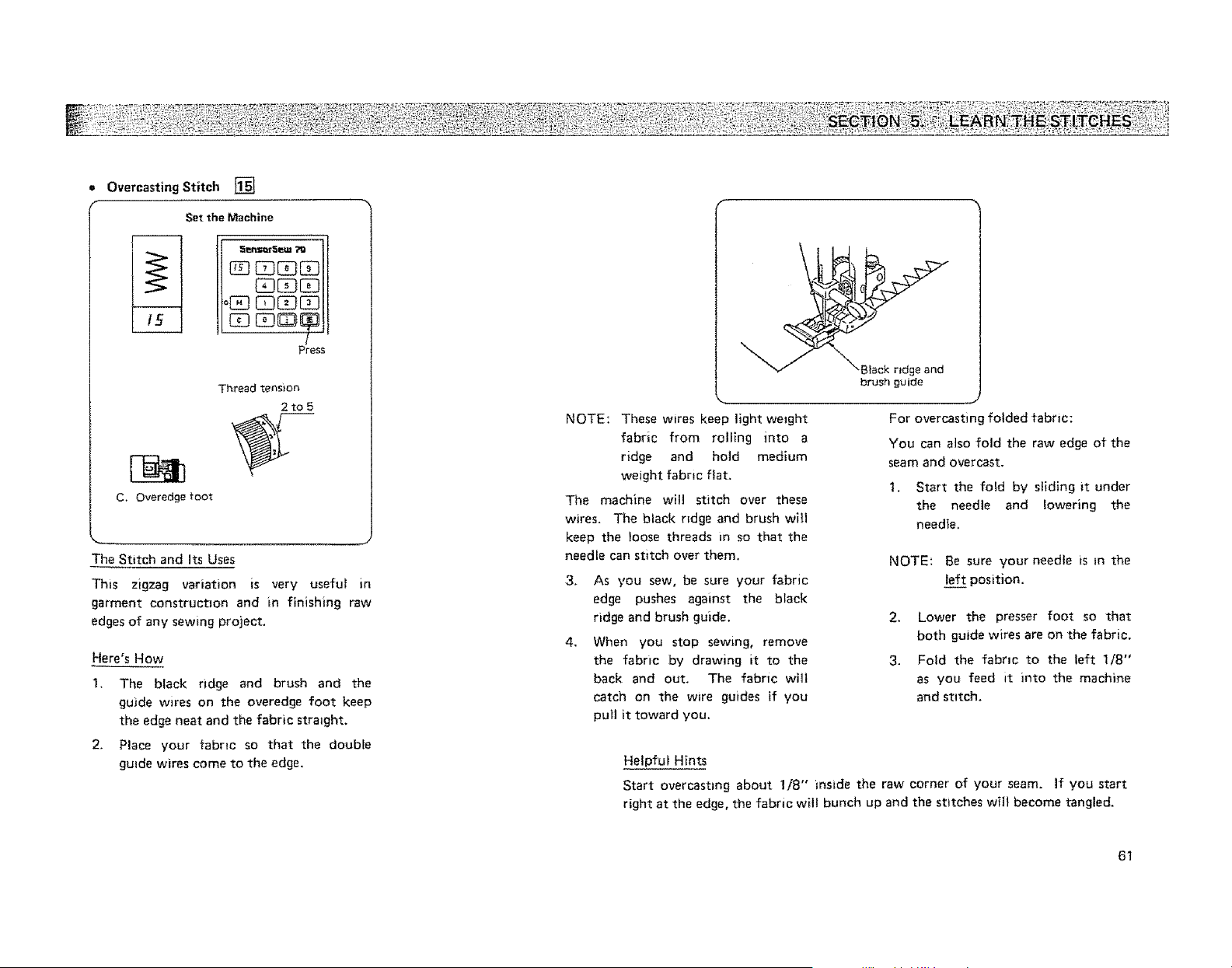
= Overcasting Stitch []
f
Set the Machine
3E3E3
C, Overedge foot
Thread tension
2to 5
The Stitch and Its Uses
This zigzag variation is very useful in
garment construction and in finishing raw
edges of any sewing project.
Here's How
1, The black ridge and brush and the
guide wires on the overedge foot keep
the edge neat and the fabric straight.
2. Place your fabric so that the double
guide wires come to the edge,
ridge and
brush guide
NOTE: These wires keep light weight
fabric from rolling into a
ridge and hold medium
weight fabric flat.
The machine wilt stitch over these
wires. The black ridge and brush will
keep the loose threads in so that the
needle can stitch over them.
For overcasting folded fabric:
You can a]so fold the raw edge of the
seam and overcast.
1. Start the fold by sliding it under
the needle and lowering the
needle,
NOTE: Be sure your needle is in the
3_
4.
As you sew, be sure your fabric
edge pushes against the black
ridge and brush guide,
When you stop sewing, remove
the fabric by drawing it to the
back and out, The fabric wilt
catch on the w_re guides if you
pull it toward you,
left position.
2. Lower the presser foot so that
both guide wires are on the fabric,
3. Fold the fabric to the left 1/8"
as you feed it into the machine
and stltch.
Hetpfui Hints
Start overcasting about 1/8" inside the raw corner of your seam. If you start
right at the edge, the fabric will bunch up and the stitches will become tangled.
61
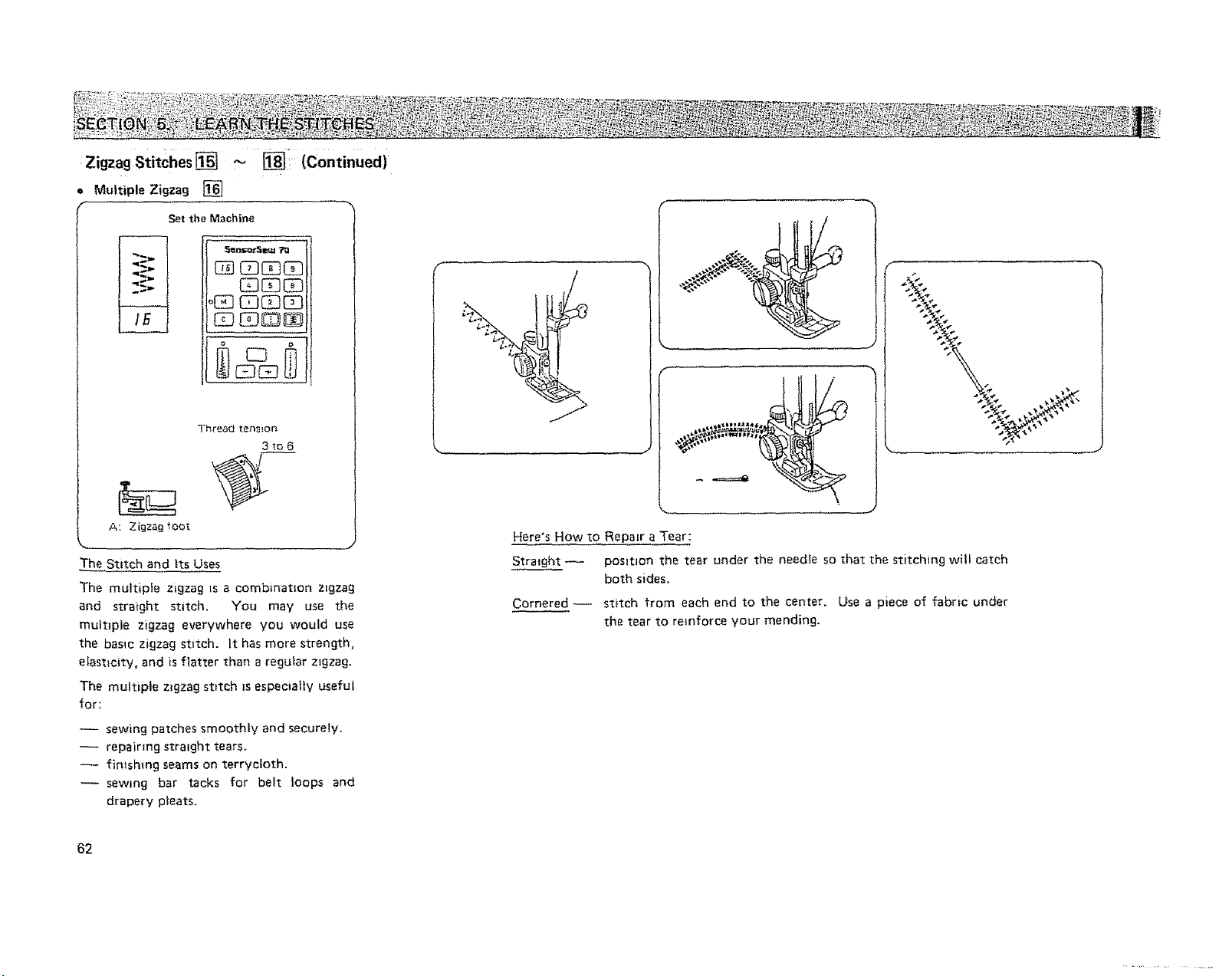
Zigzag Stitches [] (Continued)
* Multiple Zigzag []
Set the Machine
A: Zigzag toot
Thread tension
3_o6
The Stitch and Its Uses
The multiple zigzag ts a combination zigzag
and straight stitch. You may use the
muittp_e zigzag everywhere you would use
the baslc zigzag stitch. Lt has more strength,
e_asticity, and is flatter than a regular zigzag.
The multiple z_gzag stitch Js especially usefu_
for:
-- sewing patches smoothly and securely.
repa}rmg straight tears,
fimshmg seams on terrycloth.
sewing bar tacks for belt loops and
drapery pleats÷
Here's How to Repair a Tear:
Straight _ position the tear under the needle so that the stitching will catch
both sides.
Cornered -- stitch trom each end to the center. Use a piece of fabric under
the tear to reinforce your mending,
62
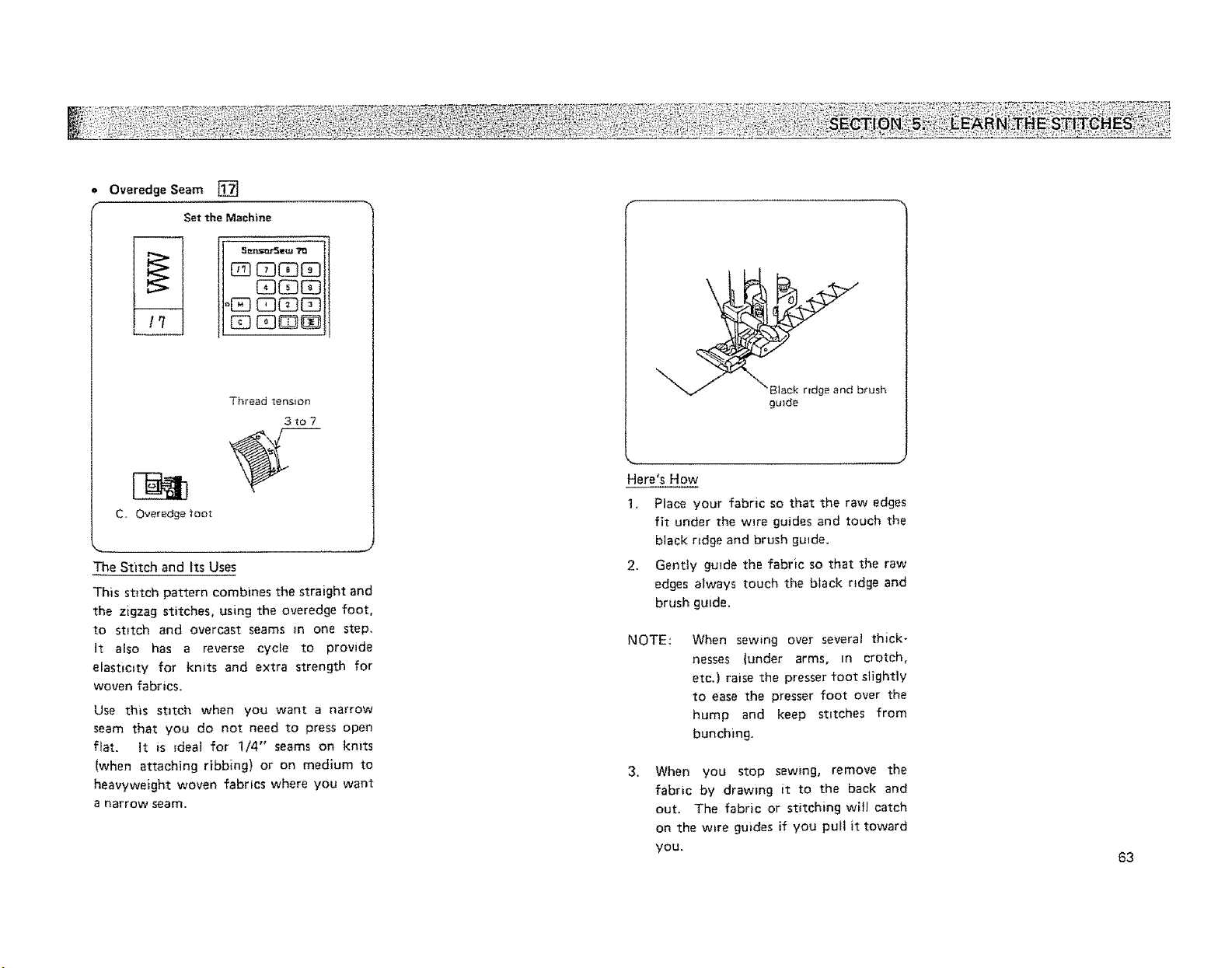
Overedge Seam []
Set the Machine
oD (13@3(!3
C, Overedge toot
Thread tension
3_o7
The Stitch and Its Uses
This stitch pattern combines the straight and
the zigzag stitches, using the overedge foot,
to stitch and overcast seams m one step.
It also has a reverse cycfe to provide
elasticity for knits and extra strength for
woven fabrics.
Use this stitch when you want a narrow
seam that you do not need to press open
flat. It is _deal for 1/4" seams on knits
(when attaching ribbing} or on medium to
heavyweight woven fabrics where you want
a narrow seam.
Black ridge and brush
guide
Here's How
1. Place your fabric so that the raw edges
fit under the w_re guides and touch the
black ridge and brush guide.
2. Gently grade the fabric so that the raw
edges always touch the black ridge and
brush guide.
NOTE: When sewing over several thick-
nesses (under arms, m crotch,
etc.) raise the presser foot slightly
to ease the presser foot over the
hump and keep stitches from
bunching.
3.
When you stop sewing, remove the
fabric by drawing it to the back and
out. The fabric or stitching will catch
on the Wad guides if you pull it toward
you.
63
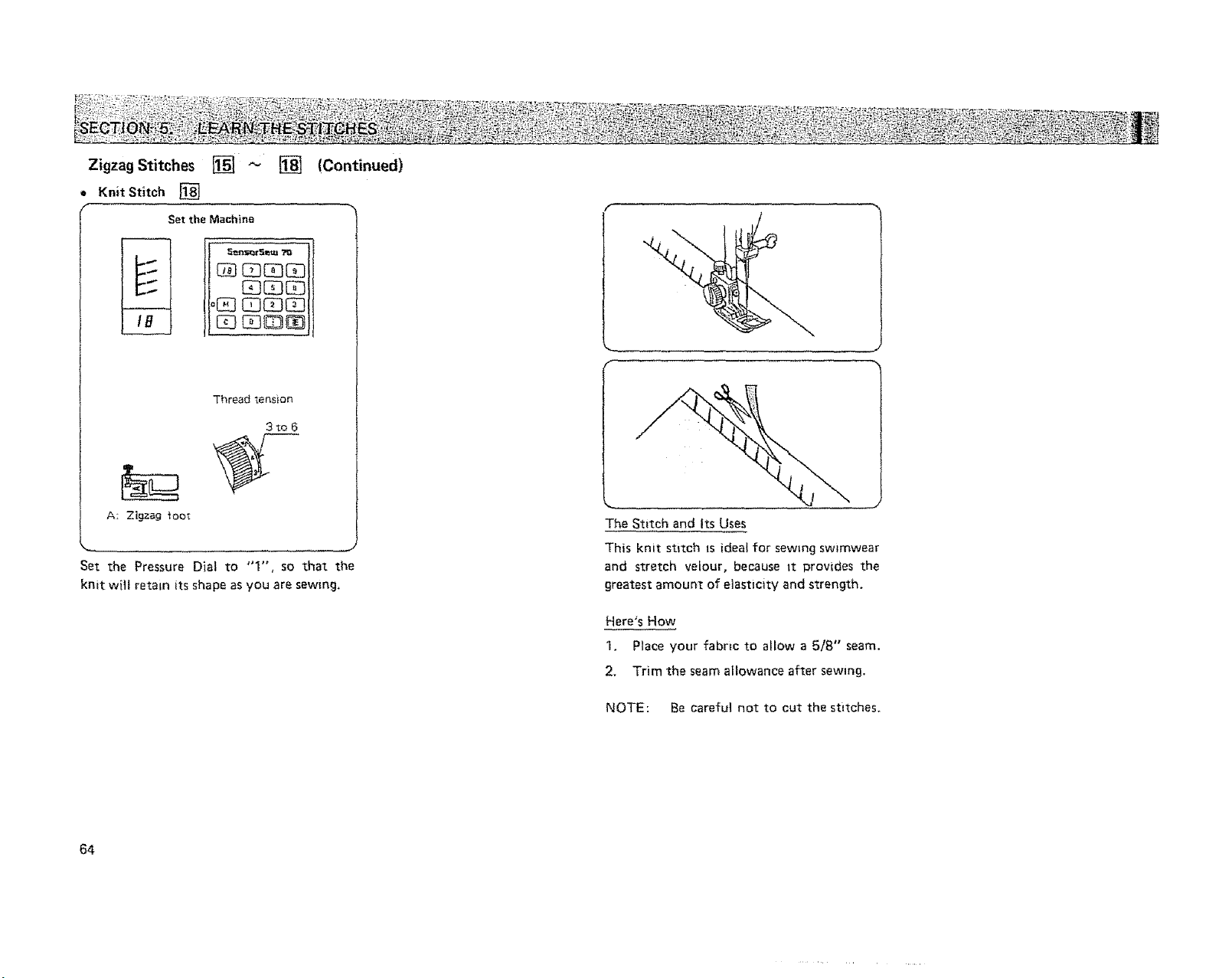
Zigzag Stitches [_-_ [] (Continued)
Q Knit Stitch []
Set the Machine
I! Q3 53tl
8OOOOO
Thread tension
3to 6
¢
Set the Pressure Dial to "1", so that the
knit wit! retaLn its shape as you are sewmg.
64
The Stitch and its Uses
This knit stitch is ideal for sewing swlmwear
and stretch velour, because tt provides the
greatest amount of elasticity and strength.
Here's How
I. Place your fabric to allow a 5/8" seam.
2. Trim the seam allowance after sewing.
NOTE: Be careful not to cut the stitches.
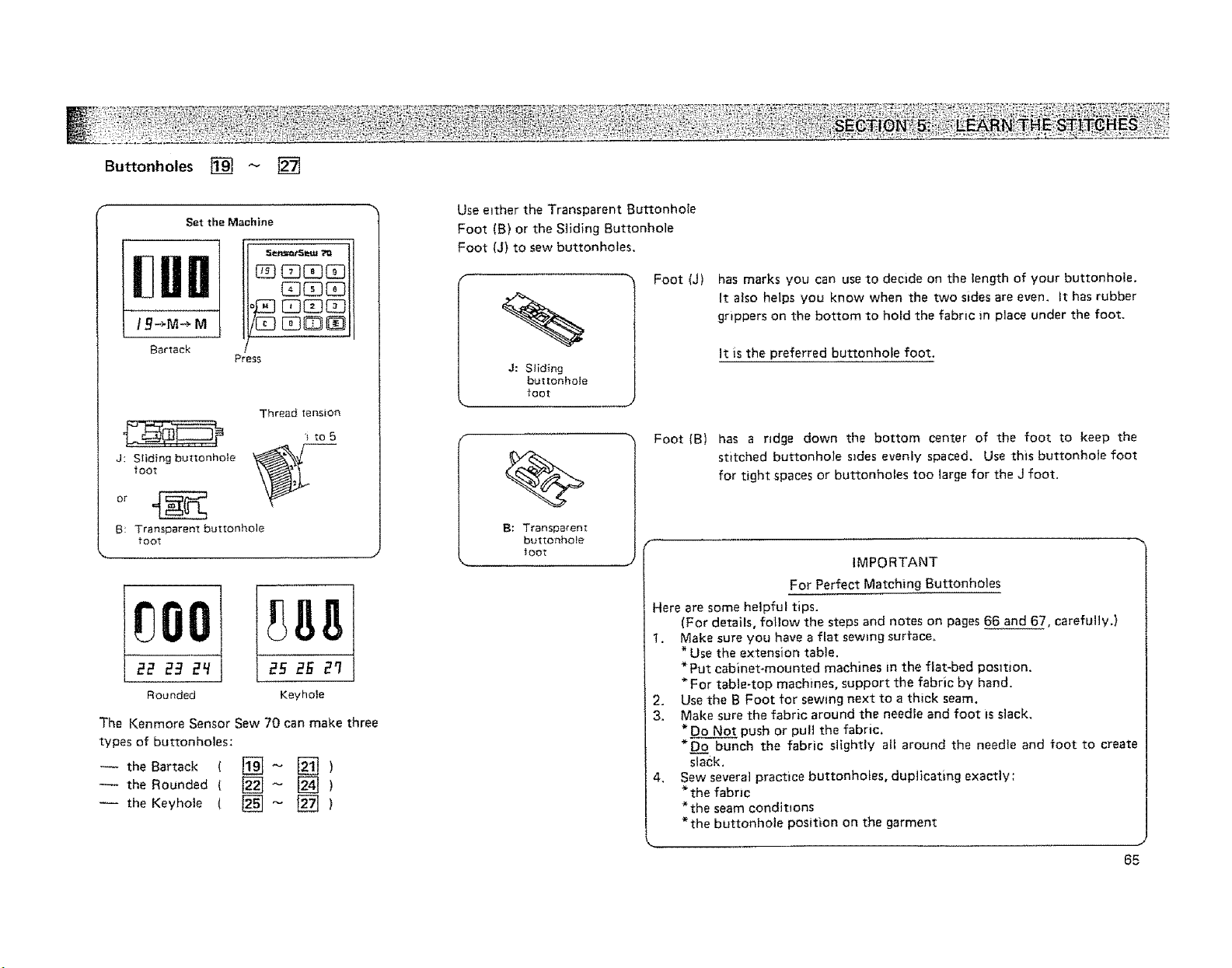
Buttonholes _ _ []
I .q_M-_ M
Bartaek
J: Sliding buttonhole
tOOt
Thread _ension
{ to 5
B: Transparent buttonhole
foot
22 23 2_
Rounded
25 2G 2g
Keyhole
The Kenmore Sensor Sew 70 can make three
types of buttonholes:
the Bartack ( [_ _ _ )
the Rounded ( _
)
-- the Keyhole ( [] _ [] )
Use either the Transparent Buttonhole
Foot (B) or the Sliding Buttonhole
Foot (J) to sew buttonholes.
Foot (J) has marks you can use to decide on the length of your buttonhole.
It also helps you know when the two sides are even. it has rubber
grippers on the bottom to hold the fabric in place under the foot.
It is the preferred buttonhole foot.
El: Transparent
buttonhole
tOOt
Foot (B) has a ridge down the bottom center of the foot to keep the
stitched buttonhole sides evenly spaced. Use this buttonhole foot
for tight spaces or buttonholes too large for the J foot,
IMPORTANT
For Perfect Matching Buttonholes
Here are some helpful tips.
(For details, follow the steps and notes on pages 66 and 67, carefully.)
1. Make sure you have a flat sewing surface.
* Use the extension table.
*Put cabinet-mounted machines in the fiat-bed position,
*For table-top machines, support the fabric by hand,
2. Use the B Foot for sewing next to a thick seam.
3, Make sure the fabric around the needle and foot is slack.
*Do Not push or pull the fabric.
*D__oobunch the fabric slightly all around the needle and foot to create
slack.
4. Sew several practice buttonholes, duplicating exactly:
* the fabric
* the seam condit{ons
*the buttonhole position on the garment
65
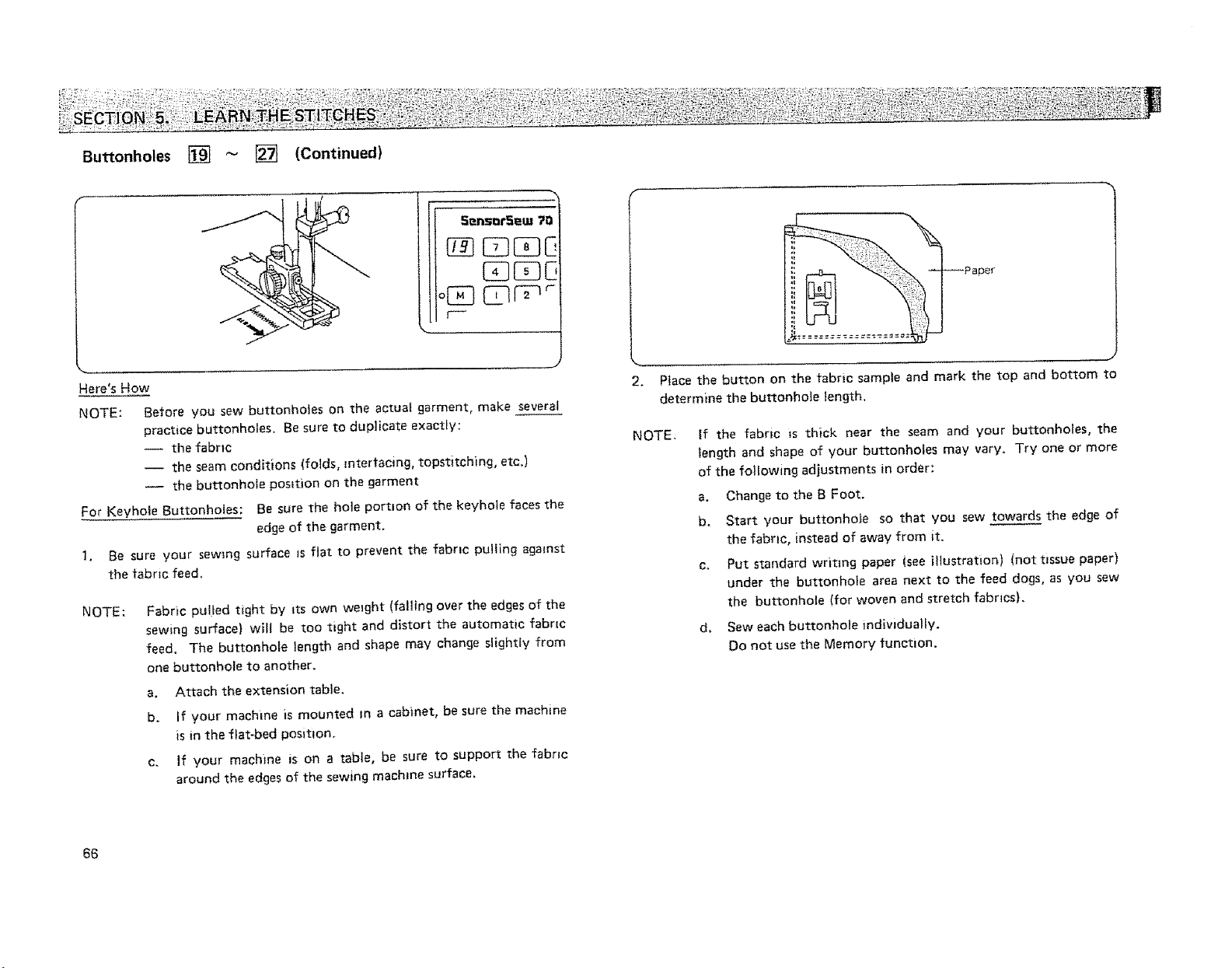
Buttonholes [] _ [] (Continued)
5_DrS_m ?0
Here's How
NOTE: Before you sew buttonholes on the actual garment, make several
practice buttonholes. Be sure to duplicate exactly:
-- the fabric
-- the seam conditions (fo_ds, interfacing, topstitching, etc.)
the buttonhole position on the garment
For Keyhole Buttonholes: Be sure the ho_e port,on of the keyhole faces the
edge of the garment.
1. Be sure your sewing surface _s flat to prevent the fabric pulling against
the fabric feed.
NOTE: Fabric pulled tight by its own weight (falling over the edges of the
sewing surface) will be too tight and distort the automatic fabric
feed. The buttonhole length and shape may change slightly from
one buttonhole to another.
a. Attach the extension table.
b. If your machine is mounted m a cabinet, be sure the machine
is in the flat-bed position.
c. If your machine is on a table, be sure to support the fabric
around the edges of the sewing machine surface.
66
2. Place the button on the fabric sample and mark the top and bottom to
determine the buttonhole length.
NOTE:
If the fabric is thick near the seam and your buttonholes, the
tength and shape of your buttonho{es may vary. Try one or more
of the foiJowing adjustments in order:
a. Change to the B Foot.
b. Start your buttonhole so that you sew towards the edge of
the fabric, instead of away from it.
c. Put standard writing paper (see illustration) (nottissue paper)
under the buttonhole area next to the feed dogs, as you sew
the buttonhole (for woven and stretch fabrics).
d. Sew each buttonhole individually.
Do not use the Memory function.
5r, ns_rSe,,, ?D
"_ Press
3.
4+
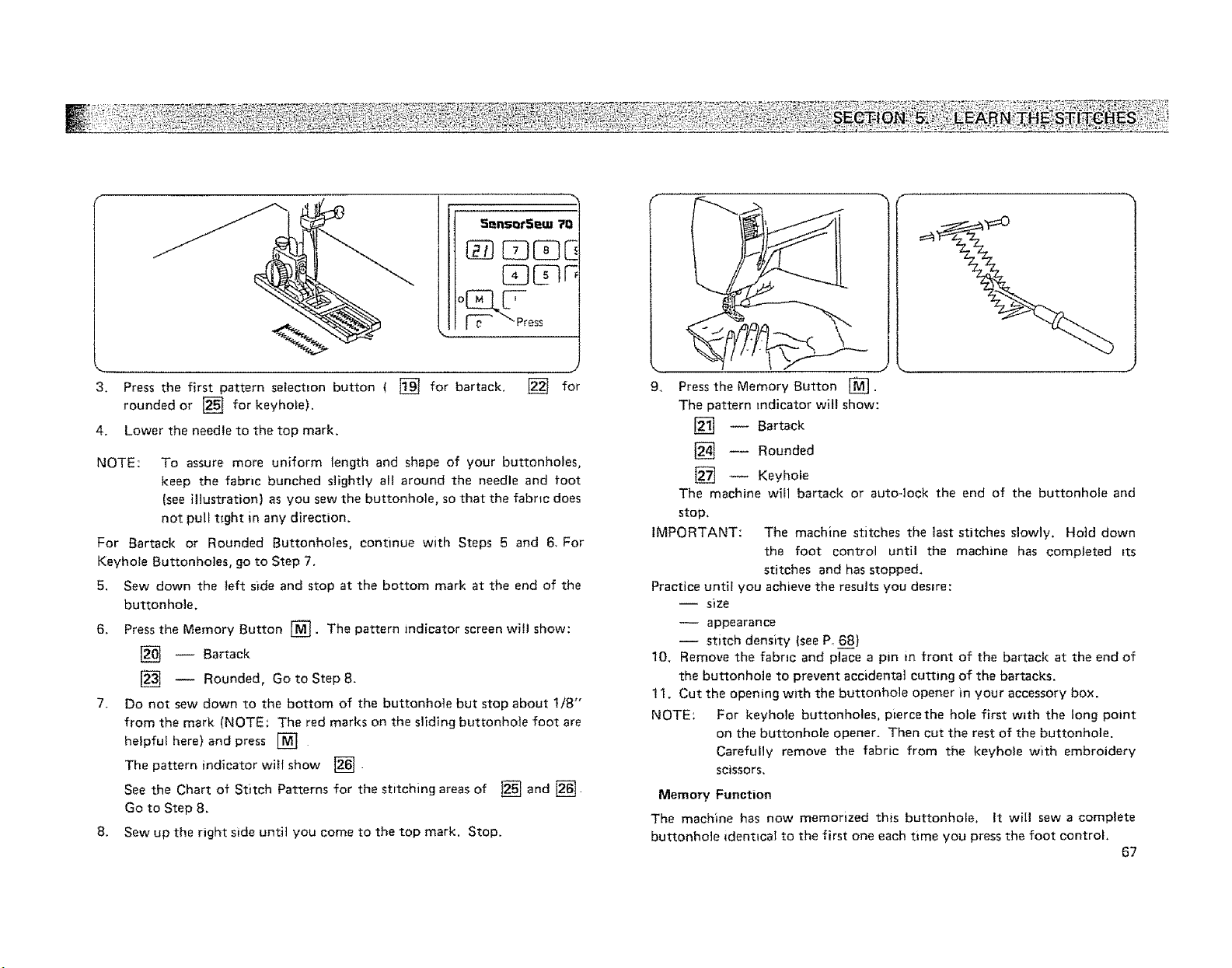
Press the first pattern selectEon button ( [] for bartack.
rounded or [] for keyhole).
Lower the needle to the top mark.
J
[] for
NOTE: To assure more uniform length and shape of your buttonholes,
keep the fabric bunched slightly all around the needle and toot
(see illustration) as you sew the buttonhole, so that the fabric does
not pult tight in any direction.
For Bartack or Rounded Buttonholes, continue with Steps 5 and 6, For
Keyhole Buttonholes, go to Step 7.
5. Sew down the left side and stop at the bottom mark at the end of the
buttonhole.
6. Press the Memory Button []. The pattern indicator screen will show:
[] -- Barrack
[] -- Rounded, Go to Step8.
7+ Do not sew down to the bottom of the buttonhole but stop about 1/8'"
from the mark (NOTE: The red marks on the sliding buttonhole foot are
helpful here) and press []
The pattern indicator will show []
See the Chart of Stitch Patterns for the stitching areas of [] and []
Go to Step 8.
8. Sew up the right side until you come to the top mark. Stop.
94
Press the Memory Button [].
The pattern indicator witl show:
[] -- Bartack
[] -- Rounded
[] -- Keyhoie
The machine will barrack or auto+lock the end of the buttonhole and
stop,
IMPORTANT: The machine stitches the last stitches slowly. Hold down
the foot control until the machine has completed _ts
stitches and has stopped.
Practice until you achieve the results you desire:
-- size
-- appearance
-- stitch density (see P, 68}
10. Remove the fabric and place a pin in front of the barrack at the end of
the buttonhole to prevent accidental cutting of the barracks.
11+ Cut the opening with the buttonhole opener in your accessory box.
NOTE: For keyhole buttonholes, piercethe hole first w+th the long point
on the buttonhole opener. Then cut the rest of the buttonhole.
Carefully remove the fabric from the keyhole with embroidery
scissors.
Memory Function
The machine has now memoMzed this buttonhole+ tt will sew a complete
buttonhole ident{cal to the first one each time you press the foot control.
67
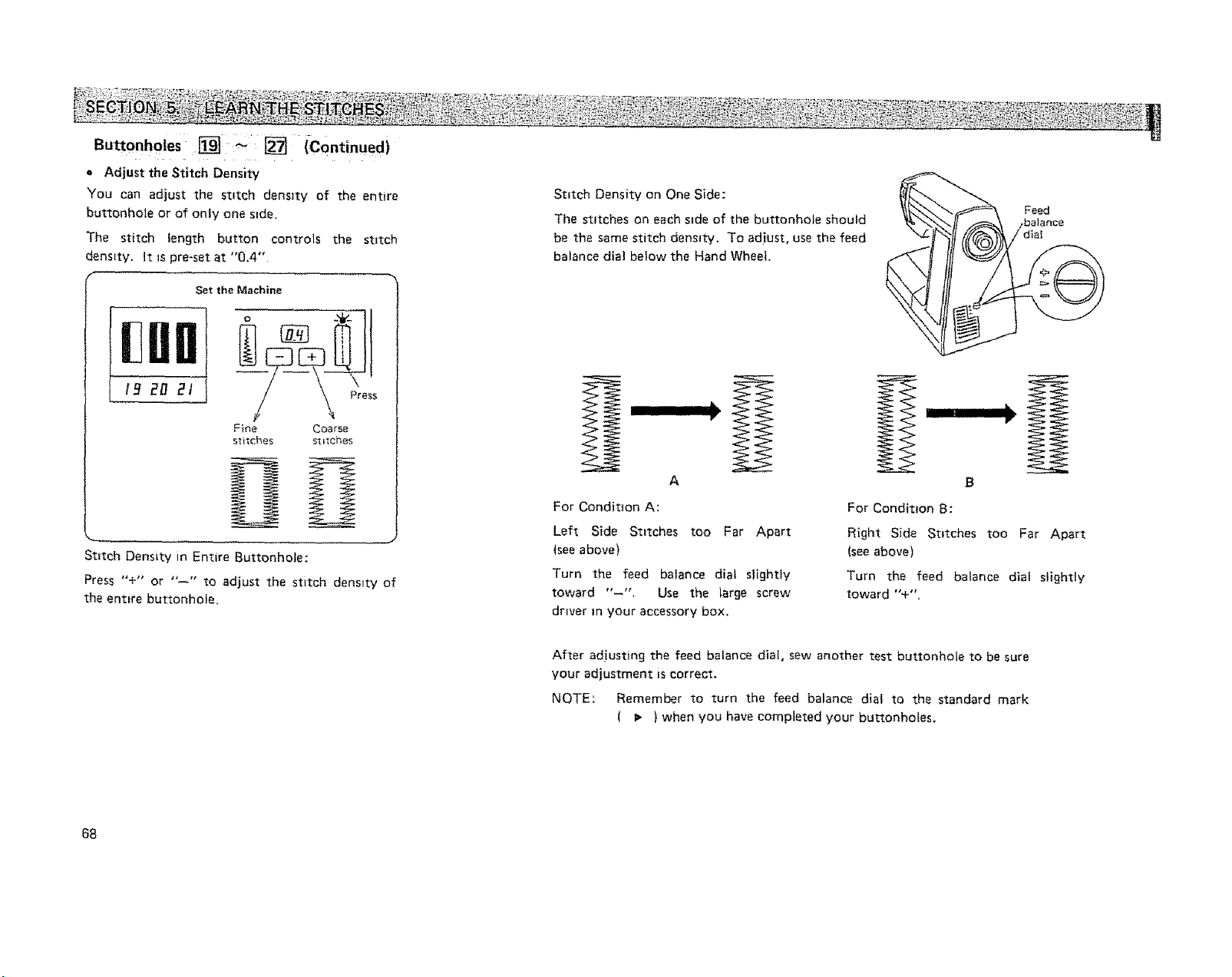
Bu o,.o, I Co. ..odi
= Adjust the Stitch Density
You can adjust the stitch density of the entire
buttonhole or of only one side.
The stitch length button controls the stitch
density, it is pre-set at "0.4"
Set the Machine
_ Pre_s
Fine Coarse
stitches st wtches
Ststch DensLty in Entire Buttonhole:
Press "+" or "--'" to adjust the stitch density of
the entire buttonhofe.
68
St=tch Density on One Side:
The stitches on each s=de of the buttonhole should
be the same stitch density. To adjust, use the feed
balance dial below the Hand Wheel.
A B
For Condition A: For Condition 8:
Left Side Stitches too Far Apart Right Side Stitches too Far Apart
_see above) (see above)
Turn the feed balance diaf slightly Turn the feed balance dial slightly
toward "-". Use the large screw toward "+",
dr=vet m your accessory box.
After adjusting the feed balance dial, sew another test buttonhole to be sure
your adjustment is correct.
NOTE: Remember to turn the feed balance dial to the standard mark
( _ ) when you have completed your buttonholes,
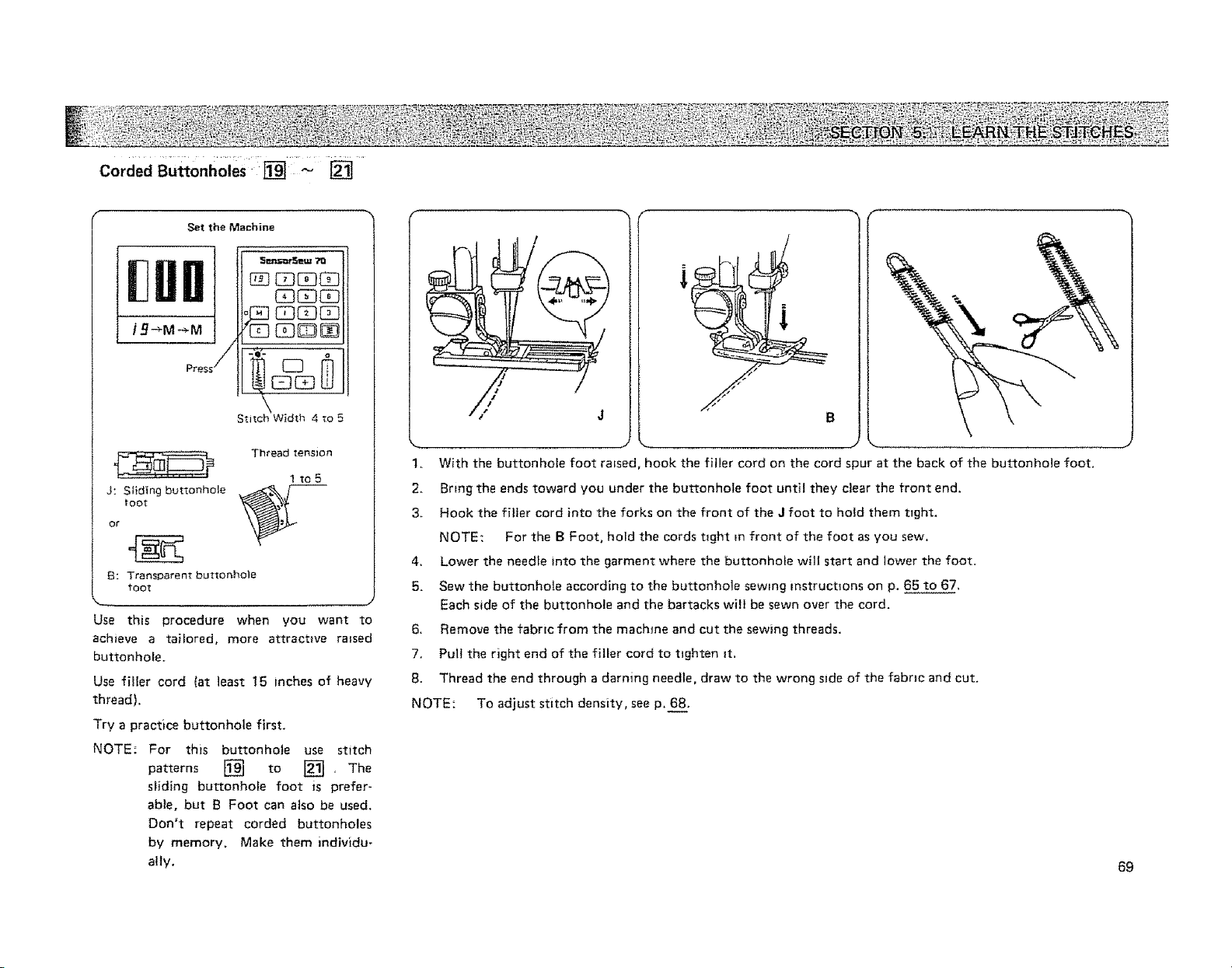
Corded Bu_onhoies :i[] _ _
Set the Machine
Stitch Width 4 to 5
J: Sliding buttonhole
toot
or
Thread tension
1 to5
B: Transparent buttonhole
tooI
Use this procedure when you want to
achieve a taiJored, more attracttve ratsed
buttonhole.
Use fitler cord (at least 15 inches of heavy
thread).
Try a practice buttonhole first.
NOTE: For this buttonhole use stitch
patterns [] to [] The
sliding buttonhole foot _s prefer-
able, but B Foot can also be used.
Don't repeat corded buttonholes
by memory. Make them individu-
ally,
6.
7.
8.
NOTE:
/
1. With the buttonhole foot raised, hook the filler cord on the cord spur at the back of the buttonhole foot.
2. Bring the ends toward you under the buttonhole foot until they clear the front end.
3. Hook the filler cord into the forks on the front of the J foot to hold them ttght.
NOTE: For the B Foot, hold the cords t_ght m front of the foot as you sew.
4. Lower the needle into the garment where the buttonhole will start and lower the foot.
5. Sew the buttonhole according to the buttonhole sewing instructions on p. 65 to 67.
Each side of the buttonhole and the barracks wilt be sewn over the cord.
Remove the fabric from the machine and cut the sewing threads.
Pull the right end of the filler cord to tighten it.
Thread the end through a darning needle, draw to the wrong side of the fabric and cut.
To adjust stitch density, see p. 68.
69
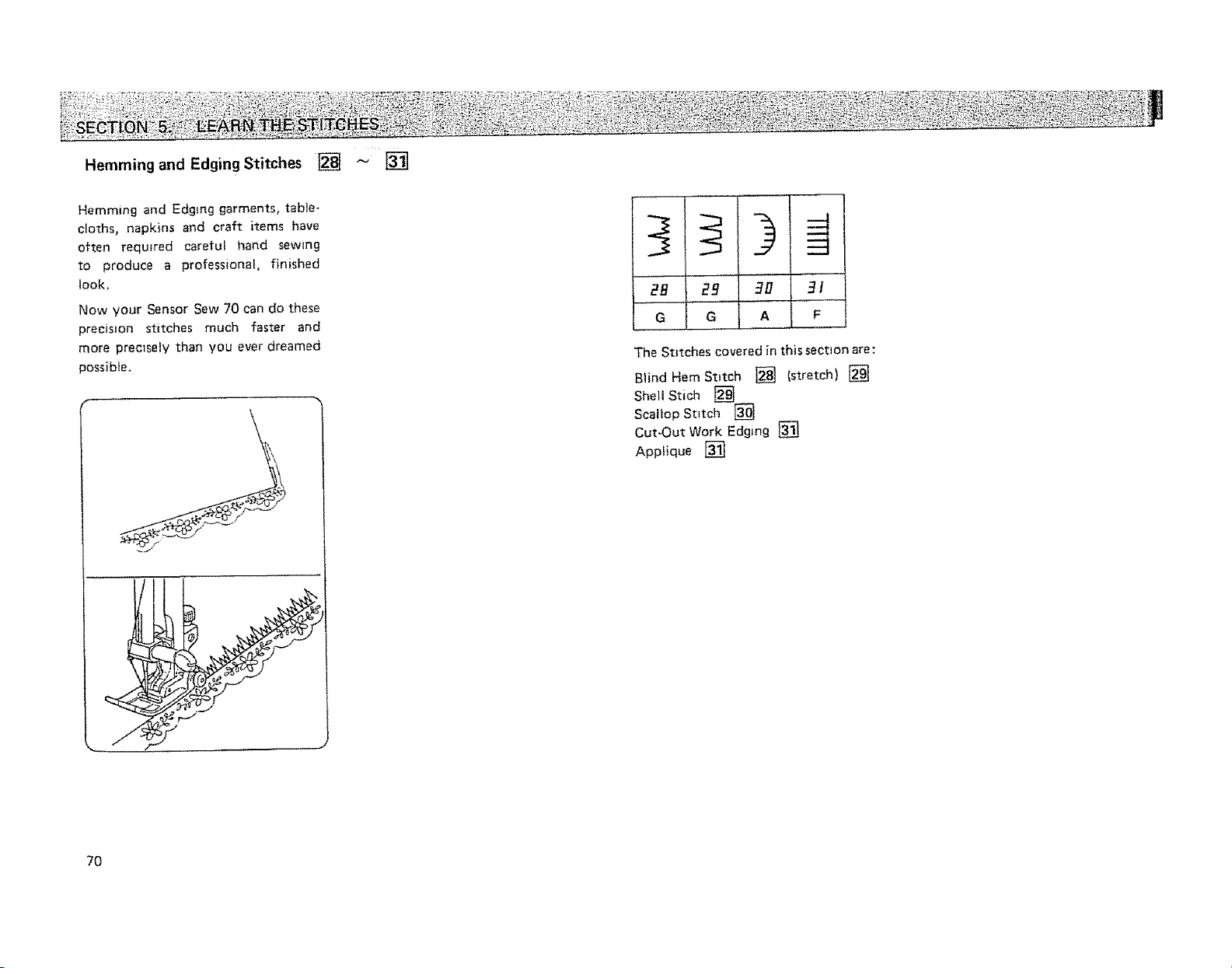
Hemming and Edging Stitches [] _ []
Hemming and Edging garments, table-
cloths, napkins and craft items have
often required careful hand sewing
tO produce a professional, finished
look,
Now your Sensor Sew 70 can do these
precision stitches much faster and
more premsely than you ever dreamed
possible.
2G 29' 3// 3 I
G G A F
The Stitches covered in this section are:
Blind Hem Stitch [] (stretch) []
She|t Stich []
Scallop Stitch
Cut-Out Work Edging []
Applique []
7O
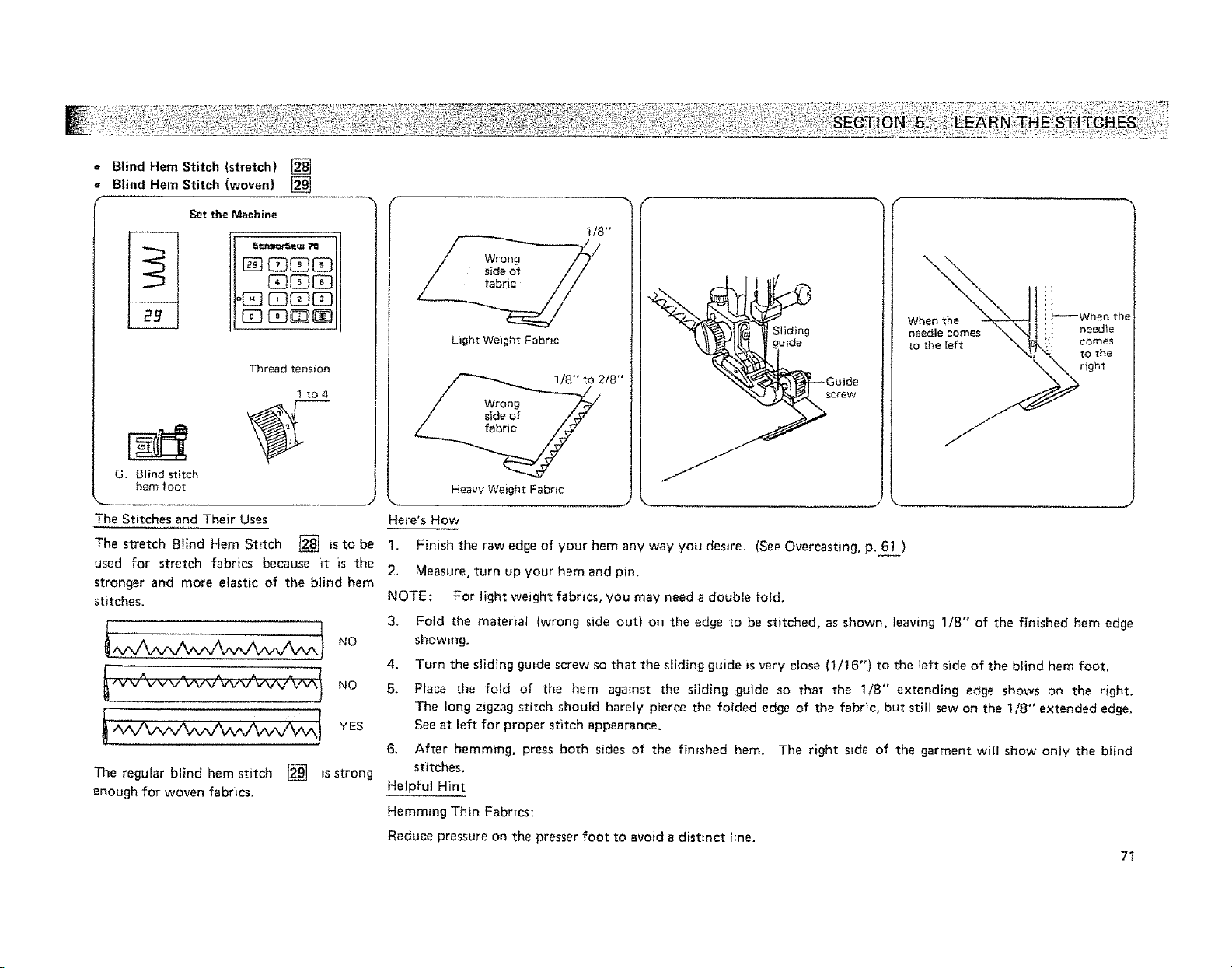
- Blind Hem Stitch (stretch) []
Blind Hem Stitch {woven) []
Set the Machine
oD C D/I
G. Blind stitch
hem foot
Thread tension
lto4
The Stitches and Their Uses
The stretch Blind Hem Stitch [] is to be
used for stretch fabrics because it is the
stronger and more elastic of the blind hem
stitches,
I I No
lVv_/vv_vv_P_ NO
I
The regular blind hem stitch [] mstrong
enough for woven fabrics.
l/8"
Light Weight Fab¢_c
2/8"
Heavy Weight Fabric
Here's How
Sliding
Whenthe i_:--_-When the
needle comes :: needte
to the left :_ comes
to the
"_ r_ght
J
1. Finish the raw edge of your hem any way you desire. (See Overcasting, p. 61)
2. Measure, turn up your hem and pin.
NOTE: For light weight fabrics, you may need a double told.
3. Fold the material (wrong side out) on the edge to be stitched, as shown, leaving 1/8"' of the finished hem edge
showing.
4. Turn the sliding guide screw so that the siiding guide zs very close (1/16") to the left side of the blind hem foot.
5. Place the fold of the hem agmnst the sliding guide so that the 1/8" extending edge shows on the right.
The long zigzag stitch should barely pierce the folded edge of the fabrrc, but still sew on the 1/8" extended edge.
See at left for proper stitch appearance.
6, After hemming, press both sides of the fimshed hem. The right s_de of the garment will show only the bfind
stitches.
Helpful Hint
Hemming Thin Fabrics:
Reduce pressure on the presser foot to avoid a distinct line.
71
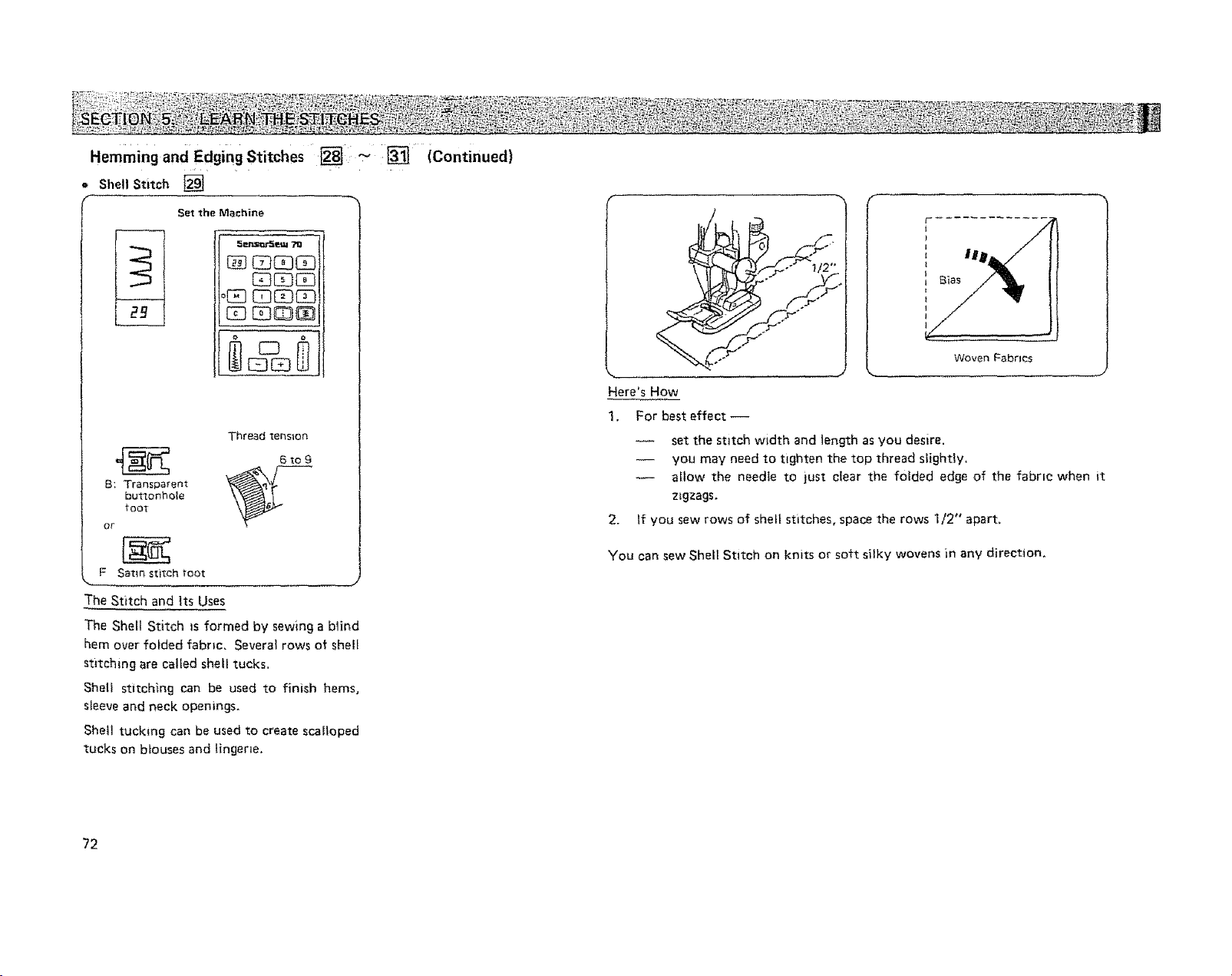
Hemmingand Edging Stitches _ [] (Continued)
Shell Stitch _
Set the Machine
5P.mao_em 7t3
° D o
Thread tension
6to9
B: Transparent __
buttonhole
tool
F Sat_n stitch toot
The Stitch and its Uses
The Shell Stitch _s formed by sewing a blind
hem over folded fabric, Several rows of shelf
stitching are called shell tucks.
Sheli stttching can be used to finish hems,
sleeve and neck openings.
Shell tucking can be used to create scalloped
tucks on blouses and lingerie.
72
Here*s How
1. For best effect--
Woven Fabrics
-- set the stitch width and length as you desire.
-- you may need to tighten the top thread slightly,
allow the needle to just clear the folded edge of the fabric when it
z_gzags.
If you sew rows of shett stitches, space the rows 1/2" apart.
You can sew Shell Stitch on knits or soft silky wovens in any direction.
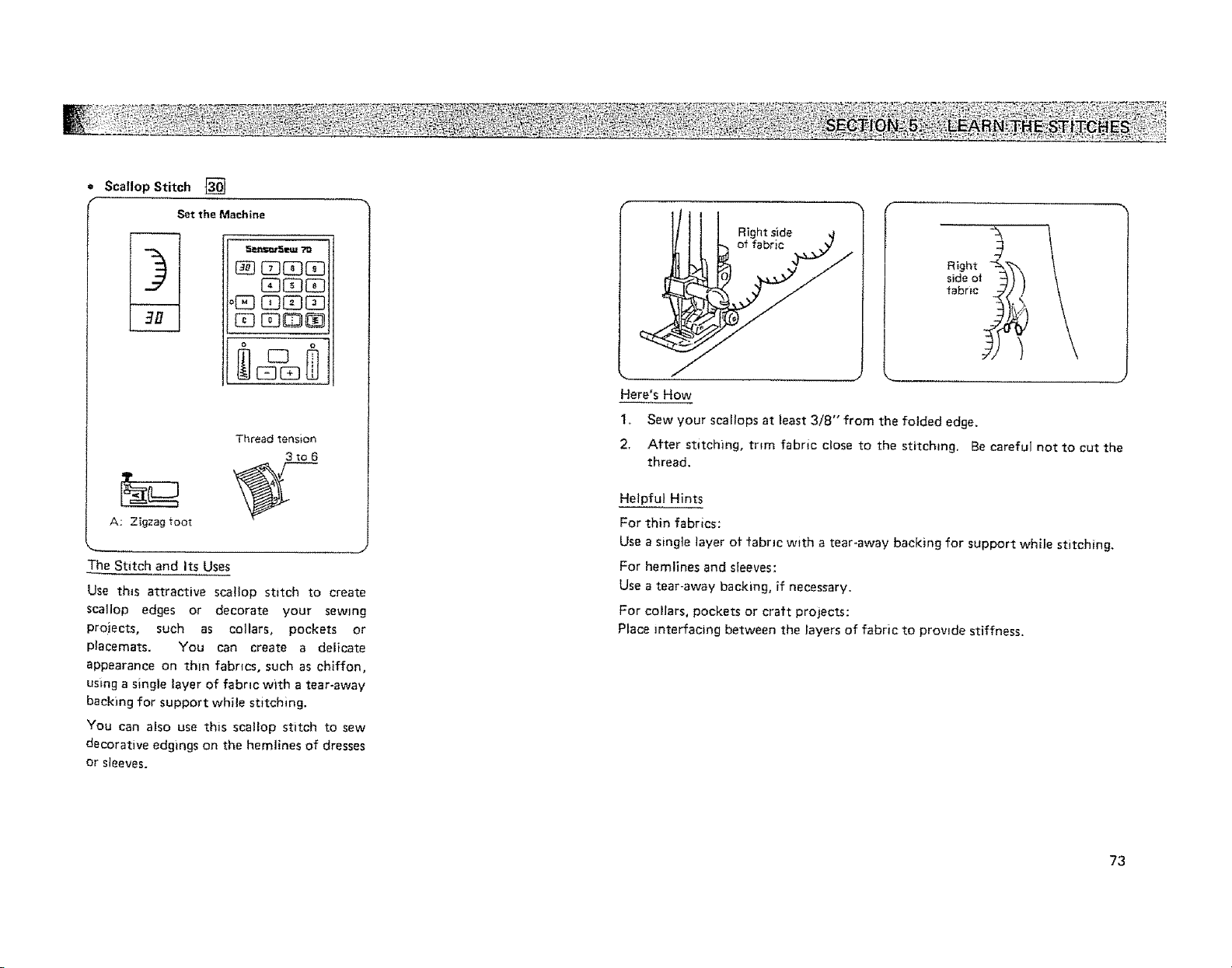
Scallop Stitch []
Set the Machine
Thread "[ension
3to6
A: Zigzag foot
.... J
The Stitch and its Uses
Use th_s attractive scallop stitch to create
scallop edges or decorate your sewing
projects, such as collars, pockets or
piacemats. You can create a delicate
appearance on thin fabrics, such as chiffon,
using a single layer of fabNc with a tear-away
backing for support while stitching.
You can also use this scallop stitch to sew
decorative edgings on the hemlines of dresses
or sleeves.
Here's How
t.
2,
Right _
fabric jJ! /
Sew your scallops at teast 3/8" from the folded edge.
After stttching, trim fabric close to the stitching. Be careful not to cut the
thread.
Helpful Hints
For thin fabrics:
Use a single layer of fabric with a tear-away backing for support while stitching,
For hemlines and sleeves:
Use a tear-away backing, if necessary.
For collars, pockets or craft projects:
Place interfacing between the layers of fabric to provide stiffness.
73
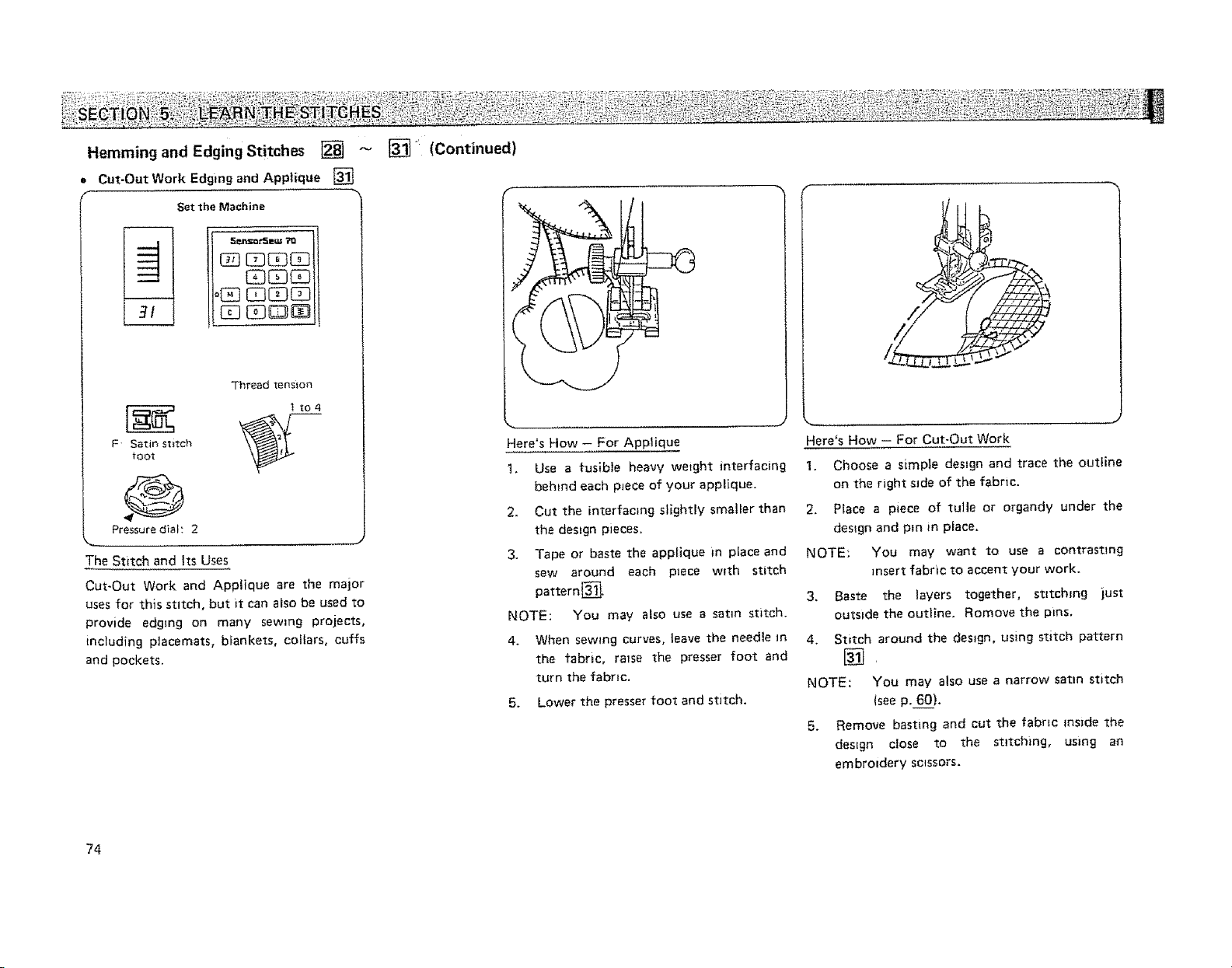
Hemming and Edging Stitches []
Cut-Out Work Edging and Applique []
Set the Machine
Thread _enslon
F' Satin stt'_ch
foot
Pressure dlal: 2
The Stitch and Its Uses
Cut-Out Work and Applique are the major
uses for this stitch, but it can also be used to
provide edging on many sewing projects,
including p]acemats, blankets, collars, cuffs
and pockets.
[]"(Continued)
Here's How -- For Applique
1, Use a fusible heavy weight interfacing
behind each p_ece of your applique.
2. Cut the interfacing slightly smatler than
the des=gn pieces,
3. Tape or baste the applique in place and
sew around each piece with stitch
pattern[_
NOTE: You may also use a satin stitch.
4. When sewing curves, leave the needle Jn
the fabric, rarse the presser foot and
turn the fabric.
5. Lower the presser foot and stitch.
Herds How - For Cut-Out Work
1. Choose a simple design and trace the outline
on the right s_de of the fabric.
2. Place a piece of tulle or organdy under the
design and pin in piace.
NOTE: You may want to use a contrasting
insert fabric to accent your work.
3. Baste the layers together, stitching iust
outside the outline. Romove the pros.
4. Stitch around the design, using stitch pattern
[]
NOTE: You may also use a narrow satin stitch
Isee p. 60___).
5. Remove basting and cut the fabric ms,de the
design close to the stitching, using an
embroidery sc{ssors.
74
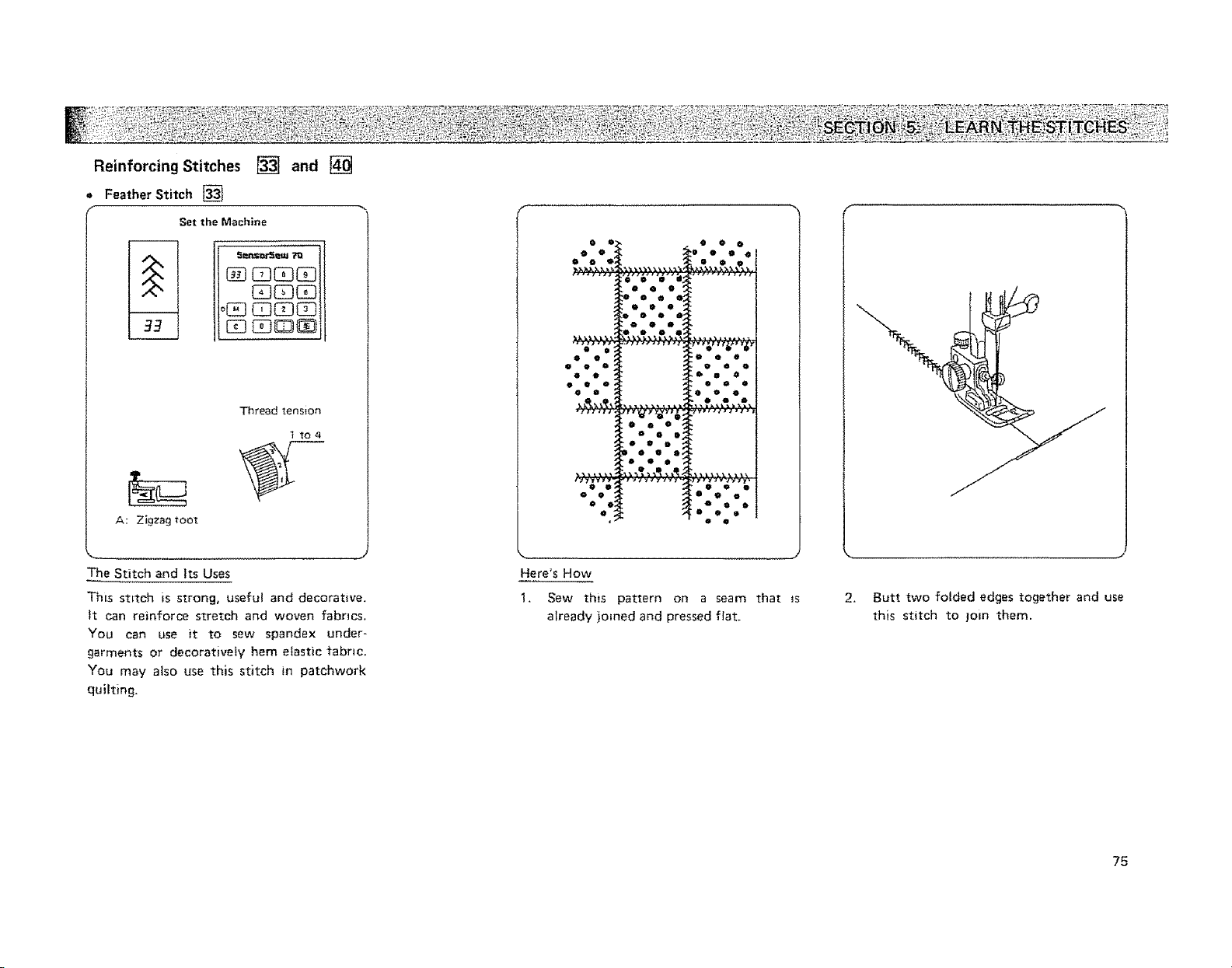
Reinforcing Stitches [] and []
Feather Stitch []
Set the Machine
@ DQ3G}
A: Zigzag toot
Thread tension
1 tOZi
_ J
The Stitch and Its Uses
Thrs stitch is strong, useful and decorative.
tt can reinforce stretch and woven fabrics.
You can use it to sew spandex under-
garments or decoratively hem efastic fabnco
You may also use this stitch in patchwork
quilting.
O000oi
• •
• 0
o • 6
• •
• • e
0 el
• u
O • :
e O_
0
• • 0 6
' _ • • •
:0 U o d
; • 0 0
_0 0 0
_0 • • O;
- 0 • • _
"O o O O:
6 • 0
"&'.O,OO;
0 • •
0 • •
• •
Here's How
1. Sew this pattern on a seam that _s
already )o=ned and pressed fiat.
2. Butt two folded edges together and use
this stitch to ]o=n them.
75
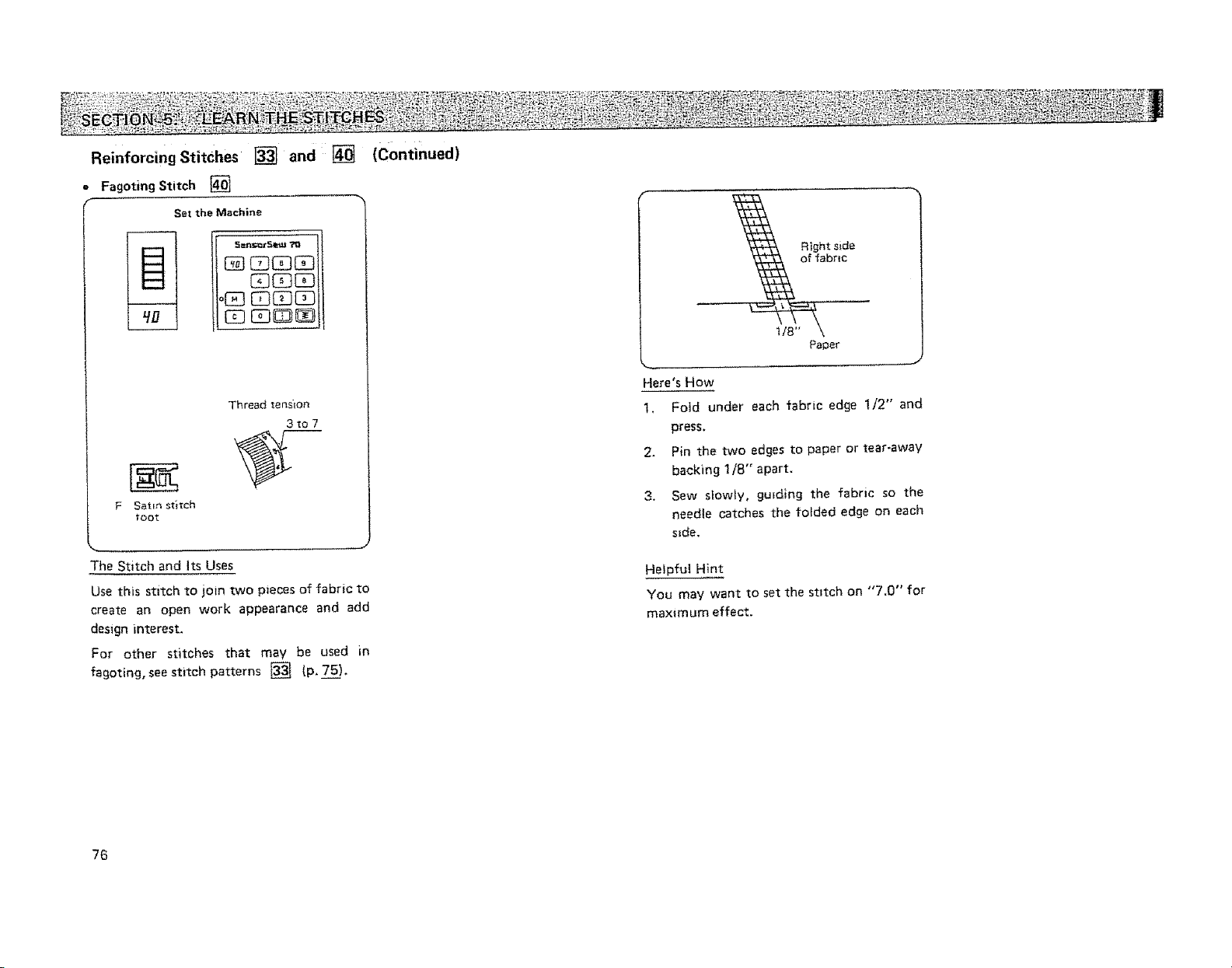
Reinforcing StitChes []
Fagoting Stitch
Set the Machine
and []
F Setm stitch
toot
Thread tension
3to 7
The Stitch and Its Uses
Use this stitch to join two p_eces of fabric to
create an open work appearance and add
design _nterest.
For other stitches that may be used in
fagoting, see stitch patterns [] (p, 75),
76
(Continued)
Right side
_ of _abrtc
.......... L_
Paper
Here's How
t. Fold under each fabric edge 1/2" and
press.
2. Pin the two edges to paper or tear*away
backing 1/8" apart.
3, Sew s}owty, guiding the fabric so the
needle catches the folded edge on each
s_de.
Helpful Hint
You may want to set the stitch on "'7.0" for
maxtmum effect.
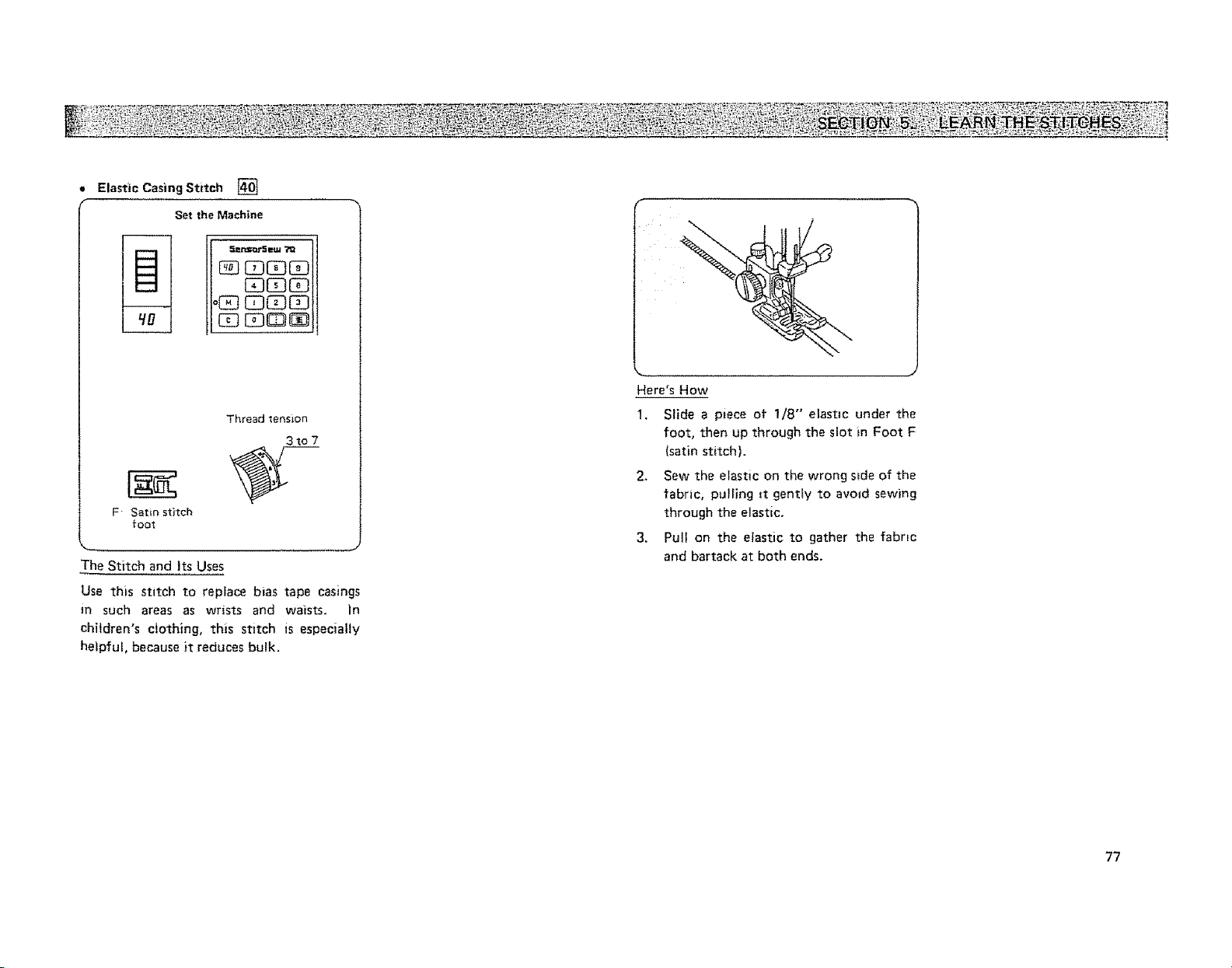
Elastic Casing Stitch []
Set the Machine
| @38o@3
F" Satin stitch
foot
Thread tens}on
3to7
The Stitch and Its Uses
Use this stitch to replace bias tape casings
m such areas as wrists and waists. }n
children's clothing, this stitch is especially
helpful, because it reduces bulk,
Here's How
1. Slide a p_ece of 1/8" elastic under the
foot, then up through the slot _n Foot F
(satin stitch).
2. Sew the elastic on the wrong side of the
fabric, pulling _t gent_y to avoid sewing
through the elastic.
3. Pull on the elastic to gather the fabric
and barrack at both ends.
77
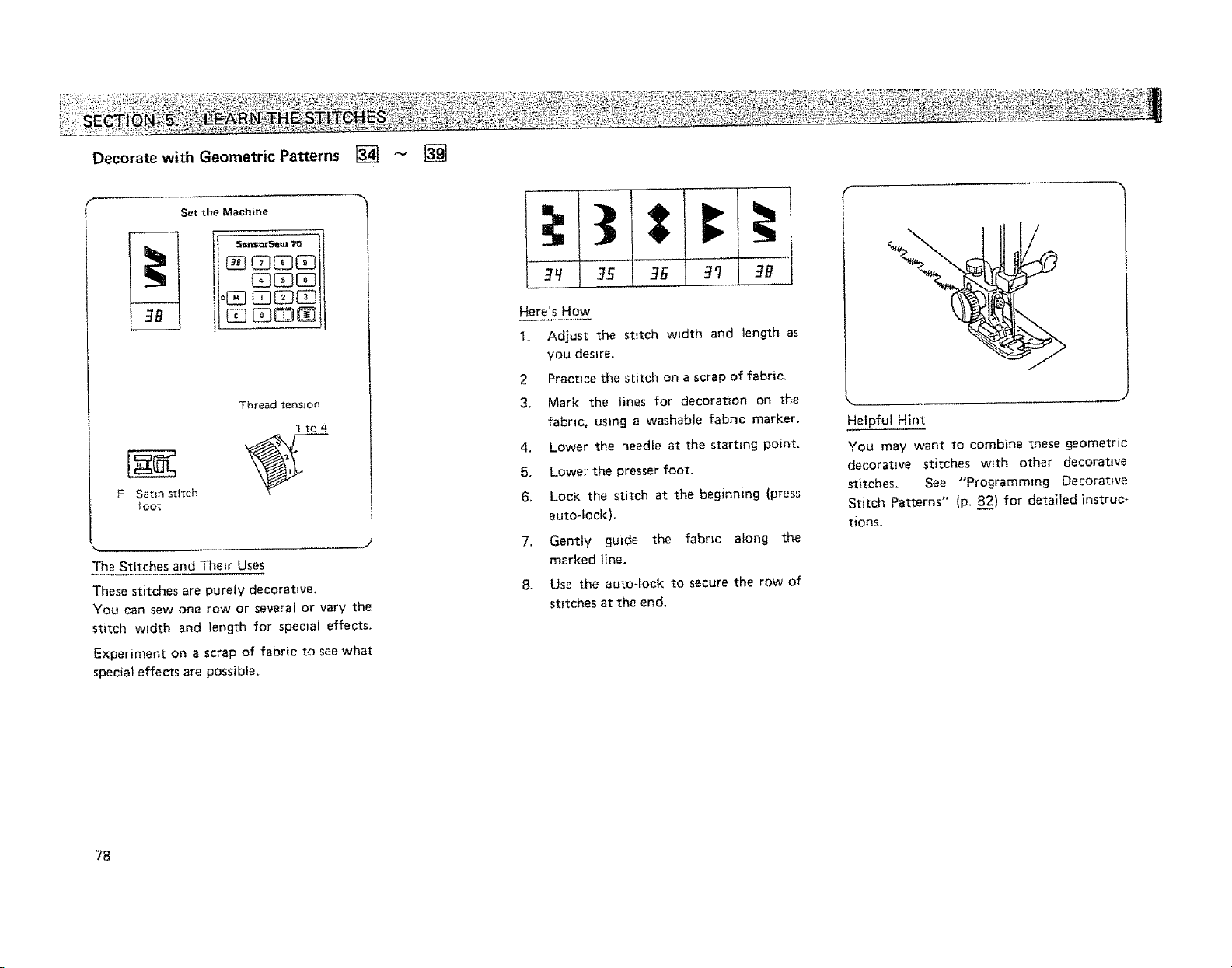
Decorate with Geometric Patterns [] _ []
Set the Machine
llD o®
Thread tensjon
t to4
F Sat_n stitch
_oot
The Stitches and Their Uses
These stitches are purely decorative.
You can sew one row or severaf or vary the
stitch width and length for speciaf effects.
Experiment on a scrap of fabric to see what
special effects are possible.
IV _5 35 3? 3B
Here's How
1÷ Adjust the stitch width and length as
you desire.
2, Practice the stitch on a scrap of fabric,
3. Mark the lines for decoration on the
fabrtc, using a washable fabric marker.
4. Lower the needie at the starting point.
5. Lower the presser foot.
6. Lock the stitch at the begJnmng (press
autoqock).
7, Gently guide the fabric along the
marked line.
8. Use the auto-lock to secure the row of
stitches at the end.
Helpful Hint
You may want to combine these geometric
decorative stitches with other decorative
stitches. See "Pro0rammmg Decorative
Stitch Patterns" (p. 82} for detailed instruc t
tions.
78
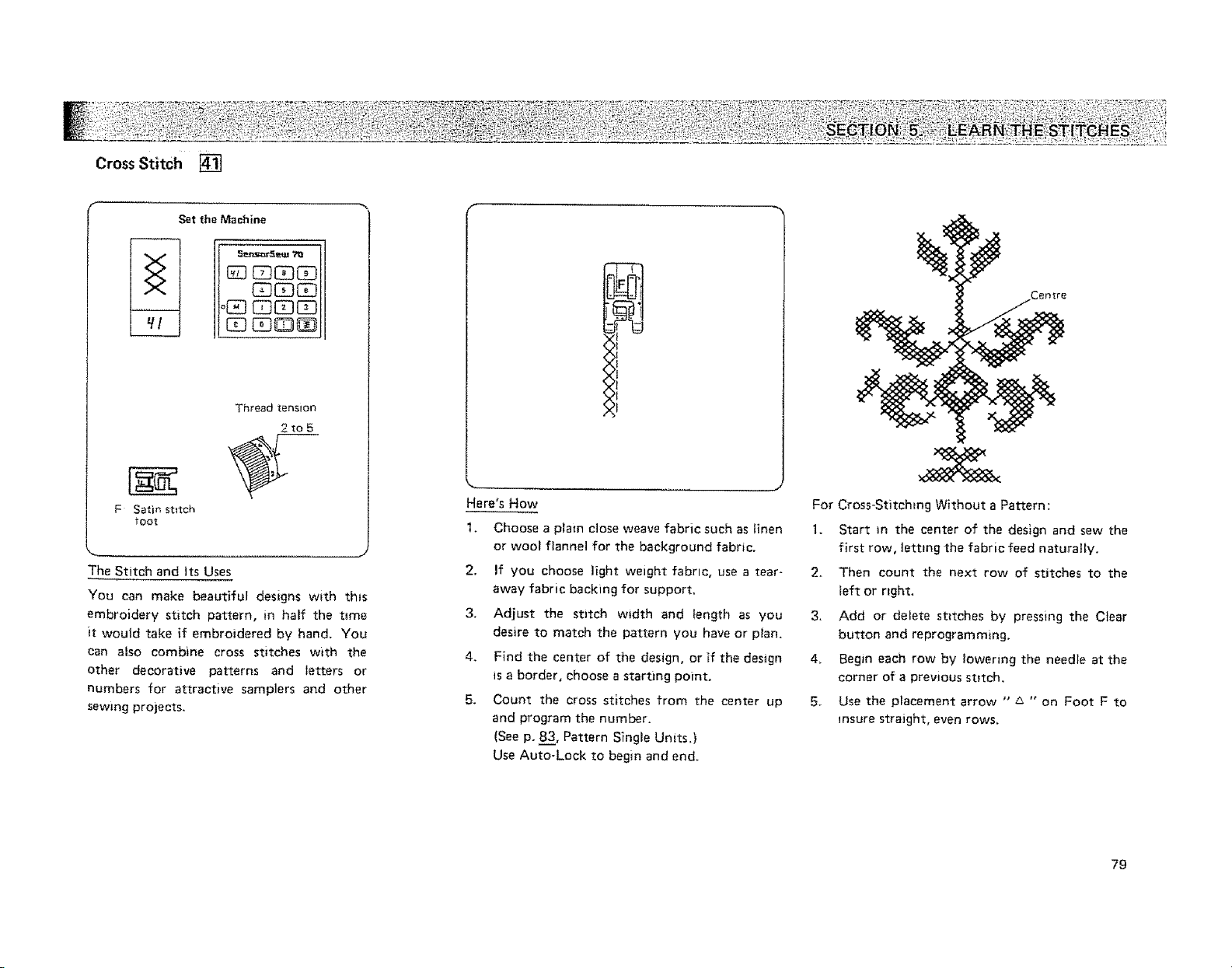
Cross Stitch []
Set the Machine
F Satin _t_tch
toot
Thread tenslon
2to 5
$
J
The Stitch and tts Uses
You can make beautiful designs with this
embroidery stitch pattern, in half the t_me
it would take if embroidered by hand. You
can also combine cross stitches with the
other decorative patterns and letters or
numbers for attractive samplers and other
sewing pro}ects.
f
[
Here's How
t.
Choose a plain close weave fabric such as linen
or wool flannel for the background fabric.
2. If you choose light weight fabric, use a tear-
away fabric backing for support,
3. Adjust the stitch width and length as you
desire to match the pattern you have or plan.
4. Find the center of the design, or if the design
_sa border, choose a starting point,
5, Count the cross stitches from the center up
and program the number,
(See p, 83, Pattern Single Units.)
Use Auto-Lock to begin and end.
For Cross-Stitching Without a Pattern:
1. Start m the center of the design and sew the
first row, tettmg the fabric feed naturally,
2. Then count the next row of stitches to the
left or right,
3. Add or delete stitches by pressing the Clear
button and reprogramming.
4_ Begin each row by lowering the needte at the
corner of a prewous stitch.
5. Use the placement arrow " & " on Foot F to
insure straight, even rows.
79
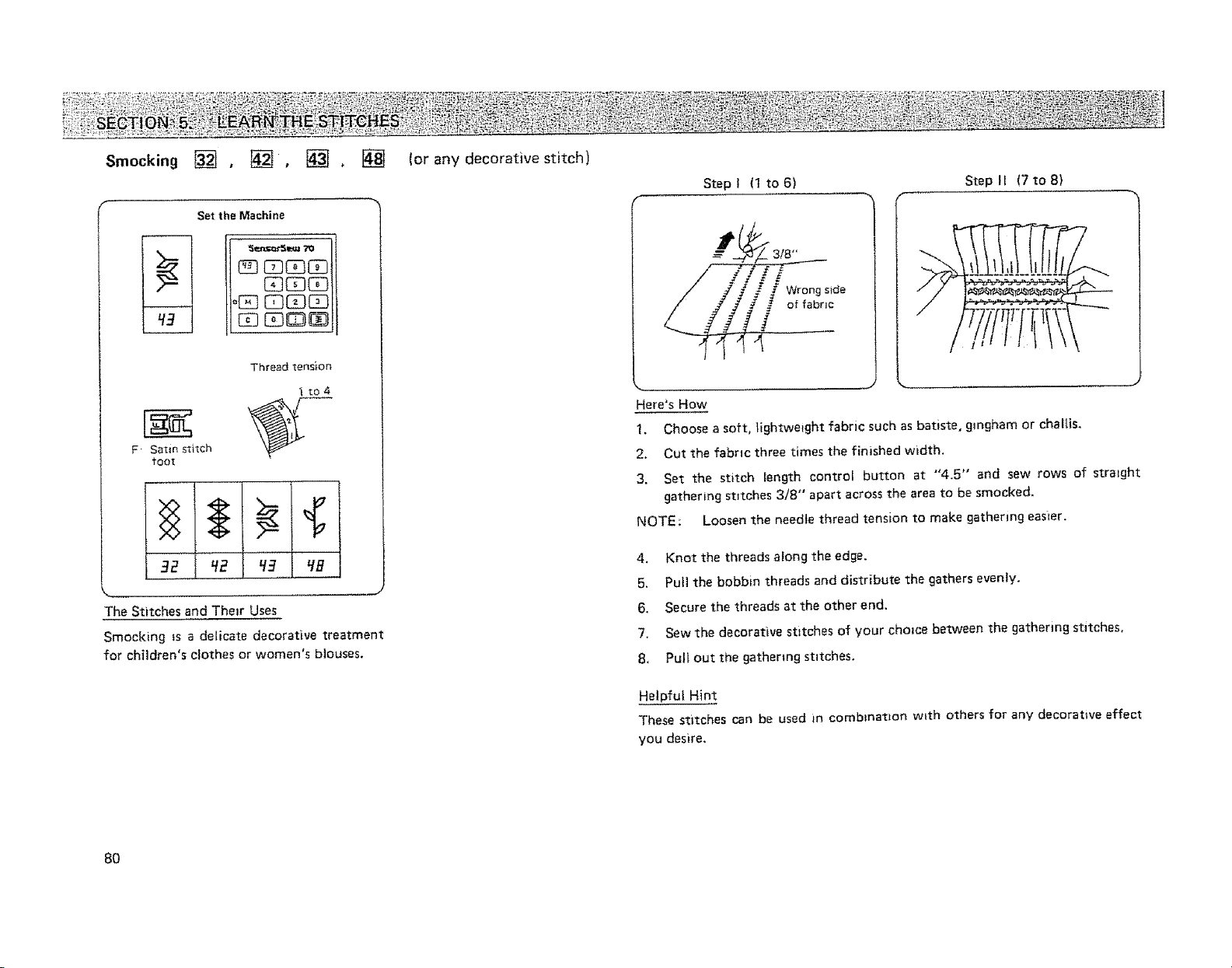
Smocking [] , [] , [] [] (or any decorative stitch)
Set the Machine
l!
tPD GGOD
Thread tension
I to4
F Satin stitch
foot
The Stitches and Their Uses
Smocking is a delicate decorative treatment
for children's clothes or women's blouses.
Step l Ilto6)
3/8"
Wrong side
= of fabric
/
Stepli (7to8)
Here's How
1.
2.
3.
NOTE:
Choose a soft, tightweight fabric such as batiste, gingham or chaltis.
Cut the fabric three times the finished width.
Set the stitch length control button at "'4.5'" and sew rows of straight
gathering stftches 3/8" apart across the area to be smocked.
Loosen the needle thread tension to make gathering easter.
4. Knot the threads along the edge.
5. Pull the bobbin threads and distribute the gathers evenly.
6. Secure the threads at the other end.
7. Sew the decorative stitches of your choice between the gathering stitches,
8. Pull out the gathering stitches.
Helpful Hint
These stitches can be used in combination with others for any decorative effect
you desire.
80
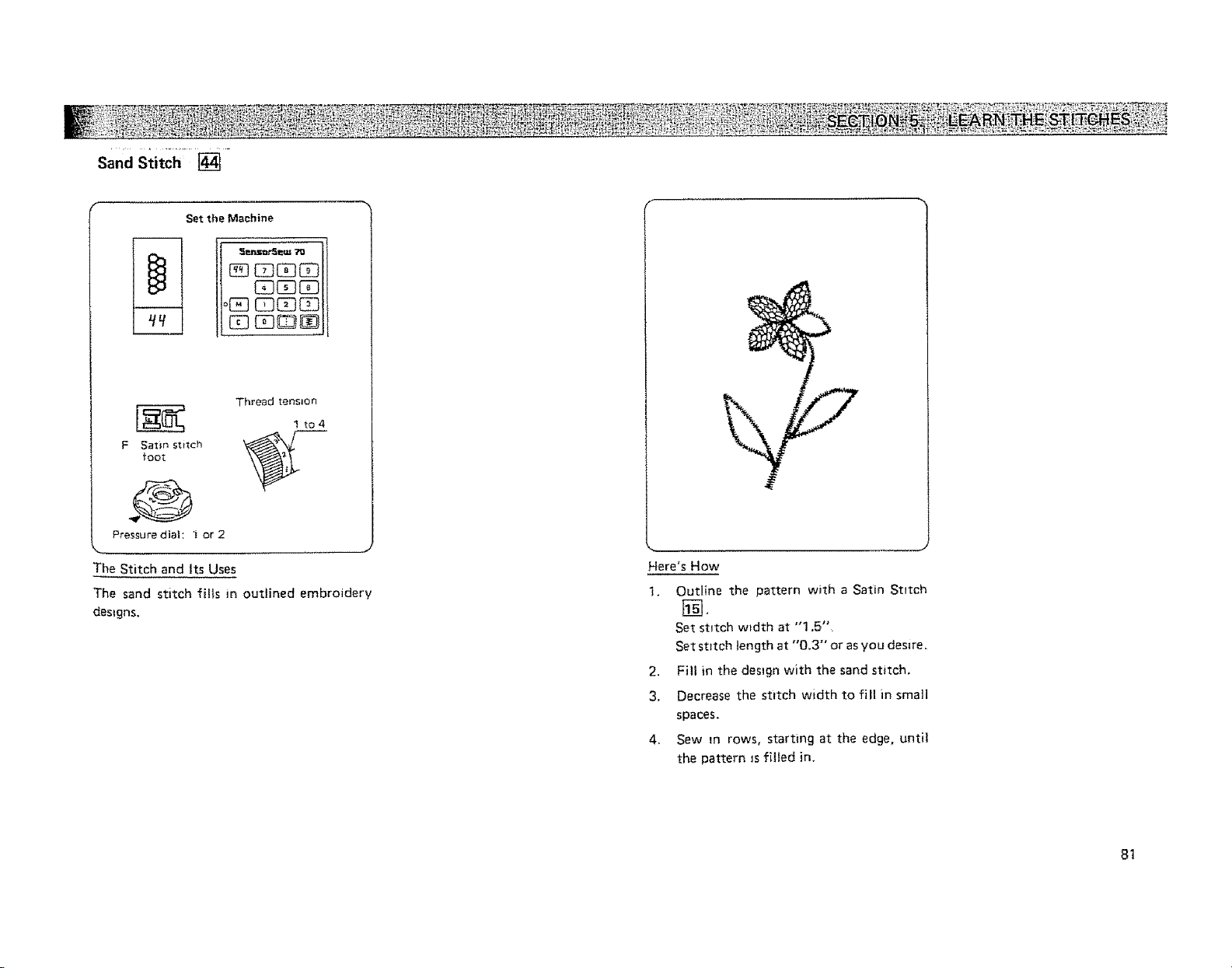
Sand Stitch []
Set the Machine
1
F Satin stttch
foot
Pressure diat: i or 2
Thread tension
1 to4
The Stitch and its Uses
The sand stitch fills in outlined embroidery
designs.
Here's How
1,
2.
3.
4,
Outline the pattern with a Satin Stitch
Set stitch w_dth at "1.5"_
Set stitch length at "0,3" or as you desire.
Fill in the design with the sand stitch,
Decrease the stitch width to fill in small
spaces.
Sew in rows, starting at the edge, until
the pattern _sfilled in.
81
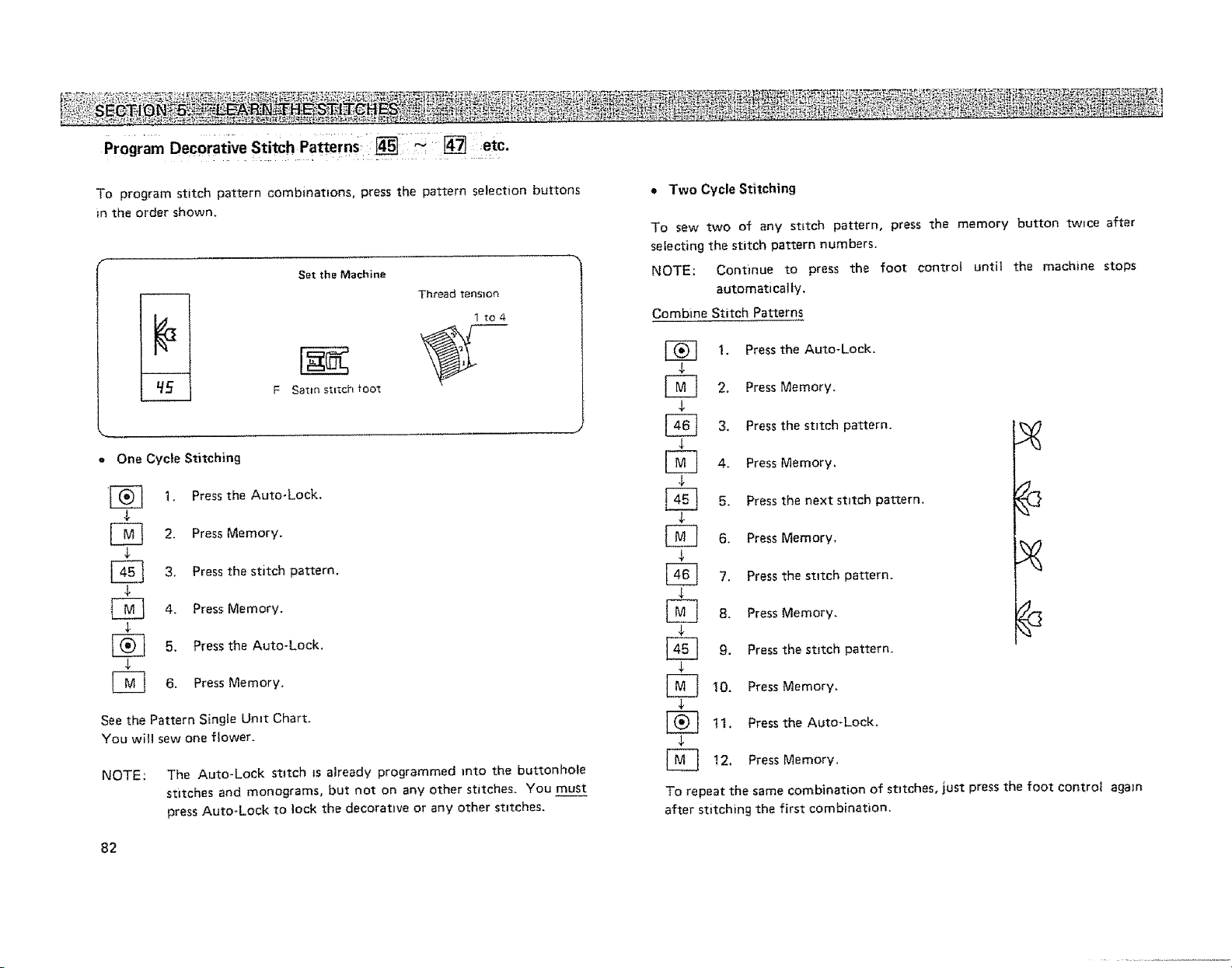
Program Decorative Stitch Patterns i _i [] i etc .
To program stitch pattern combmat=ons, press the pattern selection buttons
in the order shown.
Setthe Machine
1 to4
F Sattn stitch ;_ot
• One Cycle Stitching
[_ 1. Press the Auto-Lock.
[_ 2. Press Memory.
$
3, Press the stitch pattern.
4. Press Memory.
[_ 5. Press the Auto-Lock.
[_ 6. Press Memory.
See the Pattern Single Umt Chart.
You will sew one flower.
NOTE: The Auto-Lock stitch _s already programmed rote the buttonhole
stitches and monograms, but not on any other stitches. You must
press Auto-Lock to lock the decorative or any other stztches.
82
• Two Cycle Stitching
To sew two of any stitch pattern, press the memory button twice after
selecting the stitch pattern numbers.
NOTE: Continue to press the foot control until the machine stops
automatically.
Combine Stitch Patterns
I, Press the Auto-Lock.
[_ 2. Press Memory.
[_ 3. Press the stitch pattern.
4
[_ 4. Press Memory.
[_ 5. Press the next stitch pattern.
[_ 6. Press Memory.
[_ 7. Press the stitch pattern.
$
[_ 8. Press Memory.
$
]_ 9. Press the stitch pattern.
10. Press Memory.
$
[_ 11. Press the Auto-Lock.
[_ 12+ Press Memory.
To repeat the same combination of stitches, just press the foot control again
after stitching the first combination,
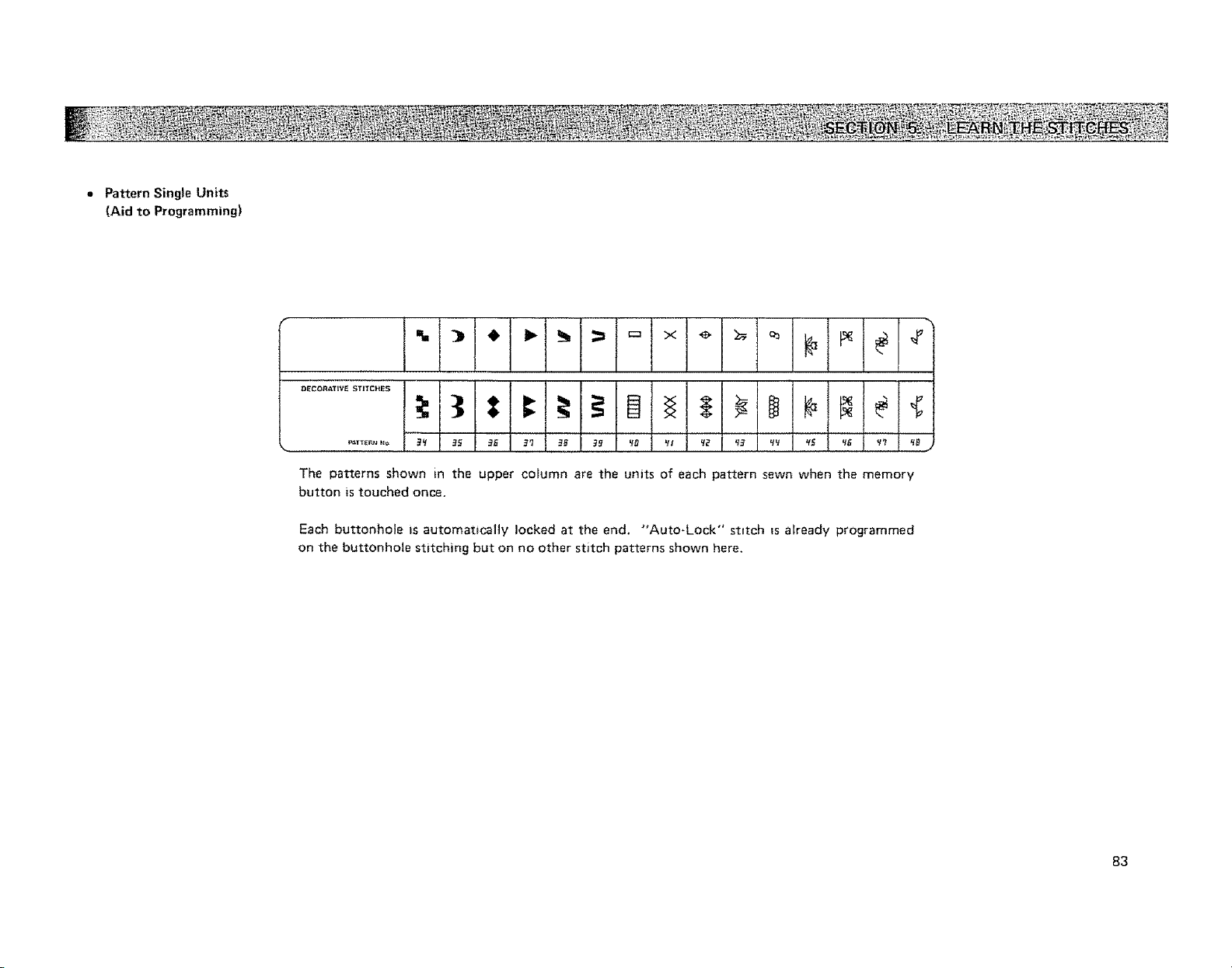
• Pattern Single Units
(Aid to Programming)
The patterns shown in the upper co{umn are the units of each pattern sewn when the memory
button is touched once.
Each buttonhole is automatically locked at the end, "Auto-Lock "' stitch is already programmed
on the buttonhole stitching but on no other stitch patterns shown here.
83
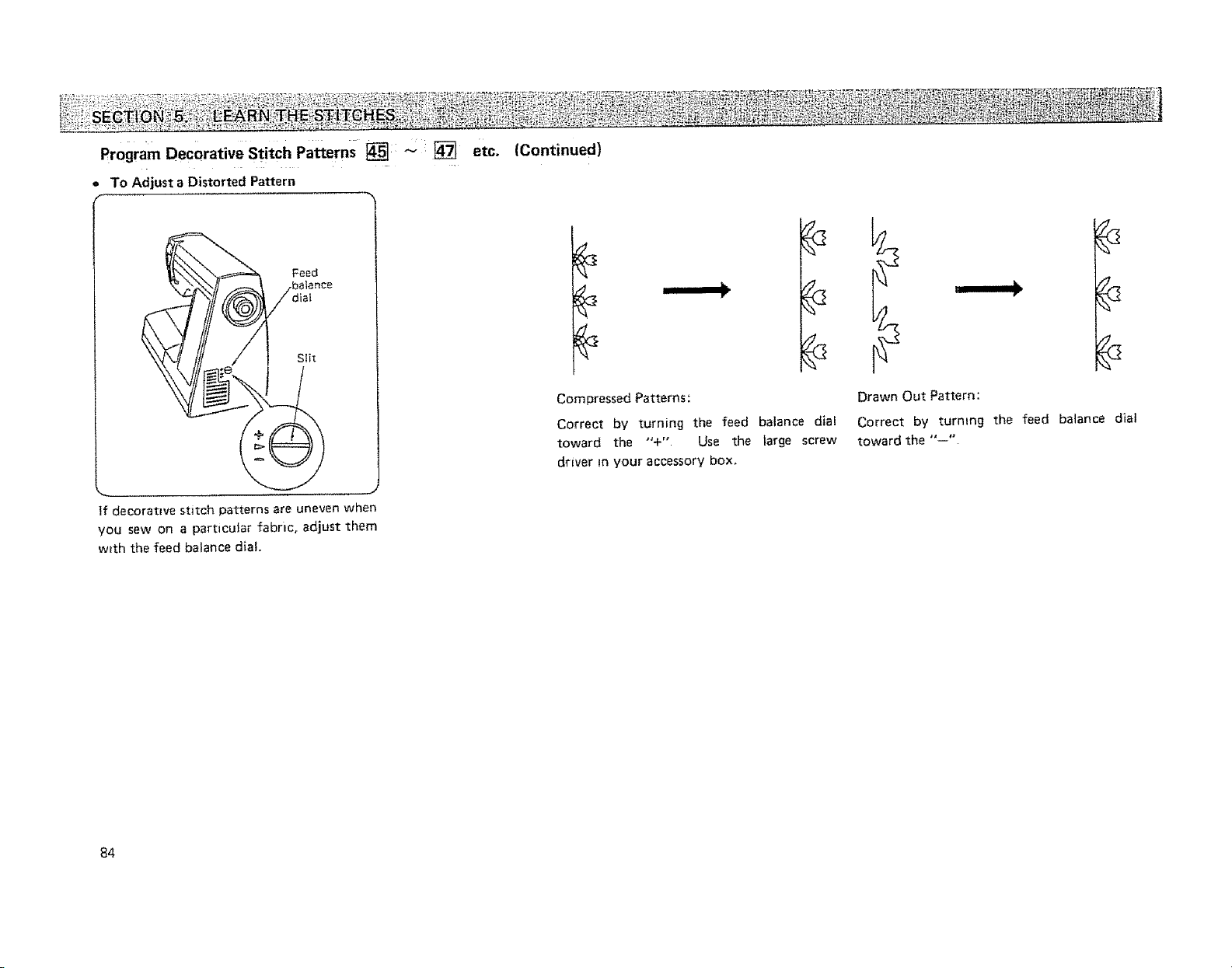
Program Decorative Stitch Patterns []: _ i [] etc. (Continued)
= TO Adjust a Distorted Pattern
If decorattve stitch patterns are uneven when
you sew On a particular fabric, adjust them
wtth the feed balance dial.
0
Corn pressed Patterns:
Correct by turning the feed balance dia!
toward the "+'" Use the large screw
driver in your accessory box,
i
Drawn Out Pattern:
Correct by turning the feed balance dial
toward the "-"
84
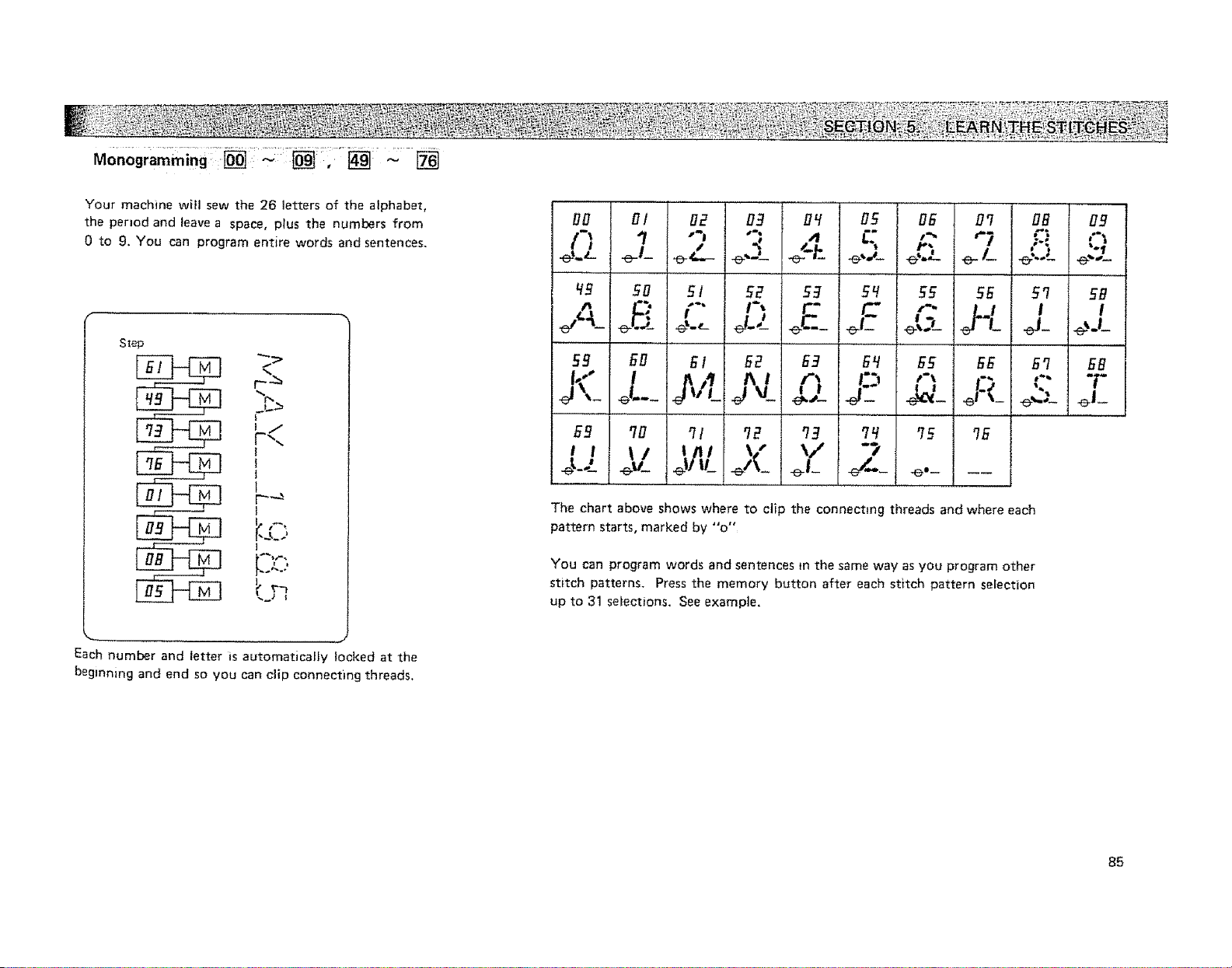
Monogramming [0[0-_-_ [] , _: _ []
Your machine will sew the 26 letters of the alphabet,
the period and leave a space, plus the numbers from
0 to 9, You can program entire words and sentences.
Step
I
I
1
1
i2;r.:
DO OI 02 D9
_.L _
LI_ $0 E I 52
59 Eg E I E2
K oI.._M,
# _ _j__
59 9D '71 92
I I II \1
O_ 05
g-
Eg Eq
n
93 ?q
\/ -_
÷1_ _'.._
OE 09 08 Og
.: r" 'q
-e',.,- e- I- _'.oL ÷,..,_
55 5E 5q 5B
J-L J_ o.L
E5 EE
1"\
95 t gE
Eq EB
C" T
The chart above shows where to clip the connecting threads and where each
pattern starts, marked by "o"
You can program words and sentences In the same way as you program other
stitch patterns. Press the memory button after each stitch pattern selection
up to 31 selections. See example.
Each number and letter is automatically locked at the
beginning and end so you can clip connecting threads.
85
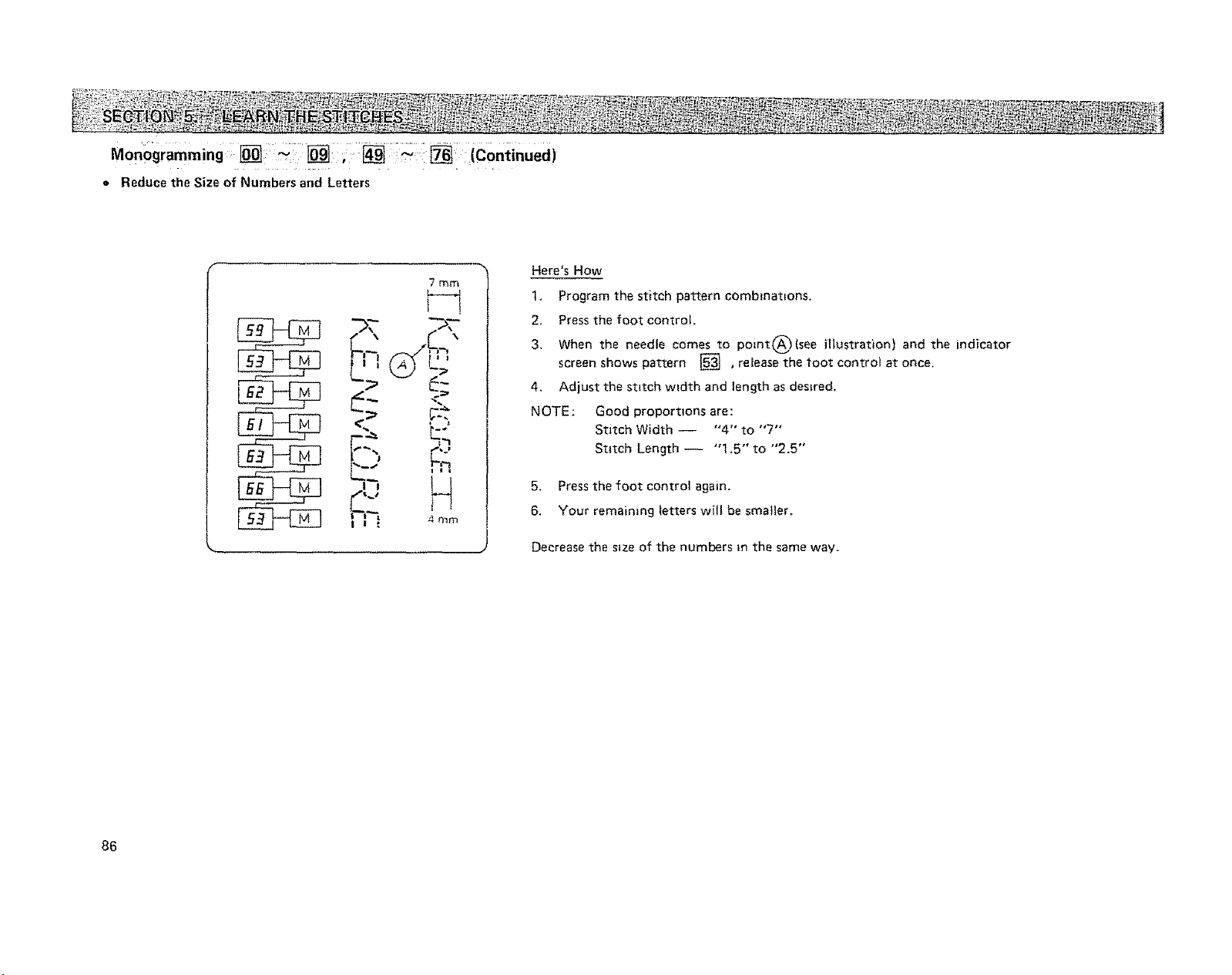
= Reduce the Size of Numbers and Letters
7 mm
_-'¢'i 4 mm
I = **
Here's How
1.
2_
3,
4_
NOTE:
Program the stitch pattern comblnatlons.
Press the foot control,
When the needle comes to po=nt_(see illustration) and the indicator
screen shows pattern [] , release the toot control at once.
Adjust the stitch width and length as desired.
Good proportions are:
Stitch Width -- "4" to "7"
Stitch Length -- "t,5" to "2.5"
5. Press the foot control again.
6. Your remainmg letlEers will be smaller.
Decrease the size of the numbers tn the same way.
86
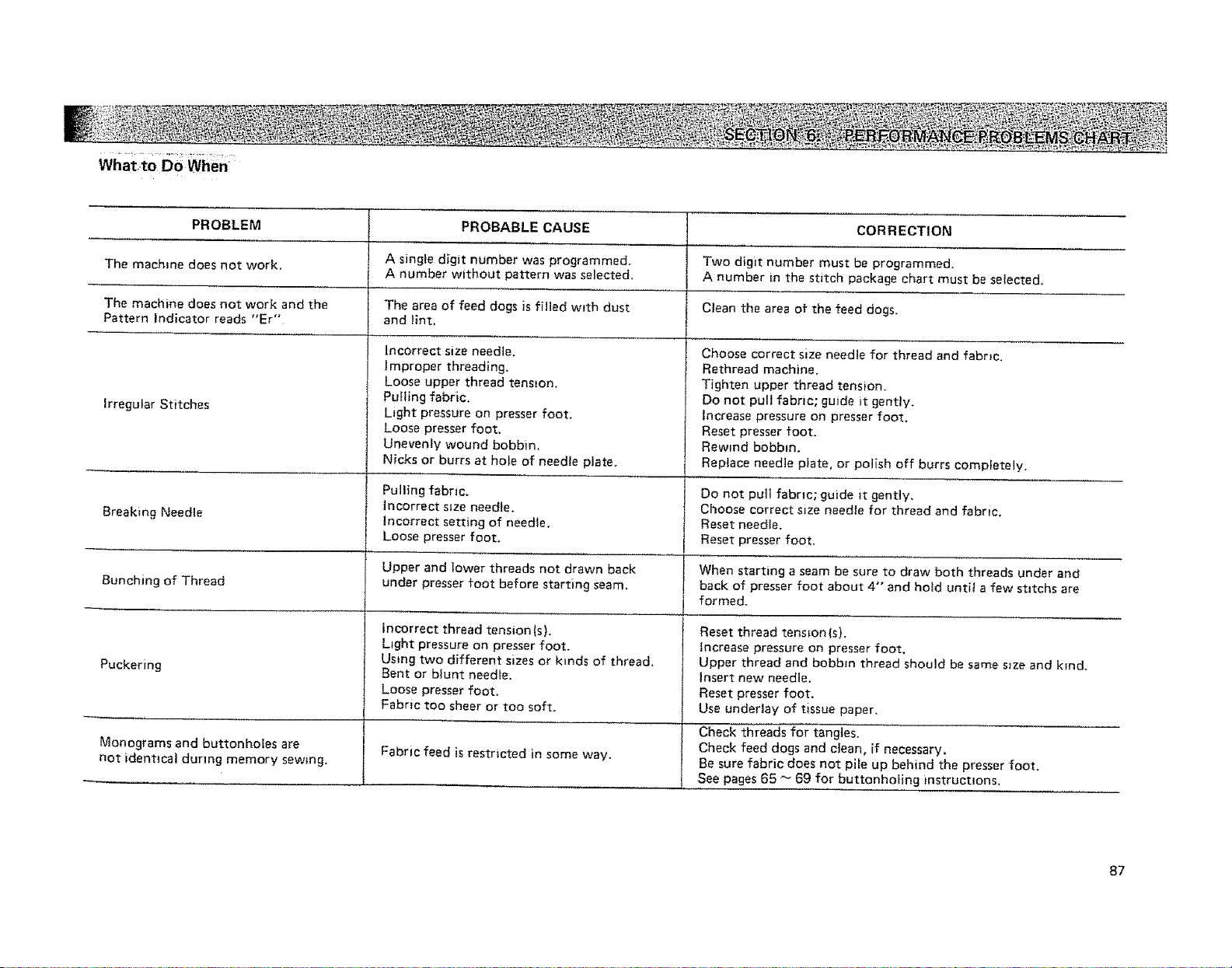
PROBLEM PROBABLE CAUSE CORRECTION
The machine does not work, A single digit number was programmed. Two digit number must be programmed.
A number without pattern was selected. A number in the stitch package chart must be selected.
The machine does not work and the The area of feed dogs is filled with dust Clean the area of the feed dogs.
Pattern Indicator reads "Er" and lint,
Irregular Stitches
Breaking Needle
Incorrect size needie.
Improper threading,
Loose upper thread tension.
Pu_ling fabric.
Light pressure on presser foot.
Loose presser foot.
Unevenly wound bobbin.
Nicks or burrs at hole of needle plate.
Pulling fabric.
Incorrect stze needte.
incorrect setting of needle,
Loose presser foot.
Choose correct size needle for thread and fabric.
Rethread machine.
Tighten upper thread tension.
Do not pull fabric; guide it gently.
lncrease pressure on presser foot.
Reset presser foot.
Rewind bobbin.
Replace needle plate, or po{ish off burrs completely.
Do not pull fabric; guide it gently.
Choose correct size needte for thread and fabric.
Reset needle.
Reset presser foot,
Upper and lower threads not drawn back I When starting a seam be sure to draw both threads under and
Bunching of Thread under presser foot before starting seam. I back of presser foot about 4" and hold until a few stltchs are
1 formed.
incorrect thread tension (s).
L_ght pressure on presser foot.
Using two different sizes or kinds of thread,
Bent or blunt needle.
Loose presser foot.
Fabric too sheer or too soft.
Fabric feed is restricted in some way.
Puckering
Monograms and buttonholes are
not identical during memory sewing.
Reset thread tension (s).
increase pressure on presser foot.
Upper thread and bobbin thread should be same size and kind.
Insert new needle,
Reset presser foot.
Use underJay of tissue paper.
Check threads for tangles.
Check feed dogs and clean, if necessary.
Be sure fabric does not pi_e up behind the presser foot.
See pages 65 _ 69 for buttonholing instructions.
87
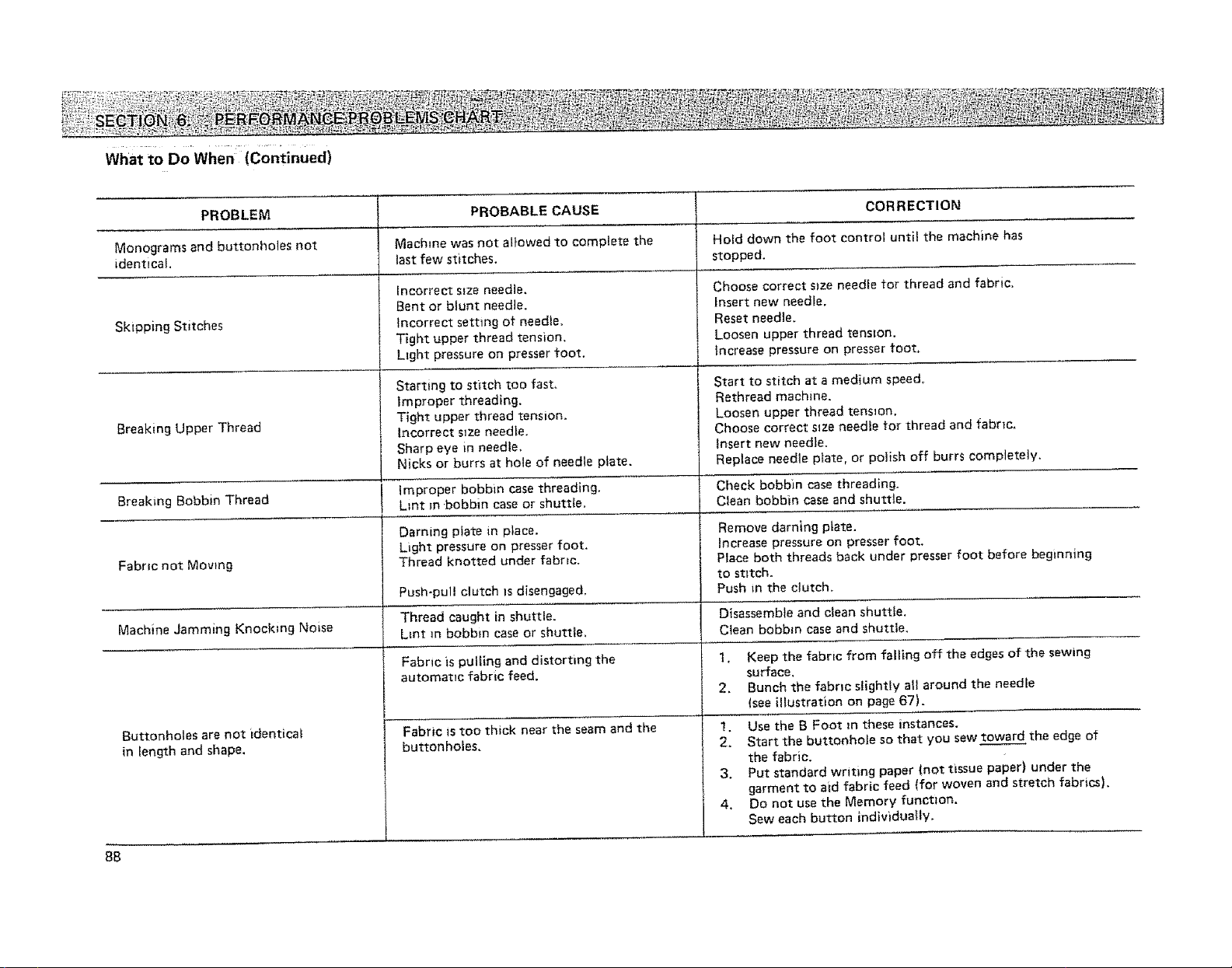
What to DoWhen icontinued)
PROBLEM PROBABLE CAUSE CORRECTION
Monograms and buttonholes not Machine was not allowed to complete the Hold down the foot control until the machine has
identical last few stitches, stopped.
incorrect s_ze needle, Choose correct sJze needle for thread and fabric,
Bent or blunt needle. Insert new needle.
Skipping Stitches Incorrect setting of needle. Reset needle.
Tight upper thread tension. Loosen upper thread tension.
Light pressure on presser foot. increase pressure on presser foot.
Breaking Upper Thread
Starting to stitch too fasL
lmproper threading,
Tight upper thread tension.
Incorrect s_ze needle.
Sharp eye Ln needle,
Nicks or burrs at hole of needle plate.
Start to stitch at a medium speed.
Rethread machine.
Loosen upper thread tensJon.
Choose correct s_ze needle for thread and fabric,
Insert new needie.
Replace needle plate, or polish off burrs completely.
Check bobbin case threading.
Clean bobbin case and shuttle.
Breaking Bobbin Thread improper bobbin case threading.
Lint m "bobbin case or shuttle.
Darning plate m place, Remove darning plate.
Light pressure on presser foot. Increase pressure on presser foot.
Fabric not Moving Thread knotted under fabric. Place both threads back under Dresser foot before beginning
to stitch.
Push-pull clutch is disengaged. Push in the clutch.
Thread caught in shuttle. Disassemble and clean shuttle.
Machine Jamming Knocking Noise
Lint in bobbin case or shuttle, Clean bobbin case and shuttle,
Fabric is pulling and distorting the
automatic fabric feed.
Fabric is too thick near the seam and the
buttonholes.
Buttonholes are not identical
in length and shape,
1. Keep the fabric from falling off the edges of the sewing
surface.
2. Bunch the fabric slightly all around the needle
(see illustration on page 67).
!, Use the B Foot m these instances.
2, Start the buttonhole so that you sew toward the edge of
the fabric,
3. Put standard writing paper (not tissue paper) under the
garment to aid fabric feed (for woven and stretch fabrics).
4, Do not use the Memory function.
Sew each button individually.
88
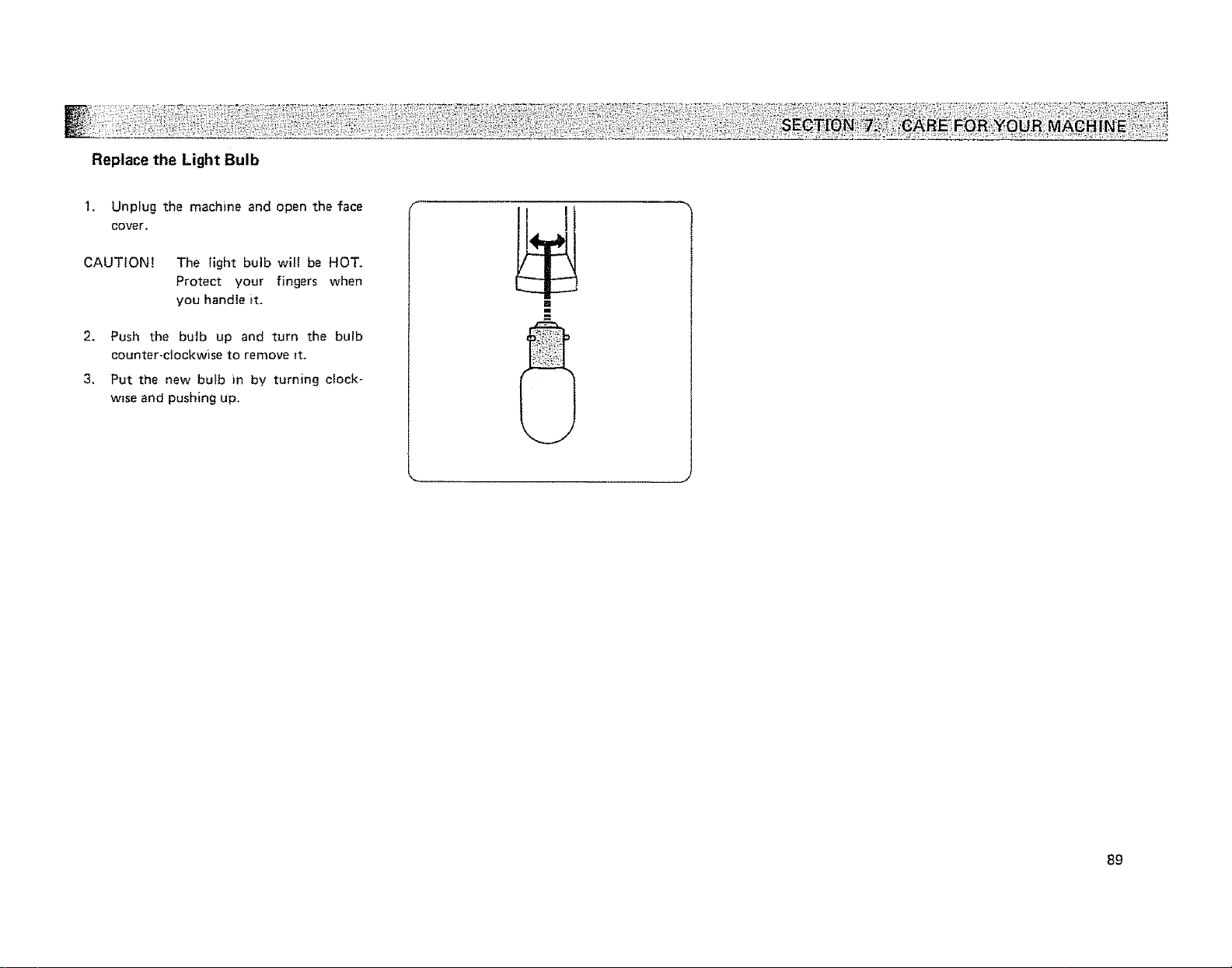
Replace the Light Bulb
1, Unplug the machine and open the face
cover.
CAUTION! The light bulb will be HOT.
Protect your fingers when
you handle it.
2. Push the bulb up and turn the bulb
counter-clockwtse to remove _t.
3, Put the new bulb in by turning clock-
w3se and pushing up.
89
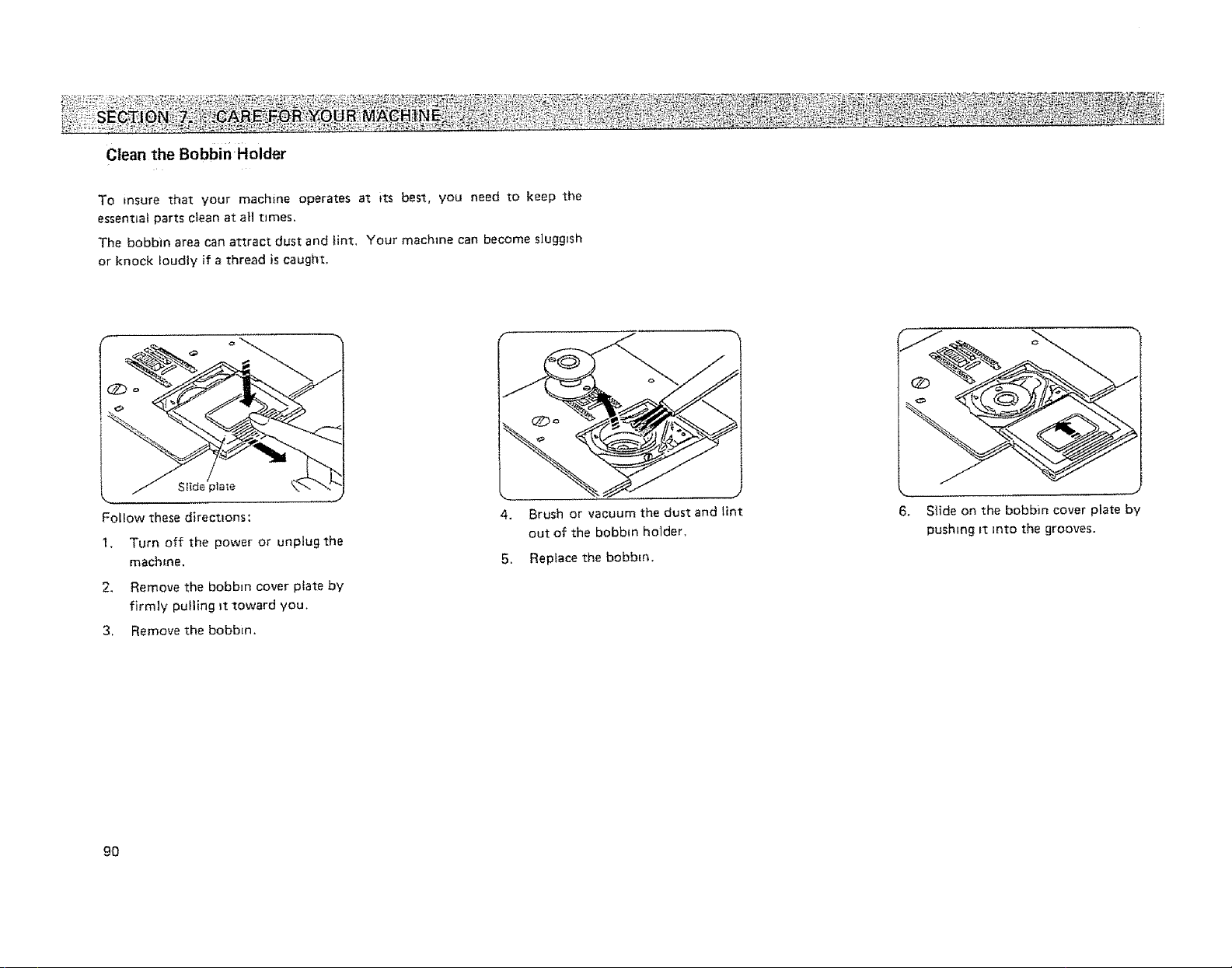
Clean the Bobbin Holder
To insure that your machine operates at its best, you need to keep the
essential parts clean at all times.
The bobbm area can attract dust and tint. Your machine can become sluggish
or knock loudly if a thread is caught.
Follow these directions:
I. Turn off the power or unplug the
machine.
2. Remove the bobbin cover plate by
firmly pulling _t toward you.
3. Remove the bobbin.
4. Brush or vacuum the dust and lint
out of the bobbin holder,
5. Replace the bobbin.
6, Slide on the bobbin cover plate by
pushing _t into the grooves.
9O
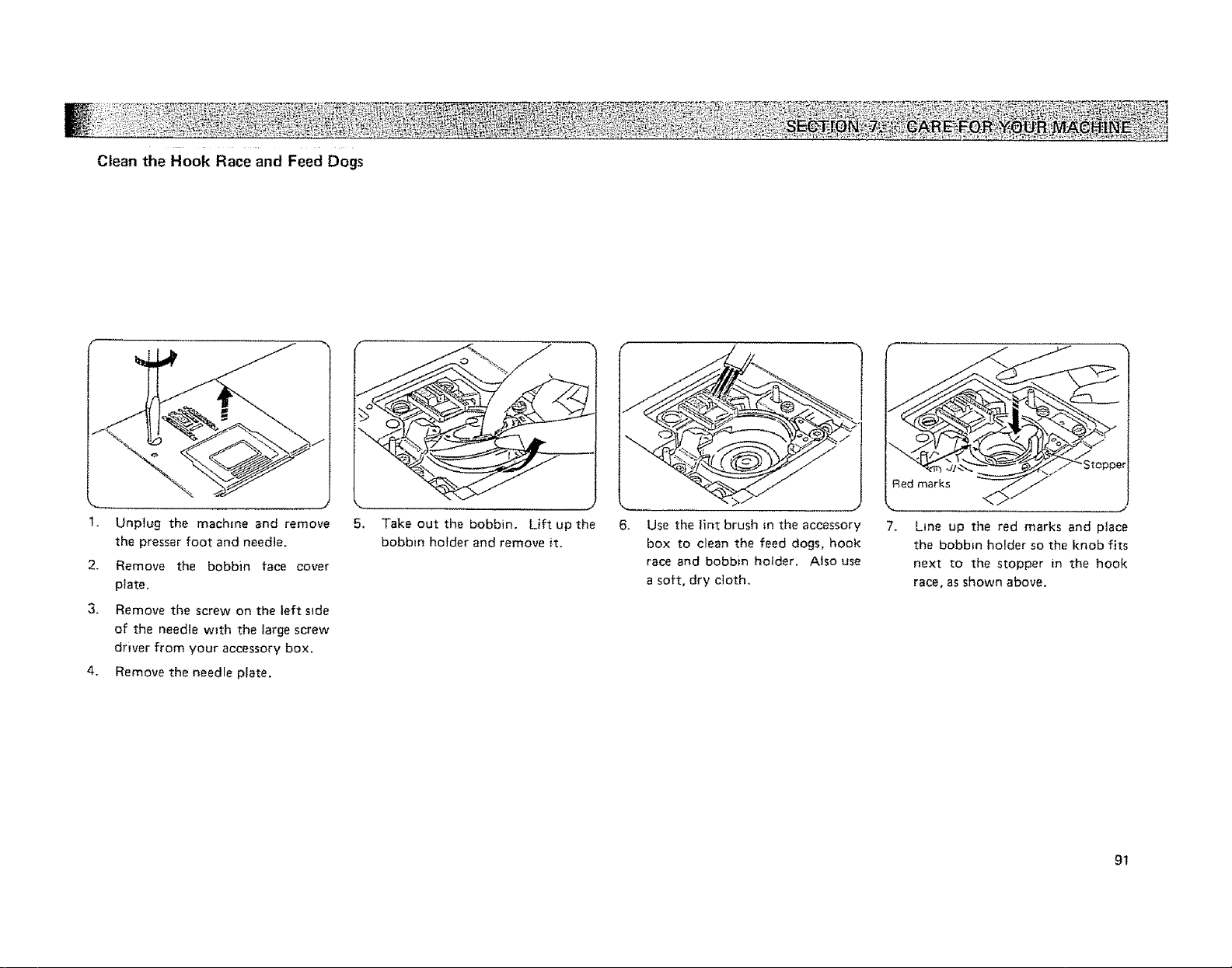
Clean the Hook Race and Feed Dogs
1. Unplug the machine and remove
the presser foot and needle.
2. Remove the bobbin face cover
plate,
3. Remove the screw on the left side
of the needle w_th the large screw
driver from your accessory box.
4. Remove the needle pSate.
\
5. Take out the bobbin. Lift up the
bobbin holder and remove it.
6_
Use the lint brush in the accessory
box to clean the feed dogs, hook
race and bobbin holder. Also use
a soft, dry cloth.
Red marks
.... J
7. Line up the red marks and place
the bobbin holder so the knob fits
next to the stopper m the hook
race, as shown above.
91
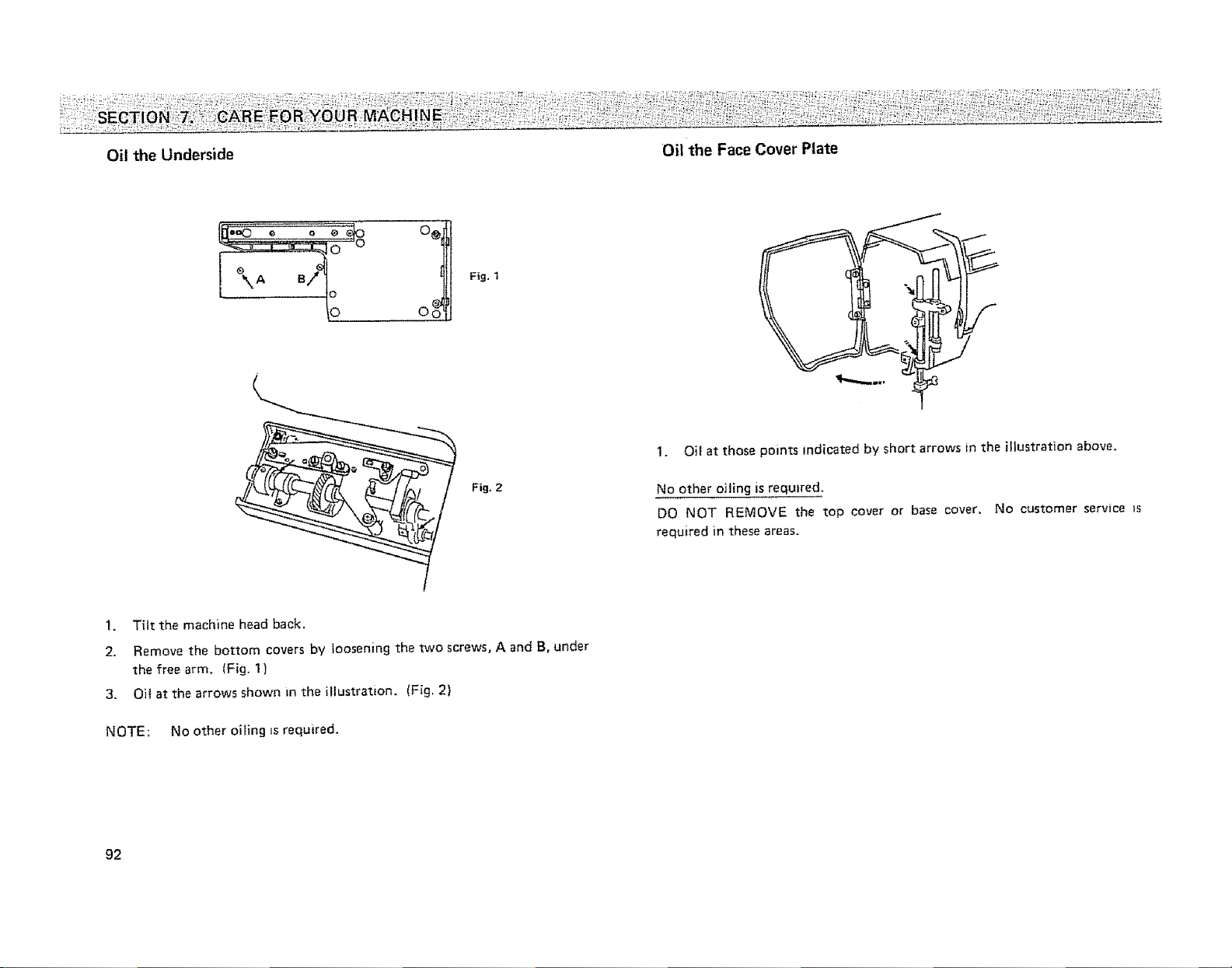
Oil the Underside
Oil the Face Cover Plate
%xA
o
Fig. 1
Fig. 2
I. Tiltthe machine head back.
2. Remove the bottom covers by loosening the two screws, A and B, under
the free arm, _Fig. 1)
3. Oil at the arrows shown _n the illustration, (Fig, 2)
NOTE: No other oiling is required.
1. Oil at those points indicated by short arrows in the il|ustration above.
No other oiting is required.
DO NOT REMOVE the top cover or base cover, No customer service Js
required in these areas.
92
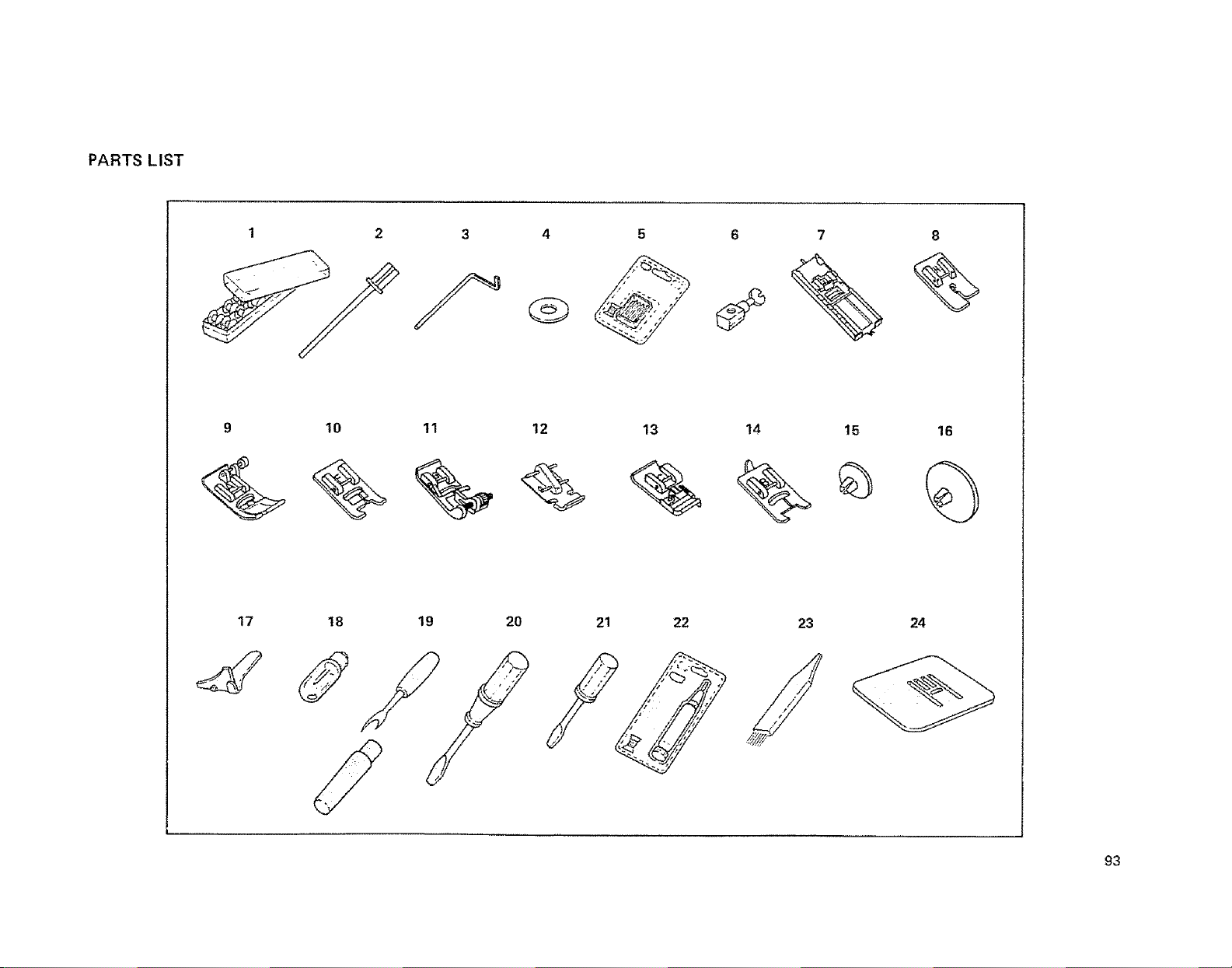
PARTS LIST
1 2 3
;jr"
8
12 13 14 15 16
17 18 19 20 21 22 23 24
93
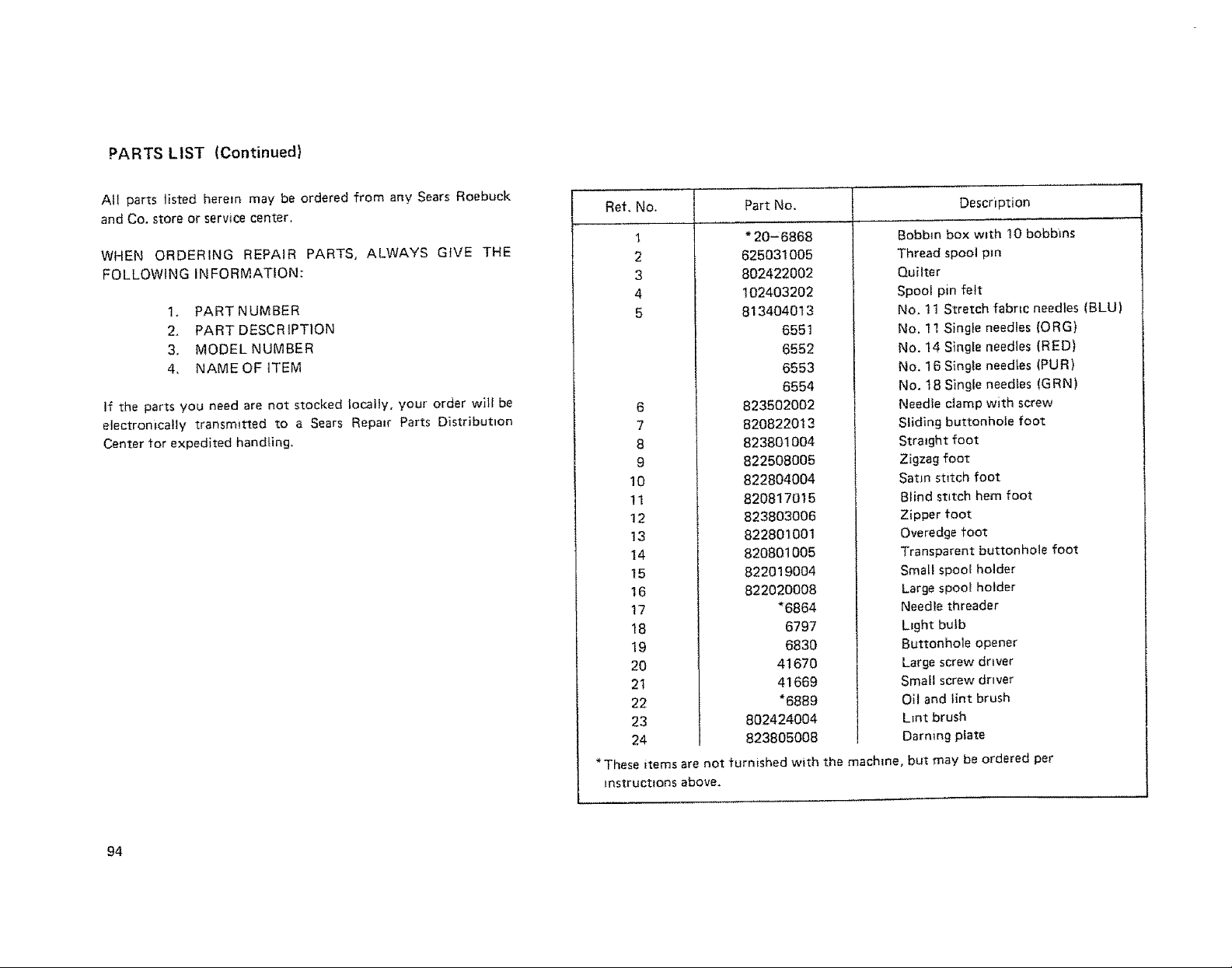
PARTS LIST (Continued)
All parts listed hereto may be ordered from any Sears Roebuck
and Co. store or serwce center,
WHEN ORDERING REPAIR PARTS, ALWAYS G_VE THE
FOLLOWING INFORMATION:
1. PART NUMBER
2. PART DESCRIPTION
3o MODEL NUMBER
4. NAME OF ITEM
if the parts you need ere not stocked tocaily, your order will be
electronicafly transmitted to a Sears Repair Parts Distribution
Center tor expedited handling.
94
Ref. No. Part No, Description
l
2
3
4
5
6
7
8
9
10
11
12
13
14
15
16
17
18
19
20
2t
22
23
24
*20-6868
625031005
802422002
102403202
813404013
6551
6552
6553
6554
823502002
820822013
823801004
822508005
822804004
820817015
823803006
822801001
820801005
822019004
822020008
*6864
6797
6830
41670
41669
*6889
802424004
823805008
Bobbin box with 10 bobbins
Thread spool pm
Quilter
Spool pin felt
No. 11 Stretch fabric needles (BLU)
No, 11 Single needles (ORG)
No. 14 Single needles _RED)
No, 16 Single needles (PUR)
No. t8 Single needles (GRN)
Needie clamp with screw
Sliding buttonhole foot
Strmght toot
Zigzag toot
Satin stitch foot
*These ktems are not furnished with the machine,
instructions above.
Blind stitch hem foot
Zipper foot
Overedge toot
Transparent buttonhole foot
Small spool holder
Large spool holder
Needle threader
L_ght bulb
Buttonhole opener
Large screw driver
Small screw driver
Oil and lint brush
Lrnt brush
Darmng plate
but may be ordered per
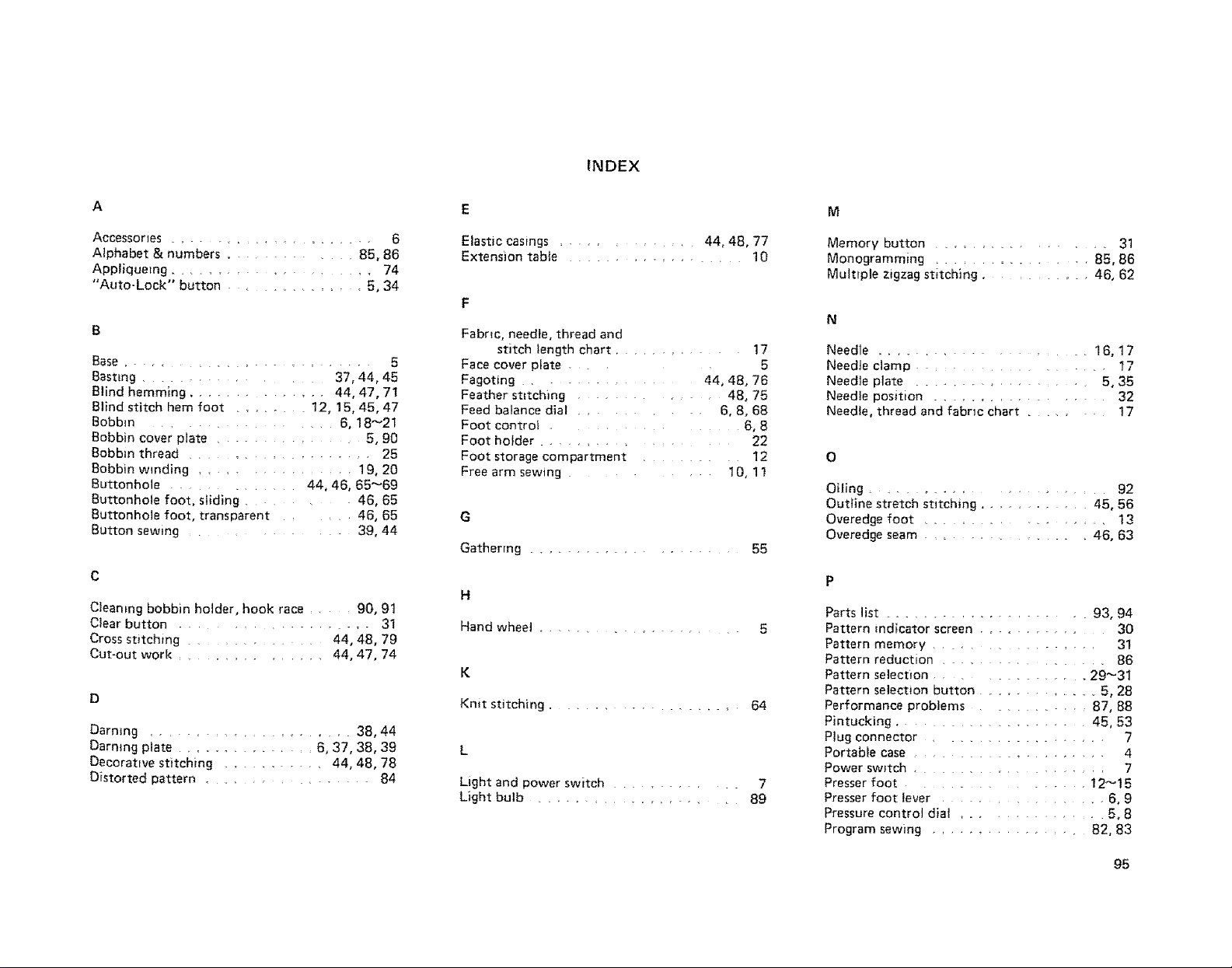
INDEX
A
Accessories .................. 6
Alphabet & numbers ...... 85, 86
Appliqumng .............. 74
"Auto-Lock" button .......... 5, 34
Base ................. 5
Basting .............. 37, 44, 45
Blind hemming ............. 44, 47, 7t
Blind stitch hem foot .... 12, 15, 45, 47
Bobbin ........ 6, 18-_2 t
Bobbin cover plate ......... 5, 90
Bobbin thread .................... 25
Bobbin winding ............. 19, 20
Buttonhole ............. 44, 46, 65_69
Buttonhole foot, stiding ......... 46, 65
Buttonhole foot, transparent ..... 46, 65
Button sewing ............ 39, 44
Cleaning bobbin holder, hook race ..... 90, 91
Clear button .................. 31
Cross stitching ............. 44, 48, 79
Cut-out work .............. 44, 47, 74
Darmng .................... 38, 44
Darning plate ............. 6, 37, 38, 39
Decorative stitching ......... 44, 48, 78
Dfstorted pattern .... 84
E
Elastic casings ............. 44, 48, 77
Extension tabIe ........... 10
Fabric. needle, thread and
stitch length chart .......... 17
Face cover plate 5
Fagoting ................. 44, 48, 76
Feather stitching ............... 48, 75
Feed balance dial ...... 6, 8.68
Foot controt ........ 6, 8
Foot holder .............. 22
Foot storage compartment .......... 12
Free arm sewing 10, 11
G
Gatherrng .................... 55
H
Hand wheet ..................... 5
K
Knit stitching ............. 64
L
Light and power switch ...... 7
Light bulb .................... 89
M
Memory button .............. 31
Monogramming ................. 85, 86
Muttrple zigzag stitching .......... 46, 62
N
Needle ............. 16, 17
Needle clamp ................... t7
Needle plate ................. 5, 35
Needle position ............. 32
Needle, thread and fabrlc chart ......... 17
O
Oiling ......................... 92
Outline stretch stitching .......... 45.56
Overedge foot ........... 13
Overedge seam ......... 46. 63
Parts list ................... 93. 94
Pattern indicator screen ........... 30
Pattern memory .............. 3t
Pattern reduction ........... 86
Pattern selection .............. 29_3I
Pattern selection button ............ 5, 28
Performance problems .......... 87, 88
Pintucking ................ 45, 53
Plug connector ............ 7
Portable case .............. 4
Power sw_tch ........... 7
Presser foot ................ 12_15
Presser foot tever ............. 6, 9
Pressure control dial ............. 5.8
Program sewing .............. 82, 83
95
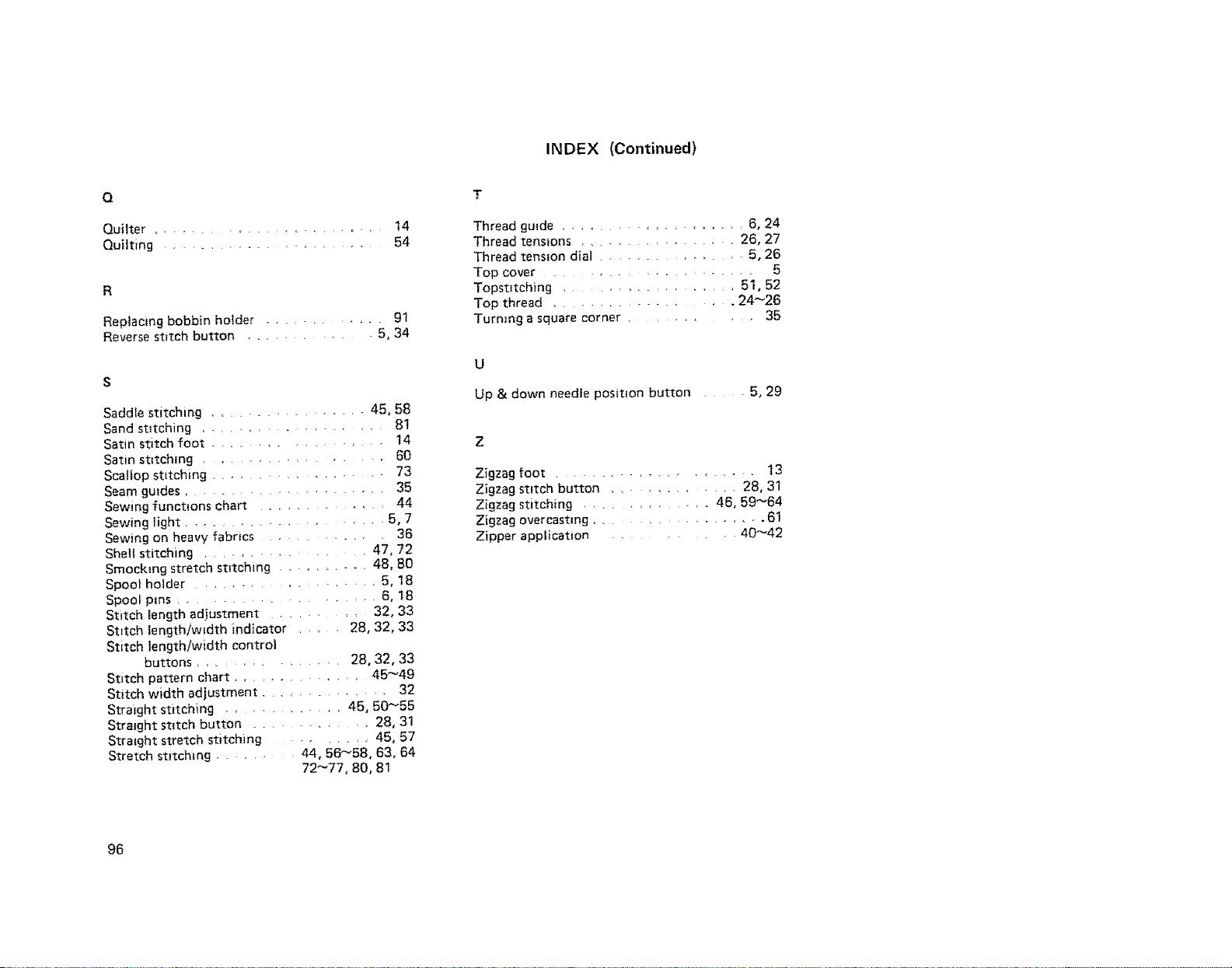
Q
QuiIter ................. 14
Quilting........................ 54
R
Replacingbobbinholder.......... 91
Reversestitchbutton ......... 5,34
Saddle stitching ............. 45, 58
Sand st+tching ..................... 8!
Satin stitch foot ................... 14
Satin st+tching .................... 60
Scallop stitching ............ 73
Seam guides ................... 35
Sewing functions chart ........... 44
Sewing light ................... 5, 7
Sewing en heavy fabrics .......... 36
Shell stitching ............. 47, 72
Smocking stretch stitching ....... 48, 80
Spool holder .................. 5, 18
Spool pros .............. 6, 18
Stitch length adjustment .......... 32, 33
Stitch length/width indicator ...... 28, 32, 33
Stitch length/width control
buttons .............. 28, 32, 33
Stitch pattern chart ............ 45_49
Stitch width adjustment .............. 32
Straight stitching ........... 45, 50_55
Straight stitch button ....... 28, 31
Straight stretch stitching ....... 45, 57
Stretch stitching ........ 44, 56_58, 63, 64
72_77, 80, 81
INDEX (Continued)
Thread guide ................ 6, 24
Thread tens+ons ........... 26, 27
Thread tens+on dial ....... 5, 26
Top cover ................. 5
Topst_tch)ng ................ 51, 52
Top thread ........... 24--+26
Turmng a square corner ......... 35
U
Up & down needle posit+on button ..... 5, 29
Zigzag foot .............. 13
Zigzag stEtch button .......... 28, 31
Z_gzag stitching ............. 46, 5£_+64
Zigzag overcastmg ............. 61
Zipper application .......... 40",-42
96
÷
#
#
#
#
#
÷
#
WARRANTY
FULL 25-YEAR WARRANTY ON SEWING MACHINE HEAD
For 25 years from the date of purchase, Sears will, free of charge, repair defects _n material or workmanship which
appear in the sewing machine head.
FULL TWO YEAR WARRANTY ON ELECTRICAL EQUIPMENT OF SEWING MACHINE
For two years from the date of purchase, Sears wilf, free of charge, repair defects in material or workmanship which
appear in the electrical and electronic equipment of the sewing machine, including motor, wiring, switch and speed control
and printed circuit boards.
FULL 90-DAY WARRANTY ON ALL PARTS AND MECHANICAL ADJUSTMENTS
For 90 days from the date of purchase, Sears will, free of charge, replace any parts and provide mechamcai service
necessary for pro_er operation of the sewing machine, except for normaJ maintenance.
To
THE UNITED STATES. This warranty applies only while this product is in use _n the United States.
obtain warranty service described above, SIMPLY CONTACT THE NEAREST SEARS STORE OR SERVICE CENTER 1N
This warranty gives you specific legal r=ghts, and you may also have other rights which vary from state to state.
SEARS, ROEBUCK AND CO., Dept. 698/731A, Sears Tower, Chicago, IL 60684
#
÷
÷
÷
#
#
÷
#
#
#
÷
÷
÷
#
÷
÷
SEWING MACHINE
Now that you have purchased your Kenmore Sewing Machine, should a need ever exist for repair parts
or service, s_mpty contact any Sears Service Center and most Sears, Roebuck and Co., Stores. Be sure to
provide all pertinent facts when you call or wsit.
The model number of your Sewing Machine win be shown on your nomenclature plate on the back of
your Sewing Machine. See page 6 for location.
WHEN ORDERING REPAIR PARTS, ALWAYS GIVE THE FOLLOWING INFORMATION:
* MODEL NUMBER *NAME OF ITEM _PART DESCRIPTION
tf the parts you need are not stocked locally, your order will be electromcally transmitted to a Sears
Repair Parts Distribution Center for handling.
SEARS, ROEBUCK AND CO., Chicago, IL60684 U.S.A.
S.385 Printed in Japan Part No, 823800036