Owner's Manual
Manual Del Propietario
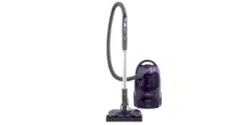
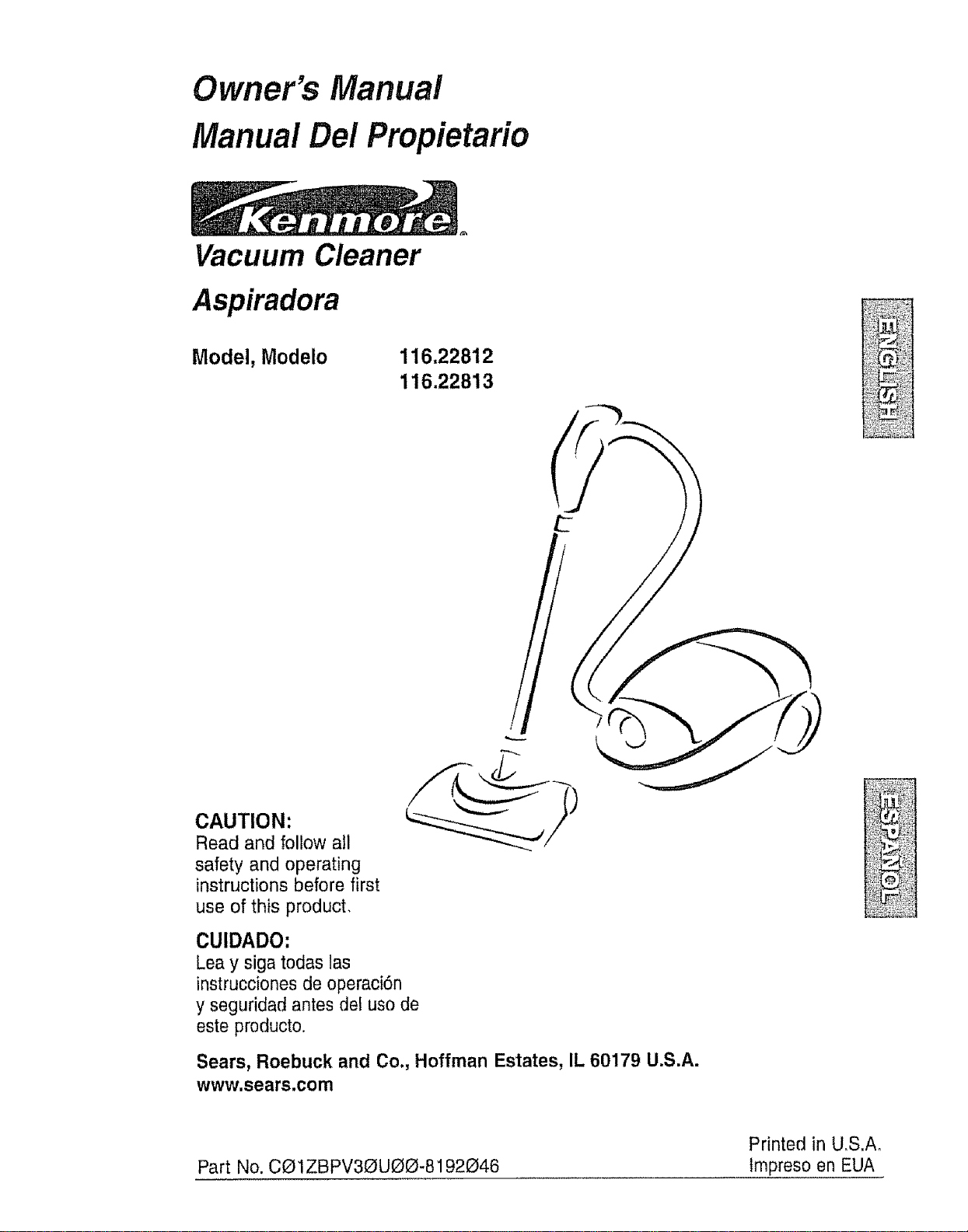
Vacuum Cleaner
Aspiradora
Model, Modelo
116.22812
116.22813
CAUTION:
Read and follow all
safety and operating
instructions before first
use of this product,
CUIDADO:
Lea y siga todas las
instrucciones de operaci6n
y seguridad antes del use de
este preducto.
Sears, Roebuck and Co., Hoffman Estates, IL 60179 U.S.A.
www.sears.com
Part No. CO 1ZBPV30UOO-8192046
Printed in U,S,Ao
Impreso en EUA
Before Using Your New Vacuum ....... 2
Kenmore Vacuum Cleaner Warranty .... 2
Important Safety Instructions ....... 3
Parts and Features ................. 4-5
Assembly Instructions ............ 6.7
USe ................................ 8
How to Start .............................. 8
Vacuuming Tips ...................... 9
Suggested Pile Height Settings .......... 9
Dirt Sensor ....................... 10
Attachments ..................... 11
Attachment Use Chart .................... 12
Performance Features ............. 12-13
How Your Vacuum Works ................ 14
Canister Care ......................... 14
Bag Changing ....................... 14
Cleaning Exterior and Attachments ..... 15
Motor Safety Filter Changing ........... 15
Exhaust Filter Changing .............. 16
Power-Mate ®Care ..................... 16
Belt Changing and Agitator Cleaning ,_ 17-18
Light Bulb Changing ................. 18
Agitator Servicing .................. t9
Agitator Assembly .................. 19
Troubleshooting .................. 20
Requesting Assistance
Or Service .................. Back Cover
Please read this guide. It will help you assembie and operate your new Kenmore vacuum in
the safest and most effective way.
For more information about vacuum cleaner care and operation, call your nearest Sears store,
You will need the complete model and serial numbers when requesting information. Your vacu-
um's model and serial numbers are located on the Model and Serial Number Plate.
Use the space below to record the model number and serial number of your new Kenmore
vacuum,
Model No.
Serial No.
Date of Purchase
Keep this book and your sales check (receipt) in a safe place for future reference.
LIMITED ONEYEAR WARRANTY ON KENMORE VACUUM CLEANER
This warranty is for one year from the date of purchase, and includes only private household
vacuum cleaner use° During the warranty year, when this vacuum cleaner is operated and
maintained according to the owner's manual instructions, Sears wiil repair any defects in
material or workmanship free of charge°
This warranty excludes vacuum bags, be_ts, light bulbs, and filters, which are expendable parts
and become worn during normal use.
For warranty service, return this vacuum cleaner to the nearest Sears Service Center in
the United States.
This warranty applies only while this product is in use in the United States. This warranty gives
you specific legal rights, and you may also have other rights which vary from state to state.
Sears, Roebuck and Co., D!817 WA, Hoffman Estates, IL 60179
WARNING
Your safety is important to us, To reduce the risk of fire, electrical shock, injury
to persons or damage when using your vacuum cleaner, follow basic safety pre-
cautions including the following:
Read this manual before assembling or
using your vacuum cleaner.
Use your cleaner only as described in this
manual. Use only with Sears recommended
attachments_
To reduce the risk of electrical shock - Do
not use outdoors or on wet surfaces.
Disconnect electrical supply before servic-
ing or cleaning out agitator area, Failure to
do so could result in electrical shock or
brush suddenly starting.
Always turn cleaner off before connecting
or disconnecting the hose or Power-Mate _,
Always turn cleaner off before unplugging.
Do not unplug by pulling on cord. To
unplug, grasp the plug, not the cord.
Hold plug when rewinding onto cord reelo
Do not allow plug to whip when rewinding.
Do not use with damaged cord or plug. If
cleaner is not working as it should, has
been dropped, damaged, left outdoors, or
dropped into water, return it to a Sears
Service Center.
Do not pull or carry by cord, use cord as a
handle, close door on cord, or pull cord
around sharp edges or corners. Do not run
cleaner over cord. Keep cord away from
heated surface&
Do not leave cleaner when plugged in.
UnphJg from outlet when not in use and
before servicing°
Do not allow to be used as a toy. Close
attention is necessary when used by or
near children.
Do not handle plug or cleaner with wet
hands.
Do not put any objects into openings.
Do not operate the cleaner with a punc-
SAV THES
tured hose. The hose contains electrical
wires. Replace if cut or worn. Avoid picking
up sharp objects.
Do not use with any opening blocked; keep
free of dust, lint, hair and anything that may
reduce air flow.
Keep hair, loose clothing, fingers, and all
parts of body away from openings and mov-
ing parts,
Do not use cleaner without dust bag and/or
filters in place
Always change the dust bag after vacuum-
ing carpet cleaners or freshener, powders
and fine dust. These products clog the bag,
reduce airflow and can cause the bag to
bursL Failure to change bag could cause
permanent damage to the cleaner.
Do not use the cleaner to pick up sharp
hard objects, stoa!! toys, pins, paper clips,
etc. They may damage the cleaner or dust
bag.
Do not pick up anything that is burning or
smoking, such as cigarettes, matches, or
hot ashes.
Do not use cleaner to pick up ftammable or
combustible liquids (gasoline, cieaning flu-
ids, perfumes, etc.), or use in areas where
they may be present. The fumes from these
substances can create a fire hazard or
explosion.
Use extra care when cleaning on stairs, Do
not put on chairs, tables, etc. Keep on floor..
You are responsible for making sure that
your vacuum cleaner is not used by anyone
unable to operate it properly
Do not operate without exhaust filter or
exhaust filter cover installed.
iNSTRUCTIONS
Proper assembly and safe use of your vacuum cleaner are your responsibilities, Your cleaner
is intended only for household use. Read this Owner's Manual carefully for important use and
safety information. This guide contains safety statements under warning and caution symbols.
Please pay special attention to these boxes and follow any instructions given° WARNING
statements alert you to such hazards as fire, electrical shock, burns and personal injury.
CAUTION, statements alert you to such hazards as pe[s0nal iniury and/o,r property damaqe,
3
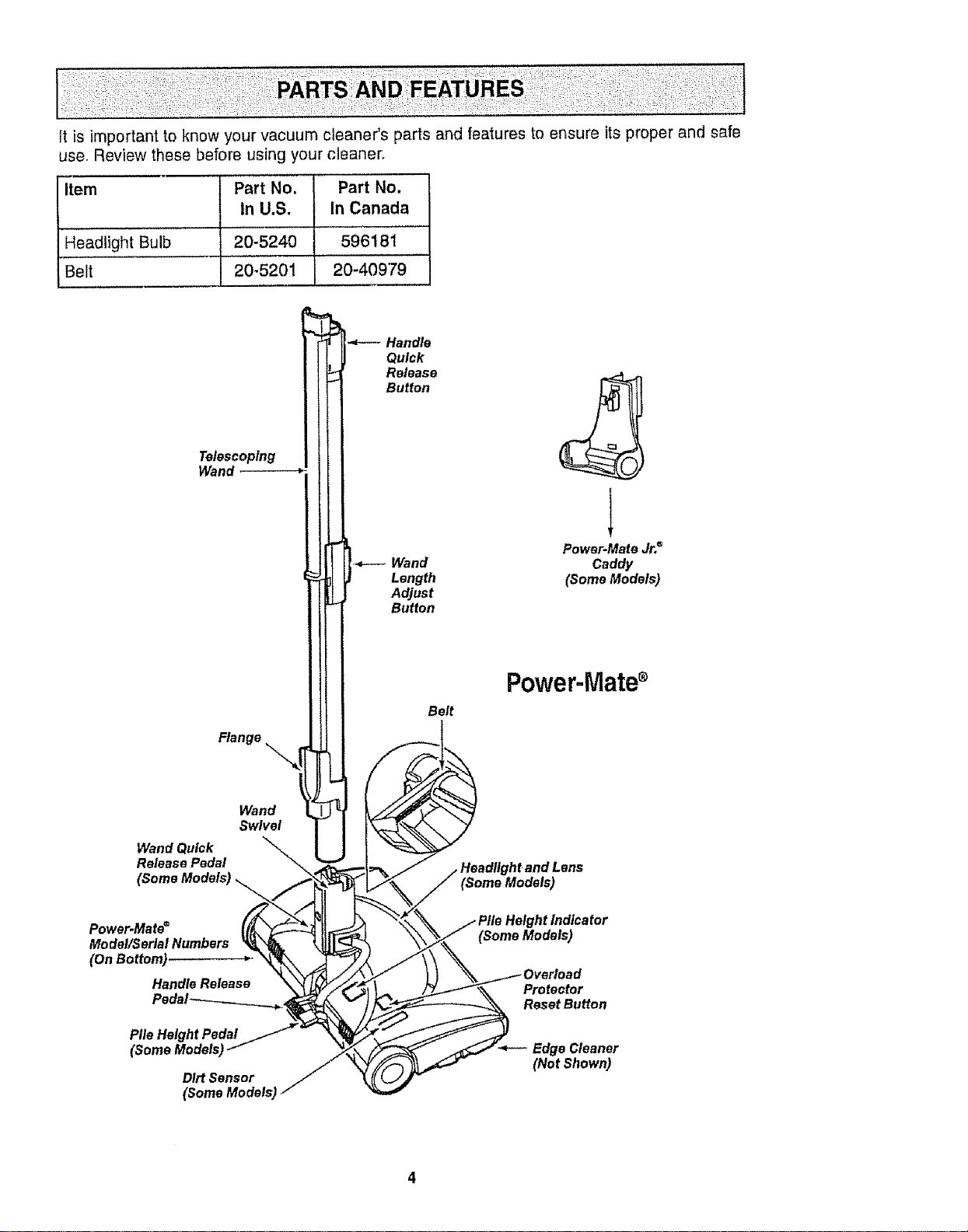
Itisimportanttoknowyourvacuumcleaner'spartsandfeaturestoensureitsproperandsafe
use.Reviewthesebeforeusingyourcleaner.
Item PartNo. PartNo.
In U.S. in Canada
HeadlightBulb 20-5240 596181
Belt 20-5201 20-40979
Telescoping
Wand
Flange
Wand
Swivel
Wand Quick
Release Pedal
Power.Mate®
Model/SerialNumbers
(OnBottom)
HandleRelease
PileHeightPedal
(SomeModels)
Dirt Sensor
(Some Models)
-t--- andle
Quick
11l[ _ Wand
_[ _ Length
lit Belt
Power.Mate Jr._
Caddy
(Some Models)
Power-Mate®
Lens
(Some Models)
dlcator
Protector
Reset Button
Edge Cleaner
(Not Shown)
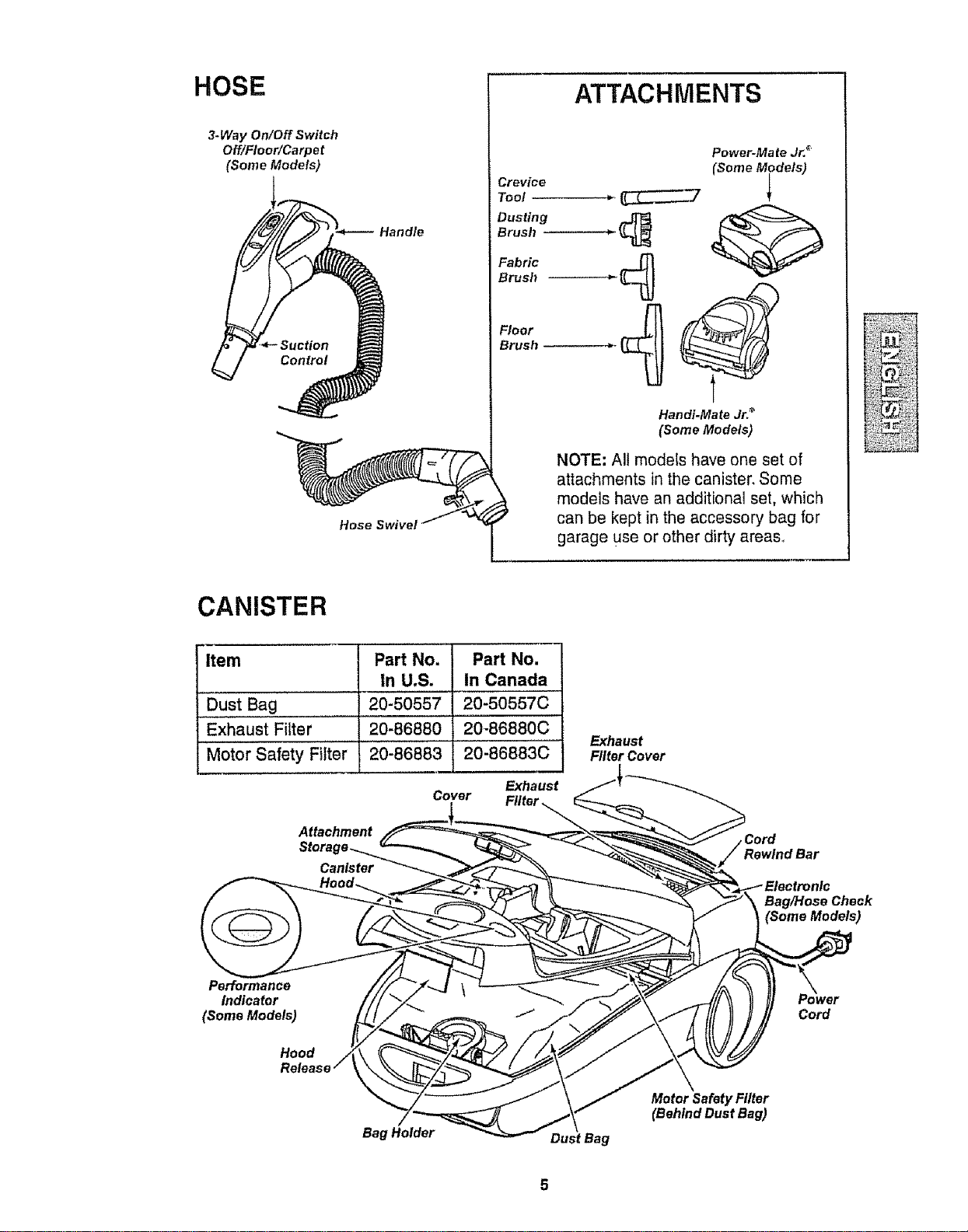
HOSE
3-Way On/Off Switch
Off/Floor/Carpet
(Some Models)
Hose Swivel
ATTACHMENTS
Power-Mate Jr. _"
(Some Models)
Crevice
Tool _
Dusting
Brush _
Fabric
Brush
Brush _*-
Handi-Ma te Jr:_
(Some Models)
NOTE: All modets have one set of
attachments in the canister. Some
models have an additional set, which
can be kept in the accessory bag for
garage use or other dirty areas..
CANISTER
Item Part No. Part No.
in U.S. In Canada
Dust Bag 20-50557 20-50557C
Exhaust Filter 20-86880 20-86880C
Motor Safety Filter 20-86883 20-86883C
Exhaust
Cover
_, Ftlter _
Attachment
Canister
Exhaust
Filter Cover
Cord
Bag/Hose Check
(Some Models)
Performance
Indicator
(Some Models)
Hood
Cord
Bag Holder
Motor Safety Filter
(Behind Dust Bag)
• WARNING
Electrical Shock Hazard
DO NOT plug into electrical supply
until assembly is complete, Failure
to do so could result in electrical
shock or injury.
, i I i!11!'1 ,INI
Before assembling vacuum, check the
PACKING LIST on the cover of the separate
Repair Parts List, Use this list to verify that
you have received all the components of
your new Kenmore vacuum,
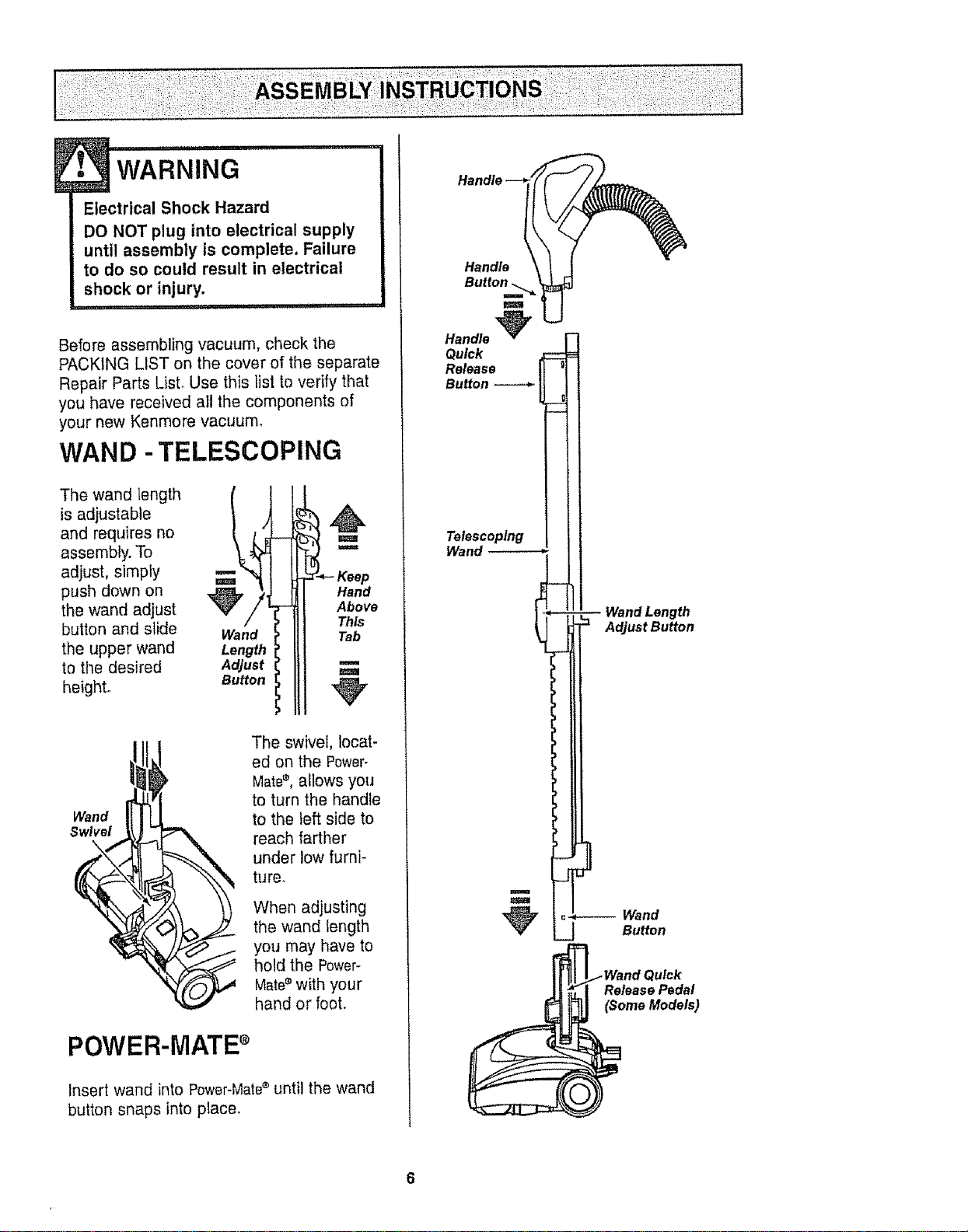
WAN D -TELESCOPING
The wand length (
is adjustable
and requires no
assembly. To
adjust, simply
push down on ,_,/
the wand adjust 1
button and slide Wand
the upper wand Length
to the desired Adjust
height. Button
Hand
Above
This
Tab
m
Wand
Swivel
\
The swivel, locat-
ed on the Power°
Mate®, allows you
to turn the handle
to the left side to
reach farther
under low furni-
ture.
When adjusting
the wand length
you may have to
hold the Power-
Mate®with your
hand or foot.
POWER-MATE+
Insert wand into Power-Mate®until the wand
button snaps into ptace.
Handle
m
Handle _
Quick
Release
Button
Telescoping
Wand
Wand Length
Adjust Button
Release Pedal
(Some Models)
CANISTER
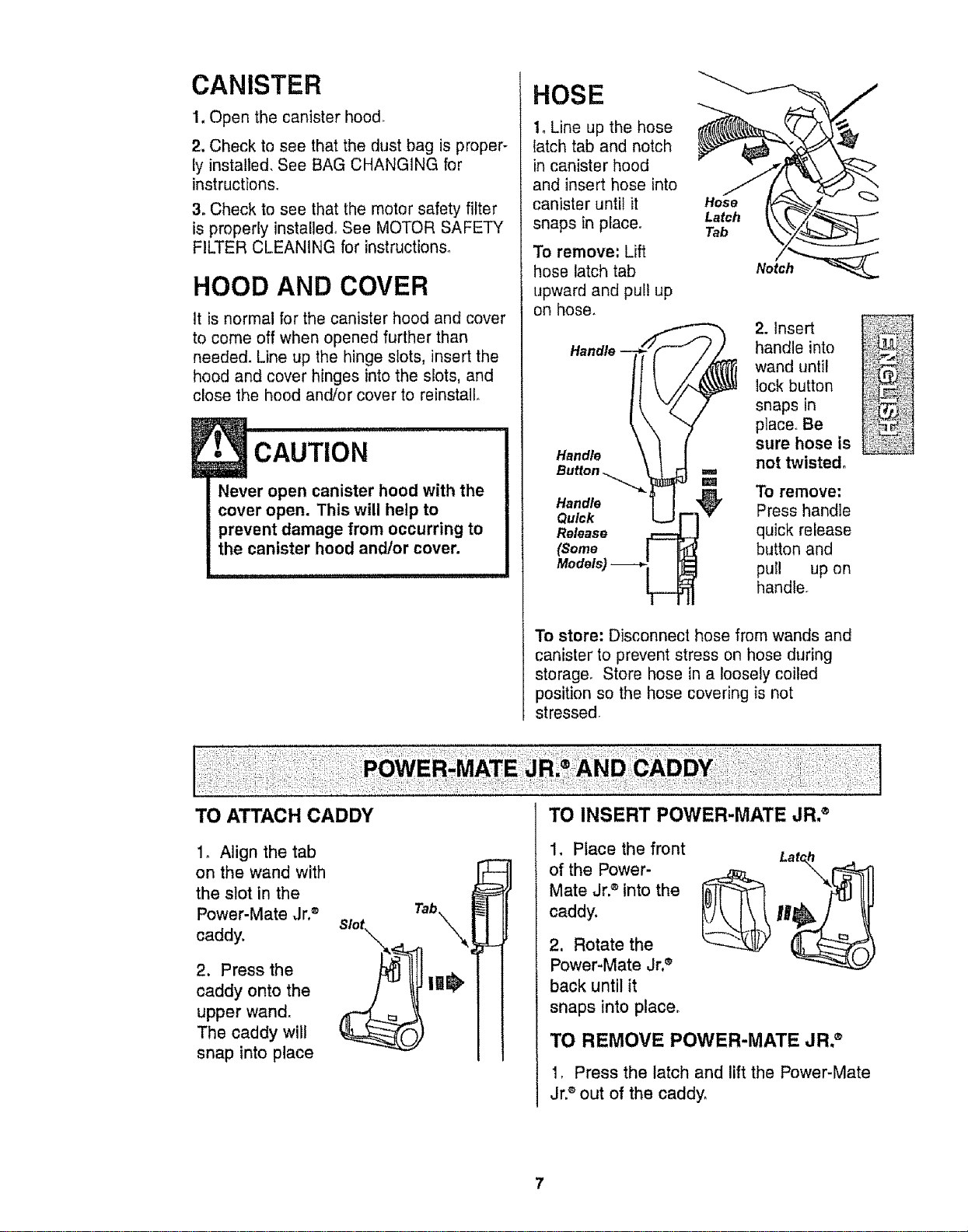
1, Open the canister hood.
2. Check to see that the dust bag is proper-
ly installed. See BAG CHANGING for
instructions.
3. Check to see that the motor safety filter
is properly installed. See MOTOR SAFETY
FILTER CLEANING for instructions.
HOOD AND COVER
It is normal for the canister hood and cover
to come off when opened further than
needed. Line up the hinge slots, insert the
hood and cover hinges into the slots, and
close the hood and/or cover to reinstall
CAUTION
Never open canister hood with the
cover open. This will help to
prevent damage from occurring to
the canister hood and/or cover.
HOSE
1oLine up the hose
latch tab and notch
in canister hood
and insert hose into
canister until it
snaps in place_
To remove', Lift
hose latch tab
upward and pul! up
on hose_
Hose
Latch
Tab
Notch__
2. Insert
handle into
wand until
lock button
snaps in
place,, Be
sure hose is
not twisted,
Handle
Button ==
To remove:
Handle Press handle
Quick
Release quick release
(Some button and
pull up on
handle.
To store: Disconnect hose from wands and
canister to prevent stress on hose during
storage. Store hose in a loosely coiled
position so the hose covering is not
stressed.
1o Align the tab
on the wand with
the slot in the
Power-Mate Jr,®
caddy.
2. Press the
caddy onto the
upper wand.
The caddy wilt
snap into place
1, Place the front
of the Power-
Mate Jr.®into the
caddy.
2, Rotate the
Power-Mate Jr,®
back until it
snaps into place,
TO REMOVE POWER'MATE JR.®
1, Press the latch and lift the Power-Mate
Jr.®out of the caddy,
HOW TO START
WARNING
Personal Injury and Product Damage
Hazard
• DO NOT plug in if switch is in ON
position. Personal injury or
damage could result.
, The cord moves rapidly when
rewinding. Keep children away
and provide a clear path when
rewinding the cord to prevent
personal injury°
, DO NOT use outlets above
counters. Damage from cord to
items in surrounding area
coulldoccur.
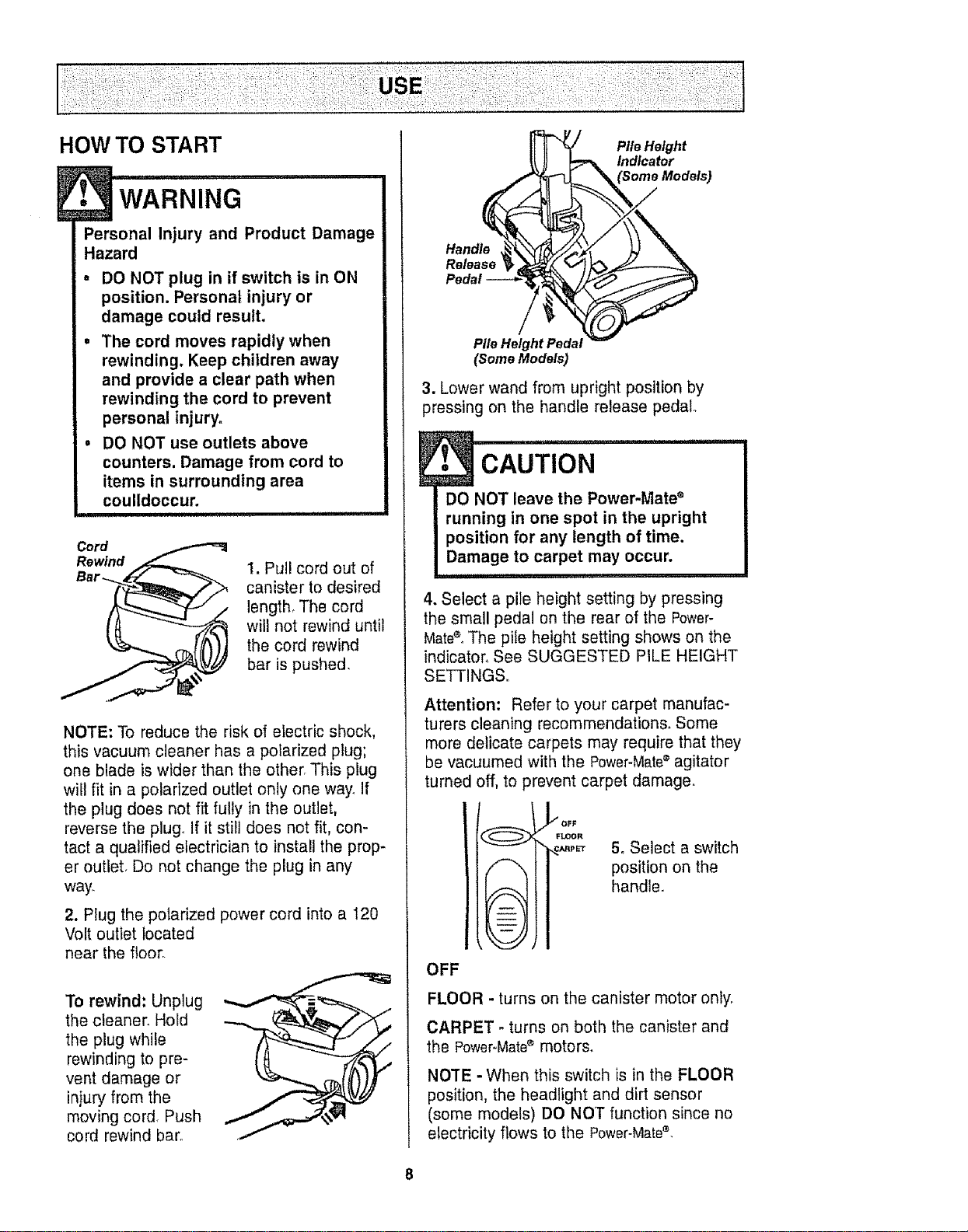
Cord
Rewind
1. Pull cord out of
canister to desired
length, The cord
will not rewind until
the cord rewind
bar is pushed.
NOTE: To reduce the risk of electric shock,
this vacuum cleaner has a polarized plug;
one blade is wider than the other. This plug
will fit in a polarized outlet only one way, If
the plug does not fit fully in the outlet,
reverse the plug_ If it still does not fit, con-
tact a qualified electrician to install the prop-
er outlet, Do not change the plug in any
way.
2. Plug the polarized power cord into a 120
Volt outlet located
near the floor
To rewind: Unplug
the cleaner. Hold
the plug while
rewinding to pre-
vent damage or
injury from the
moving cord, Push
cord rewind bar.
Pile Height
Indicator
Handle
Pile Height Pedal
(someModels)
3. Lower wand from upright position by
pressing on the handle release pedal
cAuTioN
DO NOT leave the Power-Mate ®
running in one spot in the upright
position for any length of time.
Damage to carpet may occur.
.... ul,
4. Select a pile height setting by pressing
the small pedal on the rear of the Power-
Matee.The pile height setting shows on the
indicator_ See SUGGESTED PILE HEIGHT
SETTINGS,,
Attention: Refer to your carpet manufac-
turers cleaning recommendations° Some
more delicate carpets may require that they
be vacuumed with the Power-Matee agitator
turned off, to prevent carpet damage.
_OFF
%. FLOOR
_PET 5oSelect a switch
position on the
handle.
OFF
FLOOR - turns on the canister motor only.
CARPET - turns on both the canister and
the Power-Mate® motors.
NOTE - When this switch is in the FLOOR
position, the headlight and dirt sensor
(some models) DO NOT function since no
electricity flows to the Power-Matee,
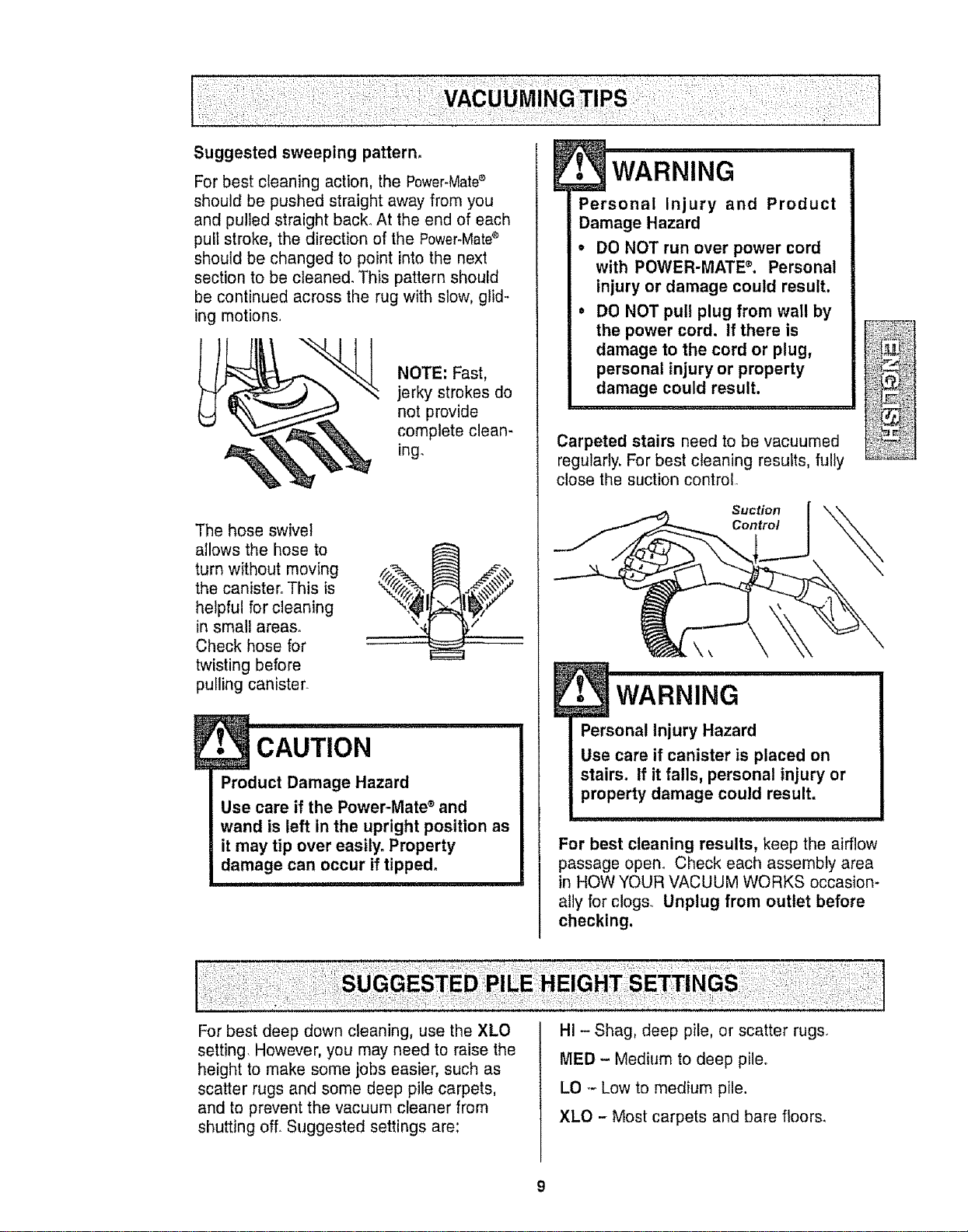
Suggested sweeping pattern°
For best cleaning action, the Power-Mated
should be pushed straight away from you
and pulled straight back. At the end of each
pull stroke, the direction of the Power-Mate®
should be changed to point into the next
section to be cleaned. This pattern should
be continued across the rug with slow, glid-
ing motions.
NOTE: Fast,
jerky strokes do
not provide
complete clean-
ing.
The hose swivel
ailows the hose to
turn without moving
the canister° This is
helpful for cleaning
in small areas.
Check hose for
twisting before
pulling canister.
E
• CAUTION
Product Damage Hazard
Use care if the Power-Mate ° and
wand is left in the upright position as
it may tip over easily. Property
damage can occur if tipped.
Personal Injury and Product
Damage Hazard
• DO NOT run over power cord
with POWER-MATE% Personal
injury or damage could result.
= DO NOT pull plug from wall by
the power cord. if there is
damage to the cord or plug,
personal injury or property
damage could result.
Carpeted stairs need to be vacuumed
regularly. For best cleaning results, fully
close the suction control.
R
Suction
Control
Personal Injury Hazard
Use care if canister is placed on
stairs, if it falls, personal injury or
property damage could result.
For best cleaning results, keep the airflow
passage open° Check each assembly area
in HOW YOUR VACUUM WORKS occasion-
ally for clogs. Unplug from outlet before
checking.
For best deep down cleaning, use the XLO
setting. However, you may need to raise the
height to make some jobs easier, such as
scatter rugs and some deep pile carpets,
and to prevent the vacuum cleaner from
shutting off. Suggested settings are:
HI - Shag, deep pile, or scatter rugs.
MED - Medium to deep pile.
LO _-Low to medium pile.
XLO - Most carpets and bare floors.
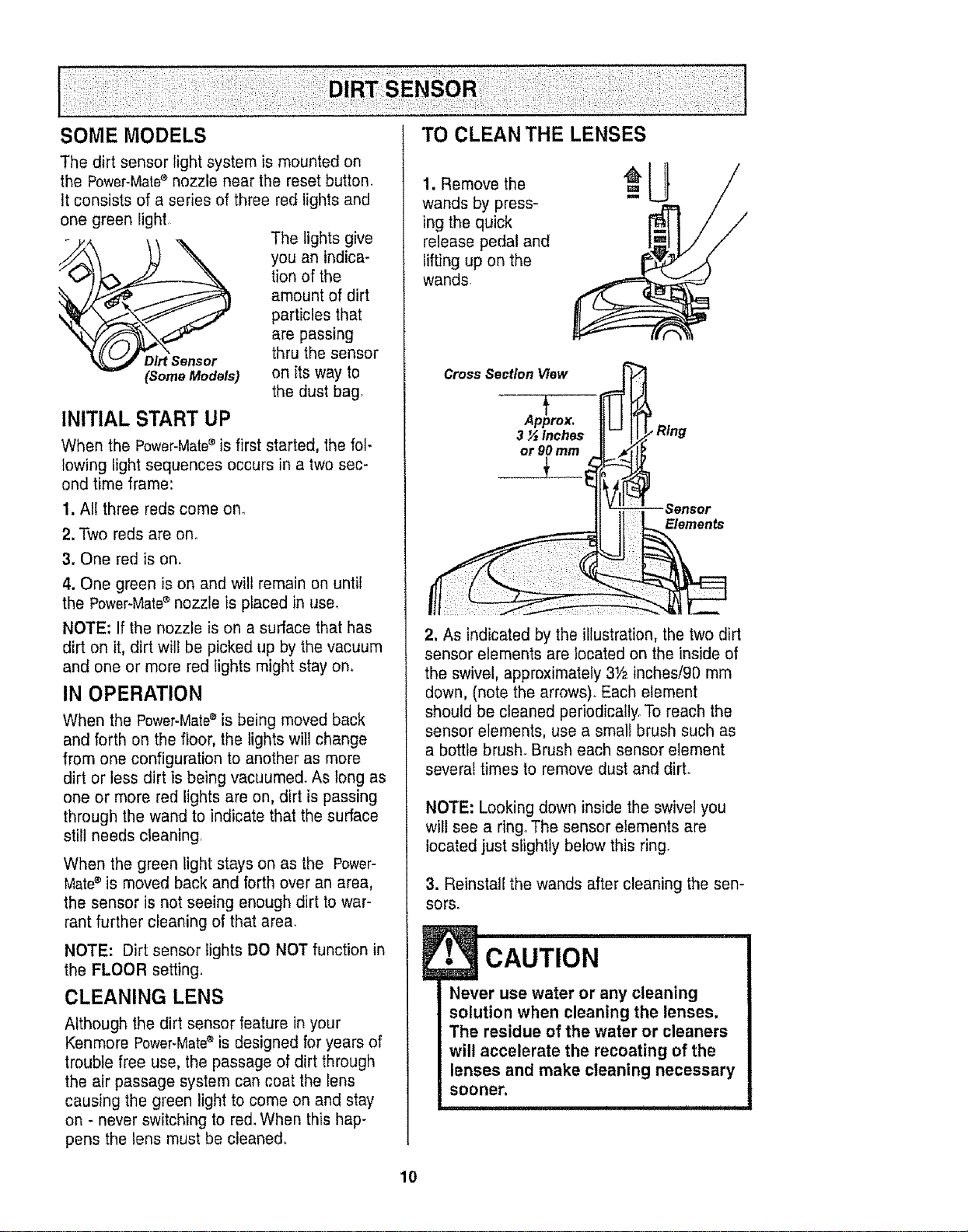
Thedirtsensorlightsystemismountedon
thePower-Matesnozzleneartheresetbutton.
Itconsistsofaseriesofthreeredlightsand
onegreenlight
Thelightsgive
youanindica-
tionofthe
amountofdirt
particlesthat
arepassing
Dirt Sensor thru the sensor
(Some Models) on its way to
the dust bag.
INITIAL START UP
When the Power-Mate_ is first started, the fol-
lowing light sequences occurs in a two sec-
ond time frame:
1, All three reds come one
2. Two reds are one
3. One red is on.
4. One green is on and will remain on until
the Power-Mate_ nozzle is placed in use.
NOTE: If the nozzle is on a surface that has
dirt on it, dirt will be picked up by the vacuum
and one or more red Iights might stay on.
IN OPERATION
When the Power-Mates is being moved back
and forth on the floor, the lights will change
from one configuration to another as more
dirt or less dirt is being vacuumed. As long as
one or more red lights are on, dirt is passing
through the wand to indicate that the surface
still needs cleaning,
When the green tight stays on as the Power-
Mate®is moved back and forth over an area,
the sensor is not seeing enough dirt to war-
rant further cleaning of that area,
NOTE: Dirt sensor tights DO NOT function in
the FLOOR setting.
CLEANING LENS
Although the dirt sensor feature in your
Kenmore Power-Mate®is designed for years of
trouble free use, the passage of dirt through
the air passage system can coat the lens
causing the green light to come on and stay
on - never switching to red. When this hap-
pens the lens must be cleaned.
1. Remove the
wands by press-
ing the quick
release pedal and
lifting up on the
wands
°U
2, As indicated by the illustration, the two dirt
sensor elements are located on the inside of
the swivel, approximately 31/2inches/90 mm
down, (note the arrows). Each element
should be cleaned periodically. To reach the
sensor elements, use a small brush such as
a bottle brush. Brush each sensor element
several times to remove dust and dirL
NOTE: Looking down inside the swivel you
will see a ring° The sensor elements are
located just slightly below this ring°
3. Reinstall the wands after cleaning the sen-
sors.
CAUTION
The residue of the water or cleaners
will accelerate the recoating of the
lenses and make cleaning necessary
sooner.
t t ,i i, , _ _ t
10
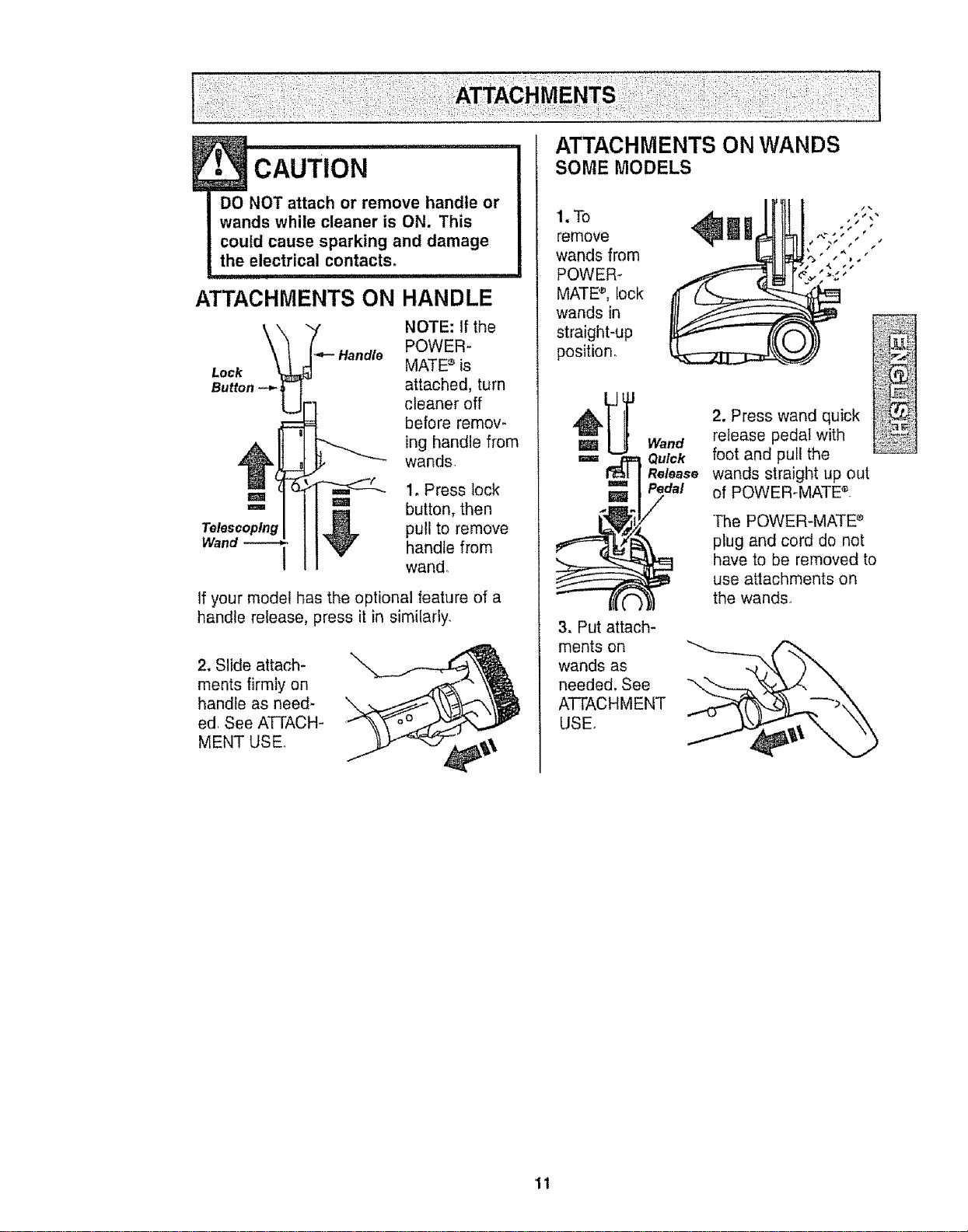
E• CAUTION
DO NOT attach or remove handle or
wands while cleaner is ON. This
could cause sparking and damage
the electrical contacts°
ATTACHMENTS ON HANDLE
NOTE: If the
POWER-
MATE '_is
attached, turn
cleaner off
before remov-
ing handle from
wands
1o Press lock
=1 _ma button, then
Telescoping _ pU{I to remove
Wand _ V handle from
/
wand..
If your model has the optional feature of a
handle release, press it in similarly,
2. Slide attach-
ments firmly on
handle as need- \
ed. See ATTACH-
MENT USE.
ATTACHMENTS ON WANDS
SOME MODELS
1.To
remove
wands from
POWER-
MATE 'v, lock
wands in
straight-up
position.
_ _ Wand
=== _ Quick
Release
m= Pedal
=/
3. Put attach-
ments on
wands as
needed. See
ATTACHMENT
USE.
2. Press wand quick
release pedal with
foot and pull the
wands straight up out
of POWER-MATE ®,
The POWER-MATE ®
plug and cord do not
have to be removed to
use attachments on
the wands.
11
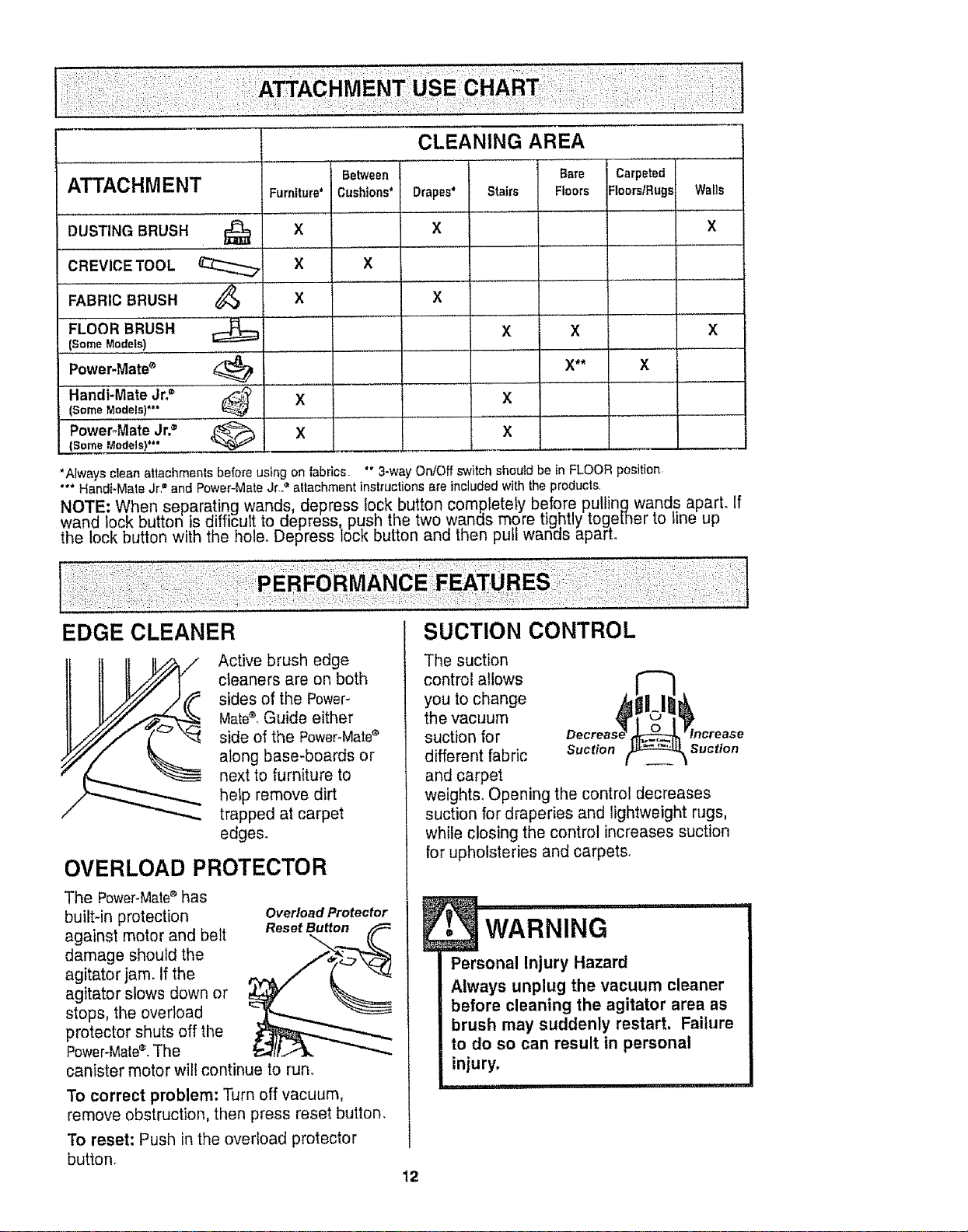
FABRIC BRUSH
FLOOR BRUSH
(Some Models)
Power.Mate®
Handi-Mate Jr.=
(Some Models)*"
PowePMate Jr,®
(Some Models)*'*
Furniture*
x
x
x
x
x
x
x xX
X** X
X
X
'Always clean attachments before using on fabrics "* 3-wayOnlOff switch should be in FLOOR position
"** Handi-Mate Jr" and Power-Mate Jr.2 altachment instructions are included with the products
NOTE: When separating wands, depress Iock, bu!ton completely before Rullinc_wands apart. If
wand lock button is d ff cut to eepress, pusn the two wanes more [ignuy _ogetner to line up
the lock button with the hole. Depress lock button and then pu wan_s aparL
Active brush edge
cleaners are on both
sides of the Power-
Mate®. Guide either
side of the Power-Mate_
along base-boards or
next to furniture to
help remove dirt
trapped at carpet
edges.
OVERLOAD PROTECTOR
The Power-Mate®has
built-in protection Overload Protector
against motor and belt Reset Button
damage should the
agitator jam. if the
agitator slows down or
stops, the overload
protector shuts off the
PoNer-Mate®_The
canister motor will continue to run_
To correct problem: Turn off vacuum,
remove obstruction, then press reset button.
To reset: Push in the overload protector
button°
The suction
control allows
you to change
the vacuum
suction for
different fabric suction suction
and carpet
weights. Opening the control decreases
suction for draperies and lightweight rugs,
while closing the control increases suction
for upholsteries and carpets.
12
i i iil,,llr '1
WARNING
Personal Injury Hazard
Always unplug the vacuum cleaner
before cleaning the agitator area as
brush may suddenly restart, Failure
to do so can result in personal
injury,
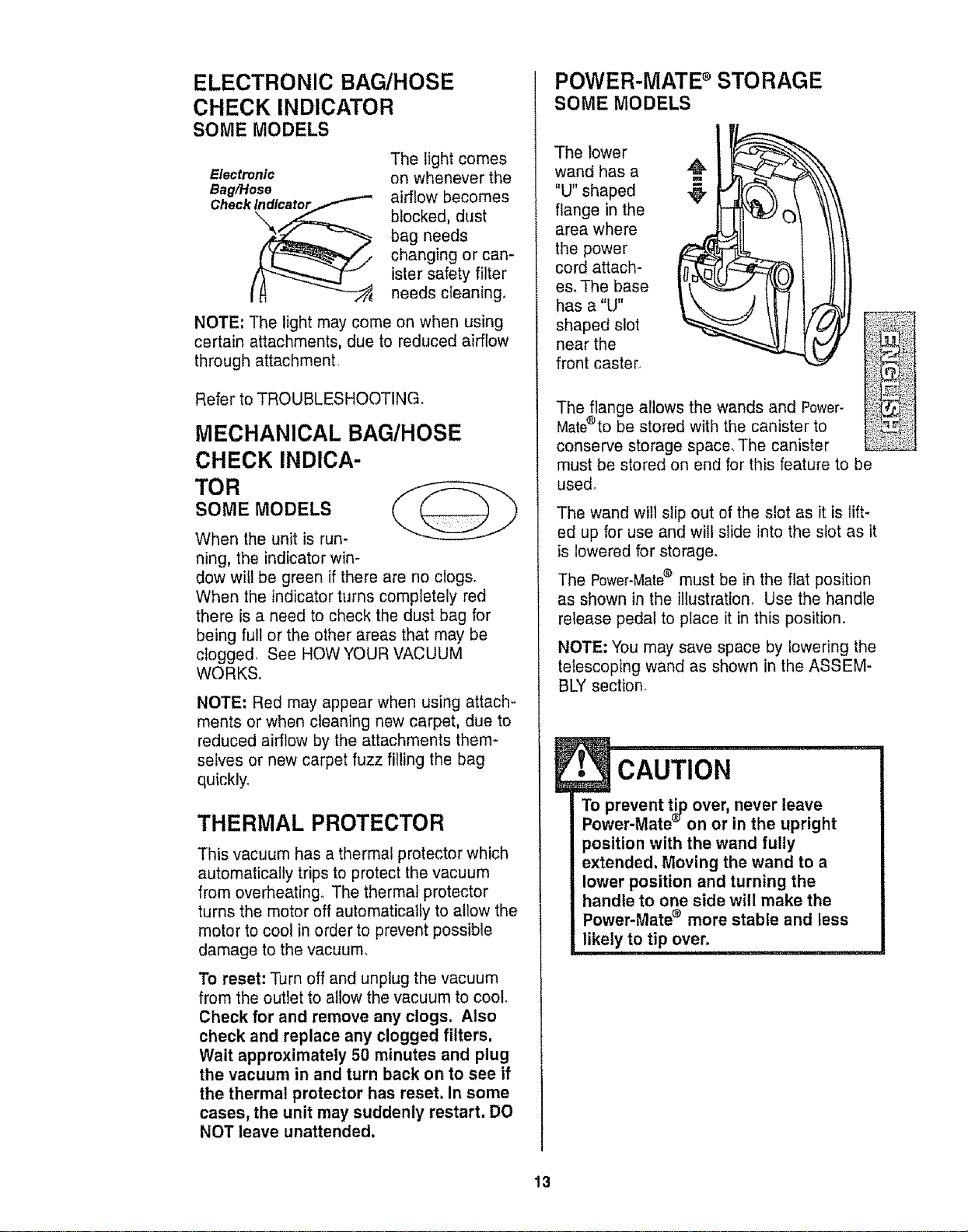
ELECTRONIC BAG/HOSE
CHECK INDICATOR
SOME MODELS
Electronic
Bag/Hose
Check_
The light comes
on whenever the
airflow becomes
blocked, dust
bag needs
changing or can-
ister safety filter
needs c{eaning,
NOTE; The light may come on when using
certain attachments, due to reduced airflow
through attachment
Refer to TROUBLESHOOTING.
MECHANICAL BAG/HOSE
CHECK INDICA-
TOR
SOME MODELS
When the unit is run-
ning, the indicator win-
dow will be green if there are no clogs.
When the indicator turns completely red
there is a need to check the dust bag for
being full or the other areas that may be
clogged, See HOW YOUR VACUUM
WORKS.
NOTE: Red may appear when using attach-
ments or when cleaning new carpet, due to
reduced airflow by the attachments them-
selves or new carpet fuzz filling the bag
quickly_
THERMAL PROTECTOR
This vacuum has a thermal protector which
automatically trips to protect the vacuum
from overheating° The thermal protector
turns the motor off automatically to allow the
motor to cool in order to prevent possible
damage to the vacuum.
To reset: Turn off and unplug the vacuum
from the outlet to allow the vacuum to cooL
Check for and remove any clogs. Also
check and replace any clogged filters,
Wait approximately 50 minutes and plug
the vacuum in and turn back on to see if
the thermal protector has reset, in some
cases, the unit may suddenly restart. DO
NOT leave unattended.
POWER-MATE s STORAGE
SOME MODELS
The lower
wand has a
"U" shaped
flange in the
area where
the power
cord attach-
es. The base
has a %"
shaped slot
near the
front caster
The flange allows the wands and Power-
Mate®to be stored with the canister to
conserve storage space. The canister
must be stored on end for this feature to be
used.
The wand will slip out of the slot as it is lift-
ed up for use and will slide into the slot as it
is lowered for storage.
The Power-Mate® must be in the flat position
as shown in the illustration° Use the handle
release pedal to place it in this position
NOTE; You may save space by lowering the
telescoping wand as shown in the ASSEM-
BLY section
pCAUTION
revent ti_ over, never leave
er-Mate _' on or in the upright
position with the wand fully
extended. Moving the wand to a
lower position and turning the
handle to one side will make the
Power-Mate ® more stable and less
likely to tip over.
13
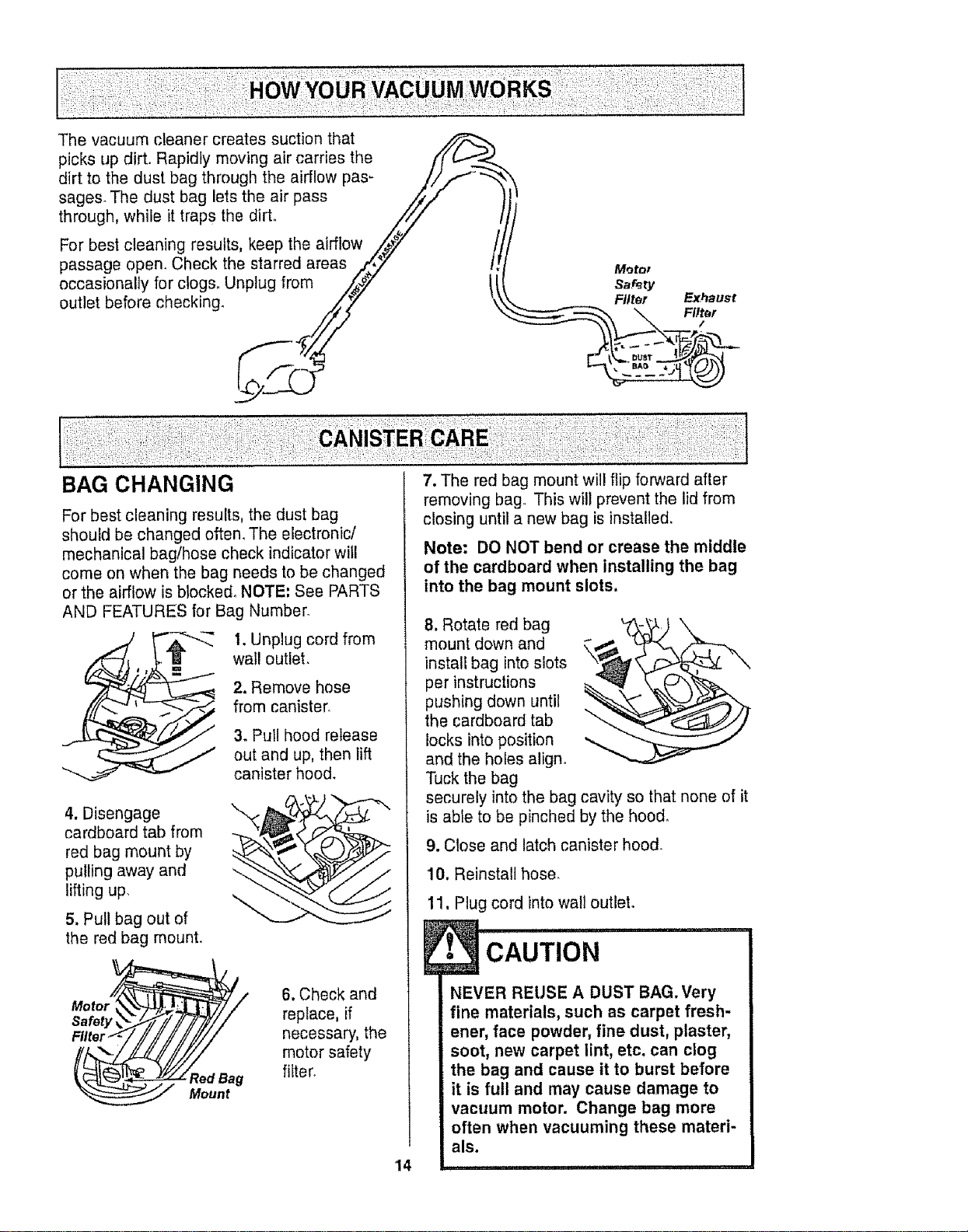
The vacuum cleaner creates suction that
picks up dirt. Rapidly moving air carries the f(
dirt to the dust bag through the airflow pas- //f _ _,
sages. The dust bag lets the air pass ./_/
through, while it traps the dirt,, Z/i / /
For best cleaning results, keep the airflow _y /,
passage open. Check the starred areas .._',_ /! Moto,
occasionally for clogso Unplug from/!/ t!t! s_r_ry\ Fl_.r
outlet before checking. Filter Exhaust
:i;:
BAG CHANGING
For best cleaning results, the dust bag
should be changed often. The electronic/
mechanical bag/hose check indicator will
come on when the bag needs to be changed
or the airflow is blocked° NOTE: See PARTS
AND FEATURES for Bag Number.
=
4. Disengage
cardboard tab from
red bag mount by
pulling away and
lifting up,
5. Pull bag out of
the red bag mount.
I. Unplug cord from
wail outlet.
2. Remove hose
from canister.
3. Pull hood release
out and up, then lift
canister hood.
Mot°r__._,_'JJ_>,___M_t:| 7// 6. Check and
Safety_._/////_/-/7// replace, if
Filter-*':/,//////////// necessary, the
",-. motor safety
(_dBag fiiter_
Mount
7. The red bag mount will flip forward after
removing bag.. This will prevent the lid from
closing until a new bag is installed,
Note: DO NOT bend or crease the middle
of the cardboard when installing the bag
into the bag mount slots.
8. Rotate red bag
mount down and
install bag into slots
per instructions
pushing down until
the cardboard tab
locks into position
and the holes align°
Tuck the bag
securely into the bag cavity so that none of it
is able to be pinched by the hood,
9. Close and latch canister hood.
10. Reinstall hose.
11. Plug cord into wall outlet,
................,.....
CAUTION
NEVER REUSE A DUST BAG. Very
fine materials, such as carpet fresh-
ener, face powder, fine dust, plaster,
soot, new carpet lint, etc. can clog
the bag and cause it to burst before
it is full and may cause damage to
vacuum motor. Change bag more
often when vacuuming these materi-
als.
4 ............................
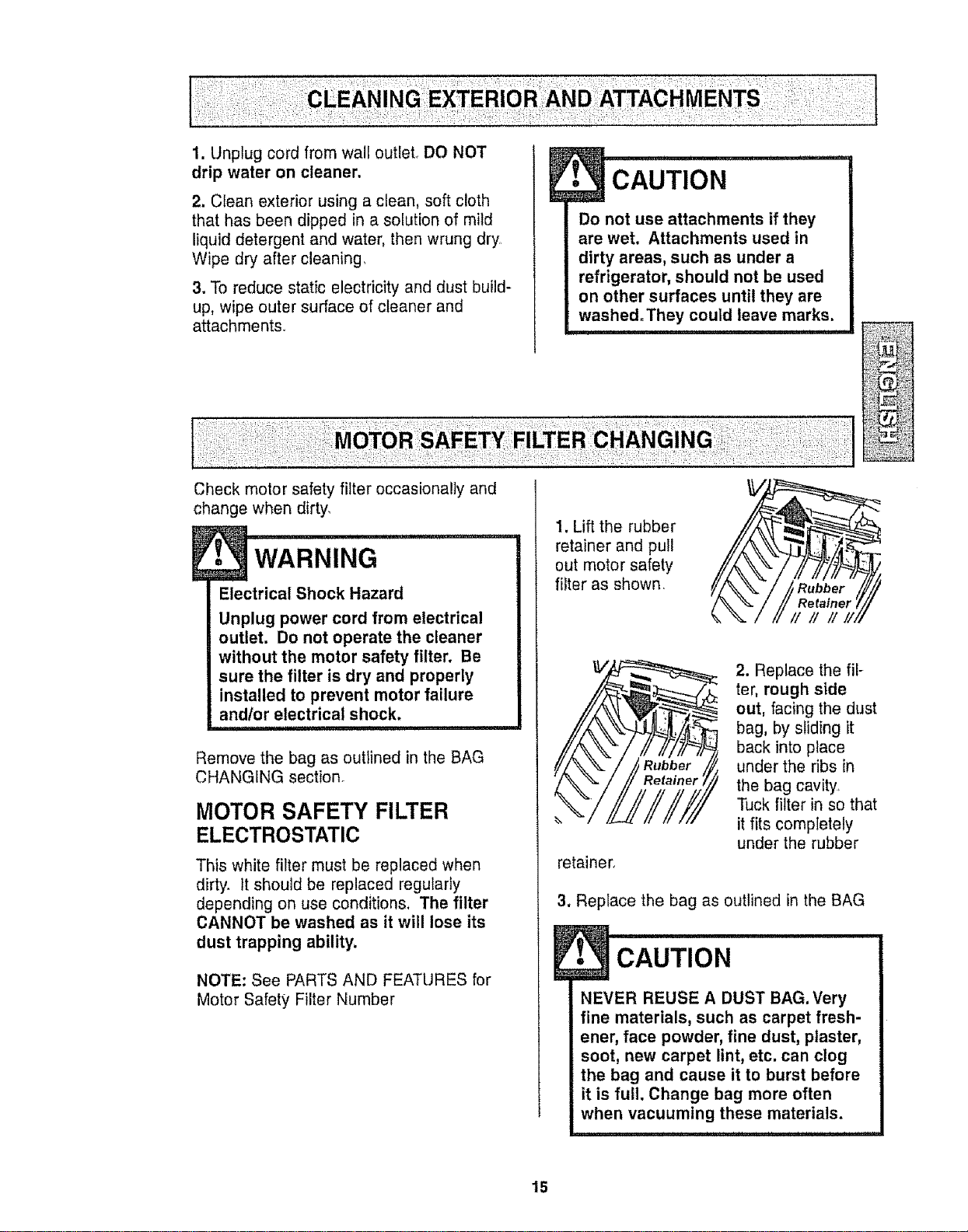
1. Unplug cord from wall outleL DO NOT
drip water on cleaner.
2. Clean exterior using a clean, soft cloth
that has been dipped in a solution of mild
liquid detergent and water, then wrung dry
Wipe dry after cleaning_
3. To reduce static electricity and dust build-
up, wipe outer surface of cleaner and
attachments
Check motor safety filter occasionally and
change when dirty.
Electrical Shock Hazard
Unplug power cord from electrical
outlet. Do not operate the cleaner
without the motor safety filter. Be
sure the filter is dry and properly
installed to prevent motor failure
andlor electrical shock,
Remove the bag as outlined in the BAG
CHANGING section.
MOTOR SAFETY FILTER
ELECTROSTATIC
This white filter must be replaced when
dirty. It should be replaced regularly
depending on use conditions. The filter
CANNOT be washed as it will lose its
dust trapping ability.
NOTE: See PARTS AND FEATURES for
Motor Safety Filter Number
CAUTION ..................
Do not use attachments if they
are wet. Attachments used in
dirty areas, such as under a
refrigerator, should not be used
on other surfaces until they are
washed.They could leave marks.
1. Lift the rubber
retainer and pull
out motor safety
filter as shown.
retaine_
2. Replace the fil-
ter, rough side
out, facing the dust
bag, by sliding it
back into place
under the ribs in
the bag cavity,
Tuck filter in so that
it fits completely
under the rubber
Replace the bag as outlined in the BAG
• CAUTION
NEVER REUSE A DUST BAG. Very
fine materials, such as carpet fresh-
ener, face powder, fine dust, plaster,
soot, new carpet lint, etc. can clog
the bag and cause it to burst before
it is full. Change bag more often
when vacuuming these materials.
15
_ i =,,i , unllu
WARNING
Fire andtor Electrical Shock Hazard
Do not operate with a clogged
exhaust filter or without the exhaust
filter or exhaust filter cover installed.
i
EXHAUST FILTER
HEPA
The exhaust fitter cartridge must be
replaced when dirty, Replace the filter when
the entire surface area is covered evenly°
The filter CANNOT be washed as it will
lose its dust trapping ability,
NOTE: See PARTS AND FEATURES for
Exhaust Filter Number
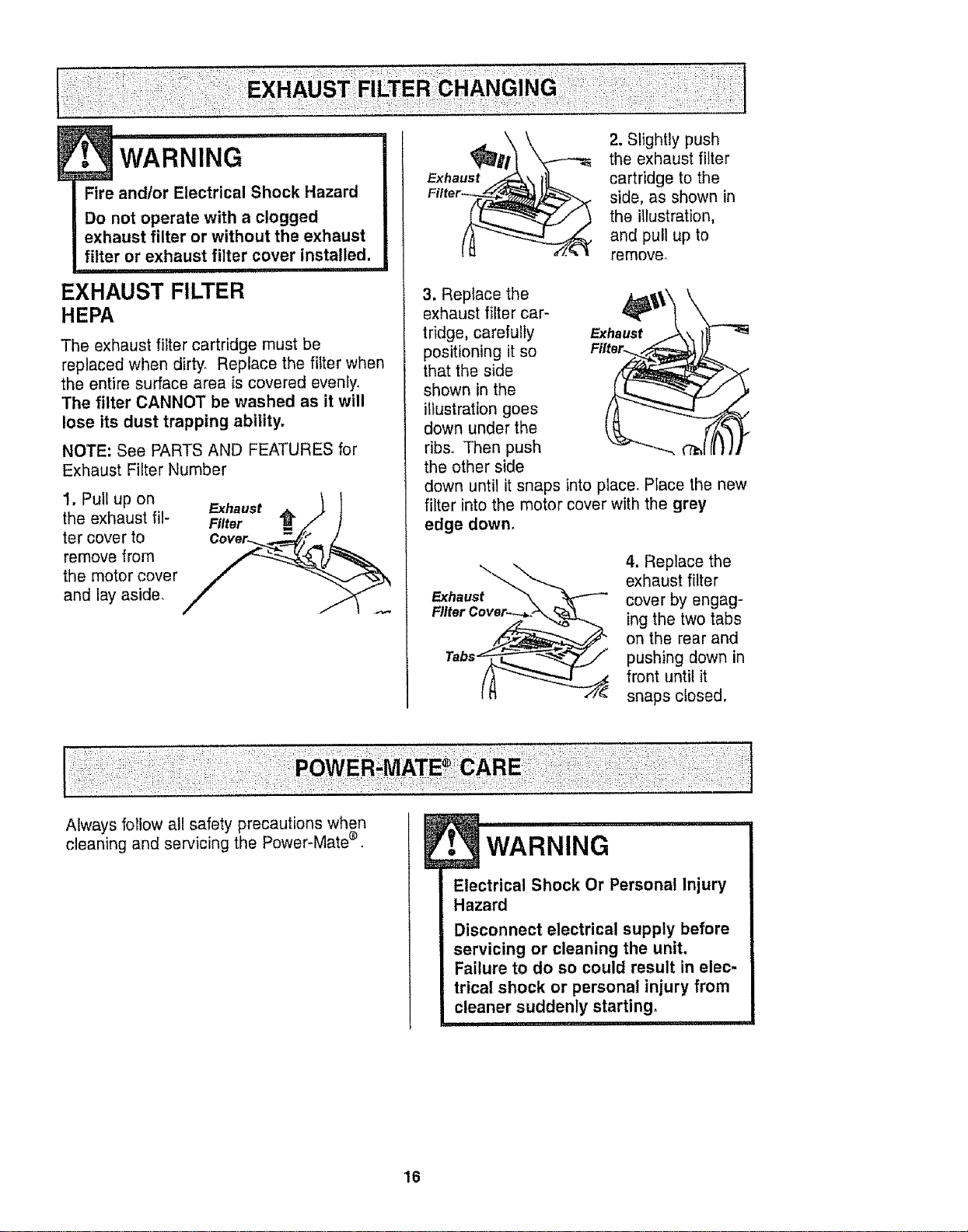
1. Pull up on Exhaust _ t
the exhaust ill- Filter AM/.* I
ter cover tO Cover_....._..._._;_/,._./
remove from _
the motor cover
and lay aside°
2. Slightly push
the exhaust filter
cartridge to the
side, as shown in
the illustration,
and pull up to
remove.
3. Replace the
exhaust filter car-
tridge, carefully Exhaust
positioning it so
that the side
shown in the
illustration goes
down under the
ribs. Then push
the other side
down until it snaps into place° Place the new
filter into the motor cover with the grey
edge down.
Exhaust
4. Replace the
exhaust filter
cover by engag-
ing the two tabs
on the rear and
pushing down in
front until it
snaps closed.
Always follow all safety precautions when
cleaning and servicing the Power-Mate ®.
. WARNING
Electrical Shock Or Personal Injury
Hazard
Disconnect electrical supply before
servicing or cleaning the unit.
Failure to do so could result in elec-
trical shock or personal injury from
cleaner suddenly starting°
16
E , i i ,,llllul nn,
CAUTION
When you remove the end caps, a
small metal washer on each end
may come off. DO NOT lose these
two metal washers.
TO CLEAN AGITATOR:
NOTE: In order to keep cleaning efficiency
high and to prevent damage to your vacu-
um, the agitator must be cleaned every time
the belt is chancle&
The agitator must also be cleaned accord-
ing to the following schedule:
Vacuum Use
HEAVY -
(used daily)
MODERATE -
(used 2-3 times/week)
LIGHT -
(used 1 time/week)
Clean Agitator
every week
every month
every 2 months
Remove any dirt or debris in the belt path
area or in the brush roller area.
Carefully remove any string or debris
located on the agitator, end caps, wash-
ers or agitator shaft.
IMPORTANT
Replace the
washers and
the end caps.
See the explod-
ed view for cor-
rect
assembly.
Disconnect cleaner from electrical outlet,
Check and remove hair, string and lint build-
up frequently in the Power-Mate ® agitator
and end cap areas, if build-up becomes
excessive, disconnect Power-Mate ® from
wand and follow the steps below.
i
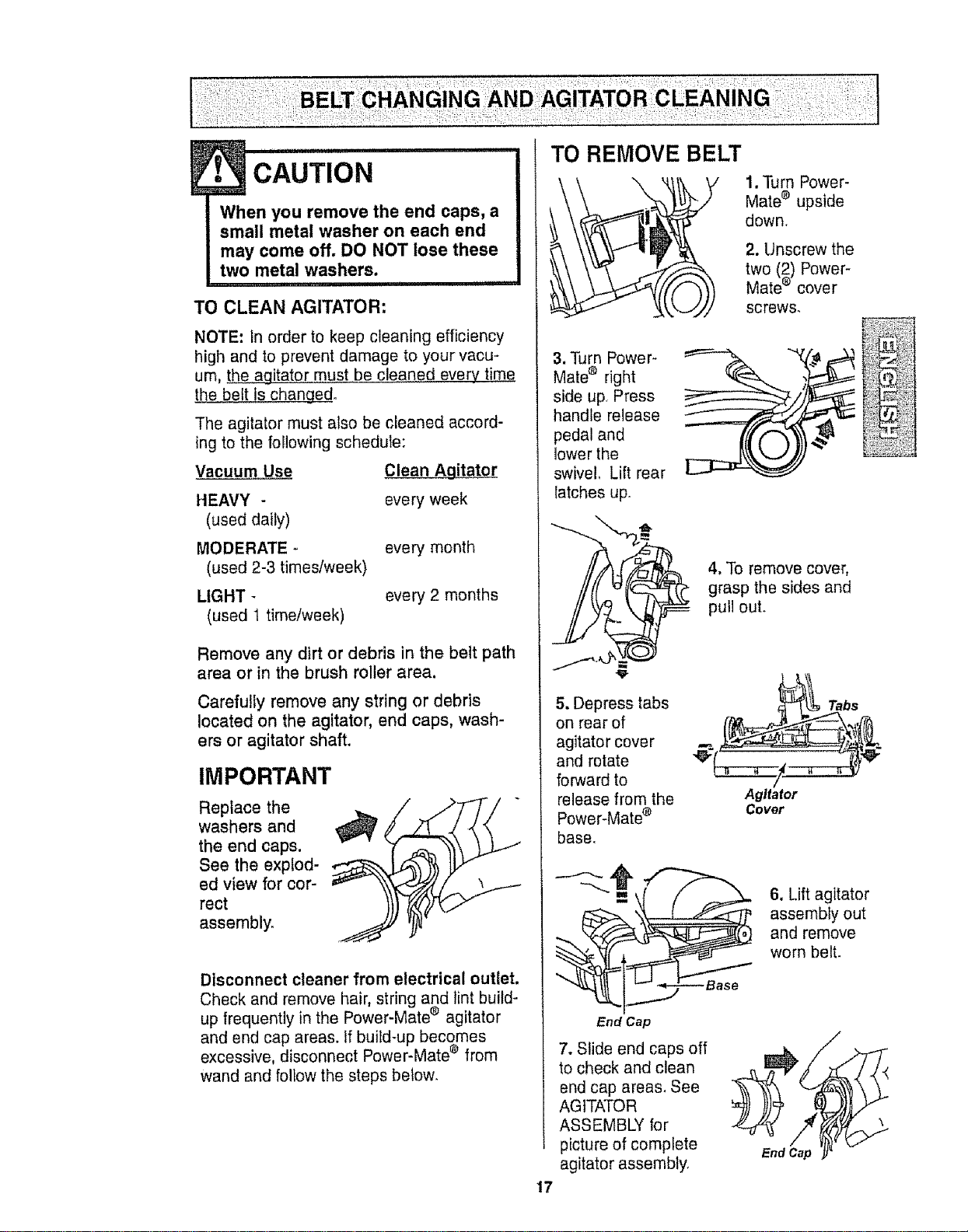
1.Turn Power-
Mate® upside
down.
2. Unscrew the
two (2) Power-
Mate® cover
screws,
3. Turn Power-
Mate _ right
side up, Press
handle release
pedal and
lower the
swivel, Lift rear
latches up.
4, To remove cover,
grasp the sides and
pull out.
5. Depress tabs
on rear of
agitator cover
and rotate
forward to
release from the
Power-Mate ®
base.
Agitator
Cover
Tabs
6. Lift agitator
assembly out
and remove
worn belt.
17
End Cap
7. Slide end caps off
to check and clean
end cap areas. See
AGITATOR
ASSEMBLY for
picture of complete
agitator assembly.
End Cap
/
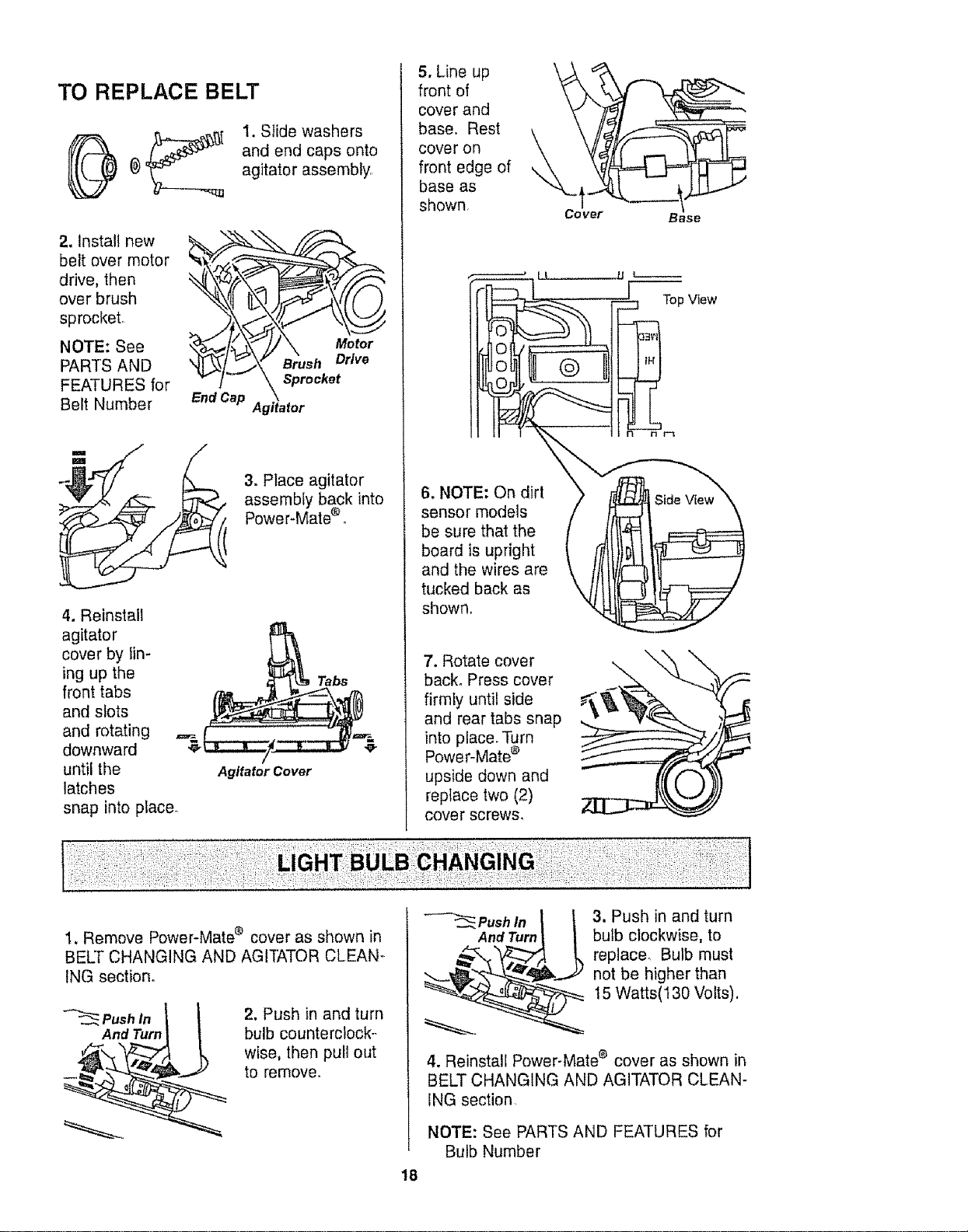
TO REPLACE BELT
1. Slide washers
and end caps onto
agitator assembly,
2. Install new
belt over motor
drive, then
over brush
sprocket,
NOTE: See
PARTS AND
FEATURES for
Belt Number
Motor
Brush Drive
Sprocket
End Cap Agitator
3. Place agitator
assembly back into
Power-Mate®o
4. Reinstall
agitator
cover by Iin-
ing up the
front tabs
and slots
and rotating
downward
until the
latches
Agttafor Cover
snap into placeo
5. Line up _L__
front of
\
cover and
base. Rest
cover on _.
front edge of
base as
shown.
6, NOTE: On dirt
sensor models
be sure that the
board is upright
and the wires are
tucked back as
shown.
7. Rotate cover
back. Press cover
firmly until side
and rear tabs snap
into place. Turn
Power-Mate ®
upside down and
replace two (2)
cover screws,
Cover Base
[ Top View
1. Remove Power-Mate ® cover as shown in
BELT CHANGING AND AGIfATOR CLEAN-
ING section,
Push In
And Turn
2. Push in and turn
bulb counterclock-
wise, then pull out
to remove,
Push In
And Turn
3. Push in and turn
bulb clockwise, to
replace, Bulb must
not be higher than
15 Watts(130 Volts).
18
4. Reinstall Power-Mate e cover as shown in
BELT CHANGING AND AGITATOR CLEAN-
ING section,
NOTE: See PARTS AND FEATURES for
Bulb Number
!._ WARNING
Electrical Shock Or Personal Injury
Hazard
Disconnect electrical supply before
servicing or cleaning the unit.
Failure to do so could result in elec-
trical shock or personal injury from
cleaner suddenly starting.
!1 ii1'!11111 i'"
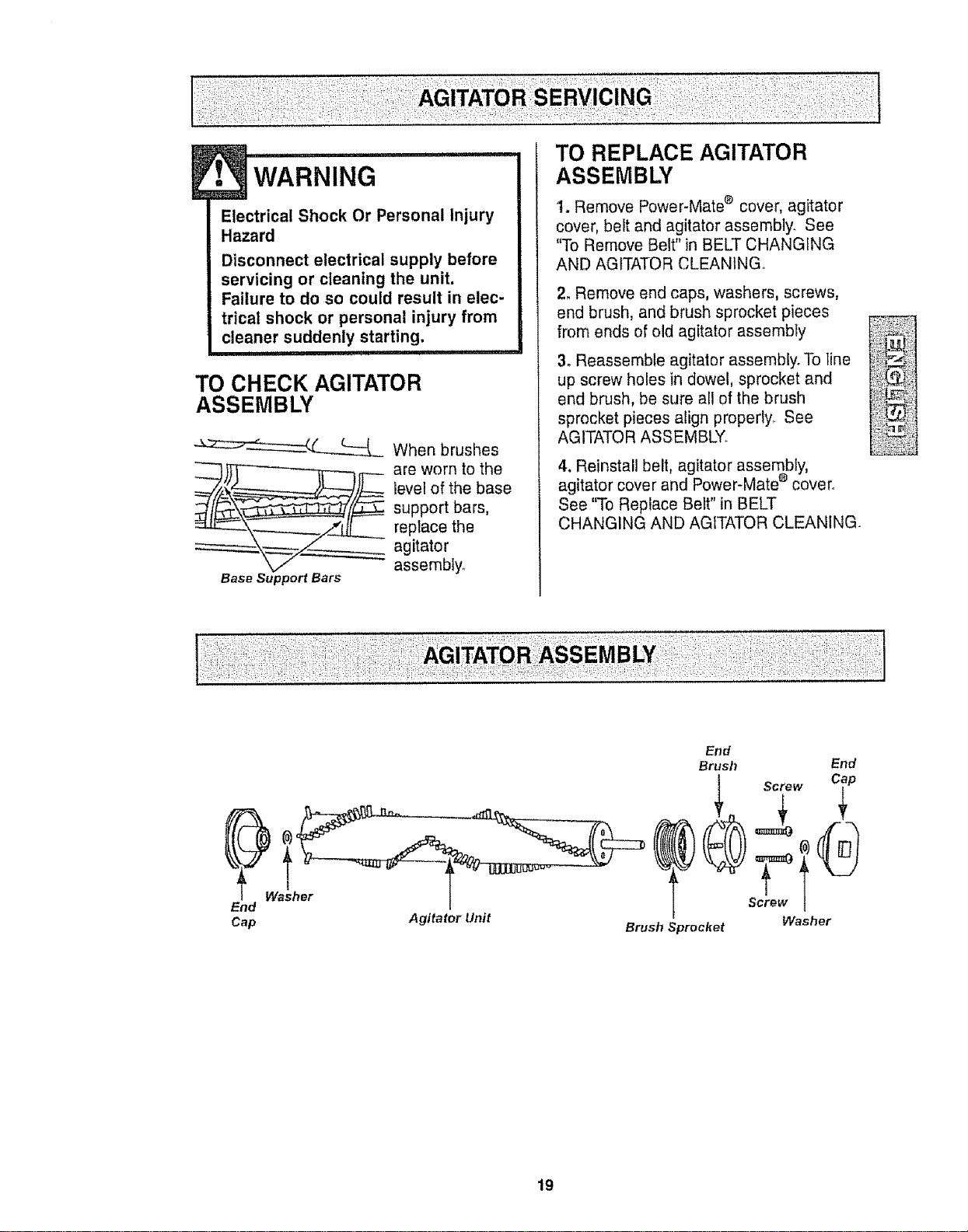
TO CHECK AGITATOR
ASSEMBLY
-_=:_-----___ When brushes
_)}_ __._ are worn to the
level of the base
support bars,
replace the
agitator
assembly_
Base Support Bars
TO REPLACE AGITATOR
ASSEMBLY
1. Remove Power-Mate ® cover, agitator
cover, belt and agitator assembly. See
"To Remove Belt" in BELT CHANGING
AND AGITATOR CLEANING°
2, Remove end caps, washers, screws,
end brush, and brush sprocket pieces
from ends of old agitator assembty
3. Reassemble agitator assembly. To Iine ...........
up screw holes in dowel, sprocket and ,_._._._;_-_
end brush, be sure all of the brush _{_:;;
sprocket pieces align properly, See ::_:;_t,_:
AGITATOR ASSEMBLY. .............
4. Reinstall belt, agitator assembly,
agitator cover and Power-Mate e cover°
See "To Replace Beft" in BELT
CHANGING AND AGITATOR CLEANING.
End
Cap
Washer
End
Brush End
Screw Cap
Agitator Unit Washer
Brush Sprocket
19
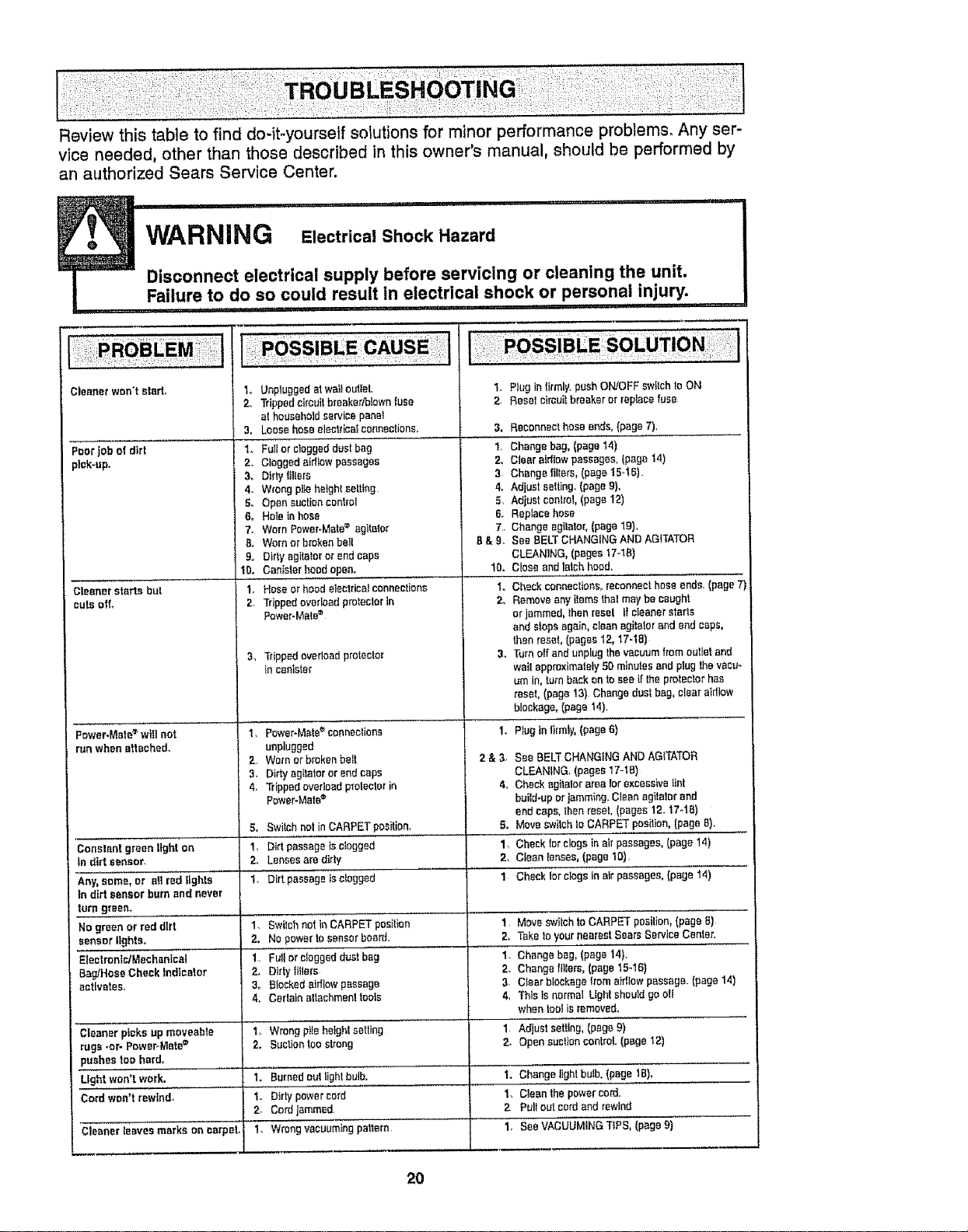
Review this table to find do-it-yourself solutions for minor performance problems, Any ser-
vice needed, other than those described in this owner's manual, should be performed by
an authorized Sears Service Center.
...................ii , i ..... i,rr',, ii, i'll , i, ,
WARNING Electrical Shock Hazard
7- ....... Disconnect electrical supply before servicing or cleaning the unit.
Fadure,to do ,s,ocould result in electrical,shock or persona!,,,,in,jury.............
Cleaner won't start.
Poor jab of dirt
_lck-up,
Cleanerstarts but
cuts off,
Power-Mate_ willnot
runwhenattached..
Constant greenlight an
tn dirt sensor,
Any,some, or elt redlights
in dirt sensorburnand never
turn green.
No greenor reddirt
sensorlights,
EleettantrJMechenical
Bag/HoseCheckIndicator
activates.
3.
1.
2,
3,
4,,
5°
6,
7o
B.
go
10,
1.
2
3,
4,
2o
Unpluggedatwaltoutlet,
Trippedcircuit breaker/blownfuse
at householdservice panel
Loosehoseelectricalconnections. 3,
Fullorcloggeddustbag 1,
Cloggedaidlowpassages 2.
Dtrtylillers 3
Wrongpilehaightsetting 4.
Opensuctioncontrol 5,
Hole inhose 6,
WornPower-Mate= agitalor 7
Wornor brokenbelt B& g.
Dirty agile!oror endcaps
Canisterhoodopen. 10.
Hose or hoedelectricalconnections 1.
Trippedoverloadprotectorin 2,
Power.Mete=
Tdppcdoverloadprotector 3_
in canister
Power-Mate®connections 1o
unplugged
Wornorbrokenboll 2 &3.
Dirty agitatororendcaps
Trippedovcdcad protectorin 4_
Power.Mate®
Switchnol inCARPETposition, 5.
DirtpassageJsclogged 1,
Lensesare dirty 2,
Dirt passageisclogged 1
1. PtugInfirmly,push ON!OFFswitchto ON
2_ Resetoimuifbreakeror replacefuse
Reconnecthoseends,(page7),
Changebag, (paget4)
Clearairflowpassages,(paget4)
Changefilters, (page15-!B)
Adjust selling.(pageg).
Adiustcontrot,(page12)
Replacehose
Changeagitator,(pagelg),
See BELTCHANGINGANDAG]TATOR
CLEANING,(pages 17-18)
Closeandlarch hood.
Checkconoacttans_reconnecthose ends.(page7)
R_moveany itemsthai may becaught
or jammed,thenreset tf cteanerstarts
and stopsagain,cleanagilalorand endcaps,
thenreset, (pages12,17-18)
Turnoff and unplugthevacuumfrom outletand
waifapproximately50 minutesandplug thevacu_
umIn,turn backontoseeif theprotectorhas
reset, (page 13) Changedustbag, clear aidlow
blockage,(page14)
Pluginfirmly,(page6}
See BELTCHANGINGANDAGITATOR
CLEANING.(pages17-18)
Checkagitatorareafarexcessivelint
build-uporjamming.Cleanagitatorend
endcaps,thenreset, (pages12.17-18)
Moveswitchto CARPETposition,(pageB}.
Checktarclogs inair passages,(page14)
Clean lenses,(page10),
Chockforclogsin alr paasages,(page 14)
1. Swilchnotin CARPETposition 1_ Moveswitchto CARPETposition,(pageB)
2, No powertosensorboard. 2, Take1oyournearest ScarsServiceCenter.
1. Fullorc_oggaddustbog 1. Changebag, lpage 14).
2. Dtrtylttlo_'s 2. Change ftllers,(page15..16}
3, Blockedaidlowpassage 3 Clearblockage]rametdtowpaSSage.(page14)
4, Cerlalnaltachmenttools 4, ThlsIsnormalLightshouldgooli
whentoolis removed,
CleanerpicksUp moveable I Wrongpileheightsetting 1 Adjust setflng, (pageg)
rugs-or- Power-Mate(_ 2. Suctiontoostrong 2, Opensuctionconfml.(page12)
;uohea toe hard,
Lightwon'twork. 1. Burnedout lightbulb. I. Change lightbulb.(page 1B),
Cardwon'frewiad. 1. blrly powercord 1. CleanthopeweJ-cord.
2. Cordjammed, 2 Pulloutcordandrowlnd
Cleaner leaves marks on carpet, 1, Wrongvacuumingpattern. 1, SeeVACUUMINGTIPS, (page9)
20
Antes de usar su asptradora nueva ..... 1
Garantia de la aspiradora de Kenmore ,, I
Instrucciones importantes de
seguridad ............................... 2
Piezas y caracteristicas ............ 3-4
lnstrucciones de
ensamblamiento ............... 5-6
Use .............................. 7
Paracomenzar ......................... 7
Sugerencias para aspirar .............. 8
Sugerencias sobreel ajuste de nivel de
petode ta alfombra ................... 8
Detectorde tierra ...................... 9
Accesorios .......................... 10
Uso de los accesorios .................. 11
Caracterfsticas de rendimiento .......... 1t-12
Funcionamiento de su aspiradora ...... 13
Cuidado del receptdculo .............. 13
Cambio de laboisa .................. 13
Umpieza del exterior y de los accesorios ... 14
Cambio detfittro de seguridad del motor °.. 14
Cambio del fittro de escape ............. 15
Cuidado de la Power-Mate = ............ 15
Cambio de lacorrea y limpieza
del agitador ....................... 16-17
Cambio de la bombilla ................ 17
Cuidado del agitador ................. I8
Ensambfedel agitador ................ 18
Reconocimiento de probtemas ......... 19
tnformaci6n de
assistancia o servicio .... Posterior Cubierta
Porfavor lea esta guia que le ayudaraa assembtary operar su aspiradoranuevade Kenmoreen una manera
m#,sseguray effectiva.
Paramas informaci6nacerca del cuidado y operaci6n de esta aspirador, llamea su tiendaSears mas cercana.
Cuando prequntepot informaci6nusted necisitar_el n_lmerocompleto de seriey modetode la aspiradora que
est,. Iocadoen taptacade los n_meros de modeloy sede.
Use el espaciode abajo para registrar el nL_merode modeloy serie para su nuevaaspiradorade Kenmoreo
Numero de Modelo
NQmerode Serie
Fecha de Compra __
Matenga este Ubroy su reciboen u lugar seguro para referenciasfuturas.
GARANT{ALIMtTADADEUN AI_O DE LA ASPIRADORAKENMORE
Esta garantia espor un aRodesdela fecha de compra, e incluye solamenle el uso de la aspiradoraen hogares
privadosDuranteel aSode garantia, cuando la aspiradora esoperada y mantenida de acuerdo afmanualde
instruccionesdel dueSo,Searsreparar_ cualquier defectoen materialeso fabricaci6nfibredecargo,
Esta garantiaexc]uyelas bolsas de colecci6n, correas, lamparillas,y filtros,1ascuales son partesgastables que
sedeteriorancon el uso normal
Parael serviciode garant{a,retorne esta aspiradora al Centro de ServicioSears m_s cercanoen los
Estados Unidos.
Esta garant{ase aplica sofamentemientraseste producto est#_en uso en los EstadosUnidos.Esta garantfa le
da a ustedderechos legalesespecificos, y usted puedetener tambi_notros derechoslos cuales varian de
estado a estado
Sears, Roebuck and Co., D/817WA, Hoffman Estates,IL 60179
ADVERTENCIA
Su seguridad es muy importante para nosotrosoPara reducirel riesgo de tncendio,choque
eldctrlco, lesi6n corporal o dafioa al utilizar su aspiradora,act_e de acuerdo con precauciones
bdstcasde seguridad,entre elias:
Leaeste manua!antes de armaro utilizarsu aspira-
dora.
Use suaspiradera[_nicamenteen laforma descfita
en estemanual Use_nicamenteconaccesodos
recomendadosper Sears,
Para reducirelriesgode chequeel_ctrico,no use
su aspiradoraal airs fibren[sabresuperficiesmoja-
das
Desconecte el cord6nel_ctricoantes decomponer
olimpiarel,_readelagitador.Detocontrario,et
cepittopodriaarrancarde form imprevistao podda
producirseun chequeet_ctrico..
Stempredebeapagarfaaspiradoraantesde
conectarodesconectarla manguerade taPower-
Mate®
Siempredebeapagarsu aspiradoraantes de des-
consctarla.
Nodesconectela aspiraderatirandodel cord6n
el_ctrico.Paradeeconectafla,hale el enchufe,no el
cord6n.
Sujeteel enchufecon la manealenroltarelcord6n
ef_ctrico.Paradescenectarla,haleen enchufe,no e[
cord6n,
No useta aspiradorasi el cord6noei enchufeest#.
daSado.Si la aspiradorano est_funcionandoade-
cuadamenteo si seha dejadocaer,est_ daBada,se
ha dejadoexpuestaa la intemperieo seha dejado
caerenagua,devu61vataa un Centrede serviciode
Sears.
No hateni transportstaaspiradoraper elcord6n;no
use el cord6ncemo mange;no cierrepuertassabre
eIcerd6n;no hale elcord6nsabrerebordesagudos
ni esquinas.Nepass la aspiradorasabreei cord6n.
Mantengae[cord6nalejadode superficiescalientes.
No abandonela aspiradoracuandoeste conectada.
Descon_ctelacuandono la est_ usandoy antesde
dade servicio.
Nopermitaque seautilizadacomejuguete Se
requieretenetmayorcuidadocuandoseautilizada
en la proximidaddeniSoso pernifios
No toquelaaspiradorani el enchufecontas manes
mejadas.
No usela aspiradorasi lamangueraest&rata.La
mangueracontienealambresel_ctricos.C_mbielasi
est,.ratao desgastada.Eviteaspirarobjetes
agudos
Nocoloqueobjetosen lasaberturas
Noutilice taaspiradorasi algunaaberturaest_ blo-
queada;mant_ngatafibrede potvo,pelusa,cabellos
y cualquieracosa quepodr[a disminuirel flujode
airs
Mantenga el cabel]o,ropa suelta,dedosy todastas
partesde!cuerpoalejadosde las aberturasy piezas
mec&nicas.
No usetaaspiradorasin tenet instaladatabotsa
parapolvoy/o losfiltres.
Cambiesiempre la botsaparapolvodespu_sde
aspirariimpiadoresde atfombrasodesodorantes,
talcosy pobosfines.Estosproductosatascanla
balsa,reducenel fiujede airsy puedencausarque
_stase tampa Sine cambiaiabalsapodria ocasio-
nardaSopermanentsa laaspiradora.
No usela aspiradoraparaIevantarobjetosagudos,
juguetespequefies,alffieres,sujetapapeles,etc,
PodriandaSarfaaspiradorae la balsaparapobo.
Nolevanteningunacosa que seest_ quemandoo
emitiendohumo,comeeigarrillos,ceriIloso cenizas
calientes.r
Nouse la aspiradoraparaaspirarIfquidosinflama-
bleso combustibles(gasolina,I[quidospara lim-
pieza,perfumes,etc.) nila useentugaresderide
_stospoddan estarpresentes Losvaperes deestas
sustaneiaspuedenerearun peligrodeincendioo
explosi6n
Tengacuidadoespeciala]utitizarla aspiradoraen
escalones.No _aceloquesabresi]las,mesas,etc.
Mant_ngalaen el piso
Ustedesresponsablede asegurarque su aspira-
dora nesea utilizadaper ningunapersonaque ne
puedamanejadacorrectamente.
No operesin elfittro de escapeni tacubiertadelill-
fro de escapeinstatados.
GUARDE ESTAS INSTRUCC
Elarmada y use seguro desu aspiradorason surespensabifidad_Esta aspiradoraha side dise_ada
exclusivamentepara usedom_sticeoLa aspiradoradebera almacenarseen un lugar seco yen el interior
Lea este Manualdel propietario detenidamente,pues centiene informaci6nimportante sabre seguridady
use Esta quia contiene informaci6nsabreseguridad debajodesimbolosde advertienciacuidade. Per
favor pongaatenci6n especial a estas instruccionesdadas. Advertencia: Este informaci6nle aiertar&con
e!poligre de fuege, cheques electricos,quemadasy lesiones, Cuidado" Este informaci6nle alertaraa
peligros,comelesion,esy daSesde propiedad, ................................
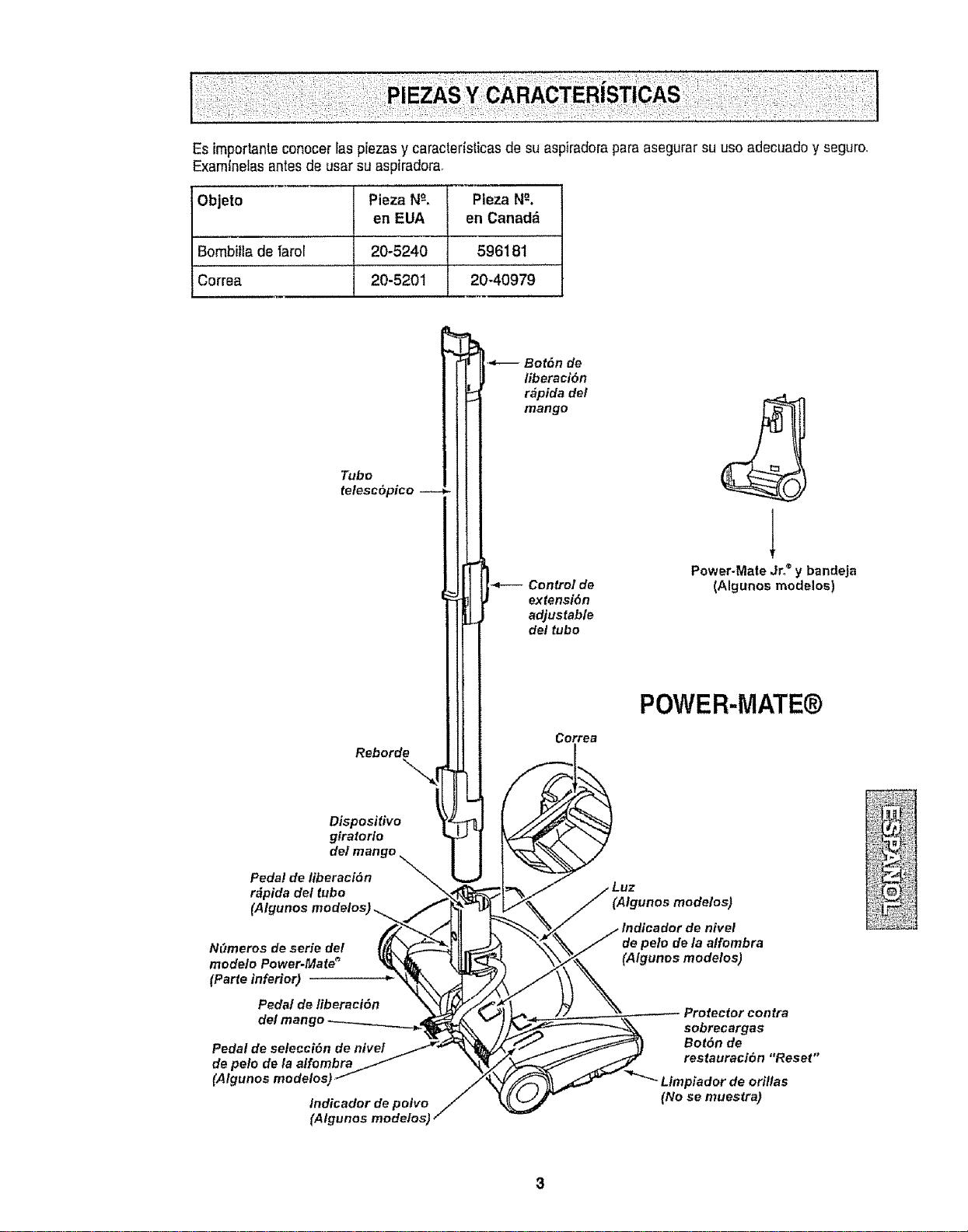
Esimportanteconocer}aspiezasycaractefisticasdesuaspiradoraparaasegurar su uso adecuadoy seguro,
Examinelasantes de usar su aspiradora,
Objeto Pieza N_-, Pieza N_.
en EUA en Canadd
Bombilla de iaror 20-5240 596181
Correa 20-5201 20-40979
L
telesc6pico
Rebord_ { _
Dispositivo
giratorio _]
Pedal de libe_:lcml n J
r&pida det tubo
(Algunos modalos
NOmeros de serie del
modelo Power-Mate _
(Parte inferior)
Pedal de liberact6n
del man
Pedal de seteeci6n de nivef
de pe!o de la alfombra
(Algunos modelos;
Indicador de polvo
(Algunos modelos)
•_ Bot6n de
liberact6n
r_pida de/
mango
Control de
extensi6n
adjustable
del tubo
Correa
Power-Mate Jr,®y bandeja
(Algunos modelos)
POWER-MATE@
(Atgunos modelos)
de pelo de/a a/fombra
(Algunos modelos)
Protector contra
sobrecargas
Bot6n de
restauracion "Reset"
Ltmpiador de orlllas
(No se muestra)
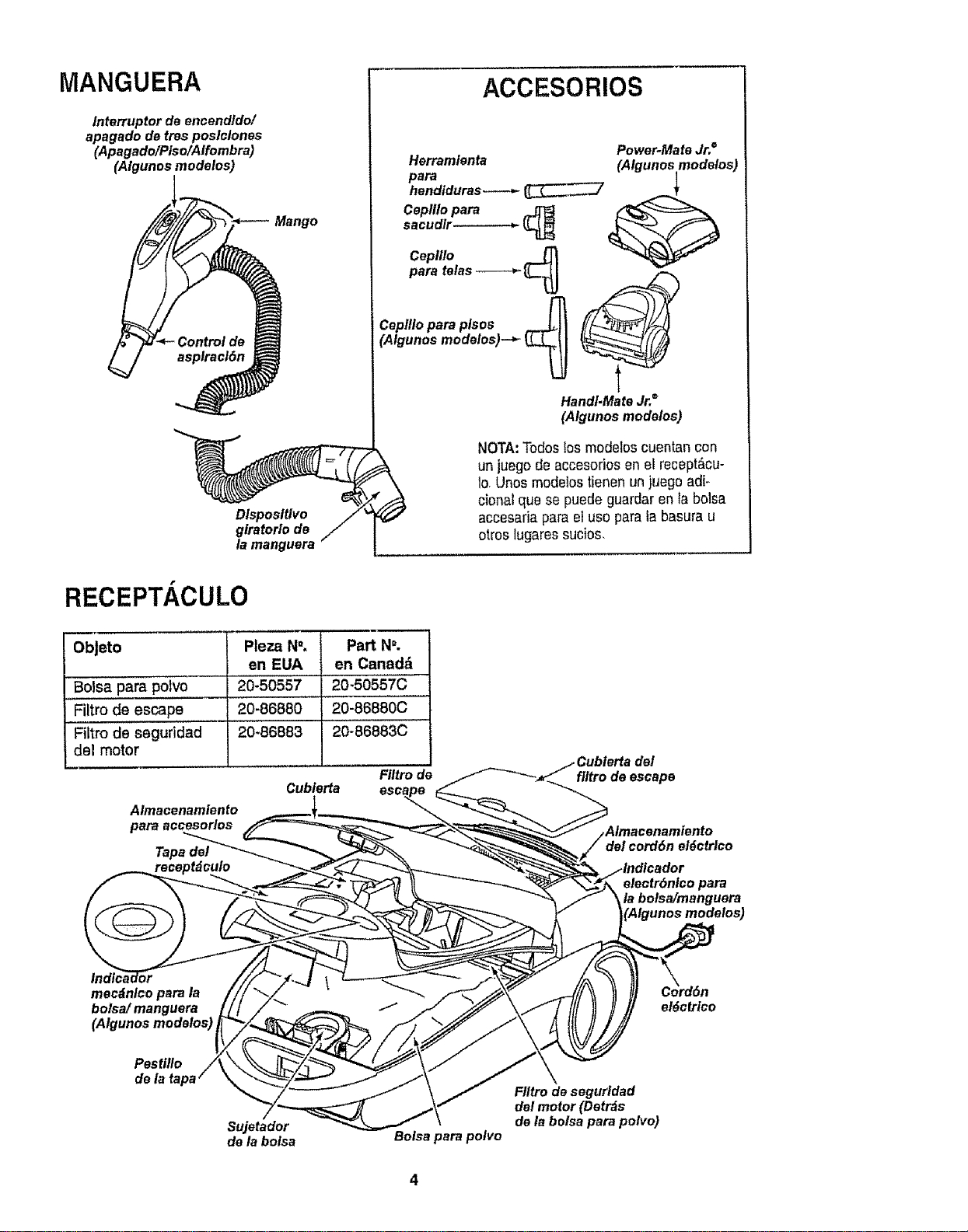
MANGUERA
lnterruptor de encendldo/
apagado de tres poslclones
(Apagado/Plso/Alfombra)
(Algunos modelos)
Mango
Dlsposltlvo
giratorio de
la manguera
ACCESORIOS
Power-Mate Jr. ®
Herramienta (Algunos modelos)
Ceplllo para _ ('_"_
cep,xo
para telas "-'-_-_ _'-_ _
cepH/oparaplsos _.-LII [/['-J2L_/FF_
(Algunos modelos)--_ _ _" _
HandI.Mate Jr,"
(Algunos modelos)
NOTA:Todos los modelos cuentan con
un juego de accesorios en el recept&cu-
lo,Unos modetostienen un juego adi-
cional que se puede guardar en Ia bolsa
accesaria para el uso para la basura u
otros lugaressucios.
RECEPTP,CULO
ObJeto
Boisa,para polvo
Filtro de escape ........
Filtro de seguridad
del motor
Pleza N". Part N°.
en EUA en Canadd
20-50557 20-50557C
,,,,,
20-86880 20-86880C
20_'86883 '20-86883C
Filtro de
Cubierta
Almacenamiento
para accesorlos
Tapa del
del
fi/tro de escape
del cord6n el_cfrtco
electr6nlco para
la bolsa/manguera
modelos)
mecdnlco para la
bolsa/ manguera
(Algunos modelos)
Pestillo
de la ta
Sujetador
de la bolsa
Botsa para polvo
el_ctrico
FIItro de segurldad
del motor (Detrds
de la botsa para potvo)
A"DvERTENCIA
Peligrode choque el_ctrico
No conecte ia aspiradora hastaque termtne
de armada°De Io contrario podriacausar
un choque el_ctrico o lesi6n corporal.
iin_ nl'l iiii ii, i,
Antes de armar la aspiradora, chequee la LISTA
DE EMBALAJE enta cubierta separadade ta Lista
de Partes para Reparaci6no Use esta lista para veri-
ficarque ha recibido todas las componentes de su
nuevaaspiradoraKenmore,
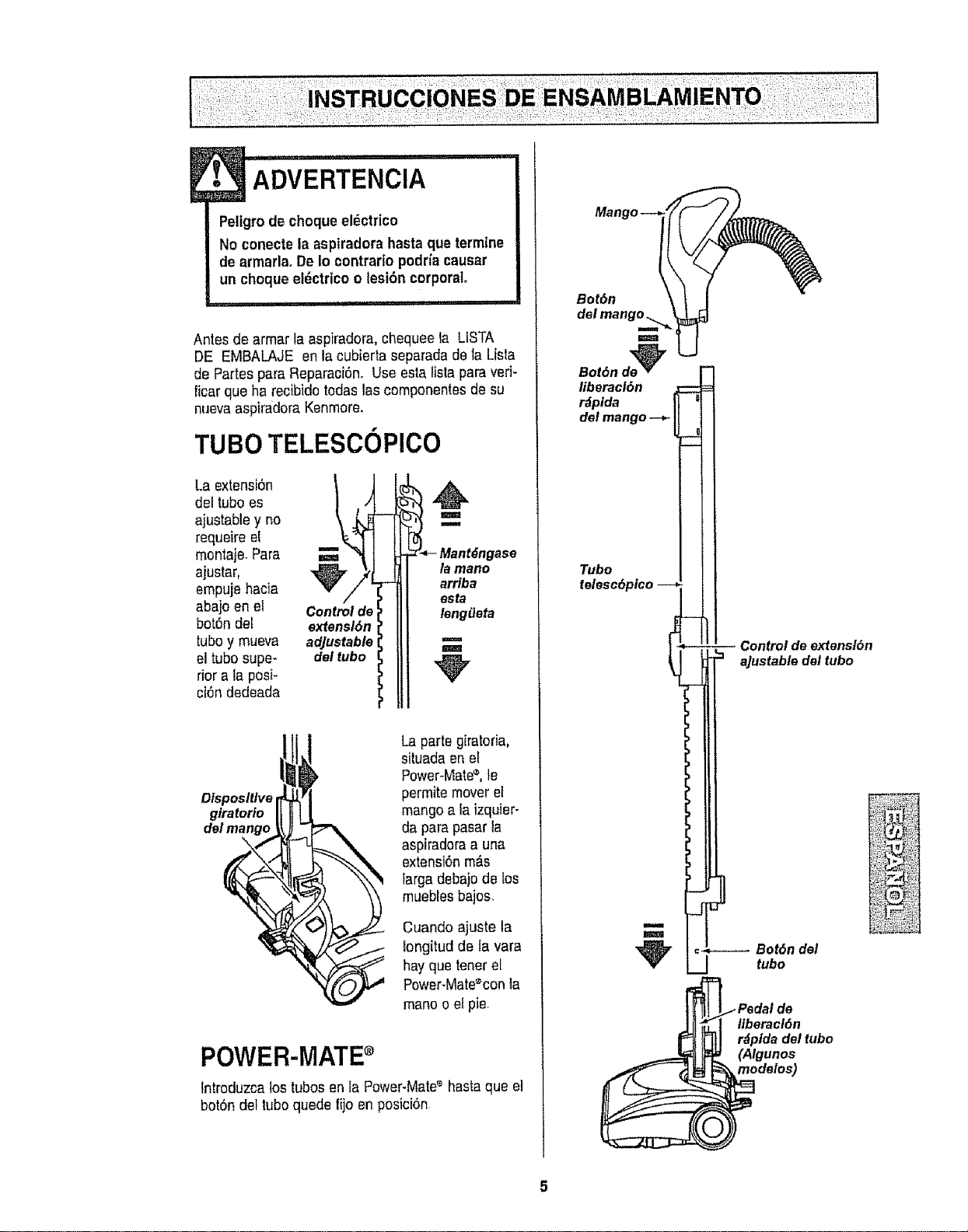
TUBO TELESCOPlCO
La extensi6n
del tuboes
ajustable y no
requeire el
montaje Para
ajustar,
empuje hacia
abajo en el
bot6n del
tubo y mueva
eltubo super
riora la posi-
ciOndedeada
Control de
extensl6n
adjustable
del tubo
l
m
la mano
arriba
esta
lenglJeta
m
m
Dtsposlt/ve
glratorio
del mango
\
Laparte giratoria,
situada en el
Power-Mate_,le
permite mover el
mango a la izquier-
da para pasarla
aspiradoraa una
extensi6nm&s
targa debajode los
muebles bajos,
Cuando ajuste la
!ongitud de fa vara
hayque tenetel
Power-Mate%onla
mano oel pie,
POWER-MATE
tntroduzca los tubosen la Power-Mate_ hastaque el
botOndel tuboquede fijoen posici6n
Bot6n
m
m
Bot6n de_
liberacl6n
r_plda
del mango--*-
Tubo
lelesc6pico --
m
J
Control de ex"tanst6n
aJustabla del tubo
_--.---- Bot6n del
tubo
Ilberacl6n
r_plda del tubo
(Algunos
modelos)
RECEPTACULO
1,Abra la tapadel recept_.culo.
2. Examine la bolsa para polvo este instalado correc-
tamante Consu{telas instrucciones de instalaci6nen
la CAMBIO DE LA BOLSA,,
3. Examine el filtro de seguddaddel motor este insta-
fadocorrectamante. Consutte lasinstrucciones de
instataci6n en LIMPIEZA DEL FILTRODE SEGUR1-
DAD DEL MOTOR
LA TAPAY LA CUBIERTA
Es normal qua ta tapadel recept_culo se desprenda
al set abierta mas de Io necesariooParacolocar nue-
vamentela tapa, alinee tas ranuras de la bieagra,in-
s_rtelas ycierre la tapa.
. cu,o.o0........
Nunca debe abrir la capuchade] contenedor
estando latapa abierta. As[se evitar_ daSos
a la capuchadal contenedor y/o a la tapa.
ii iiiii .............
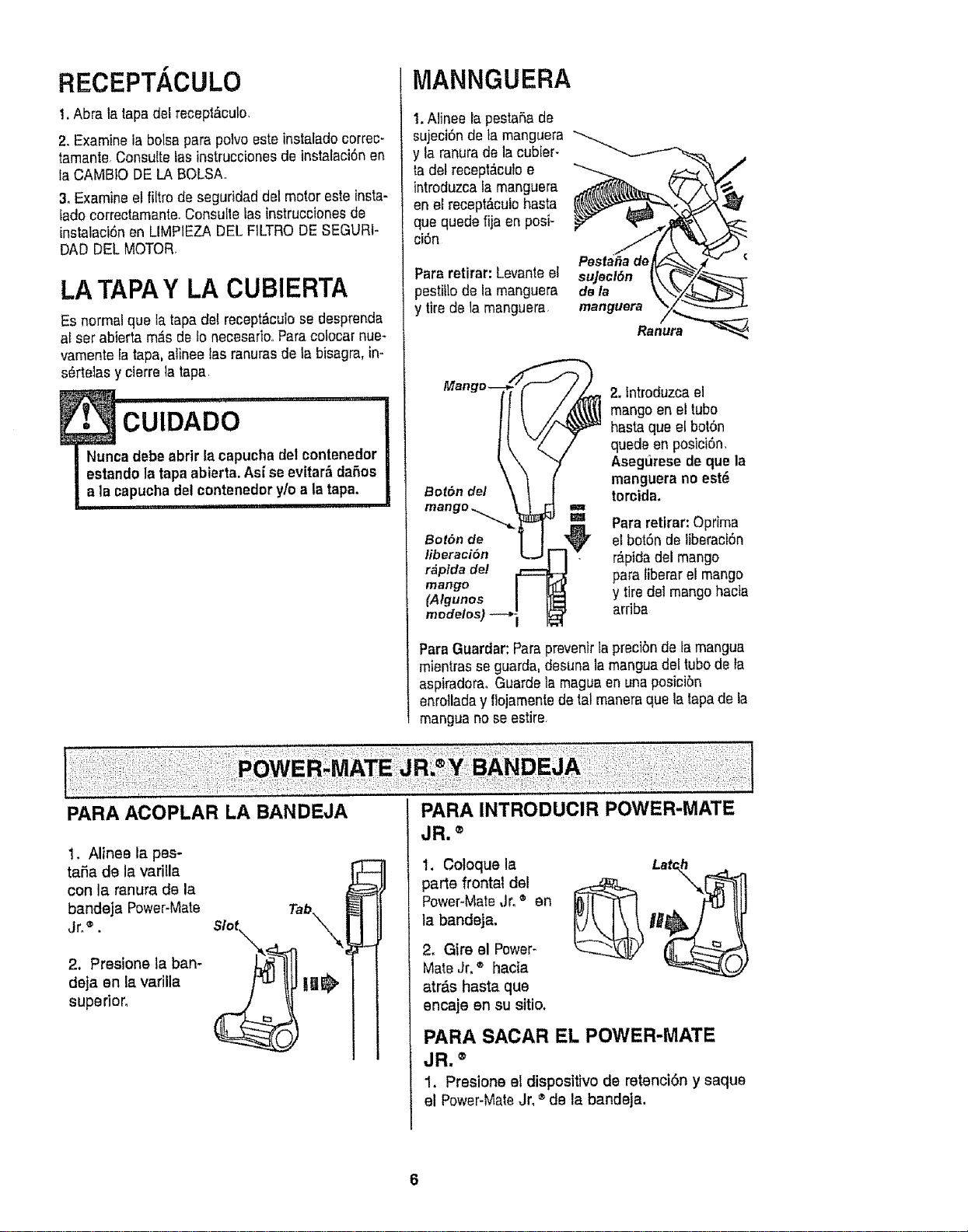
MANNGUERA
1.Alinee la pestar_ade
sujeci6n de ta manguera
y la ranurade la cubier-
ta del recept_cu!o e
introduzca la manguera
en ef recept_culobasra
qua quede fija en posi-
ci6n
Para retirar: Levanteel
pestilio de la manguera
y tirede la manguera
c
sujecl6n
de la
manguera
.onu;
Bot&n del
2, tntroduzca el
mango en el tube
hasta que el bot6n
quede en posici6n.
Asegurese de que la
manguera no est_
torcida,
1
m Pararetirar: Oprima
Bot6n de el bot6n de liberaci6n
liberaci6n r_pidadel mango
r&pida de! para liberar el mango
mango
(Algunos y tiredel mango hacia
mr)delos ardba
Para Guardar:Para prevenirla precibnde tamangua
mientrasse guarda,desuna la manguadel tubode la
aspiradoraoGuarde la maguaen una posicibn
enrollada y flojamentede tal maneraqua la tapade la
mangua no seestire.
PARA ACOPLAR LA BANDEJA
!, Alinee la pes-
taSa de la varilla
con la ranura de la
bandeja Power-Mate
Jr,®.
2, PresJoneta ban-
deja en la varilla
superior,
Tab.
s,o\ \
PARA INTRODUCIR POWER-MATE
JR. ®
t. Coloque la
parte frontal del
Power-Mate,Jr.® an
la bandeja.
2. Gire el Power-
MateJr. ® hac{a
atr_.s hasta qua
encaje an su sitio.
PARA SACAR EL POWER-MATE
JR. ®
1. Presione el dispositivo de retenci6n y saque
el Power-MateJro®de la bandeja.
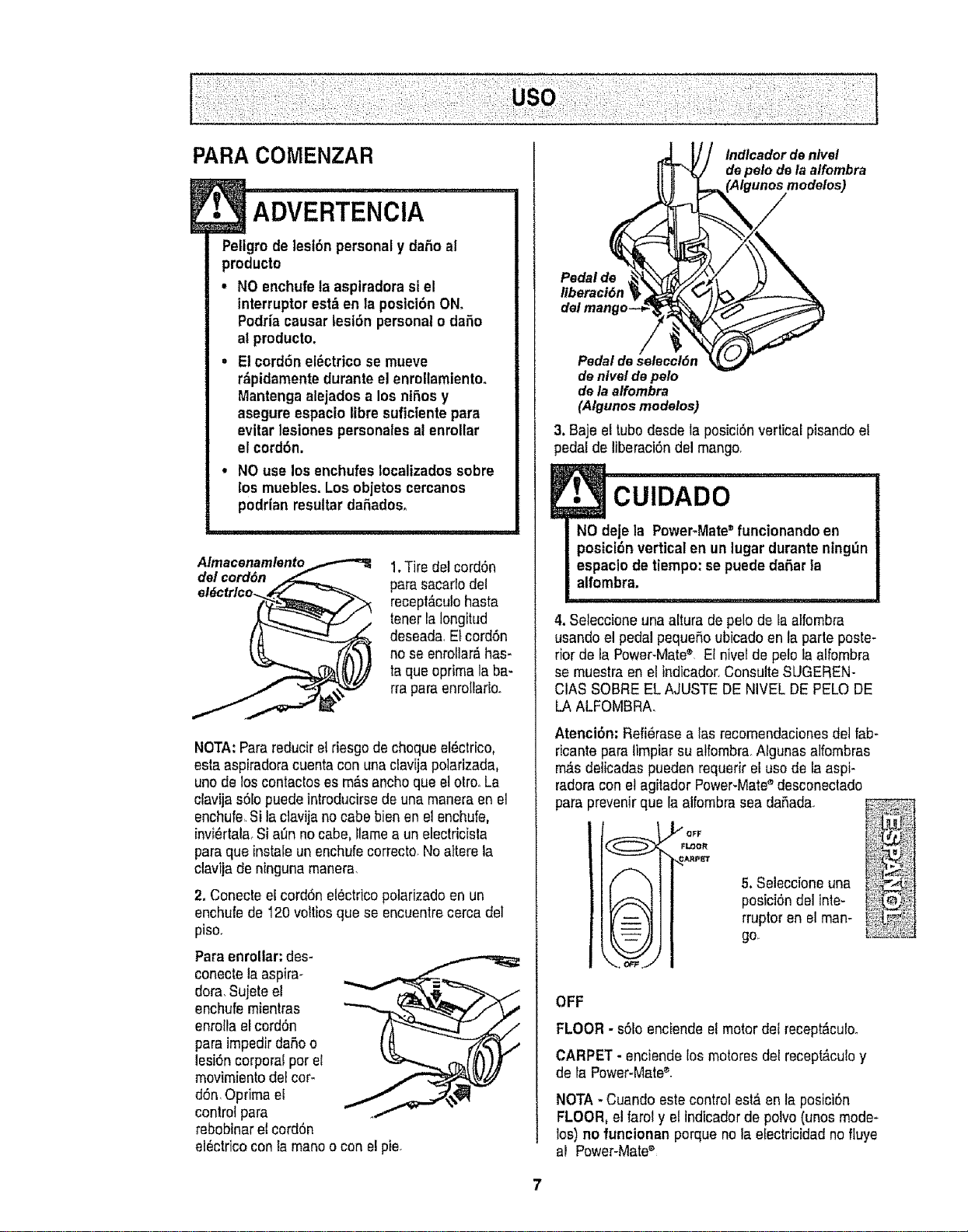
PARA COMENZAR
• ADVERTENCIA
Peligro de lesi6n personaly daSo al
producto
° NO enchufe la aspiradora si el
interruptor est&en la posici6n ON.
Podriacausar lesi6n personalodafio
at producto.
• Elcord6n el_ctrico se mueve
r_pidamentedurante el enrollamiento.
Mantengaalejados a los nt_.osy
asegure espacio libre suficiente para
evitar lesionespersonalesal enrollar
el cord6n.
NO use los enchufesIocalizadossobre
los muebles. Losobjetos cercanos
podrian resultar daSados.
Almacenamlento
del cord6n
1.Tire del cord6n
para sacarlo del
recept&culohasta
tenerla Iongit_d
deseada, Etcord6n
no se enrollar_has-
ta que oprima la ba-
rra paraenrollarlo.
NOTA:Parareduciret riesgode cheque el_ctrico,
esla aspiradoracuentacon una clavija potarizada,
uno de los contactoses m_s anchoque etotrooLa
clavija s6lo puede introducirsede una maneraen el
enchufe,Si la clavijano cabe bien en el enchufe,
invi_rtala_Si a0n no cabe, llamea un electricfsfa
para que lnstaleun enchufe correcto.Noattere la
clavija de ninguna manera,
2. Conecte el cord6n el_ctricopotarizadoen un
enchufe de 120voltios que se encuentrecerca del
piso.
Para enrollar: des-
conectela aspira-
dora,Sujeteel
enchufe mientras
enroflaelcord6n
para impedir daSoo
lesi6n corporal por el
movimiento del corm
d6n,Optima el
control para
rebobinar etcord6n
electrico conla maneo con el pie.
Indlcador de nlvel
de pelo de la alfombra
Pedal de
Ilberaci6n
Pedaldeseleccl6n
denlveldepe/o
dela alfombra
(A/gunosmodelos)
3. Baje el tubodesdeta posici6n vertical pisando et
pedal de liberaci6ndel mango,
E. €o,o,,oo
NO deje la Power-Mate" funcionando en
posici6n vertical en un lugar durante ning_n
espaclo de tiempo: se puede daSarla
alfombra.
4. Seleccione una altura de pelode la atfombra
usando el pedalpequefioubicado en la parte poste-
rior de la Power-Mate® El nivet de pelo la alfombra
se muestra en el indicador,Consulte SUGEREN-
CtAS SOBREEL AJUSTE DE NIVEL DE PELO DE
LA ALFOMBRA.
Atenci6n: Refi_raseafas recomendaciones detfab-
ricantepara limpiar su alfombra.Algunas alfombras
m_s deiicadas pueden requerir el use de la aspi-
radora con etagitador Power-Mate_'desconectado
paraprevenirque la alfombra sea daSada.
_GFF
FI,DOR
,.,._ARp_"Ir
f--..
t -- :
5. Seieccione una
posici6n del inte-
rruptor en el man-
go,
OFF
FLOOR - s61oenciende elmotor del recept_,culo.
CARPET - enciende los motoresdel recept_,culoy
de fa Power-Mate®_
NOTA - Cuando estecontrol est&en la posici6n
FLOOR, el faroty el indicadorde polvo(unos mode-
los) no funcionan porque no Iaefectricidad no fluye
al Power-Mate®
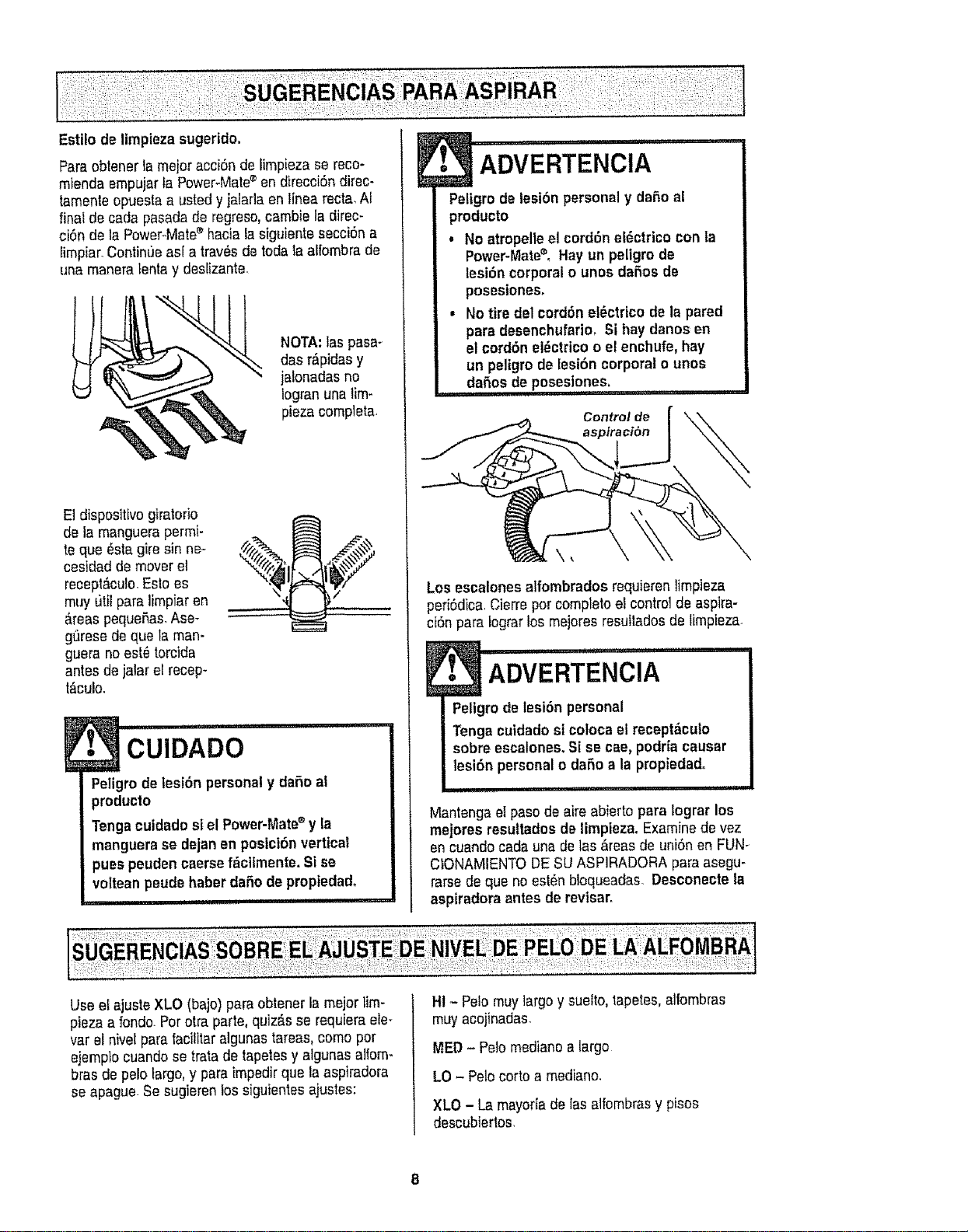
ParaobtenerlameieracciOndefmpiezasereco-
miendaempujarlaPower-Mate®endirecci6ndirec-
Iamenleopuestaausledyjalar]aen lnea recta,AI
final de cada pasadade regreso,cambie la direc-
ciOnde la Power_Matee hacia la siguiente secciOna
fmpiar. Continueas[ a tray,s de todala afombra de
una maneralenta y desfzante.
NOTA: las pasa-
das r_pidas y
ialonadas no
Iogranuna lim-
piezacompleta.
El disposltivo giratofio
de la manguera permi-
t®que _sta gire sin ne-
cesidad de mover el
recept_cuIo.Eslo es
muy t)tt para limpiar en
&reaspequeflas.Ase-
gQresede que la man-
guera no est_ torcida
antes de jalar el recep-
t_cu!o.
%'Z 6F
/
!. '*cuIDADO
Peligrode lesion personaly dafio at
producto
Tongacuidado siel Power-Mate®y la
manguerase dejanen posiciOnvertical
pues peuden caersef,_cilmente. Sise
volt®anpeudehaber dafiode propiedad.
ADVERTENClA
Peligrode lesion personaly daffo al
producto
• No atropelleel cordon el(_ctrico con la
Power-Mat®CoHayun peligro de
lesir_ncorporal o unos dafios de
pesesiones.
• No tire del cordonelOctrico de la pared
para desenchufario, Si hay danes en
el cordonel#ctrico o e! enchufe, hay
un peigro de lesion corporal o unos
daffos de poseslenes,
, iiii, j lq ql ,i
Control de
Los escalones alfombradosrequieren limpieza
periOdica,Cierreper completeel control de aspira-
ci6n para Iograrlos mejores resutados de timpieza.
[ ADVERTENOIA ......
Peligrode lesi6n personal
Tenga cuidado si cotocael recept_culo
sobre escalones.Si se cae, podriacausar
lesion personalo dafioa la propiedad.
i ii i,ii i i1,111,11 iii
Mantenga el pasode air®abierto para Iograr los
mejoresresultados de limpiez& Examinede vez
en cuando cada una de las &teas de union en FUN-
CIONAMIENTODESU ASP1RADORApara asegu-
rarsede que no estOnbloqueadas. Descenecte ta
aspiradora antes de revisar.
Use eI ajuste XLO (bajo) para obtener la mejor tm-
pieza a fondo.Perotra parte, quiz£s se requiem ete-
var el nivel para Iacilitaralgunas tareas, come pot
ejemp}ocuando se trata de tapetesy atgunasafom-
brasde pelo targo,y para impedirqua la aspiradora
se apague Se sugieren los siguientes ajustes:
HI -Pelo muy largo y suelto,tapetes, allombras
muy acojinadas.
MED-Pelo re®dianea largo
LO - Pelocorto a mediano.
XLO - La mayoria de las alfombrasy pisos
descubiertos.
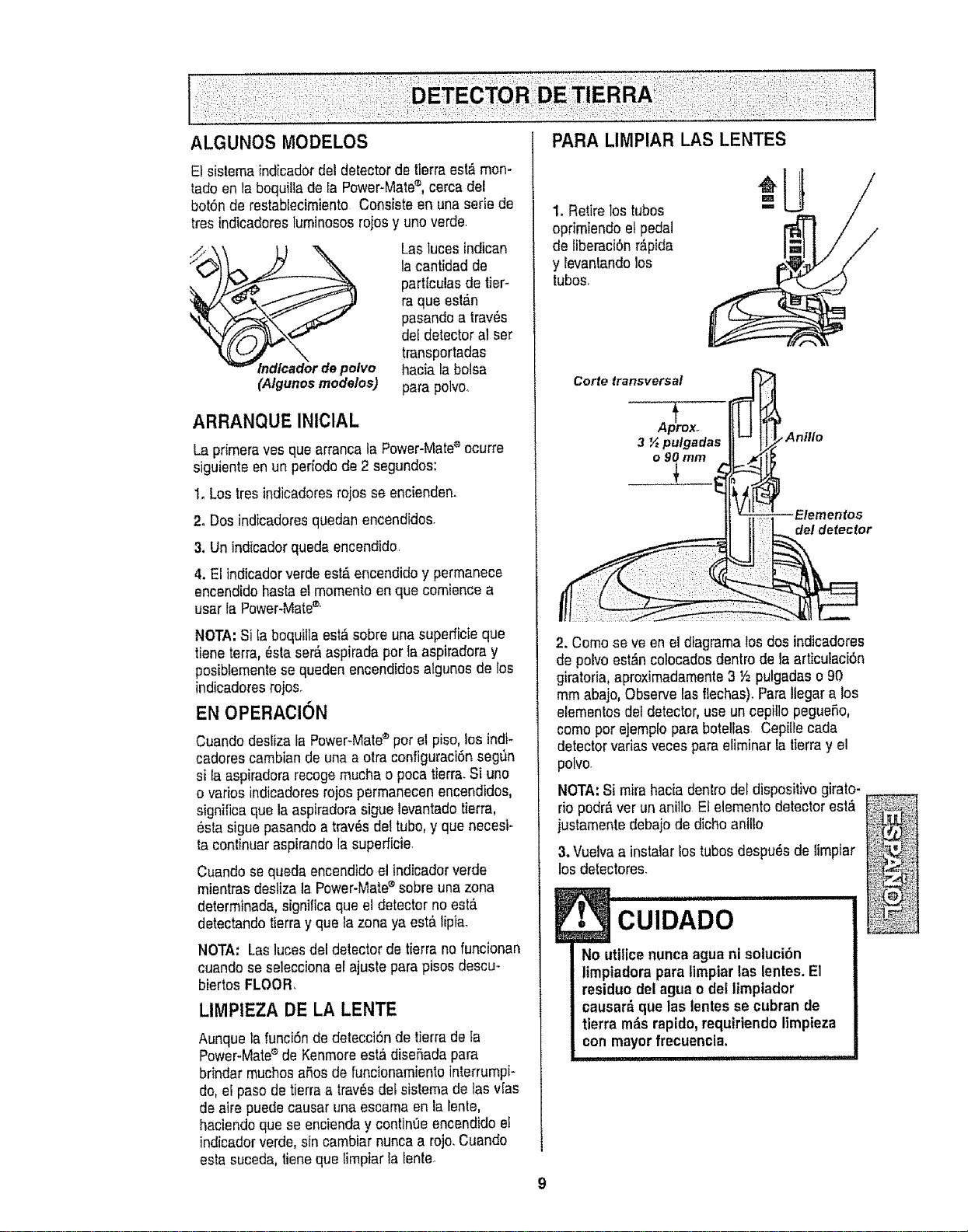
ALGUNOS MODELOS PARA LIMPIAR LAS LENTES
Et sistema indicadordel detectorde tierra est_mon-
tado en la bequiltade FaPower-Mate®,cerca del
botSnde restablecimiento Consiste en una serie de
tres indicadoresluminososrojos y uno verde
_ador depolvo
(Algunosmodelos)
Lastuces indican
lacantidad de
partlculas de tier-
ra qua est_.n
pasandoa trav_s
del detector al ser
transportadas
hacia la bolsa
para polvoo
ARRANQUE INICIAL
La primera yes qua arranca ta Power-Mate®ocurre
siguiente en un perfodode 2 segundos:
I. Los tresindicadoresrojos se encienden.
2. Dos indicadoresquedanencendidos.
3. Unindicadorqueda encendido
4. ELindicadorverde est&encendido y permanece
encandidobasrael mementoen qua comience a
usar IaPower-Mate®'
NOTA:Si taboquiIlaest&sobre una superficieque
tiene ter[a, _sta ser&aspirada per la aspiradoray
posibLementese queden encendidos algunos de Ios
indicadores rojoso
EN OPERACION
Cuando desliza la Power-Mate®per el piso, tos indi-
cadores cambian de una a otra configuraci6nsegun
si fa aspiradorarecogemucha o poca tierra.Si uno
o varies indicadoresrojos permanecen encendidos,
significa que la aspiradora siguelevantado tierra,
_sta siguepasando a trav_s del tube, y que necesi-
ta continuar aspirandola superficie
Cuandose queda encendidoel indicadorverde
mientrasdesliza la Power-Matee sobre una zona
determinada,significaqua el detector no est,.
detectandotierray qua lazona ya est&lipia.
NOTA: Lasluces del detector de tierra no funcionan
cuandose seleccionael ajuste para pisos descu-
biertos FLOOR,
LIMPtEZA DE LA LENTE
Aunque la funci6n de detecciSndetierra de ta
Power-Mate®de Kenmoreest& diseSadapara
brindar touchesaSosde funcionamientointerrumpi-
do,el paso de tierra a trav6s detsistemade tas vIas
de aire puedecausar una escama en la renle,
haciendoqua se encienday contin0e encendidoe!
]ndicadorverde, sin cambiar nunca a rojo.Cuando
esta suceda,tienequa limpiar la lente_
1oRetire los tubes
oprimiendo el pedal
de liberaci6nr_.pida
y levantando los
tubes.
--Ui
2. Come seve en el diagramalos dos indicadores
de polvoestdn colocadosdentro de la articutaci0n
giratoria, aproxirnadamente3 Y2pulgadas o 90
mm abajo,Observe lasflechas). Para itegara los
elementos del detector, use un cepillo pegueSo,
come per ejemplopara botellas Cepilfecada
detectorvarias veces para eliminar la tJerray el
polvo
NOTA:Si mira hacia dentrodel dispositivo girato-
rio pedrO,ver un anillo El elementodetector est,.
justamentedebajo de dichoanilto
3. Vuelvaa instalar lostubes despu6ede limpiar
losdetectores.
E• CUIDADO
No utilice nunca agua ni soluci6n
limpiadorapara limpiar las lentes. El
residue del agua o del limpiador
causardque las lentes se cubran de
tlerra rods rapido, requirtendolimpieza
con mayorfrecuencia.
i ,! i!1!1[11,11
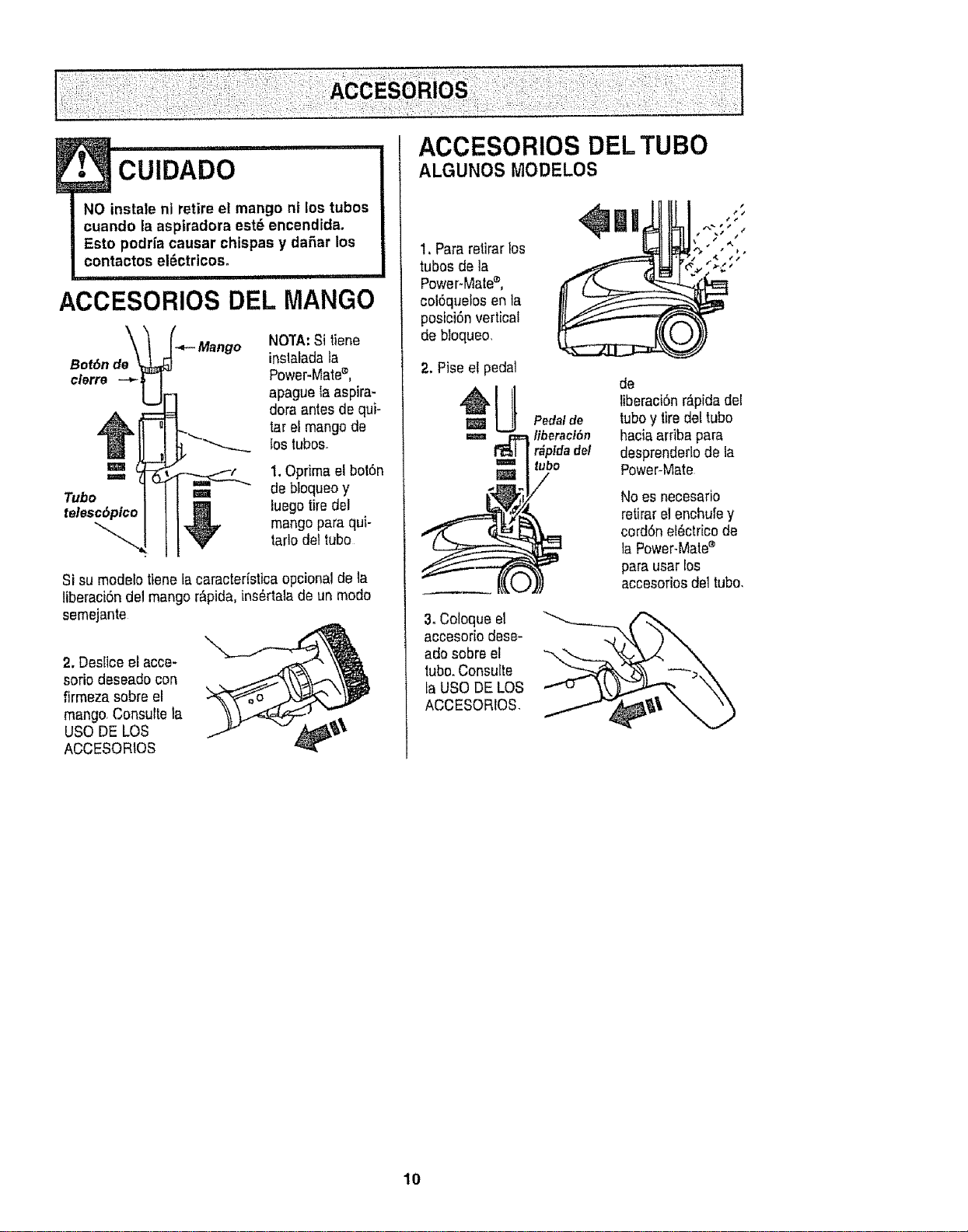
NO instale ni retire el mango ni los tubos
cuando la aspiradora est_ encendida.
Esto podria causar chispas y da5ar los
contactos el_ctricos°
............. ii i iiii ,i i
ACCESORIOS DEL MANGO
Bot6n de
clerre
NOTA:Si tiene
inslaladata
Power-Mate®,
apague faaspira-
dora antes de qui-
tarel mangode
los tuboso
=,=ram 1,Optima el bot6n
Tubo =_ de btoqueoy
telesc6pico ___ luegotiredel
mangopara qui-
"V
tarlo del tubo
Si su modelotienela caracter_sticaopcionalde la
liberaci6ndel mango r_pida, ins_rtala de un modo
semejante
2. Destice el acce-
sorio deseadocon
firmeza sobre el
mango.Consult®la
USO DE LOS ,#jl_'_ Ib'
ACCESORtOS
ACCESORIOS DEL TUBO
ALGUNOS MODELOS
1. Para retirarlos
tubos de la
P°wer'Mate®' l
col6quefosen ta
posici6n vertical
de bloqueo,
2. Pise e! pedal
W Pedalde
=== _ liberaci6n
r_pidadel
ubo
=/
3oColoque el
accesorio des®-
ado sobre el
tube.Consulte
ta USODE LOS
ACCESORIOS.
de
liberaci6nr_.pidadel
tuboy tiredel tubo
haciaarriba para
desprenderlode la
Power-Mate
Noes necesario
retirarel enchule y
cord6nel_etrico de
la Power-Mate®
para usar los
accesorios del tube.
10
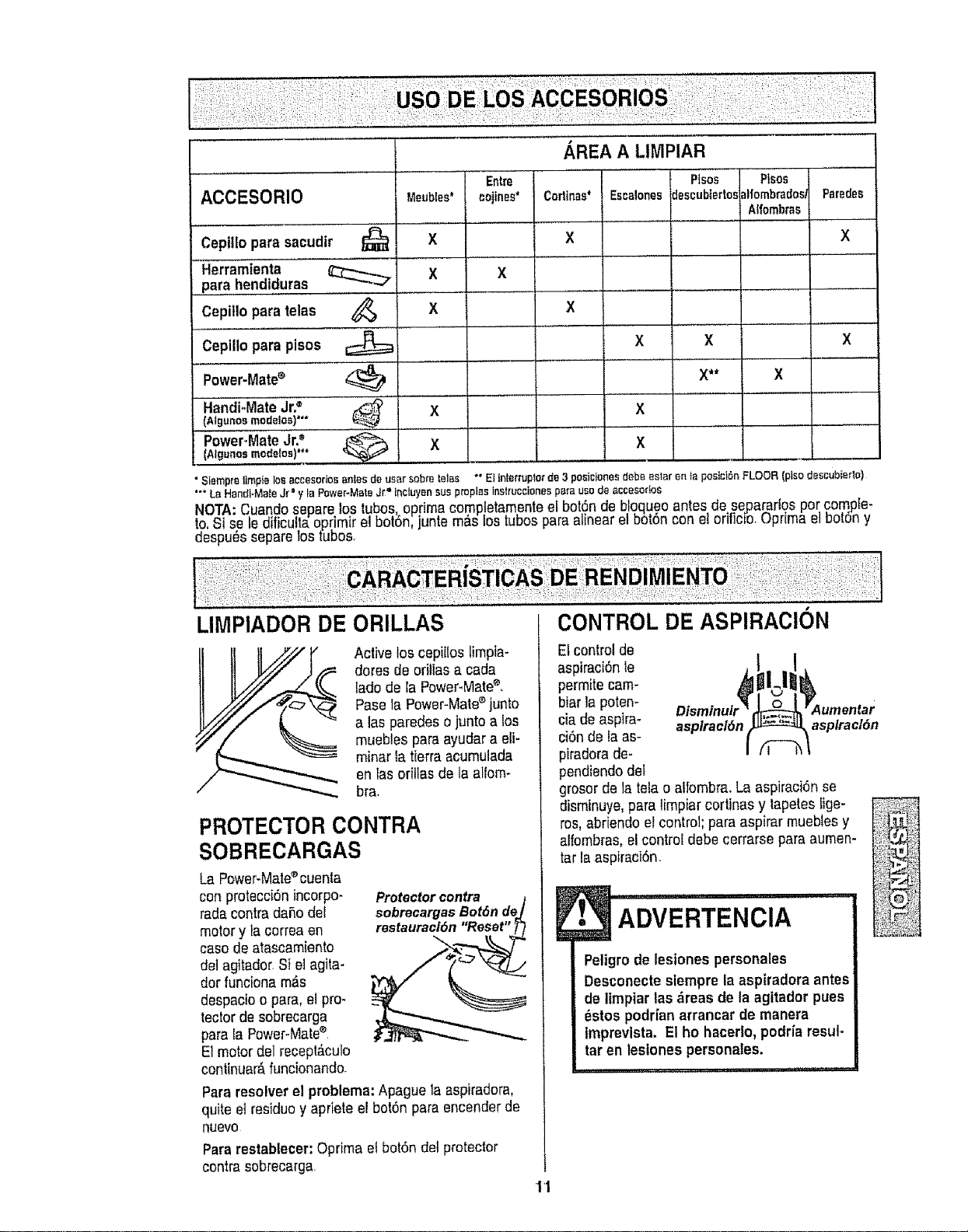
ACCESORIO
Cepillo para sacudir
Herram'ienta .................
pare hendiduras
Cepillo para telas
CepiUopare pisos
Power-Mate®
Handi-MateJr.= "
(Atgunosmodelos)**"
PowePMateJr?
[Algunos modelos)***
Meubles*
X
X
X
X
Entre
cojinee'
/_REA A LIMPIAR
Pleas
Corlinas* Escalonee
X
X
X
X
X
descubterto,,
X
X**
Pisos
dfombrados/
Aftombms
X
Parades
X
• Siernpraltmp_ losaceesoriosantesde usersobm tales "" E_interrupterde 3 posicianesdabs8star en taposic_SnFLOOR(pisodeseubieflo)
"" La HandI-MateJr=y la Fewer-MateJr__nctuyensue propiasinstruceionespareusade accesortos
NOT.A:Cuando separe _ostubas oprirn,acamp!eta.monteet bot6nde btoqu.eoantes desepa_artosparcompfe-
to,_i sete otTicuttaop_imirel Dot6n,jume m_.stosJuDaspara minearel bo[6n conel oriticio,uprirna el ootSny
eespu_ssepare =astubas.
LIMPIADOR DE
Active los cepil!oslimpia-
dares de oritlas a cada
lade de la Power-Mate®,
Pasola Power-Mate®junto
alas paradeso junto a los
rnueblespara ayudar a eli-
rninar ta tierra acurnulada
en lasorillas de la alforn-
bra.
PROTECTOR CONTRA
SOBRECARGAS
La Power-Mate®cuenta
con protecci6nincorpo-
rate conirada_o del
motory la correa en
case de atascamiento
c{e]agitado_S} el agile-
dor funciona rn_s
despacio opare,elpro*
lector de sobrecarga
para Ia Power-Mate®,
El motor del recept_.culo
continuar_,funcionando_
Protectorcontra 1
sobrecargasBot6n de]
res,auracl6n "Re_, "3._
Pararesolver el problema:Apague la aspiradora,
quite et residuey apriete et bot6n para encender de
nusvo
Pararestablecer:Opdma el bot6n de{protector
centre sobrecarga
El controlde
aspimci6nle
permite carn-
biar la poten-
cia de aspire- asplracl6n
ci6n de laas-
piradora de-
pendiendode_
grosor dela tela o aifombra, La aspiraci*Snse
disrninuye,pare lirnpiar cortinas y tapetes figs-
ros,abriendo el control; pare aspirar rnueblesy
alfombras, el control debe cerrarse para aumen-
tar ia aspiraci6n.
asplracl6n
• ADVERTENCIA
Peligro de lesiones personales
Desconectesiempre la aspiradora antes
de limptar las dreas de la agitador puss
_stos podfian arrancar de manera
imprevlsta. El ha hacerlo,podria resul-
tar en lestonespersonales.
'!'1
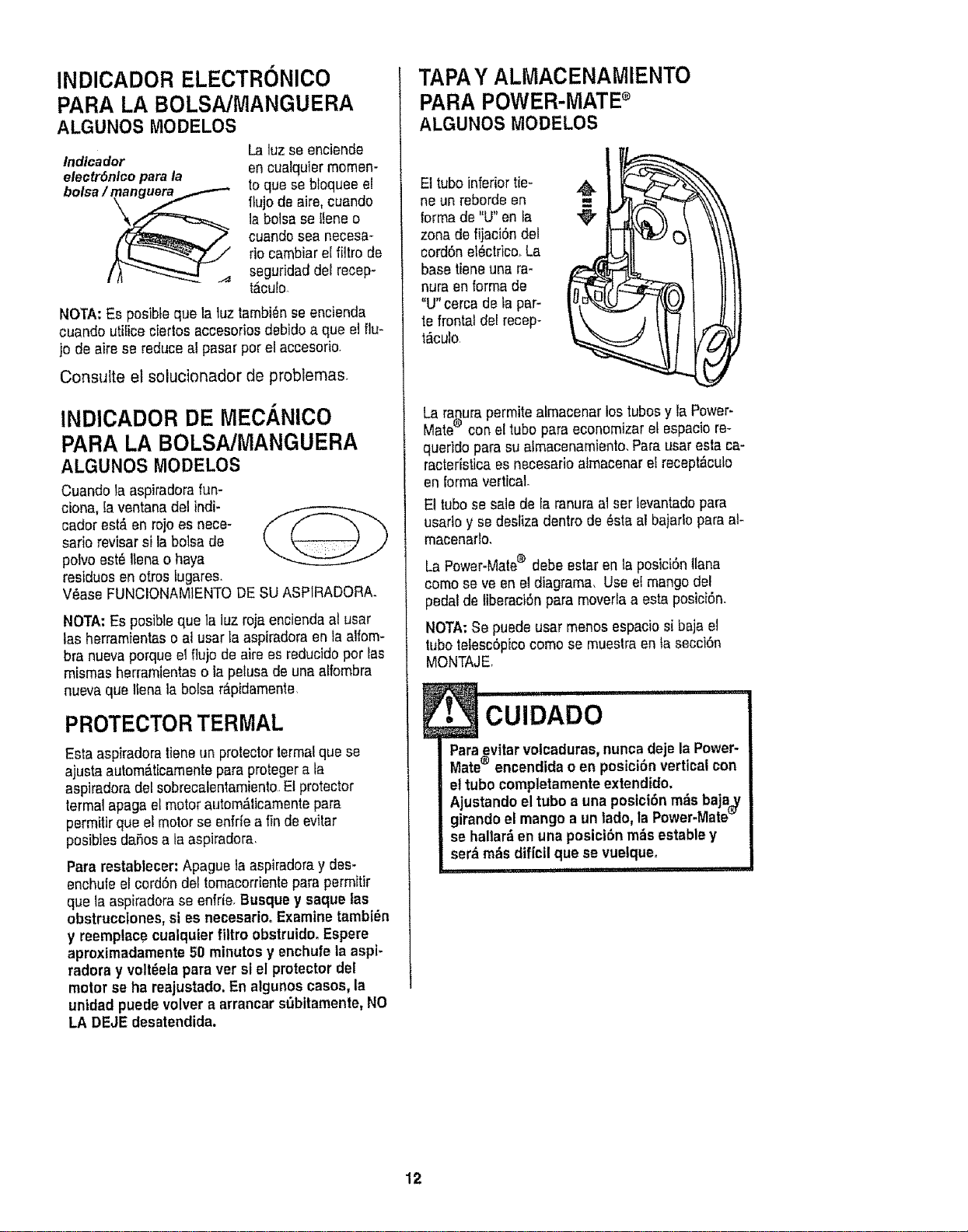
INDICADOR ELECTRONICO
PARA LA BOLSA/MANGUERA
ALGUNOS MODELOS
lndlcador [3 ]uzse enciende
en cualquier momen-
eleotr6nlco para la toque se bbquee el
ftujo de airs, cuando
la bolsase ffeneo
cuando sea necesa-
rio cambiar el _tro de
seguddaddei recep-
t_culo.
NOTA:Es posible que la luz tambi6n se encienda
cuando utiticeciertos accesorios debido a que el flu-
jo de airs se reducea! pasar per el accesorb
Consuite el solucionador de problemas.
INDICADOR DE MECANlCO
PARA LA BOLSAJMANGUERA
ALGUNOS rvlODELOS
Cuando la aspiradorafun-
ciona, la ventana del indi-
cador est,. en rojo es nece-
sario revisar si la bolsa de
polvo est6 Itena o haya
residues en otros tugares,
V_ase FUNCIONAMIENTODE SUASPIRADORA.
NOTA: Es posible que la luz roja enciendaal usar
las herramientaso al usarla aspiradoraen la albm-
bra nuevaporque el flujo de airs ss reducidoper las
mismas herramientas o lapelusa de una alfombra
nuevaque Ilenata bolsa r&pidamente.
PROTECTOR TERMAL
Esta aspiradoratiene un protectortermaique se
ajusta autom_ticamente para protegerata
aspiradoradel sobrecalentamiento.E!protector
termal apaga el motor autom_,licamentepara
permitir que el motor se enfr[e a tinde evitar
posibles dares a taaspiradora,
Para restablecer: Apague taaspiradoray des-
enchule el cord6n def tomacordente para permitir
que la aspiradorase enfde, Busque y saque fas
obstrucclones, si es necesarioo Examine tambi_n
y reemplaoe cualquier filtro obstruido. Espere
aproximadamente 51)minutes y enchufe ta aspi-
radors y volt_ela para ver si el protector del
motor se ha reajustado, En algunos cases, la
unidad puede velvet a arrancar sObitamente, NO
LA DEJE desatendida.
TAPAY ALMACENAMIENTO
PARA POWER'MATEs
ALGUNOS MODELOS
Ettube inferior tie_
ne un reborde en
formade "U"en fa
zona de fijaci6n del
cord6n el_ctrice.La
basetiene una ra-
nura an forms de
"U"cerca de la par-
te frontal del recep-
t_cufo,
La ranura permite atmacenar los tubes y ra Power-
Mates con eltube para economizaret espacio re-
querido psra su slmscenamiento, Para usaresta ca-
racteristica es necesario almacenar e! recept&culo
en {ormavertical
El tube se sale de faranura al ser levantadopara
ussrto y sedesliza dentro de @stsal bajario para at-
macenado,
La Power-Mates debe estaren ls posici6n tlana
come se ve en el diagrama, Use ef mangodel
pedal de tiberaci6npara moverla a esta posici6n.
NOTA:Se puede usar menos espacio si baja el
tube telesc6pico come se muestraen ta secci6n
MONTAJE,
• CUiDADOiiii I ii i ,i ,_,1
Paraevitar volcaduras,nunca deje la Power-
Mates encendida o en posici6n verticalcon
ettubo completamente extendido.
Ajustandoel tubo a una posfci6n m_s baja_
girando el mango a un lado, la Power-Mate_
se hallarden una posici6n robs estsbley
serd rods dif|cil que se vuelqueo
-- I i n i iii,
12
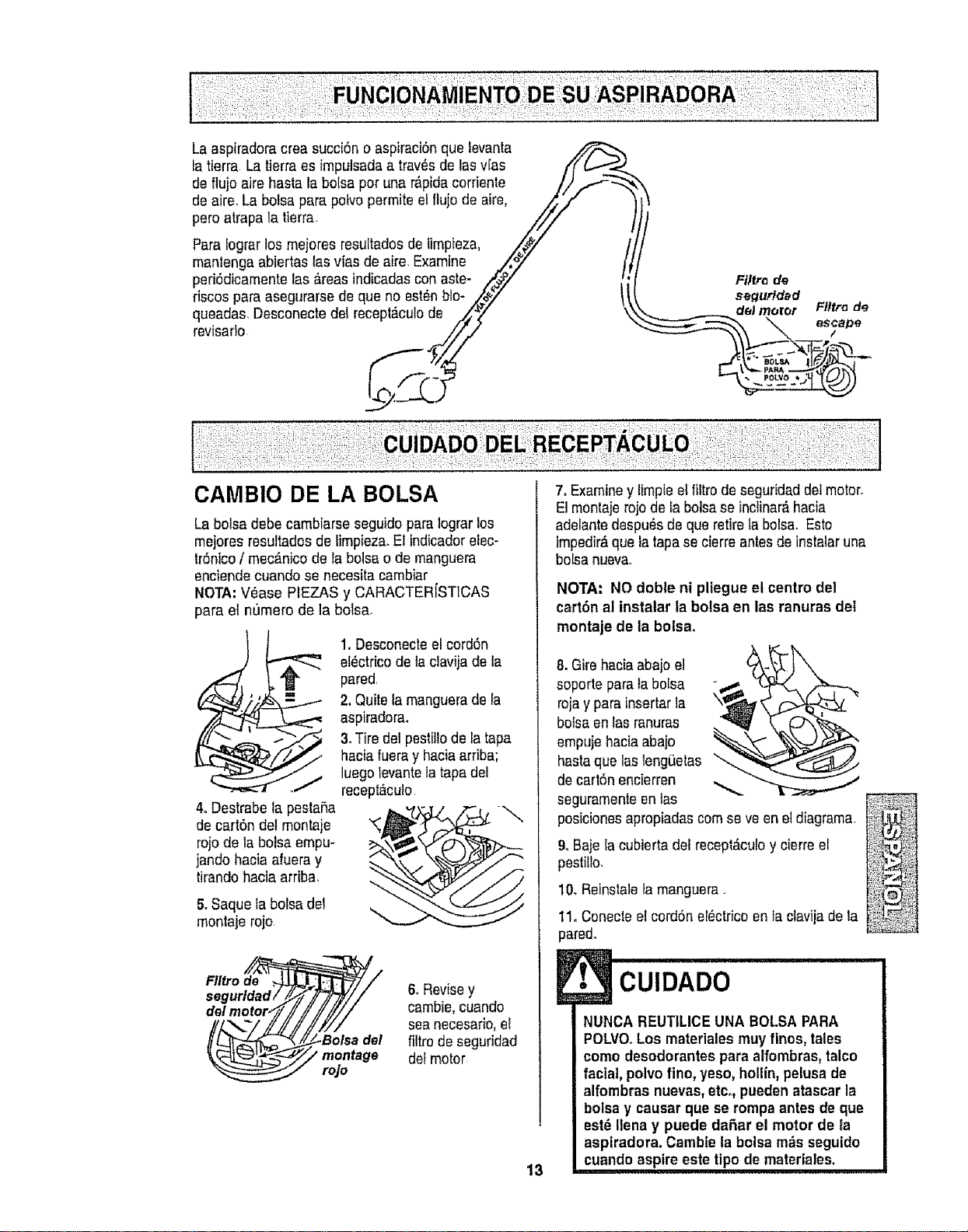
La aspiradora crea succi6n o aspiraci6nque levanta _,,_
la tierra La tierraes impulsada a trav_sde lasv[as /"f (,.,...J.._
de flujo aire hasta la bo{sapor una r_pida corfiente /,,) ..f-_ \
de aire. La bolsa para polvopermite el flujode aire, ,,,/tt.'/" '
pero atrapala tierra /_/,,'
Para [ograrlos mejores resu[tados de limpieza, /_/ /
manlenga abiertas Iasvias de aire,Examine .,/_,_" J'l
peri6dicamentelas _,reasindicadas con aste- ._',,._y _ Filt.o de
riscos para asegurarse de que no est_n blo-
•
oo ooooc,o,o, ooo ,ooo,odo ,
o-Z. 7
Flltra de
_ esc/ape
::: .... ................. ...............
CAMBIO DE LA BOLSA
La bolsa debe cambiarse seguido paralograr los
mejores resultados de limpieza.El indicadorelec-
tr6nico / mec;_nicode la botsa o de manguera
enciendecuando se necesita carnbiar
NOTA:V_ase PIEZAS y CARACTER[STICAS
para el numero de la bolsa.
4. Destrabe la pesta_a
de cart6ndel montaje
rojo de la botsa empu-
jando hacia afuera y
tirando hacia arriba,
5.Saque la boisa del
montaje rojo,
1.Desconecteel cord6n
et_ctrico de la clavija de la
pared,
2, Quitela manguerade la
aspiradora_
3. Tire del pestiUode la tapa
haciafueray haciaarfiba;
luego levantela tapa det
recept_culo
FIItrode
del
rojo
6. Revisey
cambie,cuando
seanecesario,el
del filtro de seguridad
defmotor
13
7. Examiney limpie etfiltro de seguridaddelmotor.
El montaje rojode la bolsase inclinar_hacia
adelantedespu_sde que retirela bolsa. Esto
impedir&que la tapa se cierreantes de instalar una
boisanueva
NOTA: NO doble ni pliegue el centre del
cart6n al instalar ia bolsa en las ranuras del
montaje de ta bolsa_
8. Gire haciaabajo e]
soporte parala bo[sa
rojay para insertarla
bolsa en las ranuras
empuje haciaabajo
hastaque lasleng_etas _,
de cart6n encierren ,_..
seguramenteen las
posicionesapropiadascornseve eneldiagrama.
9. Baje Iacubierta del recept&culoy cierre el
pestillo,
10, Reinstale tarnanguerao
11,Conecte el cord6n eI_ctricoen taclavijade la
pared.
oo
NUNCA REUTtLICE UNA BOLSA PARA
POLVOoLos materiales muy fines, tales
come desodorantes para alfombras,talco
facial, polvo fine, yeso, hollin,pelusade
alfombras nuevas,etc. pueden atascar la
bolsa y causar que se rompaantes de que
est_ Ilena y puede dafiar el motor de ta
aspiradora. Cambie la bolsa m_s seguido
cuande aspire este tipo de materiales.
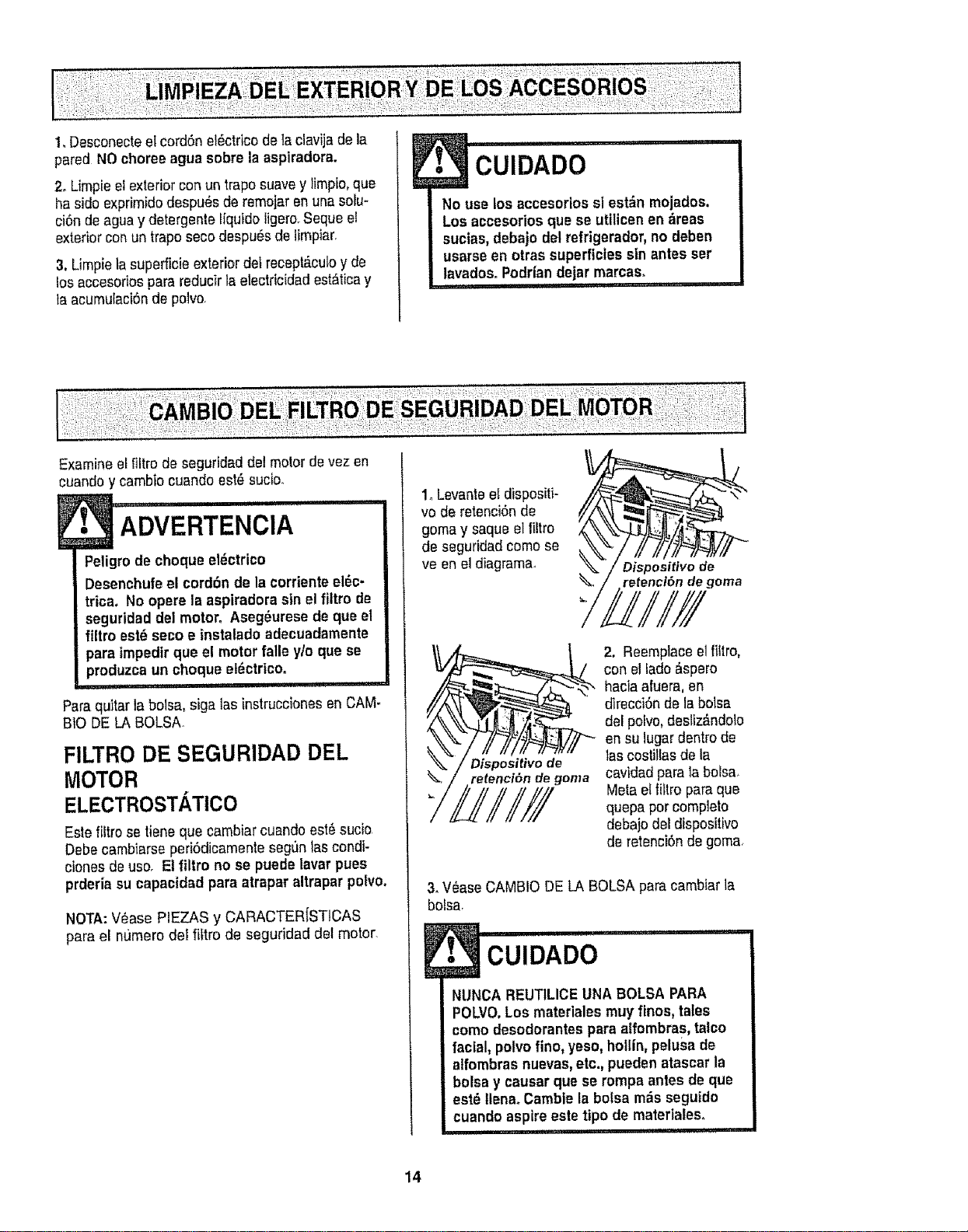
I, DesconecteetcordSnot_ctrbodelaclavijadola
paredNOchoreeagua sobre la asptradora.
2. Limpieei exterior conun trapesuave y limpio,que
ha side exprimido despu_s de remojaronunaselu-
ci6n de agua y detorgente Ifquido ligero.Seque e!
exterior con un trapo seco despu6s de limpiar.
3, Limpiela superficieexterior det recopt_.culoy do
los accesorios para reducirla etectdcidad ost_tioay
la acumulaci6nde polvo.
• cuIDADo ....
No use los accesorios sl est&n mojados,
Los accesorios que se utilicen en _reas
sucias,debajo del refrigerador,no deben
usarse en otras superficiessin antes set
lavadosoPodrlandejar marcas.
,, ,,, ,,, ,
Examine el filtro de seguridad del motor do vez en
cuandoy cambio cuando est_ sucio.
i,ll i, i i,ii
ADVERTENCIA
Peligro decheque el_ctrico
Desenchufeel cordon de la corriente el_c-
trica. No opere la aspiradora sin el filtro de
seguridaddel motor. Aseg_urese de que el
flltro est6 seco e instalado adecuadamente
i para fmpedir que el motorfalle y/o que se
I pr°duzca un cheque el_ctrico.
Para qu_tarla boJsa,siga lasinstrucciones en CAM-
BtO DELA BOLSAo
FILTRO DE SEGURIDAD DEL
MOTOR
ELECTROSTATICO
Esle filtro se tieneque cambiar cuando est_ sucio
Debeeambiarse periSdicamenteseg_nlas condi-
ciones de usoo Et filtro no se puede lavar pues
prderia su capacidad para atrapar altrapar polvo.
NOTA:V_ase PIEZAS y CARACTERISTICAS
para el ntJmerodei filtro de seguridad dol motor_
1. Lovante e!dispositi-
vo de retenciSnde
gema y saque el tittro
de seguridad come se
ve en el diagramao
Dispositivode
retention de goma
Disposi¢ivo de
retenci6rt de goma
2, Reemplacoel fillro,
con el lade&spero
haciaafuera, en
direcciSnde Is bolsa
del polvo, desliz_,ndolo
en su lugar dentro de
fas costillas de la
cavidad parala bolsa,
Meta e(fiftro para que
quepa per complete
debaio del dispositivo
de retenci6nde goma.
3. V6ase CAMBIO DELA BOLSA paracambiar la
boisa.
CUIDAD'O....
NUNCA REUT1LICEUNA BOLSA PARA
POLVO.Los materiales muy fines, tales
comedesodorantes para alfombras,talco
facial, potvofine, yeso, hollin,pelusa de
alfombrasnuevas,etc., pueden atascar la
bolsay causar que se rompa antesde que
estd tlena. Cambie la bolsa m_s seguido
cuando aspireeste tipo de materiales_
,11 ! !! i! i1,11,,,1,11
14
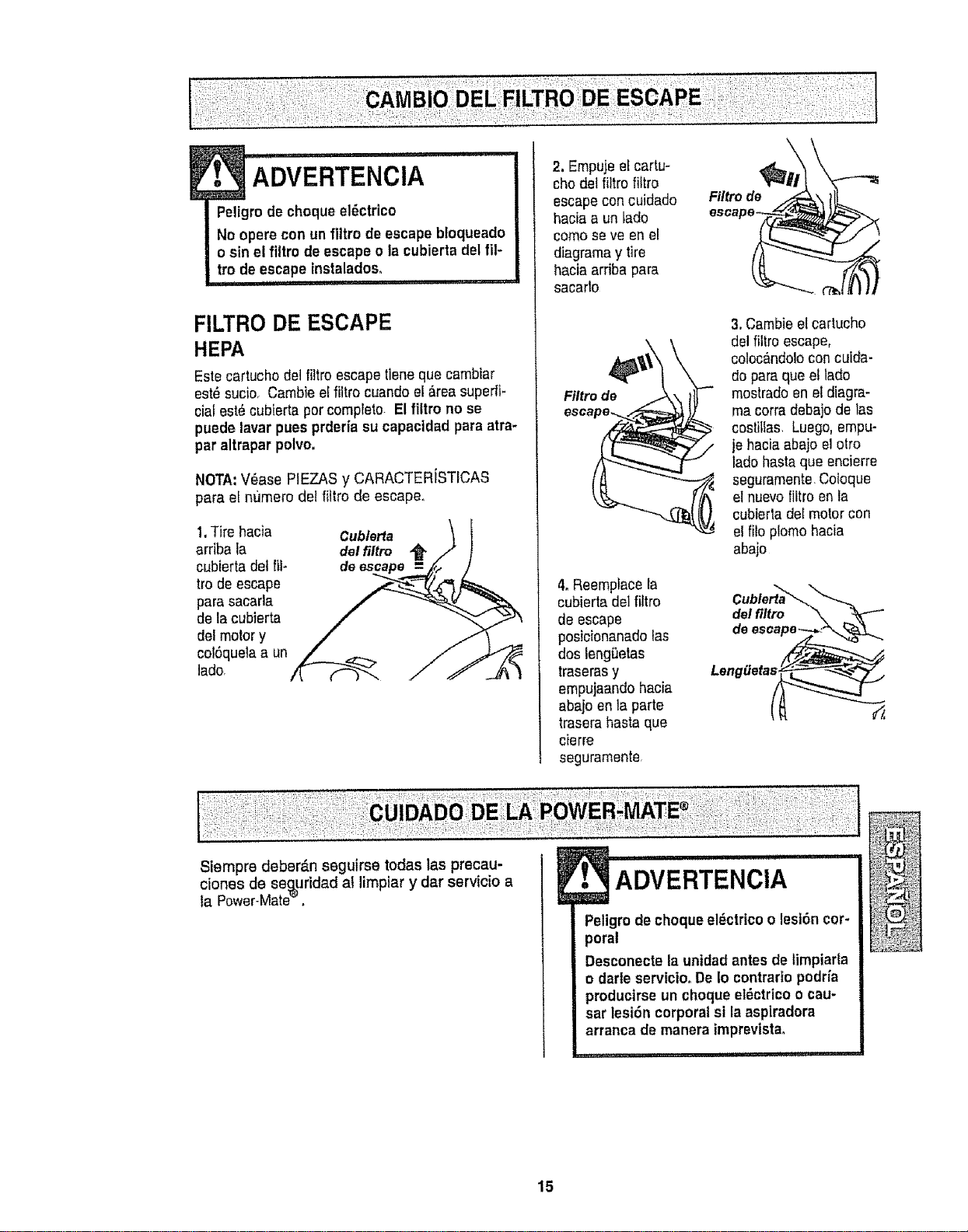
A'DVERTENCIA *
Peligro de choque el_ctrico
No operecon un flltro deescape bloqueado
o sin el filtm de escape o la cubierta del fiF
tro de escape instaladoso
FILTRO DE ESCAPE
HEPA
Este cartucho del filtro escape tleneque cambiar
est_ sucio, Cambie e!filtro cuando eI_rea superfi-
cial est_ cubierta por compfeto. El flltro no se
puede lavar pues prdeda su capacldad para atra-
par altrapar polvo.
NOTA:V_ase PIEZAS y CARACTERiSTICAS
para el n_Jmerodel fittro de escape°
1,Tire hacia
arflba la
cubierta det[ii-
ire de escape
pare sacarla
de la cubierta
del motor y
colSquetaa un
lado
Cublerta
del tiltro
2. Empujeef cartu-
chodel filtro fittro
escape con cuidado
haciaa un tado
cemo se ve en el
diagmma y tire
hacia arriba para
sacarto
Ftltrode _
4. Reemplace la
cubierta del filtro
de escape
posicionanado las
dos leng_etas
traseras y
empujaando hacia
abaio en]a parte
trasera basraque
cierre
seguramente
Filtro de
3. Cambie el cartucho
del filtro escape,
coloc_,ndolocon cuida-
do paraque et lado
mostrado en el diagra-
ma corradebajo de las
costillas, Luego,empu-
je haciaabajo el otto
lado hasta que encierre
seguramente,Cotoque
el nuevofiltro en la
cubieda deI motor con
el filo plomo hacia
abajo
del filtro
Siempre deber_n seguirse todas las precau-
clones de se_uridad ai limpiar y dar servicio a
ta Power*Mate ,
! ,I Inl nuul n ,ll,p'l
ADVERTENClA
Peligrode choque el_ctrico o lest6n cor-
poral
Desconecte la unidadantes de limpiarla
o darls servic|ooDe Io contrario podrfa
producirse un choque el_ctrico ocau-
sar lest6n corporal si laaspiradora
arrancade manera imprevista.
15
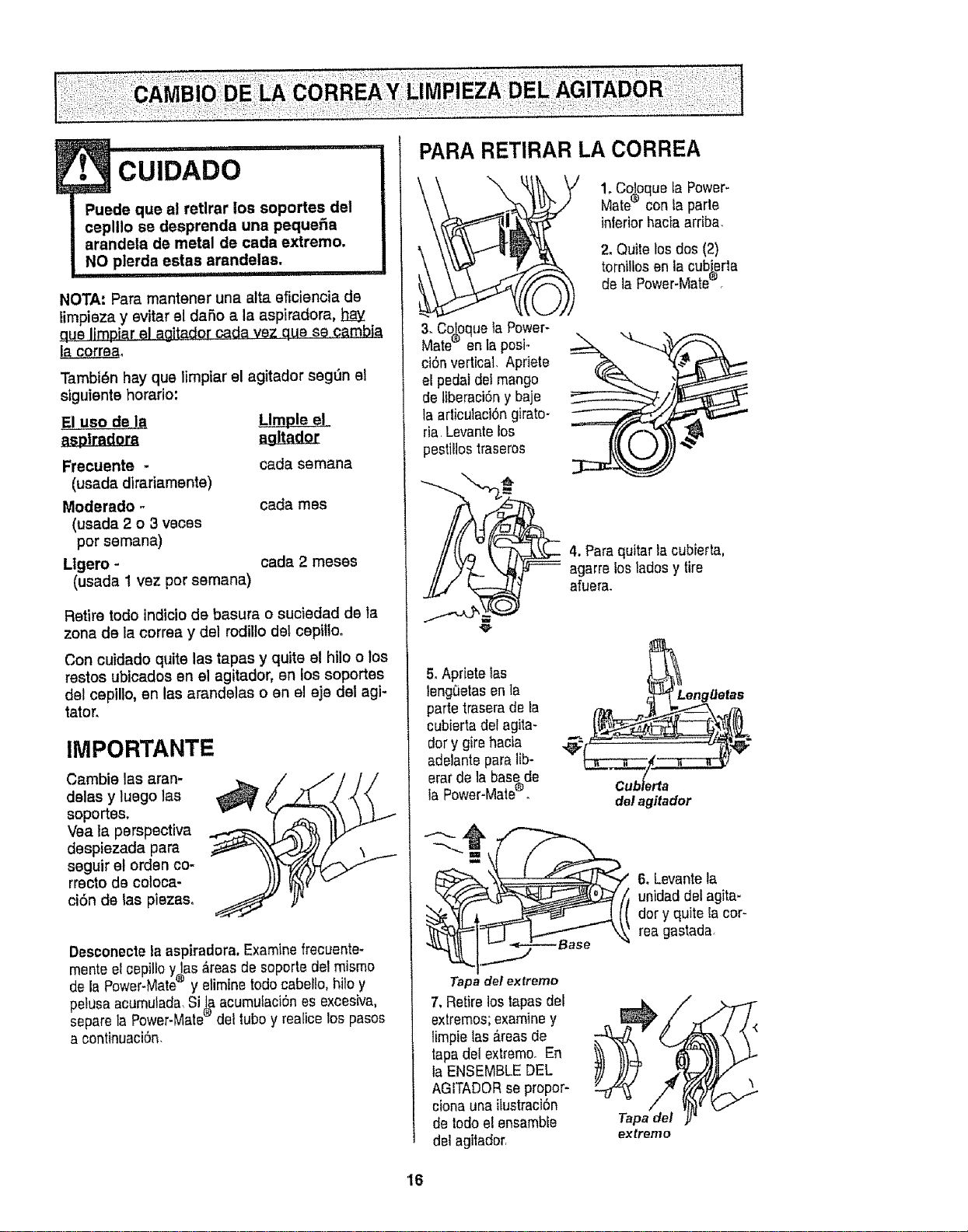
E• cuIDADo
Puede que al retlrar los soportes del
ceplllo se desprenda una pequefia
arandela de metal de cada extreme.
NO plerda estas arandelas.
I IIII i1,11,,,11, i iiiiiilffl,ii
NOTA: Para mantener una alta eficiencia de
fimpieza y evitar el dafio a la aspiradora,
qua limpiar __&gj.t_dor carla vez qua se camJ2L_
laco_.
Tambi_n hay qua limptar el agltador segt_nel
siguiente horario:
Frecuente -
(usada diradamente)
Moderado .-
(usada 2 o 3 veces
per semana)
Llgero -
(usada 1 vez per semana)
cada semana
cada mes
cada 2 mesas
Retire todo indiciode basura o suciedad de la
zona de la correa y del rodilio del cepilloo
Con cuidado quite lae tapas y quite el hilo o los
restos ubicados en el agitador, en los soportes
del cepillo, en las arandelas o en el ejo del agi-
tator,
IMPORTANTE
Cambie las aran-
dolas y luego las
soportes.
Vea la perspectiva
despiezada para
seguir el orden co-
rrecto de coloca-
ci6n de las plazas,
Desconectela asplradora.Examine frecuente.
mente etcepillo y_as _reas de soporte del mismo
de la Power-Mate y elimine rode cabello, hitoy
pelusa acumulada,Si_aacumulaciSnes excesiva,
separe la Power-Mate del tubey reatice los pasos
a continuaci6n.
PARA RETIRAR LA CORREA
1. Co_oqueta Power-
Mate'_ con la parle
interiorhacia arriba,
2, Quite losdos (2)
tornitlos en la cub[erla
de ]a Power-Mate_.
3. ColoquetaPower-
Mate® en[aposF
ci6n vertical. Apriete
el pedai dei mango
de liberaci6ny baje
taarticulaci6ngirato-
ria,Levante Ios
pestillostraseros
4. Para quitar lacubierta,
-- agarre los Iadosy tire
afuera_
5, Apriete las
leng_etas en la
parte trasera de la
cubierta del agita-
der y gire hacia
adeiantepara lib-
erar de la basede
la Power-Mate_o
Leng_efas
de/agitador
Tapa del exfremo
7, Retire los tapas de{
extremes;examiney
timpie tas _reasde
tapa del extremooEn
la ENSEMBLE DEL
AGITADORsepropor-
ciona una itustraci6n
de lode e_ensamble
del agitador,
6_Levante la
unidad del agita-
dor y quite _acer-
rea gastada
Tapadel
extreme
'16
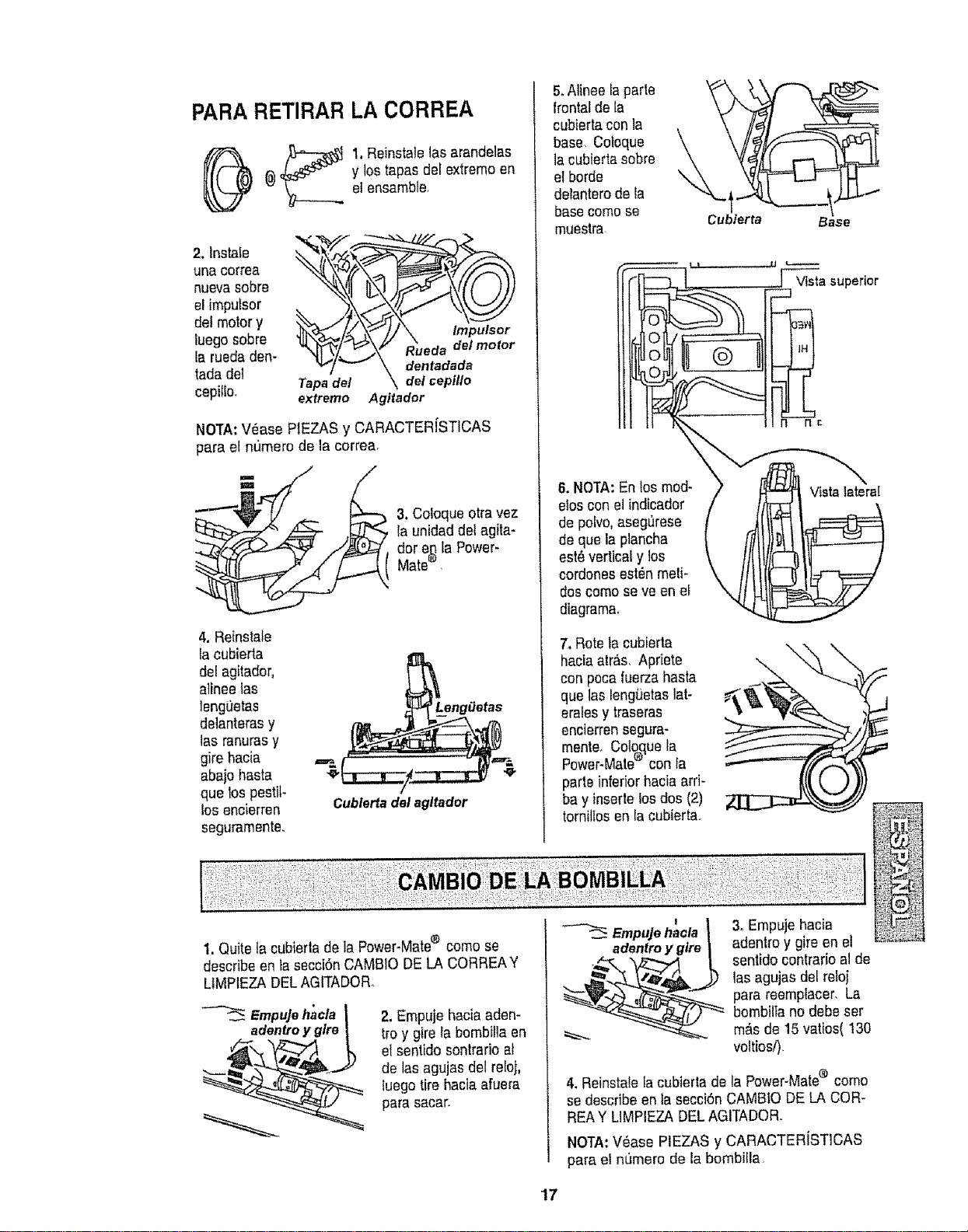
PARARETIRAR LA CORREA
_) _ 1. Reinstalelas arandelas
(_ y los tapas dei extremo en
etensamble
nuevasobre
det motor y
luegosobre
la rueda den- da
tadadel _.,./ v \ dentadada
cepitlo, Tapadel \ delcepillo
extremo Agitador
NOTA:V_ase PIEZAS y CARACTER[STICAS
para el numero de la correa.
3. Coloque otra vez
la unidad del agita-
dor e_ la Power-
Mate ,
4, Retnstafe
la cubierta
del agitador,
alinee las
JengOetas
delanteras y
las ranurasy
gire hacia
abajo haStE
que los pestit-
fos encierren
segurarnente.
Cublertadel agltador
5.Alinee laparle
frontal de la
cubierta con la
base. Coloque
la cublerta sobre
et borde \
delanterode la
base cornose
muestra.
6. NOTA:En los rnod-
eloscon elindicador
de polvo,asegQrese
de que la plancha
est_ vertical y los
cordonesest_n rneli-
dos cornose ve en el
diagrama.
7. Rote la cubierta
hacia atr,_s.Apriete
con poca tuerza hasta
que las leng_etaslat-
eralesy traseras
encierrensegura-
rnente_Coloqueta
Power-Mate® con la
parle inferiorhacia arri-
bay inserlelosdos (2)
tornittosen la cubierta.
Vista superior
Vista lateral
1. Quitela cubierta de la Power-Mate® cornose
describe en ta secci6nCAMBIO DE LA CORREAY
LIMPIEZA DELAGITADOR
EmpuJeh'acla
adentroy glre
2. Empuje haciaadem
troy gire la bornbilla en
et sentido sontrario El
de tas agujas del reloj,
luego tire haciaafuera
para sacar.
!
Empujehacla
3. Ernpuje hacia
adentroy gireen el
sentido contrario Elde
las agujas del reloj
para reernplacer_La
bombilla no debe ser
m_,sde 15 vatios( 130
voltios/).
4. Reinstalefacubierta de la Power-Mate® como
se describe en la secci6n CAMBtO DE LA COR-
REAY LIMPIEZA DELAGITADOR.
NOTA:V_ase PIEZAS y CARACTERiSTICAS
para el numero de la bombiFla,
'17
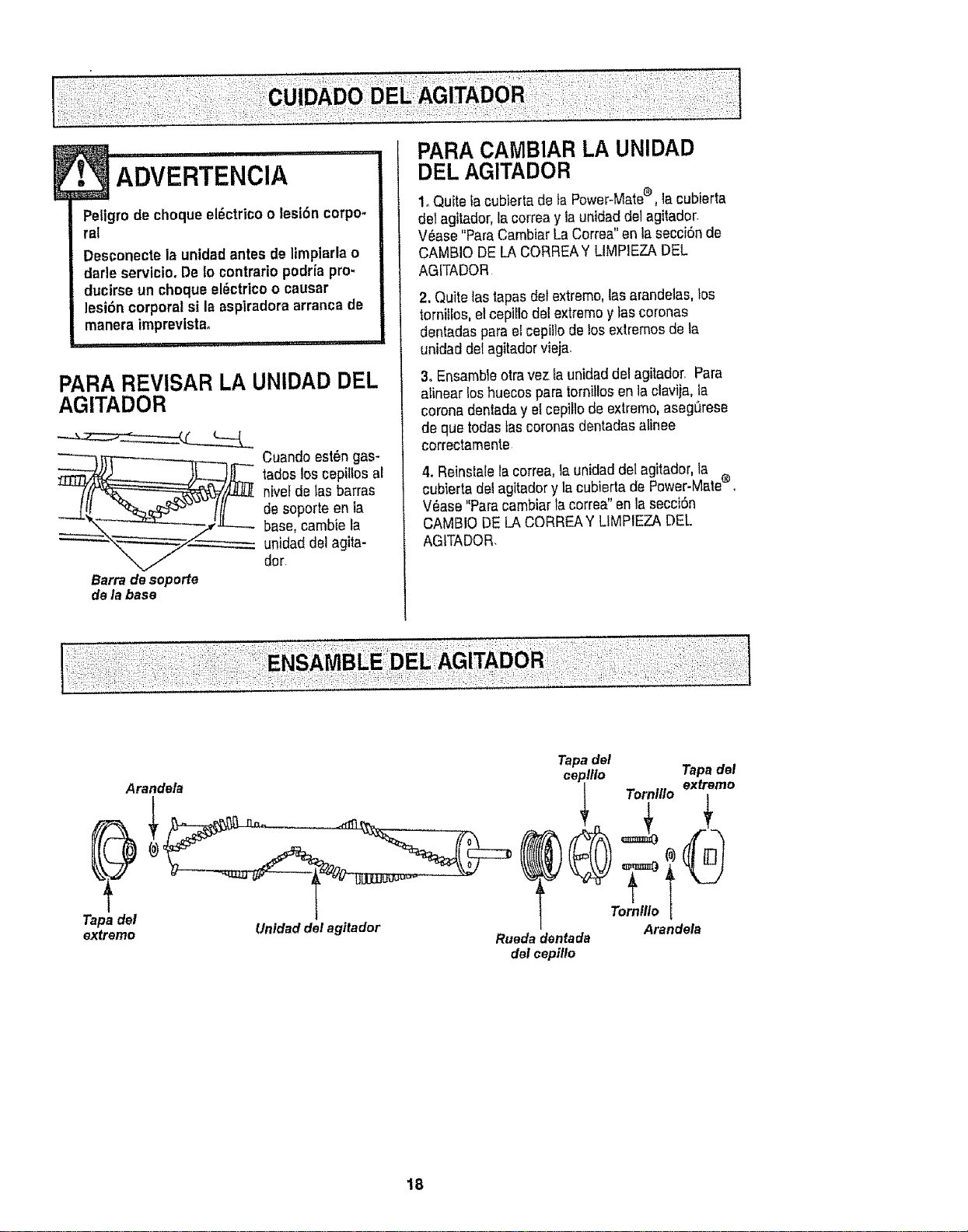
_ ADVERTENClA
Peligro deehoque el_ctrico o lesi6n corpo-
ral
Desconecte la unidadantes de limplarla o
dad° servicio.De io contrario podrfa pro-
ducirse un choque el_ctrico o causar
lesi6n corpora/si la aspiradoraarranca de
manera imprevista,
I I I1[ ii,
PARA REVISAR LA UNIDAD DEL
AGITADOR
__ Cuando est_n gas-
tadoslosceptltos aE
n}velde tas barras
de soporte en la
base, cambie la
"-- unidaddelagita-
dot.
Barradesoporte
dela base
PARA CAiVIBIARLA UNIDAD
DEL AGITADOR
1_Quite facubiertade ta Power_Matee, lacubierta
del agitador,la correay ia unidad del agitador.
V_ase "ParaCambiar La Correa"enlasecci6n de
CAMBIO DE LA CORREAY LIMPIEZA DEL
AGITADOR
2. Quitetas lapas del extreme,lasarandelas, los
tornillos, el ceptLIodel extremoylas coronas
dentadas parael cepil]ode los extremos de la
untdad del agitadorvieja.
3. Ensambleotravez la unidaddal agitador. Para
alinear loshuecos para tornillosen laclavija, la
coronadentaday elcepillo de extremo,aseg0rese
de que todas tascoronas dentadasatinee
correctarnente
4oReinstalela correa,taunidad del agitador, la
cubierta detagitador y la cubierta de Power-Male o
V_ase "Paracambiar la correa"en la secci6n
CAMBIO DELA CORREAY LIMPIEZA DEL
AGITADOR,
Tapa del
extremo
Arandela
Unidad del agitador
Tapadel
oo.,,,o
Terntllo i
Arandela
Ruedadentada
del eepillo
18
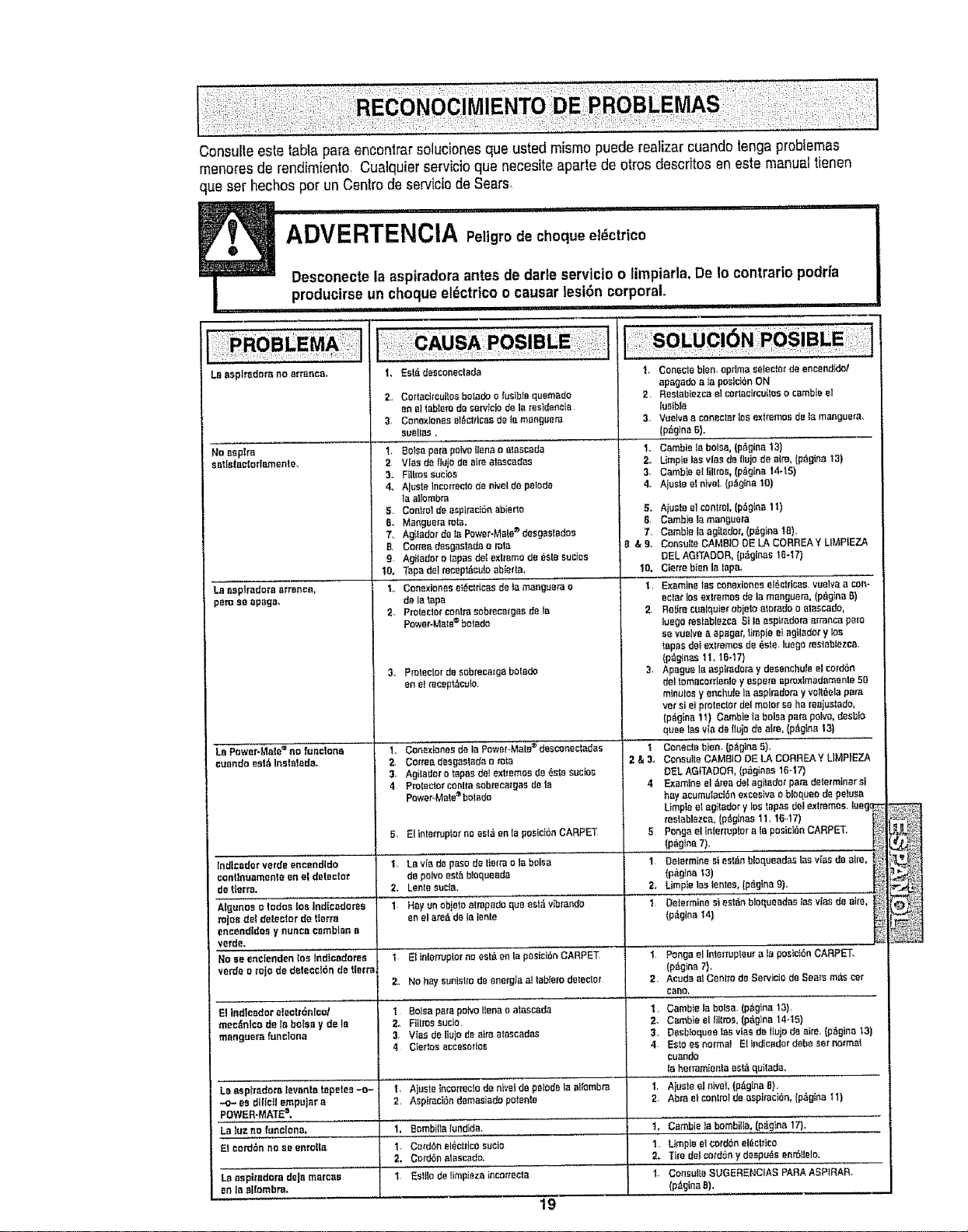
Consulteestelabiapare enconlrar solucionesqueusted mismopuede realizer cuando tenga problemas
menores de rendimiento Cualquierservicioque necesiteaparte de otros descdtos en este manualtienen
queser hechos per un Centre de servicfode Sears,
,Ul ,,, i i i Ull,,i,i i ,ll,lll
ADVERTENCIA Pe,g,odecheque etdctrico
Desconectela aspiradora antes de darleservic{o o Iimpiarla. De Io contrario podn'a
produclrseun cheque eldctricoo causar tesi6n corporal,
i ,i i
L_ aeptradem no offence.
1, Est_ dascenectBda
I
No aspire
satte|soloriamente.
La aspfrodora _rranoa,
peru seepage,
L8PewePMate_ oe fuactotte
cuando oatti lnclatede.
Indieader verde encendldo
eoni[nuemento en el de(eotQr
de t|erra.
AIgunos o todoc los Jadfeedores
mjoa de{ detector de tterm
second[dos y nunee cambtnna
verde.
No ae enefenden los fndtcaderes
verde orojo de datecct6n de tlerra,
3.
2
4o
5
B_
7,
8r
9
10,
1.
2,
3_
4
2,
I.
_r
2,
3.
Cortacircuitoa botado o lucibls quemado
an el tablom d_ sarv_ciod_ Jafes}doeeie
Conexlones et_,ctdeasde lemenguera
suellas,
BOISepera polvoilena o alascada 1,,
Vies de flute doairs alaseedac 2.,
Filtmssucioe 3.
AJustelncorreelo dBnivelde pelode 4.
iaalternbra
Conlrol dea_ptrecten abierlo 5.
Manguera rote. 5,
Ag{ladorde ta Power-Male®deegastadee 7,
Cetm;_ dasgastada o rata & 9.
Agiladar o tepeedelextreme de _sle Busies
Tapedel reeeplficutoBbierla. 10,
Conexlonee et_ctrtces delamengueta a I1
de iatape
Protectorcount:reeobmca[geede tB 2
Power-Male©botado
Protector de sobmee_gabolado 3.
en el _ecapt_eulo
Conextoeesd_ IBPower.,M_ie®deeconectadae I
Cortes desgas|ade0 rata 2 & 3.
Agiledore tapesdelext:_emosde6clssueloe
Pmteo_r _nlta eebmeargeede Ie 4
Power.,Male®bet,ado
Eli_lefruplor no eslaen la pesie_6nCARPEI_ 5
La via de pace da lierra ole balsa 1
de polYPeet_ bloqueada
Lenteeucta, 2.
Hay unobjeloatmpedo quaesl_vibtando 1.
en elare_ de lareels
El tntenupler noest,. en la postei_eCARPET 1.
No hayeuniatro de energ$aalleblerodelector 2
Bolea parepone llanoo ataeeada 1.
Filtmesuclo, 2,
Vies de flutede airs alaecadea 3,
Ciertee accesorles 4
Ajusle Ineerrectade elvelde pelede laaltombm 1.
Asplmeiendemaciadopetente 2
Bombillalurid;de, t.
Cofden ei_c[rico susie I
Cord6n alaccade. 2.
Eslilo de limpieza incorreeta 1.
Coneeloblen. oprtma r.;eleelarde encendk_l
apagado e la pocicionON
Restablezce el_rtaclr_uitee o eambieel
tumble
Vtmlvae cancelerlos exFemoc detomanguere,
(p_gtna B),
Cembie labolsa, {p_gino 13)
Limpie leevies d_Ilujo de aim, (pfigino t3)
Cambtee! liltme, {pdglne14-15)
Ajuete eln_veL(p,tg{ea 10)
Aiuele elcentral, (p>ae1t)
Cambie la manguera
Camble la egilador,(p_gina 1B),
Co_auileCAMBIO DE LA CORREA Y LPAPIEZA
DEL AGITADOR, {pfigin_,e16-I7)
Ctetre bienla laps,
Examine lee conexloneseleelflcas, vuelvaa con-
eclat losextremesd_ la menguem. (p,_gina B)
Retire cualquim'obieto etorado o elaecado,
luegomelablezeaSlie ecphadom m'rancapare
ce vuelvea apa_ar, t_mpieetagilader y Ioc
topes del extremes de (tale, luegomatablezea.
(pflginBs11.1B-17}
Apague laaspimdofay dosanehu_eelcord6n
deltomaeotdenle yespem apmxlmadamonla 50
mlnuloey eocbule la espimdom y votffiela pare
vet ci et pmlector del molar so he reaiuetado,
(pfigiea11} Cambie laboles pate pairs, deeblO
quee toeVPade llu_ de otto. (p.,Igina13t
Coeectobien. (pfig_na5).
CoeeuitBCAMBIO DE LA CORREA Y LIMPiEZA
DEL AGSTADOFI,(p_,ginas 1647)
Examine el ,!tea del agilador pare determiner el
hayaeumulac_enexceeiva o blequeodo peluea
Limpteel agitador y los tapes d'_lextremes. {ueg(_
reslablazce, (pf_gteas1f. 18-t7)
Pongael inlerruplor B_la posietdnCARPET.
(pfigfna 7).
Determine _i eaten bloqueadas ias vlas de elm,
(p_gIna 13)
Limpieleelenles, (p_gina 9).
Determine si est_n blaqueedas ice vies de eke, '_
(p_glna14)
I Ponga el Interrupteur ala poslei6nCARPET.
(p_gina7),
2., Acuda aI Cenlrr_de Servicie do Seats m_s car
core,
El indicador electrenlco! 1 Camble labalsa. (p_g_na13),
mec_nlco de la boise y de le 2., Cambie e! lllims, (p_,gina1445)
manguero funelona 3, Desbloquee Iaa vtacde ttuio_ aim, (p_gina 13)
4 Esloes normal Elindlcadotdabs setnorma_
cuando
la hermmienta eslfi quilada.
La aephadora levantatapetee -,.o- 1. A_usloel nivet, (pAgiea8),
-o- ee d(ffct_empujar a 2, Abra eteonlml deaspiracidn, (p_gin_ _1)
POWER.MATE=.
La luz no futlctona. 1, Cembie le hornbills, (pfiglna 17).
El oord_n no ao sere{to, 1. Utopia etcordonelfietrico
2. Tire del cOtdeny decpu_s eer611ele.
Laasptradora dole marcac I. ConsultsSUGERENClAS PARAASP1RAR.
en la elfombre. (p_,ginaB),
19

it fixed, at your home or ours!
Your Home
For repair - in your home - of all major brand appliances,
lawn and garden equipment, or heating and cooling systems,
no matter who made it, no matter who sold it!
For the replacement parts, accessories and
owner's manuals that you need to do-it-yourself.
For Sears professional installation of home appliances
and items like garage door openers and water heaters.
1-800-4-MY-HOME _ Anytime, day or night
(1-800-469-4663) (U.S.A. and Canada)
www.sears.com www,sears,ca
Our Home
For repair of carry-in products like vacuums, lawn equipment,
and electronics, call or go on-line for the nearest
Sears Parts and Repair Center.
1-800-488-1222 Anytime, day or night (U,&A. only)
www,sears.com
To purchase a protection agreement (U.S.A.)
or maintenance agreement (Canada) on a product serviced by Sears:
1-800-827-6655 (us,A.) 1-800-361-6665 (Canada)
Para pedir servido de reparacbn
a domtcilio, ypara ordenarpiezas:
1.888.SU-HOGAR m
(1-888-784-6427)
Au Canada pour service en fran£_4=qis:
1-800-LE-FOYER Mc
(1_
www.sears°P_.,a
SEAR
©Sea_Roebu_andCo.
® Registered Trademark i TM Trademark I sMService Mark of Sears, Roebuck and Co,
® Marca Reglstrada / T_ Marca de Fsbfica t 8MMarce de Servtcio de Sears, Roebuck and Co,
r,c
' Marque de commerce ! Mr_Marque depos6e de Sears, Rcebuck end Co,