Owner's Manual
Manual Del Propietario
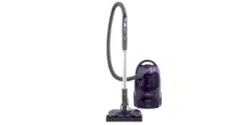
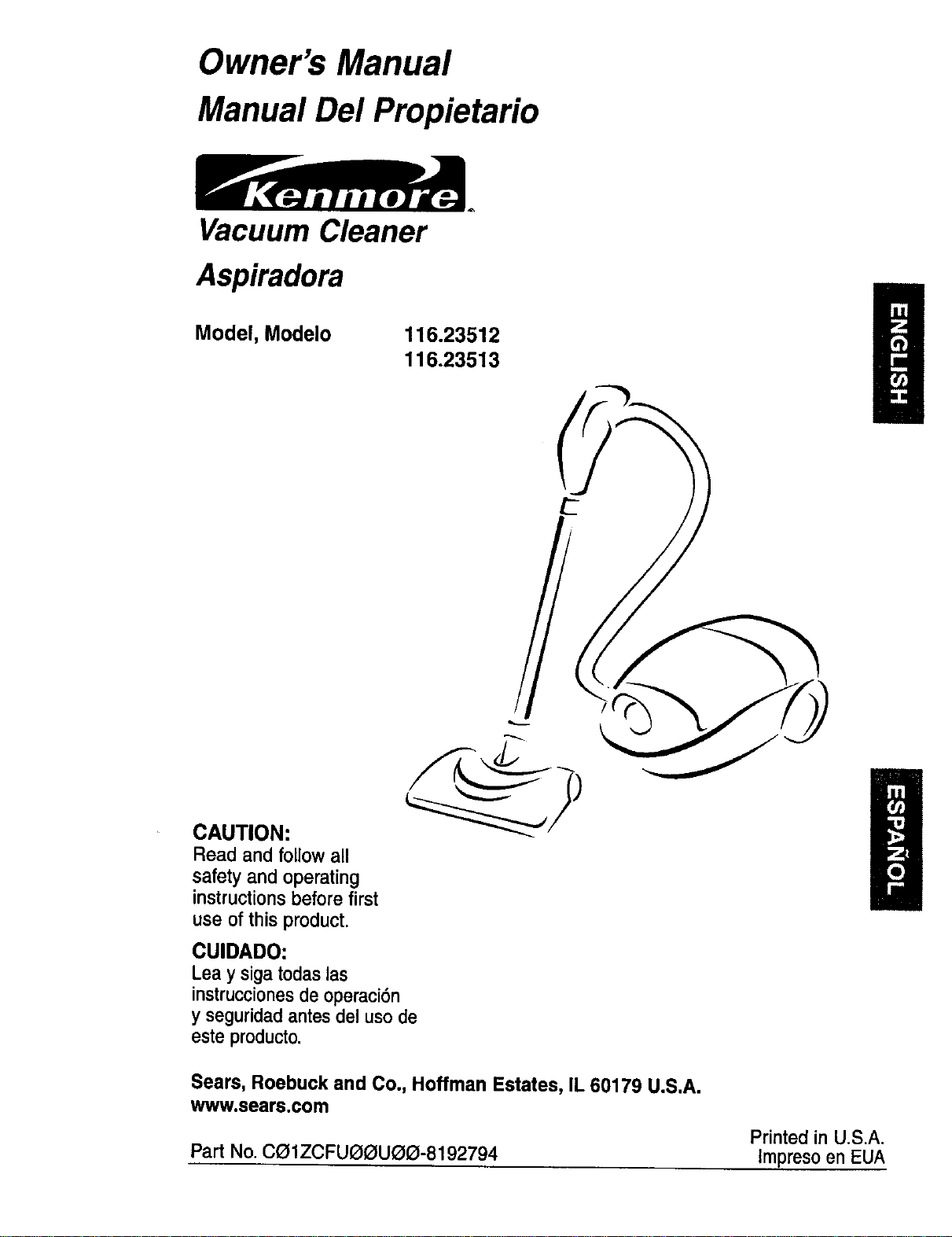
Vacuum Cleaner
Aspiradora
Model, Modelo
116.23512
116.23513
CAUTION:
Read and followall
safety and operating
instructionsbefore first
use of this product.
CUIDADO:
Leay sigatodaslas
instruccionesdeoperaci6n
y seguridadantesdel usede
esteproducto.
Sears, Roebuck and Co., Hoffman Estates, IL 60179 U.S.A.
w_wv.sears.com
Printed in U.S.A.
Part No.Ca1ZCFUQOU_O-8192794 Impreso en EUA
Before Using Your New Vacuum ....... 2
Kenmore Vacuum Cleaner Warranty ... 2
Important Safety Instructions ......... 3
Parts and Features ................. 4-5
Assembly Instructions ............. 6-7
Use ................................ 8
How to Start ........................ 8
Vacuuming Tips ..................... 9
Suggested Pile Height Settings ......... 9
Dirt Sensor ....................... 10
Attachments ....................... 11
Attachment Use Chart ............... 12
Performance Features ............. 12-13
How Your Vacuum Works ............ 14
Canister Care ...................... 14
Bag Changing ..................... 14
Cleaning Exterior and Attachments ..... 15
Motor Safety FilterChanging .......... 15
ExhaustFilterChanging .............. 16
Power-Mate" Care .................. 16
BeltChanging and Agitator Cleaning .. 17-18
LightBulbChanging ................. 18
AgitatorServicing................... 19
Troubleshooting .................... 20
Requesting Assistance
Or Service .................. BackCover
Please read this guide. It will help you assemble and operate your new Kenmore vacuum in
the safest and most effective way.
For more information about vacuum cleaner care and operation, call your nearest Sears store.
You will need the complete model and serial numbers when requesting information. Your vacu-
um's model and serial numbers are located on the Model and Serial Number Plate.
Use the space below to record the model number and serial number of your new Kenmore
vacuum.
Model No.
Serial No.
Date of Purchase
Keep this book and your sales check (receipt) in a safe place for future reference.
LIMITED ONE YEAR WARRANTY ON KENMORE VACUUM CLEANER
This warrantyisfor one year from the date ofpurchase,and includesonly private household
vacuumcleaner use. Duringthe warrantyyear, when thisvacuum cleaner isoperated and
maintainedaccordingto the owner'smanual instructions,Sears will repair anydefectsin
materialor workmanshipfree ofcharge.
This warranty excludes vacuum bags, belts, light bulbs, and filters, which are expendable parts
and become worn during normal use.
For warranty service, return this vacuum cleaner to the nearest Sears Service Center in
the United States.
This warranty applies only while this product is in use in the United States. This warranty gives
you specific legal rights, and you may also have other rights which vary from state to state.
Sears, Roebuck and Co., D/817 WA, Hoffman Estates, IL 60179
2
Yoursafetyis importantto us.Toreducetherisk of fire,electrical shock,injury
to personsor damagewhenusingyour vacuumcleaner,follow basicsafetypre-
cautionsincludingthefollowing:
Read this manual before assembling or
using your vacuum cleaner.
Use your cleaner only as described in this
manual, Use only with Sears recommended
attachments.
To reduce the risk of electrical shock - Do
not use outdoors or on wet surfaces.
Disconnect electricalsupplybeforeservic-
ingor cleaningoutagitatorarea. Failureto
dosocouldresultin electricalshockor
brush suddenlystarting.
Always turncleaneroffbeforeconnectin_
or disconnectingthehoseor Power-Mate.
Always turn cleaner off before unplugging.
Do not unplug by pulling on cord. To
unplug, grasp the plug, not the cord.
Hold plug when rewinding onto cord reel.
Do not allow plug to whip when rewinding.
Do not use with damaged cord or plug. If
cleaner is not working as it should, has
been dropped, damaged, left outdoors, or
dropped into water, return it to a Sears
Service Center,
Do not pull or carry by cord, usecord as a
handle, closedoor on cord, or pull cord
aroundsharpedges orcorners. Do notrun
cleanerovercord.Keepcordawayfrom
heated surfaces.
Do not leavecleanerwhenplugged in.
Unplugfrom outlet whennot in use and
beforeservicing.
Do not allowto be usedas a toy. Close
attentionis necessarywhen usedbyor
nearchildren.
Do not handleplug or cleanerwithwet
hands.
Do not putanyobjectsintoopenings.
Do not operatethe cleanerwitha punc-
tured hose. The hose contains electrical
wires. Replace if cut or worn. Avoid picking
up sharp objects.
Do not use with any opening blocked;keep
free of dust, lint, hair and anything that may
reduce air flow.
Keep hair, loose clothing, fingers, and all
parts of body away from openings and mov-
ing parts.
Do not use cleaner without dust bag and/or
filters in place.
Always change the dust bag after vacuum-
ing carpet cleaners or freshener, powders
and fine dust. These products clog the bag,
reduce airflow and can cause the bag to
burst. Failure to change bag could cause
permanent damage to the Kleaner.
Do not use the cleaner to pick up sharp
hard objects, small toys, pins, paper clips,
etc. They may damage the cleaner or dust
bag.
Do not pick up anything that is burning or
smoking, such as cigarettes, matches, or
hot ashes.
Do not use cleaner to pick up flammable or
combustible liquids (gasoline, cleaning flu-
ids, perfumes, etc.), or use in areas where
they may be present. The fumes from these
substances can create a fire hazard or
explosion.
Use extra care when cleaning on stairs. Do
not put on chairs, tables, etc. Keep on floor.
You are responsible for making sure that
your vacuum cleaner is not used by anyone
unable to operate it properly.
Do not operate without exhaust filter or
exhaustfilter cover installed.
SAVE THESE INSTRUCTIONS
Proper assemblyandsafe use ofyour vacuumcleanerare your responsibilities.Yourcleaner
is intended only for household use. Read this Owner's Manual carefully for importantuse and
safety information.This guide contains safety statements under warning and caution symbols.
Please pay special attention to these boxes and follow any instructions given. WARNING
statements alert you to such hazards as fire, electrical shock, burns and personal injury.CAU.
TION statementsalert you to such hazards as personal iniurYand/or property dama,fle.
/
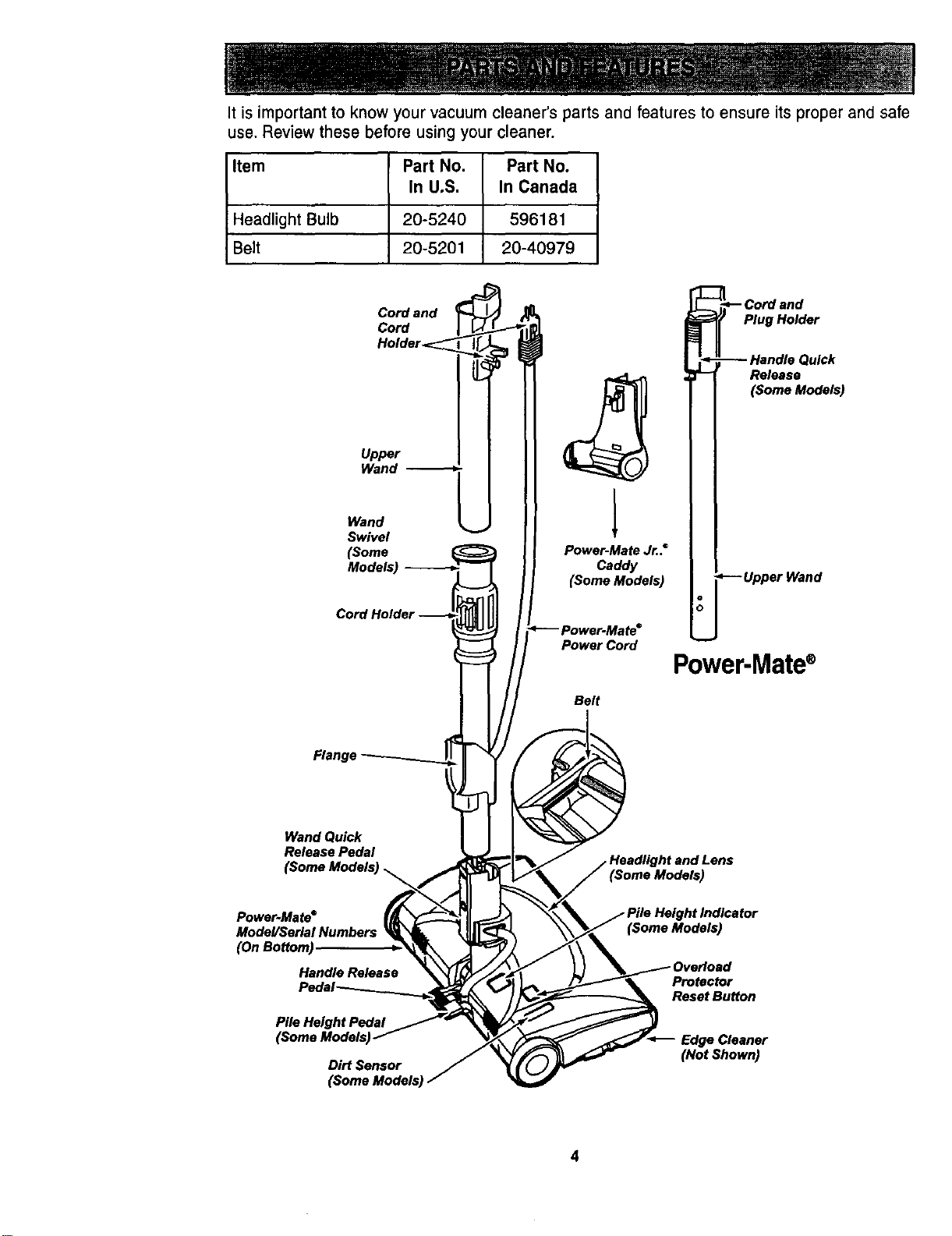
It is important to know your vacuum cleaner's parts and features to ensure its proper and safe
use. Review these before using your cleaner.
Item Part No. Part No.
In U.S. In Canada
Headlight Bulb 20-5240 596181
Belt 20-5201 20-40979
Cord and
Cord
Holder_
Upper
Wand
Wand
Swivel
(Some
Models)
1
Power-Mate Jr..°
Caddy
(Some Models)
Power Cord
Belt
_--Cord and
Plug Holder
-- Handle Quick
Release
(Some Models)
--Upper Wand
Power-Mate®
Flang,
Wand Quick
Release Pedal
(Some Models)
Power.Mate°
Model/SerialNumbers
(OnBottom)
HandleRelease
Pile Height Pedal
Dirt Sensor
Protector
Reset Button
Cleaner
(Not Shown)
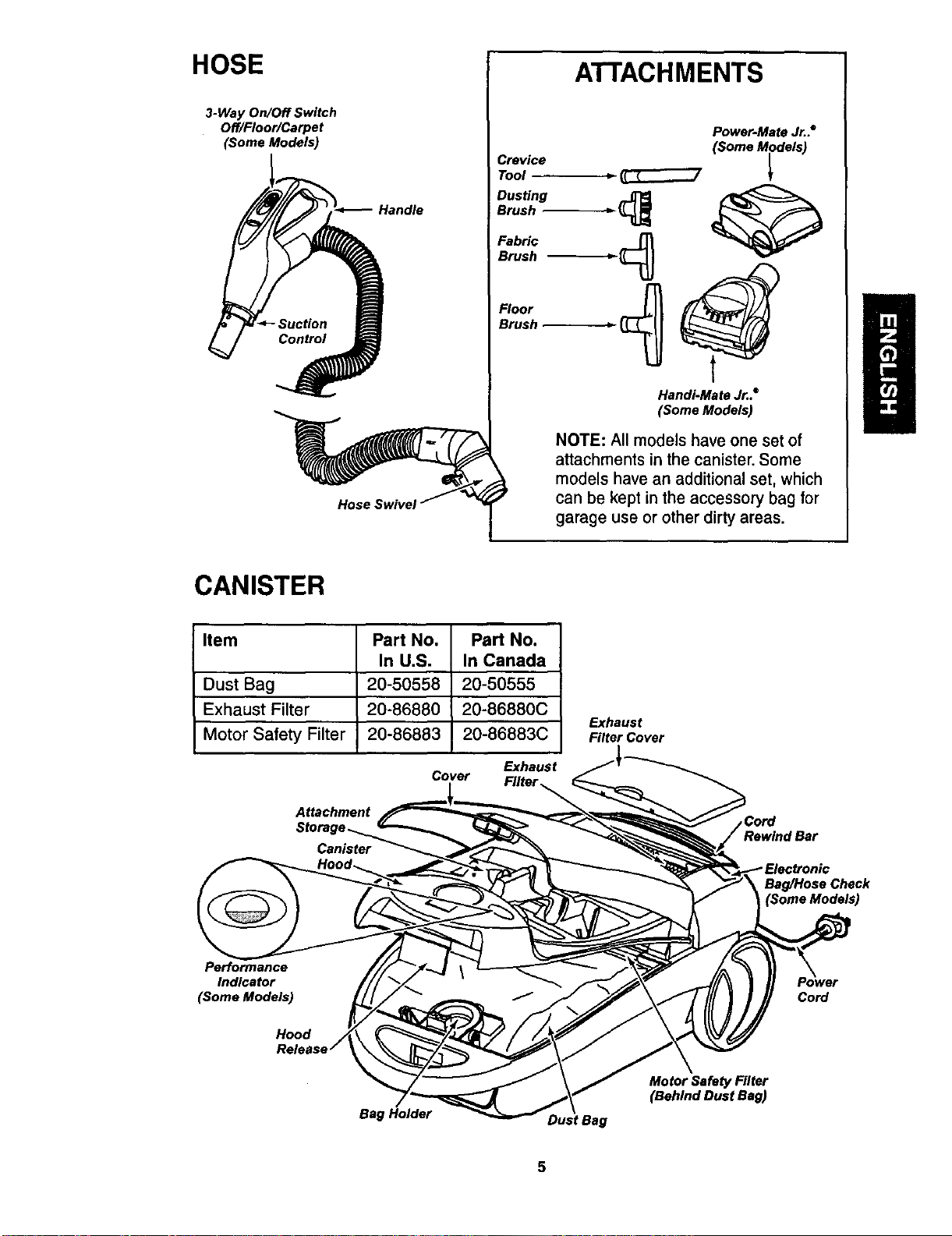
HOSE
3-Way On/Off Switch
Off/Floor/Carpet
(Some Models)
Handle
Hose Swivel
ATTACHMENTS
Crevice
Tool
Dusting
Brush
Fabric
Brush
Floor
Brush
Power-Mate Jr..=
(Some Models)
HanOi-Mate Jr..®
(Some Models)
NOTE: All models have one set of
attachments in the canister. Some
models have an additional set, which
can be kept in the accessory bag for
garage use or other dirty areas.
CANISTER
Item Part No. Part No.
In U.S. In Canada
Dust Bag 20-50558 20-50555
Exhaust Filter 20-86880 20-86880C
Motor Safety Filter 20-86883 20-86883C
Exhaust
Cover Filter
Attachment
Canister
Exhaust
Filter Cover
,Cord
rBar
Bag/Hose Check
Performance
Indicator
(Some Models)
Cord
Bag Holder
Dust Bag
Motor Safety Filter
(Behind Dust Bag)
5
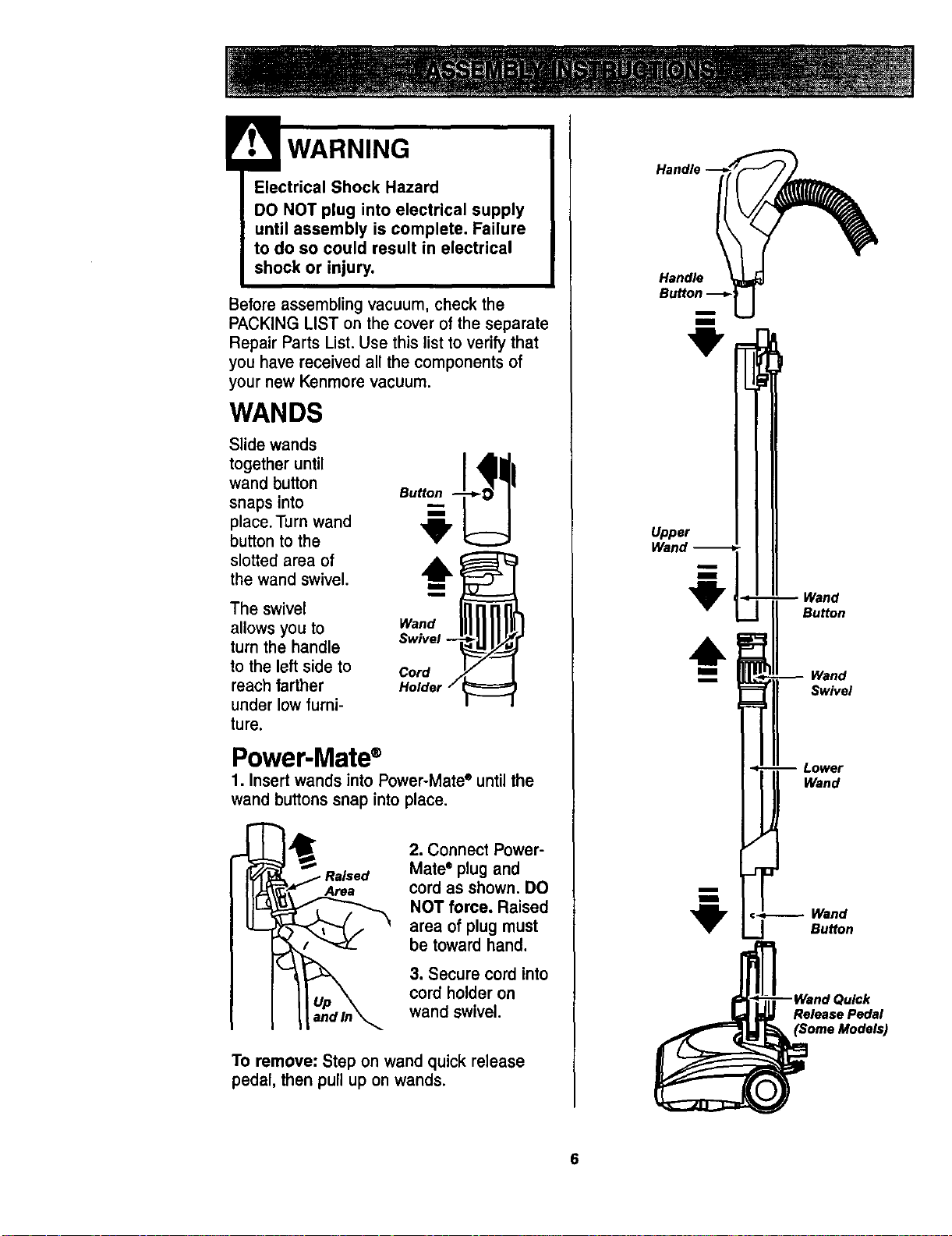
Before assemblingvacuum, check the
PACKINGLIST on the cover of the separate
Repair Parts List. Use thislistto verifythat
you have receivedall the componentsof
your new Kenmorevacuum.
WANDS
Slide wands
together until
wand button
snaps into
place. Turn wand
button to the
slotted area of
the wand swivel.
The swivel
allows you to
turn the handle
to the left side to
reach farther
under low furni-
ture.
I
i
wo°,, IIIII
Swivel --
Cord
Holder /
Power-Mate®
1. Insert wands into Power-Mate e until the
wand buttons snap into place.
Area
2. Connect Power-
Mate• plug and
cord as shown.DO
NOT force. Raised
area of plugmust
be toward hand.
3. Secure cord into
cord holder on
wand swivel.
To remove: Step on wand quick release
pedal, then pull up on wands.
Handle __
Handle
Bu.°n u
"9"
Upper
Wand
Wand
Button
Wand
Swivel
Lower
Wand
Wand
Button
}ulek
Release Pedal
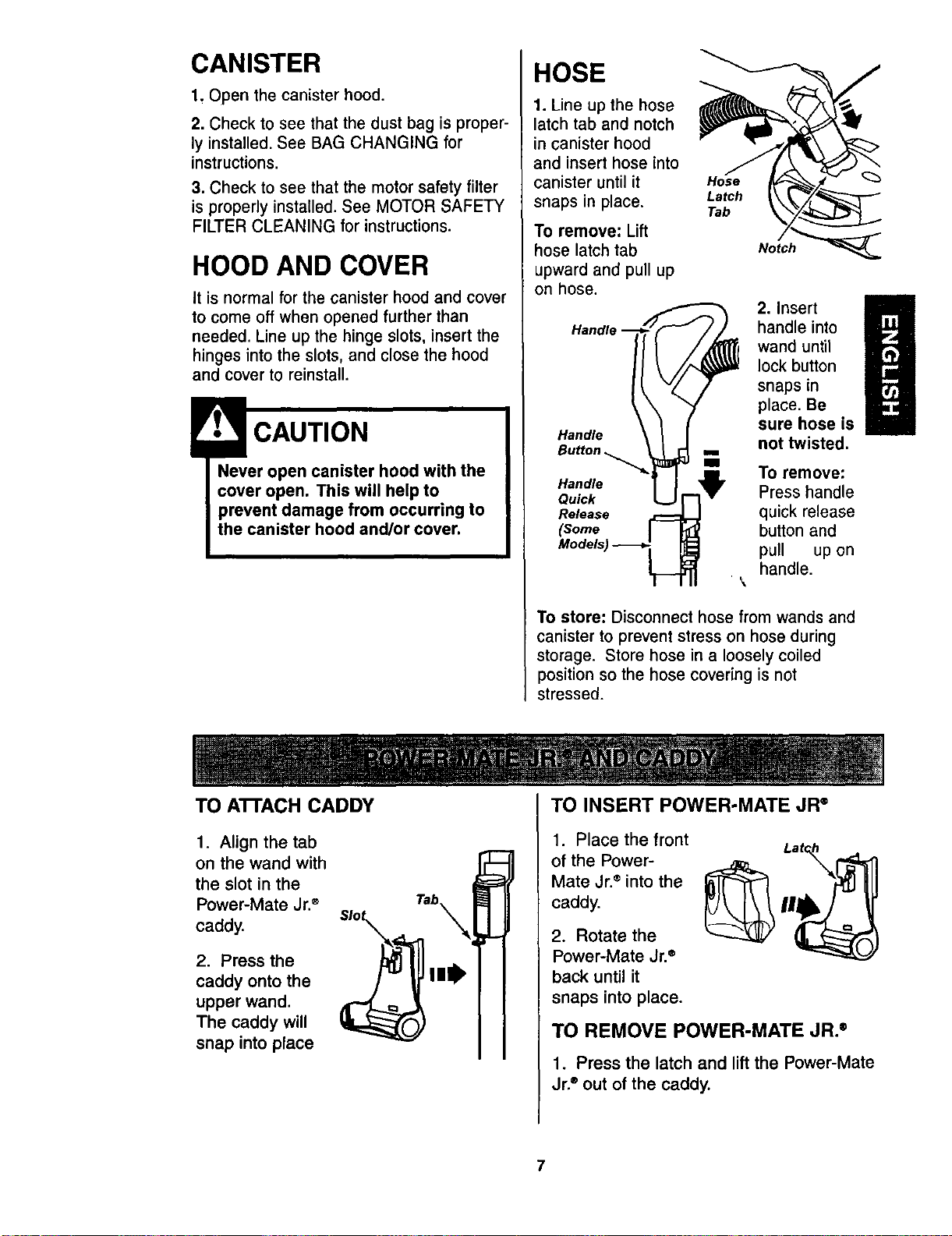
CANISTER
1, Open the canister hood.
2. Check to see that the dust bag is proper-
ly installed. See BAG CHANGING for
instructions.
3. Check to see that the motor safety filter
is properly installed. See MOTOR SAFETY
FILTER CLEANING for instructions.
HOOD AND COVER
it is normal for the canister hood and cover
to come off when opened further than
needed. Line up the hinge slots, insert the
hinges into the slots, and close the hood
and cover to reinstall.
CAUTION
Never open canister hood with the
cover open. This will help to
prevent damage from occurring to
the canister hood and/or cover.
HOSE
1. Line up the hose
latch tab and notch
in canister hood
and insert hose into
canister until it
snaps in place.
To remove: Lift
hose latch tab
upward and pull up
on hose.
Handle
Hose
Latch
Tab
Notch
2. insert H
handle into
wand until
lock button
snaps in
place. Be
sure hose is
not twisted.
Hi
To remove:
Handle
Quick Press handle
Release quick release
(Some button and
pull up on
handle.
To store: Disconnect hose from wands and
canister to prevent stress on hose during
storage. Store hose in a loosely coiled
position so the hose covering is not
stressed.
TO ATrACH CADDY
1. Align the tab
on the wand with
the slot in the
Power-Mate Jr.®
caddy.
2. Press the
caddy onto the
upper wand.
The caddy will
snap into place
Tab
TO INSERT POWER-MATE JR °
1. Place the front
of the Power-
Mate Jr.®into the
caddy.
2. Rotate the
Power-Mate Jr.®
back until it
snaps into place.
TO REMOVE POWER-MATE JR. ®
1. Press the latch and lift the Power-Mate
Jr.®out of the caddy.
7
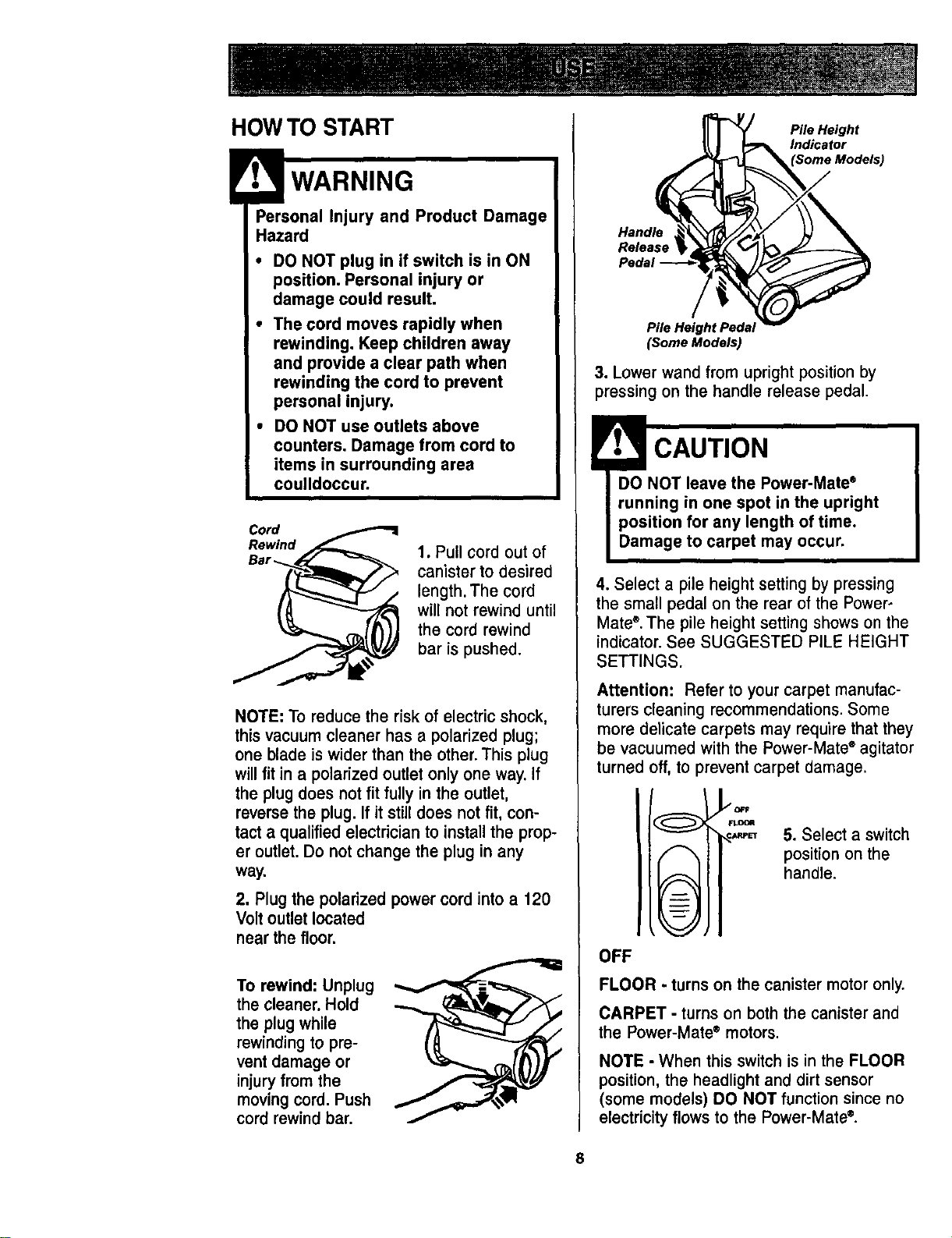
HOWTO START
WARNING
_ersonal Injury and Product Damage
Hazard
• DO NOT plug in if switch is in ON
position. Personal injury or
damage could result,
• The cord moves rapidly when
rewinding, Keep children away
and provide a clear path when
rewinding the cord to prevent
personal injury.
• DO NOT use outlets above
counters. Damage from cord to
items in surrounding area
coulldoccur.
CR:rwdind
1. Pull cord out of
canister to desired
length. The cord
will not rewind until
the cord rewind
bar is pushed.
NOTE: Toreduce the risk of electric shock,
thisvacuum cleaner has a polarized plug;
one blade is widerthan the other.This plug
willfit ina polarizedoutletonly one way. If
the plug does not fit fully in the outlet,
reversethe plug.If it stilldoes not fit, con-
tact a qualifiedelectricianto installthe prop-
er outlet.Do notchange the plug in any
way.
2. Plug the polarized power cord into a 120
Volt outletlocated
near the floor,
To rewind: Unplug
the cleaner.Hold
the plug while
rewindingto pre-
vent damage or
injuryfrom the
movingcord.Push
cord rewindbar.
Pile Height
Indicator
Handle
Release
Pile Height Pedal
(Some Models)
3. Lower wand from upright position by
pressing on the handle release pedal.
! CAUTION
DO NOT leave the Power-Mate ®
running in one spot in the upright
position for any length of time.
Damage to carpet may occur.
4. Select a pile height setting by pressing
the small pedal on the rear of the Power-
Mate ®.The pile height setting shows on the
indicator. See SUGGESTED PILE HEIGHT
SETTINGS.
Attention: Refer to your carpet manufac-
turerscleaning recommendations.Some
more delicate carpets may requirethatthey
be vacuumedwith the Power-Mate"agitator
turnedoff,to preventcarpet damage.
©
©
OFF
5. Select a switch
position on the
handle.
FLOOR - turns on the canister motor only.
CARPET - turns on both the canister and
the Power-Mate e motors.
NOTE - When this switch is in the FLOOR
position, the headlight and dirt sensor
(some models) DO NOT function since no
electricity flows to the Power-Mate ®.
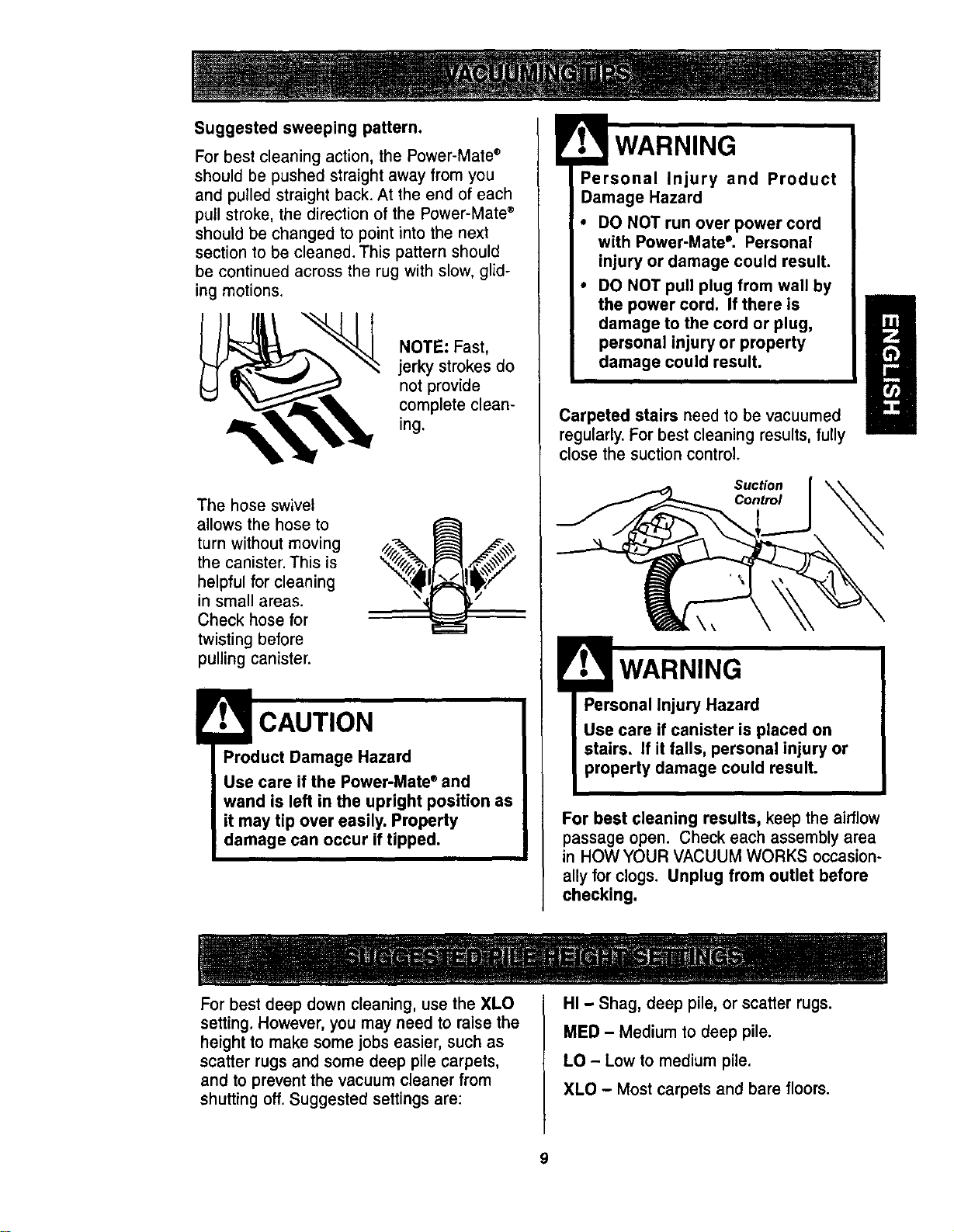
Suggested sweeping pattern.
For best cleaning action, the Power-Mate ®
should be pushed straight away from you
and pulled straight back. At the end of each
pull stroke, the direction of the Power-Mate ®
should be changed to point into the next
section to be cleaned. This pattern should
be continued across the rug with slow, glid-
ing motions.
NOTE: Fast,
jerky strokes do
not provide
complete clean-
ing.
The hose swivel
allows the hose to
turn without moving
the canister. This is
helpful for cleaning
in small areas.
Check hose for
twisting before
pulling canister.
Product Damage Hazard
Use care if the Power-Mate ®and
wand is left in the upright position as
it may tip over easily. Property
damage can occur if tipped.
Personal Injury and Product
Damage Hazard
• DO NOT run over power cord
with Power-Mate °. Personal
injury or damage could result.
• DO NOT pull plug from wall by
the power cord. If there is
damage to the cord or plug,
personal injury or property
damage could result.
Carpeted stairs need to be vacuumed
regularly.Forbest cleaning results,fully
close the suctioncontrol.
Suction
Control
H
WARNING
Personal Injury Hazard
Use care if canister is placed on
stairs. If it falls, personal injury or
property damage could result.
For best cleaning results, keep the airflow
passage open. Check each assemblyarea
in HOW YOUR VACUUM WORKS occasion-
ally for clogs. Unplug from outlet before
checking.
Forbest deep down cleaning,use the XLO
setting,However,you may need to raisethe
height to make some jobs easier, suchas
scatter rugsand some deep pile carpets,
and to preventthe vacuum cleaner from
shuttingoff.Suggested settingsare:
HI - Shag, deep pile, orscatter rugs.
MED - Medium to deep pile.
LO - Low to medium pile,
XLO - Most carpets and bare floors.
9
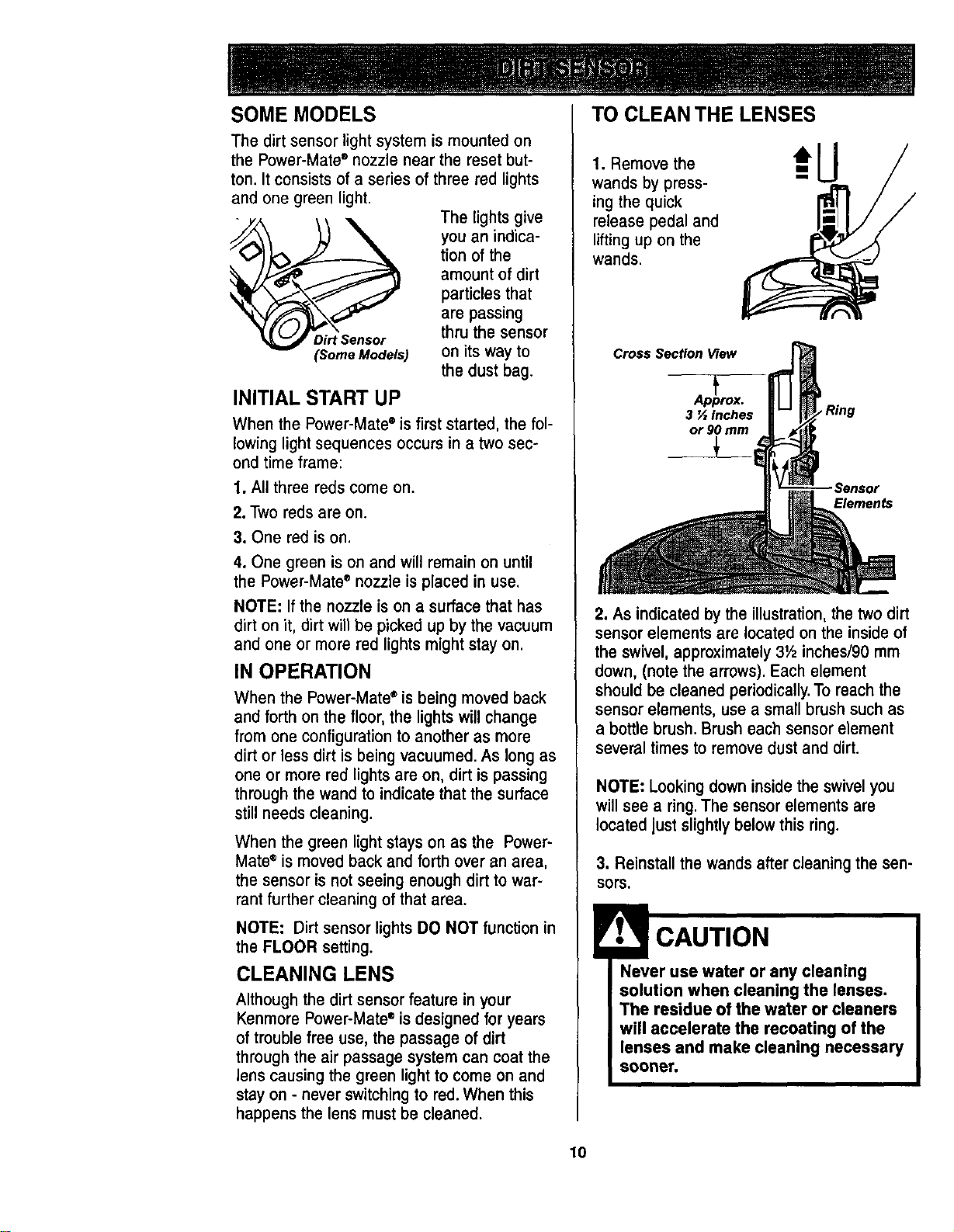
SOME MODELS TO CLEAN THE LENSES
The dirt sensor light system is mounted on
the Power-Mate ®nozzle near the reset but-
ton. It consists of a series of three red lights
and one green light.
The lights give
you an indica-
tion of the
amount of dirt
particles that
are passing
Dirt Sensor thru the sensor
(Some Models) on its way to
the dust bag.
INITIAL START UP
When the Power-Mate ®is first started, the fol-
lowing light sequences occurs in a two sec-
ond time frame:
1. All three reds come on.
2. Two reds are on.
3. One red is on.
4. One green is on and will remain on until
the Power-Mate" nozzle is placed in use,
NOTE: If the nozzle is on a surface that has
dirt on it, dirt will be picked up by the vacuum
and one or more red lights might stay on.
IN OPERATION
When the Power-Mateeis being moved back
and forth on the floor, the lights willchange
from one configuration to another as more
dirt or less dirt is being vacuumed. As longas
one or more red lights are on, dirt is passing
through the wand to indicate that the surface
still needs cleaning.
When the green light stays on as the Power-
Mate e is moved back and forth over an area,
the sensor is not seeing enough dirt to war-
rant further cleaning of that area.
NOTE: Dirt sensor lights DO NOT function in
the FLOOR setting.
CLEANING LENS
Although the dirt sensor feature in your
Kenmore Power-Mate ®is designed for years
of trouble free use, the passage of dirt
through the air passage system can coat the
lens causing the green light to come on and
stay on - never switching to red. When this
happens the lens must be cleaned.
1. Remove the
wands by press-
ing the quick
release pedal and
lifting up on the
wands.
Cross Section View
Ap_prox.
3 '/, inches
or 90 mm
Elements
2. As indicatedby the illustration, the two dirt
sensor elements are located onthe insideof
the swivel, approximately 31/2inches/90 mm
down, (note the arrows). Each element
should be cleaned periodically.To reachthe
sensor elements, use a small brush such as
a bottle brush. Brush each sensor element
several times to remove dust and dirt.
NOTE: Looking down inside the swivel you
will see a ring. The sensor elements are
located just slightly below this ring.
3. Reinstall the wandsaftercleaning the sen-
sors.
Never use water or any cleaning
solution when cleaning the lenses,
1"he residue of the water or cleaners
will accelerate the reeoating of the
lenses and make cleaning necessary
sooner.
10
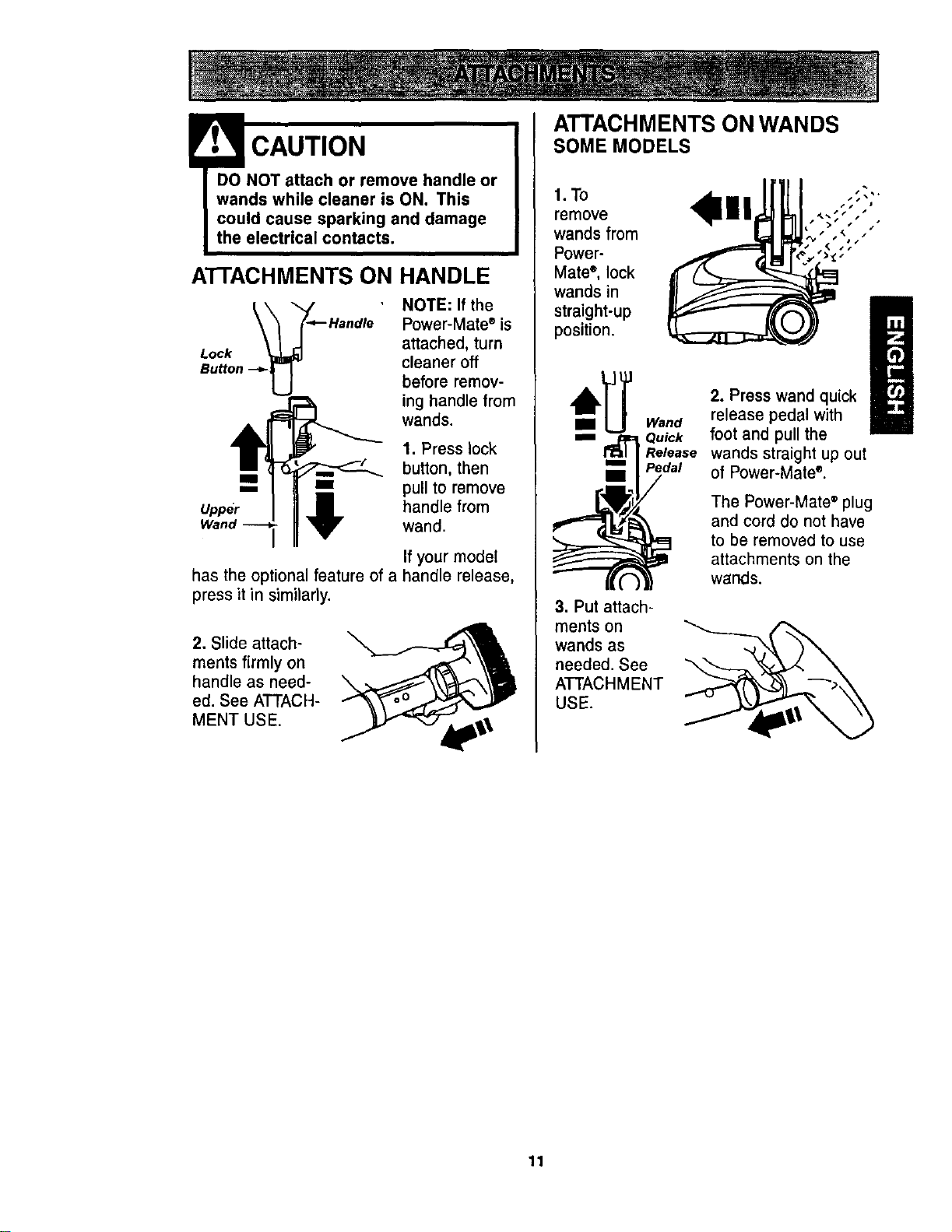
!• CAUTION
DO NOT attach or remove handle or
wands while cleaner is ON. This
could cause sparking and damage
the electrical contacts.
ATrACHMENTS ON HANDLE
Lock
NOTE: If the
Power-Mate ®is
attached, turn
cleaner off
before remov-
ing handle from
wands.
1. Press lock
button, then
m _=_ pull to remove
Upper _ handle fromWand wand.
If your model
has the optional feature of a handle release,
press it in similarly.
2. Slide attach-
ments firmly on
handle as need-
ed. See ATTACH-
MENT USE.
ATTACHMENTS ON WANDS
SOME MODELS
1.To
remove
wands from
Power-
Matee, lock
wands in
straight-up
position.
3. Put attach-
ments on
wands as
needed. See
ATTACHMENT
USE.
2. Press wand quick
release pedal with
Quick foot and pull the
Release wands straight up out
Pedal of Power-Mate".
The Power-Mate ®plug
and cord do not have
to be removed to use
attachments on the
wands.
11
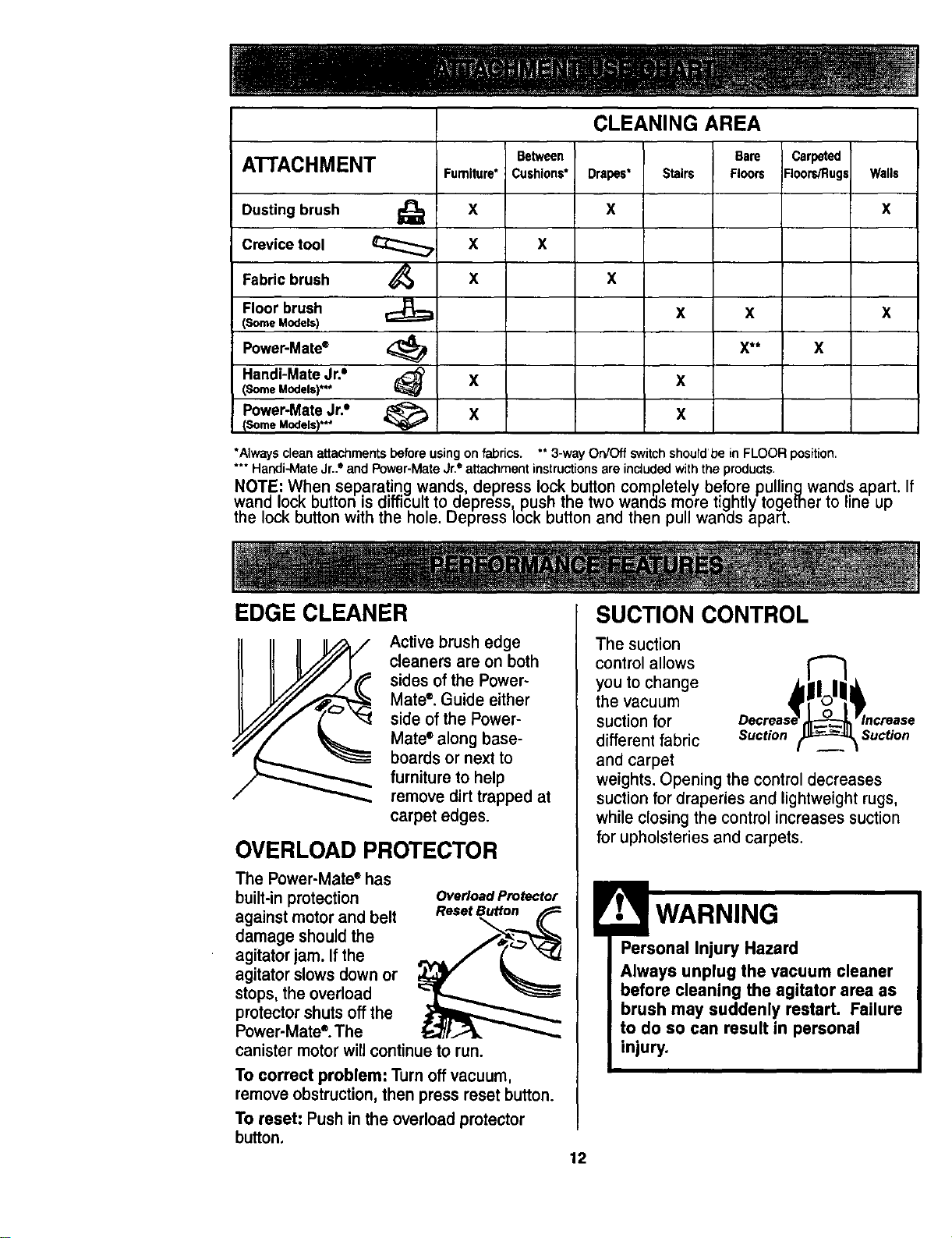
CLEANING AREA
Between Carpeted
ATTACHMENT Furniture* Cushions* Floors/Rugs Walls
Dusting brush X X
Crevice tool X X
Fabric brush X
Floor brush
(Some Models)
Power-Mate* X
Handi-Mate Jr.° X
(Some Models)***
Power-Mate Jr.• X
(Some Models)***
Bare
Drapes* Stairs Floors
x
x
x x
X**
x
x
x
*Always clean attachments beforeusingon fabrics. **3-way Orv'Off switchshourdbe in FLOOR position.
*** Handi-MateJr.."and Power-MateJr.° attachmentinstructionsare includedwiththe products.
NOTE: When separating wands, depress lock button completely before pullingwands apart. If
wand lock button is difficult to depress push the two wands more tightly together to line up
the ock button with the h, e. Depress ock button and then pu wands apart.
EDGE CLEANER
Active brush edge
cleaners are on both
sidesof the Power-
Mate®. Guide either
side of the Power-
Mate* along base-
boards or next to
furniture to help
remove dirt trapped at
carpet edges.
OVERLOAD PROTECTOR
The Power-Mate* has
built-inprotection
againstmotorand belt
damage shouldthe
agitatorjam. If the
agitatorslowsdownor
stops,the overload
protectorshutsoffthe
Power-Mate".The
canistermotorwillcontinueto run.
OvedoadProtector
ResetBu_on
To correct problem: Turn off vacuum,
remove obstruction, then press reset button.
To reset: Push in the overload protector
button.
SUCTION CONTROL
The suction
control allows
you to change
the vacuum
suction for
different fabric Suction Suction
and carpet
weights. Opening the control decreases
suction for draperies and lightweight rugs,
while closing the control increases suction
for upholsteries and carpets.
Personal Injury Hazard
Always unplug the vacuum cleaner
before cleaning the agitator area as
brush may suddenly restart. Failure
to do so can result in personal
injury.
12
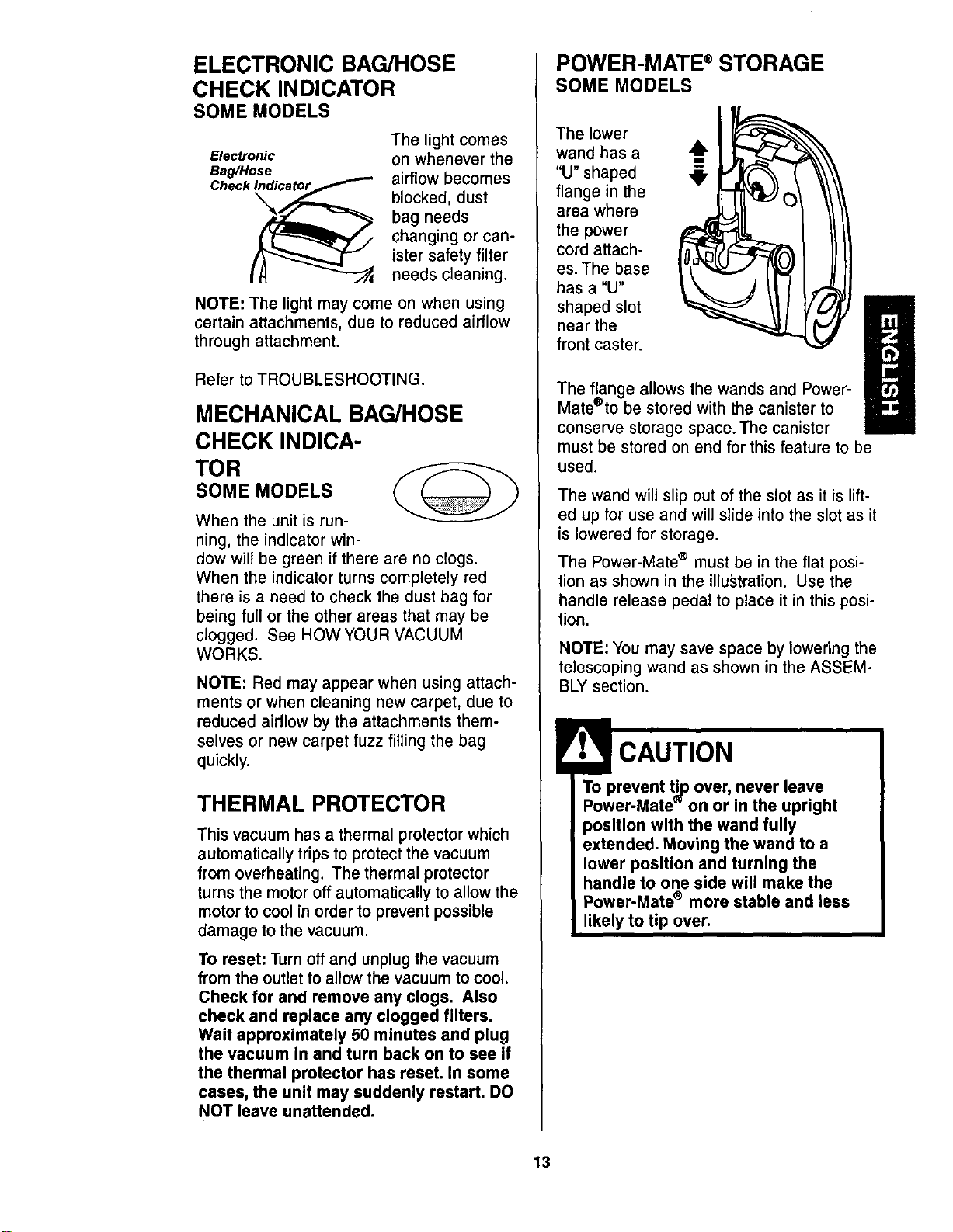
ELECTRONIC BAG/HOSE
CHECK INDICATOR
SOME MODELS
Electronic
Bag/Hose
Check_
The light comes
on whenever the
airflow becomes
blocked, dust
bag needs
changing or can-
ister safety filter
needs cleaning.
NOTE: The light may come on when using
certain attachments, due to reduced airflow
through attachment.
Refer to TROUBLESHOOTING.
MECHANICAL BAG/HOSE
CHECK INDICA-
TOR
SOME MODELS
When the unit is run-
ning, the indicator win-
dow will be green if there are no clogs.
When the indicator turns completely red
there is a need to check the dust bag for
being full or the other areas that may be
clogged. See HOWYOUR VACUUM
WORKS.
NOTE: Red may appear when using attach-
ments or when cleaning new carpet, due to
reduced airflow by the attachments them-
selves or new carpet fuzz filling the bag
quickly.
THERMAL PROTECTOR
This vacuum has a thermal protector which
automatically tripsto protectthe vacuum
from overheating. The thermal protector
turns the motor off automatically to allow the
motor to cool in order to prevent possible
damage to the vacuum.
To reset: Turn off and unplug the vacuum
from the outlet to allow the vacuum to cool.
Check for and remove any clogs. Also
check and replace any clogged filters.
Wait approximately 50 minutes and plug
the vacuum in and turn back on to see if
the thermal protector has reset. In some
cases, the unit may suddenly restart. DO
NOT leave unattended.
POWER-MATE ®STORAGE
SOME MODELS
The lower
wand has a
"U" shaped
flange in the
area where
the power
cord attach-
es. The base
has a "U"
shaped slot
near the
front caster.
The flange allows the wandsand Power-
Mate®to be stored with the canister to
conserve storage space. The canister
must be stored on end for this feature to be
used.
The wand will slip out of the slot as it is lift-
ed up for use and will slide into the slot as it
is lowered for storage.
The Power-Mate ® must be in the flat posi-
tion as shown in the illuskation. Use the
handle release pedal to place it in this posi-
tion.
NOTE: You may save space by lowering the
telescoping wand as shown in the ASSEM-
BLY section.
To prevent tip over, never leave
Power-Mate" on or in the upright
position with the wand fully
extended. Moving the wand to a
lower position and turning the
handle to one side will make the
Power-Mate ® more stable and less
likely to tip over.
13
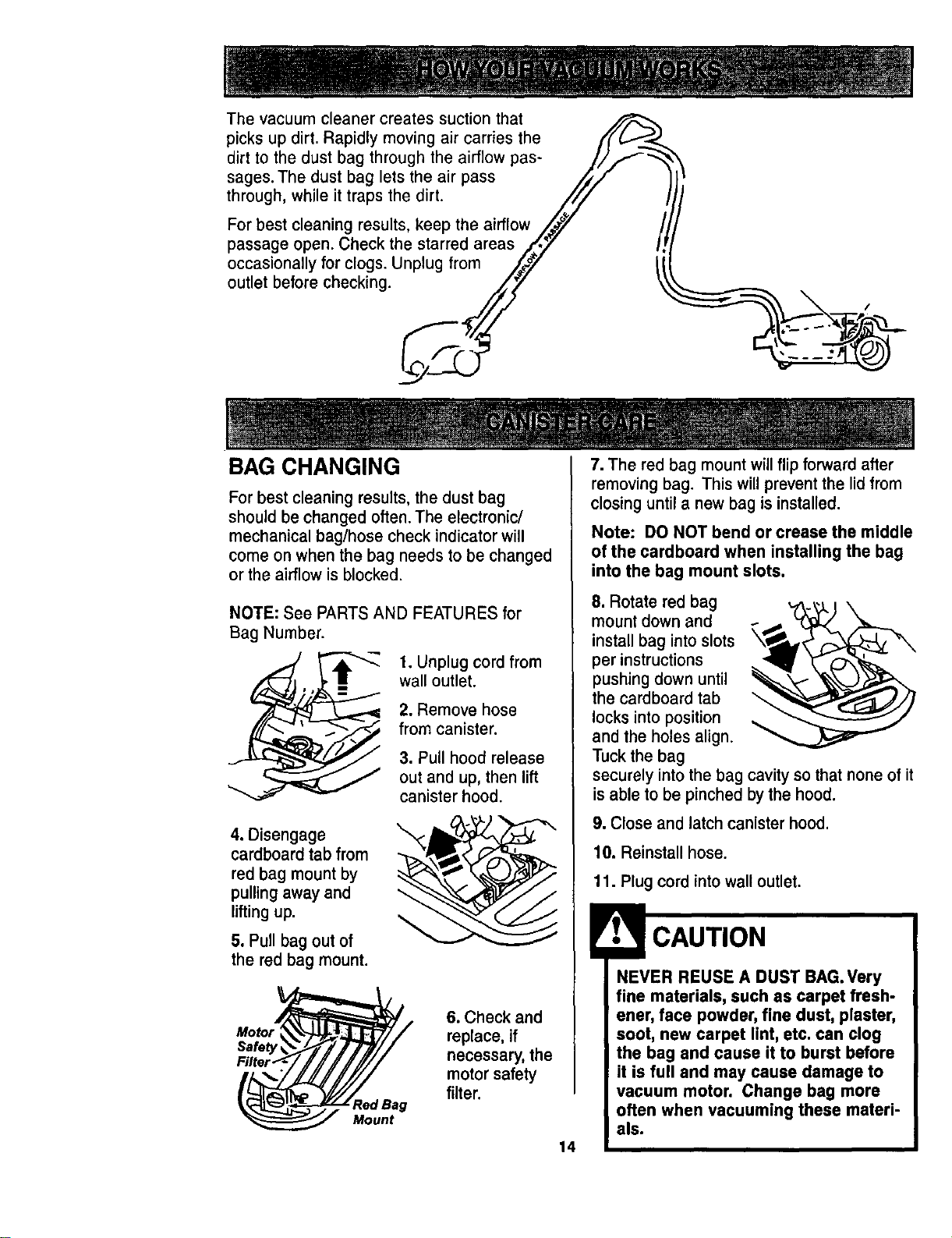
The vacuum cleaner creates suction that
picks up dirt. Rapidly moving air carries the
dirt to the dust bag through the airflow pas-
sages. The dust bag lets the air pass
through, while it traps the dirt.
For best cleaning results, keep the airflow
passage open. Check the starred areas
occasionally for clogs. Unplug from
outlet before checking.
BAG CHANGING
For best cleaning results, the dust bag
should be changed often. The electronic/
mechanical bag/hose check indicator will
come on when the bag needs to be changed
or the airflow is blocked.
NOTE: See PARTS AND FEATURES for
Bag Number.
4. Disengage
cardboard tab from
red bag mount by
pulling away and
lifting up.
5. Pull bag out of
the red bag mount.
1. Unplug cord from
wall outlet.
2. Remove hose
from canister.
3. Pull hood release
out and up, then lift
canister hood.
Red Bag
Mount
6. Check and
replace, if
necessary, the
motor safety
filter.
14
7. The red bag mount willflip forward after
removing bag. This willpreventthe lid from
closinguntila new bag isinstalled.
Note: DO NOT bend or crease the middle
of the cardboard when installing the bag
into the bag mount slots.
8. Rotate red bag
mount down and
install bag into slots
per instructions
pushing down until
the cardboard tab
locks into position
and the holes align.
Tuck the bag
securely into the bag cavity so that none of it
is able to be pinched by the hood.
9. Close and latch canister hood,
10. Reinstall hose.
11. Plug cord into wall outlet.
NEVER REUSE A DUST BAG.Very
fine materials, such as carpet fresh-
ener, face powder, fine dust, plaster,
soot, new carpet lint, etc. can clog
the bag and cause it to burst before
it is full and may cause damage to
vacuum motor. Change bag more
often when vacuuming these materi-
als.
1. Unplug cord from wall outlet. DO NOT
drip water on cleaner.
2. Clean exterior using a clean, soft cloth
that has been dipped in a solution of mild
liquid detergent and water, then wrung dry.
Wipe dry after cleaning.
3. To reduce static electricity and dust build-
up, wipe outer surface of cleaner and
attachments.
Do not use attachments if they
are wet. Attachments used in
dirty areas, such as under a
refrigerator, should not be used
on other surfaces until they are
washed. They could leave marks.
Check motor safety filter occasionally and
change when dirty.
Electrical Shock Hazard
Unplug power cord from electrical
outlet. Do not operate the cleaner
without the motor safety filter. Be
sure the filter is dry and properly
installed to prevent motor failure
and/or electrical shock.
Remove the bag as outlined in the BAG
CHANGING section.
MOTOR SAFETY FILTER
ELECTROSTATIC
This white and grey filter must be replaced
when dirty. It should be replaced regularly
depending on use conditions. The filter
CANNOT be washed as it will lose its
dust trapping ability.
NOTE: See PARTS AND FEATURES for
motor safety filter number.
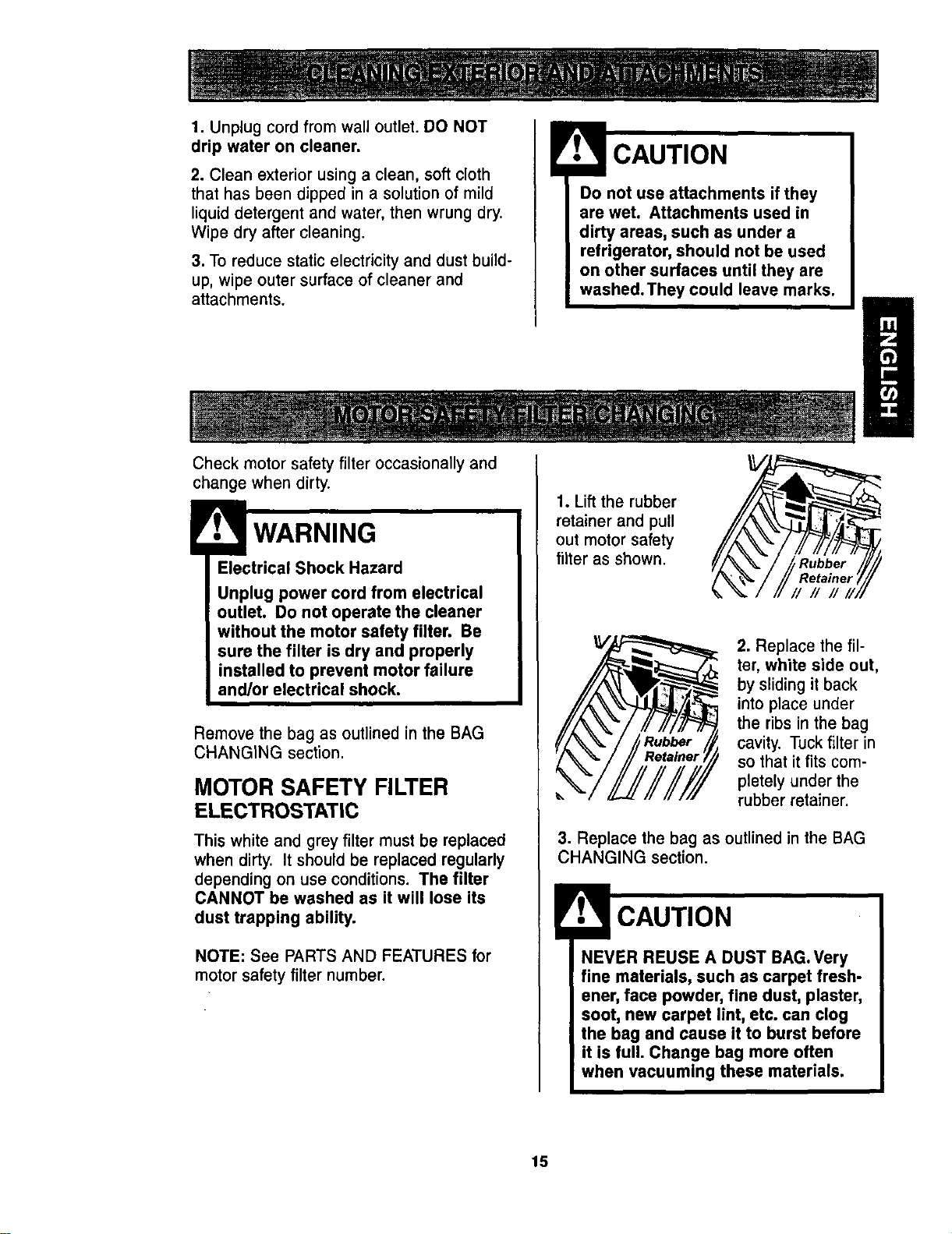
1. Lift the rubber
retainer and pull
out motor safety
filter as shown.
2. Replace the fil-
ter, white side out,
by sliding it back
intoplace under
the ribsin the bag
cavity. Tuckfilterin
so that itfits com-
pletely under the
rubber retainer.
3. Replace the bag as outlined in the BAG
CHANGING section.
NEVER REUSE A DUST BAG.Very
fine materials, such as carpet fresh-
ener, face powder, fine dust, plaster,
soot, new carpet lint, etc. can clog
the bag and cause it to burst before
it is full. Change bag more often
when vacuuming these materials.
15
WARNING
Fire and/or Electrical Shock Hazard
Do not operate with a clogged
exhaust filter or without the exhaust
filter or exhaust filter cover installed.
EXHAUST FILTER
HEPA
The exhaust filter cartridge must be
replaced when dirty. Replace the filter when
the entire surface area is covered evenly.
The filter CANNOT be washed as it will
lose its dust trapping ability.
NOTE: See PARTS AND FEATURES for
exhaust filternumber.
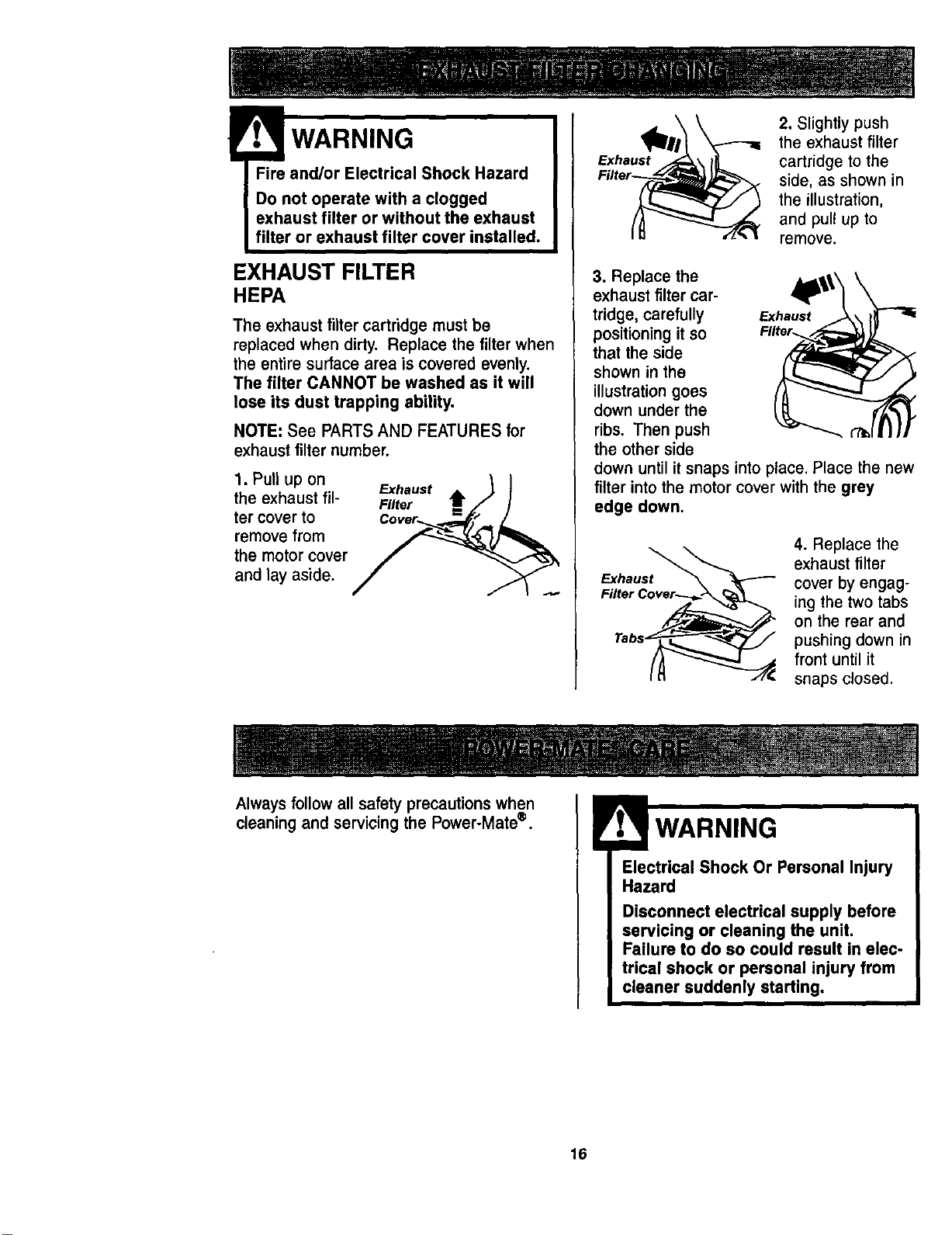
1. Pull Up on &ha.st _ I
the exhaust ill- Filter Amf) /I
ter cover to Cover_ _._.tr," /
remove from _
the motor cover
and lay aside.
Exhaust
2. Slightly push
the exhaust filter
cartridge to the
side, as shown in
the illustration,
and pull up to
remove.
3. Replace the
exhaust filter car-
tridge, carefully Exhaust
positioning it SO Filter..
that the side
shown in the
illustration goes
down under the
ribs. Then push
the other side
down until it snaps into place. Place the new
filter into the motor cover with the grey
edge down.
Exhaust
Filter
4. Replace the
exhaust filter
cover by engag-
ing the two tabs
on the rear and
pushing down in
front until it
snaps closed.
Always follow all safety precautions when
cleaningand servicingthe Power-Mate®.
IWARNING
Electrical Shock Or Personal Injury
Hazard
Disconnect electrical supply before
servicing or cleaning the unit,
Failure to do so could result in elec-
trical shock or personal injury from
cleaner suddenly starting.
16
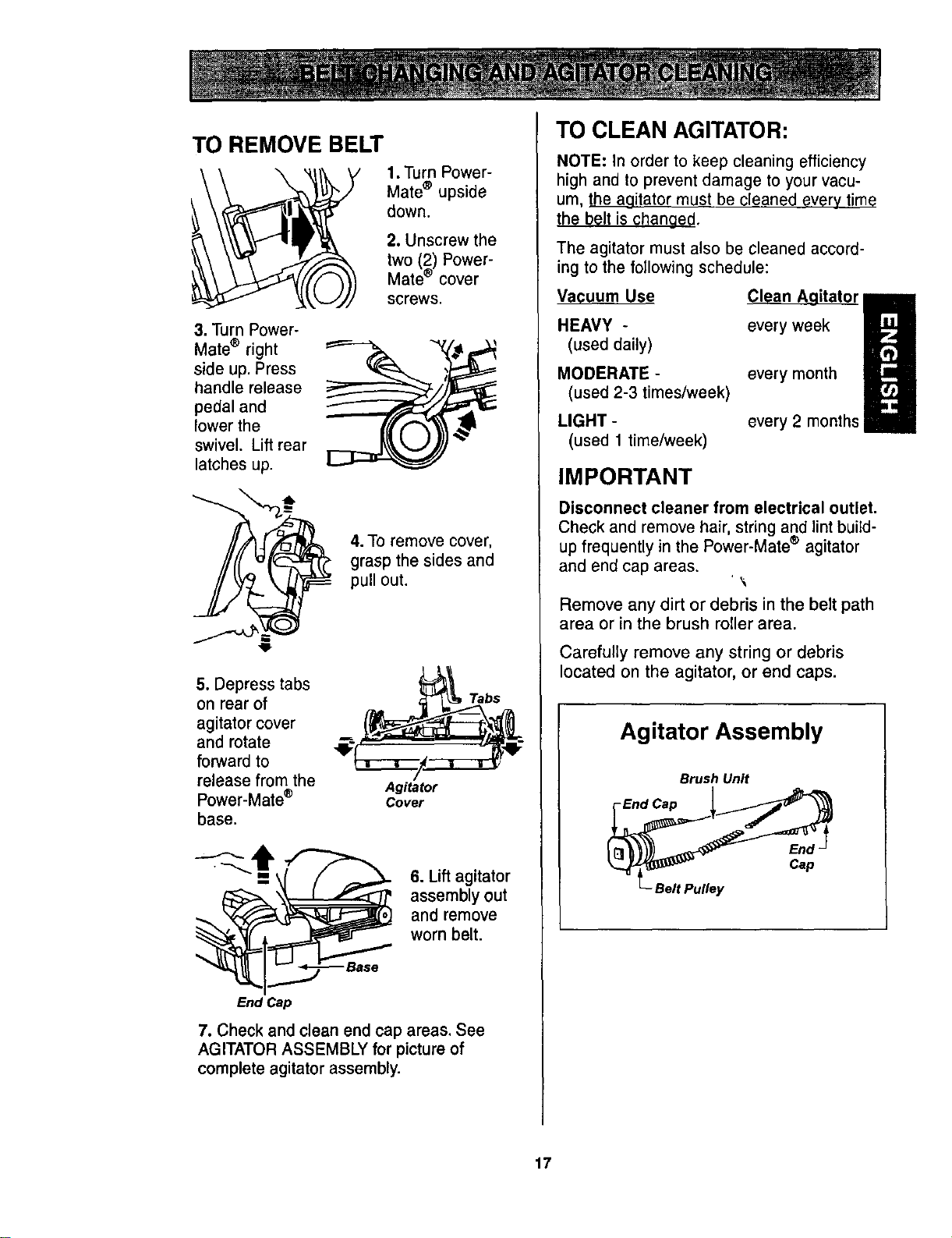
TO REMOVE BELT
1. Turn Power-
Mate ® upside
down.
2. Unscrew the
two (2) Power-
Mate ® cover
screws.
3. Turn Power-
Mate ® right
side up. Press
handle release
pedal and
lower the
swivel. Lift rear
latches up.
4.To remove cover,
grasp the sides and
pull out.
5. Depress tabs
on rear of
agitator cover
and rotate
forward to
release from the
Power-Mate ®
base.
Tabs
Agitator
Cover
6. Lift agitator
assembly out
and remove
worn belt.
End Cap
7. Check and clean end cap areas. See
AGITATOR ASSEMBLY for picture of
complete agitator assembly.
TO CLEAN AGITATOR:
NOTE: In order to keep cleaning efficiency
high and to prevent damage to your vacu-
um, the agitator must be cleaned every time
the belt is changed.
The agitator must also be cleaned accord-
ing to the following schedule:
Vacuum Use
HEAVY -
(used daily)
MODERATE -
(used 2-3 times/week)
LIGHT -
(used 1 time/week)
Clean Aaitator
every week
every month
every2 months
IMPORTANT
Disconnect cleaner from electrical outlet.
Check and remove hair, string and lint build-
up frequently in the Power-Mate ® agitator
and end cap areas.
Remove any dirt or debris in the belt path
area or in the brush roller area.
Carefully remove any string or debris
located on the agitator, or end caps.
Agitator Assembly
Brush Unit
End Cap 1
L_Belt Pulley
17
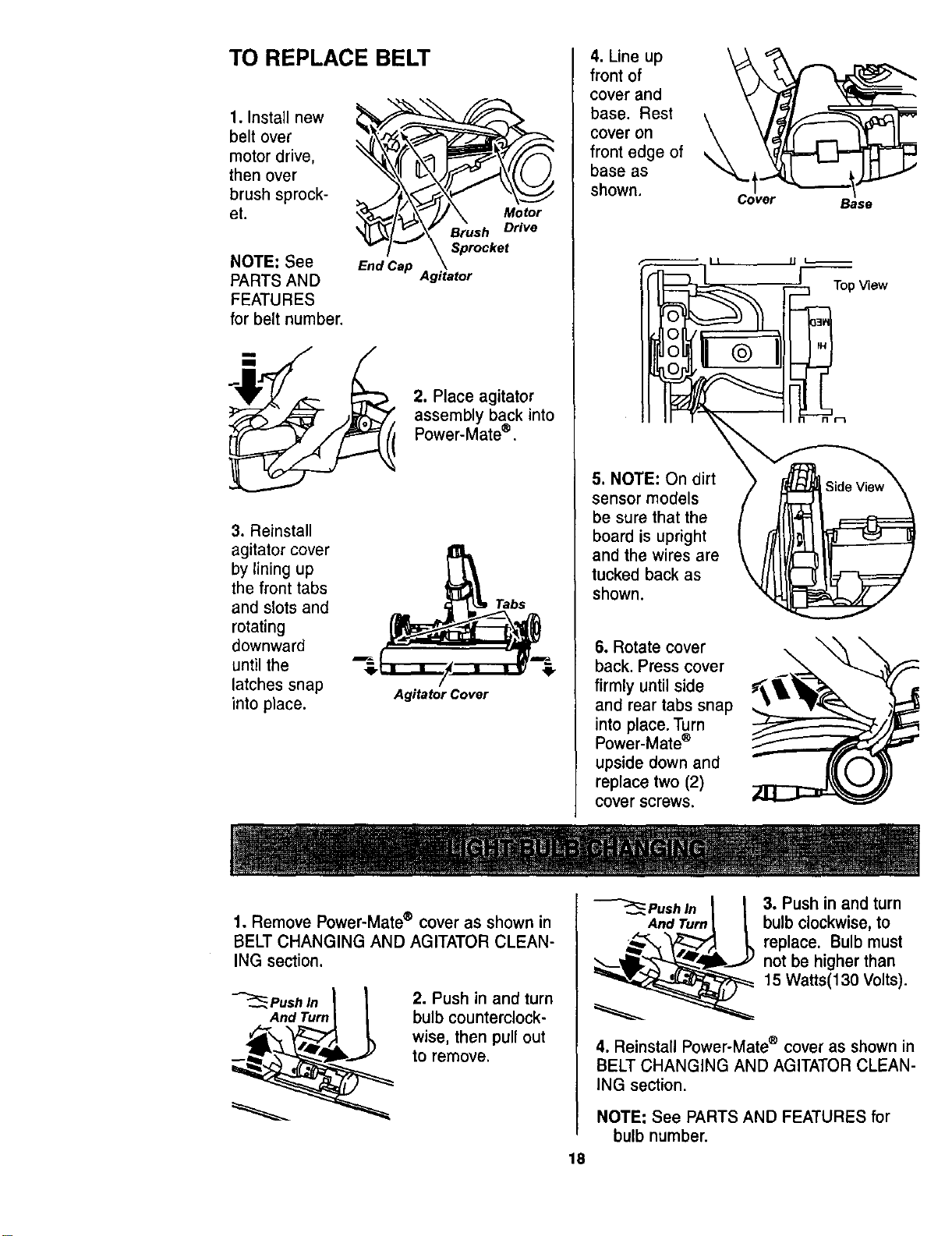
TO REPLACE BELT
1. Install new
belt over
motor drive,
then over
brush sprock-
et.
NOTE: See
PARTS AND
FEATURES
for belt number,
End Cap
Motor
Brush Drive
Sprocket
Agitator
2. Place agitator
assembly back into
Power-Mate®.
3. Reinstall
agitator cover
by lining up
the front tabs
and slots and
rotating
downward
until the
latches snap
into place.
Agitator Cover
4. Line up
front of
cover and
base. Rest
cover on
front edge of
base as
shown.
5. NOTE: On dirt
sensor models
be sure that the
board is upright
and the wires are
tucked back as
shown.
6. Rotate cover
back. Press cover
firmly until side
and rear tabs snap
into place. Turn
Power-Mate®
upside down and
replace two (2)
cover screws.
\
Cover Base
[ Top View
\
1. Remove Power-Mate® cover as shown in
BELT CHANGING AND AGITATOR CLEAN-
ING section.
-_Push In _
And Turn
2. Push in and turn
bulb counterclock-
wise, then pull out
to remove.
Push In
And Turn
3. Pushin and turn
bulb clockwise,to
replace. Bulb must
notbe higherthan
15 Watts(130 Volts).
4, Reinstall Power-Mate ® cover as shown in
BELT CHANGING AND AGITATOR CLEAN-
ING section.
NOTE: See PARTS AND FEATURES for
bulb number.
18
ElectricalShockOr PersonalInjury
Hazard
Disconnectelectricalsupplybefore
servicing orcleaningtheunit.
Failureto doso could result in elec-
trical shock or personal injury from
cleaner suddenly starting.
• Illi
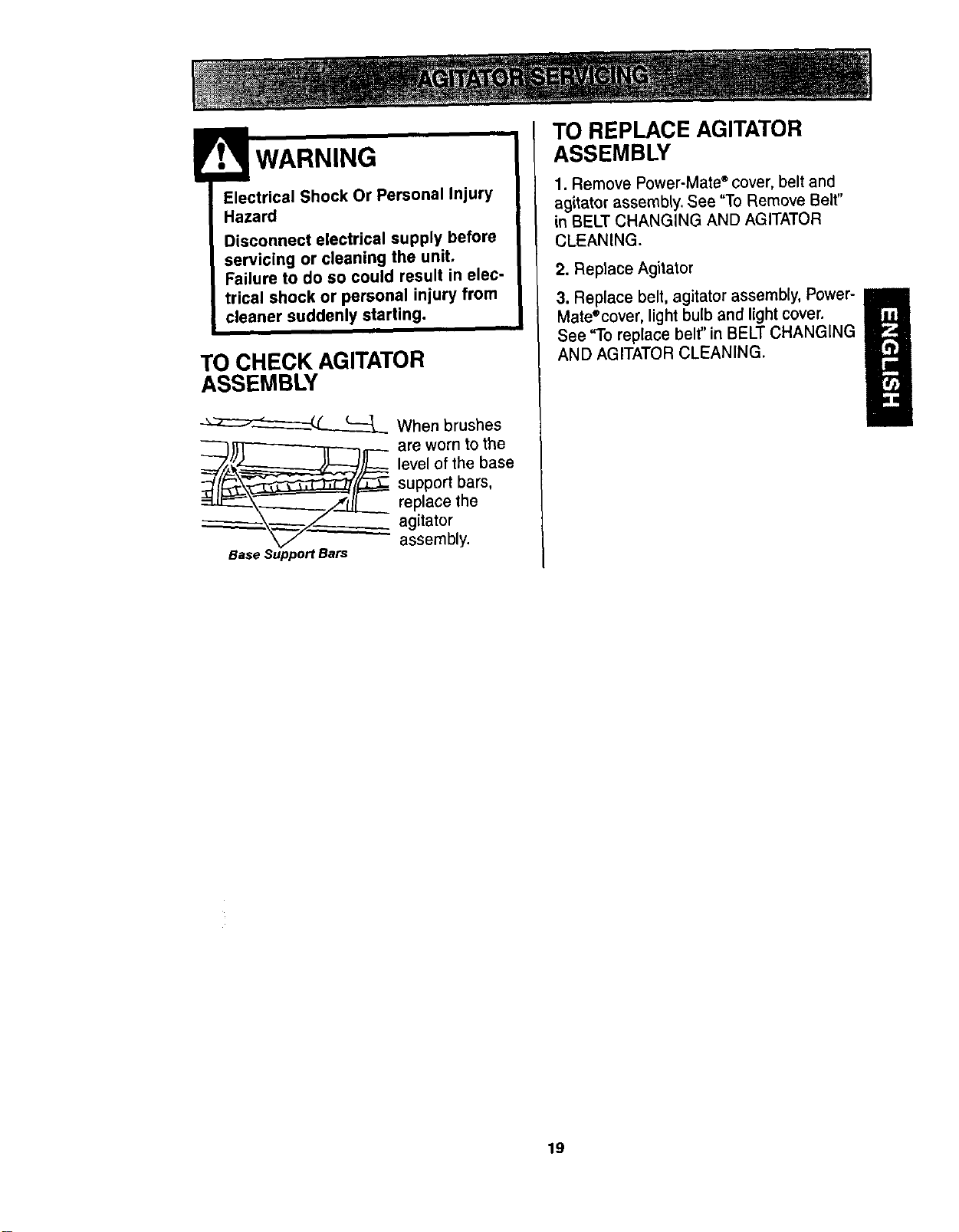
TO CHECK AGITATOR
ASSEMBLY
When brushes
__K -- are w°rn to the
level of the base
support bars,
replace the
agitator
assembly.
Base Support Bars
TO REPLACE AGITATOR
ASSEMBLY
1. Remove Power-Mate ®cover, belt and
agitator assembly. See "To Remove Belt"
in BELT CHANGING AND AGITATOR
CLEANING.
2. Reptace Agitator
3. Replace belt, agitator assembly, Power-
Mate®cover, light bulb and light cover.
U
See "To replace belt" in BELT CHANGING
AND AGITATOR CLEANING.
19
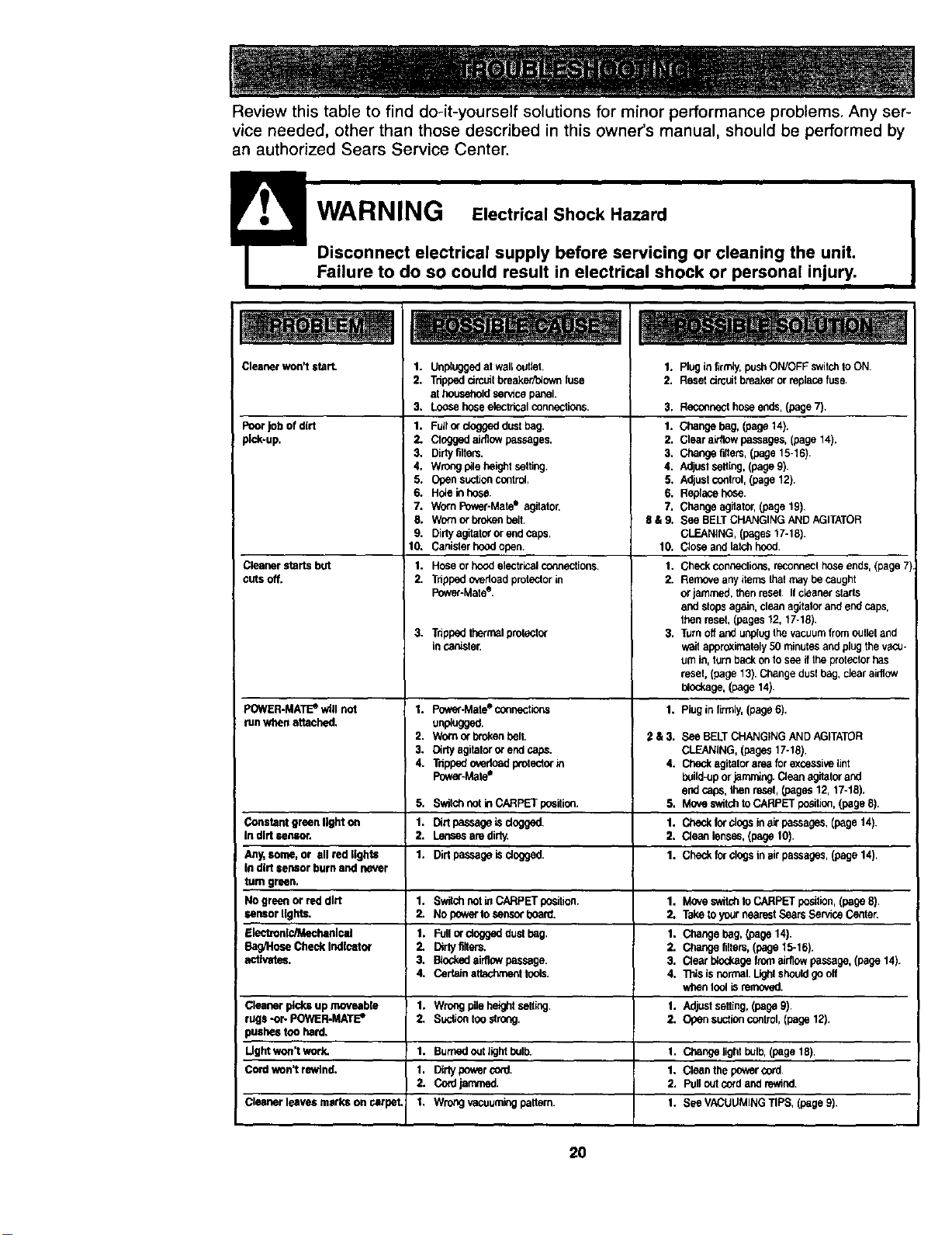
Review this table to find do-it-yourself solutions for minor performance problems. Any ser-
vice needed, other than those described in this owner's manual, should be performed by
an authorized Sears Service Center.
Cleanerwon't start. 1.
2.
3.
Poorjob of dirt 1.
pi_-up. 2.
3.
4.
5.
6.
7.
8.
9.
10.
Cleanerstarts but 1.
cuts off. 2.
3.
POWER-MATEe wfllnot 1.
tunwhenattached.
2,
3.
4.
5,
Constantgreen lighton 1.
In dirtsensor. 2.
Any,some, or allred lights 1.
in dirt sensorburn and never
tum green.
Nogreenor reddirt
sensorlights.
rlec_onlc/Mechanlcal
Ba_Hose CheckIndicator
activates.
Cleanerpicksup moveabte
rugs-or- POWER.MATE*
pusheston hard.
Ught won'twork.
Cordwon't rewind.
Cleanerleavesmarkson carpel
Unpluggedat waftoutlet.
Tdppedcircuitbreaker_ownfuse
at householdser.Hcepanel.
Loosehoseelectricalconnedlens.
Fullordoggeddustbag.
Cloggedaidlowpassages.
Dirtyfilters.
WrOngpilehaigi_lsetting. 4.
Opensuctioncontrol 5.
Haleinhose. 6.
WornPower-Mate"sgitator. 7.
Wornorbrokenbell. $ &9.
Dirtyagitatororendcaps.
Canisferhoodopen. 10.
1. Plug in ltrm4y,push ON/OFF switchfo ON.
2. Reset circuit breaker or replace fuse,
3, Reconnect hose ends, (page 7).
1. Change bag, (page 14).
2. Clear airltow passages. (page 14),
3. Change fibars, (page 15-16).
Adjust seHing, (page 9).
Adjust control, (page 12).
Replace hose.
Change agitator, (page 19),
See BELT CHANGING AND AGITATOR
GLEANING, (pages 17-18).
Close and latch hood.
Hose or hood etsctrP.al connections. 1.
Tdppad o_edoad protector in 2.
Power-Mate e.
Tripped thermal protactor
incanister.
Power-Maleeconnections
unp_ugg_.
Wornorbrokenpelt.
Dirtyagitatororend caps.
Tdppedovedeadprotectorin
PowerJ,Aate"
Switchnotin CARPETposition.
Dirtpassagetsdngged,
Lensesaredirly,
Dirt passageisdogged.
1. Switchnutin CARPETpeellton.
2. No powerIo censorboard.
1. Fullordoggeddustbag.
2, Dirtyfilters.
3. BiodmdaJrflcwpassage.
4. Cer_Jnattadlmonttools.
1. Wrongpileheightselt_ng,
2. Sucltontoostrong.
1, Burnedoutltght bulb.
1. Dirtypoweros_l.
2. Cordjarnmed.
1. Wrongvacuum!rigpahern.
Checkconnections,reconneclhoseends,(page7)
RemoveanyitemsIhalmay becaught
or jammed,thenreset. Ifcleanerstarts
andstepsagain,cleanagitatorandend caps,
thenreseL(pages12,17-18)
Turnoffand unplugthevacuumfromoulleland
waitapproximately50rni_tes and plugthe vacu-
umin, turnbackon tosee iftheprotectorhas
resel, (page13).Changedust bag,dear airflow
blockage,(page14).
1. Pluginfirmly,(page6).
2 &3. See BELTCHANGINGANDAGITATOR
CLEANING,(pages 17-18),
4. Checkagitatorareafor excessivelint
I_ild.-up orjamming.Cleanagitatorand
endcaps,Ihanreset,(pages12,17-18).
5, MoveswitchtoCARPETposition,(page8),
1. Checkforclogsin airpassages,(page14).
2. Cleanlenses.(page10).
1. Checkfor clogsin airpassages,(page14).
1. Moveswit_ to CARPETposition,(page8).
2. TaketoyonrnearestSearsServiceCenten
1. Chengehag, (page14).
2. Changefilters,(page15-16).
3. Clearblockagefromelrllowpassage,(page14).
4. Thisisnormal.Lightshouldgooff
whantonlisremaved,
1. Adjustsetting,(pageg)
2. Opensuctioncontrol,(page12).
1. Changetight bulb,(page18).
1. Cleanthe pewit cord.
2. Pulloutcordand rewind.
1. Sea VACUUMINGTIPS, (page9).
2O
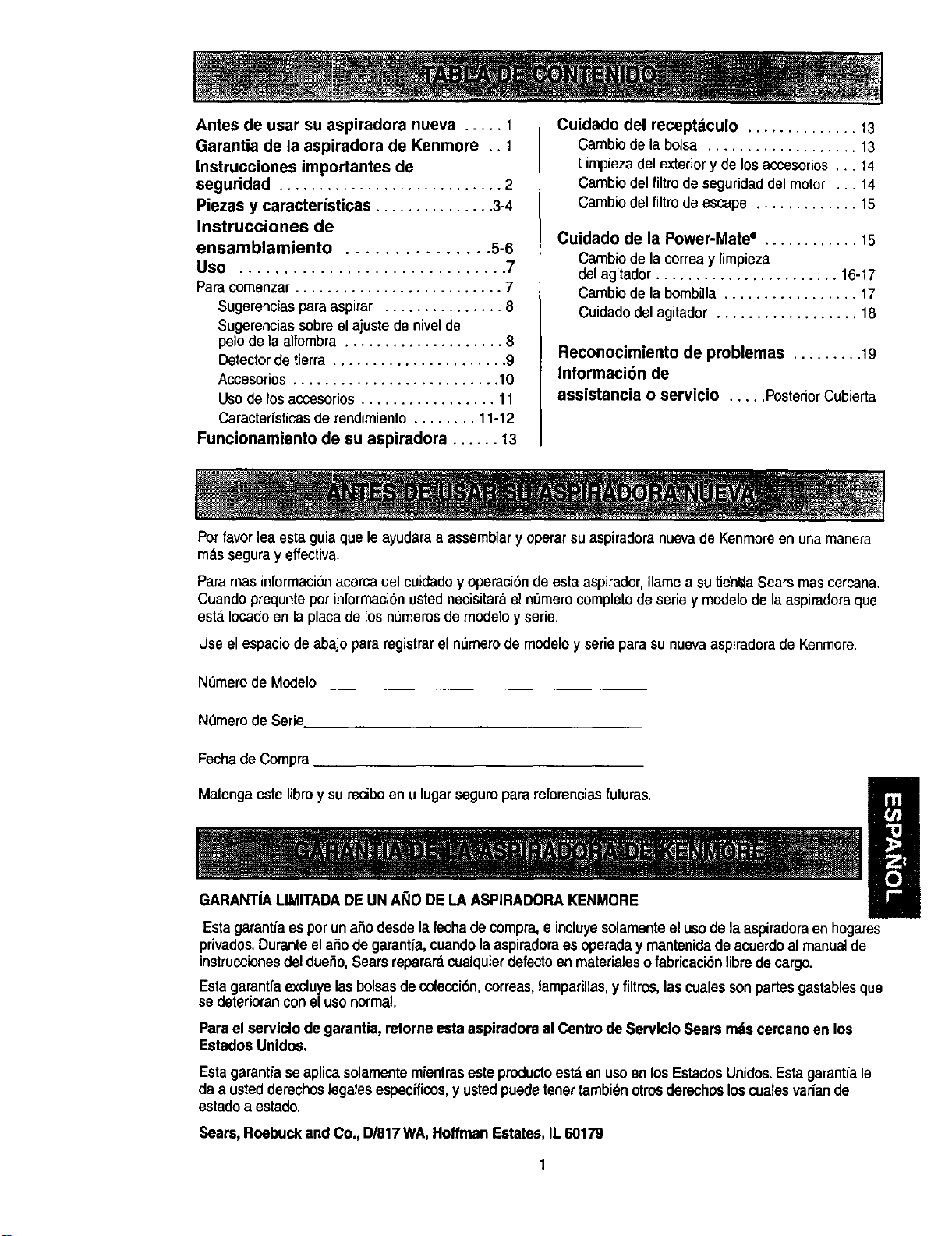
Antesdeusarsuaspiradoranueva..... 1
Garantia de la aspiradora de Kenmore .. 1
Instrucciones importantes de
seguridad ............................ 2
Piezas y caracterfsUcas ............... 3-4
Instrucciones de
ensamblamiento ............... 5-6
Uso .............................. 7
Paraeomenzar .......................... 7
Sugerenciaspara aspirar ............... 8
Sugerenciassobre el ajuste de nivelde
pelo de la alfombra .................... 8
Detector de tierra ...................... 9
Accesorios .......................... 10
Uso de los accesorios ................. 11
Caracterfsticasde rendimiento ........ 11-12
Funcionamiento de su aspiradora ...... 13
Cuidado del receptdculo .............. 13
Cambiode la bolsa ................... 13
Limpiezadel exteriory de losaccesorios... 14
Cambiodelfiltro deseguridaddel motor ... 14
Cambio delfiltm deescape ............. 15
Cuidado de la Power-Mate* ............ 15
Cambio de la correa y limpieza
del agitador ....................... 16-17
Cambio de la bombilla ................. 17
Cuidado del agitador .................. 18
Reconocimiento de problemas ......... 19
Informaci6n de
assistancia o servicio ..... PosteriorCubierta
Porfavor lea esta guia que le ayudaraa assemblary operarsuaspiradoranuevade Kenmoreen una manera
m&ssegura y effectiva.
Paramas informaci6nacerca del cuidado y operaci6nde esta aspirador,Ilame a su tien_iaSears mas cercana.
Cuandoprequnte pot informaci6nusted necisitard el nlJmerocompleto de serie y modelo de la aspiradoraque
esta.Iocado en la placa de los nl_merosde modelo y serie.
Use el espacio de abajo para registrar el n_mero de modeloy serie para su nuevaaspiradorade Kenmore.
Numero de Modelo
N_mero de Serie.
Fechade Compra
Matengaeste libro y sureciboen u lugar seguropara mferencias futuras.
GARANT|A LIMITADADEUN ANO DE LA ASPIRADORAKENMORE
Estagarantfa espor un a._odesdela fecha de compra,e incluyesolamenteel usede laaspiradoraenhogares
privados.Durante el aSo de garantia, cuando la aspiradora esoperada y mantenidade acuerdoal manualde
instruccionesdel dueSo,Searsreparar_ cualquierdefectoen materialeso fabricaciSnlibre de cargo.
Estagarantfa excluye lasbolsas de colacci6n,correas,lamparillas,y filtros, lascuales sonpartes gastablesque
se deteriorancon el uso normal.
Para el servlcio de garanfia,retorne esta aspiradora al Centrode Servlclo Sears mdscercanoen los
Estados Unidos.
Estagarantia se aplicasolamentemientras este producto est_ en usoen los EstadosUnidos.Estagarantiale
da a ustedderechoslegalesespecfficos,y ustedpuedetenettambi_notrosderechosloscualesvariande
estadoa estado.
Sears, Roebuckand Co., D/817WA,Hoffman Estates,IL 60179
Suaeguridadesmuyimportanteparanosotros.Para reducirel rlesgo de Incendio,choque
eldctrico, lesibncorporal o dafios al uUlizarsu aspiradora,actde de acuerdo con precauciones
bdsicasde seguridad,entre elias:
Leaestemanualantesdearmaro utilizarsuaspira-
dora.
UsesuaspiraderaOnicamanteenlaformadescrita
an estamanual.Use_nicamenteconacoesories
recomendadosporSears.
Parareducirelriesgodechoqueel_ctrico,no use
suaspiradoraalairelibranisobrasuperficiesmoja-
das.
Desconecteelcordenel_ctricoantesdecomponer
o limpiarel&readelcepino.DeIocontrario,el cepillo
)odriaarrancardeform imprevistaopodria
)roducirseunchoquealectrico.
Siempredebeapagarlaaspiradoraantesde
conectaro desconectarla mangueradela Power-
Mate®.
Siempre debeapagarsuaspiradoraantesdedes-
conectarla.
Nodesconectela aspiradoratirandodelcord6n
el_ctrico.Paradesconectarla,haleel enchufe,no el
,'ord6n.
Sujeteel enchufeconla manoal enrollarelcord6n
eldctrico.Paradesconectarla,haleenenchufe,noel
cord6n.
No usela aspiradorasiel cord6noel enchufeesta
daSado.Si laaspiradorano estafuncionandoade-
cuadamenteo siseha dejadecaer,estddaSada,se
hadejadoexpuestaa laintemperieose hadejado
caerenagua,devublvalaa unCentrade serviciode
Sears.
No hale nitransportelaespiradoraporelcord6n;no
useelcord6ncomo mango;no cierrepuertassobra
elcorden;nohaleelcordensobrerebordesagudes
niesquinas.Nopaselaaspiradorasobreelcord6n.
Mantengaelcord6nalejadodesuperficiescalientes.
Noabandenelaaspiradoracuandoest6conectada.
Descondctelacuandonolaest6usandoyantesde
darleservicio.
No permitaqueseautilizadacomojuguete.Se
requieratenermayorcuidadocuandosea utilizada
en laproximidaddenihosopotniSos.
No toquelaaspiraderanielenchufeconlasmanes
rnojadas.
Nousela aspiradorasilamangueraesta rota.La
mangueracontienealambresel6ctrices.Cambielasi
estarotao desgastada.Eviteaspirarobjetos
agudes.
No coloqueobjatosenlasaberturas.
No utilicelaaspiradorasialgunaaberturaestablo-
quaada;mantdngalalibradepolvo,pelusa,cabellos
y cualquieracosaque podrfadisminuirel flujode
aire.
Mantenga elcabello,ropesuelta,dedosytodaslas
partesdel cuerpoalejadosde lasaberturasy piezas
mec_nicas.
No use[aaspiradorasin tenerinstaladalabolsa
para polvoy/olosfiltros.
Cambiesiemprelabolsaparapolvodespudsde
espirarlimpiaderasdealfombraso desodomntes,
talcosy polvosficos. Estesproductesatascanla
bolsa,reducenel flujodeaireypuedencausarque
_sta serompa.Sinocambialabolsapodrfaocesio-
nardaSopermanentea laaspiradera.
No uselaespiraderaparalevantarobjetosagudes,
juguetespoqueSes,alfileras,sujetapapeles,etc.
PodrfandaSarlaespiraderaolabolsaparapelvo.
Nolevantaningunacosaqueseestequemandoo
emitiendohumo,comocigarrillos,ceriUosocenizas
calientes.
No uselaaspiradorapara aspirarliquidesinflama-
blesocombustibles(gesolina,liquidesparalim-
pieza,perfumes,etc.)nilauseenlugaresdonde
6stospodrianestarpresentes.Losvaporesdeestas
sustanciespuedencrearunpeligrodeincendioo
explosibn.
Tengaculdadoespecialal utilizarlaaspiradoraen
escalones.Nolacoloquesobresillas,mesas,etc.
Mant_ngalaen elpiso.
Ustedes responsablede aesgurarquesuaspira-
doranosea utilizadapotningunapersonaqueno
puedamanejarlacorrectamente.
No operesinel filtra deescapenila cubiertadelill-
trodeescapeinstalades.
GUARDE ESTAS INSTRUCCIONES
El armadoy usoseguro de suaspiradorason surasponsabilidad.Estaaspiradorahaside diseSada
exclusivamentepara usodom_stico.Laaspiradora deharaalmacenarseenunlugarsecoyen el interior.
LeaesteManualdel propietariodetenidamente,puescontieneinformaci6nirnportantesobreseguridady
uso.Estaquiacontieneinformacionsobreseguridaddebajode simbolosde advertienciacuidado.Por
favorpongaatenci6nespeciala estasinstrucoionesdadas. Advertenela:Este informaci6nlealertard con
elpoligrodefuego, choqueselectricos,quemadasy lesiones.Culdado: Esteinformaci6nlealertaraa
31i_roscome lesiones;/dafiosde propiedad.
2
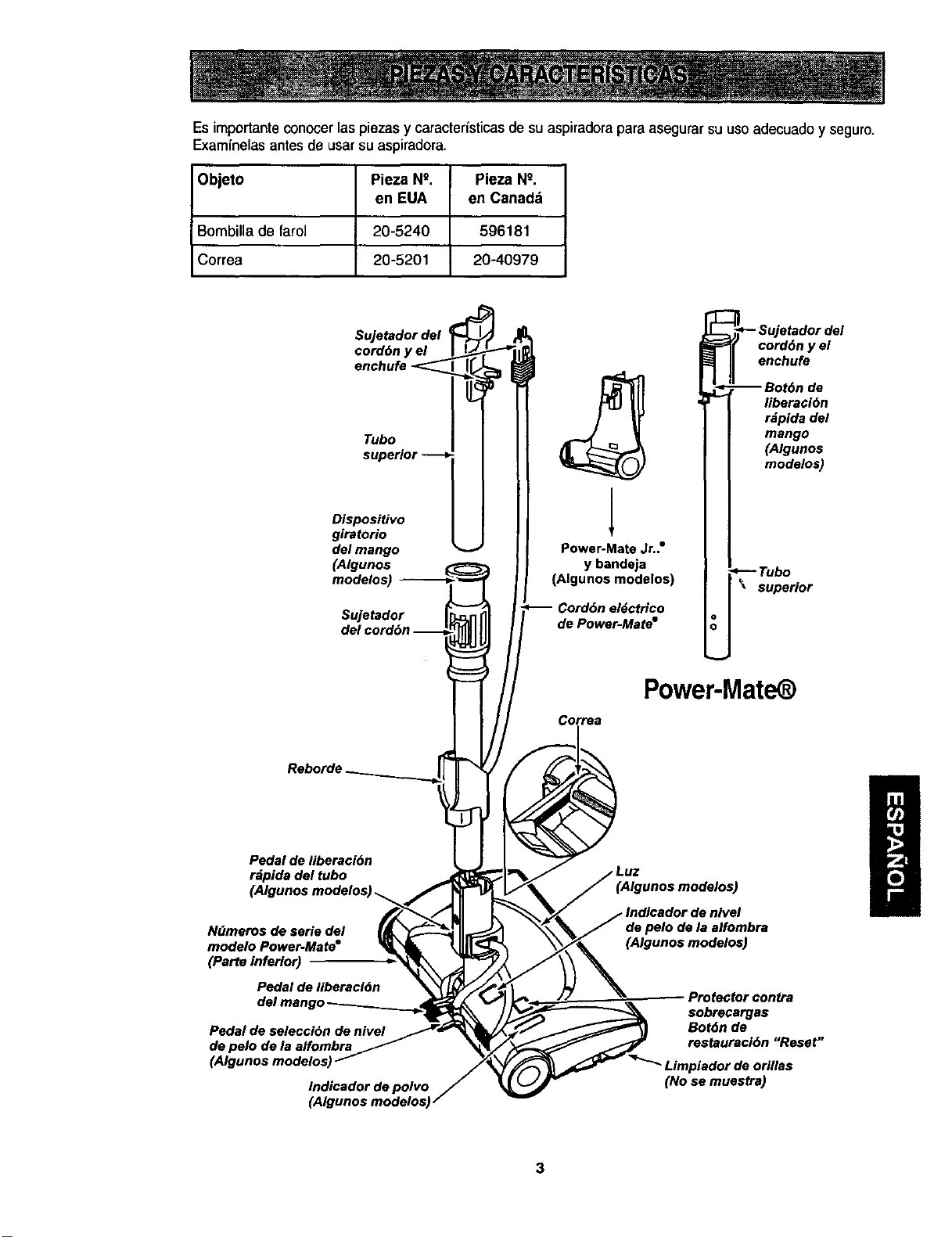
Es importante conocer las piezas y caracter{sticas de su aspiradora para asegurar su uso adecuado y seguro.
Exam{nelas antes de usar su aspiradora.
Objeto Pieza N9. Pieza Ng.
en EUA en Canad_
Bombillade farol 20-5240 596181
Correa 20-5201 20-40979
Sujetador del
cord6n y el
enchufe
Tubo
superior --
Dispositivo
giratorio
del mango
(Algunos
modelos) _-------._
Sujetador I_,:,_nIll
del cord6n "'''"__i
Reborde __
Pedal de liberaci6n
rdpida del tubo
N_meros de serie del
modelo Power-Mate"
(Parte inferior)
Pedal de liberaci6n
Pedal de seleccibn de nivel
de pelo de la affombra
(Algunos modelos)
Indicador de polvo
(Algunos modelos_
_'_- Sujetador del
_=_( cord6n y el
_ Jl enchufe
Power-Mate Jr.." I I
(AlguYnbsand:_aelos) [_Tub°.r
I I supe.o
Cord6n el6ctrico I I
de Power-Mate" U
Power-Mate )
Correa
(Algunos modelos)
de pelo de la alfombra
(Algunos modelos)
Protector contra
sobrecargas
Bot6n de
restauraci6n "Reset"
Limpiador de orillas
(No se muestra)
3
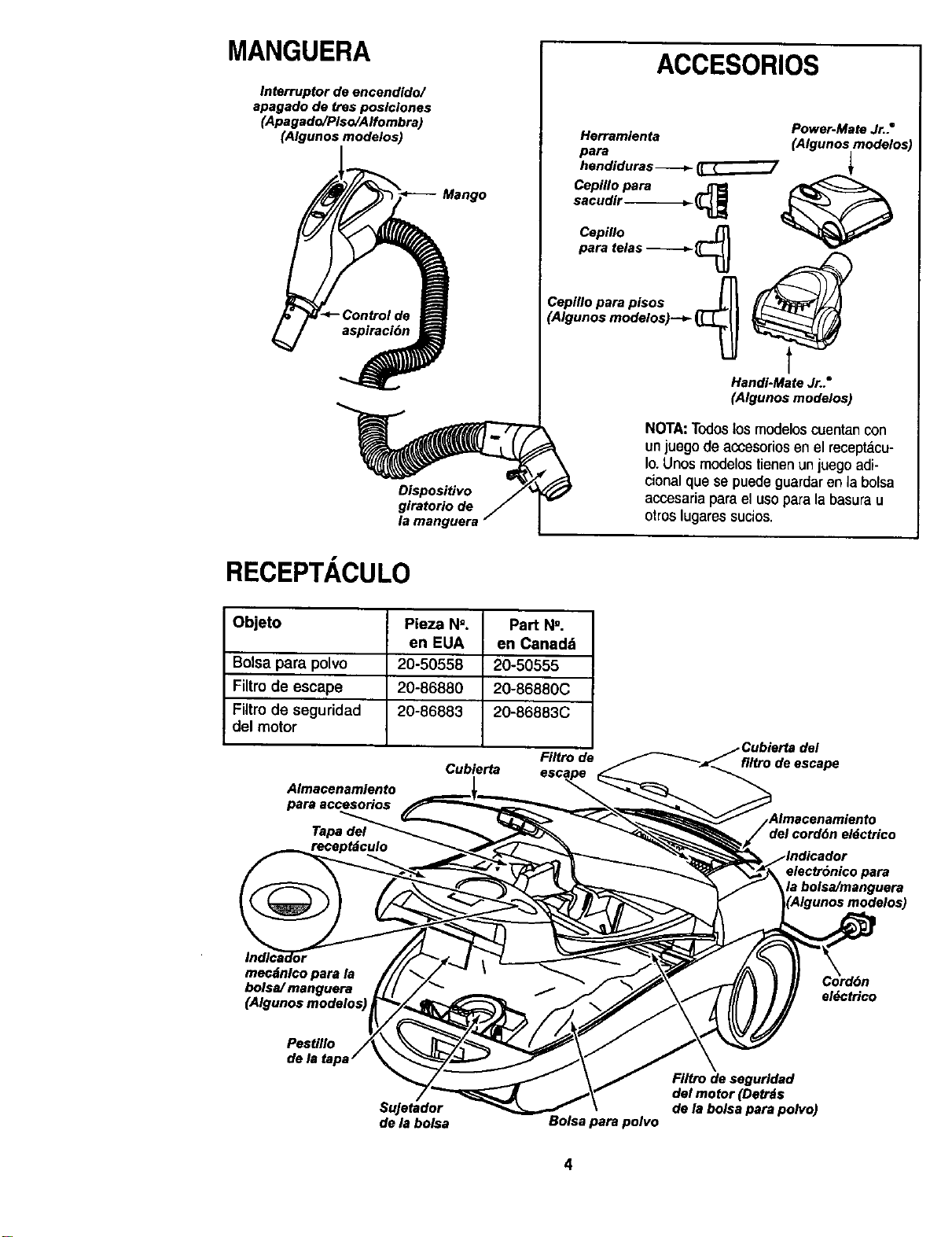
MANGUERA
Interruptor de encendido/
apagado de tres poslciones
(Apagado/PIso/Alfombra)
(Algunos modelos)
Mango
Dispositivo
giratorio de
la manguera
ACCESORIOS
Herramienta
para
hendiduras _
Cepillo para _
sacudir _ _L _
Cepiflo
.aratelas
Cepillo para pisos ___
(Algunos modelos)--_ _
HandI-Mate Jr.."
(Algunos modelos)
Power-Mate Jr.."
(Algunos modelos)
NOTA:Todoslos modelos cuentan con
unjuego de accesorios en elrecept_,cu-
Io.Unosmodelos tienenunluegoadi-
cionalquese puedeguardaren labolsa
accesariaparael usopara labasurau
otroslugaressucios.
RECEPTACULO
Objeto Pleza N=. Part N'.
en EUA en Canada
Bolsa para polvo 20-50558 20-50555
Filtrode escape 20-86880 20-86880C
Filtrode seguridad 20°86883 20-86883C
del motor
Filtrode
Cubierta
Almacenamiento
para accesorios
Tapa del
filtro de escape
electr6nico para
fa bolsa/manguera
mecdnlco para la
bolsa/ manguera el_ctrico
Pestillo
SuJetador
de la bolsa
Bolsa para polvo
Filtro de segurldad
del motor (Detrds
de ta bo/sa para polvo)
4
ADVERTENCIA
Peligmde choqueeldctrico
No conectela aspiradora hasta que termine
de armada. DeIo contrado podrfacausar
un choque el_ctdcoo lesi6n corporal,
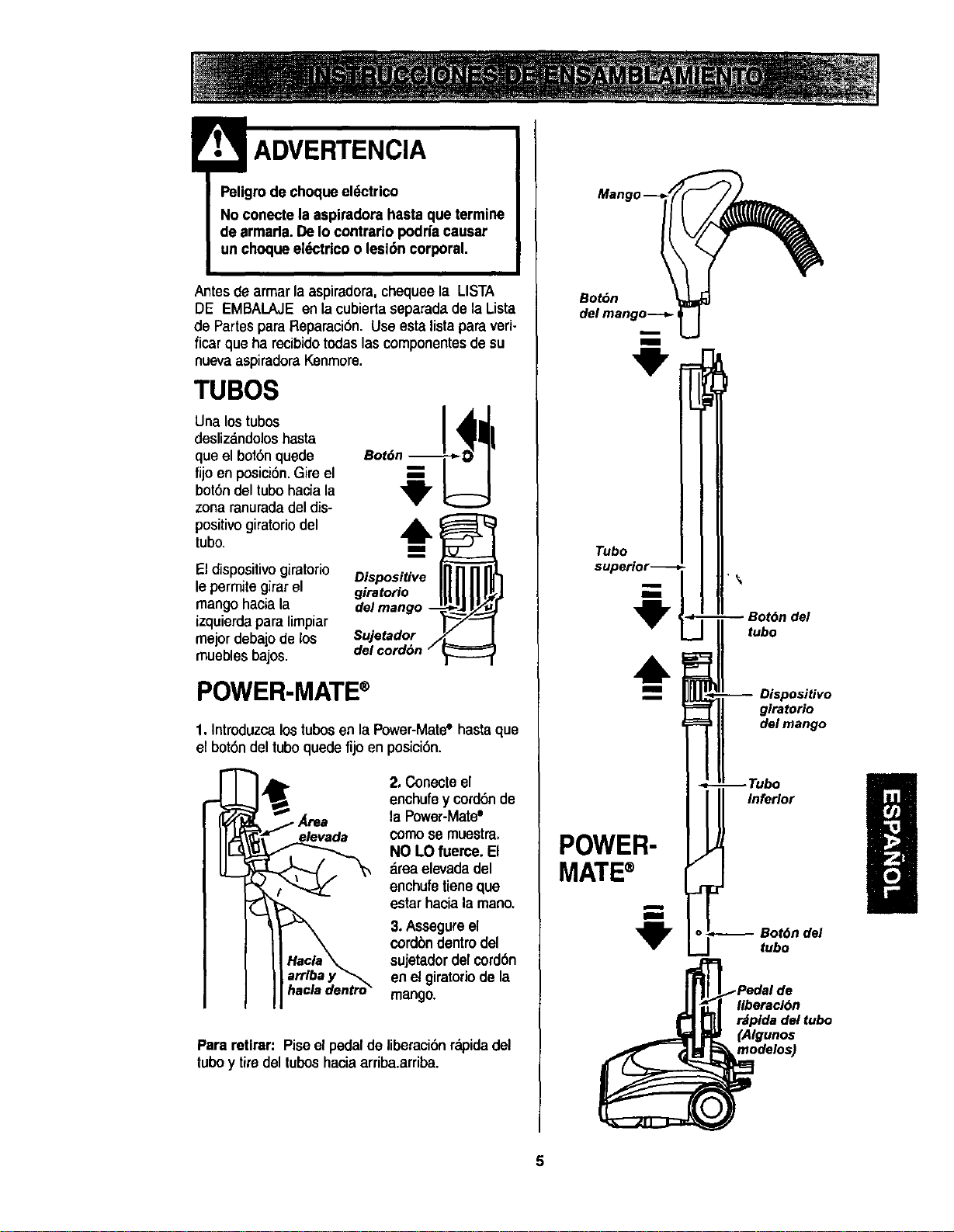
Antes de armarla aspiradora, chequeela LISTA
DE EMBALAJE en la cubiertaseparada de la Lista
de Partespara Reparaci6n. Use esta lista para veri-
ficar que ha recibidotodas las componentes de su
nuevaaspiradora Kenmore.
TUBOS
Una lostubos
deslizandoloshasta
que el bot6n quede
fijo en posici6n.Gire el
bot6ndel tubo hacia la
zona ranurada del dis-
positivo giratoriodel
tubo.
El dispositivo giratorio
le permitegirar el
mango hacia la
izquierdapara limpiar
mejordebajo de los
muebles bajos.
Dispositive
giratofio
del mango --
Sujetador
del cord6n /
POWER-MATE®
1. Introduzca lostubosen la Power-Mate° hasta que
el bot6ndel tuboquede fijo en posici6n.
2. Conecteel
enchufey cord6nde
•Area la Power-Mate•
elevada comose muestra,
NO LOfueme. El
area elevadadel
enchufe tieneque
estarhaciala mano.
3. Assegurael
cordbndentrodel
sujetadordel cord6n
en elgiratoriode la
hacladentro_ mango.
Para retirar: Piseel pedal de liberaci6nrapidadel
tuboy timdel tuboshaciaarriba.arriba.
liberecl6n
r_plda del tubo
(Algunos
modelos)
5
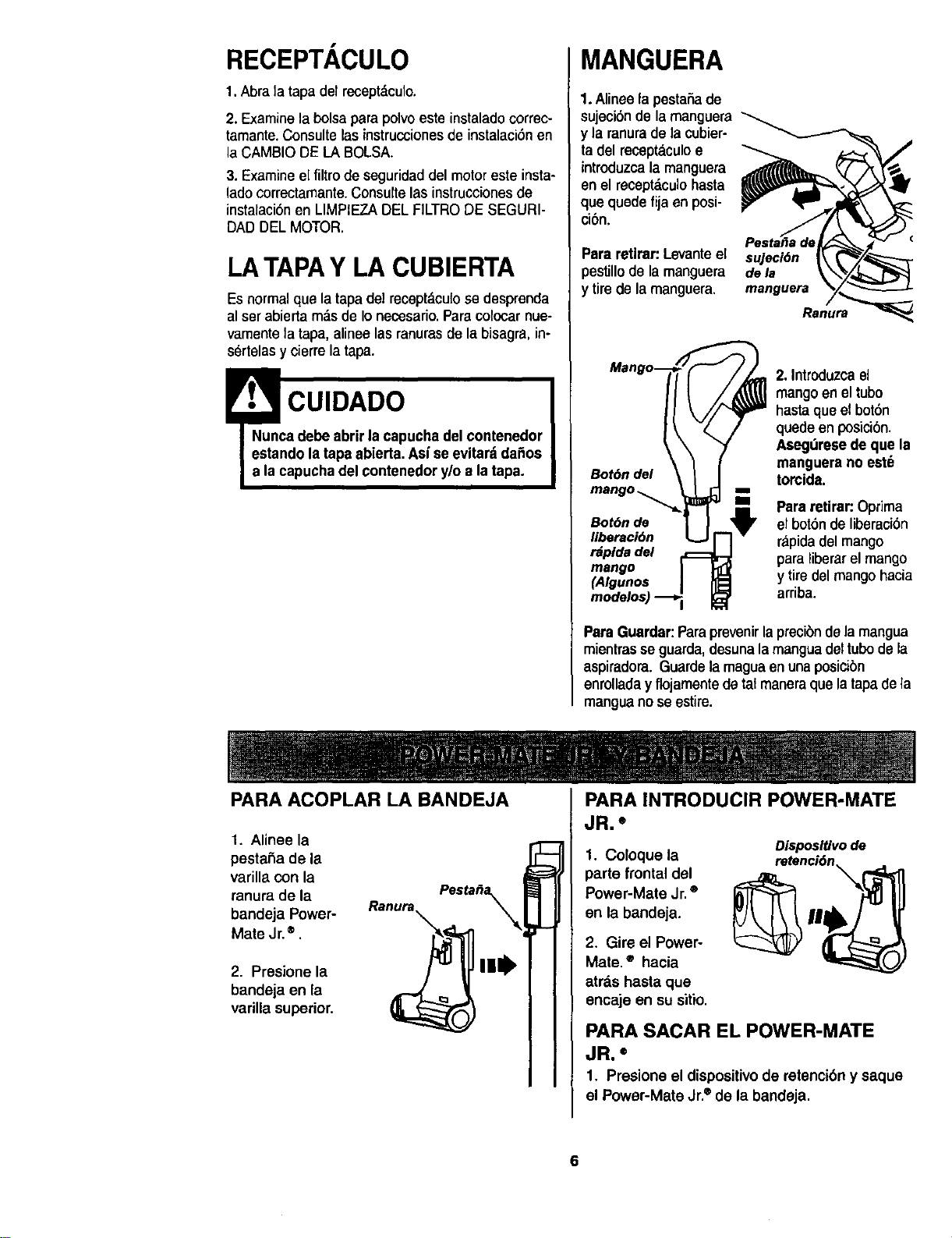
RECEPTACULO
1.Abra la tapa del receptdculo.
2. Examinela bolsa parapoIvoeste instaladocorrec-
tamante.Consulte lasinstruccionesde instalaciSnen
laCAMBIODE LA BOLSA.
3. Examinee[ filtro de seguridaddelmotoresteinsta-
ladocorrectamante.Consultelasinstruccionesde
instalaciSnen LIMPIEZADELFILTRODE SEGURI-
DAD DEL MOTOR.
LA TAPAY LA CUBIERTA
Esnormal que la tapa del recept_,cufose desprenda
al serabiertam_.sde Ionecesario.Paracolocarnue-
vamentela tapa, alineelasranurasde labisagra,in-
s_rtelasy cierrela tapa.
!• CUIDADO
Nunca debe abrir lacapucha del contenedor
estando latapa abierta. Asfee evitar_tdaSos
a la capuchadel contenedory/o a latapa.
MANGUERA
1.Alineela pestaSade
sujecibnde la manguera
y la ranurade lacubier-
ta del recept._culoe
introduzcala manguera
en el receptaculohasta
que quede fija en posi-
cibn.
Para retlrar:Levanteel sujeci6n
_estillode lamanguera dela
y tirede lamanguera, manguera
Ranura
Bot6n del
Bot6n de
liberaci6n
rdpida del
mango
(Algunos
2.Introduzcael
mangoen eltubo
hastaqueel bot6n
quede enposicibn.
Asegdresede que la
manguere no est6
torcida.
" Parsretirar: Optima
el botSnde liberac_6n
rapidadel mango
para liberarel mango
y tiredel mangohacia
arriba.
Para Guardar:Paraprevenirlaprecibndela mangua
mientrasse guarda,desunalamanguadeltubode la
aspiradora.Guardelamaguaenunaposicibn
enrolladay flojamentedetat maneraque latapadela
manguanose estire.
PARA ACOPLAR LA BANDEJA
1. Alinee la
pestaSa de la
varilla con la
ranura de la
bandeja Power-
Mate Jr.®.
2. Presione la
bandeja en la
varilla superior.
PARA INTRODUCIR POWER-MATE
JR. °
1. Coloque la
parte frontaldel
Power-Mate Jr.®
en la bandeja.
2. Gire el Power-
Mate. ® hacia
atrds hasta que
encaje en su sitio.
Disposltivode
retenci6n
PARA SACAR EL POWER-MATE
JR, =
1, Presione el dispositivode retencibn y saque
el Power-Mate Jr.®de la bandeja.
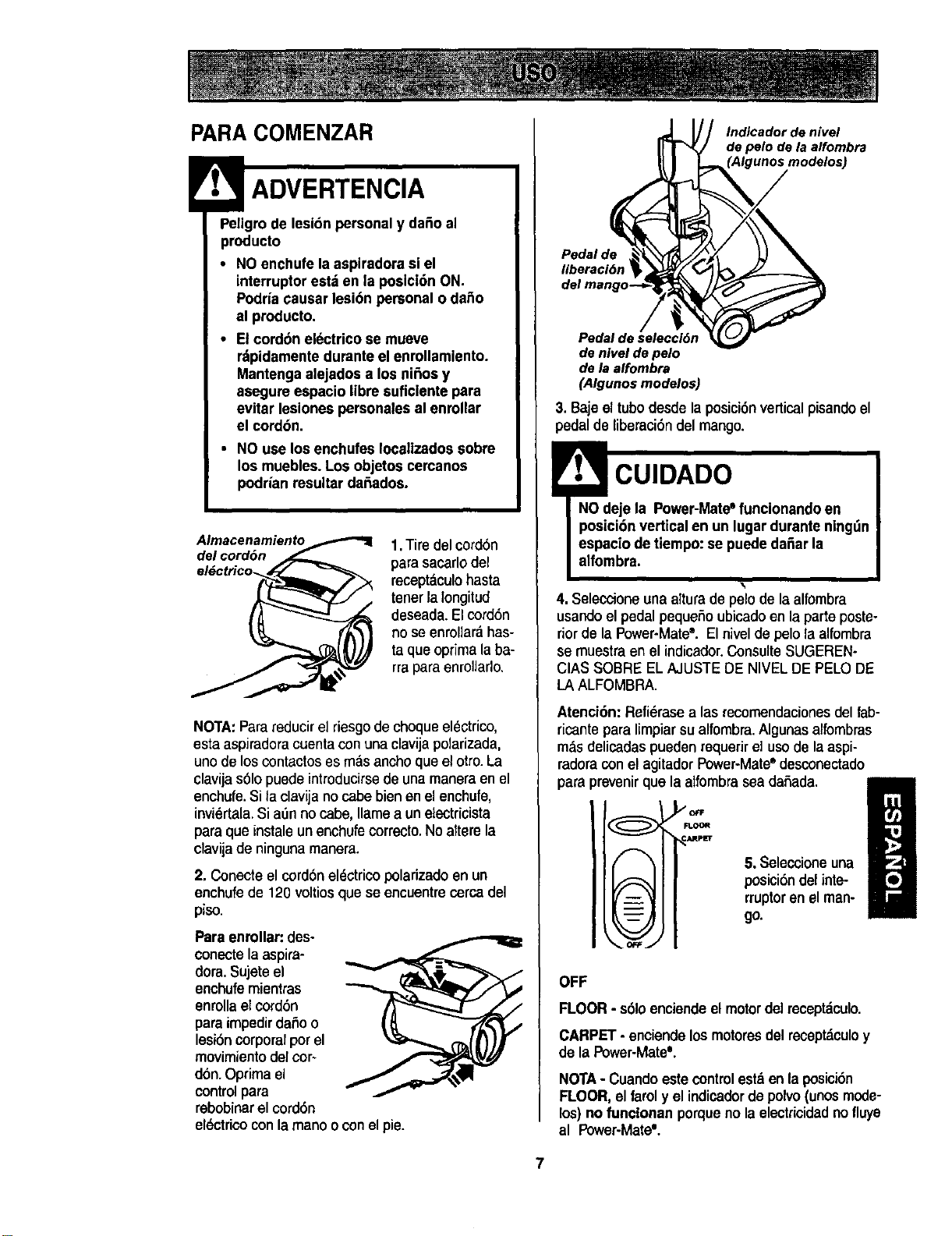
PARA COMENZAR
Peligrode lesibn personaly da_o al
producto
• NO enchufe la aspiradora si el
interruptor esta en la poslci6n ON.
Podrfacausar lesibn personal o daSo
al producto.
• El cord6n electrico se mueve
rdpidamentedursnte el enrollamlento.
Mantenga alejados a los niSosy
asegure espacio Iibre suflclente para
evitar lesiones personales al enrollar
el cordon.
• NO use los enchufes Iocaltzadossobre
los muebles.Los objetos cercanos
podrian resultar da6ados.
Almacenamiento
del cord6n
1.Tire del cord6n
para sacarlo del
receptaculohasta
tenorla longitud
deseada,Elcord6n
no se enrollardhas-
ta queoptimalaba-
rraparaenrollarlo.
NOTA:Parareducir el riesgo de choqueel_ctrico,
esta aspiradoracuenta con una clavijapolarizada,
uno de los contactoses mas ancho que el otro.La
clavija s61opuede introducirsede una manera en el
enchufe.Si la clavija no cabe bien en el enchufe,
invidrta[a. Si a0n no cabe, Ilamea un electricista
para que instale un enchufecorrecto.No attere la
clavija de ninguna manera.
2. Conecteel cord6neldctrico polarizadoen un
enchufe de 120 voltiosque se encuentre cercadel
piso.
Paraenrollar: des-
conectelaaspira-
dora.Sujeteel
enchufemientras
enrollaelcord6n
paraimpedirdaSoo
lesi6ncorporalpotel
movimiento del cor-
dbn. Oprima el
control para
rebobinar el cord6n
el_ctrico conla mano oconel pie.
Indicador de nivel
de polo de la alfombra
Pedal de
liberaci6n
Pedal de selecclOn
de nivel de polo
de la alfombra
(Algunos modelos)
3. Baje el tubo desde la posici6n vertical pisando el
pedal de liberaci6n del mango.
CUIDADO
4. Seleccione unaalturade pelo de la alfombra
usando el pedalpeque,5oubicadoen la parte poste-
riorde la Power-Mate",Elniveldepelolaalfombra
se muestraen el indicador.ConsulteSUGEREN-
CIASSOBRE ELAJUSTEDE NIVELDE PELODE
LAALFOMBRA.
Atenci6n: Refi6rasealas recomandacionesdel fab-
ricanteparaIimpiarsualfombra.Algunasalfombras
m._sdelicadaspuedenrequerirel usede laaspi-
redoraconel agitedorPower-Mate° desconectado
para prevenirque la alfombrasea daSada.
,_OfF
_ARPL_
5. Seleccioneuna
posici6n del inte-
rruptoren elman-
go.
I
OFF
FLOOR - s61oenciende el motordel receptdculo.
CARPET - enciendelosmotoresdel receptdculoy
de la Power-Mate'.
NOTA- Cuando este controlest._enla posici6n
FLOOR, el farol y el indicadordo polvo (unos mede-
los) no funcionan porqueno laelectricidadnofluye
al Power-Mate'.
7
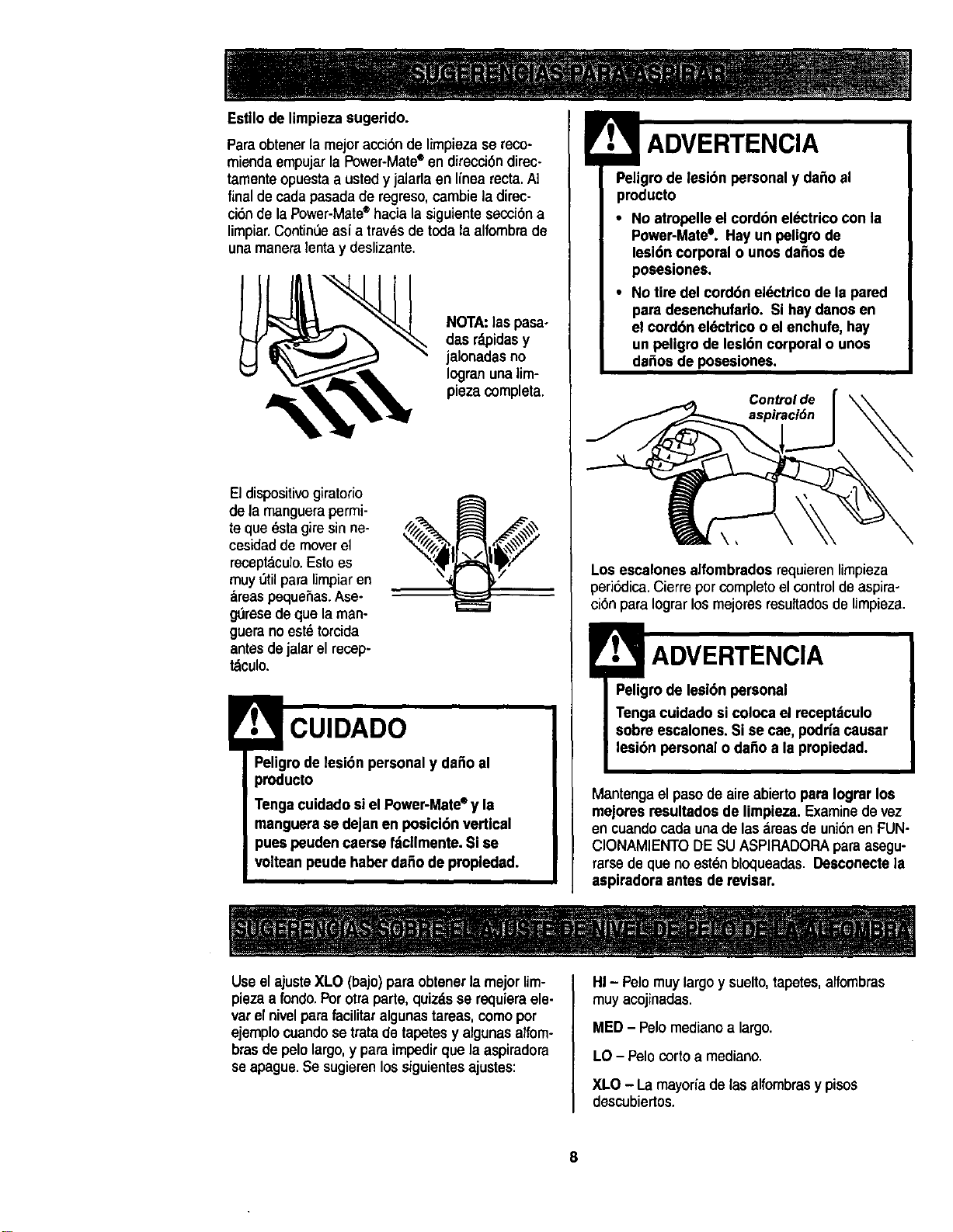
Estilode limpiezasugerido.
Para obtenerla mejor acci6n de limpieza se reco-
miendaempujar la Power-Mate®en direcci6n direc-
tamenteopuesta a usted y jalarla en linea recta.Ai
final de cada pasada de regreso,cambie la direc-
ci6n de la Power-Mate*hacia la siguiente secci6n a
limpiar.Contin6e asi a travesde toda la alfombra de
una maneralentay deslizante.
NOTA:laspasa-
dasrdpidasy
jalonadas no
Iogranunalim-
piezacompleta.
Eldispositivogiratorio
de la manguerapermi-
te que _sta gire sin ne-
cesidadde moverel
recept&culo.Estoes
muy 5tilpara limpiaren
&reaspequeSas.Ase-
g_resedeque laman-
gueranoest_torcida
antesdejalarelrecep-
tdculo.
Peligrode lesi6n personaly dafio al
producto
Tengacuidado siel Power-Mate° y la
manguerese dejanen posicl6n vertical
pues peudencaerse fdcllmente, Si se
volteanpeudehaber dafiode propledad.
! ADVERTENCIA
Peligrode lesion personaly dafio el
producto
• No atropelleel cord6n electrico con la
Power-Mate°. Hay un peligro de
lesi6n corporal o unosdafiosde
posesiones.
• No tire del cord6n el_ctrico de la pared
para desenchufado. Si hay danosen
el cord6n el_ctrico o el enchufe, hay
un peligro de leal6ncorporal o unos
da_os de posesiones.
Controlde
Los escalones alfombrados requierenlimpieza
peri_lica. Cierreporcompletoel control de aspira-
ci6npara Iograrlosmejoresresuftadosde Umpieza.
!ADVERTENCIA
Peligrode lesi6n personal
Tengacuidado si coloca el receptitculo
sobre escalones. Si se cae, podrfacausar
lesi6n personal o dafio a la propiedad.
Mantenga el pasode aire abiertopara Iogrer los
mejores resultadosde limpieza. Examinede vez
encuandocadaunade las._reasde uni6nen FUN-
CIONAMIENTODE SU ASPIRADORAparaasegu-
rarsedeque no eatenbloqueadas.Desconectela
aspiredore antes de revisar.
Useelajuste XLO (bajo) para obtenerla mejorUm-
piezaa rondo.Por otra parte, quizds se requiem ele-
vat el nivelpara facilitar algunastareas, como pot
ejemplocuandose trata de tapetes y algunasalfom-
brasde pelo largo, y para impedir que la aspiradora
seapague. Se sugieren lossiguientes ajustes:
HI - Pelo muy largo y suelto,tapetes, alfombras
muy acojinadas.
MED - Pelo medianoa largo.
LO - Pelo corto a mediano.
XLO - La mayoriade tas alfombrasy pisos
descubiertos.
8
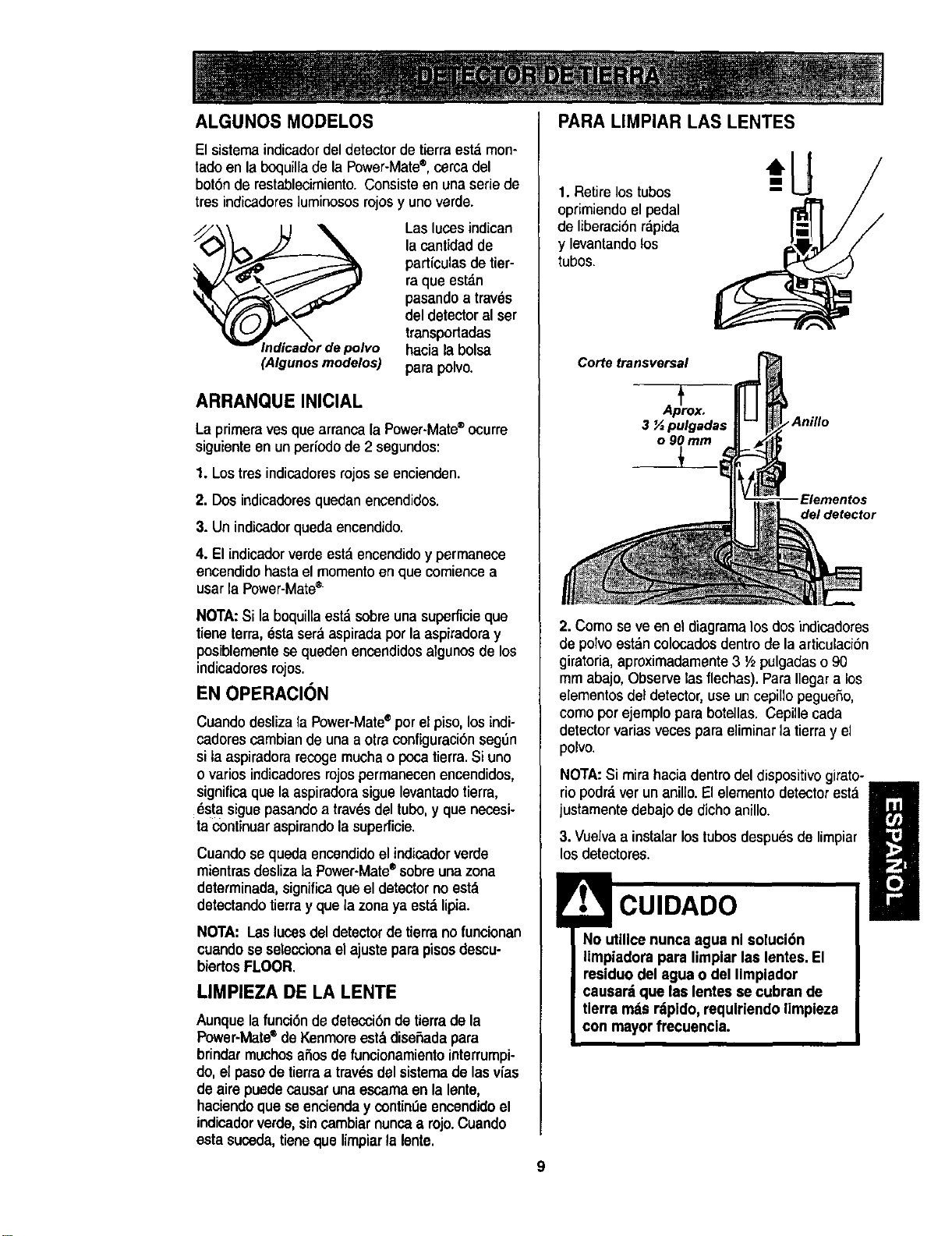
ALGUNOS MODELOS
El sistema indicadordel detector de tierra est._men-
tado en la boquilla de la Power-Mate®,cerca del
boron de restablecimiento. Consiste en una serie de
tres indicadorasluminosos rojosy uno verde.
_vo
(Algunosmodetos)
Las lutes indican
la cantidad de
parficulas de tier-
ra que est._n
pasando a tray,s
del detector al ser
transportadas
hacia la bolsa
para polvo.
ARRANQUEINICIAL
La primera yes que arranca la Power-Mate®ocurre
siguiente en un perlodo de 2 segundos:
1. Los tres indicadores rojos se encienden.
2. Dos indicadores quedan encendidos.
3. Un indicadorqueda encendido.
4. El indicador verdeest_ encendidoy permanece
encendidohasta el momento en que comiencea
usar laPower-Mate®
NOTA:Si la boquilla est_ sobre una superficie que
tiene terra, _sta ser_ aspirada per la aspiradoray
posiblementese queden encendidos algunos de los
indieadoresrojos.
EN OPERACION
Cuando desliza la Power-Mate®per el piso,los indi-
cadores cambian de una a otra configuracibnseg5n
si la aspiradorarecoge mucha o poca tierra. Si uno
o varies indicadores rojos permanecen encendidos,
significa que la aspiradorasigue levantado tierra,
6s!a siguepasando a traves del tubo, y que necesi-
ta continuar aspirando la superficie.
Cuando se queda encendido el indicador verde
mientras desliza la Power-Mate®eobreunazona
determinada, significa que el detectorno estd
detectando tierray que la zona yaestd lipia.
NOTA: Laslucesdel detector detierrano funcionan
cuandose seleccionaelajusteparapisosdescu-
biertosFLOOR.
LIMPIEZA DE LA LENTE
Aunquela funci6nde deteccibn de tierrade la
Power-Mate®deKenmoreest._diseSadapara
brindarmuchosafiosde funcionamiento interrumpi-
do,elpasode tierraa trav_sdel sistemade lasv_as
deaire puedecausarunaescamaen lalente,
haciendoque se encienday contin,',eencendidoel
indicadorverde,sincambiar nuncaa rojo.Cuando
estasuceda,tieneque limpiarla lent®.
PARA LIMPIAR LAS LENTES
1. Retire lostubos
oprimiendo el pedal
de liberaci6n r_,pida
y levantando los
tubos.
Corte transversal
3 _ pulgadas Anillo
o 90 mm
Elementos
del detector
2. Como seve en el diagramalos dosindicadores
de polvo estdn colocadosdentro de la articulaci6n
giratoria,aproximadamente3 V2pulgadaso90
mmabajo,Observelas flechas). ParaIlegara los
elementosdel detector,useuncepillopegueSo,
comoporejemploparabotellas.Cepillecada
detectorvariasvecesparaeliminarlatierra y el
polvo.
NOTA:Si mira hacia dentro del dispositivo girato-
riopodrdverunanillo.Elelementodetectoresta
justamentedebajode dichoanillo.
ll
3. Vuelvaa instalarlostubesdespuesde limpiar
los detectores.
No utillce nunca agua nl soluci6n
limpiadora para limplar las lentes. El
residuodel agua o del Iimplador
causar=tque lae lentesse cubran de
tlerra rods r_ipido,requlriendo limpieza
I con mayor frecuencia.
9
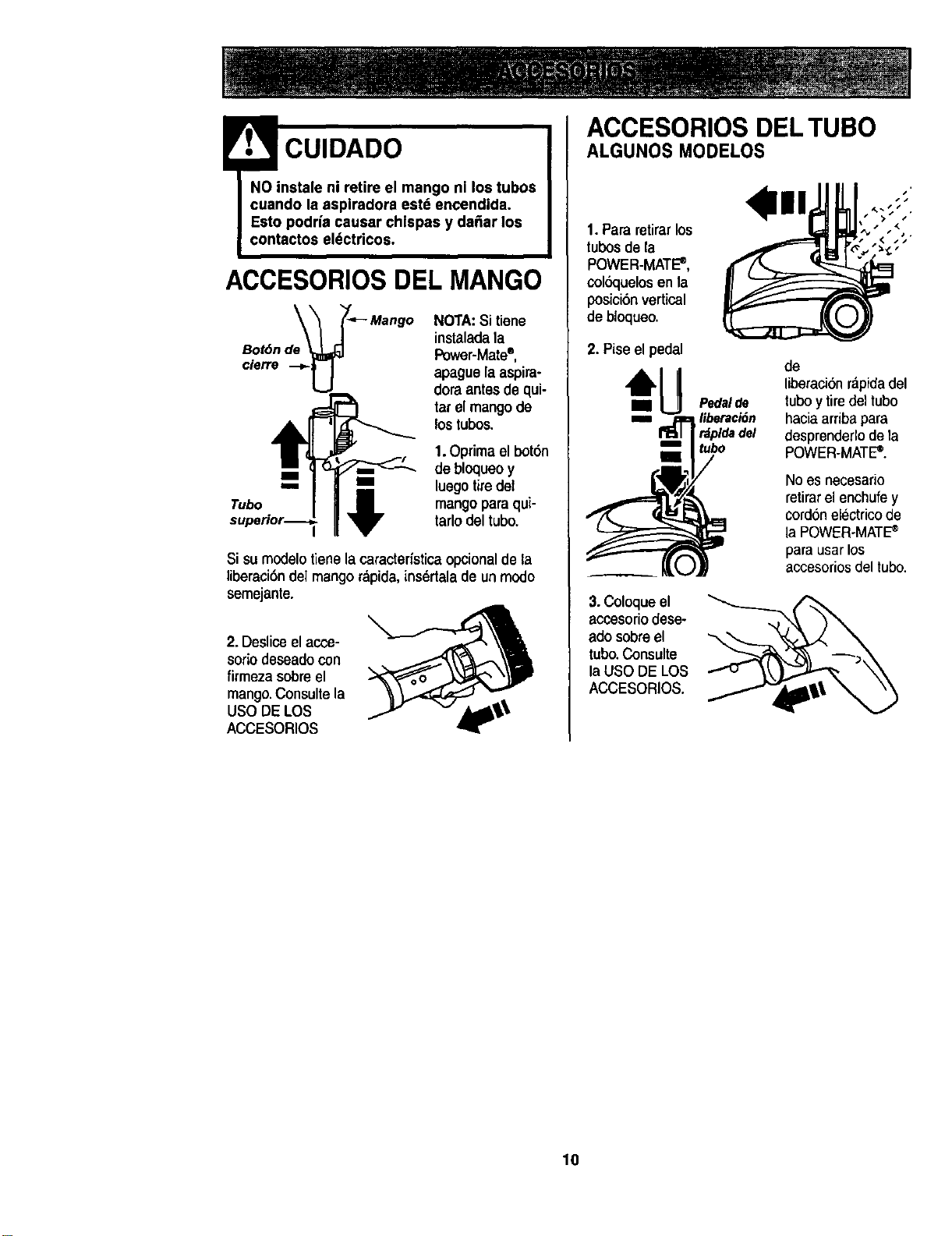
! CUIDADO
NO instale ni retire el mango nl los tubos
cuando la aspiradora estd encendida.
Esto podria causar chlspas y da_ar los
contactos el_ctdcos.
ACCESORIOSDEL MANGO
Bot6n de
cierre
NOTA:Si tiene
instaladala
Power-Mate®,
apaguelaaspira-
doraantesdequi-
tarel mangode
lostubos.
Tubo _ I
1.Oprima el bot6n
debloqueoy
luegotiredel
mangopara qui-
tarlodeltubo.
Si su modelotienela caractedstica opcionalde la
liberaci6ndel mango rdpida,insdrtala de un modo
semejante.
2. Deslicoel acce-
soriodeseadocon
firmeza sobreel
mango.Consulte la
USODE LOS
ACCESORIOS
ACCESORIOS DEL TUBO
ALGUNOS MODELOS
1. Pararetirarlos
tubosde la
POWER-MATE_,
colbquelosen la
posici6n vertical
de bloqueo.
2. Piseel pedal
3.Coloqueel
acoesoriodese-
ado sobreel
tubo.Consulte
laUSO DE LOS
ACCESORIOS.
de
liberaci6nrdpidadel
Pedalde tuboytiredeltubo
liberaciSn haciaarribapara
rdpldadel desprenderlodela
tubo POWER.MATE_.
Noes necesario
retirarelenchufey
cord6nelectricode
la POWER-MATE_
parausarlos
accesoriosdel tubo.
10
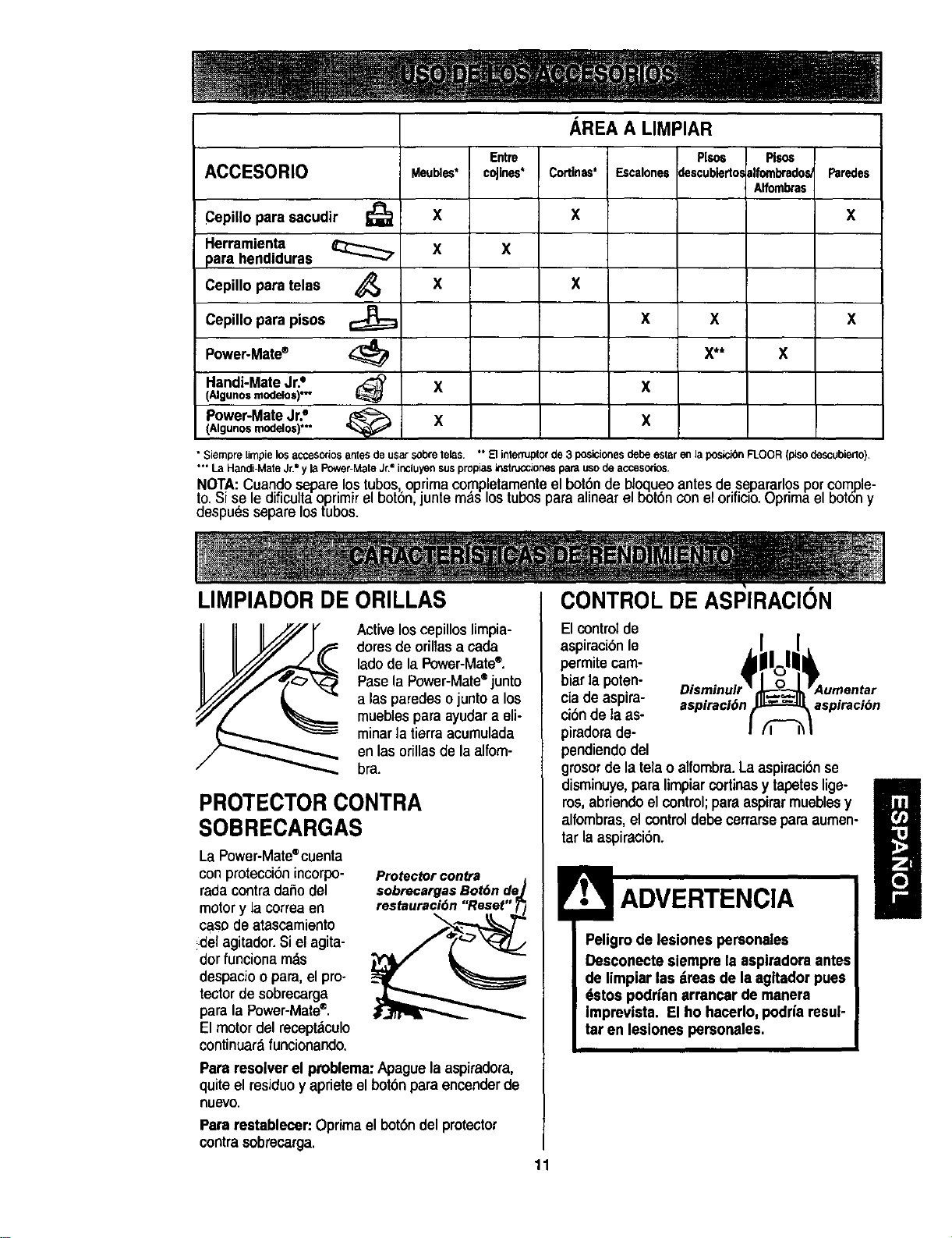
ACCESORIO
Cepillo para sacudir I_
Herramienta
para hendiduras
Cepillo para telas ,_
Cepillo para pisos
Power-Mate®
Handi-MateJr.°
(Algunosmodelos)*-
Meubles*
X
X
X
Entre
coJlnes*
x
x
x
AREA A LIMPIAR
Plso_
Cortinas* Escalonesdescubledos
X
X
X X
X**
X
Pl$os
ilfombradoe_
Alfombras
Faredes
X
x
Power-MateJr.e _ X X
(Algunos modelo$)*-
• Siempre limpie los accesorios antes de usar sobre lelas. °* El interfuptor de 3 posloiones debe estar en la posicibn FLOOR (piso descubiedo)
"*" La Handi-Mate Jr," y la Power-Mate Jr2 incluy_n sus propias instrucclones para uso de accesodes.
NOTA: Cuand.oseparelostubos optimacomp!etamenteel bot,o.'nde bk_lueoantes,desepararlosporcomple-
to.bi se le diTicultaoprimirel bot6n juntem_s lostubespara alinear el bot6nconeloriricio,uprima el bot6ny
despuds separe ostubos.
LIMPIADOR DE ORILLAS CONTROL DE ASPIRACION
Active loscepillos limpia-
dores de oriltasa cada
ladode la Power-Mate®.
Pose laPower-Mate®junto
alas paredeso juntoa los
muebies paraayudara eli-
minar la tierraacumulada
en lasorillasde laalfom-
bra.
PROTECTOR CONTRA
SOBRECARGAS
La Power-Mate®cuenta
con proteecionincorpo-
rada contra daho del
motor y la correa en
caso de atascamiento
del agitador. Si el agita-
dor funciona m._s
despacio o para,el pro-
tector de sobrecarga
para la Power-Mate®.
El motor del recept_culo
continuar&funcionando.
ProtectOr contra
sobrecargas Bot6n de
restauracidn "Reset"
Para resolver el problema:Apaguela aspiradora,
quiteel residuey aprieteel bot6nparaencenderde
Ruevo,
Para restablecer:Oprimael bot6ndel protector
contrasobrecarga.
El control de
aspiraci6nle
permite cam-
biar la poten-
ciade aspira- sspiracl6n aspiraci_)n
ci6nde la as-
piradorade-
pendiendodel
grosorde latelao alfombra.Laaspiraci6nse
disminwe,para limpiarcortinasy tapeteslige- i
ros,abriendoel control;para aspirarmueblesy
/
alfombras, el control debecerrarseparaaumen-
tar laaspiraci6n.
ADVERTENCIA
Peligro de lesiones personales
Desconecte slempre la aspiradora antes
de limplarlas _imas de laagltador pues
dstos poddan arrancar de manera
Imprevista. El ho hacerlo, podrfaresul-
tar en lesiones personales.
11
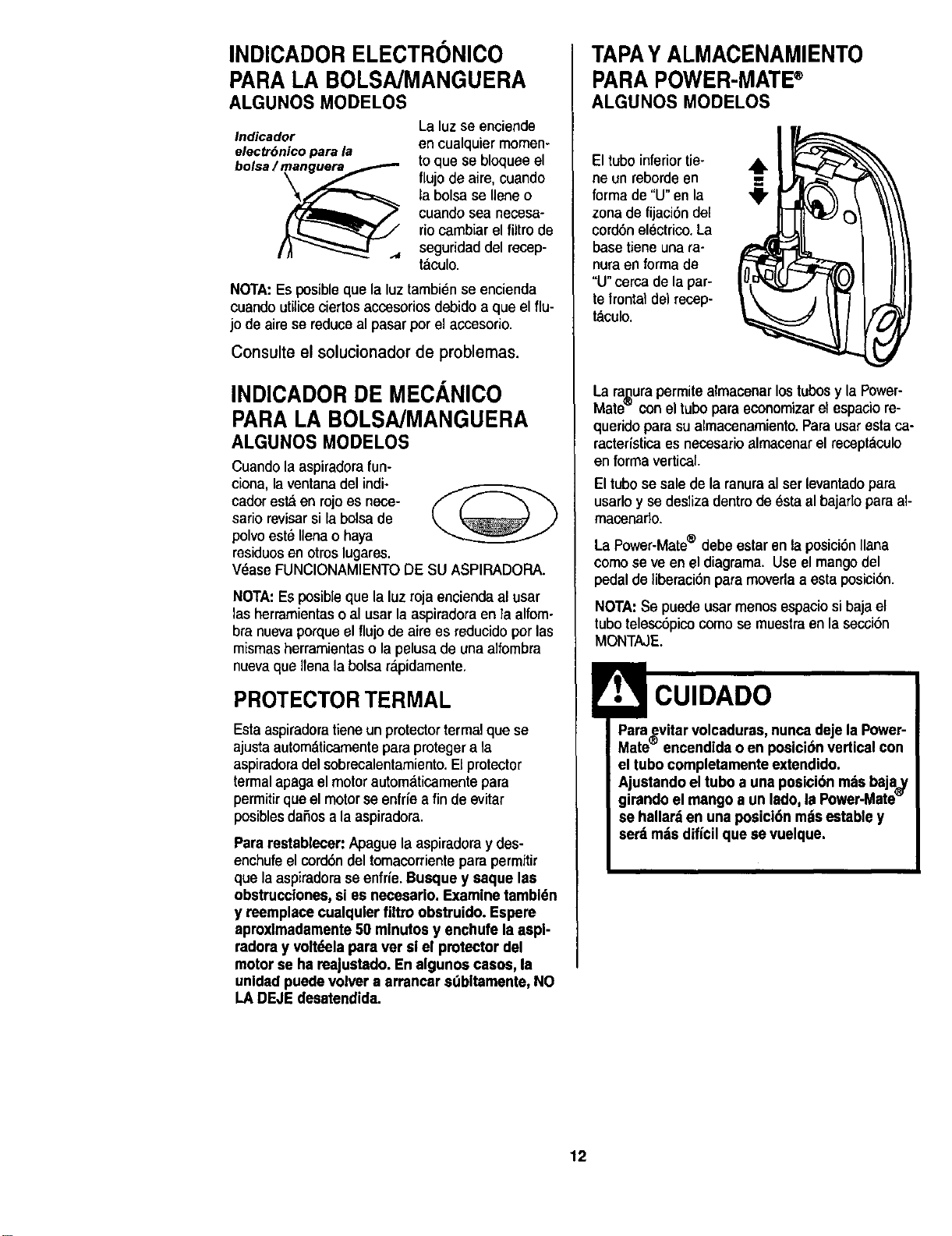
INDICADOR ELECTRONICO
PARA LA BOLSA/MANGUERA
ALGUNOS MODELOS
Indicador
electrOnico para la
bolsa /_
La luzse enciende
en cualquier memen-
to que se bloquee el
flujo de aire, cuando
la bolsa se Ileneo
cuando sea necesa-
riocambiar el filtro de
seguridad del recep-
t_culo.
NOTA:Es posibleque la luz tambi_n se encienda
cuando utiliceciertos accesorios debido a que el flu-
jo de aire se reduceal pasar per el accesorio.
Consulte el solucionador de problemas.
INDICADOR DE MECANICO
PARA LA BOLSA/MANGUERA
ALGUNOS MODELOS
Cuandola aspiradorafun-
ciona, la ventana del indi-
cador esta en rojoes nece-
sario revisarsi la bolsade
polvoest_Uenao haya
msiduosen otroslugares.
VdaseFUNCIONAMIENTODE SU ASPIRADORA.
NOTA:Es posibleque la luz rojaenciendaal usar
lasherramientasoal usarlaaspiradora en la alfom-
bra nuevaporqueel fluio de aire es reducido porlas
mismas herramientaso la pelusa de una alfombra
nuevaque ITenala bolsa r_oidamente.
PROTECTORTERMAL
Estaaspiradoratieneun protectortermal que se
ajusta automdticamentepara proteger a la
aspiradoradel sobrecalentamiento.El protector
termal apaga el motorautomdticamente para
permitirque el motorse enfrfe a fin de evitar
posiblesdafios a la aspiradora.
Pararestabiecer:Apague la aspiradoray des-
enchufeel cord6ndel tomacorrientepara permitir
quela aspiradorase enfr{e.Busque y saque las
obstrucciones,si es necesario. Examine tambl6n
y reemplacecualqulerfiltro obstruido. Espere
aproxlmadamente50 mlnutos y enchufe la aspl-
radora y volt(,elapara ver slel protectordel
motor se ha reajustado. Enalgunos easos, la
unldadpuedevolver a arrancar sdbltamente,NO
LA DEJEdesatendida.
TAPAY ALMACENAMIENTO
PARA POWER-MATE®
ALGUNOS MODELOS
El tube inferiortie-
ne un reborde en
forma de "U" enla
zonade fijaci6n del
cord6n electrico. La
base tiene una ra-
nura en forma de
"U"cerca de la par-
te frontal de)recep-
taculo.
La ra,_urapermitealmacenarlos tubosy la Power-
Mate`= conel tubopara economizarel espacio re-
querido para su almacenamiento.Parausar esta ca-
racter_sticaes necesario almacenarel receptaculo
en forma vertical.
El tubo se sale de la ranuraal ser levantadopara
usarlo y se desliza dentro de esta al bajaflo para al-
macenaflo.
La Power-Mate® debe estar enla posici6nliana
comose ve en el diagrama. Use el mangodel
pedal de liberaci6npara moverlaa estaposici6n.
NOTA: Se puede usarmenos espaciosibaja el
tubo telesc6pico como se muestraen la secci6n
MONTAJE.
!r1. l CUIDADO
Paraevitar volcaduras, nuncadeje laPower-
Mate_ encendidao en posicion verticalcon
el tubo completamenteextendido.
Ajustando el tubo a una posici6n m=isbaja_y
girando el mango a un lado, la Power-Mate
se hallar_ en una posici6n mdsestable y
serdrods dificilque se vuelque.
12
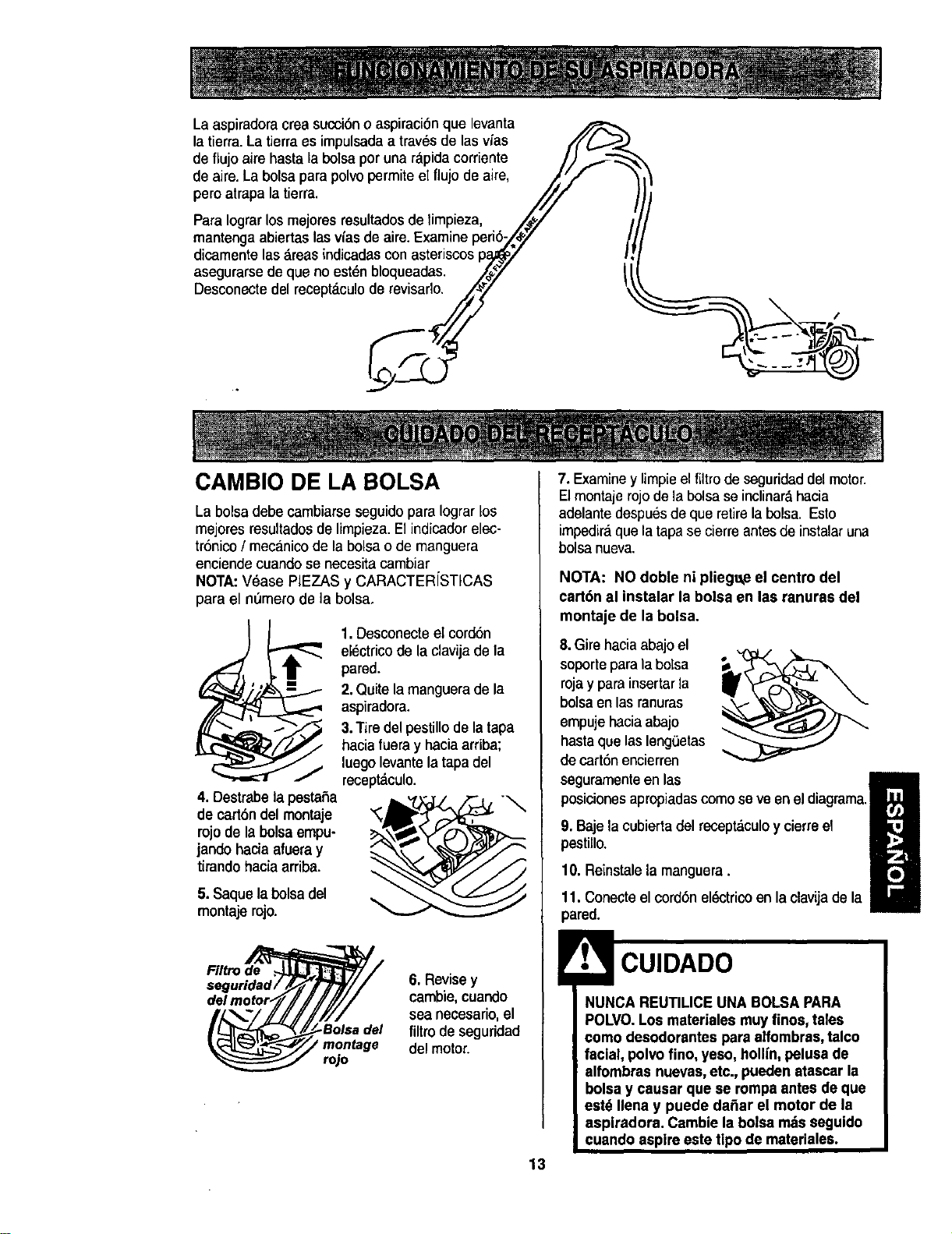
Laaspiradora creasucci6n o aspiraci6nque levanta
la tierra. La tierraes impulsada a trav_s de las vias ////_.,._
de flujoaire hasta la bolsaper una rapida corriente /,) ,,_-_
de aire.La bolsa para polvo permite el flujo de aire, _,r//
pero atrapa la tierra. ///
Para Iograrlos mejores resultados de limpieza, JjpJ /
mantenga abiertaelas vias de aire.Examine peri6-/#Y !
dicamente las &teas indicadascon asteriscos pa_7 I!
asegurarse de que no est_n bloqueadas. //_7 t l
Desconecte.del recept_culo__derevisarlo. "£
v
CAMBIO DE LA BOLSA
La bolsa debe cambiarseseguido para Iograrlos
mejores resultadosde limpieza.El indicador elec-
tr6nico/ mecanicode labolsao de manguera
enciendecuandose necesitacambiar
NOTA:V_ase PIEZAS y CARACTER[STICAS
para el nL_merode la bolsa.
4. Oestrabelapestaha
de cart6n del montaje
rojo de la bolsa empu-
jando hacia afueray
tirando hacia arriba.
5.Saque la bolsadel
montaje rojo.
1.Desconecte el cord6n
el_ctrico de la clavija de la
pared.
2.Quite la manguera de la
aspiradora.
3.Tire del pestillode la tapa
hacia fueray hacia arriba;
luego levante la tapa del
recept_culo.
Filtro de
6. Revise y
cambie,cuando
sea necesario,el
del filtro de seguridad
delmotor.
rojo
7. Examiney limpieel filtrode seguridaddel motor.
El montaje rojo de la bolsase inclinar_,hacia
adelantedespues de que retirela bolsa. Esto
impedir&que la tapase cierre antesde instalaruna
bolsa nueva.
NOTA: NO doble ni pliegt_teel centro del
cart6n al instalar la boisa en las ranuras del
montaje de la bolsa.
8.Girehacia abajoel
soporte para labolsa
rojay para insertar la
bolsa en las ranuras
empujehacia abajo
hastaque lasleng_3etas
de cart6n encierren
seguramenteen las
posicionesapropiadascomo se ve en el diagrama.
9. Baje lacubierta del recept&culoy cierreel
pestillo.
10. Reinstalela manguera.
11. Conecteel cord6n eldctricoen la clavijade la
pared.
NUNCA REUTILICE UNA BOLSAPARA
POLVO.Los materiales muyfinos, tales
como desodorantes para alfombras,talco
facial, polvofino, yeso, hollfn,pelusa de
alfombras nuevas,etc., pueden atascarla
bolsa y causar que se rompa antes de que
est6 Ilena y puede da6ar el motor de la
aspiradora. Cambie la bolsa mztsseguido
cuando aspireeste tipo de materiales.
13
1.Desconecteel cord6nel_ctricode la clavijade la
pared.NOchoree agua sobrela asplradora.
2. Limpieel exterior conun traposuave y limpio,que
ha sidoexprimido despu_sde remojaren una solu-
ci6n de agua y detergentefiquidoligero.Seque el
exterior con un traposeco despu_s de limpiar.
3. Limpiela superficieexterior del receptaculoy de
los accesorios para reducirla electricidad est_tica y
la acumulaci6nde polvo.
CUIDADO
No use los accesorlos slestdn mojados.
Los accesorios que se utilicenen dreas
sucias, debajo del refrigerador,no deben
usarse en otras superficiessin antesser
lavados. Podrfandejer mamas.
Examine el filtro de seguridaddel motor de vez en
cuandoy cambio cuandoeste sucio.
Peligrode choqueel_,ctrico
Desenchufeel cord6n de la corrlenteeldc-
trica. No opere la aspiradora sin el filtro de
seguridad del motor. Asegduresede que el
filtroestd seco • instaladoadecuadamente
para impedir que el motor felle y/o que se
produzca un choque el_ctrico.
Para quitarla bolsa,sigalasinstrucoiones en CAM-
BIO DE LA BOLSA.
FILTRO DE SEGURIDAD DEL
MOTOR
ELECTROSTATICO
Estefiltro se tienequecambiarcuandoest_sucio.
Debe cambiarseperiddicamenteseg_nlas condi-
cionesde uso, El filtro no se puede laver pues
perderfa sucapacldad para atraparaltrapar
polvo.
NOTA:V_ase PIEZAS y CARACTER[STICAS
pare el n_mem del filtrode segufidaddel motor,
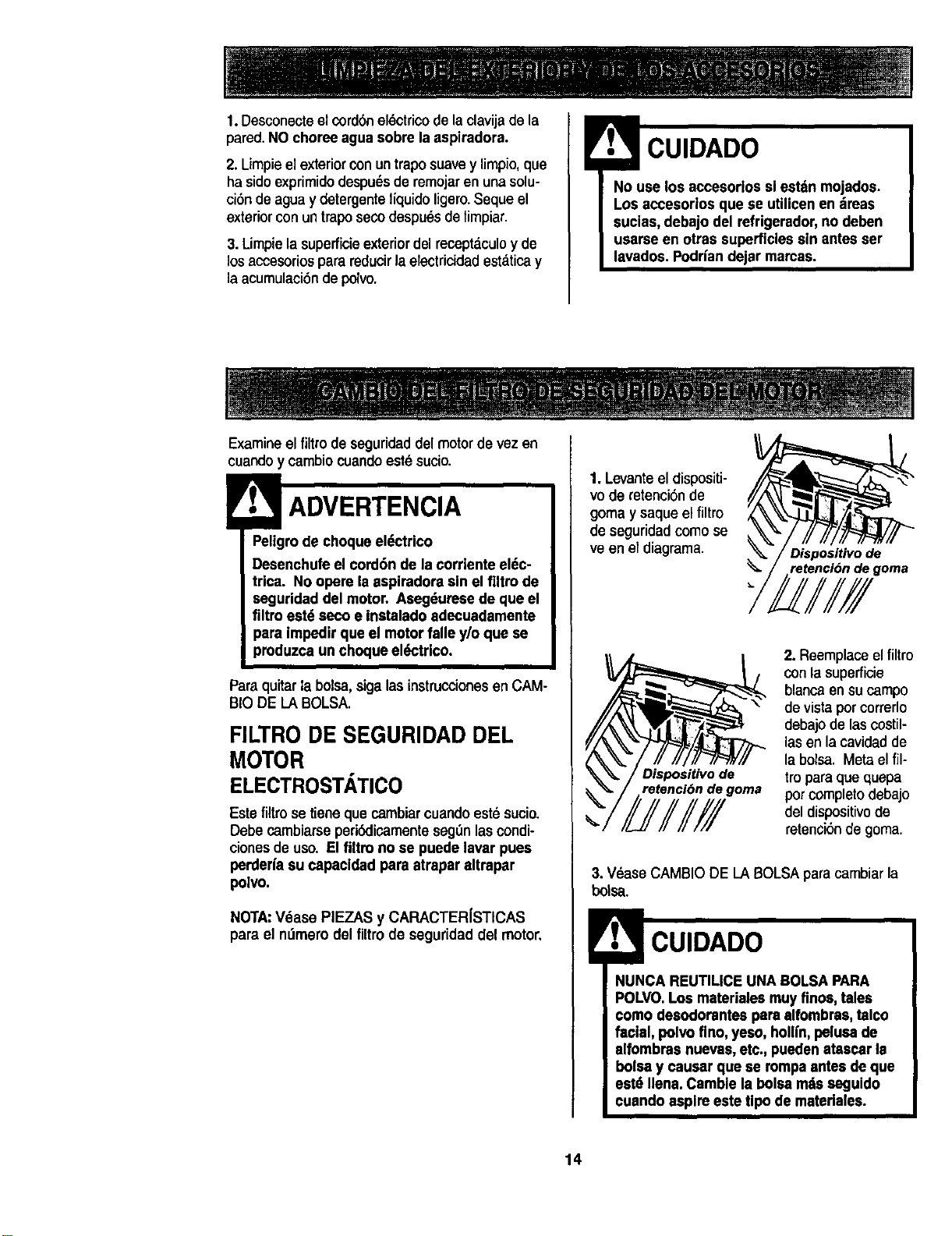
1. Levante el dispositi-
vo de retenci6nde
goma y saque el filtro
de seguridad como se
ve en el diagrama.
Dispositivo de
retencl6n de goma
Dispositivo de
retencibn de goma
2. Reemplaceel filtro
con la superficie
blanca ensucampo
devistaporcorrerlo
debajode lascostil-
lasenla cavidadde
la bolsa. Metael ill-
tro para que quepa
pot completo debajo
del dispositivode
retenci6nde goma.
3. V6ase CAMBIO DE LA BOLSA paracambiarla
bolsa.
NUNCA REUTILICE UNABOLSA PARA
POLVO.Los materialesmuy finos, tales
como desodorantes pare alfombras, talco
facial, polvo fino, yeso, hollfn,pelusade
alfombras nuevas,etc., puedenatascarla
boisey causar que se rompaantesde que
estd Ilena. Cambie la boise mdsseguido
cuando aspireeste tipo de matedales.
14
! ADVERTENCIA
Peligrode choque el6ctrico
No opere con un filtro de escape bloqueado
o sin el filtro de escapeo la cubierta del ill-
tro de escape instalados.
FILTRO DE ESCAPE
HEPA
Este cartucho del fiitro escape tieneque cambiar
estesucio. Cambie el filtro cuandoeldrea superfi-
cial est_ cubierta por completo. El flltro no se
puede lavar pues perderiasu capacidad para
atrapar altrapar polvo.
NOTA:VeasePIEZAS y CARACTERfSTICAS
para el nL_merodel liltro de escape.
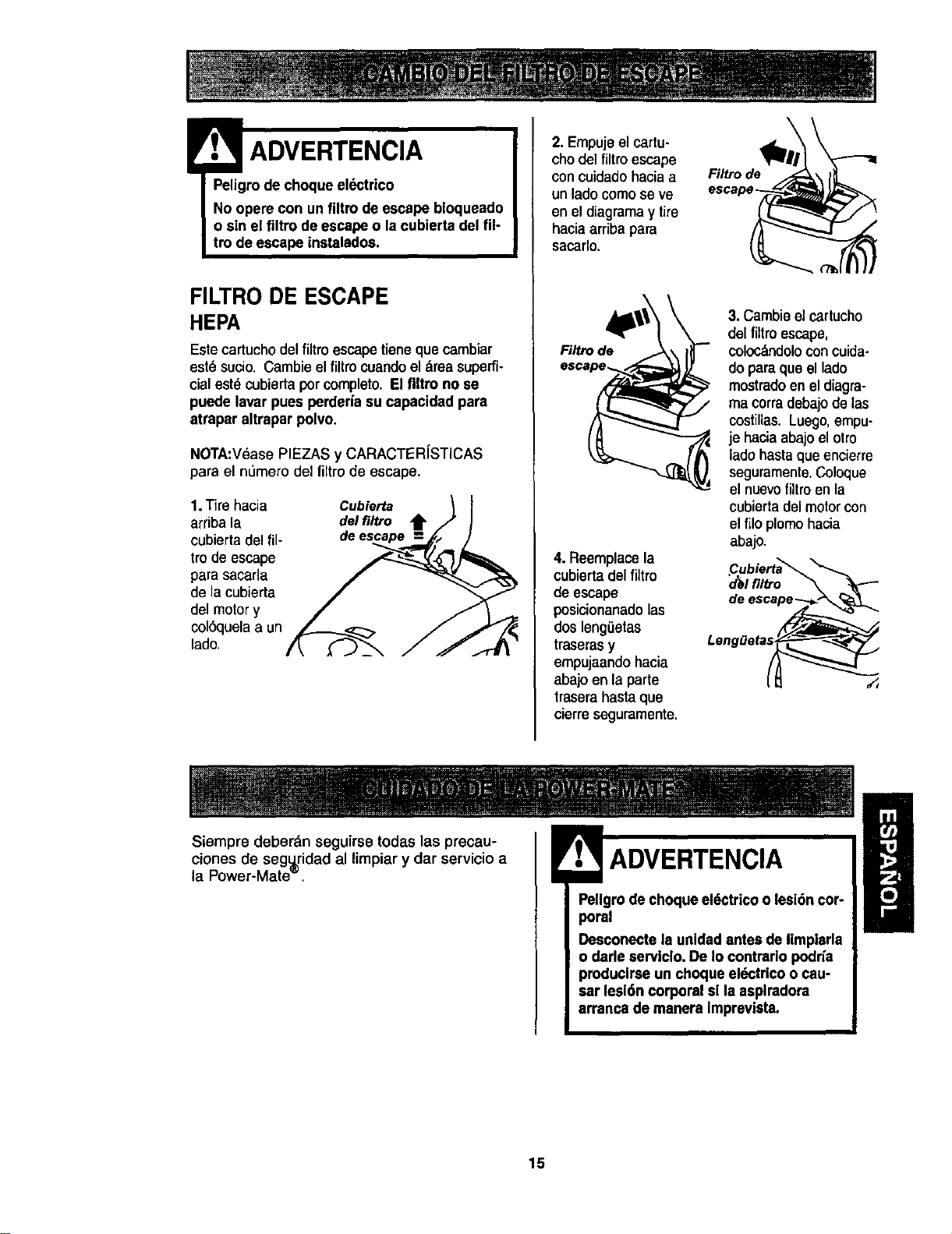
1.Tire hacia
arribala
cubierta del ill-
tro de escape
para sacafla
de la cubierta
del motor y
col6quela a un
lado
Cubierta
del filtro t
de
2. Empuje elcartu-
chodelfiltro escape
concuidadohaciaa
unladocomose ve
enel diagramay tire
haciaarribapara
sacarlo.
Rl_ode
4. Reemplace la
cubiertadel fUtro
deescape
posicionanadolas
dos leng,,etas
traseras y
empujaando hacia
abajo en la parte
trasera hasta que
cierre seguramente.
Fil_ode
3. Cambieel cartucho
del filtro escape,
coloc_ndolocon cuida-
do para que el lado
mostradoen el diagra-
ma corradebajode las
costillas. Luego,empu-
je hacia abajo el otro
lado hasta que encierre
seguramente.Coloque
el nuevofiltro en la
cubierta del motor con
el filo plomo hacia
abajo.
._ubierta_
I filtro
Siempre deberdn seguirse todas las precau-
clones de seg_ridad al limpiar y dar servicio
la Power-Mate _
al B
_llraglrode choque el6ctrico o lesi6ncar-
Desconecte la unidadantes de limplarla
o darle aervlcio. De Io contrario podria
producirse un choque eldctrlcoo cau-
sar lesi6n corporal sl la asplradora
arranca de manera Imprevista.
15

PARA RETIRAR LA CORREA
3. Co_oquela Power-
Mate'_ enla
posici6nvertical.
Apriete el pedal del
mango de liberaci6n
y baje laarticulaci6n
giratoria.Levante los
pestillostraseros
1. Co_oquela Power-
Mate'_ con laparte
inferiorhacia arriba.
2. Quite los dos (2)
tornillosen la cub_rta
de la Power-Mate'_.
4. Paraquitar lacubierta,
agarre los ladesy tire
afuera.
5. Aprietelos
leng0etas en la
parte traserade la
cubierta del
agitador y gire
hacia edelante
para liberar de la
basede la Power-
Mate®.
del agitador
6. Levantela
unidaddel
agitador y quite la
correagastada.
Tapa del extreme
7. Examine y limpie lasdreasde soportedel
agitador.En la ENSAMBLE DELAGITADORse
proporcionaunailustraci6nde todoelensambledel
AGITADOR.
LIMPIEZA DEL AGITADOR
NOTA: Para mantener una alta eficiencia de
limpieza y evitar el dafio a la aspiradora, hay
que limoiar el aeitador coda vez oue se cambia
la correa.
Tambi_n hay que limpiar el agitador seg_n el
siguiente horario:
EI_LU_S_O_d_e,J
Frecuente o
(usada dirariamente)
Moderado -
(usada 2 o 3 veces
per semana)
Ligero -
(usada 1 vez per semana)
cada semana
cada mes
cada 2 meses
IMPORTANTE
Desconectela aspiradora. Examinefrecuentemente
el cepilloy I_sdreasde soporte del mismode la
Power-Mate_ y eliminetodocabeUo,hiloy pelusa
acumulada.
Retire todo indicio de basura o suciedad de la
zona de la correa y del rodillodel cepillo.
Con cuidado quite las tapas y quite el hilo o los
restos ubicadoe en el agitador, o en los
soporfes del cepillo.
Ensamble del
agitador
Unidaddel
agitador
r Tspado/ |
_- Poleapara
correa
16
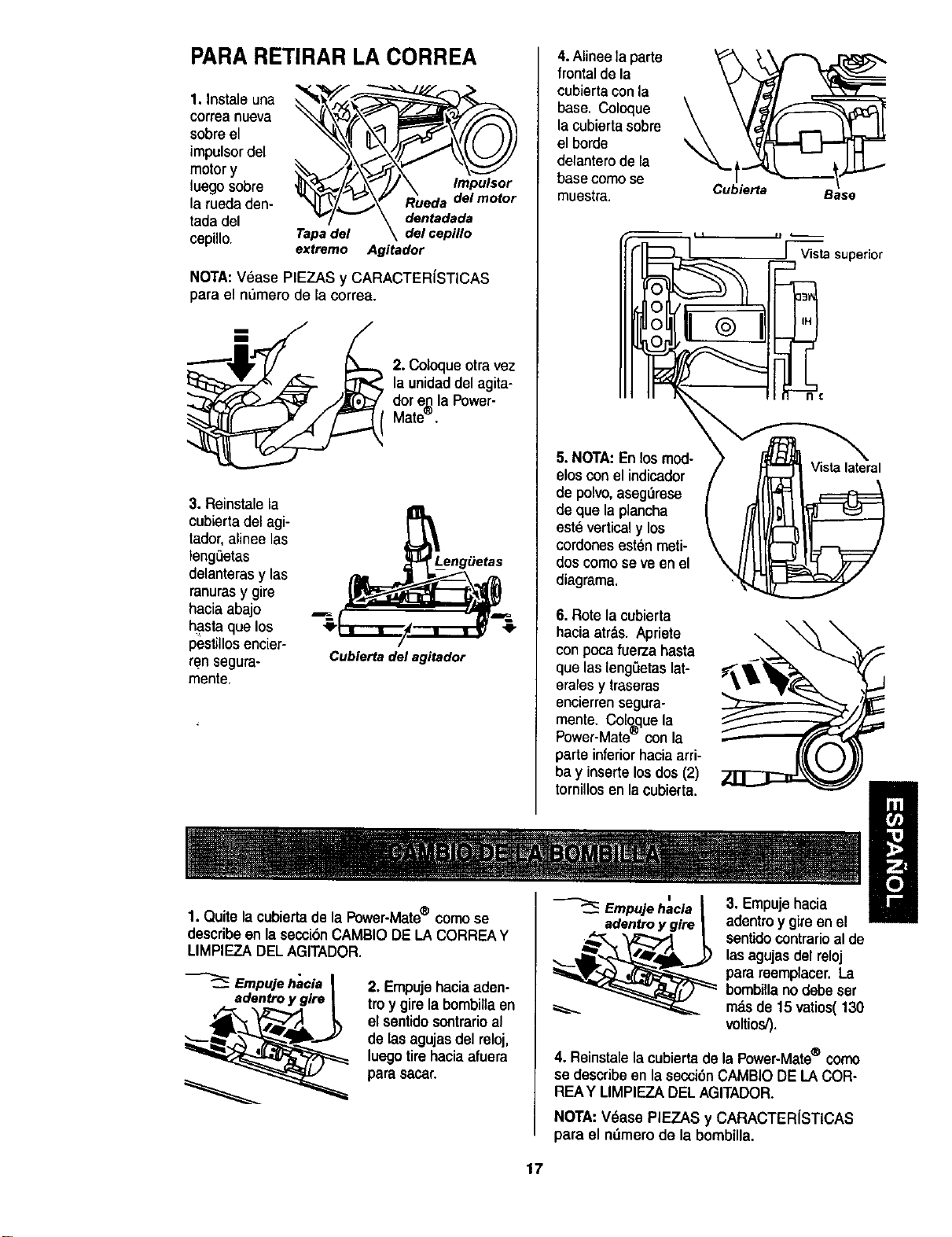
PARA RETIRAR LA CORREA
1. Instaleuna
correa nueva
sobreel
impulsor de[
motor y
luego sobre
la rueda den-
tada del
cepillo.
Tapa del
extremo
Impulsor
Rueda del motor
dentadada
del cepillo
Agitador
NOTA:V_ase PIEZAS y CARACTERfSTICAS
para el n_mero de la correa.
2. Coloqueotra vez
la unidad del agita-
dor e._la Power-
Mate`=`'
3. Reinstale la
cubierta del agi-
tador, alinee las
fengeetas
delanteras y las
ranurasy gire
hacia abajo
hasta que los
pest_llosencier-
ren segura-
mente.
Cubierta del agitador
4.Alinee la parte
frontal de la
cubierta con la
base. Coloque
la cubierta sobre
el borde
detanterode la
basecomo se
muestra.
\
Cubierta
Base
[ Vistasuperior
5. NOTA:Enlos mod-
elosconel indicador
de polvo, aseg_rese
de que laplancha
estdverticaly los
cordonesest_nmeti-
doscomose ve enel
diagrama.
6. Rote la cubierta
hacia atr_,s. Apriete
con poca fuerza hasta
que las lengSetaslat-
erales y traseras
encierren segura-
mente. Col_que la
Power-Mate con la
parte inferior hacia arri-
bay inserte los dos (2)
Vista lateral
tornillosen la cubierta.
=
Empujehacia 3. Empujehacia
1. Quite lacubiertadela Power-Mate® comose adentroy glre adentroy gireen el
describe en la seccibnCAMBIO DELA CORREAY
LIMPIEZA DELAGITADOR.
Empujehacia
adentroy gire
2. Empujehaciaaden-
troy girelabombillaen
elsentidosontrarioal
de lasagujasdel reloj,
luegotirehaciaafuera
para sacar.
sentidocontrarioal de
las agujasdel reloj
para reemplacer. La
bombilla no debe ser
m_.sde 15 vatios( 130
voltios,').
4. Reinstalela cubiertade la Power-Mate® corno
se describe en la secci6nCAMBIO DE LA COR-
REAY MMPIEZA DEL AGITADOR.
NOTA:Vdase PIEZAS y CARACTERfSTICAS
para el ndmerode la bombilla.
17
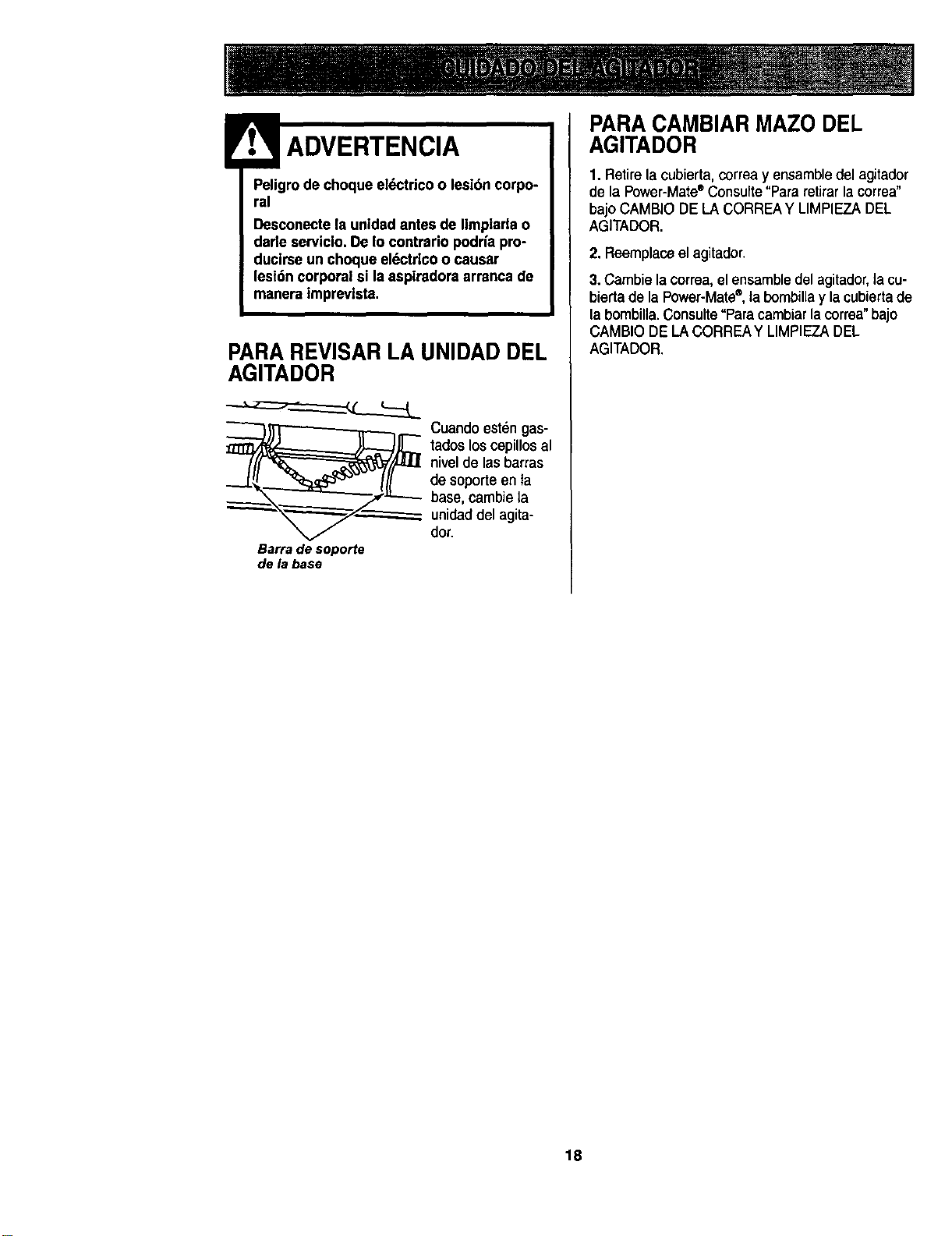
Peligrodechoqueel_ctdcoolesi6ncorpo-
ral
DesconectelaunidadantesdeIlmplarlao
darleserviclo.DeIocontrariopodrfa pro-
duclrseun choque eldctricoo causar
lesi6ncorporal si la asplradora arrsncade
maneraimprevista,
PARA REVISAR LA UNIDAD DEL
AGITADOR
_j_ Cuando est_n gas-
tadoslos cepillos al
nivelde las barras
de soporte en ta
base, cambie la
unidad del agita-
dot.
Barradesoporte
dela base
PARACAMBIAR MAZODEL
AGITADOR
1. Retire la cubierta, correay ensambledel agitador
de la Power-Mate®Consufte"Pararetirar la correa"
bajo CAMBIO DE LA CORREAY LIMPIEZA DEL
AGITADOR.
2. Reemplaceel agitador.
3.Cambie la correa, el ensamble del agitador,la cu-
bierta de la Power-Mate®,ta bombillay la cubierta de
la bombilla.Consulte°Paracambiar la correa"bajo
CAMBIO DE LA CORREAY LIMPIEZADEL
AGITADOR.
18
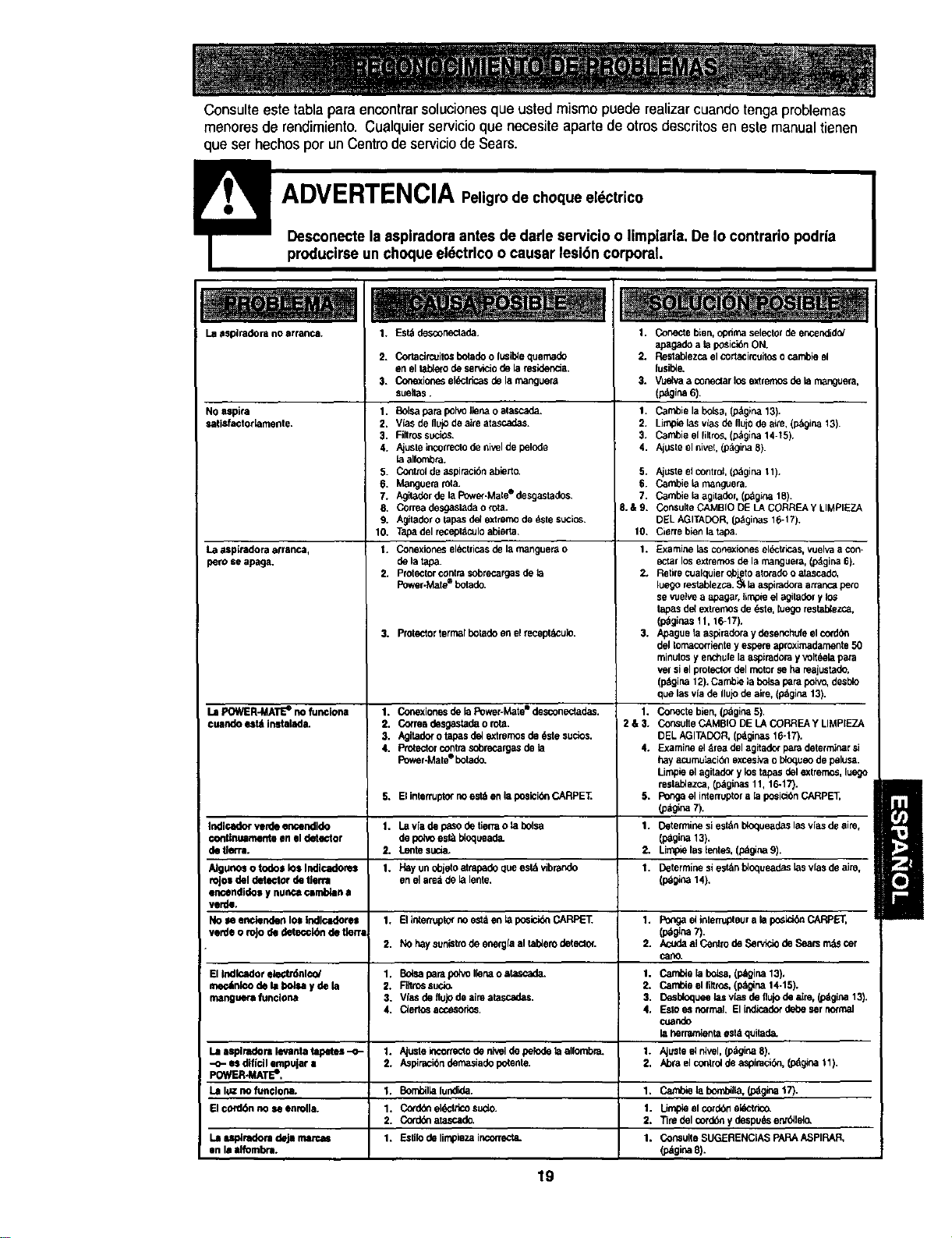
i •
Consulteeste tabla para encontrar soluciones que usted mismo puede realizarcuando tengaproblemas
menores de rendimiento. Cualquier servicioque necesite aparte de otros descfitos en este manualtienen
que ser hechos por un Centrode serviciode Sears.
Laaspiradora no arranca,
NOaspira
=atisfactorlamente.
La asplradora arranca,
peru se apaga.
1. Est_ desconeclade.
2. Cortacirceltosbotadeo lusibiequemado
en el taelero de serviciode laresider_a.
3. Conexionesel_tricas de la manguera
sueltas.
1. Bolsapara polvoIlena oatascade.
2. Vias deflujode aire atascadas.
3. Fillrossucios.
4. A_usleincorreclode niseide pelode
la allo_.
5. Controlde aspiracideabierto.
6. Manguerarota.
7. Ag_der de la Power-Mate° desgastados.
8. Correa desgaslada o rota.
9. Ag_ladoro tapasdel extmmode _ste sucios.
10. Tapa del recepldculoabierta.
t. Conexioneseldctricasde la manguerao
de la tapa
2. Protsctorcontrasobmcargasde la
Pov_r.Matee botade
3. Protectorterrr_f botadoenel recept_u]o.
1. Conectebien, optimaselector de encendidof
apagade a laposici6nON.
2. Restablezcael cortacircuitoso cambie el
lusil_e.
3. Vuelvaa cone_ar Io_ extmrno_de la manguera,
(p_gina6).
1. Cambie la bolsa,(pdgina 13),
2, Limpielasvlasdefluiodeaim,(pdgina13 )
3. Cambie el filtros.(pdglna14-t5).
4. Ajusteel nive_,(p_girm8).
5,
6.
7.
8.&9.
10.
1.
2.
3.
Ajusteel contrel,(p_gina 11).
Cambie ta rna_3uera.
Cambie _aagi_der, (pdgi_ 18).
ConsulteCAMBIO DE LACORREA YLIMPIEZA
DELAGITADOR, Lo_ginas 16-17).
Cierrebien latapa
Examine lascor_exioneseldctricas,vuelvaa con-
ectar losextremosde lamanguera,(pdgir_ 6).
Retirecualquiero_etoLelatorade o atascado,
luegorestablezca._. la aspiradoraatran_zpero
se vuelvea apagar,limpieelagitadery los
lapas del exlrernosde_ste, luego reslab_ezca,
(p_ginas 11, 16-17).
Apaguela aspiradoray desenchufe el cordbn
del tornacorrientey espem aproximadarnente50
relnutosy er'_chulelaaspiladom yvoltdela para
ve_sielproteclordel motorse ha reajustade,
(p_gina12). Carnb_e_abo4saparapoivo,desblo
que lasvia de IlujOdeaim, (pdgina 13).
Conecte bien,(_gina 5)
ConsulteCAMBIO DE LACORREA y LIMPIEZA
DELAGITADOR, (l_ginas 16-17).
Examineel drea del agitade_para determinar si
hayacumu_aci6nexcesivao bioqueode pelusa.
Limpie elagitado( y los tapas delextremos,luogo
reelablezca,(l_ginas 11, 16-17}.
Pongael interruptora [aposicibnCARPET,
Lo_tgina7).
Determinesi eel&ntY_oqueadeslasv(asde aim,
(p_gina13).
Limpie las lentes,(pdgina9).
Determinesi est_neloqueades lasvfasde aim.
(p_gir_ 14),
La POWER-MATEe no funoiona 1. Conexione_de la Power-Mate_ desconectadas. 1.
cuando e_t_ instalada. 2, Correa desgastadao rota. 2 & 3.
3. Agitade_o tapas dd extromosde _,stesuclos.
4. Protectorcontrasobrecaz_gasde _a 4.
Power-Malee botado.
5. Ei interruptornoest_en laposici_nCARPE'E 5.
Indicador vexdeencendido 1. La v_ade paso de tiertao la bolsa 1.
continuamente en el detector de polo est_ i:4oqueade.
de tie*re. 2. Lente sucia, 2.
Algunos o todos los Indlcadore$ 1. Hay un dojelo_trapade que estd vibrando 1.
rojo=del detector de tierra enel are4 de lalente.
_ndidos y nunca P.,_rr_n a
verdi,
Noseenciendenlozlndlcadore= I. Ellnterruptorr_es_entapos_cid_CARPET. 1. PongaelinlerrupteuralaposlddnCARPET,
verde o roJode detecck_nde tk.n (p_gina7).
2. No haysunistrode energlael tablerodetector. 2. AcodaaiCentrodeServlciodeSearsrmtScer
carlO.
EIIndlcador_l¢o/ 1, Bo_saparapoh_ollenaostascada. 1. CambielaboL_a,(p_gina13),
me¢_nlcodelabo_saydela 2. Rllmssuci_ 2. CarnbieelfUttos,(p_na14.15).
manguerafunolona 3. Viasdeflujodeaimatascadas. 3. Desbloqueelasvlasdeflujodea[m,(p_gina13).
4. Ciertosaccesorios. 4. Eslo es normal El ind_aderdede sernormal
cuando
la herramientaest4quitada.
Laa_lradorllevantatapetel--o-j 1. Ajuslei_correclodeni'_eldepelodetaalfombra. 1. Ajusleelnivel.(p_girk_8).
-o-esdlficilempujar= 2. Aspira,cibndemasiadepotente. 2. Abraelcoolreldeaspimci_n,(pdgina11).
POWIER-MATEe,
Lalcznofun¢lona. 1. Bombillafundida. 1. Cambielabombilk%(pdginat7).
Elco_d_nnoseenmlla. 1. Co_ddeel_tdcosudo. |. Limpmelco_ddeekictdeo.
2. Corddeatascade. 2. TiredelcordOnydespu_senz_lelo.
Laup_redoradeJamaxca_ 1. Estilodelirnpiozaincolmc4a. 1. COP,SUltOSUGERENCIASPARAASpIRAR,
on I= Ilfombra. (pdgina8).
19

Your Home
For repair - in your home - of all major brand appliances,
lawn and garden equipment, or heating and cooling systems,
no matter who made it, no matter who sold it!
For the replacement parts, accessories and
owner's manuals that you need to do-it-yourself.
For Sears professional Installation of home appliances
and items like garage door openers and water heaters.
1-800-4-MY-HOME _ Anytime,dayornight
(1-800-469-4663) (U.S.A. and Canada)
www._ars.com wwwJNwJ'8._
Our Home
For repair of carry-in products like vacuums, lawn equipment,
and electronics, call or go on-line for the nearest
Sears Parts and Repair Center.
1-800-488-1222 Anytime, day or night (U.S.A. only)
ww,N,tearll;,com
To pumhase a protecl_n agreement (U.S.A.)
ormaintenanceagreement (Canada) on a product servicedby Sears:
1-800-827-6655 (u.sA) 1-800-361-6665 (Canada)
Para serv dereparac
a domicilio,y paraordenarpiezas:
1.888.SU.HOGAR s"
(1-_8-784.6427)
Au Canada pourserviceen frar_:
1.800-LE.FOYER uc
(l.e00-_3a_/)
VA,,'w.sears .ca
8EAR8
OSa_ Roabu_andC_
® Registered Trademark/'ra Trademark / _ Service Mad( ofSears, Roebuck and Co.
"rM
®MarcaReg_al MarcadeFdbdca/ Msrca de Sen/iclo de Seam, Roebuckand Co.
MCMan:lUede commerce / uoMarque d6posde de Sears, Roebuck and Co.