®
UJo
D o
m
_,o
Ii
UJ_
3-
0
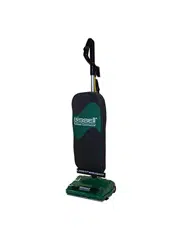
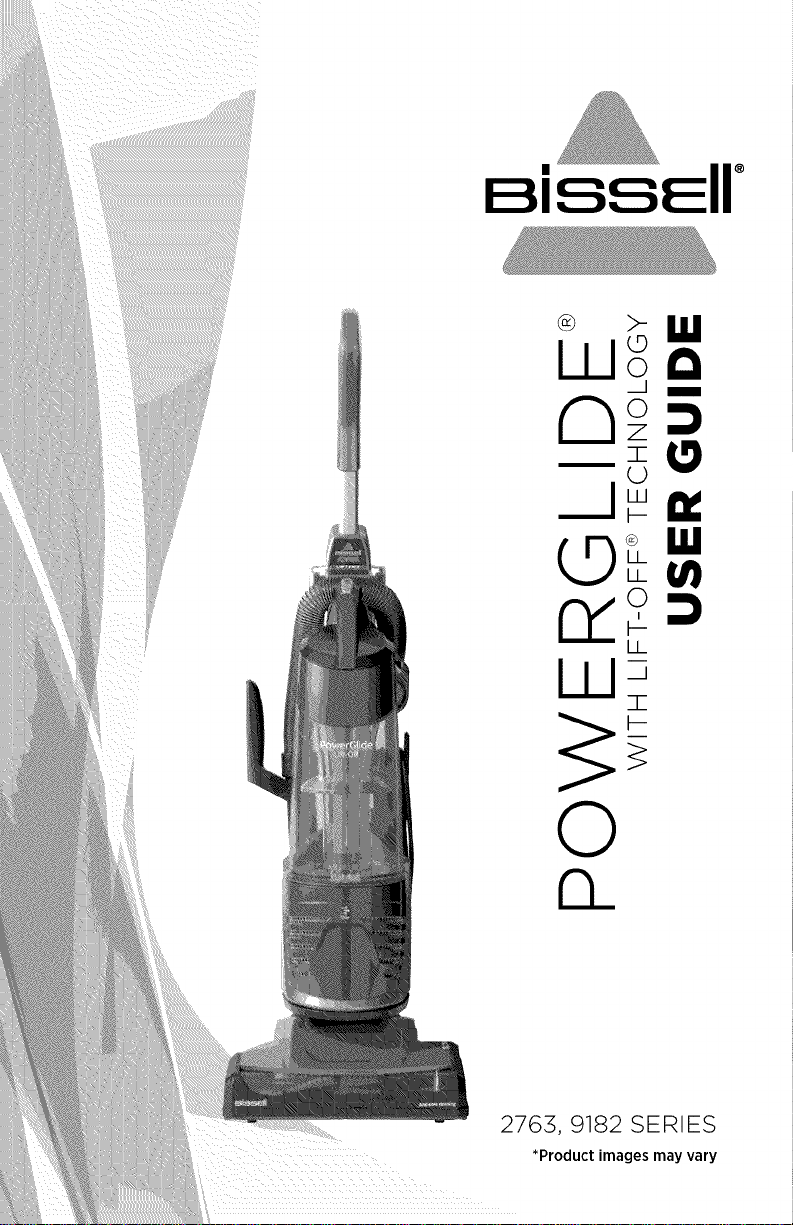
2763, 9182 SERIES
*Product images may vary
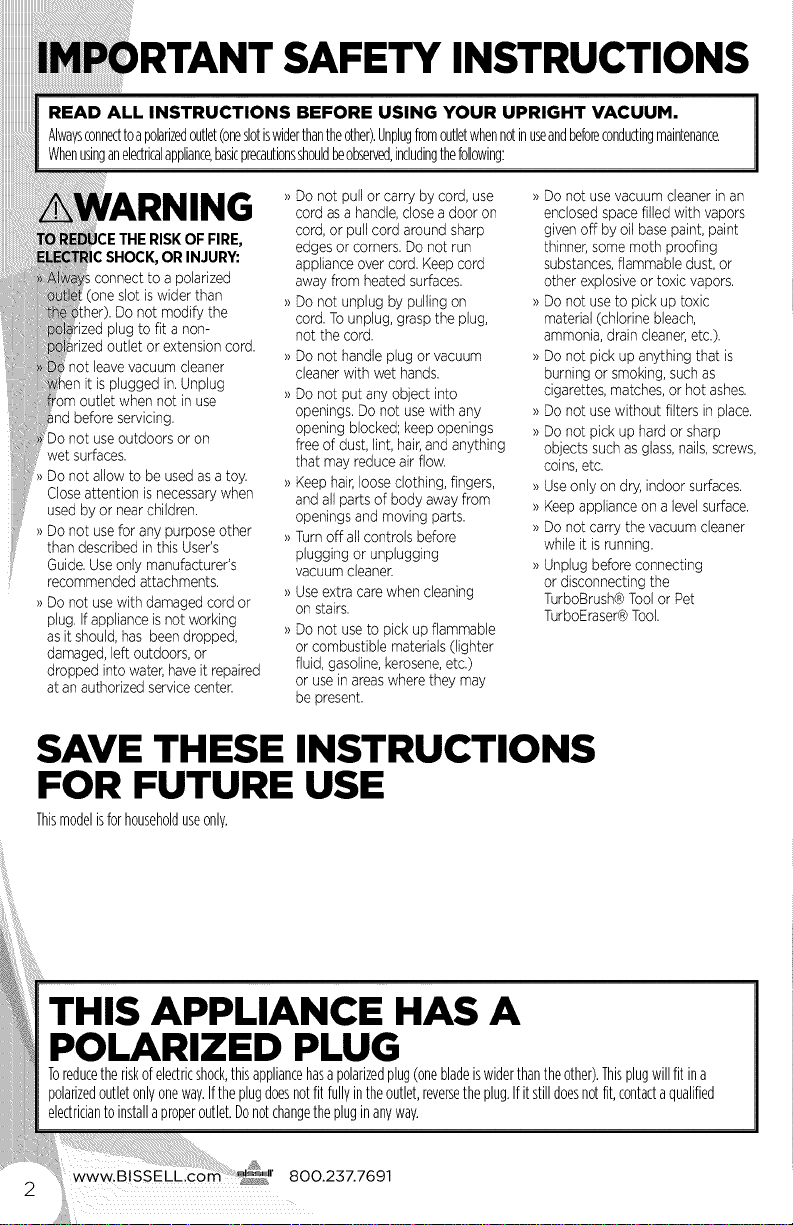
)RTANT SAFETY INSTRUCTIONS
READ ALL INSTRUCTIONS BEFORE USING YOUR UPRIGHT VACUUM.
Alwavsconnecttoapolarizedoutlet(oneslotiswiderthantheother).Unphgfromoutletwhennotinuseandbeforecondu(tingmaintenance.
Whenusinganele(tricalappliance,basicprecautionsshouldbeobserved,includingthefollowing:
!
THERISKOFFIRE,
OR INJURY:
;connect to apolarized
(one slot iswider than
Do not modify the
ized plug to fit a non-
rized outlet or extensioncord.
not leavevacuum cleaner
it isplugged in.Unplug
when not in use
nd beforeservicing.
_o not use outdoors or on
wet surfaces.
Do not allow to be usedas atoy.
Closeattention is necessarywhen
used by or nearchildren.
>)Do not use for any purpose other
than described inthis User's
Guide.Useonly manufacturer's
recommended attachments.
>)Do not usewithdamaged cordor
plug. Ifapplianceisnot working
as it should,has been dropped,
damaged,left outdoors,or
dropped into water,haveit repaired
at anauthorizedservicecenter,
Do not pull or carry by cord, use
cord asa handle,closea door on
cord,or pullcord around sharp
edges or corners.Do not run
applianceovercord. Keepcord
away from heated surfaces.
Do not unplug by pulling on
cord.To unplug,grasp the plug,
not the cord.
Do not handle plug or vacuum
cleanerwith wet hands.
Do not put any object into
openings. Donot usewith any
opening blocked; keepopenings
free of dust, lint,hair,andanything
that mayreduce air flow.
Keep hair,looseclothing, fingers,
and allparts of body away from
openings and moving parts.
_)Turnoff allcontrols before
plugging or unplugging
vacuum cleaner.
>)Use extracarewhen cleaning
on stairs.
>)Do not use to pick upflammable
or combustible materials(lighter
fluid,gasoline,kerosene,etc.)
or usein areaswhere they may
be present.
>)Do not usevacuum cleanerin an
enclosedspacefilled with vapors
givenoff by oil base paint, paint
thinner,some moth proofing
substances,flammable dust, or
other explosiveor toxic vapors.
>)Do not useto pick uptoxic
material (chlorinebleach,
ammonia,draincleaner,etc.).
>)Do not pick upanything that is
burning or smoking,suchas
cigarettes, matches,or hot ashes.
>)Do not usewithout filters in place.
>)Do not pick up hardor sharp
objects suchas glass,nails,screws,
coins,etc.
_)Useonly on dry,indoor surfaces.
>)Keep applianceon alevelsurface.
>)Do not carry the vacuumcleaner
while it isrunning.
>)Unplug before connecting
or disconnectingthe
TurboBrush®Toolor Pet
TurboEraser®Tool.
SAVE THESE INSTRUCTIONS
FOR FUTURE USE
Thismodelisforhouseholduseonly.
THIS APPLIANCE HAS A
POLARIZED PLUG
Toreducetheriskofelectricshock,thisappliancehasapolarizedplug(onebladeiswiderthantheother).Thisplugwillfitina
polarizedoutletonlyoneway.Iftheplugdoesnotfitfullyintheoutlet,reversetheplug.Ifitstilldoesnotfit,contactaqualified
electriciantoinstallaproperoutlet.Donotchangethepluginanywav.
_t
We're glad you purchased a BISSELL
vacuum. Everything we know about
floor care went into the design and
construction of this complete,
high-tech home cleaning system.
Your BISSELL vacuum is well made,
and we back it with a limited
five-year warranty. We also stand
behind it with a knowledgeable,
dedicated Consumer Care
department, so, should you ever
have a problem, you'll receive fast,
considerate assistance.
My great-grandfather invented the
floor sweeper in 1876. Today, BISSELL
is a global leader in the design,
manufacture, and service of high
quality homecare products like your
BISSELL vacuum.
Thanks again, from all of us
at BISSELL.
Mark J. BisseN
Chairman & CEO
Safety Instructions ........... 2
Product View ................ 4
Assembly ................... 5
Operations ................ 5-7
Maintenance & Care ...... 8-12
Troubleshooting ............ 13
Replacement Parts ......... 14
Warranty ................... 15
Product Registration ........ 16
Consumer Care ............. 16
www.BlSSELLcom 800.237.7691
3

? tuef
1 Handle
2 CordClip
S HandleHeightAdjustmentButton
4 SpecialtyTool(Selectmodels
includeTurboBrush_Toolor
PetTurboEraser®Tool)
5 SpecialtyToolMount
6 CreviceTool
7 ExtensionWand(selectmodels)
8 CreviceToolorExtensionWand
Mount(selectmodels)
9 Lift-OffPodReleaseButton
10 DirtTankReleaseButton
11CarryHandle
12 PowerSwitch
15 BrushRollPowerSwitch
14StretchHose
15QuickRelease®CordWrap
16 PowerCord
17 BottomEasyEmptyT''DirtTank
18 FilterCover(Pre-MotorFilters(2)
andPost-MotorFilterarelocated
underneathFilterCover)
19HoseWand
20HoseWandBase
21Powerfoot
AWARNING
Plasticfilmcanbedangerous.Toavoid
dangerofsuffocation,keepawayfrom
babiesandchildren.
AWARNING
Donotpluginyourvacuumcleaneruntil
youarefamiliarwithallinstructionsand
operatingprocedures
AWARNING
Toreducetheriskofelectricshock,turn
powerswitchoffanddisconnectpolarized
plugfromelectricaloutletbeforeperforming
maintenanceortroubleshootingchecks.
www.BlSSELLcom @l' 800.237.7691
4
No tools required for ass_bly.
Attach handle to vacuum
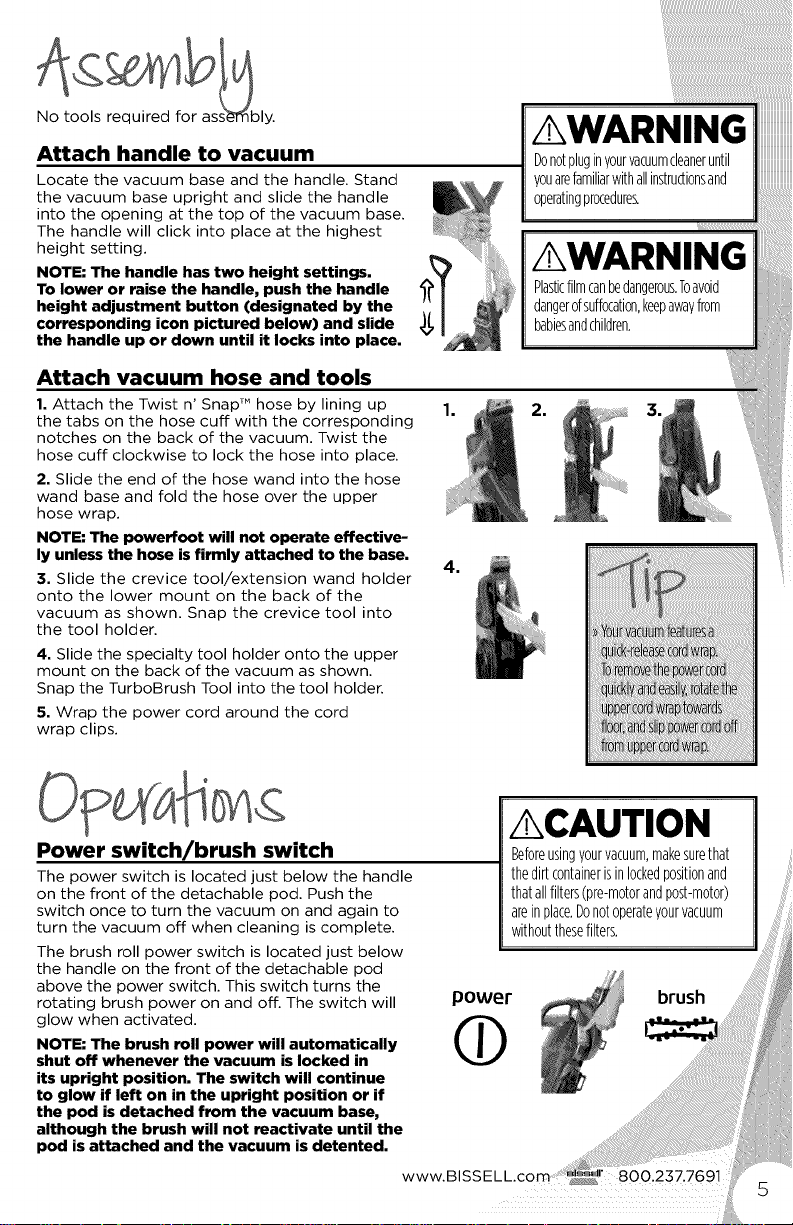
Locate the vacuum base and the handle. Stand
the vacuum base upright and slide the handle
into the opening at the top of the vacuum base.
The handle will click into place at the highest
height setting.
NOTE: The handle has two height settings.
To lower or raise the handle, push the handle
height adjustment button (designated by the
corresponding icon pictured below) and slide
the handle up or down until it locks into place.
AWARNING
Donotpluginyourvacuumcleaneruntil
youarefamiliarwithallinstructionsand
0peBtingpr0cedure_
AWARNING
Plasticfilmcanbedangerous,Toavoid
dangerofsuffocation,keepawayfrom
babiesandchildren.
Attach vacuum hose and tools
1. Attach the Twist n' Snap TM hose by lining up
the tabs on the hose cuff with the corresponding
notches on the back of the vacuum. Twist the
hose cuff clockwise to lock the hose into place.
2. Slide the end of the hose wand into the hose
wand base and fold the hose over the upper
hose wrap.
NOTE: The powerfoot will not operate effective-
ly unless the hose isfirmly attached to the base.
3. Slide the crevice tool/extension wand holder
onto the lower mount on the back of the
vacuum as shown. Snap the crevice tool into
the tool holder.
4. Slide the specialty tool holder onto the upper
mount on the back of the vacuum as shown.
Snap the TurboBrush Tool into the tool holder.
5. Wrap the power cord around the cord
wrap clips.
Power switch/brush switch
The power switch is located just below the handle
on the front of the detachable pod. Push the
switch once to turn the vacuum on and again to
turn the vacuum off when cleaning is complete.
The brush roll power switch is located just below
the handle on the front of the detachable pod
above the power switch. This switch turns the
rotating brush power on and off. The switch will
glow when activated.
NOTE; The brash roll power will automatically
shut off whenever the vacuum is locked in
its upright position. The switch will continue
to glow if left on in the upright position or if
the pod is detached from the vacuum base,
although the brush will not reactivate until the
pod is attached and the vacuum is detented.
power
ACAUTION
Beforeusingy0urvacuum,makesurethat
thedirtcontainerisinlockedpositionand
thatallfilters(pre-m0t0randp0st-m0t0r)
areinplace.Donotoperateyourvacuum
withoutthesefilters.
www.BISSELL.(
brush
position
_:- For storage and above floor
i :_ith special tools.
il Cleaning - Step on the left side of the
oowerfoot and pull back on the handle
_t the vacuum. The icon pictured to the
_icates where to step.
ial tools
is not only a powerful floor vacuum
it's also a versatile stairs and above floor
um when you select one of the special tools.
be used with the
;Iht position or with the
pod.
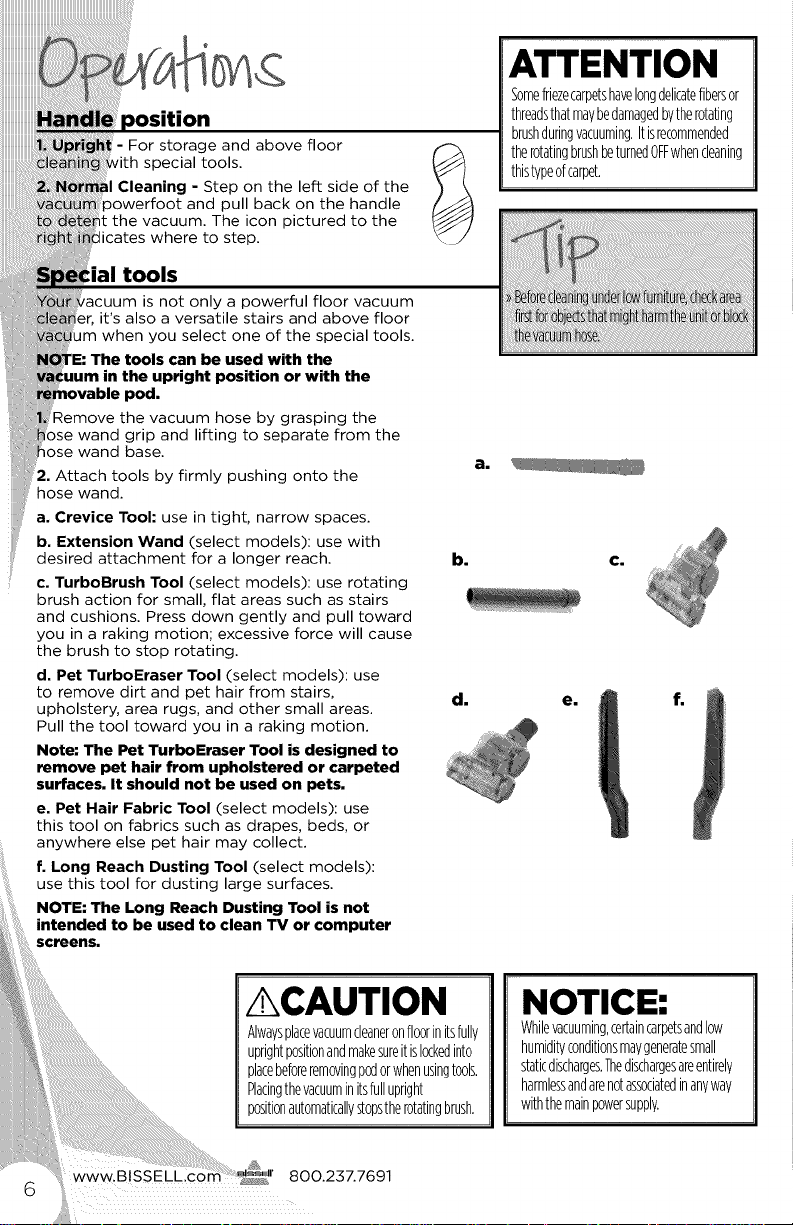
Remove the vacuum hose by grasping the
)se wand grip and lifting to separate from the
Rose wand base.
2. Attach tools by firmly pushing onto the
hose wand.
a. Crevice Tool: use in tight, narrow spaces.
b. Extension Wand (select models): use with
desired attachment for a longer reach.
c. TurboBrush Tool (select models): use rotating
brush action for small, flat areas such as stairs
and cushions. Press down gently and pull toward
you in a raking motion; excessive force will cause
the brush to stop rotating.
d. Pet TurboEraser Tool (select models): use
to remove dirt and pet hair from stairs,
upholstery, area rugs, and other small areas.
Pull the tool toward you in a raking motion.
Note: The Pet TurboEraser Tool is designed to
remove pet hair from upholstered or carpeted
surfaces. It should not be used on pets.
e. Pet Hair Fabric Tool (select models): use
this tool on fabrics such as drapes, beds, or
anywhere else pet hair may collect.
f. Long Reach Dusting Tool (select models):
use this tool for dusting large surfaces.
ATTENTION
g0mefriezecarpetshave10ngdelicatefibersor
threadsthatmaybedamagedbytherotating
brushduringvacuuming.Itisrecommended
therotatingbrushbeturnedOFFwhencleaning
thistypeofcarpet.
a.
d.
NOTICE:
Whilevacuuming,ceRaincarpetsand10w
humidityconditionsmaygeneBtesmall
staticdischarges.Thedischargesareentirely
harmlessandarenotassociatedinanyway
withthemainpowersupply.
Cleanin 9 with the removable pod
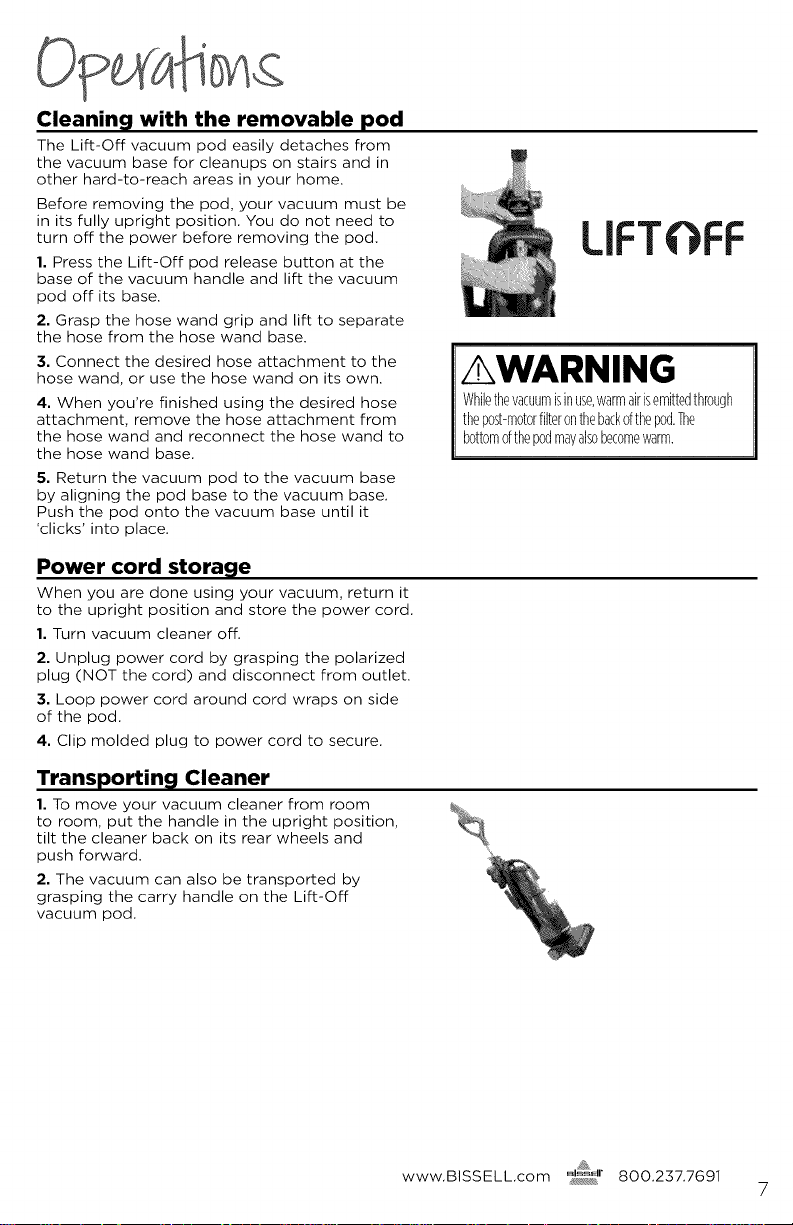
The Lift-Off vacuum pod easily detaches from
the vacuum base for cleanups on stairs and in
other hard-to-reach areas in your home.
Before removing the pod, your vacuum must be
in its fully upright position. You do not need to
turn off the power before removing the pod.
1. Press the Lift-Off pod release button at the
base of the vacuum handle and lift the vacuum
pod off its base.
2. Grasp the hose wand grip and lift to separate
the hose from the hose wand base.
3. Connect the desired hose attachment to the
hose wand, or use the hose wand on its own.
4. When you're finished using the desired hose
attachment, remove the hose attachment from
the hose wand and reconnect the hose wand to
the hose wand base.
5. Return the vacuum pod to the vacuum base
by aligning the pod base to the vacuum base.
Push the pod onto the vacuum base until it
'clicks' into place.
Power cord storage
When you are done using your vacuum, return it
to the upright position and store the power cord.
1. Turn vacuum cleaner off.
2. Unplug power cord by grasping the polarized
plug (NOT the cord) and disconnect from outlet.
3. Loop power cord around cord wraps on side
of the pod.
4. Clip molded plug to power cord to secure.
Transportin_l Cleaner
1. To move your vacuum cleaner from room
to room, put the handle in the upright position,
tilt the cleaner back on its rear wheels and
push forward.
2. The vacuum can also be transported by
grasping the carry handle on the Lift-Off
vacuum pod.
LIFTOFF
AWARNING
Whilethevacuumisinuse,warmairisemittedthrough
thep0st-m0t0rfilteronthebackofthepod.The
bottom0fthepodmayals0becomewarm.
www.BISSELL.com 8OO.237.7691
7
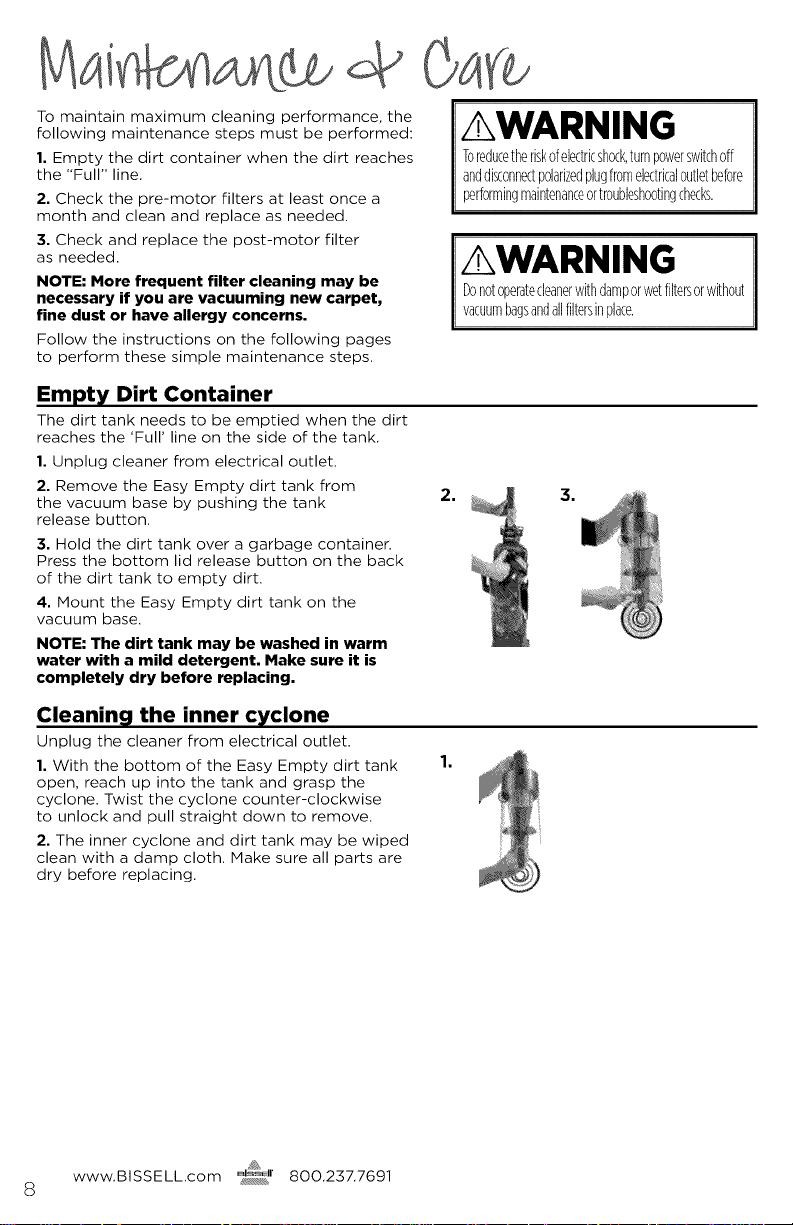
To maintain maximum cleaning performance, the
following maintenance steps must be performed:
1, Empty the dirt container when the dirt reaches
the "Full" line.
2, Check the pre-motor filters at least once a
month and clean and replace as needed.
3, Check and replace the post-motor filter
as needed.
NOTE: More frequent filter cleaning may be
necessary if you are vacuuming new carpet,
fine dust or have allergy concerns.
Follow the instructions on the following pages
to perform these simple maintenance steps.
AWARNING
Toreducetheriskofelectricshock,turnpowerswitchoff
anddisconnectpolarizedplugfromelectricaloutletbefore
performingmaintenance0rtr0ublesh00tingchecks.
AWARNING
Donotoperatecleanerwithdamporwetfiltersorwithout
vacuumbagsandallfiltersinplace.
Empty Dirt Container
The dirt tank needs to be emptied when the dirt
reaches the 'Full' line on the side of the tank.
1, Unplug cleaner from electrical outlet.
2, Remove the Easy Empty dirt tank from
the vacuum base by pushing the tank
release button,
3, Hold the dirt tank over a garbage container.
Press the bottom lid release button on the back
of the dirt tank to empty dirt.
4, Mount the Easy Empty dirt tank on the
vacuum base.
NOTE: The dirt tank may be washed in warm
water with a mild detergent. Make sure it is
completely dry before replacing.
2. 3.
Cleanin 9 the inner cyclone
Unplug the cleaner from electrical outlet.
1, With the bottom of the Easy Empty dirt tank
open, reach up into the tank and grasp the
cyclone, Twist the cyclone counter-clockwise
to unlock and pull straight down to remove,
2, The inner cyclone and dirt tank may be wiped
clean with a damp cloth. Make sure all parts are
dry before replacing.
1.
www.BlSSELLcom _r 800.237.7691
S
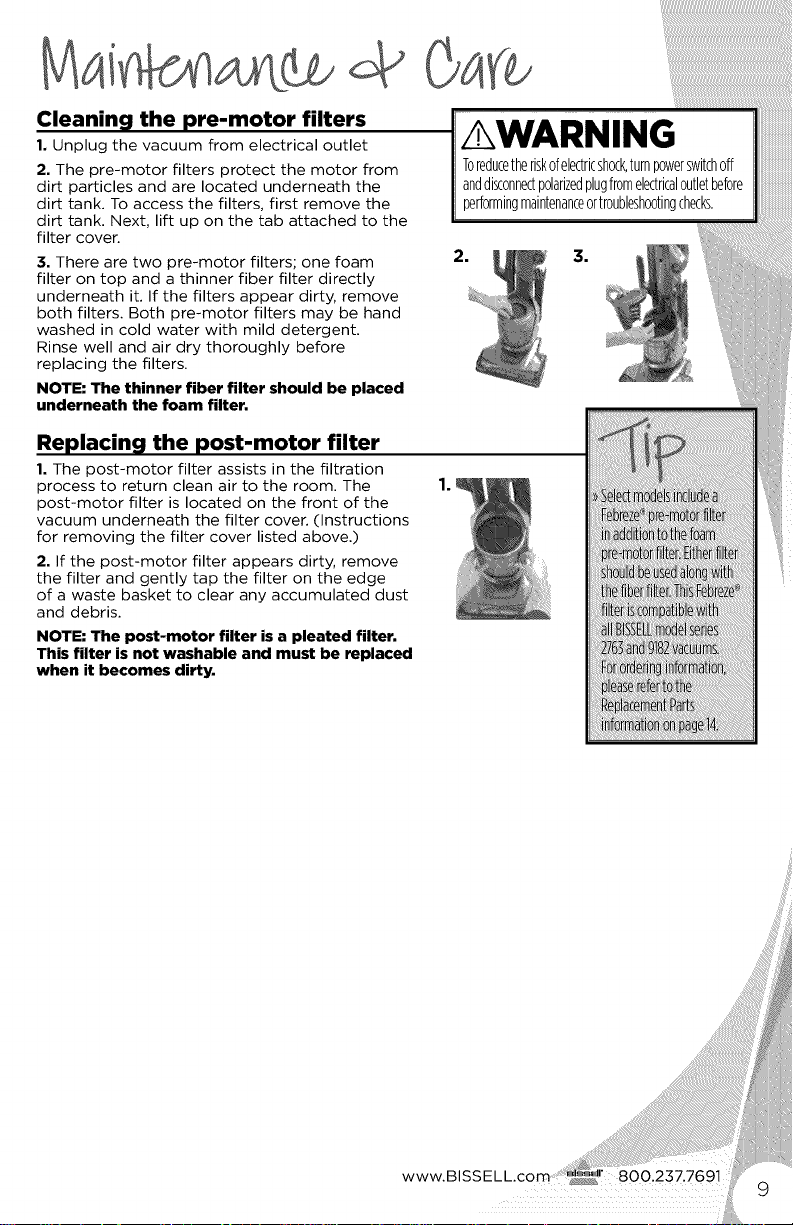
Cleanin 9 the pre-motor filters
1. Unplug the vacuum from electrical outlet
2. The pre-motor filters protect the motor from
dirt particles and are located underneath the
dirt tank. To access the filters, first remove the
dirt tank. Next, lift up on the tab attached to the
filter cover.
3. There are two pre-motor filters; one foam
filter on top and a thinner fiber filter directly
underneath it. If the filters appear dirty, remove
both filters. Both pre-motor filters may be hand
washed in cold water with mild detergent.
Rinse well and air dry thoroughly before
replacing the filters.
NOTE: The thinner fiber filter should be placed
underneath the foam filter.
Replacin 9 the post-motor filter
1. The post-motor filter assists in the filtration
process to return clean air to the room. The
post-motor filter is located on the front of the
vacuum underneath the filter cover. (Instructions
for removing the filter cover listed above.)
2. If the post-motor filter appears dirty, remove
the filter and gently tap the filter on the edge
of a waste basket to clear any accumulated dust
and debris.
NOTE: The post-motor filter is a pleated filter.
This filter is not washable and must be replaced
when it becomes dirty.
www.BISSELL._
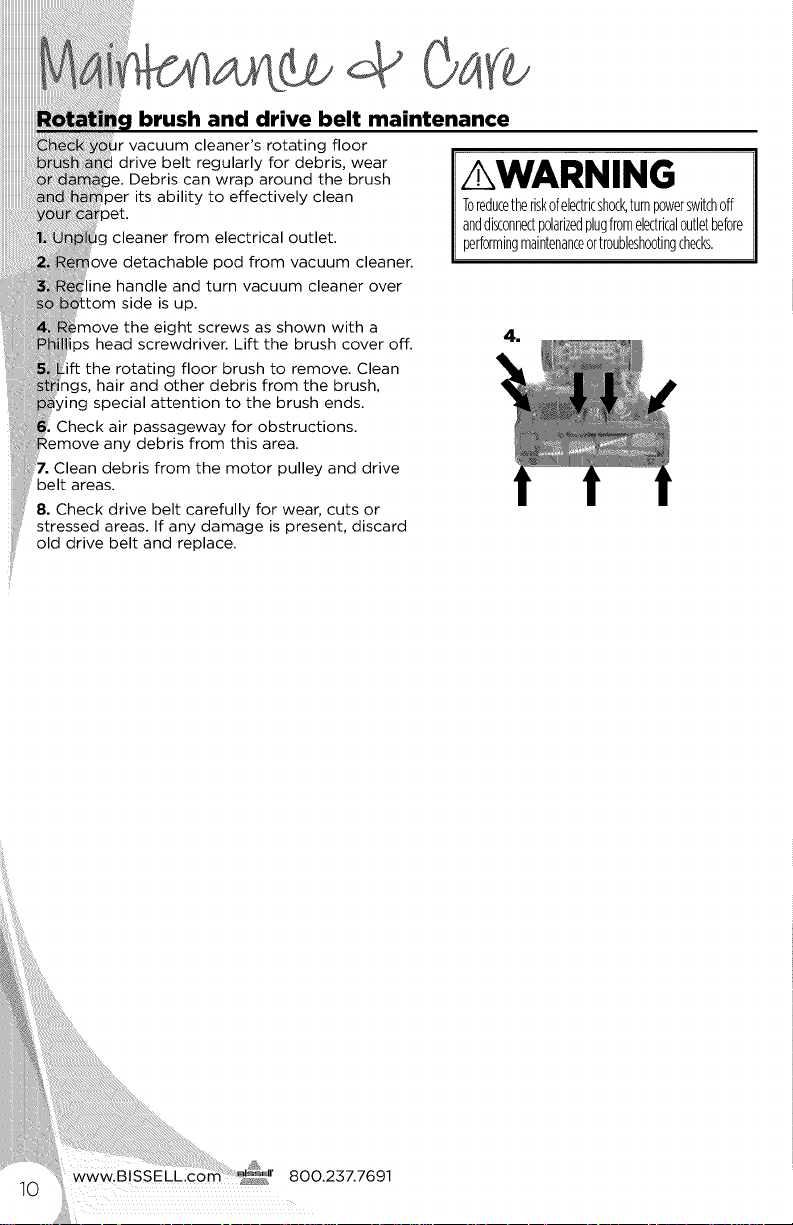
brush and drive belt maintenance
cleaner's rotating floor
drive belt regularly for debris, wear
)e. Debris can wrap around the brush
its ability to effectively clean
ig cleaner from electrical outlet.
ove detachable pod from vacuum cleaner.
ine handle and turn vacuum cleaner over
tom side is up.
the eight screws as shown with a
ps head screwdriver. Lift the brush cover off.
ift the rotating floor brush to remove. Clean
ngs, hair and other debris from the brush,
/ing special attention to the brush ends.
Check air passageway for obstructions.
:emove any debris from this area.
Clean debris from the motor pulley and drive
belt areas.
8. Check drive belt carefully for wear, cuts or
stressed areas. If any damage is present, discard
old drive belt and replace.
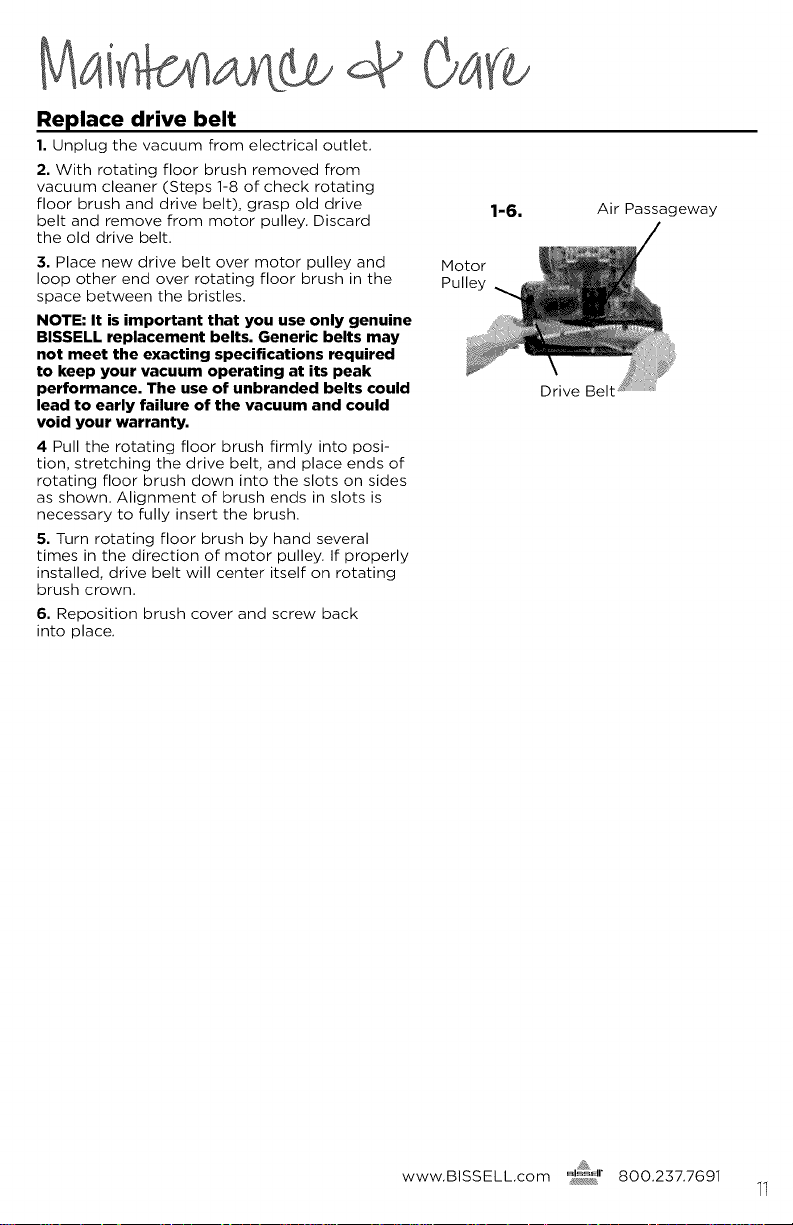
Replace drive belt
1. Unplug the vacuum from electrical outlet,
2. With rotating floor brush removed from
vacuum cleaner (Steps ]-8 of check rotating
floor brush and drive belt), grasp old drive
belt and remove from motor pulley. Discard
the old drive belt.
1-6. Air Passageway
:3. Place new drive belt over motor pulley and
loop other end over rotating floor brush in the
space between the bristles.
NOTE: It is important that you use only genuine
BISSELL replacement belts. Generic belts may
not meet the exacting specifications required
to keep your vacuum operating at its peak
performance. The use of unbranded belts could
lead to early failure of the vacuum and could
void your warranty.
4 Pull the rotating floor brush firmly into posi-
tion, stretching the drive belt, and place ends of
rotating floor brush down into the slots on sides
as shown. Alignment of brush ends in slots is
necessary to fully insert the brush.
5. Turn rotating floor brush by hand several
times in the direction of motor pulley. If properly
installed, drive belt will center itself on rotating
brush crown.
Motor
6. Reposition brush cover and screw back
into place.
Drive Belt
www.BISSELL.com 800.237.7691
11
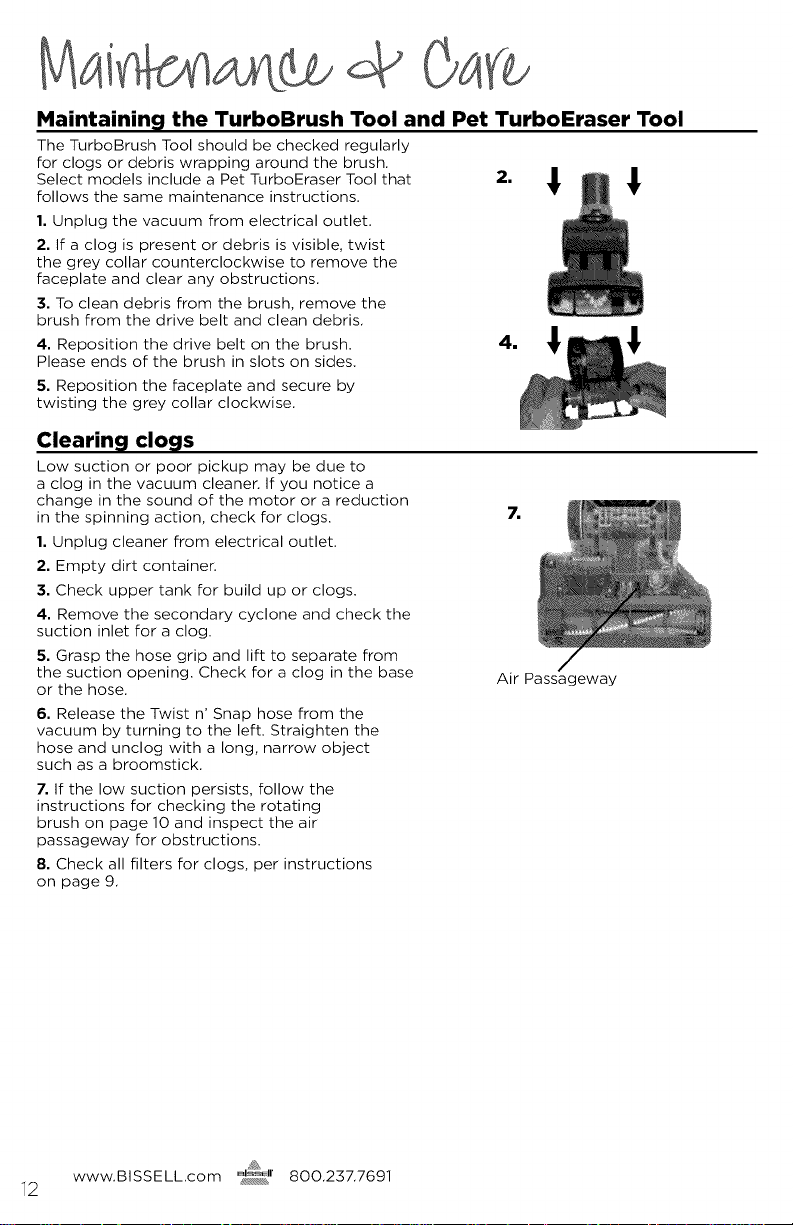
Maintainin_l the TurboBrush Tool and Pet TurboEraser Tool
The TurboBrush Tool should be checked regularly
for clogs or debris wrapping around the brush.
Select models include a Pet TurboEraser Tool that
follows the same maintenance instructions.
1. Unplug the vacuum from electrical outlet.
2. If a clog is present or debris is visible, twist
the grey collar counterclockwise to remove the
faceplate and clear any obstructions.
3. To clean debris from the brush, remove the
brush from the drive belt and clean debris.
4. Reposition the drive belt on the brush.
Please ends of the brush in slots on sides.
5. Reposition the faceplate and secure by
twisting the grey collar clockwise.
Clearin_l clovis
Low suction or poor pickup may be due to
a clog in the vacuum cleaner. If you notice a
change in the sound of the motor or a reduction
in the spinning action, check for clogs.
1. Unplug cleaner from electrical outlet.
2. Empty dirt container.
3. Check upper tank for build up or clogs.
4. Remove the secondary cyclone and check the
suction inlet for a clog.
5. Grasp the hose grip and lift to separate from
the suction opening. Check for a clog in the base
or the hose.
6. Release the Twist n' Snap hose from the
vacuum by turning to the left. Straighten the
hose and unclog with a long, narrow object
such as a broomstick.
7. If the low suction persists, follow the
instructions for checking the rotating
brush on page 10 and inspect the air
passageway for obstructions.
8. Check all filters for clogs, per instructions
on page 9.
7,
Air Passageway
www.BISSELL.com _r 8OO.237.7691
12

Problem
Vacuum
cleaner won't
tum on
No power at
rotating floor
brush
Vacuum
cleaner won't
pick up dirt
Possible causes
Power cord not plugged in
Blown fuse/tripped breaker
Pod is not securely seated
Brush switch turned to "OFF"
Vacuum is in upright position
Hose not attached to suction
opening
Crack or hole in hose
Broken or worn drive belt
Remedies
Check electrical plug
Check/replace fuse or reset
Remove pod and replace, makin
sure that it "clicks" into place
Make sure brush switch is in "ON" pos
Recline vacuum to operate brush
Grasp quick reach handle and firmly
hose wand onto the suction opening
Check hose and replace if needed
Replace drive belt, see pages 10, 11
Rotating floor brush jammed
Clog in vacuum
Dirt container or secondary
cyclone not installed properly
Filters are dirty
Remove brush and clean debris from
brush ends
Follow instructions on page 12 for
clearing clogs
Position correctly and lock in place
Check and clean pre-motor and
post-motor filters, see page 9
Visible dirt
escaping
from cleaner
Filters or secondary cyclone Check secondary cyclone, pre-motor and
missing or installed incorrectly post-motor filters for correct installation
Dirt container installed incorrectly Pull out and re-insert dirt container
correctly
Please do
not return
this product
to the store.
Other maintenance or service not included in the manual should
performed by an authorized service representative.
Thank you for selecting a BISSELL product.
For any questions or concerns, BISSELL is ha
be of service. Contact us directly at 1-800-
www.BISSELL._
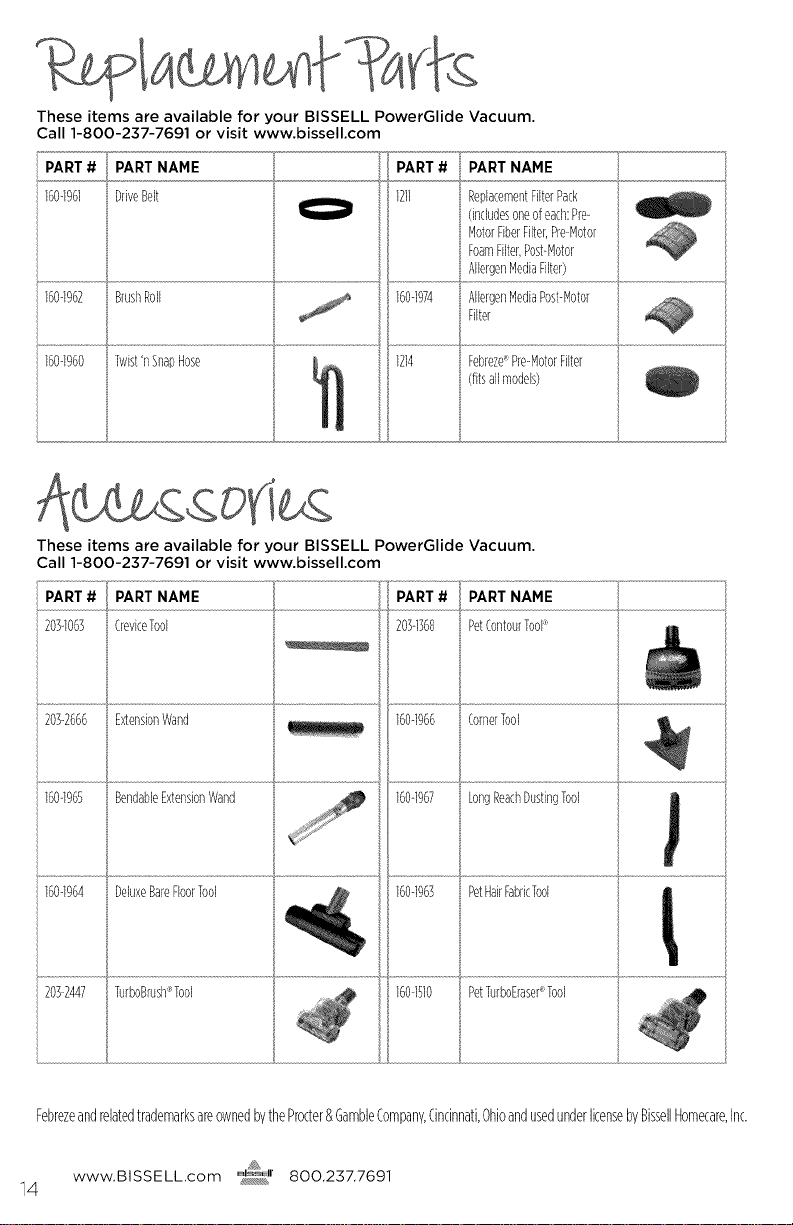
TheseitemsareavailableforyourBISSELLPowerGlideVacuum.
Call1-800-237-7691orvisitwww.bissell.com
PART #
160-1%1
PART NAME
DriveBelt
BrushRoll
Twist'nSnapHose
160-1960
PART NAHE
ReplacementFilterPack
(includesoneofeach:Pre-
MotorFiberFilter,Pre-Motor
FoamFilter,Post-Motor
AllergenMediaFilter)
AllergenMediaPost-Motor
Filter
1214 Febreze_Pre-MotorFilter
(fitsallmodels)
These items are available for your BISSELL PowerGlide Vacuum.
Call 1-800-237-7691 or visit www.bissell.com
20S-2666 ExtensionWand 160-1966 CornerTool
160-1965 BendableExtensionWand 160-1967 LongReachDustingTool
160-1964 DeluxeBareFloorTool 160-1963 PetHairFabricTool
20]-2447 TurboBrush¢Tool 160-iS10 PetTurboErasePTool
FebrezeandrelatedtrademarksareownedbytheProcter&GambleCompany,Cincinnati,OhioandusedunderlicensebyBissellHomecare,Inc.
www.BISSELLcom @r 800.237.7691
14
Thiswarrantygivesyouspecificlegal_lts, andyoumayalso
haveotherrightswhichmayvaryfromstatetostate.Ifyouneed
additionalinstructionregardingthiswarrantyorhavequestions
regardingwhatitmaycover,pleasecontactBISSELLConsumerCare
byE-mail,telephone,orregularmailasdescribedbelow.
Limited Five-Year Warranty
Subjecttothe*EXCEPTIONSANDEXCLUSIONSidentifiedbelow,upon
receiptoftheproductBISSELLwillrepairorreplace(withnewor
remanufacturedcomponentsorproducts),atBISSELL'soption,free
ofchargefromthedateofpurchasebytheoriginalpurchaser,for
fiveyearsanydefectiveormalfunctioningpart.
Seeinformationbelowon"IfyourBISSELLproductshouldrequireservice".
Thiswarrantyappliestoproductusedforpersonal,andnotcommer-
cialorrentalservice.Thiswarrantydoesnotapplytofansorroutine
maintenancecomponentssuchasfilters,belts,orbrushes,Damage
ormalfunctioncausedbynegligence,abuse,neglect,unauthorized
repair,oranyotherusenotinaccordancewiththeUser'sGuideis
notcovered,
BISSELLISNOTLIABLEFORINCIDENTALORCONSEQUENTIALDAMAGES
OFANYNATUREASSOCIATEDWITHTHEUSEOFTHISPRODUCT,BISSELL'S
LIABILIIYWILLNOTEXCEEDTHEPURCHASEPRICEOFTHEPRODUCT,
Somestatesdo notallowthe exclusionor limita-
tionof incidentalorconsequentialdamages,sothe
abovelimitationor exclusionmay notapplyto you.
*EXCEPTIONS AND EXCLUSIONS FROM
THE TERMS OF THE LIMITED WARRANTY
THISWARRANTYISEXCLUSIVEANDINLIEUOFANYOTHER
WARRANTIESEITHERORALORWRITTEN.ANYIMPLIEDWARRANTIES
WHICHMAYARISEBYOPERATIONOFLAW,INCLUDINGTHEIMPLIED
WARRANTIESOFMERCHANTABILITYANDFITNESSFORAPARTICULAR
PURPOSE,ARELIMITEDTOTHEFIVEYEARDURATIONFROMTHEDATE
OFPURCHASEASDESCRIBEDABOVE.
Somestatesdonotallowlimitationsonhowlonganimplied
warrantylastsotheabovelimitationmaynotapplytoyou.
NOTE: Please keep your original sales
receipt. It provides proof of date of
purchase in the event of a warranty claim.
If your BISSELL product
require service:
VisitBISSELL.com
BISSELLAuthorizedServiceCenterinyourarea.
Ifyouneedinformationaboutrepairsorreplacementp
havequestionsaboutyourwarranty,contact
Website or E-mail:
www.BISSELL.com
Or Call:
BISSELL Consumer Care
1-800-237-7691
Monday - Friday 8am - lOpm ET
Saturday 9am - 8pm ET
Sunday lOam - 7pm ET
Or Write:
BISSELL Homecare, Inc.
PO Box 3606
Grand Rapids, HI 49501
ATTN: Consumer Care
www.BISSELL._

BISSELL Rewards Points
Automatically earn points for
discounts and free shipping on
future purchases.
Faster Service
Supplying your information now
saves you time should you need
to contact us with questions
regarding your product.
Product Support
Reminders and Alerts
We'll contact you with any
important product maintenance
reminders and alerts.
Special Promotions
Optional: Register your email
to receive notice of offers,
contests, cleaning tips and more!
For information about repairs or replacement parts, or questions about your warranty:
Call:
BISSELL Consumer Care
1-800-237-7691
Monday - Friday 8 am - 10 pm ET
Saturday 9 am - 8 pm ET
Sunday lOam - 7pm ET
Write:
BISSELL Homecare, Inc,
PO Box 3606
Grand Rapids IHI 49501
ATTN: Consumer Care
Visit the BISSELL website: www.BISSELL.com
When contacting BISSELL, have model number of cleaner available.
Please record your Model Number:
Please record your Purchase Date:
NOTE: Please keep your original sales receipt. It provides proof of purchase
date in the event of a warranty claim, See Warranty on page 15 for details,
16
'c201SBISSELLH0me(arP.1no
GrandRapids,Michigan
Allrightsr_serwd.PrintedinChina
PartNumber1604880R_vS/13
Visitourwebsiteat:www.%SEtb0m