- 1 - Copyright © 2020, Fast ČR, a.s.
07/2020
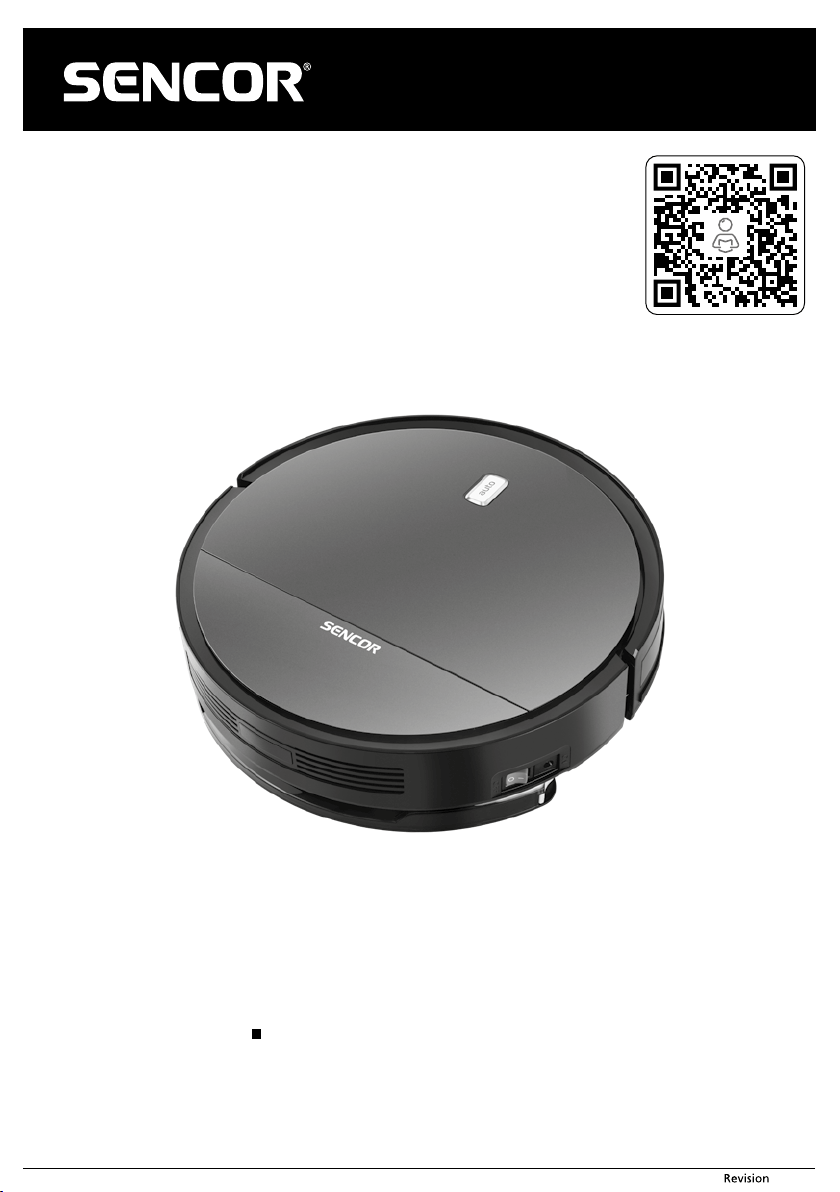
EN Robotic Vacuum Cleaner
Translation of the original manual
SRV 2230TI

- 2 - Copyright © 2020, Fast ČR, a.s.
07/2020
EN
Robotic vacuum cleaner
Important safety instructions
READ CAREFULLY AND STORE FOR FUTURE USE.
General warnings
■ This appliance may be used by children 8 years of age and older
and by persons with physical or mental impairments or by
inexperienced persons, if they are properly supervised or have
been informed about how to use the product in asafe manner
and understand the potential dangers.
■ Children must not play with the appliance. Cleaning and
maintenance performed by the user must not be performed
by unsupervised children.
■ In the event that the power cord is damaged, have it repaired
at aprofessional service centre to prevent causing adangerous
situation. It is forbidden to use the appliance if it has adamaged
power cord.
■ The robotic vacuum cleaner must only be used with the original
power adapter that came with it. In order to avoid adangerous
situation from arising, never use a different type of power
adapter.
■ Prior to cleaning or maintenance, always disconnect the robotic
vacuum cleaner from the power socket and turn it off using the
power button.
■ Adhere to the instructions contained in this user’smanual when
performing cleaning and maintenance tasks.
■ For charging the robotic vacuum cleaner, only use the original
charging station that was supplied with it.
■ The appliance must only be powered using asmall safe voltage
corresponding to the markings on the appliance.

- 3 - Copyright © 2020, Fast ČR, a.s.
07/2020
Electrical safety
■ Before connecting the adapter to apower socket check that the technical details on the rating label match the electrical voltage in the socket.
■ Connect the power adapter only to aproperly grounded power socket. Do not use an extension cord.
■ Do not disconnect the power adapter from the power socket by pulling on the power cord. This could damage the power adapter or the power socket. Disconnect the power
adapter from the power socket by pulling on the plug.
■ Do not place the power cord of the power adapter over sharp objects. Make sure that the power cord does not hang over the edge of atable and that it is not touching aheated
or hot surface.
■ It is forbidden to use apower adapter with adamaged plug or power cord.
For areplacement power adapter, please contact an authorised service centre.
■ Never use the power adapter supplied with this appliance for any other purposes.
■ Keep the power adapter and its power cord dry.
■ If the power cord of the power adapter is damaged, it must be replaced by the manufacturer, its service technician or by asimilarly qualified person, as this will prevent
adangerous situation from arising.
■ Do not connect and disconnect the power adapter cord to and from the power socket with wet hands.
■ Do not uncover the electronic parts of the robotic vacuum cleaner or its battery. They do not contain any components repairable by the user. Have the appliance serviced by
qualified persons.
■ To charge the battery, only use the power adapter supplied with this robotic vacuum cleaner.
■ To avoid any injury by electrical shock, do not spray the robotic vacuum cleaner with water and do not submerge it in water or any other liquid.
■ If you will not be using the robotic vacuum cleaner for an extended period of time, take out the battery. Prior to taking out the battery, ensure that the robotic vacuum cleaner
is disconnected from the power socket and that it is turned off using the main switch.
■ Do not use the robotic vacuum cleaner when it is not working correctly, if it has been damaged or has been submerged in water.
■ To avoid the danger of injury by electrical shock, do not repair the robotic vacuum cleaner yourself or make any adjustments to it. Have all repairs performed at an authorised
service centre. Tampering with the robotic vacuum cleaner during the warranty period may void the warranty.
■ Prior to cleaning or maintenance, always disconnect the robotic vacuum cleaner from the power socket and turn it off using the main switch.
Safety during use
■ This robotic vacuum cleaner is designed for use in households, offices and similar types of areas. Do not use it in industrial surroundings or outdoors.
■ The robotic vacuum cleaner is not intended for vacuuming water and therefore must not be used in damp or wet areas, for example in laundries, bathrooms or around swimming
pools. If it were to come into contact with water, the internal electronics of the vacuum cleaner would be destroyed.
■ Do not use the robotic vacuum cleaner to vacuum the following items:
■ smouldering cigarettes, burning or flammable items, matches or ash;
■ water and other liquids;
■ sharp items, e.g. splinters, needles, pins, etc.;
■ flour, wall plaster and other building materials;
■ larger pieces of paper or plastic bags, which can easily block the suction hole.
■ Do not expose the robotic vacuum cleaner to direct sunlight and do not place it near an open fire or appliances that are asource of heat.
■ Do not use the robotic vacuum cleaner on narrow raised surfaces such as tables, wardrobes, etc. If the vacuum cleaner does not have sufficient space for manoeuvring, it may
fall and be damaged.
■ Only use the robotic vacuum cleaner with the original accessories from the manufacturer.
■ Ensure that the robotic vacuum cleaner has adust filter correctly installed in the dust container before use.
■ Before putting the robotic vacuum cleaner into operation, check that the entry door into your apartment or house is closed. From the floor surfaces, remove clothing, paper,
toys, power or extension cords and other items that the vacuum cleaner could suck in or catch. Lift curtains and drapes that reach to the floor so that they do not get caught in
the vacuum cleaner.
■ Do not place any items on to the robotic vacuum cleaner and do not step or sit on it.
■ If the robotic vacuum cleaner is running, watch out for children and household pets.
■ When the robotic vacuum cleaner is running, ensure that the air vents are not covered and that the suction hole is not blocked. Otherwise, the robotic vacuum cleaner may be
damaged.
- 4 - Copyright © 2020, Fast ČR, a.s.
07/2020
SRV 2230TI
2
3
1
9
7
6
8
10
15
16
17
18
19
20
21
22
23
24
25
26
27
12
13
14
11
4
5
A
- 5 - Copyright © 2020, Fast ČR, a.s.
07/2020
B
1 m
1 m
2 m2 m
2
3
1
4
5
C
2
1
3
4
5
6
- 6 - Copyright © 2020, Fast ČR, a.s.
07/2020
2
3
4
1
5
D
- 7 - Copyright © 2020, Fast ČR, a.s.
07/2020
2
3
4
5
7
8
10
11
1
9
6
13
PLAN
HOME
ON/OFF
MODE CLK
MAX
12
14
E
2
3
1
F
- 8 - Copyright © 2020, Fast ČR, a.s.
07/2020
EN
Robotic vacuum cleaner
User'smanual
BEFORE FIRST USE
■ Prior to using this appliance, please read the user‘smanual thoroughly, even in cases,
when one has already familiarised themselves with previous use of similar types of
appliances. Only use the appliance in the manner described in this user’smanual.
Keep this user‘smanual in asafe place where it can be easily retrieved for future use.
In the event that you hand this appliance over to somebody else, make sure to also
include this user‘smanual.
■ We recommend saving the original cardboard box, packaging material, purchase
receipt and responsibility statement of the vendor or warranty card for at least the
duration of the legal liability for unsatisfactory performance or quality. In the event
of transportation, we recommend that you pack the appliance in the original box
from the manufacturer.
■ Carefully unpack the appliance and take care not to throw away any part of the
packaging before you find all the parts of the appliance.
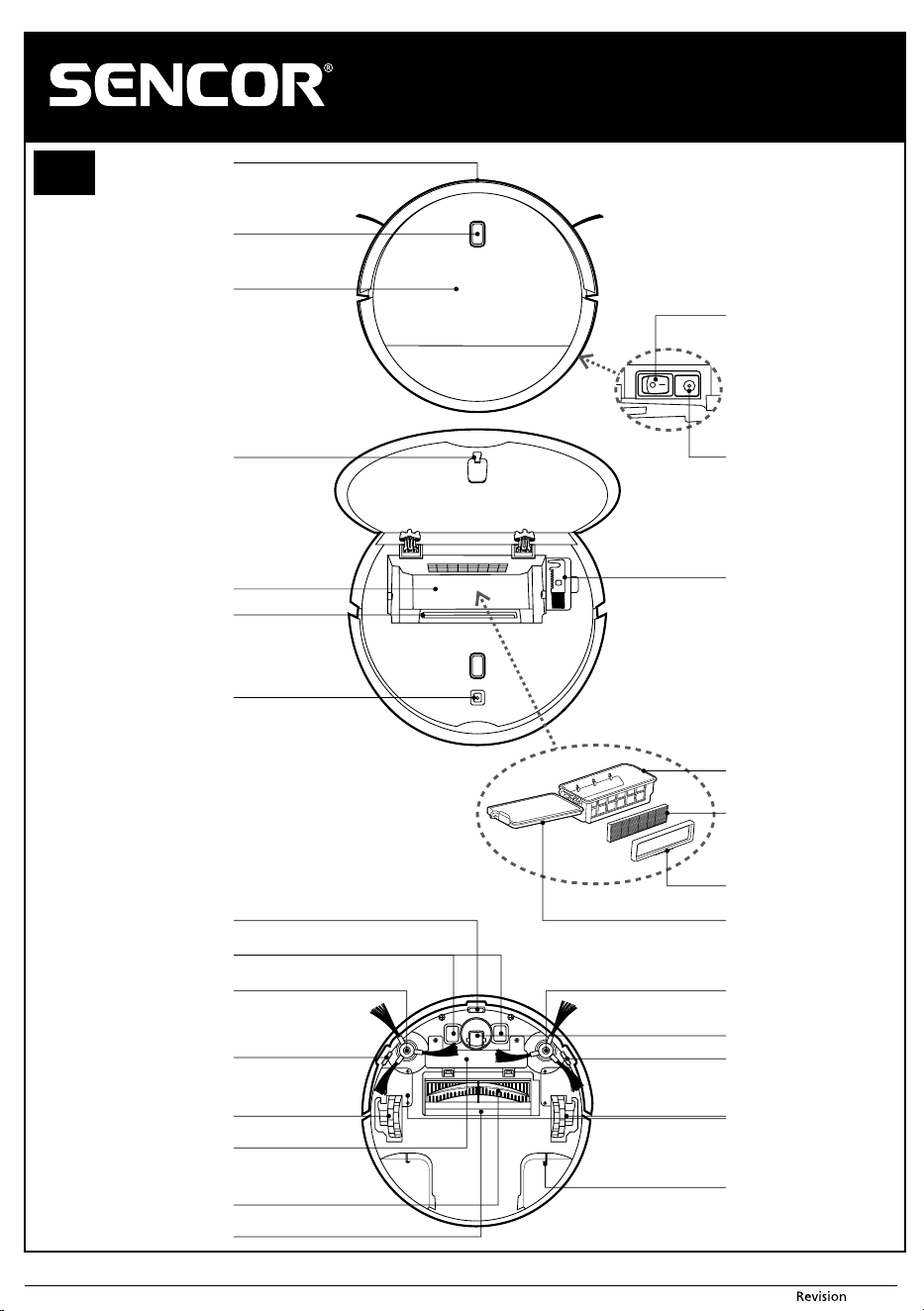
DESCRIPTION OF THE APPLIANCE AND ACCESSORIES
A1 Bumper bar with an anti-collision
sensor
A2 Start button for automatic clean /
indicator light
A3 Lid
A4 Main switch
A5 Power adapter connector socket
A6 Latch
A7 Dust container compartment
A8 Exhaust hole
A9 Lid latch hole
A10 Dust container cleaning brush
A11 Dust container
A12 HEPA filter (highly effective air-
borne particle filter able to capture
even the finest dust particles)
A13 HEPA filter holder
A14 Dust container lid
A15 Bottom anti-fall sensor, central
A16 Charging contacts
A17 Left rotary brush (L)
A18 Bottom anti-fall sensor, left
A19 Left motorised rubber wheel
A20 Battery compartment cover
A21 Central rotary brush
A22 Suction hole (underneath the rotary
brush cover)
A23 Right rotary brush (R)
A24 Front swivel wheel
A25 Bottom anti-fall sensor, right
A26 Right motorised rubber wheel
A27 Latches for attaching the water tank
with mop
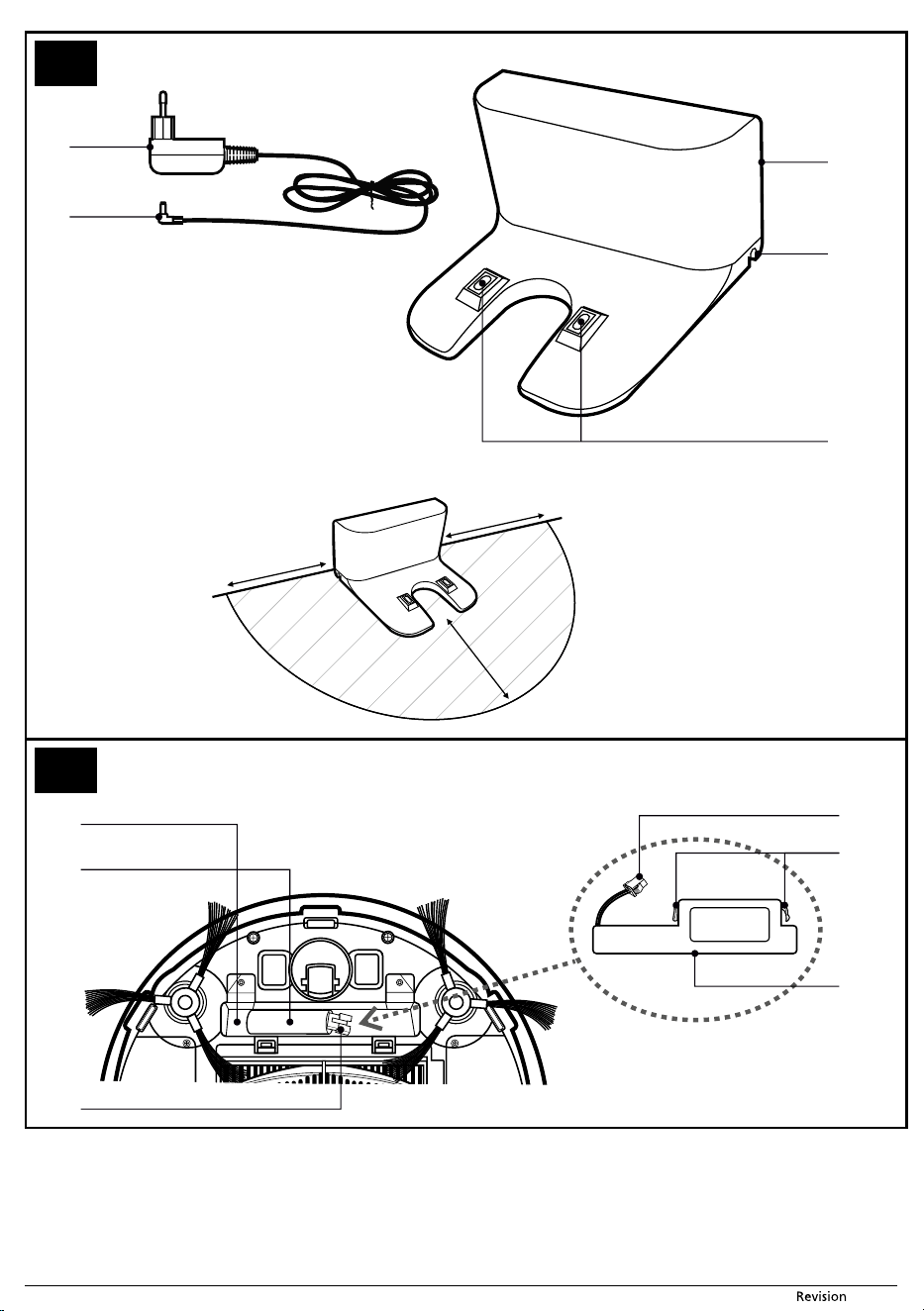
B1 Power adapter
B2 Power adapter plug
B3 Charging station
B4 Power adapter plug socket
B5 Charging contacts
C1 Battery compartment
C2 Battery insertion tube
C3 Robotic vacuum cleaner connector
C4 Battery connector
C5 Insulation tape for easier battery
removal
C6 Battery
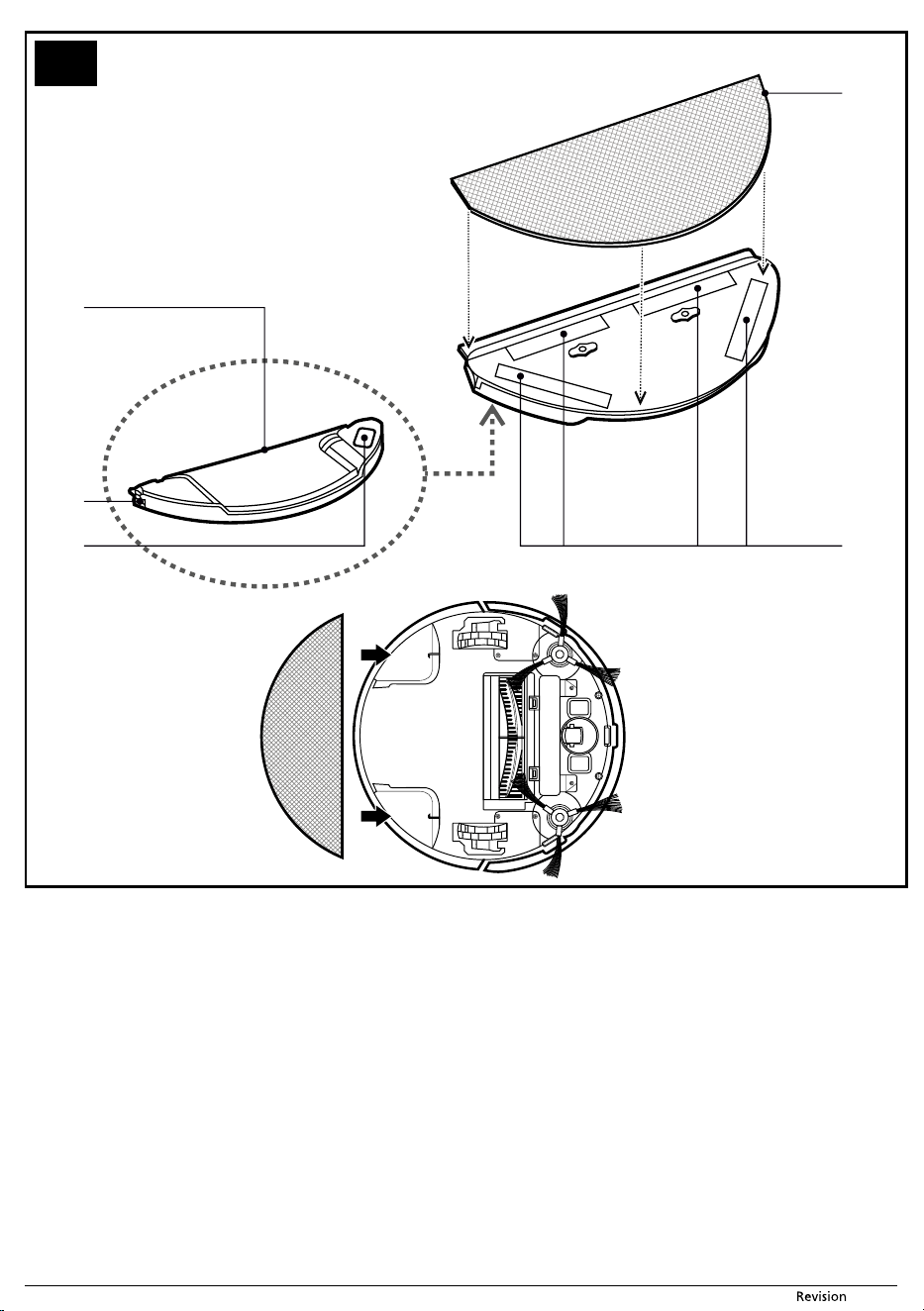
D1 Water tank
D2 Water tank release latch (on both
sides)
D3 Filling opening cap
D4 Duster
D5 Duster fastening velcro strips
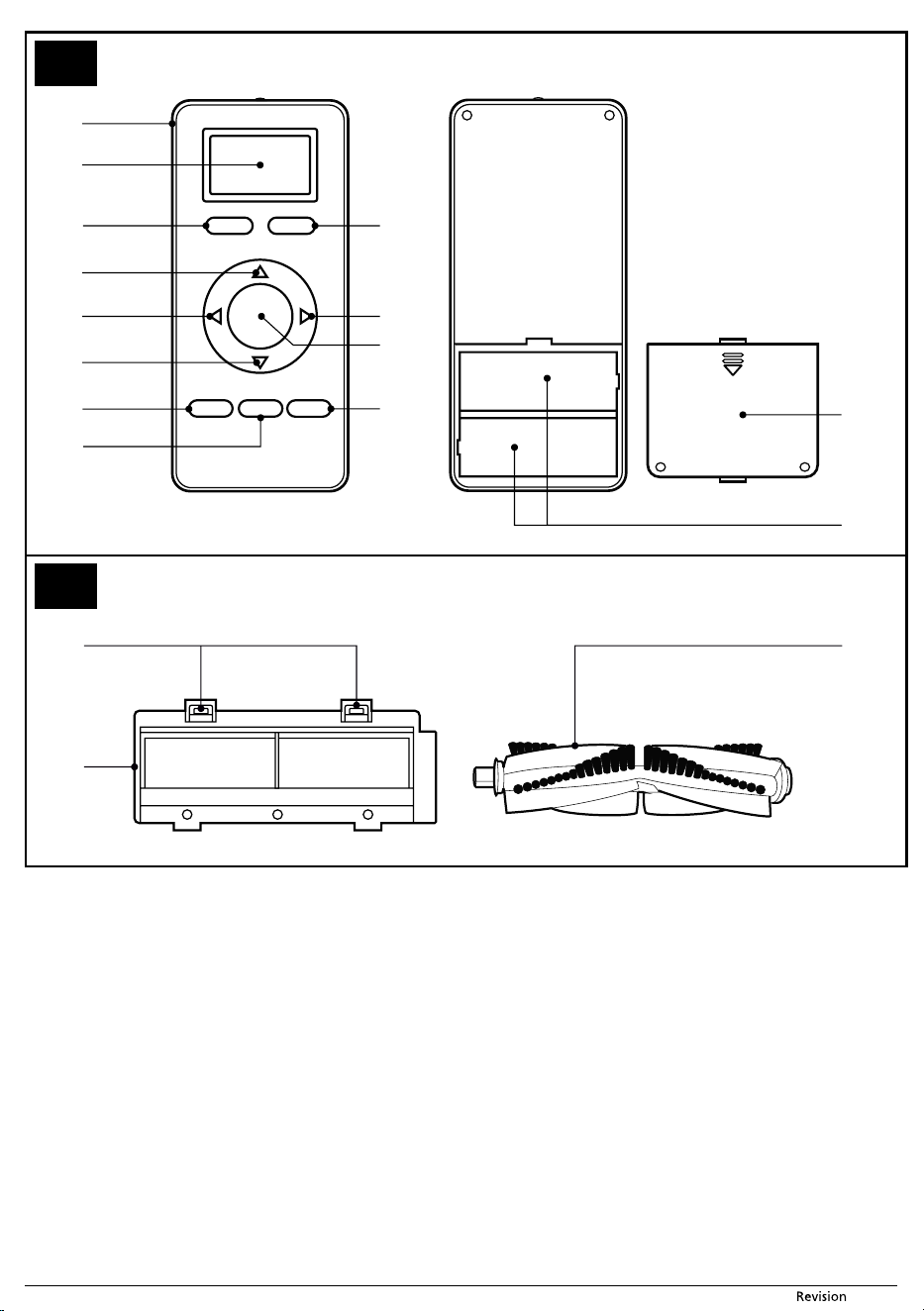
E1 Remote control
E2 Display
E3 Scheduled cleaning setting mode
E4 Return to the charging station
button
E5 Forward button
E6 Left button
E7 Right button
E8 Reverse button
E9 Vacuum cleaner start / off button
E10 Cleaning mode selection button
E11 Time setting button
E12 Maximum cleaning mode in which
the vacuum cleaner cleans
until the battery is almost flat.
E13 Battery compartment cover
E14 Battery compartment (2pcs AAA x
1.5V)
F1 Latches
F2 Rotary brush cover
F3 Rotary brush
PURPOSE OF USE AND FEATURES OF THE ROBOTIC VACUUM
CLEANER
■ The robotic vacuum cleaner is intended for cleaning various types of hard floors
such as wooden or laminate floating floors, tiles, vinyl, etc. and carpets with alow
pile height. While vacuuming, it effectively combines various routes to optimally
clean the entire floor area.
■ The suction hole effectively removes hair, animal fur, etc. The two side rotary brushes
brush dirt out of hard-to-reach places along walls and furniture and out of corners.
The motorised rubber wheels protect sensitive floors against scratching and can
travel over threshold strips up to aheight of 1 cm and ride on to a2 cm high carpet.
■ The suspended bumper enables the vacuum cleaner to dampen the approach to an
obstacle and to efficiently clean around it. The infrared sensors in the front bumper
prevent the robotic vacuum cleaner from colliding with obstacles. Safe operation in
rooms with stairs is made possible by the bottom anti-stair-fall sensors.
■ Another advantage the a robotic vacuum cleaner is the mop function, which
enables dry and wet wiping of smooth hard floor surfaces. While wiping, the robotic
vacuum cleaner vacuums small bits of dirt and dust from the floor to prevent the
duster from being excessively soiled during the cleaning cycle.
■ For easy identification of the operating state, the button on the top cover has an
indicator light the colour of which indicates low battery voltage (lit red), battery
charging (flashing red), full charge and operation (lit blue). Error states are then
indicated by various numbers of flashes or colour combinations, see chapter
TROUBLESHOOTING. Apart from the indicator lights, the vacuum cleaner also
has audio signals that accompany certain functions or error states of the vacuum
cleaner, see chapter AUDIO SIGNALS.
PREPARING THE ROBOTIC VACUUM CLEANER FOR OPERATION
INSTALLING AND USING THE ROTARY BRUSHES
■ The rotary brushes A17 and A23 are intended for smooth floor surfaces and ensure
effective cleaning in corners, along walls and furniture.
■ Turn the vacuum cleaner upside down. Gradually push the rotary brushes precisely
and with force on to the pins that are intended for them. While doing this, make sure
that the marks L and R both on the brushes and on the vacuum cleaner match. Turn
the robotic vacuum cleaner back over to the operating position.
■ When using the vacuum cleaner to clean rooms with carpets, remove the rotary
brushes. When removing them, proceed in the reverse sequence to their installation.
INSERTING AND REMOVING THE BATTERY
■ The robotic vacuum cleaner is equipped with aLi-ion battery C6. If the battery is
packed separately, it is necessary insert it into the vacuum cleaner before first use.
Use only the original battery type.
■ Make sure that the vacuum cleaner is turned off with the main switch A4. Turn the
vacuum cleaner upside down and screw off the cover A20.
■ Remove the connector C3 from the battery compartment C1.
■ Slide the battery into the tube C2 and connect the battery connector C4 to vacuum
cleaner connector C3.
■ Screw the cover A20 back on and turn the vacuum cleaner back over to the
operating position.
■ Remove the battery in reverse sequence. Prior to removing the battery, always check
that the vacuum cleaner is turned off using the main switch A4. To make removal
easier, use the two insulating strips C5.
■ When the vacuum cleaner will not be used for an extended period of time, take out
the battery and store it in adry, clean and cool place out of children‘sreach.
LOCATION OF THE CHARGING STATION
■ The charging station B3 serves to automatically recharge the battery and the
vacuum cleaner must have good access to it.
■ Locate the charging station against awall on ahard, even and dry surface within
reach of a power socket. Make sure that there are no stairs or obstacles within
adistance of 1m on the left and right of the charging station and within adistance
of 2 m in front of the charging station, that would prevent the robotic vacuum
cleaner from finding the charging station and docking successfully.
■ Insert the power adapter plug B2 into socket B4 of the charging station, and insert
the power cord plug into apower socket. Place the power cord in such away that it
does not tangle into the cleaning brushes of the robotic vacuum cleaner.
■ In the event that the vacuum cleaner is not used for an extended period of time,
disconnect the charging station from the power socket and store it in adry, clean
and cool place.
CHARGING THE BATTERY FOR THE FIRST TIME
Note:
Prior to charging the battery, the vacuum cleaner must be turned on
using the main switch A4.
■ Before using the vacuum cleaner for the first time, it is necessary to fully charge the
battery for at least 7 hours. Thereafter, astandard charge will take approximately
4 hours.
■ Check that the charging station B3 is correctly positioned and connected to apower
socket according to chapter Location of the charging station. Turn on the main
switch A4 of the vacuum cleaner, grasp the robotic vacuum cleaner and manually
place it into the charging station so that the charging contacts A16 on the underside
of the vacuum cleaner and the charging contacts B5 on the charging station are
connected. When the contacts are connected, the charging process will start.
■ The vacuum cleaner can also be charged without using the charging station. Insert
the plug B2 of the power adapter B1 into socket A5 of the vacuum cleaner, and
insert the power cord plug into apower socket.
■ During the charging process, the indicator light on button A2 will flash red.
■ When the battery is fully charged, the indicator light of switch A2 will remain
permanently lit blue and the process will end automatically. The vacuum cleaner
is now ready for use.
INSERTING AND REPLACING BATTERIES IN THE REMOTE CONTROL
■ Push down the latch of cover E13 on the rear side of the remote control E1 to release
it and remove the cover.
■ Insert two type AAA (1.5 V) batteries into the remote control. When inserting the
batteries, ensure the correct polarity as shown inside the battery compartment E14.
Put the cover E13 back on and click it into place.
■ In the event that the batteries are flat, replace them with new ones. Do not combine
various types of batteries or new and old batteries.
■ The signal range of the remote control is approximately 6 m.
- 9 - Copyright © 2020, Fast ČR, a.s.
07/2020
SETTING THE SYSTEM TIME OF THE ROBOTIC VACUUM CLEANER
■ The system time of the vacuum cleaner is the actual time according to your time
zone. It must be correctly set if you wish to use the scheduled cleaning function.
■ In the stand-by mode or in the charging in the charging station mode, hold down
button E11 (CLK) until the time setting value (hours and minutes) starts flashing
on the display E2.
■ Using buttons E5 ( ) or E8 ( ) set the time values. Toggle between the hour and
minute numbers using buttons E6 ( ) or E7 ( ).
■ Confirm the set time by pressing button E11 (CLK). 1x beep will be made and the set
time will be saved to memory as the system time.
■ If you do not perform any changes within 10 seconds, the system time setting mode
will automatically be cancelled and the time will not be saved to memory.
OPERATING THE ROBOTIC VACUUM CLEANER
Note:
Before starting the vacuum cleaner, always check that the dust
container A11, together with the HEPA filter A12, is inserted in place.
TURNING ON THE ROBOTIC VACUUM CLEANER
■ Turn on the power to the vacuum cleaner by setting the main switch A4 to position I.
■ Press button A2 to set the vacuum cleaner to stand-by mode.
STAND-BY MODE
■ The stand-by mode means that the vacuum cleaner is ready for operation. Button
A2 is backlit in blue colour.
■ Set the vacuum cleaner to the stand-by mode by pressing button A2 on the
vacuum cleaner or buttons E9 (ON/OFF) on the remote control either by turning
on the power supply using main switch A4 or whenever while the vacuum cleaner
is running.
SLEEP MODE
■ The vacuum cleaner will enter the sleep mode either automatically after ten minutes
of inactivity or when the control button A2 on the vacuum cleaner is held down for
longer than 3 seconds. The vacuum cleaner will beep, the backlight on button A2
will turn off and the vacuum cleaner will automatically switch to the sleep mode.
■ To wake the vacuum cleaner from the sleep mode to the stand-by mode, press
button A2 on the vacuum cleaner or the control button E9 (ON/OFF) on the remote
control. The vacuum cleaner will beep when woken up.
TURNING OFF THE ROBOTIC VACUUM CLEANER
■ If you wish to completely turn off the vacuum cleaner, set the main switch A4 to
position 0 (off). The backlight on button A2 will turn off and the power supply to
the vacuum cleaner will be shut off. When the vacuum cleaner is turned off, it will
not respond to any button.
SELECTING THE ROBOTIC VACUUM CLEANER CLEANING MODE
■ Before starting the cleaning process, check that the entry door into your apartment
or house is closed. From the floor surfaces, remove clothing, paper, toys, power or
extension cords and other items that the vacuum cleaner could suck in or catch.
Lift curtains and drapes that reach to the floor so that the vacuum cleaner does not
catch them.
Tip:
When vacuuming in a new environment for the first time, carefully
observe the movement of the vacuum cleaner. You can thereby
recognise problematic obstacles and remove them for the next
cleaning session.
AUTOMATIC CLEANING MODE
■ Press button A2 or button E9 (ON/OFF) on the remote control. The vacuum cleaner
will enter the automatic cleaning mode in which it combines zig-zag movements,
along-the-wall movements and random-direction movements until the battery is
almost completely flat. As soon as the vacuum cleaner detects alow battery voltage,
it will end the cleaning process and seek out the charging station to recharge.
SPIRAL CLEANING MODE
■ Press button E10 (MODE) on the remote control so that display E2 shows MODE1.
The vacuum cleaner will enter the spiral cleaning mode. Compared to the other
modes, this mode is characterised by a lower speed of the vacuum cleaner and
increased motor and central rotary brush power for the purpose of achieving the
most effective cleaning process.
RANDOM DIRECTION MOVEMENT MODE
■ Repeatedly press button E10 (MODE) on the remote control so that display E2 shows
MODE2. The vacuum cleaner will enter the random direction movement mode and
will continue cleaning in this mode until the battery is almost flat. It will then end
the cleaning process and seek out the charging station in order to recharge itself.
ALONG-THE-WALLS CLEANING MODE
■ Repeatedly press button E10 (MODE) on the remote control so that display E2
shows MODE3. The vacuum cleaner will enter the along-the-walls cleaning mode,
in which it moves along the perimeter of the room and the motorised side rotary
brushes A17 and A22 sweep out the dirt along the walls, furniture and in corners to
achieve aperfect clean. The vacuum cleaner will continue cleaning until the battery
is almost flat. It will then end the cleaning process and seek out the charging station
in order to recharge itself.
ZIG-ZAG CLEANING MODE
■ Repeatedly press button E10 (MODE) on the remote control so that display E2
shows MODE4. The vacuum cleaner will enter the zig-zag cleaning mode, which is
suitable for effectively cleaning large areas without furniture present. The vacuum
cleaner will continue cleaning until the battery is almost flat. It will then end the
cleaning process and seek out the charging station in order to recharge itself.
MAXIMUM POWER MODE
■ Press button E12 (MAX) on the remote control. The vacuum cleaner will enter
the cleaning mode, in which it effectively combines various routes to achieve an
optimal clean of the entire floor area. This mode is characterised by alower speed
of the vacuum cleaner and increased motor and central rotary brush power for the
purpose of achieving the most effective cleaning process.
PAUSING THE CLEANING PROCESS
■ Press button A2 or E9 (ON/OFF) on the remote control at any time during the
cleaning process to stop the vacuum cleaner in the place where it is cleaning.
USING THE MOP
■ The mop is an auxiliary function to the vacuum cleaner and is intended for dry or
wet cleaning of smooth hard floor areas. It consists of the water tank D1 and the
duster D4. When dry wiping, the water tank remains empty and serves solely as
acarrier for the duster.
Attention:
Only use the mop intended for this type of robotic vacuum
cleaner.
Do not use the water tank without the duster.
The mop is not intended for cleaning carpets.
Dry wiping of floors
■ Attach the duster D4 to the water tank using the velcro zip strip D5 on the water
tank.
■ Turn the vacuum cleaner upside down. Slide the water tank into the tabs on the
vacuum cleaner and turn the vacuum cleaner back over to its normal operating
position.
■ Start the vacuum cleaner.
Wet wiping of floors
■ Attach the duster D4 to the water tank using the velcro zip strip D5 on the water
tank. You may dip the duster in water or your favourite detergent solution in
advance. However, never pour the detergent into the water tank.
■ Open the cap D3 and fill the tank with clean water. Properly insert the cap back in.
Wipe any excess water off the water tank.
■ Turn the vacuum cleaner upside down. Slide the assembled and filled water tank
into the tabs on the vacuum cleaner and turn the vacuum cleaner back over to its
normal operating position.
■ Start the vacuum cleaner.
■ When you have finished cleaning, disassemble the mop by pressing latch D2 on the
side of the water tank and slide out the water tank. Remove the duster and wash it
under running water, thoroughly wring it dry and allow it to dry.
SCHEDULED CLEANING FUNCTION
Note:
The scheduled cleaning time setting is based on the system time of the
vacuum cleaner. Therefore, before setting the scheduled cleaning time,
it is necessary to correctly set the system time as described in chapter
SETTING THE SYSTEM TIME OF THE ROBOTIC VACUUM CLEANER.
■ This function enables scheduling the vacuum cleaner to automatically start cleaning
at acertain time once per day.
■ This function behaves as a delayed start, so you are actually setting a delayed
cleaning time. Example: If the current time on the vacuum cleaner is 5:00 p.m.
then by setting the scheduled cleaning time to 2:30 the vacuum cleaner will
automatically start cleaning only at 7:30 p.m. If you leave the main switch of the
vacuum cleaner turned on, then the same cleaning process will be repeated at 7:30
p.m. every day thereafter.
Attention:
Never use the delayed cleaning function for wet wiping when
the water tank is filled with water. This could result in excessive
wetting of the floor in the vicinity of the charging station.
Setting scheduled cleaning:
■ In the stand-by mode or in the charging in the charging station mode, hold down
button E3 (PLAN) until the time setting value starts flashing on the display E2.
■ Using buttons E5 (
) or E8 ( ) set the time values. Toggle between the values
using buttons E6 ( ) or E7 ( ).
■ Confirm the set time by pressing button E9 (ON/OFF). 1x beep will be made and
the set time will be saved to memory as the automatic cleaning time. The vacuum
cleaner will clean at this time every day.
Note:
If you turn off the vacuum cleaner using the main switch, the scheduled
cleaning time will be deleted. If you wish to use automatic cleaning,
then it is necessary to leave the vacuum cleaner in the charging station.
- 10 - Copyright © 2020, Fast ČR, a.s.
07/2020
Cancelling scheduled cleaning
■ Hold down the button E3 (PLAN). The set automatic cleaning time will start flashing
on the display E2.
■ Hold down button E9 (ON/OFF) until 00:00 appears on the display. Pressing button
E9 again will cancel the set time and the vacuum cleaner will beep 2x.
■ Hold down button E3 (PLAN) to return to the display of the system time.
CHARGING THE ROBOTIC VACUUM CLEANER
AUTOMATIC CHARGING
■ As soon as the vacuum cleaner detects low voltage of the battery during operation,
it will automatically start to seek out the charging station. In order for it to find it and
dock, it needs to find the infrared signal transmitted by the charging station. For this
reason, we recommend leaving the charging station constantly connected to the
power source and located in accordance with the instructions provided in chapter
LOCATION OF THE CHARGING STATION.
■ After docking in the charging station, the charging cycle will commence. Acomplete
charge takes approximately 4 to 7 hours. The actual charging time depends on the
power level of the battery. A fully charged battery will provide up to 90 minutes
of operation.
■ During the charging process, the indicator light on button A2 will flash red.
■ When the battery is fully charged, the indicator light of button A2 will remain
permanently lit blue and the process will end automatically.
■ In the event that the charging contacts are disconnected during the charging cycle,
the vacuum cleaner will move away from the charging station and then re-dock
itself to resume the charging process, unless it is prevented from doing so by an
obstacle. In the event of apower outage, the charging cycle will be interrupted and
will continue after the power supply is renewed. In the event that the maximum
charging current is exceeded, the charging station will automatically interrupt the
charging cycle.
MANUAL CHARGING
■ If the vacuum cleaner is located away from the charging station and detects alow
battery voltage then button A2 will start flashing red 2x per second. Press button E4
(HOME) on the remote control. The vacuum cleaner will automatically seek out the
charging station and start automatic charging as described in the previous chapter.
■ If the battery is so flat that the vacuum cleaner is unable to seek out the charging
station then it is necessary to dock the vacuum cleaner into the charging station
by hand. Grasp the vacuum cleaner and manually place it into the charging station
so that the charging contacts on the underside of the vacuum cleaner and the
charging contacts on the charging station are connected. When the contacts are
connected, charging will start.
■ The vacuum cleaner can also be charged without using the charging station. Insert
the power adapter connector into socket A5 on the side of the vacuum cleaner and
insert the power adapter plug into amains socket.
CARING FOR THE BATTERY
■ We recommend that you do not interrupt the charging cycle and maintain the
battery in acharged state.
■ Do not leave the vacuum cleaner standing fully charged or completely flat for an
unnecessarily long period of time.
■ Abattery that is allowed to remain flat for along time may self-discharge below
apermissible level and thereby cause irreparable damage to itself.
MEANINGS OF AUDIO AND LIGHT SIGNALS OF THE VACUUM
CLEANER
AUDIO SIGNAL
NUMBER OF BEEPS FUNCTION OR STATE
3× short beep Stand-by mode
1× short beep Charging
5× short beep Fully charged
1× short beep Setting of scheduled cleaning successful
2× short beep Scheduled cleaning cancelled
4× short beep Low battery voltage
2× short beep Entry into sleep mode
3× short beep Waking from sleep mode
1× long beep
Power cord is disconnected
Error of the front bumper bar or anti-collision switch
Rubber wheels are off the floor or the vacuum cleaner
was lifted
Overloading of the rubber wheels, rotary brush or side
brushes
LIGHT SIGNALS
FLASHING
BUTTON A2
MEANING SOLUTION
red 4× per
second
The dust container is
incorrectly inserted or
is not inserted at all
Check the dust container.
Charging error
There was apower outage while the
vacuum cleaner was being charged.
Charging will automatically continue
once power is restored. If not, press the
HOME button on the remote control
or put the vacuum cleaner on to the
charging contacts by hand. Check
that the power adapter is correctly
connected to the charging station
and that the power plug is properly
inserted in apower socket. Start the
charging process again. If the vacuum
cleaner does not start charging, contact
aservice centre.
2× red
1× blue
Anti-collision sensor
error
The anti-collision sensor or the bumper
bar is dirty. Clean the bumper bar. If this
does not help, contact aservice centre.
2× red
2× blue
One of the anti-fall
sensors has detected
an area into which
the vacuum cleaner
could fall.
Move the vacuum cleaner to adifferent
location where there is no risk of afall.
3× red
1× blue
Error on one or both
rubber wheels
Check that the wheel is turning freely
and if necessary remove any dirty
material preventing the movement of
the wheel.
1× red
1× blue
Error on the side
brushes
One of the side brushes is jammed due
to dirty material.
Remove any dirt or grime.
1× red
2× blue
Central brush error
The brush is jammed due to dirty
material. Remove any dirt or grime.
1× red
3× blue
Fan motor error.
The fan motor was overloaded. The dust
container is probably completely full
or the central brush is heavily clogged
with dirty material. Clean out the
vacuum cleaner.
Red 2× per
second
Low voltage
The battery is almost flat and the
robotic vacuum cleaner is no longer
able to travel to the charging station on
its own. It is necessary to place it into
the charging station by hand.
TROUBLESHOOTING
■ You can attempt to resolve problems with the operation of the vacuum cleaner
that are not indicated by audio or light signals using the following table. If you
are unsuccessful resolving the resulting situation, attempt to turn it off and then
on again using the main switch A4. If the problem persists, please contact an
authorised service centre.
PROBLEM POSSIBLE CAUSE SOLUTION
The vacuum
cleaner cannot be
turned on.
The battery is not inserted
correctly in the robotic
vacuum cleaner.
Insert the battery according
to the instructions in this
user'smanual.
The battery is flat. Charge the battery.
The vacuum
cleaner is on, but it
is not vacuuming
dust and dirt.
The dust container is full. Empty the dust container.
The dust filter is not
properly installed in the
dust container.
Properly install the dust filter
into the dust container.
The vacuum
cleaner travels
only backwards
when it is turned
on.
The vacuum cleaner was
placed on afloor that is
too dark.
Move the vacuum cleaner to
alighter-coloured floor and
start it again.
An anti-fall sensor is dirty. Clean the anti-fall sensors.
The rotary brushes
are deformed and
do not sweep up
dust and dirt.
The brushes are worn out.
Dip them in warm water to
renew their original shape.
Contact the vendor or service
centre and order new brushes.
- 11 - Copyright © 2020, Fast ČR, a.s.
07/2020
CLEANING AND MAINTENANCE
■ Prior to cleaning it, always turn off the vacuum cleaner using the main switch A4.
■ For cleaning, never use abrasive cleaning products, solvents, etc.
■ Neglecting cleaning and maintenance may negatively affect the functioning of the
vacuum cleaner and lead to its reduced performance.
DUST CONTAINER AND DUST FILTER
■ Empty out the dust container A11 after every use and clean it regularly. Open the
lid A3 and take out the dust container. Open the dust container lid A14 and tip out
the contents of the container. For hygiene reasons, we recommend doing this away
from living areas.
■ Remove the dust filter A12 and holder A13 from the dust container.
■ Wash the dust container under running water and dry it well.
Note:
It is not necessary to wash the dust container after every use.
■ Tap out or clean the dust filter using asoft brush and insert it back into the holder
and the dust container. If the filter is damaged, replace it with anew one.
■ Using a wet wiping cloth, clean out the area for the dust container A7 and the
exhaust hole A8.
■ Return the closed dust container back into the vacuum cleaner and shut the vacuum
cleaner cover.
Attention:
Do not wash the dust container or the dust filter in adishwasher.
The dust filter must not be washed using water.
Before putting the vacuum cleaner back into operation, check
that the dust filter is in its location. Otherwise the vacuum
cleaner may be damaged.
SUCTION HOLE
■ With repeat use, dust and dirt may accumulate around the suction hole A22, which
may manifest itself through decreased suction efficiency. To clean out the suction
hole, first take out the central rotary brush. Remove the dirt and dust from the
suction hole using asoft brush. Regularly clean the suction hole to ensure maximum
suction power.
CENTRAL ROTARY BRUSH
■ Push on the latches F1 of the central rotary brush cover F2 and take the cover out
together with the brush.
■ Use adry wiping cloth to clean out the area in which the rotary brush is housed.
Clean out the suction hole as described in the previous paragraph.
■ Remove any dirt and material (dust, wound on hair, animal fur, etc.) from the rotary
brush.
■ Reinsert the rotary brush and its cover.
ROTARY BRUSHES
■ Remove the rotary brushes A17 and A23 by pulling them upwards. Remove any
dust and dirt from the location where the brushes were mounted.
■ Remove all dust and dirt from the brushes. If necessary you may wash the brushes
under running water. If the bristles were deformed while the vacuum cleaner was
running, dip them in warm water to allow them to return to their original shape.
Allow the brushes to dry before reattaching to the vacuum cleaner.
■ After cleaning them, reattach them.
Note:
The rotary brushes become worn out when used. After acertain time it
is necessary to replace the used brushes with new ones. To order new
brushes, please contact your vendor or an authorised service centre.
MOP
■ After every use of the mop function, remove the duster D4, wash it by hand in
lukewarm water with the addition of asmall amount of gentle washing powder and
allow it to dry naturally. Wipe the water tank D1 using alightly dampened cloth
and then wipe it dry.
COMPLETE ROBOTIC VACUUM CLEANER
■ Regularly wipe the surface of the vacuum cleaner using asoft dry wiping cloth.
■ At least once per week or more frequently, clean the front swivel wheel A24, the
motorized wheels A19 and A26, the suction hole A22, rotary brushes A17 and A23
and the bottom sensors A15, A18 and A25.
■ First remove any coarser dirt from the front swivel wheel and the motorised wheels.
Then clean them around their entire perimeter using alightly dampened cloth and
wipe them dry. Do not forget to also clean the area around the wheels.
■ Wipe the sensors on the underside of the vacuum cleaner using asoft dry wiping
cloth or cotton bud.
CHARGING STATION
■ At least once per week, clean the surface of the charging bast B3 including the
charging contacts B5 using asoft dry wiping cloth.
STORAGE
■ When not using the vacuum cleaner for an extended period of time, do the
following:
■ Clean the vacuum cleaner as described in chapter CLEANING AND MAINTENANCE.
■ Remove the battery from the vacuum cleaner as described in chapter INSERTING
AND REMOVING THE BATTERY.
■ Disconnect the charging station from the power socket.
■ Store the vacuum cleaner with all its accessories in adry, clean and cool place.
TECHNICAL SPECIFICATIONS
Robotic vacuum cleaner
Dimensions (diameter × height) .............................................................................. 320 × 80 mm
Weight ................................................................................................................................................2.2 kg
Operating time per single charge ..............................................................................up to 90 min
Dust container capacity ........................................................................................................... 500 ml
Power adapter
Rated voltage range .................................................................................................... 100−240 VAC
Rated frequency........................................................................................................................50/60 Hz
Output ................................................................................................................................. 5 V, 1000 mA
Battery
Type ............................................................................................................................ 2,600 mAh Li-Ion
Charging time ................................................................................................................................... 4-7 h
Input ................................................................................................................................................. 5 V, 1 A
The declared noise emission level is lower than 65 dB(A), which represents alevel Aof
sound power with respect to areference sound power of 1 pW.
DISPOSAL OF USED BATTERIES
Prior to handing over the product at aspecialised collection facility, it is necessary to
ensure that the battery is removed. Prior to removing the battery, turn off the vacuum
cleaner using the main switch A4. Disconnect the battery using the reverse sequence
to that described in chapter INSERTING AND REMOVING THE BATTERY.
INSTRUCTIONS AND INFORMATION REGARDING THE
DISPOSAL OF USED PACKAGING MATERIALS
Dispose of used packaging material at asite designated for waste in your municipality.
DISPOSAL OF USED ELECTRICAL AND ELECTRONIC EQUIPMENT
This symbol on products or original documents means that used
electric or electronic products must not be added to ordinary
municipal waste. For proper disposal, renewal and recycling hand over
these appliances to determined collection points. Alternatively, in
some European Union states or other European countries you may
return your appliances to the local retailer when buying an equivalent
new appliance. Correct disposal of this product helps save valuable
natural resources and prevents potential negative effects on the
environment and human health, which could result from improper waste disposal. Ask
your local authorities or collection facility for more details. In accordance with national
regulations penalties may be imposed for the incorrect disposal of this type of waste.
This product meets all the basic requirements of EU directives related to it.
For business entities in European Union states
If you want to dispose of electric or electronic appliances, ask your retailer or supplier
for the necessary information.
Disposal in other countries outside the European Union.
This symbol is valid in the European Union. If you wish to dispose of this product,
request the necessary information about the correct disposal method from the local
council or from your retailer.