Thank You for Choosing Samsung
Thank you for choosing Samsung! Your new Samsung TV represents the latest in television
technology. We designed it wilh easy-to-use on-screen menus and closed captioning
capabilities, making it one oflhe best products in its class. We are proud to offer you a product
that will provide convenient, dependable service and enjoyment for years to come.
Important Safety Information
_ Always be careful when using your TV receiver. To reduce the risk of fire, electrical shock,
and other injuries, keep these safety precautions in mind when installing, using, and
maintaining your machine.
• Read all safety and operating instructions before operating your TV.
• Keep the safety and operating instructions for future reference.
• Heed all warnings on the TV receiver and in the operating instructions.
• Follow all operating and use instructions.
• Unplug the TV receiver from the wall outlet before cleaning.
Use a damp cloth; do not use liquid or aerosol cleaners.
• Never add any attachments and/or equipment without approval oflhe manufacturer.
Such additions can increase the risk of fire, electric shock, or other personal injury.
• Do not use the TV receiver where contact with or immersion in water is a possibility,
such as near bath tubs, sinks, washing machines, swimming pools, etc.
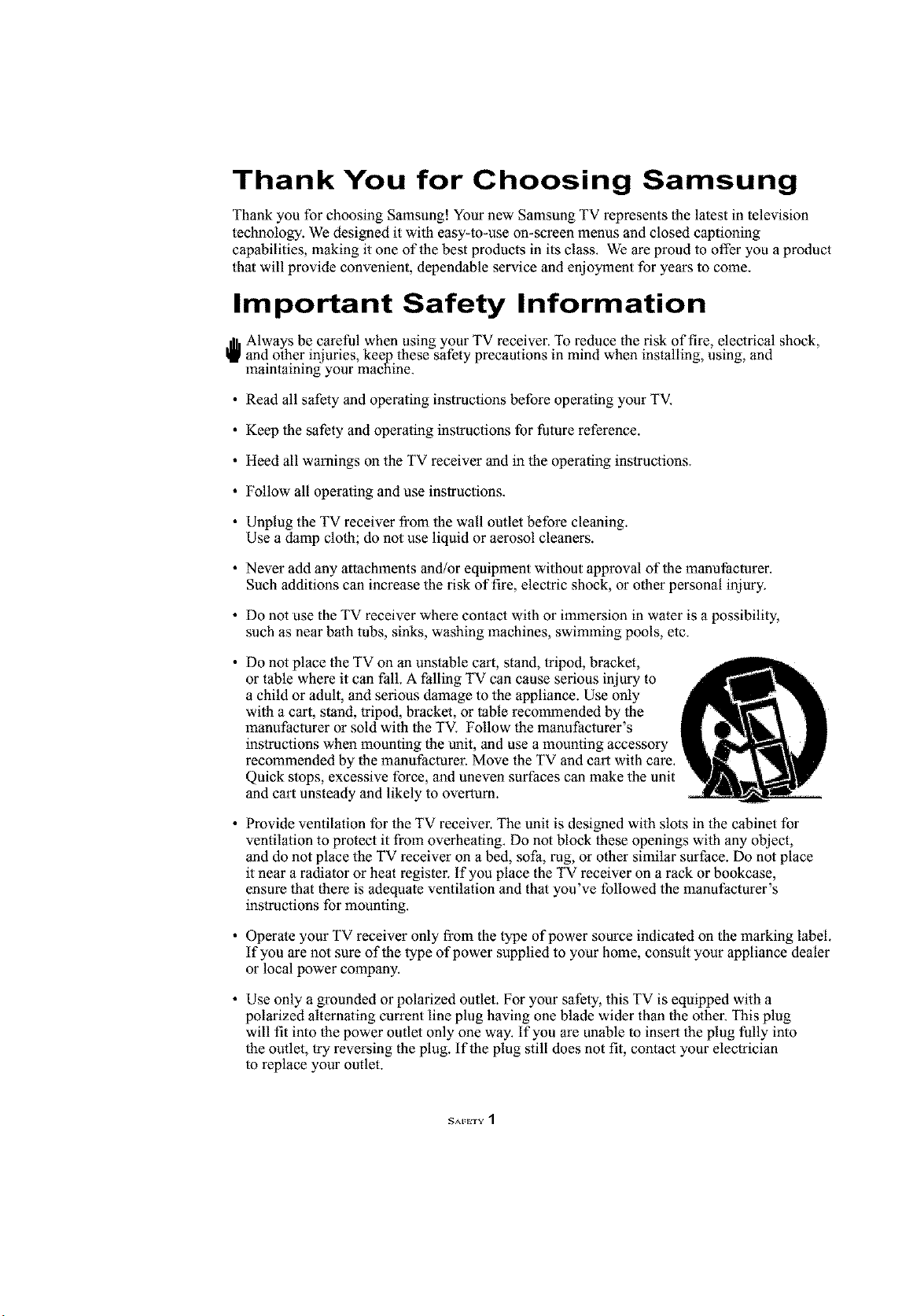
• Do not place the TV on an unstable cart, stand, tripod, bracket,
or table where it can fall. A falling TV can cause serious injury to
a child or adult, and serious damage to the appliance. Use only
with a cart, stand, tripod, bracket, or table recommended by the
manufacturer or sold with the TV. Follow the manufacturer's
instructions when mounting the unit, and use a mounting accessory
recommended by the manufaclurer. Move the TV and cart with care.
Quick stops, excessive force, and uneven surfaces can make the unit
and cart unsteady and likely to overlum.
• Provide ventilation for lhe TV receiver. The unit is designed with slots in the cabinet for
ventilation to protect it from overheating. Do not block these openings with any object,
and do not place the TV receiver on a bed, sofa, rug, or other similar surface. Do not place
it near a radiator or heat register. If you place the TV receiver on a rack or bookcase,
ensure that there is adequate ventilation and that you've followed the manufacturer's
instructions for mounting.
• Operate your TV receiver only from the type of power source indicated on the marking label.
If you are not sure of the type of power supplied to your home, consult your appliance dealer
or local power company.
• Use only a grounded or polarized outlet. For your safety, this TV is equipped with a
polarized alternating current line plug having one blade wider than the other. This plug
will fit into the power outlet only one way. If you are unable to insert the plug fully into
the outlet, try reversing the plug. If the plug still does not fit, contact your electrician
to replace your outlet.
SAFETV 1
Protect the power cord. Power supply cords should be routed so that they won't be walked on
or pinched by objects placed on or against them. Pay particular attention to cords at plugs,
convenience receptacles, and the point where they exit from the unit.
Unplug the TV from the wall outlet and disconnect the antenna or cable system during a
lightning storm or when left unattended and unused for long periods of time.
This will prevent damage to the unit due to lightning and power-line surges.
Avoid overhead power lines. An outside antenna system should not be placed in the vicinity
of overhead power lines or other electric light or power circuits or where it can fall into such
power lines or circuits. When installing an outside antenna system, be extremely careful to
keep from touching the power lines or circuits. Contact with such lines can be fatal.
Do not overload the wall outlet or extension cords.
Overloading can result in fire or electric shock.
Do not insert anything through the openings in the unit, where they can touch dangerous
voltage points or damage parts. Never spill liquid of any kind on the TV.
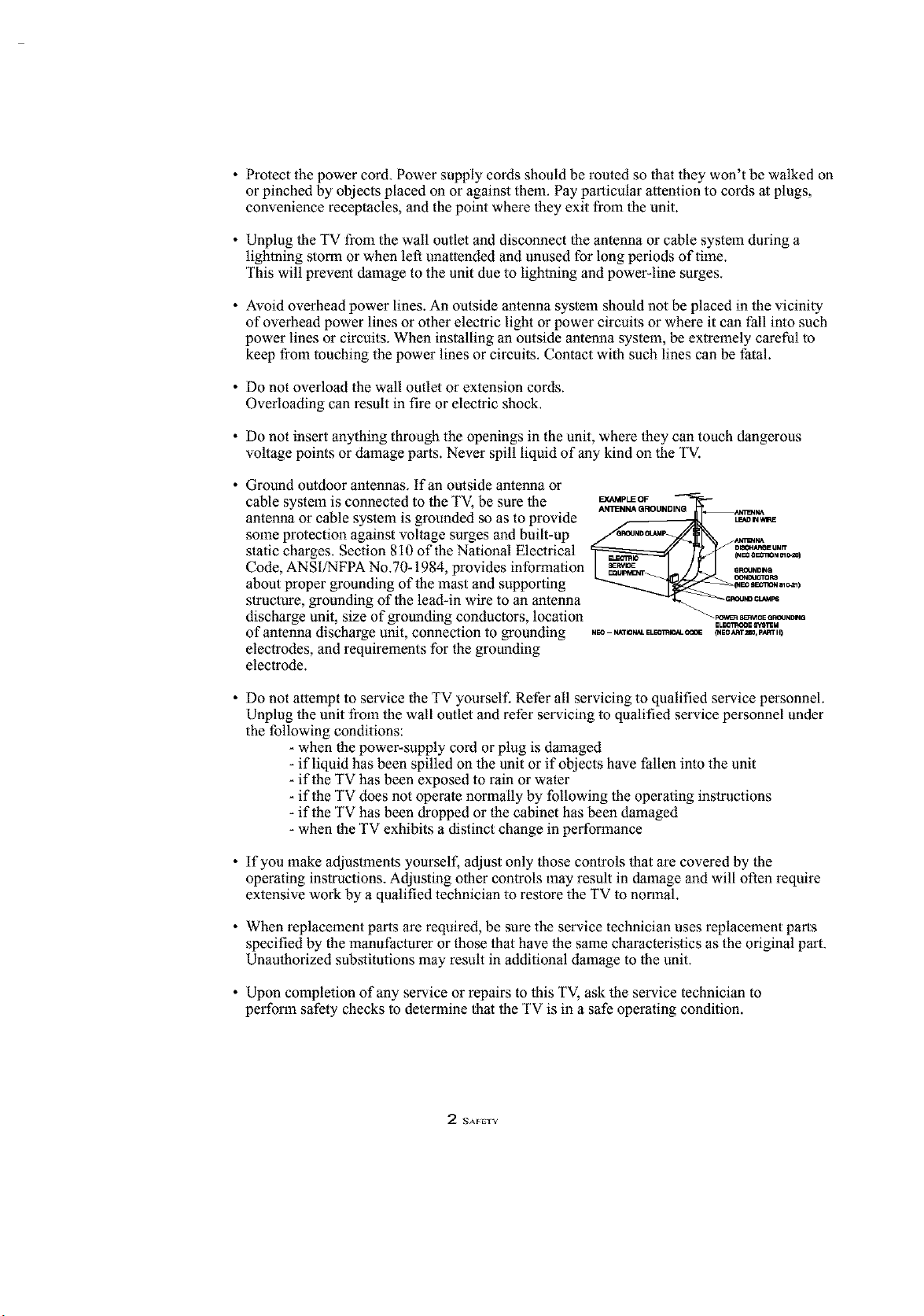
Ground outdoor antennas. If an outside antenna or
cable system is connected to the TV, be sure the _pUEOF
ANI_NNA GROUNDINQ N_rr_tt_,
antenna or cable system is grounded so as to provide L__-----------_ t 0,_
some protection against voltage surges and built-up __,_,
static charges. Section 810 of the National Electrical °_""
_1_I tlBg_ON m r._l
Code, ANSI/NFPA No.70-1984, provides information _.o._
about proper grounding of the mast and supporting _'_-_,,_)
structure, grounding of the lead-in wire to an antenna '_o_"
discharge unit, size of grounding conductors, location "-_o_.o_
ELE_'rgg_E Ipt,_M
of antenna discharge unit, connection to grounding ._ ._ _,E_,._,_.P,_,_
electrodes, and requirements for the grounding
electrode.
Do not attempt to service the TV yourself. Refer all servicing to qualified service personnel.
Unplug the unit from the wall outlet and refer servicing to qualified service personnel under
the following conditions:
- when the power-supply cord or plug is dmnaged
- if liquid has been spilled on the unit or if objects have fallen into the unit
- if the TV has been exposed to rain or water
- if the TV does not operate normally by following the operating instructions
- if the TV has been dropped or the cabinet has been damaged
- when the TV exhibits a distinct change in performance
If you make adjustments yourself, adjust only those controls that are covered by the
operating instructions. Adjusting other controls may result in damage and will often require
extensive work by a qualified technician to restore the TV to normal.
When replacement parts are required, be sure the service technician uses replacement parts
specified by the manufacturer or those that have the same characteristics as the original part.
Unauthorized substitutions may result in additional damage to the unit.
Upon completion of any service or repairs to this TV, ask the service technician to
perform safety checks to determine that the TV is in a safe operating condition.
2 NAFETV
CAUTION
CAUTION: TO REDUCE THE RISK OF ELEC
TR[C SHOCK, DO NOT REMOVE COVER
(OR BACK). NO USER SERVICEABLE PARTS
INSIDE. REFER SERVICING TO QUALIFIED
SERVICE PERSONNEL.
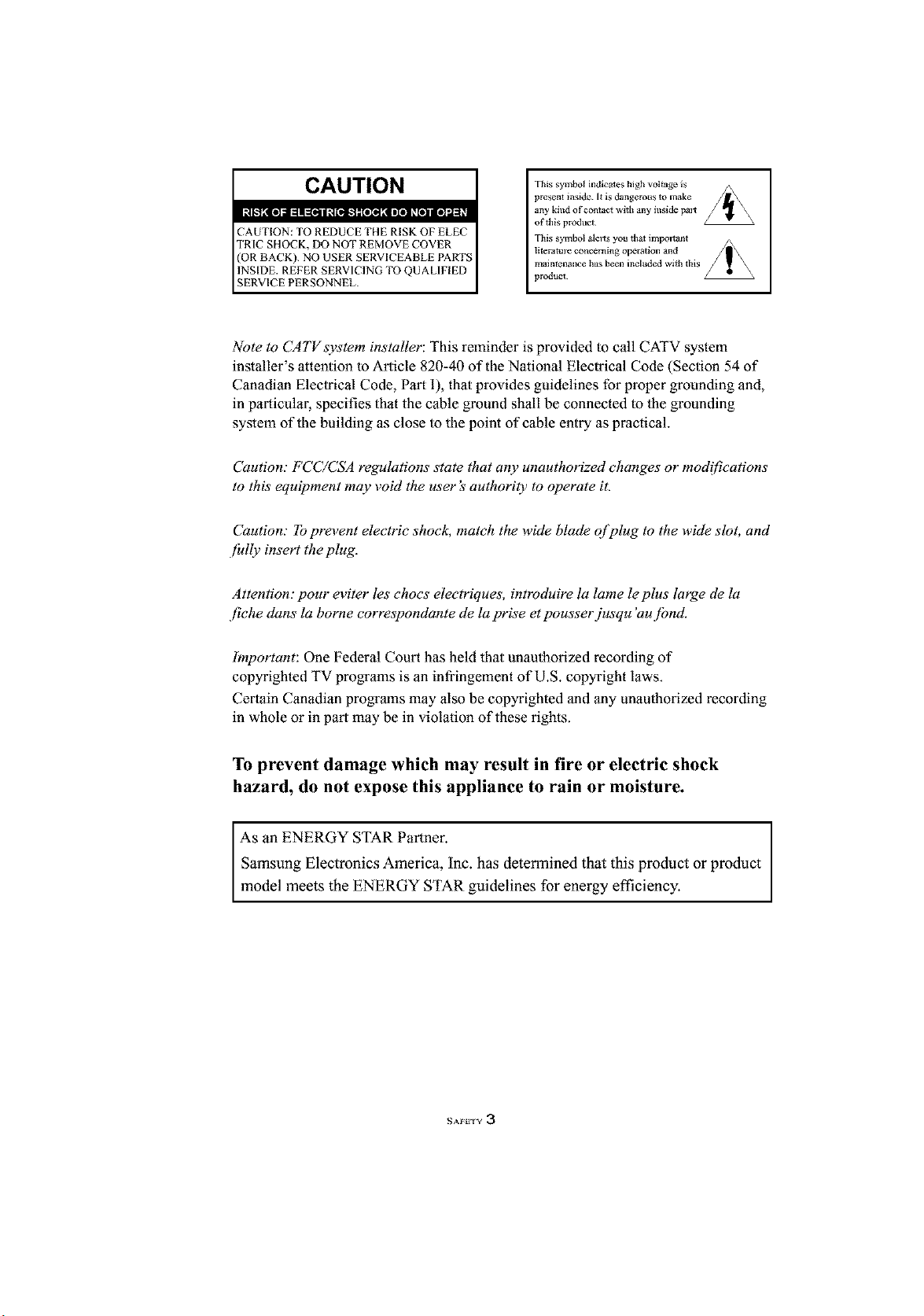
This symbol indicates high voltage is
present inside. [_ is dangero_ls to make
any kind of contact with any inside pal_
of this product
This symbol alel_ you that impol_.ant
literatu]_ concerning ope_tion and
maintenance has been included with thi!
product¸
Note to CATVsystem installer: This reminder is provided to call CATV system
installer's attention to Article 820-40 of the National Electrical Code (Section 54 of
Canadian Electrical Code, Part I), that provides guidelines for proper grounding and,
in particular, specifies that the cable ground shall be connected to the grounding
system of the building as close to the point of cable entry as practical.
Caution." FCC/CSA regulations state that any unauthorized changes or modifications
to this equipment may void the user's authority to operate it.
Caution." lb prevent electric shock, match the wide blade q[plug to the wide slot, and
fidly insert the plug.
Attention: pour eviter les chocs electriques, introduire la lame le plus large de la
fiche clans la borne correspondante de la prise et pousser jusqu 'au jbnd.
Important: One Federal Court has held that unauthorized recording of
copyrighted TV programs is an infringement of U.S. copyright laws.
Certain Canadian progrmns may also be copyrighted and any unauthorized recording
in whole or in part may be in violation of these rights.
To prevent damage which may result in fire or electric shock
hazard, do not expose this appliance to rain or moisture.
As ENERGY STAR Partner.
an
Samsung Electronics America, Inc. has determined that this product or product
model meets the ENERGY STAR guidelines for energy efficiency.
NAFI;TY 3
FCC Information
User Information
Changes or modifications not expressly
approved by the party responsible for
compliance could void the user's authority
to operate the equipment. If necessary,
consult your dealer or an experi-enced
radio/television technician for additional
suggestions.
You may find the booklet called How to
Identify and Resolve Radio/TV
Interference Problems helpful. This booklet
was prepared by the Federal
Communications Commission.
It is available from the U.S. Government
Printing Office, Washington, DC 20402,
Stock Number 004-000-00345-4.
Warning
In a domestic environment this product
may cause radio interference in which
case the user may be required to take
adequate measures.
User must use shielded signal interface
cables to maintain FCC compliance for the
product.
This device complies with Part 15 of the
FCC Rules. Operation is subject to the
following
two conditions:
(1) this device may not cause harmful
interference, and
(2) this device must accept any interfer
ence received, including interference
that may cause undesired operation.
The party responsible for product
compliance:
SAMSUNG ELECTRONICS CO., LTD
America QA Lab of Samsung
3351 Michelson Drive, Suite #290,
Irvine, CA 92612, U.S.A
Provided with this TV is a detachable
power supply cord with IEC320 style
terminations.
For 110 Volt applications, use only UL
Listed detachable power cord with NEMA
configuration 5-15P type (parallel blades)
plug cap. For 230 Volt applications use
only UL Listed Detachable power supply
cord with NEMA configuration 6015P type
(tandem blades) plug cap.
FCC captioning
This television receiver provides display
of television closed captioning in accorda
nce with Section 15.119 of the FCC rules.
4 SAFETY
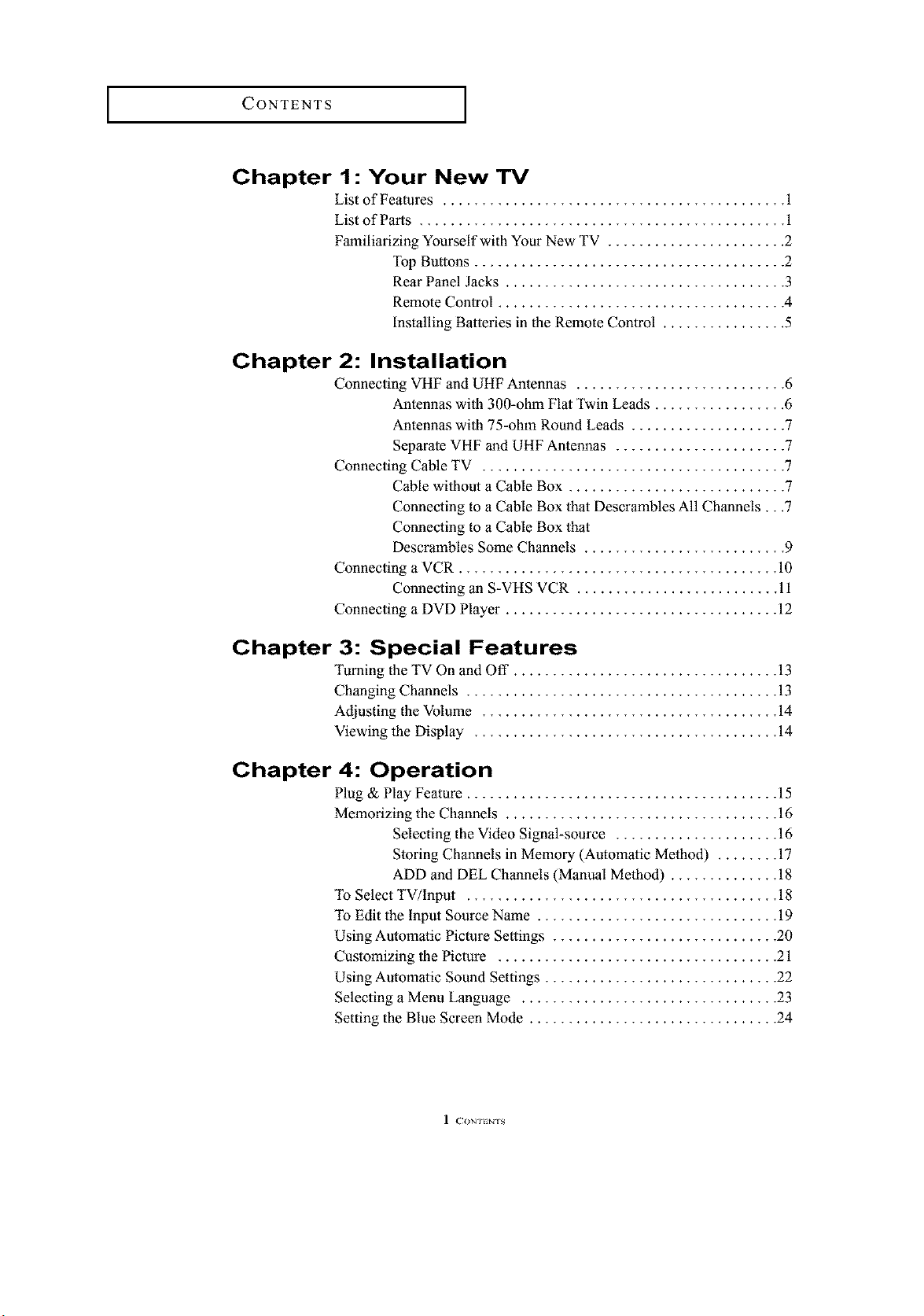
CONTENTS ]
Chapter 1 : Your New TV
List of Features ............................................ 1
List of Parts ............................................... 1
Familiarizing Yourself with Your New TV ....................... 2
Top Buttons ........................................ 2
Rear Panel Jacks .................................... 3
Remote Control ..................................... 4
Installing Batteries in the Remote Control ................ 5
Chapter 2: Installation
Connecting VHF and UHF Antennas ........................... 6
Antennas wilh 300-ohm Flat Twin Leads ................. 6
Antennas wilh 75-ohm Round Leads .................... 7
Separate VHF and UHF Antennas ...................... 7
Connecting Cable TV ....................................... 7
Cable wilhout a Cable Box ............................ 7
Connecting to a Cable Box that Descrambles All Channels...7
Connecting to a Cable Box that
Descrambles Some Channels .......................... 9
Connecting a VCR ......................................... 10
Connecting an S-VHS VCR .......................... 11
Connecting a DVD Player ................................... 12
Chapter 3: Special Features
Turning the TV On and Off .................................. 13
Changing Channels ........................................ 13
Adjusting the Volume ...................................... 14
Viewing the Display ....................................... 14
Chapter 4: Operation
Plug & Play Feature ........................................ 15
Memorizing the Channels ................................... 16
Selecting the Video Signal-source ..................... 16
Storing Channels in Memory (Automatic Melhod) ........ 17
ADD and DEL Channels (Manual Melhod) .............. 18
To Select TV/Input ........................................ 18
To Edit the Input Source Name ............................... 19
Using Automatic Picture Settings ............................. 20
Customizing the Picture .................................... 21
Using Automatic Sound Settings .............................. 22
Selecting a Menu Language ................................. 23
Setting the Blue Screen Mode ................................ 24
I r.?ONT_NTS
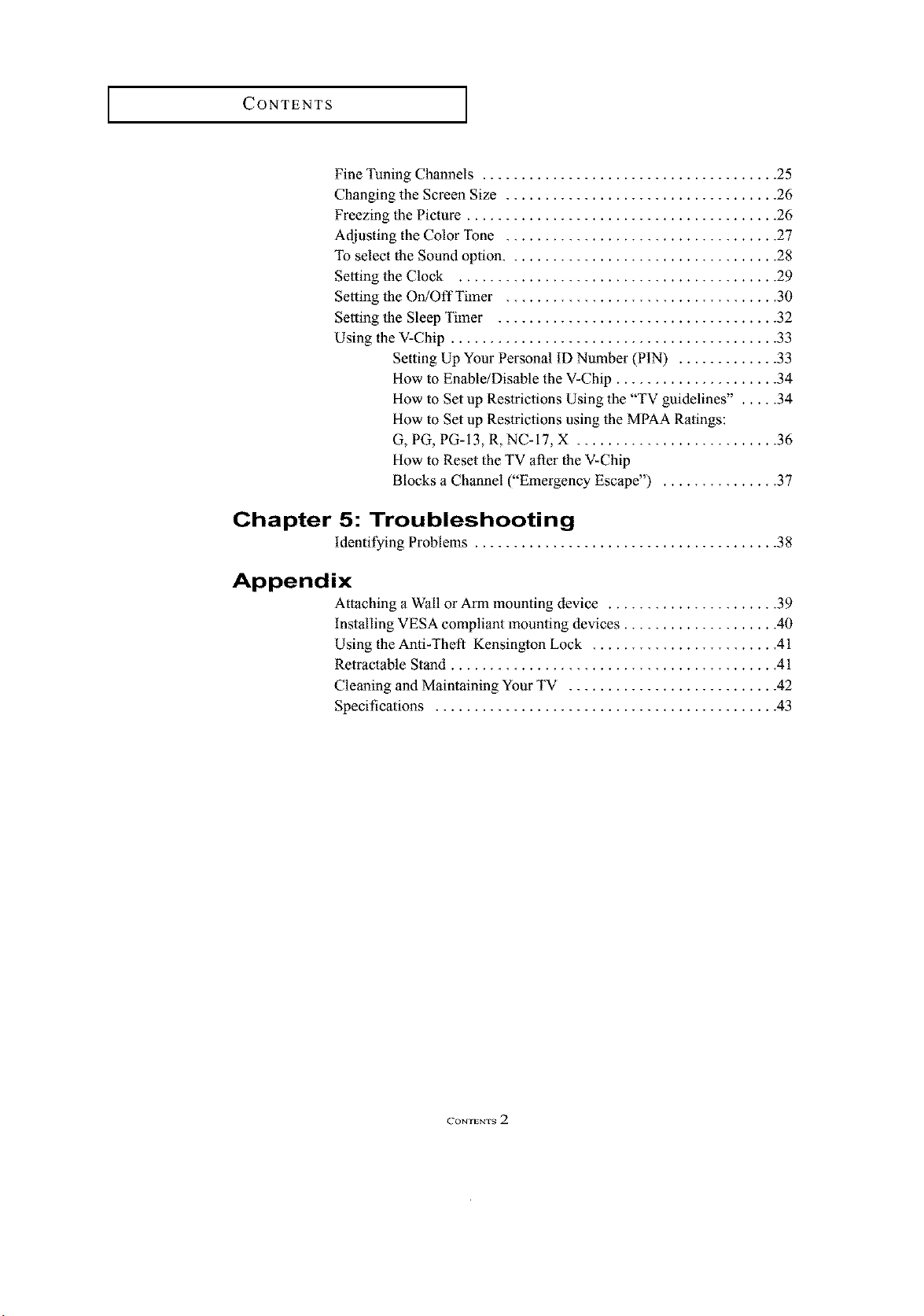
CONTENTS J
Fine Tuning Channels ...................................... 25
Changing the Screen Size ................................... 26
Freezing the Picture ........................................ 26
Adjusting the Color Tone ................................... 27
To select the Sound option ................................... 28
Setting the Clock ......................................... 29
Setting the OrdOffTimer ................................... 30
Setting the Sleep Timer .................................... 32
Using the V-Chip .......................................... 33
Setting Up Your Personal ID Number (PIN) ............. 33
How to Enable/Disable the V-Chip ..................... 34
How to Set up Restrictions Using the "TV guidelines" . .... 34
How to Set up Restrictions using the MPAA Ratings:
G, PG, PG-13, R, NC-17, X .......................... 36
How to Reset the TV after the V-Chip
Blocks a Channel ("Emergency Escape") ............... 37
Chapter 5: Troubleshooting
identifying Problems ....................................... 38
Appendix
Attaching a Wall or Arm mounting device ...................... 39
installing VESA compliant mounting devices .................... 40
Using the Anti-Theft Kensington Lock ........................ 41
Retractable Stand .......................................... 41
Cleaning and Maintaining Your TV ........................... 42
Specifications ............................................ 43
r.?ONTENTS 2
YOUR NEW TV
List of Features
Your TV was designed with the latest technology. This TV is a high-performance unit
that includes the following special features:
• Easy-to-use remote control
• Easy-to-use on-screen menu system
• Automatic timer to tuna the TV on and off
• Adjustable picture and sound settings that can be stored in the TV's memory
• Automatic channel tuning for up to 181 channels
• A special filter to reduce or eliminate reception problems
• Fine tuning control for the sharpest picture possible
• A built-in multi-channel sound decoder for stereo and bilingual listening
• Built-in, dual channel speakers
• Headphone jack for private listening
List of Parts
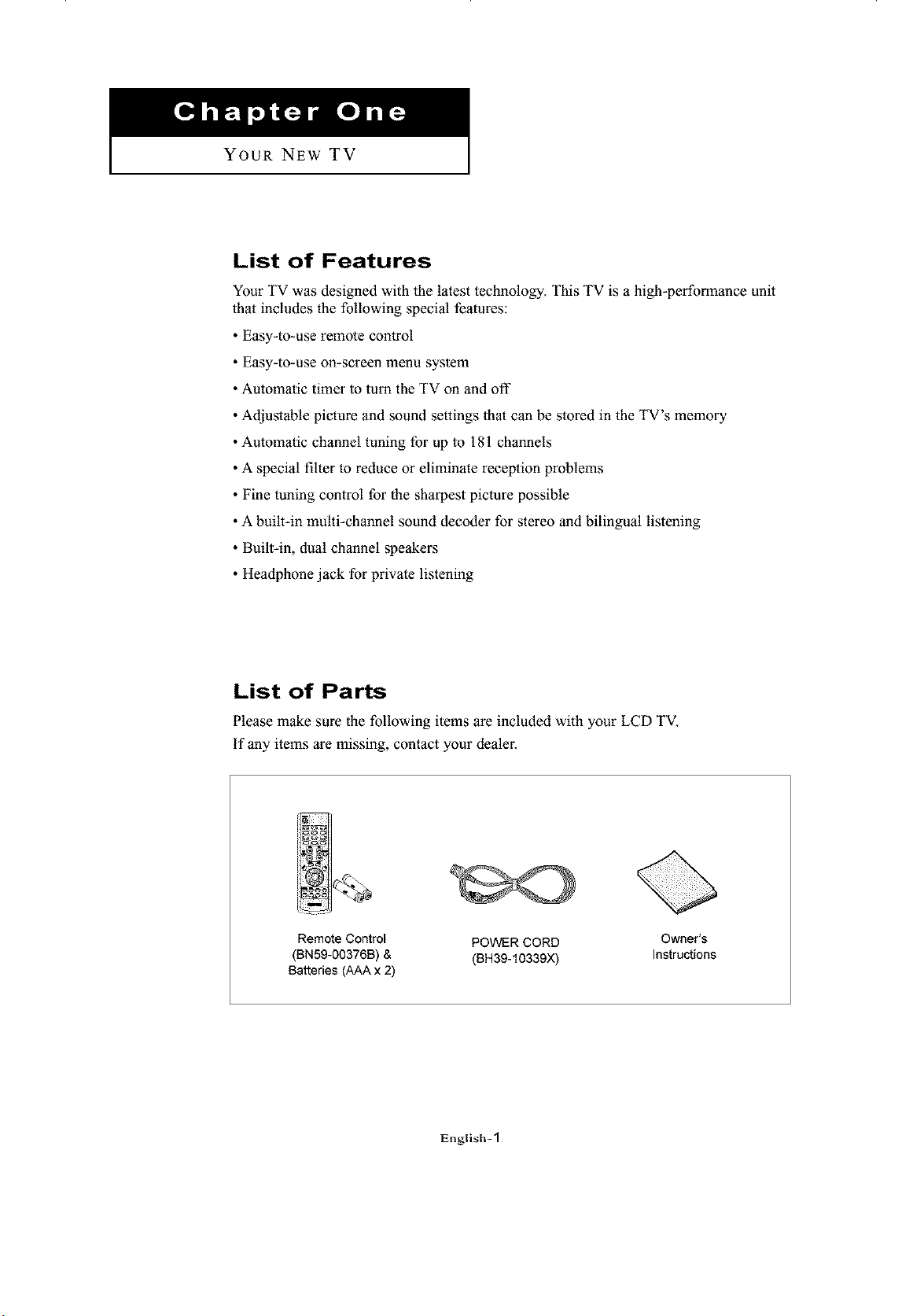
Please make sure the following items are included with your LCD TV.
if any items are missing, contact your dealer.
Remote Control
(BN59-00376B) &
Batteries (AAA x 2)
POWER CORD
(BH39-10339X)
Owner's
Instructions
English-1
YOUR NEW TV ]
Familiarizing Yourself with Your New "IV
Top Buttons
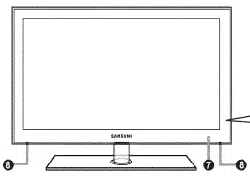
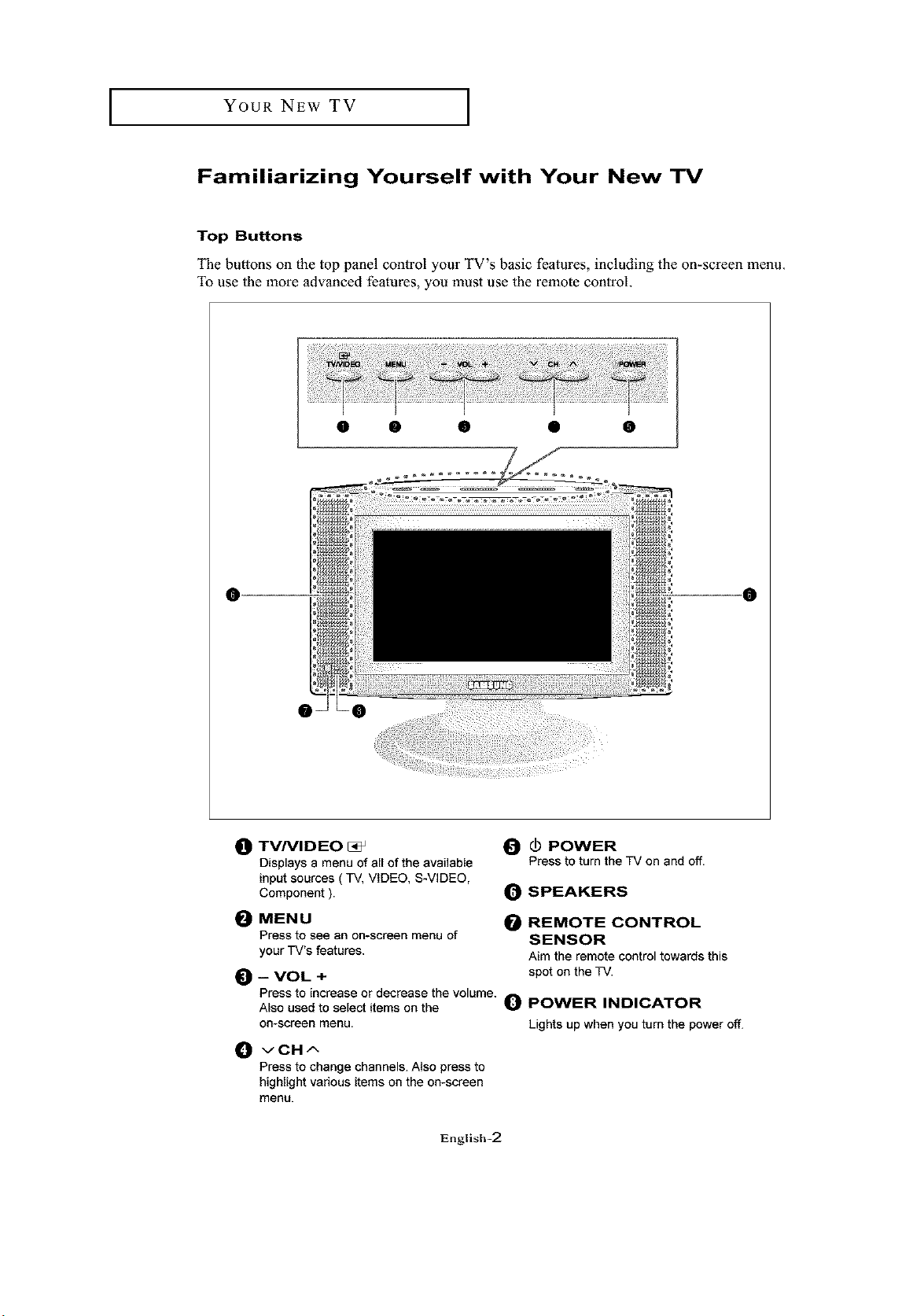
The buttons oll the top panel control your TV's basic features, including the on-screen menu.
To use the more advanced features, you must use the remote control.
0 • • • •
0 0
_) TVNID EO
Displays a menu of all of the available
input sources ( TV, VIDEO, S-VIDEO,
Component ).
0 _1 POWER
Press to turn the TV on and off.
0 SPEAKERS
0 MENU 0 REMOTE CONTROL
Press to see an on-screen menu of SENSOR
your TV's features. Aim the remote control towards this
_]) -- VOL + spot on the TV.
Press to increase or decrease the volume. 0 POWER INDICATOR
Also used to select items on the
on-screen menu. Lights up when you turn the power off.
_1 vCH^
Press to change channels. Also press to
highlight various items on the on-screen
menu.
English-2
YOUR NEW TV ]
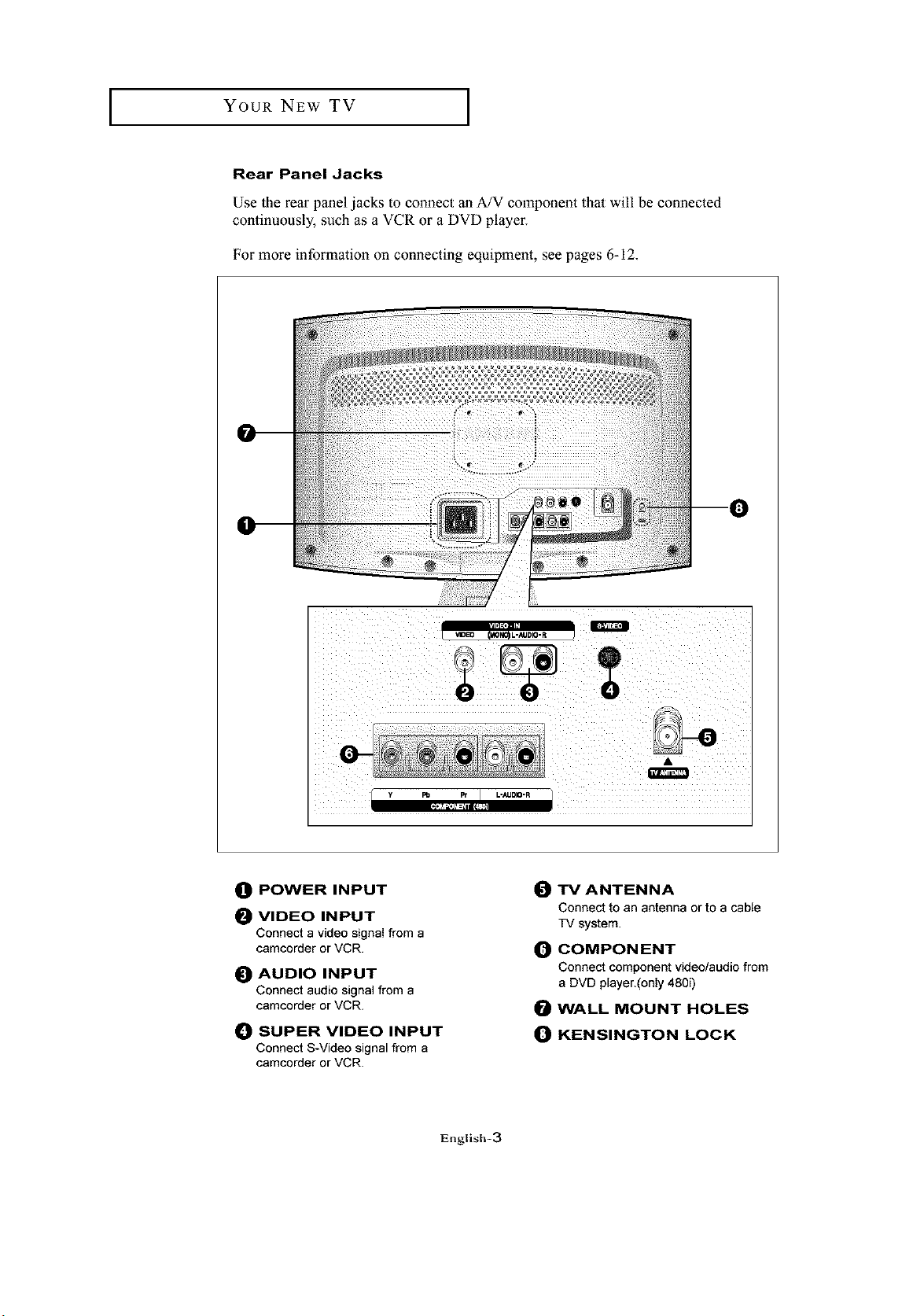
Rear Panel Jacks
Use the rear panel jacks to connect an A/V component that will be connected
continuously, such as a VCR or a DVD player.
For more information on connecting equipment, see pages 6-12.
y Po Pc L-_JDIO-R
0 POWER INPUT
_) VIDEO INPUT
Connect a video signal from a
camcorder or VCR.
_) AUDIO INPUT
Connect audio signal from a
camcorder or VCR.
0 SUPER VIDEO INPUT
Connect S-Video signal from a
camcorder or VCR.
O TVANTENNA
Connect to an antenna or to a cable
TV system.
O COMPONENT
Connect component video/audio from
a DVD player.(only 480i)
WALL MOUNT HOLES
O KENSINGTON LOCK
English-3
YOUR NEW TV ]
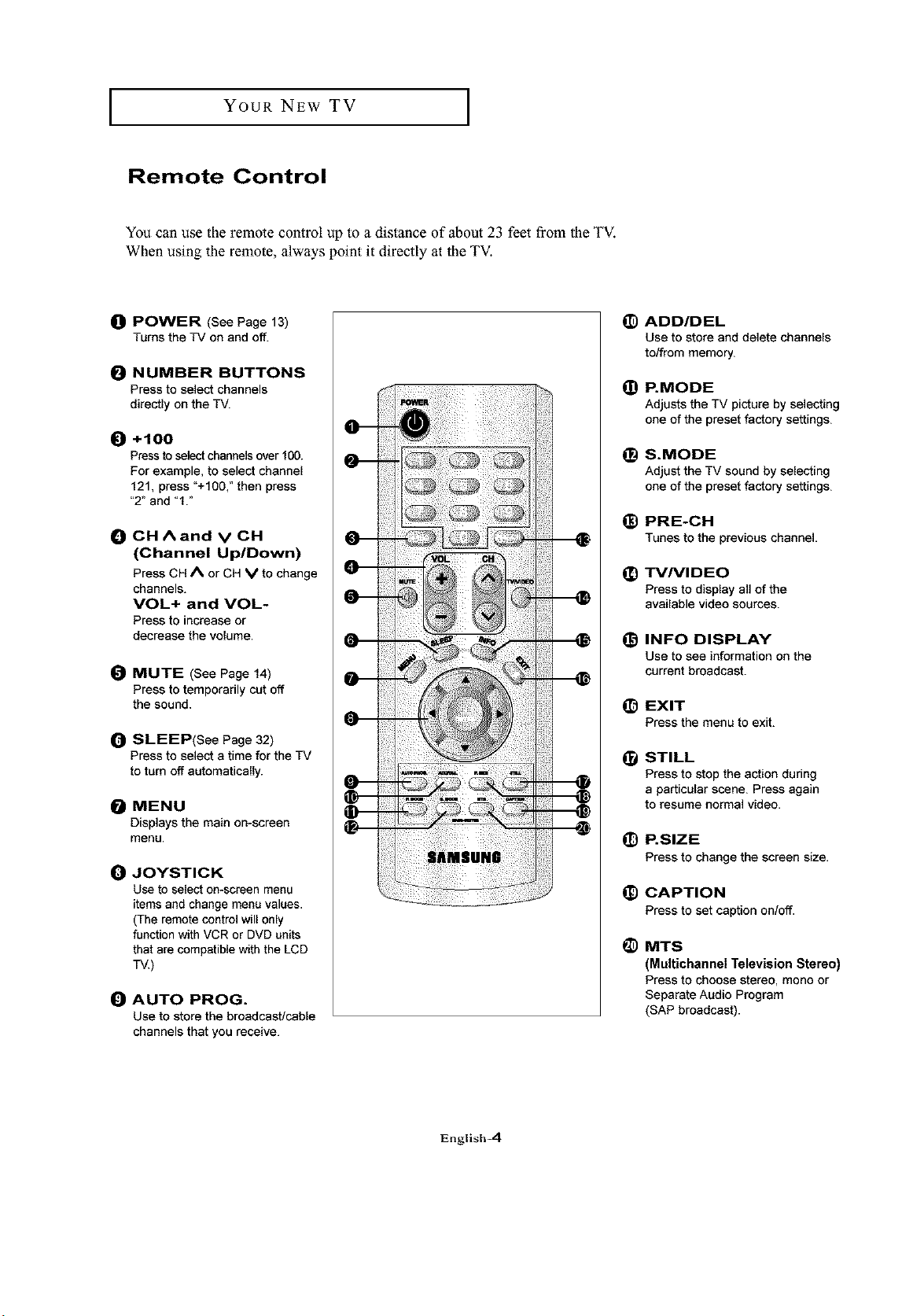
Remote Control
You can use the remote control up to a distance of about 23 feet from the TV.
When using the remote, always point it directly at the TV.
_) POWER (See Page 13)
Turns the TV on and off.
O NUMBER BUTTONS
Press to select channels
directly on the TV.
O +100
Press to select channels over 100.
For example, to select channel
121, press "+100," then press
"2" and "1."
O CHAand vCH
(Channel Up/Down)
Press CH A or CH V to change
channels.
VOL+ and VOL-
Press to increase or
decrease the volume.
O MUTE (See Page 14)
Press to temporarily cut off
the sound.
_) SLEEP(See Page 32)
Press to select a time for the TV
to turn off automatically.
MENU
Displays the main on-screen
menu.
O JOYSTICK
Use to select on-screen menu
items and change menu values.
(The remote control will only
function with VCR or DVD units
that are compatible with the LCD
TV.)
O AUTO PROG.
Use to store the broadcast/caNe
channels that you receive.
(D ADD/DEL
Use to store and delete channels
to/from memory.
@
@
--0
@
--o
--o
--o
@
--o
--o
--0
--o
(D
P.MODE
Adjusts the TV picture by selecting
one of the preset factory settings.
S.MODE
Adjust the TV sound by selecting
one of the preset factory settings.
PRE-CH
Tunesto the previouschannel.
TVNIDEO
Press to display all of the
available video sources.
INFO DISPLAY
Use to see informationon the
currentbroadcast.
EXIT
Press the menu to exit.
STILL
Press to stop the action during
a particular scene. Press again
to resume normal video.
P.SIZE
Press to changethe screen size.
CAPTION
Press to set captionee/off.
MTS
(Multichannel Television Stereo)
Press to choosestereo, mono or
SeparateAudio Program
(SAP broadcast).
English-4
YOUR NEW TV ]
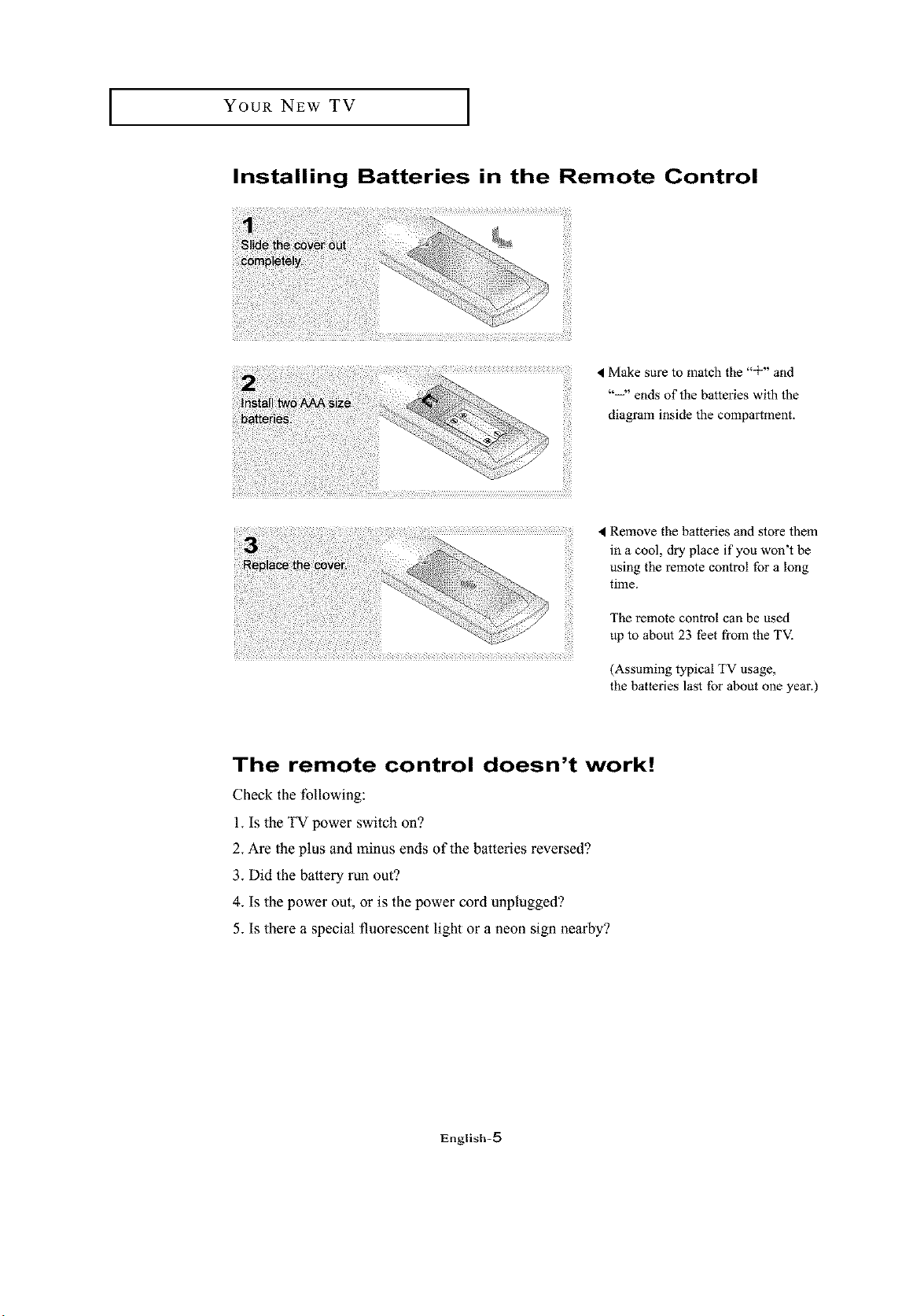
Installing Batteries in the Remote Control
!i_i _ri_si_ii!i_ii_i_iiiii_i¸
< Make sure to match the "÷" and
"--" ends of the batteries with the
diagram inside the compartment.
Remove the batteries and store them
in a cool, dry place if you won't be
using the remote control for a long
time.
The remote control can be used
up to about 23 feet from the TV.
(Assuming typical TV usage,
the batteries last for about one year.)
The remote control doesn't work!
Check the following:
1. Is the TV power switch on?
2. Are the plus and minus ends of the batteries reversed?
3. Did the battery run out?
4. Is the power out, or is the power cord unplugged?
5. Is there a special fluorescent light or a neon sign nearby?
English-_
INSTALLATION
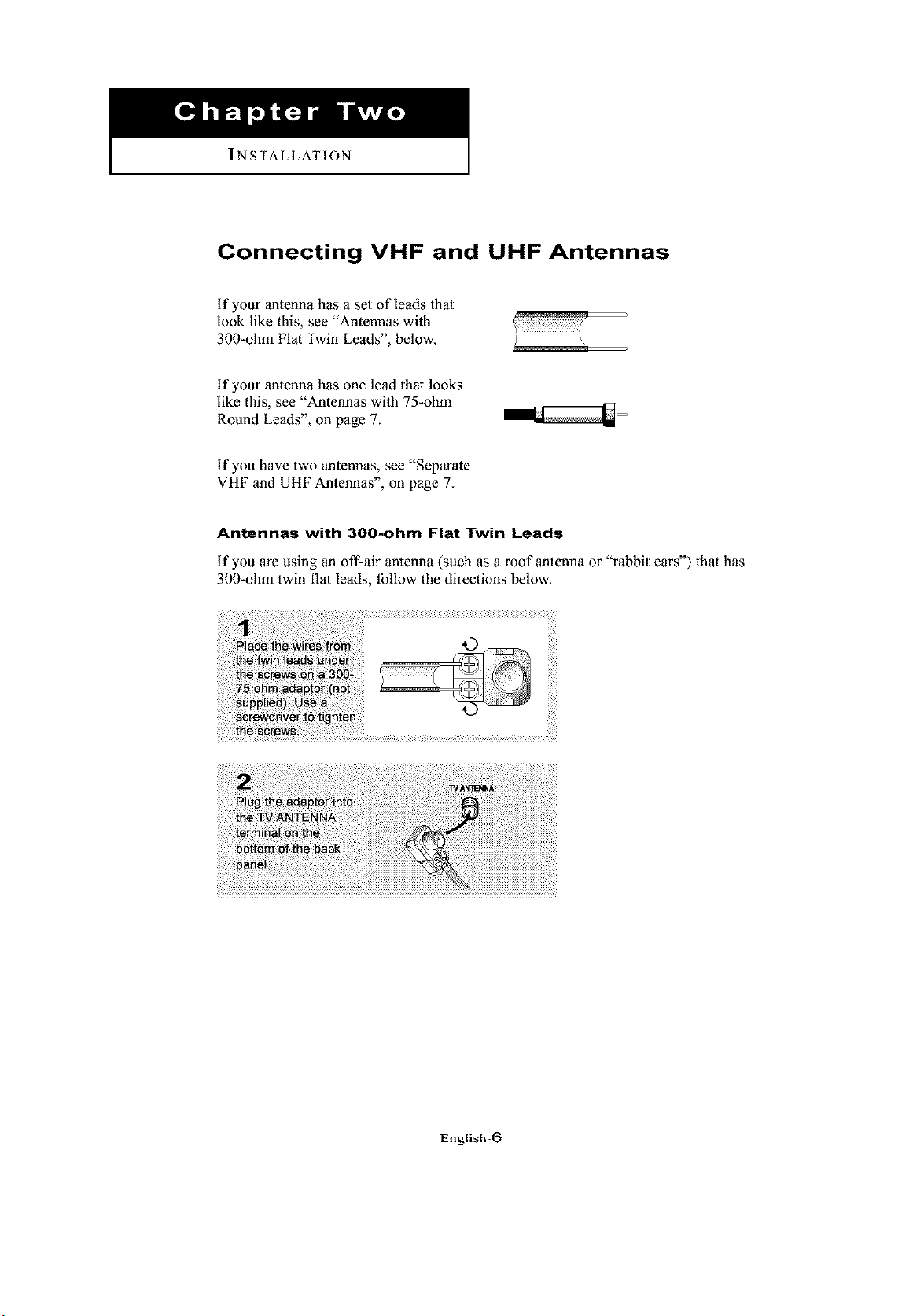
Connecting VHF and UHF Antennas
if your antenna has a set of leads that
look like this, see "Antennas with
300-ohm Flat Twin Leads", below.
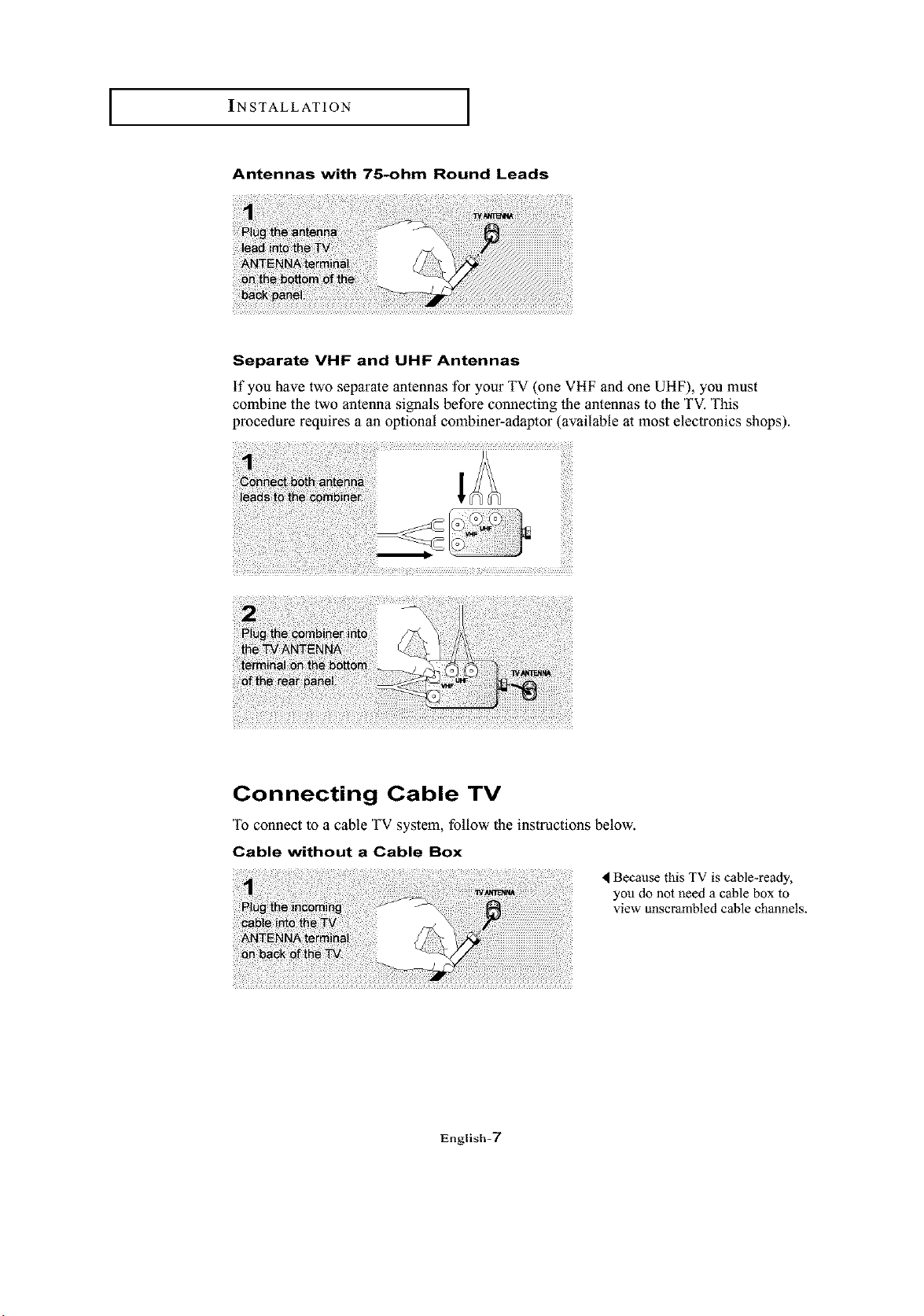
if your antenna has one lead thai looks
like this, see "Antennas with 75-ohm
Round Leads", on page 7.
if you have two antennas, see "Separate
VHF and UHF Antennas", on page 7.
Antennas with 300-ohm Flat Twin Leads
if you are using an off-air antenna (such as a roof antenna or "rabbit ears") that has
300-ohm twin flat leads, follow the directions below.
English-6
INSTALLATION I
Antennas with 75-ohm Round Leads
Separate VHF and UHF Antennas
if you have two separate antennas for your TV (one VHF and one UHF), you must
combine the two antenna signals before connecting lhe antennas to the TV. This
procedure requires a an optional combiner-adaptor (available at most electronics shops).
Connecting Cable TV
To connect to a cable TV system, follow the instructions below.
Cable without a Cable Box
4 Because this TV is cable-ready,
you do not need a cable box to
view unscrambled cable channels.
English=7
INSTALLATION I
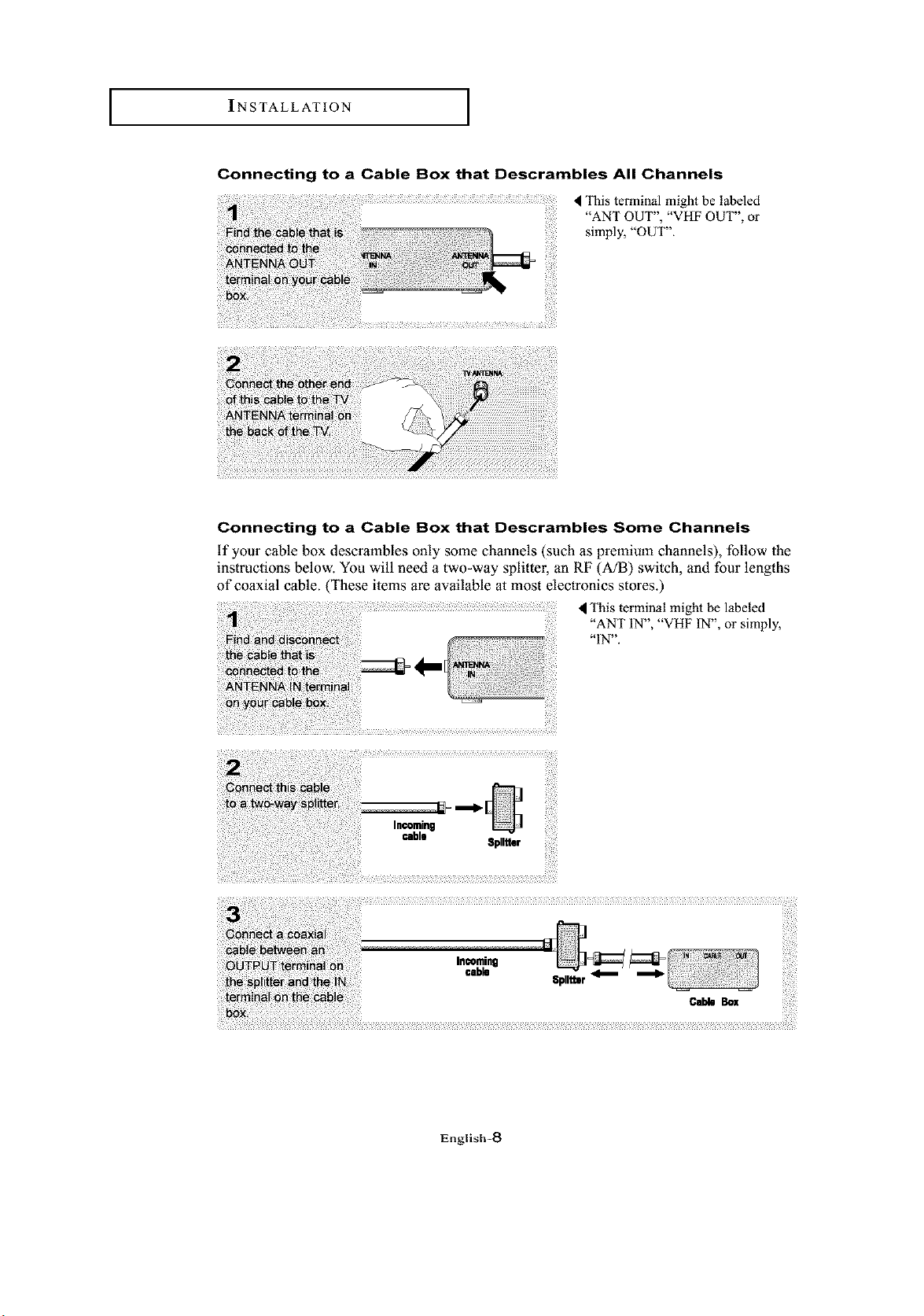
Connecting to a Cable Box that Descrambles All Channels
This terminal might be labeled
"ANT OUT", "VHF OUT", or
simply, "OUT".
Connecting to a Cable Box that Descrambles Some Channels
if your cable box descrambles only some channels (such as premium channels), follow the
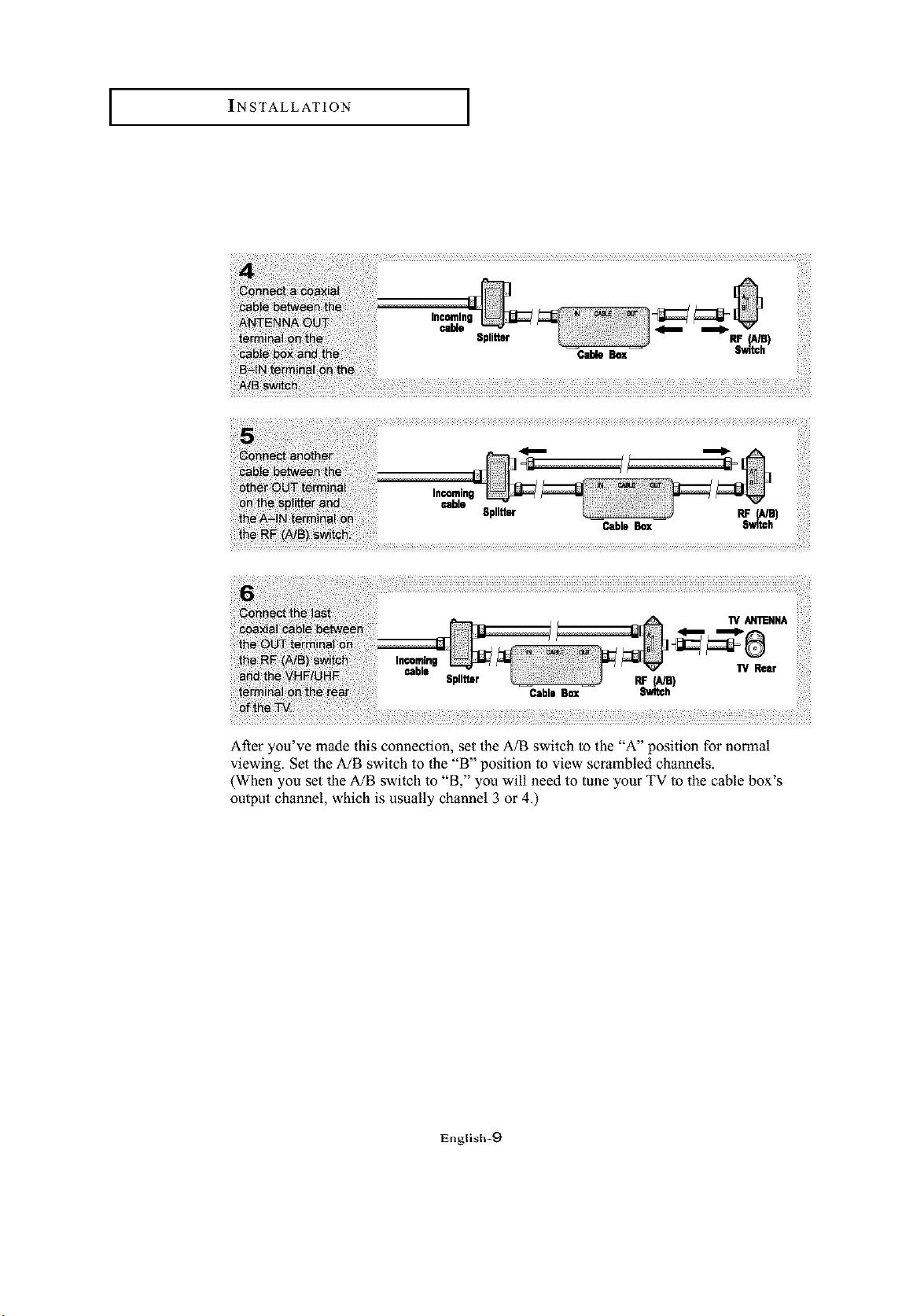
instructions below. You will need a two-way splitter, an RF (A/B) switch, and four lengths
of coaxial cable. (These items are available at most electronics stores.)
This terminal might be labeled
"ANT IN", "VHF IN", or simply,
"IN".
Splitter
ili!_%_ i_i_8__ _ ii_iiiii!il;¸ i!!ii_¸¸¸
Sp.tt.r,,e...-.
English-8
INSTALLATION I
RF_e)
Switch
RF (A/a)
Cable Box Switch
"rv AN'I_NNA
After you've made this connection, set the A/B switch to the "A" position for normal
viewing. Set the A/B switch to the "B" position to view scrambled channels.
(When you set the A/B switch to "B," you will need to tune your TV to the cable box's
output channel, which is usually channel 3 or 4.)
English-9
INSTALLATION I
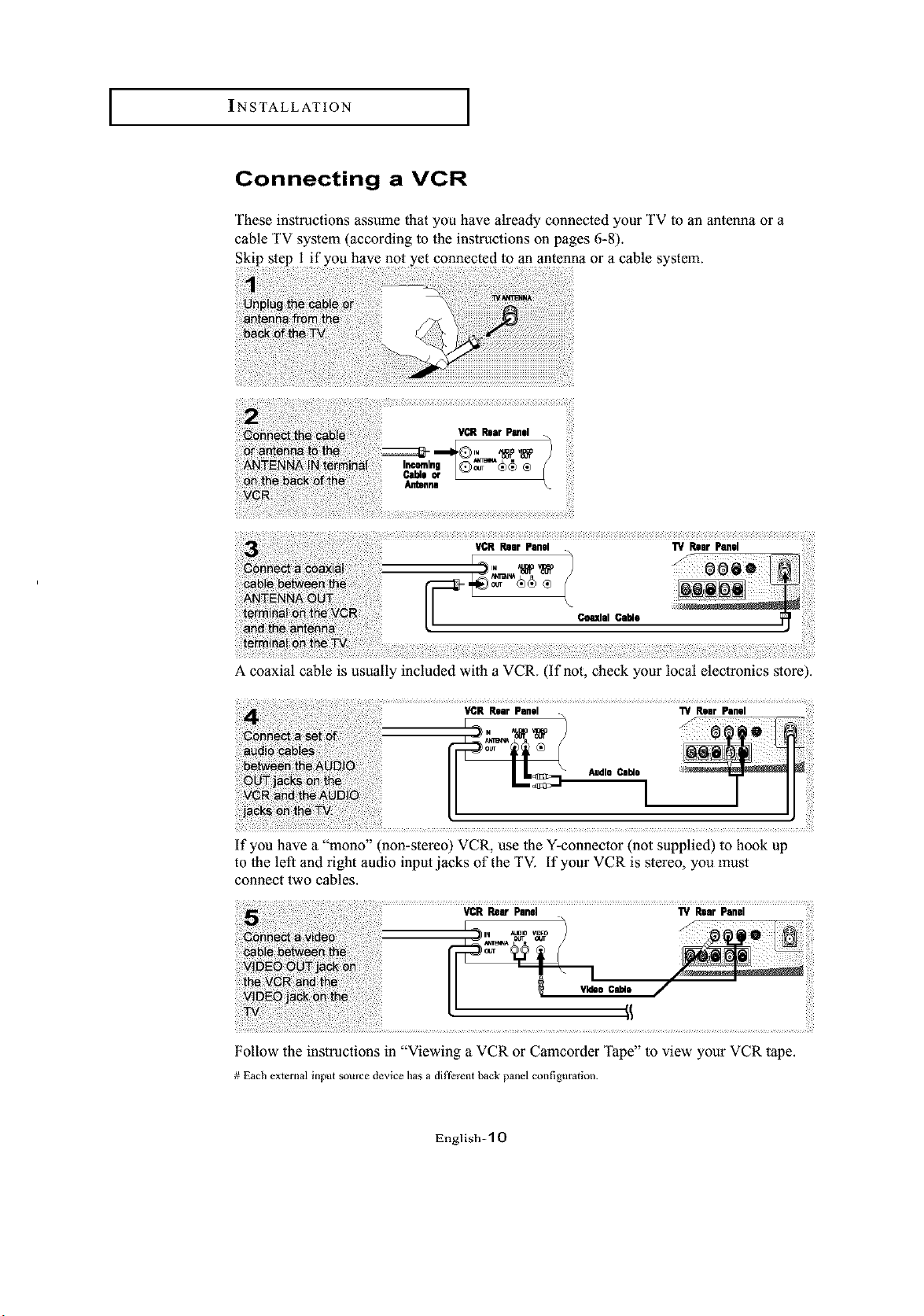
Connecting a VCR
These instructions assume that you have already connected your TV to an antenna or a
cable TV system (according to the instructions on pages 6-8).
Skip step 1 if you have not yet connected to an antenna or a cable system.
A coaxial cable is usually included with a VCR. (If not, check your local electronics store).
If you have a "mono" (non-stereo) VCR, use the Y-connector (not supplied) to hook up
to the left and right audio input jacks of the TV. If your VCR is stereo, you must
connect two cables.
Follow the instructions in "Viewing a VCR or Camcorder Tape" to view your VCR tape.
# Each external input source device has a different back panel configuration.
English-10
INSTALLATION I
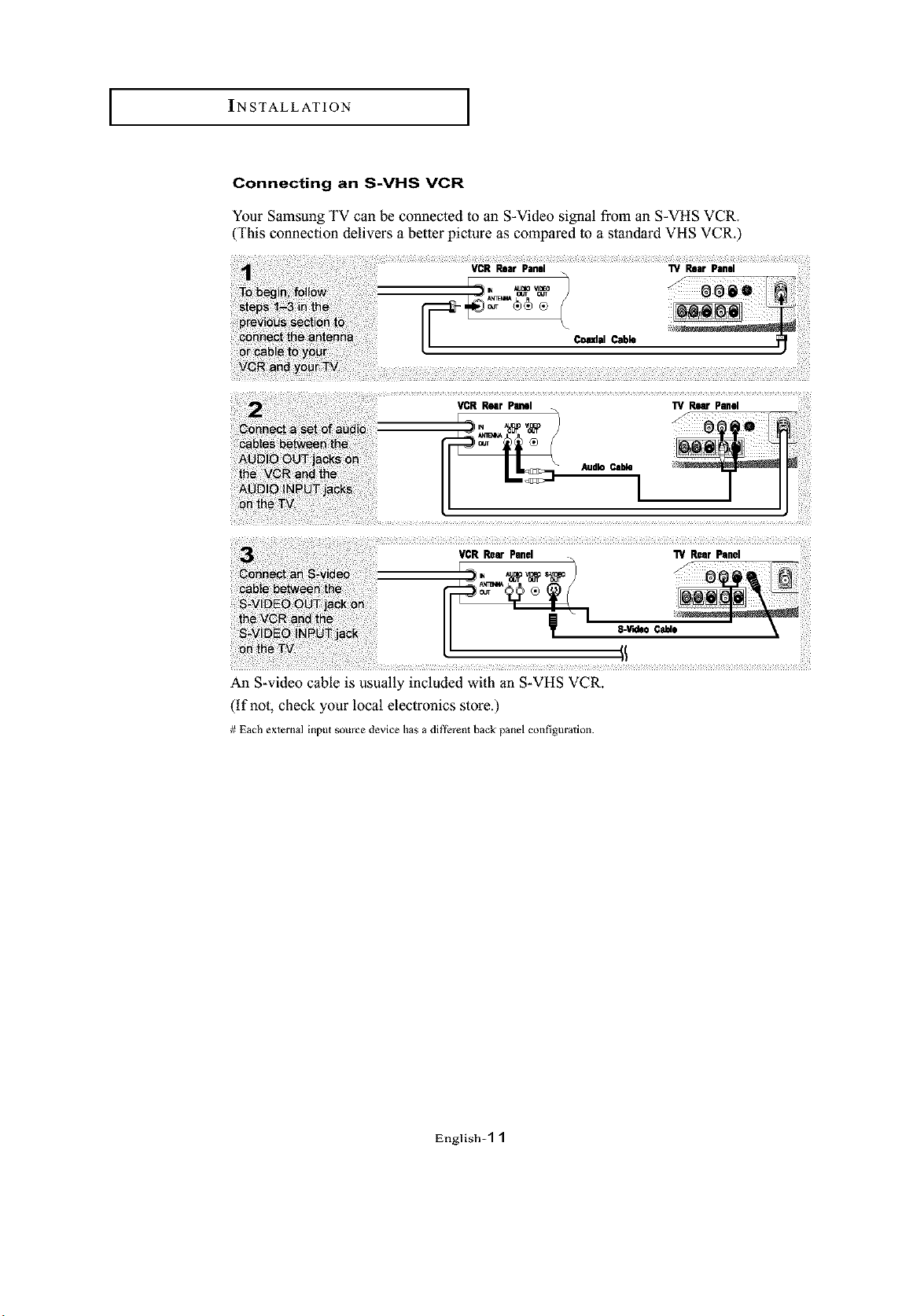
Connecting an S-VHS VCR
Your Samsung TV can be connected to an S-Video signal from an S-VHS VCR.
(This connection delivers a better picture as compared to a standard VHS VCR.)
Comdal Cable
VCR Rear Panel
An S-video cable is usually included with an S-VHS VCR.
(if not, check your local electronics store.)
# Each external input source device has a different back panel configuration.
English-'[ I
INSTALLATION I
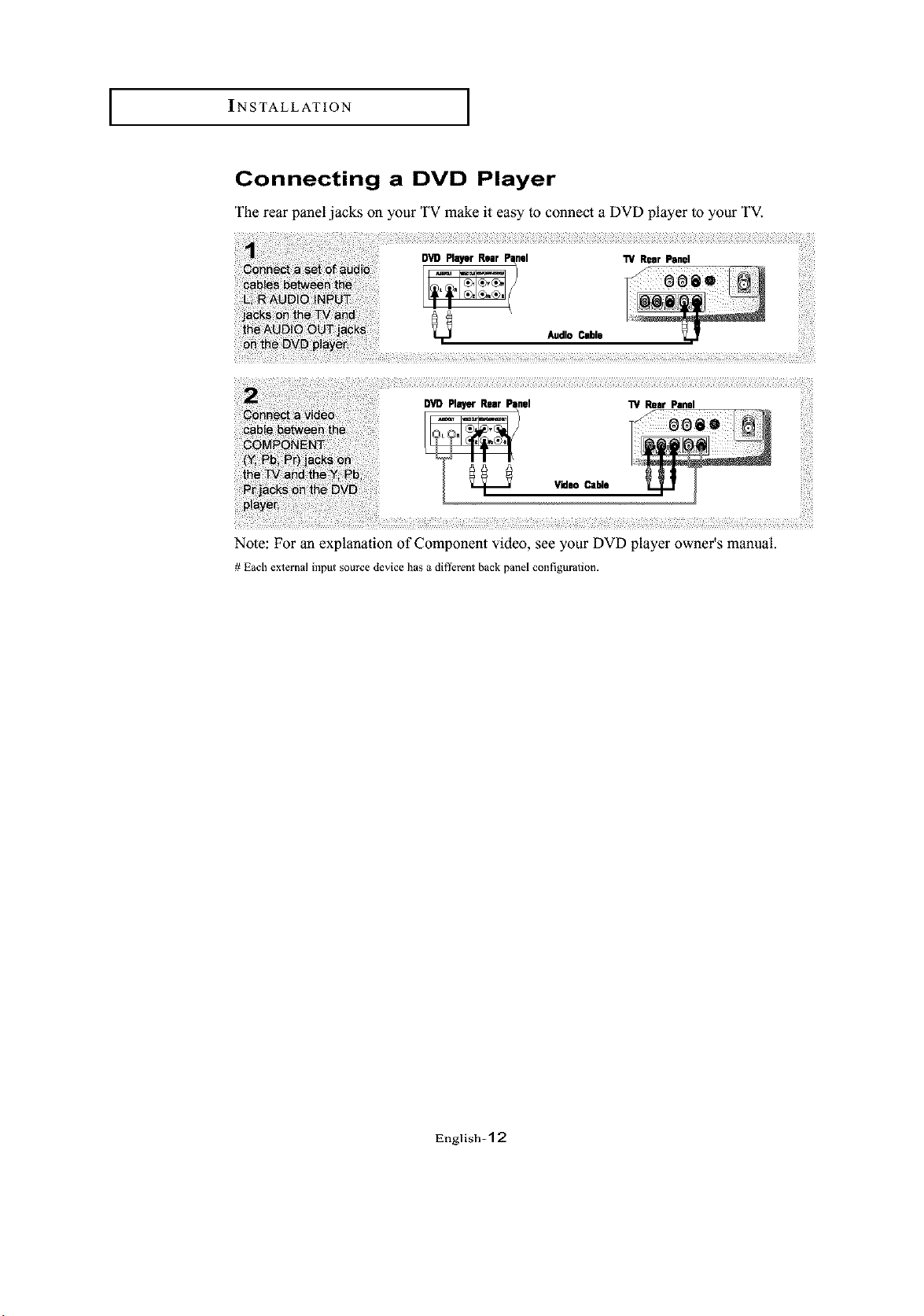
Connecting a DVD Player
The rear panel jacks on your TV make it easy to connect a DVD player to your TV.
Note: For an explanation of Component video, see your DVD player owner's manual.
# Each external input source device has a different back panel configuration.
English=l 2
SPECIAL FEATURES
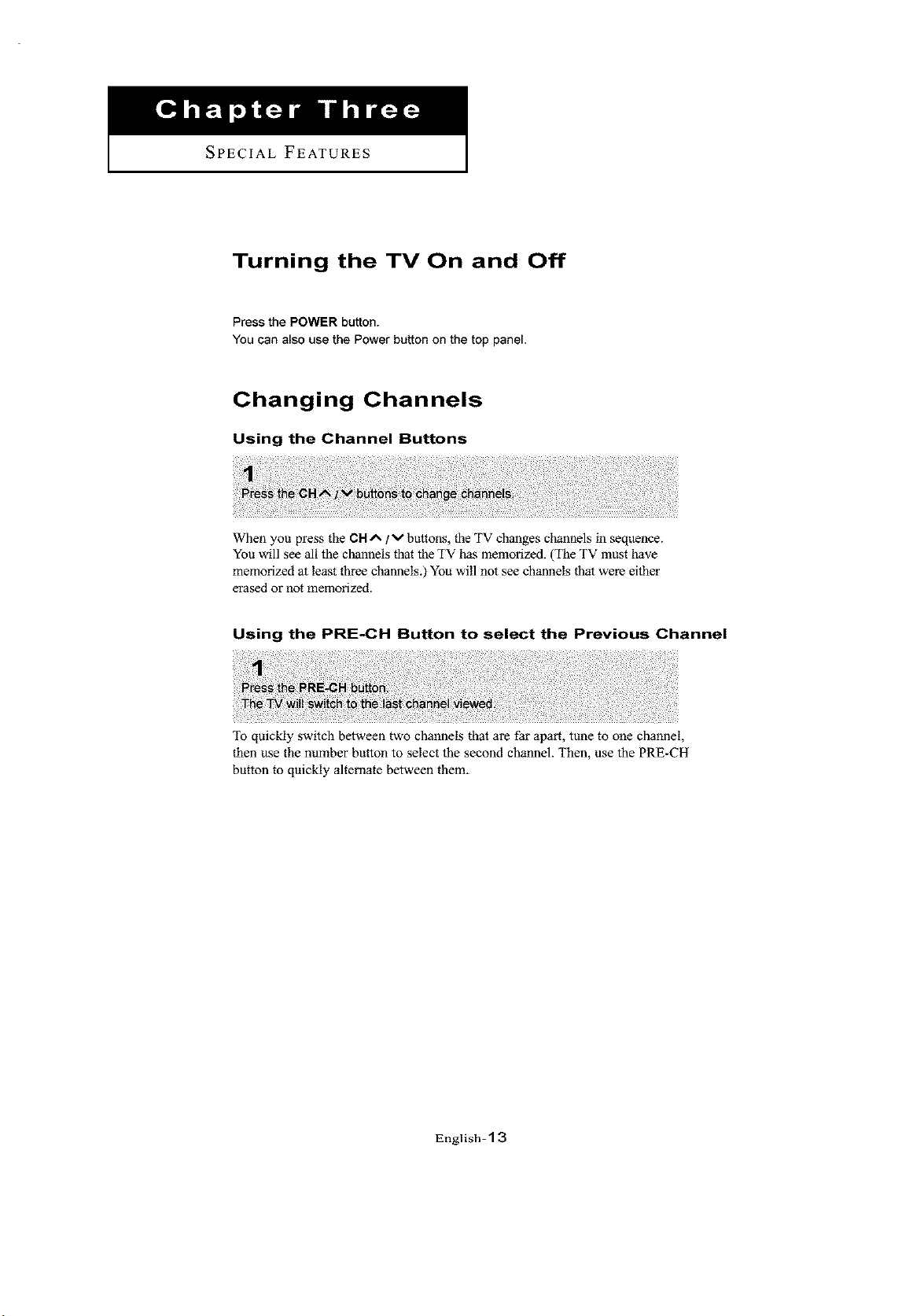
Turning the TV On and Off
Press the POWER button.
You can also use the Power button on the top panel.
Changing Channels
Using the Channel Buttons
When you press the CH A / v buttons, the TV changes channels in sequence.
You will see all the channels that the TV has memorized. (The TV must have
memorized at least three channels.) You will not see channels that were either
erased or not memorized.
Using the PRE-CH Button to select the Previous Channel
To quickly switch between two channels that are far apart, tune to one channel,
then use the number button to select the second channel. Then, use the PRE-CH
button to quickly alternate between them.
English-1 3
J SPECIAL FEATURES J
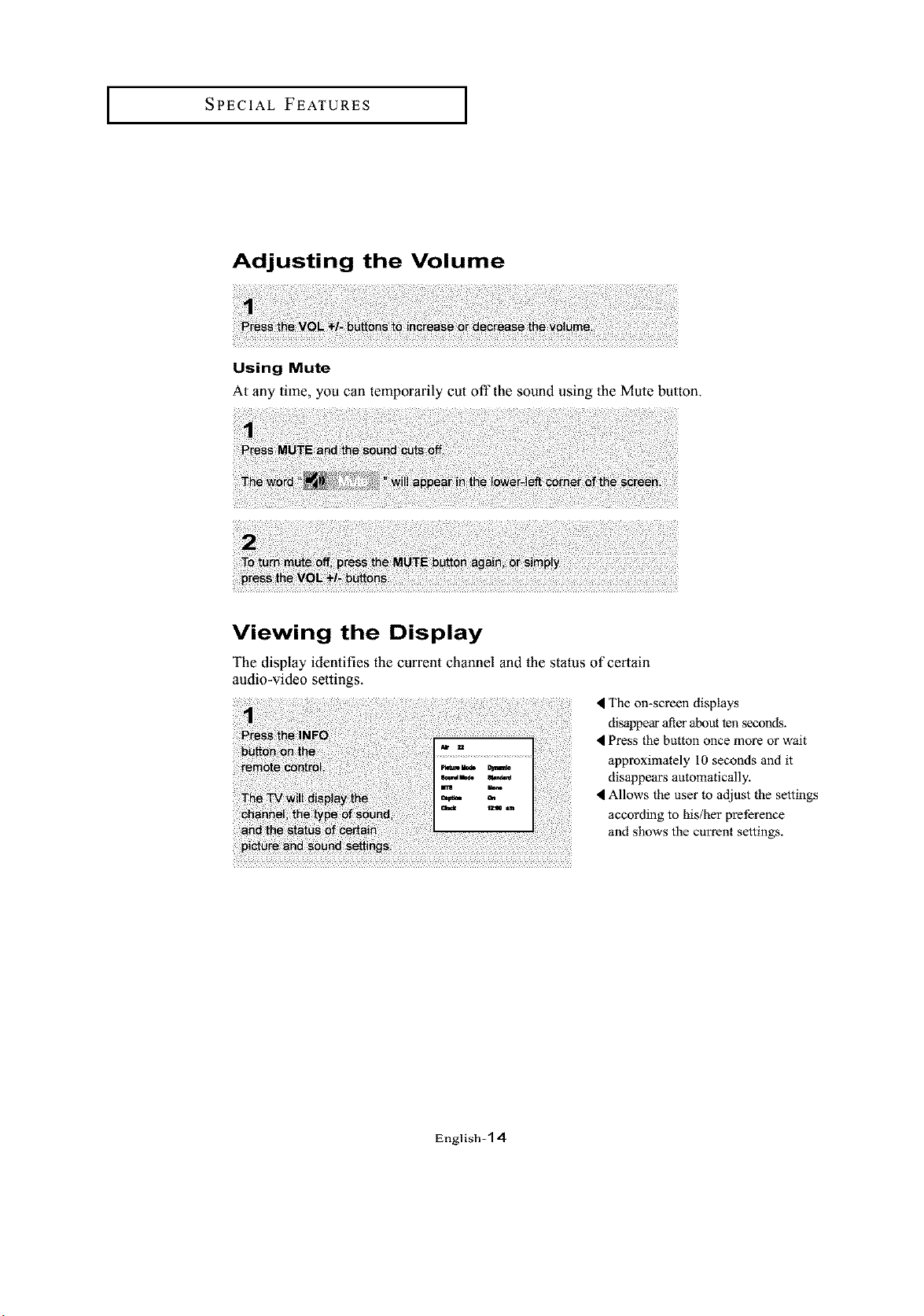
Adjusting the Volume
Using Mute
At any time, you can temporarily cut off the sound using lhe Mute button.
Viewing the Display
The display identifies the current channel and lhe status of certain
audio-video settings.
The on-screen displays
disappear atler about ten seconds.
Press the button once more or wait
approximately I0 seconds and it
disappears automatically.
Allows the user to adjust the settings
according to his/her preference
and shows the current settings.
English-1 4
OPERATION
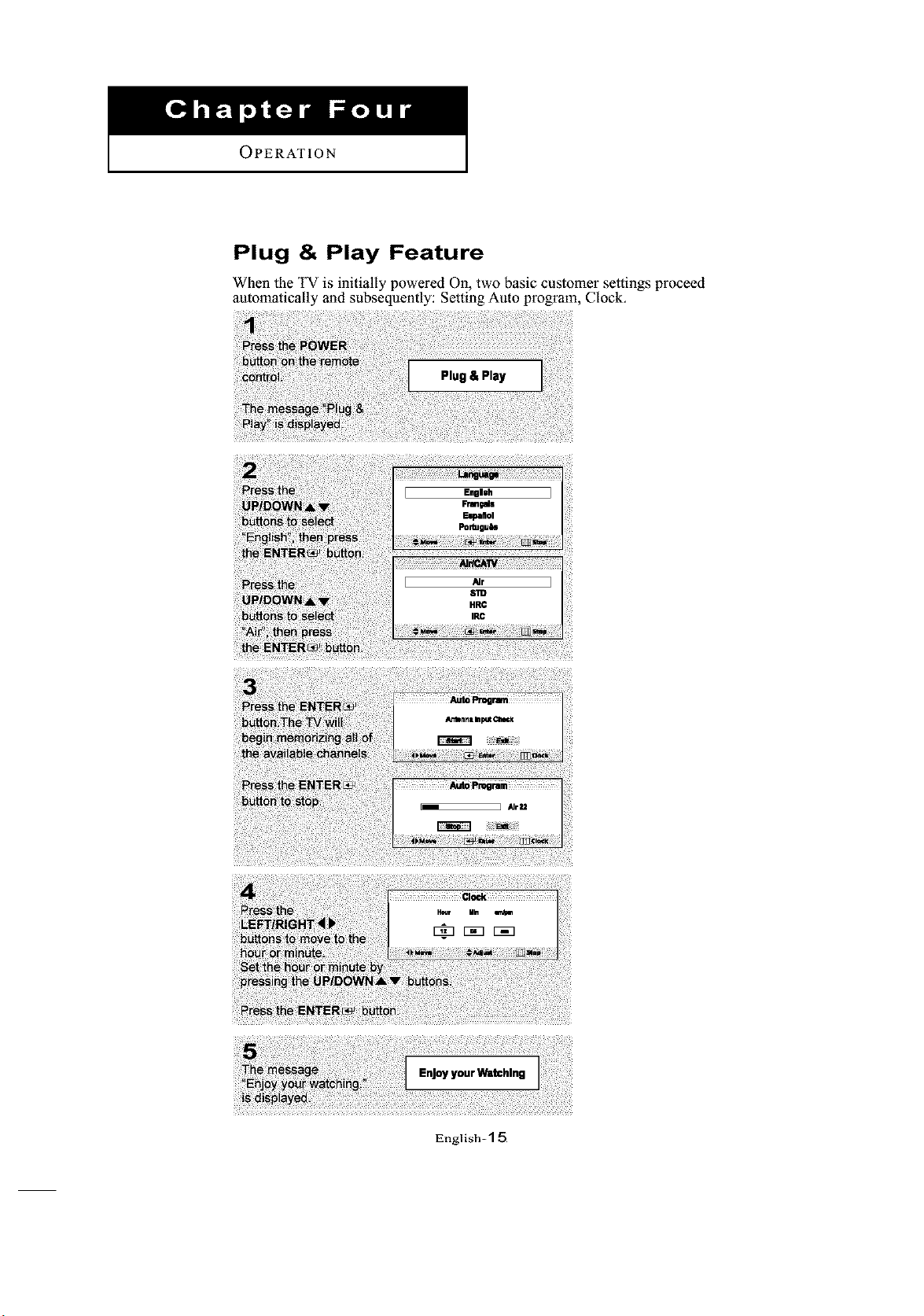
Plug & Play Feature
When the TV is initially powered 011, two basic customer settings proceed
automatically and subsequently: Setting Auto program, Clock,
Plug& Play
English-1 5
OPERATION [
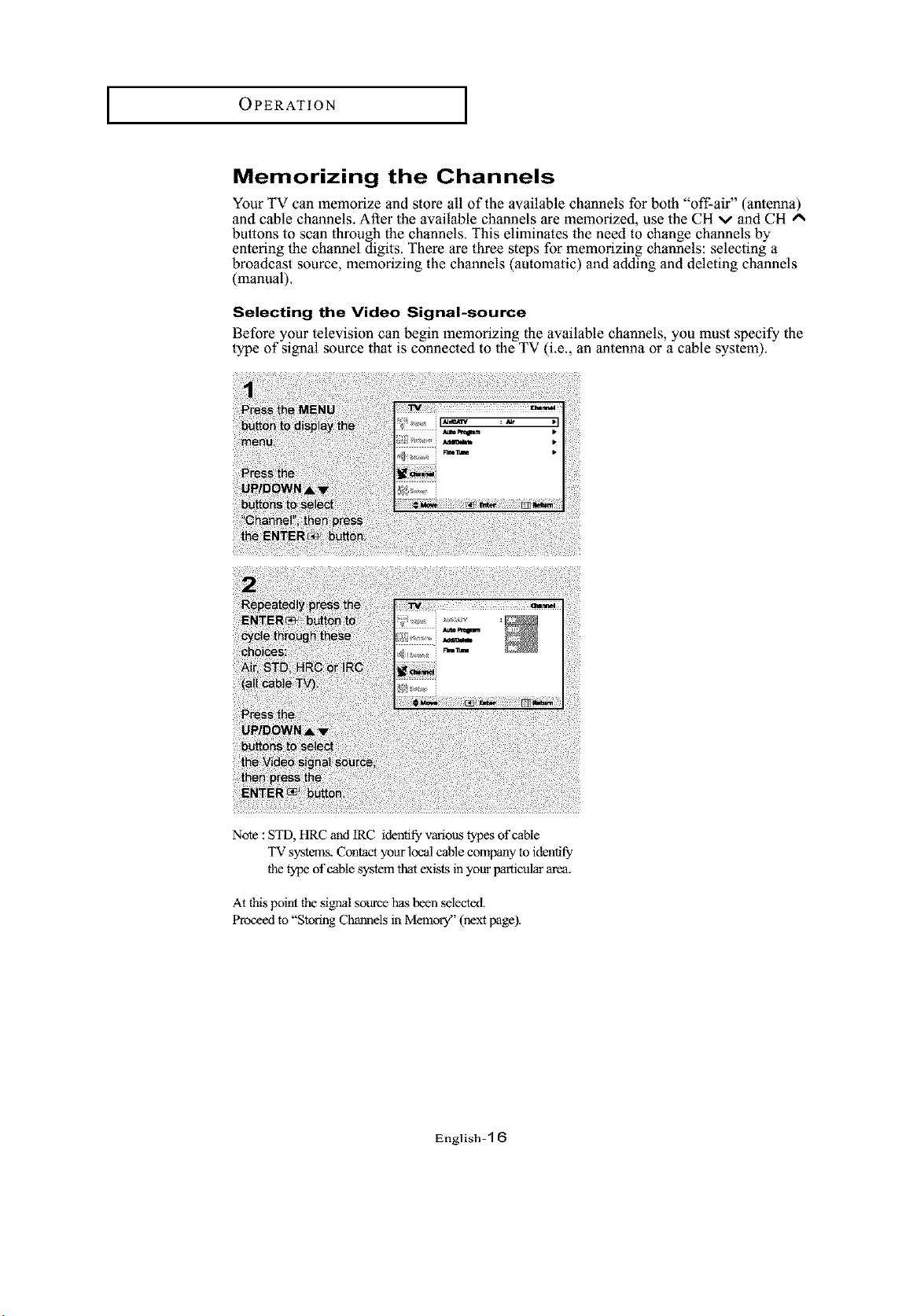
Memorizing the Channels
Your TV can memorize and store all of the available channels for both "off-air" (antenna)
and cable channels. After the available channels are memorized, use the CH v and CH A
buttons to scan through the channels. This eliminates the need to change channels by
entering the channel digits. There are three steps for memorizing channels: selecting a
broadcast source, memorizing the channels (automatic) and adding and deleting channels
(manual).
Selecting the Video Signal-source
Before your television can begin memorizing the available channels, you must specify the
type of signal source that is connected to the TV (Le., an antenna or a cable system).
Note : STD, HRC and IRC identify various types of cable
TV systems. Contact your local cable comfy to identify
the type of cable system that exists in your particular area.
At this pointthe signalsourcehasbeenselected.
Proceedto StoringChannelsinMemory (nextpage).
English-1
OPERATION
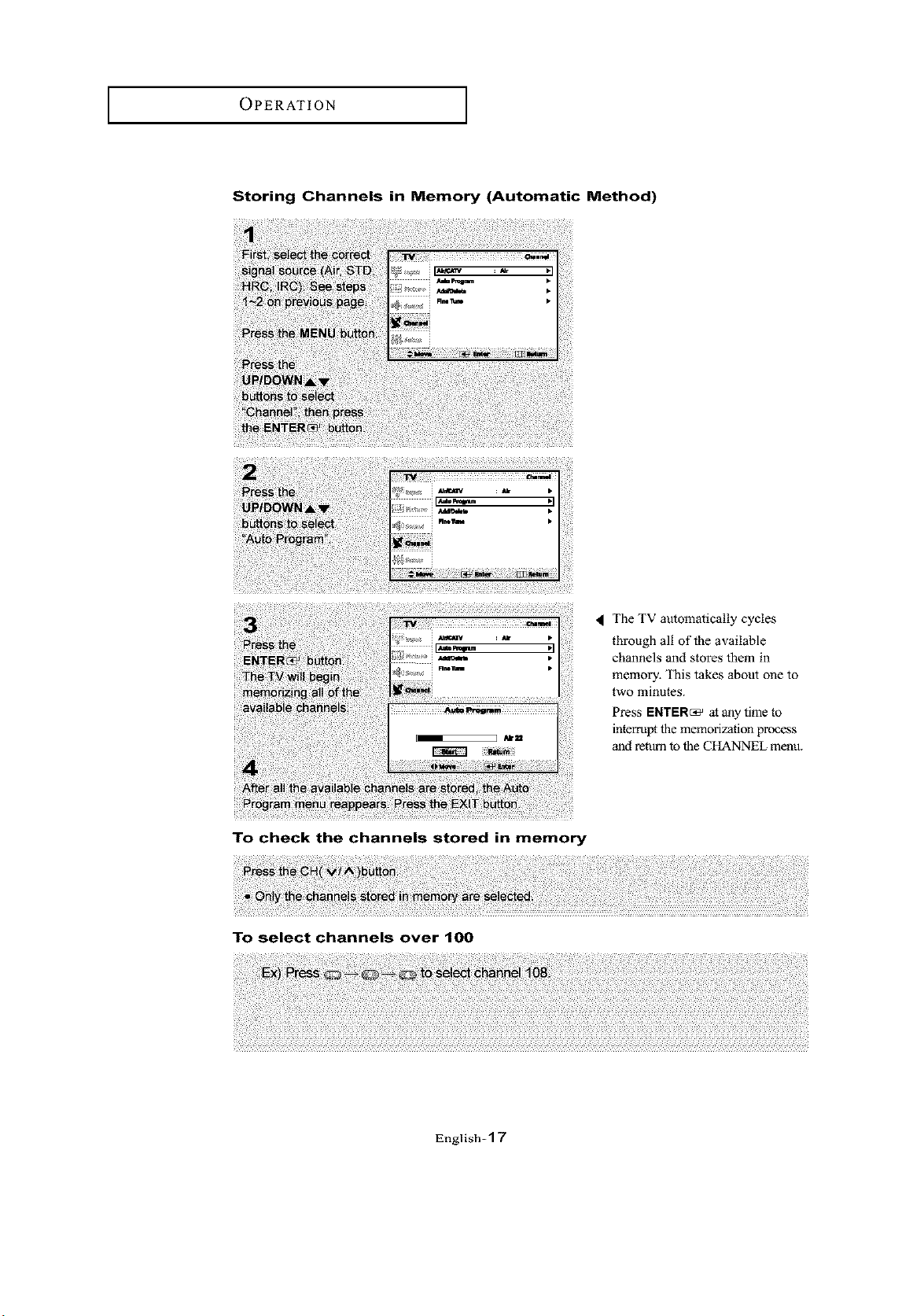
Storing Channels in Memory (Automatic Method)
The TV automatically cycles
through all of the available
channels and stores them in
memory, This takes about one to
two minutes.
Press ENTER_ at any time to
interrupt the memorization process
and return to the CHANNEL menu.
To check the channels stored in memory
To select channels over 100
English-*] 7
OPERATION [
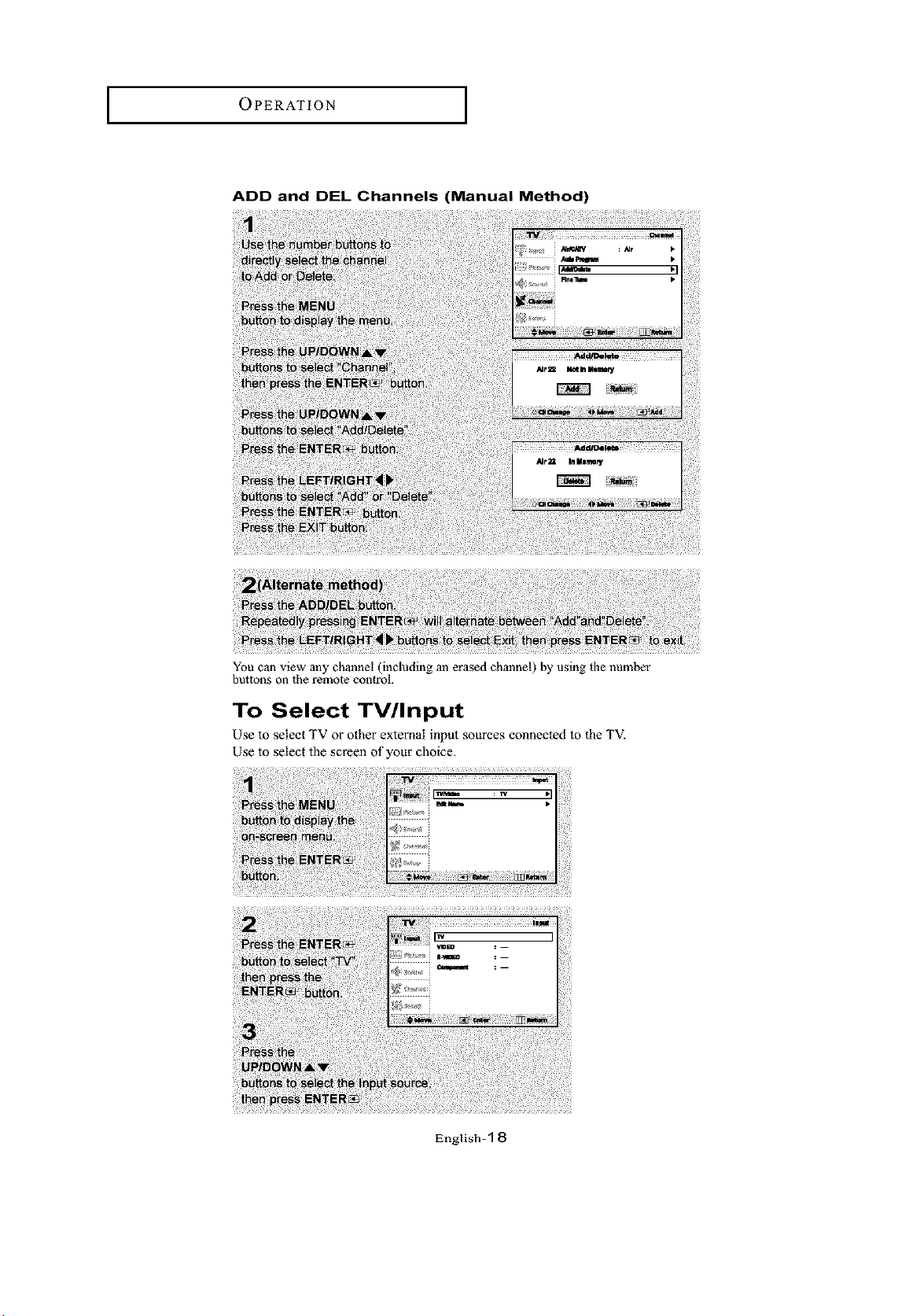
ADD and DEL Channels (Manual Method)
You can view any channel (including an erased channel) by using fl_e number
buttons on the remote control.
To Select TV/Input
Use to select TV o1"other external input sources connected to the TV.
Use to select the screen of your choice,
English-1 8
OPERATION
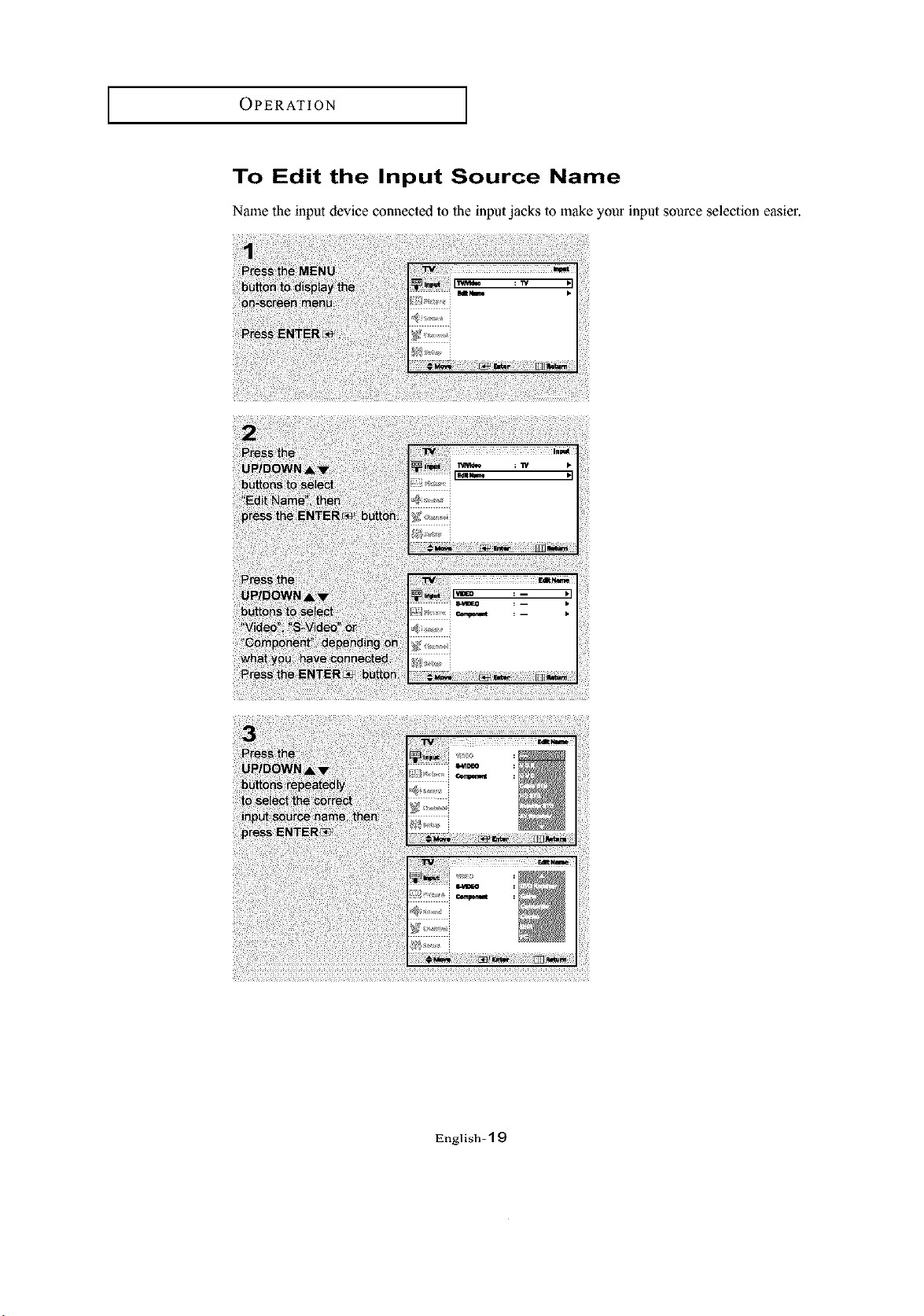
To Edit the Input Source Name
Name the input device comaected to the input jacks to make your input source selection easier.
English=l 9
OPERATION [
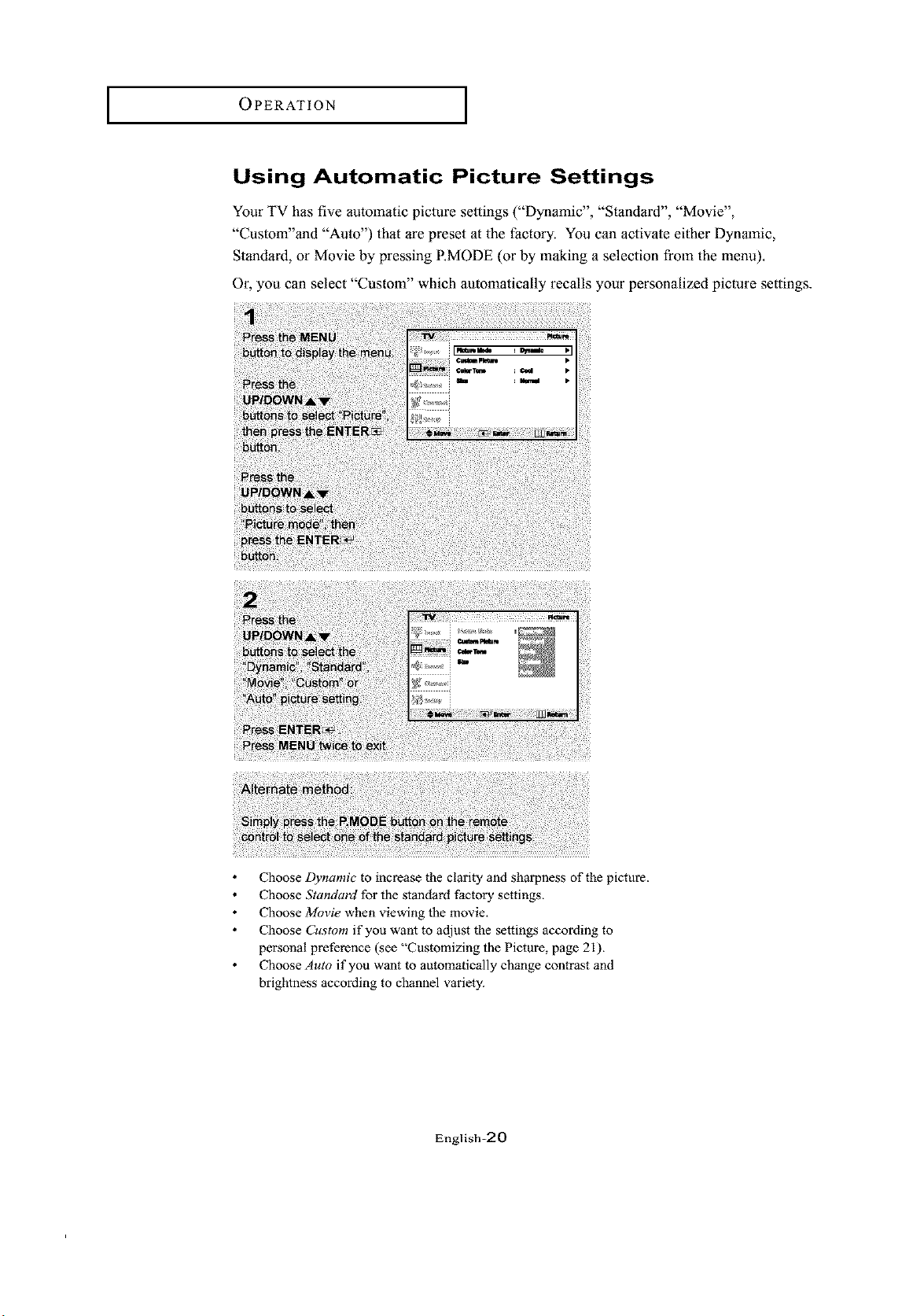
Using Automatic Picture Settings
Your TV has five automatic picture settings ("Dynamic", "Standard", "Movie",
"Custom"and "Auto") that are preset at the factory. You can activate either Dynmnic,
Standard, or Movie by pressing RMODE (or by making a selection from the menu).
Or, you can select "Custom" which automatically recalls your personalized picture settings.
Choose Dynamic to increase the clarity and sharpness of the picture.
Choose Standard for the standard factory settings.
Choose Movie when viewing the movie,
Choose Custom if you want to adjust the settings according to
personal preference (see "Customizing the Picture, page 21),
Choose Auto if you want to automatically change contrast and
brightness according to channel variety.
English-20
OPERATION
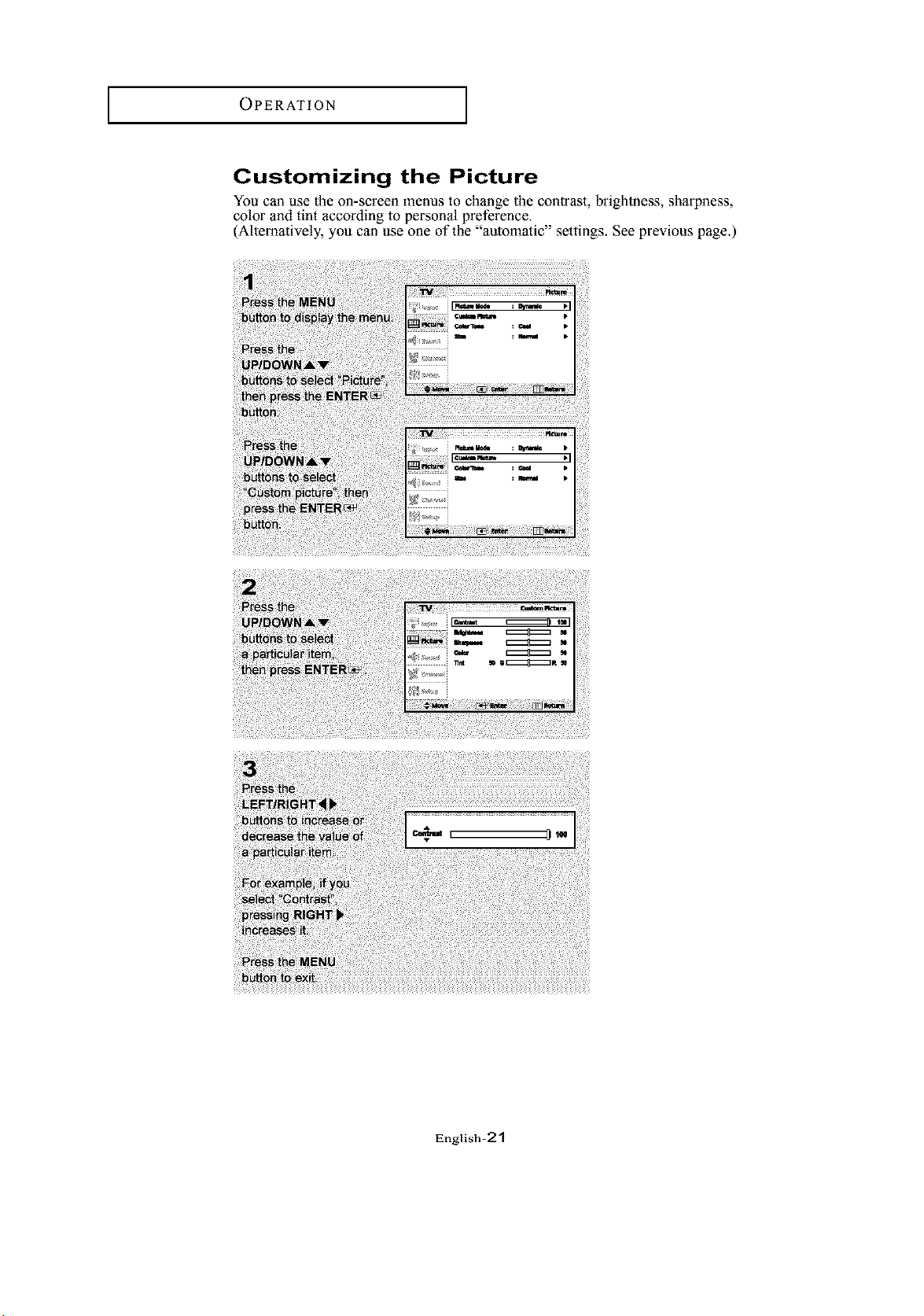
Customizing the Picture
You can use the on-screen menus to change the contrast, brightness, sharpness,
color and tint according to personal preference.
(Alternatively, you can use one of the "automatic" settings. See previous page.)
English=21
OPERATION [
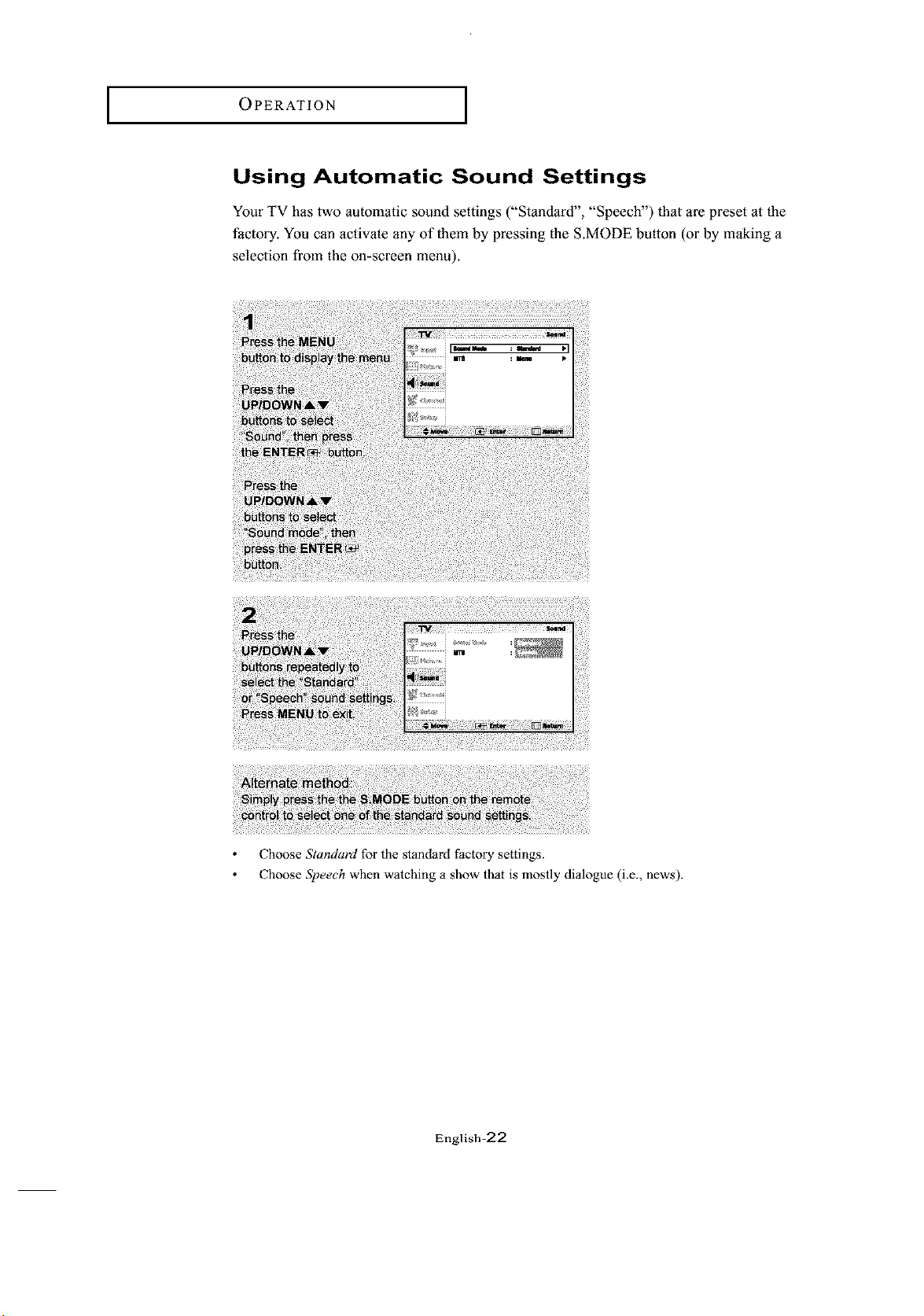
Using Automatic Sound Settings
Your TV has two automatic sound settings ("Standard", "Speech") that are preset at the
factory. You can activate an, of them by pressing the S.MODE button (or by making a
selection from the on-screen menu).
Choose Standard for the standard factory settings.
Choose Speech when watching a show that is mostly dialogue (i.e., news).
English=22
OPERATION
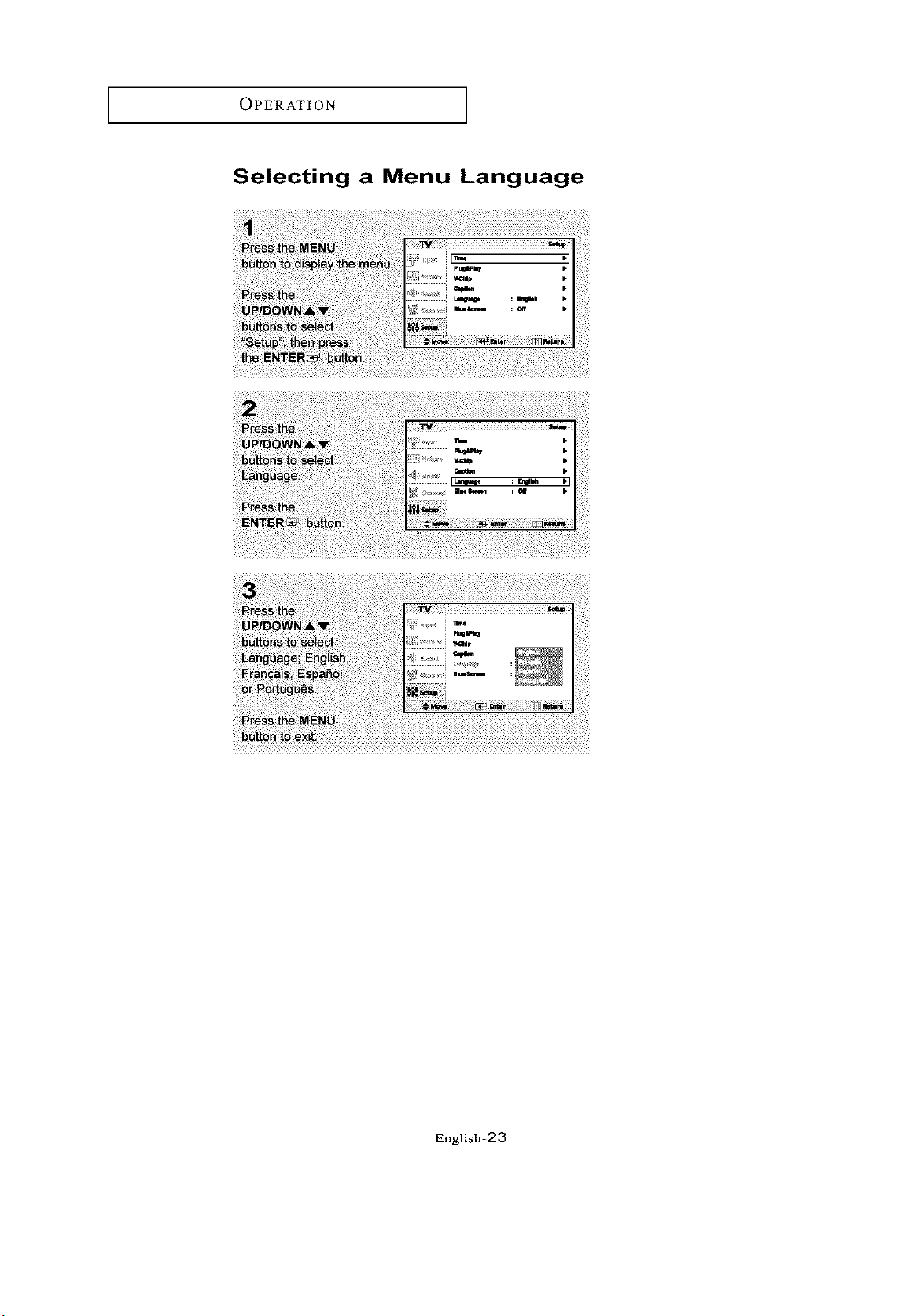
Selecting a Menu Language
English=23
OPERATION J
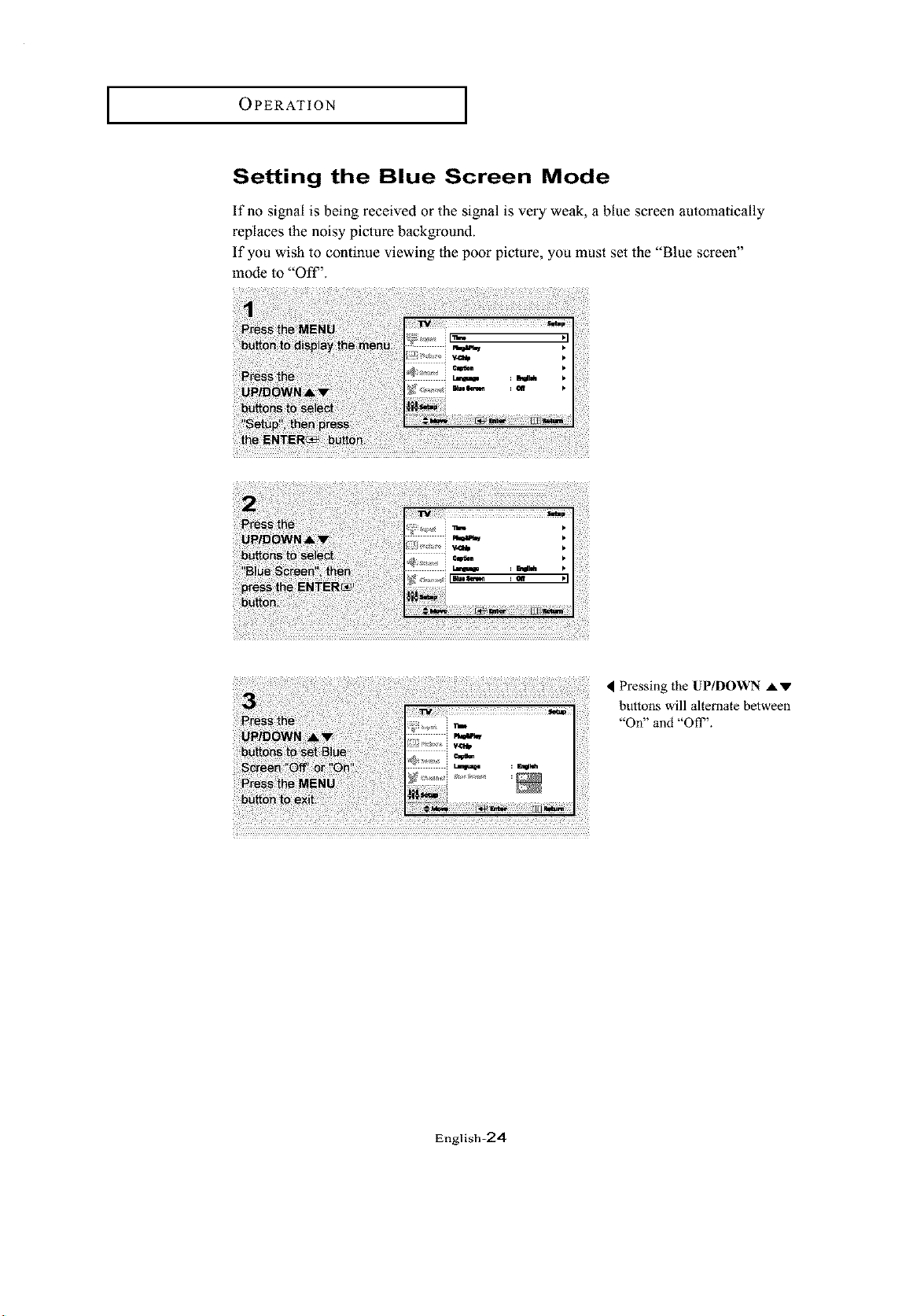
Setting the Blue Screen Mode
If no signal is being received or the signal is very weak, a blue screen automatically
replaces the noisy picture background.
If you wish to continue viewing lhe poor picture, you must set the "Blue screen"
mode to "Oft".
Pressing the UP/DOWN AV
buttons will alternate between
"On" and "Off _'.
Iinglish-24
OPERATION
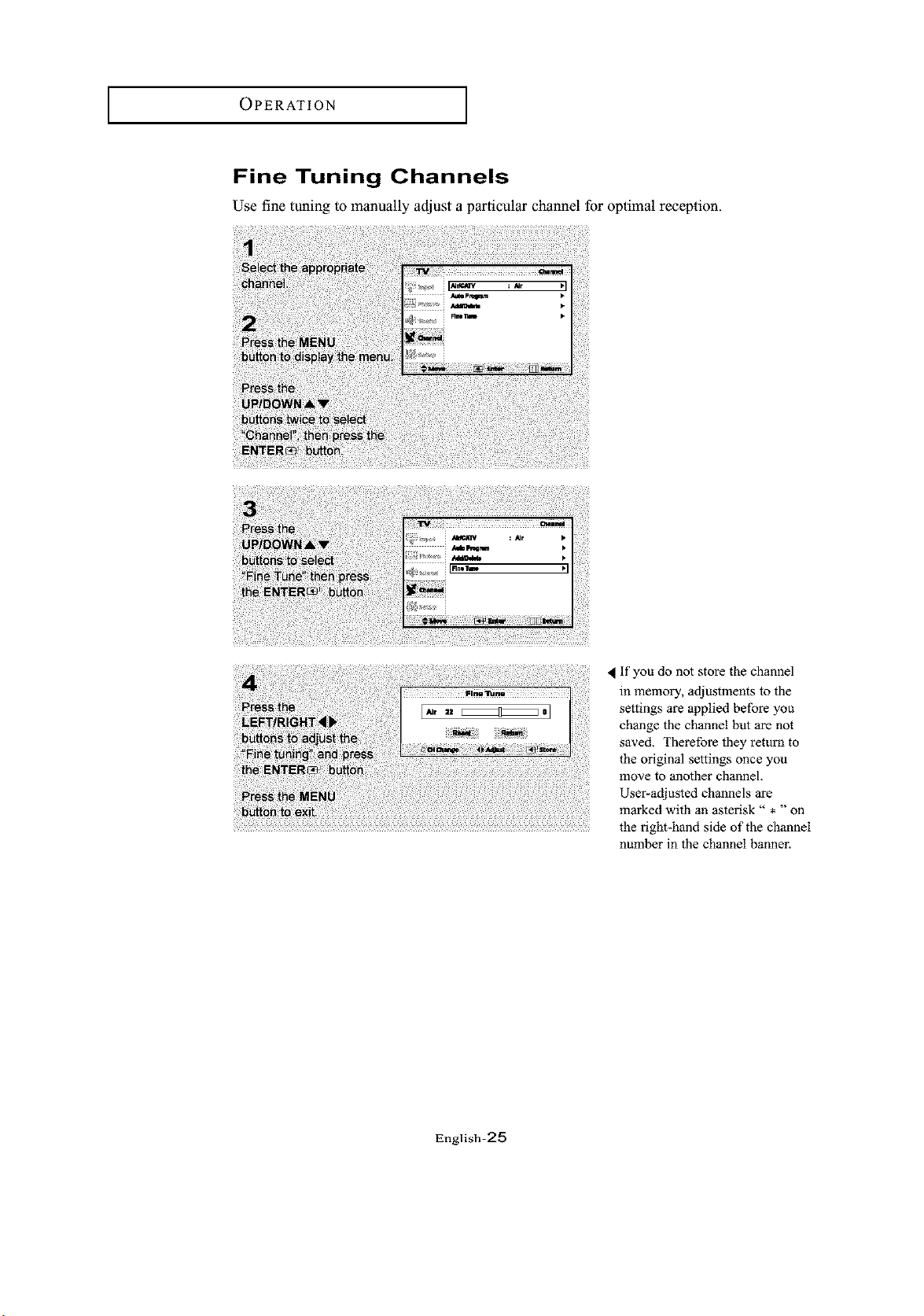
Fine Tuning Channels
Use fine tuning to manually adjust a particular channel for optimal reception.
If you do not store the channel
in memory, adjustments to the
settings are applied before you
change the channel but are not
saved. Therefore they return to
the original settings once you
move to another channel.
User-adjusted channels are
marked with an asterisk" * "on
the right-hand side of the channel
number in the channel banner.
English=25
OPERATION [
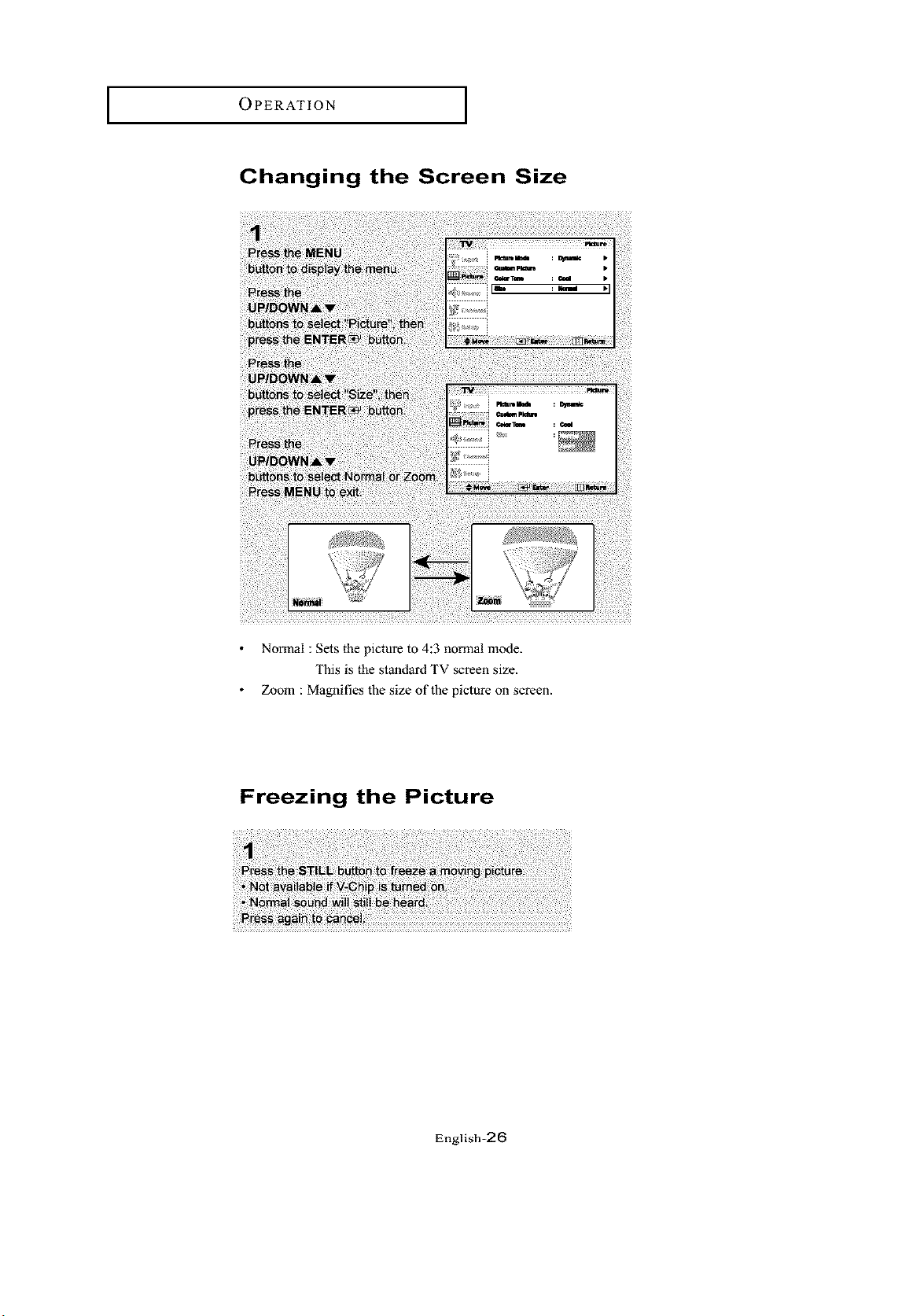
Changing the Screen Size
Normal : Sets the picture to 4:3 normal mode.
This is the standard TV screen size.
Zoom : Magnifies the size of the picture on screen.
Freezing the Picture
English=26
OPERATION
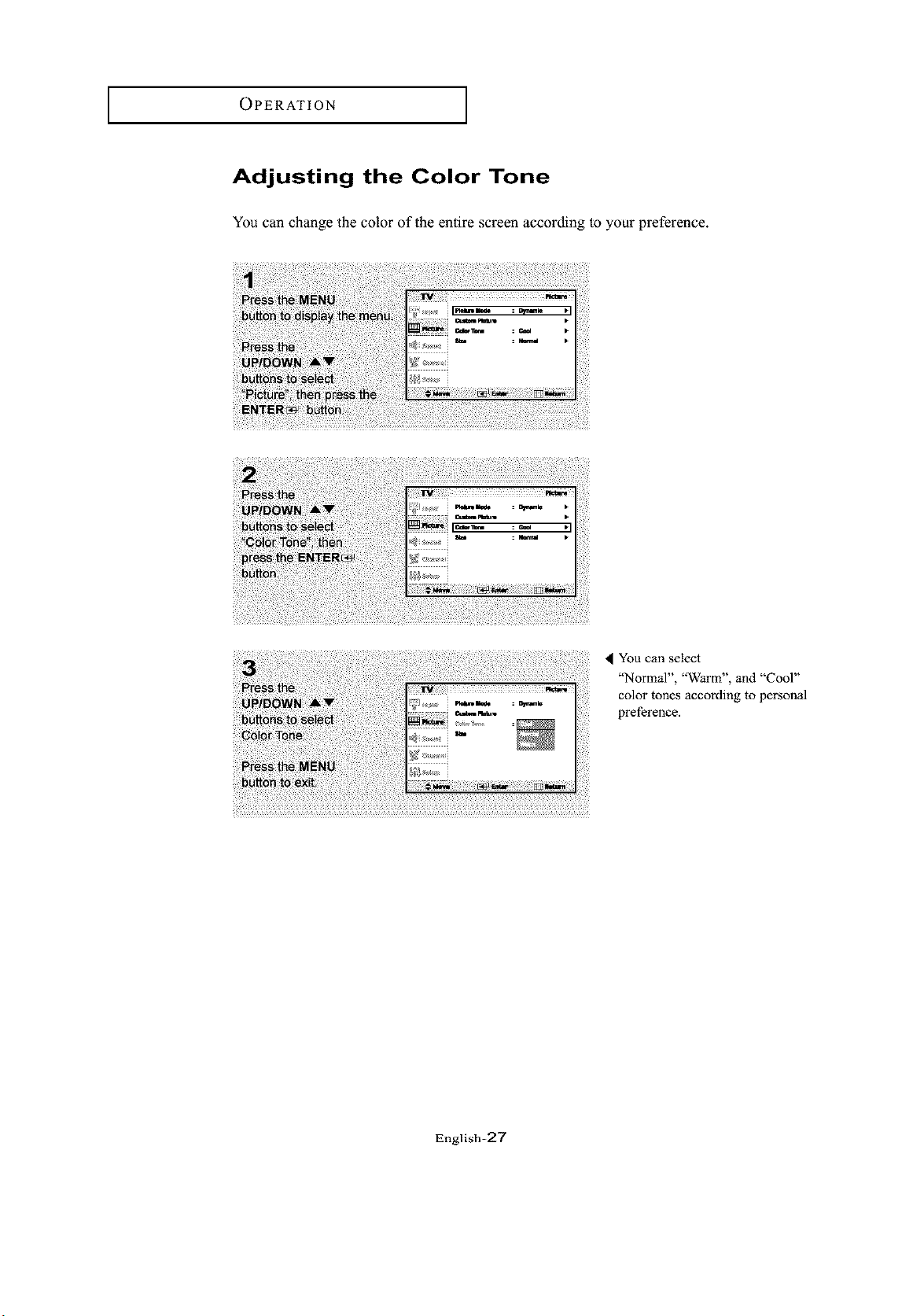
Adjusting the Color Tone
You can change the color of the entire screen according to your preference.
You can select
"Normal", "Warm", and "Cool"
color tones according to personal
preference.
English=27
OPERATION [
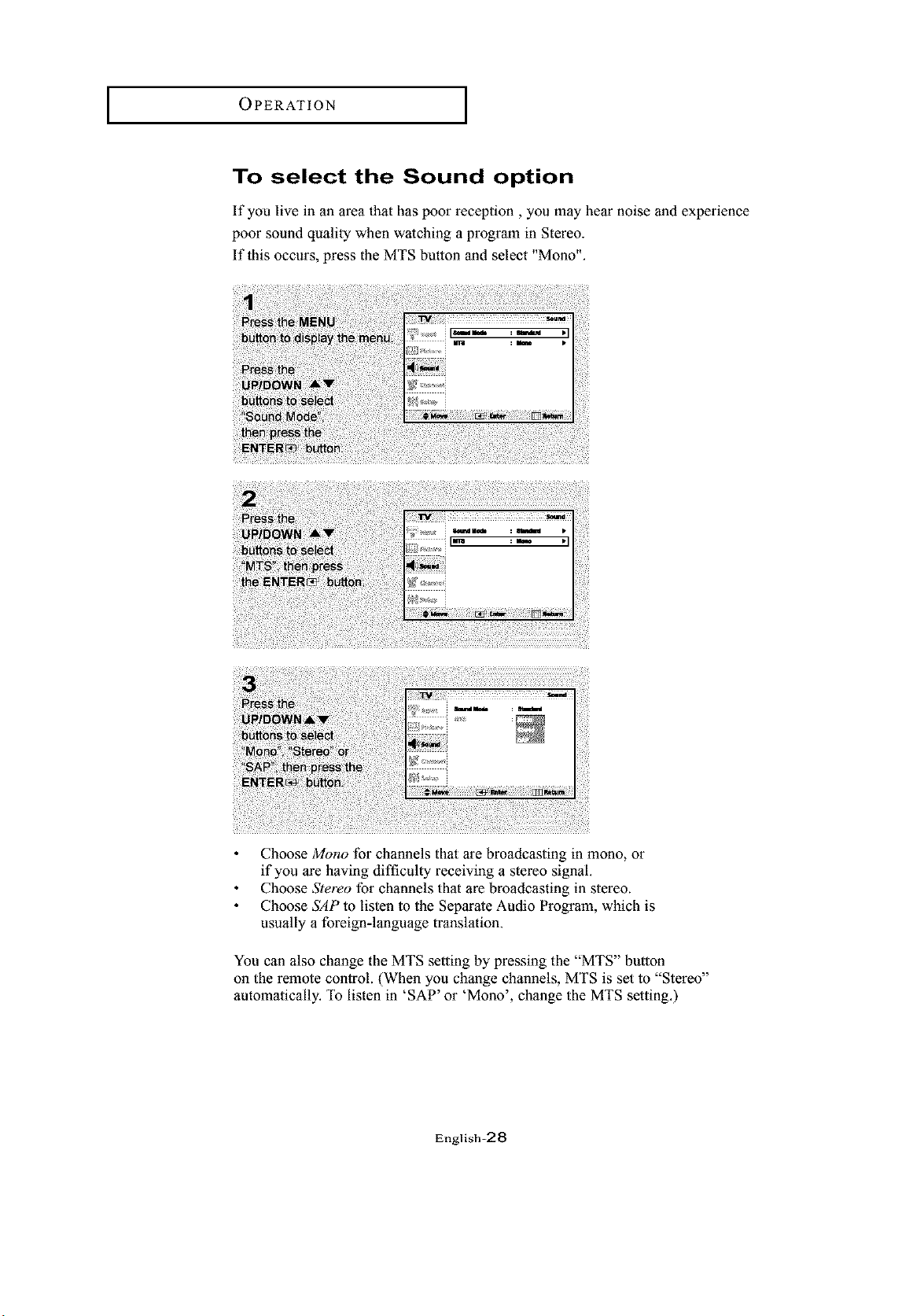
To select the Sound option
If you live in an area that has poor reception, you may hear noise and experience
poor sound quality when watching a progrmn in Stereo.
If this occurs, press the MTS button and select "Mono".
Choose Mono for channels that are broadcasting in mono, or
if you are having difficulty receiving a stereo signal.
Choose Stereo for channels that are broadcasting in stereo.
Choose SAP to listen to the Separate Audio Program, which is
usually a foreign-language translation.
You can also change the MTS setting by pressing the "MTS" button
on the remote control. (When you change channels, MTS is set to "Stereo"
automatically. To listen in 'SAP' or 'Mono', change the MTS setting.)
English-28
OPERATION
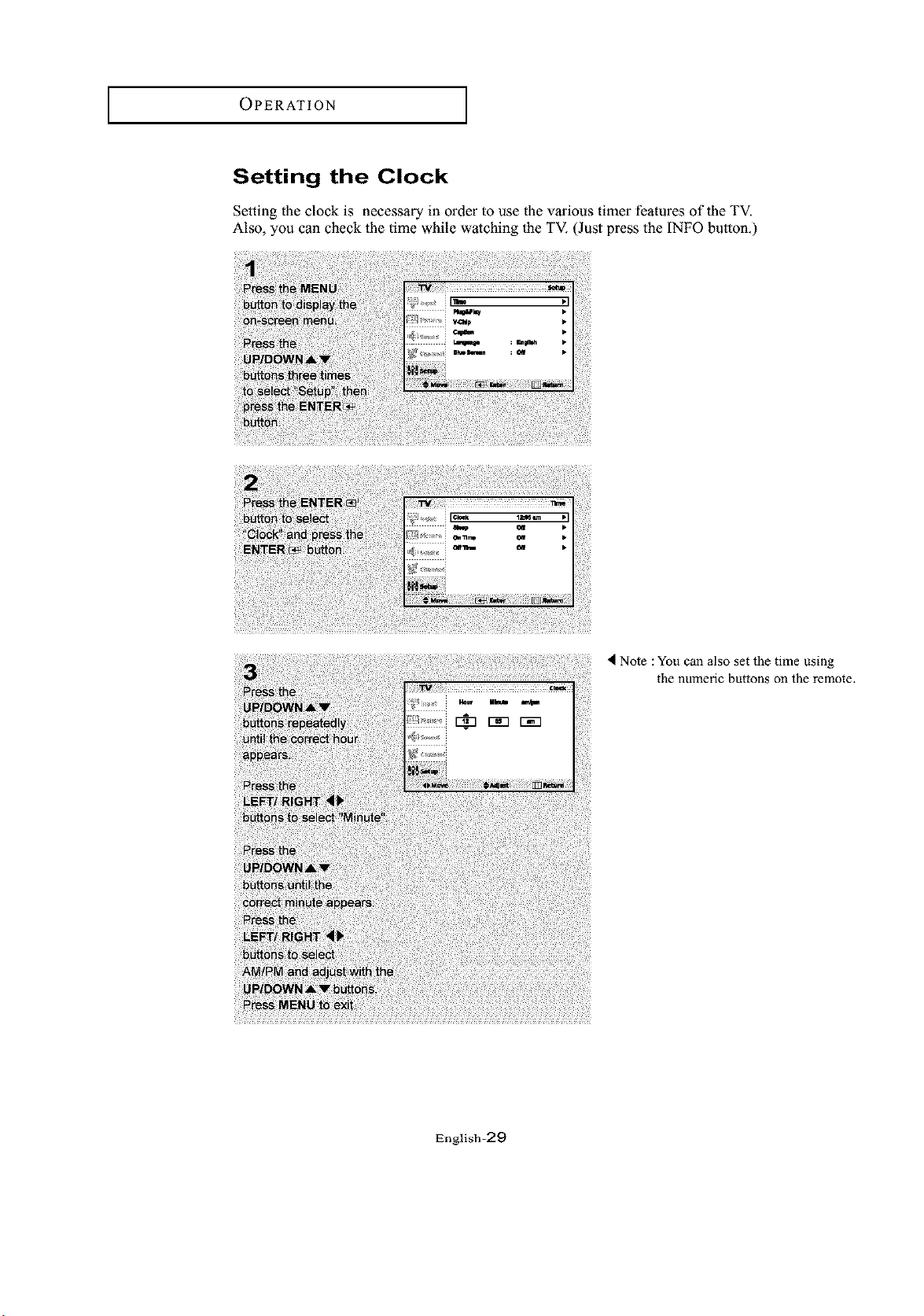
Setting the Clock
Setting the clock is necessary in order to use the various timer features of the TV.
Also, you can check the time while watching the TV. (Just press the INFO button.)
Note : You c_n also set the time using
the numeric buttons on the remote.
English-29
OPERATION
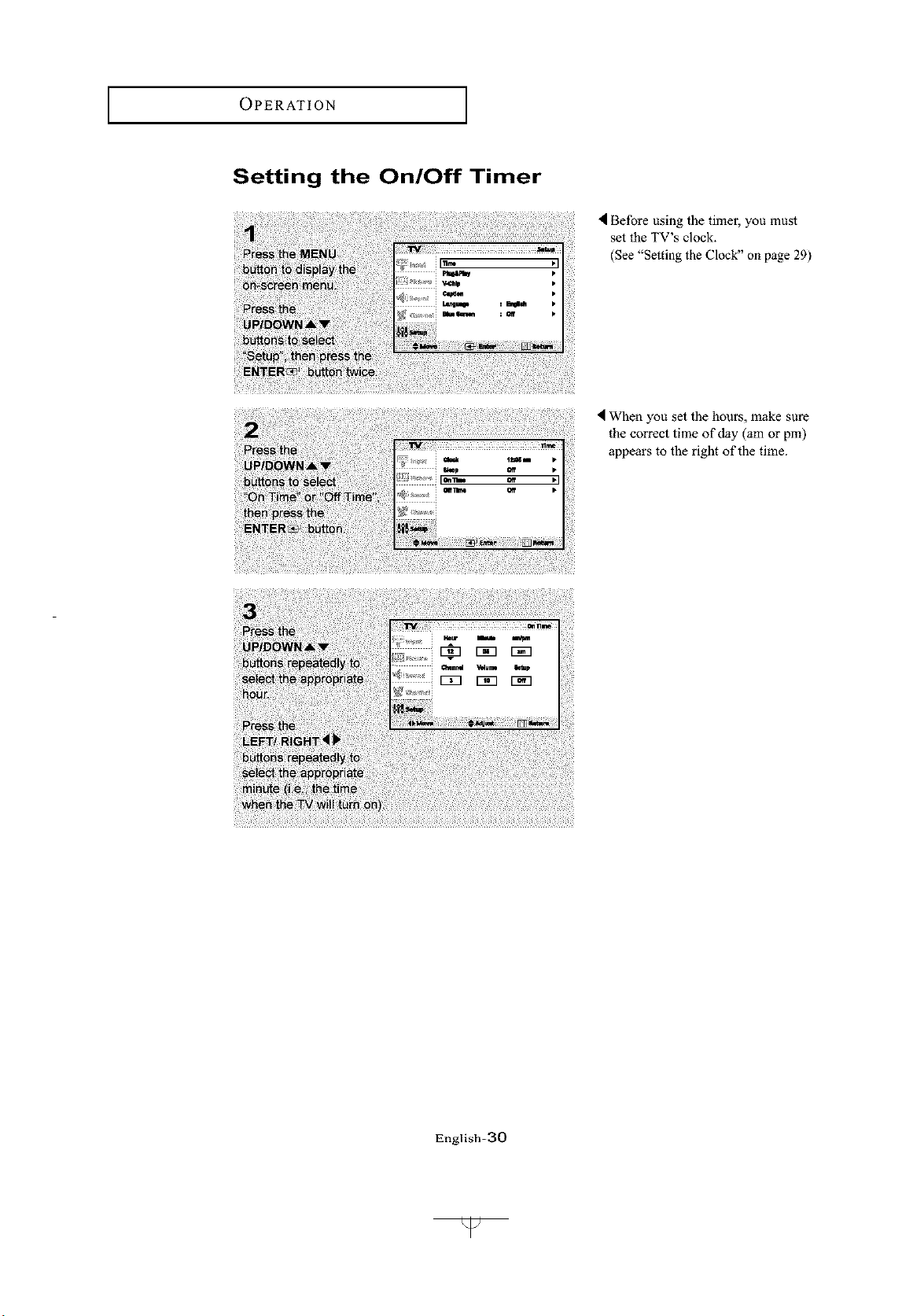
Setting the On/Off Timer
Before using the time1, you must
set the TV's clock.
(See "Setting the Clock" on page 29)
I When you set the hours, make sure
the correct time of day (am or pm)
appears to the right of the time.
English-_O
I
OPERATION
I
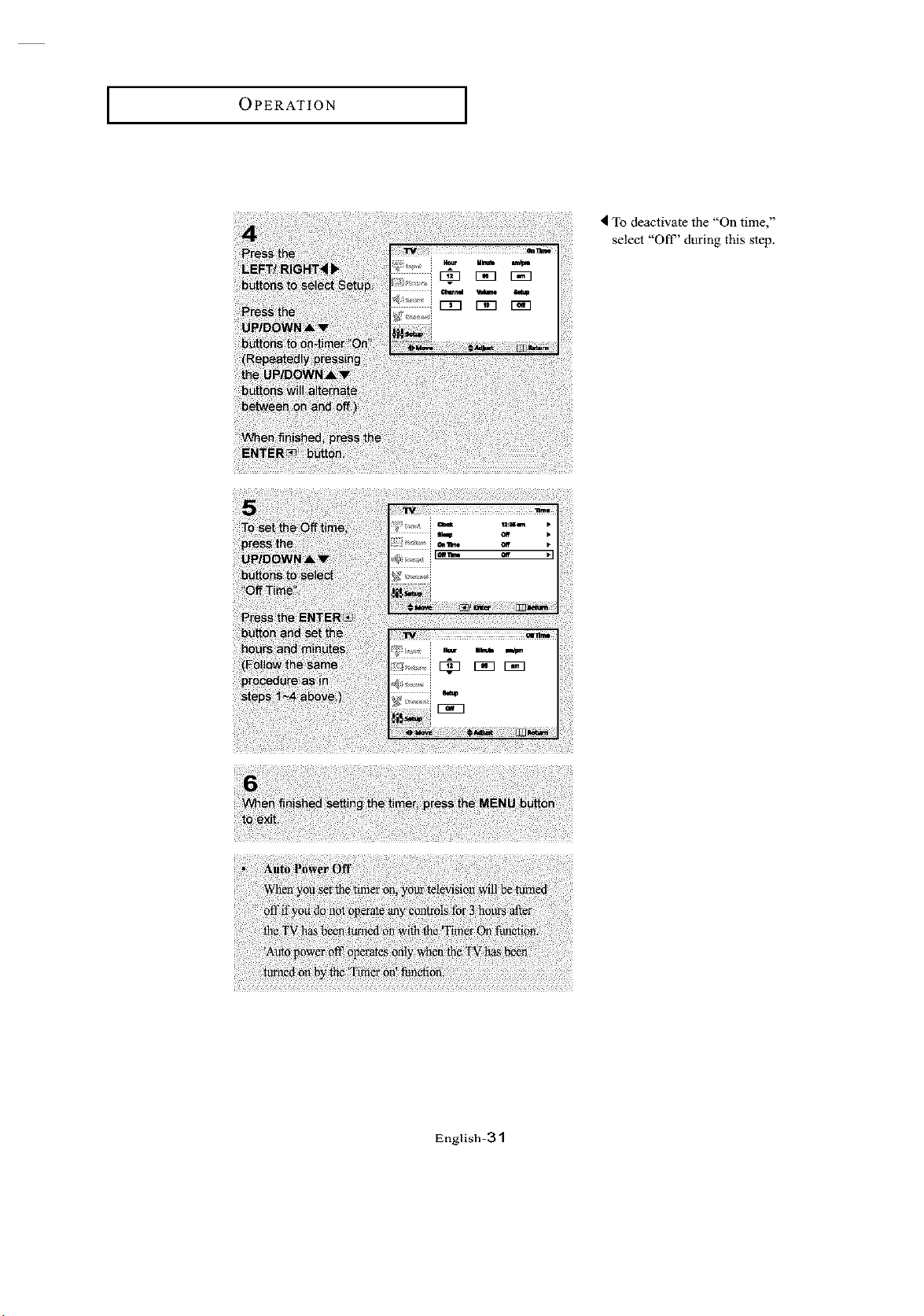
To deactivate the "On time,"
select "Oil" during this step.
g ........
English-31
OPERATION
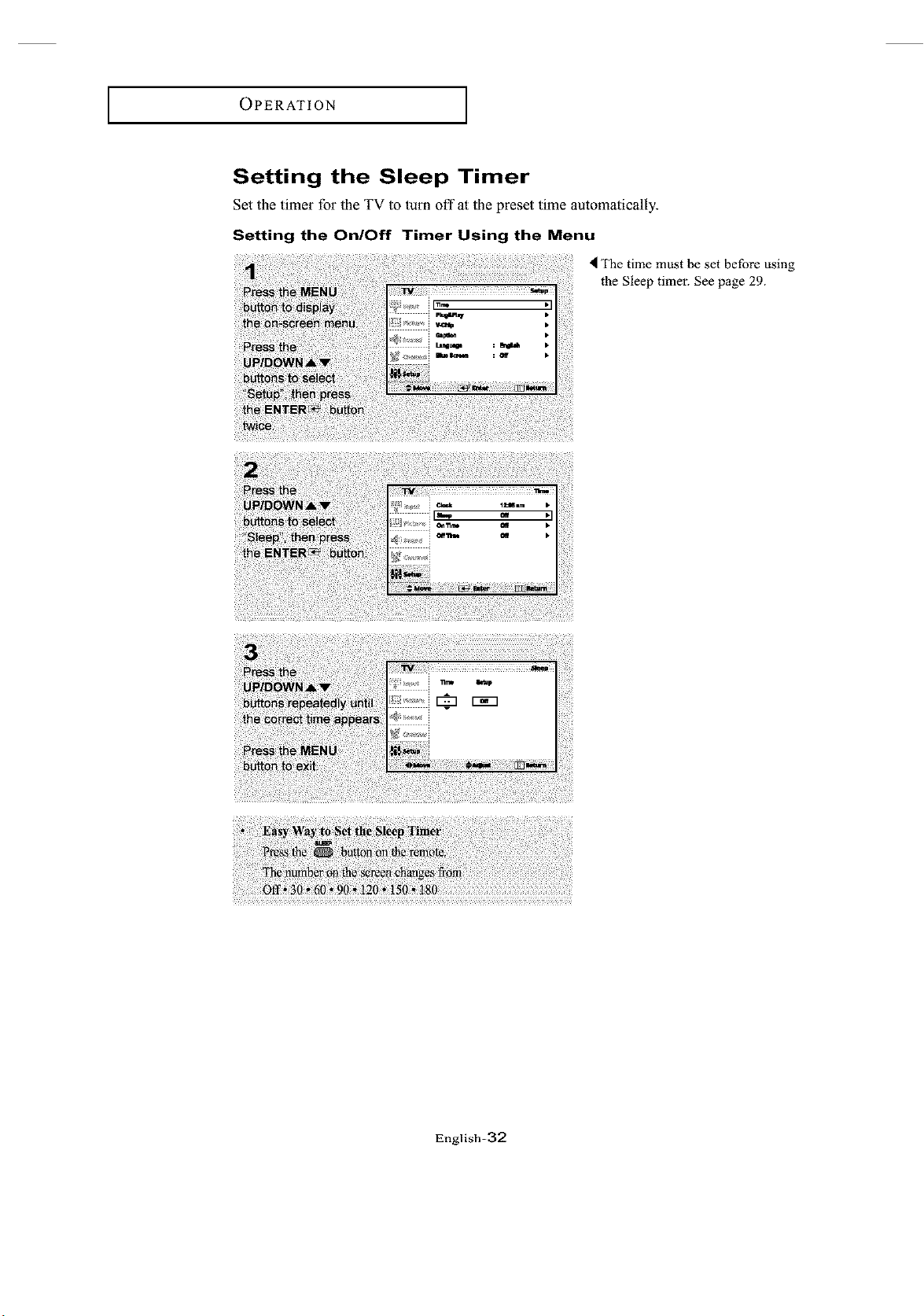
Setting the Sleep Timer
Set the timer for the TV to turn oft" at the preset time automatically.
Setting the On/Off Timer Using the Menu
< The time must be set before using
the Sleep timer. See page 29.
English-32
OPERATION [
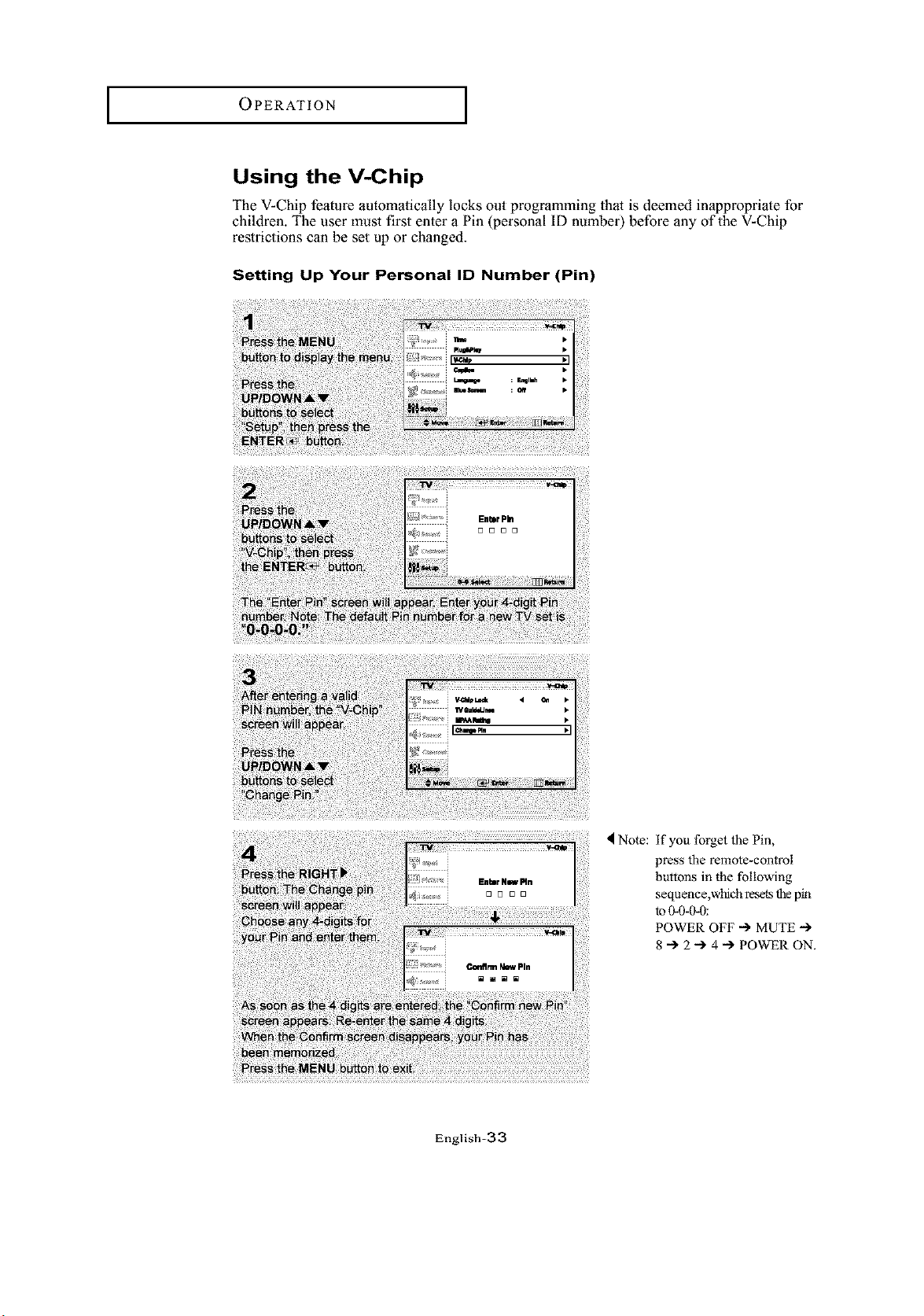
Using the V-Chip
The V-Chip feature automatically locks out programming that is deemed inappropriate for
children. The user must first enter a Pin (personal ID number) before any of the V-Chip
restrictions can be set up or changed.
Setting Up Your Personal ID Number (Pin)
EnhrNswMn
4 Note: if you forget the Pin,
press the remote-control
buttons in the following
sequence,which resets the pin
to 0-0-0-0:
POWER OFF -) MUTE "-)
8 -I. 2 "-) 4 -I. POWER ON.
English-33
OPERATION
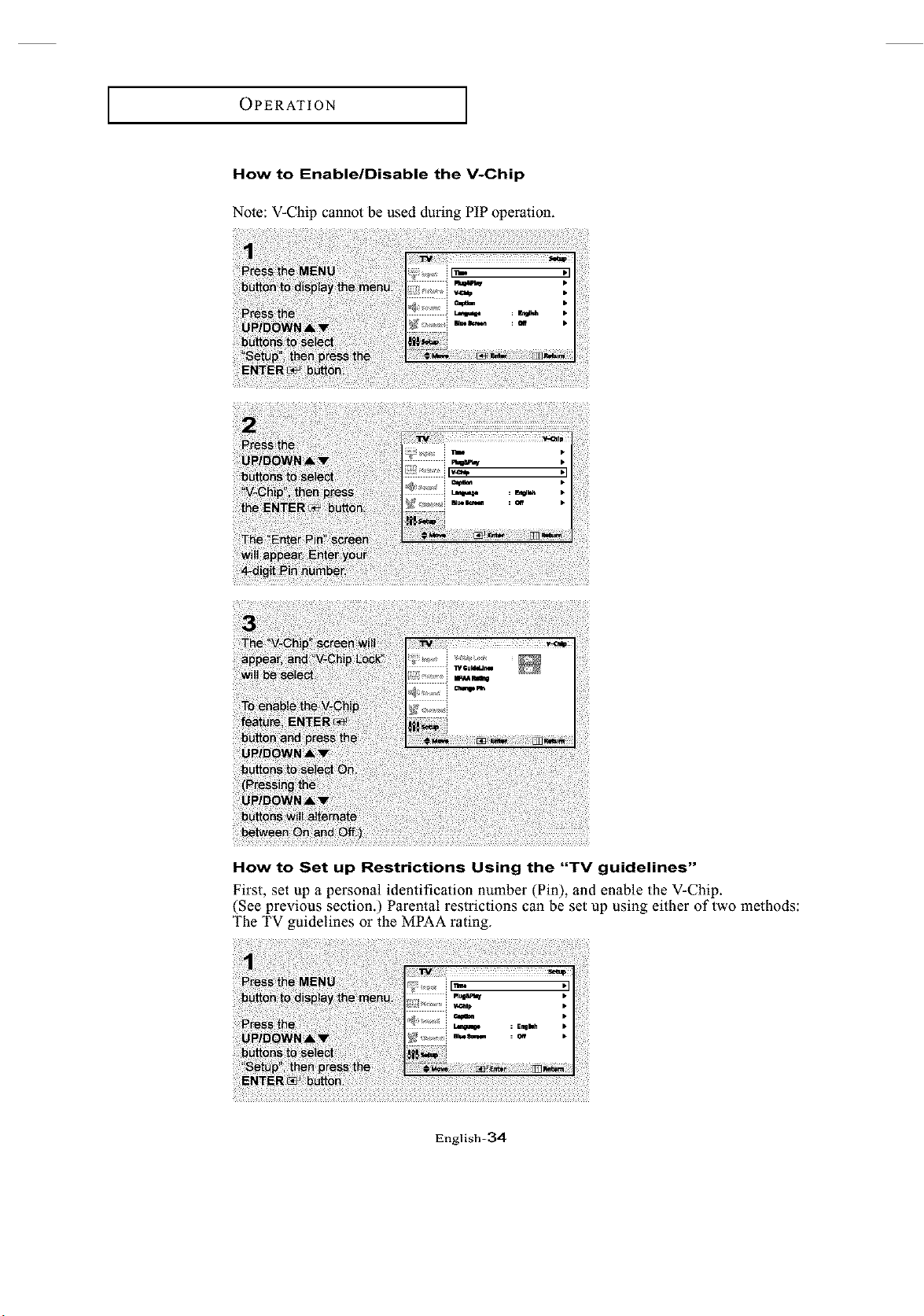
How to Enable/Disable the V-Chip
Note: V-Chip cannot be used during PIP operation.
How to Set up Restrictions Using the "TV guidelines"
First, set up a personal identification number (Pin), and enable the V-Chip.
(See previous section.) Parental restrictions can be set up using either of two methods:
The TV guidelines or the MPAA rating.
English-3,4
OPERATION [
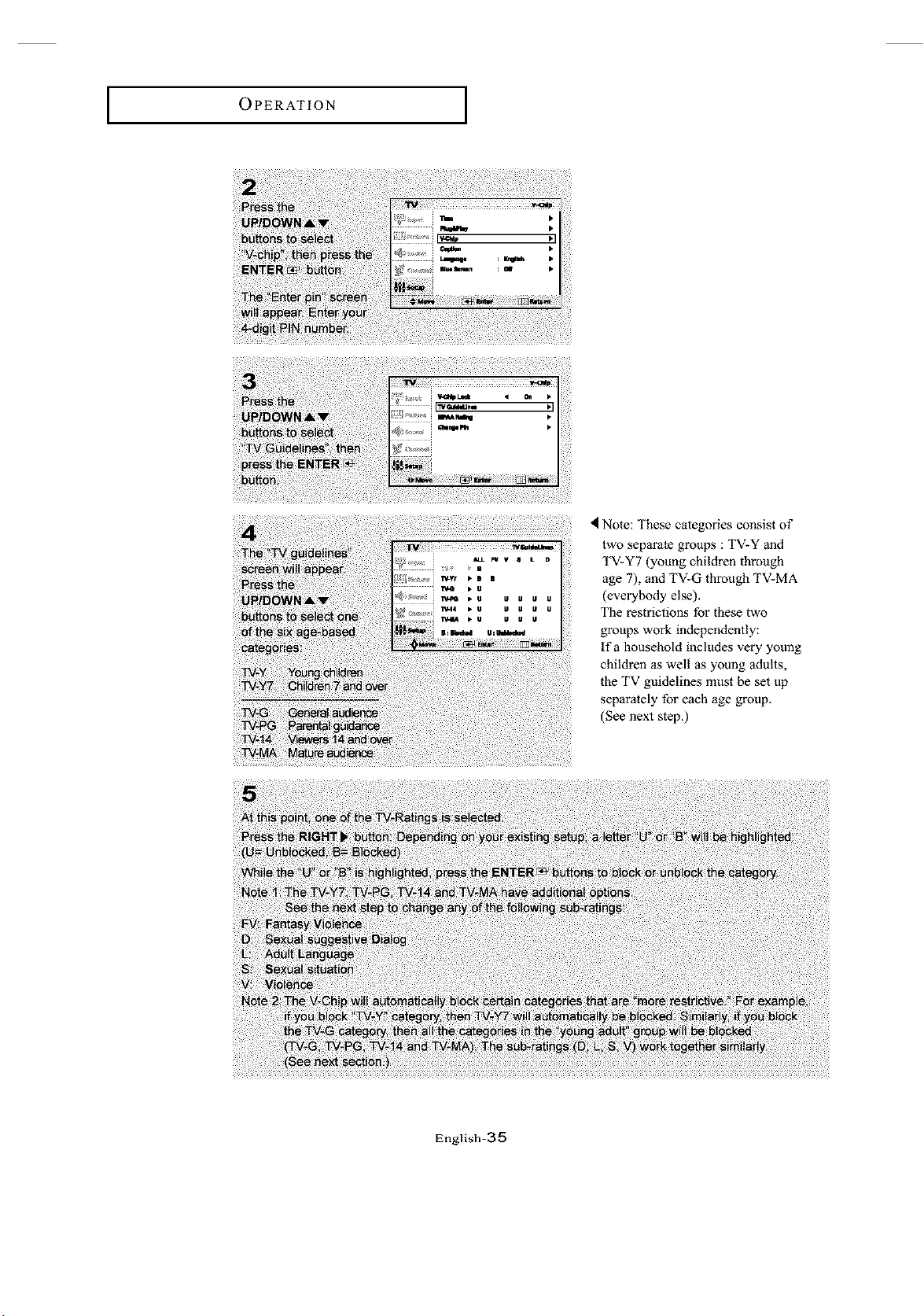
Note: These categories consist of
two separate groups : TV-Y and
TV-Y7 (young children through
age 7), and TV-G through TV-MA
(everybody else),
The restrictions for these two
groups work independently:
If a household includes very young
children as well as young adults,
the TV guidelines must be set up
separately for each age group.
(See next step,)
English-35
OPERATION
How to Set up Restrictions using the MPAA Ratings: G, PG,
PG-13, R, NC-17, X
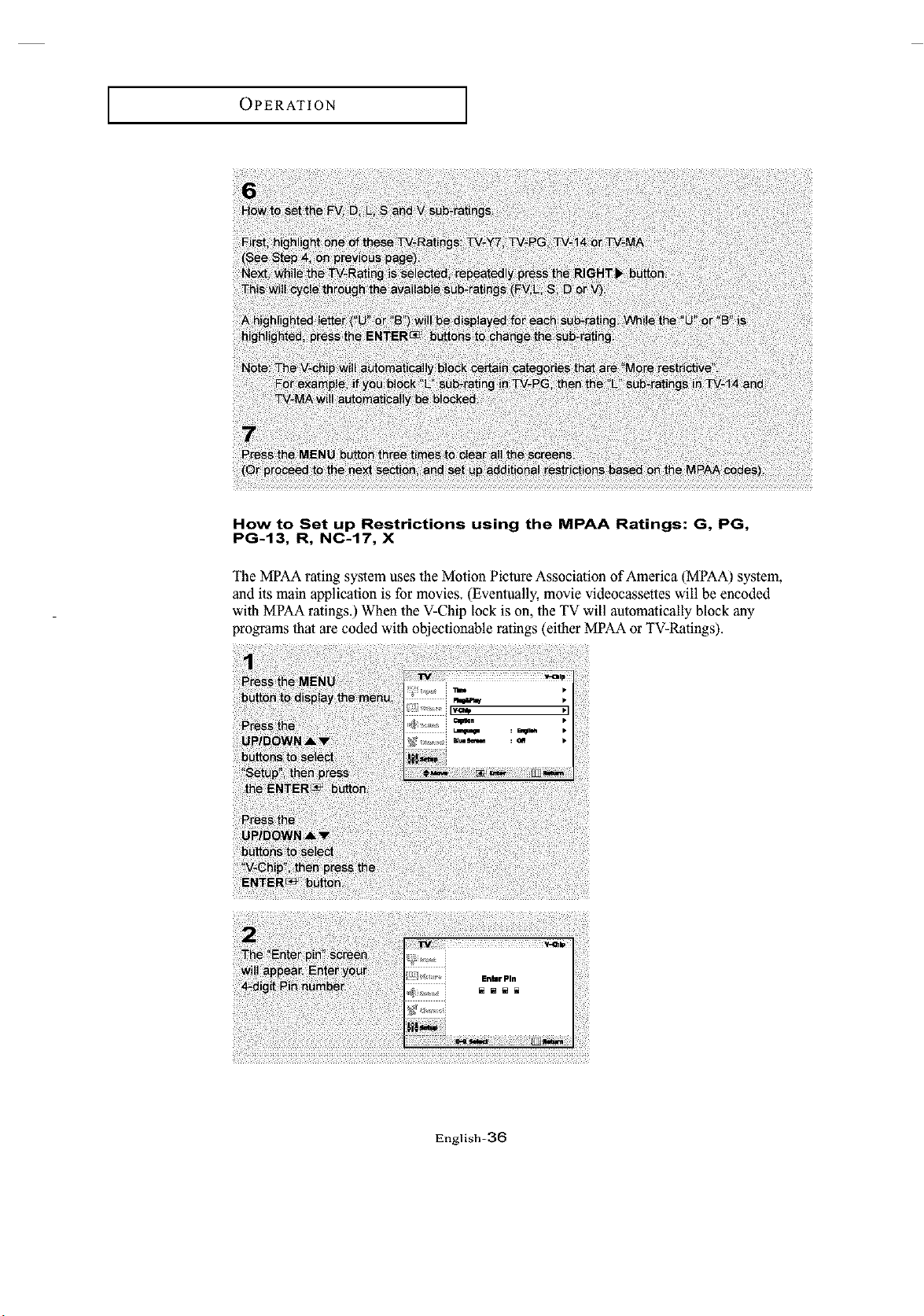
The MPAA rating system uses the Motion Picture Association of America (MPAA) system,
and its main application is for movies_ (Eventually, movie videocassettes will be encoded
with MPAA ratings.) When the V-Chip lock is on, the TV will automatically block any
programs that are coded with objectionable ratings (either MPAA or TV-Ratings).
English-a6
OPERATION [
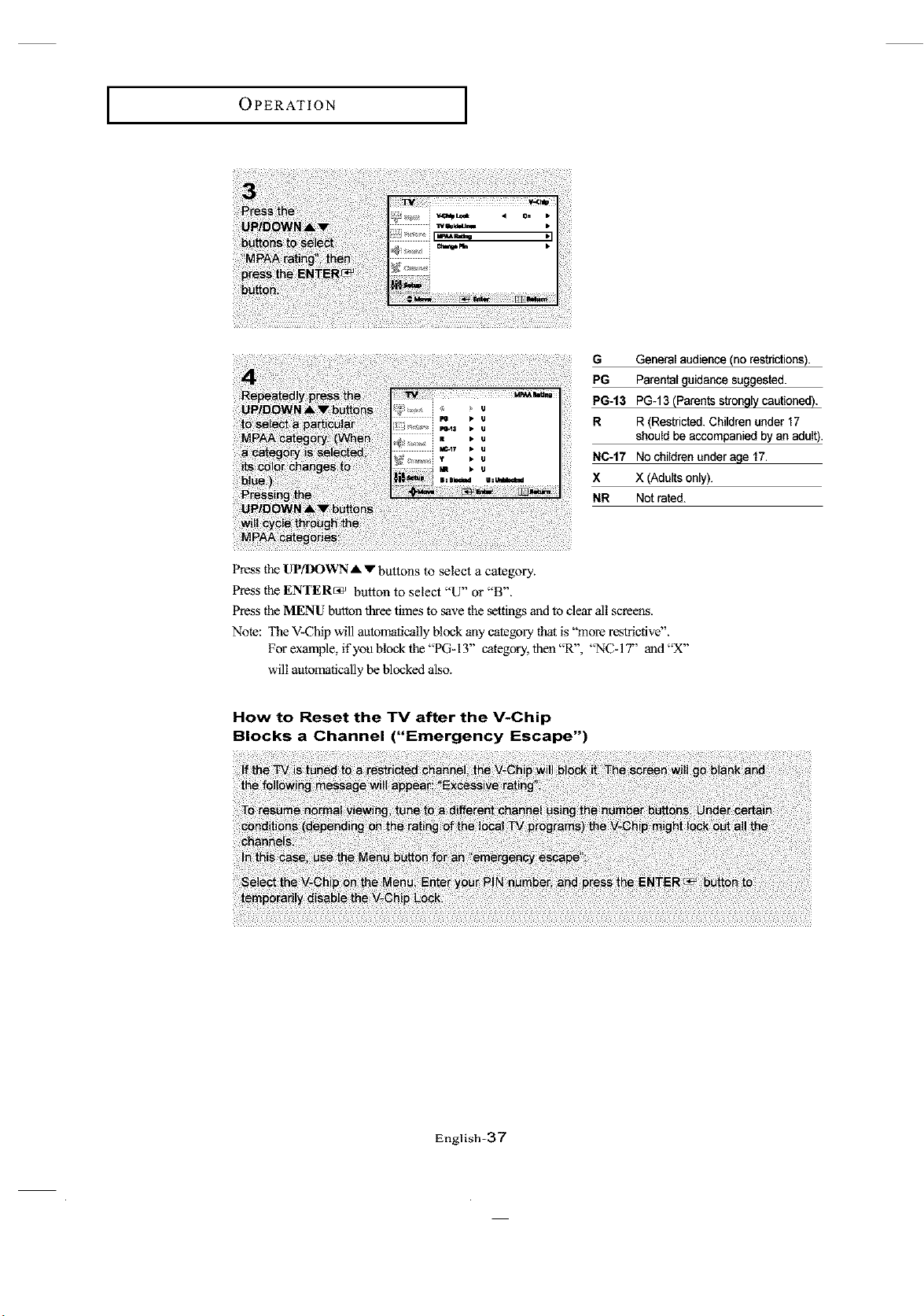
Press the UP/DOWN A v buttons to select a category.
Press the ENTER_ button to select "U" or "B".
G General audience (no restrictions).
PG Parental guidance suggested.
PG-13 PG-13 (Parents strongly cautioned ).
R R (Restricted. Children under 17
should be accompanied by an adult).
NC-17 No children under age 17.
X X (Adults only).
NR Not rated.
Press the MENU button three times to _ve the settings and to dear all screens.
Note: The V-Chip will automatically block any category that is "more restrictive".
For example, if you block the "PG-13" category, then "R", "NC-I 7" and "X"
will automatically be blocked also.
How to Reset the TV after the V-Chip
Blocks a Channel ("Emergency Escape")
English-37
TROUBLESHOOTING
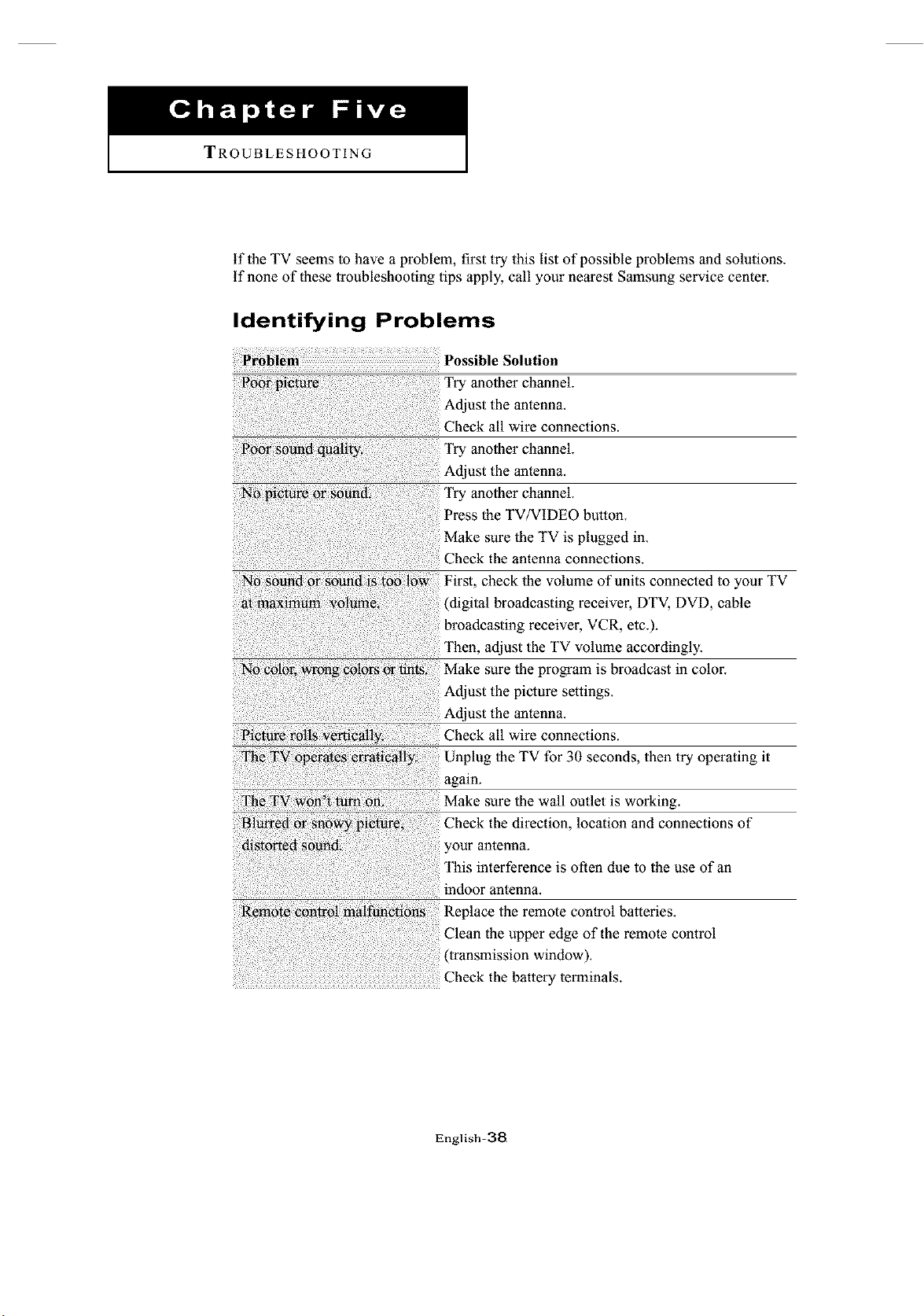
if the TV seems to have a problem, first try this list of possible problems and solutions.
if none of these troubleshooting tips apply, call your nearest Samsung service center.
Identifying Problems
Possible Solution
another channel.
Adjust the antenna.
Check all wire connections.
Try another channel.
Try another channel.
Press the TV/VIDEO button.
Make sure the TV is plugged in.
Check the antenna connections.
First, check the volume of units connected to your TV
(digital broadcasting receiver, DTV, DVD, cable
broadcasting receiver, VCR, etc.).
adjust the TV volume accordingly.
Make sure the program is broadcast in color.
Adjust the picture settings.
_i_i_ _i!_ e_!iy, Check all wire connections.
Unplug the TV for 30 seconds, then try operating it
!turn _n Make sure the wall outlet is working.
Check the direction, location and connections of
your antenna.
This interference is often due to the use of an
indoor antenna.
English-38
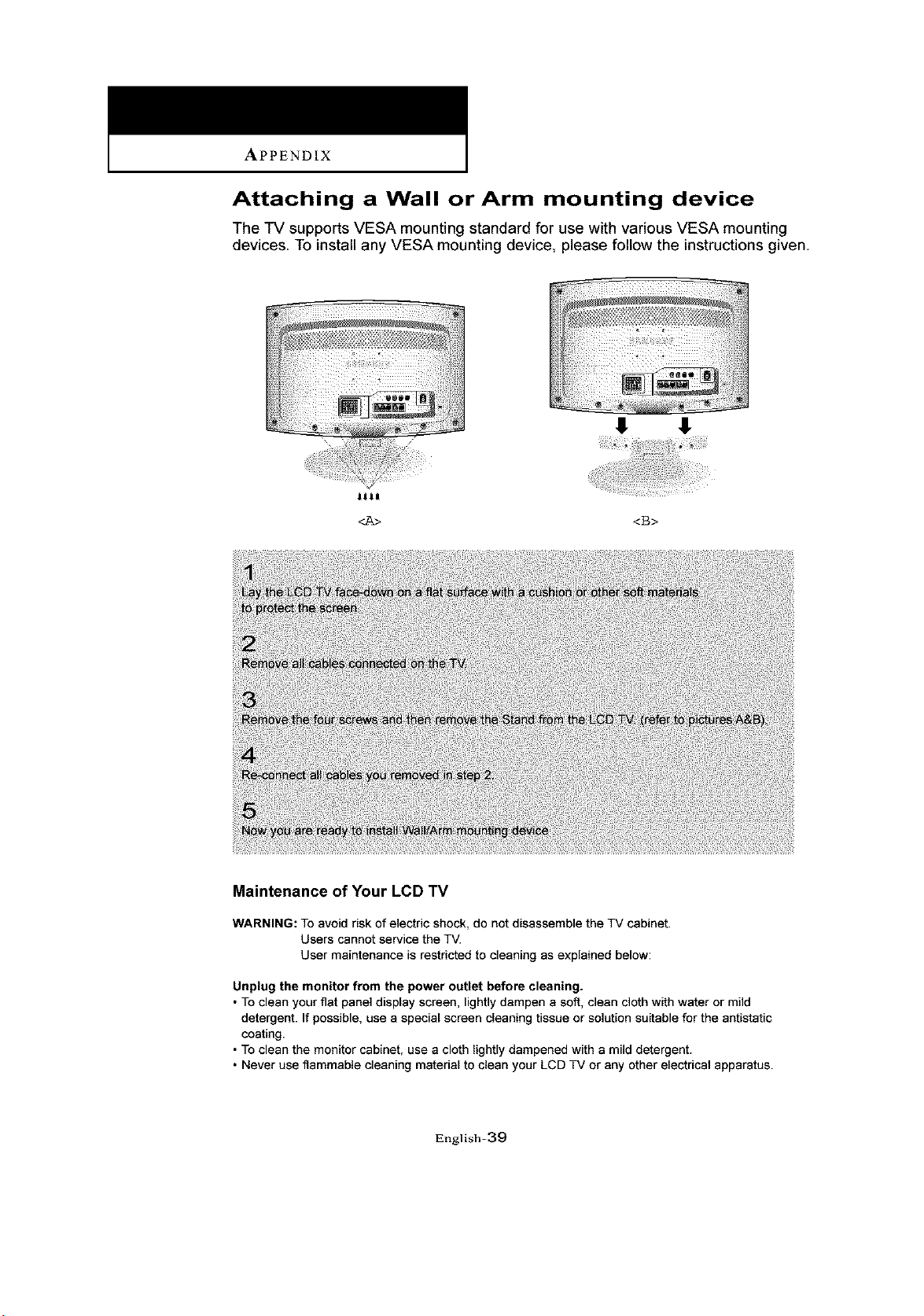
APPENDIX
Attaching a Wall or Arm mounting device
The TV supports VESA mounting standard for use with various VESA mounting
devices To install any VESA mounting device, please follow the instructions given
8 $
_t_t
<B>
Maintenance of Your LCD TV
WARNING: To avoid risk of electric shock, do not disassemble the TV cabinet.
Users cannot service the TV.
User maintenance is restricted to cleaning as explained below:
Unplug the monitor from the power outlet before cleaning.
• To clean your fiat panel display screen, lightly dampen a soft, clean cloth with water or mild
detergent. If possible, use a special screen cleaning tissue or solution suitable for the antistatic
coating.
• To clean the monitor cabinet, use a cloth lightly dampened with a mild detergent.
• Never use flammable cleaning material to clean your LCD TV or any other electrical apparatus.
English=39
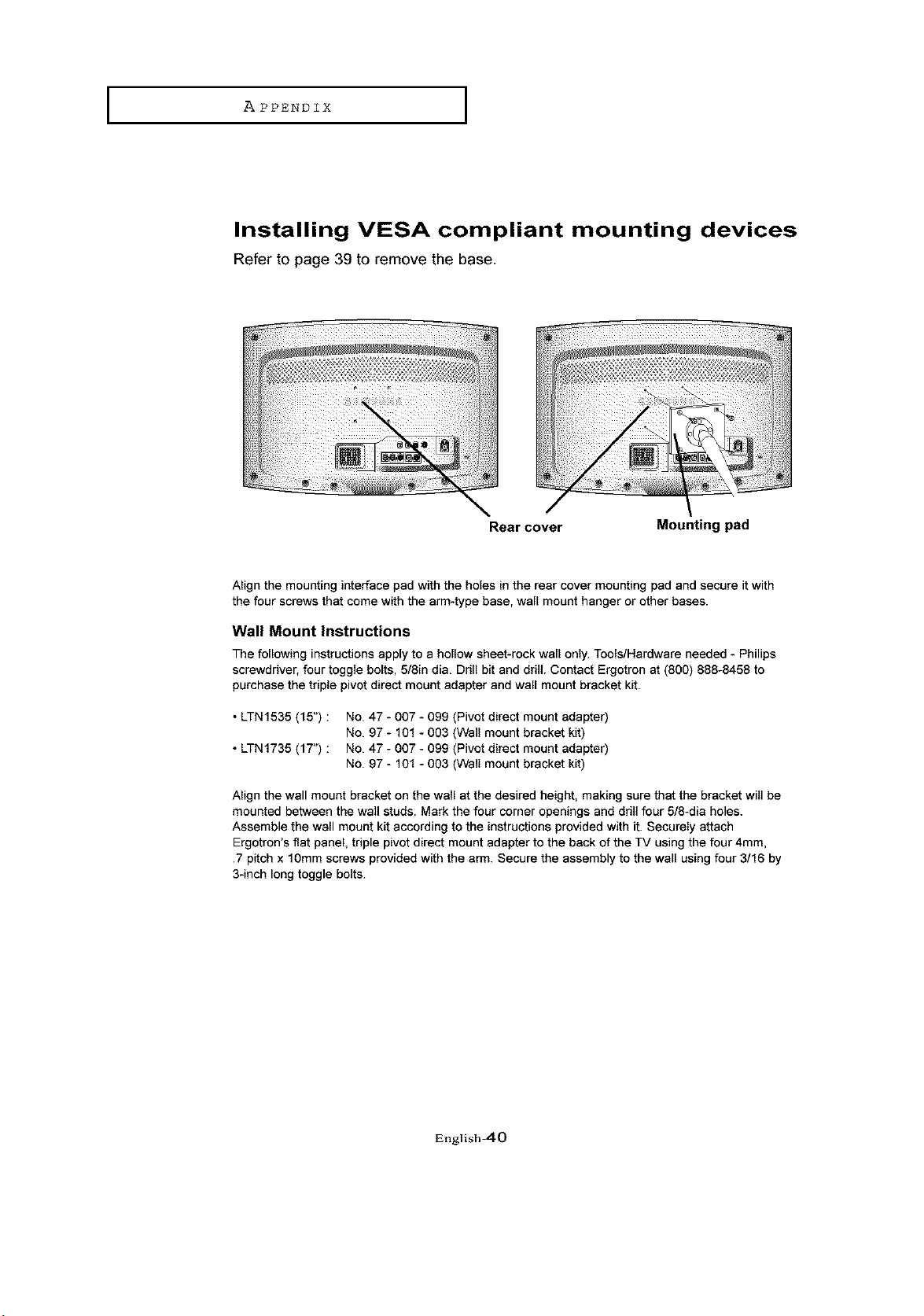
I APPENDIX I
Installing VESA compliant mounting devices
Refer to page 39 to remove the base.
Rear cover Mounting pad
Align the mounting interface pad with the holes in the rear cover mounting pad and secure it with
the four screws that come with the arm-type base, wall mount hanger or other bases.
Wall Mount Instructions
The following instructions apply to a hollow sheet-rock wall only. Tools/Hardware needed - Philips
screwdriver, four toggle bolts, 5/8in dia. Drill bit and drill Contact Ergotron at (800) 888-8458 to
purchase the triple pivot direct mount adapter and wall mount bracket kit.
• LTN1535 (15") :
• LTN1735 (17") :
No. 47 - 007 - 099 (Pivot direct mount adapter)
No. 97 - 101 - 003 (Wall mount bracket kit)
No. 47 - 007 - 099 (Pivot direct mount adapter)
No. 97 - 101 - 003 (Wall mount bracket kit)
Align the wall mount bracket on the wall at the desired height, making sure that the bracket will be
mounted between the wall studs. Mark the four corner openings and drill four 5/8-dia holes.
Assemble the wall mount kit according to the instructions provided with it. Securely attach
Ergotron's fiat panel, triple pivot direct mount adapter to the back of the TV using the four 4mm,
.7 pitch x 10mm screws provided with the arm. Secure the assembly to the wall using four 3/16 by
3-inch long toggle bolts.
English_O
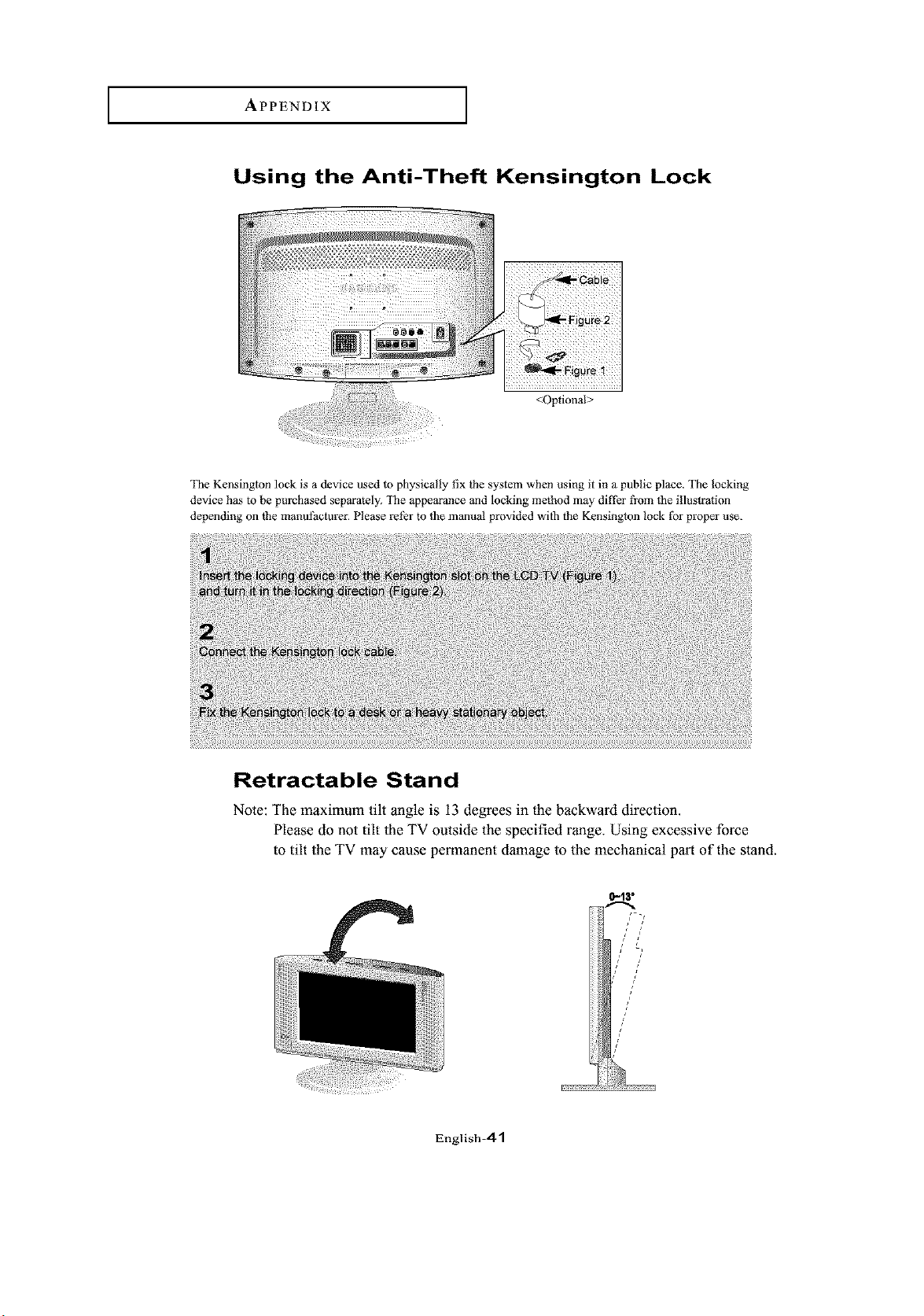
APPENDIX
Using the Anti-Theft Kensington Lock
<Optional>
The Kensington lock is a device used to physically fix the system when using it in a public place. The locking
device has to be purchased separately. The appearance and locking method may differ fi'om the illustration
depending on the manufacturer. Please refer to the manual provided with the Kensington lock ff)r proper use.
Retractable Stand
Note: The maximum tilt angle is 13 degrees in the backward direction.
Please do not tilt the TV outside the specified range. Using excessive force
to tilt the TV may cause permanent damage to the mechanical part of the stand.
0-13"
English=41
APPENDIX ]
Cleaning and Maintaining Your TV
With proper care, your TV unit will give you many years of service. Please follow these
guidelines to get the maximum performance from your TV.
Placement
Do not place the TV near extremely hot, cold, humid or dusty places.
Do not place the TV near appliances with electric motors that create magnetic fields,
such as vacuum cleaners.
Keep the ventilation openings clear; do not place the TV on a soft surface,
such as cloth or paper.
Place the TV in a vertical position only.
Liquids
Do not handle liquids near or on the TV.
Liquids that spill into it can cause serious damage.
Cabinet
Never open the cabinet or touch the parts inside.
Wipe your TV with a clean, dry cloth. Never use water, cleaning fluids, wax, or
chemicals.
Do not put heavy objects on top of the cabinet.
Tem pe ratu re
if your TV is suddenly moved from a cold to a warm place, unplug the power cord,
and allow at least two hours for moisture that may have formed inside the unit to dry
completely.
Using Your TV in Another Country
If you plan to take your TV with you to a foreign country, please be aware of the
different television systems that are in use around the world. A TV designed for one
system may not work properly with another system due to differences in the TV channel
frequencies.
English_.2
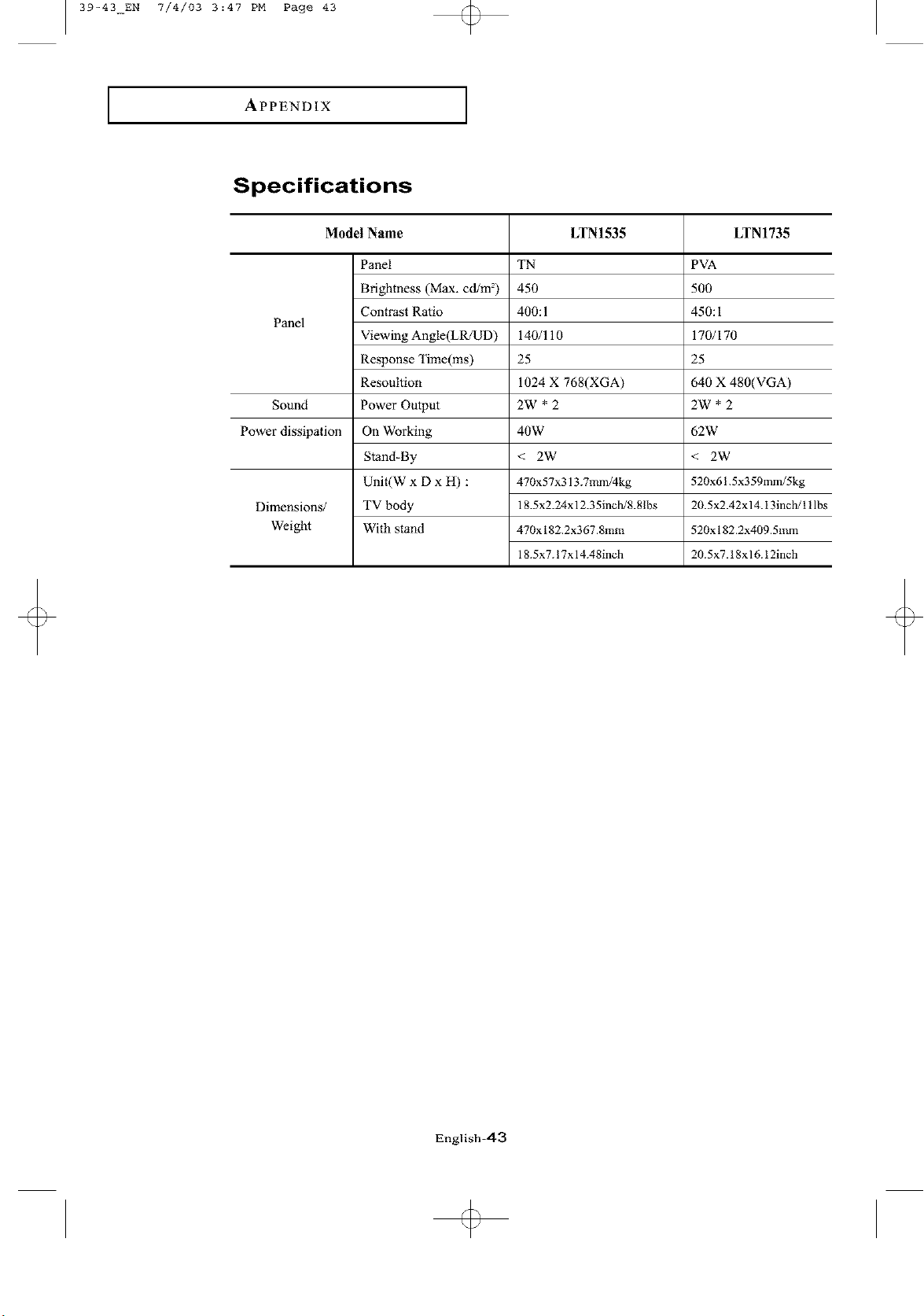
39-43_EN 7/4/03 3:47 PM Page 43
APPENDIX
Specifications
Model Name
Panel
Sound
Power dissipation
Dimensions/
Weight
Panel
Brightness (Max. cd/m =)
Contrast Ratio
Viewing Angle(LR/UD)
Response "lime(ms)
Resoultion
Power Output
On Working
Stand-By
Unit(W x D x H) :
TV body
With stand
LTN1535
TN
450
400:1
140/110
25
1024 X 768(XGA)
2W *2
40W
< 2W
470x57x313.7mm/4kg
18.5x2.24x 12.35inch/8.8lbs
470x 182.2x367.8mm
18.5x7.17x 14.48inch
LTN1735
PVA
5O0
450:I
170/170
25
640 X 480(VGA)
2W'2
62W
< 2W
520x61.5x359mm/5kg
20.5x2.42x 14.13inch/l 1lbs
520x 182.2x409.5mm
20.5x7.18x16.12inch
English-43
............-:_::_:::!iiiiiiii_:_._%ii!_iiii!i:i:!!
ELE_tl_ONi_
400 Valley Road, Suite 201, Mount Arlington. lq[ 07856
TEL: 1-800-SAMSUNG (1-800-726-7864)
www.samsungusa.com
BN68-00501A-02