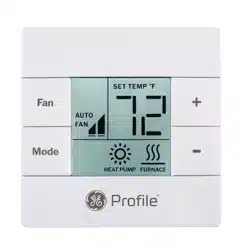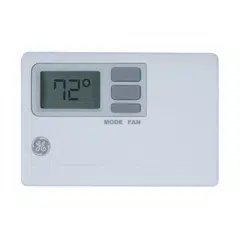
SAFETY INFORMATION ....................2
OVERVIEW ........................................3
INSTALLATION ................................ 4
WIRING DIAGRAMS ..........................8
CONFIGURATION MODE .................10
OPERATING FUNCTIONS ............... 13
TROUBLESHOOTING ....................... 15
WARRANTY ..................................... 16
THERMOSTAT
Digital
INSTALLATION INSTRUCTIONS
RAK150VF2
31-5000604 Rev. 1 02-22 GEA
2
Specifications
WARNING
FIRE AND SHOCK HAZARD
• Always turn off power at the main power supply
before installing, cleaning or removing the
thermostat. Failure to do so could result in
electrical shock hazard.
• Do not use on voltages over 30 VAC. Higher
voltages will damage the thermostat and could cause
shock or fire hazard.
• All wiring must conform to local and national
electrical and building codes.
• Use this thermostat only as described in this manual.
Electrical rating: • 24 VAC (18–30 VAC)
• 1 amp maximum per terminal
• 4 amp maximum total load
Operating temperature range: 40°F–99°F (4°C–37°C)
Temperature set range: 60°F–85°F (15°C–29°C)
Accuracy: ± 1°F (± 0.5°C)
System configurations:
• Factory Setting: 3-stage heat (heat pump low, heat
pump high, resistance heat), 2-stage cool (cool low, cool
high), 2-speed fan
• Alternate Setting: 2-stage heat (heat pump/resistance
heat), 1-stage cool, 2-speed fan
• Alternate Setting: 1-stage heat (resistance heat), 1-stage
cool, 2-speed fan
Terminations: R, C, B, Y1, W, Y2, GL, GH
Wiring: Maximum wiring length is 66ft (20 meters) for
AWG18. Maximum wiring length is 60ft (18 meters) for
AWG20
IMPORTANT SAFETY INFORMATION
READ ALL INSTRUCTIONS BEFORE USING
NOTICE
3
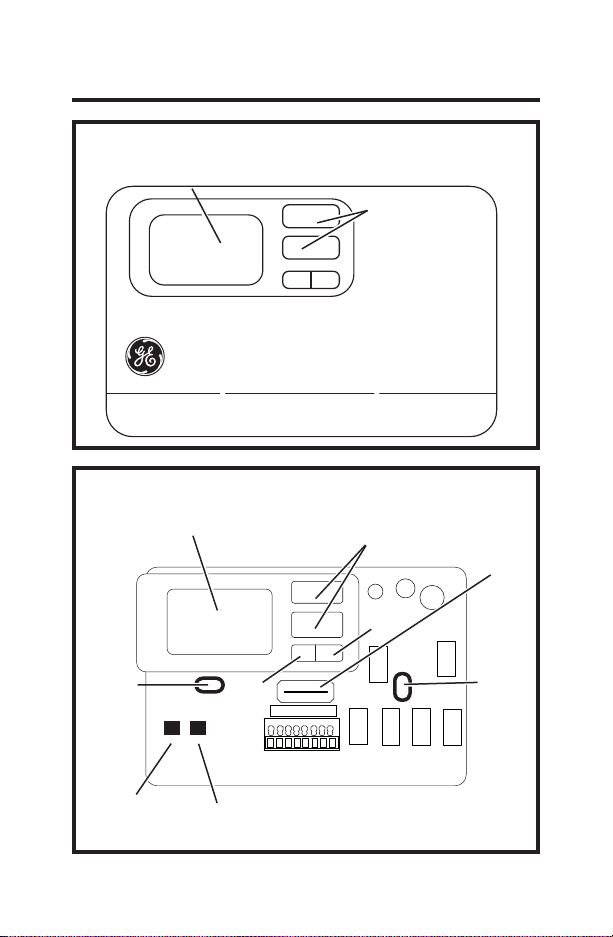
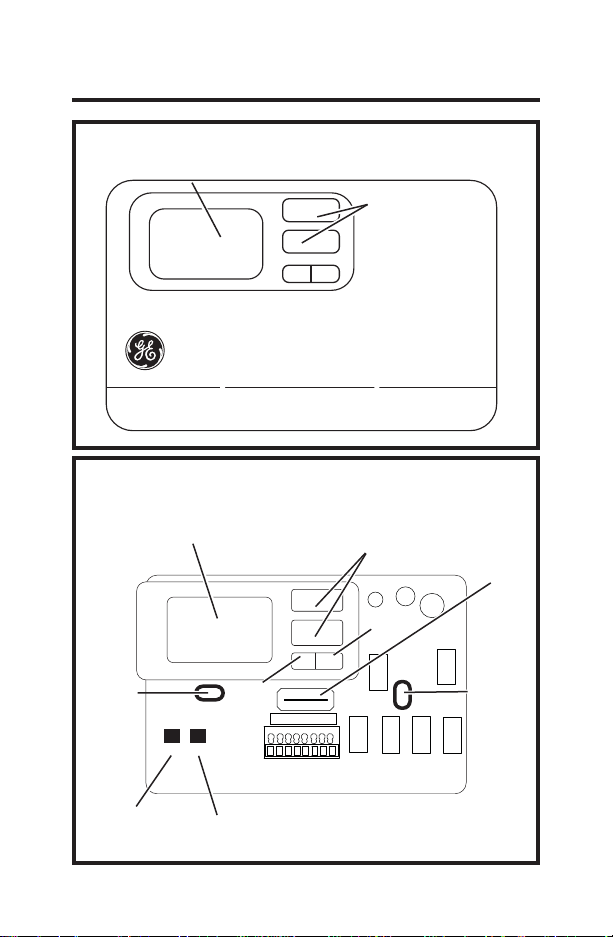
THERMOSTAT BASE LAYOUT
R C B Y1 W Y2 GL GH
RESET
CONFIG
THERMOSTAT CONTROLS
MODE FAN
INTRODUCTION OVERVIEW
Display
Up/Down Buttons
Display
Up/Down Buttons
Wiring
Channel
Mounting
Hole
Fan
Mode
Mounting
Hole
Configuration
Button
Reset
Button
4
INSTALLATION INSTRUCTIONS
PACKAGE CONTENTS/TOOLS REQUIRED:
Package includes:
• Thermostat base
• Thermostat cover
• Wiring labels
• Screws
• Wall anchors
Tools needed:
'ULOOZLWKƎELW
• Hammer
• Screwdriver
• Putty
WARNING
ELECTRICAL SHOCK HAZARD — Turn
off power by unplugging the unit or
by removing the fuse or switching the
appropriate circuit breaker to the OFF
position before removing the existing
thermostat. Failure to do so could result in
risk of electric shock.
5
TO REMOVE EXISTING THERMOSTAT
1. Turn off power to heating and cooling system by
removing the fuse or switching off the appropriate
circuit breaker.
2.
Remove cover of old thermostat. This should
expose the wires.
3.
Label the existing wires with the enclosed wire
labels before removing wires.
4.
After labeling wires, remove wires from wire
terminals.
5. Remove existing thermostat base from wall.
6.
Refer to the following section for instructions on
how to install this thermostat.
INSTALLATION INSTRUCTIONS
6
TO INSTALL THERMOSTAT
IMPORTANT: Thermostat installation
must conform to local and national building and
electrical codes and ordinances.
NOTE: Mount the thermostat about five feet above
the floor. Do not mount the thermostat on an outside
wall, in direct sunlight, behind a door or in an area
affected by a vent or duct.
1.
Turn off power to the heating and cooling system
by removing the fuse or switching off the
appropriate circuit breaker.
2.
Remove the cover by inserting and twisting a coin
or screwdriver in the slots on the top of
the thermostat.
3.
Put thermostat base against the wall where you
plan to mount it. Make sure wires will feed through
the wire opening in the base of the thermostat.
4.
With the base level, mark the placement of the
mounting holes.
5.
Set thermostat base and cover away from
working area.
6.
8VLQJDƎGULOOELWGULOOKROHVLQWKHORFDWLRQV
you have marked for mounting.
7.
Use a hammer to tap supplied anchors in
mounting holes.
8.
Align thermostat base with mounting holes and
feed the control wires through the wire opening.
INSTALLATION INSTRUCTIONS
7
TO INSTALL THERMOSTAT (cont.)
9. Seal hole for wires behind thermostat with non-
flammable insulation or putty, or use a wall
plate obtainable from a local hardware or home
building store.
10.
Use supplied screws to mount thermostat base to
wall.
11. Insert stripped, labeled wires in matching wire
terminals by pressing on the corresponding
terminal contact. See the “Wiring Diagrams”
section of this manual.
NOTICE
Make sure exposed portion of wires do not touch
other wires.
12. Gently tug wire to be sure of proper connection.
Double check that each wire is connected to the
proper terminal.
13. Replace cover on thermostat by snapping it in
place.
14. Plug the unit in or turn on power to the system at
the main service panel.
15. Test thermostat operation.
INSTALLATION INSTRUCTIONS
8
WIRING DIAGRAMS
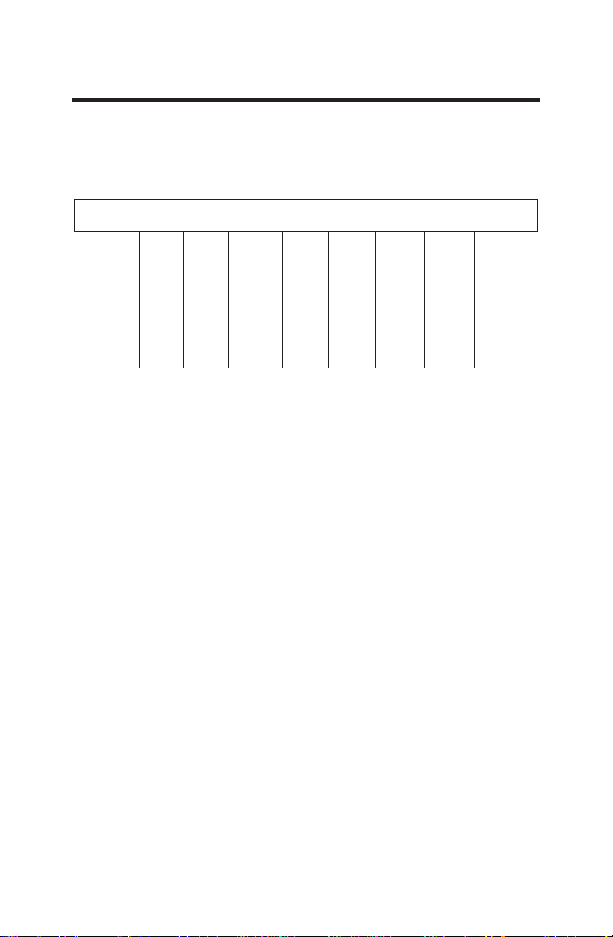
Table 1: Terminals for eight wires. 3-stage heat/2-
stage
cool system
R C B Y1 W Y2 GL GH
24 VAC HOT
24 VAC COMMON
REVERSING VALVE
STAGE 1 COMPRESSOR
HEAT-ELECTRIC
STAGE 2 COMPRESSOR
INDOOR FAN-LOW
INDOOR FAN-HIGH
9
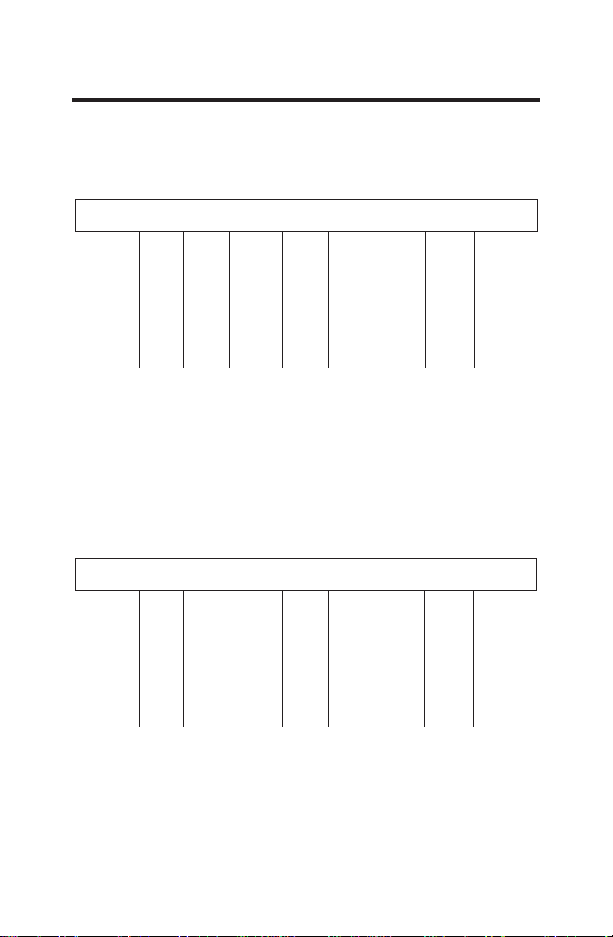
Table 2: Terminals for seven wires. 2-stage
heat/1-stage cool system
WIRING DIAGRAMS
Table 3: Terminals for six wires. 1-stage heat/1-
stage cool system
R C B Y1 W Y2 GL GH
24 VAC HOT
24 VAC COMMON
REVERSING VALVE
STAGE 1 COMPRESSOR
HEAT-ELECTRIC
INDOOR FAN-LOW
INDOOR FAN-HIGH
R C B Y1 W Y2 GL GH
24 VAC HOT
24 VAC COMMON
STAGE 1 COMPRESSOR
HEAT-ELECTRIC
INDOOR FAN-LOW
INDOOR FAN-HIGH
10
CONFIGURATION MODE
The configuration mode is used to set the RAK150VF2 to match
the heating/cooling system. The default setting of this thermostat
is for 2-stage cooling with a 3-stage heat pump system. For
an alternate configuration, see #7 in the Configuration Mode
Settings below.
To configure the RAK150VF2, perform the following steps:
1. Ensure thermostat is in OFF mode.
2. Remove the thermostat’s front cover.
3.
To enter the configuration mode, hold CONFIG for ~ 2 seconds.
4.
Once in the configuration mode, press the
<
or
>
button to
change settings within each screen.
- Press the FAN (right) button to advance to the next screen.
- Press the MODE (left) button to return to the previous screen.
NOTE: Hold CONFIG button for ~2 seconds to save changes
and exit configuration menu.
Configuration Mode Settings
The setup screens for Configuration Mode are as follows:
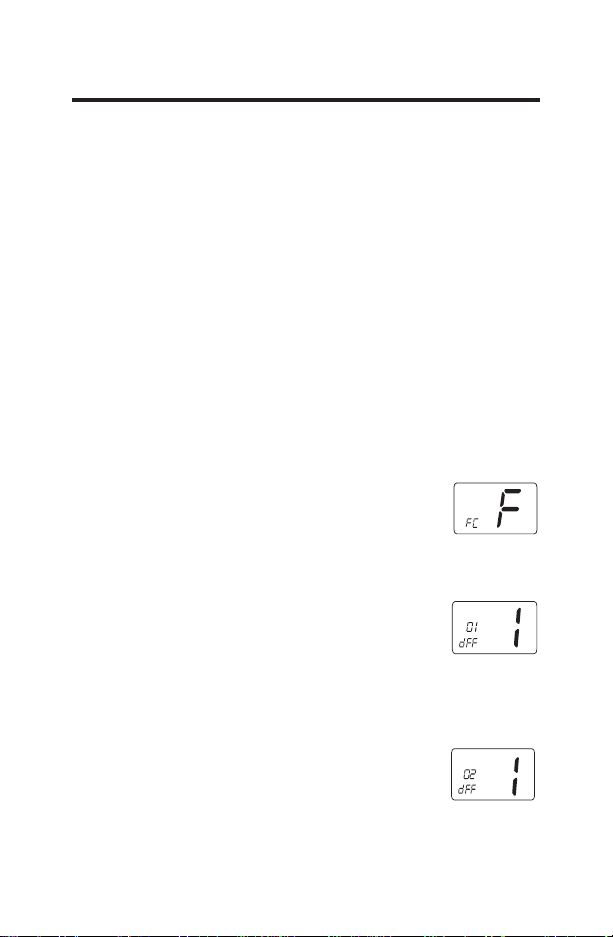
1.
Temperature Scale (°F or °C)—Choose Fahrenheit or Celsius.
- Press the
<
or
>
button to select.
- Press the FAN (right) button to advance to the
next screen. NOTE: Default factory setting is
Fahrenheit.
2.
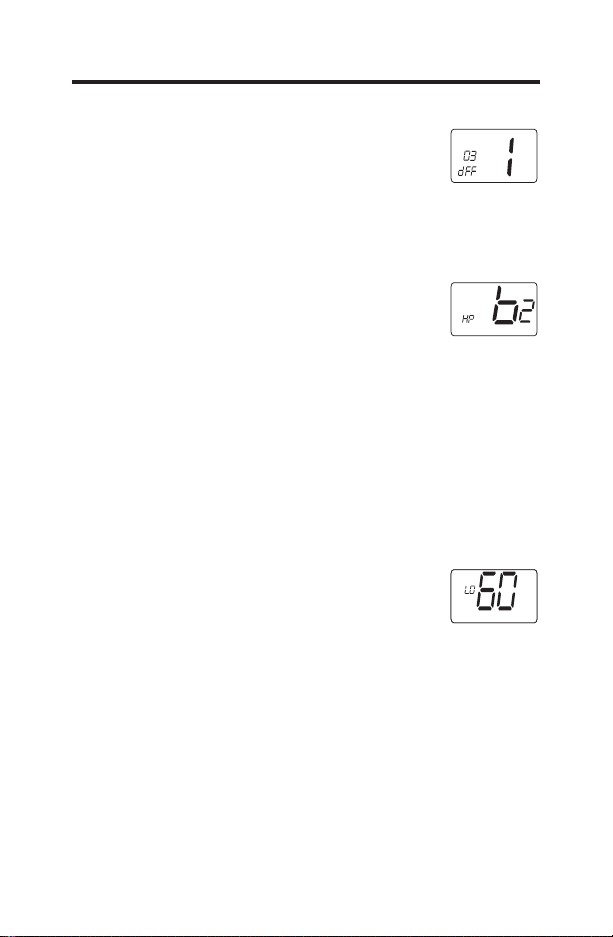
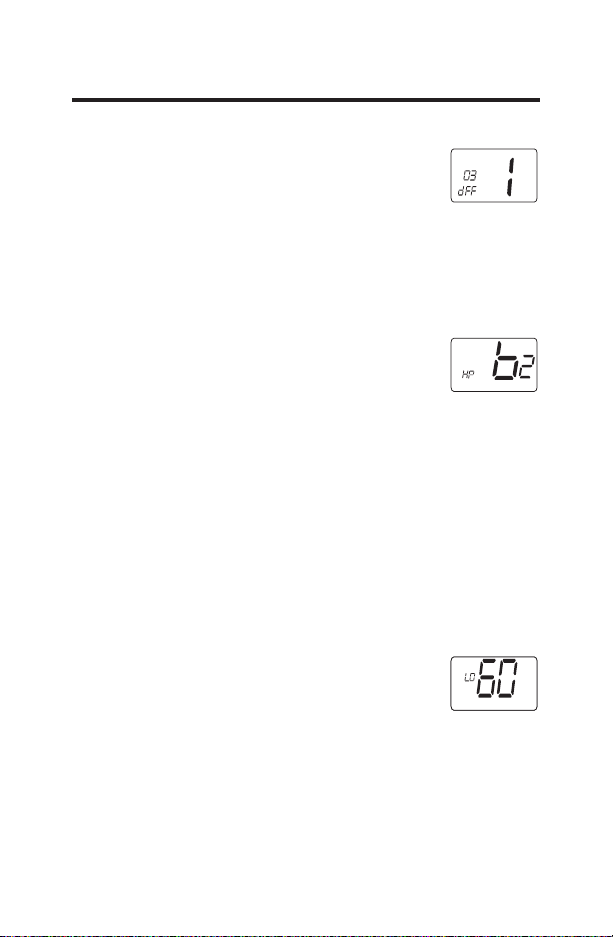
Temperature Differential—Stage 1—(1–9°F) (.5-4.5°C)
Set the number of degrees between the “setpoint” temperature
and the “turn on” temperature for first stage.
- Press the
<
or
>
button to set differential
value.
- Press the FAN (right) button to advance to the next screen.
Note: Default factory setting is 1ºF /.5ºC.
3. Temperature Differential—Stage 2 (1–9°F) (.5-4.5°C)
Set the number of degrees between when stage 1 turns on
and stage 2 turns on.
- Press the
<
or
>
button to set differential
value.
- Press the FAN (right) button to advance to the next screen.
- Note: Default factory setting is 1°F/.5°C.
:
:
11
4. Temperature Differential—Stage 3 (1–9°F) (.5-4.5°C)
Set the number of degrees between when stage 2 turns on
and stage 3 turns on
- Press the
<
or
>
button to set differential
value.
- Press the FAN (right) button to advance to the next screen.
- Note: Default factory setting is 1°F/.5ºC.
5. System - Select appropriate cooling/heating system based on
model selection
- HP b2: two stage cooling / two stage (B type)
heat pump with a backup 3rd stage of resistance
heat.
Use for AZ9V models.
- HP b1: single stage cooling / single stage (B type) heat pump
with a backup 2nd stage of resistance heat.
Use for AZ95H and AZ65H models.
- ELC: single stage cooling / single stage resistance heating.
Use for AZ95E and AZ45E Models.
- Press the
<
or
>
button to change selection.
- Press the FAN (right) button to advance to the next screen.
- Note: Default factory setting is HP b2.
6. Minimum Cool Setpoint (60, 64, 66, 68, 70, 72, 74, 76°F)
(15, 17, 19, 20, 21, 22, 23, 24°C)
Adjust to control the minimum Cool set
temperature allowed.
- Press the
<
or
>
button to select.
- Press the FAN (right) button to advance to the
next screen.
Note: Default factory setting is 60°F/15°C.
CONFIGURATION MODE
:
HEAT
12
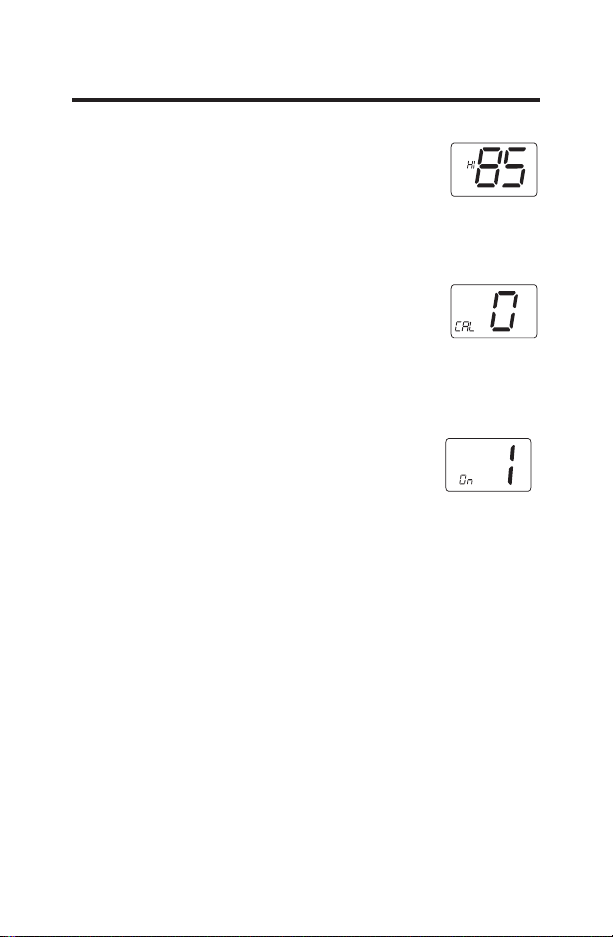
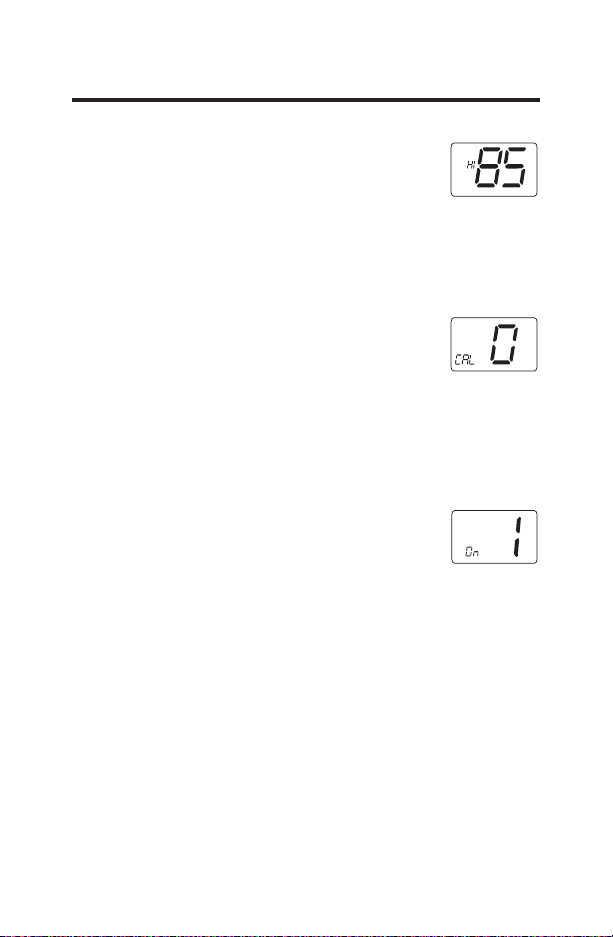
7. Maximum Heat Setpoint (65, 70, 72, 74, 76, 78, 80,
85°F) (18, 21, 22, 23, 24, 26, 27, 29°C)
Adjust to control the maximum Heat set
temperature allowed.
- Press the
<
or
>
button to select.
- Press the FAN (right) button to advance to the next screen.
Note: Default factory setting is 85°F/29°C.
8. Room Temperature Offset (+9°F to –9°F) (+5°C to –5°C)
Adjust to calibrate displayed room temperature
to match actual room temperature.
- Press the
<
or
>
button to select.
- Press the FAN (right) button to advance to the
next screen.
Note: Default factory setting is 0°F/0°C.
9. Continuous Fan
This setting controls the availability of the
continuous fan options available for selection
by the thermostat user. Continuous fan options
allow for the fan to be operated all the time if
selected.
- Press the
<
or
>
button to change selection.
Note: Default factory setting is ON (1). 1=ON, 0=OFF
CONFIGURATION MODE
FAN
13
OPERATING FUNCTIONS
Off
• In this mode, the thermostat will not turn on the heating or
cooling devices (manual fan can operate if Continuous Fan
mode is enabled).
• Off is also used to access Configuration mode.
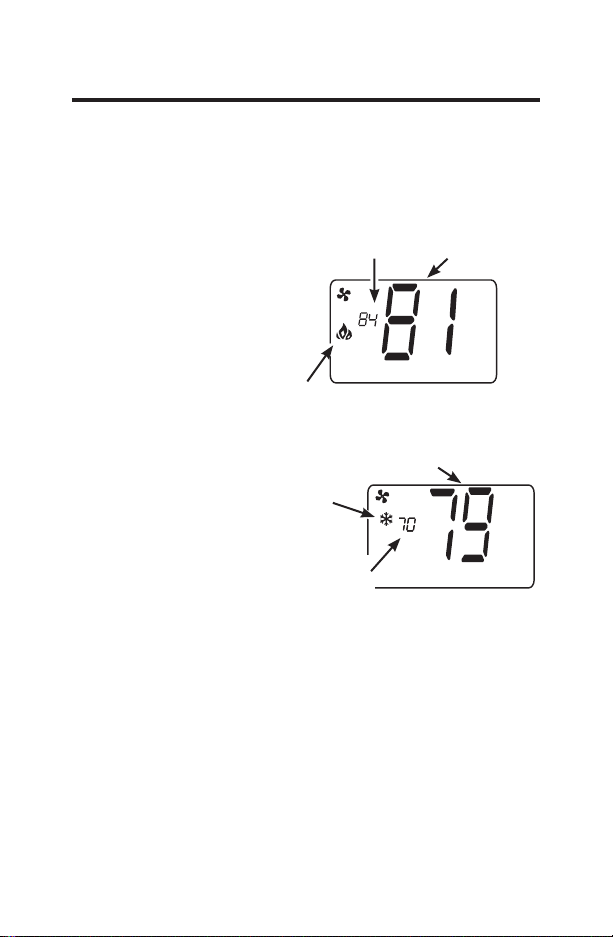
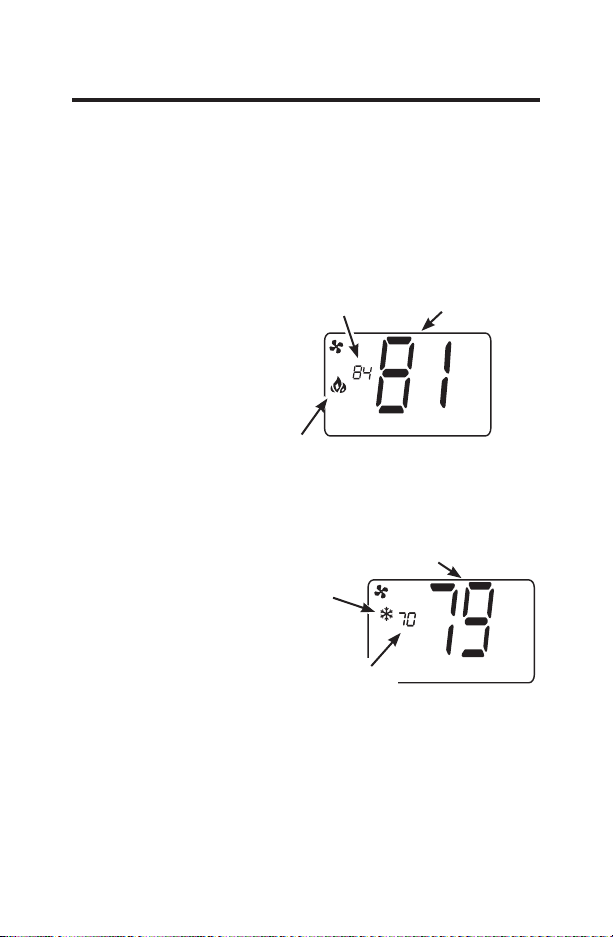
Heat
• In this mode, the
thermostat controls the
heating system.
• Press the
<
or
>
button
to set the desired
temperature.
Cool
• In this mode, the
thermostat controls the
cooling system.
• Press the
<
or
>
button to set the desired
temperature.
HEAT
Room Temp
Heating Indicator
Heating Setpoint
COOL
Room Temp
Cooling
Indicator
Cooling
Setpoint
14
OPERATING FUNCTIONS
Fan
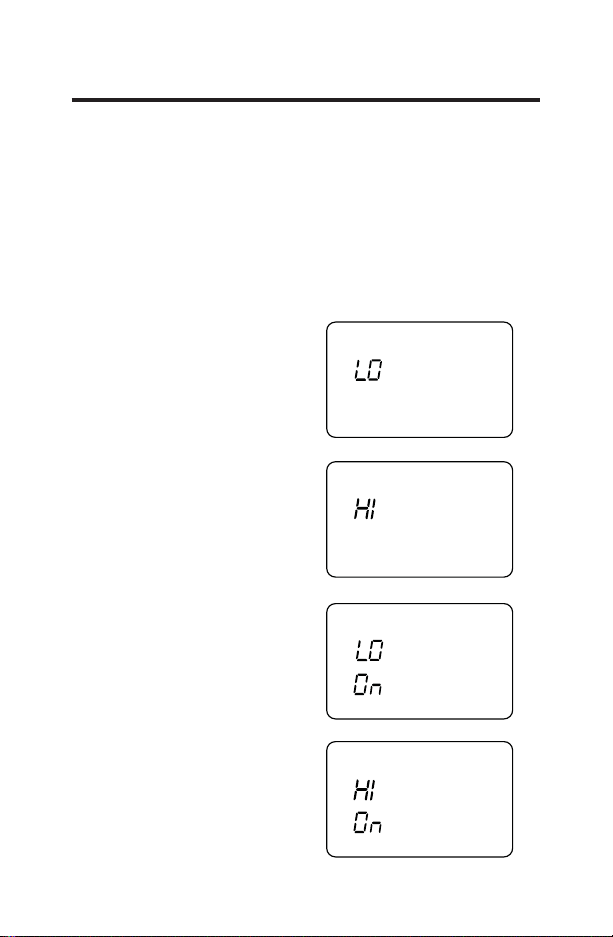
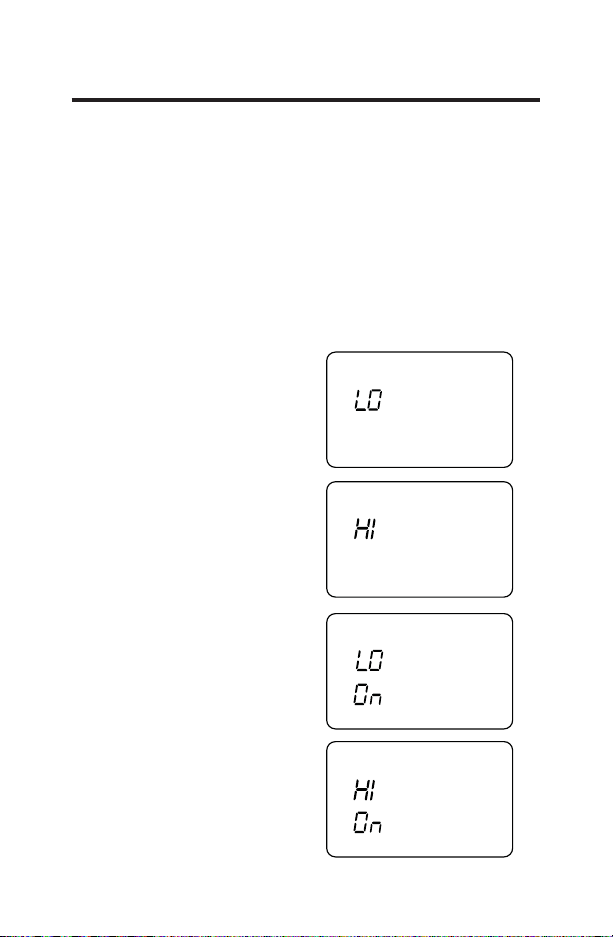
• Fan operation is available in either low or high speed.
• Press the
<
or
>
button to select a fan option. Selection
will be locked in after 8 seconds.
• “Auto” options operate the fan only during a cooling or
heating cycle.
• Continuous (“On”) options operate the fan all the time
including while in “OFF” mode. These options can be
disabled in the thermostat configuration (Config #9).
FAN
AUTO
FAN
AUTO
FAN
FAN
Auto, Low Speed:
Auto, High Speed:
Continuous, Low Speed:
Continuous, High Speed:
15
TROUBLESHOOTING TIPS
Problem Solution
No Display Check for 24 VAC; display is blank
when 24 VAC is not present
System fan does not
come on properly
Verify that wiring is correct.
All thermostat
buttons are
inoperative
Verify that 24 VAC is present; unit
will not operate when 24 VAC is not
present.
Thermostat turns
on and off too
frequently
Adjust temperature differential
(see Configuration Mode - Setting
Temperature Differential, Stage 1,
Stage 2, and Stage 3 section).
Fan runs
continuously
Check fan selection. If set to ON, fan
will run.
Room temperature
is not correct
Verify that wall hole is plugged
with putty or insulation to prevent
airflow from the wall cavity. Adjust
Temperature Offset (see Configuration
Mode - Room temperature offset
section).
Compressor doesn’t
run or turn off
immediately when
changing function
or setting
There is a 3 minute time delay and
a 3 minute minimum run time for the
compressor when it turns on/off.
Fan doesn’t run or
turn off immediately
when changing
function or setting
This is normal. On some models, the
fan may have a minimum run time/off
time delay.
Problem not listed
above
Press the Reset button once to reset
the thermostat microprocessor.
16
THERMOSTAT WARRANTY
For The Period Of: GE Appliances Will Replace:
One Year Full Replacement of the thermostat which fails
From the date of the due to a defect in materials or workmanship.
original purchase For Warranty replacement, contact your distributor.
What GE Appliances Will Not Cover:
Ŷ Service trips to your location.
Ŷ Improper installation. If you have an installation problem, contact
your installer. You are responsible for providing adequate electrical
connections to the product.
Ŷ
Failure of the product resulting from modifications to the product or
due to unreasonable use, including failure to provide reasonable and
necessary maintenance.
Ŷ
In commercial locations, labor necessary to move the unit, after it has
been initially installed, to a location where it is accessible for service by
an individual technician; or, if the instructions included in this manual
have been disregarded.
Ŷ
Replacement of location fuses or the resetting of circuit breakers.
Ŷ Damage to the product caused by improper power supply voltage,
accident, fire, floods or acts of God.
Ŷ
Incidental or consequential damage caused by possible defects with
this thermostat.
Staple your receipt here.
Proof of the original purchase date is
needed to validate the warranty.
This warranty is extended to the original purchaser and any succeeding owner
for products purchased for use within the USA and Canada. In Alaska, the
warranty excludes the cost of shipping or service calls to your site.
Some states or provinces do not allow the exclusion or limitation of
incidental or consequential damages. This warranty gives you specific legal
rights, and you may also have other rights which vary from state to state or
province to province. To know what your legal rights are, consult your local,
state or provincial consumer affairs office or your state’s Attorney General.
EXCLUSION OF IMPLIED WARRANTIES—Your sole and exclusive
remedy is product exchange as provided in this Limited Warranty. Any
implied warranties, including the implied warranties of merchantability
or fitness for a particular purpose, are limited to one year or the
shortest period allowed by law.
Warrantor: GE Appliances, a Haier company
Louisville, KY 40225
RENSEIGNEMENTS IMPORTANTS
CONCERNANT LA SÉCURIT .............2
VUE D’ENSEMBLE .............................3
INSTALLATION ................................ 4
SCHÉMAS DE CÂBLAGE ...................8
CONFIGURATION MODE .................10
FONCTIONS D’UTILISATION ......... 13
CONSEILS DE DÉPANNAGE ........... 15
GARANTIE LIMITÉE ......................... 16
Instructions D’installation
RAK150VF2
31-5000604 Rev. 1 02-22 GEA
THERMOSTAT
Numérique
2
Fiche technique
RENSEIGNEMENTS IMPORTANTS
CONCERNANT LA SÉCURITÉ
LISEZ TOUTES LES INSTRUCTIONS AVANT D’UTILISER CET APPAREIL
AVERTISSEMENT
RISQUE D’INCENDIE ET
D’ÉLECTROCUTION
Ŷ
Mettez toujours l’alimentation électrique hors tension
depuis la source d’alimentation électrique principale avant
d’installer, de nettoyer ou de retirer le thermostat.
Ŷ
N’utilisez pas des tensions supérieures à 30 VAC. Des
tensions plus élevées endommageront le thermostat en
plus de représenter un risque d’électrocution ou d’incendie.
Ŷ
Tout le câblage doit être conforme aux Codes de
l’électricité et du bâtiment locaux et nationaux.
Ŷ
Utilisez ce thermostat aux seules fins décrites dans ce
manuel.
Caractéristiques électriques :
• 24 VAC (18–30 VAC)
• 1 ampère maximum par borne
• 4 ampères maximum charge totale
Gamme des températures de fonctionnement : 40°F–99°F
(4°C–37°C)
Plage des réglages de température : 60°F–85°F (15°C–29°C)
Précision : ± 1°F (± 0.5°C)
Configurations du système :
• Réglage à l’usine : Chauffage à deux étapes (thermopompe/
chauffage par résistance); refroidissement à une étape,
ventilateur à deux vitesses.
• Réglage facultatif : Chauffage à une étape (chauffage par
résistance), refroidissement à une étape, ventilateur à deux
vitesses
Bornes : R, C, W, Y, GH, GL, B
Câblage : Longueur de câblage maximale de 66 pi (20 mètres)
pour AWG18
Longueur de câblage maximale de 60 pi (18 mètres)
pour AWG20
3
R C B Y1 W Y2 GL GH
RESET
CONFIG
COMMANDE DU THERMOSTAT
MODE FAN
DISPOSITION DE LA BASE DU
THERMOSTAT
PRÉSENTATION APERÇU
Écran
Boutons fléchés
Écran
Boutons fléchés
Chemin
de
câblage
Trou de
montage
Trou de
montage
Bouton de
configuration
Bouton de
réinitialisation
Ventilateur
Mode
4
INSTRUCTIONS D’INSTALLATION
WARNING
RISQUE D’ÉLECTROCUTION — Coupez
l’alimentation en débranchant l’appareil
ou en retirant le fusible ou mettant le
disjoncteur approprié à la position OFF
(hors tension) avant de retirer le thermostat.
L’omission de procéder ainsi peut
occasionner un choc électrique.
Contenu de l’emballage
ŶCouvercle du thermostat
ŶBase du thermostat
ŶeWLTXHWWHVGHFkEODJH
Ŷ
Vis
Ŷ
Ancrages muraux
Outils requis
ŶPerceuse et mèche de 5 mm (3/16 po)
Ŷ
Marteau
ŶTournevis
Ŷ0DVWLF
5
INSTRUCTIONS D’INSTALLATION
POUR RETIRER LE THERMOSTAT EXISTANT
1. Mettez le système de chauffage et de climatisation
hors tension en retirant le fusible ou en déclenchant
le disjoncteur approprié.
2. Retirez le couvercle du thermostat à changer. Ceci
devrait exposer les fils.
3. Étiquetez les fils existants à l’aide des étiquettes
fournies avant d’enlever les fils.
4. Après avoir étiqueté les fils, débranchez les fils des
cosses.
5. Retirez la base du thermostat existant du mur.
6. Consultez la section suivante pour des instructions
relatives à l’installation du thermostat.
6
INSTALLATION DU THERMOSTAT
IMPORTANT: L’installation de ce thermostat doit être
conforme à tous les codes et tous les règlements
des Codes du bâtiment et de l’électricité locaux et
nationaux.
REMARQUE: Montez le thermostat à une hauteur d’environ
1,5 m (5 pi) au-dessus du plancher. Ne montez pas le
thermostat sur un mur extérieur, directement exposé aux
rayons de soleil, derrière une porte ou à un endroit où
une bouche ou un conduit d’aération pourrait nuire au
fonctionnement.
1. Mettez le système de chauffage et de climatisation
hors tension en retirant le fusible ou en déclenchant le
disjoncteur approprié.
2. Retirez le couvercle en insérant et tournant une pièce de
monnaie ou un tournevis dans les fentes dans le haut du
thermostat.
3. Apposez la base du thermostat contre le mur où il doit
être installé. Assurez-vous que les fils passeront par
l’ouverture de fil située sur la base du thermostat.
4. Utilisez un niveau pour niveler et marquer l’emplacement
des trous de montage.
5. Éloignez la base et le couvercle du thermostat du lieu de
travail.
6. Utilisez une mèche de 5 mm (3/16 po) pour percer des
avant-trous aux emplacements marqués pour les vis à
bois.
7. Utilisez un marteau pour rentrer les ancrages fournis
dans les trous de montage.
8. Alignez la base du thermostat sur les trous de montage
et faites passer les fils de commande à travers le trou
des fils.
INSTRUCTIONS D’INSTALLATION
7
INSTALLATION DU THERMOSTAT
(cont.)
9. Scellez le trou des fils derrière le thermostat à l’aide d’un
isolant ou d’un mastic non inflammables, ou utilisez une
plaque murale obtenue auprès d’une quincaillerie.
10. Utilisez les vis fournies pour monter la base du
thermostat sur le mur.
11. Insérez les fils dénudés et étiquetés dans les bornes
correspondantes en pressant le contact des bornes.
Voyez la section « Schémas de câblage » de ce
manuel.
NOTICE
Assurez-vous que la partie exposée des fils ne touche
pas aux autres fils.
12. Tirez délicatement chaque fil pour vous assurer qu’il
est bien raccordé. Assurez-vous que chaque fil est
raccordé au conducteur électrique approprié.
13. Replacez le couvercle sur le thermostat en
l’enclenchant en place.
14. Branchez l’unité ou mettez le système sous tension au
niveau du panneau de service principal.
15. Testez le fonctionnement du thermostat.
INSTRUCTIONS D’INSTALLATION
8
SCHÉMAS DE CÂBLAGE
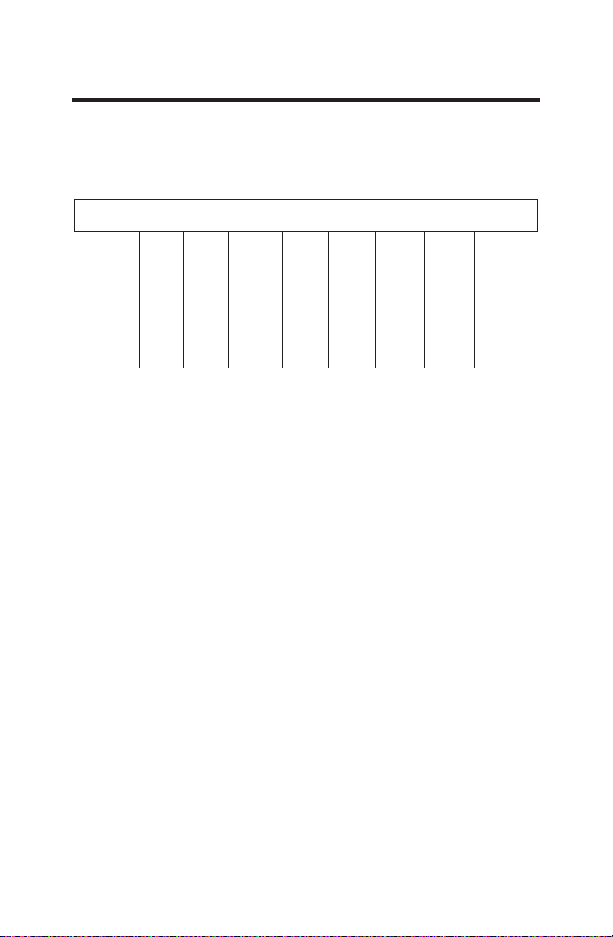
Tableau 1: Bornes pour huit fils. Système de
chauffage à 3 étapes/refroidissement à 2 étapes
R C B Y1 W Y2 GL GH
24 VAC HOT
24 VAC COMMON
REVERSING VALVE
STAGE 1 COMPRESSOR
HEAT-ELECTRIC
STAGE 2 COMPRESSOR
INDOOR FAN-LOW
INDOOR FAN-HIGH
VENTILATEUR INTÉRIEUR BAS
VENTILATEUR INTÉRIEUR HAUT
NEUTRE 24 VCA
CHAUD 24 VCA
COMPRESSEUR À 1 ÉTAPE
COMPRESSEUR À 2 ÉTAPE
ROBINET INVERSEUR
CHAUFFAGE ÉLECTRIQUE
9
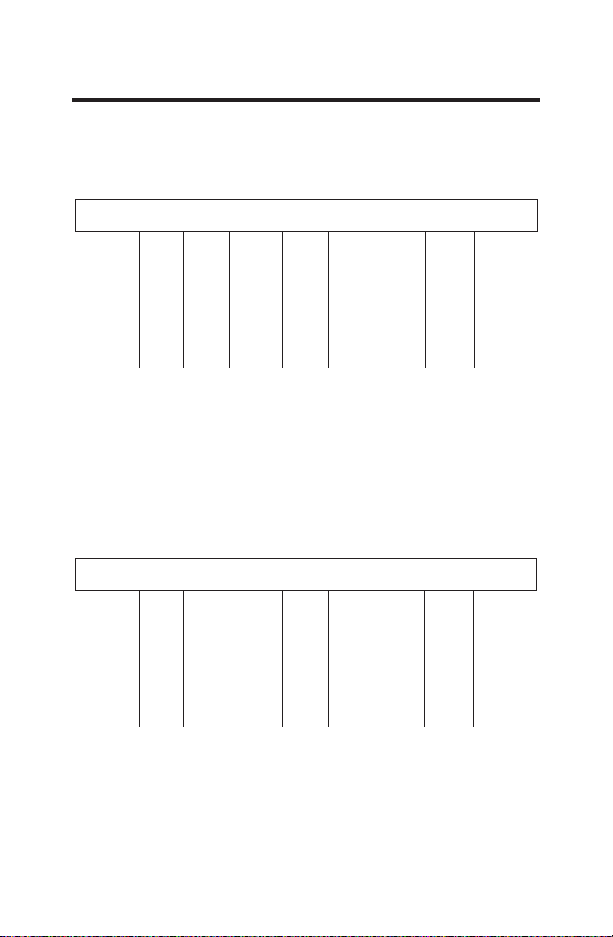
Tableau 2: Bornes pour sept fils. Système de
chauffage à 2 étapes/refroidissement à 1 étape
SCHÉMAS DE CÂBLAGE
Tableau 3: Bornes pour six fils. Système de
chauffage à 1 étape/refroidissement à 1 étape
R C B Y1 W Y2 GL GH
24 VAC HOT
24 VAC COMMON
REVERSING VALVE
STAGE 1 COMPRESSOR
HEAT-ELECTRIC
INDOOR FAN-LOW
INDOOR FAN-HIGH
R C B Y1 W Y2 GL GH
24 VAC HOT
24 VAC COMMON
STAGE 1 COMPRESSOR
HEAT-ELECTRIC
INDOOR FAN-LOW
INDOOR FAN-HIGH
VENTILATEUR INTÉRIEUR BAS
VENTILATEUR INTÉRIEUR HAUT
VENTILATEUR INTÉRIEUR BAS
VENTILATEUR INTÉRIEUR HAUT
NEUTRE 24 VCANEUTRE 24 VCA
CHAUD 24 VCACHAUD 24 VCA
COMPRESSEUR À 1 ÉTAPECOMPRESSEUR À 1 ÉTAPE
ROBINET INVERSEUR
CHAUFFAGE ÉLECTRIQUECHAUFFAGE ÉLECTRIQUE
10
MODE DE CONFIGURATION
Le mode de configuration est utilisé pour régler le RAK150VF2 afin
qu’il corresponde au système de chauffage-refroidissement. La
configuration par défaut de ce thermostat correspond à un système
à thermopompe à 2 étapes de refroidissement et 3 étapes de
chauffage. Pour une configuration différente, voyez l’étape 7 de la
rubrique Réglages du mode de configuration ci-dessous.
Pour configurer le RAK150VF2, exécutez les étapes suivantes :
1. Assurez-vous que le thermostat est à la position OFF.
2. Retirez le couvercle frontal du thermostat.
3.
Pour entrer dans le mode de configuration, pressez CONFIG
durant environ 2 secondes.
4. Une fois dans le mode de configuration, appuyez sur le bouton
<
ou
>
pour modifier les paramètres dans chaque écran.
- Appuyez sur le bouton FAN pour passer à l’écran suivant.
- Appuyez sur le bouton MODE pour revenir à l’écran
précédent.
REMARQUE: Pressez CONFIG durant environ 2 secondes pour
sauvegarder les modifications et quitter le menu de configuration.
Réglages du mode de configuration
Les fenêtres de réglage du mode de configuration sont les
suivantes :
1.
Échelle de températures (F ou C) — Choisir
Fahrenheit ou Celsius.
- Pressez le bouton
<
ou
>
pour sélectionner.
- Pressez le bouton Right pour avancer à la fenêtre suivante.
REMARQUE : Le réglage par défaut est Fahrenheit.
2. Écart de température — Étape 1 — (1–9°F) (.5-4.5°C)
- Réglez le nombre de degrés entre la température
du réglage et la température au démarrage pour
la première étape.
- Pressez le bouton
<
ou
>
pour régler la
valeur de l’écart de température.
- Pressez le bouton FAN pour avancer à la fenêtre suivante.
Remarque : Le réglage par défaut est 1ºF /.5ºC pour chaque étape.
3. Écart de température — Étape 2 (1–9°F) (.5-4.5°C)
thermopompe (HPb) seulement
- Réglez le nombre de degrés entre le démarrage
de l’étape 1 et le démarrage de l’étape 2.
- Pressez le bouton
<
ou
>
pour régler la
valeur de l’écart de température.
- Pressez le bouton RIGHT pour avancer à la fenêtre suivante.
Remarque : Le réglage par défaut de l’usine est 1°F/.5°C.
:
:
11
4. Écart de température — Étape 3 (1–9°F) (.5-4.5°C)
Réglez le nombre de degrés entre le moment où l’étape 2
s’active et celui où l’étape 3 s’active
- Pressez le bouton
<
ou
>
pour régler la
valeur différentielle.
- Pressez le bouton FAN pour avancer à la
fenêtre suivante.
Remarque : Le réglage par défaut est 1°F/.5ºC pour chaque
étape.
5. Système – Sélectionnez le système de chauffage-
refroidissement approprié selon le modèle sélectionné.
- HP b2 : Thermopompe à refroidissement à 2
étapes et chauffage à 2 étapes (type B) avec
chauffage d’appoint électrique de troisième étape
À utiliser avec les modèles AZ9V.
- HP b1 : Thermopompe à refroidissement à 1 étape et
chauffage à 1 étape (type B) avec chauffage d’appoint
électrique de deuxième étape.
À utiliser avec les modèles AZ95H et AZ65H.
- ELC : Refroidissement à 1 étape et chauffage électrique à 1
étape.
À utiliser avec les modèles AZ95E et AZ45E.
- Pressez le bouton
<
ou
>
pour régler la valeur de l’écart
de température.
- Pressez le bouton FAN pour avancer à la fenêtre suivante.
- Remarque : Le réglage par défaut est HP b2 pour chaque
étape.
6. Réglage de refroidissement minimal (60, 64, 66, 68, 70, 72,
74, 76°F) (15, 17, 19, 20, 21, 22, 23, 24°C)
- Ajustez pour contrôler la température de
refroidissement minimale permise.
- Pressez le bouton
<
ou
>
pour régler la
valeur de l’écart de température.
- Pressez le bouton FAN pour avancer à la fenêtre suivante.
Remarque : Le réglage par défaut est 60°F/15°C pour chaque
étape.
MODE DE CONFIGURATION
:
HEAT
12
7. Réglage de chauffage maximal (65, 70, 72, 74, 76, 78, 80,
85°F) (18, 21, 22, 23, 24, 26, 27, 29°C)
- Ajustez pour contrôler la température de
chauffage maximale permise.
- Pressez le bouton
<
ou
>
pour régler la
valeur de l’écart de température.
- Pressez le bouton FAN pour avancer à la fenêtre suivante.
Remarque : Le réglage par défaut est 85°F/29°C pour chaque
étape.
8. Écart à la température ambiante (+9°F to –9°F) (+5°C to
–5°C)
- Ajustez pour calibrer la température ambiante
affichée afin de correspondre à la température
ambiante réelle.
- Pressez le bouton
<
ou
>
pour régler la valeur de l’écart
de température.
- Pressez le bouton FAN pour avancer à la fenêtre suivante.
Remarque : Le réglage par défaut est 0°F/0°C pour chaque
étape.
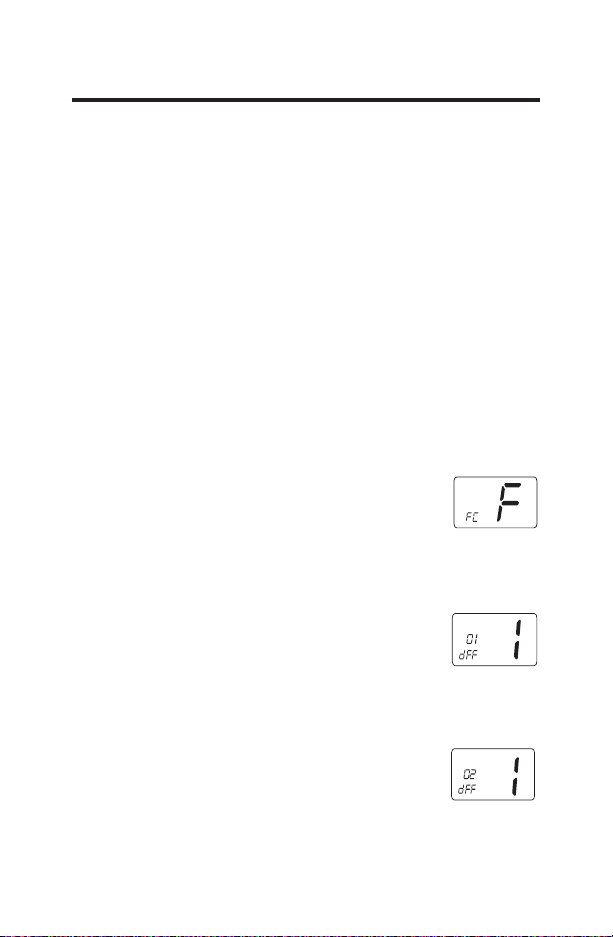
9. Fonctionnement en continu du ventilateur
Ce réglage contrôle la disponibilité des options
de fonctionnement en continu du ventilateur
qu’il est possible de sélectionner par l’utilisateur
du thermostat.
- Pressez le bouton
<
ou
>
pour changer la sélection.
Remarque : Le réglage par défaut de l’usine est ON (marche)(1).
1=ON, 0=OFF
MODE DE CONFIGURATION
FAN
13
FONCTIONS D’UTILISATION
OFF (arrêt)
• Dans ce mode, le thermostat n’allumera pas les
dispositifs de chauffage ou de refroidissement (le
ventilateur manuel peut fonctionner).
• Le mode OFF sert aussi à accéder aux mode
Configuration.
Heat (chauffage)
• Dans ce mode, le
thermostat contrôle le
système de chauffage.
• Appuyez sur le bouton
<
oU
>
pour régler
la température
souhaitée.
Cool (refroidissement)
• Dans ce mode, le
thermostat contrôle
le système de
refroidissement.
• Appuyez sur le
bouton
<
oU
>
pour régler la
température
souhaitée.
HEAT
Température
ambiante
Voyant de
FKDXႇDJH
Réglage – Temp.
FKDXႇDJH
COOL
Température
ambiante
Voyant de
refroidissement
Réglage – Temp.
refroidissement
14
FONCTIONS D’UTILISATION
Le ventilateur
• Le ventilateur peut fonctionner en basse ou haute vitesse.
• Appuyez sur le bouton
<
ou
>
pour sélectionner une
option de ventilateur. La sélection sera verrouillée après 8
secondes.
• Les options « Auto » activent le ventilateur seulement
dans le cycle de refroidissement ou de chauffage.
• Les options de fonctionnement en continu (On) activent
le ventilateur en permanence y compris en mode « OFF
». Ces options peuvent être désactivées dans le mode
de configuration du thermostat (étape 9).
Auto, basse vitesse :
Auto, haute vitesse :
En continu,
basse vitesse :
En continu,
haute vitesse :
FAN
AUTO
FAN
AUTO
FAN
FAN
15
ESSAI DU THERMOSTAT
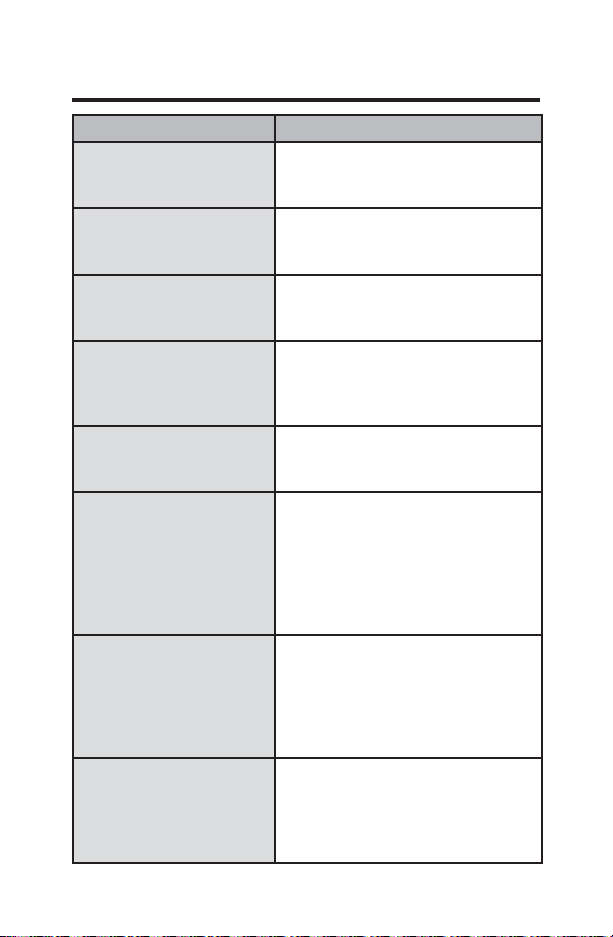
Problème Solution
$XFXQDႈFKDJH Assurez-vous que la tension est de
9$&O¶DႈFKHXUQHIRQFWLRQQHUD
pas sans cette tension.
Le système de ventilation
ne se met pas en marche
correctement
9pUL¿H]OHERQpWDWGXFkEODJH
Aucun bouton du
thermostat ne fonctionne.
Assurez-vous que la tension est de
24 VAC; l’appareil ne fonctionnera
pas sans cette tension.
Le thermostat s’allume et
s’éteint trop fréquemment
Ajustez l’écart de température (voir
ODVHFWLRQ0RGHGHFRQ¿JXUDWLRQ
Écart de température, Étape 1 et
Étape 2).
Le ventilateur ne s’arrête
pas.
9pUL¿H]OHFRPPXWDWHXU$XWR2Q
du ventilateur. S’il est à la position
ON, le ventilateur va fonctionner.
La température de la
pièce est erronée.
9pUL¿H]TXHOHWURXGDQVOHPXU
est bouché avec du mastic ou un
LVRODQWD¿QGHEORTXHUOHÀX[G¶DLU
de la cavité murale. Ajustez l’écart
de température (voir la section
0RGHGHFRQ¿JXUDWLRQeFDUWjOD
température ambiante)
Le compresseur ne
fonctionne pas ou s’éteint
immédiatement après une
PRGL¿FDWLRQGHIRQFWLRQ
ou de réglage.
Il y a une temporisation de trois
(3) minutes et un temps de
fonctionnement minimum de trois
(3) minutes pour le compresseur
lorsqu’il se met en marche et
s’arrête
Le ventilateur ne
fonctionne pas ou s’éteint
immédiatement après une
PRGL¿FDWLRQGHIRQFWLRQ
ou de réglage.
Pressez le bouton Reset
(réinitialisation) une fois pour
réinitialiser le microprocesseur du
thermostat.
16
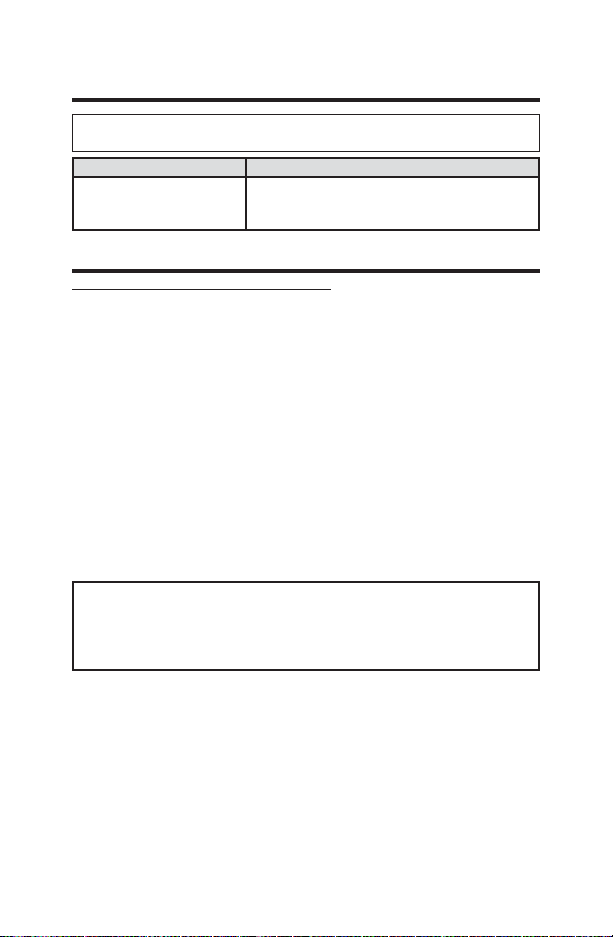
GARANTIE LIMITÉE DU THERMOSTAT
Ce que GE Appliances ne couvre pas :
Ŷ Frais de déplacement pour réparation vers votre emplacement.
Ŷ Une installation mal effectuée. Si vous avez un problème d’installation,
communiquez avec votre installateur. Vous êtes responsable d’effectuer
correctement les raccords électriques de votre produit.
Ŷ Une défectuosité du produit causée par des modifications au produit
ou par son usage déraisonnable, y compris le défaut d’effectuer des
entretiens raisonnables et nécessaires.
Ŷ Dans les locaux commerciaux, la main-d’œuvre nécessaire pour
déplacer l’appareil, après son installation initiale, à un endroit où il
est accessible pour l’entretien par un technicien individuel; ou, si les
instructions contenues dans ce manuel n’ont pas été respectées.
Ŷ Le remplacement des fusibles ou l’enclenchement des disjoncteurs du site.
Ŷ Les bris du produit causés pour une tension d’alimentation électrique
inadéquate, un accident, un incendie, les inondations et les cas de
force majeure.
Ŷ Les dommages accessoires ou immatériels causés par des probabilités
de défectuosités avec ce thermostat.
Brochez votre reçu ici. Une preuve de la date d’achat originale est
nécessaire pour valider la garantie.
Cette garantie limitée est consentie à son premier acheteur et à tout
propriétaire subséquent pour les produits achetés pour utilisation aux
États-Unis et au Canada. En Alaska, la garantie limitée exclut les frais
d’expédition ou les appels de service vers votre site. Certains États ou
provinces n’autorisent pas l’exclusion ou la limitation des dommages
accessoires ou immatériels. Cette garantie limitée vous donne des droits
légaux spécifiques, et vous pouvez également avoir d’autres droits qui
varient d’un état ou d’une province à l’autre. Pour connaître vos droits
légaux, consultez votre bureau d’information aux consommateurs local,
provincial ou d’État ou le procureur général de votre État.
Garant : GE Appliances, Louisville, KY 40225
EXCLUSION DES GARANTIES IMPLICITES - Votre seul et unique
recours est l’échange du produit comme prévu dans cette garantie
limitée. Toute garantie implicite, y compris les garanties implicites de
qualité marchande ou d’adaptation à un usage particulier, est limitée à
un (1) an ou à la période la plus courte permise par la loi.
Pour le remplacement sous garantie, contactez votre distributeur.
Période de la garantie GE Appliances remplacera :
Un (1) an À compter de la
date du premier achat.
Remplacement complet du thermostat
comportant un défaut de matériaux ou de
fabrication