Important Safeguards
When using electrical appliances, basic safety precautions should always be followed including the following:
1. READ ALL INSTRUCTIONS.
2. Do not touch hot surface. Use top cover or button only.
3. Close supervision is necessary when any appliance is used by or near children. This appliance is not intended for use by persons (including children) with reduced physical, sensory, or mental capabilities, or lack of experience and knowledge, unless they are closely supervised and instructed concerning use of the appliance by a person responsible for their safety.
4. Unplug from outlet when not in use and before cleaning. Allow to cool before putting or taking off parts, and before cleaning the appliance.
5. In order to minimize the risk of property damage, never place the Coffee Maker under cabinets. Make sure the area several feet above the Coffee Maker is clear from all furniture or cabinetry.
6. Do not use outdoors.
7. To protect against fire, electrical shock and injury to persons do not immerse cord, plugs, or appliance in water or other liquids.
8. To interrupt the brew cycle, press either the button, whichever one was originally pressed to start the brewing cycle.
9. Do not operate any appliance with a damaged cord or plug, or after the appliance malfunctions, or has been damaged in any manner. Return appliance to the nearest authorized service facility for examination, repair or adjustment.
NOTE: DO NOT ATTEMPT TO REPAIR THE UNIT YOURSELF. THIS WILL VOID THE WARRANTY.
10. Stand the appliance on a table or flat surface.
11. To disconnect, remove plug from wall outlet.
12. Do not place appliance on or near a hot gas or electric burner or in a heated oven.
13. Unplug the power cord from the electrical outlet when the appliance is not in use, left unattended.
14. Do not use this appliance for other than its intended use.
15. To reduce the risk of electric shock, do not mount over a sink.
16. To reduce the risk of fire, do not mount unit over or near any portion of a heating or cooking appliance.
CAUTION: There are two sharp needles that puncture the capsules. One is located inside the capsule adaptor and the other is located on the top underside of the adaptor compartment. To avoid risk of injury do not place fingers inside either parts. Also exercise caution when cleaning the parts.
Additional Important Safeguards
FOR HOUSEHOLD USE ONLY. SAVE THESE INSTRUCTIONS.
CAUTION: There is boiling water in the front tab lid section during the brew process. Do not open the lid at any time for risk of injury.
WARNING: This appliance generates heat and escaping steam during use. Proper precautions must be taken to prevent the risk of burns, fires, or other injury to persons or damage to property.
1. All users of this appliance must read and understand this Instruction Manual before operating or cleaning this appliance.
2. The cord to this appliance should be plugged into a 120V AC electrical outlet only.
3. Use water only in this appliance. Do not put any other liquids or food products in this appliance. Do not mix or add anything to the water placed in this appliance, except as instructed in the User Maintenance Instructions to clean the appliance.
4. Do not attempt to move an appliance containing hot liquids. Allow appliance to cool completely before moving.
5. Keep appliance at least 4 inches away from walls or other objects during operation. Do not place any objects on top of appliance while it is operating. Place the appliance on a surface that is resistant to heat.
6. If this appliance begins to malfunction during use, immediately unplug the cord. Do not use or attempt to repair the malfunctioning appliance.
7. If this appliance falls or accidentally becomes immersed in water or any other liquid, unplug it immediately. Do not reach into the water. Do not use this appliance after it has fallen into or has become immersed in water.
8. The appliance must be left to cool down sufficiently before adding more water to avoid exposure to steam.
9. Always use fresh, cool water in your appliance. Warm water or other liquids, except as listed in cleaning section, may cause damage to the appliance.
Notes on the Plug
This appliance has a polarized plug (one blade is wider than the other). To reduce the risk of electric shock, this plug will fit in a polarized outlet only one way.
If the plug does not fit fully into the outlet, reverse the plug. If it still does not fit, contact a qualified electrician. Do not modify the plug in any way.
Notes on the Cord
1. A short power-supply cord is provided to reduce risks resulting from becoming entangled in or tripping over a longer cord.
2. Longer detachable power-supply cords or extension cords are available and may be used if care is exercised in their use.
3. If a long detachable power-supply cord or extension cord is used,
4. The marked electrical rating should be at least as great as the electrical rating of the appliance.
5. If the appliance is of the grounded type, the extension cord should be a grounding-type 3-wire cord.
6. The longer cord should be arranged so that it will not drape over the countertop or tabletop where it can be pulled on by children or tripped over.
Electric Power
If the electrical circuit is overloaded with other appliances, your appliance may not operate properly. It should be operated on a separate electrical circuit from other appliances.
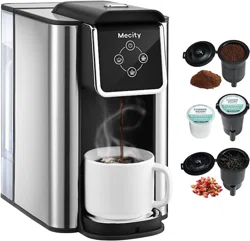
Getting to Know Your Capsule Type Coffee Maker
* Product may vary slightly from the illustration
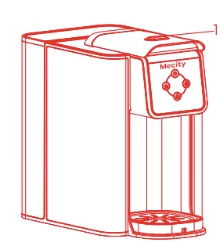

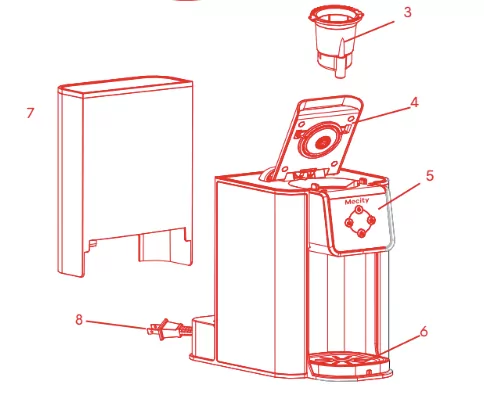
1. Button
2. Capsule
3. Capsule box
4. Top cap
5. Control panel
6. Tray
7. Water tank
8. Electric cord with polarized plug
Introduction
- This Coffee Maker uses a pressurized system to brew a perfect single hot beverage.
- The drip tray accommodates most cup sizes, mugs or tumblers.
- Use the ground coffee adaptor (included) to create special blends of your favorite coffee.
For added personalization, add a dash of your favorite spice, from cinnamon, orange peel, cardamom or vanilla bean.
- Using the reusable ground coffee adaptor is an environmentally-friendly choice that will also save you money.
Before Using for the First Time
CAUTION: To protect against electrical shock, do not immerse the Coffee Maker or allow the power cord to come into contact with water or other liquids.
1. Remove all packing material and labels from the inside and outside of the Coffee Maker. Place the unit on a flat, clean surface. Make sure to remove three adapters from the inner packaging.
2. Before use, thoroughly clean all adapters with warm soapy water.
3. To clean the inside of the unit, it is recommended to brew a large cup.
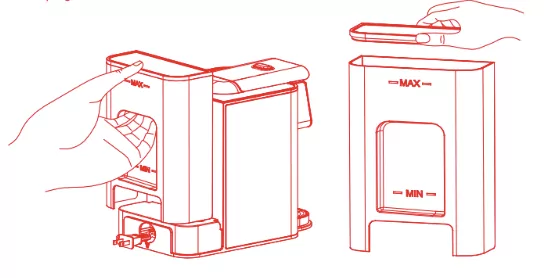
4. Remove the lid and fill the water tank with cold water past the MIN indicator line and ensure water level is below the MAX.
5. Put the lid back and put the water tank back into place. Place down firmly to make sure it is securely in place.
NOTE: Do not add any filter for this initial cleaning.
6. To select the brew size press either the small cup (6oz), medium cup (8oz) or large cup (10oz) button.
7. Unplug the Coffee Maker when not in use.
Brewing Instructions
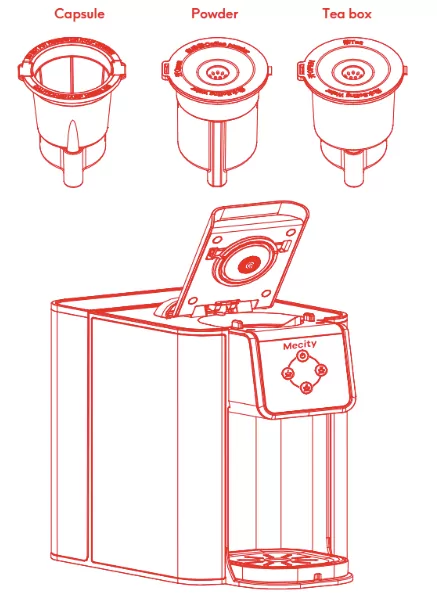
This is a multifunctional low-pressure coffee machine that supports the use of American K-CUP capsules, coffee powder and tea.
Each filter is individually matched with different drinks. Please use the correct filter when brewing your beverage.
The coffee powder filter and tea filter may be damaged if they are mixed and used incorrectly.
Setting Up Your Capsule Type Coffee Maker for Iced Beverages Using a Capsule
1. Use a K-Cup capsule with a stronger flavour.
2. Use a tall cup or tumbler filled with ice cubes.
Setting Up Your Capsule Type Coffee Maker with Water Tank Using the Ground Coffee Filter
The ground coffee filter allows you to create your own favorite blend of coffee. Personalize your blends by adding cinnamon, orange peel, cardamom or vanilla bean for flavor.
WARNING: To avoid damage to your Coffee Maker, never operate your Coffee Maker when the water tank is empty.
1. Remove the water tank from the base of the unit.
2. Remove the lid and fill with cold water.
IMPORTANT: For optimal flavor, distilled or filtered water is preferred.
3. Put the lid back and return the water tank to its position.
4. Place an empty cup or mug on the drip tray cover.
The suggested cup height is between 5.1 inches and 5.7 inches. After removing the drip tray, a cup up to 6.3 inches can fit.
5. Choose the capsule filter and insert the capsule. Press down until it sits flush in the filter.
6. Place the capsule filter into the filter compartment.
7. Press the filter compartment lid down firmly until it locks.
8. Plug the Coffee Maker into a 120V AC electrical wall outlet.
9. Select the brew size by pressing the 6oz, 10oz or 15oz button.
10. The light on the selected button will flash while heating.
11. The pump will activate and coffee will begin flowing through the nozzle.
12. After the cycle ends, the Coffee Maker and indicator lights turn off automatically after 10 minutes.
13. Allow the unit to cool before removing the used capsule.
14. Unplug the Coffee Maker when not in use.
Control Panel
Control panel function buttons: see the picture

 Power switch
 Small cup – 6OZ
 Medium cup – 8OZ
 Large cup – 10OZ
Care & Cleaning Instructions
1. Always ensure the Coffee Maker is unplugged and cool before removing the drip tray.
2. Rinse the drip tray and cover and return them to the base.
3. Press the filter compartment lid to unlock and open it.
4. Remove the used capsule and discard it. Rinse the capsule filter in warm water.
5. When using the reusable ground coffee adaptor, discard used coffee and wash the filter with warm soapy water.
NOTE: Both the capsule and ground coffee filters are top rack dishwasher safe.
6. Use a damp paper towel or sponge to remove residue from the filter compartment.
7. Wipe the exterior of the Coffee Maker with a damp cloth to remove superficial stains.
For stubborn stains, use a nylon or plastic pad with a non-abrasive cleanser.
8. Do not use metal scouring pads or abrasive cleaners.
Descaling Instructions
After the machine works for 180 cycles, the middle cup and the power indicator light flash at the same time (0.5s/0.5s), which is to remind the user to descale (the water tank is filled with descaling solvent with -MAX- water level). After the machine enters the working mode, press the middle button, and the middle button indicator light flashes. After working the middle button, the machine will continue to return to the state that the middle button and the power indicator light flash at the same time. After 6 consecutive operations, the machine will enter the standby state; (You can’t press any key to pause during descaling, but you must finish it six times). If there is no water, it will enter the water shortage mode.
1. Fill the water tank with 1 part white vinegar (12 oz) and 12 parts cold water (36 oz).
2. Place the tea filter.
3. Place an empty tumbler on the drip tray.
4. Unplug the Coffee Maker when not in use.
5. Dry parts thoroughly and wipe the exterior with a dry cloth.
Storing Instructions
1. Unplug the unit and allow it to cool.
2. Never wrap the cord tightly around the appliance.
3. Store one clean filter inside the filter compartment.
4. Store the other filter with the unit.
5. Store the Coffee Maker in a cool, dry place.
6. Never store the unit while it is still plugged in.
Warranty
MECITY Inc. hereby warrants that for a period of ONE YEARS from the date of purchase, this product will be free from mechanical defects in material and workmanship, and for 90 days in respect to non-mechanical parts. At its sole discretion, MECITY Inc. will either repair or replace the product found to be defective, or issue a refund on the product during the warranty period.
The warranty is only valid for the original retail purchaser from the date of initial retail purchase and is not transferable. Keep the original sales receipt, as proof of purchase is required to obtain warranty validation. Retail stores selling this product do not have the right to alter, modify, or in any way revise the terms and conditions of the warranty.
EXCLUSIONS:
The warranty does not cover normal wear of parts or damage resulting from any of the following: negligent use of the product, use of improper voltage or current, improper routine maintenance, use contrary to the operating instructions, disassembly, repair, or alteration by anyone other than qualified MECITY Inc. personnel. Also, the warranty does not cover Acts of God such as fire, floods, hurricanes, or tornadoes.
MECITY Inc. shall not be liable for any incidental or consequential damages caused by the breach of any express or implied warranty. Apart from the extent prohibited by applicable law, any implied warranty of merchantability or fitness for a particular purpose is limited in time to the duration of the warranty. Some states, provinces or jurisdictions do not allow the exclusion or limitation of incidental or consequential damages, or limitations on how long an implied warranty lasts, and therefore, the above exclusions or limitations may not apply to you. The warranty covers specific legal rights which may vary by state, province and/or jurisdiction.
HOW TO OBTAIN WARRANTY SERVICE:
You need to contact Customer Service at our service
mail: [email protected].
Our Customer Service Representative will resolve warranty issues over the email within 24H.
Feel free to contact us if you have any question.