BiSSEII °
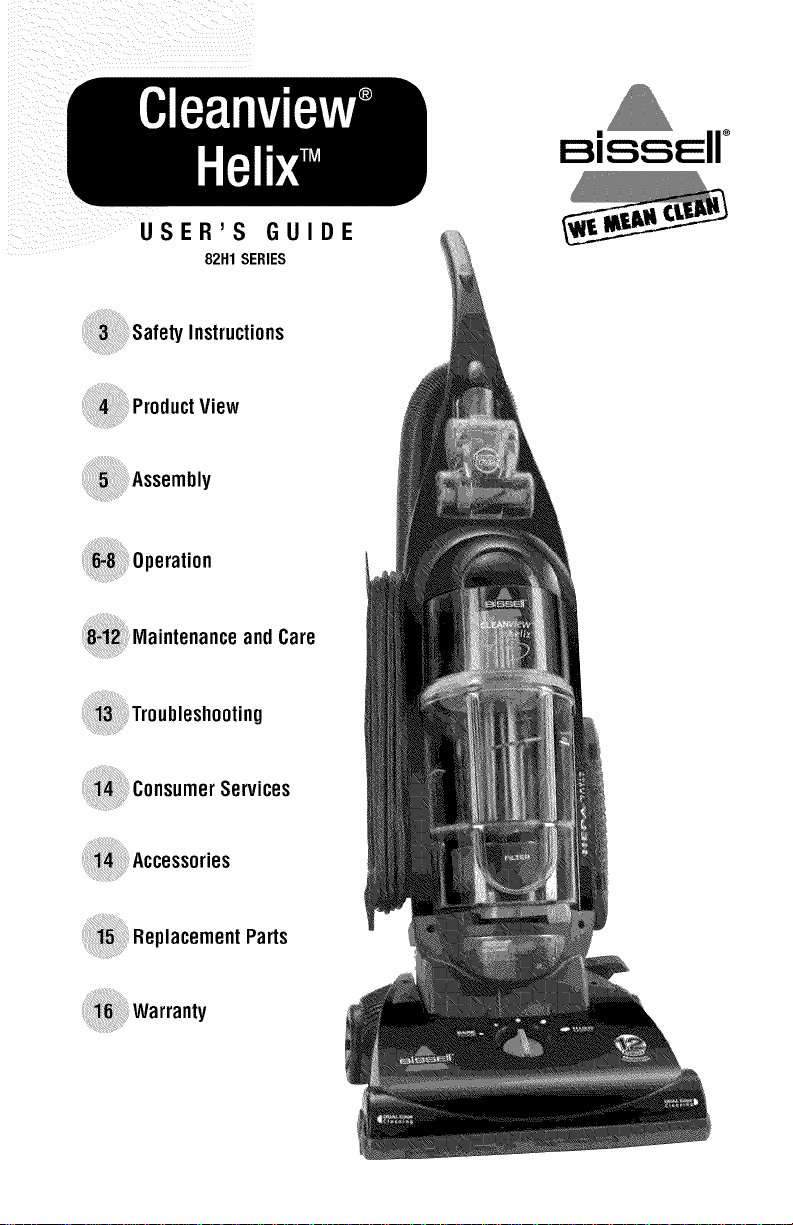
USER'S GUIDE
82H1SERIES
_Product View
and Care
_Consumer Services
_Replacement Parts
forbuyinga BISSELLCleanview® HelixTM
We're glad you purchased a BISSELLvacuum. Everything we Know about floor
care went into the design and construction of this complete, nlgh-tech home
cleaning system. By purchasing this product you are helping BISSEL/with our
commitment to reducing our impact on the environment _nrougn an expanding
range of sustainable design efforts.
Your carpet cleaner is well made, and we back it with a limited three-year warranty.
We also stand behind it with a knowledgeable, dedicated Consumer Services
department, so, should you ever have a problem, you'll receive fast, considerate
assistance.
My great-grandfather invented the floor sweeper in 1876. Today, BISSELLis a
global leader in the design, manufacture, and service of high quality homecare
products like your carpet cleaner.
Thanks again, from all of us at BISSELL.
Mark J. Bissell
President and Chief Executive Officer
i: 2¸¸¸¸¸¸TMwwwhi,sell00m 800.237.7691
TANTSAFETYINSTRUCTIONS
Whenusinganelectricalappliance,basic
precautionsshouldbeobserved,including
thefollowing:
READ ALLINSTRUCTIONS
BEFOREUSINGYOUR
UPRIGHTVACUUM.
Alwaysconnecttoa polarizedoutlet(leftslotiswiderttlan
right),Unphgfromoutletwtlennoth useandbeforecoil
ductingmaintenance,
WARNING:Toreduce
the risk of fire, electric shock,
orinjury:
• Donotmodifyttlepolarizedplugtofita
nonpolarizedoutletorextensioncord,
• Donotleavevacuumcleanerunattendedwtlenitis
pluggedin,
• Unplugfromoutletwheenotinuseand
beforeservicing,
• UnplugbeforeattachingtheTurboBrush,
• Donotuseoutdoorsoronwetsurfaces,
• Donotallowchildreetooperatevacuum
cleaneroruseasatoy,
• Closeattentionisnecessarywheeusedbyor
nearchildren,
• Donotuseforanypurposeotherthandescribedhthks
user'sguide,
• Useonlymanufacturer'srecommended
attachmeets,
• Donotusev_l damagedcadorpug,
• Ifapplianceisnotworkingasitshould,hasbeen
dropped,damaged,leftoutdoors,ordropped
intowater,haveitrepairedatanauthorized
servicecenter,
• Donotpullorcarrybycord,usecordasa handle,close
adooroncord,or pullcordaroundsharpedgesor
corners,Donotrunapplianeeovercord,Keepcord
awayfromheatedsurfaces,
• Donotunplugbypullingoncord,Tounplug,grasp
theplug,notthecord,
• Donothandlevacuumcleanerorplugwith
wetbands,
• Donotputanyobjectintoopenings,Donotusew_thaly
openingblocked;keepopeningsfreeofdust,lint,hair,
aidalythingthatmayreduceairflow,
• Keep}lair,looseclothing,fingers,andallpartsofbody
awayfromopeeingsaid movhgparts,
www.bissell.com
• Turnoff allcontrolsbeforepluggingor unplugging
vacuumcleaner,
• Useextracarewheecleaningstairs,
• Donot pickupflammablematerials(lighterfluid,
gasoline,kerosene,etc,)or usein thepresenceof
explosiveliquidsorvapors,
• Donot pickuptoxic material(chlorinebleach,ammo
ilia, draincleaner,etc,),
• Donotusevacuumdeanerin al enclosedspacefilled
withvaporsgiveeoffbyoilbasepaint,paintthinner,
somemothproofingsubstances,flammabledust,or
otherexplosiveor toxicvapors,
• Donot pickup }lardor sharpobjectssuchas glass,
nails,screws,coins,etc,
• Donotpickupaly_lingthatksburningorsmoking,suds
asdgarettesmatdles_or}lotashes,
• Donotusew_thot_fiEtorsin #ace,
• Useonlyondry,indoorsurfaces,
• Keepapplianceoil a Iwel surface,
• Donotcarrythevacuumcleanerwhileit
isrunning,
SAVETHESE
INSTRUCTIONSFOR
FUTUREUSE
THISAPPLIANCE
HASA POLARIZED
PLUG.
Toreducethe riskofelectricshock,thisappliancehasa
polarizedplug(onebladeiswiderthantheother),Thisplug
willfit ina polarizedoutletonlyone way,Ifthe plugdoes
notfit fullyintheoutlet,reversethe plug,Ifit stilldoesnot
fit, contacta qualifiedelectricianto instaNa properoutlet,
Donotchalgetheplugin anyway,
Thismodelisfor householduseonly,
800.237.7691
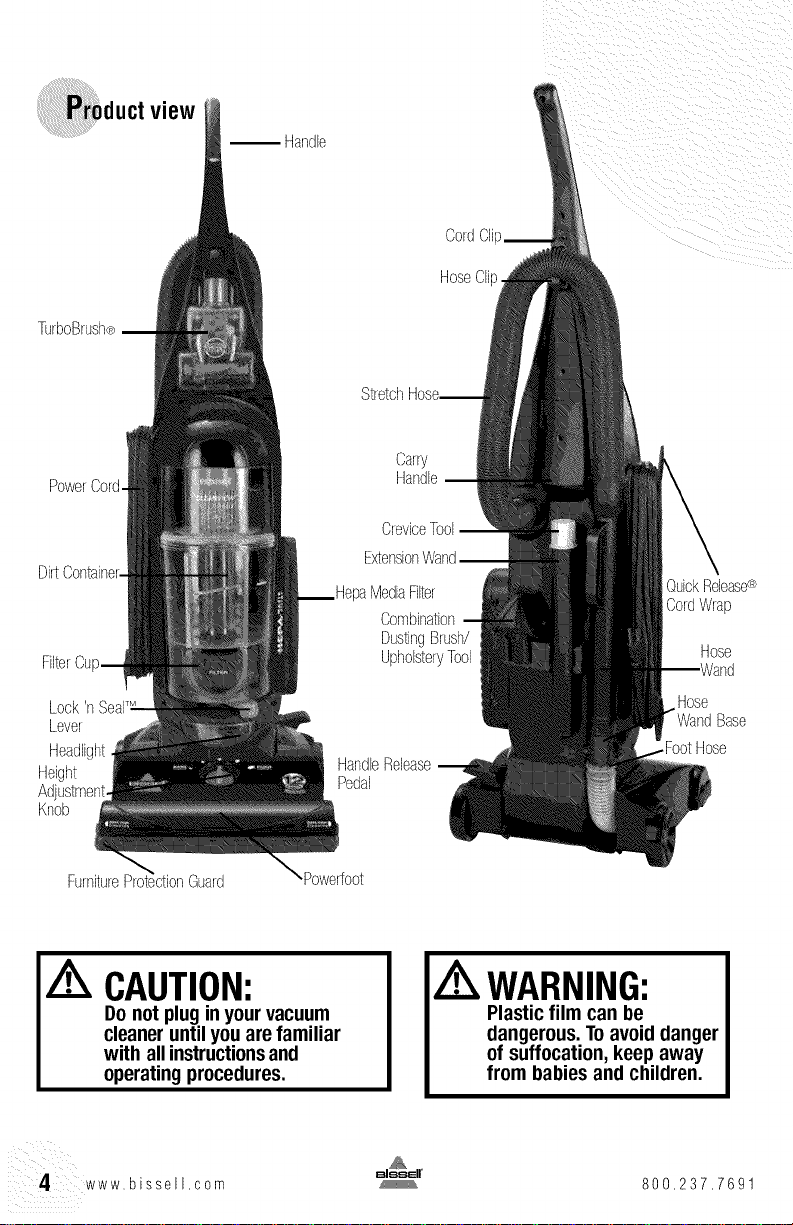
TurboBrush®
PowerCord.
FilterCu
Lock
Lever
Headlight
Height
Knob
view
Handle
CordCIi
HoseClip
Stretch
Carry
Handle
CreviceTool
Combination
DustingBrush/
UpholsteryTool
HandleRelease
Pedal
QuickRelease®
CordWrap
Hose
Hose
Base
FootHose
Furniture Guard Powerfoot
CAUTION:
Do not plugin yourvacuum
cleaneruntil youare familiar
with all instructions and
operatingprocedures.
WARNING:
Plastic film can be
dangerous.Toavoiddanger
of suffocation,keep away
from babiesand children.
4 www.bissell,com 800,237.7691
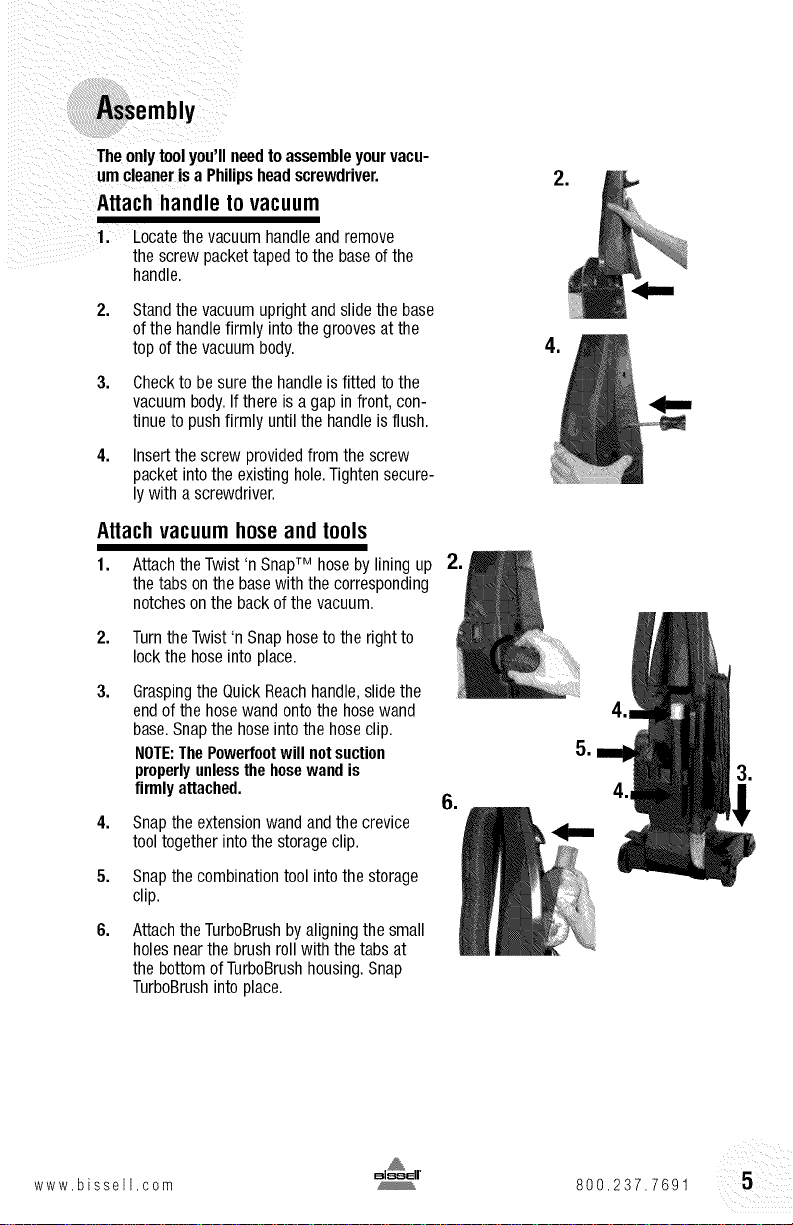
Theonlytoolyou'llneedtoassembleyourvacu-
umcleanerisa Philipsheadscrewdriver.
Attachhandletovacuum
1. Locatethe vacuumhandleand remove
the screw packettapedto the baseofthe
handle.
2,
3,
4,
Standthe vacuumuprightand slidethe base
ofthe handlefirmly intothe groovesatthe
top ofthe vacuumbody.
Checkto besurethe handleisfitted tothe
vacuumbody.Ifthereis agapin front, con-
tinueto pushfirmly untilthe handleisflush.
Insertthe screw providedfrom the screw
packetintothe existinghole.Tightensecure-
ly with a screwdriver.
Attachvacuumhoseandtools
1. Attachthe Twist'n SnapTM hosebyliningup
the tabs onthe basewith the corresponding
notchesonthe backof the vacuum.
2,
3.
TurntheTwist'n Snaphosetothe rightto
lock the hoseinto place.
Graspingthe QuickReachhandle,slidethe
endofthe hosewand ontothe hosewand
base.Snapthe hoseintothe hoseclip.
NOTE:ThePowerfootwill notsuction
properlyunlessthe hosewand is
firmlyattached.
4,
5.
6.
Snapthe extensionwand andthe crevice
tooltogether intothe storageclip.
Snapthe combinationtool intothe storage
clip.
Attachthe TurboBrushbyaligningthe small
holesnearthe brush rollwith thetabs at
the bottom ofTurboBrushhousing,Snap
TurboBrushintoplace.
,
www.bissell,com 800,237.7691
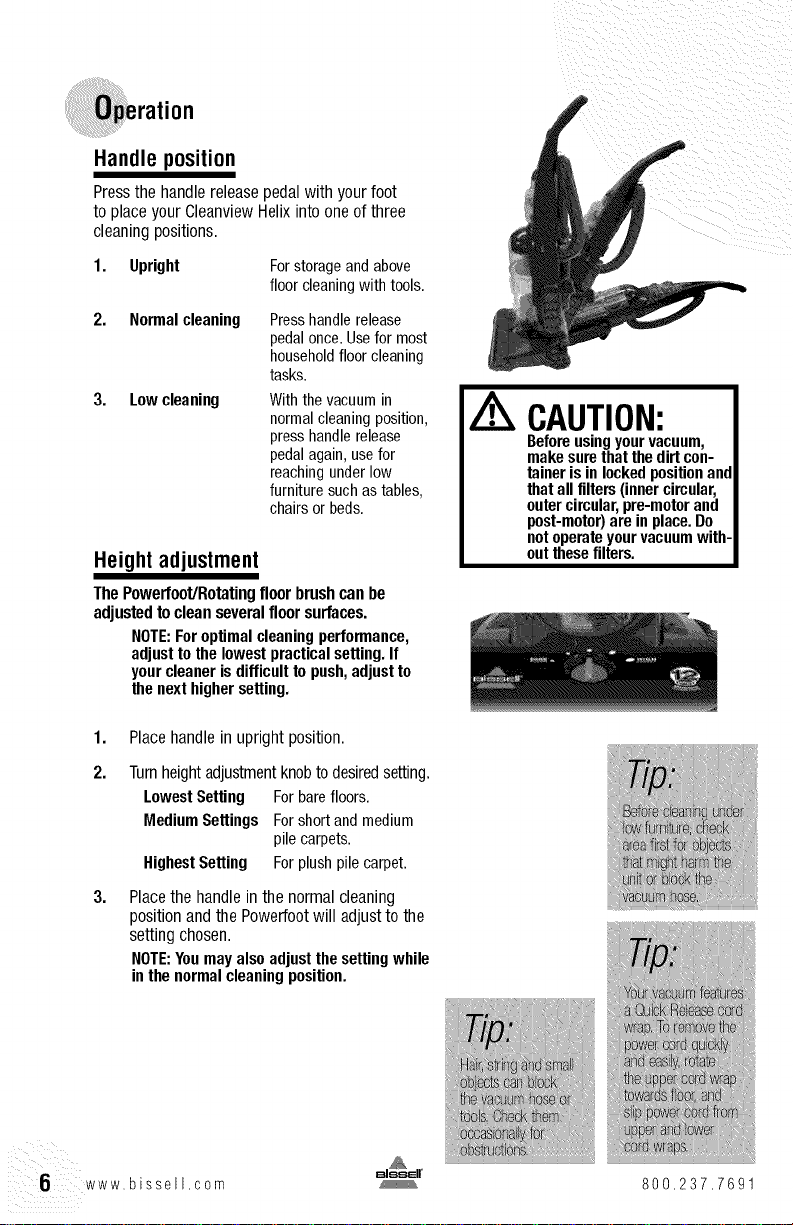
Handle position
Pressthe handlereleasepedalwith yourfoot
to placeyourCleanviewHelixinto oneof three
cleaningpositions.
1. Upright Forstorageandabove
floorcleaningwithtools.
2. Normalcleaning
3. Lowcleaning
Presshandle release
pedal once. Usefor most
household floor cleaning
tasks.
Withthe vacuumin
normalcleaningposition,
presshandlerelease
pedalagain,usefor
reachingunderlow
furnituresuchastables,
chairsorbeds.
Height adjustment
ThePowerfoot/RotaUngfloor brushcanbe
adjustedtocleanseveralfloor surfaces.
NOTE:Foroptimalcleaningperformance,
adjusttothelowestpracticalsetting.If
yourcleanerisdifficulttopush,adjustto
thenexthighersetting.
1,
2.
3,
Placehandlein uprightposition.
Turnheightadjustmentknobto desiredsetting.
LowestSetting Forbarefloors.
MediumSettings Forshortandmedium
pilecarpets.
HighestSetting Forplushpilecarpet.
Placethe handlein thenormalcleaning
positionandthe Powerfootwill adjustto the
settingchosen.
NOTE:Youmayalsoadjustthesettingwhile
inthenormalcleaningposition.
CAUTION:
Beforeusingyourvacuum,
makesurethatthedirtcon-
tainerisinlockedpositionand
thatallfilters(innercircular,
outercircular,pre-motorand
post-motor)areinplace.Do
notoperateyourvacuumwith-
outthesefilters.
6 www,bissell,com
800,237.7691
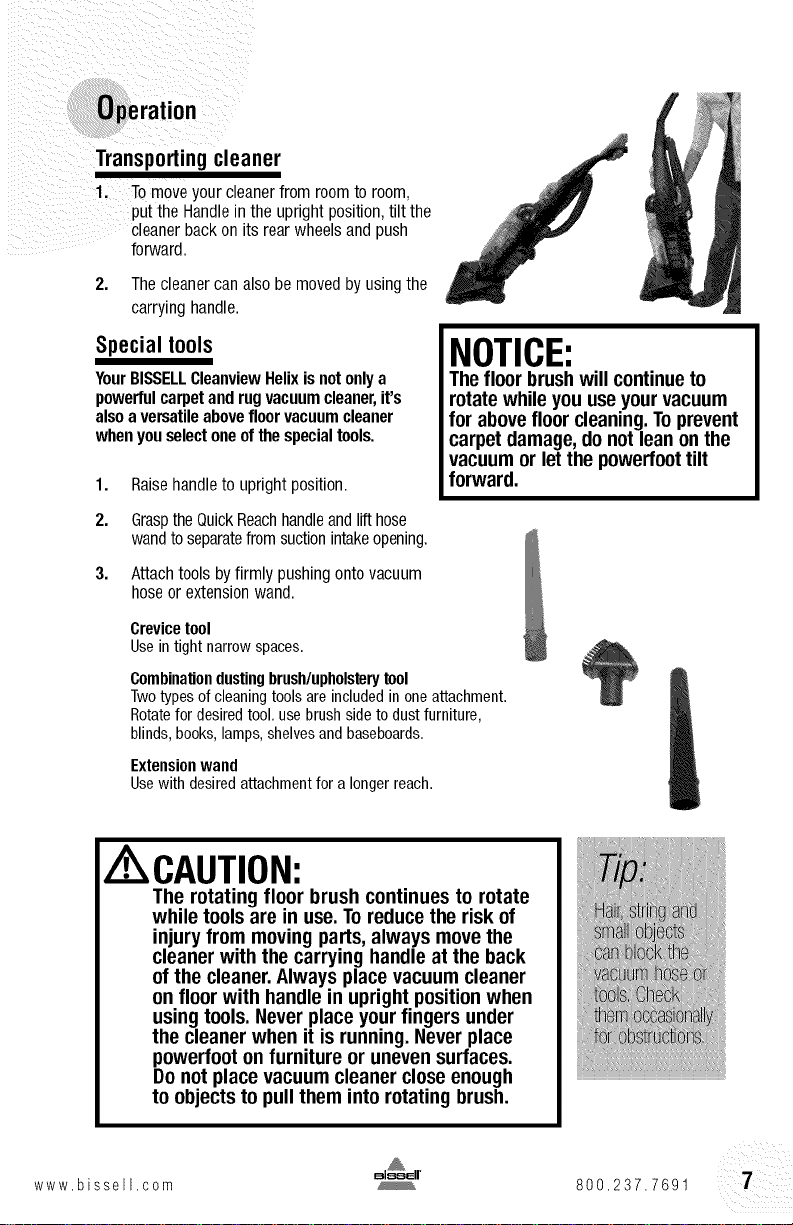
Transportingcleaner
Tomoveyourcleanerfrom roomto room,
putthe Handlein the uprightposition,tilt the
cleanerbackon its rearwheelsandpush
forward
2. Thecleanercanalsobe movedbyusingthe
carryinghandle.
Special tools
YourBISSELLCleanviewHelixisnotonlya
powerfulcarpetand rugvacuumcleaner,it's
alsoaversatileabovefloorvacuumcleaner
whenyouselectoneofthe specialtools.
1. Raisehandleto uprightposition.
NOTICE:
Thefloor brushwill continueto
rotate whileyou useyourvacuum
for abovefloor cleaning.Toprevent
carpet damage,do not lean onthe
vacuumor letthe powedoot tilt
forward.
2. GrasptheQuickReachhandleandlifthose
wandtoseparatefrom suctionintakeopening.
3. Attachtoolsbyfirmly pushingontovacuum
hoseor extensionwand.
Crevice tool
Use intight narrow spaces.
Combinaliondustingbrush/upholsterytool
Twotypes of cleaning tools are included in oneattachment.
Rotatefor desired tool. use brush side to dust furniture,
blinds, books, lamps,shelves and baseboards.
Extension wand
Usewith desired attachment for a longer reach.
IA CAUTION:
The rotating floor brush continues to rotate
while toolsare in use. Toreducethe risk of
injuryfrom moving pads, always movethe
cleanerwith the carrying handle at the back
of the cleaner.Always place vacuum cleaner
on floor with handle in upright position when
using tools.Never place yourfingers under
the cleanerwhen it isrunning. Never place
powerfoot on furniture or unevensurfaces.
Do not place vacuum cleanerclose enough
to objectsto pull them into rotating brush.
www,bissell,com 800,237.7691
Powercordstorage
WhenyouhavefinishedusingyourBISSELL
CleanviewHelix,returnit to the uprightposition
andstorethepowercord.
1. Turnvacuumcleaneroff.
2. Unplugpowercord by graspingthe polarized
plug (NOTthe cord)and disconnectfrom
outlet.
3. Looppowercordaroundcordwrapsonside
of vacuumcleaner.
4. Clipmoldedplugto powercordto secure.
NOTICE:
While vacuuming, certain
carpets and low humidity
conditions may generate small
static discharges, The discharges
are entirely harmless and are
not associated in any way with
the main power supply,
andcare
Tomaintainmaximumcleaningperformance,the
following maintenancestepsmustbe performed:
1. Emptythe dirtcontainerwhen thedirt
reachesthe "Full" lineon the side.
2, Checkthe innerandoutercircularfilters and
the pre-motorfilter at leastoncea month
andcleanor replaceas needed.
3. Replacethe post-motorfilter everysix
months.
Note:Morefrequentfiltercleaningor
replacingmaybe necessaryif youare
vacuumingnewcarpet,fine dust,orhave
allergyconcerns.Followtheinstructionson
thefollowingpagestoperformthesesimple
maintenancesteps.
A WARNING:
Toreducethe riskof
electricshock,turn
powerswitchOFFand
disconnectpolarized
plugfrom electricaloutlet
beforeperforming
maintenanceor
troubleshootingchecks.
i ¸8¸¸¸¸¸¸www.bissell.oom 800.237.7691
Maintenance andcare
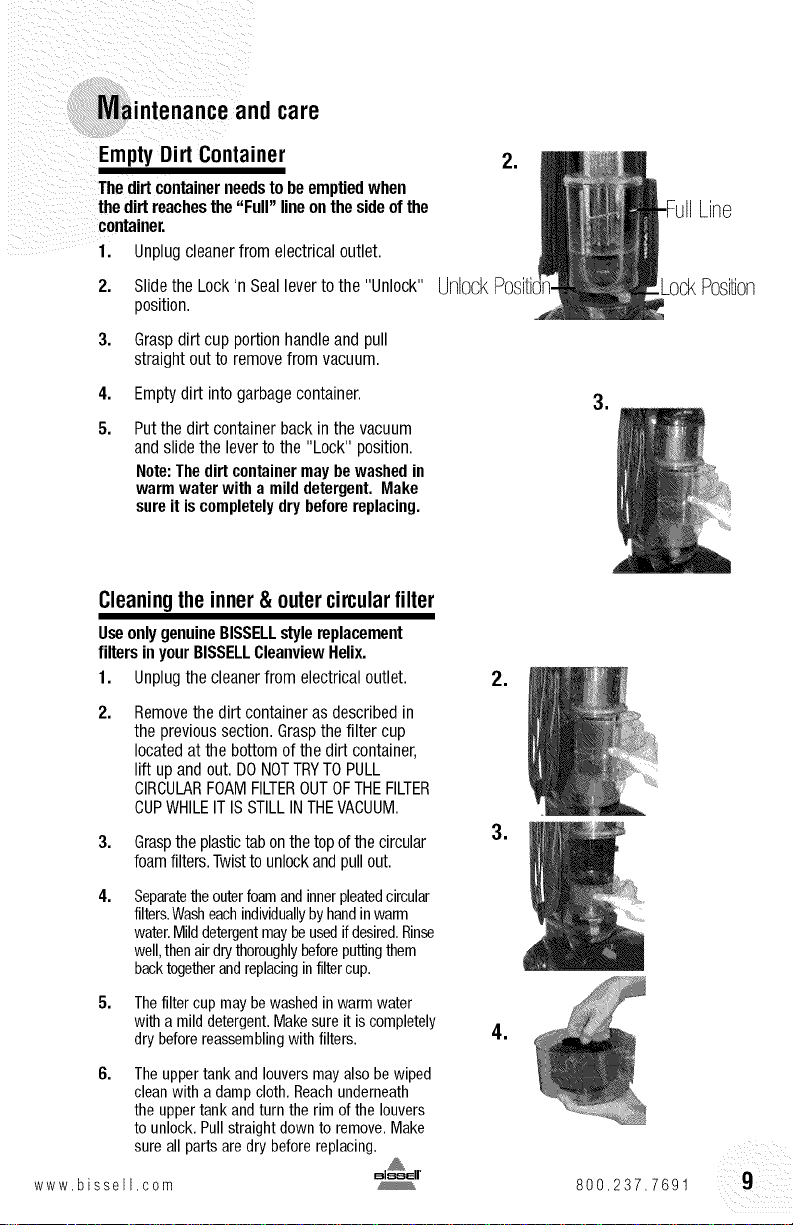
Empty Dirt Container
Thedirtcontainerneedstobe emptiedwhen
the dirtreachesthe"Full" lineonthe sideofthe
container,
1. Unplugcleanerfrom electricaloutlet.
2. Slidethe Lock'n Seallevertothe "Unlock"
position.
3. Graspdirt cup portionhandleand pull
straightout to removefrom vacuum.
4. Emptydirt intogarbagecontainer.
5. Putthe dirt containerbackin the vacuum
andslide the levertothe "Lock" position.
Note:Thedirtcontainermaybewashedin
warmwaterwith amilddetergent.Make
sureit iscompletelydrybeforereplacing.
,
UnlockPositii
,
Line
LockPosition
Cleaningtheinner&outer circularfilter
UseonlygenuineBISSELLstylereplacement
filtersinyourBISSELLCleanviewHelix.
1. Unplugthe cleanerfrom electricaloutlet.
2. Removethe dirt containeras describedin
the previoussection.Graspthe filter cup
locatedat the bottomofthe dirt container,
lift upand out. DONOTTRYTOPULL
CIRCULARFOAMFILTEROUTOFTHEFILTER
CUPWHILEIT ISSTILLINTHEVACUUM.
3.
4.
Graspthe plastictabonthetopofthe circular
foamfilters.Twistto unlockandpullout.
Separatetheouterfoamandinnerpleatedcircular
filters.Washeachindividuallybyhandinwarm
water.Milddetergentmaybeusedifdesired.Rinse
well,thenairdrythoroughlybeforeputtingthem
backtogetherandreplacinginfiltercup.
5. Thefilter cup may bewashed in warm water
with a mild detergent. Makesure it is completely
dry before reassembling with filters.
6.
The upper tank and louvers may also be wiped
cleanwith a damp cloth. Reachunderneath
the upper tank and turn the rim of the louvers
to unlock. Pull straight down to remove. Make
sure all parts are dry before replacing.
www.bissell,com
,
,
,
800,237.7691
iintenance andcare
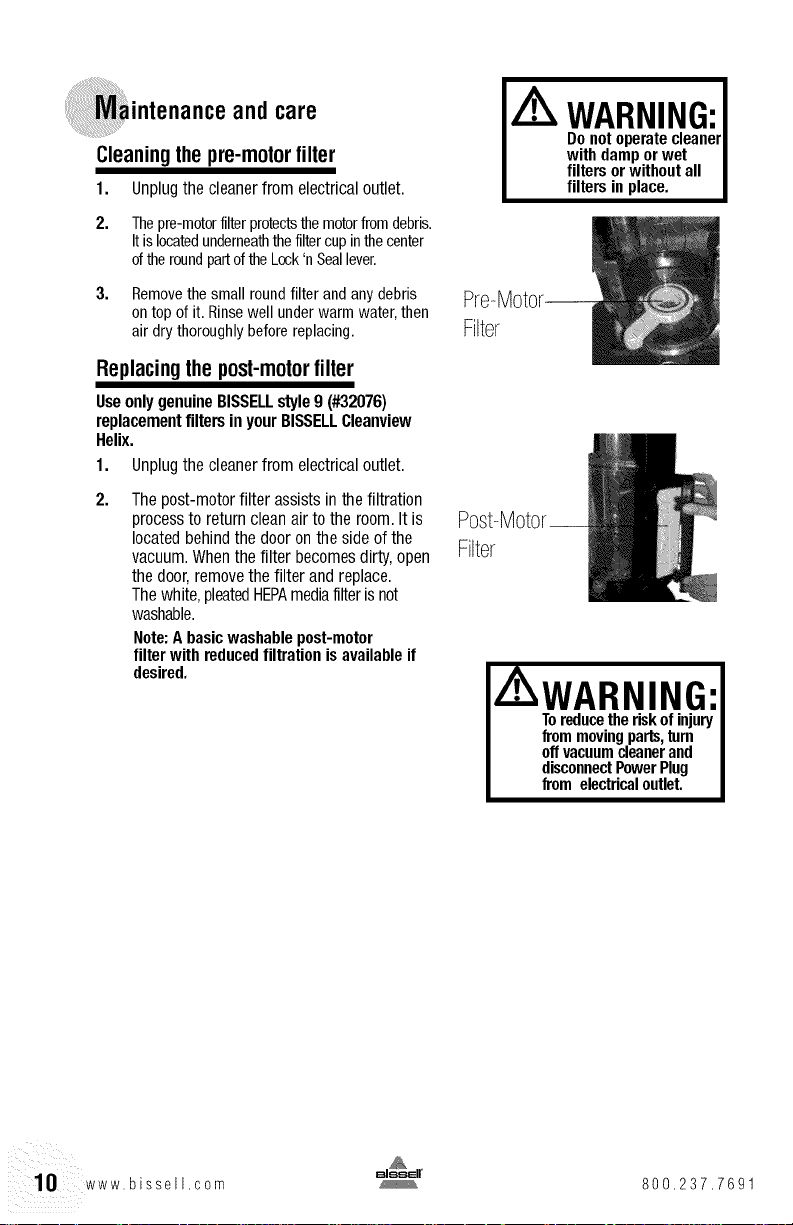
Cleaningthepre-motorfilter
1. Unplugthecleanerfrom electricaloutlet.
2. Thepre-motorfilterprotectsthemotorfromdebris.
Itislocatedunderneaththefiltercupinthecenter
oftheroundpartoftheLock'nSeallever.
3. Removethe small roundfilter and any debris
ontop of it. Rinsewell under warm water,then
air dry thoroughly before replacing.
Replacingthe post-motorfilter
UseonlygenuineBISSELLstyle9 (#32076)
replacementfiltersinyourBISSELLCleanview
Helix.
1. Unplugthe cleanerfrom electricaloutlet.
Thepost-motorfilter assistsin the filtration
processto returncleanair tothe room.Itis
locatedbehindthe dooronthe sideof the
vacuum.Whenthe filter becomesdirty,open
the door,removethe filter andreplace.
Thewhite,pleatedHEPAmediafilterisnot
washable.
Note:A basicwashablepost-motor
filter with reducedfiltration isavailableif
desired.
Filter
Filter
WARNING:
Donot operatecleaner
with damporwet
filtersorwithoutall
filtersinplace.
A WARNING:I
Toreducetheriskof injuryI
frommovingparts,turn I
offvacuumcleanerand I
disconnectPowerPlug I
from electricaloutlet.
i¸
10 www.bissell.com
800.237.7691
andcare
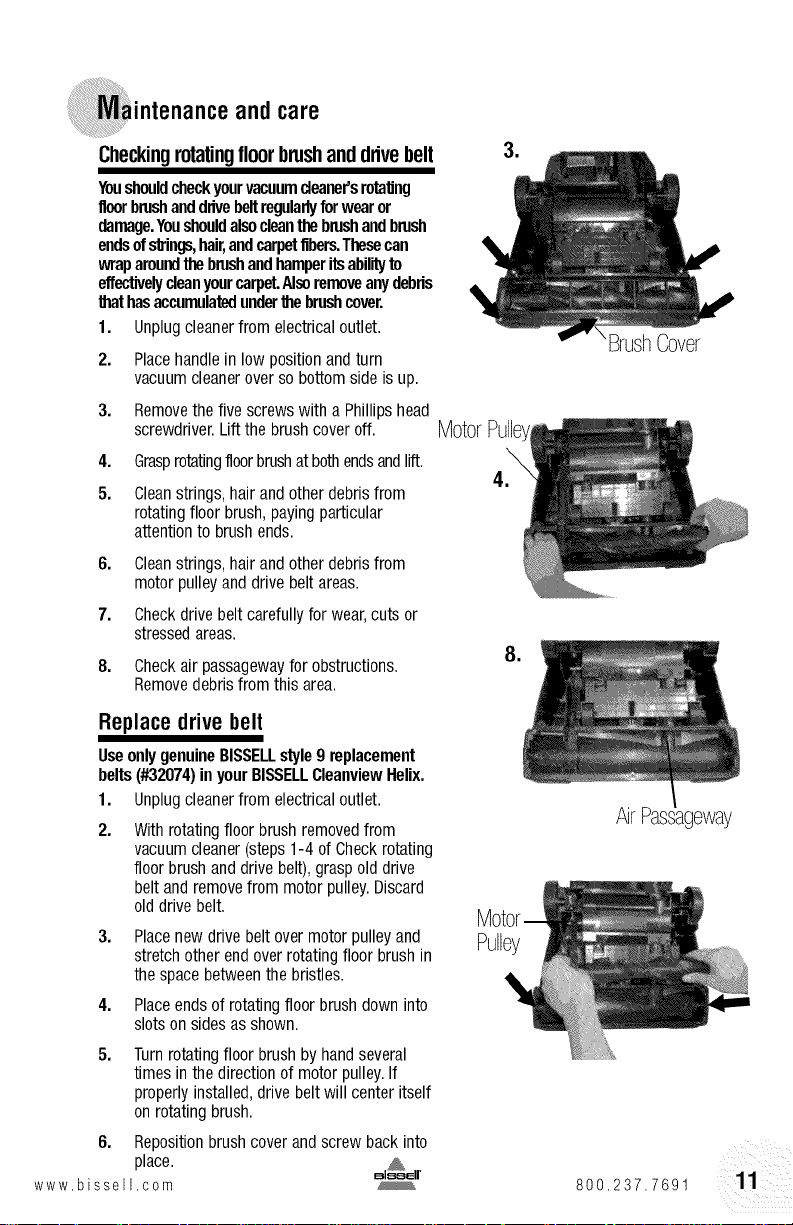
Checkingrotatingfloorbrushandddvebelt
Youshouldcheckyourvacuumcleaner'srotating
floorbrushanddrivebeltregularlyforwearor
damage.Youshouldalsocleanthebrushandbrush
endsofstrings,hair,andcarpetfibers.Thesecan
wraparoundthebrushandhamperitsabilityto
effectivelycleanyourcarpet.Alsoremoveanydebris
thathasaccumulatedunderthebrushcover.
1. Unplugcleanerfrom electricaloutlet.
2. Placehandlein low positionand turn
vacuumcleaneroverso bottomside isup.
3. Removethefive screwswith a Phillipshead
screwdriver.Lift the brushcoveroft. Motor
4.
5.
GrasprotatingNoorbrushat bothendsandlift.
Cleanstrings,hairandotherdebrisfrom
rotatingfloor brush,payingparticular
attentionto brushends.
BrushCover
6.
7.
8.
Cleanstrings,hairandotherdebrisfrom
motorpulleyanddrivebelt areas.
Checkdrivebelt carefullyfor wear,cuts or
stressedareas.
Checkair passagewayfor obstructions.
Removedebrisfrom this area.
,
Replacedrivebelt
UseonlygenuineBISSELLstyle9 replacement
belts(#32074)inyourBISSELLCleanviewHelix.
1. Unplugcleanerfrom electricaloutlet.
2.
Withrotatingfloorbrushremovedfrom
vacuumcleaner(steps1-4 of Checkrotating
floor brushand drive belt),graspold drive
beltand removefrom motorpulley.Discard
olddrive belt.
3.
4.
Placenewdrive belt overmotorpulleyand
stretchother endoverrotatingfloorbrush in
the space betweenthe bristles.
Placeendsof rotatingfloorbrushdown into
slotson sidesasshown.
5.
Turnrotatingfloor brushbyhandseveral
times in thedirection of motorpulley.If
properlyinstalled,drive belt will center itself
onrotatingbrush.
6. Repositionbrushcoverand screw backinto
place.
www bissell com
Pulley
AirPassageway
800.237.7691
iintenanceandcare
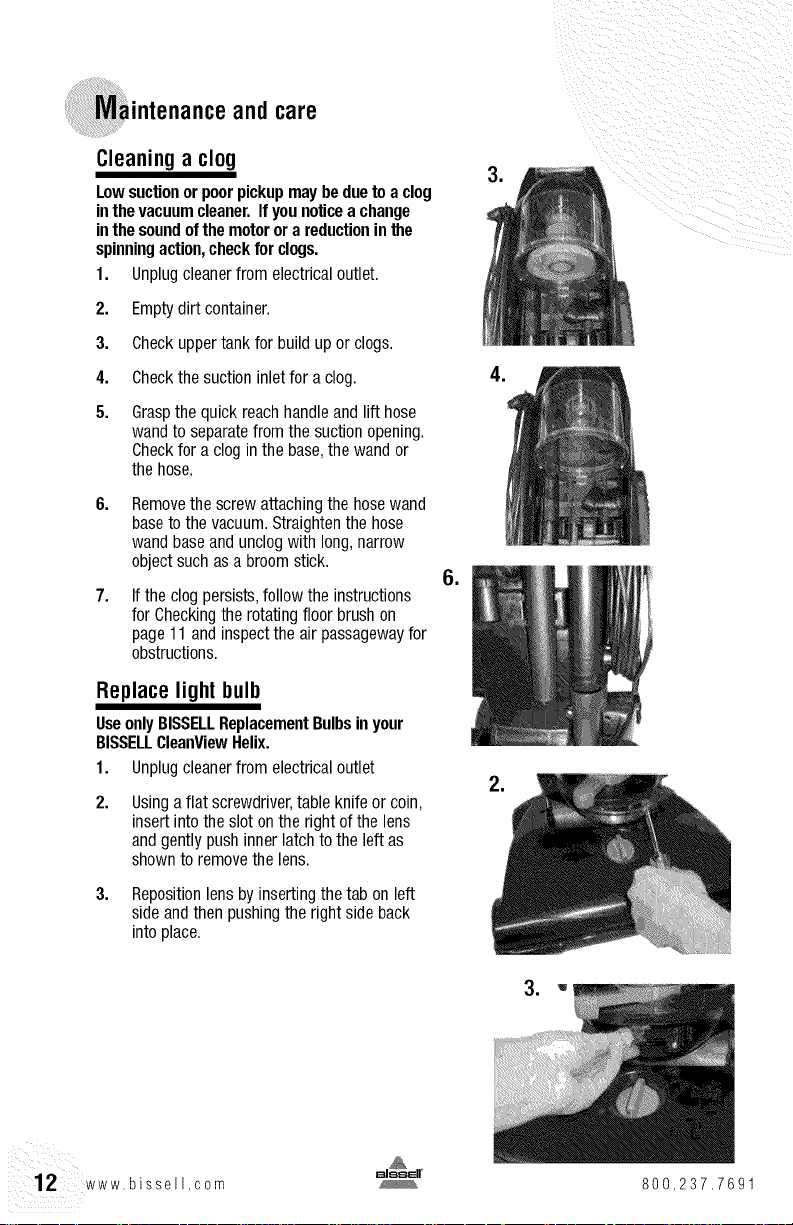
Cleaninga clog
Lowsuctionor poorpickupmaybeduetoa clog
inthevacuumcleaner.Ifyounoticea change
inthesoundof themotorora reductionin the
spinningaction,checkforclogs.
1. Unplugcleanerfrom electricaloutlet.
2. Emptydirt container.
3. Checkuppertank forbuild up or clogs.
4. Checkthe suctioninletfor aclog.
5. Graspthe quick reachhandleand lift hose
wandto separatefrom thesuctionopening.
Checkfor a clog inthe base,the wand or
the hose.
Removethe screwattachingthe hosewand
basetothe vacuum.Straightenthe hose
wandbaseand unclogwith long,narrow
objectsuchasa broomstick.
Ifthe clogpersists,followthe instructions
for Checkingthe rotatingfloorbrushon
page11and inspectthe air passagewayfor
obstructions.
Replace light bulb
UseonlyBISSELLReplacementBulbsin your
BISSELLCleanViewHelix.
1. Unplugcleanerfrom electricaloutlet
Usingaflat screwdriver,table knife or coin,
insertintothe slot onthe rightof the lens
andgently pushinner latchto the leftas
shownto removethe lens.
3. Repositionlensbyinsertingthe tab on left
sideandthen pushingthe rightside back
intoplace.
,
12 www.bissell.com 800.237.7691
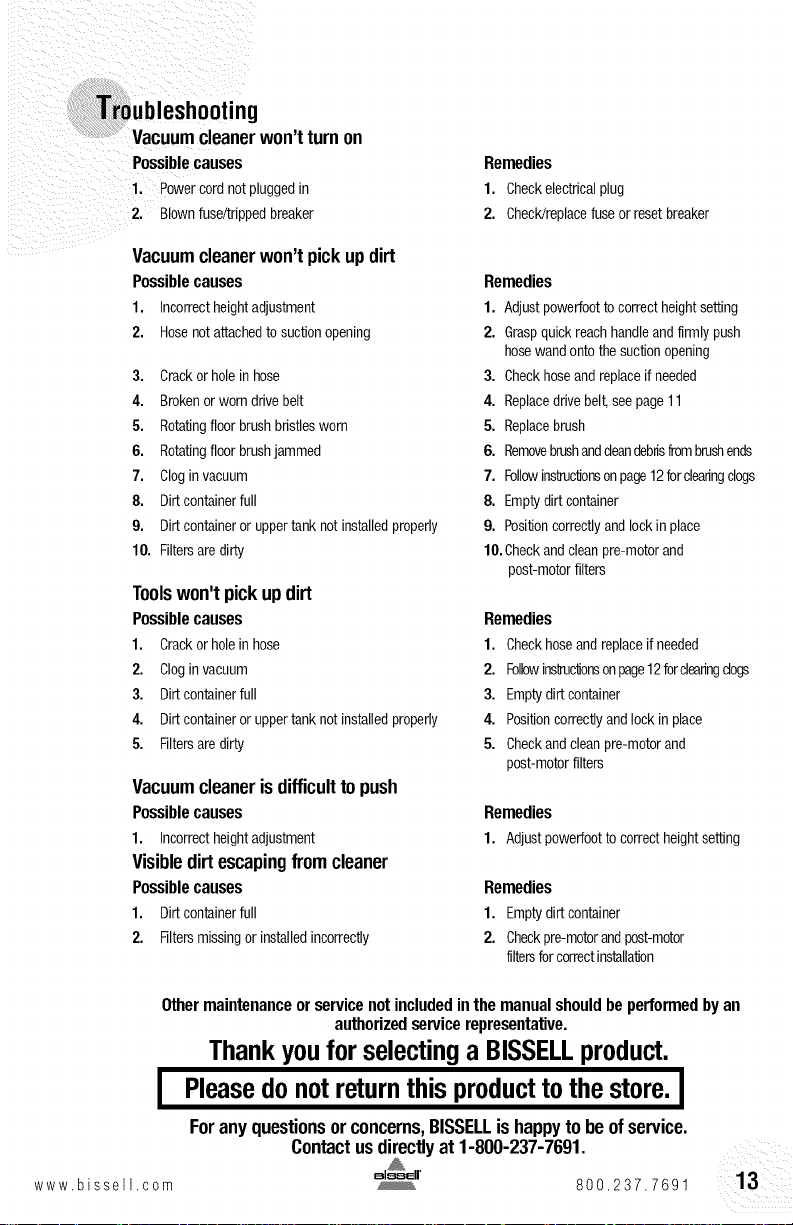
Vacuumcleanerwon'tturnon
Possible causes
1, _owercordnotpluggedin
2. 31ownfuse/trippedbreaker
Vacuumcleanerwon'tpick updirt
Possiblecauses
1. Incorrectheightadjustment
2, Hosenotattachedto suctionopening
3. Crackorholein hose
4, Brokenor worndrivebelt
5. Rotatingfloorbrushbristlesworn
6, Rotatingfloorbrushjammed
7, Clogin vacuum
8. Dirtcontainerfull
9, Dirtcontaineror uppertank notinstalledproperly
10. Filtersaredirty
Toolswon'tpick updirt
Possiblecauses
1. Crackorholein hose
2, Clogin vacuum
3. Dirtcontainerfull
4. Dirtcontaineror uppertanknotinstalledproperly
5. Filtersaredirty
Vacuumcleanerisdifficultto push
Possible causes
1. Incorrectheightadjustment
Visibledirtescapingfromcleaner
Possible causes
1. Dirtcontainerfull
2, Filtersmissingor installedincorrectly
Remedies
1. Checkelectricalplug
2, Check/replacefuseorresetbreaker
Remedies
1. Adjustpowerfoottocorrectheightsetting
2. Graspquickreachhandleandfirmlypush
hosewandontothesuctionopening
3. Checkhoseandreplaceif needed
4. Replacedrivebee seepage11
5. Replacebrush
6. Removebrushanddeandebrisfrombrushends
7, Followinsfruclonsonpage12forclearingclogs
8. Emptydirtcontainer
9, Positioncorrectlyandlockin place
10,Checkandcleanpre-motorand
post-motorfilters
Remedies
1. Checkhoseandreplaceif needed
2. FOlbwins_uclonsonpage12forclearingdogs
3. Emptydirtcontainer
4. Positioncorrectlyandlock inplace
5. Checkandcleanpre-motorand
post-motorfilters
Remedies
1. Adjustpowerfoottocorrectheightsetting
Remedies
1. Emptydirtcontainer
2, Checkpre-motorandpost-motor
filtersforcorrectinstallalon
Other maintenance or service not included in the manual should be performed by an
authorized service representative.
Thankyoufor selectinga BISSELLproduct.
I Pleasedonot returnthisproduct to thestore.I
Foranyquestionsorconcerns,BISSELLishappytobeofservice.
Contactusdirectlyat 1-800-237-7691.
www bissell corn 800,237.7691

ConsumerServices
For informationaboutrepairsor replacementpa_ts,or questionsaoou_yourwarranty,ca_
BISSELLConsumerServices
1-800-237-7691
Monday- Friday Sa,m, 10 p,m,EST
Saturday 9 a,m, S p,m,EST
Orwrite:
BISSELLHOMECARE,INC
POBox3606
GrandRapidsMI49501
A_N: ConsumerServices
Orvisitthe BISSELLwebsite- www,bissell,com
WhencontactingBISSELL,havemodelnumberofunitavailable,
PleaserecordyourModelNumber:
PleaserecordyourPurchaseDate:
NOTE:Pleasekeepyouroriginalsalesreceipt.It providesproofofdateof purchaseintheevent
ofa warrantyclaim.SeeWarrantyonpage16fordetails.
PleaseregisteryournewBISSELLproductat
www.bissell.com/productregistration
;essories
Theseitemsare availablefor purchaseasaccessoriesfor yourBISSELLCleanviewHelix:
Topurchasecall1-800-237-7691orvisitwww.bissell.com.
Item Part No. Part Name
1 203-2447 TurboBrush
2 203-1063 CreviceTool
3 203-1099 Combination Dusting/Upholstery Brush
4 203-1084 ExtensionWand
%
14 www.bissell.com
800.237.7691
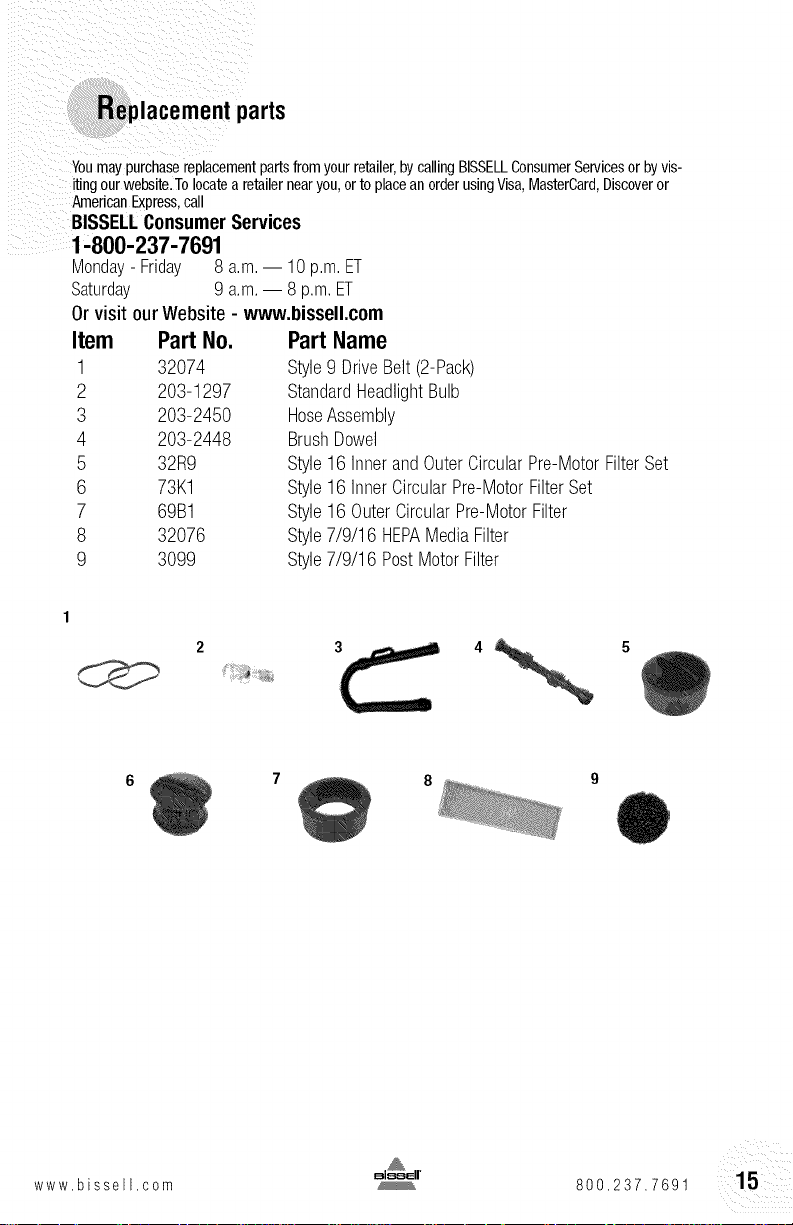
Replacement parts
Youmay purchasereplacementpartsfromyour retailer,by callingBISSELLConsumerServicesor byvis-
itingourwebsite.Tolocatea retailernearyou, orto placean orderusingVisa,MasterCard,Discoveror
AmericanExpress.call
BISSELLConsumerServices
1-800-237-7691
Monday- Friday 8 a.m. 10p.m.ET
Saturday 9 a.m. 8 p.m.ET
Orvisitour Website- www,bissell,com
Item Part No.
1 32074
2 203-1297
3 203-2450
4 203-2448
5 32R9
6 73K1
7 69B1
8 32076
9 3099
Part Name
Style9 DriveBelt(2-Pack)
StandardHeadlightBulb
HoseAssembly
BrushDowel
Style16 InnerandOuterCircularPre-MotorFilterSet
Style16 InnerCircularPre-MotorFilterSet
Style16 OuterCircularPre-MotorFilter
Style7/9/16 HEPAMediaFilter
Style7/9/16 PostMotorFilter
www.bissell.com 800,237.7691
- BISSELLCleanviewHelixVacuum
Thiswarrantygivesyouspecificlegaldgbts,andyou mayalsohaveotherrightspvn_crmayvaryfrom stateto state
Ifyou needadditionalinstwctionregardingthiswarrantyor havequestionsegaralngwna_it maycove pleasecon-
tact BISSELLConsumerServicesbyE mail,telephone,or regularmailasaescnoeaoelow
Limited ThreeYearWarranty
Subjectto the*EXCEPTIONSAND EXCLUSIONSidentifiedbelow,uponreceiptofthe productBISSELL
Homecare,Inc,willrepairor replace(withnewor remanufacturedcomponentsor products),at BISSELEsoption,
freeofchargefromthedateof purchaseby theoriginalpurchaser,for threeyearsanydefectiveor
malfunctioningpart,
See informationbelowon 'ifyour BISSFLLproductshouldrequireservice',
Thiswarantyappliesto productusedfor pasonal,asdnotcommercialorrentalservice,Thiswarraty doesnotapplyto
fassorroutinemaintenancecomponentssuchasfiltas,belts,orbrushes,Damageor malfunctioncausedbynegligence,
abuse,neglect,unauthorizedrepair,or asyotherusenotinaccordascewiththeUseCsGuideis
notcovered,
If your BISSELLproduct should require service:
ContactBISSELLConsumerServicesto locateaBISSELLAuthorizedServiceCenterinyourarea.
Ifyouneedinformationaboutrepairsor replacementparts,or if youhavequestionsaboutyourwarranty,
contactBISSELLConsumerServices.
WebsiteorE-mail:
www.bissell.com
Usethe"CustomerServices"tab.
OrCall:
BISSELLConsumerServices
1-800-237-7691
Monday- Friday8 a.m.- 10p.m.ET
Saturday9 a.m.- 8 p.m.ET
OrWrite:
BISSELLHomecare,Inc.
POBox3606
GrandRapids,MI49501
ATTN:ConsumerServices
BISSELLHOMECABE,INC.IS NOTLIABLEFOBINCIDENTALORCONSEQUENTIALDAMAGESOFANYNATURE
ASSOCIATEDWITHTHEUSEOFTHISPRODUCT.BISSELL'SLIABILITYWILLNOTEXCEEDTHEPURCHASEPRICE
OFTHEPRODUCT.
Somestatesdo notallow the exclusionor limitation of incidentalor consequentialdamages,sothe above
limitationor exclusionmay notapplyto you.
*EXCEPTIONSANDEXCLUSIONSFROMTHETERMSOFTHELIMITEDWARRANTY
THISWARRANTYISEXCLUSIVEANDINLIEUOFANYOTHERWARRANTIESEITHER
ORALORWRITTEN,ANYIMPLIEDWARRANTIESWHICHMAYARISEBYOPERATION
OFLAW,INCLUDINGTHEIMPLIEDWARRANTIESOFMERCHANTABILITYAND
FITNESSFORA PARTICULARPURPOSE,ARELIMITEDTOTHETHREEYEARDURATION
FROMTHEDATEOFRJRCHASEASDESCRIBEDABOVE.
Somestatesdonotallowlimitationsonhowlonganimpliedwarrantylastsothe
abovelimitationmaynotapplyto you.
16 www.bissell.com
@2009 BISSELLHomeca/e,Inc
GrandRapids,Michigarl
AllrightsreservedPrirltedin Kurea
PartNumber110 4080
Rev 2/09
Visitourwebsiteat:
v,_wwbissellcorn