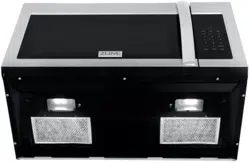

Over the range MicrOwave
Installation Guide
and Users Manual

CONTENTS
PRECAUTIONS 1
IMPORTANT SAFETY INSTRUCTIONS 2
ELECTRICAL REQUIREMENTS 4
PARTS AND TOOLS 6
INSTALLATION 9
RADIO INTERFERENCE 29
UTENSILS 30
DIFFERENT MATERIALS IN THE MICROWAVE 31
SETTING UP YOUR OVEN 32
OPERATION 33
TROUBLESHOOTING 49
1
Do not attempt to operate this oven with the door open since open-door operation can
result in harmful exposure to microwave energy. It is important not to defeat or tamper with
the safety interlocks.
Do not place any object between the oven front face and the door or allow soil or
cleaner residue to accumulate on sealing surfaces.
Do not operate the oven if it is damaged. It is particularly important that the oven door
closes properly and that there is no damage to the:
Door (bent or not closing)
Hinges and Latches (broken or loosened)
Door seals and sealing surfaces (wear and tear)
PRECAUTIONS
2
important safety instructions
To reduce the risk of burns, electric shock, fire, personal injury, or exposure to excessive
microwave energy, read all instructions before using the appliance.
This appliance must be grounded or connected to a properly grounded outlet. Install this
appliance only in accordance with the provided installation instructions.
Some products such as whole eggs and sealed containers (i.e. closed glass jars) should
not be heated in this oven.
Use this appliance only for its intended use as described in the manual. Do not use
corrosive chemicals or vapors in this appliance. This type of oven is specifically designed
to heat, cook, or dry food.
Close supervision is necessary when used by children.
Do not operate this appliance if it has a damaged cord or plug, if it is not working
properly, or if the entire unit has been damaged.
This appliance should be serviced only by qualified service personnel.
Do not cover or block any openings on the appliance.
Do not store this appliance outdoors. Do not use this product near water - for example,
near a kitchen sink, in a wet basement, near a swimming pool, or similar locations.
Do not immerse cord or plug in water.
Keep cord away from heated surface.
Do not let cord hang over edge of table or counter.
When cleaning surfaces of door and oven that comes together on closing the door, use
only mild, nonabrasive soaps, or detergents applied with a sponge or soft cloth.
To reduce the risk of fire in the oven cavity:
Do not overcook food. Carefully attend appliance when paper, plastic, or other
combustible materials are placed inside the oven to facilitate cooking.
Remove wire twist-ties from paper or plastic bag before placing bag in oven.
If material inside of the oven ignite, keep oven door closed, turn oven off, and
disconnect the power cord, or shut off power at the fuse or circuit breaker panel.
Do not use the cavity for storage purposes. Do not leave paper products,
cooking utensils, or food in the cavity when not in use.
Liquids and other foods must not be heated in sealed containers since they are liable to
explode.
When using electrical appliances basic safety
precautions should be followed, including the following:
3
To reduce the risk of injury to persons
Do not overheat the liquid.
Stir the liquid both before and halfway through heating it.
Do not use straight-sided containers with narrow necks.
After heating, allow the container to stand in the microwave oven for a short time
before removing the container.
Use extreme care when inserting a spoon or other utensil into the container.
Do not operate any heating or cooking appliance beneath, over, or near the appliance. It
is okay to use the microwave above another heating appliance.
Suitable for use above both gas and electric cooking equipment.
Do not mount over sink.
Do not store anything directly on top of the appliance surface when the appliance is in
operation.
Clean ventilation hoods frequently - Grease should not be allowed to accumulate on
hood or filter.
Use care when cleaning the vent-hood filter. Corrosive cleaning agents may damage the
filter.
important safety instructions
4
Electric Shock Hazard
Consult a qualified electrician if the grounding instructions are not completely
understood or if doubt exists as to whether the appliance is properly grounded. If
it is necessary to use an extension cord, use only a 3-wire extension cord that has
a 3-blade grounded plug and 3-slot receptacle that will accept the plug on the
appliance. The marked rating of the extension cord shall be equal to or greater than
the electrical rating of the appliance.
A short power supply cord is provided to reduce the risks resulting from becoming
entangled in or tripping over a longer cord. Longer cord sets or extension cords are
available and may be used if care is exercised in their use.
If a long cord or extension cord is used:
The marked electrical rating of the cord set or extension cord should be at
least as great as the electrical rating of the appliance.
The extension cord must be a grounding-type 3-wire cord.
The longer cord should be arranged so that it will not drape over the counter
top or tabletop where it can be pulled on by children or tripped over
unintentionally.
Touching some of the internal components can cause serious personal injury or death.
Do not disassemble this appliance.
Do not plug this unit into an outlet until it is properly installed and grounded.
Improper use of the grounding can result in a risk of electric shock.
WARNING
ELECTRICAL REQUIREMENTS
5
This product requires a three-prong grounded outlet. The installer must perform a
ground continuity check on the power outlet box before beginning the installation to
ensure that the outlet box is properly grounded. If not properly grounded, or if the
outlet box does not meet electrical requirements noted, a qualified electrician should
be employed to correct any deficiencies.
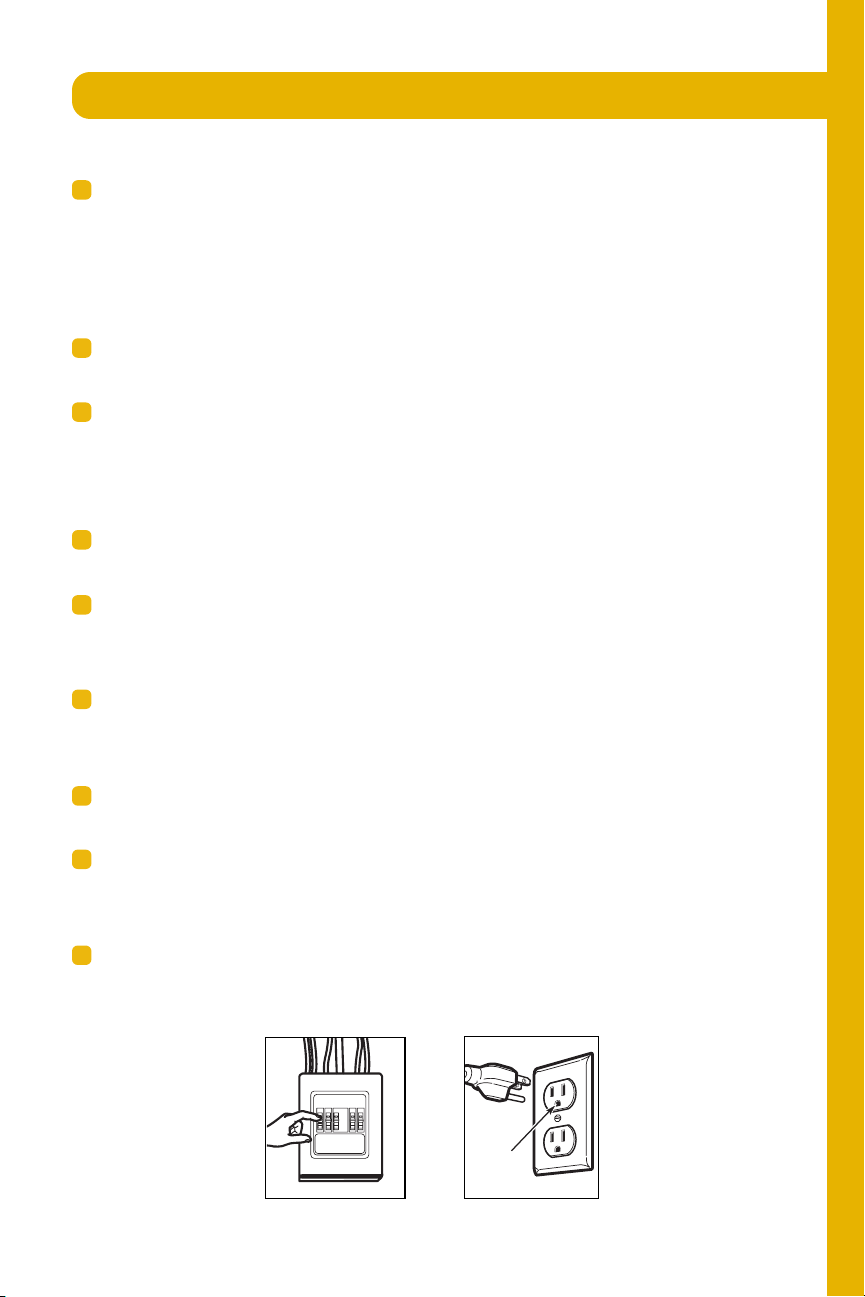
For personal safety, remove house fuse or open circuit breaker before beginning
installation to avoid severe or fatal shock injury. Figure 1
For personal safety, the mounting surface must be capable of supporting the cabinet
load, in addition to the added weight of this 63–85 pound (28.5–38.5 kg) product,
plus additional oven loads of up to 50 pounds (22.7 kg) or a total weight of 113–
135 pounds (51.3–61.2 kg).
For personal safety, this product cannot be installed in cabinet arrangements such as
an island or a peninsula. It must be mounted to BOTH a top cabinet AND a wall.
IMPORTANT – PLEASE READ CAREFULLY. FOR PERSONAL SAFETY, THIS
APPLIANCE MUST BE PROPERLY GROUNDED TO AVOID SEVERE OR FATAL
SHOCK.
The power cord of this appliance is equipped with a three-prong (grounding) plug
which mates with a standard three-prong (grounding) wall receptacle to minimize the
possibility of electric shock hazard from this appliance. Figure 2
You should have the wall receptacle and circuit checked by a qualified electrician to
make sure the receptacle is properly grounded.
Where a standard two-prong wall receptacle is encountered, it is very important to
have it replaced with a properly grounded three-prong wall receptacle, installed by
a qualified electrician.
DO NOT UNDER ANY CIRCUMSTANCES, CUT, DEFORM OR REMOVE ANY OF
THE PRONGS FROM THE POWER CORD. DO NOT USE WITH AN EXTENSION
CORD.
This product requires a three-prong grounded outlet.
The installer must perform a ground continuity check
on the power outlet box before beginning the
installation to ensure that the outlet box is properly
grounded. If not properly grounded, or if the outlet
box does not meet el ectr i cal r equ i r ement s n ot ed
( under EL ECT RI CAL REQUI REMENT S) , a quali fi ed
elect r i ci an shoul d be empl oyed t o cor rect any
defi ci en ci es.
CAUTION: For personal
saf ety, r emove house f use
or open circuit breaker
bef ore beginning
installation to avoid severe
or f atal shock injur y.
CAUTION: For personal safety, the mounting surf ace
must be capable of supporting the cabinet load, in
addition to the added weight of this 63–85 pound
(28.5–38.5 kg) product, plus additional oven loads of
up to 50 pounds (22.7 kg) or a total weight of
113–135 pounds (51.3–61.2 kg).
CAUTION: For personal safety, this product cannot
be installed in cabinet ar rangements such as an island or
a peninsula. It must be mounted to BOTH a top cabinet
AND a wall.
NOTE: For easier installation and personal safety, it is
recommended that two people install this product.
I M PO RTAN T – PL EASE READ CAREFUL LY. FOR
PERSONAL SAFET Y, T H I S APPLI AN CE MU ST BE
PRO PERLY GROUNDED TO AVO I D SEVERE OR
FAT A L SH O CK .
The power cord of this
appliance is equipped with a
three-prong (grounding)
plug which mates with a
standard three-prong
(groundi ng) wall r eceptacle
to minimize the possibility
of electric shock hazard
f rom this appliance.
You should have the wall receptacle and circuit checked
by a qualified electrician to make sure the receptacle is
properly grounded.
Where a st andard two-prong wall r eceptacl e i s
encountered, it i s ver y important to have it replaced
with a pr oper l y gr ounded thr ee-pr ong wall receptacle,
installed by a qualified electrician.
DO NOT, UNDER ANY CI RCUMSTANCES, CUT,
DEFORM OR REMOVE AN Y O F T H E PRO N GS
FROM THE POWER CORD. DO NOT USE WITH
AN EXTENSION CORD.
IMPORTANT SAFETY INSTRUCTIONS
Ensure proper
ground exist s
before use
Installat ion Instruct ions
ELECTRICAL
REQUIREM ENTS
Product r ating is 120 volts AC, 60 H ert z, 15 amps and
1.6 kilowatts. This product must be connected to a
The power supply cord and plug should be brought to a
the prevailing local code for this kilowatt rating.
th e r equi r ement s of t he National El ectr ical Code or
vol t age and fr equen cy. Wir e si ze must con for m t o
seperate and dedicated supply circuit of the proper
seper ate and dedi cated 20 amper e br an ch
National Electrical Code or the prevailing local code.
by a qualifed electrician and conform to the
The outler box and supply circuit should be installed
be located in th e cabi n et above the m i cr owave oven.
circuit single grounded outlet. The outlet box should
EN-3
Figure 2
This product requires a three-prong grounded outlet.
The installer must perform a ground continuity check
on the power outlet box before beginning the
installation to ensure that the outlet box is properly
grounded. If not properly grounded, or if the outlet
box does not m eet el ect r i cal r equi r em ents noted
( under ELECTRI CAL REQU I REMENT S) , a quali fied
elect r i cian sh ould be empl oyed t o corr ect any
def i ci enci es.
CAUTION: For personal
saf ety, r emove house f use
or open circuit breaker
bef ore beginning
installation to avoid severe
or f atal shock injur y.
CAUTION: For personal safety, the mounting surf ace
must be capable of supporting the cabinet load, in
addition to the added weight of this 63–85 pound
(28.5–38.5 kg) product, plus additional oven loads of
up to 50 pounds (22.7 kg) or a total weight of
113–135 pounds (51.3–61.2 kg).
CAUTION: For personal safety, this product cannot
be installed in cabinet arrangements such as an island or
a peninsula. I t must be mounted to BOTH a top cabinet
AND a wall.
NOTE: For easier installation and personal safety, it is
recommended that two people install this product.
I MPO RTAN T – PL EASE READ CAREFULLY. FO R
PERSONAL SAFETY, T H I S APPL I AN CE MU ST BE
PRO PERLY GRO U N DED T O AVO I D SEVERE O R
FAT A L SH O CK .
The power cord of this
appliance is equipped with a
three-prong (grounding)
plug which mates with a
standard three-prong
(groundi ng) wall r eceptacle
to minimize the possibility
of electric shock hazard
f rom this appliance.
You should have the wall receptacle and circuit checked
by a qualified electrician to make sure the receptacle is
properly grounded.
Where a st andar d t wo-prong wall receptacl e i s
encount er ed, it is ver y important to have it replaced
with a proper l y grounded t hr ee-pr ong wall r eceptacle,
installed by a qualified electrician.
DO NO T, U NDER ANY CIRCUMSTANCES, CUT,
DEFORM OR REMO VE AN Y O F T H E PRO N GS
FROM THE POWER CORD. DO NOT USE WITH
AN EXTENSION CORD.
IMPORTANT SAFETY INSTRUCTIONS
Ensure proper
ground exist s
before use
Installation Inst ruct ions
ELECTRICAL
REQUIREM ENTS
Product rati ng i s 120 volts AC, 60 H ertz, 15 amps and
1.6 kilowatts. This product must be connected to a
The power supply cord and plug should be brought to a
the prevailing local code for this kilowatt rating.
th e r equi r ements of th e N ati onal El ectr ical Code or
vol tage and fr equency. Wi r e size must conf or m to
seperate and dedicated supply circuit of the proper
seper ate and dedicated 20 amper e br anch
National Electrical Code or the prevailing local code.
by a qualifed electrician and conform to the
The outler box and supply circuit should be installed
be located i n the cabinet above th e mi cr owave oven.
circuit single grounded outlet. The outlet box should
EN-3
Figure 1
ELECTRICAL REQUIREMENTS

6
Before starting on the installation, prepare all the necessary tools and parts required
to install the microwave. This will save installation time and simplify the installation
process.
PARTS AND TOOLS
PA RT QUANTITY
Wood Screws 2
(
1
⁄4“ x 2“)
Toggl e Bolt s (and
wing nuts) (
3
⁄16“ x 3“)
Self-Aligning Machine 3
Screws (
1
⁄4“ -28 x 3
1
⁄4“)
Nylon Grommet
(for metal cabinets)
1
• I f the unit is damaged in shipment, return the
unit to the store in which it was bought for repair
or r eplacement.
• I f the unit is damaged by the customer, repair or
r epl acement i s th e r espon si bi l i t y of t h e customer.
• I f the unit is damaged by the installer (if other
th an th e cu st omer ) , r epair or repl acemen t mu st
be made by arr angement bet ween cust omer
and installer.
DAMAGE—SHIPM ENT/
INSTALLATION
Installat ion Instruct ions
PARTS INCLUDED
You will find the installation hardware contained in
a packet wit h th e uni t . Check t o make sur e you h ave
al l t h ese p ar t s.
NOTE: Some extr a part s ar e i n cl u ded.
HA RDWARE PA CKET
PA RT
QUANTITY
Templat e
1
Templat e
Installation
1
Instructions
Separatel y
2
Packed
Filters
PARTS INCLUDED
(CONT.)
INSTALLATION
INSTRUCTIONS
ADDITIONAL PARTS
1
adaptor
Grease
Exhaust
Gl as s
1
Tray
1
Ri ng
T ru ntable
Cabi netTop
Rear
Wal l
2
1
Use & Care
1
Shel f
1
1
USE & CARE
MANUAL
Manual
For some model s
Convect i on
wire rack
For some model s
For some model s
1
PureAi r@
Microwave
Filter
EN-4
PA RT QUANTITY
Wood Screws 2
(
1
⁄4“ x 2“)
Toggl e Bolt s (and
wing nuts) (
3
⁄16“ x 3“)
Self-Aligning Machine 3
Screws (
1
⁄4“ -28 x 3
1
⁄4“)
Nylon Grommet
(for metal cabinets)
1
• I f the unit is damaged in shipment, return the
unit to the store in which it was bought for repair
or r eplacement.
• I f the unit is damaged by the customer, repair or
r epl acement i s th e r espon si bi l i t y of t h e customer.
• I f the unit is damaged by the installer (if other
th an th e cu st omer ) , r epair or repl acemen t mu st
be made by arr angement bet ween cust omer
and installer.
DAMAGE—SHIPM ENT/
INSTALLATION
Installat ion Instruct ions
PARTS INCLUDED
You will find the installation hardware contained in
a packet wit h th e uni t . Check t o make sur e you h ave
al l t h ese p ar t s.
NOTE: Some extr a part s ar e i n cl u ded.
HA RDWARE PA CKET
PA RT
QUANTITY
Templat e
1
Templat e
Installation
1
Instructions
Separatel y
2
Packed
Filters
PARTS INCLUDED
(CONT.)
INSTALLATION
INSTRUCTIONS
ADDITIONAL PARTS
1
adaptor
Grease
Exhaust
Gl as s
1
Tray
1
Ri ng
T ru ntable
Cabi netTop
Rear
Wal l
2
1
Use & Care
1
Shel f
1
1
USE & CARE
MANUAL
Manual
For some model s
Convect i on
wire rack
For some model s
For some model s
1
PureAi r@
Microwave
Filter
EN-4
7
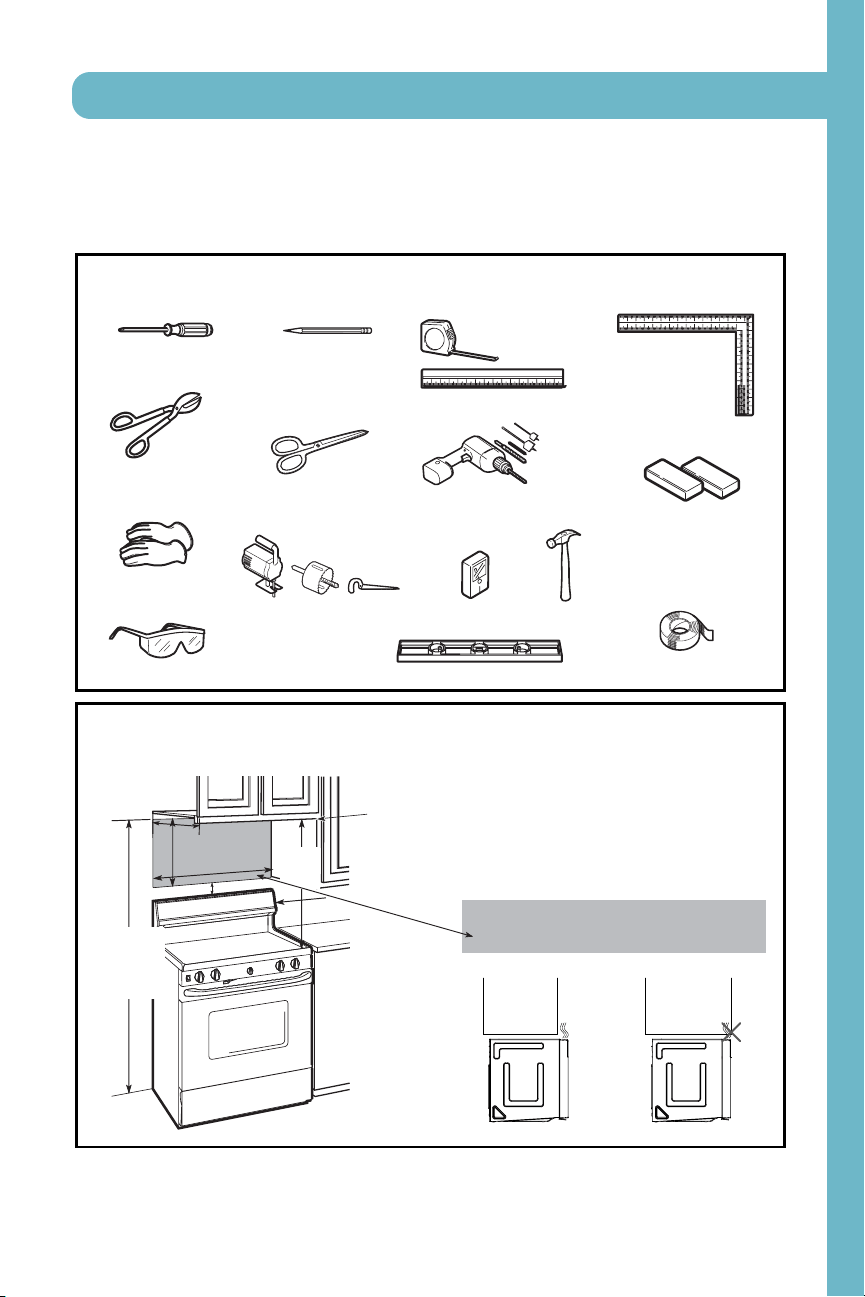
TOOLS YOU WILL NEED
# 1 Phi l l i ps screwdri ver
Penci l
Rul er or t ape measure and
straight edge
Carpent er square
(optional)
Tin snips (for cutting
damper, i f requi red)
Electric drill with
3
⁄16“,
1
⁄2“ and
5
⁄8“
drill bits
Hammer (opt i onal )
Stud finder or
Fi l l er bl ocks or scrap
wood pieces, if needed
for top cabinet spacing
(used on recessed bottom
cabinet installations only)
Gl oves
Saw (saber, hol e or keyhol e)
Level
Duct and masking tape
Installat ion Instructions
Scissors
(to cut template, if necessary)
Safety goggles
MOUNTING SPACE
N
N
O
O
T
T
E
E
S
S
:
:
• The space bet ween t h e cabi net s must be
30“ (76.2 cm) wide and free of obstructions.
• I f you ar e goi n g t o ven t you r mi cr owave oven
to the outside, see Hood Exhaust Section for
exhaust duct preparation.
• When installing the microwave oven beneath
smooth, f lat cabinets, be caref ul to follow the
instructions on the top cabinet template for
power cor d cl ear ance.
Bottom Edge of
Cabi net Needs to
be 30w (76.2 cm)
or More from t he
Cooki ng Surface
Backsplash
66w (167.6 cm)
or More from
the Floor t o the
Top of t he
Microwave
30
“ (76.2 cm)
2
“ (5.1cm)
30
“
(76.2 cm)
mi n.
16
1
⁄2
“
( 41 . 9 cm)
13 Maximum (33 cm)
“
Asa guide to installation, see page 25 for Mounting
Template Information.
•
•
If the cabinet depth including the cabinet doors
is more th n 13'""' th n the unit must be spaced
out from wall using adequate materials supporting
150 Ibs to allow proper top vent air exhaust/ intake.
ae
EN-5
PARTS AND TOOLS

USERS MANUAL
9
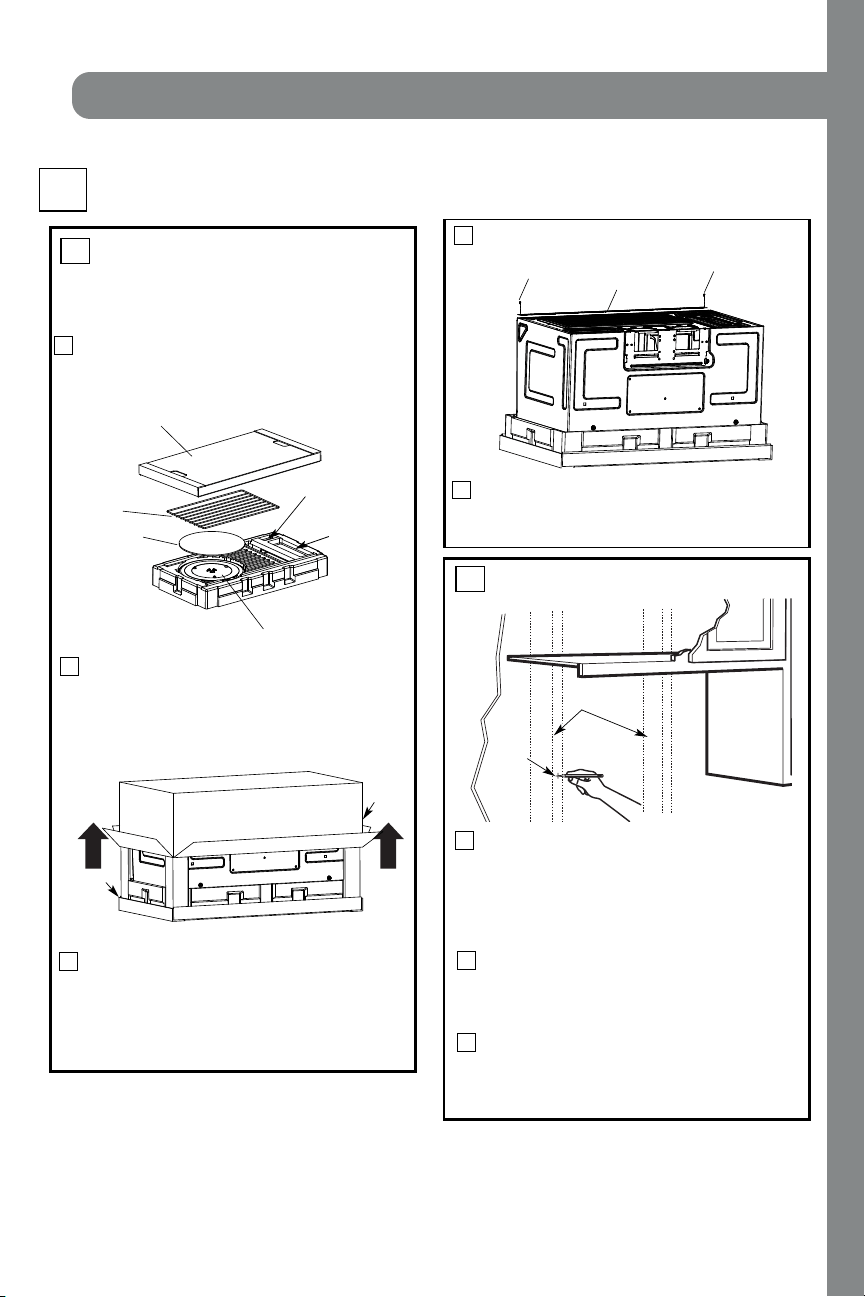
PLACEMENT OF THE M OUNTING PLATE
1
Inst allat ion Inst ruct ions
Find the studs, using one of the following
m et h o d s:
A. Stud finder – a magnetic device which
locatesnails.
B. Use a hammer to tap lightly acrossthe
mounting surface to find a solid sound.
Thiswill indicate a stud location.
After locating the stud(s), find the center by
probing the wall with a small nail to find the edges
of t he st ud. T h en pl ace a m ar k hal f way bet ween
the edges. The center of any adjacent studsshould
be 16w ( 40.6 cm) or 24w (61 cm) from this mark.
Draw a line down the center of the studs.
T
T
H
H
E
E
M
M
I
I
C
C
R
R
O
O
W
W
A
A
V
V
E
E
M
M
U
U
S
S
T
T
B
B
E
E
C
C
O
O
N
N
N
N
E
E
C
C
T
T
E
E
D
D
T
T
O
O
A
A
T
T
L
L
E
E
A
A
S
S
T
T
O
O
N
N
E
E
W
W
A
A
L
L
L
L
S
S
T
T
U
U
D
D
.
.
1
Fol d back al l 4 car ton f l aps f ul l y agai n st car t on
sides. Th en car ef ul ly rol l t h e oven and carton over
onto the top side. The oven should be resting in
the Styrofoam.
REM OVING THE M ICROWAVE
OVEN FROM THE CARTON/
REM OVING THE M OUNTING
PLATE
FINDING THE WALL STUDS
B
.
A
.
2
Wal l
Studs
Cent er
3
Pull the carton up and off the oven.
2
3
5
4
Cut the middle of the outer protective plastic bag to
r
em ove
the
ounting l ate
m
p
Remove the screws from each end of the mounting
plate. This plate will be used as the rear wall template
and for mounting. Reinstall the screws into the holes
wher e they wer e r emoved.
EN-6
1
Exhaust Adapter
Filters and Turntable Ring below glass tray
Small Hardware Bag
Shelf (For
some models)
Remove the top cover board, installation
instructions, use and care, exhaust adapter,
turntable ring, shelf, filters, glass tray and the
Do not remove the
Styrofoam protecting the front of the oven.
ba
g.
small hardware
Top Cover Board
EPE Pad
Carton
Styrofoam
Screws
Screws
Mounting Plate
INSTALLATION
10
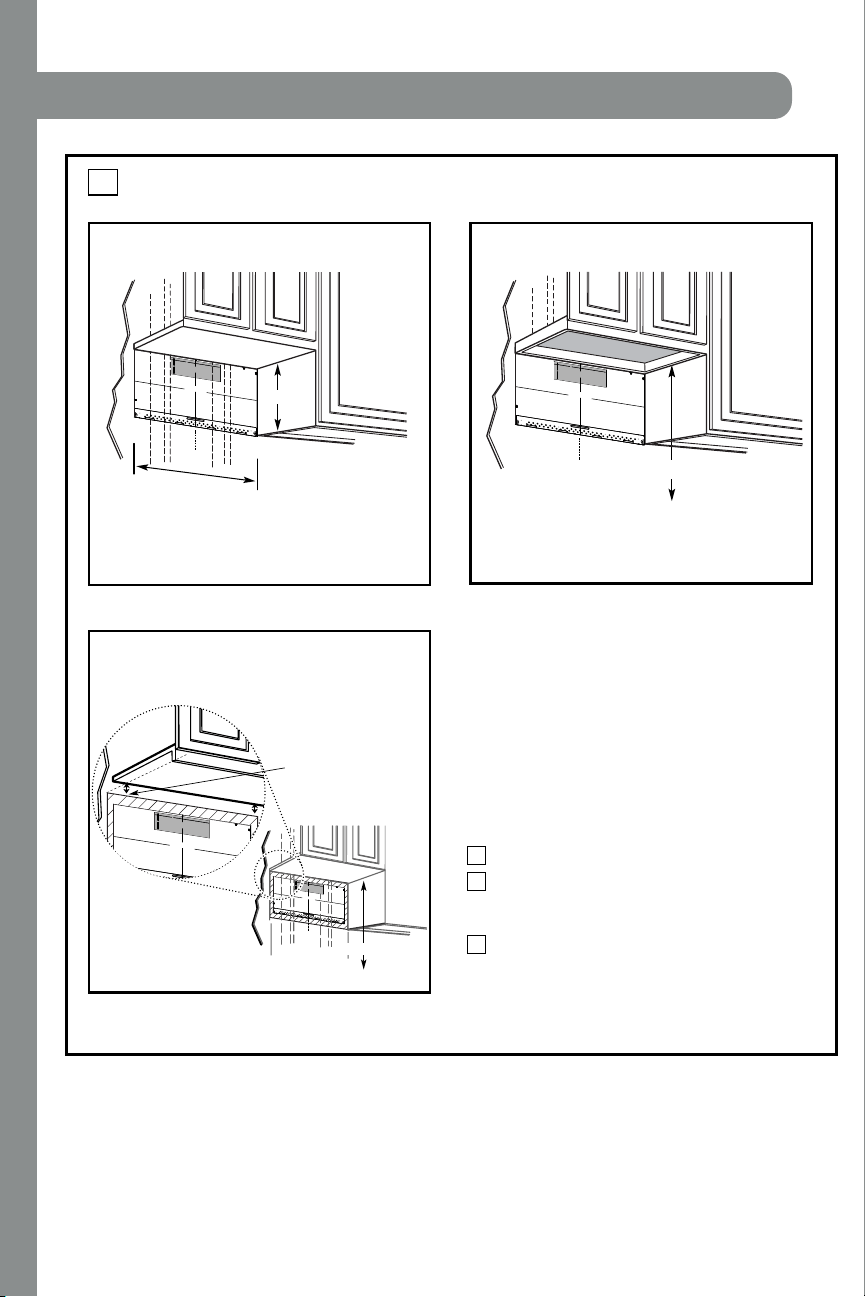
DETERM INING WALL PLATE LOCATION UNDER YOUR CABINET
C.
Inst allat ion Instructions
Plat e position flat bottom
cabinet
Draw a line on the
back wall equal to the
depth of the front
overhang.
to Cooktop
C
3/
8"
TO
E
DGE
N
OTE:
IT IS
VERY
IMP
O
R
T
A
NT T
O
R
E
AD
A
N
D
FO
LL
O
W
T
H
E
D
IR
E
C
T
ION
S
IN
T
H
E
IN
S
T
A
L
L
ATION
INST
R
UC
T
IO
N
S
B
E
F
OR
E P
R
OCEE
DING WIT
H
T
H
IS
RE
A
R
W
A
LL
T
E
MP
L
A
TE.
This
Re
a
r W
all
Te
mpl
a
t
e
s
er
ve
s
t
o p
o
sit
io
n
t
he
bo
tt
o
m
m
o
u
nti
ng
plat
e
a
nd
t
o lo
ca
t
e
t
h
e
ho
ri
zo
nt
al
e
x
h
au
st
o
u
t
let
.
1.
Us
e
a
lev
el
t
o
c
h
ec
k
t
h
a
t
th
e
t
em
plate
is p
o
s
it
io
n
e
d
a
c
c
u
ra
t
e
ly.
2
.
Lo
c
at
e
an
d
m
ar
k
at
lea
s
t
o
n
e s
t
ud
o
n t
h
e
le
f
t
o
r
ri
ght
s
ide
o
f t
h
e
c
e
n
ter
lin
e
.
It
is
impo
rt
a
n
t
t
o
use at
l
e
a
st
o
ne
w
o
o
d
s
c
re
w
mo
u
n
te
d
f
ir
mly
in
a
st
u
d
to
s
u
p
po
r
t
the
w
e
ight
of
th
e
micr
owa
v
e.
M
ark t
w
o ad
d
iti
o
na
l,
e
v
e
nly
s
pa
c
e
d
loc
at
io
n
s
for
th
e
s
u
pp
lied
t
o
gg
le
bo
lt
s
.
3
.
D
rill
h
ole
s
in
the
m
a
rk
e
d
lo
c
a
t
ion
s
.
Whe
re
th
e
re
is
a
s
t
ud,
d
r
ill
a 3
/
1
6
"
hole
fo
r
w
oo
d
s
c
re
w
s
.
F
or
h
ole
s
th
at
do n
ot
li
n
e
u
p
wit
h
a
s
t
ud
,
drill 5/
8
"
hole
s
for
t
o
gg
le
bo
lt
s.
D
O
N
O
T
I
NS
TALL
T
H
E
MO
U
N
T
I
N
G
P
L
A
TE
AT
TH
IS
TIM
E
.
4
.
R
e
m
o
v
e
t
h
e
te
m
p
la
te
f
rom
t
h
e
r
e
ar
w
al
l.
5.
Re
v
i
e
w
t
h
e
I
n
s
t
a
lla
t
io
n
I
n
s
t
r
u
ct
ion
bo
o
k
f
o
r
y
ou
r
insta
lla
t
ion
s
it
u
at
io
n
.
L
o
c
a
te an
d
ma
rk
h
o
l
es
to
a
li
g
n w
it
h
ho
l
e
s
i
n
the
mo
u
n
t
in
g
p
l
a
te.
IMP
O
R
T
ANT
:
LO
CATE
A
T
LEAS
T
ONE
S
TU
D ON E
I
T
H
ER
S
IDE
O
F
T
HE CE
NTE
R
LIN
E.
MA
RK
T
H
E
LOCAT
ION FO
R
2
A
D
D
ITIO
N
A
L, E
V
E
N
LY
S
P
AC
E
D TOGG
LE B
OL
T
S IN
THE M
O
U
N
T
IN
G P
L
AT
E
A
RE
A
.
Locate a
n
d
ma
r
k ho
l
e
s to
a
lign with holes in
t
h
e
mo
unt
i
ng p
l
a
t
e.
IMPO
RTA
N
T:
LOCA
TE
AT
L
E
AST
ONE
S
T
U
D
ON
EITH
E
R SID
E
O
F
T
H
E
C
ENT
E
R
L
IN
E
.
MARK
TH
E LOC
A
TION
F
OR
2 AD
D
I
T
IONAL
,
E
V
E
N
L
Y
S
PAC
E
D
TO
GG
L
E BOLT
S IN
T
H
E MO
U
N
T
IN
G
P
LAT
E
AR
E
A.
T
r
im
th
e rea
r
w
a
l
l
te
m
p
late
alo
ng th
e do
tte
d
lin
e
.
Trim
th
e r
ear
wa
ll
te
m
p
l
a
te
a
lo
n
g
th
e
d
o
tte
d
line
.
1
2"
4
"
D
a
rle
vu
e
lt
a
a
la
h
o
ja
p
a
ra
c
on
s
u
l
t
a
r
la
v
e
r
si
ó
n
e
n
E
sp
a
ño
l.
C
L
3/8
"
TO EDGE
N
O
TE
:
I
T
IS
VER
Y
IMPORTAN
T T
O
READ
AND FO
LLO
W THE D
IREC
TIO
NS
I
N
TH
E
INST
ALL
ATION
INST
R
U
C
TI
O
N
S
BEFO
RE PRO
C
EED
ING
W
ITH TH
I
S
R
EAR WALL
T
EMPL
AT
E.
Th
is
R
e
a
r W
a
ll Templa
t
e serves
to p
os
it
i
o
n
th
e
b
ot
to
m
mo
u
ntin
g
p
la
te
and t
o l
oc
at
e
the h
o
riz
ontal e
xha
us
t
ou
tle
t.
1.
Us
e
a
lev
el to
c
he
ck
th
a
t
th
e templat
e is
po
sitio
n
ed
a
c
curat
ely.
2
.
Loc
ate
and
ma
r
k
a
t le
a
s
t
o
n
e st
u
d
o
n
t
he left
o
r
r
ig
ht s
id
e
o
f
the ce
nte
r
l
ine.
It
is
i
mpo
rta
nt t
o
u
s
e a
t lea
s
t
one
wo
od
s
c
r
e
w
mo
u
nt
ed firmly
in
a
s
tu
d
to
s
upport the
w
e
ig
ht
of
th
e micro
w
a
ve.
Ma
rk
two
a
d
d
itiona
l,
e
v
enl
y
sp
ace
d
lo
ca
tio
ns fo
r th
e
s
uppli
e
d tog
gle
bo
lts.
3.
D
ril
l h
ole
s in
th
e mark
e
d lo
c
atio
n
s
.
W
h
e
re th
e
re
is
a stu
d
, dr
i
ll a 3
/1
6" ho
le
fo
r w
o
od
s
c
re
w
s
.
For
ho
le
s
th
a
t do no
t lin
e u
p
with a s
tud,
drill 5
/8" h
ole
s fo
r
to
g
gle b
olts
.
D
O NO
T
IN
STA
L
L
TH
E
MO
U
NTING
PL
ATE
AT TH
IS TIME
.
4. Re
m
ov
e
the
template
fr
om t
he
r
e
ar w
all.
5.
Revie
w
the In
s
ta
ll
ation
In
s
tru
c
t
io
n
bo
o
k fo
r your
in
stalla
tion
s
ituatio
n.
Lo
cate an
d
ma
rk
hol
es t
o align with
hol
es
in t
h
e
mounting pla
t
e
.
I
M
PORT
ANT
:
LOC
ATE AT
LEAST
ONE STU
D
ON
EI
THER SI
D
E OF
TH
E C
ENTER
LINE.
MAR
K
T
H
E LOC
ATIO
N
FO
R
2
AD
DI
T
IONAL
,
EVEN
L
Y
SPACED
TOG
GLE BO
L
T
S I
N TH
E MOUNTIN
G
PLATE
AR
EA.
Locate
and
ma
rk
hol
es t
o align w
it
h
h
ol
es
in t
h
e
mounting plat
e.
IMPO
R
TANT:
LOC
ATE AT
LEAS
T ON
E ST
U
D ON EI
T
HER
SIDE
OF
TH
E
C
EN
TERLINE
.
MARK T
HE LO
C
ATION
FO
R 2 AD
D
I
TI
ONAL
, EVENLY
SPA
C
ED
T
O
G
GLE BO
L
T
S I
N
TH
E
MO
UN
TI
NG PLAT
E
AR
EA.
Trim
th
e
rear
wall
template along the
d
otted
li
ne.
Trim
the
rear wall
templ
ate
a
l
ong
th
e dotted
li
ne.
12
"
4"
D
arle
v
u
el
t
a
a
la
h
o
ja
p
ara
c
o
n
s
u
lta
r
la
v
ersi
ó
n
en
E
sp
añol.
²
A
t
l
e
a
s
t
3
0
″
C
3/8" T
O
ED
G
E
N
O
T
E: I
T
IS VER
Y IMPORTANT TO
R
EAD
AND
FOLLOW
THE DIREC
T
IONS
I
N T
HE
I
N
STALL
ATION
INSTRU
C
TION
S
BEF
ORE PROC
EED
I
N
G
W
ITH
TH
IS
R
E
AR
WALL TEM
PLAT
E.
Th
is
Rea
r W
a
l
l T
e
mp
l
a
t
e
se
rve
s to p
ositio
n the bo
tto
m
mo
u
ntin
g
pla
te
and
to lo
ca
te th
e
h
o
rizontal exh
a
u
st
o
u
tlet
.
1. Use
a
le
ve
l to ch
e
ck t
h
a
t the te
mplate
is
p
o
si
tio
ned
a
ccu
rately.
2
.
Loca
te and
ma
rk at least o
n
e stu
d o
n th
e
le
ft o
r
righ
t sid
e
o
f t
h
e cen
ter
line.
It is imp
o
rta
n
t
to use at
lea
st o
n
e wo
o
d
scre
w
mo
u
n
te
d
firmly in
a
stu
d to suppo
rt t
h
e we
ig
ht
o
f
t
he microw
ave. Ma
rk two
a
d
diti
o
nal, evenly
sp
aced
loca
tio
n
s
for t
h
e
supp
l
ied
tog
g
le
bolts.
3
.
D
rill
hole
s
in th
e
m
a
r
ke
d
lo
ca
tio
n
s.
W
here the
re
is
a stud, drill a 3/16" h
ol
e f
o
r wo
o
d screw
s.
Fo
r h
o
le
s
t
h
at do n
o
t lin
e
u
p
with
a
stu
d
,
dr
ill 5/
8" ho
l
e
s fo
r
to
gg
l
e bolt
s.
DO NOT
I
NST
A
L
L THE MOU
NT
IN
G P
LA
TE
AT T
H
IS
T
IME.
4
.
Remo
ve
the temp
la
te
from the
re
a
r wall.
5.
Re
vie
w t
he I
nsta
llatio
n
In
stru
cti
on
book fo
r
you
r
i
n
sta
llation
situation.
Lo
cate and m
ar
k
h
oles
t
o
ali
gn
w
ith
ho
les
in the
m
o
unt
ing
plate
.
I
M
P
O
R
T
ANT:
LOC
AT
E
A
T
LEAST
ON
E ST
UD ON
E
IT
HER
SIDE OF
TH
E
CE
N
T
ER
LI
NE.
M
A
R
K
TH
E
LOCAT
ION
F
OR
2 A
D
D
I
TIO
N
AL, EVENL
Y
SPA
C
ED TOGGL
E BOLT
S IN THE
M
OU
N
TI
NG PLAT
E
AREA.
Loc
at
e
a
nd
mark holes
to
align
with holes
in
t
he
mou
nt
i
ng
plat
e
.
I
MPOR
TANT:
LOCATE AT LEAST
ON
E S
TU
D
ON
E
ITH
ER
SI
D
E OF
THE
CE
NTE
R
LIN
E
.
MAR
K
TH
E LOC
ATI
ON F
OR
2
A
DDI
TI
ON
AL,
E
VENLY
SPA
C
ED
TOGGLE
BOLTS
IN THE MOUNTIN
G
P
LATE
AREA.
T
rim the re
ar
wall
te
m
pl
ate
al
on
g
th
e
dotted
li
n
e.
T
rim the
rear
wal
l
tem
pl
at
e al
ong
th
e
d
o
tte
d
li
ne.
12"
4
"
Da
r
le
v
ue
lta
a
la
hoja
para
c
ons
ultar
la
v
ers
ión
e
n
Esp
a
ñ
ol.
Your cabinets may have decorative trim that
interferes with the microwave installation. Remove
the decorative trim to install the microwave properly
and to make it level.
THE M ICROWAVE MUST BE LEV EL.
Use a level to make sure the cabinet bottom is level.
If the cabinets have a front overhang only, with no
back or side frame, install the mounting plate down
the same distance as the front overhang depth. This
will keep the microwave level.
Measure the inside depth of the front overhang.
Draw a horizontal line on the back wall an equal
distance below the cabinet bottom as the inside
depth of the front overhang.
For this type of installation with front overhang
only, align the mounting tabs with this horizontal
line, not touching the cabinet bottom as described
in Step D.
Draw a vertical line on
the wall at the center of
the 30
″ wide space.
Tape the Rear Wall
Template onto the wall
matching the centerline
and touching the
bottom of the cabinet.
to Cooktop
Draw a vertical line on the wall at the center of the
30
″ space.
Tape the Rear Wall Template onto the wall
matching the centerline and touching the bottom
C
3/
8
"
TO
E
D
GE
NOTE:
I
T
IS
VERY
IMPO
RT
ANT TO
RE
A
D
A
ND FO
LLOW
T
HE DIRECT
IO
NS
IN THE INSTALLA
TION
I
NS
TRUCT
I
ONS
BE
F
OR
E PR
OCE
EDING
WI
T
H
T
HIS
RE
AR WA
LL T
E
MP
LATE
.
Th
i
s
R
ea
r
Wa
l
l
Temp
l
a
te
ser
ves to
p
o
si
t
ion the
b
ot
tom
mo
un
t
in
g p
late
a
n
d t
o
locate
t
h
e
h
o
r
i
z
on
tal
e
xhaust
ou
tl
e
t
.
1
.
Use a
le
ve
l
to
che
ck t
hat
the
t
emp
late
i
s
p
osi
ti
on
ed
a
ccur
ate
ly.
2.
L
oc
ate
and
ma
r
k
at least o
n
e
stu
d
on
the l
e
ft
or
r
i
gh
t
s
i
de
o
f th
e
c
ent
e
r
lin
e.
It
i
s
imp
orta
nt t
o use
a
t l
e
ast o
ne
wood
sc
r
ew
m
o
u
n
t
ed
fi
rml
y in
a
stu
d t
o su
ppor
t
the we
i
ght
of th
e m
icrow
ave. Mar
k
tw
o a
d
di
tion
al
,
e
ve
nl
y spa
ce
d
l
ocati
o
ns for the
su
ppl
ie
d
tog
gl
e
b
olts.
3. Drill holes in
the
m
ar
ked
l
oca
tio
n
s. Wh
er
e t
here is
a
stu
d,
d
rill a
3/
1
6"
hole for
w
oo
d scr
e
w
s.
For hol
es
th
a
t
do
n
o
t
lin
e
up w
i
t
h
a
st
u
d,
d
ri
ll
5/8
" h
ol
es f
o
r
t
o
g
gle b
ol
ts
.
D
O
NOT
I
N
STALL
THE
MOUNTIN
G PLA
TE
AT TH
IS T
IME.
4.
R
em
o
ve the
te
mp
la
te
fr
o
m t
h
e rear
w
all.
5.
R
evie
w
the
Insta
l
l
a
tio
n
I
nstruction
b
ook f
o
r yo
ur
i
n
sta
ll
at
io
n si
tuation.
Loc
at
e and
mark
hol
es to
ali
gn with
h
oles
i
n
the
mount
i
ng
plate.
I
MPO
RT
ANT:
LOCA
TE AT LEAST ONE
S
TUD
ON
EIT
HER S
IDE
OF
THE
CENT
ER
L
INE
.
MAR
K THE LOC
A
T
IO
N
FO
R
2
AD
DI
T
IONA
L, E
VE
NLY
SP
A
CE
D
TOGGLE
B
OLT
S
I
N TH
E
MOUNTING PLATE
A
R
EA.
Loc
at
e and
ma
rk h
ol
es
t
o a
l
i
gn
with
hol
e
s in the
moun
t
i
ng pl
at
e.
IMPO
RTANT
:
LOCA
T
E
AT LE
A
ST ONE
S
TUD
ON
EITHE
R
S
IDE
OF
THE CE
NT
ERL
I
NE.
MA
RK T
HE
LOC
AT
ION
FO
R
2
ADDI
T
IONA
L, E
V
ENL
Y
S
PA
CED T
O
GGLE
B
OLTS IN THE
MOUNT
ING PL
A
T
E
A
REA.
Trim
the
rear
wa
ll templ
ate
al
on
g the
dott
e
d lin
e.
T
rim
th
e
rear w
all temp
l
ate
al
ong t
he
do
tt
ed
lin
e.
12"
4"
Darle v
uelt
a
a
la
ho
ja
para
co
n
s
ult
a
r
la
v
ersió
n
en
E
s
p
a
ñ
o
l.
cabinet bottom
w ith front overhang
Plat e position fram ed
recessed
Plat e position
bottom
1
3
2
″
30
cabinet frame.
″
30
″
16-1/2
-beneat h
-beneat h
-beneat h recessed
cabinet
EN-7
INSTALLATION
11
Inst allat ion Inst ruct ions
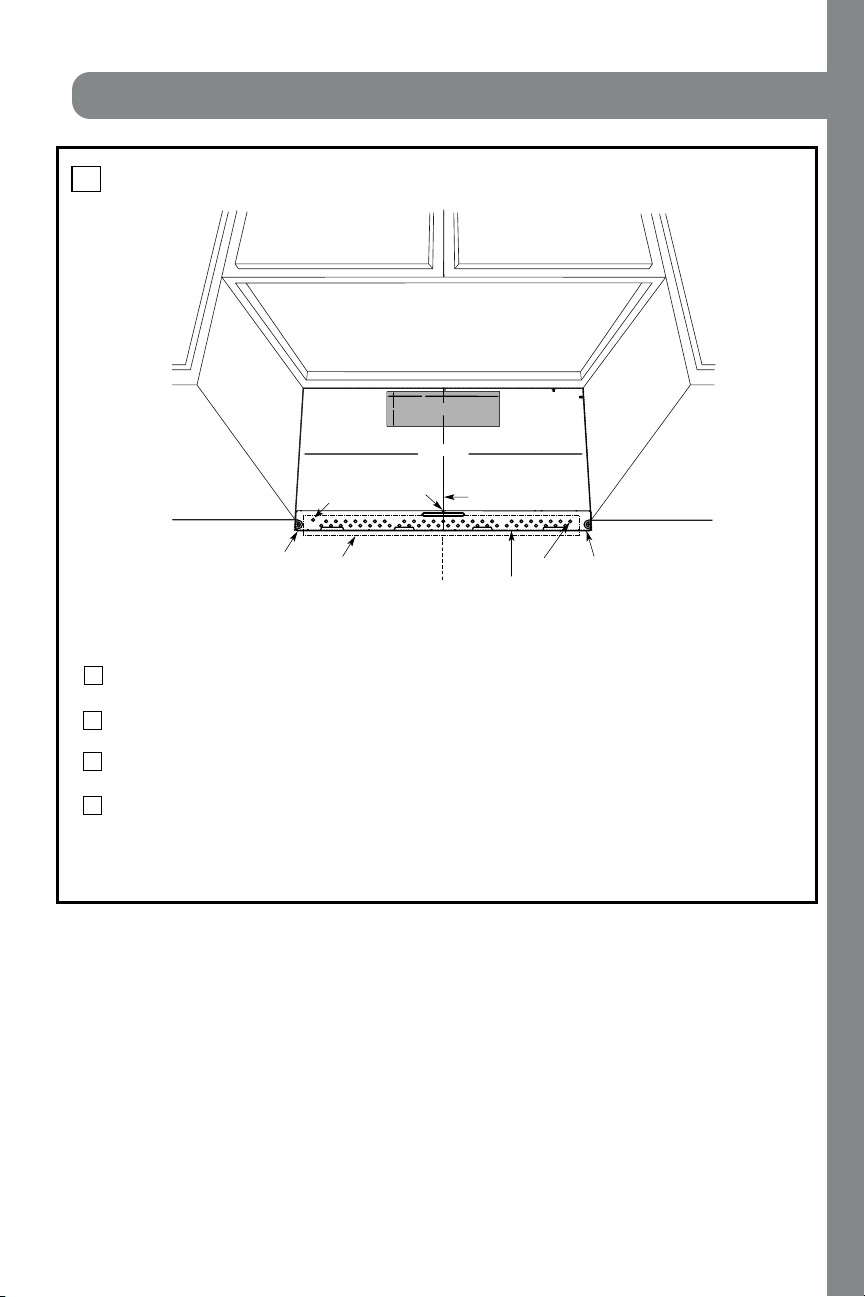
ALIGNING THE WALL PLATE
D.
CAUTION: Wear gl oves
to avoid cutting fingerson
sh ar p ed ges.
Area E
Hole A
Hole B
Centerline
notches
Draw a Vertical Line
on Wall from Center
of Top Cabinet
Draw a horizontal line on wall at the
bottom of “Rear Wall Template”.
Horizontal Line
Horizontal Line
C
L
3/8" TO EDGE
%#76+10Ä+(':*#756#ਸ਼+5
215+6+10'&
1765+&'
4'%1//'0&'&&+/'05+
10)4'#5'Ä.#&'0#+49+..
&+5%*#4)'+061*175'5647%674'
/+0+/7/9+&6*4'37+4'&
4'#49#..6'/2.#6'
NOTE: IT IS VERY IMPORTANT TO
READ AND FOLLOW THE DI
RECTIONS
IN THE INSTALLATION INSTRUCTIONS
BEFORE PROCEEDI
NG WITH
THIS
REAR WALL TEMPLATE.
This Rear Wal
l Template serves t
o position the bottom
mounting plate and to locate
the horizontal exhaust
outlet.
1. Use a level to check th
at the template is positioned
accurately.
2. Locate and ma
rk at least one stud on the left or
right side of the centerlin
e.
016'
It is important to use at least one wood
screw mounted firmly in a stud to s
upport the weight
of the microwave. Mark two add
itional, evenly spaced
locations for the supp
lied toggle bolts.
3. Drill holes in the marked locatio
ns. Where there is
a stud, drill a 3/16" hole for
wood screws. For hole
s
that do not line up with a st
ud, drill 5/8" holes for
toggle bolts.
016'
DO NOT INSTALL THE M
OUNTING PLATE
AT THIS TIME.
4. Remove the tem
plate from the rear wall.
5. Review the Installation Instru
ction book for your
installation situation.
Locate and mark
holes to align with h
oles in the
mounting plat
e.
IMPORTANT:
LOCATE
AT LEAST ONE
STUD ON EITHER SIDE OF
THE CENTERLINE.
MARK THE LOCATION FOR 2
ADDITIONAL, EVENLY
SPACED
TOGGLE BOLTS IN
THE MOUNTING PLATE
AREA.
Locate and mark
holes to align with hol
es in the
mounting plat
e.
IMPORTANT:
LOCATE
AT LEAST ONE
STUD ON EITHER SIDE OF
THE CENTERLINE.
MARK THE LOCATION FOR 2
ADDITIONAL, EVENLY
SPACED
TOGGLE BOLTS IN
THE MOUNTING PLATE
AREA.
Trim the rear
wall template al
ong the dotted
line.
%
#
$
%
&
(%76176(14*14+<106#.
1765+&'':*#756
%76*1.'6*417)*
4'#49#..
(14':*#756#ਸ਼
12"
4"
Darle vuelta a la hoja para consultar la
versión en Español.
Draw a vertical line on the wall at the center of the
30" wide space.
NOTE: DO NOT MOUNT THE PLATE AT THIS
TIME.
NOTE: Holes A and B are inside area E. If neither of
important to have at least one wood screw mounted
firmly in a stud to support the weight of the
microwave. Set the mounting plate aside.
1
2
Draw a horizontal line on the wall at the bottom of
“Rear Wall Template”.
Holes A and B are not in a stud, find a stud somewhere
in area E and draw a circle to line up with the stud. It is
3
Find a wall stud in area "E" of mounting plate
Refer to section 1B. Finding the wall studs.
For attaching the mounting plate into stud drill
a 3/16" hole into wood stud. Drill a 5/8" hole for
toggle bolt in 1 other location (Hole A or Hole B)
4
EN-8
INSTALLATION
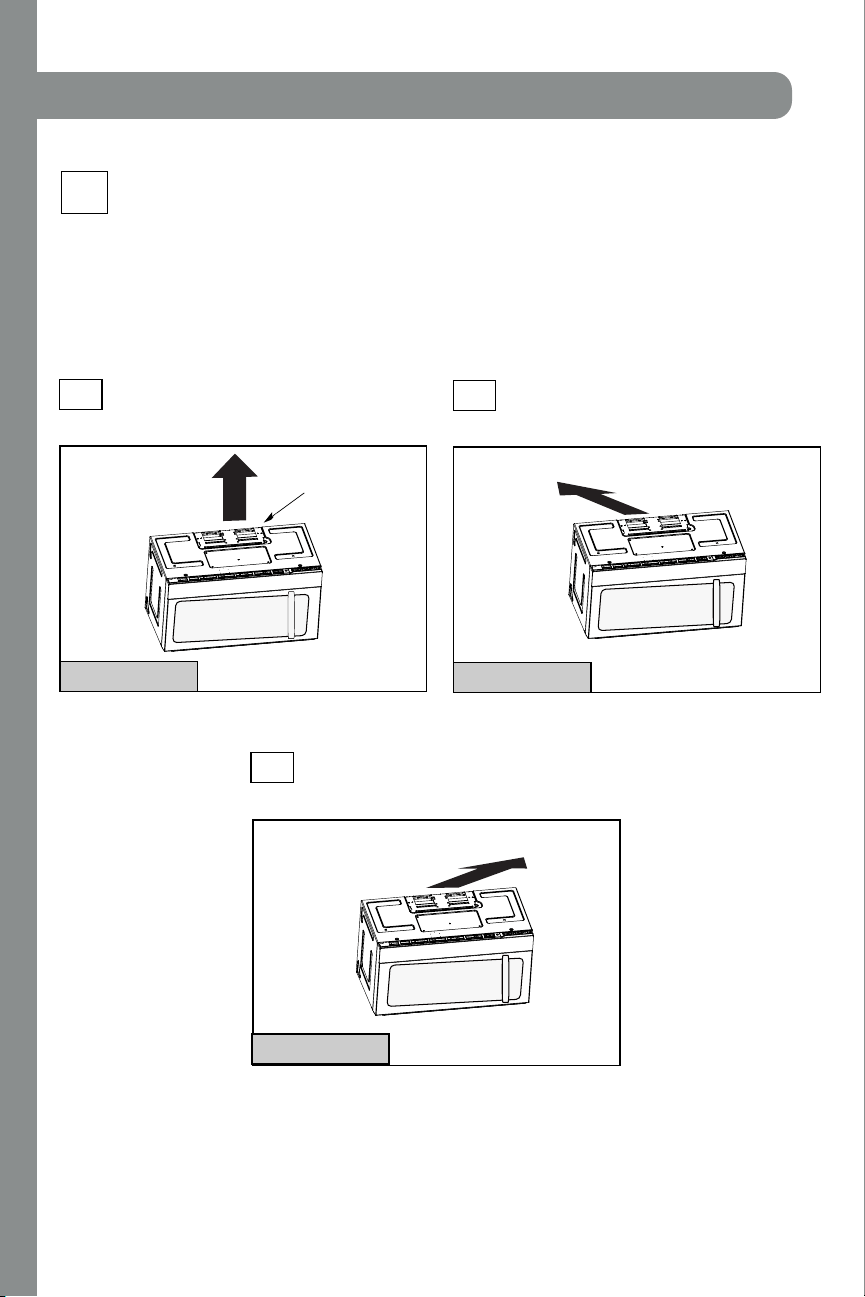
12
A
INSTALLATION TYPES
Thismicrowave oven isdesigned for adaptation to
the following three typesof ventilation:
A. Outside Top Exhaust (Vertical Duct)
B. Outside Back Exhaust (Horizontal Duct)
C.Recirculating (Non-Vented Ductless)
pr oceed t o that sect i on.
OUTSIDE TOP EXHAUST
(VERTICAL DUCT)
OUTSIDE BACK EXHAUST
(HORIZONTAL DUCT)
RECIRCU LATIN G
(NON-VENTED DUCTLESS)
See page 12
recirculating exhaust.
disposable charcoal filter
installed to help r em ove
smoke and odors.
Adaptor in Pl ace for
Out si de Top Exhaust
2
B
C
Adaptor Must Be
Moved to the Back for
Out si de Back Exhaust
N
N
O
O
T
T
E
E
:
:
Thismicrowave isshipped assembled for
Recirculating. Select the
type of ventilation required
(Choose A, B or C)
for your installation and
See page 16
See page 20
M odel sar e shi pped for
Some model s h ave a
Inst allation Instructions
NOTE: Read the next two pages only if you plan to vent your exhaust to the
outside. If you plan to recirculate the air back into the room, proceed to page 20.
EN-9
INSTALLATION
17 21
26
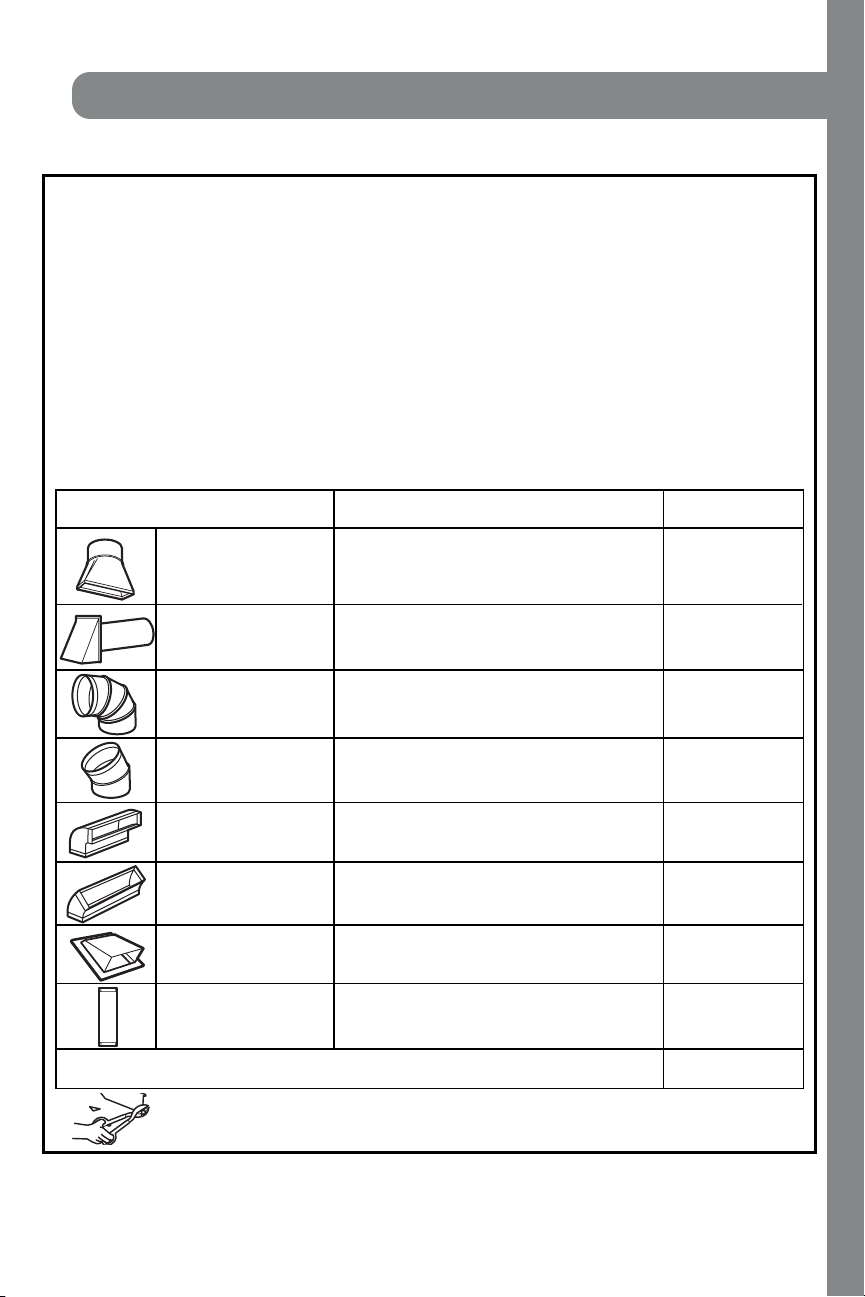
13
EQUIVALENT NUMBER EQUIVALENT
DUCT PIECES LENGTH x USED = LENGTH
Rect angul ar-t o-Round 5 Ft . (1.5 m) x ( ) = Ft . or m
Transi ti on Adaptor*
Wall Cap 40 Ft . (12.2 m) x ( ) = Ft . or m
90° Elbow 10 Ft . (3 m) x ( ) = Ft . o r m
45° Elbow 5 Ft . (1.5 m) x ( ) = Ft . or m
90° Elbow 25 Ft . (7.6 m) x ( ) = Ft . or m
45° Elbow 5 Ft . (1.5 m) x ( ) = Ft . or m
Roof Cap 24 Ft . (7.3 m) x ( ) = Ft . or m
St raight Duct 6“ (15.2 cm) 1 Ft . (0.3 m) x ( ) = Ft . or m
Round or 3
1
⁄4“ x 10“
(8.2 x 25.4 cm Rect angul ar)
Tot al Duct w ork = Ft . o r m
Equi valen t l en gt h s of duct pi eces are based on act ual tests
and r ef l ect r equi r em ent s for good venting per for man ce wit h
any vent hood.
* I M PO RTANT : If a rectangular-to-round transition
adaptor is used, the bottom corners of the damper
will have to be cut to fit, using the tin snips, in order
to al l ow fr ee movemen t of the damper
.
NO T E: If you need to install ducts, note that the total
duct length of 3
1
⁄4” x 10” ( 8.2 x 25.4 cm) r ectangul ar or
” (15.2 cm) diameter round duct
Outside ventilation requires an EXTERNAL EXHAUST
NO T E: It is important that venting be installed using
t h e m o st d i r ec t r o u t e an d wi t h as f ew el b o ws as p o ssi b l e.
Thi s en sur es cl ear venti n g of exhaust and hel ps pr event
blockages. Al so, make sure damper s swi ng f reely and
nothing is blocking the ducts.
Exhaust connection:
The exhaust adaptor has been desi gned to mate wit h
a st and ar d 3
1
⁄4” x 10” ( 8.2 x 25.4 cm) r ectangul ar duct.
If a round duct is required, a rectangular-to-round
Maximum duct length:
For satisfactory air movement, the total duct length of
3
1
⁄4” x 10” ( 8.2 x 25.4 cm) r ectangul ar or
6 ” ( 15.2 cm)
diameter round duct should not
ex ceed 120 equi valent
f eet (36.5 m).
Elbow s, t ransitions, w all and roof caps,
etc.,
pr esen t ad d i t i on al r esi st an ce t o ai r fl ow and ar e
equivalent to a section of straight duct which is longer
than their actual physical size. When calculating the total
duct length, add the equivalent lengths of all transitions
and adaptors plus the length of all straight duct sections.
The chart below shows you how to calculate total
equivalent ductwor k l ength usin g the appr oxi mate feet
of equivalent length of some typical ducts.
Inst allat ion Instructions
INSTALLATION INSTRUCTIONS FOR EXTERNAL EXHAUST DUCTING
DUCT.Read the following carefully.
( 12.5”
should not exceed 120 equivalent f eet (36.5 m).
di ameter / 6
( 12.5”
di ameter /
7 cm)
7 cm)
transition adaptor must be used.
diameter duct is acceptable to use.
"
A 5"""''''' " (12.7cm)/ 6" (15.2cm)
"
EN-10
INSTALLATION
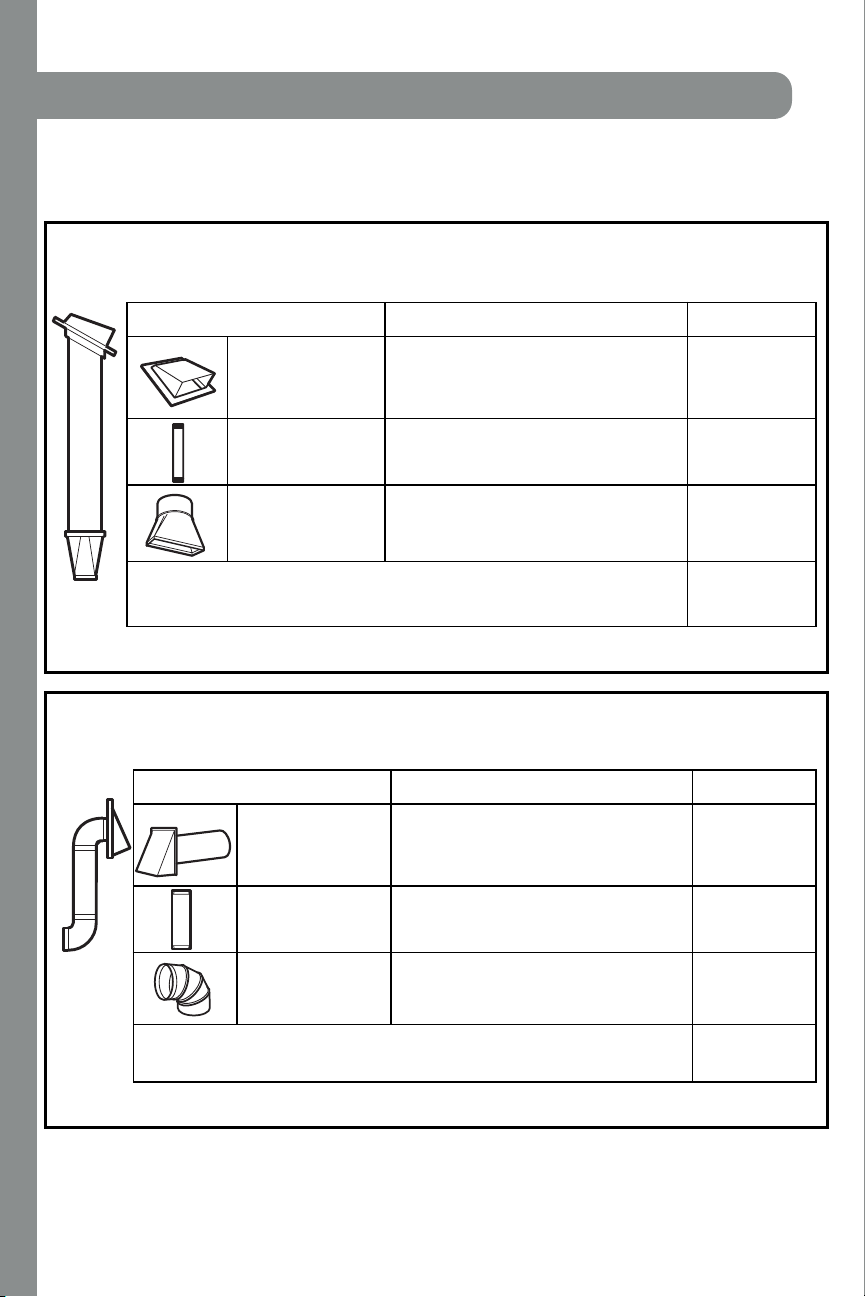
14
EQUIVALENT NUMBER EQUIVALENT
DUCT PIECES LENGTH x USED = LENGTH
Roof Cap 24 Ft . (7.3 m) x (1) = 24 Ft . (7.3 m)
12 Ft . (3.6 m) Straight Duct 12 Ft . (3.6 m) x (1) = 12 Ft . (3.6 m)
(6” / 15.2 cm Round)
Rect angul ar-t o-Round 5 Ft . (1.5 m) x (1) = 5 Ft . (1.5 m)
Transi ti on Adaptor*
Equi val ent l engths of duct pieces are based on act ual t ests and
ref l ect requi rement s for good vent ing perf ormance wi th any vent hood.
Tot al Lengt h = 41 Ft . (12.4 m )
The following chart describes an example of one possible
ductwork installation.
OUTSIDE TOP EXHAUST (EXAM PLE ONLY)
NO T E: For back exh aust , care shoul d be t aken to ali gn exhaust wi t h space bet ween studs, or wall sh oul d be pr epar ed
at t h e time i t is con st r ucted by leaving en ough space bet ween the wall st uds to accommodate exh aust.
* I MPO RTAN T : If a rectangular-to-round transition adaptor is used, the bottom corners of the damper
will have to be cut to fit, using the tin snips, in order to allow free movement of the damper.
The following chart describes an example of one possible
ductwork installation.
Inst allat ion Inst ruct ions
OUTSIDE BACK EXHAUST (EXAMPLE ONLY)
EQUIVALENT NUMBER EQUIVALENT
DUCT PIECES LENGTH* x USED = LENGTH
Wall Cap 40 Ft. (12.2 m) x (1) = 40 Ft . (12.2 m)
3 Ft . St raight Duct 3 Ft . (0.9 m) x (1) = 3 Ft . (0.9 m)
(3
1
⁄4” x 10” / 8.2 x 25.4 cm
Rect angul ar)
90° El bow 10 Ft . (3 m) x (2) = 20 Ft . (6 m)
Equi val ent l engths of duct pieces are based on act ual t ests and
ref l ect requi rement s for good vent ing perf ormance wi th any vent hood.
Tot al Lengt h = 63 Ft . (19.1 m )
EXTERNAL EXHAUST DUCTING
EN-11
Pl ace th e moun ti n g p l at e agai n st t h e wal l an d
insert the toggle wings into the holes in the wall
to mount the plate.
NO T E: Before tightening toggle bolts and wood
scr ew, make sur e th e bottom of th e moun t ing pl ate
touch the bottom of the cabinet when pushed
flush against the wall and that the plate is properly
cent er ed un der the cabi net .
CAUTION: Be careful to avoid pinching fingers
between the back of th e moun t ing pl ate and the wal l .
Tighten all bolts. Pull the plate away from the wall
to help tighten the bolts.
3
4
ATTACH THE M OUNTING
PLATE TO THE WALL
A1.
Attach the plate to the wall using toggle bolts.
At least one wood screw must be used to attach
the plate to a wall stud.
Remove the t oggle wings f r om the bolt s.
Insert the bolts into the mounting plate
through the holes designated to go into drywall
and reattach the toggle wings to
3
⁄4″ ( 19 mm) onto
each bolt.
1
INSTALLATION OVERVIEW
A1. Attach Mounting Plate to Wall
A2. Prepare Top Cabi net
M ou n t Mi cr owave O ven
A5.
Adjust Exhaust Adaptor
A6.
Wal l
Mounti ng
Plate
Spaci ng for Toggl es
More Than Wal l
Thi ckness
Bol t End
Toggle
Bol t
Toggle Wi ngs
To use toggle bolts:
Inst allat ion Inst ruct ions
2
OUTSIDE TOP EXHAUST (Vert ical Duct )
A
I MPORTAN T N OT ES:
• M ake sur e the scr ews f or t h e
blower motor and blower plate
are secur ely tightened when
they are reinstalled. This will
hel p t o pr event excessi ve
vibration.
• M ake sur e the motor wir ing has
been properly routed and secured,
and that the wires are not pinched.
A7. Connect Ductwor k
A3.
A4.
Check Damper O per ati on
Adapting Microwave Blower for
Outside Top Exhaust
12"
4"
NO
TE
: IT IS VERY
I
MPOR
TANT TO
READ AND FO
LLOWTHE DIRECTIONS
IN THE INSTALLATION INSTRU
CTI
ONS
BE
FO
RE PR
O
CEEDINGWITH TH
IS
REAR W
ALL TEMPLATE.
Thi
s
R
ea
rWall Templ
ate ser
ves to p
osition th
e botto
m
mounting platea
nd
to loc
ate th
e hor
izon
ta
l e
xhau
st
ou
t
let.
1. Us
e a l
ev
el
to
chec
k th
at the t
emplate is pos
itioned
accu
r
ately.
2. L
oc
ate a
ndmar
k at lea
st o
nestud on the left or
right
side of the centerli
ne.
016'
It is importa
nt to use at leas
t
one wo
od
sc
rew
mounted firmly
i
n a s
tud
to supp
ort the weight
of
the mic
r
owa
ve. M
ar
k two ad
dition
al, even
ly
spa
ced
locatio
ns f
o
r
the
supplied to
g
gle bol
t
s.
3. Dri
ll
h
ole
s in th
e marked locatio
ns.
Wher
e t
h
er
e is
a s
tud, dr
il
l
a 3/1
6"
hole for
wood scr
ews. F
or
holes
thatdo
n
o
t lin
e upwith
a
stud, d
r
ill 5
/8" holes fo
r
togg
le bolts
.
016'
DO
NOT
INSTALL
T
HE MO
U
NTI
NG P
L
ATE
AT THISTIME.
4. Re
move th
e te
mplate fr
o
m
the rea
r
wall.
5.Review
the In
s
ta
ll
a
tionInst
r
uc
tion book
for y
ou
r
installa
tion situat
i
on
.
Locate and mark holes
to ali
gn with holes in t
he
mounting
plate.
IMP
O
RTANT
:
LOCATE
AT LEAST ONE STUD
ON EI
THERSIDE OF
THE CENTE
RLINE.
MARKT
HE LO
CATIONF
O
R 2 ADDITIONAL, EVENLY
SP
ACE
D T
OGGLE
BOLTS IN THE MOUN
TING
PLATE
AREA.
Trim the re
ar wall tem
plat
e along
the do
tted line.
Da
rle
vu
elt
a
a
la
ho
ja
pa
ra
co
ns
ul
tarla
ver
sión
en
Espa
ñol.
Locate and mark
holes to ali
gn with holes in t
he
mountingplate.
IMPORTANT:
LOC
A
TE AT LEAST ONESTUD ON EITHER SI
D
E OF
THE
CENT
E
R
LI
N
E
.
MARKTHE LO
CATION
FOR 2 ADDITIONA
L, EV
ENL
Y
SPACEDTOGGLE BO
LTS IN THE MO
UNTING PLATE
AREA.
Trim the rear wall templat
e along
the dotted line.
3/8"TO
EDG
E
EN-12
INSTALLATION
15
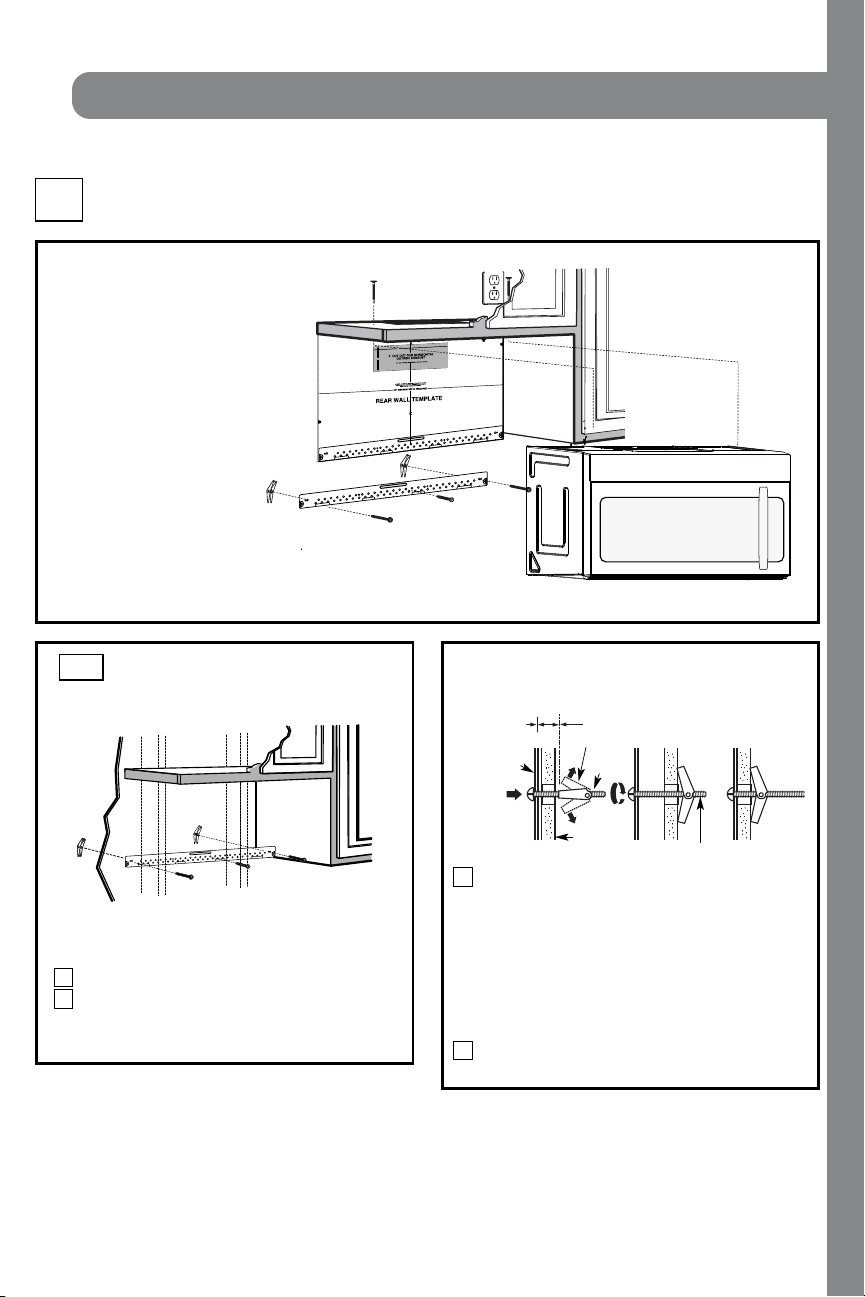
Pl ace th e moun ti n g p l at e agai n st t h e wal l an d
insert the toggle wings into the holes in the wall
to mount the plate.
NO T E: Before tightening toggle bolts and wood
scr ew, make sur e th e bottom of th e moun t ing pl ate
touch the bottom of the cabinet when pushed
flush against the wall and that the plate is properly
cent er ed un der the cabi net .
CAUTION: Be careful to avoid pinching fingers
between the back of th e moun t ing pl ate and the wal l .
Tighten all bolts. Pull the plate away from the wall
to help tighten the bolts.
3
4
ATTACH THE M OUNTING
PLATE TO THE WALL
A1.
Attach the plate to the wall using toggle bolts.
At least one wood screw must be used to attach
the plate to a wall stud.
Remove the t oggle wings f r om the bolt s.
Insert the bolts into the mounting plate
through the holes designated to go into drywall
and reattach the toggle wings to
3
⁄4″ ( 19 mm) onto
each bolt.
1
INSTALLATION OVERVIEW
A1. Attach Mounting Plate to Wall
A2. Prepare Top Cabi net
M ou n t Mi cr owave O ven
A5.
Adjust Exhaust Adaptor
A6.
Wal l
Mounti ng
Plate
Spaci ng for Toggl es
More Than Wal l
Thi ckness
Bol t End
Toggle
Bol t
Toggle Wi ngs
To use toggle bolts:
Inst allat ion Inst ruct ions
2
OUTSIDE TOP EXHAUST (Vert ical Duct )
A
I MPORTAN T N OT ES:
• M ake sur e the scr ews f or t h e
blower motor and blower plate
are secur ely tightened when
they are reinstalled. This will
hel p t o pr event excessi ve
vibration.
• M ake sur e the motor wir ing has
been properly routed and secured,
and that the wires are not pinched.
A7. Connect Ductwor k
A3.
A4.
Check Damper O per ati on
Adapting Microwave Blower for
Outside Top Exhaust
12"
4"
NO
TE
: IT IS VERY
I
MPOR
TANT TO
READ AND FO
LLOWTHE DIRECTIONS
IN THE INSTALLATION INSTRU
CTI
ONS
BE
FO
RE PR
O
CEEDINGWITH TH
IS
REAR W
ALL TEMPLATE.
Thi
s
R
ea
rWall Templ
ate ser
ves to p
osition th
e botto
m
mounting platea
nd
to loc
ate th
e hor
izon
ta
l e
xhau
st
ou
t
let.
1. Us
e a l
ev
el
to
chec
k th
at the t
emplate is pos
itioned
accu
r
ately.
2. L
oc
ate a
ndmar
k at lea
st o
nestud on the left or
right
side of the centerli
ne.
016'
It is importa
nt to use at leas
t
one wo
od
sc
rew
mounted firmly
i
n a s
tud
to supp
ort the weight
of
the mic
r
owa
ve. M
ar
k two ad
dition
al, even
ly
spa
ced
locatio
ns f
o
r
the
supplied to
g
gle bol
t
s.
3. Dri
ll
h
ole
s in th
e marked locatio
ns.
Wher
e t
h
er
e is
a s
tud, dr
il
l
a 3/1
6"
hole for
wood scr
ews. F
or
holes
thatdo
n
o
t lin
e upwith
a
stud, d
r
ill 5
/8" holes fo
r
togg
le bolts
.
016'
DO
NOT
INSTALL
T
HE MO
U
NTI
NG P
L
ATE
AT THISTIME.
4. Re
move th
e te
mplate fr
o
m
the rea
r
wall.
5.Review
the In
s
ta
ll
a
tionInst
r
uc
tion book
for y
ou
r
installa
tion situat
i
on
.
Locate and mark holes
to ali
gn with holes in t
he
mounting
plate.
IMP
O
RTANT
:
LOCATE
AT LEAST ONE STUD
ON EI
THERSIDE OF
THE CENTE
RLINE.
MARKT
HE LO
CATIONF
O
R 2 ADDITIONAL, EVENLY
SP
ACE
D T
OGGLE
BOLTS IN THE MOUN
TING
PLATE
AREA.
Trim the re
ar wall tem
plat
e along
the do
tted line.
Da
rle
vu
elt
a
a
la
ho
ja
pa
ra
co
ns
ul
tarla
ver
sión
en
Espa
ñol.
Locate and mark
holes to ali
gn with holes in t
he
mountingplate.
IMPORTANT:
LOC
A
TE AT LEAST ONESTUD ON EITHER SI
D
E OF
THE
CENT
E
R
LI
N
E
.
MARKTHE LO
CATION
FOR 2 ADDITIONA
L, EV
ENL
Y
SPACEDTOGGLE BO
LTS IN THE MO
UNTING PLATE
AREA.
Trim the rear wall templat
e along
the dotted line.
3/8"TO
EDG
E
EN-12
INSTALLATION
16
USE TOP CABINET TEM PLATE
FOR PREPARATION OF TOP
CABINET
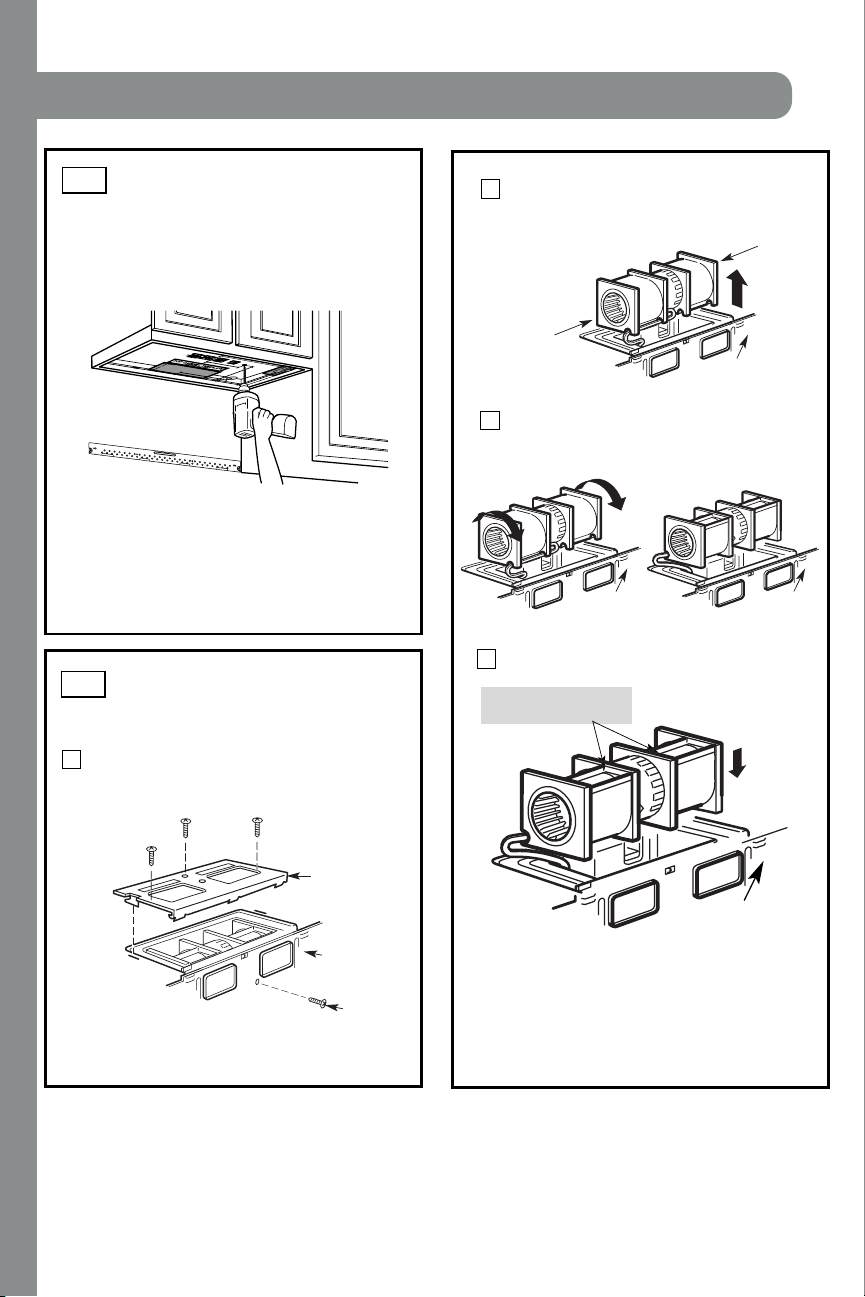
You need to drill holes for the top support screws, a
hole large enough for the power cord to fit through,
and a cutout large enough for the exhaust adaptor.
A2.
•
Read the instructions on the TOP CABINET
TEMPLATE.
• Tape it under neath t he top cabi n et.
• Drill the holes, following the instructions on the
TOP CABINET TEMPLATE.
CAUTION: Wear safety goggles when drilling holes
in the cabinet bottom.
Inst allat ion Inst ruct ions
A3.
Remove the screw that hol ds th e blower pl ate
to th e mi cr owave. Remove and save th e screw
holding the blower motor to the microwave.
Bl ower Pl at e
Bl ower Motor
Screw
Back of
Microwave
2
Carefully pull out the blower unit. The wires
will extend far enough to allow you to adjust
the bl ower uni t .
1
ADAPTING MICROWAVE
BLOWER FOR OUTSIDE
TOP EXHAUST
Roll the blower unit 90° so that fan blade
mi cr owave.
3
Back of
Microwave
Bef ore Rot at i on After Rotation
Back of
Microwave
openings are facing out the top of the
Back of
Microwave
AFTER: Fan Blade
Place the blower unit back into the opening.
Openings Facing Top
CAUTION: Do not pull or stretch the blower
unit wiring. Make sure the wires are not
pinched, and that they are properly secured.
4
with the top of the unit facing up.
Place the microwave in its upright position,
EN-13
End B
End A
Back of
Microwave
INSTALLATION
17
3
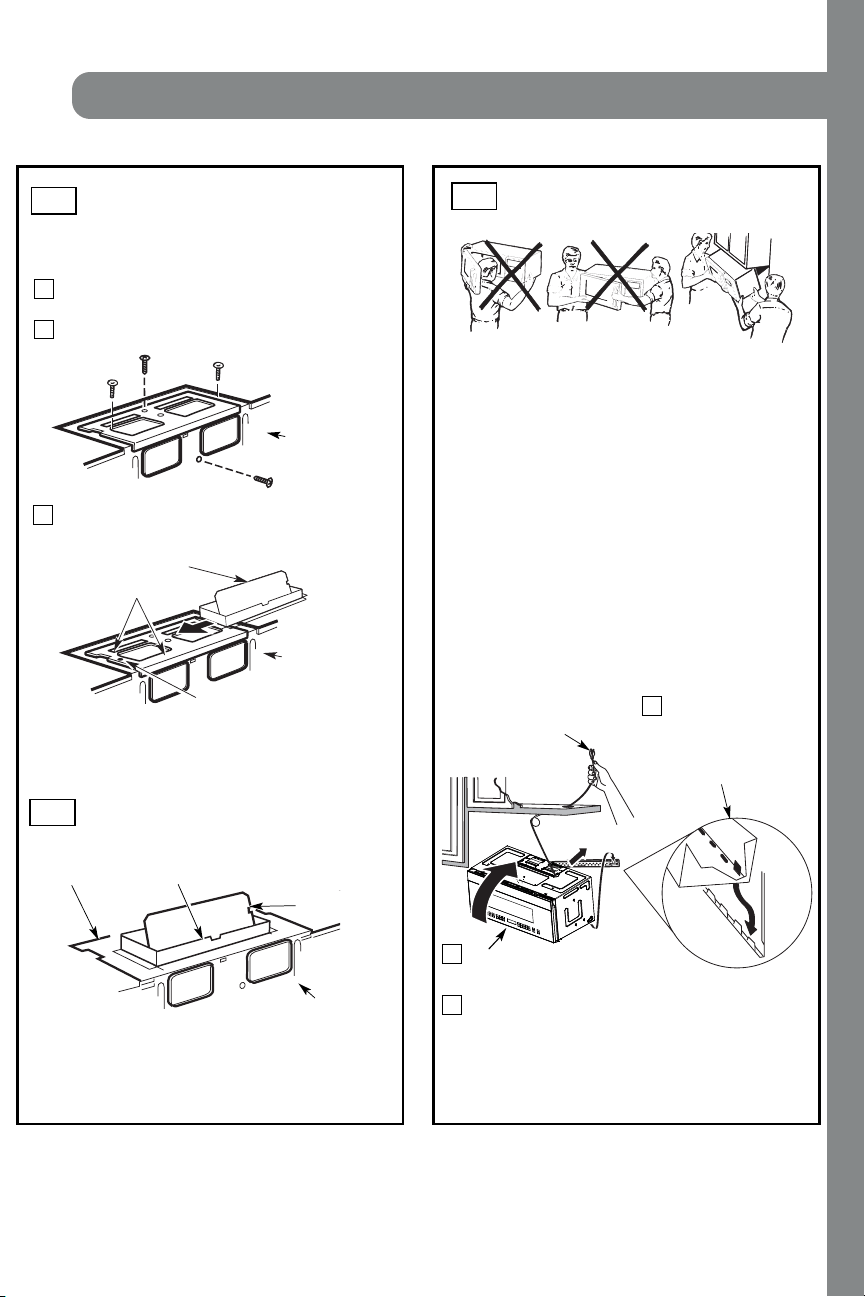
MOUNT THE MICROWAVE
OV EN
FOR EASIER INSTALLATION AND PERSONAL
SAFETY, WE RECOMMEND TH AT T WO PEO PLE
INSTALL THIS MICROWAVE OVEN.
NO TE: I f your cabinet i s metal, use t h e nylon
gr ommet aroun d th e power cor d h ole t o prevent
cutting of the cord.
NO TE: We recommend using filler blocks if the
cabinet front hangs below the cabinet bottom shelf.
IMPORTANT: If filler blocks are
not used, case damage may occur f rom
over t i ghteni ng screws.
Insert a self-aligning screw through top center
cabi n et hol e. Tempor ari ly secur e the oven by
turning the screw at least two f ull turns after the
thr eads have engaged. (It will be completely
ti ghten ed l ater.) Be sure to keep power cor d
tight. Be careful not to pinch the cord, especially
when mounting f lush to bottom of cabinet.
2
Rotate front of oven
up agai n st cabi n et
bottom.
NO TE: When mounting the
mi cr owave oven, th r ead
power cord through hole in
bottom of top cabinet. Keep
it tight throughout Steps
1–3. Do not pinch cord or
lift oven by pulling cord.
Lift microwave, tilt it
forward, and hook
slots at back bottom
edge onto four lower
tabs of mounting
pl at e.
1
CHECK FOR PROPER
DAM PER OPERATION
Exhaust Adaptor
Bl ower Pl at e
Damper
Back of
Microwave
• M ake sure t ape secur i ng damper is removed and
damper pivots easily bef ore mounting microwave.
• You will need to make adjustments to assure proper
alignment with your house exhaust duct after the
microwave is installed.
A3.
ADAPTING MICROWAVE
BLOWER FOR OUTSIDE
TOP EXHAUST
Secur e bl ower uni t t o mi cr owave wit h the scr ew
5
r emoved in Step 1. M ake sur e the scr ew is ti ght .
Repl ace bl ower plate with t he scr ew r emoved in
St ep 1. M ake sur e the scr ew is ti ght .
Back of
Microwave
6
7
Back of
Microwave
Gui de
Adaptor
Locki ng Tab
damper swin gs fr eely.
Attach the exhaust adaptor to the top of the
blower plate by sliding it into the guides
of the
bl ower pl ate.
Push in securely until it is in the locking
t ab s.
Take car e t o assur e th at t h e dam per h i nge
i s
installed so that the
A4.
A5.
Inst allation Instructions
IMPORTANT: Do not grip or use the handle
or heat shield during installation. Do not
r emove the cardboard spacer s between the
heat shield and door.
EN-14
INSTALLATION
18
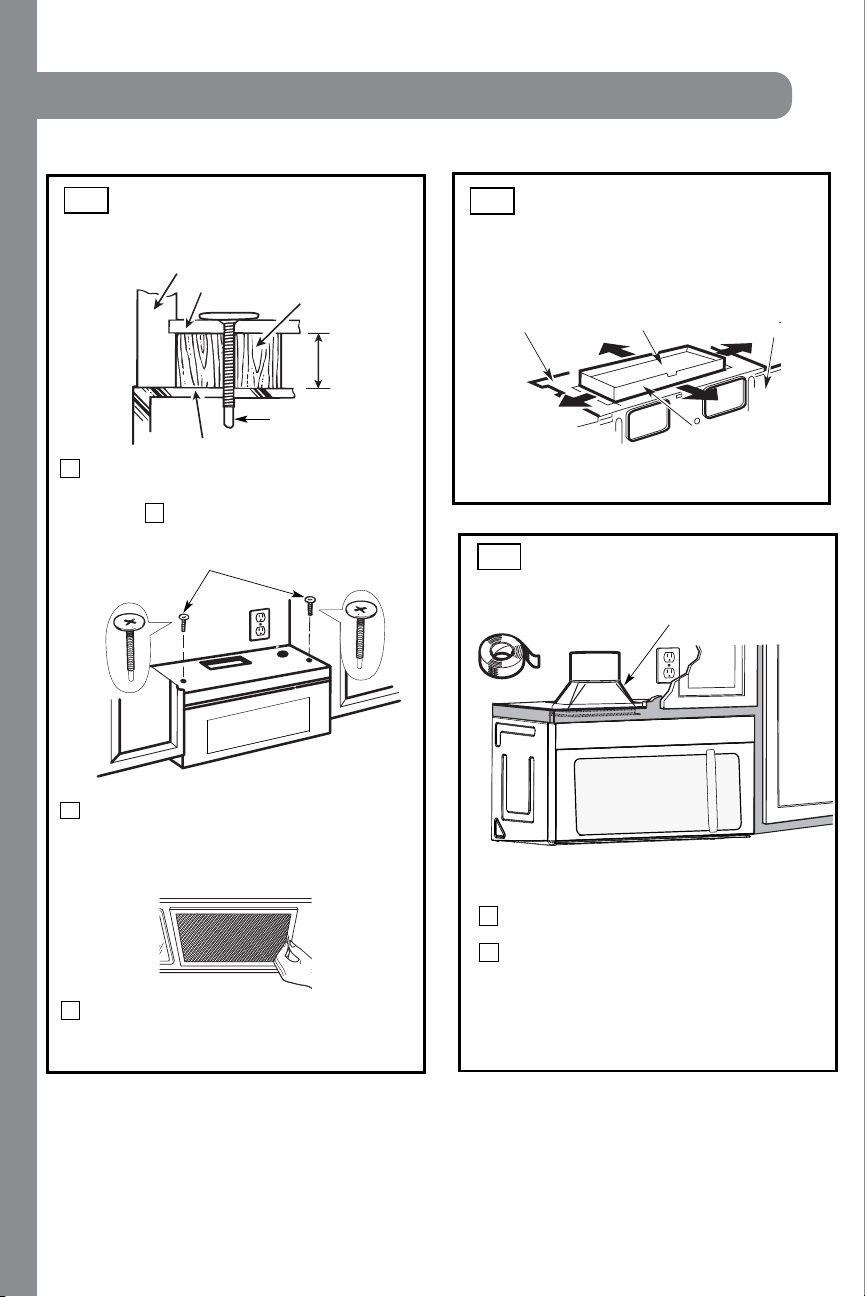
4
Attach the microwave oven to the top cabinet.
8
7
Cabi net Front
Cabi net Bot t om Shelf
Tighten the outer two screws to the top of the
microwave oven. (While tightening screws, hold
t h e m icr owave oven i n pl ace agai nst t h e wal l an d
the top cabinet.)
Filler Block
Microwave Oven Top
Equi val ent
to Depth
of Cabi net
Recess
Insert 2 self-aligning screws
through outer top cabinet
holes. Turn two full turns on
each scr ew.
I nstall gr ease fi lter s. See th e U se &&&&and Care
packed with the mi cr owave.
Installation Instructions
ADJUST THE EXHAUST
ADAPTOR
Open the top cabinet and adjust the exhaust adaptor
to connect to the house duct.
Back of
Microwave
For Front -t o-Back or
Si de-to-Si de Adjustment,
Sl ide the Exhaust Adaptor
as Needed
Bl ower Pl at e
Damper
Sel f-Ali gni ng Screw
5
MOUNT THE M ICROWAVE
OVEN (cont .)
A6.
A5.
CONNECTING DUCTWORK
1
2
Extend the house duct down to connect to
t h e exhau st adapt or.
A7.
furnance
Seal exhaust duct joints using duct tape
for high temperature applications.
EN-15
House Duct
INSTALLATION
19
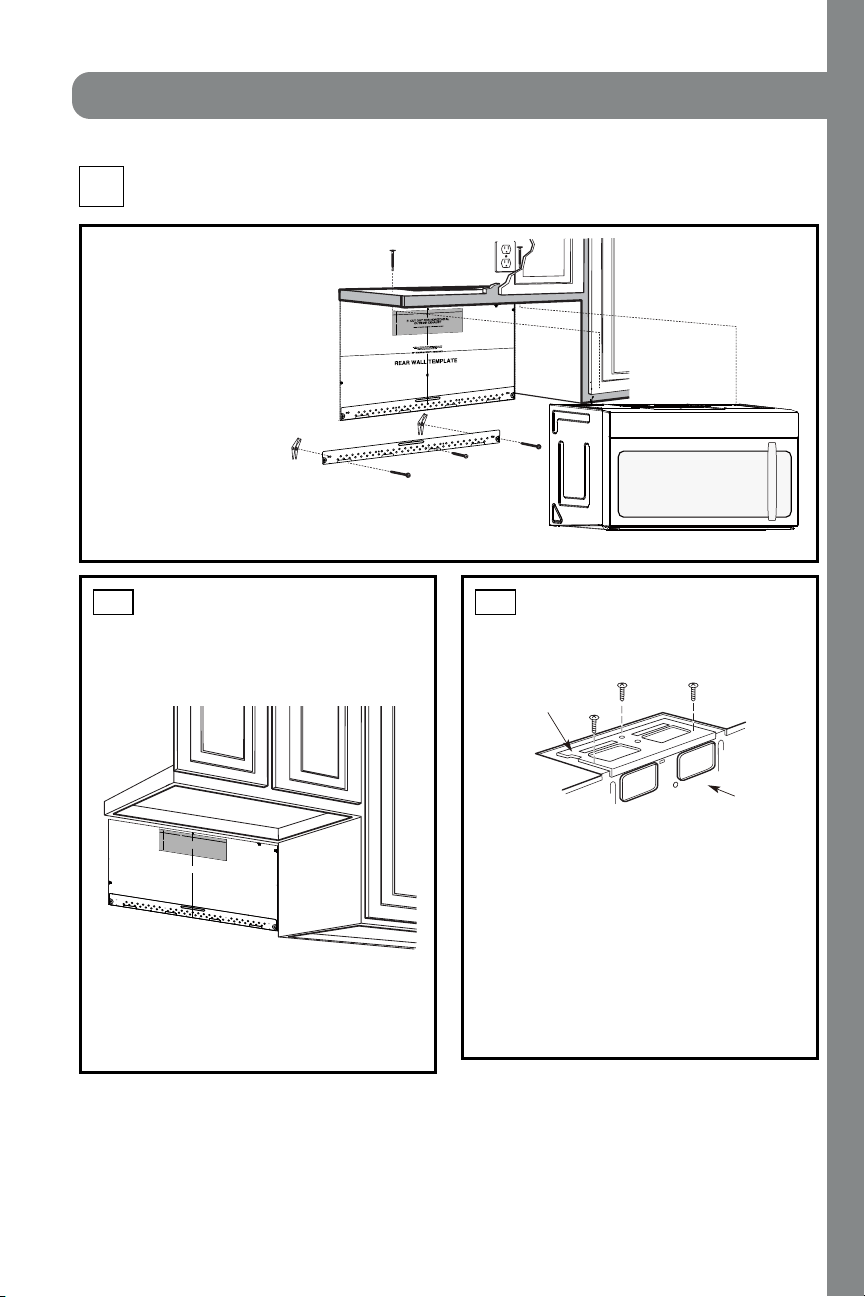
INSTALLATION OVERVIEW
B1. Pr epar e Rear Wal l
B3. Attach Mounting Plate to Wall
B4. Pr epare Top Cabi n et
B5. Adjust Blower
B6. Moun t t h e Mi cr owave Oven
I MPORTAN T NOT ES:
• M ake sur e th e scr ews for th e
blower motor and blower plate
are secur el y ti ghtened when
they are reinstalled. This will
help to pr event excessi ve
vibration.
•
been properly routed and secured,
and that the wires are not pinched.
Remove and save the screw th at hol ds the bl ower
plate to the microwave. Lift off the blower plate.
Back of
Microwave
Installation Instruct ions
PREPARING THE REAR WALL
FOR OUTSIDE BACK EXHAUST
B1.
You need to cut an opening in the rear wall for
outside exhaust.
• Read the instructions on the REAR
WALL TEMPLATE.
• Tape i t t o t he r ear wal l .
• Cut the opening, following the instructions of the
REAR WALL T EM PLATE.
B2.
OUTSIDE BACK EXHAUST (Horizont al Duct )
B
Blower Pl at e
REM OVE BLOWER PLATE
B2. Remove Bl ower Pl ate
3/8" TO EDGE
NOTE: IT IS VE
RY IMPORTANT TO
READ AND FOLLOW THE DIRECTIONS
IN THE INSTALLATION INSTRUCTIONS
BEFORE PROCEEDING WITH THIS
REAR WALL TEMPLATE.
This Rear Wall Template serves to position the bottom
mounting plate and to locate the horizontal exhaust
outlet.
1. Use a level to check that the template is positioned
accurately.
2. Locate and mark at least one stud on the left or
right side of the centerline.
It is important to use at least one wood
screw mounted firmly in a stud to support the weight
of the microwave. Mark two additional, evenly spaced
locations for the supplied toggle bolts.
3. Drill holes in the marked locations. Where there is
a stud, drill a 3/16" hole for wood screws. For holes
that do not line up with a stud, drill 5/8" holes for
toggle bolts.
DO NOT INSTALL THE MOUNTING PLATE
AT THIS TIME.
4. Remove the template from the rear wall.
5. Review the Installation Instruction book for your
installation situation.
Locate and mark holes to align with holes in the
mounting plate.
IMPORTANT:
LOCATE
AT LEAST ONE STUD ON
EITHER SIDE OF
THE CENTERLINE.
MARK THE LOCATION FOR
2 ADDITIONAL, EVENLY
SPACED TOGGLE BOLTS IN THE MOUNTING PLATE
AREA.
Locate and mark holes to align with holes in the
mounting plate.
IMPORTA
NT:
LOCATE AT LEAST ONE STUD ON EITHER SIDE OF
THE CENTERLINE.
MARK THE LOCATION FOR 2 ADDITIONAL, EVENLY
SPACED TOGGLE BOLTS IN THE MOUNTING PLATE
AREA.
Trim the rear wall template along the dotted line.
Trim the rear wall template along the dotted line.
12"
4"
Darle vuelta a la hoja para consultar la
versión en Español.
Make sure t h e motor wir ing has
12"
4"
NO
TE
: IT IS VERY
I
MPOR
TANT TO
READ AND FO
LLOWTHE DIRECTIONS
IN THE INSTALLATION INSTRU
CTI
ONS
BE
FO
RE PR
O
CEEDINGWITH TH
IS
REAR W
ALL TEMPLATE.
Thi
s
R
ea
rWall Templ
ate ser
ves to p
osition th
e botto
m
mounting platea
nd
to loc
ate th
e hor
izon
ta
l e
xhau
st
ou
t
let.
1. Us
e a l
ev
el
to
chec
k th
at the t
emplate is pos
itioned
accu
r
ately.
2. L
oc
ate a
ndmar
k at lea
st o
nestud on the left or
right
side of the centerli
ne.
016'
It is importa
nt to use at leas
t
one wo
od
sc
rew
mounted firmly
i
n a s
tud
to supp
ort the weight
of
the mic
r
owa
ve. M
ar
k two ad
dition
al, even
ly
spa
ced
locatio
ns f
o
r
the
supplied to
g
gle bol
t
s.
3. Dri
ll
h
ole
s in th
e marked locatio
ns.
Wher
e t
h
er
e is
a s
tud, dr
il
l
a 3/1
6"
hole for
wood scr
ews. F
or
holes
thatdo
n
o
t lin
e upwith
a
stud, d
r
ill 5
/8" holes fo
r
togg
le bolts
.
016'
DO
NOT
INSTALL
T
HE MO
U
NTI
NG P
L
ATE
AT THISTIME.
4. Re
move th
e te
mplate fr
o
m
the rea
r
wall.
5.Review
the In
s
ta
ll
a
tionInst
r
uc
tion book
for y
ou
r
installa
tion situat
i
on
.
Locate and mark holes
to ali
gn with holes in t
he
mounting
plate.
IMP
O
RTANT
:
LOCATE
AT LEAST ONE STUD
ON EI
THERSIDE OF
THE CENTE
RLINE.
MARKT
HE LO
CATIONF
O
R 2 ADDITIONAL, EVENLY
SP
ACE
D T
OGGLE
BOLTS IN THE MOUN
TING
PLATE
AREA.
Trim the re
ar wall tem
plat
e along
the do
tted line.
Da
rle
vu
elt
a
a
la
ho
ja
pa
ra
co
ns
ul
tarla
ver
sión
en
Espa
ñol.
Locate and mark
holes to ali
gn with holes in t
he
mountingplate.
IMPORTANT:
LOC
A
TE AT LEAST ONESTUD ON EITHER SI
D
E OF
THE
CENT
E
R
LI
N
E
.
MARKTHE LO
CATION
FOR 2 ADDITIONA
L, EV
ENL
Y
SPACEDTOGGLE BOLTS IN THE MO
UNTING PLATE
AREA.
Trim the rear wall templat
e along
the dotted line.
3/8"TO
EDG
E
EN-16
INSTALLATION
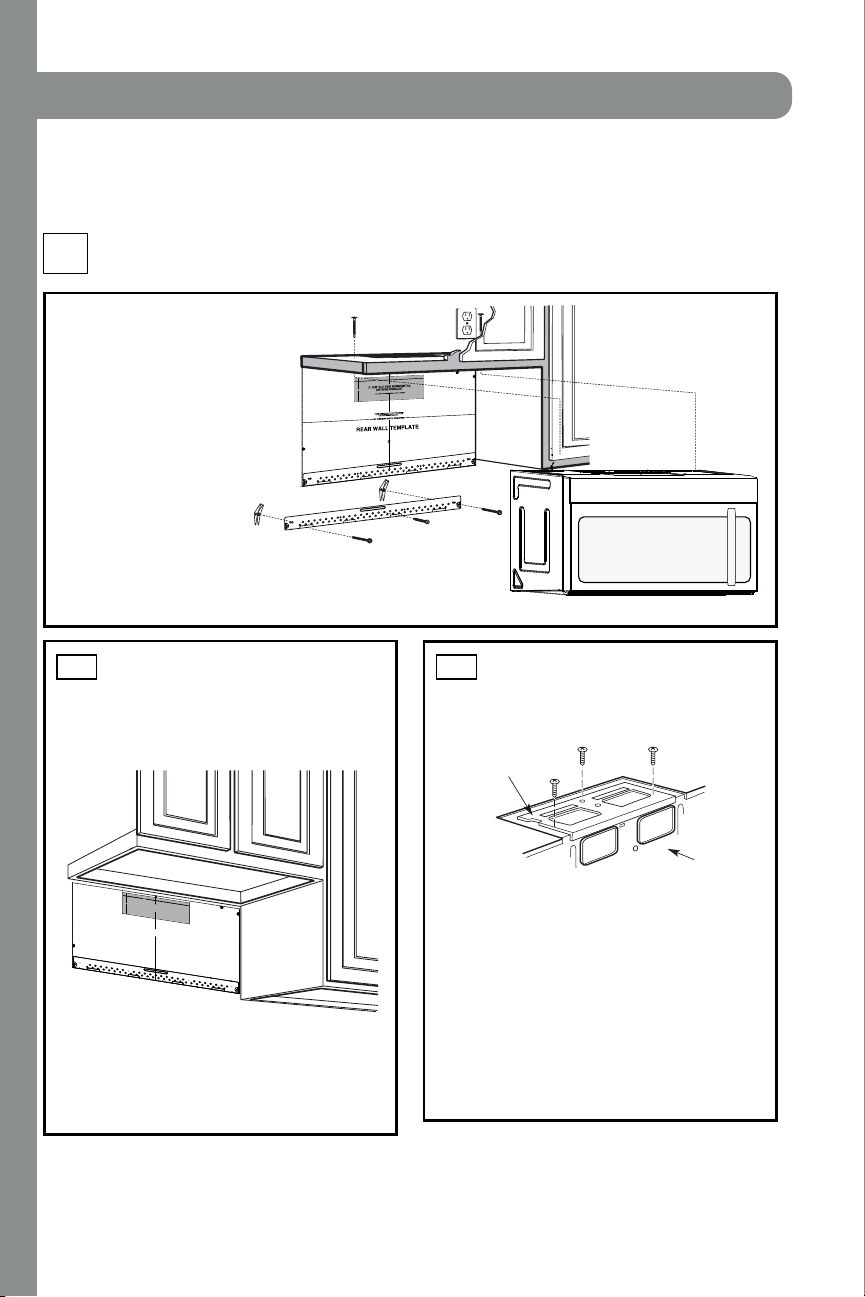
20
INSTALLATION OVERVIEW
B1. Pr epar e Rear Wal l
B3. Attach Mounting Plate to Wall
B4. Pr epare Top Cabi n et
B5. Adjust Blower
B6. Moun t t h e M icr owave Oven
I MPO RTANT NO T ES:
• M ake sur e th e scr ews for t h e
blower motor and blower plate
are secur el y ti ghtened when
they are reinstalled. This will
help to pr event excessi ve
vibration.
•
been properly routed and secured,
and that the wires are not pinched.
Remove and save the screw th at hol ds th e bl ower
plate to the microwave. Lift off the blower plate.
Back of
Microwave
Installation Instructions
PREPARING THE REAR WALL
FOR OUTSIDE BACK EXHAUST
B1.
You need to cut an opening in the rear wall for
outside exhaust.
• Read the instructions on the REAR
WALL TEMPLATE.
• Tape i t t o t h e r ear wal l .
• Cut the opening, following the instructions of the
REAR WALL T EM PLATE.
B2.
OUTSIDE BACK EXHAUST (Horizont al Duct )
B
Blower Pl at e
REM OVE BLOWER PLATE
B2. Remove Bl ower Plate
3/8" TO EDGE
NOTE: IT IS VE
RY IMPORTANT TO
READ AND FOLLOW THE DIRECTIONS
IN THE INSTALLATION INSTRUCTIONS
BEFORE PROCEEDING WITH THIS
REAR WALL TEMPLATE.
This Rear Wall Template serves to position the bottom
mounting plate and to locate the horizontal exhaust
outlet.
1. Use a level to check that the template is positioned
accurately.
2. Locate and mark at least one stud on the left or
right side of the centerline.
It is important to use at least one wood
screw mounted firmly in a stud to support the weight
of the microwave. Mark two additional, evenly spaced
locations for the supplied toggle bolts.
3. Drill holes in the marked locations. Where there is
a stud, drill a 3/16" hole for wood screws. For holes
that do not line up with a stud, drill 5/8" holes for
toggle bolts.
DO NOT INSTALL THE MOUNTING PLATE
AT THIS TIME.
4. Remove the template from the rear wall.
5. Review the Installation Instruction book for your
installation situation.
Locate and mark holes to align with holes in the
mounting plate.
IMPORTANT:
LOCATE
AT LEAST ONE STUD ON
EITHER SIDE OF
THE CENTERLINE.
MARK THE LOCATION FOR
2 ADDITIONAL, EVENLY
SPACED TOGGLE BOLTS IN THE MOUNTING PLATE
AREA.
Locate and mark holes to align with holes in the
mounting plate.
IMPORTA
NT:
LOCATE AT LEAST ONE STUD ON EITHER SIDE OF
THE CENTERLINE.
MARK THE LOCATION FOR 2 ADDITIONAL, EVENLY
SPACED TOGGLE BOLTS IN THE MOUNTING PLATE
AREA.
Trim the rear wall template along the dotted line.
Trim the rear wall template along the dotted line.
12"
4"
Darle vuelta a la hoja para consultar la
versión en Español.
Make sur e the motor wi r ing h as
12"
4"
NO
TE
: IT IS VERY
I
MPOR
TANT TO
READ AND FO
LLOWTHE DIRECTIONS
IN THE INSTALLATION INSTRU
CTI
ONS
BE
FO
RE PR
O
CEEDINGWITH TH
IS
REAR W
ALL TEMPLATE.
Thi
s
R
ea
rWall Templ
ate ser
ves to p
osition th
e botto
m
mounting platea
nd
to loc
ate th
e hor
izon
ta
l e
xhau
st
ou
t
let.
1. Us
e a l
ev
el
to
chec
k th
at the t
emplate is pos
itioned
accu
r
ately.
2. L
oc
ate a
ndmar
k at lea
st o
nestud on the left or
right
side of the centerli
ne.
016'
It is importa
nt to use at leas
t
one wo
od
sc
rew
mounted firmly
i
n a s
tud
to supp
ort the weight
of
the mic
r
owa
ve. M
ar
k two ad
dition
al, even
ly
spa
ced
locatio
ns f
o
r
the
supplied to
g
gle bol
t
s.
3. Dri
ll
h
ole
s in th
e marked locatio
ns.
Wher
e t
h
er
e is
a s
tud, dr
il
l
a 3/1
6"
hole for
wood scr
ews. F
or
holes
thatdo
n
o
t lin
e upwith
a
stud, d
r
ill 5
/8" holes fo
r
togg
le bolts
.
016'
DO
NOT
INSTALL
T
HE MO
U
NTI
NG P
L
ATE
AT THISTIME.
4. Re
move th
e te
mplate fr
o
m
the rea
r
wall.
5.Review
the In
s
ta
ll
a
tionInst
r
uc
tion book
for y
ou
r
installa
tion situat
i
on
.
Locate and mark holes
to ali
gn with holes in t
he
mounting
plate.
IMP
O
RTANT
:
LOCATE
AT LEAST ONE STUD
ON EI
THERSIDE OF
THE CENTE
RLINE.
MARKT
HE LO
CATIONF
O
R 2 ADDITIONAL, EVENLY
SP
ACE
D T
OGGLE
BOLTS IN THE MOUN
TING
PLATE
AREA.
Trim the re
ar wall tem
plat
e along
the do
tted line.
Da
rle
vu
elt
a
a
la
ho
ja
pa
ra
co
ns
ul
tarla
ver
sión
en
Espa
ñol.
Locate and mark
holes to ali
gn with holes in t
he
mountingplate.
IMPORTANT:
LOC
A
TE AT LEAST ONESTUD ON EITHER SI
D
E OF
THE
CENT
E
R
LI
N
E
.
MARKTHE LO
CATION
FOR 2 ADDITIONA
L, EV
ENL
Y
SPACEDTOGGLE BOLTS IN THE MO
UNTING PLATE
AREA.
Trim the rear wall templat
e along
the dotted line.
3/8"TO
EDG
E
EN-16
INSTALLATION
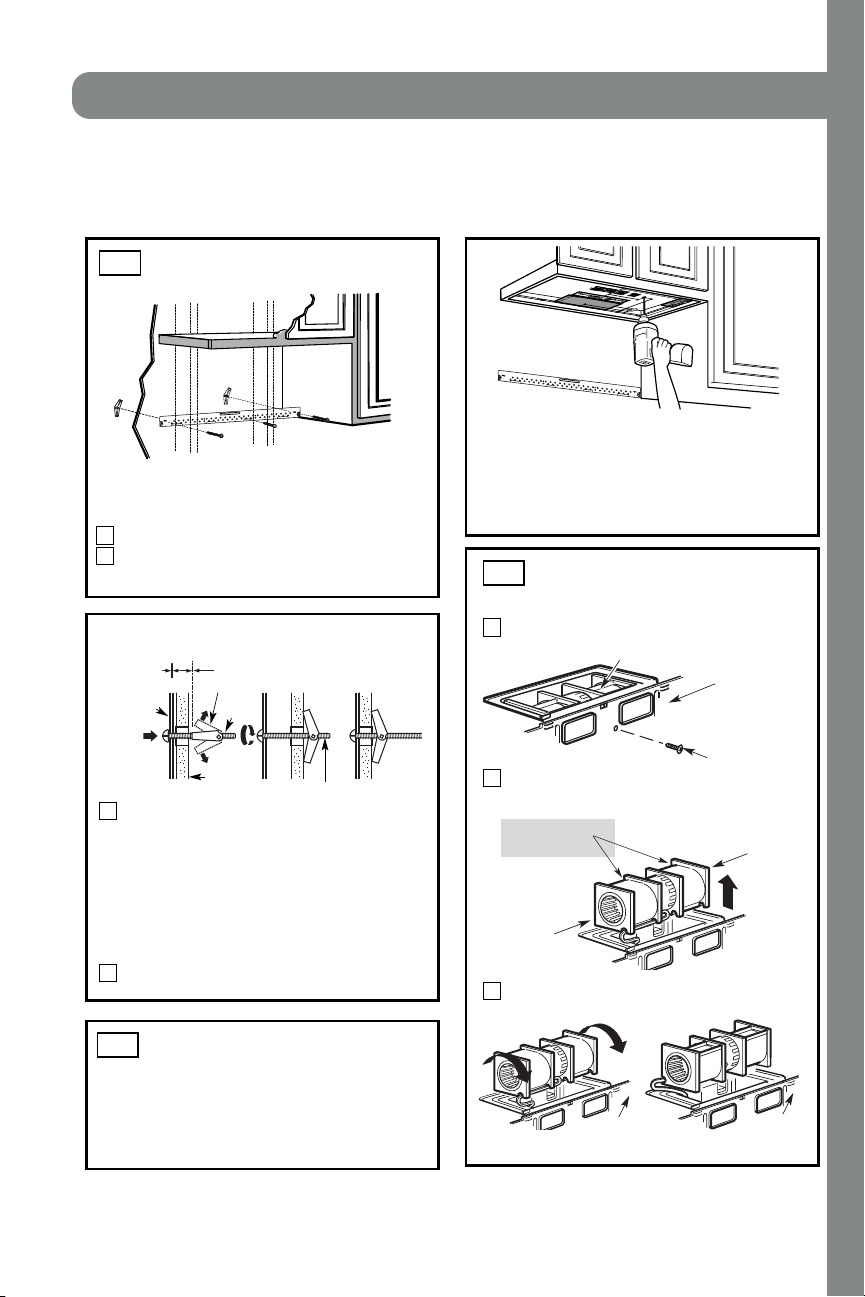
21
ATTACH THE M OUNTING
PLATE TO THE WALL
B3.
•
Read the instructions on the TOP CABINET
TEMPLATE.
• Tape it under neath t h e t op cabi n et .
• Drill the holes, following the instructions on the
TOPCABINET TEMPLATE.
CAUTION: Wear safety goggles when drilling holes
in the cabinet bottom.
Wal l
Mounting
Plate
Spacing for Toggl es More
Than Wall Thickness
Toggl e
Bol t
Toggl e Wi ngs
To use toggle bolts:
Bolt End
Installation Instructions
Attach the plate to the wall using toggle bolts.
At least one wood screw must be used to attach
the plate to a wall stud.
Remove the toggle wings f r om t h e bol t s.
Insert the bolts into the mounting plate through
the holes designated to go into drywall and reattach
the toggle wings to
3
⁄4″ (19 mm) onto each bolt.
1
2
Pl ace t he m oun t i n g pl at e agai n st t he wall and
insert the toggle wings into the holes in the wall
to mount the plate.
NOT E: Before tightening toggle bolts and wood
scr ew, make sur e the bottom of t h e m ounti n g pl ate
touch the bottom of the cabinet when pushed flush
agai n st t h e wall and t hat t he p lat e i s pr op er l y
center ed under the cabinet.
CAUTION: Be careful to avoid pinching fingers
between t h e back of the moun t i ng plate and the wall .
Tighten all bolts. Pull the plate away from the wall
to help tighten the bolts.
3
4
2
1
Remove and save screw that holds blower motor
to microwave.
ADAPTING M ICROWAVE
BLOWER FOR OUTSIDE
BACK EXHAUST
B5.
End B
End A
will extend far enough to allow you to adjust
the bl ower uni t .
Back of
Microwave
Blower Motor
Blower Motor
Screw
For w ar d
Openings Facing
Carefully pull out the blower unit. The wires
Before: Fan Blade
USE TOP CABINET TEM PLATE
FOR PREPARATION OF TOP
CABINET
B4.
You need to drill holes for the top support screws and
a hole large enough for the power cord to fit through.
Back of
Microwave
Roll the blower unit 90°
Back of
Microwave
3
Before Rot at i on After Rotation
EN-17
INSTALLATION
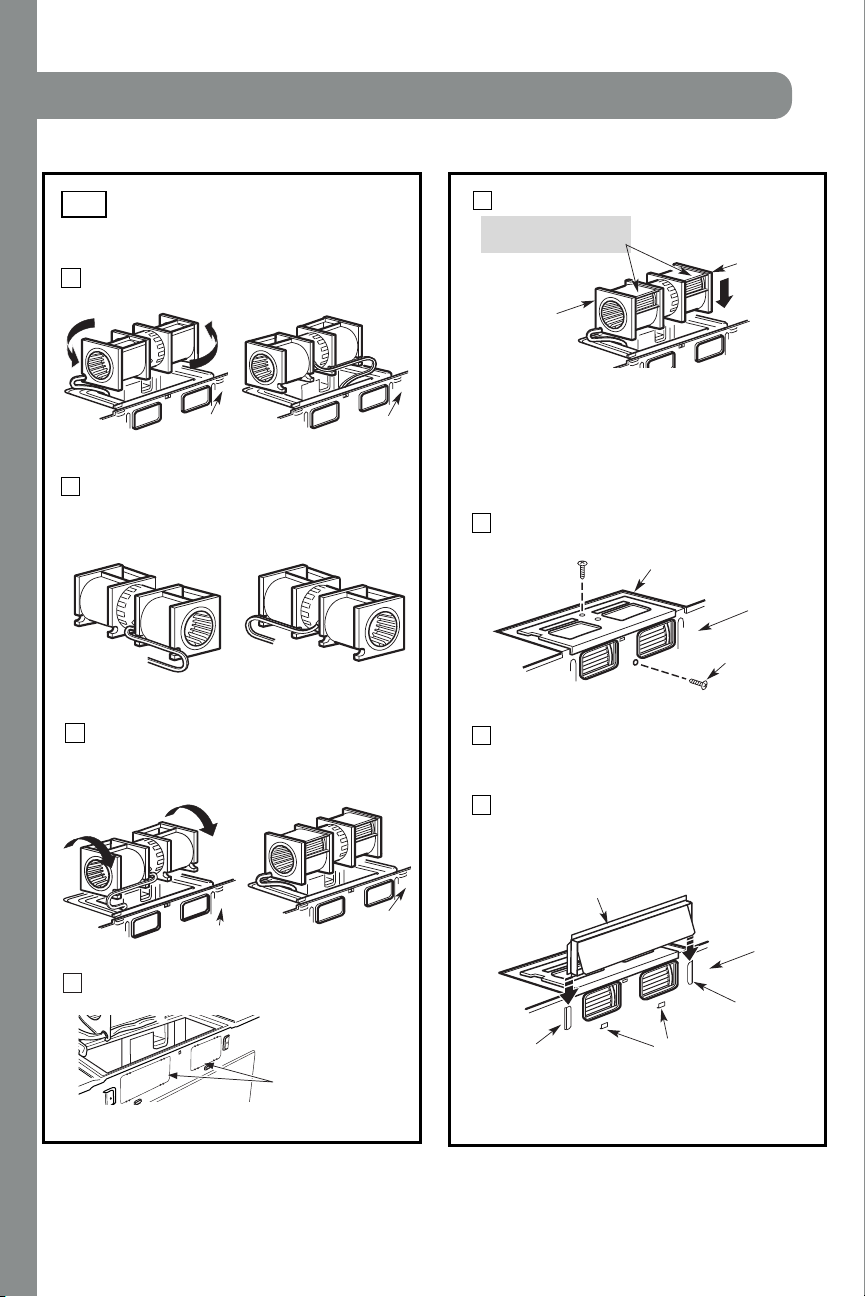
22
Attach the exhaust adaptor to the rear of the
oven by sliding it into the guides at the top
cent er of t h e back of th e oven.
AFTER: Fan Blade
Openings Facing Back
Place the blower unit back into the opening.
Repl ace the bl ower pl ate i n the same posi ti on
as bef or e wi t h t he scr ew. Make sur e the scr ew
is tight.
Roll the blower unit 90° so that fan blade
openings are facing out the back of the
mi cr owave.
ADAPTING MICROWAVE
BLOWER FOR OUTSIDE
BACK EXHAUST (cont.)
B5.
Rotate blower unit counterclockwise 180°.
Bef ore Rot at i on After Rotation
Gen t l y remove the wir es f rom th e gr ooves.
Rerout e t he wi r es thr ough gr ooves on other si de
of the blower unit.
Bef ore Rerout i ng Aft er Rerout i ng
Wires Rout ed Through Ri ght Side
Wires Rout ed Through Left Side
Back of
Microwave
Back of
Microwave
Bl ower Pl at e
Bl ower Motor
Screw
Secur e the bl ower uni t to the mi cr owave with
the original screw.
Bef ore Rol l i ng After Rolling
Back of
Microwave
End A
End B
Back of
Microwave
Back of
Microwave
CAUTION: Do not pull or stretch the blower
unit wiring. Make sure the wires are not
pinched, and that they are properly secured.
NOTE: The blower unit exhaust
openings should match exhaust
openings on rear of microwave oven.
Inst allat ion Inst ruct ions
Push in securely until it is in the lower locking
t abs. Take car e t o assur e th at t he damper hi n ge
is installed so that it is at the top and that the
damper swings f reel y.
Gui de
Gui de
Adaptor
Locking Tabs
Back of
Microwave
4
5
6
11
Back of mircrowave
Knockout Plates:
Snip all 4 webs on
each knockout panel
and remove t he metal
knockouts for rear airflow.
Please take care to
remove any sharp edges
created from removing
the knockout plates.
7
8
9
10
with snips. (For some models)
Remove the knockout plates in the back of the unit
EN-18
Attach the microwave oven to the top cabinet.
Inst allat ion Inst ruct ions
3
MOUNT THE M ICROWAVE
OV EN
B6.
FOR EASIER INSTALLATION AND PERSONAL
SAFETY, WE RECOMMEND TH AT T WO PEOPL E
INSTALL THIS MICROWAVE OVEN.
NO T E: I f your cabi n et i s metal, use th e n yl on
gr ommet around t he power cor d h ole t o pr event
cutting of the cord.
NO T E: We recommend using filler blocks if the
cabinet front hangs below the cabinet bottom shelf.
IMPORTANT: If filler blocks are not
used, case damage may occur f r om
over tighteni ng screws.
Insert a self-aligning screw through top center
cabi n et h ole. Tempor ar il y secur e the oven by
turning the screw at least two f ull turns after the
thr eads have engaged. (It will be completely
ti ghtened l ater.) Be sur e to keep power cor d
tight. Be careful not to pinch the cord, especially
when mounting f lush to bottom of cabinet.
8
7
5
Cabi net Front
Cabi net Bot t om Shelf
Tighten the outer two screws to the top of the
microwave oven. (While tightening screws, hold
t h e m icr owave oven i n pl ace agai nst t h e wal l an d
the top cabinet.)
Filler Block
Microwave Oven Top
Equi val ent
to Depth
of Cabi net
Recess
Insert 2 self-aligning screws
through outer top cabinet
holes. Turn two full turns on
each scr ew.
packed with the mi cr owave.
Sel f-Ali gni ng Screw
4
2
Rotate front of oven
up agai nst cabi net
bottom.
NO T E: When mounting the
mi cr owave oven, thr ead
power cord through hole in
bottom of top cabinet. Keep
it tight throughout Steps
1–3. Do not pinch cord or
lift oven by pulling cord.
Lift microwave, tilt it
forward, and hook
slots at back bottom
edge onto four lower
tabs of mounting
pl ate.
1
I nstall gr ease fi lter s. See th e U se &&&&and Care
IMPORTANT: Do not grip or use the handle
or heat shield during installation. Do not
r emove t he cardboar d spacer s between the
heat shield and door.
EN-19
INSTALLATION
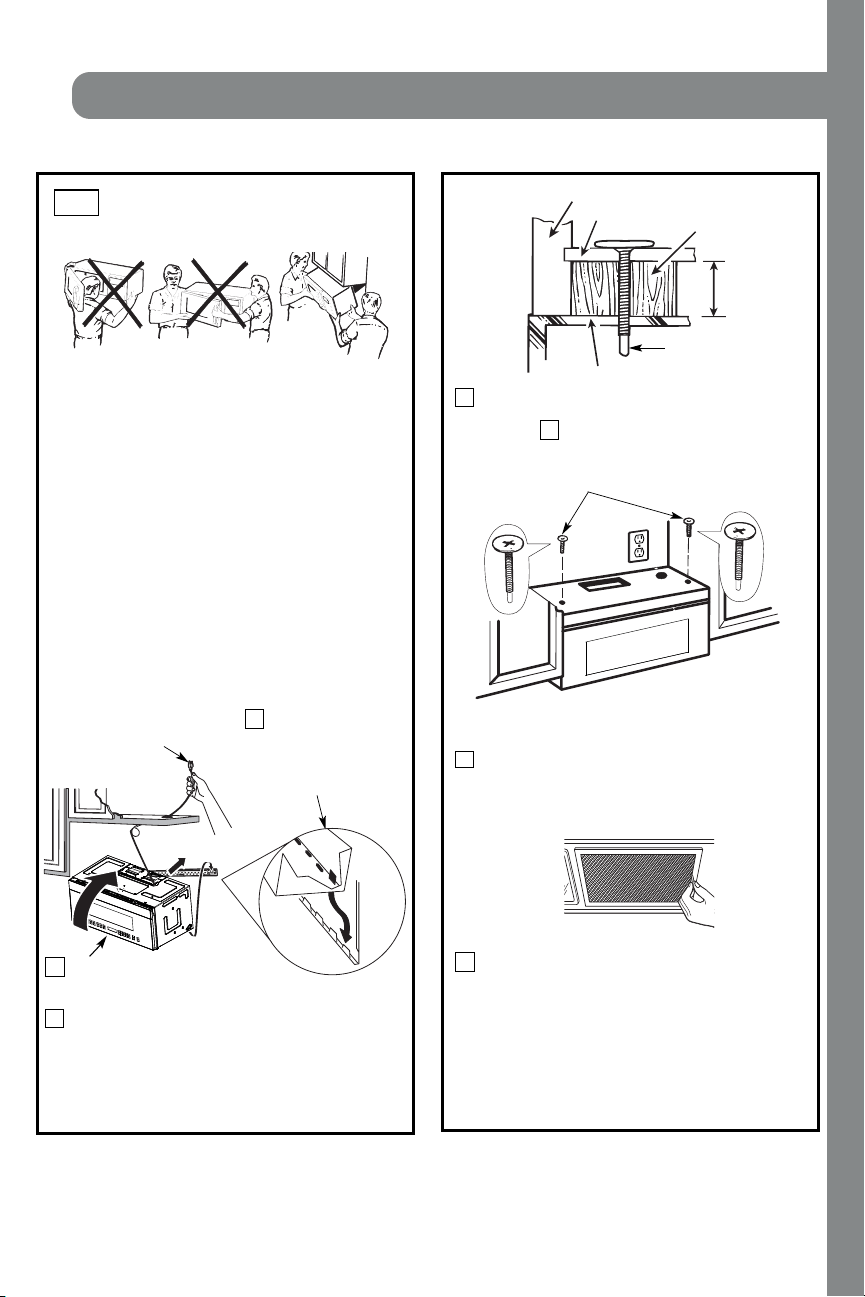
23
Attach the microwave oven to the top cabinet.
Inst allat ion Inst ruct ions
3
MOUNT THE M ICROWAVE
OV EN
B6.
FOR EASIER INSTALLATION AND PERSONAL
SAFETY, WE RECOMMEND TH AT T WO PEOPL E
INSTALL THIS MICROWAVE OVEN.
NO T E: I f your cabi n et i s metal, use th e n yl on
gr ommet around t he power cor d h ole t o pr event
cutting of the cord.
NO T E: We recommend using filler blocks if the
cabinet front hangs below the cabinet bottom shelf.
IMPORTANT: If filler blocks are not
used, case damage may occur f r om
over tighteni ng screws.
Insert a self-aligning screw through top center
cabi n et h ole. Tempor ar il y secur e the oven by
turning the screw at least two f ull turns after the
thr eads have engaged. (It will be completely
ti ghtened l ater.) Be sur e to keep power cor d
tight. Be careful not to pinch the cord, especially
when mounting f lush to bottom of cabinet.
8
7
5
Cabi net Front
Cabi net Bot t om Shelf
Tighten the outer two screws to the top of the
microwave oven. (While tightening screws, hold
t h e m icr owave oven i n pl ace agai nst t h e wal l an d
the top cabinet.)
Filler Block
Microwave Oven Top
Equi val ent
to Depth
of Cabi net
Recess
Insert 2 self-aligning screws
through outer top cabinet
holes. Turn two full turns on
each scr ew.
packed with the mi cr owave.
Sel f-Ali gni ng Screw
4
2
Rotate front of oven
up agai nst cabi net
bottom.
NO T E: When mounting the
mi cr owave oven, thr ead
power cord through hole in
bottom of top cabinet. Keep
it tight throughout Steps
1–3. Do not pinch cord or
lift oven by pulling cord.
Lift microwave, tilt it
forward, and hook
slots at back bottom
edge onto four lower
tabs of mounting
pl ate.
1
I nstall gr ease fi lter s. See th e U se &&&&and Care
IMPORTANT: Do not grip or use the handle
or heat shield during installation. Do not
r emove t he cardboar d spacer s between the
heat shield and door.
EN-19
INSTALLATION
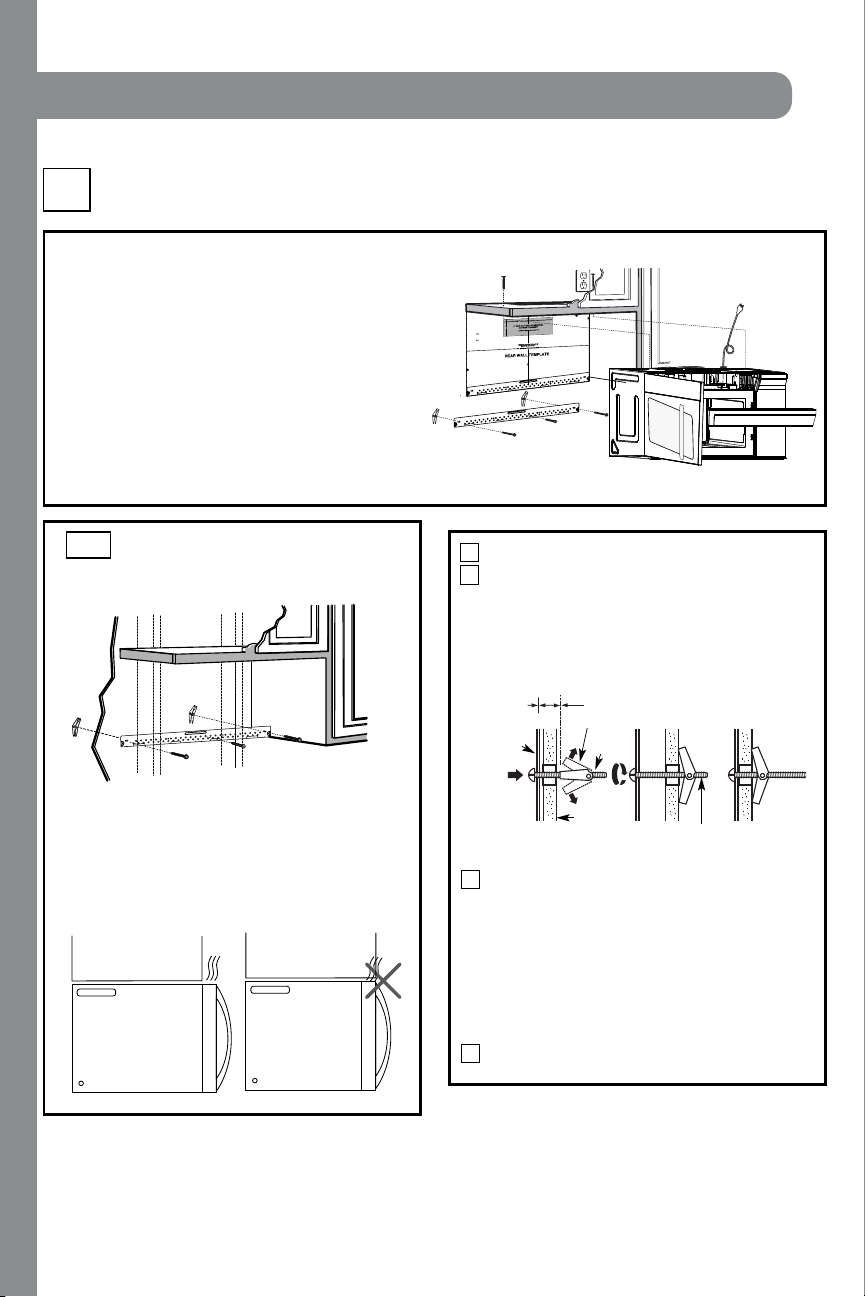
24
INSTALLATION OVERVIEW
C1. Attach Mounting Plate to Wall
C2. Pr epar e Top Cabi net
C4.
C5.
Mount t h e Microwave Oven
I MPORTAN T N OT ES:
• M ake sur e the scr ews f or t h e blower mot or and bl ower
pl ate ar e secur ely tightened when th ey are r ein st al led.
This will help to prevent excessive vibration.
• M ake sur e the motor wir ing has been pr oper l y routed
and secured, and that the wires are not pinched.
Inst allat ion Inst ruct ions
Pl ace th e moun ti n g p l at e agai n st t h e wal l an d
insert the toggle wings into the holes in the wall
to mount the plate.
NO T E: Before tightening toggle bolts and wood
screw, make sure the bott m of the mounting plate
touch the bottom of the cabinet when pushed flush
agai n st t h e wal l an d th at t he pl ate i s pr oper l y
cent er ed un der the cabi net .
CAUTION: Be careful to avoid pinching fingers
between the back of th e moun t ing pl ate and the wal l .
Tighten all bolts. Pull the plate away from the wall
to help tighten the bolts.
4
3
ATTACH THE M OUNTING
PLATE TO THE WALL
C1.
Attach the plate to the wall using toggle bolts.
At least one wood screw must be used to attach
the plate to a wall stud.
Remove th e t oggle wings f r om th e bol t s.
Insert the bolts into the mounting plate through
the holes designated to go into drywall and
reattach the toggle wings to
3
⁄4″ (19 mm) onto
each bolt.
1
Wal l
Mounti ng
Plate
Spaci ng for Toggl es
More Than Wal l
Thi ckness
Bol t End
Toggle
Bol t
Toggle Wi ngs
To use toggle bolts:
2
RECIRCULATING (Non-Vent ed Ductless)
C
Install or change Charcoal Filter
C3. Check Bl ower Plate
NO T E:
Cabi net
Cabi net
If the cabinet depth including the cabinet doors
is more than 13""'' then the unit must be spaced
out from wall using adequate materials supporting
150 Ibs to allow proper top vent air exhaust/ intake.
o
EN-20
12
"
4"
NO
T
E
:ITI
S VER
Y I
MP
ORTANT
T
O
R
EAD AN
D F
O
LLO
W
T
H
E DIRECTIONS
I
N
T
H
E
INST
ALL
ATIO
N
I
NSTR
UCTION
S
BE
F
ORE PR
O
C
EE
D
I
NGW
IT
H
T
HIS
REAR W
ALL TEM
PL
AT
E
.
This
R
e
ar
Wa
ll
Temp
la
te serves to
positionthe b
ottom
mo
unti
n
g pl
a
tea
n
d
to
loca
t
eth
e
h
or
izo
nt
al exh
aust
ou
tle
t
.
1
.Usea lev
eltocheck th
a
t
t
h
e
te
mp
late
i
sp
ositi
o
ne
d
a
ccuratel
y.
2. L
o
ca
te a
n
d
ma
rk at
l
east o
ne
stu
d
o
n
th
e lef
t
o
r
r
igh
t si
d
e o
f
thec
en
te
rline.
It
isimporta
nt
to
u
s
e
a
t le
a
sto
n
e wood
screw
mou
nte
d
fi
rm
ly
in a
s
tu
d
tosu
p
p
o
rt
t
he
weigh
t
of themicrowave.Mark two
addi
tio
nal,even
lyspace
d
locationsfor the su
ppliedt
ogg
le
b
ol
ts.
3
. Drill holes
inth
e m
arked lo
ca
tio
ns
.Wh
e
re the
r
eis
a s
tud
,d
rilla
3/16
"
ho
le
f
or
wo
o
d
sc
r
e
ws. F
or
ho
les
th
a
t
do
n
ot
lin
e u
p
with a
stud
, drill5
/8
"
h
o
le
s
f
o
r
to
g
g
le bolt
s.
DO
N
OT
I
N
S
TALL TH
E
MOU
NTINGP
LA
TE
A
T
THIS
TIM
E.
4
. Re
m
ove
th
e te
mp
lat
e fro
m t
he
rea
r
wa
l
l.
5. Reviewthe
I
n
sta
lla
ti
on
In
stru
cti
onb
o
o
k f
or
you
r
in
st
allation
si
tu
a
tio
n
.
Loc
a
t
ean
d
ma
rk holes to
a
lign with holes in the
mount
i
ng pl
ate.
I
MPORT
ANT:
LOCA
T
E AT
LEAST ONESTUD
O
N
EI
T
H
ER SIDE
OF
T
H
E
CE
N
TE
R
L
I
NE.
MARK T
HEL
O
CA
T
IO
N F
O
R2 ADDITION
AL, EVENLY
SPACED TO
G
GLE BOLT
S
IN TH
E
MO
U
N
TING
PLATE
AREA
.
Loc
at
e
a
nd
mark hole
s
t
o
al
i
gn
wi
t
h hol
es
int
h
e
m
o
un
tin
g
p
lat
e.
I
MPO
RTA
NT
:
LO
C
AT
E
AT LEAST
O
NEST
UD
ON EITHER SIDE
O
F
THECENT
E
RLINE.
MARK T
H
E
LOCA
TION F
OR
2 AD
DIT
ION
AL
,
EVENLY
SPACED TOG
G
LE
BO
L
T
SIN
T
H
E
MOUNT
IN
GPLATE
AREA.
T
r
im the rear wa
ll te
m
plate
alon
g
th
e
d
o
tted
li
n
e.
Dar
le
v
uel
taala ho
ja
par
aconsul
t
ar
la
v
e
r
s
ió
ne
n
Es
p
año
l.
3/8"TO
EDG
E
Trim t
he
rear wall t
em
pla
t
e along
t
h
e dotted lin
e.
INSTALLATION
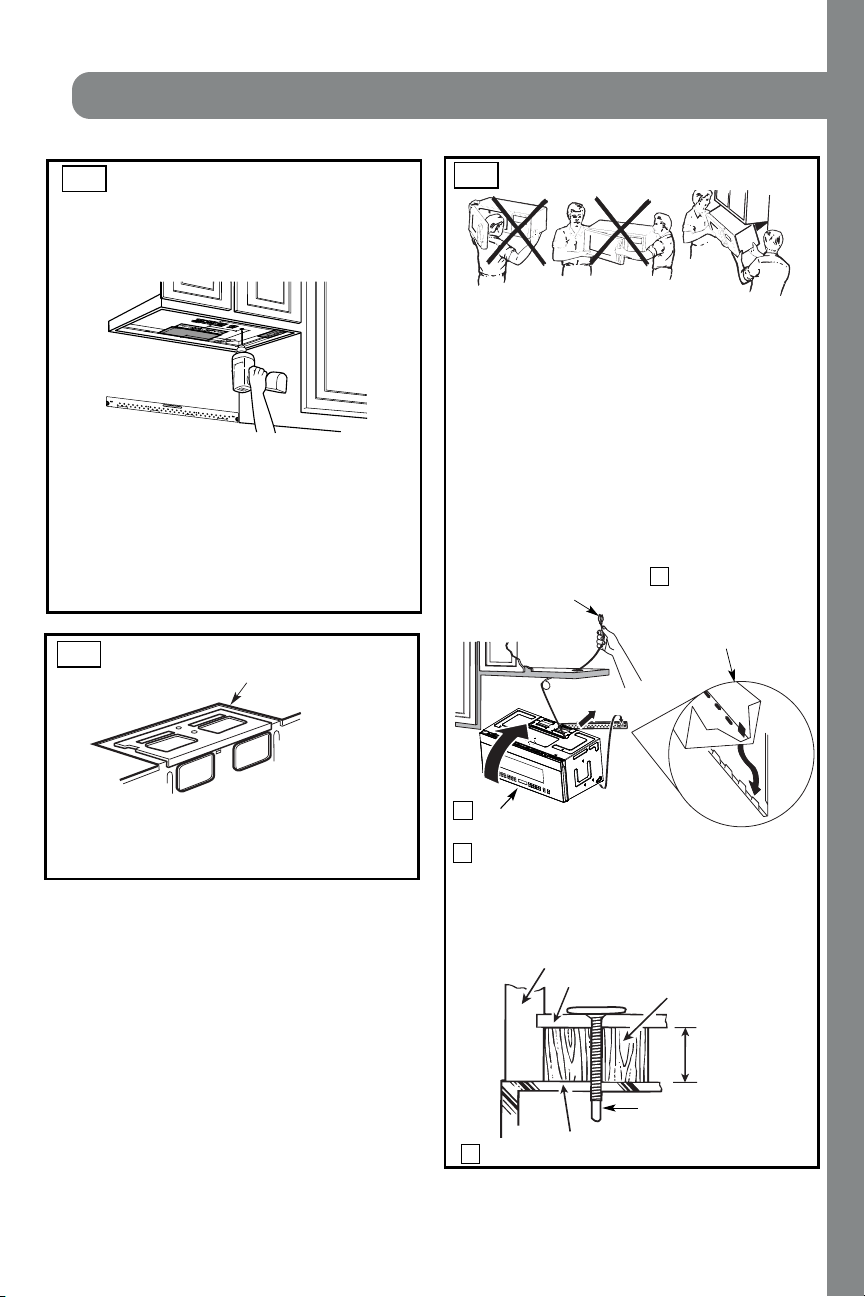
25
Inst allat ion Instructions
Attach the microwave oven to the top cabinet.
Cabi net Front
Cabi net Bot t om Shelf
Filler Block
Microwave Oven Top
Equi val ent to Depth
of Cabi net Recess
3
MOUNT THE M ICROWAVE OVEN
FOR EASIER INSTALLATION AND PERSONAL
SAFETY, WE RECOMMEND TH AT T WO PEO PLE
INSTALL THIS MICROWAVE OVEN.
NO T E: I f your cabin et is metal, use th e n yl on
gr ommet ar oun d th e power cor d hol e to pr event
cutting of the cord.
NO T E: We recommend using filler blocks if the
cabinet front hangs below the cabinet bottom shelf.
IMPORTANT: If filler blocks are not used,
case damage may occur f rom overtightening
scr ews.
Insert a self-aligning screw through top center
cabi n et hole. Tempor ar il y secur e t he oven by
turning the screw at least two f ull turns after the
thr eads have engaged. (It will be completely
ti ghtened l ater.) Be sur e t o keep power cor d
tight. Be careful not to pinch the cord, especially
when mounting f lush to bottom of cabinet.
Sel f-Ali gni ng Screw
4
2
Rotate front of oven
up agai nst cabi net
bottom.
NO T E: When mounting the
mi cr owave oven, thr ead
power cord through hole in
bottom of top cabinet. Keep
it tight throughout Steps
1–3. Do not pinch cord or
lift oven by pulling cord.
Lift microwave, tilt
it forward, and hook
slots at back bottom
edge onto four lower
tabs of mounting
pl ate.
1
C3.
C4.
CHECK BLOWER PLATE
Bl ower Pl at e
• Place the microwave in its upright position, with the
top of the unit facing up.
• Check to see th at th e blower pl ate i s cor r ect l y
installed on the unit.
USE TOP CABINET TEM PLATE
FOR PREPARATION OF TOP
CABINET
C2.
•
Read the instructions on the TOP CABINET
TEMPLATE.
• Tape i t un der neath th e top cabinet.
• Drill the holes, following the instructions on the
TOP CABINET TEMPLATE.
CAUTION: Wear safety goggles when drilling holes
in the cabinet bottom.
You need to drill holes for the top support screws and
a hole large enough for the power cord to fit through.
Adjust top template accor dingly if the m i cr o wave
is being spaced out from the wall due to cabinet depth
(including cabinet doors) of more th n 13"""''.
NO T E:
a
IMPORTANT: Do not grip or use the handle
or heat shield during installation. Do not
r emove t he car dboard spacer s between t he
heat shield and door.
EN-21
INSTALLATION
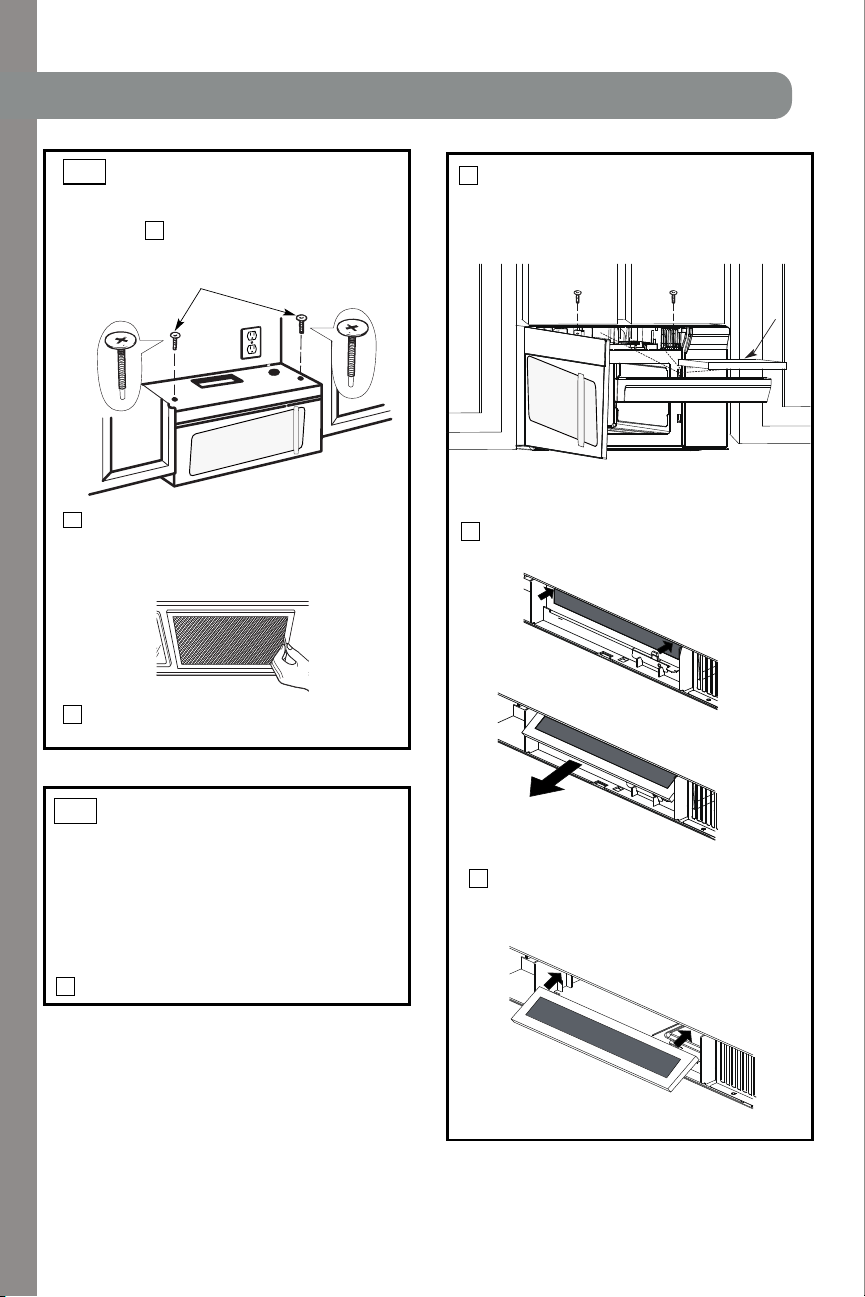
26
Inst allat ion Inst ruct ions
5
MOUNT THE MICROWAVE
OVEN (cont .)
8
7
Tighten the outer two screwsto the top of the
microwave oven. (While tightening screws, hold
t h e m i cr owave oven i n pl ace agai nst t h e wal l an d
the top cabinet.)
Insert 2 self-aligning screws
through outer top cabinet
holes. Turn two full turns on
each scr ew.
packed wi t h t h e m i cr owave.
C4.
I nstall gr ease fi lter s. See th e U se &&&&and Care
C5.
INSTALLING OR CHANGE
THE CHARCOAL FILTER
(Som e M odels)
Unplug microwave oven or disconnect power.
1
NOTE: The charcoal filter is factory installed in some
model s. Refer to th e U se and Car e to see if your s i s
factory installed and for replacement information.
For models without the recirculation filter access
3
Open th e mi cr owave door and r emove th e two
vent mounting screws ;located on top of the
microwave using a #1 Phillips screwdriver.
2
4
Remove th e charcoal fi l ter by push ing t he
top of the filter inwards,then pull it forward
out from the unit.
Slide the top of the new charcoal filter into the
top of the filter cavity.
door,follow these steps to replace or install a charcoal
filter.
EN-22
Charcoal
Filter
INSTALLATION
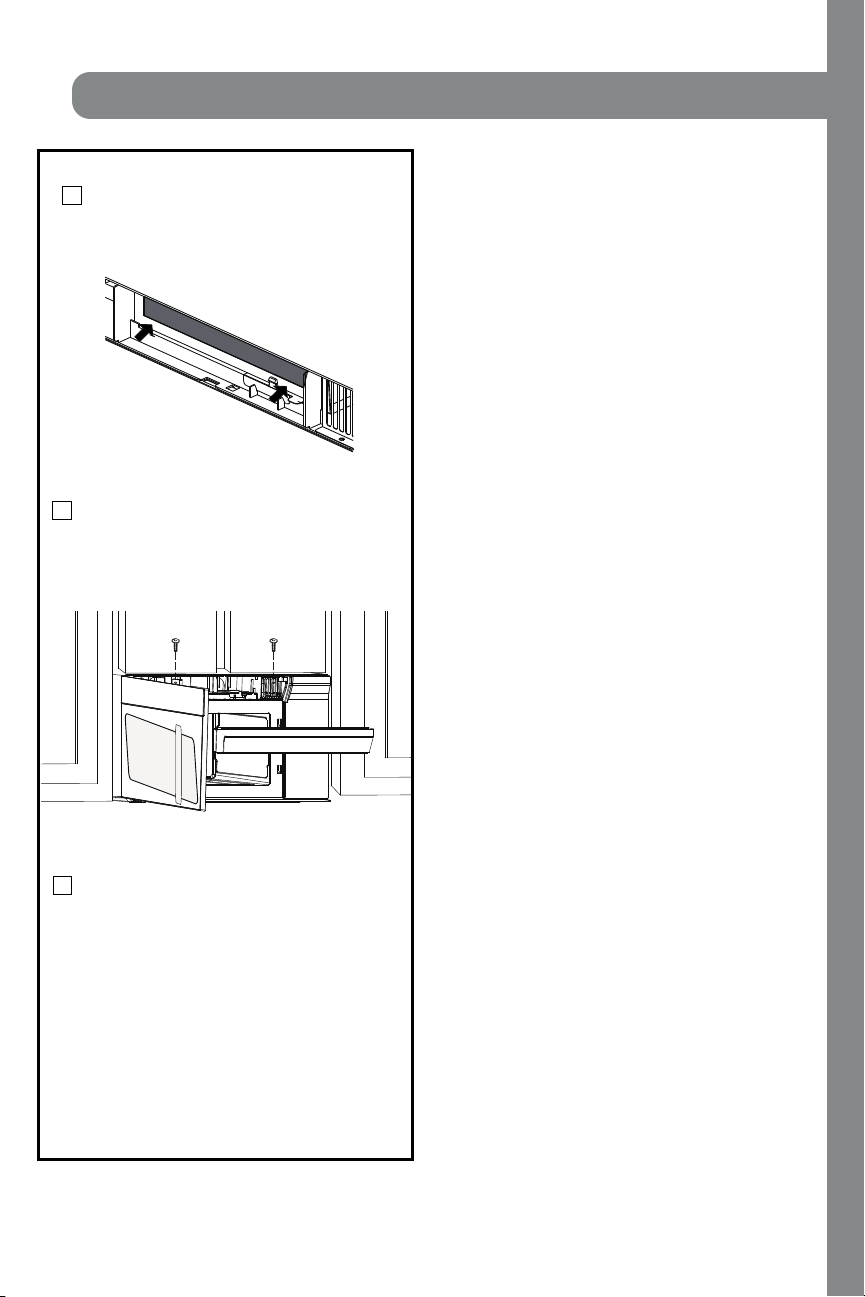
27
Inst allation Instructions
Close the microwave door. Plug in microwave
oven or reconnect power.
Reinstall the vent by sliding the bottom of the
vent into place. Push the vent top into position
and slide right into place. Replace the two vent
mounting screws located on top of the microwave
using a #1 Phillips screwdriver.
Press the bottom of charcoal filter to place it
into the correct position.
5
6
7
EN-23
INSTALLATION
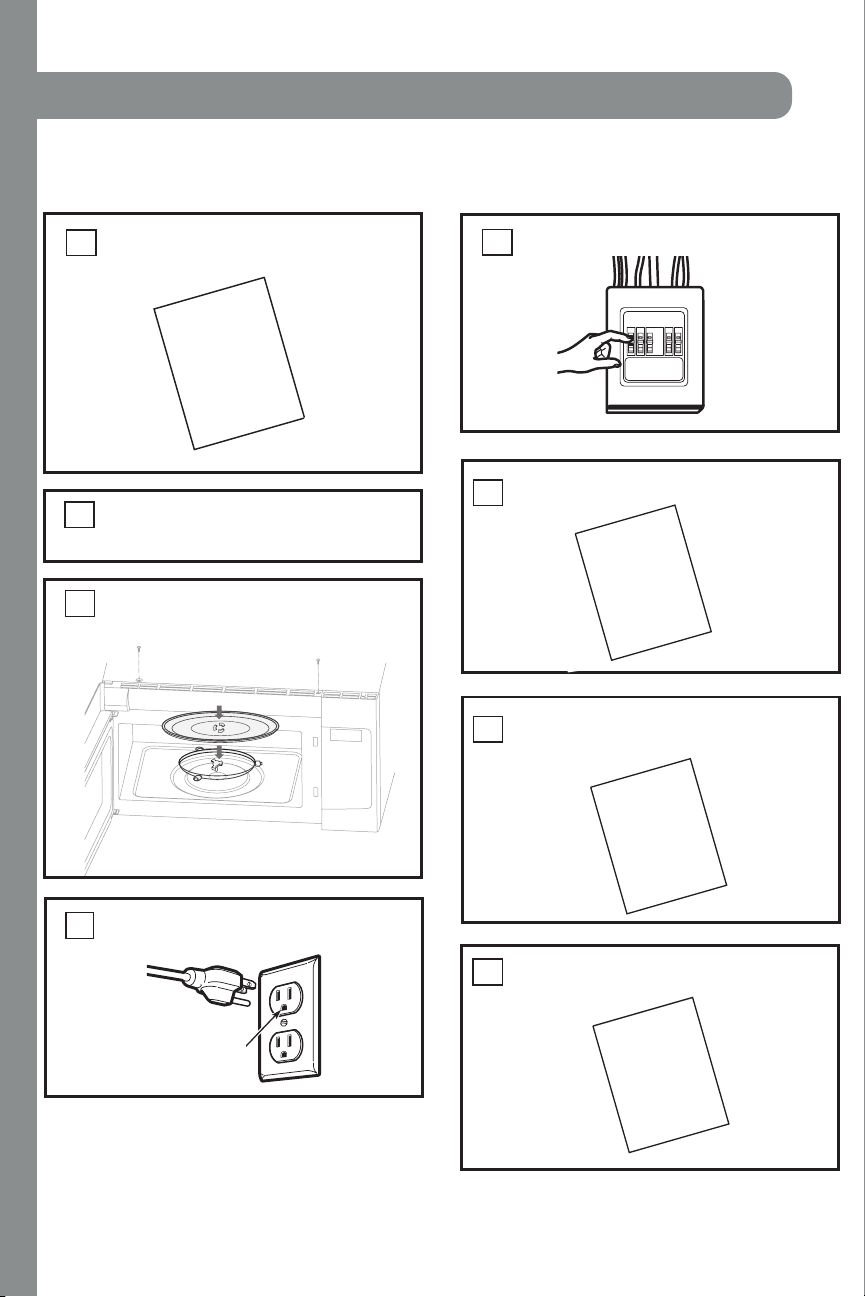
28
Remove all packing material from the
mi cr owave oven.
2.
Make sur e th e mi cr owave oven has been
installed according to instructions.
1.
BEFORE YOU USE YOUR MICROWAVE
Ensure proper
ground exist s
before use
INSTALLATION
INSTRUCTIONS
3.
Inst allat ion Inst ruct ions
r i ng a n d gl as s t r ay i n cavit y.
Install turntable
4.
KEEP INSTALLATION INSTRUCTIONS
FOR THE LOCAL INSPECTOR’S
U SE.
7.
6.
INSTALLATION
INSTRUCTIONS
MANUAL
USE
CARE
&
PRODUCT
CARD
Read th e M an ual .
&
REGISTRATION
U SE CA RE
Repl ace house f use or tur n br eaker back on.
5.
FILL OUT PRODUCT REGISTRATION CARD
.
8
AN SEND IN.
Plug power cord into a seperate and dedicated
15- to 20-amp electr ical outlet.
EN-24
INSTALLATION
29
radio interference
Operation of the microwave oven may cause interference to your radio, TV, or similar
equipment.
When there is interference, it may be reduced or eliminated by taking the following
measures:
Clean door and sealing surface of the oven.
Reorient the receiving antenna of radio or television.
Relocate the microwave oven with respect to the receiver.
Move the microwave oven away from the receiver.
Plug the microwave oven into a different outlet so that microwave oven and
receiver are on different branch circuits.

30
utensils
Tightly-closed utensils could explode. Closed containers should be opened and plastic
pouches should be pierced before cooking.
There may be certain non-metallic utensils that are not safe to use for microwaving. If in
doubt, you can test the utensil in question by following the procedure below.
Utensil Test:
Fill a microwave-safe container with 1 cup of cold water (250ml) along with
the utensil in question.
Cook on maximum power for 1 minute.
Carefully feel the utensil. If the empty utensil is warm, do not use it for
microwave cooking.
Do not exceed 1 minute cooking time.
Personal Injury Hazard
CAUTION:
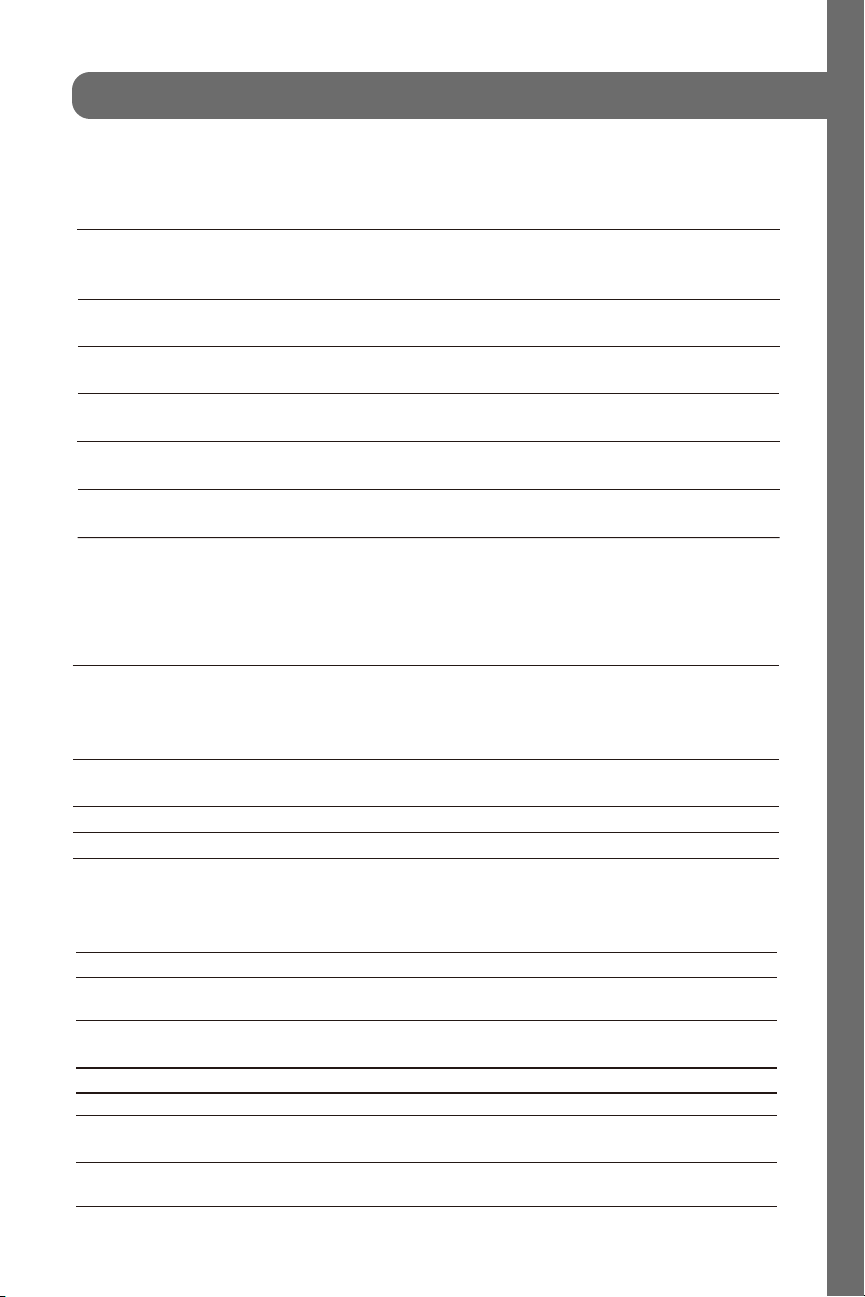
31
materials you can use in microwave
Personal Injury Hazard
Tightly-closed utensils
could explode. Closed
containers should be opened
and plastic
pierced before cooking.
Utensil Test:
1. Fill a microwave-safe container with 1 cup of cold
water (250ml) along with the
2. Cook on maximum power for 1 minute.
3. Carefully feel the utensil. If the empty utensil is
warm, do not use it for microwave
4. Do not exceed 1 minute cooking time.
UTENSILS
See the instructions on "Materials you can use in
microwave oven or to be avoided in
There may be certain non-metallic utensils that are not
safe to use for microwaving. If
utensil in question following the procedure below.
CAUTION -
pouches should be
microwave oven."
in doubt, you can test the
utensil in question.
cooking.
Materials you can use in microwave oven
Utensils Remarks
Follow manufacturer* instructions. The bottom of browning dish must be
at least 3/16 inch (5mm) above the turntable. Incorrect usage may cause
the turntable to break.
Microwave-safe only. Follow manufacturer's instructions. Do not use
cracked or chipped dishes.
Always remove lid. Use only to heat food until just warm. Most glass jars
are not heat resistant and may break.
Heat-resistant oven glassware only. Make sure there is no metallic trim.
Do not use cracked or chipped dishes.
Follow manufacturer* instructions. Do not close with metal tie. Make
slits to allow steam to escape.
Use for short*erm cooking/warming only. Do not leave oven unattended
while cooking.
Use to cover food for reheating and absorbing fat. Use with supervision
for a short-term cooking only.
Use as a cover to prevent splattering or a wrap for steaming.
Browning dish
Glass jars
Glassware
Oven cooking
bags
Paper plates
and cups
Paper towels
Parchment
paper
Dinnerware
6
Materials you can use in microwave oven
Utensils Remarks
Microwave-safe only. Follow the manufacturer* instructions. Should be
labeled "Microwave Safe". Some plastic containers soften, as the food
inside gets hot. "Boiling bags" and tightly closed plastic bags should be
slit, pierced or vented as directed by package.
Microwave-safe only. Use to cover food during cooking to retain
moisture. Do not allow plastic wrap to touch food.
Thermometers Microwave-safe only (meat and candy thermometers).
Wax paper Use as a cover to prevent splattering and retain moisture.
Plastic
Plastic wrap
Materials to be avoided in microwave oven
Utensils Remarks
Aluminum tray
Food carton with
metal handle
Metal or metal-
trimmed utensils
Metal twist ties
Paper bags
Plastic foam
Wood
Metal shields the food from microwave energy. Metal trim may
cause arcing.
May cause a fire in the oven.
Plastic foam may melt or contaminate the liquid inside when exposed
to high temperature.
Wood will dry out when used in the microwave oven and may split
or crack.
May cause arcing. Transfer food into microwave-safe dish.
May cause arcing. Transfer food into microwave-safe dish.
May cause arcing and could cause a fire in the oven.
7
Materials you can use in microwave oven
Utensils Remarks
Microwave-safe only. Follow the manufacturer* instructions. Should be
labeled "Microwave Safe". Some plastic containers soften, as the food
inside gets hot. "Boiling bags" and tightly closed plastic bags should be
slit, pierced or vented as directed by package.
Microwave-safe only. Use to cover food during cooking to retain
moisture. Do not allow plastic wrap to touch food.
Thermometers Microwave-safe only (meat and candy thermometers).
Wax paper Use as a cover to prevent splattering and retain moisture.
Plastic
Plastic wrap
Materials to be avoided in microwave oven
Utensils Remarks
Aluminum tray
Food carton with
metal handle
Metal or metal-
trimmed utensils
Metal twist ties
Paper bags
Plastic foam
Wood
Metal shields the food from microwave energy. Metal trim may
cause arcing.
May cause a fire in the oven.
Plastic foam may melt or contaminate the liquid inside when exposed
to high temperature.
Wood will dry out when used in the microwave oven and may split
or crack.
May cause arcing. Transfer food into microwave-safe dish.
May cause arcing. Transfer food into microwave-safe dish.
May cause arcing and could cause a fire in the oven.
7
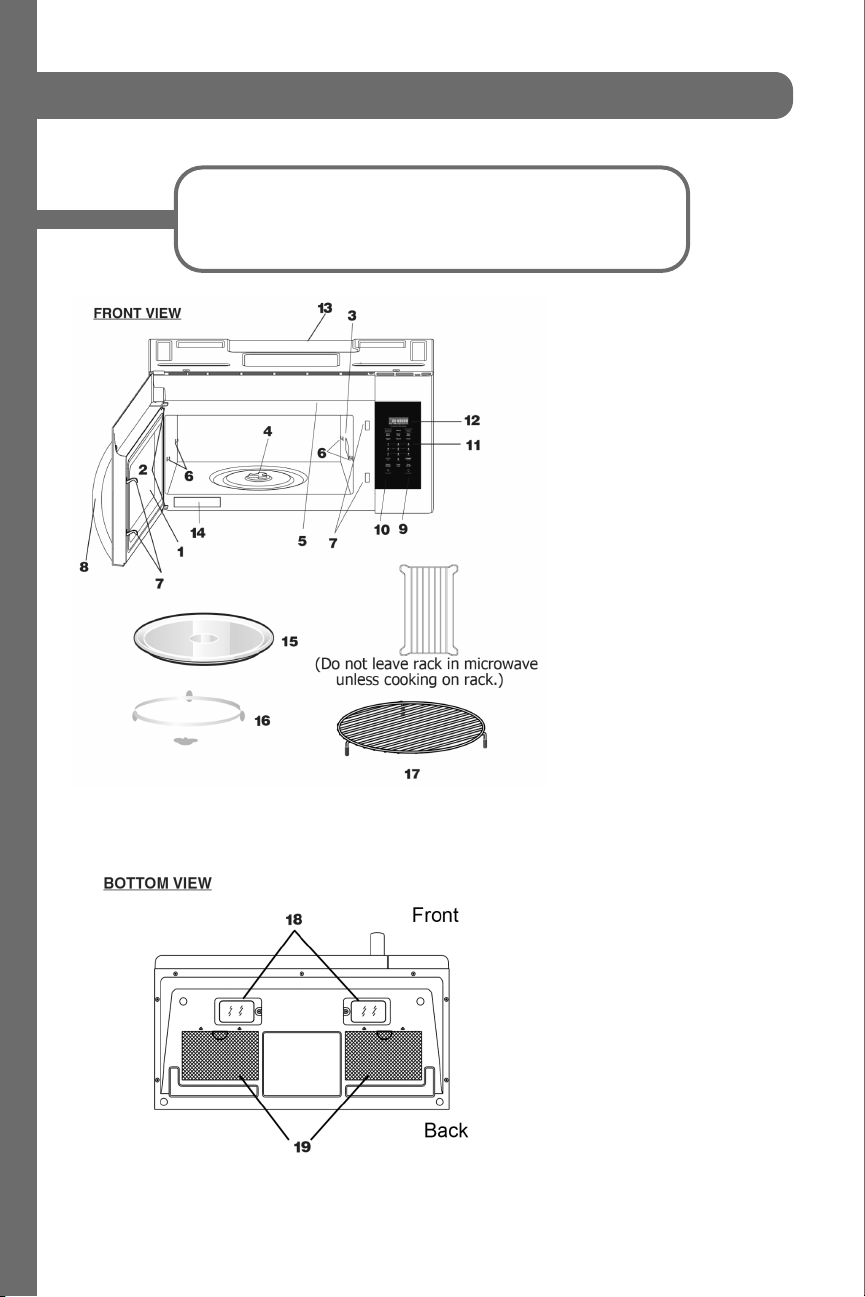
32
setting up your oven
Remove the oven and all materials from the carton and oven
cavity. Your oven comes with the following accessories:
1. Microwave Oven Door
2. Door Hinges
3. Waveguide Cover
(DO NOT REMOVE)
4. Turntable motor shaft
5. Microwave oven light
6. Rack holders
7. Safety door latches
8. Handle
9. Light Button
10. Vent button
11. Control Panel
12. Display Panel
13. Ventilation
14. Menu label
15. Removable Turntable Plate
16. Removable Turntable Support
17. Rack for 2-level cooking/
reheating
18. Light cover/Filter Access Door
19. Grease Filters
33
operation
The pad controls the 2-speed vent fan. If the vent fan is OFF, the first touch of the
vent pad will turn the fan from HIGH > LOW > OFF
Using Vent Fan
The pad controls the cooktop light. If the light is OFF, the first touch of the light pad
will turn the light from HIGH > LOW > OFF
Using Cooktop Light
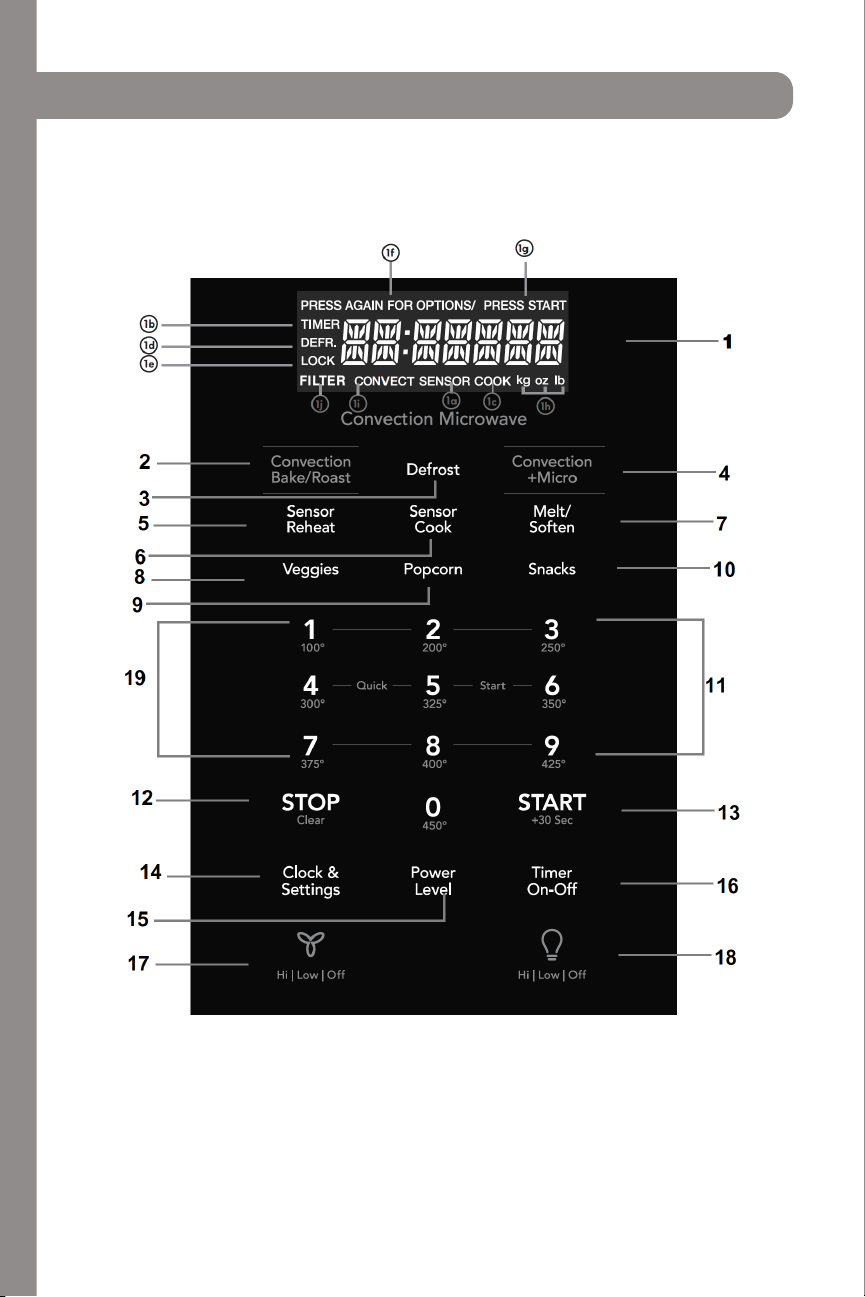
34
operation
35
1. Display - features as a clock and indicator that show time, cooking time settings,
cook power, sensor, quantities, weights, and cooking functions
1a. SENSOR - when using sensor cook
1b. TIMER - when timer is being set or running
1c. COOK - starting microwave cooking
1d. DEFR - defrosting food
1e. LOCK - control lock
1f. PRESS AGAIN FOR OPTIONS - additional options are available
1g. PRESS START - before a valid function
1h. KG, OZ, LB - when choosing weight
1i. CONVECT - when choosing convect
1j. FILTER - replace filter
2. Convection Bake/Roast
3. Defrost
4. Convection + Micro
5. Sensor Reheat (4 settings)
6. Sensor Cook
7. Melt/Soften
8. Veggies
9. Popcorn
10. Snacks
11. Numerical Pads
12. Stop/Clear
13. Start (+30 seconds)
14. Clock & Settings
15. Power Level (11 power levels)
16. Timer (On-Off)
17. Exhaust (High/Low/Off) - use to turn the exhaust fan off, or to adjust speed
18. Surface Light - press to activate and adjust brightness of lights
19. Quick start (9 instant key settings)
operation
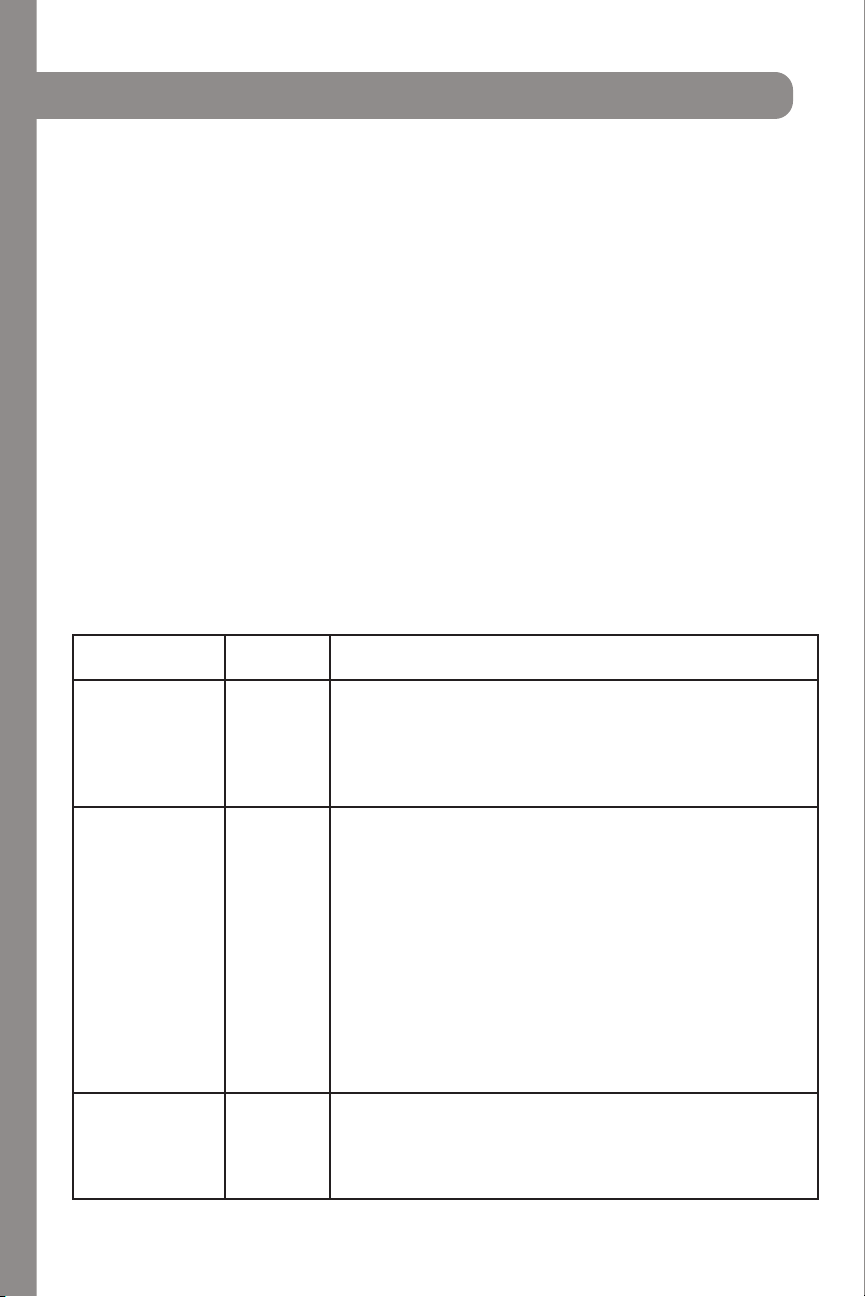
36
operation
ONE TOUCH COOKING
Popcorn:
The microwave oven lets you pop 3.3, 3.0, 1.75 oz bags of commercially packaged
microwave popcorn. Pop only one package at a time. If you are using a microwave popcorn
popper, follow manufacturer’s instructions.
Touch POPCORN.
1. Press again for options
2. Press START
Vegetables:
The microwave can cook potatoes, frozen vegetables, and fresh vegetables.
1. Touch VEGGIES
2. Press again for options
3. Press START
FOOD AMOUNT PROCEDURE
Potato 1-4 pieces Cooking times are based on an average 8 oz. potato.
Pierce with forks in several places. Place on paper towel on
turntable. Press the VEGGIES pad one time for potato. After
cooking, remove from oven and let stand for 5 minutes
Fresh Vegetables
• Broccoli
• Brussels Sprouts
• Cabbage
• Cauliflower
• Spinach
• Zucchini
• Carrots
• Corn on cob
• Green beans
• Winter Squash
2 cups
Wash and place in casserole. Don’t add water if the vegetables
have been washed. Cover with lid for tender vegetables. Use plastic
wrap for tender-crisp vegetables. Press VEGGIES twice. After
cooking, stir. Let stand for 2-5 mins.
Place in casserole. Add 1-4 tbsp. water. Cover with lid for tender
vegetables. Use plastic wrap cover for tender crisp vegetables.
Press VEGGIES twice for fresh vegetables. After cooking, stir, if
possible. Let stand, covered, for 2-5 minutes.
Frozen
Vegetables
2 cups
Don’t add water if the vegetables have been washed. Press
VEGGIES three times. After cooking, stir and let stand, covered, for
3 mins.
37
operation
ONE TOUCH COOKING
Snack:
Snack Menu is for cooking/heating foods for a short amount of time.
1. Touch SNACKS
2. Press again to cycle through the menu.
• CHOCOLATE CHIP COOKIES
• FROZEN MW PIZZA
• HOT DOGS
• FROZEN KID’S MEAL
• MEAL IN A CUP
• SOUP
3. Press START
4. Press the numerical pad to choose the portions.
5. Press START
Melt/Soften:
The oven uses lower power to melt and soften items
1. Touch MELT/SOFTEN.
2. Press again to cycle through the menu:
• BUTTER
• CHOCOLATE
• ICE CREAM
• CREAM CHEESE
3. Press START
4. Press the number keys to set the weight.
5. Press START

38
operation
CONVECTION COOKING
There are ten temperatures of convection:
1. 100F
2. 200F
3. 250F
4. 300F
5. 325F
6. 350F
7. 375F
8. 400F
9. 425F
10. 450F
Convection cooking uses a heating element to raise the temperature of the air inside the oven.
Any oven temperature from 100F to 450F may be set. A fan gently circulates this heated air
throughout the oven, over and around the food.
Because the heated air is kept constantly moving, not permitting a layer of cooler air to develop
around the food, some foods cook faster than in regular oven cooking.
For best results, always use the round wire rack when convecting cooking. Reduce package/
recipe temperature 25F for baked goods. The round wire rack is required for good air circulation
and even browning.
USING CONVECTION WITH PREHEATING
1. Press Convection Bake/Roast once (PREHEAT ENTER TEMP)
2. Press the number on the keypad on the desired temperature (see below number. ex: 375F,
press 7...)
3. Press START and the oven will PREHEAT
4. Temperature will show on the display, once it’s done preheating. Open the door when it’s
done.
5. Place the food in the oven and press the number keys to set the cooking time.
6. Press START
39
operation
USING CONVECTION WITHOUT PREHEATING
1. Press Convection Bake/Roast twice (BAKE ROAST ENTER TEMP)
2. Press the number on the keypad on the desired temperature (see below number. ex:
375F, press 7...)
3. Press START
4. Place the food in the oven and press the number keys to set the cooking time.
5. Press START
MICROWAVE + CONVECTION COMBINATION
1. Press Convection + Micro (BAKE 325 °F)
2. Press START
3. Place the food in the oven and press the number keys to set the cooking time.
4. Press START
COOKWARE TIPS
• Use the round wire rack during convection baking.
• Always preheat the oven before convection baking.
• Avoid opening the oven door during cooking - each time the door is opened, the oven
loses heat and this will cause uneven baking.
• Metal pans are recommended for all types of baked products, but especially where
browning or crusting is important.
• Dark or dull finish metal pans are best for bread and pies because they absorb heat and
produce crisper crust.
• Shiny aluminum pans are best for cakes, cookies, or muffins.
• Glass/glass ceramic casserole or baking dishes are best suited for egg and cheese
recipes.
• FOR COMBINATION COOKING, use glass or glass ceramic containers. Be sure not
to use items with metal trim as it may cause arcing (sparking) with oven wall or oven
shelf, damaging the cookware, the shelf, or the oven.
• FOR COMBINATION COOKING, use glass or glass ceramic containers. Be sure not
to use items with metal trim as it may cause arcing (sparking) with oven wall or oven
shelf, damaging the cookware, the shelf, or the oven.

40
operation
SENSOR COOKING
Sensor cooking has an electronic controlled sensor that detects the vapor (moisture and
humidity) emitted from the food as it heats. The sensor adjusts the cooking times and power
level for various foods and quantities automatically.
BEFORE USING SENSOR COOKING
1. Be sure the exterior of the cooking container and the interior of the oven are dry. Wipe
off any moisture with a dry cloth or paper towel.
2. The oven works with foods at normal storage temperature. For example, popcorn would
be at room temperature.
3. More or less food than the quantity listed in the chart should be cooked following the
guidelines in any microwave cookbook.
4. During the first part of SENSOR COOKING, food name will appear in the display. Do
not open the oven door or press the STOP/CLEAR pad during this part of the cycle as
it will interrupt the process. When the sensor detects the vapor emitted from the food,
remainder of cooking time will appear. Door maybe opened when remaining cooking
time appears in the display. Stir or season food as desired.
5. If the sensor does not detect vapor properly when popping popcorn, the oven will turn
off and the correct time of day will display. It will also show an ERROR CODE and the
oven will turn off.
6. Check food for temperature after cooking. If additional time is needed, continue to cook
manually
COVERING FOODS
Some cooks cook better when covered. Use
1. Casserole lid
2. Plastic wrap
3. Wax Paper
Be careful when removing any covering to allow steam to escape away from you.

41
operation
SENSOR COOK MENU:
1. Touch SENSOR COOK.
2. Press again to cycle through the menu:
• Bacon
• Frozen Dinner
• Rice
• Frozen Breakfast
• Frozen Pizza
3. Press START
USING SENSOR REHEAT
1. Touch SENSOR REHEAT
2. Press again to cycle through the menu:
• Beverage
• Pizza
• Soup Sauce
• Casserole
3. Press START

42
operation
AUTO DEFROST
The auto defrost feature provides with the best defrosting method for frozen foods. The
cooking guide will show you which defrost sequence is recommended for the food you are
defrosting.
USING AUTO DEFROST
1. Touch AUTO DEFROST
2. Press again to cycle through the menu:
• Meat
• Poultry
• Fish
3. Press START
4. Press the number keys to set the weight
5. Press START
For added convenience, the AUTO DEFROST includes a built-in beep mechanism that
reminds you to check, turn over, separate, or rearrange the food in order to get the best
defrost results. Three different defrosting levels are provided: (available is 0.1-6 lbs)
1. MEAT
2. POULTRY
3. FISH
MANUAL DEFROST
You can defrost any frozen food, either raw or previously cooked, by using power level for
30%. For either raw or previously cooked frozen food, the rule of thumb is approximately 4
minutes per pound. For example, defrost 4 minutes for 1 pound of frozen spaghetti sauce.
Always stop the oven periodically to remove or separate the portions that are defrosted.
If food is not defrosted at the end of the estimated defrosting time, program the oven in 1
minute increments on power level 30% until totally defrosted. When using plastic containers
from the freezer, defrost only long enough to remove from the plastic in order to place in a
microwave-safe dish.
43
operation
OPERATING TIPS
• For best results, remove fish, shell fish, meat and poultry from its original closed paper or
plastic package (wrapper). Otherwise, the wrap will hold steam and juice close to the food,
which can cause the outer surface of the food to cook.
• For best results, roll your ground meat into a ball before freezing. During the DEFROST cycle,
the microwave will signal when its time to turn the meat over. Scrape off any excess frost from
the meat and continue defrosting.
• Place food in a shallow container or on a microwave roasting rack to catch the drips.
• The weight to enter is the net weight in pounds and tenths of pounds (the weight of the food
minus the container).
• Before starting, make sure to remove any and all metal twist-ties that often come with frozen
food bags, and replace with strings or elastic bands.
• Open containers, such as cartons, before placing in the oven.
• Always slit or pierce plastic pouches/packaging.
• Bend plastic pouches of food to ensure even defrosting.
• Always underestimate defrosting time. If defrosted food is still icy in the center, return it to the
microwave oven for more defrosting.
• The length of defrosting time varies according to how solidly the food is frozen.
• The shape of the package affects how quickly food will defrost. Shallow packages will
defrost more quickly than a deep block.
• As food begins to defrost, separate the pieces. Separated pieces defrost more easily.
• Use small pieces of aluminum foil to shield parts of food, such as chicken wings, leg tips, fish
tails, or areas that start to get warm. Make sure that the foil does not touch the sides, top,
bottom of the oven. The foil can damage the oven lining.
• For better results, let food stand after defrosting.
• Turn over food during defrosting or standing time. Break apart and remove food as required.
• The rack allows several foods to be cooked or reheated at one time. However, for the best
cooking and reheating, use Turntable ON function and cook with SENSOR COOKING
or AUTO COOKING without the rack. When the rack is used, set time and power level
manually. Allow plenty of space around and between the dishes. Pay close attention to the
cooking and reheating progress. Reposition the foods and reverse them from the rack to
turntable and/or stir them at least once during any cooking or reheating time. After cooking
or reheating, stir if possible. Using a lower power level will assist in better cooking and
reheating uniformity.

44
operation
CLOCK & SETTINGS
The microwave oven has settings that allow you to customize the operation for your
convenience. Below are functions showing the various settings. Touch the CLOCK &
SETTINGS to cycle through the menu.
1. Clock
2. Control Lock
3. Power Save
4. Volume: Low/Medium/High/Off
5. Pure Air Filter Reset/Off
6. Language
7. Weight LB/KG
8. Demo
SETTING THE CLOCK
The clock can be disabled when the microwave is first plugged in and the STOP/CLEAR is
selected. To re-enable the clock:
1. Press CLOCK & SETTINGS
2. Enter the time using the number pad
3. Press START
TIME COOKING
1. Press the number on the keypad for the desired time (ex: 5 minutes and 30 seconds,
press 5 3 0)
2. Press START
INTERRUPTING COOKING
You can stop the oven during a cycle by opening the door. The oven stops heating and the
fan turns off, but the light stays on.
1. To restart cooking, close the door and Touch START
2. If you do not want to continue cooking, open the door and touch STOP
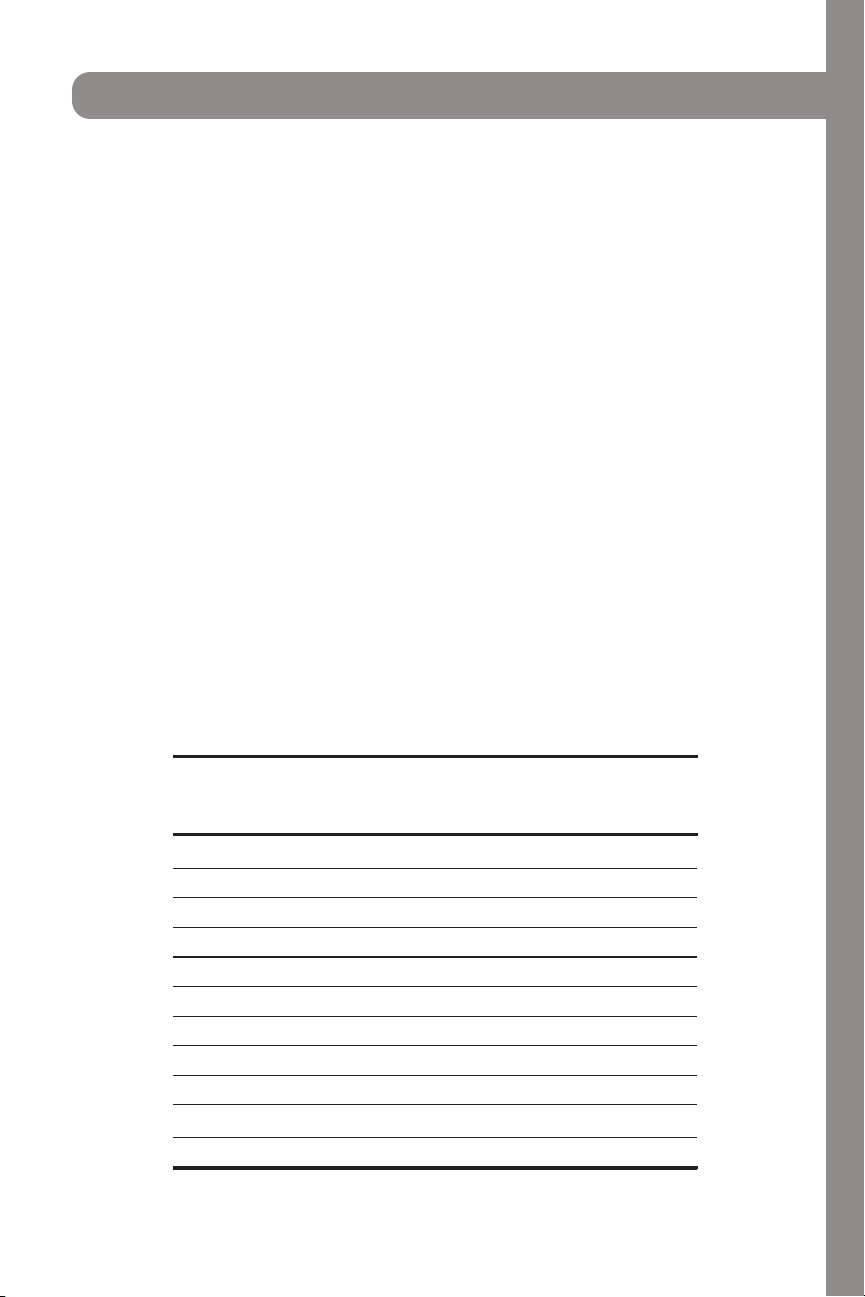
45
operation
USING ONE TOUCH START
This is a time saving pad that will automatically start cooking 2 seconds after selected.
Numeric key
1, 2, 3......or 9 can be touched for a 1 minute, 2 minutes or 9 minutes automatic start cooking
feature.
1. Press the number on the keypad for the desired time (ex: 2 minutes, press 2)
2. Press START
Note: “Food” will be displayed if a quick start cooking cycle or +30 sec key is not selected
within 5 minutes of placing food in the microwave. You must open then close the
door again to clear ‘’Food” from the display.
SETTING TIMED COOKING WITH POWER LEVEL
This feature lets you program a specific cook time and power. For best results, there are 11
power level settings in addition to HIGH (100%) power.
1. Press the number on the keypad for the desired time (ex: 5 minutes and 30 seconds,
press 5 3 0)
2. Press POWER LEVEL
3. Press START
OR7NEWModel2ndEN.indd21OR7NEWModel2ndEN.indd21 10.8.29:59:04AM10.8.29:59:04AM
To Set Power Level
Using lower power levels increases the cooking time which
is recommended for foods such as cheese, milk and long
slow cooking of meats. Consult cookbook or recipes for
specific recommendations.
There are eleven preset power levels.
PRESS POWER LEVEL
PAD NUMBER OF TIMES
FOR DESIRED POWER
POWER LEVEL x 1 100% High
POWER LEVEL x 2 90%
POWER LEVEL x 3 80%
POWER LEVEL x 4 70% Medium High
POWER LEVEL x 5 60%
POWER LEVEL x 6 50% Medium
POWER LEVEL x 7 40%
POWER LEVEL x 8 30% Med Low/Defrost
POWER LEVEL x 9 20%
POWER LEVEL x 10 10% Low
APPROXIMATE
PERCENTAGE
OF POWER
COMMON
WORDS FOR
POWER LEVELS
MANUAL COOKING
Using the Rack
The rack allows several foods to be cooked or reheated at
one time. However, for the best cooking and reheating, use
Turntable ON function and cook with SENSOR COOKING or
AUTO COOKING without the rack. When the rack is used, set
time and power level manually. Allow plenty of space around
and between the dishes. Pay close attention to the cooking
and reheating progress. Reposition the foods and reverse
them from the rack to turntable and/or stir them at least
once during any cooking or reheating time. After cooking
or reheating, stir if possible. Using a lower power level will
assist in better cooking and reheating uniformity.
Avoid:
• Storing the rack in the microwave oven when not in
use.
• Popping popcorn with the rack in the microwave oven.
• Using any browning dish on the rack.
• Using SENSOR COOKING and AUTO COOKING with the
rack.
• Cooking directly on the rack—use microwave-safe
cookware.
NOTE
Turntable on/off function can be used in Manual Operation.
See page 28.
If the food that you wish to defrost is not listed on the
Defrost chart or is above or below the limits in the Amount
column on the Defrost chart (see page 22-23), you need
You can defrost any frozen food, either raw or previously
cooked, by using power level for 30%.
For either raw or previously cooked frozen food the rule of
thumb is approximately 4 minutes per pound. For example,
defrost 4 minutes for 1 pound of frozen spaghetti sauce.
Always stop the oven periodically to remove or separate
the portions that are defrosted. If food is not defrosted at
the end of the estimated defrosting time, program the oven
in 1 minute increments on power level 30% until totally
defrosted.
When using plastic containers from the freezer, defrost only
long enough to remove from the plastic in order to place in
a microwave-safe dish.
Manual Defrost
POWER LEVEL x 11 0%
to defrost manually.
DO NOT STORE THE RACK IN THE
MICROWAVE
NOTE
WHEN NOT IN USE.
12

46
operation
SETTING TWO-STAGE COOKING
For best results, some recipes call for different power levels during a cook cycle . You can
program your oven for two power level stages during the cooking cycle. Suppose you want
to set a 2-stage cook cycle. The first stage is a 3 minute cook time at 80% cook power then a
7 minute cook time at 50% cook power.
1. Press the numbers on the keypad to set cook time for the first stage. (ex: 3 minutes, press
3 0 0)
2. Press POWER LEVEL three times
3. Press the numbers on the keypad to set cook time for the second stage. (ex: 7 minutes,
press 7 0 0)
4. Press POWER LEVEL six times
5. Press START
SETTING CONTROL LOCK
1. Press CLOCK & SETTINGS two times to get to CONTROL LOCK
2. Press START
3. To turn off, touch the CLOCK & SETTINGS and touch START
SETTING POWER SAVE ON/OFF
1. Press CLOCK & SETTINGS three times to get to POWER SAVE OFF
2. Press START to toggle between ON & OFF
TURNING SOUND LOW/MED/HIGH/OFF
Audible signals are available to guide you when setting and using your oven.
• A programming tone will sound each time you touch a pad
• Three tones signal the end of a kitchen timer countdown
• Three tones signal the end of a cooking cycle
1. To adjust, press CLOCK & SETTINGS four times to get to VOLUME ON
2. Keep pressing to cycle through the options: ON, OFF, LOW, MED, HIGH
3. To set, press START
47
SETTING FILTER RESET/FILTER OFF
Select FILTER RESET to turn off “FILTER” icon and reset to remind in 6 months; if you want to
turn off “FILTER” icon notification and not remind at all, select FILTER OFF and press START
1. Press CLOCK & SETTINGS and cycle through until you get to FILTER RESET
2. Press START to toggle between FILTER RESET/OFF
SETTING LANGUAGE
There are two languages available: ENGLISH and FRENCH
1. Press CLOCK & SETTINGS and cycle through until you get to FRENCH
2. Press START to toggle between ENGLISH and FRANCAIS
SETTING WEIGHT TO LB/KG
There are two weight units available: LB/KG
1. Press CLOCK & SETTINGS and cycle through until you get to LB/KG
2. Press START to toggle between KG to LB
SETTING DEMO MODE ON/OFF
When DEMO mode is on, programming functions will work in a rapid countdown mode with
no cooking power
1. Press CLOCK & SETTINGS and cycle through until you get to DEMO OFF
2. Press START to toggle between ON and OFF
SETTING KITCHEN TIMER
The microwave oven can be used as a kitchen timer. Set up from 99 minutes to 99 seconds.
The kitchen timer can be used while the microwave oven is running.
• The timer will not stop if the door is open. To cancel the timer, press TIMER ON-OFF
1. Press TIMER ON-OFF
2. Use the number keypad for the time to count down to
3. Press TIMER ON-OFF to start counting down
operation

48
USING VENT FAN
The pad controls the 2-speed vent fan. The vent fan will go from HIGH, LOW, OFF.
1. Press the VENT icon
2. To turn off, cycle through the options until the fan is off.
If the temperature from the range or cooktop below the oven gets too hot, the vent fan will
automatically turn on to protect the oven. It may stay on up to an hour to cool the oven.
When this occurs, the vent pad will not turn the fan off.
USING COOKTOP LIGHT
The pad controls the 3-setting cooktop light. The vent fan will go from HIGH, LOW, OFF.
1. Press the LIGHT icon
2. To turn off, cycle through the options until the fan is off.
operation
49
troubleshooting
Check your problem by using the chart below and try the solutions for each
problem. If the microwave oven still does not work properly, contact the nearest
authorized service center.
Trouble Possible Cause Possible Remedy
Oven won’t
start
Electrical cord is unplugged.
Door is open.
Wrong operation is set.
Plug into the outlet.
Close the door and retry.
Check instructions.
Arcing or
sparking
Materials to be avoided in
microwave oven were used.
The oven is operated when empty.
Spilled food remains in cavity.
Use microwave-safe cookware
only.
Do not operate with oven empty.
Clean cavity with wet towel.
Unevenly
cooked food
Materials to be avoided in
microwave oven were used.
Food is not defrosted completely.
Cooking time, power level is not
suitable.
Food is not turned or stirred.
Use microwave-safe cookware only.
Completely defrost food.
Use correct cooking time, power level.
Turn or stir food.
Overcooked
foods
Cooking time and/or power level is
not suitable.
Use correct cooking time and/or
power level.
Undercooked
food
Materials to be avoided in
microwave were used.
Oven ventilation ports are restricted.
Cooking time and/or power level
is not suitable. Food is not turned or
stirred.
Use correct cooking time and/or
power level.
Check to see that oven ventilation
ports are not restricted. Use correct
cooking time and/or power level.
Turn or stir food.
Improper
Defrosting
Materials to be avoided in
microwave were used.
Cooking time, power level is not
suitable.
Food is not turned or stirred.
Use microwave-safe cookware
only.
Use correct cooking time, power
level.
Turn or stir food.

Kitchen and Bath
Three Locations:
350 Parr Circle
Reno, NV 89512
916 Delaware Avenue
Marysville, OH 43040
319 Rowland Mill Road
Bruceton, TN 38317
www.zlinekitchen.com
1-614-777-5004