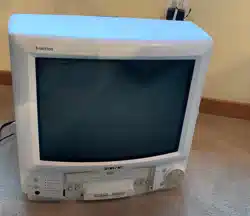
Combination VCR
Operating Instructions
iodasNo.W-1301/VV-1311W/W-13F1/W-2001/
131Tinivisiorl
• Initial Setup and Connection Procedures are on pages 8 to 13.
• SELF-DEMO Procedure is on page 4.
As an ENERGY STAR _ Partner,
Matsushita Electric Corporation of America has
determined that this product or product model meets
the ENERGY STAR _guidelines for energy efficiency.
Please read these instructions carefully before attempting to connect,
operate, or adjust this product. Please save this manual.
Spanish Quick Use Guide is included.
(Guia para rapida consulta en espaSol esta incluida.)
LSQT0502A
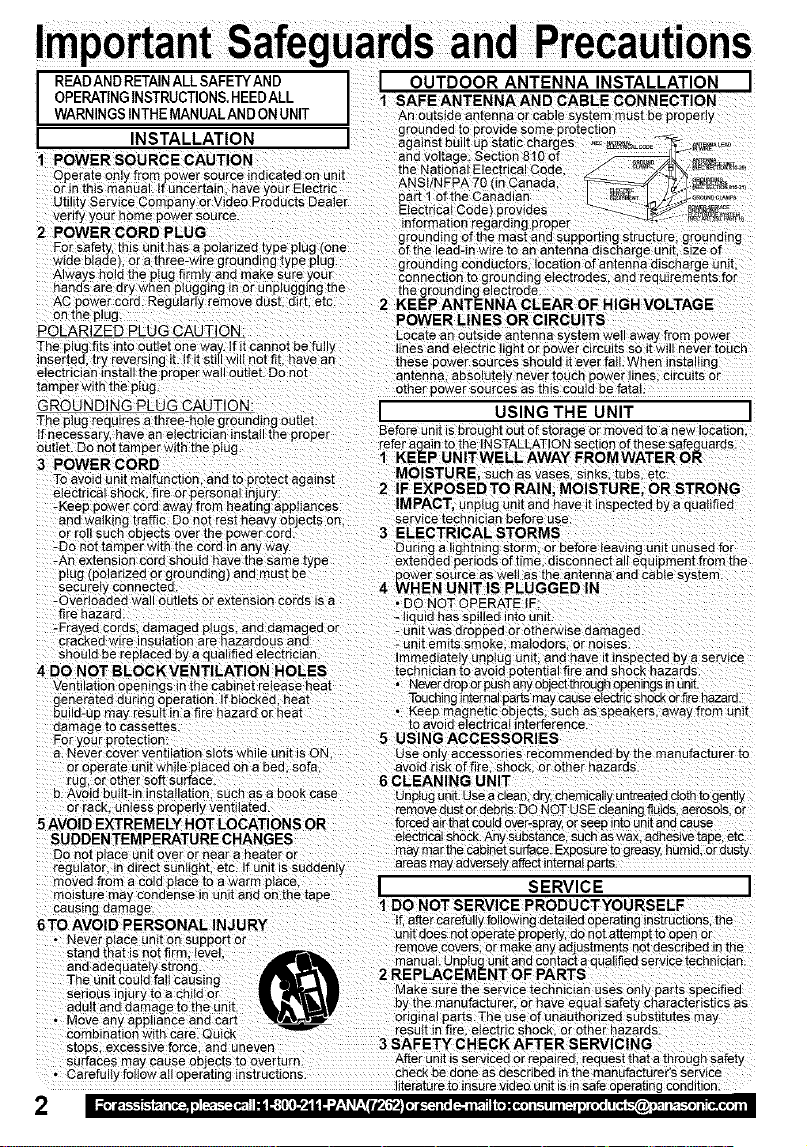
READANDRETAINALLSAFETYAND I I OUTDOOR ANTENNA INSTALLATION I
OPERATING INSTRUCTIONS. HEED ALL 1 SAFE ANTENNA AND CABLE CONNECTION
WARNINGS INTHE MANUALANDON UNIT An outside antenna or cable system must be properly
=,_^ ..^_ _=, grounded to provide some protection
I i1_1_ I #-_,LL/-_/IUI_I I against built up static charges .E¢_=E_'--jt_T_"_
1 POWER SOURCE CAUTION and voltage. Section 8!0 of _ =..
Operate only from power source indicated on unit the_atlon _ E_ctrical Code, _,/./_ _-i
or in this manual, if uncertain have your Electric '_.......... _ _'" 'z"...... _ )/z:,,__ _-r_,_,,
Utility Service Company or Video Products Dealer part 1.of thre' Canadian,
vet fy your home power source. _.,ec,nca! _,o_e) pr?viaes
information regarding proper
2 POWER COR D PLUG . grounding of the mast and supporting structure, grounding
F?r safety, this unit has a.polarized.type plug (one of the lead-in wire to an anteriria discharge unit, size of
wide blade, or a three-wire grounding type plug. grounding conductors, location of antenna discharge unit.
Always hold the pIug firmly and make sure your connection to grounding electrodes, and reouiremants for
hands are dry when plugging in or unplugging the the grounding _lectrode.
AC power cord. Regularly remove aus[ dlrt. etc. 2 KEEP ANTENNA CLEAR OF HIGH VOLTAGE
on the plug. POWER LINES OR CIRCUITS
POLARIZED PLUG CAUTION: Locate an outside antenna system well away from power
The plug fits into outlet one way. If.it cannot be fully lines and e ectr{c light or power circuits so itw II never touch
inserted, try reversing it. If it still wilt not fit. have an these Dower sources should it ever fail. When installing
electrician install the proper wall outlet. Do not antenna, absolutely never touch power Hnes.c_rcu_tsor
tamper with the plug. other Dower sources as this could be fatal.
GROUNDING PLUG CAUTION: I USING THE UNIT I
The plug requires a three-hole grounding outlet.
If necessary, have an electrician install the proper Before unit is brought out of storage or moved to a new location.
outlet. Do not tamper with the plug refer again tothe INSTALLATION section of these safeguards.
3 POWER CORD 1 KEEP UNITWELL AWAY FROMWATER OR
To ave d an t ma funct on and to protect age nst MOISTU RE, such as vases, sinks, tubs, etc.
2 IF EXPOSED TO RAIN. MOISTURE, OR STRONG
electrical shock, fire or personal _njury:
-Keep power cord away from heating appliances IMPACT, unplug unit and have it inspected by e qualified
and walking traffic. Do not rest heavy ob ects on. service technician before use.
or re such ob .:cts over the Dower cord. 3 ELECTRICAL STORMS
-Do not tamperwith the cord in any way. During a lightning storm, or before leaving unit unused for
-An extension cord should have the same type extended oar ods of t me d sconnect a equ pment from the
plug (polarized or grounding) and must be power source as welt as the antenna and cable s_.stem.
securely connected. 4 WHEN UNIT IS PLUGGED IN "
-Overloaded wall outlets or extension cords is a • DO NOT OPERATE IF:
fire hazard. _liquid has spilled into unit.
-Frayed cords, damaged plugs, and damaged or - unit was dropped or otherwise damaged.
cracked wire insulation are hazardous and - unit emits si_ke, matodors or noises.
should be replaced by a qualified electrician.
Immediately unplug unit, end have it inspected by a service
4 DO NOT BLOCKVENTILATION HOLES technician to avoid potential fire and shock hazards.
Ventilation openings inthe cabinet release heat • Neverdrop orpush any objectthrough openings in unit.
ganeratad during operation, lfbtockad heat Touching _nternalports may causeeiectdc shock orfire hazard.
build-up may result in a fire hazard or heat • Keep magnetic ob acts, such as speakers, away from unit
damage to caseettes, to avoid electrical interference.
For ¢ourprotection: 5 USING ACCESSORIES
a. Never _:over ventilation slots while unit is ON, usa only acceseones recommended by the manufacturer to
or operate unit while placed on a bed. sofa avoid risk of fire. shock, or other hazards.
rug, or other soft surface 6 CLEANING UNIT
b. Avoid built-in installation such as a book case
Unplugunit. Use a clean, dry,chemically untreated cloth togently
or rack. un_ese properly ventilated, remove dust or debds. DO NOT USE cleaning fluids, aerosols, or
5 AVOID EXTREMELY HOT LOCATIONS OR forced air thatcould over-spray,or seep into unit and cause
SUDDEN TEMPERATURE CHANGES electrical shock.Any substance, such aswax, adhesive tape, etc.
Do not niece unit over or near a heater or may marthe cabinet surface. Exposure to greasy, humid, or dusty
regulator, _nd_rect sunI_ght, etc. If unit is sudden, areas may aaverse_} affectinternal parrs.
moved from a cold place to a warm place, I SERVICE I
moisture may condense in unit and on the taae
causing damage. 1 DO NOT SERVICE PRODUCTYOURSELF
6TO AVOID PERSONAL INJ URY If.after carefully following detailed operating instructions, the
unit does not operate properly, do not attemp[ _oopen or
remove covers, or make any adjustments not described in the
and adequately strong, manual. Unptugun_t and contact a qualified service technician.
The unit could falt causing 2 REPLACEMENT OF PARTS
serious injury to a ch{Id or Make sure the service technician uses oniy parts specified
by the manufacturer, or have eque safety character st cs as
original parts.The usa of unauthorized substitutes may
resutt in fire electric shock, or other hazards
stops, excessive force, and uneven 3 SAFETY CHECK AFTER SERVICING
surfaces may cause objects to overturn. After unit is serviced or repaired, request that a through safety
• Carefu y fo owa operat ng nstruct ons. checkbe done as described in the manufacturer's service
iterature to insure video unit is in safe operating condition
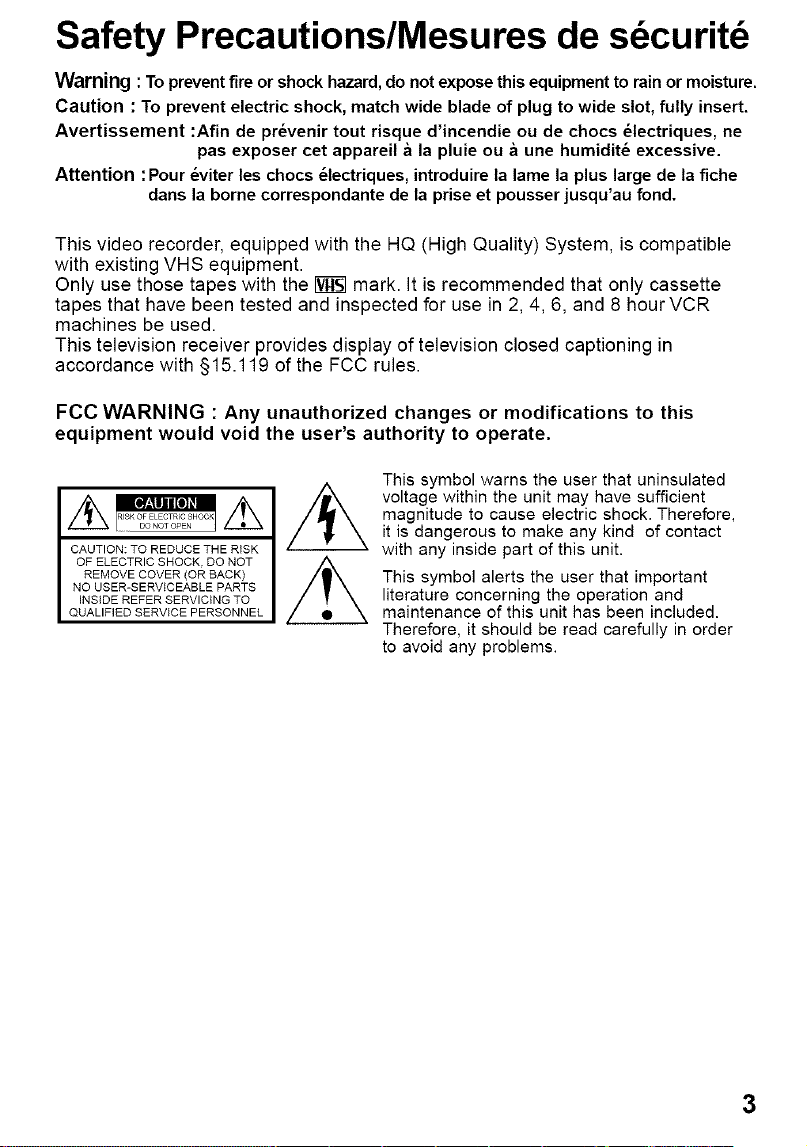
Safety Precautions/Mesures de sdcuritd
Warning :To preventfire or shock hazard,do not exposethis equipmentto rainor moisture.
Caution : To prevent electric shock, match wide blade of plug to wide slot, fully insert.
Avertissement :Afin de pr_venir tout risque d'incendie ou de chocs _lectriques, ne
pas exposer cet appareil & la pluie ou & une humidit_ excessive.
Attention :Pour _viter les chocs _lectriques, introduire la lame la plus large de la fiche
dans la borne correspondante de la prise et pousser jusqu'au fond.
This video recorder, equipped with the HQ (High Quality) System, is compatible
with existing VHS equipment.
Only use those tapes with the _ mark. It is recommended that only cassette
tapes that have been tested and inspected for use in 2, 4, 6, and 8 hour VCR
machines be used.
This television receiver provides display of television closed captioning in
accordance with §15.119 of the FCC rules.
FCC WARNING : Any unauthorized changes or modifications to this
equipment would void the user's authority to operate.
This symbol warns the user that uninsulated
voltage within the unit may have sufficient
magnitude to cause electric shock. Therefore,
it is dangerous to make any kind of contact
with any inside part of this unit.
This symbol alerts the user that important
literature concerning the operation and
maintenance of this unit has been included.
Therefore, it should be read carefully in order
to avoid any problems.

Congratulations
on your purchase of one of the most sophisticated
and reliable products on the market today. Used
properly, itwill bring you and your family years of
enjoyment. Please fitt inthe information betow. The
serial number is on the tag located on the back of
your unit.
Date of Purchase
Dealer Purchased From
Dealer Address
Dealer Phone No.
Model No.
Serial No.
Accessories
_65
,2_P®®i
OOG)O_
_O(D O(D
©000
[] Remote Control
LSSQ0283
(VV-1301/VV-13F1/
VV-2001 )
LSSQ0284
(VV-1311W)
[] Batteries
2 "AA"
To order accessories,
call toll free 1-800-332-5368,
/
1) Open the
2) Insert batteries as marked.
3) Close the cover.
[] Battery replacement caution
• Do not mix old and new batteries.
• Do not mix alkaline with manganese batteries.
Break off the tab to protect.
With Power ON, press
PLAY/REPEAT on the
unit for 7 seconds to
deactivate the SELF-
DEMO Mode.
Repeat this to display
demo screen•
4
Record Tab/
Screw driver
To record again.
Cover the hole
with cellophane tape.
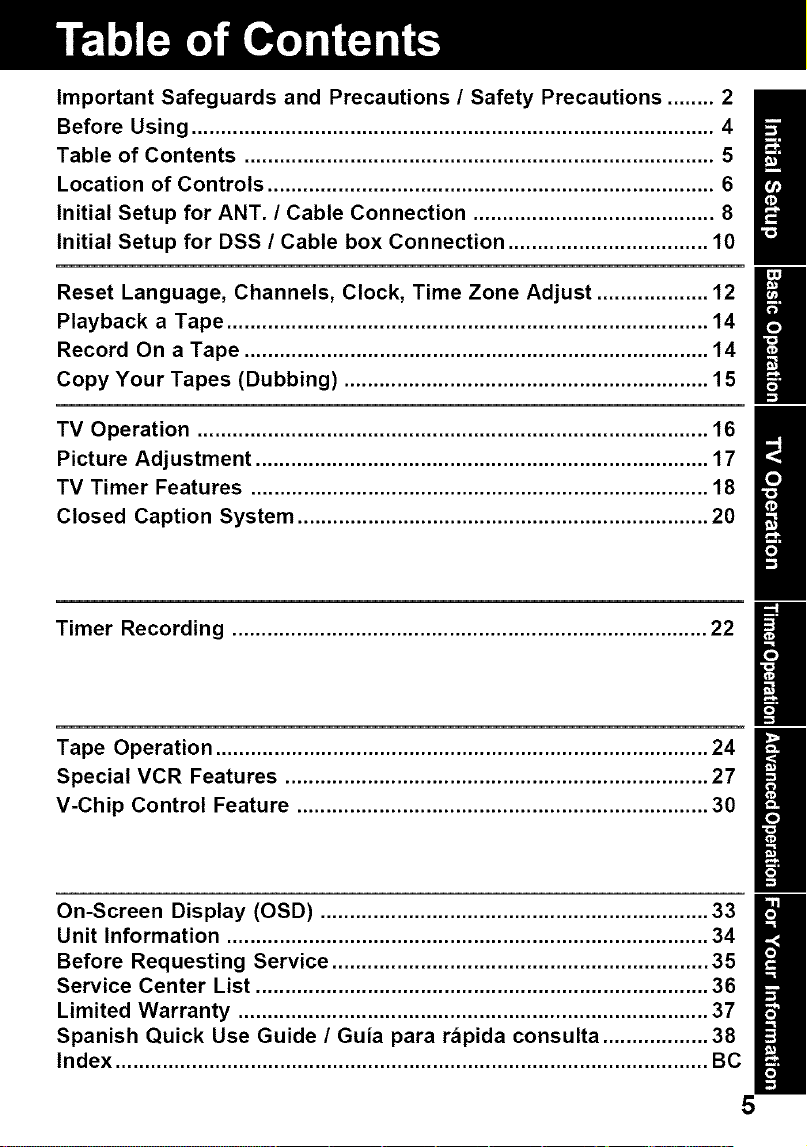
Important Safeguards and Precautions / Safety Precautions ........ 2
Before Using ......................................................................................... 4
Table of Contents ................................................................................ 5
Location of Controls ............................................................................ 6
Initial Setup for ANT. / Cable Connection ......................................... 8
Initial Setup for DSS / Cable box Connection .................................. 10
Reset Language, Channels, Clock, Time Zone Adjust ................... 12
Playback a Tape .................................................................................. 14
Record On a Tape ............................................................................... 14
Copy Your Tapes (Dubbing) .............................................................. 15
TV Operation ....................................................................................... 16
Picture Adjustment ............................................................................. 17
TV Timer Features .............................................................................. 18
Closed Caption System ...................................................................... 20
Timer Recording ................................................................................. 22
Tape Operation .................................................................................... 24
Special VCR Features ........................................................................ 27
V-Chip Control Feature ...................................................................... 30
On-Screen Display (OSD) .................................................................. 33
Unit Information .................................................................................. 34
Before Requesting Service ................................................................ 35
Service Center List ............................................................................. 36
Limited Warranty ................................................................................ 37
Spanish Quick Use Guide / Guia para rapida consulta .................. 38
Index ..................................................................................................... BC
5
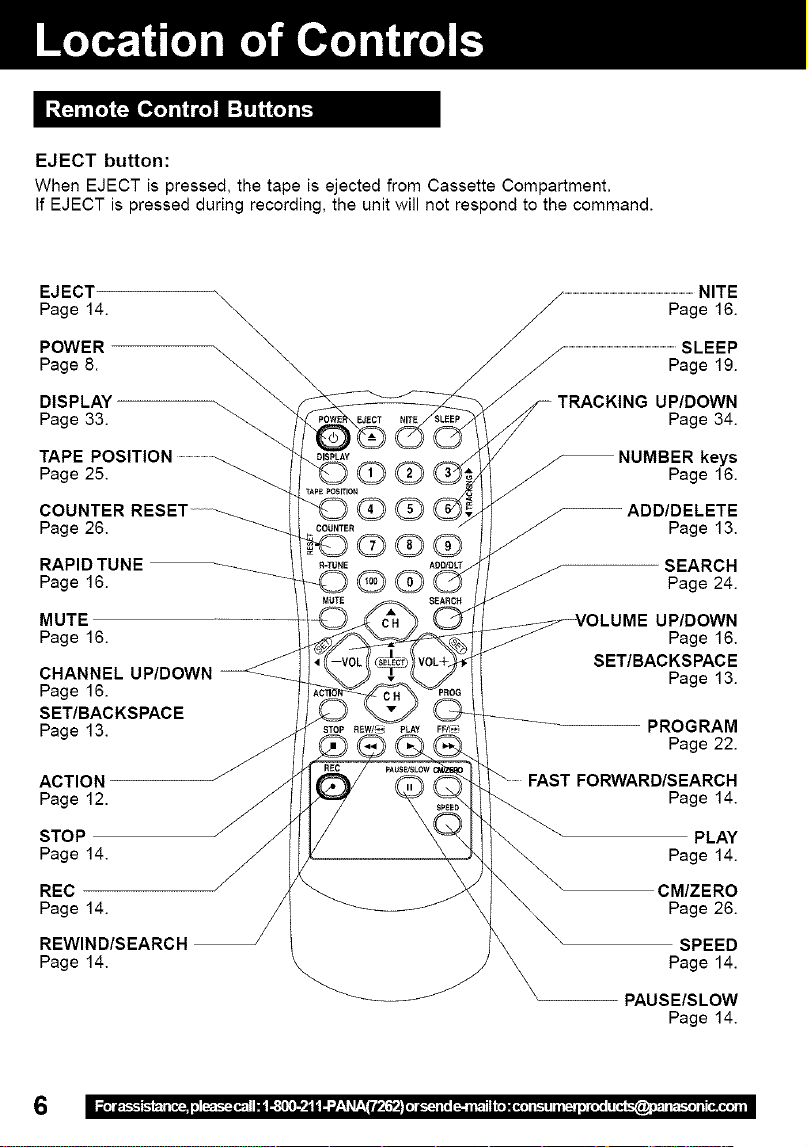
EJECT button:
When EJECT is pressed, the tape is ejected from Cassette Compartment.
If EJECT is pressed during recording, the unit will not respond to the command.
EJECT
Page 14.
POWER \
DISPLAY _ ____
ooe
TAPE POSITION .............................._ _LD_¥ _ _
Page 25. ' r _) C1_,__,_ (,_;
COUNTER RESET ......... . _
Page 26. COUNTER
Q@@
RAPID TUNE
Page 16. _
MUTE
Page 16.
CHANNEL UP/DOWN
Page 16.
SET/BACKSPACE
Page 13.
ACTION
Page 12.
STOP
Page 14.
REC
Page 14.
REWIND/SEARCH
Page 14.
.................................................................................................................NITE
Page 16.
/ / .................................................................................................SLEEP
Page 19.
/
TRACKING UP/DOWN
Page 34.
/
NUMBER keys
/_ Page 16.
ADD/DELETE
Page 13.
SEARCH
Page 24.
UP/DOWN
Page 16.
SET/BACKSPACE
Page 13.
PROGRAM
Page 22.
FORWARD/SEARCH
Page 14.
PLAY
Page 14.
CM/ZERO
Page 26.
SPEED
Page 14.
PAUSE/SLOW
Page 14.
_f
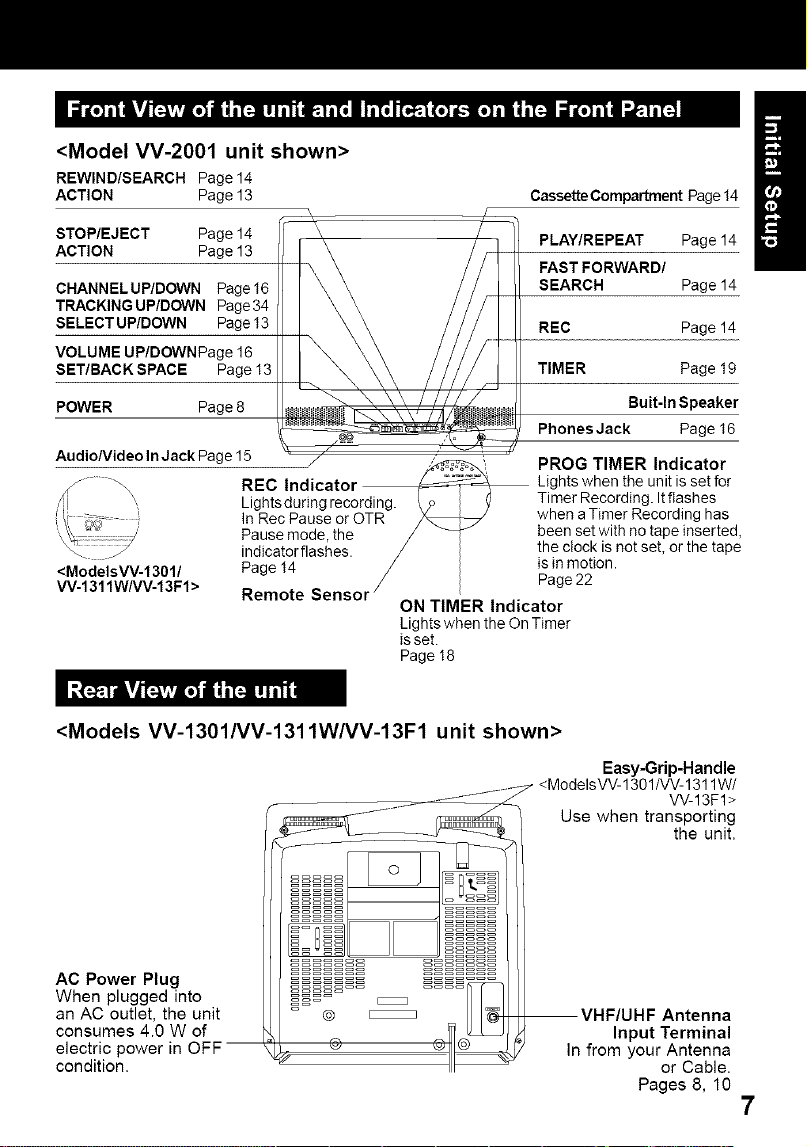
<Model VV-2001 unit shown>
REWIND/SEARCH Page 14
ACTION Page 13
STOP/EJECT Page 14
ACTION Page 13
CHANNELUP/DOWN Page16
TRACKING UP/DOWN Page34
SELECT UP/DOWN Page 13
VOLUME UP/DOWNPage 16
SET/BACK SPACE Page 13
POWER Page 8
AudioNideo InJack Page 15
REC
Lightsduring recording.
In Rec Pause or OTR
Pause mode, the
indicatorflashes.
<ModelsW-1301/ Page 14
W-1311WNV-13Fl> Remote
CassetteCompartment Page 14
PLAY/REPEAT Page 14
FAST FORWARD/
SEARCH Page 14
REC Page 14
TIMER Page 19
Buit-ln Speaker
Phones Jack Page 16
PROG TIMER Indicator
Lights when the unit is set for
Timer Recording. Itflashes
when a Timer Recording has
been set with no tape inserted,
the clock is not set, or the tape
is in motion.
Page 22
ON TIMER Indicator
Lights when the On Timer
isset.
Page 18
/
<Models VV-1301/VV-1311W/VV-13F1 unit shown>
AC Power Plug
When plugged into
an AC outlet, the unit
consumes 4.0 W of
electric power in OFF --
condition.
Easy-Grip-Handle
<ModelsW-1301/W-1311W/
W-13F1>
Use when transporting
the unit,
Input Terminal
In from your Antenna
or Cable.
Pages 8, 10
7
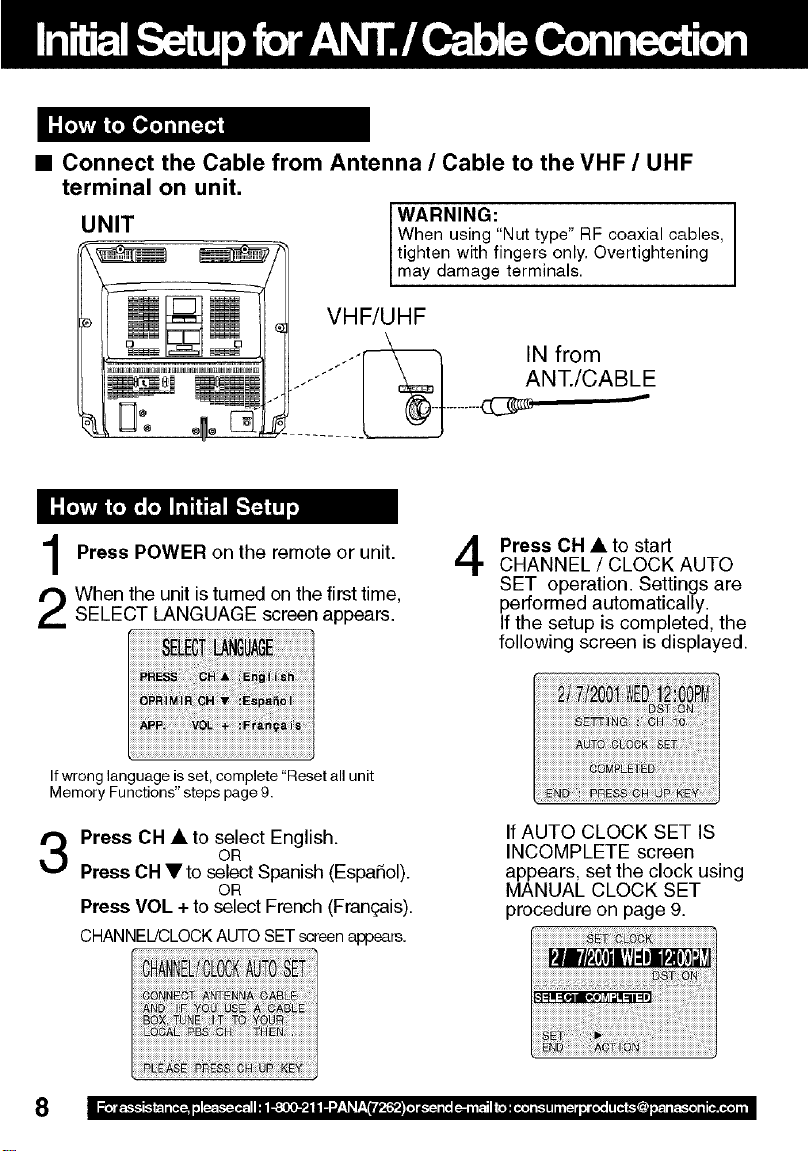
• Connect the Cable from Antenna / Cable to the VHF / UHF
terminal on unit.
WARNING:
UNIT When using"Nut type" RF coaxial cables,
tighten with fingers only. Overtightening
may damage term nas.
VHF/UHF
IN from
ANT./CABLE
Press POWER on the remote or unit.
When the unit is turned on the first time,
SELECT LANGUAGE screen appears.
4
Press OH • to start
CHANNEL / CLOCK AUTO
SET operation. Settings are
performed automatically.
If the setup is completed, the
following screen is displayed.
Ifwrong language is set, complete "Reset all unit
Memory Functions" steps page 9.
Press OH • to select English.
OR
Press CH Yto select Spanish (EspaSol).
OR
Press VOL +to select French (Fran£;ais).
CHANNEL!CLOCKAUTOSETscreenappears.
If AUTO CLOCK SET IS
INCOMPLETE screen
appears, set the clock using
MANUAL CLOCK SET
procedure on page 9.
8
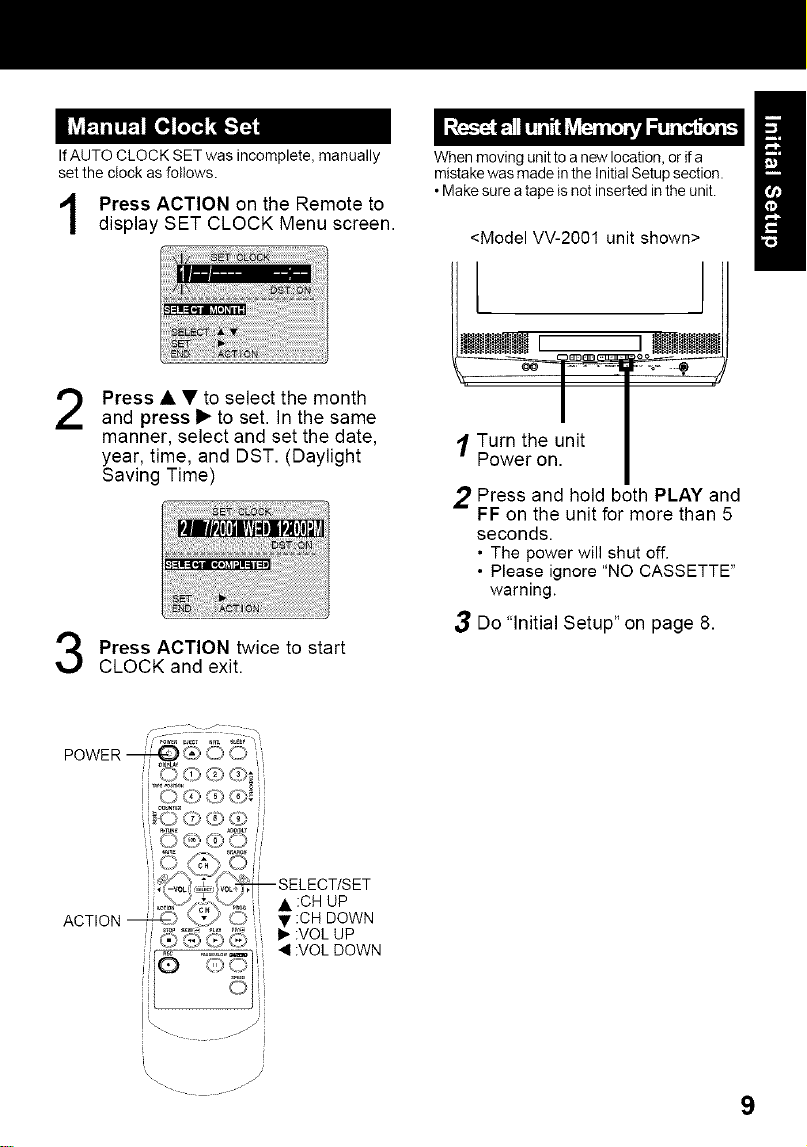
IfAUTO CLOCK SET was incomplete, manually
set the clock as follows.
Press ACTION on the Remote to
display SET CLOCK Menu screen.
When moving unit to a new location, or ifa
mistake was made inthe Initial Setup section.
• Make sure atape is not inserted in the unit.
<Model VV-2001 unit shown>
2
Press • • to select the month
and press I_ to set. In the same
manner, select and set the date,
year, time, and DST. (Daylight
Saving Time)
Press ACTION twice to start
CLOCK and exit.
iWII == LWiliW
I TU_ethenU.nit I
Press and hold both PLAY and
FF on the unit for more than 5
seconds.
• The power will shut off.
• Please ignore "NO CASSETTE"
warning.
3 Do "Initial Setup" on page 8.
lO (0 tz9 b)
_(=_,'_""_ SELEC TISET
i _/,."{- _= A :CH UP
ACTION _.* '\_2 '-J, •.CH DOWN
i _ ,,.,o_.._ <1:VOL DOWN
tl
i
i
\\
- ..... -
9
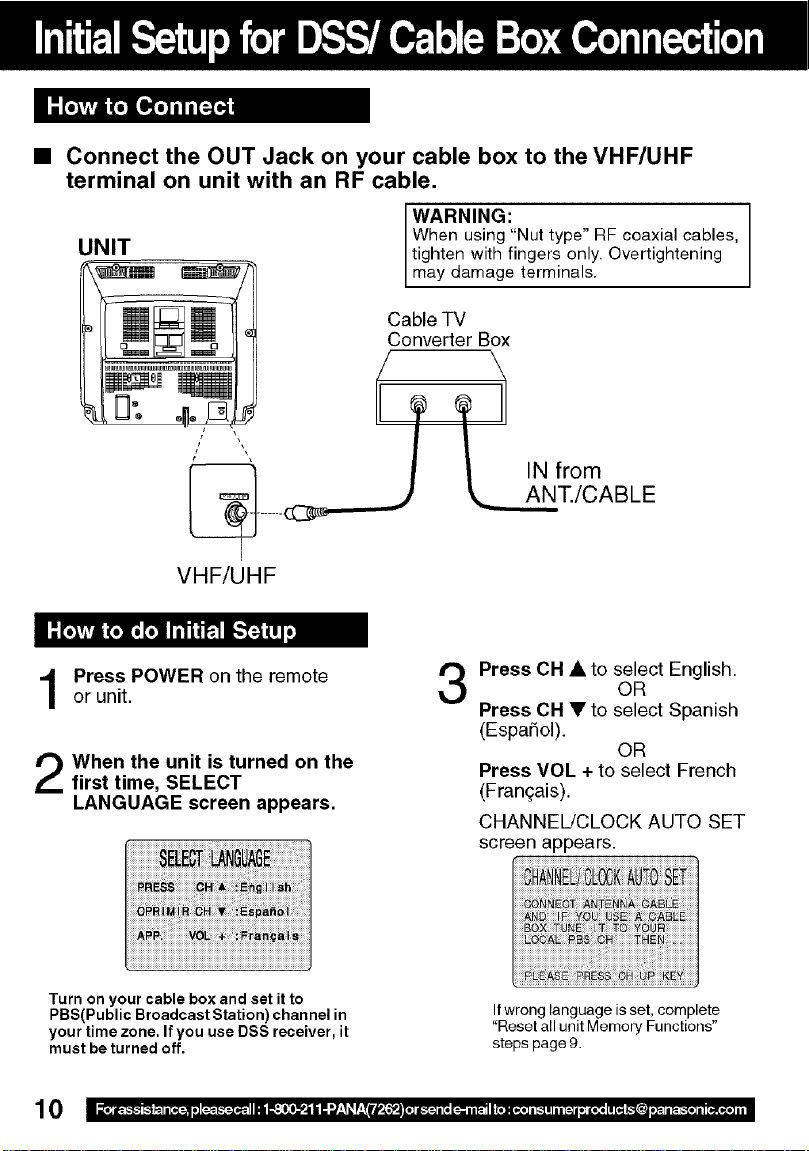
• Connect the OUT Jack on your cable box to the VHF/UHF
terminal on unit with an RF cable,
UNIT
WARNING:
When using "Nut type" RF coaxial cables,
tighten with fingers only. Overtightening
may damage term nas.
Cable TV
Converter Box
VHF/UHF
\
_AN IN from
T./CABLE
Press POWER on the remoteor unit.
When the unit is turned on the
first time, SELECT
LANGUAGE screen appears,
Press CH • to select English.
OR
Press CH • to select Spanish
(EspaSol).
OR
Press VOL + to select French
(Franqais).
CHANNEL/CLOCK AUTO SET
screen appears.
Turn on your cable box and set it to
PBS(Public Broadcast Station)channel in
your time zone. If you use DSS receiver, it
must be turned off.
Ifwrong language is set, complete
"Reset all unit Memory Functions"
steps page 9.
10
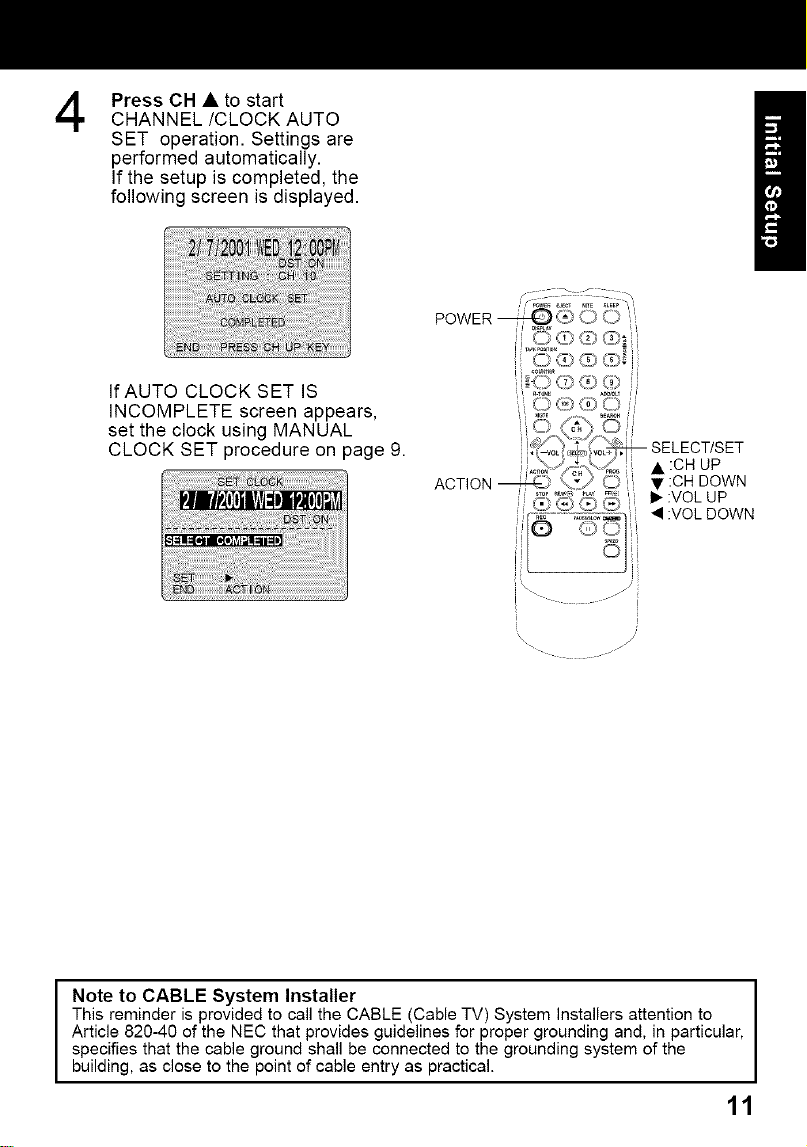
4
Press CH • to start
CHANNEL/CLOCK AUTO
SET operation. Settings are
performed automatically.
If the setup is completed, the
following screen is displayed.
If AUTO CLOCK SET IS
INCOMPLETE screen appears,
set the clock using MANUAL
CLOCK SET procedure on page 9.
i \ //
=
Note to CABLE System Installer I
This reminder is provided to call the CABLE (Cable TV) System Installers attention to
I
Article 820-40 of the NEC that provides guidelines for proper grounding and, in particular,
specifies that the cable ground shall be connected to the grounding system of the
building, as close to the point of cable entry as practical.
11
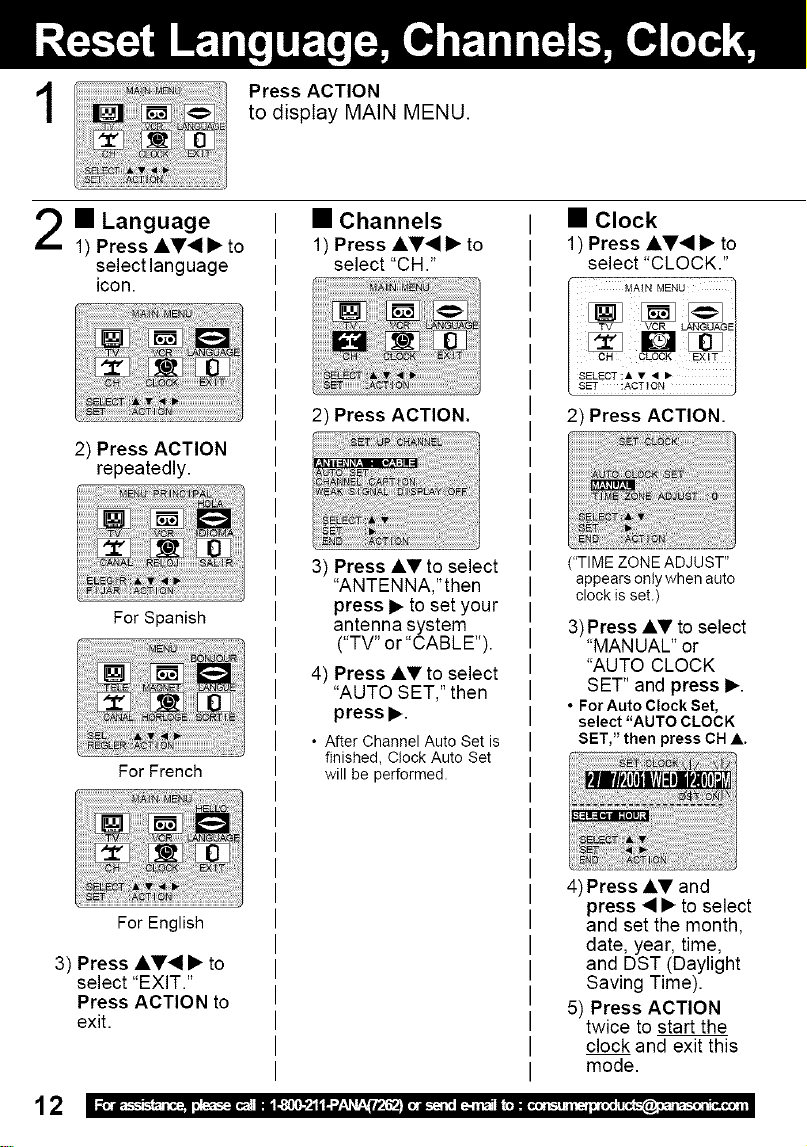
1
Press ACTION
to display MAIN MENU.
== Language
1) Press A_'_ • to
select language
icon. I
2) Press ACTION
repeatedly.
For Spanish
For French
For English
3) Press AV_I • to
select "EXIT."
Press ACTION to
exit.
• Channels
1) Press AV_I • to
select "CH 2
2) Press ACTION.
3) Press AV to select
"ANTENNA,'then
press • to set your
antenna system
("TV" or "CABLE").
4) Press AV to select
"AUTO SET," then
press •.
• After Channel Auto Set is
finished, Ctock Auto Set
will be performed.
• Clock
1) Press ,&V'_ • to
select "CLOCK."
MAIN MENU
SELECT:A • • •
SET :ACTION
2) Press ACTION.
("TIME ZONE ADJUST"
appears onty when auto
clock is set.)
3)Press AY to select
"MANUAL" or
"AUTO CLOCK
SET" and press •.
• For Auto Clock Set,
select "AUTO CLOCK
SET," then press OH A.
4) Press AV and
press • • to select
and set the month,
date, year, time,
and DST (Daylight
Saving Time).
5) Press ACTION
twice to start the
clock and exit this
mode.
12
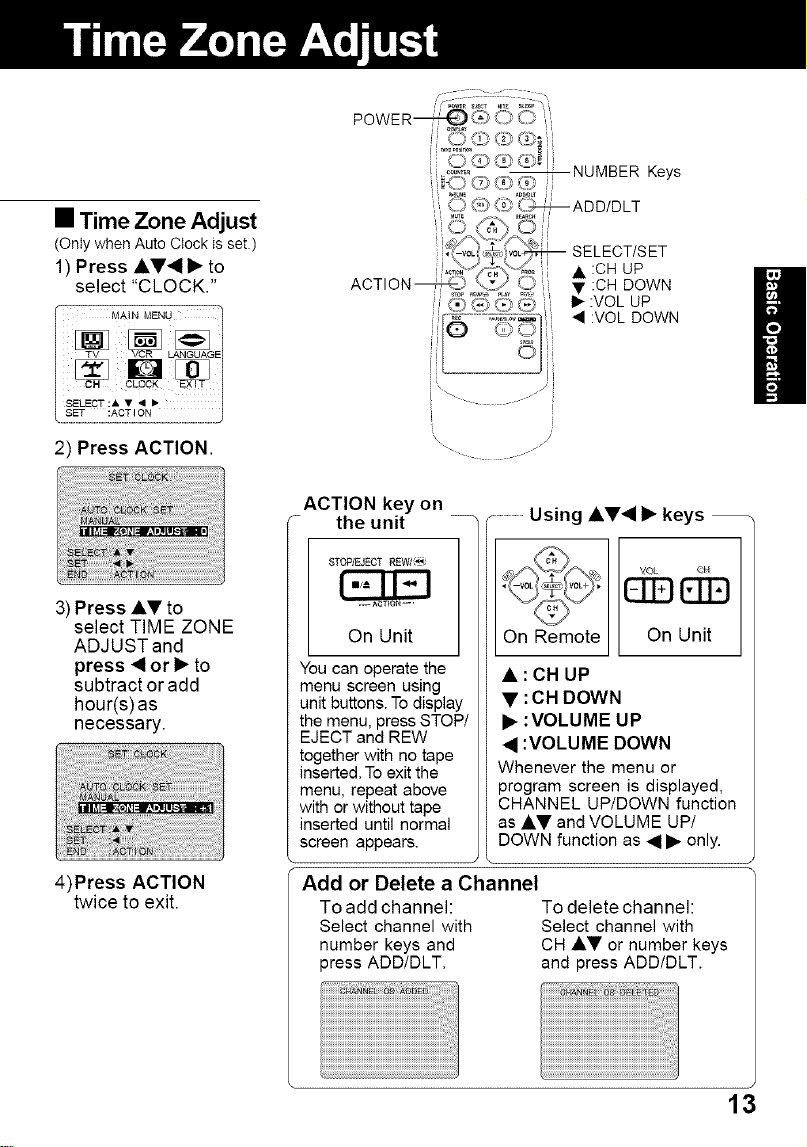
• Time Zone Adjust
(Only when Auto Clock is set.)
1) Press &V41 • to
select "CLOCK."
_,4AtN MENU
SELECT "& • • •
2) Press ACTION.
3) Press a,y to
[
\,, J
-_ 1/
select TIME ZONE
ADJUSTand
press _IIor I_ to
subtract or add
hour(s) as
necessary.
4)Press ACTION
twice to exit.
ACTION key on
r the unit ............................Using AV• • keys
On Unit
You can operate the
menu screen using
unit buttons. To display
the menu, press STOP/
EJECT and nEW
together with no tape
inserted. To exit the
menu, repeat above
with or without tape
inserted until normal
screen appears.
On Remote On Unit
• : CH UP
• : CH DOWN
• :VOLUME UP
• :VOLUME DOWN
Whenever the menu or
program screen is displayed,
CHANNEL UP/DOWN function
as •V and VOLUME UP/
DOWN function as • • only.
\
Add or Delete a Channel
To add channel: To delete channel:
Select channel with Select channel with
number keys and CH AV or number keys
3ress ADD/DLT. and press ADD/DLT.
13
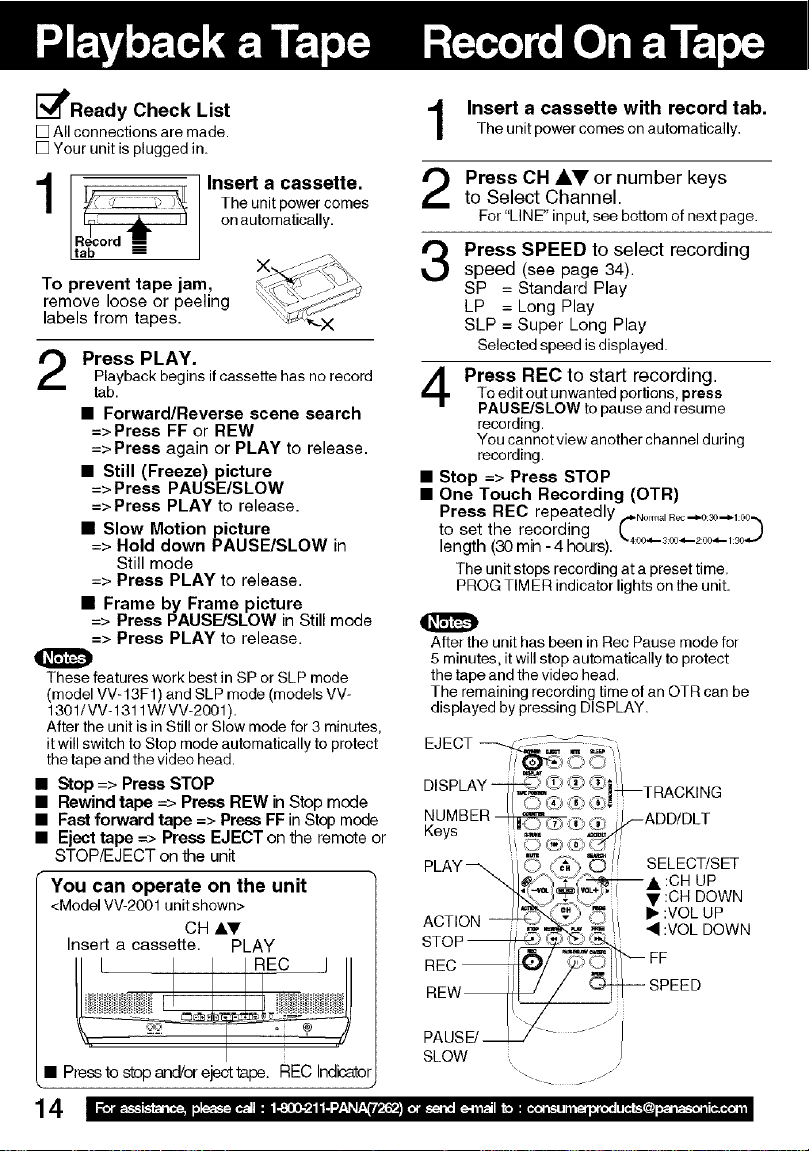
_PPReady Check List
[] All connections are made
[] Your unit is plugged in_
1I
I t1"
LtRa_c°rd --_
Insert a cassette.
The unit power comes
on automatically.
To prevent tape jam,
remove loose or peeling
labels from tapes.
Press PLAY.
Playback begins if cassette has no record
tab.
• Forward/Reverse scene search
=>Press FF or REW
=>Press again or PLAY to release.
• Still (Freeze) picture
=>Press PAUSE/SLOW
=>Press PLAY to release.
• Slow Motion picture
=> Hold down PAUSE/SLOW in
Still mode
=> Press PLAY to release.
• Frame by Frame picture
=> Press PAUSE/SLOW in Still mode
=> Press PLAY to release.
These features work best in SP or SLP mode
(model VV-13F1) and SLP mode (models VV-
1301/VV-1311W/VV-2001).
After the unit is in Still or Slow mode for 3 minutes,
it will switch to Stop mode automatically to protect
the tape and the video head.
• Stop => Press STOP
• Rewind tape --> Press REW in Stop mode
• Fast forward tape => Press FF in Stop mode
• Eject tape => Press EJECTon the remote or
STOP/EJECT on the unit
You can operate on the unit
<Model VV-2001 unit shown>
CH A•
Insert a cassette. PLAY
• Press to stop and/or eject tape. REC Indicatol
14
Insert a cassette with record tab.
Theunitpowercomesonautomatically.
Press CH AV or number keys
to Select Channel.
For "LINE" input, see bottom of next page.
Press SPEED to select recording
speed (see page 34).
SP = Standard Play
LP = Long Play
SLP = Super Long Play
Selected speed is displayed.
Press REC to start recording.To edit out unwanted portions, press
PAUSE/SLOW to pause and resume
recording.
You cannot view another channel during
recording
• Stop => Press STOP
• One Touch Recording (OTR)
Press REC repeatedly .,-,.No,,,,_,R_--,.0_0--,._00-.
to set the recording [ )
length (30 min - 4 hours). -400.,-3_-.-200_-__,_..-
The unit stops recording at a preset time.
PROG TIMER indicator lights on the unit.
After the unit has been in Rec Pause mode for
5 minutes, it will stop automatically to protect
the tape and the video head.
The remaining recording time of an OTR can be
displayed by pressing DISPLAY.
EJECT --'---.L_ _i".
DISPLAY _)'# _'_
_- _,w_...... | TRACKING
NUMBER_,_ _'_ADD/DLT
Keys _, ,_Z_..t/"
PLAY _ [[ _"m'(_'3. _ ,// SELECT/SET
_)._--%_.C;_ I • :CH DOWN
,¢H _
ACT, i_!' / _ ;VoOLUoPwN
STOP
REC _/ 7_1/_'-- EE
REW /TZ__ SPEEO
SLOW . /
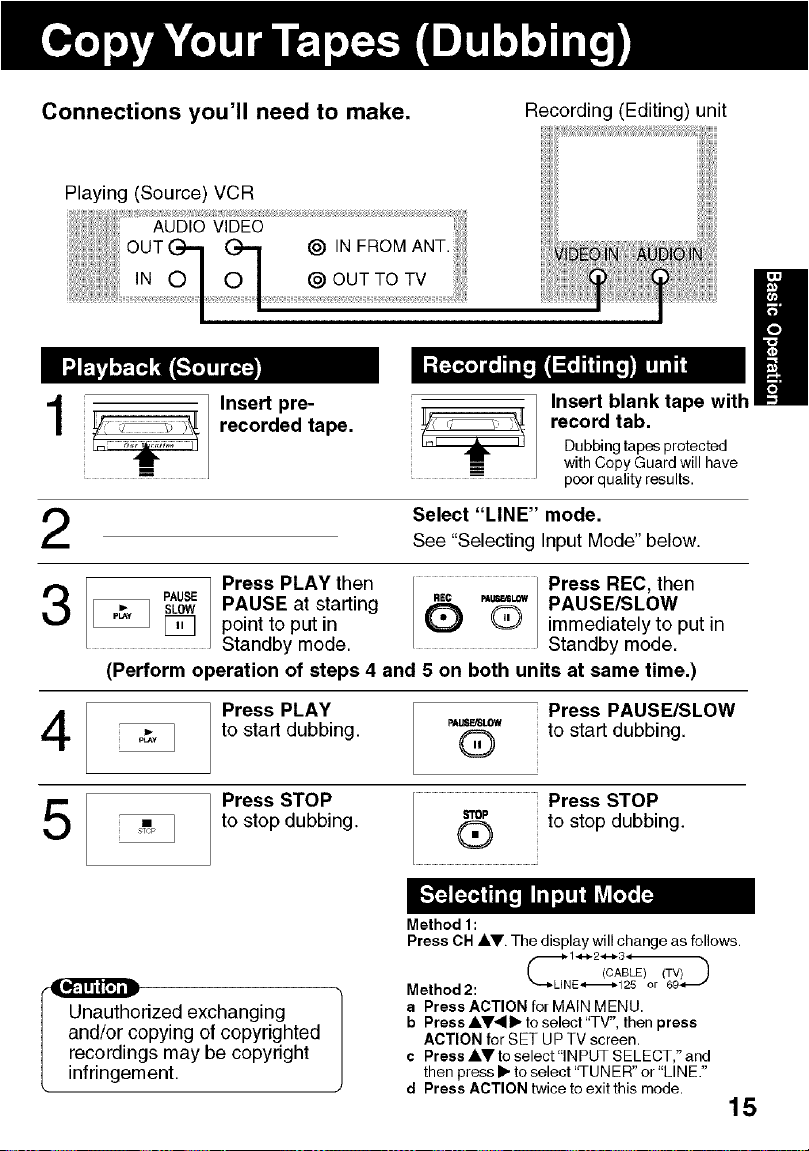
Connections you'll need to make. Recording (Editing) unit
Playing (Source) VCR
t
Insert pre-
recorded tape.
!
H
Insert blank tape with
record tab.
Dubbing tapes protected
with Copy Guard will have
poor quality results.
2
Select "LINE" mode.
See "Selecting Input Mode" below.
1 Press PLAY then Press REC, then
PAUSEsLOWI PAUSE at starting _"_c _u=_ PAUSE/SLOW
I_CI_ [_q point toputin _ Q immediately to putin
Standby mode. Standby mode.
(Perform operation of steps 4 and 5 on both units at same time.)
4
Press PLAY
to start dubbing.
_I,_LOW
®
Press PAUSE/SLOW
to start dubbing.
5
"Pl
Press STOP
to stop dubbing.
STOP
®
Press STOP
to stop dubbing.
Unauthorized exchanging
and/or copying of copyrighted
recordings may be copyright
infringement.
Method 1:
Press OH ,&V. The display will change as follows.
Method2: "--bLINE_125 or Gg_"
a Press ACTION for MAIN MENU.
b Press AV4 lib to select "TV", then press
ACTION for SET UP TV screen.
c Press &V to select"lN PUT SELECT," and
then press I_ to select 'q-UNER" or "LINE."
d Press ACTION twice to exit this mode•
15
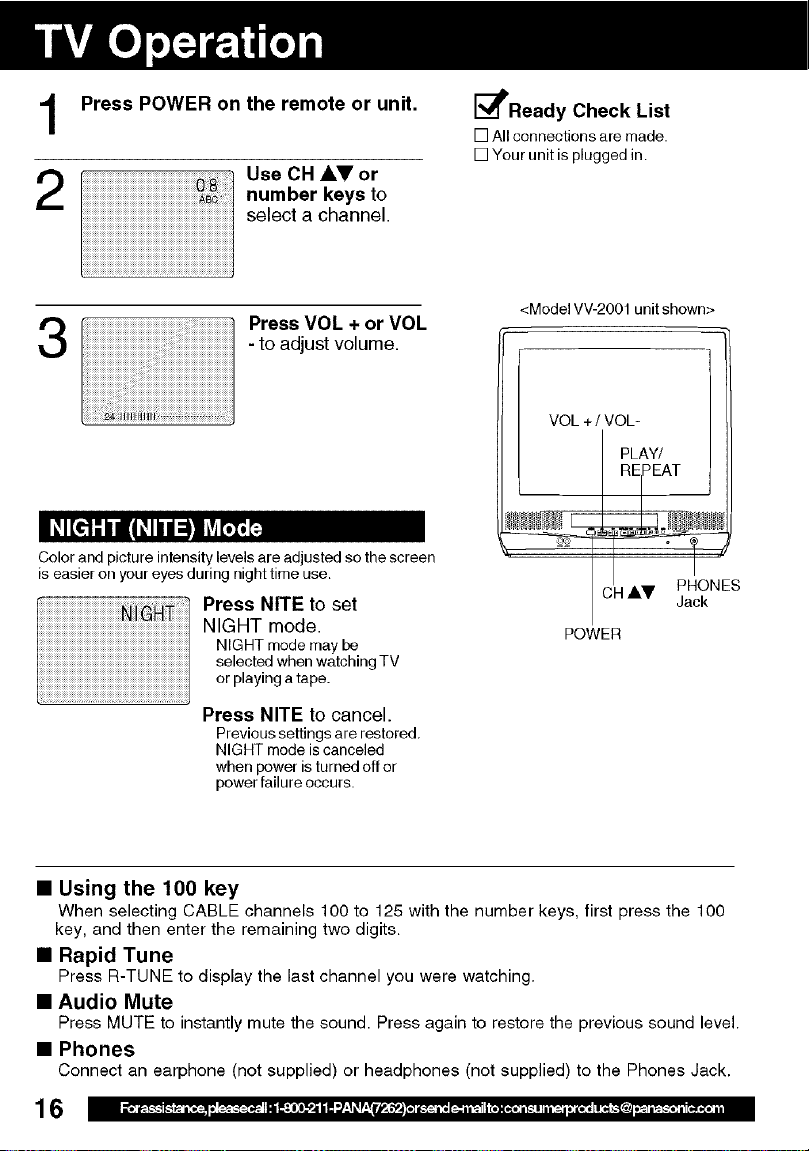
Press POWER on the remote or unit.
us.c.,,or
number keys to
select a channel.
3 i
Press VOL + or VOL
- to adjust volume.
Color and picture intensity levels are adjusted so the screen
iseasier on your eyes during night time use.
Press NITE to set
NIGHT mode.
NIGHT mode may be
selected when watching TV
or playing a tape.
Press NITE to cancel.
Previous settings are restored.
NIGHT mode is canceled
when power is turned off or
power failure occurs.
I_Ready Check List
[] All connections are made.
[] Your unit is plugged in.
<Model VV-200t unit shown>
VOL +/ VOL=
k,
PLAY/
REPEA i
4 AV PHONES
Jack
POWER
• Using the 100 key
When selecting CABLE channels 100 to 125 with the number keys, first %ess the 100
key, and then enter the remaining two digits.
• Rapid Tune
Press R-TUNE to display the last channel you were watching.
• Audio Mute
Press MUTE to instantly mute the sound. Press again to restore the previous sound level.
• Phones
Connect an earphone (not supplied) or headphones (not supplied) to the Phones Jack.
16
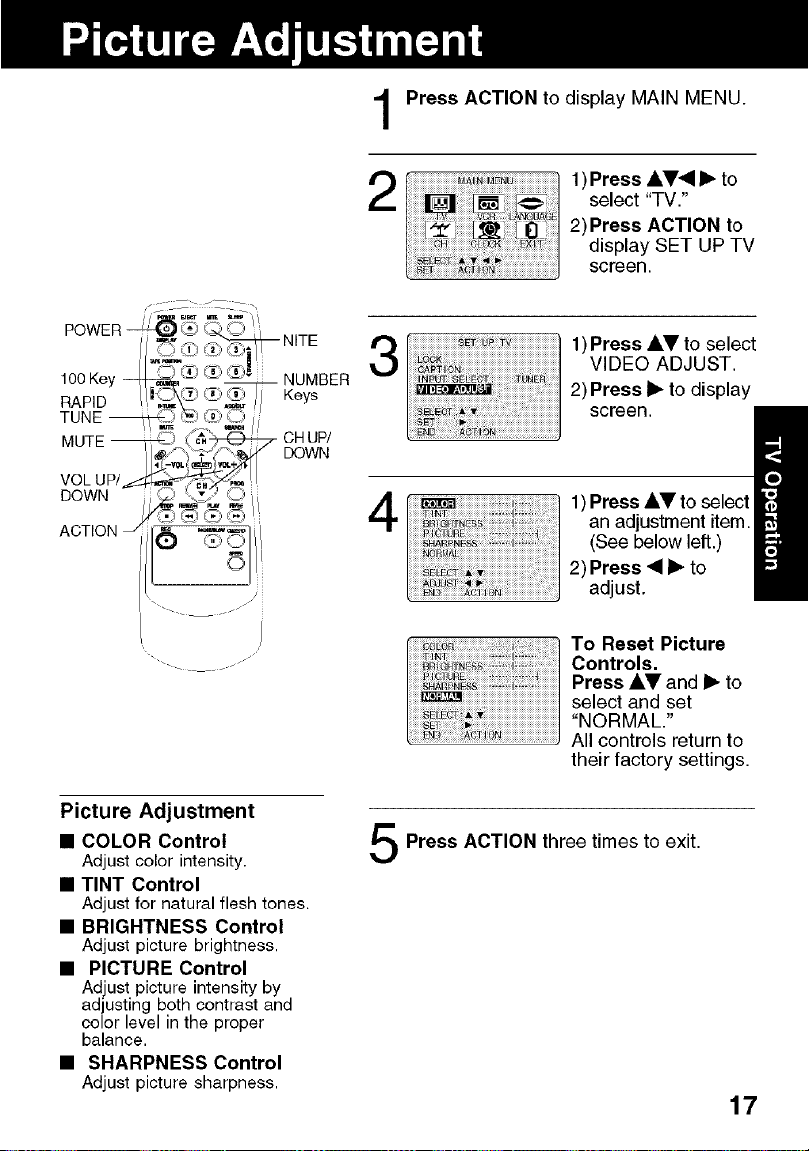
1
2
Press ACTION to display MAIN MENU.
1)Press AV_I I_ to
select "TV."
2)Press ACTION to
display SET UP TV
screen.
3
1)Press AV to select
VIDEO ADJUST.
2) Press I_ to display
screen.
Picture Adjustment
• COLOR Control
Adjust color intensity.
• TINT Control
Adjust for natural flesh tones.
• BRIGHTNESS Control
Adjust picture brightness,
• PICTURE Control
Adjust picture intensityby
adjusting both contrast and
color level in the proper
balance,
• SHARPNESS Control
Adjust picture sharpness,
4
1) Press AV to select
an adjustment item.
(See below left.)
2) Press _11_ to
adjust.
To Reset Picture
Controls.
Press AV and I_ to
select and set
"NORMAL."
All controls return to
their factory settings.
Press ACTION three times to exit.
17
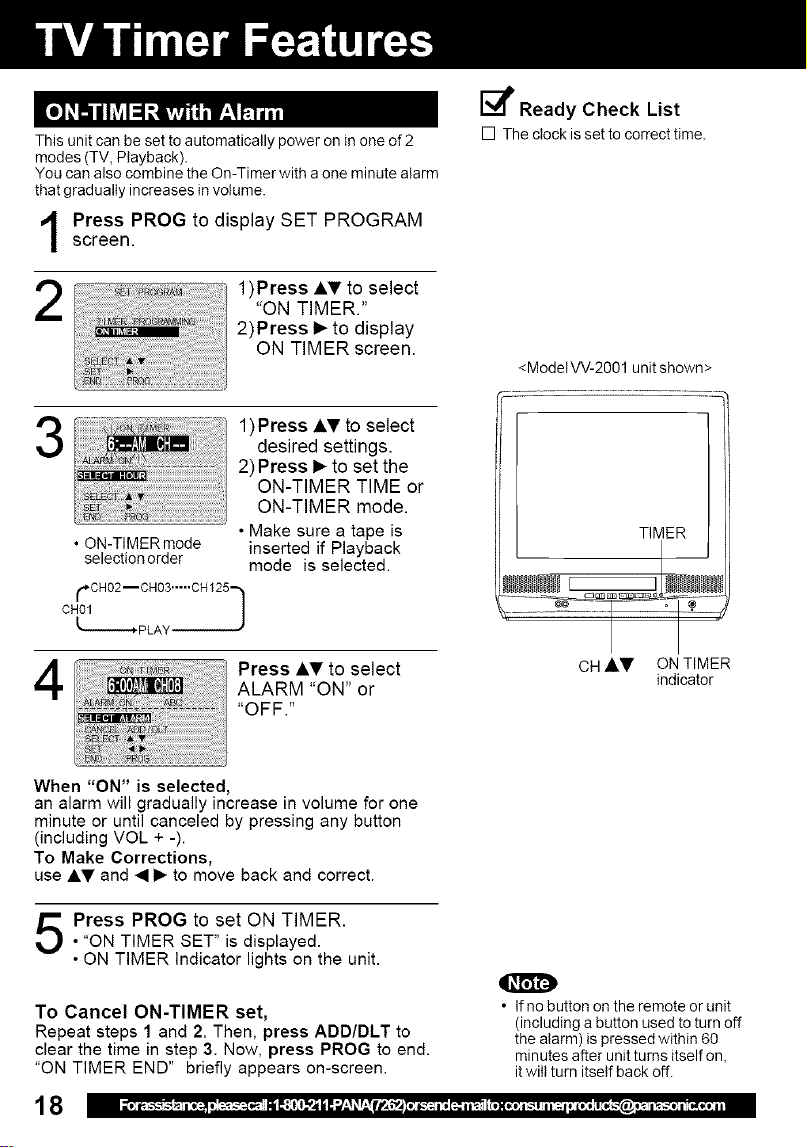
This unit can be set to automatically power on in one of 2
modes (TV, Playback).
You can also combine the On-Timer with aone minute alarm
that gradually increases in volume.
Press PROG to display SET PROGRAM
screen.
1)Press AT to select
"ON TIMER."
2)Press I_ to display
ON TIMER screen.
3
1) Press AV to select
desired settings.
2) Press I_ to set the
ON-TIMER TIME or
ON-TIMER mode.
• Make sure a tape is
• ON-TIMERmode inserted if Playback
selection order mode is selected.
¢,cH02--cH03.--..cH_25-,I
4
Press AT to select
ALARM "ON" or
"OFF."
E_ Ready Check List
[] The clock is set to correct time.
<ModetW-2001 unit shown>
TIMER
CH ,kV ON TIMER
indicator
When "ON" is selected,
an alarm will gradually increase in volume for one
minute or until canceled by pressing any button
(including VOL + -).
To Make Corrections,
use AV and • 1_ to move back and correct.
Press PROG to set ON TIMER.
• "ON TIMER SET" is displayed.
• ON TIMER Indicator lights on the unit.
To Cancel ON-TIMER set,
Repeat steps 1 and 2. Then, press ADD/DLT to
clear the time in step 3. Now, press PROG to end.
"ON TIMER END" briefly appears on-screen.
18
• If no button on the remote or unit
(including a button used to turn off
the alarm) is pressed within 60
minutes after unit turns itself on,
it wilt turn itself back off.
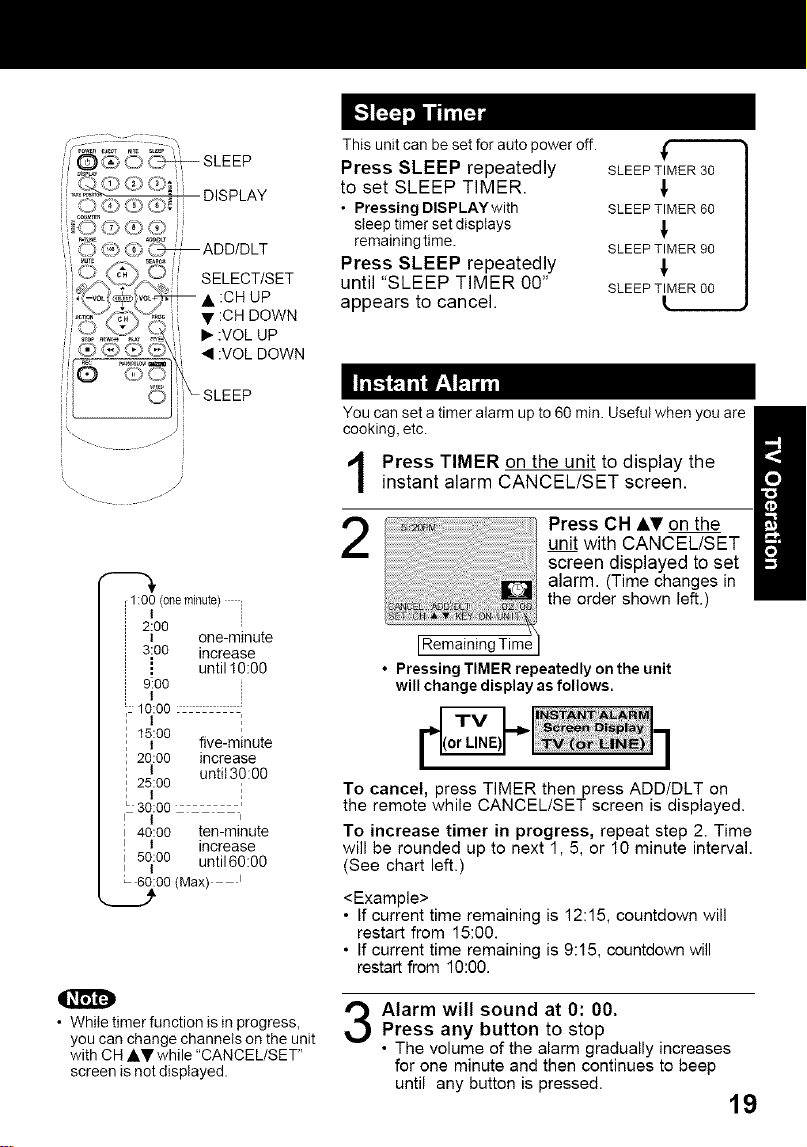
DISPLAY
_SLEEP
Thisunitcanbesetforautopoweroff. ,_
Press SLEEP repeatedly SLEEPTIMER30
to set SLEEP TIMER. _.
• Pressing DISPLAY with SLEEPTIMER60
sleep timer set dispiays _,
remaining time. SLEEPTIMER90
Press SLEEP repeatedly
until "SLEEP TIMER 00" SLEEPTIMER 00
appears to cancel.
. .r
;1:00(oneminute)
I
2:00
I one-minute
3:o0 increase
i until 10:00
9!00
t
i: 10:00
I 15:00
I i five-minute
2o:0o increase
25t:00 antit30:O0
t ;
30:00
40:00 ten-minute
I increase
5o:oo until60:00
I
00(Max) t
• While timer function is in progress,
you can change channels on the unit
with CH AV while "CANCEL/SET"
screen is not displayed.
You can set a timer alarm up to 60 min. Useful when you are
cooking, etc.
Press TIMER on the unit to display the
instant alarm CANCEL/SET screen.
2
Press CH &_' on the
unit with CANCEL/SET
screen displayed to set
alarm. (Time changes in
the order shown left.)
[Remaining Time
• Pressing TIMER repeatedly on the unit
will change display as follows.
To cancel, press TIMER then press ADD/DLT on
the remote while CANCEL/SET screen is displayed.
To increase timer in progress, repeat step 2. Time
will be rounded up to next 1,5, or 10 minute interval.
(See chart left.)
<Example>
• If current time remaining is 12:15, countdown will
restart from 15:00.
• If current time remaining is 9:15, countdown will
restart from 10:00.
Alarm will sound at 0: 00.
Press any button to stop
• The volume of the alarm gradually increases
for one minute and then continues to beep
until any button is pressed.
19
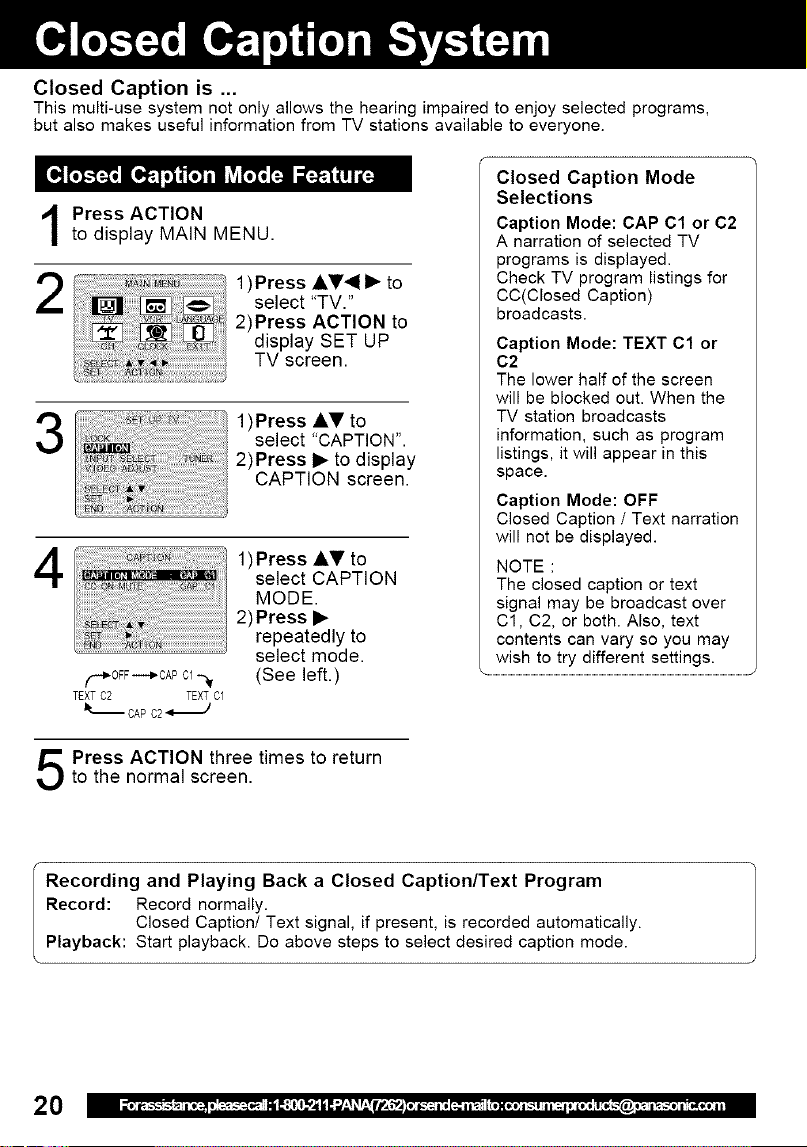
Closed Caption is ...
This multi-use system not only allows the hearing impaired to enjoy selected programs,
but also makes useful information from TV stations available to everyone.
Press ACTION
to display MAIN MENU.
2
1)Press AV_I • to
select "TV."
2)Press ACTION to
display SET UP
TV screen.
3
1)Press A,V to
select "CAPTION".
2)Press • to display
CAPTION screen.
4
F_OFF ----_CAP Cl --_
TEXT 02 TEXTC1
It_ CAP C2
1)Press AV to
select CAPTION
MODE.
2) Press •
repeatedly to
select mode.
(See left.)
Closed Caption Mode
Selections
Caption Mode: CAP C1 or C2
A narration of selected TV
programs is displayed.
Check TV program listings for
CC(Closed Caption)
broadcasts.
Caption Mode: TEXT C1 or
C2
The lower half of the screen
will be blocked out. When the
TV station broadcasts
information, such as program
listings, it will appear in this
space.
Caption Mode: OFF
Closed Caption / Text narration
will not be displayed.
NOTE :
The closed caption or text
signal may be broadcast over
Cl, C2, or both. Also, text
contents can vary so you may
wish to try different settings.
Press ACTION three times to return
to the normal screen.
Recording and Playing Back a Closed Caption/Text Program
Record: Record normally.
Closed Caption/Text signal, if present, is recorded automatically.
Playback: Start playback. Do above steps to select desired caption mode.
2O
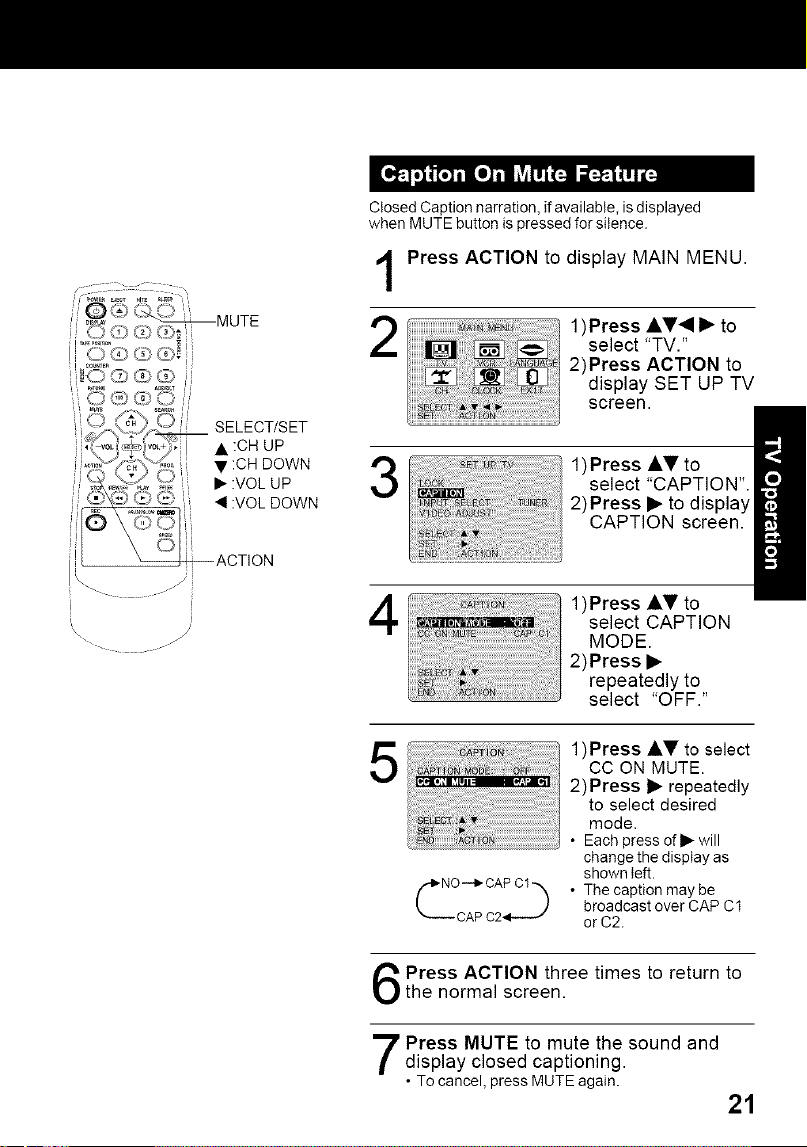
Closed Caption narration, if available, is displayed
when MUTE button is pressed for silence.
1
2
Press ACTION to display MAIN MENU.
1)Press AV_I • to
select "TV."
2)Press ACTION to
display SET UP TV
screen.
3
1)Press AV to
select "CAPTION".
2)Press • to display
CAPTION screen.
!
- .o-
4
1)Press AV to
select CAPTION
MODE.
2)Press •
repeatedly to
select "OFF."
5
1)Press AV to select
CC ON MUTE.
2)Press • repeatedly
to select desired
mode.
• Each press ofl_ will
change the disptay as
shown left.
• The caption may be
broadcast over CAP C1
orC2.
Press ACTION three times to return tothe normal screen.
Press MUTE to mute the sound and
display closed captioning.
• To cancel, press MUTE again.
21
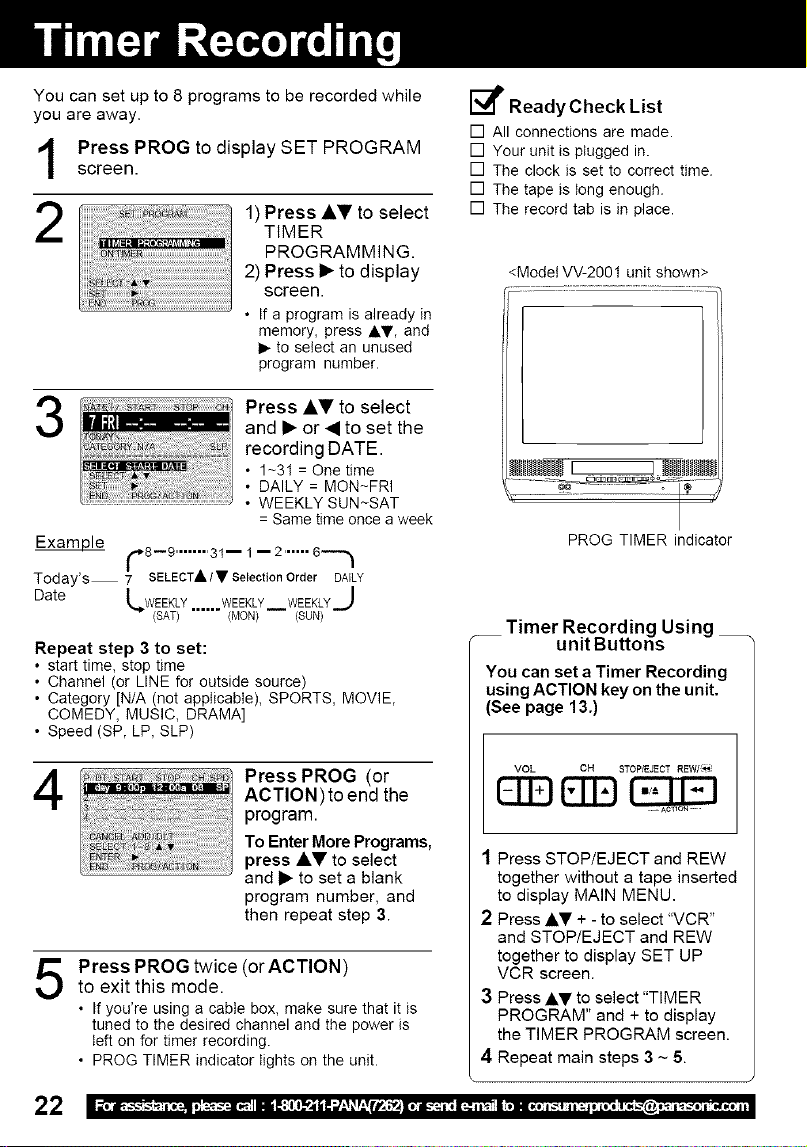
You can set up to 8 programs to be recorded while
you are away.
Press PROG to display SET PROGRAM
screen.
2
1) Press Ai,_'to select
TIMER
PROGRAMMING.
2) Press i_ to display
screen.
• If a program is already in
memory, press AT, and
I_ to select an unused
program number.
Press AV to select
and I_ or 4 to set the
recording DATE.
• 1-31 = One time
• DAILY = MON-FRI
• WEEKLY SUN-SAT
= Same time once a week
Examule f,_8--9 ........ 31-- 1 -- 2 ...... 6-'_
/
/
Today's 7 SELECT A/• Selection Order DAILY
Date [,_WEEKLY...... WEEKLY WEEKLYJ
-- (SAT) (MON) (SUN)
Repeat step 3 to set:
• start time, stop time
• Channel (or LINE for outside source)
• Category [N/A (not applicable), SPORTS, MOVIE,
COMEDY, MUSIC, DRAMA]
• Speed (SP, LP, SLP)
4
Press PROG (or
ACTION)to end the
program.
To Enter More Programs,
press AV to select
and I_ to set a blank
program number, and
then repeat step 3.
5
Press PROG twice (or ACTION)
to exit this mode.
• If you're using a cable box, make sure that it is
tuned to the desired channel and the power is
teft on for timer recording.
• PROG TIMER indicator tights on the unit.
[_ ReadyCheck List
[] All connections are made.
[] Your unit is ptugged in.
[] The clock is set to correct time.
[] The tape is tong enough.
[] The record tab is in place.
<Model VV-2001 unit shown>
PROG TIMER indicator
__ Timer Recording Using
unit Buttons
You can set a Timer Recording
using ACTION key on the unit.
(See page 13.)
VOL CH STOP/EJECT REW/_
EEg(
1 Press STOP/EJECT and REW
together without a tape inserted
to display MAIN MENU,
2 Press AT + - to select "VCR"
and STOP/EJECT and REW
together to display SET UP
VCR screen.
3 Press AV to select "TIMER
PROGRAM" and + to display
the TIMER PROGRAM screen.
4 Repeat main steps 3 ~ 5.
22
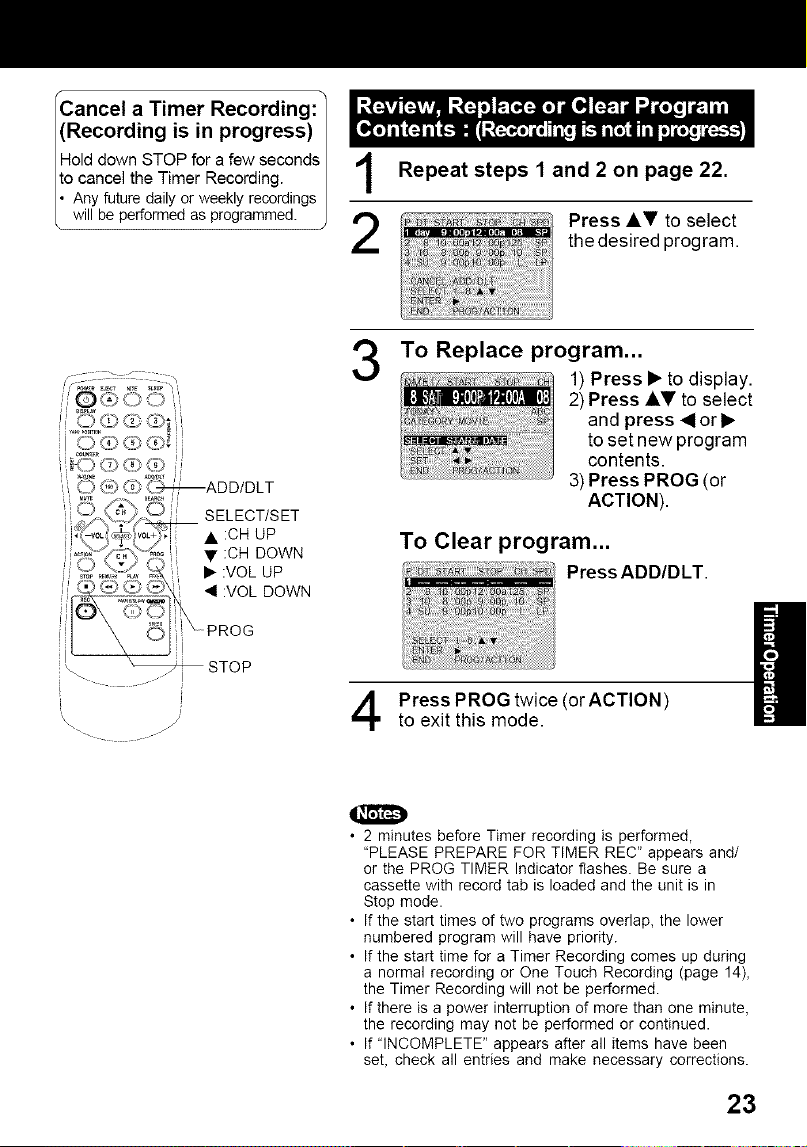
Cancel a Timer Recording: /
(Recording is in progress)
/
Hold down STOP for a few seconds| ,t
o cancel the Timer Recording. i |
• Any future daily or weekly recordings |
will be performed as programmed. J
2
Repeat steps 1 and 2 on page 22.
Press J,V to select
the desired program.
--ADD/DLT
/i
\\ J
3
To Replace program...
1) Press • to display.
2) Press AV to select
and press 4or•
toset new program
contents.
3) Press PROG (or
ACTION).
To Clear program...
Press ADD/DLT.
Press PROG twice (orACTION)
to exit this mode.
O
• 2 minutes before Timer recording is performed,
"PLEASE PREPARE FOR TIMER REC" appears and/
or the PROG TIMER Indicator flashes. Be sure a
cassette with record tab is loaded and the unit is in
Stop mode.
• If the start times of two programs overlap, the lower
numbered program will have priority.
• If the start time for a Timer Recording comes up during
a normal recording or One Touch Recording (page 14),
the Timer Recording will not be performed.
• If there is a power interruption of more than one minute,
the recording may not be performed or continued•
• If "INCOMPLETE" appears after all items have been
set, check all entries and make necessary corrections.
23
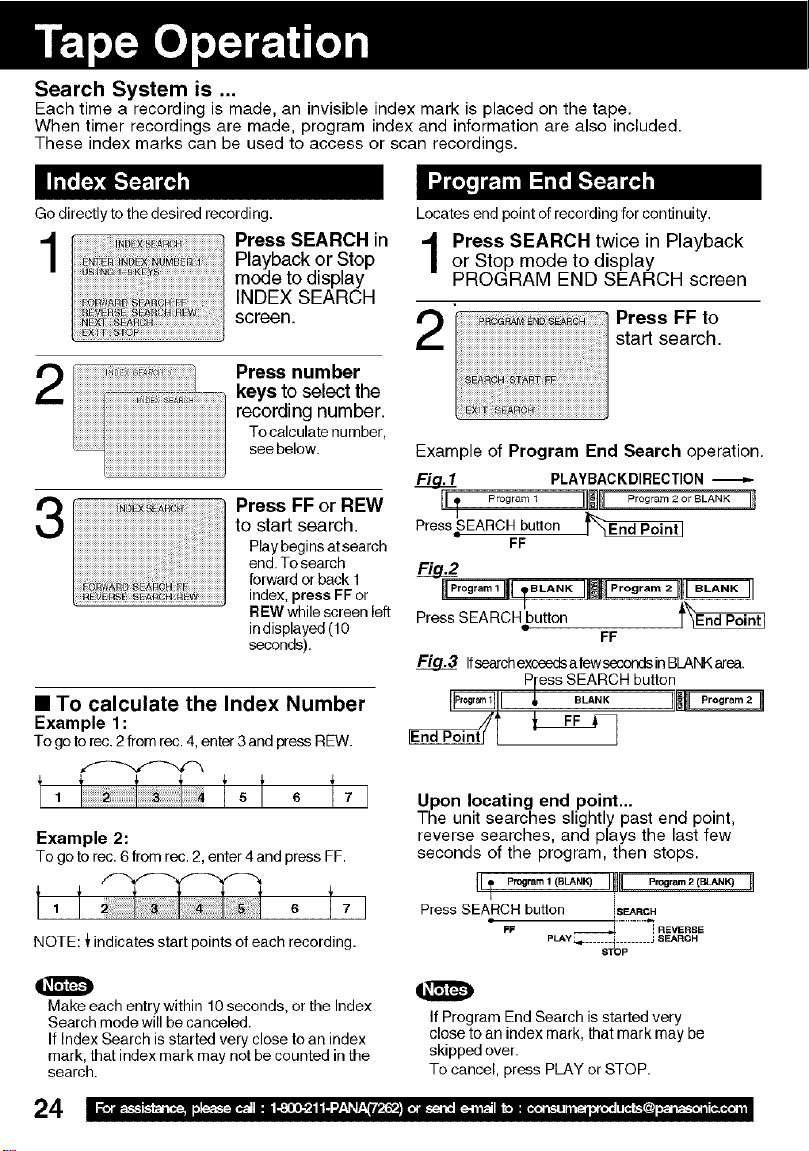
Search System is ...
Each time a recording is made, an invisible index mark is placed on the tape.
When timer recordings are made, program index and information are also included.
These index marks can be used to access or scan recordings.
Go directly to the desired recording.
Press SEARCH in
Playback or Stop
mode todisplay
INDEX SEARCH
screen.
2i Ii iiiiiiiiiiiiiiiiiiiiiiiiiiiiiii ii iiii i ii iiiiiiii i i iiiiiiiiiiii-1
i:ii i:iiiiiiiiiiiiiiiiiiiiii
Press number
keys to select the
recording number.
To calculate number,
see below.
3
Press FF or REW
to start search.
Play begins at search
end. To search
forward or back 1
index, press FFor
REW while screen left
in displayed (10
seconds).
• To calculate the Index Number
Example 1:
To go torec. 2from rec. 4,enter 3 and press REW.
Example 2:
To go to rec. 6from rec. 2, enter 4 and press FF.
NOTE: J_indicates start points of each recording.
O
Make each entry withirr 10seconds, or the Index
Search mode will be canceled.
If Index Search is started very close to an index
mark, that index mark may net be counted in the
search.
24
Locates end point of recording for continuity.
Press SEARCH twice in Playback
or Stop mode to display
PROGRAM END SEARCH screen
2
Press FF to
start search.
Example of Program End Search operation.
PLAYBACKDIRECTION
IL_ Prog .... Jill! Program 2 or BLANK li
I
PressSEARCH button
FF
Press SEARCHbutton t_
FF
Ifsearchexceedsa fewsecondsinBLAI',Karea.
Pless SEARCH button
I_il _, _"" II1_
Upon locating end point...
The unit searches slightly past end point,
reverse searches, and plays the last few
seconds of the program, then stops.
Press SEARCH button SEARCH
• ,
FF _ i R_VER8_
PLAY_._.._.._i ......... j SEARCH
8TOP
O
If Program End Search is started very
close to an index mark, that mark may be
skipped over.
To cancel, press PLAY or STOP.
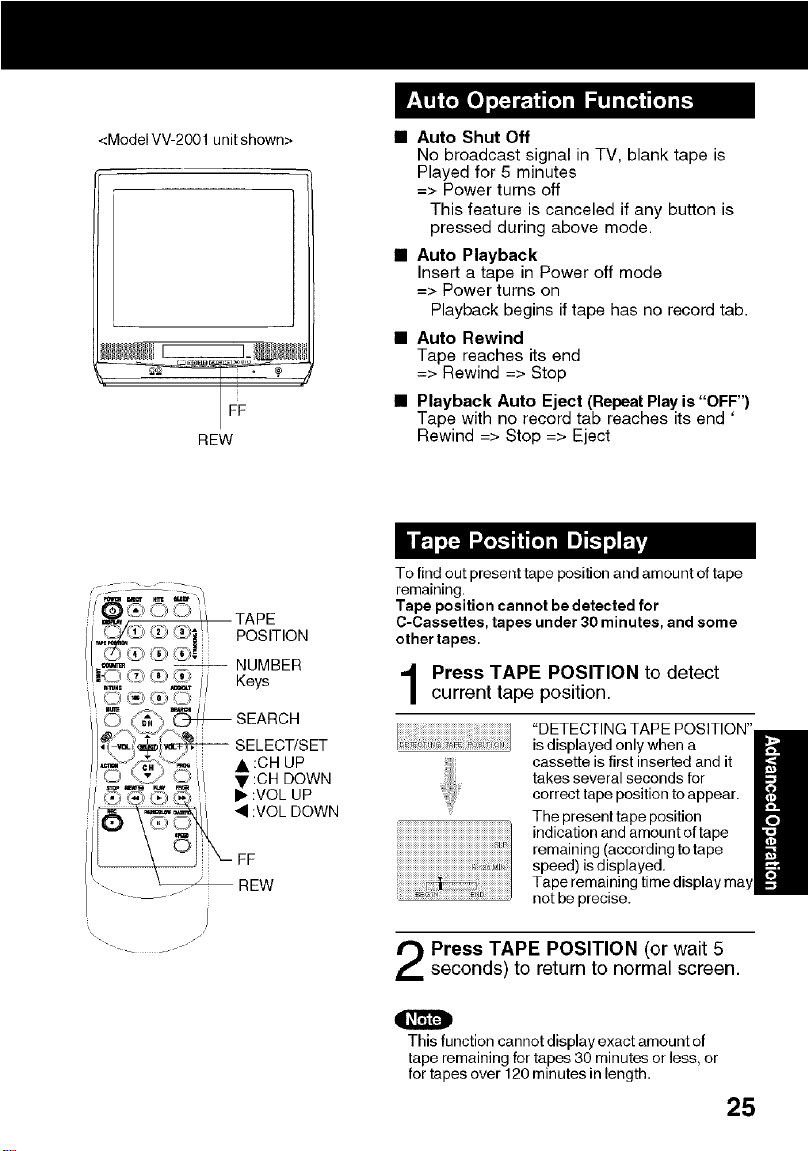
<ModelVV-2001unitshown>
NEW
• Auto Shut Off
No broadcast signal in TV, blank tape is
Played for 5 minutes
=> Power turns off
This feature is canceled if any button is
pressed during above mode.
• Auto Playback
Insert a tape in Power off mode
=> Power turns on
Playback begins if tape has no record tab.
• Auto Rewind
Tape reaches its end
=> Rewind => Stop
• Playback Auto Eject (Repeat Play is "OFF")
Tape with no record tab reaches its end '
Rewind => Stop => Eject
_- / _ j
To find out present tape position and amount of tape
remaining.
Tape position cannot be detected for
C-Cassettes, tapes under 30 minutes, and some
other tapes,
Press TAPE POSITION to detect
current tape position.
iiiiiiiiiiiiiiiiiiiiiiiiiiiiiiiiiiiiiiiiiiiiiiiiiiiiiiiiiiiiiiiiiiiiiiiiiiiiiiiiiiii_i_i_
iiiiiiiiiiiiiiiiiiiiiiiiiiiiiiiiiiiiiiiiiiiiiiiiiiiiiiiiiiiiiiiiiii_Jh!i
ii iiiiiiiiiiiiii i!!!i!iiiiiiiiiiiiiiiiii
is displayed only when a
cassette is first inserted and it
takes several seconds for
correct tape position to appear.
The present tape position
indication and amount oftape
remaining (according totape
speed) isd!splayed.
not be precise.
Press TAPE POSITION (or wait 5
seconds) to return to normal screen.
O
This function cannot display exact amount of
tape remaining for tapes 30 minutes or less, or
for tapes over 120 minutes in length.
25
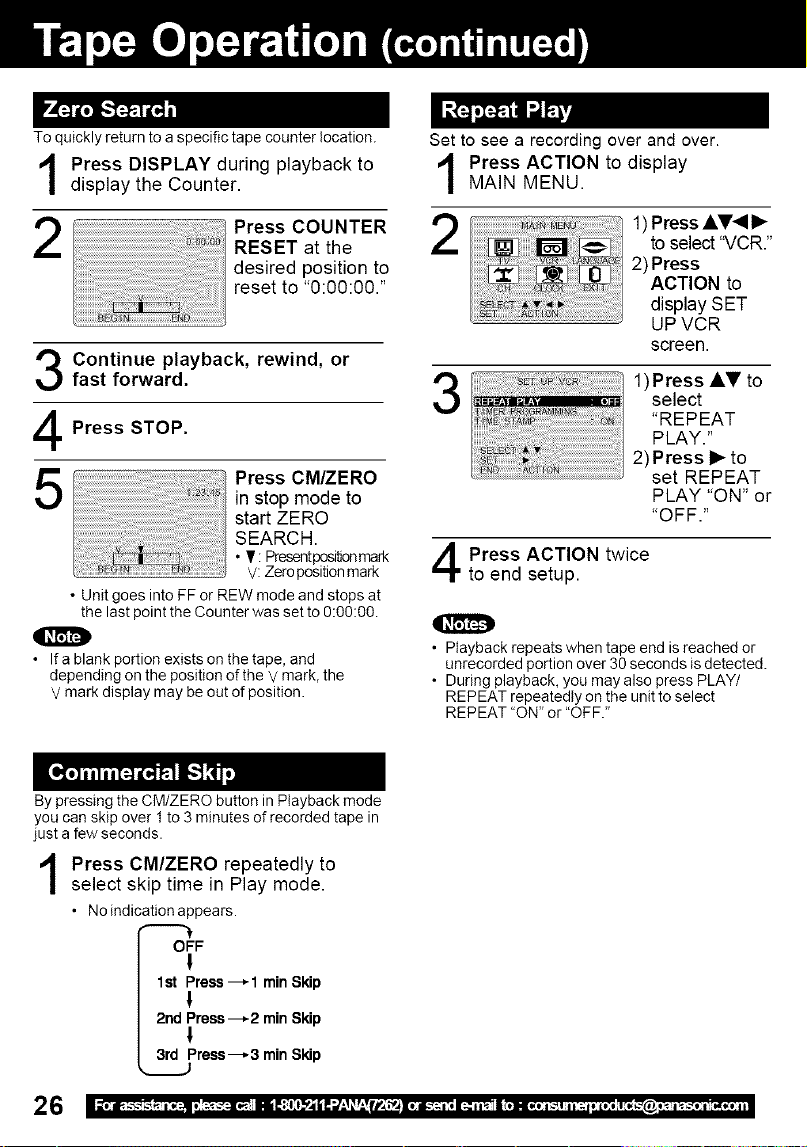
To quickly return to a specific tape counter location.
1
2
Press DISPLAY during playback to
display the Counter.
Set to see a recording over and over.
Press ACTION to display
MAIN MENU.
Press COUNTER 2
RESET at the
desired position to
reset to "0:00:00."
Continue playback, rewind, or
fast forward.
Press STOP.
Press CM/ZERO
in stop mode to
start ZERO
SEARCH.
• I[ : Presentposi_onmark
V:Zeropositionmark
• Unit goesintoFFor REWmodeandstops at
the lastpointthe Counterwassetto0:00:00.
If ablank portion exists on the tape, and
depending on the position of the V mark, the
V mark display may be out of position
5
1)PressAkV_
toselect'_/CR."
2) Press
ACTION to
display SET
UPVCR
screen.
3
1)Press A,V to
select
"REPEAT
PLAY."
2) Press I_ to
set REPEAT
PLAY "ON" or
"OFF."
Press ACTION twice
to end setup.
O
• Playback repeats when tape end is reached or
unrecorded portion over 30 seconds is detected.
• During playback, you may also press PLAY/
REPEAT repeatedly on the unit to select
REPEAT "ON" or "OFF."
By pressing the CM/ZERO button in Playback mode
you can skip over 1to 3 minutes of recorded tape in
just a few seconds
Press CM/ZERO repeatedly to
select skip time in Play mode.
• No indication appears
OFF
!
1st Press---,'1 min Skip
I
2nd Press---,-2 min Skip
I
3rd Press---.-3 rain Skip
26

DISPLAY
COUNTER
RESET
SELECT/SET
• :CH UP
• :CH DOWN
i_ :VOL UP
• :VOL DOWN
<Model W-2001 unit shown>
When "ON" is selected, the picture is displayed even
when a broadcast signal is weak or non-existent.
Press ACTION to display MAIN
MENU.
2
1)Press AV_ _"
to select "CH."
2)Press ACTION
to display SET
UP CHANNEL
screen.
3
1)Press AV to
select WEAK
SIGNAL
DISPLAY .
2)Press I_ to set
"ON" or "OFF."
• "ON" =Pictareisdisptayedregardiessofsignat
condition, and may not always be clearly
visible.
"OFF" =Screen turns solid blue when signal is
absent or weak.
• If unit is connected to equipment which has blue
back feature, selecting "ON" wilt have no effect on
the other equipment.
Press ACTION twice
to return to the normal screen.
REC
Atl operations are prohibited except Timer recording
and tape eject• Useful for families with small children•
In stop mode, hold
down REC on the unit
without a cassette
inserted for 7 seconds
to turn "ON." Please
ignore NO CASSETTE
warning.
Repeat above with or
without cassette to
turn "OFF."
• VCR Lock is canceled automatically
after about 24 hours if clock is set.
27
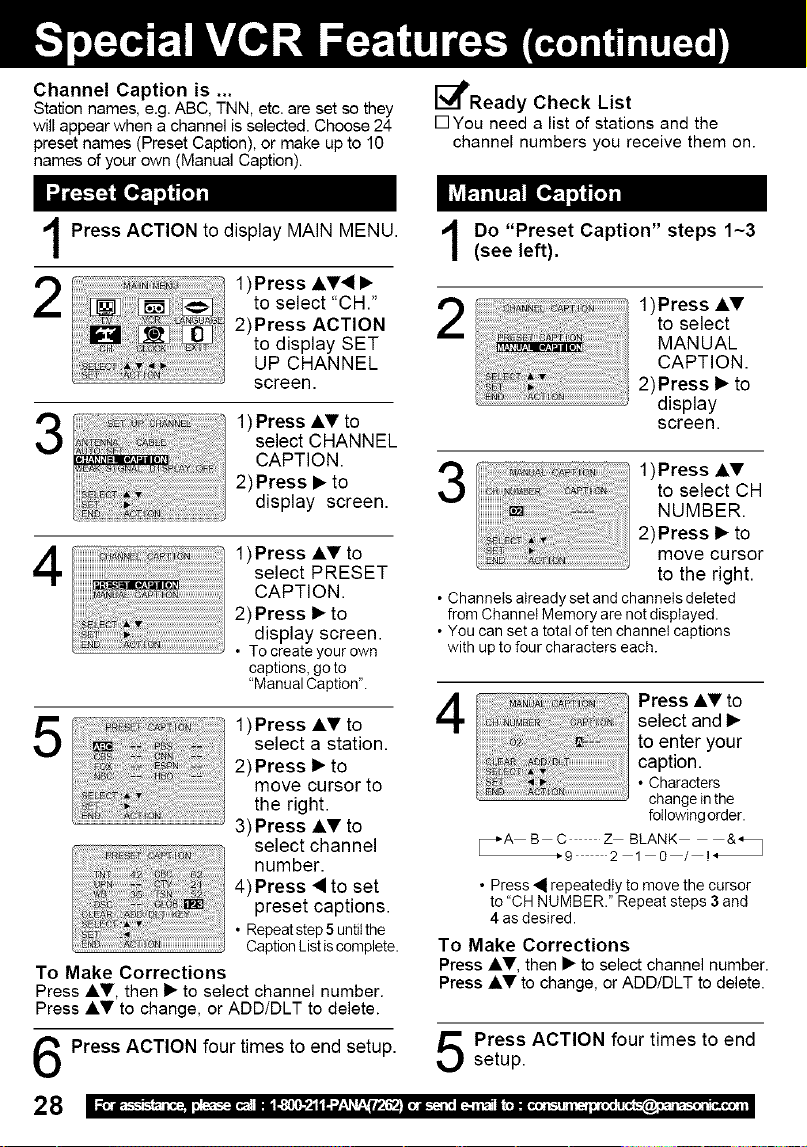
Channel Caption is ...
Station names, e.g. ABC, TNN, etc. are set so they
will appear when a channel is selected. Choose 24
preset names (Preset Caption), or make up to 10
names of your own (Manual Caption).
_l_Ready Check List
rqYou need a list of stations and the
channel numbers you receive them on.
Press ACTION to display MAIN MENU.
2
1)Press AV• •
to select "CH."
2)Press ACTION
to display SET
UP CHANNEL
screen.
3
1) Press AV to
select CHANNEL
CAPTION.
2)Press • to
display screen.
4
1)Press AT to
select PRESET
CAPTION.
2) Press • to
display screen.
• To create your own
captions, go to
"Manual Caption'.
1)Press AV toselect a station.
2)Press • to
move cursor to
the right.
3)Press AV to
select channel
number.
4)Press • to set
preset captions.
• Repeat step 5untilthe
Caption Listis complete.
To Make Corrections
Press AV, then • to select channel number.
Press Ay to change, or ADD/DLT to delete.
Press ACTION four times to end setup.
28
Do "Preset Caption" steps 1-3
(see left).
iliiiiiiiiiiil_l_l_!_i!_!_!_!_!_l_lii_i_i_l_l_l_l_l_l_iiiiilil_lililiiiiiiiiii_i_ii_i_i_i_i_i!i!_i_!i!l!_!_iiiiiii!i!!_!i!ii_ii_ii_ii_ii_ii_ii_ii_ii_ii_ii_ii_iiiiiiii!i!i!i_ii_!_!_!!_iiiii
]]]] o_]
1)Press AT
to select
MANUAL
CAPTION.
2)Press • to
display
screen.
1)Press AVto select CH
NUMBER.
2)Press • to
move cursor
to the right.
• Channels atready set and channets deleted
from Channel Memory are not displayed.
• You can set a total of tee channet captions
with up to four characters each.
4
Press _,V to
select and •
to enter your
caption.
• Characters
change in the
following order.
_"A B C Z BLANK &_
_'9 2 1 0 / !*
• Press • repeatedly to move the cursor
to "CH NUMBER." Repeat steps 3 and
4 as desired.
To Make Corrections
Press AV, then • to select channel number.
Press AV to change, or ADD/DLT to delete.
Press ACTION four times to end
setup.

E_Ready Check List
rqThe clock is set to correct time.
rqThe record tab is in place.
!
i
I
'\ //
"-. - .....
<Time Stamp Example >
Normal/One
Touch Recording
This unit writes program data (see example below) for
about the first 10seconds of every recording. The
information is then displayed about 10seconds after
ptaybackbegins.
Press ACTION to display MAIN MENU.
2
1)Press AV, i_ to
select "VCR."
2) Press ACTION
to display SET
UP VCR screen.
3
1)Press Ai,V to
select TIME
STAMP.
2)Press I_ to set
"ON" or "OFF."
• When "OFF" is selected, the program data
iswritten on thetape, butwitt notbe displayed.
Press ACTION twice to returnto normal screen.
Timer Recording When Clock is not set...
29
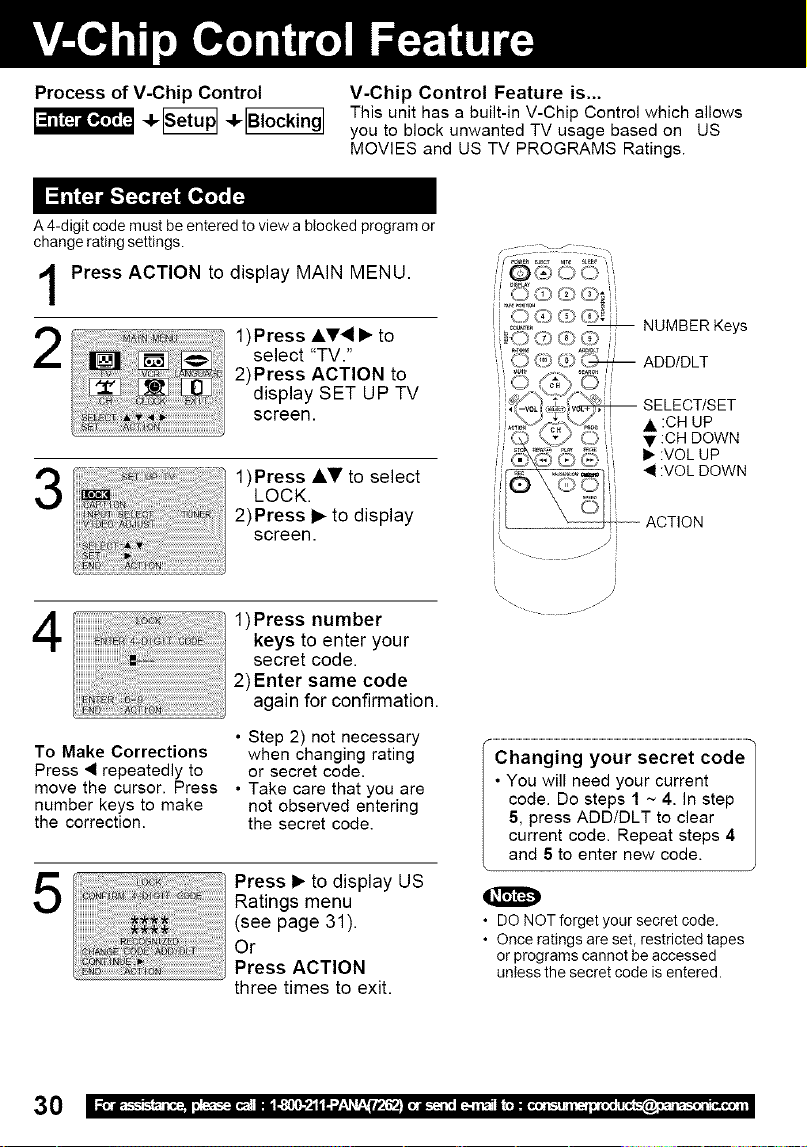
Process of V-Chip Control V-Chip Control Feature is...
This unit has a built-in V-Chip Control which allows
you to block unwanted TV usage based on US
MOVIES and US TV PROGRAMS Ratings.
A 4-digit code must be entered to view a blocked program or
change rating settings.
Press ACTION to display MAIN MENU.
2
1)Press A.V_ • to
select "TV."
2)Press ACTION to
display SET UP TV
screen.
i '(_ O3'_L_"_ NUMBER Keys
3
1)Press Ai,_'to select
LOCK.
2)Press i_ to display
screen.
4
1)Press number
keys to enter your
secret code.
2)Enter same code
again for confirmation.
• Step 2) not necessary
To Make Corrections when changing rating
Press _ repeatedly to or secret code.
move the cursor. Press • Take care that you are
number keys to make not observed entering
the correction, the secret code.
5
Press • to display US
Ratings menu
(see page 31).
Or
Press ACTION
three times to exit.
i !
i i
\\
.....Changin gy0 ur secret €0de 1
• You will need your current |
code. Do steps 1 ~ 4. In step |
5, press ADD/DLT to clear |
current code. Repeat steps 4 |
and 5 to enter new code.
• DO NOT forget your secret code.
• Once ratings are set, restricted tapes
or programs cannot be accessed
unless the secret code is entered•
3O
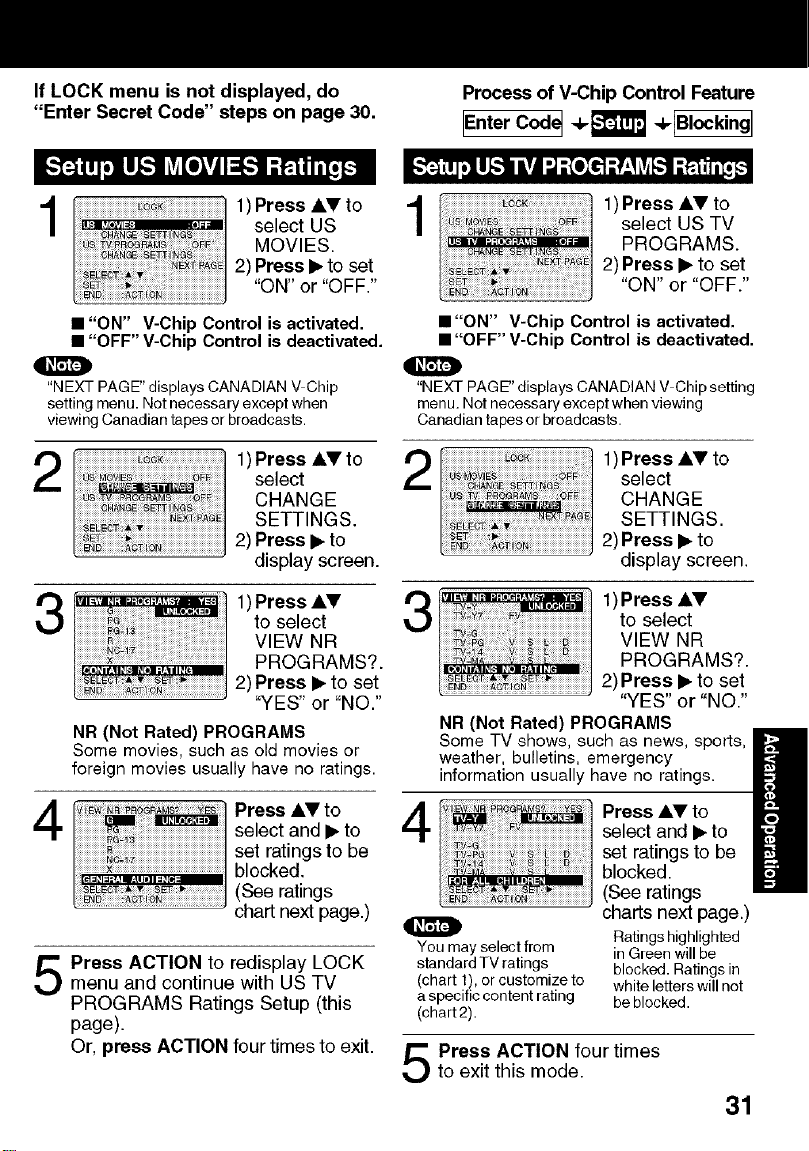
If LOCK menu is not displayed, do
"Enter Secret Code" steps on page 30.
Process of V-Chip Control Feature
IEnterCode_4,_ ÷_
I
1)Press AV to
l"_=_'"'= ,_i select US
MOVIES.
2) Press I_to set
"ON" "OFF"
or
• "ON" V-ChipControl is activated.
• "OFF" V-Chip Control is deactivated.
"NEXT PAGE" displays CANADIAN V Chip
setting menu. Not necessary except when
viewing Canadian tapes or broadcasts.
1)Press _i,Vto
select
CHANGE
SETTINGS.
2) Press I_ to
display screen.
iiiiiiiiiiiiiiiiiiiiiiiiiii__-_i_i_iiiiiiiiiiiiiiiiiiiiiiiiiiiiiiiiiiiiiiiiiiiiiiiiiiiiiiiii
iiiiiiiii iiiii_ iiiiiiiiiii¸iii i i iii iiiiiiiiiiiiiiiiiiiiiiiii
I111]_ i I'_11 # _11_[II ."r:l l I _1t
1)Press _II,V
to select
VIEW NR
PROGRAMS?.
2) Press I_to set
"YES" or "NO."
NR (Not Rated) PROGRAMS
Some movies, such as old movies or
foreign movies usually have no ratings.
_Tiiiiiiii_£_iiiiiiiiiiiiiiiiiiiiiiiiiiiiiiiiiiiiiiiiiiiiiiiiiiiiiiiiiiiiiiiiiiiiiiiiii
Press AV to
select and I_ to
set ratings to be
blocked.
(See ratings
chart next page.)
Press ACTION to redisplay LOCKmenu and continue with US TV
PROGRAMS Ratings Setup (this
page).
Or, press ACTION four times to exit.
1
1)Press &V to
select US TV
PROGRAMS.
2) Press I_ to set
"ON" or "OFF."
• "ON" V-Chip Control is activated.
• "OFF" V-Chip Control is deactivated.
"NEXT PAGE" displays CANADIAN V Chip setting
menu. Net necessary except when viewing
Canadian tapes or broadcasts.
2
1)Press ,_V to
select
CHANGE
SETTINGS.
2) Press I_ to
display screen.
3
4
1) Press Ay
to select
VIEW NR
PROGRAMS?•
2)Press I_ to set
"YES" or "NO."
NR (Not Rated) PROGRAMS
Some TV shows, such as news, sports,
weather, bulletins, emergency
information usually have no ratings.
O
You may select from
standard TV ratings
(chart 1), or customize to
a specific content rating
(chart2).
Press kV to
select and _ to
set ratings to be
blocked.
(See ratings
charts next page.)
Ratings highlighted
in Green will be
blocked. Ratings in
white letters will not
be blocked.
Press ACTION four timesto exit this mode.
31
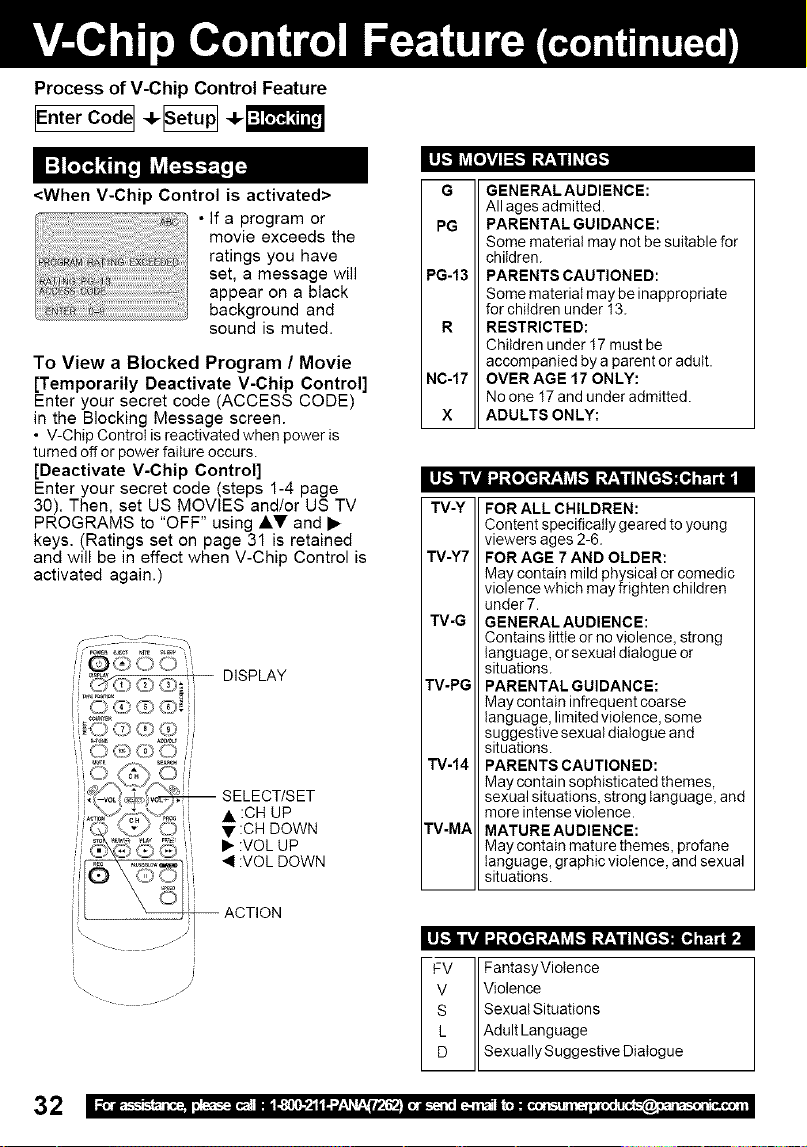
Process of V-Chip Control Feature
IEnterCodeI -t-_ 1-!-_
Lu_ILV_[olVAI=[,,.'_It,t_,vgil _[=-]_'i
<When V-Chip Control is activated>
• If a program or
movie exceeds the
ratings you have
set, a message will
appear on a black
background and
sound is muted.
To View a Blocked Program / Movie
[Temporarily Deactivate V-Chip Control]
Enter your secret code (ACCESS CODE)
in the Blocking Message screen.
• V-Chip Control is reactivated when power is
turned off or power failure occurs.
[Deactivate V-Chip Control]
Enter your secret code (steps 1-4 page
30). Then, set US MOVIES and/or US TV
PROGRAMS to "OFF" using •V and •
keys. (Ratings set on page 31 is retained
and will be in effect when V-Chip Control is
activated again.)
DISPLAY
.... / _
[
]\
-- SELECT/SET
• :CH UP
• :CH DOWN
I_ :VOL UP
:VOL DOWN
-- ACTION
G
PG
PG-13
R
NC-17
X
GENERALAUDIENCE:
All ages admitted.
PARENTAL GUIDANCE:
Some material may not be suitable for
children.
PARENTS CAUTIONED:
Some material may be inappropriate
for children under 13.
RESTRICTED:
Children under 17must be
accompanied by a parent or adult.
OVER AGE 17 ONLY:
No one 17and under admitted.
ADULTS ONLY:
TV-Y
TV-Y7
TV-G
TV-PG
TV-14
TV-MA
FOR ALL CHILDREN:
Content specifically geared to young
viewers ages 2-6.
FOR AGE 7 AND OLDER:
May contain mild physical or comedic
violence which may frighten children
under 7.
GENERAL AUDIENCE:
Contains little or no violence, strong
language, or sexual dialogue or
situations.
PARENTAL GUIDANCE:
May contain infrequent coarse
language, limited violence, some
suggestive sexual dialogue and
situations.
PARENTS CAUTIONED:
May contain sophisticated themes,
sexual situations, strong language, and
more intense violence.
MATURE AUDIENCE:
May contain mature themes, profane
language, graphic violence, and sexual
situations.
s "_O _-'H :-" _ all
FVIIFantasyViotence
v IIViolence
s IISexuatSituati°ns
L IIAdultLanguage
D IISexuallySuggestiveDiat°gue
32
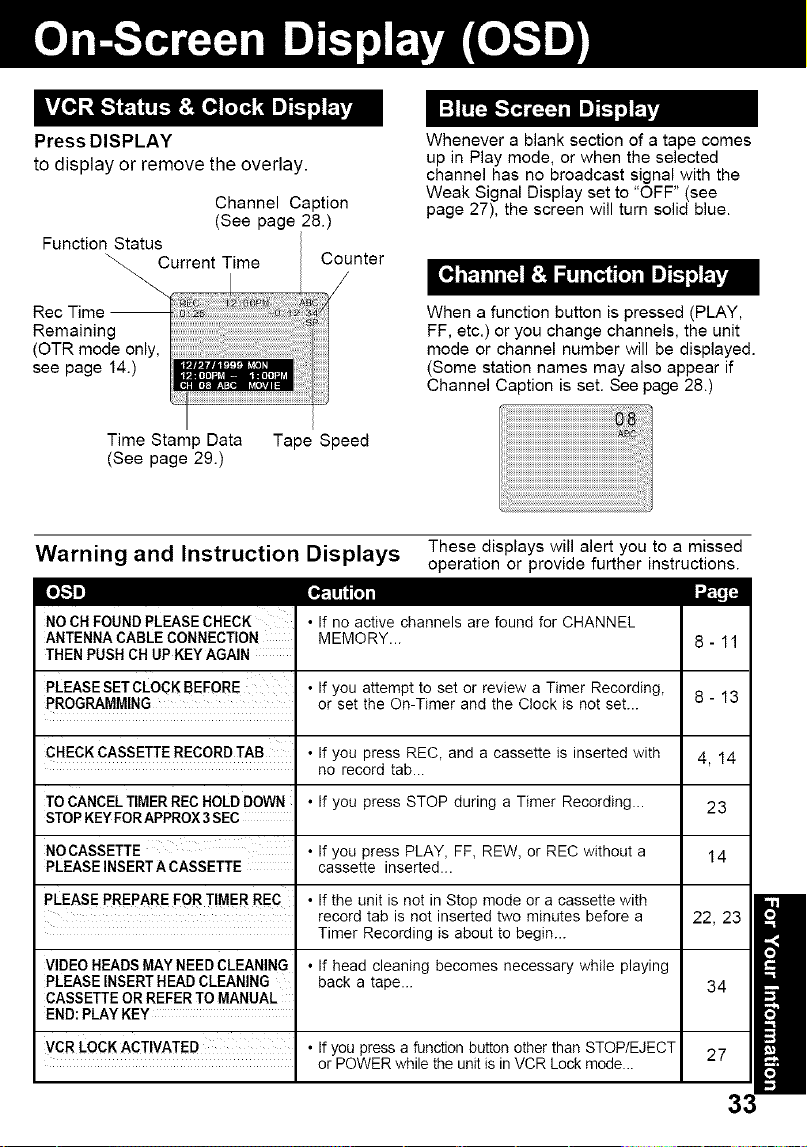
Press DISPLAY
to display or remove the overlay.
Channel Caption
(See page 28.)
Function Status
\_. Current Time Counter
Remaining
(OTR mode only,
see page 14.)
Whenever a blank section of a tape comes
up in Play mode, or when the selected
channel has no broadcast signal with the
Weak Signal Display set to "OFF" (see
page 27), the screen will turn solid blue.
When a function button is pressed (PLAY,
FF, etc.) or you change channels, the unit
mode or channel number will be displayed.
(Some station names may also appear if
Channel Caption is set. See page 28.)
Time Stamp Data Tape Speed
(See page 29.)
Warning and Instruction Displays These displays will alert you to a missed
operation or provide further instructions.
[o],.1m] [a,_'[H_l
NOCH FOUNDPLEASE CHECK
ANTENNA CABLE CONNECTION
THEN PUSH CH UPKEYAGAIN
PLEASESETCLOCKBEFORE
PROGRAMMING
• If no active channels are found for CHANNEL
MEMORY...
If you attempt to set or review a Timer Recording,
or set the On-Timer and the Clock is not set...
CHECKCASSETTERECORD TAB • If you press REC, and a cassette is inserted with
no record tab...
TOCANCEL TIMERRECHOLDDOWN
STOPKEYFORAPPROX3SEC
NO CASSETTE •
PLEASE INSERTA CASSETTE
PLEASE PREPARE FOR TIMER REC •
VIDEO HEADS MAY NEED CLEANING •
PLEASE INSERTHEAD CLEANING
CASSETTE OR REFER TO MANUAL
END:PLAY KEY
: VCR LOCKACTIVATED : •
• If you press STOP during a Timer Recording...
If you press PLAY, FF, REW, or REC without a
cassette inserted...
If the unit is not in Stop mode or a cassette with
record tab is not inserted two minutes before a
Timer Recording is about to begin...
If head cleaning becomes necessary while playing
back a tape...
If you press a function button other than STOP/EJECT
or POWER while the unit is in VCR Lock mode...
8-13
4,14
23
14
22, 23
34
27
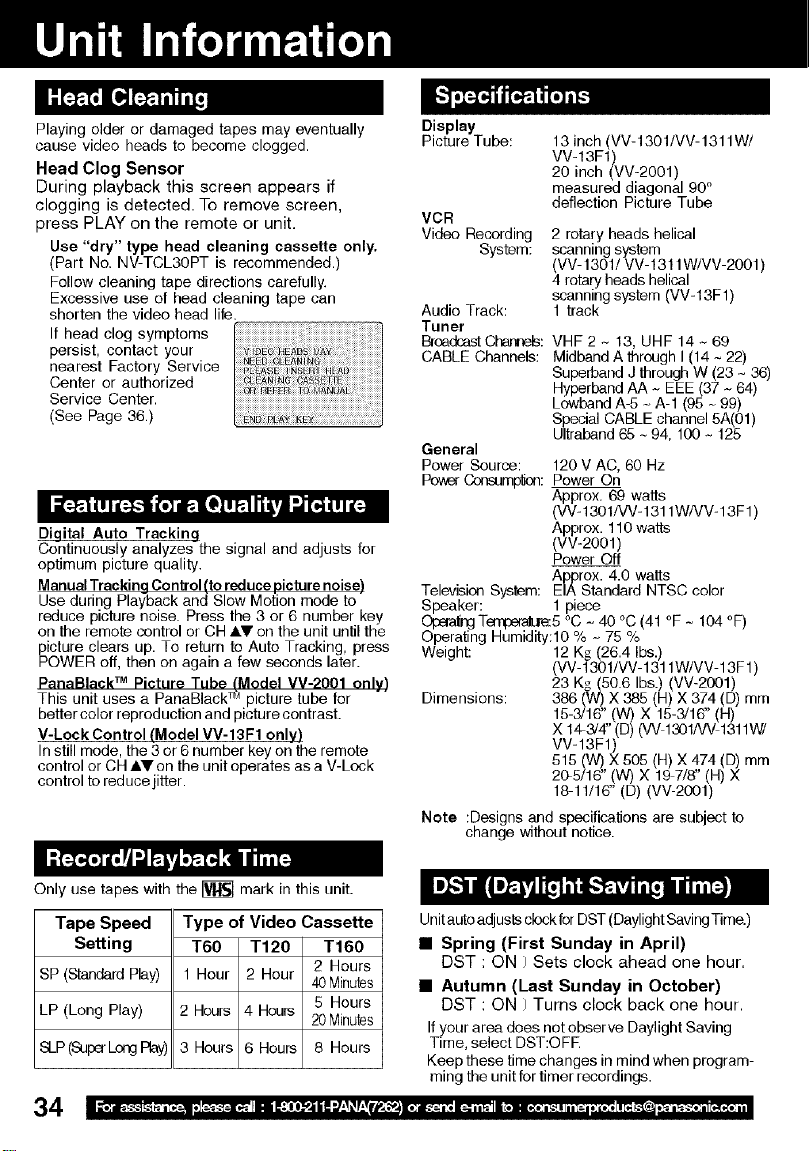
Playingolderordamagedtapesmayeventually
causevideoheadstobecomeclogged.
HeadClogSensor
Duringplaybackthisscreenappearsif
cloggingisdetected.Toremovescreen,
pressPLAYontheremoteorunit.
Use"dry"typeheadcleaningcassetteonly.
(PartNo.NV-TCL3OPTisrecommended.)
Followcleaningtapedirectionscarefully.
Excessiveuseofheadcleaningtapecan
shortenthevideoheadlife.
Ifheadclogsymptoms
persist,contactyour
nearestFactoryService
Centerorauthorized
ServiceCenter.
(SeePage36.)
Digital Auto Tracking
Continuously analyzes the signal and adjusts for
optimum picture quality.
Manual Tracking Control (to reduce picture noise)
Use during Playback and Slow Motion mode to
reduce picture noise. Press the 3 or 6 number key
oil the remote control or CH A.V on the unit until the
_icture clears up. To return to Auto Tracking, press
OWER off, then on again a few seconds later.
PanaBlack TM Picture Tube LModel MV-2001 only)
TM
This unit uses a PanaBlack : picture tube for
better color reproduction and picture contrast.
V-Lock Control (Model VV-13F1 only)
In still mode, the 3 or 6 number key on the remote
control or CH AY on the unit operates as a V-Lock
control to reduce jitter.
Only use tapes with the _ mark in this unit.
Display
Picture Tube:
VCR
VideoRecording
System:
Audio Track:
Tuner
_oadcestCt_e_:
CABLE Channels:
General
Power Source:
PowerConsum¢ou:
13 inch (VV-1301/VV-1311W/
VV-13F1)
20 inch (VV-2001)
measured diagonal 90°
deflection Picture Tube
2 rotary heads helical
scanning system
(VV- 1301/ VV-1311W/VV-2001 )
4 rotary heads helical
scanning system (VV-13F1)
1 track
VHF 2 ~ 13, UHF 14 ~ 69
Midband A throughI (14 ~ 22)
Superband J through W (23 - 36)
Hyperband AA - EEE (37 - 64)
Lowband A-5 - A-1 (95 - 99)
Special CABLE channel 5A(01)
Ultraband 65 ~ 94, 100~ 125
120V AC, 60 Hz
Power On
Approx. 69 watts
(W-1301/VV-1311WA/V-13F1)
Approx. 110 watts
(VV-2OOt)
Power Off
Approx. 4.0 watts
Television System: EIA Standard NTSC color
Speaker: 1 piece
O_ng T_5 °C - 40 °C (41 °F ~ 104 °F)
Operating Humidity:lO % ~ 75 %
Weight: 12 Kg (26.4 Ibs.)
(VV-1301/VV- 1311W/VV-13E 1)
23 K_ (50.6 Ibs.) (VV-2001)
Dimensions: 386 (W) X 385 (H) X 374 (D) mm
15-3/16" (W) X 15-3/16" (H)
X 14-3/4" (D) (VV 1301/VV1311W/
VV-13F1)
515 (W) X 505 (H) X 474 ([3) mm
2_5/16" (W) X 1971_' (H) X
18-11/16" (D) (VV-20Ot)
Note :Designs and specifications are subject to
change without notice.
Tape Speed Type of Video Cassette
Setting T60 T120 T160
SP (Standard Play) 1 Hour 2 Hour 2 Hours
40Minutes
LP (Long Play) 2 Hours 4 Hours 5 Hours
20Minutes
SLP(Supa'LongRay) 3 Hours 6 Hours 8 Hours
34
Unitautoadjusts clockfor DST(DaylightSavingTime.)
• Spring (First Sunday in April)
DST : ON / Sets clock ahead one hour.
• Autumn (Last Sunday in October)
DST : ON / Turns clock back one hour,
Ifyour area does not observe Daylight Saving
Time, select DST:OFE
Keep these time changes in mind when program-
ming the unit for timer recordings.
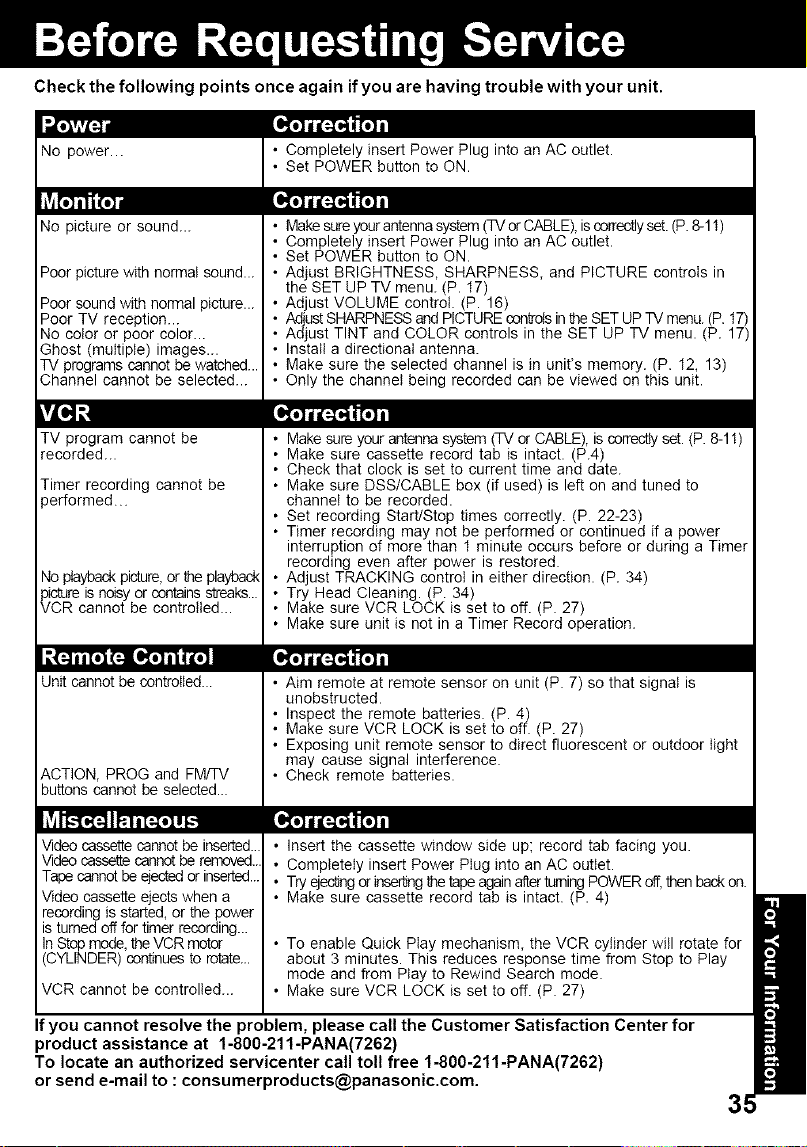
Check the following points once again ifyou are having trouble with your unit.
No power...
No picture or sound...
Poor picture with normal sound...
Poor sound with normal picture...
Poor TV reception...
No color or poor color...
Ghost (multiple) images...
TV programs cannot be watched...
Channel cannot be selected...
vL,q_t [_
TV program cannot be
recorded...
Timer recording cannot be
rerformed..
40playback picture,or _ playback
pictureis noisy or containsstreaks...
VCR cannot be controlled...
Unit cannot be controlled...
ACTION, PROG and FM/TV
buttons cannot be selected...
Video cassette cannot be inserted..
Video cassettecannotbe removed..
Tapecannotbe ejectedor inserted...
Video cassette ejects when a
recording is started, or the power
is turned off for timer recording...
InStop mode,theVCR motor
(CYLINDER) continuesto rotate...
VCR cannot be controlled...
• Completely insert Power Plug into an AC outlet.
• Set POWER button to ON.
• Makesure your antenna system(TV or CABLE),iscorrectlyset. (P.8-11)
• Completely insert Power Plug into an AC outlet.
• Set POWER button to ON.
• Adjust BRIGHTNESS, SHARPNESS, and PICTURE controls in
the SET UP TV menu. (P. 17)
Adjust VOLUME control. (P. 16)
Adjust SHARPNESSand PICTUREcontrolsin _qeSET UPTV menu. (P.17)
Adjust TINT and COLOR controls in the SET UP TV menu. (P. 17)
Instatt a directional antenna.
Make sure the selected channel is in unit's memory. (P. 12, 13)
Only the channet being recorded can be viewed on this unit.
• Make sure your antenna system (TV or CABLE), is correctlyset. (P. 8-11)
• Make sure cassette record tab is intact. (P.4)
• Check that clock is set to current time and date.
• Make sure DSS/CABLE box (if used) is left on and tuned to
channel to be recorded.
• Set recording Start/Stop times correctly. (P. 22-23)
• Timer recording may not be performed or continued if a power
interruption of more than 1 minute occurs before or during a Timer
recording even after power is restored.
• Adjust TRACKING control in either direction. (P. 34)
• Try Head Cleaning. (P. 34)
• Make sure VCR LOCK is set to off. (P. 27)
• Make sure unit is not in a Timer Record operation.
• Aim remote at remote sensor on unit (P. 7) so that signal is
unobstructed.
• Inspect the remote batteries. (P. 4)
• Make sure VCR LOCK is set to off. (P. 27)
• Exposing unit remote sensor to direct fluorescent or outdoor light
may cause signal interference.
• Check remote batteries.
• Insert the cassette window side up; record tab facing you.
• Completely insert Power Ptug into an AC outlet.
• Try ejec_ngor inseriJng_ tape againafterturningPOWER off,then back on.
• Make sure cassette record tab is intact. (P. 4)
• To enable Quick Play mechanism, the VCR cylinder will rotate for
about 3 minutes. This reduces response time from Stop to Play
mode and from Play to Rewind Search mode.
• Make sure VCR LOCK is set to off. (P. 27)
If you cannot resolve the problem, please call the Customer Satisfaction Center for
product assistance at 1-800-211-PANA(7262)
To locate an authorized servicenter call toll free 1-800-211-PANA(7262)
'_,_F'.Ew'_ri -Jl1"_;??E_E
1-800-332-5368 (Customer Orders Only)
Panasonic Services Company 20421 84th Avenue South, Kent, WA 98032
(6 am to 5 pm Monday - Friday; 6 am to 10:30 am Saturday; PST)
(Visa, Master Card, Discover Card, American Express, Check)
CALIFORNIA
6550 Katella Avenue
Cypress, CA 90630
800 Dubuque Avenue
S. San Francisco,
CA 94080
3878 Ruffin Road
Suite A
San Diego, CA 92123
FLORIDA
3700 North 29th Avenue
Suite 102
Hollywood, FL 33020
GEORGIA
8655 Roswelt Road
Suite 100
Atlanta, GA 30350
ILLINOIS
1709 North Randall Road
Elgin, IL 60123
MASSACHUSETTS
60 Glacier Drive,
Suite G
Westwood, MA 02090
MINNESOTA
7850-12th Avenue South
Airport Business Center
Bloomington, MN 55425
OHIO
2236 Waycross Road
Civic Center Plaza
Forest Park, OH 45240
PENNSYLVANIA
2221 Cabot Blvd. West
Suite B
Langhorne, PA 19047
TEXAS
13615 Welch Road
Suite 101
Farmers Branch,
TX 75244
WASHINGTON
20425-84th Avenue
South
Kent, WA 98032
HAWAII
99-859 twaiwa Street
Aiea, Hawaii 96701
Phone (808) 488-1996
Fax (808) 486-4369
As of June 2001
36
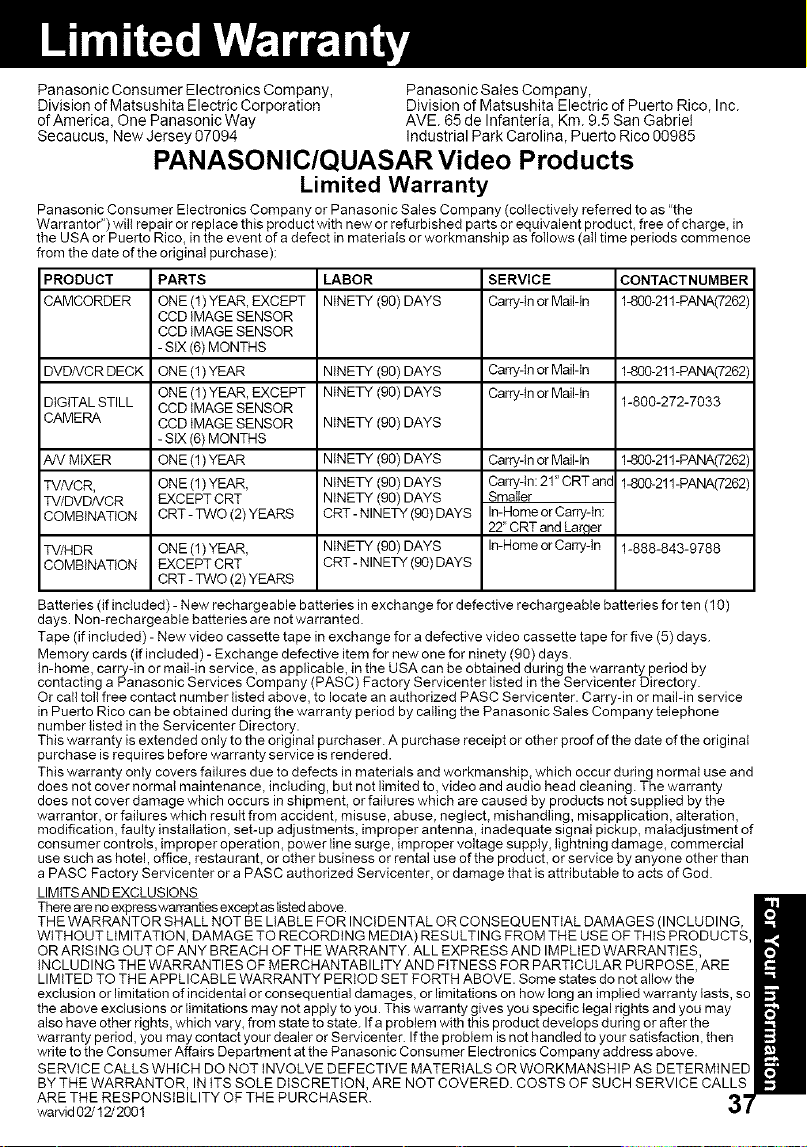
Panasonic Consumer Electronics Company, Panasonic Sales Company,
Division of Matsushita Electric Corporation Division of Matsushita Electric of Puerto Rico, Inc.
of America, One Panasonic Way AVE. 65 de Infanteria, Km. 9.5 San Gabriel
Secaucus, New Jersey 07094 Industrial Park Carolina, Puerto Rico 00985
PANASONIC/QUASAR Video Products
Limited Warranty
Panasonic Consumer Electronics Company or Panasonic Sales Company (collectively referred to as 'the
Warrantor") will repair or replace this product with new or refurbished parts or equivalent product, free of charge, in
the USA or Puerto Rico, in the event of a defect in materials or workmanship as foilows (all time periods commence
from the date of the original purchase):
PRODUCT LABOR SERVICE CONTACTNUMBER
CAMCORDER NINETY (90) DAYS Carry-in or Mail-in 1-800-211-PANA(7262)
DVD/VCR DECK NINETY (90) DAYS Carry-in or Mail-in 1-800-211-PANA(7262)
DIGITAL STILL NINETY (90) DAYS Carry-in or Mail-in 1-800-272-7033
CAMERA NINETY (90) DAYS
1-800-211-PANA(7262)
1-800-211-PANA(7262)
AN MIXER
TV/VCR,
TV/DVD/VCR
COMBINATION
TV/HDR
COMBINATION
PARTS
ONE (1) YEAR, EXCEPT
CCD IMAGE SENSOR
CCD IMAGE SENSOR
- SiX (6) MONTHS
ONE (1) YEAR
ONE (1) YEAR, EXCEPT
CCD IMAGE SENSOR
CCD IMAGE SENSOR
- SiX (6) MONTHS
ONE (1) YEAR
ONE (1) YEAR,
EXCEPT CRT
CRT- TWO (2) YEARS
ONE (1) YEAR,
EXCEPT CRT
CRT- TWO (2) YEARS
NINETY (90) DAYS
NINETY (90) DAYS
NINETY (90) DAYS
CRT- NINETY (90) DAYS
NINETY (90) DAYS
CRT- NINETY (90) DAYS
Carry-in or Mail-in
Cam!dn: 21_'CRT and
Smaller
In-Home or Carry-in:
22"CRT and Larqer
In-Home or Canydn 1-888-843-9788
Batteries (if included) - New rechargeable batteries in exchange for defective rechargeable batteries for ten (10)
days. Non-rechargeabie batteries are not warranted.
Tape (if included) - New video cassette tape in exchange for a defective video cassette tape for five (5) days.
Memory cards (if included) - Exchange defective item for new one for ninety (90) days.
In-home, carry-in or mail-in service, as applicable, in the USA can be obtained during the warranty period by
contacting a Panasonic Services Company (PASC) Factory Servicenter listed in the Servicenter Directory.
Or call toll free contact number listed above, to locate an authorized PASC Servicenter. Carry-in or mail-in service
in Puerto Rico can be obtained during the warranty period by calling the Panasonic Sales Company telephone
number listed inthe Servicenter Directory.
This warranty is extended only to the original purchaser. A purchase receipt or other proof of the date of the original
purchase is requires before warranty service is rendered.
This warranty only covers failures due to defects in materials and workmanship, which occur during normaI use and
does not cover normal maintenance, including, but not limited to, video and audio head cleaning. The warranty
does not cover damage which occurs in shipment, or failures which are caused by products not supplied by the
warrantor, or failures which resutt from accident, misuse, abuse, neglect, mishandling, misapplication, alteration,
modification, faulty installation, set-up adjustments, improper antenna, inadequate signal pickup, maladjustment of
consumer controls, improper operation, power line surge, improper voltage supply, lightning damage, commercial
use such as hotel, office, restaurant, or other business or rental use of the product, or service by anyone other than
a PASC Factory Servicenter or a PASC authorized Servicenter, or damage that is attributable to acts of God.
LIMtTSAND EXCLUSIONS
There are no express warranties except as listed above.
THE WARRANTOR SHALL NOT BE LIABLE FOR INCIDENTAL OR CONSEQUENTIAL DAMAGES (INCLUDING,
WITHOUT LIMITATION, DAMAGE TO RECORDING MEDIA) RESULTING FROM THE USE OF THIS PRODUCTS
OR ARISING OUT OF ANY BREACH OF THE WARRANTY. ALL EXPRESS AND IMPLIED WARRANTIES,
INCLUDING THE WARRANTIES OF MERCHANTABILITY AND FITNESS FOR PARTICULAR PURPOSE, ARE
LIMITED TO THE APPLICABLE WARRANTY PERIOD SET FORTH ABOVE. Some states do not allow the
exclusion or limitation of incidental or consequential damages, or limitations on how long an implied warrant
the above exclusions or limitations may not apply to you. This warranty gives you specific legal rights and you may
also have other rights, which vary, from state to state. If a problem with this product develops during or after the
warranty period, you may contact your dealer or Servicenter. Ifthe problem is not handled to your satisfaction, then
write to the Consumer Affairs Department at the Panasonic Consumer Electronics Company address above.
SERVICE CALLS WHICH DO NOT iNVOLVE DEFECTIVE MATERIALS OR WORKMANSHIP AS DETERMINED
BY THE WARRANTOR, IN iTS SOLE DiSCRETiON, ARE NOT COVERED. COSTS OF SUCH SERVICE CALLS
ARE THE RESPONSIBILITY OF THE PURCHASER.
warvid 02/12/2001
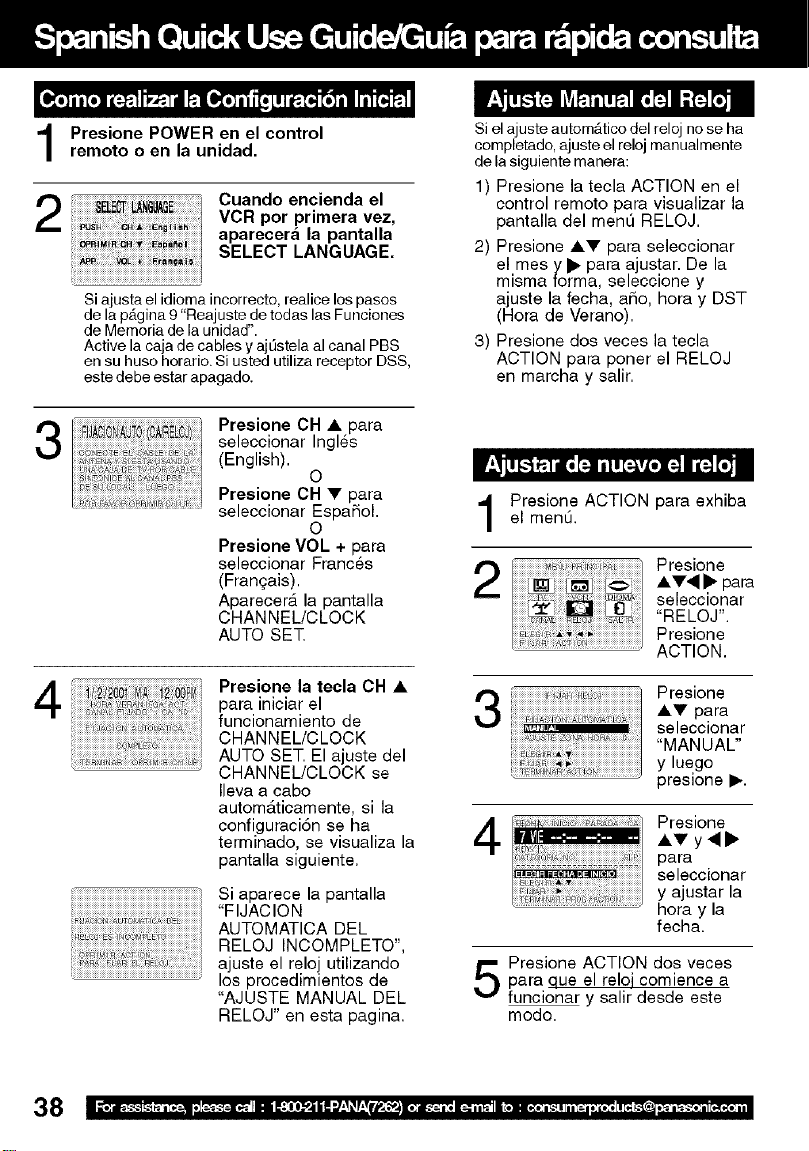
Presione POWER en el control
remoto o en la unidad.
3
4
Cuando encienda el
VCR por primera vez,
aparecer& la pantalla
SELECT LANGUAGE.
Si ajusta el idioma incorrecto, realice los pasos
de la pb.gina9 "Reajuste de todas las Funciones
de Memoria de la unidad".
Active la caja de cables y aj[3stela al canal PBS
en su huso horario. Si usted utiliza receptor DSS,
este debe estar apagado.
Presione OH A para
seleccionar Ingles
(English).
0
Presione OH • para
seleccionar Espa_ol.
0
Presione VOL + para
seleccionar Franc6s
(Franqais),
Aparecerb. la pantalla
CHANNEL/CLOCK
AUTO SET
Presione la tecla OH &
para iniciar el
funcionamiento de
CHANNEL/CLOCK
AUTO SET. El ajuste del
CHANNEL/CLOCK se
Ileva a cabo
autom_.ticamente, si la
configuraci6n se ha
terminado, se visualiza la
pantalla siguiente.
Si aparece la pantalla
"FIJACION
AUTOMATICA DEL
RELOJ INCOMPLETO",
ajuste el reloj utilizando
los procedimientos de
"AJUSTE MANUAL DEL
RELOJ" en esta pagina.
si el ajuste autom_.tico del reloj no se ha
completado, ajuste el reloj manualmente
de la siguiente manera:
1) Presione la tecla ACTION en el
control remoto para visualizar la
pantalla del ment] RELOJ.
2) Presione A• para seleccionar
el mes y I_ para ajustar. De la
misma forma, seleccione y
ajuste la fecha, aSo, hora y DST
(Hora de Verano).
3) Presione dos veces la tecla
ACTION para poner el RELOJ
en marcha y salir.
Presione ACTION para exhiba
el menLO.
2
Presione
,i,•,9 I_ para
seleccionar
"RELOJ".
Presione
ACTION.
3
4
Presione
A• para
seleccionar
"MANUAL"
y luego
presione I_.
Presione
A• y _11_
para
seleccionar
y ajustar la
hora y la
fecha.
Presione ACTION dos veces
para que el reloi comience a
funcionar y salir desde este
modo.
38
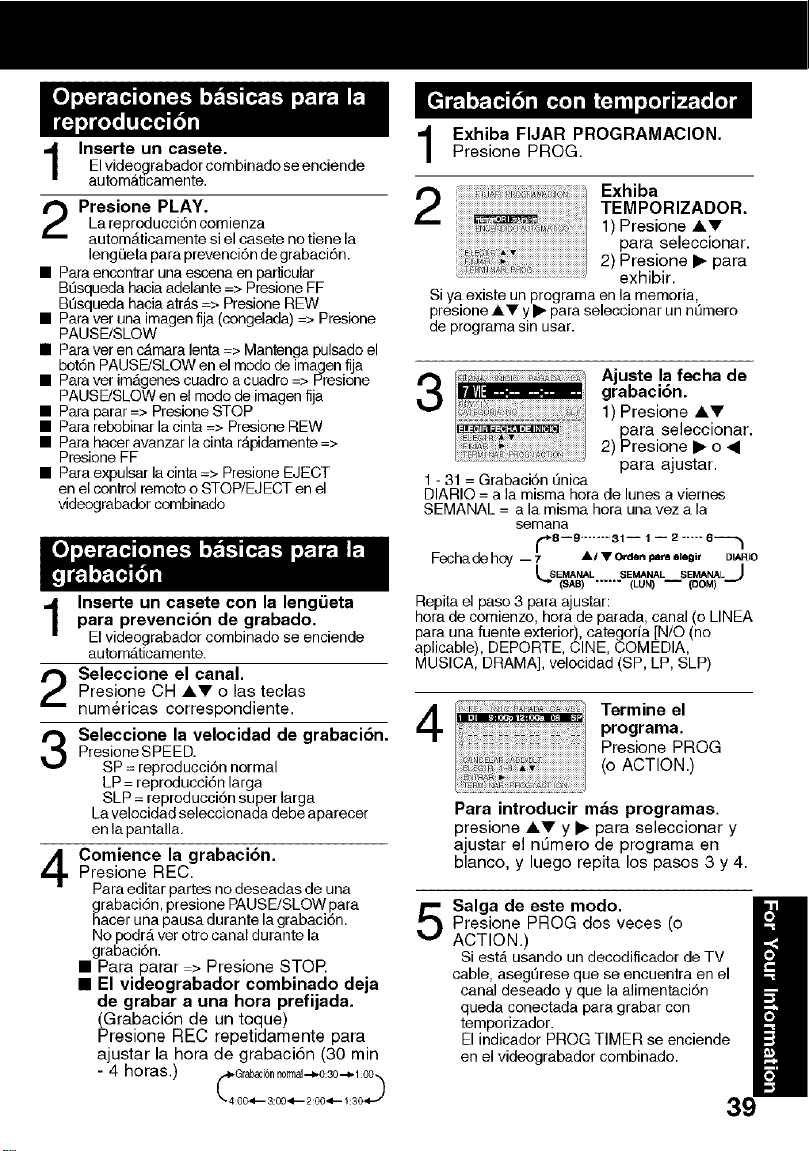
Inserte un casete.El vide0grabador combinado se enciende
automAbcamente.
Presione PLAY.
La reproducci6n comienza
automAticamente si el casete no tiene la
leng_]eta para prevenci6n de grabaci6n.
• Para encon'_ar una escena en particular
Bt_squeda hacia adelante => Presione EF
Bt_squeda hacia atr_ts=> Presione REW
• Para ver una imagen fija (congelada) => Presione
PAUSE/SLOW
• Para ver en cAmara lenta => Mantenga pulsado el
bot6n PAUSE!SLOW en el mode de imagen fija
• Para ver imD.genescuadro a cuadro => Presione
PAUSE/SLOW en el mode de imagen fija
• Para parar => Presione STOP
• Para rebobinar la cinta => Presione REW
• Para hacer avanzar la cinta rApidamente =>
Presione EF
• Para expulsar la cinta => Presione EJECT
en el control remoto o STOP/EJECT en el
videograbade( cornbinado
Inserte un casete con la leng_ieta
para prevenci6n de grabado.
El videograbador combinado se enciende
automD.ticamente.
Seleccione el canal.
Presione CH iV o las teclas
num_ricas correspondiente,
Seleccione la velocidad de grabaci6n,
Presione SPEED.
SP = reproducci6n normal
LP = reproducci6n larga
SLP = reproducci6n super larga
Lavelocidad seleccionada debe aparecer
en la pantalla.
Comience la grabacidn.
Presione REG.
Para editar partes no deseadas de una
ghrabaci6n,presione PAUSE/SLOW para
acer una pausa durante la grabaci6n.
No podr_,ver ot(o canal du(ante la
grabaci6n.
• Para parar > Presione STOR
• El videograbador combinado deja
de grabar a una hora prefijada,
(Grabaci6n de un toque)
Presione REC repetidamente para
ajustar la hora de grabaci6n (30 min
-4 horas.)_44 _r_4___63n._0__2-4_0.34_01.-_311_
Exhiba FIJAR PROGRAMACION.Presione PROG.
ii ]7)_7ii)¢__ ioi Exhiba
TEMPORIZADOR.
1) Presione i'll'
para seleooionar.
2) Presione • para
exhibir.
Si ya existe un programa en la memoria,
presione iY y • para seleccionar un nt]mero
de programa sin usar.
Ajuste la fecha de
grabaci6n.
1) Presione iV
para seleccionar.
2) Presione • o _1
para ajustar,
1 - 31 = Grabaci6n Qnica
DIARIO = a la misma hora de lunes a viernes
SEMANAL = a la misma hora una vez a la
semana
_8 I_ ........ _1 i 1 i _ "ill" 6_
Fecha dehoy - 7 • / • 1Oe_len I olegil, DIAR(O
Repita el paso 3 para ajustar:
hora de comienzo, hora de parada, canal (o LINEA
para una fuente exterior), categoria INtO (no
aplicable), DEPORTE, CINE, COMEDIA,
MUSICA, DRAMA], velocidad (SP, LP, SLP)
4
Termine el
programa.
Presione PROG
(o ACTION.)
Para introducir m_s programas.
presione i_ y • para seleccionar y
ajustar el nOmero de programa en
blanco, y luego repita los pasos 3 y 4.
Salga de este modo.
Presione PROG dos veces (o
ACTION.)
Si estb. usando un decodificador de TV
cable, asegtlrese que se encoentra en el
canal deseado y que la alimentaci6n
queda conectada para grabar con
temporizador.
El indicador PROG TIMER se enciende
en el videograbador combinado.

A Accessories..................................................4
AudioMute.................................................16
AutoOperationFunctions...........................25
B Batteries.......................................................4
BeforeRequestingService.........................35
BeforeUsing.................................................4
BlockingMessage......................................32
BlueScreenDisplay...................................33
C CaptionOnMute........................................20
Channel...........................................8-13,33
ChannelCaption.........................................28
Clock..........................................................12
ClosedCaption...........................................20
CommercialSkip........................................26
Connections.........................................8-11
Connections,DSS/ Cable Box ............ 10 -! !
Connections, OutdoorAntenna ............... 8 - 9
Copy Your Tapes (Dubbing) ....................... 15
D DST (Daylight Saving Time) ....................... 34
E Eject tape ................................................... !4
F Fast Forward .............................................. 14
Forward Search .......................................... !4
Frame by Frame Advance .......................... !4
Front Panel Indicators .................................. 7
Function Display ......................................... 33
H Head Cleaning ............................................ 34
I ImportantSafeguardsand Precautions ........ 2
Index Search .............................................. 24
Initial Setup for ANT. / Cable Connection .....8
Initial Setup for DSS / Cable box Connection .. 10
InputMode ................................................. 15
INSTANTALARM ....................................... !9
L Language .............................................. 8- 13
Limited Warranty ........................................ 37
Location of Controls ............................... 6 - 7
N NIGHT Mode .............................................. 16
O 100 Key ...................................................... 16
One Touch Recording ................................ 14
ON-TIMER with Alarm ................................ 18
P Phones .................................................. 16
Playback ................................................ 14
Picture Adjustment ................................ 17
Program End Search ............................. 24
Q Quality Picture ....................................... 34
R RapidTune ............................................ 16
Rec(ord) ................................................ 14
Record/Playback Speed Settings .......... 34
Remote Control Buttons .......................... 6
Repeat Play ........................................... 26
Reset Language, Channels, Clock ........ 12
Reset unit ................................................ 9
Reverse Search ..................................... 14
Rewind .................................................. 14
S Secret Code .......................................... 30
Service Center List ................................ 36
SELF-DEMO Mode .................................. 4
SleepTimer ........................................... 19
Slow Motion ............................................. 4
Spanish Quick Use Guide ..................... 38
Special VCR Features ........................... 27
Specifications ........................................ 34
Still Picture ............................................ 14
STOP .................................................... !4
T Tape Erasure Prevention ......................... 4
Tape Position Display ............................ 25
Time Stamp ........................................... 29
Time Zone Adjust .................................. 13
Timer Program Review, Replace, Clear 23
Timer Recording .................................... 22
Timer Recording Cancellation ............... 23
TV Operation ......................................... !6
TV Timer Features ................................ !8
U unit, Front/Rearview ............................... 7
US MOVIES/TV PROGRAMS Ratings .. 31
V VCR Lock .............................................. 27
VCR Status & Clock Display ................. 33
V-Chip Control Feature .......................... 30
W Warning and Instruction Displays .......... 33
Weak Signal Display ON/OFF ............... 27
Z Zero Search ........................................... 26
Panasonic Consumer Electronics Company,
Division of Matsushita Electric Corporation of America
One Panasonic Way Secaucus,
New Jersey 07094
Panasonic Sales Company ("PSC"),
Division of Matsushita Electric of Puerto Rico, Inc.
Ave. 65 de Infanteria. Km. 9.5
San Gabriel Industrial Park, Carolina, Puerto Rico 00985
Printed in U.S.A
LSQT0502A
M0801-0